On 1/31/2022 1:27 PM, Woody wrote:
Can anyone give me pointers how to program a Baofeng UV-5RE from Chirp on a PC running W10Pro?
The main issue is which port to use. Device Manager shows my machine has 17 ports but every on comes up with Error2 (whatever that is but I suspect port not found.)
The main issue I think is the interface cable driver. I have an unbranded one that is rated as FTDI FT232RL but whilst I can find a list of drivers there is nothing to indicate which one to use.
If anyone out there has cracked how to prog a UV-5RE from a PC I would be forever in your debt.
Do you physically have 17 USB devices of the serial port persuasion connected ?
This is a hint:
https://social.msdn.microsoft.com/Forums/windowsdesktop/en-US/878bc686-9b30-4b40-b37e-58cfe34eb779/trying-to-open-serial-port-com20-error-2-system-cannot-find-the-file-specified?forum=windowsgeneraldevelopmentissues
"CreateFile consistently fails with error 2: System cannot find the file specified."
While they do make comm server cards, I don't know if they have that many
ports on them. You are likely attempting to access non-existent port numbers.
An attempt to reach a high port number is failing, because there really
isn't any hardware there.
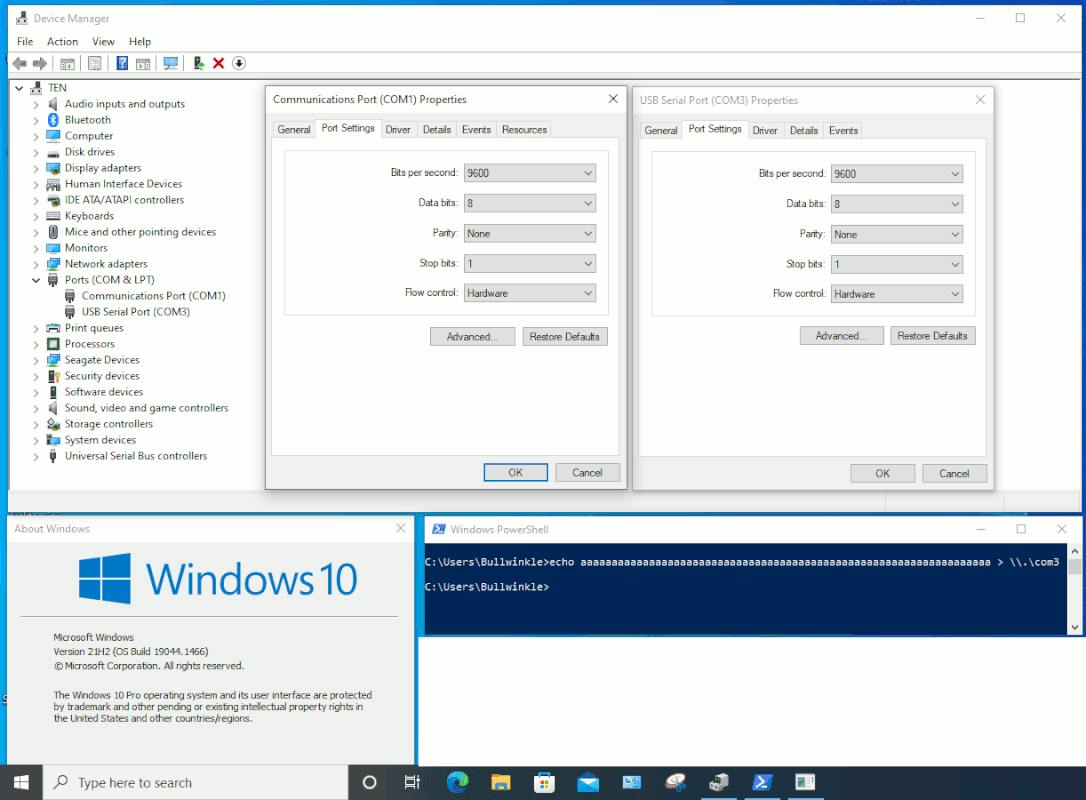
I can show you my Windows 10 setup. My COM1 is a real serial port, based on
a SuperIO and a TI 75232 buffer chip. It's on the motherboard. The COM3 port
is an FTDI USB one, with flashing LEDs for TX and RX. It was set up on another OS, years ago, and it hasn't forgotten its COM3 port assignment. A control panel
that came with the FTDI software, helped set the COM number. This suggests that on Windows 10, you have to install the software that came in the box, if you expect to assign the FTDI a port number or so.
[Picture] If the image frame is blank, right click it and select "Reload"
https://i.postimg.cc/YCWTzrQw/Win10-RS232.gif
If you open a Command Prompt, as an ordinary user, you can test.
If you right click the Start menu, and select Powershell,
you can type "cmd" in there and it will run Command Prompt
commands. I'm using COM3, because my FTDI was already set up
as COM3, with the older software.
echo aaaaaaaaaaaaaaaaaaaaaaaaaaaaaaaaaaaaaaaaaaaaaaaa > \\.\com3
If I were to enter that identifier inside a program, then the string looks like
\\\\.\\com3
if it happens to travel through the shell handler. The extra backslashes
are escape characters, so the other slashes won't be "interpreted". Like, if the
Baofeng software worked this way in COmmand Prompt...
baofeng-programmer.exe \\\\.\\com3
I look at my USB COM3 device, and the LED changes intensity
as the string of characters leaves the machine.
echo aaaaaaaaaaaaaaaaaaaaaaaaaaaaaaaaaaaaaaaaaaaaaaaa > \\.\com3
FTDI ports have a storied history. At one point, a Chinese knockoff, constructed using a microcontroller, began to make the rounds. The
FTDI people released a driver which screwed up the Chinese knockoff
so it would no longer work. They were roundly rebuked for doing that.
The FTDI dongles don't have normal serial numbers. There was some
deal about a Virtual COmm Port package, with a control panel for VCP,
that would allow setting a serial number. That also seems to identify
the COM port number used.
They have some scheme where a smaller number of bits are
written, to make a virtual comm port assignment. The FTDI chip
had flash memory, but only some small number of bits were
inside the chip.
What is interesting, is my FTDI was just sitting there
unused, and is no longer used with the original machine
where the VCP driver had been installed. Yet, the FTDI device
still knows it is COM3 by default. So whatever "serial number"
notion they have, it seems the bit pattern may be indicating
what port the thing is.
When I do the "echo" command, i get no error 2.
You can have COM errors because a port is "busy", and that
is a more normal error condition. But your error is not a busy
port, it's just you are using a non-existent COM number.
Paul
--- SoupGate-Win32 v1.05
* Origin: fsxNet Usenet Gateway (21:1/5)