Has MS recently turned down the volune available from my desktop
headphone socket
On 03/08/2022 14:11, Jim Stewart ... wrote:
Has MS recently turned down the volune available from my desktop
headphone socket
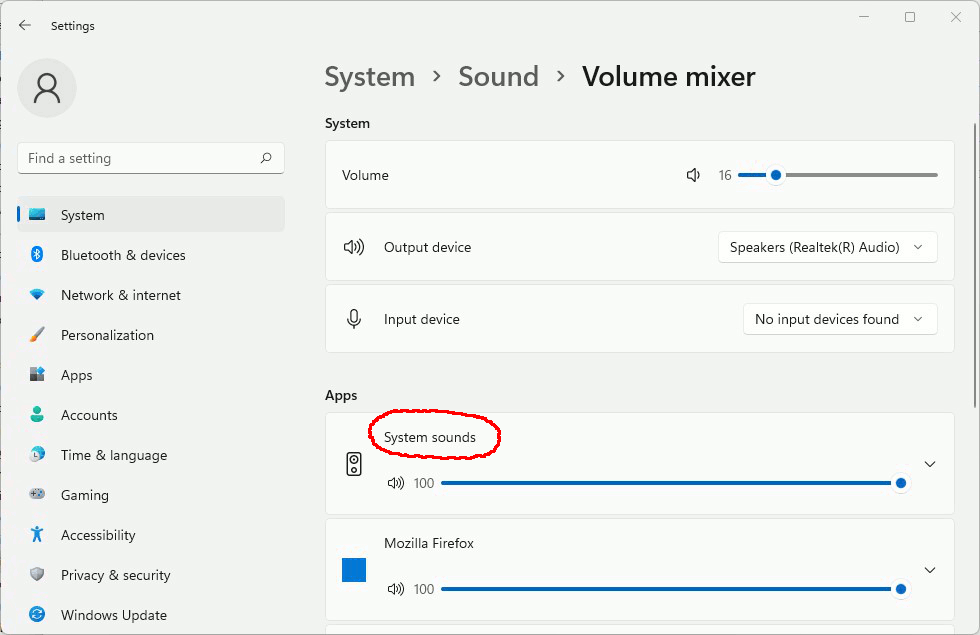
No, they probably hid it in another mixer control somewhere where each
App gets it's own volume slider.
On 03/08/2022 14:17, A. non Eyemouse wrote:
On 03/08/2022 14:11, Jim Stewart ... wrote:can't find any
Has MS recently turned down the volune available from my desktop
headphone socket
No, they probably hid it in another mixer control somewhere where each
App gets it's own volume slider.
On 03/08/2022 14:40, Jim Stewart ... wrote:
On 03/08/2022 14:17, A. non Eyemouse wrote:
On 03/08/2022 14:11, Jim Stewart ... wrote:can't find any
Has MS recently turned down the volune available from my desktop headphone socket
No, they probably hid it in another mixer control somewhere where each App gets it's own volume slider.
I don't know which version of Windows you are using. https://www.howtogeek.com/352787/how-to-set-per-app-sound-outputs-in-windows-10/
Or if you are even using Windows 10...
On 8/3/2022 9:52 AM, A. non Eyemouse wrote:can't sort it
On 03/08/2022 14:40, Jim Stewart ... wrote:
On 03/08/2022 14:17, A. non Eyemouse wrote:
On 03/08/2022 14:11, Jim Stewart ... wrote:can't find any
Has MS recently turned down the volune available from my desktop
headphone socket
No, they probably hid it in another mixer control somewhere where
each App gets it's own volume slider.
I don't know which version of Windows you are using.
https://www.howtogeek.com/352787/how-to-set-per-app-sound-outputs-in-windows-10/
Or if you are even using Windows 10...
[Picture]
https://i.postimg.cc/HkrCCLnq/app-volume.gif
At one time, I think the browser could record the volume
setting for each web site. So in the cookies, would be a volume
setting for Youtube. I don't know if they still do that or not.
But at least at the application level, you could dial Firefox down
from the 100% level. The master volume level still remains
in control of the mixer output.
Paul
On 03/08/2022 18:02, Paul wrote:
On 8/3/2022 9:52 AM, A. non Eyemouse wrote:can't sort it
On 03/08/2022 14:40, Jim Stewart ... wrote:
On 03/08/2022 14:17, A. non Eyemouse wrote:
On 03/08/2022 14:11, Jim Stewart ... wrote:can't find any
Has MS recently turned down the volune available from my desktop
headphone socket
No, they probably hid it in another mixer control somewhere where
each App gets it's own volume slider.
I don't know which version of Windows you are using.
https://www.howtogeek.com/352787/how-to-set-per-app-sound-outputs-in-windows-10/
Or if you are even using Windows 10...
[Picture]
https://i.postimg.cc/HkrCCLnq/app-volume.gif
At one time, I think the browser could record the volume
setting for each web site. So in the cookies, would be a volume
setting for Youtube. I don't know if they still do that or not.
But at least at the application level, you could dial Firefox down
from the 100% level. The master volume level still remains
in control of the mixer output.
Paul
On 03/08/2022 18:02, Paul wrote:
On 8/3/2022 9:52 AM, A. non Eyemouse wrote:can't sort it
On 03/08/2022 14:40, Jim Stewart ... wrote:
On 03/08/2022 14:17, A. non Eyemouse wrote:
On 03/08/2022 14:11, Jim Stewart ... wrote:can't find any
Has MS recently turned down the volune available from my desktop headphone socket
No, they probably hid it in another mixer control somewhere where each App gets it's own volume slider.
I don't know which version of Windows you are using.
https://www.howtogeek.com/352787/how-to-set-per-app-sound-outputs-in-windows-10/
Or if you are even using Windows 10...
[Picture]
https://i.postimg.cc/HkrCCLnq/app-volume.gif
At one time, I think the browser could record the volume
setting for each web site. So in the cookies, would be a volume
setting for Youtube. I don't know if they still do that or not.
But at least at the application level, you could dial Firefox down
from the 100% level. The master volume level still remains
in control of the mixer output.
Paul
On 03/08/2022 18:35, Jim Stewart ... wrote:
On 03/08/2022 18:02, Paul wrote:
On 8/3/2022 9:52 AM, A. non Eyemouse wrote:can't sort it
On 03/08/2022 14:40, Jim Stewart ... wrote:
On 03/08/2022 14:17, A. non Eyemouse wrote:
On 03/08/2022 14:11, Jim Stewart ... wrote:can't find any
Has MS recently turned down the volune available from my desktop >>>>>>> headphone socket
No, they probably hid it in another mixer control somewhere where
each App gets it's own volume slider.
I don't know which version of Windows you are using.
https://www.howtogeek.com/352787/how-to-set-per-app-sound-outputs-in-windows-10/
Or if you are even using Windows 10...
[Picture]
https://i.postimg.cc/HkrCCLnq/app-volume.gif
At one time, I think the browser could record the volume
setting for each web site. So in the cookies, would be a volume
setting for Youtube. I don't know if they still do that or not.
But at least at the application level, you could dial Firefox down
from the 100% level. The master volume level still remains
in control of the mixer output.
Paul
Time to buy another road kill computer? Some nice HP laptops on eBay at
the moment for less than £150.
Has MS recently turned down the volune available from my desktop
headphone socket
In message <tcds5i$2890n$[email protected]>, Jim Stewart ... <[email protected]> writesno idaea what that is
Has MS recently turned down the volune available from my desktop
headphone socket
I find the volume is too low on mine, but I might be a deaf old ohttre.
I'm wondering if there's a registry setting.
Brian
On 04/08/2022 19:14, brian wrote:
In message <tcds5i$2890n$[email protected]>, Jim Stewart ...no idaea what that is
<[email protected]> writes
Has MS recently turned down the volune available from my desktop
headphone socket
I find the volume is too low on mine, but I might be a deaf old ohttre.
I'm wondering if there's a registry setting.
Brian
On Fri, 5 Aug 2022 08:25:27 +0100, "Jim Stewart ..." <[email protected]> wrote:could try the reay bionic ear attachment....
On 04/08/2022 19:14, brian wrote:
In message <tcds5i$2890n$[email protected]>, Jim Stewart ...no idaea what that is
<[email protected]> writes
Has MS recently turned down the volune available from my desktop
headphone socket
I find the volume is too low on mine, but I might be a deaf old ohttre.
I'm wondering if there's a registry setting.
Brian
You could try a volume booster, Ear trumpet for example. https://eartrumpet.app
| Sysop: | Keyop |
|---|---|
| Location: | Huddersfield, West Yorkshire, UK |
| Users: | 766 |
| Nodes: | 16 (0 / 16) |
| Uptime: | 02:50:43 |
| Calls: | 12,765 |
| Calls today: | 3 |
| Files: | 15,363 |
| Messages: | 6,557,242 |