• Re: SOT: Edge is pushing me over the edge

    From GB@21:1/5 to Scott on Sun Aug 3 12:38:41 2025
    On 03/08/2025 12:33, Scott wrote:
    I'm irritated today. Is there a way of stopping Edge gatecrashing my
    computer every time I switch it on? I have set Google Chrome as my
    default browser, yet Edge continues to appear.


    Gatecrashing. Continues to appear - how?

    Every time there's an update to Windows (about once a month) it offers
    to make Edge the default browser. I haven't noticed Edge being intrusive
    apart from that.

    Did you sort Chrome out yet? Maybe, the Edge problemo is linked to that?
    Seems quite likely, really.

    --- SoupGate-Win32 v1.05
    * Origin: fsxNet Usenet Gateway (21:1/5)
  • From Scott@21:1/5 to All on Sun Aug 3 13:07:19 2025
    On Sun, 3 Aug 2025 12:38:41 +0100, GB <[email protected]d>
    wrote:

    On 03/08/2025 12:33, Scott wrote:
    I'm irritated today. Is there a way of stopping Edge gatecrashing my
    computer every time I switch it on? I have set Google Chrome as my
    default browser, yet Edge continues to appear.


    Gatecrashing. Continues to appear - how?

    Every time there's an update to Windows (about once a month) it offers
    to make Edge the default browser. I haven't noticed Edge being intrusive >apart from that.

    Did you sort Chrome out yet? Maybe, the Edge problemo is linked to that? >Seems quite likely, really.

    I had not made this connection. Maybe I am confusing Edge with Bing.
    When I start up my PC I get a message saying 'Microsoft Bing.
    Microsoft and our third-party vendors use cookies and similar
    technologies .... etc'. I reject this. The next page to appear is 'https://www.bing.com/... ' . How do I stop all this nonsense and get
    direct to the default browser (Google Chrome)?

    I thought the Chrome problem was sorted, until today when I received
    another profile error message. Do you think that not finding a valid
    profile for Google results in a default to Bing?

    --- SoupGate-Win32 v1.05
    * Origin: fsxNet Usenet Gateway (21:1/5)
  • From Scott@21:1/5 to All on Sun Aug 3 12:33:33 2025
    I'm irritated today. Is there a way of stopping Edge gatecrashing my
    computer every time I switch it on? I have set Google Chrome as my
    default browser, yet Edge continues to appear.

    --- SoupGate-Win32 v1.05
    * Origin: fsxNet Usenet Gateway (21:1/5)
  • From Paul@21:1/5 to Scott on Sun Aug 3 08:05:08 2025
    On Sun, 8/3/2025 7:33 AM, Scott wrote:
    I'm irritated today. Is there a way of stopping Edge gatecrashing my
    computer every time I switch it on? I have set Google Chrome as my
    default browser, yet Edge continues to appear.


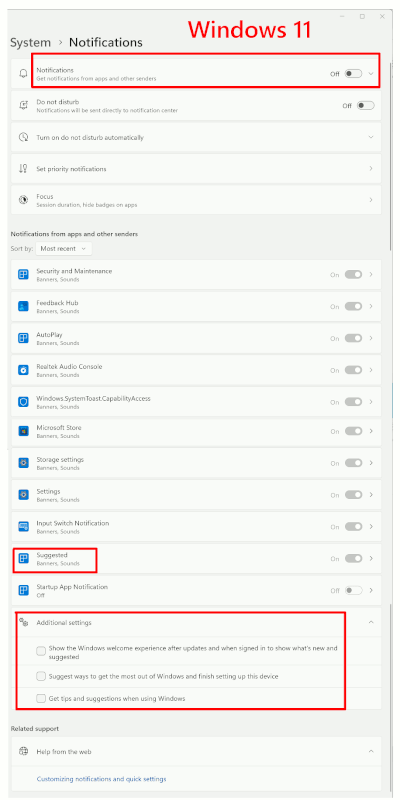
    [Picture] Windows 11 Home and assorted ticky boxes

    https://i.postimg.cc/kGC560zV/Notifications-W11.gif

    You have to turn those off in a specific order, to
    make the panel look as spartan as possible.

    That's to try to stop "advertising notifications" from appearing.

    It hasn't changed much, in terms of the need to deceive
    people into not turning stuff off. The three tick boxes
    at the bottom still matter :-)

    [Picture]

    https://i.postimg.cc/mgTBZT63/Notifications-W11-2025.gif

    Microsoft Edge is updated practically every time you turn
    on the machine. There is a MSEdge instance and a WebView2
    interpreter instance. There could be four copies of MSEdge
    stored on the drive. MSEdge can be a "startup item".
    But the advertising notification you are seeing, would be
    part of advertising and not a part of the MSEdge update
    package as such. Similar to how the Windows Backup keeps
    running, and the "remind me in three days" one keeps
    running. All part of advertising.

    Nothing prevents a Microsoft marketing package from
    ignoring the controls.

    Paul

    --- SoupGate-Win32 v1.05
    * Origin: fsxNet Usenet Gateway (21:1/5)
  • From Andy Burns@21:1/5 to Scott on Sun Aug 3 13:01:46 2025
    Scott wrote:

    Is there a way of stopping Edge gatecrashing my computer every time
    I switch it on?

    Make sure you don't click on anything other than empty space on the lock screen, if you hit any of those rectangles that light-up as you wave the
    mouse around, then Edge will activate.

    --- SoupGate-Win32 v1.05
    * Origin: fsxNet Usenet Gateway (21:1/5)
  • From The Other John@21:1/5 to All on Sun Aug 3 14:12:59 2025
    Have you tried opening task manager, selecting 'startup apps' and
    disabling Edge? Worked for me.
    --
    TOJ

    --- SoupGate-Win32 v1.05
    * Origin: fsxNet Usenet Gateway (21:1/5)