On Sun, 7/6/2025 5:19 AM, Pancho wrote:
On 7/5/25 16:43, Adrian wrote:
In message <[email protected]>, Jeff Gaines <[email protected]> writes
I need to re-install Windows 10 on my main PC. In the good old days of Legacy BIOS and MBR this would be a 10 minute job with Acronis True Image, with UEFI, GPT and several partitions it means a full re- install for me. Not an issue, my PC is laid
out to be restored easily, only annoyance sometimes being getting Office activated.
However, once I have done this and before I break it again I wondered if the old Backup and Restore (Windows 7) works on Windows 10. The official MSFT question page has several thousand comments saying it doesn't.
Anybody have hands on experience and tell me it it does/doesn't work please?
I've been using it on a weekly basis for over 6 years, seemingly without any problem.
Adrian
Backing up is the easy bit, have you been restoring too?
And that, sadly, is the problem.
*******
It's hard to quantify what the purpose of the Microsoft product is.
When presenting info like this, there is always the danger of including FUD
for nothing. Yet, collecting evidence is hard for this stuff, so who can
say whether it's a "bargain in bad faith".
https://www.reddit.com/r/Windows11/comments/1bxbwyo/will_the_windows_7_backup_system_go_away_in/
"Long answer: Backup and Restore (Windows 7) has been depreciated since Windows 10
version 1709 and Microsoft recommends using 3rd-party software as it
is no longer reliable for disk imaging. It's still included in Windows
for mounting old images, and there's no guarantee it will remain in Windows
in the future.
Short answer: Stop using that for disk imaging.
Macrium Reflect
Veeam Backup & Replication Community Edition
AOMEI Backupper Standard (Notice no Easeus Freebie mentioned :-) )
are a safer bet for backups.
Macrium Reflect, the Free version can still be downloaded.
It comes a bit closer to being a disk imaging software.
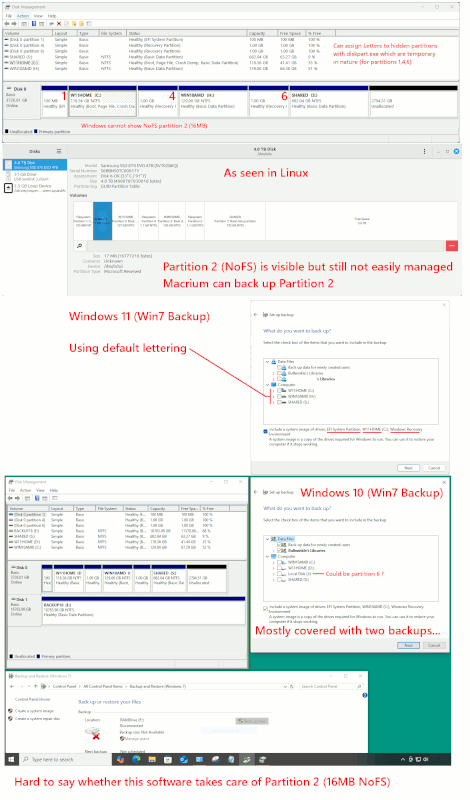
To get the W7 Backup to get closer to a thorough backup,
you have to use the diskpart.exe "Letter Assignment Trick"
to get all the partitions with file systems to show up.
When you do letter assignment to Hidden Partitions, not
all subsystems honour the trick.
W7 Backup checks the GPT partition table for the "Critical Bit"
in the GPT attributes. Critical partitions are backed up
as part of the System Image minimal set. If you artificially
made all the partitions critical, that improves the odds
they would all get backed up.
Only two partitions are marked critical here, to ensure they
are backed up. The W7 backup seems to know that ESP and C: drives
are critical as well and are to be invited in, with a tick box.
diskpart
Microsoft DiskPart version 10.0.22621.1
Copyright (C) Microsoft Corporation.
On computer: WALLACE
DISKPART> select disk 0
DISKPART> list partition
Partition ### Type Size Offset
------------- ---------------- ------- -------
Partition 1 System 100 MB 1024 KB EFI System Partition (Windows folder, Ubuntu folder, etc)
Partition 2 Reserved 16 MB 101 MB 16MB boot track cache ??? NoFS. Not handled well by Linux GParted,
Partition 3 Primary 118 GB 117 MB W11 C:
Partition 4 Recovery 1024 MB 118 GB Windows recovery partition (emergency W11 boot)
Partition 5 Primary 128 GB 119 GB W10 C:
Partition 6 Recovery 1025 MB 248 GB Windows recovery partition (emergency W10 boot)
Partition 7 Primary 682 GB 249 GB
DISKPART> select partition 1
DISKPART> detail partition
Attrib : 0000000000000000
DISKPART> select partition 2
DISKPART> detail partition
Attrib : 0000000000000000
DISKPART> select partition 3
DISKPART> detail partition
Attrib : 0000000000000000
DISKPART> select partition 4 <===
DISKPART> detail partition
Attrib : 0X0000000000000001
* Volume 4 NTFS Partition 1024 MB Healthy Hidden
DISKPART> select partition 5
DISKPART> detail partition
Attrib : 0000000000000000
DISKPART> select partition 6 <===
DISKPART> detail partition
Attrib : 0X0000000000000001
Offset in Bytes: 266796531712
* Volume 5 NTFS Partition 1025 MB Healthy Hidden
DISKPART> select partition 7
DISKPART> detail partition
Attrib : 0000000000000000
DISKPART> exit
***********************************
But if a person is to use this as a Macrium Replacement,
some sort of "hacks" or "tricks" will be needed to make
the operation more complete. In particular, Partition 2
is hard to get backed up (since we don't understand the
real reason it exists, we can't take chances on discovering
later it should have been included).
Partition 2 is a NoFS partition, a 16MB bag of bits. A boot
track on a modern (1MB multiples) disk, is only 1MB at most,
and the boot track isn't even needed on a GPT disk drive.
The GPT table already has a backup (up at the end of the
hard drive) so that's not it either. Other excuses for that
partition, make no sense. There have been multiple excuses
for its purpose.
The partition 2 can be seen in Gnome Disk viewer, but the
partition is not shown in Windows. Again, a lot of behaviors
in software, are a function of NoFS, and only Macrium is
smart enough to use "dd" to back up the 16MB of data, whatever
the data represents. Commercial backup softwares do not
place as much faith in "categories" like the Window 7 Backup
does, and this makes them "more trustworthy as companions".
They won't take their eye off the ball.
One user reported a bug against AOMEI, where the GPT Attribute
was not handled properly. The user reported the bug to AOMEI
and they fixed it. But this is some time after the AOMEI
product was shipping -- any product can make mistakes,
but in particular, I don't like to see users reporting
bugs like this, after a product has been shipping for
a couple years.
Without even testing the Restore (which I might have
tried in the past), I cannot recommend this bucket of
bolts, purely because of its design philosophy.
Note that, the Macrium Rescue CD (which the owner has to
prepare using the program menu), it has a "Boot Repair" item
on the CD. In the event a Bare Metal Restore does not boot,
you can use that to fix it. The Boot Repair uses Microsoft
utilities to restore boot. But, the Boot Repair does not
have all the files to reload a broken ESP, and neither does
the three-stage repair the OS attempts, seemingly include
a set of those files. This means, it is possible to get
in a pinch, where neither of the repair options work "easily".
You can define new boot materials with about four commands,
and it may still be possible to repair such a mess.
*******
This is a topic where *the user* does the test, because
nobody cares about your data like *the user*.
It takes about one year of "casual test" to vet a backup
software. Nobody wants to be starting with a stack of
blank hard drives, and doing a test plan of everything
in a compressed time period. But over the span of a
year, you can try this and that, and prove to yourself
the product works.
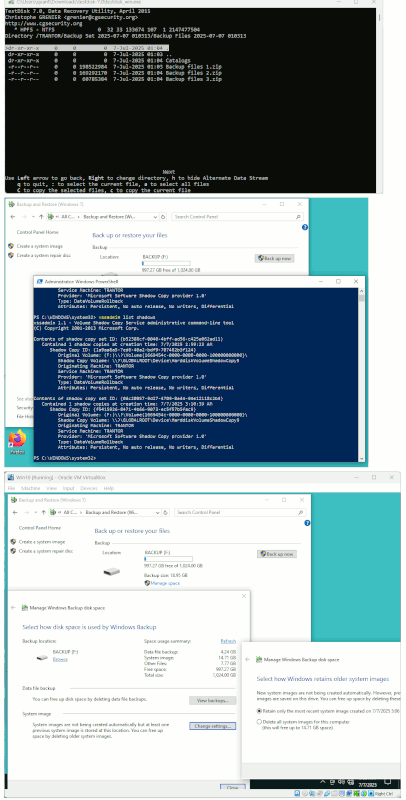
W7 Backup is bad enough, few people volunteer to do the
Restore. I think I tried once, and I don't think it worked.
But I didn't spend time "kicking it in the nuts" to see
if it could be tipped upright again. It would need
a lot more of my "casual" tests, before I would actually
trust that thing. The appearance of the thing, scares me.
[Picture]
https://i.postimg.cc/7LDvfGmz/Win7-Backup-Planning.gif
Summary: You really really have to ask yourself, what Microsoft
was thinking when they invented Partition 2.
Paul
--- SoupGate-Win32 v1.05
* Origin: fsxNet Usenet Gateway (21:1/5)