On Fri, 7/4/2025 3:47 AM, Jeff Gaines wrote:
I've used that heading because many years ago I found a way of getting Windows Explorer (as it was then) to show an icon sized image of a .bmp file instead of the icon of the app that opened the file. The trick was:
To display a bitmap as an icon go to HKEY_CLASSES_ROOT\Paint.Picture\DefaultIcon and set to %1
I want to do the same for .png and .jpg files. I "think" it is standard nowadays, certainly that's what happens on my other PCs but not on my main PC, the one I live on.
At some stage I was editing graphics files non-stop and I think I changed the file association for .png/.jpg to Paint.Net but I can't for the life of me find a way to get it back to how it was.
Any suggestions please? Otherwise it's re-install time...
It's ugly, merging a .reg , and you should have a backup of C:
before going ahead. When I reviewed one of these previously, there
were some "Brink-isms" in the file, so it wasn't a clean reset.
Maybe that has been fixed.
https://www.tenforums.com/tutorials/8703-restore-default-file-type-associations-windows-10-a.html
Make a note of the special step before merging the registry samples.
"Enable or Disable UserChoice Protection Driver (UCPD) in Windows 11 and 10 | Windows 11 Forum"
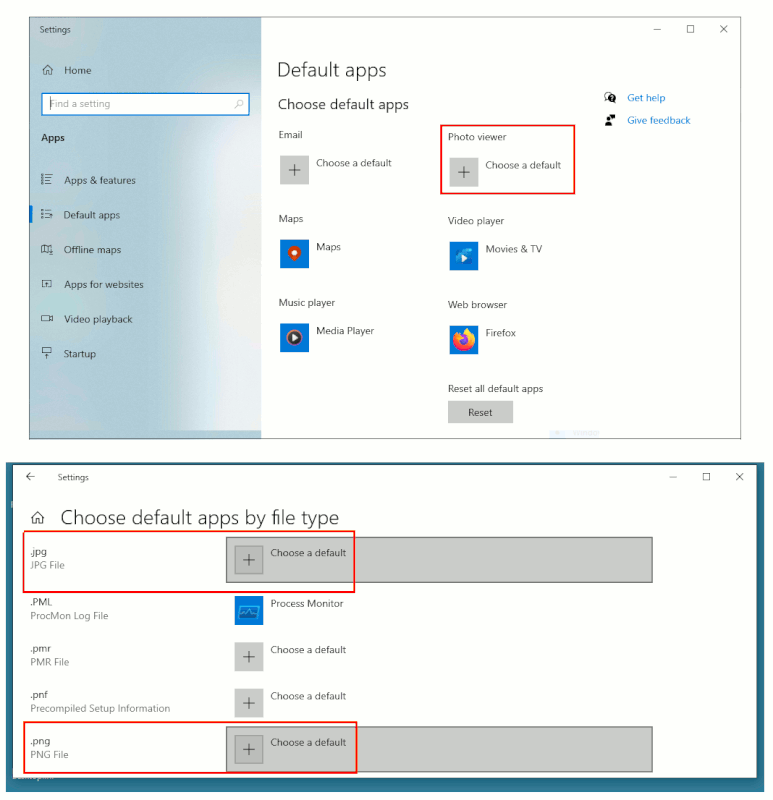
My Windows 10 JPG and PNG are still set to "Choose a Default".
Whereas the Default App, somehow my "Photo Viewer" choice is undefined as well, and is also "Choose a Default". Normally the OS makes this (Microsoft) "Photos".
Yet, if I choose "Open With", there already are predominantly Microsoft
choices in the list, and GIMP isn't listed.
Something that kicks the process off, is IrfanView can grab a lot of stuff,
and then presumably other associations join in later.
[Picture]
https://i.postimg.cc/CMjQQtNx/default-for-images.gif
Paul
--- SoupGate-Win32 v1.05
* Origin: fsxNet Usenet Gateway (21:1/5)