I have a SanDisk 3.2 USB drive which claims to be write protected. I
cannot reformat it or delete any files. I have tried the recommended
command prompt route (diskpart etc), which does not work. Is there a
better way or should I just bin it? Thanks
On 26/03/2025 16:04, Scott wrote:
I have a SanDisk 3.2 USB drive which claims to be write protected. I
cannot reformat it or delete any files. I have tried the recommended
command prompt route (diskpart etc), which does not work. Is there a
better way or should I just bin it? Thanks
Does your USB port support superspeed (5 or 10 Gbit/s)? If not, it
may be worth trying one that does. It will probably have a blue
insert in the socket. The reason is that the superspeed and lower
speed interfaces are completely separate and one may work when the
other does not.
It is possible to use superspeed devices with the ordinary USB 1x
and 2x connections completely disconnected!
A superspeed controller will first try to detect a superspeed device.
If that fails it then looks for a lower speed interface.
On the other hand, a USB 2x controller will never look for a
superspeed interface.
On Wed, 3/26/2025 12:04 PM, Scott wrote:
I have a SanDisk 3.2 USB drive which claims to be write protected. IDoes it have a part number, like "SDCZ800-064G" ?
cannot reformat it or delete any files. I have tried the recommended
command prompt route (diskpart etc), which does not work. Is there a
better way or should I just bin it? Thanks
I would try it in a second machine, or change OS from
Windows to Linux and see if the behavior is confirmed.
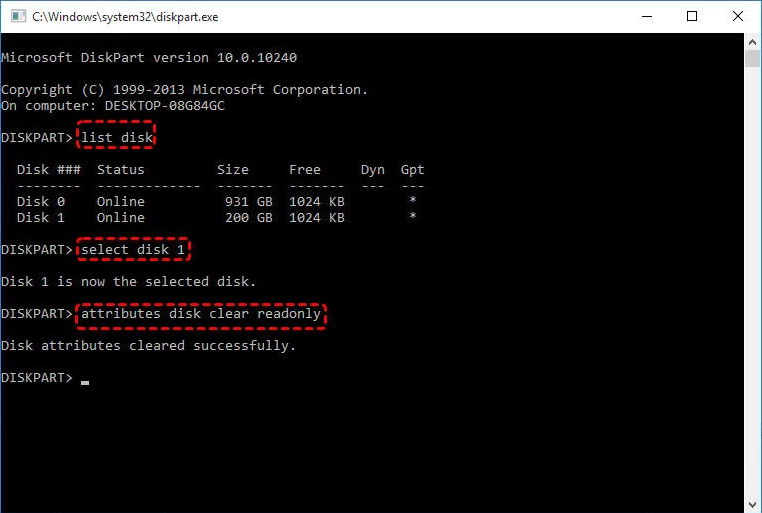
The root cause, could be something like this:
https://www.diskpart.com/screenshot/en/others/others/attributes-disk-clear-readonly.png
but it could also be that one of the two flash chips has failed and
the critical data in the flash chip no long allows changes or something.
You would suspect something like that, if recently the device write
rate had dropped to 1.5MB/sec.
On 26/03/2025 in message <[email protected]>
Scott wrote:
I have a SanDisk 3.2 USB drive which claims to be write protected. I
cannot reformat it or delete any files. I have tried the recommended >command prompt route (diskpart etc), which does not work. Is there a
better way or should I just bin it? Thanks
Have you seen this:
https://forums.sandisk.com/t/my-sandisk-ultra-usb-3-0-is-write-protected-what-to-do/223571
If it's a new USB drive you should return it under warranty.
I have a SanDisk 3.2 USB drive which claims to be write protected. I
cannot reformat it or delete any files. I have tried the recommended
command prompt route (diskpart etc), which does not work. Is there a
better way or should I just bin it? Thanks
On Wed, 26 Mar 2025 13:05:25 -0400, Paul <[email protected]d>
wrote:
On Wed, 3/26/2025 12:04 PM, Scott wrote:
I have a SanDisk 3.2 USB drive which claims to be write protected. IDoes it have a part number, like "SDCZ800-064G" ?
cannot reformat it or delete any files. I have tried the recommended
command prompt route (diskpart etc), which does not work. Is there a
better way or should I just bin it? Thanks
BL210357727W
SDCZ48-016G
I would try it in a second machine, or change OS from
Windows to Linux and see if the behavior is confirmed.
Unfortunately, I am not skilled enough to install Linux.
The root cause, could be something like this:
https://www.diskpart.com/screenshot/en/others/others/attributes-disk-clear-readonly.png
This is what I tried. It claimed success but the write protection
remained.
but it could also be that one of the two flash chips has failed and
the critical data in the flash chip no long allows changes or something.
You would suspect something like that, if recently the device write
rate had dropped to 1.5MB/sec.
It is write protected so not possible to check.
Jeff Gaines <[email protected]> wrote:
On 26/03/2025 in message <[email protected]>
Scott wrote:
I have a SanDisk 3.2 USB drive which claims to be write protected. I
cannot reformat it or delete any files. I have tried the recommended
command prompt route (diskpart etc), which does not work. Is there a
better way or should I just bin it? Thanks
Have you seen this:
https://forums.sandisk.com/t/my-sandisk-ultra-usb-3-0-is-write-protected-what-to-do/223571
If it's a new USB drive you should return it under warranty.
Yep, a flash drive going read only is the drive protecting itself so you can >get the data off it before it dies. Nothing to do with USB 2 v 3, they'll >make no difference.
A few of them have a physical write protect switch, but it's rare.
If it was just Windows being dumb you could still wipe the partitions and >reformat it, which suggests it's a deeper problem.
If it's new-ish, and a USB 3.2 drive sounds like it might be, I'd complain
to SanDisk.
On Wed, 3/26/2025 2:14 PM, Scott wrote:
On Wed, 26 Mar 2025 13:05:25 -0400, Paul <[email protected]d>
wrote:
On Wed, 3/26/2025 12:04 PM, Scott wrote:
I have a SanDisk 3.2 USB drive which claims to be write protected. IDoes it have a part number, like "SDCZ800-064G" ?
cannot reformat it or delete any files. I have tried the recommended
command prompt route (diskpart etc), which does not work. Is there a
better way or should I just bin it? Thanks
BL210357727W
SDCZ48-016G
I would try it in a second machine, or change OS from
Windows to Linux and see if the behavior is confirmed.
Unfortunately, I am not skilled enough to install Linux.
The root cause, could be something like this:
https://www.diskpart.com/screenshot/en/others/others/attributes-disk-clear-readonly.png
This is what I tried. It claimed success but the write protection
remained.
but it could also be that one of the two flash chips has failed and
the critical data in the flash chip no long allows changes or something. >>> You would suspect something like that, if recently the device write
rate had dropped to 1.5MB/sec.
It is write protected so not possible to check.
There is one other OS-level way this could happen,
but this apparently can affect more than just flash drives.
You might find secondary hard drives or secondary SSDs
also exhibiting the symptoms, if this was the reason.
https://www.tenforums.com/tutorials/124456-deny-write-access-fixed-data-drives-not-protected-bitlocker.html
The Sandisk forum has several long threads on this issue.
Consisting of mostly complaints. And a few bad ideas :-)
I have a SanDisk 3.2 USB drive which claims to be write protected. I
cannot reformat it or delete any files. I have tried the recommended
command prompt route (diskpart etc), which does not work. Is there a
better way or should I just bin it? Thanks
On 26/03/2025 16:04, Scott wrote:
I have a SanDisk 3.2 USB drive which claims to be write protected. I
cannot reformat it or delete any files. I have tried the recommended
command prompt route (diskpart etc), which does not work. Is there a
better way or should I just bin it? Thanks
I have a couple of micro SDHC cards which have gone rogue & won't format >after they were used in a Raspberry-Pi.
Tried all the remedies I could find, including diskpart but none worked.
Some even told me that they had successfully partitioned a card but they >remained in their rogue state.
On Fri, 28 Mar 2025 09:49:33 +0000, wasbit <[email protected]>
wrote:
On 26/03/2025 16:04, Scott wrote:
I have a SanDisk 3.2 USB drive which claims to be write protected. I
cannot reformat it or delete any files. I have tried the recommended
command prompt route (diskpart etc), which does not work. Is there a
better way or should I just bin it? Thanks
I have a couple of micro SDHC cards which have gone rogue & won't format >after they were used in a Raspberry-Pi.
Tried all the remedies I could find, including diskpart but none worked. >Some even told me that they had successfully partitioned a card but they >remained in their rogue state.
That gives me an idea. I used the memory stick in my Roku box. I
wonder if this corrupted it. It's in the destruction box now (the
memory stick, that is).
| Sysop: | Keyop |
|---|---|
| Location: | Huddersfield, West Yorkshire, UK |
| Users: | 764 |
| Nodes: | 16 (2 / 14) |
| Uptime: | 06:03:27 |
| Calls: | 12,752 |
| Calls today: | 6 |
| Files: | 15,355 |
| Messages: | 6,556,522 |