• Hard Drive Speed

    From Jeff Gaines@21:1/5 to All on Sat Mar 15 11:18:12 2025
    I ran SmartSync Pro to copy a 4 TB Iron Wolf (spinner) HD to a second
    identical drive in the same PC.

    I aborted this morning after nearly 24 hours with the following results:

    SmartSync Pro Log
    14/03/2025 09:24:33 Copying Source to Destination...
    15/03/2025 08:18:48 Synchronization process aborted by user.
    1075.15 GB copied

    22 hours 54 mins 45 seconds

    22 x 60 x 60 = 79,200
    54 x 60 = 3,240

    Total seconds = 79,200 + 3,240 + 45 = 82,485

    1075.15 / 82,485 = 0.0130344911195975

    Indicating 0.013 GB/s

    I am pretty awful at maths when hours/minute/second/Gigabytes are involved.

    Does anybody have time to follow my maths through?

    Whatever the proper answer it seems unbelievable that it has taken nearly
    24 hours to copy 1075.15 GB.

    --
    Jeff Gaines Dorset UK
    Every day is a good day for chicken, unless you're a chicken.

    --- SoupGate-Win32 v1.05
    * Origin: fsxNet Usenet Gateway (21:1/5)
  • From The Natural Philosopher@21:1/5 to Jeff Gaines on Sat Mar 15 13:07:34 2025
    On 15/03/2025 11:18, Jeff Gaines wrote:

    I ran SmartSync Pro to copy a 4 TB Iron Wolf (spinner) HD to a second identical drive in the same PC.

    I aborted this morning after nearly 24 hours with the following results:

    SmartSync Pro Log
    14/03/2025 09:24:33 Copying Source to Destination...
    15/03/2025 08:18:48 Synchronization process aborted by user.
    1075.15 GB copied

    22 hours 54 mins 45 seconds

    22 x 60 x 60 = 79,200
    54 x 60 = 3,240

    Total seconds = 79,200 + 3,240 + 45 = 82,485

    1075.15 / 82,485 = 0.0130344911195975

    Indicating 0.013 GB/s

    130 Mbytes/second?

    "Hard drive write speed, measured in megabytes per second (MB/s),
    typically ranges from around 75 MB/s for a 5400 RPM drive to about
    100-160 MB/s for a 7200 RPM drive"

    Sounds pretty spot on to me


    I am pretty awful at maths when hours/minute/second/Gigabytes are involved.

    Does anybody have time to follow my maths through?

    See above

    Whatever the proper answer it seems  unbelievable that it has taken
    nearly 24 hours to copy 1075.15 GB.


    Why? A terabyte is a lot of bytes.
    Guess why people are heading for NVME SSDS

    "NVMe drives can usually deliver a sustained read-write speed of 4.0
    GB/s in contrast with SATA SSDs that limit at 600 MB/s."


    --
    Religion is regarded by the common people as true, by the wise as
    foolish, and by the rulers as useful.

    (Seneca the Younger, 65 AD)

    --- SoupGate-Win32 v1.05
    * Origin: fsxNet Usenet Gateway (21:1/5)
  • From John Rumm@21:1/5 to Jeff Gaines on Sat Mar 15 15:00:18 2025
    On 15/03/2025 11:18, Jeff Gaines wrote:

    I ran SmartSync Pro to copy a 4 TB Iron Wolf (spinner) HD to a second identical drive in the same PC.

    I aborted this morning after nearly 24 hours with the following results:

    SmartSync Pro Log
    14/03/2025 09:24:33 Copying Source to Destination...
    15/03/2025 08:18:48 Synchronization process aborted by user.
    1075.15 GB copied

    22 hours 54 mins 45 seconds
    22 x 60 x 60 = 79,200
    54 x 60 = 3,240

    Total seconds = 79,200 + 3,240 + 45 = 82,485
    1075.15 / 82,485 = 0.0130344911195975

    The numbers look close enough - depending on if we are talking about
    real GB or decimal TB (i.e. 1,073,741,824 vs 1,000,000,000)

    Indicating 0.013 GB/s

    about 13MB/s

    I am pretty awful at maths when hours/minute/second/Gigabytes are involved.

    Does anybody have time to follow my maths through?

    Whatever the proper answer it seems  unbelievable that it has taken
    nearly 24 hours to copy 1075.15 GB.

    Well that is slow in terms of raw HDD transfer speeds (130MB/s for a
    5400 rpm SATA hard drive would be more typical), what you are copying
    and how you copy it will make a big difference.

    Copying many small files, at the file system level, will be *much*
    slower than fewer large files. Thousands of small "few kB" text and
    config files etc you might not get more than a few hundred kB/sec up to
    the low MB/sec average throughput. For intermediate size files (photos
    etc), then 10 to 50MB/sec might be expected. Large 100MB+ files should
    copy at close to raw drive speed.

    If you want to copy a whole disk, then drive cloning software will be
    very much faster - it will be able to run the drive at close to max
    throughout much or all of the time.


    --
    Cheers,

    John.

    /=================================================================\
    | Internode Ltd - http://www.internode.co.uk | |-----------------------------------------------------------------|
    | John Rumm - john(at)internode(dot)co(dot)uk | \=================================================================/

    --- SoupGate-Win32 v1.05
    * Origin: fsxNet Usenet Gateway (21:1/5)
  • From Jeff Gaines@21:1/5 to John Rumm on Sat Mar 15 16:17:01 2025
    On 15/03/2025 in message <vr44m3$3msvk$[email protected]> John Rumm wrote:

    On 15/03/2025 11:18, Jeff Gaines wrote:

    I ran SmartSync Pro to copy a 4 TB Iron Wolf (spinner) HD to a second >>identical drive in the same PC.

    I aborted this morning after nearly 24 hours with the following results:

    SmartSync Pro Log
    14/03/2025 09:24:33 Copying Source to Destination...
    15/03/2025 08:18:48 Synchronization process aborted by user.
    1075.15 GB copied

    22 hours 54 mins 45 seconds
    22 x 60 x 60 = 79,200
    54 x 60 = 3,240

    Total seconds = 79,200 + 3,240 + 45 = 82,485
    1075.15 / 82,485 = 0.0130344911195975

    The numbers look close enough - depending on if we are talking about real
    GB or decimal TB (i.e. 1,073,741,824 vs 1,000,000,000)

    Indicating 0.013 GB/s

    about 13MB/s

    I am pretty awful at maths when hours/minute/second/Gigabytes are
    involved.

    Does anybody have time to follow my maths through?

    Whatever the proper answer it seems  unbelievable that it has taken
    nearly 24 hours to copy 1075.15 GB.

    Well that is slow in terms of raw HDD transfer speeds (130MB/s for a 5400
    rpm SATA hard drive would be more typical), what you are copying and how
    you copy it will make a big difference.

    Copying many small files, at the file system level, will be much slower
    than fewer large files. Thousands of small "few kB" text and config files
    etc you might not get more than a few hundred kB/sec up to the low MB/sec >average throughput. For intermediate size files (photos etc), then 10 to >50MB/sec might be expected. Large 100MB+ files should copy at close to raw >drive speed.

    If you want to copy a whole disk, then drive cloning software will be very >much faster - it will be able to run the drive at close to max throughout >much or all of the time.

    Many thanks TNP/John :-)

    I had forgotten how slow spinning disks are, the Iron Wolves were
    advertised as being suitable for a NAS, which is where they started life,
    and are in an HP N54L now. The 45,000 45 KB texture files for Flight
    Simulator may make a difference as well!

    I am struggling with the final piece of my "how to organise storage"
    puzzle. I have decided a NAS doesn't add anything as my NVidia TV Pro is
    happy to read files from normal file shares without resorting to DNLA so I don't need a streaming app.

    SSDs are still relatively expensive, close to £1K to replace the Iron
    Wolves. In addition I know from recent experience that when they fail they fail, totally, absolutely and no warning :-(

    The replacement for the first failed WD SSD is due here on Wednesday, the second one should be a week or so behind. Horrendous process, taken 2
    months so far. Their instructions are incorrect (I think pre Brexit) and I
    had to kick their customer service into action. I have 2 more form the
    same time, warranties will expire by the end of this year.

    I am running a second copy process from my main machine to a USB 3 DAS,
    started this morning around 11 o/c and has a couple of hours to go. Also
    an Iron Wolf spinner so may have to think about using the DAS instead of
    the N54L as it seems much quicker.

    Keeps the brain active :-)

    --
    Jeff Gaines Dorset UK
    If it's not broken, mess around with it until it is

    --- SoupGate-Win32 v1.05
    * Origin: fsxNet Usenet Gateway (21:1/5)
  • From alan_m@21:1/5 to All on Sat Mar 15 17:24:24 2025
    If both drives are in the same computer there is also the possibility
    that the HDD read/write speed is not the main bottleneck.

    --
    mailto : news {at} admac {dot} myzen {dot} co {dot} uk

    --- SoupGate-Win32 v1.05
    * Origin: fsxNet Usenet Gateway (21:1/5)
  • From Paul@21:1/5 to Jeff Gaines on Sat Mar 15 14:43:00 2025
    On Sat, 3/15/2025 12:17 PM, Jeff Gaines wrote:
    On 15/03/2025 in message <vr44m3$3msvk$[email protected]> John Rumm wrote:

    On 15/03/2025 11:18, Jeff Gaines wrote:

    I ran SmartSync Pro to copy a 4 TB Iron Wolf (spinner) HD to a second  identical drive in the same PC.

    I aborted this morning after nearly 24 hours with the following results: >>>
    SmartSync Pro Log
    14/03/2025 09:24:33 Copying Source to Destination...
    15/03/2025 08:18:48 Synchronization process aborted by user.
    1075.15 GB copied

    22 hours 54 mins 45 seconds
    22 x 60 x 60 = 79,200
    54 x 60 = 3,240

    Total seconds = 79,200 + 3,240 + 45 = 82,485
    1075.15 / 82,485 = 0.0130344911195975

    The numbers look close enough - depending on if we are talking about real GB or decimal TB (i.e. 1,073,741,824 vs 1,000,000,000)

    Indicating 0.013 GB/s

    about 13MB/s

    I am pretty awful at maths when hours/minute/second/Gigabytes are involved. >>>
    Does anybody have time to follow my maths through?

    Whatever the proper answer it seems  unbelievable that it has taken  nearly 24 hours to copy 1075.15 GB.

    Well that is slow in terms of raw HDD transfer speeds (130MB/s for a 5400 rpm SATA hard drive would be more typical), what you are copying and how you copy it will make a big difference.

    Copying many small files, at the file system level, will be much slower than fewer large files. Thousands of small "few kB" text and config files etc you might not get more than a few hundred kB/sec up to the low MB/sec average throughput. For
    intermediate size files (photos etc), then 10 to 50MB/sec might be expected. Large 100MB+ files should copy at close to raw drive speed.

    If you want to copy a whole disk, then drive cloning software will be very much faster - it will be able to run the drive at close to max throughout much or all of the time.

    Many thanks TNP/John :-)

    I had forgotten how slow spinning disks are, the Iron Wolves were advertised as being suitable for a NAS, which is where they started life, and are in an HP N54L now. The 45,000 45 KB texture files for Flight Simulator may make a difference as well!

    I am struggling with the final piece of my "how to organise storage" puzzle. I have decided a NAS doesn't add anything as my NVidia TV Pro is happy to read files from normal file shares without resorting to DNLA so I don't need a streaming app.

    SSDs are still relatively expensive, close to £1K to replace the Iron Wolves. In addition I know from recent experience that when they fail they fail, totally, absolutely and no warning :-(

    The replacement for the first failed WD SSD is due here on Wednesday, the second one should be a week or so behind. Horrendous process, taken 2 months so far. Their instructions are incorrect (I think pre Brexit) and I had to kick their customer
    service into action. I have 2 more form the same time, warranties will expire by the end of this year.

    I am running a second copy process from my main machine to a USB 3 DAS, started this morning around 11 o/c and has a couple of hours to go. Also an Iron Wolf spinner so may have to think about using the DAS instead of the N54L as it seems much quicker.

    Keeps the brain active :-)


    It's called "seek time".

    Moving the disk drive heads around, during
    file by file data transfer, is slow. The seek
    time is the "rate limiting step". It might take
    a millisecond, to move the data from one disk
    to the other. It might take 15 milliseconds to
    move the heads for the next file. suddenly the
    transfer is 16 times slower than we would like.

    SSDs still have access time, but it is a lot smaller
    number. Still, if you use CrystalDiskMark, and you
    evaluate the 4K block transfer performance, the
    number shown in the rating for the device, is
    *quite poor*. While you may have marveled at the
    SSD doing "500MB/sec" or an NVMe doing "7000MB/sec",
    you can use tools such as CrystalDiskMark, to see
    what the rate limiting performance will be.

    There is *no good answer* for small files. Small files suck.
    If you insist on using file-by-file transfer, you're doomed
    to be doing this arithmetic, figuring out the transfer
    speed and moaning that it is so so slow.

    *******

    But, there is a solution. When you "clone" a drive,
    data transfers are done at the cluster or inode level.
    The important part of cloning though, is the access
    to the data is in "cluster order". The head starts
    at 0, moves to 3, moves to 7, the head always moves
    in the one direction. Disks "like" that sort of movement.
    And, if the clusters or inodes are contiguous (shoulder
    to shoulder), the cloning software can read 256,000
    clusters in a row, then blast those across the cable
    to the other device. Suddenly, the sequential speed
    of the device is the rate limit. (200MB/sec on an average
    hard drive.)

    Hard drives have a track buffer. When we do the sequence
    I made as an example, of 0 3 7, the disk drive can
    buffer up the whole track. It is possible, that the
    track buffer contains 0,3, and 7, all acquired in the
    same (unbidden) read. The disk can safely read more data
    than the application asks for. On the track read, we immediately
    clone over cluster 0. when the application says "now
    move 3 for me", the disk goes "hey, I already got your
    3 in my track buffer, here it is". The transfer "goes faster"
    because the track buffer already has some of the data we
    need for the clone to proceed. By means of that track
    buffer or cache, we get the benefit of less disk fiddling
    and more "transfer between electronics bits".

    The end result is, that cloning can proceed at 200MB/sec,
    when file-by-file is doing 1MB/sec.

    *******

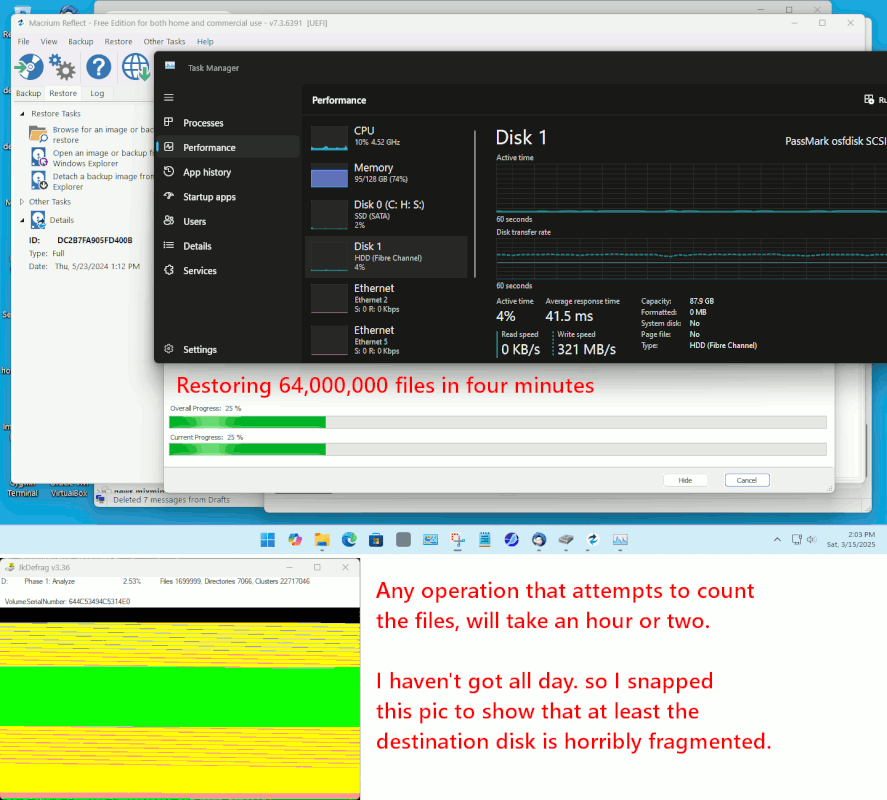
    I have an image file with 64,000,000 files in it.
    Like cloning, restoring from backup (which is also
    done in cluster or inode order), I can restore 64,000,000
    files in *4 minutes*. This is the benefit of working
    at the cluster level, and NOT file-by-file.

    When you put files in a ZIP ? You pay at both ends. The
    seek time issue occurs when loading up the ZIP file.
    The seek time issue occurs when you unpack the ZIP file
    (in a file-by-file manner of course). A ZIP file still
    has advantages, but because it is a file-by-file thing,
    it still sucks. For example, over Ethernet, you may notice
    computers have lousy protocols for transfer over the wire
    and while a ZIP container moves faster, the preparation
    of the ZIP container sucks sucks sucks. Thus the ZIP
    container is hardly ever a totally-preferred solution.

    Whether you smart-clone or smart-backup, the capture
    of data sequentially at the cluster or inode level,
    is a *lot* faster than what you've been doing. Look at
    my example, of moving 64,000,000 files in *4 minutes*
    for a hint. It wold have gone faster than that, except
    the software has checksums on the materials, to ensure
    no corruption has occurred, and it would run faster
    if there were no checksums to calculate. I could do
    better than the four minute number. And, there is actually
    one brand of software, that does not do checksums (so it
    just screams).

    Via cloning, a 200MB/sec hard drive should transfer
    64,000,000 files... at 200MB/sec. But it is only
    going to operate at the sequential rate limit,
    if you *smart-clone* the item.

    In the example here, the speed limit was the checksum activity.
    And no, the disk is not fiber channel. The OS "makes up"
    that bullshit description, based on measuring the speed and deciding
    "Ha! That's gotta be a fiber channel". It is not a fiber channel
    device.

    [Picture]

    https://i.postimg.cc/XqCmf4rv/smart-clone-for-speed.gif

    The utility "dd" or "disk dump" is "dumb-cloning"
    and does more work than is absolutely necessary.
    Still, if the disks were exactly the same size
    (right down to the last digit), a "dd" transfer might
    take about five hours, while a file-by-file could
    easily take twenty-four hours.

    Paul

    --- SoupGate-Win32 v1.05
    * Origin: fsxNet Usenet Gateway (21:1/5)
  • From GB@21:1/5 to The Natural Philosopher on Sat Mar 15 18:53:14 2025
    On 15/03/2025 13:07, The Natural Philosopher wrote:

    Indicating 0.013 GB/s

    130 Mbytes/second?

    That would be 0.13, not 0.013?

    --- SoupGate-Win32 v1.05
    * Origin: fsxNet Usenet Gateway (21:1/5)
  • From alan_m@21:1/5 to Jeff Gaines on Sat Mar 15 20:07:25 2025
    On 15/03/2025 19:43, Jeff Gaines wrote:
    On 15/03/2025 in message <vr4hnj$33gd$[email protected]> Paul wrote:

    The utility "dd" or "disk dump" is "dumb-cloning"
    and does more work than is absolutely necessary.
    Still, if the disks were exactly the same size
    (right down to the last digit), a "dd" transfer might
    take about five hours, while a file-by-file could
    easily take twenty-four hours.

    Many thanks :-)

    I Googled cloning software and there's a lot of it but all now
    subscription (how did that creep up on us so quickly?).

    Any suggestions? Currently I use SmartSync Pro because I paid for it
    years ago and it runs from a batch file, it may be once I've done the
    first copy it may be the easiest solution but I am happy to look at alternatives.


    Suitable for win10/11 64 bit
    Macrium Reflect V7

    https://download.macrium.com/reflect/v7/v7.3.6284/reflect_setup_free_x64.exe

    The first option on the opening screen should be clone disk

    I've been using this software for backups for a few years and performed
    a SSD to SSD clone a few weeks back. One SSD was in the laptop and the
    other in a USB adapter.

    --
    mailto : news {at} admac {dot} myzen {dot} co {dot} uk

    --- SoupGate-Win32 v1.05
    * Origin: fsxNet Usenet Gateway (21:1/5)
  • From Jeff Gaines@21:1/5 to Paul on Sat Mar 15 19:43:25 2025
    On 15/03/2025 in message <vr4hnj$33gd$[email protected]> Paul wrote:

    The utility "dd" or "disk dump" is "dumb-cloning"
    and does more work than is absolutely necessary.
    Still, if the disks were exactly the same size
    (right down to the last digit), a "dd" transfer might
    take about five hours, while a file-by-file could
    easily take twenty-four hours.

    Many thanks :-)

    I Googled cloning software and there's a lot of it but all now
    subscription (how did that creep up on us so quickly?).

    Any suggestions? Currently I use SmartSync Pro because I paid for it years
    ago and it runs from a batch file, it may be once I've done the first copy
    it may be the easiest solution but I am happy to look at alternatives.

    --
    Jeff Gaines Dorset UK
    All those who believe in psychokinesis raise my hand.

    --- SoupGate-Win32 v1.05
    * Origin: fsxNet Usenet Gateway (21:1/5)
  • From Joe@21:1/5 to Jeff Gaines on Sat Mar 15 20:31:46 2025
    On 15 Mar 2025 19:43:25 GMT
    "Jeff Gaines" <[email protected]> wrote:

    On 15/03/2025 in message <vr4hnj$33gd$[email protected]> Paul wrote:

    The utility "dd" or "disk dump" is "dumb-cloning"
    and does more work than is absolutely necessary.
    Still, if the disks were exactly the same size
    (right down to the last digit), a "dd" transfer might
    take about five hours, while a file-by-file could
    easily take twenty-four hours.

    Many thanks :-)

    I Googled cloning software and there's a lot of it but all now
    subscription (how did that creep up on us so quickly?).

    Any suggestions? Currently I use SmartSync Pro because I paid for it
    years ago and it runs from a batch file, it may be once I've done the
    first copy it may be the easiest solution but I am happy to look at alternatives.


    Clonezilla will always be free, but it's a bit scary. Not point and
    click.

    --
    Joe

    --- SoupGate-Win32 v1.05
    * Origin: fsxNet Usenet Gateway (21:1/5)
  • From Paul@21:1/5 to Joe on Sat Mar 15 16:47:30 2025
    On Sat, 3/15/2025 4:31 PM, Joe wrote:
    On 15 Mar 2025 19:43:25 GMT
    "Jeff Gaines" <[email protected]> wrote:

    On 15/03/2025 in message <vr4hnj$33gd$[email protected]> Paul wrote:

    The utility "dd" or "disk dump" is "dumb-cloning"
    and does more work than is absolutely necessary.
    Still, if the disks were exactly the same size
    (right down to the last digit), a "dd" transfer might
    take about five hours, while a file-by-file could
    easily take twenty-four hours.

    Many thanks :-)

    I Googled cloning software and there's a lot of it but all now
    subscription (how did that creep up on us so quickly?).

    Any suggestions? Currently I use SmartSync Pro because I paid for it
    years ago and it runs from a batch file, it may be once I've done the
    first copy it may be the easiest solution but I am happy to look at
    alternatives.


    Clonezilla will always be free, but it's a bit scary. Not point and
    click.


    It should be pointed out, that Clonezilla uses other packages
    to do the heavy lifting.

    A little Wiki examination, will give the names of some component parts.

    https://en.wikipedia.org/wiki/Partimage

    "Partimage is limited to cloning partitions that have supported filesystem types.
    This includes Ext2, Ext3, Reiserfs, FAT12, FAT16, FAT16B, FAT32, HPFS, JFS,
    Xfs, UFS, HFS and NTFS. Partimage does NOT support Ext4 and Btrfs."

    See also

    List of disk cloning software
    Partclone
    Clonezilla
    FSArchiver

    The reason PartImage does not support Ext4, has to do with when support stopped.

    https://web.archive.org/web/20060405003353/http://www.partimage.org/Main_Page#Limitations

    When an imaging solution only offers a standalone .img file
    as an output, you can do your cloning via "backup and restore style"

    create-the-image temp.img # This might be necessary, if the application
    restore-the-image temp.img # needs random access to the .img file, rather than pure-sequential

    Restoration like that, involving the usage of an intermediate file,
    is going to be slower because of the additional step, but it still
    gets the job done.

    While "CloneZilla is scary" (agreed), that should still not
    prevent you from looking around and being creative.

    Macrium Reflect (Windows, make the Rescue CD for other usage), can clone EXT4, but it is unclear to me whether it supports C12 properly or not. Say, Ubuntu 24.04.2
    might make a EXT4 with C12 switched on. Whereas a Linux Mint 21.3, would
    not have C12 switched on. Tune2FS can provide info on features.

    Paul

    --- SoupGate-Win32 v1.05
    * Origin: fsxNet Usenet Gateway (21:1/5)
  • From John Rumm@21:1/5 to Jeff Gaines on Sat Mar 15 21:36:31 2025
    On 15/03/2025 16:17, Jeff Gaines wrote:
    On 15/03/2025 in message <vr44m3$3msvk$[email protected]> John Rumm wrote:

    On 15/03/2025 11:18, Jeff Gaines wrote:

    I ran SmartSync Pro to copy a 4 TB Iron Wolf (spinner) HD to a second
    identical drive in the same PC.

    I aborted this morning after nearly 24 hours with the following results: >>>
    SmartSync Pro Log
    14/03/2025 09:24:33 Copying Source to Destination...
    15/03/2025 08:18:48 Synchronization process aborted by user.
    1075.15 GB copied

    22 hours 54 mins 45 seconds
    22 x 60 x 60 = 79,200
    54 x 60 = 3,240

    Total seconds = 79,200 + 3,240 + 45 = 82,485
    1075.15 / 82,485 = 0.0130344911195975

    The numbers look close enough - depending on if we are talking about
    real GB or decimal TB (i.e. 1,073,741,824 vs 1,000,000,000)

    Indicating 0.013 GB/s

    about 13MB/s

    I am pretty awful at maths when hours/minute/second/Gigabytes are
    involved.

    Does anybody have time to follow my maths through?

    Whatever the proper answer it seems  unbelievable that it has taken
    nearly 24 hours to copy 1075.15 GB.

    Well that is slow in terms of raw HDD transfer speeds (130MB/s for a
    5400 rpm SATA hard drive would be more typical), what you are copying
    and how you copy it will make a big difference.

    Copying many small files, at the file system level, will be much
    slower than fewer large files. Thousands of small "few kB" text and
    config files etc you might not get more than a few hundred kB/sec up
    to the low MB/sec average throughput. For intermediate size files
    (photos etc), then 10 to 50MB/sec might be expected. Large 100MB+
    files should copy at close to raw drive speed.

    If you want to copy a whole disk, then drive cloning software will be
    very much faster - it will be able to run the drive at close to max
    throughout much or all of the time.

    Many thanks TNP/John :-)

    I had forgotten how slow spinning disks are, the Iron Wolves were
    advertised as being suitable for a NAS, which is where they started

    Iron Wolf are designed for NAS - so designed for 24/7 operation and also tolerant of vibration typical in multi drive enclosures.

    life, and are in an HP N54L now. The 45,000 45 KB texture files for
    Flight Simulator may make a difference as well!

    Yup, that is the kind of thing that hammers HDD file access time. Note
    also that on write, not only have you got the write time, but also the
    OS overhead in creating and updating the directory entries for the new
    file.

    I am struggling with the final piece of my "how to organise storage"
    puzzle. I have decided a NAS doesn't add anything as my NVidia TV Pro is happy to read files from normal file shares without resorting to DNLA so
    I don't need a streaming app.

    The main NAS advantage for that kind of thing is going to be low cost of running 24/7 and shared access without needing to keep a computer on.

    SSDs are still relatively expensive, close to £1K to replace the Iron Wolves. In addition I know from recent experience that when they fail
    they fail, totally, absolutely and no warning :-(

    For bulk storage, it is still hard to beat HDDs for cost per GB, and performance is more than adequate for streaming etc.


    --
    Cheers,

    John.

    /=================================================================\
    | Internode Ltd - http://www.internode.co.uk | |-----------------------------------------------------------------|
    | John Rumm - john(at)internode(dot)co(dot)uk | \=================================================================/

    --- SoupGate-Win32 v1.05
    * Origin: fsxNet Usenet Gateway (21:1/5)
  • From John Rumm@21:1/5 to Jeff Gaines on Sat Mar 15 21:49:18 2025
    On 15/03/2025 19:43, Jeff Gaines wrote:
    On 15/03/2025 in message <vr4hnj$33gd$[email protected]> Paul wrote:

    The utility "dd" or "disk dump" is "dumb-cloning"
    and does more work than is absolutely necessary.
    Still, if the disks were exactly the same size
    (right down to the last digit), a "dd" transfer might
    take about five hours, while a file-by-file could
    easily take twenty-four hours.

    Many thanks :-)

    I Googled cloning software and there's a lot of it but all now
    subscription (how did that creep up on us so quickly?).

    Any suggestions? Currently I use SmartSync Pro because I paid for it
    years ago and it runs from a batch file, it may be once I've done the
    first copy it may be the easiest solution but I am happy to look at alternatives.

    Often you will find most SSD makers will do free cloning software for
    making HDD to SSD migration easy. Most will just do something like a
    badge engineered version of Acronis or similar. Some used to check if
    the machine actually contained a drive of the right brand[1], but that
    seems less common these days (probably because they can't always sense
    it when the SSD is on a USB to SATA/M2 adaptor).

    Macrium reflect also has a free version.
    EaseUS Todo has a free tier.
    Aomei also have a free one.
    You can also make a bootable image of Clonezilla (runs outside of windows)


    [1] in which case download the one from the maker of your SSD!


    --
    Cheers,

    John.

    /=================================================================\
    | Internode Ltd - http://www.internode.co.uk | |-----------------------------------------------------------------|
    | John Rumm - john(at)internode(dot)co(dot)uk | \=================================================================/

    --- SoupGate-Win32 v1.05
    * Origin: fsxNet Usenet Gateway (21:1/5)
  • From SH@21:1/5 to Jeff Gaines on Sat Mar 15 22:18:14 2025
    On 15/03/2025 19:43, Jeff Gaines wrote:
    On 15/03/2025 in message <vr4hnj$33gd$[email protected]> Paul wrote:

    The utility "dd" or "disk dump" is "dumb-cloning"
    and does more work than is absolutely necessary.
    Still, if the disks were exactly the same size
    (right down to the last digit), a "dd" transfer might
    take about five hours, while a file-by-file could
    easily take twenty-four hours.

    Many thanks :-)

    I Googled cloning software and there's a lot of it but all now
    subscription (how did that creep up on us so quickly?).

    Any suggestions? Currently I use SmartSync Pro because I paid for it
    years ago and it runs from a batch file, it may be once I've done the
    first copy it may be the easiest solution but I am happy to look at alternatives.


    Another option is that some SSDs or NVMEs usually come with a copy of Ghost

    Or you could download and burn to a DVD a Ultimate Boot CD ISO or Hirens
    Boot CD ISO and that has a gazillion utlities some of which will be disk cloning software....

    Delivered by the SH of Ventoy fame :-D

    --- SoupGate-Win32 v1.05
    * Origin: fsxNet Usenet Gateway (21:1/5)
  • From SH@21:1/5 to Jeff Gaines on Sat Mar 15 22:16:07 2025
    On 15/03/2025 19:43, Jeff Gaines wrote:
    On 15/03/2025 in message <vr4hnj$33gd$[email protected]> Paul wrote:

    The utility "dd" or "disk dump" is "dumb-cloning"
    and does more work than is absolutely necessary.
    Still, if the disks were exactly the same size
    (right down to the last digit), a "dd" transfer might
    take about five hours, while a file-by-file could
    easily take twenty-four hours.

    Many thanks :-)

    I Googled cloning software and there's a lot of it but all now
    subscription (how did that creep up on us so quickly?).

    Any suggestions? Currently I use SmartSync Pro because I paid for it
    years ago and it runs from a batch file, it may be once I've done the
    first copy it may be the easiest solution but I am happy to look at alternatives.


    Use DD in linux?

    --- SoupGate-Win32 v1.05
    * Origin: fsxNet Usenet Gateway (21:1/5)
  • From SH@21:1/5 to All on Sat Mar 15 22:28:43 2025
    On 15/03/2025 22:18, SH wrote:
    On 15/03/2025 19:43, Jeff Gaines wrote:
    On 15/03/2025 in message <vr4hnj$33gd$[email protected]> Paul wrote:

    The utility "dd" or "disk dump" is "dumb-cloning"
    and does more work than is absolutely necessary.
    Still, if the disks were exactly the same size
    (right down to the last digit), a "dd" transfer might
    take about five hours, while a file-by-file could
    easily take twenty-four hours.

    Many thanks :-)

    I Googled cloning software and there's a lot of it but all now
    subscription (how did that creep up on us so quickly?).

    Any suggestions? Currently I use SmartSync Pro because I paid for it
    years ago and it runs from a batch file, it may be once I've done the
    first copy it may be the easiest solution but I am happy to look at
    alternatives.


    Another option is that some SSDs or NVMEs usually come with a copy of Ghost

    Or you could download and burn to a DVD a Ultimate Boot CD ISO or Hirens
    Boot CD ISO and that has a gazillion utlities some of which will be disk cloning software....

    Delivered by the SH of Ventoy fame :-D


    P.S. as it happens I have both UBCD and Hirens in my list of ISOs on my
    NVME M2 stick in a USB-C adapter......

    my current list of ISOs on my Ventoy NVME is:

    dir
    Volume in drive H is Ventoy
    Volume Serial Number is 4E21-0000

    Directory of H:\

    07/03/2025 10:17 701,669,376 XigmaNAS-x64-LiveCD-13.3.0.5.10153.iso 07/03/2025 10:34 4,242,739,200 xubuntu-24.04.2-desktop-amd64.iso 07/03/2025 10:39 3,607,101,440 2022-07-01-raspios-bullseye-i386.iso 07/03/2025 10:26 2,342,518,784 Bliss-v16.9.7-x86_64-OFFICIAL-foss-20241011.iso
    07/03/2025 10:28 2,307,981,052 Bliss-v16.JBj69fh-.9.7-x86_64-OFFICIAL-gapps-20241011.iso.part
    02/02/2023 17:44 17,942,528 cd140201.iso
    07/03/2025 10:26 16,719,872 dban-2.3.0_i586(1).iso
    07/03/2025 10:17 3,981,279,232 debian-12.9.0-amd64-DVD-1.iso
    07/03/2025 10:50 368,048,115 DietPi_NativePC-BIOS-x86_64-Bookworm_Installer.iso
    07/03/2025 10:50 724,566,016 DietPi_NativePC-UEFI-x86_64-Bookworm_Installer.iso
    07/03/2025 10:50 620,756,992 DietPi_VM-x86_64-Bookworm_Installer.iso 07/03/2025 10:14 4,826,406,912 FreeBSD-14.2-RELEASE-amd64-dvd1.iso 07/03/2025 10:28 589,299,712 gparted-live-1.7.0-1-amd64.iso
    07/03/2025 10:22 3,291,686,912 HBCD_PE_x64.iso
    07/03/2025 10:25 4,694,753,280 KNOPPIX_V9.1DVD-2021-01-25-EN.iso 07/03/2025 10:33 4,678,961,152 kubuntu-24.10-desktop-amd64.iso
    07/03/2025 10:35 2,980,511,744 linuxmint-22.1-cinnamon-64bit.iso 07/03/2025 10:31 3,352,426,496 lubuntu-24.04.2-desktop-amd64.iso 13/01/2024 19:39 6,197,248 mt86plus_7.00_64.iso
    07/03/2025 10:18 985,661,440 openmediavault_7.4.17-amd64.iso
    07/03/2025 10:39 1,264,087,040 proxmox-backup-server_3.3-1.iso
    07/03/2025 10:39 1,449,048,064 proxmox-ve_8.3-1.iso
    07/03/2025 10:18 891,879,424 Rockstor-Leap15.6-generic.x86_64-5.0.15-0.install.iso
    07/03/2025 10:35 989,855,744 systemrescue-11.03-amd64.iso
    07/03/2025 10:20 1,049,196,544 TrueNAS-13.0-U6.7.iso
    07/03/2025 10:21 842,489,856 ubcd539.iso
    07/03/2025 10:17 6,343,219,200 ubuntu-24.04.2-desktop-amd64.iso
    17/06/2022 13:56 5,567,117,312 Win11_EnglishInternational_x64v1.iso 17/06/2022 13:58 4,544,200,704 Windows 11.iso
    29 File(s) 67,278,321,391 bytes
    0 Dir(s) 188,737,257,472 bytes free


    dban is Dariks Boont 'n' nuke, Bliss is an Android OS that can run on a
    PC, HBCD is Hirnes Boot CD, mk86 is Memtest 86 and UBCD is ultimate boot
    CD. ANd I still have lots of space still to stick more ISOs on.

    Another incredibly useful utlity is Ninite but that is specific to Windows.

    --- SoupGate-Win32 v1.05
    * Origin: fsxNet Usenet Gateway (21:1/5)
  • From The Natural Philosopher@21:1/5 to Paul on Sun Mar 16 01:34:23 2025
    On 15/03/2025 18:43, Paul wrote:
    It's called "seek time".

    Moving the disk drive heads around, during
    file by file data transfer, is slow. The seek
    time is the "rate limiting step". It might take
    a millisecond, to move the data from one disk
    to the other. It might take 15 milliseconds to
    move the heads for the next file. suddenly the
    transfer is 16 times slower than we would like.

    No. In the end the limiting factor is how fast the data can be read off
    the drive.

    SSDs still have access time, but it is a lot smaller
    number. Still, if you use CrystalDiskMark, and you
    evaluate the 4K block transfer performance, the
    number shown in the rating for the device, is
    *quite poor*. While you may have marveled at the
    SSD doing "500MB/sec" or an NVMe doing "7000MB/sec",
    you can use tools such as CrystalDiskMark, to see
    what the rate limiting performance will be.

    usually te interface to the drive.

    There is*no good answer* for small files. Small files suck.
    If you insist on using file-by-file transfer, you're doomed
    to be doing this arithmetic, figuring out the transfer
    speed and moaning that it is so so slow.

    Sigh. Small files are cached into sectors.
    And written in blocks

    --
    Climate Change: Socialism wearing a lab coat.

    --- SoupGate-Win32 v1.05
    * Origin: fsxNet Usenet Gateway (21:1/5)
  • From The Natural Philosopher@21:1/5 to All on Sun Mar 16 01:36:44 2025
    On 15/03/2025 22:16, SH wrote:
    On 15/03/2025 19:43, Jeff Gaines wrote:
    On 15/03/2025 in message <vr4hnj$33gd$[email protected]> Paul wrote:

    The utility "dd" or "disk dump" is "dumb-cloning"
    and does more work than is absolutely necessary.
    Still, if the disks were exactly the same size
    (right down to the last digit), a "dd" transfer might
    take about five hours, while a file-by-file could
    easily take twenty-four hours.

    Many thanks :-)

    I Googled cloning software and there's a lot of it but all now
    subscription (how did that creep up on us so quickly?).

    Any suggestions? Currently I use SmartSync Pro because I paid for it
    years ago and it runs from a batch file, it may be once I've done the
    first copy it may be the easiest solution but I am happy to look at
    alternatives.


    Use DD in linux?

    Or even boot a live linux distro and let it do the copying. Its pretty efficient
    --
    “There are two ways to be fooled. One is to believe what isn’t true; the other is to refuse to believe what is true.”

    —Soren Kierkegaard

    --- SoupGate-Win32 v1.05
    * Origin: fsxNet Usenet Gateway (21:1/5)
  • From Paul@21:1/5 to All on Sun Mar 16 01:35:49 2025
    On Sat, 3/15/2025 6:18 PM, SH wrote:
    On 15/03/2025 19:43, Jeff Gaines wrote:
    On 15/03/2025 in message <vr4hnj$33gd$[email protected]> Paul wrote:

    The utility "dd" or "disk dump" is "dumb-cloning"
    and does more work than is absolutely necessary.
    Still, if the disks were exactly the same size
    (right down to the last digit), a "dd" transfer might
    take about five hours, while a file-by-file could
    easily take twenty-four hours.

    Many thanks :-)

    I Googled cloning software and there's a lot of it but all now subscription (how did that creep up on us so quickly?).

    Any suggestions? Currently I use SmartSync Pro because I paid for it years ago and it runs from a batch file, it may be once I've done the first copy it may be the easiest solution but I am happy to look at alternatives.


    Another option is that some SSDs or NVMEs usually come with a copy of Ghost

    Or you could download and burn to a DVD a Ultimate Boot CD ISO or Hirens Boot CD ISO and that has a gazillion utlities some of which will be disk cloning software....

    Delivered by the SH of Ventoy fame :-D

    "A copy of Ghost" ???

    Shirley my leg is being pulled.

    This advice might be OK, if you were dealing with a Win2K
    or WinXP era machine. A machine that has *never* had drives
    from other OSes connected to it.

    Try to find materials of a bit more modern vintage.
    Because you never know what changes that an older
    tool can't handle properly.

    cloning candidates would include (somewhat free):

    Macrium Reflect Free
    Easeus (look for a slightly older version perhaps)
    AOMEI

    Those three have had Free Editions, suited to doing
    Full Backups and likely Cloning as well.

    https://www.majorgeeks.com/files/details/macrium_reflect_free_edition.html

    https://www.majorgeeks.com/files/details/aomei_backupper_standard.html # Does backups, not clones

    https://www.majorgeeks.com/files/details/easeus_todo_backup_free_edition.html # Scan on virustotal

    https://www.seagate.com/ca/en/support/downloads/discwizard/ # Acronis True Image
    https://support-en.wd.com/app/products/downloads/softwaredownloads # Acronis True Image

    On the Linux side, you could attempt to use gparted
    to clone a partition onto a second disk drive. Or,
    you could experiment with FSArchiver and see if it
    has an option that results in cloning.

    Some of the really old utilities, do not know about

    1) 512e alignment needs (originally aligned on divisible by 63 boundaries)
    2) 1MB partition alignment of the modern era (Win7 say).
    3) They do not know what GPT is, and won't handle the
    secondary GPT table.
    4) ... there are likely to be other niggling issues,
    such as an inability to deal with a 1MB cluster that
    a copy of Windows 11 has created on a data partition.
    Which does not happen by accident, but a mischievous
    user might manage to pull off.

    Rather than attempting to make lists of this sort
    (you can see I'm not good at it), I try to tell people
    to "dial in" and "test" these softwares, until confident
    that they work. As an example, I could find a posting
    about a certain product, where it could not even manage
    to copy a FAT32 successfully. The reason I do not name
    and shame them, is failure cases like this can be caused
    by not doing a CHKDSK /f on a partition before carrying
    out a sensitive procedure. Modern Windows is doing some
    checks in the background, which is why this is less of
    an issue than it used to be. Even Linux has checking
    utilities, such as fsck. But if you were running Win2K,
    and planning on cloning, I would run a CHKDSK /f on
    the partition first. It might never ever have been
    checked before.

    Paul

    --- SoupGate-Win32 v1.05
    * Origin: fsxNet Usenet Gateway (21:1/5)
  • From Paul@21:1/5 to The Natural Philosopher on Sun Mar 16 03:43:01 2025
    On Sat, 3/15/2025 9:36 PM, The Natural Philosopher wrote:
    On 15/03/2025 22:16, SH wrote:
    On 15/03/2025 19:43, Jeff Gaines wrote:
    On 15/03/2025 in message <vr4hnj$33gd$[email protected]> Paul wrote:

    The utility "dd" or "disk dump" is "dumb-cloning"
    and does more work than is absolutely necessary.
    Still, if the disks were exactly the same size
    (right down to the last digit), a "dd" transfer might
    take about five hours, while a file-by-file could
    easily take twenty-four hours.

    Many thanks :-)

    I Googled cloning software and there's a lot of it but all now subscription (how did that creep up on us so quickly?).

    Any suggestions? Currently I use SmartSync Pro because I paid for it years ago and it runs from a batch file, it may be once I've done the first copy it may be the easiest solution but I am happy to look at alternatives.


    Use DD in linux?

    Or even boot a live linux distro and let it do the copying. Its pretty efficient

    If there are an extremely large number of small files,
    file-by-file copy is not the answer. In such cases,
    "dd" may actually be faster (5 hours versus 24 hours).

    Smart Cloning is fastest, because only the inodes needed
    to do the job are copied and white space is ignored.
    And the inodes are scooped off the disk, in increasing
    LBA order (so the heads on the disk do short seeks, not
    long seeks, a head switch takes 1 millisecond on a HDD).

    On the Windows side, there are several tools for cloning.
    Macrium Reflect Free can do NTFS and it can also do EXT4. Normally, Macrium stops, if it detects a detail that it does not support. it usually
    carries out checks early in the operation and throws a red code
    on the screen if conditions are not right. Since it is a Windows
    tool, its "best" support is for Windows file systems (NTFS, FAT32, EXFAT, ReFS-probably-not). I've not seen any statements about how thorough
    it is with EXT4 detection and analysis. For example, TUNE2FS can
    report what "features" are enabled on an EXT4.

    The extent to which Smart Cloning will be faster, will depend
    on how full the disk is. "dd" copies every sector. A Smart Clone
    would also copy every sector... if the partition was absolutely full.
    Smart Clone is faster than dd, if there is some white space on the
    disk that does not need to be copied.

    For the average disk drive in the room here, they are seldom absolutely
    full. Cloning will be a little bit better, in each case.

    If a partition does not have an abnormally large number of files
    on it (like my pathological 64 million file test partition), then
    any olde method of copying would work. If you had three 500GB
    backup files stored in a 2TB partition, nothing special is required
    there. You can do whatever works for you. Wanna use XXCOPY ?
    Go right ahead. But when someone tells me "I've been waiting
    for 24 hours and this sucks", I have my suspicions as to what
    happened. You can be patient and wait for it to finish, or
    you can make a new plan. Your choice.

    *******

    Hardware failures are also possible on storage devices. Some
    people do not know how to check for that, and for them, their
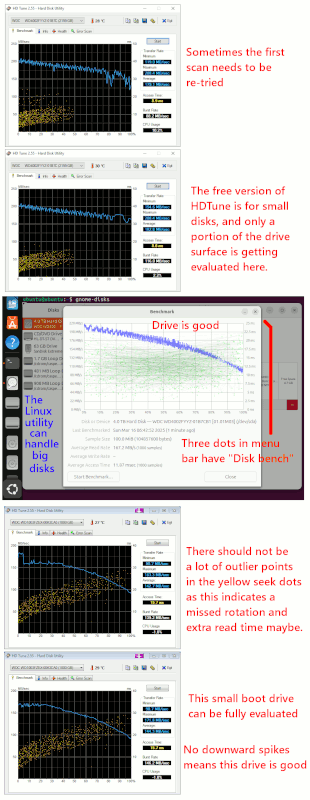
    "first sign of trouble", is when the drive is no longer detected.

    [Picture]

    https://i.postimg.cc/MKC7PQpt/benchmark-as-HDD-health-check.gif

    The SMART statistics can give some indications of trouble, but I like
    a benchmark as an early indication of trouble. It's pretty difficult on Windows, to do a bench, without Windows screwing it up, so don't
    panic if you see downward spikes in your bench. It might take
    a lot of fiddling to get a clean trace. Generally, you can't
    bench the C: drive because it is way too busy for this, but data
    drives or secondary drives can be tested this way. To test the
    1TB boot drive, I booted from a 2TB boot drive as a second disk
    and then benched the (idle) 1TB disk drive. The 4TB disk drive
    was tested, to show that the free HDTune is not suited to benching
    disks bigger than about 2TB or so. The Linux bench (from the three
    dots at the top of the "gnome-disks" menu bar), it handles larger
    disks just fine. Don't forget to *untick* the write-bench tick box
    before starting the Linux bench running -- it might damage your data and
    I'm not going to test that. The free version of HDTune only does
    reads (the paid version is much more thorough and does read/write).

    Paul

    --- SoupGate-Win32 v1.05
    * Origin: fsxNet Usenet Gateway (21:1/5)
  • From wasbit@21:1/5 to Jeff Gaines on Sun Mar 16 10:05:27 2025
    On 15/03/2025 19:43, Jeff Gaines wrote:
    On 15/03/2025 in message <vr4hnj$33gd$[email protected]> Paul wrote:

    The utility "dd" or "disk dump" is "dumb-cloning"
    and does more work than is absolutely necessary.
    Still, if the disks were exactly the same size
    (right down to the last digit), a "dd" transfer might
    take about five hours, while a file-by-file could
    easily take twenty-four hours.

    Many thanks :-)

    I Googled cloning software and there's a lot of it but all now
    subscription (how did that creep up on us so quickly?).

    Any suggestions? Currently I use SmartSync Pro because I paid for it
    years ago and it runs from a batch file, it may be once I've done the
    first copy it may be the easiest solution but I am happy to look at alternatives.

    Some cloning programmes will only clone to a disk of the same size or
    larger. Others will only clone a partition & not a whole drive. Some
    have size limits or restrict the speed in free versions of their software. These are ok.

    Disk Genius - https://www.diskgenius.com/free.php
    Hasleo Disk Clone - https://www.easyuefi.com/disk-clone/disk-clone-home.html Macrium Reflect (v8 last free) - https://www.majorgeeks.com/files/details/macrium_reflect_free_edition.html

    Regards
    wasbit

    --- SoupGate-Win32 v1.05
    * Origin: fsxNet Usenet Gateway (21:1/5)
  • From Andy Burns@21:1/5 to Paul on Sun Mar 16 10:10:18 2025
    Paul wrote:

    "A copy of Ghost" ???
    Shirley my leg is being pulled.

    Most recent update was in September 2024.
    Who knew?

    --- SoupGate-Win32 v1.05
    * Origin: fsxNet Usenet Gateway (21:1/5)
  • From RJH@21:1/5 to John Rumm on Sun Mar 16 10:47:40 2025
    On 15 Mar 2025 at 21:36:31 GMT, John Rumm wrote:

    I am struggling with the final piece of my "how to organise storage"
    puzzle. I have decided a NAS doesn't add anything as my NVidia TV Pro is
    happy to read files from normal file shares without resorting to DNLA so
    I don't need a streaming app.

    The main NAS advantage for that kind of thing is going to be low cost of running 24/7 and shared access without needing to keep a computer on.

    I and a few others abandoned their NAS when electricity prices went up a few years ago. For me, ISTR it was costing well over £100pa to run.

    --
    Cheers, Rob, Sheffield UK

    --- SoupGate-Win32 v1.05
    * Origin: fsxNet Usenet Gateway (21:1/5)
  • From wasbit@21:1/5 to All on Sun Mar 16 10:19:08 2025
    On 15/03/2025 22:18, SH wrote:
    On 15/03/2025 19:43, Jeff Gaines wrote:
    On 15/03/2025 in message <vr4hnj$33gd$[email protected]> Paul wrote:

    The utility "dd" or "disk dump" is "dumb-cloning"
    and does more work than is absolutely necessary.
    Still, if the disks were exactly the same size
    (right down to the last digit), a "dd" transfer might
    take about five hours, while a file-by-file could
    easily take twenty-four hours.

    Many thanks :-)

    I Googled cloning software and there's a lot of it but all now
    subscription (how did that creep up on us so quickly?).

    Any suggestions? Currently I use SmartSync Pro because I paid for it
    years ago and it runs from a batch file, it may be once I've done the
    first copy it may be the easiest solution but I am happy to look at
    alternatives.


    Another option is that some SSDs or NVMEs usually come with a copy of Ghost

    Or you could download and burn to a DVD a Ultimate Boot CD ISO or Hirens
    Boot CD ISO and that has a gazillion utlities some of which will be disk cloning software....

    Delivered by the SH of Ventoy fame :-D

    Just be aware that Windows Defender tries to quarantine some items on
    the Hirens & Ultimate Boot CDs. Ok if they are on a CD/DVD but can be a
    pain on a USB stick.

    --
    Regards
    wasbit

    --- SoupGate-Win32 v1.05
    * Origin: fsxNet Usenet Gateway (21:1/5)
  • From SH@21:1/5 to Andy Burns on Sun Mar 16 11:43:01 2025
    On 16/03/2025 10:10, Andy Burns wrote:
    Paul wrote:

    "A copy of Ghost" ???
    Shirley my leg is being pulled.

    Most recent update was in September 2024.
    Who knew?


    Thank you..... I rest my case... :-)

    --- SoupGate-Win32 v1.05
    * Origin: fsxNet Usenet Gateway (21:1/5)
  • From Chris Green@21:1/5 to RJH on Sun Mar 16 12:37:15 2025
    RJH <[email protected]> wrote:
    On 15 Mar 2025 at 21:36:31 GMT, John Rumm wrote:

    I am struggling with the final piece of my "how to organise storage"
    puzzle. I have decided a NAS doesn't add anything as my NVidia TV Pro is >> happy to read files from normal file shares without resorting to DNLA so >> I don't need a streaming app.

    The main NAS advantage for that kind of thing is going to be low cost of running 24/7 and shared access without needing to keep a computer on.

    I and a few others abandoned their NAS when electricity prices went up a few years ago. For me, ISTR it was costing well over £100pa to run.

    PCs like the Fujitsu Esprimo Q957 and Q556 consume only around 5 watts
    when idle, even at today's prices that's probably only about £20/year.
    I use a Q957 as my desktop machine and a Q556 as my main (remote)
    backup.

    If a typical NAS consumes more than this then I don't see any point in
    a dedicated NAS at all.

    --
    Chris Green
    ·

    --- SoupGate-Win32 v1.05
    * Origin: fsxNet Usenet Gateway (21:1/5)
  • From John Rumm@21:1/5 to RJH on Sun Mar 16 12:48:29 2025
    On 16/03/2025 10:47, RJH wrote:
    On 15 Mar 2025 at 21:36:31 GMT, John Rumm wrote:

    I am struggling with the final piece of my "how to organise storage"
    puzzle. I have decided a NAS doesn't add anything as my NVidia TV Pro is >>> happy to read files from normal file shares without resorting to DNLA so >>> I don't need a streaming app.

    The main NAS advantage for that kind of thing is going to be low cost of
    running 24/7 and shared access without needing to keep a computer on.

    I and a few others abandoned their NAS when electricity prices went up a few years ago. For me, ISTR it was costing well over £100pa to run.

    It can be worth looking at the energy saving options in the NAS control
    pages - quite often there are options to spin down drives and enter low
    power states at certain times of day (or more likely) night.

    --
    Cheers,

    John.

    /=================================================================\
    | Internode Ltd - http://www.internode.co.uk | |-----------------------------------------------------------------|
    | John Rumm - john(at)internode(dot)co(dot)uk | \=================================================================/

    --- SoupGate-Win32 v1.05
    * Origin: fsxNet Usenet Gateway (21:1/5)
  • From SH@21:1/5 to All on Sun Mar 16 13:14:21 2025
    On 16/03/2025 11:43, SH wrote:
    On 16/03/2025 10:10, Andy Burns wrote:
    Paul wrote:

    "A copy of Ghost" ???
    Shirley my leg is being pulled.

    Most recent update was in September 2024.
    Who knew?


    Thank you..... I rest my case... :-)


    P.S. there is also a GPartEd live ISO available for download.....

    --- SoupGate-Win32 v1.05
    * Origin: fsxNet Usenet Gateway (21:1/5)
  • From Paul@21:1/5 to All on Sun Mar 16 13:27:52 2025
    On Sun, 3/16/2025 9:14 AM, SH wrote:
    On 16/03/2025 11:43, SH wrote:
    On 16/03/2025 10:10, Andy Burns wrote:
    Paul wrote:

    "A copy of Ghost" ???
    Shirley my leg is being pulled.

    Most recent update was in September 2024.
    Who knew?


    Thank you..... I rest my case... :-)


    P.S. there is also a GPartEd live ISO available for download.....

    https://en.wikipedia.org/wiki/Ghost_%28disk_utility%29

    Discontinuation

    Norton GHOST was discontinued on April 30, 2013.

    Enterprise line

    Symantec GHOST Solution Suite 3.x (6.9, was released on 31 October 2018)

    You can barely even tell who owns it now. It appears
    Broadcom owns it or something.

    When someone says "Ghost" to me, it implies the old Ghost,
    from 2001. If the intention was to indicate it was
    something other than Ghost, you should use the proper
    listed name in Wiki (such as "GSS" or so).

    It's like telling someone to buy a copy of Retrospect :-)
    Look at the corporate chain for that puppy. Will... not... die.

    https://en.wikipedia.org/wiki/Retrospect_%28software%29

    The reason for using proper names, is to imply
    "continuity of product and continued validity of test work done".
    If it's not the same software any more, that invalidates all the
    testing and comments about how good or thorough it is.

    Macrium doesn't back up all the files. If you tested
    it, you'd know which files it does not back up and you
    would know what the consequences are. Each product
    has a story. This is why I tell people "it takes a year
    to test backup software to your satisfaction".

    Paul

    --- SoupGate-Win32 v1.05
    * Origin: fsxNet Usenet Gateway (21:1/5)
  • From Sam Plusnet@21:1/5 to RJH on Sun Mar 16 20:13:14 2025
    On 16/03/2025 10:47, RJH wrote:
    On 15 Mar 2025 at 21:36:31 GMT, John Rumm wrote:

    I am struggling with the final piece of my "how to organise storage"
    puzzle. I have decided a NAS doesn't add anything as my NVidia TV Pro is >>> happy to read files from normal file shares without resorting to DNLA so >>> I don't need a streaming app.

    The main NAS advantage for that kind of thing is going to be low cost of
    running 24/7 and shared access without needing to keep a computer on.

    I and a few others abandoned their NAS when electricity prices went up a few years ago. For me, ISTR it was costing well over £100pa to run.

    My NAS is scheduled to only operate at times when I am likely to want
    its services.
    For my purposes it was pointless to have it running 24/7, so I cut that
    to less than 25% of that time.
    Powering up, if I should need it outside those hours, only takes a
    minute or so.

    --
    Sam Plusnet

    --- SoupGate-Win32 v1.05
    * Origin: fsxNet Usenet Gateway (21:1/5)
  • From The Natural Philosopher@21:1/5 to RJH on Sun Mar 16 20:41:13 2025
    On 16/03/2025 10:47, RJH wrote:
    On 15 Mar 2025 at 21:36:31 GMT, John Rumm wrote:

    I am struggling with the final piece of my "how to organise storage"
    puzzle. I have decided a NAS doesn't add anything as my NVidia TV Pro is >>> happy to read files from normal file shares without resorting to DNLA so >>> I don't need a streaming app.

    The main NAS advantage for that kind of thing is going to be low cost of
    running 24/7 and shared access without needing to keep a computer on.

    I and a few others abandoned their NAS when electricity prices went up a few years ago. For me, ISTR it was costing well over £100pa to run.

    Well so what? it probably saves £40 p.a. on gas or oil...

    My next one will be Pi based. Should save me £100 or so.

    --
    "Anyone who believes that the laws of physics are mere social
    conventions is invited to try transgressing those conventions from the
    windows of my apartment. (I live on the twenty-first floor.) "

    Alan Sokal

    --- SoupGate-Win32 v1.05
    * Origin: fsxNet Usenet Gateway (21:1/5)
  • From Chris Green@21:1/5 to The Natural Philosopher on Mon Mar 17 08:34:46 2025
    The Natural Philosopher <[email protected]d> wrote:
    On 16/03/2025 10:47, RJH wrote:
    On 15 Mar 2025 at 21:36:31 GMT, John Rumm wrote:

    I am struggling with the final piece of my "how to organise storage"
    puzzle. I have decided a NAS doesn't add anything as my NVidia TV Pro is >>> happy to read files from normal file shares without resorting to DNLA so >>> I don't need a streaming app.

    The main NAS advantage for that kind of thing is going to be low cost of >> running 24/7 and shared access without needing to keep a computer on.

    I and a few others abandoned their NAS when electricity prices went up a few
    years ago. For me, ISTR it was costing well over £100pa to run.

    Well so what? it probably saves £40 p.a. on gas or oil...

    My next one will be Pi based. Should save me £100 or so.

    Buy a refurbished Fujitsu Q957 or Q556, that is down at similar power consumption but provides you with space for drive etc. all in one nice
    small box.

    I use Raspberry Pis but not as NAS'.

    --
    Chris Green
    ·

    --- SoupGate-Win32 v1.05
    * Origin: fsxNet Usenet Gateway (21:1/5)
  • From Jeff Gaines@21:1/5 to All on Wed Mar 19 12:11:18 2025
    On 15/03/2025 in message <[email protected]> Jeff
    Gaines wrote:

    [snipped]

    Just an update on how things went, in no particular order as they say:

    Any solution that involves imaging/cloning seems to mean booting to the software rather than running it under Windows.

    An exception I have is MiniTool Partition Wizard which I used to clone 1 x
    Iron Wolf Spinner with 2.5 TB on it to an identical drive which took about
    8 hours.

    SmartSync Pro takes 32 minutes to work its way through the whole backup
    regime which involves 10 drives with different stuff on them.

    The killer is the original copy to an empty drive, I only have to do that
    if I change the structure of things so it's in my own hands.

    Many thanks for all the input :-)

    Irony of ironies I discovered that the drives in my DAS (tool free
    fitting) are supposed to have a plain rail at the bottom and a sprung rail
    at the top and I had mixed and matched. I turned off my server sorted out
    the rails and now the server won't power up!

    Back to the drawing board....

    --
    Jeff Gaines Dorset UK
    Thanks for teaching me the meaning of plethora, it means a lot.

    --- SoupGate-Win32 v1.05
    * Origin: fsxNet Usenet Gateway (21:1/5)
  • From wasbit@21:1/5 to Jeff Gaines on Thu Mar 20 09:11:17 2025
    On 19/03/2025 12:11, Jeff Gaines wrote:
    On 15/03/2025 in message <[email protected]> Jeff
    Gaines wrote:

    [snipped]

    Just an update on how things went, in no particular order as they say:

    Any solution that involves imaging/cloning seems to mean booting to the software rather than running it under Windows.

    An exception I have is MiniTool Partition Wizard which I used to clone 1
    x Iron Wolf Spinner with 2.5 TB on it to an identical drive which took
    about 8 hours.

    SmartSync Pro takes 32 minutes to work its way through the whole backup regime which involves 10 drives with different stuff on them.

    The killer is the original copy to an empty drive, I only have to do
    that if I change the structure of things so it's in my own hands.

    snip <


    Nope. The three free cloning programmes I posted earlier all work from
    within Windows.
    I haven't used Macrium for some years but I have used Disk Genius &
    Hasleo to clone drives.

    "
    Disk Genius - https://www.diskgenius.com/free.php
    Hasleo Disk Clone - https://www.easyuefi.com/disk-clone/disk-clone-home.html Macrium Reflect (v8 last free) - https://www.majorgeeks.com/files/details/macrium_reflect_free_edition.html "


    --
    Regards
    wasbit

    --- SoupGate-Win32 v1.05
    * Origin: fsxNet Usenet Gateway (21:1/5)
  • From Tricky Dicky@21:1/5 to wasbit on Sat Mar 22 14:33:33 2025
    wasbit <[email protected]> wrote:
    On 19/03/2025 12:11, Jeff Gaines wrote:
    On 15/03/2025 in message <[email protected]> Jeff
    Gaines wrote:

    [snipped]

    Just an update on how things went, in no particular order as they say:

    Any solution that involves imaging/cloning seems to mean booting to the
    software rather than running it under Windows.

    An exception I have is MiniTool Partition Wizard which I used to clone 1
    x Iron Wolf Spinner with 2.5 TB on it to an identical drive which took
    about 8 hours.

    SmartSync Pro takes 32 minutes to work its way through the whole backup
    regime which involves 10 drives with different stuff on them.

    The killer is the original copy to an empty drive, I only have to do
    that if I change the structure of things so it's in my own hands.

    snip <


    Nope. The three free cloning programmes I posted earlier all work from
    within Windows.
    I haven't used Macrium for some years but I have used Disk Genius &
    Hasleo to clone drives.

    "
    Disk Genius - https://www.diskgenius.com/free.php
    Hasleo Disk Clone - https://www.easyuefi.com/disk-clone/disk-clone-home.html Macrium Reflect (v8 last free) - https://www.majorgeeks.com/files/details/macrium_reflect_free_edition.html "


    Often HDD and SSD manufacturers will supply a free version of a cloning app
    as long as the destination drive is one of their models. I used a Crucial
    app when I replaced a HDD with a Crucial SSD and despite the original drive
    was literally on its last gasps it took a few attempts but eventually it produced a cloned drive with as far as I can see contains no corrupted
    files.

    Richard

    --- SoupGate-Win32 v1.05
    * Origin: fsxNet Usenet Gateway (21:1/5)