I read this item in the ASC forums:-
https://discussions.apple.com/docs/DOC-250003583
Being conscious that the Fusion Drive in this ageing 27 inch iMac (2017)
is likely to fail at some point,
I decided to buy a 1TB LaCie SSD and
use it as an external drive from which to start my computer.
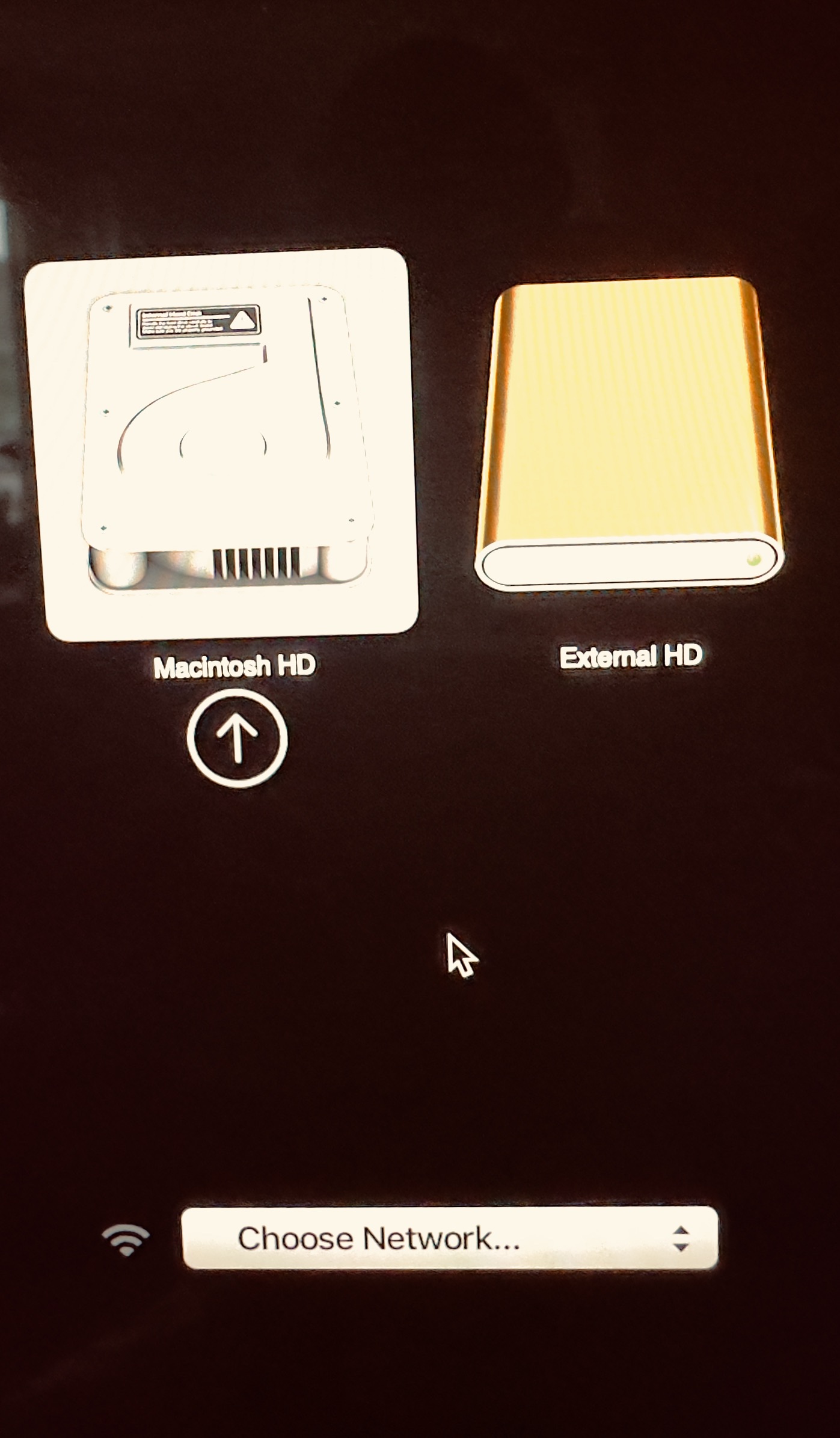
I can elect to do so here:- https://i.ibb.co/y8PFpwt/ Screenshot-2024-10-17-at-09-26-13.png
Or, when the internal drive no longer functions, I can start the machine whilst holding down the 'Option' key and be presented with this configuration:- https://i.ibb.co/5GV7pvt/IMG-2865.jpg
I've tested it and all appears to work well.
Has anyone else done a similar thing?
On 17/10/2024 10:37, David Brooks wrote:
I read this item in the ASC forums:-
https://discussions.apple.com/docs/DOC-250003583
Being conscious that the Fusion Drive in this ageing 27 inch iMac (2017)
is likely to fail at some point,
You should be conscious that any drive can fail at ant point, along with
any electronics or thing (based on a the 'Bathtub' / MTBF rules).
I decided to buy a 1TB LaCie SSD and
use it as an external drive from which to start my computer.
I can elect to do so here:- https://i.ibb.co/y8PFpwt/
Screenshot-2024-10-17-at-09-26-13.png
Or, when the internal drive no longer functions, I can start the
machine whilst holding down the 'Option' key and be presented with
this configuration:- https://i.ibb.co/5GV7pvt/IMG-2865.jpg
Or set it as the default drive and so not have to press anything.
I've tested it and all appears to work well.
Well done you. But actually well done for actually adding a tiny amount
of your own content, even though it's like you have just landed on this planet.
Has anyone else done a similar thing?
I would ponder 'yes, most Mac owners' (and yes, including me, probably
the first day I got one).
Or, when the internal drive no longer functions, I can start the
machine whilst holding down the 'Option' key and be presented with
this configuration:- https://i.ibb.co/5GV7pvt/IMG-2865.jpg
Or set it as the default drive and so not have to press anything.
Agreed, I could do that.
However, the read speed of the internal Fusion
Drive is much faster.
I confess, though, that I've not noticed any
visible difference! <rolls eyes>
I've tested it and all appears to work well.
Well done you. But actually well done for actually adding a tiny
amount of your own content, even though it's like you have just landed
on this planet.
You are welcome. Do remember, though, that I'm an end user, NOT a techie.
Has anyone else done a similar thing?
I would ponder 'yes, most Mac owners' (and yes, including me, probably
the first day I got one).
I'm going to disagree with you here!
I got my first Apple iMac
after a suggestion from my son.
He'd been browsing in the brand new Apple store which had opened in
November 2006. He said "Dad, you've just GOT to get one of these!
A year later, Apple opened its store in Exeter!
Of course, I had to go and look! I deliberated for a long time, but
finally 'bit the bullet' and bought the best 24 inch iMac they had in
stock
That was only after the store manager had agreed to give me a discount
- all of 5%! The staff helped me manhandle the large box to the bus stop
a few hundred yards away - IIRC we used a sack trolley!
Imagine how pissed off I was when, shortly afterwards, Apple launched a
new 27 inch version!
I finally got my hands on THAT iMac in 2017 and use
it to this day.
I followed Apple's advice; I bought and set up a WD 1TB Mac Book for use
with my Time Machine.
At some stage that failed! Western Digital
honoured their guarantee and supplied me with a brand new 2TB Mac Book
free of charge. I had to pay the postage to send them the failed item.
So I've always had a back-up. This new external SSD gives another string
to my bow!
I hope this helps explain matters.
On 17/10/2024 15:08, David Brooks wrote:
<snip>
Or, when the internal drive no longer functions, I can start the
machine whilst holding down the 'Option' key and be presented with
this configuration:- https://i.ibb.co/5GV7pvt/IMG-2865.jpg
Or set it as the default drive and so not have to press anything.
Agreed, I could do that.
It would make sense to, given the circumstance.
However, the read speed of the internal Fusion
Drive is much faster.
Not if it 'no longer functions'.
I confess, though, that I've not noticed any visible difference!
<rolls eyes>
You would be unlikely to, just because it's you.
I've tested it and all appears to work well.
Well done you. But actually well done for actually adding a tiny
amount of your own content, even though it's like you have just
landed on this planet.
You are welcome. Do remember, though, that I'm an end user, NOT a techie.
I see, so you would consider knowing how to change the cruise control
speed or start the car where you need to also press the brake are the
land of the techie? Or just learning how to properly / safely use the
tools?
Has anyone else done a similar thing?
I would ponder 'yes, most Mac owners' (and yes, including me,
probably the first day I got one).
I'm going to disagree with you here!
You are welcome to but it won't change anything.
I got my first Apple iMac
after a suggestion from my son.
He'd been browsing in the brand new Apple store which had opened in
November 2006. He said "Dad, you've just GOT to get one of these!
Obviously he didn't know you very well then.
A year later, Apple opened its store in Exeter!
Of course, I had to go and look! I deliberated for a long time, but
finally 'bit the bullet' and bought the best 24 inch iMac they had in
stock
That was only after the store manager had agreed to give me a discount
- all of 5%! The staff helped me manhandle the large box to the bus
stop a few hundred yards away - IIRC we used a sack trolley!
Nothing like being prepared.
Imagine how pissed off I was when, shortly afterwards, Apple launched
a new 27 inch version!
Seeing how you react to most things, it may have been what flipped you
over the edge.
I finally got my hands on THAT iMac in 2017 and use it to this day.
I replaced a CRT iMac with a PC for a local guy as he couldn't get on
with it. He kept downloading Windows stuff and was frustrated it didn't
work.
I followed Apple's advice; I bought and set up a WD 1TB Mac Book for use
with my Time Machine.
Are you sure you are using the right name there?
At some stage that failed! Western Digital honoured their guaranteeWhat was there to explain?
and supplied me with a brand new 2TB Mac Book free of charge. I had to
pay the postage to send them the failed item.
So I've always had a back-up. This new external SSD gives another
string to my bow!
I hope this helps explain matters.
17 years of Mac ownership and you have just learned about the boot options? You sound like my dad who only really used his Macs as electronic typewriters.
On 17/10/2024 18:24, T i m wrote:
On 17/10/2024 15:08, David Brooks wrote:
<snip>
Or, when the internal drive no longer functions, I can start the
machine whilst holding down the 'Option' key and be presented with
this configuration:- https://i.ibb.co/5GV7pvt/IMG-2865.jpg
Or set it as the default drive and so not have to press anything.
Agreed, I could do that.
It would make sense to, given the circumstance.
Just because of the age of the computer?
However, the read speed of the internal Fusion
Drive is much faster.
Not if it 'no longer functions'.
But it DOES function! I provided a Disk Speed Test image.
I confess, though, that I've not noticed any visible difference!
<rolls eyes>
You would be unlikely to, just because it's you.
<shrug>
I've tested it and all appears to work well.
Well done you. But actually well done for actually adding a tiny
amount of your own content, even though it's like you have just
landed on this planet.
You are welcome. Do remember, though, that I'm an end user, NOT a
techie.
I see, so you would consider knowing how to change the cruise control
speed or start the car where you need to also press the brake are the
land of the techie? Or just learning how to properly / safely use the
tools?
Just a bit. It's not been an easy change-over to my VW Golf!
Has anyone else done a similar thing?
I would ponder 'yes, most Mac owners' (and yes, including me,
probably the first day I got one).
I'm going to disagree with you here!
You are welcome to but it won't change anything.
It is how it is.
I got my first Apple iMac
after a suggestion from my son.
He'd been browsing in the brand new Apple store which had opened in
November 2006. He said "Dad, you've just GOT to get one of these!
Obviously he didn't know you very well then.
Not as well as he knows me now - for an extra 18 years!
A year later, Apple opened its store in Exeter!
Of course, I had to go and look! I deliberated for a long time, but
finally 'bit the bullet' and bought the best 24 inch iMac they had in
stock
That was only after the store manager had agreed to give me a discount
- all of 5%! The staff helped me manhandle the large box to the bus
stop a few hundred yards away - IIRC we used a sack trolley!
Nothing like being prepared.
I thought you might have been impressed that I hadn't taken my car right
into the centre of the city!
Imagine how pissed off I was when, shortly afterwards, Apple launched
a new 27 inch version!
Seeing how you react to most things, it may have been what flipped you
over the edge.
Don't judge a book by its cover!
I finally got my hands on THAT iMac in 2017 and use it to this day.
I replaced a CRT iMac with a PC for a local guy as he couldn't get on
with it. He kept downloading Windows stuff and was frustrated it
didn't work.
That must have been a while ago.
I followed Apple's advice; I bought and set up a WD 1TB Mac Book for use >>> with my Time Machine.
Are you sure you are using the right name there?
Oops! Sorry. My mistake. It's a WD "My Book".
At some stage that failed! Western Digital honoured their guaranteeWhat was there to explain?
and supplied me with a brand new 2TB Mac Book free of charge. I had
to pay the postage to send them the failed item.
So I've always had a back-up. This new external SSD gives another
string to my bow!
I hope this helps explain matters.
Why I'd never felt a /need/ to have a bootable operating system on an external SSD
17 years of Mac ownership and you have just learned about the boot
options?
You sound like my dad who only really used his Macs as electronic
typewriters.
I might well be a bit like your dad - and my dad too!
We used to laugh at Alf Garnet back in those days.
Have you ever taken an iMac apart with a screwdriver?
On 17/10/2024 21:16, David Brooks wrote:
On 17/10/2024 18:24, T i m wrote:
On 17/10/2024 15:08, David Brooks wrote:
<snip>
Or, when the internal drive no longer functions, I can start the
machine whilst holding down the 'Option' key and be presented with >>>>>> this configuration:- https://i.ibb.co/5GV7pvt/IMG-2865.jpg
Or set it as the default drive and so not have to press anything.
Agreed, I could do that.
It would make sense to, given the circumstance.
Just because of the age of the computer?
FFS. You previously stated 'When the internal drive no longer
functions' ...
Have you ever seen the Sally-Anne test?
https://en.wikipedia.org/wiki/Sally%E2%80%93Anne_test
However, the read speed of the internal Fusion
Drive is much faster.
Not if it 'no longer functions'.
But it DOES function! I provided a Disk Speed Test image.
See the test above.
I confess, though, that I've not noticed any visible difference!
<rolls eyes>
You would be unlikely to, just because it's you.
<shrug>
You see (and believe in) things that are not there and can't see the
obvious (this thread being a good example).
I've tested it and all appears to work well.
Well done you. But actually well done for actually adding a tiny
amount of your own content, even though it's like you have just
landed on this planet.
You are welcome. Do remember, though, that I'm an end user, NOT a
techie.
I see, so you would consider knowing how to change the cruise control
speed or start the car where you need to also press the brake are the
land of the techie? Or just learning how to properly / safely use the
tools?
Just a bit. It's not been an easy change-over to my VW Golf!
Again, my analogy whooshed you. It's not re-learning that's the issue,
it's you learning the basics in the first place.
Has anyone else done a similar thing?
I would ponder 'yes, most Mac owners' (and yes, including me,
probably the first day I got one).
I'm going to disagree with you here!
You are welcome to but it won't change anything.
It is how it is.
No, it's how you are.
I got my first Apple iMac
after a suggestion from my son.
He'd been browsing in the brand new Apple store which had opened in
November 2006. He said "Dad, you've just GOT to get one of these!
Obviously he didn't know you very well then.
Not as well as he knows me now - for an extra 18 years!
Quite. Shame he hasn't helped you box the Mac up and take it to the
charity shop then and get you some jigsaws.
A year later, Apple opened its store in Exeter!
Of course, I had to go and look! I deliberated for a long time, but
finally 'bit the bullet' and bought the best 24 inch iMac they had
in stock
That was only after the store manager had agreed to give me a discount >>>> - all of 5%! The staff helped me manhandle the large box to the bus
stop a few hundred yards away - IIRC we used a sack trolley!
Nothing like being prepared.
I thought you might have been impressed that I hadn't taken my car
right into the centre of the city!
You were probably frightened of getting lost or forgetting where you
parked your car.
Imagine how pissed off I was when, shortly afterwards, Apple
launched a new 27 inch version!
Seeing how you react to most things, it may have been what flipped
you over the edge.
Don't judge a book by its cover!
I'm judging the book by the contents that spew out here.
I finally got my hands on THAT iMac in 2017 and use it to this day.
I replaced a CRT iMac with a PC for a local guy as he couldn't get on
with it. He kept downloading Windows stuff and was frustrated it
didn't work.
That must have been a while ago.
It was. Many fewer people are running desktop PC's now.
I followed Apple's advice; I bought and set up a WD 1TB Mac Book for
use
with my Time Machine.
Are you sure you are using the right name there?
Oops! Sorry. My mistake. It's a WD "My Book".
And it's something you bought and owned and I never have.
At some stage that failed! Western Digital honoured their guaranteeWhat was there to explain?
and supplied me with a brand new 2TB Mac Book free of charge. I had
to pay the postage to send them the failed item.
So I've always had a back-up. This new external SSD gives another
string to my bow!
I hope this helps explain matters.
Why I'd never felt a /need/ to have a bootable operating system on an
external SSD
No indeed, why would you? Didn't stop you learning the basic controls
though?
17 years of Mac ownership and you have just learned about the boot
options?
You sound like my dad who only really used his Macs as electronic
typewriters.
I might well be a bit like your dad - and my dad too!
I showed him how he could listen to his music CD's on his iMac whilst
using it as a typewriter. He was interested but never did so. I gave him
a modem, set it up with an eMail account (all free to him) and it was
given back a couple of weeks later with a 'Thanks but no thanks'. Two
years later he paid a 'Mac Man' to install the EXACT same kit for
him ... and of course I had to keep showing him how to use it (when he
would likely have got it by then had he stuck with what I gave him).
We used to laugh at Alf Garnet back in those days.
I didn't, in the same way I've never laughed at 'Mrs Browns Boys'.
On 18/10/2024 08:55, T i m wrote:
On 18/10/2024 08:31, David Brooks wrote:
<snip>
Have you ever taken an iMac apart with a screwdriver?
Me too!
I have taken many things that exist apart with a screwdriver.
I open my Mac Mini with a fish slice.
Have you ever replaced the hard drive in it?
What operating system do you use?
The MacBook Pro that my friends son borrowed off his grandad and
accidentally tipped a whole mug of sweet tea over by mistake, I
stripped, washed (in the sink) and re-assembled with several tools.
You did well ..... if it worked afterwards!
The TFT iMac I opened with some suckers.
You'd need far more than "some suckers" if you, like me, replaced the
hard drive! ;-)
On 18/10/2024 08:55, T i m wrote:
On 18/10/2024 08:31, David Brooks wrote:
<snip>
Have you ever taken an iMac apart with a screwdriver?
I have taken many things that exist apart with a screwdriver.
Me too!
I open my Mac Mini with a fish slice.
Have you ever replaced the hard drive in it?
What operating system do you use?
The MacBook Pro that my friends son borrowed off his grandad and
accidentally tipped a whole mug of sweet tea over by mistake, I
stripped, washed (in the sink) and re-assembled with several tools.
You did well ..... if it worked afterwards!
The TFT iMac I opened with some suckers.
You'd need far more than "some suckers" if you, like me, replaced the
hard drive! ;-)
On 18/10/2024 08:31, David Brooks wrote:
<snip>
Have you ever taken an iMac apart with a screwdriver?
I have taken many things that exist apart with a screwdriver.
I open my Mac Mini with a fish slice.
The MacBook Pro that my friends son borrowed off his grandad and
accidentally tipped a whole mug of sweet tea over by mistake, I
stripped, washed (in the sink) and re-assembled with several tools.
The TFT iMac I opened with some suckers.
On 18/10/2024 11:39, David Brooks wrote:
On 18/10/2024 08:55, T i m wrote:
On 18/10/2024 08:31, David Brooks wrote:
<snip>
Have you ever taken an iMac apart with a screwdriver?
Me too!
Eh?
I have taken many things that exist apart with a screwdriver.
I open my Mac Mini with a fish slice.
Have you ever replaced the hard drive in it?
Yes.
What operating system do you use?
Bootcamp, XP / OSX
The MacBook Pro that my friends son borrowed off his grandad and
accidentally tipped a whole mug of sweet tea over by mistake, I
stripped, washed (in the sink) and re-assembled with several tools.
You did well ..... if it worked afterwards!
It did. The strip-down involved stripping down the backlit keyboard
(removing ~64 tiny screws), separating the many layers, washing and
drying them before re-assembly.
The TFT iMac I opened with some suckers.
You'd need far more than "some suckers" if you, like me, replaced the
hard drive! ;-)
(Of course) I used other tools but 'opened' the iMac with suckers.
If you change the HDD for a generic (non Apple one) you may need either
a special lead or sone additional software to stop the fans spinning
100% all the time (the Apple hard drives can have an addition non std temperature sensor).
I open my Mac Mini with a fish slice.
Have you ever replaced the hard drive in it?
Yes.
So it's an old one?
What operating system do you use?
Bootcamp, XP / OSX
I've never used Bootcamp. I have an original Windows XP disk - could I
use that?
The MacBook Pro that my friends son borrowed off his grandad and
accidentally tipped a whole mug of sweet tea over by mistake, I
stripped, washed (in the sink) and re-assembled with several tools.
You did well ..... if it worked afterwards!
It did. The strip-down involved stripping down the backlit keyboard
(removing ~64 tiny screws), separating the many layers, washing and
drying them before re-assembly.
I might ask how to do that.
My middle grandson has just donated his Dell
laptop to me to play with He's now using a MacBook.
You might like to review what David once did with a laptop! https://groups.google.com/g/alt.politics.scorched-earth/c/czTnrjttJ5A/ m/2XqeKZe_V5oJ
As a professional, you'd no doubt have done something differently!
On 19/10/2024 08:49, David Brooks wrote:
<snip>
I open my Mac Mini with a fish slice.
Have you ever replaced the hard drive in it?
In one, my daughters, yes.
Yes.
So it's an old one?
It was new / current when we bought it for her then upgraded later on.
What operating system do you use?
Bootcamp, XP / OSX
I've never used Bootcamp. I have an original Windows XP disk - could I
use that?
I'm not sure if you can install XP directly, even on an Intel Mac but
then I've never tried.
The MacBook Pro that my friends son borrowed off his grandad and
accidentally tipped a whole mug of sweet tea over by mistake, I
stripped, washed (in the sink) and re-assembled with several tools.
You did well ..... if it worked afterwards!
It did. The strip-down involved stripping down the backlit keyboard
(removing ~64 tiny screws), separating the many layers, washing and
drying them before re-assembly.
I might ask how to do that.
You take it to bits, wash everything (except the battery, display and speakers etc) in warm soapy water, rinse in distilled water, fully dry, reassemble?
My middle grandson has just donated his Dell laptop to me to play with
He's now using a MacBook.
I predict him asking for it back (or buying another Windows laptop),
unless he only uses it as a web terminal / typewriter etc.
<snip>
You might like to review what David once did with a laptop!
https://groups.google.com/g/alt.politics.scorched-earth/c/czTnrjttJ5A/
m/2XqeKZe_V5oJ
Well done.
As a professional, you'd no doubt have done something differently!I'm not a professional, I am a jack_of_all_trades but rarely walk away
from anything not working or not working better than when I got there.
When I visited my mate on his Nb the other day he presented me with his faulty / leaking water pump. So I stripped it down (past were a supposed professional had previously), gave him some of the inner workings to
clean in the sink and then I reassembled it.
Apparently it worked much better and quieter but still leaked (something
I predicted to happen as I hadn't done anything different on re-
assembly). It might have a hole in the diaphragm somewhere but the t/s
at the supplier said they hadn't sold many spare diaphragm (possibly
because they were 1/4 of the price of a new pump).
On 19/10/2024 22:03, David Brooks wrote:
<snip>
With 40 years of narrowboating under my belt - and having done whatI understand this was a good quality water pump (Jabsco) that hasn't
you did many times - my firm advice is to buy and fit a brand new,
good quality, water pump if one fails!
lasted very long and at two hundred quid a pop, not something he wants
to be replacing that regularly. ;-(
Given the motor and body are still fine and is still actually working
fine, it's just the leak we need to sort out.
It's either from around the diaphragm (should be sealable), or through
the diaphragm (more tricky to repair).
12V 25psi, 15l/m.
With 40 years of narrowboating under my belt - and having done what you
did many times - my firm advice is to buy and fit a brand new, good
quality, water pump if one fails!
On 19/10/2024 22:47, David Brooks wrote:
<snip>
Let's play 'Name that thing' (what it's most likely to be and without Googling).
Par-Max Water pump
Beta Engine - Beta Marine
Victron Battery Management
Epever Solar power controller
Squirrel Solid fuel stove
Vetus Engine
Dometic Batteries
Durite ?????
Aquafax Marine equipment
Quick Boat
Starline Narrowboat holidays
Mitsubishi Engines
Lucus ?????
Clipper A special rig of sailing ships.
| Sysop: | Keyop |
|---|---|
| Location: | Huddersfield, West Yorkshire, UK |
| Users: | 764 |
| Nodes: | 16 (2 / 14) |
| Uptime: | 08:24:19 |
| Calls: | 12,752 |
| Calls today: | 6 |
| Files: | 15,355 |
| Messages: | 6,556,537 |