• Cinema Display to Mac Pro connections

    From Liz Tuddenham@21:1/5 to All on Sat Apr 6 19:53:30 2024
    Last nught my Mac Pro with a Cinema display (early models, I believe)
    suddenly went dead - no "Bang", no "Phut", just stopped, as if someone
    had pulled out the plug. The plugtop fuse was OK but there was simply
    no response to the Start button. I looked into the possibility of
    checking through the power supply but access to it needed a special
    screwdriver which I haven't got.

    Luckily I have a spare Mac Pro, so I tried connecting that to the
    existing monitor, mouse and keyboards. I also swapped over the memory
    cards and hard drives. There was one lead which I couldn't find a
    socket for, but I tried it anyway and the Mac Pro started up with a
    'Boing', then went on to make disc-working noises -- but there was no
    response from the screen.

    Before I jump to the conclusion that a faulty Cinema Display took out
    the power supply, I want to be sure I have connect it back correctly
    (foolishly I didn't check what went where when pulling out the various
    plugs).

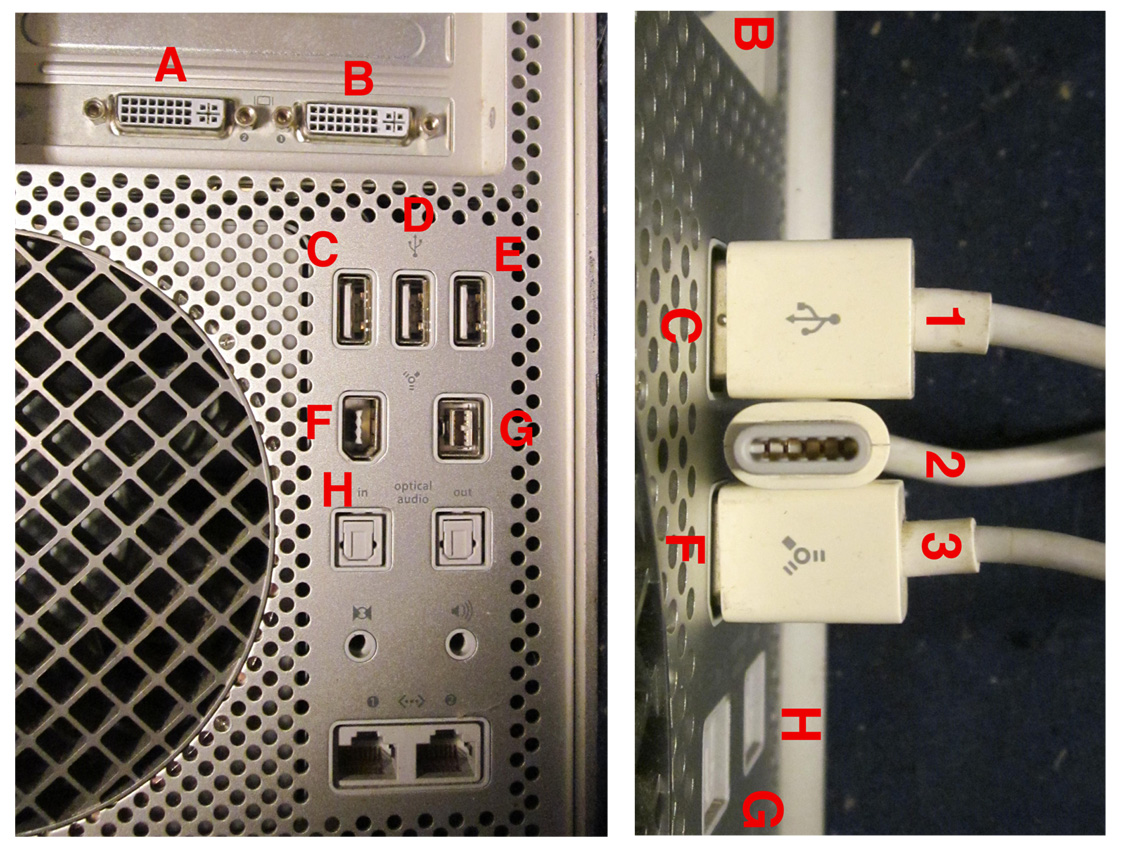
    I have put a picture of the connectors at: http://www.poppyrecords.co.uk/other/Plugs+sockets.jpg

    I have tried the main plug in 'A' and 'B', it makes no difference. It
    is obvious that Plug '1' goes in socket'C' and plug '3' goes in socket
    'F' ...but where is plug '2' supposed to go?

    --
    ~ Liz Tuddenham ~
    (Remove the ".invalid"s and add ".co.uk" to reply)
    www.poppyrecords.co.uk

    --- SoupGate-Win32 v1.05
    * Origin: fsxNet Usenet Gateway (21:1/5)
  • From Bruce Horrocks@21:1/5 to Liz Tuddenham on Sat Apr 6 20:46:17 2024
    On 06/04/2024 19:53, Liz Tuddenham wrote:
    I have put a picture of the connectors at: http://www.poppyrecords.co.uk/other/Plugs+sockets.jpg I have tried the
    main plug in 'A' and 'B', it makes no difference. It is obvious that
    Plug '1' goes in socket'C' and plug '3' goes in socket 'F' ...but where
    is plug '2' supposed to go?

    Plug 2 looks like a magsafe power cable. I believe some models of Cinema display could power a Mac laptop via this cable. If you're not powering
    a laptop then it doesn't need to be plugged in - just tidy it out of the
    way.

    --
    Bruce Horrocks
    Surrey, England

    --- SoupGate-Win32 v1.05
    * Origin: fsxNet Usenet Gateway (21:1/5)
  • From Martin S Taylor@21:1/5 to All on Sun Apr 7 10:17:25 2024
    On 6 Apr 2024, Liz Tuddenham wrote
    (in article<1qrlyga.980sscc6ye3wN%[email protected]d>):

    Luckily I have a spare Mac Pro

    Bloody hell...

    MST

    --- SoupGate-Win32 v1.05
    * Origin: fsxNet Usenet Gateway (21:1/5)
  • From Liz Tuddenham@21:1/5 to Bruce Horrocks on Sun Apr 7 17:20:22 2024
    Bruce Horrocks <[email protected]> wrote:

    On 06/04/2024 19:53, Liz Tuddenham wrote:
    I have put a picture of the connectors at: http://www.poppyrecords.co.uk/other/Plugs+sockets.jpg I have tried the
    main plug in 'A' and 'B', it makes no difference. It is obvious that
    Plug '1' goes in socket'C' and plug '3' goes in socket 'F' ...but where
    is plug '2' supposed to go?

    Plug 2 looks like a magsafe power cable. I believe some models of Cinema display could power a Mac laptop via this cable. If you're not powering
    a laptop then it doesn't need to be plugged in - just tidy it out of the
    way.

    Thanks, I was worried that it might be a way of powering the displa,
    which wasn't working because I hadn't plugged it in. If the display is
    powered through the other leads, then it is probably dud.


    --
    ~ Liz Tuddenham ~
    (Remove the ".invalid"s and add ".co.uk" to reply)
    www.poppyrecords.co.uk

    --- SoupGate-Win32 v1.05
    * Origin: fsxNet Usenet Gateway (21:1/5)
  • From Bruce Horrocks@21:1/5 to Liz Tuddenham on Sun Apr 7 18:07:22 2024
    On 07/04/2024 17:20, Liz Tuddenham wrote:
    Bruce Horrocks <[email protected]> wrote:

    On 06/04/2024 19:53, Liz Tuddenham wrote:
    I have put a picture of the connectors at:
    http://www.poppyrecords.co.uk/other/Plugs+sockets.jpg I have tried the
    main plug in 'A' and 'B', it makes no difference. It is obvious that
    Plug '1' goes in socket'C' and plug '3' goes in socket 'F' ...but where
    is plug '2' supposed to go?

    Plug 2 looks like a magsafe power cable. I believe some models of Cinema
    display could power a Mac laptop via this cable. If you're not powering
    a laptop then it doesn't need to be plugged in - just tidy it out of the
    way.

    Thanks, I was worried that it might be a way of powering the displa,
    which wasn't working because I hadn't plugged it in. If the display is powered through the other leads, then it is probably dud.

    I tell a lie. Looking a bit more on the Internet it seems the Magsafe
    connector is to power the monitor from the power brick. The power brick connects to the mains, obviously.

    So your failure could be in the brick - or maybe you simply knocked the
    brick or tugged the cable, and being magnetic, it came adrift and there
    is nothing actually wrong?

    --
    Bruce Horrocks
    Surrey, England

    --- SoupGate-Win32 v1.05
    * Origin: fsxNet Usenet Gateway (21:1/5)
  • From Liz Tuddenham@21:1/5 to Martin S Taylor on Sun Apr 7 17:20:22 2024
    Martin S Taylor <[email protected]> wrote:

    On 6 Apr 2024, Liz Tuddenham wrote
    (in article<1qrlyga.980sscc6ye3wN%[email protected]d>):

    Luckily I have a spare Mac Pro

    Bloody hell...

    Could you elaborate on that?


    --
    ~ Liz Tuddenham ~
    (Remove the ".invalid"s and add ".co.uk" to reply)
    www.poppyrecords.co.uk

    --- SoupGate-Win32 v1.05
    * Origin: fsxNet Usenet Gateway (21:1/5)
  • From Liz Tuddenham@21:1/5 to Bruce Horrocks on Sun Apr 7 18:39:22 2024
    Bruce Horrocks <[email protected]> wrote:

    On 07/04/2024 17:20, Liz Tuddenham wrote:
    Bruce Horrocks <[email protected]> wrote:

    On 06/04/2024 19:53, Liz Tuddenham wrote:
    I have put a picture of the connectors at:
    http://www.poppyrecords.co.uk/other/Plugs+sockets.jpg I have tried the >>> main plug in 'A' and 'B', it makes no difference. It is obvious that
    Plug '1' goes in socket'C' and plug '3' goes in socket 'F' ...but where >>> is plug '2' supposed to go?

    Plug 2 looks like a magsafe power cable. I believe some models of Cinema >> display could power a Mac laptop via this cable. If you're not powering
    a laptop then it doesn't need to be plugged in - just tidy it out of the >> way.

    Thanks, I was worried that it might be a way of powering the displa,
    which wasn't working because I hadn't plugged it in. If the display is powered through the other leads, then it is probably dud.

    I tell a lie. Looking a bit more on the Internet it seems the Magsafe connector is to power the monitor from the power brick. The power brick connects to the mains, obviously.

    So your failure could be in the brick - or maybe you simply knocked the
    brick or tugged the cable, and being magnetic, it came adrift and there
    is nothing actually wrong?

    BINGO!

    There was a power brick, which I hadn't spotted, lurking in the maze of
    wiring at the back of the behemoth (Mac Pro). I plugged the mystery
    plug into the power brick and it all appears to work now.

    There are a few settings lost in the changeover, but it should only take
    a few minutes to sort them out. Many Thanks.


    --
    ~ Liz Tuddenham ~
    (Remove the ".invalid"s and add ".co.uk" to reply)
    www.poppyrecords.co.uk

    --- SoupGate-Win32 v1.05
    * Origin: fsxNet Usenet Gateway (21:1/5)
  • From Jaimie Vandenbergh@21:1/5 to correspondence@mRaErMtOiVnEsTtHaIyS on Sun Apr 7 18:29:29 2024
    On 7 Apr 2024 at 10:17:25 BST, "Martin S Taylor" <[email protected]> wrote:

    On 6 Apr 2024, Liz Tuddenham wrote
    (in article<1qrlyga.980sscc6ye3wN%[email protected]d>):

    Luckily I have a spare Mac Pro

    Bloody hell...

    MST

    I've got a spare Xserve if anyone wants one :) Intel though.

    Cheers - Jaimie
    --
    'I use a heap based stack storage system with a sorting
    algorithm which has a major sort key being chronologically
    determined, and heap hash key being a combination of
    gravity influenced kinetic displacement with frictive and
    annoyance dispersive elements.'
    -- krin_o_o_'s book filing method

    --- SoupGate-Win32 v1.05
    * Origin: fsxNet Usenet Gateway (21:1/5)
  • From Liz Tuddenham@21:1/5 to Jaimie Vandenbergh on Wed Apr 10 09:09:13 2024
    Jaimie Vandenbergh <[email protected]> wrote:

    On 7 Apr 2024 at 10:17:25 BST, "Martin S Taylor" <[email protected]> wrote:

    On 6 Apr 2024, Liz Tuddenham wrote
    (in article<1qrlyga.980sscc6ye3wN%[email protected]d>):

    Luckily I have a spare Mac Pro

    Bloody hell...

    MST

    I've got a spare Xserve if anyone wants one :) Intel though.

    I might be glad to take you up on that. The second MacPro has just gone
    "Pop!" and died. Presumably the fault was in one of the units I changed
    over (HD or memory), so I am unlikely to find it withiout damaging a lot
    of PSUs in the process.

    Alternatively I could buy something secondhand. What is currently the
    cheapest Mac kit that will run a reliable Web browser, play DVDs and
    connect to a Cinema Display? [The sum total of my requirements -
    although the ability to do Zoom calls might be helpful.] Ethernet
    connection is essential and a USB port or two would be handy for the
    keyboard and mouse.


    --
    ~ Liz Tuddenham ~
    (Remove the ".invalid"s and add ".co.uk" to reply)
    www.poppyrecords.co.uk

    --- SoupGate-Win32 v1.05
    * Origin: fsxNet Usenet Gateway (21:1/5)
  • From Theo@21:1/5 to Liz Tuddenham on Wed Apr 10 11:08:51 2024
    Liz Tuddenham <[email protected]d> wrote:
    Alternatively I could buy something secondhand. What is currently the cheapest Mac kit that will run a reliable Web browser, play DVDs and
    connect to a Cinema Display? [The sum total of my requirements -
    although the ability to do Zoom calls might be helpful.] Ethernet
    connection is essential and a USB port or two would be handy for the
    keyboard and mouse.

    No idea as to 'cheapest', but 2011-2012 Mac Minis were going for cheap when
    I looked recently. Maybe 2014s as well (but no upgradeable RAM on those).
    The 2012 or later have USB 3 which is handy for peripherals.

    No DVD slot, but you can have a USB DVD drive.

    If you insist on integral DVD, the 2012 non-Retina MBP is the last one with
    DVD I think. Or the 2011 iMac.

    If the Cinema Display has DVI, so you can have an HDMI to DVI adapter.
    Most passive adapters only do single link DVI so you're limited to
    1920x1080. If you need a higher resolution you either need to use (mini) Displayport if the display has that, or there are mDP to DL-DVI active
    adapters (use the genuine Apple A1306, clones are troublesome) but they
    still seem to be quite pricey, even used.

    It looks like the 30" display is DL-DVI so to get native resolution you
    would need an adapter to plug it into mDP or HDMI. It appears there's no
    such thing as an active HDMI to DL-DVI cable, so you are either on the A1306 adapter (~£50 on ebay) on a mDP or Thunderbolt 2 Mac, or stick with a
    machine with DVI.

    The last Mini with that was 2009 (mini-DVI) or 2007 (full DVI), which limits the options somewhat. A DVI GPU in a 2012 Mac Pro might be an option, but
    not a cheap one.

    TLDR I think you either shell out the £50 for the A1306, take your chances with an aftermarket cable (unreliable back in the day, maybe they improved?)
    or change the monitor for a modern one. Else you're stuck on late 2000s
    Macs.

    Theo

    --- SoupGate-Win32 v1.05
    * Origin: fsxNet Usenet Gateway (21:1/5)
  • From Jaimie Vandenbergh@21:1/5 to All on Wed Apr 10 11:40:38 2024
    On 10 Apr 2024 at 09:09:13 BST, "Liz Tuddenham" <Liz Tuddenham> wrote:

    Jaimie Vandenbergh <[email protected]> wrote:

    On 7 Apr 2024 at 10:17:25 BST, "Martin S Taylor"
    <[email protected]> wrote:

    On 6 Apr 2024, Liz Tuddenham wrote
    (in article<1qrlyga.980sscc6ye3wN%[email protected]d>):

    Luckily I have a spare Mac Pro

    Bloody hell...

    MST

    I've got a spare Xserve if anyone wants one :) Intel though.

    I might be glad to take you up on that.

    Yours for shipping if you want it :) It's not at all desk-friendly
    though, it's a right whiny-fan-noise bastard and it really needs to be
    kept in an enclosed rack or at least several rooms away. I think the HDD
    has failed too; takes SATA or SAS. I didn't have the mental (or aural) fortitude to keep going through its ten minutes "something's broken"
    timeout bootup to resolve that issue yet.

    Alternatively I could buy something secondhand. What is currently the cheapest Mac kit that will run a reliable Web browser, play DVDs and
    connect to a Cinema Display? [The sum total of my requirements -
    although the ability to do Zoom calls might be helpful.] Ethernet
    connection is essential and a USB port or two would be handy for the
    keyboard and mouse.

    Old-shape Mac Mini with DVI and the optical drive in I would guess,
    although an appropriate age MBP might be cheap enough too.

    Cheers - Jaimie
    --
    "Some people think that noise abatement should be a higher
    priority for ATC. I say safety is noise abatement. You have no
    idea how much noise it makes to have a 737 fall out of the sky
    after an accident."
    -- anonymous air traffic controller

    --- SoupGate-Win32 v1.05
    * Origin: fsxNet Usenet Gateway (21:1/5)
  • From David Brooks@21:1/5 to Jaimie Vandenbergh on Wed Apr 10 12:48:40 2024
    On 10/04/2024 12:40, Jaimie Vandenbergh wrote:
    On 10 Apr 2024 at 09:09:13 BST, "Liz Tuddenham" <Liz Tuddenham> wrote:

    Jaimie Vandenbergh <[email protected]> wrote:

    On 7 Apr 2024 at 10:17:25 BST, "Martin S Taylor"
    <[email protected]> wrote:

    On 6 Apr 2024, Liz Tuddenham wrote
    (in article<1qrlyga.980sscc6ye3wN%[email protected]d>):

    Luckily I have a spare Mac Pro

    Bloody hell...

    MST

    I've got a spare Xserve if anyone wants one :) Intel though.

    I might be glad to take you up on that.

    Yours for shipping if you want it :) It's not at all desk-friendly
    though, it's a right whiny-fan-noise bastard and it really needs to be
    kept in an enclosed rack or at least several rooms away. I think the HDD
    has failed too; takes SATA or SAS. I didn't have the mental (or aural) fortitude to keep going through its ten minutes "something's broken"
    timeout bootup to resolve that issue yet.

    Alternatively I could buy something secondhand. What is currently the
    cheapest Mac kit that will run a reliable Web browser, play DVDs and
    connect to a Cinema Display? [The sum total of my requirements -
    although the ability to do Zoom calls might be helpful.] Ethernet
    connection is essential and a USB port or two would be handy for the
    keyboard and mouse.

    Old-shape Mac Mini with DVI and the optical drive in I would guess,
    although an appropriate age MBP might be cheap enough too.

    Cheers - Jaimie


    What do you think of /this/ machine, Jaimie?

    https://eshop.macsales.com/configure-my-mac/apple-imac-retina-5k-27-inch-mid-2020

    I'm considering buying it as a 'spare - just in case Apple never replace
    the 27 inch iMac!

    --
    Kind regards,
    David

    --- SoupGate-Win32 v1.05
    * Origin: fsxNet Usenet Gateway (21:1/5)
  • From David Brooks@21:1/5 to Liz Tuddenham on Wed Apr 10 12:24:24 2024
    On 10/04/2024 09:09, Liz Tuddenham wrote:
    Alternatively I could buy something secondhand.

    Hello, Liz

    I don't think you'd do any better than buy from this organisation:-

    https://eshop.macsales.com/configure-my-mac/imac

    It's most certainly where I'd look to buy a replacement 27 inch iMac if
    this one I'm using dies a death!

    --
    Kind regards,
    David

    --- SoupGate-Win32 v1.05
    * Origin: fsxNet Usenet Gateway (21:1/5)
  • From Liz Tuddenham@21:1/5 to Theo on Wed Apr 10 13:26:11 2024
    Theo <[email protected]> wrote:

    Liz Tuddenham <[email protected]d> wrote:
    Alternatively I could buy something secondhand. What is currently the cheapest Mac kit that will run a reliable Web browser, play DVDs and connect to a Cinema Display? [The sum total of my requirements -
    although the ability to do Zoom calls might be helpful.] Ethernet connection is essential and a USB port or two would be handy for the keyboard and mouse.

    No idea as to 'cheapest', but 2011-2012 Mac Minis were going for cheap when
    I looked recently. Maybe 2014s as well (but no upgradeable RAM on those). The 2012 or later have USB 3 which is handy for peripherals.

    No DVD slot, but you can have a USB DVD drive.

    If you insist on integral DVD, the 2012 non-Retina MBP is the last one with DVD I think. Or the 2011 iMac.

    If the Cinema Display has DVI, so you can have an HDMI to DVI adapter.
    Most passive adapters only do single link DVI so you're limited to
    1920x1080. If you need a higher resolution you either need to use (mini) Displayport if the display has that, or there are mDP to DL-DVI active adapters (use the genuine Apple A1306, clones are troublesome) but they
    still seem to be quite pricey, even used.

    There is no absolute need for it to work with a Cinema Display - it just happens that I shall have one left over now the Mac Pros have snuffed
    it. If the replacement comes with its own display, I'll settle for
    that.


    --
    ~ Liz Tuddenham ~
    (Remove the ".invalid"s and add ".co.uk" to reply)
    www.poppyrecords.co.uk

    --- SoupGate-Win32 v1.05
    * Origin: fsxNet Usenet Gateway (21:1/5)
  • From Liz Tuddenham@21:1/5 to David Kennedy on Thu Apr 11 14:04:29 2024
    David Kennedy <[email protected]> wrote:

    On 10/04/2024 13:26, Liz Tuddenham wrote:
    Theo <[email protected]> wrote:

    Liz Tuddenham <[email protected]d> wrote:
    Alternatively I could buy something secondhand. What is currently the >>> cheapest Mac kit that will run a reliable Web browser, play DVDs and
    connect to a Cinema Display? [The sum total of my requirements -
    although the ability to do Zoom calls might be helpful.] Ethernet
    connection is essential and a USB port or two would be handy for the
    keyboard and mouse.

    No idea as to 'cheapest', but 2011-2012 Mac Minis were going for cheap when
    I looked recently. Maybe 2014s as well (but no upgradeable RAM on those). >> The 2012 or later have USB 3 which is handy for peripherals.

    No DVD slot, but you can have a USB DVD drive.

    If you insist on integral DVD, the 2012 non-Retina MBP is the last one with
    DVD I think. Or the 2011 iMac.

    If the Cinema Display has DVI, so you can have an HDMI to DVI adapter.
    Most passive adapters only do single link DVI so you're limited to
    1920x1080. If you need a higher resolution you either need to use (mini) >> Displayport if the display has that, or there are mDP to DL-DVI active
    adapters (use the genuine Apple A1306, clones are troublesome) but they
    still seem to be quite pricey, even used.

    There is no absolute need for it to work with a Cinema Display - it just happens that I shall have one left over now the Mac Pros have snuffed
    it. If the replacement comes with its own display, I'll settle for
    that.


    What System are you going to be using Liz?

    As it will only be for Web browsing and not doing any serious work,
    almost any version of OSX that can handle a reasonably up-to-date-ish
    browser will do. It does need Ethernet, otherwise there is no way of communicating with my other machines.

    I've managed to get the power supply out of the case (thanks to the loan
    of some tools) and have tracked the fault down to the 5v start-up
    section that appears to be intended to run continuously, even on
    standby. When I changed to the spare machine, I changed over the memory
    cards and the HDs, but nothing els. Even with those removed it doesn't
    start now or produce 5v on the output connector from the standby
    section, so my guess is that something on the 5v line has been shorting intermittently. and the 5v section of the power supply isn't short-circuit-proof.

    The main smoothing capacitors charge up to a *lot* of volts and take a
    long time to discharge to a safe level, so I am being very careful at
    the moment.


    --
    ~ Liz Tuddenham ~
    (Remove the ".invalid"s and add ".co.uk" to reply)
    www.poppyrecords.co.uk

    --- SoupGate-Win32 v1.05
    * Origin: fsxNet Usenet Gateway (21:1/5)
  • From Liz Tuddenham@21:1/5 to Liz Tuddenham on Thu Apr 11 14:38:47 2024
    Liz Tuddenham <[email protected]d> wrote:

    I've ... tracked the fault down to the 5v start-up
    section

    It contains three-quarters of a power transistor. That would explain
    the clatter of something falling out when I dismantled it.


    --
    ~ Liz Tuddenham ~
    (Remove the ".invalid"s and add ".co.uk" to reply)
    www.poppyrecords.co.uk

    --- SoupGate-Win32 v1.05
    * Origin: fsxNet Usenet Gateway (21:1/5)
  • From Theo@21:1/5 to Liz Tuddenham on Thu Apr 11 16:02:40 2024
    Liz Tuddenham <[email protected]d> wrote:
    There is no absolute need for it to work with a Cinema Display - it just happens that I shall have one left over now the Mac Pros have snuffed
    it. If the replacement comes with its own display, I'll settle for
    that.

    If that's a possibility then look at iMacs. Probably those in the <2017 timeframe are getting cheap now as Apple has abandoned them.

    Theo

    --- SoupGate-Win32 v1.05
    * Origin: fsxNet Usenet Gateway (21:1/5)
  • From David Brooks@21:1/5 to Theo on Thu Apr 11 17:31:34 2024
    On 11/04/2024 16:02, Theo wrote:
    Liz Tuddenham <[email protected]d> wrote:
    There is no absolute need for it to work with a Cinema Display - it just
    happens that I shall have one left over now the Mac Pros have snuffed
    it. If the replacement comes with its own display, I'll settle for
    that.

    If that's a possibility then look at iMacs. Probably those in the <2017 timeframe are getting cheap now as Apple has abandoned them.

    Theo

    I agree. I suggested that yesterday!

    //Hello, Liz

    I don't think you'd do any better than buy from this organisation:-

    https://eshop.macsales.com/configure-my-mac/imac

    It's most certainly where I'd look to buy a replacement 27 inch iMac if
    this one I'm using dies a death!//

    --- SoupGate-Win32 v1.05
    * Origin: fsxNet Usenet Gateway (21:1/5)
  • From Liz Tuddenham@21:1/5 to Theo on Thu Apr 11 20:24:52 2024
    Theo <[email protected]> wrote:

    Liz Tuddenham <[email protected]d> wrote:
    There is no absolute need for it to work with a Cinema Display - it just happens that I shall have one left over now the Mac Pros have snuffed
    it. If the replacement comes with its own display, I'll settle for
    that.

    If that's a possibility then look at iMacs. Probably those in the <2017 timeframe are getting cheap now as Apple has abandoned them.

    You reminded me that I have an old iMac, running OS 10.4.11 which was
    bought for one specific audio job and then mothballed as all-but-useless
    for anything else. I have resurrected it and found that it is
    impossible to update either of the browsers (Firefox 3.6.28 & Safari
    3.9.4) because neither of them can contact their update sites. I tried
    Firefox with an "http" site and it worked if I typed in the URL by
    hand, but linking to the site through Google doesn't work because Google insists on appending an incorrect 's',.


    --
    ~ Liz Tuddenham ~
    (Remove the ".invalid"s and add ".co.uk" to reply)
    www.poppyrecords.co.uk

    --- SoupGate-Win32 v1.05
    * Origin: fsxNet Usenet Gateway (21:1/5)
  • From Jaimie Vandenbergh@21:1/5 to [email protected] on Fri Apr 12 11:26:35 2024
    On 11 Apr 2024 at 16:02:40 BST, "Theo"
    <[email protected]> wrote:

    Liz Tuddenham <[email protected]d> wrote:
    There is no absolute need for it to work with a Cinema Display - it just
    happens that I shall have one left over now the Mac Pros have snuffed
    it. If the replacement comes with its own display, I'll settle for
    that.

    If that's a possibility then look at iMacs. Probably those in the <2017> timeframe are getting cheap now as Apple has abandoned them.

    OpenCore patcher will get them up as far as Sonoma still, I've just
    brought a 2013 iMac into modernity, and if my 2010 hadn't died that
    would also have been able to.

    Cheers - Jaimie
    --
    "It has been said that man is a rational animal. All my life I
    have been searching for evidence which could support this" -- Bertrand Russell

    --- SoupGate-Win32 v1.05
    * Origin: fsxNet Usenet Gateway (21:1/5)
  • From Theo@21:1/5 to Liz Tuddenham on Fri Apr 12 15:18:43 2024
    Liz Tuddenham <[email protected]d> wrote:
    You reminded me that I have an old iMac, running OS 10.4.11 which was
    bought for one specific audio job and then mothballed as all-but-useless
    for anything else. I have resurrected it and found that it is
    impossible to update either of the browsers (Firefox 3.6.28 & Safari
    3.9.4) because neither of them can contact their update sites. I tried Firefox with an "http" site and it worked if I typed in the URL by
    hand, but linking to the site through Google doesn't work because Google insists on appending an incorrect 's',.

    If that's a PowerPC iMac then you're stuck with TenFourFox, which is now abandoned:
    https://www.floodgap.com/software/tenfourfox/

    (maybe its links will also work with http?)

    If it's an aluminium 2007 Intel iMac (shipped with 10.4) then OCLP might be able to take it up to Ventura if you upgrade the CPU:

    https://dortania.github.io/OpenCore-Legacy-Patcher/MODELS.html

    Before you spend money on it I'd check pricing of more recent used machines
    - eg for £50 on ebay you can get a ~2011-13.

    Theo

    --- SoupGate-Win32 v1.05
    * Origin: fsxNet Usenet Gateway (21:1/5)
  • From Liz Tuddenham@21:1/5 to Theo on Fri Apr 12 18:39:14 2024
    Theo <[email protected]> wrote:

    Liz Tuddenham <[email protected]d> wrote:
    You reminded me that I have an old iMac, running OS 10.4.11 which was bought for one specific audio job and then mothballed as all-but-useless for anything else. I have resurrected it and found that it is
    impossible to update either of the browsers (Firefox 3.6.28 & Safari 3.9.4) because neither of them can contact their update sites. I tried Firefox with an "http" site and it worked if I typed in the URL by
    hand, but linking to the site through Google doesn't work because Google insists on appending an incorrect 's',.

    If that's a PowerPC iMac then you're stuck with TenFourFox, which is now abandoned:
    https://www.floodgap.com/software/tenfourfox/

    (maybe its links will also work with http?)

    If it's an aluminium 2007 Intel iMac (shipped with 10.4) then OCLP might be able to take it up to Ventura if you upgrade the CPU:

    https://dortania.github.io/OpenCore-Legacy-Patcher/MODELS.html

    Before you spend money on it I'd check pricing of more recent used machines
    - eg for £50 on ebay you can get a ~2011-13.

    That's the sort of information I am looking for - a machine that can be upgraded to a browser that at least works most of the time on 'ordinary' websites.

    Another possibility is to buy a replacement power supply for the Mac
    Pro, they are being sold for around �40. The problem with that is the near-certainty that it will be blown again unless I can find and remove
    the fault that blew the other two.


    --
    ~ Liz Tuddenham ~
    (Remove the ".invalid"s and add ".co.uk" to reply)
    www.poppyrecords.co.uk

    --- SoupGate-Win32 v1.05
    * Origin: fsxNet Usenet Gateway (21:1/5)
  • From Theo@21:1/5 to Liz Tuddenham on Sat Apr 13 11:57:05 2024
    Liz Tuddenham <[email protected]d> wrote:
    That's the sort of information I am looking for - a machine that can be upgraded to a browser that at least works most of the time on 'ordinary' websites.

    I'd look through the supported machines for OCLP as a guide to what can run modern(ish) OSes. It's likely that modern browsers won't run on OSes that
    are too old, so using OCLP to run a modern OS is a better plan.

    As a general rule, the larger the difference between the date of the machine and the date of the OS OCLP is trying to run on it, the more bumpy the
    process gets. I did get Ventura running on a 2011 Mini but a number of
    things didn't work; I reinstalled Monterey which was much better.

    So I'd aim for something as new as possible within your budget.
    What kind of budget were you thinking of?

    Another possibility is to buy a replacement power supply for the Mac
    Pro, they are being sold for around £40. The problem with that is the near-certainty that it will be blown again unless I can find and remove
    the fault that blew the other two.

    What model of Mac Pro is it?

    Some of the 2008-2012 Pros are quite respectable in modern terms, especially
    if you fit a Metal compatible GPU and maybe a USB card. The 2013 Pro is
    also good, but not very upgradeable.

    The older ones can't run OCLP so are stuck on Apple's last OS, which must be very outdated now.

    (if you have a 2008-10 Mac Pro you might also be able to rob Jaimie's Xserve for bits :-)

    Theo

    --- SoupGate-Win32 v1.05
    * Origin: fsxNet Usenet Gateway (21:1/5)
  • From Liz Tuddenham@21:1/5 to Theo on Sun May 5 18:10:09 2024
    Theo <[email protected]> wrote:

    Liz Tuddenham <[email protected]d> wrote:
    Alternatively I could buy something secondhand. What is currently the cheapest Mac kit that will run a reliable Web browser, play DVDs and connect to a Cinema Display? [The sum total of my requirements -
    although the ability to do Zoom calls might be helpful.] Ethernet connection is essential and a USB port or two would be handy for the keyboard and mouse.

    No idea as to 'cheapest', but 2011-2012 Mac Minis were going for cheap when
    I looked recently. Maybe 2014s as well (but no upgradeable RAM on those). The 2012 or later have USB 3 which is handy for peripherals.

    I've given it careful consideration and bought a late-2012 Mac Mini


    No DVD slot, but you can have a USB DVD drive.

    They seem cheap enough, so I'll add one once the machine arrives and I
    am happy with it.


    If the Cinema Display has DVI, so you can have an HDMI to DVI adapter.

    I've ordered one which also has a VGA port, as I may want to drive a
    projector or a much older spare display from it.


    ... If you need a higher resolution...

    Unlikely.

    I had to use a friend's tablet to place the order on eBay because their
    login procedure now freezes my MacBook.

    I'll keep you updated.


    --
    ~ Liz Tuddenham ~
    (Remove the ".invalid"s and add ".co.uk" to reply)
    www.poppyrecords.co.uk

    --- SoupGate-Win32 v1.05
    * Origin: fsxNet Usenet Gateway (21:1/5)
  • From Theo@21:1/5 to Liz Tuddenham on Mon May 6 18:09:57 2024
    Liz Tuddenham <[email protected]d> wrote:
    Theo <[email protected]> wrote:

    Liz Tuddenham <[email protected]d> wrote:
    Alternatively I could buy something secondhand. What is currently the cheapest Mac kit that will run a reliable Web browser, play DVDs and connect to a Cinema Display? [The sum total of my requirements - although the ability to do Zoom calls might be helpful.] Ethernet connection is essential and a USB port or two would be handy for the keyboard and mouse.

    No idea as to 'cheapest', but 2011-2012 Mac Minis were going for cheap when I looked recently. Maybe 2014s as well (but no upgradeable RAM on those). The 2012 or later have USB 3 which is handy for peripherals.

    I've given it careful consideration and bought a late-2012 Mac Mini

    That sounds a reasonable choice.

    I'd suggest:

    - upgrading it to the latest MacOS that Apple have for it (System
    Preferences->Software update). This means you're on the latest version of
    the firmware, which will affect you even if you then:

    - install Ventura or Monterey via OCLP:
    https://dortania.github.io/OpenCore-Legacy-Patcher/

    I suggest starting with Ventura and seeing how it goes, if you have too many problems then try installing Monterey instead. You can also use the latest Sonoma, but Sonoma support in OCLP is still early and it seems there are
    some graphics problems.

    If the Cinema Display has DVI, so you can have an HDMI to DVI adapter.

    I've ordered one which also has a VGA port, as I may want to drive a projector or a much older spare display from it.

    OK. Note that you probably can't do more than 1920x1080 because it'll only
    be single link DVI.

    I had to use a friend's tablet to place the order on eBay because their
    login procedure now freezes my MacBook.

    If you're not going to use OCLP, the latest official OS is Catalina. I've
    been finding the older Safari won't work on various websites due to its age,
    so I'd recommend installing an alternative browser (I suggest Firefox, but
    many others are still updated).

    Theo

    --- SoupGate-Win32 v1.05
    * Origin: fsxNet Usenet Gateway (21:1/5)
  • From Liz Tuddenham@21:1/5 to Theo on Mon May 6 19:53:10 2024
    Theo <[email protected]> wrote:

    [...]
    I'd suggest:

    - upgrading it to the latest MacOS that Apple have for it (System
    Preferences->Software update). This means you're on the latest version of
    the firmware, which will affect you even if you then:

    - install Ventura or Monterey via OCLP:
    https://dortania.github.io/OpenCore-Legacy-Patcher/

    I suggest starting with Ventura and seeing how it goes, if you have too many problems then try installing Monterey instead.

    It is currently running Catalina. I'll leave it alone for a while until
    I am confident with it, then try upgrading it


    You can also use the latest
    Sonoma, but Sonoma support in OCLP is still early and it seems there are
    some graphics problems.

    If there's no urgent need for it yet, I'll wait until they develop a
    stable version.

    If the Cinema Display has DVI, so you can have an HDMI to DVI adapter.

    I've ordered one which also has a VGA port, as I may want to drive a projector or a much older spare display from it.

    OK. Note that you probably can't do more than 1920x1080 because it'll only be single link DVI.

    I'm not expecting any stuunning graphics, the projector is very basic
    and low-definition. The adaptors seem fairly cheap, so I suppose I
    could always upgrade later if I find there is a problem.


    I had to use a friend's tablet to place the order on eBay because their login procedure now freezes my MacBook.

    If you're not going to use OCLP, the latest official OS is Catalina. I've been finding the older Safari won't work on various websites due to its age, so I'd recommend installing an alternative browser (I suggest Firefox, but many others are still updated).

    I've always got on well with Firefox so it would be my browser of choice
    - as long as there are good ad-blockers available.


    --
    ~ Liz Tuddenham ~
    (Remove the ".invalid"s and add ".co.uk" to reply)
    www.poppyrecords.co.uk

    --- SoupGate-Win32 v1.05
    * Origin: fsxNet Usenet Gateway (21:1/5)
  • From Liz Tuddenham@21:1/5 to Theo on Mon May 6 21:52:58 2024
    Theo <[email protected]> wrote:

    David Kennedy <[email protected]> wrote:
    On 06/05/2024 19:53, Liz Tuddenham wrote:

    I've always got on well with Firefox so it would be my browser of choice - as long as there are good ad-blockers available.

    AdBlockPlus?

    Seems to work well for me

    uBlock Origin works well for me.

    On the video adapter, with HDMI to single link DVI you'll only get 1920x1080 on the Cinema Display. There seem to be plenty of 'HDMI to dual link DVI' adapters for peanuts on ebay but if you dig into the small print they only
    go to 1080p - I think by 'dual link DVI' they have a DVI connector with the extra pins but they don't actually connect them anywhere, so they're really single-link. It needs an active adapter, of which there were few about: https://superuser.com/questions/332099/does-a-hdmi-to-dvi-dual-link-adapte r-exist-i-dont-care-about-the-price

    If you want to drive the panel at native resolution you'll need one of those fancy dual-link DVI adapters (about £50 for the offical Apple mini-Displayport one on ebay). Back in the day there were some third party alternatives - it's possible you might pick one of those up for less. (I think they were a bit less reliable than the Apple one, but we were using them with erratic Samsung 30" 2560x1600 LCDs so no experience with the
    Cinema Display)

    Thanks, when it arrives I'll get a better idea of whether I find the low resolution tolerable. The screen is 17.5" wide, so 1920 pixels across
    that width is equivalent to 109 DPI.


    --
    ~ Liz Tuddenham ~
    (Remove the ".invalid"s and add ".co.uk" to reply)
    www.poppyrecords.co.uk

    --- SoupGate-Win32 v1.05
    * Origin: fsxNet Usenet Gateway (21:1/5)
  • From =?UTF-8?Q?J=C3=B6rg_Lorenz?=@21:1/5 to Liz Tuddenham on Mon May 6 22:31:19 2024
    On 06.05.24 20:53, Liz Tuddenham wrote:
    I've always got on well with Firefox so it would be my browser of choice
    - as long as there are good ad-blockers available.

    addons://detail/[email protected] https://addons.mozilla.org/de/firefox/addon/ublock-origin/?utm_source=addons.mozilla.org&utm_medium=referral&utm_content=search

    Noncommercial and unbiased.


    --
    "Alea iacta est." (Julius Caesar)

    --- SoupGate-Win32 v1.05
    * Origin: fsxNet Usenet Gateway (21:1/5)
  • From Theo@21:1/5 to David Kennedy on Mon May 6 21:43:49 2024
    David Kennedy <[email protected]> wrote:
    On 06/05/2024 19:53, Liz Tuddenham wrote:

    I've always got on well with Firefox so it would be my browser of choice
    - as long as there are good ad-blockers available.

    AdBlockPlus?

    Seems to work well for me

    uBlock Origin works well for me.

    On the video adapter, with HDMI to single link DVI you'll only get 1920x1080
    on the Cinema Display. There seem to be plenty of 'HDMI to dual link DVI' adapters for peanuts on ebay but if you dig into the small print they only
    go to 1080p - I think by 'dual link DVI' they have a DVI connector with the extra pins but they don't actually connect them anywhere, so they're really single-link. It needs an active adapter, of which there were few about: https://superuser.com/questions/332099/does-a-hdmi-to-dvi-dual-link-adapter-exist-i-dont-care-about-the-price

    If you want to drive the panel at native resolution you'll need one of those fancy dual-link DVI adapters (about £50 for the offical Apple
    mini-Displayport one on ebay). Back in the day there were some third party alternatives - it's possible you might pick one of those up for less. (I
    think they were a bit less reliable than the Apple one, but we were using
    them with erratic Samsung 30" 2560x1600 LCDs so no experience with the
    Cinema Display)

    Theo

    --- SoupGate-Win32 v1.05
    * Origin: fsxNet Usenet Gateway (21:1/5)
  • From Bernd Froehlich@21:1/5 to All on Tue May 7 06:58:15 2024
    On 5. May 2024 at 19:10:09 CEST, "Liz Tuddenham" <Liz Tuddenham> wrote:

    I've ordered one which also has a VGA port, as I may want to drive a projector or a much older spare display from it.

    If you (or anybody else here) can use those:

    <https://bremac.de/Adapter1.jpg>
    <https://bremac.de/Adapter2.jpg>

    Just shout.
    They´re only gathering dust over here and I thought about throwing them out anyway. (Not all of them are original Apple)

    I´m happy to send them over if you cover the shipping cost (from Germany).

    --- SoupGate-Win32 v1.05
    * Origin: fsxNet Usenet Gateway (21:1/5)
  • From Liz Tuddenham@21:1/5 to Bernd Froehlich on Tue May 7 09:10:39 2024
    Bernd Froehlich <[email protected]> wrote:

    On 5. May 2024 at 19:10:09 CEST, "Liz Tuddenham" <Liz Tuddenham> wrote:

    I've ordered one which also has a VGA port, as I may want to drive a projector or a much older spare display from it.

    If you (or anybody else here) can use those:

    <https://bremac.de/Adapter1.jpg>
    <https://bremac.de/Adapter2.jpg>

    Just shout.
    They´re only gathering dust over here and I thought about throwing them out anyway. (Not all of them are original Apple)

    I´m happy to send them over if you cover the shipping cost (from Germany).

    They are just the sort of thing I am looking for -- and a separate
    small one for each purpose would be more convenient than the big
    universal one I have already ordered. If I took you up on your offer,
    have you any idea how much the postage would be?


    --
    ~ Liz Tuddenham ~
    (Remove the ".invalid"s and add ".co.uk" to reply)
    www.poppyrecords.co.uk

    --- SoupGate-Win32 v1.05
    * Origin: fsxNet Usenet Gateway (21:1/5)
  • From Bernd Froehlich@21:1/5 to All on Tue May 7 09:30:55 2024
    On 7. May 2024 at 10:10:39 CEST, "Liz Tuddenham" <Liz Tuddenham> wrote:

    They are just the sort of thing I am looking for -- and a separate
    small one for each purpose would be more convenient than the big
    universal one I have already ordered. If I took you up on your offer,
    have you any idea how much the postage would be?

    That would be around 10€
    And I would have to fill in a form for toll...
    Send me a mail with your address and I can send it off and we hope I fill
    that form right :-)

    --- SoupGate-Win32 v1.05
    * Origin: fsxNet Usenet Gateway (21:1/5)
  • From Theo@21:1/5 to Bernd Froehlich on Tue May 7 11:11:47 2024
    Bernd Froehlich <[email protected]> wrote:
    On 5. May 2024 at 19:10:09 CEST, "Liz Tuddenham" <Liz Tuddenham> wrote:

    I've ordered one which also has a VGA port, as I may want to drive a projector or a much older spare display from it.

    If you (or anybody else here) can use those:

    <https://bremac.de/Adapter1.jpg>
    <https://bremac.de/Adapter2.jpg>

    Just shout.
    They´re only gathering dust over here and I thought about throwing them out anyway. (Not all of them are original Apple)

    I´m happy to send them over if you cover the shipping cost (from Germany).

    I'm in no way begrudging your generous offer :-) but just to point out that these aren't the dual-link DVI adapter, they're only single link. You can
    see the differences here:

    https://support.apple.com/en-gb/111808

    But if 1920x1200 is enough (my mistake, I thought 1080p was the max - seems
    it can just about squeeze 1200 lines if your monitor supports that
    resolution) then I'd 100% prefer an Apple one over a third party adapter.
    Plus with a handful you can play lucky dip :-)

    The Mini has two Thunderbolt 2 / miniDisplayport connectors on the back, so
    you can use them to drive two displays.

    Theo

    --- SoupGate-Win32 v1.05
    * Origin: fsxNet Usenet Gateway (21:1/5)
  • From Liz Tuddenham@21:1/5 to Theo on Tue May 7 11:59:22 2024
    Theo <[email protected]> wrote:

    Bernd Froehlich <[email protected]> wrote:
    On 5. May 2024 at 19:10:09 CEST, "Liz Tuddenham" <Liz Tuddenham> wrote:

    I've ordered one which also has a VGA port, as I may want to drive a projector or a much older spare display from it.

    If you (or anybody else here) can use those:

    <https://bremac.de/Adapter1.jpg>
    <https://bremac.de/Adapter2.jpg>

    Just shout.
    They´re only gathering dust over here and I thought about throwing them out
    anyway. (Not all of them are original Apple)

    I´m happy to send them over if you cover the shipping cost (from Germany).

    I'm in no way begrudging your generous offer :-) but just to point out that these aren't the dual-link DVI adapter, they're only single link. You can see the differences here:

    https://support.apple.com/en-gb/111808

    I did realise that but the convenience of having separate adaptors for
    the projector and the 'emergency' spare display would be worth the
    postage to me. I can optimise the Cinema display interface later, once
    I get it going and get access to eBay and PayPal, so I can buy the
    appropriate bits.

    But if 1920x1200 is enough (my mistake, I thought 1080p was the max - seems it can just about squeeze 1200 lines if your monitor supports that resolution) then I'd 100% prefer an Apple one over a third party adapter. Plus with a handful you can play lucky dip :-)

    The Mini has two Thunderbolt 2 / miniDisplayport connectors on the back, so you can use them to drive two displays.

    I suppose one display and a projector might come in handy some time, but
    if I had two cinema displays in the house there would be no room left
    for me.


    --
    ~ Liz Tuddenham ~
    (Remove the ".invalid"s and add ".co.uk" to reply)
    www.poppyrecords.co.uk

    --- SoupGate-Win32 v1.05
    * Origin: fsxNet Usenet Gateway (21:1/5)
  • From Liz Tuddenham@21:1/5 to Bernd Froehlich on Tue May 7 13:43:51 2024
    Bernd Froehlich <[email protected]> wrote:

    On 7. May 2024 at 10:10:39 CEST, "Liz Tuddenham" <Liz Tuddenham> wrote:

    They are just the sort of thing I am looking for -- and a separate
    small one for each purpose would be more convenient than the big
    universal one I have already ordered. If I took you up on your offer,
    have you any idea how much the postage would be?

    That would be around 10€
    And I would have to fill in a form for toll...
    Send me a mail with your address and I can send it off and we hope I fill that form right :-)

    E-mail sent. Many Thanks.


    --
    ~ Liz Tuddenham ~
    (Remove the ".invalid"s and add ".co.uk" to reply)
    www.poppyrecords.co.uk

    --- SoupGate-Win32 v1.05
    * Origin: fsxNet Usenet Gateway (21:1/5)