• Re: Telestrator software

    From Don Y@21:1/5 to Tom Del Rosso on Fri Feb 28 10:27:31 2025
    On 2/28/2025 9:47 AM, Tom Del Rosso wrote:
    Running under Windows, I want to mark up the screen sometimes but can't
    find a utility that does this one simple thing?

    There are many utilities that will let you *capture* a screen
    image (or portion thereof) and quickly annotate *that*.

    Do you want to leave your markings on the screen, regardless of
    how the intended content changes "under" it?

    --- SoupGate-Win32 v1.05
    * Origin: fsxNet Usenet Gateway (21:1/5)
  • From Jeff Liebermann@21:1/5 to fizzbintuesday@that-google-mail-dom on Fri Feb 28 17:19:54 2025
    On Fri, 28 Feb 2025 11:47:14 -0500, "Tom Del Rosso" <[email protected]> wrote:

    Running under Windows, I want to mark up the screen sometimes but can't
    find a utility that does this one simple thing?

    I use "whiteboard" software for doing this. Plenty to choose from: <https://www.google.com/search?q=whiteboard%20software>
    Basically, I screen grab whatever I want to scribble upon. Then, I
    capture or save the result to a file. How this is done depends on
    which whiteboard software you're using. Some offer a "canvas" that is
    larger than the screen allowing you to scribble between the screen
    grab image and "canvas" margin. A nice feature is that all whiteboard
    software will accept scribbling from multiple users. Unfortunately,
    whiteboard software doesn't work with video which will probably
    require video editing software.

    These might help you find suitable Windoze software: <https://clickup.com/blog/best-whiteboard-software/> <https://www.microsoft.com/en-us/microsoft-365/microsoft-whiteboard/digital-whiteboard-app>

    Hint: If you plan to use whiteboard software extensively, think about
    trying a stylus instead of a mouse. <https://www.google.com/search?q=stylus%20pad&udm=2>


    --
    Jeff Liebermann [email protected]
    PO Box 272 http://www.LearnByDestroying.com
    Ben Lomond CA 95005-0272
    Skype: JeffLiebermann AE6KS 831-336-2558

    --- SoupGate-Win32 v1.05
    * Origin: fsxNet Usenet Gateway (21:1/5)
  • From Jeff Liebermann@21:1/5 to All on Fri Feb 28 18:50:59 2025
    On Fri, 28 Feb 2025 17:19:54 -0800, Jeff Liebermann <[email protected]>
    wrote:

    On Fri, 28 Feb 2025 11:47:14 -0500, "Tom Del Rosso" ><[email protected]> wrote:

    Running under Windows, I want to mark up the screen sometimes but can't >>find a utility that does this one simple thing?

    I use "whiteboard" software for doing this. Plenty to choose from: ><https://www.google.com/search?q=whiteboard%20software>
    Basically, I screen grab whatever I want to scribble upon. Then, I
    capture or save the result to a file. How this is done depends on
    which whiteboard software you're using. Some offer a "canvas" that is
    larger than the screen allowing you to scribble between the screen
    grab image and "canvas" margin. A nice feature is that all whiteboard >software will accept scribbling from multiple users. Unfortunately, >whiteboard software doesn't work with video which will probably
    require video editing software.

    These might help you find suitable Windoze software: ><https://clickup.com/blog/best-whiteboard-software/> ><https://www.microsoft.com/en-us/microsoft-365/microsoft-whiteboard/digital-whiteboard-app>

    Hint: If you plan to use whiteboard software extensively, think about
    trying a stylus instead of a mouse. ><https://www.google.com/search?q=stylus%20pad&udm=2>

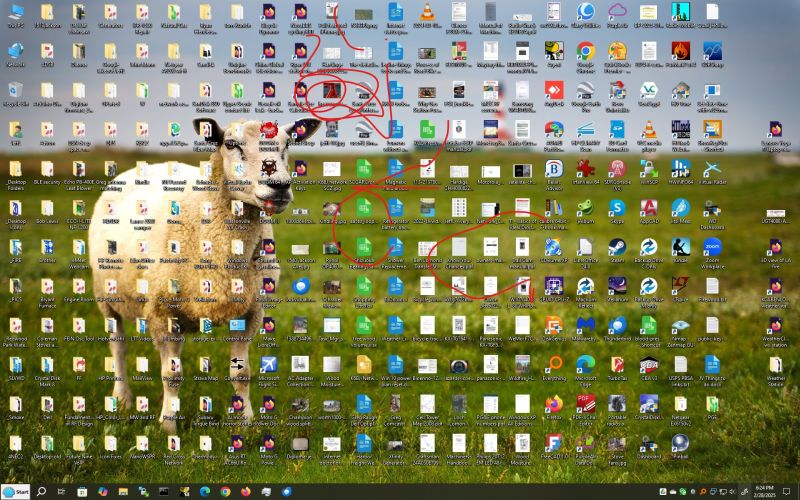
    For fun, I excavated a Wacom Bamboo CHT-460 pad and pen from where it
    was hiding. I downloaded the required software from the Wacom site
    and installed the drivers. Everything worked except most of the pen
    features. Oddly, the touch pad worked quite nicely. I created a test
    image by using Microsoft Snip and Sketch, which is included with
    Windoze 10. Or you can download it from the Microsoft Apps Store: <https://support.microsoft.com/en-us/windows/use-snipping-tool-to-capture-screenshots-00246869-1843-655f-f220-97299b865f6b>
    <https://www.pcmag.com/reviews/microsoft-snip>
    In Snip and Sketch, I used the built in red pen feature to scribble
    all over the screen. I then saved the resultant 1920 x 1200 screen
    grab to a file on my desktop. It was rather large so I shrank it to
    an 800 x 600 JPG file: <https://www.learnbydestroying.com/jeffl/crud/Wacom%20CTH-460.jpg>
    A proper drawing program would probably be a better tool for
    annotating images. If all you need is a way to scribble on the screen
    and save the results, this should be sufficient. Please, no comments
    about my total lack of artistic talent.

    Good luck.

    --
    Jeff Liebermann [email protected]
    PO Box 272 http://www.LearnByDestroying.com
    Ben Lomond CA 95005-0272
    Skype: JeffLiebermann AE6KS 831-336-2558

    --- SoupGate-Win32 v1.05
    * Origin: fsxNet Usenet Gateway (21:1/5)
  • From Tom Del Rosso@21:1/5 to Jeff Liebermann on Sat Mar 1 08:36:46 2025
    Jeff Liebermann wrote:
    On Fri, 28 Feb 2025 11:47:14 -0500, "Tom Del Rosso" <[email protected]> wrote:

    Running under Windows, I want to mark up the screen sometimes but
    can't find a utility that does this one simple thing?

    I use "whiteboard" software for doing this. Plenty to choose from: <https://www.google.com/search?q=whiteboard%20software>
    Basically, I screen grab whatever I want to scribble upon. Then, I
    capture or save the result to a file. How this is done depends on
    which whiteboard software you're using. Some offer a "canvas" that is
    larger than the screen allowing you to scribble between the screen
    grab image and "canvas" margin. A nice feature is that all whiteboard software will accept scribbling from multiple users. Unfortunately, whiteboard software doesn't work with video which will probably
    require video editing software.

    I think I did that search. I can grab the screen with the printscreen
    key and paste it into Irfanview, which is fast and allows drawing. But sometimes I need to do it often in a session so it would be better to
    make it one step. Like press a hotkey and start drawing. Then it would
    even work over video although I don't need it for that. It would also
    work with any remote software (and I have to use various) and also work
    in person like if I just want to mark some objects for a moment.


    --
    Defund the Thought Police

    --- SoupGate-Win32 v1.05
    * Origin: fsxNet Usenet Gateway (21:1/5)
  • From Jeff Liebermann@21:1/5 to fizzbintuesday@that-google-mail-dom on Sat Mar 1 10:43:46 2025
    On Sat, 1 Mar 2025 08:36:46 -0500, "Tom Del Rosso" <[email protected]> wrote:

    Jeff Liebermann wrote:
    On Fri, 28 Feb 2025 11:47:14 -0500, "Tom Del Rosso"
    <[email protected]> wrote:

    Running under Windows, I want to mark up the screen sometimes but
    can't find a utility that does this one simple thing?

    I use "whiteboard" software for doing this. Plenty to choose from:
    <https://www.google.com/search?q=whiteboard%20software>
    Basically, I screen grab whatever I want to scribble upon. Then, I
    capture or save the result to a file. How this is done depends on
    which whiteboard software you're using. Some offer a "canvas" that is
    larger than the screen allowing you to scribble between the screen
    grab image and "canvas" margin. A nice feature is that all whiteboard
    software will accept scribbling from multiple users. Unfortunately,
    whiteboard software doesn't work with video which will probably
    require video editing software.

    I think I did that search. I can grab the screen with the printscreen
    key and paste it into Irfanview, which is fast and allows drawing. But >sometimes I need to do it often in a session so it would be better to
    make it one step. Like press a hotkey and start drawing. Then it would
    even work over video although I don't need it for that. It would also
    work with any remote software (and I have to use various) and also work
    in person like if I just want to mark some objects for a moment.

    I usually do the same thing you describe, also using Irfanview.
    However, for annotation, Irfanview is very minimalist. It's lacking
    in many ways mostly as a result of having only in text buffer
    (clipboard) and the inability to edit any added graphics on the
    screen. I can somewhat edit recent lines and arrows, but only with
    the undo feature. Irfanview was originally a photo editor, which it
    does quite well. However, for markup, highlighting, graphics, text,
    format conversion, etc, it's quite horrible compared to even the
    simplest whiteboard software.

    After I posted my scribbling example, I dug a little deeper into MS
    Snip and Sketch. I soon discovered I had a whiteboard annotation
    program from MS Snip and Sketch as well was something similar that
    came with the Wacom pad. Both programs would appear at inconvenient
    and random times. Both had pop-up hot keys (Win-Shift-S for Wacom).
    They were similar enough that I was totally confused.

    Anyway, I think I answered your question. Good luck.


    --
    Jeff Liebermann [email protected]
    PO Box 272 http://www.LearnByDestroying.com
    Ben Lomond CA 95005-0272
    Skype: JeffLiebermann AE6KS 831-336-2558

    --- SoupGate-Win32 v1.05
    * Origin: fsxNet Usenet Gateway (21:1/5)
  • From Tom Del Rosso@21:1/5 to Don Y on Sat Mar 1 05:50:27 2025
    Don Y wrote:
    On 2/28/2025 9:47 AM, Tom Del Rosso wrote:
    Running under Windows, I want to mark up the screen sometimes but
    can't find a utility that does this one simple thing?

    There are many utilities that will let you *capture* a screen
    image (or portion thereof) and quickly annotate *that*.

    I do that now but it's more convenient to just draw on the screen using something like a hotkey to activate it.


    Do you want to leave your markings on the screen, regardless of
    how the intended content changes "under" it?

    That might be useful sometimes, but I'm thinking of the way a
    telestrator works, where the lines disappear as soon as you finish
    looking at them.

    So, press a hotkey to activate the utility, make annotations, press a
    key to clear it and restore normal mouse function. That would be good
    enough. There are some programs with descriptions that sound almost
    right but it turns out they don't do this.


    --
    Defund the Thought Police

    --- SoupGate-Win32 v1.05
    * Origin: fsxNet Usenet Gateway (21:1/5)
  • From Don Y@21:1/5 to Tom Del Rosso on Sat Mar 1 13:09:39 2025
    On 3/1/2025 3:50 AM, Tom Del Rosso wrote:
    Don Y wrote:

    Do you want to leave your markings on the screen, regardless of
    how the intended content changes "under" it?

    That might be useful sometimes, but I'm thinking of the way a
    telestrator works, where the lines disappear as soon as you finish
    looking at them.

    So, is your intent to use this as a *presentation* tool?
    I.e., where your audience makes mental note of your markups
    before you move on to the next issue?

    I could see value in that. I use an "electric whiteboard" for
    my presentations: a "background image" with "magic markers"
    that let me draw (4 colors) on top of it and an "eraser" to
    adjust my markups.

    But, the underlying image is completely static. E.g., a schematic,
    petri net, mechanical assembly, etc.

    The "live" approach (yours?) would be more versatile as you could
    interact with the "background" without having to treat it as a
    slide projector.

    So, press a hotkey to activate the utility, make annotations, press a
    key to clear it and restore normal mouse function. That would be good
    enough. There are some programs with descriptions that sound almost
    right but it turns out they don't do this.

    I think W10 has a built-in facility to do something similar
    (I don't run W10 so can't give testimony).

    Under X Windows, it would be relatively easy to create such a
    tool: overlay a transparent window on the screen, capture
    keystrokes/mouse movements to scribble on it, etc. I.e., let
    the window system handle all of the heavy lifting.

    I'd be curious to hear of anything you find (as well as your
    intended use)!

    --- SoupGate-Win32 v1.05
    * Origin: fsxNet Usenet Gateway (21:1/5)
  • From Don Y@21:1/5 to Tom Del Rosso on Sat Mar 1 14:23:01 2025
    On 3/1/2025 6:36 AM, Tom Del Rosso wrote:
    I think I did that search. I can grab the screen with the printscreen
    key and paste it into Irfanview, which is fast and allows drawing. But sometimes I need to do it often in a session so it would be better to
    make it one step. Like press a hotkey and start drawing. Then it would
    even work over video although I don't need it for that. It would also
    work with any remote software (and I have to use various) and also work
    in person like if I just want to mark some objects for a moment.

    SnagIt (mentioned elsewhere, this thread), hooks the PrintScreen key
    (there may be options for other keys, as well -- and, an on-screen
    "button" to invoke it). When activated, the user is can use the mouse
    to select the area to be captured.

    There are configuration options that allow you to set it to capture:
    - the screen
    - a window
    - an area/region
    - a menu
    - multiple areas
    - capture after time delay
    etc.

    The interface dynamically adjusts what *it* thinks you want to
    capture (indicated by an orange highlight). So, if the mouse cursor
    is on the desktop, then it assumes you want the entire desktop;
    if on a window FRAME, then the entire window thusly framed; if on
    a window body (like the typing region in Notepad), then that
    "subwindow"; etc.

    When you command it to capture the current selection ("click"), it
    can either be copied to the clipboard or automatically pasted into
    their "image editor" for annotation, revision, etc.

    The most useful feature, IMO, is the ability to capture the contents
    of a *scrolling* window (i.e., a window that extends beyond the
    boundaries of the enclosing frame or screen). It will automatically
    scroll said window and keep augmenting the capture with the newly
    exposed contents.

    [It also can capture the *text* contents of a window.]

    It remains attached to the PrintScreen key until you manually terminate it.
    So, if you plan on making extensive use of it, the sequence would be:
    Start the Program
    PrintScreen
    Move mouse to select
    Click mouse to capture
    Edit captured image
    Save
    lather, rinse, repeat
    Close the program

    --- SoupGate-Win32 v1.05
    * Origin: fsxNet Usenet Gateway (21:1/5)
  • From Don Y@21:1/5 to Don Y on Sat Mar 1 13:19:06 2025
    On 2/28/2025 10:27 AM, Don Y wrote:
    On 2/28/2025 9:47 AM, Tom Del Rosso wrote:
    Running under Windows, I want to mark up the screen sometimes but can't
    find a utility that does this one simple thing?

    There are many utilities that will let you *capture* a screen
    image (or portion thereof) and quickly annotate *that*.

    This is what I use to capture "general" content:
    <https://www.techsmith.com/snagit/>
    though I see it, too, has gone "subscription" based. <frown>
    It includes (included?) a simple image editor that would let
    you add callouts, graphics, etc. to the captured image.

    Note that it will also capture motion video. A different
    product targets more complete "screen interactions" (think:
    preparing a user manual/video to demonstrate how a particular
    piece of software works).

    If I want to capture something in my browser, I just use the
    "take a snapshot" capability.

    Most times, I will use Photoshop/Illustrator/DRAW to doctor
    the image (as they have much better tools for this).

    In the past, I've gone so far as to build tools to programmatically
    make certain changes to images. E.g., to change the "time"
    displayed in the upper right corner of captured images to
    give the illusion that they were captured in rapid succession.

    --- SoupGate-Win32 v1.05
    * Origin: fsxNet Usenet Gateway (21:1/5)
  • From Tom Del Rosso@21:1/5 to All on Fri Feb 28 11:47:14 2025
    Running under Windows, I want to mark up the screen sometimes but can't
    find a utility that does this one simple thing?

    --
    Defund the Thought Police

    --- SoupGate-Win32 v1.05
    * Origin: fsxNet Usenet Gateway (21:1/5)