wasbit wrote:
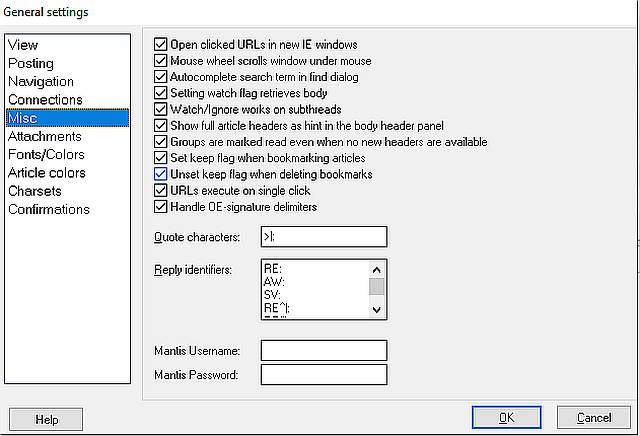
It's probably Windows 10 and not Dialog as I have this set:
Dialog Settings > General settings > Misc
URLs execute on single click
It used to work but then it stopped working.
https://i.postimg.cc/Jz5h0p4N/Clipboard.jpg
Now nothing happens no matter how many times I click on any URL in Dialog.
It's probably in Windows though as I don't think there's anything else to change in Dialog, is there?
Windows has a default URL handler but I don't know how to test it.
Single-click on URLs works for me; however, I do *not* have the
following setting enabled:
Open clicked URLs in new IE windows
"Windows" doesn't say which edition, version, or feature update you are
using. For Windows 10, changes were made to IE. Maybe you're using an
earlier version of Windows, but we cannot tell from the vague "Windows".
In Windows 10, not only did Internet Explorer get deprecated to get
replaced by Edge (using the EdgeHTML rendering engine and Microsoft's
Jscript script interpreter which got replaced with Edge-Chromium using
Google's Blink rendering engine and V8 script interpreter), but
Microsoft removed IE in Windows 11. IE might no longer be available in
your unidentified version of "Windows".
https://blogs.windows.com/windowsexperience/2021/05/19/the-future-of-internet-explorer-on-windows-10-is-in-microsoft-edge/
https://docs.microsoft.com/en-us/deployedge/edge-ie-mode
and
https://en.wikipedia.org/wiki/Removal_of_Internet_Explorer
"On May 19, 2021, Microsoft announced that Internet Explorer will be
no longer supported on June 15, 2022[a] and as part of transition, IE
mode will be available on the new Microsoft Edge which allows launch
older ActiveX controls and legacy websites until at least 2029.[8]
Windows 11 removed Internet Explorer, although it was disabled and
some of its files are still stored in Windows' Program Files folder. \
Users that are trying to run iexplore.exe via Run command will be
redirected to Microsoft Edge."
Could be you no longer IE, or Edge or some other web browser is now the
default HTTP[S] protocol handler. That there is an internal "IE mode"
inside of Edge still requires you open Edge, not Internet Explorer.
Disable the above option, and let the OS decide to which default web
browser to which it passes the URL string.
--- SoupGate-Win32 v1.05
* Origin: fsxNet Usenet Gateway (21:1/5)