-
O.T. - Atten Paul - Firefox not responding
From
Robert in CA@21:1/5 to
All on Thu Sep 7 22:01:25 2023
I have a Dell XPS 8500, with Windows 7 Professional, SP1,
with Spywareblaster, Malwarebytes, Avast , Windows Defender
and Windows firewall.
(2) TB HD
Seagate Desktop HDD ST2000DM001 2TB 64MB
Cache SATA 6.0Gb/s 3.5"
Internal Hard Drive
I also have
I have a Dell Optiplex 780 Tower, with Windows 7 Professional,
SP1, with Spywareblaster, Malwarebytes, Avast , Windows Defender
and Windows firewall.
Seagate Desktop HDD ST2000DM001 2TB 64MB
Cache SATA 6.0Gb/s 3.5"
System type : 64-bit operating system
and (external hard drives)
(8500)
Seagate Desktop HDD ST6000DM001 6TB 128MB
Cache SATA 6.0Gb/s 3.5"
System type : 64-bit operating system
(780)
Seagate Desktop HDD ST2000DM001 2TB 64MB
Cache SATA 6.0Gb/s 3.5"
Internal Hard Drive
This concerns the 8500, for some reason it just stopped responding
in Firefox. I ended the process and thought it had recovered but it
continued to have problems. I restarted it and the problem continues.
I shut down the computer in hopes that would clear it. Word, Paintbrush,
and Dell imaging came up fine but Firefox took a long time for the drivers
to load and at first it seemed ok but it again it stopped responding. I had
to press the start button to power it off because Task Manager would not function.
Again it seems fine so far but I'm concerned Firefox will stop responding again. What's causing this?
I had no issues prior to this and haven't downloaded anything.
Thanks,
Robert
--- SoupGate-Win32 v1.05
* Origin: fsxNet Usenet Gateway (21:1/5)
-
From
Robert in CA@21:1/5 to
All on Thu Sep 7 22:37:34 2023
I think I may have found the answer. I leave Fire fox unused
for long periods because I take breaks and it doesn't like that.
So that may be my answer but I would appreciate your thoughts.
Thanks,
Robert
--- SoupGate-Win32 v1.05
* Origin: fsxNet Usenet Gateway (21:1/5)
-
From
Robert in CA@21:1/5 to
All on Fri Sep 8 16:45:08 2023
It happened again ,, aII I had open was FF and Word
and it stopped responding. Again the bIue circIe was
preset and I couIdn't access Task Manager. I seIected
to power off again. ShouId I try a System Restore or
Mrimg Restore?
Thanks,
Robert
--- SoupGate-Win32 v1.05
* Origin: fsxNet Usenet Gateway (21:1/5)
-
From
Robert in CA@21:1/5 to
All on Fri Sep 8 16:19:40 2023
The 8500 did it again and this time I just went to heat
my coffee in the microwave and when I came back the
screen was not responding. I tried closing the pages but
it didn't work and the round blue busy light was on. I
tried Task Manager but it didn't come up.
I clicked the start button to try and restart it and it came up
with a message about it unable to do a Ctrl-Alt-Del. I
opted to shut it down. It came back up with no issues so far.
What's causing FF/computer to not to respond and lock up?
Thoughts/Suggestions?
Thanks,
Robert
--- SoupGate-Win32 v1.05
* Origin: fsxNet Usenet Gateway (21:1/5)
-
From
Robert in CA@21:1/5 to
All on Fri Sep 8 23:43:49 2023
It happened again and this time there was a buzzing sound.
I forgot to mention it did that it did that before as weII.
After pushing ESC the screen went back and gave me the ctr-aIt-deI
message again. I have to keep pressing Esc to access the Start button
to try and restart it or shut it off but its not responding.
What's causing this? It was fine yesterday. Am I Ioosing the 8500?
Robert
--- SoupGate-Win32 v1.05
* Origin: fsxNet Usenet Gateway (21:1/5)
-
From
Robert in CA@21:1/5 to
All on Sat Sep 9 00:36:20 2023
The 8500 starts normally with no issues, and I
can load Word, Paintbrush and Dell imaging
with no problems and it works just fine.
The problems start when I open FF, it seems OK
at first then while halfway through a news story
or video it will stop responding.
Why should it all of a sudden have a problem with
FF? I checked for updates and I'm up to date. All the
scans show nothing at all and I haven't done anything
to cause this. It just came out of no where like most of
my computer problems.
Thoughts/suggestions?
Robert
--- SoupGate-Win32 v1.05
* Origin: fsxNet Usenet Gateway (21:1/5)
-
From
Robert in CA@21:1/5 to
All on Sat Sep 9 00:34:29 2023
The 8500 starts normally with no issues, and I
can load Word, Paintbrush and Dell imaging
with no problems and ti works just fine.
The problems start when I open FF, it seems OK
at first then while halfway through a news story
or video it will stop responding.
Why should it all of a sudden have a problem with
FF? I checked for updates and I'm up to date. All the
scans show nothing at all and I haven't done anything
to cause this. It just came out of no where like most of
my computer problems.
Thoughts/suggestions?
Robert
--- SoupGate-Win32 v1.05
* Origin: fsxNet Usenet Gateway (21:1/5)
-
From
Newyana2@21:1/5 to
Robert in CA on Sat Sep 9 08:10:48 2023
"Robert in CA" <
[email protected]> wrote
| Thoughts/suggestions?
If you expect to have tech support people on call then
you should be paying someone to do it, not exploiting
Paul's generosity.
--- SoupGate-Win32 v1.05
* Origin: fsxNet Usenet Gateway (21:1/5)
-
From
Robert in CA@21:1/5 to
All on Mon Sep 11 19:54:13 2023
I believe I know what's causing the problem. I
overextended my use of the computer with too
many windows/programs open. That would also
explain the buzzing sound.
I had noticed previously that Avast scanning stopped
responding when I opened FF. That should of told
me something.
I was about to do a System Restore when it all seemed
OK? I was able to regain control of the computer and
all seems fine now. I made a System Restore point just
in case.
I run the scans by themselves with nothing else running now.
Also, I only open what I need to use and I haven't have
any problems since.
I still would appreciate your thoughts and insight and I
have a couple of questions.
Thanks,
Robert
--- SoupGate-Win32 v1.05
* Origin: fsxNet Usenet Gateway (21:1/5)
-
From
Robert in CA@21:1/5 to
All on Thu Sep 21 14:14:31 2023
Paul I need to ask you a couple of questions.
Thanks,
Robert
--- SoupGate-Win32 v1.05
* Origin: fsxNet Usenet Gateway (21:1/5)
-
From
Paul@21:1/5 to
Robert in CA on Fri Sep 29 09:55:40 2023
On 9/21/2023 5:14 PM, Robert in CA wrote:
Paul I need to ask you a couple of questions.
Thanks,
Robert
It sounds like Firefox is using up RAM on the
computer, to the point it starved other parts
of the software of RAM they need.
That could be why it is behaving like that.
The combination of an older version of Firefox, plus
the issues with leaving tabs open on those older versions,
lead to excessive RAM consumption.
Check your version of Firefox. This is Windows 7
so there is a limit to the Firefox version number now.
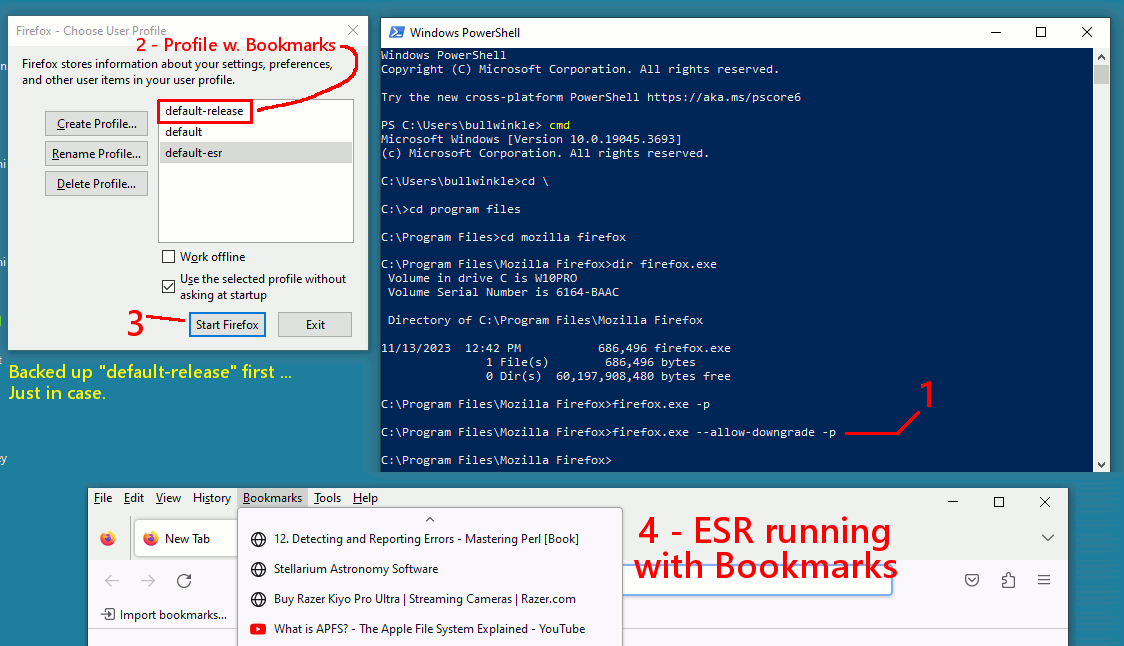
Installing the ESR version, should put you on the ESR stream
and remove the old version. The profile folder should migrate forward.
Make a backup of your bookmarks, at least, before bumping the version.
https://blog.mozilla.org/futurereleases/2023/07/06/firefox-support-for-windows-7-8-and-8-1/
The listing here is a little hard to read, as the 115 releases are
broken into two groups by the alphabetical ordering. ESRs receive updates,
and for this one, the stream stops Sept 2024.
http://releases.mozilla.org/pub/firefox/releases/
http://releases.mozilla.org/pub/firefox/releases/115.3.1esr/win64/en-US/Firefox%20Setup%20115.3.1esr.exe # 64 bit
http://releases.mozilla.org/pub/firefox/releases/115.3.1esr/win32/en-US/Firefox%20Setup%20115.3.1esr.exe # 32 bit
You can tell from which Program Files folder Firefox is in,
whether it is 32 bit or 64 bit.
C:\Program Files <=== 64 bit
C:\Program Files (x86) <=== 32 bit
*******
(Posting from paganini, Mixmin seems closed to posting, E-S is down at the moment.)
Paul
--- SoupGate-Win32 v1.05
* Origin: fsxNet Usenet Gateway (21:1/5)
-
From
Robert in CA@21:1/5 to
All on Sat Sep 30 05:40:38 2023
Hi Paul,
I thought I had lost you! whew!
The problem is as you described so now I only open
what's needed then close it and the problem has gone
away.
I checked FF and this is what is says:
https://postimg.cc/8JQwb2Yh
I backed up my bookmarks and put it on a Patriot key
Should I click on this one after backing up my bookmarks?
http://releases.mozilla.org/pub/firefox/releases/115.3.1esr/win64/en-US/Firefox%20Setup%20115.3.1esr.exe # 64 bit
This is the kind of thing I need you for.
I think while we still have contact, I'd like to move my
bookmarks and all my folders/files from the 8500 to
the 780 just in case I should loose the 8500 at some
point. Is that possible?
Right now we've left the 780 with just what it needs as a backup
computer to keep it as clean as possible so it has no folders or files
and a minimum of bookmarks but I'm afraid if we don't do it now
and we loose contact I won't be able to.
Should I configure the 780 the same way as were doing to
FF on the 8500? but how could I keep the 780 updated?
I couldn't use the 8500 mrimgs with the 780, correct?
I think if we could configure the 780 the same as the 8500 I would need
another Seagate 6TB external HD and enclosure. What do you think?
https://www.newegg.com/seagate-desktop-hdd-st6000dm001-6tb/p/N82E16822178783
https://www.newegg.com/vantec-nst-387s3-bk-enclosure/p/N82E16817392118
Robert
--- SoupGate-Win32 v1.05
* Origin: fsxNet Usenet Gateway (21:1/5)
-
From
Robert in CA@21:1/5 to
All on Sat Sep 30 15:43:48 2023
-
From
Robert in CA@21:1/5 to
All on Mon Oct 2 00:25:44 2023
I ran mrimg backups in both the 780 and the 8500.
So how do I go about transferring my bookmarks
and data from the 8500 to the 780?
Once finished I'll order the 6TB external hd and
case. I'd appreciate it if you could help me set it
up.
Thanks,
Robert
l
--- SoupGate-Win32 v1.05
* Origin: fsxNet Usenet Gateway (21:1/5)
-
From
Robert in CA@21:1/5 to
All on Fri Oct 6 05:36:10 2023
The 8500 hung up again with loud buzzing.
I pressed the start button a couple of times and
it took forever to respond. It finally came back
up but it didn't seem right so I restarted it but it
just hung there and I was forced to power it off/on.
I selected normal startup and came back up with no
issues.
I had only 3 windows open in FF when it hung up. I
also I detected this maleware .
https://postimg.cc/mzFJ78V1
Isn't version 3.1 the update to FF ? That's the only
thing I've downloaded.
I would really like your assistance to put my bookmarks
and data on the 780 while we still can.
Thanks,
Robert
--- SoupGate-Win32 v1.05
* Origin: fsxNet Usenet Gateway (21:1/5)
-
From
Paul@21:1/5 to
Robert in CA on Sat Oct 7 01:44:13 2023
On 10/6/2023 8:36 AM, Robert in CA wrote:
The 8500 hung up again with loud buzzing.
I pressed the start button a couple of times and
it took forever to respond. It finally came back
up but it didn't seem right so I restarted it but it
just hung there and I was forced to power it off/on.
I selected normal startup and came back up with no
issues.
I had only 3 windows open in FF when it hung up. I
also I detected this maleware .
https://postimg.cc/mzFJ78V1
Isn't version 3.1 the update to FF ? That's the only
thing I've downloaded.
I would really like your assistance to put my bookmarks
and data on the 780 while we still can.
Thanks,
Robert
Time for a restore from one of your backups ?
Use a Macrium CD to do the restore ?
I cannot find a reference to that item. The search engines
seem to shy away from the name, giving all sorts of irrelevant
results.
C:\Users\RB\Downloads\App_version 3.1.msi
You can upload the file to virustotal.com using a web browser,
but if that does not work, that probably means the machine is
compromised. Don't open that file, on any other
machine.
*******
For making bookmarks.html , I don't know if I can be
a good source of current information.
I don't know what version you're running. windows 7 SP1 support for
Firefox has ended, which means, if you were auto-updating, there might
be a nuisance notification telling you that Firefox is no longer
supported (Firefox puts up a notice to that effect).
This advice will probably work. Enter in the URL box:
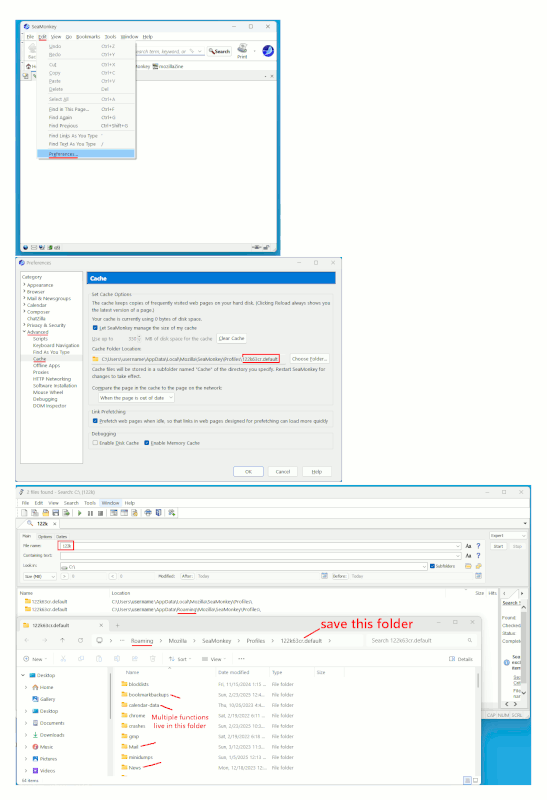
about:profiles
and that will show the path to the profile folder.
Now, we used to have discussions about this folder,
bookmarkbackups
yet, in the end, we never seemed to get much traction from
there. In the latest Firefox, I find out that -
1) Automatic bookmark backup has stopped.
2) There is a setting in about:config, which claims to control
bookmarkbackups, and it *might* be dumping an actual
"bookmarks.html" file in the profile folder.
Therefore, you might check in the Profile folder from the
"about:profiles" step and see if a file with a very recent
date is in there.
The only file in the bookmarkbackups folder, is 1.4KB, and
that cannot possibly hold my backup files.
But don't despair, as the raw materials for making bookmarks
are here.
"Bookmarks, Downloads and Browsing History
places.sqlite
This file contains all your Firefox bookmarks and lists of files you have downloaded
and of websites you have previously visited. For more information, see Bookmarks in Firefox.
favicons.sqlite
This file stores website favicon images. It's best to also include this file when
recovering the places.sqlite file.
"
If you have those files (and you will), then the bookmarks are in there.
So nothing is lost.
But at this point, I don't want you running around with
your hair on fire, just yet :-)
*******
Of course, the Bookmarks tab in the middle of the browser has:
Bookmarks :
Manage Bookmarks :
Import and Backup :
Export bookmarks to HTML
And when I selected a place to save that, the file size of mine
was 815,349 and was the same size as the "bookmarks.html" in
my Profile folder. So you can make one that way, but in your
machines sick condition, can you do that right now ???
I cannot tell you from this distance, whether the bookmark making
process is working properly or not.
Paul
--- SoupGate-Win32 v1.05
* Origin: fsxNet Usenet Gateway (21:1/5)
-
From
Paul@21:1/5 to
Robert in CA on Sat Oct 7 17:07:30 2023
On 10/2/2023 3:25 AM, Robert in CA wrote:
I ran mrimg backups in both the 780 and the 8500.
So how do I go about transferring my bookmarks
and data from the 8500 to the 780?
Once finished I'll order the 6TB external hd and
case. I'd appreciate it if you could help me set it
up.
Thanks,
Robert
l
"Data", would be your Downloads folder, where ever you
placed your Bookmarks file, and perhaps if you wanted,
the profile for Firefox. Your email tool might have a
profile folder as well.
Your backup image of the 8500, has all your user files in it.
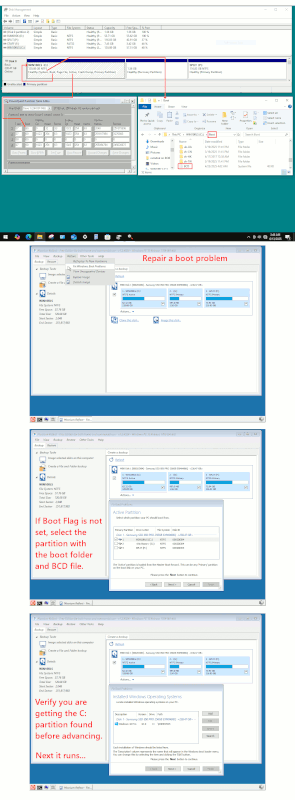
It does not need to be restored, to be useful. The following
picture, shows how to scoop random files out of a Macrium backup.
If you place a copy of the 8500 MRIMG on the 780,
you can mount the OS partition with a separate drive
letter.
[Picture]
https://i.postimg.cc/7Zs0Yjk0/scoop-files-from-Macrium-MRIMG-file.gif
Paul
--- SoupGate-Win32 v1.05
* Origin: fsxNet Usenet Gateway (21:1/5)
-
From
Robert in CA@21:1/5 to
All on Sat Oct 7 16:33:44 2023
Hi Paul,
Good to hear from you again,,
I did about:profiles, I see the Profile Default with Root Directory
and Local Directory and is repeated for Profile default-release.
I went into the Root Directory and there was a bookmarkbackup
folder that was updated for today. Then I went into the Local
Directory and there was a Cache2 and jumpList cache that was
updated for today. The Profile default -release showed no
recent activity. In fact, bookmarkbackups was 2019.
You lost me after that... I cannot seem to access places.sqlite or favicons.sqlite with about:profile. How do I access them?
I have my Downloads under C:/User name but I have allot of
information in My Documents as well I would want to carry over.
So I would be right clicking to copy/ paste the bookmarksbackup
and my Documents? Is it possible to just do a restore of the 780
with the 8500 Mrimg?
Thanks,
Robert
--- SoupGate-Win32 v1.05
* Origin: fsxNet Usenet Gateway (21:1/5)
-
From
Robert in CA@21:1/5 to
All on Sun Oct 8 00:24:25 2023
The 8500 seems normaI at present with no issues.
I'm running another mrimg since the Iast one had
the maIeware on it. Do you think it's the RAMM that
was overIoaded? I'II teII you that buzzing sound
was unnerving.
I used Avast to remove the maIeware fiIe :
C:\Users\RB\Downloads\App_version 3.1.msi
FF is up to date, I'm running version 115.3.1esr (64 bit)
I wasn't auto-updating so I haven't seen any notifications.
I ran through the bookmark tab to find aII the functions
as you describe.
I'm not sure I understand the process I'm suppose to do?
Am I Exporting to htm and do I put it on a USB key then
import it to the 780?
It appears I'm copy/pasting the bookmarkbackups and
My Documents using the mrimg to the 780, correct?
Thanks,
Robert
--- SoupGate-Win32 v1.05
* Origin: fsxNet Usenet Gateway (21:1/5)
-
From
Paul@21:1/5 to
Robert in CA on Sun Oct 8 21:32:49 2023
On 10/8/2023 3:24 AM, Robert in CA wrote:
The 8500 seems normaI at present with no issues.
I'm running another mrimg since the Iast one had
the maIeware on it. Do you think it's the RAMM that
was overIoaded? I'II teII you that buzzing sound
was unnerving.
I used Avast to remove the maIeware fiIe :
C:\Users\RB\Downloads\App_version 3.1.msi
FF is up to date, I'm running version 115.3.1esr (64 bit)
I wasn't auto-updating so I haven't seen any notifications.
I ran through the bookmark tab to find aII the functions
as you describe.
I'm not sure I understand the process I'm suppose to do?
Am I Exporting to htm and do I put it on a USB key then
import it to the 780?
It appears I'm copy/pasting the bookmarkbackups and
My Documents using the mrimg to the 780, correct?
Thanks,
Robert
It is unlikely to be the RAM.
https://web.archive.org/web/20220107171652/http://www.memtest.org/
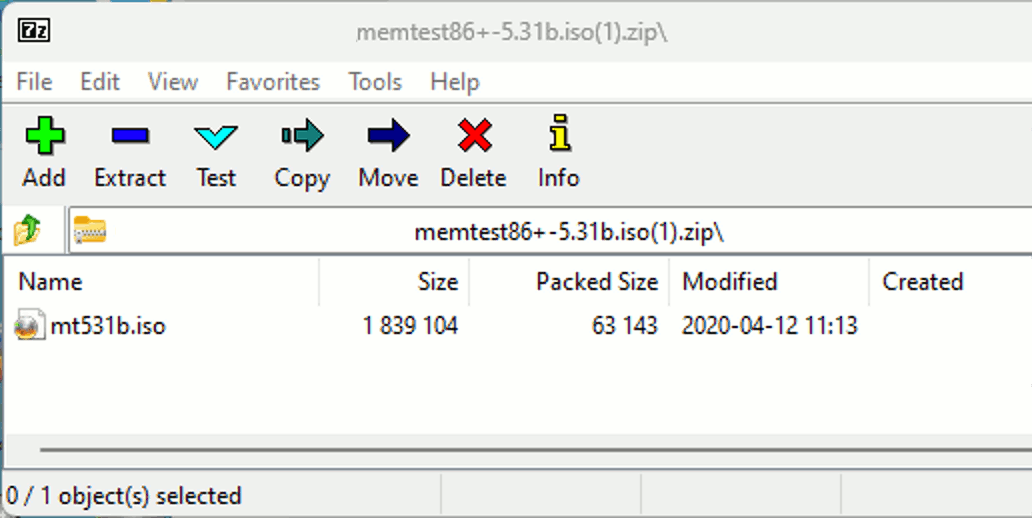
https://web.archive.org/web/20220308174549if_/http://memtest.org/download/5.31b/memtest86+-5.31b.iso.zip
The second link is the download for memtest 5.31b . It is zipped, so
you would right click and Extract.
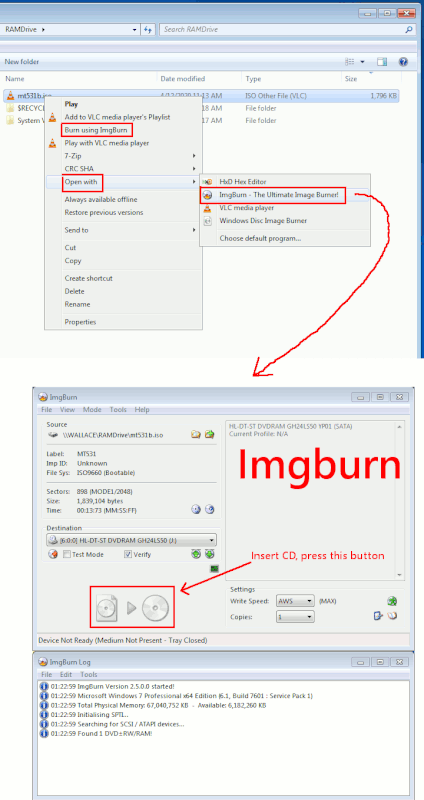
The memtest86+-5.31b.iso is an ISO9660 and can be burned onto a CD
with Imgburn. It's a waste of media for a tiny thing like this, but
the floppy diskette version stopped with the previous version. The floppy version is interesting, in that there is no file system on the floppy,
and the loader is a binary bitstream loader. Even though both my machines
no longer have floppy drives, the memtest floppy boots using a USB floppy drive, so I haven't lost that function.
Some of my tools, I used a CD-RW disc so the disc can be reused.
Currently I have a USB stick dedicated to memtest 6.0 beta, and
that's what I test the Zen3 with. The 4930K can use one of the
older versions, like the 5.31b.
*******
Windows also has a memory tester. It has the usual Windows bad habit,
that if you leave the room, you might never know the results. All I want,
is for the tool to STOP and show the result on the screen. Is that too
hard for them ?
In any case, you can find a memory tester, if you need one. The memtest
one, you press <esc> key and it reboots. Seeing the pass counter equal to one (one complete test pass), that's sufficient for stuck-ats.
Paul
--- SoupGate-Win32 v1.05
* Origin: fsxNet Usenet Gateway (21:1/5)
-
From
Robert in CA@21:1/5 to
All on Sun Oct 8 21:04:24 2023
I tried extracting again:
https://postimg.cc/HJxwXqwv
I must be doing something wrong.
Robert
--- SoupGate-Win32 v1.05
* Origin: fsxNet Usenet Gateway (21:1/5)
-
From
Robert in CA@21:1/5 to
All on Sun Oct 8 20:51:51 2023
-
From
Paul@21:1/5 to
Robert in CA on Mon Oct 9 23:31:30 2023
On 10/9/2023 12:04 AM, Robert in CA wrote:
I tried extracting again:
https://postimg.cc/HJxwXqwv
I must be doing something wrong.
Robert
You can try navigating to the Downloads folder.
The convenience function "Show in Folder" in the menu
you show in that picture, should get you there with
no effort.
Once the folder is open and it scrolled to where the file is,
you should be able to extract a ZIP with the Windows7 automatic
treatment of ZIP files. And perhaps that will work better for
you, as when you're using File Explorer, it can immediately see
it is a ZIP and ready to be extracted.
This shows I see a valid file there, ready to be processed.
[Picture]
https://i.postimg.cc/FKcns3MM/memtest531-being-extracted.gif
*******
You can carry out the Bookmarks Export function, then collect
it from the Downloads folder or where-ever, and copy it to a USB
stick if you want. The suggestion of tapping into an .MRIMG
you make after that point in time, is the file would also be
inside the .MRIMG on a hard drive. The important thing, is to
at least carry out the Export function now, for your later
convenience (using one or the other transfer method).
My only point of explaining about the .MRIMG being mount-able,
is you haven't lost anything. There might be several copies of
your goods in the room with you.
Just use whatever method seems easiest to you. A USB stick would
be pretty easy. You probably have a working AV running on the
other machine, ready to scan the USB stick when it arrives. A bookmarks
is not particularly "executable content", not like an EXE file
would be.
Paul
--- SoupGate-Win32 v1.05
* Origin: fsxNet Usenet Gateway (21:1/5)
-
From
Robert in CA@21:1/5 to
All on Mon Oct 9 21:39:40 2023
I tried navigating to the folder to extract the zip file but I don't
know how to proceed? What am I suppose to do with this ISO file?
I thought it would download a memory test program to test the memory?
https://postimg.cc/yDSkrFv5
https://postimg.cc/grJcTV0D
Thanks,
Robert
--- SoupGate-Win32 v1.05
* Origin: fsxNet Usenet Gateway (21:1/5)
-
From
Robert in CA@21:1/5 to
All on Mon Oct 9 21:41:13 2023
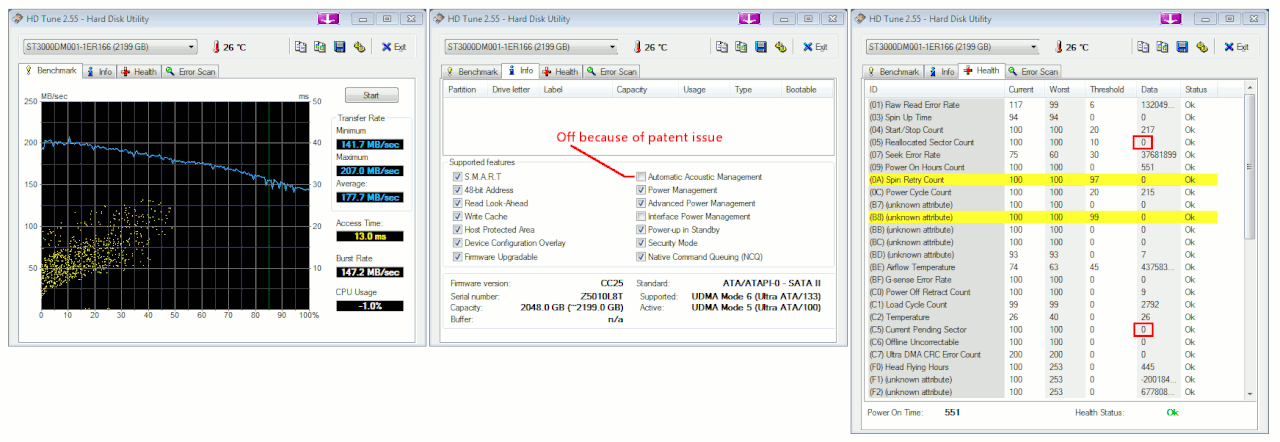
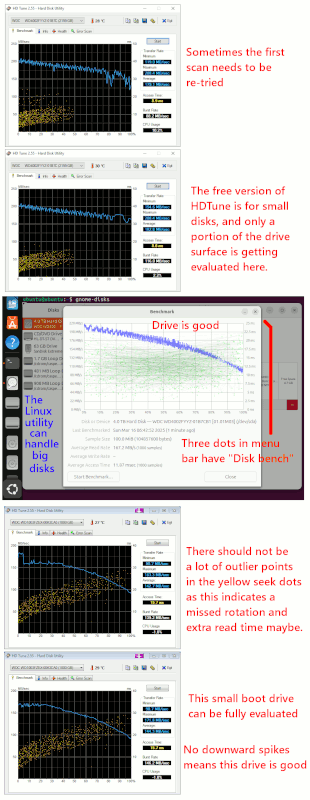
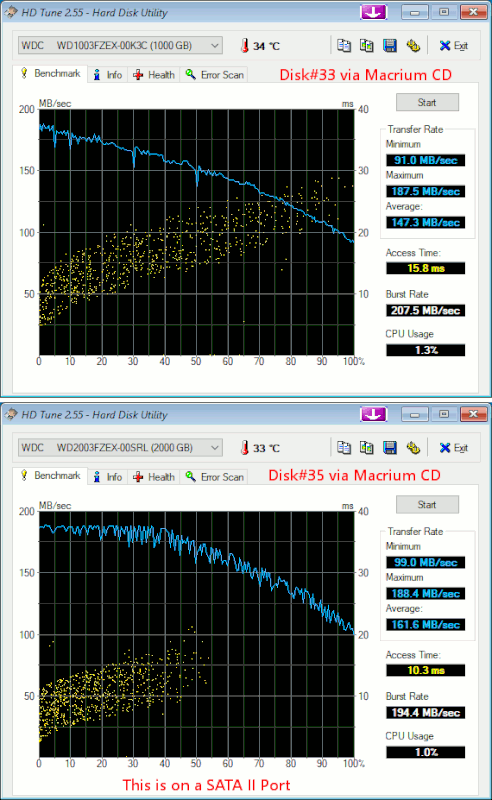
btw did those yellow bars in the HD-Tune Heath tab mean anything?
Robert
--- SoupGate-Win32 v1.05
* Origin: fsxNet Usenet Gateway (21:1/5)
-
From
Robert in CA@21:1/5 to
All on Mon Oct 9 23:05:24 2023
-
From
Robert in CA@21:1/5 to
All on Mon Oct 9 22:57:17 2023
I successfully exported my bookmarks to the 780.
I went into bookmarks>manage bookmarks>import and backup>export bookmarks to HTML
then on the 780 I went to bookmarks>manage bookmarks> import and backup> import bookmarks from HTML
It all seems to be there.
Wasn't there some other file you wanted me to move over? Oh the data file,
what was that called? and where? Then I can mount the external hd and move
my entire My Documents with copy/paste correct? or is there another method you recommend?
Thanks,
Robert
--- SoupGate-Win32 v1.05
* Origin: fsxNet Usenet Gateway (21:1/5)
-
From
Paul@21:1/5 to
Robert in CA on Tue Oct 10 02:48:30 2023
On 10/10/2023 12:39 AM, Robert in CA wrote:
I tried navigating to the folder to extract the zip file but I don't
know how to proceed? What am I suppose to do with this ISO file?
I thought it would download a memory test program to test the memory?
https://postimg.cc/yDSkrFv5
https://postimg.cc/grJcTV0D
Thanks,
Robert
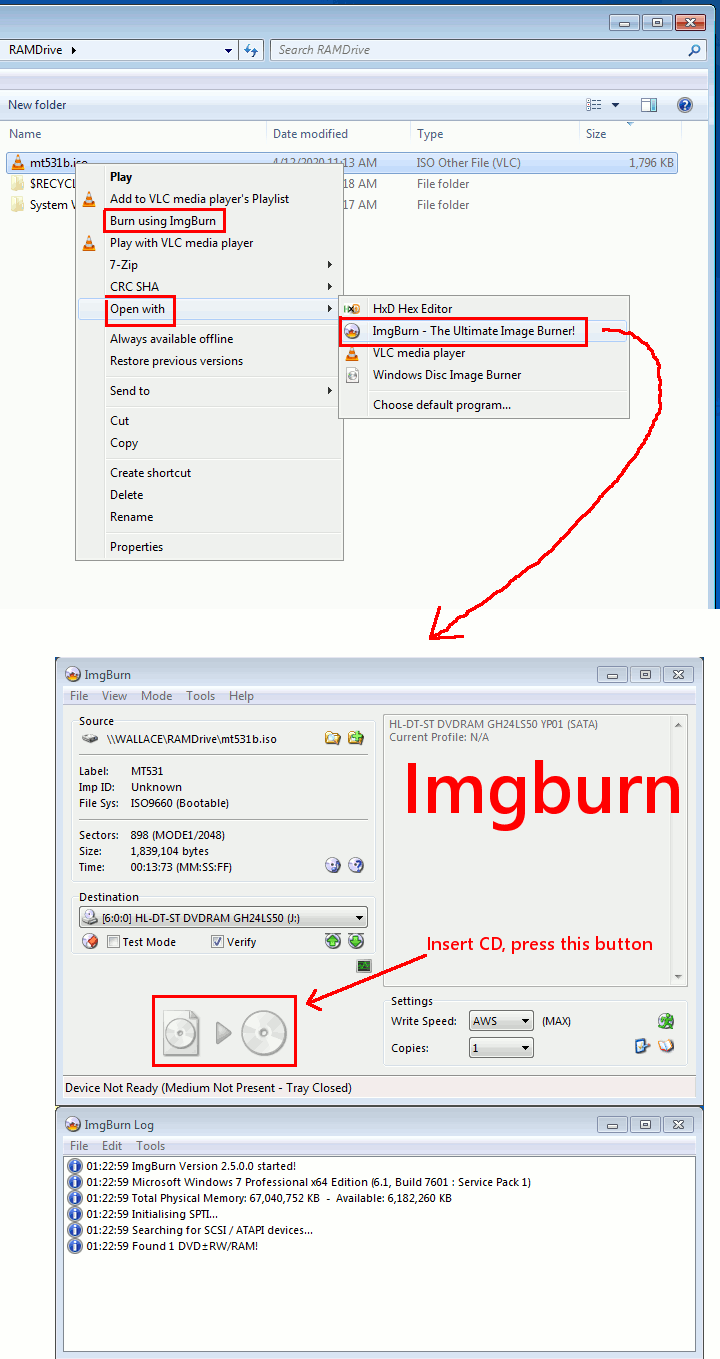
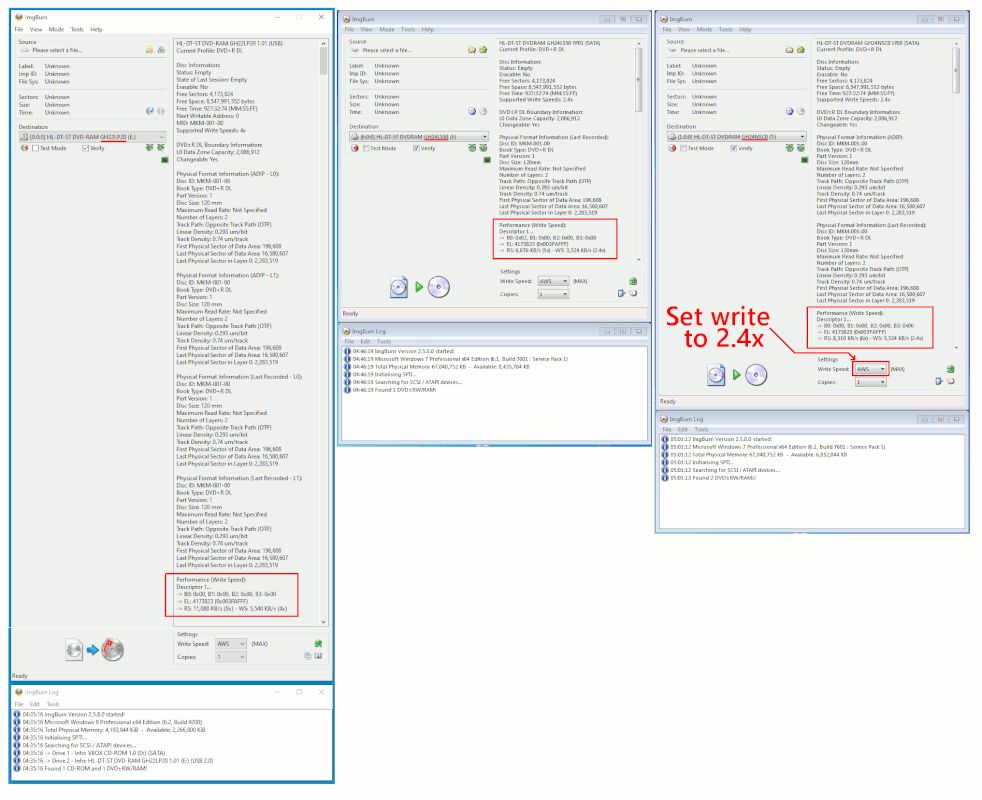
I have a burner program set up on my PC, called Imgburn,
and it puts entries in the right-click menu. I can right-click
the extracted ISO file in my Downloads, and start the Imgburn program
from there.
[Picture]
https://i.postimg.cc/SxkgpdC3/burn-iso-win7-to-CD.gif
If you were starting the Imgburn program from the Program menu,
the upper-left-corner "Write image file to disc", unpacks
the ISO and uses it to fill the CD with the info. The ISO
file in this case, is only 1.8MB and it is just a bit
bigger than a floppy. It uses very little of a CD, and the burn
time should be minimal. I have mine set to burn and then Verify.
Imgburn can be set to make rude noises when the command completes,
so you want to turn down the PC audio volume in the taskbar.
Once the CD is burned, you can leave in the tray, do a Restart
of the OS, and since your CD is in the boot order before the
hard drive (in the Dell BIOS), the CD should start. Once memtest
is started, you can pop the CD out of the tray at any time.
*******
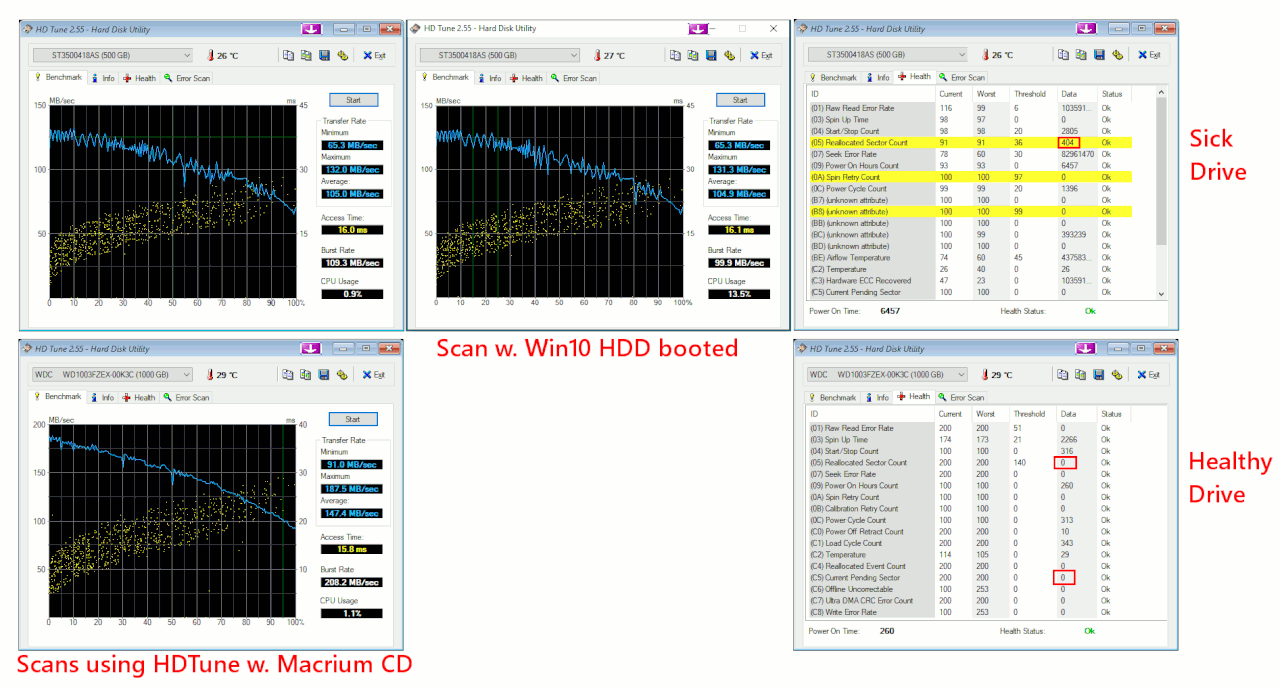
The Yellow Bars in the HDTune SMART are "nothing". This is an issue
where the HDTune developer (ten years ago), didn't decode the
Seagate branded drive stuff there properly, and yellow bars is the result.
Your Reallocated raw data is zero in SMART, and that's a good start.
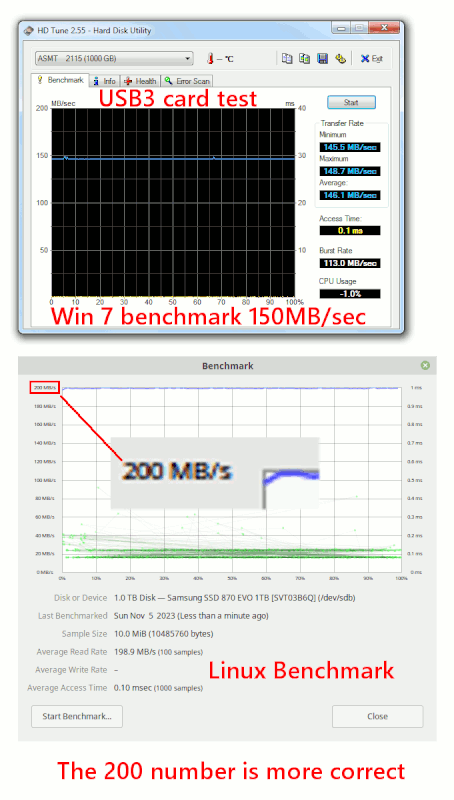
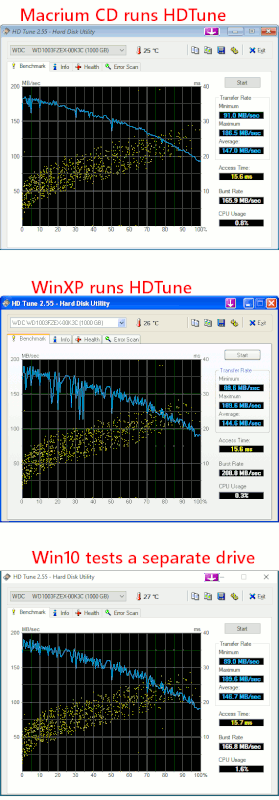
Getting a valid HDTune benchmark curve is tricky. Sometimes the OS
reads the disk, while the HDTune runs, and that is what causes the
downward spikes. The very best OS for running an HDTune, is Windows 2000,
but you are hardly likely to switch to that to test :-) That was a very
quiet OS, and did not tend to interfere with the test results.
I don't have any particular techniques for improving the results
(making them more realistic). In the following picture, I have two disks,
the second one is a "data disk" and does not have the OS on it, and I test
that in the picture. The OS drive, you have to leave it for a while,
to settle down. You can see my spikes mostly went away.
[Picture]
https://i.postimg.cc/fTc6XBsT/Win7-HDTune-Benchmark-two-drives.gif
Paul
--- SoupGate-Win32 v1.05
* Origin: fsxNet Usenet Gateway (21:1/5)
-
From
Robert in CA@21:1/5 to
All on Tue Oct 10 02:48:10 2023
btw how Iong does this test take? It's
been going for an hour now.
On the bottom of the screen it says:
Pass compIete, no errors, press Esc to exit
yet it stiII seems Iike it's running. How do
I know when it's finished?
Robert
--- SoupGate-Win32 v1.05
* Origin: fsxNet Usenet Gateway (21:1/5)
-
From
Robert in CA@21:1/5 to
All on Tue Oct 10 02:39:08 2023
I'm on the 780;
I created a Memtest86 CD with ImageBurn and
restarted the 8500 but I have to press F12 to
access the opticaI CD drive. I beIieve we tried to fix
that previousIy but we couIdn't. The 780 however
detects CD's.
The Memtest is stiII running and it's on test#10 right
now. [ModuIo 20, Random pattern] hmmmm it just
switched to test#5 [moving inversions, 8 bit pattern]
then switched again to #6[moving inversions, Random pattern]
I'II Iet you know the resuts when it finish's.
Robert
--- SoupGate-Win32 v1.05
* Origin: fsxNet Usenet Gateway (21:1/5)
-
From
Robert in CA@21:1/5 to
All on Tue Oct 10 02:50:13 2023
It compIeted 1 pass with no errors.
Robert
--- SoupGate-Win32 v1.05
* Origin: fsxNet Usenet Gateway (21:1/5)
-
From
Robert in CA@21:1/5 to
All on Tue Oct 10 06:02:27 2023
You're right about HD-Tune. I powered off the 8500 then
powered it back on and waited for 1 hour. I didn't open any
programs then ran HD-Tune.
https://postimg.cc/qtrPbpDP
It looks just like the other one.
Is there anything else besides My Documents I should
move to the 780? In passing, I made a System Restore
point on the 780.
Thanks
Robert
--- SoupGate-Win32 v1.05
* Origin: fsxNet Usenet Gateway (21:1/5)
-
From
Robert in CA@21:1/5 to
All on Tue Oct 10 06:48:45 2023
Here's a picture of the Memtest in progress.
https://postimg.cc/0b0NNPXc
Robert
--- SoupGate-Win32 v1.05
* Origin: fsxNet Usenet Gateway (21:1/5)
-
From
Paul@21:1/5 to
Robert in CA on Tue Oct 10 19:55:07 2023
On 10/10/2023 2:05 AM, Robert in CA wrote:
I'll also need another 6TB HD and case.
https://www.newegg.com/seagate-desktop-hdd-st6000dm001-6tb/p/N82E16822178783
https://www.newegg.com/vantec-nst-387s3-bk-enclosure/p/N82E16817392118
Usually we make the hd drives bootable but if I
remember correctly I just created a folder for
the 8500 mrimgs and nothing else on the 6TB
external hd. So I think I should do the same for
the 780 but with no OS how is that possible?
I can't remember how we set up the 6TB hd.
Robert
The purpose of the boot-able drives, is so you'd have
something for emergencies.
You don't have to set up every drive that way, if you don't want to.
But there is certain comfort, in knowing you have a drive
that will work, when the regular drive is ruined.
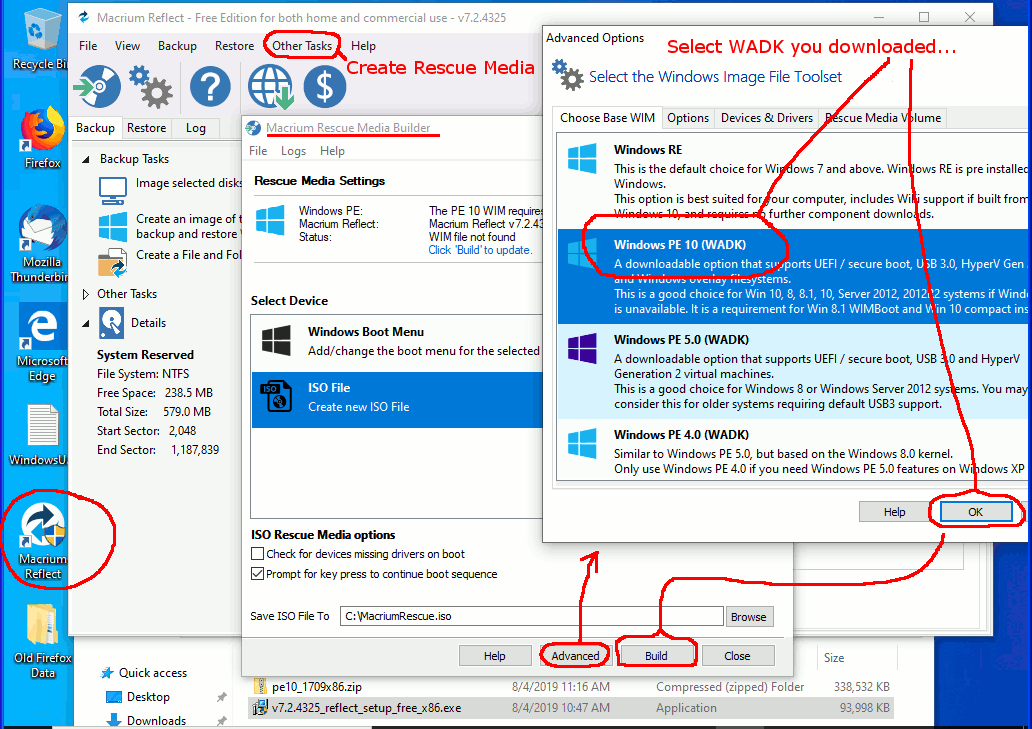
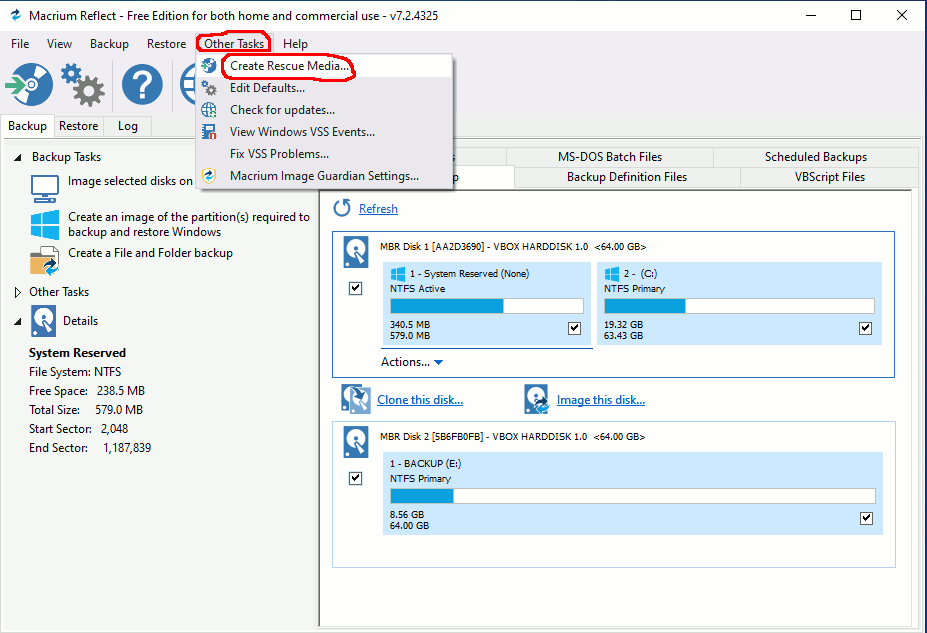
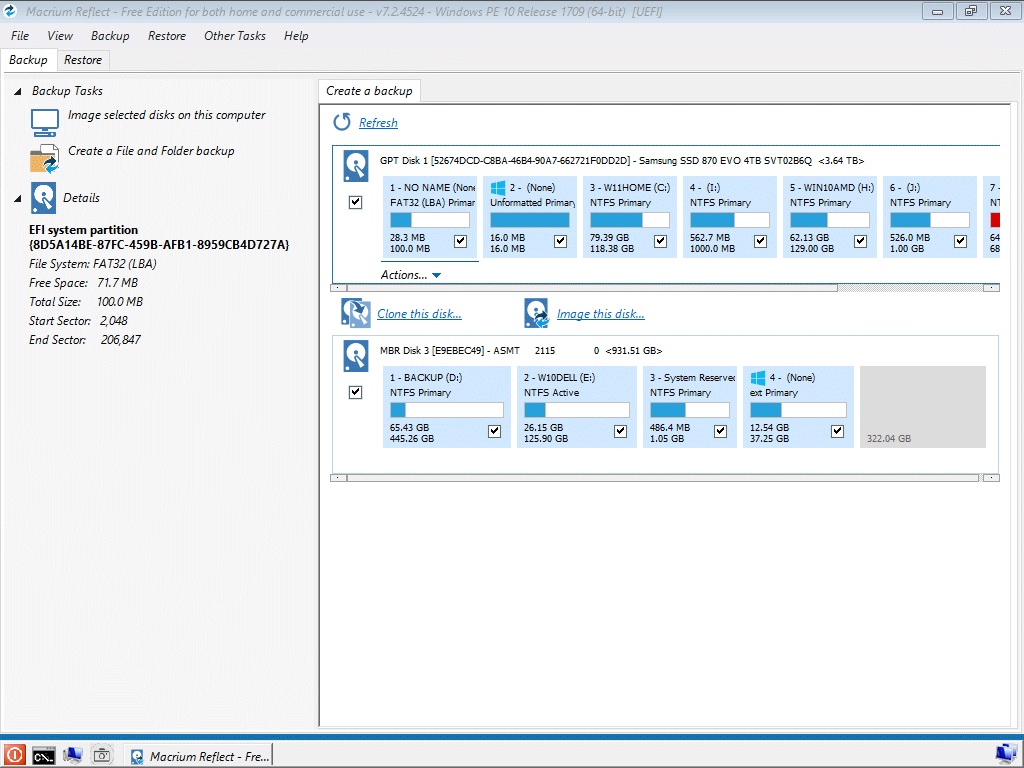
When you get a new drive, you can use Macrium Reflect,
to clone only the OS partition(s) that make the
previous backup drive bootable. And avoid copying the
Data partition with all the MRIMG files in it (which would take hours).
The boot partition, is best suited to the machine the disk
is paired with. The license would remain activated, for the
780 drive paired with the 780, perhaps. I don't like to take
chances with moving older OSes around in the room, because
that might break something.
If however, you have sufficient control of your machine so it
won't attempt to boot off the wrong drive, you can always move
a data drive to the opposite machine so you can access the
Data partition.
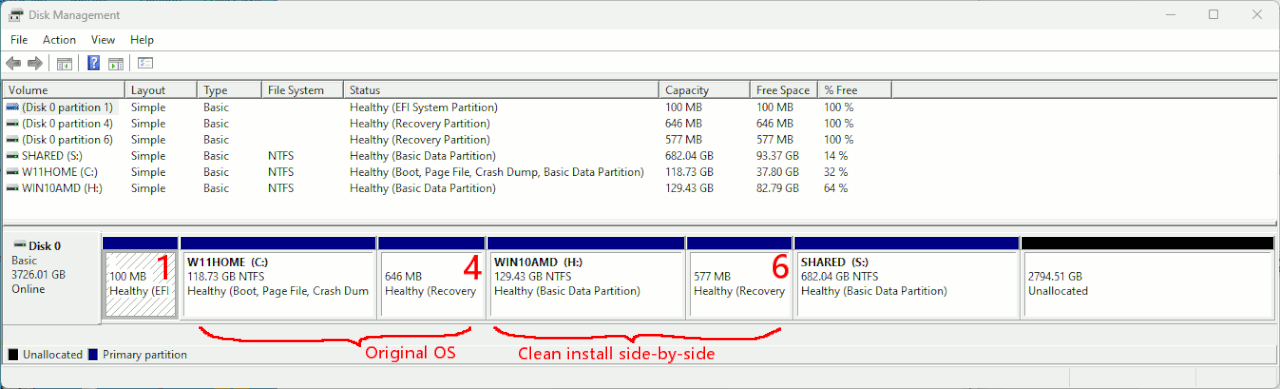
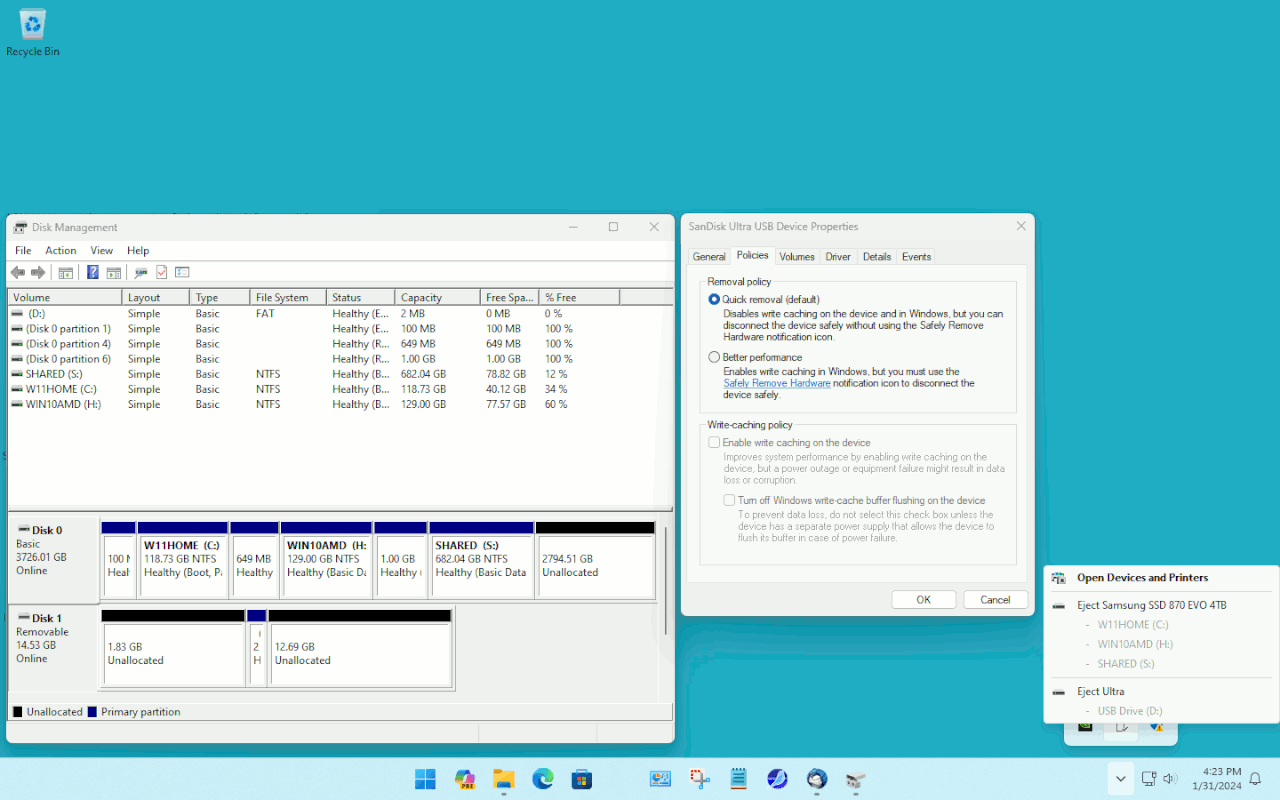
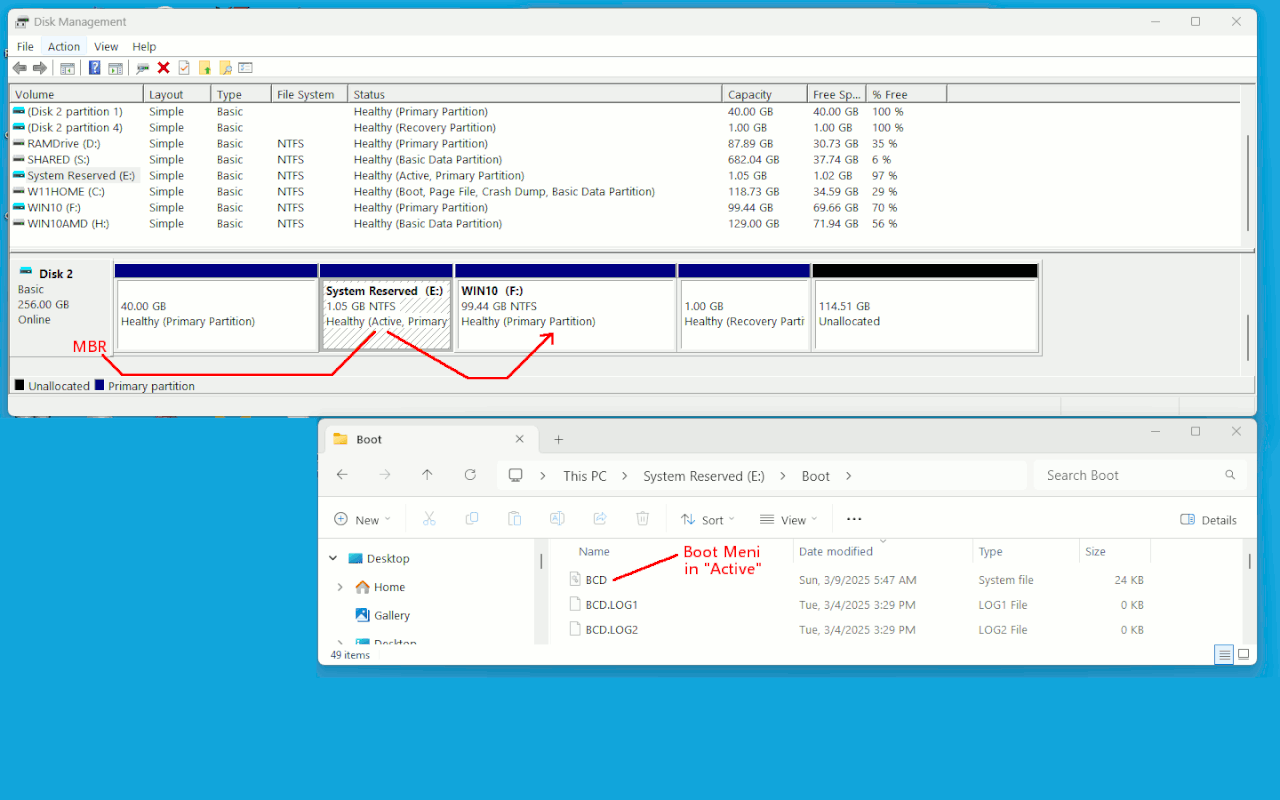
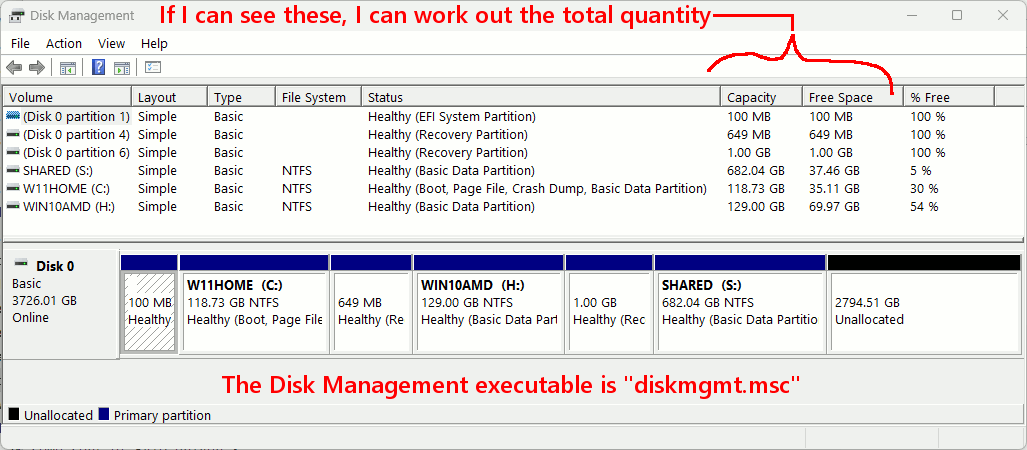
Using diskmgmt.msc , is the best way to "review" what is on
each drive. If you have applied text labels to the partitions, that
helps jog your memory in later years, as to what is what. For example,
if I label the partition "Win10AMD" or "Win10Intel", then I will
know which machine that is for. I can check the labels using my
Linux maintenance media, before attempting to boot them and
ruin something :-) The drives also have stuff written on the
metal surfaces that are large enough to write on. The Helium drive,
nothing is written on that one. That's because it will be the
only Helium drive in the room. There is no way to know how long the
Helium drive will last. The warranty says "five years". It has no OS
and only holds data.
The cheapest hard drives here right now, are WD Black 1TB boot drives,
and the lowest price on those was around $66 or so. The price has gone
back up now, so they're not quite as attractive. Those are the drive(s)
with OSes on them. Typically three OSes per drive, and a large data
partition for scratch. The Helium drive doesn't need an OS, because
I will be using the Macrium CD any time the Helium drive is plugged in.
The helium drive doesn't fit in the tray, and the holes for mounting
are in the wrong place. The drive is a damn nuisance.
Paul
--- SoupGate-Win32 v1.05
* Origin: fsxNet Usenet Gateway (21:1/5)
-
From
Paul@21:1/5 to
Robert in CA on Tue Oct 10 19:41:32 2023
On 10/10/2023 1:57 AM, Robert in CA wrote:
I successfully exported my bookmarks to the 780.
I went into bookmarks>manage bookmarks>import and backup>export bookmarks to HTML
then on the 780 I went to bookmarks>manage bookmarks> import and backup> import bookmarks from HTML
It all seems to be there.
Wasn't there some other file you wanted me to move over? Oh the data file, what was that called? and where? Then I can mount the external hd and move
my entire My Documents with copy/paste correct? or is there another method you
recommend?
Thanks,
Robert
The bookmarks is the important one for Firefox.
For your email tool, whatever it is, you'd want to keep
a copy of the folder where the emails are kept. Some
tools use a .pst file, some tools use an MBOX (no file
extension on the end, making them hard to find). Individual
mails can be stored as .eml files, and only a few tools
will maintain the actual local storage that way. An MBOX
is just so much more convenient (it holds all the emails in
the Inbox, or all the emails in the Sent, and so on).
If you have favorite tools, you might want to transport
the installers for those, to the other platform.
I try not to "reorganize stuff", because that is work :-)
I bring a "bucket" over next to a "bucket", and pick from
one of the buckets, according to my knowledge of what is
in each bucket.
local_folder
imported_folder <=== visit here, if I think lost material is in here.
Like, when it comes to photos, they're not stored in a labeled tree.
And yes, that makes it hard to find stuff. I can always tag stuff, such as
picture-house-123-Main-Street.jpg
and then if I remember the street number, I could search on "123" perhaps.
Paul
--- SoupGate-Win32 v1.05
* Origin: fsxNet Usenet Gateway (21:1/5)
-
From
Robert in CA@21:1/5 to
All on Tue Oct 10 17:15:21 2023
I already moved my email over to the 780 so it's OK.
We can make the 6TB bootable and maybe that's what
we did last time for the other 6TB?
I ran a Memtest on the 780 with 1 pass, no errors.
I also attached the 6TB external hd with the 8500 mrimgs
to the 780 and tried to change the drive letter.
https://postimg.cc/rdcy38rZ
https://postimg.cc/647Bnqkq
What am I doing wrong?
Even though I successfully exportd the bookmarks to the 780
I'm still not following what your saying here. I don't see these
files.
"Bookmarks, Downloads and Browsing History
places.sqlite
This file contains all your Firefox bookmarks and lists of files you have downloaded
and of websites you have previously visited. For more information, see Bookmarks in Firefox.
favicons.sqlite
This file stores website favicon images. It's best to also include this file when
recovering the places.sqlite file.
also this:
"Data", would be your Downloads folder, where ever you
placed your Bookmarks file, and perhaps if you wanted,
the profile for Firefox. Your email tool might have a
profile folder as well.
So your saying I should copy/paste my Downloads folder
to the 780? How could I place my 8500 profile on the 780
and what would be the advantages of doing that?
Thanks,
Robert
--- SoupGate-Win32 v1.05
* Origin: fsxNet Usenet Gateway (21:1/5)
-
From
Robert in CA@21:1/5 to
All on Wed Oct 11 02:15:17 2023
After thinking about it we must have made the 6TB hd a bootable drive because that's
what you would of recommended and what we have been doing all along. I just forgot the procedure for cloning it but the procedure has changed some and is very
automatic now with only a few steps for mrimg backups so I assume cloning has also
changed. I remember I have to put it inside the 780 and let it boot.
I don't have any favorite tools per se except the Dell Image Expert 2000,Word, Excel
and of course all the antivirus and maleware e.g., Avast, SuperAntiSpware, Malewarebytes, Spywareblaster but I worry about having up to date downloads
for them. You know my history. Maybe you should review my links for each to see if they are OK.
Avast-
https://www.avast.com/installation-files#pc
Avast removal -
https://www.avast.com/uninstall-utility#pc
Malewarebytes -
https://www.malwarebytes.com/
SuperAntispyware -
https://www.superantispyware.com/
SpywareBlaster -
http://www.brightfort.com/
They are already installed on the 780 except Word and Excel. I have the original CD's
that came with the 8200 but apparently I could only use it (3) times which I've done
because they won't load on the 780. I really need Word and Excel on the 780 if I ever
loose the 8500. Is there some way of doing it?
Robert
--- SoupGate-Win32 v1.05
* Origin: fsxNet Usenet Gateway (21:1/5)
-
From
Robert in CA@21:1/5 to
All on Wed Oct 11 02:28:51 2023
-
From
Robert in CA@21:1/5 to
All on Wed Oct 11 07:57:40 2023
If the computer problem isn't RAMM or the memory because we
did the Memtest86 or the hd because I did the HD-Tune what could
it be that caused the humming? Is it possible my power supply is going?
I do have (2) spare power supply's that you helped me purchase awhile
back but I sure would hate to change power supply's. That would be tricky
and I don't know if I'm up to it.
Right now the 8500 is running normally with no issues.
Thoughts, suggestions?
Robert
--- SoupGate-Win32 v1.05
* Origin: fsxNet Usenet Gateway (21:1/5)
-
From
Robert in CA@21:1/5 to
All on Thu Oct 12 23:30:01 2023
-
From
Paul@21:1/5 to
Robert in CA on Sat Oct 14 01:01:30 2023
On 2023-10-10 20:15, Robert in CA wrote:
I already moved my email over to the 780 so it's OK.
We can make the 6TB bootable and maybe that's what
we did last time for the other 6TB?
I ran a Memtest on the 780 with 1 pass, no errors.
I also attached the 6TB external hd with the 8500 mrimgs
to the 780 and tried to change the drive letter.
https://postimg.cc/rdcy38rZ
https://postimg.cc/647Bnqkq
What am I doing wrong?
Even though I successfully exportd the bookmarks to the 780
I'm still not following what your saying here. I don't see these
files.
When using the Windows OS in the normal way, the drive letter capability
is in Disk Management ("diskmgmt.msc").
*******
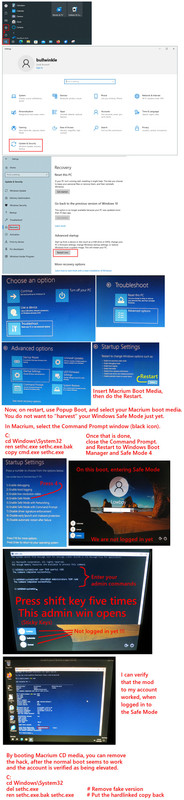
You are in Macrium Reflect, and appear to have taken a screenshot in there. Macrium Reflect CD has a "fake File Explorer", but I'm not aware of a
"fake Disk Management" to make this easy.
Open the Macrium Reflect terminal (... Command Prompt).
diskpart.exe
list disk
select disk 0
list volume
select volume 2 # You do this for devices that have drive letters, but you want to change it
assign letter=k # I changed my S: drive to K: drive.
exit
Now, close the fake File Explorer, and open it again, and
see if the letter has changed.
"Bookmarks, Downloads and Browsing History
places.sqlite
This file contains all your Firefox bookmarks and lists of files you have downloaded
and of websites you have previously visited. For more information, see Bookmarks in Firefox.
favicons.sqlite
This file stores website favicon images. It's best to also include this file when
recovering the places.sqlite file.
also this:
"Data", would be your Downloads folder, where ever you
placed your Bookmarks file, and perhaps if you wanted,
the profile for Firefox. Your email tool might have a
profile folder as well.
So your saying I should copy/paste my Downloads folder
to the 780? How could I place my 8500 profile on the 780
and what would be the advantages of doing that?
Thanks,
Robert
For this previous section, I was describing which files inside the
Firefox profile folder, have your Bookmark information. If you had
a broken computer and could no longer use the Export function, those
two SQLITE files contain the information used for Bookmarks.
Your home directory has data. But, it has a lot of it. Copying
the entire Home directory might be 20GB. Similarly, the Downloads
folder might have a large quantity of material. Whether you want or
need this material, is up to you.
Lots of stuff also hides in AppData, a hidden folder, and it has
"local" and "roaming". Some of the data copy procedures, for saving
browser Profile folders or email Profile folders, will tell you how
to locate them in AppData.
This is why I tried to encourage making a Macrium Backup, and
in some Windows, mounting the backup MRIMG file using the right
click menu, and then you can copy an materials or portion of
materials, according to a recipe you can find for doing it. Because
when you do it that way, you have some assurance "you haven't lost anything".
Paul
--- SoupGate-Win32 v1.05
* Origin: fsxNet Usenet Gateway (21:1/5)
-
From
Paul@21:1/5 to
Robert in CA on Sat Oct 14 01:26:56 2023
On 2023-10-11 05:15, Robert in CA wrote:
After thinking about it we must have made the 6TB hd a bootable drive because that's
what you would of recommended and what we have been doing all along. I just forgot the procedure for cloning it but the procedure has changed some and is very
automatic now with only a few steps for mrimg backups so I assume cloning has also
changed. I remember I have to put it inside the 780 and let it boot.
I don't have any favorite tools per se except the Dell Image Expert 2000,Word, Excel
and of course all the antivirus and maleware e.g., Avast, SuperAntiSpware, Malewarebytes, Spywareblaster but I worry about having up to date downloads for them. You know my history. Maybe you should review my links for each to see
if they are OK.
Avast- https://www.avast.com/installation-files#pc
Avast removal - https://www.avast.com/uninstall-utility#pc
Malewarebytes - https://www.malwarebytes.com/
SuperAntispyware - https://www.superantispyware.com/
SpywareBlaster - http://www.brightfort.com/
They are already installed on the 780 except Word and Excel. I have the original CD's
that came with the 8200 but apparently I could only use it (3) times which I've done
because they won't load on the 780. I really need Word and Excel on the 780 if I ever
loose the 8500. Is there some way of doing it?
Robert
I'm sure your links will work out for you.
For Word and Excel, the question would be:
1) Ability to just print them off.
2) Ability to do authentic changes to the documents,
for sending to the government or whatever.
LibreOffice is free. I only recommend installing this, if you cannot
get the Windows one to work.
https://en.wikipedia.org/wiki/LibreOffice
https://www.libreoffice.org/download/download-libreoffice/
I do not know enough about Office installs, to know what will happen.
If a license is installed too many times, you may have to use an
automated phone system, to exchange 56 digit codes. (You send a code,
they send one back.) Some products, like FPP, may include transfer
rights, such that when you install on a new machine, the old machine
copy is disabled, or, you have to carry out a "disable" operation
then an uninstall, on the old machine, to free up a license. I don't
know what's going to work in your case. And Microsoft does not want
their tools giving useful information -- that makes the job too easy.
You cannot ask questions such as "is this key valid", because
that's what a hacker would do -- make a random key, phone up, see
if they won the lottery.
When a license is locked out, you can talk to a human operator.
They can fix it the first time. The second time you're locked out,
you may not get it fixed.
Paul
--- SoupGate-Win32 v1.05
* Origin: fsxNet Usenet Gateway (21:1/5)
-
From
Paul@21:1/5 to
Robert in CA on Sat Oct 14 01:30:06 2023
-
From
Robert in CA@21:1/5 to
All on Fri Oct 13 23:40:46 2023
For this previous section, I was describing which files inside the
Firefox profile folder, have your Bookmark information. If you had
a broken computer and could no longer use the Export function, those
two SQLITE files contain the information used for Bookmarks.
I finally found the files you're talking about in Profiles. So should I copy/paste
places.sqlite and favincons to the 780? or the entire Profile? How would
I move my Profile to the 780?
Your home directory has data. But, it has a lot of it. Copying
the entire Home directory might be 20GB. Similarly, the Downloads
folder might have a large quantity of material. Whether you want or
need this material, is up to you.
By home data you mean my Profile? I think the only thing I need is the
links to the downloads not the downloads themselves and 'My Documents'
where I have allot of information.
Lots of stuff also hides in AppData, a hidden folder, and it has
"local" and "roaming". Some of the data copy procedures, for saving
browser Profile folders or email Profile folders, will tell you how
to locate them in AppData.
If App data is hidden how do I transfer App data from the 8500 to the 780?
I'll do whatever you recommend best.
This is why I tried to encourage making a Macrium Backup, and
in some Windows, mounting the backup MRIMG file using the right
click menu, and then you can copy an materials or portion of
materials, according to a recipe you can find for doing it. Because
when you do it that way, you have some assurance "you haven't lost anything".
I've been trying but I'm doing something wrong because when I right click
it, it doesn't give me the Explore option. I can't proceed if I can't change the drive letter.
When a license is locked out, you can talk to a human operator.
They can fix it the first time. The second time you're locked out,
you may not get it fixed.
I'll work on that and try calling Microsft and see if they can release the
the key but I don't understand making up a random key? How could
that help?
Thanks for the downloads of the VLC player and LibreOffice which I think
I'll put on the 780 if I can't get the Word/Excel CD's to work. I'll try it again.
I would hate to loose Excel because I keep allot of information there. However, I
see LibreOffice has many similar programs.
Right now, we need to focus on the mrimgs and copy/pasting 'My Documents'
and any other files you recommend.
At the end of the month I'll order the 6TB hd and case and then we can set that up as a bootable hd for 780 mrimgs
Thanks,
Robert
--- SoupGate-Win32 v1.05
* Origin: fsxNet Usenet Gateway (21:1/5)
-
From
Robert in CA@21:1/5 to
All on Sat Oct 14 00:06:32 2023
I just tried the Word/Excel CD that came with the 8200
and I was able to download them successfully to the 780.
So now it has Word and Excel on it. I still may add the LibreOffice.
Were making progress
Thanks,
Robert
--- SoupGate-Win32 v1.05
* Origin: fsxNet Usenet Gateway (21:1/5)
-
From
Robert in CA@21:1/5 to
All on Sat Oct 14 01:21:19 2023
I meant I was able to install Word and Excel on the 780
of course.
Now all I need is to get the mrimg to work so I can move
'My Documents' to the 780. I have allot of data in there
including my Excel files. That's where I store everything.
When I try right clicking the mrimg drive or Mrimg itself it
doesn't give me the Explore option as in your instructions
it gives me Open. So I can't change the drive letter to K:
What am I doing wrong?
--- SoupGate-Win32 v1.05
* Origin: fsxNet Usenet Gateway (21:1/5)
-
From
Paul@21:1/5 to
Robert in CA on Sun Oct 15 06:30:36 2023
On 10/14/2023 4:21 AM, Robert in CA wrote:
I meant I was able to install Word and Excel on the 780
of course.
Now all I need is to get the mrimg to work so I can move
'My Documents' to the 780. I have allot of data in there
including my Excel files. That's where I store everything.
When I try right clicking the mrimg drive or Mrimg itself it
doesn't give me the Explore option as in your instructions
it gives me Open. So I can't change the drive letter to K:
What am I doing wrong?
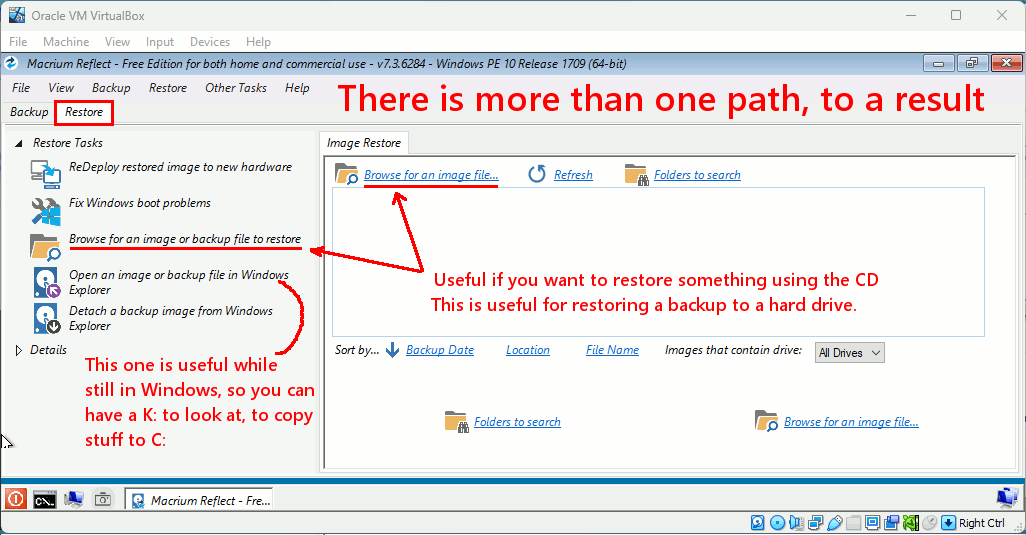
1) Start Macrium
2) Menu bar "Restore" : "Browse for an Image"
From the resulting file dialog, select the MRIMG you want to mount.
3) (Of the Backup/Restore/Log tabs, the Restore should be highlighted)
Over on the right, the name of the MRIMG should now be displayed.
The options are Browse Image, Restore Image, Other Actions.
4) Select Browse Image.
The selector box you were not able to reach,
with the place to select letter K: , should now be on the screen.
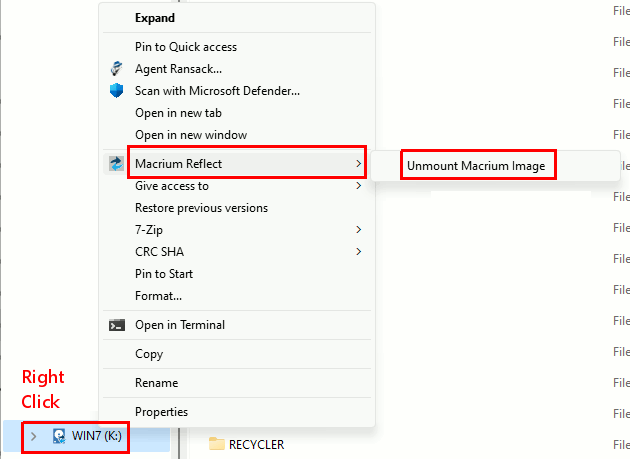
5) When you want to remove K: again (unmount), then go to File Explorer,
find K: on the left hand side, right-click it and select the
"Macrium Reflect" item in the context menu that appears. The
side scroll item, there is only one item, and that's what you use
to unmount the K: virtual drive. There will be a UAC prompt (if Macrium isn't
running its normal main screen), and then the operation will happen.
If the K: File Explorer window was open, it will close and disappear.
Paul
--- SoupGate-Win32 v1.05
* Origin: fsxNet Usenet Gateway (21:1/5)
-
From
Robert in CA@21:1/5 to
All on Sun Oct 15 08:54:16 2023
-
From
Robert in CA@21:1/5 to
All on Sun Oct 15 23:52:10 2023
-
From
Robert in CA@21:1/5 to
All on Tue Oct 17 17:41:01 2023
I was denied access.
Thoughts/suggestions,
Robert
--- SoupGate-Win32 v1.05
* Origin: fsxNet Usenet Gateway (21:1/5)
-
From
Paul@21:1/5 to
Robert in CA on Tue Oct 17 22:38:12 2023
On 10/17/2023 8:41 PM, Robert in CA wrote:
I was denied access.
Thoughts/suggestions,
Robert
At which step were you denied access ?
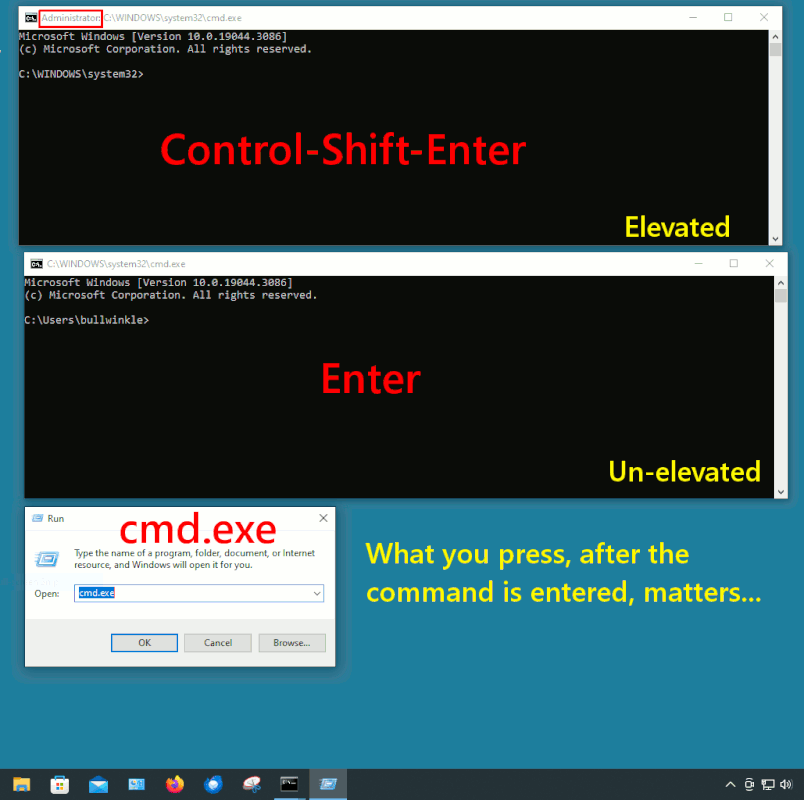
You need to be using an account belonging to Administrator Group,
for a lot of computer activities. For example, if you plug in
an external hard drive in a USB enclosure, the ownership could be a
name from the other machine, which "means nothing" to the current
computer. Using your Administrator capabilities, a green bar will
go across the screen in the File Explorer input box and this may
indicate that File Explorer is doing an implicit "Take Own" of the
folder on the drive you're trying to get into.
See if belonging to the Administrator group helps.
Paul
--- SoupGate-Win32 v1.05
* Origin: fsxNet Usenet Gateway (21:1/5)
-
From
Robert in CA@21:1/5 to
All on Thu Oct 19 04:32:28 2023
-
From
Robert in CA@21:1/5 to
All on Sat Oct 21 14:42:19 2023
I don't understand, I was in the Administrator Account
trying to access the User Account and it still denied me.
Could the problem be sharing? It says not shared.
https://postimg.cc/0KJQB0Kv
Robert
--- SoupGate-Win32 v1.05
* Origin: fsxNet Usenet Gateway (21:1/5)
-
From
Paul@21:1/5 to
Robert in CA on Sat Oct 21 22:16:03 2023
On 10/21/2023 5:42 PM, Robert in CA wrote:
I don't understand, I was in the Administrator Account
trying to access the User Account and it still denied me.
Could the problem be sharing? It says not shared.
https://postimg.cc/0KJQB0Kv
Robert
There is a tick box in the Macrium mounter dialog, to remove permissions
and make your files easier to access as K: .
[Picture]
https://i.postimg.cc/RZHmJb4b/macrium-remove-permissions.gif
*******
The recent spam attacks originating from Google, have caused
the USENET Admins to build spam filters.
While ordinary messages from Google Groups make it through,
some messages are getting dropped. This is termed a "false positive",
as a perfectly ordinary message can be falsely accused of being spam.
This means comms, my ability to see your questions,
is potentially hampered now. I don't think yours are being
dropped, but this is just a warning that if I don't reply,
maybe I can't see it.
Paul
--- SoupGate-Win32 v1.05
* Origin: fsxNet Usenet Gateway (21:1/5)
-
From
Robert in CA@21:1/5 to
All on Sun Oct 22 03:12:39 2023
Oh man,.... that's not good news. It's bad enough with all the servers
going but now as you say you may not be able to even see my posts
at some point!? I hope this isn't going to happen.
If it does do you have any advice now? I do my mrimgs every month,
but is there anything else you want me to do should you stop seeing my messages? I couldn't replace the PSU alone should that fail even though
I have two spares.
I'll try the mrimg again and let you know how it goes.
I'll order the 6TB hd and external case next week and I'd appreciate it if
you could help me set it up.
Thanks,
Robert
--- SoupGate-Win32 v1.05
* Origin: fsxNet Usenet Gateway (21:1/5)
-
From
Robert in CA@21:1/5 to
All on Sun Oct 22 06:07:39 2023
I tried the mrimg again but this time it didn't give me the browse option:
https://postimg.cc/47P5YH6k
however I managed to navigate to the mrimgs and change the drive letter to K: but it didn't give me the screen to enable access to restricted folders yet I was able to access them and copy/pasted 'My Documents' from the K drive
to the C: drive.
You know how it opens a dialog box and shows the files being transferred
from one folder to the next? It did that at first but now the 'files' are frozen
between folders and there's no apparent transfer happening. Also when the transfer completes it should close or tell me something, correct? I'm afraid
to do anything since I've gotten this far with it but it seems like it's not responding.
It just says, File operation in progress, please wait but there's no movement. It's been like this for about an hour now. What should I do?
Thoughts, suggestions?
Robert
--- SoupGate-Win32 v1.05
* Origin: fsxNet Usenet Gateway (21:1/5)
-
From
Robert in CA@21:1/5 to
All on Sun Oct 22 07:28:30 2023
I got the 780 out of the not responding state then
I tried dismounting the K: drive by right clicking but
when I do it says Open, Properties, Refresh
What's going on ? Why did mine change? I did all this
before and it was OK?
I successfully transferred 'My Documents' but they went
to the Administrator's Account so I'm copy/pasting it again
to the User Account. 3 hrs 30 mins,.. that's the same amount
of time it takes for the mrimgs for the 8500.
Should I try browsing again to see if I can dismount the K:
and L: drives? It's weird it doesn't say Macrium when I right click
Thoughts/suggestions?
Robert
--- SoupGate-Win32 v1.05
* Origin: fsxNet Usenet Gateway (21:1/5)
-
From
Robert in CA@21:1/5 to
All on Mon Oct 23 02:04:24 2023
I tried it again and again it didn't give me the option
but I see it in the middle of the page where the arrow is.
That's what I clicked on but when I got to the point of
changing drives to unmount K: and L: they were there !?
How could they be there if I didn't unmount them previously?
https://postimg.cc/5XGgfwbX
https://postimg.cc/JDQjHJVc
Also when I brought over 'My Documents this popped up
but I just closed it.
https://postimg.cc/KkQg82B0
Robert
--- SoupGate-Win32 v1.05
* Origin: fsxNet Usenet Gateway (21:1/5)
-
From
Robert in CA@21:1/5 to
All on Mon Oct 23 01:37:30 2023
I've successfully transferred My Documents and the bookmarks
to the 780 with your good help but I still need to unmount K:
and L: drives from the 6TB external hd.
It's weird that the drop down box didn't have the 'Browse for image
or backup file to restore' option. However I found it lower on the screen
in a box on the right and that's how I gained access. but the K: and L:
drives are still unmounted and I need to use another letter to dismount
them. I'll give it another try but so far it's not giving me the Macrium
option when I right click the drives?
I'll try again and let you know how it goes.
Are there any other tests you want me to do with regard to the
humming from the 8500? It hasn't happened since but I was
just wondering.
I'll order the 6TB hd and case Wed and should be here in a week
or so.
Thanks,
Robert
--- SoupGate-Win32 v1.05
* Origin: fsxNet Usenet Gateway (21:1/5)
-
From
Paul@21:1/5 to
Robert in CA on Mon Oct 23 07:38:54 2023
On 10/23/2023 4:37 AM, Robert in CA wrote:
I've successfully transferred My Documents and the bookmarks
to the 780 with your good help but I still need to unmount K:
and L: drives from the 6TB external hd.
It's weird that the drop down box didn't have the 'Browse for image
or backup file to restore' option. However I found it lower on the screen
in a box on the right and that's how I gained access. but the K: and L: drives are still unmounted and I need to use another letter to dismount
them. I'll give it another try but so far it's not giving me the Macrium option when I right click the drives?
I'll try again and let you know how it goes.
Are there any other tests you want me to do with regard to the
humming from the 8500? It hasn't happened since but I was
just wondering.
I'll order the 6TB hd and case Wed and should be here in a week
or so.
Thanks,
Robert
The K: and L: should be dismount-able from File Explorer.
Right-click on the drives, in the left-hand pane.
[Picture]
https://i.postimg.cc/FH8fh4Qs/Unmount-Macrium-K.gif
Paul
--- SoupGate-Win32 v1.05
* Origin: fsxNet Usenet Gateway (21:1/5)
-
From
Paul@21:1/5 to
Robert in CA on Mon Oct 23 07:28:07 2023
On 10/22/2023 10:28 AM, Robert in CA wrote:
I got the 780 out of the not responding state then
I tried dismounting the K: drive by right clicking but
when I do it says Open, Properties, Refresh
What's going on ? Why did mine change? I did all this
before and it was OK?
I successfully transferred 'My Documents' but they went
to the Administrator's Account so I'm copy/pasting it again
to the User Account. 3 hrs 30 mins,.. that's the same amount
of time it takes for the mrimgs for the 8500.
Should I try browsing again to see if I can dismount the K:
and L: drives? It's weird it doesn't say Macrium when I right click
Thoughts/suggestions?
Robert
When you run Macrium, the Restore button needs to be clicked,
so the Restore menu items will be there. Then, you should
be able to browse for something.
The K: can be dismounted from File Explorer. Right click on K:
and look for the Macrium item. The Macrium item should be
present, if you are clicking on a Macrium item (such as K: ).
Paul
--- SoupGate-Win32 v1.05
* Origin: fsxNet Usenet Gateway (21:1/5)
-
From
Paul@21:1/5 to
Robert in CA on Mon Oct 23 07:41:09 2023
On 10/23/2023 5:04 AM, Robert in CA wrote:
I tried it again and again it didn't give me the option
but I see it in the middle of the page where the arrow is.
That's what I clicked on but when I got to the point of
changing drives to unmount K: and L: they were there !?
How could they be there if I didn't unmount them previously?
https://postimg.cc/5XGgfwbX
https://postimg.cc/JDQjHJVc
Also when I brought over 'My Documents this popped up
but I just closed it.
https://postimg.cc/KkQg82B0
Robert
I don't know what would trigger that.
If you were just copying some files and not executing something.
Paul
--- SoupGate-Win32 v1.05
* Origin: fsxNet Usenet Gateway (21:1/5)
-
From
Robert in CA@21:1/5 to
All on Mon Oct 23 07:19:11 2023
I tried again, and did as you instructed. The first picture I clicked
the Restore Tab and it's the same as before. The second picture I
clicked the Backup Tab
https://postimg.cc/NL1jP09m
https://postimg.cc/ZvZ4hrB3
What am I doing wrong? I did this the first time and was exactly as
you say but the browse option disappeared.
Also in passing I noticed I have a Apple Software Update on the 780
which I don't have on the 8500. There's also SequoiaView which if I
remember correctly you used it to find that huge program that was eating
up GB's when the 780 should of been like 50GB it was like 350GB.
Should I remove these programs?
Thanks,
Robert
--- SoupGate-Win32 v1.05
* Origin: fsxNet Usenet Gateway (21:1/5)
-
From
Robert in CA@21:1/5 to
All on Mon Oct 23 22:00:29 2023
There's also another problem per se on the 8500.
Sometimes it seems to lag loading programs. Like
a YouTube video. Sometimes it takes forever to
load a page and I'll have to reload it to get it to go.
Other times I get this page:
https://postimg.cc/SnGpBYdB
Sometimes this is probably caused by me leaving the
computer sitting for too long while I take a break but
once going it shouldn't have these problems should it?
Robert
--- SoupGate-Win32 v1.05
* Origin: fsxNet Usenet Gateway (21:1/5)
-
From
Robert in CA@21:1/5 to
All on Tue Oct 24 05:07:05 2023
I tried again with another Rescue CD but it gave me
the same thing.
https://postimg.cc/NL1jP09m
Why and how did it change? The first time I did it it
had the browse for image as you describe and all
went well but now it's gone?
I do see it in another part of the screen, center of the
page and another lower right but we can't use either?
So how do I fix this?
Thanks
Robert
--- SoupGate-Win32 v1.05
* Origin: fsxNet Usenet Gateway (21:1/5)
-
From
Robert in CA@21:1/5 to
All on Wed Oct 25 02:07:55 2023
I did the ipconfig command and this is what it shows:
https://postimg.cc/XXDt8Cvk
I did the whatismyip.net and it showed the exact location
and my IP address.
As far as IP address I don't have any control over mine
which is all numbers. I'm not following you with the nodes
to access and write down. Do you mean programs? Sites?
Thanks,
Robert
--- SoupGate-Win32 v1.05
* Origin: fsxNet Usenet Gateway (21:1/5)
-
From
Robert in CA@21:1/5 to
All on Wed Oct 25 01:45:33 2023
-
From
Paul@21:1/5 to
Robert in CA on Wed Oct 25 01:48:15 2023
On 10/24/2023 8:07 AM, Robert in CA wrote:
I tried again with another Rescue CD but it gave me
the same thing.
https://postimg.cc/NL1jP09m
Why and how did it change? The first time I did it it
had the browse for image as you describe and all
went well but now it's gone?
I do see it in another part of the screen, center of the
page and another lower right but we can't use either?
So how do I fix this?
Thanks
Robert
The menus can be slightly different, in the OS screen
versus the CD-provided screen. This is me running the CD.
[Picture]
https://i.postimg.cc/mrzbj3Nr/Macrium-Rescue-CD-browse.gif
Copying a few files from K: to C: is best done while C: is booted.
Restoring an entire hard drive image, over top of C: , that
is when you use the Rescue CD.
Paul
--- SoupGate-Win32 v1.05
* Origin: fsxNet Usenet Gateway (21:1/5)
-
From
Paul@21:1/5 to
Robert in CA on Wed Oct 25 02:15:59 2023
On 10/24/2023 1:00 AM, Robert in CA wrote:
There's also another problem per se on the 8500.
Sometimes it seems to lag loading programs. Like
a YouTube video. Sometimes it takes forever to
load a page and I'll have to reload it to get it to go.
Other times I get this page:
https://postimg.cc/SnGpBYdB
Sometimes this is probably caused by me leaving the
computer sitting for too long while I take a break but
once going it shouldn't have these problems should it?
Robert
This can be a networking problem.
In a Command Prompt or Powershell terminal window (doesn't have to be elevated)
ipconfig <=== this shows your IPV4 and IPV6 addresses
if the hardware has them. My setup for example,
only has IPV4. I have the usual normal equipment
to switch to doing both -- if I wanted that.
These are local LAN addresses, typically non-routable.
nslookup www.example.com <=== This is how you check the addresses of Internet servers
Now, we're on the other side of your router, sniffing the Internet.
You can do this in your browser if you want,
so this is basically pseudocode in a sense.
It means "do it in your browser".
firefox
https://www.whatismyip.net/ <=== This tests "how you are connecting to the web"
Your Information
IP Address: 105.200.150.175 <=== I connected via IPV4
"DO NOT" pay attention to any scary red text on the page :-)
We just want to see whether it tried IPV4 or IPV6 first.
Most other info is irrelevant to our purpose. Some of
the info on that web site, is just wrong.
For example, when I tried to use this site, it was slow.
PS C:\Users > nslookup news.eternal-september.org
Non-authoritative answer:
Name: news.eternal-september.org
Addresses: 2a01:4f9:4b:44c2::2 <=== was only making IPV6 available at the time I checked
Later when I checked, it was doing this, and I connected via IPV4
and the time to become connected was reduced. Presumably it is the
time for the DNS lookup which is taking longer, it prefers IPV4
over IPV6 and tries that first.
PS C:\Users > nslookup news.eternal-september.org
Non-authoritative answer:
Name: news.eternal-september.org
Addresses: 2a01:4f9:4b:44c2::2 \___ The server supports both now.
135.181.20.170 / Your machine may try one type, before the other type.
if one of those is not available, it could be slower.
DNS is also subject to a lot of shenanigans, which
is why they are experimenting with other DNS servers
with features such as DNS-over-TLS (secure in-flight lookups).
But that doesn't make it faster. That's just noting
that if there were ever a war, DNS would likely get
broken right away. And you probably would not be
watching Youtube then. If you had collected addresses
using "nslookup" and had written them down, you
could still attempt connect to specific servers.
firefox
http://135.181.20.170 # Now, it doesn't need DNS to work
# Without a symbolic name, the certificate to make
# a https: would not work, so try http: access first.
It's delightfully messy, but it does pay to "prepare your go-bag"
for times when the Internet is not working. For example, my
ISP has a "status page", and you definitely want the IP address
of the status page, so you can check for known network anomalies.
IP addresses can be reassigned at any time, which is
why we prefer symbolic addresses "news.eternal-september.org"
instead of "135.181.20.170". Maybe tomorrow, that machine won't
be at 135.181.20.170 . But, in the event of an emergency condition,
think carefully about what nodes you might want to access, and
write those down in your Notes file.
Paul
--- SoupGate-Win32 v1.05
* Origin: fsxNet Usenet Gateway (21:1/5)
-
From
Paul@21:1/5 to
Robert in CA on Wed Oct 25 08:37:55 2023
On 10/25/2023 4:45 AM, Robert in CA wrote:
I was using the Rescue CD to do this so I tried it
by just opening Macrium and there was the prompt.
This is how I must of done it before but for some
reason I started using the Rescue CD which changed it.
However the K: and L: were there? How could they
be there if I didn't un-mount them?
https://postimg.cc/w1yPwMmS
https://postimg.cc/DSXjqDVh
https://postimg.cc/Cdxcvdym
https://postimg.cc/kVCcWgFN
Robert
Postimage isn't working right now, but I can tell
you the K: and L: , they can be unmounted from
File Explorer, but they can also be unmounted any
time you reboot.
If you need to copy files from K: the next time
you boot, you would have to mount the MRING file
again to do that. And the K: "letter" should be
available to do it.
Paul
--- SoupGate-Win32 v1.05
* Origin: fsxNet Usenet Gateway (21:1/5)
-
From
Robert in CA@21:1/5 to
All on Wed Oct 25 09:35:38 2023
Postimage seems fine on my end.
Robert
--- SoupGate-Win32 v1.05
* Origin: fsxNet Usenet Gateway (21:1/5)
-
From
Robert in CA@21:1/5 to
All on Wed Oct 25 09:33:47 2023
Since I've rebooted several times since then they've been
unmounted so it's OK and I can use the K: or L: drives if I
need to copy/paste?
I don't know if this has anything to do with with the lag
problem but earlier today I bid on an item on eBay and
clicked the bid button but the dialog box opened only
partially and was all grayed out so I wasn't able to bid
and lost the item. It never did open up completely.
That's the first time that's ever happened.
Robert
--- SoupGate-Win32 v1.05
* Origin: fsxNet Usenet Gateway (21:1/5)
-
From
Robert in CA@21:1/5 to
All on Wed Oct 25 17:40:29 2023
So if I want to copy/paste a file from the mrimgs
I do not use the Rescue CD. I use it only to create
clone, and restore, correct?
I ordered the 6TB hd and case and should be
here in a week or so.
Once I get the 6TB hd I clone it and then put it
inside the 780 to boot. Making it a boot-able hd,
correct?
By nodes do you mean the actual address of
interested sites e.g. www.example.com?
In passing, I noticed I have a Apple Software
Update on the 780 which I don't have on the
8500. There's also SequoiaView which if I
remember correctly you used it to find that
huge program that was eating up GB's when
the 780 should of been like 50GB it was like
350GB.
Should I remove these programs?
I got this screen again and I had just logged on.
https://postimg.cc/pmzZpCXy
Robert
--- SoupGate-Win32 v1.05
* Origin: fsxNet Usenet Gateway (21:1/5)
-
From
Paul@21:1/5 to
Robert in CA on Fri Oct 27 00:37:05 2023
On 10/25/2023 8:40 PM, Robert in CA wrote:
So if I want to copy/paste a file from the mrimgs
I do not use the Rescue CD. I use it only to create
clone, and restore, correct?
I ordered the 6TB hd and case and should be
here in a week or so.
Once I get the 6TB hd I clone it and then put it
inside the 780 to boot. Making it a boot-able hd,
correct?
By nodes do you mean the actual address of
interested sites e.g. www.example.com?
In passing, I noticed I have a Apple Software
Update on the 780 which I don't have on the
8500. There's also SequoiaView which if I
remember correctly you used it to find that
huge program that was eating up GB's when
the 780 should of been like 50GB it was like
350GB.
Should I remove these programs?
I got this screen again and I had just logged on.
https://postimg.cc/pmzZpCXy
Robert
You can enter "somesite.com" style into this web page,
and it may be able to tell you how often the site is down.
https://www.isitdownrightnow.com/
Sometimes the Windows firewall is not loading, but if that
was the case, the browser likely wouldn't run, rather
than the window opening and pretending to be ready for usage.
The site in question, only has an IPV4 address and no IPV6 address.
This isn't particularly important.
OK, now this is interesting.
nslookup righteouswarriors.com
Non-authoritative answer:
Name: righteouswarriors.com
Address: 208.180.89.69 <=== an IPV4 address
ping 208.180.89.69
Pinging 208.180.89.69 with 32 bytes of data:
Request timed out.
Request timed out.
Request timed out.
Request timed out.
Yet the entry web page paints in a web browser.
And the transaction seems to use TLS 1.2 .
I would rate the site, "not 100% normal". Due to the ping failing to work.
isitdownrightnow says it is working, and the web browser says it is working.
Paul
--- SoupGate-Win32 v1.05
* Origin: fsxNet Usenet Gateway (21:1/5)
-
From
Robert in CA@21:1/5 to
All on Fri Oct 27 02:37:09 2023
-
From
Robert in CA@21:1/5 to
All on Fri Oct 27 04:18:02 2023
I removed the Apple programs from the 780 but kept
SequoiaView. You never know, I may need it again.
Hopefully, we can get the 6TB hd up and running before
Nov 1 for the mrimgs.
Robert
--- SoupGate-Win32 v1.05
* Origin: fsxNet Usenet Gateway (21:1/5)
-
From
Paul@21:1/5 to
Robert in CA on Sat Oct 28 06:26:41 2023
On 10/27/2023 7:18 AM, Robert in CA wrote:
I removed the Apple programs from the 780 but kept
SequoiaView. You never know, I may need it again.
Hopefully, we can get the 6TB hd up and running before
Nov 1 for the mrimgs.
Robert
If we don't make it bootable, it can be ready in about
30 seconds.
See my other post, for how to boot the 6TB drive :-)
It's not as easy as I thought.
Paul
--- SoupGate-Win32 v1.05
* Origin: fsxNet Usenet Gateway (21:1/5)
-
From
Paul@21:1/5 to
Robert in CA on Sat Oct 28 06:24:58 2023
On 10/27/2023 5:37 AM, Robert in CA wrote:
I have my 6 TB hd and now just waiting for the case.
Then I'll try cloning it.
Here's your instructions for cloning but as I say
they have automated the mrimg backups allot so I
think it may be the same with cloning.
https://postimg.cc/ft67JpfL
<some snipped for brevity>
https://postimg.cc/yDqzKygy
I typed somesite.com and this is what it showed:
https://postimg.cc/SXPKWz1T
It's interesting you looked up Righteous Warriors,
It was started by someone I use to know and I was
surprised it still was up. I tried contacting him but
never got a reply.
I barely am understanding you with the IPV4 and
IPV6 addresses. I'm trying to follow along.
Is there anything you want me to do? Run any
tests?
Thanks,
Robert
The reference to "somesite.com" was similar to "example.com",
just to show you the format.
Not to actually go there.
I wanted you to type a domain name, "example.com" or
whatever domain you're trying to use.
*******
These links may point at the Macrium cloning disk instructions.
One of these links should work.
Clicking the "Download Original" <===
allows you to keep a copy of the single file with all the pictures in it.
https://s22.postimg.cc/487zw4g1d/Clone_Disk.gif
https://postimg.cc/Zv6vZckT
*******
As it turns out, your request to "just clone the 2TB bootable backup drive
to the 6TB drive", this is a bit more complicated than expected :-)
You see, your previous backup drives (with their boot OS on them),
they were 2TB drives. That wasn't by accident, by the way. I am
a schemer. A schemer who hates surprises.
You can take the new 6TB drive, make it GPT
(GUID Partition Table, instead of MSDOS MBR partition table type),
and then in Disk Management, you can define the entire
6TB drive, as one partition.
That works fine.
The money is not wasted, because, you can use the *entire* drive
for backups. No problemo. When it asks what flavor of partitioning
you want, a 6TB drive works best with "GPT".
The problem comes, when you try to fit the older OS image you've
got, onto the 6TB drive. Remember that MSDOS MBR partitioned disks,
they work up to 2.2TB, so a 2.0TB disk was a "perfect fit for the job".
The MBR only has enough address space for the 2TB drive. It cannot
access storage above that point. There are two "hacks" for turning the
space above 2TB, into separate virtual drives (Acronis Capacity Manager
is one of the methods), but these are not practical. I used to run that,
but I got rid of it, because it was making me crazy.
If the disk is made GPT, and we want to boot the OS, we have:
UEFI GPT <=== most users do this. The OS installer does this
It is unlikely the Optiplex 780 has UEFI. I am
unable to confirm whether A15 BIOS update for the 780,
actually has UEFI option in it.
CSM GPT <=== this can be done with a Syslinux replacement MBR,
plus setting a GPT attribute bit, to support legacy
"boot flag" or Active flag, but in GPT-land.
https://superuser.com/questions/1750366/boot-a-legacy-bios-os-on-a-gpt-mass-memory
https://mirrors.edge.kernel.org/pub/linux/utils/boot/syslinux/Testing/6.04/syslinux-6.04-pre1.tar.xz
"You can install the Syslinux MBR boot code (gptmbr.bin), which behaves very much
like traditional MBRs that jump to an active partition's PBR, but understands GPT
partition tables and looks for a similarly named GPT attribute flag. (Specifically,
it checks bit 2 which gdisk calls "Legacy BIOS bootable.") The rest of Syslinux
is not needed."
You will notice this article,
https://wiki.syslinux.org/wiki/index.php?title=Mbr
does not address setting the GPT Attribute
in order to make gptmbr.bin to jump to the correct partition. You can set
some GPT things in Linux, which is what the previous paragraph proposes.
But "diskpart.exe" utility in Windows can also do that, and I've already had
to repair one GPT Attribute in the past using that.
You can help, by taking a screenshot of Disk Management (diskmgmt.msc)
of the 780 2TB bootable backup drive, to help me verify I'm preparing
my new recipe properly.
I hope by doing it this strange way, I will *AVOID* asking you to:
1) Flash update the Optiplex 780 BIOS. I don't want to do that.
It is unlikely to help, and I can't verify it would help.
2) Use the Microsoft MBR2GPT.exe utility. If you have your Win10 you installed
to get the Win10 license, there might be a copy of MBR2GPT.exe on there.
I don't really want to do that.
Instead, the steps will likely involve.
1) Macrium Reflect clone of Win7 C: and System Reserved, to the 6TB disk.
2) dd.exe transfer of 440 byte "gptmbr.bin" binary file, to the MBR sector.
This leaves the 0xEE protective partition single entry in the partition table, alone.
3) A diskpart session, selecting the currently active partition, and
making it active by setting GPT attribute to 0x4 or so. It'll be
something like that.
4) Test boot of the new setup, to see it vectors based on the GPT attribute it finds.
The reason the GPT attribute must be set, is the traditional 0x80 boot flag
has no equivalent in GPT-land directly (the same way as before).
Anyway, post a screenshot of the 2TB backup drive in Disk Management
(not file explorer), so I can have a look at it. In Windows 7,
Start : Run : diskmgmt.msc will give a nice clean picture.
Paul
--- SoupGate-Win32 v1.05
* Origin: fsxNet Usenet Gateway (21:1/5)
-
From
Robert in CA@21:1/5 to
All on Sat Oct 28 05:05:21 2023
I have the set of instructions for cloning
when you initially gave them to me.
I accidentally clicked on the Syslinux
download on the 8500 but deleted it
afterwards.
I don't understand, we never went through
all of this with the other 6TB hd as I remember.
Maybe we didn't make it boot-able? They weren't
meant to be after all they are external drives.
Let me ask a question. As it is now, once I
get the case for it could I create a folder on
the 6TB hd for mrimgs without a OS? If
so, I think that's what I did with the other 6TB
because that's actually all I see on my other 6TB
hd. Just a folder that says 8500 mrimgs, nothing
else.
Here's the pics, I hope I did it right:
https://postimg.cc/PpDx6pj2
I typed run : diskmgmt.msc
https://postimg.cc/87Cz2nGF
https://postimg.cc/YjkGXRvF
Robert
--- SoupGate-Win32 v1.05
* Origin: fsxNet Usenet Gateway (21:1/5)
-
From
Paul@21:1/5 to
Robert in CA on Sat Oct 28 08:48:10 2023
On 10/28/2023 8:05 AM, Robert in CA wrote:
I have the set of instructions for cloning
when you initially gave them to me.
I accidentally clicked on the Syslinux
download on the 8500 but deleted it
afterwards.
I don't understand, we never went through
all of this with the other 6TB hd as I remember.
Maybe we didn't make it boot-able? They weren't
meant to be after all they are external drives.
Let me ask a question. As it is now, once I
get the case for it could I create a folder on
the 6TB hd for mrimgs without a OS? If
so, I think that's what I did with the other 6TB
because that's actually all I see on my other 6TB
hd. Just a folder that says 8500 mrimgs, nothing
else.
Here's the pics, I hope I did it right:
https://postimg.cc/PpDx6pj2
I typed run : diskmgmt.msc
https://postimg.cc/87Cz2nGF
https://postimg.cc/YjkGXRvF
Robert
The string to be entered in the Run box is just
diskmgmt.msc
That should do it.
*******
Your first post is interesting. That looks like the
regular OS boot drive. Where you've made C: take up
all the space. You can certainly do that.
For the backup drives, I think we made the C: in that
case, a lot smaller. Macrium has a "resize" thing so
you can reduce the size of a partition while working
on it.
Your OS drive is like this:
+-----+--------------+--------------------------------------------+
| MBR | 4GB recovery | Huge C: drive | +-----+--------------+--------------------------------------------|
Whereas for the backup drives which double as emergency OSes, they
were supposed to look like this. Sometimes, there are advantages
to separating the OS (that might not get used very much), from
the partition with the backups in it. Then, if you ever need to
"overwrite" the Small C: with a clean OS image, you can do it.
+-----+--------------+----------+---------------------------------+
| MBR | 4GB recovery | Small C: | Huge Data D: for backups | +-----+--------------+----------+---------------------------------+
*******
And absolutely, if you want to make the 6TB into a single Data partition
6TB long, you can do that. Windows 7 supports GPT disks with 6TB partitions,
no problem, as a place for the output from backup software.
Paul
--- SoupGate-Win32 v1.05
* Origin: fsxNet Usenet Gateway (21:1/5)
-
From
Robert in CA@21:1/5 to
All on Sat Oct 28 07:48:26 2023
-
From
Robert in CA@21:1/5 to
All on Sat Oct 28 11:52:09 2023
I have the case, so am going to try to put the hd inside it.
Robert
--- SoupGate-Win32 v1.05
* Origin: fsxNet Usenet Gateway (21:1/5)
-
From
Robert in CA@21:1/5 to
All on Sat Oct 28 12:29:55 2023
I have the 6TB hd in the case but haven't tested it as yet.
Robert
--- SoupGate-Win32 v1.05
* Origin: fsxNet Usenet Gateway (21:1/5)
-
From
Robert in CA@21:1/5 to
All on Sat Oct 28 13:48:57 2023
-
From
Paul@21:1/5 to
Paul on Sun Oct 29 11:50:34 2023
On 10/28/2023 8:48 AM, Paul wrote:
And absolutely, if you want to make the 6TB into a single Data partition
6TB long, you can do that. Windows 7 supports GPT disks with 6TB partitions, no problem, as a place for the output from backup software.
I tried to get the syslinux thing to work, but it's a no-go so far.
It is reading "something" and it finds an error, but it
won't give details on the error, so I have nothing to go on.
Just use the thing as a 6TB backup partition. When you receive
the drive, it may already have been initialized GPT (since that
exposes the whole 6TB, whereas an MBR partition only
exposes 2.2TB).
Paul
--- SoupGate-Win32 v1.05
* Origin: fsxNet Usenet Gateway (21:1/5)
-
From
Robert in CA@21:1/5 to
All on Sun Oct 29 09:13:47 2023
I have the 6TB hd and case and I've put the drive in the case.
I'm not following you. Are you saying to proceed and clone
the 6TB hd and edit the partition as in your instructions?
https://postimg.cc/67v7mXT0
Robert
--- SoupGate-Win32 v1.05
* Origin: fsxNet Usenet Gateway (21:1/5)
-
From
Robert in CA@21:1/5 to
All on Sun Oct 29 17:08:08 2023
-
From
Robert in CA@21:1/5 to
All on Sun Oct 29 17:11:03 2023
I haven't done anything as yet other than put the
6TB hd in the case.
Robert
--- SoupGate-Win32 v1.05
* Origin: fsxNet Usenet Gateway (21:1/5)
-
From
Robert in CA@21:1/5 to
All on Mon Oct 30 04:14:52 2023
-
From
Robert in CA@21:1/5 to
All on Mon Oct 30 04:18:10 2023
I just realized it can't be BootX so where is the 6TB hd?
Why doesn't it see it even if un-allocated.
Thoughts/suggestions,
Robert
--- SoupGate-Win32 v1.05
* Origin: fsxNet Usenet Gateway (21:1/5)
-
From
Robert in CA@21:1/5 to
All on Mon Oct 30 13:05:22 2023
-
From
Paul@21:1/5 to
Robert in CA on Tue Oct 31 05:17:11 2023
On 10/30/2023 4:05 PM, Robert in CA wrote:
I tried again and did diskmgmt.msc on the 780
to verify that the 780 could see the un-allocated
partition before I attempted to clone it.
https://postimg.cc/7CYScH0G
However, it did the same as before and did not see
it. How can I clone it if it doesn't see it? How did we
set up the other 6TB hd? I must be doing something
wrong.
https://postimg.cc/njMFN53G
https://postimg.cc/PNgXFSY1
https://postimg.cc/jLYThLYX
Thoughts/suggestions?
Robert
OK, the first picture at the top, is GOOD. [
https://postimg.cc/7CYScH0G ]
In the picture, I see an OS that is GPT-aware and it recognizes the disk
as a 6TB drive.
In Disk Management, while the regular OS is running, you can click the 6TB area,
and use New Simple Volume. I don't see a reason to be cloning at the moment,
at least for usage on the Optiplex 780, since the Optiplex 780 won't boot
a GPT disk (even when using a Syslinux boot thingy). That's what I tested.
If the disk was not initialized, you would select the left-most box
with the Disk Number, and initialize as GPT. Then, a New Simple Volume
on the right-hand chunk, should allow you to allocate the entire 6TB
as s single NTFS partition.
Doing Properties on the left-most box on a Disk Management row, and
looking in Volumes tab, the word "GPT" should be there if the disk is
now initialized properly. The 6TB disk row, should be a GPT one.
It is OK for the original Windows 7 boot drive, to be a 2TB MBR or MSDOS
hard drive, as MSDOS partitioning is good up to 2.2TB and the disk is
just 2.0TB in size.
This is just for interest sake. When the newer GPT scheme is used, there
is the traditional partition table on the left. The MBR is a mere 512 bytes
and it has room for 4 partitions (like Primary ones). In the same way an
Apple computer does it, when GPT initialize is done, the MBR is marked
in a way, to advise older OSes to not mess with anything. The 0xEE partition
is defined as 2.2TB, leaving no room for an older OS (WinXP) to make any more partitions. This helps keep the other three entries as 0x00. The actual functioning
partitions are in the GPT table. The secondary table at the end of the disk,
is a copy of the primary table on the left, in case the left one is corrupted. These have very little impact on your usage of the disk, as the
storage cluster section is still 6TB. In the storage cluster section
is where you will be defining your New Simple Volume 6TB NTFS. The GPT partition table is ~64KB and has room for 128 partition definitions.
+---------------------+-------------------------+----------------------------+--------------------------------+
| | | | |
MBR 4 entry table GPT Partition Table <=== storage clusters ===> Secondary GPT Partition Table
0xEE #1 Microsoft Basic Data + + #1 Microsoft Basic Data
0x00
0x00
0x00
*******
We're doing good so far. Since the normal OS sees the disk and
we are initializing it and we are defining a 6TB NTFS volume on it.
The problem is, your Macrium Rescue CD was made with a particular version
of WinPE. With a missing 6TB USB disk drive, the USB driver is likely
missing. The Optiplex 780 does not have USB3 ports - it is hard to explain
why the driver is missing on an Optiplex 780 (anything plugged into
a USB2 port, should be visible). If you are doing
this experiment on the XPS 8500, it has a USB3 port, and a really
old Macrium CD will not have the USB3 driver. The disk being invisible
using Macrium CD on the 8500 is easier to explain.
That might take WinPE 5 or WinPE 10 when making a new CD with
the recent Macrium versions. WinPE 10 has been around since about
2015 or 2016 or so.
Summary:
Optiplex 780 - hard to explain the disk not being visible.
- if it was visible, the size info could be wrong.
XPS 8500 - with old enough Macrium Rescue CD, the drive might be missing entirely.
This can happen if the USB3 driver is not available to the CD OS.
The WinPE version, can have a USB3 driver in it. While
Macrium offers to bind in a USB3 driver separately, usually
that's an advanced topic (finding the right driver format,
finding a driver, maybe they offer a driver in the kit, etc).
With a more modern WinPE choice, the driver is already there.
(Because it is part of the integrated OS booting kit.)
I tested with a WinPE 3.1 version and the 6TB USB disk was missing.
(I have a few 6TB drives for testing.)
While it is possible an enclosure might not be 6TB compatible,
we have the nice result in your GOOD picture, proving the USB enclosure
works. That's a relief.
Try building some new media.
If the Optiplex had a USB3 plugin card added to the slots,
then that would benefit from the modern WinPE versions as well.
Paul
--- SoupGate-Win32 v1.05
* Origin: fsxNet Usenet Gateway (21:1/5)
-
From
Robert in CA@21:1/5 to
All on Tue Oct 31 05:07:53 2023
-
From
Robert in CA@21:1/5 to
All on Tue Oct 31 05:28:43 2023
I'll try dismounting the external hd's by safely removing them
when I do the mrimgs tonight and let you know how it goes.
Robert
--- SoupGate-Win32 v1.05
* Origin: fsxNet Usenet Gateway (21:1/5)
-
From
Robert in CA@21:1/5 to
All on Tue Oct 31 06:09:46 2023
I checked and I made spare Rescue Cd's for the
8500 in 2022 and spare Rescue CD's for the 780
in 2023. Should I be using these or make new ones?
Robert
--- SoupGate-Win32 v1.05
* Origin: fsxNet Usenet Gateway (21:1/5)
-
From
Robert in CA@21:1/5 to
All on Tue Oct 31 05:20:09 2023
It's true, on the 8500 it doesn't see the 3.0(blue)USB port when running macrium so I have to wait till the screen goes black before I pull the
plug. I haven't tested it without the macrium running to see if I can safely remove the plug.
The 780 see's the 2.0 connection(black) and lets me disconnect it safely
when not running macrium but it's the same way, it doesn't see the ports
during macrium but they are obviously working. They just don't let me disconnect safely.
Robert
--- SoupGate-Win32 v1.05
* Origin: fsxNet Usenet Gateway (21:1/5)
-
From
Robert in CA@21:1/5 to
All on Wed Nov 1 06:33:48 2023
-
From
Robert in CA@21:1/5 to
All on Wed Nov 1 14:57:05 2023
-
From
Robert in CA@21:1/5 to
All on Thu Nov 2 05:53:19 2023
Would it be possible to add RAMM to the 780?
Are the black slots at the top for RAMM ?
https://postimg.cc/gXBCMmbF
If so how much would they cost and what kind?
I would have to wait till the end of the month to do
this.
What do you think?
Robert
--- SoupGate-Win32 v1.05
* Origin: fsxNet Usenet Gateway (21:1/5)
-
From
Robert in CA@21:1/5 to
All on Thu Nov 2 18:20:29 2023
We've moved the bookmarks and 'My Documents'
to the 780 and installed Word and Excel, and created
a simple volume of the 6TB external HD so it's now
functional, all with your good help.
I'm not forgetting your elegant solution for the start
switch for the 8500 with no soldering! I hid the switch
behind a faux optical drive panel so it keeps it clean and
out of sight. Now it starts all the time.
Before we may get cut off, I want to say thank you for
all you've done. You've helped me allot over the years
and built my entire backup system and helped me select
the 780.
What do you think about upgrading the 780 RAMM and
USB ports from 2:0 to 3.0? Is it possible?
What do you recommend I do at this point?
Many Thanks for all your good help,
Robert
--- SoupGate-Win32 v1.05
* Origin: fsxNet Usenet Gateway (21:1/5)
-
From
Robert in CA@21:1/5 to
All on Sat Nov 4 22:04:59 2023
Paul can you see my messages I've sent?
Robert
--- SoupGate-Win32 v1.05
* Origin: fsxNet Usenet Gateway (21:1/5)
-
From
Paul@21:1/5 to
Robert in CA on Sun Nov 5 06:12:47 2023
On 11/2/2023 8:53 AM, Robert in CA wrote:
Would it be possible to add RAMM to the 780?
Are the black slots at the top for RAMM ?
https://postimg.cc/gXBCMmbF
If so how much would they cost and what kind?
I would have to wait till the end of the month to do
this.
What do you think?
Robert
If you have 8GB in there, I don't know if more
is going to help. It all depends what whizzy
project you have in mind.
The machine takes up to 4x4GB sticks of DDR3.
When you install 16GB, the address space in the
chipset isn't big enough for it all. It registers
around 14.9GB or less. The video card VRAM comes
out of the same address space, so the amount
of DRAM that registers with Windows, is 16GB - vidcard
minus a little bit.
DDR3 is now out of production. DDR4 and DDR5 are
still being made, but I expect DDR4 will fade out
before too long. The industry is on a belt-tightening
spree, and no stupidities are off the table when it
comes to the stopping of manufacturing.
You don't have to buy at Crucial and there is nothing
special about the RAM. The thing to note here, is
the "Crucial 4GB DDR3L-1600 UDIMM" part. These are slightly
lower voltage DIMMs, which are backward compatible with the
Optiplex. The DIMMs are CL=11 at 1600. The Optiplex runs
at 1066. 11*1066/1600 ==> CL=7 so they will run at CAS 7.
https://www.crucial.com/compatible-upgrade-for/dell/optiplex-780-desktop
Isn't it sad, when the only stock of an American product,
is in China ??? This is what shutting down DDR3 production
has done.
https://www.newegg.com/crucial-8gb-240-pin-ddr3-sdram/p/N82E16820156050
Paul
--- SoupGate-Win32 v1.05
* Origin: fsxNet Usenet Gateway (21:1/5)
-
From
Paul@21:1/5 to
Robert in CA on Sun Nov 5 05:59:09 2023
On 11/1/2023 5:57 PM, Robert in CA wrote:
What did you mean by building new media?
I thought maybe we could upgrade the 780 from 2.0 USB ports (black)
to 3.0 USB ports (Blue) but it doesn't seem like I would be able
because on the front with the USB ports it also has plug- ins for mic and headphones although I don't use either. Similar to this configuration:
https://www.walmart.com/ip/Restored-Dell-780-Desktop-PC-with-Intel-Core-2-Duo-Processor-4GB-Memory-1TB-Hard-Drive-and-Windows-10-Pro-Monitor-Not-Included-Refurbished/22394341?wmlspartner=wlpa&selectedSellerId=5787&adid=2222222222722394341_5787_
155075802957_20717494264&wl0=&wl1=g&wl2=c&wl3=678789797442&wl4=pla-2234362938896&wl5=1014127&wl6=&wl7=&wl8=&wl9=pla&wl10=113945645&wl11=online&wl12=22394341_5787&veh=sem&gclid=CjwKCAjw7oeqBhBwEiwALyHLM5UDHynxvin3w7Lej-cSne9YcqQm_08Ajn_Z-UHatjfbr_
rAYMGCZhoC840QAvD_BwE
Here's a shot inside the 780
https://postimg.cc/njvyX9xC
Thoughts/suggestions?
Robert
I did not see your posts, so they may not have been
showing on this server immediately.
*******
You would use the PCI Express black slot at the bottom of the Optiplex 780.
It would likely be a black x1 slot.
This card uses a Renesas (NEC) USB3.0 chip.
Drivers for this go back to Windows XP. Whereas
Asmedia USB3 cards might start at Windows 7 and have MCCI drivers
(contract drivers, nothing wrong with them). It all depends
on what is available, and at what price. There were some other
brands I would not recommend, and the eTron USB3 offering, I
don't know if they make cards with that or not any more. You have to be
careful to not get a USB3 card with an x4 connector (a wider connector
than the gold pins on this one), as it won't fit in your x1 available
slot. The x4 cards would only fit in your x16 graphics card slot, and
the Optiplex is also snotty about only putting vid cards in
the x16 slot.
https://www.newegg.com/syba-model-sd-pex20139-pci-express-to-usb-card/p/N82E16815124120
That card-clamp (screwless) on the 780 is the hardest part of the exercise. Should work fine, as long as the card-clamp is not damaged. The
retention with screws, works so much better...
You would unplug the 780 from the wall, so that there's no
power in the slots. Then insert the card. Put the faceplate
clamp back in place. Power up machine, if there is a mini-CD
in the box that came with the card, install the drivers
from there. For Windows 10 or Windows 11, the OS can fetch
its own driver. For Windows 7, you use the CD in the box.
If the card is properly seated, you won't be able to see
the gold, shining off the pins on the edgecard.
If you use WinPE 5 or WinPE 10 when making Macrium Rescue media,
there should be drivers for the USB3 in there, and no
need to add drivers manually to the Macrium Rescue build.
You can make new media, and there's a good chance it will
work on the 780 and the 8500, as they would both likely
support legacy (MSDOS) boot.
As far as boot processes, the 780 does not normally look
at cards like that. You could not boot a Linux Live USB
stick from the new card. But once any OS is running (including
Macrium), the card should then work. In a sense, it is a
"data card", which works once any kind of OS is booted.
Even Linux will recognize those cards, once Linux is running.
The four pin Molex power on the card, is "optional". For
high power loads, such as charging your iPad while the Optiplex
is running, then you might connect a power cable to it. But
if running the data cable from a self contained (wall powered)
disk enclosure like you are using, the converter on the card
will make some +5V for USB VBUS, from +12V on the PCI Express
edgecard. When using these sorts of cards here (I have a couple),
I've never connected any 4 pin Molex optional or 15 pin SATA power
optional inputs and it works fine. Mind you, I don't charge iPads
or iPhones either :-) They might be on the order of 2 amps or so,
as an electrical load. I don't know whether the iPad is clever
enough to not overload a USB2 port (which would not have enough
charging current for heavy loads anyway).
I don't know if I've ever seen a transfer rate that matches
any baloney written on the cardboard box. The Optiplex 780 might
be PCI Express Rev 1.1 (250MB/sec) in the small black slot.
With your enclosure, it should do on the order of 200MB/sec.
Versus the 30-35MB/sec of a USB2 port. You can see in my picture
here, the two OSes don't give exactly the same result, and I believe
the transfer rate is actually identical and the math is wrong.
[Picture]
https://i.postimg.cc/9FrNY7kx/Benchmarking-Renesas-USB3-PCIe11.gif
Paul
--- SoupGate-Win32 v1.05
* Origin: fsxNet Usenet Gateway (21:1/5)
-
From
Paul@21:1/5 to
Robert in CA on Sun Nov 5 06:24:42 2023
On 11/2/2023 9:20 PM, Robert in CA wrote:
We've moved the bookmarks and 'My Documents'
to the 780 and installed Word and Excel, and created
a simple volume of the 6TB external HD so it's now
functional, all with your good help.
I'm not forgetting your elegant solution for the start
switch for the 8500 with no soldering! I hid the switch
behind a faux optical drive panel so it keeps it clean and
out of sight. Now it starts all the time.
Before we may get cut off, I want to say thank you for
all you've done. You've helped me allot over the years
and built my entire backup system and helped me select
the 780.
What do you think about upgrading the 780 RAMM and
USB ports from 2:0 to 3.0? Is it possible?
What do you recommend I do at this point?
Many Thanks for all your good help,
Robert
Past a certain point, RAM is only useful for certain kinds
of projects.
When your browser "goes nuts", it can use 3GB of RAM. This
means, that maybe 4GB would be a minimum amount of RAM for
the Optiplex. Even though this is not a good usage of the
RAM particularly (it's a bug, not a feature), that would be
an example of a planning exercise.
Windows Update, when new updates were available, a minimum
amount of RAM might have helped that. Some uses by the OS,
would benefit from 2GB to 3GB, even though the amount
written on the box is 1GB minimum. It needs a bit more
than that, to work well.
But when it comes to RAM amounts between 4GB and 16GB.
adding more RAM is "planning for an uncertain future",
but in terms of "feeling some benefit right away",
there is a very good chance you would not get "$38 of fun"
from it :-) I do not want to set your expectations too high
on this. You put in the extra RAM (I have done this), and
the feeling is... no change. Not a bit of change.
And the Optiplex 780 is clever, and it won't switch up to
DDR3-1333 rates when there is an opportunity to do it either.
This is part of the reason there is no "fun factor" involved
here.
The USB3 card, the benefit of that is tangible, in that
your backups should run faster. Note that some modern
drives, do run pretty fast. For example, the monster-sized
drives for sale (the ones that are too expensive for mere
humans to own), those transfer at 291MB/sec. I have a number
of fairly rubbish drives here, that do 150MB/sec on the
outer edge of the platter. The new USB3 card, at an actual
rate of 200MB/sec, is in the ballpark, but if you had
a $700 hard drive, that still would not be fast enough.
(Nothing bad happens, but the drive could have gone faster still.)
Only by placing the USB3 card in the video slot, could
the Optiplex do better, and I'm not sure the Dell will
even allow that. The Dell BIOS is funky (a 1970s term),
to say the least :-)
Paul
--- SoupGate-Win32 v1.05
* Origin: fsxNet Usenet Gateway (21:1/5)
-
From
Robert in CA@21:1/5 to
All on Sun Nov 5 06:31:32 2023
You would use the PCI Express black slot at the bottom of the Optiplex 780
Are you talking about the card where the fan is?
I thought that was my video card? I seem to remember you selected that card
for me.
I don't use any ipads or iphones,.. in fact my phone is the old fashion landline type.
I don't really have any projects in mind I just thinking of upgrading if you think
it would help or because I may not be able to later on because of scarcity of available
parts but as you say I won't see any real improvement. I always thought more RAMM
made browsing faster?
It is sad all of our jobs and manufacturing has been off-shored to China
and elsewhere and they've been stealing our intellectual property for decades. What's even more shocking is we let them get away with it. We built China's military complex.
So should I just stay with just what I have on the 780? and not mess with it? It sounds like I shouldn't and should leave well enough alone. I don't want to be
messing around with the 780 Bios for 3.0.
The mrimg backups for the 8500 usually take about 3 1/2 hours because I have so
much data in My Documents.
One last problem, I have a 8GB Sandisk with a folder I want to cut/paste to get the
files off so I can re-use the disk but it doesn't let me where before it had? All it lets
me do now is copy/paste. So how can I delete the folder? I have a 32 GB Sandisk that
I can cut/paste with no problem.
Thanks,
Robert
--- SoupGate-Win32 v1.05
* Origin: fsxNet Usenet Gateway (21:1/5)
-
From
Robert in CA@21:1/5 to
All on Sun Nov 5 08:39:00 2023
I went and ordered the PCI card and RAM
so that would give me 12GB of RAM in the
780. The same as the 8500.
Robert
--- SoupGate-Win32 v1.05
* Origin: fsxNet Usenet Gateway (21:1/5)
-
From
Robert in CA@21:1/5 to
All on Sun Nov 5 08:24:15 2023
I checked and the folder is read only so how do I change it so I
can cut/paste it or delete it so I can free up space on the Sandisk?
I also checked the 780 and it only has 4GB of RAM, so maybe adding
more wouldn't hurt? I can also do the 3.0. but which PCI connector is
it again? I don't see a back PCI at the bottom except for the small one
below the two white ones. Is that the one you mean?
At the top are two black slots for RAM correct?
https://postimg.cc/njvyX9xC
Robert
--- SoupGate-Win32 v1.05
* Origin: fsxNet Usenet Gateway (21:1/5)
-
From
Robert in CA@21:1/5 to
All on Sun Nov 5 15:26:09 2023
While I was relating my problem with the Sandisk
I realized I had no way of reading them on the 780.
Is there a PCI card I can get or a device that will plug
in to the USB port with Sandisk slots that I can use?
https://postimg.cc/gXBCMmbF
Robert
--- SoupGate-Win32 v1.05
* Origin: fsxNet Usenet Gateway (21:1/5)
-
From
Robert in CA@21:1/5 to
All on Sun Nov 5 17:51:26 2023
I also wanted to let you know that recently
whenever I post a message I get a pop-up asking
if I'm a robot? So maybe I am being flagged
and that's why you can't see my posts?
https://postimg.cc/1gXB6MGk
This never happened before when I posted.
Robert
--- SoupGate-Win32 v1.05
* Origin: fsxNet Usenet Gateway (21:1/5)
-
From
Paul@21:1/5 to
Robert in CA on Mon Nov 6 06:11:15 2023
On 11/5/2023 11:39 AM, Robert in CA wrote:
I went and ordered the PCI card and RAM
so that would give me 12GB of RAM in the
780. The same as the 8500.
Robert
You want the RAM to be dual channel configured,
for best performance.
I presume your proposed upgrade, looks like this.
CH0 CH1
2GB 2GB <=== DIMMS in same-colored slots
4GB 4GB
If so, that should be a good configuration. That
should do well on any dual channel motherboard with
four slots like that.
Intel has Flex Memory support, on some of its hardware,
and the Optiplex might have that. When a box has
Flex Memory, you can do this for dual channel
CH0 CH1
2GB 4GB Flex Memory works with balanced channel totals...
2GB ---
The confirmation the Q45 can do this (Optiplex 780),
is on page 527 here, in the "13.2 System Memory Controller" section.
You don't have to stare at all those blasted tables :-) Section
13.2.1.2.2 has the keyword that it is there.
https://www.intel.com/content/dam/www/public/us/en/documents/datasheets/4-chipset-family-datasheet.pdf
The absolute best mode, is to use identical sticks with
as many pages open as possible in the RAM. The sticks to
do this, haven't been for sale for a long time. The higher
capacity DIMMs you can buy today, mean you can't get
absolutely the max number of ranks and banks and so on.
But even with single sided RAM, this is pretty good.
The memory controller alternates between banks, as
it rises through the address map. If you were a comp.sci
guy, you would write a C program and test the "stride" to figure
out which address bit is the "pivot" for the bank alternation.
CH0 CH1
4GB 4GB <=== DIMMS in same-colored slots
4GB 4GB
This one might be 0.5% lower performance (a definite "Who Cares").
CH0 CH1
2GB 2GB <=== DIMMS in same-colored slots
4GB 4GB
I couldn't guess whether the following has an impact on page policy.
I'd need to run memory tests to try and spot a difference.
CH0 CH1
2GB 4GB Flex Memory works with balanced channel totals...
2GB ---
What really would have helped, is if the machine supported 1333
operation. I think the chipset actually can do that, but the
BIOS isn't set up for that. The machine has a series of
FSB:RAM ratios and companies like Asus and Gigabyte do researches
in the lab to find "missing modes" not in the documents and they
enable them (as long as they're stable). That is how some
of these things were discovered. When using 1333 mode, the
build-in graphics (which you aren't using), would feel "snappy".
On machines with integrated graphics, that's how we seek to
convince a customer their graphics upgrade was "worth it". It's
hard to convince them, otherwise.
That's a little background info.
If you saw an 8GB stick for sale, that might be two 4GB Ranks (2R)
and consequently not a "high density" issue. The 4GB sticks
could be single sided (1R) or double sided (2R), and while
the 2R would give you more open pages, at this point in time,
with the poor availability of stock, is not the time to be
sorting through the pile, for stuff that no longer exists.
I noticed on benches, that if you have the fully symmetric setup,
and you compare your platform to someone elses, you might get 1% more
without overclocking. But 1% isn't something you can feel, so
we are strongly in "dont care" country, when it comes to fussing
over it. The 1333 would have been a "care" case, but the BIOS
just doesn't have the mode for that. I googled, and people make
claims they've done it, but there is absolutely no confirmation
info (a CPU-Z screenshot) to prove any such thing. Any one who was
clever enough to have done it, would have screen shots :-)
Paul
--- SoupGate-Win32 v1.05
* Origin: fsxNet Usenet Gateway (21:1/5)
-
From
Paul@21:1/5 to
Robert in CA on Mon Nov 6 06:54:48 2023
On 11/5/2023 9:31 AM, Robert in CA wrote:
You would use the PCI Express black slot at the bottom of the Optiplex 780
Are you talking about the card where the fan is?
I thought that was my video card? I seem to remember you selected that card for me.
I don't use any ipads or iphones,.. in fact my phone is the old fashion landline type.
I don't really have any projects in mind I just thinking of upgrading if you think
it would help or because I may not be able to later on because of scarcity of available
parts but as you say I won't see any real improvement. I always thought more RAMM
made browsing faster?
It is sad all of our jobs and manufacturing has been off-shored to China
and elsewhere and they've been stealing our intellectual property for decades.
What's even more shocking is we let them get away with it. We built China's military complex.
So should I just stay with just what I have on the 780? and not mess with it? It sounds like I shouldn't and should leave well enough alone. I don't want to be
messing around with the 780 Bios for 3.0.
The mrimg backups for the 8500 usually take about 3 1/2 hours because I have so
much data in My Documents.
One last problem, I have a 8GB Sandisk with a folder I want to cut/paste to get the
files off so I can re-use the disk but it doesn't let me where before it had? All it lets
me do now is copy/paste. So how can I delete the folder? I have a 32 GB Sandisk that
I can cut/paste with no problem.
Thanks,
Robert
Your slot layout should be like this.
Black PCIE x16 <=== video card, top slot, very fastest slot in the machine.
PCI 33MHz 32bit white
PCI 33MHz 32bit white
Black PCIE x1 Rev1.1 <=== PCI Express x1 USB3 card goes here (200MB/sec).
This slot is all the way down at the bottom, on a Desktop 780.
This slot is faster than a white slot.
It's a worthwhile upgrade.
And if you can get the RAM, pop it in. One reason I have
useless RAM in a machine, is I think up ways to use it :-)
Excuses, if you will :-) I use RAM for a RAMDisk and put
temporary files in it, while I work. If the power goes off ?
Boom. I will have regrets. You don't store long-term stuff
in there. But it's great if you're unpacking a Firefox source
tarball, and don't want to beat up a regular storage device
doing it.
With 12GB of RAM in the machine, a browser would only use all
of it, if some bug was at play in the code. You will remember the
Yahoo News page, it was a pig, and it used 1GB for a single tab.
Many other pages don't use that much.
*******
Your USB stick may have gone Read-only ?
Are you able to store fresh folders of content on it ?
Here, I am checking for a USB stick that is Read-only.
No, I don't know how to fix it :-) Mine is still write-able
at the device level.
[Picture]
https://i.postimg.cc/RhvdcVd7/checking-for-read-only-on-USB.gif
It could be a permissions issue, if you are using your *non* administrator account. For accounts that belong to the administrator group (UAC, elevation), they will do an implicit TakeOwn to solve permissions problems.
Paul
--- SoupGate-Win32 v1.05
* Origin: fsxNet Usenet Gateway (21:1/5)
-
From
Robert in CA@21:1/5 to
All on Mon Nov 6 05:03:17 2023
-
From
Paul@21:1/5 to
Robert in CA on Mon Nov 6 07:31:37 2023
On 11/5/2023 8:51 PM, Robert in CA wrote:
I also wanted to let you know that recently
whenever I post a message I get a pop-up asking
if I'm a robot? So maybe I am being flagged
and that's why you can't see my posts?
https://postimg.cc/1gXB6MGk
This never happened before when I posted.
Robert
Google. The gift that keeps on giving.
Sometimes I wonder what the Google staff do for a living :-/
Google groups has quite a spamming problem, so I suppose most
of their posts are spam now (by volume). They should get their
AI ("Bard") on the case, to sort it out for them.
*******
I got lucky, and found a hint about your problem, here.
http://al.howardknight.net/?STYPE=msgid&MSGI=%3Cui8tcr%244epd%241%40dont-email.me%3E
"and, in addition, now Google Groups is requiring a CAPTCHA <===
to post to any other group."
That's why you're seeing the robot box. It is a policy to attempt
to control the flood.
Paul
--- SoupGate-Win32 v1.05
* Origin: fsxNet Usenet Gateway (21:1/5)
-
From
Robert in CA@21:1/5 to
All on Mon Nov 6 05:31:06 2023
Yes, I understand the black PCI slot now and the the 3.0 port
will actually be in the rear not the front because you mention the
card clamp.
I don't know if you remember that time with the 8200 and I had a
maleware problem and you advised me go to this certain maleware
group dealing with it. Well anyways, the guy there who helped me
suggested I max out the RAM. So that's the reason I maxed the 8500
out on RAM when I bought it and ironically the only way I could get the
12 GB of RAM was with Win 7 Professional. Otherwise I would of gotten
Win 8 instead.
I don't understand how my SanDisk could go read-only? My other one
is fine and I can cut/paste it.
I can use it but I haven't been since I can't cut/paste anymore with it.
I've done this allot on the User account, it just went weird on me.
Robert
--- SoupGate-Win32 v1.05
* Origin: fsxNet Usenet Gateway (21:1/5)
-
From
Robert in CA@21:1/5 to
All on Mon Nov 6 07:29:13 2023
Not my USB stick , my Sandisk 8GB SD card. Maybe I activated
some sort of read-only protection on the digital camera by accident?
I asked Google how to cut/paste on the right only Sandisk and this
is what it gave:
Disable write protection using command line (CMD)
1. Connect your write protected SD card to your computer.
2. Right Click on Start.- (right clicking only opens properties and Windows Explorer)
3. Type diskpart and hit Enter.
4. Type list disk and hit Enter. …
5. Type select disk . …
6. Type attributes disk clear readonly and press Enter.
Should I try this?
So is that the reason why you're not seeing my posts? Because of the Google groups spamming problem or is it more of a control problem like they had at Twitter and probably Facebook and the rest?
I'll install the PCI card and RAM when it arrives but I was asking since the 780
has no slots for SD cards could we provide one? or as an alternative do they make
adapters that plug into the USB ports with different sizes of slots for SD cards to
plug into?
Thanks,
Robert
--- SoupGate-Win32 v1.05
* Origin: fsxNet Usenet Gateway (21:1/5)
-
From
Robert in CA@21:1/5 to
All on Mon Nov 6 17:23:16 2023
I see there's lots of SD card readers with USB connection
but is there any you would recommend?
Thanks,
Robert
--- SoupGate-Win32 v1.05
* Origin: fsxNet Usenet Gateway (21:1/5)
-
From
Robert in CA@21:1/5 to
All on Tue Nov 7 07:31:23 2023
Should I defrag the computer using system tools? I
haven't done it in quite awhile
I would appreciate it if you could briefly take a look
at the folders/files on my Patriot sticks to see if I
should keep any or delete them?
# 1 Patriot
seems to be my bookmarks and an ISO for creating Rescue CD's (2022)
https://postimg.cc/ykYkGwHD
#2 Patriot
780 Rescue Disk - another ISO, Autoruns., Boot, Drivers, EFI -
has the same boot screens as in Boot folder, (mrimg, backup, clone) are
your instructions you gave me previously. SequioaView, Sources - boot-wim, Autoruns, misc files,..
https://postimg.cc/k6m5vHsX
Inside Boot folder
https://postimg.cc/v4ZfW4BS
#3 Patriot
Agent Ransack and misc files, most seem related to SequioaView
https://postimg.cc/CZV03qqc
Also I can't seem to find my instructions for creating Rescue CD's.
Could you please provide them again for me? Also how do I create
a Rescue CD from an ISO?
Thanks,
Robert
--- SoupGate-Win32 v1.05
* Origin: fsxNet Usenet Gateway (21:1/5)
-
From
Paul@21:1/5 to
Robert in CA on Fri Nov 10 14:29:32 2023
On 11/6/2023 8:03 AM, Robert in CA wrote:
To be honest, I didn't think about the configuration when I ordered
the RAM from your link you gave. I just assumed everything
would be OK and there's only 2 PCI slots for RAM that I can use.
These are what I ordered:
https://www.newegg.com/crucial-8gb-240-pin-ddr3-sdram/p/N82E16820156050
Here's my 780 specs:
https://postimg.cc/XZz4JJgf
inside the 780
https://postimg.cc/njvyX9xC
Robert
You have two white slots, and you've purchased two DIMMs.
The DIMMs are DDR3. Looks good.
Make sure the alignment slot is turned the right way, to
match the key in the slot. That's how you tell whether the
front and the back are pointed in the right direction.
PC power should be off while doing the RAM install. If you have
a power strip, and switch off the power with the switch, normally
the safety ground would be left connected. Otherwise, don't worry about
the details, just bring yourself to the same electrostatic potential
as the chassis, when inserting the RAM. You can also do that with an
ESD strap (a wrist strap with a 1 megohm series resistance to the
other end of the strap). One end of the ESD strap can go to "chassis",
any metal will do, the strap goes around your wrist, and now you're
at the same ESD potential as the machine.
Seating the DIMM is sometimes problematic, and requires some fiddling
to get it to seat. As long as the slot in the middle of the DIMM,
aligns with the key in the slot, such that the key fits into the slot, eventually it will be seated (thumb pressure downwards). The latch
on the end, should end up in the upright position. The way the bottom
edge is finished, determines the seating pressure required. A well ground
edge on the DIMM, makes it easy to seat. I've had some with a very
stupid edge profile, they were "blunt" and they took tremendous
pressure to seat. I used a piece of wood (carefully), to get enough
downward force for it to snap into place. That should normally
not be required, that much force.
No gold should be seen peeking over the socket. If it is properly
seated, the gold will be below the plastic socket.
Put the machine back together, remove your clip, restore power,
and ideally your first test would be memtest CD. Normally, you
want to verify the RAM is good, so it does not cause a corruption
of Windows (if you boot Windows as your first test). You can verify
your Memtest skills, before the new RAM arrives, and your ability
to get the CD booted and so on.
Paul
--- SoupGate-Win32 v1.05
* Origin: fsxNet Usenet Gateway (21:1/5)
-
From
Paul@21:1/5 to
Robert in CA on Fri Nov 10 15:37:58 2023
On 11/7/2023 10:31 AM, Robert in CA wrote:
Should I defrag the computer using system tools? I
haven't done it in quite awhile
I would appreciate it if you could briefly take a look
at the folders/files on my Patriot sticks to see if I
should keep any or delete them?
# 1 Patriot
seems to be my bookmarks and an ISO for creating Rescue CD's (2022)
https://postimg.cc/ykYkGwHD
The rescue.iso is only of value, if you need to burn some sort of media.
If you've already made a CD from that, that would normally be enough
to get the job done, with no additional fuss. I keep some of those
files around, for running in a virtual machine, for test, but that's about
it for those.
#2 Patriot
780 Rescue Disk - another ISO, Autoruns., Boot, Drivers, EFI -
has the same boot screens as in Boot folder, (mrimg, backup, clone) are
your instructions you gave me previously. SequioaView, Sources - boot-wim, Autoruns, misc files,..
https://postimg.cc/k6m5vHsX
Inside Boot folder
https://postimg.cc/v4ZfW4BS
You might boot some computer with this, when you want Macrium to run,
as if it was a Macrium CD.
#3 Patriot
Agent Ransack and misc files, most seem related to SequioaView
https://postimg.cc/CZV03qqc
That's an "application stick", rather than a boot stick. You could
probably recycle that and use it for something else.
Also I can't seem to find my instructions for creating Rescue CD's.
Could you please provide them again for me? Also how do I create
a Rescue CD from an ISO?
Thanks,
Robert
This shows the usage of "Imgburn" to burn a CD.
The idea is, you right-click the ISO file you want
placed on a CD, and Imgburn makes itself a default choice.
https://i.postimg.cc/2rBMhX6k/burn-iso-win7-to-CD.gif
Once Imgburn opens, it should open in the mode to burn an ISO.
(That's why you used the right-click method of starting it,
to get the mode selected.)
You can tick Verify, so it writes the CD, then reads it
back and verifies a good burn. This is more important for
rewriteable media.
Paul
--- SoupGate-Win32 v1.05
* Origin: fsxNet Usenet Gateway (21:1/5)
-
From
Paul@21:1/5 to
Robert in CA on Fri Nov 10 15:29:10 2023
On 11/6/2023 10:29 AM, Robert in CA wrote:
Not my USB stick , my Sandisk 8GB SD card. Maybe I activated
some sort of read-only protection on the digital camera by accident?
I asked Google how to cut/paste on the right only Sandisk and this
is what it gave:
Disable write protection using command line (CMD)
1. Connect your write protected SD card to your computer.
2. Right Click on Start.- (right clicking only opens properties and Windows Explorer)
3. Type diskpart and hit Enter.
4. Type list disk and hit Enter. …
5. Type select disk . …
6. Type attributes disk clear readonly and press Enter.
Should I try this?
So is that the reason why you're not seeing my posts? Because of the Google groups spamming problem or is it more of a control problem like they had at Twitter and probably Facebook and the rest?
I'll install the PCI card and RAM when it arrives but I was asking since the 780
has no slots for SD cards could we provide one? or as an alternative do they make
adapters that plug into the USB ports with different sizes of slots for SD cards to
plug into?
Thanks,
Robert
I've been out working in the driveway this week.
To the recipe above, I would select disk, list partitions,
select partition x , detail partition and see if the
Readonly is Yes or not.
There's no point adjusting an attribute, unless the
attribute is Readonly yes. If it is Readonly no,
then clearing readonly isn't going to do anything.
You first need to check the partition(s), by selecting
them, numerically, and reading out their stuff. For
example, you list partitions, you notice one partition
is bigger than the rest, and that's the one you've been
using. You want to "select partition x", where x=big partition number.
Then when you "detail partition", you can see what attributes it has got.
*******
The 780 doesn't have a card reader in the floppy slot in the front.
A card reader is a box with a faceplate, that fits in a 3.5" opening
in the case. It has a USB cable that goes to a motherboard header.
There is a 2x5 header, just below the door-closure-switch cable position.
The door closure switch has a couple wires, red/black twist, and it sits
on the 2xn header there. Just below that header, is an unused header that
might be a USB header. However there is no legend next to it, to confirm
what it is.
https://dl.dell.com/manuals/all-products/esuprt_desktop/esuprt_optiplex_desktop/optiplex-780_service%20manual_en-us.pdf
There is a 2x5 female on the end of this example, but they don't show
it plugged into the motherboard. This might have been for sale at
Dell ten years ago.
https://prod-care-community-cdn.sprinklr.com/community/687062f5-603c-4f5f-ab9d-31aa7cacb376/communityasset-4cc91f2c-85f6-4b92-ad5f-f639aaa55334-843465895
(
https://www.dell.com/community/en/conversations/optiplex-desktops/optiplex-780-cable-for-the-internal-card-reader/647fa1e6f4ccf8a8de73f1b7 )
It doesn't have to be a "special" card reader. Any card reader intended
to fit a floppy bay would work. I don't like these to be too fancy, because when they're fancy, a given slot may accept three different devices, and
then there is a danger of "lunching" the connector while inserting. I
like single function slots for this. Extreme examples of this form of card reader, are "52-in-1", but the one in the Dell example is a "19-in-1".
This is just to illustrate, this one comes with the tail on it. Neither
a manual, nor a picture of the back of the unit, are available. Mystery meat.
https://www.newegg.com/bytecc-u2cr-318-all-in-one/p/N82E16820192038
Whereas this one, plugs into the front or the back of the machine.
It is USB3, but the connector will fit a USB2 slot. This has fewer slots
and they're more of a fixed function.
StarTech SDMSDRWU3AC
https://www.newegg.com/startech-com-sdmsdrwu3ac/p/N82E16820130026
https://www.startech.com/en-us/hdd/sdmsdrwu3ac
That might handle an SD at 95MB/sec (if plugged into a USB3 port,
like the new USB3 port on the back of your 780). It would handle
a 10MB/sec SD if plugged into a USB2 slot, just to give some idea
how the slot type might affect the speed you get out of it.
Mine is that style, but is an older one which only runs at USB2 rates
and does my digital camera 10MB/sec SD.
Because that one looks like a USB key, there's no wiring to do inside
the 780 to make it work. And, it can be plugged into the 8500 as well.
Paul
--- SoupGate-Win32 v1.05
* Origin: fsxNet Usenet Gateway (21:1/5)
-
From
Robert in CA@21:1/5 to
All on Fri Nov 10 21:20:59 2023
I thought I lost you ! whew!
I haven't got the RAM yet but I have the PCI 3.0 card
and will install both when I get the RAM. I thought it
would be here by now.
So the white slots are for the RAM? OK, got it.
Yes, I noticed the slot in the RAM when I bought it
and on the white slots. so it should be easy What are
the two large black slots at the top for? and just out of
curiosity what are the blue and red things on the right
side?
Inside 780:
https://postimg.cc/XXVDW6sz
I'll un-plug the 780 and remove all the connections
before I open it. I do have a strap, again thanks to you.
I'll run a memtest CD after I power it back up.
I think I'll skip the SD read only disk problem,.... I have enough
on my plate. I'll just buy another SD disk and I have others that
work fine.
It's true the 780 doesn't have a card reader on the front
but there are two empty face plates, one is normal size but
the other one is smaller. However, I like the card reader you picked
with the USB connection. So I'll get the Startech.
I deleted all the files off the Patriot #3 USB stick so it's all clean
I de-fragged both computers and the8500 seems quicker but there's
still a lag problem at times. Should I also do Disk-Clean-up and use
the defaults?
Most importantly, I still need your instructions on how to create
Rescue CD's and how to create Rescue CD from an ISO and how
to burn CD's on image burn. I really need these.
I think you already answered how to burn a CD from an ISO file
by right click it. but I don't seem to have instructions on how to
create a Rescue CD.
Hopefully, the RAM will arrive today and will let you know how it
goes after I install it and run the memtest CD.
Many Thanks,
Robert
--- SoupGate-Win32 v1.05
* Origin: fsxNet Usenet Gateway (21:1/5)
-
From
Robert in CA@21:1/5 to
All on Fri Nov 10 23:42:12 2023
p.s. where do I get the ISO file to create a Rescue CD?
and then the procedure to create one?
Thanks,
Robert
--- SoupGate-Win32 v1.05
* Origin: fsxNet Usenet Gateway (21:1/5)
-
From
Robert in CA@21:1/5 to
All on Fri Nov 10 23:37:35 2023
I just tracked the RAM order and it
says it will be delivered between
Nov 20-30. Yet I placed the order
before the PCI card and I already
have it.
We just have to wait for it,.....
In passing, what were you doing in
the driveway? repaving, border?
Robert
--- SoupGate-Win32 v1.05
* Origin: fsxNet Usenet Gateway (21:1/5)
-
From
Paul@21:1/5 to
Robert in CA on Sat Nov 11 04:12:04 2023
On 11/11/2023 2:42 AM, Robert in CA wrote:
p.s. where do I get the ISO file to create a Rescue CD?
and then the procedure to create one?
Thanks,
Robert
It's in the "Other tasks" menu.
If you don't have a blank USB key inserted in the machine
when you do it, then only the ISO is offered as an option.
https://i.postimg.cc/MKb9T6Yy/create-rescue-media.gif
You can see some useful options such as
"Check for devices missing drivers on boot"
That would be good for when the new USB3 card is installed.
Macrium will then be watching for a driver. In the regular OS,
you will be reading the instructions for the new card, and using
the driver CD in the box.
The Windows PE 10 choice, should have a USB3 card driver for
the Macrium environment, for your rescue media.
Since your USB key can be used multiple times, you can
put a new version on one of those. You have I think, at
least one key with Macrium on it already. And you could
put your practice versions on the USB key.
If you want to use the USB key, and the files already on it
have been dumped somewhere, you can plug the USb key in
before using the "Other Tasks" menu and "Create Rescue Media"
and the USB key should be a choice in "Select Device".
But this is all in aid, of getting the USB3 card on the 780
working in the Macrium environment. When it all seems to work,
then you could make an ISO and burn a CD. I don't want to
waste your media on experiments.
Getting the USB3 card to work in the regular OS, is one thing.
Getting the USb3 card to work in Macrium, is relatively easy
(by making new media), but by testing with a USB key first,
you can ensure you are satisfied it is working, before making
a CD. Then the USB key, you can do whatever you want with it
after the experiment stage is over.
Paul
--- SoupGate-Win32 v1.05
* Origin: fsxNet Usenet Gateway (21:1/5)
-
From
Paul@21:1/5 to
Robert in CA on Sat Nov 11 04:01:16 2023
On 11/11/2023 12:20 AM, Robert in CA wrote:
I thought I lost you ! whew!
I haven't got the RAM yet but I have the PCI 3.0 card
and will install both when I get the RAM. I thought it
would be here by now.
So the white slots are for the RAM? OK, got it.
Yes, I noticed the slot in the RAM when I bought it
and on the white slots. so it should be easy What are
the two large black slots at the top for? and just out of
curiosity what are the blue and red things on the right
side?
Inside 780:
https://postimg.cc/XXVDW6sz
I'll un-plug the 780 and remove all the connections
before I open it. I do have a strap, again thanks to you.
I'll run a memtest CD after I power it back up.
I think I'll skip the SD read only disk problem,.... I have enough
on my plate. I'll just buy another SD disk and I have others that
work fine.
It's true the 780 doesn't have a card reader on the front
but there are two empty face plates, one is normal size but
the other one is smaller. However, I like the card reader you picked
with the USB connection. So I'll get the Startech.
I deleted all the files off the Patriot #3 USB stick so it's all clean
I de-fragged both computers and the8500 seems quicker but there's
still a lag problem at times. Should I also do Disk-Clean-up and use
the defaults?
Most importantly, I still need your instructions on how to create
Rescue CD's and how to create Rescue CD from an ISO and how
to burn CD's on image burn. I really need these.
I think you already answered how to burn a CD from an ISO file
by right click it. but I don't seem to have instructions on how to
create a Rescue CD.
Hopefully, the RAM will arrive today and will let you know how it
goes after I install it and run the memtest CD.
Many Thanks,
Robert
The DIMM slots, the lock latches are colored like that, to
allow the user to install stuff in "dual channel" mode. Putting
a matched pair in the two white is "dual channel". Putting
a matched pair in the two black slots is "dual channel". That
is where the notion came from , when memory changed from
single channel to dual channel.
In single channel days, there would be three memory slots and
the slots all had latches of the same color. Dual channel
is "twice as fast".
*******
The blue and red things on the right side, could be the
DB9 serial port and the red thing is a DB25 parallel port,
at a guess. They don't put parallel ports on PCs any more,
that I know of. Serial ports exist, but they put them in
computers as pin headers on the surface of the motherboard,
expecting the user to go shopping for an adapter to use it.
Parallel ports were used for printers at one time. That's
why there could be a printer icon next to it. But Parallel Ports
have four modes, so there were other hardware things you could
do with it. There were eight TTL level signals, and they could
be changed in software at around 500KHz or so. Pretty slow compared
to other hardware signals in the PC. There have been storage
devices that used to run off that 25 pin connector (slow).
*******
As for the lag problem, it would depend what activity is lagging,
as to whether certain things would help. Defragmenting the disk
might help with general activity such a program loading times.
On a browser, sometimes the amount of temporary files the thing
has stored, slow down the browser. And also, the files that the
web sites abuse, those can grow with time. The cookie.sqlite file as an example, can get pretty full, but on the other hand, it is not
accessed that often. I think they may try to do stuff to
a file called "webappsstore.sqlite". That seems to grow, and
my browser gets slow when that is over 10 megabytes.
The "cache2" folder for the browser, has an "entries" folder and
that can have a lot of stuff in it. The browser, in "about:config"
has a control that defines the maximum size of the folder, and
that should not be set too high, as it allows too many files
to be stored in "entries". That would not normally be a problem,
unless the user had been fiddling with the value and made it way
too large.
*******
We had a bit of fun with this, on this date.
Sat, 17 Aug 2019 14:19:45 -0400
https://i.postimg.cc/yN96d68h/rescue-media.gif
This is an example of making an ISO file, and then you can use
Imgburn later with it. You should pick a name for the file,
that has the release and the intended computer perhaps, because the
ISO files are relatively indistinguishable later.
https://i.postimg.cc/MKb9T6Yy/create-rescue-media.gif
If you insert a USB key, you can place Macrium on the USB key...
That would save on making a rescue CD, but then you have to
convince the Optiplex to boot from it. The USB key can go in
a USB2 slot (one of the six slots on the back of the machine
or one on the front perhaps). The new USB3 card, is not for booting.
https://i.postimg.cc/vBgStzJV/macrium-sees-USB-key.gif
By using WinPE 10, there will be a driver to make the new USB3 card work.
One of your older CDs, may not have the USB3 driver. You will know,
if Macrium warns you about "some driver is missing". Or, if plugging
a USB3 enclosure into the USB3 card, is not working. For the regular OS,
the USB3 card will only work, if you use the CD that comes in the USB3
card box.
Could you make the Macrium media *after* the USB3 card is in the 780 ?
That way, while Macrium is making the media, it may complain if it
knows the driver for the USB3 is not present. I'm just trying to
avoid too many surprises, at the current time.
If you make Macrium media, on one of your freed up Patriot sticks,
that could tide you over until your hardware situation is stable.
And then, if you want to make a CD, the CD is more likely to be
ready for the new stable situation. Putting Macrium on a USB key,
is good when "experimenting" with your builds, and getting everything
done right. Once you are confident the USB key version is "good",
you can then go back to Macrium and use the ISO choice, to make an ISO.
Paul
--- SoupGate-Win32 v1.05
* Origin: fsxNet Usenet Gateway (21:1/5)
-
From
Robert in CA@21:1/5 to
All on Sat Nov 11 06:19:28 2023
I'm confused as far as step 1,2,3 I open create Rescue media and then?
Do I select Advanced options then PE10, then OK, then build?
I'm not fully understanding putting Macrium on the Patriot USB stick?
How do I do it? Do you mean put the ISO file on the stick? It sounds if
I do this it will make all my other Rescue CD's useless. This is just for
the 780 right to verify that the 3.0 is working ?
I have a blank USB key I can use.
btw I had that Win 11 pop-up again. I forget while I was doing. I
just closed it again.
Robert
--- SoupGate-Win32 v1.05
* Origin: fsxNet Usenet Gateway (21:1/5)
-
From
Robert in CA@21:1/5 to
All on Sat Nov 11 11:32:41 2023
OK, I followed the steps up to selecting PE10
but if I understand you correctly you want me
to do this after I install the PCI 3.0 card, correct?
Correct me if I'm wrong but is PE10 a ISO that
you want me to use on a 2.0 port to see if it boots
the 780 to check and verify the 3.0 port is working?
My question is will this make the previous Rescue
CD's obsolete because of the new drivers added by
doing this?
Robert
--- SoupGate-Win32 v1.05
* Origin: fsxNet Usenet Gateway (21:1/5)
-
From
Robert in CA@21:1/5 to
All on Sat Nov 11 17:27:22 2023
I was following you about putting Macrium (WinPE 10)
on the Patriot Drive but you lost me on how were going to
convince the 780 to boot from it?
Also should I do the same to the 8500 and be using
WinPE10? If so, then it would make all my current Rescue
CD's obsolete. That's what you meant about creating new
media, new Rescue CD's from the ISO.
Yes, I will try and create a Macrium media after the USB3
card is installed in the 780 and we can go from there. I'll keep
you posted and let you know how everything goes of course.
I think I do have a 2022 version of Macrium on one of the
Patriot keys. That's why I wanted you to look at them but
that isn't WinPE10. It seems to me that I'm going to have to
make a whole new batch of Rescue CD's for both computers
so they are both WinPE10.
Thoughts/suggestions?
Robert
--- SoupGate-Win32 v1.05
* Origin: fsxNet Usenet Gateway (21:1/5)
-
From
Robert in CA@21:1/5 to
All on Sun Nov 12 11:51:49 2023
Here's a summary of upcoming procedures when the RAM arrives;
1. install RAM and PCI card with mini disk
2. run memtest CD
3. create macrium media (WinPE 10) - use 2.0 port to boot from
how will 780 see it?
4. create Rescue CD's from ISO - procedure?
This has nothing to do with the computers per se but was weird,
I have a Sony DSC-TX20 camera but when I tried to use it,
it says the SD card is locked but it's not locked. I tried another
SD card and it said the same thing but when I tried it in another
camera it was ok? I don't get it? It was fine yesterday.
What's weird is that when I put the read only SD card in it, it
worked fine although I still can't can't/paste to delete the folder/files
but then when I put the non- working SD card back in the camera it
worked as usual as if nothing happened! Talk about off the wall.
I picked up (2) more 32 GB Lexar SD cards as extra's at Staples today
they didn't have Sandisk's.
Robert
--- SoupGate-Win32 v1.05
* Origin: fsxNet Usenet Gateway (21:1/5)
-
From
Paul@21:1/5 to
Robert in CA on Sun Nov 12 18:07:32 2023
On 11/11/2023 2:32 PM, Robert in CA wrote:
OK, I followed the steps up to selecting PE10
but if I understand you correctly you want me
to do this after I install the PCI 3.0 card, correct?
Correct me if I'm wrong but is PE10 a ISO that
you want me to use on a 2.0 port to see if it boots
the 780 to check and verify the 3.0 port is working?
My question is will this make the previous Rescue
CD's obsolete because of the new drivers added by
doing this?
Robert
I would not say your previous rescue CDs are "obsolete".
What you're doing, is you are adding a USB3 card to the
Optiplex. You will install a driver from the CD that
came in the box with the USB3 card.
Now, when you are running the Macrium CD and doing a
bare metal restore, the USB3 card is not going to work
with the old Rescue CD. You could *still* plug the external
hard drive enclosure into a USB2 port, and do a backup
or a restore at reduced speed.
Making new media, is so you can make a 780 backup or a restore,
at 150MB/sec for a typical drive. The Patriot key plugged
in, before you start the rescue media step, it's going to
acquire a USB3 driver from PE10. You don't absolutely need to have the
USB3 card in the computer, if you're itching to go. But, if
you have the USB3 card in the PC, as soon as the build onto
the Patriot key is finished, you can immediately boot the
Patriot key, and see in the Macrium File Manager, that the
drive letter for that drive-on-USB3-port, has appeared.
What you should notice, is if making a backup of the 780,
using your new WinPE 10 version of software, things run
a lot faster. At least 4x faster. It's possible the internal
drive you're backing up, is the slowest part in the transfer then.
USB2 (boot) port <=== Patriot key
USB3 port <=== External USB3 hard drive enclosure (or a USB2 enclosure even)
When you're running Macrium on the computer and making this media,
the Macrium software has a version number like 7.3.1234 kind of thing.
It's that version, that helps determine whether the old versions
of CDs will work with that backup or not. So if the existing Rescue CDs
you made were 7.3.1234 and the Patriot was also made by version
7.3.1234, then the two medias are "equally compatible". The difference
between them, is the Patriot stick allows you to use your new USB3
card on the 780. The WinPE 10 would also work on the 8500, so that
a USB3 port (blue tab) would work while booting the Patriot key.
The WinPE 10 driver should work with any USB3 chip. (There aren't too many
USB3 chips which are new enough to defeat WinPE 10. Some day,
we might need an even newer WinPE, but I don't know if one has been
issued or not. The drivers normally work, because new USB3 chips
would have the same register definitions as those that came before.)
Your two machines are new enough, to be Win10 compatible. A Core2
processor is Win10 compatible. But when it comes to Win11, I think
like most of the computers in the room here, the CPU isn't new enough
for Windows 11. At least, the installer Microsoft uses, will tell you
a story like that. Why they pester people who can't run the software,
I'll never know.
You can use Rufus, to build an installer stick, that will install W11
on both your computers. The problem with the method is, any time a
major upgrade comes in, the upgrade is guaranteed to fail. This potentially means, that the Rufus method is extra work and research for people to do.
I think I tested a Rufus, but it rolled back when I tried to put w11 22h2 over it.
As far as I can remember, W11 21H2 was the first, W11 22H2 was the second,
and W11 23H2 has just come out. I haven't installed 23H2 by the looks of it. I'm 22621 and the new one is 22631. Articles like this in Wikipedia,
have the digit strings so I can check.
https://en.wikipedia.org/wiki/Windows_11_version_history
21H2 22000
22H2 22621 <=== One machine runs this
23H2 22631 <=== Haven't installed this yet (release is 12 days old or so)
I have to deal with this before November 14 (Patch Tuesday).
Paul
--- SoupGate-Win32 v1.05
* Origin: fsxNet Usenet Gateway (21:1/5)
-
From
Paul@21:1/5 to
Robert in CA on Sun Nov 12 17:31:02 2023
On 11/11/2023 9:19 AM, Robert in CA wrote:
I'm confused as far as step 1,2,3 I open create Rescue media and then?
Do I select Advanced options then PE10, then OK, then build?
That sounds like the basic idea.
"Building" means to assemble all the moving parts from the
WADK, to make a tiny OS that boots.
I'm not fully understanding putting Macrium on the Patriot USB stick?
How do I do it? Do you mean put the ISO file on the stick? It sounds if
I do this it will make all my other Rescue CD's useless. This is just for
the 780 right to verify that the 3.0 is working ?
I have a blank USB key I can use.
You insert the USB key, before selecting "Create Rescue media".
The software interface for "selecting a device to use", will
then include the USB stick. You click the USB stick to highlight
it, as the device that will be accepting the build. Then, go to Advanced
and select your WinPE flavor. And so on.
btw I had that Win 11 pop-up again. I forget while I was doing. I
just closed it again.
Robert
Normally, I would not expect a Win11 popup, unless I was running Win10.
Your machines aren't likely a good match for Win11, because the CPU
can only be 3-5 years old or so. My Test Machine, it's not Win11 ready.
Your Optiplex has a TPM, but it probably is not TPM 2.0 . That can be
used for Secure Boot. The Optiplex doesn't really have a UEFI BIOS,
as near as I can tell.
The XPS 8500 is closer.
If they did attempt to install Windows 11, chances are it would
roll back because of a compatibility issue. Even video cards,
they might not do a proper check when the installation of Win11
starts, but it could roll back on video card. The Optiplex 780 for
example, the built-in graphics aren't good enough for W10 22H2
(which is the current and last release of W10). If you try to upgrade
an Optiplex 780 from 21H2 to 22H2 (and you didn't add a video card),
it would roll back. Your picture shows a video card in the video
slot, so chances are your Optiplex could run W10 22H2. But W11 on
the Optiplex 780, isn't even close. The checker should tell you,
without wasting your time on an install attempt, that the CPU is too
old (does not have MEBX).
They tried to lard up W11 with security features, and when I'm running
W11, most all of that is switched off. They will undoubtedly try that
with W12 as well, make some security feature mandatory, that I don't have.
I have only one machine that can run W11. W11 has some sort of sandbox I've never used, as an example.
*******
This guy makes utilities for setting some registry entries that
control upgrading. If you were running W10 or W11, the program
can stop the version from changing. Where it says 21H2, you could
set that to 22H2, and then no upgrade could go past 22H2.
Entering W10 in the box, prevents W11 from coming in. But that
isn't for a machine running Win7, because Win7 doesn't understand
those labels. The "Never 10" utility, is for an earlier point in
time, where they were pushing Windows 10. Right now, you cannot
use W7 or W8.1 to advance to W10 any more, as the "free upgrade"
has stopped. If you did try the free upgrade previously, then
erased Win10 (Macrium restore to W7), you would still have the license key
for Win10, and you could then install Win10 today. It's the handing
out of license keys that has stopped -- you can still re-install W10.
I might have mentioned that being a reason for installing Win10,
then rolling back with Macrium, as that way you could "claim"
your license, before the free offer is finished.
https://www.grc.com/incontrol.htm
Paul
--- SoupGate-Win32 v1.05
* Origin: fsxNet Usenet Gateway (21:1/5)
-
From
Paul@21:1/5 to
Robert in CA on Sun Nov 12 18:24:28 2023
On 11/11/2023 8:27 PM, Robert in CA wrote:
I was following you about putting Macrium (WinPE 10)
on the Patriot Drive but you lost me on how were going to
convince the 780 to boot from it?
You press F12 while the Dell animation is on the 780 screen.
As that progress bar advances, you press F12.
Also should I do the same to the 8500 and be using
WinPE10? If so, then it would make all my current Rescue
CD's obsolete. That's what you meant about creating new
media, new Rescue CD's from the ISO.
You can try the 780 USB key on the 8500 if you want.
Yes, I will try and create a Macrium media after the USB3
card is installed in the 780 and we can go from there. I'll keep
you posted and let you know how everything goes of course.
I think I do have a 2022 version of Macrium on one of the
Patriot keys. That's why I wanted you to look at them but
that isn't WinPE10. It seems to me that I'm going to have to
make a whole new batch of Rescue CD's for both computers
so they are both WinPE10.
Thoughts/suggestions?
Robert
You could test your existing Patriot with the USB3 enclosure,
but it might end up running at USB2 speed, and that wouldn't
be so nice. It's pretty hard to determine what speed the interface
is running at, as the Macrium interface does not always have a
speed indicator while it runs. Some operation are devoid of that
speed thing.
If you want to make CDs, you can. Initially, I just want to make
sure at least one build works properly on the USB stick, so you know
it is going to work, and you won't be wasting a CD for nothing.
You could make a CD for the 780, a CD for the 8500 on the 8500
version, and then the Patriot key would be free for some other purpose.
It's up to you as to which method has the best economics. I've wasted
a few CD-R here for nothing, making software versions that went out of
date. I use more -RW ones as they can be erased. I also temporarily
put installers on USB sticks. At least, until the USB stick wears out.
But first of all, I want to test that the Patriot key makes the USB3 card deliver.
And that your backup finished 4x faster. You'll be a Build expert at that point, and can go off and make the CDs you want. *Always* label the
CD with the Windows installed version of Macrium and its release number.
The 7.3.1234 kind of thing. You might even be running a Version 8
for all I know.
My optical media for Macrium, always has the release number on it. I don't restore a Macrium 7 backup with a Macrium 5 CD. At least, I try not to.
For "full" backups, there is a good chance that will even work! but
don't quote me on that. I try to match the releases if I can.
My MRIMG names look like
W11HOME-quick-image-736391-00-00.mrimg.7z
That's a 7.3.6391 backup, which has been compressed so it takes less space. Compressing takes a long time, and makes the fan spin faster.
I label ones that are known to be temporary, like this
W11HOME-quick-image-736391-ERASEME-00-00.mrimg.7z
I can do a search on "ERASEME" and all the ones I can toss out,
show up in the window. That's what tagged labeling is for.
On ambiguous ones, the machine identifier needs to be included.
One machine being Intel, one machine being AMD. W11 only runs on the
AMD machine, so I don't need a tag for that. W10 runs everywhere here,
so it needs a more careful label.
Paul
--- SoupGate-Win32 v1.05
* Origin: fsxNet Usenet Gateway (21:1/5)
-
From
Paul@21:1/5 to
Robert in CA on Sun Nov 12 18:37:38 2023
On 11/12/2023 2:51 PM, Robert in CA wrote:
Here's a summary of upcoming procedures when the RAM arrives;
1. install RAM and PCI card with mini disk
2. run memtest CD
3. create macrium media (WinPE 10) - use 2.0 port to boot from
how will 780 see it?
4. create Rescue CD's from ISO - procedure?
This has nothing to do with the computers per se but was weird,
I have a Sony DSC-TX20 camera but when I tried to use it,
it says the SD card is locked but it's not locked. I tried another
SD card and it said the same thing but when I tried it in another
camera it was ok? I don't get it? It was fine yesterday.
What's weird is that when I put the read only SD card in it, it
worked fine although I still can't can't/paste to delete the folder/files
but then when I put the non- working SD card back in the camera it
worked as usual as if nothing happened! Talk about off the wall.
I picked up (2) more 32 GB Lexar SD cards as extra's at Staples today
they didn't have Sandisk's.
Robert
On the 780, your USB2 ports are the boot ports. Press F12,
let it see one boot stick plugged into USB2, and it'll work.
The new USB3 card is only for your USB3 enclosure and for doing backup/restore.
The problem is, the BIOS won't boot from the USB3 card.
However, once any OS is running, they are allowed to use
the USB3 card as a "data card". It's just booting that does not
work. The port on the USB3 card is still useful and general
purpose. But, booting is out. If the card had a "config EEPROM" on it,
then it could boot. And there are a bunch of add-in card types,
that they never wrote code for them.
Someone made a dual NVMe card, and we never thought those would ever
boot. They made a config EEPROM for it, and it boots. And... they
charge $500.00 per card :-/ You see, that's what happens when these
things are a technical challenge. If no one else can make one, the card
is extremely expensive, just to get boot.
If you have BIOS-building software, you can include a module to
boot from a USB3 card. I haven't seen anyone mention BIOS-hacking
around here, for a number of years. My Nforce2 motherboard, was
the last one where people were hacking them on USENET. They needed to
patch the SIL3112 SATA controller, and the manufacturer didn't patch it,
so the users had to.
My Asrock 4coreduo motherboard, a guy in Germany hacked a BIOS for us,
turning on EIST (Intel SpeedStep). That allows the processor to run at 2GHz when idle, and 3GHz when busy. The Intel lawyers made Asrock turn that off,
the hacker helped us turn it back on again :-) There is nothing complicated about the hack, it's just a flag that "makes the setting appear on the screen". The code was always in there, it was just "invisible" and the hack makes
it "visible" again so you can use it.
Just a lot of silly crap, so you can use a computer.
Paul
--- SoupGate-Win32 v1.05
* Origin: fsxNet Usenet Gateway (21:1/5)
-
From
Robert in CA@21:1/5 to
All on Sun Nov 12 23:51:23 2023
I believe we did add a video card because
you selected the card with the fan on it and
I remember installing it.
We don't have to worry about Win 11 pop-up
I have (2) spare bootable Win 10 hd's that we
made when they still offered the free upgrade
and you advised I do it so I did for both computers.
You lost me, you said when I use the macrium cd
and do a bare metal restore. I thought by using macrium
were not metal to metal?
I still do not understand how I am going to boot from
the USB once the build for PE10 is finished?
If I understand you correctly I plug the external
hd in the 3.0 port for backups and the USB with
the PE10 in the 2.0 port and then ?
So I should make new Rescue CD's (PE10) for both
computers so they are both compatible. It seems so.
Robert
--- SoupGate-Win32 v1.05
* Origin: fsxNet Usenet Gateway (21:1/5)
-
From
Robert in CA@21:1/5 to
All on Mon Nov 13 00:18:57 2023
Oh, so I press F12 to get the USB with PE10 to boot
I wasn't thinking of using the 780 USB on the 8500.
Rather I was thinking of creating one for the 8500
because they wouldn't be compatible would they?
Just as the Rescue CD's aren't compatible.
I don't have the PCI card installed yet so I can't
test it with my older 2022 ISO on the Patriot. I want
to install the RAM first because otherwise the PCI card
will be in the way and I also don't want to open up the
780 twice. So we just have to wait for the RAM. I
didn't think it would take this long.
I think I will make some new Rescue CD's after all
this is done and yes I label all my CD's like the following
8500 Rescue CD
12-5-2022
V7.2, 64bit
but I think I'll add PE10 to it. I see that I used to include
that in the beginning with PE 3.1 and I have done
V8, PE 3.1, 64 bit . I think I showed you my mrimgs log I
keep.
https://postimg.cc/jLw3FrRJ
I'll re-read your instructions and hopefully everything will
go as planned.
Robert
--- SoupGate-Win32 v1.05
* Origin: fsxNet Usenet Gateway (21:1/5)
-
From
Robert in CA@21:1/5 to
All on Mon Nov 13 09:08:58 2023
-
From
Robert in CA@21:1/5 to
All on Mon Nov 13 09:10:50 2023
-
From
Robert in CA@21:1/5 to
All on Mon Nov 13 14:26:08 2023
After I ran SuperAntiSyware scan the Explorer 11 popped up
up again.
https://postimg.cc/CRCn3jMX
https://postimg.cc/CdH1LFpn
I tried posting this on the 780 but it just hung there after I clicked
I'm not a robot but it didn't have a OK box and I tried several times
with the same result. So I ended up having to take pics and post this
on the 8500 instead.
Isn't there some way of stopping this? As I said, I have (2) bootable
hd's with Win 10 so I don't need or want this. I prefer Win 7 Pro.
Robert
--- SoupGate-Win32 v1.05
* Origin: fsxNet Usenet Gateway (21:1/5)
-
From
Paul@21:1/5 to
Robert in CA on Tue Nov 14 01:11:33 2023
On 11/13/2023 5:26 PM, Robert in CA wrote:
After I ran SuperAntiSyware scan the Explorer 11 popped up
up again.
https://postimg.cc/CRCn3jMX
https://postimg.cc/CdH1LFpn
I tried posting this on the 780 but it just hung there after I clicked
I'm not a robot but it didn't have a OK box and I tried several times
with the same result. So I ended up having to take pics and post this
on the 8500 instead.
Isn't there some way of stopping this? As I said, I have (2) bootable
hd's with Win 10 so I don't need or want this. I prefer Win 7 Pro.
Robert
OK, that's Internet Explorer 11 showing up.
When IE11 is installed and has not been used yet, it
"asks what settings to use". You can select the defaults if
you want, as a means to stop the dialog from showing up.
Note that, when Internet Explorer starts, the home page is
set to a Microsoft web site. At the current time, they have
loaded something on that web site, that "breaks" Internet Explorer
(even IE11) and the browser then no longer works.
As a result, I do not recommend starting Internet Explorer. You can
tick the box to select the default choices. But if IE11 browser
actually opens, there will be trouble.
If you think Internet Explorer is about to start, you can unplug
the network cable, until you define a new value for the IE11 home page.
That way, Microsoft cannot break it.
Breaking the browser, is to keep people from using it. But, since
you regularly use Firefox, there is little chance IE11 will start.
Except if some Microsoft tool insists on opening it.
*******
You are using a web browser to access groups.google.com .
At the current time, there is a spam flood. And the Robot dialog is
showing up, because Google thinks that is a barrier to the flooding
going on.
If the browser on a machine freezes, after clicking the "I'm not a robot"
tick box, then it could be that the browser is getting too old. Note
that they have stopped making new versions of Firefox for Windows 7,
so at some point, yours will stop updating to the next release.
Then, if a "feature" is missing from the browser, perhaps some
web page code won't work right. And that could account for your
symptoms.
They aren't making new browser versions for either Firefox or for Chrome,
on Windows 7. The companies are trying to treat Windows 7 like it was WinXP.
Paul
--- SoupGate-Win32 v1.05
* Origin: fsxNet Usenet Gateway (21:1/5)
-
From
Paul@21:1/5 to
Robert in CA on Tue Nov 14 00:59:52 2023
On 11/13/2023 2:51 AM, Robert in CA wrote:
I believe we did add a video card because
you selected the card with the fan on it and
I remember installing it.
We don't have to worry about Win 11 pop-up
I have (2) spare bootable Win 10 hd's that we
made when they still offered the free upgrade
and you advised I do it so I did for both computers.
You lost me, you said when I use the macrium cd
and do a bare metal restore. I thought by using macrium
were not metal to metal?
I still do not understand how I am going to boot from
the USB once the build for PE10 is finished?
If I understand you correctly I plug the external
hd in the 3.0 port for backups and the USB with
the PE10 in the 2.0 port and then ?
So I should make new Rescue CD's (PE10) for both
computers so they are both compatible. It seems so.
Robert
Whether you make a Macrium CD or a Macrium USB stick,
they are at a minimum, for emergency restorations where
the normal C: hard drive may have malfunctioned.
When you buy a replacement drive for a failed drive,
the new drive has nothing on it.
To put the software back, you have to boot something.
And that's the Macrium CD. It can do a "bare metal"
(new hard drive) restore, putting the content back
that you captured in an ordinary backup operation.
At a minimum then, the Macrium CD has to support restore.
But it also happens to do backup, so if you want to do
a backup from the CD/USBStick, you can. You can back up
the internal drive, to the external drive, using the CD.
*******
The Optiplex 780 has two BIOS entry keys at startup.
The F2 key enters the BIOS. One of the BIOS settings,
is to set the boot order. You can put USB stick ahead
of CD drive ahead of hard drive. Then, if either USB
stick is present, or there is a CD in the optical drive
tray, the Optiplex 780 will select those, instead of the
hard drive.
Sometimes, a situation may arise, where the normal boot
order does not seem to be working. The F12 key pressed
during the Dell animation when the BIOS starts, causes
the "popup boot" to appear. In there, you can cursor down
and select the USB device. You can only plug one USB device
in at a time.
Since the external disk enclosure is connected
to the new USB3 card, the BIOS "cannot see it" and the BIOS
cannot be confused by whatever is on the USB3 port. Whatever
is plugged into the USB2 ports, can be considered. I don't
think the Optiplex likes having two USB sticks for example,
as there is no "enumeration" of both of them, and which
stick will boot, you don't know. That is why you only can
select "some" USB device, because the BIOS does not identify
the USB stick model number.
When the build of the Macrium USB key is complete (it's plugged
into a USB2 port), you can restart the machine, then press F12
when the Dell animation appears, and select the USB stick
from that menu. If you get the "Press any key..." prompt,
then you press a key on the keyboard, to accept the USB
as the boot device.
*******
I don't know about the XPS 8500, whether it enumerates all USB
items and allowed you to select a specific one or not.
But on the Optiplex 780, you will do this:
USB2 port (six ports on the back for example) <=== Patriot stick (or your CD in CD tray)
USB3 card gets USB3 external hard drive <=== BIOS cannot see this, at boot time
*******
You can make media as you see fit. For example, here, I have one USB key
with Macrium 7 on it, and that boots either of my machines.
If you want to make a CD for each machine, you can. But I don't want
to force you to make media, you don't want to make.
Your USB key can be temporary or permanent. It will boot faster.
But, it ties up the stick. If you make a CD afterwards, then
you don't have to keep the USB key in Macrium mode, and can use
the USB key for other purposes.
I don't think I've run into a problem yet, where the media I made
wasn't good enough for the job. I always seemed to manage to gain
access to the backup storage. Sometimes, for example, I use a file share
on the other machine, as a place to store the backup .mrimg I am making.
That's limited to 112MB/sec of the Ethernet interface. Usually the
storage device is faster than that, so the Ethernet interface is
the bottleneck if I do a backup to a file share.
A WinPE 10 Macrium OS, might not have booted on the RAMBUS machine.
That is because the processor is before Core2 generation. But your
Optiplex 780 and the XPS 8500, are modern enough that the Macrium Key
you're making, might well work equally on the two machines.
To back up a Windows 10 OS drive, you'd need a version of Macrium
greater than 6.3.1865. A version 7 or a version 8 install would work.
This helps handle the non-standard changes to NTFS file system. But
since you're not regularly running Windows 10 at the moment, you
don't have to worry too much about that. I use my Macrium 7.3 or so USB
stick, and that's good enough for W10 OS and W11 OS backups. I think I
have Macrium 8 installed on one of my OSes here, but I cannot remember
which one.
If you do make the CD for each machine, you can make it on the machine
it is associated with. And store the CD in a jewel box with labeling
indicating machine it is intended for, and what version of Macrium
was used.
Paul
--- SoupGate-Win32 v1.05
* Origin: fsxNet Usenet Gateway (21:1/5)
-
From
Robert in CA@21:1/5 to
All on Tue Nov 14 04:40:49 2023
I have bootable replacement hd's with Win 7
and with Win 10 for both computers that you
helped me to set up. remember?
All I do now is use the Rescue CD for mrimg
backups.
Ok,, so press F2 to change the boot order and
F12 if I need to manually select it. I actually have
to do this on the 8500 because for some reason
it doesn't see the CD. I believe we tried to change
the boot order but it won't let us.
The 780 cannot see the 3.0 port because it's data only,
correct and the 2.0 port is for booting (USB)
I put the Macrium USB stick into the 780 and restarted
it and pressed F12 (it took forever!) but it didn't read it.
Here's pic's of the Patriot before, completed and after
I tried it. There's nothing on it. How can that be?
https://postimg.cc/wRtqZLqs - before
https://postimg.cc/5YXW2JZh - PE10 completed
https://postimg.cc/B8wRyyXM - after, nothing on Patriot
During the process it gave me the option of running tests
so I did. I'll send you pics when it's done.
Robert
--- SoupGate-Win32 v1.05
* Origin: fsxNet Usenet Gateway (21:1/5)
-
From
Robert in CA@21:1/5 to
All on Tue Nov 14 05:44:33 2023
I selected the USB device first but it didn't work so then I
tried the Onboard or USB CD -Rom Drive and it gave me
the same result.
https://postimg.cc/2LZJh4Nz
https://postimg.cc/Cdwpf2zt
https://postimg.cc/SXwNhfd4
https://postimg.cc/qggdp5gd
Test pics, it just said to restart the computer when it finished.
https://postimg.cc/G8dGkD8k
https://postimg.cc/jwP3jyVP
https://postimg.cc/w7jKwb8r
Should I try building the PE10 again? The Patriot is empty.
I don't understand it. I have pics of every step and it completed.
I think I prefer the CD's and have labeled them and they are all
in jewel cases exactly as you suggest but I think when were all
done I'll make some new ones.
So I don't need to do anything to the 8500? Or should I also
make it PE10? I don;t want to move away from my present setup
until I'm sure about things. So far, the Patriot isn't working.
Also why didn't the 780 let me post yesterday? and the Capcha
didn't have the OK box?
Robert
--- SoupGate-Win32 v1.05
* Origin: fsxNet Usenet Gateway (21:1/5)
-
From
Robert in CA@21:1/5 to
All on Tue Nov 14 14:44:11 2023
I do not even want to try and click anything on IE11. I
don't want to go down that road and you know my history
better than anyone. Knowing my luck it would start IE11
and screw everything up.
It's easier to just close it but what I am to do then? So far
FF is OK but your saying at some point it may not be?
In passing I thought I would let you know I presently use
the USB 2.0 port on the 780 for my external hd but I guess
you assumed that.
It's when I add the 3.0 port that it changes,
Robert
--- SoupGate-Win32 v1.05
* Origin: fsxNet Usenet Gateway (21:1/5)
-
From
Robert in CA@21:1/5 to
All on Tue Nov 14 15:43:26 2023
I just tried to send a test message with the 780
and it still will not post it. after checking I'm not
a robot it just hung there and the OK box did not
appear.
So what am I to do if I need to post from the 780?
Robert
--- SoupGate-Win32 v1.05
* Origin: fsxNet Usenet Gateway (21:1/5)
-
From
Robert in CA@21:1/5 to
All on Tue Nov 14 15:20:42 2023
I got the SD card adapter with USB connection today and
took some test pics and then tried it. It loaded the drivers
and works great.
Robert
--- SoupGate-Win32 v1.05
* Origin: fsxNet Usenet Gateway (21:1/5)
-
From
Robert in CA@21:1/5 to
All on Tue Nov 14 15:57:46 2023
I keep forgetting things to tell you,. but when working in Word I've
noticed recently that I also get a GDI window with the Word icon
as if two windows are open. Why is that happening? Same thing
as IE11?
This isn't where it normal is of course.
https://postimg.cc/hzP3XKwD
Robert
--- SoupGate-Win32 v1.05
* Origin: fsxNet Usenet Gateway (21:1/5)
-
From
Robert in CA@21:1/5 to
All on Tue Nov 14 18:13:21 2023
I just tried to do a test by responding to you since it
won't let me post myself and that also failed. Is it
because I haven't used the 780 much? Is there some
way of getting around this?
I wish we had the servers that closed down so we could
avoid this.
Robert
--- SoupGate-Win32 v1.05
* Origin: fsxNet Usenet Gateway (21:1/5)
-
From
Robert in CA@21:1/5 to
All on Wed Nov 15 07:47:56 2023
My top priority now is to get the 780 to be able to post to Google
Groups. If the 8500 had a problem I would be screwed and unable
to contact you.
Here's a couple of info pics from the test it did I thought you might
want to see.
https://postimg.cc/zL9KwzdS
https://postimg.cc/23NXrrzZ
I'll install the RAM but I want to make sure the PE10 is working
before I install the PCI card which will make all my other Rescue CD's
and mrimgs obsolete because they won't have the card and drivers.
Since the Patriot didn't work and isn't normally how I use macrium
I made a Rescue CD with WinPE10 and it worked but it took awhile
to load. At first the screen was all black but then macrium finally
appeared. I labeled it and has the Win PE 10 on it and has a jewel
case (Verbatim CD-RW).
https://postimg.cc/5673YVMp
https://postimg.cc/CZDHQnn6
https://postimg.cc/K4Q7w24F
Robert
--- SoupGate-Win32 v1.05
* Origin: fsxNet Usenet Gateway (21:1/5)
-
From
Robert in CA@21:1/5 to
All on Wed Nov 15 17:48:26 2023
-
From
Robert in CA@21:1/5 to
All on Wed Nov 15 17:46:55 2023
-
From
Paul@21:1/5 to
Robert in CA on Thu Nov 16 19:07:00 2023
On 11/14/2023 7:40 AM, Robert in CA wrote:
I have bootable replacement hd's with Win 7
and with Win 10 for both computers that you
helped me to set up. remember?
All I do now is use the Rescue CD for mrimg
backups.
Ok,, so press F2 to change the boot order and
F12 if I need to manually select it. I actually have
to do this on the 8500 because for some reason
it doesn't see the CD. I believe we tried to change
the boot order but it won't let us.
The 780 cannot see the 3.0 port because it's data only,
correct and the 2.0 port is for booting (USB)
I put the Macrium USB stick into the 780 and restarted
it and pressed F12 (it took forever!) but it didn't read it.
Here's pic's of the Patriot before, completed and after
I tried it. There's nothing on it. How can that be?
https://postimg.cc/wRtqZLqs - before
https://postimg.cc/5YXW2JZh - PE10 completed
https://postimg.cc/B8wRyyXM - after, nothing on Patriot
During the process it gave me the option of running tests
so I did. I'll send you pics when it's done.
Robert
The second picture tells the story.
You can see the two words "Select Device" in the background of the second picture.
Just below "Select Device", you can see what I would guess it eh icon of
the Patriot. Click that item. Go through the usual Build steps.
The text below will no longer say "ISO Media Options", because now
we're making a USB stick. It will say something about USB stick options or so.
That does not mean you're out of the woods, since USB flash sticks are notorious for software problems (it is the fault of the software, and
the software has poor tolerance for the state it finds a USB stick in).
Any time I use a USB stick for output in situations like this,
I always expect the software to "throw a curve ball" at me and
annoy me. These things never go smoothly the first time. It
goes with the territory. What it's supposed to do, is reformat E:
and make a fresh clean partition, before copying over the WinPE.
Paul
--- SoupGate-Win32 v1.05
* Origin: fsxNet Usenet Gateway (21:1/5)
-
From
Paul@21:1/5 to
Robert in CA on Thu Nov 16 19:18:40 2023
On 11/14/2023 5:44 PM, Robert in CA wrote:
I do not even want to try and click anything on IE11. I
don't want to go down that road and you know my history
better than anyone. Knowing my luck it would start IE11
and screw everything up.
It's easier to just close it but what I am to do then? So far
FF is OK but your saying at some point it may not be?
In passing I thought I would let you know I presently use
the USB 2.0 port on the 780 for my external hd but I guess
you assumed that.
It's when I add the 3.0 port that it changes,
Robert
You can unplug the network cable, and do anything you want to IE11
under those conditions.
I'm just warning you, that I started Win7 a couple months ago,
and I didn't start IE11 for fun or anything. There was some reason
I started, there was a quick response and then it was dead. I couldn't
get anything useful out of it after that.
They can't do that, if the network cable is disconnected, which makes
it useless for surfing. But, at least with the network cable disconnected,
you can set the defaults, you can edit the home page preference (to something other than MSN.com), or whatever else comes to mind.
*******
Yes, at the current time, you are using the USB2 port (30-35MB/sec)
on the 780, until the USB3 card is installed and better things await.
You can use F2, to make attempts at permanent boot ordering. Like
putting the CD before the HDD for example, as a boot order. I might
put something like.
The F12 option (while the progress animation is playing), will list
USB, CD, HDD and you can select one of those and boot from it. If
two USB sticks were to be plugged in though (into two USB2 ports),
there would be no way for the Dell interface to pick one. This is why
you only put the one USB stick in a USb2 port, when planning a USB2 boot.
The backup drive (with its OS or not onboard), will not cause a problem
when plugged to the USB3 card, as the USB3 card is "data only" and does
not enter into any boot choices. The BIOS simply doesn't know about that card.
Paul
--- SoupGate-Win32 v1.05
* Origin: fsxNet Usenet Gateway (21:1/5)
-
From
Paul@21:1/5 to
Robert in CA on Thu Nov 16 20:09:53 2023
On 11/14/2023 6:57 PM, Robert in CA wrote:
I keep forgetting things to tell you,. but when working in Word I've
noticed recently that I also get a GDI window with the Word icon
as if two windows are open. Why is that happening? Same thing
as IE11?
This isn't where it normal is of course.
https://postimg.cc/hzP3XKwD
Robert
I've no idea why it is there. The claim here, is the presence of that
is "indeterminate", and it won't do the same thing every time.
https://www.pcreview.co.uk/threads/why-gdi-window-visible.1983509/
"sometimes, it's to refresh the records in the
ListView control, sometimes, it's to print the report, or so on."
I seem to remember a window like that, perhaps in Win98 ? A little
drummer-boy animation ?
Sorry, a swing and a miss on this one.
Paul
--- SoupGate-Win32 v1.05
* Origin: fsxNet Usenet Gateway (21:1/5)
-
From
Paul@21:1/5 to
Robert in CA on Thu Nov 16 19:50:04 2023
On 11/14/2023 6:43 PM, Robert in CA wrote:
I just tried to send a test message with the 780
and it still will not post it. after checking I'm not
a robot it just hung there and the OK box did not
appear.
So what am I to do if I need to post from the 780?
Robert
If you enter
about:
in the URL box of Firefox, it will show the version number.
*******
We can upgrade Firefox, and then you can try again.
*******
https://support.mozilla.org/en-US/kb/firefox-users-windows-7-8-and-81-moving-extended-support
"Mozilla is providing critical security updates through the Firefox
ESR channel up until the end of ESR version 115, September 2024."
You could, for example, use something like this. The EXE should work.
Where the digit "4" is, they will release new ones, which will auto-update,
but the 115 field will not advance any further. When Sept 2024, updates
will stop.
http://releases.mozilla.org/pub/firefox/releases/115.4.0esr/win64/en-US/
I assume you're using the 64-bit version of Firefox, and if
you were, it would be in C:\Program Files on a 64-bit OS machine.
A 64-bit OS has two Program File folders. That's one way to tell what flavor OS.
C:\Program Files <=== a Firefox in here, would be 64-bit
C:\Program File (x86)
A 32-bit OS only has one folder like that
C:\Program Files <=== a Firefox in here, would be 32-bit, as a 32-bit OS
tends to have 32-bit stuff here. Firefox does not come
in a 16-bit version :-)
If, upon starting the new Firefox, you have no Bookmarks, don't panic.
The browser has more than one Profile folder.
In a Command Prompt window (un-elevated is fine), you could do:
c:
cd Program Files
cd Mozilla Firefox # cast a weather eye at this level, for the word "Firefox"
firefox.exe -p
and that will start up the Firefox Profile Manager. It might show
its empty profile selected, whereas you want to change the selection
to whatever profile is used in the browser this moment.
You can check in your existing copy of Firefox, what the profile is, that it is using.
about:profiles # in the URL box
and the Root Directory it lists, is likely where the Bookmarks material hides. But it's the string of characters, the ABCD1234.default folder name it shows, which you want to write down. Then, when you use the firefox.exe -p
command later with the new Firefox installed, you can select that
same string of characters from the list of profiles, and that will become
your current working profile. And your bookmarks should then be present.
The reason I'm predicting this is necessary, is you're likely on the
Regular stream right now, and installing the ESR stream gives you
"support until 2024", but at the same time, it's a different stream
so it will likely mess up the profile selection. And as a result, I'm
showing you above, how you select your old profile for usage.
Write down the active profile Firefox is showing right now, for later
when you can't remember what it was :-)
Paul
--- SoupGate-Win32 v1.05
* Origin: fsxNet Usenet Gateway (21:1/5)
-
From
Paul@21:1/5 to
Robert in CA on Thu Nov 16 20:41:14 2023
On 11/15/2023 8:46 PM, Robert in CA wrote:
After I made the PE120 Rescue CD I tried
the Patriot again but it says missing operating
system.
https://postimg.cc/w3NkZg6t
https://postimg.cc/zL3Cj1tG
https://postimg.cc/WdYrtHNL
https://postimg.cc/4KhKy42V
Robert
Generally, that is a message in the MBR sector (sector 0).
You can see "Missing Operating System", with a hex editor.
It is searching for the "active" partition, and it is
using legacy BIOS boot mode when doing that, at a guess.
If you are looking at the Patriot while the regular OS
is booted, the OS partition on the Patriot should be
marked "Active". That's the boot flag, 0x80.
This is not the best example, as I may have used devious means
to make this. This was not a "clean sample for demo purposes".
It's just a stick I use for backups. I can't remember whether
I made it, the way you just made yours, or not.
[Picture]
https://i.postimg.cc/8cW23SGF/Macrium-Rescue-stick-setup.gif
But at least it shows how an OS partition can be marked "active"
with a 0x80 "boot flag". That stick should not get a "Missing Operating System",
since at least one partition is marked with 0x80 like that.
If it is directed to that partition, and that partition is empty,
it would still be valid for it to whine like that. But a typical
flaw, is for some software "forgetting" to make the 0x80 thing.
You can fix that with the Microsoft "diskpart.exe" utility.
A better question would be, what button press in Macrium
would have "made a better stick". As you don't really want
to be cleaning up after these things with diskpart.exe .
That's not much fun.
But never the less, there is an Active
command in diskpart.exe to fix it. Traditionally, I have
been using PTEDIT32.exe to fix that, as I like writing in
the partition table by hand like that :-) When you edit with PTEDIT32.exe,
the text turns red, so you know what fields you have edited,
and what fields have yet to receive attention. Then, you "write"
with the tool, to put the modified values back. That utility
is "free" and is not protected by a license. For around ten years,
you could download it from the Symantec site, but now, only one
downloader site has it. It's an "ancient curiosity" with its own quirks
(it's filled with CHS cylinder head sector voodoo :-) ). You run it
as Administrator, as otherwise, it would not have the rights
to be messing with the MBR like that.
Anyway, use your Disk Management, and you'll likely see the word
"Active" is missing. Take a picture of whatever you get.
Paul
--- SoupGate-Win32 v1.05
* Origin: fsxNet Usenet Gateway (21:1/5)
-
From
Robert in CA@21:1/5 to
All on Fri Nov 17 10:56:58 2023
I did select the Patriot icon in the background but it didn't work.
As I said I don't even wan to go down the IE11 path, even is I
disconnect the internet it's full of hazards and pitfalls and I don't
have your expertise to deal with it. I like FF but if at some point
it becomes a problem I have my Win 10 bootable HD's
https://postimg.cc/mtRLYFrD
I've said all along that I have spare Win 2 pro backup hd's but I
checked and I think I used them to create Win 10 hd's. So the one's
highlighted in red are possible candidate for cloning. The WD is
a good drive but too noisy. I still may have to buy (2) new hd's for
this after were all done.
I would rather not change the boot order on the 780, it's working fine.
It's the 8500 that's messed up and we can't change it. More importantly
the 780 can't post to Google Groups.
I must be doing something wrong. Every time I type about: in the URL
it gives me the definition?
Yes, I'm using 64 bit version,
Here you lost me:
If, upon starting the new Firefox, you have no Bookmarks, don't panic.
The browser has more than one Profile folder.
In a Command Prompt window (un-elevated is fine), you could do:
c:
cd Program Files
cd Mozilla Firefox # cast a weather eye at this level, for the word "Firefox" firefox.exe -p
and that will start up the Firefox Profile Manager. It might show
its empty profile selected, whereas you want to change the selection
to whatever profile is used in the browser this moment.
I made a screen shot of the FF profile. So I have the number.
The GDI isn't always there but I just noticed it and was wondering about it. It's no big deal I just close it.
I never got to the macrium screen with the Patriot. The build completed successfully then I restarted the 780 and selected USB Device. At first it
said the date and time were wrong so I corrected it in settings, then it gave me the Missing operating system.
I'm not playing around with exe files when I don't know what I'm doing. You know my history and we have enough on our plate as it is. I really don't think it's worth our time and effort to get the patriot to work when the Rescue CD does.
It seems things are getting more complex and the about: didn't work but about:profiles does.
Thoughts, Suggestions?
Robert
--- SoupGate-Win32 v1.05
* Origin: fsxNet Usenet Gateway (21:1/5)
-
From
Robert in CA@21:1/5 to
All on Fri Nov 17 11:31:17 2023
-
From
Robert in CA@21:1/5 to
All on Fri Nov 17 13:08:32 2023
When I type about: in the URL I get the Google search for about
but when I type about:profiles it works.
https://postimg.cc/xcdYd8V7
Robert
--- SoupGate-Win32 v1.05
* Origin: fsxNet Usenet Gateway (21:1/5)
-
From
Robert in CA@21:1/5 to
All on Fri Nov 17 13:57:20 2023
I think until we get the 780 to post on Google Groups I'd rather not
mess with the 8500. We can mess with the 780 but if something
happened to the 8500 I'd loose contact. and I use the 8500 allot.
So I would really feel it's loss.
Robert
--- SoupGate-Win32 v1.05
* Origin: fsxNet Usenet Gateway (21:1/5)
-
From
Robert in CA@21:1/5 to
All on Fri Nov 17 13:43:53 2023
So are you saying next time the IE11 pops up to disconnect
the internet enable and then select the defaults for IE11 and
then what? I would need your step by step instructions to do
that. Do you recommend I do this? Of course, I always have
the mrimgs to restore it but I would hate to screw up the 8500
when its working OK and the 780 can't post to Google Groups
so I would be left in the dark on my own.
I would rather not mess with the booting order, that isn't the problem.
The problems as I see them are
1. the 780 can't post to Google groups
2. the Patriot completes the WinPE10 download successfully but
it won't boot macrium when I select USB device. It says it's missing
operating sys. and I checked that it was active before I started.
3. install RAM and PCI card and run mini disk
4. run memtest 86
The only thing about using the F12 on the 780 it takes for ever,.. on
the 8500 it doesn't take much at all. So I much prefer using the Rescue
CD's than the Patriot.
So if the BIOS doesn't know about the PCI card does that mean my
previous mrimgs will still work? even with a different PE? I wouldn't
think so.
I found the FF folder in Programs as you describe. So it's 64 bit
I'm a bit iffy about loosing my bookmarks. I opened up the command
prompt and typed cd program files, but said it couldn't find specified files.
As I said I took a screen shot of my profile number and saved it in a folder.
Robert
--- SoupGate-Win32 v1.05
* Origin: fsxNet Usenet Gateway (21:1/5)
-
From
Paul@21:1/5 to
Robert in CA on Sat Nov 18 15:10:25 2023
On 11/17/2023 4:43 PM, Robert in CA wrote:
So are you saying next time the IE11 pops up to disconnect
the internet enable and then select the defaults for IE11 and
then what? I would need your step by step instructions to do
that. Do you recommend I do this? Of course, I always have
the mrimgs to restore it but I would hate to screw up the 8500
when its working OK and the 780 can't post to Google Groups
so I would be left in the dark on my own.
I'm saying they can't break IE11 if the network cable is
disconnected while you service it. But, unless we can figure
out the attack mechanism they are using, there's a good chance
it will stop working anyway, if IE11 has the home page set to MSN.com
or similar. I don't know the answer to this, and I'm not
spending any time rolling stuff back and trying to fix it.
Pulling the network cable, is if you wanted to technically keep it
running, even if IE11 is now useless for any practical purpose.
On some OSes, Windows Update relied on Internet Explorer, in order
to work. That would be a reason to *not* be breaking Internet Explorer.
I would rather not mess with the booting order, that isn't the problem.
The problems as I see them are
1. the 780 can't post to Google groups
Install the ESR version of Firefox, using the link I provided.
This receives support until September 2024 on Windows 7.
It was 115.4.0ESR or so. Something like that.
You may need to use Profile Manager, to select the original profile.
Or, you could make a copy of the Profile folder. Or, you could
use the Import function.
For the Profile Manager (keep a backup of the profile folder handy)
c:
cd "Program Files"
cd "Mozilla Firefox"
firefox.exe -p # The reason I always put the EXE on the end, is to show
# people my example code is NOT Linux stuff :-) It's a
# hint to people, the commands are for Windows.
# This option starts the Profile Manager.
# The display will be confusing, so I expect further
# discussion will result.
2. the Patriot completes the WinPE10 download successfully but
it won't boot macrium when I select USB device. It says it's missing operating sys. and I checked that it was active before I started.
Well, unticking the hybrid box, seems to make no difference here.
It's still hybrid. Hybrid *should* work on a legacy boot machine.
I made a real USB stick, and tested both modes on the X79 test machine
(roughly similar to the 8500 in terms of age), and as usual, both
boot modes worked. (More testing in the house here, will have to wait
for Tuesday.)
[Picture]
https://i.postimg.cc/mgG7XcLW/macrium-PE10-test-hybrid-pass-on-X79.gif
3. install RAM and PCI card and run mini disk
4. run memtest 86
The only thing about using the F12 on the 780 it takes for ever,.. on
the 8500 it doesn't take much at all. So I much prefer using the Rescue
CD's than the Patriot.
It could be part of the RAID-ready behavior of the 780. Dunno.
The 780 BIOS is not entirely honest about the modes it is using.
You can get a 780 out of RAID-ready mode, but it might be switching
to Compatibility mode when the BIOS label says AHCI mode. It's
a discouraging thing to have to deal with for a user. Like pulling
teeth when you want to get something done.
So if the BIOS doesn't know about the PCI card does that mean my
previous mrimgs will still work? even with a different PE? I wouldn't
think so.
Of course they will work.
What it means (conveniently), is the external USB hard drive cannot
interfere with booting. Whatever "boot symptoms" you had before, they
will not change after the PCI Express USB3 card is added to the 780,
and an external drive is plugged into the USB3 cards.
Depending on what media you boot with ("old" media versus "new" media),
either the external drive plugged into the USB3 card will be detected, or
it will not be detected. If not detected, simply move the external hard
drive to a USB2 port (after the machine is booted and USB3 did not work).
You can still back up at 30MB/sec, via USB2, and the USB2 will always
work. I don't think there is an old enough WinPE available to break USB2 :-)
If you are restoring, you use "new" media to do the restore, you use
the USB3 port for the external, then the restore could go as fast as
150MB/sec. Assuming the external enclosure has the blue tab and is USB3.
I found the FF folder in Programs as you describe. So it's 64 bit
I'm a bit iffy about loosing my bookmarks. I opened up the command
prompt and typed cd program files, but said it couldn't find specified files.
As I said I took a screen shot of my profile number and saved it in a folder.
Robert
Powershell and cmd.exe are slightly different.
In Powershell, it is
c:
cd "Program Files"
whereas using cmd.exe, it is
c:
cd Program Files
The difference is, in Command Prompt, a limited set of commands have
"relaxed" syntax.
In Command Prompt,
Program Files
"Program Files"
might well do the same thing (for cd command). Whereas Powershell
"Program Files"
is the only thing that works. Syntax checking is more
strict in Powershell. Powershell is designed to annoy and
I'm all the time getting red text and having to re-enter stuff.
Paul
--- SoupGate-Win32 v1.05
* Origin: fsxNet Usenet Gateway (21:1/5)
-
From
Robert in CA@21:1/5 to
All on Sat Nov 18 14:01:44 2023
I understand what your saying about IE11,
but as you said, it has a problem. So I don't
understand why I would do it and loose my
bookmarks and especially because the 780
can't post to Google Groups.
As far about it making MSN the homepage
couldn't I just do about:blank again as my
homepage? That's what I have it set to now.
I see, so your suggesting to do it just for continuity
for Internet Explorer even if it doesn't work? won't
that make FF worst? It could really screw everything
up though. It's very risky, even if I disconnect the cable.
I will have to reconnect it and I may not be able
to contact you if something goes wrong.
Ok, lets say I get the IE11 pop-up again and I
disconnect the internet cable, then do I select
the defaults? If I loose my bookmarks and I
have a screenshot of them with that also go
away or will it still be there? I suppose as a
backup I should write them down somewhere.
Lets say I have my numbers. How do I recover
my bookmarks if they are missing?
I installed the 115.4 0ESR on the 780, but it still
was unable to post to Google Groups. See what
I mean. I have a case of 'Murphy's law and you
know my history better than anyone. That's why
I'm leery of messing with the 8500.
https://postimg.cc/SXtSy99f
https://postimg.cc/t76qjY4F
https://postimg.cc/BP5f1Pjy
https://postimg.cc/kDQ0s85Y
https://postimg.cc/5HQGCQG3
https://postimg.cc/4nGfXX7M
https://postimg.cc/bZ4PWPfm
https://postimg.cc/PpQkC8p7
You lost me here......
You may need to use Profile Manager, to select the original profile.
Or, you could make a copy of the Profile folder. Or, you could
use the Import function.
For the Profile Manager (keep a backup of the profile folder handy)
c:
cd "Program Files"
cd "Mozilla Firefox"
firefox.exe -p # The reason I always put the EXE on the end, is to show
# people my example code is NOT Linux stuff :-) It's a
# hint to people, the commands are for Windows.
# This option starts the Profile Manager.
# The display will be confusing, so I expect further
# discussion will result.
I opened up a cmd prompt and tried the cd "program files"
https://postimg.cc/2bCrCxcJ
https://postimg.cc/njzX2Z40
I also tried cd program files and it gave the same response.
I must be doing something wrong.
Good to know my previous mrimgs will still work with the new
PCI card and drivers.
It would be a pain to put in the PI card and run the mini disc
only to find that it's not detected when I plug the external hd
in ? Lets hope for the best and it works. It's true I could still
use the 2.0 USb port as always.
To tell the truth I'm rather excited about adding the RAM. I know
I won't see any real difference in performance but just having it.
Well lets hope I don't have to restore anything although I have
done it a couple of times. However, as I said, I do want to clone
a couple of 2TB backup hd's for the 8500.
Robert
--- SoupGate-Win32 v1.05
* Origin: fsxNet Usenet Gateway (21:1/5)
-
From
Paul@21:1/5 to
Robert in CA on Sun Nov 19 02:45:53 2023
On 11/17/2023 1:56 PM, Robert in CA wrote:
I did select the Patriot icon in the background but it didn't work.
As I said I don't even wan to go down the IE11 path, even is I
disconnect the internet it's full of hazards and pitfalls and I don't
have your expertise to deal with it. I like FF but if at some point
it becomes a problem I have my Win 10 bootable HD's
https://postimg.cc/mtRLYFrD
I've said all along that I have spare Win 2 pro backup hd's but I
checked and I think I used them to create Win 10 hd's. So the one's highlighted in red are possible candidate for cloning. The WD is
a good drive but too noisy. I still may have to buy (2) new hd's for
this after were all done.
I would rather not change the boot order on the 780, it's working fine.
It's the 8500 that's messed up and we can't change it. More importantly
the 780 can't post to Google Groups.
I must be doing something wrong. Every time I type about: in the URL
it gives me the definition?
Yes, I'm using 64 bit version,
Here you lost me:
If, upon starting the new Firefox, you have no Bookmarks, don't panic.
The browser has more than one Profile folder.
In a Command Prompt window (un-elevated is fine), you could do:
c:
cd Program Files
cd Mozilla Firefox # cast a weather eye at this level, for the word "Firefox" firefox.exe -p
and that will start up the Firefox Profile Manager. It might show
its empty profile selected, whereas you want to change the selection
to whatever profile is used in the browser this moment.
I made a screen shot of the FF profile. So I have the number.
The GDI isn't always there but I just noticed it and was wondering about it. It's no big deal I just close it.
I never got to the macrium screen with the Patriot. The build completed successfully then I restarted the 780 and selected USB Device. At first it said the date and time were wrong so I corrected it in settings, then it gave me the Missing operating system.
I'm not playing around with exe files when I don't know what I'm doing. You know my history and we have enough on our plate as it is. I really don't think
it's worth our time and effort to get the patriot to work when the Rescue CD does.
It seems things are getting more complex and the about: didn't work but about:profiles does.
Thoughts, Suggestions?
Robert
about:
should work as a URL in Firefox. Perhaps not in Chrome.
OK, I tested in Firefox 119.0.1 and that is no longer working!
You can get about-info from the Help menu -- assuming your Menu
bar is turned on. The three-bar Hamburger menu on the upper
right, also has Help and About.
about:about
should tell you about the other Firefox flag values. And that
is how you learn which other things work.
Things are getting more complex, because they keep screwing around
with stuff. That's why.
At the mall yesterday, I tried to use the "store search" on one
of the touch-sensitive panels. One info box was covering the other
info boxes. I was required to... remember how a smartphone works
(which I don't own), use a squeeze gesture with two fingers
(did not know the touch panels at the mall are actually multi-touch),
rotate my two fingers about 30 degrees, causing the search result
to finally align with the cartesian coordinate system and the
screen to clear up. WTF is this ? Life on Mars ??? :-) I did eventually
figure out where the store moved. One of the touch panels had
crashed... but I didn't try to reinstall the OS or anything.
I feel like such a Boomer.
Paul
--- SoupGate-Win32 v1.05
* Origin: fsxNet Usenet Gateway (21:1/5)
-
From
Paul@21:1/5 to
Robert in CA on Sun Nov 19 02:53:11 2023
On 11/17/2023 4:57 PM, Robert in CA wrote:
I think until we get the 780 to post on Google Groups I'd rather not
mess with the 8500. We can mess with the 780 but if something
happened to the 8500 I'd loose contact. and I use the 8500 allot.
So I would really feel it's loss.
Robert
http://releases.mozilla.org/pub/firefox/releases/115.4.0esr/win64/en-US/
# About 56MB or so.
http://releases.mozilla.org/pub/firefox/releases/115.4.0esr/win64/en-US/Firefox%20Setup%20115.4.0esr.exe
That will put the 780 on the Firefox ESR stream.
If you've done "about:profiles", then you should have a root profile
value, and it might have a bookmarks file or your bookmarks in it.
You undoubtedly have backups of that. I would make a backup copy,
even if you only copy and paste that into your Downloads folder,
that would be good enough.
By using
firefox.exe -p
from the Mozilla Firefox folder, you can select a profile of your
choice, while running the new ESR Firefox. The Firefox program
will see "compatibility.ini" in the profile, and migrate the
profile to Firefox 115 version. Mainly that's things like
trying to move your passwords forward, if you have passwords
stored in Firefox.
Once you've selected your profile, and the bookmarks menu demonstrates
a full bookmarks list (as proof you've selected the correct profile),
now you can try posting into groups.google.com as a test.
Paul
--- SoupGate-Win32 v1.05
* Origin: fsxNet Usenet Gateway (21:1/5)
-
From
Robert in CA@21:1/5 to
All on Sun Nov 19 08:42:03 2023
There's no way I'm touching the 8500 unless I can post with the 780.
That was the whole purpose of the 780 in case the 8500 had problems.
That's why I bought it and I've used it several times as intended but
now it's useless as a backup computer if I can't post to Google.groups.
Yes about: should work because about:profiles does but that's what I
mean; things that should work don't. You tested it and saw for yourself.
• the 8500 should read cd's but doesn't and doesn't let us change the boot order either
• the 780 should read the Patriot after I created the PE10 but doesn't • the 780 can't post to Google.groups where before it could
• in the cmd prompt (cd) should work, and (cd program profiles) should work(without parenthesis) but they don't.
I think you showed me this before and is how I usually check if FF is up to date.
https://postimg.cc/JDYsRsLC
https://postimg.cc/BPqf7gyq
Understood, just look at all the OS's since XP ! I'm glad I got Win 7 Pro, it's been an excellent choice and the Dell computers. The spam is ruining it for everyone.
Your Mall story is exactly how I feel and I AM a boomer *L* I'm 69 years old. It's hard for me to even keep up with old technology let alone all the new stuff
and I can see AI being used for the wrong purposes. i.e. Terminator.
I did click your 115.4 0esr link and downloaded it to the 780, can't you see my post
on it with pics?
I have done the about:profiles and took a screen shot of the root values.
It seems your not seeing the previous posts for some reason. I did all of this.
Here's a pic of the 780 showing FF is up to date:
https://postimg.cc/sB8Q5BMf
I tried posting and again it failed.
I don't know what you mean by having backups to my profile? I made a folder for it and put it My Documents under computer.
You kind of lost me on the FF folder and using it with ESR on the 780?
Are you saying to open the Mozilla Firefox folder and click the Firefox.exe on the 780?
The 780 is up to date. Again, it seems your not seeing all my previous posts.
Robert
--- SoupGate-Win32 v1.05
* Origin: fsxNet Usenet Gateway (21:1/5)
-
From
Robert in CA@21:1/5 to
All on Sun Nov 19 11:06:47 2023
If your not seeing my previous posts then it's even
more important I don't touch the 8500 and the 780
still can't post even though FF is up to date. I believe
this part of the spam effect happening where you can't
see my previous posts so it's hit and miss now and the
780 can't post although it use to be able to.. and a.i.o.e
is down.
I'll install the RAM and the PCI card with mini disk
then I'll run a memtest86
I'll take pics and post them and hopefully you'll see them.
I still would like to create two backup Win 7 pro (2)TB hd'ds
for the 8500.
I was thinking of using one of the leftover hd's as a
storage hd not a mrimg per se where I would browse my
C: drive and cut/paste folders from the 8500 to make it
more lean but where I could still access them if needed.
That's much later,... though,..
Robert
--- SoupGate-Win32 v1.05
* Origin: fsxNet Usenet Gateway (21:1/5)
-
From
Robert in CA@21:1/5 to
All on Sun Nov 19 23:02:15 2023
-
From
Paul@21:1/5 to
Robert in CA on Tue Nov 21 03:58:57 2023
On 11/19/2023 2:06 PM, Robert in CA wrote:
If your not seeing my previous posts then it's even
more important I don't touch the 8500 and the 780
still can't post even though FF is up to date. I believe
this part of the spam effect happening where you can't
see my previous posts so it's hit and miss now and the
780 can't post although it use to be able to.. and a.i.o.e
is down.
I'll install the RAM and the PCI card with mini disk
then I'll run a memtest86
I'll take pics and post them and hopefully you'll see them.
I still would like to create two backup Win 7 pro (2)TB hd'ds
for the 8500.
I was thinking of using one of the leftover hd's as a
storage hd not a mrimg per se where I would browse my
C: drive and cut/paste folders from the 8500 to make it
more lean but where I could still access them if needed.
That's much later,... though,..
Robert
It turns out, the WinPE 10 Macrium USB flash stick, was booting.
(Now that some floor space was freed up today, I was able to set up
another computer to test with.)
My USB flash stick doesn't have a LED, so I cannot see anything flashing while it loads.
*******
After Macrium finishes making a USB flash stick, you can do this.
https://msfn.org/board/topic/157576-winpe-4-load-screen-no-progress-indicator/
"Is there a way to show progress bars while WinPE 4 is loading?
Use legacy boot menu.
bcdedit.exe /store F:\Boot\bcd /set {default} bootmenupolicy legacy
"
I used the letter F: there, because that was the letter my Macrium
stick was using at the time. The previous value of the bootmenupolicy
was "Standard", and I changed it to "legacy".
What that does, is it shows a progress bar while the USB stick is
loaded into RAM.
It showed me that, yes, the USB stick was booting, and yes,
it was doing the loading of the USB stick, pretty damn slow!
Now, if you don't make that mod, the stick still works, but
you have to be patient if it takes 30 seconds to 60 seconds
for the Optiplex 780 to do it. The benefit of the progress bar,
is you know it's working, and so you can be less patient :-)
I tested WinPE 4 and WinPE 10 and none of the symptoms changed.
It was slow in both cases, and booting did not really change
between those two versions.
Paul
--- SoupGate-Win32 v1.05
* Origin: fsxNet Usenet Gateway (21:1/5)
-
From
Paul@21:1/5 to
Robert in CA on Tue Nov 21 03:50:09 2023
On 11/19/2023 11:42 AM, Robert in CA wrote:
There's no way I'm touching the 8500 unless I can post with the 780.
That was the whole purpose of the 780 in case the 8500 had problems.
That's why I bought it and I've used it several times as intended but
now it's useless as a backup computer if I can't post to Google.groups.
Yes about: should work because about:profiles does but that's what I
mean; things that should work don't. You tested it and saw for yourself.
• the 8500 should read cd's but doesn't and doesn't let us change the boot order either
• the 780 should read the Patriot after I created the PE10 but doesn't • the 780 can't post to Google.groups where before it could
• in the cmd prompt (cd) should work, and (cd program profiles) should work(without parenthesis) but they don't.
I think you showed me this before and is how I usually check if FF is up to date.
https://postimg.cc/JDYsRsLC
https://postimg.cc/BPqf7gyq
Understood, just look at all the OS's since XP ! I'm glad I got Win 7 Pro, it's been an excellent choice and the Dell computers. The spam is ruining it for everyone.
Your Mall story is exactly how I feel and I AM a boomer *L* I'm 69 years old. It's hard for me to even keep up with old technology let alone all the new stuff
and I can see AI being used for the wrong purposes. i.e. Terminator.
I did click your 115.4 0esr link and downloaded it to the 780, can't you see my post
on it with pics?
I have done the about:profiles and took a screen shot of the root values.
It seems your not seeing the previous posts for some reason. I did all of this.
Here's a pic of the 780 showing FF is up to date:
https://postimg.cc/sB8Q5BMf
I tried posting and again it failed.
I don't know what you mean by having backups to my profile? I made a folder for it and put it My Documents under computer.
You kind of lost me on the FF folder and using it with ESR on the 780?
Are you saying to open the Mozilla Firefox folder and click the Firefox.exe on the 780?
The 780 is up to date. Again, it seems your not seeing all my previous posts.
Robert
If you do a search for "profiles.ini", the Firefox profile folders are
at the same level as that file.
C:\users\Bullwinkle\AppData\Roaming\Mozilla\Firefox\
profiles.ini
Profiles\
5pi451dl.default\ (small)
vfoi5r0q.default-release\ ~50MB <=== my bookmarks are in here
If I do about:profiles
"This is the profile in use and it cannot be deleted"
Root Directory
C:\users\Bullwinkle\AppData\Roaming\Mozilla\Firefox\Profiles\vfoi5r0q.default-release <=== copy this folder for later
my bookmarks are in here, but
I could also Export a set.
That's to show you the relative position of the folders.
If I were to install Firefox (ESR), then what it should do, is
install more profile folders.
C:\users\Bullwinkle\AppData\Roaming\Mozilla\Firefox\
profiles.ini
Profiles\
5pi451dl.default\ (small)
vfoi5r0q.default-release\ ~50MB <=== this has my bookmarks
q5e08poh.default-esr ~44MB <=== the new one doesn't have my bookmarks
about:profiles # (scroll down a bit to see it)
"This is the profile in use and it cannot be deleted"
Root Directory
C:\users\Bullwinkle\AppData\Roaming\Mozilla\Firefox\Profiles\q5e08poh.default-esr <=== naturally, it's using the empty profile
I mentioned using the -p option and running Firefox from a
user Command Prompt window, allowing selection of the previous
browser folder.
I went from Firefox 119 back to Firefox 115.5.0ESR and
that is a "downgrade of version". That's why the command that
worked here, was
firefox.exe --allow-downgrade -p
and that starts the Profile Manager and allows selecting the old profile
with the bookmarks in it. Before I started, I backed up the profile
I'm selecting, so if there is trouble, I can roll back. Now, in your
case, maybe your version is moving forward, so --allow-downgrade isn't needed.
[Picture]
https://i.postimg.cc/FRNjycBz/profile-manager-firefox-select-old-profile.gif
I can't guarantee everything will work there (like passwords to sites you use frequently), but it should be OK.
You're using the ESR version in this case, because it is supported until September 2024. This isn't for fun, it's what Win7 users need to do to
have a supported browser.
Paul
--- SoupGate-Win32 v1.05
* Origin: fsxNet Usenet Gateway (21:1/5)
-
From
Robert in CA@21:1/5 to
All on Tue Nov 21 09:01:16 2023
OK, so I wait till I see the next pop-up for IE-11? Is it
a certainty that I'll loose my bookmarks? and MSN will
be my home page?
Lets say IE-11 pops up again, I then disconnect the
Internet connection, then select the defaults, the just
let it run ? If it makes MSN my home page I can type
FF then about:blank for my home page couldn't I?
I did a search for profiles.ini and it showed nothing.
https://postimg.cc/Jym95jJW
Here's my profile:
https://postimg.cc/D4SfL0YL
I already have taken a screenshot and saved in a folder
in MyDocuments.
I am trying to follow your instructions but the cd and cd
program files do not work in the cmd prompt.
How do I backup my profile? Are you saying do mrimgs
first? You mean I may loose my access to sites because
my passwords won't work? Like eBay or my bank? How
do I recover from that!
The Patriot never booted, the problem isn't a progress bar
it's missing operating system.
The 780 still is unable to post where before it had.
Hopefully the RAM will arrive soon and I'll be able to install
it and the PCI card and run the mini disk that came with it.
Then I'll do a memteat86.
Robert
--- SoupGate-Win32 v1.05
* Origin: fsxNet Usenet Gateway (21:1/5)
-
From
Robert in CA@21:1/5 to
All on Tue Nov 21 08:51:56 2023
OK, so I wait till I see the next pop-up for IE-11? Is it
a certainty that I'll loose my bookmarks? and MSN will
be my home page?
Lets say IE-11 pops up again, I then disconnect the
Internet connection, then select the defaults, the just
let it run ? If it makes MSN my home page I can type
FF then about:blank for my home page couldn't I?
I did a search for profiles.ini and it showed nothing.
https://postimg.cc/Jym95jJW
Here's my profile:
https://postimg.cc/gx788b79
I already have taken a screenshot and saved in a folder
in MyDocuments.
I am trying to follow your instructions but the cd and cd
program files do not work in the cmd prompt.
How do I backup my profile? Are you saying do mrimgs
first? You mean I may loose my access to sites because
my passwords won't work? Like eBay or my bank? How
do I recover from that!
The Patriot never booted, the problem isn't a progress bar
it's missing operating system.
The 780 still is unable to post where before it had.
Hopefully the RAM will arrive soon and I'll be able to install
it and the PCI card and run the mini disk that came with it.
Then I'll do a memteat86.
Robert
--- SoupGate-Win32 v1.05
* Origin: fsxNet Usenet Gateway (21:1/5)
-
From
Robert in CA@21:1/5 to
All on Tue Nov 21 10:36:27 2023
I just thought if I upgrade to IE11 successfully will I
get pop-ups to upgrade to Edge? Should I also do that?
Robert
--- SoupGate-Win32 v1.05
* Origin: fsxNet Usenet Gateway (21:1/5)
-
From
Robert in CA@21:1/5 to
All on Tue Nov 21 10:27:58 2023
You're saying I'm moving forward because I'm
getting the IE11 pop-ups correct? So that's why
I don't need to do all the other stuff i.e. Firefox.exe
but I don't know when it will pop-up again? It's
very infrequent. It's only popped up like 3 times
now.
So how should I proceed? The cmd prompt commands
do not work for me for some reason? Usually they do
when you give me some instructions to do something
otherwise I don't use it.
That's what I mean, things aren't behaving as normal.
Like with the Patriot and the 780 can't post. That's as
important or more so than IE11 at this point.
I don't want to waste time on the Patriot because I made
(2) WinPE10 Rescue CD's which will do what we want, we
can return to it at a later date on why it's not doing what its
suppose to do. All I get is 'missing operating system and
you say that's part of the MBR,.. yet it shows it completed
WinPE10 successfully.
I checked and should receive the RAM today and if so
will install it in the 780 along with the pci card and mini disk
then will run memtest86 and let you know how it all goes.
Robert
--- SoupGate-Win32 v1.05
* Origin: fsxNet Usenet Gateway (21:1/5)
-
From
Paul@21:1/5 to
Robert in CA on Tue Nov 21 13:45:12 2023
On 10/22/2023 9:07 AM, Robert in CA wrote:
I tried the mrimg again but this time it didn't give me the browse option:
https://postimg.cc/47P5YH6k
however I managed to navigate to the mrimgs and change the drive letter to K: but it didn't give me the screen to enable access to restricted folders yet I was able to access them and copy/pasted 'My Documents' from the K drive
to the C: drive.
You know how it opens a dialog box and shows the files being transferred
from one folder to the next? It did that at first but now the 'files' are frozen
between folders and there's no apparent transfer happening. Also when the transfer completes it should close or tell me something, correct? I'm afraid to do anything since I've gotten this far with it but it seems like it's not responding.
It just says, File operation in progress, please wait but there's no movement.
It's been like this for about an hour now. What should I do?
Thoughts, suggestions?
Robert
You have "Backup" and "Restore" buttons, to put the program
in a basic mode of operation. I suspect in the picture, the
"Backup" is selected. If "Restore" was selected, perhaps it would
be easier to find a "Browse" on there somewhere.
I agree the program can be confusing. And I've fallen for
all the same traps. For example, for several years, I didn't
know there was an option to back up an entire computer in
one go of it. Like, stuff all the partitions of three hard
drives, into one MRIMG.
Paul
--- SoupGate-Win32 v1.05
* Origin: fsxNet Usenet Gateway (21:1/5)
-
From
Paul@21:1/5 to
Robert in CA on Tue Nov 21 14:28:32 2023
On 11/21/2023 11:51 AM, Robert in CA wrote:
OK, so I wait till I see the next pop-up for IE-11? Is it
a certainty that I'll loose my bookmarks? and MSN will
be my home page?
Lets say IE-11 pops up again, I then disconnect the
Internet connection, then select the defaults, the just
let it run ? If it makes MSN my home page I can type
FF then about:blank for my home page couldn't I?
1) Disconnect network cable.
2) In File Explorer, navigate to the C:\Program Files where Internet Explorer lives.
Double-click the iexplore.exe. C:\Program Files\Internet Explorer
is a likely location for it.
3) At that point, you may see the dialog appear, asking for your Preferences.
It doesn't much matter what you select there, as long as you can get the
main Internet Explorer window to appear right after that dialog is done.
If Internet Explorer actually has "Favorites" (bookmarks) you added, the
only suggestion I can make there, is to import them into Firefox. In Firefox, from Menu bar
Manage Bookmarks : Import and Backup : Import Data From Another Browser
If Firefox understands your browser fleet, it should then list browsers
you can import bookmarks from. Otherwise, select Cancel, and move on ...
I did a search for profiles.ini and it showed nothing.
https://postimg.cc/Jym95jJW
I personally prefer third-party search tools for Windows. They're not "fast" particularly, but they can be a little more thorough. Back when Vista was the OS at the time, the Search in there, you could select "Try Harder" and that option would actually find stuff.
If you have File Explorer open, in the upper right hand corner, you can enter:
filename:profiles ext:ini
and that is a complete specification that does not "trigger" off any file contents. It won't be looking inside of any files, for those two terms,
if you state the search that way. In Windows 11, they've done away with
the green progress bar, so when you do a search like that, you don't
know which week you'll be getting results :-/
If you entered a search like this, this produces "too much garbage results", and this is why we use "search syntax" because the search tool is so dumb. Typing filename: and ext: all the time, is a pain in the ass, but it's
the right tool for the job. There is an implicit AND when you use the above syntax.
profiles
Here's my profile:
https://postimg.cc/gx788b79
I already have taken a screenshot and saved in a folder
in MyDocuments.
I am trying to follow your instructions but the cd and cd
program files do not work in the cmd prompt.
How do I backup my profile? Are you saying do mrimgs
first? You mean I may loose my access to sites because
my passwords won't work? Like eBay or my bank? How
do I recover from that!
In your picture, I see "o654pbn5.default".
I would copy that folder to a safe place, like "in-case-ESR-experiment-fails" folder.
If you needed to restore it at a later date, you remove the o654pbn5.default folder
from roaming, toss in the garbage, then restore the folder you have in "in-case-ESR-experiment-fails" folder in its place. That rolls back the profile to the point it was, before ESR modified it.
All I'm trying to do, is keep your bookmarks around, in case
I hear "my bookmarks are gone" at some later date.
The Patriot never booted, the problem isn't a progress bar
it's missing operating system.
The 780 still is unable to post where before it had.
Well, you tell me the Patriot stick is "Active", and not having "Active"
is a primary reason for a "Missing OS" kind of error. Having "Active" is
also an indicator the partition type is MBR and not GPT.
This is my WinPE 10 Macrium 7 USB key, that worked when I tested it.
On the X79 (my test machine), the popup boot showed both a UEFI entry
and a legacy boot entry (that means the stick is hybrid). When I tested WinPE 4,
it worked basically the same way (I tested that, because at first I didn't think the stick was booting, when it was). Then, I went back to WinPE 10 before taking this picture.
[Picture]
https://i.postimg.cc/zX1Zt0pj/macrium7-winpe10-stick-details.gif
Hopefully the RAM will arrive soon and I'll be able to install
it and the PCI card and run the mini disk that came with it.
Then I'll do a memteat86.
Robert
Yup.
Paul
--- SoupGate-Win32 v1.05
* Origin: fsxNet Usenet Gateway (21:1/5)
-
From
Paul@21:1/5 to
Robert in CA on Tue Nov 21 14:37:23 2023
On 11/21/2023 1:36 PM, Robert in CA wrote:
I just thought if I upgrade to IE11 successfully will I
get pop-ups to upgrade to Edge? Should I also do that?
Robert
I don't know if MSEdge is available for Windows 7 any more.
They stopped making a Windows 7 version of Chrome, so I
presume MSEdge may be at the end of its path too.
You can trudge through the sludge here, for evidence.
https://learn.microsoft.com/en-us/deployedge/microsoft-edge-supported-operating-systems
"With Windows 7 end of support on January 10th, 2023, Microsoft Edge version 109
will be the last browser version to support this operating system."
"Linux
Microsoft Edge is supported on Linux." <=== Hah!
Of course they could keep it running, if they wanted to.
This isn't rocket science. A thing that used to work, hasn't
been re-architected, it's a doddle to keep it running.
*******
Firefox ESR is good until September next year. That is all. That is all there is.
Paul
--- SoupGate-Win32 v1.05
* Origin: fsxNet Usenet Gateway (21:1/5)
-
From
Robert in CA@21:1/5 to
All on Tue Nov 21 12:47:40 2023
The mail came and went but no RAM. I had just checked
earlier and it said out for delivery. I checked again after I
checked the mail and it said it couldn't find the address
and was being shipped back! Yet the PCI card had no
problem getting here.
So I sent them a message with an alternate address. I
live on a county line where I have a route address and a
street address and hopefully they will get it right this time.
See what I mean? So we have to wait a bit longer.
Robert
--- SoupGate-Win32 v1.05
* Origin: fsxNet Usenet Gateway (21:1/5)
-
From
Paul@21:1/5 to
Robert in CA on Tue Nov 21 17:13:46 2023
On 11/21/2023 4:48 PM, Robert in CA wrote:
In your first post it seems like an older posting
we did awhile back when I was trying to browse
the mrimgs and I was having problems. I have all
that documented on how to do it., I could never
remember*L*
I followed your instructions to the Internet Explorer
folder and file iexplore.exe.
https://postimg.cc/2bpxYsRD
Since I don't use Internet Explorer Can't I just
close it and use FF? The same way I can use
Internet Explorer now if I want? The whole
purpose of doing IE11 is to extend Win 7 but
not replace my FF.
So I would need to go into my about:profiles
and create a new profile with my old profile
number with bookmarks.
I did a Agent Ransack search of profiles.ini
https://postimg.cc/rz29PRLY
You kind of lost me on why were doing this,..
I do have a screenshot of my folder but I will
write it down, just in case.
Here's my Patriot on Admin Account because
that's the only way I can access disk management
https://postimg.cc/4nZhkz2q
what does crash dump mean? Do I have a bad hd?
I have it on both computers.
Well, if Win 7 should stop working for me I still
have my bootable Win 10 hd's,,, that we made.
Robert
There are various sizes of "Dump" when something crashes.
A lot of applications produce mini-dump, which might be 64KB
and give a stack trace. The file extension might be .dmp for
those.
The largest kind of dump, dumps the entire computer memory
to a file. If the hiberfil.sys is large enough (the user was
careful to resize it in advance), then an entire machine state
could be dumped in that case. Such a dump could have passwords
or other personal information in it. A complete memory dump,
might be opened with WinDbg and farmed for information. WinDbg
would be something associated with Visual Studio.
*******
The only weirdness I see in your Patriot image, is Macrium made
a partition as big as the entire drive. In my picture, for some
reason mine made a 1GB partition. The boot.wim might be 300MB,
or about a third of the 1GB partition. You do not particularly
need a 14GB partition for a Rescue CD. That's big enough
for an OS installer disc.
Since the partition label is different too, my guess is that this
stick is NOT a boot stick (even though it is active). Or, perhaps
Macrium didn't even try to write it. As I might have mentioned
in a previous post, USB stick operations frequently fail, for
reasons of their own. It's very hard to get a good result on
the first try.
If Macrium failed, I would hope there would be a descriptive error
message on the screen at the time.
This is the content of my USB stick 1GB active partition. I only included
one file size, since most of the other files are small ones. This is using
tree /F
Folder PATH listing for volume MACRIUM_PE
Volume serial number is AED6-434E
E:.
│ bootmgfw.efi
│ bootmgr
│ bootmgr.efi
│ PEVersion
│ RMBuilder.xml
│ Version
│ x64
│
├───Boot
│ │ BCD
│ │ bcdedit.exe
│ │ boot.sdi
│ │ bootfix.bin
│ │ efisys_noprompt.bin
│ │ efisys_prompt.bin
│ │ etfsboot.com
│ │ memtest.exe
│ │
│ └───Fonts
│ wgl4_boot.ttf
│
├───Drivers
│ │ Macrium.oem
│ │ SearchPaths.txt
│ │
│ └───USB
│ ├───VEN_1B21_DEV_1142
│ │ usbxhci.inf
│ │ USBXHCI.SYS
│ │ UsbXhciCompanion.dll
│ │
│ ├───VEN_8086_DEV_1D26
│ │ usbd.sys
│ │ usbehci.inf
│ │ usbehci.sys
│ │ usbhub.sys
│ │ usbohci.sys
│ │ usbport.inf
│ │ usbport.sys
│ │ usbuhci.sys
│ │
│ └───VEN_8086_DEV_1D2D
│ usbd.sys
│ usbehci.inf
│ usbehci.sys
│ usbhub.sys
│ usbohci.sys
│ usbport.inf
│ usbport.sys
│ usbuhci.sys
│
├───EFI
│ ├───Boot
│ │ │ bootx64.efi
│ │ │
│ │ └───en-us
│ │ bootx64.efi.mui
│ │
│ └───Microsoft
│ └───Boot
│ │ BCD
│ │ memtest.efi
│ │
│ ├───en-us
│ │ memtest.efi.mui
│ │
│ └───Fonts
│ wgl4_boot.ttf
│
├───en-us
│ bootmgr.efi.mui
│
└───sources
boot.wim 277,329,218 bytes
There's nothing in that list, that smacks of "hybrid indicator".
That's why I haven't been reviewing file content with you, since
I don't know if there is anything in that list that is peculiar
to the legacy boot the 780 uses. I got my info about hybrid support,
from my X79 popup boot menu, which shows two entries for the stick.
Two entries means "hybrid".
Paul
--- SoupGate-Win32 v1.05
* Origin: fsxNet Usenet Gateway (21:1/5)
-
From
Robert in CA@21:1/5 to
All on Tue Nov 21 13:48:05 2023
In your first post it seems like an older posting
we did awhile back when I was trying to browse
the mrimgs and I was having problems. I have all
that documented on how to do it., I could never
remember*L*
I followed your instructions to the Internet Explorer
folder and file iexplore.exe.
https://postimg.cc/2bpxYsRD
Since I don't use Internet Explorer Can't I just
close it and use FF? The same way I can use
Internet Explorer now if I want? The whole
purpose of doing IE11 is to extend Win 7 but
not replace my FF.
So I would need to go into my about:profiles
and create a new profile with my old profile
number with bookmarks.
I did a Agent Ransack search of profiles.ini
https://postimg.cc/rz29PRLY
You kind of lost me on why were doing this,..
I do have a screenshot of my folder but I will
write it down, just in case.
Here's my Patriot on Admin Account because
that's the only way I can access disk management
https://postimg.cc/4nZhkz2q
what does crash dump mean? Do I have a bad hd?
I have it on both computers.
Well, if Win 7 should stop working for me I still
have my bootable Win 10 hd's,,, that we made.
Robert
--- SoupGate-Win32 v1.05
* Origin: fsxNet Usenet Gateway (21:1/5)
-
From
Robert in CA@21:1/5 to
All on Tue Nov 21 15:29:14 2023
I'll try and remake the WinPE10 again on the Patriot and
we'll see if it works this time when I reboot. It should detect
it like a cd without changing the boot order. This time I clicked
enable multi boot (MBR/UEFI) and selected USB Flash drive
Advanced>WIM = WinPE10 (WADK)>build>creating rescue
media>successfully created> close, switch user> diskmgnt:
https://postimg.cc/8fjJ5VJ5
It didn't work and is the same as before.
I still have my WinPE10 Rescue CD's that work. What should
I do about the Patriot? Should I reformat it or erase everything
on it or whatever? It said it was successful after the build.
How do I remove the crash dump's from the partitions? disk
cleaner in System Tools? I've already defragged both computes.
Is there anything you want me to do before we proceed and
click the iexplorer.exe?
Before doing that, I'll make a System Restore mark, write My
Profile numbers down btw which one do I use when creating
a new profile?
I'll also make mrimgs on both computers.
What else?
1.How do I make FF my homepage, then about:blank?
2.Will I still have FF or do I have to install it again?
3.what about all my anti virus and anti- maleware? Will they
stay intact?
4.You said I would loose my passwords so how do I get
those back? This is an awful lot of hassle.
I haven't used Explorer in a very long time so if
there's anything bookmarks there they would be
years old.
Robert
--- SoupGate-Win32 v1.05
* Origin: fsxNet Usenet Gateway (21:1/5)
-
From
Paul@21:1/5 to
Robert in CA on Tue Nov 21 20:35:16 2023
On 11/21/2023 6:29 PM, Robert in CA wrote:
I'll try and remake the WinPE10 again on the Patriot and
we'll see if it works this time when I reboot. It should detect
it like a cd without changing the boot order. This time I clicked
enable multi boot (MBR/UEFI) and selected USB Flash drive
Advanced>WIM = WinPE10 (WADK)>build>creating rescue
media>successfully created> close, switch user> diskmgnt:
https://postimg.cc/8fjJ5VJ5
It didn't work and is the same as before.
In an Administrator window
diskpart # This is like Disk Management.
# You can run Disk Management at the same time, to verify what diskpart shows
list disk
select disk 1 # The Patriot is likely to be disk 1...
clean # Be careful with this command. Make sure you selected the right thing,
# before issuing the command.
exit
That should leave the Patriot stick empty. That is what I use,
as part of cleaning USB sticks.
Now, start Macrium, and make your stick again.
Now, if anything is written on the stick, Macrium did it...
I still have my WinPE10 Rescue CD's that work. What should
I do about the Patriot? Should I reformat it or erase everything
on it or whatever? It said it was successful after the build.
Clean it, as in the previous paragraph and try again. I want
to see proof Macrium is actually making a mess.
You can also look at your file content later, and see if it
matches what mine showed in the "tree" listing I posted.
How do I remove the crash dump's from the partitions? disk
cleaner in System Tools? I've already defragged both computes.
Is there a physical thing, a file you are concerned about ?
What is that file ? What is its size ? Give a path,
like C:\something\something\... so I know where you're
seeing this.
The crash dump descriptor in Disk Management, is just a label
declaring if there was a crash dump, it might go there. But the
OS may not be configured for crash dumps in the first place,
so the label is worry about nothing.
Is there anything you want me to do before we proceed and
click the iexplorer.exe?
You expressed a concern that Internet Explorer had bookmarks,
as if you had been using Internet Explorer at some time. Using
Firefox, and Bookmark Management, you can import the bookmarks ("favorites")
of Internet Explorer into Firefox, so those bookmarks do not get lost.
If the bookmarks in Internet Explorer are of no interest to you,
then you don't need to do anything.
Microsoft doesn't want you to use Internet Explorer. All the
care I'm expressing here, doesn't have any practical use, as
sooner or later, they're going to kill yours the way they
killed mine. I'm not going to reinstall IE11 because they'll just
find a way to kill it again.
The only reason for dealing with the dialog right now, is so
the dialog stops appearing. Disconnecting the network cable
is so there are no surprises.
Before doing that, I'll make a System Restore mark, write My
Profile numbers down btw which one do I use when creating
a new profile?
I'll also make mrimgs on both computers.
What else?
Well, I was proposing you switch from Firefox <regular release number>
to Firefox ESR, as the ESR gets updates until September 2024. You don't
have to do a thing if you don't want to. You can continue to use
regular Firefox if you want.
When you install Firefox ESR, it won't be "pointed" to your
regular profile right away. That's why I was showing you the
Profile Manager command and so on. So you could see how to
select your regular profile, the profile with the bookmarks in it.
1.How do I make FF my homepage, then about:blank?
You would use about:config, and look for these two entries.
https://stackoverflow.com/questions/33937067/firefox-webdriver-opens-first-run-page-all-the-time
browser.startup.homepage_override.mstone ignore
startup.homepage_welcome_url.additional about:blank
The convoluted controls are for the joy of the Mozilla staff,
not to help users. I don't really know if this will
be sufficient to get them to "knock it off" or not.
2.Will I still have FF or do I have to install it again?
You have Firefox now. It's not supported, so no more updates will come in.
If you switch to the ESR stream, you get support, but only for a short time.
Is it worth screwing around, or just leave it alone ?
If you don't like my instructions, don't do anything :-) OK ?
3.what about all my anti virus and anti- maleware? Will they
stay intact?
We have not been discussing them, and they are not affected in
any way by recent discussions.
4.You said I would loose my passwords so how do I get
those back? This is an awful lot of hassle.
A profile stores things. To understand the value of a profile folder to you, you know what "automatic things" it has been doing for you. You keep backups, even full backups on your external drive, so you have "copies" of stuff for later. If the profile the browser is currently using, is say, attacked by malware for some reason, having a backup copy is convenient. My example
in the past, might have been your Bookmarks content. Which could be considered to be stored in there.
I haven't used Explorer in a very long time so if
there's anything bookmarks there they would be
years old.
That would be my guess as well. If you were anywhere even close to
an Internet Explorer user, the browser would have died on you weeks ago,
just like Microsoft killed mine on Windows 7.
You can click any old thing in that stupid prompt you are getting.
If you do it with the network cable disconnected, that's my assurance
that nothing will get changed on the computer on you. Once the dialog is dismissed and Internet Explorer did not open or anything, you are done
with the issue, and can plug the network cable in again, using Firefox and
so on.
So if right now, you unplugged the network cable, then started iexplore.exe , then it should really present the dialog to get your preference choice,
and that should be it. If iexplore.exe then opens its main window, because
the network cable is disconnected, it cannot "ingest any Microsoft poison". Dismiss iexplore.exe , it stops running, plug in network cable, then carry
on with life.
Paul
--- SoupGate-Win32 v1.05
* Origin: fsxNet Usenet Gateway (21:1/5)
-
From
Robert in CA@21:1/5 to
All on Tue Nov 21 23:03:58 2023
I did it, I disconnected the ethernet cable first, then I the clicked iexplorer.exe and this is what it gave
https://postimg.cc/QBVXdK3Q
I would rather not use diskpart # command to
clean the Patriot. I have enough problems to
deal with without accidentally messing up the
computers and erasing the wrong drive. Isn't
there another safer way?
The Patriot is the least of my problem right now.
As I said, I already created (2) Rescue CD's with
WinPE10 on them and tested them.
My main concern is that the 780 can't post to
Google.groups
As far as the crash dumps, I'm just concerned they
are there and taking up space but from what you say,
not to worry. The system's have crashed a few times
like when the 8500 was buzzing. I had to power it off.
It was very unnerving, I thought it was going to explode.
I don't remember expressing any concerns about IE
bookmarks only about loosing my FF bookmarks.
So I don't need to do anything as you say.
I have FF 115.50esr 64 bit on the 8500 and it says it's
up to date.
This is getting so complex now I have to do about:config
I'm not following you at all,......
I think at this point its more important to get the 780 to post
to Google groups.
If Win7 dies on me what are the symtoms? I can always put
in the Win 10 hd's we made.
Thanks,
Robert
--- SoupGate-Win32 v1.05
* Origin: fsxNet Usenet Gateway (21:1/5)
-
From
Robert in CA@21:1/5 to
All on Tue Nov 21 23:22:50 2023
To add insult to injury, Newegg sent me a message saying if I wanted the
RAM I would have to pay new shipping charges if I wanted them. The two address's were on the invoice when I bought it and just verified it with a screenshot I took at the time of purchase. So they couldn't see that one
was shipping and one was my home address? Jeeeez
Also it doesn't explain how I got my pci card and USB adaptor with the same address.
I'll call Newegg tomorrow and hopefully can straighten this out. I'm rather surprised at Newegg screwing up like this and it shouldn't of taken this long to deliver and then get it wrong.
Robert
--- SoupGate-Win32 v1.05
* Origin: fsxNet Usenet Gateway (21:1/5)
-
From
Robert in CA@21:1/5 to
All on Wed Nov 22 03:58:43 2023
Here's my FF showing it's running the esr and is up to date.
https://postimg.cc/7b4vG58r
Robert
--- SoupGate-Win32 v1.05
* Origin: fsxNet Usenet Gateway (21:1/5)
-
From
Robert in CA@21:1/5 to
All on Wed Nov 22 03:18:06 2023
-
From
Robert in CA@21:1/5 to
All on Wed Nov 22 10:38:32 2023
I called Newegg about the RAM and they said
my shipping address was correct but the RAM
came from China and I'll get the same result if
I ask them to re-ship. So I asked for a refund.
They said all the RAM is made in China now. I
asked if there was any RAM made in here in the U.S.
and they said there's a company called Memory
Masters in Calif who make the same RAM for
$59.00 so could we get that instead?
I tried looking for it but couldn't find it.
Robert
--- SoupGate-Win32 v1.05
* Origin: fsxNet Usenet Gateway (21:1/5)
-
From
Robert in CA@21:1/5 to
All on Wed Nov 22 10:43:50 2023
Newegg said they had RAM from Memory
Masters but I just couldn't find it.
Robert
--- SoupGate-Win32 v1.05
* Origin: fsxNet Usenet Gateway (21:1/5)
-
From
Robert in CA@21:1/5 to
All on Wed Nov 22 12:04:45 2023
-
From
Paul@21:1/5 to
Robert in CA on Wed Nov 22 19:35:47 2023
On 11/22/2023 6:58 AM, Robert in CA wrote:
Here's my FF showing it's running the esr and is up to date.
https://postimg.cc/7b4vG58r
Robert
Is this on XPS 8500 or Optiplex 780 ?
Have you checked the Bookmarks list ?
Is the list fully populated ?
Paul
--- SoupGate-Win32 v1.05
* Origin: fsxNet Usenet Gateway (21:1/5)
-
From
Paul@21:1/5 to
Robert in CA on Wed Nov 22 19:34:33 2023
On 11/22/2023 2:03 AM, Robert in CA wrote:
I think at this point its more important to get the 780 to post
to Google groups.
If Win7 dies on me what are the symtoms? I can always put
in the Win 10 hd's we made.
Thanks,
Robert
"get the 780 to post to Google groups"
That would be this.
FF 115.50esr 64 bit
Please tell me, what the version of the current Optiplex 780 Firefox is.
Help, About, or whatever method works for you.
Paul
--- SoupGate-Win32 v1.05
* Origin: fsxNet Usenet Gateway (21:1/5)
-
From
Paul@21:1/5 to
Robert in CA on Wed Nov 22 19:59:37 2023
On 11/22/2023 3:04 PM, Robert in CA wrote:
This is all I could find but it's made in the U.S.A.
and free shipping and cheaper. What do you think?
https://www.newegg.com/avarum-8gb/p/0RN-00UF-00212
Robert
The chips are Micron, and D9PFJ are from 11 years ago.
That makes me suspect the pictures of the product are
that old. It is unlikely the DIMMs will be exactly as
shown when they arrive. There's a good chance those
are x8 chips at least, so the part number did not
suggest a nibble-wide x4 chip scam.
Manufacturing these days is JIT. And you don't make
so many of a modules that they sit on a shelf for eleven years.
You could buy a huge batch of chips, and then your chips
are 11 years old and the PCB is one year old. That's
a possibility.
My main concern when I vet product, is that the product
is tested, and the RAM is not "fall-outs", or out-of-spec
chips. When the Micron part number is printed on top, as
long as Micron printed the number, that's a tested part.
"Blanks" are untested. If the lid has nothing printed on it,
it's UTT RAM. Which is fine, if the company owns a tester.
To give you an example of a nightmare product, I bought
eight 512MB sticks once for about half price. Five of them
died, and the evidence suggested that there was a chemical
impurity problem, and the DIMMs just sitting in a computer
in storage, would kill them. Takes about three years and
them the DIMMs throw errors like crazy. And when I got the
RAM, of course the chips were made by a company I'd never
heard of before. The chips were not from a "major" company
like Hynix, Micron, or Samsung.
I've had a lot of trouble with off-brand memory, which
is why I don't buy it any more. Off-brand memory on average,
lasts about a year and a half. The chemical problem, that
wasn't even "in-service" wear -- those spent most of their
time in storage. If they sit in an antistatic bag, they'll
live forever. If the PC power is off, and the DIMMs sit in
the gold sockets, that's what kills them. The three that are
left, will eventually die. Some day. It's guaranteed, as it were.
When I put that PC in the junk room, I take the DIMMs out
and sit them in antistatic bags.
Paul
--- SoupGate-Win32 v1.05
* Origin: fsxNet Usenet Gateway (21:1/5)
-
From
Robert in CA@21:1/5 to
All on Thu Nov 23 00:05:54 2023
I'm not sure what you mean by my bookmark list?
If you mean about:profiles both have them but I
haven't opened them to check what's inside.
The 780 has regular bookmarks and is fully populated
after I exported / imported bookmarks from the 8500.
Robert
--- SoupGate-Win32 v1.05
* Origin: fsxNet Usenet Gateway (21:1/5)
-
From
Robert in CA@21:1/5 to
All on Wed Nov 22 23:54:04 2023
-
From
Paul@21:1/5 to
Robert in CA on Thu Nov 23 05:11:33 2023
On 11/23/2023 3:05 AM, Robert in CA wrote:
I'm not sure what you mean by my bookmark list?
If you mean about:profiles both have them but I
haven't opened them to check what's inside.
The 780 has regular bookmarks and is fully populated
after I exported / imported bookmarks from the 8500.
Robert
What I was trying to explain, is if you install 115ESR, it
makes a new profile. And the content from the old browser
doesn't get there automatically.
profiles.ini
Profiles\
5pi451dl.default\ (small)
vfoi5r0q.default-release\ ~50MB <=== this has my bookmarks
q5e08poh.default-esr ~44MB <=== the new one doesn't have my bookmarks
It sounds like it must have done the right thing, if you have
no complaints about what you see in it.
To get my bookmarks for example, I could use the Profile Manager
to select vfoi5r0q.default-release as the profile. The Profile
Manager shows that choice as "default-release".
I'm hoping you will be able to post to Google Groups
from the 780, once 115ESR is running there. As it is
pretty close to the latest.
Paul
--- SoupGate-Win32 v1.05
* Origin: fsxNet Usenet Gateway (21:1/5)
-
From
Paul@21:1/5 to
Robert in CA on Thu Nov 23 05:25:39 2023
On 11/23/2023 2:54 AM, Robert in CA wrote:
The previous pic was of the 8500
here's the 780 FF.
https://postimg.cc/MMT6cg7M
What do you think of these? I'm just shooting in the dark here.
At least it shows (6) in stock so they don't have to ship them
from China
https://www.amazon.com/4GBx2-240-pin-DIMM-DDR3-PC3-12800/dp/B005NU49DG?source=ps-sl-shoppingads-lpcontext&ref_=fplfs&smid=A2NDNAPHQ3UDKH&th=1
Can you suggest any other RAM made in the USA? After waiting
all that time for RAM only to find they couldn't deliver it then wanted additional shipping fees to re-ship it. Newegg said they would just
repeat the same mistake and get it wrong again. I don't want to
go through that again.
Thanks,
Robert
As far as I know, the end of production of the raw chips was in March.
I'm a little surprised that Crucial did not stockpile some chips
and continue making a module you could buy. They did that before with
SDRAM in the old days. Perhaps five years after production stopped,
you could still get "nice" 256MB modules. Some of the other sizes were
missing, but they had the right ones, that fit in several old junk
PCs here.
I do not know if the small fabs, have the aggressive equipment to make
2Gbit chips. In the old days, more companies could make stuff. It
costs a fortune (2 billion to 10 billion) to build a fab now, so this
is not the territory for a company with a couple thousand employees.
I wanted to get some DDR3 for my laptop, but I've given up on
the project. The modules I wanted, are all gone.
If there had been any pre-announcement of what was happening,
I could have reviewed my "stock" at the time, and not missed the boat.
You could try at Best Buy or Staples and see what they've got. But
from March to November is a long time, and if there was anything left
it's long gone by now. Like, my computer store just doesn't stock
anything now. They only have the "most popular items", like some new motherboards, CPUs to go in them, and RAM to go with them. No reason
to have any stockpile of DDR3. I can't even get a USB3 card in there now.
But I can have a $500 router if I want :-/ Staples has more computer
monitors, than my computer store!
Paul
--- SoupGate-Win32 v1.05
* Origin: fsxNet Usenet Gateway (21:1/5)
-
From
Robert in CA@21:1/5 to
All on Thu Nov 23 13:55:45 2023
-
From
Robert in CA@21:1/5 to
All on Thu Nov 23 13:23:15 2023
Where would I type profiles.ini ?
I have no complaints,. everything looks OK
The only problem is the 780 can't post. Also
on the 780 Keyboard the L doesn't function
or the number pad because I spilled coffee
on it awhile back. Luckily I have a number
of keyboards so replaced it with one of those
but that one the colon : doesn't work so I used
the 8500 keyboard to do the about:profiles on
the 780 then switched them back.
I checked into buying another Keyboard and
I found a few under $100 but the prices have
really gone up on some of these Microsoft 4000
keyboards.
Since were talking about bookmarks, can I move
my bookmarks from Win 7 to Win 10? Can I also
move My Documents from Win 7 to Win 10?
Basically, the same thing we just did to the 780.
I have tried repeatedly to post from the 780 and it
still fails with missing operating system.
As a matter Of fact I had some spare RAM but it
was from the 8200:
https://postimg.cc/pm9Nd4zq
Here's my hd's
https://postimg.cc/fk51fDv8
https://postimg.cc/kBpZLsz8
https://postimg.cc/cghkhBfv
https://postimg.cc/qNKmST8V
https://postimg.cc/14TrQdR9
https://postimg.cc/DWB1YjY3
external hd's
https://postimg.cc/qty2pBR0
and here's my PSU's
https://postimg.cc/vgXgm4dR
I tried to buy the RAM on Amazon and you
wouldn't believe the hassle I went through
just to log in. I had to call them twice because
the first guy hung up on me. They said there's
a problem with my account and that they need
to resolve it and will contact me. In the meantime
I have the RAM hanging in the cart that I can't access.
See what I mean, ?
I'm thinking of looking on eBay for it.
Computers are like cars, they come out with a new
model or OS every year whether good or not, some
are classics. I like to feel I have classics with the Win 7
Pro and the Dell's have been very reliable with Seagate
hd's.
Robert
--- SoupGate-Win32 v1.05
* Origin: fsxNet Usenet Gateway (21:1/5)
-
From
Robert in CA@21:1/5 to
All on Thu Nov 23 14:20:17 2023
I have tried repeatedly to post from the 780 and it
still fails with missing operating system.
Of course, I meant whenever I try to point I get the
Capcha and check it but I don't get the cancel/ continue
option. I try every day with the same result.
The 780 has posted before so its not like a new computer
but for some reason it can't post to google groups anymore.
That's why its so important because if I have a problem
with the 8500 I wont be able to contact you.
Robert
--- SoupGate-Win32 v1.05
* Origin: fsxNet Usenet Gateway (21:1/5)
-
From
Robert in CA@21:1/5 to
All on Thu Nov 23 14:28:01 2023
I have tried repeatedly to post from the 780 and it
still fails with missing operating system.
Of course, I meant whenever I try to post I get the
Capcha and check it but I don't get the cancel/ continue
option. I try every day with the same result.
The 780 has posted before so its not like a new computer
but for some reason it can't post to google groups anymore.
That's why its so important because if I have a problem
with the 8500 I wont be able to contact you.
Robert
--- SoupGate-Win32 v1.05
* Origin: fsxNet Usenet Gateway (21:1/5)
-
From
Robert in CA@21:1/5 to
All on Thu Nov 23 15:51:39 2023
-
From
Robert in CA@21:1/5 to
All on Thu Nov 23 19:14:33 2023
OK, this is scary,,... I just got an IE pop-up display window for IE11
on the 780.
From what we've discussed and since the 8500 didn't respond when I
clicked the iexplorer.exe I assume everything is OK but I'm going to
disconnect the ethernet cable and then use the recommended settings
then I'll click OK and hope for the best. I'' take pics as I go.
Robert
--- SoupGate-Win32 v1.05
* Origin: fsxNet Usenet Gateway (21:1/5)
-
From
Robert in CA@21:1/5 to
All on Thu Nov 23 19:39:22 2023
I just realized I forgot to disconnect the ethernet cable before
I clicked OK but since nothing happened, I assume I'm OK?
Robert
--- SoupGate-Win32 v1.05
* Origin: fsxNet Usenet Gateway (21:1/5)
-
From
Robert in CA@21:1/5 to
All on Thu Nov 23 19:35:41 2023
I had just run SuperAntispyware on the 780 and
that seems to trigger the pop-up display because
it did the same thing on the 8500 last time I ran it.
In fact, its running now on the 8500.
So here I go on the 780 and lets hope for the best.
I clicked OK but nothing happened afterward and
the dialog box closed.
https://postimg.cc/Czb5YhbF
I tried posting from the 780 afterwards but again it
failed.
Robert
--- SoupGate-Win32 v1.05
* Origin: fsxNet Usenet Gateway (21:1/5)
-
From
Robert in CA@21:1/5 to
All on Fri Nov 24 17:14:26 2023
This is just a test to make sure the 8500
is OK.
Robert
--- SoupGate-Win32 v1.05
* Origin: fsxNet Usenet Gateway (21:1/5)
-
From
Robert in CA@21:1/5 to
All on Fri Nov 24 21:18:51 2023
-
From
Robert in CA@21:1/5 to
All on Sat Nov 25 16:25:41 2023
-
From
Robert in CA@21:1/5 to
All on Sun Nov 26 16:31:14 2023
I have a problem...
I was trying to create a PE10 Rescue CD for the 8500
using an old CD-RW I had and during the process it had
to be cleaned. This time it required a download unlike the
others but it said it finished successfully, so I restarted
the computer but it never gave me the F12 prompt and
went straight to the MBR .
So how do I restore it? so it gives me my F12 prompt back?
Should I try System Restore? Would the SD card with PE10
I made for the 780 work on the 8500?
Thoughts/suggestions?
Robert
--- SoupGate-Win32 v1.05
* Origin: fsxNet Usenet Gateway (21:1/5)
-
From
Robert in CA@21:1/5 to
All on Sun Nov 26 22:23:16 2023
Here's where we are:
The 780 is still waiting for the RAM,
this is my 3rd attempt in trying to buy it
after Newegg couldn't find my address
and I couldn't and still can't logon to
Amazon.
I have the PCI card with 3.0 port and
will install both once I receive the RAM.
Hopefully there won't be any hitch's this
time and the RAM will be OK. Then I'll
run the mini disk and then the memtest
and of course take pics and keep you posted
to my progress.
With regards to the 8500 I thought creating
the PE10 was a bit unusual than the other Rescue
CD's I've made because it had to clean the CD and
it couldn't find the WIM file so it had to search
then download it. However it said it finished
successfully. It was when I restarted it that I
noticed it was missing the F12 prompt screen
and went directly to the Windows Boot Manager
screen.
I restarted it again to verify it was gone and sure
enough it skips right to the WBM screen.
Somehow in creating the PE10 for the 8500 it
screwed it up so my F12 screen disappeared.
Can we get it back?
I haven't done anything because I didn't want to
make things worst. I did manage to access the F12
option by pressing F12 as soon as the screen went
black so we should be able to do a mrimg restore but
I thought you might have another solution?
I thought of System Restore but it probably wouldn't
be enough to correct the problem but a mrimg restore
should be able to if all else fails. I mean that's the whole
point in having them.
I ordered new Verbatim CD-RW's so I don't have any
more problems like this. I'll also order more SD card
and some Patriot sticks. How you seen their new models?
They even have some with 1TB now!
Now even my TV remote is going out on me, *L* so will go
looking for a universal remote tomorrow at Walmart.
thoughts/suggestions?
Robert
--- SoupGate-Win32 v1.05
* Origin: fsxNet Usenet Gateway (21:1/5)
-
From
Paul@21:1/5 to
Robert in CA on Tue Nov 28 20:57:25 2023
On 11/26/2023 7:31 PM, Robert in CA wrote:
I have a problem...
I was trying to create a PE10 Rescue CD for the 8500
using an old CD-RW I had and during the process it had
to be cleaned. This time it required a download unlike the
others but it said it finished successfully, so I restarted
the computer but it never gave me the F12 prompt and
went straight to the MBR .
So how do I restore it? so it gives me my F12 prompt back?
Should I try System Restore? Would the SD card with PE10
I made for the 780 work on the 8500?
Thoughts/suggestions?
Robert
If the XPS 8500 has a UEFI BIOS, it is possible for an OS application
to adjust it, without the user entering the BIOS to do it.
On Linux, this is called "efibootmgr" and I think it can make adjustments.
As far as I know, there is more than one model-year of the XPS 8500.
Around PDF page 120, is "System Setup Options"
https://dl.dell.com/manuals/all-products/esuprt_desktop/esuprt_xps_desktop/xps-8500_owner%27s%20manual_en-us.pdf
Boot Mode Legacy or UEFI (Legacy by default) # This should not normally need adjustment
# If a device is hybrid, either setting would work.
# I don't even know of a utility to identify the config (boot type)
1st Boot Device USB Storage \
2nd Boot Device ODD Device (CDROM) \___ This is a sample ordering
3rd Boot Device Internal HDD /
4th Boot Device (Disabled)
5th Boot Device (Disabled) <=== network boot (PXE) would be useless for most people
Windows 7 does not have Fast Start, so the OS cannot steal away
control from your BIOS choices.
The machine will appear out of control, if the keyboard is not working.
We have been through this exercise before.
I do not know of a good way to prove the keyboard really works.
The shift lock may cause a shift-lock LED to light, as a toggle test.
Paul
--- SoupGate-Win32 v1.05
* Origin: fsxNet Usenet Gateway (21:1/5)
-
From
Paul@21:1/5 to
Robert in CA on Tue Nov 28 21:32:51 2023
On 11/23/2023 10:39 PM, Robert in CA wrote:
I just realized I forgot to disconnect the ethernet cable before
I clicked OK but since nothing happened, I assume I'm OK?
Robert
If nothing happened, no browser window opened, then you're OK.
Paul
--- SoupGate-Win32 v1.05
* Origin: fsxNet Usenet Gateway (21:1/5)
-
From
Paul@21:1/5 to
Robert in CA on Tue Nov 28 21:36:03 2023
On 11/23/2023 10:35 PM, Robert in CA wrote:
I had just run SuperAntispyware on the 780 and
that seems to trigger the pop-up display because
it did the same thing on the 8500 last time I ran it.
In fact, its running now on the 8500.
So here I go on the 780 and lets hope for the best.
I clicked OK but nothing happened afterward and
the dialog box closed.
https://postimg.cc/Czb5YhbF
I tried posting from the 780 afterwards but again it
failed.
Robert
As long as you're using a modern version of Firefox,
there is not much else I can suggest. 115ESR is all
that's left for Windows 7.
And the thing is, when you go to post, you're already
"logged into Google", which means their cookie is set
and everything. There isn't any other authentication
I can think of for that which would help.
Paul
--- SoupGate-Win32 v1.05
* Origin: fsxNet Usenet Gateway (21:1/5)
-
From
Robert in CA@21:1/5 to
All on Tue Nov 28 23:44:40 2023
I went to page 120 but when it says look for the F2
prompt don't they mean F12 because I don't get a F2?
I'm not seeing the F12 boot options screen on the 8500.
and page 120 just shows what I should have not instructions.
I don't even know if the 8500 has UEFI to use vs BIOS?
It seems your suggesting I change the boot order?
but how does that fix the 8500 F12 not showing
problem? I'm not following you here,...
Are you trying to fix the boot order on the 8500 so I
don't have to press F12? We tried before and it wouldn't
accept the changes we made and doing F12 on the 8500
isn't a big deal. It's the 780 that's a pain in the ass to use
the F12 option and detects the cd-d's normally so I don't
like using the F12 option on it.
However to test the new 3.0 port I will use it the next time I
do mrimgs.
I don't have a good memory so when you say we've
been through this before I don't remember it honesty.
If I'm not doing something everyday I forget it and this
is all technical which I have a hard time remembering.
and I never was good at math.
I remember I had to switch keyboards awhile back
which is why I bought a new generic one which is what
the 780 is now using but I don't remember the circumstances.
Is that what you're referring to? Anyway the problem isn't
the keyboards.
You've lost me ,.. I'm trying to understand. All I want
is to get the 8500 back to normal where the F12 boot
options screen shows again. Then I can make a WinPE10
Rescue disk using the new Verbatim CD-RW's. Isn't there
some way of bringing back the F12 boot options screen?
I was going to try a System Restore first, and if that
didn't work then I was going to try a mrimg restore.
The RAM should be here Friday and then I'll install it
and the PCI card with the mini disk and do the memtest.
I found out later that the Corsair once sold for $90 and
when I checked again it was $65 on eBay. I bought mine
for $30 new in the box. I just hope this time everything is
OK.
I checked the height also but it shouldn't be a problem
the slots are away from everything else and more than
enough clearance. I was more concerned about if I had
enough clearance for the flaring but it should be OK.
So the 780 is screwed as far as posting to Google? Do
you think at some point it might change?
In passing,.. my TV remote stopped working so I went
and bought a universal remote. I tried all the codes they
gave and none worked. So then I tried the auto mode and
it found one that turned it off but wouldn't turn it back on.
I managed to get the TV turned back on with the old remote
then just unplugged it.
You'd think they would make tv's with a on/off button.
Robert
--- SoupGate-Win32 v1.05
* Origin: fsxNet Usenet Gateway (21:1/5)
-
From
Robert in CA@21:1/5 to
All on Wed Nov 29 02:06:13 2023
Isn't there a set of CMD line instructions you can
give me to bring the 'F12 boot options' screen back?
Thoughts/suggestions?
Robert
--- SoupGate-Win32 v1.05
* Origin: fsxNet Usenet Gateway (21:1/5)
-
From
Robert in CA@21:1/5 to
All on Wed Nov 29 21:35:49 2023
The RAM came today and I installed it but not at the
white slots at the bottom but the black slots at the top.
I also installed the PCI card but couldn't find anywhere
to plug in the molex cable for power?
https://postimg.cc/GTBRdbXr
https://postimg.cc/TyWYTYS0
https://postimg.cc/jCwh2DBY
The 780 detected the additional RAM but I just hit f1
to continue and all is well. I noticed immediately that
the 780 is much faster and responsive than before. It's
more like the 8500 with the same amount of RAM.
I started to run the mini disk but it gave me this so I cancelled
it especially since it isn't connected to a power source.
https://postimg.cc/D8JtPfDq
I ran the memtest86
https://postimg.cc/XGx0m2cd
I tried posting but again it failed.
Robert
--- SoupGate-Win32 v1.05
* Origin: fsxNet Usenet Gateway (21:1/5)
-
From
Paul@21:1/5 to
Robert in CA on Thu Nov 30 03:17:31 2023
On 11/29/2023 5:06 AM, Robert in CA wrote:
Isn't there a set of CMD line instructions you can
give me to bring the 'F12 boot options' screen back?
Thoughts/suggestions?
Robert
That would be a BIOS function.
It might be possible, from within the BIOS setup screen (F2),
to disable the F12 function. You might have a look around
in there, and see if such a thing exists.
I don't think my machines, have a control like that.
What should not get disabled, is the button to access the BIOS.
F2 in this case. F2 can still be protected via a password prompt,
and you can lock down F2 that way (you can press the key if you
want, but the machine can have a password set to prevent anything
good from happening).
It's because of the security features of business class machines,
you don't want them in a public area, unless all the security features
are enabled. It's because people can play jokes, such as set a
password on a machine where the password was not set, and then
the user has no clue what the password is.
But your machine and my machine, don't have those set, and so
whatever our "entry" key is (like F2), we can still use that
and then check the settings for evidence the other key is
turned off.
Paul
--- SoupGate-Win32 v1.05
* Origin: fsxNet Usenet Gateway (21:1/5)
-
From
Robert in CA@21:1/5 to
All on Thu Nov 30 02:52:24 2023
-
From
Robert in CA@21:1/5 to
All on Thu Nov 30 03:19:41 2023
OIC, picture 6 answered my question.
Robert
--- SoupGate-Win32 v1.05
* Origin: fsxNet Usenet Gateway (21:1/5)
-
From
Robert in CA@21:1/5 to
All on Thu Nov 30 15:45:04 2023
Here's a better pic of the installed RAM and PCI card:
https://postimg.cc/xcvwspd1
Robert
--- SoupGate-Win32 v1.05
* Origin: fsxNet Usenet Gateway (21:1/5)
-
From
Robert in CA@21:1/5 to
All on Sat Dec 2 14:50:01 2023
I did my mrimg backup on the 780 with PE10.
Luckily, I had made a WinPE10 Rescue CD so I
used that. I had been using PE 5.0 for both computers.
Now the 780 has PE10 but the 8500 is still on PE 5.0
and it has 3.0 ports so could benefit from PE10.
However, until we can fix the 'F12 boot options' screen
problem I can't make a clean Rescue CD or mrimg on
the 8500 so I'm stuck. I mean I could but it would be
tainted like with a virus or malware. I only want clean
mrimgs not ones with issues.
So how do I get my F12 back? Did the F2 pics I provided
help?
If all else fails,, can a mrimg restore fix the F12 problem?
Thoughts/suggestions?
Robert
--- SoupGate-Win32 v1.05
* Origin: fsxNet Usenet Gateway (21:1/5)
-
From
Robert in CA@21:1/5 to
All on Mon Dec 4 18:09:22 2023
-
From
Paul@21:1/5 to
Robert in CA on Mon Dec 4 20:31:43 2023
On 12/2/2023 5:50 PM, Robert in CA wrote:
I did my mrimg backup on the 780 with PE10.
Luckily, I had made a WinPE10 Rescue CD so I
used that. I had been using PE 5.0 for both computers.
Now the 780 has PE10 but the 8500 is still on PE 5.0
and it has 3.0 ports so could benefit from PE10.
However, until we can fix the 'F12 boot options' screen
problem I can't make a clean Rescue CD or mrimg on
the 8500 so I'm stuck. I mean I could but it would be
tainted like with a virus or malware. I only want clean
mrimgs not ones with issues.
So how do I get my F12 back? Did the F2 pics I provided
help?
If all else fails,, can a mrimg restore fix the F12 problem?
Thoughts/suggestions?
Robert
When you enter the BIOS with F2, there *may* be a setting
in there which switches off F12. I can't find any video with
a review of BIOS screens, sufficient for the job.
But generally, if I look through Google, there are a lot of
cases where "something" is not working on their XPS 8500.
For some people, it's the same problem you've seen. There is a
brand dependency on the keyboard. While it may be an Fn key
that needs to be pressed before pressing F2 (Enter BIOS) or
F12 (popup boot menu), in a lot of cases, the BIOS does not even
show the usual animation at POST. Then, the progress bar is not
seen, and you can't really "time" when you press the keyboard,
because it all happens so fast.
On my laptop, the window to press F2 is only *one second wide*.
It takes me a multitude of attempts, before I get the
timing... just right. Dell is not usually that tight, and
the timing allows maybe 5 seconds or so.
But as for fixing it, nobody seems to be able to root-cause,
what a shortened BIOS POST means. Why does the animation disappear ?
While some BIOS have "Fast Boot" (not to be confused with "Fast Start"
from within Windows 10), I don't think such a thing totally locks
the user out of BIOS interaction.
Paul
--- SoupGate-Win32 v1.05
* Origin: fsxNet Usenet Gateway (21:1/5)
-
From
Paul@21:1/5 to
Robert in CA on Tue Dec 5 00:24:20 2023
On 12/4/2023 9:09 PM, Robert in CA wrote:
Here's my F2 pics:
https://postimg.cc/Z0yN8YXh
https://postimg.cc/p5xP5Bgr
https://postimg.cc/K1djvtvk
https://postimg.cc/vcKH35nq
https://postimg.cc/1nWZ4ZcC
https://postimg.cc/YhWJBFVy
https://postimg.cc/w1zbKGD
Are you saying there's no way to fix this?
The problem isn't timing to click wehn the F12 appears
the problem is that the F12 boot option screen is gone.
I'm use to the F12 boot options screen and it's just as you
say It's only there for a second but I don;t ever remember
seeing an F2?
However, I can still access F2 and F12 when the screen
goes black but this isn't normal. I would like to get my F12
boot options screen back if possible.
Would a mrimg restore fix the problem and bring back the
F12 screen?
Thanks,
Robert
On the Optiplex 780, the control for F12 is in
Post behavior : Post Hotkeys
in the F2 BIOS screen. I cannot find info for the XPS 8500.
*******
Looking at your pictures, the BIOS designs are quite different.
The Optiplex is a "Dell" BIOS.
The XPS 8500 is an APTIO BIOS (commercial BIOS for consumer desktops).
On the Optiplex, the purpose of turning off F12, is to prevent
subversion of the OS by a "visitor to the server room". Entry into
the 780 BIOS, can be password protected. Press F2, you would be
greeted by a request for a password. Without a password, you cannot
modify the BIOS. If the operator turns off F12, and F2 is password protected, then the "visitor to the server room", cannot make the machine boot
from his CD. Not until, at a minimum, entering some password.
The XPS 8500, your pictures hint that no control like that is present.
Not only is it an APTIO BIOs, it is a "stripped down" APTIO BIOS.
Of your first six pictures (one per main menu item), I don't see anything
that looks like F12 is hiding in there.
I could not see your seventh link, because the URL looks like a character
fell off the end of it. It is missing a character.
*******
Normally, when a BIOS starts, it prints on the screen, the value of the
two keys. The F2 and F12 for example. You can try pressing the "Break" key
when you see that graphic, and pressing "Break" is normally supposed to
stop BIOS IO while you think. Pressing "Break" a second time, allows the
BIOS to continue what it was doing.
I can find lots of references to people having trouble with BIOS interface,
but nobody has a "guaranteed" solution. One of the sources of problems,
is Microsoft keyboards. But in other cases, it seemed to be a corrupted
BIOS setting somewhere. And that was about it, for root causes.
It must have worked at one time.
I hesitate to tell you to reset the BIOS ("clear CMOS"), because
then with a machine like that, we're taking a risk it will go off
on an adventure.
Paul
--- SoupGate-Win32 v1.05
* Origin: fsxNet Usenet Gateway (21:1/5)
-
From
Robert in CA@21:1/5 to
All on Tue Dec 5 03:19:02 2023
I couldn't see anything about F12 either when I checked the BIOS
I tried to checking online also but couldn't find anything related to
my problem.
The seventh picture was just a exit from F2
https://postimg.cc/s13Ddqn0
When you say a stripped down APTIO does that mean lack of options?
Well the problem now is there is no F12 to even try pressing the pause/brake key.
What about doing a mrimg restore? Would that fix it? or do you feel we
should leave well enough alone. Like you said, we don't want to go on any adventures with the 8500 and it does work and I can access F2 and F12
if need be. I don't want to make things worst, especially since the 780
can't post but I just would like to know if a mrimg could do it or not.
Should I make a WinPE10 Rescue CD for the 8500? and then proceed with a
mrimg?
Aside from the F12 problem and the 780 not being able to post both computers work quite well and the 780 really benefited from the increase RAM and I assume the 8500 would benefit from the PE10 with the 3.0 driver.
Robert
--- SoupGate-Win32 v1.05
* Origin: fsxNet Usenet Gateway (21:1/5)
-
From
Robert in CA@21:1/5 to
All on Tue Dec 5 15:02:00 2023
I was a bit leery of doing this because the last time I tried it, it
screwed up the 8500 but I have new CD-RW disks so I made
a WinPE10 Rescue CD on the 8500 and it completed successfully.
However when I tried to run it afterward, I pressed F12 to select
CD and all was fine but it wouldn't let me use my up/down arrows
to select the CD player. I tried the arrows on the number pad as well
and nothing.
So I switched the keyboard with the 780 and still nothing but when
I switched my 8500 keyboard back it worked?! what the hell ??? I
don't get it? Why didn't it work before? See what I mean?
I don't want to have to go through this every time I make a mrimg.
The 8500 definitely doesn't like PE10 and this was a new CD-RW I
used but then the problem moved to the keyboard when all was fine.
I may just stick with PE5.0 on the 8500. I didn't have these problems with it.
Robert
--- SoupGate-Win32 v1.05
* Origin: fsxNet Usenet Gateway (21:1/5)
-
From
Robert in CA@21:1/5 to
All on Wed Dec 6 02:05:03 2023
Summary:
• We transferred My Bookmarks and My Documents
to the 780 and installed Word and Excel.
• we added 8GB of Corsair RAM giving it 12GB total the same as the 8500 • I created a WinPE10 SD-card used with USB adapter and also a PE10
Rescue CD for the 780
• We went through IE11 on both computers
• I created a WinPE10 CD on the 8500 which caused the F12 boot options
screen to disappear and the second time it messed up my keyboard.
So I'm not using PE10 on the 8500 anymore. It doesn't like it.
• I completed a PE 5.0, V7.2.3906, 64 bit mrimg on the 8500
It looks like we may be done,.. I'll leave the 8500 as is and won't mess
with it and continue to do the mrimgs. I still have the Win 10 hd's we
made.
However, I still would like to know if I needed to use the mrimg restore
would it fix my problems?. I'd just like to know in case we loose contact
and my situation changes.
I hope this isn't the last time we talk
Many thanks for all your good help,
Robert
--- SoupGate-Win32 v1.05
* Origin: fsxNet Usenet Gateway (21:1/5)
-
From
Robert in CA@21:1/5 to
All on Wed Dec 6 22:06:36 2023
I hope you saw my last posts but just in case here's a
repeat of the summary:
Summary:
• We transferred My Bookmarks and My Documents
to the 780 and installed Word and Excel.
• we added 8GB of Corsair RAM giving it 12GB total the
same as the 8500. I also installed a PCI card with 3.0 ports
but it didn't have any place to plug in the molex cable so I
left it as is.
• I created a WinPE10 SD-card used with the USB adapter
you helped me pick out and also a PE10 Rescue CD for the 780
• We went through IE11 on both computers
• I created a WinPE10 CD on the 8500 which caused the F12
boot options screen to disappear and the second time with a
new CD-RW it messed up my keyboard. So I'm not using
PE10 on the 8500 anymore. It doesn't like it.
• I completed a PE 5.0, V7.2.3906, 64 bit mrimg on the 8500
In your last message it appears you hadn't seen my
previous posts which included the F2 pics because you
didn't mention them so I included them again in my
reply to you.
It's just as you said it would be awhile back where
the 780 can't post anymore where it use to be able to
and even when I post on the 8500 you can't see half
my posts and maybe I'm not seeing yours? So it's very
iffy now.
I'm kind of puzzled about the 8500's stripped down
APTIO BIOS. I bought it new although it was a custom
order with the 12GB of RAM but I would have thought
they would of put a Dell BIOS in and not a generic
stripped down BIOS?
Is there anything else I should do at this point or
anything you recommend?
Is there a Windows 10 reference book that you would
recommend?
Both computers are running well and I assure you I won't
mess with the 8500 or 780 from this point. They are both
humming along nicely. I will continue to make monthly
mrimgs and hopefully no problems will pop-up but if so,
I'll try contacting you.
Many thanks,
Robert
--- SoupGate-Win32 v1.05
* Origin: fsxNet Usenet Gateway (21:1/5)
-
From
Paul@21:1/5 to
Robert in CA on Thu Dec 7 03:50:51 2023
On 12/7/2023 1:06 AM, Robert in CA wrote:
I hope you saw my last posts but just in case here's a
repeat of the summary:
Summary:
• We transferred My Bookmarks and My Documents
to the 780 and installed Word and Excel.
• we added 8GB of Corsair RAM giving it 12GB total the
same as the 8500. I also installed a PCI card with 3.0 ports
but it didn't have any place to plug in the molex cable so I
left it as is.
• I created a WinPE10 SD-card used with the USB adapter
you helped me pick out and also a PE10 Rescue CD for the 780
• We went through IE11 on both computers
• I created a WinPE10 CD on the 8500 which caused the F12
boot options screen to disappear and the second time with a
new CD-RW it messed up my keyboard. So I'm not using
PE10 on the 8500 anymore. It doesn't like it.
• I completed a PE 5.0, V7.2.3906, 64 bit mrimg on the 8500
In your last message it appears you hadn't seen my
previous posts which included the F2 pics because you
didn't mention them so I included them again in my
reply to you.
It's just as you said it would be awhile back where
the 780 can't post anymore where it use to be able to
and even when I post on the 8500 you can't see half
my posts and maybe I'm not seeing yours? So it's very
iffy now.
I'm kind of puzzled about the 8500's stripped down
APTIO BIOS. I bought it new although it was a custom
order with the 12GB of RAM but I would have thought
they would of put a Dell BIOS in and not a generic
stripped down BIOS?
Is there anything else I should do at this point or
anything you recommend?
Is there a Windows 10 reference book that you would
recommend?
Both computers are running well and I assure you I won't
mess with the 8500 or 780 from this point. They are both
humming along nicely. I will continue to make monthly
mrimgs and hopefully no problems will pop-up but if so,
I'll try contacting you.
Many thanks,
Robert
Yesterday, I was out for part of the day, and didn't have
a chance to read posts until later.
It sounds like you've got things squared away OK. I don't
know why the 8500 doesn't like the media. Maybe it has something
to do with the UEFI it understands, but that's only a guess. I
don't have trouble really, with any of the Macrium media here.
It's OK for manufacturers to use a third-party platform. That's
why there are maybe four or five companies that make BIOS for the
rest of the industry. And "turning on" more or less settings,
is what the BIOS developers at places like Dell do, when they use
a product like APTIO.
Dell uses their own BIOS for the server side of the business, for
uniformity and for security design. For the consumer side, like
a lot of other companies, they are happy to use a framework (like
an APTIO) and the provided bring-up code, to speed up the
development process.
My Acer laptop for example, uses an Insyde BIOS, which at the time
I'd never heard of, but it's been used elsewhere so isn't entirely
obscure.
Your USB card, you shouldn't need the Molex auxiliary power, unless
the USB loading is large. The slot connector on the card, the PCI Express,
it has 3.3V and 12V power. Whereas the USB uses 5V. That means the
card design needs a small switching regulator, to convert 12V to 5V.
The switcher cannot produce an infinite amount of power, and
presumably on an overload, it would switch off.
The Molex plug on the other hand, has +5V and +12V. and the +5V
can have up to 20 amperes. But I don't know how the card power
architecture, switches between onboard SMPS and current from the
Molex 5V rail.
All I can tell you, is I've never needed to use the aux power cable
on mine. But I also don't have a very large set of test peripherals,
and for example, something like a USB to NVMe tray could draw a lot
of power. There were initially some of those on Aliexpress, but
I haven't run into any USENETters who have a sample, to ask them
any questions about it.
Paul
--- SoupGate-Win32 v1.05
* Origin: fsxNet Usenet Gateway (21:1/5)
-
From
Paul@21:1/5 to
Robert in CA on Thu Dec 7 03:49:26 2023
On 12/5/2023 6:02 PM, Robert in CA wrote:
I was a bit leery of doing this because the last time I tried it, it
screwed up the 8500 but I have new CD-RW disks so I made
a WinPE10 Rescue CD on the 8500 and it completed successfully.
However when I tried to run it afterward, I pressed F12 to select
CD and all was fine but it wouldn't let me use my up/down arrows
to select the CD player. I tried the arrows on the number pad as well
and nothing.
So I switched the keyboard with the 780 and still nothing but when
I switched my 8500 keyboard back it worked?! what the hell ??? I
don't get it? Why didn't it work before? See what I mean?
I don't want to have to go through this every time I make a mrimg.
The 8500 definitely doesn't like PE10 and this was a new CD-RW I
used but then the problem moved to the keyboard when all was fine.
I may just stick with PE5.0 on the 8500. I didn't have these problems with it.
Robert
Every subsystem that tries to parse keyboards, only has a limited
set of "models" for keyboard design. Windows for example, understands
three keycounts of keyboards. Likely a full sized keyboard, a compact
(without numpad perhaps). I don't know what the third one is.
Presumably a BIOS has some models for keyboard types as well.
I don't really know anything about the "keyboard path". At one time,
there was some sort of auxiliary processor model, for interfacing to
a keyboard, but whether that is used or needed for USB keyboards,
I don't know the details. The info here
https://en.wikipedia.org/wiki/Intel_MCS-48
The original IBM PC keyboard used an 8048 as its internal microcontroller.[7]
https://wiki.osdev.org/%228042%22_PS/2_Controller
There is mention on that second link, of USB Legacy support, which
I think could push single characters into the PS/2 controller
registers or something, making the rest of the machine think
your USB keyboard, was "talking via the PS/2 port".
"The original IBM-PC keyboards (using the old XT interface) used "scan code set 1""
And it's at that point, my eyes start to glaze over :-)
I don't know why it would ignore arrow keys, unless somehow the keycodes produced are foreign in some way. And no keyboard maker can afford
to be "non-compliant". Or you would be seeing issues at OS level,
with the keyboard. That stuff in the BIOS, is basically 40 years old.
Paul
--- SoupGate-Win32 v1.05
* Origin: fsxNet Usenet Gateway (21:1/5)
-
From
Robert in CA@21:1/5 to
All on Thu Dec 7 12:38:50 2023
I remember we had keyboard problems before and I
used a standard non- eronomic keyboard that came with
the 8500 I believe that got us through the problem.
Unfortunately, I don't have that keyboard anymore which
is why I bought the standard Microsoft ergonomic keyboard
and now is on the 780. I usually use Microsoft 4000
ergonomic keyboards.
My eyes have glazed over many times *L* At any rate I
was able to get it to boot Macrium but the 8500 definitely
doesn't like PE10 for whatever reason. So I'm sticking with
the PE 5.0
So the APTIO BIOS is OK,... just a another customer BIOS
that Dell uses for it's customer base.
I just tried plugging in a Patriot stick to the 3.0 port on the
780 and nothing happened. Do I have to remove the molex
cable? I wouldn't think so since it's not connected to anything.
I used PE10 on the 780 because we wanted it for the 3.0 driver
but one thing I don't like about PE10 is it takes forever to load.
I'm thinking of going back to PE 5.0 on both computers because
I didn't have any problems with it.
Robert
--- SoupGate-Win32 v1.05
* Origin: fsxNet Usenet Gateway (21:1/5)
-
From
Robert in CA@21:1/5 to
All on Thu Dec 7 16:11:30 2023
I forgot to run the mini disk on the 780 because I thought
I needed to connect the molex for it to work. So I put the
mini-disk in and this is what it gave me:
https://postimg.cc/PpRCZ4Tr
https://postimg.cc/Hr9j3HdN
I tried the Patriot stick afterwards and still nothing.
Robert
--- SoupGate-Win32 v1.05
* Origin: fsxNet Usenet Gateway (21:1/5)
-
From
Robert in CA@21:1/5 to
All on Sat Dec 9 17:38:38 2023
I'm re-posting my last message in case you didn't see it
I forgot to run the mini disk on the 780 because I thought
I needed to connect the molex for it to work. So I put the
mini-disk in and this is what it gave me:
https://postimg.cc/PpRCZ4Tr
https://postimg.cc/Hr9j3HdN
I tried the Patriot stick afterwards and still nothing.
We done everything we can for the 8500 and the 780
but I have one last question.
Can I move My bookmarks and My Documents from
Win 7 to Win 10 when and if the time comes?
I'll leave everything as is and won't touch anything and
will continue making monthly mrimgs.
Robert
--- SoupGate-Win32 v1.05
* Origin: fsxNet Usenet Gateway (21:1/5)
-
From
Paul@21:1/5 to
Robert in CA on Sun Dec 10 00:12:02 2023
On 12/7/2023 3:38 PM, Robert in CA wrote:
I remember we had keyboard problems before and I
used a standard non- eronomic keyboard that came with
the 8500 I believe that got us through the problem.
Unfortunately, I don't have that keyboard anymore which
is why I bought the standard Microsoft ergonomic keyboard
and now is on the 780. I usually use Microsoft 4000
ergonomic keyboards.
My eyes have glazed over many times *L* At any rate I
was able to get it to boot Macrium but the 8500 definitely
doesn't like PE10 for whatever reason. So I'm sticking with
the PE 5.0
So the APTIO BIOS is OK,... just a another customer BIOS
that Dell uses for it's customer base.
I just tried plugging in a Patriot stick to the 3.0 port on the
780 and nothing happened. Do I have to remove the molex
cable? I wouldn't think so since it's not connected to anything.
I used PE10 on the 780 because we wanted it for the 3.0 driver
but one thing I don't like about PE10 is it takes forever to load.
I'm thinking of going back to PE 5.0 on both computers because
I didn't have any problems with it.
Robert
To "load" a macrium, the boot.wim is loaded into a RAMdisk
created in memory. If you use an optical drive and a CD,
then the CD may load at 5MB/sec and the boot.wim is 300MB.
That means it would take 60 seconds, to load the boot.wim.
If you burn a small CD image, to a larger DVD blank,
the DVD I/O rate is a bit better than the CD case.
If the Macrium Rescue is on a Patriot stick and plugged
into the (bootable) USB2 port, the USB2 port works at
30MB/sec. Now, loading takes ten seconds.
If the Patriot stick was plugged into the 8500 (bootable) USB3
port, then the 300MB file loads faster still, than the
previous two examples. This assumes the Patriot stick
is a USB3 stick (blue tab). The slowest USB sticks
are 100:10 , and reading is at 100MB/sec. If the setup
achieves that rate, the boot.wim loads in 3 seconds.
The largest WinPE ever made, was created by someone on the
Internet, and it loads a very large file, which takes... forever.
Just be glad you're using a Macrium, with one of the smaller
WIM files.
If you do the math, and the I/O rate seems abnormally low,
then maybe there is some issue with the equipment. But I don't
know what would account for it.
Paul
--- SoupGate-Win32 v1.05
* Origin: fsxNet Usenet Gateway (21:1/5)
-
From
Robert in CA@21:1/5 to
All on Sat Dec 9 22:13:44 2023
I don't mean install Win 10 over Win 7, I already have Win 10
hd's we made for the 780 and 8500 when they still offered Win
10 upgrade for free. I mean can I copy/paste my bookmarks
and My Documents from Win 7 to the Win 10 hd?
Robert
--- SoupGate-Win32 v1.05
* Origin: fsxNet Usenet Gateway (21:1/5)
-
From
Paul@21:1/5 to
Robert in CA on Sun Dec 10 00:52:24 2023
On 12/9/2023 8:38 PM, Robert in CA wrote:
I'm re-posting my last message in case you didn't see it
I forgot to run the mini disk on the 780 because I thought
I needed to connect the molex for it to work. So I put the
mini-disk in and this is what it gave me:
https://postimg.cc/PpRCZ4Tr
https://postimg.cc/Hr9j3HdN
I tried the Patriot stick afterwards and still nothing.
We done everything we can for the 8500 and the 780
but I have one last question.
Can I move My bookmarks and My Documents from
Win 7 to Win 10 when and if the time comes?
I'll leave everything as is and won't touch anything and
will continue making monthly mrimgs.
Robert
You could install Windows 10 "over-top" of Window7 SP1,
preserving user data and programs.
What does not work at this time, is Free Upgrade license
generation. If you previously installed Windows 10 at least
once on the machine, then chances are you verified your
license issue at that time. The license is stored on
the Microsoft server.
When you install Windows 10 over-top of Windows7 SP1,
and you already had the Free license generated, then
today not only does it install, it also activates.
However, if you had a licensed copy of Windows 7 today,
where WIndows 10 had never been installed on the machine,
then chances are, you would have missed out on the Free Upgrade
license offer. The Windows 10 OS would still run, but it
would be unlicensed.
*******
To install over top:
1) Back up the Windows 7 machine.
2) Boot up Windows 7. You'll be using File Explorer.
3) Load the Windows 10 DVD into the tray, or alternately,
right-click the windows.iso file you downloaded and select Mount.
If you have Imgburn installed, instead click the windows.iso file
and select "open with File Explorer" or similar, to mount it.
The DVD drive that you see in File Explorer, will have
a Setup.exe . Run that, and the install will kick off.
https://www.tenforums.com/attachments/tutorials/240831d1547071385-upgrade-windows-10-a-windows_10_repair_install-1.png
# This is where you give permission for it to go ahead...
https://www.tenforums.com/attachments/tutorials/26314d1485953169-upgrade-windows-10-a-windows_10_upgrade-6.png
https://www.tenforums.com/attachments/tutorials/23443d1485952416-upgrade-windows-10-a-windows_10_upgrade-7.png
# You are installing Win10 over Win7, so you will not see Win7 any more.
# Win7 is inside C:\Windows.old , but, it won't stay there forever.
3) It'll take a while and a few reboots, to finish the install.
Expect to waste two to three hours on the project.
There are web articles with pictures. This one has
quite a few examples, but no article will look exactly
like a certain users situation. Expect a bit of poetic license.
https://www.tenforums.com/tutorials/2267-upgrade-windows-10-a.html
*******
You can also install Windows OSes side-by-side and multiboot. But
if you do that, the Win10 would be a clean install, and you boot
the DVD disc to do such an install. And your user documents would
not get transferred. "Installing-over-top" is how you preserve as much
of the useful bits as possible, when putting the new OS on the machine.
And "Installing-Over-Top" is done while the old OS is running, and
you use Setup.exe on the Win10 DVD image.
Paul
--- SoupGate-Win32 v1.05
* Origin: fsxNet Usenet Gateway (21:1/5)
-
From
Robert in CA@21:1/5 to
All on Sat Dec 9 22:06:55 2023
I have two 3.0 ports on the PCI card
I checked the 780 Device Manager but
there was no Unknown device. I did click
the top folder and did properties etc. just to
see the contents.
https://postimg.cc/cgzFG6Rx
https://postimg.cc/p5nqWxCD
https://postimg.cc/Jt9pTD7K
https://postimg.cc/XpdQtjpW
https://postimg.cc/68hz5Mr1
https://postimg.cc/94Fb4y1X
but there were no drivers from the mini disk.
I prefer not to use Patriot's for loading the WIM files
although faster it seems a bit iffy to me. I have made a
PE10 SD-card with USB adapter for the 780 and a PE10
Rescue CD but haven't done anything for the 8500 except
I have created (2) PE10 Rescue CD's but each had problems
afterwards.
At this point I'd rather not mess with the 8500 anymore to
create a USB WIM file and I still have to press F12 because
it doesn't detect the optical drive. The 780 does.
So I think it's best to leave well enough alone.
I did want to ask, can I move My Bookmarks and My
Documents from Win 7 to Win 10?
Thanks,
Robert
--- SoupGate-Win32 v1.05
* Origin: fsxNet Usenet Gateway (21:1/5)
-
From
Paul@21:1/5 to
Robert in CA on Sun Dec 10 00:35:04 2023
On 12/7/2023 7:11 PM, Robert in CA wrote:
I forgot to run the mini disk on the 780 because I thought
I needed to connect the molex for it to work. So I put the
mini-disk in and this is what it gave me:
https://postimg.cc/PpRCZ4Tr
https://postimg.cc/Hr9j3HdN
I tried the Patriot stick afterwards and still nothing.
Robert
I see your message now.
The mini-disc in this case, is a "generic" intended
for several add-on cards. You would look at the
chip on the card, to verify it is a 720202 or whatever.
Yours might be a NEC/Renesas. And the part number begins
with 72xxxx. NEC made a couple chips, one of the chips
has more ports on it than the other.
Once the driver is installed, you should see
an entry in Device Manager. If you don't know how
to find the Device Manager, try this
Start : Run : devmgmt.msc
D720101
D720200
D720201
D720202
The NEC company, changed the chip company name it uses
to Renesas. This was happening, right around the time
the first USB3 chip was released. This is why the 720200
was a NEC chip -- it was too late to rebadge the chip to
Renesas at that point.
1033 NEC Corporation
00e0 uPD72010x USB 2.0 Controller <=== the earlier PCI bus USB2 add-on chip ("old")
1033 NEC Corporation
0194 uPD720200 USB 3.0 Host Controller <=== first chip PCIe Gen2 Two USB3 ports
1912 Renesas Technology Corp.
0014 uPD720201 USB 3.0 Host Controller PCIe Gen2 Fur USB3 ports
0015 uPD720202 USB 3.0 Host Controller PCIe Gen2 Two USB3 ports
If in Windows 7 and there was no driver present, then an
Unknown device would appear in Device Manager. Once the
driver is installed, the new USB3 hub should be in
the USB section of Device Manager. Highlighting the
newly acquired item and doing
Properties : Details : Hardware IDs
should give numbers like 1912:0015 . That electronic ID should
correlate with some number printed on the plastic chip (the uPD number).
Paul
--- SoupGate-Win32 v1.05
* Origin: fsxNet Usenet Gateway (21:1/5)
-
From
Robert in CA@21:1/5 to
All on Sat Dec 9 22:25:13 2023
Here's a list of my available hd's.
https://postimg.cc/7GLTMVTh
Robert
--- SoupGate-Win32 v1.05
* Origin: fsxNet Usenet Gateway (21:1/5)
-
From
Robert in CA@21:1/5 to
All on Sun Dec 10 15:32:25 2023
For example; this is what I was thinking,.. could I export My Bookmarks
and copy My Documents from Win 7 using a Patriot? Then switch the hd's
in the 780 and put in my Win 10 hd we made and import My Bookmarks
and paste My Documents in the Windows 10 hd?
That's how I moved them from the 8500 to the 780 but Win 10 is laid
out differently so I don't know how to navigate to bookmarks.
I assume I would paste 'My Documents' in the C: drive but I would
have to find the bookmarks menu to import them.
I searched for importing bookmarks to Win 10 but it keeps giving me
importing to Chrome. I found this though: It says that FF has a bug?
https://www.tenforums.com/browsers-email/205777-how-do-i-import-bookmarks-saved-logons-into-firefox-win-10-a.html
I've watched Win 10 videos but it seems confusing to me.
I don't like the tiles system at all. It seems like they made it
more difficult not easier.
Robert
--- SoupGate-Win32 v1.05
* Origin: fsxNet Usenet Gateway (21:1/5)
-
From
Paul@21:1/5 to
Robert in CA on Thu Dec 14 22:12:28 2023
On 12/10/2023 1:13 AM, Robert in CA wrote:
I don't mean install Win 10 over Win 7, I already have Win 10
hd's we made for the 780 and 8500 when they still offered Win
10 upgrade for free. I mean can I copy/paste my bookmarks
and My Documents from Win 7 to the Win 10 hd?
Robert
With some care, of course you can.
The accounts on the disks, even if two C: drives have "Rob" on
them, they're not really the same account. But as long as
the account belongs to the Administrator group, there will be
the green bar "implicit Takeown" to allow files to be pasted from
one to the other.
Only if using a limiter user account, would you have issues
with the pasting.
Paul
--- SoupGate-Win32 v1.05
* Origin: fsxNet Usenet Gateway (21:1/5)
-
From
Robert in CA@21:1/5 to
All on Thu Dec 14 19:57:23 2023
That's the problem. I checked on exporting/importing
bookmarks to Win 10. Exporting is no problem because
I did it before on the 780 but Win 10 doesn't seem to provide
for importing bookmarks and only offers Edge and Chrome.
As I said, I assume I can just copy/paste My Documents
into the C: partition but I have to locate that as well because
Win 10 is laid out differently.
So before I start to do any of this I want to make sure I
understand what to do and have a plan to do this. I don't
want to open up the 780 and change the hd's without not
knowing what I'm doing.
Also while we still have time before Google ends posting in
Feb then we'll loose contact. I wish there was some way we
could stay in contact.
I'm leery of opening the 8500 and changing hd's and also export
/import bookmarks and My Documents to its Win 10 hd. I would
hate to have something go wrong with the 8500 and since
I can't post on the 780 I would be stuck with no help. However we
can do the 780 and go from there and if no problems do the 8500.
It looks like this is going to be our last project together.
Robert
--- SoupGate-Win32 v1.05
* Origin: fsxNet Usenet Gateway (21:1/5)
-
From
Robert in CA@21:1/5 to
All on Thu Dec 14 19:58:38 2023
I had started another post for this because I thought this one
was getting too long but if you prefer we'll keep it here.
Robert
--- SoupGate-Win32 v1.05
* Origin: fsxNet Usenet Gateway (21:1/5)
-
From
Robert in CA@21:1/5 to
All on Thu Dec 14 21:07:32 2023
I can export my bookmarks via Patriot stick but I
don't know how to import them into Win 10 and its
laid out allot different than Win 7
For My Documents I would have to use browsing
mrimgs, then copy/paste to the C: partition on Win
10 hd.
What do you think?
Also, will Macrium and my anti-virus and anti-malware
still work in Win 10? Will the mrimgs still work?
Robert
--- SoupGate-Win32 v1.05
* Origin: fsxNet Usenet Gateway (21:1/5)
-
From
Paul@21:1/5 to
Robert in CA on Fri Dec 15 00:27:43 2023
On 12/15/2023 12:07 AM, Robert in CA wrote:
I can export my bookmarks via Patriot stick but I
don't know how to import them into Win 10 and its
laid out allot different than Win 7
For My Documents I would have to use browsing
mrimgs, then copy/paste to the C: partition on Win
10 hd.
What do you think?
Also, will Macrium and my anti-virus and anti-malware
still work in Win 10? Will the mrimgs still work?
Robert
I'm working on an answer.
The Firefox has Bookmarks. It has Import and Export (backup) options.
The backup is .json . The export is .html . Both are text file formats,
so can be examined in Notepad.
An Anti-Virus program, if you install one in place of Windows Defender,
will take the place of Windows Defender. A spyware program means
nothing to Windows particularly, and should function like any other
program. If you have a licensed Avira or AVG or the like, they will
place an entry in the Registry, telling Windows that they are in control
and Windows Defender is not needed.
Paul
--- SoupGate-Win32 v1.05
* Origin: fsxNet Usenet Gateway (21:1/5)
-
From
Paul@21:1/5 to
Robert in CA on Fri Dec 15 02:27:09 2023
On 12/10/2023 6:32 PM, Robert in CA wrote:
For example; this is what I was thinking,.. could I export My Bookmarks
and copy My Documents from Win 7 using a Patriot? Then switch the hd's
in the 780 and put in my Win 10 hd we made and import My Bookmarks
and paste My Documents in the Windows 10 hd?
That's how I moved them from the 8500 to the 780 but Win 10 is laid
out differently so I don't know how to navigate to bookmarks.
I assume I would paste 'My Documents' in the C: drive but I would
have to find the bookmarks menu to import them.
I searched for importing bookmarks to Win 10 but it keeps giving me
importing to Chrome. I found this though: It says that FF has a bug?
https://www.tenforums.com/browsers-email/205777-how-do-i-import-bookmarks-saved-logons-into-firefox-win-10-a.html
I've watched Win 10 videos but it seems confusing to me.
I don't like the tiles system at all. It seems like they made it
more difficult not easier.
Robert
This is for passwords and logins. Maybe automatically logging into GoogleGroups would work with a transfer done this way. I haven't tested this, but I found
a few details.
https://stackoverflow.com/questions/72938885/how-to-import-passwords-and-logins-data-to-firefox
about:config
security.allow_eval_in_parent_process True # Should be False right now
signon.management.page.fileImport.enabled True # Do importations, then return to Defaults
# Double-clicking a Boolean preference, flips the value
# to the other state.
Exporting and Importing of Bookmarks, should work
"before the fact", from the old Firefox, in preparation
for the new Firefox on a different disk drive.
I don't think that I've *ever* has passwords or logins handled
transparently via copying the entire profile folder ABCD1234
to the other machine. But much of what is copied in a profile
folder that way, works.
The "compatibility.ini" file in the Profile folder, is how the
Mozilla tools tell whether you're moving in the forward direction.
Moving in the forward direction on version, works "as long as the
architecture has not changed too much". Thunderbird changing
from the old version to SuperNova, likely has the odd issue with
such a transfer. Seamonkey has also had warnings in its release
notes, about large changes affecting its ability to move forward.
Using flags like "allow_downgrade" also allows Mozilla tools
to move backwards, but then there are still chances of things
going wrong. And definitely no reason for passwords or login
credentials to survive the transfer.
*******
Computers are ascending to a bloody ridiculous level of complexity,
for the joy they give. To give you an example of just how much
this stuff sucks, my regular Ethernet interface (RealTek, common
to a *lot* of computers) has started acting up in Windows. I tested
in Linux and it works just fine. It is not a hardware failure. It's
some sort of software issue. I have subjected it to ProcMon analysis
and still am not sure exactly what is going on. It does not respond to
NIC Preferences at all. At the current time, I'm running the network
connection on my emergency Ethernet chip, and I just placed an order
for two more NIC cards of different brand than the two I've got.
This represents an unnecessary expense.
Your version of Windows 10 (sitting quietly on the disk drive),
is going to be slightly older than Win10 22H2 (19045.3086 or so).
I've noticed that Win10 21H2 (the last two versions are supposed
to receive support), it has stopped receiving new Windows Updates
Patch Tuesday since June 2023. Microsoft now delivers Windows Updates
to just Win10 22H2. The winver.exe utility in the OS, lists the version
number.
Rather than your plan of action, I propose this:
+-----+-------------------+------------------+ - - - - - - - - +
| MBR | Win10 C: | System Reserved | <unallocated> | Back up your "I got License" Win10.
+-----+-------------------+------------------+ - - - - - - - - +
This is the "newer disk drive". This would
be a slightly older Windows 10, perhaps 21H2.
Your Optiplex 780 will work with 22H2, because
you have an NVidia video card installed in it.
The Optiplex 780 will roll back to 21H2, if running
with just the integrated graphics.
*******
+-----+------------------+------------------+ - - - - - - - - - +
| MBR | Win7 C: | System Reserved | <unallocated> | Back up your win7 with bookmarks (select a descriptive filename)
+-----+------------------+------------------+ - - - - - - - - - + This is the "old disk drive". Remove drive. Keep enclosure connected.
+-----+------------------+------------------+ - - - - - - - - - +
| MBR | Win7 C: | System Reserved | <unallocated> | Restore over top of the Win10 content. Erasing it.
+-----+------------------+------------------+ - - - - - - - - - + This is the "newer disk drive"
Insert a recent Windows.iso from a Windows 10 download, onto
the Windows 7 Downloads folder. (You can do this download right in
Windows 7, using MediaCreationTool offered on the MS site .)
Right-click and mount the Windows.iso that MediaCreationTool creates.
An install-over-top of "Windows 7 clone" we are working with, all
we need is Windows.iso and mounting the ISO to do the install. You
can also make a DVD of the Windows.iso if you want, and pop that in the
tray if regular Mounting from the right-click menu is not working or
is missing. You can also tell Windows to "open with Explorer" of the
Windows.iso and that should mount it too.
Select the Setup.exe and run it. This starts an install of 19045 Win10 22H2.
If the original was Win7Pro, you end up with Win10Pro.
All your personal files (bookmarks) and programs are preserved.
There can be programs which will not be moved forward, but it will
warn you before the install starts, so you know what it plans to do.
This is the easiest way to maintain continuity of materials. By doing it
this way, *no* profile transfer is required, and *no* icky trouble-prone procedures are involved.
It is the combination of "backups" and "OS installs", which can reduce
the complexity. Notice we're not copying things with a Patriot stick now.
The AV program may not copy over. The Spyware will likely transfer fine.
You can always look in your Downloads folder, for the installer you used
for the AV the last time.
*******
WARNING! WARNING! WARNING! WARNING! WARNING! WARNING! WARNING! WARNING!
Google is removing the path between GoogleGroups and USENET.
https://support.google.com/groups/answer/11036538 # end of USENET peering
"Starting on February 22, 2024, you can
no longer post content to Usenet groups"
paganini.bofh.team
Start by downloading some kind of USENET News Client.
Thunderbird from Mozilla, does both Email and USENET News.
http://releases.mozilla.org/pub/thunderbird/releases/115.5.2/win64/en-US/Thunderbird%20Setup%20115.5.2.exe
After you install that on one of your C: drives, there is a setup to do.
You can select "Download Original" at the top of the PostImage window,
to get a higher resolution version of the image.
[Picture]
https://i.postimg.cc/dtR5RR4W/TBird115setup-USENET.gif
That's a more recent version than I use. I had to poke around
a bit to get the three pane view going.
When you prepare a Followup message, it should say "Newsgroup"
as the destination. It should not say "Email address" like
my fake email address "
[email protected]d" , as then the post
would be lost in space. Thunderbird has an annoying habit of
randomly sending messages to Email, instead of to USENET,
and just watch the header format is correct before hitting "Send" button.
Thunderbird is like flying a 747. You practically need a manual.
Paul
--- SoupGate-Win32 v1.05
* Origin: fsxNet Usenet Gateway (21:1/5)
-
From
Robert in CA@21:1/5 to
All on Fri Dec 15 02:05:32 2023
I checked about:config and it's false.
https://postimg.cc/GTxLnt18
I'm not following you here. You want me to sign on
to disk management? and find the fielimport and change
it? I did log onto disk management but couldn't see anything
to enable or disable.
signon.management.page.fileImport.enabled True # Do importations, then return to Defaults
# Double-clicking a Boolean preference, flips the value
# to the other state.
I have been able to export my bookmarks from the 780
to a Patriot with no problem.
It sounds like it's getting worst and worst, even if I do
switch to Win 10 from what you say they've stopped
upgrading that as well. Does that mean my screens will
someday just go black and not function ?
Are you saying the only way to preserve my bookmarks is
to install Win 10 over my Win 7hd ? Then I would loose Win
7 forever. I'm confused right now as to what you want to do?
So my Win 10 hd's we created when it was still a free upgrade
are obsolete and useless?
I can't remember which file I used to download programs that's
why I wanted you to review them.
Yes I saw the warning which explains why the 780 couldn't post
anymore and makes whatever we decide to do more urgent.
I tried using Thunderbird before but it didn't work. Still, I clicked
your link but it said file not downloaded potential security risk in red.
Robert
--- SoupGate-Win32 v1.05
* Origin: fsxNet Usenet Gateway (21:1/5)
-
From
Robert in CA@21:1/5 to
All on Fri Dec 15 01:24:10 2023
I thought about this and I would need to import my
bookmarks before I could browse for My Documents.
At the very least I would need a link to download
macrium to Win 10 to access the browse option.
At present I have Spywareblaster, Malwarebytes, Avast ,
Windows Defender and Windows firewall. How do I set
up Win 10? I saw a video on Win 10 where the guy was
going through all the settings and it seems there's allot
of them. and didn't understand all what he was doing.
I wouldn't want to mess something up in settings.
Robert
--- SoupGate-Win32 v1.05
* Origin: fsxNet Usenet Gateway (21:1/5)
-
From
Robert in CA@21:1/5 to
All on Fri Dec 15 02:29:39 2023
-
From
Robert in CA@21:1/5 to
All on Fri Dec 15 04:08:48 2023
I re-read your instructions,.. you want me to
remove my Win 7 hd and replace it with my
Win 10 hd we already created and clone over
it with a newer version of Windows 10 using
an iso. ,correct?
I watched a YouTube video on how to do it
and I can follow it as I do the 780.
Since we created the Win 10 hd's from Win 7
most of my bookmarks and My Documents
should be there but they wouldn't be up to date.
The AV programs worry me because then I'll
have to set things up again all over and Win 10
layout is so different and confusing.
I agree with you about computers getting crazy.
I saw your instructions if FF would of let me download
Thunderbird,... wow,. there's quite a few just to reply.!
Thunderbird reminds me of the instructions for using the
toilet in the space lab.
They sure don't make it easy, do they? Computers
were suppose to make things easier and it seems they
are making it harder and harder and in my case as you
well know I get problems that crop up out of no where,
like with your Ethernet connection.
Robert
--- SoupGate-Win32 v1.05
* Origin: fsxNet Usenet Gateway (21:1/5)
-
From
Robert in CA@21:1/5 to
All on Fri Dec 15 05:44:25 2023
I was thinking, even if I make an iso file and put it in
downloads on the Win 10 hd and then run it, it will only
update Win 10 not the bookmarks or My Documents.
Is there no way of importing bookmarks to Win10?
I still think browsing the mrimg is the only solution.
and I need macrium to do that.
Also can we continue this on the new thread I started?
O.T. - Moving bookmarks and My Documents from Win 7 hd to Win 10 hd
The posts are getting pretty long.
Thanks.
Robert
--- SoupGate-Win32 v1.05
* Origin: fsxNet Usenet Gateway (21:1/5)
-
From
Paul@21:1/5 to
Robert in CA on Fri Dec 15 11:48:12 2023
On 12/15/2023 8:44 AM, Robert in CA wrote:
I was thinking, even if I make an iso file and put it in
downloads on the Win 10 hd and then run it, it will only
update Win 10 not the bookmarks or My Documents.
Is there no way of importing bookmarks to Win10?
I still think browsing the mrimg is the only solution.
and I need macrium to do that.
Also can we continue this on the new thread I started?
O.T. - Moving bookmarks and My Documents from Win 7 hd to Win 10 hd
The posts are getting pretty long.
Thanks.
Robert
Of course you can copy stuff to the new disk.
I was hoping to come up with a scheme, so that your
Win7 environment would be preserved.
You can export bookmarks, and bring them places with your
Patriot USB flash stick.
Paul
--- SoupGate-Win32 v1.05
* Origin: fsxNet Usenet Gateway (21:1/5)
-
From
Paul@21:1/5 to
Robert in CA on Fri Dec 15 11:53:12 2023
On 12/15/2023 12:07 AM, Robert in CA wrote:
I can export my bookmarks via Patriot stick but I
don't know how to import them into Win 10 and its
laid out allot different than Win 7
For My Documents I would have to use browsing
mrimgs, then copy/paste to the C: partition on Win
10 hd.
What do you think?
Also, will Macrium and my anti-virus and anti-malware
still work in Win 10? Will the mrimgs still work?
Robert
Only your "true AV programs" may present a problem, on
an Upgrade or Repair install. Avast/Avira/AVG kind of thing.
Their installations tend to touch things ordinary programs
do not use.
In any case, when the Windows Setup.exe runs from the ISO file,
it will do a compatibility check, and anything blacklisted
will be shown to you, as an "issue", before the installation
attempt is made. If they say "you'll need to remove Avast/Avira/AVG",
then you deal with the issue at that time. You can stop the
setup and defer to later, once you have a "new plan" for your
install sequence.
In any case, for a paid AV product, don't lose the license key
for it.
I don't have any experience of migrating true (paid) AV products,
so I really don't know what to expect. On one install here,
the installer told me "Virtualbox 5 is a blocker" and I removed
that and the install went fine.
Paul
--- SoupGate-Win32 v1.05
* Origin: fsxNet Usenet Gateway (21:1/5)
-
From
Paul@21:1/5 to
Robert in CA on Fri Dec 15 11:46:18 2023
On 12/15/2023 7:08 AM, Robert in CA wrote:
I re-read your instructions,.. you want me to
remove my Win 7 hd and replace it with my
Win 10 hd we already created and clone over
it with a newer version of Windows 10 using
an iso. ,correct?
I watched a YouTube video on how to do it
and I can follow it as I do the 780.
Since we created the Win 10 hd's from Win 7
most of my bookmarks and My Documents
should be there but they wouldn't be up to date.
The AV programs worry me because then I'll
have to set things up again all over and Win 10
layout is so different and confusing.
I agree with you about computers getting crazy.
I saw your instructions if FF would of let me download
Thunderbird,... wow,. there's quite a few just to reply.!
Thunderbird reminds me of the instructions for using the
toilet in the space lab.
They sure don't make it easy, do they? Computers
were suppose to make things easier and it seems they
are making it harder and harder and in my case as you
well know I get problems that crop up out of no where,
like with your Ethernet connection.
Robert
You can see the two links for Thunderbird, on this web page.
The EXE one would be the one I would normally get. You can also
install an MSI, if that makes your AV happy.
http://releases.mozilla.org/pub/thunderbird/releases/115.5.2/win64/en-US/
Paul
--- SoupGate-Win32 v1.05
* Origin: fsxNet Usenet Gateway (21:1/5)
-
From
Paul@21:1/5 to
Robert in CA on Fri Dec 15 12:16:47 2023
On 12/15/2023 5:05 AM, Robert in CA wrote:
I checked about:config and it's false.
https://postimg.cc/GTxLnt18
I'm not following you here. You want me to sign on
to disk management? and find the fielimport and change
it? I did log onto disk management but couldn't see anything
to enable or disable.
signon.management.page.fileImport.enabled True # Do importations, then return to Defaults
# Double-clicking a Boolean preference, flips the value
# to the other state.
I have been able to export my bookmarks from the 780
to a Patriot with no problem.
It sounds like it's getting worst and worst, even if I do
switch to Win 10 from what you say they've stopped
upgrading that as well. Does that mean my screens will
someday just go black and not function ?
Are you saying the only way to preserve my bookmarks is
to install Win 10 over my Win 7hd ? Then I would loose Win
7 forever. I'm confused right now as to what you want to do?
So my Win 10 hd's we created when it was still a free upgrade
are obsolete and useless?
I can't remember which file I used to download programs that's
why I wanted you to review them.
Yes I saw the warning which explains why the 780 couldn't post
anymore and makes whatever we decide to do more urgent.
I tried using Thunderbird before but it didn't work. Still, I clicked
your link but it said file not downloaded potential security risk in red.
Robert
Windows 10 last version upgrade, was 22H2.
It continues to receive security patches on Patch Tuesday.
It continues to receive Windows Defender AV definitions.
It is supported until some time in 2025.
( Windows 7 is out of support. Firefox ESR is supported until some time in 2024. )
The event horizon is still a bit on the short side.
*******
Windows 11 would be a free upgrade from Windows 10.
But it requires a TPM be present, for a trouble-free install.
A TPM 2.0 is the preferred version.
Windows 10 may show your TPM information. Note that a TPM is
not an "iron fortress" and just about every security feature
on a computer can be defeated. Making this a requirement for
Windows 11 is a bit silly. And especially as in my case,
the TPM hasn't been used at all, ever :-) A hood ornament.
But I have one, a little module that plugs into the
motherboard header. You can't even buy the one I've
got any more! And it's only two years old.
That's all part of the "crazy" of computers now.
[Picture]
https://i.postimg.cc/cC0H8nK6/TPM-Device-Security-Readout-Windows10.gif
Paul
--- SoupGate-Win32 v1.05
* Origin: fsxNet Usenet Gateway (21:1/5)
-
From
Robert in CA@21:1/5 to
All on Fri Dec 15 16:08:32 2023
I downloaded Thunderbird and selected the exe
and FF was OK with it. I haven't set it up yet.
When it asks for my email account and password
is it asking me to make up a password or the actual
password to the email account?
I guess another way of saying it is how do I update
my existing bookmarks and My Documents on the
Win 10 hd.
I can export bookmarks from Win 7 via the Patriot but
I haven't found where I can import them on Win 10?
Every time I try to do a search on how to do it it keeps
giving me Chrome. One video showed how he did it by
using the application menu to manage bookmarks.
https://www.youtube.com/watch?v=IRuLTlHpMV8
It seems like he was in Win 7 the entire time not Win 10
because there was no change in the desktop layout.
He just moved bookmarks from Win 7 to Win 7 .
I understand about Win 7 not being supported
anymore and I want to get the latest version of
Win 10 of course.
I was also thinking of using the spare 780 Win 10 hd
for this as a test just in case something goes wrong.
Then if everything goes well I can do the master
780 Win 10 hd.
As far as the A/V programs they may survive the upgrade
with flying colors or I may just have to reinstall and I have
to 8500 to check for downloads. The 780 has the same A/V
programs. I didn't have to reinstall anything when I upgraded
from Win 7 to Win 10. I only use free A/V products. I don't
pay for any of it.
Robert
--- SoupGate-Win32 v1.05
* Origin: fsxNet Usenet Gateway (21:1/5)
-
From
Robert in CA@21:1/5 to
All on Fri Dec 15 16:38:58 2023
-
From
Robert in CA@21:1/5 to
All on Fri Dec 15 17:34:06 2023
Somehow I managed to get Thunderbird completed but I
clicked on read email and I can't get out of it. How the hell do I
turn Thunderbird off or is it like Sea Monkey and activated
every time I open it.
I don't like having my email account attached to Thunderbird.
It's stuck in email and I can't seem to get out of it. , So what do
I do now?
Just one problem after another.
Robert
--- SoupGate-Win32 v1.05
* Origin: fsxNet Usenet Gateway (21:1/5)
-
From
Robert in CA@21:1/5 to
All on Fri Dec 15 20:34:17 2023
I finally figured out how to get out of email,... whew. operator error *L*
https://postimg.cc/23DP9ZxT
So what do I do now? I tried to follow your instructions but the step where
I click finish I missed where the file went and couldn't complete the process. I've tried to repeat it but it doesn't let me because its all grayed out.
back to the
about:config
security.allow_eval_in_parent_process True # Should be False right now
I checked and it was false but why was I checking this again?
Looking at my available hd's I would first want to try this on the spare
Win10 hd and it should have bookmarks and My documents on it as well
although dated.
Could I just copy/paste without using macrium?
Since you know my email, why couldn't you just send me a
'ping' email so we could stay in touch that way? It would
be allot easier than using Thunderbird and Yahoo isn't going
away anytime soon. What do you think? It allot better than on
here or Thunderbird and would only email you if I needed help.
I understand the process and steps to download and create an iso and
update Win 10 to a newer version. Will it update to Win 11 automatically
or do I have to go back and make an Update iso which they offered?
Hopefully I won't have any issues with the TPM since it didn't when
we upgraded from Win 7 Pro to Win 10 when they still offered it for free.
Robert
--- SoupGate-Win32 v1.05
* Origin: fsxNet Usenet Gateway (21:1/5)
-
From
Robert in CA@21:1/5 to
All on Fri Dec 15 23:17:16 2023
never mind about my email suggestion; with over
150+ posts here it wouldn't be feasible.
Robert
--- SoupGate-Win32 v1.05
* Origin: fsxNet Usenet Gateway (21:1/5)
-
From
Paul@21:1/5 to
Robert in CA on Sat Dec 16 02:16:34 2023
On 12/15/2023 11:34 PM, Robert in CA wrote:
I finally figured out how to get out of email,... whew. operator error *L*
https://postimg.cc/23DP9ZxT
So what do I do now? I tried to follow your instructions but the step where
I click finish I missed where the file went and couldn't complete the process.
I've tried to repeat it but it doesn't let me because its all grayed out.
back to the
about:config
security.allow_eval_in_parent_process True # Should be False right now
I checked and it was false but why was I checking this again?
Looking at my available hd's I would first want to try this on the spare Win10 hd and it should have bookmarks and My documents on it as well
although dated.
Could I just copy/paste without using macrium?
Since you know my email, why couldn't you just send me a
'ping' email so we could stay in touch that way? It would
be allot easier than using Thunderbird and Yahoo isn't going
away anytime soon. What do you think? It allot better than on
here or Thunderbird and would only email you if I needed help.
I understand the process and steps to download and create an iso and
update Win 10 to a newer version. Will it update to Win 11 automatically
or do I have to go back and make an Update iso which they offered?
Hopefully I won't have any issues with the TPM since it didn't when
we upgraded from Win 7 Pro to Win 10 when they still offered it for free.
Robert
My email isn't even on this computer. It, and the address book, are
kept on a separate computer.
Win10 won't upgrade to Win11, if the TPM module it wants isn't present.
This means, on the Optiplex 780 at least, it is probably a bit
too crusty for Windows 11 to be a candidate. If it did try to install,
it would just roll back to Windows 10 again.
On the XPS8500, you'll have to check your hardware details, like
what kind of TPM is present, as to whether Windows 11 finds the machine "inviting". At least the 8500 has enough horsepower for a Windows 11.
The "InControl" utility from this site, can set an upper limit
on the release. In the example, it is set to Win10 21H2, which
prevents 22H2 from coming in, and also prevents any Windows 11 version
from coming in. But if you were to use it, as shown in the picture,
you would also have not received the November Patch Tuesday for
Windows 10 21H2 (seems to be out of support, so upgrading to
22H2 is mandatory for continued patching).
https://www.grc.com/incontrol.htm
Paul
--- SoupGate-Win32 v1.05
* Origin: fsxNet Usenet Gateway (21:1/5)
-
From
Paul@21:1/5 to
Robert in CA on Sat Dec 16 04:22:20 2023
On 12/15/2023 8:34 PM, Robert in CA wrote:
Somehow I managed to get Thunderbird completed but I
clicked on read email and I can't get out of it. How the hell do I
turn Thunderbird off or is it like Sea Monkey and activated
every time I open it.
I don't like having my email account attached to Thunderbird.
It's stuck in email and I can't seem to get out of it. , So what do
I do now?
Just one problem after another.
Robert
[Picture] Accounts are on the left
https://i.postimg.cc/W4xGLzx3/thunderbird-accounts-pane-on-left.gif
The top of the accounts list, is the Email in that Thunderbird. The
"Inbox" below
[email protected] is an Email Inbox only for that account.
The Drafts on the other hand, I think that's unified. If I saved either
a USENET answer as a Draft, or a half-finished email reply as a Draft,
they are likely to go into the same folder. Similarly, the Sent may
be unified.
*******
If you want to separate them, do the setup again in Seamonkey.
Seamonkey is a suite, and a USENET news client (it looks like
an old Thunderbird) is in there. This would allow keeping a completely
separate profile, away from your existing Thunderbird.
https://www.seamonkey-project.org/releases/
The purpose of selecting paganini, is it does not require applying
for an account. A second benefit it has, is it has microsoft.public.windowsxp.general
in it. That's something that Eternal-September removed.
Paul
--- SoupGate-Win32 v1.05
* Origin: fsxNet Usenet Gateway (21:1/5)
-
From
Paul@21:1/5 to
Robert in CA on Sat Dec 16 05:27:23 2023
On 12/15/2023 7:38 PM, Robert in CA wrote:
Here's my Thunderbird installation:
https://postimg.cc/SXnwS9rw
https://postimg.cc/VJVVV684 Using the limited_account to do a Program Install !!!
https://postimg.cc/vxbqVxr8
https://postimg.cc/SYdZ7Qd6
https://postimg.cc/DmcFYqYg
https://postimg.cc/WhWVssVq
https://postimg.cc/2b7pMDT6
https://postimg.cc/5jpdmf6K That is the tab that could have been dismissed and ignored.
Robert
That looks pretty good.
In your last picture, that's the "bad advertising" they do for a
promoted email provider. It's unnecessary when first acquiring Thunderbird,
to be setting up an email account. You should just be able to enjoy the
icons in the silly program, with no accounts in place.
The purpose of pushing the user in this way, is to make them set up
an email, as if email is all the program does.
if they instead, made the program "passive", a good percentage of the
potential users would just click the "X" and close the program :-/
Using that "Bozo Tab" in the way they do, if I was the designer,
this would NOT be my first choice. A program is your servant.
It WAITS for a command. The action controls should be on the
upper left, to be more predictable. The user should use the menu bar,
find the "New email account" or "New USENET account", and so on.
Designing programs is not exactly rocket science. You don't
need a psychiatrist at your elbow to design one.
Paul
--- SoupGate-Win32 v1.05
* Origin: fsxNet Usenet Gateway (21:1/5)
-
From
Paul@21:1/5 to
Robert in CA on Sat Dec 16 05:17:28 2023
On 12/15/2023 7:08 PM, Robert in CA wrote:
I downloaded Thunderbird and selected the exe
and FF was OK with it. I haven't set it up yet.
When it asks for my email account and password
is it asking me to make up a password or the actual
password to the email account?
I guess another way of saying it is how do I update
my existing bookmarks and My Documents on the
Win 10 hd.
I can export bookmarks from Win 7 via the Patriot but
I haven't found where I can import them on Win 10?
Every time I try to do a search on how to do it it keeps
giving me Chrome. One video showed how he did it by
using the application menu to manage bookmarks.
https://www.youtube.com/watch?v=IRuLTlHpMV8
It seems like he was in Win 7 the entire time not Win 10
because there was no change in the desktop layout.
He just moved bookmarks from Win 7 to Win 7 .
I understand about Win 7 not being supported
anymore and I want to get the latest version of
Win 10 of course.
I was also thinking of using the spare 780 Win 10 hd
for this as a test just in case something goes wrong.
Then if everything goes well I can do the master
780 Win 10 hd.
As far as the A/V programs they may survive the upgrade
with flying colors or I may just have to reinstall and I have
to 8500 to check for downloads. The 780 has the same A/V
programs. I didn't have to reinstall anything when I upgraded
from Win 7 to Win 10. I only use free A/V products. I don't
pay for any of it.
Robert
In my slideshow picture, we weren't even using the prompt
to set up an email account. That tab can be dismissed.
That's not part of getting a USENET account to work.
The USENET account could have been installed, with no email
account at all involved.
*******
Bookmarks : Manage Bookmarks
The bookmarks have Import and Export. This is the logic.
Backup ===> .JSON file ===> Restore : Choose File
Export Bookmarks to HTML ===> .HTML file ===> Import Bookmarks
The difference between the two file formats, is the JSON
stores the favicon as a URL pointing at a website. If the icon on
the website ever changes its name, then the bookmark loses its icon.
The HTML file on the other hand, carries the favicon as a BASE64 chunk,
so the icon is inside the file and cannot get lost quite as easily.
(I have had cases, where I *did* lose all the icons, so go figure :-) )
In any case, when the browser inhales the file, some of the content
is stored in one of the SQLITE files. It makes backup copies as JSON
files as well, and in an emergency (computer dies), you could
do a "Restore : Choose File" on one of the JSON files from the old disk,
when setting up a new computer.
Historically, the number of days between making automated
backup files of the JSON variety has varied. It used to do a backup
every day. Now, it makes fewer of them, and I'm not sure exactly
why, or whether the backup is "adaptive". If it was adaptive, it
would not create a new backup file, until some bookmarks were added.
The old method, the daily backup, was simple minded and "predictable".
That's what we like in computers, predictable behavior.
Paul
--- SoupGate-Win32 v1.05
* Origin: fsxNet Usenet Gateway (21:1/5)
-
From
Robert in CA@21:1/5 to
All on Sat Dec 16 05:24:03 2023
OIC, so the best we can hope for on the 780 is Win 10 Pro. Could
the TPM also be the reason why the PCI card doesn't work?
We won't know the TPM version on either the 780 or 8500 until I put
in the Win 10 hd's. How do I check my TPM on the 8500 or 780 in
Win 7 ?
Are you recommending that I use In Control and download the version
on the left in red or do I click the green download now? I wouldn't know
how to use it. I read through it and didn't realize Microsoft had made so
many changes etc. They truly don't know when to leave well enough alone.
This would be for the 780 and 8500 Win 10 correct?
I already have Sea Monkey installed but I don't understand the steps involved for creating a USENET in Sea Monkey although I have tried to post with
O.A.I.C. and failed and Thunderbird won't let me try again because its
grayed out when I do.
Robert
--- SoupGate-Win32 v1.05
* Origin: fsxNet Usenet Gateway (21:1/5)
-
From
Robert in CA@21:1/5 to
All on Sat Dec 16 05:51:03 2023
I understand the import/export of bookmarks and we have
done it between the 8500 and 780 with Win 7 but this is
going from Win 7 to Win 10 and I still haven't found
any import function to Win 10. That's the problem.
Win 10 may well have export/import capability but I
can't seem to find it. In Win 7 it's simple but Win 10 its
laid out differently but if we can find how to import then
it should be easy.
As far as My Documents, when we copy/pasted it from the
8500 to the 780 I used the browse method with Win 7 mrimgs.
So I thought I would do the same going from Win 7 to Win 10.
In that way it would bring them up to date since they already
should have bookmarks and My Documents and even if they
don't they will afterwards. Just as we did for the 780.
I agree, I like predictable behavior,..
Yes, I used the User Account to install Thunderbird. Unless it
asks for me to login as Administrator. Should I uninstall and
re-install Thunderbird without the email account?
I totally agree with you about the design of the page and I'm
not even a programmer or engineer but jeez,... if I had the
ability I would design it as you say.
So how do we proceed ?
How do we get the bookmarks to import?
Can I use the browse option for My documents?
I need to set up a Usenet with either Thunderbird or SeaMonkey
with instructions on how to do it
Install InControl on the 780 and 8500
What else?
Thanks
Robert
--- SoupGate-Win32 v1.05
* Origin: fsxNet Usenet Gateway (21:1/5)
-
From
Robert in CA@21:1/5 to
All on Sat Dec 16 19:47:33 2023
I found a video that shows how to
access bookmarks in Win 10 in FF
https://www.youtube.com/watch?v=n1BTL97igaw
It seems pretty much like Win 7, can you
confirm this? If so, I can go ahead and export my
bookmarks to a Patriot and then import them to the
Win 10 HD in the 780.
Rob
--- SoupGate-Win32 v1.05
* Origin: fsxNet Usenet Gateway (21:1/5)
-
From
Paul@21:1/5 to
Robert in CA on Sun Dec 17 05:05:55 2023
On 12/16/2023 10:47 PM, Robert in CA wrote:
I found a video that shows how to
access bookmarks in Win 10 in FF
https://www.youtube.com/watch?v=n1BTL97igaw
It seems pretty much like Win 7, can you
confirm this? If so, I can go ahead and export my
bookmarks to a Patriot and then import them to the
Win 10 HD in the 780.
Rob
What's missing from the Youtube video, is the Menu bar.
Right click in the upper region of Firefox, and one of the
options in the context menu, is the Menu Bar.
There will be a section just for Bookmarks, and it
will cause the same dialog to appear. But without
using any Hamburger menu as an intermediary.
You should be able to go ahead and test this. You have
the skillz.
Paul
--- SoupGate-Win32 v1.05
* Origin: fsxNet Usenet Gateway (21:1/5)
-
From
Robert in CA@21:1/5 to
All on Sun Dec 17 03:32:37 2023
I just tested it on the 8500 but all it says about bookmarks
is 'always show' etc nothing about importing or exporting.
but are you suggesting I change hd's in the 780 and try to
do this to see if it has a menu bar? and then that's how I
access import/export?
I was thinking,. right now our highest priority should
be getting me a usenet account via SeaMonkey so
we don't loose contact. We can tackle the other problems
after that.
Please give me instructions for creating and using
SeaMonkey usenet so I can post with it. I already
have a older version of SeaMonkey installed on both
computers.
If I can create a Usenet on SeaMonkey to post then
I should be able to post with the 780 again as well.
Robert
--- SoupGate-Win32 v1.05
* Origin: fsxNet Usenet Gateway (21:1/5)
-
From
Robert in CA@21:1/5 to
All on Sun Dec 17 04:34:57 2023
-
From
Robert in CA@21:1/5 to
All on Sun Dec 17 04:40:13 2023
I switched the Win 7 hd back in the 780 but I
left the Win10 hd inside instead of taking it in
and out. The 780 has slots for (2) hd's.
Actually, the cable has two connections on it
as well but I don't know about connecting both
of them at the same time with two different OS's.
Robert
--- SoupGate-Win32 v1.05
* Origin: fsxNet Usenet Gateway (21:1/5)
-
From
Robert in CA@21:1/5 to
All on Sun Dec 17 04:50:13 2023
I just realized that the import is in Internet
Explorer not FF so I couldn't use the one
shown.
I would need to download FF and use its
import function for my bookmarks to work,
correct?
but again, lets tackle all this after I establish
a USENET and can post with it.
Robert
--- SoupGate-Win32 v1.05
* Origin: fsxNet Usenet Gateway (21:1/5)
-
From
Paul@21:1/5 to
Robert in CA on Mon Dec 18 01:10:34 2023
On 12/17/2023 7:34 AM, Robert in CA wrote:
I switched hd's in the 780 but since FF isn't installed
it doesn't give the menu bar when I right click.
I did find where to import/export by clicking the 3 dots
on the upper right top then clicking settings.
https://postimg.cc/9w4WsF82
https://postimg.cc/w7cPgYCY
https://postimg.cc/sMTNG9fn
https://postimg.cc/dkyHfb2X
https://postimg.cc/jCy34rdn
https://postimg.cc/Mn39p6tN
https://postimg.cc/dZFBxLtk
https://postimg.cc/SnPHtf0n
So I need a link to download FF
Also I couldn't find how to shut it down and I ended up
signing out of my account which apparently was the
Administrators Account and my usual password didn't
work so I have to reset it. The User Account had nothing.
I still think at present we need to focus on getting me a USENET
on SeaMonkey so I can post and then we can come back to Win
10 because there's time element to this and I don't want to loose
contact.
Robert
OK, so you're using the MSEdge browser, which is currently
constructed from Chromium code with some Microsoft additions to it.
Naturally, some of the details will differ. It's still a browser
though, just a very different one.
*******
Since you are on Windows 10, the Firefox browser is supported. We
can choose the most advanced one, rather than an ESR.
This is the starting page for browsing for a Firefox.
http://releases.mozilla.org/pub/firefox/releases/
The current version is 120.0.1 . You can grab an EXE installer from the page. The Menu Bar trick at the top will work, once you get set up.
http://releases.mozilla.org/pub/firefox/releases/120.0.1/win64/en-US/
*******
For Seamonkey, the area inside the green color, is where you work.
https://www.seamonkey-project.org/releases/
Windows x64
Download Now English (US)
------------
This is the file that should result. Notice it is arranged on the website,
with the same sort of structure as a copy of Firefox would be. It's hosted
on Mozilla.
https://archive.mozilla.org/pub/seamonkey/releases/2.53.18/win64/en-US/seamonkey-2.53.18.en-US.win64.installer.exe
*******
Using Seamonkey for USENET NEWS isn't much different. It is, after
all, a copy of Thunderbird, just a slightly different code base.
Real Thunderbird is SuperNova based (Javascript rewrite of sections),
while Seamonkey is closer to older Netscape code.
Seamonkey has the Menu Bar, right away, no fooling around.
Seamonkey is a suite, and the tools in the tool-suite, are under "Window".
Select Window : Mail&Newsgroups to get the Thunderbird-like thing to open.
Then, this is the rest of the procedure for setup.
[Picture]
https://i.postimg.cc/mhWHnVLV/Seamonkey-Window-Newsgroups.gif
I screwed up part way through and had to backtrack. That's why
one of the images is split in half (a splice) where the pieces
don't match. And that's because I had to erase the account and
start again. But, lesson learned.
Paul
--- SoupGate-Win32 v1.05
* Origin: fsxNet Usenet Gateway (21:1/5)
-
From
Paul@21:1/5 to
Robert in CA on Mon Dec 18 01:46:09 2023
On 12/17/2023 7:40 AM, Robert in CA wrote:
I switched the Win 7 hd back in the 780 but I
left the Win10 hd inside instead of taking it in
and out. The 780 has slots for (2) hd's.
Actually, the cable has two connections on it
as well but I don't know about connecting both
of them at the same time with two different OS's.
Robert
The 780 compares its BIOS table of enabled
SATA ports, to the number of drives. To make
the second cable work, you'd have to switch
that port on in the BIOS setup screen.
You might need the popup boot later, to steer it to one
of the two SATA cables.
The machine doesn't have USB options. Only one USB
should be connected if you want to boot from USB
in the popup boot (if two USB sticks were connected,
the 780 has no way to select one of them). As far as I know,
the SATA drives should be dispatch-able from popup boot,
and should work better than USB does.
My machine here, if you have two identical drives,
it can become "confused" and when you select
one "Windows Boot Manager" in the menu, it ends up
booting the wrong drive. It does not make the mistake
with any other flavor of declaration in UEFI. But
if two discs register a "Windows Boot Manager", it
kinda loses its mind.
There won't generally be harm, if the wrong drive
booted. Not with a W7 and W10. That's likely safe (I
have those two on the primary drive on the Test Machine).
Mixing a WinXP with a modern OS, there could be some
side effects (System Protection perhaps, in the
System Volume Information folder where you can't see it).
Paul
--- SoupGate-Win32 v1.05
* Origin: fsxNet Usenet Gateway (21:1/5)
-
From
Robert in CA@21:1/5 to
All on Sun Dec 17 23:10:59 2023
l'm posting this from the 780,, I installed FF
Robert
--- SoupGate-Win32 v1.05
* Origin: fsxNet Usenet Gateway (21:1/5)
-
From
Robert in CA@21:1/5 to
All on Sun Dec 17 23:36:17 2023
-
From
Paul@21:1/5 to
Robert in CA on Mon Dec 18 03:33:21 2023
On 12/16/2023 8:24 AM, Robert in CA wrote:
OIC, so the best we can hope for on the 780 is Win 10 Pro. Could
the TPM also be the reason why the PCI card doesn't work?
We won't know the TPM version on either the 780 or 8500 until I put
in the Win 10 hd's. How do I check my TPM on the 8500 or 780 in
Win 7 ?
Are you recommending that I use In Control and download the version
on the left in red or do I click the green download now? I wouldn't know
how to use it. I read through it and didn't realize Microsoft had made so many changes etc. They truly don't know when to leave well enough alone.
This would be for the 780 and 8500 Win 10 correct?
I already have Sea Monkey installed but I don't understand the steps involved for creating a USENET in Sea Monkey although I have tried to post with O.A.I.C. and failed and Thunderbird won't let me try again because its
grayed out when I do.
Robert
There is no TPM check in Windows 7. The device may show up in Device Manager, but I doubt the info in there will help. It will record an Infineon chip
is present, but the firmware loaded into the Infineon could be TPM 2.0 or
it could be TPM 1.0. The one chip, actually supports more than one "mode".
When Windows 10 talks to the chip, it will query it regarding its
interface offerings. And then you'll know how it is set up. Older
TPM chips, would only be running a 1.0 style, as that's all they knew.
But I was reading somewhere, the current generation, can be made to
go backwards, if you wanted to do that.
There's no rush for TPMs. It's merely a curiosity for Windows 11.
A TPM can be used for Secure Boot in Windows 10. A TPM can be used
for BitLocker. If the TPM is reset, then the services it was
providing may end up broken. For Bitlocker, you'd likely need
the recovery key at that point (you make a recovery key when
setting it up, so the data won't be lost).
Paul
--- SoupGate-Win32 v1.05
* Origin: fsxNet Usenet Gateway (21:1/5)
-
From
Robert in CA@21:1/5 to
All on Mon Dec 18 00:46:24 2023
I think were getting ahead of ourselves here and I already messed up
with installing FF.
I want to make sure I do things right from this point forward.
Do you want me to uninstall FF then run it again and save it but again
the 780 has no A/V .
If you want me to proceed do I double click the download to get Seamonkey
to install?
Thanks,
Robert
--- SoupGate-Win32 v1.05
* Origin: fsxNet Usenet Gateway (21:1/5)
-
From
Robert in CA@21:1/5 to
All on Mon Dec 18 00:39:52 2023
The 780 doesn't have any A/V scanners I thought I was
supposed to to run it?
Do you want me to uninstall FF?
I started to do Seamonkey but stopped after I read your
last post because I may be doing it wrong. I had clicked
your link to download it and it completed but do I double
click it or because FF is tainted now maybe I should uninstall
it. ?
The 780 again didn't ask for any password. I don't recall what
I used before but it should of been what I entered when it did ask
last time. If it asks again I'll reset it.
Thanks,
Robert
--- SoupGate-Win32 v1.05
* Origin: fsxNet Usenet Gateway (21:1/5)
-
From
Paul@21:1/5 to
Robert in CA on Mon Dec 18 03:24:17 2023
On 12/18/2023 2:36 AM, Robert in CA wrote:
I'm on the 8500 but as you can see from my
previous post the 780 can post again.
I switched hd's with the 780 again and
found this site and clicked the FF.exe to install
it but then it asked for my PIN number.
with a address I do not recognize on Outlook
and I was going to close it but then the Mozilla
Firefox Setup dialog opened up and the previous
screen disappeared. I didn't click anything.
https://postimg.cc/4mspRzJ3 Win10 with MSEdge present
https://postimg.cc/1425pSd1 Should have done SaveAs, not execute EXE on receipt.
https://postimg.cc/sQ1shH92 Asking for a PIN, to elevate with an MSA as the account
https://postimg.cc/0zfsH1VQ Firefox install running...
https://postimg.cc/9wZ3d64c Firefox install running...
https://postimg.cc/8f89zZZ9 Firefox install running...
https://postimg.cc/m1NX2Bz1 Firefox up.
https://postimg.cc/SnKTk0yj
https://postimg.cc/bDf4z6CM Firefox showing GG
I skipped the pop-up, add-ons and in sync pages because
I didn't know anything about them. Could we maybe
go back later and see if I need to change things? I right
clicked and clicked menu bar. So we have our
import/export functions. I also noticed that I couldn't switch
between users but last time I could and also I didn't
have to enter a password whereas last time I had signed
off, so it should have asked for it.
Robert
You installed straight from the download, having MSEdge run
the downloaded EXE. This is a bad habit to get into.
You right-click a link on the screen and "Save As", so the
only thing that happens in the browser, is just the downloading
part.
Once the file is onboard, you can run your AV scanner on it.
When you're satisfied an item is clean, *then* you install it.
If the account belongs to the administrator group, there would be
a UAC dialog to click, but no passwords or pins to enter.
When you installed the Windows 10, you must have followed the
exhortations of Microsoft to enter an email address. I hope there
is a *strong* password on that account, when you made that
account with Microsoft. You don't use a "12345" password with an MSA.
[email protected] aAbBcCdD12345*&^%$ <=== strong password for gmail as email (internet facing)
[email protected] 1a2A3b4B$%^&zzzxyw <=== strong password on MSA for Microsoft (Win10 login)
[email protected] 1234abcdWXYZ <=== PIN for MSA for Microsoft (Win10 login)
That's what the PIN is for, is a local password which is easier
to type. A PIN for an MSA, does not have to be a bank-style pin.
It can have numbers and letters, it can have way more characters
than a four digit bank pin.
You're supposed to be practicing your safe hex. Running EXEs
straight from a browser, is not safe hex.
In the long run, Safe Hex won't save you. But at least you should try.
When my machine got tipped over here, years ago, all I was doing was
using a web browser, when it all went to hell. And that can happen
at any time, to anyone. AV programs don't catch everything.
Paul
--- SoupGate-Win32 v1.05
* Origin: fsxNet Usenet Gateway (21:1/5)
-
From
Robert in CA@21:1/5 to
All on Mon Dec 18 03:02:50 2023
One good thing is that the Win 10 hd on the 780 is a spare Win 10 hd
I had. I used it just in case I had problems but I still have fresh Win 10
hd's for both computers that I haven't done anything to.
Robert
--- SoupGate-Win32 v1.05
* Origin: fsxNet Usenet Gateway (21:1/5)
-
From
Paul@21:1/5 to
Robert in CA on Mon Dec 18 08:40:12 2023
On 12/18/2023 3:46 AM, Robert in CA wrote:
I think were getting ahead of ourselves here and I already messed up
with installing FF.
I want to make sure I do things right from this point forward.
Do you want me to uninstall FF then run it again and save it but again
the 780 has no A/V .
If you want me to proceed do I double click the download to get Seamonkey
to install?
Thanks,
Robert
You can double click the Seamonkey and install it.
If this is Windows 10, when you booted that up for the
first time in a long time, the network LED will flash
while it downloads fresh Windows Defender AV definitions.
Then, later, when you're downloading the Seamonkey EXE,
it will be scanned.
But, you can also manually scan an EXE file from the
File Explorer right-click menu. Doing so, you are checking
to "see if Windows Defender is awake". Since it just
installed an AV update itself, it may not be fully operational,
and doing the manual scan, is as much about checking
the status of your defenses, as scanning the EXE itself.
You may not think this is necessary, but I've caught
WD asleep multiple times. It hasn't been bad lately, but
it's had incidents in the past. That's why I do the occasional
manual scan, just to be sure it's awake.
*******
One other thing to remember, is right after Patch Tuesday,
the Windows 10 OS can "behave a bit flaky". Sometimes,
even when a reboot is not requested, it can help clear
up issues by doing a reboot. You don't have to turn this
into a sporting event -- but just remember, if
things are not behaving "normally", it's worth a try.
Some Patch Tuesday installs, will reboot twice. The
first operation in such a case, can be the usage of
a temporary profile, the second reboot is the cleanup.
Paul
--- SoupGate-Win32 v1.05
* Origin: fsxNet Usenet Gateway (21:1/5)
-
From
Paul@21:1/5 to
Robert in CA on Mon Dec 18 08:19:51 2023
On 12/18/2023 3:39 AM, Robert in CA wrote:
The 780 doesn't have any A/V scanners I thought I was
supposed to to run it?
Do you want me to uninstall FF?
I started to do Seamonkey but stopped after I read your
last post because I may be doing it wrong. I had clicked
your link to download it and it completed but do I double
click it or because FF is tainted now maybe I should uninstall
it. ?
The 780 again didn't ask for any password. I don't recall what
I used before but it should of been what I entered when it did ask
last time. If it asks again I'll reset it.
Thanks,
Robert
I just want you to be careful. There may be times you
download from an untrusted site. And in cases like that,
the content should be scanned.
Windows 10 has Windows Defender in it, right after you
install it. Windows Defender protects you, until you install
another AV. Operating systems like Windows 7, were not
protected in quite the same way. That's likely why you
have an army of products on the W7 machine :-)
In the right-click context menu in Windows 10, there would
be a menu item to "Scan with Microsoft Defender". You can manually
request a scan, just to be sure the product is actually running.
I've had cases before, where I'm not sure the thing is working.
And I've even had Windows Defender throw up a white screen
indicating it really wasn't ready to scan.
1) "Save as" download it.
2) Manually scan with an AV, if you do not particularly trust the site.
3) Double click the EXE to install.
It will present a UAC prompt (or ask for a password),
when it needs elevation. I prefer the UAC prompt slightly.
I presume your question is about your Windows 10 setup on the 780.
Yes, it does have an AV. Microsoft calls it "Microsoft Defender" this
week, but I'll continue to call it "Windows Defender", which was
the name last week.
*******
Put the EICAR string in a text file and save it.
What happened on the Windows 10 machine when you did that ?
https://en.wikipedia.org/wiki/EICAR_test_file
It should register that as a malware. And quarantine the file.
You don't have to do that right now, but you should practice
so you know the stuff is working at some point. I find the
response of Windows Defender annoying, but it is free...
Paul
--- SoupGate-Win32 v1.05
* Origin: fsxNet Usenet Gateway (21:1/5)
-
From
Robert in CA@21:1/5 to
All on Mon Dec 18 13:21:35 2023
-
From
Paul@21:1/5 to
Robert in CA on Mon Dec 18 19:49:27 2023
-
From
Robert in CA@21:1/5 to
All on Mon Dec 18 20:31:02 2023
I had the password issue come up again in
the User Account and the Admin account
which makes me think they are both Admin
Accounts because User Accounts don't have
passwords but the account it was connected
to wasn't mine. I don't recognize it at all.
So I ended up resetting it and but for some
reason it wouldn't open up afterwards so I
closed it and opened the Admin Account
and was confronted by another password
problem but I was able to reset it.
Hopefully that's the end of the password problem.
Now as I see it I have to install Seamonkey
on the 780 Win 7 and the 8500 Win 7 and
Win 10 so all versions have it so we stay connected.
We can go back and do the InControl and the
EICAR in string to test etc. after we establish
a USENET connection with Seamonkey. Do I
just click the link you gave for EICAR? or what?
I have to setup single click on Win 10
I just setup SeaMonkey and have trouble at the
end because I only selected 500 downloads but
I typed the current post in and created a message
but its not there. I didn't think to save the message.
https://postimg.cc/ZWf0DK7c
https://postimg.cc/dkNzzgMg
https://postimg.cc/w1K3CGgt
https://postimg.cc/gwp9bvxq
https://postimg.cc/FYRdgLrp
https://postimg.cc/hz91Wd7x
https://postimg.cc/T5fqR3rs
https://postimg.cc/XXbTZKLR
https://postimg.cc/FY86h01n
https://postimg.cc/xcHJs2MJ
https://postimg.cc/HVsWM131
I didn't think to take pics of the last steps, I
was so wrapped up in trying to get it to work,
but you can see I followed your instructions.
I just closed Seamonkey because you told me
I never needed to logoff because it's activated
as soon as you open it. However I got this
as if it hadn't finished. I was going to restart the
780 anyway because it had been on for awhile.
It's updating the 780 now and says the pc will
restart several times.
https://postimg.cc/5HxVFZwF
https://postimg.cc/cgCGFwkx
Robert
--- SoupGate-Win32 v1.05
* Origin: fsxNet Usenet Gateway (21:1/5)
-
From
Robert in CA@21:1/5 to
Paul on Mon Dec 18 22:10:09 2023
-
From
Paul@21:1/5 to
Robert in CA on Tue Dec 19 01:24:05 2023
On 12/18/2023 11:31 PM, Robert in CA wrote:
I had the password issue come up again in
the User Account and the Admin account
which makes me think they are both Admin
Accounts because User Accounts don't have
passwords but the account it was connected
to wasn't mine. I don't recognize it at all.
So I ended up resetting it and but for some
reason it wouldn't open up afterwards so I
closed it and opened the Admin Account
and was confronted by another password
problem but I was able to reset it.
Hopefully that's the end of the password problem.
Now as I see it I have to install Seamonkey
on the 780 Win 7 and the 8500 Win 7 and
Win 10 so all versions have it so we stay connected.
We can go back and do the InControl and the
EICAR in string to test etc. after we establish
a USENET connection with Seamonkey. Do I
just click the link you gave for EICAR? or what?
I have to setup single click on Win 10
I just setup SeaMonkey and have trouble at the
end because I only selected 500 downloads but
I typed the current post in and created a message
but its not there. I didn't think to save the message.
https://postimg.cc/ZWf0DK7c
https://postimg.cc/dkNzzgMg Seamonkey main window
https://postimg.cc/w1K3CGgt Newsgroup Account box
https://postimg.cc/gwp9bvxq
https://postimg.cc/FYRdgLrp
https://postimg.cc/hz91Wd7x
https://postimg.cc/T5fqR3rs Congratulations dialog
https://postimg.cc/XXbTZKLR
https://postimg.cc/FY86h01n Server setup finished
https://postimg.cc/xcHJs2MJ Subscribe dialog
https://postimg.cc/HVsWM131 download 500 headers
I didn't think to take pics of the last steps, I
was so wrapped up in trying to get it to work,
but you can see I followed your instructions.
I just closed Seamonkey because you told me
I never needed to logoff because it's activated
as soon as you open it. However I got this
as if it hadn't finished. I was going to restart the
780 anyway because it had been on for awhile.
It's updating the 780 now and says the pc will
restart several times.
https://postimg.cc/5HxVFZwF This is 22H2 coming in. Incontrol ??? Too late ???
https://postimg.cc/cgCGFwkx Seamonkey setup wizard
Robert
You can unsubscribe the group, which deletes the downloads,
and re-subscribe to the same group. Then, when it asks
how many to download, you can select 2000 or more.
Access to the server you are using, requires no account
and with no account comes no password to enter either.
I selected this server specifically to eliminate a few
of the steps needed for an account-based server.
Paul
--- SoupGate-Win32 v1.05
* Origin: fsxNet Usenet Gateway (21:1/5)
-
From
Robert in CA@21:1/5 to
All on Mon Dec 18 22:44:34 2023
The 780 has restarted and I had to enter the password again.
It's lucky I reset it because this time it took it with no
problem. I won't use the other account anymore but I would
like to create a User Account and delete this other one and get
off the Admin Account. Too much damage can happen there.
I don't like having to enter my password every time I use it.
Once we get SeaMonkey working on all the OS then we can
turn to the other projects you have in mind. I can also import
my bookmarks from the 8500 and import them to the 780
Win10. Could I copy over the existing bookmarks on Win 7
to update them as well as My Documents?
Well all that for later after we get the computers able to post via
Seamonkey. That's the top priority now. My head is already
swimming with all I had to do and can hardly remember what I
did and what I have to do.
I'm confused,.. didn't I want to get 22H2? See what I mean?
Sometimes I don't know what to do like with the 500 downloads.
One thing, the 780 had the internal mic speaker on Win 7 and it
was OK but on Win 10 it shows no internal mic?
By the way,
Merry Christmas
Robert
_
--- SoupGate-Win32 v1.05
* Origin: fsxNet Usenet Gateway (21:1/5)
-
From
Robert in CA@21:1/5 to
Robert in CA on Mon Dec 18 22:18:46 2023
Robert in CA wrote:
I had the password issue come up again in
the User Account and the Admin account
which makes me think they are both Admin
Accounts because User Accounts don't have
passwords but the account it was connected
to wasn't mine. I don't recognize it at all.
So I ended up resetting it and but for some
reason it wouldn't open up afterwards so I
closed it and opened the Admin Account
and was confronted by another password
problem but I was able to reset it.
Hopefully that's the end of the password problem.
Now as I see it I have to install Seamonkey
on the 780 Win 7 and the 8500 Win 7 and
Win 10 so all versions have it so we stay connected.
We can go back and do the InControl and the
EICAR in string to test etc. after we establish
a USENET connection with Seamonkey. Do I
just click the link you gave for EICAR? or what?
I have to setup single click on Win 10
I just setup SeaMonkey and have trouble at the
end because I only selected 500 downloads but
I typed the current post in and created a message
but its not there. I didn't think to save the message.
https://postimg.cc/ZWf0DK7c
https://postimg.cc/dkNzzgMg
https://postimg.cc/w1K3CGgt
https://postimg.cc/gwp9bvxq
https://postimg.cc/FYRdgLrp
https://postimg.cc/hz91Wd7x
https://postimg.cc/T5fqR3rs
https://postimg.cc/XXbTZKLR
https://postimg.cc/FY86h01n
https://postimg.cc/xcHJs2MJ
https://postimg.cc/HVsWM131
I didn't think to take pics of the last steps, I
was so wrapped up in trying to get it to work,
but you can see I followed your instructions.
I just closed Seamonkey because you told me
I never needed to logoff because it's activated
as soon as you open it. However I got this
as if it hadn't finished. I was going to restart the
780 anyway because it had been on for awhile.
It's updating the 780 now and says the pc will
restart several times.
https://postimg.cc/5HxVFZwF
https://postimg.cc/cgCGFwkx
Robert
It worked !!!
Do I have to go through all the steps
each time I post?
OK, so the Win 10 Spymonkey is working.
We need to do the same for the Win 7.
Question, should I delete my current
Spymonkey before I install the new version?
so much to remember and do but at
least we made it this far. Did I tell you
that I had a Win 11 upgrade that covered
the entire screen. I just hit escape.
Were getting there but I have to admit its
scary at times.
Robert
--- SoupGate-Win32 v1.05
* Origin: fsxNet Usenet Gateway (21:1/5)
-
From
Paul@21:1/5 to
Robert in CA on Tue Dec 19 01:32:52 2023
On 12/19/2023 1:18 AM, Robert in CA wrote:
Robert in CA wrote:
I had the password issue come up again in
the User Account and the Admin account
which makes me think they are both Admin
Accounts because User Accounts don't have
passwords but the account it was connected
to wasn't mine. I don't recognize it at all.
So I ended up resetting it and but for some
reason it wouldn't open up afterwards so I
closed it and opened the Admin Account
and was confronted by another password
problem but I was able to reset it.
Hopefully that's the end of the password problem.
Now as I see it I have to install Seamonkey
on the 780 Win 7 and the 8500 Win 7 and
Win 10 so all versions have it so we stay connected.
We can go back and do the InControl and the
EICAR in string to test etc. after we establish
a USENET connection with Seamonkey. Do I
just click the link you gave for EICAR? or what?
I have to setup single click on Win 10
I just setup SeaMonkey and have trouble at the
end because I only selected 500 downloads but
I typed the current post in and created a message
but its not there. I didn't think to save the message.
https://postimg.cc/ZWf0DK7c
https://postimg.cc/dkNzzgMg
https://postimg.cc/w1K3CGgt
https://postimg.cc/gwp9bvxq
https://postimg.cc/FYRdgLrp
https://postimg.cc/hz91Wd7x
https://postimg.cc/T5fqR3rs
https://postimg.cc/XXbTZKLR
https://postimg.cc/FY86h01n
https://postimg.cc/xcHJs2MJ
https://postimg.cc/HVsWM131
I didn't think to take pics of the last steps, I
was so wrapped up in trying to get it to work,
but you can see I followed your instructions.
I just closed Seamonkey because you told me
I never needed to logoff because it's activated
as soon as you open it. However I got this
as if it hadn't finished. I was going to restart the
780 anyway because it had been on for awhile.
It's updating the 780 now and says the pc will
restart several times.
https://postimg.cc/5HxVFZwF
https://postimg.cc/cgCGFwkx
Robert
It worked !!!
Do I have to go through all the steps
each time I post?
OK, so the Win 10 Spymonkey is working.
We need to do the same for the Win 7.
Question, should I delete my current
Spymonkey before I install the new version?
so much to remember and do but at
least we made it this far. Did I tell you
that I had a Win 11 upgrade that covered
the entire screen. I just hit escape.
Were getting there but I have to admit its
scary at times.
Robert
You can bring your copy of Seamonkey 18 installer over
on the Patriot stick, and use it to install. If there
is a Seamonkey already on C: , the installer causes the
Seamonkey to uninstall, then it installs version 18 in its
place.
The only reason for you to be doing manual removal, is if
you had a 32-bit version of Seamonkey and were trying to
install a 64-bit version in its place. You can tell by whether
the program is in Program Files or Program Files (x86), whether
it is 64-bit or 32-bit already.
*******
As for the EICAR, you attempt to "save as" the link and download
it, and Windows Defender should pop up an alert saying it quarantined
the file.
The same response would happen, if you viewed the Wikipedia page about
EICAR, and you copied the string and pasted it into a new Notepad
session. As soon as Notepad is used to save out the string as a text file, Windows Defender scans the file as it is being saved, and it will alert
that a malware came in. It will quarantine it, and it will not be present
in the folder you selected for the save.
Paul
--- SoupGate-Win32 v1.05
* Origin: fsxNet Usenet Gateway (21:1/5)
-
From
Robert in CA@21:1/5 to
Paul on Tue Dec 19 01:47:36 2023
-
From
Robert in CA@21:1/5 to
All on Tue Dec 19 02:11:02 2023
-
From
Robert in CA@21:1/5 to
Paul on Tue Dec 19 02:26:12 2023
Paul wrote:
On 12/15/2023 8:44 AM, Robert in CA wrote:
I was thinking, even if I make an iso file and put it in
downloads on the Win 10 hd and then run it, it will only
update Win 10 not the bookmarks or My Documents.
Is there no way of importing bookmarks to Win10?
I still think browsing the mrimg is the only solution.
and I need macrium to do that.
Also can we continue this on the new thread I started?
O.T. - Moving bookmarks and My Documents from Win 7 hd to Win 10 hd
The posts are getting pretty long.
Thanks.
Robert
Of course you can copy stuff to the new disk.
I was hoping to come up with a scheme, so that your
Win7 environment would be preserved.
You can export bookmarks, and bring them places with your
Patriot USB flash stick.
Paul
I keep messing up and sending to myself
because I can't see any current posts.
I set Seamonkey to 2000 and still couldn't
see current posts so I unhscribed and re-scribed
a 3rd time and set it back to 500 but the
current posts were gone and I can't find them
anymore. I must be doing something wrong.
Robert
--- SoupGate-Win32 v1.05
* Origin: fsxNet Usenet Gateway (21:1/5)
-
From
Robert in CA@21:1/5 to
Robert in CA on Tue Dec 19 02:21:25 2023
-
From
Robert in CA@21:1/5 to
All on Tue Dec 19 17:33:37 2023
Are you seeing my posts from the 780?
The problem I have now is that I cannot see
any current posts on Seamonkey.
Also I need to create user account but there
doesn't seem to be a way to do so?
Robert
_
--- SoupGate-Win32 v1.05
* Origin: fsxNet Usenet Gateway (21:1/5)
-
From
Robert in CA@21:1/5 to
Paul on Tue Dec 19 17:43:21 2023
Paul wrote:
On 12/18/2023 11:31 PM, Robert in CA wrote:
I had the password issue come up again in
the User Account and the Admin account
which makes me think they are both Admin
Accounts because User Accounts don't have
passwords but the account it was connected
to wasn't mine. I don't recognize it at all.
So I ended up resetting it and but for some
reason it wouldn't open up afterwards so I
closed it and opened the Admin Account
and was confronted by another password
problem but I was able to reset it.
Hopefully that's the end of the password problem.
Now as I see it I have to install Seamonkey
on the 780 Win 7 and the 8500 Win 7 and
Win 10 so all versions have it so we stay connected.
We can go back and do the InControl and the
EICAR in string to test etc. after we establish
a USENET connection with Seamonkey. Do I
just click the link you gave for EICAR? or what?
I have to setup single click on Win 10
I just setup SeaMonkey and have trouble at the
end because I only selected 500 downloads but
I typed the current post in and created a message
but its not there. I didn't think to save the message.
https://postimg.cc/ZWf0DK7c
https://postimg.cc/dkNzzgMg Seamonkey main window
https://postimg.cc/w1K3CGgt Newsgroup Account box
https://postimg.cc/gwp9bvxq
https://postimg.cc/FYRdgLrp
https://postimg.cc/hz91Wd7x
https://postimg.cc/T5fqR3rs Congratulations dialog
https://postimg.cc/XXbTZKLR
https://postimg.cc/FY86h01n Server setup finished
https://postimg.cc/xcHJs2MJ Subscribe dialog
https://postimg.cc/HVsWM131 download 500 headers
I didn't think to take pics of the last steps, I
was so wrapped up in trying to get it to work,
but you can see I followed your instructions.
I just closed Seamonkey because you told me
I never needed to logoff because it's activated
as soon as you open it. However I got this
as if it hadn't finished. I was going to restart the
780 anyway because it had been on for awhile.
It's updating the 780 now and says the pc will
restart several times.
https://postimg.cc/5HxVFZwF This is 22H2 coming in. Incontrol ??? Too late ???
https://postimg.cc/cgCGFwkx Seamonkey setup wizard
Robert
You can unsubscribe the group, which deletes the downloads,
and re-subscribe to the same group. Then, when it asks
how many to download, you can select 2000 or more.
Access to the server you are using, requires no account
and with no account comes no password to enter either.
I selected this server specifically to eliminate a few
of the steps needed for an account-based server.
Paul
I'm trying again on Sea Monkey and this is the
most current I could find. Also when I opened
Seamokey this time I remembered your previous
instructions and clicked the envelope bottom
left to open it. Much faster and easier.
but it still doesn't show your posts in hours/minutes,
only mine.
Robert
--- SoupGate-Win32 v1.05
* Origin: fsxNet Usenet Gateway (21:1/5)
-
From
Robert in CA@21:1/5 to
All on Tue Dec 19 20:14:51 2023
I was messing around on the 780 trying to delete macrium
because it keeps popping up for updates on the bogus
account that I didn't set up but it requires a pin number.
It says I can change it but I didn't want to mess things up
after we got this far and I would need your guidance.
Then I wanted to check the Firewall
https://postimg.cc/YjYtLxsM
When I did I got pop-ups for backups and Edge and I didn't
touch a thing and I didn't click on anything of the pop-ups.
I just closed them until I heard from you. I had to use the
Task Manager to close Edge.
https://postimg.cc/0bt59y4w
https://postimg.cc/y31BzMXj
https://postimg.cc/SXcpYSgV
https://postimg.cc/mthfNNdP
I definitely want this version of macrium off the 780 and
we can install a fresh copy.
Also, I have to get off the Admin Account on the 780. Did you
see my post with pics on my attempt to do so?
As I see it once we have the 780 Win10 Sea monkey running
then we'll do the 780 Win 7 and then the 8500 Win 7 and then the
8500 Win 10.
After that we should concentrate on downloading all the A/V
suite to Win 10 on both computers,
We can do all your tests once we get done with SeaMonkey
and have it up and running and we can check the systems out.
What do you think?
Robert
--- SoupGate-Win32 v1.05
* Origin: fsxNet Usenet Gateway (21:1/5)
-
From
Paul@21:1/5 to
Robert in CA on Wed Dec 20 00:26:22 2023
On 12/19/2023 5:21 AM, Robert in CA wrote:
Robert in CA wrote:
Paul wrote:
On 2023-10-11 05:28, Robert in CA wrote:
I forgot,
HD-Tune - http://www.hdtune.com/download.html (click on the trial to download?)
AdwCleaner - https://www.bleepingcomputer.com/download/adwcleaner/
Imgeburn- http://www.oldversion.com/windows/imgburn-2-5-0-0
Agent Ransack - https://www.mythicsoft.com/agentransack/download/
GeForce Drivers - https://www.nvidia.com/en-us/geforce/drivers/
Microsoft - https://www.microsoft.com/en-us/download
I'm missing a VLC player download, could you please provide one?
Thanks,
Robert
There is a button on the main page, for a download.
https://www.videolan.org/
Paul
I unscribed to the newsgroup and re-scribed
to it with a limit of 7000 but it doesn't show
the current posts.This was the nearest I could
find. Was 7000 too high? At least with the 500
I could see the current posts. Maybe I should
change it back?
Robert
I set it to 2000 and still couldn't see
the current posts, so I unscribed for a
and re-scribed 3rd time and set it back to
500 but still can't see current posts.
Robert
Can you see this new post ?
Look for the file "paganini.bofh.team.rc"
That is the subscription file. A subscription
file can have multiple lines, one per newsgroup.
Here, I made a sample file, to demonstrate with.
Exit Thunderbird, and open that file "paganini.bofh.team.rc"
Before
microsoft.public.windowsxp.general: 1-24903,25319,25320
alt.os.linux.ubuntu: 7383,7402
After
microsoft.public.windowsxp.general: 1-1 <=== reset the record
alt.os.linux.ubuntu: 7383,7402 <=== I didn't change this one
Save and start up Thunderbird again.
Paul
--- SoupGate-Win32 v1.05
* Origin: fsxNet Usenet Gateway (21:1/5)
-
From
Robert in CA@21:1/5 to
All on Tue Dec 19 23:01:31 2023
-
From
Paul@21:1/5 to
Robert in CA on Wed Dec 20 02:24:38 2023
On 12/19/2023 1:44 AM, Robert in CA wrote:
The 780 has restarted and I had to enter the password again.
It's lucky I reset it because this time it took it with no
problem. I won't use the other account anymore but I would
like to create a User Account and delete this other one and get
off the Admin Account. Too much damage can happen there.
I don't like having to enter my password every time I use it.
Once we get SeaMonkey working on all the OS then we can
turn to the other projects you have in mind. I can also import
my bookmarks from the 8500 and import them to the 780
Win10. Could I copy over the existing bookmarks on Win 7
to update them as well as My Documents?
Well all that for later after we get the computers able to post via Seamonkey. That's the top priority now. My head is already
swimming with all I had to do and can hardly remember what I
did and what I have to do.
I'm confused,.. didn't I want to get 22H2? See what I mean?
Sometimes I don't know what to do like with the 500 downloads.
One thing, the 780 had the internal mic speaker on Win 7 and it
was OK but on Win 10 it shows no internal mic?
By the way,
Merry Christmas
Robert
If you cannot find the Control Panels in Windows 10, right-click the
Start icon, and in the Run box enter "control". When the control panel
starts running, go to its icon on the Taskbar and right click and
select "pin to taskbar". That will make it easier to find later.
while the Settings wheel likely has the user accounts, the Control Panel
has User Accounts too. Select "Manage another account" to see what
accounts are on the machine.
If a refurb was refurbished by JoySystems, there would be no foreign user accounts on it. You would be defining the first and only account,
on booting the machine the first time.
If you're buying the machine from a smaller operation (like the computer
store downtown that does refurbs right in the shop), then those are likely
to have a shop owner account or similar.
Since I got a Win7 Refurbisher DVD with mine, I could reinstall with it.
But as near as I could determine by studying it, the media is very similar
to a Retail DVD. At least in the case of Windows 7, I could reinstall
and remove the shop version of OS and start from scratch.
The difference on Win10, is the license is stored in the cloud. If you got
a Win7 machine, there would be a license key. Microsoft does not provide a
COA sticker in the refurbisher kit, but you can use MAgical Jelly Bean
or Nirsoft Produkey, to obtain the license key. Now that the Free Upgrade is over with, the Win7 license key doesn't have as much long-term value as it
once did. Once the Win10 disk has been prepared once, the Win7 key is unlikely to be used again on the machine. (Except if you were installing Win7 clean
o the machine for some reason.)
If you had "prepared a Win10 disk" using a brand new disk drive, a couple years ago, how did that MSA account get on that disk ??? Did you install Win10-over-Win7
and pick up that account from the original Win7 Refurbisher hard drive ?
I could understand if you bought the machine and it came with Win10, then
a foreign account could be in there.
You have to keep at least one administrator or administrator-group account
on there, in order to not lose control. As long as one of your accounts
has administrator, then you should be able to remove the foreign account.
*******
At one time, you could have a password defined, and set up the machine so
that entering the password was not necessary at startup. But the latest versions of Windows 10 removed that, and either a password or a PIN is required.
There is a prompt that comes up every three days, and among the "few things to setup"
in the dialog, will be a request to set up a PIN.
It used to be " control userpasswords2 " that provided the dialog for passwordless login.
But any subsequent attempts to use the account for authentication, would still require
a password. Only an "empty" password allows easier operation, and the "empty" password
idea may not work with File Sharing.
As a general principle, once the OS removes an "easy" option, it isn't coming back.
*******
You know how to work the Bookmark interface now, and if you want to copy over your
Documents, I don't see why that would fail to work. If the machine is dirty, then
you would not want to copy the materials into the foreign account home directory
(which you may soon be removing).
Just don't lose the administrator capability. The hacks now for hacking into the
W10 setup, are more limited than in the past. If Microsoft wanted to make a concerted
effort, they could close all of them. When a password is in the Cloud, the chances of
cracking it are very low. Local accounts, where the password string is on the disk,
Kali can attempt to crack those. The only problem I had with that, is I could not
get the video card to assist in cracking. The dialog said it would take 12 years or so,
to crack the password (I wasn't using a dictionary attack, because my dictionary
wasn't good enough, it was only 8 GB). Replacing a password, is easier than cracking
a password. you can replace a user password, as administrator, but what replaces
an administrator password ?
*******
It could be a driver problem that is causing the microphone issue. I don't
know anything about the hardware. Some OEM machines, have a 2 watt analog power amp
for the speakers, but are otherwise more or less bog standard. And the powered output
on those machines, did not require a custom driver.
Paul
--- SoupGate-Win32 v1.05
* Origin: fsxNet Usenet Gateway (21:1/5)
-
From
Paul@21:1/5 to
Robert in CA on Wed Dec 20 03:20:11 2023
On 12/20/2023 2:01 AM, Robert in CA wrote:
yes, I can see this post from you,
You mean SeaMonkey not Thunderbird, don't
you?
I logged back into the 780 and it gave me this:
https://postimg.cc/cKLS1XTh
I tried to close it with Task Manager but it wouldn't
let me. So I clicked remind me in 3 days. Should I
click continue next time? See what I mean? All this
crap is getting in the way of finishing Sea Monkey
and more to do.
I'm all confused and Sea Monkey is messed up nothing
is working and I tried to create a new USENET with
paganini. bofh.team.rc but it didn't connect.
https://postimg.cc/tZ6m960D # Need to use Notepad for this
https://postimg.cc/64wzw1f5
https://postimg.cc/1f7TcsKG
https://postimg.cc/kV3Tf4Rb # account actions, remove that
https://postimg.cc/vg6HM0Hj
What do I do now?
Robert
https://postimg.cc/cKLS1XTh # "Remind me in three days"
You can try dismissing by pressing alt-f4, but you can
also just click the "remind me in three days" to make it go away
temporarily.
The longer term fix is a Notification setting, seen here.
[Picture]
https://i.postimg.cc/HLvDvVjB/remind-me-in-3-days.gif
*******
https://postimg.cc/tZ6m960D # You were supposed to use Notepad
In Agent Ransack, you can scan the C: drive for paganini.bofh.team.rc
which is a text file.
It's in the Seamonkey profile, in News folder.
The reason I wanted you to find it with Agent Ransack, is to avoid
having to enter the path. The thing is, Seamonkey, in the "server" settings
for that server, has a path string in the "server settings" for the
"location of the newsrc file". That string points right at it.
Your user account name, the profile folder random string, need to be
modified to make mine work.
# (Seamonkey exited...)
notepad C:\Users\Rob\AppData\Roaming\Mozilla\SeaMonkey\Profiles\ABCD1234.default\News\paganini.bofh.team.rc
*******
https://postimg.cc/kV3Tf4Rb # remove this
Highlight the string ending in .rc there, as it's not an account.
Use "View Settings for this account", then "Remove Account" to remove
the bogus entry.
Paul
--- SoupGate-Win32 v1.05
* Origin: fsxNet Usenet Gateway (21:1/5)
-
From
Paul@21:1/5 to
Robert in CA on Wed Dec 20 04:49:43 2023
On 12/20/2023 2:01 AM, Robert in CA wrote:
What do I do now?
Robert
You mentioned having trouble with User Accounts ?
I looked through the list of posts and I don't
see a post like that here.
I compared the thread count on GG versus Paganini
and GG was 295 and Paganini was 278. It looks like
some might have been missed. I copied all the text from
GG for later.
This one for example, inability to access the second drive,
while booted from the first drive. If the user account
on the boot drive is the ordinary user, then you'll be denied.
If the user account on the boot drive being used is a
member of the administrator group, you'll be able to get
into the users folders on the second drive.
https://postimg.cc/YL7sFcv5
Paul
--- SoupGate-Win32 v1.05
* Origin: fsxNet Usenet Gateway (21:1/5)
-
From
Robert in CA@21:1/5 to
All on Wed Dec 20 04:45:38 2023
-
From
Robert in CA@21:1/5 to
All on Wed Dec 20 04:42:41 2023
The 780 doesn't have Agent Ransack, I haven't moved
my bookmarks or my documents or downloaded anything
except FF.
So I grabbed the link to download it onto the 780 via Patriot
and the other account that's logged into everything wouldn't
let me install Agent Ransack without a Pin number. Should I go
ahead and reset the damn thing because its interfering with
everything I'm trying to do. I can't move forward because
of all these pop-ups and problems while time is running out.
https://postimg.cc/k611jDzP
https://postimg.cc/JDGSJ94q
https://postimg.cc/7fgdg1Dp
https://postimg.cc/Q99nV10Y
https://postimg.cc/rKLYFdWg
https://postimg.cc/bGdmF1cY
I also need to get off this Admin Account
when you say remove this are you saying not use it or are
you saying unsubscribe?
I'm trying to follow your instructions,....
Robert
--- SoupGate-Win32 v1.05
* Origin: fsxNet Usenet Gateway (21:1/5)
-
From
Robert in CA@21:1/5 to
All on Wed Dec 20 04:59:57 2023
I moved the string to a .txt file and saved it in notebook on the 780.
Robert
_
--- SoupGate-Win32 v1.05
* Origin: fsxNet Usenet Gateway (21:1/5)
-
From
Paul@21:1/5 to
Robert in CA on Wed Dec 20 09:21:49 2023
On 12/20/2023 7:42 AM, Robert in CA wrote:
The 780 doesn't have Agent Ransack, I haven't moved
my bookmarks or my documents or downloaded anything
except FF.
So I grabbed the link to download it onto the 780 via Patriot
and the other account that's logged into everything wouldn't
let me install Agent Ransack without a Pin number. Should I go
ahead and reset the damn thing because its interfering with
everything I'm trying to do. I can't move forward because
of all these pop-ups and problems while time is running out.
https://postimg.cc/k611jDzP
https://postimg.cc/JDGSJ94q
https://postimg.cc/7fgdg1Dp
https://postimg.cc/Q99nV10Y
https://postimg.cc/rKLYFdWg
https://postimg.cc/bGdmF1cY
I also need to get off this Admin Account
when you say remove this are you saying not use it or are
you saying unsubscribe?
I'm trying to follow your instructions,....
Robert
I have a feeling, based on your comment, that you don't have
an administrator account that you control.
If the only administrator account is PIN protected, you'll never
be able to do stuff like this. You have to possess a working
administrator, to spin up more administrator group accounts.
Trying this, will just end up with the PIN request, one way or another.
net user administrator /active:yes
If this is the case, then you'd need to hack your way into the thing.
*******
[Picture] I tested a method. Here, adding TEMP acct, without needing the foreigner PIN
https://i.postimg.cc/cCvkCVtd/added-temp-administrators-account.gif
This is the web site I used for the hack.
https://4sysops.com/archives/reset-windows-10-password-by-disabling-windows-defender/
The hack consists of using the Repair : Troubleshoot : Command Prompt on
a Win10 installer DVD, to carry out the replacement of "sethc.exe" with "cmd.exe".
This gives you permission to copy files in a sensitive area.
Then, by shift-restarting and selecting Safe Mode, that allows the computer
to come up without Windows Defender running and ruining the hack. Pressing
the shift key five times in quick succession, triggers sticky keys,
sethc.exe tries to run, but since it has been replaced with
a copy of cmd.exe, the cmd.exe runs, and it is running as administrator.
From the Command Prompt window, we can...
NET USER TEMP qwerty1 /ADD # Adding Account TEMP, Password qwerty1
NET LOCALGROUP Administrators TEMP /add # Don't forget the "s" on the end of Administrators
And that makes a new account belonging to the administrators group.
And it's all done without a PIN.
Later, you replace the fake "sethc.exe" with a copy of the real "sethc.exe".
I had to do that from the Windows 10 installer and Command Prompt, as well. Doing it from the booted system, it likely would have needed TrustedInstaller.
As long as you are physically present in front of a computer,
you can get in. If you take a hacking course (like one of the
guys at my work), you can get in. Not only did the course
teach hacking. You sit in a room with other hackers, and
*speed* is tested. The idea is, you try to tip over your opponents
computer, before he tips over yours (remotely, on the same subnet).
There's a bunch of computers and tables in a row, so you can look at
the face of your opponent, when his computer is tipped over :-)
Our guy wasn't a delinquent, so I didn't have to worry about
"jokes to be played" and so on. We had to take at least one course
per year from the company list, and that's the one Mike selected.
Paul
--- SoupGate-Win32 v1.05
* Origin: fsxNet Usenet Gateway (21:1/5)
-
From
Paul@21:1/5 to
Robert in CA on Wed Dec 20 10:01:58 2023
-
From
Robert in CA@21:1/5 to
All on Wed Dec 20 11:05:42 2023
There's two Admin Accounts, there's mine and
another by the name of John. I have no idea
where it came from. That's the Admin Account that's
interfering with everything.
As I said, the guy who refurbished the 780 or who did
Win 10 upgrade put his account on all this I believe. I
guess they didn't expect anyone to do what were doing
and that's why all the pin numbers.
You lost me,...even after I re-read your instructions,..
all I got was you want me to go into safe mode. All
this sounds very tricky,...and I'm getting confused at
just what to do and where. I"m trying to follow along.
btw I have another 780 Win 10 hd that may not be screwed
up. We could put that in and see if it downloads the Agent
Ransack without doing anything else.
What do you think? What do you want me to do ?
Robert
--- SoupGate-Win32 v1.05
* Origin: fsxNet Usenet Gateway (21:1/5)
-
From
Robert in CA@21:1/5 to
All on Wed Dec 20 11:52:13 2023
Here's my available hd's again
List of hard drives
8500
• 8500 original 1TB hd Win 7 Pro
• spare WD 2 TB, 64 bit hd - 8500 external hd (replaced with 6 TB hd)
• spare bootable Seagate 2TB, 64 bit hd for 8500 with Win 7
• Seagate 6 TB external hd - (simple volume with just mrimgs folder)
780
• 780 Win 7 Pro#2 (2TB hd)
• spare Seagate 2TB, 64 bit hd - 780 external hd (replaced with 6 TB hd) • spare bootable Seagate 2TB , 64 bit hd for 780 with Win 7
• Seagate 6 TB external hd (simple volume with just mrimgs folder)
Win 10
• bootable Seagate 2TB, 64 bit hd for 8500 with Win 10
• bootable Seagate 2TB, 64 bit hd for 780 with Win 10
• spare 780 Win 10 (bootable?) <--------- were working on this hd
misc
• System X 300 GB hd - 780 original hd?
• Seagate 2TB hd - bad
At present, we on the spare spare 780 Win 10 hd but I have another
780 Win 10 hd that we could try if you want. I would have to
download FF and scan it with Windows Defender then install it
then repeat the process with Agent Ransack. If all goes well then
we can move forward. Otherwise it will have the same problems
as the present hd.
I just realized it didn't have a problem when we downloaded and
installed FF so why should it have a problem with Agent Ransack?
I also have spare 780 Win 7 hd's
Robert
_
--- SoupGate-Win32 v1.05
* Origin: fsxNet Usenet Gateway (21:1/5)
-
From
Paul@21:1/5 to
Robert in CA on Wed Dec 20 19:03:10 2023
On 12/20/2023 2:05 PM, Robert in CA wrote:
There's two Admin Accounts, there's mine and
another by the name of John. I have no idea
where it came from. That's the Admin Account that's
interfering with everything.
As I said, the guy who refurbished the 780 or who did
Win 10 upgrade put his account on all this I believe. I
guess they didn't expect anyone to do what were doing
and that's why all the pin numbers.
You lost me,...even after I re-read your instructions,..
all I got was you want me to go into safe mode. All
this sounds very tricky,...and I'm getting confused at
just what to do and where. I"m trying to follow along.
btw I have another 780 Win 10 hd that may not be screwed
up. We could put that in and see if it downloads the Agent
Ransack without doing anything else.
What do you think? What do you want me to do ?
Robert
I was addressing a situation, where you had no Administrator
account, except the PIN-protected one (where you did not have the PIN).
If you have a Rob account belonging to administrators, none of
that is necessary.
You can remove the other account, using your administrator powers.
You can see in my example in that post, that I could log in as TEMP
and erase Bullwinkle account, or I could log in as Bullwinkle and
erase the TEMP account.
https://i.postimg.cc/cCvkCVtd/added-temp-administrators-account.gif
When you see the login screen, the accounts suitable for login,
should be on the left of the screen (when there are multiple of them).
You can select an account, and then enter the password or PIN
(whatever it says to enter, on the screen).
It's just that you were showing repeated lacks of an administrator
account, so I assumed you were locked out of administrator.
As long as you know where to select the Rob account at login time,
there should not be any more "PIN to elevate" messes.
And logging in as Rob the Administrator, you should be able to make
a Rob2 account which is un-elevated. That's if you want to run that way.
There would be three accounts on the side of the screen at login,
if this was your account setup. if you cannot get the stupid GUI to offer
the option, you can make a Rob2 from command line.
foreign-account Rob Rob2
Administrators administrators
NET USER Rob2 Rob2PasswordGoesHere /ADD # Make a Rob2, without using GUI
And without the second line to make Rob2 a member of the Administrators
group, it will remain un-elevated.
The recipe for adding an elevated user like the Rob account (the center one), goes like this.
NET USER Rob RobPasswordGoesHere /ADD
NET LOCALGROUP Administrators Rob /add # Don't forget the "s" on the end of Administrators
For removal, it's better to use a GUI for that. They use a legacy
interface "lusrmgr.msc" here, as one example. Using the GUI, you can
clean up the profile folder of that account at the same time (delete it).
https://www.technig.com/remove-user-profile-correctly/
Paul
--- SoupGate-Win32 v1.05
* Origin: fsxNet Usenet Gateway (21:1/5)
-
From
Robert in CA@21:1/5 to
All on Wed Dec 20 20:49:28 2023
When I logon it doesn't show the other accounts
but I have seen them during this process when I
inadvertently signed out of the original account
when I couldn't figure out to logoff . It only asks
for my password now on the 780 and I had to reset
it because I had signed out.
Robert
--- SoupGate-Win32 v1.05
* Origin: fsxNet Usenet Gateway (21:1/5)
-
From
Robert in CA@21:1/5 to
All on Wed Dec 20 20:41:13 2023
The hack consists of using the Repair : Troubleshoot : Command Prompt on
a Win10 installer DVD, to carry out the replacement of "sethc.exe" with "cmd.exe".
This gives you permission to copy files in a sensitive area.
Then, by shift-restarting and selecting Safe Mode, that allows the computer
to come up without Windows Defender running and ruining the hack. Pressing
the shift key five times in quick succession, triggers sticky keys,
sethc.exe tries to run, but since it has been replaced with
a copy of cmd.exe, the cmd.exe runs, and it is running as administrator.
From the Command Prompt window, we can...
NET USER TEMP qwerty1 /ADD # Adding Account TEMP, Password qwerty1
NET LOCALGROUP Administrators TEMP /add # Don't forget the "s" on the end of Administrators
And that makes a new account belonging to the administrators group.
And it's all done without a PIN.
Later, you replace the fake "sethc.exe" with a copy of the real "sethc.exe".
I had to do that from the Windows 10 installer and Command Prompt, as well. Doing it from the booted system, it likely would have needed TrustedInstaller.
I'm trying to follow along where I'm suppose to do the NET USER TEMP
and NET LOCAL GROUP,... I don't have a Win 10 installer DVD.
net user administrator /active:yes
Where do I find this out?
I tried to go in and view the user accounts
to see where we stand but there was no manage
accounts and then I tried the CMD prompt.
Does this help?
https://postimg.cc/yDBTSG7Z
https://postimg.cc/Q9pt5f8F
https://postimg.cc/K4D7hNPc
Robert
_
--- SoupGate-Win32 v1.05
* Origin: fsxNet Usenet Gateway (21:1/5)
-
From
Robert in CA@21:1/5 to
All on Wed Dec 20 23:00:18 2023
If I signed out of my account on the
780 then I would probably see the
other accounts but that Admin utility
that it showed on the CMD prompt
was the first time I had seen it.
It shows me as just a User
The other user is the same one with all the pin
number pop-ups and I keep getting backup
pop-ups, and macrium updates all running off
his account because I tried to remove Macrium
but it required a pin number because I'm not a
Admin Account like I thought I was.
You want me to do this on the CMD prompt?
I agree, I do not want to be on Admin Account
which is why I wanted to create a User Account
but in effect that's what were doing.
I just tried to do a CMD prompt as Administrator
and it again asked for the pin number.
How about this. Why don't I try and reset the pin
number like I did the password otherwise we aren't
going to be able to do anything. Somehow everything
is tied up with this other user account and its pin
number. So let me reset it.
Once you say OK then I can should be able to do
everything you want me to do.
Robert
_
--- SoupGate-Win32 v1.05
* Origin: fsxNet Usenet Gateway (21:1/5)
-
From
Robert in CA@21:1/5 to
All on Wed Dec 20 23:10:43 2023
The other option is to change hd's and put the other 780 Win 10 hd in
and see if it has the same problems or is OK and we can use it and set
up a User Account on it. I would first have to download FF, then Agent Ransack, SeaMonkey and then we should be set to go.
But it should have Edge OS on it just like the current 780 did but
I wouldn't of signed off of it so there should be no passwords. It should
be like you say showing which Account you want to log into just like Win
7 and your link with Bullwinkle and yes I understand those accounts could
each delete one another because they are both Admin but I'm just a User
on the 780.
The only way around the problem as I see it is to let me change the pin
number. We can always try the other hd later.
Robert
--- SoupGate-Win32 v1.05
* Origin: fsxNet Usenet Gateway (21:1/5)
-
From
Paul@21:1/5 to
Robert in CA on Thu Dec 21 01:38:58 2023
On 12/20/2023 11:41 PM, Robert in CA wrote:
The hack consists of using the Repair : Troubleshoot : Command Prompt on
a Win10 installer DVD, to carry out the replacement of "sethc.exe" with "cmd.exe".
This gives you permission to copy files in a sensitive area.
Then, by shift-restarting and selecting Safe Mode, that allows the computer to come up without Windows Defender running and ruining the hack. Pressing the shift key five times in quick succession, triggers sticky keys,
sethc.exe tries to run, but since it has been replaced with
a copy of cmd.exe, the cmd.exe runs, and it is running as administrator.
From the Command Prompt window, we can...
NET USER TEMP qwerty1 /ADD # Adding Account TEMP, Password qwerty1
NET LOCALGROUP Administrators TEMP /add # Don't forget the "s" on the end of Administrators
And that makes a new account belonging to the administrators group.
And it's all done without a PIN.
Later, you replace the fake "sethc.exe" with a copy of the real "sethc.exe". I had to do that from the Windows 10 installer and Command Prompt, as well. Doing it from the booted system, it likely would have needed TrustedInstaller.
I'm trying to follow along where I'm suppose to do the NET USER TEMP
and NET LOCAL GROUP,... I don't have a Win 10 installer DVD.
net user administrator /active:yes
Where do I find this out?
I tried to go in and view the user accounts
to see where we stand but there was no manage
accounts and then I tried the CMD prompt.
Does this help?
https://postimg.cc/yDBTSG7Z
https://postimg.cc/Q9pt5f8F
https://postimg.cc/K4D7hNPc
Robert
You can list the details of each account.
net user administrator
Account active No # The account exists, but it is not turned on
net user bullwinkle # Used for file sharing.
Account active Yes
Local Group Memberships *Users
net user myLoginName # How the machine is administered.
Account active Yes
Local Group Memberships *Administrators *Users
Yes, you can learn things about the accounts that way.
For the last one, it makes no mention the account is
an MSA (cloud account). But the user is a member of the
administrators.
*******
This command (likely to need administrator terminal window)...
net user administrator /active:yes # Turns on the account, which is normally off.
net user administrator * # This prompts for a new password twice. Write this down!
# If using this account some time, you will need the password.
# The login menu will have a new "administrator"
# on the left of the screen, as a login option, if you do this.
That would change the status of the (real) administrator account to active. There would be a home directory. It should have a password set.
There is no particular need to turn on that account. The machine
is perfectly in control with myLoginName.
That's to show that, yes, the machine has a real administrator,
but it isn't needed.
If you were to login as the "real administrator", you would be
elevated at all times, and this is bad for security. If you
were to run Firefox, Firefox would be running as administrator.
So while some people like this idea, it's not a good idea.
Paul
--- SoupGate-Win32 v1.05
* Origin: fsxNet Usenet Gateway (21:1/5)
-
From
Robert in CA@21:1/5 to
All on Thu Dec 21 01:39:41 2023
I was thinking, instead of spending more time on the
780 Win 10 hd, we should start fresh and switch back
to the 780 Win 7 hd and set it up. It has a Admin Account
and a User Account so there should be no problems.
I'm worried about the time element and were spending
too much time on the 780 Win 10 in trying to get it to
work.
Once we have the Win 7 OS's set up on the 780 and 8500
and abe to post via Seamonkey then we can return to the
Win 10 OS and get them to work.
Our main priority is to get SeaMonkey to work so we
don't loose communication.
What do you think?
Robert
_
--- SoupGate-Win32 v1.05
* Origin: fsxNet Usenet Gateway (21:1/5)
-
From
Robert in CA@21:1/5 to
All on Thu Dec 21 01:36:54 2023
I was thinking, instead of spending more time on the
780 Win 10 hd, we should start fresh and switch back
to the 780 Win 7 hd and set it up. It has a Admin Account
and a User Account so there should be no problems. It
also has Agent Ransack and a older version of Seamonkey.
I'm worried about the time element and were spending
too much time on the 780 Win 10 in trying to get it to
work and time is running out.
Once we have the Win 7 OS's set up on the 780 and 8500
and able to post via Seamonkey then we can return to the
Win 10 OS's and spend more time and get them to work.
Our main priority is to get SeaMonkey to work so we
don't loose communication and the Win 7 OS is our best
chance of doing that.
What do you think?
Robert
--- SoupGate-Win32 v1.05
* Origin: fsxNet Usenet Gateway (21:1/5)
-
From
Paul@21:1/5 to
Robert in CA on Thu Dec 21 05:02:36 2023
On 12/21/2023 2:10 AM, Robert in CA wrote:
The other option is to change hd's and put the other 780 Win 10 hd in
and see if it has the same problems or is OK and we can use it and set
up a User Account on it. I would first have to download FF, then Agent Ransack, SeaMonkey and then we should be set to go.
But it should have Edge OS on it just like the current 780 did but
I wouldn't of signed off of it so there should be no passwords. It should
be like you say showing which Account you want to log into just like Win
7 and your link with Bullwinkle and yes I understand those accounts could each delete one another because they are both Admin but I'm just a User
on the 780.
The only way around the problem as I see it is to let me change the pin number. We can always try the other hd later.
Robert
"see it is to let me change the pin"
He will likely get an email, indicating someone is changing that password.
Paul
--- SoupGate-Win32 v1.05
* Origin: fsxNet Usenet Gateway (21:1/5)
-
From
Paul@21:1/5 to
Robert in CA on Thu Dec 21 05:01:11 2023
On 12/21/2023 2:00 AM, Robert in CA wrote:
If I signed out of my account on the
780 then I would probably see the
other accounts but that Admin utility
that it showed on the CMD prompt
was the first time I had seen it.
It shows me as just a User
The other user is the same one with all the pin
number pop-ups and I keep getting backup
pop-ups, and macrium updates all running off
his account because I tried to remove Macrium
but it required a pin number because I'm not a
Admin Account like I thought I was.
You want me to do this on the CMD prompt?
I agree, I do not want to be on Admin Account
which is why I wanted to create a User Account
but in effect that's what were doing.
I just tried to do a CMD prompt as Administrator
and it again asked for the pin number.
How about this. Why don't I try and reset the pin
number like I did the password otherwise we aren't
going to be able to do anything. Somehow everything
is tied up with this other user account and its pin
number. So let me reset it.
Once you say OK then I can should be able to do
everything you want me to do.
Robert
The reset for the foreign MSA account, is going to go to
his email address. The recovery won't be delivered to you.
You still need to review your accounts carefully, to see
if *any* Rob account belongs to the administrators group.
I'm still not convinced you're in control of this OS.
You can't reset his PIN, unless you have access to his
email account.
*******
You can do a clean install of Windows 10 and start all over again.
The OS will license itself. and you will go through the
account process again. The first account made, will belong
to the administrators account.
https://www.tenforums.com/tutorials/1950-clean-install-windows-10-a.html
Microsoft is full of tricks. For example:
https://www.tenforums.com/attachments/tutorials/220242d1547055749-clean-install-windows-10-a-msa-1.jpg
https://www.tenforums.com/attachments/tutorials/254328d1573398880-clean-install-windows-10-a-local_2c.png
You want "Offline account" in the lower-left corner.
In this one, it's the reverse sense, the lower-left corner is the
one to avoid, as the dialog is actually making a local account.
*******
The idea is, you make a local account first. If you want to add an MSA
to the machine, you can do that as a later signup step. When you do that,
the home directory name (in my case C:\user\bullwinkle) is defined by the
local account, and the MSA cannot then "steer" the name to something
stupid, like five letters extracted from your MSA email address.
That's why there is all the fuss about making the local account. So you
get your choice of name, and not Microsofts force-constructed name.
*******
If you don't want to do a Clean Install, then you can hack the machine,
using the article I showed you.
Paul
--- SoupGate-Win32 v1.05
* Origin: fsxNet Usenet Gateway (21:1/5)
-
From
Paul@21:1/5 to
Robert in CA on Thu Dec 21 05:05:04 2023
On 12/21/2023 4:36 AM, Robert in CA wrote:
I was thinking, instead of spending more time on the
780 Win 10 hd, we should start fresh and switch back
to the 780 Win 7 hd and set it up. It has a Admin Account
and a User Account so there should be no problems. It
also has Agent Ransack and a older version of Seamonkey.
I'm worried about the time element and were spending
too much time on the 780 Win 10 in trying to get it to
work and time is running out.
Once we have the Win 7 OS's set up on the 780 and 8500
and able to post via Seamonkey then we can return to the
Win 10 OS's and spend more time and get them to work.
Our main priority is to get SeaMonkey to work so we
don't loose communication and the Win 7 OS is our best
chance of doing that.
What do you think?
Robert
But you have a working setup from that perspective. Put
a label on the drive "working communications" and that's
what the drive is for. If you can post properly on it,
then that's your non-GG communication solution.
You had a Seamonkey working at one point. Is it still working ?
Paul
--- SoupGate-Win32 v1.05
* Origin: fsxNet Usenet Gateway (21:1/5)
-
From
Paul@21:1/5 to
Robert in CA on Thu Dec 21 05:28:36 2023
On 12/21/2023 4:39 AM, Robert in CA wrote:
I was thinking, instead of spending more time on the
780 Win 10 hd, we should start fresh and switch back
to the 780 Win 7 hd and set it up. It has a Admin Account
and a User Account so there should be no problems.
I'm worried about the time element and were spending
too much time on the 780 Win 10 in trying to get it to
work.
Once we have the Win 7 OS's set up on the 780 and 8500
and abe to post via Seamonkey then we can return to the
Win 10 OS and get them to work.
Our main priority is to get SeaMonkey to work so we
don't loose communication.
What do you think?
Robert
They make software for brute-forcing the pin, but it
doesn't work if the TPM was used as part of the PIN setup.
When I set up a PIN on this machine, there is no evidence
the TPM was used for that. (A TPM has internal protected
storage for assets.)
https://www.passcape.com/windows_password_recovery_windows_hello_pin_recovery
I mean, it's a bit silly concept, but someone thinks they have
the code to do it. The last time I tried to crack a password with
free software, it said it would take 12 or 13 years to do it
(long password).
https://www.passcape.com/images/windows_hello_pin3.png
If you tried to force it through the normal login dialog...
"The TPM protects against a variety of known and potential attacks,
including PIN brute-force attacks. After too many incorrect guesses,
the device is locked."
But the machine probably does not have a TPM 2.0 so who knows
whether the OS used the older TPM at all, for anything on the 780.
These guys are good at it. On a 780, the PIN might well not be protected
by the TPM. If your Windows 10 machine has no functional TPM, then the
string needing cracking is in the SAM registry.
https://blog.elcomsoft.com/2022/08/windows-hello-no-tpm-no-security/
*******
While that's all amusing, let's get back to business.
You know how to set up Seamonkey now, and it won't take long to do
it on Windows 7. Your email should be on a separate piece of software,
and Seamonkey will just be for USENET News.
Paul
--- SoupGate-Win32 v1.05
* Origin: fsxNet Usenet Gateway (21:1/5)
-
From
Robert in CA@21:1/5 to
Paul on Thu Dec 21 02:52:54 2023
Paul wrote:
On 12/21/2023 4:39 AM, Robert in CA wrote:
I was thinking, instead of spending more time on the
780 Win 10 hd, we should start fresh and switch back
to the 780 Win 7 hd and set it up. It has a Admin Account
and a User Account so there should be no problems.
I'm worried about the time element and were spending
too much time on the 780 Win 10 in trying to get it to
work.
Once we have the Win 7 OS's set up on the 780 and 8500
and abe to post via Seamonkey then we can return to the
Win 10 OS and get them to work.
Our main priority is to get SeaMonkey to work so we
don't loose communication.
What do you think?
Robert
They make software for brute-forcing the pin, but it
doesn't work if the TPM was used as part of the PIN setup.
When I set up a PIN on this machine, there is no evidence
the TPM was used for that. (A TPM has internal protected
storage for assets.)
https://www.passcape.com/windows_password_recovery_windows_hello_pin_recovery
I mean, it's a bit silly concept, but someone thinks they have
the code to do it. The last time I tried to crack a password with
free software, it said it would take 12 or 13 years to do it
(long password).
https://www.passcape.com/images/windows_hello_pin3.png
If you tried to force it through the normal login dialog...
"The TPM protects against a variety of known and potential attacks,
including PIN brute-force attacks. After too many incorrect guesses,
the device is locked."
But the machine probably does not have a TPM 2.0 so who knows
whether the OS used the older TPM at all, for anything on the 780.
These guys are good at it. On a 780, the PIN might well not be protected
by the TPM. If your Windows 10 machine has no functional TPM, then the
string needing cracking is in the SAM registry.
https://blog.elcomsoft.com/2022/08/windows-hello-no-tpm-no-security/
*******
While that's all amusing, let's get back to business.
You know how to set up Seamonkey now, and it won't take long to do
it on Windows 7. Your email should be on a separate piece of software,
and Seamonkey will just be for USENET News.
Paul
OK,.... I am able to post to you via
the 780 Seamonkey.
However if we do a clean install it
will wipe out everything we've done.
Please dont give me too much credit
for knowing how to do things. this
is all new for me and all technical
and I have a hard time trying to
remember. I'm trying to follow what you
what to do.
I'm still worried about the time element
but do you want me to do a clean install
since I can't hack the machine because it
asked for the pin number when I tried to open a
CMD prompt as Administrator.
Robert
_
--- SoupGate-Win32 v1.05
* Origin: fsxNet Usenet Gateway (21:1/5)
-
From
Robert in CA@21:1/5 to
Paul on Thu Dec 21 02:42:45 2023
Paul wrote:
On 12/21/2023 4:39 AM, Robert in CA wrote:
I was thinking, instead of spending more time on the
780 Win 10 hd, we should start fresh and switch back
to the 780 Win 7 hd and set it up. It has a Admin Account
and a User Account so there should be no problems.
I'm worried about the time element and were spending
too much time on the 780 Win 10 in trying to get it to
work.
Once we have the Win 7 OS's set up on the 780 and 8500
and abe to post via Seamonkey then we can return to the
Win 10 OS and get them to work.
Our main priority is to get SeaMonkey to work so we
don't loose communication.
What do you think?
Robert
They make software for brute-forcing the pin, but it
doesn't work if the TPM was used as part of the PIN setup.
When I set up a PIN on this machine, there is no evidence
the TPM was used for that. (A TPM has internal protected
storage for assets.)
https://www.passcape.com/windows_password_recovery_windows_hello_pin_recovery
I mean, it's a bit silly concept, but someone thinks they have
the code to do it. The last time I tried to crack a password with
free software, it said it would take 12 or 13 years to do it
(long password).
https://www.passcape.com/images/windows_hello_pin3.png
If you tried to force it through the normal login dialog...
"The TPM protects against a variety of known and potential attacks,
including PIN brute-force attacks. After too many incorrect guesses,
the device is locked."
But the machine probably does not have a TPM 2.0 so who knows
whether the OS used the older TPM at all, for anything on the 780.
These guys are good at it. On a 780, the PIN might well not be protected
by the TPM. If your Windows 10 machine has no functional TPM, then the
string needing cracking is in the SAM registry.
https://blog.elcomsoft.com/2022/08/windows-hello-no-tpm-no-security/
*******
While that's all amusing, let's get back to business.
You know how to set up Seamonkey now, and it won't take long to do
it on Windows 7. Your email should be on a separate piece of software,
and Seamonkey will just be for USENET News.
Paul
this is a test.
Robert
--- SoupGate-Win32 v1.05
* Origin: fsxNet Usenet Gateway (21:1/5)
-
From
Robert in CA@21:1/5 to
All on Thu Dec 21 04:08:59 2023
I thought I shut down the 780 and took
a break but when I came back it had this
screen:
https://postimg.cc/9wVxpZ0Q
I read through the clean Windows install
and step 9 it asks for a product key to activate
Win 10. I don't have a product key. We just
upgraded from Win 7 when it was still free.
I says if I took advantage of the free offer use
the Windows 7 Product key I upgraded from.
Is that the number that's on the computer?
The process sure is lengthy and involved!
Holy crap this involves setting up drives and
partitions etc. network connections.. this is
literally from scratch and will take all our time
away when were on a time limit.
I still say for now, lets get the Win 7 Seamonkey
working or we can check out the other Win 10 hd
if you like and it might be in better shape than this
one but this would take allot of time to do and I
need the Win 7 operational the Win 10 hd's are not
that high of a priority right now. We can return to
this later but for right now I prefer to leave it as is.
At least I can post with it.
I suggest I switch hd's again and we set up Win 7
so it can post via Seamonkey.
Robert
_
--- SoupGate-Win32 v1.05
* Origin: fsxNet Usenet Gateway (21:1/5)
-
From
Robert in CA@21:1/5 to
Paul on Thu Dec 21 04:59:24 2023
Paul wrote:
On 12/20/2023 7:45 AM, Robert in CA wrote:
Here is the post again
You can see with the old account I saw the current posts:
https://postimg.cc/FYZZtxy4
I tried to create a User Account in Win 10 but
there doesn't seem to be anyway That I could
see?
https://postimg.cc/sMXBX9Fy
https://postimg.cc/cgNwrgMm
https://postimg.cc/d7GTPQPT
https://postimg.cc/D8W03f1y
https://postimg.cc/t1rGgWj0
https://postimg.cc/T5DzQsWG
https://postimg.cc/1gd7THSz
https://postimg.cc/ygJtYGj9
https://postimg.cc/LJnbVwdW
Robert
control /name Microsoft.UserAccounts
Then "Manage Another Account" to see the accounts that already exist [useful!] .
At the bottom of that page in light blue tiny letters, is "add a new user". But it vectors off to the new crap. [Not good]
*******
But you can already see what the solution is.
You need to open an administrators window.
Once you have hacked the machine, you will have such an account.
NET USER TEMP qwerty1 /ADD # Adding Account TEMP, Password qwerty1
NET LOCALGROUP Administrators TEMP /add # Don't forget the "s" on the end of Administrators
That makes an account TEMP which belongs to administrator group.
Paul
This is to test if I can post to
you on the 780 with Win 7.
Robert
--
This email has been checked for viruses by Avast antivirus software. www.avast.com
--- SoupGate-Win32 v1.05
* Origin: fsxNet Usenet Gateway (21:1/5)
-
From
Paul@21:1/5 to
Robert in CA on Thu Dec 21 08:43:25 2023
On 12/21/2023 5:52 AM, Robert in CA wrote:
OK,.... I am able to post to you via
the 780 Seamonkey.
However if we do a clean install it
will wipe out everything we've done.
Please dont give me too much credit
for knowing how to do things. this
is all new for me and all technical
and I have a hard time trying to
remember. I'm trying to follow what you
what to do.
I'm still worried about the time element
but do you want me to do a clean install
since I can't hack the machine because it
asked for the pin number when I tried to open a
CMD prompt as Administrator.
Robert
To hack the machine, does not require the PIN :-)
that's why it is a hack.
The disk drive with the foreign MSA, can you use
snippingtool.exe to take a picture of "diskmgmt.msc" (Disk Management)
Just to see what space is available on the disk.
You can put OSes side by side. Each OS uses the
Clean Install method (boot the Windows DVD and install).
But you make partitions for the work, next to the existing
partitions. I can boot either of the two OSes,
from the GUI that Microsoft provides for the purpose.
[Picture]
https://i.postimg.cc/Hx361h19/disk-management.gif
So you could do it that way, which isn't as scary.
I can boot either OS, just by selecting one of them.
Paul
--- SoupGate-Win32 v1.05
* Origin: fsxNet Usenet Gateway (21:1/5)
-
From
Robert in CA@21:1/5 to
All on Thu Dec 21 05:47:38 2023
Can you see my recent test posts using Seamonkey? Can
you see my O.T. Test post? I put Seamonkey on the 780 Win 7
and on the 8500 Win 7 and try them both out. You should be
able to see them.
I used paganini.bofh.team
micorsoft.public.windowsxp.g
Robert
--- SoupGate-Win32 v1.05
* Origin: fsxNet Usenet Gateway (21:1/5)
-
From
Paul@21:1/5 to
Robert in CA on Thu Dec 21 08:56:26 2023
On 12/21/2023 7:08 AM, Robert in CA wrote:
I thought I shut down the 780 and took
a break but when I came back it had this
screen:
https://postimg.cc/9wVxpZ0Q
I read through the clean Windows install
and step 9 it asks for a product key to activate
Win 10. I don't have a product key. We just
upgraded from Win 7 when it was still free.
I says if I took advantage of the free offer use
the Windows 7 Product key I upgraded from.
Is that the number that's on the computer?
The process sure is lengthy and involved!
Holy crap this involves setting up drives and
partitions etc. network connections.. this is
literally from scratch and will take all our time
away when were on a time limit.
I still say for now, lets get the Win 7 Seamonkey
working or we can check out the other Win 10 hd
if you like and it might be in better shape than this
one but this would take allot of time to do and I
need the Win 7 operational the Win 10 hd's are not
that high of a priority right now. We can return to
this later but for right now I prefer to leave it as is.
At least I can post with it.
I suggest I switch hd's again and we set up Win 7
so it can post via Seamonkey.
Robert
This is not your first rodeo. You've already done the licensing
thing. For your install, you answer "I don't have a key" or "Skip".
Later in the procedure, the OS automatically takes care of all
of that. The idea is "don't sweat it when it asks for the key",
just hop past the key section and carry on. It's that simple :-)
At this point, if you want something to do, you could Google for
"download Windows 10" and get 22H2 via the "MediaCreationTool"
that is on the download page. If you have a DVD blank, you can
burn a DVD. Or, if you have a spare empty Patriot, you can put Windows 10
on that.
https://www.microsoft.com/en-ca/software-download/windows10
Download tool now <+== MediaCreationTool
Using the tool to create installation media (USB flash drive, DVD,
or ISO file) to install Windows 10 on a different PC (click to show
more or less information)
You can also read my other post, and get me a picture of Disk Management.
I want to see what kind of a mess this job will be. Some of the installs
I've done, it has taken me half a day to move partitions around to
make the room for it.
Paul
--- SoupGate-Win32 v1.05
* Origin: fsxNet Usenet Gateway (21:1/5)
-
From
Robert in CA@21:1/5 to
Paul on Thu Dec 21 05:16:59 2023
Paul wrote:
On 12/20/2023 7:45 AM, Robert in CA wrote:
Here is the post again
You can see with the old account I saw the current posts:
https://postimg.cc/FYZZtxy4
I tried to create a User Account in Win 10 but
there doesn't seem to be anyway That I could
see?
https://postimg.cc/sMXBX9Fy
https://postimg.cc/cgNwrgMm
https://postimg.cc/d7GTPQPT
https://postimg.cc/D8W03f1y
https://postimg.cc/t1rGgWj0
https://postimg.cc/T5DzQsWG
https://postimg.cc/1gd7THSz
https://postimg.cc/ygJtYGj9
https://postimg.cc/LJnbVwdW
Robert
control /name Microsoft.UserAccounts
Then "Manage Another Account" to see the accounts that already exist [useful!] .
At the bottom of that page in light blue tiny letters, is "add a new user". But it vectors off to the new crap. [Not good]
*******
But you can already see what the solution is.
You need to open an administrators window.
Once you have hacked the machine, you will have such an account.
NET USER TEMP qwerty1 /ADD # Adding Account TEMP, Password qwerty1
NET LOCALGROUP Administrators TEMP /add # Don't forget the "s" on the end of Administrators
That makes an account TEMP which belongs to administrator group.
Paul
This is a test on the 8500 Win 7 to see if I
can post with Sea Monkey.
Robert
_
--
This email has been checked for viruses by Avast antivirus software. www.avast.com
--- SoupGate-Win32 v1.05
* Origin: fsxNet Usenet Gateway (21:1/5)
-
From
Robert in CA@21:1/5 to
All on Thu Dec 21 07:23:46 2023
Also after I download Seamonkey in Win 7 on both computer I
went into Windows Explorer couldn't find the downloads for
Windows Defender to scan it. I installed it anyway because the
same download had been scanned in Win 10.
but where do I scan downloads in Win 7 ?
I'm going to take a break for awhile,. Im tired.
Please let me know that you've seen my tests posts so I know
Seamonkey is working.
Many thanks,
Robert
_
--- SoupGate-Win32 v1.05
* Origin: fsxNet Usenet Gateway (21:1/5)
-
From
Robert in CA@21:1/5 to
All on Thu Dec 21 07:16:12 2023
Can you confirm that you see my test replies from Seamonkey?
I've sent you several and made a new O.T. Test post.
I switched the Win10 back and got this screen showing 3 accounts.
I wonder if I should try to log into the other Rob? I tried to get you a picture of Disk Management but wasn't allowed.
https://postimg.cc/hfDXzfjK
https://postimg.cc/yghNWHCJ
I went back and now understand you want to put the OS side by side but
won't that take allot of work of arranging the partitons?
I have new CD-RW disks but I can't use them for the media creation
tool? I have a Patriot stick but it's been used before. My experience is
that for something like this you want it brand new.
I don't have any new SD cards either. If you want we could try the used Patriot.
Robert
_
--- SoupGate-Win32 v1.05
* Origin: fsxNet Usenet Gateway (21:1/5)
-
From
Paul@21:1/5 to
Robert in CA on Thu Dec 21 22:36:11 2023
On 12/21/2023 7:59 AM, Robert in CA wrote:
Paul wrote:
On 12/20/2023 7:45 AM, Robert in CA wrote:
Here is the post again
You can see with the old account I saw the current posts:
https://postimg.cc/FYZZtxy4
I tried to create a User Account in Win 10 but
there doesn't seem to be anyway That I could
see?
https://postimg.cc/sMXBX9Fy
https://postimg.cc/cgNwrgMm
https://postimg.cc/d7GTPQPT
https://postimg.cc/D8W03f1y
https://postimg.cc/t1rGgWj0
https://postimg.cc/T5DzQsWG
https://postimg.cc/1gd7THSz
https://postimg.cc/ygJtYGj9
https://postimg.cc/LJnbVwdW
Robert
control /name Microsoft.UserAccounts
Then "Manage Another Account" to see the accounts that already exist [useful!] .
At the bottom of that page in light blue tiny letters, is "add a new user". >> But it vectors off to the new crap. [Not good]
*******
But you can already see what the solution is.
You need to open an administrators window.
Once you have hacked the machine, you will have such an account.
NET USER TEMP qwerty1 /ADD # Adding Account TEMP, Password qwerty1
NET LOCALGROUP Administrators TEMP /add # Don't forget the "s" on the end of Administrators
That makes an account TEMP which belongs to administrator group.
This is to test if I can post to
you on the 780 with Win 7.
Robert
Yes, I can see this.
Paul
--- SoupGate-Win32 v1.05
* Origin: fsxNet Usenet Gateway (21:1/5)
-
From
Paul@21:1/5 to
Robert in CA on Thu Dec 21 22:38:30 2023
On 12/21/2023 10:23 AM, Robert in CA wrote:
Also after I download Seamonkey in Win 7 on both computer I
went into Windows Explorer couldn't find the downloads for
Windows Defender to scan it. I installed it anyway because the
same download had been scanned in Win 10.
but where do I scan downloads in Win 7 ?
I'm going to take a break for awhile,. Im tired.
Please let me know that you've seen my tests posts so I know
Seamonkey is working.
Many thanks,
Robert
The built-in for Windows 7 is different, and does not
offer the same protection.
Paul
--- SoupGate-Win32 v1.05
* Origin: fsxNet Usenet Gateway (21:1/5)
-
From
Robert in CA@21:1/5 to
Paul on Thu Dec 21 19:27:02 2023
Paul wrote:
On 12/21/2023 7:08 AM, Robert in CA wrote:
I thought I shut down the 780 and took
a break but when I came back it had this
screen:
https://postimg.cc/9wVxpZ0Q
I read through the clean Windows install
and step 9 it asks for a product key to activate
Win 10. I don't have a product key. We just
upgraded from Win 7 when it was still free.
I says if I took advantage of the free offer use
the Windows 7 Product key I upgraded from.
Is that the number that's on the computer?
The process sure is lengthy and involved!
Holy crap this involves setting up drives and
partitions etc. network connections.. this is
literally from scratch and will take all our time
away when were on a time limit.
I still say for now, lets get the Win 7 Seamonkey
working or we can check out the other Win 10 hd
if you like and it might be in better shape than this
one but this would take allot of time to do and I
need the Win 7 operational the Win 10 hd's are not
that high of a priority right now. We can return to
this later but for right now I prefer to leave it as is.
At least I can post with it.
I suggest I switch hd's again and we set up Win 7
so it can post via Seamonkey.
Robert
This is not your first rodeo. You've already done the licensing
thing. For your install, you answer "I don't have a key" or "Skip".
Later in the procedure, the OS automatically takes care of all
of that. The idea is "don't sweat it when it asks for the key",
just hop past the key section and carry on. It's that simple :-)
At this point, if you want something to do, you could Google for
"download Windows 10" and get 22H2 via the "MediaCreationTool"
that is on the download page. If you have a DVD blank, you can
burn a DVD. Or, if you have a spare empty Patriot, you can put Windows 10
on that.
https://www.microsoft.com/en-ca/software-download/windows10
Download tool now <+== MediaCreationTool
Using the tool to create installation media (USB flash drive, DVD,
or ISO file) to install Windows 10 on a different PC (click to show
more or less information)
You can also read my other post, and get me a picture of Disk Management.
I want to see what kind of a mess this job will be. Some of the installs
I've done, it has taken me half a day to move partitions around to
make the room for it.
Paul
Before we go further I need you to verify my posts from
Seamonkey. In fact, this post is from Seamonkey but I
sent several test posts earlier.
I need to know you're seeing this.
I clicked the other Rob to signon hoping it would be different
but it isn't. I don't understand why I should have two accounts
with the same name.?
I don't see how we can hack the 780 with a User account and the
Admin Account - WDA is a utility. Everything we try to do is
stopped by the other User's account's pin number. Even down
loading Agent Ransack or trying to delete Macrium.
https://postimg.cc/ZWFB3SSh
If I do a Clean Install I will be doing it blind,. of course I have the
8500 but this is going to take awhile and I know zero about setups,
partitions etc
I just tried to create a MediaCreationTool and was stopped by the
pin number again because I'm on a User Account. The WDA is the
Admin Account. I don't see how we can do anything useful with this
780 Win 10 hd. I can't download anything on it without the pin coming
up. I'm surprised it let FF and SeaMonkey in.
We still have another 780 Win 10 that is the primary, what were working
on was a spare hd and maybe we should put the primary in and see what
it looks like? I also have the 8500 Win 10 but there's only (1) However,
I do have spare hd's so we could create another.
Thoughts/suggestions?
Robert
_
--
This email has been checked for viruses by Avast antivirus software. www.avast.com
--- SoupGate-Win32 v1.05
* Origin: fsxNet Usenet Gateway (21:1/5)
-
From
Paul@21:1/5 to
Robert in CA on Fri Dec 22 00:47:48 2023
On 12/21/2023 10:27 PM, Robert in CA wrote:
Before we go further I need you to verify my posts from
Seamonkey. In fact, this post is from Seamonkey but I
sent several test posts earlier.
I need to know you're seeing this.
I clicked the other Rob to signon hoping it would be different
but it isn't. I don't understand why I should have two accounts
with the same name.?
I don't see how we can hack the 780 with a User account and the
Admin Account - WDA is a utility. Everything we try to do is
stopped by the other User's account's pin number. Even down
loading Agent Ransack or trying to delete Macrium.
https://postimg.cc/ZWFB3SSh
If I do a Clean Install I will be doing it blind,. of course I have the
8500 but this is going to take awhile and I know zero about setups, partitions etc
I just tried to create a MediaCreationTool and was stopped by the
pin number again because I'm on a User Account. The WDA is the
Admin Account. I don't see how we can do anything useful with this
780 Win 10 hd. I can't download anything on it without the pin coming
up. I'm surprised it let FF and SeaMonkey in.
We still have another 780 Win 10 that is the primary, what were working
on was a spare hd and maybe we should put the primary in and see what
it looks like? I also have the 8500 Win 10 but there's only (1) However,
I do have spare hd's so we could create another.
Thoughts/suggestions?
Robert
I don't understand your two accounts at login either. Very puzzling.
I saw that in one of your previous picture-posts.
It appears to be related to using netplwiz to cause auto-login. Of course,
it does not do that for everyone, as I've used netplwiz before without
any side effects.
https://www.isumsoft.com/windows-10/two-duplicate-user-names-on-windows-10-login-screen.html
Once multiple user accounts exist, I don't know if the netplwiz auto-login
will work any more.
*******
You can copy the materials off the Patriot, then reuse the Patriot
for installing an OS.
*******
Macrium shows your disk drive layout. That's if you belong to the Backup Group so macrium can do its thing.
The Macrium CD also has a screenshot icon in the lower left. That might be
on one of the newer CDs you made, if it exists.
But if you can't get diskmgmt.msc (Disk Management) open, it's going to be a lot harder
to tell what is going on.
*******
I tried a couple more things from the web, and it looks
pretty hopeless expecting "Safe Mode" to offer a way to do anything.
Only that hack can save us now, in the sense that it puts you back
in control.
I would guess that when you got the machine, it was in OOBE state (Out Of the Box state),
and the foreign account owner had sysprepped it or something. Strange
that such a procedure would leave his account and only allow you
to make an un-elevated account.
Paul
--- SoupGate-Win32 v1.05
* Origin: fsxNet Usenet Gateway (21:1/5)
-
From
Robert in CA@21:1/5 to
Paul on Thu Dec 21 21:38:28 2023
Paul wrote:
On 12/21/2023 8:16 AM, Robert in CA wrote:
Paul wrote:
On 12/20/2023 7:45 AM, Robert in CA wrote:
Here is the post again
You can see with the old account I saw the current posts:
https://postimg.cc/FYZZtxy4
I tried to create a User Account in Win 10 but
there doesn't seem to be anyway That I could
see?
https://postimg.cc/sMXBX9Fy
https://postimg.cc/cgNwrgMm
https://postimg.cc/d7GTPQPT
https://postimg.cc/D8W03f1y
https://postimg.cc/t1rGgWj0
https://postimg.cc/T5DzQsWG
https://postimg.cc/1gd7THSz
https://postimg.cc/ygJtYGj9
https://postimg.cc/LJnbVwdW
Robert
control /name Microsoft.UserAccounts
Then "Manage Another Account" to see the accounts that already exist [useful!] .
At the bottom of that page in light blue tiny letters, is "add a new user". >>> But it vectors off to the new crap. [Not good]
*******
But you can already see what the solution is.
You need to open an administrators window.
Once you have hacked the machine, you will have such an account.
NET USER TEMP qwerty1 /ADD # Adding Account TEMP, Password qwerty1
NET LOCALGROUP Administrators TEMP /add # Don't forget the "s" on the end of Administrators
That makes an account TEMP which belongs to administrator group.
This is a test on the 8500 Win 7 to see if I
can post with Sea Monkey.
Robert
I can confirm that this arrived as well.
Paul
Did you see this?
I clicked the other Rob to signon hoping it would be different
but it isn't. I don't understand why I should have two accounts
with the same name.?
I don't see how we can hack the 780 with a User account and the
Admin Account - WDA is a utility. Everything we try to do is
stopped by the other User's account's pin number. Even down
loading Agent Ransack or trying to delete Macrium.
https://postimg.cc/ZWFB3SSh
If I do a Clean Install I will be doing it blind,. of course I have the
8500 but this is going to take awhile and I know zero about setups,
partitions etc
I just tried to create a MediaCreationTool and was stopped by the
pin number again because I'm on a User Account. The WDA is the
Admin Account. I don't see how we can do anything useful with this
780 Win 10 hd. I can't download anything on it without the pin coming
up. I'm surprised it let FF and SeaMonkey in.
We still have another 780 Win 10 that is the primary, what were working
on was a spare hd and maybe we should put the primary in and see what
it looks like? I also have the 8500 Win 10 but there's only (1) However,
I do have spare hd's so we could create another.
Since it wouldn't download the mediacreationtool in Win 10
I switched hd again and put in the 780 Win 7 hd. I'm not going
to mess with the 8500 doing this. It's still not letting me and finally
came up with two different error messages after I restarted it and tried
a 3rd time.
https://postimg.cc/q6h5XBqv
https://postimg.cc/8fMbz7sM
https://postimg.cc/HV02G8qC
https://postimg.cc/njQ43X4g
https://postimg.cc/ykKmTYkp
https://postimg.cc/QFYsbCxp
https://postimg.cc/tZBhR83d
Thoughts/suggestions?
Robert
--
This email has been checked for viruses by Avast antivirus software. www.avast.com
--- SoupGate-Win32 v1.05
* Origin: fsxNet Usenet Gateway (21:1/5)
-
From
Robert in CA@21:1/5 to
All on Thu Dec 21 22:13:23 2023
-
From
Robert in CA@21:1/5 to
Paul on Thu Dec 21 22:01:03 2023
Paul wrote:
On 12/21/2023 8:16 AM, Robert in CA wrote:
Paul wrote:
On 12/20/2023 7:45 AM, Robert in CA wrote:
Here is the post again
You can see with the old account I saw the current posts:
https://postimg.cc/FYZZtxy4
I tried to create a User Account in Win 10 but
there doesn't seem to be anyway That I could
see?
https://postimg.cc/sMXBX9Fy
https://postimg.cc/cgNwrgMm
https://postimg.cc/d7GTPQPT
https://postimg.cc/D8W03f1y
https://postimg.cc/t1rGgWj0
https://postimg.cc/T5DzQsWG
https://postimg.cc/1gd7THSz
https://postimg.cc/ygJtYGj9
https://postimg.cc/LJnbVwdW
Robert
control /name Microsoft.UserAccounts
Then "Manage Another Account" to see the accounts that already exist [useful!] .
At the bottom of that page in light blue tiny letters, is "add a new user". >>> But it vectors off to the new crap. [Not good]
*******
But you can already see what the solution is.
You need to open an administrators window.
Once you have hacked the machine, you will have such an account.
NET USER TEMP qwerty1 /ADD # Adding Account TEMP, Password qwerty1
NET LOCALGROUP Administrators TEMP /add # Don't forget the "s" on the end of Administrators
That makes an account TEMP which belongs to administrator group.
This is a test on the 8500 Win 7 to see if I
can post with Sea Monkey.
Robert
I can confirm that this arrived as well.
Paul
This is the most current post I can find from you.
Let me switch the 780 Win 10 hd with the
master 780 Win 10 hd that we haven't put in
yet. It may be OK and we can do everything
you want without all this hassle.
We can always return to this Win 10 hd but
its not letting us do anything. It's a wonder we
got Spymonkey to work on it and maybe that
will be it's only function because it's not letting
us do anything else.
I could try and transfer my bookmarks and My
Documents etc to make it more usable and maybe
it will let me install Word and EXcell and Dell
Imagining but I wouldn't want to make mrimgs
for this hd.
The other Win 10 hd will probably have Edge
as well but I can put on FF after I scan it but
hopefully it won't have all these crazy accounts
and will be set up differently.
What do you think?
Robert
--
This email has been checked for viruses by Avast antivirus software. www.avast.com
--- SoupGate-Win32 v1.05
* Origin: fsxNet Usenet Gateway (21:1/5)
-
From
Paul@21:1/5 to
Robert in CA on Fri Dec 22 03:49:16 2023
On 12/22/2023 1:13 AM, Robert in CA wrote:
This is on the 8500 not Seamonkey.
I tried the hack:
https://postimg.cc/4HJf1b3B
https://postimg.cc/Mv36yBJm
Robert
OK. This is what I presented originally.
[Picture] I tested a method. Here, adding TEMP acct, without needing the foreigner PIN
https://i.postimg.cc/cCvkCVtd/added-temp-administrators-account.gif
This is the web site I used for the hack.
https://4sysops.com/archives/reset-windows-10-password-by-disabling-windows-defender/
You can do the first part of the hack this way.
The purpose of this step, is we're entering Safe Mode.
But, it's on the next reboot of Windows. If we happen
to sneak in another OS before that, and makes some
changes, nobody will know. We use the Popup Boot on
the computer to do this. It turns out, the Macrium CD
is very handy for the file modification step.
[Picture] The hack that uses safe mode, and offers an
Administrator window for adding yourself to an Administrators group
https://i.postimg.cc/tRvT58Bt/safe-mode.jpg
*******
As examples of things that can be done in the Administrator window in the example.
net user TEMP querty1 /add # Add account TEMP:querty1 to the accounts (write down the password)
net localgroup Administrators TEMP /add # Make the user TEMP, an Administrator
Similarly, we could take the Rob account, and elevate it.
net localgroup Administrators Rob /add # Make the user Rob, an Administrator
And Merry Christmas.
Paul
--- SoupGate-Win32 v1.05
* Origin: fsxNet Usenet Gateway (21:1/5)
-
From
Robert in CA@21:1/5 to
All on Fri Dec 22 00:16:38 2023
I'm on the 8500 ,, not on Seamonkey,..
It was nagging at me so I put in the other 780 Win 10 hd
and big surprise! It's a Win 7 Pro!
Malwarebytes was really out of date so I'm installing a
newer version. I tried to scan before I install it but Win 7
has nothing.
There's lots of updates and things to do to this Win 7 version
but I don't want to waste our time doing that. At least it has
my Admin Account and my User Account.
Anyways, I wanted you to know I checked and what I found.
Robert
_
--- SoupGate-Win32 v1.05
* Origin: fsxNet Usenet Gateway (21:1/5)
-
From
Paul@21:1/5 to
Robert in CA on Fri Dec 22 03:52:49 2023
On 12/22/2023 1:01 AM, Robert in CA wrote:
Paul wrote:
On 12/21/2023 8:16 AM, Robert in CA wrote:
Paul wrote:
On 12/20/2023 7:45 AM, Robert in CA wrote:
Here is the post again
You can see with the old account I saw the current posts:
https://postimg.cc/FYZZtxy4
I tried to create a User Account in Win 10 but
there doesn't seem to be anyway That I could
see?
https://postimg.cc/sMXBX9Fy
https://postimg.cc/cgNwrgMm
https://postimg.cc/d7GTPQPT
https://postimg.cc/D8W03f1y
https://postimg.cc/t1rGgWj0
https://postimg.cc/T5DzQsWG
https://postimg.cc/1gd7THSz
https://postimg.cc/ygJtYGj9
https://postimg.cc/LJnbVwdW
Robert
control /name Microsoft.UserAccounts
Then "Manage Another Account" to see the accounts that already exist [useful!] .
At the bottom of that page in light blue tiny letters, is "add a new user".
But it vectors off to the new crap. [Not good]
*******
But you can already see what the solution is.
You need to open an administrators window.
Once you have hacked the machine, you will have such an account.
NET USER TEMP qwerty1 /ADD # Adding Account TEMP, Password qwerty1
NET LOCALGROUP Administrators TEMP /add # Don't forget the "s" on the end of Administrators
That makes an account TEMP which belongs to administrator group.
This is a test on the 8500 Win 7 to see if I
can post with Sea Monkey.
Robert
I can confirm that this arrived as well.
Paul
This is the most current post I can find from you.
Let me switch the 780 Win 10 hd with the
master 780 Win 10 hd that we haven't put in
yet. It may be OK and we can do everything
you want without all this hassle.
We can always return to this Win 10 hd but
its not letting us do anything. It's a wonder we
got Spymonkey to work on it and maybe that
will be it's only function because it's not letting
us do anything else.
I could try and transfer my bookmarks and My
Documents etc to make it more usable and maybe
it will let me install Word and EXcell and Dell
Imagining but I wouldn't want to make mrimgs
for this hd.
The other Win 10 hd will probably have Edge
as well but I can put on FF after I scan it but
hopefully it won't have all these crazy accounts
and will be set up differently.
What do you think?
Robert
It will let us do things. You have to be patient.
If you don't see the post, use your browser and the post is here.
http://al.howardknight.net/?STYPE=msgid&MSGI=%3Cum3iid%24u5tk%241%40paganini.bofh.team%3E
It uses a Macrium CD for part of the hack.
Paul
--- SoupGate-Win32 v1.05
* Origin: fsxNet Usenet Gateway (21:1/5)
-
From
Robert in CA@21:1/5 to
Paul on Fri Dec 22 01:03:07 2023
Paul wrote:
On 12/22/2023 1:01 AM, Robert in CA wrote:
Paul wrote:
On 12/21/2023 8:16 AM, Robert in CA wrote:
Paul wrote:
On 12/20/2023 7:45 AM, Robert in CA wrote:
Here is the post again
You can see with the old account I saw the current posts:
https://postimg.cc/FYZZtxy4
I tried to create a User Account in Win 10 but
there doesn't seem to be anyway That I could
see?
https://postimg.cc/sMXBX9Fy
https://postimg.cc/cgNwrgMm
https://postimg.cc/d7GTPQPT
https://postimg.cc/D8W03f1y
https://postimg.cc/t1rGgWj0
https://postimg.cc/T5DzQsWG
https://postimg.cc/1gd7THSz
https://postimg.cc/ygJtYGj9
https://postimg.cc/LJnbVwdW
Robert
control /name Microsoft.UserAccounts
Then "Manage Another Account" to see the accounts that already exist [useful!] .
At the bottom of that page in light blue tiny letters, is "add a new user".
But it vectors off to the new crap. [Not good]
*******
But you can already see what the solution is.
You need to open an administrators window.
Once you have hacked the machine, you will have such an account.
NET USER TEMP qwerty1 /ADD # Adding Account TEMP, Password qwerty1
NET LOCALGROUP Administrators TEMP /add # Don't forget the "s" on the end of Administrators
That makes an account TEMP which belongs to administrator group.
This is a test on the 8500 Win 7 to see if I
can post with Sea Monkey.
Robert
I can confirm that this arrived as well.
Paul
This is the most current post I can find from you.
Let me switch the 780 Win 10 hd with the
master 780 Win 10 hd that we haven't put in
yet. It may be OK and we can do everything
you want without all this hassle.
We can always return to this Win 10 hd but
its not letting us do anything. It's a wonder we
got Spymonkey to work on it and maybe that
will be it's only function because it's not letting
us do anything else.
I could try and transfer my bookmarks and My
Documents etc to make it more usable and maybe
it will let me install Word and EXcell and Dell
Imagining but I wouldn't want to make mrimgs
for this hd.
The other Win 10 hd will probably have Edge
as well but I can put on FF after I scan it but
hopefully it won't have all these crazy accounts
and will be set up differently.
What do you think?
Robert
It will let us do things. You have to be patient.
If you don't see the post, use your browser and the post is here.
http://al.howardknight.net/?STYPE=msgid&MSGI=%3Cum3iid%24u5tk%241%40paganini.bofh.team%3E
It uses a Macrium CD for part of the hack.
Paul
This post is on the 8500 using Seamonkey
Here's what was on what I thought was the
780 Win 10 hd
https://postimg.cc/75jxK2sg
https://postimg.cc/943hdj0b
https://postimg.cc/18GWdxMJ
Robert
_
--
This email has been checked for viruses by Avast antivirus software. www.avast.com
--- SoupGate-Win32 v1.05
* Origin: fsxNet Usenet Gateway (21:1/5)
-
From
Robert in CA@21:1/5 to
All on Fri Dec 22 01:33:18 2023
I just read your instructions for hacking,.. allot to take in...
I'll have to re-read it a couple of times. You want me to use
my 780 Rescue CD to gain access to the cmd prompt to make
the changes then verify my account has been elevated and change
it back. correct?
I don't see from the instructions how to restart Windows boot
manager and I've never seen these safe modes before. Also where
it's asking for the password and the next I'm entering commands
in a command prompt. How did I get there?
Am I entering those same commands?
Thanks,..
Merry Christmas
Robert
--- SoupGate-Win32 v1.05
* Origin: fsxNet Usenet Gateway (21:1/5)
-
From
Robert in CA@21:1/5 to
All on Fri Dec 22 01:50:12 2023
I'll be more patient and especially this time of year
everyone is busy...
I'm downloading the mediacreationtool and will put it
on the Patriot. It turns out I do have DVD-R's but would
not be big enough as you pointed out with the special
double layer DVD + R-DL's
Thanks,
Robert
--- SoupGate-Win32 v1.05
* Origin: fsxNet Usenet Gateway (21:1/5)
-
From
Paul@21:1/5 to
Robert in CA on Fri Dec 22 04:24:30 2023
On 12/22/2023 12:38 AM, Robert in CA wrote:
Did you see this?
I clicked the other Rob to signon hoping it would be different
but it isn't. I don't understand why I should have two accounts
with the same name.?
I don't see how we can hack the 780 with a User account and the
Admin Account - WDA is a utility. Everything we try to do is
stopped by the other User's account's pin number. Even down
loading Agent Ransack or trying to delete Macrium.
https://postimg.cc/ZWFB3SSh
If I do a Clean Install I will be doing it blind,. of course I have the
8500 but this is going to take awhile and I know zero about setups, partitions etc
I just tried to create a MediaCreationTool and was stopped by the
pin number again because I'm on a User Account. The WDA is the
Admin Account. I don't see how we can do anything useful with this
780 Win 10 hd. I can't download anything on it without the pin coming
up. I'm surprised it let FF and SeaMonkey in.
We still have another 780 Win 10 that is the primary, what were working
on was a spare hd and maybe we should put the primary in and see what
it looks like? I also have the 8500 Win 10 but there's only (1) However,
I do have spare hd's so we could create another.
Since it wouldn't download the mediacreationtool in Win 10
I switched hd again and put in the 780 Win 7 hd. I'm not going
to mess with the 8500 doing this. It's still not letting me and finally
came up with two different error messages after I restarted it and tried
a 3rd time.
https://postimg.cc/q6h5XBqv
https://postimg.cc/8fMbz7sM
https://postimg.cc/HV02G8qC
https://postimg.cc/njQ43X4g
https://postimg.cc/ykKmTYkp
https://postimg.cc/QFYsbCxp
https://postimg.cc/tZBhR83d
Remember, when I'm quiet for a couple hours, I'm making
a film strip. That's why I can't read all these posts in
parallel while I'm working. I was off hacking the Test Machine,
and making my Administrator account for myself :-)
*******
MediaCreationTool22H2 has more than one purpose.
If it upgraded a machine directly, then it would be
running something as an administrator.
Of course, downloading content does not need elevation, but,
we can't tell MediaCreationTool22H2 in advance, that is what
we're doing.
I can spin you up a URL from Linux (and, without even leaving
my seat), so one second here, and I'll give a URL. The URL
is only valid for 24 hours.
This is the x64 one that you would use. It's quite large, and
will fit the Patriot, with the right preparation tool.
https://software.download.prss.microsoft.com/dbazure/Win10_22H2_English_x64v1.iso?t=77232304-db69-4e65-911f-85eab6da8c0a&e=1703322246&h=f74da33d398f4dbda803413f25a5f764c0fb875573a5157f21d97f4be1e699b7
[ This is the 32-bit one which you don't need.
Included for completeness, like if you were wondering if a second version was there.
32-bit Windows 10 22H2 would not use all of your RAM. That's why it isn't a candidate. ]
https://software.download.prss.microsoft.com/dbazure/Win10_22H2_English_x32v1.iso?t=77232304-db69-4e65-911f-85eab6da8c0a&e=1703322246&h=33ca42f4dbdab5745c70b517b145812543a526c367ae372630f0031d27e0224c
The tool for moving the ISO to the Patriot, is rufus.ie .
None of the tick boxes are needed, at the very end of the rufus procedure.
With my luck, the Rufus will need administrator, because after
all, it is formatting the USB stick :-/
https://github.com/pbatard/rufus/releases/download/v4.3/rufus-4.3p.exe # Portable program, no Install Procedure
The other option, is to burn a DVD.
The 64-bit 22H2 would be large enough, you'd need a dual-layer DVD (9GB capacity),
and sometimes those are available in a five-pak. They are more expensive
than ordinary DVDs, because of the "tax for artists" placed upon their existence.
Even though they are blanks, the assumption is you are "stealing music or videos"
when you buy this media. I have only ever bought one small package of dual-layer
media. You can always shop for something else if you want. I'm a noob at media selection.
DVD+R DL 8.5GB 8X with Branded Surface - 5pk Jewel Case Box 95311
https://www.verbatim.com/prod/optical-media/dvd/dvd-r-dl/dvd-plus-r-dl-sku-95311/
https://www.newegg.com/verbatim-8x-8-5gb-dvd-r-dl/p/N82E16817130007 $15 + shipping
Paul
--- SoupGate-Win32 v1.05
* Origin: fsxNet Usenet Gateway (21:1/5)
-
From
Paul@21:1/5 to
Robert in CA on Fri Dec 22 05:50:39 2023
On 12/22/2023 4:33 AM, Robert in CA wrote:
I just read your instructions for hacking,.. allot to take in...
I'll have to re-read it a couple of times. You want me to use
my 780 Rescue CD to gain access to the cmd prompt to make
the changes then verify my account has been elevated and change
it back. correct?
I don't see from the instructions how to restart Windows boot
manager and I've never seen these safe modes before. Also where
it's asking for the password and the next I'm entering commands
in a command prompt. How did I get there?
Am I entering those same commands?
Thanks,..
Merry Christmas
Robert
The only password, is the assignment of "qwerty1" to the
account I was making. None of the other procedures require
entering a password for the "hard work".
The hack, uses Sticky Keys (pressing shift key five times
in succession) as a trigger. The window that opens, is
already an administrator. Using that window, you can do any
administrator tasks that need doing. Any other logging in
after the work is done, is only for an un-elevated look around
at the scenery.
Macrium seems to be running as Administrator, when you boot up
its CD. That's how the files succumb to the charms of Macrium.
When you boot Macrium, there's no logging in.
Paul
--- SoupGate-Win32 v1.05
* Origin: fsxNet Usenet Gateway (21:1/5)
-
From
Robert in CA@21:1/5 to
All on Fri Dec 22 05:00:56 2023
-
From
Paul@21:1/5 to
Robert in CA on Fri Dec 22 22:31:32 2023
On 12/22/2023 8:00 AM, Robert in CA wrote:
I completed the MediaCreationTool download
but it would only burn DVD's. there were no
options for the Patriot.
https://postimg.cc/tZHsJXTP
https://postimg.cc/sv2vvHVn
https://postimg.cc/5Q2NQjMH
https://postimg.cc/5jstd5w8
Then I switched hd again and tried the one labeled bad:
https://postimg.cc/G9f1xXFg
I put the 780 Win 10 hd back in.
I'm broke until the 27th and then I can buy the
double sided DVD's.
Robert
The first four postimg images, yes, the IMAPI2 (or any other burner
for that matter), can't put more than about 4,700,000,000
bytes or so on a single-layer DVD. The numbers are in Wikipedia.
DVD-R SL 4,707,319,808
DVD+R SL 4,700,372,992
DVD-R DL 8,543,666,176
DVD+R DL 8,547,991,552
The Linux version might be well above 4,700 while the
Windows MediaCreationTool version is just a bit too big.
Both of them would fit on a Patriot stick of 8GB size using rufus.ie . Dual-layer DVD would also work for both.
You don't have to do the following. It's just an illustration of
how you deal with the too-big DVD, when all you own is single layer media.
It's possible to artificially trim the DVD size down, to make
it fit. You need a copy of "oscdimg.exe", and when you got the
Macrium download, it's possible that file would be in there.
A WADK kit (a long download) would also have it.
http://al.howardknight.net/?STYPE=msgid&MSGI=%3Cqcf19p%242ej%241%40dont-email.me%3E
md F:\WORK # make a temporary directory for the work, 20GB slack should be OK
# Copy the original mounted ISO contents into WORK. This will take a while.
sources\
efi\
...
autorun.inf
# First part of process, works on a specific file in sources\
F:\WORK\sources\ # The Export-Image stuff, this makes a smaller WIM file, key to the procedure.
# The oscdimg part, it uses the contents of F:\WORK to make F:\new.iso kind of thing.
# The three lines of command go onto one command line, with a space between line contents.
oscdimg ... F:\WORK F:\W190364.iso # A new, smaller DVD W190364.iso, with only Windows 10 Pro in it.
# For your work, you'd pick a descriptive name for your new.iso .
*******
For the boot problem, you'd need to do Disk Management analysis
to see if the partitions are intact. The Macrium "Boot Repair"
on the CD may work, but only if there isn't severe damage to
the content on the drive. This could also happen, if you
attempt to rebuild the boot details, when too many unrelated
disks are also in the computer. Boot repair should be done
with just the affected hard drive being the only storage.
# your boot error
https://postimg.cc/G9f1xXFg
Note that boot repair does not always work. I've tried and tried
at various times to fix hard drives, and the repair just does not
work. So if it does not work, it's not exactly unexpected. But
it is pleasant when it does decide to work :-)
Paul
--- SoupGate-Win32 v1.05
* Origin: fsxNet Usenet Gateway (21:1/5)
-
From
Robert in CA@21:1/5 to
Paul on Fri Dec 22 22:08:41 2023
Paul wrote:
On 12/22/2023 8:00 AM, Robert in CA wrote:
I completed the MediaCreationTool download
but it would only burn DVD's. there were no
options for the Patriot.
https://postimg.cc/tZHsJXTP
https://postimg.cc/sv2vvHVn
https://postimg.cc/5Q2NQjMH
https://postimg.cc/5jstd5w8
Then I switched hd again and tried the one labeled bad:
https://postimg.cc/G9f1xXFg
I put the 780 Win 10 hd back in.
I'm broke until the 27th and then I can buy the
double sided DVD's.
Robert
The first four postimg images, yes, the IMAPI2 (or any other burner
for that matter), can't put more than about 4,700,000,000
bytes or so on a single-layer DVD. The numbers are in Wikipedia.
DVD-R SL 4,707,319,808
DVD+R SL 4,700,372,992
DVD-R DL 8,543,666,176
DVD+R DL 8,547,991,552
The Linux version might be well above 4,700 while the
Windows MediaCreationTool version is just a bit too big.
Both of them would fit on a Patriot stick of 8GB size using rufus.ie . Dual-layer DVD would also work for both.
You don't have to do the following. It's just an illustration of
how you deal with the too-big DVD, when all you own is single layer media.
It's possible to artificially trim the DVD size down, to make
it fit. You need a copy of "oscdimg.exe", and when you got the
Macrium download, it's possible that file would be in there.
A WADK kit (a long download) would also have it.
http://al.howardknight.net/?STYPE=msgid&MSGI=%3Cqcf19p%242ej%241%40dont-email.me%3E
md F:\WORK # make a temporary directory for the work, 20GB slack should be OK
# Copy the original mounted ISO contents into WORK. This will take a while.
sources\
efi\
...
autorun.inf
# First part of process, works on a specific file in sources\
F:\WORK\sources\ # The Export-Image stuff, this makes a smaller WIM file, key to the procedure.
# The oscdimg part, it uses the contents of F:\WORK to make F:\new.iso kind of thing.
# The three lines of command go onto one command line, with a space between line contents.
oscdimg ... F:\WORK F:\W190364.iso # A new, smaller DVD W190364.iso, with only Windows 10 Pro in it.
# For your work, you'd pick a descriptive name for your new.iso .
*******
For the boot problem, you'd need to do Disk Management analysis
to see if the partitions are intact. The Macrium "Boot Repair"
on the CD may work, but only if there isn't severe damage to
the content on the drive. This could also happen, if you
attempt to rebuild the boot details, when too many unrelated
disks are also in the computer. Boot repair should be done
with just the affected hard drive being the only storage.
# your boot error
https://postimg.cc/G9f1xXFg
Note that boot repair does not always work. I've tried and tried
at various times to fix hard drives, and the repair just does not
work. So if it does not work, it's not exactly unexpected. But
it is pleasant when it does decide to work :-)
Paul
This on the 8500 Sea Monkey and from now on all my posts
will be on Seamonkey unless I say other wise.
Let me make sure I understand what you want me to do.
You want me to use the macrium Rescue CD to go into a
'Safe Mode' becaue were not metal to metal there and then
access the cmd prompt from there.
Then enter the commands to elevate my account to a
Administrators account where I could delete the other
account with the pin number, correct?
I'm suppose to enter this?
NET USER TEMP qwerty1 /ADD # Adding Account TEMP, Password qwerty1
NET LOCALGROUP Administrators TEMP /add # Don't forget the "s" on the
end of Administrators
Also it seems in your instructions after I do the commands above
it shows where I haven't logged in yet and it shows the password
but then it jumps to the CMD prompt again? You lost me at that point.
I do have to switch hd's again to do my monthly mrimgs but
I'll switch them back afterwards.
I'll order the DVD's on the 27th,...it sucks we have to waste time
because the program won't accept the Patriot. Question, since it
only will accept DVD's will it accept the double layer DVD_RDL's?
What else?
At first I thought you were talking about Win 10 but then I realized
you were talking about the bad hd I put in to see if it was indeed bad.
Whew!
We could try to repair it after we get the 780 Win 10 finished if you like.
I'm a bit worried about the 8500 Win 10 hd now because it also many
be a Win 7 Pro. At present, we only have the 780 Win 10 hd were working
on. Can we use the MediaCreationTool on a Win7hd to make it a Win 10 hd?
Thanks,
Robert
--
This email has been checked for viruses by Avast antivirus software. www.avast.com
--- SoupGate-Win32 v1.05
* Origin: fsxNet Usenet Gateway (21:1/5)
-
From
Robert in CA@21:1/5 to
Paul on Sat Dec 23 10:37:00 2023
Paul wrote:
On 12/22/2023 8:00 AM, Robert in CA wrote:
I completed the MediaCreationTool download
but it would only burn DVD's. there were no
options for the Patriot.
https://postimg.cc/tZHsJXTP
https://postimg.cc/sv2vvHVn
https://postimg.cc/5Q2NQjMH
https://postimg.cc/5jstd5w8
Then I switched hd again and tried the one labeled bad:
https://postimg.cc/G9f1xXFg
I put the 780 Win 10 hd back in.
I'm broke until the 27th and then I can buy the
double sided DVD's.
Robert
The first four postimg images, yes, the IMAPI2 (or any other burner
for that matter), can't put more than about 4,700,000,000
bytes or so on a single-layer DVD. The numbers are in Wikipedia.
DVD-R SL 4,707,319,808
DVD+R SL 4,700,372,992
DVD-R DL 8,543,666,176
DVD+R DL 8,547,991,552
The Linux version might be well above 4,700 while the
Windows MediaCreationTool version is just a bit too big.
Both of them would fit on a Patriot stick of 8GB size using rufus.ie . Dual-layer DVD would also work for both.
You don't have to do the following. It's just an illustration of
how you deal with the too-big DVD, when all you own is single layer media.
It's possible to artificially trim the DVD size down, to make
it fit. You need a copy of "oscdimg.exe", and when you got the
Macrium download, it's possible that file would be in there.
A WADK kit (a long download) would also have it.
http://al.howardknight.net/?STYPE=msgid&MSGI=%3Cqcf19p%242ej%241%40dont-email.me%3E
md F:\WORK # make a temporary directory for the work, 20GB slack should be OK
# Copy the original mounted ISO contents into WORK. This will take a while.
sources\
efi\
...
autorun.inf
# First part of process, works on a specific file in sources\
F:\WORK\sources\ # The Export-Image stuff, this makes a smaller WIM file, key to the procedure.
# The oscdimg part, it uses the contents of F:\WORK to make F:\new.iso kind of thing.
# The three lines of command go onto one command line, with a space between line contents.
oscdimg ... F:\WORK F:\W190364.iso # A new, smaller DVD W190364.iso, with only Windows 10 Pro in it.
# For your work, you'd pick a descriptive name for your new.iso .
*******
For the boot problem, you'd need to do Disk Management analysis
to see if the partitions are intact. The Macrium "Boot Repair"
on the CD may work, but only if there isn't severe damage to
the content on the drive. This could also happen, if you
attempt to rebuild the boot details, when too many unrelated
disks are also in the computer. Boot repair should be done
with just the affected hard drive being the only storage.
# your boot error
https://postimg.cc/G9f1xXFg
Note that boot repair does not always work. I've tried and tried
at various times to fix hard drives, and the repair just does not
work. So if it does not work, it's not exactly unexpected. But
it is pleasant when it does decide to work :-)
Paul
Do I have this sequence right?
• select settings
• select update/security
• select recovery - restart now
• select Troubleshoot
• select advanced options
• select start-up settings
• I load the 780 Win10 Rescue CD
• in macirum, use CMD prompt to enter commands
cd Windows\System32
ren sethc.exe sethc.exe.bak
copy cmd.exe sethc .exe
• close CMD prompt
• re- restart to WBM with safe mode 4 (I've never seen those startup settings before)
There's is no shut down/restart command in macrium. When doing mrimgs I
usually
remove the CD from the drive. Then close Macrium and wait for the screen
to go black and then pull the USB connection then I get the WBM screen.
So I would still close macrium and then when it restarts I could select
Safe mode then. Is that what you want me to do?
I see you have a new account Lowboy your using so will I also have a new account
that I will be using but can I still access the CMD prompt without
logging in ?
• enter commands
C:\\WINDOWS\system32>net user TEMP qwertyl /ADD
C:\\WINDOWS\system32>net LOCAL GROUP Administrators TEMP /ADD
• press shift key 5 times (sticky keys) - opens Admin window, not logged in yet
• verify account has changed to Administrator
• re-boot with Rescue media
• select CMD prompt and enter commands to remove the hack
C:
cd Windows\System 32
del sethc.exe
ren sethc.exe.bak sethc.exe
Robert
_
--
This email has been checked for viruses by Avast antivirus software. www.avast.com
--- SoupGate-Win32 v1.05
* Origin: fsxNet Usenet Gateway (21:1/5)
-
From
Paul@21:1/5 to
Robert in CA on Sat Dec 23 20:08:40 2023
On 12/23/2023 1:37 PM, Robert in CA wrote:
Paul wrote:
On 12/22/2023 8:00 AM, Robert in CA wrote:
I completed the MediaCreationTool download
but it would only burn DVD's. there were no
options for the Patriot.
https://postimg.cc/tZHsJXTP
https://postimg.cc/sv2vvHVn
https://postimg.cc/5Q2NQjMH
https://postimg.cc/5jstd5w8
Then I switched hd again and tried the one labeled bad:
https://postimg.cc/G9f1xXFg
I put the 780 Win 10 hd back in.
I'm broke until the 27th and then I can buy the
double sided DVD's.
Robert
The first four postimg images, yes, the IMAPI2 (or any other burner
for that matter), can't put more than about 4,700,000,000
bytes or so on a single-layer DVD. The numbers are in Wikipedia.
DVD-R SL 4,707,319,808
DVD+R SL 4,700,372,992
DVD-R DL 8,543,666,176
DVD+R DL 8,547,991,552
The Linux version might be well above 4,700 while the
Windows MediaCreationTool version is just a bit too big.
Both of them would fit on a Patriot stick of 8GB size using rufus.ie .
Dual-layer DVD would also work for both.
You don't have to do the following. It's just an illustration of
how you deal with the too-big DVD, when all you own is single layer media. >>
It's possible to artificially trim the DVD size down, to make
it fit. You need a copy of "oscdimg.exe", and when you got the
Macrium download, it's possible that file would be in there.
A WADK kit (a long download) would also have it.
http://al.howardknight.net/?STYPE=msgid&MSGI=%3Cqcf19p%242ej%241%40dont-email.me%3E
md F:\WORK # make a temporary directory for the work, 20GB slack should be OK
# Copy the original mounted ISO contents into WORK. This will take a while.
sources\
efi\
...
autorun.inf
# First part of process, works on a specific file in sources\
F:\WORK\sources\ # The Export-Image stuff, this makes a smaller WIM file, key to the procedure.
# The oscdimg part, it uses the contents of F:\WORK to make F:\new.iso kind of thing.
# The three lines of command go onto one command line, with a space between line contents.
oscdimg ... F:\WORK F:\W190364.iso # A new, smaller DVD W190364.iso, with only Windows 10 Pro in it.
# For your work, you'd pick a descriptive name for your new.iso .
*******
For the boot problem, you'd need to do Disk Management analysis
to see if the partitions are intact. The Macrium "Boot Repair"
on the CD may work, but only if there isn't severe damage to
the content on the drive. This could also happen, if you
attempt to rebuild the boot details, when too many unrelated
disks are also in the computer. Boot repair should be done
with just the affected hard drive being the only storage.
# your boot error
https://postimg.cc/G9f1xXFg
Note that boot repair does not always work. I've tried and tried
at various times to fix hard drives, and the repair just does not
work. So if it does not work, it's not exactly unexpected. But
it is pleasant when it does decide to work :-)
Paul
Do I have this sequence right?
• select settings
• select update/security
• select recovery - restart now
• select Troubleshoot
• select advanced options
• select start-up settings
• I load the 780 Win10 Rescue CD
• in macirum, use CMD prompt to enter commands
cd Windows\System32
ren sethc.exe sethc.exe.bak
copy cmd.exe sethc .exe
• close CMD prompt
• re- restart to WBM with safe mode 4 (I've never seen those startup settings before)
There's is no shut down/restart command in macrium. When doing mrimgs I usually
remove the CD from the drive. Then close Macrium and wait for the screen to go black and then pull the USB connection then I get the WBM screen. So I would still close macrium and then when it restarts I could select Safe mode then. Is that what you
want me to do?
I see you have a new account Lowboy your using so will I also have a new account
that I will be using but can I still access the CMD prompt without logging in ?
• enter commands
C:\\WINDOWS\system32>net user TEMP qwertyl /ADD
C:\\WINDOWS\system32>net LOCAL GROUP Administrators TEMP /ADD
• press shift key 5 times (sticky keys) - opens Admin window, not logged in yet
• verify account has changed to Administrator
• re-boot with Rescue media
• select CMD prompt and enter commands to remove the hack
C:
cd Windows\System 32
del sethc.exe
ren sethc.exe.bak sethc.exe
Robert
This sequence, needs C: as the first line. You MUST switch to the
C: partition, before the other three commands. There are four lines of input. The first line has the two characters in it.
C: # This changes to the C: partition
cd Windows\System32 # Current directory is C:\Windows\System32
ren sethc.exe sethc.exe.bak # This renames the original file, for safe keeping
copy cmd.exe sethc.exe # This places cmd.exe in place of sethc.exe file, as a "fake"
*******
Macrium does have a selector for shutdown/restart. It's in
newer versions of the Macrium Rescue CD. It is the red button
in the lower left corner. Clicking it, if there is a selector, it
will have as options "Reboot" or "Shutdown" showing in a tiny dialog box. That's where you get to select it.
*******
When you have the Administrator level window to work in, you can
do anything you want. This sequence for example, adds a new account
that has administrator rights. This account is TEMP. And the
password is "qwerty1".
C:\WINDOWS\system32> net user TEMP qwertyl /ADD
C:\WINDOWS\system32> net LOCALGROUP Administrators TEMP /ADD
You could do a third line at that time, like this. This would
add the account "Rob" to the Administrators group. This assumes
the "Rob" account already exists. That's why the command only
has the one line. "Rob" must exist and be a working account, for this
to be worth doing.
net LOCALGROUP Administrators Rob /ADD
See how easy this is ? And how much fun ?
Do not be distracted by the accounts showing in my diagram.
("Lowboy" is the unelevated account, I use to "test for handcuffs" in the OS.)
What happens to the computer during this procedure, does not "rely" on the account choices.
What matters, is entering those commands in the Administrator window.
That's why we're doing the hack, is to regain control of the computer
so we can do other important work.
Once the hack lines are entered, you can type "exit" into the
Administrator window, or you can click the "X" in the upper left
corner of that window. You can log into any account showing
for fun if you want (lower left corner choices). If everything
is working, when you reboot the computer, any changes should
now be working, and say, the Rob account could have new Administrator privileges.
That's what this is for. Getting away from entering some foreign-account PIN. We need an account which you control, to have Administrators privileges.
Paul
--- SoupGate-Win32 v1.05
* Origin: fsxNet Usenet Gateway (21:1/5)
-
From
Paul@21:1/5 to
Robert in CA on Sun Dec 24 01:54:40 2023
On 12/24/2023 1:33 AM, Robert in CA wrote:
Paul wrote:
On 12/23/2023 1:37 PM, Robert in CA wrote:
Paul wrote:
On 12/22/2023 8:00 AM, Robert in CA wrote:
I completed the MediaCreationTool download
but it would only burn DVD's. there were no
options for the Patriot.
https://postimg.cc/tZHsJXTP
https://postimg.cc/sv2vvHVn
https://postimg.cc/5Q2NQjMH
https://postimg.cc/5jstd5w8
Then I switched hd again and tried the one labeled bad:
https://postimg.cc/G9f1xXFg
I put the 780 Win 10 hd back in.
I'm broke until the 27th and then I can buy the
double sided DVD's.
Robert
The first four postimg images, yes, the IMAPI2 (or any other burner
for that matter), can't put more than about 4,700,000,000
bytes or so on a single-layer DVD. The numbers are in Wikipedia.
DVD-R SL 4,707,319,808
DVD+R SL 4,700,372,992
DVD-R DL 8,543,666,176
DVD+R DL 8,547,991,552
The Linux version might be well above 4,700 while the
Windows MediaCreationTool version is just a bit too big.
Both of them would fit on a Patriot stick of 8GB size using rufus.ie . >>>> Dual-layer DVD would also work for both.
You don't have to do the following. It's just an illustration of
how you deal with the too-big DVD, when all you own is single layer media. >>>>
It's possible to artificially trim the DVD size down, to make
it fit. You need a copy of "oscdimg.exe", and when you got the
Macrium download, it's possible that file would be in there.
A WADK kit (a long download) would also have it.
http://al.howardknight.net/?STYPE=msgid&MSGI=%3Cqcf19p%242ej%241%40dont-email.me%3E
md F:\WORK # make a temporary directory for the work, 20GB slack should be OK
# Copy the original mounted ISO contents into WORK. This will take a while.
sources\
efi\
...
autorun.inf
# First part of process, works on a specific file in sources\ >>>>
F:\WORK\sources\ # The Export-Image stuff, this makes a smaller WIM file, key to the procedure.
# The oscdimg part, it uses the contents of F:\WORK to make F:\new.iso kind of thing.
# The three lines of command go onto one command line, with a space between line contents.
oscdimg ... F:\WORK F:\W190364.iso # A new, smaller DVD W190364.iso, with only Windows 10 Pro in it.
# For your work, you'd pick a descriptive name for your new.iso .
*******
For the boot problem, you'd need to do Disk Management analysis
to see if the partitions are intact. The Macrium "Boot Repair"
on the CD may work, but only if there isn't severe damage to
the content on the drive. This could also happen, if you
attempt to rebuild the boot details, when too many unrelated
disks are also in the computer. Boot repair should be done
with just the affected hard drive being the only storage.
# your boot error
https://postimg.cc/G9f1xXFg
Note that boot repair does not always work. I've tried and tried
at various times to fix hard drives, and the repair just does not
work. So if it does not work, it's not exactly unexpected. But
it is pleasant when it does decide to work :-)
Paul
Do I have this sequence right?
• select settings
• select update/security
• select recovery - restart now
• select Troubleshoot
• select advanced options
• select start-up settings
• I load the 780 Win10 Rescue CD
• in macirum, use CMD prompt to enter commands
cd Windows\System32
ren sethc.exe sethc.exe.bak
copy cmd.exe sethc .exe
• close CMD prompt
• re- restart to WBM with safe mode 4 (I've never seen those startup settings before)
There's is no shut down/restart command in macrium. When doing mrimgs I usually
remove the CD from the drive. Then close Macrium and wait for the screen to go black and then pull the USB connection then I get the WBM screen. So I would still close macrium and then when it restarts I could select Safe mode then. Is that what you
want me to do?
I see you have a new account Lowboy your using so will I also have a new account
that I will be using but can I still access the CMD prompt without logging in ?
• enter commands
C:\\WINDOWS\system32>net user TEMP qwertyl /ADD
C:\\WINDOWS\system32>net LOCAL GROUP Administrators TEMP /ADD
• press shift key 5 times (sticky keys) - opens Admin window, not logged in yet
• verify account has changed to Administrator
• re-boot with Rescue media
• select CMD prompt and enter commands to remove the hack
C:
cd Windows\System 32
del sethc.exe
ren sethc.exe.bak sethc.exe
Robert
This sequence, needs C: as the first line. You MUST switch to the
C: partition, before the other three commands. There are four lines of input.
The first line has the two characters in it.
C: # This changes to the C: partition
cd Windows\System32 # Current directory is C:\Windows\System32
ren sethc.exe sethc.exe.bak # This renames the original file, for safe keeping
copy cmd.exe sethc.exe # This places cmd.exe in place of sethc.exe file, as a "fake"
*******
Macrium does have a selector for shutdown/restart. It's in
newer versions of the Macrium Rescue CD. It is the red button
in the lower left corner. Clicking it, if there is a selector, it
will have as options "Reboot" or "Shutdown" showing in a tiny dialog box.
That's where you get to select it.
*******
When you have the Administrator level window to work in, you can
do anything you want. This sequence for example, adds a new account
that has administrator rights. This account is TEMP. And the
password is "qwerty1".
C:\WINDOWS\system32> net user TEMP qwertyl /ADD
C:\WINDOWS\system32> net LOCALGROUP Administrators TEMP /ADD >>
You could do a third line at that time, like this. This would
add the account "Rob" to the Administrators group. This assumes
the "Rob" account already exists. That's why the command only
has the one line. "Rob" must exist and be a working account, for this
to be worth doing.
net LOCALGROUP Administrators Rob /ADD
See how easy this is ? And how much fun ?
Do not be distracted by the accounts showing in my diagram.
("Lowboy" is the unelevated account, I use to "test for handcuffs" in the OS.)
What happens to the computer during this procedure, does not "rely" on the account choices.
What matters, is entering those commands in the Administrator window.
That's why we're doing the hack, is to regain control of the computer
so we can do other important work.
Once the hack lines are entered, you can type "exit" into the
Administrator window, or you can click the "X" in the upper left
corner of that window. You can log into any account showing
for fun if you want (lower left corner choices). If everything
is working, when you reboot the computer, any changes should
now be working, and say, the Rob account could have new Administrator privileges.
That's what this is for. Getting away from entering some foreign-account PIN.
We need an account which you control, to have Administrators privileges.
Paul
Do I have this sequence right now?
• select settings
• select update/security
• select recovery - restart now
• select Troubleshoot
• select advanced options
• select start-up settings
• I load the 780 Win10 Rescue CD
• in macirum, use CMD prompt to enter commands
C:
cd Windows\System32
ren sethc.exe sethc.exe.bak
copy cmd.exe sethc .exe
• close CMD prompt
• re- restart to WBM with safe mode 4
• at CMD prompt enter commands
C:
C:\\WINDOWS\system32>net user TEMP qwertyl /ADD
C:\\WINDOWS\system32>net LOCAL GROUP Administrators TEMP /ADD
• press shift key 5 times (sticky keys) - opens Admin window, not logged
in yet
• verify account has changed to Administrator
• re-boot with Rescue media
• select CMD prompt and enter commands to remove the hack
C:
cd Windows\System 32
del sethc.exe
ren sethc.exe.bak sethc.exe
I can just leave the Rescue CD in when I reboot
and just not select it or do you think its better I take it
out before I reboot to the WBM?.
Once we have it working as Admin Account I can go into
the CMD prompt and do
C:
C:\WINDOWS\system32> net user TEMP qwertyl /ADD
C:\WINDOWS\system32> net LOCALGROUP Administrators TEMP /ADD
net LOCALGROUP Administrators Rob /ADD
could I make my own like this as a simple example? What would this do?
C:\WINDOWS\system32> net user Robert abc123 /ADD
Robert
That last command, makes an un-elevated user Robert.
You need a second line after it, so it is elevated.
net user Robert abc123 /ADD # Create Robert account with password abc123
net LOCALGROUP Administrators Robert /ADD # Add Robert to the Administrators group
And be careful of your syntax, OK ?
No more of those excess space characters.
This part of the command, is already on the screen.
It's the "prompt" and it shows the current working directory, then a greater-than symbol.
You don't type this part.
C:\WINDOWS\system32>
The letters you type, are this much.
net user Robert abc123 /ADD
net LOCALGROUP Administrators Robert /ADD
Those commands do not have any particular dependency on the working directory.
However, the Macrium file copy work, it *does* depend on the working directory being done correctly. The Macrium environment boots to X: and then
we have to change the Macrium path to C: to get the commands carried
out on the C: drive. (The X: directory is transient, and it disappears
as soon as Macrium is shut down. Whereas C: is always with us.)
Paul
--- SoupGate-Win32 v1.05
* Origin: fsxNet Usenet Gateway (21:1/5)
-
From
Robert in CA@21:1/5 to
Paul on Sat Dec 23 22:33:58 2023
Paul wrote:
On 12/23/2023 1:37 PM, Robert in CA wrote:
Paul wrote:
On 12/22/2023 8:00 AM, Robert in CA wrote:
I completed the MediaCreationTool download
but it would only burn DVD's. there were no
options for the Patriot.
https://postimg.cc/tZHsJXTP
https://postimg.cc/sv2vvHVn
https://postimg.cc/5Q2NQjMH
https://postimg.cc/5jstd5w8
Then I switched hd again and tried the one labeled bad:
https://postimg.cc/G9f1xXFg
I put the 780 Win 10 hd back in.
I'm broke until the 27th and then I can buy the
double sided DVD's.
Robert
The first four postimg images, yes, the IMAPI2 (or any other burner
for that matter), can't put more than about 4,700,000,000
bytes or so on a single-layer DVD. The numbers are in Wikipedia.
DVD-R SL 4,707,319,808
DVD+R SL 4,700,372,992
DVD-R DL 8,543,666,176
DVD+R DL 8,547,991,552
The Linux version might be well above 4,700 while the
Windows MediaCreationTool version is just a bit too big.
Both of them would fit on a Patriot stick of 8GB size using rufus.ie .
Dual-layer DVD would also work for both.
You don't have to do the following. It's just an illustration of
how you deal with the too-big DVD, when all you own is single layer media. >>>
It's possible to artificially trim the DVD size down, to make
it fit. You need a copy of "oscdimg.exe", and when you got the
Macrium download, it's possible that file would be in there.
A WADK kit (a long download) would also have it.
http://al.howardknight.net/?STYPE=msgid&MSGI=%3Cqcf19p%242ej%241%40dont-email.me%3E
md F:\WORK # make a temporary directory for the work, 20GB slack should be OK
# Copy the original mounted ISO contents into WORK. This will take a while.
sources\
efi\
...
autorun.inf
# First part of process, works on a specific file in sources\
F:\WORK\sources\ # The Export-Image stuff, this makes a smaller WIM file, key to the procedure.
# The oscdimg part, it uses the contents of F:\WORK to make F:\new.iso kind of thing.
# The three lines of command go onto one command line, with a space between line contents.
oscdimg ... F:\WORK F:\W190364.iso # A new, smaller DVD W190364.iso, with only Windows 10 Pro in it.
# For your work, you'd pick a descriptive name for your new.iso .
*******
For the boot problem, you'd need to do Disk Management analysis
to see if the partitions are intact. The Macrium "Boot Repair"
on the CD may work, but only if there isn't severe damage to
the content on the drive. This could also happen, if you
attempt to rebuild the boot details, when too many unrelated
disks are also in the computer. Boot repair should be done
with just the affected hard drive being the only storage.
# your boot error
https://postimg.cc/G9f1xXFg
Note that boot repair does not always work. I've tried and tried
at various times to fix hard drives, and the repair just does not
work. So if it does not work, it's not exactly unexpected. But
it is pleasant when it does decide to work :-)
Paul
Do I have this sequence right?
• select settings
• select update/security
• select recovery - restart now
• select Troubleshoot
• select advanced options
• select start-up settings
• I load the 780 Win10 Rescue CD
• in macirum, use CMD prompt to enter commands
cd Windows\System32
ren sethc.exe sethc.exe.bak
copy cmd.exe sethc .exe
• close CMD prompt
• re- restart to WBM with safe mode 4 (I've never seen those startup settings before)
There's is no shut down/restart command in macrium. When doing mrimgs I usually
remove the CD from the drive. Then close Macrium and wait for the screen to go black and then pull the USB connection then I get the WBM screen. So I would still close macrium and then when it restarts I could select Safe mode then. Is that what you
want me to do?
I see you have a new account Lowboy your using so will I also have a new account
that I will be using but can I still access the CMD prompt without logging in ?
• enter commands
C:\\WINDOWS\system32>net user TEMP qwertyl /ADD
C:\\WINDOWS\system32>net LOCAL GROUP Administrators TEMP /ADD
• press shift key 5 times (sticky keys) - opens Admin window, not logged in yet
• verify account has changed to Administrator
• re-boot with Rescue media
• select CMD prompt and enter commands to remove the hack
C:
cd Windows\System 32
del sethc.exe
ren sethc.exe.bak sethc.exe
Robert
This sequence, needs C: as the first line. You MUST switch to the
C: partition, before the other three commands. There are four lines of input. The first line has the two characters in it.
C: # This changes to the C: partition
cd Windows\System32 # Current directory is C:\Windows\System32
ren sethc.exe sethc.exe.bak # This renames the original file, for safe keeping
copy cmd.exe sethc.exe # This places cmd.exe in place of sethc.exe file, as a "fake"
*******
Macrium does have a selector for shutdown/restart. It's in
newer versions of the Macrium Rescue CD. It is the red button
in the lower left corner. Clicking it, if there is a selector, it
will have as options "Reboot" or "Shutdown" showing in a tiny dialog box. That's where you get to select it.
*******
When you have the Administrator level window to work in, you can
do anything you want. This sequence for example, adds a new account
that has administrator rights. This account is TEMP. And the
password is "qwerty1".
C:\WINDOWS\system32> net user TEMP qwertyl /ADD
C:\WINDOWS\system32> net LOCALGROUP Administrators TEMP /ADD
You could do a third line at that time, like this. This would
add the account "Rob" to the Administrators group. This assumes
the "Rob" account already exists. That's why the command only
has the one line. "Rob" must exist and be a working account, for this
to be worth doing.
net LOCALGROUP Administrators Rob /ADD
See how easy this is ? And how much fun ?
Do not be distracted by the accounts showing in my diagram.
("Lowboy" is the unelevated account, I use to "test for handcuffs" in the OS.)
What happens to the computer during this procedure, does not "rely" on the account choices.
What matters, is entering those commands in the Administrator window.
That's why we're doing the hack, is to regain control of the computer
so we can do other important work.
Once the hack lines are entered, you can type "exit" into the
Administrator window, or you can click the "X" in the upper left
corner of that window. You can log into any account showing
for fun if you want (lower left corner choices). If everything
is working, when you reboot the computer, any changes should
now be working, and say, the Rob account could have new Administrator privileges.
That's what this is for. Getting away from entering some foreign-account PIN. We need an account which you control, to have Administrators privileges.
Paul
Do I have this sequence right now?
• select settings
• select update/security
• select recovery - restart now
• select Troubleshoot
• select advanced options
• select start-up settings
• I load the 780 Win10 Rescue CD
• in macirum, use CMD prompt to enter commands
C:
cd Windows\System32
ren sethc.exe sethc.exe.bak
copy cmd.exe sethc .exe
• close CMD prompt
• re- restart to WBM with safe mode 4
• at CMD prompt enter commands
C:
C:\\WINDOWS\system32>net user TEMP qwertyl /ADD
C:\\WINDOWS\system32>net LOCAL GROUP Administrators TEMP /ADD
• press shift key 5 times (sticky keys) - opens Admin window, not logged
in yet
• verify account has changed to Administrator
• re-boot with Rescue media
• select CMD prompt and enter commands to remove the hack
C:
cd Windows\System 32
del sethc.exe
ren sethc.exe.bak sethc.exe
I can just leave the Rescue CD in when I reboot
and just not select it or do you think its better I take it
out before I reboot to the WBM?.
Once we have it working as Admin Account I can go into
the CMD prompt and do
C:
C:\WINDOWS\system32> net user TEMP qwertyl /ADD
C:\WINDOWS\system32> net LOCALGROUP Administrators TEMP /ADD
net LOCALGROUP Administrators Rob /ADD
could I make my own like this as a simple example? What would this do?
C:\WINDOWS\system32> net user Robert abc123 /ADD
Robert
_
--
This email has been checked for viruses by Avast antivirus software. www.avast.com
--- SoupGate-Win32 v1.05
* Origin: fsxNet Usenet Gateway (21:1/5)
-
From
Robert in CA@21:1/5 to
Paul on Sat Dec 23 23:51:24 2023
Paul wrote:
On 12/24/2023 1:33 AM, Robert in CA wrote:
Paul wrote:
On 12/23/2023 1:37 PM, Robert in CA wrote:
Paul wrote:
On 12/22/2023 8:00 AM, Robert in CA wrote:
I completed the MediaCreationTool download
but it would only burn DVD's. there were no
options for the Patriot.
https://postimg.cc/tZHsJXTP
https://postimg.cc/sv2vvHVn
https://postimg.cc/5Q2NQjMH
https://postimg.cc/5jstd5w8
Then I switched hd again and tried the one labeled bad:
https://postimg.cc/G9f1xXFg
I put the 780 Win 10 hd back in.
I'm broke until the 27th and then I can buy the
double sided DVD's.
Robert
The first four postimg images, yes, the IMAPI2 (or any other burner
for that matter), can't put more than about 4,700,000,000
bytes or so on a single-layer DVD. The numbers are in Wikipedia.
DVD-R SL 4,707,319,808
DVD+R SL 4,700,372,992
DVD-R DL 8,543,666,176
DVD+R DL 8,547,991,552
The Linux version might be well above 4,700 while the
Windows MediaCreationTool version is just a bit too big.
Both of them would fit on a Patriot stick of 8GB size using rufus.ie . >>>>> Dual-layer DVD would also work for both.
You don't have to do the following. It's just an illustration of
how you deal with the too-big DVD, when all you own is single layer media.
It's possible to artificially trim the DVD size down, to make
it fit. You need a copy of "oscdimg.exe", and when you got the
Macrium download, it's possible that file would be in there.
A WADK kit (a long download) would also have it.
http://al.howardknight.net/?STYPE=msgid&MSGI=%3Cqcf19p%242ej%241%40dont-email.me%3E
md F:\WORK # make a temporary directory for the work, 20GB slack should be OK
# Copy the original mounted ISO contents into WORK. This will take a while.
sources\
efi\
...
autorun.inf
# First part of process, works on a specific file in sources\ >>>>>
F:\WORK\sources\ # The Export-Image stuff, this makes a smaller WIM file, key to the procedure.
# The oscdimg part, it uses the contents of F:\WORK to make F:\new.iso kind of thing.
# The three lines of command go onto one command line, with a space between line contents.
oscdimg ... F:\WORK F:\W190364.iso # A new, smaller DVD W190364.iso, with only Windows 10 Pro in it.
# For your work, you'd pick a descriptive name for your new.iso .
*******
For the boot problem, you'd need to do Disk Management analysis
to see if the partitions are intact. The Macrium "Boot Repair"
on the CD may work, but only if there isn't severe damage to
the content on the drive. This could also happen, if you
attempt to rebuild the boot details, when too many unrelated
disks are also in the computer. Boot repair should be done
with just the affected hard drive being the only storage.
# your boot error
https://postimg.cc/G9f1xXFg
Note that boot repair does not always work. I've tried and tried
at various times to fix hard drives, and the repair just does not
work. So if it does not work, it's not exactly unexpected. But
it is pleasant when it does decide to work :-)
Paul
Do I have this sequence right?
• select settings
• select update/security
• select recovery - restart now
• select Troubleshoot
• select advanced options
• select start-up settings
• I load the 780 Win10 Rescue CD
• in macirum, use CMD prompt to enter commands
cd Windows\System32
ren sethc.exe sethc.exe.bak
copy cmd.exe sethc .exe
• close CMD prompt
• re- restart to WBM with safe mode 4 (I've never seen those startup settings before)
There's is no shut down/restart command in macrium. When doing mrimgs I usually
remove the CD from the drive. Then close Macrium and wait for the screen to go black and then pull the USB connection then I get the WBM screen. So I would still close macrium and then when it restarts I could select Safe mode then. Is that what you
want me to do?
I see you have a new account Lowboy your using so will I also have a new account
that I will be using but can I still access the CMD prompt without logging in ?
• enter commands
C:\\WINDOWS\system32>net user TEMP qwertyl /ADD
C:\\WINDOWS\system32>net LOCAL GROUP Administrators TEMP /ADD
• press shift key 5 times (sticky keys) - opens Admin window, not logged in yet
• verify account has changed to Administrator
• re-boot with Rescue media
• select CMD prompt and enter commands to remove the hack
C:
cd Windows\System 32
del sethc.exe
ren sethc.exe.bak sethc.exe
Robert
This sequence, needs C: as the first line. You MUST switch to the
C: partition, before the other three commands. There are four lines of input.
The first line has the two characters in it.
C: # This changes to the C: partition
cd Windows\System32 # Current directory is C:\Windows\System32
ren sethc.exe sethc.exe.bak # This renames the original file, for safe keeping
copy cmd.exe sethc.exe # This places cmd.exe in place of sethc.exe file, as a "fake"
*******
Macrium does have a selector for shutdown/restart. It's in
newer versions of the Macrium Rescue CD. It is the red button
in the lower left corner. Clicking it, if there is a selector, it
will have as options "Reboot" or "Shutdown" showing in a tiny dialog box. >>> That's where you get to select it.
*******
When you have the Administrator level window to work in, you can
do anything you want. This sequence for example, adds a new account
that has administrator rights. This account is TEMP. And the
password is "qwerty1".
C:\WINDOWS\system32> net user TEMP qwertyl /ADD
C:\WINDOWS\system32> net LOCALGROUP Administrators TEMP /ADD
You could do a third line at that time, like this. This would
add the account "Rob" to the Administrators group. This assumes
the "Rob" account already exists. That's why the command only
has the one line. "Rob" must exist and be a working account, for this
to be worth doing.
net LOCALGROUP Administrators Rob /ADD
See how easy this is ? And how much fun ?
Do not be distracted by the accounts showing in my diagram.
("Lowboy" is the unelevated account, I use to "test for handcuffs" in the OS.)
What happens to the computer during this procedure, does not "rely" on the account choices.
What matters, is entering those commands in the Administrator window.
That's why we're doing the hack, is to regain control of the computer
so we can do other important work.
Once the hack lines are entered, you can type "exit" into the
Administrator window, or you can click the "X" in the upper left
corner of that window. You can log into any account showing
for fun if you want (lower left corner choices). If everything
is working, when you reboot the computer, any changes should
now be working, and say, the Rob account could have new Administrator privileges.
That's what this is for. Getting away from entering some foreign-account PIN.
We need an account which you control, to have Administrators privileges. >>>
Paul
Do I have this sequence right now?
• select settings
• select update/security
• select recovery - restart now
• select Troubleshoot
• select advanced options
• select start-up settings
• I load the 780 Win10 Rescue CD
• in macirum, use CMD prompt to enter commands
C:
cd Windows\System32
ren sethc.exe sethc.exe.bak
copy cmd.exe sethc .exe
• close CMD prompt
• re- restart to WBM with safe mode 4
• at CMD prompt enter commands
C:
C:\\WINDOWS\system32>net user TEMP qwertyl /ADD
C:\\WINDOWS\system32>net LOCAL GROUP Administrators TEMP /ADD
• press shift key 5 times (sticky keys) - opens Admin window, not logged >> in yet
• verify account has changed to Administrator
• re-boot with Rescue media
• select CMD prompt and enter commands to remove the hack
C:
cd Windows\System 32
del sethc.exe
ren sethc.exe.bak sethc.exe
I can just leave the Rescue CD in when I reboot
and just not select it or do you think its better I take it
out before I reboot to the WBM?.
Once we have it working as Admin Account I can go into
the CMD prompt and do
C:
C:\WINDOWS\system32> net user TEMP qwertyl /ADD
C:\WINDOWS\system32> net LOCALGROUP Administrators TEMP /ADD
net LOCALGROUP Administrators Rob /ADD
could I make my own like this as a simple example? What would this do?
C:\WINDOWS\system32> net user Robert abc123 /ADD
Robert
That last command, makes an un-elevated user Robert.
You need a second line after it, so it is elevated.
net user Robert abc123 /ADD # Create Robert account with password abc123
net LOCALGROUP Administrators Robert /ADD # Add Robert to the Administrators group
And be careful of your syntax, OK ?
No more of those excess space characters.
This part of the command, is already on the screen.
It's the "prompt" and it shows the current working directory, then a greater-than symbol.
You don't type this part.
C:\WINDOWS\system32>
The letters you type, are this much.
net user Robert abc123 /ADD
net LOCALGROUP Administrators Robert /ADD
Those commands do not have any particular dependency on the working directory.
However, the Macrium file copy work, it *does* depend on the working directory
being done correctly. The Macrium environment boots to X: and then
we have to change the Macrium path to C: to get the commands carried
out on the C: drive. (The X: directory is transient, and it disappears
as soon as Macrium is shut down. Whereas C: is always with us.)
Paul
I also got this error on the newsgroup.
I've gotten a couple like this.
https://postimg.cc/V5cbBR0n
Robert
--
This email has been checked for viruses by Avast antivirus software. www.avast.com
--- SoupGate-Win32 v1.05
* Origin: fsxNet Usenet Gateway (21:1/5)
-
From
Robert in CA@21:1/5 to
Paul on Sat Dec 23 23:48:55 2023
Paul wrote:
On 12/24/2023 1:33 AM, Robert in CA wrote:
Paul wrote:
On 12/23/2023 1:37 PM, Robert in CA wrote:
Paul wrote:
On 12/22/2023 8:00 AM, Robert in CA wrote:
I completed the MediaCreationTool download
but it would only burn DVD's. there were no
options for the Patriot.
https://postimg.cc/tZHsJXTP
https://postimg.cc/sv2vvHVn
https://postimg.cc/5Q2NQjMH
https://postimg.cc/5jstd5w8
Then I switched hd again and tried the one labeled bad:
https://postimg.cc/G9f1xXFg
I put the 780 Win 10 hd back in.
I'm broke until the 27th and then I can buy the
double sided DVD's.
Robert
The first four postimg images, yes, the IMAPI2 (or any other burner
for that matter), can't put more than about 4,700,000,000
bytes or so on a single-layer DVD. The numbers are in Wikipedia.
DVD-R SL 4,707,319,808
DVD+R SL 4,700,372,992
DVD-R DL 8,543,666,176
DVD+R DL 8,547,991,552
The Linux version might be well above 4,700 while the
Windows MediaCreationTool version is just a bit too big.
Both of them would fit on a Patriot stick of 8GB size using rufus.ie . >>>>> Dual-layer DVD would also work for both.
You don't have to do the following. It's just an illustration of
how you deal with the too-big DVD, when all you own is single layer media.
It's possible to artificially trim the DVD size down, to make
it fit. You need a copy of "oscdimg.exe", and when you got the
Macrium download, it's possible that file would be in there.
A WADK kit (a long download) would also have it.
http://al.howardknight.net/?STYPE=msgid&MSGI=%3Cqcf19p%242ej%241%40dont-email.me%3E
md F:\WORK # make a temporary directory for the work, 20GB slack should be OK
# Copy the original mounted ISO contents into WORK. This will take a while.
sources\
efi\
...
autorun.inf
# First part of process, works on a specific file in sources\ >>>>>
F:\WORK\sources\ # The Export-Image stuff, this makes a smaller WIM file, key to the procedure.
# The oscdimg part, it uses the contents of F:\WORK to make F:\new.iso kind of thing.
# The three lines of command go onto one command line, with a space between line contents.
oscdimg ... F:\WORK F:\W190364.iso # A new, smaller DVD W190364.iso, with only Windows 10 Pro in it.
# For your work, you'd pick a descriptive name for your new.iso .
*******
For the boot problem, you'd need to do Disk Management analysis
to see if the partitions are intact. The Macrium "Boot Repair"
on the CD may work, but only if there isn't severe damage to
the content on the drive. This could also happen, if you
attempt to rebuild the boot details, when too many unrelated
disks are also in the computer. Boot repair should be done
with just the affected hard drive being the only storage.
# your boot error
https://postimg.cc/G9f1xXFg
Note that boot repair does not always work. I've tried and tried
at various times to fix hard drives, and the repair just does not
work. So if it does not work, it's not exactly unexpected. But
it is pleasant when it does decide to work :-)
Paul
Do I have this sequence right?
• select settings
• select update/security
• select recovery - restart now
• select Troubleshoot
• select advanced options
• select start-up settings
• I load the 780 Win10 Rescue CD
• in macirum, use CMD prompt to enter commands
cd Windows\System32
ren sethc.exe sethc.exe.bak
copy cmd.exe sethc .exe
• close CMD prompt
• re- restart to WBM with safe mode 4 (I've never seen those startup settings before)
There's is no shut down/restart command in macrium. When doing mrimgs I usually
remove the CD from the drive. Then close Macrium and wait for the screen to go black and then pull the USB connection then I get the WBM screen. So I would still close macrium and then when it restarts I could select Safe mode then. Is that what you
want me to do?
I see you have a new account Lowboy your using so will I also have a new account
that I will be using but can I still access the CMD prompt without logging in ?
• enter commands
C:\\WINDOWS\system32>net user TEMP qwertyl /ADD
C:\\WINDOWS\system32>net LOCAL GROUP Administrators TEMP /ADD
• press shift key 5 times (sticky keys) - opens Admin window, not logged in yet
• verify account has changed to Administrator
• re-boot with Rescue media
• select CMD prompt and enter commands to remove the hack
C:
cd Windows\System 32
del sethc.exe
ren sethc.exe.bak sethc.exe
Robert
This sequence, needs C: as the first line. You MUST switch to the
C: partition, before the other three commands. There are four lines of input.
The first line has the two characters in it.
C: # This changes to the C: partition
cd Windows\System32 # Current directory is C:\Windows\System32
ren sethc.exe sethc.exe.bak # This renames the original file, for safe keeping
copy cmd.exe sethc.exe # This places cmd.exe in place of sethc.exe file, as a "fake"
*******
Macrium does have a selector for shutdown/restart. It's in
newer versions of the Macrium Rescue CD. It is the red button
in the lower left corner. Clicking it, if there is a selector, it
will have as options "Reboot" or "Shutdown" showing in a tiny dialog box. >>> That's where you get to select it.
*******
When you have the Administrator level window to work in, you can
do anything you want. This sequence for example, adds a new account
that has administrator rights. This account is TEMP. And the
password is "qwerty1".
C:\WINDOWS\system32> net user TEMP qwertyl /ADD
C:\WINDOWS\system32> net LOCALGROUP Administrators TEMP /ADD
You could do a third line at that time, like this. This would
add the account "Rob" to the Administrators group. This assumes
the "Rob" account already exists. That's why the command only
has the one line. "Rob" must exist and be a working account, for this
to be worth doing.
net LOCALGROUP Administrators Rob /ADD
See how easy this is ? And how much fun ?
Do not be distracted by the accounts showing in my diagram.
("Lowboy" is the unelevated account, I use to "test for handcuffs" in the OS.)
What happens to the computer during this procedure, does not "rely" on the account choices.
What matters, is entering those commands in the Administrator window.
That's why we're doing the hack, is to regain control of the computer
so we can do other important work.
Once the hack lines are entered, you can type "exit" into the
Administrator window, or you can click the "X" in the upper left
corner of that window. You can log into any account showing
for fun if you want (lower left corner choices). If everything
is working, when you reboot the computer, any changes should
now be working, and say, the Rob account could have new Administrator privileges.
That's what this is for. Getting away from entering some foreign-account PIN.
We need an account which you control, to have Administrators privileges. >>>
Paul
Do I have this sequence right now?
• select settings
• select update/security
• select recovery - restart now
• select Troubleshoot
• select advanced options
• select start-up settings
• I load the 780 Win10 Rescue CD
• in macirum, use CMD prompt to enter commands
C:
cd Windows\System32
ren sethc.exe sethc.exe.bak
copy cmd.exe sethc .exe
• close CMD prompt
• re- restart to WBM with safe mode 4
• at CMD prompt enter commands
C:
C:\\WINDOWS\system32>net user TEMP qwertyl /ADD
C:\\WINDOWS\system32>net LOCAL GROUP Administrators TEMP /ADD
• press shift key 5 times (sticky keys) - opens Admin window, not logged >> in yet
• verify account has changed to Administrator
• re-boot with Rescue media
• select CMD prompt and enter commands to remove the hack
C:
cd Windows\System 32
del sethc.exe
ren sethc.exe.bak sethc.exe
I can just leave the Rescue CD in when I reboot
and just not select it or do you think its better I take it
out before I reboot to the WBM?.
Once we have it working as Admin Account I can go into
the CMD prompt and do
C:
C:\WINDOWS\system32> net user TEMP qwertyl /ADD
C:\WINDOWS\system32> net LOCALGROUP Administrators TEMP /ADD
net LOCALGROUP Administrators Rob /ADD
could I make my own like this as a simple example? What would this do?
C:\WINDOWS\system32> net user Robert abc123 /ADD
Robert
That last command, makes an un-elevated user Robert.
You need a second line after it, so it is elevated.
net user Robert abc123 /ADD # Create Robert account with password abc123
net LOCALGROUP Administrators Robert /ADD # Add Robert to the Administrators group
And be careful of your syntax, OK ?
No more of those excess space characters.
This part of the command, is already on the screen.
It's the "prompt" and it shows the current working directory, then a greater-than symbol.
You don't type this part.
C:\WINDOWS\system32>
The letters you type, are this much.
net user Robert abc123 /ADD
net LOCALGROUP Administrators Robert /ADD
Those commands do not have any particular dependency on the working directory.
However, the Macrium file copy work, it *does* depend on the working directory
being done correctly. The Macrium environment boots to X: and then
we have to change the Macrium path to C: to get the commands carried
out on the C: drive. (The X: directory is transient, and it disappears
as soon as Macrium is shut down. Whereas C: is always with us.)
Paul
I tried it and everything went OK until the end where
I had to sign-in because it had no CMD prompt access
at that point.
https://postimg.cc/qh3gXfQ2
https://postimg.cc/MvWKXjk7
https://postimg.cc/hf5hXb9k
https://postimg.cc/XpG4zMCP
https://postimg.cc/HJ3qL3M5
https://postimg.cc/1VF7DK8v
https://postimg.cc/v4hq7Tmw
https://postimg.cc/zbs0DRxK
https://postimg.cc/z3hxt0fj
https://postimg.cc/KkPJz8wW
https://postimg.cc/RNk6PLNc
So what do I do now?
Robert
_
--
This email has been checked for viruses by Avast antivirus software. www.avast.com
--- SoupGate-Win32 v1.05
* Origin: fsxNet Usenet Gateway (21:1/5)
-
From
Paul@21:1/5 to
Robert in CA on Sun Dec 24 03:43:00 2023
On 12/24/2023 2:51 AM, Robert in CA wrote:
I also got this error on the newsgroup.
I've gotten a couple like this.
https://postimg.cc/V5cbBR0n
Robert
Paganini likely has defensive measures, and something your
client is doing may have triggered it. Or, another theory
would be, it is something related to the SeaMonkey code.
Modern INN servers, they use transient connections. The
client makes a connection, carries out a few commands, and the
server drops the connection.
This is unlike in the old days, where a news client would stay
connected for fifteen minutes perhaps, before a connection would
drop.
This method allows the server to support more connections, because
each connection has a short holding time.
If you violate one of the service rules (say, more than 1200
connections a day, more than so many posted messages), then one
of these free servers can block your IP for a whole day.
Some servers lack a web page, so you can hardly guess how
they work in that case.
I've never had a problem with that sort of thing, and it is
hard to debug a problem like that unless it is reproducible.
The news client should do a few things, before popping a 10060.
It should be verifying the connection is up or down, if the
connection is down, it repeats the authentication procedure and
brings the connection back up. Well, this server has no authentication procedure. But you do have to issue commands in a certain order
to make the server work. On the first access, the server may
return a 200 status. And then more commands can be issued, to
update the message lists. So rather than authentication, it
would at least have to do the preamble again, in order to honor
the command you're trying to run (which might be a POST attempt).
Since you're on Port 119 (Plaintext) on the server, you could use
Wireshark to watch the network protocol. That's how I learned what
the messages look like. Portions of them are in plain text and
you can figure out how it is going, by watching the text. I'm not
expecting you to do that, but that's just so you know what the
analysis would be like. It would be Wireshark. And that works on
Port 119. If it was another port number, like 563, then you couldn't
follow along.
Paul
--- SoupGate-Win32 v1.05
* Origin: fsxNet Usenet Gateway (21:1/5)
-
From
Paul@21:1/5 to
Robert in CA on Sun Dec 24 04:04:12 2023
On 12/24/2023 3:29 AM, Robert in CA wrote:
I don't understand where I get the CMD prompt after
pressing:
re- restart to WBM with safe mode 4
It just restarted normally but didn't give me any CMD
prompt options. Up till that point it worked according to
your instructions.
Was I suppose to put in the Rescue media before pressing 4
and then select it when it restarted? Then select the CMD
prompt from macrium?
Robert
When the Safe Mode login screen appears, you press the
Shift key five times. A Command Prompt window will magically appear.
Remember, this is the "hack step" :-) This is the thing Microsoft
didn't want to happen. You press the Shift key five times, the
administrator window opens, no login procedure, no password, nothing.
Then you get to work, and carry out your devious hacker plan
for machine control.
MAKE ONE COMPLETELY WORKING ACCOUNT, PLEASE.
If the password for Rob is working, then you won't need to
reset the Rob password, while you are there. The very last line
the helper used at the bottom of this, demonstrates how the
daily driver account, has its password reset. So not only
can you use LOCALGROUP to make Rob an Administrators group member.
You can also reset the password there, if resetting the password
is absolutely necessary.
https://answers.microsoft.com/en-us/windows/forum/all/cant-reset-forgotten-password-using-net-user/a8b44a62-3903-4023-9bf8-62b2eb237d2e
Plan your mission, collect the set of commands needed for the
mission, then it's back to the Safe Mode procedure, to get the
machine ready for the attack. In Safe Mode, Windows Defender
cannot stop you. When the Safe Mode login appears, hit the
SHift key five times. Shazam. You're the administrator.
Paul
--- SoupGate-Win32 v1.05
* Origin: fsxNet Usenet Gateway (21:1/5)
-
From
Paul@21:1/5 to
Robert in CA on Sun Dec 24 03:58:15 2023
On 12/24/2023 2:48 AM, Robert in CA wrote:
I tried it and everything went OK until the end where
I had to sign-in because it had no CMD prompt access
at that point.
https://postimg.cc/qh3gXfQ2
https://postimg.cc/MvWKXjk7
https://postimg.cc/hf5hXb9k
https://postimg.cc/XpG4zMCP
https://postimg.cc/HJ3qL3M5
https://postimg.cc/1VF7DK8v
https://postimg.cc/v4hq7Tmw
https://postimg.cc/zbs0DRxK
https://postimg.cc/z3hxt0fj
https://postimg.cc/KkPJz8wW
https://postimg.cc/RNk6PLNc
So what do I do now?
Robert
https://postimg.cc/RNk6PLNc
In big red letters in the diagram, it said to
hit the shift key five times in succession, which would
cause the Sticky Keys to trigger, opening the "fake"
sethc.exe we made, which is actually cmd.exe .
Did you undo the modifications to sethc ?
Did you rename sethc.exe.bak to sethc.exe ?
If you haven't undone the settings, you can do the
Safe Mode procedure again, bring yourself back to this point
https://postimg.cc/RNk6PLNc
and hit the shift key five times WITHOUT logging in first.
When the login screen appears, it is ready to be attacked
with the five hits on the shift key.
Once the administrator account opens, you can define
whatever administrator account you want.
Remember, the important parts of this procedure, require
no authentication at all. Once you're in the administrator
window, you can do whatever work needs to be done. If you need
to reset the password on the Rob account, you could undoubtedly do it there.
new user Rob thisismynewpassword
You can see a user here, gets a bit confused about what
account he changed the password on. He changed the
password of the "Real Administrator" account, instead of
the password on his personal account. The helper showed
him at the end of the thread, he should have modded his personal
account if he was locked out.
https://answers.microsoft.com/en-us/windows/forum/all/cant-reset-forgotten-password-using-net-user/a8b44a62-3903-4023-9bf8-62b2eb237d2e
I don't know if your Rob password is working right now. If
the password on Rob account is working, then there is no need
to change it right away.
Remember, our mission is to make "ONE FULLY WORKING ACCOUNT
BELONGING TO ADMINISTRATORS GROUP". We need to get a foot into
the door. Any other maintenance can be done from the jacked account.
For example, with the TEMP account I made as my example, I could
delete the Lowboy and Earnest accounts, and clean up the machine.
Once I'm in, and I'm the boss :-)
Making the Rob account a member of Administrators is nice, but
if the password is not working, our mission is a failure. We
need to make at least one, fully working account. Even if the
account has a password of qwerty1 or 123456, write the password
down so you won't forget it.
Paul
--- SoupGate-Win32 v1.05
* Origin: fsxNet Usenet Gateway (21:1/5)
-
From
Robert in CA@21:1/5 to
Paul on Sun Dec 24 01:05:03 2023
Paul wrote:
On 12/24/2023 2:51 AM, Robert in CA wrote:
I also got this error on the newsgroup.
I've gotten a couple like this.
https://postimg.cc/V5cbBR0n
Robert
Paganini likely has defensive measures, and something your
client is doing may have triggered it. Or, another theory
would be, it is something related to the SeaMonkey code.
Modern INN servers, they use transient connections. The
client makes a connection, carries out a few commands, and the
server drops the connection.
This is unlike in the old days, where a news client would stay
connected for fifteen minutes perhaps, before a connection would
drop.
This method allows the server to support more connections, because
each connection has a short holding time.
If you violate one of the service rules (say, more than 1200
connections a day, more than so many posted messages), then one
of these free servers can block your IP for a whole day.
Some servers lack a web page, so you can hardly guess how
they work in that case.
I've never had a problem with that sort of thing, and it is
hard to debug a problem like that unless it is reproducible.
The news client should do a few things, before popping a 10060.
It should be verifying the connection is up or down, if the
connection is down, it repeats the authentication procedure and
brings the connection back up. Well, this server has no authentication procedure. But you do have to issue commands in a certain order
to make the server work. On the first access, the server may
return a 200 status. And then more commands can be issued, to
update the message lists. So rather than authentication, it
would at least have to do the preamble again, in order to honor
the command you're trying to run (which might be a POST attempt).
Since you're on Port 119 (Plaintext) on the server, you could use
Wireshark to watch the network protocol. That's how I learned what
the messages look like. Portions of them are in plain text and
you can figure out how it is going, by watching the text. I'm not
expecting you to do that, but that's just so you know what the
analysis would be like. It would be Wireshark. And that works on
Port 119. If it was another port number, like 563, then you couldn't
follow along.
Paul
I tried to finish the procedure by using the Rescue media
to access the CMD prompt. I did the first command wrong but
the second time it also rejected it.
https://postimg.cc/7C5XrVqm
I also got one of the error messages again before I posted
this.
Thoughts/suggestions?
Robert
_
--
This email has been checked for viruses by Avast antivirus software. www.avast.com
--- SoupGate-Win32 v1.05
* Origin: fsxNet Usenet Gateway (21:1/5)
-
From
Robert in CA@21:1/5 to
Paul on Sun Dec 24 00:29:29 2023
Paul wrote:
On 12/24/2023 1:33 AM, Robert in CA wrote:
Paul wrote:
On 12/23/2023 1:37 PM, Robert in CA wrote:
Paul wrote:
On 12/22/2023 8:00 AM, Robert in CA wrote:
I completed the MediaCreationTool download
but it would only burn DVD's. there were no
options for the Patriot.
https://postimg.cc/tZHsJXTP
https://postimg.cc/sv2vvHVn
https://postimg.cc/5Q2NQjMH
https://postimg.cc/5jstd5w8
Then I switched hd again and tried the one labeled bad:
https://postimg.cc/G9f1xXFg
I put the 780 Win 10 hd back in.
I'm broke until the 27th and then I can buy the
double sided DVD's.
Robert
The first four postimg images, yes, the IMAPI2 (or any other burner
for that matter), can't put more than about 4,700,000,000
bytes or so on a single-layer DVD. The numbers are in Wikipedia.
DVD-R SL 4,707,319,808
DVD+R SL 4,700,372,992
DVD-R DL 8,543,666,176
DVD+R DL 8,547,991,552
The Linux version might be well above 4,700 while the
Windows MediaCreationTool version is just a bit too big.
Both of them would fit on a Patriot stick of 8GB size using rufus.ie . >>>>> Dual-layer DVD would also work for both.
You don't have to do the following. It's just an illustration of
how you deal with the too-big DVD, when all you own is single layer media.
It's possible to artificially trim the DVD size down, to make
it fit. You need a copy of "oscdimg.exe", and when you got the
Macrium download, it's possible that file would be in there.
A WADK kit (a long download) would also have it.
http://al.howardknight.net/?STYPE=msgid&MSGI=%3Cqcf19p%242ej%241%40dont-email.me%3E
md F:\WORK # make a temporary directory for the work, 20GB slack should be OK
# Copy the original mounted ISO contents into WORK. This will take a while.
sources\
efi\
...
autorun.inf
# First part of process, works on a specific file in sources\ >>>>>
F:\WORK\sources\ # The Export-Image stuff, this makes a smaller WIM file, key to the procedure.
# The oscdimg part, it uses the contents of F:\WORK to make F:\new.iso kind of thing.
# The three lines of command go onto one command line, with a space between line contents.
oscdimg ... F:\WORK F:\W190364.iso # A new, smaller DVD W190364.iso, with only Windows 10 Pro in it.
# For your work, you'd pick a descriptive name for your new.iso .
*******
For the boot problem, you'd need to do Disk Management analysis
to see if the partitions are intact. The Macrium "Boot Repair"
on the CD may work, but only if there isn't severe damage to
the content on the drive. This could also happen, if you
attempt to rebuild the boot details, when too many unrelated
disks are also in the computer. Boot repair should be done
with just the affected hard drive being the only storage.
# your boot error
https://postimg.cc/G9f1xXFg
Note that boot repair does not always work. I've tried and tried
at various times to fix hard drives, and the repair just does not
work. So if it does not work, it's not exactly unexpected. But
it is pleasant when it does decide to work :-)
Paul
Do I have this sequence right?
• select settings
• select update/security
• select recovery - restart now
• select Troubleshoot
• select advanced options
• select start-up settings
• I load the 780 Win10 Rescue CD
• in macirum, use CMD prompt to enter commands
cd Windows\System32
ren sethc.exe sethc.exe.bak
copy cmd.exe sethc .exe
• close CMD prompt
• re- restart to WBM with safe mode 4 (I've never seen those startup settings before)
There's is no shut down/restart command in macrium. When doing mrimgs I usually
remove the CD from the drive. Then close Macrium and wait for the screen to go black and then pull the USB connection then I get the WBM screen. So I would still close macrium and then when it restarts I could select Safe mode then. Is that what you
want me to do?
I see you have a new account Lowboy your using so will I also have a new account
that I will be using but can I still access the CMD prompt without logging in ?
• enter commands
C:\\WINDOWS\system32>net user TEMP qwertyl /ADD
C:\\WINDOWS\system32>net LOCAL GROUP Administrators TEMP /ADD
• press shift key 5 times (sticky keys) - opens Admin window, not logged in yet
• verify account has changed to Administrator
• re-boot with Rescue media
• select CMD prompt and enter commands to remove the hack
C:
cd Windows\System 32
del sethc.exe
ren sethc.exe.bak sethc.exe
Robert
This sequence, needs C: as the first line. You MUST switch to the
C: partition, before the other three commands. There are four lines of input.
The first line has the two characters in it.
C: # This changes to the C: partition
cd Windows\System32 # Current directory is C:\Windows\System32
ren sethc.exe sethc.exe.bak # This renames the original file, for safe keeping
copy cmd.exe sethc.exe # This places cmd.exe in place of sethc.exe file, as a "fake"
*******
Macrium does have a selector for shutdown/restart. It's in
newer versions of the Macrium Rescue CD. It is the red button
in the lower left corner. Clicking it, if there is a selector, it
will have as options "Reboot" or "Shutdown" showing in a tiny dialog box. >>> That's where you get to select it.
*******
When you have the Administrator level window to work in, you can
do anything you want. This sequence for example, adds a new account
that has administrator rights. This account is TEMP. And the
password is "qwerty1".
C:\WINDOWS\system32> net user TEMP qwertyl /ADD
C:\WINDOWS\system32> net LOCALGROUP Administrators TEMP /ADD
You could do a third line at that time, like this. This would
add the account "Rob" to the Administrators group. This assumes
the "Rob" account already exists. That's why the command only
has the one line. "Rob" must exist and be a working account, for this
to be worth doing.
net LOCALGROUP Administrators Rob /ADD
See how easy this is ? And how much fun ?
Do not be distracted by the accounts showing in my diagram.
("Lowboy" is the unelevated account, I use to "test for handcuffs" in the OS.)
What happens to the computer during this procedure, does not "rely" on the account choices.
What matters, is entering those commands in the Administrator window.
That's why we're doing the hack, is to regain control of the computer
so we can do other important work.
Once the hack lines are entered, you can type "exit" into the
Administrator window, or you can click the "X" in the upper left
corner of that window. You can log into any account showing
for fun if you want (lower left corner choices). If everything
is working, when you reboot the computer, any changes should
now be working, and say, the Rob account could have new Administrator privileges.
That's what this is for. Getting away from entering some foreign-account PIN.
We need an account which you control, to have Administrators privileges. >>>
Paul
Do I have this sequence right now?
• select settings
• select update/security
• select recovery - restart now
• select Troubleshoot
• select advanced options
• select start-up settings
• I load the 780 Win10 Rescue CD
• in macirum, use CMD prompt to enter commands
C:
cd Windows\System32
ren sethc.exe sethc.exe.bak
copy cmd.exe sethc .exe
• close CMD prompt
• re- restart to WBM with safe mode 4
• at CMD prompt enter commands
C:
C:\\WINDOWS\system32>net user TEMP qwertyl /ADD
C:\\WINDOWS\system32>net LOCAL GROUP Administrators TEMP /ADD
• press shift key 5 times (sticky keys) - opens Admin window, not logged >> in yet
• verify account has changed to Administrator
• re-boot with Rescue media
• select CMD prompt and enter commands to remove the hack
C:
cd Windows\System 32
del sethc.exe
ren sethc.exe.bak sethc.exe
I can just leave the Rescue CD in when I reboot
and just not select it or do you think its better I take it
out before I reboot to the WBM?.
Once we have it working as Admin Account I can go into
the CMD prompt and do
C:
C:\WINDOWS\system32> net user TEMP qwertyl /ADD
C:\WINDOWS\system32> net LOCALGROUP Administrators TEMP /ADD
net LOCALGROUP Administrators Rob /ADD
could I make my own like this as a simple example? What would this do?
C:\WINDOWS\system32> net user Robert abc123 /ADD
Robert
That last command, makes an un-elevated user Robert.
You need a second line after it, so it is elevated.
net user Robert abc123 /ADD # Create Robert account with password abc123
net LOCALGROUP Administrators Robert /ADD # Add Robert to the Administrators group
And be careful of your syntax, OK ?
No more of those excess space characters.
This part of the command, is already on the screen.
It's the "prompt" and it shows the current working directory, then a greater-than symbol.
You don't type this part.
C:\WINDOWS\system32>
The letters you type, are this much.
net user Robert abc123 /ADD
net LOCALGROUP Administrators Robert /ADD
Those commands do not have any particular dependency on the working directory.
However, the Macrium file copy work, it *does* depend on the working directory
being done correctly. The Macrium environment boots to X: and then
we have to change the Macrium path to C: to get the commands carried
out on the C: drive. (The X: directory is transient, and it disappears
as soon as Macrium is shut down. Whereas C: is always with us.)
Paul
I don't understand where I get the CMD prompt after
pressing:
re- restart to WBM with safe mode 4
It just restarted normally but didn't give me any CMD
prompt options. Up till that point it worked according to
your instructions.
Was I suppose to put in the Rescue media before pressing 4
and then select it when it restarted? Then select the CMD
prompt from macrium?
Robert
_
--
This email has been checked for viruses by Avast antivirus software. www.avast.com
--- SoupGate-Win32 v1.05
* Origin: fsxNet Usenet Gateway (21:1/5)
-
From
Robert in CA@21:1/5 to
Paul on Sun Dec 24 01:52:35 2023
Paul wrote:
On 12/24/2023 3:29 AM, Robert in CA wrote:
I don't understand where I get the CMD prompt after
pressing:
re- restart to WBM with safe mode 4
It just restarted normally but didn't give me any CMD
prompt options. Up till that point it worked according to
your instructions.
Was I suppose to put in the Rescue media before pressing 4
and then select it when it restarted? Then select the CMD
prompt from macrium?
Robert
When the Safe Mode login screen appears, you press the
Shift key five times. A Command Prompt window will magically appear.
Remember, this is the "hack step" :-) This is the thing Microsoft
didn't want to happen. You press the Shift key five times, the
administrator window opens, no login procedure, no password, nothing.
Then you get to work, and carry out your devious hacker plan
for machine control.
MAKE ONE COMPLETELY WORKING ACCOUNT, PLEASE.
If the password for Rob is working, then you won't need to
reset the Rob password, while you are there. The very last line
the helper used at the bottom of this, demonstrates how the
daily driver account, has its password reset. So not only
can you use LOCALGROUP to make Rob an Administrators group member.
You can also reset the password there, if resetting the password
is absolutely necessary.
https://answers.microsoft.com/en-us/windows/forum/all/cant-reset-forgotten-password-using-net-user/a8b44a62-3903-4023-9bf8-62b2eb237d2e
Plan your mission, collect the set of commands needed for the
mission, then it's back to the Safe Mode procedure, to get the
machine ready for the attack. In Safe Mode, Windows Defender
cannot stop you. When the Safe Mode login appears, hit the
SHift key five times. Shazam. You're the administrator.
Paul
I tried again but it said there was already a user by that name so I
restarted it but it came up with the menu and I pressed safe mode 4 and
this time I tapped 5 times and the CMD
prompt appeared. However it didn't like the commands.
It already had
C:\\WINDOWS\system32>
so I just added, net user TEMP qwertyl /ADD
thus
C:\\WINDOWS\system32>net user TEMP qwertyl /ADD
It said DNS server not authoritative for zone
I tried it again and then is said
https://postimg.cc/jwbR3fk2
https://postimg.cc/jCRszz7k
The user name could not be found
so I exited, and rebooted the computer.
Were getting closer but still not there and because I tried
before the computer remembers it sees the other user name.
Robert
_
--
This email has been checked for viruses by Avast antivirus software. www.avast.com
--- SoupGate-Win32 v1.05
* Origin: fsxNet Usenet Gateway (21:1/5)
-
From
Paul@21:1/5 to
Robert in CA on Sun Dec 24 05:34:10 2023
On 12/24/2023 4:05 AM, Robert in CA wrote:
I tried to finish the procedure by using the Rescue media
to access the CMD prompt. I did the first command wrong but
the second time it also rejected it.
https://postimg.cc/7C5XrVqm
I also got one of the error messages again before I posted
this.
Thoughts/suggestions?
Robert
You weren't supposed to be typing in the prompt
prompt> command goes here
The prompt is presented by the shell. For example,
when you do this much
C:
cd Windows\system32
the prompt shows you what the current working directory is.
Those two lines of input, they changed the current working directory,
and the prompt allows you to eyeball what the CWD is while you are
working. You were supposed to be working in C:\Windows\system32.
When you type the rest of the commands, like say
ren sethc.exe sethc.exe.bak
you played no part in making the prompt. Just enter the command.
Paul
--- SoupGate-Win32 v1.05
* Origin: fsxNet Usenet Gateway (21:1/5)
-
From
Paul@21:1/5 to
Robert in CA on Sun Dec 24 05:39:29 2023
On 12/24/2023 4:52 AM, Robert in CA wrote:
Paul wrote:
On 12/24/2023 3:29 AM, Robert in CA wrote:
I don't understand where I get the CMD prompt after
pressing:
re- restart to WBM with safe mode 4
It just restarted normally but didn't give me any CMD
prompt options. Up till that point it worked according to
your instructions.
Was I suppose to put in the Rescue media before pressing 4
and then select it when it restarted? Then select the CMD
prompt from macrium?
Robert
When the Safe Mode login screen appears, you press the
Shift key five times. A Command Prompt window will magically appear.
Remember, this is the "hack step" :-) This is the thing Microsoft
didn't want to happen. You press the Shift key five times, the
administrator window opens, no login procedure, no password, nothing.
Then you get to work, and carry out your devious hacker plan
for machine control.
MAKE ONE COMPLETELY WORKING ACCOUNT, PLEASE.
If the password for Rob is working, then you won't need to
reset the Rob password, while you are there. The very last line
the helper used at the bottom of this, demonstrates how the
daily driver account, has its password reset. So not only
can you use LOCALGROUP to make Rob an Administrators group member.
You can also reset the password there, if resetting the password
is absolutely necessary.
https://answers.microsoft.com/en-us/windows/forum/all/cant-reset-forgotten-password-using-net-user/a8b44a62-3903-4023-9bf8-62b2eb237d2e
Plan your mission, collect the set of commands needed for the
mission, then it's back to the Safe Mode procedure, to get the
machine ready for the attack. In Safe Mode, Windows Defender
cannot stop you. When the Safe Mode login appears, hit the
SHift key five times. Shazam. You're the administrator.
Paul
I tried again but it said there was already a user by that name so I restarted it but it came up with the menu and I pressed safe mode 4 and this time I tapped 5 times and the CMD
prompt appeared. However it didn't like the commands.
It already had
C:\\WINDOWS\system32>
so I just added, net user TEMP qwertyl /ADD
thus
C:\\WINDOWS\system32>net user TEMP qwertyl /ADD
It said DNS server not authoritative for zone
I tried it again and then is said
https://postimg.cc/jwbR3fk2
https://postimg.cc/jCRszz7k
The user name could not be found
so I exited, and rebooted the computer.
Were getting closer but still not there and because I tried
before the computer remembers it sees the other user name.
Robert
There is a space between the password and the next command
net user TEMP qwerty1 /ADD
^
|
+--- Space goes there. I used three spaces for emphasis.
Paul
--- SoupGate-Win32 v1.05
* Origin: fsxNet Usenet Gateway (21:1/5)
-
From
Robert in CA@21:1/5 to
Paul on Sun Dec 24 09:54:51 2023
Paul wrote:
On 12/24/2023 4:52 AM, Robert in CA wrote:
Paul wrote:
On 12/24/2023 3:29 AM, Robert in CA wrote:
I don't understand where I get the CMD prompt after
pressing:
re- restart to WBM with safe mode 4
It just restarted normally but didn't give me any CMD
prompt options. Up till that point it worked according to
your instructions.
Was I suppose to put in the Rescue media before pressing 4
and then select it when it restarted? Then select the CMD
prompt from macrium?
Robert
When the Safe Mode login screen appears, you press the
Shift key five times. A Command Prompt window will magically appear.
Remember, this is the "hack step" :-) This is the thing Microsoft
didn't want to happen. You press the Shift key five times, the
administrator window opens, no login procedure, no password, nothing.
Then you get to work, and carry out your devious hacker plan
for machine control.
MAKE ONE COMPLETELY WORKING ACCOUNT, PLEASE.
If the password for Rob is working, then you won't need to
reset the Rob password, while you are there. The very last line
the helper used at the bottom of this, demonstrates how the
daily driver account, has its password reset. So not only
can you use LOCALGROUP to make Rob an Administrators group member.
You can also reset the password there, if resetting the password
is absolutely necessary.
https://answers.microsoft.com/en-us/windows/forum/all/cant-reset-forgotten-password-using-net-user/a8b44a62-3903-4023-9bf8-62b2eb237d2e
Plan your mission, collect the set of commands needed for the
mission, then it's back to the Safe Mode procedure, to get the
machine ready for the attack. In Safe Mode, Windows Defender
cannot stop you. When the Safe Mode login appears, hit the
SHift key five times. Shazam. You're the administrator.
Paul
I tried again but it said there was already a user by that name so I restarted it but it came up with the menu and I pressed safe mode 4 and this time I tapped 5 times and the CMD
prompt appeared. However it didn't like the commands.
It already had
C:\\WINDOWS\system32>
so I just added, net user TEMP qwertyl /ADD
thus
C:\\WINDOWS\system32>net user TEMP qwertyl /ADD
It said DNS server not authoritative for zone
I tried it again and then is said
https://postimg.cc/jwbR3fk2
https://postimg.cc/jCRszz7k
The user name could not be found
so I exited, and rebooted the computer.
Were getting closer but still not there and because I tried
before the computer remembers it sees the other user name.
Robert
There is a space between the password and the next command
net user TEMP qwerty1 /ADD
^
|
+--- Space goes there. I used three spaces for emphasis.
Paul
I tried again but it still see's the first attempt account and says
there's a duplicate account and doesn't let me proceed with the needed
commands but when I restart it takes me to the menu to press 4 and so I
entered the commands with spacing but it says no user.
https://postimg.cc/xqXXCDLf
I need a new User name /password to work with for this to work;
like TEMP1 qwertym ? Can I do that?
Robert
_
--
This email has been checked for viruses by Avast antivirus software. www.avast.com
--- SoupGate-Win32 v1.05
* Origin: fsxNet Usenet Gateway (21:1/5)
-
From
Paul@21:1/5 to
Robert in CA on Sun Dec 24 18:01:35 2023
On 12/24/2023 12:54 PM, Robert in CA wrote:
Paul wrote:
On 12/24/2023 4:52 AM, Robert in CA wrote:
Paul wrote:
On 12/24/2023 3:29 AM, Robert in CA wrote:
I don't understand where I get the CMD prompt after
pressing:
re- restart to WBM with safe mode 4
It just restarted normally but didn't give me any CMD
prompt options. Up till that point it worked according to
your instructions.
Was I suppose to put in the Rescue media before pressing 4
and then select it when it restarted? Then select the CMD
prompt from macrium?
Robert
When the Safe Mode login screen appears, you press the
Shift key five times. A Command Prompt window will magically appear.
Remember, this is the "hack step" :-) This is the thing Microsoft
didn't want to happen. You press the Shift key five times, the
administrator window opens, no login procedure, no password, nothing.
Then you get to work, and carry out your devious hacker plan
for machine control.
MAKE ONE COMPLETELY WORKING ACCOUNT, PLEASE.
If the password for Rob is working, then you won't need to
reset the Rob password, while you are there. The very last line
the helper used at the bottom of this, demonstrates how the
daily driver account, has its password reset. So not only
can you use LOCALGROUP to make Rob an Administrators group member.
You can also reset the password there, if resetting the password
is absolutely necessary.
https://answers.microsoft.com/en-us/windows/forum/all/cant-reset-forgotten-password-using-net-user/a8b44a62-3903-4023-9bf8-62b2eb237d2e
Plan your mission, collect the set of commands needed for the
mission, then it's back to the Safe Mode procedure, to get the
machine ready for the attack. In Safe Mode, Windows Defender
cannot stop you. When the Safe Mode login appears, hit the
SHift key five times. Shazam. You're the administrator.
Paul
I tried again but it said there was already a user by that name so I restarted it but it came up with the menu and I pressed safe mode 4 and this time I tapped 5 times and the CMD
prompt appeared. However it didn't like the commands.
It already had
C:\\WINDOWS\system32>
so I just added, net user TEMP qwertyl /ADD
thus
C:\\WINDOWS\system32>net user TEMP qwertyl /ADD
It said DNS server not authoritative for zone
I tried it again and then is said
https://postimg.cc/jwbR3fk2
https://postimg.cc/jCRszz7k
The user name could not be found
so I exited, and rebooted the computer.
Were getting closer but still not there and because I tried
before the computer remembers it sees the other user name.
Robert
There is a space between the password and the next command
net user TEMP qwerty1 /ADD
^
|
+--- Space goes there. I used three spaces for emphasis.
Paul
I tried again but it still see's the first attempt account and says there's a duplicate account and doesn't let me proceed with the needed commands but when I restart it takes me to the menu to press 4 and so I entered the commands with spacing but it
says no user.
https://postimg.cc/xqXXCDLf
I need a new User name /password to work with for this to work;
like TEMP1 qwertym ? Can I do that?
Robert
There is a space character between the password "querty1" and the /ADD command.
Paul
--- SoupGate-Win32 v1.05
* Origin: fsxNet Usenet Gateway (21:1/5)
-
From
Robert in CA@21:1/5 to
Paul on Sun Dec 24 19:17:36 2023
Paul wrote:
On 12/24/2023 12:54 PM, Robert in CA wrote:
Paul wrote:
On 12/24/2023 4:52 AM, Robert in CA wrote:
Paul wrote:
On 12/24/2023 3:29 AM, Robert in CA wrote:
I don't understand where I get the CMD prompt after
pressing:
re- restart to WBM with safe mode 4
It just restarted normally but didn't give me any CMD
prompt options. Up till that point it worked according to
your instructions.
Was I suppose to put in the Rescue media before pressing 4
and then select it when it restarted? Then select the CMD
prompt from macrium?
Robert
When the Safe Mode login screen appears, you press the
Shift key five times. A Command Prompt window will magically appear. >>>>>
Remember, this is the "hack step" :-) This is the thing Microsoft
didn't want to happen. You press the Shift key five times, the
administrator window opens, no login procedure, no password, nothing. >>>>>
Then you get to work, and carry out your devious hacker plan
for machine control.
MAKE ONE COMPLETELY WORKING ACCOUNT, PLEASE.
If the password for Rob is working, then you won't need to
reset the Rob password, while you are there. The very last line
the helper used at the bottom of this, demonstrates how the
daily driver account, has its password reset. So not only
can you use LOCALGROUP to make Rob an Administrators group member.
You can also reset the password there, if resetting the password
is absolutely necessary.
https://answers.microsoft.com/en-us/windows/forum/all/cant-reset-forgotten-password-using-net-user/a8b44a62-3903-4023-9bf8-62b2eb237d2e
Plan your mission, collect the set of commands needed for the
mission, then it's back to the Safe Mode procedure, to get the
machine ready for the attack. In Safe Mode, Windows Defender
cannot stop you. When the Safe Mode login appears, hit the
SHift key five times. Shazam. You're the administrator.
Paul
I tried again but it said there was already a user by that name so I restarted it but it came up with the menu and I pressed safe mode 4 and this time I tapped 5 times and the CMD
prompt appeared. However it didn't like the commands.
It already had
C:\\WINDOWS\system32>
so I just added, net user TEMP qwertyl /ADD
thus
C:\\WINDOWS\system32>net user TEMP qwertyl /ADD
It said DNS server not authoritative for zone
I tried it again and then is said
https://postimg.cc/jwbR3fk2
https://postimg.cc/jCRszz7k
The user name could not be found
so I exited, and rebooted the computer.
Were getting closer but still not there and because I tried
before the computer remembers it sees the other user name.
Robert
There is a space between the password and the next command
net user TEMP qwerty1 /ADD
^
|
+--- Space goes there. I used three spaces for emphasis.
Paul
I tried again but it still see's the first attempt account and says there's a duplicate account and doesn't let me proceed with the needed commands but when I restart it takes me to the menu to press 4 and so I entered the commands with spacing but it
says no user.
https://postimg.cc/xqXXCDLf
I need a new User name /password to work with for this to work;
like TEMP1 qwertym ? Can I do that?
Robert
There is a space character between the password "querty1" and the /ADD command.
Paul
I tried again,... I don't know if it worked or not
but it took the commands.
https://postimg.cc/VdtvVwzH
How do I verify it?
What now?
Robert
_
--
This email has been checked for viruses by Avast antivirus software. www.avast.com
--- SoupGate-Win32 v1.05
* Origin: fsxNet Usenet Gateway (21:1/5)
-
From
Paul@21:1/5 to
Robert in CA on Sun Dec 24 23:27:07 2023
On 12/24/2023 10:17 PM, Robert in CA wrote:
Paul wrote:
On 12/24/2023 12:54 PM, Robert in CA wrote:
Paul wrote:
On 12/24/2023 4:52 AM, Robert in CA wrote:
Paul wrote:
On 12/24/2023 3:29 AM, Robert in CA wrote:
I don't understand where I get the CMD prompt after
pressing:
re- restart to WBM with safe mode 4
It just restarted normally but didn't give me any CMD
prompt options. Up till that point it worked according to
your instructions.
Was I suppose to put in the Rescue media before pressing 4
and then select it when it restarted? Then select the CMD
prompt from macrium?
Robert
When the Safe Mode login screen appears, you press the
Shift key five times. A Command Prompt window will magically appear. >>>>>>
Remember, this is the "hack step" :-) This is the thing Microsoft
didn't want to happen. You press the Shift key five times, the
administrator window opens, no login procedure, no password, nothing. >>>>>>
Then you get to work, and carry out your devious hacker plan
for machine control.
MAKE ONE COMPLETELY WORKING ACCOUNT, PLEASE.
If the password for Rob is working, then you won't need to
reset the Rob password, while you are there. The very last line
the helper used at the bottom of this, demonstrates how the
daily driver account, has its password reset. So not only
can you use LOCALGROUP to make Rob an Administrators group member. >>>>>> You can also reset the password there, if resetting the password
is absolutely necessary.
https://answers.microsoft.com/en-us/windows/forum/all/cant-reset-forgotten-password-using-net-user/a8b44a62-3903-4023-9bf8-62b2eb237d2e
Plan your mission, collect the set of commands needed for the
mission, then it's back to the Safe Mode procedure, to get the
machine ready for the attack. In Safe Mode, Windows Defender
cannot stop you. When the Safe Mode login appears, hit the
SHift key five times. Shazam. You're the administrator.
Paul
I tried again but it said there was already a user by that name so I restarted it but it came up with the menu and I pressed safe mode 4 and this time I tapped 5 times and the CMD
prompt appeared. However it didn't like the commands.
It already had
C:\\WINDOWS\system32>
so I just added, net user TEMP qwertyl /ADD
thus
C:\\WINDOWS\system32>net user TEMP qwertyl /ADD
It said DNS server not authoritative for zone
I tried it again and then is said
https://postimg.cc/jwbR3fk2
https://postimg.cc/jCRszz7k
The user name could not be found
so I exited, and rebooted the computer.
Were getting closer but still not there and because I tried
before the computer remembers it sees the other user name.
Robert
There is a space between the password and the next command
net user TEMP qwerty1 /ADD
^
|
+--- Space goes there. I used three spaces for emphasis.
Paul
I tried again but it still see's the first attempt account and says there's a duplicate account and doesn't let me proceed with the needed commands but when I restart it takes me to the menu to press 4 and so I entered the commands with spacing but
it says no user.
https://postimg.cc/xqXXCDLf
I need a new User name /password to work with for this to work;
like TEMP1 qwertym ? Can I do that?
Robert
There is a space character between the password "querty1" and the /ADD command.
Paul
I tried again,... I don't know if it worked or not
but it took the commands.
https://postimg.cc/VdtvVwzH
How do I verify it?
What now?
Robert
This is where we are now:
net user TEMP qwerty1 /ADD # You have successfully created account TEMP, with a password
# You should not need to enter this command again, as now
# TEMP is a login item (on next reboot, it will be listed.
net LOCAL GROUP Administrators TEMP /ADD # The space between LOCAL and GROUP should be removed.
# LOCALGROUP is a reference to the setting of membership
# in a non-domain group.
Once you issue this last command to make the account belong to administrators, you should be done.
This is the only account preventing us from "owning" our own computer :-)
This command, you do it in the administrators "hacker window".
net LOCALGROUP Administrators TEMP /ADD
Then the TEMP account is ready to be used for a login.
If, after using the administrators window, you login to any
of the accounts on the left for which you have a password,
you should be able to review your handiwork. For example,
once the LOCALGROUP command has been entered, you can do this.
net user TEMP # review account exists, and belongs to Administrators
Even as Lowboy (my unelevated test account), I am able
to list the details of the accounts. I have removed extraneous lines
so only the relevant parts are listed.
*******
PS C:\Users\Lowboy> net user lowboy
User name Lowboy
Local Group Memberships *Users <=== Lowboy account, can check the accounts. No Administrators here.
Global Group memberships *None
The command completed successfully.
PS C:\Users\Lowboy> net user bullwinkle
User name bullwinkle
Local Group Memberships *Administrators <=== Bullwinkle is how I control the machine
Global Group memberships *None This will be the TEMP account, when you are done.
The command completed successfully. net user TEMP will dump the details.
*******
Paul
--- SoupGate-Win32 v1.05
* Origin: fsxNet Usenet Gateway (21:1/5)
-
From
Robert in CA@21:1/5 to
Paul on Sun Dec 24 23:06:17 2023
Paul wrote:
On 12/24/2023 10:17 PM, Robert in CA wrote:
Paul wrote:
On 12/24/2023 12:54 PM, Robert in CA wrote:
Paul wrote:
On 12/24/2023 4:52 AM, Robert in CA wrote:
Paul wrote:
On 12/24/2023 3:29 AM, Robert in CA wrote:
I don't understand where I get the CMD prompt after
pressing:
re- restart to WBM with safe mode 4
It just restarted normally but didn't give me any CMD
prompt options. Up till that point it worked according to
your instructions.
Was I suppose to put in the Rescue media before pressing 4
and then select it when it restarted? Then select the CMD
prompt from macrium?
Robert
When the Safe Mode login screen appears, you press the
Shift key five times. A Command Prompt window will magically appear. >>>>>>>
Remember, this is the "hack step" :-) This is the thing Microsoft >>>>>>> didn't want to happen. You press the Shift key five times, the
administrator window opens, no login procedure, no password, nothing. >>>>>>>
Then you get to work, and carry out your devious hacker plan
for machine control.
MAKE ONE COMPLETELY WORKING ACCOUNT, PLEASE.
If the password for Rob is working, then you won't need to
reset the Rob password, while you are there. The very last line
the helper used at the bottom of this, demonstrates how the
daily driver account, has its password reset. So not only
can you use LOCALGROUP to make Rob an Administrators group member. >>>>>>> You can also reset the password there, if resetting the password >>>>>>> is absolutely necessary.
https://answers.microsoft.com/en-us/windows/forum/all/cant-reset-forgotten-password-using-net-user/a8b44a62-3903-4023-9bf8-62b2eb237d2e
Plan your mission, collect the set of commands needed for the
mission, then it's back to the Safe Mode procedure, to get the
machine ready for the attack. In Safe Mode, Windows Defender
cannot stop you. When the Safe Mode login appears, hit the
SHift key five times. Shazam. You're the administrator.
Paul
I tried again but it said there was already a user by that name so I restarted it but it came up with the menu and I pressed safe mode 4 and this time I tapped 5 times and the CMD
prompt appeared. However it didn't like the commands.
It already had
C:\\WINDOWS\system32>
so I just added, net user TEMP qwertyl /ADD
thus
C:\\WINDOWS\system32>net user TEMP qwertyl /ADD
It said DNS server not authoritative for zone
I tried it again and then is said
https://postimg.cc/jwbR3fk2
https://postimg.cc/jCRszz7k
The user name could not be found
so I exited, and rebooted the computer.
Were getting closer but still not there and because I tried
before the computer remembers it sees the other user name.
Robert
There is a space between the password and the next command
net user TEMP qwerty1 /ADD
^
|
+--- Space goes there. I used three spaces for emphasis.
Paul
I tried again but it still see's the first attempt account and says there's a duplicate account and doesn't let me proceed with the needed commands but when I restart it takes me to the menu to press 4 and so I entered the commands with spacing but
it says no user.
https://postimg.cc/xqXXCDLf
I need a new User name /password to work with for this to work;
like TEMP1 qwertym ? Can I do that?
Robert
There is a space character between the password "querty1" and the /ADD command.
Paul
I tried again,... I don't know if it worked or not
but it took the commands.
https://postimg.cc/VdtvVwzH
How do I verify it?
What now?
Robert
This is where we are now:
net user TEMP qwerty1 /ADD # You have successfully created account TEMP, with a password
# You should not need to enter this command again, as now
# TEMP is a login item (on next reboot, it will be listed.
net LOCAL GROUP Administrators TEMP /ADD # The space between LOCAL and GROUP should be removed.
# LOCALGROUP is a reference to the setting of membership
# in a non-domain group.
Once you issue this last command to make the account belong to administrators, you should be done.
This is the only account preventing us from "owning" our own computer :-) This command, you do it in the administrators "hacker window".
net LOCALGROUP Administrators TEMP /ADD
Then the TEMP account is ready to be used for a login.
If, after using the administrators window, you login to any
of the accounts on the left for which you have a password,
you should be able to review your handiwork. For example,
once the LOCALGROUP command has been entered, you can do this.
net user TEMP # review account exists, and belongs to Administrators
Even as Lowboy (my unelevated test account), I am able
to list the details of the accounts. I have removed extraneous lines
so only the relevant parts are listed.
*******
PS C:\Users\Lowboy> net user lowboy
User name Lowboy
Local Group Memberships *Users <=== Lowboy account, can check the accounts. No Administrators here.
Global Group memberships *None
The command completed successfully.
PS C:\Users\Lowboy> net user bullwinkle
User name bullwinkle
Local Group Memberships *Administrators <=== Bullwinkle is how I control the machine
Global Group memberships *None This will be the TEMP account, when you are done.
The command completed successfully. net user TEMP will dump the details.
*******
Paul
Success ! I went into disk management and
took a pic for you then shutdown the 780.
https://postimg.cc/JsZMWw46
https://postimg.cc/k23PsjFx
https://postimg.cc/94c55rk0
https://postimg.cc/c62p1DzV
Next we go into accounts and delete the other
account with the pin numbers correct?
After that I need to bring over my A?V suite
and we'll do the mediacreationtool as soon as
I get the DVD's. bookmarks,. my Documents
etc.
Robert
_
--
This email has been checked for viruses by Avast antivirus software. www.avast.com
--- SoupGate-Win32 v1.05
* Origin: fsxNet Usenet Gateway (21:1/5)
-
From
Paul@21:1/5 to
Robert in CA on Mon Dec 25 03:53:31 2023
On 12/25/2023 2:06 AM, Robert in CA wrote:
Success ! I went into disk management and
took a pic for you then shutdown the 780.
https://postimg.cc/JsZMWw46 # Successful LOCALGROUP command on account TEMP
https://postimg.cc/k23PsjFx
https://postimg.cc/94c55rk0 # In Safe Mode
https://postimg.cc/c62p1DzV # First partition SR/Active,589MB,0x27 Second Parititon C: 1862.45GB, 2TB drive, MSDOS part
Next we go into accounts and delete the other
account with the pin numbers correct?
After that I need to bring over my A?V suite
and we'll do the mediacreationtool as soon as
I get the DVD's. bookmarks,. my Documents
etc.
Robert
So that means, you can now do maintenance, if you log in as TEMP.
You should be able to do
net user TEMP # Review details of TEMP account, verify administrators is present
If the TEMP account is looking good, you can turn the hack off
from the Macrium LiveCD Command Prompt window. Using the diagram
I posted with the instructions for the hack.
If you want to make Rob an Administrator now, you can do it.
In an Administrator Powershell, you can switch to cmd.exe like this, and do it. Switching to cmd.exe , is necessary some times when you cannot trust the Powershell environment with the execution of one of these commands.
cmd.exe
net LOCALGROUP Administrators Rob /ADD
You can then do
net user Rob
and verify Rob is now an administrator.
And if Robs password is not working, you should be able to fix that too.
As TEMP, you should be able to override Robs local password, but not PIN or cloud MSA password.
net user Rob NewPasswordGoesHere # Pick a better password than that...
*******
+-----+------------------------------+------------------------------------+
| MBR | System Reserved 589MB Active | C: <Boot> 1862.45GB 1806 free | MSDOS partitioned, suited to Optiplex 780
+-----+------------------------------+------------------------------------+
Your C: drive could use a label. In File Explorer, do Properties on it.
The label allows you to assign a short text string like "OrigW10"
or "Refurb10", so at a later date, you will remember which OS that is.
There might be one backup sitting in the C: partition somewhere.
You can shrink C: from the Disk Management pane. Right click C: and
there should be a "Shrink Volume" option. You can, for example,
easily accept the defaults,
"Enter the amount of space to shrink" <=== the amount will only be half of 1862, or about 931 or so.
the field might read 931*1024= 953344 Megabytes
There is some metadata, which is half way out on the C: partition,
and the Microsoft software refuses to move it. Many third party
partition managers will agree to move it.
There are a couple ways you can achieve a more precise shrink (to about 76GB).
1) Paragon Partition Manager Free Edition (64-bit)
https://download.cnet.com/paragon-partition-manager-free-edition-64-bit/3000-2248_4-10904411.html
2) If you do a backup of that C: partition to an external disk, then do
a restore on top of C:, one of the options is to "resize the partition".
You can use the resize control during the restore procedure, to achieve a
76GB partition, with all the original files in place.
*******
I don't want to overwhelm you with work.
I'm just celebrating we might be in control.
There's no big rush to do things, and they can be done one at a time.
But at least now, if you need to do something as Administrator,
you have a few more options.
Paul
--- SoupGate-Win32 v1.05
* Origin: fsxNet Usenet Gateway (21:1/5)
-
From
Robert in CA@21:1/5 to
Paul on Mon Dec 25 00:28:42 2023
Paul wrote:
On 12/24/2023 10:17 PM, Robert in CA wrote:
Paul wrote:
On 12/24/2023 12:54 PM, Robert in CA wrote:
Paul wrote:
On 12/24/2023 4:52 AM, Robert in CA wrote:
Paul wrote:
On 12/24/2023 3:29 AM, Robert in CA wrote:
I don't understand where I get the CMD prompt after
pressing:
re- restart to WBM with safe mode 4
It just restarted normally but didn't give me any CMD
prompt options. Up till that point it worked according to
your instructions.
Was I suppose to put in the Rescue media before pressing 4
and then select it when it restarted? Then select the CMD
prompt from macrium?
Robert
When the Safe Mode login screen appears, you press the
Shift key five times. A Command Prompt window will magically appear. >>>>>>>
Remember, this is the "hack step" :-) This is the thing Microsoft >>>>>>> didn't want to happen. You press the Shift key five times, the
administrator window opens, no login procedure, no password, nothing. >>>>>>>
Then you get to work, and carry out your devious hacker plan
for machine control.
MAKE ONE COMPLETELY WORKING ACCOUNT, PLEASE.
If the password for Rob is working, then you won't need to
reset the Rob password, while you are there. The very last line
the helper used at the bottom of this, demonstrates how the
daily driver account, has its password reset. So not only
can you use LOCALGROUP to make Rob an Administrators group member. >>>>>>> You can also reset the password there, if resetting the password >>>>>>> is absolutely necessary.
https://answers.microsoft.com/en-us/windows/forum/all/cant-reset-forgotten-password-using-net-user/a8b44a62-3903-4023-9bf8-62b2eb237d2e
Plan your mission, collect the set of commands needed for the
mission, then it's back to the Safe Mode procedure, to get the
machine ready for the attack. In Safe Mode, Windows Defender
cannot stop you. When the Safe Mode login appears, hit the
SHift key five times. Shazam. You're the administrator.
Paul
I tried again but it said there was already a user by that name so I restarted it but it came up with the menu and I pressed safe mode 4 and this time I tapped 5 times and the CMD
prompt appeared. However it didn't like the commands.
It already had
C:\\WINDOWS\system32>
so I just added, net user TEMP qwertyl /ADD
thus
C:\\WINDOWS\system32>net user TEMP qwertyl /ADD
It said DNS server not authoritative for zone
I tried it again and then is said
https://postimg.cc/jwbR3fk2
https://postimg.cc/jCRszz7k
The user name could not be found
so I exited, and rebooted the computer.
Were getting closer but still not there and because I tried
before the computer remembers it sees the other user name.
Robert
There is a space between the password and the next command
net user TEMP qwerty1 /ADD
^
|
+--- Space goes there. I used three spaces for emphasis.
Paul
I tried again but it still see's the first attempt account and says there's a duplicate account and doesn't let me proceed with the needed commands but when I restart it takes me to the menu to press 4 and so I entered the commands with spacing but
it says no user.
https://postimg.cc/xqXXCDLf
I need a new User name /password to work with for this to work;
like TEMP1 qwertym ? Can I do that?
Robert
There is a space character between the password "querty1" and the /ADD command.
Paul
I tried again,... I don't know if it worked or not
but it took the commands.
https://postimg.cc/VdtvVwzH
How do I verify it?
What now?
Robert
This is where we are now:
net user TEMP qwerty1 /ADD # You have successfully created account TEMP, with a password
# You should not need to enter this command again, as now
# TEMP is a login item (on next reboot, it will be listed.
net LOCAL GROUP Administrators TEMP /ADD # The space between LOCAL and GROUP should be removed.
# LOCALGROUP is a reference to the setting of membership
# in a non-domain group.
Once you issue this last command to make the account belong to administrators, you should be done.
This is the only account preventing us from "owning" our own computer :-) This command, you do it in the administrators "hacker window".
net LOCALGROUP Administrators TEMP /ADD
Then the TEMP account is ready to be used for a login.
If, after using the administrators window, you login to any
of the accounts on the left for which you have a password,
you should be able to review your handiwork. For example,
once the LOCALGROUP command has been entered, you can do this.
net user TEMP # review account exists, and belongs to Administrators
Even as Lowboy (my unelevated test account), I am able
to list the details of the accounts. I have removed extraneous lines
so only the relevant parts are listed.
*******
PS C:\Users\Lowboy> net user lowboy
User name Lowboy
Local Group Memberships *Users <=== Lowboy account, can check the accounts. No Administrators here.
Global Group memberships *None
The command completed successfully.
PS C:\Users\Lowboy> net user bullwinkle
User name bullwinkle
Local Group Memberships *Administrators <=== Bullwinkle is how I control the machine
Global Group memberships *None This will be the TEMP account, when you are done.
The command completed successfully. net user TEMP will dump the details.
*******
Paul
I removed the hack,..
https://postimg.cc/Y4zs3KQT
then I went back and deleted the other account with the pin numbers. but
I got a screen I couldn't get around and so I said no to most of it. I wish they wouldn't do things like that. Then got a pop-up for my ergonomic
keyboard and didn't know what to do with that either so I closed it.
https://postimg.cc/G95Szjs3
https://postimg.cc/Vdw0xxtK
https://postimg.cc/p5Hytjmm
https://postimg.cc/G9FHxXfG
https://postimg.cc/34gJ9wtY
https://postimg.cc/SX9MFkgt
Why can't I switch accounts in Win 10? It only shows
Sign out
Sleep
Shutdown
Restart
I had to restart the 780 to login the Admin Account to delete the other
account but then had to restart it again to login in my User Account. I
noticed that the 2 Rob's were still there then all of a sudden there was
only one with the TEMP account.
I should be able to switch between accounts without restarting the 780.
Robert
_
--
This email has been checked for viruses by Avast antivirus software. www.avast.com
--- SoupGate-Win32 v1.05
* Origin: fsxNet Usenet Gateway (21:1/5)
-
From
Robert in CA@21:1/5 to
Paul on Mon Dec 25 02:04:40 2023
Paul wrote:
On 12/25/2023 2:06 AM, Robert in CA wrote:
Success ! I went into disk management and
took a pic for you then shutdown the 780.
https://postimg.cc/JsZMWw46 # Successful LOCALGROUP command on account TEMP
https://postimg.cc/k23PsjFx
https://postimg.cc/94c55rk0 # In Safe Mode
https://postimg.cc/c62p1DzV # First partition SR/Active,589MB,0x27 Second Parititon C: 1862.45GB, 2TB drive, MSDOS part
Next we go into accounts and delete the other
account with the pin numbers correct?
After that I need to bring over my A?V suite
and we'll do the mediacreationtool as soon as
I get the DVD's. bookmarks,. my Documents
etc.
Robert
So that means, you can now do maintenance, if you log in as TEMP.
You should be able to do
net user TEMP # Review details of TEMP account, verify administrators is present
If the TEMP account is looking good, you can turn the hack off
from the Macrium LiveCD Command Prompt window. Using the diagram
I posted with the instructions for the hack.
If you want to make Rob an Administrator now, you can do it.
In an Administrator Powershell, you can switch to cmd.exe like this, and do it.
Switching to cmd.exe , is necessary some times when you cannot trust the Powershell environment with the execution of one of these commands.
cmd.exe
net LOCALGROUP Administrators Rob /ADD
You can then do
net user Rob
and verify Rob is now an administrator.
And if Robs password is not working, you should be able to fix that too.
As TEMP, you should be able to override Robs local password, but not PIN or cloud MSA password.
net user Rob NewPasswordGoesHere # Pick a better password than that...
*******
+-----+------------------------------+------------------------------------+
| MBR | System Reserved 589MB Active | C: <Boot> 1862.45GB 1806 free | MSDOS partitioned, suited to Optiplex 780
+-----+------------------------------+------------------------------------+
Your C: drive could use a label. In File Explorer, do Properties on it.
The label allows you to assign a short text string like "OrigW10"
or "Refurb10", so at a later date, you will remember which OS that is.
There might be one backup sitting in the C: partition somewhere.
You can shrink C: from the Disk Management pane. Right click C: and
there should be a "Shrink Volume" option. You can, for example,
easily accept the defaults,
"Enter the amount of space to shrink" <=== the amount will only be half of 1862, or about 931 or so.
the field might read 931*1024= 953344 Megabytes
There is some metadata, which is half way out on the C: partition,
and the Microsoft software refuses to move it. Many third party
partition managers will agree to move it.
There are a couple ways you can achieve a more precise shrink (to about 76GB).
1) Paragon Partition Manager Free Edition (64-bit)
https://download.cnet.com/paragon-partition-manager-free-edition-64-bit/3000-2248_4-10904411.html
2) If you do a backup of that C: partition to an external disk, then do
a restore on top of C:, one of the options is to "resize the partition".
You can use the resize control during the restore procedure, to achieve a
76GB partition, with all the original files in place.
*******
I don't want to overwhelm you with work.
I'm just celebrating we might be in control.
There's no big rush to do things, and they can be done one at a time.
But at least now, if you need to do something as Administrator,
you have a few more options.
Paul
I was reading through your post trying to absorb it all,...whew!
when I got to your part about not trying to overwhelm me just
celebrating were in control *L* I pretty pleased about it myself.
I just want to have a Admin Account and a User Account. I would
rather leave Rob as a User but is there a way to turn off having to
login every time? I only do that on my Admin Accounts. That's
why I thought Rob was an Admin account at first. If I make Rob
a Admin Account then I need to make a User Account to take it's
place.
Can I also change the name of the Admin Account from TEMP to
something else? I would also have to change Rob to something else
because I use that for me User Accounts.
Also, the two Rob's reappeared.
I was thinking of adding my A/V suite, bookmarks, My Documents,
installing Dell Imaging, Word, Excel.
Why are we doing the partitioning again and will my other mrimgs
work afterwards?
Also, could you remind me again of what were using the
MediaCtreationTool for?
Is it to upgrade Win10 and/or create Win 10 hd's from Win 7 hd's?
So much to take in,.... but at least we got it elevated and working
thanks to all your good help.
Thanks,
Robert
_
--
This email has been checked for viruses by Avast antivirus software. www.avast.com
--- SoupGate-Win32 v1.05
* Origin: fsxNet Usenet Gateway (21:1/5)
-
From
Paul@21:1/5 to
Robert in CA on Mon Dec 25 06:08:41 2023
On 12/25/2023 3:28 AM, Robert in CA wrote:
I removed the hack,..
https://postimg.cc/Y4zs3KQT # Looks good. Hack removed
then I went back and deleted the other account with the pin numbers. but
I got a screen I couldn't get around and so I said no to most of it. I wish they wouldn't do things like that. Then got a pop-up for my ergonomic keyboard and didn't know what to do with that either so I closed it.
https://postimg.cc/G95Szjs3 # "Privacy Settings" appears on first usage of a new (TEMP) account
https://postimg.cc/Vdw0xxtK # It installed kbd driver. Then realized it could install a control panel. "No" is fine.
https://postimg.cc/p5Hytjmm # control /name microsoft.useraccounts , then "Manage another account"
https://postimg.cc/G9FHxXfG # Has deleted foreign account
https://postimg.cc/34gJ9wtY # Logging in as Rob
https://postimg.cc/SX9MFkgt # The logging-in-twice problem ???
Why can't I switch accounts in Win 10? It only shows # Fast user switching is gone
Sign out
Sleep
Shutdown
Restart
I had to restart the 780 to login the Admin Account to delete the other account but then had to restart it again to login in my User Account. I noticed that the 2 Rob's were still there then all of a sudden there was
only one with the TEMP account.
I should be able to switch between accounts without restarting the 780.
Robert
Fast User Switching is gone from that menu. This did not work.
HKEY_LOCAL_MACHINE\SOFTWARE\Microsoft\Windows\CurrentVersion\Policies\System\
HideFastUserSwitching DWORD 0
But other menus have "Switch User".
Use control-alt-delete then "Switch User". I got the info from here.
https://www.majorgeeks.com/content/page/restart_windows_10_computer.html
Note that, later in Task Manager, Lowboy cannot view the tasks of Bullwinkle (administrator).
But Bullwinkle can see his own processes, as well as Lowboy. This proves that it is actual FastUserSwitching, and not a total logout for the other user. Bullwinkle collected this image as he is the Administrator.
[Picture]
https://i.postimg.cc/52SxnLBQ/Bullwinkle-and-Lowboy-in-Task-Manager.gif
So yes, you can move between sessions.
*******
Let's do your images
https://postimg.cc/G95Szjs3 # "Privacy Settings" appears on first usage of a new (TEMP) account. Set all to OFF.
https://postimg.cc/Vdw0xxtK # It installed kbd driver. Then realized it could install a control panel. "No" is fine.
https://postimg.cc/p5Hytjmm # control /name microsoft.useraccounts , then "Manage another account"
# I prefer the easy visual review of accounts this way. Test using the TEMP account.
https://postimg.cc/G9FHxXfG # Has deleted foreign account
https://postimg.cc/34gJ9wtY # Logging in as Rob
https://postimg.cc/SX9MFkgt # The logging-in-twice problem ??? If so, could be related to netplwiz.
When you get a chance, test this and take a picture, blotting out
the details as you see fit.
control /name microsoft.useraccounts
click "Manage another account"
take a picture (snippingtool.exe)
Right-click the surface of the picture, Save As, save as a PNG, edit with your tools, postimage it.
Paul
--- SoupGate-Win32 v1.05
* Origin: fsxNet Usenet Gateway (21:1/5)
-
From
Robert in CA@21:1/5 to
Paul on Mon Dec 25 02:18:33 2023
Paul wrote:
On 12/25/2023 2:06 AM, Robert in CA wrote:
Success ! I went into disk management and
took a pic for you then shutdown the 780.
https://postimg.cc/JsZMWw46 # Successful LOCALGROUP command on account TEMP
https://postimg.cc/k23PsjFx
https://postimg.cc/94c55rk0 # In Safe Mode
https://postimg.cc/c62p1DzV # First partition SR/Active,589MB,0x27 Second Parititon C: 1862.45GB, 2TB drive, MSDOS part
Next we go into accounts and delete the other
account with the pin numbers correct?
After that I need to bring over my A?V suite
and we'll do the mediacreationtool as soon as
I get the DVD's. bookmarks,. my Documents
etc.
Robert
So that means, you can now do maintenance, if you log in as TEMP.
You should be able to do
net user TEMP # Review details of TEMP account, verify administrators is present
If the TEMP account is looking good, you can turn the hack off
from the Macrium LiveCD Command Prompt window. Using the diagram
I posted with the instructions for the hack.
If you want to make Rob an Administrator now, you can do it.
In an Administrator Powershell, you can switch to cmd.exe like this, and do it.
Switching to cmd.exe , is necessary some times when you cannot trust the Powershell environment with the execution of one of these commands.
cmd.exe
net LOCALGROUP Administrators Rob /ADD
You can then do
net user Rob
and verify Rob is now an administrator.
And if Robs password is not working, you should be able to fix that too.
As TEMP, you should be able to override Robs local password, but not PIN or cloud MSA password.
net user Rob NewPasswordGoesHere # Pick a better password than that...
*******
+-----+------------------------------+------------------------------------+
| MBR | System Reserved 589MB Active | C: <Boot> 1862.45GB 1806 free | MSDOS partitioned, suited to Optiplex 780
+-----+------------------------------+------------------------------------+
Your C: drive could use a label. In File Explorer, do Properties on it.
The label allows you to assign a short text string like "OrigW10"
or "Refurb10", so at a later date, you will remember which OS that is.
There might be one backup sitting in the C: partition somewhere.
You can shrink C: from the Disk Management pane. Right click C: and
there should be a "Shrink Volume" option. You can, for example,
easily accept the defaults,
"Enter the amount of space to shrink" <=== the amount will only be half of 1862, or about 931 or so.
the field might read 931*1024= 953344 Megabytes
There is some metadata, which is half way out on the C: partition,
and the Microsoft software refuses to move it. Many third party
partition managers will agree to move it.
There are a couple ways you can achieve a more precise shrink (to about 76GB).
1) Paragon Partition Manager Free Edition (64-bit)
https://download.cnet.com/paragon-partition-manager-free-edition-64-bit/3000-2248_4-10904411.html
2) If you do a backup of that C: partition to an external disk, then do
a restore on top of C:, one of the options is to "resize the partition".
You can use the resize control during the restore procedure, to achieve a
76GB partition, with all the original files in place.
*******
I don't want to overwhelm you with work.
I'm just celebrating we might be in control.
There's no big rush to do things, and they can be done one at a time.
But at least now, if you need to do something as Administrator,
you have a few more options.
Paul
I did a few more things
https://postimg.cc/grtbnkfx
https://postimg.cc/7CnpDx3Y
https://postimg.cc/Z0MXJsd3
Robert
_
--
This email has been checked for viruses by Avast antivirus software. www.avast.com
--- SoupGate-Win32 v1.05
* Origin: fsxNet Usenet Gateway (21:1/5)
-
From
Robert in CA@21:1/5 to
Paul on Mon Dec 25 08:31:26 2023
Paul wrote:
On 12/25/2023 3:28 AM, Robert in CA wrote:
I removed the hack,..
https://postimg.cc/Y4zs3KQT # Looks good. Hack removed
then I went back and deleted the other account with the pin numbers. but
I got a screen I couldn't get around and so I said no to most of it. I wish >> they wouldn't do things like that. Then got a pop-up for my ergonomic
keyboard and didn't know what to do with that either so I closed it.
https://postimg.cc/G95Szjs3 # "Privacy Settings" appears on first usage of a new (TEMP) account
https://postimg.cc/Vdw0xxtK # It installed kbd driver. Then realized it could install a control panel. "No" is fine.
https://postimg.cc/p5Hytjmm # control /name microsoft.useraccounts , then "Manage another account"
https://postimg.cc/G9FHxXfG # Has deleted foreign account
https://postimg.cc/34gJ9wtY # Logging in as Rob
https://postimg.cc/SX9MFkgt # The logging-in-twice problem ???
Why can't I switch accounts in Win 10? It only shows # Fast user switching is gone
Sign out
Sleep
Shutdown
Restart
I had to restart the 780 to login the Admin Account to delete the other
account but then had to restart it again to login in my User Account. I
noticed that the 2 Rob's were still there then all of a sudden there was
only one with the TEMP account.
I should be able to switch between accounts without restarting the 780.
Robert
Fast User Switching is gone from that menu. This did not work.
HKEY_LOCAL_MACHINE\SOFTWARE\Microsoft\Windows\CurrentVersion\Policies\System\
HideFastUserSwitching DWORD 0
But other menus have "Switch User".
Use control-alt-delete then "Switch User". I got the info from here.
https://www.majorgeeks.com/content/page/restart_windows_10_computer.html
Note that, later in Task Manager, Lowboy cannot view the tasks of Bullwinkle (administrator).
But Bullwinkle can see his own processes, as well as Lowboy. This proves that it is actual FastUserSwitching, and not a total logout for the other user. Bullwinkle collected this image as he is the Administrator.
[Picture]
https://i.postimg.cc/52SxnLBQ/Bullwinkle-and-Lowboy-in-Task-Manager.gif
So yes, you can move between sessions.
*******
Let's do your images
https://postimg.cc/G95Szjs3 # "Privacy Settings" appears on first usage of a new (TEMP) account. Set all to OFF.
https://postimg.cc/Vdw0xxtK # It installed kbd driver. Then realized it could install a control panel. "No" is fine.
https://postimg.cc/p5Hytjmm # control /name microsoft.useraccounts , then "Manage another account"
# I prefer the easy visual review of accounts this way. Test using the TEMP account.
https://postimg.cc/G9FHxXfG # Has deleted foreign account
https://postimg.cc/34gJ9wtY # Logging in as Rob
https://postimg.cc/SX9MFkgt # The logging-in-twice problem ??? If so, could be related to netplwiz.
When you get a chance, test this and take a picture, blotting out
the details as you see fit.
control /name microsoft.useraccounts
click "Manage another account"
take a picture (snippingtool.exe)
Right-click the surface of the picture, Save As, save as a PNG, edit with your tools, postimage it.
Paul
Oh OK, so I do ctrl--alt-delete to switch users on the 780.
I tried it, I could switch from Rob to the TEMP Admin
Account and back but I had to sign in again to Rob.
Isn't there some way of getting rid of me having to sign in to
Rob everytime? It's only a User Account.
I followed your instructions :
https://postimg.cc/K1Y0Z4Vz
https://postimg.cc/4YMqqzdZ
https://postimg.cc/mhwqBxDm
https://postimg.cc/VSqggM0K
https://postimg.cc/MvgY8tys
https://postimg.cc/z3cCnpPJ
I tried it first on the Rob Account and then on the Temp
Admin Account.
Robert
_
--
This email has been checked for viruses by Avast antivirus software. www.avast.com
--- SoupGate-Win32 v1.05
* Origin: fsxNet Usenet Gateway (21:1/5)
-
From
Paul@21:1/5 to
Robert in CA on Mon Dec 25 23:47:58 2023
On 12/25/2023 5:04 AM, Robert in CA wrote:
I was reading through your post trying to absorb it all,...whew!
when I got to your part about not trying to overwhelm me just
celebrating were in control *L* I pretty pleased about it myself.
I just want to have a Admin Account and a User Account. I would
rather leave Rob as a User but is there a way to turn off having to
login every time? I only do that on my Admin Accounts. That's
why I thought Rob was an Admin account at first. If I make Rob
a Admin Account then I need to make a User Account to take it's
place.
Can I also change the name of the Admin Account from TEMP to
something else? I would also have to change Rob to something else
because I use that for me User Accounts.
Also, the two Rob's reappeared.
I was thinking of adding my A/V suite, bookmarks, My Documents,
installing Dell Imaging, Word, Excel.
Why are we doing the partitioning again and will my other mrimgs
work afterwards?
Also, could you remind me again of what were using the MediaCtreationTool for?
Is it to upgrade Win10 and/or create Win 10 hd's from Win 7 hd's?
So much to take in,.... but at least we got it elevated and working
thanks to all your good help.
Thanks,
Robert
What counts, is whether you are happy with where you are on the
computer or not. There's no need to do extra work, if the function
is OK.
Since Win10 is no longer being Upgraded, only Updated, I think using MediaCreationTool and getting a Windows.ISO is a good safety precaution.
If I only had a dollar, for each user who could not find the ISO to
install a Windows OS when they needed one... These files do not last forever. When it makes Windows.iso, don't forget to rename it in a descriptive
way, such as Win10-22H2-x64.iso , so you will know what it is later.
https://www.microsoft.com/en-us/software-download/windows10
*******
Renaming accounts is not recommended. When you made TEMP, some entries
were made in Regedit for you. To chase after this crap, and change everything over, I don't think even Microsoft wants to do that. For low-value accounts, you remove them when they are no longer serving a purpose.
Now that you are administrator, you can make additional accounts.
You can open an Administrator terminal, using one of your Administrator accounts, and make a new account. It does not have to be TEMP. Now that
you know the two commands used for making a user account, you can
skip a lot of steps. One command makes the account. The second command, optionally, makes the account belong to the Administrator group.
Once the new account exists, you can remove the TEMP account using the GUI.
control /name microsoft.useraccounts
# Then "Manage another account"
But be careful to always leave at least *one* administrator account with working password.
You'll never remember how that hack works, two years from now. And neither will I :-)
Microsoft does not intend for "netplwiz" to keep working (it is more or less deprecated).
I cannot guarantee under what conditions it will work, or not work.
When there are multiple accounts, that makes it harder for
netplwiz to be applicable, since there is the account selection
step at the beginning. I have OSes here, where netplwiz no longer works,
even with only the one account.
Some operation involving "netplwiz", may make the additional Rob entry disappear.
You might try putting the password requirement back, using that, and see
if the second entry disappears or not.
As of today, I would not be in a rush to remove TEMP. Leave it there,
write down the password you used, and once Rob is "perfectly functional"
and you have both an elevated and an un-elevated account you like,
that might be the time to flush TEMP into the ocean. I just don't want you having to use the hack again. And I do want you to have that Win10 DVD or
USB stick available, if there is trouble that required paving and reinstalling.
I would copy over your materials, as needed, once the account situation
has settled, and you are happy that it is 100% functional and meets
all your requirements. It's not good to do a lot of install work,
and then realize an account needs to be trashed and re-created.
Paul
--- SoupGate-Win32 v1.05
* Origin: fsxNet Usenet Gateway (21:1/5)
-
From
Paul@21:1/5 to
Robert in CA on Mon Dec 25 23:43:17 2023
On 12/25/2023 5:18 AM, Robert in CA wrote:
I did a few more things
https://postimg.cc/grtbnkfx
https://postimg.cc/7CnpDx3Y
https://postimg.cc/Z0MXJsd3
Robert
Now see, at the moment, all I see is "Rob" (unelevated) and "TEMP" (elevated).
You don't have an elevated account to replace TEMP yet.
While logged in as TEMP, and using a Powershell administrators window,
you can add NewAccount:NewPassword (where you substitute the values for those, that YOU want to use).
net user NewAccount NewPassword /ADD # Add the account.
net LOCALGROUP Administrators NewAccount /ADD # Make the account an administrator (we're replacing TEMP).
net user NewAccount # Verify the command worked!!!
Don't lose control of the machine.
Need one working Administrator account at all times.
Paul
--- SoupGate-Win32 v1.05
* Origin: fsxNet Usenet Gateway (21:1/5)
-
From
Paul@21:1/5 to
Robert in CA on Tue Dec 26 00:43:49 2023
On 12/25/2023 11:31 AM, Robert in CA wrote:
Paul wrote:
On 12/25/2023 3:28 AM, Robert in CA wrote:
I removed the hack,..
https://postimg.cc/Y4zs3KQT # Looks good. Hack removed
then I went back and deleted the other account with the pin numbers. but >>> I got a screen I couldn't get around and so I said no to most of it. I wish >>> they wouldn't do things like that. Then got a pop-up for my ergonomic
keyboard and didn't know what to do with that either so I closed it.
https://postimg.cc/G95Szjs3 # "Privacy Settings" appears on first usage of a new (TEMP) account
https://postimg.cc/Vdw0xxtK # It installed kbd driver. Then realized it could install a control panel. "No" is fine.
https://postimg.cc/p5Hytjmm # control /name microsoft.useraccounts , then "Manage another account"
https://postimg.cc/G9FHxXfG # Has deleted foreign account
https://postimg.cc/34gJ9wtY # Logging in as Rob
https://postimg.cc/SX9MFkgt # The logging-in-twice problem ???
Why can't I switch accounts in Win 10? It only shows # Fast user switching is gone
Sign out
Sleep
Shutdown
Restart
I had to restart the 780 to login the Admin Account to delete the other
account but then had to restart it again to login in my User Account. I
noticed that the 2 Rob's were still there then all of a sudden there was >>> only one with the TEMP account.
I should be able to switch between accounts without restarting the 780.
Robert
Fast User Switching is gone from that menu. This did not work.
HKEY_LOCAL_MACHINE\SOFTWARE\Microsoft\Windows\CurrentVersion\Policies\System\
HideFastUserSwitching DWORD 0
But other menus have "Switch User".
Use control-alt-delete then "Switch User". I got the info from here.
https://www.majorgeeks.com/content/page/restart_windows_10_computer.html
Note that, later in Task Manager, Lowboy cannot view the tasks of Bullwinkle (administrator).
But Bullwinkle can see his own processes, as well as Lowboy. This proves that
it is actual FastUserSwitching, and not a total logout for the other user. >> Bullwinkle collected this image as he is the Administrator.
[Picture]
https://i.postimg.cc/52SxnLBQ/Bullwinkle-and-Lowboy-in-Task-Manager.gif
So yes, you can move between sessions.
*******
Let's do your images
https://postimg.cc/G95Szjs3 # "Privacy Settings" appears on first usage of a new (TEMP) account. Set all to OFF.
https://postimg.cc/Vdw0xxtK # It installed kbd driver. Then realized it could install a control panel. "No" is fine.
https://postimg.cc/p5Hytjmm # control /name microsoft.useraccounts , then "Manage another account"
# I prefer the easy visual review of accounts this way. Test using the TEMP account.
https://postimg.cc/G9FHxXfG # Has deleted foreign account
https://postimg.cc/34gJ9wtY # Logging in as Rob
https://postimg.cc/SX9MFkgt # The logging-in-twice problem ??? If so, could be related to netplwiz.
When you get a chance, test this and take a picture, blotting out
the details as you see fit.
control /name microsoft.useraccounts
click "Manage another account"
take a picture (snippingtool.exe)
Right-click the surface of the picture, Save As, save as a PNG, edit with your tools, postimage it.
Paul
Oh OK, so I do ctrl--alt-delete to switch users on the 780.
I tried it, I could switch from Rob to the TEMP Admin
Account and back but I had to sign in again to Rob.
Isn't there some way of getting rid of me having to sign in to
Rob everytime? It's only a User Account.
I followed your instructions :
https://postimg.cc/K1Y0Z4Vz # Rob is local account
https://postimg.cc/4YMqqzdZ # (Needing to elevate to TEMP, to Manage Other Accounts)
https://postimg.cc/mhwqBxDm
https://postimg.cc/VSqggM0K # Logged in as TEMP the Administrator
https://postimg.cc/MvgY8tys # Only two accounts exist. TEMP the Administrator, Rob the User
https://postimg.cc/z3cCnpPJ
I tried it first on the Rob Account and then on the Temp
Admin Account.
Robert
You only have two accounts now. If you need to change an account name,
like change TEMP to LtCommander, then you would make a new account for that.
DO NOT delete TEMP, until the LTCommander account is made, if that's your plan.
Using "netplwiz", set up Rob again to use a password at Login, and
see, after a reboot, whether Rob behaves normally or not.
It seems, the thing you are experiencing, is caused by "netplwiz"
being done with the wrong password. Did you reset the password on Rob ?
The netplwiz password override now no longer matches the new Rob password.
https://techcommunity.microsoft.com/t5/windows-10/windows-10-showing-two-accounts-at-login/m-p/1658066
If so, you need to use netplwiz again, remove the lack of need to enter
a password, and verify the extra account disappeared (by rebooting).
Then enter netplwiz again, and enter the correct password for Rob.
And maybe this time, you will get Rob to start without entering a password,.
Paul
--- SoupGate-Win32 v1.05
* Origin: fsxNet Usenet Gateway (21:1/5)
-
From
Robert in CA@21:1/5 to
Paul on Tue Dec 26 00:06:18 2023
Paul wrote:
On 12/25/2023 11:31 AM, Robert in CA wrote:
Paul wrote:
On 12/25/2023 3:28 AM, Robert in CA wrote:
I removed the hack,..
https://postimg.cc/Y4zs3KQT # Looks good. Hack removed
then I went back and deleted the other account with the pin numbers. but >>>> I got a screen I couldn't get around and so I said no to most of it. I wish
they wouldn't do things like that. Then got a pop-up for my ergonomic
keyboard and didn't know what to do with that either so I closed it.
https://postimg.cc/G95Szjs3 # "Privacy Settings" appears on first usage of a new (TEMP) account
https://postimg.cc/Vdw0xxtK # It installed kbd driver. Then realized it could install a control panel. "No" is fine.
https://postimg.cc/p5Hytjmm # control /name microsoft.useraccounts , then "Manage another account"
https://postimg.cc/G9FHxXfG # Has deleted foreign account
https://postimg.cc/34gJ9wtY # Logging in as Rob
https://postimg.cc/SX9MFkgt # The logging-in-twice problem ???
Why can't I switch accounts in Win 10? It only shows # Fast user switching is gone
Sign out
Sleep
Shutdown
Restart
I had to restart the 780 to login the Admin Account to delete the other >>>> account but then had to restart it again to login in my User Account. I >>>> noticed that the 2 Rob's were still there then all of a sudden there was >>>> only one with the TEMP account.
I should be able to switch between accounts without restarting the 780. >>>>
Robert
Fast User Switching is gone from that menu. This did not work.
HKEY_LOCAL_MACHINE\SOFTWARE\Microsoft\Windows\CurrentVersion\Policies\System\
HideFastUserSwitching DWORD 0
But other menus have "Switch User".
Use control-alt-delete then "Switch User". I got the info from here.
https://www.majorgeeks.com/content/page/restart_windows_10_computer.html
Note that, later in Task Manager, Lowboy cannot view the tasks of Bullwinkle (administrator).
But Bullwinkle can see his own processes, as well as Lowboy. This proves that
it is actual FastUserSwitching, and not a total logout for the other user. >>> Bullwinkle collected this image as he is the Administrator.
[Picture]
https://i.postimg.cc/52SxnLBQ/Bullwinkle-and-Lowboy-in-Task-Manager.gif
So yes, you can move between sessions.
*******
Let's do your images
https://postimg.cc/G95Szjs3 # "Privacy Settings" appears on first usage of a new (TEMP) account. Set all to OFF.
https://postimg.cc/Vdw0xxtK # It installed kbd driver. Then realized it could install a control panel. "No" is fine.
https://postimg.cc/p5Hytjmm # control /name microsoft.useraccounts , then "Manage another account"
# I prefer the easy visual review of accounts this way. Test using the TEMP account.
https://postimg.cc/G9FHxXfG # Has deleted foreign account
https://postimg.cc/34gJ9wtY # Logging in as Rob
https://postimg.cc/SX9MFkgt # The logging-in-twice problem ??? If so, could be related to netplwiz.
When you get a chance, test this and take a picture, blotting out
the details as you see fit.
control /name microsoft.useraccounts
click "Manage another account"
take a picture (snippingtool.exe)
Right-click the surface of the picture, Save As, save as a PNG, edit with your tools, postimage it.
Paul
Oh OK, so I do ctrl--alt-delete to switch users on the 780.
I tried it, I could switch from Rob to the TEMP Admin
Account and back but I had to sign in again to Rob.
Isn't there some way of getting rid of me having to sign in to
Rob everytime? It's only a User Account.
I followed your instructions :
https://postimg.cc/K1Y0Z4Vz # Rob is local account
https://postimg.cc/4YMqqzdZ # (Needing to elevate to TEMP, to Manage Other Accounts)
https://postimg.cc/mhwqBxDm
https://postimg.cc/VSqggM0K # Logged in as TEMP the Administrator
https://postimg.cc/MvgY8tys # Only two accounts exist. TEMP the Administrator, Rob the User
https://postimg.cc/z3cCnpPJ
I tried it first on the Rob Account and then on the Temp
Admin Account.
Robert
You only have two accounts now. If you need to change an account name,
like change TEMP to LtCommander, then you would make a new account for that.
DO NOT delete TEMP, until the LTCommander account is made, if that's your plan.
Using "netplwiz", set up Rob again to use a password at Login, and
see, after a reboot, whether Rob behaves normally or not.
It seems, the thing you are experiencing, is caused by "netplwiz"
being done with the wrong password. Did you reset the password on Rob ?
The netplwiz password override now no longer matches the new Rob password.
https://techcommunity.microsoft.com/t5/windows-10/windows-10-showing-two-accounts-at-login/m-p/1658066
If so, you need to use netplwiz again, remove the lack of need to enter
a password, and verify the extra account disappeared (by rebooting).
Then enter netplwiz again, and enter the correct password for Rob.
And maybe this time, you will get Rob to start without entering a password,.
Paul
I tried to add a Admin Account but it didn't have
C:\\WINDOWS\system32>
It had
C:\\Users\TEMP>
So the command failed.
https://postimg.cc/B8RHkb3y
I added Dell Image Expert 2000 to the Win 10 and had to
also install Quicktime with it. I also installed Word and Excel.
Robert
--
This email has been checked for viruses by Avast antivirus software. www.avast.com
--- SoupGate-Win32 v1.05
* Origin: fsxNet Usenet Gateway (21:1/5)
-
From
Robert in CA@21:1/5 to
Paul on Tue Dec 26 00:20:46 2023
Paul wrote:
On 12/25/2023 11:31 AM, Robert in CA wrote:
Paul wrote:
On 12/25/2023 3:28 AM, Robert in CA wrote:
I removed the hack,..
https://postimg.cc/Y4zs3KQT # Looks good. Hack removed
then I went back and deleted the other account with the pin numbers. but >>>> I got a screen I couldn't get around and so I said no to most of it. I wish
they wouldn't do things like that. Then got a pop-up for my ergonomic
keyboard and didn't know what to do with that either so I closed it.
https://postimg.cc/G95Szjs3 # "Privacy Settings" appears on first usage of a new (TEMP) account
https://postimg.cc/Vdw0xxtK # It installed kbd driver. Then realized it could install a control panel. "No" is fine.
https://postimg.cc/p5Hytjmm # control /name microsoft.useraccounts , then "Manage another account"
https://postimg.cc/G9FHxXfG # Has deleted foreign account
https://postimg.cc/34gJ9wtY # Logging in as Rob
https://postimg.cc/SX9MFkgt # The logging-in-twice problem ???
Why can't I switch accounts in Win 10? It only shows # Fast user switching is gone
Sign out
Sleep
Shutdown
Restart
I had to restart the 780 to login the Admin Account to delete the other >>>> account but then had to restart it again to login in my User Account. I >>>> noticed that the 2 Rob's were still there then all of a sudden there was >>>> only one with the TEMP account.
I should be able to switch between accounts without restarting the 780. >>>>
Robert
Fast User Switching is gone from that menu. This did not work.
HKEY_LOCAL_MACHINE\SOFTWARE\Microsoft\Windows\CurrentVersion\Policies\System\
HideFastUserSwitching DWORD 0
But other menus have "Switch User".
Use control-alt-delete then "Switch User". I got the info from here.
https://www.majorgeeks.com/content/page/restart_windows_10_computer.html
Note that, later in Task Manager, Lowboy cannot view the tasks of Bullwinkle (administrator).
But Bullwinkle can see his own processes, as well as Lowboy. This proves that
it is actual FastUserSwitching, and not a total logout for the other user. >>> Bullwinkle collected this image as he is the Administrator.
[Picture]
https://i.postimg.cc/52SxnLBQ/Bullwinkle-and-Lowboy-in-Task-Manager.gif
So yes, you can move between sessions.
*******
Let's do your images
https://postimg.cc/G95Szjs3 # "Privacy Settings" appears on first usage of a new (TEMP) account. Set all to OFF.
https://postimg.cc/Vdw0xxtK # It installed kbd driver. Then realized it could install a control panel. "No" is fine.
https://postimg.cc/p5Hytjmm # control /name microsoft.useraccounts , then "Manage another account"
# I prefer the easy visual review of accounts this way. Test using the TEMP account.
https://postimg.cc/G9FHxXfG # Has deleted foreign account
https://postimg.cc/34gJ9wtY # Logging in as Rob
https://postimg.cc/SX9MFkgt # The logging-in-twice problem ??? If so, could be related to netplwiz.
When you get a chance, test this and take a picture, blotting out
the details as you see fit.
control /name microsoft.useraccounts
click "Manage another account"
take a picture (snippingtool.exe)
Right-click the surface of the picture, Save As, save as a PNG, edit with your tools, postimage it.
Paul
Oh OK, so I do ctrl--alt-delete to switch users on the 780.
I tried it, I could switch from Rob to the TEMP Admin
Account and back but I had to sign in again to Rob.
Isn't there some way of getting rid of me having to sign in to
Rob everytime? It's only a User Account.
I followed your instructions :
https://postimg.cc/K1Y0Z4Vz # Rob is local account
https://postimg.cc/4YMqqzdZ # (Needing to elevate to TEMP, to Manage Other Accounts)
https://postimg.cc/mhwqBxDm
https://postimg.cc/VSqggM0K # Logged in as TEMP the Administrator
https://postimg.cc/MvgY8tys # Only two accounts exist. TEMP the Administrator, Rob the User
https://postimg.cc/z3cCnpPJ
I tried it first on the Rob Account and then on the Temp
Admin Account.
Robert
You only have two accounts now. If you need to change an account name,
like change TEMP to LtCommander, then you would make a new account for that.
DO NOT delete TEMP, until the LTCommander account is made, if that's your plan.
Using "netplwiz", set up Rob again to use a password at Login, and
see, after a reboot, whether Rob behaves normally or not.
It seems, the thing you are experiencing, is caused by "netplwiz"
being done with the wrong password. Did you reset the password on Rob ?
The netplwiz password override now no longer matches the new Rob password.
https://techcommunity.microsoft.com/t5/windows-10/windows-10-showing-two-accounts-at-login/m-p/1658066
If so, you need to use netplwiz again, remove the lack of need to enter
a password, and verify the extra account disappeared (by rebooting).
Then enter netplwiz again, and enter the correct password for Rob.
And maybe this time, you will get Rob to start without entering a password,.
Paul
I'm not quite following you with the link you gave. IS this the mediacreationtool you want me to download? We have to wait for
the DVD-RDL's for that. Or is this something else you want me to download?
Can I use DVD-RW, or DVD's? I only have (1) Patriot with some
string you wanted me to use for SeaMonkey but I can delete it
since we have Sea Monkey working.
Robert
--
This email has been checked for viruses by Avast antivirus software. www.avast.com
--- SoupGate-Win32 v1.05
* Origin: fsxNet Usenet Gateway (21:1/5)
-
From
Paul@21:1/5 to
Robert in CA on Tue Dec 26 05:48:51 2023
On 12/26/2023 3:06 AM, Robert in CA wrote:
I tried to add a Admin Account but it didn't have
C:\\WINDOWS\system32>
It had
C:\\Users\TEMP>
So the command failed.
https://postimg.cc/B8RHkb3y
I added Dell Image Expert 2000 to the Win 10 and had to
also install Quicktime with it. I also installed Word and Excel.
Robert
OK, to start with, that's not an Administrator terminal.
If you go Start : Run : cmd.exe
you have to press Shift-Control-Enter to have it elevate to administrator.
[Picture]
https://i.postimg.cc/fbNw2P9K/elevate-the-start-run-box.gif
(Windows 7 made this easier, by having a modifier near the box to use.)
The command did not fail because of the working directory.
The attempt to modify an account, needed elevation to work.
An Administrator, fiddles with accounts.
Any time an error number ends in five (5), that is a sign
that it was a permission problem and needs elevation to work.
You can Google for details, but something ending in five,
a good guess is it needs some elevation to gain access to
the command or operation.
Now, pick a brand new password for the account, and try again :-)
Paul
--- SoupGate-Win32 v1.05
* Origin: fsxNet Usenet Gateway (21:1/5)
-
From
Paul@21:1/5 to
Robert in CA on Tue Dec 26 05:25:12 2023
On 12/26/2023 3:20 AM, Robert in CA wrote:
I'm not quite following you with the link you gave. IS this the mediacreationtool you want me to download? We have to wait for
the DVD-RDL's for that. Or is this something else you want me to download?
Can I use DVD-RW, or DVD's? I only have (1) Patriot with some
string you wanted me to use for SeaMonkey but I can delete it
since we have Sea Monkey working.
Robert
I'm not proposing you use the Windows.iso that the mediacreationtool.exe makes.
The idea is, you download it, and put it some place you can find it for later.
If you ever need to REINSTALL Windows 10, this is when you access the ISO file.
You can burn a DVD with it (some day in the future is fine).
You can also transfer the ISO to the Patriot and make it bootable, with rufus.ie tool.
That's a website in Ireland.
Lots of people ask me where they can find old Windows ISO files, and a lot
of those have dried up. For example, there are very few sources of Windows 7 left.
The days of easily getting a Windows 7 are pretty well over. I'm talking about reputable sites that are trustworthy. You can download it from practically anywhere... if you have a SHA256 checksum for it. That's so you could verify
it is legitimate.
You only need to burn a DVD with that content, when you need it for some reason.
There is no reason now, to burn it in advance. But some day you might need it, and keeping a copy now for yourself, is better than scrambling for a copy later.
Paul
--- SoupGate-Win32 v1.05
* Origin: fsxNet Usenet Gateway (21:1/5)
-
From
Robert in CA@21:1/5 to
Paul on Tue Dec 26 04:07:37 2023
Paul wrote:
On 12/26/2023 3:20 AM, Robert in CA wrote:
I'm not quite following you with the link you gave. IS this the
mediacreationtool you want me to download? We have to wait for
the DVD-RDL's for that. Or is this something else you want me to download? >>
Can I use DVD-RW, or DVD's? I only have (1) Patriot with some
string you wanted me to use for SeaMonkey but I can delete it
since we have Sea Monkey working.
Robert
I'm not proposing you use the Windows.iso that the mediacreationtool.exe makes.
The idea is, you download it, and put it some place you can find it for later.
If you ever need to REINSTALL Windows 10, this is when you access the ISO file.
You can burn a DVD with it (some day in the future is fine).
You can also transfer the ISO to the Patriot and make it bootable, with rufus.ie tool.
That's a website in Ireland.
Lots of people ask me where they can find old Windows ISO files, and a lot
of those have dried up. For example, there are very few sources of Windows 7 left.
The days of easily getting a Windows 7 are pretty well over. I'm talking about
reputable sites that are trustworthy. You can download it from practically anywhere... if you have a SHA256 checksum for it. That's so you could verify it is legitimate.
You only need to burn a DVD with that content, when you need it for some reason.
There is no reason now, to burn it in advance. But some day you might need it,
and keeping a copy now for yourself, is better than scrambling for a copy later.
Paul
I’m on the 780 Seamonkey,.. I had to set it up
I tried to download the medicacreationtool but it doesn’t
give an option to saving it elsewhere. I tried to copy paste
to a DVD but it didn’t work. Also don’t I need to order the
DVD+RDL’s for this because its so big?
https://postimg.cc/BjM6Ngfn
I tried again and entered Start: Run: cmd.exe
Then I tried shift-control-enter but it did not change.
It kept the C:\\Users\TEMP>
Robert
--- SoupGate-Win32 v1.05
* Origin: fsxNet Usenet Gateway (21:1/5)
-
From
Paul@21:1/5 to
Robert in CA on Tue Dec 26 08:04:54 2023
On 12/26/2023 7:07 AM, Robert in CA wrote:
Paul wrote:
On 12/26/2023 3:20 AM, Robert in CA wrote:
I'm not quite following you with the link you gave. IS this the
mediacreationtool you want me to download? We have to wait for
the DVD-RDL's for that. Or is this something else you want me to download? >>>
Can I use DVD-RW, or DVD's? I only have (1) Patriot with some
string you wanted me to use for SeaMonkey but I can delete it
since we have Sea Monkey working.
Robert
I'm not proposing you use the Windows.iso that the mediacreationtool.exe makes.
The idea is, you download it, and put it some place you can find it for later.
If you ever need to REINSTALL Windows 10, this is when you access the ISO file.
You can burn a DVD with it (some day in the future is fine).
You can also transfer the ISO to the Patriot and make it bootable, with rufus.ie tool.
That's a website in Ireland.
Lots of people ask me where they can find old Windows ISO files, and a lot >> of those have dried up. For example, there are very few sources of Windows 7 left.
The days of easily getting a Windows 7 are pretty well over. I'm talking about
reputable sites that are trustworthy. You can download it from practically >> anywhere... if you have a SHA256 checksum for it. That's so you could verify >> it is legitimate.
You only need to burn a DVD with that content, when you need it for some reason.
There is no reason now, to burn it in advance. But some day you might need it,
and keeping a copy now for yourself, is better than scrambling for a copy later.
Paul
I’m on the 780 Seamonkey,.. I had to set it up
I tried to download the medicacreationtool but it doesn’t
give an option to saving it elsewhere. I tried to copy paste
to a DVD but it didn’t work. Also don’t I need to order the
DVD+RDL’s for this because its so big?
https://postimg.cc/BjM6Ngfn
I tried again and entered Start: Run: cmd.exe
Then I tried shift-control-enter but it did not change.
It kept the C:\\Users\TEMP>
Robert
The mediacreationtool22H2.exe is likely in your Downloads folder.
It is an executable. When you run it, you tell it you are
"preparing media for another user". That causes it to deposit
a Windows.iso , rather than burning something or making USB sticks
or whatever.
Find the executable.
Run it.
Tell it you're making media for another user.
It should make a x64 Windows.iso, as that's the one you are
most likely to use.
After an hour or so, maybe it will be downloaded. Then it should finish up.
Do not get confused when it finishes up. As long as the Windows.iso is
in the Downloads folder, do not get tricked into doing anything else,
such as getting tricked to use the DVD burner. None of that is needed
right now. Besides, you have to check the size and notice it is
slightly bigger than 4,700,000,000 but not by much. The MediaCreationTool version is smaller than the Linux version. But still not small enough :-/
*******
I don't understand why you Run box is not behaving like mine.
Here is mine. Review and see if you can spot something which
matters, which is different than yours. I'm using the TEMP acct now.
[Picture]
https://i.postimg.cc/Znf71xhf/elevated-cmd-using-TEMP-acct.gif
Paul
--- SoupGate-Win32 v1.05
* Origin: fsxNet Usenet Gateway (21:1/5)
-
From
Robert in CA@21:1/5 to
Paul on Tue Dec 26 07:56:43 2023
Paul wrote:
On 12/26/2023 7:07 AM, Robert in CA wrote:
Paul wrote:
On 12/26/2023 3:20 AM, Robert in CA wrote:
I'm not quite following you with the link you gave. IS this the
mediacreationtool you want me to download? We have to wait for
the DVD-RDL's for that. Or is this something else you want me to download? >>>>
Can I use DVD-RW, or DVD's? I only have (1) Patriot with some
string you wanted me to use for SeaMonkey but I can delete it
since we have Sea Monkey working.
Robert
I'm not proposing you use the Windows.iso that the mediacreationtool.exe makes.
The idea is, you download it, and put it some place you can find it for later.
If you ever need to REINSTALL Windows 10, this is when you access the ISO file.
You can burn a DVD with it (some day in the future is fine).
You can also transfer the ISO to the Patriot and make it bootable, with rufus.ie tool.
That's a website in Ireland.
Lots of people ask me where they can find old Windows ISO files, and a lot >>> of those have dried up. For example, there are very few sources of Windows 7 left.
The days of easily getting a Windows 7 are pretty well over. I'm talking about
reputable sites that are trustworthy. You can download it from practically >>> anywhere... if you have a SHA256 checksum for it. That's so you could verify
it is legitimate.
You only need to burn a DVD with that content, when you need it for some reason.
There is no reason now, to burn it in advance. But some day you might need it,
and keeping a copy now for yourself, is better than scrambling for a copy later.
Paul
I’m on the 780 Seamonkey,.. I had to set it up
I tried to download the medicacreationtool but it doesn’t
give an option to saving it elsewhere. I tried to copy paste
to a DVD but it didn’t work. Also don’t I need to order the
DVD+RDL’s for this because its so big?
https://postimg.cc/BjM6Ngfn
I tried again and entered Start: Run: cmd.exe
Then I tried shift-control-enter but it did not change.
It kept the C:\\Users\TEMP>
Robert
The mediacreationtool22H2.exe is likely in your Downloads folder.
It is an executable. When you run it, you tell it you are
"preparing media for another user". That causes it to deposit
a Windows.iso , rather than burning something or making USB sticks
or whatever.
Find the executable.
Run it.
Tell it you're making media for another user.
It should make a x64 Windows.iso, as that's the one you are
most likely to use.
After an hour or so, maybe it will be downloaded. Then it should finish up.
Do not get confused when it finishes up. As long as the Windows.iso is
in the Downloads folder, do not get tricked into doing anything else,
such as getting tricked to use the DVD burner. None of that is needed
right now. Besides, you have to check the size and notice it is
slightly bigger than 4,700,000,000 but not by much. The MediaCreationTool version is smaller than the Linux version. But still not small enough :-/
*******
I don't understand why you Run box is not behaving like mine.
Here is mine. Review and see if you can spot something which
matters, which is different than yours. I'm using the TEMP acct now.
[Picture]
https://i.postimg.cc/Znf71xhf/elevated-cmd-using-TEMP-acct.gif
Paul
I like the present Win 10 however I do agree with you that I shouldn't
load anything until I get a new Admin Account working and remove the
password connected User Account or at least replace it a new Account
that doesn't require a password.
I did install Dell Imaging, Word and Excel so that I could work from Win
10 as well but I won't add anymore. I'll leave the other User's version
of macium for the present but once were satisfied everything is working
and we do everything you want then I want to delete it and download my
copy of macrium as well as the rest of my A/V suite, then bookmarks and
My Documents.
I found the file in the downloads folder but I'm a little confused, I
thought you wanted me to order DVD+RDL's to put the MediaCcreationTool
on them because it's too big for a Patriot. So if I start to run it
won't the .iso be too big for the Patriot? Also I'm leery of using a
used Patriot for this. My experience has shown me I need a new Patriot
for it to work properly even though it's suppose to work after I delete
a file.
I tried to run it but it asked for the Admin Account and password and I
didn't know if I should proceed or if the options came after to run it
as an .so for another or what. I did manage to move the file to my
Patriot.
https://postimg.cc/BLY3zZMR
https://postimg.cc/FkdMnyfJ
https://postimg.cc/QFr20WjH
I tried the cmd.exe and your screen is different than mine. I again
tried the shift-control-enter several times but nothing happened. I'm
wondering could it be the keyboard? If I switch keyboards and used a
Microsoft 4000 do you think it would work then? I mean it should work
now but it's not and that's the only thing I can think of.
https://postimg.cc/9RSSTDxX
Robert
--
This email has been checked for viruses by Avast antivirus software. www.avast.com
--- SoupGate-Win32 v1.05
* Origin: fsxNet Usenet Gateway (21:1/5)
-
From
Paul@21:1/5 to
Robert in CA on Wed Dec 27 03:45:25 2023
On 12/26/2023 10:56 AM, Robert in CA wrote:
I like the present Win 10 however I do agree with you that I shouldn't load anything until I get a new Admin Account working and remove the password connected User Account or at least replace it a new Account that doesn't require a password.
I did install Dell Imaging, Word and Excel so that I could work from Win 10 as well but I won't add anymore. I'll leave the other User's version of macium for the present but once were satisfied everything is working and we do everything you want then
I want to delete it and download my copy of macrium as well as the rest of my A/V suite, then bookmarks and My Documents.
I found the file in the downloads folder but I'm a little confused, I thought you wanted me to order DVD+RDL's to put the MediaCcreationTool on them because it's too big for a Patriot. So if I start to run it won't the .iso be too big for the Patriot?
Also I'm leery of using a used Patriot for this. My experience has shown me I need a new Patriot for it to work properly even though it's suppose to work after I delete a file.
I tried to run it but it asked for the Admin Account and password and I didn't know if I should proceed or if the options came after to run it as an .so for another or what. I did manage to move the file to my Patriot.
https://postimg.cc/BLY3zZMR
https://postimg.cc/FkdMnyfJ
https://postimg.cc/QFr20WjH
I tried the cmd.exe and your screen is different than mine. I again tried the shift-control-enter several times but nothing happened. I'm wondering could it be the keyboard? If I switch keyboards and used a Microsoft 4000 do you think it would work
then? I mean it should work now but it's not and that's the only thing I can think of.
https://postimg.cc/9RSSTDxX
Robert
MediaCcreationTool22H2.exe is a "download assistant". You
don't put it on a DVD.
MediaCcreationTool ==> Windows.iso ==> DVD perhaps
The Windows.iso is at least 4,700,000,000 in size and that is the
item that will not fit a DVD properly.
The MediaCreationTool is
Name: MediaCreationTool22H2-W10.exe
Size: 19,463,448 bytes (18 MiB)
fairly small by comparison.
If logged in with the TEMP account, that should work OK to
run MediaCreationTool22H2.exe, then copy the Windows.iso to
some place safer, as Win10-22H2.iso .
It can be burned to a DVD, some day, like when you get some DVDs
which are big enough.
This prompt makes sense, only as far as using the TEMP account for
its elevation. Perhaps you were signed in as Rob while trying this.
https://postimg.cc/BLY3zZMR
*******
In the picture here, your file extensions view is not turned on.
That's why you can't see EXE on the end of the filename.
https://postimg.cc/FkdMnyfJ
You can run the MediaCreationTool on either machine, as long
as you have an Administrator account for the (unnecessary)
elevation it is using. You are only doing the download function
with the program, and for that, no elevation is really required
in order to download something. That's a fault of program design.
https://postimg.cc/QFr20WjH
*******
In this picture, you are attempting to start Command Prompt from
the search box.
https://postimg.cc/9RSSTDxX
I was referring to starting it this way.
[Picture]
https://i.postimg.cc/pLTWLDqH/Elevate-Run-Box-Command-Ctrl-Shift-Enter.gif
Paul
--- SoupGate-Win32 v1.05
* Origin: fsxNet Usenet Gateway (21:1/5)
-
From
Robert in CA@21:1/5 to
Paul on Wed Dec 27 07:48:51 2023
Paul wrote:
On 12/26/2023 10:56 AM, Robert in CA wrote:
I like the present Win 10 however I do agree with you that I shouldn't load anything until I get a new Admin Account working and remove the password connected User Account or at least replace it a new Account that doesn't require a password.
I did install Dell Imaging, Word and Excel so that I could work from Win 10 as well but I won't add anymore. I'll leave the other User's version of macium for the present but once were satisfied everything is working and we do everything you want then
I want to delete it and download my copy of macrium as well as the rest of my A/V suite, then bookmarks and My Documents.
I found the file in the downloads folder but I'm a little confused, I thought you wanted me to order DVD+RDL's to put the MediaCcreationTool on them because it's too big for a Patriot. So if I start to run it won't the .iso be too big for the Patriot?
Also I'm leery of using a used Patriot for this. My experience has shown me I need a new Patriot for it to work properly even though it's suppose to work after I delete a file.
I tried to run it but it asked for the Admin Account and password and I didn't know if I should proceed or if the options came after to run it as an .so for another or what. I did manage to move the file to my Patriot.
https://postimg.cc/BLY3zZMR
https://postimg.cc/FkdMnyfJ
https://postimg.cc/QFr20WjH
I tried the cmd.exe and your screen is different than mine. I again tried the shift-control-enter several times but nothing happened. I'm wondering could it be the keyboard? If I switch keyboards and used a Microsoft 4000 do you think it would work
then? I mean it should work now but it's not and that's the only thing I can think of.
https://postimg.cc/9RSSTDxX
Robert
MediaCcreationTool22H2.exe is a "download assistant". You
don't put it on a DVD.
MediaCcreationTool ==> Windows.iso ==> DVD perhaps
The Windows.iso is at least 4,700,000,000 in size and that is the
item that will not fit a DVD properly.
The MediaCreationTool is
Name: MediaCreationTool22H2-W10.exe
Size: 19,463,448 bytes (18 MiB)
fairly small by comparison.
If logged in with the TEMP account, that should work OK to
run MediaCreationTool22H2.exe, then copy the Windows.iso to
some place safer, as Win10-22H2.iso .
It can be burned to a DVD, some day, like when you get some DVDs
which are big enough.
This prompt makes sense, only as far as using the TEMP account for
its elevation. Perhaps you were signed in as Rob while trying this.
https://postimg.cc/BLY3zZMR
*******
In the picture here, your file extensions view is not turned on.
That's why you can't see EXE on the end of the filename.
https://postimg.cc/FkdMnyfJ
You can run the MediaCreationTool on either machine, as long
as you have an Administrator account for the (unnecessary)
elevation it is using. You are only doing the download function
with the program, and for that, no elevation is really required
in order to download something. That's a fault of program design.
https://postimg.cc/QFr20WjH
*******
In this picture, you are attempting to start Command Prompt from
the search box.
https://postimg.cc/9RSSTDxX
I was referring to starting it this way.
[Picture]
https://i.postimg.cc/pLTWLDqH/Elevate-Run-Box-Command-Ctrl-Shift-Enter.gif
Paul
I'm a leery of doing the MediaCreationTool on TEMP Account and possibly
messing it up after all our work.
Nevertheless, I went to the TEMP Account to try it but it's like a brand
new account with nothing on it. I can't do anything on there and Edge
started with their set-up. The account is totally bare and un-workable.
We would have to repeat everything we did on the User Account to make
this work.
I have no clue as to how to start the MediaCreationTool from here
because I don't know how to use Edge to gain the site to click the link.
I also clicked run and entered cmd.exe but it still came up with User
TEMP and I tried the shift-ctrl-enter and nothing happened. Same as before.
Robert
--
This email has been checked for viruses by Avast antivirus software. www.avast.com
--- SoupGate-Win32 v1.05
* Origin: fsxNet Usenet Gateway (21:1/5)
-
From
Paul@21:1/5 to
Robert in CA on Wed Dec 27 16:51:37 2023
On 12/27/2023 10:48 AM, Robert in CA wrote:
Paul wrote:
On 12/26/2023 10:56 AM, Robert in CA wrote:
I like the present Win 10 however I do agree with you that I shouldn't load anything until I get a new Admin Account working and remove the password connected User Account or at least replace it a new Account that doesn't require a password.
I did install Dell Imaging, Word and Excel so that I could work from Win 10 as well but I won't add anymore. I'll leave the other User's version of macium for the present but once were satisfied everything is working and we do everything you want
then I want to delete it and download my copy of macrium as well as the rest of my A/V suite, then bookmarks and My Documents.
I found the file in the downloads folder but I'm a little confused, I thought you wanted me to order DVD+RDL's to put the MediaCcreationTool on them because it's too big for a Patriot. So if I start to run it won't the .iso be too big for the Patriot?
Also I'm leery of using a used Patriot for this. My experience has shown me I need a new Patriot for it to work properly even though it's suppose to work after I delete a file.
I tried to run it but it asked for the Admin Account and password and I didn't know if I should proceed or if the options came after to run it as an .so for another or what. I did manage to move the file to my Patriot.
https://postimg.cc/BLY3zZMR
https://postimg.cc/FkdMnyfJ
https://postimg.cc/QFr20WjH
I tried the cmd.exe and your screen is different than mine. I again tried the shift-control-enter several times but nothing happened. I'm wondering could it be the keyboard? If I switch keyboards and used a Microsoft 4000 do you think it would work
then? I mean it should work now but it's not and that's the only thing I can think of.
https://postimg.cc/9RSSTDxX
Robert
MediaCcreationTool22H2.exe is a "download assistant". You
don't put it on a DVD.
MediaCcreationTool ==> Windows.iso ==> DVD perhaps
The Windows.iso is at least 4,700,000,000 in size and that is the
item that will not fit a DVD properly.
The MediaCreationTool is
Name: MediaCreationTool22H2-W10.exe
Size: 19,463,448 bytes (18 MiB)
fairly small by comparison.
If logged in with the TEMP account, that should work OK to
run MediaCreationTool22H2.exe, then copy the Windows.iso to
some place safer, as Win10-22H2.iso .
It can be burned to a DVD, some day, like when you get some DVDs
which are big enough.
This prompt makes sense, only as far as using the TEMP account for
its elevation. Perhaps you were signed in as Rob while trying this.
https://postimg.cc/BLY3zZMR
*******
In the picture here, your file extensions view is not turned on.
That's why you can't see EXE on the end of the filename.
https://postimg.cc/FkdMnyfJ
You can run the MediaCreationTool on either machine, as long
as you have an Administrator account for the (unnecessary)
elevation it is using. You are only doing the download function
with the program, and for that, no elevation is really required
in order to download something. That's a fault of program design.
https://postimg.cc/QFr20WjH
*******
In this picture, you are attempting to start Command Prompt from
the search box.
https://postimg.cc/9RSSTDxX
I was referring to starting it this way.
[Picture]
https://i.postimg.cc/pLTWLDqH/Elevate-Run-Box-Command-Ctrl-Shift-Enter.gif
Paul
I'm a leery of doing the MediaCreationTool on TEMP Account and possibly messing it up after all our work.
Nevertheless, I went to the TEMP Account to try it but it's like a brand new account with nothing on it. I can't do anything on there and Edge started with their set-up. The account is totally bare and un-workable. We would have to repeat everything we
did on the User Account to make this work.
I have no clue as to how to start the MediaCreationTool from here because I don't know how to use Edge to gain the site to click the link.
I also clicked run and entered cmd.exe but it still came up with User TEMP and I tried the shift-ctrl-enter and nothing happened. Same as before.
Robert
Doing a quick Google, it appears holding down control and shift, then
pressing Enter, isn't a "reliable" key sequence. Apparently some people
have software loaded, where only using the right side control-shift plus
enter works (all three keys next to one another). I don't have Office loaded here, so my machine is pretty barren of silly behaviors.
There are two issues then. How the keyboard behaves. And whether the
keyboard is hooked and functions being used globally perhaps.
My cheap Cicero PS-2 keyboard on this machine, either side works for me.
This person is a book writer and a programmer, and in the Win95 era, he
made a little program to view key presses. It's not "osk.exe" by any means,
but it presents the info a little differently.
http://www.charlespetzold.com/src/ProgWin5.zip
Name: ProgWin5.zip
Size: 10,352,979 bytes (10110 KiB)
SHA256: 70B860EEEAE77A0B9E37A75BE9CD0D5EE1380DAE57251EFA44C441586E5E60FB
Name: KeyView2.exe <=== keyboard viewer program inside the ZIP file
Size: 24576 bytes (24 KiB)
SHA256: A4C85DE4B88386CAF9B856567F16FFF45106AD6EAD895D7972D01A84E9324BCC
This is a demo, of pressing the individual keys on first the left side,
then the right side, then trying the non-numeric Enter key. You cannot hold down any key too long with this program, or the repeat function is triggered (only the program sees this, in regular usage, the modifier keys should not repeat
like that to the OS).
[Picture]
https://i.postimg.cc/442DCQ5k/Using-Keyview2-EXE-keyboard-debug.gif
You can try keyview2.exe and see if your keyboard produces similar output to mine.
Or, if you cannot work the above sequence, try the TEMP account test again, only this time hold down right-shift and right-control, then press the Enter next to them. In the Run box for launching elevated cmd.exe .
*******
The MediaCreationTool22H2.exe is not going to hurt anything. The way you are going to use it "create Media for another machine", it is just going to make Windows.iso . Which you will rename to Windows10-22H2.iso so the version is evident.
Even if you were to trigger an OS installation sequence, it stops and
asks you what you want to do, so you can stop it.
*******
From the TEMP account (C:\users\TEMP\Downloads would be the normal work area) you can navigate from the top of C: to C:\users\Rob\Downloads and
copy the MediaCreationTool22H2.exe you put in there, into C:\users\TEMP\Downloads .
That is if you want a copy, without using MSEdge in the barren TEMP account.
The TEMP user, should be able to navigate to any user folder. Whereas
the un-elevated Rob account, might not be able to do an implicit Takeown
and access the contents of the TEMP downloads folder.
The TEMP account then, is ideally suited for the whole job. It can snarf
the needed file from Rob\Downloads when it needs access to MediaCreationTool22H2.exe .
*******
Remember now, you're Elevated, like a God, enjoy yourself :-)
You own the machine, nothing stands in your way.
If you left a copy of the Firefox installer in Rob\Downloads,
you can grab a copy from there and so on.
Paul
--- SoupGate-Win32 v1.05
* Origin: fsxNet Usenet Gateway (21:1/5)
-
From
Robert in CA@21:1/5 to
Paul on Thu Dec 28 00:56:31 2023
Paul wrote:
On 12/27/2023 10:48 AM, Robert in CA wrote:
Paul wrote:
On 12/26/2023 10:56 AM, Robert in CA wrote:
I like the present Win 10 however I do agree with you that I shouldn't load anything until I get a new Admin Account working and remove the password connected User Account or at least replace it a new Account that doesn't require a password.
I did install Dell Imaging, Word and Excel so that I could work from Win 10 as well but I won't add anymore. I'll leave the other User's version of macium for the present but once were satisfied everything is working and we do everything you want
then I want to delete it and download my copy of macrium as well as the rest of my A/V suite, then bookmarks and My Documents.
I found the file in the downloads folder but I'm a little confused, I thought you wanted me to order DVD+RDL's to put the MediaCcreationTool on them because it's too big for a Patriot. So if I start to run it won't the .iso be too big for the
Patriot? Also I'm leery of using a used Patriot for this. My experience has shown me I need a new Patriot for it to work properly even though it's suppose to work after I delete a file.
I tried to run it but it asked for the Admin Account and password and I didn't know if I should proceed or if the options came after to run it as an .so for another or what. I did manage to move the file to my Patriot.
https://postimg.cc/BLY3zZMR
https://postimg.cc/FkdMnyfJ
https://postimg.cc/QFr20WjH
I tried the cmd.exe and your screen is different than mine. I again tried the shift-control-enter several times but nothing happened. I'm wondering could it be the keyboard? If I switch keyboards and used a Microsoft 4000 do you think it would work
then? I mean it should work now but it's not and that's the only thing I can think of.
https://postimg.cc/9RSSTDxX
Robert
MediaCcreationTool22H2.exe is a "download assistant". You
don't put it on a DVD.
MediaCcreationTool ==> Windows.iso ==> DVD perhaps
The Windows.iso is at least 4,700,000,000 in size and that is the
item that will not fit a DVD properly.
The MediaCreationTool is
Name: MediaCreationTool22H2-W10.exe
Size: 19,463,448 bytes (18 MiB)
fairly small by comparison.
If logged in with the TEMP account, that should work OK to
run MediaCreationTool22H2.exe, then copy the Windows.iso to
some place safer, as Win10-22H2.iso .
It can be burned to a DVD, some day, like when you get some DVDs
which are big enough.
This prompt makes sense, only as far as using the TEMP account for
its elevation. Perhaps you were signed in as Rob while trying this.
https://postimg.cc/BLY3zZMR
*******
In the picture here, your file extensions view is not turned on.
That's why you can't see EXE on the end of the filename.
https://postimg.cc/FkdMnyfJ
You can run the MediaCreationTool on either machine, as long
as you have an Administrator account for the (unnecessary)
elevation it is using. You are only doing the download function
with the program, and for that, no elevation is really required
in order to download something. That's a fault of program design.
https://postimg.cc/QFr20WjH
*******
In this picture, you are attempting to start Command Prompt from
the search box.
https://postimg.cc/9RSSTDxX
I was referring to starting it this way.
[Picture]
https://i.postimg.cc/pLTWLDqH/Elevate-Run-Box-Command-Ctrl-Shift-Enter.gif
Paul
I'm a leery of doing the MediaCreationTool on TEMP Account and possibly messing it up after all our work.
Nevertheless, I went to the TEMP Account to try it but it's like a brand new account with nothing on it. I can't do anything on there and Edge started with their set-up. The account is totally bare and un-workable. We would have to repeat everything
we did on the User Account to make this work.
I have no clue as to how to start the MediaCreationTool from here because I don't know how to use Edge to gain the site to click the link.
I also clicked run and entered cmd.exe but it still came up with User TEMP and I tried the shift-ctrl-enter and nothing happened. Same as before.
Robert
Doing a quick Google, it appears holding down control and shift, then pressing Enter, isn't a "reliable" key sequence. Apparently some people
have software loaded, where only using the right side control-shift plus enter works (all three keys next to one another). I don't have Office loaded here, so my machine is pretty barren of silly behaviors.
There are two issues then. How the keyboard behaves. And whether the
keyboard is hooked and functions being used globally perhaps.
My cheap Cicero PS-2 keyboard on this machine, either side works for me.
This person is a book writer and a programmer, and in the Win95 era, he
made a little program to view key presses. It's not "osk.exe" by any means, but it presents the info a little differently.
http://www.charlespetzold.com/src/ProgWin5.zip
Name: ProgWin5.zip
Size: 10,352,979 bytes (10110 KiB)
SHA256: 70B860EEEAE77A0B9E37A75BE9CD0D5EE1380DAE57251EFA44C441586E5E60FB
Name: KeyView2.exe <=== keyboard viewer program inside the ZIP file
Size: 24576 bytes (24 KiB)
SHA256: A4C85DE4B88386CAF9B856567F16FFF45106AD6EAD895D7972D01A84E9324BCC
This is a demo, of pressing the individual keys on first the left side,
then the right side, then trying the non-numeric Enter key. You cannot hold down any key too long with this program, or the repeat function is triggered (only the program sees this, in regular usage, the modifier keys should not repeat
like that to the OS).
[Picture]
https://i.postimg.cc/442DCQ5k/Using-Keyview2-EXE-keyboard-debug.gif
You can try keyview2.exe and see if your keyboard produces similar output to mine.
Or, if you cannot work the above sequence, try the TEMP account test again, only this time hold down right-shift and right-control, then press the Enter next to them. In the Run box for launching elevated cmd.exe .
*******
The MediaCreationTool22H2.exe is not going to hurt anything. The way you are going to use it "create Media for another machine", it is just going to make Windows.iso . Which you will rename to Windows10-22H2.iso so the version is evident.
Even if you were to trigger an OS installation sequence, it stops and
asks you what you want to do, so you can stop it.
*******
From the TEMP account (C:\users\TEMP\Downloads would be the normal work area)
you can navigate from the top of C: to C:\users\Rob\Downloads and
copy the MediaCreationTool22H2.exe you put in there, into C:\users\TEMP\Downloads .
That is if you want a copy, without using MSEdge in the barren TEMP account.
The TEMP user, should be able to navigate to any user folder. Whereas
the un-elevated Rob account, might not be able to do an implicit Takeown
and access the contents of the TEMP downloads folder.
The TEMP account then, is ideally suited for the whole job. It can snarf
the needed file from Rob\Downloads when it needs access to MediaCreationTool22H2.exe .
*******
Remember now, you're Elevated, like a God, enjoy yourself :-)
You own the machine, nothing stands in your way.
If you left a copy of the Firefox installer in Rob\Downloads,
you can grab a copy from there and so on.
Paul
I have a Microsoft 4000 ergonomic keyboard on my 8500 and the780 also
had one but the 'L' key didn't work so I had to type let as Iet. So I
switched keyboards for a basic Microsoft ergonomic keyboard. There's no
model number on it or anything and it sits flat.
I switched the keyboards and used a Microsoft 4000 keyboard but still
nothing and I tried the shift-control-enter on both sides of both
keyboards and still nothing.
I'm not following you on your example of the keyboard diagnosis
I tried to run the MediaCreationTool via the Rob User Account and put it
on a Patriot.
but it didn't work. For some reason Postimage isn't working,.. anyway it
gave me these error messages.
There was a problem starting Setup. Close the tool , restart your PC and
then try running the tool again.
I did and then got this
There was a problem downloading some files.
We weren't able to download all the necessary files. Check to make sure
you're connected to the internet and try running the tool again. Error
code 0x80072EE2 - 0x20000
Seems like nothing is working,..
Robert
--
This email has been checked for viruses by Avast antivirus software. www.avast.com
--- SoupGate-Win32 v1.05
* Origin: fsxNet Usenet Gateway (21:1/5)
-
From
Paul@21:1/5 to
Robert in CA on Thu Dec 28 07:47:26 2023
On 12/28/2023 3:56 AM, Robert in CA wrote:
I have a Microsoft 4000 ergonomic keyboard on my 8500 and the780 also had one but the 'L' key didn't work so I had to type let as Iet. So I switched keyboards for a basic Microsoft ergonomic keyboard. There's no model number on it or anything and it
sits flat.
I switched the keyboards and used a Microsoft 4000 keyboard but still nothing and I tried the shift-control-enter on both sides of both keyboards and still nothing.
I'm not following you on your example of the keyboard diagnosis
I tried to run the MediaCreationTool via the Rob User Account and put it on a Patriot.
but it didn't work. For some reason Postimage isn't working,.. anyway it gave me these error messages.
There was a problem starting Setup. Close the tool , restart your PC and then try running the tool again.
I did and then got this
There was a problem downloading some files.
We weren't able to download all the necessary files. Check to make sure you're connected to the internet and try running the tool again. Error code 0x80072EE2 - 0x20000
Seems like nothing is working,..
Robert
I have a suspicion, that a common area that would get used by both
Rob and TEMP, has leftovers from a previous MediaCreationTool22H2 attempt.
C:\$Windows.~WS\Sources\Panther # Perhaps some control happens here.
C:\ESD\Downloads\BITB023.tmp # This BITS background transfer operation represents
# a good portion of the 4.7GB. It would be around 4.1GB.
# The BITS transfer jobs are done sequentially, so the "023"
# number will be different on your machine.
We can use the Windows Error Lookup thing for this. 0x80072EE2 - 0x20000
The program still seems to have the same name as before.
https://learn.microsoft.com/en-us/windows/win32/debug/system-error-code-lookup-tool
https://download.microsoft.com/download/4/3/2/432140e8-fb6c-4145-8192-25242838c542/Err_6.4.5/Err_6.4.5.exe
Name: Err_6.4.5.exe
Size: 2294520 bytes (2240 KiB)
SHA256: 88739EC82BA16A0B4A3C83C1DD2FCA6336AD8E2A1E5F1238C085B1E86AB8834A
PS D:\> .\Err_6.4.5.exe 0x80072EE2
# for hex 0x80072ee2 / decimal -2147012894
WININET_E_TIMEOUT winerror.h
# The operation timed out
# 1 matches found for "0x80072EE2"
PS D:\>
The transfer failed somewhere during the attempt. 20002 is the "phase", but no info
is available about that.
*******
The best thing to do at this point, is take MediaCreationTool22H2.exe with you to another machine, and attempt a run with another OS. Like, if you are doing this on the 780, do it on the 8500.
It does not matter whether you do it on the 780 or the 8500.
For example, it does not seem to rely on .NET , so we don't have to
worry about that. There might be a Visual Studio runtime missing.
It seems to be compiled with VS2017.
This is what I got. It is 193,000,000 bytes too big for a single-layer DVD. Took about 45 minutes or so. This file is also bigger than the 22H2 I got
some time ago.
Name: Windows.iso
Size: 4,893,900,800 bytes (4667 MiB)
SHA256: 4540A202FE7D8DC1034B3DE408FC005EE2549127EF15441D169140ED3CA91658
Try on another machine. I'm sure you can get elevated on another of your setups.
Paul
--- SoupGate-Win32 v1.05
* Origin: fsxNet Usenet Gateway (21:1/5)
-
From
Robert in CA@21:1/5 to
Paul on Thu Dec 28 06:12:15 2023
Paul wrote:
On 12/28/2023 3:56 AM, Robert in CA wrote:
I have a Microsoft 4000 ergonomic keyboard on my 8500 and the780 also had one but the 'L' key didn't work so I had to type let as Iet. So I switched keyboards for a basic Microsoft ergonomic keyboard. There's no model number on it or anything and it
sits flat.
I switched the keyboards and used a Microsoft 4000 keyboard but still nothing and I tried the shift-control-enter on both sides of both keyboards and still nothing.
I'm not following you on your example of the keyboard diagnosis
I tried to run the MediaCreationTool via the Rob User Account and put it on a Patriot.
but it didn't work. For some reason Postimage isn't working,.. anyway it gave me these error messages.
There was a problem starting Setup. Close the tool , restart your PC and then try running the tool again.
I did and then got this
There was a problem downloading some files.
We weren't able to download all the necessary files. Check to make sure you're connected to the internet and try running the tool again. Error code 0x80072EE2 - 0x20000
Seems like nothing is working,..
Robert
I have a suspicion, that a common area that would get used by both
Rob and TEMP, has leftovers from a previous MediaCreationTool22H2 attempt.
C:\$Windows.~WS\Sources\Panther # Perhaps some control happens here.
C:\ESD\Downloads\BITB023.tmp # This BITS background transfer operation represents
# a good portion of the 4.7GB. It would be around 4.1GB.
# The BITS transfer jobs are done sequentially, so the "023"
# number will be different on your machine.
We can use the Windows Error Lookup thing for this. 0x80072EE2 - 0x20000
The program still seems to have the same name as before.
https://learn.microsoft.com/en-us/windows/win32/debug/system-error-code-lookup-tool
https://download.microsoft.com/download/4/3/2/432140e8-fb6c-4145-8192-25242838c542/Err_6.4.5/Err_6.4.5.exe
Name: Err_6.4.5.exe
Size: 2294520 bytes (2240 KiB)
SHA256: 88739EC82BA16A0B4A3C83C1DD2FCA6336AD8E2A1E5F1238C085B1E86AB8834A
PS D:\> .\Err_6.4.5.exe 0x80072EE2
# for hex 0x80072ee2 / decimal -2147012894
WININET_E_TIMEOUT winerror.h # The operation timed out
# 1 matches found for "0x80072EE2"
PS D:\>
The transfer failed somewhere during the attempt. 20002 is the "phase", but no info
is available about that.
*******
The best thing to do at this point, is take MediaCreationTool22H2.exe with you
to another machine, and attempt a run with another OS. Like, if you are doing this on the 780, do it on the 8500.
It does not matter whether you do it on the 780 or the 8500.
For example, it does not seem to rely on .NET , so we don't have to
worry about that. There might be a Visual Studio runtime missing.
It seems to be compiled with VS2017.
This is what I got. It is 193,000,000 bytes too big for a single-layer DVD. Took about 45 minutes or so. This file is also bigger than the 22H2 I got some time ago.
Name: Windows.iso
Size: 4,893,900,800 bytes (4667 MiB)
SHA256: 4540A202FE7D8DC1034B3DE408FC005EE2549127EF15441D169140ED3CA91658
Try on another machine. I'm sure you can get elevated on another of your setups.
Paul
I switched hd's in the 780 so the Win 7 is it now and downloaded
and scanned the MediaCreationTool then put it on the Patriot.
Robert
--
This email has been checked for viruses by Avast antivirus software. www.avast.com
--- SoupGate-Win32 v1.05
* Origin: fsxNet Usenet Gateway (21:1/5)
-
From
Robert in CA@21:1/5 to
Paul on Thu Dec 28 05:26:02 2023
Paul wrote:
On 12/28/2023 3:56 AM, Robert in CA wrote:
I have a Microsoft 4000 ergonomic keyboard on my 8500 and the780 also had one but the 'L' key didn't work so I had to type let as Iet. So I switched keyboards for a basic Microsoft ergonomic keyboard. There's no model number on it or anything and it
sits flat.
I switched the keyboards and used a Microsoft 4000 keyboard but still nothing and I tried the shift-control-enter on both sides of both keyboards and still nothing.
I'm not following you on your example of the keyboard diagnosis
I tried to run the MediaCreationTool via the Rob User Account and put it on a Patriot.
but it didn't work. For some reason Postimage isn't working,.. anyway it gave me these error messages.
There was a problem starting Setup. Close the tool , restart your PC and then try running the tool again.
I did and then got this
There was a problem downloading some files.
We weren't able to download all the necessary files. Check to make sure you're connected to the internet and try running the tool again. Error code 0x80072EE2 - 0x20000
Seems like nothing is working,..
Robert
I have a suspicion, that a common area that would get used by both
Rob and TEMP, has leftovers from a previous MediaCreationTool22H2 attempt.
C:\$Windows.~WS\Sources\Panther # Perhaps some control happens here.
C:\ESD\Downloads\BITB023.tmp # This BITS background transfer operation represents
# a good portion of the 4.7GB. It would be around 4.1GB.
# The BITS transfer jobs are done sequentially, so the "023"
# number will be different on your machine.
We can use the Windows Error Lookup thing for this. 0x80072EE2 - 0x20000
The program still seems to have the same name as before.
https://learn.microsoft.com/en-us/windows/win32/debug/system-error-code-lookup-tool
https://download.microsoft.com/download/4/3/2/432140e8-fb6c-4145-8192-25242838c542/Err_6.4.5/Err_6.4.5.exe
Name: Err_6.4.5.exe
Size: 2294520 bytes (2240 KiB)
SHA256: 88739EC82BA16A0B4A3C83C1DD2FCA6336AD8E2A1E5F1238C085B1E86AB8834A
PS D:\> .\Err_6.4.5.exe 0x80072EE2
# for hex 0x80072ee2 / decimal -2147012894
WININET_E_TIMEOUT winerror.h # The operation timed out
# 1 matches found for "0x80072EE2"
PS D:\>
The transfer failed somewhere during the attempt. 20002 is the "phase", but no info
is available about that.
*******
The best thing to do at this point, is take MediaCreationTool22H2.exe with you
to another machine, and attempt a run with another OS. Like, if you are doing this on the 780, do it on the 8500.
It does not matter whether you do it on the 780 or the 8500.
For example, it does not seem to rely on .NET , so we don't have to
worry about that. There might be a Visual Studio runtime missing.
It seems to be compiled with VS2017.
This is what I got. It is 193,000,000 bytes too big for a single-layer DVD. Took about 45 minutes or so. This file is also bigger than the 22H2 I got some time ago.
Name: Windows.iso
Size: 4,893,900,800 bytes (4667 MiB)
SHA256: 4540A202FE7D8DC1034B3DE408FC005EE2549127EF15441D169140ED3CA91658
Try on another machine. I'm sure you can get elevated on another of your setups.
Paul
I clicked on your first link and read through it all, whew,..
then clicked on your second link without knowing it was a download.
I'm on the 8500 so I can't scan it. I'll do it on the 780 and see what
happens.
I downloaded it and scanned it then clicked it and saw a screen flash
on/off with data. Am I suppose to run it as Administrator?
I haven't made a MediaCreationTool yet because it won't let me proceed.
I only have your link. I don't want to risk the 8500. I'll change the HD
in the 780 back to Win 7 and try to put it on a Patriot again.
I ordered the DVD+RDL's and will get a Patriot also and some SD-cards.
I also ordered a Hardon Karden base module for speakers and I have (2)
sets of satellites from the time my circuits were blown I just had to
replace the base module so I ended up with 2 extra sets of satellite
speakers that plug into it that form a speaker system. It's the same one
I have on the 8500. It originally came with the 8200.It's a great
speaker system. So I thought I would duplicate it on then 780.
Robert
--
This email has been checked for viruses by Avast antivirus software. www.avast.com
--- SoupGate-Win32 v1.05
* Origin: fsxNet Usenet Gateway (21:1/5)
-
From
Robert in CA@21:1/5 to
Paul on Thu Dec 28 05:58:06 2023
Paul wrote:
On 12/28/2023 3:56 AM, Robert in CA wrote:
I have a Microsoft 4000 ergonomic keyboard on my 8500 and the780 also had one but the 'L' key didn't work so I had to type let as Iet. So I switched keyboards for a basic Microsoft ergonomic keyboard. There's no model number on it or anything and it
sits flat.
I switched the keyboards and used a Microsoft 4000 keyboard but still nothing and I tried the shift-control-enter on both sides of both keyboards and still nothing.
I'm not following you on your example of the keyboard diagnosis
I tried to run the MediaCreationTool via the Rob User Account and put it on a Patriot.
but it didn't work. For some reason Postimage isn't working,.. anyway it gave me these error messages.
There was a problem starting Setup. Close the tool , restart your PC and then try running the tool again.
I did and then got this
There was a problem downloading some files.
We weren't able to download all the necessary files. Check to make sure you're connected to the internet and try running the tool again. Error code 0x80072EE2 - 0x20000
Seems like nothing is working,..
Robert
I have a suspicion, that a common area that would get used by both
Rob and TEMP, has leftovers from a previous MediaCreationTool22H2 attempt.
C:\$Windows.~WS\Sources\Panther # Perhaps some control happens here.
C:\ESD\Downloads\BITB023.tmp # This BITS background transfer operation represents
# a good portion of the 4.7GB. It would be around 4.1GB.
# The BITS transfer jobs are done sequentially, so the "023"
# number will be different on your machine.
We can use the Windows Error Lookup thing for this. 0x80072EE2 - 0x20000
The program still seems to have the same name as before.
https://learn.microsoft.com/en-us/windows/win32/debug/system-error-code-lookup-tool
https://download.microsoft.com/download/4/3/2/432140e8-fb6c-4145-8192-25242838c542/Err_6.4.5/Err_6.4.5.exe
Name: Err_6.4.5.exe
Size: 2294520 bytes (2240 KiB)
SHA256: 88739EC82BA16A0B4A3C83C1DD2FCA6336AD8E2A1E5F1238C085B1E86AB8834A
PS D:\> .\Err_6.4.5.exe 0x80072EE2
# for hex 0x80072ee2 / decimal -2147012894
WININET_E_TIMEOUT winerror.h # The operation timed out
# 1 matches found for "0x80072EE2"
PS D:\>
The transfer failed somewhere during the attempt. 20002 is the "phase", but no info
is available about that.
*******
The best thing to do at this point, is take MediaCreationTool22H2.exe with you
to another machine, and attempt a run with another OS. Like, if you are doing this on the 780, do it on the 8500.
It does not matter whether you do it on the 780 or the 8500.
For example, it does not seem to rely on .NET , so we don't have to
worry about that. There might be a Visual Studio runtime missing.
It seems to be compiled with VS2017.
This is what I got. It is 193,000,000 bytes too big for a single-layer DVD. Took about 45 minutes or so. This file is also bigger than the 22H2 I got some time ago.
Name: Windows.iso
Size: 4,893,900,800 bytes (4667 MiB)
SHA256: 4540A202FE7D8DC1034B3DE408FC005EE2549127EF15441D169140ED3CA91658
Try on another machine. I'm sure you can get elevated on another of your setups.
Paul
I had to post this to you,.... you'll understand in the last section.
I just had a thought, couldn't we use the Macrium Rescue CD to gain
access to the C: prompt so I can enter the commands? That's how we did everything before. Not by the cmd.exe
I was just about to start the download procedure when the screen started scrolling on it own ! and I tried alt-tab and the screens were going
crazy. So I closed everything down.
I opened Task Manager to see if there was another User logged on but it
only showed me.
It sure acted like someone had hacked into my computer and was a bit frightening.
Robert
--
This email has been checked for viruses by Avast antivirus software. www.avast.com
--- SoupGate-Win32 v1.05
* Origin: fsxNet Usenet Gateway (21:1/5)
-
From
Paul@21:1/5 to
Robert in CA on Thu Dec 28 09:34:59 2023
On 12/28/2023 8:26 AM, Robert in CA wrote:
I clicked on your first link and read through it all, whew,..
then clicked on your second link without knowing it was a download.
I'm on the 8500 so I can't scan it. I'll do it on the 780 and see what happens.
I downloaded it and scanned it then clicked it and saw a screen flash on/off with data. Am I suppose to run it as Administrator?
I haven't made a MediaCreationTool yet because it won't let me proceed. I only have your link. I don't want to risk the 8500. I'll change the HD in the 780 back to Win 7 and try to put it on a Patriot again.
I ordered the DVD+RDL's and will get a Patriot also and some SD-cards.
I also ordered a Hardon Karden base module for speakers and I have (2)
sets of satellites from the time my circuits were blown I just had to replace the base module so I ended up with 2 extra sets of satellite speakers that plug into it that form a speaker system. It's the same one I have on the 8500. It originally came
with the 8200.It's a great speaker system. So I thought I would duplicate it on then 780.
Robert
Err_6.4.5.exe is a command line tool.
It runs unelevated.
It runs in a Command Prompt window or similar.
C:
cd \
cd users\Rob\Downloads
Err_6.4.5.exe 0x80072EE2 # And then it dumps several possibilities.
# Usually one of the possibilities makes more sense than the rest.
It is just a simple lookup tool, that combines a number
of Visual Studio header files with error results in them.
There used to be web pages with some errors listed in them,
but that wasn't maintained. And it does not look like this
utility gets updates either.
I expect the staff may use it, like the tech support people
when working with a customer.
*******
You have enough disks there. I bet you have some disk on which
this will work.
*******
Since postimage isn't working, I'll have to use a tutorial link instead.
https://www.tenforums.com/tutorials/22882-show-command-prompt-windows-powershell-win-x-menu-windows-10-a.html
What that does, is adds Administrator Command Prompt and regular Command Prompt,
to the "right-click of the Start button" menu.
Paul
--- SoupGate-Win32 v1.05
* Origin: fsxNet Usenet Gateway (21:1/5)
-
From
Paul@21:1/5 to
Robert in CA on Thu Dec 28 11:21:07 2023
On 12/28/2023 8:58 AM, Robert in CA wrote:
Paul wrote:
On 12/28/2023 3:56 AM, Robert in CA wrote:
I have a Microsoft 4000 ergonomic keyboard on my 8500 and the780 also had one but the 'L' key didn't work so I had to type let as Iet. So I switched keyboards for a basic Microsoft ergonomic keyboard. There's no model number on it or anything and it
sits flat.
I switched the keyboards and used a Microsoft 4000 keyboard but still nothing and I tried the shift-control-enter on both sides of both keyboards and still nothing.
I'm not following you on your example of the keyboard diagnosis
I tried to run the MediaCreationTool via the Rob User Account and put it on a Patriot.
but it didn't work. For some reason Postimage isn't working,.. anyway it gave me these error messages.
There was a problem starting Setup. Close the tool , restart your PC and then try running the tool again.
I did and then got this
There was a problem downloading some files.
We weren't able to download all the necessary files. Check to make sure you're connected to the internet and try running the tool again. Error code 0x80072EE2 - 0x20000
Seems like nothing is working,..
Robert
I have a suspicion, that a common area that would get used by both
Rob and TEMP, has leftovers from a previous MediaCreationTool22H2 attempt. >>
C:\$Windows.~WS\Sources\Panther # Perhaps some control happens here.
C:\ESD\Downloads\BITB023.tmp # This BITS background transfer operation represents
# a good portion of the 4.7GB. It would be around 4.1GB.
# The BITS transfer jobs are done sequentially, so the "023"
# number will be different on your machine.
We can use the Windows Error Lookup thing for this. 0x80072EE2 - 0x20000 >>
The program still seems to have the same name as before.
https://learn.microsoft.com/en-us/windows/win32/debug/system-error-code-lookup-tool
https://download.microsoft.com/download/4/3/2/432140e8-fb6c-4145-8192-25242838c542/Err_6.4.5/Err_6.4.5.exe
Name: Err_6.4.5.exe
Size: 2294520 bytes (2240 KiB)
SHA256: 88739EC82BA16A0B4A3C83C1DD2FCA6336AD8E2A1E5F1238C085B1E86AB8834A
PS D:\> .\Err_6.4.5.exe 0x80072EE2
# for hex 0x80072ee2 / decimal -2147012894
WININET_E_TIMEOUT winerror.h
# The operation timed out
# 1 matches found for "0x80072EE2"
PS D:\>
The transfer failed somewhere during the attempt. 20002 is the "phase", but no info
is available about that.
*******
The best thing to do at this point, is take MediaCreationTool22H2.exe with you
to another machine, and attempt a run with another OS. Like, if you are doing
this on the 780, do it on the 8500.
It does not matter whether you do it on the 780 or the 8500.
For example, it does not seem to rely on .NET , so we don't have to
worry about that. There might be a Visual Studio runtime missing.
It seems to be compiled with VS2017.
This is what I got. It is 193,000,000 bytes too big for a single-layer DVD. >> Took about 45 minutes or so. This file is also bigger than the 22H2 I got
some time ago.
Name: Windows.iso
Size: 4,893,900,800 bytes (4667 MiB)
SHA256: 4540A202FE7D8DC1034B3DE408FC005EE2549127EF15441D169140ED3CA91658
Try on another machine. I'm sure you can get elevated on another of your setups.
Paul
I had to post this to you,.... you'll understand in the last section.
I just had a thought, couldn't we use the Macrium Rescue CD to gain access to the C: prompt so I can enter the commands? That's how we did everything before. Not by the cmd.exe
I was just about to start the download procedure when the screen started scrolling on it own ! and I tried alt-tab and the screens were going crazy. So I closed everything down.
I opened Task Manager to see if there was another User logged on but it only showed me.
It sure acted like someone had hacked into my computer and was a bit frightening.
Robert
Do you think this was related to your visit to PostImage ?
The scrolling behavior.
To do an offline scan with Windows Defender, there are instructions here.
The machine will reboot, and the scan results are shown in the listed filenames in the article. I've tried this, but wasn't particularly impressed. Offline scans can only work on signatures, and they cannot detect hooks that might
be used when the OS is actually running. Depending on the disk size,
this could take at least a couple hours.
https://www.tenforums.com/tutorials/42305-how-run-microsoft-defender-offline-scan-windows-10-a.html
*******
As for Macrium, I tested it, and MediaCreationTool22H2.exe just
returns without doing anything. I don't think WinPE has a BITS subsystem
(which is something Windows Update would use).
The only other way to do this, might be to set up a virtual machine
and do it from there.
*******
If you're running with the TEMP account, double clicking the MediaCreationTool22H2.exe
should just work. There should be a UAC prompt, and then it should carry on. You don't
need an elevated Command Prompt for it to work. The UAC should pop up when
it needs approval to elevate. Select the option to make media for another machine, and that should just be a download.
Paul
--- SoupGate-Win32 v1.05
* Origin: fsxNet Usenet Gateway (21:1/5)
-
From
Robert in CA@21:1/5 to
Paul on Thu Dec 28 20:52:52 2023
Paul wrote:
On 12/28/2023 8:58 AM, Robert in CA wrote:
Paul wrote:
On 12/28/2023 3:56 AM, Robert in CA wrote:
I have a Microsoft 4000 ergonomic keyboard on my 8500 and the780 also had one but the 'L' key didn't work so I had to type let as Iet. So I switched keyboards for a basic Microsoft ergonomic keyboard. There's no model number on it or anything and it
sits flat.
I switched the keyboards and used a Microsoft 4000 keyboard but still nothing and I tried the shift-control-enter on both sides of both keyboards and still nothing.
I'm not following you on your example of the keyboard diagnosis
I tried to run the MediaCreationTool via the Rob User Account and put it on a Patriot.
but it didn't work. For some reason Postimage isn't working,.. anyway it gave me these error messages.
There was a problem starting Setup. Close the tool , restart your PC and then try running the tool again.
I did and then got this
There was a problem downloading some files.
We weren't able to download all the necessary files. Check to make sure you're connected to the internet and try running the tool again. Error code 0x80072EE2 - 0x20000
Seems like nothing is working,..
Robert
I have a suspicion, that a common area that would get used by both
Rob and TEMP, has leftovers from a previous MediaCreationTool22H2 attempt. >>>
C:\$Windows.~WS\Sources\Panther # Perhaps some control happens here.
C:\ESD\Downloads\BITB023.tmp # This BITS background transfer operation represents
# a good portion of the 4.7GB. It would be around 4.1GB.
# The BITS transfer jobs are done sequentially, so the "023"
# number will be different on your machine.
We can use the Windows Error Lookup thing for this. 0x80072EE2 - 0x20000
The program still seems to have the same name as before.
https://learn.microsoft.com/en-us/windows/win32/debug/system-error-code-lookup-tool
https://download.microsoft.com/download/4/3/2/432140e8-fb6c-4145-8192-25242838c542/Err_6.4.5/Err_6.4.5.exe
Name: Err_6.4.5.exe
Size: 2294520 bytes (2240 KiB)
SHA256: 88739EC82BA16A0B4A3C83C1DD2FCA6336AD8E2A1E5F1238C085B1E86AB8834A
PS D:\> .\Err_6.4.5.exe 0x80072EE2
# for hex 0x80072ee2 / decimal -2147012894
WININET_E_TIMEOUT winerror.h
# The operation timed out
# 1 matches found for "0x80072EE2"
PS D:\>
The transfer failed somewhere during the attempt. 20002 is the "phase", but no info
is available about that.
*******
The best thing to do at this point, is take MediaCreationTool22H2.exe with you
to another machine, and attempt a run with another OS. Like, if you are doing
this on the 780, do it on the 8500.
It does not matter whether you do it on the 780 or the 8500.
For example, it does not seem to rely on .NET , so we don't have to
worry about that. There might be a Visual Studio runtime missing.
It seems to be compiled with VS2017.
This is what I got. It is 193,000,000 bytes too big for a single-layer DVD. >>> Took about 45 minutes or so. This file is also bigger than the 22H2 I got >>> some time ago.
Name: Windows.iso
Size: 4,893,900,800 bytes (4667 MiB)
SHA256: 4540A202FE7D8DC1034B3DE408FC005EE2549127EF15441D169140ED3CA91658 >>>
Try on another machine. I'm sure you can get elevated on another of your setups.
Paul
I had to post this to you,.... you'll understand in the last section.
I just had a thought, couldn't we use the Macrium Rescue CD to gain access to the C: prompt so I can enter the commands? That's how we did everything before. Not by the cmd.exe
I was just about to start the download procedure when the screen started scrolling on it own ! and I tried alt-tab and the screens were going crazy. So I closed everything down.
I opened Task Manager to see if there was another User logged on but it only showed me.
It sure acted like someone had hacked into my computer and was a bit frightening.
Robert
Do you think this was related to your visit to PostImage ?
The scrolling behavior.
To do an offline scan with Windows Defender, there are instructions here.
The machine will reboot, and the scan results are shown in the listed filenames
in the article. I've tried this, but wasn't particularly impressed. Offline scans can only work on signatures, and they cannot detect hooks that might
be used when the OS is actually running. Depending on the disk size,
this could take at least a couple hours.
https://www.tenforums.com/tutorials/42305-how-run-microsoft-defender-offline-scan-windows-10-a.html
*******
As for Macrium, I tested it, and MediaCreationTool22H2.exe just
returns without doing anything. I don't think WinPE has a BITS subsystem (which is something Windows Update would use).
The only other way to do this, might be to set up a virtual machine
and do it from there.
*******
If you're running with the TEMP account, double clicking the MediaCreationTool22H2.exe
should just work. There should be a UAC prompt, and then it should carry on. You don't
need an elevated Command Prompt for it to work. The UAC should pop up when
it needs approval to elevate. Select the option to make media for another machine, and that should just be a download.
Paul
I tried to do the Err_6.4.5.exe command tool on the 780 Win 7 but it
also has the same problem of C:\\ UserRob and I can't get it to the C:
prompt. I checked and the 8500 has the same problem.
We can't get either computer to the C: prompt unless we use the Macrium
Rescue CD. That's how we hacked it but it's not letting us change the
User.Rob Account's to the C:
prompt and both computers have this. I just checked the the 8500 Admin
Account is the same way. All the computers are on un-elevated accounts
and we can't elevate them
btw in Win 10 you had me right click then click run and enter cmd but
how do I do it in Win 7 ? The only way I know of is to use the search
box that's why I did it in Win 10.
Postimage is working again, here's the images I wanted to show you.
https://postimg.cc/62tqSjL9
https://postimg.cc/7CmrHKrP
https://postimg.cc/SjY33SRx
https://postimg.cc/D8VHK94d
However, as I said, I was able to finally download the
MedicaCreationTool and put it on the Patriot.
I don't know if the scrolling was related to it,..I had been scrolling
down the page
looking for your link to download and had found it and was reading the
screen and my hand was off the mouse when it started scrolling on its
own! That was weird! and the screens going crazy all on their own I
didn't touch anything.
Like I said I opened Task Manager to check but I was the only one logged
on. After that everything was normal again. It's like I had a Close
Encounter *L*
Did you want me to run the Windows Defender scan?
So your saying we don' need to do a command prompt etc for the MediaCreationTool that was only for the Err_6.4.5.exe command tool?
Understood, but you don't actually want me to insert the Patriot and run
it do you ? it would write over the OS.
Robert
--
This email has been checked for viruses by Avast antivirus software. www.avast.com
--- SoupGate-Win32 v1.05
* Origin: fsxNet Usenet Gateway (21:1/5)
-
From
Robert in CA@21:1/5 to
Paul on Thu Dec 28 21:50:36 2023
Paul wrote:
On 12/28/2023 8:58 AM, Robert in CA wrote:
Paul wrote:
On 12/28/2023 3:56 AM, Robert in CA wrote:
I have a Microsoft 4000 ergonomic keyboard on my 8500 and the780 also had one but the 'L' key didn't work so I had to type let as Iet. So I switched keyboards for a basic Microsoft ergonomic keyboard. There's no model number on it or anything and it
sits flat.
I switched the keyboards and used a Microsoft 4000 keyboard but still nothing and I tried the shift-control-enter on both sides of both keyboards and still nothing.
I'm not following you on your example of the keyboard diagnosis
I tried to run the MediaCreationTool via the Rob User Account and put it on a Patriot.
but it didn't work. For some reason Postimage isn't working,.. anyway it gave me these error messages.
There was a problem starting Setup. Close the tool , restart your PC and then try running the tool again.
I did and then got this
There was a problem downloading some files.
We weren't able to download all the necessary files. Check to make sure you're connected to the internet and try running the tool again. Error code 0x80072EE2 - 0x20000
Seems like nothing is working,..
Robert
I have a suspicion, that a common area that would get used by both
Rob and TEMP, has leftovers from a previous MediaCreationTool22H2 attempt. >>>
C:\$Windows.~WS\Sources\Panther # Perhaps some control happens here.
C:\ESD\Downloads\BITB023.tmp # This BITS background transfer operation represents
# a good portion of the 4.7GB. It would be around 4.1GB.
# The BITS transfer jobs are done sequentially, so the "023"
# number will be different on your machine.
We can use the Windows Error Lookup thing for this. 0x80072EE2 - 0x20000
The program still seems to have the same name as before.
https://learn.microsoft.com/en-us/windows/win32/debug/system-error-code-lookup-tool
https://download.microsoft.com/download/4/3/2/432140e8-fb6c-4145-8192-25242838c542/Err_6.4.5/Err_6.4.5.exe
Name: Err_6.4.5.exe
Size: 2294520 bytes (2240 KiB)
SHA256: 88739EC82BA16A0B4A3C83C1DD2FCA6336AD8E2A1E5F1238C085B1E86AB8834A
PS D:\> .\Err_6.4.5.exe 0x80072EE2
# for hex 0x80072ee2 / decimal -2147012894
WININET_E_TIMEOUT winerror.h
# The operation timed out
# 1 matches found for "0x80072EE2"
PS D:\>
The transfer failed somewhere during the attempt. 20002 is the "phase", but no info
is available about that.
*******
The best thing to do at this point, is take MediaCreationTool22H2.exe with you
to another machine, and attempt a run with another OS. Like, if you are doing
this on the 780, do it on the 8500.
It does not matter whether you do it on the 780 or the 8500.
For example, it does not seem to rely on .NET , so we don't have to
worry about that. There might be a Visual Studio runtime missing.
It seems to be compiled with VS2017.
This is what I got. It is 193,000,000 bytes too big for a single-layer DVD. >>> Took about 45 minutes or so. This file is also bigger than the 22H2 I got >>> some time ago.
Name: Windows.iso
Size: 4,893,900,800 bytes (4667 MiB)
SHA256: 4540A202FE7D8DC1034B3DE408FC005EE2549127EF15441D169140ED3CA91658 >>>
Try on another machine. I'm sure you can get elevated on another of your setups.
Paul
I had to post this to you,.... you'll understand in the last section.
I just had a thought, couldn't we use the Macrium Rescue CD to gain access to the C: prompt so I can enter the commands? That's how we did everything before. Not by the cmd.exe
I was just about to start the download procedure when the screen started scrolling on it own ! and I tried alt-tab and the screens were going crazy. So I closed everything down.
I opened Task Manager to see if there was another User logged on but it only showed me.
It sure acted like someone had hacked into my computer and was a bit frightening.
Robert
Do you think this was related to your visit to PostImage ?
The scrolling behavior.
To do an offline scan with Windows Defender, there are instructions here.
The machine will reboot, and the scan results are shown in the listed filenames
in the article. I've tried this, but wasn't particularly impressed. Offline scans can only work on signatures, and they cannot detect hooks that might
be used when the OS is actually running. Depending on the disk size,
this could take at least a couple hours.
https://www.tenforums.com/tutorials/42305-how-run-microsoft-defender-offline-scan-windows-10-a.html
*******
As for Macrium, I tested it, and MediaCreationTool22H2.exe just
returns without doing anything. I don't think WinPE has a BITS subsystem (which is something Windows Update would use).
The only other way to do this, might be to set up a virtual machine
and do it from there.
*******
If you're running with the TEMP account, double clicking the MediaCreationTool22H2.exe
should just work. There should be a UAC prompt, and then it should carry on. You don't
need an elevated Command Prompt for it to work. The UAC should pop up when
it needs approval to elevate. Select the option to make media for another machine, and that should just be a download.
Paul
Newegg cancelled my oder for the DVD+RDL's
https://postimg.cc/MvmVqVM9
What are we using the DVD+RDL's for again?
Robert
--
This email has been checked for viruses by Avast antivirus software. www.avast.com
--- SoupGate-Win32 v1.05
* Origin: fsxNet Usenet Gateway (21:1/5)
-
From
Robert in CA@21:1/5 to
Paul on Thu Dec 28 23:35:18 2023
Paul wrote:
On 12/28/2023 8:58 AM, Robert in CA wrote:
Paul wrote:
On 12/28/2023 3:56 AM, Robert in CA wrote:
I have a Microsoft 4000 ergonomic keyboard on my 8500 and the780 also had one but the 'L' key didn't work so I had to type let as Iet. So I switched keyboards for a basic Microsoft ergonomic keyboard. There's no model number on it or anything and it
sits flat.
I switched the keyboards and used a Microsoft 4000 keyboard but still nothing and I tried the shift-control-enter on both sides of both keyboards and still nothing.
I'm not following you on your example of the keyboard diagnosis
I tried to run the MediaCreationTool via the Rob User Account and put it on a Patriot.
but it didn't work. For some reason Postimage isn't working,.. anyway it gave me these error messages.
There was a problem starting Setup. Close the tool , restart your PC and then try running the tool again.
I did and then got this
There was a problem downloading some files.
We weren't able to download all the necessary files. Check to make sure you're connected to the internet and try running the tool again. Error code 0x80072EE2 - 0x20000
Seems like nothing is working,..
Robert
I have a suspicion, that a common area that would get used by both
Rob and TEMP, has leftovers from a previous MediaCreationTool22H2 attempt. >>>
C:\$Windows.~WS\Sources\Panther # Perhaps some control happens here.
C:\ESD\Downloads\BITB023.tmp # This BITS background transfer operation represents
# a good portion of the 4.7GB. It would be around 4.1GB.
# The BITS transfer jobs are done sequentially, so the "023"
# number will be different on your machine.
We can use the Windows Error Lookup thing for this. 0x80072EE2 - 0x20000
The program still seems to have the same name as before.
https://learn.microsoft.com/en-us/windows/win32/debug/system-error-code-lookup-tool
https://download.microsoft.com/download/4/3/2/432140e8-fb6c-4145-8192-25242838c542/Err_6.4.5/Err_6.4.5.exe
Name: Err_6.4.5.exe
Size: 2294520 bytes (2240 KiB)
SHA256: 88739EC82BA16A0B4A3C83C1DD2FCA6336AD8E2A1E5F1238C085B1E86AB8834A
PS D:\> .\Err_6.4.5.exe 0x80072EE2
# for hex 0x80072ee2 / decimal -2147012894
WININET_E_TIMEOUT winerror.h
# The operation timed out
# 1 matches found for "0x80072EE2"
PS D:\>
The transfer failed somewhere during the attempt. 20002 is the "phase", but no info
is available about that.
*******
The best thing to do at this point, is take MediaCreationTool22H2.exe with you
to another machine, and attempt a run with another OS. Like, if you are doing
this on the 780, do it on the 8500.
It does not matter whether you do it on the 780 or the 8500.
For example, it does not seem to rely on .NET , so we don't have to
worry about that. There might be a Visual Studio runtime missing.
It seems to be compiled with VS2017.
This is what I got. It is 193,000,000 bytes too big for a single-layer DVD. >>> Took about 45 minutes or so. This file is also bigger than the 22H2 I got >>> some time ago.
Name: Windows.iso
Size: 4,893,900,800 bytes (4667 MiB)
SHA256: 4540A202FE7D8DC1034B3DE408FC005EE2549127EF15441D169140ED3CA91658 >>>
Try on another machine. I'm sure you can get elevated on another of your setups.
Paul
I had to post this to you,.... you'll understand in the last section.
I just had a thought, couldn't we use the Macrium Rescue CD to gain access to the C: prompt so I can enter the commands? That's how we did everything before. Not by the cmd.exe
I was just about to start the download procedure when the screen started scrolling on it own ! and I tried alt-tab and the screens were going crazy. So I closed everything down.
I opened Task Manager to see if there was another User logged on but it only showed me.
It sure acted like someone had hacked into my computer and was a bit frightening.
Robert
Do you think this was related to your visit to PostImage ?
The scrolling behavior.
To do an offline scan with Windows Defender, there are instructions here.
The machine will reboot, and the scan results are shown in the listed filenames
in the article. I've tried this, but wasn't particularly impressed. Offline scans can only work on signatures, and they cannot detect hooks that might
be used when the OS is actually running. Depending on the disk size,
this could take at least a couple hours.
https://www.tenforums.com/tutorials/42305-how-run-microsoft-defender-offline-scan-windows-10-a.html
*******
As for Macrium, I tested it, and MediaCreationTool22H2.exe just
returns without doing anything. I don't think WinPE has a BITS subsystem (which is something Windows Update would use).
The only other way to do this, might be to set up a virtual machine
and do it from there.
*******
If you're running with the TEMP account, double clicking the MediaCreationTool22H2.exe
should just work. There should be a UAC prompt, and then it should carry on. You don't
need an elevated Command Prompt for it to work. The UAC should pop up when
it needs approval to elevate. Select the option to make media for another machine, and that should just be a download.
Paul
I was reading through the Windows Denfender offline instructions
and it has to be used on a elevated Admin Account. So we can't do
it.
Robert
--
This email has been checked for viruses by Avast antivirus software. www.avast.com
--- SoupGate-Win32 v1.05
* Origin: fsxNet Usenet Gateway (21:1/5)
-
From
Robert in CA@21:1/5 to
Paul on Thu Dec 28 23:46:20 2023
Paul wrote:
On 12/28/2023 8:58 AM, Robert in CA wrote:
Paul wrote:
On 12/28/2023 3:56 AM, Robert in CA wrote:
I have a Microsoft 4000 ergonomic keyboard on my 8500 and the780 also had one but the 'L' key didn't work so I had to type let as Iet. So I switched keyboards for a basic Microsoft ergonomic keyboard. There's no model number on it or anything and it
sits flat.
I switched the keyboards and used a Microsoft 4000 keyboard but still nothing and I tried the shift-control-enter on both sides of both keyboards and still nothing.
I'm not following you on your example of the keyboard diagnosis
I tried to run the MediaCreationTool via the Rob User Account and put it on a Patriot.
but it didn't work. For some reason Postimage isn't working,.. anyway it gave me these error messages.
There was a problem starting Setup. Close the tool , restart your PC and then try running the tool again.
I did and then got this
There was a problem downloading some files.
We weren't able to download all the necessary files. Check to make sure you're connected to the internet and try running the tool again. Error code 0x80072EE2 - 0x20000
Seems like nothing is working,..
Robert
I have a suspicion, that a common area that would get used by both
Rob and TEMP, has leftovers from a previous MediaCreationTool22H2 attempt. >>>
C:\$Windows.~WS\Sources\Panther # Perhaps some control happens here.
C:\ESD\Downloads\BITB023.tmp # This BITS background transfer operation represents
# a good portion of the 4.7GB. It would be around 4.1GB.
# The BITS transfer jobs are done sequentially, so the "023"
# number will be different on your machine.
We can use the Windows Error Lookup thing for this. 0x80072EE2 - 0x20000
The program still seems to have the same name as before.
https://learn.microsoft.com/en-us/windows/win32/debug/system-error-code-lookup-tool
https://download.microsoft.com/download/4/3/2/432140e8-fb6c-4145-8192-25242838c542/Err_6.4.5/Err_6.4.5.exe
Name: Err_6.4.5.exe
Size: 2294520 bytes (2240 KiB)
SHA256: 88739EC82BA16A0B4A3C83C1DD2FCA6336AD8E2A1E5F1238C085B1E86AB8834A
PS D:\> .\Err_6.4.5.exe 0x80072EE2
# for hex 0x80072ee2 / decimal -2147012894
WININET_E_TIMEOUT winerror.h
# The operation timed out
# 1 matches found for "0x80072EE2"
PS D:\>
The transfer failed somewhere during the attempt. 20002 is the "phase", but no info
is available about that.
*******
The best thing to do at this point, is take MediaCreationTool22H2.exe with you
to another machine, and attempt a run with another OS. Like, if you are doing
this on the 780, do it on the 8500.
It does not matter whether you do it on the 780 or the 8500.
For example, it does not seem to rely on .NET , so we don't have to
worry about that. There might be a Visual Studio runtime missing.
It seems to be compiled with VS2017.
This is what I got. It is 193,000,000 bytes too big for a single-layer DVD. >>> Took about 45 minutes or so. This file is also bigger than the 22H2 I got >>> some time ago.
Name: Windows.iso
Size: 4,893,900,800 bytes (4667 MiB)
SHA256: 4540A202FE7D8DC1034B3DE408FC005EE2549127EF15441D169140ED3CA91658 >>>
Try on another machine. I'm sure you can get elevated on another of your setups.
Paul
I had to post this to you,.... you'll understand in the last section.
I just had a thought, couldn't we use the Macrium Rescue CD to gain access to the C: prompt so I can enter the commands? That's how we did everything before. Not by the cmd.exe
I was just about to start the download procedure when the screen started scrolling on it own ! and I tried alt-tab and the screens were going crazy. So I closed everything down.
I opened Task Manager to see if there was another User logged on but it only showed me.
It sure acted like someone had hacked into my computer and was a bit frightening.
Robert
Do you think this was related to your visit to PostImage ?
The scrolling behavior.
To do an offline scan with Windows Defender, there are instructions here.
The machine will reboot, and the scan results are shown in the listed filenames
in the article. I've tried this, but wasn't particularly impressed. Offline scans can only work on signatures, and they cannot detect hooks that might
be used when the OS is actually running. Depending on the disk size,
this could take at least a couple hours.
https://www.tenforums.com/tutorials/42305-how-run-microsoft-defender-offline-scan-windows-10-a.html
*******
As for Macrium, I tested it, and MediaCreationTool22H2.exe just
returns without doing anything. I don't think WinPE has a BITS subsystem (which is something Windows Update would use).
The only other way to do this, might be to set up a virtual machine
and do it from there.
*******
If you're running with the TEMP account, double clicking the MediaCreationTool22H2.exe
should just work. There should be a UAC prompt, and then it should carry on. You don't
need an elevated Command Prompt for it to work. The UAC should pop up when
it needs approval to elevate. Select the option to make media for another machine, and that should just be a download.
Paul
Newegg cancelled my order for the DVD+RDL's
https://postimg.cc/MfbKXtKs
What did I need them for again? I thought we were
going to use them to burn a MediaCreationTool on
them?
If so, do I right click the link to do so?
Robert
--
This email has been checked for viruses by Avast antivirus software. www.avast.com
--- SoupGate-Win32 v1.05
* Origin: fsxNet Usenet Gateway (21:1/5)
-
From
Paul@21:1/5 to
Robert in CA on Fri Dec 29 03:03:34 2023
On 12/28/2023 11:52 PM, Robert in CA wrote:
Paul wrote:
On 12/28/2023 8:58 AM, Robert in CA wrote:
Paul wrote:
On 12/28/2023 3:56 AM, Robert in CA wrote:
I have a Microsoft 4000 ergonomic keyboard on my 8500 and the780 also had one but the 'L' key didn't work so I had to type let as Iet. So I switched keyboards for a basic Microsoft ergonomic keyboard. There's no model number on it or anything and
it sits flat.
I switched the keyboards and used a Microsoft 4000 keyboard but still nothing and I tried the shift-control-enter on both sides of both keyboards and still nothing.
I'm not following you on your example of the keyboard diagnosis
I tried to run the MediaCreationTool via the Rob User Account and put it on a Patriot.
but it didn't work. For some reason Postimage isn't working,.. anyway it gave me these error messages.
There was a problem starting Setup. Close the tool , restart your PC and then try running the tool again.
I did and then got this
There was a problem downloading some files.
We weren't able to download all the necessary files. Check to make sure you're connected to the internet and try running the tool again. Error code 0x80072EE2 - 0x20000
Seems like nothing is working,..
Robert
I have a suspicion, that a common area that would get used by both
Rob and TEMP, has leftovers from a previous MediaCreationTool22H2 attempt. >>>>
C:\$Windows.~WS\Sources\Panther # Perhaps some control happens here.
C:\ESD\Downloads\BITB023.tmp # This BITS background transfer operation represents
# a good portion of the 4.7GB. It would be around 4.1GB.
# The BITS transfer jobs are done sequentially, so the "023"
# number will be different on your machine.
We can use the Windows Error Lookup thing for this. 0x80072EE2 - 0x20000
The program still seems to have the same name as before.
https://learn.microsoft.com/en-us/windows/win32/debug/system-error-code-lookup-tool
https://download.microsoft.com/download/4/3/2/432140e8-fb6c-4145-8192-25242838c542/Err_6.4.5/Err_6.4.5.exe
Name: Err_6.4.5.exe
Size: 2294520 bytes (2240 KiB)
SHA256: 88739EC82BA16A0B4A3C83C1DD2FCA6336AD8E2A1E5F1238C085B1E86AB8834A
PS D:\> .\Err_6.4.5.exe 0x80072EE2
# for hex 0x80072ee2 / decimal -2147012894
WININET_E_TIMEOUT winerror.h
# The operation timed out
# 1 matches found for "0x80072EE2"
PS D:\>
The transfer failed somewhere during the attempt. 20002 is the "phase", but no info
is available about that.
*******
The best thing to do at this point, is take MediaCreationTool22H2.exe with you
to another machine, and attempt a run with another OS. Like, if you are doing
this on the 780, do it on the 8500.
It does not matter whether you do it on the 780 or the 8500.
For example, it does not seem to rely on .NET , so we don't have to
worry about that. There might be a Visual Studio runtime missing.
It seems to be compiled with VS2017.
This is what I got. It is 193,000,000 bytes too big for a single-layer DVD.
Took about 45 minutes or so. This file is also bigger than the 22H2 I got >>>> some time ago.
Name: Windows.iso
Size: 4,893,900,800 bytes (4667 MiB)
SHA256: 4540A202FE7D8DC1034B3DE408FC005EE2549127EF15441D169140ED3CA91658 >>>>
Try on another machine. I'm sure you can get elevated on another of your setups.
Paul
I had to post this to you,.... you'll understand in the last section.
I just had a thought, couldn't we use the Macrium Rescue CD to gain access to the C: prompt so I can enter the commands? That's how we did everything before. Not by the cmd.exe
I was just about to start the download procedure when the screen started scrolling on it own ! and I tried alt-tab and the screens were going crazy. So I closed everything down.
I opened Task Manager to see if there was another User logged on but it only showed me.
It sure acted like someone had hacked into my computer and was a bit frightening.
Robert
Do you think this was related to your visit to PostImage ?
The scrolling behavior.
To do an offline scan with Windows Defender, there are instructions here.
The machine will reboot, and the scan results are shown in the listed filenames
in the article. I've tried this, but wasn't particularly impressed. Offline >> scans can only work on signatures, and they cannot detect hooks that might >> be used when the OS is actually running. Depending on the disk size,
this could take at least a couple hours.
https://www.tenforums.com/tutorials/42305-how-run-microsoft-defender-offline-scan-windows-10-a.html
*******
As for Macrium, I tested it, and MediaCreationTool22H2.exe just
returns without doing anything. I don't think WinPE has a BITS subsystem
(which is something Windows Update would use).
The only other way to do this, might be to set up a virtual machine
and do it from there.
*******
If you're running with the TEMP account, double clicking the MediaCreationTool22H2.exe
should just work. There should be a UAC prompt, and then it should carry on. You don't
need an elevated Command Prompt for it to work. The UAC should pop up when >> it needs approval to elevate. Select the option to make media for another
machine, and that should just be a download.
Paul
I tried to do the Err_6.4.5.exe command tool on the 780 Win 7 but it also has the same problem of C:\\ UserRob and I can't get it to the C: prompt. I checked and the 8500 has the same problem.
We can't get either computer to the C: prompt unless we use the Macrium Rescue CD. That's how we hacked it but it's not letting us change the User.Rob Account's to the C:
prompt and both computers have this. I just checked the the 8500 Admin Account is the same way. All the computers are on un-elevated accounts and we can't elevate them
btw in Win 10 you had me right click then click run and enter cmd but how do I do it in Win 7 ? The only way I know of is to use the search box that's why I did it in Win 10.
Postimage is working again, here's the images I wanted to show you.
https://postimg.cc/62tqSjL9 UAC prompt from Rob account, to run MediaCreationTool
https://postimg.cc/7CmrHKrP File Explorer -- where MediaCreationTool is located
https://postimg.cc/SjY33SRx Problem downloading files 0x80072EE2-20000
https://postimg.cc/D8VHK94d
However, as I said, I was able to finally download the MedicaCreationTool and put it on the Patriot.
I don't know if the scrolling was related to it,..I had been scrolling down the page
looking for your link to download and had found it and was reading the screen and my hand was off the mouse when it started scrolling on its own! That was weird! and the screens going crazy all on their own I didn't touch anything.
Like I said I opened Task Manager to check but I was the only one logged on. After that everything was normal again. It's like I had a Close Encounter *L*
Did you want me to run the Windows Defender scan?
So your saying we don' need to do a command prompt etc for the MediaCreationTool that was only for the Err_6.4.5.exe command tool? Understood, but you don't actually want me to insert the Patriot and run it do you ? it would write over the OS.
Robert
When Windows installs, it has "gates". It asks for permission, once it is ready to begin. You should always be able to escape when that prompt shows up.
The reason it asks for permission, is if it is doing a Clean Install, it will say it is not going to preserve user programs or user data. And they need consent from the user, that the user understands what is about to happen.
*******
You will be selecting the option to "make media for another machine", so it should
not try to install.
MediaCreationTool22H2.exe , is a GUI application and does not
need a command line. It can be launched with mouse. And UAC prompt, if this is the
TEMP account. You can carry it around on a USB stick. You can launch it from the
USB stick too. It's going to ask you though, where to save the Windows.iso it will be making.
Err_6.4.5.exe is a command line tool that does not have a GUI. You run it
in some sort of terminal window. And the argument you pass, is the error number
Err_6.4.5.exe 0xC0000005
To run it, it must either be somewhere in %path% , or, you can CD to the directory it is in and use it.
C:
cd users\Rob\Downloads
Err_6.4.5.exe 0xC0000005
*******
Their cure for 0x80072EE2 in this video, is basically to fix Windows Update. Part of the troubleshooting, would be starting BITS running (so the "wget"
that MediaCreationTool22H2.exe is doing, would work).
https://www.youtube.com/watch?v=3LwLjTTcf_0
In Windows 10, you can do Start : Run : control.exe to start Control Panels. Once the icon appears on the taskbar, you can right-click it and select "Pin to Taskbar".
In Control Panels, is Troubleshooting.
In Troubleshooting, under System and Security, is "Fix problems with Windows Update".
This would automate much of what is going on in the Youtube video.
[Picture]
https://i.postimg.cc/Ss9Zswyn/Windows-Update-Troubleshooter.gif
Troubleshooting is going to need elevation at some point, because
it cannot modify services and settings, without administrators group.
It's just as easy though, to switch machines, find an administrators group account, and do your MediaCreationTool there.
Carrying it on the Patriot stick and double-clicking it, is fine.
Paul
--- SoupGate-Win32 v1.05
* Origin: fsxNet Usenet Gateway (21:1/5)
-
From
Paul@21:1/5 to
Robert in CA on Fri Dec 29 03:28:09 2023
On 12/29/2023 12:50 AM, Robert in CA wrote:
Newegg cancelled my oder for the DVD+RDL's
https://postimg.cc/MvmVqVM9
What are we using the DVD+RDL's for again?
Robert
If you want to make a Windows 10 installer DVD, from the MediaCreationTool22H2.exe "Windows.iso" file, then you
need media big enough for the job. That is a dual-layer DVD.
You don't have to buy these with Jewel boxes. I selected these
particular ones, to keep the media clean. Spindles of disc blanks
gets you more blanks, but then you have to manage the media storage
yourself. You might be able to get a cake box of 25 of these, without
covers, for about the same price.
Verbatim 95311 5 discs
https://www.amazon.com/Verbatim-DVD-8-5GB-Branded-Surface/dp/B000F0ELOG
Verbatim 94178, is a separate package of 50 jewel boxes,
which is another way to keep media clean. I got a box of these
at the local computer store, a week ago, but the staff had fun
finding them in the store. The clerk thought they were in the cage,
but they were up at the cash. I've been out of jewel boxes for
years, and have been tossing old media, to free up boxes :-)
https://www.verbatim.com/prod/accessories/storage-cases/cd-dvd-storage-cases/cd-dvd-slim-cases-sku-94178/
The purpose of the 95311, is so you'd have just a few discs + jewel boxes,
and not a lot of leftovers, and it would not take a lot of storage space.
If you buy a 50-pack of jewel boxes, that takes up more room.
And if you don't like jewel boxes, it's an unnecessary purchase.
I buy jewel boxes out of sync with media. I bought a 100 cake box
of discs (since all I've got here is some bad CMC to work with),
and I picked up a 50 jewel box to go with it. Some of the cake box
will get tossed in time, so maybe the 50 jewel box will be enough.
I don't really burn enough media per year, to make a dent in that,
so that's a "lifetime supply" for me :-)
Paul
--- SoupGate-Win32 v1.05
* Origin: fsxNet Usenet Gateway (21:1/5)
-
From
Paul@21:1/5 to
Robert in CA on Fri Dec 29 04:24:17 2023
-
From
Robert in CA@21:1/5 to
Paul on Fri Dec 29 06:40:04 2023
Paul wrote:
On 12/29/2023 2:35 AM, Robert in CA wrote:
https://www.tenforums.com/tutorials/42305-how-run-microsoft-defender-offline-scan-windows-10-a.html
I was reading through the Windows Denfender offline instructions
and it has to be used on a elevated Admin Account. So we can't do
it.
Robert
You can log into the TEMP account and run it there.
Paul
I understand that if I run the MediaCreationTool that it has safeguards
to prevent it from overwriting the current OS but are you asking me to
run it and is that what you wanted me to do and put it on the DVD+RDL's
? If so, I need to re-order them.
I understand the Err_6.4.5.exe but we cannot get to the command prompt
except via Macrium and the Rescue CD.
I still propose we use the Macrium Rescue CD to get to the command
prompt and let me finish the Lieutentant Admin Account with a new
password which it should accept.
C:
C:\\WINDOWS\system32> net user Lieutenant XXXXXX /ADD
C:\\WINDOWS\system32> net LOCALGROUP Administrators Lieutenant TEMP /ADD
So I need to fix the error code in the MediaCreationTool first?
I watched most of the video,, whew!!!
OK, it's simplified and as you say I can do my MediaCreationTool on the
Admin Account to elevate it but again if I run it where is it going to?
I also need to switch hd's again for all this.
Robert
--
This email has been checked for viruses by Avast antivirus software. www.avast.com
--- SoupGate-Win32 v1.05
* Origin: fsxNet Usenet Gateway (21:1/5)
-
From
Robert in CA@21:1/5 to
Paul on Fri Dec 29 06:56:39 2023
Paul wrote:
On 12/29/2023 2:35 AM, Robert in CA wrote:
https://www.tenforums.com/tutorials/42305-how-run-microsoft-defender-offline-scan-windows-10-a.html
I was reading through the Windows Denfender offline instructions
and it has to be used on a elevated Admin Account. So we can't do
it.
Robert
You can log into the TEMP account and run it there.
Paul
I'll have to re-read the instructions but in
any case I have to switch hd's again and I
would rather wait until after I do my monthly
mrimgs on the 1st.
Robert
--
This email has been checked for viruses by Avast antivirus software. www.avast.com
--- SoupGate-Win32 v1.05
* Origin: fsxNet Usenet Gateway (21:1/5)
-
From
Robert in CA@21:1/5 to
Paul on Fri Dec 29 06:53:55 2023
Paul wrote:
On 12/29/2023 2:35 AM, Robert in CA wrote:
https://www.tenforums.com/tutorials/42305-how-run-microsoft-defender-offline-scan-windows-10-a.html
I was reading through the Windows Denfender offline instructions
and it has to be used on a elevated Admin Account. So we can't do
it.
Robert
You can log into the TEMP account and run it there.
Paul
OK, so I do have it right,... then we need to wait
to do this because they cancelled my order.
I can't use Amazon because there's a snafu with my
account and the RAM I tried to buy through them. I
like jewel boxes, it keeps the disks clean.
I could try driving to Staples tomorrow see if they
have some Verbatim 8.5 GB DVD+RDL's and I'll get some
sd-cards.
In the meantime we can finish creating my Admin Account.
for Lieutenant.
Robert
--
This email has been checked for viruses by Avast antivirus software. www.avast.com
--- SoupGate-Win32 v1.05
* Origin: fsxNet Usenet Gateway (21:1/5)
-
From
Paul@21:1/5 to
Robert in CA on Fri Dec 29 11:52:52 2023
On 12/29/2023 9:40 AM, Robert in CA wrote:
Paul wrote:
On 12/29/2023 2:35 AM, Robert in CA wrote:
https://www.tenforums.com/tutorials/42305-how-run-microsoft-defender-offline-scan-windows-10-a.html
I was reading through the Windows Denfender offline instructions
and it has to be used on a elevated Admin Account. So we can't do
it.
Robert
You can log into the TEMP account and run it there.
Paul
I understand that if I run the MediaCreationTool that it has safeguards to prevent it from overwriting the current OS but are you asking me to run it and is that what you wanted me to do and put it on the DVD+RDL's ? If so, I need to re-order them.
The idea here, is I want you to have a Windows 10 OS installer *file*
for when you need it in future. The file will not be available for
download, past 2025.
If you have an incident, where you need to reinstall the OS, you need to
be ready. Windows 10 might be the last OSes these machines see.
Also, having re-installation as an option, knowing you have the materials,
may change your mind as to what to do, in some problem-situations.
I understand the Err_6.4.5.exe but we cannot get to the command prompt except via Macrium and the Rescue CD.
I still propose we use the Macrium Rescue CD to get to the command prompt and let me finish the Lieutentant Admin Account with a new password which it should accept.
Terminals are available from the right-click of the Start button.
You can use the Settings program, to modify what terminal type is offered.
It may default to Powershell, but you can also change from Powershell to Command Prompt.
C:
C:\\WINDOWS\system32> net user Lieutenant XXXXXX /ADD C:\\WINDOWS\system32> net LOCALGROUP Administrators Lieutenant TEMP /ADD
net user Lieutenant XXXXXX /ADD # This looks good
net LOCALGROUP Administrators Lieutenant /ADD # Don't really need the word TEMP in there
So I need to fix the error code in the MediaCreationTool first?
It could be a Windows Update problem.
Part of the support system for Windows Update, includes BITS.
BITS and DoSVC are the two downloading systems that Windows Update
can use. BITS is the older scheme. And MediaCreationTool is using
BITS for some reason, and that may mean it is calling WGet for the work.
WGet is a powershell routine, and it calls BITS.
You see, some day, we'll have OS repair capabilities... if we ever
get this Windows.iso file :-) Do you see the circular logic I'm
shielding you from ?
Switch to a Windows 7 setup if you have to, and use your elevated
account, to get this job done.
I watched most of the video,, whew!!!
OK, it's simplified and as you say I can do my MediaCreationTool on the Admin Account to elevate it but again if I run it where is it going to?
I also need to switch hd's again for all this.
Robert
You can start by storing the Windows.iso on the HDD you're booted
from. You can make a copy of it, to at least a second HDD.
But I also recommend changing the file name Win10-x64-22H2.iso
so you will know later, what that file is.
Paul
--- SoupGate-Win32 v1.05
* Origin: fsxNet Usenet Gateway (21:1/5)
-
From
Paul@21:1/5 to
Robert in CA on Fri Dec 29 11:56:03 2023
On 12/29/2023 9:53 AM, Robert in CA wrote:
Paul wrote:
On 12/29/2023 2:35 AM, Robert in CA wrote:
https://www.tenforums.com/tutorials/42305-how-run-microsoft-defender-offline-scan-windows-10-a.html
I was reading through the Windows Denfender offline instructions
and it has to be used on a elevated Admin Account. So we can't do
it.
Robert
You can log into the TEMP account and run it there.
Paul
OK, so I do have it right,... then we need to wait
to do this because they cancelled my order.
I can't use Amazon because there's a snafu with my
account and the RAM I tried to buy through them. I
like jewel boxes, it keeps the disks clean.
I could try driving to Staples tomorrow see if they
have some Verbatim 8.5 GB DVD+RDL's and I'll get some
sd-cards.
In the meantime we can finish creating my Admin Account.
for Lieutenant.
Robert
There's no rush for this.
Work on it as time permits.
Securing the file is one step.
If optical media was not available, you can put
boot materials on a USB flash stick. Which is a
more expensive method than the cost of a single DVD.
But if some day, optical media is less available out
there, a USB stick will still work.
Paul
--- SoupGate-Win32 v1.05
* Origin: fsxNet Usenet Gateway (21:1/5)
-
From
Robert in CA@21:1/5 to
Paul on Fri Dec 29 12:21:43 2023
Paul wrote:
On 12/29/2023 9:53 AM, Robert in CA wrote:
Paul wrote:
On 12/29/2023 2:35 AM, Robert in CA wrote:
https://www.tenforums.com/tutorials/42305-how-run-microsoft-defender-offline-scan-windows-10-a.html
I was reading through the Windows Denfender offline instructions
and it has to be used on a elevated Admin Account. So we can't do
it.
Robert
You can log into the TEMP account and run it there.
Paul
OK, so I do have it right,... then we need to wait
to do this because they cancelled my order.
I can't use Amazon because there's a snafu with my
account and the RAM I tried to buy through them. I
like jewel boxes, it keeps the disks clean.
I could try driving to Staples tomorrow see if they
have some Verbatim 8.5 GB DVD+RDL's and I'll get some
sd-cards.
In the meantime we can finish creating my Admin Account.
for Lieutenant.
Robert
There's no rush for this.
Work on it as time permits.
Securing the file is one step.
If optical media was not available, you can put
boot materials on a USB flash stick. Which is a
more expensive method than the cost of a single DVD.
But if some day, optical media is less available out
there, a USB stick will still work.
Paul
I went to Staples, Target and Walmart looking
for the Verbatim 5.8 DVD+RDL's and none of them
had any. Only DVD-R's and damn few. They were
all very under stocked. So I ordered them through
eBay the same way I bought the RAM. I did
manage to get two 64 GB SD- Cards.
When you say to have a Windows 10 installer file
you mean on the DVD+RDL's correct? That's why you
want me to run the MediaCreationTool.
I have the MedicaCreationTool on the Patriot and
as soon as I get the DVD+RDL's we can start the
process of running it and downloading it to create
the Win 10 installer file on Win 7 Admin Account
so its elevated.
On the 8500 when I right click the Start button
it says Properties and Open Windows Explorer
I thought Powershell was cmd prompt based?
Is this Powershell?
C:
C:\\WINDOWS\system32> net user Lieutenant XXXXXX /ADD
C:\\WINDOWS\system32> net LOCALGROUP Administrators Lieutenant /ADD
Of course I will replace the XXXXXX with a
more secure password so the program will
accept it this time.
Let me re-read the Windows Defender
instructions, and I'll do that.
Thoughts/suggestions
Robert
--
This email has been checked for viruses by Avast antivirus software. www.avast.com
--- SoupGate-Win32 v1.05
* Origin: fsxNet Usenet Gateway (21:1/5)
-
From
Paul@21:1/5 to
Robert in CA on Fri Dec 29 22:22:51 2023
On 12/29/2023 3:21 PM, Robert in CA wrote:
I went to Staples, Target and Walmart looking
for the Verbatim 5.8 DVD+RDL's and none of them
had any. Only DVD-R's and damn few. They were
all very under stocked. So I ordered them through
eBay the same way I bought the RAM. I did
manage to get two 64 GB SD- Cards.
When you say to have a Windows 10 installer file
you mean on the DVD+RDL's correct? That's why you
want me to run the MediaCreationTool.
I have the MedicaCreationTool on the Patriot and
as soon as I get the DVD+RDL's we can start the
process of running it and downloading it to create
the Win 10 installer file on Win 7 Admin Account
so its elevated.
On the 8500 when I right click the Start button
it says Properties and Open Windows Explorer
I thought Powershell was cmd prompt based?
Is this Powershell?
C:
C:\\WINDOWS\system32> net user Lieutenant XXXXXX /ADD C:\\WINDOWS\system32> net LOCALGROUP Administrators Lieutenant /ADD
Of course I will replace the XXXXXX with a
more secure password so the program will
accept it this time.
Let me re-read the Windows Defender
instructions, and I'll do that.
Thoughts/suggestions
Robert
A shell, is an environment for running programs.
The Command Prompt shell, has a few convenience features
cd /d %userprofile% # Puts you in the Rob home directory
cd Downloads # Now we're near the error program we downloaded.
Err_6.4.5.exe 0xC0000005 # The current working directory, is a candidate for executables.
# The computer looks for Err_6.4.5 in Downloads. Very convenient.
# The %path% includes the current working directory
The Powershell shell, does not include the current working directory in the path.
I'm sure there is a tricksy way of getting to the right place, but
I don't know it at the moment.
C:
cd Users\Rob\Downloads
.\Err_6.4.5.exe 0xC0000005 # The .\ helps the computer to look in the current working directory
# In Powershell window, if you don't put the .\ then there will be gobs
# of red error text to read.
The syntax is different. And it's a matter of what you are familiar
with, as to which shell you might want as a default.
*******
You can modify the menu, so the Command Prompt is waiting for you.
The two flavors (one elevated) are on offer. Of course there
will be a UAC prompt, which either requires a password or does
not require a password, when you try to open the elevated one.
https://www.tenforums.com/tutorials/22882-show-command-prompt-windows-powershell-win-x-menu-windows-10-a.html
In Command Prompt, you can type this to get to Powershell
powershell.exe
In Powershell, you can type this to get to Command Prompt
cmd.exe # I put the EXE on some items, to emphasize these are programs.
They put them in weird places. You don't have to know this, because the path is already
wired to pick this up.
C:\Windows\system32\WindowsPowerShell\v1.0\powershell.exe
These commands might work in both shells. But occasionally, I try to do something
like this in Powershell, it silently fails, and I'm left to wonder what it
was about the syntax that caused a malfunction. That's why I still have
a bit of a bias to using Command Prompt. Stuff usually works there.
These commands do not access the current working directory. We don't
need to CD anywhere, to run these. We could even be in the X: partition for example,
and these would still run.
net user Lieutenant XXXXXX /ADD
net LOCALGROUP Administrators Lieutenant /ADD
*******
Just remember this part.
*Don't* drag-and-drop Windows.iso onto the DVD drive.
If you use an application like Imgburn, it "converts" the ISO
file into a bootable DVD.
MediaCreationTool22H2 has its own converter too. If you make it
handle the Windows.iso file for you, it can burn write-once
media. The built-in converter, works less well with re-writeable
media, and I don't know if Microsoft ever fixed that.
But I like saving the Windows.iso for later. For example, if you
are doing a Repair Install, you can right click the ISO and select
mount. Or, you can go into File Explorer, select an ISO and select "Open",
and that causes the ISO to mount too. Once mounted, you can run Setup.exe
off the ISO, and that kicks off a Repair Install. In a Repair Install
then, you don't need your DVD media, as you can run the install right
off the ISO file itself.
It's for Clean Installs, or if you need to do some maintenance (CHKDSK
when computer is broken), that's when we need some boot media for the job.
At the current time, the signs are, your OS is not clean. It had the
foreign account in it, which tells me the OS started life on someone
elses computer. If you make backup copies of it, if you make emergency
boot OSes based on it, well, it's history is not clean. We don't really
know how much malware is on there, if any.
I'm trying to make sure you have materials on hand, for a *meltdown*. OK ?
I'm not claiming anything is melted right now. But like having boats to lower on a ship, I want emergency equipment which is ready to use :-)
I probably have around a terabyte of ISOs on the computers here.
There are lots of things I can boot or burn, when needed. Much of
it is junk, but I don't throw it away. by now, I probably have ten or fifteen Windows.iso files, each one with the version recorded in the name. If
someone says "what was the OS like in 2015", I have the media to check that.
I'm not making you collect media to be the Smithsonian. I want you
to have one disc as a "life raft".
Paul
--- SoupGate-Win32 v1.05
* Origin: fsxNet Usenet Gateway (21:1/5)
-
From
Robert in CA@21:1/5 to
Paul on Sat Dec 30 00:31:53 2023
Paul wrote:
On 12/29/2023 3:21 PM, Robert in CA wrote:
I went to Staples, Target and Walmart looking
for the Verbatim 5.8 DVD+RDL's and none of them
had any. Only DVD-R's and damn few. They were
all very under stocked. So I ordered them through
eBay the same way I bought the RAM. I did
manage to get two 64 GB SD- Cards.
When you say to have a Windows 10 installer file
you mean on the DVD+RDL's correct? That's why you
want me to run the MediaCreationTool.
I have the MedicaCreationTool on the Patriot and
as soon as I get the DVD+RDL's we can start the
process of running it and downloading it to create
the Win 10 installer file on Win 7 Admin Account
so its elevated.
On the 8500 when I right click the Start button
it says Properties and Open Windows Explorer
I thought Powershell was cmd prompt based?
Is this Powershell?
C:
C:\\WINDOWS\system32> net user Lieutenant XXXXXX /ADD
C:\\WINDOWS\system32> net LOCALGROUP Administrators Lieutenant /ADD
Of course I will replace the XXXXXX with a
more secure password so the program will
accept it this time.
Let me re-read the Windows Defender
instructions, and I'll do that.
Thoughts/suggestions
Robert
A shell, is an environment for running programs.
The Command Prompt shell, has a few convenience features
cd /d %userprofile% # Puts you in the Rob home directory
cd Downloads # Now we're near the error program we downloaded.
Err_6.4.5.exe 0xC0000005 # The current working directory, is a candidate for executables.
# The computer looks for Err_6.4.5 in Downloads. Very convenient.
# The %path% includes the current working directory
The Powershell shell, does not include the current working directory in the path.
I'm sure there is a tricksy way of getting to the right place, but
I don't know it at the moment.
C:
cd Users\Rob\Downloads
.\Err_6.4.5.exe 0xC0000005 # The .\ helps the computer to look in the current working directory
# In Powershell window, if you don't put the .\ then there will be gobs
# of red error text to read.
The syntax is different. And it's a matter of what you are familiar
with, as to which shell you might want as a default.
*******
You can modify the menu, so the Command Prompt is waiting for you.
The two flavors (one elevated) are on offer. Of course there
will be a UAC prompt, which either requires a password or does
not require a password, when you try to open the elevated one.
https://www.tenforums.com/tutorials/22882-show-command-prompt-windows-powershell-win-x-menu-windows-10-a.html
In Command Prompt, you can type this to get to Powershell
powershell.exe
In Powershell, you can type this to get to Command Prompt
cmd.exe # I put the EXE on some items, to emphasize these are programs.
They put them in weird places. You don't have to know this, because the path is already
wired to pick this up.
C:\Windows\system32\WindowsPowerShell\v1.0\powershell.exe
These commands might work in both shells. But occasionally, I try to do something
like this in Powershell, it silently fails, and I'm left to wonder what it was about the syntax that caused a malfunction. That's why I still have
a bit of a bias to using Command Prompt. Stuff usually works there.
These commands do not access the current working directory. We don't
need to CD anywhere, to run these. We could even be in the X: partition for example,
and these would still run.
net user Lieutenant XXXXXX /ADD
net LOCALGROUP Administrators Lieutenant /ADD
*******
Just remember this part.
*Don't* drag-and-drop Windows.iso onto the DVD drive.
If you use an application like Imgburn, it "converts" the ISO
file into a bootable DVD.
MediaCreationTool22H2 has its own converter too. If you make it
handle the Windows.iso file for you, it can burn write-once
media. The built-in converter, works less well with re-writeable
media, and I don't know if Microsoft ever fixed that.
But I like saving the Windows.iso for later. For example, if you
are doing a Repair Install, you can right click the ISO and select
mount. Or, you can go into File Explorer, select an ISO and select "Open", and that causes the ISO to mount too. Once mounted, you can run Setup.exe
off the ISO, and that kicks off a Repair Install. In a Repair Install
then, you don't need your DVD media, as you can run the install right
off the ISO file itself.
It's for Clean Installs, or if you need to do some maintenance (CHKDSK
when computer is broken), that's when we need some boot media for the job.
At the current time, the signs are, your OS is not clean. It had the
foreign account in it, which tells me the OS started life on someone
elses computer. If you make backup copies of it, if you make emergency
boot OSes based on it, well, it's history is not clean. We don't really
know how much malware is on there, if any.
I'm trying to make sure you have materials on hand, for a *meltdown*. OK ?
I'm not claiming anything is melted right now. But like having boats to lower on a ship, I want emergency equipment which is ready to use :-)
I probably have around a terabyte of ISOs on the computers here.
There are lots of things I can boot or burn, when needed. Much of
it is junk, but I don't throw it away. by now, I probably have ten or fifteen Windows.iso files, each one with the version recorded in the name. If
someone says "what was the OS like in 2015", I have the media to check that.
I'm not making you collect media to be the Smithsonian. I want you
to have one disc as a "life raft".
Paul
I just realized I should of entered both lines for it to work.
C:\\WINDOWS\system32> net user Lieutenant XXXXXX /ADD
C:\\WINDOWS\system32> net LOCALGROUP Administrators Lieutenant /ADD
Is this correct?
Robert
--
This email has been checked for viruses by Avast antivirus software. www.avast.com
--- SoupGate-Win32 v1.05
* Origin: fsxNet Usenet Gateway (21:1/5)
-
From
Robert in CA@21:1/5 to
Paul on Sat Dec 30 00:37:30 2023
Paul wrote:
On 12/29/2023 3:21 PM, Robert in CA wrote:
I went to Staples, Target and Walmart looking
for the Verbatim 5.8 DVD+RDL's and none of them
had any. Only DVD-R's and damn few. They were
all very under stocked. So I ordered them through
eBay the same way I bought the RAM. I did
manage to get two 64 GB SD- Cards.
When you say to have a Windows 10 installer file
you mean on the DVD+RDL's correct? That's why you
want me to run the MediaCreationTool.
I have the MedicaCreationTool on the Patriot and
as soon as I get the DVD+RDL's we can start the
process of running it and downloading it to create
the Win 10 installer file on Win 7 Admin Account
so its elevated.
On the 8500 when I right click the Start button
it says Properties and Open Windows Explorer
I thought Powershell was cmd prompt based?
Is this Powershell?
C:
C:\\WINDOWS\system32> net user Lieutenant XXXXXX /ADD
C:\\WINDOWS\system32> net LOCALGROUP Administrators Lieutenant /ADD
Of course I will replace the XXXXXX with a
more secure password so the program will
accept it this time.
Let me re-read the Windows Defender
instructions, and I'll do that.
Thoughts/suggestions
Robert
A shell, is an environment for running programs.
The Command Prompt shell, has a few convenience features
cd /d %userprofile% # Puts you in the Rob home directory
cd Downloads # Now we're near the error program we downloaded.
Err_6.4.5.exe 0xC0000005 # The current working directory, is a candidate for executables.
# The computer looks for Err_6.4.5 in Downloads. Very convenient.
# The %path% includes the current working directory
The Powershell shell, does not include the current working directory in the path.
I'm sure there is a tricksy way of getting to the right place, but
I don't know it at the moment.
C:
cd Users\Rob\Downloads
.\Err_6.4.5.exe 0xC0000005 # The .\ helps the computer to look in the current working directory
# In Powershell window, if you don't put the .\ then there will be gobs
# of red error text to read.
The syntax is different. And it's a matter of what you are familiar
with, as to which shell you might want as a default.
*******
You can modify the menu, so the Command Prompt is waiting for you.
The two flavors (one elevated) are on offer. Of course there
will be a UAC prompt, which either requires a password or does
not require a password, when you try to open the elevated one.
https://www.tenforums.com/tutorials/22882-show-command-prompt-windows-powershell-win-x-menu-windows-10-a.html
In Command Prompt, you can type this to get to Powershell
powershell.exe
In Powershell, you can type this to get to Command Prompt
cmd.exe # I put the EXE on some items, to emphasize these are programs.
They put them in weird places. You don't have to know this, because the path is already
wired to pick this up.
C:\Windows\system32\WindowsPowerShell\v1.0\powershell.exe
These commands might work in both shells. But occasionally, I try to do something
like this in Powershell, it silently fails, and I'm left to wonder what it was about the syntax that caused a malfunction. That's why I still have
a bit of a bias to using Command Prompt. Stuff usually works there.
These commands do not access the current working directory. We don't
need to CD anywhere, to run these. We could even be in the X: partition for example,
and these would still run.
net user Lieutenant XXXXXX /ADD
net LOCALGROUP Administrators Lieutenant /ADD
*******
Just remember this part.
*Don't* drag-and-drop Windows.iso onto the DVD drive.
If you use an application like Imgburn, it "converts" the ISO
file into a bootable DVD.
MediaCreationTool22H2 has its own converter too. If you make it
handle the Windows.iso file for you, it can burn write-once
media. The built-in converter, works less well with re-writeable
media, and I don't know if Microsoft ever fixed that.
But I like saving the Windows.iso for later. For example, if you
are doing a Repair Install, you can right click the ISO and select
mount. Or, you can go into File Explorer, select an ISO and select "Open", and that causes the ISO to mount too. Once mounted, you can run Setup.exe
off the ISO, and that kicks off a Repair Install. In a Repair Install
then, you don't need your DVD media, as you can run the install right
off the ISO file itself.
It's for Clean Installs, or if you need to do some maintenance (CHKDSK
when computer is broken), that's when we need some boot media for the job.
At the current time, the signs are, your OS is not clean. It had the
foreign account in it, which tells me the OS started life on someone
elses computer. If you make backup copies of it, if you make emergency
boot OSes based on it, well, it's history is not clean. We don't really
know how much malware is on there, if any.
I'm trying to make sure you have materials on hand, for a *meltdown*. OK ?
I'm not claiming anything is melted right now. But like having boats to lower on a ship, I want emergency equipment which is ready to use :-)
I probably have around a terabyte of ISOs on the computers here.
There are lots of things I can boot or burn, when needed. Much of
it is junk, but I don't throw it away. by now, I probably have ten or fifteen Windows.iso files, each one with the version recorded in the name. If
someone says "what was the OS like in 2015", I have the media to check that.
I'm not making you collect media to be the Smithsonian. I want you
to have one disc as a "life raft".
Paul
My mistake, I have PE10 on the SD-card.
Robert
--
This email has been checked for viruses by Avast antivirus software. www.avast.com
--- SoupGate-Win32 v1.05
* Origin: fsxNet Usenet Gateway (21:1/5)
-
From
Robert in CA@21:1/5 to
Paul on Sat Dec 30 00:26:46 2023
Paul wrote:
On 12/29/2023 3:21 PM, Robert in CA wrote:
I went to Staples, Target and Walmart looking
for the Verbatim 5.8 DVD+RDL's and none of them
had any. Only DVD-R's and damn few. They were
all very under stocked. So I ordered them through
eBay the same way I bought the RAM. I did
manage to get two 64 GB SD- Cards.
When you say to have a Windows 10 installer file
you mean on the DVD+RDL's correct? That's why you
want me to run the MediaCreationTool.
I have the MedicaCreationTool on the Patriot and
as soon as I get the DVD+RDL's we can start the
process of running it and downloading it to create
the Win 10 installer file on Win 7 Admin Account
so its elevated.
On the 8500 when I right click the Start button
it says Properties and Open Windows Explorer
I thought Powershell was cmd prompt based?
Is this Powershell?
C:
C:\\WINDOWS\system32> net user Lieutenant XXXXXX /ADD
C:\\WINDOWS\system32> net LOCALGROUP Administrators Lieutenant /ADD
Of course I will replace the XXXXXX with a
more secure password so the program will
accept it this time.
Let me re-read the Windows Defender
instructions, and I'll do that.
Thoughts/suggestions
Robert
A shell, is an environment for running programs.
The Command Prompt shell, has a few convenience features
cd /d %userprofile% # Puts you in the Rob home directory
cd Downloads # Now we're near the error program we downloaded.
Err_6.4.5.exe 0xC0000005 # The current working directory, is a candidate for executables.
# The computer looks for Err_6.4.5 in Downloads. Very convenient.
# The %path% includes the current working directory
The Powershell shell, does not include the current working directory in the path.
I'm sure there is a tricksy way of getting to the right place, but
I don't know it at the moment.
C:
cd Users\Rob\Downloads
.\Err_6.4.5.exe 0xC0000005 # The .\ helps the computer to look in the current working directory
# In Powershell window, if you don't put the .\ then there will be gobs
# of red error text to read.
The syntax is different. And it's a matter of what you are familiar
with, as to which shell you might want as a default.
*******
You can modify the menu, so the Command Prompt is waiting for you.
The two flavors (one elevated) are on offer. Of course there
will be a UAC prompt, which either requires a password or does
not require a password, when you try to open the elevated one.
https://www.tenforums.com/tutorials/22882-show-command-prompt-windows-powershell-win-x-menu-windows-10-a.html
In Command Prompt, you can type this to get to Powershell
powershell.exe
In Powershell, you can type this to get to Command Prompt
cmd.exe # I put the EXE on some items, to emphasize these are programs.
They put them in weird places. You don't have to know this, because the path is already
wired to pick this up.
C:\Windows\system32\WindowsPowerShell\v1.0\powershell.exe
These commands might work in both shells. But occasionally, I try to do something
like this in Powershell, it silently fails, and I'm left to wonder what it was about the syntax that caused a malfunction. That's why I still have
a bit of a bias to using Command Prompt. Stuff usually works there.
These commands do not access the current working directory. We don't
need to CD anywhere, to run these. We could even be in the X: partition for example,
and these would still run.
net user Lieutenant XXXXXX /ADD
net LOCALGROUP Administrators Lieutenant /ADD
*******
Just remember this part.
*Don't* drag-and-drop Windows.iso onto the DVD drive.
If you use an application like Imgburn, it "converts" the ISO
file into a bootable DVD.
MediaCreationTool22H2 has its own converter too. If you make it
handle the Windows.iso file for you, it can burn write-once
media. The built-in converter, works less well with re-writeable
media, and I don't know if Microsoft ever fixed that.
But I like saving the Windows.iso for later. For example, if you
are doing a Repair Install, you can right click the ISO and select
mount. Or, you can go into File Explorer, select an ISO and select "Open", and that causes the ISO to mount too. Once mounted, you can run Setup.exe
off the ISO, and that kicks off a Repair Install. In a Repair Install
then, you don't need your DVD media, as you can run the install right
off the ISO file itself.
It's for Clean Installs, or if you need to do some maintenance (CHKDSK
when computer is broken), that's when we need some boot media for the job.
At the current time, the signs are, your OS is not clean. It had the
foreign account in it, which tells me the OS started life on someone
elses computer. If you make backup copies of it, if you make emergency
boot OSes based on it, well, it's history is not clean. We don't really
know how much malware is on there, if any.
I'm trying to make sure you have materials on hand, for a *meltdown*. OK ?
I'm not claiming anything is melted right now. But like having boats to lower on a ship, I want emergency equipment which is ready to use :-)
I probably have around a terabyte of ISOs on the computers here.
There are lots of things I can boot or burn, when needed. Much of
it is junk, but I don't throw it away. by now, I probably have ten or fifteen Windows.iso files, each one with the version recorded in the name. If
someone says "what was the OS like in 2015", I have the media to check that.
I'm not making you collect media to be the Smithsonian. I want you
to have one disc as a "life raft".
Paul
I switched hd's in the 780 and now Win 10 is back in. I used the macrium
Rescue CD to enter the command:
C:\\WINDOWS\system32> net user Lieutenant XXXXX /ADD
with the password replacing the XXXXX's and was successful. However it
didn't show up after I restarted. Just the 2 Rob's and Temp Accounts.
https://postimg.cc/4KB2PnsN
https://postimg.cc/K1b9ytY8
I noticed it was at C:\\Windows\system32> when I clicked the cmd prompt
not C:\\ so how do I get it back?
Can I run the Err_6.4.5.exe via macrium?
I followed your link and changed Win10 so I have the command prompt
options now instead of Windows Powershell. I'm still trying to wrap my head around it. So the command prompt and Windows Powershell are essentially the same thing but have different commands to execute programs?
I'm reading through your posts,... whew,.allot to comprehend,..I'm
trying to follow
along.
If I remember correctly, the 780 was a computer supposedly used at a bank.
and I do run all the scans constantly on both computers,...I do have Win
10 ISO on the SD-Card that I used with the USB Adaptor.
I understand where were going with all this and I appreciate it.
I'll switched the hd's again when I do the mrimgs.
I'll re-read your Windows Defender instructions,...
Robert
--
This email has been checked for viruses by Avast antivirus software. www.avast.com
--- SoupGate-Win32 v1.05
* Origin: fsxNet Usenet Gateway (21:1/5)
-
From
Robert in CA@21:1/5 to
Paul on Sat Dec 30 01:17:53 2023
Paul wrote:
On 12/29/2023 3:21 PM, Robert in CA wrote:
I went to Staples, Target and Walmart looking
for the Verbatim 5.8 DVD+RDL's and none of them
had any. Only DVD-R's and damn few. They were
all very under stocked. So I ordered them through
eBay the same way I bought the RAM. I did
manage to get two 64 GB SD- Cards.
When you say to have a Windows 10 installer file
you mean on the DVD+RDL's correct? That's why you
want me to run the MediaCreationTool.
I have the MedicaCreationTool on the Patriot and
as soon as I get the DVD+RDL's we can start the
process of running it and downloading it to create
the Win 10 installer file on Win 7 Admin Account
so its elevated.
On the 8500 when I right click the Start button
it says Properties and Open Windows Explorer
I thought Powershell was cmd prompt based?
Is this Powershell?
C:
C:\\WINDOWS\system32> net user Lieutenant XXXXXX /ADD
C:\\WINDOWS\system32> net LOCALGROUP Administrators Lieutenant /ADD
Of course I will replace the XXXXXX with a
more secure password so the program will
accept it this time.
Let me re-read the Windows Defender
instructions, and I'll do that.
Thoughts/suggestions
Robert
A shell, is an environment for running programs.
The Command Prompt shell, has a few convenience features
cd /d %userprofile% # Puts you in the Rob home directory
cd Downloads # Now we're near the error program we downloaded.
Err_6.4.5.exe 0xC0000005 # The current working directory, is a candidate for executables.
# The computer looks for Err_6.4.5 in Downloads. Very convenient.
# The %path% includes the current working directory
The Powershell shell, does not include the current working directory in the path.
I'm sure there is a tricksy way of getting to the right place, but
I don't know it at the moment.
C:
cd Users\Rob\Downloads
.\Err_6.4.5.exe 0xC0000005 # The .\ helps the computer to look in the current working directory
# In Powershell window, if you don't put the .\ then there will be gobs
# of red error text to read.
The syntax is different. And it's a matter of what you are familiar
with, as to which shell you might want as a default.
*******
You can modify the menu, so the Command Prompt is waiting for you.
The two flavors (one elevated) are on offer. Of course there
will be a UAC prompt, which either requires a password or does
not require a password, when you try to open the elevated one.
https://www.tenforums.com/tutorials/22882-show-command-prompt-windows-powershell-win-x-menu-windows-10-a.html
In Command Prompt, you can type this to get to Powershell
powershell.exe
In Powershell, you can type this to get to Command Prompt
cmd.exe # I put the EXE on some items, to emphasize these are programs.
They put them in weird places. You don't have to know this, because the path is already
wired to pick this up.
C:\Windows\system32\WindowsPowerShell\v1.0\powershell.exe
These commands might work in both shells. But occasionally, I try to do something
like this in Powershell, it silently fails, and I'm left to wonder what it was about the syntax that caused a malfunction. That's why I still have
a bit of a bias to using Command Prompt. Stuff usually works there.
These commands do not access the current working directory. We don't
need to CD anywhere, to run these. We could even be in the X: partition for example,
and these would still run.
net user Lieutenant XXXXXX /ADD
net LOCALGROUP Administrators Lieutenant /ADD
*******
Just remember this part.
*Don't* drag-and-drop Windows.iso onto the DVD drive.
If you use an application like Imgburn, it "converts" the ISO
file into a bootable DVD.
MediaCreationTool22H2 has its own converter too. If you make it
handle the Windows.iso file for you, it can burn write-once
media. The built-in converter, works less well with re-writeable
media, and I don't know if Microsoft ever fixed that.
But I like saving the Windows.iso for later. For example, if you
are doing a Repair Install, you can right click the ISO and select
mount. Or, you can go into File Explorer, select an ISO and select "Open", and that causes the ISO to mount too. Once mounted, you can run Setup.exe
off the ISO, and that kicks off a Repair Install. In a Repair Install
then, you don't need your DVD media, as you can run the install right
off the ISO file itself.
It's for Clean Installs, or if you need to do some maintenance (CHKDSK
when computer is broken), that's when we need some boot media for the job.
At the current time, the signs are, your OS is not clean. It had the
foreign account in it, which tells me the OS started life on someone
elses computer. If you make backup copies of it, if you make emergency
boot OSes based on it, well, it's history is not clean. We don't really
know how much malware is on there, if any.
I'm trying to make sure you have materials on hand, for a *meltdown*. OK ?
I'm not claiming anything is melted right now. But like having boats to lower on a ship, I want emergency equipment which is ready to use :-)
I probably have around a terabyte of ISOs on the computers here.
There are lots of things I can boot or burn, when needed. Much of
it is junk, but I don't throw it away. by now, I probably have ten or fifteen Windows.iso files, each one with the version recorded in the name. If
someone says "what was the OS like in 2015", I have the media to check that.
I'm not making you collect media to be the Smithsonian. I want you
to have one disc as a "life raft".
Paul
I tried to do the troubleshooting on Win 10 but my
Control Panel looks allot different than yours and
there's no Troubleshooting.
https://postimg.cc/MM7Q83Ks
I started reading the offline Windows Defender(Microsoft Defender)
scan and it sure is involved. I tried to follow the file path to start it C:\Windows\MicrosoftAntimalware\Support but I don't have
a Antimalware folder/file that I can see.
https://postimg.cc/WDGJrfLM
I'm not following the instructions at all or the elevated Powershell.
I already am logged in the Admin Account. Also, I did not see a D:ProgramData\Microsoft\Windows Defender\Offline Scanner
at the top of the page on the example.
This is all very confusing and they are talking about an elevated
command prompt when we can't get the C: back from C:\\User Temp.
Robert
--
This email has been checked for viruses by Avast antivirus software. www.avast.com
--- SoupGate-Win32 v1.05
* Origin: fsxNet Usenet Gateway (21:1/5)
-
From
Paul@21:1/5 to
Robert in CA on Sat Dec 30 06:27:35 2023
On 12/30/2023 3:26 AM, Robert in CA wrote:
I switched hd's in the 780 and now Win 10 is back in. I used the macrium Rescue CD to enter the command:
C:\\WINDOWS\system32> net user Lieutenant XXXXX /ADD
with the password replacing the XXXXX's and was successful. However it didn't show up after I restarted. Just the 2 Rob's and Temp Accounts.
When the Macrium CD is running, the "operating system" is X: .
Your command added entries to the X: partition. When the computer
is shut down, the X: no longer exists, and your work is lost.
https://postimg.cc/4KB2PnsN # Stored in X: , not in C: , command does not use the file path to complete itself
https://postimg.cc/K1b9ytY8 # Password must be corrected in the netplwiz entry, to reduce the two Robs to one Rob.
I noticed it was at C:\\Windows\system32> when I clicked the cmd prompt
not C:\\ so how do I get it back?
cd \ # Reduce current working directory to just the drive letter.
Can I run the Err_6.4.5.exe via macrium?
Yes. It is a simple-minded lookup application that does not rely
upon %path%, %cwd%, or anything else. It just works. You need to CD
to where the executable is stored, of course. It might be on the C: drive
for example.
C: # Change from X: to C:
cd \ # Remove the "Stuff" after C:
cd Users\Rob\Downloads # Build the path to the executable, so the loader can find it.
Err_6.4.5.exe 0xC0000005 # A common error code, we are looking up
I followed your link and changed Win10 so I have the command prompt
options now instead of Windows Powershell. I'm still trying to wrap my head around it. So the command prompt and Windows Powershell are essentially the same thing but have different commands to execute programs?
They are different shells, with different annoying habits.
I'm reading through your posts,... whew,.allot to comprehend,..I'm trying to follow
along.
If I remember correctly, the 780 was a computer supposedly used at a bank. and I do run all the scans constantly on both computers,...I do have Win 10 ISO on the SD-Card that I used with the USB Adaptor.
I understand where were going with all this and I appreciate it.
I'll switched the hd's again when I do the mrimgs.
I'll re-read your Windows Defender instructions,...
Robert
Yes, eventually we will return to the Defender Offline Scan.
Paul
--- SoupGate-Win32 v1.05
* Origin: fsxNet Usenet Gateway (21:1/5)
-
From
Paul@21:1/5 to
Robert in CA on Sat Dec 30 06:41:57 2023
On 12/30/2023 3:31 AM, Robert in CA wrote:
I just realized I should of entered both lines for it to work.
net user Lieutenant XXXXXX /ADD
net LOCALGROUP Administrators Lieutenant /ADD
Is this correct?
If you do it from Macrium CD, the password change and the elevation change,
are stored in the (transient) X: partition that Macrium uses as an OS.
This does not serve a useful purpose for us.
*******
*If* the commands had an "offline mode", we could have fixed this.
But, for commands that are only intended to be set while the
real OS is running, we cannot expect to bodge the thing when C:
is not running.
You could - go to the menu while the Win10 regular OS is running,
start the Administrator Command Prompt from there.
When prompted, enter the password for the TEMP account (because the
UAC will be asking you to use TEMP now). Which you have written down, so
as to not lose control of the machine. Now, we have an elevated Command Prompt, and when these commands execute, they change the state of our C: partition.
net user Lieutenant XXXXXX /ADD
net LOCALGROUP Administrators Lieutenant /ADD
If, for example, the information was stored in the Registry, we could
use an offline registry editor, to make the changes without using the command.
However, these commands are "powerful", and they can be doing a little work
or a lot of work for us.
We could even use the hack on the Win10 partition, press the shift key five times, and if an administrator pops up there, issue the two commands. But
that is unlikely to work, without Safe Mode. Or so I'm told. It used to
work without Safe Mode being one of the ingredients.
This is why I warn about attempts to change the account-name of an account.
The reason you cannot do that, is only Microsoft has a list of all the
places where the name must change. It could be a hundred places. And
a human could never get every one of them. Some of them are disguised
with GUIDs and other crap. Once you start installing programs for example,
it's possible your name is part of a path stored in the program installation section. Even the way your name is stored can vary, some places it is "Rob", other places it is "R o b ". This is why humans doing it manually, is
a non-starter. Too much work.
Paul
--- SoupGate-Win32 v1.05
* Origin: fsxNet Usenet Gateway (21:1/5)
-
From
Paul@21:1/5 to
Robert in CA on Sat Dec 30 07:06:26 2023
On 12/30/2023 4:17 AM, Robert in CA wrote:
I tried to do the troubleshooting on Win 10 but my
Control Panel looks allot different than yours and
there's no Troubleshooting.
https://postimg.cc/MM7Q83Ks
This could be a side-effect of using the un-elevated Rob account.
You might want to bookmark this one.
https://www.thewindowsclub.com/how-to-run-a-troubleshooter-from-the-command-line-in-windows-10
# Administrator (elevated) shell of some sort
msdt.exe /id WindowsUpdateDiagnostic # The article has the names in the list near the bottom.
I started reading the offline Windows Defender(Microsoft Defender)
scan and it sure is involved. I tried to follow the file path to start it C:\Windows\MicrosoftAntimalware\Support but I don't have
a Antimalware folder/file that I can see.
Would that have been some Windows 7 era info ?
https://postimg.cc/WDGJrfLM
I'm not following the instructions at all or the elevated Powershell.
I already am logged in the Admin Account. Also, I did not see a D:ProgramData\Microsoft\Windows Defender\Offline Scanner
at the top of the page on the example.
This is all very confusing and they are talking about an elevated
command prompt when we can't get the C: back from C:\\User Temp.
The curse of it is, back in Windows 7 era, you just downloaded an ISO
and made a scanner CD for the job. All this GUI-method has done is
made a nuisance for users.
This article, tells us which file(s) have our results, after the scan is finished.
That's why this article has value.
https://www.tenforums.com/tutorials/42305-how-run-microsoft-defender-offline-scan-windows-10-a.html
# This is the procedure. It's in the blue-ball security interface, blue-ball hiding in the Caret on the Taskbar
https://www.tenforums.com/attachments/tutorials/284639d1592839239-how-run-microsoft-defender-offline-scan-windows-10-a-microsoft_defender_offline_scan-3.png
The Microsoft article has the same picture and steps. if you view the page on a Windows 10 setup.
The instructions on finding the scan results are not all that easy.
(The instructions for Windows 7 are at the bottom of the page, in a drop-down menu)
https://support.microsoft.com/en-us/windows/help-protect-my-pc-with-microsoft-defender-offline-9306d528-64bf-4668-5b80-ff533f183d6c
https://support.content.office.net/en-us/media/ca22c8e5-7b8d-63c1-00cb-62ed2c80f51f.png # Not-colorful picture
The basic operation then, is pretty easy... once you get the blue-ball Security window open.
And the Microsoft recipe has you do that, starting from Settings.
It's where they hid it, that doesn't make it easy. The actual two-button-clicks are easy.
Paul
--- SoupGate-Win32 v1.05
* Origin: fsxNet Usenet Gateway (21:1/5)
-
From
Robert in CA@21:1/5 to
Paul on Sat Dec 30 03:44:00 2023
Paul wrote:
On 12/30/2023 3:31 AM, Robert in CA wrote:
I just realized I should of entered both lines for it to work.
net user Lieutenant XXXXXX /ADD
net LOCALGROUP Administrators Lieutenant /ADD
Is this correct?
If you do it from Macrium CD, the password change and the elevation change, are stored in the (transient) X: partition that Macrium uses as an OS.
This does not serve a useful purpose for us.
*******
*If* the commands had an "offline mode", we could have fixed this.
But, for commands that are only intended to be set while the
real OS is running, we cannot expect to bodge the thing when C:
is not running.
You could - go to the menu while the Win10 regular OS is running,
start the Administrator Command Prompt from there.
When prompted, enter the password for the TEMP account (because the
UAC will be asking you to use TEMP now). Which you have written down, so
as to not lose control of the machine. Now, we have an elevated Command Prompt,
and when these commands execute, they change the state of our C: partition.
net user Lieutenant XXXXXX /ADD
net LOCALGROUP Administrators Lieutenant /ADD
If, for example, the information was stored in the Registry, we could
use an offline registry editor, to make the changes without using the command.
However, these commands are "powerful", and they can be doing a little work or a lot of work for us.
We could even use the hack on the Win10 partition, press the shift key five times, and if an administrator pops up there, issue the two commands. But that is unlikely to work, without Safe Mode. Or so I'm told. It used to
work without Safe Mode being one of the ingredients.
This is why I warn about attempts to change the account-name of an account. The reason you cannot do that, is only Microsoft has a list of all the
places where the name must change. It could be a hundred places. And
a human could never get every one of them. Some of them are disguised
with GUIDs and other crap. Once you start installing programs for example, it's possible your name is part of a path stored in the program installation section. Even the way your name is stored can vary, some places it is "Rob", other places it is "R o b ". This is why humans doing it manually, is
a non-starter. Too much work.
Paul
I went back and used the Macrium Rescue CD to
gain access to the cmd prompt and entered the
last string :
C:\\WINDOWS\system32> net LOCALGROUP Administrators Lieutenant /ADD
https://postimg.cc/CdCHWgJp
but when I rebooted the 780 it didn't show the
Lieutenant Admin Account. It's still the 2 Rob's
and TEMP Accounts.
https://postimg.cc/5XrwwN9L
Robert
--
This email has been checked for viruses by Avast antivirus software. www.avast.com
--- SoupGate-Win32 v1.05
* Origin: fsxNet Usenet Gateway (21:1/5)
-
From
Paul@21:1/5 to
Robert in CA on Sat Dec 30 07:11:17 2023
On 12/30/2023 6:44 AM, Robert in CA wrote:
I went back and used the Macrium Rescue CD to
gain access to the cmd prompt and entered the
last string :
C:\\WINDOWS\system32> net LOCALGROUP Administrators Lieutenant /ADD
https://postimg.cc/CdCHWgJp
but when I rebooted the 780 it didn't show the
Lieutenant Admin Account. It's still the 2 Rob's
and TEMP Accounts.
https://postimg.cc/5XrwwN9L
Robert
You have to do this, from the Windows 10 C: OS.
Log in as TEMP, enter the TEMP password.
Open an Administrator window. Enter the commands. Done.
net user Lieutenant XXXXXX /ADD
net LOCALGROUP Administrators Lieutenant /ADD
You don't even need to alter the path to do those.
Just needs an administrator window.
If the powershell window is the administrator terminal,
you can type this to switch to Command Prompt shell
# If you were in Powershell at the time...
cmd.exe
net user Lieutenant XXXXXX /ADD
net LOCALGROUP Administrators Lieutenant /ADD
Paul
--- SoupGate-Win32 v1.05
* Origin: fsxNet Usenet Gateway (21:1/5)
-
From
Robert in CA@21:1/5 to
Paul on Sat Dec 30 04:24:40 2023
Paul wrote:
On 12/30/2023 4:17 AM, Robert in CA wrote:
I tried to do the troubleshooting on Win 10 but my
Control Panel looks allot different than yours and
there's no Troubleshooting.
https://postimg.cc/MM7Q83Ks
This could be a side-effect of using the un-elevated Rob account.
You might want to bookmark this one.
https://www.thewindowsclub.com/how-to-run-a-troubleshooter-from-the-command-line-in-windows-10
# Administrator (elevated) shell of some sort
msdt.exe /id WindowsUpdateDiagnostic # The article has the names in the list near the bottom.
I started reading the offline Windows Defender(Microsoft Defender)
scan and it sure is involved. I tried to follow the file path to start it
C:\Windows\MicrosoftAntimalware\Support but I don't have
a Antimalware folder/file that I can see.
Would that have been some Windows 7 era info ?
https://postimg.cc/WDGJrfLM
I'm not following the instructions at all or the elevated Powershell.
I already am logged in the Admin Account. Also, I did not see a
D:ProgramData\Microsoft\Windows Defender\Offline Scanner
at the top of the page on the example.
This is all very confusing and they are talking about an elevated
command prompt when we can't get the C: back from C:\\User Temp.
The curse of it is, back in Windows 7 era, you just downloaded an ISO
and made a scanner CD for the job. All this GUI-method has done is
made a nuisance for users.
This article, tells us which file(s) have our results, after the scan is finished.
That's why this article has value.
https://www.tenforums.com/tutorials/42305-how-run-microsoft-defender-offline-scan-windows-10-a.html
# This is the procedure. It's in the blue-ball security interface, blue-ball hiding in the Caret on the Taskbar
https://www.tenforums.com/attachments/tutorials/284639d1592839239-how-run-microsoft-defender-offline-scan-windows-10-a-microsoft_defender_offline_scan-3.png
The Microsoft article has the same picture and steps. if you view the page on a Windows 10 setup.
The instructions on finding the scan results are not all that easy.
(The instructions for Windows 7 are at the bottom of the page, in a drop-down menu)
https://support.microsoft.com/en-us/windows/help-protect-my-pc-with-microsoft-defender-offline-9306d528-64bf-4668-5b80-ff533f183d6c
https://support.content.office.net/en-us/media/ca22c8e5-7b8d-63c1-00cb-62ed2c80f51f.png # Not-colorful picture
The basic operation then, is pretty easy... once you get the blue-ball Security window open.
And the Microsoft recipe has you do that, starting from Settings.
It's where they hid it, that doesn't make it easy. The actual two-button-clicks are easy.
Paul
I got it to switch from X to C:
https://postimg.cc/642pdwMb
then tried the commands
C:\\WINDOWS\system32> net user Lieutenant ae0r6ym /ADD
C:\\WINDOWS\system32> net LOCALGROUP Administrators Lieutenant /ADD
and got this:
https://postimg.cc/v10YkDjS
https://postimg.cc/5jhxZh71
DO I need to start the entire process over?
I also tried to run the Err
https://postimg.cc/S2whb9GV
https://postimg.cc/Xp4PGxXd
https://postimg.cc/342LWDTt
Robert
--
This email has been checked for viruses by Avast antivirus software. www.avast.com
--- SoupGate-Win32 v1.05
* Origin: fsxNet Usenet Gateway (21:1/5)
-
From
Robert in CA@21:1/5 to
Paul on Sat Dec 30 04:50:32 2023
Paul wrote:
On 12/30/2023 4:17 AM, Robert in CA wrote:
I tried to do the troubleshooting on Win 10 but my
Control Panel looks allot different than yours and
there's no Troubleshooting.
https://postimg.cc/MM7Q83Ks
This could be a side-effect of using the un-elevated Rob account.
You might want to bookmark this one.
https://www.thewindowsclub.com/how-to-run-a-troubleshooter-from-the-command-line-in-windows-10
# Administrator (elevated) shell of some sort
msdt.exe /id WindowsUpdateDiagnostic # The article has the names in the list near the bottom.
I started reading the offline Windows Defender(Microsoft Defender)
scan and it sure is involved. I tried to follow the file path to start it
C:\Windows\MicrosoftAntimalware\Support but I don't have
a Antimalware folder/file that I can see.
Would that have been some Windows 7 era info ?
https://postimg.cc/WDGJrfLM
I'm not following the instructions at all or the elevated Powershell.
I already am logged in the Admin Account. Also, I did not see a
D:ProgramData\Microsoft\Windows Defender\Offline Scanner
at the top of the page on the example.
This is all very confusing and they are talking about an elevated
command prompt when we can't get the C: back from C:\\User Temp.
The curse of it is, back in Windows 7 era, you just downloaded an ISO
and made a scanner CD for the job. All this GUI-method has done is
made a nuisance for users.
This article, tells us which file(s) have our results, after the scan is finished.
That's why this article has value.
https://www.tenforums.com/tutorials/42305-how-run-microsoft-defender-offline-scan-windows-10-a.html
# This is the procedure. It's in the blue-ball security interface, blue-ball hiding in the Caret on the Taskbar
https://www.tenforums.com/attachments/tutorials/284639d1592839239-how-run-microsoft-defender-offline-scan-windows-10-a-microsoft_defender_offline_scan-3.png
The Microsoft article has the same picture and steps. if you view the page on a Windows 10 setup.
The instructions on finding the scan results are not all that easy.
(The instructions for Windows 7 are at the bottom of the page, in a drop-down menu)
https://support.microsoft.com/en-us/windows/help-protect-my-pc-with-microsoft-defender-offline-9306d528-64bf-4668-5b80-ff533f183d6c
https://support.content.office.net/en-us/media/ca22c8e5-7b8d-63c1-00cb-62ed2c80f51f.png # Not-colorful picture
The basic operation then, is pretty easy... once you get the blue-ball Security window open.
And the Microsoft recipe has you do that, starting from Settings.
It's where they hid it, that doesn't make it easy. The actual two-button-clicks are easy.
Paul
Success !
https://postimg.cc/1VFhMzwT
https://postimg.cc/FfHM8p00
Robert
--
This email has been checked for viruses by Avast antivirus software. www.avast.com
--- SoupGate-Win32 v1.05
* Origin: fsxNet Usenet Gateway (21:1/5)
-
From
Paul@21:1/5 to
Robert in CA on Sat Dec 30 08:53:14 2023
-
From
Paul@21:1/5 to
Robert in CA on Sat Dec 30 08:50:00 2023
On 12/30/2023 7:24 AM, Robert in CA wrote:
I got it to switch from X to C:
https://postimg.cc/642pdwMb
then tried the commands
C:\\WINDOWS\system32> net user Lieutenant aaaaaaa /ADD C:\\WINDOWS\system32> net LOCALGROUP Administrators Lieutenant /ADD
and got this:
https://postimg.cc/v10YkDjS # dotNet dependency
https://postimg.cc/5jhxZh71 # Looks like the shell isn't prime materials (could be an x64 CD)
DO I need to start the entire process over?
I also tried to run the Err
https://postimg.cc/S2whb9GV # This is definitely a missing SysWOW on x64 CD. Program works, on 32-bit Macrium CD
https://postimg.cc/Xp4PGxXd # This is definitely a missing SysWOW on x64 CD. Program works, on 32-bit Macrium CD
https://postimg.cc/342LWDTt # What's nice, is I cannot even tell the CDs apart from the command line.
# The 64-bit should have Program Files and Program Files (x86).
https://i.postimg.cc/yxNY9X3q/4.jpg
$ file Err_6.4.5.exe
Err_6.4.5.exe: PE32 executable (console) Intel 80386, for MS Windows
It's a 32-bit executable. it uses nothing special.
Imports
ntdll.dll
KERNEL32.dll
msvcrt.dll
What might be missing on a WinPE, is SysWOW. A 64-bit WinPE might be missing SysWOW so 32-bit executables can run. The description here is *wrong*.
https://www.microsoft.com/en-us/download/details.aspx?id=100432
"The Error Lookup tool runs on any supported Windows operating system.
There is one version availble for download, which runs on 32-bit and 64-bit Windows: - Err_6.4.5.exe
"
Well, it won't run if an environment lacks SysWOW (Windows On Windows). it needs
a 64-bit version to run on a 64-bit WinPE (they don't offer one for download). And I got the same error you got, when I ran the (obviously) 32-bit program
on the 64-bit WinPE. Remember that a Windpws Preinstall Environment, lacks the subsystems of a real OS (no BITS either).
It's a bit like Safe Mode in a way, some stuff just won't work.
OK, now I switch to my 32-bit Macrium CD, and boot with that instead
of the 64-bit USB stick. And redo the test. And it works.
Paul
--- SoupGate-Win32 v1.05
* Origin: fsxNet Usenet Gateway (21:1/5)
-
From
Robert in CA@21:1/5 to
Paul on Sat Dec 30 12:23:59 2023
-
From
Robert in CA@21:1/5 to
Paul on Sat Dec 30 15:55:00 2023
Paul wrote:
On 12/30/2023 7:50 AM, Robert in CA wrote:
Success !
https://postimg.cc/1VFhMzwT
https://postimg.cc/FfHM8p00
Robert
Amazing :-) Now, you're a Wizard.
Hackers, look out.
Paul
I'm glad we've made some progress with the Lieutenant
Admin Account and the Err command but still lots to do
and I was just thinking once we get the 780 Win 10 completed
we need to put the 8500 Win 10 in and see if its actually a
Win 10 or Win 7 Pro OS and we'll have to repeat allot of what
we did on the 780,... I can't hardly remember what I just did
yesterday *L*
I went in and out of the Lieutenant Admin Account just to verify
it was working and changed the Windows Powershell to Command
Prompt while I was there.
I was also thinking of deleting the Rob Account and creating
a new Rob User Account under Lt without a password but its
probably not a good idea to delete Rob first just in case something
happens. So I would have to re-name the new Account Rob1 or
something like that to avoid conflicts.
We also need to download FF, Word, Excel, Dell Imagining to the
Lieutenant Admin Account. It's only on the Rob Account.
Robert
--
This email has been checked for viruses by Avast antivirus software. www.avast.com
--- SoupGate-Win32 v1.05
* Origin: fsxNet Usenet Gateway (21:1/5)
-
From
Paul@21:1/5 to
Robert in CA on Sun Dec 31 00:55:48 2023
On 12/30/2023 6:55 PM, Robert in CA wrote:
Paul wrote:
On 12/30/2023 7:50 AM, Robert in CA wrote:
Success !
https://postimg.cc/1VFhMzwT
https://postimg.cc/FfHM8p00
Robert
Amazing :-) Now, you're a Wizard.
Hackers, look out.
Paul
I'm glad we've made some progress with the Lieutenant
Admin Account and the Err command but still lots to do
and I was just thinking once we get the 780 Win 10 completed
we need to put the 8500 Win 10 in and see if its actually a
Win 10 or Win 7 Pro OS and we'll have to repeat allot of what
we did on the 780,... I can't hardly remember what I just did
yesterday *L*
I went in and out of the Lieutenant Admin Account just to verify
it was working and changed the Windows Powershell to Command
Prompt while I was there.
I was also thinking of deleting the Rob Account and creating
a new Rob User Account under Lt without a password but its
probably not a good idea to delete Rob first just in case something
happens. So I would have to re-name the new Account Rob1 or
something like that to avoid conflicts.
We also need to download FF, Word, Excel, Dell Imagining to the
Lieutenant Admin Account. It's only on the Rob Account.
Robert
If you are logged in with your new Elevated account, you can
actually use File Explorer, to go to C:\users\Rob\Downloads and
transfer your installers from there, to the new account area.
I like to copy installer files, as a record of what I used to
do the installation, later.
Paul
--- SoupGate-Win32 v1.05
* Origin: fsxNet Usenet Gateway (21:1/5)
-
From
Paul@21:1/5 to
Robert in CA on Sun Dec 31 00:52:46 2023
On 12/30/2023 3:23 PM, Robert in CA wrote:
Paul wrote:
On 12/30/2023 7:50 AM, Robert in CA wrote:
Success !
https://postimg.cc/1VFhMzwT
https://postimg.cc/FfHM8p00
Robert
Amazing :-) Now, you're a Wizard.
Hackers, look out.
Paul
You're the wizard,.. I'm just trying to comprehend
and keep up with your good help.
I tried running the Err_6.4.5. exe
https://postimg.cc/BPvK78nN
https://postimg.cc/hXm7YRKF
Robert
So that one would be "Status Access Violation".
If your program suffered such a fault, you'd check
the permission on the file it was attempting to access.
Usually when reading the output from the program,
most of the possibilities are too far fetched, and
that is how you tend to narrow them down. If the name
of the header file on the right, has nothing to do with
your program, that helps exclude most of them too.
ntstatus.h would be a legit source of such a common error.
Paul
--- SoupGate-Win32 v1.05
* Origin: fsxNet Usenet Gateway (21:1/5)
-
From
Robert in CA@21:1/5 to
Paul on Sun Dec 31 00:05:26 2023
Paul wrote:
On 12/30/2023 6:55 PM, Robert in CA wrote:
Paul wrote:
On 12/30/2023 7:50 AM, Robert in CA wrote:
Success !
https://postimg.cc/1VFhMzwT
https://postimg.cc/FfHM8p00
Robert
Amazing :-) Now, you're a Wizard.
Hackers, look out.
Paul
I'm glad we've made some progress with the Lieutenant
Admin Account and the Err command but still lots to do
and I was just thinking once we get the 780 Win 10 completed
we need to put the 8500 Win 10 in and see if its actually a
Win 10 or Win 7 Pro OS and we'll have to repeat allot of what
we did on the 780,... I can't hardly remember what I just did
yesterday *L*
I went in and out of the Lieutenant Admin Account just to verify
it was working and changed the Windows Powershell to Command
Prompt while I was there.
I was also thinking of deleting the Rob Account and creating
a new Rob User Account under Lt without a password but its
probably not a good idea to delete Rob first just in case something
happens. So I would have to re-name the new Account Rob1 or
something like that to avoid conflicts.
We also need to download FF, Word, Excel, Dell Imagining to the
Lieutenant Admin Account. It's only on the Rob Account.
Robert
If you are logged in with your new Elevated account, you can
actually use File Explorer, to go to C:\users\Rob\Downloads and
transfer your installers from there, to the new account area.
I like to copy installer files, as a record of what I used to
do the installation, later.
Paul
I added a new Rob1 Account to the Lieutenant
Admin Account but it has to also required a
password.
https://postimg.cc/1n8RHKv3
How come my window 7 Pro have User Accounts
that don't require passwords?
In any event I thought it was prudent to create another
user account for the Lt Admin Account separate from the
TEMP account.
I suppose going forward, we should transfer all our efforts to
the Lieutenant Admin Account and Rob1 Accounts to make
them workable.
I installed Dell Imagining, Word and Excel on the Lieutenant
Account and Rob1.
Robert
--
This email has been checked for viruses by Avast antivirus software. www.avast.com
--- SoupGate-Win32 v1.05
* Origin: fsxNet Usenet Gateway (21:1/5)
-
From
Robert in CA@21:1/5 to
Paul on Sun Dec 31 01:16:50 2023
Paul wrote:
On 12/30/2023 6:55 PM, Robert in CA wrote:
Paul wrote:
On 12/30/2023 7:50 AM, Robert in CA wrote:
Success !
https://postimg.cc/1VFhMzwT
https://postimg.cc/FfHM8p00
Robert
Amazing :-) Now, you're a Wizard.
Hackers, look out.
Paul
I'm glad we've made some progress with the Lieutenant
Admin Account and the Err command but still lots to do
and I was just thinking once we get the 780 Win 10 completed
we need to put the 8500 Win 10 in and see if its actually a
Win 10 or Win 7 Pro OS and we'll have to repeat allot of what
we did on the 780,... I can't hardly remember what I just did
yesterday *L*
I went in and out of the Lieutenant Admin Account just to verify
it was working and changed the Windows Powershell to Command
Prompt while I was there.
I was also thinking of deleting the Rob Account and creating
a new Rob User Account under Lt without a password but its
probably not a good idea to delete Rob first just in case something
happens. So I would have to re-name the new Account Rob1 or
something like that to avoid conflicts.
We also need to download FF, Word, Excel, Dell Imagining to the
Lieutenant Admin Account. It's only on the Rob Account.
Robert
If you are logged in with your new Elevated account, you can
actually use File Explorer, to go to C:\users\Rob\Downloads and
transfer your installers from there, to the new account area.
I like to copy installer files, as a record of what I used to
do the installation, later.
Paul
There's now (2) Robs plus the Rob1, TEMP and the Lieutenant Accounts.
I'd like very much to download FF and Seamonkey to the Lieutenant and
Rob1 Accounts so I have more of a working computer followed by my A/V
suite.
Avast
Spywareblaster
Malwarebytes
SuperAntiSpyware
Windows Defender
Windows firewall
Then I'd like to import my bookmarks and copy/paste My Documents.
However I know you may have things we still have to do.
Did you want me to install Agent Ransack?
Do you still want me to create a Win 10 iso?
What was that string you wanted me to run to see if Windows Defender
would detect it.?
Do you still want to do that?
Do you still want to do the offline Windows Defender scan? That looks
very involved
and I've re-read it several times.
I have defragged the computer but should I run Disk Cleanup under Accessories/System Tools and use the defaults?
Thoughts/suggestions?
Robert
--
This email has been checked for viruses by Avast antivirus software. www.avast.com
--- SoupGate-Win32 v1.05
* Origin: fsxNet Usenet Gateway (21:1/5)
-
From
Robert in CA@21:1/5 to
Paul on Sun Dec 31 04:10:12 2023
Paul wrote:
On 12/30/2023 6:55 PM, Robert in CA wrote:
Paul wrote:
On 12/30/2023 7:50 AM, Robert in CA wrote:
Success !
https://postimg.cc/1VFhMzwT
https://postimg.cc/FfHM8p00
Robert
Amazing :-) Now, you're a Wizard.
Hackers, look out.
Paul
I'm glad we've made some progress with the Lieutenant
Admin Account and the Err command but still lots to do
and I was just thinking once we get the 780 Win 10 completed
we need to put the 8500 Win 10 in and see if its actually a
Win 10 or Win 7 Pro OS and we'll have to repeat allot of what
we did on the 780,... I can't hardly remember what I just did
yesterday *L*
I went in and out of the Lieutenant Admin Account just to verify
it was working and changed the Windows Powershell to Command
Prompt while I was there.
I was also thinking of deleting the Rob Account and creating
a new Rob User Account under Lt without a password but its
probably not a good idea to delete Rob first just in case something
happens. So I would have to re-name the new Account Rob1 or
something like that to avoid conflicts.
We also need to download FF, Word, Excel, Dell Imagining to the
Lieutenant Admin Account. It's only on the Rob Account.
Robert
If you are logged in with your new Elevated account, you can
actually use File Explorer, to go to C:\users\Rob\Downloads and
transfer your installers from there, to the new account area.
I like to copy installer files, as a record of what I used to
do the installation, later.
Paul
This is a test from the LT Admin Account.
Please verify your seeing this post.
I downloaded FF and Sea Monkey after scanning
with Windows Defender.
Robert
--- SoupGate-Win32 v1.05
* Origin: fsxNet Usenet Gateway (21:1/5)
-
From
Robert in CA@21:1/5 to
Paul on Sun Dec 31 04:29:13 2023
Paul wrote:
On 12/30/2023 6:55 PM, Robert in CA wrote:
Paul wrote:
On 12/30/2023 7:50 AM, Robert in CA wrote:
Success !
https://postimg.cc/1VFhMzwT
https://postimg.cc/FfHM8p00
Robert
Amazing :-) Now, you're a Wizard.
Hackers, look out.
Paul
I'm glad we've made some progress with the Lieutenant
Admin Account and the Err command but still lots to do
and I was just thinking once we get the 780 Win 10 completed
we need to put the 8500 Win 10 in and see if its actually a
Win 10 or Win 7 Pro OS and we'll have to repeat allot of what
we did on the 780,... I can't hardly remember what I just did
yesterday *L*
I went in and out of the Lieutenant Admin Account just to verify
it was working and changed the Windows Powershell to Command
Prompt while I was there.
I was also thinking of deleting the Rob Account and creating
a new Rob User Account under Lt without a password but its
probably not a good idea to delete Rob first just in case something
happens. So I would have to re-name the new Account Rob1 or
something like that to avoid conflicts.
We also need to download FF, Word, Excel, Dell Imagining to the
Lieutenant Admin Account. It's only on the Rob Account.
Robert
If you are logged in with your new Elevated account, you can
actually use File Explorer, to go to C:\users\Rob\Downloads and
transfer your installers from there, to the new account area.
I like to copy installer files, as a record of what I used to
do the installation, later.
Paul
I'm back on the 8500 Sea Monkey,..
How do I make FF my home page with about:blank in Win 10
it doesn't have a home page icon.
Robert
--
This email has been checked for viruses by Avast antivirus software. www.avast.com
--- SoupGate-Win32 v1.05
* Origin: fsxNet Usenet Gateway (21:1/5)
-
From
Paul@21:1/5 to
Robert in CA on Sun Dec 31 10:25:49 2023
On 12/31/2023 7:10 AM, Robert in CA wrote:
This is a test from the LT Admin Account.
Please verify your seeing this post.
I downloaded FF and Sea Monkey after scanning
with Windows Defender.
Robert
Can see it here on my end.
Paul
--- SoupGate-Win32 v1.05
* Origin: fsxNet Usenet Gateway (21:1/5)
-
From
Paul@21:1/5 to
Robert in CA on Sun Dec 31 10:24:48 2023
On 12/31/2023 4:16 AM, Robert in CA wrote:
Paul wrote:
On 12/30/2023 6:55 PM, Robert in CA wrote:
Paul wrote:
On 12/30/2023 7:50 AM, Robert in CA wrote:
Success !
https://postimg.cc/1VFhMzwT
https://postimg.cc/FfHM8p00
Robert
Amazing :-) Now, you're a Wizard.
Hackers, look out.
Paul
I'm glad we've made some progress with the Lieutenant
Admin Account and the Err command but still lots to do
and I was just thinking once we get the 780 Win 10 completed
we need to put the 8500 Win 10 in and see if its actually a
Win 10 or Win 7 Pro OS and we'll have to repeat allot of what
we did on the 780,... I can't hardly remember what I just did
yesterday *L*
I went in and out of the Lieutenant Admin Account just to verify
it was working and changed the Windows Powershell to Command
Prompt while I was there.
I was also thinking of deleting the Rob Account and creating
a new Rob User Account under Lt without a password but its
probably not a good idea to delete Rob first just in case something
happens. So I would have to re-name the new Account Rob1 or
something like that to avoid conflicts.
We also need to download FF, Word, Excel, Dell Imagining to the
Lieutenant Admin Account. It's only on the Rob Account.
Robert
If you are logged in with your new Elevated account, you can
actually use File Explorer, to go to C:\users\Rob\Downloads and
transfer your installers from there, to the new account area.
I like to copy installer files, as a record of what I used to
do the installation, later.
Paul
There's now (2) Robs plus the Rob1, TEMP and the Lieutenant Accounts.
I'd like very much to download FF and Seamonkey to the Lieutenant and
Rob1 Accounts so I have more of a working computer followed by my A/V suite.
Avast
Spywareblaster
Malwarebytes
SuperAntiSpyware
Windows Defender
Windows firewall
Then I'd like to import my bookmarks and copy/paste My Documents.
However I know you may have things we still have to do.
Did you want me to install Agent Ransack?
Do you still want me to create a Win 10 iso?
What was that string you wanted me to run to see if Windows Defender would detect it.?
Do you still want to do that?
Do you still want to do the offline Windows Defender scan? That looks very involved
and I've re-read it several times.
I have defragged the computer but should I run Disk Cleanup under Accessories/System Tools and use the defaults?
Thoughts/suggestions?
Robert
As an Administrator, one of the options would be to "Install for all accounts".
However, not all the softwares show such an option, and you assume
as the administrator, it is going to do the right thing.
This means you don't necessarily need to go through this ceremony for
each and every account. Notice how in the picture, my new account on the
right, during the "setting up screen" on the first run of the account, materials are being copied from the default account. The new user then, inherits a certain amount of materials, saving you a lot of work.
[Picture]
https://i.postimg.cc/5097JyQN/install-software-for-all-users.gif
*******
The work you're doing, is for yourself, and you weigh it in that regard.
The Win10 ISO is for emergencies, when it is too hard to repair the
computer, and a "Repair Install" is the easiest option to be arranged.
This is why it's important to have media, media "for all occasions".
Agent Ransack is so you can find stuff, if you can figure out
how to use it. It has a few menu tricks to confuse matters, but
it's otherwise a good searcher. And it finds things that
Windows 10 glitches don't find. It is probably already installed anyway.
Check and see if it is in the new account and its menu structure.
It may not have placed an icon on the desktop.
You can do a Windows Defender offline scan. It's easy.
Doing the scan is the easy part. You get the security open
and find the offline scan button. After you click the button,
the GUI will warn that a restart is coming in a matter of seconds.
Don't have any edit windows open with work you cannot
afford to use. We can read the output files from the scan
later, as the scan is the most time-consuming part.
Disk Cleanup is good. Read each item that is ticked, and
make sure it is what you want to do.
For example, if it said "Delete Downloads folder" you would not be doing that :-)
Work on your list, and see how many items are already "done".
Paul
--- SoupGate-Win32 v1.05
* Origin: fsxNet Usenet Gateway (21:1/5)
-
From
Paul@21:1/5 to
Robert in CA on Sun Dec 31 10:39:00 2023
On 12/31/2023 7:29 AM, Robert in CA wrote:
Paul wrote:
On 12/30/2023 6:55 PM, Robert in CA wrote:
Paul wrote:
On 12/30/2023 7:50 AM, Robert in CA wrote:
Success !
https://postimg.cc/1VFhMzwT
https://postimg.cc/FfHM8p00
Robert
Amazing :-) Now, you're a Wizard.
Hackers, look out.
Paul
I'm glad we've made some progress with the Lieutenant
Admin Account and the Err command but still lots to do
and I was just thinking once we get the 780 Win 10 completed
we need to put the 8500 Win 10 in and see if its actually a
Win 10 or Win 7 Pro OS and we'll have to repeat allot of what
we did on the 780,... I can't hardly remember what I just did
yesterday *L*
I went in and out of the Lieutenant Admin Account just to verify
it was working and changed the Windows Powershell to Command
Prompt while I was there.
I was also thinking of deleting the Rob Account and creating
a new Rob User Account under Lt without a password but its
probably not a good idea to delete Rob first just in case something
happens. So I would have to re-name the new Account Rob1 or
something like that to avoid conflicts.
We also need to download FF, Word, Excel, Dell Imagining to the
Lieutenant Admin Account. It's only on the Rob Account.
Robert
If you are logged in with your new Elevated account, you can
actually use File Explorer, to go to C:\users\Rob\Downloads and
transfer your installers from there, to the new account area.
I like to copy installer files, as a record of what I used to
do the installation, later.
Paul
I'm back on the 8500 Sea Monkey,..
How do I make FF my home page with about:blank in Win 10
it doesn't have a home page icon.
Robert
Tools : Settings : then Home on the left, then New Windows and Tabs on the right.
The interface has a specific option for Blank.
Paul
--- SoupGate-Win32 v1.05
* Origin: fsxNet Usenet Gateway (21:1/5)
-
From
Robert in CA@21:1/5 to
Paul on Sun Dec 31 13:10:10 2023
Paul wrote:
On 12/31/2023 7:29 AM, Robert in CA wrote:
Paul wrote:
On 12/30/2023 6:55 PM, Robert in CA wrote:
Paul wrote:
On 12/30/2023 7:50 AM, Robert in CA wrote:
Success !
https://postimg.cc/1VFhMzwT
https://postimg.cc/FfHM8p00
Robert
Amazing :-) Now, you're a Wizard.
Hackers, look out.
Paul
I'm glad we've made some progress with the Lieutenant
Admin Account and the Err command but still lots to do
and I was just thinking once we get the 780 Win 10 completed
we need to put the 8500 Win 10 in and see if its actually a
Win 10 or Win 7 Pro OS and we'll have to repeat allot of what
we did on the 780,... I can't hardly remember what I just did
yesterday *L*
I went in and out of the Lieutenant Admin Account just to verify
it was working and changed the Windows Powershell to Command
Prompt while I was there.
I was also thinking of deleting the Rob Account and creating
a new Rob User Account under Lt without a password but its
probably not a good idea to delete Rob first just in case something
happens. So I would have to re-name the new Account Rob1 or
something like that to avoid conflicts.
We also need to download FF, Word, Excel, Dell Imagining to the
Lieutenant Admin Account. It's only on the Rob Account.
Robert
If you are logged in with your new Elevated account, you can
actually use File Explorer, to go to C:\users\Rob\Downloads and
transfer your installers from there, to the new account area.
I like to copy installer files, as a record of what I used to
do the installation, later.
Paul
I'm back on the 8500 Sea Monkey,..
How do I make FF my home page with about:blank in Win 10
it doesn't have a home page icon.
Robert
Tools : Settings : then Home on the left, then New Windows and Tabs on the right.
The interface has a specific option for Blank.
Paul
I tried the instructions you gave for setting the home
page but the icon never appeared?
You have to give me instructions for Windows Defender,..
it doesn't look so easy.
I want to start adding my A/V suite and I'll include
Agent Ransack in that as well. In between anything
you want me to do.
Robert
--
This email has been checked for viruses by Avast antivirus software. www.avast.com
--- SoupGate-Win32 v1.05
* Origin: fsxNet Usenet Gateway (21:1/5)
-
From
Robert in CA@21:1/5 to
Paul on Sun Dec 31 13:02:59 2023
Paul wrote:
On 12/31/2023 7:29 AM, Robert in CA wrote:
Paul wrote:
On 12/30/2023 6:55 PM, Robert in CA wrote:
Paul wrote:
On 12/30/2023 7:50 AM, Robert in CA wrote:
Success !
https://postimg.cc/1VFhMzwT
https://postimg.cc/FfHM8p00
Robert
Amazing :-) Now, you're a Wizard.
Hackers, look out.
Paul
I'm glad we've made some progress with the Lieutenant
Admin Account and the Err command but still lots to do
and I was just thinking once we get the 780 Win 10 completed
we need to put the 8500 Win 10 in and see if its actually a
Win 10 or Win 7 Pro OS and we'll have to repeat allot of what
we did on the 780,... I can't hardly remember what I just did
yesterday *L*
I went in and out of the Lieutenant Admin Account just to verify
it was working and changed the Windows Powershell to Command
Prompt while I was there.
I was also thinking of deleting the Rob Account and creating
a new Rob User Account under Lt without a password but its
probably not a good idea to delete Rob first just in case something
happens. So I would have to re-name the new Account Rob1 or
something like that to avoid conflicts.
We also need to download FF, Word, Excel, Dell Imagining to the
Lieutenant Admin Account. It's only on the Rob Account.
Robert
If you are logged in with your new Elevated account, you can
actually use File Explorer, to go to C:\users\Rob\Downloads and
transfer your installers from there, to the new account area.
I like to copy installer files, as a record of what I used to
do the installation, later.
Paul
I'm back on the 8500 Sea Monkey,..
How do I make FF my home page with about:blank in Win 10
it doesn't have a home page icon.
Robert
Tools : Settings : then Home on the left, then New Windows and Tabs on the right.
The interface has a specific option for Blank.
Paul
I thought you'd like to know,..
I have the DVD+RDL's, and I'm running the
Media CreationTool on the TEMP Admin
Account just to play it safe;
I just followed the directions and went slowly
until it came to where it said it would and I
selected to burn a DVD.
It's running now
Robert
--
This email has been checked for viruses by Avast antivirus software. www.avast.com
--- SoupGate-Win32 v1.05
* Origin: fsxNet Usenet Gateway (21:1/5)
-
From
Robert in CA@21:1/5 to
Paul on Sun Dec 31 13:24:31 2023
Paul wrote:
On 12/31/2023 7:29 AM, Robert in CA wrote:
Paul wrote:
On 12/30/2023 6:55 PM, Robert in CA wrote:
Paul wrote:
On 12/30/2023 7:50 AM, Robert in CA wrote:
Success !
https://postimg.cc/1VFhMzwT
https://postimg.cc/FfHM8p00
Robert
Amazing :-) Now, you're a Wizard.
Hackers, look out.
Paul
I'm glad we've made some progress with the Lieutenant
Admin Account and the Err command but still lots to do
and I was just thinking once we get the 780 Win 10 completed
we need to put the 8500 Win 10 in and see if its actually a
Win 10 or Win 7 Pro OS and we'll have to repeat allot of what
we did on the 780,... I can't hardly remember what I just did
yesterday *L*
I went in and out of the Lieutenant Admin Account just to verify
it was working and changed the Windows Powershell to Command
Prompt while I was there.
I was also thinking of deleting the Rob Account and creating
a new Rob User Account under Lt without a password but its
probably not a good idea to delete Rob first just in case something
happens. So I would have to re-name the new Account Rob1 or
something like that to avoid conflicts.
We also need to download FF, Word, Excel, Dell Imagining to the
Lieutenant Admin Account. It's only on the Rob Account.
Robert
If you are logged in with your new Elevated account, you can
actually use File Explorer, to go to C:\users\Rob\Downloads and
transfer your installers from there, to the new account area.
I like to copy installer files, as a record of what I used to
do the installation, later.
Paul
I'm back on the 8500 Sea Monkey,..
How do I make FF my home page with about:blank in Win 10
it doesn't have a home page icon.
Robert
Tools : Settings : then Home on the left, then New Windows and Tabs on the right.
The interface has a specific option for Blank.
Paul
Here's the MediaCreationTool:
https://postimg.cc/nCPZjfH9
https://postimg.cc/pm5vKcTG
https://postimg.cc/R3rBd1JM
https://postimg.cc/wygd86kZ
https://postimg.cc/V57PpP0Z
https://postimg.cc/hf6W48r9
https://postimg.cc/YvFcv4nT
https://postimg.cc/kVNky0dc
https://postimg.cc/S2yH1gSp
https://postimg.cc/y3xtsW3Q
Robert
--
This email has been checked for viruses by Avast antivirus software. www.avast.com
--- SoupGate-Win32 v1.05
* Origin: fsxNet Usenet Gateway (21:1/5)
-
From
Robert in CA@21:1/5 to
Paul on Sun Dec 31 15:12:45 2023
Paul wrote:
On 12/31/2023 7:29 AM, Robert in CA wrote:
Paul wrote:
On 12/30/2023 6:55 PM, Robert in CA wrote:
Paul wrote:
On 12/30/2023 7:50 AM, Robert in CA wrote:
Success !
https://postimg.cc/1VFhMzwT
https://postimg.cc/FfHM8p00
Robert
Amazing :-) Now, you're a Wizard.
Hackers, look out.
Paul
I'm glad we've made some progress with the Lieutenant
Admin Account and the Err command but still lots to do
and I was just thinking once we get the 780 Win 10 completed
we need to put the 8500 Win 10 in and see if its actually a
Win 10 or Win 7 Pro OS and we'll have to repeat allot of what
we did on the 780,... I can't hardly remember what I just did
yesterday *L*
I went in and out of the Lieutenant Admin Account just to verify
it was working and changed the Windows Powershell to Command
Prompt while I was there.
I was also thinking of deleting the Rob Account and creating
a new Rob User Account under Lt without a password but its
probably not a good idea to delete Rob first just in case something
happens. So I would have to re-name the new Account Rob1 or
something like that to avoid conflicts.
We also need to download FF, Word, Excel, Dell Imagining to the
Lieutenant Admin Account. It's only on the Rob Account.
Robert
If you are logged in with your new Elevated account, you can
actually use File Explorer, to go to C:\users\Rob\Downloads and
transfer your installers from there, to the new account area.
I like to copy installer files, as a record of what I used to
do the installation, later.
Paul
I'm back on the 8500 Sea Monkey,..
How do I make FF my home page with about:blank in Win 10
it doesn't have a home page icon.
Robert
Tools : Settings : then Home on the left, then New Windows and Tabs on the right.
The interface has a specific option for Blank.
Paul
Here's the last part of the MediaCreationTool
https://postimg.cc/8fDkH2cB
https://postimg.cc/BPgSwm1W
https://postimg.cc/5jM8TjFp
https://postimg.cc/vc094z2S
After it finished it opened the optical drive.
How should I label it?
Robert
--
This email has been checked for viruses by Avast antivirus software. www.avast.com
--- SoupGate-Win32 v1.05
* Origin: fsxNet Usenet Gateway (21:1/5)
-
From
Paul@21:1/5 to
Robert in CA on Sun Dec 31 22:00:16 2023
On 12/31/2023 6:12 PM, Robert in CA wrote:
Paul wrote:
On 12/31/2023 7:29 AM, Robert in CA wrote:
Paul wrote:
On 12/30/2023 6:55 PM, Robert in CA wrote:
Paul wrote:
On 12/30/2023 7:50 AM, Robert in CA wrote:
Success !
https://postimg.cc/1VFhMzwT
https://postimg.cc/FfHM8p00
Robert
Amazing :-) Now, you're a Wizard.
Hackers, look out.
Paul
I'm glad we've made some progress with the Lieutenant
Admin Account and the Err command but still lots to do
and I was just thinking once we get the 780 Win 10 completed
we need to put the 8500 Win 10 in and see if its actually a
Win 10 or Win 7 Pro OS and we'll have to repeat allot of what
we did on the 780,... I can't hardly remember what I just did
yesterday *L*
I went in and out of the Lieutenant Admin Account just to verify
it was working and changed the Windows Powershell to Command
Prompt while I was there.
I was also thinking of deleting the Rob Account and creating
a new Rob User Account under Lt without a password but its
probably not a good idea to delete Rob first just in case something
happens. So I would have to re-name the new Account Rob1 or
something like that to avoid conflicts.
We also need to download FF, Word, Excel, Dell Imagining to the
Lieutenant Admin Account. It's only on the Rob Account.
Robert
If you are logged in with your new Elevated account, you can
actually use File Explorer, to go to C:\users\Rob\Downloads and
transfer your installers from there, to the new account area.
I like to copy installer files, as a record of what I used to
do the installation, later.
Paul
I'm back on the 8500 Sea Monkey,..
How do I make FF my home page with about:blank in Win 10
it doesn't have a home page icon.
Robert
Tools : Settings : then Home on the left, then New Windows and Tabs on the right.
The interface has a specific option for Blank.
Paul
Here's the last part of the MediaCreationTool
https://postimg.cc/8fDkH2cB # MCT prompt for open DVD drive tray
https://postimg.cc/BPgSwm1W # "Setup is cleaning up"> https://postimg.cc/5jM8TjFp # IMAPI2 burn prompt
https://postimg.cc/vc094z2S # Off and running.
After it finished it opened the optical drive.
How should I label it?
Robert
Copy the file from the directory recorded in your first picture.
C:\users\TEMP\AppData\Local\Microsoft\Windows\Burn\Burn\Windows.iso
You could copy it to
C:\users\Rob\Downloads\Win10-22H2-x64-Dec2023.iso
Win10-22H2-x64-Dec2023 is a good label for it.
As user TEMP, paste the string into File Explorer, to see the file.
The AppData folder is hidden, which is why step-by-step navigation is difficult.
C:\users\TEMP\AppData\Local\Microsoft\Windows\Burn\Burn\
Paul
--- SoupGate-Win32 v1.05
* Origin: fsxNet Usenet Gateway (21:1/5)
-
From
Paul@21:1/5 to
Robert in CA on Sun Dec 31 21:51:36 2023
On 12/31/2023 4:24 PM, Robert in CA wrote:
Paul wrote:
On 12/31/2023 7:29 AM, Robert in CA wrote:
Paul wrote:
On 12/30/2023 6:55 PM, Robert in CA wrote:
Paul wrote:
On 12/30/2023 7:50 AM, Robert in CA wrote:
Success !
https://postimg.cc/1VFhMzwT
https://postimg.cc/FfHM8p00
Robert
Amazing :-) Now, you're a Wizard.
Hackers, look out.
Paul
I'm glad we've made some progress with the Lieutenant
Admin Account and the Err command but still lots to do
and I was just thinking once we get the 780 Win 10 completed
we need to put the 8500 Win 10 in and see if its actually a
Win 10 or Win 7 Pro OS and we'll have to repeat allot of what
we did on the 780,... I can't hardly remember what I just did
yesterday *L*
I went in and out of the Lieutenant Admin Account just to verify
it was working and changed the Windows Powershell to Command
Prompt while I was there.
I was also thinking of deleting the Rob Account and creating
a new Rob User Account under Lt without a password but its
probably not a good idea to delete Rob first just in case something
happens. So I would have to re-name the new Account Rob1 or
something like that to avoid conflicts.
We also need to download FF, Word, Excel, Dell Imagining to the
Lieutenant Admin Account. It's only on the Rob Account.
Robert
If you are logged in with your new Elevated account, you can
actually use File Explorer, to go to C:\users\Rob\Downloads and
transfer your installers from there, to the new account area.
I like to copy installer files, as a record of what I used to
do the installation, later.
Paul
I'm back on the 8500 Sea Monkey,..
How do I make FF my home page with about:blank in Win 10
it doesn't have a home page icon.
Robert
Tools : Settings : then Home on the left, then New Windows and Tabs on the right.
The interface has a specific option for Blank.
Paul
Here's the MediaCreationTool:
https://postimg.cc/nCPZjfH9 # Queued for DVD
https://postimg.cc/pm5vKcTG # OK, UAC prompt from MediaCreationTool
https://postimg.cc/R3rBd1JM # "Getting a few things ready"
https://postimg.cc/wygd86kZ # T&C prompt
https://postimg.cc/V57PpP0Z
https://postimg.cc/hf6W48r9 # "Create installation media"
https://postimg.cc/YvFcv4nT # en-us , Win10 , x64
https://postimg.cc/kVNky0dc # "ISO file" as output
https://postimg.cc/S2yH1gSp # Saving ISO directly to DVD. Wrong. Should have saved to Downloads directory
https://postimg.cc/y3xtsW3Q # Progress of download...
Robert
You seem to be saving it to the DVD drive.
You should be saving it in the Downloads folder.
Using Agent Ransack, try this:
File name: [Leave blank]
Containing text: [Leave blank]
Look in: C:
When the search is finished, click the "Size" column so it sorts by size.
The Windows.iso should be stored somewhere on C: at a guess. Here, I have renamed mine, but the size should be very close to the size you get. This
is one way to tell it's the correct file, is the size is a clue.
Name: Win10-22H2-x64-Dec2023.iso
Size: 4,893,900,800 bytes (4667 MiB)
SHA1: 57F036F786FF03FE699C8CAAF646FD9090AF7DE9
Make a copy of it, to some place safe. Rename the file in a way
you can recognize later, what it is. You can see I changed the
name of mine, when I made my file.
These are the steps:
1) Save to the Downloads folder.
2) After it is finished the download, it will prompt you
if you would like to burn a DVD. You can do it at that
point, and it will NOT work via the drag&drop method.
This is because burning an ISO is a "conversion process".
It is not just copying a file onto a DVD. The structure of
the ISO is decomposed into sections and written in specific
places. That's why the disc ends up bootable, because of
the "conversion process".
If you list the DVD later, you will NOT see Windows.iso.
You will see "Setup.exe" and friends, if the job is done right.
Sure, you can lose the Windows.iso and keep the DVD as your
copy. I like to keep my Windows.iso, in case the first disc
gets scratched up and I need to make another.
Paul
--- SoupGate-Win32 v1.05
* Origin: fsxNet Usenet Gateway (21:1/5)
-
From
Robert in CA@21:1/5 to
Paul on Mon Jan 1 04:16:49 2024
Paul wrote:
On 12/31/2023 6:12 PM, Robert in CA wrote:
Paul wrote:
On 12/31/2023 7:29 AM, Robert in CA wrote:
Paul wrote:
On 12/30/2023 6:55 PM, Robert in CA wrote:
Paul wrote:
On 12/30/2023 7:50 AM, Robert in CA wrote:
Success !
https://postimg.cc/1VFhMzwT
https://postimg.cc/FfHM8p00
Robert
Amazing :-) Now, you're a Wizard.
Hackers, look out.
Paul
I'm glad we've made some progress with the Lieutenant
Admin Account and the Err command but still lots to do
and I was just thinking once we get the 780 Win 10 completed
we need to put the 8500 Win 10 in and see if its actually a
Win 10 or Win 7 Pro OS and we'll have to repeat allot of what
we did on the 780,... I can't hardly remember what I just did
yesterday *L*
I went in and out of the Lieutenant Admin Account just to verify
it was working and changed the Windows Powershell to Command
Prompt while I was there.
I was also thinking of deleting the Rob Account and creating
a new Rob User Account under Lt without a password but its
probably not a good idea to delete Rob first just in case something >>>>>> happens. So I would have to re-name the new Account Rob1 or
something like that to avoid conflicts.
We also need to download FF, Word, Excel, Dell Imagining to the
Lieutenant Admin Account. It's only on the Rob Account.
Robert
If you are logged in with your new Elevated account, you can
actually use File Explorer, to go to C:\users\Rob\Downloads and
transfer your installers from there, to the new account area.
I like to copy installer files, as a record of what I used to
do the installation, later.
Paul
I'm back on the 8500 Sea Monkey,..
How do I make FF my home page with about:blank in Win 10
it doesn't have a home page icon.
Robert
Tools : Settings : then Home on the left, then New Windows and Tabs on the right.
The interface has a specific option for Blank.
Paul
Here's the last part of the MediaCreationTool
https://postimg.cc/8fDkH2cB # MCT prompt for open DVD drive tray
https://postimg.cc/BPgSwm1W # "Setup is cleaning up">
https://postimg.cc/5jM8TjFp # IMAPI2 burn prompt
https://postimg.cc/vc094z2S # Off and running.
After it finished it opened the optical drive.
How should I label it?
Robert
Copy the file from the directory recorded in your first picture.
C:\users\TEMP\AppData\Local\Microsoft\Windows\Burn\Burn\Windows.iso
You could copy it to
C:\users\Rob\Downloads\Win10-22H2-x64-Dec2023.iso
Win10-22H2-x64-Dec2023 is a good label for it.
As user TEMP, paste the string into File Explorer, to see the file.
The AppData folder is hidden, which is why step-by-step navigation is difficult.
C:\users\TEMP\AppData\Local\Microsoft\Windows\Burn\Burn\
Paul
I keep getting this,
https://postimg.cc/KRhtWRLN
I messed up again,. and again a second time...ugh
I missed the point where I was suppose to burn
the DVD's and now everything is screwed up.
https://postimg.cc/qNjngwFb
https://postimg.cc/mzFFXsgJ
https://postimg.cc/mPXzTDcK
https://postimg.cc/Lgphxg7g
https://postimg.cc/8sR7jwJR
https://postimg.cc/N5bLxMxL
https://postimg.cc/HrhxfhRg
https://postimg.cc/WFM1qb3N
https://postimg.cc/vxh8XqfC
https://postimg.cc/xq2KxXLP
https://postimg.cc/XpN9WtHG
I tried to run it again but I keep getting this error message:
https://postimg.cc/2bFBRxn7
So what do I do now?
I know this may sound stupid this late in the game
but exactly what is the name of the folder I'm suppose
to put in downloads and burn to the DVD-RDL. Is it
a Windows 10 Installer?
I downloaded Agent Ransack to the Temp Account
and will also do so for the Lt Account.
I started the Agent Ransack scan but could not see
any Windows.iso I tried adjusting the size but there's
so many files! I guess I'm not doing it right,
Thoughts/suggestions?
Robert
--
This email has been checked for viruses by Avast antivirus software. www.avast.com
--- SoupGate-Win32 v1.05
* Origin: fsxNet Usenet Gateway (21:1/5)
-
From
Paul@21:1/5 to
Robert in CA on Mon Jan 1 09:41:20 2024
-
From
Robert in CA@21:1/5 to
Paul on Mon Jan 1 09:00:24 2024
Paul wrote:
On 1/1/2024 7:16 AM, Robert in CA wrote:
I keep getting this,
https://postimg.cc/KRhtWRLN
I messed up again,. and again a second time...ugh
I missed the point where I was suppose to burn
the DVD's and now everything is screwed up.
https://postimg.cc/qNjngwFb
https://postimg.cc/mzFFXsgJ
https://postimg.cc/mPXzTDcK
https://postimg.cc/Lgphxg7g
https://postimg.cc/8sR7jwJR
https://postimg.cc/N5bLxMxL
https://postimg.cc/HrhxfhRg
https://postimg.cc/WFM1qb3N
https://postimg.cc/vxh8XqfC
https://postimg.cc/xq2KxXLP
https://postimg.cc/XpN9WtHG
I tried to run it again but I keep getting this error message:
https://postimg.cc/2bFBRxn7
So what do I do now?
I know this may sound stupid this late in the game
but exactly what is the name of the folder I'm suppose
to put in downloads and burn to the DVD-RDL. Is it
a Windows 10 Installer?
I downloaded Agent Ransack to the Temp Account
and will also do so for the Lt Account.
I started the Agent Ransack scan but could not see
any Windows.iso I tried adjusting the size but there's
so many files! I guess I'm not doing it right,
Thoughts/suggestions?
Robert
Right-click this link, and Save As, into your Downloads folder.
This is the bigger version, at 6.5GB, but should still fit on a DL DVD.
This does not use MediaCreationTool.
https://software.download.prss.microsoft.com/dbazure/Win10_22H2_English_x64v1.iso?t=bc13bd00-ab91-4ce4-b87a-76b9d9d42b1c&e=1704204905&h=be2d07e6752b6af599dcc4177f637c64f87cff2a6ae905b537be03b81c53487e
If you have a checksum tool, this is the checksum. The download is coming from the Microsoft site.
SHA256 A6F470CA6D331EB353B815C043E327A347F594F37FF525F17764738FE812852E
Paul
I right clicked it and saved it in downloads,,.
https://postimg.cc/N5mSjSjB
what now?
I started to close FF and I got this pop-up
https://postimg.cc/Ff8VcFTq
So I didn't close it.
I opened Task Manager and maybe this has something to do
with the CTF that was checked ?
https://postimg.cc/wRcXSX98
or this ?
https://postimg.cc/KRhtWRLN
for some reason PostImage doesn't work on the TEMP Account.
Robert
--
This email has been checked for viruses by Avast antivirus software. www.avast.com
--- SoupGate-Win32 v1.05
* Origin: fsxNet Usenet Gateway (21:1/5)
-
From
Robert in CA@21:1/5 to
Paul on Mon Jan 1 09:03:24 2024
Paul wrote:
On 1/1/2024 7:16 AM, Robert in CA wrote:
I keep getting this,
https://postimg.cc/KRhtWRLN
I messed up again,. and again a second time...ugh
I missed the point where I was suppose to burn
the DVD's and now everything is screwed up.
https://postimg.cc/qNjngwFb
https://postimg.cc/mzFFXsgJ
https://postimg.cc/mPXzTDcK
https://postimg.cc/Lgphxg7g
https://postimg.cc/8sR7jwJR
https://postimg.cc/N5bLxMxL
https://postimg.cc/HrhxfhRg
https://postimg.cc/WFM1qb3N
https://postimg.cc/vxh8XqfC
https://postimg.cc/xq2KxXLP
https://postimg.cc/XpN9WtHG
I tried to run it again but I keep getting this error message:
https://postimg.cc/2bFBRxn7
So what do I do now?
I know this may sound stupid this late in the game
but exactly what is the name of the folder I'm suppose
to put in downloads and burn to the DVD-RDL. Is it
a Windows 10 Installer?
I downloaded Agent Ransack to the Temp Account
and will also do so for the Lt Account.
I started the Agent Ransack scan but could not see
any Windows.iso I tried adjusting the size but there's
so many files! I guess I'm not doing it right,
Thoughts/suggestions?
Robert
Right-click this link, and Save As, into your Downloads folder.
This is the bigger version, at 6.5GB, but should still fit on a DL DVD.
This does not use MediaCreationTool.
https://software.download.prss.microsoft.com/dbazure/Win10_22H2_English_x64v1.iso?t=bc13bd00-ab91-4ce4-b87a-76b9d9d42b1c&e=1704204905&h=be2d07e6752b6af599dcc4177f637c64f87cff2a6ae905b537be03b81c53487e
If you have a checksum tool, this is the checksum. The download is coming from the Microsoft site.
SHA256 A6F470CA6D331EB353B815C043E327A347F594F37FF525F17764738FE812852E
Paul
let me clarify, postimage works but the cut
and copy are grayed out. on the TEMP Account.
Robert
--
This email has been checked for viruses by Avast antivirus software. www.avast.com
--- SoupGate-Win32 v1.05
* Origin: fsxNet Usenet Gateway (21:1/5)
-
From
Robert in CA@21:1/5 to
Paul on Mon Jan 1 12:20:00 2024
-
From
Robert in CA@21:1/5 to
Paul on Mon Jan 1 19:20:37 2024
Paul wrote:
On 1/1/2024 7:16 AM, Robert in CA wrote:
I keep getting this,
https://postimg.cc/KRhtWRLN
I messed up again,. and again a second time...ugh
I missed the point where I was suppose to burn
the DVD's and now everything is screwed up.
https://postimg.cc/qNjngwFb
https://postimg.cc/mzFFXsgJ
https://postimg.cc/mPXzTDcK
https://postimg.cc/Lgphxg7g
https://postimg.cc/8sR7jwJR
https://postimg.cc/N5bLxMxL
https://postimg.cc/HrhxfhRg
https://postimg.cc/WFM1qb3N
https://postimg.cc/vxh8XqfC
https://postimg.cc/xq2KxXLP
https://postimg.cc/XpN9WtHG
I tried to run it again but I keep getting this error message:
https://postimg.cc/2bFBRxn7
So what do I do now?
I know this may sound stupid this late in the game
but exactly what is the name of the folder I'm suppose
to put in downloads and burn to the DVD-RDL. Is it
a Windows 10 Installer?
I downloaded Agent Ransack to the Temp Account
and will also do so for the Lt Account.
I started the Agent Ransack scan but could not see
any Windows.iso I tried adjusting the size but there's
so many files! I guess I'm not doing it right,
Thoughts/suggestions?
Robert
Right-click this link, and Save As, into your Downloads folder.
This is the bigger version, at 6.5GB, but should still fit on a DL DVD.
This does not use MediaCreationTool.
https://software.download.prss.microsoft.com/dbazure/Win10_22H2_English_x64v1.iso?t=bc13bd00-ab91-4ce4-b87a-76b9d9d42b1c&e=1704204905&h=be2d07e6752b6af599dcc4177f637c64f87cff2a6ae905b537be03b81c53487e
If you have a checksum tool, this is the checksum. The download is coming from the Microsoft site.
SHA256 A6F470CA6D331EB353B815C043E327A347F594F37FF525F17764738FE812852E
Paul
A/V Suite
spywareblaster -
http://www.brightfort.com/
Which one do I click? the free download at the top next to
Buy Pro version or the free download with the blue Home
on the lower left?
malwarebytes -
https://www.malwarebytes.com/
I downloaded this to the 780 but it was the premium version,
in the process of uninstalling I switched it to the free version
but when I tried to update it, it took forever and never finished
so I uninstalled it. How can I download a clean free version?
Superantispyware -
https://www.superantispyware.com/
Do I click the red Download button ?
avast -
https://www.avast.com/installation-files#
Do I check the Avast Antivirus free download - online installer?
Robert
--
This email has been checked for viruses by Avast antivirus software. www.avast.com
--- SoupGate-Win32 v1.05
* Origin: fsxNet Usenet Gateway (21:1/5)
-
From
Paul@21:1/5 to
Robert in CA on Tue Jan 2 02:21:38 2024
On 1/1/2024 10:20 PM, Robert in CA wrote:
Paul wrote:
On 1/1/2024 7:16 AM, Robert in CA wrote:
I keep getting this,
https://postimg.cc/KRhtWRLN
I messed up again,. and again a second time...ugh
I missed the point where I was suppose to burn
the DVD's and now everything is screwed up.
https://postimg.cc/qNjngwFb
https://postimg.cc/mzFFXsgJ
https://postimg.cc/mPXzTDcK
https://postimg.cc/Lgphxg7g
https://postimg.cc/8sR7jwJR
https://postimg.cc/N5bLxMxL
https://postimg.cc/HrhxfhRg
https://postimg.cc/WFM1qb3N
https://postimg.cc/vxh8XqfC
https://postimg.cc/xq2KxXLP
https://postimg.cc/XpN9WtHG
I tried to run it again but I keep getting this error message:
https://postimg.cc/2bFBRxn7
So what do I do now?
I know this may sound stupid this late in the game
but exactly what is the name of the folder I'm suppose
to put in downloads and burn to the DVD-RDL. Is it
a Windows 10 Installer?
I downloaded Agent Ransack to the Temp Account
and will also do so for the Lt Account.
I started the Agent Ransack scan but could not see
any Windows.iso I tried adjusting the size but there's
so many files! I guess I'm not doing it right,
Thoughts/suggestions?
Robert
Right-click this link, and Save As, into your Downloads folder.
This is the bigger version, at 6.5GB, but should still fit on a DL DVD.
This does not use MediaCreationTool.
https://software.download.prss.microsoft.com/dbazure/Win10_22H2_English_x64v1.iso?t=bc13bd00-ab91-4ce4-b87a-76b9d9d42b1c&e=1704204905&h=be2d07e6752b6af599dcc4177f637c64f87cff2a6ae905b537be03b81c53487e
If you have a checksum tool, this is the checksum. The download is coming from the Microsoft site.
SHA256 A6F470CA6D331EB353B815C043E327A347F594F37FF525F17764738FE812852E
Paul
A/V Suite
spywareblaster - http://www.brightfort.com/
Which one do I click? the free download at the top next to
Buy Pro version or the free download with the blue Home
on the lower left?
malwarebytes - https://www.malwarebytes.com/
I downloaded this to the 780 but it was the premium version,
in the process of uninstalling I switched it to the free version
but when I tried to update it, it took forever and never finished
so I uninstalled it. How can I download a clean free version?
Superantispyware - https://www.superantispyware.com/
Do I click the red Download button ?
avast - https://www.avast.com/installation-files#
Do I check the Avast Antivirus free download - online installer?
Robert
https://www.majorgeeks.com/files/details/spywareblaster.html
Author: Brightfort
Date: 12/07/2020
Size: 4.23 MB
License: Freeware
Requires: 10|8|7
Downloads: 15683232 times
SpywareBlaster 6.0 Installer | Size: 4,329 KB | MD5: ed3c5976a98e3729add30767794fd15d
Upgrade Instructions Simply download the new installer and run it - it should upgrade
you to the latest version of SpywareBlaster.
Although you don't have to, you can also do a clean install with the instructions below:
Open SpywareBlaster and press the "Disable All Protection" link under "Quick Tasks".
Close SpywareBlaster.
Go to Add/Remove Programs and uninstall the entry named "SpywareBlaster 5.6"
Download the latest SpywareBlaster installer from the link above and run it.
Enjoy the new version of SpywareBlaster!
***********************
This has the stub installer. 4.6.0.352
https://support.malwarebytes.com/hc/en-us/articles/360038479134-Install-Malwarebytes-for-Windows-v4
Name: MBSetup.exe
Size: 2,606,880 bytes (2545 KiB)
SHA256: 7C0B9BCEED390F7F28135431C09AC51469EE8E2B8095FB36A37315D811D9BA9C
There are instructions for moving from the Premium Trial, to the Free On-Demand behavior.
https://support.malwarebytes.com/hc/en-us/articles/360040972954-Deactivate-Premium-Trial-in-Malwarebytes-for-Windows
The old link I have for the offline installer is here.
You can see this file is bigger. I expect the definitions
file will be yet another download after this.
https://downloads.malwarebytes.com/file/mb4_offline
Name: MBSetup.exe 4.6.0.352
Size: 292,680,840 bytes (279 MiB)
SHA256: 4763A0F50181FA9190B8872F84DF1147EF50AD7338488ADCABE277223C0DBF9C
*******
The button on the page, says it is a "FREE" item. You know more about
this one than I do. Free items aren't always really free.
https://www.superantispyware.com/downloadfile.html?productid=SUPERANTISPYWAREFREE
*******
https://www.avast.com/installation-files
The online one would be a small stub, then it is going to do 600MB of downloads, every time you install it.
The offline installer is a 600MB download, and every time you install
it, it will be out of date. The difference is, to bring itself back
up-to-date, it will be loading components as needed. Maybe the definitions
are 100MB, every time you install it.
The offline choice is the better value, to me, but I don't know
that for a fact. It's just a strategy.
Paul
--- SoupGate-Win32 v1.05
* Origin: fsxNet Usenet Gateway (21:1/5)
-
From
Paul@21:1/5 to
Robert in CA on Tue Jan 2 04:01:25 2024
On 1/1/2024 12:00 PM, Robert in CA wrote:
I right clicked it and saved it in downloads,,.
https://postimg.cc/N5mSjSjB
what now?
I started to close FF and I got this pop-up
https://postimg.cc/Ff8VcFTq
So I didn't close it.
I opened Task Manager and maybe this has something to do
with the CTF that was checked ?
https://postimg.cc/wRcXSX98
or this ?
https://postimg.cc/KRhtWRLN
for some reason PostImage doesn't work on the TEMP Account.
Robert
Looks like I'm running 2.5.8.0 version of the DVD burner.
https://www.majorgeeks.com/files/details/imgburn.html
Name: SetupImgBurn_2.5.8.0.exe
Size: 3,101,913 bytes (3029 KiB)
SHA256: 49AA06EAFFE431F05687109FEE25F66781ABBE1108F3F8CA78C79BDEC8753420
That's an example of a DVD burner program.
It converts an ISO to a bootable disc.
Of the six icons in the main window, the upper left one does an ISO.
"Write Image File to Disc"
You tick the Verify button, to have the disc read-verified after a burn.
It opens and closes the tray by itself, to trigger "re-discovery" of the disc.
Turn the volume down on the speakers, when using the program.
The program should be able to handle dual layer media.
Paul
--- SoupGate-Win32 v1.05
* Origin: fsxNet Usenet Gateway (21:1/5)
-
From
Robert in CA@21:1/5 to
Paul on Tue Jan 2 04:57:29 2024
Paul wrote:
On 1/1/2024 10:20 PM, Robert in CA wrote:
Paul wrote:
On 1/1/2024 7:16 AM, Robert in CA wrote:
I keep getting this,
https://postimg.cc/KRhtWRLN
I messed up again,. and again a second time...ugh
I missed the point where I was suppose to burn
the DVD's and now everything is screwed up.
https://postimg.cc/qNjngwFb
https://postimg.cc/mzFFXsgJ
https://postimg.cc/mPXzTDcK
https://postimg.cc/Lgphxg7g
https://postimg.cc/8sR7jwJR
https://postimg.cc/N5bLxMxL
https://postimg.cc/HrhxfhRg
https://postimg.cc/WFM1qb3N
https://postimg.cc/vxh8XqfC
https://postimg.cc/xq2KxXLP
https://postimg.cc/XpN9WtHG
I tried to run it again but I keep getting this error message:
https://postimg.cc/2bFBRxn7
So what do I do now?
I know this may sound stupid this late in the game
but exactly what is the name of the folder I'm suppose
to put in downloads and burn to the DVD-RDL. Is it
a Windows 10 Installer?
I downloaded Agent Ransack to the Temp Account
and will also do so for the Lt Account.
I started the Agent Ransack scan but could not see
any Windows.iso I tried adjusting the size but there's
so many files! I guess I'm not doing it right,
Thoughts/suggestions?
Robert
Right-click this link, and Save As, into your Downloads folder.
This is the bigger version, at 6.5GB, but should still fit on a DL DVD.
This does not use MediaCreationTool.
https://software.download.prss.microsoft.com/dbazure/Win10_22H2_English_x64v1.iso?t=bc13bd00-ab91-4ce4-b87a-76b9d9d42b1c&e=1704204905&h=be2d07e6752b6af599dcc4177f637c64f87cff2a6ae905b537be03b81c53487e
If you have a checksum tool, this is the checksum. The download is coming from the Microsoft site.
SHA256 A6F470CA6D331EB353B815C043E327A347F594F37FF525F17764738FE812852E
Paul
A/V Suite
spywareblaster - http://www.brightfort.com/
Which one do I click? the free download at the top next to
Buy Pro version or the free download with the blue Home
on the lower left?
malwarebytes - https://www.malwarebytes.com/
I downloaded this to the 780 but it was the premium version,
in the process of uninstalling I switched it to the free version
but when I tried to update it, it took forever and never finished
so I uninstalled it. How can I download a clean free version?
Superantispyware - https://www.superantispyware.com/
Do I click the red Download button ?
avast - https://www.avast.com/installation-files#
Do I check the Avast Antivirus free download - online installer?
Robert
https://www.majorgeeks.com/files/details/spywareblaster.html
Author: Brightfort
Date: 12/07/2020
Size: 4.23 MB
License: Freeware
Requires: 10|8|7
Downloads: 15683232 times
SpywareBlaster 6.0 Installer | Size: 4,329 KB | MD5: ed3c5976a98e3729add30767794fd15d
Upgrade Instructions Simply download the new installer and run it - it should upgrade
you to the latest version of SpywareBlaster.
Although you don't have to, you can also do a clean install with the instructions below:
Open SpywareBlaster and press the "Disable All Protection" link under "Quick Tasks".
Close SpywareBlaster.
Go to Add/Remove Programs and uninstall the entry named "SpywareBlaster 5.6"
Download the latest SpywareBlaster installer from the link above and run it.
Enjoy the new version of SpywareBlaster!
***********************
This has the stub installer. 4.6.0.352
https://support.malwarebytes.com/hc/en-us/articles/360038479134-Install-Malwarebytes-for-Windows-v4
Name: MBSetup.exe
Size: 2,606,880 bytes (2545 KiB)
SHA256: 7C0B9BCEED390F7F28135431C09AC51469EE8E2B8095FB36A37315D811D9BA9C
There are instructions for moving from the Premium Trial, to the Free On-Demand behavior.
https://support.malwarebytes.com/hc/en-us/articles/360040972954-Deactivate-Premium-Trial-in-Malwarebytes-for-Windows
The old link I have for the offline installer is here.
You can see this file is bigger. I expect the definitions
file will be yet another download after this.
https://downloads.malwarebytes.com/file/mb4_offline
Name: MBSetup.exe 4.6.0.352
Size: 292,680,840 bytes (279 MiB)
SHA256: 4763A0F50181FA9190B8872F84DF1147EF50AD7338488ADCABE277223C0DBF9C
*******
The button on the page, says it is a "FREE" item. You know more about
this one than I do. Free items aren't always really free.
https://www.superantispyware.com/downloadfile.html?productid=SUPERANTISPYWAREFREE
*******
https://www.avast.com/installation-files
The online one would be a small stub, then it is going to do 600MB of downloads, every time you install it.
The offline installer is a 600MB download, and every time you install
it, it will be out of date. The difference is, to bring itself back up-to-date, it will be loading components as needed. Maybe the definitions are 100MB, every time you install it.
The offline choice is the better value, to me, but I don't know
that for a fact. It's just a strategy.
Paul
I have to head out soon for a epideral then will
return to installing the A/V suite on the 780.
Robert
--
This email has been checked for viruses by Avast antivirus software. www.avast.com
--- SoupGate-Win32 v1.05
* Origin: fsxNet Usenet Gateway (21:1/5)
-
From
Robert in CA@21:1/5 to
Paul on Tue Jan 2 23:44:23 2024
Paul wrote:
On 1/1/2024 10:20 PM, Robert in CA wrote:
Paul wrote:
On 1/1/2024 7:16 AM, Robert in CA wrote:
I keep getting this,
https://postimg.cc/KRhtWRLN
I messed up again,. and again a second time...ugh
I missed the point where I was suppose to burn
the DVD's and now everything is screwed up.
https://postimg.cc/qNjngwFb
https://postimg.cc/mzFFXsgJ
https://postimg.cc/mPXzTDcK
https://postimg.cc/Lgphxg7g
https://postimg.cc/8sR7jwJR
https://postimg.cc/N5bLxMxL
https://postimg.cc/HrhxfhRg
https://postimg.cc/WFM1qb3N
https://postimg.cc/vxh8XqfC
https://postimg.cc/xq2KxXLP
https://postimg.cc/XpN9WtHG
I tried to run it again but I keep getting this error message:
https://postimg.cc/2bFBRxn7
So what do I do now?
I know this may sound stupid this late in the game
but exactly what is the name of the folder I'm suppose
to put in downloads and burn to the DVD-RDL. Is it
a Windows 10 Installer?
I downloaded Agent Ransack to the Temp Account
and will also do so for the Lt Account.
I started the Agent Ransack scan but could not see
any Windows.iso I tried adjusting the size but there's
so many files! I guess I'm not doing it right,
Thoughts/suggestions?
Robert
Right-click this link, and Save As, into your Downloads folder.
This is the bigger version, at 6.5GB, but should still fit on a DL DVD.
This does not use MediaCreationTool.
https://software.download.prss.microsoft.com/dbazure/Win10_22H2_English_x64v1.iso?t=bc13bd00-ab91-4ce4-b87a-76b9d9d42b1c&e=1704204905&h=be2d07e6752b6af599dcc4177f637c64f87cff2a6ae905b537be03b81c53487e
If you have a checksum tool, this is the checksum. The download is coming from the Microsoft site.
SHA256 A6F470CA6D331EB353B815C043E327A347F594F37FF525F17764738FE812852E
Paul
A/V Suite
spywareblaster - http://www.brightfort.com/
Which one do I click? the free download at the top next to
Buy Pro version or the free download with the blue Home
on the lower left?
malwarebytes - https://www.malwarebytes.com/
I downloaded this to the 780 but it was the premium version,
in the process of uninstalling I switched it to the free version
but when I tried to update it, it took forever and never finished
so I uninstalled it. How can I download a clean free version?
Superantispyware - https://www.superantispyware.com/
Do I click the red Download button ?
avast - https://www.avast.com/installation-files#
Do I check the Avast Antivirus free download - online installer?
Robert
https://www.majorgeeks.com/files/details/spywareblaster.html
Author: Brightfort
Date: 12/07/2020
Size: 4.23 MB
License: Freeware
Requires: 10|8|7
Downloads: 15683232 times
SpywareBlaster 6.0 Installer | Size: 4,329 KB | MD5: ed3c5976a98e3729add30767794fd15d
Upgrade Instructions Simply download the new installer and run it - it should upgrade
you to the latest version of SpywareBlaster.
Although you don't have to, you can also do a clean install with the instructions below:
Open SpywareBlaster and press the "Disable All Protection" link under "Quick Tasks".
Close SpywareBlaster.
Go to Add/Remove Programs and uninstall the entry named "SpywareBlaster 5.6"
Download the latest SpywareBlaster installer from the link above and run it.
Enjoy the new version of SpywareBlaster!
***********************
This has the stub installer. 4.6.0.352
https://support.malwarebytes.com/hc/en-us/articles/360038479134-Install-Malwarebytes-for-Windows-v4
Name: MBSetup.exe
Size: 2,606,880 bytes (2545 KiB)
SHA256: 7C0B9BCEED390F7F28135431C09AC51469EE8E2B8095FB36A37315D811D9BA9C
There are instructions for moving from the Premium Trial, to the Free On-Demand behavior.
https://support.malwarebytes.com/hc/en-us/articles/360040972954-Deactivate-Premium-Trial-in-Malwarebytes-for-Windows
The old link I have for the offline installer is here.
You can see this file is bigger. I expect the definitions
file will be yet another download after this.
https://downloads.malwarebytes.com/file/mb4_offline
Name: MBSetup.exe 4.6.0.352
Size: 292,680,840 bytes (279 MiB)
SHA256: 4763A0F50181FA9190B8872F84DF1147EF50AD7338488ADCABE277223C0DBF9C
*******
The button on the page, says it is a "FREE" item. You know more about
this one than I do. Free items aren't always really free.
https://www.superantispyware.com/downloadfile.html?productid=SUPERANTISPYWAREFREE
*******
https://www.avast.com/installation-files
The online one would be a small stub, then it is going to do 600MB of downloads, every time you install it.
The offline installer is a 600MB download, and every time you install
it, it will be out of date. The difference is, to bring itself back up-to-date, it will be loading components as needed. Maybe the definitions are 100MB, every time you install it.
The offline choice is the better value, to me, but I don't know
that for a fact. It's just a strategy.
Paul
I got my Harman Kardon base module and connected the satellite
speakers to it and now have sound on the 780 the same as the
8500.
I downloaded and installed Spywareblaster on the 780 and downloaded
the first link you gave for malwarebytes (I didn't have to deactivate
the account), and I checked for updates.
I also download SuperAntiSpyware and know next to nothing about
free anything but you're right nothing is for free. Then I
downloaded Avast.
I scanned all the downloads with Windows Defender before installing (hex8).
I have an older version of ImageBurn so I assume your link will just
update it. I am going to run it now.
I'll let you know how it goes,...
Robert
--
This email has been checked for viruses by Avast antivirus software. www.avast.com
--- SoupGate-Win32 v1.05
* Origin: fsxNet Usenet Gateway (21:1/5)
-
From
Robert in CA@21:1/5 to
Paul on Wed Jan 3 00:34:27 2024
Paul wrote:
On 1/1/2024 10:20 PM, Robert in CA wrote:
Paul wrote:
On 1/1/2024 7:16 AM, Robert in CA wrote:
I keep getting this,
https://postimg.cc/KRhtWRLN
I messed up again,. and again a second time...ugh
I missed the point where I was suppose to burn
the DVD's and now everything is screwed up.
https://postimg.cc/qNjngwFb
https://postimg.cc/mzFFXsgJ
https://postimg.cc/mPXzTDcK
https://postimg.cc/Lgphxg7g
https://postimg.cc/8sR7jwJR
https://postimg.cc/N5bLxMxL
https://postimg.cc/HrhxfhRg
https://postimg.cc/WFM1qb3N
https://postimg.cc/vxh8XqfC
https://postimg.cc/xq2KxXLP
https://postimg.cc/XpN9WtHG
I tried to run it again but I keep getting this error message:
https://postimg.cc/2bFBRxn7
So what do I do now?
I know this may sound stupid this late in the game
but exactly what is the name of the folder I'm suppose
to put in downloads and burn to the DVD-RDL. Is it
a Windows 10 Installer?
I downloaded Agent Ransack to the Temp Account
and will also do so for the Lt Account.
I started the Agent Ransack scan but could not see
any Windows.iso I tried adjusting the size but there's
so many files! I guess I'm not doing it right,
Thoughts/suggestions?
Robert
Right-click this link, and Save As, into your Downloads folder.
This is the bigger version, at 6.5GB, but should still fit on a DL DVD.
This does not use MediaCreationTool.
https://software.download.prss.microsoft.com/dbazure/Win10_22H2_English_x64v1.iso?t=bc13bd00-ab91-4ce4-b87a-76b9d9d42b1c&e=1704204905&h=be2d07e6752b6af599dcc4177f637c64f87cff2a6ae905b537be03b81c53487e
If you have a checksum tool, this is the checksum. The download is coming from the Microsoft site.
SHA256 A6F470CA6D331EB353B815C043E327A347F594F37FF525F17764738FE812852E
Paul
A/V Suite
spywareblaster - http://www.brightfort.com/
Which one do I click? the free download at the top next to
Buy Pro version or the free download with the blue Home
on the lower left?
malwarebytes - https://www.malwarebytes.com/
I downloaded this to the 780 but it was the premium version,
in the process of uninstalling I switched it to the free version
but when I tried to update it, it took forever and never finished
so I uninstalled it. How can I download a clean free version?
Superantispyware - https://www.superantispyware.com/
Do I click the red Download button ?
avast - https://www.avast.com/installation-files#
Do I check the Avast Antivirus free download - online installer?
Robert
https://www.majorgeeks.com/files/details/spywareblaster.html
Author: Brightfort
Date: 12/07/2020
Size: 4.23 MB
License: Freeware
Requires: 10|8|7
Downloads: 15683232 times
SpywareBlaster 6.0 Installer | Size: 4,329 KB | MD5: ed3c5976a98e3729add30767794fd15d
Upgrade Instructions Simply download the new installer and run it - it should upgrade
you to the latest version of SpywareBlaster.
Although you don't have to, you can also do a clean install with the instructions below:
Open SpywareBlaster and press the "Disable All Protection" link under "Quick Tasks".
Close SpywareBlaster.
Go to Add/Remove Programs and uninstall the entry named "SpywareBlaster 5.6"
Download the latest SpywareBlaster installer from the link above and run it.
Enjoy the new version of SpywareBlaster!
***********************
This has the stub installer. 4.6.0.352
https://support.malwarebytes.com/hc/en-us/articles/360038479134-Install-Malwarebytes-for-Windows-v4
Name: MBSetup.exe
Size: 2,606,880 bytes (2545 KiB)
SHA256: 7C0B9BCEED390F7F28135431C09AC51469EE8E2B8095FB36A37315D811D9BA9C
There are instructions for moving from the Premium Trial, to the Free On-Demand behavior.
https://support.malwarebytes.com/hc/en-us/articles/360040972954-Deactivate-Premium-Trial-in-Malwarebytes-for-Windows
The old link I have for the offline installer is here.
You can see this file is bigger. I expect the definitions
file will be yet another download after this.
https://downloads.malwarebytes.com/file/mb4_offline
Name: MBSetup.exe 4.6.0.352
Size: 292,680,840 bytes (279 MiB)
SHA256: 4763A0F50181FA9190B8872F84DF1147EF50AD7338488ADCABE277223C0DBF9C
*******
The button on the page, says it is a "FREE" item. You know more about
this one than I do. Free items aren't always really free.
https://www.superantispyware.com/downloadfile.html?productid=SUPERANTISPYWAREFREE
*******
https://www.avast.com/installation-files
The online one would be a small stub, then it is going to do 600MB of downloads, every time you install it.
The offline installer is a 600MB download, and every time you install
it, it will be out of date. The difference is, to bring itself back up-to-date, it will be loading components as needed. Maybe the definitions are 100MB, every time you install it.
The offline choice is the better value, to me, but I don't know
that for a fact. It's just a strategy.
Paul
Here's the 780 with all the A/V
https://postimg.cc/GTY1Y2fQ
I successfully completed the img burn of the ISO and started to
verified it.
but then it got this.
https://postimg.cc/3k5sMYqM
https://postimg.cc/5YTPwmdc
https://postimg.cc/qzdw4qpG
So this DVD+RDL is also toast? I only have (3) left. Should I order
more ?
Robert
--
This email has been checked for viruses by Avast antivirus software. www.avast.com
--- SoupGate-Win32 v1.05
* Origin: fsxNet Usenet Gateway (21:1/5)
-
From
Paul@21:1/5 to
Robert in CA on Wed Jan 3 12:38:21 2024
On 1/3/2024 3:34 AM, Robert in CA wrote:
Paul wrote:
On 1/1/2024 10:20 PM, Robert in CA wrote:
Paul wrote:
On 1/1/2024 7:16 AM, Robert in CA wrote:
I keep getting this,
https://postimg.cc/KRhtWRLN
I messed up again,. and again a second time...ugh
I missed the point where I was suppose to burn
the DVD's and now everything is screwed up.
https://postimg.cc/qNjngwFb
https://postimg.cc/mzFFXsgJ
https://postimg.cc/mPXzTDcK
https://postimg.cc/Lgphxg7g
https://postimg.cc/8sR7jwJR
https://postimg.cc/N5bLxMxL
https://postimg.cc/HrhxfhRg
https://postimg.cc/WFM1qb3N
https://postimg.cc/vxh8XqfC
https://postimg.cc/xq2KxXLP
https://postimg.cc/XpN9WtHG
I tried to run it again but I keep getting this error message:
https://postimg.cc/2bFBRxn7
So what do I do now?
I know this may sound stupid this late in the game
but exactly what is the name of the folder I'm suppose
to put in downloads and burn to the DVD-RDL. Is it
a Windows 10 Installer?
I downloaded Agent Ransack to the Temp Account
and will also do so for the Lt Account.
I started the Agent Ransack scan but could not see
any Windows.iso I tried adjusting the size but there's
so many files! I guess I'm not doing it right,
Thoughts/suggestions?
Robert
Right-click this link, and Save As, into your Downloads folder.
This is the bigger version, at 6.5GB, but should still fit on a DL DVD. >>>> This does not use MediaCreationTool.
https://software.download.prss.microsoft.com/dbazure/Win10_22H2_English_x64v1.iso?t=bc13bd00-ab91-4ce4-b87a-76b9d9d42b1c&e=1704204905&h=be2d07e6752b6af599dcc4177f637c64f87cff2a6ae905b537be03b81c53487e
If you have a checksum tool, this is the checksum. The download is coming from the Microsoft site.
SHA256 A6F470CA6D331EB353B815C043E327A347F594F37FF525F17764738FE812852E >>>>
Paul
A/V Suite
spywareblaster - http://www.brightfort.com/
Which one do I click? the free download at the top next to
Buy Pro version or the free download with the blue Home
on the lower left?
malwarebytes - https://www.malwarebytes.com/
I downloaded this to the 780 but it was the premium version,
in the process of uninstalling I switched it to the free version
but when I tried to update it, it took forever and never finished
so I uninstalled it. How can I download a clean free version?
Superantispyware - https://www.superantispyware.com/
Do I click the red Download button ?
avast - https://www.avast.com/installation-files#
Do I check the Avast Antivirus free download - online installer?
Robert
https://www.majorgeeks.com/files/details/spywareblaster.html
Author: Brightfort
Date: 12/07/2020
Size: 4.23 MB
License: Freeware
Requires: 10|8|7
Downloads: 15683232 times
SpywareBlaster 6.0 Installer | Size: 4,329 KB | MD5: ed3c5976a98e3729add30767794fd15d
Upgrade Instructions Simply download the new installer and run it - it should upgrade
you to the latest version of SpywareBlaster.
Although you don't have to, you can also do a clean install with the instructions below:
Open SpywareBlaster and press the "Disable All Protection" link under "Quick Tasks".
Close SpywareBlaster.
Go to Add/Remove Programs and uninstall the entry named "SpywareBlaster 5.6"
Download the latest SpywareBlaster installer from the link above and run it.
Enjoy the new version of SpywareBlaster!
***********************
This has the stub installer. 4.6.0.352
https://support.malwarebytes.com/hc/en-us/articles/360038479134-Install-Malwarebytes-for-Windows-v4
Name: MBSetup.exe
Size: 2,606,880 bytes (2545 KiB)
SHA256: 7C0B9BCEED390F7F28135431C09AC51469EE8E2B8095FB36A37315D811D9BA9C
There are instructions for moving from the Premium Trial, to the Free On-Demand behavior.
https://support.malwarebytes.com/hc/en-us/articles/360040972954-Deactivate-Premium-Trial-in-Malwarebytes-for-Windows
The old link I have for the offline installer is here.
You can see this file is bigger. I expect the definitions
file will be yet another download after this.
https://downloads.malwarebytes.com/file/mb4_offline
Name: MBSetup.exe 4.6.0.352
Size: 292,680,840 bytes (279 MiB)
SHA256: 4763A0F50181FA9190B8872F84DF1147EF50AD7338488ADCABE277223C0DBF9C
*******
The button on the page, says it is a "FREE" item. You know more about
this one than I do. Free items aren't always really free.
https://www.superantispyware.com/downloadfile.html?productid=SUPERANTISPYWAREFREE
*******
https://www.avast.com/installation-files
The online one would be a small stub, then it is going to do 600MB of
downloads, every time you install it.
The offline installer is a 600MB download, and every time you install
it, it will be out of date. The difference is, to bring itself back
up-to-date, it will be loading components as needed. Maybe the definitions >> are 100MB, every time you install it.
The offline choice is the better value, to me, but I don't know
that for a fact. It's just a strategy.
Paul
Here's the 780 with all the A/V
https://postimg.cc/GTY1Y2fQ
I successfully completed the img burn of the ISO and started to verified it.
but then it got this.
https://postimg.cc/3k5sMYqM
https://postimg.cc/5YTPwmdc
https://postimg.cc/qzdw4qpG
So this DVD+RDL is also toast? I only have (3) left. Should I order
more ?
Robert
We're going to slow down a bit. No point wasting media.
https://alternativeto.net/software/nero-infotool/
I don't want any TrialWare.
https://www.videohelp.com/software/DVDInfoPro/old-versions
I have included pictures of the DVDInfoPro for comparison to Nero Infotool.
(the LightScribe on the oldest drive, only burns labels on LightScribe-equipped blanks)
(The utility does not recognize M-Disc capability in the drive.)
*******************************************
We'll try the free Nero Infotool.
https://www.majorgeeks.com/files/details/nero_infotool.html
Name: nero11infotool-11.0.00500.exe
Size: 32,596,208 bytes (31 MiB)
SHA256: 8982963C675E39B37B921F5D917439E4A87C81E28CA9BEE88CFCEF521249424F
# Virustotal behavior section does not look all that good, behavior is mired in history.
# In other words, it is not malware, it installs a VS Runtime (that's OK), but the
# other behaviors don't look all that wonderful. It looks like it installs unnecessary patches.
https://www.virustotal.com/gui/file/8982963c675e39b37b921f5d917439e4a87c81e28ca9bee88cfcef521249424f/behavior
That raises the question of how best to test it. I tried it in a VM,
and used a USB to IDE for passthru for one optical drive, and
USB to SATA for passthru of my brand new optical drive (which will
serve as a reference for what a modern drive looks like).
It turns out, the drive that is at least 10-12 years old, is as
compatible as the 1 year old drive.
[Picture]
https://i.postimg.cc/hjCpDv7L/check-your-DVD-drive.gif
Imgburn really should warn you, if the media label is not
being recognized and it was forced to go to "full power"
for the burn.
Maybe we'll get lucky and Nero will say a feature is missing
and we will have an answer.
There aren't a lot of DVD drive models to choose from. It
depends on the retailer as to how much choice is left.
Paul
--- SoupGate-Win32 v1.05
* Origin: fsxNet Usenet Gateway (21:1/5)
-
From
Robert in CA@21:1/5 to
Paul on Wed Jan 3 22:48:07 2024
Paul wrote:
On 1/3/2024 3:34 AM, Robert in CA wrote:
Paul wrote:
On 1/1/2024 10:20 PM, Robert in CA wrote:
Paul wrote:
On 1/1/2024 7:16 AM, Robert in CA wrote:
I keep getting this,
https://postimg.cc/KRhtWRLN
I messed up again,. and again a second time...ugh
I missed the point where I was suppose to burn
the DVD's and now everything is screwed up.
https://postimg.cc/qNjngwFb
https://postimg.cc/mzFFXsgJ
https://postimg.cc/mPXzTDcK
https://postimg.cc/Lgphxg7g
https://postimg.cc/8sR7jwJR
https://postimg.cc/N5bLxMxL
https://postimg.cc/HrhxfhRg
https://postimg.cc/WFM1qb3N
https://postimg.cc/vxh8XqfC
https://postimg.cc/xq2KxXLP
https://postimg.cc/XpN9WtHG
I tried to run it again but I keep getting this error message:
https://postimg.cc/2bFBRxn7
So what do I do now?
I know this may sound stupid this late in the game
but exactly what is the name of the folder I'm suppose
to put in downloads and burn to the DVD-RDL. Is it
a Windows 10 Installer?
I downloaded Agent Ransack to the Temp Account
and will also do so for the Lt Account.
I started the Agent Ransack scan but could not see
any Windows.iso I tried adjusting the size but there's
so many files! I guess I'm not doing it right,
Thoughts/suggestions?
Robert
Right-click this link, and Save As, into your Downloads folder.
This is the bigger version, at 6.5GB, but should still fit on a DL DVD. >>>>> This does not use MediaCreationTool.
https://software.download.prss.microsoft.com/dbazure/Win10_22H2_English_x64v1.iso?t=bc13bd00-ab91-4ce4-b87a-76b9d9d42b1c&e=1704204905&h=be2d07e6752b6af599dcc4177f637c64f87cff2a6ae905b537be03b81c53487e
If you have a checksum tool, this is the checksum. The download is coming from the Microsoft site.
SHA256 A6F470CA6D331EB353B815C043E327A347F594F37FF525F17764738FE812852E >>>>>
Paul
A/V Suite
spywareblaster - http://www.brightfort.com/
Which one do I click? the free download at the top next to
Buy Pro version or the free download with the blue Home
on the lower left?
malwarebytes - https://www.malwarebytes.com/
I downloaded this to the 780 but it was the premium version,
in the process of uninstalling I switched it to the free version
but when I tried to update it, it took forever and never finished
so I uninstalled it. How can I download a clean free version?
Superantispyware - https://www.superantispyware.com/
Do I click the red Download button ?
avast - https://www.avast.com/installation-files#
Do I check the Avast Antivirus free download - online installer?
Robert
https://www.majorgeeks.com/files/details/spywareblaster.html
Author: Brightfort
Date: 12/07/2020
Size: 4.23 MB
License: Freeware
Requires: 10|8|7
Downloads: 15683232 times
SpywareBlaster 6.0 Installer | Size: 4,329 KB | MD5: ed3c5976a98e3729add30767794fd15d
Upgrade Instructions Simply download the new installer and run it - it should upgrade
you to the latest version of SpywareBlaster.
Although you don't have to, you can also do a clean install with the instructions below:
Open SpywareBlaster and press the "Disable All Protection" link under "Quick Tasks".
Close SpywareBlaster.
Go to Add/Remove Programs and uninstall the entry named "SpywareBlaster 5.6"
Download the latest SpywareBlaster installer from the link above and run it.
Enjoy the new version of SpywareBlaster!
***********************
This has the stub installer. 4.6.0.352
https://support.malwarebytes.com/hc/en-us/articles/360038479134-Install-Malwarebytes-for-Windows-v4
Name: MBSetup.exe
Size: 2,606,880 bytes (2545 KiB)
SHA256: 7C0B9BCEED390F7F28135431C09AC51469EE8E2B8095FB36A37315D811D9BA9C
There are instructions for moving from the Premium Trial, to the Free On-Demand behavior.
https://support.malwarebytes.com/hc/en-us/articles/360040972954-Deactivate-Premium-Trial-in-Malwarebytes-for-Windows
The old link I have for the offline installer is here.
You can see this file is bigger. I expect the definitions
file will be yet another download after this.
https://downloads.malwarebytes.com/file/mb4_offline
Name: MBSetup.exe 4.6.0.352
Size: 292,680,840 bytes (279 MiB)
SHA256: 4763A0F50181FA9190B8872F84DF1147EF50AD7338488ADCABE277223C0DBF9C
*******
The button on the page, says it is a "FREE" item. You know more about
this one than I do. Free items aren't always really free.
https://www.superantispyware.com/downloadfile.html?productid=SUPERANTISPYWAREFREE
*******
https://www.avast.com/installation-files
The online one would be a small stub, then it is going to do 600MB of
downloads, every time you install it.
The offline installer is a 600MB download, and every time you install
it, it will be out of date. The difference is, to bring itself back
up-to-date, it will be loading components as needed. Maybe the definitions >>> are 100MB, every time you install it.
The offline choice is the better value, to me, but I don't know
that for a fact. It's just a strategy.
Paul
Here's the 780 with all the A/V
https://postimg.cc/GTY1Y2fQ
I successfully completed the img burn of the ISO and started to verified it.
but then it got this.
https://postimg.cc/3k5sMYqM
https://postimg.cc/5YTPwmdc
https://postimg.cc/qzdw4qpG
So this DVD+RDL is also toast? I only have (3) left. Should I order
more ?
Robert
We're going to slow down a bit. No point wasting media.
https://alternativeto.net/software/nero-infotool/
I don't want any TrialWare. https://www.videohelp.com/software/DVDInfoPro/old-versions
I have included pictures of the DVDInfoPro for comparison to Nero Infotool.
(the LightScribe on the oldest drive, only burns labels on LightScribe-equipped blanks)
(The utility does not recognize M-Disc capability in the drive.)
*******************************************
We'll try the free Nero Infotool.
https://www.majorgeeks.com/files/details/nero_infotool.html
Name: nero11infotool-11.0.00500.exe
Size: 32,596,208 bytes (31 MiB)
SHA256: 8982963C675E39B37B921F5D917439E4A87C81E28CA9BEE88CFCEF521249424F
# Virustotal behavior section does not look all that good, behavior is mired in history.
# In other words, it is not malware, it installs a VS Runtime (that's OK), but the
# other behaviors don't look all that wonderful. It looks like it installs unnecessary patches.
https://www.virustotal.com/gui/file/8982963c675e39b37b921f5d917439e4a87c81e28ca9bee88cfcef521249424f/behavior
That raises the question of how best to test it. I tried it in a VM,
and used a USB to IDE for passthru for one optical drive, and
USB to SATA for passthru of my brand new optical drive (which will
serve as a reference for what a modern drive looks like).
It turns out, the drive that is at least 10-12 years old, is as
compatible as the 1 year old drive.
[Picture]
https://i.postimg.cc/hjCpDv7L/check-your-DVD-drive.gif
Imgburn really should warn you, if the media label is not
being recognized and it was forced to go to "full power"
for the burn.
Maybe we'll get lucky and Nero will say a feature is missing
and we will have an answer.
There aren't a lot of DVD drive models to choose from. It
depends on the retailer as to how much choice is left.
Paul
I remember using Nero a long time ago,...
I've never heard of TrialWare or know what it is?
I don't see your pics for comparison via Nero
I downloaded Nero to the 780, but it never finish's
completely and installs a icon on the desktop.
I clicked the virustotal link and it seems to show allot
of data relating to Nero but I have no idea what I'm
suppose to be looking for?
So you want me to test my DVD-RDL's to see if
they are bad? btw I ordered 5 more off of eBay.
At this point can I export/import my bookmarks and
copy/paste My Documents to the 780?
Robert
--
This email has been checked for viruses by Avast antivirus software. www.avast.com
--- SoupGate-Win32 v1.05
* Origin: fsxNet Usenet Gateway (21:1/5)
-
From
Paul@21:1/5 to
Robert in CA on Thu Jan 4 06:17:22 2024
On 1/4/2024 1:48 AM, Robert in CA wrote:
Here's the 780 with all the A/V
https://postimg.cc/GTY1Y2fQ
I successfully completed the img burn of the ISO and started to verified it.
but then it got this.
https://postimg.cc/3k5sMYqM
https://postimg.cc/5YTPwmdc
https://postimg.cc/qzdw4qpG
So this DVD+RDL is also toast? I only have (3) left. Should I order
more ?
Robert
We're going to slow down a bit. No point wasting media.
https://alternativeto.net/software/nero-infotool/
I don't want any TrialWare.
https://www.videohelp.com/software/DVDInfoPro/old-versions
I have included pictures of the DVDInfoPro for comparison to Nero Infotool. >>
(the LightScribe on the oldest drive, only burns labels on LightScribe-equipped blanks)
(The utility does not recognize M-Disc capability in the drive.)
*******************************************
We'll try the free Nero Infotool.
https://www.majorgeeks.com/files/details/nero_infotool.html
Name: nero11infotool-11.0.00500.exe
Size: 32,596,208 bytes (31 MiB)
SHA256: 8982963C675E39B37B921F5D917439E4A87C81E28CA9BEE88CFCEF521249424F
# Virustotal behavior section does not look all that good, behavior is mired in history.
# In other words, it is not malware, it installs a VS Runtime (that's OK), but the
# other behaviors don't look all that wonderful. It looks like it installs unnecessary patches.
https://www.virustotal.com/gui/file/8982963c675e39b37b921f5d917439e4a87c81e28ca9bee88cfcef521249424f/behavior
That raises the question of how best to test it. I tried it in a VM,
and used a USB to IDE for passthru for one optical drive, and
USB to SATA for passthru of my brand new optical drive (which will
serve as a reference for what a modern drive looks like).
It turns out, the drive that is at least 10-12 years old, is as
compatible as the 1 year old drive.
[Picture]
https://i.postimg.cc/hjCpDv7L/check-your-DVD-drive.gif
Imgburn really should warn you, if the media label is not
being recognized and it was forced to go to "full power"
for the burn.
Maybe we'll get lucky and Nero will say a feature is missing
and we will have an answer.
There aren't a lot of DVD drive models to choose from. It
depends on the retailer as to how much choice is left.
Paul
I remember using Nero a long time ago,...
I've never heard of TrialWare or know what it is?
I don't see your pics for comparison via Nero
I downloaded Nero to the 780, but it never finish's
completely and installs a icon on the desktop.
I clicked the virustotal link and it seems to show allot
of data relating to Nero but I have no idea what I'm
suppose to be looking for?
So you want me to test my DVD-RDL's to see if
they are bad? btw I ordered 5 more off of eBay.
At this point can I export/import my bookmarks and
copy/paste My Documents to the 780?
Robert
TrialWare is software that runs for a limited period. If you
want to use it after seven days, you buy a license.
The DVDInfoPro used to have a free version, and all I wanted
was just the flags that say what the drive claims it can burn.
Nero offers a burning kit. That was a commercial software you buy.
But if also included a free utility from the cdspeed2000 site. This
is unlikely to be the former utility, and looks like a re-write.
It's still free. It is an Information Tool, so it does not burn
anything.
https://www.majorgeeks.com/files/details/nero_infotool.html
Name: nero11infotool-11.0.00500.exe
Size: 32,596,208 bytes (31 MiB)
SHA256: 8982963C675E39B37B921F5D917439E4A87C81E28CA9BEE88CFCEF521249424F
The program window at the bottom of this one, shows how it identifies a DVD drive.
These utilities also include flags only seen on drives like BluRay.
And a DVD drive won't have any BluRay flags ticked. BLuRay burns all three types (CD,DVD,BD).
[Picture]
https://i.postimg.cc/hjCpDv7L/check-your-DVD-drive.gif
I also tried identifying the media in a test.
https://www.videohelp.com/download/dvd_identifier_520.zip
# The developer used this as a staging area. Version 520 is the last version. 900 ADIP labels in db.
https://dvdidentifier.cdfreaks.com/
# Program installs (not portable). Insert media in tray after the red text appears.
# Select the drive from the pulldown menu near the top.
# Click the "Identify" on the right.
[Picture]
https://i.postimg.cc/76zGCKBY/DVD-Identifier-example.gif
Mitsubishi Kagaku Media MKM 001
*******
But as it turns out, IMGBurn implicitly contains all this information anyway. It reports in the right pane, on the blank media in the tray, when you are using the upper left choice of the six icons.
If you use IMGBurn, look closely at the media report.
I have three sample drives here. Only the middle one, seems
to know what it is doing. The right most one comes in second
place. The left one (oldest) is "mostly clueless". The left one will
likely burn a little too fast.
[Picture]
https://i.postimg.cc/fR8hGF4t/IMGBurn-burn-advice.gif
Of the bunch of info collected in the example, given the media
failure, I would set the burn speed dropdown to 2.4x for my second try.
DVD writers have programmable laser strength. The ADIP contains
info on "recommended" burn conditions. Erasing, writing, and reading,
all use the appropriate laser color, but at different strengths.
The reading likely uses the weakest laser setting.
Paul
--- SoupGate-Win32 v1.05
* Origin: fsxNet Usenet Gateway (21:1/5)
-
From
Robert in CA@21:1/5 to
Paul on Thu Jan 4 08:00:39 2024
Paul wrote:
On 1/4/2024 1:48 AM, Robert in CA wrote:
Here's the 780 with all the A/V
https://postimg.cc/GTY1Y2fQ
I successfully completed the img burn of the ISO and started to verified it.
but then it got this.
https://postimg.cc/3k5sMYqM
https://postimg.cc/5YTPwmdc
https://postimg.cc/qzdw4qpG
So this DVD+RDL is also toast? I only have (3) left. Should I order
more ?
Robert
We're going to slow down a bit. No point wasting media.
https://alternativeto.net/software/nero-infotool/
I don't want any TrialWare.
https://www.videohelp.com/software/DVDInfoPro/old-versions
I have included pictures of the DVDInfoPro for comparison to Nero Infotool. >>>
(the LightScribe on the oldest drive, only burns labels on LightScribe-equipped blanks)
(The utility does not recognize M-Disc capability in the drive.)
*******************************************
We'll try the free Nero Infotool.
https://www.majorgeeks.com/files/details/nero_infotool.html
Name: nero11infotool-11.0.00500.exe
Size: 32,596,208 bytes (31 MiB)
SHA256: 8982963C675E39B37B921F5D917439E4A87C81E28CA9BEE88CFCEF521249424F
# Virustotal behavior section does not look all that good, behavior is mired in history.
# In other words, it is not malware, it installs a VS Runtime (that's OK), but the
# other behaviors don't look all that wonderful. It looks like it installs unnecessary patches.
https://www.virustotal.com/gui/file/8982963c675e39b37b921f5d917439e4a87c81e28ca9bee88cfcef521249424f/behavior
That raises the question of how best to test it. I tried it in a VM,
and used a USB to IDE for passthru for one optical drive, and
USB to SATA for passthru of my brand new optical drive (which will
serve as a reference for what a modern drive looks like).
It turns out, the drive that is at least 10-12 years old, is as
compatible as the 1 year old drive.
[Picture]
https://i.postimg.cc/hjCpDv7L/check-your-DVD-drive.gif
Imgburn really should warn you, if the media label is not
being recognized and it was forced to go to "full power"
for the burn.
Maybe we'll get lucky and Nero will say a feature is missing
and we will have an answer.
There aren't a lot of DVD drive models to choose from. It
depends on the retailer as to how much choice is left.
Paul
I remember using Nero a long time ago,...
I've never heard of TrialWare or know what it is?
I don't see your pics for comparison via Nero
I downloaded Nero to the 780, but it never finish's
completely and installs a icon on the desktop.
I clicked the virustotal link and it seems to show allot
of data relating to Nero but I have no idea what I'm
suppose to be looking for?
So you want me to test my DVD-RDL's to see if
they are bad? btw I ordered 5 more off of eBay.
At this point can I export/import my bookmarks and
copy/paste My Documents to the 780?
Robert
TrialWare is software that runs for a limited period. If you
want to use it after seven days, you buy a license.
The DVDInfoPro used to have a free version, and all I wanted
was just the flags that say what the drive claims it can burn.
Nero offers a burning kit. That was a commercial software you buy.
But if also included a free utility from the cdspeed2000 site. This
is unlikely to be the former utility, and looks like a re-write.
It's still free. It is an Information Tool, so it does not burn
anything.
https://www.majorgeeks.com/files/details/nero_infotool.html
Name: nero11infotool-11.0.00500.exe
Size: 32,596,208 bytes (31 MiB)
SHA256: 8982963C675E39B37B921F5D917439E4A87C81E28CA9BEE88CFCEF521249424F
The program window at the bottom of this one, shows how it identifies a DVD drive.
These utilities also include flags only seen on drives like BluRay.
And a DVD drive won't have any BluRay flags ticked. BLuRay burns all three types (CD,DVD,BD).
[Picture]
https://i.postimg.cc/hjCpDv7L/check-your-DVD-drive.gif
I also tried identifying the media in a test.
https://www.videohelp.com/download/dvd_identifier_520.zip
# The developer used this as a staging area. Version 520 is the last version. 900 ADIP labels in db.
https://dvdidentifier.cdfreaks.com/
# Program installs (not portable). Insert media in tray after the red text appears.
# Select the drive from the pulldown menu near the top.
# Click the "Identify" on the right.
[Picture]
https://i.postimg.cc/76zGCKBY/DVD-Identifier-example.gif
Mitsubishi Kagaku Media MKM 001
*******
But as it turns out, IMGBurn implicitly contains all this information anyway. It reports in the right pane, on the blank media in the tray, when you are using the upper left choice of the six icons.
If you use IMGBurn, look closely at the media report.
I have three sample drives here. Only the middle one, seems
to know what it is doing. The right most one comes in second
place. The left one (oldest) is "mostly clueless". The left one will
likely burn a little too fast.
[Picture]
https://i.postimg.cc/fR8hGF4t/IMGBurn-burn-advice.gif
Of the bunch of info collected in the example, given the media
failure, I would set the burn speed dropdown to 2.4x for my second try.
DVD writers have programmable laser strength. The ADIP contains
info on "recommended" burn conditions. Erasing, writing, and reading,
all use the appropriate laser color, but at different strengths.
The reading likely uses the weakest laser setting.
Paul
I downloaded Nero but again it didn't put a icon
on the desktop but I verified it was in the Apps.
After some back and forth I managed to get it to
run.
https://postimg.cc/Wt5znvvT
https://postimg.cc/MfHW4nSx
https://postimg.cc/d79wV2Qw
https://postimg.cc/1nthRbYr
https://postimg.cc/N9LSvm5N
https://postimg.cc/R3ZbwKQM
I then downloaded the DVDIdentifier App and it left
a desktop icon and ran it:
https://postimg.cc/21zHfht4
https://postimg.cc/t7cZbjmD
https://postimg.cc/SXmjdNJQ
Robert
--
This email has been checked for viruses by Avast antivirus software. www.avast.com
--- SoupGate-Win32 v1.05
* Origin: fsxNet Usenet Gateway (21:1/5)
-
From
Robert in CA@21:1/5 to
Paul on Thu Jan 4 08:08:23 2024
Paul wrote:
On 1/4/2024 1:48 AM, Robert in CA wrote:
Here's the 780 with all the A/V
https://postimg.cc/GTY1Y2fQ
I successfully completed the img burn of the ISO and started to verified it.
but then it got this.
https://postimg.cc/3k5sMYqM
https://postimg.cc/5YTPwmdc
https://postimg.cc/qzdw4qpG
So this DVD+RDL is also toast? I only have (3) left. Should I order
more ?
Robert
We're going to slow down a bit. No point wasting media.
https://alternativeto.net/software/nero-infotool/
I don't want any TrialWare.
https://www.videohelp.com/software/DVDInfoPro/old-versions
I have included pictures of the DVDInfoPro for comparison to Nero Infotool. >>>
(the LightScribe on the oldest drive, only burns labels on LightScribe-equipped blanks)
(The utility does not recognize M-Disc capability in the drive.)
*******************************************
We'll try the free Nero Infotool.
https://www.majorgeeks.com/files/details/nero_infotool.html
Name: nero11infotool-11.0.00500.exe
Size: 32,596,208 bytes (31 MiB)
SHA256: 8982963C675E39B37B921F5D917439E4A87C81E28CA9BEE88CFCEF521249424F
# Virustotal behavior section does not look all that good, behavior is mired in history.
# In other words, it is not malware, it installs a VS Runtime (that's OK), but the
# other behaviors don't look all that wonderful. It looks like it installs unnecessary patches.
https://www.virustotal.com/gui/file/8982963c675e39b37b921f5d917439e4a87c81e28ca9bee88cfcef521249424f/behavior
That raises the question of how best to test it. I tried it in a VM,
and used a USB to IDE for passthru for one optical drive, and
USB to SATA for passthru of my brand new optical drive (which will
serve as a reference for what a modern drive looks like).
It turns out, the drive that is at least 10-12 years old, is as
compatible as the 1 year old drive.
[Picture]
https://i.postimg.cc/hjCpDv7L/check-your-DVD-drive.gif
Imgburn really should warn you, if the media label is not
being recognized and it was forced to go to "full power"
for the burn.
Maybe we'll get lucky and Nero will say a feature is missing
and we will have an answer.
There aren't a lot of DVD drive models to choose from. It
depends on the retailer as to how much choice is left.
Paul
I remember using Nero a long time ago,...
I've never heard of TrialWare or know what it is?
I don't see your pics for comparison via Nero
I downloaded Nero to the 780, but it never finish's
completely and installs a icon on the desktop.
I clicked the virustotal link and it seems to show allot
of data relating to Nero but I have no idea what I'm
suppose to be looking for?
So you want me to test my DVD-RDL's to see if
they are bad? btw I ordered 5 more off of eBay.
At this point can I export/import my bookmarks and
copy/paste My Documents to the 780?
Robert
TrialWare is software that runs for a limited period. If you
want to use it after seven days, you buy a license.
The DVDInfoPro used to have a free version, and all I wanted
was just the flags that say what the drive claims it can burn.
Nero offers a burning kit. That was a commercial software you buy.
But if also included a free utility from the cdspeed2000 site. This
is unlikely to be the former utility, and looks like a re-write.
It's still free. It is an Information Tool, so it does not burn
anything.
https://www.majorgeeks.com/files/details/nero_infotool.html
Name: nero11infotool-11.0.00500.exe
Size: 32,596,208 bytes (31 MiB)
SHA256: 8982963C675E39B37B921F5D917439E4A87C81E28CA9BEE88CFCEF521249424F
The program window at the bottom of this one, shows how it identifies a DVD drive.
These utilities also include flags only seen on drives like BluRay.
And a DVD drive won't have any BluRay flags ticked. BLuRay burns all three types (CD,DVD,BD).
[Picture]
https://i.postimg.cc/hjCpDv7L/check-your-DVD-drive.gif
I also tried identifying the media in a test.
https://www.videohelp.com/download/dvd_identifier_520.zip
# The developer used this as a staging area. Version 520 is the last version. 900 ADIP labels in db.
https://dvdidentifier.cdfreaks.com/
# Program installs (not portable). Insert media in tray after the red text appears.
# Select the drive from the pulldown menu near the top.
# Click the "Identify" on the right.
[Picture]
https://i.postimg.cc/76zGCKBY/DVD-Identifier-example.gif
Mitsubishi Kagaku Media MKM 001
*******
But as it turns out, IMGBurn implicitly contains all this information anyway. It reports in the right pane, on the blank media in the tray, when you are using the upper left choice of the six icons.
If you use IMGBurn, look closely at the media report.
I have three sample drives here. Only the middle one, seems
to know what it is doing. The right most one comes in second
place. The left one (oldest) is "mostly clueless". The left one will
likely burn a little too fast.
[Picture]
https://i.postimg.cc/fR8hGF4t/IMGBurn-burn-advice.gif
Of the bunch of info collected in the example, given the media
failure, I would set the burn speed dropdown to 2.4x for my second try.
DVD writers have programmable laser strength. The ADIP contains
info on "recommended" burn conditions. Erasing, writing, and reading,
all use the appropriate laser color, but at different strengths.
The reading likely uses the weakest laser setting.
Paul
I was reading through the DVD_Indentifier and my DVD_RDL's were made in
2009! So they are too old to work? I did order more off ebay but it may
have the same problem and Newegg cancelled my order and I can't use
Amazon because of a mess up with my account there that they never
resolved with RAM still in the basket but not paid for an unable to
delete it. They were suppose to contact me but never did.
So what to do?
Robert
--
This email has been checked for viruses by Avast antivirus software. www.avast.com
--- SoupGate-Win32 v1.05
* Origin: fsxNet Usenet Gateway (21:1/5)
-
From
Paul@21:1/5 to
Robert in CA on Fri Jan 5 02:08:07 2024
On 1/4/2024 11:00 AM, Robert in CA wrote:
I downloaded Nero but again it didn't put a icon
on the desktop but I verified it was in the Apps.
After some back and forth I managed to get it to
run.
https://postimg.cc/Wt5znvvT # Nero Infotool install
https://postimg.cc/MfHW4nSx # W10 Apps & Features
https://postimg.cc/d79wV2Qw # W10 Apps & Features
https://postimg.cc/1nthRbYr # TSSTCorp TS-H653G DW10
https://postimg.cc/N9LSvm5N # TSSTCorp TS-H653G DW10
https://postimg.cc/R3ZbwKQM # Attempt at a drag-n-drop burn???
I then downloaded the DVDIdentifier App and it left
a desktop icon and ran it:
https://postimg.cc/21zHfht4 # DVD Identifier icon
https://postimg.cc/t7cZbjmD # Running, need to click Identify button
https://postimg.cc/SXmjdNJQ # MKM-003-00 media, newer than my MKM-001-00 media
Robert
Your drive: TSSTCorp TS-H653G DW10
Your media: MKM-003-00 (Mine is MKM-001-00)
Once you have the media label, you can Google for info.
https://forum.imgburn.com/topic/23806-failing-on-verification-using-verbatim-mkm-003/
Now, that's the sort of feedback you'd get in the old days.
Not all drives have firmware updates. Some never got a second file.
https://www.dell.com/support/home/en-ca/drivers/driversdetails?driverid=cnmp3
"This package provides the Firmware update for TSST TS-H653G 16X DVD+/-RW SATA
Version DW10, A02
Release date 05 Jun 2013
Download Type Firmware
"
https://www.dell.com/support/home/en-ca/drivers/driversdetails?driverid=r283463
"TSST TS-H653G 16X DVD+/-RW SATA HH, v.DW20, A03
Version DW20, A03
Release date 18 Oct 2010
Download Type Firmware
"
https://www.dell.com/support/home/en-ca/drivers/driversdetails?driverid=r306360 <=== Verify details
"This package provides the TSST TS-H653G 16X DVD+/-RW SATA HH Firmware Update
Version DW30, A04
Release date 12 Jul 2011
Download Type Firmware
"
This site lists available firmware, and the DW30 is the latest by their determination.
https://www.firmwarehq.com/Samsung/TS-H653G/files.html
"Version Date desc Filename
DW30 12th July, 2011 R306360.exe <=== Latest I can find
DW20 18th October, 2010 R283463.exe
SB00 31st July, 2009 TS-H653G_SB00.exe
DW10 12th July, 2009 R227071.exe <=== you are at this level
And a KProbe scan uses a Liteon drive, might have been
the requirement. There are a couple levels of error detection,
and Liteon made available a level of uncorrected errors or
something, and that is how the forum people (cdfreaks.com)
used to measure burn results.
This uses one of the other error indicators. I can't get this
to do a scan for error rate. It dims out the Start button if
you try to do an error scan. I'm pretty sure I don't have
the drive hardware features it wants.
https://www.afterdawn.com/software/cd_dvd/dvd_tools/nero_cd_speed.cfm
Name: NeroCDSpeed_47716.zip
Size: 1,071,735 bytes (1046 KiB)
SHA256: 2655F1468B9675C9EFC3CD0B720659F7059A5FE34345D120ED84065665721C2F
The thing about the info in the drive internal database, you can never
be sure how good of a job the firmware people do on them. I've
had drives before where the very first thing you did, was
flash upgrade them, because the drive was released before
the database was available for it.
I don't enjoy firmware updating any more than anyone else.
But at least the Dell flasher should be a bit more intelligent
than some of the ones I've used in the past (they will only
flash the optical drive, if it was on a certain ribbon cable
and connector).
Summary: Update drive firmware first, then burn a second disk at 2.4x .
It is unlikely a speed change alone during burn, will fix it.
Paul
--- SoupGate-Win32 v1.05
* Origin: fsxNet Usenet Gateway (21:1/5)
-
From
Robert in CA@21:1/5 to
Paul on Fri Jan 5 05:59:20 2024
Paul wrote:
On 1/4/2024 11:00 AM, Robert in CA wrote:
I downloaded Nero but again it didn't put a icon
on the desktop but I verified it was in the Apps.
After some back and forth I managed to get it to
run.
https://postimg.cc/Wt5znvvT # Nero Infotool install
https://postimg.cc/MfHW4nSx # W10 Apps & Features
https://postimg.cc/d79wV2Qw # W10 Apps & Features
https://postimg.cc/1nthRbYr # TSSTCorp TS-H653G DW10
https://postimg.cc/N9LSvm5N # TSSTCorp TS-H653G DW10
https://postimg.cc/R3ZbwKQM # Attempt at a drag-n-drop burn???
I then downloaded the DVDIdentifier App and it left
a desktop icon and ran it:
https://postimg.cc/21zHfht4 # DVD Identifier icon
https://postimg.cc/t7cZbjmD # Running, need to click Identify button
https://postimg.cc/SXmjdNJQ # MKM-003-00 media, newer than my MKM-001-00 media
Robert
Your drive: TSSTCorp TS-H653G DW10
Your media: MKM-003-00 (Mine is MKM-001-00)
Once you have the media label, you can Google for info.
https://forum.imgburn.com/topic/23806-failing-on-verification-using-verbatim-mkm-003/
Now, that's the sort of feedback you'd get in the old days.
Not all drives have firmware updates. Some never got a second file.
https://www.dell.com/support/home/en-ca/drivers/driversdetails?driverid=cnmp3
"This package provides the Firmware update for TSST TS-H653G 16X DVD+/-RW SATA
Version DW10, A02
Release date 05 Jun 2013
Download Type Firmware
"
https://www.dell.com/support/home/en-ca/drivers/driversdetails?driverid=r283463
"TSST TS-H653G 16X DVD+/-RW SATA HH, v.DW20, A03
Version DW20, A03
Release date 18 Oct 2010
Download Type Firmware
"
https://www.dell.com/support/home/en-ca/drivers/driversdetails?driverid=r306360 <=== Verify details
"This package provides the TSST TS-H653G 16X DVD+/-RW SATA HH Firmware Update
Version DW30, A04
Release date 12 Jul 2011
Download Type Firmware
"
This site lists available firmware, and the DW30 is the latest by their determination.
https://www.firmwarehq.com/Samsung/TS-H653G/files.html
"Version Date desc Filename
DW30 12th July, 2011 R306360.exe <=== Latest I can find
DW20 18th October, 2010 R283463.exe
SB00 31st July, 2009 TS-H653G_SB00.exe
DW10 12th July, 2009 R227071.exe <=== you are at this level
And a KProbe scan uses a Liteon drive, might have been
the requirement. There are a couple levels of error detection,
and Liteon made available a level of uncorrected errors or
something, and that is how the forum people (cdfreaks.com)
used to measure burn results.
This uses one of the other error indicators. I can't get this
to do a scan for error rate. It dims out the Start button if
you try to do an error scan. I'm pretty sure I don't have
the drive hardware features it wants.
https://www.afterdawn.com/software/cd_dvd/dvd_tools/nero_cd_speed.cfm
Name: NeroCDSpeed_47716.zip
Size: 1,071,735 bytes (1046 KiB)
SHA256: 2655F1468B9675C9EFC3CD0B720659F7059A5FE34345D120ED84065665721C2F
The thing about the info in the drive internal database, you can never
be sure how good of a job the firmware people do on them. I've
had drives before where the very first thing you did, was
flash upgrade them, because the drive was released before
the database was available for it.
I don't enjoy firmware updating any more than anyone else.
But at least the Dell flasher should be a bit more intelligent
than some of the ones I've used in the past (they will only
flash the optical drive, if it was on a certain ribbon cable
and connector).
Summary: Update drive firmware first, then burn a second disk at 2.4x .
It is unlikely a speed change alone during burn, will fix it.
Paul
Did you see that not only will Google not allow any posting after 2-22-24
but Usenet content will not appear. Does that mean Seamonkey? If so, I
won't be able to see your posts and you won't be able to see mine?
I get this pop-up every time I logon to the 780 ; I select FF as my
homepage
and click don't show this message again but it always come back.
https://postimg.cc/Z09NT9Tv
https://postimg.cc/xkcfKzpK
https://postimg.cc/fJyM4XZ1
Also I still don't have a home page icon in FF (about:blank) I followed
your
instructions.
I tried your first link but it wasn't compatible. I tried the second
link and it worked but what is F/W file: ? where do I find it? I tried browsing for R227071 but it wouldn't let me enter it so I don't know how
to proceed to run the download.
https://postimg.cc/wy1k80f7
https://postimg.cc/bD49zkWL
https://postimg.cc/Z0yLwsvQ
https://postimg.cc/75X15pj5
https://postimg.cc/Fkj3Nqjs
https://postimg.cc/vDWV1JVG
https://postimg.cc/nXLjPMwL
https://postimg.cc/0KfjtqYm
https://postimg.cc/nC9cj75B
https://postimg.cc/1nzy9Nwg
The second and third link were not compatible and I got a red download
warning on the 780 not to download the Nero application so I didn't.
Robert
--
This email has been checked for viruses by Avast antivirus software. www.avast.com
--- SoupGate-Win32 v1.05
* Origin: fsxNet Usenet Gateway (21:1/5)
-
From
Paul@21:1/5 to
Robert in CA on Sat Jan 6 15:36:41 2024
On 1/5/2024 8:59 AM, Robert in CA wrote:
Paul wrote:
On 1/4/2024 11:00 AM, Robert in CA wrote:
I downloaded Nero but again it didn't put a icon
on the desktop but I verified it was in the Apps.
After some back and forth I managed to get it to
run.
https://postimg.cc/Wt5znvvT # Nero Infotool install
https://postimg.cc/MfHW4nSx # W10 Apps & Features
https://postimg.cc/d79wV2Qw # W10 Apps & Features
https://postimg.cc/1nthRbYr # TSSTCorp TS-H653G DW10
https://postimg.cc/N9LSvm5N # TSSTCorp TS-H653G DW10
https://postimg.cc/R3ZbwKQM # Attempt at a drag-n-drop burn???
I then downloaded the DVDIdentifier App and it left
a desktop icon and ran it:
https://postimg.cc/21zHfht4 # DVD Identifier icon
https://postimg.cc/t7cZbjmD # Running, need to click Identify button
https://postimg.cc/SXmjdNJQ # MKM-003-00 media, newer than my MKM-001-00 media
Robert
Your drive: TSSTCorp TS-H653G DW10
Your media: MKM-003-00 (Mine is MKM-001-00)
Once you have the media label, you can Google for info.
https://forum.imgburn.com/topic/23806-failing-on-verification-using-verbatim-mkm-003/
Now, that's the sort of feedback you'd get in the old days.
Not all drives have firmware updates. Some never got a second file.
https://www.dell.com/support/home/en-ca/drivers/driversdetails?driverid=cnmp3
"This package provides the Firmware update for TSST TS-H653G 16X DVD+/-RW SATA
Version DW10, A02
Release date 05 Jun 2013
Download Type Firmware
"
https://www.dell.com/support/home/en-ca/drivers/driversdetails?driverid=r283463
"TSST TS-H653G 16X DVD+/-RW SATA HH, v.DW20, A03
Version DW20, A03
Release date 18 Oct 2010
Download Type Firmware
"
https://www.dell.com/support/home/en-ca/drivers/driversdetails?driverid=r306360 <=== Verify details
"This package provides the TSST TS-H653G 16X DVD+/-RW SATA HH Firmware Update
Version DW30, A04
Release date 12 Jul 2011
Download Type Firmware
"
This site lists available firmware, and the DW30 is the latest by their determination.
https://www.firmwarehq.com/Samsung/TS-H653G/files.html
"Version Date desc Filename
DW30 12th July, 2011 R306360.exe <=== Latest I can find
DW20 18th October, 2010 R283463.exe
SB00 31st July, 2009 TS-H653G_SB00.exe
DW10 12th July, 2009 R227071.exe <=== you are at this level
And a KProbe scan uses a Liteon drive, might have been
the requirement. There are a couple levels of error detection,
and Liteon made available a level of uncorrected errors or
something, and that is how the forum people (cdfreaks.com)
used to measure burn results.
This uses one of the other error indicators. I can't get this
to do a scan for error rate. It dims out the Start button if
you try to do an error scan. I'm pretty sure I don't have
the drive hardware features it wants.
https://www.afterdawn.com/software/cd_dvd/dvd_tools/nero_cd_speed.cfm
Name: NeroCDSpeed_47716.zip
Size: 1,071,735 bytes (1046 KiB)
SHA256: 2655F1468B9675C9EFC3CD0B720659F7059A5FE34345D120ED84065665721C2F
The thing about the info in the drive internal database, you can never
be sure how good of a job the firmware people do on them. I've
had drives before where the very first thing you did, was
flash upgrade them, because the drive was released before
the database was available for it.
I don't enjoy firmware updating any more than anyone else.
But at least the Dell flasher should be a bit more intelligent
than some of the ones I've used in the past (they will only
flash the optical drive, if it was on a certain ribbon cable
and connector).
Summary: Update drive firmware first, then burn a second disk at 2.4x .
It is unlikely a speed change alone during burn, will fix it.
Paul
Did you see that not only will Google not allow any posting after 2-22-24
but Usenet content will not appear. Does that mean Seamonkey? If so, I
won't be able to see your posts and you won't be able to see mine?
I get this pop-up every time I logon to the 780 ; I select FF as my homepage and click don't show this message again but it always come back.
https://postimg.cc/Z09NT9Tv # Firefox default browser prompt
https://postimg.cc/xkcfKzpK # Default App interface; showing MSEdge as you would expect
https://postimg.cc/fJyM4XZ1 # Logged as TEMP, should not matter for browser selection, should have worked
Also I still don't have a home page icon in FF (about:blank) I followed your instructions.
I tried your first link but it wasn't compatible. I tried the second link and it worked but what is F/W file: ? where do I find it? I tried browsing for R227071 but it wouldn't let me enter it so I don't know how to proceed to run the download.
https://postimg.cc/wy1k80f7 # Search term should be a bit shorter TS-H653G
https://postimg.cc/bD49zkWL
https://postimg.cc/Z0yLwsvQ
https://postimg.cc/75X15pj5 # R227071 claimed latest, already loaded
https://postimg.cc/Fkj3Nqjs # loading R227071, replacing DW10 with DW10
https://postimg.cc/vDWV1JVG # Dell compatibility dialog, driver release info
https://postimg.cc/nXLjPMwL # Dell unpacks to C:\dell\drivers\R227071\
https://postimg.cc/0KfjtqYm # (create dir)
https://postimg.cc/nC9cj75B # All files unpacked
https://postimg.cc/1nzy9Nwg # Flasher running, does not seem to have FW file
The second and third link were not compatible and
I got a red download warning on the 780 not to download
the Nero application so I didn't.
Robert
https://www.dell.com/support/home/en-ca/drivers/driversdetails?driverid=r306360
Name: R306360-TS-H653G-DW30.exe
Size: 1910856 bytes (1866 KiB)
SHA256: 786F6FB27FB9AD631C0309EE595F440C82A531D43C7C1A0C59172E134B028D49
[Picture] Flashing it, I'm not sure that is helping (yet)
https://i.postimg.cc/gJGVrjTt/TS-H653G.gif
*******
Compare the profile you see for your MKM-003 versus the center picture here.
[Picture]
https://i.postimg.cc/vTSxLFr5/MKM-003-drives-vs-media.gif
I have to download an ISO to test.
Paul
--- SoupGate-Win32 v1.05
* Origin: fsxNet Usenet Gateway (21:1/5)
-
From
Paul@21:1/5 to
Paul on Sat Jan 6 18:55:08 2024
On 1/6/2024 3:36 PM, Paul wrote:
https://www.dell.com/support/home/en-ca/drivers/driversdetails?driverid=r306360
Name: R306360-TS-H653G-DW30.exe
Size: 1910856 bytes (1866 KiB)
SHA256: 786F6FB27FB9AD631C0309EE595F440C82A531D43C7C1A0C59172E134B028D49
[Picture] Flashing it, I'm not sure that is helping (yet)
https://i.postimg.cc/gJGVrjTt/TS-H653G.gif
*******
Compare the profile you see for your MKM-003 versus the center picture here.
[Picture]
https://i.postimg.cc/vTSxLFr5/MKM-003-drives-vs-media.gif
I have to download an ISO to test.
[Picture] Ran a burn at 4X and it seems to be fine.
https://i.postimg.cc/k4VQ4P26/4-X-Write-TS-H653-G-DW30-MKM-003-00.gif
I would try setting the burn to 4X and use a blank disc.
If your profile looks like the center of "MKM-003-drives-vs-media.gif",
then you probably don't need to flash up the drive. Since I didn't do
the work in logical order (went up the road and got a sample qty of MKM-003 after burning DW30), I can't really compare how it would have worked
without a firmware update. It's possible the firmware updates were
for "stability of certain operations", rather than the more normal
addition of media labels to database.
According to an article I was reading, the drive can actually do
"calibration burns" in the middle of burning a dual layer disc,
and there is apparently an area of the disc intended for this purpose.
Paul
--- SoupGate-Win32 v1.05
* Origin: fsxNet Usenet Gateway (21:1/5)
-
From
Robert in CA@21:1/5 to
Paul on Sun Jan 7 04:08:19 2024
Paul wrote:
On 1/6/2024 3:36 PM, Paul wrote:
https://www.dell.com/support/home/en-ca/drivers/driversdetails?driverid=r306360
Name: R306360-TS-H653G-DW30.exe
Size: 1910856 bytes (1866 KiB)
SHA256: 786F6FB27FB9AD631C0309EE595F440C82A531D43C7C1A0C59172E134B028D49
[Picture] Flashing it, I'm not sure that is helping (yet)
https://i.postimg.cc/gJGVrjTt/TS-H653G.gif
*******
Compare the profile you see for your MKM-003 versus the center picture here. >>
[Picture]
https://i.postimg.cc/vTSxLFr5/MKM-003-drives-vs-media.gif
I have to download an ISO to test.
[Picture] Ran a burn at 4X and it seems to be fine.
https://i.postimg.cc/k4VQ4P26/4-X-Write-TS-H653-G-DW30-MKM-003-00.gif
I would try setting the burn to 4X and use a blank disc.
If your profile looks like the center of "MKM-003-drives-vs-media.gif",
then you probably don't need to flash up the drive. Since I didn't do
the work in logical order (went up the road and got a sample qty of MKM-003 after burning DW30), I can't really compare how it would have worked
without a firmware update. It's possible the firmware updates were
for "stability of certain operations", rather than the more normal
addition of media labels to database.
According to an article I was reading, the drive can actually do
"calibration burns" in the middle of burning a dual layer disc,
and there is apparently an area of the disc intended for this purpose.
Paul
We got so involved with the 780 Win10 I forgot to switch
the hd's and do my mrimgs. So I did that on 1-5-24 then
switched them back.
btw, we have to set-up Win 10 for mrimgs and run one as a
test to make sure it works before were done.
I got my second batch of DVD+RDL's so we have (7) in total
now we can use.
What about Google banning Usernet posts? Are we going to be
affected? Let me know please,
I checked the DVD+RDL
https://postimg.cc/CdDqSL0C
I had to go back and find the H22 download,
Right-click this link, and Save As, into your Downloads folder.
This is the bigger version, at 6.5GB, but should still fit on a DL DVD.
This does not use MediaCreationTool.
https://software.download.prss.microsoft.com/dbazure/Win10_22H2_English_x64v1.iso?t=bc13bd00-ab91-4ce4-b87a-76b9d9d42b1c&e=1704204905&h=be2d07e6752b6af599dcc4177f637c64f87cff2a6ae905b537be03b81c53487e
I right clicked it and put it in downloads and then tried to run it at
4X but got this
https://postimg.cc/grvn1SyN
then checked downloads and its only 1KB
https://postimg.cc/342x5NGd
Robert
--
This email has been checked for viruses by Avast antivirus software. www.avast.com
--- SoupGate-Win32 v1.05
* Origin: fsxNet Usenet Gateway (21:1/5)
-
From
Paul@21:1/5 to
Robert in CA on Sun Jan 7 13:21:09 2024
On 1/7/2024 7:08 AM, Robert in CA wrote:
Paul wrote:
On 1/6/2024 3:36 PM, Paul wrote:
https://www.dell.com/support/home/en-ca/drivers/driversdetails?driverid=r306360
Name: R306360-TS-H653G-DW30.exe
Size: 1910856 bytes (1866 KiB)
SHA256: 786F6FB27FB9AD631C0309EE595F440C82A531D43C7C1A0C59172E134B028D49 >>>
[Picture] Flashing it, I'm not sure that is helping (yet)
https://i.postimg.cc/gJGVrjTt/TS-H653G.gif
*******
Compare the profile you see for your MKM-003 versus the center picture here.
[Picture]
https://i.postimg.cc/vTSxLFr5/MKM-003-drives-vs-media.gif
I have to download an ISO to test.
[Picture] Ran a burn at 4X and it seems to be fine.
https://i.postimg.cc/k4VQ4P26/4-X-Write-TS-H653-G-DW30-MKM-003-00.gif
I would try setting the burn to 4X and use a blank disc.
If your profile looks like the center of "MKM-003-drives-vs-media.gif",
then you probably don't need to flash up the drive. Since I didn't do
the work in logical order (went up the road and got a sample qty of MKM-003 >> after burning DW30), I can't really compare how it would have worked
without a firmware update. It's possible the firmware updates were
for "stability of certain operations", rather than the more normal
addition of media labels to database.
According to an article I was reading, the drive can actually do
"calibration burns" in the middle of burning a dual layer disc,
and there is apparently an area of the disc intended for this purpose.
Paul
We got so involved with the 780 Win10 I forgot to switch
the hd's and do my mrimgs. So I did that on 1-5-24 then
switched them back.
btw, we have to set-up Win 10 for mrimgs and run one as a
test to make sure it works before were done.
I got my second batch of DVD+RDL's so we have (7) in total
now we can use.
What about Google banning Usernet posts? Are we going to be
affected? Let me know please,
I checked the DVD+RDL
https://postimg.cc/CdDqSL0C
I had to go back and find the H22 download,
Right-click this link, and Save As, into your Downloads folder.
This is the bigger version, at 6.5GB, but should still fit on a DL DVD.
This does not use MediaCreationTool.
https://software.download.prss.microsoft.com/dbazure/Win10_22H2_English_x64v1.iso?t=bc13bd00-ab91-4ce4-b87a-76b9d9d42b1c&e=1704204905&h=be2d07e6752b6af599dcc4177f637c64f87cff2a6ae905b537be03b81c53487e
I right clicked it and put it in downloads and then tried to run it at 4X but got this
https://postimg.cc/grvn1SyN
then checked downloads and its only 1KB
https://postimg.cc/342x5NGd
Robert
It should take a significant amount of time for a 6.5GB ISO to download.
If your browser is not tied up for an hour doing that, then something is wrong. It should not take half a second for that, it's a much longer operation.
Here is another link. Microsoft says the link is valid for 24 hours from now.
I don't make this stupid scheme of theirs, this is their idea of fun.
https://software.download.prss.microsoft.com/dbazure/Win10_22H2_English_x64v1.iso?t=73b5701c-f595-4bd0-a53f-fafbde537b88&e=1704737574&h=1be2b092d4edcbf85aa74e1ffcbc55164a8fab4321b79081101f76ba79571765
If you have a sha256 program, this is the value it should return
if you check the ISO with it. It appears the composition of the disc is
a constant, so there is no "session number" stored inside the ISO. Every
ISO for US-English has the same checksum.
SHA256 A6F470CA6D331EB353B815C043E327A347F594F37FF525F17764738FE812852E
*******
You should be checking your Seamonkey/Paganini setup and making
sure it works to your satisfaction. For that is what you'll be using
when the Google connection is broken, and Google works in isolation.
Paul
--- SoupGate-Win32 v1.05
* Origin: fsxNet Usenet Gateway (21:1/5)
-
From
Robert in CA@21:1/5 to
Paul on Sun Jan 7 18:08:18 2024
Paul wrote:
On 1/7/2024 7:08 AM, Robert in CA wrote:
Paul wrote:
On 1/6/2024 3:36 PM, Paul wrote:
https://www.dell.com/support/home/en-ca/drivers/driversdetails?driverid=r306360
Name: R306360-TS-H653G-DW30.exe
Size: 1910856 bytes (1866 KiB)
SHA256: 786F6FB27FB9AD631C0309EE595F440C82A531D43C7C1A0C59172E134B028D49 >>>>
[Picture] Flashing it, I'm not sure that is helping (yet)
https://i.postimg.cc/gJGVrjTt/TS-H653G.gif
*******
Compare the profile you see for your MKM-003 versus the center picture here.
[Picture]
https://i.postimg.cc/vTSxLFr5/MKM-003-drives-vs-media.gif
I have to download an ISO to test.
[Picture] Ran a burn at 4X and it seems to be fine.
https://i.postimg.cc/k4VQ4P26/4-X-Write-TS-H653-G-DW30-MKM-003-00.gif
I would try setting the burn to 4X and use a blank disc.
If your profile looks like the center of "MKM-003-drives-vs-media.gif",
then you probably don't need to flash up the drive. Since I didn't do
the work in logical order (went up the road and got a sample qty of MKM-003 >>> after burning DW30), I can't really compare how it would have worked
without a firmware update. It's possible the firmware updates were
for "stability of certain operations", rather than the more normal
addition of media labels to database.
According to an article I was reading, the drive can actually do
"calibration burns" in the middle of burning a dual layer disc,
and there is apparently an area of the disc intended for this purpose.
Paul
We got so involved with the 780 Win10 I forgot to switch
the hd's and do my mrimgs. So I did that on 1-5-24 then
switched them back.
btw, we have to set-up Win 10 for mrimgs and run one as a
test to make sure it works before were done.
I got my second batch of DVD+RDL's so we have (7) in total
now we can use.
What about Google banning Usernet posts? Are we going to be
affected? Let me know please,
I checked the DVD+RDL
https://postimg.cc/CdDqSL0C
I had to go back and find the H22 download,
Right-click this link, and Save As, into your Downloads folder.
This is the bigger version, at 6.5GB, but should still fit on a DL DVD.
This does not use MediaCreationTool.
https://software.download.prss.microsoft.com/dbazure/Win10_22H2_English_x64v1.iso?t=bc13bd00-ab91-4ce4-b87a-76b9d9d42b1c&e=1704204905&h=be2d07e6752b6af599dcc4177f637c64f87cff2a6ae905b537be03b81c53487e
I right clicked it and put it in downloads and then tried to run it at 4X but got this
https://postimg.cc/grvn1SyN
then checked downloads and its only 1KB
https://postimg.cc/342x5NGd
Robert
It should take a significant amount of time for a 6.5GB ISO to download.
If your browser is not tied up for an hour doing that, then something is wrong.
It should not take half a second for that, it's a much longer operation.
Here is another link. Microsoft says the link is valid for 24 hours from now. I don't make this stupid scheme of theirs, this is their idea of fun.
https://software.download.prss.microsoft.com/dbazure/Win10_22H2_English_x64v1.iso?t=73b5701c-f595-4bd0-a53f-fafbde537b88&e=1704737574&h=1be2b092d4edcbf85aa74e1ffcbc55164a8fab4321b79081101f76ba79571765
If you have a sha256 program, this is the value it should return
if you check the ISO with it. It appears the composition of the disc is
a constant, so there is no "session number" stored inside the ISO. Every
ISO for US-English has the same checksum.
SHA256 A6F470CA6D331EB353B815C043E327A347F594F37FF525F17764738FE812852E
*******
You should be checking your Seamonkey/Paganini setup and making
sure it works to your satisfaction. For that is what you'll be using
when the Google connection is broken, and Google works in isolation.
Paul
Success !!!!
I have been using the Seamonkey/Paganini setup
constantly now and its working as it should. In fact
this post is via Seamonkey. So your saying were OK
then,.. even though it says Usernet's will not be
seen?
I also saved your instructions for setting up Seamonkey
Paganani in case I have any problems.
While waiting I ran the disk cleaner but I didn't
know what to check so I only did temporary files.
It had downloaded program files checked so I
unchecked it as well as thumbnails. I then ran
de-frag.
https://postimg.cc/PLVHtq8t
https://postimg.cc/mz0GH6wJ
https://postimg.cc/v1NJJSpT
I tried again, this time it said the download would
take 1 hr 47 minutes apprx. Afterward, I scanned the
download for virus's and malware (hex8). Then used
ImageBurn for H22.
https://postimg.cc/R32Khyh2
https://postimg.cc/5YvvCgFy
I made (3) copies. How should I label them? Win10
installer with the date?
What should we do next?
Robert
--
This email has been checked for viruses by Avast antivirus software. www.avast.com
--- SoupGate-Win32 v1.05
* Origin: fsxNet Usenet Gateway (21:1/5)
-
From
Robert in CA@21:1/5 to
Paul on Sun Jan 7 18:18:52 2024
Paul wrote:
On 1/7/2024 7:08 AM, Robert in CA wrote:
Paul wrote:
On 1/6/2024 3:36 PM, Paul wrote:
https://www.dell.com/support/home/en-ca/drivers/driversdetails?driverid=r306360
Name: R306360-TS-H653G-DW30.exe
Size: 1910856 bytes (1866 KiB)
SHA256: 786F6FB27FB9AD631C0309EE595F440C82A531D43C7C1A0C59172E134B028D49 >>>>
[Picture] Flashing it, I'm not sure that is helping (yet)
https://i.postimg.cc/gJGVrjTt/TS-H653G.gif
*******
Compare the profile you see for your MKM-003 versus the center picture here.
[Picture]
https://i.postimg.cc/vTSxLFr5/MKM-003-drives-vs-media.gif
I have to download an ISO to test.
[Picture] Ran a burn at 4X and it seems to be fine.
https://i.postimg.cc/k4VQ4P26/4-X-Write-TS-H653-G-DW30-MKM-003-00.gif
I would try setting the burn to 4X and use a blank disc.
If your profile looks like the center of "MKM-003-drives-vs-media.gif",
then you probably don't need to flash up the drive. Since I didn't do
the work in logical order (went up the road and got a sample qty of MKM-003 >>> after burning DW30), I can't really compare how it would have worked
without a firmware update. It's possible the firmware updates were
for "stability of certain operations", rather than the more normal
addition of media labels to database.
According to an article I was reading, the drive can actually do
"calibration burns" in the middle of burning a dual layer disc,
and there is apparently an area of the disc intended for this purpose.
Paul
We got so involved with the 780 Win10 I forgot to switch
the hd's and do my mrimgs. So I did that on 1-5-24 then
switched them back.
btw, we have to set-up Win 10 for mrimgs and run one as a
test to make sure it works before were done.
I got my second batch of DVD+RDL's so we have (7) in total
now we can use.
What about Google banning Usernet posts? Are we going to be
affected? Let me know please,
I checked the DVD+RDL
https://postimg.cc/CdDqSL0C
I had to go back and find the H22 download,
Right-click this link, and Save As, into your Downloads folder.
This is the bigger version, at 6.5GB, but should still fit on a DL DVD.
This does not use MediaCreationTool.
https://software.download.prss.microsoft.com/dbazure/Win10_22H2_English_x64v1.iso?t=bc13bd00-ab91-4ce4-b87a-76b9d9d42b1c&e=1704204905&h=be2d07e6752b6af599dcc4177f637c64f87cff2a6ae905b537be03b81c53487e
I right clicked it and put it in downloads and then tried to run it at 4X but got this
https://postimg.cc/grvn1SyN
then checked downloads and its only 1KB
https://postimg.cc/342x5NGd
Robert
It should take a significant amount of time for a 6.5GB ISO to download.
If your browser is not tied up for an hour doing that, then something is wrong.
It should not take half a second for that, it's a much longer operation.
Here is another link. Microsoft says the link is valid for 24 hours from now. I don't make this stupid scheme of theirs, this is their idea of fun.
https://software.download.prss.microsoft.com/dbazure/Win10_22H2_English_x64v1.iso?t=73b5701c-f595-4bd0-a53f-fafbde537b88&e=1704737574&h=1be2b092d4edcbf85aa74e1ffcbc55164a8fab4321b79081101f76ba79571765
If you have a sha256 program, this is the value it should return
if you check the ISO with it. It appears the composition of the disc is
a constant, so there is no "session number" stored inside the ISO. Every
ISO for US-English has the same checksum.
SHA256 A6F470CA6D331EB353B815C043E327A347F594F37FF525F17764738FE812852E
*******
You should be checking your Seamonkey/Paganini setup and making
sure it works to your satisfaction. For that is what you'll be using
when the Google connection is broken, and Google works in isolation.
Paul
I saw I had 20 GB in my Recycle bin so I re-ran
the Disk Cleaner to remove it.
Robert
--
This email has been checked for viruses by Avast antivirus software. www.avast.com
--- SoupGate-Win32 v1.05
* Origin: fsxNet Usenet Gateway (21:1/5)
-
From
Robert in CA@21:1/5 to
Paul on Sun Jan 7 19:33:49 2024
Paul wrote:
On 1/7/2024 7:08 AM, Robert in CA wrote:
Paul wrote:
On 1/6/2024 3:36 PM, Paul wrote:
https://www.dell.com/support/home/en-ca/drivers/driversdetails?driverid=r306360
Name: R306360-TS-H653G-DW30.exe
Size: 1910856 bytes (1866 KiB)
SHA256: 786F6FB27FB9AD631C0309EE595F440C82A531D43C7C1A0C59172E134B028D49 >>>>
[Picture] Flashing it, I'm not sure that is helping (yet)
https://i.postimg.cc/gJGVrjTt/TS-H653G.gif
*******
Compare the profile you see for your MKM-003 versus the center picture here.
[Picture]
https://i.postimg.cc/vTSxLFr5/MKM-003-drives-vs-media.gif
I have to download an ISO to test.
[Picture] Ran a burn at 4X and it seems to be fine.
https://i.postimg.cc/k4VQ4P26/4-X-Write-TS-H653-G-DW30-MKM-003-00.gif
I would try setting the burn to 4X and use a blank disc.
If your profile looks like the center of "MKM-003-drives-vs-media.gif",
then you probably don't need to flash up the drive. Since I didn't do
the work in logical order (went up the road and got a sample qty of MKM-003 >>> after burning DW30), I can't really compare how it would have worked
without a firmware update. It's possible the firmware updates were
for "stability of certain operations", rather than the more normal
addition of media labels to database.
According to an article I was reading, the drive can actually do
"calibration burns" in the middle of burning a dual layer disc,
and there is apparently an area of the disc intended for this purpose.
Paul
We got so involved with the 780 Win10 I forgot to switch
the hd's and do my mrimgs. So I did that on 1-5-24 then
switched them back.
btw, we have to set-up Win 10 for mrimgs and run one as a
test to make sure it works before were done.
I got my second batch of DVD+RDL's so we have (7) in total
now we can use.
What about Google banning Usernet posts? Are we going to be
affected? Let me know please,
I checked the DVD+RDL
https://postimg.cc/CdDqSL0C
I had to go back and find the H22 download,
Right-click this link, and Save As, into your Downloads folder.
This is the bigger version, at 6.5GB, but should still fit on a DL DVD.
This does not use MediaCreationTool.
https://software.download.prss.microsoft.com/dbazure/Win10_22H2_English_x64v1.iso?t=bc13bd00-ab91-4ce4-b87a-76b9d9d42b1c&e=1704204905&h=be2d07e6752b6af599dcc4177f637c64f87cff2a6ae905b537be03b81c53487e
I right clicked it and put it in downloads and then tried to run it at 4X but got this
https://postimg.cc/grvn1SyN
then checked downloads and its only 1KB
https://postimg.cc/342x5NGd
Robert
It should take a significant amount of time for a 6.5GB ISO to download.
If your browser is not tied up for an hour doing that, then something is wrong.
It should not take half a second for that, it's a much longer operation.
Here is another link. Microsoft says the link is valid for 24 hours from now. I don't make this stupid scheme of theirs, this is their idea of fun.
https://software.download.prss.microsoft.com/dbazure/Win10_22H2_English_x64v1.iso?t=73b5701c-f595-4bd0-a53f-fafbde537b88&e=1704737574&h=1be2b092d4edcbf85aa74e1ffcbc55164a8fab4321b79081101f76ba79571765
If you have a sha256 program, this is the value it should return
if you check the ISO with it. It appears the composition of the disc is
a constant, so there is no "session number" stored inside the ISO. Every
ISO for US-English has the same checksum.
SHA256 A6F470CA6D331EB353B815C043E327A347F594F37FF525F17764738FE812852E
*******
You should be checking your Seamonkey/Paganini setup and making
sure it works to your satisfaction. For that is what you'll be using
when the Google connection is broken, and Google works in isolation.
Paul
From what you say we should be OK with Seamonkey
because its working fine. However 'if' for whatever reason
we loose contact you have my yahoo email address because
I saw it posted once I think when we were doing profiles.
So if we loose contact please send me a message so I know
its from you e.g. subj: O.T. Paul so we can stay in contact.
Thanks,
Robert
--
This email has been checked for viruses by Avast antivirus software. www.avast.com
--- SoupGate-Win32 v1.05
* Origin: fsxNet Usenet Gateway (21:1/5)
-
From
Paul@21:1/5 to
Robert in CA on Mon Jan 8 00:49:47 2024
On 1/7/2024 10:33 PM, Robert in CA wrote:
From what you say we should be OK with Seamonkey
because its working fine. However 'if' for whatever reason
we loose contact you have my yahoo email address because
I saw it posted once I think when we were doing profiles.
So if we loose contact please send me a message so I know
its from you e.g. subj: O.T. Paul so we can stay in contact.
Thanks,
Robert
You're sending that with Seamonkey, so it looks like it is working.
*******
You could apply for an account here, but it does not have microsoft.public.windowsxp.general
https://www.eternal-september.org/RegisterNewsAccount.php?language=en
*******
And news.mixmin.net on port 563, on a day-to-day basis is not
functional, so it's hard to predict whether it could ever be
used for any practical purpose.
It requires no account. In the server settings, it needs to be
changed from 119 to 563. And have the appropriate SSL/TLS flag flipped.
The admin set it up that way, so post contents could not be viewed
while messages are in transit on the Internet.
It was not allowing posting for a while.
The problem with mixmin seems to be related to disk space on the
server, and the machine never has any space to work and it's
cramped and slow as a result. The server has multiple functions,
and USENET News is not a particular priority item. The admin checks
his USENET server maybe once a month (that's just a rough guess
based on symptoms).
*******
When I tried to get an account on Solani, I did not get a response.
But if you want to try, go ahead. This could function as a
second server, for days when Paganini is down (if ever).
Paganini is available more often than Mixmin :-)
And it might have microsoft.public.windowsxp.general .
https://www.solani.org/
At least they have a web page and all.
It doesn't matter which server you send from, the message is
distributed to all servers (servers that have microsoft.public.windowsxp.general ).
But after Feb 24, 2024, the postings from USENET will not be on GoogleGroups. New posts won't be going there. Posts within GoogleGroups, will stay within GoogleGroups.
|
GoogleGroups | paganini ------- eternal-september Picture as of Feb25,2024
| \ /
| \ /
| mixmin --- Solani USENET
There are other USENET servers, in various states of dis-repair.
One of them for example, is read-only, and when I want to check
how bad the unfiltered spam level is out there, that's the server
I read to check. You can see thousands of spam posts that
the responsible server admins have filtered off.
For the servers requiring registration and an account setup,
those have an expiry time if you are not using the account.
For example, I've used eternal-september for a long time, and
by sending posts all the time, the account does not expire. But
the administrator "harvests" accounts that are not being used,
so the accounts will not be abused by hackers.
Paul
--- SoupGate-Win32 v1.05
* Origin: fsxNet Usenet Gateway (21:1/5)
-
From
Paul@21:1/5 to
Robert in CA on Mon Jan 8 00:19:35 2024
On 1/7/2024 9:08 PM, Robert in CA wrote:
Success !!!!
I have been using the Seamonkey/Paganini setup
constantly now and its working as it should. In fact
this post is via Seamonkey. So your saying were OK
then,.. even though it says Usernet's will not be
seen?
I also saved your instructions for setting up Seamonkey
Paganani in case I have any problems.
While waiting I ran the disk cleaner but I didn't
know what to check so I only did temporary files.
It had downloaded program files checked so I
unchecked it as well as thumbnails. I then ran
de-frag.
https://postimg.cc/PLVHtq8t # 20GB in recycle bin
https://postimg.cc/mz0GH6wJ # 77.9GB temporary files %temp%
https://postimg.cc/v1NJJSpT # Defrag running
I tried again, this time it said the download would
take 1 hr 47 minutes apprx. Afterward, I scanned the
download for virus's and malware (hex8). Then used
ImageBurn for H22.
https://postimg.cc/R32Khyh2 # Download file present Win10_22H2_English_x64v1.iso
https://postimg.cc/5YvvCgFy # Verified burn completed.
I made (3) copies. How should I label them? Win10
installer with the date?
What should we do next?
Robert
Label:
Win10 22H2 x64 v1 captures the essence and
tells you which file it was made from
Viewing the disc contents in File Explorer, you should find "Setup.exe"
as an example of a good disc.
That is the file you would use in the event a Repair Install is required.
*******
Your Recycle bin appears to have 20GB of files in it.
Which is roughly the amount you would have from a Windows.old .
You should have a look in the Recycle Bin and see if the
content in there is intended or not.
C:\Windows <=== the current operating system
C:\Windows.old <=== this is a previous copy of an OS, and
can be removed with "cleanmgr.exe" and the
System button which does a second-level scan. One of
the items if/when you have a Windows.old , would be
listed for removal.
Generally, it is a bad idea to be tossing Windows.old in the Trash can,
because portions of it are "hard to remove". This is why we use CleanMgr.exe instead, as it knows how to remove Windows.old . We leave C:\Windows.old
where it is, and if having the automation remove it is not enough fun,
then CleanMgr.exe and the system button, will show the item as a garbage waiting for removal.
I'm only saying this, based on "what a typical 20GB surprise contains".
When I see a 20GB item, that's around the right size to be an old Windows folder.
So at least verify what has been tossed in the Recycle bin.
Once you've identified this is an ordinary discard and
not an extraordinary one, you can clear the Recycle bin when
you feel it is time.
*******
Computer programs, have a scratch area they can use. The TEMP directory.
In command prompt window, this is %temp% and that six character string
is an environment variable.
That environment variable, each account has its own storage.
C:\Users\Rob\AppData\Local\Temp
C:\Users\Rob1\AppData\Local\Temp
An account with Administrators, could look in any of those folders.
There are around 78GB of files in the "TEMP" account at present, in its %temp% .
You should have a look and decide whether they belong there or
they were transferred from somewhere unintentionally.
Some of the materials in %temp% are locked and can't be moved.
They don't normally stay locked forever, and they only get locked
when a system function is using them.
The cleanmgr.exe , run as the TEMP account, can clean
C:\Users\TEMP\AppData\Local\Temp
using the first level of CleanMgr.exe . It should have an entry for
the temporary directory.
Those are the two items that stand out in the pictures you showed.
It's not a big rush to clean them, but you can take a look and
see if anything of value is there.
Paul
--- SoupGate-Win32 v1.05
* Origin: fsxNet Usenet Gateway (21:1/5)
-
From
Robert in CA@21:1/5 to
Paul on Mon Jan 8 06:27:54 2024
Paul wrote:
On 1/7/2024 10:33 PM, Robert in CA wrote:
From what you say we should be OK with Seamonkey
because its working fine. However 'if' for whatever reason
we loose contact you have my yahoo email address because
I saw it posted once I think when we were doing profiles.
So if we loose contact please send me a message so I know
its from you e.g. subj: O.T. Paul so we can stay in contact.
Thanks,
Robert
You're sending that with Seamonkey, so it looks like it is working.
*******
You could apply for an account here, but it does not have microsoft.public.windowsxp.general
https://www.eternal-september.org/RegisterNewsAccount.php?language=en
*******
And news.mixmin.net on port 563, on a day-to-day basis is not
functional, so it's hard to predict whether it could ever be
used for any practical purpose.
It requires no account. In the server settings, it needs to be
changed from 119 to 563. And have the appropriate SSL/TLS flag flipped.
The admin set it up that way, so post contents could not be viewed
while messages are in transit on the Internet.
It was not allowing posting for a while.
The problem with mixmin seems to be related to disk space on the
server, and the machine never has any space to work and it's
cramped and slow as a result. The server has multiple functions,
and USENET News is not a particular priority item. The admin checks
his USENET server maybe once a month (that's just a rough guess
based on symptoms).
*******
When I tried to get an account on Solani, I did not get a response.
But if you want to try, go ahead. This could function as a
second server, for days when Paganini is down (if ever).
Paganini is available more often than Mixmin :-)
And it might have microsoft.public.windowsxp.general .
https://www.solani.org/
At least they have a web page and all.
It doesn't matter which server you send from, the message is
distributed to all servers (servers that have microsoft.public.windowsxp.general ).
But after Feb 24, 2024, the postings from USENET will not be on GoogleGroups. New posts won't be going there. Posts within GoogleGroups, will stay within GoogleGroups.
|
GoogleGroups | paganini ------- eternal-september Picture as of Feb25,2024
| \ /
| \ /
| mixmin --- Solani USENET
There are other USENET servers, in various states of dis-repair.
One of them for example, is read-only, and when I want to check
how bad the unfiltered spam level is out there, that's the server
I read to check. You can see thousands of spam posts that
the responsible server admins have filtered off.
For the servers requiring registration and an account setup,
those have an expiry time if you are not using the account.
For example, I've used eternal-september for a long time, and
by sending posts all the time, the account does not expire. But
the administrator "harvests" accounts that are not being used,
so the accounts will not be abused by hackers.
Paul
I checked the Win 10 22H2 x64 V1 disk
https://postimg.cc/gwGFqHbX
I was basically familiar with what was in the recycle bin
I have been cleaning the 8500 of allot of junk over time
trying to lean it out etc.
That's why I'm a bit leery of using cleaners because I can
easily screw things up. Defrag was easy.
I keep getting this pop-up to turn on Windows backup and
I click no thanks .
https://postimg.cc/0rFTHsqq
I'll try Solani,..however we should be OK with Seamonkey
I still need instructions to make FF my home page then do
about:blank in Win10
We still haven't move my bookmarks or My Documents to
Win 10, I think that's the next thing we need to do.
Thoughts/suggestions?
Robert
--
This email has been checked for viruses by Avast antivirus software. www.avast.com
--- SoupGate-Win32 v1.05
* Origin: fsxNet Usenet Gateway (21:1/5)
-
From
Robert in CA@21:1/5 to
Paul on Mon Jan 8 09:26:02 2024
Paul wrote:
On 1/7/2024 10:33 PM, Robert in CA wrote:
From what you say we should be OK with Seamonkey
because its working fine. However 'if' for whatever reason
we loose contact you have my yahoo email address because
I saw it posted once I think when we were doing profiles.
So if we loose contact please send me a message so I know
its from you e.g. subj: O.T. Paul so we can stay in contact.
Thanks,
Robert
You're sending that with Seamonkey, so it looks like it is working.
*******
You could apply for an account here, but it does not have microsoft.public.windowsxp.general
https://www.eternal-september.org/RegisterNewsAccount.php?language=en
*******
And news.mixmin.net on port 563, on a day-to-day basis is not
functional, so it's hard to predict whether it could ever be
used for any practical purpose.
It requires no account. In the server settings, it needs to be
changed from 119 to 563. And have the appropriate SSL/TLS flag flipped.
The admin set it up that way, so post contents could not be viewed
while messages are in transit on the Internet.
It was not allowing posting for a while.
The problem with mixmin seems to be related to disk space on the
server, and the machine never has any space to work and it's
cramped and slow as a result. The server has multiple functions,
and USENET News is not a particular priority item. The admin checks
his USENET server maybe once a month (that's just a rough guess
based on symptoms).
*******
When I tried to get an account on Solani, I did not get a response.
But if you want to try, go ahead. This could function as a
second server, for days when Paganini is down (if ever).
Paganini is available more often than Mixmin :-)
And it might have microsoft.public.windowsxp.general .
https://www.solani.org/
At least they have a web page and all.
It doesn't matter which server you send from, the message is
distributed to all servers (servers that have microsoft.public.windowsxp.general ).
But after Feb 24, 2024, the postings from USENET will not be on GoogleGroups. New posts won't be going there. Posts within GoogleGroups, will stay within GoogleGroups.
|
GoogleGroups | paganini ------- eternal-september Picture as of Feb25,2024
| \ /
| \ /
| mixmin --- Solani USENET
There are other USENET servers, in various states of dis-repair.
One of them for example, is read-only, and when I want to check
how bad the unfiltered spam level is out there, that's the server
I read to check. You can see thousands of spam posts that
the responsible server admins have filtered off.
For the servers requiring registration and an account setup,
those have an expiry time if you are not using the account.
For example, I've used eternal-september for a long time, and
by sending posts all the time, the account does not expire. But
the administrator "harvests" accounts that are not being used,
so the accounts will not be abused by hackers.
Paul
I applied to Solani so we'll see, but SeaMonkey is working
fine and so we shouldn't have any problems.
I successfully exported/imported my bookmarks to the 780
but I need to get a 1TB Patriot to move My Documents and
have to wait till the 24th before I can order one.
How do I get the default FF homepage to take and all the
pop-ups screens to stop popping up? Like the backup pop up.
I keep saying no thanks but it keeps coming back.
Robert
--
This email has been checked for viruses by Avast antivirus software. www.avast.com
--- SoupGate-Win32 v1.05
* Origin: fsxNet Usenet Gateway (21:1/5)
-
From
Robert in CA@21:1/5 to
Paul on Mon Jan 8 16:29:13 2024
Paul wrote:
On 1/7/2024 10:33 PM, Robert in CA wrote:
From what you say we should be OK with Seamonkey
because its working fine. However 'if' for whatever reason
we loose contact you have my yahoo email address because
I saw it posted once I think when we were doing profiles.
So if we loose contact please send me a message so I know
its from you e.g. subj: O.T. Paul so we can stay in contact.
Thanks,
Robert
You're sending that with Seamonkey, so it looks like it is working.
*******
You could apply for an account here, but it does not have microsoft.public.windowsxp.general
https://www.eternal-september.org/RegisterNewsAccount.php?language=en
*******
And news.mixmin.net on port 563, on a day-to-day basis is not
functional, so it's hard to predict whether it could ever be
used for any practical purpose.
It requires no account. In the server settings, it needs to be
changed from 119 to 563. And have the appropriate SSL/TLS flag flipped.
The admin set it up that way, so post contents could not be viewed
while messages are in transit on the Internet.
It was not allowing posting for a while.
The problem with mixmin seems to be related to disk space on the
server, and the machine never has any space to work and it's
cramped and slow as a result. The server has multiple functions,
and USENET News is not a particular priority item. The admin checks
his USENET server maybe once a month (that's just a rough guess
based on symptoms).
*******
When I tried to get an account on Solani, I did not get a response.
But if you want to try, go ahead. This could function as a
second server, for days when Paganini is down (if ever).
Paganini is available more often than Mixmin :-)
And it might have microsoft.public.windowsxp.general .
https://www.solani.org/
At least they have a web page and all.
It doesn't matter which server you send from, the message is
distributed to all servers (servers that have microsoft.public.windowsxp.general ).
But after Feb 24, 2024, the postings from USENET will not be on GoogleGroups. New posts won't be going there. Posts within GoogleGroups, will stay within GoogleGroups.
|
GoogleGroups | paganini ------- eternal-september Picture as of Feb25,2024
| \ /
| \ /
| mixmin --- Solani USENET
There are other USENET servers, in various states of dis-repair.
One of them for example, is read-only, and when I want to check
how bad the unfiltered spam level is out there, that's the server
I read to check. You can see thousands of spam posts that
the responsible server admins have filtered off.
For the servers requiring registration and an account setup,
those have an expiry time if you are not using the account.
For example, I've used eternal-september for a long time, and
by sending posts all the time, the account does not expire. But
the administrator "harvests" accounts that are not being used,
so the accounts will not be abused by hackers.
Paul
I would like to delete macrium on the 780 because I keep
getting pop-up's to update it and install my version of macrium.
However I don't seem to have a download for macrium?
Could you please provide one?
Thanks,
Robert
--
This email has been checked for viruses by Avast antivirus software. www.avast.com
--- SoupGate-Win32 v1.05
* Origin: fsxNet Usenet Gateway (21:1/5)
-
From
Robert in CA@21:1/5 to
Paul on Mon Jan 8 17:15:55 2024
Paul wrote:
On 1/7/2024 10:33 PM, Robert in CA wrote:
From what you say we should be OK with Seamonkey
because its working fine. However 'if' for whatever reason
we loose contact you have my yahoo email address because
I saw it posted once I think when we were doing profiles.
So if we loose contact please send me a message so I know
its from you e.g. subj: O.T. Paul so we can stay in contact.
Thanks,
Robert
You're sending that with Seamonkey, so it looks like it is working.
*******
You could apply for an account here, but it does not have microsoft.public.windowsxp.general
https://www.eternal-september.org/RegisterNewsAccount.php?language=en
*******
And news.mixmin.net on port 563, on a day-to-day basis is not
functional, so it's hard to predict whether it could ever be
used for any practical purpose.
It requires no account. In the server settings, it needs to be
changed from 119 to 563. And have the appropriate SSL/TLS flag flipped.
The admin set it up that way, so post contents could not be viewed
while messages are in transit on the Internet.
It was not allowing posting for a while.
The problem with mixmin seems to be related to disk space on the
server, and the machine never has any space to work and it's
cramped and slow as a result. The server has multiple functions,
and USENET News is not a particular priority item. The admin checks
his USENET server maybe once a month (that's just a rough guess
based on symptoms).
*******
When I tried to get an account on Solani, I did not get a response.
But if you want to try, go ahead. This could function as a
second server, for days when Paganini is down (if ever).
Paganini is available more often than Mixmin :-)
And it might have microsoft.public.windowsxp.general .
https://www.solani.org/
At least they have a web page and all.
It doesn't matter which server you send from, the message is
distributed to all servers (servers that have microsoft.public.windowsxp.general ).
But after Feb 24, 2024, the postings from USENET will not be on GoogleGroups. New posts won't be going there. Posts within GoogleGroups, will stay within GoogleGroups.
|
GoogleGroups | paganini ------- eternal-september Picture as of Feb25,2024
| \ /
| \ /
| mixmin --- Solani USENET
There are other USENET servers, in various states of dis-repair.
One of them for example, is read-only, and when I want to check
how bad the unfiltered spam level is out there, that's the server
I read to check. You can see thousands of spam posts that
the responsible server admins have filtered off.
For the servers requiring registration and an account setup,
those have an expiry time if you are not using the account.
For example, I've used eternal-september for a long time, and
by sending posts all the time, the account does not expire. But
the administrator "harvests" accounts that are not being used,
so the accounts will not be abused by hackers.
Paul
I checked my email and Solani sent me this.
https://postimg.cc/D8LsdSN9
but I don't know how to use it?
Robert
--
This email has been checked for viruses by Avast antivirus software. www.avast.com
--- SoupGate-Win32 v1.05
* Origin: fsxNet Usenet Gateway (21:1/5)
-
From
Robert in CA@21:1/5 to
Paul on Tue Jan 9 06:25:17 2024
Paul wrote:
On 1/7/2024 10:33 PM, Robert in CA wrote:
From what you say we should be OK with Seamonkey
because its working fine. However 'if' for whatever reason
we loose contact you have my yahoo email address because
I saw it posted once I think when we were doing profiles.
So if we loose contact please send me a message so I know
its from you e.g. subj: O.T. Paul so we can stay in contact.
Thanks,
Robert
You're sending that with Seamonkey, so it looks like it is working.
*******
You could apply for an account here, but it does not have microsoft.public.windowsxp.general
https://www.eternal-september.org/RegisterNewsAccount.php?language=en
*******
And news.mixmin.net on port 563, on a day-to-day basis is not
functional, so it's hard to predict whether it could ever be
used for any practical purpose.
It requires no account. In the server settings, it needs to be
changed from 119 to 563. And have the appropriate SSL/TLS flag flipped.
The admin set it up that way, so post contents could not be viewed
while messages are in transit on the Internet.
It was not allowing posting for a while.
The problem with mixmin seems to be related to disk space on the
server, and the machine never has any space to work and it's
cramped and slow as a result. The server has multiple functions,
and USENET News is not a particular priority item. The admin checks
his USENET server maybe once a month (that's just a rough guess
based on symptoms).
*******
When I tried to get an account on Solani, I did not get a response.
But if you want to try, go ahead. This could function as a
second server, for days when Paganini is down (if ever).
Paganini is available more often than Mixmin :-)
And it might have microsoft.public.windowsxp.general .
https://www.solani.org/
At least they have a web page and all.
It doesn't matter which server you send from, the message is
distributed to all servers (servers that have microsoft.public.windowsxp.general ).
But after Feb 24, 2024, the postings from USENET will not be on GoogleGroups. New posts won't be going there. Posts within GoogleGroups, will stay within GoogleGroups.
|
GoogleGroups | paganini ------- eternal-september Picture as of Feb25,2024
| \ /
| \ /
| mixmin --- Solani USENET
There are other USENET servers, in various states of dis-repair.
One of them for example, is read-only, and when I want to check
how bad the unfiltered spam level is out there, that's the server
I read to check. You can see thousands of spam posts that
the responsible server admins have filtered off.
For the servers requiring registration and an account setup,
those have an expiry time if you are not using the account.
For example, I've used eternal-september for a long time, and
by sending posts all the time, the account does not expire. But
the administrator "harvests" accounts that are not being used,
so the accounts will not be abused by hackers.
Paul
I tried to browse the mrimgs to copy/paste but I
couldn't get it to work and the drive letters never
appeared. It seemed different since the last time I
used it and I had your instructions to go by.
Robert
--
This email has been checked for viruses by Avast antivirus software. www.avast.com
--- SoupGate-Win32 v1.05
* Origin: fsxNet Usenet Gateway (21:1/5)
-
From
Paul@21:1/5 to
Robert in CA on Tue Jan 9 12:36:50 2024
On 1/8/2024 7:29 PM, Robert in CA wrote:
Paul wrote:
On 1/7/2024 10:33 PM, Robert in CA wrote:
From what you say we should be OK with Seamonkey
because its working fine. However 'if' for whatever reason
we loose contact you have my yahoo email address because
I saw it posted once I think when we were doing profiles.
So if we loose contact please send me a message so I know
its from you e.g. subj: O.T. Paul so we can stay in contact.
Thanks,
Robert
You're sending that with Seamonkey, so it looks like it is working.
*******
You could apply for an account here, but it does not have microsoft.public.windowsxp.general
https://www.eternal-september.org/RegisterNewsAccount.php?language=en
*******
And news.mixmin.net on port 563, on a day-to-day basis is not
functional, so it's hard to predict whether it could ever be
used for any practical purpose.
It requires no account. In the server settings, it needs to be
changed from 119 to 563. And have the appropriate SSL/TLS flag flipped.
The admin set it up that way, so post contents could not be viewed
while messages are in transit on the Internet.
It was not allowing posting for a while.
The problem with mixmin seems to be related to disk space on the
server, and the machine never has any space to work and it's
cramped and slow as a result. The server has multiple functions,
and USENET News is not a particular priority item. The admin checks
his USENET server maybe once a month (that's just a rough guess
based on symptoms).
*******
When I tried to get an account on Solani, I did not get a response.
But if you want to try, go ahead. This could function as a
second server, for days when Paganini is down (if ever).
Paganini is available more often than Mixmin :-)
And it might have microsoft.public.windowsxp.general .
https://www.solani.org/
At least they have a web page and all.
It doesn't matter which server you send from, the message is
distributed to all servers (servers that have microsoft.public.windowsxp.general ).
But after Feb 24, 2024, the postings from USENET will not be on GoogleGroups.
New posts won't be going there. Posts within GoogleGroups, will stay within >> GoogleGroups.
|
GoogleGroups | paganini ------- eternal-september Picture as of Feb25,2024
| \ /
| \ /
| mixmin --- Solani USENET
There are other USENET servers, in various states of dis-repair.
One of them for example, is read-only, and when I want to check
how bad the unfiltered spam level is out there, that's the server
I read to check. You can see thousands of spam posts that
the responsible server admins have filtered off.
For the servers requiring registration and an account setup,
those have an expiry time if you are not using the account.
For example, I've used eternal-september for a long time, and
by sending posts all the time, the account does not expire. But
the administrator "harvests" accounts that are not being used,
so the accounts will not be abused by hackers.
Paul
I would like to delete macrium on the 780 because I keep
getting pop-up's to update it and install my version of macrium.
However I don't seem to have a download for macrium?
Could you please provide one?
Thanks,
Robert
What I have on the computer, is a bunch of files with names like this.
Try your Agent Ransack searcher and have a look around for these. If you do Properties, the release information is in the Details tab.
Name: reflect_setup_free_x64.exe
Size: 115,722,168 bytes (110 MiB)
In Agent Ransack, you can search all of C: looking for "reflect"
as the search string (without the quotes), and then sort
the output found via the Size column. Scroll until you see the
110 megabyte section kind of thing. File sizes can be anywhere
from 110 megabytes to 178 megabytes, depending on version, so
the size will depend on which version it is. Version 8 would
be a 178MB one.
I think you've downloaded one of these before.
Presumably you're looking for some particular version.
Paul
--- SoupGate-Win32 v1.05
* Origin: fsxNet Usenet Gateway (21:1/5)
-
From
Paul@21:1/5 to
Robert in CA on Tue Jan 9 12:28:03 2024
On 1/8/2024 12:26 PM, Robert in CA wrote:
Paul wrote:
On 1/7/2024 10:33 PM, Robert in CA wrote:
From what you say we should be OK with Seamonkey
because its working fine. However 'if' for whatever reason
we loose contact you have my yahoo email address because
I saw it posted once I think when we were doing profiles.
So if we loose contact please send me a message so I know
its from you e.g. subj: O.T. Paul so we can stay in contact.
Thanks,
Robert
You're sending that with Seamonkey, so it looks like it is working.
*******
You could apply for an account here, but it does not have microsoft.public.windowsxp.general
https://www.eternal-september.org/RegisterNewsAccount.php?language=en
*******
And news.mixmin.net on port 563, on a day-to-day basis is not
functional, so it's hard to predict whether it could ever be
used for any practical purpose.
It requires no account. In the server settings, it needs to be
changed from 119 to 563. And have the appropriate SSL/TLS flag flipped.
The admin set it up that way, so post contents could not be viewed
while messages are in transit on the Internet.
It was not allowing posting for a while.
The problem with mixmin seems to be related to disk space on the
server, and the machine never has any space to work and it's
cramped and slow as a result. The server has multiple functions,
and USENET News is not a particular priority item. The admin checks
his USENET server maybe once a month (that's just a rough guess
based on symptoms).
*******
When I tried to get an account on Solani, I did not get a response.
But if you want to try, go ahead. This could function as a
second server, for days when Paganini is down (if ever).
Paganini is available more often than Mixmin :-)
And it might have microsoft.public.windowsxp.general .
https://www.solani.org/
At least they have a web page and all.
It doesn't matter which server you send from, the message is
distributed to all servers (servers that have microsoft.public.windowsxp.general ).
But after Feb 24, 2024, the postings from USENET will not be on GoogleGroups.
New posts won't be going there. Posts within GoogleGroups, will stay within >> GoogleGroups.
|
GoogleGroups | paganini ------- eternal-september Picture as of Feb25,2024
| \ /
| \ /
| mixmin --- Solani USENET
There are other USENET servers, in various states of dis-repair.
One of them for example, is read-only, and when I want to check
how bad the unfiltered spam level is out there, that's the server
I read to check. You can see thousands of spam posts that
the responsible server admins have filtered off.
For the servers requiring registration and an account setup,
those have an expiry time if you are not using the account.
For example, I've used eternal-september for a long time, and
by sending posts all the time, the account does not expire. But
the administrator "harvests" accounts that are not being used,
so the accounts will not be abused by hackers.
Paul
I applied to Solani so we'll see, but SeaMonkey is working
fine and so we shouldn't have any problems.
I successfully exported/imported my bookmarks to the 780
but I need to get a 1TB Patriot to move My Documents and
have to wait till the 24th before I can order one.
How do I get the default FF homepage to take and all the
pop-ups screens to stop popping up? Like the backup pop up.
I keep saying no thanks but it keeps coming back.
Robert
[Picture] Settings : System : Notifications for things like Backups
https://i.postimg.cc/RZf96X4C/W10-notifications-backup.gif
Firefox isn't very flexible. It does not want "about: " style entries
for homepages. So sometimes you have to edit the prefs.js to be
able to insert an "illegal" entry. That may be how I got "about:plugins"
to work.
[Picture] Firefox, sometimes you need to edit prefs.js with Notepad. I got "about:plugins" to work.
https://i.postimg.cc/CL5rQ1QW/Firefox-Blank-Home-Page.gif
*******
Using File Sharing, you can send files from one PC to another PC.
You don't absolutely need external devices.
Your machines are both likely sharing the same LAN subnet and netmask,
so should be able to see one another.
The following is not a tutorial, it's just what to expect while File Sharing. it does not show the login dialog while sharing.
[Picture]
https://i.postimg.cc/tTRzwq51/file-sharing-appearance.gif
Setting up File Sharing is a pain in the ass, and frequently
malfunctions for users. It's not that the topic is tough technically,
but getting all the ducks lined up, is a major major chore. Seven
services have to be running in services.msc to make it work. And so on.
With so many moving parts, it's going to break... occasionally.
It drives me crazy, some of the things they have done to it for no reason.
There are days I can't get this working. Even the picture, that
combination of "Gregore" and "Wallace", sometimes the machines
don't show up in the menu properly. There isn't really a Troubleshooter
for this (something that runs on two computers, checks all the
plumbing and so on). And that's just sad.
*******
Both your computers have USB3 ports.
Both your computers have backup hard drives sitting in USB3 enclosures.
It should be easy to find a way to bring files over
and put them in a temporary spot. For example, in the "File Sharing"
picture above, you can see my Disk Management and the Sharing partition
on the end, would be a place to put my temporary files if I wanted.
Machine A ---------> Loose files in USB3 Backup drive --------> Machine B, temporary folder
Measure the spaces required, and see if there is room on the USB3 drive
and room on Machine B, for the payload to be delivered.
Paul
--- SoupGate-Win32 v1.05
* Origin: fsxNet Usenet Gateway (21:1/5)
-
From
Paul@21:1/5 to
Robert in CA on Tue Jan 9 13:17:38 2024
On 1/9/2024 9:25 AM, Robert in CA wrote:
I tried to browse the mrimgs to copy/paste but I
couldn't get it to work and the drive letters never
appeared. It seemed different since the last time I
used it and I had your instructions to go by.
Robert
It won't work unless Macrium is installed. Check
and see if a Macrium icon is on the desktop right now.
(On the machine where you are attempting to mount the MRIMG.)
Paul
--- SoupGate-Win32 v1.05
* Origin: fsxNet Usenet Gateway (21:1/5)
-
From
Paul@21:1/5 to
Robert in CA on Tue Jan 9 13:15:42 2024
On 1/8/2024 8:15 PM, Robert in CA wrote:
I checked my email and Solani sent me this.
https://postimg.cc/D8LsdSN9
but I don't know how to use it?
Robert
You blotted out the password. That's a "good thing".
https://www.solani.org/help/ <=== some of the technical detail is here
servername: news.solani.org
TCP-port 119 for unencrypted connections
TCP-port 563 for encrypted connections <=== encrypt password in-flight , LetsEncrypt certificate their end
Max Connections: 4
It would be like setting up Paganini, except
after you've done the initial four lines,
you can edit some of the settings. Notice I'm
not on Solani (but your messages will still get
to Paganini), and so these diagrams are not
exact replicas for a Solani setup. But these
should give some hints as to what needs changing.
[Picture]
https://i.postimg.cc/qqk2Mkhy/seamonkey-set-up-a-password-account.gif
Now, the first time you try to get the messages to update
in the left pane, it's going to present a login prompt
to Solani. Enter your password in there. Tick the
box so the client "remembers" the password for next time.
Try to get the password entered correctly the first time,
with that box ticked, and things will go a lot smoother
on subsequent sessions.
Make sure the Solani password is written down somewhere.
Even though it is stored in your email, you could
lose email access and need it that day. Sometimes, due
to server problems, the password entry thing will be
broken, and you'll have to re-enter it the next time
the server is working properly.
Paul
--- SoupGate-Win32 v1.05
* Origin: fsxNet Usenet Gateway (21:1/5)
-
From
Robert in CA@21:1/5 to
Paul on Tue Jan 9 12:59:02 2024
Paul wrote:
On 1/9/2024 9:25 AM, Robert in CA wrote:
I tried to browse the mrimgs to copy/paste but I
couldn't get it to work and the drive letters never
appeared. It seemed different since the last time I
used it and I had your instructions to go by.
Robert
It won't work unless Macrium is installed. Check
and see if a Macrium icon is on the desktop right now.
(On the machine where you are attempting to mount the MRIMG.)
Paul
I managed to get FF as my default browser on the 780
but still haven't been able to make a homepage in Win10.
I read somewhere that they did away with the homepage
in Win 10, true? It sounds like I can't do about:blank in
Win 10 but it works in Win 7
I don't think I want to go down the sharing path, especially
when you say setting it up is a pain in the ass. I have enough
on my plate as is and the Patriot is simple and easy.
The 8500 has 3.0 USB ports(blue) and the 780 has 2.0 USB
(black)ports. We installed a PCI card with 3.0 USB ports (blue)
on the 780 but its non-functional.
I know there's room on the 780 because the hd is identical to
the 8500 except there's nothing on the 780 at the moment except
my bookmarks. It's empty except for the OS.
Robert
--
This email has been checked for viruses by Avast antivirus software. www.avast.com
--- SoupGate-Win32 v1.05
* Origin: fsxNet Usenet Gateway (21:1/5)
-
From
Robert in CA@21:1/5 to
Paul on Tue Jan 9 13:30:04 2024
Paul wrote:
On 1/9/2024 9:25 AM, Robert in CA wrote:
I tried to browse the mrimgs to copy/paste but I
couldn't get it to work and the drive letters never
appeared. It seemed different since the last time I
used it and I had your instructions to go by.
Robert
It won't work unless Macrium is installed. Check
and see if a Macrium icon is on the desktop right now.
(On the machine where you are attempting to mount the MRIMG.)
Paul
I blotted out the password and my email address just to be
safe.
I went to news.solani.org but have no idea what to do.
I has Microsoft.public.Windowsxp.general listed in their
groups but I don't know how to access it? Its saying use my
usename and password with the news.solani.org so I entered
news.solani.org/RobnCApassword but it didn't work.
Yeah but I was working off of Seamonkey program where I
clicked Windows and created a new account. I don't see anything
like that for Solani to open. I'm not following your instructions
for Solani, how do to access Local folder?
Yes, the 780 has macrium but this wasn't on the 780 it was
on the 8500 that I was trying to browse with.
Robert
--
This email has been checked for viruses by Avast antivirus software. www.avast.com
--- SoupGate-Win32 v1.05
* Origin: fsxNet Usenet Gateway (21:1/5)
-
From
Robert in CA@21:1/5 to
Paul on Tue Jan 9 16:19:28 2024
Paul wrote:
On 1/9/2024 9:25 AM, Robert in CA wrote:
I tried to browse the mrimgs to copy/paste but I
couldn't get it to work and the drive letters never
appeared. It seemed different since the last time I
used it and I had your instructions to go by.
Robert
It won't work unless Macrium is installed. Check
and see if a Macrium icon is on the desktop right now.
(On the machine where you are attempting to mount the MRIMG.)
Paul
I went back and re-read your instructions and this time I was able to
complete the browse and copy/paste. I also managed to change the drive
letter back from K: to I: but for some reason it didn't take and I had
to restart the computer to remove the external hd.
Robert
--
This email has been checked for viruses by Avast antivirus software. www.avast.com
--- SoupGate-Win32 v1.05
* Origin: fsxNet Usenet Gateway (21:1/5)
-
From
Robert in CA@21:1/5 to
Paul on Wed Jan 10 04:12:13 2024
Paul wrote:
On 1/9/2024 9:25 AM, Robert in CA wrote:
I tried to browse the mrimgs to copy/paste but I
couldn't get it to work and the drive letters never
appeared. It seemed different since the last time I
used it and I had your instructions to go by.
Robert
It won't work unless Macrium is installed. Check
and see if a Macrium icon is on the desktop right now.
(On the machine where you are attempting to mount the MRIMG.)
Paul
This is a test on the 780 Rob 1 User Account Seamonkey
to make sure it’s working. I had to set iot up on Rob1.
I’ve made FF my homepage on the 780 but I still get pop-ups
for Macrium and Windows backup. I want to delete macrium
and download my own version but I don’t seem to have a download
for it? Could you please provide me with one?
Also how do I get rid of the constant Windows backup pop-up?
I just got it again while writing this. We have the mrimgs and
don’t really need it. Btw, once were finished with the 780 we
should run a mrimg on Win 10 to make sure it works.
After that we need to do the 8500 and repeat everything except it
shouldn’t have a User Account with pin numbers unless the pin
number account went with the Win 10 upgrade.
Thoughts/suggestions?
Robert
--
This email has been checked for viruses by Avast antivirus software. www.avast.com
--- SoupGate-Win32 v1.05
* Origin: fsxNet Usenet Gateway (21:1/5)
-
From
Paul@21:1/5 to
Robert in CA on Wed Jan 10 10:02:05 2024
On 1/10/2024 7:12 AM, Robert in CA wrote:
Paul wrote:
On 1/9/2024 9:25 AM, Robert in CA wrote:
I tried to browse the mrimgs to copy/paste but I
couldn't get it to work and the drive letters never
appeared. It seemed different since the last time I
used it and I had your instructions to go by.
Robert
It won't work unless Macrium is installed. Check
and see if a Macrium icon is on the desktop right now.
(On the machine where you are attempting to mount the MRIMG.)
Paul
This is a test on the 780 Rob 1 User Account Seamonkey
to make sure it’s working. I had to set iot up on Rob1.
I’ve made FF my homepage on the 780 but I still get pop-ups
for Macrium and Windows backup. I want to delete macrium
and download my own version but I don’t seem to have a download
for it? Could you please provide me with one?
Also how do I get rid of the constant Windows backup pop-up?
I just got it again while writing this. We have the mrimgs and
don’t really need it. Btw, once were finished with the 780 we
should run a mrimg on Win 10 to make sure it works.
After that we need to do the 8500 and repeat everything except it
shouldn’t have a User Account with pin numbers unless the pin
number account went with the Win 10 upgrade.
Thoughts/suggestions?
Robert
This won't be available for that many more days. Test it and see.
Save the executable to your Downloads when the dialog pops up.
https://download.macrium.com/reflect/v7/v7.3.6391/reflect_setup_free_x64.exe
You have made Firefox your Default Browser in Windows 10.
Setting starting screens or tabs, would be done from inside Firefox settings. Or alternately, when it needs help, by Notepad hand-editing a setting in prefs.js .
*******
The Macrium and Windows Backup popups come through Notifications.
[Picture] Settings : System : Notifications for things like Backups
https://i.postimg.cc/RZf96X4C/W10-notifications-backup.gif
*******
PIN numbers only get used, if you pay attention to the "every three day" exhortation to "finish setup". I have read that someone had PIN usage
from the very beginning, but presumably they got the full screen dialog
to finish setup and paid attention to that.
You should not be able to get netplwiz capability back again.
It seems that once you start working with multiple accounts,
the interface option to select "no password", it disappears from netplwiz dialog.
Paul
--- SoupGate-Win32 v1.05
* Origin: fsxNet Usenet Gateway (21:1/5)
-
From
Paul@21:1/5 to
Robert in CA on Wed Jan 10 09:52:00 2024
On 1/9/2024 4:30 PM, Robert in CA wrote:
Paul wrote:
On 1/9/2024 9:25 AM, Robert in CA wrote:
I tried to browse the mrimgs to copy/paste but I
couldn't get it to work and the drive letters never
appeared. It seemed different since the last time I
used it and I had your instructions to go by.
Robert
It won't work unless Macrium is installed. Check
and see if a Macrium icon is on the desktop right now.
(On the machine where you are attempting to mount the MRIMG.)
Paul
I blotted out the password and my email address just to be
safe.
I went to news.solani.org but have no idea what to do.
I has Microsoft.public.Windowsxp.general listed in their
groups but I don't know how to access it? Its saying use my
usename and password with the news.solani.org so I entered
news.solani.org/RobnCApassword but it didn't work.
Yeah but I was working off of Seamonkey program where I
clicked Windows and created a new account. I don't see anything
like that for Solani to open. I'm not following your instructions
for Solani, how do to access Local folder?
Yes, the 780 has macrium but this wasn't on the 780 it was
on the 8500 that I was trying to browse with.
Robert
When we set up the Paganini account, we used the "Mail and Newsgroups" in Seamonkey.
NOT the web browser portion of Seamonkey. Solani is NOT a Google Groups.
Browsing is HTTP and done in the web browser.
USENET is NNTP done in "Mail and Newsgroups".
Regular email would be "Mail and Newsgroups" as POP3 or IMAP, as examples.
The Seamonkey web browser screen, is the control panel for Seamonkey.
From the Window menu in the web browser, is "Mail and Newsgroup" entry.
It is through that entry, you will be setting up Solani.
From Mail and Newsgroups window, File : New : Other Accounts and
a dialog should appear to enter your Solani details, in the
same way you did it for Paganini.
Seamonkey Web browser
| \
(Normal browsing) \
Window : Mail and Newsgroups (main window)
\
New : Other Accounts
Paul
--- SoupGate-Win32 v1.05
* Origin: fsxNet Usenet Gateway (21:1/5)
-
From
Paul@21:1/5 to
Robert in CA on Wed Jan 10 09:41:56 2024
On 1/9/2024 3:59 PM, Robert in CA wrote:
Paul wrote:
On 1/9/2024 9:25 AM, Robert in CA wrote:
I tried to browse the mrimgs to copy/paste but I
couldn't get it to work and the drive letters never
appeared. It seemed different since the last time I
used it and I had your instructions to go by.
Robert
It won't work unless Macrium is installed. Check
and see if a Macrium icon is on the desktop right now.
(On the machine where you are attempting to mount the MRIMG.)
Paul
I managed to get FF as my default browser on the 780
but still haven't been able to make a homepage in Win10.
I read somewhere that they did away with the homepage
in Win 10, true? It sounds like I can't do about:blank in
Win 10 but it works in Win 7
I don't think I want to go down the sharing path, especially
when you say setting it up is a pain in the ass. I have enough
on my plate as is and the Patriot is simple and easy.
The 8500 has 3.0 USB ports(blue) and the 780 has 2.0 USB
(black)ports. We installed a PCI card with 3.0 USB ports (blue)
on the 780 but its non-functional.
I know there's room on the 780 because the hd is identical to
the 8500 except there's nothing on the 780 at the moment except
my bookmarks. It's empty except for the OS.
Robert
The USB3 card should get a driver installed automatically, on Windows 10.
Paul
--- SoupGate-Win32 v1.05
* Origin: fsxNet Usenet Gateway (21:1/5)
-
From
Robert in CA@21:1/5 to
Paul on Wed Jan 10 07:02:30 2024
Paul wrote:
On 1/9/2024 4:30 PM, Robert in CA wrote:
Paul wrote:
On 1/9/2024 9:25 AM, Robert in CA wrote:
I tried to browse the mrimgs to copy/paste but I
couldn't get it to work and the drive letters never
appeared. It seemed different since the last time I
used it and I had your instructions to go by.
Robert
It won't work unless Macrium is installed. Check
and see if a Macrium icon is on the desktop right now.
(On the machine where you are attempting to mount the MRIMG.)
Paul
I blotted out the password and my email address just to be
safe.
I went to news.solani.org but have no idea what to do.
I has Microsoft.public.Windowsxp.general listed in their
groups but I don't know how to access it? Its saying use my
usename and password with the news.solani.org so I entered
news.solani.org/RobnCApassword but it didn't work.
Yeah but I was working off of Seamonkey program where I
clicked Windows and created a new account. I don't see anything
like that for Solani to open. I'm not following your instructions
for Solani, how do to access Local folder?
Yes, the 780 has macrium but this wasn't on the 780 it was
on the 8500 that I was trying to browse with.
Robert
When we set up the Paganini account, we used the "Mail and Newsgroups" in Seamonkey.
NOT the web browser portion of Seamonkey. Solani is NOT a Google Groups.
Browsing is HTTP and done in the web browser.
USENET is NNTP done in "Mail and Newsgroups".
Regular email would be "Mail and Newsgroups" as POP3 or IMAP, as examples.
The Seamonkey web browser screen, is the control panel for Seamonkey.
From the Window menu in the web browser, is "Mail and Newsgroup" entry.
It is through that entry, you will be setting up Solani.
From Mail and Newsgroups window, File : New : Other Accounts and
a dialog should appear to enter your Solani details, in the
same way you did it for Paganini.
Seamonkey Web browser
| \
(Normal browsing) \
Window : Mail and Newsgroups (main window)
\
New : Other Accounts
Paul
Well I installed the PCI car with the 3.0 ports
but the molex cable had no place to plug into.
Still, once plugged in I expected to see some
drivers pop-up but none did.
So could you provide a driver for it?
I will try Solani again.....
Robert
_
--
This email has been checked for viruses by Avast antivirus software. www.avast.com
--- SoupGate-Win32 v1.05
* Origin: fsxNet Usenet Gateway (21:1/5)
-
From
RobnCA@21:1/5 to
Paul on Wed Jan 10 07:11:32 2024
Paul wrote:
On 1/10/2024 7:12 AM, Robert in CA wrote:
Paul wrote:
On 1/9/2024 9:25 AM, Robert in CA wrote:
I tried to browse the mrimgs to copy/paste but I
couldn't get it to work and the drive letters never
appeared. It seemed different since the last time I
used it and I had your instructions to go by.
Robert
It won't work unless Macrium is installed. Check
and see if a Macrium icon is on the desktop right now.
(On the machine where you are attempting to mount the MRIMG.)
Paul
This is a test on the 780 Rob 1 User Account Seamonkey
to make sure it’s working. I had to set iot up on Rob1.
I’ve made FF my homepage on the 780 but I still get pop-ups
for Macrium and Windows backup. I want to delete macrium
and download my own version but I don’t seem to have a download
for it? Could you please provide me with one?
Also how do I get rid of the constant Windows backup pop-up?
I just got it again while writing this. We have the mrimgs and
don’t really need it. Btw, once were finished with the 780 we
should run a mrimg on Win 10 to make sure it works.
After that we need to do the 8500 and repeat everything except it
shouldn’t have a User Account with pin numbers unless the pin
number account went with the Win 10 upgrade.
Thoughts/suggestions?
Robert
This won't be available for that many more days. Test it and see.
Save the executable to your Downloads when the dialog pops up.
https://download.macrium.com/reflect/v7/v7.3.6391/reflect_setup_free_x64.exe
You have made Firefox your Default Browser in Windows 10.
Setting starting screens or tabs, would be done from inside Firefox settings. Or alternately, when it needs help, by Notepad hand-editing a setting in prefs.js .
*******
The Macrium and Windows Backup popups come through Notifications.
[Picture] Settings : System : Notifications for things like Backups
https://i.postimg.cc/RZf96X4C/W10-notifications-backup.gif
*******
PIN numbers only get used, if you pay attention to the "every three day" exhortation to "finish setup". I have read that someone had PIN usage
from the very beginning, but presumably they got the full screen dialog
to finish setup and paid attention to that.
You should not be able to get netplwiz capability back again.
It seems that once you start working with multiple accounts,
the interface option to select "no password", it disappears from netplwiz dialog.
Paul
This is a test on the 8500 using Solani
Robert
--
This email has been checked for viruses by Avast antivirus software. www.avast.com
--- SoupGate-Win32 v1.05
* Origin: fsxNet Usenet Gateway (21:1/5)
-
From
RobnCA@21:1/5 to
Paul on Wed Jan 10 07:32:37 2024
Paul wrote:
On 1/10/2024 7:12 AM, Robert in CA wrote:
Paul wrote:
On 1/9/2024 9:25 AM, Robert in CA wrote:
I tried to browse the mrimgs to copy/paste but I
couldn't get it to work and the drive letters never
appeared. It seemed different since the last time I
used it and I had your instructions to go by.
Robert
It won't work unless Macrium is installed. Check
and see if a Macrium icon is on the desktop right now.
(On the machine where you are attempting to mount the MRIMG.)
Paul
This is a test on the 780 Rob 1 User Account Seamonkey
to make sure it’s working. I had to set iot up on Rob1.
I’ve made FF my homepage on the 780 but I still get pop-ups
for Macrium and Windows backup. I want to delete macrium
and download my own version but I don’t seem to have a download
for it? Could you please provide me with one?
Also how do I get rid of the constant Windows backup pop-up?
I just got it again while writing this. We have the mrimgs and
don’t really need it. Btw, once were finished with the 780 we
should run a mrimg on Win 10 to make sure it works.
After that we need to do the 8500 and repeat everything except it
shouldn’t have a User Account with pin numbers unless the pin
number account went with the Win 10 upgrade.
Thoughts/suggestions?
Robert
This won't be available for that many more days. Test it and see.
Save the executable to your Downloads when the dialog pops up.
https://download.macrium.com/reflect/v7/v7.3.6391/reflect_setup_free_x64.exe
You have made Firefox your Default Browser in Windows 10.
Setting starting screens or tabs, would be done from inside Firefox settings. Or alternately, when it needs help, by Notepad hand-editing a setting in prefs.js .
*******
The Macrium and Windows Backup popups come through Notifications.
[Picture] Settings : System : Notifications for things like Backups
https://i.postimg.cc/RZf96X4C/W10-notifications-backup.gif
*******
PIN numbers only get used, if you pay attention to the "every three day" exhortation to "finish setup". I have read that someone had PIN usage
from the very beginning, but presumably they got the full screen dialog
to finish setup and paid attention to that.
You should not be able to get netplwiz capability back again.
It seems that once you start working with multiple accounts,
the interface option to select "no password", it disappears from netplwiz dialog.
Paul
This is a test on the 780 Rob1 User Account with Solani.
Robert
_
--
This email has been checked for viruses by Avast antivirus software. www.avast.com
--- SoupGate-Win32 v1.05
* Origin: fsxNet Usenet Gateway (21:1/5)
-
From
RobnCA@21:1/5 to
Paul on Wed Jan 10 07:18:07 2024
Paul wrote:
On 1/10/2024 7:12 AM, Robert in CA wrote:
Paul wrote:
On 1/9/2024 9:25 AM, Robert in CA wrote:
I tried to browse the mrimgs to copy/paste but I
couldn't get it to work and the drive letters never
appeared. It seemed different since the last time I
used it and I had your instructions to go by.
Robert
It won't work unless Macrium is installed. Check
and see if a Macrium icon is on the desktop right now.
(On the machine where you are attempting to mount the MRIMG.)
Paul
This is a test on the 780 Rob 1 User Account Seamonkey
to make sure it’s working. I had to set iot up on Rob1.
I’ve made FF my homepage on the 780 but I still get pop-ups
for Macrium and Windows backup. I want to delete macrium
and download my own version but I don’t seem to have a download
for it? Could you please provide me with one?
Also how do I get rid of the constant Windows backup pop-up?
I just got it again while writing this. We have the mrimgs and
don’t really need it. Btw, once were finished with the 780 we
should run a mrimg on Win 10 to make sure it works.
After that we need to do the 8500 and repeat everything except it
shouldn’t have a User Account with pin numbers unless the pin
number account went with the Win 10 upgrade.
Thoughts/suggestions?
Robert
This won't be available for that many more days. Test it and see.
Save the executable to your Downloads when the dialog pops up.
https://download.macrium.com/reflect/v7/v7.3.6391/reflect_setup_free_x64.exe
You have made Firefox your Default Browser in Windows 10.
Setting starting screens or tabs, would be done from inside Firefox settings. Or alternately, when it needs help, by Notepad hand-editing a setting in prefs.js .
*******
The Macrium and Windows Backup popups come through Notifications.
[Picture] Settings : System : Notifications for things like Backups
https://i.postimg.cc/RZf96X4C/W10-notifications-backup.gif
*******
PIN numbers only get used, if you pay attention to the "every three day" exhortation to "finish setup". I have read that someone had PIN usage
from the very beginning, but presumably they got the full screen dialog
to finish setup and paid attention to that.
You should not be able to get netplwiz capability back again.
It seems that once you start working with multiple accounts,
the interface option to select "no password", it disappears from netplwiz dialog.
Paul
However it says unless I use it frequently I'll loose the account.
If so, I'll just create another,. or post enough to keep it from
happening. but its good to see it works.
Robert
_
--
This email has been checked for viruses by Avast antivirus software. www.avast.com
--- SoupGate-Win32 v1.05
* Origin: fsxNet Usenet Gateway (21:1/5)
-
From
Paul@21:1/5 to
RobnCA on Wed Jan 10 13:14:35 2024
On 1/10/2024 10:32 AM, RobnCA wrote:
This is a test on the 780 Rob1 User Account with Solani.
Robert
I see a post at 10:11, 10:18, and 10:32.
All with a Solani MID.
Seems to be working.
Paul
--- SoupGate-Win32 v1.05
* Origin: fsxNet Usenet Gateway (21:1/5)
-
From
Paul@21:1/5 to
Robert in CA on Wed Jan 10 13:19:34 2024
On 1/10/2024 10:02 AM, Robert in CA wrote:
Well I installed the PCI car with the 3.0 ports
but the molex cable had no place to plug into.
Still, once plugged in I expected to see some
drivers pop-up but none did.
So could you provide a driver for it?
I will try Solani again.....
Robert
In Windows 10, Device Manager is available when you right click the Start button.
You will need to have a look around, to see if an unknown device is
sitting there, or a device with a driver installed is present or not.
It's true, that in Windows 7, you need a driver for a USB3 card.
The card you selected, might have a NEC/Renesas chip as the main
item, and those have drivers all the way back to WinXP. Check and
see if the manufacturer offers a web link for the drivers. That is,
if the mini-CD no longer ships with the card.
The mini-CD is for Windows 7. If there is no CD, check the single-page instructions for a web link to the Win7 driver.
If the card is visible on the computer bus,
Windows 10 should just install a driver for it.
Paul
--- SoupGate-Win32 v1.05
* Origin: fsxNet Usenet Gateway (21:1/5)
-
From
Robert in CA@21:1/5 to
Paul on Wed Jan 10 11:02:55 2024
Paul wrote:
On 1/10/2024 10:32 AM, RobnCA wrote:
This is a test on the 780 Rob1 User Account with Solani.
Robert
I see a post at 10:11, 10:18, and 10:32.
All with a Solani MID.
Seems to be working.
Paul
I checked Device Manager but I couldn't see anything.
https://postimg.cc/pmKCtX7n
I switched the Win 10 hd with the Win 7 hd and checked to make sure the
PCI card was firmly seated then ran the mini disc but it gave the same
reply as before and the 3.0 port doesn't respond.
https://postimg.cc/6TThphgK
Robert
_
--
This email has been checked for viruses by Avast antivirus software. www.avast.com
--- SoupGate-Win32 v1.05
* Origin: fsxNet Usenet Gateway (21:1/5)
-
From
Robert in CA@21:1/5 to
Paul on Thu Jan 11 03:12:59 2024
Paul wrote:
On 1/10/2024 10:32 AM, RobnCA wrote:
This is a test on the 780 Rob1 User Account with Solani.
Robert
I see a post at 10:11, 10:18, and 10:32.
All with a Solani MID.
Seems to be working.
Paul
Could you please provide a download for macrium
so I can delete the old one. This was the version that
had the pin numbers attached to it and how we found
out about them. I would like to get it off the 780 if
possible and install a new version.
Robert
--
This email has been checked for viruses by Avast antivirus software. www.avast.com
--- SoupGate-Win32 v1.05
* Origin: fsxNet Usenet Gateway (21:1/5)
-
From
RobnCA@21:1/5 to
Paul on Thu Jan 11 09:42:23 2024
Paul wrote:
On 1/10/2024 10:32 AM, RobnCA wrote:
This is a test on the 780 Rob1 User Account with Solani.
Robert
I see a post at 10:11, 10:18, and 10:32.
All with a Solani MID.
Seems to be working.
Paul
I deleted macrium so the pop-ups will stop.
Could you please provide a link for macrium
to download?
Thanks,
Robert
_
--
This email has been checked for viruses by Avast antivirus software. www.avast.com
--- SoupGate-Win32 v1.05
* Origin: fsxNet Usenet Gateway (21:1/5)
-
From
Paul@21:1/5 to
Robert in CA on Fri Jan 12 13:54:08 2024
On 1/10/2024 2:02 PM, Robert in CA wrote:
Paul wrote:
On 1/10/2024 10:32 AM, RobnCA wrote:
This is a test on the 780 Rob1 User Account with Solani.
Robert
I see a post at 10:11, 10:18, and 10:32.
All with a Solani MID.
Seems to be working.
Paul
I checked Device Manager but I couldn't see anything.
https://postimg.cc/pmKCtX7n
I switched the Win 10 hd with the Win 7 hd and checked to make sure the PCI card was firmly seated then ran the mini disc but it gave the same reply as before and the 3.0 port doesn't respond.
https://postimg.cc/6TThphgK
Robert
If it was an <unknown> device, it would have appeared in the
main Device Manager listing by itself. It should stand out.
If it was driver-installed, it would be in the USB section.
If the chip is NEC/Renesas, it might be labeled as such.
In the Optiplex 780, you cannot stick the PCIe x1 card in
the x16 video slot, as the BIOS will not accept that hardware
config, and the machine will not boot and it will stop. So I know
you haven't done that. I have machines here which will accept
add-on cards jammed in the video slot, so the computers don't
always behave that way.
The card does not need the Aux power connector. That's not the problem.
*******
Here is a Powershell administrator invocation.
Don't need to set a current working directory or anything.
Just needs administrator to read hardware stuff.
wmic path win32_pnpentity where "deviceid like '%PCI%'" get name,deviceid
Copy that string from this posting, and right-click once to paste
it into the destination terminal window. Don't try to type the command manually,
as the tiny quote marks will get lost.
The output looks like this, where I put it on two lines so it would fit:
PCI\VEN_1022&DEV_149C&SUBSYS_148C1022&REV_00\4&1FDE7688&0&0341
AMD USB 3.10 eXtensible Host Controller - 1.10 (Microsoft)
*******
USB Tree View, is mostly for diagnosing Patriot sticks, rather
than for new PCIe cards.
Notice, how on the left, all the USB hubs are listed.
If the card was visible, it would have an entry on the left,
and that is all we would be looking for.
https://www.uwe-sieber.de/usbtreeview_e.html
# Portable application, unzip and extract
https://www.uwe-sieber.de/files/UsbTreeView_x64.zip
If the card was blowing a Code 10, it would have appeared
in Device Manager, with a mark easy to see, You would not
have to "open" each subsection in Device Manager, to
find it with a Code 10.
So right now, initial indications are it is dead. But,
use USBTreeView and check the left pane for evidence.
If it is a NEC/Renesas card, it should mention the
branding. It will say NEC or Renesas right on the chip top.
If it was an Asmedia, it would say that on top as well.
The chips are big enough, for clear branding.
*******
In Windows 10, the driver is in the OS, and it should
take three seconds to install itself and make an appearance.
In Windows 7, you'll need a driver for it. We can discuss
that later. Without a driver, the thing should at least
be detectable and should make a visual splash in Device Manager.
I'm off to the grocery store...
Paul
--- SoupGate-Win32 v1.05
* Origin: fsxNet Usenet Gateway (21:1/5)
-
From
Paul@21:1/5 to
RobnCA on Fri Jan 12 13:57:27 2024
On 1/11/2024 12:42 PM, RobnCA wrote:
Paul wrote:
On 1/10/2024 10:32 AM, RobnCA wrote:
This is a test on the 780 Rob1 User Account with Solani.
Robert
I see a post at 10:11, 10:18, and 10:32.
All with a Solani MID.
Seems to be working.
Paul
I deleted macrium so the pop-ups will stop.
Could you please provide a link for macrium
to download?
Thanks,
Robert
I did send it.
Here is the evidence of transmission.
Copy the link out of here, and place in the URL bar.
http://al.howardknight.net/?STYPE=msgid&MSGI=%3Cunmbhd%241pnb9%241%40paganini.bofh.team%3E
Paul
--- SoupGate-Win32 v1.05
* Origin: fsxNet Usenet Gateway (21:1/5)
-
From
Robert in CA@21:1/5 to
Paul on Fri Jan 12 16:01:23 2024
Paul wrote:
On 1/11/2024 12:42 PM, RobnCA wrote:
Paul wrote:
On 1/10/2024 10:32 AM, RobnCA wrote:
This is a test on the 780 Rob1 User Account with Solani.
Robert
I see a post at 10:11, 10:18, and 10:32.
All with a Solani MID.
Seems to be working.
Paul
I deleted macrium so the pop-ups will stop.
Could you please provide a link for macrium
to download?
Thanks,
Robert
I did send it.
Here is the evidence of transmission.
Copy the link out of here, and place in the URL bar.
http://al.howardknight.net/?STYPE=msgid&MSGI=%3Cunmbhd%241pnb9%241%40paganini.bofh.team%3E
Paul
Your right, you did send it and I remember reading that section but
my eyes must have been glazed over. I ran it and downloaded it and
scanned for malware and virus's (hex8) then installed macrium V 7.3
on the 780. After it installed it asked if I wanted to upgrade to V8.
I wasn't sure so I clicked later. Usually, that's a yes,.. but I just
wanted
to check with you first.
https://postimg.cc/p97wxN2G
Interesting about the PCI 3.0 ports on the 780 isn't it? It shows its there
but doesn't work? I tried another USB with it to test it and nothing.
I put the same USB in the 8500 and it detected it.
Robert
_
--
This email has been checked for viruses by Avast antivirus software. www.avast.com
--- SoupGate-Win32 v1.05
* Origin: fsxNet Usenet Gateway (21:1/5)
-
From
Robert in CA@21:1/5 to
Paul on Fri Jan 12 15:40:18 2024
-
From
Paul@21:1/5 to
Robert in CA on Sat Jan 13 12:23:34 2024
On 1/12/2024 6:40 PM, Robert in CA wrote:
Paul wrote:
On 1/11/2024 12:42 PM, RobnCA wrote:
Paul wrote:
On 1/10/2024 10:32 AM, RobnCA wrote:
This is a test on the 780 Rob1 User Account with Solani.
Robert
I see a post at 10:11, 10:18, and 10:32.
All with a Solani MID.
Seems to be working.
Paul
I deleted macrium so the pop-ups will stop.
Could you please provide a link for macrium
to download?
Thanks,
Robert
I did send it.
Here is the evidence of transmission.
Copy the link out of here, and place in the URL bar.
http://al.howardknight.net/?STYPE=msgid&MSGI=%3Cunmbhd%241pnb9%241%40paganini.bofh.team%3E
Paul
I checked Disk Management again under USB and sure enough
it's there but the 3.0 port doesn't respond.
https://postimg.cc/BL0jmVdy # Renesas item is present
I followed your instructions but my results are allot different:
https://postimg.cc/F7c24CqG
https://postimg.cc/R3PYRk6C
https://postimg.cc/47mSFWV6
https://postimg.cc/PvDFdN6N
I download and ran the TreeView program
https://postimg.cc/RNrDXQFt
Robert
Your first picture
https://postimg.cc/BL0jmVdy
"Renesas USB 3.0 eXtensible Host Controller - 1.0 (Microsoft)"
"USB Root Hub (USB 3.0)"
Those are the two items belonging to the NEC/Renesas card.
The driver is XHCI for that, and on Win10 is a built-in class driver.
https://postimg.cc/R3PYRk6C
"PCI\VEN_1912&DEV_0014... Renesas USB 3.0..." <=== command is working, device is present on PCIe bus
This is a section of pci.ids
1905 Micronas USA, Inc.
1912 Renesas Technology Corp.
0002 SH7780 PCI Controller (PCIC)
0011 SH7757 PCIe End-Point [PBI]
0012 SH7757 PCIe-PCI Bridge [PPB]
0013 SH7757 PCIe Switch [PS]
0014 uPD720201 USB 3.0 Host Controller <=== Your card uses this chip, based on WMIC output
0015 uPD720202 USB 3.0 Host Controller
001a SH7758 PCIe-PCI Bridge [PPB]
001b SH7758 PCIe End-Point [PBI]
001d SH7758 PCIe Switch [PS]
1919 Soltek Computer Inc.
*******
https://postimg.cc/RNrDXQFt
For the TreeView output, your item is "Renesas" second line from the top.
When you plug in the external hard drive, an entry should open under
the USB Root Hub.
All looking good so far.
Paul
--- SoupGate-Win32 v1.05
* Origin: fsxNet Usenet Gateway (21:1/5)
-
From
Paul@21:1/5 to
Robert in CA on Sat Jan 13 12:31:12 2024
On 1/12/2024 7:01 PM, Robert in CA wrote:
Paul wrote:
On 1/11/2024 12:42 PM, RobnCA wrote:
Paul wrote:
On 1/10/2024 10:32 AM, RobnCA wrote:
This is a test on the 780 Rob1 User Account with Solani.
Robert
I see a post at 10:11, 10:18, and 10:32.
All with a Solani MID.
Seems to be working.
Paul
I deleted macrium so the pop-ups will stop.
Could you please provide a link for macrium
to download?
Thanks,
Robert
I did send it.
Here is the evidence of transmission.
Copy the link out of here, and place in the URL bar.
http://al.howardknight.net/?STYPE=msgid&MSGI=%3Cunmbhd%241pnb9%241%40paganini.bofh.team%3E
Paul
Your right, you did send it and I remember reading that section but
my eyes must have been glazed over. I ran it and downloaded it and
scanned for malware and virus's (hex8) then installed macrium V 7.3
on the 780. After it installed it asked if I wanted to upgrade to V8.
I wasn't sure so I clicked later. Usually, that's a yes,.. but I just wanted to check with you first.
https://postimg.cc/p97wxN2G
Interesting about the PCI 3.0 ports on the 780 isn't it? It shows its there but doesn't work? I tried another USB with it to test it and nothing.
I put the same USB in the 8500 and it detected it.
Robert
Whether you use Macrium V8, would depend on whether you have a V8 Rescue CD. I'm pretty happy here, to use Version 7 for the free full backups it offers.
I have the CD for that one.
*******
It still remains to be seen, whether the USB3 port on the Renesas is working. The TreeView program can be left running, while you plug in the powered drive.
If you are using things like 2.5" WD Passport drives, maybe there is not
enough current coming from the card for that. But you have 3.5" drives
in a separately-powered external enclosure, and that should work without
any consideration for card power. Don't forget to connect the external
drive to its AC based power source.
Paul
--- SoupGate-Win32 v1.05
* Origin: fsxNet Usenet Gateway (21:1/5)
-
From
RobnCA@21:1/5 to
Paul on Sat Jan 13 14:52:32 2024
Paul wrote:
On 1/12/2024 7:01 PM, Robert in CA wrote:
Paul wrote:
On 1/11/2024 12:42 PM, RobnCA wrote:
Paul wrote:
On 1/10/2024 10:32 AM, RobnCA wrote:
This is a test on the 780 Rob1 User Account with Solani.
Robert
I see a post at 10:11, 10:18, and 10:32.
All with a Solani MID.
Seems to be working.
Paul
I deleted macrium so the pop-ups will stop.
Could you please provide a link for macrium
to download?
Thanks,
Robert
I did send it.
Here is the evidence of transmission.
Copy the link out of here, and place in the URL bar.
http://al.howardknight.net/?STYPE=msgid&MSGI=%3Cunmbhd%241pnb9%241%40paganini.bofh.team%3E
Paul
Your right, you did send it and I remember reading that section but
my eyes must have been glazed over. I ran it and downloaded it and
scanned for malware and virus's (hex8) then installed macrium V 7.3
on the 780. After it installed it asked if I wanted to upgrade to V8.
I wasn't sure so I clicked later. Usually, that's a yes,.. but I just wanted >> to check with you first.
https://postimg.cc/p97wxN2G
Interesting about the PCI 3.0 ports on the 780 isn't it? It shows its there >> but doesn't work? I tried another USB with it to test it and nothing.
I put the same USB in the 8500 and it detected it.
Robert
Whether you use Macrium V8, would depend on whether you have a V8 Rescue CD. I'm pretty happy here, to use Version 7 for the free full backups it offers. I have the CD for that one.
*******
It still remains to be seen, whether the USB3 port on the Renesas is working. The TreeView program can be left running, while you plug in the powered drive.
If you are using things like 2.5" WD Passport drives, maybe there is not enough current coming from the card for that. But you have 3.5" drives
in a separately-powered external enclosure, and that should work without
any consideration for card power. Don't forget to connect the external
drive to its AC based power source.
Paul
Before we try and hook up a external hd and btw way we don't need to
use the 6TB external hd to test it we can use the WD external if you
like or were you thinking of mrimgs?
However the 3.0 port should also work with a Patriot stick or SandDisk
or with the Adaptor but it doesn't I've tried and there's no response.
If it's working properly the computer should see it with a pop-up but
it doesn't. I tried each of these on the 2.0 ports and they each worked
but not the 3.0
That's what I was thinking, the same as you on Macrium. So I won't
upgrade to version 8 and next time I'll say no.
Robert
_
--
This email has been checked for viruses by Avast antivirus software. www.avast.com
--- SoupGate-Win32 v1.05
* Origin: fsxNet Usenet Gateway (21:1/5)
-
From
Paul@21:1/5 to
RobnCA on Sun Jan 14 10:51:51 2024
On 1/13/2024 5:52 PM, RobnCA wrote:
Before we try and hook up a external hd and btw way we don't need to
use the 6TB external hd to test it we can use the WD external if you like or were you thinking of mrimgs?
However the 3.0 port should also work with a Patriot stick or SandDisk
or with the Adaptor but it doesn't I've tried and there's no response. If it's working properly the computer should see it with a pop-up but
it doesn't. I tried each of these on the 2.0 ports and they each worked but not the 3.0
That's what I was thinking, the same as you on Macrium. So I won't upgrade to version 8 and next time I'll say no.
Robert
Leave the TreeView running.
Find the Renesas item, use the (+) symbol to get the
ports list to show. There should be two items as entries.
(Two main items -- it's ah XHCI hub, so some duplication
will be evident.)
Plug in the Patriot.
It should show a new entry, on one of the two ports.
This is the Renesas out of my old WinXP machine (after machine died).
I can put that in this machine, for test.
[Picture]
https://i.postimg.cc/y6vv8W5V/Renesas-2-Port-With-USB-Stick.gif
If it does that, the next step is examining Disk Management (a right-click item of Start button).
If a disk has not been initialized, then that would be part of preparing it,
is using Disk Management to make a partition and so on. A 6TB drive needs
GPT partitioning so the entire 6TB is usable. The 2TB drives could be
MBR or GPT, and either partitioning scheme would work.
You are definitely getting responses, and are making progress.
Paul
--- SoupGate-Win32 v1.05
* Origin: fsxNet Usenet Gateway (21:1/5)
-
From
Robert in CA@21:1/5 to
Paul on Sun Jan 14 09:52:27 2024
Paul wrote:
On 1/13/2024 5:52 PM, RobnCA wrote:
Before we try and hook up a external hd and btw way we don't need to
use the 6TB external hd to test it we can use the WD external if you like or were you thinking of mrimgs?
However the 3.0 port should also work with a Patriot stick or SandDisk
or with the Adaptor but it doesn't I've tried and there's no response. If it's working properly the computer should see it with a pop-up but
it doesn't. I tried each of these on the 2.0 ports and they each worked but not the 3.0
That's what I was thinking, the same as you on Macrium. So I won't upgrade to version 8 and next time I'll say no.
Robert
Leave the TreeView running.
Find the Renesas item, use the (+) symbol to get the
ports list to show. There should be two items as entries.
(Two main items -- it's ah XHCI hub, so some duplication
will be evident.)
Plug in the Patriot.
It should show a new entry, on one of the two ports.
This is the Renesas out of my old WinXP machine (after machine died).
I can put that in this machine, for test.
[Picture]
https://i.postimg.cc/y6vv8W5V/Renesas-2-Port-With-USB-Stick.gif
If it does that, the next step is examining Disk Management (a right-click item of Start button).
If a disk has not been initialized, then that would be part of preparing it, is using Disk Management to make a partition and so on. A 6TB drive needs
GPT partitioning so the entire 6TB is usable. The 2TB drives could be
MBR or GPT, and either partitioning scheme would work.
You are definitely getting responses, and are making progress.
Paul
I followed your instructions:
https://postimg.cc/B81xSy0h
https://postimg.cc/DJk18gf7
https://postimg.cc/bSqbRw2M
here's Disk Management
https://postimg.cc/qzR6BYc8
Robert
_
--
This email has been checked for viruses by Avast antivirus software. www.avast.com
--- SoupGate-Win32 v1.05
* Origin: fsxNet Usenet Gateway (21:1/5)
-
From
Paul@21:1/5 to
Robert in CA on Sun Jan 14 15:09:08 2024
On 1/14/2024 12:52 PM, Robert in CA wrote:
Paul wrote:
On 1/13/2024 5:52 PM, RobnCA wrote:
Before we try and hook up a external hd and btw way we don't need to
use the 6TB external hd to test it we can use the WD external if you like or were you thinking of mrimgs?
However the 3.0 port should also work with a Patriot stick or SandDisk
or with the Adaptor but it doesn't I've tried and there's no response. If it's working properly the computer should see it with a pop-up but
it doesn't. I tried each of these on the 2.0 ports and they each worked but not the 3.0
That's what I was thinking, the same as you on Macrium. So I won't upgrade to version 8 and next time I'll say no.
Robert
Leave the TreeView running.
Find the Renesas item, use the (+) symbol to get the
ports list to show. There should be two items as entries.
(Two main items -- it's ah XHCI hub, so some duplication
will be evident.)
Plug in the Patriot.
It should show a new entry, on one of the two ports.
This is the Renesas out of my old WinXP machine (after machine died).
I can put that in this machine, for test.
[Picture]
https://i.postimg.cc/y6vv8W5V/Renesas-2-Port-With-USB-Stick.gif
If it does that, the next step is examining Disk Management (a right-click item of Start button).
If a disk has not been initialized, then that would be part of preparing it, >> is using Disk Management to make a partition and so on. A 6TB drive needs
GPT partitioning so the entire 6TB is usable. The 2TB drives could be
MBR or GPT, and either partitioning scheme would work.
You are definitely getting responses, and are making progress.
Paul
I followed your instructions:
https://postimg.cc/B81xSy0h
https://postimg.cc/DJk18gf7
https://postimg.cc/bSqbRw2M
here's Disk Management
https://postimg.cc/qzR6BYc8
Robert
Hmmmm.
Have you tried all the ports ?
If they wanted to, they could definitely design
a card that needs the aux power connected to a
power cable. But that is not normal practice.
Normal practice is to use a buck converter,
and convert from +12V on the edge connector,
to +5V for VBUS on the external USB connector.
Paul
--- SoupGate-Win32 v1.05
* Origin: fsxNet Usenet Gateway (21:1/5)
-
From
Robert in CA@21:1/5 to
Paul on Sun Jan 14 17:07:20 2024
Paul wrote:
On 1/14/2024 12:52 PM, Robert in CA wrote:
Paul wrote:
On 1/13/2024 5:52 PM, RobnCA wrote:
Before we try and hook up a external hd and btw way we don't need to
use the 6TB external hd to test it we can use the WD external if you like or were you thinking of mrimgs?
However the 3.0 port should also work with a Patriot stick or SandDisk >>>> or with the Adaptor but it doesn't I've tried and there's no response. If it's working properly the computer should see it with a pop-up but
it doesn't. I tried each of these on the 2.0 ports and they each worked but not the 3.0
That's what I was thinking, the same as you on Macrium. So I won't upgrade to version 8 and next time I'll say no.
Robert
Leave the TreeView running.
Find the Renesas item, use the (+) symbol to get the
ports list to show. There should be two items as entries.
(Two main items -- it's ah XHCI hub, so some duplication
will be evident.)
Plug in the Patriot.
It should show a new entry, on one of the two ports.
This is the Renesas out of my old WinXP machine (after machine died).
I can put that in this machine, for test.
[Picture]
https://i.postimg.cc/y6vv8W5V/Renesas-2-Port-With-USB-Stick.gif >>>
If it does that, the next step is examining Disk Management (a right-click item of Start button).
If a disk has not been initialized, then that would be part of preparing it,
is using Disk Management to make a partition and so on. A 6TB drive needs >>> GPT partitioning so the entire 6TB is usable. The 2TB drives could be
MBR or GPT, and either partitioning scheme would work.
You are definitely getting responses, and are making progress.
Paul
I followed your instructions:
https://postimg.cc/B81xSy0h
https://postimg.cc/DJk18gf7
https://postimg.cc/bSqbRw2M
here's Disk Management
https://postimg.cc/qzR6BYc8
Robert
Hmmmm.
Have you tried all the ports ?
If they wanted to, they could definitely design
a card that needs the aux power connected to a
power cable. But that is not normal practice.
Normal practice is to use a buck converter,
and convert from +12V on the edge connector,
to +5V for VBUS on the external USB connector.
Paul
Yes, I've tried both 3.0 ports,.. nothing, so I put it in
a 2.0 port so you see the change; its Port 1. I was
using the USB Adaptor with Sandisk.
https://postimg.cc/KRpBgmjJ
I also saw this when I checked hidden icons:
https://postimg.cc/Yv4g6Tmk
I right clicked it - One drive isn't connected?
https://postimg.cc/XpPBYx1P
Robert
_
--
This email has been checked for viruses by Avast antivirus software. www.avast.com
--- SoupGate-Win32 v1.05
* Origin: fsxNet Usenet Gateway (21:1/5)
-
From
RobnCA@21:1/5 to
Paul on Sun Jan 14 17:19:00 2024
Paul wrote:
On 1/14/2024 12:52 PM, Robert in CA wrote:
Paul wrote:
On 1/13/2024 5:52 PM, RobnCA wrote:
Before we try and hook up a external hd and btw way we don't need to
use the 6TB external hd to test it we can use the WD external if you like or were you thinking of mrimgs?
However the 3.0 port should also work with a Patriot stick or SandDisk >>>> or with the Adaptor but it doesn't I've tried and there's no response. If it's working properly the computer should see it with a pop-up but
it doesn't. I tried each of these on the 2.0 ports and they each worked but not the 3.0
That's what I was thinking, the same as you on Macrium. So I won't upgrade to version 8 and next time I'll say no.
Robert
Leave the TreeView running.
Find the Renesas item, use the (+) symbol to get the
ports list to show. There should be two items as entries.
(Two main items -- it's ah XHCI hub, so some duplication
will be evident.)
Plug in the Patriot.
It should show a new entry, on one of the two ports.
This is the Renesas out of my old WinXP machine (after machine died).
I can put that in this machine, for test.
[Picture]
https://i.postimg.cc/y6vv8W5V/Renesas-2-Port-With-USB-Stick.gif >>>
If it does that, the next step is examining Disk Management (a right-click item of Start button).
If a disk has not been initialized, then that would be part of preparing it,
is using Disk Management to make a partition and so on. A 6TB drive needs >>> GPT partitioning so the entire 6TB is usable. The 2TB drives could be
MBR or GPT, and either partitioning scheme would work.
You are definitely getting responses, and are making progress.
Paul
I followed your instructions:
https://postimg.cc/B81xSy0h
https://postimg.cc/DJk18gf7
https://postimg.cc/bSqbRw2M
here's Disk Management
https://postimg.cc/qzR6BYc8
Robert
Hmmmm.
Have you tried all the ports ?
If they wanted to, they could definitely design
a card that needs the aux power connected to a
power cable. But that is not normal practice.
Normal practice is to use a buck converter,
and convert from +12V on the edge connector,
to +5V for VBUS on the external USB connector.
Paul
I noticed Windows Security had a yellow triangle under hidden icons.
Could you please tell me whether I should dismiss these items or
should I sign-in and or turn on?
https://postimg.cc/k27zDFVx
Thanks,
Robert
_
--
This email has been checked for viruses by Avast antivirus software. www.avast.com
--- SoupGate-Win32 v1.05
* Origin: fsxNet Usenet Gateway (21:1/5)
-
From
Paul@21:1/5 to
RobnCA on Sun Jan 14 23:47:40 2024
On 1/14/2024 8:19 PM, RobnCA wrote:
Paul wrote:
On 1/14/2024 12:52 PM, Robert in CA wrote:
Paul wrote:
On 1/13/2024 5:52 PM, RobnCA wrote:
Before we try and hook up a external hd and btw way we don't need to >>>>> use the 6TB external hd to test it we can use the WD external if you like or were you thinking of mrimgs?
However the 3.0 port should also work with a Patriot stick or SandDisk >>>>> or with the Adaptor but it doesn't I've tried and there's no response. If it's working properly the computer should see it with a pop-up but
it doesn't. I tried each of these on the 2.0 ports and they each worked but not the 3.0
That's what I was thinking, the same as you on Macrium. So I won't upgrade to version 8 and next time I'll say no.
Robert
Leave the TreeView running.
Find the Renesas item, use the (+) symbol to get the
ports list to show. There should be two items as entries.
(Two main items -- it's ah XHCI hub, so some duplication
will be evident.)
Plug in the Patriot.
It should show a new entry, on one of the two ports.
This is the Renesas out of my old WinXP machine (after machine died).
I can put that in this machine, for test.
[Picture]
https://i.postimg.cc/y6vv8W5V/Renesas-2-Port-With-USB-Stick.gif >>>>
If it does that, the next step is examining Disk Management (a right-click item of Start button).
If a disk has not been initialized, then that would be part of preparing it,
is using Disk Management to make a partition and so on. A 6TB drive needs >>>> GPT partitioning so the entire 6TB is usable. The 2TB drives could be
MBR or GPT, and either partitioning scheme would work.
You are definitely getting responses, and are making progress.
Paul
I followed your instructions:
https://postimg.cc/B81xSy0h
https://postimg.cc/DJk18gf7
https://postimg.cc/bSqbRw2M
here's Disk Management
https://postimg.cc/qzR6BYc8
Robert
Hmmmm.
Have you tried all the ports ?
If they wanted to, they could definitely design
a card that needs the aux power connected to a
power cable. But that is not normal practice.
Normal practice is to use a buck converter,
and convert from +12V on the edge connector,
to +5V for VBUS on the external USB connector.
Paul
I noticed Windows Security had a yellow triangle under hidden icons.
Could you please tell me whether I should dismiss these items or
should I sign-in and or turn on?
https://postimg.cc/k27zDFVx
Thanks,
Robert
Adding an MSA, would cause the password to be stored in the Cloud.
There would be a recovery procedure, you could answer security
questions and "recover your password", perhaps via email.
But you already know how to hack your way into the computer,
so you hardly need this.
You might need an MSA some day, to get software from the Microsoft Store.
For example, there's some CODEC that costs $1.50 or so, which may help
with movie playback or something. But generally, there isn't a lot
of reasons to go there.
A yellow triangle could be a real security issue.
But just as easily, it could be a message from a marketing weasel.
*******
You get a small amount of free storage on OneDrive. It might be
great for distributing materials. Or as a kind of backup
for a few items in your Downloads folder. You can control the
distribution to make it private or public, and public is what
you'd use for your "cat photos" :-) Then you would give other
people a "link" to the cat photo. That's the sort of thing you
could do with OneDrive. But for basic backups, you have local
hard drives that are working just fine.
Paul
--- SoupGate-Win32 v1.05
* Origin: fsxNet Usenet Gateway (21:1/5)
-
From
Paul@21:1/5 to
Robert in CA on Mon Jan 15 07:30:24 2024
On 1/14/2024 8:07 PM, Robert in CA wrote:
Paul wrote:
On 1/14/2024 12:52 PM, Robert in CA wrote:
Paul wrote:
On 1/13/2024 5:52 PM, RobnCA wrote:
Before we try and hook up a external hd and btw way we don't need to >>>>> use the 6TB external hd to test it we can use the WD external if you like or were you thinking of mrimgs?
However the 3.0 port should also work with a Patriot stick or SandDisk >>>>> or with the Adaptor but it doesn't I've tried and there's no response. If it's working properly the computer should see it with a pop-up but
it doesn't. I tried each of these on the 2.0 ports and they each worked but not the 3.0
That's what I was thinking, the same as you on Macrium. So I won't upgrade to version 8 and next time I'll say no.
Robert
Leave the TreeView running.
Find the Renesas item, use the (+) symbol to get the
ports list to show. There should be two items as entries.
(Two main items -- it's ah XHCI hub, so some duplication
will be evident.)
Plug in the Patriot.
It should show a new entry, on one of the two ports.
This is the Renesas out of my old WinXP machine (after machine died).
I can put that in this machine, for test.
[Picture]
https://i.postimg.cc/y6vv8W5V/Renesas-2-Port-With-USB-Stick.gif >>>>
If it does that, the next step is examining Disk Management (a right-click item of Start button).
If a disk has not been initialized, then that would be part of preparing it,
is using Disk Management to make a partition and so on. A 6TB drive needs >>>> GPT partitioning so the entire 6TB is usable. The 2TB drives could be
MBR or GPT, and either partitioning scheme would work.
You are definitely getting responses, and are making progress.
Paul
I followed your instructions:
https://postimg.cc/B81xSy0h
https://postimg.cc/DJk18gf7
https://postimg.cc/bSqbRw2M
here's Disk Management
https://postimg.cc/qzR6BYc8
Robert
Hmmmm.
Have you tried all the ports ?
If they wanted to, they could definitely design
a card that needs the aux power connected to a
power cable. But that is not normal practice.
Normal practice is to use a buck converter,
and convert from +12V on the edge connector,
to +5V for VBUS on the external USB connector.
Paul
Yes, I've tried both 3.0 ports,.. nothing, so I put it in
a 2.0 port so you see the change; its Port 1. I was
using the USB Adaptor with Sandisk.
https://postimg.cc/KRpBgmjJ
I also saw this when I checked hidden icons:
https://postimg.cc/Yv4g6Tmk
I right clicked it - One drive isn't connected?
https://postimg.cc/XpPBYx1P
Robert
OneDrive is the cloud storage offered by Microsoft.
When the foreign account was on the machine, that account
used a MSA (Microsoft Account), and that user could have had
Cloud storage.
However, for every account on the machine, the storage
should be private. So Rob and Rob1 might get separate
Cloud storage (you would not expect Rob to see the contents
of Rob1 cloud storage if each had an MSA).
If you don't have an MSA for the Rob account, or an MSA
associated with the Rob1 account, it would be pretty hard
to satisfy the whims of the OneDrive software on the machine.
It's probably grumpy that the foreign account that used to
be on the machine, is gone :-) And this likely happens
all the time, in scenarios like yours. A clean install might
end all ties, or, perhaps there is a way to remove the
OneDrive software. Or turn off its notifications in the
Notification area of Settings.
*******
One thing that is weird about your TreeView, is your Renesas
appears to be the four port chip version. Mine is the two port chip
version. My card has two ports and it has a two port chip.
Your card has a four port chip and a two port PCB ???
It's possible the two chips are footprint compatible, so that
in a production emergency, the four port chip could be soldered
in place of the two port chip. The excess ports would be
no-connects on the FPBGA (fine pitch ball grid array).
Or, they could have entirely different packaging, for all
I know. The two diodes on the card ? Hard to imagine they
could stay within VBUS tolerances if used for naive current
sharing -- that's one part of these designs I don't understand,
the "how do they share" part with the external connector.
1912 Renesas Technology Corp.
0014 uPD720201 USB 3.0 Host Controller <=== Your four port chip?
0015 uPD720202 USB 3.0 Host Controller <=== Treeview PCI\VEN_1912&DEV_0015 [My card]
You can't see the chip number on the main chip here, but
the card layout hints a bit about function. It does
seem to have a 2 amp local power supply, 12V to 5V, on
the top edge of the card, and two 1.1 amp fuses for the
ports.
[Picture] My Renesas 2 port USB3, with drivers all the way back to WinXP
https://i.postimg.cc/T1VsjbTh/Renesas-2-Port-USB3.jpg
Paul
--- SoupGate-Win32 v1.05
* Origin: fsxNet Usenet Gateway (21:1/5)
-
From
Robert in CA@21:1/5 to
Paul on Mon Jan 15 06:43:44 2024
Paul wrote:
On 1/14/2024 8:19 PM, RobnCA wrote:
Paul wrote:
On 1/14/2024 12:52 PM, Robert in CA wrote:
Paul wrote:
On 1/13/2024 5:52 PM, RobnCA wrote:
Before we try and hook up a external hd and btw way we don't need to >>>>>> use the 6TB external hd to test it we can use the WD external if you like or were you thinking of mrimgs?
However the 3.0 port should also work with a Patriot stick or SandDisk >>>>>> or with the Adaptor but it doesn't I've tried and there's no response. If it's working properly the computer should see it with a pop-up but
it doesn't. I tried each of these on the 2.0 ports and they each worked but not the 3.0
That's what I was thinking, the same as you on Macrium. So I won't upgrade to version 8 and next time I'll say no.
Robert
Leave the TreeView running.
Find the Renesas item, use the (+) symbol to get the
ports list to show. There should be two items as entries.
(Two main items -- it's ah XHCI hub, so some duplication
will be evident.)
Plug in the Patriot.
It should show a new entry, on one of the two ports.
This is the Renesas out of my old WinXP machine (after machine died). >>>>> I can put that in this machine, for test.
[Picture]
https://i.postimg.cc/y6vv8W5V/Renesas-2-Port-With-USB-Stick.gif
If it does that, the next step is examining Disk Management (a right-click item of Start button).
If a disk has not been initialized, then that would be part of preparing it,
is using Disk Management to make a partition and so on. A 6TB drive needs >>>>> GPT partitioning so the entire 6TB is usable. The 2TB drives could be >>>>> MBR or GPT, and either partitioning scheme would work.
You are definitely getting responses, and are making progress.
Paul
I followed your instructions:
https://postimg.cc/B81xSy0h
https://postimg.cc/DJk18gf7
https://postimg.cc/bSqbRw2M
here's Disk Management
https://postimg.cc/qzR6BYc8
Robert
Hmmmm.
Have you tried all the ports ?
If they wanted to, they could definitely design
a card that needs the aux power connected to a
power cable. But that is not normal practice.
Normal practice is to use a buck converter,
and convert from +12V on the edge connector,
to +5V for VBUS on the external USB connector.
Paul
I noticed Windows Security had a yellow triangle under hidden icons.
Could you please tell me whether I should dismiss these items or
should I sign-in and or turn on?
https://postimg.cc/k27zDFVx
Thanks,
Robert
Adding an MSA, would cause the password to be stored in the Cloud.
There would be a recovery procedure, you could answer security
questions and "recover your password", perhaps via email.
But you already know how to hack your way into the computer,
so you hardly need this.
You might need an MSA some day, to get software from the Microsoft Store.
For example, there's some CODEC that costs $1.50 or so, which may help
with movie playback or something. But generally, there isn't a lot
of reasons to go there.
A yellow triangle could be a real security issue.
But just as easily, it could be a message from a marketing weasel.
*******
You get a small amount of free storage on OneDrive. It might be
great for distributing materials. Or as a kind of backup
for a few items in your Downloads folder. You can control the
distribution to make it private or public, and public is what
you'd use for your "cat photos" :-) Then you would give other
people a "link" to the cat photo. That's the sort of thing you
could do with OneDrive. But for basic backups, you have local
hard drives that are working just fine.
Paul
This is the card I bought:
https://www.newegg.com/vantec-model-ugt-pc345-pci-express-to-usb-card/p/N82E16815287019
I have to say its hard to find Treeview on
Win 10,.. it doesn't have the All Programs
that Win 7 Pro does.
What about the Account Protection and App
& Browser Control with yellow triangles?
dismiss them?
https://postlmg.cc/k27zDFVx
Things still to do...
1. make a homepage on Win 10 with about:blank
2. copy/paste My Documents from 8500 to 780
via 1TB Patriot(I'll order it on the 24th).
3. create a mrimg on Win 10 when your satisfied
were done.
4. do the 8500 Win 10, I checked and it only
will hold one hd at a time. So I'll have to
physically remove the Win 7 Pro hd and replace
it with Win 10 hd. It also has no hd harness
like the 780 but is screwed directly into the
frame with (4) screws.
I've done it before but you'd think they would
design it a bit more user friendly.
Thoughts/Suggestions?
Robert
_
--
This email has been checked for viruses by Avast antivirus software. www.avast.com
--- SoupGate-Win32 v1.05
* Origin: fsxNet Usenet Gateway (21:1/5)
-
From
Paul@21:1/5 to
Robert in CA on Mon Jan 15 11:48:04 2024
On 1/15/2024 9:43 AM, Robert in CA wrote:
Paul wrote:
On 1/14/2024 8:19 PM, RobnCA wrote:
Paul wrote:
On 1/14/2024 12:52 PM, Robert in CA wrote:
Paul wrote:
On 1/13/2024 5:52 PM, RobnCA wrote:
Before we try and hook up a external hd and btw way we don't need to >>>>>>> use the 6TB external hd to test it we can use the WD external if you like or were you thinking of mrimgs?
However the 3.0 port should also work with a Patriot stick or SandDisk >>>>>>> or with the Adaptor but it doesn't I've tried and there's no response. If it's working properly the computer should see it with a pop-up but
it doesn't. I tried each of these on the 2.0 ports and they each worked but not the 3.0
That's what I was thinking, the same as you on Macrium. So I won't upgrade to version 8 and next time I'll say no.
Robert
Leave the TreeView running.
Find the Renesas item, use the (+) symbol to get the
ports list to show. There should be two items as entries.
(Two main items -- it's ah XHCI hub, so some duplication
will be evident.)
Plug in the Patriot.
It should show a new entry, on one of the two ports.
This is the Renesas out of my old WinXP machine (after machine died). >>>>>> I can put that in this machine, for test.
[Picture]
https://i.postimg.cc/y6vv8W5V/Renesas-2-Port-With-USB-Stick.gif
If it does that, the next step is examining Disk Management (a right-click item of Start button).
If a disk has not been initialized, then that would be part of preparing it,
is using Disk Management to make a partition and so on. A 6TB drive needs
GPT partitioning so the entire 6TB is usable. The 2TB drives could be >>>>>> MBR or GPT, and either partitioning scheme would work.
You are definitely getting responses, and are making progress.
Paul
I followed your instructions:
https://postimg.cc/B81xSy0h
https://postimg.cc/DJk18gf7
https://postimg.cc/bSqbRw2M
here's Disk Management
https://postimg.cc/qzR6BYc8
Robert
Hmmmm.
Have you tried all the ports ?
If they wanted to, they could definitely design
a card that needs the aux power connected to a
power cable. But that is not normal practice.
Normal practice is to use a buck converter,
and convert from +12V on the edge connector,
to +5V for VBUS on the external USB connector.
Paul
I noticed Windows Security had a yellow triangle under hidden icons.
Could you please tell me whether I should dismiss these items or
should I sign-in and or turn on?
https://postimg.cc/k27zDFVx
Thanks,
Robert
Adding an MSA, would cause the password to be stored in the Cloud.
There would be a recovery procedure, you could answer security
questions and "recover your password", perhaps via email.
But you already know how to hack your way into the computer,
so you hardly need this.
You might need an MSA some day, to get software from the Microsoft Store.
For example, there's some CODEC that costs $1.50 or so, which may help
with movie playback or something. But generally, there isn't a lot
of reasons to go there.
A yellow triangle could be a real security issue.
But just as easily, it could be a message from a marketing weasel.
*******
You get a small amount of free storage on OneDrive. It might be
great for distributing materials. Or as a kind of backup
for a few items in your Downloads folder. You can control the
distribution to make it private or public, and public is what
you'd use for your "cat photos" :-) Then you would give other
people a "link" to the cat photo. That's the sort of thing you
could do with OneDrive. But for basic backups, you have local
hard drives that are working just fine.
Paul
This is the card I bought:
https://www.newegg.com/vantec-model-ugt-pc345-pci-express-to-usb-card/p/N82E16815287019
I have to say its hard to find Treeview on
Win 10,.. it doesn't have the All Programs
that Win 7 Pro does.
What about the Account Protection and App
& Browser Control with yellow triangles?
dismiss them?
https://postlmg.cc/k27zDFVx
Things still to do...
1. make a homepage on Win 10 with about:blank
2. copy/paste My Documents from 8500 to 780
via 1TB Patriot(I'll order it on the 24th).
3. create a mrimg on Win 10 when your satisfied
were done.
4. do the 8500 Win 10, I checked and it only
will hold one hd at a time. So I'll have to
physically remove the Win 7 Pro hd and replace
it with Win 10 hd. It also has no hd harness
like the 780 but is screwed directly into the
frame with (4) screws.
I've done it before but you'd think they would
design it a bit more user friendly.
Thoughts/Suggestions?
Robert
They do mention the power cable, but it only gets mentioned
in the "Windows says the USB device is not getting enough power"
section of the manual.
https://www.vantecusa.com/CKEdit/images/files/ugt-pc345_manual.pdf
Like my card, it does seem the design of yours has potentially
the right materials on board. There is a 2 ampere power
converter in the upper left corner. A converter for core power
for the chip. And what could be a schottky diode ORing scheme
for +5V summation with the onboard 5V2A converter.
[Picture]
https://i.postimg.cc/R0sjTmck/vantecusa-ugt-pc345-USB3-4port.jpg
The reviews on Newegg, have mixed some other product reviews in,
specifically the VIA chipset board that does not work as well
(some versions of driver are buggy for that one).
But a couple people mention they could not get external
device detection unless the "optional" power cable (Molex 1x4)
is connected to the ugt-pc345.
See if your card exactly matches the Newegg picture or see if
there are "more de-pops" on your physical card than the example
photos. It's unlikely they would test the card at the factory
(with optional connector disconnected) and not notice the
power converter was not working.
Since the device seems to show up, it's my wild guess the
Renesas 720201 is getting core power, the firmware is loading,
but perhaps there's no VBUS on the external USB3 connectors. And that would play a part if failing to detect.
*******
This is a LP4 Female to two LP4 males. A Y cable.
https://www.newegg.com/multi-color-startech-9-cable-connectors/p/N82E16812200042
Normally these are relatively short. A "good" one might be at best 9 inches
on either side of the Y.
I have one Y cable, which is 18 inches on one leg and 9 inches on the
other leg. This cable came with an ATI video card, and presumably the
long cable, was to reach the end of the ATI 9800Pro, something like that.
You can place multiple Y cables in-line, to achieve a longer length on
one leg.
You could for example, take the Molex off one of your optical drives,
and insert a Y in there. The short side of the Y cables would go
to the optical drive. The extended path of multiple Y cables, would
reach all the way down to the USB card.
ATX Molex male --- female lp4lp4 --------- to optical drive
6 \
6 \
female lp4lp4 ---------X
\
6 \
female lp4lp4 ---------X
\
6 \
Renesas
AuxPower
ATX Molex male --- female lp4lp4 --------- to optical drive
9 \
9 \
\
female lp4lp4 ---------X
\
9 \
\
Renesas
AuxPower
Using my boundless supply of spare wire, I'd just cut one leg of the
Y in two pieces, and insert pieces of extension wire, to make a single asymmetric Y long enough for the job. But, you need flexible wire.
Lamp cord wire is heavy enough. You'd need a nice lamp cord wire
you could split, to maintain good flexibility. and you need an excellent
supply of Marettes/WireNuts to make the connections. Soldering and using Polyolefin sleeves is too much work. As long as you use the right size
of WireNut, you can extend a Molex Y.
Anyway, that's an illustration of how you'd get power down there.
It's too bad the damn Y cables are so short, because for this job,
the longer the individual units are, the fewer (in-a-row) needed.
I'm guessing the distance is at least 20 inches, and you want a bit
of slack, as making it like a guitar string is not convenient
when working inside a PC.
The reason all these theatrics are required, is the PCIe connector
only has +3.3V and +12V in the power section of the edge connector,
and there's no incoming +5V. The onboard 2 amp converter is
supposed to convert +12V to +5V (buck converter) and do it relatively efficiently so the chip does not get too hot. Using the Aux Connector,
the +5V on the Y-cable can be used without conversion. Only
if they "forgot" to install the converter in the upper left
corner, should the card be devoid of VBUS on the external connector.
Paul
--- SoupGate-Win32 v1.05
* Origin: fsxNet Usenet Gateway (21:1/5)
-
From
RobnCA@21:1/5 to
Paul on Mon Jan 15 13:40:50 2024
Paul wrote:
On 1/15/2024 9:43 AM, Robert in CA wrote:
Paul wrote:
On 1/14/2024 8:19 PM, RobnCA wrote:
Paul wrote:
On 1/14/2024 12:52 PM, Robert in CA wrote:
Paul wrote:
On 1/13/2024 5:52 PM, RobnCA wrote:
Before we try and hook up a external hd and btw way we don't need to >>>>>>>> use the 6TB external hd to test it we can use the WD external if you like or were you thinking of mrimgs?
However the 3.0 port should also work with a Patriot stick or SandDisk >>>>>>>> or with the Adaptor but it doesn't I've tried and there's no response. If it's working properly the computer should see it with a pop-up but
it doesn't. I tried each of these on the 2.0 ports and they each worked but not the 3.0
That's what I was thinking, the same as you on Macrium. So I won't upgrade to version 8 and next time I'll say no.
Robert
Leave the TreeView running.
Find the Renesas item, use the (+) symbol to get the
ports list to show. There should be two items as entries.
(Two main items -- it's ah XHCI hub, so some duplication
will be evident.)
Plug in the Patriot.
It should show a new entry, on one of the two ports.
This is the Renesas out of my old WinXP machine (after machine died). >>>>>>> I can put that in this machine, for test.
[Picture]
https://i.postimg.cc/y6vv8W5V/Renesas-2-Port-With-USB-Stick.gif
If it does that, the next step is examining Disk Management (a right-click item of Start button).
If a disk has not been initialized, then that would be part of preparing it,
is using Disk Management to make a partition and so on. A 6TB drive needs
GPT partitioning so the entire 6TB is usable. The 2TB drives could be >>>>>>> MBR or GPT, and either partitioning scheme would work.
You are definitely getting responses, and are making progress.
Paul
I followed your instructions:
https://postimg.cc/B81xSy0h
https://postimg.cc/DJk18gf7
https://postimg.cc/bSqbRw2M
here's Disk Management
https://postimg.cc/qzR6BYc8
Robert
Hmmmm.
Have you tried all the ports ?
If they wanted to, they could definitely design
a card that needs the aux power connected to a
power cable. But that is not normal practice.
Normal practice is to use a buck converter,
and convert from +12V on the edge connector,
to +5V for VBUS on the external USB connector.
Paul
I noticed Windows Security had a yellow triangle under hidden icons.
Could you please tell me whether I should dismiss these items or
should I sign-in and or turn on?
https://postimg.cc/k27zDFVx
Thanks,
Robert
Adding an MSA, would cause the password to be stored in the Cloud.
There would be a recovery procedure, you could answer security
questions and "recover your password", perhaps via email.
But you already know how to hack your way into the computer,
so you hardly need this.
You might need an MSA some day, to get software from the Microsoft Store. >>> For example, there's some CODEC that costs $1.50 or so, which may help
with movie playback or something. But generally, there isn't a lot
of reasons to go there.
A yellow triangle could be a real security issue.
But just as easily, it could be a message from a marketing weasel.
*******
You get a small amount of free storage on OneDrive. It might be
great for distributing materials. Or as a kind of backup
for a few items in your Downloads folder. You can control the
distribution to make it private or public, and public is what
you'd use for your "cat photos" :-) Then you would give other
people a "link" to the cat photo. That's the sort of thing you
could do with OneDrive. But for basic backups, you have local
hard drives that are working just fine.
Paul
This is the card I bought:
https://www.newegg.com/vantec-model-ugt-pc345-pci-express-to-usb-card/p/N82E16815287019
I have to say its hard to find Treeview on
Win 10,.. it doesn't have the All Programs
that Win 7 Pro does.
What about the Account Protection and App
& Browser Control with yellow triangles?
dismiss them?
https://postlmg.cc/k27zDFVx
Things still to do...
1. make a homepage on Win 10 with about:blank
2. copy/paste My Documents from 8500 to 780
via 1TB Patriot(I'll order it on the 24th).
3. create a mrimg on Win 10 when your satisfied
were done.
4. do the 8500 Win 10, I checked and it only
will hold one hd at a time. So I'll have to
physically remove the Win 7 Pro hd and replace
it with Win 10 hd. It also has no hd harness
like the 780 but is screwed directly into the
frame with (4) screws.
I've done it before but you'd think they would
design it a bit more user friendly.
Thoughts/Suggestions?
Robert
They do mention the power cable, but it only gets mentioned
in the "Windows says the USB device is not getting enough power"
section of the manual.
https://www.vantecusa.com/CKEdit/images/files/ugt-pc345_manual.pdf
Like my card, it does seem the design of yours has potentially
the right materials on board. There is a 2 ampere power
converter in the upper left corner. A converter for core power
for the chip. And what could be a schottky diode ORing scheme
for +5V summation with the onboard 5V2A converter.
[Picture]
https://i.postimg.cc/R0sjTmck/vantecusa-ugt-pc345-USB3-4port.jpg
The reviews on Newegg, have mixed some other product reviews in,
specifically the VIA chipset board that does not work as well
(some versions of driver are buggy for that one).
But a couple people mention they could not get external
device detection unless the "optional" power cable (Molex 1x4)
is connected to the ugt-pc345.
See if your card exactly matches the Newegg picture or see if
there are "more de-pops" on your physical card than the example
photos. It's unlikely they would test the card at the factory
(with optional connector disconnected) and not notice the
power converter was not working.
Since the device seems to show up, it's my wild guess the
Renesas 720201 is getting core power, the firmware is loading,
but perhaps there's no VBUS on the external USB3 connectors. And that would play a part if failing to detect.
*******
This is a LP4 Female to two LP4 males. A Y cable.
https://www.newegg.com/multi-color-startech-9-cable-connectors/p/N82E16812200042
Normally these are relatively short. A "good" one might be at best 9 inches on either side of the Y.
I have one Y cable, which is 18 inches on one leg and 9 inches on the
other leg. This cable came with an ATI video card, and presumably the
long cable, was to reach the end of the ATI 9800Pro, something like that.
You can place multiple Y cables in-line, to achieve a longer length on
one leg.
You could for example, take the Molex off one of your optical drives,
and insert a Y in there. The short side of the Y cables would go
to the optical drive. The extended path of multiple Y cables, would
reach all the way down to the USB card.
ATX Molex male --- female lp4lp4 --------- to optical drive
6 \
6 \
female lp4lp4 ---------X
\
6 \
female lp4lp4 ---------X
\
6 \
Renesas
AuxPower
ATX Molex male --- female lp4lp4 --------- to optical drive
9 \
9 \
\
female lp4lp4 ---------X
\
9 \
\
Renesas
AuxPower
Using my boundless supply of spare wire, I'd just cut one leg of the
Y in two pieces, and insert pieces of extension wire, to make a single asymmetric Y long enough for the job. But, you need flexible wire.
Lamp cord wire is heavy enough. You'd need a nice lamp cord wire
you could split, to maintain good flexibility. and you need an excellent supply of Marettes/WireNuts to make the connections. Soldering and using Polyolefin sleeves is too much work. As long as you use the right size
of WireNut, you can extend a Molex Y.
Anyway, that's an illustration of how you'd get power down there.
It's too bad the damn Y cables are so short, because for this job,
the longer the individual units are, the fewer (in-a-row) needed.
I'm guessing the distance is at least 20 inches, and you want a bit
of slack, as making it like a guitar string is not convenient
when working inside a PC.
The reason all these theatrics are required, is the PCIe connector
only has +3.3V and +12V in the power section of the edge connector,
and there's no incoming +5V. The onboard 2 amp converter is
supposed to convert +12V to +5V (buck converter) and do it relatively efficiently so the chip does not get too hot. Using the Aux Connector,
the +5V on the Y-cable can be used without conversion. Only
if they "forgot" to install the converter in the upper left
corner, should the card be devoid of VBUS on the external connector.
Paul
Success!
You pointed me in the right direction. I used the
optical drive cable and connected it to the PCI
Molex cable.
https://postimg.cc/vgkctGCP
https://postimg.cc/mzvgF8FJ
https://postimg.cc/N2twcVXs
https://postimg.cc/LJWKXhP0
https://postimg.cc/3dR3Js6N
I'll have to put the optical cable back of course, but
I wanted to test it and see if it would work.
I'll have to order cables on the 24th,.. but I don't
know if the one you showed will be long enough?
I'll need male/female connections. one for the PCI
card and one for the optical cable connection.
What about the Windows Security yellow triangles?
Should I dismiss them or what?
https://postlmg.cc/k27zDFVx
Robert
_
--
This email has been checked for viruses by Avast antivirus software. www.avast.com
--- SoupGate-Win32 v1.05
* Origin: fsxNet Usenet Gateway (21:1/5)
-
From
Robert in CA@21:1/5 to
Paul on Mon Jan 15 14:16:37 2024
Paul wrote:
On 1/15/2024 9:43 AM, Robert in CA wrote:
Paul wrote:
On 1/14/2024 8:19 PM, RobnCA wrote:
Paul wrote:
On 1/14/2024 12:52 PM, Robert in CA wrote:
Paul wrote:
On 1/13/2024 5:52 PM, RobnCA wrote:
Before we try and hook up a external hd and btw way we don't need to >>>>>>>> use the 6TB external hd to test it we can use the WD external if you like or were you thinking of mrimgs?
However the 3.0 port should also work with a Patriot stick or SandDisk >>>>>>>> or with the Adaptor but it doesn't I've tried and there's no response. If it's working properly the computer should see it with a pop-up but
it doesn't. I tried each of these on the 2.0 ports and they each worked but not the 3.0
That's what I was thinking, the same as you on Macrium. So I won't upgrade to version 8 and next time I'll say no.
Robert
Leave the TreeView running.
Find the Renesas item, use the (+) symbol to get the
ports list to show. There should be two items as entries.
(Two main items -- it's ah XHCI hub, so some duplication
will be evident.)
Plug in the Patriot.
It should show a new entry, on one of the two ports.
This is the Renesas out of my old WinXP machine (after machine died). >>>>>>> I can put that in this machine, for test.
[Picture]
https://i.postimg.cc/y6vv8W5V/Renesas-2-Port-With-USB-Stick.gif
If it does that, the next step is examining Disk Management (a right-click item of Start button).
If a disk has not been initialized, then that would be part of preparing it,
is using Disk Management to make a partition and so on. A 6TB drive needs
GPT partitioning so the entire 6TB is usable. The 2TB drives could be >>>>>>> MBR or GPT, and either partitioning scheme would work.
You are definitely getting responses, and are making progress.
Paul
I followed your instructions:
https://postimg.cc/B81xSy0h
https://postimg.cc/DJk18gf7
https://postimg.cc/bSqbRw2M
here's Disk Management
https://postimg.cc/qzR6BYc8
Robert
Hmmmm.
Have you tried all the ports ?
If they wanted to, they could definitely design
a card that needs the aux power connected to a
power cable. But that is not normal practice.
Normal practice is to use a buck converter,
and convert from +12V on the edge connector,
to +5V for VBUS on the external USB connector.
Paul
I noticed Windows Security had a yellow triangle under hidden icons.
Could you please tell me whether I should dismiss these items or
should I sign-in and or turn on?
https://postimg.cc/k27zDFVx
Thanks,
Robert
Adding an MSA, would cause the password to be stored in the Cloud.
There would be a recovery procedure, you could answer security
questions and "recover your password", perhaps via email.
But you already know how to hack your way into the computer,
so you hardly need this.
You might need an MSA some day, to get software from the Microsoft Store. >>> For example, there's some CODEC that costs $1.50 or so, which may help
with movie playback or something. But generally, there isn't a lot
of reasons to go there.
A yellow triangle could be a real security issue.
But just as easily, it could be a message from a marketing weasel.
*******
You get a small amount of free storage on OneDrive. It might be
great for distributing materials. Or as a kind of backup
for a few items in your Downloads folder. You can control the
distribution to make it private or public, and public is what
you'd use for your "cat photos" :-) Then you would give other
people a "link" to the cat photo. That's the sort of thing you
could do with OneDrive. But for basic backups, you have local
hard drives that are working just fine.
Paul
This is the card I bought:
https://www.newegg.com/vantec-model-ugt-pc345-pci-express-to-usb-card/p/N82E16815287019
I have to say its hard to find Treeview on
Win 10,.. it doesn't have the All Programs
that Win 7 Pro does.
What about the Account Protection and App
& Browser Control with yellow triangles?
dismiss them?
https://postlmg.cc/k27zDFVx
Things still to do...
1. make a homepage on Win 10 with about:blank
2. copy/paste My Documents from 8500 to 780
via 1TB Patriot(I'll order it on the 24th).
3. create a mrimg on Win 10 when your satisfied
were done.
4. do the 8500 Win 10, I checked and it only
will hold one hd at a time. So I'll have to
physically remove the Win 7 Pro hd and replace
it with Win 10 hd. It also has no hd harness
like the 780 but is screwed directly into the
frame with (4) screws.
I've done it before but you'd think they would
design it a bit more user friendly.
Thoughts/Suggestions?
Robert
They do mention the power cable, but it only gets mentioned
in the "Windows says the USB device is not getting enough power"
section of the manual.
https://www.vantecusa.com/CKEdit/images/files/ugt-pc345_manual.pdf
Like my card, it does seem the design of yours has potentially
the right materials on board. There is a 2 ampere power
converter in the upper left corner. A converter for core power
for the chip. And what could be a schottky diode ORing scheme
for +5V summation with the onboard 5V2A converter.
[Picture]
https://i.postimg.cc/R0sjTmck/vantecusa-ugt-pc345-USB3-4port.jpg
The reviews on Newegg, have mixed some other product reviews in,
specifically the VIA chipset board that does not work as well
(some versions of driver are buggy for that one).
But a couple people mention they could not get external
device detection unless the "optional" power cable (Molex 1x4)
is connected to the ugt-pc345.
See if your card exactly matches the Newegg picture or see if
there are "more de-pops" on your physical card than the example
photos. It's unlikely they would test the card at the factory
(with optional connector disconnected) and not notice the
power converter was not working.
Since the device seems to show up, it's my wild guess the
Renesas 720201 is getting core power, the firmware is loading,
but perhaps there's no VBUS on the external USB3 connectors. And that would play a part if failing to detect.
*******
This is a LP4 Female to two LP4 males. A Y cable.
https://www.newegg.com/multi-color-startech-9-cable-connectors/p/N82E16812200042
Normally these are relatively short. A "good" one might be at best 9 inches on either side of the Y.
I have one Y cable, which is 18 inches on one leg and 9 inches on the
other leg. This cable came with an ATI video card, and presumably the
long cable, was to reach the end of the ATI 9800Pro, something like that.
You can place multiple Y cables in-line, to achieve a longer length on
one leg.
You could for example, take the Molex off one of your optical drives,
and insert a Y in there. The short side of the Y cables would go
to the optical drive. The extended path of multiple Y cables, would
reach all the way down to the USB card.
ATX Molex male --- female lp4lp4 --------- to optical drive
6 \
6 \
female lp4lp4 ---------X
\
6 \
female lp4lp4 ---------X
\
6 \
Renesas
AuxPower
ATX Molex male --- female lp4lp4 --------- to optical drive
9 \
9 \
\
female lp4lp4 ---------X
\
9 \
\
Renesas
AuxPower
Using my boundless supply of spare wire, I'd just cut one leg of the
Y in two pieces, and insert pieces of extension wire, to make a single asymmetric Y long enough for the job. But, you need flexible wire.
Lamp cord wire is heavy enough. You'd need a nice lamp cord wire
you could split, to maintain good flexibility. and you need an excellent supply of Marettes/WireNuts to make the connections. Soldering and using Polyolefin sleeves is too much work. As long as you use the right size
of WireNut, you can extend a Molex Y.
Anyway, that's an illustration of how you'd get power down there.
It's too bad the damn Y cables are so short, because for this job,
the longer the individual units are, the fewer (in-a-row) needed.
I'm guessing the distance is at least 20 inches, and you want a bit
of slack, as making it like a guitar string is not convenient
when working inside a PC.
The reason all these theatrics are required, is the PCIe connector
only has +3.3V and +12V in the power section of the edge connector,
and there's no incoming +5V. The onboard 2 amp converter is
supposed to convert +12V to +5V (buck converter) and do it relatively efficiently so the chip does not get too hot. Using the Aux Connector,
the +5V on the Y-cable can be used without conversion. Only
if they "forgot" to install the converter in the upper left
corner, should the card be devoid of VBUS on the external connector.
Paul
Here's TreeViwer:
https://postimg.cc/4HnSH70S
Robert
_
--
This email has been checked for viruses by Avast antivirus software. www.avast.com
--- SoupGate-Win32 v1.05
* Origin: fsxNet Usenet Gateway (21:1/5)
-
From
Paul@21:1/5 to
Robert in CA on Mon Jan 15 21:26:32 2024
On 1/15/2024 5:16 PM, Robert in CA wrote:
Here's TreeViwer:
https://postimg.cc/4HnSH70S
Robert
Yup. Looks good.
Paul
--- SoupGate-Win32 v1.05
* Origin: fsxNet Usenet Gateway (21:1/5)
-
From
Paul@21:1/5 to
RobnCA on Mon Jan 15 21:24:44 2024
On 1/15/2024 4:40 PM, RobnCA wrote:
Paul wrote:
On 1/15/2024 9:43 AM, Robert in CA wrote:
Paul wrote:
On 1/14/2024 8:19 PM, RobnCA wrote:
Paul wrote:
On 1/14/2024 12:52 PM, Robert in CA wrote:
Paul wrote:
On 1/13/2024 5:52 PM, RobnCA wrote:
Before we try and hook up a external hd and btw way we don't need to >>>>>>>>> use the 6TB external hd to test it we can use the WD external if you like or were you thinking of mrimgs?
However the 3.0 port should also work with a Patriot stick or SandDisk
or with the Adaptor but it doesn't I've tried and there's no response. If it's working properly the computer should see it with a pop-up but
it doesn't. I tried each of these on the 2.0 ports and they each worked but not the 3.0
That's what I was thinking, the same as you on Macrium. So I won't upgrade to version 8 and next time I'll say no.
Robert
Leave the TreeView running.
Find the Renesas item, use the (+) symbol to get the
ports list to show. There should be two items as entries.
(Two main items -- it's ah XHCI hub, so some duplication
will be evident.)
Plug in the Patriot.
It should show a new entry, on one of the two ports.
This is the Renesas out of my old WinXP machine (after machine died). >>>>>>>> I can put that in this machine, for test.
[Picture]
https://i.postimg.cc/y6vv8W5V/Renesas-2-Port-With-USB-Stick.gif
If it does that, the next step is examining Disk Management (a right-click item of Start button).
If a disk has not been initialized, then that would be part of preparing it,
is using Disk Management to make a partition and so on. A 6TB drive needs
GPT partitioning so the entire 6TB is usable. The 2TB drives could be >>>>>>>> MBR or GPT, and either partitioning scheme would work.
You are definitely getting responses, and are making progress. >>>>>>>>
Paul
I followed your instructions:
https://postimg.cc/B81xSy0h
https://postimg.cc/DJk18gf7
https://postimg.cc/bSqbRw2M
here's Disk Management
https://postimg.cc/qzR6BYc8
Robert
Hmmmm.
Have you tried all the ports ?
If they wanted to, they could definitely design
a card that needs the aux power connected to a
power cable. But that is not normal practice.
Normal practice is to use a buck converter,
and convert from +12V on the edge connector,
to +5V for VBUS on the external USB connector.
Paul
I noticed Windows Security had a yellow triangle under hidden icons. >>>>> Could you please tell me whether I should dismiss these items or
should I sign-in and or turn on?
https://postimg.cc/k27zDFVx
Thanks,
Robert
Adding an MSA, would cause the password to be stored in the Cloud.
There would be a recovery procedure, you could answer security
questions and "recover your password", perhaps via email.
But you already know how to hack your way into the computer,
so you hardly need this.
You might need an MSA some day, to get software from the Microsoft Store. >>>> For example, there's some CODEC that costs $1.50 or so, which may help >>>> with movie playback or something. But generally, there isn't a lot
of reasons to go there.
A yellow triangle could be a real security issue.
But just as easily, it could be a message from a marketing weasel.
*******
You get a small amount of free storage on OneDrive. It might be
great for distributing materials. Or as a kind of backup
for a few items in your Downloads folder. You can control the
distribution to make it private or public, and public is what
you'd use for your "cat photos" :-) Then you would give other
people a "link" to the cat photo. That's the sort of thing you
could do with OneDrive. But for basic backups, you have local
hard drives that are working just fine.
Paul
This is the card I bought:
https://www.newegg.com/vantec-model-ugt-pc345-pci-express-to-usb-card/p/N82E16815287019
I have to say its hard to find Treeview on
Win 10,.. it doesn't have the All Programs
that Win 7 Pro does.
What about the Account Protection and App
& Browser Control with yellow triangles?
dismiss them?
https://postlmg.cc/k27zDFVx
Things still to do...
1. make a homepage on Win 10 with about:blank
2. copy/paste My Documents from 8500 to 780
via 1TB Patriot(I'll order it on the 24th).
3. create a mrimg on Win 10 when your satisfied
were done.
4. do the 8500 Win 10, I checked and it only
will hold one hd at a time. So I'll have to
physically remove the Win 7 Pro hd and replace
it with Win 10 hd. It also has no hd harness
like the 780 but is screwed directly into the
frame with (4) screws.
I've done it before but you'd think they would
design it a bit more user friendly.
Thoughts/Suggestions?
Robert
They do mention the power cable, but it only gets mentioned
in the "Windows says the USB device is not getting enough power"
section of the manual.
https://www.vantecusa.com/CKEdit/images/files/ugt-pc345_manual.pdf
Like my card, it does seem the design of yours has potentially
the right materials on board. There is a 2 ampere power
converter in the upper left corner. A converter for core power
for the chip. And what could be a schottky diode ORing scheme
for +5V summation with the onboard 5V2A converter.
[Picture]
https://i.postimg.cc/R0sjTmck/vantecusa-ugt-pc345-USB3-4port.jpg
The reviews on Newegg, have mixed some other product reviews in,
specifically the VIA chipset board that does not work as well
(some versions of driver are buggy for that one).
But a couple people mention they could not get external
device detection unless the "optional" power cable (Molex 1x4)
is connected to the ugt-pc345.
See if your card exactly matches the Newegg picture or see if
there are "more de-pops" on your physical card than the example
photos. It's unlikely they would test the card at the factory
(with optional connector disconnected) and not notice the
power converter was not working.
Since the device seems to show up, it's my wild guess the
Renesas 720201 is getting core power, the firmware is loading,
but perhaps there's no VBUS on the external USB3 connectors. And that would >> play a part if failing to detect.
*******
This is a LP4 Female to two LP4 males. A Y cable.
https://www.newegg.com/multi-color-startech-9-cable-connectors/p/N82E16812200042
Normally these are relatively short. A "good" one might be at best 9 inches >> on either side of the Y.
I have one Y cable, which is 18 inches on one leg and 9 inches on the
other leg. This cable came with an ATI video card, and presumably the
long cable, was to reach the end of the ATI 9800Pro, something like that.
You can place multiple Y cables in-line, to achieve a longer length on
one leg.
You could for example, take the Molex off one of your optical drives,
and insert a Y in there. The short side of the Y cables would go
to the optical drive. The extended path of multiple Y cables, would
reach all the way down to the USB card.
ATX Molex male --- female lp4lp4 --------- to optical drive
6 \
6 \
female lp4lp4 ---------X
\
6 \
female lp4lp4 ---------X
\
6 \
Renesas >> AuxPower
ATX Molex male --- female lp4lp4 --------- to optical drive
9 \
9 \
\
female lp4lp4 ---------X
\
9 \
\
Renesas >> AuxPower >>
Using my boundless supply of spare wire, I'd just cut one leg of the
Y in two pieces, and insert pieces of extension wire, to make a single
asymmetric Y long enough for the job. But, you need flexible wire.
Lamp cord wire is heavy enough. You'd need a nice lamp cord wire
you could split, to maintain good flexibility. and you need an excellent
supply of Marettes/WireNuts to make the connections. Soldering and using
Polyolefin sleeves is too much work. As long as you use the right size
of WireNut, you can extend a Molex Y.
Anyway, that's an illustration of how you'd get power down there.
It's too bad the damn Y cables are so short, because for this job,
the longer the individual units are, the fewer (in-a-row) needed.
I'm guessing the distance is at least 20 inches, and you want a bit
of slack, as making it like a guitar string is not convenient
when working inside a PC.
The reason all these theatrics are required, is the PCIe connector
only has +3.3V and +12V in the power section of the edge connector,
and there's no incoming +5V. The onboard 2 amp converter is
supposed to convert +12V to +5V (buck converter) and do it relatively
efficiently so the chip does not get too hot. Using the Aux Connector,
the +5V on the Y-cable can be used without conversion. Only
if they "forgot" to install the converter in the upper left
corner, should the card be devoid of VBUS on the external connector.
Paul
Success!
You pointed me in the right direction. I used the
optical drive cable and connected it to the PCI
Molex cable.
https://postimg.cc/vgkctGCP # Can't disable optical drive, without informing BIOS SATA enables
https://postimg.cc/mzvgF8FJ # USB stick seen
https://postimg.cc/N2twcVXs # Properties, 8GB stick
https://postimg.cc/LJWKXhP0 # Safely remove icon
https://postimg.cc/3dR3Js6N # Has an eject, could be NTFS.
I'll have to put the optical cable back of course, but
I wanted to test it and see if it would work.
I'll have to order cables on the 24th,.. but I don't
know if the one you showed will be long enough?
I'll need male/female connections. one for the PCI
card and one for the optical cable connection.
What about the Windows Security yellow triangles?
Should I dismiss them or what?
https://postlmg.cc/k27zDFVx
Robert
I leave some of my yellow triangles turned off.
[Picture]
https://i.postimg.cc/qM2Kw0Ft/cloud-delivered-protection.gif
Thus, mine has *always* had a yellow triangle on it :-)
*******
Good to hear your USB3 card responded to some urging.
It's unclear why this is necessary. My guess would be, the
2 amp converter chip is missing (during COVID a number of
chips were hard to get, and you never know). You should
keep an eyeball peeled for shenanigans in the card design.
Something has to be missing.
That really should not have happened.
It's a shame they don't have better product offerings.
Like, if there was a simple Molex extender, you could use
one of those "excessively short" Y cables, and locate it
near the optical drive, then run an extender down to the
USB3 card.
Extenders range in price from $1.50 to $31.00 . The Startech
versions of stuff are never the cheapest, but at least there
is a picture. The median size seems to be 12 inches, so
two of these ought to do it, plus one Y cable.
https://www.startech.com/en-us/cables/lp4powext12
ATX Molex ---- Y cable --------- to optical drive
\
\ Extender 12" Extender 12"
\_____________X________________X PCIe USB3 card
I don't know what the correct terminology is for the gender.
While there might be such a thing as a "reverse" Y cable,
those are used for different output options. ATX12V 2x2 or
2x4 powering, being examples of Y-cables that work in the
opposite direction. You don't want one of these. And for
the LP4 to LP4 case, those usually always go in the correct
direction. Likely the same with the twelve inch extension cables.
( Y cable that works in reverse, when power supply is missing the 2x4 connector... )
https://www.amazon.com/YiKaiEn-Molex-Video-Power-Supply/dp/B0BQS69CJT
I checked my local computer store, and it has the 12" extender for
only $2.49 . The reason it is so cheap, is it is "own-brand". The
computer store name is on the bag. They just get these from China
and put them in a bag. But, it is cheap, and who can argue :-) Their
Y-cable won't be as cheap. The danger with my computer store, is
they stock so little merch, you could easily "use up all the cables
in town" in one visit to the store. Of the four outlets in town,
only one store has extenders, and they have a grand total of six of them.
I could buy all six and make a skipping rope.
Paul
--- SoupGate-Win32 v1.05
* Origin: fsxNet Usenet Gateway (21:1/5)
-
From
Robert in CA@21:1/5 to
Paul on Mon Jan 15 20:33:09 2024
Paul wrote:
On 1/15/2024 5:16 PM, Robert in CA wrote:
Here's TreeViwer:
https://postimg.cc/4HnSH70S
Robert
Yup. Looks good.
Paul
I need another source for the Y cable beside Amazon.
Remember my account there has a snafu that they can't
resolve so I don't deal with them anymore.
I know what you mean about the lack of merchandize;
when I went looking for DVD+RDL's I went to 3 stores
and all of them had very little on the shelves and no
DVD-RDL's and ended up having to buy them eBay.
I'll leave the yellow triangles as is,...
How do I make FF my homepage in Win10? and then
make about:blank my homepage?.
Things still to do...
1. copy/paste My Documents from 8500 to 780
2. buy molex cables for PCI 3.0 ports and attach to optical cable
3. created mrimg on 780 Win 10 when your satisfied
were done.
4. do the 8500 Win 10
Robert
_
--
This email has been checked for viruses by Avast antivirus software. www.avast.com
--- SoupGate-Win32 v1.05
* Origin: fsxNet Usenet Gateway (21:1/5)
-
From
RobnCA@21:1/5 to
Paul on Mon Jan 15 20:41:35 2024
Paul wrote:
On 1/15/2024 5:16 PM, Robert in CA wrote:
Here's TreeViwer:
https://postimg.cc/4HnSH70S
Robert
Yup. Looks good.
Paul
I mean I have FF as my browser but there's no homepage icon in
Win 10.
Robert
_
--
This email has been checked for viruses by Avast antivirus software. www.avast.com
--- SoupGate-Win32 v1.05
* Origin: fsxNet Usenet Gateway (21:1/5)
-
From
RobnCA@21:1/5 to
Paul on Mon Jan 15 20:38:27 2024
Paul wrote:
On 1/15/2024 5:16 PM, Robert in CA wrote:
Here's TreeViwer:
https://postimg.cc/4HnSH70S
Robert
Yup. Looks good.
Paul
I need another source for the Y cable beside Amazon.
Remember my account there has a snafu that they can't
resolve so I don't deal with them anymore.
I know what you mean about the lack of merchandize;
when I went looking for DVD+RDL's I went to 3 stores
and all of them had very little on the shelves and no
DVD-RDL's and ended up having to buy them eBay.
I'll leave the yellow triangles as is,...
How do I make FF my homepage in Win10? and then
make about:blank my homepage?.
Things still to do...
1. copy/paste My Documents from 8500 to 780
2.. buy molex cables for PCI 3.0 ports and attach to optical cable
3. created mrimg on 780 Win 10 when your satisfied
were done.
4. do the 8500 Win 10
Robert
_
--
This email has been checked for viruses by Avast antivirus software. www.avast.com
--- SoupGate-Win32 v1.05
* Origin: fsxNet Usenet Gateway (21:1/5)
-
From
Paul@21:1/5 to
Robert in CA on Tue Jan 16 02:33:43 2024
On 1/15/2024 11:33 PM, Robert in CA wrote:
Paul wrote:
On 1/15/2024 5:16 PM, Robert in CA wrote:
Here's TreeViwer:
https://postimg.cc/4HnSH70S
Robert
Yup. Looks good.
Paul
I need another source for the Y cable beside Amazon.
Remember my account there has a snafu that they can't
resolve so I don't deal with them anymore.
I know what you mean about the lack of merchandize;
when I went looking for DVD+RDL's I went to 3 stores
and all of them had very little on the shelves and no
DVD-RDL's and ended up having to buy them eBay.
I'll leave the yellow triangles as is,...
How do I make FF my homepage in Win10? and then
make about:blank my homepage?.
Things still to do...
1. copy/paste My Documents from 8500 to 780
2. buy molex cables for PCI 3.0 ports and attach to optical cable
3. created mrimg on 780 Win 10 when your satisfied
were done.
4. do the 8500 Win 10
Robert
You could get three or four of these. They're Molex Y but only 8".
Four would give a bit of slack. Per requirements, each USB port has
a 100uF electrolytic for VBus, and that's an anti-sag thing for
VBUS during inrush. Things like USB keys, are allowed 10uF of
capacitance for filtering, on their end. Intel, in its whitepaper
for designers, states that 100uF on the host end, helps provide
charge current to fill up a 10uF load on the peripheral. The
capacitors also help with things like your extension cable project.
Y-cable 8 inch legs, chain up to four to reach card and have slack $2.99 each
https://www.microcenter.com/product/322061/evercool-4-pin-molex-power-y-cable-8
These are too expensive for the length of wire provided. There's
more wire and materials in the previous item, so this is just gouging.
https://www.microcenter.com/product/618362/micro-connectors-4-pin-lp4-male-to-4-pin-lp4-female-power-extension-cable-10-in
*******
This is where you set the default browser.
Settings : Apps : Default Apps
*******
Setting the homepage is harder.
I didn't do a very good job on this one, it's not really coherent :-)
The purpose of adding the new preference, is to try to avoid the
homepage being overridden the next time the browser is updated
(which is quite often). Just because you add a preference, does not
mean the browser code uses the preference. It is a form of wishful
thinking.
[Picture]
https://i.postimg.cc/RF4VzzPp/firefox-fix-newpage.gif
Mozilla provides documentation, but it's guesswork as to what they really do.
https://kb.mozillazine.org/Browser.startup.homepage_override.mstone
https://kb.mozillazine.org/Startup.homepage_override_url
Paul
--- SoupGate-Win32 v1.05
* Origin: fsxNet Usenet Gateway (21:1/5)
-
From
Robert in CA@21:1/5 to
Paul on Tue Jan 16 09:15:03 2024
Paul wrote:
On 1/15/2024 11:33 PM, Robert in CA wrote:
Paul wrote:
On 1/15/2024 5:16 PM, Robert in CA wrote:
Here's TreeViwer:
https://postimg.cc/4HnSH70S
Robert
Yup. Looks good.
Paul
I need another source for the Y cable beside Amazon.
Remember my account there has a snafu that they can't
resolve so I don't deal with them anymore.
I know what you mean about the lack of merchandize;
when I went looking for DVD+RDL's I went to 3 stores
and all of them had very little on the shelves and no
DVD-RDL's and ended up having to buy them eBay.
I'll leave the yellow triangles as is,...
How do I make FF my homepage in Win10? and then
make about:blank my homepage?.
Things still to do...
1. copy/paste My Documents from 8500 to 780
2. buy molex cables for PCI 3.0 ports and attach to optical cable
3. created mrimg on 780 Win 10 when your satisfied
were done.
4. do the 8500 Win 10
Robert
You could get three or four of these. They're Molex Y but only 8".
Four would give a bit of slack. Per requirements, each USB port has
a 100uF electrolytic for VBus, and that's an anti-sag thing for
VBUS during inrush. Things like USB keys, are allowed 10uF of
capacitance for filtering, on their end. Intel, in its whitepaper
for designers, states that 100uF on the host end, helps provide
charge current to fill up a 10uF load on the peripheral. The
capacitors also help with things like your extension cable project.
Y-cable 8 inch legs, chain up to four to reach card and have slack $2.99 each
https://www.microcenter.com/product/322061/evercool-4-pin-molex-power-y-cable-8
These are too expensive for the length of wire provided. There's
more wire and materials in the previous item, so this is just gouging.
https://www.microcenter.com/product/618362/micro-connectors-4-pin-lp4-male-to-4-pin-lp4-female-power-extension-cable-10-in
*******
This is where you set the default browser.
Settings : Apps : Default Apps
*******
Setting the homepage is harder.
I didn't do a very good job on this one, it's not really coherent :-)
The purpose of adding the new preference, is to try to avoid the
homepage being overridden the next time the browser is updated
(which is quite often). Just because you add a preference, does not
mean the browser code uses the preference. It is a form of wishful
thinking.
[Picture]
https://i.postimg.cc/RF4VzzPp/firefox-fix-newpage.gif
Mozilla provides documentation, but it's guesswork as to what they really do.
https://kb.mozillazine.org/Browser.startup.homepage_override.mstone
https://kb.mozillazine.org/Startup.homepage_override_url
Paul
Here's the inside of the 780:
https://postimg.cc/3W1pcT5L
I disconnected the optical drive
so the second connection down
the cable would have enough length
to reach my molex cable. I then
connected my molex cable to it
and we had success.
I'll order the cables on the 24th and the
1TB Patriot to copy/paste My Documents
from the 8500 to the 780.
I already set the Apps and FF as my
default browser.
I remember reading somewhere that
Win 10 doesn't have a homepage
like Win 7. They did away with it.
I read your instructions for about:blank,
and the Start-up homepage overide. whew!@!!
Hmmmmm seems allot like hacking ,..
and I never liked going into about:config
that's too dangerous. It seems that they did
do away with the homepage/icon on Win 10
because I didn't have to do all this on Win 7.
I think I'll leave it as is. I don't want to mess
things up just to get about blank and I didn't
realize it was going to be this much work.
We have enough on our plate as it is.
I guess I'll just have to get use to not having
it on Win 10.
Once I move My Documents and connect the
PCI card with 3.0 ports with molex cables. We
should be done and can run a mrimg on the 780
Win 10.
What do you think?
Robert
_
--
This email has been checked for viruses by Avast antivirus software. www.avast.com
--- SoupGate-Win32 v1.05
* Origin: fsxNet Usenet Gateway (21:1/5)
-
From
Paul@21:1/5 to
Robert in CA on Tue Jan 16 12:39:18 2024
On 1/16/2024 12:15 PM, Robert in CA wrote:
Paul wrote:
On 1/15/2024 11:33 PM, Robert in CA wrote:
Paul wrote:
On 1/15/2024 5:16 PM, Robert in CA wrote:
Here's TreeViwer:
https://postimg.cc/4HnSH70S
Robert
Yup. Looks good.
Paul
I need another source for the Y cable beside Amazon.
Remember my account there has a snafu that they can't
resolve so I don't deal with them anymore.
I know what you mean about the lack of merchandize;
when I went looking for DVD+RDL's I went to 3 stores
and all of them had very little on the shelves and no
DVD-RDL's and ended up having to buy them eBay.
I'll leave the yellow triangles as is,...
How do I make FF my homepage in Win10? and then
make about:blank my homepage?.
Things still to do...
1. copy/paste My Documents from 8500 to 780
2. buy molex cables for PCI 3.0 ports and attach to optical cable
3. created mrimg on 780 Win 10 when your satisfied
were done.
4. do the 8500 Win 10
Robert
You could get three or four of these. They're Molex Y but only 8".
Four would give a bit of slack. Per requirements, each USB port has
a 100uF electrolytic for VBus, and that's an anti-sag thing for
VBUS during inrush. Things like USB keys, are allowed 10uF of
capacitance for filtering, on their end. Intel, in its whitepaper
for designers, states that 100uF on the host end, helps provide
charge current to fill up a 10uF load on the peripheral. The
capacitors also help with things like your extension cable project.
Y-cable 8 inch legs, chain up to four to reach card and have slack $2.99 each
https://www.microcenter.com/product/322061/evercool-4-pin-molex-power-y-cable-8
These are too expensive for the length of wire provided. There's
more wire and materials in the previous item, so this is just gouging.
https://www.microcenter.com/product/618362/micro-connectors-4-pin-lp4-male-to-4-pin-lp4-female-power-extension-cable-10-in
*******
This is where you set the default browser.
Settings : Apps : Default Apps
*******
Setting the homepage is harder.
I didn't do a very good job on this one, it's not really coherent :-)
The purpose of adding the new preference, is to try to avoid the
homepage being overridden the next time the browser is updated
(which is quite often). Just because you add a preference, does not
mean the browser code uses the preference. It is a form of wishful
thinking.
[Picture]
https://i.postimg.cc/RF4VzzPp/firefox-fix-newpage.gif
Mozilla provides documentation, but it's guesswork as to what they really do.
https://kb.mozillazine.org/Browser.startup.homepage_override.mstone >>
https://kb.mozillazine.org/Startup.homepage_override_url
Paul
Here's the inside of the 780:
https://postimg.cc/3W1pcT5L
I disconnected the optical drive
so the second connection down
the cable would have enough length
to reach my molex cable. I then
connected my molex cable to it
and we had success.
I'll order the cables on the 24th and the
1TB Patriot to copy/paste My Documents
from the 8500 to the 780.
I already set the Apps and FF as my
default browser.
I remember reading somewhere that
Win 10 doesn't have a homepage
like Win 7. They did away with it.
I read your instructions for about:blank,
and the Start-up homepage overide. whew!@!!
Hmmmmm seems allot like hacking ,..
and I never liked going into about:config
that's too dangerous. It seems that they did
do away with the homepage/icon on Win 10
because I didn't have to do all this on Win 7.
I think I'll leave it as is. I don't want to mess
things up just to get about blank and I didn't
realize it was going to be this much work.
We have enough on our plate as it is.
I guess I'll just have to get use to not having
it on Win 10.
Once I move My Documents and connect the
PCI card with 3.0 ports with molex cables. We
should be done and can run a mrimg on the 780
Win 10.
What do you think?
Robert
That sounds like a reasonable plan.
Paul
--- SoupGate-Win32 v1.05
* Origin: fsxNet Usenet Gateway (21:1/5)
-
From
RobnCA@21:1/5 to
Paul on Tue Jan 16 16:17:37 2024
Paul wrote:
On 1/16/2024 12:15 PM, Robert in CA wrote:
Paul wrote:
On 1/15/2024 11:33 PM, Robert in CA wrote:
Paul wrote:
On 1/15/2024 5:16 PM, Robert in CA wrote:
Here's TreeViwer:
https://postimg.cc/4HnSH70S
Robert
Yup. Looks good.
Paul
I need another source for the Y cable beside Amazon.
Remember my account there has a snafu that they can't
resolve so I don't deal with them anymore.
I know what you mean about the lack of merchandize;
when I went looking for DVD+RDL's I went to 3 stores
and all of them had very little on the shelves and no
DVD-RDL's and ended up having to buy them eBay.
I'll leave the yellow triangles as is,...
How do I make FF my homepage in Win10? and then
make about:blank my homepage?.
Things still to do...
1. copy/paste My Documents from 8500 to 780
2. buy molex cables for PCI 3.0 ports and attach to optical cable
3. created mrimg on 780 Win 10 when your satisfied
were done.
4. do the 8500 Win 10
Robert
You could get three or four of these. They're Molex Y but only 8".
Four would give a bit of slack. Per requirements, each USB port has
a 100uF electrolytic for VBus, and that's an anti-sag thing for
VBUS during inrush. Things like USB keys, are allowed 10uF of
capacitance for filtering, on their end. Intel, in its whitepaper
for designers, states that 100uF on the host end, helps provide
charge current to fill up a 10uF load on the peripheral. The
capacitors also help with things like your extension cable project.
Y-cable 8 inch legs, chain up to four to reach card and have slack $2.99 each
https://www.microcenter.com/product/322061/evercool-4-pin-molex-power-y-cable-8
These are too expensive for the length of wire provided. There's
more wire and materials in the previous item, so this is just gouging.
https://www.microcenter.com/product/618362/micro-connectors-4-pin-lp4-male-to-4-pin-lp4-female-power-extension-cable-10-in
*******
This is where you set the default browser.
Settings : Apps : Default Apps
*******
Setting the homepage is harder.
I didn't do a very good job on this one, it's not really coherent :-)
The purpose of adding the new preference, is to try to avoid the
homepage being overridden the next time the browser is updated
(which is quite often). Just because you add a preference, does not
mean the browser code uses the preference. It is a form of wishful
thinking.
[Picture]
https://i.postimg.cc/RF4VzzPp/firefox-fix-newpage.gif
Mozilla provides documentation, but it's guesswork as to what they really do.
https://kb.mozillazine.org/Browser.startup.homepage_override.mstone >>>
https://kb.mozillazine.org/Startup.homepage_override_url
Paul
Here's the inside of the 780:
https://postimg.cc/3W1pcT5L
I disconnected the optical drive
so the second connection down
the cable would have enough length
to reach my molex cable. I then
connected my molex cable to it
and we had success.
I'll order the cables on the 24th and the
1TB Patriot to copy/paste My Documents
from the 8500 to the 780.
I already set the Apps and FF as my
default browser.
I remember reading somewhere that
Win 10 doesn't have a homepage
like Win 7. They did away with it.
I read your instructions for about:blank,
and the Start-up homepage overide. whew!@!!
Hmmmmm seems allot like hacking ,..
and I never liked going into about:config
that's too dangerous. It seems that they did
do away with the homepage/icon on Win 10
because I didn't have to do all this on Win 7.
I think I'll leave it as is. I don't want to mess
things up just to get about blank and I didn't
realize it was going to be this much work.
We have enough on our plate as it is.
I guess I'll just have to get use to not having
it on Win 10.
Once I move My Documents and connect the
PCI card with 3.0 ports with molex cables. We
should be done and can run a mrimg on the 780
Win 10.
What do you think?
Robert
That sounds like a reasonable plan.
Paul
So for now we can take a break and I'll order the molex
cables from your links and the 1TB Patriot stick on the
24th and will let you know when I get them and we can
resume.
Thanks,
Robert
_
--
This email has been checked for viruses by Avast antivirus software. www.avast.com
--- SoupGate-Win32 v1.05
* Origin: fsxNet Usenet Gateway (21:1/5)
-
From
Paul@21:1/5 to
RobnCA on Tue Jan 16 20:11:54 2024
On 1/16/2024 7:17 PM, RobnCA wrote:
So for now we can take a break and I'll order the molex
cables from your links and the 1TB Patriot stick on the
24th and will let you know when I get them and we can
resume.
Thanks,
Robert
OK.
Paul
--- SoupGate-Win32 v1.05
* Origin: fsxNet Usenet Gateway (21:1/5)
-
From
RobnCA@21:1/5 to
Paul on Thu Jan 18 14:33:06 2024
Paul wrote:
On 1/16/2024 7:17 PM, RobnCA wrote:
So for now we can take a break and I'll order the molex
cables from your links and the 1TB Patriot stick on the
24th and will let you know when I get them and we can
resume.
Thanks,
Robert
OK.
Paul
I went back and reviewed the links for the molex cables.
It seems it will work with just (2) Startech molex cables
so where do I splice in the Y-molex cable?
Thanks,
Robert
_
--
This email has been checked for viruses by Avast antivirus software. www.avast.com
--- SoupGate-Win32 v1.05
* Origin: fsxNet Usenet Gateway (21:1/5)
-
From
RobnCA@21:1/5 to
Paul on Fri Jan 19 20:32:33 2024
Paul wrote:
On 1/16/2024 7:17 PM, RobnCA wrote:
So for now we can take a break and I'll order the molex
cables from your links and the 1TB Patriot stick on the
24th and will let you know when I get them and we can
resume.
Thanks,
Robert
OK.
Paul
How do I turn off the Windows backup pop-up
that keeps popping up?
https://postimg.cc/ppSMfMcz
Thanks,
Robert
_
--
This email has been checked for viruses by Avast antivirus software. www.avast.com
--- SoupGate-Win32 v1.05
* Origin: fsxNet Usenet Gateway (21:1/5)
-
From
Paul@21:1/5 to
RobnCA on Sat Jan 20 16:52:29 2024
On 1/19/2024 11:32 PM, RobnCA wrote:
How do I turn off the Windows backup pop-up
that keeps popping up?
https://postimg.cc/ppSMfMcz
Thanks,
Robert
Settings : System : Notifications & Actions
[Picture]
https://i.postimg.cc/sXDmY2Xk/w10-notifications.gif
Those will get switched back on, during a Repair install
or a Clean install.
Paul
--- SoupGate-Win32 v1.05
* Origin: fsxNet Usenet Gateway (21:1/5)
-
From
Paul@21:1/5 to
RobnCA on Sat Jan 20 16:20:30 2024
On 1/18/2024 5:33 PM, RobnCA wrote:
Paul wrote:
On 1/16/2024 7:17 PM, RobnCA wrote:
I went back and reviewed the links for the molex cables.
It seems it will work with just (2) Startech molex cables
so where do I splice in the Y-molex cable?
Thanks,
Robert
Picking off the connection from the back of
the optical drive is good. There might not be a
lot of other points with a Molex in there.
Have a look around and see if you can spot any more
Molex in there. The optical drive might be the area
with them.
There are SATA to Molex and Molex to SATA cables, but those
might not be long enough, and then you have to decide
whether a right-angle or a straight cable fits best.
Paul
--- SoupGate-Win32 v1.05
* Origin: fsxNet Usenet Gateway (21:1/5)
-
From
Robert in CA@21:1/5 to
Paul on Sat Jan 20 16:34:34 2024
Paul wrote:
On 1/19/2024 11:32 PM, RobnCA wrote:
How do I turn off the Windows backup pop-up
that keeps popping up?
https://postimg.cc/ppSMfMcz
Thanks,
Robert
Settings : System : Notifications & Actions
[Picture]
https://i.postimg.cc/sXDmY2Xk/w10-notifications.gif
Those will get switched back on, during a Repair install
or a Clean install.
Paul
So were just covering all the bases with the Y- connector;
I've thought about it and I think just (2-3) Startech cables
will work. Just connect them in tandem and then my molex
cable with the connection at the end connects to the optical
cable.
There doesn't seem to be any other molex connections. The
only other connection is the extra hd connection(black).
https://postimg.cc/QBFGsMdn
I followed your instructions and turned off the notifications
and restarted the computer to install updates and all looks
good.
I'll order the Patriots 1 TB sticks and molex cables on the 24th,.....
Thanks,
Robert
--
This email has been checked for viruses by Avast antivirus software. www.avast.com
--- SoupGate-Win32 v1.05
* Origin: fsxNet Usenet Gateway (21:1/5)
-
From
Paul@21:1/5 to
Robert in CA on Sun Jan 21 00:28:42 2024
On 1/20/2024 7:34 PM, Robert in CA wrote:
So were just covering all the bases with the Y- connector;
I've thought about it and I think just (2-3) Startech cables
will work. Just connect them in tandem and then my molex
cable with the connection at the end connects to the optical
cable.
There doesn't seem to be any other molex connections. The
only other connection is the extra hd connection(black).
https://postimg.cc/QBFGsMdn
I followed your instructions and turned off the notifications
and restarted the computer to install updates and all looks
good.
I'll order the Patriots 1 TB sticks and molex cables on the 24th,.....
Thanks,
Robert
One of the chains has two Molex on it, and the end Molex goes
to your optical drive. The other Molex is open and could be
used for an extension cable.
The two connectors in the drive bay area, those are SATA aren't they ?
One thing I notice about your USB3 card, is it has three rather large
green capacitors on the board, as if someone has modded the board ???
It does not match the Newegg picture perfectly.
https://www.newegg.com/vantec-model-ugt-pc345-pci-express-to-usb-card/p/N82E16815287019
Paul
--- SoupGate-Win32 v1.05
* Origin: fsxNet Usenet Gateway (21:1/5)
-
From
RobnCA@21:1/5 to
Paul on Sun Jan 21 04:10:38 2024
Paul wrote:
On 1/20/2024 7:34 PM, Robert in CA wrote:
So were just covering all the bases with the Y- connector;
I've thought about it and I think just (2-3) Startech cables
will work. Just connect them in tandem and then my molex
cable with the connection at the end connects to the optical
cable.
There doesn't seem to be any other molex connections. The
only other connection is the extra hd connection(black).
https://postimg.cc/QBFGsMdn
I followed your instructions and turned off the notifications
and restarted the computer to install updates and all looks
good.
I'll order the Patriots 1 TB sticks and molex cables on the 24th,.....
Thanks,
Robert
One of the chains has two Molex on it, and the end Molex goes
to your optical drive. The other Molex is open and could be
used for an extension cable.
The two connectors in the drive bay area, those are SATA aren't they ?
One thing I notice about your USB3 card, is it has three rather large
green capacitors on the board, as if someone has modded the board ???
It does not match the Newegg picture perfectly.
https://www.newegg.com/vantec-model-ugt-pc345-pci-express-to-usb-card/p/N82E16815287019
Paul
OIC, you want me to use the Y connection at the PCI card
and then attach the molex cables on one side leaving the other
open. Yes, those are SATA connections and where I connect to
the optical cable.
Hmmm interesting about the card,, I'll take pics of it for you
when I do the cables.
Were getting close to finishing,. then create a mrimg and were
done.
Then we turn to the 8500,......
Thanks,
Robert
_
--
This email has been checked for viruses by Avast antivirus software. www.avast.com
--- SoupGate-Win32 v1.05
* Origin: fsxNet Usenet Gateway (21:1/5)
-
From
Paul@21:1/5 to
RobnCA on Sun Jan 21 21:06:01 2024
On 1/21/2024 7:10 AM, RobnCA wrote:
Paul wrote:
On 1/20/2024 7:34 PM, Robert in CA wrote:
So were just covering all the bases with the Y- connector;
I've thought about it and I think just (2-3) Startech cables
will work. Just connect them in tandem and then my molex
cable with the connection at the end connects to the optical
cable.
There doesn't seem to be any other molex connections. The
only other connection is the extra hd connection(black).
https://postimg.cc/QBFGsMdn
I followed your instructions and turned off the notifications
and restarted the computer to install updates and all looks
good.
I'll order the Patriots 1 TB sticks and molex cables on the 24th,.....
Thanks,
Robert
One of the chains has two Molex on it, and the end Molex goes
to your optical drive. The other Molex is open and could be
used for an extension cable.
The two connectors in the drive bay area, those are SATA aren't they ?
One thing I notice about your USB3 card, is it has three rather large
green capacitors on the board, as if someone has modded the board ???
It does not match the Newegg picture perfectly.
https://www.newegg.com/vantec-model-ugt-pc345-pci-express-to-usb-card/p/N82E16815287019
Paul
OIC, you want me to use the Y connection at the PCI card
and then attach the molex cables on one side leaving the other
open. Yes, those are SATA connections and where I connect to
the optical cable.
Hmmm interesting about the card,, I'll take pics of it for you
when I do the cables.
Were getting close to finishing,. then create a mrimg and were
done.
Then we turn to the 8500,......
Thanks,
Robert
Where the optical drive power was connected before,
you can fit a Y-cable between it and the drive, and
then end up with an extra power connection to use
elsewhere.
The other Y-cables, it would make more sense if they were
straight extension cables, but the price determines what
you buy, rather than the practicality. In the picture,
I just wrapped ties around them to tidy them up a bit.
[Picture]
https://i.postimg.cc/J7vCcDNb/Y-cables-for-power.jpg
Paul
--- SoupGate-Win32 v1.05
* Origin: fsxNet Usenet Gateway (21:1/5)
-
From
Robert in CA@21:1/5 to
Paul on Sun Jan 21 20:13:12 2024
Paul wrote:
On 1/21/2024 7:10 AM, RobnCA wrote:
Paul wrote:
On 1/20/2024 7:34 PM, Robert in CA wrote:
So were just covering all the bases with the Y- connector;
I've thought about it and I think just (2-3) Startech cables
will work. Just connect them in tandem and then my molex
cable with the connection at the end connects to the optical
cable.
There doesn't seem to be any other molex connections. The
only other connection is the extra hd connection(black).
https://postimg.cc/QBFGsMdn
I followed your instructions and turned off the notifications
and restarted the computer to install updates and all looks
good.
I'll order the Patriots 1 TB sticks and molex cables on the 24th,..... >>>>
Thanks,
Robert
One of the chains has two Molex on it, and the end Molex goes
to your optical drive. The other Molex is open and could be
used for an extension cable.
The two connectors in the drive bay area, those are SATA aren't they ?
One thing I notice about your USB3 card, is it has three rather large
green capacitors on the board, as if someone has modded the board ???
It does not match the Newegg picture perfectly.
https://www.newegg.com/vantec-model-ugt-pc345-pci-express-to-usb-card/p/N82E16815287019
Paul
OIC, you want me to use the Y connection at the PCI card
and then attach the molex cables on one side leaving the other
open. Yes, those are SATA connections and where I connect to
the optical cable.
Hmmm interesting about the card,, I'll take pics of it for you
when I do the cables.
Were getting close to finishing,. then create a mrimg and were
done.
Then we turn to the 8500,......
Thanks,
Robert
Where the optical drive power was connected before,
you can fit a Y-cable between it and the drive, and
then end up with an extra power connection to use
elsewhere.
The other Y-cables, it would make more sense if they were
straight extension cables, but the price determines what
you buy, rather than the practicality. In the picture,
I just wrapped ties around them to tidy them up a bit.
[Picture]
https://i.postimg.cc/J7vCcDNb/Y-cables-for-power.jpg
Paul
I can't connect the Y cable to the optical cable because
its a SATA connection. Instead, I was thinking of connecting
it to the PCI card end and then attach the Startech cables
to it and finally the molex cable that came with the kit that
has the SATA connector to connect to the optical cable and
that would still leave one extra connection.
I'm a little apprehensive about the 8500 Win 10 and what
we'll find. If it is even Win 10 or Win 7 Pro? There shouldn't
be another User Account with pin number that I'll have to
hack around. If there is then it means it came with the Win 10
upgrade.
Robert
_
--
This email has been checked for viruses by Avast antivirus software. www.avast.com
--- SoupGate-Win32 v1.05
* Origin: fsxNet Usenet Gateway (21:1/5)
-
From
RobnCA@21:1/5 to
Paul on Sun Jan 21 22:01:19 2024
Paul wrote:
On 1/21/2024 11:13 PM, Robert in CA wrote:
I can't connect the Y cable to the optical cable because
its a SATA connection. Instead, I was thinking of connecting
it to the PCI card end and then attach the Startech cables
to it and finally the molex cable that came with the kit that
has the SATA connector to connect to the optical cable and
that would still leave one extra connection.
I'm a little apprehensive about the 8500 Win 10 and what
we'll find. If it is even Win 10 or Win 7 Pro? There shouldn't
be another User Account with pin number that I'll have to
hack around. If there is then it means it came with the Win 10
upgrade.
Robert
There used to be a free upgrade. The offer closed a couple months ago.
Install Win10
__/ Win7 SP1 ---------------------------- Win10 (license registers itself
| \ Win 8.1 ------------------ with a Microsoft server)
|
|____ Qualifying OS
OS has license
You would not have to use the OS at that point. Once the disk drive
has booted once or twice,
slmgr /dlv
would tell you the OS was "licensed". This is just to show you
what the dialog looks like that presents the info when you ask.
Then, if you installed the OS on that same computer two years
later, it would report itself "licensed", without any extra ceremonies.
That is why you would have wanted to install it two years ago.
Just to "generate" a license for the day you actually wanted the OS.
[Picture]
https://i.postimg.cc/bJxHZmtw/win11-slmgr-dlv-window.gif
Paul
I believe we did the free upgrade some time ago when
they offered it but we won't know for sure until I
switch hd's.
If the 8500 had more than one bay for hd's I would
install the Win 10 hd so we could see what we have
and do your commands. Unfortunately, it has only
the one bay. So we have to wait until we get the 780
completed because that's going to be my only means
of communication once I switch hd's on the 8500 and
put in the Win 10 hd.
Robert
_
--
This email has been checked for viruses by Avast antivirus software. www.avast.com
--- SoupGate-Win32 v1.05
* Origin: fsxNet Usenet Gateway (21:1/5)
-
From
Paul@21:1/5 to
Robert in CA on Mon Jan 22 00:27:06 2024
On 1/21/2024 11:13 PM, Robert in CA wrote:
I can't connect the Y cable to the optical cable because
its a SATA connection. Instead, I was thinking of connecting
it to the PCI card end and then attach the Startech cables
to it and finally the molex cable that came with the kit that
has the SATA connector to connect to the optical cable and
that would still leave one extra connection.
I'm a little apprehensive about the 8500 Win 10 and what
we'll find. If it is even Win 10 or Win 7 Pro? There shouldn't
be another User Account with pin number that I'll have to
hack around. If there is then it means it came with the Win 10
upgrade.
Robert
There used to be a free upgrade. The offer closed a couple months ago.
Install Win10
__/ Win7 SP1 ---------------------------- Win10 (license registers itself
| \ Win 8.1 ------------------ with a Microsoft server)
|
|____ Qualifying OS
OS has license
You would not have to use the OS at that point. Once the disk drive
has booted once or twice,
slmgr /dlv
would tell you the OS was "licensed". This is just to show you
what the dialog looks like that presents the info when you ask.
Then, if you installed the OS on that same computer two years
later, it would report itself "licensed", without any extra ceremonies.
That is why you would have wanted to install it two years ago.
Just to "generate" a license for the day you actually wanted the OS.
[Picture]
https://i.postimg.cc/bJxHZmtw/win11-slmgr-dlv-window.gif
Paul
--- SoupGate-Win32 v1.05
* Origin: fsxNet Usenet Gateway (21:1/5)
-
From
Paul@21:1/5 to
RobnCA on Tue Jan 23 18:52:10 2024
On 1/22/2024 1:01 AM, RobnCA wrote:
Paul wrote:
On 1/21/2024 11:13 PM, Robert in CA wrote:
I can't connect the Y cable to the optical cable because
its a SATA connection. Instead, I was thinking of connecting
it to the PCI card end and then attach the Startech cables
to it and finally the molex cable that came with the kit that
has the SATA connector to connect to the optical cable and
that would still leave one extra connection.
I'm a little apprehensive about the 8500 Win 10 and what
we'll find. If it is even Win 10 or Win 7 Pro? There shouldn't
be another User Account with pin number that I'll have to
hack around. If there is then it means it came with the Win 10
upgrade.
Robert
There used to be a free upgrade. The offer closed a couple months ago.
Install Win10
__/ Win7 SP1 ---------------------------- Win10 (license registers itself >> | \ Win 8.1 ------------------ with a Microsoft server)
|
|____ Qualifying OS
OS has license
You would not have to use the OS at that point. Once the disk drive
has booted once or twice,
slmgr /dlv
would tell you the OS was "licensed". This is just to show you
what the dialog looks like that presents the info when you ask.
Then, if you installed the OS on that same computer two years
later, it would report itself "licensed", without any extra ceremonies.
That is why you would have wanted to install it two years ago.
Just to "generate" a license for the day you actually wanted the OS.
[Picture]
https://i.postimg.cc/bJxHZmtw/win11-slmgr-dlv-window.gif
Paul
I believe we did the free upgrade some time ago when
they offered it but we won't know for sure until I
switch hd's.
If the 8500 had more than one bay for hd's I would
install the Win 10 hd so we could see what we have
and do your commands. Unfortunately, it has only
the one bay. So we have to wait until we get the 780
completed because that's going to be my only means
of communication once I switch hd's on the 8500 and
put in the Win 10 hd.
Robert
The Owners Manual for the 8500, shows there is a "cage" that
bolts next to the primary drive, and that is where a secondary
drive might go.
But you can see this better than I can.
The optical drive bays (two of them), could hold hard drives.
The primary hard drive apparently bolts to a structure in the chassis.
And there is a cage very close to that, the cage bolts to the chassis,
and has fingers that slide into the chassis metal to secure it
while you are fitting the bolts.
It is not very convenient, that sort of thing. Bolting and unbolting
them takes time.
It's possible you may be able to fit a second drive... without
having to resort to a "rail-kit" to do it.
https://www.youtube.com/watch?v=xS9HaguwtsE
Paul
--- SoupGate-Win32 v1.05
* Origin: fsxNet Usenet Gateway (21:1/5)
-
From
RobnCA@21:1/5 to
Paul on Tue Jan 23 20:52:05 2024
Paul wrote:
On 1/22/2024 1:01 AM, RobnCA wrote:
Paul wrote:
On 1/21/2024 11:13 PM, Robert in CA wrote:
I can't connect the Y cable to the optical cable because
its a SATA connection. Instead, I was thinking of connecting
it to the PCI card end and then attach the Startech cables
to it and finally the molex cable that came with the kit that
has the SATA connector to connect to the optical cable and
that would still leave one extra connection.
I'm a little apprehensive about the 8500 Win 10 and what
we'll find. If it is even Win 10 or Win 7 Pro? There shouldn't
be another User Account with pin number that I'll have to
hack around. If there is then it means it came with the Win 10
upgrade.
Robert
There used to be a free upgrade. The offer closed a couple months ago.
Install Win10
__/ Win7 SP1 ---------------------------- Win10 (license registers itself
| \ Win 8.1 ------------------ with a Microsoft server)
|
|____ Qualifying OS
OS has license
You would not have to use the OS at that point. Once the disk drive
has booted once or twice,
slmgr /dlv
would tell you the OS was "licensed". This is just to show you
what the dialog looks like that presents the info when you ask.
Then, if you installed the OS on that same computer two years
later, it would report itself "licensed", without any extra ceremonies.
That is why you would have wanted to install it two years ago.
Just to "generate" a license for the day you actually wanted the OS.
[Picture]
https://i.postimg.cc/bJxHZmtw/win11-slmgr-dlv-window.gif
Paul
I believe we did the free upgrade some time ago when
they offered it but we won't know for sure until I
switch hd's.
If the 8500 had more than one bay for hd's I would
install the Win 10 hd so we could see what we have
and do your commands. Unfortunately, it has only
the one bay. So we have to wait until we get the 780
completed because that's going to be my only means
of communication once I switch hd's on the 8500 and
put in the Win 10 hd.
Robert
The Owners Manual for the 8500, shows there is a "cage" that
bolts next to the primary drive, and that is where a secondary
drive might go.
But you can see this better than I can.
The optical drive bays (two of them), could hold hard drives.
The primary hard drive apparently bolts to a structure in the chassis.
And there is a cage very close to that, the cage bolts to the chassis,
and has fingers that slide into the chassis metal to secure it
while you are fitting the bolts.
It is not very convenient, that sort of thing. Bolting and unbolting
them takes time.
It's possible you may be able to fit a second drive... without
having to resort to a "rail-kit" to do it.
https://www.youtube.com/watch?v=xS9HaguwtsE
Paul
I installed the Win 10 hd in the 8500. It only had 3 holes for screws.
if there was a fourth hole I couldn't see it and was too far back for me
to reach anyways. I took pics but for some reason they didn't show up
when I cut/pasted the file to the computer. Anyways it had another
strange user account that I couldn't get past that required a pin number
or Microsoft password. So it looks like were going to have to hack again
but at this point I don't even have a user account. I tried to do a Ctrl-Alt-Delete but it had no effect.
If you want I can open it up again and switch the cables and take pics
so you can see for yourself.
Robert
_
--
This email has been checked for viruses by Avast antivirus software. www.avast.com
--- SoupGate-Win32 v1.05
* Origin: fsxNet Usenet Gateway (21:1/5)
-
From
Robert in CA@21:1/5 to
Paul on Wed Jan 24 02:58:04 2024
Paul wrote:
On 1/22/2024 1:01 AM, RobnCA wrote:
Paul wrote:
On 1/21/2024 11:13 PM, Robert in CA wrote:
I can't connect the Y cable to the optical cable because
its a SATA connection. Instead, I was thinking of connecting
it to the PCI card end and then attach the Startech cables
to it and finally the molex cable that came with the kit that
has the SATA connector to connect to the optical cable and
that would still leave one extra connection.
I'm a little apprehensive about the 8500 Win 10 and what
we'll find. If it is even Win 10 or Win 7 Pro? There shouldn't
be another User Account with pin number that I'll have to
hack around. If there is then it means it came with the Win 10
upgrade.
Robert
There used to be a free upgrade. The offer closed a couple months ago.
Install Win10
__/ Win7 SP1 ---------------------------- Win10 (license registers itself
| \ Win 8.1 ------------------ with a Microsoft server)
|
|____ Qualifying OS
OS has license
You would not have to use the OS at that point. Once the disk drive
has booted once or twice,
slmgr /dlv
would tell you the OS was "licensed". This is just to show you
what the dialog looks like that presents the info when you ask.
Then, if you installed the OS on that same computer two years
later, it would report itself "licensed", without any extra ceremonies.
That is why you would have wanted to install it two years ago.
Just to "generate" a license for the day you actually wanted the OS.
[Picture]
https://i.postimg.cc/bJxHZmtw/win11-slmgr-dlv-window.gif
Paul
I believe we did the free upgrade some time ago when
they offered it but we won't know for sure until I
switch hd's.
If the 8500 had more than one bay for hd's I would
install the Win 10 hd so we could see what we have
and do your commands. Unfortunately, it has only
the one bay. So we have to wait until we get the 780
completed because that's going to be my only means
of communication once I switch hd's on the 8500 and
put in the Win 10 hd.
Robert
The Owners Manual for the 8500, shows there is a "cage" that
bolts next to the primary drive, and that is where a secondary
drive might go.
But you can see this better than I can.
The optical drive bays (two of them), could hold hard drives.
The primary hard drive apparently bolts to a structure in the chassis.
And there is a cage very close to that, the cage bolts to the chassis,
and has fingers that slide into the chassis metal to secure it
while you are fitting the bolts.
It is not very convenient, that sort of thing. Bolting and unbolting
them takes time.
It's possible you may be able to fit a second drive... without
having to resort to a "rail-kit" to do it.
https://www.youtube.com/watch?v=xS9HaguwtsE
Paul
I switched the cables again,, here's the 8500 Win 10
https://postimg.cc/Mcb65HXR
https://postimg.cc/xkYYXQgd
https://postimg.cc/Mffgs3t4
I bought the 1TB Patriot sticks and I tried to buy the Startech
molex cables but there doesn't seem to be a way to pay for them?
I also tried to buy the Y cable but I had to have a cell phone number.
Could you please send me links so I can order and pay? Preferably
through PayPal.
Thanks,
Robert
_
--
This email has been checked for viruses by Avast antivirus software. www.avast.com
--- SoupGate-Win32 v1.05
* Origin: fsxNet Usenet Gateway (21:1/5)
-
From
Robert in CA@21:1/5 to
Paul on Wed Jan 24 17:06:34 2024
Paul wrote:
On 1/22/2024 1:01 AM, RobnCA wrote:
Paul wrote:
On 1/21/2024 11:13 PM, Robert in CA wrote:
I can't connect the Y cable to the optical cable because
its a SATA connection. Instead, I was thinking of connecting
it to the PCI card end and then attach the Startech cables
to it and finally the molex cable that came with the kit that
has the SATA connector to connect to the optical cable and
that would still leave one extra connection.
I'm a little apprehensive about the 8500 Win 10 and what
we'll find. If it is even Win 10 or Win 7 Pro? There shouldn't
be another User Account with pin number that I'll have to
hack around. If there is then it means it came with the Win 10
upgrade.
Robert
There used to be a free upgrade. The offer closed a couple months ago.
Install Win10
__/ Win7 SP1 ---------------------------- Win10 (license registers itself
| \ Win 8.1 ------------------ with a Microsoft server)
|
|____ Qualifying OS
OS has license
You would not have to use the OS at that point. Once the disk drive
has booted once or twice,
slmgr /dlv
would tell you the OS was "licensed". This is just to show you
what the dialog looks like that presents the info when you ask.
Then, if you installed the OS on that same computer two years
later, it would report itself "licensed", without any extra ceremonies.
That is why you would have wanted to install it two years ago.
Just to "generate" a license for the day you actually wanted the OS.
[Picture]
https://i.postimg.cc/bJxHZmtw/win11-slmgr-dlv-window.gif
Paul
I believe we did the free upgrade some time ago when
they offered it but we won't know for sure until I
switch hd's.
If the 8500 had more than one bay for hd's I would
install the Win 10 hd so we could see what we have
and do your commands. Unfortunately, it has only
the one bay. So we have to wait until we get the 780
completed because that's going to be my only means
of communication once I switch hd's on the 8500 and
put in the Win 10 hd.
Robert
The Owners Manual for the 8500, shows there is a "cage" that
bolts next to the primary drive, and that is where a secondary
drive might go.
But you can see this better than I can.
The optical drive bays (two of them), could hold hard drives.
The primary hard drive apparently bolts to a structure in the chassis.
And there is a cage very close to that, the cage bolts to the chassis,
and has fingers that slide into the chassis metal to secure it
while you are fitting the bolts.
It is not very convenient, that sort of thing. Bolting and unbolting
them takes time.
It's possible you may be able to fit a second drive... without
having to resort to a "rail-kit" to do it.
https://www.youtube.com/watch?v=xS9HaguwtsE
Paul
I bought the Startech molex cables off of eBay,...I'm having trouble
finding the Y connection though......will this Y connection work? It has
double set of wires though,..
https://www.ebay.com/itm/175010156703?chn=ps&mkevt=1&mkcid=28&com_cvv=d30042528f072ba8a22b19c81250437cd47a2f30330f0ed03551c4efdaf3409e
Robert
_
--
This email has been checked for viruses by Avast antivirus software. www.avast.com
--- SoupGate-Win32 v1.05
* Origin: fsxNet Usenet Gateway (21:1/5)
-
From
Paul@21:1/5 to
Robert in CA on Thu Jan 25 00:19:52 2024
-
From
Paul@21:1/5 to
Robert in CA on Thu Jan 25 00:43:05 2024
On 1/24/2024 5:58 AM, Robert in CA wrote:
I switched the cables again,, here's the 8500 Win 10
https://postimg.cc/Mcb65HXR
https://postimg.cc/xkYYXQgd
https://postimg.cc/Mffgs3t4
I bought the 1TB Patriot sticks and I tried to buy the Startech
molex cables but there doesn't seem to be a way to pay for them?
I also tried to buy the Y cable but I had to have a cell phone number.
Could you please send me links so I can order and pay? Preferably
through PayPal.
Thanks,
Robert
I gather then, you have never ever logged into that Win10 ?
*******
Using your Macrium CD, you can back up that OS installation
if you want, and start again :-)
Remember, you're now armed with Windows 10 installation media,
22H2 version. That's your dual layer DVD disc. You are now
"more capable" than you were previously. You can do a Clean Install
using the DVD. That's why we made it.
We don't know what it looks like, but say the disk layout looks like this.
You could back this up and put it on an external, using your
Macrium rescue CD as boot media during the backup.
Boot Macrium CD
+------+----------------+------------------+
| MBR | Win10 foreign | System Reserved | ===> Store on external drive, label backup as "8500-foreign.mrimg"
+------+----------------+------------------+
Are there any other materials on the disk drive that you know of,
which are important or need special treatment ? Are any of your
backups on that drive, somewhere ? If there are, that's going to
take a lot of space if just backed up. If the C: on that drive
just has 20GB of stuff, it won't take that much space to back it up.
Once you've shut down, you can unplug the external, so that only
the internal "foreign" drive is present. Start up the Macrium CD again,
and use the black Command Prompt icon.
diskpart
list disk
select disk 0
clean all # This will zero every bit of the drive so no foreign matter remains...
# Do not do this, if you are unsure of what is on the drive.
# This could take hours to run.
exit # Exit diskpart
exit # Command Prompt window in the Macrium desktop closes
The "clean" command, only removes the MBR and GPT partition tables.
Whereas "clean all" removes every byte stored on the drive.
Shut down Macrium (remove the CD before clicking shutdown, insert the Win10 DVD but leave the tray open)
Now, you can boot the Win10 media. Power up the PC, do a default install of Win10.
It's going to ask you all sorts of stupid questions. For example, if it asks for
an email address, don't give it an email address. That means you're using an MSA
(MicroSoftAccount). You want to use a local account, and if you want an MSA, that can be added later without screwing up the home directory name.
Step 25 here "To Set Up Windows 10 with a Local Account"
https://www.tenforums.com/tutorials/1950-clean-install-windows-10-a.html?s=e485187b61f5cc4bff768ab0aa071b41
If Windows 10 Pro (version 2004), click/tap on the Offline account link at the bottom left. <===
https://www.tenforums.com/attachments/tutorials/220237d1547055736-clean-install-windows-10-a-local-1.png
Then you should be able to use Rob as an account and so on.
The account you create will be the Administrator account, so
name it according to your preference. If you want to create
an un-elevated account later, you can. But the first account is Administrator-capable, so you don't lose control of the install.
Anyway, try out your skills and give the install a go.
If you need to "bring back" the foreign installation, you have
a backup of it, which can use if necessary.
Paul
--- SoupGate-Win32 v1.05
* Origin: fsxNet Usenet Gateway (21:1/5)
-
From
Robert in CA@21:1/5 to
Paul on Thu Jan 25 08:46:19 2024
Paul wrote:
On 1/24/2024 8:06 PM, Robert in CA wrote:
I bought the Startech molex cables off of eBay,...
I'm having trouble finding the Y connection though......
will this Y connection work? It has double set of wires though,..
https://www.ebay.com/itm/175010156703?chn=ps&mkevt=1&mkcid=28&com_cvv=d30042528f072ba8a22b19c81250437cd47a2f30330f0ed03551c4efdaf3409e
Robert
That looks like a Y cable. The seller claims 8" of wire.
You can figure out how many you need to reach from available
power connector to the card connector.
Paul
I bought the Y connection cable.
Correct, I have never logged in to the 8500 Win 10
I need to re-read it again.. I'm trying to follow what
you're saying...I create a mrimg as is of the 8500 Win10
just in case. Then you want me to use the 22H2 to do a
clean install correct? I have nothing on the 8500 Win 10
It's all on Win 7 Pro.
However, before we do anything to the 8500 I want to
finish the 780. There's still some things I need to do like
copy/pasting My Documents to Win 10 and over write
My Documents in Win 7 to bring it up to date and
connecting the PCI cables.
Once done I want to create a mrimg, so we don't loose our
work.
I have prepared though by putting all the links I'll need
once I have Win 10 operational,. my bookmarks, My
Documents, my A/V suite is all on a Patriot. Except for
My Documents but it soon will be when I get the 1TB
Patriot sticks.
Robert
_
--
This email has been checked for viruses by Avast antivirus software. www.avast.com
--- SoupGate-Win32 v1.05
* Origin: fsxNet Usenet Gateway (21:1/5)
-
From
RobnCA@21:1/5 to
Paul on Thu Jan 25 11:11:14 2024
Paul wrote:
On 1/24/2024 8:06 PM, Robert in CA wrote:
I bought the Startech molex cables off of eBay,...
I'm having trouble finding the Y connection though......
will this Y connection work? It has double set of wires though,..
https://www.ebay.com/itm/175010156703?chn=ps&mkevt=1&mkcid=28&com_cvv=d30042528f072ba8a22b19c81250437cd47a2f30330f0ed03551c4efdaf3409e
Robert
That looks like a Y cable. The seller claims 8" of wire.
You can figure out how many you need to reach from available
power connector to the card connector.
Paul
1. I was reading through the instructions for a clean
install of Windows 10. I assume I have all the
requirements.
2. Create a bootable Win10 USB? I believe we did that and put the ISO on
a
ScanDisk with the USB Adaptor.
3. disconnect all other hd's
I have my 8500 product key is that the same thing?
Your instructions are easier to follow.
... on step 25 you start with a bogus phone number but it ends with
having to enter an email address. OIC that's where I create a Admin
Account. I think I'm getting a handle on it but as I say we need to
finish the 780 first then we can turn to the 8500.
I think when the cables arrive I'm going to remove the PCI card and do
the cabling
outside of the computer because its pretty restricted space inside the
computer and
difficult to remove the cable.
Robert
_
--
This email has been checked for viruses by Avast antivirus software. www.avast.com
--- SoupGate-Win32 v1.05
* Origin: fsxNet Usenet Gateway (21:1/5)
-
From
Robert in CA@21:1/5 to
Paul on Fri Jan 26 02:59:49 2024
Paul wrote:
On 1/25/2024 2:11 PM, RobnCA wrote:
Paul wrote:
On 1/24/2024 8:06 PM, Robert in CA wrote:
I bought the Startech molex cables off of eBay,...
I'm having trouble finding the Y connection though......
will this Y connection work? It has double set of wires though,..
https://www.ebay.com/itm/175010156703?chn=ps&mkevt=1&mkcid=28&com_cvv=d30042528f072ba8a22b19c81250437cd47a2f30330f0ed03551c4efdaf3409e
Robert
That looks like a Y cable. The seller claims 8" of wire.
You can figure out how many you need to reach from available
power connector to the card connector.
Paul
1. I was reading through the instructions for a clean
install of Windows 10. I assume I have all the
requirements.
2. Create a bootable Win10 USB? I believe we did that and put the ISO on a >> ScanDisk with the USB Adaptor.
3. disconnect all other hd's
I have my 8500 product key is that the same thing?
Your instructions are easier to follow.
... on step 25 you start with a bogus phone number but it ends with having to enter an email address. OIC that's where I create a Admin Account. I think I'm getting a handle on it but as I say we need to finish the 780 first then we can turn to the
8500.
I think when the cables arrive I'm going to remove the PCI card and do the cabling
outside of the computer because its pretty restricted space inside the computer and
difficult to remove the cable.
Robert
Where it is marked in Yellow here, you want "Offline Account" and
no email addresses to be entered.
https://www.tenforums.com/attachments/tutorials/220237d1547055736-clean-install-windows-10-a-local-1.png
Using the Yellow thing, you enter a local account of "Rob", your home directory
will be Rob. In other words, that Yellow thing is the path to work
as if it was Windows 7 when defining an account.
If you use the email address method, it fouls up your home directory name.
I generally turn off all the rest of the "features" when I go through
those screens.
The first account you create there, is an Administrator account, so pick a login name you like for Administrator operation. Again, you can create a non-Administrator account later, after all those "stupid questions" are completed.
Paul
I was thinking,.. I'll have to make a folder for the 780 Win 10 mrimgs
but I can't remember how I did it? Do I do it during the process but
instead of putting it in Programs I create a folder outside of it? I don't
see how I can access it otherwise. Also, how will I be able to create a
mrimg for the 8500? I can't access it to create a folder for them so how where/how will I store it?
Thanks,
Robert
_
--
This email has been checked for viruses by Avast antivirus software. www.avast.com
--- SoupGate-Win32 v1.05
* Origin: fsxNet Usenet Gateway (21:1/5)
-
From
Paul@21:1/5 to
RobnCA on Fri Jan 26 06:25:37 2024
On 1/25/2024 2:11 PM, RobnCA wrote:
Paul wrote:
On 1/24/2024 8:06 PM, Robert in CA wrote:
I bought the Startech molex cables off of eBay,...
I'm having trouble finding the Y connection though......
will this Y connection work? It has double set of wires though,..
https://www.ebay.com/itm/175010156703?chn=ps&mkevt=1&mkcid=28&com_cvv=d30042528f072ba8a22b19c81250437cd47a2f30330f0ed03551c4efdaf3409e
Robert
That looks like a Y cable. The seller claims 8" of wire.
You can figure out how many you need to reach from available
power connector to the card connector.
Paul
1. I was reading through the instructions for a clean
install of Windows 10. I assume I have all the
requirements.
2. Create a bootable Win10 USB? I believe we did that and put the ISO on a ScanDisk with the USB Adaptor.
3. disconnect all other hd's
I have my 8500 product key is that the same thing?
Your instructions are easier to follow.
... on step 25 you start with a bogus phone number but it ends with having to enter an email address. OIC that's where I create a Admin Account. I think I'm getting a handle on it but as I say we need to finish the 780 first then we can turn to the
8500.
I think when the cables arrive I'm going to remove the PCI card and do the cabling
outside of the computer because its pretty restricted space inside the computer and
difficult to remove the cable.
Robert
Where it is marked in Yellow here, you want "Offline Account" and
no email addresses to be entered.
https://www.tenforums.com/attachments/tutorials/220237d1547055736-clean-install-windows-10-a-local-1.png
Using the Yellow thing, you enter a local account of "Rob", your home directory will be Rob. In other words, that Yellow thing is the path to work
as if it was Windows 7 when defining an account.
If you use the email address method, it fouls up your home directory name.
I generally turn off all the rest of the "features" when I go through
those screens.
The first account you create there, is an Administrator account, so pick a login name you like for Administrator operation. Again, you can create a non-Administrator account later, after all those "stupid questions" are completed.
Paul
--- SoupGate-Win32 v1.05
* Origin: fsxNet Usenet Gateway (21:1/5)
-
From
Robert in CA@21:1/5 to
Paul on Fri Jan 26 03:08:21 2024
Paul wrote:
On 1/25/2024 2:11 PM, RobnCA wrote:
Paul wrote:
On 1/24/2024 8:06 PM, Robert in CA wrote:
I bought the Startech molex cables off of eBay,...
I'm having trouble finding the Y connection though......
will this Y connection work? It has double set of wires though,..
https://www.ebay.com/itm/175010156703?chn=ps&mkevt=1&mkcid=28&com_cvv=d30042528f072ba8a22b19c81250437cd47a2f30330f0ed03551c4efdaf3409e
Robert
That looks like a Y cable. The seller claims 8" of wire.
You can figure out how many you need to reach from available
power connector to the card connector.
Paul
1. I was reading through the instructions for a clean
install of Windows 10. I assume I have all the
requirements.
2. Create a bootable Win10 USB? I believe we did that and put the ISO on a >> ScanDisk with the USB Adaptor.
3. disconnect all other hd's
I have my 8500 product key is that the same thing?
Your instructions are easier to follow.
... on step 25 you start with a bogus phone number but it ends with having to enter an email address. OIC that's where I create a Admin Account. I think I'm getting a handle on it but as I say we need to finish the 780 first then we can turn to the
8500.
I think when the cables arrive I'm going to remove the PCI card and do the cabling
outside of the computer because its pretty restricted space inside the computer and
difficult to remove the cable.
Robert
Where it is marked in Yellow here, you want "Offline Account" and
no email addresses to be entered.
https://www.tenforums.com/attachments/tutorials/220237d1547055736-clean-install-windows-10-a-local-1.png
Using the Yellow thing, you enter a local account of "Rob", your home directory
will be Rob. In other words, that Yellow thing is the path to work
as if it was Windows 7 when defining an account.
If you use the email address method, it fouls up your home directory name.
I generally turn off all the rest of the "features" when I go through
those screens.
The first account you create there, is an Administrator account, so pick a login name you like for Administrator operation. Again, you can create a non-Administrator account later, after all those "stupid questions" are completed.
Paul
Understood,..... but in your instructions... 25 the last instruction
does want me to enter an email account which you said to avoid but
that's where I create the Admin Account correct?
I'll pick a similar name as my other Admin Accounts.
Robert
_
--
This email has been checked for viruses by Avast antivirus software. www.avast.com
--- SoupGate-Win32 v1.05
* Origin: fsxNet Usenet Gateway (21:1/5)
-
From
RobnCA@21:1/5 to
Paul on Fri Jan 26 03:57:22 2024
Paul wrote:
On 1/25/2024 2:11 PM, RobnCA wrote:
Paul wrote:
On 1/24/2024 8:06 PM, Robert in CA wrote:
I bought the Startech molex cables off of eBay,...
I'm having trouble finding the Y connection though......
will this Y connection work? It has double set of wires though,..
https://www.ebay.com/itm/175010156703?chn=ps&mkevt=1&mkcid=28&com_cvv=d30042528f072ba8a22b19c81250437cd47a2f30330f0ed03551c4efdaf3409e
Robert
That looks like a Y cable. The seller claims 8" of wire.
You can figure out how many you need to reach from available
power connector to the card connector.
Paul
1. I was reading through the instructions for a clean
install of Windows 10. I assume I have all the
requirements.
2. Create a bootable Win10 USB? I believe we did that and put the ISO on a >> ScanDisk with the USB Adaptor.
3. disconnect all other hd's
I have my 8500 product key is that the same thing?
Your instructions are easier to follow.
... on step 25 you start with a bogus phone number but it ends with having to enter an email address. OIC that's where I create a Admin Account. I think I'm getting a handle on it but as I say we need to finish the 780 first then we can turn to the
8500.
I think when the cables arrive I'm going to remove the PCI card and do the cabling
outside of the computer because its pretty restricted space inside the computer and
difficult to remove the cable.
Robert
Where it is marked in Yellow here, you want "Offline Account" and
no email addresses to be entered.
https://www.tenforums.com/attachments/tutorials/220237d1547055736-clean-install-windows-10-a-local-1.png
Using the Yellow thing, you enter a local account of "Rob", your home directory
will be Rob. In other words, that Yellow thing is the path to work
as if it was Windows 7 when defining an account.
If you use the email address method, it fouls up your home directory name.
I generally turn off all the rest of the "features" when I go through
those screens.
The first account you create there, is an Administrator account, so pick a login name you like for Administrator operation. Again, you can create a non-Administrator account later, after all those "stupid questions" are completed.
Paul
Let's just skip over making an mrimg for the 8500 Win10
since I can't access it anyway. There's nothing on it so
we can go straight to erasing it and the 22H2.
Robert
_
--
This email has been checked for viruses by Avast antivirus software. www.avast.com
--- SoupGate-Win32 v1.05
* Origin: fsxNet Usenet Gateway (21:1/5)
-
From
Paul@21:1/5 to
Robert in CA on Fri Jan 26 17:28:57 2024
On 1/26/2024 6:08 AM, Robert in CA wrote:
Understood,..... but in your instructions... 25 the last instruction does want me
to enter an email account which you said to avoid but that's where I create the Admin Account correct?
I'll pick a similar name as my other Admin Accounts.
Robert
When you select Offline Account, you will in essence specify
Rob username
12345678 password
12345678 enter twice to verify the value you want
That's what an offline account should ask for.
The interface will display graphics, pretending that
"all the cool kinds use an MSA, why not you ?"
And of course, you are marketing-resistant and will
do whatever you want to do :-)
The thing is, I don't want my home directory to contain any
part of my email address, as the chosen letters. That's a privacy
leak. As it is, a lot of images I prepare, I have to erase out
the privacy leaks before uploading. It's an unnecessary pain in the ass.
Paul
--- SoupGate-Win32 v1.05
* Origin: fsxNet Usenet Gateway (21:1/5)
-
From
Paul@21:1/5 to
RobnCA on Fri Jan 26 17:22:44 2024
On 1/26/2024 6:57 AM, RobnCA wrote:
Paul wrote:
On 1/25/2024 2:11 PM, RobnCA wrote:
Paul wrote:
On 1/24/2024 8:06 PM, Robert in CA wrote:
I bought the Startech molex cables off of eBay,...
I'm having trouble finding the Y connection though......
will this Y connection work? It has double set of wires though,..
https://www.ebay.com/itm/175010156703?chn=ps&mkevt=1&mkcid=28&com_cvv=d30042528f072ba8a22b19c81250437cd47a2f30330f0ed03551c4efdaf3409e
Robert
That looks like a Y cable. The seller claims 8" of wire.
You can figure out how many you need to reach from available
power connector to the card connector.
Paul
1. I was reading through the instructions for a clean
install of Windows 10. I assume I have all the
requirements.
2. Create a bootable Win10 USB? I believe we did that and put the ISO on a >>> ScanDisk with the USB Adaptor.
3. disconnect all other hd's
I have my 8500 product key is that the same thing?
Your instructions are easier to follow.
... on step 25 you start with a bogus phone number but it ends with having to enter an email address. OIC that's where I create a Admin Account. I think I'm getting a handle on it but as I say we need to finish the 780 first then we can turn to the
8500.
I think when the cables arrive I'm going to remove the PCI card and do the cabling
outside of the computer because its pretty restricted space inside the computer and
difficult to remove the cable.
Robert
Where it is marked in Yellow here, you want "Offline Account" and
no email addresses to be entered.
https://www.tenforums.com/attachments/tutorials/220237d1547055736-clean-install-windows-10-a-local-1.png
Using the Yellow thing, you enter a local account of "Rob", your home directory
will be Rob. In other words, that Yellow thing is the path to work
as if it was Windows 7 when defining an account.
If you use the email address method, it fouls up your home directory name. >>
I generally turn off all the rest of the "features" when I go through
those screens.
The first account you create there, is an Administrator account, so pick a >> login name you like for Administrator operation. Again, you can create a
non-Administrator account later, after all those "stupid questions" are completed.
Paul
Let's just skip over making an mrimg for the 8500 Win10
since I can't access it anyway. There's nothing on it so
we can go straight to erasing it and the 22H2.
Robert
You can randomly access the content. Macrium mounter has a
"remove restrictions" capability on an MRIMG, so any folder you
want can be opened for inspection.
You might also end up putting the MRIMG back at a later date.
Depending on how the clean install goes.
Paul
--- SoupGate-Win32 v1.05
* Origin: fsxNet Usenet Gateway (21:1/5)
-
From
Robert in CA@21:1/5 to
Paul on Fri Jan 26 15:38:28 2024
Paul wrote:
On 1/26/2024 6:57 AM, RobnCA wrote:
Paul wrote:
On 1/25/2024 2:11 PM, RobnCA wrote:
Paul wrote:
On 1/24/2024 8:06 PM, Robert in CA wrote:
I bought the Startech molex cables off of eBay,...
I'm having trouble finding the Y connection though......
will this Y connection work? It has double set of wires though,..
https://www.ebay.com/itm/175010156703?chn=ps&mkevt=1&mkcid=28&com_cvv=d30042528f072ba8a22b19c81250437cd47a2f30330f0ed03551c4efdaf3409e
Robert
That looks like a Y cable. The seller claims 8" of wire.
You can figure out how many you need to reach from available
power connector to the card connector.
Paul
1. I was reading through the instructions for a clean
install of Windows 10. I assume I have all the
requirements.
2. Create a bootable Win10 USB? I believe we did that and put the ISO on a >>>> ScanDisk with the USB Adaptor.
3. disconnect all other hd's
I have my 8500 product key is that the same thing?
Your instructions are easier to follow.
... on step 25 you start with a bogus phone number but it ends with having to enter an email address. OIC that's where I create a Admin Account. I think I'm getting a handle on it but as I say we need to finish the 780 first then we can turn to the
8500.
I think when the cables arrive I'm going to remove the PCI card and do the cabling
outside of the computer because its pretty restricted space inside the computer and
difficult to remove the cable.
Robert
Where it is marked in Yellow here, you want "Offline Account" and
no email addresses to be entered.
https://www.tenforums.com/attachments/tutorials/220237d1547055736-clean-install-windows-10-a-local-1.png
Using the Yellow thing, you enter a local account of "Rob", your home directory
will be Rob. In other words, that Yellow thing is the path to work
as if it was Windows 7 when defining an account.
If you use the email address method, it fouls up your home directory name. >>>
I generally turn off all the rest of the "features" when I go through
those screens.
The first account you create there, is an Administrator account, so pick a >>> login name you like for Administrator operation. Again, you can create a >>> non-Administrator account later, after all those "stupid questions" are completed.
Paul
Let's just skip over making an mrimg for the 8500 Win10
since I can't access it anyway. There's nothing on it so
we can go straight to erasing it and the 22H2.
Robert
You can randomly access the content. Macrium mounter has a
"remove restrictions" capability on an MRIMG, so any folder you
want can be opened for inspection.
You might also end up putting the MRIMG back at a later date.
Depending on how the clean install goes.
Paul
Understood,.... I will be clicking the lower left vs
giving them my email address that avoids me using
MSA.
OK, we'll do a mrimg on the 8500 and will re-read your
instructions so I have better idea of procedures.
Robert
_
--
This email has been checked for viruses by Avast antivirus software. www.avast.com
--- SoupGate-Win32 v1.05
* Origin: fsxNet Usenet Gateway (21:1/5)
-
From
Paul@21:1/5 to
Robert in CA on Sat Jan 27 12:06:18 2024
On 1/26/2024 6:38 PM, Robert in CA wrote:
Understood,.... I will be clicking the lower left vs
giving them my email address that avoids me using
MSA.
OK, we'll do a mrimg on the 8500 and will re-read your
instructions so I have better idea of procedures.
Robert
Unlike some of your other computing projects, doing
a clean install is a light hearted operation. If it
does not work the first time, you can always do it
again if you want. Just having the one blank drive
connected, is all you need for the install.
I didn't get it right on the first try, and with
practice, you'll know what the questions are, and
get used to the deceptive practice in the interface.
For example, I never tried Cortana, because I don't
leave a microphone connected to a computer. It's only
for Zoom conferences with a doctor. The doctor at the
hospital is fond of sitting in front of a large
Mac computer and discussing medicine. But on at least
one occasion, the conferencing software would not work
and we had to use... a telephone. Yikes. A telephone.
There's nothing wrong with using an MSA. What we're doing
is changing the order. Doing a local account first,
so there will be C:\users\Rob kind of thing, and the
home directory will have the proper name. An MSA can be
added later on, for usage with the Microsoft Store.
Or for usage of OneDrive.
Paul
--- SoupGate-Win32 v1.05
* Origin: fsxNet Usenet Gateway (21:1/5)
-
From
RobnCA@21:1/5 to
Paul on Sat Jan 27 11:38:25 2024
Paul wrote:
On 1/26/2024 6:38 PM, Robert in CA wrote:
Understood,.... I will be clicking the lower left vs
giving them my email address that avoids me using
MSA.
OK, we'll do a mrimg on the 8500 and will re-read your
instructions so I have better idea of procedures.
Robert
Unlike some of your other computing projects, doing
a clean install is a light hearted operation. If it
does not work the first time, you can always do it
again if you want. Just having the one blank drive
connected, is all you need for the install.
I didn't get it right on the first try, and with
practice, you'll know what the questions are, and
get used to the deceptive practice in the interface.
For example, I never tried Cortana, because I don't
leave a microphone connected to a computer. It's only
for Zoom conferences with a doctor. The doctor at the
hospital is fond of sitting in front of a large
Mac computer and discussing medicine. But on at least
one occasion, the conferencing software would not work
and we had to use... a telephone. Yikes. A telephone.
There's nothing wrong with using an MSA. What we're doing
is changing the order. Doing a local account first,
so there will be C:\users\Rob kind of thing, and the
home directory will have the proper name. An MSA can be
added later on, for usage with the Microsoft Store.
Or for usage of OneDrive.
Paul
I re-read the instructions for installing Win10 on the 8500
It says before installing to disable secure boot and fast boot?
Step 1. create bootable ISO - done
Step 3 - I'm not understanding what I do here?
Step 4 - disconnect Internet before install
Step 5 - boot from flash drive? I thought we were using 22H2 ?
Step 9 - enter Win10 product key- 8500 Product Key ?
Step 14. Legacy BIOS
Step 16 install Win10
Step 21 check for Internet (when did we re-connect it after Step 4?)
Step 23> go to Step25
Step 25 bogus telephone number, click offline account lower left
a. privacy settings? I generally turn them all off except inking and typing.
Step 29 set time/date
Step 30 install FF, Seamonkey,Word, Excel, Dell Imagining, Set FF
as default and turn off notifications, import bookmarks, copy/past My Documents. A/V suite, macrium....
Step 31 create mrimg
Robert
_
--
This email has been checked for viruses by Avast antivirus software. www.avast.com
--- SoupGate-Win32 v1.05
* Origin: fsxNet Usenet Gateway (21:1/5)
-
From
Robert in CA@21:1/5 to
Paul on Sat Jan 27 23:02:23 2024
Paul wrote:
On 1/26/2024 6:38 PM, Robert in CA wrote:
Understood,.... I will be clicking the lower left vs
giving them my email address that avoids me using
MSA.
OK, we'll do a mrimg on the 8500 and will re-read your
instructions so I have better idea of procedures.
Robert
Unlike some of your other computing projects, doing
a clean install is a light hearted operation. If it
does not work the first time, you can always do it
again if you want. Just having the one blank drive
connected, is all you need for the install.
I didn't get it right on the first try, and with
practice, you'll know what the questions are, and
get used to the deceptive practice in the interface.
For example, I never tried Cortana, because I don't
leave a microphone connected to a computer. It's only
for Zoom conferences with a doctor. The doctor at the
hospital is fond of sitting in front of a large
Mac computer and discussing medicine. But on at least
one occasion, the conferencing software would not work
and we had to use... a telephone. Yikes. A telephone.
There's nothing wrong with using an MSA. What we're doing
is changing the order. Doing a local account first,
so there will be C:\users\Rob kind of thing, and the
home directory will have the proper name. An MSA can be
added later on, for usage with the Microsoft Store.
Or for usage of OneDrive.
Paul
The Patriot sticks came and I copy/pasted My Documents
from the 8500 to the 780 Win10. Next, I'll copy over the
780Win7Pro My Documents to bring it up to date when I
switch hd's and then do the 8500 when the time is ready.
I'm thinking I may have to do this once a year to keep them
up to date.
Now we just have to wait for the cables. Once they arrive I'll
remove the PCI card and do the cabling outside the computer.
I was looking at it and actually I might be able to get away with
just the Y connection and the cable that came with the PCI card
that has the SATA connection on the end. If not, I'll use one of
the Startech cables in between. I already have it planned where
I'll run the cable and attach it to the optical cable.
Then we'll be ready to do an mrimg.
After that, I'll do a mrimg on the 8500 and then we can erase it
and start on installing Win10.
First, I have to do my monthly mrimgs though.....
Robert
--
This email has been checked for viruses by Avast antivirus software. www.avast.com
--- SoupGate-Win32 v1.05
* Origin: fsxNet Usenet Gateway (21:1/5)
-
From
Paul@21:1/5 to
RobnCA on Sun Jan 28 10:38:54 2024
On 1/27/2024 2:38 PM, RobnCA wrote:
Paul wrote:
On 1/26/2024 6:38 PM, Robert in CA wrote:
Understood,.... I will be clicking the lower left vs
giving them my email address that avoids me using
MSA.
OK, we'll do a mrimg on the 8500 and will re-read your
instructions so I have better idea of procedures.
Robert
Unlike some of your other computing projects, doing
a clean install is a light hearted operation. If it
does not work the first time, you can always do it
again if you want. Just having the one blank drive
connected, is all you need for the install.
I didn't get it right on the first try, and with
practice, you'll know what the questions are, and
get used to the deceptive practice in the interface.
For example, I never tried Cortana, because I don't
leave a microphone connected to a computer. It's only
for Zoom conferences with a doctor. The doctor at the
hospital is fond of sitting in front of a large
Mac computer and discussing medicine. But on at least
one occasion, the conferencing software would not work
and we had to use... a telephone. Yikes. A telephone.
There's nothing wrong with using an MSA. What we're doing
is changing the order. Doing a local account first,
so there will be C:\users\Rob kind of thing, and the
home directory will have the proper name. An MSA can be
added later on, for usage with the Microsoft Store.
Or for usage of OneDrive.
Paul
I re-read the instructions for installing Win10 on the 8500
It says before installing to disable secure boot and fast boot?
Step 1. create bootable ISO - done
Step 3 - I'm not understanding what I do here?
Step 4 - disconnect Internet before install
Step 5 - boot from flash drive? I thought we were using 22H2 ?
Step 9 - enter Win10 product key- 8500 Product Key ?
Step 14. Legacy BIOS
Step 16 install Win10
Step 21 check for Internet (when did we re-connect it after Step 4?)
Step 23> go to Step25
Step 25 bogus telephone number, click offline account lower left
a. privacy settings? I generally turn them all off except inking and typing.
Step 29 set time/date
Step 30 install FF, Seamonkey,Word, Excel, Dell Imagining, Set FF
as default and turn off notifications, import bookmarks, copy/past My Documents. A/V suite, macrium....
Step 31 create mrimg
http://www.macbreaker.com/2013/06/xps-8500-best-prebuilt-hackintosh.html
"The motherboard of the XPS 8500 uses UEFI.
... enter the BIOS of your XPS 8500 and turn off "UEFI mode" and "Secure boot"
"
I would just leave the machine in the mode it is currently in.
That's so the Windows 7 disk drive continues to boot. The popup boot
only seems to support one mode at a time, making it... less than useful.
https://blog.plip.com/wp-content/uploads/sites/23/2020/08/dell.boot_.ptompt.jpg
Even without logging into the Win10 current OS, you can use
a Macrium Rescue CD, to see how the disk is set up right now.
[Picture]
https://i.postimg.cc/xdYH61qn/using-Macrium-to-see-partitions.gif
You DONT have to enter a license key. Where it says license key,
you use "Skip" if you want. Remember, since you acquired the "Free Upgrade", your license key is stored on the Microsoft Server, and that key will
be populated from the server at the appropriate time later.
I can't really design a film strip for this, because I'm not
convinced I could cover every eventuality.
Paul
--- SoupGate-Win32 v1.05
* Origin: fsxNet Usenet Gateway (21:1/5)
-
From
Robert in CA@21:1/5 to
Paul on Sun Jan 28 12:35:19 2024
Paul wrote:
On 1/27/2024 2:38 PM, RobnCA wrote:
Paul wrote:
On 1/26/2024 6:38 PM, Robert in CA wrote:
Understood,.... I will be clicking the lower left vs
giving them my email address that avoids me using
MSA.
OK, we'll do a mrimg on the 8500 and will re-read your
instructions so I have better idea of procedures.
Robert
Unlike some of your other computing projects, doing
a clean install is a light hearted operation. If it
does not work the first time, you can always do it
again if you want. Just having the one blank drive
connected, is all you need for the install.
I didn't get it right on the first try, and with
practice, you'll know what the questions are, and
get used to the deceptive practice in the interface.
For example, I never tried Cortana, because I don't
leave a microphone connected to a computer. It's only
for Zoom conferences with a doctor. The doctor at the
hospital is fond of sitting in front of a large
Mac computer and discussing medicine. But on at least
one occasion, the conferencing software would not work
and we had to use... a telephone. Yikes. A telephone.
There's nothing wrong with using an MSA. What we're doing
is changing the order. Doing a local account first,
so there will be C:\users\Rob kind of thing, and the
home directory will have the proper name. An MSA can be
added later on, for usage with the Microsoft Store.
Or for usage of OneDrive.
Paul
I re-read the instructions for installing Win10 on the 8500
It says before installing to disable secure boot and fast boot?
Step 1. create bootable ISO - done
Step 3 - I'm not understanding what I do here?
Step 4 - disconnect Internet before install
Step 5 - boot from flash drive? I thought we were using 22H2 ?
Step 9 - enter Win10 product key- 8500 Product Key ?
Step 14. Legacy BIOS
Step 16 install Win10
Step 21 check for Internet (when did we re-connect it after Step 4?)
Step 23> go to Step25
Step 25 bogus telephone number, click offline account lower left
a. privacy settings? I generally turn them all off except inking and typing. >>
Step 29 set time/date
Step 30 install FF, Seamonkey,Word, Excel, Dell Imagining, Set FF
as default and turn off notifications, import bookmarks, copy/past My
Documents. A/V suite, macrium....
Step 31 create mrimg
http://www.macbreaker.com/2013/06/xps-8500-best-prebuilt-hackintosh.html
"The motherboard of the XPS 8500 uses UEFI.
... enter the BIOS of your XPS 8500 and turn off "UEFI mode" and "Secure boot"
"
I would just leave the machine in the mode it is currently in.
That's so the Windows 7 disk drive continues to boot. The popup boot
only seems to support one mode at a time, making it... less than useful.
https://blog.plip.com/wp-content/uploads/sites/23/2020/08/dell.boot_.ptompt.jpg
Even without logging into the Win10 current OS, you can use
a Macrium Rescue CD, to see how the disk is set up right now.
[Picture]
https://i.postimg.cc/xdYH61qn/using-Macrium-to-see-partitions.gif
You DONT have to enter a license key. Where it says license key,
you use "Skip" if you want. Remember, since you acquired the "Free Upgrade", your license key is stored on the Microsoft Server, and that key will
be populated from the server at the appropriate time later.
I can't really design a film strip for this, because I'm not
convinced I could cover every eventuality.
Paul
I ran the Macrium Rescue CD with the 8500 Win10 hd:
https://postimg.cc/Q9GyYcSR
https://postimg.cc/jnRktKpc
https://postimg.cc/9zBn1R9n
https://postimg.cc/cKYD3rZT
https://postimg.cc/qhxjmSN3
Robert
_
--
This email has been checked for viruses by Avast antivirus software. www.avast.com
--- SoupGate-Win32 v1.05
* Origin: fsxNet Usenet Gateway (21:1/5)
-
From
Paul@21:1/5 to
Robert in CA on Sun Jan 28 20:19:25 2024
-
From
RobnCA@21:1/5 to
Paul on Sun Jan 28 21:29:53 2024
-
From
Paul@21:1/5 to
RobnCA on Mon Jan 29 04:02:32 2024
On 1/29/2024 12:29 AM, RobnCA wrote:
Paul wrote:
On 1/28/2024 3:35 PM, Robert in CA wrote:
Paul wrote:
[Picture]
https://i.postimg.cc/xdYH61qn/using-Macrium-to-see-partitions.gif
I ran the Macrium Rescue CD with the 8500 Win10 hd:
https://postimg.cc/Q9GyYcSR
https://postimg.cc/jnRktKpc
https://postimg.cc/9zBn1R9n
https://postimg.cc/cKYD3rZT
https://postimg.cc/qhxjmSN3
Robert
Using the main window and selecting "Backup" mode on the upper left,
should give you a view of the partitions.
[Picture] Click to magnify and the image may be clearer (Backup button down below File menu)
https://i.postimg.cc/xdYH61qn/using-Macrium-to-see-partitions.gif >>
Your drive letters look kinda like a backup hard drive. It seems to have a 14GB Recovery
partition (which is likely intended to reinstall Windows 7 or something).
And the C: partition seems to take up the rest of the drive.
From Macrium Rescue CD, using the File Explorer icon on the lower left,
you should be able to look inside C: and see what is taking up the space there.
It might be some backup image or something.
Paul
Is this better?
https://postimg.cc/QVxqgKYM
Robert
That's excellent. Thanks.
Your disk is a puzzle. It is similar to #1 here. An XPS 8700 has done the same thing.
https://www.bleepingcomputer.com/forums/t/651926/understanding-windows-10-partition-structures/
"#1 has a 1 TB disk with 3 partitions:
1 Dell Utility FAT (16 bit) 116 KB used out of 39.2 MB
2 Recovery NTFS 11.26 GB used out of 24.22 GB
3 OS (C:) NTFS 308.02 GB used out of 907.25 GB
Am I to understand from this that #1 has an MBR disk system, while the other two have GPT disks...
"
I would agree it's MBR. The reason I searched for a reference, is the Recovery is marked
in your picture as "NTFS Active", and that terminology should only be used on MBR disks.
And that's good, because it's easier to go from an MBR disk to GPT, than from GPT to MBR.
That means there is slightly less that can go wrong.
*******
Before you go erasing anything, I'd want to check C: for personal files.
It's about 1/4 full and it might have some backup file stored on there somewhere.
And you know your folder habits, in terms of where you store backups.
So you're best suited to hunt for that detail.
Paul
--- SoupGate-Win32 v1.05
* Origin: fsxNet Usenet Gateway (21:1/5)
-
From
Robert in CA@21:1/5 to
Paul on Mon Jan 29 10:06:27 2024
Paul wrote:
On 1/29/2024 12:29 AM, RobnCA wrote:
Paul wrote:
On 1/28/2024 3:35 PM, Robert in CA wrote:
Paul wrote:
[Picture]
https://i.postimg.cc/xdYH61qn/using-Macrium-to-see-partitions.gif
I ran the Macrium Rescue CD with the 8500 Win10 hd:
https://postimg.cc/Q9GyYcSR
https://postimg.cc/jnRktKpc
https://postimg.cc/9zBn1R9n
https://postimg.cc/cKYD3rZT
https://postimg.cc/qhxjmSN3
Robert
Using the main window and selecting "Backup" mode on the upper left,
should give you a view of the partitions.
[Picture] Click to magnify and the image may be clearer (Backup button down below File menu)
https://i.postimg.cc/xdYH61qn/using-Macrium-to-see-partitions.gif >>>
Your drive letters look kinda like a backup hard drive. It seems to have a 14GB Recovery
partition (which is likely intended to reinstall Windows 7 or something). >>> And the C: partition seems to take up the rest of the drive.
From Macrium Rescue CD, using the File Explorer icon on the lower left, >>> you should be able to look inside C: and see what is taking up the space there.
It might be some backup image or something.
Paul
Is this better?
https://postimg.cc/QVxqgKYM
Robert
That's excellent. Thanks.
Your disk is a puzzle. It is similar to #1 here. An XPS 8700 has done the same thing.
https://www.bleepingcomputer.com/forums/t/651926/understanding-windows-10-partition-structures/
"#1 has a 1 TB disk with 3 partitions:
1 Dell Utility FAT (16 bit) 116 KB used out of 39.2 MB
2 Recovery NTFS 11.26 GB used out of 24.22 GB
3 OS (C:) NTFS 308.02 GB used out of 907.25 GB
Am I to understand from this that #1 has an MBR disk system, while the other two have GPT disks...
"
I would agree it's MBR. The reason I searched for a reference, is the Recovery is marked
in your picture as "NTFS Active", and that terminology should only be used on MBR disks.
And that's good, because it's easier to go from an MBR disk to GPT, than from GPT to MBR.
That means there is slightly less that can go wrong.
*******
Before you go erasing anything, I'd want to check C: for personal files.
It's about 1/4 full and it might have some backup file stored on there somewhere.
And you know your folder habits, in terms of where you store backups.
So you're best suited to hunt for that detail.
Paul
I’m on the 780 just to test Seamonkey etc,..
As I thought, it has nothing of mine. It’s all the
Rogue User’s. Apparently when I upgraded with
the free offer it completely overwrote my hd
and replaced it with one with pin numbers.
https://postimg.cc/jLwBQq7T
https://postimg.cc/py9s3GXY
https://postimg.cc/Ff3LjS9S
https://postimg.cc/LqDHK4D7
Robert
_
--
This email has been checked for viruses by Avast antivirus software. www.avast.com
--- SoupGate-Win32 v1.05
* Origin: fsxNet Usenet Gateway (21:1/5)
-
From
RobnCA@21:1/5 to
Paul on Mon Jan 29 11:16:41 2024
Paul wrote:
On 1/29/2024 12:29 AM, RobnCA wrote:
Paul wrote:
On 1/28/2024 3:35 PM, Robert in CA wrote:
Paul wrote:
[Picture]
https://i.postimg.cc/xdYH61qn/using-Macrium-to-see-partitions.gif
I ran the Macrium Rescue CD with the 8500 Win10 hd:
https://postimg.cc/Q9GyYcSR
https://postimg.cc/jnRktKpc
https://postimg.cc/9zBn1R9n
https://postimg.cc/cKYD3rZT
https://postimg.cc/qhxjmSN3
Robert
Using the main window and selecting "Backup" mode on the upper left,
should give you a view of the partitions.
[Picture] Click to magnify and the image may be clearer (Backup button down below File menu)
https://i.postimg.cc/xdYH61qn/using-Macrium-to-see-partitions.gif >>>
Your drive letters look kinda like a backup hard drive. It seems to have a 14GB Recovery
partition (which is likely intended to reinstall Windows 7 or something). >>> And the C: partition seems to take up the rest of the drive.
From Macrium Rescue CD, using the File Explorer icon on the lower left, >>> you should be able to look inside C: and see what is taking up the space there.
It might be some backup image or something.
Paul
Is this better?
https://postimg.cc/QVxqgKYM
Robert
That's excellent. Thanks.
Your disk is a puzzle. It is similar to #1 here. An XPS 8700 has done the same thing.
https://www.bleepingcomputer.com/forums/t/651926/understanding-windows-10-partition-structures/
"#1 has a 1 TB disk with 3 partitions:
1 Dell Utility FAT (16 bit) 116 KB used out of 39.2 MB
2 Recovery NTFS 11.26 GB used out of 24.22 GB
3 OS (C:) NTFS 308.02 GB used out of 907.25 GB
Am I to understand from this that #1 has an MBR disk system, while the other two have GPT disks...
"
I would agree it's MBR. The reason I searched for a reference, is the Recovery is marked
in your picture as "NTFS Active", and that terminology should only be used on MBR disks.
And that's good, because it's easier to go from an MBR disk to GPT, than from GPT to MBR.
That means there is slightly less that can go wrong.
*******
Before you go erasing anything, I'd want to check C: for personal files.
It's about 1/4 full and it might have some backup file stored on there somewhere.
And you know your folder habits, in terms of where you store backups.
So you're best suited to hunt for that detail.
Paul
The Y cable came in the mail so I pulled the PCI card from the 780
and connected it and connected the SATA cable to the optical drive.
All I need now is the Startech molex cable to connect both ends.
Robert
_
--
This email has been checked for viruses by Avast antivirus software. www.avast.com
--- SoupGate-Win32 v1.05
* Origin: fsxNet Usenet Gateway (21:1/5)
-
From
Robert in CA@21:1/5 to
Paul on Mon Jan 29 12:44:16 2024
Paul wrote:
On 1/29/2024 12:29 AM, RobnCA wrote:
Paul wrote:
On 1/28/2024 3:35 PM, Robert in CA wrote:
Paul wrote:
[Picture]
https://i.postimg.cc/xdYH61qn/using-Macrium-to-see-partitions.gif
I ran the Macrium Rescue CD with the 8500 Win10 hd:
https://postimg.cc/Q9GyYcSR
https://postimg.cc/jnRktKpc
https://postimg.cc/9zBn1R9n
https://postimg.cc/cKYD3rZT
https://postimg.cc/qhxjmSN3
Robert
Using the main window and selecting "Backup" mode on the upper left,
should give you a view of the partitions.
[Picture] Click to magnify and the image may be clearer (Backup button down below File menu)
https://i.postimg.cc/xdYH61qn/using-Macrium-to-see-partitions.gif >>>
Your drive letters look kinda like a backup hard drive. It seems to have a 14GB Recovery
partition (which is likely intended to reinstall Windows 7 or something). >>> And the C: partition seems to take up the rest of the drive.
From Macrium Rescue CD, using the File Explorer icon on the lower left, >>> you should be able to look inside C: and see what is taking up the space there.
It might be some backup image or something.
Paul
Is this better?
https://postimg.cc/QVxqgKYM
Robert
That's excellent. Thanks.
Your disk is a puzzle. It is similar to #1 here. An XPS 8700 has done the same thing.
https://www.bleepingcomputer.com/forums/t/651926/understanding-windows-10-partition-structures/
"#1 has a 1 TB disk with 3 partitions:
1 Dell Utility FAT (16 bit) 116 KB used out of 39.2 MB
2 Recovery NTFS 11.26 GB used out of 24.22 GB
3 OS (C:) NTFS 308.02 GB used out of 907.25 GB
Am I to understand from this that #1 has an MBR disk system, while the other two have GPT disks...
"
I would agree it's MBR. The reason I searched for a reference, is the Recovery is marked
in your picture as "NTFS Active", and that terminology should only be used on MBR disks.
And that's good, because it's easier to go from an MBR disk to GPT, than from GPT to MBR.
That means there is slightly less that can go wrong.
*******
Before you go erasing anything, I'd want to check C: for personal files.
It's about 1/4 full and it might have some backup file stored on there somewhere.
And you know your folder habits, in terms of where you store backups.
So you're best suited to hunt for that detail.
Paul
One thing, I noticed when I attached the SATA cable that
one of the black wires came loose on the other connection
end. Probably from all the connecting and disconnecting to
the PCI card. I was able to push the pin back in but do you
think I should epoxy it in? I'm afraid when I try to connect
the Startech cable that that pin will move backwards and not
connect.
Robert
_
--
This email has been checked for viruses by Avast antivirus software. www.avast.com
--- SoupGate-Win32 v1.05
* Origin: fsxNet Usenet Gateway (21:1/5)
-
From
RobnCA@21:1/5 to
Paul on Mon Jan 29 17:16:01 2024
Paul wrote:
On 1/29/2024 12:29 AM, RobnCA wrote:
Paul wrote:
On 1/28/2024 3:35 PM, Robert in CA wrote:
Paul wrote:
[Picture]
https://i.postimg.cc/xdYH61qn/using-Macrium-to-see-partitions.gif
I ran the Macrium Rescue CD with the 8500 Win10 hd:
https://postimg.cc/Q9GyYcSR
https://postimg.cc/jnRktKpc
https://postimg.cc/9zBn1R9n
https://postimg.cc/cKYD3rZT
https://postimg.cc/qhxjmSN3
Robert
Using the main window and selecting "Backup" mode on the upper left,
should give you a view of the partitions.
[Picture] Click to magnify and the image may be clearer (Backup button down below File menu)
https://i.postimg.cc/xdYH61qn/using-Macrium-to-see-partitions.gif >>>
Your drive letters look kinda like a backup hard drive. It seems to have a 14GB Recovery
partition (which is likely intended to reinstall Windows 7 or something). >>> And the C: partition seems to take up the rest of the drive.
From Macrium Rescue CD, using the File Explorer icon on the lower left, >>> you should be able to look inside C: and see what is taking up the space there.
It might be some backup image or something.
Paul
Is this better?
https://postimg.cc/QVxqgKYM
Robert
That's excellent. Thanks.
Your disk is a puzzle. It is similar to #1 here. An XPS 8700 has done the same thing.
https://www.bleepingcomputer.com/forums/t/651926/understanding-windows-10-partition-structures/
"#1 has a 1 TB disk with 3 partitions:
1 Dell Utility FAT (16 bit) 116 KB used out of 39.2 MB
2 Recovery NTFS 11.26 GB used out of 24.22 GB
3 OS (C:) NTFS 308.02 GB used out of 907.25 GB
Am I to understand from this that #1 has an MBR disk system, while the other two have GPT disks...
"
I would agree it's MBR. The reason I searched for a reference, is the Recovery is marked
in your picture as "NTFS Active", and that terminology should only be used on MBR disks.
And that's good, because it's easier to go from an MBR disk to GPT, than from GPT to MBR.
That means there is slightly less that can go wrong.
*******
Before you go erasing anything, I'd want to check C: for personal files.
It's about 1/4 full and it might have some backup file stored on there somewhere.
And you know your folder habits, in terms of where you store backups.
So you're best suited to hunt for that detail.
Paul
I connected the Y cable to the SATA cable and tested it
so we have the 3.0 port working. However, when I try to
eject the Patriot safely it doesn't give me a message its OK
to remove and the USB icon disappears.
https://postimg.cc/MvQytf16
Robert
_
--
This email has been checked for viruses by Avast antivirus software. www.avast.com
--- SoupGate-Win32 v1.05
* Origin: fsxNet Usenet Gateway (21:1/5)
-
From
Paul@21:1/5 to
Robert in CA on Tue Jan 30 00:59:12 2024
On 1/29/2024 3:44 PM, Robert in CA wrote:
One thing, I noticed when I attached the SATA cable that
one of the black wires came loose on the other connection
end. Probably from all the connecting and disconnecting to
the PCI card. I was able to push the pin back in but do you
think I should epoxy it in? I'm afraid when I try to connect
the Startech cable that that pin will move backwards and not
connect.
Robert
Usually there is a retention mechanism, like a metal tab
that when the pin is seated, the tab flips out and prevents
the pin from going backwards.
When the pin is not seated, have a careful look at the pin
and see if you can see the bit that is supposed to lock
the pin in place.
Normally the Molex hold up pretty well.
I've had some VGA connectors, the pins in those go backwards.
But it's been a long time since that has happened, and
the newer stuff here no longer suffers from that problem.
If a Molex handling a lot of current develops a poor electrical
connection, it will heat up enough to burn the connector. I had
a video card that ruined a Molex once. I soldered an "extension cable"
into the holes where the connector used to go, so I could continue
to use the card.
Paul
--- SoupGate-Win32 v1.05
* Origin: fsxNet Usenet Gateway (21:1/5)
-
From
Paul@21:1/5 to
RobnCA on Tue Jan 30 01:06:32 2024
On 1/29/2024 8:16 PM, RobnCA wrote:
I connected the Y cable to the SATA cable and tested it
so we have the 3.0 port working. However, when I try to
eject the Patriot safely it doesn't give me a message its OK
to remove and the USB icon disappears.
https://postimg.cc/MvQytf16
Robert
It's possible the Patriot is formatted ExFAT or it could
even be formatted FAT32 (FAT32 works up to 2TB with the
right formatter).
The "Safely Remove" thing has been modified, and to work
properly, formatting your new storage as NTFS, should give
the normal Safely Remove behaviors.
No, I don't like the changes they've made. They should have
left that stuff alone. It was working fine.
If you have a FAT32 stick now, you might as well just
remove it when the LED stops flashing. It really requires
the sticks have LEDs, so you have some idea the computer
is not using it. And that's not a good way to run this
stuff, making it LED dependent.
Some USB flash sticks, if you buy two items off the rack
at the store, one can have a LED and the other not have a LED,
and it depends on which foreign factory the stick was made in.
You would think the items on a single rack pin would be
from the same factory, but I checked when I got home, and they
were from different countries. The UPC code on the two products
is the same, but one has a LED, the other does not have a LED.
Paul
--- SoupGate-Win32 v1.05
* Origin: fsxNet Usenet Gateway (21:1/5)
-
From
Robert in CA@21:1/5 to
Paul on Tue Jan 30 07:01:37 2024
Paul wrote:
On 1/29/2024 8:16 PM, RobnCA wrote:
I connected the Y cable to the SATA cable and tested it
so we have the 3.0 port working. However, when I try to
eject the Patriot safely it doesn't give me a message its OK
to remove and the USB icon disappears.
https://postimg.cc/MvQytf16
Robert
It's possible the Patriot is formatted ExFAT or it could
even be formatted FAT32 (FAT32 works up to 2TB with the
right formatter).
The "Safely Remove" thing has been modified, and to work
properly, formatting your new storage as NTFS, should give
the normal Safely Remove behaviors.
No, I don't like the changes they've made. They should have
left that stuff alone. It was working fine.
If you have a FAT32 stick now, you might as well just
remove it when the LED stops flashing. It really requires
the sticks have LEDs, so you have some idea the computer
is not using it. And that's not a good way to run this
stuff, making it LED dependent.
Some USB flash sticks, if you buy two items off the rack
at the store, one can have a LED and the other not have a LED,
and it depends on which foreign factory the stick was made in.
You would think the items on a single rack pin would be
from the same factory, but I checked when I got home, and they
were from different countries. The UPC code on the two products
is the same, but one has a LED, the other does not have a LED.
Paul
I don't understand,. we didn't have this safely remove
problem on the 780 Win 10? Why should the 8500 Win 10
be different?
Robert
--
This email has been checked for viruses by Avast antivirus software. www.avast.com
--- SoupGate-Win32 v1.05
* Origin: fsxNet Usenet Gateway (21:1/5)
-
From
Robert in CA@21:1/5 to
Paul on Tue Jan 30 06:52:50 2024
Paul wrote:
On 1/29/2024 8:16 PM, RobnCA wrote:
I connected the Y cable to the SATA cable and tested it
so we have the 3.0 port working. However, when I try to
eject the Patriot safely it doesn't give me a message its OK
to remove and the USB icon disappears.
https://postimg.cc/MvQytf16
Robert
It's possible the Patriot is formatted ExFAT or it could
even be formatted FAT32 (FAT32 works up to 2TB with the
right formatter).
The "Safely Remove" thing has been modified, and to work
properly, formatting your new storage as NTFS, should give
the normal Safely Remove behaviors.
No, I don't like the changes they've made. They should have
left that stuff alone. It was working fine.
If you have a FAT32 stick now, you might as well just
remove it when the LED stops flashing. It really requires
the sticks have LEDs, so you have some idea the computer
is not using it. And that's not a good way to run this
stuff, making it LED dependent.
Some USB flash sticks, if you buy two items off the rack
at the store, one can have a LED and the other not have a LED,
and it depends on which foreign factory the stick was made in.
You would think the items on a single rack pin would be
from the same factory, but I checked when I got home, and they
were from different countries. The UPC code on the two products
is the same, but one has a LED, the other does not have a LED.
Paul
Well the pin must have clicked back in because I was able to
connect the cables with no problem.
All the sticks are Patriots,.... The 1TB have a momentary flash
but not 16GB sticks and these are the same ones we've been using
all along. In fact, the Patriot I used to test it is where I have
all my bookmarks, and A/V suite etc. that I used on the 780.
So it shouldn't of had any problems.
I agree they shouldn't have modified it, they should of left it alone.
So how do I change it for the safely remove to work as before?
My back went out lifting the 8500 so I'll need a couple days
off,....
Robert
_
--
This email has been checked for viruses by Avast antivirus software. www.avast.com
--- SoupGate-Win32 v1.05
* Origin: fsxNet Usenet Gateway (21:1/5)
-
From
Robert in CA@21:1/5 to
Paul on Tue Jan 30 19:56:19 2024
Paul wrote:
On 1/29/2024 8:16 PM, RobnCA wrote:
I connected the Y cable to the SATA cable and tested it
so we have the 3.0 port working. However, when I try to
eject the Patriot safely it doesn't give me a message its OK
to remove and the USB icon disappears.
https://postimg.cc/MvQytf16
Robert
It's possible the Patriot is formatted ExFAT or it could
even be formatted FAT32 (FAT32 works up to 2TB with the
right formatter).
The "Safely Remove" thing has been modified, and to work
properly, formatting your new storage as NTFS, should give
the normal Safely Remove behaviors.
No, I don't like the changes they've made. They should have
left that stuff alone. It was working fine.
If you have a FAT32 stick now, you might as well just
remove it when the LED stops flashing. It really requires
the sticks have LEDs, so you have some idea the computer
is not using it. And that's not a good way to run this
stuff, making it LED dependent.
Some USB flash sticks, if you buy two items off the rack
at the store, one can have a LED and the other not have a LED,
and it depends on which foreign factory the stick was made in.
You would think the items on a single rack pin would be
from the same factory, but I checked when I got home, and they
were from different countries. The UPC code on the two products
is the same, but one has a LED, the other does not have a LED.
Paul
I feel better now but I just tried to use my phone and I
get a busy signal no matter who I try and call even the
operator!
What's going on ? What do I do?
Please help
Robert
_
--
This email has been checked for viruses by Avast antivirus software. www.avast.com
--- SoupGate-Win32 v1.05
* Origin: fsxNet Usenet Gateway (21:1/5)
-
From
RobnCA@21:1/5 to
Paul on Tue Jan 30 20:29:24 2024
Paul wrote:
On 1/29/2024 8:16 PM, RobnCA wrote:
I connected the Y cable to the SATA cable and tested it
so we have the 3.0 port working. However, when I try to
eject the Patriot safely it doesn't give me a message its OK
to remove and the USB icon disappears.
https://postimg.cc/MvQytf16
Robert
It's possible the Patriot is formatted ExFAT or it could
even be formatted FAT32 (FAT32 works up to 2TB with the
right formatter).
The "Safely Remove" thing has been modified, and to work
properly, formatting your new storage as NTFS, should give
the normal Safely Remove behaviors.
No, I don't like the changes they've made. They should have
left that stuff alone. It was working fine.
If you have a FAT32 stick now, you might as well just
remove it when the LED stops flashing. It really requires
the sticks have LEDs, so you have some idea the computer
is not using it. And that's not a good way to run this
stuff, making it LED dependent.
Some USB flash sticks, if you buy two items off the rack
at the store, one can have a LED and the other not have a LED,
and it depends on which foreign factory the stick was made in.
You would think the items on a single rack pin would be
from the same factory, but I checked when I got home, and they
were from different countries. The UPC code on the two products
is the same, but one has a LED, the other does not have a LED.
Paul
Never mind, I contacted Frontier with the problem and
they wrote a ticket on it and the guy will be out here
tomorrow to hopefully resolve the issue.
Robert
--
This email has been checked for viruses by Avast antivirus software. www.avast.com
--- SoupGate-Win32 v1.05
* Origin: fsxNet Usenet Gateway (21:1/5)
-
From
Paul@21:1/5 to
RobnCA on Wed Jan 31 00:33:32 2024
On 1/30/2024 11:29 PM, RobnCA wrote:
Never mind, I contacted Frontier with the problem and
they wrote a ticket on it and the guy will be out here
tomorrow to hopefully resolve the issue.
Robert
Is your phone tied to Internet (VOIP) or is it
a cellphone ?
Paul
--- SoupGate-Win32 v1.05
* Origin: fsxNet Usenet Gateway (21:1/5)
-
From
RobnCA@21:1/5 to
Paul on Tue Jan 30 22:59:59 2024
Paul wrote:
On 1/30/2024 11:29 PM, RobnCA wrote:
Never mind, I contacted Frontier with the problem and
they wrote a ticket on it and the guy will be out here
tomorrow to hopefully resolve the issue.
Robert
Is your phone tied to Internet (VOIP) or is it
a cellphone ?
Paul
I have a old fashioned landline phone connected to a phone line
I may the only one left who has one. *L* My sister had one
with the rotary dial. The computer is connected via modem/Ethernet.
I do have a cell phone but have only used it once. I would have
to get a new monthly chip or whatever it is and number to use it.
I barely know how to use the thing as is. I keep it for emergencies.
Robert
_
--
This email has been checked for viruses by Avast antivirus software. www.avast.com
--- SoupGate-Win32 v1.05
* Origin: fsxNet Usenet Gateway (21:1/5)
-
From
Robert in CA@21:1/5 to
Paul on Tue Jan 30 23:15:47 2024
Paul wrote:
On 1/30/2024 11:29 PM, RobnCA wrote:
Never mind, I contacted Frontier with the problem and
they wrote a ticket on it and the guy will be out here
tomorrow to hopefully resolve the issue.
Robert
Is your phone tied to Internet (VOIP) or is it
a cellphone ?
Paul
Were making progress, the 3.0 port works and all we need to do is make a
mrimg for the 780 Win10 and we'll be finished. Then I'll switch the hd's
and I'll copy/paste the latest version of My Documents over the old My Documents on Win7 to bring it up to date.
Then we can turn to the 8500 Win10:
We have a few things to do on the 8500 Win10 like fixing the safely
remove. Changing the BIOS settings, erasing the hd, installing Win10
etc. I have to re-read everything...
Robert
_
--
This email has been checked for viruses by Avast antivirus software. www.avast.com
--- SoupGate-Win32 v1.05
* Origin: fsxNet Usenet Gateway (21:1/5)
-
From
RobnCA@21:1/5 to
Paul on Tue Jan 30 23:20:33 2024
Paul wrote:
On 1/30/2024 11:29 PM, RobnCA wrote:
Never mind, I contacted Frontier with the problem and
they wrote a ticket on it and the guy will be out here
tomorrow to hopefully resolve the issue.
Robert
Is your phone tied to Internet (VOIP) or is it
a cellphone ?
Paul
I think I may be a bit confused,... maybe it was the 780 that had the
safely remove issue and not the 8500 because I didn't attach a Patriot
to the 8500.
I'll check it again later and make sure,..
Robert
--
This email has been checked for viruses by Avast antivirus software. www.avast.com
--- SoupGate-Win32 v1.05
* Origin: fsxNet Usenet Gateway (21:1/5)
-
From
Paul@21:1/5 to
RobnCA on Wed Jan 31 09:29:20 2024
On 1/31/2024 2:20 AM, RobnCA wrote:
Paul wrote:
On 1/30/2024 11:29 PM, RobnCA wrote:
Never mind, I contacted Frontier with the problem and
they wrote a ticket on it and the guy will be out here
tomorrow to hopefully resolve the issue.
Robert
Is your phone tied to Internet (VOIP) or is it
a cellphone ?
Paul
I think I may be a bit confused,... maybe it was the 780 that had the safely remove issue and not the 8500 because I didn't attach a Patriot to the 8500.
I'll check it again later and make sure,..
Robert
The policy on individual devices can be changed, but
I think this has to do with whether caching is enabled or not.
I did not really get the impression that caching was
disabled. Even on the ones that don't have Safely Remove.
On one of my USB sticks, the performance is very uneven. And again,
I don't know if there is caching there or not. There should be,
but I'll have to check. And fiddling with that, isn't going to
make the stick work any better.
Whatever they're doing, I'm confused too, because I don't plan on
"checking anything" for my USB sticks :-) Not using the Windows dialogs at least.
*******
https://www.uwe-sieber.de/usbstick_e.html
Update Feb 2011
I was pointed to the fact that by means of the registry value WriteCacheEnableOverride
a write cache can be forced for any USB drive, even FAT formatted removeable drives.
And it indeed works! I have made a litte tool: USB-WriteCache
https://www.uwe-sieber.de/drivetools_e.html#USB-WriteCache
https://www.uwe-sieber.de/files/usb-writecache.zip <=== tick boxes for enabling write cache
Paul
--- SoupGate-Win32 v1.05
* Origin: fsxNet Usenet Gateway (21:1/5)
-
From
Robert in CA@21:1/5 to
Paul on Wed Jan 31 09:05:12 2024
Paul wrote:
On 1/31/2024 2:20 AM, RobnCA wrote:
Paul wrote:
On 1/30/2024 11:29 PM, RobnCA wrote:
Never mind, I contacted Frontier with the problem and
they wrote a ticket on it and the guy will be out here
tomorrow to hopefully resolve the issue.
Robert
Is your phone tied to Internet (VOIP) or is it
a cellphone ?
Paul
I think I may be a bit confused,... maybe it was the 780 that had the safely remove issue and not the 8500 because I didn't attach a Patriot to the 8500.
I'll check it again later and make sure,..
Robert
The policy on individual devices can be changed, but
I think this has to do with whether caching is enabled or not.
I did not really get the impression that caching was
disabled. Even on the ones that don't have Safely Remove.
On one of my USB sticks, the performance is very uneven. And again,
I don't know if there is caching there or not. There should be,
but I'll have to check. And fiddling with that, isn't going to
make the stick work any better.
Whatever they're doing, I'm confused too, because I don't plan on
"checking anything" for my USB sticks :-) Not using the Windows dialogs at least.
*******
https://www.uwe-sieber.de/usbstick_e.html
Update Feb 2011
I was pointed to the fact that by means of the registry value WriteCacheEnableOverride
a write cache can be forced for any USB drive, even FAT formatted removeable drives.
And it indeed works! I have made a litte tool: USB-WriteCache
https://www.uwe-sieber.de/drivetools_e.html#USB-WriteCache
https://www.uwe-sieber.de/files/usb-writecache.zip <=== tick boxes for enabling write cache
Paul
I downloaded your zip file and extracted it and tried to run it but
Windows Defender stopped it. I’m having a hard time trying to get this
to run and don’t even know what I’m doing.
https://postimg.cc/F7VY75Jm
Robert
_
--
This email has been checked for viruses by Avast antivirus software. www.avast.com
--- SoupGate-Win32 v1.05
* Origin: fsxNet Usenet Gateway (21:1/5)
-
From
Robert in CA@21:1/5 to
Paul on Wed Jan 31 11:06:56 2024
Paul wrote:
On 1/31/2024 2:20 AM, RobnCA wrote:
Paul wrote:
On 1/30/2024 11:29 PM, RobnCA wrote:
Never mind, I contacted Frontier with the problem and
they wrote a ticket on it and the guy will be out here
tomorrow to hopefully resolve the issue.
Robert
Is your phone tied to Internet (VOIP) or is it
a cellphone ?
Paul
I think I may be a bit confused,... maybe it was the 780 that had the safely remove issue and not the 8500 because I didn't attach a Patriot to the 8500.
I'll check it again later and make sure,..
Robert
The policy on individual devices can be changed, but
I think this has to do with whether caching is enabled or not.
I did not really get the impression that caching was
disabled. Even on the ones that don't have Safely Remove.
On one of my USB sticks, the performance is very uneven. And again,
I don't know if there is caching there or not. There should be,
but I'll have to check. And fiddling with that, isn't going to
make the stick work any better.
Whatever they're doing, I'm confused too, because I don't plan on
"checking anything" for my USB sticks :-) Not using the Windows dialogs at least.
*******
https://www.uwe-sieber.de/usbstick_e.html
Update Feb 2011
I was pointed to the fact that by means of the registry value WriteCacheEnableOverride
a write cache can be forced for any USB drive, even FAT formatted removeable drives.
And it indeed works! I have made a litte tool: USB-WriteCache
https://www.uwe-sieber.de/drivetools_e.html#USB-WriteCache
https://www.uwe-sieber.de/files/usb-writecache.zip <=== tick boxes for enabling write cache
Paul
I went ahead and ran it but it doesn't look anything like
yours but I tried to click WriteCacheEnableOverride
anyways.
https://postimg.cc/VdfNkXJv
https://postimg.cc/mPqZjq81
I tried to safely remove the Patriot but again the USB
icon disappeared and no message its safe to remove. btw,
the 16GB also flashed momentarily just like the 1TB
when connected.
I'll just remove it when I power it down or restart it.
Robert
_
--
This email has been checked for viruses by Avast antivirus software. www.avast.com
--- SoupGate-Win32 v1.05
* Origin: fsxNet Usenet Gateway (21:1/5)
-
From
Paul@21:1/5 to
Robert in CA on Wed Jan 31 16:18:05 2024
On 1/31/2024 12:05 PM, Robert in CA wrote:
Paul wrote:
On 1/31/2024 2:20 AM, RobnCA wrote:
Paul wrote:
On 1/30/2024 11:29 PM, RobnCA wrote:
Never mind, I contacted Frontier with the problem and
they wrote a ticket on it and the guy will be out here
tomorrow to hopefully resolve the issue.
Robert
Is your phone tied to Internet (VOIP) or is it
a cellphone ?
Paul
I think I may be a bit confused,... maybe it was the 780 that had the safely remove issue and not the 8500 because I didn't attach a Patriot to the 8500.
I'll check it again later and make sure,..
Robert
The policy on individual devices can be changed, but
I think this has to do with whether caching is enabled or not.
I did not really get the impression that caching was
disabled. Even on the ones that don't have Safely Remove.
On one of my USB sticks, the performance is very uneven. And again,
I don't know if there is caching there or not. There should be,
but I'll have to check. And fiddling with that, isn't going to
make the stick work any better.
Whatever they're doing, I'm confused too, because I don't plan on
"checking anything" for my USB sticks :-) Not using the Windows dialogs at least.
*******
https://www.uwe-sieber.de/usbstick_e.html
Update Feb 2011
I was pointed to the fact that by means of the registry value WriteCacheEnableOverride
a write cache can be forced for any USB drive, even FAT formatted removeable drives.
And it indeed works! I have made a litte tool: USB-WriteCache
https://www.uwe-sieber.de/drivetools_e.html#USB-WriteCache
https://www.uwe-sieber.de/files/usb-writecache.zip <=== tick boxes for enabling write cache
Paul
I downloaded your zip file and extracted it and tried to run it but Windows Defender stopped it. I’m having a hard time trying to get this to run and don’t even know what I’m doing.
https://postimg.cc/F7VY75Jm
Robert
Mine did not trigger Windows Defender, when I downloaded USB-WriteCache.zip . (It needs to be run as Administrator to make registry changes,
but that does not help in any way with the results.)
But neither did *any* set of radio buttons, do a damn thing!
Absolutely nothing would cause my NTFS 64GB USB stick to have a Safely Remove entry!
[Picture]
https://i.postimg.cc/cCg4q3Qv/Win10-No-Safely-Remove-NTFS.gif
The results were just as bad on Windows 11, with slight unimportant differences.
Paul
--- SoupGate-Win32 v1.05
* Origin: fsxNet Usenet Gateway (21:1/5)
-
From
Paul@21:1/5 to
Robert in CA on Wed Jan 31 16:31:35 2024
On 1/31/2024 2:06 PM, Robert in CA wrote:
I went ahead and ran it but it doesn't look anything like
yours but I tried to click WriteCacheEnableOverride
anyways.
https://postimg.cc/VdfNkXJv
https://postimg.cc/mPqZjq81
I tried to safely remove the Patriot but again the USB
icon disappeared and no message its safe to remove. btw,
the 16GB also flashed momentarily just like the 1TB
when connected.
I'll just remove it when I power it down or restart it.
Robert
The Error 5 is because "usb-writecache.exe" needs Run As Administrator.
But it still does not help. The settings do not help.
I tested both Win10 and Win11, and once they have made up
their mind what they are doing, nothing changes their tiny minds.
In this example, the stick is closer to emulating a USB hard drive
(because the tool that made the stick, fitted multiple partitions to it).
And it merited a Safely Remove entry.
[Picture]
https://i.postimg.cc/htZXYVQq/Safely-Remove-Can-Work.gif
But devices with a single partition don't seem to be working.
I knew I didn't want to wade into this area, because it's
always full of pit traps :-)
Paul
--- SoupGate-Win32 v1.05
* Origin: fsxNet Usenet Gateway (21:1/5)
-
From
RobnCA@21:1/5 to
Paul on Thu Feb 1 11:23:30 2024
Paul wrote:
On 1/31/2024 2:06 PM, Robert in CA wrote:
I went ahead and ran it but it doesn't look anything like
yours but I tried to click WriteCacheEnableOverride
anyways.
https://postimg.cc/VdfNkXJv
https://postimg.cc/mPqZjq81
I tried to safely remove the Patriot but again the USB
icon disappeared and no message its safe to remove. btw,
the 16GB also flashed momentarily just like the 1TB
when connected.
I'll just remove it when I power it down or restart it.
Robert
The Error 5 is because "usb-writecache.exe" needs Run As Administrator.
But it still does not help. The settings do not help.
I tested both Win10 and Win11, and once they have made up
their mind what they are doing, nothing changes their tiny minds.
In this example, the stick is closer to emulating a USB hard drive
(because the tool that made the stick, fitted multiple partitions to it).
And it merited a Safely Remove entry.
[Picture]
https://i.postimg.cc/htZXYVQq/Safely-Remove-Can-Work.gif
But devices with a single partition don't seem to be working.
I knew I didn't want to wade into this area, because it's
always full of pit traps :-)
Paul
Hmmmmmmmm so even if I did it as Administrator it still
wouldn't have done anything. I'll just wait until I restart
the computer and see the black screen or power off before I
remove the Patriot from the USB connection.
I wonder why they would remove the safely remove in Win10
and 11 just like the homepage? I much prefer Win 7 Pro.
I'm running mrimgs today so I had to switch the hd cable in the
780 to Win7.
I'm running scans at present but will copy/paste My Documents
over the old My Documents on the Win 7 before the mrimg.
We actually should be able to do a Win10 mrimg on the 780
at this point so when I finish the Win7 I'll try and make one for
Win10.
Then I'll create a mrimg for the 8500.
Robert
_
--
This email has been checked for viruses by Avast antivirus software. www.avast.com
--- SoupGate-Win32 v1.05
* Origin: fsxNet Usenet Gateway (21:1/5)
-
From
Robert in CA@21:1/5 to
Paul on Thu Feb 1 13:46:36 2024
Paul wrote:
On 1/31/2024 2:06 PM, Robert in CA wrote:
I went ahead and ran it but it doesn't look anything like
yours but I tried to click WriteCacheEnableOverride
anyways.
https://postimg.cc/VdfNkXJv
https://postimg.cc/mPqZjq81
I tried to safely remove the Patriot but again the USB
icon disappeared and no message its safe to remove. btw,
the 16GB also flashed momentarily just like the 1TB
when connected.
I'll just remove it when I power it down or restart it.
Robert
The Error 5 is because "usb-writecache.exe" needs Run As Administrator.
But it still does not help. The settings do not help.
I tested both Win10 and Win11, and once they have made up
their mind what they are doing, nothing changes their tiny minds.
In this example, the stick is closer to emulating a USB hard drive
(because the tool that made the stick, fitted multiple partitions to it).
And it merited a Safely Remove entry.
[Picture]
https://i.postimg.cc/htZXYVQq/Safely-Remove-Can-Work.gif
But devices with a single partition don't seem to be working.
I knew I didn't want to wade into this area, because it's
always full of pit traps :-)
Paul
I think I'm going to hold off on the mrimgs; what happened was
I connected a Patriot to copy/paste My Documents,. it was the
wrong Patriot but when I tried to open the Downloads Word
document it opened up in Notebook instead of Word and was
un-readable.
This is what's on the Patriot:
https://postimg.cc/k6qQ4xh6
So how can I get the 780 Win7 to open Word instead of Notebook?
Thanks,
Robert
_
--
This email has been checked for viruses by Avast antivirus software. www.avast.com
--- SoupGate-Win32 v1.05
* Origin: fsxNet Usenet Gateway (21:1/5)
-
From
Paul@21:1/5 to
Robert in CA on Fri Feb 2 00:24:10 2024
On 2/1/2024 4:46 PM, Robert in CA wrote:
Paul wrote:
On 1/31/2024 2:06 PM, Robert in CA wrote:
I went ahead and ran it but it doesn't look anything like
yours but I tried to click WriteCacheEnableOverride
anyways.
https://postimg.cc/VdfNkXJv
https://postimg.cc/mPqZjq81
I tried to safely remove the Patriot but again the USB
icon disappeared and no message its safe to remove. btw,
the 16GB also flashed momentarily just like the 1TB
when connected.
I'll just remove it when I power it down or restart it.
Robert
The Error 5 is because "usb-writecache.exe" needs Run As Administrator.
But it still does not help. The settings do not help.
I tested both Win10 and Win11, and once they have made up
their mind what they are doing, nothing changes their tiny minds.
In this example, the stick is closer to emulating a USB hard drive
(because the tool that made the stick, fitted multiple partitions to it).
And it merited a Safely Remove entry.
[Picture]
https://i.postimg.cc/htZXYVQq/Safely-Remove-Can-Work.gif
But devices with a single partition don't seem to be working.
I knew I didn't want to wade into this area, because it's
always full of pit traps :-)
Paul
I think I'm going to hold off on the mrimgs; what happened was
I connected a Patriot to copy/paste My Documents,. it was the
wrong Patriot but when I tried to open the Downloads Word
document it opened up in Notebook instead of Word and was
un-readable.
This is what's on the Patriot:
https://postimg.cc/k6qQ4xh6
So how can I get the 780 Win7 to open Word instead of Notebook?
Thanks,
Robert
Is MS Word or Office installed on the OS which is booted at that moment ?
Otherwise .doc maps to Wordpad perhaps, and since they've removed Wordpad, maybe Notepad opens instead.
Paul
--- SoupGate-Win32 v1.05
* Origin: fsxNet Usenet Gateway (21:1/5)
-
From
Robert in CA@21:1/5 to
Paul on Thu Feb 1 23:31:44 2024
Paul wrote:
On 2/1/2024 4:46 PM, Robert in CA wrote:
Paul wrote:
On 1/31/2024 2:06 PM, Robert in CA wrote:
I went ahead and ran it but it doesn't look anything like
yours but I tried to click WriteCacheEnableOverride
anyways.
https://postimg.cc/VdfNkXJv
https://postimg.cc/mPqZjq81
I tried to safely remove the Patriot but again the USB
icon disappeared and no message its safe to remove. btw,
the 16GB also flashed momentarily just like the 1TB
when connected.
I'll just remove it when I power it down or restart it.
Robert
The Error 5 is because "usb-writecache.exe" needs Run As Administrator.
But it still does not help. The settings do not help.
I tested both Win10 and Win11, and once they have made up
their mind what they are doing, nothing changes their tiny minds.
In this example, the stick is closer to emulating a USB hard drive
(because the tool that made the stick, fitted multiple partitions to it). >>>
And it merited a Safely Remove entry.
[Picture]
https://i.postimg.cc/htZXYVQq/Safely-Remove-Can-Work.gif
But devices with a single partition don't seem to be working.
I knew I didn't want to wade into this area, because it's
always full of pit traps :-)
Paul
I think I'm going to hold off on the mrimgs; what happened was
I connected a Patriot to copy/paste My Documents,. it was the
wrong Patriot but when I tried to open the Downloads Word
document it opened up in Notebook instead of Word and was
un-readable.
This is what's on the Patriot:
https://postimg.cc/k6qQ4xh6
So how can I get the 780 Win7 to open Word instead of Notebook?
Thanks,
Robert
Is MS Word or Office installed on the OS which is booted at that moment ?
Otherwise .doc maps to Wordpad perhaps, and since they've removed Wordpad, maybe Notepad opens instead.
Paul
Operator error,.... I back on running mrimgs,...
I'll let you know if I have any problems.
Thanks,
Robert
_
--
This email has been checked for viruses by Avast antivirus software. www.avast.com
--- SoupGate-Win32 v1.05
* Origin: fsxNet Usenet Gateway (21:1/5)
-
From
Robert in CA@21:1/5 to
Paul on Fri Feb 2 01:43:46 2024
Paul wrote:
On 2/1/2024 4:46 PM, Robert in CA wrote:
Paul wrote:
On 1/31/2024 2:06 PM, Robert in CA wrote:
I went ahead and ran it but it doesn't look anything like
yours but I tried to click WriteCacheEnableOverride
anyways.
https://postimg.cc/VdfNkXJv
https://postimg.cc/mPqZjq81
I tried to safely remove the Patriot but again the USB
icon disappeared and no message its safe to remove. btw,
the 16GB also flashed momentarily just like the 1TB
when connected.
I'll just remove it when I power it down or restart it.
Robert
The Error 5 is because "usb-writecache.exe" needs Run As Administrator.
But it still does not help. The settings do not help.
I tested both Win10 and Win11, and once they have made up
their mind what they are doing, nothing changes their tiny minds.
In this example, the stick is closer to emulating a USB hard drive
(because the tool that made the stick, fitted multiple partitions to it). >>>
And it merited a Safely Remove entry.
[Picture]
https://i.postimg.cc/htZXYVQq/Safely-Remove-Can-Work.gif
But devices with a single partition don't seem to be working.
I knew I didn't want to wade into this area, because it's
always full of pit traps :-)
Paul
I think I'm going to hold off on the mrimgs; what happened was
I connected a Patriot to copy/paste My Documents,. it was the
wrong Patriot but when I tried to open the Downloads Word
document it opened up in Notebook instead of Word and was
un-readable.
This is what's on the Patriot:
https://postimg.cc/k6qQ4xh6
So how can I get the 780 Win7 to open Word instead of Notebook?
Thanks,
Robert
Is MS Word or Office installed on the OS which is booted at that moment ?
Otherwise .doc maps to Wordpad perhaps, and since they've removed Wordpad, maybe Notepad opens instead.
Paul
I completed the 780 Win7 mrimg and then switched the
cables and started the 780 Win10 mrimg. However, it just
seems to be hanging. It says its Testing the write speed but
it's been over 30 minutes now. Cancel and Pause are grayed
out and the small green bar in current progress is just
flashing and not moving.
This doesn't look normal to me.
https://postimg.cc/2qCZTYRb
https://postimg.cc/fkV085FK
I'm wondering if I should end it and try again?
Robert
_
--
This email has been checked for viruses by Avast antivirus software. www.avast.com
--- SoupGate-Win32 v1.05
* Origin: fsxNet Usenet Gateway (21:1/5)
-
From
RobnCA@21:1/5 to
Paul on Fri Feb 2 02:12:41 2024
Paul wrote:
On 2/1/2024 4:46 PM, Robert in CA wrote:
Paul wrote:
On 1/31/2024 2:06 PM, Robert in CA wrote:
I went ahead and ran it but it doesn't look anything like
yours but I tried to click WriteCacheEnableOverride
anyways.
https://postimg.cc/VdfNkXJv
https://postimg.cc/mPqZjq81
I tried to safely remove the Patriot but again the USB
icon disappeared and no message its safe to remove. btw,
the 16GB also flashed momentarily just like the 1TB
when connected.
I'll just remove it when I power it down or restart it.
Robert
The Error 5 is because "usb-writecache.exe" needs Run As Administrator.
But it still does not help. The settings do not help.
I tested both Win10 and Win11, and once they have made up
their mind what they are doing, nothing changes their tiny minds.
In this example, the stick is closer to emulating a USB hard drive
(because the tool that made the stick, fitted multiple partitions to it). >>>
And it merited a Safely Remove entry.
[Picture]
https://i.postimg.cc/htZXYVQq/Safely-Remove-Can-Work.gif
But devices with a single partition don't seem to be working.
I knew I didn't want to wade into this area, because it's
always full of pit traps :-)
Paul
I think I'm going to hold off on the mrimgs; what happened was
I connected a Patriot to copy/paste My Documents,. it was the
wrong Patriot but when I tried to open the Downloads Word
document it opened up in Notebook instead of Word and was
un-readable.
This is what's on the Patriot:
https://postimg.cc/k6qQ4xh6
So how can I get the 780 Win7 to open Word instead of Notebook?
Thanks,
Robert
Is MS Word or Office installed on the OS which is booted at that moment ?
Otherwise .doc maps to Wordpad perhaps, and since they've removed Wordpad, maybe Notepad opens instead.
Paul
I was going to shut it down and start over but I got this,..
https://postimg.cc/gwYKj5sp
How long is this going to take? Its already run 1 hour and
the green bar hasn't moved at all.
Since it won't let me shut it down the only other way is to
power off the 780 manually. Or power off the modem but am afraid
of damaging the external hd's if I do.
Thoughts/suggestions?
Robert
_
--
This email has been checked for viruses by Avast antivirus software. www.avast.com
--- SoupGate-Win32 v1.05
* Origin: fsxNet Usenet Gateway (21:1/5)
-
From
Robert in CA@21:1/5 to
Paul on Fri Feb 2 03:20:20 2024
Paul wrote:
On 2/1/2024 4:46 PM, Robert in CA wrote:
Paul wrote:
On 1/31/2024 2:06 PM, Robert in CA wrote:
I went ahead and ran it but it doesn't look anything like
yours but I tried to click WriteCacheEnableOverride
anyways.
https://postimg.cc/VdfNkXJv
https://postimg.cc/mPqZjq81
I tried to safely remove the Patriot but again the USB
icon disappeared and no message its safe to remove. btw,
the 16GB also flashed momentarily just like the 1TB
when connected.
I'll just remove it when I power it down or restart it.
Robert
The Error 5 is because "usb-writecache.exe" needs Run As Administrator.
But it still does not help. The settings do not help.
I tested both Win10 and Win11, and once they have made up
their mind what they are doing, nothing changes their tiny minds.
In this example, the stick is closer to emulating a USB hard drive
(because the tool that made the stick, fitted multiple partitions to it). >>>
And it merited a Safely Remove entry.
[Picture]
https://i.postimg.cc/htZXYVQq/Safely-Remove-Can-Work.gif
But devices with a single partition don't seem to be working.
I knew I didn't want to wade into this area, because it's
always full of pit traps :-)
Paul
I think I'm going to hold off on the mrimgs; what happened was
I connected a Patriot to copy/paste My Documents,. it was the
wrong Patriot but when I tried to open the Downloads Word
document it opened up in Notebook instead of Word and was
un-readable.
This is what's on the Patriot:
https://postimg.cc/k6qQ4xh6
So how can I get the 780 Win7 to open Word instead of Notebook?
Thanks,
Robert
Is MS Word or Office installed on the OS which is booted at that moment ?
Otherwise .doc maps to Wordpad perhaps, and since they've removed Wordpad, maybe Notepad opens instead.
Paul
This is where its at after 2 hours:
https://postimg.cc/DWZyF90H
Robert
_
--
This email has been checked for viruses by Avast antivirus software. www.avast.com
--- SoupGate-Win32 v1.05
* Origin: fsxNet Usenet Gateway (21:1/5)
-
From
Robert in CA@21:1/5 to
Paul on Fri Feb 2 08:38:23 2024
Paul wrote:
On 2/1/2024 4:46 PM, Robert in CA wrote:
Paul wrote:
On 1/31/2024 2:06 PM, Robert in CA wrote:
I went ahead and ran it but it doesn't look anything like
yours but I tried to click WriteCacheEnableOverride
anyways.
https://postimg.cc/VdfNkXJv
https://postimg.cc/mPqZjq81
I tried to safely remove the Patriot but again the USB
icon disappeared and no message its safe to remove. btw,
the 16GB also flashed momentarily just like the 1TB
when connected.
I'll just remove it when I power it down or restart it.
Robert
The Error 5 is because "usb-writecache.exe" needs Run As Administrator.
But it still does not help. The settings do not help.
I tested both Win10 and Win11, and once they have made up
their mind what they are doing, nothing changes their tiny minds.
In this example, the stick is closer to emulating a USB hard drive
(because the tool that made the stick, fitted multiple partitions to it). >>>
And it merited a Safely Remove entry.
[Picture]
https://i.postimg.cc/htZXYVQq/Safely-Remove-Can-Work.gif
But devices with a single partition don't seem to be working.
I knew I didn't want to wade into this area, because it's
always full of pit traps :-)
Paul
I think I'm going to hold off on the mrimgs; what happened was
I connected a Patriot to copy/paste My Documents,. it was the
wrong Patriot but when I tried to open the Downloads Word
document it opened up in Notebook instead of Word and was
un-readable.
This is what's on the Patriot:
https://postimg.cc/k6qQ4xh6
So how can I get the 780 Win7 to open Word instead of Notebook?
Thanks,
Robert
Is MS Word or Office installed on the OS which is booted at that moment ?
Otherwise .doc maps to Wordpad perhaps, and since they've removed Wordpad, maybe Notepad opens instead.
Paul
I completed the mrimgs on the 780 Win7
and Windows 10 and now doing the 8500.
The problem with the Win 10 mrimg was
that I hadn't turned off the external
hd after doing the Win 7 mrimg.
It finally finished with an error and
I was able to restart it and finish it
after I turned the external off/on.
Robert
--
This email has been checked for viruses by Avast antivirus software. www.avast.com
--- SoupGate-Win32 v1.05
* Origin: fsxNet Usenet Gateway (21:1/5)
-
From
Robert in CA@21:1/5 to
Paul on Fri Feb 2 11:53:08 2024
Paul wrote:
On 2/1/2024 4:46 PM, Robert in CA wrote:
Paul wrote:
On 1/31/2024 2:06 PM, Robert in CA wrote:
I went ahead and ran it but it doesn't look anything like
yours but I tried to click WriteCacheEnableOverride
anyways.
https://postimg.cc/VdfNkXJv
https://postimg.cc/mPqZjq81
I tried to safely remove the Patriot but again the USB
icon disappeared and no message its safe to remove. btw,
the 16GB also flashed momentarily just like the 1TB
when connected.
I'll just remove it when I power it down or restart it.
Robert
The Error 5 is because "usb-writecache.exe" needs Run As Administrator.
But it still does not help. The settings do not help.
I tested both Win10 and Win11, and once they have made up
their mind what they are doing, nothing changes their tiny minds.
In this example, the stick is closer to emulating a USB hard drive
(because the tool that made the stick, fitted multiple partitions to it). >>>
And it merited a Safely Remove entry.
[Picture]
https://i.postimg.cc/htZXYVQq/Safely-Remove-Can-Work.gif
But devices with a single partition don't seem to be working.
I knew I didn't want to wade into this area, because it's
always full of pit traps :-)
Paul
I think I'm going to hold off on the mrimgs; what happened was
I connected a Patriot to copy/paste My Documents,. it was the
wrong Patriot but when I tried to open the Downloads Word
document it opened up in Notebook instead of Word and was
un-readable.
This is what's on the Patriot:
https://postimg.cc/k6qQ4xh6
So how can I get the 780 Win7 to open Word instead of Notebook?
Thanks,
Robert
Is MS Word or Office installed on the OS which is booted at that moment ?
Otherwise .doc maps to Wordpad perhaps, and since they've removed Wordpad, maybe Notepad opens instead.
Paul
The 8500 mrimg is hung up. This time I didn’t mess up
with the external hd yet the 8500 mrimg is doing the same
type of thing as the 780 mrimg when I forgot to turn off
the external hd between mrimgs.
https://postimg.cc/ct6NdPfD
It’s been like this for hours and it won’t let me turn
it off either.
Robert
_
--
This email has been checked for viruses by Avast antivirus software. www.avast.com
--- SoupGate-Win32 v1.05
* Origin: fsxNet Usenet Gateway (21:1/5)
-
From
Robert in CA@21:1/5 to
Paul on Fri Feb 2 17:23:39 2024
Paul wrote:
On 2/1/2024 4:46 PM, Robert in CA wrote:
Paul wrote:
On 1/31/2024 2:06 PM, Robert in CA wrote:
I went ahead and ran it but it doesn't look anything like
yours but I tried to click WriteCacheEnableOverride
anyways.
https://postimg.cc/VdfNkXJv
https://postimg.cc/mPqZjq81
I tried to safely remove the Patriot but again the USB
icon disappeared and no message its safe to remove. btw,
the 16GB also flashed momentarily just like the 1TB
when connected.
I'll just remove it when I power it down or restart it.
Robert
The Error 5 is because "usb-writecache.exe" needs Run As Administrator.
But it still does not help. The settings do not help.
I tested both Win10 and Win11, and once they have made up
their mind what they are doing, nothing changes their tiny minds.
In this example, the stick is closer to emulating a USB hard drive
(because the tool that made the stick, fitted multiple partitions to it). >>>
And it merited a Safely Remove entry.
[Picture]
https://i.postimg.cc/htZXYVQq/Safely-Remove-Can-Work.gif
But devices with a single partition don't seem to be working.
I knew I didn't want to wade into this area, because it's
always full of pit traps :-)
Paul
I think I'm going to hold off on the mrimgs; what happened was
I connected a Patriot to copy/paste My Documents,. it was the
wrong Patriot but when I tried to open the Downloads Word
document it opened up in Notebook instead of Word and was
un-readable.
This is what's on the Patriot:
https://postimg.cc/k6qQ4xh6
So how can I get the 780 Win7 to open Word instead of Notebook?
Thanks,
Robert
Is MS Word or Office installed on the OS which is booted at that moment ?
Otherwise .doc maps to Wordpad perhaps, and since they've removed Wordpad, maybe Notepad opens instead.
Paul
The 8500 is still hung up and its been like this
all day. When I try to shut down it says macrium
is performing a task. All day?
It still says 1 hour and 41 minutes left and hasn't
budged.
How do I get out of this?
Thanks,
Robert
--
This email has been checked for viruses by Avast antivirus software. www.avast.com
--- SoupGate-Win32 v1.05
* Origin: fsxNet Usenet Gateway (21:1/5)
-
From
RobnCA@21:1/5 to
Paul on Fri Feb 2 20:42:41 2024
Paul wrote:
On 2/1/2024 4:46 PM, Robert in CA wrote:
Paul wrote:
On 1/31/2024 2:06 PM, Robert in CA wrote:
I went ahead and ran it but it doesn't look anything like
yours but I tried to click WriteCacheEnableOverride
anyways.
https://postimg.cc/VdfNkXJv
https://postimg.cc/mPqZjq81
I tried to safely remove the Patriot but again the USB
icon disappeared and no message its safe to remove. btw,
the 16GB also flashed momentarily just like the 1TB
when connected.
I'll just remove it when I power it down or restart it.
Robert
The Error 5 is because "usb-writecache.exe" needs Run As Administrator.
But it still does not help. The settings do not help.
I tested both Win10 and Win11, and once they have made up
their mind what they are doing, nothing changes their tiny minds.
In this example, the stick is closer to emulating a USB hard drive
(because the tool that made the stick, fitted multiple partitions to it). >>>
And it merited a Safely Remove entry.
[Picture]
https://i.postimg.cc/htZXYVQq/Safely-Remove-Can-Work.gif
But devices with a single partition don't seem to be working.
I knew I didn't want to wade into this area, because it's
always full of pit traps :-)
Paul
I think I'm going to hold off on the mrimgs; what happened was
I connected a Patriot to copy/paste My Documents,. it was the
wrong Patriot but when I tried to open the Downloads Word
document it opened up in Notebook instead of Word and was
un-readable.
This is what's on the Patriot:
https://postimg.cc/k6qQ4xh6
So how can I get the 780 Win7 to open Word instead of Notebook?
Thanks,
Robert
Is MS Word or Office installed on the OS which is booted at that moment ?
Otherwise .doc maps to Wordpad perhaps, and since they've removed Wordpad, maybe Notepad opens instead.
Paul
I finally had to powered off the modem, everything is OK,....
The 780 Win7 doesn't have Solani so I tried to put it on but
I could never get it to subscribe? I tried several times. I've
done this before but for some reason it just wouldn't do it.
Then I got this error.
https://postimg.cc/3yKZjsCL
https://postimg.cc/TL1qFnsg
I'll try running the 8500 mrimg again and hopefully I won't
have any problems.
Robert
_
--
This email has been checked for viruses by Avast antivirus software. www.avast.com
--- SoupGate-Win32 v1.05
* Origin: fsxNet Usenet Gateway (21:1/5)
-
From
Robert in CA@21:1/5 to
Paul on Sat Feb 3 00:19:42 2024
Paul wrote:
On 2/1/2024 4:46 PM, Robert in CA wrote:
Paul wrote:
On 1/31/2024 2:06 PM, Robert in CA wrote:
I went ahead and ran it but it doesn't look anything like
yours but I tried to click WriteCacheEnableOverride
anyways.
https://postimg.cc/VdfNkXJv
https://postimg.cc/mPqZjq81
I tried to safely remove the Patriot but again the USB
icon disappeared and no message its safe to remove. btw,
the 16GB also flashed momentarily just like the 1TB
when connected.
I'll just remove it when I power it down or restart it.
Robert
The Error 5 is because "usb-writecache.exe" needs Run As Administrator.
But it still does not help. The settings do not help.
I tested both Win10 and Win11, and once they have made up
their mind what they are doing, nothing changes their tiny minds.
In this example, the stick is closer to emulating a USB hard drive
(because the tool that made the stick, fitted multiple partitions to it). >>>
And it merited a Safely Remove entry.
[Picture]
https://i.postimg.cc/htZXYVQq/Safely-Remove-Can-Work.gif
But devices with a single partition don't seem to be working.
I knew I didn't want to wade into this area, because it's
always full of pit traps :-)
Paul
I think I'm going to hold off on the mrimgs; what happened was
I connected a Patriot to copy/paste My Documents,. it was the
wrong Patriot but when I tried to open the Downloads Word
document it opened up in Notebook instead of Word and was
un-readable.
This is what's on the Patriot:
https://postimg.cc/k6qQ4xh6
So how can I get the 780 Win7 to open Word instead of Notebook?
Thanks,
Robert
Is MS Word or Office installed on the OS which is booted at that moment ?
Otherwise .doc maps to Wordpad perhaps, and since they've removed Wordpad, maybe Notepad opens instead.
Paul
I restarted the 8500 mrimg and it finished successfully.
I don't understand why it hung up like that. Once we fix
the 780 Win7 Solani subscription then we can move to
the 8500 Win 10 and erase the hd and install Win10.
I still need to re-read the instructions so get everything
clear.
Robert
_
--
This email has been checked for viruses by Avast antivirus software. www.avast.com
--- SoupGate-Win32 v1.05
* Origin: fsxNet Usenet Gateway (21:1/5)
-
From
Paul@21:1/5 to
RobnCA on Sat Feb 3 11:16:16 2024
On 2/2/2024 5:12 AM, RobnCA wrote:
Paul wrote:
On 2/1/2024 4:46 PM, Robert in CA wrote:
Paul wrote:
On 1/31/2024 2:06 PM, Robert in CA wrote:
I went ahead and ran it but it doesn't look anything like
yours but I tried to click WriteCacheEnableOverride
anyways.
https://postimg.cc/VdfNkXJv
https://postimg.cc/mPqZjq81
I tried to safely remove the Patriot but again the USB
icon disappeared and no message its safe to remove. btw,
the 16GB also flashed momentarily just like the 1TB
when connected.
I'll just remove it when I power it down or restart it.
Robert
The Error 5 is because "usb-writecache.exe" needs Run As Administrator. >>>>
But it still does not help. The settings do not help.
I tested both Win10 and Win11, and once they have made up
their mind what they are doing, nothing changes their tiny minds.
In this example, the stick is closer to emulating a USB hard drive
(because the tool that made the stick, fitted multiple partitions to it). >>>>
And it merited a Safely Remove entry.
[Picture]
https://i.postimg.cc/htZXYVQq/Safely-Remove-Can-Work.gif
But devices with a single partition don't seem to be working.
I knew I didn't want to wade into this area, because it's
always full of pit traps :-)
Paul
I think I'm going to hold off on the mrimgs; what happened was
I connected a Patriot to copy/paste My Documents,. it was the
wrong Patriot but when I tried to open the Downloads Word
document it opened up in Notebook instead of Word and was
un-readable.
This is what's on the Patriot:
https://postimg.cc/k6qQ4xh6
So how can I get the 780 Win7 to open Word instead of Notebook?
Thanks,
Robert
Is MS Word or Office installed on the OS which is booted at that moment ?
Otherwise .doc maps to Wordpad perhaps, and since they've removed Wordpad, >> maybe Notepad opens instead.
Paul
I was going to shut it down and start over but I got this,..
https://postimg.cc/gwYKj5sp
How long is this going to take? Its already run 1 hour and
the green bar hasn't moved at all.
Since it won't let me shut it down the only other way is to
power off the 780 manually. Or power off the modem but am afraid
of damaging the external hd's if I do.
Thoughts/suggestions?
Robert
https://forum.macrium.com/74301/Very-slow-Test-disk-write-speed-to-USB
"The disk write test only occurs once per target (at least as long as the
target retains that drive letter). But it should only take tens of seconds,
so I’m not sure what’s going on there. You can access the tester directly
if you want by going to the Backup menu and selecting Disk Write Benchmarks."
[Picture]
https://i.postimg.cc/d1jy0Nzf/Disk-Write-Performance.gif
OK, so what it seems to be doing, is testing the output disk drive
during a backup. Then it decides whether to use the System File Cache
or to use Direct Disk I/O (uncached writes).
In my picture, it's never tested the C: partition (Win11) or the H: partition (Win10).
It has tested the S: partition, but it looks like it only tested
that one, back when I was booting from a hard drive.
Some of the letters in the table, I don't recollect using them, but I can
tell from the speed, what was receiving the writes.
*******
What is the drive you are currently targeting for the backups ?
Is it connected to the new USB3 card ?
I hope it's not the Patriot stick (that is causing the symptoms).
It could be some USB flash stick, that isn't the expected target
for the output.
In any case, notice that the dialog box has buttons for manually
testing when a backup is not running.
Paul
--- SoupGate-Win32 v1.05
* Origin: fsxNet Usenet Gateway (21:1/5)
-
From
Paul@21:1/5 to
Robert in CA on Sat Feb 3 11:23:15 2024
On 2/2/2024 2:53 PM, Robert in CA wrote:
Paul wrote:
On 2/1/2024 4:46 PM, Robert in CA wrote:
Paul wrote:
On 1/31/2024 2:06 PM, Robert in CA wrote:
I went ahead and ran it but it doesn't look anything like
yours but I tried to click WriteCacheEnableOverride
anyways.
https://postimg.cc/VdfNkXJv
https://postimg.cc/mPqZjq81
I tried to safely remove the Patriot but again the USB
icon disappeared and no message its safe to remove. btw,
the 16GB also flashed momentarily just like the 1TB
when connected.
I'll just remove it when I power it down or restart it.
Robert
The Error 5 is because "usb-writecache.exe" needs Run As Administrator. >>>>
But it still does not help. The settings do not help.
I tested both Win10 and Win11, and once they have made up
their mind what they are doing, nothing changes their tiny minds.
In this example, the stick is closer to emulating a USB hard drive
(because the tool that made the stick, fitted multiple partitions to it). >>>>
And it merited a Safely Remove entry.
[Picture]
https://i.postimg.cc/htZXYVQq/Safely-Remove-Can-Work.gif
But devices with a single partition don't seem to be working.
I knew I didn't want to wade into this area, because it's
always full of pit traps :-)
Paul
I think I'm going to hold off on the mrimgs; what happened was
I connected a Patriot to copy/paste My Documents,. it was the
wrong Patriot but when I tried to open the Downloads Word
document it opened up in Notebook instead of Word and was
un-readable.
This is what's on the Patriot:
https://postimg.cc/k6qQ4xh6
So how can I get the 780 Win7 to open Word instead of Notebook?
Thanks,
Robert
Is MS Word or Office installed on the OS which is booted at that moment ?
Otherwise .doc maps to Wordpad perhaps, and since they've removed Wordpad, >> maybe Notepad opens instead.
Paul
The 8500 mrimg is hung up. This time I didn’t mess up
with the external hd yet the 8500 mrimg is doing the same
type of thing as the 780 mrimg when I forgot to turn off
the external hd between mrimgs.
https://postimg.cc/ct6NdPfD
It’s been like this for hours and it won’t let me turn
it off either.
Robert
At the top of your picture (
https://postimg.cc/ct6NdPfD ),
it shows "WinPE 3.1", which would not have a USB3 driver,
but it might have a USB2 driver. It would be OK for the media
builder to add the USB3 driver, if there was one to use.
I would guess that this is a driver issue, of some sort.
Your CD should be at least 6.3.1865 version, to be able to
back up the Windows 10 C: drive. Your CD is fine, because
your CD is Macrium 7.x.x , so that is not a problem. If you use
too old a version, it throws up an error dialog "Error 9",
so you'd know it was a version issue then. That's the only
other behavior I've seen.
If the disc was built with WinPE 5 or WinPE 10, it *might*
work better, no promises.
Paul
--- SoupGate-Win32 v1.05
* Origin: fsxNet Usenet Gateway (21:1/5)
-
From
Paul@21:1/5 to
Robert in CA on Sat Feb 3 11:26:38 2024
On 2/2/2024 8:23 PM, Robert in CA wrote:
Paul wrote:
On 2/1/2024 4:46 PM, Robert in CA wrote:
Paul wrote:
On 1/31/2024 2:06 PM, Robert in CA wrote:
I went ahead and ran it but it doesn't look anything like
yours but I tried to click WriteCacheEnableOverride
anyways.
https://postimg.cc/VdfNkXJv
https://postimg.cc/mPqZjq81
I tried to safely remove the Patriot but again the USB
icon disappeared and no message its safe to remove. btw,
the 16GB also flashed momentarily just like the 1TB
when connected.
I'll just remove it when I power it down or restart it.
Robert
The Error 5 is because "usb-writecache.exe" needs Run As Administrator. >>>>
But it still does not help. The settings do not help.
I tested both Win10 and Win11, and once they have made up
their mind what they are doing, nothing changes their tiny minds.
In this example, the stick is closer to emulating a USB hard drive
(because the tool that made the stick, fitted multiple partitions to it). >>>>
And it merited a Safely Remove entry.
[Picture]
https://i.postimg.cc/htZXYVQq/Safely-Remove-Can-Work.gif
But devices with a single partition don't seem to be working.
I knew I didn't want to wade into this area, because it's
always full of pit traps :-)
Paul
I think I'm going to hold off on the mrimgs; what happened was
I connected a Patriot to copy/paste My Documents,. it was the
wrong Patriot but when I tried to open the Downloads Word
document it opened up in Notebook instead of Word and was
un-readable.
This is what's on the Patriot:
https://postimg.cc/k6qQ4xh6
So how can I get the 780 Win7 to open Word instead of Notebook?
Thanks,
Robert
Is MS Word or Office installed on the OS which is booted at that moment ?
Otherwise .doc maps to Wordpad perhaps, and since they've removed Wordpad, >> maybe Notepad opens instead.
Paul
The 8500 is still hung up and its been like this
all day. When I try to shut down it says macrium
is performing a task. All day?
It still says 1 hour and 41 minutes left and hasn't
budged.
How do I get out of this?
Thanks,
Robert
Is there a Cancel button ?
Yes, I see it in the picture.
Use the Cancel button at the bottom of the dialog and
all should be fine.
You need to test using another one of your CDs which
is a better mix of materials, one with a better driver.
Paul
--- SoupGate-Win32 v1.05
* Origin: fsxNet Usenet Gateway (21:1/5)
-
From
Paul@21:1/5 to
RobnCA on Sat Feb 3 11:42:41 2024
On 2/2/2024 11:42 PM, RobnCA wrote:
Paul wrote:
On 2/1/2024 4:46 PM, Robert in CA wrote:
Paul wrote:
On 1/31/2024 2:06 PM, Robert in CA wrote:
I went ahead and ran it but it doesn't look anything like
yours but I tried to click WriteCacheEnableOverride
anyways.
https://postimg.cc/VdfNkXJv
https://postimg.cc/mPqZjq81
I tried to safely remove the Patriot but again the USB
icon disappeared and no message its safe to remove. btw,
the 16GB also flashed momentarily just like the 1TB
when connected.
I'll just remove it when I power it down or restart it.
Robert
The Error 5 is because "usb-writecache.exe" needs Run As Administrator. >>>>
But it still does not help. The settings do not help.
I tested both Win10 and Win11, and once they have made up
their mind what they are doing, nothing changes their tiny minds.
In this example, the stick is closer to emulating a USB hard drive
(because the tool that made the stick, fitted multiple partitions to it). >>>>
And it merited a Safely Remove entry.
[Picture]
https://i.postimg.cc/htZXYVQq/Safely-Remove-Can-Work.gif
But devices with a single partition don't seem to be working.
I knew I didn't want to wade into this area, because it's
always full of pit traps :-)
Paul
I think I'm going to hold off on the mrimgs; what happened was
I connected a Patriot to copy/paste My Documents,. it was the
wrong Patriot but when I tried to open the Downloads Word
document it opened up in Notebook instead of Word and was
un-readable.
This is what's on the Patriot:
https://postimg.cc/k6qQ4xh6
So how can I get the 780 Win7 to open Word instead of Notebook?
Thanks,
Robert
Is MS Word or Office installed on the OS which is booted at that moment ?
Otherwise .doc maps to Wordpad perhaps, and since they've removed Wordpad, >> maybe Notepad opens instead.
Paul
I finally had to powered off the modem, everything is OK,....
The 780 Win7 doesn't have Solani so I tried to put it on but
I could never get it to subscribe? I tried several times. I've
done this before but for some reason it just wouldn't do it.
Then I got this error.
https://postimg.cc/3yKZjsCL
https://postimg.cc/TL1qFnsg
I'll try running the 8500 mrimg again and hopefully I won't
have any problems.
Robert
PS C:> nslookup 65.108.165.7
Name: reader6.news.weretis.net
Address: 65.108.165.7
PS C:> nslookup news.solani.org
Non-authoritative answer:
Name: news.solani.org
Addresses: 2a01:4f8:c010:63b5::1
2a01:4f8:1c17:f346::1
157.90.249.56
65.108.165.7
The documentation for that server, said it was virtualized, and
it is running as a VM on a Xeon machine of some sort.
Yet, the nslookup suggests is is aliased to another piece of
equipment.
The IP address maps here. That's a Hetzner COLO in Finland.
IP address: 65.108.165.7
hostname: reader6.news.weretis.net
ISP: Hetzner Online GmbH
ASN: AS24940
City: Helsinki
Country: Finland (FI) flag
Postal code: 00131
latitude: 60.1797
longitude: 24.9344
I would treat this as some sort of configuration error on
their end. Maybe they were in the middle of a server move
or something. Perhaps they engineered a fallback behavior,
when the VM wasn't working or had crashed.
The documentation says "reader5" and "reader6" here, so that
part is consistent with their intentions. But the reverse
lookup above wasn't what I was expecting.
https://www.solani.org/technical/
Try again a day from now, give them time to fix it.
the absolute worst administrators, only visit their server
once a month :-) Which means a service outage can go a long
time without a fix. You can imagine how much usage such a
server gets.
Paul
--- SoupGate-Win32 v1.05
* Origin: fsxNet Usenet Gateway (21:1/5)
-
From
RobnCA@21:1/5 to
Paul on Sat Feb 3 09:41:23 2024
Paul wrote:
On 2/2/2024 11:42 PM, RobnCA wrote:
Paul wrote:
On 2/1/2024 4:46 PM, Robert in CA wrote:
Paul wrote:
On 1/31/2024 2:06 PM, Robert in CA wrote:
I went ahead and ran it but it doesn't look anything like
yours but I tried to click WriteCacheEnableOverride
anyways.
https://postimg.cc/VdfNkXJv
https://postimg.cc/mPqZjq81
I tried to safely remove the Patriot but again the USB
icon disappeared and no message its safe to remove. btw,
the 16GB also flashed momentarily just like the 1TB
when connected.
I'll just remove it when I power it down or restart it.
Robert
The Error 5 is because "usb-writecache.exe" needs Run As Administrator. >>>>>
But it still does not help. The settings do not help.
I tested both Win10 and Win11, and once they have made up
their mind what they are doing, nothing changes their tiny minds.
In this example, the stick is closer to emulating a USB hard drive
(because the tool that made the stick, fitted multiple partitions to it). >>>>>
And it merited a Safely Remove entry.
[Picture]
https://i.postimg.cc/htZXYVQq/Safely-Remove-Can-Work.gif >>>>>
But devices with a single partition don't seem to be working.
I knew I didn't want to wade into this area, because it's
always full of pit traps :-)
Paul
I think I'm going to hold off on the mrimgs; what happened was
I connected a Patriot to copy/paste My Documents,. it was the
wrong Patriot but when I tried to open the Downloads Word
document it opened up in Notebook instead of Word and was
un-readable.
This is what's on the Patriot:
https://postimg.cc/k6qQ4xh6
So how can I get the 780 Win7 to open Word instead of Notebook?
Thanks,
Robert
Is MS Word or Office installed on the OS which is booted at that moment ? >>>
Otherwise .doc maps to Wordpad perhaps, and since they've removed Wordpad, >>> maybe Notepad opens instead.
Paul
I finally had to powered off the modem, everything is OK,....
The 780 Win7 doesn't have Solani so I tried to put it on but
I could never get it to subscribe? I tried several times. I've
done this before but for some reason it just wouldn't do it.
Then I got this error.
https://postimg.cc/3yKZjsCL
https://postimg.cc/TL1qFnsg
I'll try running the 8500 mrimg again and hopefully I won't
have any problems.
Robert
PS C:> nslookup 65.108.165.7
Name: reader6.news.weretis.net
Address: 65.108.165.7
PS C:> nslookup news.solani.org
Non-authoritative answer:
Name: news.solani.org
Addresses: 2a01:4f8:c010:63b5::1
2a01:4f8:1c17:f346::1
157.90.249.56
65.108.165.7
The documentation for that server, said it was virtualized, and
it is running as a VM on a Xeon machine of some sort.
Yet, the nslookup suggests is is aliased to another piece of
equipment.
The IP address maps here. That's a Hetzner COLO in Finland.
IP address: 65.108.165.7
hostname: reader6.news.weretis.net
ISP: Hetzner Online GmbH
ASN: AS24940
City: Helsinki
Country: Finland (FI) flag
Postal code: 00131
latitude: 60.1797
longitude: 24.9344
I would treat this as some sort of configuration error on
their end. Maybe they were in the middle of a server move
or something. Perhaps they engineered a fallback behavior,
when the VM wasn't working or had crashed.
The documentation says "reader5" and "reader6" here, so that
part is consistent with their intentions. But the reverse
lookup above wasn't what I was expecting.
https://www.solani.org/technical/
Try again a day from now, give them time to fix it.
the absolute worst administrators, only visit their server
once a month :-) Which means a service outage can go a long
time without a fix. You can imagine how much usage such a
server gets.
Paul
Yes, the test only takes 10 seconds because I watched it
on the 8500 mrimg backup.
The target for the backups is the 6TB external hd's.
Yes, I used the new PCI card with3.0 ports. It's a bit
cumbersome though having to plug it in the rear and
on the bottom because it's on a board on the floor.
I couldn't get any of the buttons to react when it was
hung up. I tried hitting cancel and pause and I try
clicking cancel and pause but there was no reaction.
So you want me to use the newer macrium Rescue CD
for the 8500 ? I made a V7.3.6391, 64 bit on 12-5-23
so use that instead?
Robert
_
--
This email has been checked for viruses by Avast antivirus software. www.avast.com
--- SoupGate-Win32 v1.05
* Origin: fsxNet Usenet Gateway (21:1/5)
-
From
Robert in CA@21:1/5 to
Paul on Sat Feb 3 09:49:31 2024
Paul wrote:
On 2/2/2024 11:42 PM, RobnCA wrote:
Paul wrote:
On 2/1/2024 4:46 PM, Robert in CA wrote:
Paul wrote:
On 1/31/2024 2:06 PM, Robert in CA wrote:
I went ahead and ran it but it doesn't look anything like
yours but I tried to click WriteCacheEnableOverride
anyways.
https://postimg.cc/VdfNkXJv
https://postimg.cc/mPqZjq81
I tried to safely remove the Patriot but again the USB
icon disappeared and no message its safe to remove. btw,
the 16GB also flashed momentarily just like the 1TB
when connected.
I'll just remove it when I power it down or restart it.
Robert
The Error 5 is because "usb-writecache.exe" needs Run As Administrator. >>>>>
But it still does not help. The settings do not help.
I tested both Win10 and Win11, and once they have made up
their mind what they are doing, nothing changes their tiny minds.
In this example, the stick is closer to emulating a USB hard drive
(because the tool that made the stick, fitted multiple partitions to it). >>>>>
And it merited a Safely Remove entry.
[Picture]
https://i.postimg.cc/htZXYVQq/Safely-Remove-Can-Work.gif >>>>>
But devices with a single partition don't seem to be working.
I knew I didn't want to wade into this area, because it's
always full of pit traps :-)
Paul
I think I'm going to hold off on the mrimgs; what happened was
I connected a Patriot to copy/paste My Documents,. it was the
wrong Patriot but when I tried to open the Downloads Word
document it opened up in Notebook instead of Word and was
un-readable.
This is what's on the Patriot:
https://postimg.cc/k6qQ4xh6
So how can I get the 780 Win7 to open Word instead of Notebook?
Thanks,
Robert
Is MS Word or Office installed on the OS which is booted at that moment ? >>>
Otherwise .doc maps to Wordpad perhaps, and since they've removed Wordpad, >>> maybe Notepad opens instead.
Paul
I finally had to powered off the modem, everything is OK,....
The 780 Win7 doesn't have Solani so I tried to put it on but
I could never get it to subscribe? I tried several times. I've
done this before but for some reason it just wouldn't do it.
Then I got this error.
https://postimg.cc/3yKZjsCL
https://postimg.cc/TL1qFnsg
I'll try running the 8500 mrimg again and hopefully I won't
have any problems.
Robert
PS C:> nslookup 65.108.165.7
Name: reader6.news.weretis.net
Address: 65.108.165.7
PS C:> nslookup news.solani.org
Non-authoritative answer:
Name: news.solani.org
Addresses: 2a01:4f8:c010:63b5::1
2a01:4f8:1c17:f346::1
157.90.249.56
65.108.165.7
The documentation for that server, said it was virtualized, and
it is running as a VM on a Xeon machine of some sort.
Yet, the nslookup suggests is is aliased to another piece of
equipment.
The IP address maps here. That's a Hetzner COLO in Finland.
IP address: 65.108.165.7
hostname: reader6.news.weretis.net
ISP: Hetzner Online GmbH
ASN: AS24940
City: Helsinki
Country: Finland (FI) flag
Postal code: 00131
latitude: 60.1797
longitude: 24.9344
I would treat this as some sort of configuration error on
their end. Maybe they were in the middle of a server move
or something. Perhaps they engineered a fallback behavior,
when the VM wasn't working or had crashed.
The documentation says "reader5" and "reader6" here, so that
part is consistent with their intentions. But the reverse
lookup above wasn't what I was expecting.
https://www.solani.org/technical/
Try again a day from now, give them time to fix it.
the absolute worst administrators, only visit their server
once a month :-) Which means a service outage can go a long
time without a fix. You can imagine how much usage such a
server gets.
Paul
That's weird its in Germany? I suppose they have
connections world wide.
I'll try later and see if it works,. its strange
I also had the phone problem too although it didn't
affect the computers.
Thanks,.
Robert
_
--
This email has been checked for viruses by Avast antivirus software. www.avast.com
--- SoupGate-Win32 v1.05
* Origin: fsxNet Usenet Gateway (21:1/5)
-
From
Paul@21:1/5 to
RobnCA on Sun Feb 4 02:09:50 2024
On 2/3/2024 12:41 PM, RobnCA wrote:
Yes, the test only takes 10 seconds because I watched it
on the 8500 mrimg backup.
The target for the backups is the 6TB external hd's.
Yes, I used the new PCI card with3.0 ports. It's a bit
cumbersome though having to plug it in the rear and
on the bottom because it's on a board on the floor.
I couldn't get any of the buttons to react when it was
hung up. I tried hitting cancel and pause and I try
clicking cancel and pause but there was no reaction.
So you want me to use the newer macrium Rescue CD
for the 8500 ? I made a V7.3.6391, 64 bit on 12-5-23
so use that instead?
Robert
You can test the 6TB manually, using that interface in the picture.
You can do that from the running copy of Windows, just to verify
the disk is OK.
The CD images could use a different driver, and yes, trying
another one of your CDs might be a quick way to check.
Paul
--- SoupGate-Win32 v1.05
* Origin: fsxNet Usenet Gateway (21:1/5)
-
From
Robert in CA@21:1/5 to
Paul on Sun Feb 4 11:09:57 2024
Paul wrote:
On 2/3/2024 12:41 PM, RobnCA wrote:
Yes, the test only takes 10 seconds because I watched it
on the 8500 mrimg backup.
The target for the backups is the 6TB external hd's.
Yes, I used the new PCI card with3.0 ports. It's a bit
cumbersome though having to plug it in the rear and
on the bottom because it's on a board on the floor.
I couldn't get any of the buttons to react when it was
hung up. I tried hitting cancel and pause and I try
clicking cancel and pause but there was no reaction.
So you want me to use the newer macrium Rescue CD
for the 8500 ? I made a V7.3.6391, 64 bit on 12-5-23
so use that instead?
Robert
You can test the 6TB manually, using that interface in the picture.
You can do that from the running copy of Windows, just to verify
the disk is OK.
The CD images could use a different driver, and yes, trying
another one of your CDs might be a quick way to check.
Paul
I browsed the 8500 mrimg to make sure it was OK
https://postimg.cc/N9t39sPF
https://postimg.cc/1nWvmskL
https://postimg.cc/cvqX4Dz4
https://postimg.cc/vgmvSC4X
Robert
_
--
This email has been checked for viruses by Avast antivirus software. www.avast.com
--- SoupGate-Win32 v1.05
* Origin: fsxNet Usenet Gateway (21:1/5)
-
From
RobnCA@21:1/5 to
Paul on Sun Feb 4 17:50:53 2024
Paul wrote:
On 2/3/2024 12:41 PM, RobnCA wrote:
Yes, the test only takes 10 seconds because I watched it
on the 8500 mrimg backup.
The target for the backups is the 6TB external hd's.
Yes, I used the new PCI card with3.0 ports. It's a bit
cumbersome though having to plug it in the rear and
on the bottom because it's on a board on the floor.
I couldn't get any of the buttons to react when it was
hung up. I tried hitting cancel and pause and I try
clicking cancel and pause but there was no reaction.
So you want me to use the newer macrium Rescue CD
for the 8500 ? I made a V7.3.6391, 64 bit on 12-5-23
so use that instead?
Robert
You can test the 6TB manually, using that interface in the picture.
You can do that from the running copy of Windows, just to verify
the disk is OK.
The CD images could use a different driver, and yes, trying
another one of your CDs might be a quick way to check.
Paul
Clean install of Win 10
I've tried to think this through,....while re-reading instructions
create mrimg for 8500 Win10 hd before erasing it,
#2 disconnect the Win 7 external hd
#4 disconnect Ethernet
remove external hd
restart macrium and erase hd following your instructions with command prompt remove macrium Rescue CD and replace with 22H2 DVD+DRL and leave tray open, close macrium and reboot
#3 - I choose Legacy Bios, correct? Am I booting to the BIOS at this
point, F2 ?
How do I enable Legacy vs UEFI and how do I enable Secure Boot?
#5 - were not booting from a flash drive but a DVD, I assume the tray
will close
automatically at this point and load 22H2?
#6 - 64 bit installation
#9 - skip product key
#10 - select Win 10 Pro edition to install
#14 - I'm unclear what to do here,... since the hd drive will be erased
it shouldn't have
any partitions. Do I just click on the drive letter it gives me?
#23 - > go to step 25
#25 - bogus phone number,
click lower left offline account
do I enter bogus phone number again?
Windows 10 Enterprise - click lower left; Domain join instead
click lower left - Limited Experience
enter User name - Administrator's name?
enter password -
confirm password
security questions
privacy settings - I usually turn all of these off except inking & typing
skip forums
skip Cortana
#27 - Network Discovery - no
#28 - Welcome to Windows -
#29 - set time zone/date and time
#30 - install drivers e.g. FF, SeaMonkey, A/V Suite, bookmarks, My
Documents
What do you think?
Robert
_
--
This email has been checked for viruses by Avast antivirus software. www.avast.com
--- SoupGate-Win32 v1.05
* Origin: fsxNet Usenet Gateway (21:1/5)
-
From
Paul@21:1/5 to
RobnCA on Mon Feb 5 00:06:28 2024
On 2/4/2024 8:50 PM, RobnCA wrote:
Clean install of Win 10
I've tried to think this through,....while re-reading instructions
create mrimg for 8500 Win10 hd before erasing it, <=== good idea
#2 disconnect the Win 7 external hd
#4 disconnect Ethernet
remove external hd
restart macrium and erase hd following your instructions with command prompt <=== Yes, you can select it, then do "clean"
remove macrium Rescue CD and replace with 22H2 DVD+DRL and leave tray open, close macrium and reboot
#3 - I choose Legacy Bios, correct? Am I booting to the BIOS at this point, F2 ?
How do I enable Legacy vs UEFI and how do I enable Secure Boot? <=== use the BIOS mode as currently set
you want W7 and W10 disks to boot the same way
#5 - were not booting from a flash drive but a DVD, I assume the tray will close
automatically at this point and load 22H2?
#6 - 64 bit installation <=== fixed by the DVD you made
#9 - skip product key
#10 - select Win 10 Pro edition to install <=== Yes
#14 - I'm unclear what to do here,... since the hd drive will be erased it shouldn't have
any partitions. Do I just click on the drive letter it gives me? <=== The big partition is C:
#23 - > go to step 25
#25 - bogus phone number, <=== Mainly, you want offline account in the left corner
click lower left offline account <=== You don't need to tease the thing.
do I enter bogus phone number again? <=== No, keep looking for the Limited Experience option
Windows 10 Enterprise - click lower left; Domain join instead <=== You're doing Pro, not Enterprise.
click lower left - Limited Experience
enter User name - Administrator's name? <=== Yes, this will be your administrator
enter password -
confirm password
security questions
privacy settings - I usually turn all of these off except inking & typing
skip forums
skip Cortana <=== Yes, generally skip all the silly stuff.
#27 - Network Discovery - no <=== Might be used for File Sharing or Printing issues
<=== Your network is a Private one.
#28 - Welcome to Windows -
#29 - set time zone/date and time <=== Set time zone at least. Eyeball time correctness.
#30 - install drivers e.g. FF, SeaMonkey, A/V Suite, bookmarks, My Documents <=== It will do a lot of drivers for you
What do you think?
Robert
*******
Your list looks pretty good. I put comments by the side.
Paul
--- SoupGate-Win32 v1.05
* Origin: fsxNet Usenet Gateway (21:1/5)
-
From
Paul@21:1/5 to
Robert in CA on Mon Feb 5 01:33:11 2024
On 2/5/2024 1:19 AM, Robert in CA wrote:
After I erase the hd and if I'm not changing anything in BIOS when I boot and the tray is open with the 22H2 DVD how do I initialize it to start Win10 installation? Because the 8500 doesn't recognize the optical drive like the 780 does and I usually
have to hit F12 several times to change the boot order and select the CD.
We also have to get Solani working on the 780 Win7 before I do anything on the 8500. I'll try again tomorrow.
Robert
Isn't the optical drive in the boot order ?
The SATA port for the optical drive should be "ON".
As is the SATA port for the hard drive.
The optical drive should be before the HDD, in the boot order.
And it should be picked up automatically, if a disc is in the tray.
Some discs, they say "press a key to boot from DVD..." ,
so they require a key press at that point. Will a
key press from your Microsoft keyboard work ? Dunno.
I realize the Dell is a piece of work, when it comes to booting.
Paul
--- SoupGate-Win32 v1.05
* Origin: fsxNet Usenet Gateway (21:1/5)
-
From
Robert in CA@21:1/5 to
Paul on Sun Feb 4 22:19:37 2024
Paul wrote:
On 2/4/2024 8:50 PM, RobnCA wrote:
Clean install of Win 10
I've tried to think this through,....while re-reading instructions
create mrimg for 8500 Win10 hd before erasing it, <=== good idea
#2 disconnect the Win 7 external hd
#4 disconnect Ethernet
remove external hd
restart macrium and erase hd following your instructions with command prompt <=== Yes, you can select it, then do "clean"
remove macrium Rescue CD and replace with 22H2 DVD+DRL and leave tray open, close macrium and reboot
#3 - I choose Legacy Bios, correct? Am I booting to the BIOS at this point, F2 ?
How do I enable Legacy vs UEFI and how do I enable Secure Boot? <=== use the BIOS mode as currently set
you want W7 and W10 disks to boot the same way
#5 - were not booting from a flash drive but a DVD, I assume the tray will close
automatically at this point and load 22H2?
#6 - 64 bit installation <=== fixed by the DVD you made
#9 - skip product key
#10 - select Win 10 Pro edition to install <=== Yes
#14 - I'm unclear what to do here,... since the hd drive will be erased it shouldn't have
any partitions. Do I just click on the drive letter it gives me? <=== The big partition is C:
#23 - > go to step 25
#25 - bogus phone number, <=== Mainly, you want offline account in the left corner
click lower left offline account <=== You don't need to tease the thing.
do I enter bogus phone number again? <=== No, keep looking for the Limited Experience option
Windows 10 Enterprise - click lower left; Domain join instead <=== You're doing Pro, not Enterprise.
click lower left - Limited Experience
enter User name - Administrator's name? <=== Yes, this will be your administrator
enter password -
confirm password
security questions
privacy settings - I usually turn all of these off except inking & typing skip forums
skip Cortana <=== Yes, generally skip all the silly stuff.
#27 - Network Discovery - no <=== Might be used for File Sharing or Printing issues
<=== Your network is a Private one.
#28 - Welcome to Windows -
#29 - set time zone/date and time <=== Set time zone at least. Eyeball time correctness.
#30 - install drivers e.g. FF, SeaMonkey, A/V Suite, bookmarks, My Documents <=== It will do a lot of drivers for you
What do you think?
Robert
*******
Your list looks pretty good. I put comments by the side.
Paul
After I erase the hd and if I'm not changing anything in BIOS when I
boot and the tray is open with the 22H2 DVD how do I initialize it to
start Win10 installation? Because the 8500 doesn't recognize the optical
drive like the 780 does and I usually have to hit F12 several times to
change the boot order and select the CD.
We also have to get Solani working on the 780 Win7 before I do anything
on the 8500. I'll try again tomorrow.
Robert
_
--
This email has been checked for viruses by Avast antivirus software. www.avast.com
--- SoupGate-Win32 v1.05
* Origin: fsxNet Usenet Gateway (21:1/5)
-
From
Robert in CA@21:1/5 to
Paul on Mon Feb 5 18:56:54 2024
Paul wrote:
On 2/5/2024 1:19 AM, Robert in CA wrote:
After I erase the hd and if I'm not changing anything in BIOS when I boot and the tray is open with the 22H2 DVD how do I initialize it to start Win10 installation? Because the 8500 doesn't recognize the optical drive like the 780 does and I usually
have to hit F12 several times to change the boot order and select the CD.
We also have to get Solani working on the 780 Win7 before I do anything on the 8500. I'll try again tomorrow.
Robert
Isn't the optical drive in the boot order ?
The SATA port for the optical drive should be "ON".
As is the SATA port for the hard drive.
The optical drive should be before the HDD, in the boot order.
And it should be picked up automatically, if a disc is in the tray.
Some discs, they say "press a key to boot from DVD..." ,
so they require a key press at that point. Will a
key press from your Microsoft keyboard work ? Dunno.
I realize the Dell is a piece of work, when it comes to booting.
Paul
The 8500 doesn't 'see' the optical drive for some weird reason during
boot. When I do my mrimgs I have to hit F12 to select the optical drive.
and then hit any key to activate it.
I believe we tried to fix it once before but it didn't take for some
reason.
The 780 however 'sees' the optical drive during boot for doing mrimgs.
Robert
_
--
This email has been checked for viruses by Avast antivirus software. www.avast.com
--- SoupGate-Win32 v1.05
* Origin: fsxNet Usenet Gateway (21:1/5)
-
From
Robert in CA@21:1/5 to
Paul on Mon Feb 5 18:44:09 2024
Paul wrote:
On 2/5/2024 1:19 AM, Robert in CA wrote:
After I erase the hd and if I'm not changing anything in BIOS when I boot and the tray is open with the 22H2 DVD how do I initialize it to start Win10 installation? Because the 8500 doesn't recognize the optical drive like the 780 does and I usually
have to hit F12 several times to change the boot order and select the CD.
We also have to get Solani working on the 780 Win7 before I do anything on the 8500. I'll try again tomorrow.
Robert
Isn't the optical drive in the boot order ?
The SATA port for the optical drive should be "ON".
As is the SATA port for the hard drive.
The optical drive should be before the HDD, in the boot order.
And it should be picked up automatically, if a disc is in the tray.
Some discs, they say "press a key to boot from DVD..." ,
so they require a key press at that point. Will a
key press from your Microsoft keyboard work ? Dunno.
I realize the Dell is a piece of work, when it comes to booting.
Paul
I tried to subscribe to Solani again on the 780 Win7 but
found I had a older version of Seamonkey which offered
a download for a newer stable version. So I downloaded
it (hex8) and then installed it but still same thing nothing.
https://postimg.cc/k6WJqmhd
Robert
_
--
This email has been checked for viruses by Avast antivirus software. www.avast.com
--- SoupGate-Win32 v1.05
* Origin: fsxNet Usenet Gateway (21:1/5)
-
From
Robert in CA@21:1/5 to
Paul on Mon Feb 5 20:58:57 2024
Paul wrote:
On 2/5/2024 1:19 AM, Robert in CA wrote:
After I erase the hd and if I'm not changing anything in BIOS when I boot and the tray is open with the 22H2 DVD how do I initialize it to start Win10 installation? Because the 8500 doesn't recognize the optical drive like the 780 does and I usually
have to hit F12 several times to change the boot order and select the CD.
We also have to get Solani working on the 780 Win7 before I do anything on the 8500. I'll try again tomorrow.
Robert
Isn't the optical drive in the boot order ?
The SATA port for the optical drive should be "ON".
As is the SATA port for the hard drive.
The optical drive should be before the HDD, in the boot order.
And it should be picked up automatically, if a disc is in the tray.
Some discs, they say "press a key to boot from DVD..." ,
so they require a key press at that point. Will a
key press from your Microsoft keyboard work ? Dunno.
I realize the Dell is a piece of work, when it comes to booting.
Paul
I checked the BIOS and boot order, then the hard disk drives,
then the CD/DVD ROM Drives. Then the 4th boot device.
How do I change the boot order ?
https://postimg.cc/5XszhZX0
https://postimg.cc/DJXbb0BJ
https://postimg.cc/T5jLCS8T
https://postimg.cc/YvD4nYPL
Thanks,
Robert
_
--
This email has been checked for viruses by Avast antivirus software. www.avast.com
--- SoupGate-Win32 v1.05
* Origin: fsxNet Usenet Gateway (21:1/5)
-
From
Paul@21:1/5 to
Robert in CA on Wed Feb 7 05:09:41 2024
On 2/5/2024 9:44 PM, Robert in CA wrote:
Paul wrote:
On 2/5/2024 1:19 AM, Robert in CA wrote:
After I erase the hd and if I'm not changing anything in BIOS when I boot and the tray is open with the 22H2 DVD how do I initialize it to start Win10 installation? Because the 8500 doesn't recognize the optical drive like the 780 does and I usually
have to hit F12 several times to change the boot order and select the CD.
We also have to get Solani working on the 780 Win7 before I do anything on the 8500. I'll try again tomorrow.
Robert
Isn't the optical drive in the boot order ?
The SATA port for the optical drive should be "ON".
As is the SATA port for the hard drive.
The optical drive should be before the HDD, in the boot order.
And it should be picked up automatically, if a disc is in the tray.
Some discs, they say "press a key to boot from DVD..." ,
so they require a key press at that point. Will a
key press from your Microsoft keyboard work ? Dunno.
I realize the Dell is a piece of work, when it comes to booting.
Paul
I tried to subscribe to Solani again on the 780 Win7 but
found I had a older version of Seamonkey which offered
a download for a newer stable version. So I downloaded
it (hex8) and then installed it but still same thing nothing.
https://postimg.cc/k6WJqmhd
Robert
When I connect to Solani on port 119, I'm getting
a username and password prompt, whether I select
"Always Request Authentication" or not.
[Picture]
https://i.postimg.cc/cJjHFSfg/solani-account-prompt.gif
Is that what you see when looking at the newsgroup subscription ?
Paul
--- SoupGate-Win32 v1.05
* Origin: fsxNet Usenet Gateway (21:1/5)
-
From
Paul@21:1/5 to
Robert in CA on Wed Feb 7 04:37:27 2024
On 2/5/2024 11:58 PM, Robert in CA wrote:
Paul wrote:
On 2/5/2024 1:19 AM, Robert in CA wrote:
After I erase the hd and if I'm not changing anything in BIOS when I boot and the tray is open with the 22H2 DVD how do I initialize it to start Win10 installation? Because the 8500 doesn't recognize the optical drive like the 780 does and I usually
have to hit F12 several times to change the boot order and select the CD.
We also have to get Solani working on the 780 Win7 before I do anything on the 8500. I'll try again tomorrow.
Robert
Isn't the optical drive in the boot order ?
The SATA port for the optical drive should be "ON".
As is the SATA port for the hard drive.
The optical drive should be before the HDD, in the boot order.
And it should be picked up automatically, if a disc is in the tray.
Some discs, they say "press a key to boot from DVD..." ,
so they require a key press at that point. Will a
key press from your Microsoft keyboard work ? Dunno.
I realize the Dell is a piece of work, when it comes to booting.
Paul
I checked the BIOS and boot order, then the hard disk drives,
then the CD/DVD ROM Drives. Then the 4th boot device.
How do I change the boot order ?
https://postimg.cc/5XszhZX0
https://postimg.cc/DJXbb0BJ
https://postimg.cc/T5jLCS8T
https://postimg.cc/YvD4nYPL
Thanks,
Robert
Normally, you would click on the third row (say, the Optical drive
you want to promote to the top), and on the right hand pane where
it provides help, it tells you what keys to use for elevation. It
might be the plus key and the minus key, to make it go up and down.
The arrow keys would allow you to focus on a different row, then use
the + and - keys to move the item around.
It should usually be some sort of combination of keys like that.
For my Retail UEFI BIOS here, I've never tried to move the
boot icons around with a mouse :-) I've got enough broken stuff
without starting into that. I just prefer to use the popup boot
key if I have a special thing that needs doing. On this machine,
F11 is popup boot and <Delete> key gets me into the BIOS. On
the Asus machine, F8 is popup boot and <Delete> key gets me into the
BIOS. Another machine, I think F2 gets me into the BIOS.
*******
OK, from some manual
https://www.manualslib.com/manual/417162/Dell-Xps-8500.html?page=127#manual
Changing Boot Sequence for Future Boots
1) Enter system setup. See "Entering System Setup" on page 119. [That's your "BIOS key"]
2) Use the arrow keys to highlight the Boot menu option
and press <Enter> to access the menu.
NOTE:
3) Press the up-arrow and down-arrow keys to move through the list of devices
[this navigates to the row you want to act on]
4) Press plus (+) or minus (–) to change the boot priority of the device
[push device up the screen].
Paul
--- SoupGate-Win32 v1.05
* Origin: fsxNet Usenet Gateway (21:1/5)
-
From
RobnCA@21:1/5 to
Paul on Wed Feb 7 06:01:07 2024
Paul wrote:
On 2/5/2024 11:58 PM, Robert in CA wrote:
Paul wrote:
On 2/5/2024 1:19 AM, Robert in CA wrote:
After I erase the hd and if I'm not changing anything in BIOS when I boot and the tray is open with the 22H2 DVD how do I initialize it to start Win10 installation? Because the 8500 doesn't recognize the optical drive like the 780 does and I usually
have to hit F12 several times to change the boot order and select the CD.
We also have to get Solani working on the 780 Win7 before I do anything on the 8500. I'll try again tomorrow.
Robert
Isn't the optical drive in the boot order ?
The SATA port for the optical drive should be "ON".
As is the SATA port for the hard drive.
The optical drive should be before the HDD, in the boot order.
And it should be picked up automatically, if a disc is in the tray.
Some discs, they say "press a key to boot from DVD..." ,
so they require a key press at that point. Will a
key press from your Microsoft keyboard work ? Dunno.
I realize the Dell is a piece of work, when it comes to booting.
Paul
I checked the BIOS and boot order, then the hard disk drives,
then the CD/DVD ROM Drives. Then the 4th boot device.
How do I change the boot order ?
https://postimg.cc/5XszhZX0
https://postimg.cc/DJXbb0BJ
https://postimg.cc/T5jLCS8T
https://postimg.cc/YvD4nYPL
Thanks,
Robert
Normally, you would click on the third row (say, the Optical drive
you want to promote to the top), and on the right hand pane where
it provides help, it tells you what keys to use for elevation. It
might be the plus key and the minus key, to make it go up and down.
The arrow keys would allow you to focus on a different row, then use
the + and - keys to move the item around.
It should usually be some sort of combination of keys like that.
For my Retail UEFI BIOS here, I've never tried to move the
boot icons around with a mouse :-) I've got enough broken stuff
without starting into that. I just prefer to use the popup boot
key if I have a special thing that needs doing. On this machine,
F11 is popup boot and <Delete> key gets me into the BIOS. On
the Asus machine, F8 is popup boot and <Delete> key gets me into the
BIOS. Another machine, I think F2 gets me into the BIOS.
*******
OK, from some manual
https://www.manualslib.com/manual/417162/Dell-Xps-8500.html?page=127#manual
Changing Boot Sequence for Future Boots
1) Enter system setup. See "Entering System Setup" on page 119. [That's your "BIOS key"]
2) Use the arrow keys to highlight the Boot menu option
and press <Enter> to access the menu.
NOTE:
3) Press the up-arrow and down-arrow keys to move through the list of devices
[this navigates to the row you want to act on]
4) Press plus (+) or minus (–) to change the boot priority of the device
[push device up the screen].
Paul
I hit F2 to access my BIOS on the 8500 Win7,..
I'll try and change it and let you know how it
goes.
Yes, that's what I see when trying to subscribe
to Solani.
Robert
_
--
This email has been checked for viruses by Avast antivirus software. www.avast.com
--- SoupGate-Win32 v1.05
* Origin: fsxNet Usenet Gateway (21:1/5)
-
From
Robert in CA@21:1/5 to
Paul on Wed Feb 7 07:42:46 2024
Paul wrote:
On 2/5/2024 11:58 PM, Robert in CA wrote:
Paul wrote:
On 2/5/2024 1:19 AM, Robert in CA wrote:
After I erase the hd and if I'm not changing anything in BIOS when I boot and the tray is open with the 22H2 DVD how do I initialize it to start Win10 installation? Because the 8500 doesn't recognize the optical drive like the 780 does and I usually
have to hit F12 several times to change the boot order and select the CD.
We also have to get Solani working on the 780 Win7 before I do anything on the 8500. I'll try again tomorrow.
Robert
Isn't the optical drive in the boot order ?
The SATA port for the optical drive should be "ON".
As is the SATA port for the hard drive.
The optical drive should be before the HDD, in the boot order.
And it should be picked up automatically, if a disc is in the tray.
Some discs, they say "press a key to boot from DVD..." ,
so they require a key press at that point. Will a
key press from your Microsoft keyboard work ? Dunno.
I realize the Dell is a piece of work, when it comes to booting.
Paul
I checked the BIOS and boot order, then the hard disk drives,
then the CD/DVD ROM Drives. Then the 4th boot device.
How do I change the boot order ?
https://postimg.cc/5XszhZX0
https://postimg.cc/DJXbb0BJ
https://postimg.cc/T5jLCS8T
https://postimg.cc/YvD4nYPL
Thanks,
Robert
Normally, you would click on the third row (say, the Optical drive
you want to promote to the top), and on the right hand pane where
it provides help, it tells you what keys to use for elevation. It
might be the plus key and the minus key, to make it go up and down.
The arrow keys would allow you to focus on a different row, then use
the + and - keys to move the item around.
It should usually be some sort of combination of keys like that.
For my Retail UEFI BIOS here, I've never tried to move the
boot icons around with a mouse :-) I've got enough broken stuff
without starting into that. I just prefer to use the popup boot
key if I have a special thing that needs doing. On this machine,
F11 is popup boot and <Delete> key gets me into the BIOS. On
the Asus machine, F8 is popup boot and <Delete> key gets me into the
BIOS. Another machine, I think F2 gets me into the BIOS.
*******
OK, from some manual
https://www.manualslib.com/manual/417162/Dell-Xps-8500.html?page=127#manual
Changing Boot Sequence for Future Boots
1) Enter system setup. See "Entering System Setup" on page 119. [That's your "BIOS key"]
2) Use the arrow keys to highlight the Boot menu option
and press <Enter> to access the menu.
NOTE:
3) Press the up-arrow and down-arrow keys to move through the list of devices
[this navigates to the row you want to act on]
4) Press plus (+) or minus (–) to change the boot priority of the device
[push device up the screen].
Paul
Success !
https://postimg.cc/7GwHPk90
However, there was a certain trick to it,. I used the + and -
signs to move it but I didn't see it move and looked like it
was doing nothing. Only when I closed the application could
I see the results.
I tested it with a Macrium Rescue CD and it worked!
Robert
_
--
This email has been checked for viruses by Avast antivirus software. www.avast.com
--- SoupGate-Win32 v1.05
* Origin: fsxNet Usenet Gateway (21:1/5)
-
From
RobnCA@21:1/5 to
Paul on Wed Feb 7 14:37:18 2024
Paul wrote:
On 2/5/2024 11:58 PM, Robert in CA wrote:
Paul wrote:
On 2/5/2024 1:19 AM, Robert in CA wrote:
After I erase the hd and if I'm not changing anything in BIOS when I boot and the tray is open with the 22H2 DVD how do I initialize it to start Win10 installation? Because the 8500 doesn't recognize the optical drive like the 780 does and I usually
have to hit F12 several times to change the boot order and select the CD.
We also have to get Solani working on the 780 Win7 before I do anything on the 8500. I'll try again tomorrow.
Robert
Isn't the optical drive in the boot order ?
The SATA port for the optical drive should be "ON".
As is the SATA port for the hard drive.
The optical drive should be before the HDD, in the boot order.
And it should be picked up automatically, if a disc is in the tray.
Some discs, they say "press a key to boot from DVD..." ,
so they require a key press at that point. Will a
key press from your Microsoft keyboard work ? Dunno.
I realize the Dell is a piece of work, when it comes to booting.
Paul
I checked the BIOS and boot order, then the hard disk drives,
then the CD/DVD ROM Drives. Then the 4th boot device.
How do I change the boot order ?
https://postimg.cc/5XszhZX0
https://postimg.cc/DJXbb0BJ
https://postimg.cc/T5jLCS8T
https://postimg.cc/YvD4nYPL
Thanks,
Robert
Normally, you would click on the third row (say, the Optical drive
you want to promote to the top), and on the right hand pane where
it provides help, it tells you what keys to use for elevation. It
might be the plus key and the minus key, to make it go up and down.
The arrow keys would allow you to focus on a different row, then use
the + and - keys to move the item around.
It should usually be some sort of combination of keys like that.
For my Retail UEFI BIOS here, I've never tried to move the
boot icons around with a mouse :-) I've got enough broken stuff
without starting into that. I just prefer to use the popup boot
key if I have a special thing that needs doing. On this machine,
F11 is popup boot and <Delete> key gets me into the BIOS. On
the Asus machine, F8 is popup boot and <Delete> key gets me into the
BIOS. Another machine, I think F2 gets me into the BIOS.
*******
OK, from some manual
https://www.manualslib.com/manual/417162/Dell-Xps-8500.html?page=127#manual
Changing Boot Sequence for Future Boots
1) Enter system setup. See "Entering System Setup" on page 119. [That's your "BIOS key"]
2) Use the arrow keys to highlight the Boot menu option
and press <Enter> to access the menu.
NOTE:
3) Press the up-arrow and down-arrow keys to move through the list of devices
[this navigates to the row you want to act on]
4) Press plus (+) or minus (–) to change the boot priority of the device
[push device up the screen].
Paul
I'm on the 780 using Solani
I tried subscribing to Solani on the 780 Win7 again
and this time it worked.
Robert
_
--
This email has been checked for viruses by Avast antivirus software. www.avast.com
--- SoupGate-Win32 v1.05
* Origin: fsxNet Usenet Gateway (21:1/5)
-
From
Paul@21:1/5 to
Robert in CA on Wed Feb 7 18:17:45 2024
On 2/7/2024 10:42 AM, Robert in CA wrote:
Success !
https://postimg.cc/7GwHPk90
However, there was a certain trick to it,. I used the + and -
signs to move it but I didn't see it move and looked like it
was doing nothing. Only when I closed the application could
I see the results.
I tested it with a Macrium Rescue CD and it worked!
Robert
Good, that ought to help a bit.
Paul
--- SoupGate-Win32 v1.05
* Origin: fsxNet Usenet Gateway (21:1/5)
-
From
Robert in CA@21:1/5 to
Paul on Thu Feb 8 00:56:21 2024
Paul wrote:
On 2/7/2024 10:42 AM, Robert in CA wrote:
Success !
https://postimg.cc/7GwHPk90
However, there was a certain trick to it,. I used the + and -
signs to move it but I didn't see it move and looked like it
was doing nothing. Only when I closed the application could
I see the results.
I tested it with a Macrium Rescue CD and it worked!
Robert
Good, that ought to help a bit.
Paul
Now that we have the optical drive working and Solani
finally let me subscribe I think I'm ready to give it a try
and see if I can erase the Win10 hd and then install Win10
with the 22h2 DVD.
I want to re-read the instructions again and make sure I'm
not forgetting anything. Then will give it a try and let you
know how it goes.
Robert
_
--
This email has been checked for viruses by Avast antivirus software. www.avast.com
--- SoupGate-Win32 v1.05
* Origin: fsxNet Usenet Gateway (21:1/5)
-
From
RobnCA@21:1/5 to
Paul on Thu Feb 8 12:33:58 2024
Paul wrote:
On 2/7/2024 10:42 AM, Robert in CA wrote:
Success !
https://postimg.cc/7GwHPk90
However, there was a certain trick to it,. I used the + and -
signs to move it but I didn't see it move and looked like it
was doing nothing. Only when I closed the application could
I see the results.
I tested it with a Macrium Rescue CD and it worked!
Robert
Good, that ought to help a bit.
Paul
I started to run the mrimg then I got this:
https://postimg.cc/XGH6Hkrn
https://postimg.cc/zbWTp0tg
https://postimg.cc/w3Qwpj2s
https://postimg.cc/d70Y8f05
Ok now what? Should I run chkdsk from
the command prompt?
Thoughts/suggestions?
Robert
_
--
This email has been checked for viruses by Avast antivirus software. www.avast.com
--- SoupGate-Win32 v1.05
* Origin: fsxNet Usenet Gateway (21:1/5)
-
From
RobnCA@21:1/5 to
Paul on Fri Feb 9 15:24:21 2024
Paul wrote:
On 2/7/2024 10:42 AM, Robert in CA wrote:
Success !
https://postimg.cc/7GwHPk90
However, there was a certain trick to it,. I used the + and -
signs to move it but I didn't see it move and looked like it
was doing nothing. Only when I closed the application could
I see the results.
I tested it with a Macrium Rescue CD and it worked!
Robert
Good, that ought to help a bit.
Paul
I’m on the 780; I started the chkdsk C: /r
https://postimg.cc/nXJnRdqm
https://postimg.cc/K1vH8B2V
It’s weird its X: not C: after I did the cd/
At present; Stage is at 56% and Total is 8%
Also SeaMonkey prompted me for my
Username and password.
Robert
_
--
This email has been checked for viruses by Avast antivirus software. www.avast.com
--- SoupGate-Win32 v1.05
* Origin: fsxNet Usenet Gateway (21:1/5)
-
From
Robert in CA@21:1/5 to
Paul on Fri Feb 9 21:38:44 2024
Paul wrote:
On 2/7/2024 10:42 AM, Robert in CA wrote:
Success !
https://postimg.cc/7GwHPk90
However, there was a certain trick to it,. I used the + and -
signs to move it but I didn't see it move and looked like it
was doing nothing. Only when I closed the application could
I see the results.
I tested it with a Macrium Rescue CD and it worked!
Robert
Good, that ought to help a bit.
Paul
I ran the chkdsk C: /r then ran the mrimg.
The 3rd picture shows a Recycle bin folder
and System Volume Information folder. I did
not create those. I usually only see the
8500 Mrimgs folder. The fourth picture shows
the mrimg I created at the top.
https://postimg.cc/5Q8Z8S8L
https://postimg.cc/4HR04Hjd
https://postimg.cc/zb7dN2wd
https://postimg.cc/7G5CPf0p
Tomorrow I'll erase the hd and then install
Win10. I'll let you know how it goes.
Robert
_
--
This email has been checked for viruses by Avast antivirus software. www.avast.com
--- SoupGate-Win32 v1.05
* Origin: fsxNet Usenet Gateway (21:1/5)
-
From
RobnCA@21:1/5 to
Paul on Sat Feb 10 07:39:51 2024
Paul wrote:
On 2/7/2024 10:42 AM, Robert in CA wrote:
Success !
https://postimg.cc/7GwHPk90
However, there was a certain trick to it,. I used the + and -
signs to move it but I didn't see it move and looked like it
was doing nothing. Only when I closed the application could
I see the results.
I tested it with a Macrium Rescue CD and it worked!
Robert
Good, that ought to help a bit.
Paul
I think I'm going to take a day or so
to let my back rest before tackle erasing
and installing Win 10 on the 8500.
Robert
--
This email has been checked for viruses by Avast antivirus software. www.avast.com
--- SoupGate-Win32 v1.05
* Origin: fsxNet Usenet Gateway (21:1/5)
-
From
Robert in CA@21:1/5 to
Paul on Sat Feb 10 11:25:59 2024
Paul wrote:
On 2/7/2024 10:42 AM, Robert in CA wrote:
Success !
https://postimg.cc/7GwHPk90
However, there was a certain trick to it,. I used the + and -
signs to move it but I didn't see it move and looked like it
was doing nothing. Only when I closed the application could
I see the results.
I tested it with a Macrium Rescue CD and it worked!
Robert
Good, that ought to help a bit.
Paul
I started the procedure to erase the hd but it doesn’t
appear to be doing anything? It’s been 30 minutes
now and I don’t see any files or folders being erased.
Is it supposed to run like this?
https://postimg.cc/gnHXrMNf
In passing, Solani again prompted me for my User
name and password even after I clicked the box to
remember it. This is getting tiring. So I used Paganini
instead.
Robert
_
--
This email has been checked for viruses by Avast antivirus software. www.avast.com
--- SoupGate-Win32 v1.05
* Origin: fsxNet Usenet Gateway (21:1/5)
-
From
RobnCA@21:1/5 to
Paul on Sat Feb 10 19:45:48 2024
Paul wrote:
On 2/7/2024 10:42 AM, Robert in CA wrote:
Success !
https://postimg.cc/7GwHPk90
However, there was a certain trick to it,. I used the + and -
signs to move it but I didn't see it move and looked like it
was doing nothing. Only when I closed the application could
I see the results.
I tested it with a Macrium Rescue CD and it worked!
Robert
Good, that ought to help a bit.
Paul
Success !
https://postimg.cc/Mv4XdcX6
https://postimg.cc/YL0qxkHL
https://postimg.cc/67hWJT6G
I completed erasing the hd and exited from the command prompt.
I disconnected the Ethernet connection and removed the Macrium
Rescue CD and put in the 22H2 DVD and left the tray open as instructed.
then restarted the 8500.
The tray closed automatically and started Win 10 installation, It
restarted (11) times and I clicked that I don’t have a Product Key
number because you said not to enter the product key but will it
ask for it later?
Each time it had me enter the same information as before and it seemed
like was in a loop. It installs Windows then restarts then starts the
same thing all over.
It finally moved forward and I was able to install Win 10 but it didn’t
ask for any email or phone number or show any anything in the lower left corner. Once I selected Win10 Pro it just went from one screen to another.
I switched hd's back to Win 7 Pro for the time being.
I'll start adding things and change the settings so FF is my browser,
turn off notifications and install SeaMonkey, Word/Excel and Dell
Imaging. Then my A/V suite,bookmarks and finally My Documents.
Also next time I do mrimgs, delete the Rogue User mrimg.
Robert
_
--
This email has been checked for viruses by Avast antivirus software. www.avast.com
--- SoupGate-Win32 v1.05
* Origin: fsxNet Usenet Gateway (21:1/5)
-
From
RobnCA@21:1/5 to
Paul on Sun Feb 11 08:13:05 2024
-
From
Rob in CA@21:1/5 to
Paul on Sun Feb 11 14:48:32 2024
Paul wrote:
On 2/7/2024 10:42 AM, Robert in CA wrote:
Success !
https://postimg.cc/7GwHPk90
However, there was a certain trick to it,. I used the + and -
signs to move it but I didn't see it move and looked like it
was doing nothing. Only when I closed the application could
I see the results.
I tested it with a Macrium Rescue CD and it worked!
Robert
Good, that ought to help a bit.
Paul
This is a test on the 8500 Win10
Robert
--- SoupGate-Win32 v1.05
* Origin: fsxNet Usenet Gateway (21:1/5)
-
From
Rob in CA@21:1/5 to
Paul on Sun Feb 11 17:57:03 2024
Paul wrote:
On 2/7/2024 10:42 AM, Robert in CA wrote:
Success !
https://postimg.cc/7GwHPk90
However, there was a certain trick to it,. I used the + and -
signs to move it but I didn't see it move and looked like it
was doing nothing. Only when I closed the application could
I see the results.
I tested it with a Macrium Rescue CD and it worked!
Robert
Good, that ought to help a bit.
Paul
This is a test on the 8500 Win 10 User Account.
I’ve downloaded all my A/V suite, and installed
Word, Excel, Dell Imaging. I still have to import
my bookmarks and copy/paste My Documents.
I looked and I don’t seem to have a link to download
and install Macrium. Could you please provide one?
It looks like were pretty much done unless you want
to try to fix the bad hd or we can clone other hd’s?
Thoughts/suggestions?
Many Thanks,
Robert
--
This email has been checked for viruses by Avast antivirus software. www.avast.com
--- SoupGate-Win32 v1.05
* Origin: fsxNet Usenet Gateway (21:1/5)
-
From
Robert in CA@21:1/5 to
Paul on Sun Feb 11 19:33:57 2024
Paul wrote:
On 2/7/2024 10:42 AM, Robert in CA wrote:
Success !
https://postimg.cc/7GwHPk90
However, there was a certain trick to it,. I used the + and -
signs to move it but I didn't see it move and looked like it
was doing nothing. Only when I closed the application could
I see the results.
I tested it with a Macrium Rescue CD and it worked!
Robert
Good, that ought to help a bit.
Paul
Here's the User Account on the 8500 Win 10:
https://postimg.cc/yDFdRMzk
https://postimg.cc/TLHYGGnH
https://postimg.cc/RJ6CZ8RC
Robert
_
--
This email has been checked for viruses by Avast antivirus software. www.avast.com
--- SoupGate-Win32 v1.05
* Origin: fsxNet Usenet Gateway (21:1/5)
-
From
Paul@21:1/5 to
RobnCA on Tue Feb 13 02:27:21 2024
On 2/9/2024 6:24 PM, RobnCA wrote:
Paul wrote:
On 2/7/2024 10:42 AM, Robert in CA wrote:
Success !
https://postimg.cc/7GwHPk90
However, there was a certain trick to it,. I used the + and -
signs to move it but I didn't see it move and looked like it
was doing nothing. Only when I closed the application could
I see the results.
I tested it with a Macrium Rescue CD and it worked!
Robert
Good, that ought to help a bit.
Paul
I’m on the 780; I started the chkdsk C: /r
https://postimg.cc/nXJnRdqm
https://postimg.cc/K1vH8B2V
It’s weird its X: not C: after I did the cd/
At present; Stage is at 56% and Total is 8%
Also SeaMonkey prompted me for my
Username and password.
Robert
It's a bad block scan and it is proceeding slowly.
The drive may not be healthy.
The SMART table (HDTune health), may show the number
of reallocated sectors.
Paul
Paul
--- SoupGate-Win32 v1.05
* Origin: fsxNet Usenet Gateway (21:1/5)
-
From
Paul@21:1/5 to
RobnCA on Tue Feb 13 02:24:58 2024
On 2/8/2024 3:33 PM, RobnCA wrote:
Paul wrote:
On 2/7/2024 10:42 AM, Robert in CA wrote:
Success !
https://postimg.cc/7GwHPk90
However, there was a certain trick to it,. I used the + and -
signs to move it but I didn't see it move and looked like it
was doing nothing. Only when I closed the application could
I see the results.
I tested it with a Macrium Rescue CD and it worked!
Robert
Good, that ought to help a bit.
Paul
I started to run the mrimg then I got this:
https://postimg.cc/XGH6Hkrn
https://postimg.cc/zbWTp0tg
https://postimg.cc/w3Qwpj2s
https://postimg.cc/d70Y8f05
Ok now what? Should I run chkdsk from
the command prompt?
Thoughts/suggestions?
Robert
So it's asking you to do a bad block scan, which
means the $MFT must have had a CRC error.
Paul
--- SoupGate-Win32 v1.05
* Origin: fsxNet Usenet Gateway (21:1/5)
-
From
Paul@21:1/5 to
Robert in CA on Tue Feb 13 02:43:09 2024
On 2/10/2024 12:38 AM, Robert in CA wrote:
I ran the chkdsk C: /r then ran the mrimg.
The 3rd picture shows a Recycle bin folder
and System Volume Information folder. I did
not create those. I usually only see the
8500 Mrimgs folder. The fourth picture shows
the mrimg I created at the top.
https://postimg.cc/5Q8Z8S8L
https://postimg.cc/4HR04Hjd
https://postimg.cc/zb7dN2wd
https://postimg.cc/7G5CPf0p
Tomorrow I'll erase the hd and then install
Win10. I'll let you know how it goes.
Robert
These are normal folders. They are created when an ordinary
boot OS sees a new drive. System Volume Information can
hold shadow copies. The recycle bin is for holding
files to be deleted, temporarily. System Volume Information
is "access denied", you are not normally allowed in there
for a look.
Paul
--- SoupGate-Win32 v1.05
* Origin: fsxNet Usenet Gateway (21:1/5)
-
From
Paul@21:1/5 to
RobnCA on Tue Feb 13 02:38:35 2024
On 2/9/2024 6:24 PM, RobnCA wrote:
Paul wrote:
On 2/7/2024 10:42 AM, Robert in CA wrote:
Success !
https://postimg.cc/7GwHPk90
However, there was a certain trick to it,. I used the + and -
signs to move it but I didn't see it move and looked like it
was doing nothing. Only when I closed the application could
I see the results.
I tested it with a Macrium Rescue CD and it worked!
Robert
Good, that ought to help a bit.
Paul
I’m on the 780; I started the chkdsk C: /r
https://postimg.cc/nXJnRdqm
https://postimg.cc/K1vH8B2V
It’s weird its X: not C: after I did the cd/
At present; Stage is at 56% and Total is 8%
Also SeaMonkey prompted me for my
Username and password.
Robert
https://forum.macrium.com/14308/MFT-corrupt-Error-code-6-Please-run-chkdsk-C-r
"Error code 6 means that a file system cluster used by a file is marked as available
in the volume bitmap. We've never seen this not corrected by running chkdsk, so this
is very strange. If you can't correct this and are confident that your file system
has no error then you can turn off file system checking."
But the version of CHKDSK seems to have an impact on how well CHKDSK cleans up.
You would be surprised how many versions exist. (The installed OS has a version of course, but the installer DVD also has a version, and the command line parameters can be different.)
Paul
--- SoupGate-Win32 v1.05
* Origin: fsxNet Usenet Gateway (21:1/5)
-
From
Paul@21:1/5 to
Robert in CA on Tue Feb 13 02:45:25 2024
On 2/10/2024 2:25 PM, Robert in CA wrote:
I started the procedure to erase the hd but it doesn’t
appear to be doing anything? It’s been 30 minutes
now and I don’t see any files or folders being erased.
Is it supposed to run like this?
https://postimg.cc/gnHXrMNf
In passing, Solani again prompted me for my User
name and password even after I clicked the box to
remember it. This is getting tiring. So I used Paganini
instead.
Robert
You have not checked the health status of this drive yet.
I like HDTune Health tab that displays SMART.
An alternative, is to run a read transfer rate benchmark
and look for downward spikes indicating "bad spots" on
the surface of the disk.
Paul
--- SoupGate-Win32 v1.05
* Origin: fsxNet Usenet Gateway (21:1/5)
-
From
Paul@21:1/5 to
RobnCA on Tue Feb 13 02:52:29 2024
On 2/10/2024 10:45 PM, RobnCA wrote:
I completed erasing the hd and exited from the command prompt.
I disconnected the Ethernet connection and removed the Macrium
Rescue CD and put in the 22H2 DVD and left the tray open as instructed.
then restarted the 8500.
The tray closed automatically and started Win 10 installation, It restarted (11) times and I clicked that I don’t have a Product Key number because you said not to enter the product key but will it
ask for it later?
Each time it had me enter the same information as before and it seemed like was in a loop. It installs Windows then restarts then starts the same thing all over.
It finally moved forward and I was able to install Win 10 but it didn’t ask for any email or phone number or show any anything in the lower left corner. Once I selected Win10 Pro it just went from one screen to another.
I switched hd's back to Win 7 Pro for the time being.
I'll start adding things and change the settings so FF is my browser, turn off notifications and install SeaMonkey, Word/Excel and Dell Imaging. Then my A/V suite,bookmarks and finally My Documents.
Also next time I do mrimgs, delete the Rogue User mrimg.
Robert
You were not supposed to "Press a key" on subsequent boot cycles :-)
But you could not know that, unless someone warned you about it.
The sequence would be:
1) Insert DVD.
2) The *first* time when prompted to "Press a key to boot from DVD"
you would press the key.
3) After the request for the first reboot, you can remove the DVD from the tray.
The DVD is completely copied during the first cycle.
Unlike a WinXP install, the DVD is not required for subsequent cycles.
4) After getting the thing to boot from the DVD the
first time in (2), you no longer need to "Press a key to boot from DVD"
after you've done it the one time in (2).
As long as the DVD does not boot again, that breaks the cycle.
As far as I know, it really should do a (2) prompt, but knowing
the crazy BIOS Dell uses, who knows how they will foul that up.
In any case, the DVD is not needed after the initial copy cycle.
*******
In Administrator window
slmgr /dlv
and that should indicate
License status: Licensed
as the fourth line from the bottom.
Paul
--- SoupGate-Win32 v1.05
* Origin: fsxNet Usenet Gateway (21:1/5)
-
From
Paul@21:1/5 to
RobnCA on Tue Feb 13 02:57:01 2024
-
From
Paul@21:1/5 to
Rob in CA on Tue Feb 13 04:08:10 2024
On 2/11/2024 8:57 PM, Rob in CA wrote:
This is a test on the 8500 Win 10 User Account.
I’ve downloaded all my A/V suite, and installed
Word, Excel, Dell Imaging. I still have to import
my bookmarks and copy/paste My Documents.
I looked and I don’t seem to have a link to download
and install Macrium. Could you please provide one?
It looks like were pretty much done unless you want
to try to fix the bad hd or we can clone other hd’s?
Thoughts/suggestions?
Many Thanks,
Robert
You would need to check the Health of the bad drive.
The HDTune Health tab might work.
Was the drive used ? Like, off Ebay ?
Or is this one of your brand new drives
you've purchased in the past, that has
now gone bad ?
You can try running an HDTune Benchmark on it as well.
*******
Example of Macrium Download.
https://download.macrium.com/reflect/v7/v7.3.6391/reflect_setup_free_x64.exe
Paul
--- SoupGate-Win32 v1.05
* Origin: fsxNet Usenet Gateway (21:1/5)
-
From
Paul@21:1/5 to
Robert in CA on Tue Feb 13 05:14:21 2024
On 2/11/2024 10:33 PM, Robert in CA wrote:
Paul wrote:
On 2/7/2024 10:42 AM, Robert in CA wrote:
Success !
https://postimg.cc/7GwHPk90
However, there was a certain trick to it,. I used the + and -
signs to move it but I didn't see it move and looked like it
was doing nothing. Only when I closed the application could
I see the results.
I tested it with a Macrium Rescue CD and it worked!
Robert
Good, that ought to help a bit.
Paul
Here's the User Account on the 8500 Win 10:
https://postimg.cc/yDFdRMzk
https://postimg.cc/TLHYGGnH
https://postimg.cc/RJ6CZ8RC
Robert
If you right-click the Taskbar, the second item down in the
menu is "Search" and you can set that to Hidden, and the
search box on the taskbar will be gone.
News and Interests also is in that menu, and you can turn off
News and Interests if you want. It all depends how much these
things bother you, as to whether you would care about details
like that.
*******
When testing hard drives on the benchmark test in HDTune,
the best result comes when I run it from the Macrium Rescue CD (x86 version). The other OSes don't work as well.
[Picture]
https://i.postimg.cc/Hs9rmjnm/HDTune-Vs-OS-Used.gif
Paul
--- SoupGate-Win32 v1.05
* Origin: fsxNet Usenet Gateway (21:1/5)
-
From
Robert in CA@21:1/5 to
Paul on Tue Feb 13 03:09:22 2024
Paul wrote:
On 2/11/2024 10:33 PM, Robert in CA wrote:
Paul wrote:
On 2/7/2024 10:42 AM, Robert in CA wrote:
Success !
https://postimg.cc/7GwHPk90
However, there was a certain trick to it,. I used the + and -
signs to move it but I didn't see it move and looked like it
was doing nothing. Only when I closed the application could
I see the results.
I tested it with a Macrium Rescue CD and it worked!
Robert
Good, that ought to help a bit.
Paul
Here's the User Account on the 8500 Win 10:
https://postimg.cc/yDFdRMzk
https://postimg.cc/TLHYGGnH
https://postimg.cc/RJ6CZ8RC
Robert
If you right-click the Taskbar, the second item down in the
menu is "Search" and you can set that to Hidden, and the
search box on the taskbar will be gone.
News and Interests also is in that menu, and you can turn off
News and Interests if you want. It all depends how much these
things bother you, as to whether you would care about details
like that.
*******
When testing hard drives on the benchmark test in HDTune,
the best result comes when I run it from the Macrium Rescue CD (x86 version). The other OSes don't work as well.
[Picture]
https://i.postimg.cc/Hs9rmjnm/HDTune-Vs-OS-Used.gif
Paul
I believe I bought the hd from Newegg and was a Win7 hd
in the computer until we upgraded to Win 10 and I put them
away. So it was a new hd that went bad but it seems OK now
though. I haven't encountered any problems with it.
I'll check the hd with HD-tune and show you the results.
Thanks for the Macrium download link, I appreciate it
I actually used the search box to get allot of things done. I'd
rather keep it there. It helps me navigate Win10. I try and not
open up news and interests and all the tile crap.
I don't understand how you can run HD-Tune with Macrium?
I have almost everything done on the 8500 Win10, after
I download Macrium I'll nearly be done.
However, I hit a snag. for some weird reason I can't install my
Dell Image Expert 2000 on Win10 even though I have the
original CD it keeps giving me an error and won't complete.
I do have good copies of it on Win 7 so I copy/ pasted the folder
to a Patriot and then to the Win10 User Account Programs(x86)
in hopes you can figure a way to get it to run from there?
https://postimg.cc/kBfrKzmQ
https://postimg.cc/XBLPKGTj
Once complete I'll create a mrimg,...
Then we can do anything you would like me to do.
Robert
_
--
This email has been checked for viruses by Avast antivirus software. www.avast.com
--- SoupGate-Win32 v1.05
* Origin: fsxNet Usenet Gateway (21:1/5)
-
From
Robert in CA@21:1/5 to
Paul on Tue Feb 13 03:14:33 2024
Paul wrote:
On 2/11/2024 10:33 PM, Robert in CA wrote:
Paul wrote:
On 2/7/2024 10:42 AM, Robert in CA wrote:
Success !
https://postimg.cc/7GwHPk90
However, there was a certain trick to it,. I used the + and -
signs to move it but I didn't see it move and looked like it
was doing nothing. Only when I closed the application could
I see the results.
I tested it with a Macrium Rescue CD and it worked!
Robert
Good, that ought to help a bit.
Paul
Here's the User Account on the 8500 Win 10:
https://postimg.cc/yDFdRMzk
https://postimg.cc/TLHYGGnH
https://postimg.cc/RJ6CZ8RC
Robert
If you right-click the Taskbar, the second item down in the
menu is "Search" and you can set that to Hidden, and the
search box on the taskbar will be gone.
News and Interests also is in that menu, and you can turn off
News and Interests if you want. It all depends how much these
things bother you, as to whether you would care about details
like that.
*******
When testing hard drives on the benchmark test in HDTune,
the best result comes when I run it from the Macrium Rescue CD (x86 version). The other OSes don't work as well.
[Picture]
https://i.postimg.cc/Hs9rmjnm/HDTune-Vs-OS-Used.gif
Paul
forgot a pic. So is there a way to install it from the folder?
https://postimg.cc/bZDQ7qbY
Thanks,
Robert
_
--
This email has been checked for viruses by Avast antivirus software. www.avast.com
--- SoupGate-Win32 v1.05
* Origin: fsxNet Usenet Gateway (21:1/5)
-
From
RobnCA@21:1/5 to
Paul on Tue Feb 13 06:21:07 2024
Paul wrote:
On 2/11/2024 10:33 PM, Robert in CA wrote:
Paul wrote:
On 2/7/2024 10:42 AM, Robert in CA wrote:
Success !
https://postimg.cc/7GwHPk90
However, there was a certain trick to it,. I used the + and -
signs to move it but I didn't see it move and looked like it
was doing nothing. Only when I closed the application could
I see the results.
I tested it with a Macrium Rescue CD and it worked!
Robert
Good, that ought to help a bit.
Paul
Here's the User Account on the 8500 Win 10:
https://postimg.cc/yDFdRMzk
https://postimg.cc/TLHYGGnH
https://postimg.cc/RJ6CZ8RC
Robert
If you right-click the Taskbar, the second item down in the
menu is "Search" and you can set that to Hidden, and the
search box on the taskbar will be gone.
News and Interests also is in that menu, and you can turn off
News and Interests if you want. It all depends how much these
things bother you, as to whether you would care about details
like that.
*******
When testing hard drives on the benchmark test in HDTune,
the best result comes when I run it from the Macrium Rescue CD (x86 version). The other OSes don't work as well.
[Picture]
https://i.postimg.cc/Hs9rmjnm/HDTune-Vs-OS-Used.gif
Paul
I ran HD-Tune and the various scan it offered:
https://postimg.cc/y3y596Gh
https://postimg.cc/crjjnz9b
https://postimg.cc/Vdbg3kgK
https://postimg.cc/d7Q8tsRP
https://postimg.cc/F1SJvktk
I'm on the trial HD-Tune Pro version on the 8500 Win 10
somehow but that was the download I had for it. The one
on my Win 7 is a older version. Could you please provide a
HD-Tune link that's free?
https://postimg.cc/KK9HDvmx
then checked disk management
https://postimg.cc/0b87PGpX
then downloaded macrium
https://postimg.cc/4n1hLKr6
here's the desktop
https://postimg.cc/XXNvvsz5
Robert
--
This email has been checked for viruses by Avast antivirus software. www.avast.com
--- SoupGate-Win32 v1.05
* Origin: fsxNet Usenet Gateway (21:1/5)
-
From
Paul@21:1/5 to
Robert in CA on Wed Feb 14 04:20:00 2024
On 2/13/2024 6:09 AM, Robert in CA wrote:
Paul wrote:
On 2/11/2024 10:33 PM, Robert in CA wrote:
Paul wrote:
On 2/7/2024 10:42 AM, Robert in CA wrote:
Success !
https://postimg.cc/7GwHPk90
However, there was a certain trick to it,. I used the + and -
signs to move it but I didn't see it move and looked like it
was doing nothing. Only when I closed the application could
I see the results.
I tested it with a Macrium Rescue CD and it worked!
Robert
Good, that ought to help a bit.
Paul
Here's the User Account on the 8500 Win 10:
https://postimg.cc/yDFdRMzk
https://postimg.cc/TLHYGGnH
https://postimg.cc/RJ6CZ8RC
Robert
If you right-click the Taskbar, the second item down in the
menu is "Search" and you can set that to Hidden, and the
search box on the taskbar will be gone.
News and Interests also is in that menu, and you can turn off
News and Interests if you want. It all depends how much these
things bother you, as to whether you would care about details
like that.
*******
When testing hard drives on the benchmark test in HDTune,
the best result comes when I run it from the Macrium Rescue CD (x86 version).
The other OSes don't work as well.
[Picture]
https://i.postimg.cc/Hs9rmjnm/HDTune-Vs-OS-Used.gif
Paul
I believe I bought the hd from Newegg and was a Win7 hd
in the computer until we upgraded to Win 10 and I put them
away. So it was a new hd that went bad but it seems OK now
though. I haven't encountered any problems with it.
I'll check the hd with HD-tune and show you the results.
Thanks for the Macrium download link, I appreciate it
I actually used the search box to get allot of things done. I'd
rather keep it there. It helps me navigate Win10. I try and not
open up news and interests and all the tile crap.
I don't understand how you can run HD-Tune with Macrium?
I have almost everything done on the 8500 Win10, after
I download Macrium I'll nearly be done.
However, I hit a snag. for some weird reason I can't install my
Dell Image Expert 2000 on Win10 even though I have the
original CD it keeps giving me an error and won't complete.
I do have good copies of it on Win 7 so I copy/ pasted the folder
to a Patriot and then to the Win10 User Account Programs(x86)
in hopes you can figure a way to get it to run from there?
https://postimg.cc/kBfrKzmQ
https://postimg.cc/XBLPKGTj
Once complete I'll create a mrimg,...
Then we can do anything you would like me to do.
Robert
You should be using your administrator account, to do a program install.
Paul
--- SoupGate-Win32 v1.05
* Origin: fsxNet Usenet Gateway (21:1/5)
-
From
Paul@21:1/5 to
RobnCA on Wed Feb 14 04:31:23 2024
On 2/13/2024 9:21 AM, RobnCA wrote:
Paul wrote:
On 2/11/2024 10:33 PM, Robert in CA wrote:
Paul wrote:
On 2/7/2024 10:42 AM, Robert in CA wrote:
Success !
https://postimg.cc/7GwHPk90
However, there was a certain trick to it,. I used the + and -
signs to move it but I didn't see it move and looked like it
was doing nothing. Only when I closed the application could
I see the results.
I tested it with a Macrium Rescue CD and it worked!
Robert
Good, that ought to help a bit.
Paul
Here's the User Account on the 8500 Win 10:
https://postimg.cc/yDFdRMzk
https://postimg.cc/TLHYGGnH
https://postimg.cc/RJ6CZ8RC
Robert
If you right-click the Taskbar, the second item down in the
menu is "Search" and you can set that to Hidden, and the
search box on the taskbar will be gone.
News and Interests also is in that menu, and you can turn off
News and Interests if you want. It all depends how much these
things bother you, as to whether you would care about details
like that.
*******
When testing hard drives on the benchmark test in HDTune,
the best result comes when I run it from the Macrium Rescue CD (x86 version).
The other OSes don't work as well.
[Picture]
https://i.postimg.cc/Hs9rmjnm/HDTune-Vs-OS-Used.gif
Paul
I ran HD-Tune and the various scan it offered:
https://postimg.cc/y3y596Gh
https://postimg.cc/crjjnz9b
https://postimg.cc/Vdbg3kgK
https://postimg.cc/d7Q8tsRP
https://postimg.cc/F1SJvktk
I'm on the trial HD-Tune Pro version on the 8500 Win 10
somehow but that was the download I had for it. The one
on my Win 7 is a older version. Could you please provide a
HD-Tune link that's free?
https://postimg.cc/KK9HDvmx
then checked disk management
https://postimg.cc/0b87PGpX
then downloaded macrium
https://postimg.cc/4n1hLKr6
here's the desktop
https://postimg.cc/XXNvvsz5
Robert
The free version is 2.55.
https://www.hdtune.com/files/hdtune_255.exe
Your pictures do not suggest there is a problem with the drive.
Reallocated is zero, hours of usage of the drive is only 300 hours or so,
the benchmark curve looks relatively clean (for a trace done in Win10).
*******
To run a trace using the Macrium CD, you need:
1) The 32-bit (x86) version of the Macrium CD
2) Only attempt to run 32 bit programs from C:\Program Files (x86).
You can navigate there with the Macrium file manager thing on the desktop.
3) You can install HDTune 2.55 on your C: drive and then
access the folder for it, when Macrium x86 CD is running.
So you have to install HDTune, before attempting to use
it in Macrium.
The HDTune menu has a floppy diskette icon for a "screenshot" button,
and this can be used to capture a shot of the benchmark screen after
you run it. Then, you can transfer the file to some other device or
place that is convenient to you. I used File Sharing for that and popped
the picture over to the other machine.
It gives a clean trace, because it's not a noisy OS on the CD
and it does not while away the hours thinking of stuff to do.
Unlike Windows 10.
If Microsoft would put a button in the OS, to shut down all
the noisy stuff going on, then we would not need to resort
to tricks to do checks like this.
Paul
--- SoupGate-Win32 v1.05
* Origin: fsxNet Usenet Gateway (21:1/5)
-
From
RobnCA@21:1/5 to
Paul on Wed Feb 14 05:35:30 2024
Paul wrote:
On 2/13/2024 9:21 AM, RobnCA wrote:
Paul wrote:
On 2/11/2024 10:33 PM, Robert in CA wrote:
Paul wrote:
On 2/7/2024 10:42 AM, Robert in CA wrote:
Success !
https://postimg.cc/7GwHPk90
However, there was a certain trick to it,. I used the + and -
signs to move it but I didn't see it move and looked like it
was doing nothing. Only when I closed the application could
I see the results.
I tested it with a Macrium Rescue CD and it worked!
Robert
Good, that ought to help a bit.
Paul
Here's the User Account on the 8500 Win 10:
https://postimg.cc/yDFdRMzk
https://postimg.cc/TLHYGGnH
https://postimg.cc/RJ6CZ8RC
Robert
If you right-click the Taskbar, the second item down in the
menu is "Search" and you can set that to Hidden, and the
search box on the taskbar will be gone.
News and Interests also is in that menu, and you can turn off
News and Interests if you want. It all depends how much these
things bother you, as to whether you would care about details
like that.
*******
When testing hard drives on the benchmark test in HDTune,
the best result comes when I run it from the Macrium Rescue CD (x86 version).
The other OSes don't work as well.
[Picture]
https://i.postimg.cc/Hs9rmjnm/HDTune-Vs-OS-Used.gif
Paul
I ran HD-Tune and the various scan it offered:
https://postimg.cc/y3y596Gh
https://postimg.cc/crjjnz9b
https://postimg.cc/Vdbg3kgK
https://postimg.cc/d7Q8tsRP
https://postimg.cc/F1SJvktk
I'm on the trial HD-Tune Pro version on the 8500 Win 10
somehow but that was the download I had for it. The one
on my Win 7 is a older version. Could you please provide a
HD-Tune link that's free?
https://postimg.cc/KK9HDvmx
then checked disk management
https://postimg.cc/0b87PGpX
then downloaded macrium
https://postimg.cc/4n1hLKr6
here's the desktop
https://postimg.cc/XXNvvsz5
Robert
The free version is 2.55.
https://www.hdtune.com/files/hdtune_255.exe
Your pictures do not suggest there is a problem with the drive.
Reallocated is zero, hours of usage of the drive is only 300 hours or so,
the benchmark curve looks relatively clean (for a trace done in Win10).
*******
To run a trace using the Macrium CD, you need:
1) The 32-bit (x86) version of the Macrium CD
2) Only attempt to run 32 bit programs from C:\Program Files (x86).
You can navigate there with the Macrium file manager thing on the desktop.
3) You can install HDTune 2.55 on your C: drive and then
access the folder for it, when Macrium x86 CD is running.
So you have to install HDTune, before attempting to use
it in Macrium.
The HDTune menu has a floppy diskette icon for a "screenshot" button,
and this can be used to capture a shot of the benchmark screen after
you run it. Then, you can transfer the file to some other device or
place that is convenient to you. I used File Sharing for that and popped
the picture over to the other machine.
It gives a clean trace, because it's not a noisy OS on the CD
and it does not while away the hours thinking of stuff to do.
Unlike Windows 10.
If Microsoft would put a button in the OS, to shut down all
the noisy stuff going on, then we would not need to resort
to tricks to do checks like this.
Paul
I understand what you mean about using Macrium
and HD-Tune for a cleaner trace but from what you
say my hd looks OK and after I did the Chkdsk C:/r
it had no issues.
My only problem now is getting Image Expert 2000
to install. I don't understand it. I've done it on both
computers on Win 7 and the 780 has it on its Win 10.
So it was installed recently and it worked fine.
Why is the 8500 Win 10 giving me this problem? This
should be very straightforward and I've done this before
and there wasn't any hassle at all. I don't get it?
Robert
_
--
This email has been checked for viruses by Avast antivirus software. www.avast.com
--- SoupGate-Win32 v1.05
* Origin: fsxNet Usenet Gateway (21:1/5)
-
From
RobnCA@21:1/5 to
Paul on Wed Feb 14 05:20:51 2024
Paul wrote:
On 2/13/2024 9:21 AM, RobnCA wrote:
Paul wrote:
On 2/11/2024 10:33 PM, Robert in CA wrote:
Paul wrote:
On 2/7/2024 10:42 AM, Robert in CA wrote:
Success !
https://postimg.cc/7GwHPk90
However, there was a certain trick to it,. I used the + and -
signs to move it but I didn't see it move and looked like it
was doing nothing. Only when I closed the application could
I see the results.
I tested it with a Macrium Rescue CD and it worked!
Robert
Good, that ought to help a bit.
Paul
Here's the User Account on the 8500 Win 10:
https://postimg.cc/yDFdRMzk
https://postimg.cc/TLHYGGnH
https://postimg.cc/RJ6CZ8RC
Robert
If you right-click the Taskbar, the second item down in the
menu is "Search" and you can set that to Hidden, and the
search box on the taskbar will be gone.
News and Interests also is in that menu, and you can turn off
News and Interests if you want. It all depends how much these
things bother you, as to whether you would care about details
like that.
*******
When testing hard drives on the benchmark test in HDTune,
the best result comes when I run it from the Macrium Rescue CD (x86 version).
The other OSes don't work as well.
[Picture]
https://i.postimg.cc/Hs9rmjnm/HDTune-Vs-OS-Used.gif
Paul
I ran HD-Tune and the various scan it offered:
https://postimg.cc/y3y596Gh
https://postimg.cc/crjjnz9b
https://postimg.cc/Vdbg3kgK
https://postimg.cc/d7Q8tsRP
https://postimg.cc/F1SJvktk
I'm on the trial HD-Tune Pro version on the 8500 Win 10
somehow but that was the download I had for it. The one
on my Win 7 is a older version. Could you please provide a
HD-Tune link that's free?
https://postimg.cc/KK9HDvmx
then checked disk management
https://postimg.cc/0b87PGpX
then downloaded macrium
https://postimg.cc/4n1hLKr6
here's the desktop
https://postimg.cc/XXNvvsz5
Robert
The free version is 2.55.
https://www.hdtune.com/files/hdtune_255.exe
Your pictures do not suggest there is a problem with the drive.
Reallocated is zero, hours of usage of the drive is only 300 hours or so,
the benchmark curve looks relatively clean (for a trace done in Win10).
*******
To run a trace using the Macrium CD, you need:
1) The 32-bit (x86) version of the Macrium CD
2) Only attempt to run 32 bit programs from C:\Program Files (x86).
You can navigate there with the Macrium file manager thing on the desktop.
3) You can install HDTune 2.55 on your C: drive and then
access the folder for it, when Macrium x86 CD is running.
So you have to install HDTune, before attempting to use
it in Macrium.
The HDTune menu has a floppy diskette icon for a "screenshot" button,
and this can be used to capture a shot of the benchmark screen after
you run it. Then, you can transfer the file to some other device or
place that is convenient to you. I used File Sharing for that and popped
the picture over to the other machine.
It gives a clean trace, because it's not a noisy OS on the CD
and it does not while away the hours thinking of stuff to do.
Unlike Windows 10.
If Microsoft would put a button in the OS, to shut down all
the noisy stuff going on, then we would not need to resort
to tricks to do checks like this.
Paul
I actually did download it on the Administrator Account but it didn't
complete but left a partially working icon. In that, it gives an error
then it opens up. However, there's no application that I can bring over
to the User Account which is why I was trying to install it there via
Admin Account number.
https://postimg.cc/p99mwc7m
I switched hd's and tried running it again on the 8500 Win 10
Administrators Account:
https://postimg.cc/CR3P8Xj0
https://postimg.cc/0MfcLNh5
https://postimg.cc/67xcqRX5
https://postimg.cc/Sjxrnkw8
https://postimg.cc/jwFJw07Q
https://postimg.cc/sQ60MXm6
I tried repairing and uninstalling and running it before but it
gave the same results
https://postimg.cc/PvnvzbSP
Thoughts/suggestions ?
Robert
_
--
This email has been checked for viruses by Avast antivirus software. www.avast.com
--- SoupGate-Win32 v1.05
* Origin: fsxNet Usenet Gateway (21:1/5)
-
From
Paul@21:1/5 to
RobnCA on Wed Feb 14 19:17:02 2024
On 2/14/2024 8:35 AM, RobnCA wrote:
Paul wrote:
On 2/13/2024 9:21 AM, RobnCA wrote:
Paul wrote:
On 2/11/2024 10:33 PM, Robert in CA wrote:
Paul wrote:
On 2/7/2024 10:42 AM, Robert in CA wrote:
Success !
https://postimg.cc/7GwHPk90
However, there was a certain trick to it,. I used the + and -
signs to move it but I didn't see it move and looked like it
was doing nothing. Only when I closed the application could
I see the results.
I tested it with a Macrium Rescue CD and it worked!
Robert
Good, that ought to help a bit.
Paul
Here's the User Account on the 8500 Win 10:
https://postimg.cc/yDFdRMzk
https://postimg.cc/TLHYGGnH
https://postimg.cc/RJ6CZ8RC
Robert
If you right-click the Taskbar, the second item down in the
menu is "Search" and you can set that to Hidden, and the
search box on the taskbar will be gone.
News and Interests also is in that menu, and you can turn off
News and Interests if you want. It all depends how much these
things bother you, as to whether you would care about details
like that.
*******
When testing hard drives on the benchmark test in HDTune,
the best result comes when I run it from the Macrium Rescue CD (x86 version).
The other OSes don't work as well.
[Picture]
https://i.postimg.cc/Hs9rmjnm/HDTune-Vs-OS-Used.gif
Paul
I ran HD-Tune and the various scan it offered:
https://postimg.cc/y3y596Gh
https://postimg.cc/crjjnz9b
https://postimg.cc/Vdbg3kgK
https://postimg.cc/d7Q8tsRP
https://postimg.cc/F1SJvktk
I'm on the trial HD-Tune Pro version on the 8500 Win 10
somehow but that was the download I had for it. The one
on my Win 7 is a older version. Could you please provide a
HD-Tune link that's free?
https://postimg.cc/KK9HDvmx
then checked disk management
https://postimg.cc/0b87PGpX
then downloaded macrium
https://postimg.cc/4n1hLKr6
here's the desktop
https://postimg.cc/XXNvvsz5
Robert
The free version is 2.55.
https://www.hdtune.com/files/hdtune_255.exe
Your pictures do not suggest there is a problem with the drive.
Reallocated is zero, hours of usage of the drive is only 300 hours or so,
the benchmark curve looks relatively clean (for a trace done in Win10).
*******
To run a trace using the Macrium CD, you need:
1) The 32-bit (x86) version of the Macrium CD
2) Only attempt to run 32 bit programs from C:\Program Files (x86).
You can navigate there with the Macrium file manager thing on the desktop.
3) You can install HDTune 2.55 on your C: drive and then
access the folder for it, when Macrium x86 CD is running.
So you have to install HDTune, before attempting to use
it in Macrium.
The HDTune menu has a floppy diskette icon for a "screenshot" button,
and this can be used to capture a shot of the benchmark screen after
you run it. Then, you can transfer the file to some other device or
place that is convenient to you. I used File Sharing for that and popped
the picture over to the other machine.
It gives a clean trace, because it's not a noisy OS on the CD
and it does not while away the hours thinking of stuff to do.
Unlike Windows 10.
If Microsoft would put a button in the OS, to shut down all
the noisy stuff going on, then we would not need to resort
to tricks to do checks like this.
I understand what you mean about using Macrium
and HD-Tune for a cleaner trace but from what you
say my hd looks OK and after I did the Chkdsk C:/r
it had no issues.
My only problem now is getting Image Expert 2000
to install. I don't understand it. I've done it on both
computers on Win 7 and the 780 has it on its Win 10.
So it was installed recently and it worked fine.
Why is the 8500 Win 10 giving me this problem? This
should be very straightforward and I've done this before
and there wasn't any hassle at all. I don't get it?
Robert
The Setup.exe file in the installkit folder , do Properties on it.
Click the "Compatibility" tab.
You'll see a line there "Compatibility Mode".
Tick the box to turn on the mode.
In the pulldown menu, select Windows 7.
Click Apply in the lower-right corner.
Now when you start the Setup.exe , the OS will
apply a compatibility layer, making things
"look more like Windows 7". Since you report that
Windows 7 works for that installer, that's where
I would start, via the Compatibility Mode method.
This method is far from bulletproof, but it is worth a try.
It sometimes achieves a good result. Not every subsystem
in the OS gets bodged using this method, only some of them.
That's why an application still might not work right.
Microsoft keeps records of how installers have made out
in the past, and it is possible not a lot of people
have tried to install that one in Windows 10.
*******
After an installation attempt succeeds, sometimes the
"main executable" in the Program Files folder, may need
to have Compatibility applied to it. You can worry about
that later, once the install problem is overcome.
Paul
--- SoupGate-Win32 v1.05
* Origin: fsxNet Usenet Gateway (21:1/5)
-
From
Robert in CA@21:1/5 to
Paul on Wed Feb 14 18:44:22 2024
Paul wrote:
On 2/14/2024 8:35 AM, RobnCA wrote:
Paul wrote:
On 2/13/2024 9:21 AM, RobnCA wrote:
Paul wrote:
On 2/11/2024 10:33 PM, Robert in CA wrote:
Paul wrote:
On 2/7/2024 10:42 AM, Robert in CA wrote:
Success !
https://postimg.cc/7GwHPk90
However, there was a certain trick to it,. I used the + and -
signs to move it but I didn't see it move and looked like it
was doing nothing. Only when I closed the application could
I see the results.
I tested it with a Macrium Rescue CD and it worked!
Robert
Good, that ought to help a bit.
Paul
Here's the User Account on the 8500 Win 10:
https://postimg.cc/yDFdRMzk
https://postimg.cc/TLHYGGnH
https://postimg.cc/RJ6CZ8RC
Robert
If you right-click the Taskbar, the second item down in the
menu is "Search" and you can set that to Hidden, and the
search box on the taskbar will be gone.
News and Interests also is in that menu, and you can turn off
News and Interests if you want. It all depends how much these
things bother you, as to whether you would care about details
like that.
*******
When testing hard drives on the benchmark test in HDTune,
the best result comes when I run it from the Macrium Rescue CD (x86 version).
The other OSes don't work as well.
[Picture]
https://i.postimg.cc/Hs9rmjnm/HDTune-Vs-OS-Used.gif
Paul
I ran HD-Tune and the various scan it offered:
https://postimg.cc/y3y596Gh
https://postimg.cc/crjjnz9b
https://postimg.cc/Vdbg3kgK
https://postimg.cc/d7Q8tsRP
https://postimg.cc/F1SJvktk
I'm on the trial HD-Tune Pro version on the 8500 Win 10
somehow but that was the download I had for it. The one
on my Win 7 is a older version. Could you please provide a
HD-Tune link that's free?
https://postimg.cc/KK9HDvmx
then checked disk management
https://postimg.cc/0b87PGpX
then downloaded macrium
https://postimg.cc/4n1hLKr6
here's the desktop
https://postimg.cc/XXNvvsz5
Robert
The free version is 2.55.
https://www.hdtune.com/files/hdtune_255.exe
Your pictures do not suggest there is a problem with the drive.
Reallocated is zero, hours of usage of the drive is only 300 hours or so, >>> the benchmark curve looks relatively clean (for a trace done in Win10).
*******
To run a trace using the Macrium CD, you need:
1) The 32-bit (x86) version of the Macrium CD
2) Only attempt to run 32 bit programs from C:\Program Files (x86).
You can navigate there with the Macrium file manager thing on the desktop.
3) You can install HDTune 2.55 on your C: drive and then
access the folder for it, when Macrium x86 CD is running.
So you have to install HDTune, before attempting to use
it in Macrium.
The HDTune menu has a floppy diskette icon for a "screenshot" button,
and this can be used to capture a shot of the benchmark screen after
you run it. Then, you can transfer the file to some other device or
place that is convenient to you. I used File Sharing for that and popped >>> the picture over to the other machine.
It gives a clean trace, because it's not a noisy OS on the CD
and it does not while away the hours thinking of stuff to do.
Unlike Windows 10.
If Microsoft would put a button in the OS, to shut down all
the noisy stuff going on, then we would not need to resort
to tricks to do checks like this.
I understand what you mean about using Macrium
and HD-Tune for a cleaner trace but from what you
say my hd looks OK and after I did the Chkdsk C:/r
it had no issues.
My only problem now is getting Image Expert 2000
to install. I don't understand it. I've done it on both
computers on Win 7 and the 780 has it on its Win 10.
So it was installed recently and it worked fine.
Why is the 8500 Win 10 giving me this problem? This
should be very straightforward and I've done this before
and there wasn't any hassle at all. I don't get it?
Robert
The Setup.exe file in the installkit folder , do Properties on it.
Click the "Compatibility" tab.
You'll see a line there "Compatibility Mode".
Tick the box to turn on the mode.
In the pulldown menu, select Windows 7.
Click Apply in the lower-right corner.
Now when you start the Setup.exe , the OS will
apply a compatibility layer, making things
"look more like Windows 7". Since you report that
Windows 7 works for that installer, that's where
I would start, via the Compatibility Mode method.
This method is far from bulletproof, but it is worth a try.
It sometimes achieves a good result. Not every subsystem
in the OS gets bodged using this method, only some of them.
That's why an application still might not work right.
Microsoft keeps records of how installers have made out
in the past, and it is possible not a lot of people
have tried to install that one in Windows 10.
*******
After an installation attempt succeeds, sometimes the
"main executable" in the Program Files folder, may need
to have Compatibility applied to it. You can worry about
that later, once the install problem is overcome.
Paul
I went into Properties and changed the settings
https://postimg.cc/7CstpQpJ
but it failed again. Then I tried to repair it and uninstalled it
and then tried again and seemed like it was working but it failed
again.
https://postimg.cc/8jQXQvn4
https://postimg.cc/0Kpf2tHf
https://postimg.cc/wt7QsxG3
https://postimg.cc/ctZ3TdXR
https://postimg.cc/Dmdph0kK
https://postimg.cc/mPq8jFM7
https://postimg.cc/R61dvsYT
https://postimg.cc/BPqgb59f
https://postimg.cc/KR8fy5Dn
https://postimg.cc/yJcXTp7z
The Dell Image Expert 2000 icon looks different in Programs
Win 7 and Win 10. They both are the same size though?
https://postimg.cc/HjsXJk8m - Win 7
https://postimg.cc/w1JmKtZX - Win 10
I found this link with people having the same problem but dated 2008.
https://www.dell.com/community/en/conversations/windows-general/dell-image-expert/647e684cf4ccf8a8def59c91
I was thinking maybe I can download on of these?
https://www.dell.com/support/home/en-us/drivers/driversdetails?driverid=r55365
https://dell-picture-studio-dell-image-expert.updatestar.com/en
What do you think?
Robert
_
--
This email has been checked for viruses by Avast antivirus software. www.avast.com
--- SoupGate-Win32 v1.05
* Origin: fsxNet Usenet Gateway (21:1/5)
-
From
Robert in CA@21:1/5 to
Paul on Wed Feb 14 22:13:17 2024
Paul wrote:
On 2/14/2024 8:35 AM, RobnCA wrote:
Paul wrote:
On 2/13/2024 9:21 AM, RobnCA wrote:
Paul wrote:
On 2/11/2024 10:33 PM, Robert in CA wrote:
Paul wrote:
On 2/7/2024 10:42 AM, Robert in CA wrote:
Success !
https://postimg.cc/7GwHPk90
However, there was a certain trick to it,. I used the + and -
signs to move it but I didn't see it move and looked like it
was doing nothing. Only when I closed the application could
I see the results.
I tested it with a Macrium Rescue CD and it worked!
Robert
Good, that ought to help a bit.
Paul
Here's the User Account on the 8500 Win 10:
https://postimg.cc/yDFdRMzk
https://postimg.cc/TLHYGGnH
https://postimg.cc/RJ6CZ8RC
Robert
If you right-click the Taskbar, the second item down in the
menu is "Search" and you can set that to Hidden, and the
search box on the taskbar will be gone.
News and Interests also is in that menu, and you can turn off
News and Interests if you want. It all depends how much these
things bother you, as to whether you would care about details
like that.
*******
When testing hard drives on the benchmark test in HDTune,
the best result comes when I run it from the Macrium Rescue CD (x86 version).
The other OSes don't work as well.
[Picture]
https://i.postimg.cc/Hs9rmjnm/HDTune-Vs-OS-Used.gif
Paul
I ran HD-Tune and the various scan it offered:
https://postimg.cc/y3y596Gh
https://postimg.cc/crjjnz9b
https://postimg.cc/Vdbg3kgK
https://postimg.cc/d7Q8tsRP
https://postimg.cc/F1SJvktk
I'm on the trial HD-Tune Pro version on the 8500 Win 10
somehow but that was the download I had for it. The one
on my Win 7 is a older version. Could you please provide a
HD-Tune link that's free?
https://postimg.cc/KK9HDvmx
then checked disk management
https://postimg.cc/0b87PGpX
then downloaded macrium
https://postimg.cc/4n1hLKr6
here's the desktop
https://postimg.cc/XXNvvsz5
Robert
The free version is 2.55.
https://www.hdtune.com/files/hdtune_255.exe
Your pictures do not suggest there is a problem with the drive.
Reallocated is zero, hours of usage of the drive is only 300 hours or so, >>> the benchmark curve looks relatively clean (for a trace done in Win10).
*******
To run a trace using the Macrium CD, you need:
1) The 32-bit (x86) version of the Macrium CD
2) Only attempt to run 32 bit programs from C:\Program Files (x86).
You can navigate there with the Macrium file manager thing on the desktop.
3) You can install HDTune 2.55 on your C: drive and then
access the folder for it, when Macrium x86 CD is running.
So you have to install HDTune, before attempting to use
it in Macrium.
The HDTune menu has a floppy diskette icon for a "screenshot" button,
and this can be used to capture a shot of the benchmark screen after
you run it. Then, you can transfer the file to some other device or
place that is convenient to you. I used File Sharing for that and popped >>> the picture over to the other machine.
It gives a clean trace, because it's not a noisy OS on the CD
and it does not while away the hours thinking of stuff to do.
Unlike Windows 10.
If Microsoft would put a button in the OS, to shut down all
the noisy stuff going on, then we would not need to resort
to tricks to do checks like this.
I understand what you mean about using Macrium
and HD-Tune for a cleaner trace but from what you
say my hd looks OK and after I did the Chkdsk C:/r
it had no issues.
My only problem now is getting Image Expert 2000
to install. I don't understand it. I've done it on both
computers on Win 7 and the 780 has it on its Win 10.
So it was installed recently and it worked fine.
Why is the 8500 Win 10 giving me this problem? This
should be very straightforward and I've done this before
and there wasn't any hassle at all. I don't get it?
Robert
The Setup.exe file in the installkit folder , do Properties on it.
Click the "Compatibility" tab.
You'll see a line there "Compatibility Mode".
Tick the box to turn on the mode.
In the pulldown menu, select Windows 7.
Click Apply in the lower-right corner.
Now when you start the Setup.exe , the OS will
apply a compatibility layer, making things
"look more like Windows 7". Since you report that
Windows 7 works for that installer, that's where
I would start, via the Compatibility Mode method.
This method is far from bulletproof, but it is worth a try.
It sometimes achieves a good result. Not every subsystem
in the OS gets bodged using this method, only some of them.
That's why an application still might not work right.
Microsoft keeps records of how installers have made out
in the past, and it is possible not a lot of people
have tried to install that one in Windows 10.
*******
After an installation attempt succeeds, sometimes the
"main executable" in the Program Files folder, may need
to have Compatibility applied to it. You can worry about
that later, once the install problem is overcome.
Paul
Success @!
You gave me the key when we switched the install to Win 7. So I
uninstalled it and then ran it again but this time I changed the
settings to everyone can use it and a Custom install vs Typical and
un-ticked boxesthat were obsolete. It finished this time and I tested it
in both the Admin Account and User Account on the 8500 Win 10.
https://postimg.cc/Y4kY1JxK
https://postimg.cc/vcFBg5zC
The only thing left to do is the mrimg and I'll do that later,.......
If you want we could continue and do something with the bad hd like
maybe erase it and use the 22H2 again to create a Win10? Or if you
want me to do something else?
Many thanks for all your good help,
Robert
_
--
This email has been checked for viruses by Avast antivirus software. www.avast.com
--- SoupGate-Win32 v1.05
* Origin: fsxNet Usenet Gateway (21:1/5)
-
From
Paul@21:1/5 to
Robert in CA on Thu Feb 15 03:17:52 2024
-
From
Paul@21:1/5 to
Robert in CA on Thu Feb 15 03:34:30 2024
On 2/15/2024 1:13 AM, Robert in CA wrote:
Paul wrote:
On 2/14/2024 8:35 AM, RobnCA wrote:
Paul wrote:
On 2/13/2024 9:21 AM, RobnCA wrote:
Paul wrote:
On 2/11/2024 10:33 PM, Robert in CA wrote:
Paul wrote:
On 2/7/2024 10:42 AM, Robert in CA wrote:
Success !
https://postimg.cc/7GwHPk90
However, there was a certain trick to it,. I used the + and - >>>>>>>>> signs to move it but I didn't see it move and looked like it >>>>>>>>> was doing nothing. Only when I closed the application could
I see the results.
I tested it with a Macrium Rescue CD and it worked!
Robert
Good, that ought to help a bit.
Paul
Here's the User Account on the 8500 Win 10:
https://postimg.cc/yDFdRMzk
https://postimg.cc/TLHYGGnH
https://postimg.cc/RJ6CZ8RC
Robert
If you right-click the Taskbar, the second item down in the
menu is "Search" and you can set that to Hidden, and the
search box on the taskbar will be gone.
News and Interests also is in that menu, and you can turn off
News and Interests if you want. It all depends how much these
things bother you, as to whether you would care about details
like that.
*******
When testing hard drives on the benchmark test in HDTune,
the best result comes when I run it from the Macrium Rescue CD (x86 version).
The other OSes don't work as well.
[Picture]
https://i.postimg.cc/Hs9rmjnm/HDTune-Vs-OS-Used.gif
Paul
I ran HD-Tune and the various scan it offered:
https://postimg.cc/y3y596Gh
https://postimg.cc/crjjnz9b
https://postimg.cc/Vdbg3kgK
https://postimg.cc/d7Q8tsRP
https://postimg.cc/F1SJvktk
I'm on the trial HD-Tune Pro version on the 8500 Win 10
somehow but that was the download I had for it. The one
on my Win 7 is a older version. Could you please provide a
HD-Tune link that's free?
https://postimg.cc/KK9HDvmx
then checked disk management
https://postimg.cc/0b87PGpX
then downloaded macrium
https://postimg.cc/4n1hLKr6
here's the desktop
https://postimg.cc/XXNvvsz5
Robert
The free version is 2.55.
https://www.hdtune.com/files/hdtune_255.exe
Your pictures do not suggest there is a problem with the drive.
Reallocated is zero, hours of usage of the drive is only 300 hours or so, >>>> the benchmark curve looks relatively clean (for a trace done in Win10). >>>>
*******
To run a trace using the Macrium CD, you need:
1) The 32-bit (x86) version of the Macrium CD
2) Only attempt to run 32 bit programs from C:\Program Files (x86).
You can navigate there with the Macrium file manager thing on the desktop.
3) You can install HDTune 2.55 on your C: drive and then
access the folder for it, when Macrium x86 CD is running.
So you have to install HDTune, before attempting to use
it in Macrium.
The HDTune menu has a floppy diskette icon for a "screenshot" button,
and this can be used to capture a shot of the benchmark screen after
you run it. Then, you can transfer the file to some other device or
place that is convenient to you. I used File Sharing for that and popped >>>> the picture over to the other machine.
It gives a clean trace, because it's not a noisy OS on the CD
and it does not while away the hours thinking of stuff to do.
Unlike Windows 10.
If Microsoft would put a button in the OS, to shut down all
the noisy stuff going on, then we would not need to resort
to tricks to do checks like this.
I understand what you mean about using Macrium
and HD-Tune for a cleaner trace but from what you
say my hd looks OK and after I did the Chkdsk C:/r
it had no issues.
My only problem now is getting Image Expert 2000
to install. I don't understand it. I've done it on both
computers on Win 7 and the 780 has it on its Win 10.
So it was installed recently and it worked fine.
Why is the 8500 Win 10 giving me this problem? This
should be very straightforward and I've done this before
and there wasn't any hassle at all. I don't get it?
Robert
The Setup.exe file in the installkit folder , do Properties on it.
Click the "Compatibility" tab.
You'll see a line there "Compatibility Mode".
Tick the box to turn on the mode.
In the pulldown menu, select Windows 7.
Click Apply in the lower-right corner.
Now when you start the Setup.exe , the OS will
apply a compatibility layer, making things
"look more like Windows 7". Since you report that
Windows 7 works for that installer, that's where
I would start, via the Compatibility Mode method.
This method is far from bulletproof, but it is worth a try.
It sometimes achieves a good result. Not every subsystem
in the OS gets bodged using this method, only some of them.
That's why an application still might not work right.
Microsoft keeps records of how installers have made out
in the past, and it is possible not a lot of people
have tried to install that one in Windows 10.
*******
After an installation attempt succeeds, sometimes the
"main executable" in the Program Files folder, may need
to have Compatibility applied to it. You can worry about
that later, once the install problem is overcome.
Paul
Success @!
You gave me the key when we switched the install to Win 7. So I
uninstalled it and then ran it again but this time I changed the settings to everyone can use it and a Custom install vs Typical and un-ticked boxesthat were obsolete. It finished this time and I tested it in both the Admin Account and User Account on
the 8500 Win 10.
https://postimg.cc/Y4kY1JxK
https://postimg.cc/vcFBg5zC
The only thing left to do is the mrimg and I'll do that later,.......
If you want we could continue and do something with the bad hd like
maybe erase it and use the 22H2 again to create a Win10? Or if you
want me to do something else?
Many thanks for all your good help,
Robert
At this point, you might use a CHKDSK /f C: if the
partition with the problem is C:
If you run that in an Administrator window, you can read the
text as it runs.
If it is unable to fix the partition for some reason, there
could be a bad block on there. Remember that HDTune has the
bad block scanner, and you can leave that running for a while
(like five hours) and see what the scan shows.
Paul
--- SoupGate-Win32 v1.05
* Origin: fsxNet Usenet Gateway (21:1/5)
-
From
Robert in CA@21:1/5 to
Paul on Thu Feb 15 04:37:31 2024
Paul wrote:
On 2/15/2024 1:13 AM, Robert in CA wrote:
Paul wrote:
On 2/14/2024 8:35 AM, RobnCA wrote:
Paul wrote:
On 2/13/2024 9:21 AM, RobnCA wrote:
Paul wrote:
On 2/11/2024 10:33 PM, Robert in CA wrote:
Paul wrote:
On 2/7/2024 10:42 AM, Robert in CA wrote:
Success !
https://postimg.cc/7GwHPk90
However, there was a certain trick to it,. I used the + and - >>>>>>>>>> signs to move it but I didn't see it move and looked like it >>>>>>>>>> was doing nothing. Only when I closed the application could >>>>>>>>>> I see the results.
I tested it with a Macrium Rescue CD and it worked!
Robert
Good, that ought to help a bit.
Paul
Here's the User Account on the 8500 Win 10:
https://postimg.cc/yDFdRMzk
https://postimg.cc/TLHYGGnH
https://postimg.cc/RJ6CZ8RC
Robert
If you right-click the Taskbar, the second item down in the
menu is "Search" and you can set that to Hidden, and the
search box on the taskbar will be gone.
News and Interests also is in that menu, and you can turn off
News and Interests if you want. It all depends how much these
things bother you, as to whether you would care about details
like that.
*******
When testing hard drives on the benchmark test in HDTune,
the best result comes when I run it from the Macrium Rescue CD (x86 version).
The other OSes don't work as well.
[Picture]
https://i.postimg.cc/Hs9rmjnm/HDTune-Vs-OS-Used.gif >>>>>>>
Paul
I ran HD-Tune and the various scan it offered:
https://postimg.cc/y3y596Gh
https://postimg.cc/crjjnz9b
https://postimg.cc/Vdbg3kgK
https://postimg.cc/d7Q8tsRP
https://postimg.cc/F1SJvktk
I'm on the trial HD-Tune Pro version on the 8500 Win 10
somehow but that was the download I had for it. The one
on my Win 7 is a older version. Could you please provide a
HD-Tune link that's free?
https://postimg.cc/KK9HDvmx
then checked disk management
https://postimg.cc/0b87PGpX
then downloaded macrium
https://postimg.cc/4n1hLKr6
here's the desktop
https://postimg.cc/XXNvvsz5
Robert
The free version is 2.55.
https://www.hdtune.com/files/hdtune_255.exe
Your pictures do not suggest there is a problem with the drive.
Reallocated is zero, hours of usage of the drive is only 300 hours or so, >>>>> the benchmark curve looks relatively clean (for a trace done in Win10). >>>>>
*******
To run a trace using the Macrium CD, you need:
1) The 32-bit (x86) version of the Macrium CD
2) Only attempt to run 32 bit programs from C:\Program Files (x86).
You can navigate there with the Macrium file manager thing on the desktop.
3) You can install HDTune 2.55 on your C: drive and then
access the folder for it, when Macrium x86 CD is running.
So you have to install HDTune, before attempting to use
it in Macrium.
The HDTune menu has a floppy diskette icon for a "screenshot" button, >>>>> and this can be used to capture a shot of the benchmark screen after >>>>> you run it. Then, you can transfer the file to some other device or
place that is convenient to you. I used File Sharing for that and popped >>>>> the picture over to the other machine.
It gives a clean trace, because it's not a noisy OS on the CD
and it does not while away the hours thinking of stuff to do.
Unlike Windows 10.
If Microsoft would put a button in the OS, to shut down all
the noisy stuff going on, then we would not need to resort
to tricks to do checks like this.
I understand what you mean about using Macrium
and HD-Tune for a cleaner trace but from what you
say my hd looks OK and after I did the Chkdsk C:/r
it had no issues.
My only problem now is getting Image Expert 2000
to install. I don't understand it. I've done it on both
computers on Win 7 and the 780 has it on its Win 10.
So it was installed recently and it worked fine.
Why is the 8500 Win 10 giving me this problem? This
should be very straightforward and I've done this before
and there wasn't any hassle at all. I don't get it?
Robert
The Setup.exe file in the installkit folder , do Properties on it.
Click the "Compatibility" tab.
You'll see a line there "Compatibility Mode".
Tick the box to turn on the mode.
In the pulldown menu, select Windows 7.
Click Apply in the lower-right corner.
Now when you start the Setup.exe , the OS will
apply a compatibility layer, making things
"look more like Windows 7". Since you report that
Windows 7 works for that installer, that's where
I would start, via the Compatibility Mode method.
This method is far from bulletproof, but it is worth a try.
It sometimes achieves a good result. Not every subsystem
in the OS gets bodged using this method, only some of them.
That's why an application still might not work right.
Microsoft keeps records of how installers have made out
in the past, and it is possible not a lot of people
have tried to install that one in Windows 10.
*******
After an installation attempt succeeds, sometimes the
"main executable" in the Program Files folder, may need
to have Compatibility applied to it. You can worry about
that later, once the install problem is overcome.
Paul
Success @!
You gave me the key when we switched the install to Win 7. So I
uninstalled it and then ran it again but this time I changed the settings to everyone can use it and a Custom install vs Typical and un-ticked boxesthat were obsolete. It finished this time and I tested it in both the Admin Account and User Account on
the 8500 Win 10.
https://postimg.cc/Y4kY1JxK
https://postimg.cc/vcFBg5zC
The only thing left to do is the mrimg and I'll do that later,.......
If you want we could continue and do something with the bad hd like
maybe erase it and use the 22H2 again to create a Win10? Or if you
want me to do something else?
Many thanks for all your good help,
Robert
At this point, you might use a CHKDSK /f C: if the
partition with the problem is C:
If you run that in an Administrator window, you can read the
text as it runs.
If it is unable to fix the partition for some reason, there
could be a bad block on there. Remember that HDTune has the
bad block scanner, and you can leave that running for a while
(like five hours) and see what the scan shows.
Paul
I’m on the 780
I ran the chkdsk from the command prompt
on the 8500 Win 10 as Administrator but it
said the volume was being used and did I want
to schedule it for the next time it restarted? I
said yes and restarted the computer but it ran
very fast and was over in a matter of seconds
which seemed odd to me.
https://postimg.cc/94sgrDCF
https://postimg.cc/QVQYdNPh
https://postimg.cc/9R31csYD
Then I remembered I ran the other chkdsk using
the Macrium Rescue CD and the command prompt
there.
I’m running the HD-Tune scan now then I will do
the chkdsk /f C: again using the Macrium Rescue CD.
and let you know how everything goes.
Robert
_
--
This email has been checked for viruses by Avast antivirus software. www.avast.com
--- SoupGate-Win32 v1.05
* Origin: fsxNet Usenet Gateway (21:1/5)
-
From
RobnCA@21:1/5 to
Paul on Thu Feb 15 08:10:25 2024
Paul wrote:
On 2/15/2024 1:13 AM, Robert in CA wrote:
Paul wrote:
On 2/14/2024 8:35 AM, RobnCA wrote:
Paul wrote:
On 2/13/2024 9:21 AM, RobnCA wrote:
Paul wrote:
On 2/11/2024 10:33 PM, Robert in CA wrote:
Paul wrote:
On 2/7/2024 10:42 AM, Robert in CA wrote:
Success !
https://postimg.cc/7GwHPk90
However, there was a certain trick to it,. I used the + and - >>>>>>>>>> signs to move it but I didn't see it move and looked like it >>>>>>>>>> was doing nothing. Only when I closed the application could >>>>>>>>>> I see the results.
I tested it with a Macrium Rescue CD and it worked!
Robert
Good, that ought to help a bit.
Paul
Here's the User Account on the 8500 Win 10:
https://postimg.cc/yDFdRMzk
https://postimg.cc/TLHYGGnH
https://postimg.cc/RJ6CZ8RC
Robert
If you right-click the Taskbar, the second item down in the
menu is "Search" and you can set that to Hidden, and the
search box on the taskbar will be gone.
News and Interests also is in that menu, and you can turn off
News and Interests if you want. It all depends how much these
things bother you, as to whether you would care about details
like that.
*******
When testing hard drives on the benchmark test in HDTune,
the best result comes when I run it from the Macrium Rescue CD (x86 version).
The other OSes don't work as well.
[Picture]
https://i.postimg.cc/Hs9rmjnm/HDTune-Vs-OS-Used.gif >>>>>>>
Paul
I ran HD-Tune and the various scan it offered:
https://postimg.cc/y3y596Gh
https://postimg.cc/crjjnz9b
https://postimg.cc/Vdbg3kgK
https://postimg.cc/d7Q8tsRP
https://postimg.cc/F1SJvktk
I'm on the trial HD-Tune Pro version on the 8500 Win 10
somehow but that was the download I had for it. The one
on my Win 7 is a older version. Could you please provide a
HD-Tune link that's free?
https://postimg.cc/KK9HDvmx
then checked disk management
https://postimg.cc/0b87PGpX
then downloaded macrium
https://postimg.cc/4n1hLKr6
here's the desktop
https://postimg.cc/XXNvvsz5
Robert
The free version is 2.55.
https://www.hdtune.com/files/hdtune_255.exe
Your pictures do not suggest there is a problem with the drive.
Reallocated is zero, hours of usage of the drive is only 300 hours or so, >>>>> the benchmark curve looks relatively clean (for a trace done in Win10). >>>>>
*******
To run a trace using the Macrium CD, you need:
1) The 32-bit (x86) version of the Macrium CD
2) Only attempt to run 32 bit programs from C:\Program Files (x86).
You can navigate there with the Macrium file manager thing on the desktop.
3) You can install HDTune 2.55 on your C: drive and then
access the folder for it, when Macrium x86 CD is running.
So you have to install HDTune, before attempting to use
it in Macrium.
The HDTune menu has a floppy diskette icon for a "screenshot" button, >>>>> and this can be used to capture a shot of the benchmark screen after >>>>> you run it. Then, you can transfer the file to some other device or
place that is convenient to you. I used File Sharing for that and popped >>>>> the picture over to the other machine.
It gives a clean trace, because it's not a noisy OS on the CD
and it does not while away the hours thinking of stuff to do.
Unlike Windows 10.
If Microsoft would put a button in the OS, to shut down all
the noisy stuff going on, then we would not need to resort
to tricks to do checks like this.
I understand what you mean about using Macrium
and HD-Tune for a cleaner trace but from what you
say my hd looks OK and after I did the Chkdsk C:/r
it had no issues.
My only problem now is getting Image Expert 2000
to install. I don't understand it. I've done it on both
computers on Win 7 and the 780 has it on its Win 10.
So it was installed recently and it worked fine.
Why is the 8500 Win 10 giving me this problem? This
should be very straightforward and I've done this before
and there wasn't any hassle at all. I don't get it?
Robert
The Setup.exe file in the installkit folder , do Properties on it.
Click the "Compatibility" tab.
You'll see a line there "Compatibility Mode".
Tick the box to turn on the mode.
In the pulldown menu, select Windows 7.
Click Apply in the lower-right corner.
Now when you start the Setup.exe , the OS will
apply a compatibility layer, making things
"look more like Windows 7". Since you report that
Windows 7 works for that installer, that's where
I would start, via the Compatibility Mode method.
This method is far from bulletproof, but it is worth a try.
It sometimes achieves a good result. Not every subsystem
in the OS gets bodged using this method, only some of them.
That's why an application still might not work right.
Microsoft keeps records of how installers have made out
in the past, and it is possible not a lot of people
have tried to install that one in Windows 10.
*******
After an installation attempt succeeds, sometimes the
"main executable" in the Program Files folder, may need
to have Compatibility applied to it. You can worry about
that later, once the install problem is overcome.
Paul
Success @!
You gave me the key when we switched the install to Win 7. So I
uninstalled it and then ran it again but this time I changed the settings to everyone can use it and a Custom install vs Typical and un-ticked boxesthat were obsolete. It finished this time and I tested it in both the Admin Account and User Account on
the 8500 Win 10.
https://postimg.cc/Y4kY1JxK
https://postimg.cc/vcFBg5zC
The only thing left to do is the mrimg and I'll do that later,.......
If you want we could continue and do something with the bad hd like
maybe erase it and use the 22H2 again to create a Win10? Or if you
want me to do something else?
Many thanks for all your good help,
Robert
At this point, you might use a CHKDSK /f C: if the
partition with the problem is C:
If you run that in an Administrator window, you can read the
text as it runs.
If it is unable to fix the partition for some reason, there
could be a bad block on there. Remember that HDTune has the
bad block scanner, and you can leave that running for a while
(like five hours) and see what the scan shows.
Paul
Here's the HD-Tune scan:
https://postimg.cc/0MKFYgy0
then I ran the chkdsk /f C: with the Macrium Rescue CD
https://postimg.cc/VSdVwynP
In passing, when I use Solani on the 8500 it doesn't ask
for the User name and password but the 780 does. Why
the difference?
Robert
_
--
This email has been checked for viruses by Avast antivirus software. www.avast.com
--- SoupGate-Win32 v1.05
* Origin: fsxNet Usenet Gateway (21:1/5)
-
From
RobnCA@21:1/5 to
Paul on Thu Feb 15 08:21:27 2024
Paul wrote:
On 2/15/2024 1:13 AM, Robert in CA wrote:
Paul wrote:
On 2/14/2024 8:35 AM, RobnCA wrote:
Paul wrote:
On 2/13/2024 9:21 AM, RobnCA wrote:
Paul wrote:
On 2/11/2024 10:33 PM, Robert in CA wrote:
Paul wrote:
On 2/7/2024 10:42 AM, Robert in CA wrote:
Success !
https://postimg.cc/7GwHPk90
However, there was a certain trick to it,. I used the + and - >>>>>>>>>> signs to move it but I didn't see it move and looked like it >>>>>>>>>> was doing nothing. Only when I closed the application could >>>>>>>>>> I see the results.
I tested it with a Macrium Rescue CD and it worked!
Robert
Good, that ought to help a bit.
Paul
Here's the User Account on the 8500 Win 10:
https://postimg.cc/yDFdRMzk
https://postimg.cc/TLHYGGnH
https://postimg.cc/RJ6CZ8RC
Robert
If you right-click the Taskbar, the second item down in the
menu is "Search" and you can set that to Hidden, and the
search box on the taskbar will be gone.
News and Interests also is in that menu, and you can turn off
News and Interests if you want. It all depends how much these
things bother you, as to whether you would care about details
like that.
*******
When testing hard drives on the benchmark test in HDTune,
the best result comes when I run it from the Macrium Rescue CD (x86 version).
The other OSes don't work as well.
[Picture]
https://i.postimg.cc/Hs9rmjnm/HDTune-Vs-OS-Used.gif >>>>>>>
Paul
I ran HD-Tune and the various scan it offered:
https://postimg.cc/y3y596Gh
https://postimg.cc/crjjnz9b
https://postimg.cc/Vdbg3kgK
https://postimg.cc/d7Q8tsRP
https://postimg.cc/F1SJvktk
I'm on the trial HD-Tune Pro version on the 8500 Win 10
somehow but that was the download I had for it. The one
on my Win 7 is a older version. Could you please provide a
HD-Tune link that's free?
https://postimg.cc/KK9HDvmx
then checked disk management
https://postimg.cc/0b87PGpX
then downloaded macrium
https://postimg.cc/4n1hLKr6
here's the desktop
https://postimg.cc/XXNvvsz5
Robert
The free version is 2.55.
https://www.hdtune.com/files/hdtune_255.exe
Your pictures do not suggest there is a problem with the drive.
Reallocated is zero, hours of usage of the drive is only 300 hours or so, >>>>> the benchmark curve looks relatively clean (for a trace done in Win10). >>>>>
*******
To run a trace using the Macrium CD, you need:
1) The 32-bit (x86) version of the Macrium CD
2) Only attempt to run 32 bit programs from C:\Program Files (x86).
You can navigate there with the Macrium file manager thing on the desktop.
3) You can install HDTune 2.55 on your C: drive and then
access the folder for it, when Macrium x86 CD is running.
So you have to install HDTune, before attempting to use
it in Macrium.
The HDTune menu has a floppy diskette icon for a "screenshot" button, >>>>> and this can be used to capture a shot of the benchmark screen after >>>>> you run it. Then, you can transfer the file to some other device or
place that is convenient to you. I used File Sharing for that and popped >>>>> the picture over to the other machine.
It gives a clean trace, because it's not a noisy OS on the CD
and it does not while away the hours thinking of stuff to do.
Unlike Windows 10.
If Microsoft would put a button in the OS, to shut down all
the noisy stuff going on, then we would not need to resort
to tricks to do checks like this.
I understand what you mean about using Macrium
and HD-Tune for a cleaner trace but from what you
say my hd looks OK and after I did the Chkdsk C:/r
it had no issues.
My only problem now is getting Image Expert 2000
to install. I don't understand it. I've done it on both
computers on Win 7 and the 780 has it on its Win 10.
So it was installed recently and it worked fine.
Why is the 8500 Win 10 giving me this problem? This
should be very straightforward and I've done this before
and there wasn't any hassle at all. I don't get it?
Robert
The Setup.exe file in the installkit folder , do Properties on it.
Click the "Compatibility" tab.
You'll see a line there "Compatibility Mode".
Tick the box to turn on the mode.
In the pulldown menu, select Windows 7.
Click Apply in the lower-right corner.
Now when you start the Setup.exe , the OS will
apply a compatibility layer, making things
"look more like Windows 7". Since you report that
Windows 7 works for that installer, that's where
I would start, via the Compatibility Mode method.
This method is far from bulletproof, but it is worth a try.
It sometimes achieves a good result. Not every subsystem
in the OS gets bodged using this method, only some of them.
That's why an application still might not work right.
Microsoft keeps records of how installers have made out
in the past, and it is possible not a lot of people
have tried to install that one in Windows 10.
*******
After an installation attempt succeeds, sometimes the
"main executable" in the Program Files folder, may need
to have Compatibility applied to it. You can worry about
that later, once the install problem is overcome.
Paul
Success @!
You gave me the key when we switched the install to Win 7. So I
uninstalled it and then ran it again but this time I changed the settings to everyone can use it and a Custom install vs Typical and un-ticked boxesthat were obsolete. It finished this time and I tested it in both the Admin Account and User Account on
the 8500 Win 10.
https://postimg.cc/Y4kY1JxK
https://postimg.cc/vcFBg5zC
The only thing left to do is the mrimg and I'll do that later,.......
If you want we could continue and do something with the bad hd like
maybe erase it and use the 22H2 again to create a Win10? Or if you
want me to do something else?
Many thanks for all your good help,
Robert
At this point, you might use a CHKDSK /f C: if the
partition with the problem is C:
If you run that in an Administrator window, you can read the
text as it runs.
If it is unable to fix the partition for some reason, there
could be a bad block on there. Remember that HDTune has the
bad block scanner, and you can leave that running for a while
(like five hours) and see what the scan shows.
Paul
Here's the HD-Tune scan:
https://postimg.cc/0MKFYgy0
then I ran the chkdsk /f C: with the Macrium Rescue CD
https://postimg.cc/ZvxW5MpJ
In passing, when I use Solani on the 8500 it doesn't ask
for the User name and password but the 780 does.
Robert
_
--
This email has been checked for viruses by Avast antivirus software. www.avast.com
--- SoupGate-Win32 v1.05
* Origin: fsxNet Usenet Gateway (21:1/5)
-
From
Paul@21:1/5 to
RobnCA on Thu Feb 15 18:47:07 2024
On 2/15/2024 11:10 AM, RobnCA wrote:
Paul wrote:
On 2/15/2024 1:13 AM, Robert in CA wrote:
Paul wrote:
On 2/14/2024 8:35 AM, RobnCA wrote:
Paul wrote:
On 2/13/2024 9:21 AM, RobnCA wrote:
Paul wrote:
On 2/11/2024 10:33 PM, Robert in CA wrote:
Paul wrote:
On 2/7/2024 10:42 AM, Robert in CA wrote:
Success !
https://postimg.cc/7GwHPk90
However, there was a certain trick to it,. I used the + and - >>>>>>>>>>> signs to move it but I didn't see it move and looked like it >>>>>>>>>>> was doing nothing. Only when I closed the application could >>>>>>>>>>> I see the results.
I tested it with a Macrium Rescue CD and it worked!
Robert
Good, that ought to help a bit.
Paul
Here's the User Account on the 8500 Win 10:
https://postimg.cc/yDFdRMzk
https://postimg.cc/TLHYGGnH
https://postimg.cc/RJ6CZ8RC
Robert
If you right-click the Taskbar, the second item down in the
menu is "Search" and you can set that to Hidden, and the
search box on the taskbar will be gone.
News and Interests also is in that menu, and you can turn off
News and Interests if you want. It all depends how much these
things bother you, as to whether you would care about details
like that.
*******
When testing hard drives on the benchmark test in HDTune,
the best result comes when I run it from the Macrium Rescue CD (x86 version).
The other OSes don't work as well.
[Picture]
https://i.postimg.cc/Hs9rmjnm/HDTune-Vs-OS-Used.gif >>>>>>>>
Paul
I ran HD-Tune and the various scan it offered:
https://postimg.cc/y3y596Gh
https://postimg.cc/crjjnz9b
https://postimg.cc/Vdbg3kgK
https://postimg.cc/d7Q8tsRP
https://postimg.cc/F1SJvktk
I'm on the trial HD-Tune Pro version on the 8500 Win 10
somehow but that was the download I had for it. The one
on my Win 7 is a older version. Could you please provide a
HD-Tune link that's free?
https://postimg.cc/KK9HDvmx
then checked disk management
https://postimg.cc/0b87PGpX
then downloaded macrium
https://postimg.cc/4n1hLKr6
here's the desktop
https://postimg.cc/XXNvvsz5
Robert
The free version is 2.55.
https://www.hdtune.com/files/hdtune_255.exe
Your pictures do not suggest there is a problem with the drive.
Reallocated is zero, hours of usage of the drive is only 300 hours or so,
the benchmark curve looks relatively clean (for a trace done in Win10). >>>>>>
*******
To run a trace using the Macrium CD, you need:
1) The 32-bit (x86) version of the Macrium CD
2) Only attempt to run 32 bit programs from C:\Program Files (x86). >>>>>> You can navigate there with the Macrium file manager thing on the desktop.
3) You can install HDTune 2.55 on your C: drive and then
access the folder for it, when Macrium x86 CD is running. >>>>>> So you have to install HDTune, before attempting to use >>>>>> it in Macrium.
The HDTune menu has a floppy diskette icon for a "screenshot" button, >>>>>> and this can be used to capture a shot of the benchmark screen after >>>>>> you run it. Then, you can transfer the file to some other device or >>>>>> place that is convenient to you. I used File Sharing for that and popped >>>>>> the picture over to the other machine.
It gives a clean trace, because it's not a noisy OS on the CD
and it does not while away the hours thinking of stuff to do.
Unlike Windows 10.
If Microsoft would put a button in the OS, to shut down all
the noisy stuff going on, then we would not need to resort
to tricks to do checks like this.
I understand what you mean about using Macrium
and HD-Tune for a cleaner trace but from what you
say my hd looks OK and after I did the Chkdsk C:/r
it had no issues.
My only problem now is getting Image Expert 2000
to install. I don't understand it. I've done it on both
computers on Win 7 and the 780 has it on its Win 10.
So it was installed recently and it worked fine.
Why is the 8500 Win 10 giving me this problem? This
should be very straightforward and I've done this before
and there wasn't any hassle at all. I don't get it?
Robert
The Setup.exe file in the installkit folder , do Properties on it.
Click the "Compatibility" tab.
You'll see a line there "Compatibility Mode".
Tick the box to turn on the mode.
In the pulldown menu, select Windows 7.
Click Apply in the lower-right corner.
Now when you start the Setup.exe , the OS will
apply a compatibility layer, making things
"look more like Windows 7". Since you report that
Windows 7 works for that installer, that's where
I would start, via the Compatibility Mode method.
This method is far from bulletproof, but it is worth a try.
It sometimes achieves a good result. Not every subsystem
in the OS gets bodged using this method, only some of them.
That's why an application still might not work right.
Microsoft keeps records of how installers have made out
in the past, and it is possible not a lot of people
have tried to install that one in Windows 10.
*******
After an installation attempt succeeds, sometimes the
"main executable" in the Program Files folder, may need
to have Compatibility applied to it. You can worry about
that later, once the install problem is overcome.
Paul
Success @!
You gave me the key when we switched the install to Win 7. So I
uninstalled it and then ran it again but this time I changed the settings to everyone can use it and a Custom install vs Typical and un-ticked boxesthat were obsolete. It finished this time and I tested it in both the Admin Account and User Account
on the 8500 Win 10.
https://postimg.cc/Y4kY1JxK
https://postimg.cc/vcFBg5zC
The only thing left to do is the mrimg and I'll do that later,.......
If you want we could continue and do something with the bad hd like
maybe erase it and use the 22H2 again to create a Win10? Or if you
want me to do something else?
Many thanks for all your good help,
Robert
At this point, you might use a CHKDSK /f C: if the
partition with the problem is C:
If you run that in an Administrator window, you can read the
text as it runs.
If it is unable to fix the partition for some reason, there
could be a bad block on there. Remember that HDTune has the
bad block scanner, and you can leave that running for a while
(like five hours) and see what the scan shows.
Paul
Here's the HD-Tune scan:
https://postimg.cc/0MKFYgy0
then I ran the chkdsk /f C: with the Macrium Rescue CD
https://postimg.cc/VSdVwynP
In passing, when I use Solani on the 8500 it doesn't ask
for the User name and password but the 780 does. Why
the difference?
Robert
"44C"
Is that drive inside the PC or in the enclosure ?
That's a bit warm.
The Dell boxes don't necessarily move a lot of air for cooling.
Your CHKDSK was clean.
Paul
--- SoupGate-Win32 v1.05
* Origin: fsxNet Usenet Gateway (21:1/5)
-
From
RobnCA@21:1/5 to
Paul on Thu Feb 15 18:23:16 2024
Paul wrote:
On 2/15/2024 11:10 AM, RobnCA wrote:
Paul wrote:
On 2/15/2024 1:13 AM, Robert in CA wrote:
Paul wrote:
On 2/14/2024 8:35 AM, RobnCA wrote:
Paul wrote:
On 2/13/2024 9:21 AM, RobnCA wrote:
Paul wrote:
On 2/11/2024 10:33 PM, Robert in CA wrote:
Paul wrote:
On 2/7/2024 10:42 AM, Robert in CA wrote:
Success !
https://postimg.cc/7GwHPk90
However, there was a certain trick to it,. I used the + and - >>>>>>>>>>>> signs to move it but I didn't see it move and looked like it >>>>>>>>>>>> was doing nothing. Only when I closed the application could >>>>>>>>>>>> I see the results.
I tested it with a Macrium Rescue CD and it worked!
Robert
Good, that ought to help a bit.
Paul
Here's the User Account on the 8500 Win 10:
https://postimg.cc/yDFdRMzk
https://postimg.cc/TLHYGGnH
https://postimg.cc/RJ6CZ8RC
Robert
If you right-click the Taskbar, the second item down in the
menu is "Search" and you can set that to Hidden, and the
search box on the taskbar will be gone.
News and Interests also is in that menu, and you can turn off >>>>>>>>> News and Interests if you want. It all depends how much these >>>>>>>>> things bother you, as to whether you would care about details >>>>>>>>> like that.
*******
When testing hard drives on the benchmark test in HDTune,
the best result comes when I run it from the Macrium Rescue CD (x86 version).
The other OSes don't work as well.
[Picture]
https://i.postimg.cc/Hs9rmjnm/HDTune-Vs-OS-Used.gif >>>>>>>>>
Paul
I ran HD-Tune and the various scan it offered:
https://postimg.cc/y3y596Gh
https://postimg.cc/crjjnz9b
https://postimg.cc/Vdbg3kgK
https://postimg.cc/d7Q8tsRP
https://postimg.cc/F1SJvktk
I'm on the trial HD-Tune Pro version on the 8500 Win 10
somehow but that was the download I had for it. The one
on my Win 7 is a older version. Could you please provide a
HD-Tune link that's free?
https://postimg.cc/KK9HDvmx
then checked disk management
https://postimg.cc/0b87PGpX
then downloaded macrium
https://postimg.cc/4n1hLKr6
here's the desktop
https://postimg.cc/XXNvvsz5
Robert
The free version is 2.55.
https://www.hdtune.com/files/hdtune_255.exe
Your pictures do not suggest there is a problem with the drive.
Reallocated is zero, hours of usage of the drive is only 300 hours or so,
the benchmark curve looks relatively clean (for a trace done in Win10). >>>>>>>
*******
To run a trace using the Macrium CD, you need:
1) The 32-bit (x86) version of the Macrium CD
2) Only attempt to run 32 bit programs from C:\Program Files (x86). >>>>>>> You can navigate there with the Macrium file manager thing on the desktop.
3) You can install HDTune 2.55 on your C: drive and then
access the folder for it, when Macrium x86 CD is running. >>>>>>> So you have to install HDTune, before attempting to use >>>>>>> it in Macrium.
The HDTune menu has a floppy diskette icon for a "screenshot" button, >>>>>>> and this can be used to capture a shot of the benchmark screen after >>>>>>> you run it. Then, you can transfer the file to some other device or >>>>>>> place that is convenient to you. I used File Sharing for that and popped
the picture over to the other machine.
It gives a clean trace, because it's not a noisy OS on the CD
and it does not while away the hours thinking of stuff to do.
Unlike Windows 10.
If Microsoft would put a button in the OS, to shut down all
the noisy stuff going on, then we would not need to resort
to tricks to do checks like this.
I understand what you mean about using Macrium
and HD-Tune for a cleaner trace but from what you
say my hd looks OK and after I did the Chkdsk C:/r
it had no issues.
My only problem now is getting Image Expert 2000
to install. I don't understand it. I've done it on both
computers on Win 7 and the 780 has it on its Win 10.
So it was installed recently and it worked fine.
Why is the 8500 Win 10 giving me this problem? This
should be very straightforward and I've done this before
and there wasn't any hassle at all. I don't get it?
Robert
The Setup.exe file in the installkit folder , do Properties on it.
Click the "Compatibility" tab.
You'll see a line there "Compatibility Mode".
Tick the box to turn on the mode.
In the pulldown menu, select Windows 7.
Click Apply in the lower-right corner.
Now when you start the Setup.exe , the OS will
apply a compatibility layer, making things
"look more like Windows 7". Since you report that
Windows 7 works for that installer, that's where
I would start, via the Compatibility Mode method.
This method is far from bulletproof, but it is worth a try.
It sometimes achieves a good result. Not every subsystem
in the OS gets bodged using this method, only some of them.
That's why an application still might not work right.
Microsoft keeps records of how installers have made out
in the past, and it is possible not a lot of people
have tried to install that one in Windows 10.
*******
After an installation attempt succeeds, sometimes the
"main executable" in the Program Files folder, may need
to have Compatibility applied to it. You can worry about
that later, once the install problem is overcome.
Paul
Success @!
You gave me the key when we switched the install to Win 7. So I
uninstalled it and then ran it again but this time I changed the settings to everyone can use it and a Custom install vs Typical and un-ticked boxesthat were obsolete. It finished this time and I tested it in both the Admin Account and User Account
on the 8500 Win 10.
https://postimg.cc/Y4kY1JxK
https://postimg.cc/vcFBg5zC
The only thing left to do is the mrimg and I'll do that later,.......
If you want we could continue and do something with the bad hd like
maybe erase it and use the 22H2 again to create a Win10? Or if you
want me to do something else?
Many thanks for all your good help,
Robert
At this point, you might use a CHKDSK /f C: if the
partition with the problem is C:
If you run that in an Administrator window, you can read the
text as it runs.
If it is unable to fix the partition for some reason, there
could be a bad block on there. Remember that HDTune has the
bad block scanner, and you can leave that running for a while
(like five hours) and see what the scan shows.
Paul
Here's the HD-Tune scan:
https://postimg.cc/0MKFYgy0
then I ran the chkdsk /f C: with the Macrium Rescue CD
https://postimg.cc/VSdVwynP
In passing, when I use Solani on the 8500 it doesn't ask
for the User name and password but the 780 does. Why
the difference?
Robert
"44C"
Is that drive inside the PC or in the enclosure ?
That's a bit warm.
The Dell boxes don't necessarily move a lot of air for cooling.
Your CHKDSK was clean.
Paul
The drive is inside the computer. I cleaned it
the first time I opened it but maybe I need to
clean it again. The problem is all the perforated
holes and they are hard to get clean even with
the mini vac. They should make an attachment
for those.
That said, the computer is very quiet and runs
smooth and has lasted all these years with your
good help.
I switched hd's again and deleted the rogue user
mrimg before starting. Then completed a mrimg
on the 8500 Win 10.
https://postimg.cc/TyrRsX9g
Everything is looking good. and looks like we've
got everything done.
Unless you want me to do anything I guess were
finished.
In passing, do you think we'll still be able to message
after Google pulls the plug? I think I'm going to send
you a test message then just to check and make sure,
Many, many thanks for all your good help,
Robert
_
--
This email has been checked for viruses by Avast antivirus software. www.avast.com
--- SoupGate-Win32 v1.05
* Origin: fsxNet Usenet Gateway (21:1/5)
-
From
Paul@21:1/5 to
RobnCA on Fri Feb 16 00:24:57 2024
On 2/15/2024 9:23 PM, RobnCA wrote:
Paul wrote:
On 2/15/2024 11:10 AM, RobnCA wrote:
Paul wrote:
On 2/15/2024 1:13 AM, Robert in CA wrote:
Paul wrote:
On 2/14/2024 8:35 AM, RobnCA wrote:
Paul wrote:
On 2/13/2024 9:21 AM, RobnCA wrote:
Paul wrote:
On 2/11/2024 10:33 PM, Robert in CA wrote:
Paul wrote:
On 2/7/2024 10:42 AM, Robert in CA wrote:
Success !
https://postimg.cc/7GwHPk90
However, there was a certain trick to it,. I used the + and - >>>>>>>>>>>>> signs to move it but I didn't see it move and looked like it >>>>>>>>>>>>> was doing nothing. Only when I closed the application could >>>>>>>>>>>>> I see the results.
I tested it with a Macrium Rescue CD and it worked!
Robert
Good, that ought to help a bit.
Paul
Here's the User Account on the 8500 Win 10:
https://postimg.cc/yDFdRMzk
https://postimg.cc/TLHYGGnH
https://postimg.cc/RJ6CZ8RC
Robert
If you right-click the Taskbar, the second item down in the >>>>>>>>>> menu is "Search" and you can set that to Hidden, and the
search box on the taskbar will be gone.
News and Interests also is in that menu, and you can turn off >>>>>>>>>> News and Interests if you want. It all depends how much these >>>>>>>>>> things bother you, as to whether you would care about details >>>>>>>>>> like that.
*******
When testing hard drives on the benchmark test in HDTune,
the best result comes when I run it from the Macrium Rescue CD (x86 version).
The other OSes don't work as well.
[Picture]
https://i.postimg.cc/Hs9rmjnm/HDTune-Vs-OS-Used.gif >>>>>>>>>>
Paul
I ran HD-Tune and the various scan it offered:
https://postimg.cc/y3y596Gh
https://postimg.cc/crjjnz9b
https://postimg.cc/Vdbg3kgK
https://postimg.cc/d7Q8tsRP
https://postimg.cc/F1SJvktk
I'm on the trial HD-Tune Pro version on the 8500 Win 10
somehow but that was the download I had for it. The one
on my Win 7 is a older version. Could you please provide a
HD-Tune link that's free?
https://postimg.cc/KK9HDvmx
then checked disk management
https://postimg.cc/0b87PGpX
then downloaded macrium
https://postimg.cc/4n1hLKr6
here's the desktop
https://postimg.cc/XXNvvsz5
Robert
The free version is 2.55.
https://www.hdtune.com/files/hdtune_255.exe
Your pictures do not suggest there is a problem with the drive. >>>>>>>> Reallocated is zero, hours of usage of the drive is only 300 hours or so,
the benchmark curve looks relatively clean (for a trace done in Win10).
*******
To run a trace using the Macrium CD, you need:
1) The 32-bit (x86) version of the Macrium CD
2) Only attempt to run 32 bit programs from C:\Program Files (x86). >>>>>>>> You can navigate there with the Macrium file manager thing on the desktop.
3) You can install HDTune 2.55 on your C: drive and then
access the folder for it, when Macrium x86 CD is running. >>>>>>>> So you have to install HDTune, before attempting to use >>>>>>>> it in Macrium.
The HDTune menu has a floppy diskette icon for a "screenshot" button, >>>>>>>> and this can be used to capture a shot of the benchmark screen after >>>>>>>> you run it. Then, you can transfer the file to some other device or >>>>>>>> place that is convenient to you. I used File Sharing for that and popped
the picture over to the other machine.
It gives a clean trace, because it's not a noisy OS on the CD
and it does not while away the hours thinking of stuff to do.
Unlike Windows 10.
If Microsoft would put a button in the OS, to shut down all
the noisy stuff going on, then we would not need to resort
to tricks to do checks like this.
I understand what you mean about using Macrium
and HD-Tune for a cleaner trace but from what you
say my hd looks OK and after I did the Chkdsk C:/r
it had no issues.
My only problem now is getting Image Expert 2000
to install. I don't understand it. I've done it on both
computers on Win 7 and the 780 has it on its Win 10.
So it was installed recently and it worked fine.
Why is the 8500 Win 10 giving me this problem? This
should be very straightforward and I've done this before
and there wasn't any hassle at all. I don't get it?
Robert
The Setup.exe file in the installkit folder , do Properties on it. >>>>>> Click the "Compatibility" tab.
You'll see a line there "Compatibility Mode".
Tick the box to turn on the mode.
In the pulldown menu, select Windows 7.
Click Apply in the lower-right corner.
Now when you start the Setup.exe , the OS will
apply a compatibility layer, making things
"look more like Windows 7". Since you report that
Windows 7 works for that installer, that's where
I would start, via the Compatibility Mode method.
This method is far from bulletproof, but it is worth a try.
It sometimes achieves a good result. Not every subsystem
in the OS gets bodged using this method, only some of them.
That's why an application still might not work right.
Microsoft keeps records of how installers have made out
in the past, and it is possible not a lot of people
have tried to install that one in Windows 10.
*******
After an installation attempt succeeds, sometimes the
"main executable" in the Program Files folder, may need
to have Compatibility applied to it. You can worry about
that later, once the install problem is overcome.
Paul
Success @!
You gave me the key when we switched the install to Win 7. So I
uninstalled it and then ran it again but this time I changed the settings to everyone can use it and a Custom install vs Typical and un-ticked boxesthat were obsolete. It finished this time and I tested it in both the Admin Account and User Account
on the 8500 Win 10.
https://postimg.cc/Y4kY1JxK
https://postimg.cc/vcFBg5zC
The only thing left to do is the mrimg and I'll do that later,....... >>>>>
If you want we could continue and do something with the bad hd like
maybe erase it and use the 22H2 again to create a Win10? Or if you
want me to do something else?
Many thanks for all your good help,
Robert
At this point, you might use a CHKDSK /f C: if the
partition with the problem is C:
If you run that in an Administrator window, you can read the
text as it runs.
If it is unable to fix the partition for some reason, there
could be a bad block on there. Remember that HDTune has the
bad block scanner, and you can leave that running for a while
(like five hours) and see what the scan shows.
Paul
Here's the HD-Tune scan:
https://postimg.cc/0MKFYgy0
then I ran the chkdsk /f C: with the Macrium Rescue CD
https://postimg.cc/VSdVwynP
In passing, when I use Solani on the 8500 it doesn't ask
for the User name and password but the 780 does. Why
the difference?
Robert
"44C"
Is that drive inside the PC or in the enclosure ?
That's a bit warm.
The Dell boxes don't necessarily move a lot of air for cooling.
Your CHKDSK was clean.
Paul
The drive is inside the computer. I cleaned it
the first time I opened it but maybe I need to
clean it again. The problem is all the perforated
holes and they are hard to get clean even with
the mini vac. They should make an attachment
for those.
That said, the computer is very quiet and runs
smooth and has lasted all these years with your
good help.
I switched hd's again and deleted the rogue user
mrimg before starting. Then completed a mrimg
on the 8500 Win 10.
https://postimg.cc/TyrRsX9g
Everything is looking good. and looks like we've
got everything done.
Unless you want me to do anything I guess were
finished.
In passing, do you think we'll still be able to message
after Google pulls the plug? I think I'm going to send
you a test message then just to check and make sure,
Many, many thanks for all your good help,
Robert
You're welcome.
Enjoy your new OS :-)
Paul
--- SoupGate-Win32 v1.05
* Origin: fsxNet Usenet Gateway (21:1/5)
-
From
RobnCA@21:1/5 to
Paul on Fri Feb 23 01:10:48 2024
Paul wrote:
On 2/15/2024 9:23 PM, RobnCA wrote:
Paul wrote:
On 2/15/2024 11:10 AM, RobnCA wrote:
Paul wrote:
On 2/15/2024 1:13 AM, Robert in CA wrote:
Paul wrote:
On 2/14/2024 8:35 AM, RobnCA wrote:
Paul wrote:
On 2/13/2024 9:21 AM, RobnCA wrote:
Paul wrote:
On 2/11/2024 10:33 PM, Robert in CA wrote:
Paul wrote:
On 2/7/2024 10:42 AM, Robert in CA wrote:
Success !
https://postimg.cc/7GwHPk90
However, there was a certain trick to it,. I used the + and - >>>>>>>>>>>>>> signs to move it but I didn't see it move and looked like it >>>>>>>>>>>>>> was doing nothing. Only when I closed the application could >>>>>>>>>>>>>> I see the results.
I tested it with a Macrium Rescue CD and it worked! >>>>>>>>>>>>>>
Robert
Good, that ought to help a bit.
Paul
Here's the User Account on the 8500 Win 10:
https://postimg.cc/yDFdRMzk
https://postimg.cc/TLHYGGnH
https://postimg.cc/RJ6CZ8RC
Robert
If you right-click the Taskbar, the second item down in the >>>>>>>>>>> menu is "Search" and you can set that to Hidden, and the >>>>>>>>>>> search box on the taskbar will be gone.
News and Interests also is in that menu, and you can turn off >>>>>>>>>>> News and Interests if you want. It all depends how much these >>>>>>>>>>> things bother you, as to whether you would care about details >>>>>>>>>>> like that.
*******
When testing hard drives on the benchmark test in HDTune, >>>>>>>>>>> the best result comes when I run it from the Macrium Rescue CD (x86 version).
The other OSes don't work as well.
[Picture]
https://i.postimg.cc/Hs9rmjnm/HDTune-Vs-OS-Used.gif
Paul
I ran HD-Tune and the various scan it offered:
https://postimg.cc/y3y596Gh
https://postimg.cc/crjjnz9b
https://postimg.cc/Vdbg3kgK
https://postimg.cc/d7Q8tsRP
https://postimg.cc/F1SJvktk
I'm on the trial HD-Tune Pro version on the 8500 Win 10
somehow but that was the download I had for it. The one
on my Win 7 is a older version. Could you please provide a >>>>>>>>>> HD-Tune link that's free?
https://postimg.cc/KK9HDvmx
then checked disk management
https://postimg.cc/0b87PGpX
then downloaded macrium
https://postimg.cc/4n1hLKr6
here's the desktop
https://postimg.cc/XXNvvsz5
Robert
The free version is 2.55.
https://www.hdtune.com/files/hdtune_255.exe
Your pictures do not suggest there is a problem with the drive. >>>>>>>>> Reallocated is zero, hours of usage of the drive is only 300 hours or so,
the benchmark curve looks relatively clean (for a trace done in Win10).
*******
To run a trace using the Macrium CD, you need:
1) The 32-bit (x86) version of the Macrium CD
2) Only attempt to run 32 bit programs from C:\Program Files (x86). >>>>>>>>> You can navigate there with the Macrium file manager thing on the desktop.
3) You can install HDTune 2.55 on your C: drive and then
access the folder for it, when Macrium x86 CD is running.
So you have to install HDTune, before attempting to use >>>>>>>>> it in Macrium.
The HDTune menu has a floppy diskette icon for a "screenshot" button, >>>>>>>>> and this can be used to capture a shot of the benchmark screen after >>>>>>>>> you run it. Then, you can transfer the file to some other device or >>>>>>>>> place that is convenient to you. I used File Sharing for that and popped
the picture over to the other machine.
It gives a clean trace, because it's not a noisy OS on the CD >>>>>>>>> and it does not while away the hours thinking of stuff to do. >>>>>>>>> Unlike Windows 10.
If Microsoft would put a button in the OS, to shut down all
the noisy stuff going on, then we would not need to resort
to tricks to do checks like this.
I understand what you mean about using Macrium
and HD-Tune for a cleaner trace but from what you
say my hd looks OK and after I did the Chkdsk C:/r
it had no issues.
My only problem now is getting Image Expert 2000
to install. I don't understand it. I've done it on both
computers on Win 7 and the 780 has it on its Win 10.
So it was installed recently and it worked fine.
Why is the 8500 Win 10 giving me this problem? This
should be very straightforward and I've done this before
and there wasn't any hassle at all. I don't get it?
Robert
The Setup.exe file in the installkit folder , do Properties on it. >>>>>>> Click the "Compatibility" tab.
You'll see a line there "Compatibility Mode".
Tick the box to turn on the mode.
In the pulldown menu, select Windows 7.
Click Apply in the lower-right corner.
Now when you start the Setup.exe , the OS will
apply a compatibility layer, making things
"look more like Windows 7". Since you report that
Windows 7 works for that installer, that's where
I would start, via the Compatibility Mode method.
This method is far from bulletproof, but it is worth a try.
It sometimes achieves a good result. Not every subsystem
in the OS gets bodged using this method, only some of them.
That's why an application still might not work right.
Microsoft keeps records of how installers have made out
in the past, and it is possible not a lot of people
have tried to install that one in Windows 10.
*******
After an installation attempt succeeds, sometimes the
"main executable" in the Program Files folder, may need
to have Compatibility applied to it. You can worry about
that later, once the install problem is overcome.
Paul
Success @!
You gave me the key when we switched the install to Win 7. So I
uninstalled it and then ran it again but this time I changed the settings to everyone can use it and a Custom install vs Typical and un-ticked boxesthat were obsolete. It finished this time and I tested it in both the Admin Account and User
Account on the 8500 Win 10.
https://postimg.cc/Y4kY1JxK
https://postimg.cc/vcFBg5zC
The only thing left to do is the mrimg and I'll do that later,....... >>>>>>
If you want we could continue and do something with the bad hd like >>>>>> maybe erase it and use the 22H2 again to create a Win10? Or if you >>>>>> want me to do something else?
Many thanks for all your good help,
Robert
At this point, you might use a CHKDSK /f C: if the
partition with the problem is C:
If you run that in an Administrator window, you can read the
text as it runs.
If it is unable to fix the partition for some reason, there
could be a bad block on there. Remember that HDTune has the
bad block scanner, and you can leave that running for a while
(like five hours) and see what the scan shows.
Paul
Here's the HD-Tune scan:
https://postimg.cc/0MKFYgy0
then I ran the chkdsk /f C: with the Macrium Rescue CD
https://postimg.cc/VSdVwynP
In passing, when I use Solani on the 8500 it doesn't ask
for the User name and password but the 780 does. Why
the difference?
Robert
"44C"
Is that drive inside the PC or in the enclosure ?
That's a bit warm.
The Dell boxes don't necessarily move a lot of air for cooling.
Your CHKDSK was clean.
Paul
The drive is inside the computer. I cleaned it
the first time I opened it but maybe I need to
clean it again. The problem is all the perforated
holes and they are hard to get clean even with
the mini vac. They should make an attachment
for those.
That said, the computer is very quiet and runs
smooth and has lasted all these years with your
good help.
I switched hd's again and deleted the rogue user
mrimg before starting. Then completed a mrimg
on the 8500 Win 10.
https://postimg.cc/TyrRsX9g
Everything is looking good. and looks like we've
got everything done.
Unless you want me to do anything I guess were
finished.
In passing, do you think we'll still be able to message
after Google pulls the plug? I think I'm going to send
you a test message then just to check and make sure,
Many, many thanks for all your good help,
Robert
You're welcome.
Enjoy your new OS :-)
Paul
I'm just testing to see if we can still connect via SeaMonkey
after Google has pulled the plug. Please respond if you can
see this post.
You won't believe what happened,.. right after we had just
finished all our work on the computers,... my phone went out
and then the Internet, just as I was about to use it. Thankfully,
I got the Internet connection back in an hour, whew! It sure
gave me a scare after all our hard work. You can imagine how
I felt.
The phone is still out though with no dial tone. I had already
placed a online ticket for it before I lost the Internet and they
said it would be about a week before they could get someone
out here. This was the second time I've had phone problems.
The last time, whenever I tried to call out I got a busy signal.
I finally got my phone connection back today a week later,..
no one came out to check anything or called to say it was OK.
Same as before. It was on their end.
The only problem I've noticed on the computers is there's a lag
sometimes when opening pages and I have to reload it. I try to
keep only what I'm working on open.
I'll continue to update/run the scans and of course I'll continue
with the monthly mrimgs.
If I have any problems I'll let you know.
In passing, you mentioned there were allot of version's of chkdsk,
I thought chkdsk was a DOS command?
Thanks again for all your good help,
Robert
_
--
This email has been checked for viruses by Avast antivirus software. www.avast.com
--- SoupGate-Win32 v1.05
* Origin: fsxNet Usenet Gateway (21:1/5)
-
From
RobnCA@21:1/5 to
Paul on Fri Feb 23 01:20:21 2024
Paul wrote:
On 2/15/2024 9:23 PM, RobnCA wrote:
Paul wrote:
On 2/15/2024 11:10 AM, RobnCA wrote:
Paul wrote:
On 2/15/2024 1:13 AM, Robert in CA wrote:
Paul wrote:
On 2/14/2024 8:35 AM, RobnCA wrote:
Paul wrote:
On 2/13/2024 9:21 AM, RobnCA wrote:
Paul wrote:
On 2/11/2024 10:33 PM, Robert in CA wrote:
Paul wrote:
On 2/7/2024 10:42 AM, Robert in CA wrote:
Success !
https://postimg.cc/7GwHPk90
However, there was a certain trick to it,. I used the + and - >>>>>>>>>>>>>> signs to move it but I didn't see it move and looked like it >>>>>>>>>>>>>> was doing nothing. Only when I closed the application could >>>>>>>>>>>>>> I see the results.
I tested it with a Macrium Rescue CD and it worked! >>>>>>>>>>>>>>
Robert
Good, that ought to help a bit.
Paul
Here's the User Account on the 8500 Win 10:
https://postimg.cc/yDFdRMzk
https://postimg.cc/TLHYGGnH
https://postimg.cc/RJ6CZ8RC
Robert
If you right-click the Taskbar, the second item down in the >>>>>>>>>>> menu is "Search" and you can set that to Hidden, and the >>>>>>>>>>> search box on the taskbar will be gone.
News and Interests also is in that menu, and you can turn off >>>>>>>>>>> News and Interests if you want. It all depends how much these >>>>>>>>>>> things bother you, as to whether you would care about details >>>>>>>>>>> like that.
*******
When testing hard drives on the benchmark test in HDTune, >>>>>>>>>>> the best result comes when I run it from the Macrium Rescue CD (x86 version).
The other OSes don't work as well.
[Picture]
https://i.postimg.cc/Hs9rmjnm/HDTune-Vs-OS-Used.gif
Paul
I ran HD-Tune and the various scan it offered:
https://postimg.cc/y3y596Gh
https://postimg.cc/crjjnz9b
https://postimg.cc/Vdbg3kgK
https://postimg.cc/d7Q8tsRP
https://postimg.cc/F1SJvktk
I'm on the trial HD-Tune Pro version on the 8500 Win 10
somehow but that was the download I had for it. The one
on my Win 7 is a older version. Could you please provide a >>>>>>>>>> HD-Tune link that's free?
https://postimg.cc/KK9HDvmx
then checked disk management
https://postimg.cc/0b87PGpX
then downloaded macrium
https://postimg.cc/4n1hLKr6
here's the desktop
https://postimg.cc/XXNvvsz5
Robert
The free version is 2.55.
https://www.hdtune.com/files/hdtune_255.exe
Your pictures do not suggest there is a problem with the drive. >>>>>>>>> Reallocated is zero, hours of usage of the drive is only 300 hours or so,
the benchmark curve looks relatively clean (for a trace done in Win10).
*******
To run a trace using the Macrium CD, you need:
1) The 32-bit (x86) version of the Macrium CD
2) Only attempt to run 32 bit programs from C:\Program Files (x86). >>>>>>>>> You can navigate there with the Macrium file manager thing on the desktop.
3) You can install HDTune 2.55 on your C: drive and then
access the folder for it, when Macrium x86 CD is running.
So you have to install HDTune, before attempting to use >>>>>>>>> it in Macrium.
The HDTune menu has a floppy diskette icon for a "screenshot" button, >>>>>>>>> and this can be used to capture a shot of the benchmark screen after >>>>>>>>> you run it. Then, you can transfer the file to some other device or >>>>>>>>> place that is convenient to you. I used File Sharing for that and popped
the picture over to the other machine.
It gives a clean trace, because it's not a noisy OS on the CD >>>>>>>>> and it does not while away the hours thinking of stuff to do. >>>>>>>>> Unlike Windows 10.
If Microsoft would put a button in the OS, to shut down all
the noisy stuff going on, then we would not need to resort
to tricks to do checks like this.
I understand what you mean about using Macrium
and HD-Tune for a cleaner trace but from what you
say my hd looks OK and after I did the Chkdsk C:/r
it had no issues.
My only problem now is getting Image Expert 2000
to install. I don't understand it. I've done it on both
computers on Win 7 and the 780 has it on its Win 10.
So it was installed recently and it worked fine.
Why is the 8500 Win 10 giving me this problem? This
should be very straightforward and I've done this before
and there wasn't any hassle at all. I don't get it?
Robert
The Setup.exe file in the installkit folder , do Properties on it. >>>>>>> Click the "Compatibility" tab.
You'll see a line there "Compatibility Mode".
Tick the box to turn on the mode.
In the pulldown menu, select Windows 7.
Click Apply in the lower-right corner.
Now when you start the Setup.exe , the OS will
apply a compatibility layer, making things
"look more like Windows 7". Since you report that
Windows 7 works for that installer, that's where
I would start, via the Compatibility Mode method.
This method is far from bulletproof, but it is worth a try.
It sometimes achieves a good result. Not every subsystem
in the OS gets bodged using this method, only some of them.
That's why an application still might not work right.
Microsoft keeps records of how installers have made out
in the past, and it is possible not a lot of people
have tried to install that one in Windows 10.
*******
After an installation attempt succeeds, sometimes the
"main executable" in the Program Files folder, may need
to have Compatibility applied to it. You can worry about
that later, once the install problem is overcome.
Paul
Success @!
You gave me the key when we switched the install to Win 7. So I
uninstalled it and then ran it again but this time I changed the settings to everyone can use it and a Custom install vs Typical and un-ticked boxesthat were obsolete. It finished this time and I tested it in both the Admin Account and User
Account on the 8500 Win 10.
https://postimg.cc/Y4kY1JxK
https://postimg.cc/vcFBg5zC
The only thing left to do is the mrimg and I'll do that later,....... >>>>>>
If you want we could continue and do something with the bad hd like >>>>>> maybe erase it and use the 22H2 again to create a Win10? Or if you >>>>>> want me to do something else?
Many thanks for all your good help,
Robert
At this point, you might use a CHKDSK /f C: if the
partition with the problem is C:
If you run that in an Administrator window, you can read the
text as it runs.
If it is unable to fix the partition for some reason, there
could be a bad block on there. Remember that HDTune has the
bad block scanner, and you can leave that running for a while
(like five hours) and see what the scan shows.
Paul
Here's the HD-Tune scan:
https://postimg.cc/0MKFYgy0
then I ran the chkdsk /f C: with the Macrium Rescue CD
https://postimg.cc/VSdVwynP
In passing, when I use Solani on the 8500 it doesn't ask
for the User name and password but the 780 does. Why
the difference?
Robert
"44C"
Is that drive inside the PC or in the enclosure ?
That's a bit warm.
The Dell boxes don't necessarily move a lot of air for cooling.
Your CHKDSK was clean.
Paul
The drive is inside the computer. I cleaned it
the first time I opened it but maybe I need to
clean it again. The problem is all the perforated
holes and they are hard to get clean even with
the mini vac. They should make an attachment
for those.
That said, the computer is very quiet and runs
smooth and has lasted all these years with your
good help.
I switched hd's again and deleted the rogue user
mrimg before starting. Then completed a mrimg
on the 8500 Win 10.
https://postimg.cc/TyrRsX9g
Everything is looking good. and looks like we've
got everything done.
Unless you want me to do anything I guess were
finished.
In passing, do you think we'll still be able to message
after Google pulls the plug? I think I'm going to send
you a test message then just to check and make sure,
Many, many thanks for all your good help,
Robert
You're welcome.
Enjoy your new OS :-)
Paul
It looks like we've lost our connection...
Robert
--
This email has been checked for viruses by Avast antivirus software. www.avast.com
--- SoupGate-Win32 v1.05
* Origin: fsxNet Usenet Gateway (21:1/5)
-
From
Robert in CA@21:1/5 to
Paul on Fri Feb 23 01:16:13 2024
Paul wrote:
On 2/15/2024 9:23 PM, RobnCA wrote:
Paul wrote:
On 2/15/2024 11:10 AM, RobnCA wrote:
Paul wrote:
On 2/15/2024 1:13 AM, Robert in CA wrote:
Paul wrote:
On 2/14/2024 8:35 AM, RobnCA wrote:
Paul wrote:
On 2/13/2024 9:21 AM, RobnCA wrote:
Paul wrote:
On 2/11/2024 10:33 PM, Robert in CA wrote:
Paul wrote:
On 2/7/2024 10:42 AM, Robert in CA wrote:
Success !
https://postimg.cc/7GwHPk90
However, there was a certain trick to it,. I used the + and - >>>>>>>>>>>>>> signs to move it but I didn't see it move and looked like it >>>>>>>>>>>>>> was doing nothing. Only when I closed the application could >>>>>>>>>>>>>> I see the results.
I tested it with a Macrium Rescue CD and it worked! >>>>>>>>>>>>>>
Robert
Good, that ought to help a bit.
Paul
Here's the User Account on the 8500 Win 10:
https://postimg.cc/yDFdRMzk
https://postimg.cc/TLHYGGnH
https://postimg.cc/RJ6CZ8RC
Robert
If you right-click the Taskbar, the second item down in the >>>>>>>>>>> menu is "Search" and you can set that to Hidden, and the >>>>>>>>>>> search box on the taskbar will be gone.
News and Interests also is in that menu, and you can turn off >>>>>>>>>>> News and Interests if you want. It all depends how much these >>>>>>>>>>> things bother you, as to whether you would care about details >>>>>>>>>>> like that.
*******
When testing hard drives on the benchmark test in HDTune, >>>>>>>>>>> the best result comes when I run it from the Macrium Rescue CD (x86 version).
The other OSes don't work as well.
[Picture]
https://i.postimg.cc/Hs9rmjnm/HDTune-Vs-OS-Used.gif
Paul
I ran HD-Tune and the various scan it offered:
https://postimg.cc/y3y596Gh
https://postimg.cc/crjjnz9b
https://postimg.cc/Vdbg3kgK
https://postimg.cc/d7Q8tsRP
https://postimg.cc/F1SJvktk
I'm on the trial HD-Tune Pro version on the 8500 Win 10
somehow but that was the download I had for it. The one
on my Win 7 is a older version. Could you please provide a >>>>>>>>>> HD-Tune link that's free?
https://postimg.cc/KK9HDvmx
then checked disk management
https://postimg.cc/0b87PGpX
then downloaded macrium
https://postimg.cc/4n1hLKr6
here's the desktop
https://postimg.cc/XXNvvsz5
Robert
The free version is 2.55.
https://www.hdtune.com/files/hdtune_255.exe
Your pictures do not suggest there is a problem with the drive. >>>>>>>>> Reallocated is zero, hours of usage of the drive is only 300 hours or so,
the benchmark curve looks relatively clean (for a trace done in Win10).
*******
To run a trace using the Macrium CD, you need:
1) The 32-bit (x86) version of the Macrium CD
2) Only attempt to run 32 bit programs from C:\Program Files (x86). >>>>>>>>> You can navigate there with the Macrium file manager thing on the desktop.
3) You can install HDTune 2.55 on your C: drive and then
access the folder for it, when Macrium x86 CD is running.
So you have to install HDTune, before attempting to use >>>>>>>>> it in Macrium.
The HDTune menu has a floppy diskette icon for a "screenshot" button, >>>>>>>>> and this can be used to capture a shot of the benchmark screen after >>>>>>>>> you run it. Then, you can transfer the file to some other device or >>>>>>>>> place that is convenient to you. I used File Sharing for that and popped
the picture over to the other machine.
It gives a clean trace, because it's not a noisy OS on the CD >>>>>>>>> and it does not while away the hours thinking of stuff to do. >>>>>>>>> Unlike Windows 10.
If Microsoft would put a button in the OS, to shut down all
the noisy stuff going on, then we would not need to resort
to tricks to do checks like this.
I understand what you mean about using Macrium
and HD-Tune for a cleaner trace but from what you
say my hd looks OK and after I did the Chkdsk C:/r
it had no issues.
My only problem now is getting Image Expert 2000
to install. I don't understand it. I've done it on both
computers on Win 7 and the 780 has it on its Win 10.
So it was installed recently and it worked fine.
Why is the 8500 Win 10 giving me this problem? This
should be very straightforward and I've done this before
and there wasn't any hassle at all. I don't get it?
Robert
The Setup.exe file in the installkit folder , do Properties on it. >>>>>>> Click the "Compatibility" tab.
You'll see a line there "Compatibility Mode".
Tick the box to turn on the mode.
In the pulldown menu, select Windows 7.
Click Apply in the lower-right corner.
Now when you start the Setup.exe , the OS will
apply a compatibility layer, making things
"look more like Windows 7". Since you report that
Windows 7 works for that installer, that's where
I would start, via the Compatibility Mode method.
This method is far from bulletproof, but it is worth a try.
It sometimes achieves a good result. Not every subsystem
in the OS gets bodged using this method, only some of them.
That's why an application still might not work right.
Microsoft keeps records of how installers have made out
in the past, and it is possible not a lot of people
have tried to install that one in Windows 10.
*******
After an installation attempt succeeds, sometimes the
"main executable" in the Program Files folder, may need
to have Compatibility applied to it. You can worry about
that later, once the install problem is overcome.
Paul
Success @!
You gave me the key when we switched the install to Win 7. So I
uninstalled it and then ran it again but this time I changed the settings to everyone can use it and a Custom install vs Typical and un-ticked boxesthat were obsolete. It finished this time and I tested it in both the Admin Account and User
Account on the 8500 Win 10.
https://postimg.cc/Y4kY1JxK
https://postimg.cc/vcFBg5zC
The only thing left to do is the mrimg and I'll do that later,....... >>>>>>
If you want we could continue and do something with the bad hd like >>>>>> maybe erase it and use the 22H2 again to create a Win10? Or if you >>>>>> want me to do something else?
Many thanks for all your good help,
Robert
At this point, you might use a CHKDSK /f C: if the
partition with the problem is C:
If you run that in an Administrator window, you can read the
text as it runs.
If it is unable to fix the partition for some reason, there
could be a bad block on there. Remember that HDTune has the
bad block scanner, and you can leave that running for a while
(like five hours) and see what the scan shows.
Paul
Here's the HD-Tune scan:
https://postimg.cc/0MKFYgy0
then I ran the chkdsk /f C: with the Macrium Rescue CD
https://postimg.cc/VSdVwynP
In passing, when I use Solani on the 8500 it doesn't ask
for the User name and password but the 780 does. Why
the difference?
Robert
"44C"
Is that drive inside the PC or in the enclosure ?
That's a bit warm.
The Dell boxes don't necessarily move a lot of air for cooling.
Your CHKDSK was clean.
Paul
The drive is inside the computer. I cleaned it
the first time I opened it but maybe I need to
clean it again. The problem is all the perforated
holes and they are hard to get clean even with
the mini vac. They should make an attachment
for those.
That said, the computer is very quiet and runs
smooth and has lasted all these years with your
good help.
I switched hd's again and deleted the rogue user
mrimg before starting. Then completed a mrimg
on the 8500 Win 10.
https://postimg.cc/TyrRsX9g
Everything is looking good. and looks like we've
got everything done.
Unless you want me to do anything I guess were
finished.
In passing, do you think we'll still be able to message
after Google pulls the plug? I think I'm going to send
you a test message then just to check and make sure,
Many, many thanks for all your good help,
Robert
You're welcome.
Enjoy your new OS :-)
Paul
I don't know if you can see this post or not because Google isn't
showing them. It's as I feared,.... it's still 635 and it should be
637 and 638 after I post this.
Please let me know if you can see this.
Robert
--
This email has been checked for viruses by Avast antivirus software. www.avast.com
--- SoupGate-Win32 v1.05
* Origin: fsxNet Usenet Gateway (21:1/5)
-
From
Paul@21:1/5 to
Robert in CA on Fri Feb 23 08:37:57 2024
On 2/23/2024 4:16 AM, Robert in CA wrote:
I don't know if you can see this post or not because Google isn't showing them.
It's as I feared,.... it's still 635 and it should be
637 and 638 after I post this.
Please let me know if you can see this.
Robert
The USENET side of things should be working.
Paul
--- SoupGate-Win32 v1.05
* Origin: fsxNet Usenet Gateway (21:1/5)
-
From
Paul@21:1/5 to
RobnCA on Fri Feb 23 08:38:34 2024
On 2/23/2024 4:20 AM, RobnCA wrote:
It looks like we've lost our connection...
Robert
Not really.
Paul
--- SoupGate-Win32 v1.05
* Origin: fsxNet Usenet Gateway (21:1/5)
-
From
Paul@21:1/5 to
Robert in CA on Fri Feb 23 08:36:37 2024
On 2/23/2024 4:08 AM, Robert in CA wrote:
I'm just testing to see if we can still connect via SeaMonkey
after Google has pulled the plug. Please respond if you can
see this post.
You won't believe what happened,.. right after we had just
finished all our work on the computers,... my phone went out
and then the Internet, just as I was about to use it. Thankfully,
I got the Internet connection back in an hour, whew! It sure
gave me a scare after all our hard work. You can imagine how
I felt.
The phone is still out though with no dial tone. I had already
placed a online ticket for it before I lost the Internet and they
said it would be about a week before they could get someone
out here. This was the second time I've had phone problems.
The last time, whenever I tried to call out I got a busy signal.
I finally got my phone connection back today a week later,..
no one came out to check anything or called to say it was OK.
Same as before. It was on their end.
The only problem I've noticed on the computers is there's a lag
sometimes when opening pages and I have to reload it. I try to
keep only what I'm working on open.
I'll continue to update/run the scans and of course I'll continue
with the monthly mrimgs.
If I have any problems I'll let you know.
In passing, you mentioned there were allot of version's of chkdsk,
I thought chkdsk was a DOS command?
Thanks again for all your good help,
Robert
Yes, USENET still works.
Sometimes, the slowness in web page rendering, can be caused by the
rate that DNS queries are being answered by the ISP. Since nobody
contacted you, it's pretty hard to get an idea what they fixed.
You would use Task Manager, to see if the CPU is all used up
by the browser.
There are a number of things that need to be "cleaned" on browsers.
I locate the "+++" DOM storage and clear the commercial ones.
I remove cookies.sqlite and webappsstore.sqlite (I can do that
because my browsers have no passwords stored in them). If the "webappsstore.sqlite" is over 10MB in size, that tends to slow down
a session and can make the interaction "laggy" when using the browser.
CHKDSK is a command line thing. Some of the commands have options,
that I haven't determined whether they do something useful or not.
Usually selecting the "fix" option is enough by itself. Except
in cases where, after a "fix", a re-scan indicates there is still
trouble present. That's when the additional options may be
necessary.
Paul
--- SoupGate-Win32 v1.05
* Origin: fsxNet Usenet Gateway (21:1/5)
-
From
Robert in CA@21:1/5 to
Paul on Fri Feb 23 20:39:48 2024
Paul wrote:
On 2/23/2024 4:20 AM, RobnCA wrote:
It looks like we've lost our connection...
Robert
Not really.
Paul
I just happened to check to see if there were any new messages on SeaMonkey,.....
So is this is how we do it via SeaMOnkey and not Google?
Robert
_
--
This email has been checked for viruses by Avast antivirus software. www.avast.com
--- SoupGate-Win32 v1.05
* Origin: fsxNet Usenet Gateway (21:1/5)
-
From
Robert in CA@21:1/5 to
Paul on Sat Feb 24 00:27:01 2024
Paul wrote:
On 2/23/2024 4:16 AM, Robert in CA wrote:
I don't know if you can see this post or not because Google isn't showing them.
It's as I feared,.... it's still 635 and it should be
637 and 638 after I post this.
Please let me know if you can see this.
Robert
The USENET side of things should be working.
Paul
Confirmed,...
if I have any problems I'll let you know.
Robert
--
This email has been checked for viruses by Avast antivirus software. www.avast.com
--- SoupGate-Win32 v1.05
* Origin: fsxNet Usenet Gateway (21:1/5)
-
From
RobnCA@21:1/5 to
Paul on Sat Feb 24 05:01:41 2024
Paul wrote:
On 2/23/2024 4:08 AM, Robert in CA wrote:
I'm just testing to see if we can still connect via SeaMonkey
after Google has pulled the plug. Please respond if you can
see this post.
You won't believe what happened,.. right after we had just
finished all our work on the computers,... my phone went out
and then the Internet, just as I was about to use it. Thankfully,
I got the Internet connection back in an hour, whew! It sure
gave me a scare after all our hard work. You can imagine how
I felt.
The phone is still out though with no dial tone. I had already
placed a online ticket for it before I lost the Internet and they
said it would be about a week before they could get someone
out here. This was the second time I've had phone problems.
The last time, whenever I tried to call out I got a busy signal.
I finally got my phone connection back today a week later,..
no one came out to check anything or called to say it was OK.
Same as before. It was on their end.
The only problem I've noticed on the computers is there's a lag
sometimes when opening pages and I have to reload it. I try to
keep only what I'm working on open.
I'll continue to update/run the scans and of course I'll continue
with the monthly mrimgs.
If I have any problems I'll let you know.
In passing, you mentioned there were allot of version's of chkdsk,
I thought chkdsk was a DOS command?
Thanks again for all your good help,
Robert
Yes, USENET still works.
Sometimes, the slowness in web page rendering, can be caused by the
rate that DNS queries are being answered by the ISP. Since nobody
contacted you, it's pretty hard to get an idea what they fixed.
You would use Task Manager, to see if the CPU is all used up
by the browser.
There are a number of things that need to be "cleaned" on browsers.
I locate the "+++" DOM storage and clear the commercial ones.
I remove cookies.sqlite and webappsstore.sqlite (I can do that
because my browsers have no passwords stored in them). If the "webappsstore.sqlite" is over 10MB in size, that tends to slow down
a session and can make the interaction "laggy" when using the browser.
CHKDSK is a command line thing. Some of the commands have options,
that I haven't determined whether they do something useful or not.
Usually selecting the "fix" option is enough by itself. Except
in cases where, after a "fix", a re-scan indicates there is still
trouble present. That's when the additional options may be
necessary.
Paul
just checking your previous messages,..
all looks good,..
Robert
--
This email has been checked for viruses by Avast antivirus software. www.avast.com
--- SoupGate-Win32 v1.05
* Origin: fsxNet Usenet Gateway (21:1/5)
-
From
Paul@21:1/5 to
Robert in CA on Sat Feb 24 08:07:59 2024
On 2/23/2024 11:39 PM, Robert in CA wrote:
Paul wrote:
On 2/23/2024 4:20 AM, RobnCA wrote:
It looks like we've lost our connection...
Robert
Not really.
Paul
I just happened to check to see if there were any new messages on SeaMonkey,.....
So is this is how we do it via SeaMOnkey and not Google?
Robert
As long as you have a server (and an account for ones with an account),
you can connect.
Paul
--- SoupGate-Win32 v1.05
* Origin: fsxNet Usenet Gateway (21:1/5)
-
From
RobnCA@21:1/5 to
Paul on Sat Feb 24 15:55:06 2024
Paul wrote:
On 2/23/2024 11:39 PM, Robert in CA wrote:
Paul wrote:
On 2/23/2024 4:20 AM, RobnCA wrote:
It looks like we've lost our connection...
Robert
Not really.
Paul
I just happened to check to see if there were any new messages on SeaMonkey,.....
So is this is how we do it via SeaMOnkey and not Google?
Robert
As long as you have a server (and an account for ones with an account),
you can connect.
Paul
OK,... sounds good.
Robert
--
This email has been checked for viruses by Avast antivirus software. www.avast.com
--- SoupGate-Win32 v1.05
* Origin: fsxNet Usenet Gateway (21:1/5)
-
From
Robert in CA@21:1/5 to
Paul on Sat Feb 24 23:44:57 2024
Paul wrote:
On 2/23/2024 11:39 PM, Robert in CA wrote:
Paul wrote:
On 2/23/2024 4:20 AM, RobnCA wrote:
It looks like we've lost our connection...
Robert
Not really.
Paul
I just happened to check to see if there were any new messages on SeaMonkey,.....
So is this is how we do it via SeaMOnkey and not Google?
Robert
As long as you have a server (and an account for ones with an account),
you can connect.
Paul
I think I'll post once a month when I do my mrimgs to
keep Solani active.
Robert
_
--
This email has been checked for viruses by Avast antivirus software. www.avast.com
--- SoupGate-Win32 v1.05
* Origin: fsxNet Usenet Gateway (21:1/5)
-
From
Robert in CA@21:1/5 to
Paul on Fri Mar 1 04:00:04 2024
Paul wrote:
On 2/23/2024 11:39 PM, Robert in CA wrote:
Paul wrote:
On 2/23/2024 4:20 AM, RobnCA wrote:
It looks like we've lost our connection...
Robert
Not really.
Paul
I just happened to check to see if there were any new messages on SeaMonkey,.....
So is this is how we do it via SeaMOnkey and not Google?
Robert
As long as you have a server (and an account for ones with an account),
you can connect.
Paul
Here's the 780 mrimg:
https://postimg.cc/B8z8jvtB
Here's the 8500 mrimg. I closed the completed box
before I remembered to take a pic.
https://postimg.cc/XpWrGmNm
Robert
_
--
This email has been checked for viruses by Avast antivirus software. www.avast.com
--- SoupGate-Win32 v1.05
* Origin: fsxNet Usenet Gateway (21:1/5)
-
From
RobnCA@21:1/5 to
Paul on Fri Mar 1 03:16:20 2024
Paul wrote:
On 2/23/2024 11:39 PM, Robert in CA wrote:
Paul wrote:
On 2/23/2024 4:20 AM, RobnCA wrote:
It looks like we've lost our connection...
Robert
Not really.
Paul
I just happened to check to see if there were any new messages on SeaMonkey,.....
So is this is how we do it via SeaMOnkey and not Google?
Robert
As long as you have a server (and an account for ones with an account),
you can connect.
Paul
Things are looking OK,.. the computers are nice and quiet.
I completed mrimgs on both the 780 and the 8500. It sure
is nice we fixed the boot order on the 8500 so I don't have
to hit F12 anymore.
I'll post again next time I do mrimgs to keep Solani active
and will let you know if I have any problems.
Robert
_
--
This email has been checked for viruses by Avast antivirus software. www.avast.com
--- SoupGate-Win32 v1.05
* Origin: fsxNet Usenet Gateway (21:1/5)
-
From
Paul@21:1/5 to
Robert in CA on Fri Mar 1 09:25:42 2024
On 3/1/2024 7:00 AM, Robert in CA wrote:
Here's the 780 mrimg:
https://postimg.cc/B8z8jvtB
Here's the 8500 mrimg. I closed the completed box
before I remembered to take a pic.
https://postimg.cc/XpWrGmNm
Robert
The I/O rate on the 8500 is a little better, as
you would expect. But at least the 780 is doing
better than USB2 rates.
Paul
--- SoupGate-Win32 v1.05
* Origin: fsxNet Usenet Gateway (21:1/5)
-
From
Robert in CA@21:1/5 to
Paul on Fri Mar 1 21:30:09 2024
Paul wrote:
On 3/1/2024 7:00 AM, Robert in CA wrote:
Here's the 780 mrimg:
https://postimg.cc/B8z8jvtB
Here's the 8500 mrimg. I closed the completed box
before I remembered to take a pic.
https://postimg.cc/XpWrGmNm
Robert
The I/O rate on the 8500 is a little better, as
you would expect. But at least the 780 is doing
better than USB2 rates.
Paul
Yes,.. the computers are doing very well,..
I'm glad we got it all done before they pulled
the plug.
I'll post again on the next mrimgs.
Robert
--
This email has been checked for viruses by Avast antivirus software. www.avast.com
--- SoupGate-Win32 v1.05
* Origin: fsxNet Usenet Gateway (21:1/5)
-
From
RobnCA@21:1/5 to
Paul on Fri Mar 1 22:58:11 2024
-
From
Robert in CA@21:1/5 to
Paul on Fri Mar 1 22:56:07 2024
Paul wrote:
On 3/1/2024 7:00 AM, Robert in CA wrote:
Here's the 780 mrimg:
https://postimg.cc/B8z8jvtB
Here's the 8500 mrimg. I closed the completed box
before I remembered to take a pic.
https://postimg.cc/XpWrGmNm
Robert
The I/O rate on the 8500 is a little better, as
you would expect. But at least the 780 is doing
better than USB2 rates.
Paul
Here’s the HD-Tune for the 780 but it doesn’t
have anything under the health tab and none of
the boxes under info are checked either.
I tried to make it like the 8500 but it won’t
let me.
https://postimg.cc/2VqKf0m2
https://postimg.cc/9zsByC5Y
‘
https://postimg.cc/xJD0KX5S
Robert
_
--
This email has been checked for viruses by Avast antivirus software. www.avast.com
--- SoupGate-Win32 v1.05
* Origin: fsxNet Usenet Gateway (21:1/5)
-
From
RobnCA@21:1/5 to
Paul on Sun Mar 3 12:16:50 2024
Paul wrote:
On 3/1/2024 7:00 AM, Robert in CA wrote:
Here's the 780 mrimg:
https://postimg.cc/B8z8jvtB
Here's the 8500 mrimg. I closed the completed box
before I remembered to take a pic.
https://postimg.cc/XpWrGmNm
Robert
The I/O rate on the 8500 is a little better, as
you would expect. But at least the 780 is doing
better than USB2 rates.
Paul
Although the computers seem fine and as I say they've
lasted all these years is there anything we can do
to lower the temp?
I think you're right Dell cases weren't well designed
for airflow.
Aside from the difference in HD-Tune on both computers
all seems fine. I checked and they both had the same
version 2.55
Robert
_
--
This email has been checked for viruses by Avast antivirus software. www.avast.com
--- SoupGate-Win32 v1.05
* Origin: fsxNet Usenet Gateway (21:1/5)
-
From
Paul@21:1/5 to
RobnCA on Wed Mar 6 17:03:25 2024
On 3/3/2024 3:16 PM, RobnCA wrote:
Paul wrote:
On 3/1/2024 7:00 AM, Robert in CA wrote:
Here's the 780 mrimg:
https://postimg.cc/B8z8jvtB
Here's the 8500 mrimg. I closed the completed box
before I remembered to take a pic.
https://postimg.cc/XpWrGmNm
Robert
The I/O rate on the 8500 is a little better, as
you would expect. But at least the 780 is doing
better than USB2 rates.
Paul
Although the computers seem fine and as I say they've
lasted all these years is there anything we can do
to lower the temp?
I think you're right Dell cases weren't well designed
for airflow.
Aside from the difference in HD-Tune on both computers
all seems fine. I checked and they both had the same
version 2.55
Robert
USB does not necessarily have passthru for SMART data.
This causes the temperature and the health table to go missing.
And getting a 200MB/sec transfer rate, in one of your pictures,
is very good. I have very few hard drives that do that well.
The drives in my disk pile, getting 150MB/sec is doing well.
You can get higher rates, but the cost of the hard drive is
prohibitive. At one time, only a 15K RPM drive could do 300MB/sec.
But there are a few 7200RPM ones now, getting pretty close to 300MB/sec.
And really, you just want the backup to run, it doesn't have to be
fancy. Macrium will only do around 350MB/sec or so, anyway. Presumably
the checksum it calculates, slows it down. Even if you had two
NVMe at 14000MB/sec, the Macrium would still only run at 350.
It's not clear if the other backup programs, will run faster
(AOMEI or Easeus).
Maybe the Windows Backup would beat them, as I don't think the
Windows Backup has a checksum protection.
Paul
--- SoupGate-Win32 v1.05
* Origin: fsxNet Usenet Gateway (21:1/5)
-
From
RobnCA@21:1/5 to
Paul on Wed Mar 6 23:48:19 2024
Paul wrote:
On 3/3/2024 3:16 PM, RobnCA wrote:
Paul wrote:
On 3/1/2024 7:00 AM, Robert in CA wrote:
Here's the 780 mrimg:
https://postimg.cc/B8z8jvtB
Here's the 8500 mrimg. I closed the completed box
before I remembered to take a pic.
https://postimg.cc/XpWrGmNm
Robert
The I/O rate on the 8500 is a little better, as
you would expect. But at least the 780 is doing
better than USB2 rates.
Paul
Although the computers seem fine and as I say they've
lasted all these years is there anything we can do
to lower the temp?
I think you're right Dell cases weren't well designed
for airflow.
Aside from the difference in HD-Tune on both computers
all seems fine. I checked and they both had the same
version 2.55
Robert
USB does not necessarily have passthru for SMART data.
This causes the temperature and the health table to go missing.
And getting a 200MB/sec transfer rate, in one of your pictures,
is very good. I have very few hard drives that do that well.
The drives in my disk pile, getting 150MB/sec is doing well.
You can get higher rates, but the cost of the hard drive is
prohibitive. At one time, only a 15K RPM drive could do 300MB/sec.
But there are a few 7200RPM ones now, getting pretty close to 300MB/sec.
And really, you just want the backup to run, it doesn't have to be
fancy. Macrium will only do around 350MB/sec or so, anyway. Presumably
the checksum it calculates, slows it down. Even if you had two
NVMe at 14000MB/sec, the Macrium would still only run at 350.
It's not clear if the other backup programs, will run faster
(AOMEI or Easeus).
Maybe the Windows Backup would beat them, as I don't think the
Windows Backup has a checksum protection.
Paul
Things are looking good on this end. The computers are quiet
and humming along.
Robert
_
--
This email has been checked for viruses by Avast antivirus software. www.avast.com
--- SoupGate-Win32 v1.05
* Origin: fsxNet Usenet Gateway (21:1/5)
-
From
Robert in CA@21:1/5 to
Paul on Mon Apr 1 12:14:32 2024
Paul wrote:
On 3/3/2024 3:16 PM, RobnCA wrote:
Paul wrote:
On 3/1/2024 7:00 AM, Robert in CA wrote:
Here's the 780 mrimg:
https://postimg.cc/B8z8jvtB
Here's the 8500 mrimg. I closed the completed box
before I remembered to take a pic.
https://postimg.cc/XpWrGmNm
Robert
The I/O rate on the 8500 is a little better, as
you would expect. But at least the 780 is doing
better than USB2 rates.
Paul
Although the computers seem fine and as I say they've
lasted all these years is there anything we can do
to lower the temp?
I think you're right Dell cases weren't well designed
for airflow.
Aside from the difference in HD-Tune on both computers
all seems fine. I checked and they both had the same
version 2.55
Robert
USB does not necessarily have passthru for SMART data.
This causes the temperature and the health table to go missing.
And getting a 200MB/sec transfer rate, in one of your pictures,
is very good. I have very few hard drives that do that well.
The drives in my disk pile, getting 150MB/sec is doing well.
You can get higher rates, but the cost of the hard drive is
prohibitive. At one time, only a 15K RPM drive could do 300MB/sec.
But there are a few 7200RPM ones now, getting pretty close to 300MB/sec.
And really, you just want the backup to run, it doesn't have to be
fancy. Macrium will only do around 350MB/sec or so, anyway. Presumably
the checksum it calculates, slows it down. Even if you had two
NVMe at 14000MB/sec, the Macrium would still only run at 350.
It's not clear if the other backup programs, will run faster
(AOMEI or Easeus).
Maybe the Windows Backup would beat them, as I don't think the
Windows Backup has a checksum protection.
Paul
The computers are still running OK,..just humming along.
Here's the 780 mrimg
https://postimg.cc/jLT8Mzs7
then C: drive
https://postimg.cc/gxTHbRP4
then Disk MGmt
https://postimg.cc/jwr8BNzm
HD-Tune
https://postimg.cc/z37dPy32
--
This email has been checked for viruses by Avast antivirus software. www.avast.com
--- SoupGate-Win32 v1.05
* Origin: fsxNet Usenet Gateway (21:1/5)
-
From
RobnCA@21:1/5 to
Paul on Mon Apr 1 12:15:45 2024
Paul wrote:
On 3/3/2024 3:16 PM, RobnCA wrote:
Paul wrote:
On 3/1/2024 7:00 AM, Robert in CA wrote:
Here's the 780 mrimg:
https://postimg.cc/B8z8jvtB
Here's the 8500 mrimg. I closed the completed box
before I remembered to take a pic.
https://postimg.cc/XpWrGmNm
Robert
The I/O rate on the 8500 is a little better, as
you would expect. But at least the 780 is doing
better than USB2 rates.
Paul
Although the computers seem fine and as I say they've
lasted all these years is there anything we can do
to lower the temp?
I think you're right Dell cases weren't well designed
for airflow.
Aside from the difference in HD-Tune on both computers
all seems fine. I checked and they both had the same
version 2.55
Robert
USB does not necessarily have passthru for SMART data.
This causes the temperature and the health table to go missing.
And getting a 200MB/sec transfer rate, in one of your pictures,
is very good. I have very few hard drives that do that well.
The drives in my disk pile, getting 150MB/sec is doing well.
You can get higher rates, but the cost of the hard drive is
prohibitive. At one time, only a 15K RPM drive could do 300MB/sec.
But there are a few 7200RPM ones now, getting pretty close to 300MB/sec.
And really, you just want the backup to run, it doesn't have to be
fancy. Macrium will only do around 350MB/sec or so, anyway. Presumably
the checksum it calculates, slows it down. Even if you had two
NVMe at 14000MB/sec, the Macrium would still only run at 350.
It's not clear if the other backup programs, will run faster
(AOMEI or Easeus).
Maybe the Windows Backup would beat them, as I don't think the
Windows Backup has a checksum protection.
Paul
Here's the 8500 mrimg
https://postimg.cc/sv84t7zm
then C: drive
https://postimg.cc/ygQZ0CYj
then Disk MGmt
https://postimg.cc/JtFXn8F4
HD-Tune
https://postimg.cc/PNCL0cqG
https://postimg.cc/MXfT9Qsq
https://postimg.cc/fkvw2fc4
Robert
--
This email has been checked for viruses by Avast antivirus software. www.avast.com
--- SoupGate-Win32 v1.05
* Origin: fsxNet Usenet Gateway (21:1/5)
-
From
RobnCA@21:1/5 to
Paul on Tue Apr 9 14:47:17 2024
Paul wrote:
On 3/3/2024 3:16 PM, RobnCA wrote:
Paul wrote:
On 3/1/2024 7:00 AM, Robert in CA wrote:
Here's the 780 mrimg:
https://postimg.cc/B8z8jvtB
Here's the 8500 mrimg. I closed the completed box
before I remembered to take a pic.
https://postimg.cc/XpWrGmNm
Robert
The I/O rate on the 8500 is a little better, as
you would expect. But at least the 780 is doing
better than USB2 rates.
Paul
Although the computers seem fine and as I say they've
lasted all these years is there anything we can do
to lower the temp?
I think you're right Dell cases weren't well designed
for airflow.
Aside from the difference in HD-Tune on both computers
all seems fine. I checked and they both had the same
version 2.55
Robert
USB does not necessarily have passthru for SMART data.
This causes the temperature and the health table to go missing.
And getting a 200MB/sec transfer rate, in one of your pictures,
is very good. I have very few hard drives that do that well.
The drives in my disk pile, getting 150MB/sec is doing well.
You can get higher rates, but the cost of the hard drive is
prohibitive. At one time, only a 15K RPM drive could do 300MB/sec.
But there are a few 7200RPM ones now, getting pretty close to 300MB/sec.
And really, you just want the backup to run, it doesn't have to be
fancy. Macrium will only do around 350MB/sec or so, anyway. Presumably
the checksum it calculates, slows it down. Even if you had two
NVMe at 14000MB/sec, the Macrium would still only run at 350.
It's not clear if the other backup programs, will run faster
(AOMEI or Easeus).
Maybe the Windows Backup would beat them, as I don't think the
Windows Backup has a checksum protection.
Paul
Paul, are you there?
I just want to be assured in case I have a problem.
All things are working OK but I need to keep posting
on Solani in order to keep it active otherwise I'll loose
it.
So once a month after I do my mrimgs I'll post on
here with both servers. Usually, the 1st of the month.
If I have a problem I'll alert you.
Robert
--
This email has been checked for viruses by Avast antivirus software. www.avast.com
--- SoupGate-Win32 v1.05
* Origin: fsxNet Usenet Gateway (21:1/5)
-
From
Paul@21:1/5 to
RobnCA on Wed Apr 10 08:08:51 2024
On 4/9/2024 5:47 PM, RobnCA wrote:
Paul, are you there?
I just want to be assured in case I have a problem.
All things are working OK but I need to keep posting
on Solani in order to keep it active otherwise I'll loose
it.
So once a month after I do my mrimgs I'll post on
here with both servers. Usually, the 1st of the month.
If I have a problem I'll alert you.
Robert
Yes, I check the server occasionally.
Paul
--- SoupGate-Win32 v1.05
* Origin: fsxNet Usenet Gateway (21:1/5)
-
From
RobnCA@21:1/5 to
Paul on Wed Apr 10 12:08:17 2024
Paul wrote:
On 4/9/2024 5:47 PM, RobnCA wrote:
Paul, are you there?
I just want to be assured in case I have a problem.
All things are working OK but I need to keep posting
on Solani in order to keep it active otherwise I'll loose
it.
So once a month after I do my mrimgs I'll post on
here with both servers. Usually, the 1st of the month.
If I have a problem I'll alert you.
Robert
Yes, I check the server occasionally.
Paul
OK,, just wanted to be sure.
Have a good day,
Robert
_
--
This email has been checked for viruses by Avast antivirus software. www.avast.com
--- SoupGate-Win32 v1.05
* Origin: fsxNet Usenet Gateway (21:1/5)
-
From
RobnCA@21:1/5 to
Paul on Thu Apr 11 01:59:56 2024
Paul wrote:
On 4/9/2024 5:47 PM, RobnCA wrote:
Paul, are you there?
I just want to be assured in case I have a problem.
All things are working OK but I need to keep posting
on Solani in order to keep it active otherwise I'll loose
it.
So once a month after I do my mrimgs I'll post on
here with both servers. Usually, the 1st of the month.
If I have a problem I'll alert you.
Robert
Yes, I check the server occasionally.
Paul
I don't know if you've noticed but recently
YouTube has changed its layout where the
comments are on the right where videos use
to be and the videos are below where the
comments use to be.
I don't have a YouTube Account but is there
some way of getting my old YouTube layout
back?
I wish they would leave things alone.
Thanks,
Robert
_
--
This email has been checked for viruses by Avast antivirus software. www.avast.com
--- SoupGate-Win32 v1.05
* Origin: fsxNet Usenet Gateway (21:1/5)
-
From
Paul@21:1/5 to
RobnCA on Fri Apr 12 01:35:07 2024
On 4/11/2024 4:59 AM, RobnCA wrote:
Paul wrote:
On 4/9/2024 5:47 PM, RobnCA wrote:
Paul, are you there?
I just want to be assured in case I have a problem.
All things are working OK but I need to keep posting
on Solani in order to keep it active otherwise I'll loose
it.
So once a month after I do my mrimgs I'll post on
here with both servers. Usually, the 1st of the month.
If I have a problem I'll alert you.
Robert
Yes, I check the server occasionally.
Paul
I don't know if you've noticed but recently
YouTube has changed its layout where the
comments are on the right where videos use
to be and the videos are below where the
comments use to be.
I don't have a YouTube Account but is there
some way of getting my old YouTube layout
back?
I wish they would leave things alone.
Thanks,
Robert
The layout I see, is video at the top left,
alternative videos on the right sidebar, and
comments are on the left below the feature video.
As seen on Firefox.
[Picture]
https://i.postimg.cc/kMpLt9BB/fryer.gif
That's shot on Linux, because I can make the
screen a bit larger, and then the webpage may
adjust the layout a bit. The print to PDF is
limited to Tabloid sized pages. The screen dump
I can do there, can be larger. I can make it so
large, it can't be posted on postimage (10000x10000 limit).
The layout could be related to the CSS the
web page uses (a downloaded piece of info), or
it can be based on HTML or Javascript.
Tampermonkey, Greasemonkey, Greasy Fork, these
are sites or tools that allow providing programmatic
edits to web pages. You can change the appearance
of web pages. I believe I got a small change to work
once, but it took me a while. Don't look at this
expecting to get something to work, basically look
at the titles and see how ambitious people are.
https://greasyfork.org/en/scripts/by-site/youtube.com?page=7
There is no reason for any of those to be maintained,
and since the Youtube web pages downloaded can be altered
on a daily basis, it's like expecting Youtube Downloader
to work all the time.
Paul
--- SoupGate-Win32 v1.05
* Origin: fsxNet Usenet Gateway (21:1/5)
-
From
Robert in CA@21:1/5 to
Paul on Fri Apr 12 02:47:03 2024
Paul wrote:
On 4/11/2024 4:59 AM, RobnCA wrote:
Paul wrote:
On 4/9/2024 5:47 PM, RobnCA wrote:
Paul, are you there?
I just want to be assured in case I have a problem.
All things are working OK but I need to keep posting
on Solani in order to keep it active otherwise I'll loose
it.
So once a month after I do my mrimgs I'll post on
here with both servers. Usually, the 1st of the month.
If I have a problem I'll alert you.
Robert
Yes, I check the server occasionally.
Paul
I don't know if you've noticed but recently
YouTube has changed its layout where the
comments are on the right where videos use
to be and the videos are below where the
comments use to be.
I don't have a YouTube Account but is there
some way of getting my old YouTube layout
back?
I wish they would leave things alone.
Thanks,
Robert
The layout I see, is video at the top left,
alternative videos on the right sidebar, and
comments are on the left below the feature video.
As seen on Firefox.
[Picture]
https://i.postimg.cc/kMpLt9BB/fryer.gif
That's shot on Linux, because I can make the
screen a bit larger, and then the webpage may
adjust the layout a bit. The print to PDF is
limited to Tabloid sized pages. The screen dump
I can do there, can be larger. I can make it so
large, it can't be posted on postimage (10000x10000 limit).
The layout could be related to the CSS the
web page uses (a downloaded piece of info), or
it can be based on HTML or Javascript.
Tampermonkey, Greasemonkey, Greasy Fork, these
are sites or tools that allow providing programmatic
edits to web pages. You can change the appearance
of web pages. I believe I got a small change to work
once, but it took me a while. Don't look at this
expecting to get something to work, basically look
at the titles and see how ambitious people are.
https://greasyfork.org/en/scripts/by-site/youtube.com?page=7
There is no reason for any of those to be maintained,
and since the Youtube web pages downloaded can be altered
on a daily basis, it's like expecting Youtube Downloader
to work all the time.
Paul
Your gif is the way it use to be but
it's just the opposite now.
https://postimg.cc/672v2WGP
I checked and it says YouTube owned
by Google is trying out a new layout.
Thanks,
Robert
_
--
This email has been checked for viruses by Avast antivirus software. www.avast.com
--- SoupGate-Win32 v1.05
* Origin: fsxNet Usenet Gateway (21:1/5)
-
From
RobnCA@21:1/5 to
Paul on Wed May 1 17:46:37 2024
Paul wrote:
On 4/11/2024 4:59 AM, RobnCA wrote:
Paul wrote:
On 4/9/2024 5:47 PM, RobnCA wrote:
Paul, are you there?
I just want to be assured in case I have a problem.
All things are working OK but I need to keep posting
on Solani in order to keep it active otherwise I'll loose
it.
So once a month after I do my mrimgs I'll post on
here with both servers. Usually, the 1st of the month.
If I have a problem I'll alert you.
Robert
Yes, I check the server occasionally.
Paul
I don't know if you've noticed but recently
YouTube has changed its layout where the
comments are on the right where videos use
to be and the videos are below where the
comments use to be.
I don't have a YouTube Account but is there
some way of getting my old YouTube layout
back?
I wish they would leave things alone.
Thanks,
Robert
The layout I see, is video at the top left,
alternative videos on the right sidebar, and
comments are on the left below the feature video.
As seen on Firefox.
[Picture]
https://i.postimg.cc/kMpLt9BB/fryer.gif
That's shot on Linux, because I can make the
screen a bit larger, and then the webpage may
adjust the layout a bit. The print to PDF is
limited to Tabloid sized pages. The screen dump
I can do there, can be larger. I can make it so
large, it can't be posted on postimage (10000x10000 limit).
The layout could be related to the CSS the
web page uses (a downloaded piece of info), or
it can be based on HTML or Javascript.
Tampermonkey, Greasemonkey, Greasy Fork, these
are sites or tools that allow providing programmatic
edits to web pages. You can change the appearance
of web pages. I believe I got a small change to work
once, but it took me a while. Don't look at this
expecting to get something to work, basically look
at the titles and see how ambitious people are.
https://greasyfork.org/en/scripts/by-site/youtube.com?page=7
There is no reason for any of those to be maintained,
and since the Youtube web pages downloaded can be altered
on a daily basis, it's like expecting Youtube Downloader
to work all the time.
Paul
I did my monthly mrimgs:
780:
https://postimg.cc/mc9hjj5W
8500:
https://postimg.cc/MMD63F0N
Both computers are running nice and
quiet and just humming along.
Robert
_
--
This email has been checked for viruses by Avast antivirus software. www.avast.com
--- SoupGate-Win32 v1.05
* Origin: fsxNet Usenet Gateway (21:1/5)
-
From
Robert in CA@21:1/5 to
Paul on Wed May 1 17:54:01 2024
Paul wrote:
On 4/11/2024 4:59 AM, RobnCA wrote:
Paul wrote:
On 4/9/2024 5:47 PM, RobnCA wrote:
Paul, are you there?
I just want to be assured in case I have a problem.
All things are working OK but I need to keep posting
on Solani in order to keep it active otherwise I'll loose
it.
So once a month after I do my mrimgs I'll post on
here with both servers. Usually, the 1st of the month.
If I have a problem I'll alert you.
Robert
Yes, I check the server occasionally.
Paul
I don't know if you've noticed but recently
YouTube has changed its layout where the
comments are on the right where videos use
to be and the videos are below where the
comments use to be.
I don't have a YouTube Account but is there
some way of getting my old YouTube layout
back?
I wish they would leave things alone.
Thanks,
Robert
The layout I see, is video at the top left,
alternative videos on the right sidebar, and
comments are on the left below the feature video.
As seen on Firefox.
[Picture]
https://i.postimg.cc/kMpLt9BB/fryer.gif
That's shot on Linux, because I can make the
screen a bit larger, and then the webpage may
adjust the layout a bit. The print to PDF is
limited to Tabloid sized pages. The screen dump
I can do there, can be larger. I can make it so
large, it can't be posted on postimage (10000x10000 limit).
The layout could be related to the CSS the
web page uses (a downloaded piece of info), or
it can be based on HTML or Javascript.
Tampermonkey, Greasemonkey, Greasy Fork, these
are sites or tools that allow providing programmatic
edits to web pages. You can change the appearance
of web pages. I believe I got a small change to work
once, but it took me a while. Don't look at this
expecting to get something to work, basically look
at the titles and see how ambitious people are.
https://greasyfork.org/en/scripts/by-site/youtube.com?page=7
There is no reason for any of those to be maintained,
and since the Youtube web pages downloaded can be altered
on a daily basis, it's like expecting Youtube Downloader
to work all the time.
Paul
In passing, I'm sure you're already aware but
YouTube has returned to normal. I guess they
got too many complaints with the comments on
the side.
Robert
_
--
This email has been checked for viruses by Avast antivirus software. www.avast.com
--- SoupGate-Win32 v1.05
* Origin: fsxNet Usenet Gateway (21:1/5)
-
From
Paul@21:1/5 to
Robert in CA on Fri May 3 06:57:11 2024
On 5/1/2024 8:54 PM, Robert in CA wrote:
In passing, I'm sure you're already aware but
YouTube has returned to normal. I guess they
got too many complaints with the comments on
the side.
Robert
Maybe it was just one of those tests of theirs.
Paul
--- SoupGate-Win32 v1.05
* Origin: fsxNet Usenet Gateway (21:1/5)
-
From
RobnCA@21:1/5 to
Paul on Sat May 4 03:43:02 2024
Paul wrote:
On 5/1/2024 8:54 PM, Robert in CA wrote:
In passing, I'm sure you're already aware but
YouTube has returned to normal. I guess they
got too many complaints with the comments on
the side.
Robert
Maybe it was just one of those tests of theirs.
Paul
Yes, they said they were testing.
This is unrelated to computers, its my car,..
the right turn signal started blinking fast
which I understand means I need to change
the bulb. Well I changed the bulb but it still
blinks fast,.. what do you think?
Robert
_
--
This email has been checked for viruses by Avast antivirus software. www.avast.com
--- SoupGate-Win32 v1.05
* Origin: fsxNet Usenet Gateway (21:1/5)
-
From
Paul@21:1/5 to
RobnCA on Wed May 8 21:35:41 2024
On 5/4/2024 6:43 AM, RobnCA wrote:
Paul wrote:
On 5/1/2024 8:54 PM, Robert in CA wrote:
In passing, I'm sure you're already aware but
YouTube has returned to normal. I guess they
got too many complaints with the comments on
the side.
Robert
Maybe it was just one of those tests of theirs.
Paul
Yes, they said they were testing.
This is unrelated to computers, its my car,..
the right turn signal started blinking fast
which I understand means I need to change
the bulb. Well I changed the bulb but it still
blinks fast,.. what do you think?
Robert
The remaining bulb blinks fast, it's the
other bulb which is no longer blinking.
The fast blinking bulb is the good one.
The fast blinking bulb brings you the news
that the other bulb in the circuit (at
the other end of the car) has stopped
functioning.
You can do a "walk-around" test on the car,
put the stalk in left-turn, verify both ends
of the car, put the stalk in right-turn,
verify both ends of the car. It should be
apparent at that point (as long as only one
bulb has burned out), that something isn't
right in one corner of the car. And that's where
your spare bulb will be going.
Paul
--- SoupGate-Win32 v1.05
* Origin: fsxNet Usenet Gateway (21:1/5)
-
From
Robert in CA@21:1/5 to
Paul on Thu May 9 06:33:11 2024
Paul wrote:
On 5/4/2024 6:43 AM, RobnCA wrote:
Paul wrote:
On 5/1/2024 8:54 PM, Robert in CA wrote:
In passing, I'm sure you're already aware but
YouTube has returned to normal. I guess they
got too many complaints with the comments on
the side.
Robert
Maybe it was just one of those tests of theirs.
Paul
Yes, they said they were testing.
This is unrelated to computers, its my car,..
the right turn signal started blinking fast
which I understand means I need to change
the bulb. Well I changed the bulb but it still
blinks fast,.. what do you think?
Robert
The remaining bulb blinks fast, it's the
other bulb which is no longer blinking.
The fast blinking bulb is the good one.
The fast blinking bulb brings you the news
that the other bulb in the circuit (at
the other end of the car) has stopped
functioning.
You can do a "walk-around" test on the car,
put the stalk in left-turn, verify both ends
of the car, put the stalk in right-turn,
verify both ends of the car. It should be
apparent at that point (as long as only one
bulb has burned out), that something isn't
right in one corner of the car. And that's where
your spare bulb will be going.
Paul
Success! It was the front right turn signal.
Thanks,
Robert
_
--
This email has been checked for viruses by Avast antivirus software. www.avast.com
--- SoupGate-Win32 v1.05
* Origin: fsxNet Usenet Gateway (21:1/5)
-
From
Robert in CA@21:1/5 to
Paul on Sat May 18 04:50:03 2024
Paul wrote:
On 5/4/2024 6:43 AM, RobnCA wrote:
Paul wrote:
On 5/1/2024 8:54 PM, Robert in CA wrote:
In passing, I'm sure you're already aware but
YouTube has returned to normal. I guess they
got too many complaints with the comments on
the side.
Robert
Maybe it was just one of those tests of theirs.
Paul
Yes, they said they were testing.
This is unrelated to computers, its my car,..
the right turn signal started blinking fast
which I understand means I need to change
the bulb. Well I changed the bulb but it still
blinks fast,.. what do you think?
Robert
The remaining bulb blinks fast, it's the
other bulb which is no longer blinking.
The fast blinking bulb is the good one.
The fast blinking bulb brings you the news
that the other bulb in the circuit (at
the other end of the car) has stopped
functioning.
You can do a "walk-around" test on the car,
put the stalk in left-turn, verify both ends
of the car, put the stalk in right-turn,
verify both ends of the car. It should be
apparent at that point (as long as only one
bulb has burned out), that something isn't
right in one corner of the car. And that's where
your spare bulb will be going.
Paul
I have a question regarding my SD cards.
I move the right protect tab up so that
I can cut/ paste files to the computer
but it doesn't take and only shows copy.
I have to move the tab down then back up
several times before I get it to work after
inserting it into the computer and the
cut option appears. This was happening with
one card so I switched cards but with the
same result.
I don't move it back down afterwards yet
each time I have to go through this and
these are fairly new cards.
I have more SD cards but I'm just wondering
why won't the tab when moved up remove
the write protect and stay that way?
I was thinking maybe when I slide it in the
slot it's pushing the tab downward?
Thanks,
Robert
_
--
This email has been checked for viruses by Avast antivirus software. www.avast.com
--- SoupGate-Win32 v1.05
* Origin: fsxNet Usenet Gateway (21:1/5)
-
From
RobnCA@21:1/5 to
Robert in CA on Sun May 19 03:29:21 2024
Robert in CA wrote:
Paul wrote:
On 5/4/2024 6:43 AM, RobnCA wrote:
Paul wrote:
On 5/1/2024 8:54 PM, Robert in CA wrote:
In passing, I'm sure you're already aware but
YouTube has returned to normal. I guess they
got too many complaints with the comments on
the side.
Robert
Maybe it was just one of those tests of theirs.
Paul
Yes, they said they were testing.
This is unrelated to computers, its my car,..
the right turn signal started blinking fast
which I understand means I need to change
the bulb. Well I changed the bulb but it still
blinks fast,.. what do you think?
Robert
The remaining bulb blinks fast, it's the
other bulb which is no longer blinking.
The fast blinking bulb is the good one.
The fast blinking bulb brings you the news
that the other bulb in the circuit (at
the other end of the car) has stopped
functioning.
You can do a "walk-around" test on the car,
put the stalk in left-turn, verify both ends
of the car, put the stalk in right-turn,
verify both ends of the car. It should be
apparent at that point (as long as only one
bulb has burned out), that something isn't
right in one corner of the car. And that's where
your spare bulb will be going.
Paul
I have a question regarding my SD cards.
I move the right protect tab up so that
I can cut/ paste files to the computer
but it doesn't take and only shows copy.
I have to move the tab down then back up
several times before I get it to work after
inserting it into the computer and the
cut option appears. This was happening with
one card so I switched cards but with the
same result.
I don't move it back down afterwards yet
each time I have to go through this and
these are fairly new cards.
I have more SD cards but I'm just wondering
why won't the tab when moved up remove
the write protect and stay that way?
I was thinking maybe when I slide it in the
slot it's pushing the tab downward?
Thanks,
Robert
_
I used the Startech adaptor and was able to
cut/paste the files. Maybe I'll use that from
now on but still doesn't explain why I couldn't
do it in the first place with the 8500 SD port.
Robert
-
--
This email has been checked for viruses by Avast antivirus software. www.avast.com
--- SoupGate-Win32 v1.05
* Origin: fsxNet Usenet Gateway (21:1/5)
-
From
Robert in CA@21:1/5 to
RobnCA on Tue May 21 00:48:24 2024
RobnCA wrote:
Robert in CA wrote:
Paul wrote:
On 5/4/2024 6:43 AM, RobnCA wrote:
Paul wrote:
On 5/1/2024 8:54 PM, Robert in CA wrote:
In passing, I'm sure you're already aware but
YouTube has returned to normal. I guess they
got too many complaints with the comments on
the side.
Robert
Maybe it was just one of those tests of theirs.
Paul
Yes, they said they were testing.
This is unrelated to computers, its my car,..
the right turn signal started blinking fast
which I understand means I need to change
the bulb. Well I changed the bulb but it still
blinks fast,.. what do you think?
Robert
The remaining bulb blinks fast, it's the
other bulb which is no longer blinking.
The fast blinking bulb is the good one.
The fast blinking bulb brings you the news
that the other bulb in the circuit (at
the other end of the car) has stopped
functioning.
You can do a "walk-around" test on the car,
put the stalk in left-turn, verify both ends
of the car, put the stalk in right-turn,
verify both ends of the car. It should be
apparent at that point (as long as only one
bulb has burned out), that something isn't
right in one corner of the car. And that's where
your spare bulb will be going.
Paul
I have a question regarding my SD cards.
I move the right protect tab up so that
I can cut/ paste files to the computer
but it doesn't take and only shows copy.
I have to move the tab down then back up
several times before I get it to work after
inserting it into the computer and the
cut option appears. This was happening with
one card so I switched cards but with the
same result.
I don't move it back down afterwards yet
each time I have to go through this and
these are fairly new cards.
I have more SD cards but I'm just wondering
why won't the tab when moved up remove
the write protect and stay that way?
I was thinking maybe when I slide it in the
slot it's pushing the tab downward?
Thanks,
Robert
_
I used the Startech adaptor and was able to
cut/paste the files. Maybe I'll use that from
now on but still doesn't explain why I couldn't
do it in the first place with the 8500 SD port.
Robert
-
The same thing happened again so used the Startech
adapter and was able to cut/paste the files.
Why does the 8500 SD port no longer perform the cut/paste
function? It only lets me copy/paste now but I use to be able to
cut/paste.
Thoughts?
Robert
--
This email has been checked for viruses by Avast antivirus software. www.avast.com
--- SoupGate-Win32 v1.05
* Origin: fsxNet Usenet Gateway (21:1/5)
-
From
Robert in CA@21:1/5 to
Paul on Fri May 24 16:05:50 2024
Paul wrote:
On 5/4/2024 6:43 AM, RobnCA wrote:
Paul wrote:
On 5/1/2024 8:54 PM, Robert in CA wrote:
In passing, I'm sure you're already aware but
YouTube has returned to normal. I guess they
got too many complaints with the comments on
the side.
Robert
Maybe it was just one of those tests of theirs.
Paul
Yes, they said they were testing.
This is unrelated to computers, its my car,..
the right turn signal started blinking fast
which I understand means I need to change
the bulb. Well I changed the bulb but it still
blinks fast,.. what do you think?
Robert
The remaining bulb blinks fast, it's the
other bulb which is no longer blinking.
The fast blinking bulb is the good one.
The fast blinking bulb brings you the news
that the other bulb in the circuit (at
the other end of the car) has stopped
functioning.
You can do a "walk-around" test on the car,
put the stalk in left-turn, verify both ends
of the car, put the stalk in right-turn,
verify both ends of the car. It should be
apparent at that point (as long as only one
bulb has burned out), that something isn't
right in one corner of the car. And that's where
your spare bulb will be going.
Paul
I see that YouTube has switched it's layout again
in favor of the comments on the right side margin
https://postimg.cc/RqRDBscy
I don't think this is a test, so is there some way to
change it back so the comments are below?
Thanks,
Robert
--
This email has been checked for viruses by Avast antivirus software. www.avast.com
--- SoupGate-Win32 v1.05
* Origin: fsxNet Usenet Gateway (21:1/5)
-
From
RobnCA@21:1/5 to
Paul on Wed May 29 16:57:13 2024
Paul wrote:
On 5/4/2024 6:43 AM, RobnCA wrote:
Paul wrote:
On 5/1/2024 8:54 PM, Robert in CA wrote:
In passing, I'm sure you're already aware but
YouTube has returned to normal. I guess they
got too many complaints with the comments on
the side.
Robert
Maybe it was just one of those tests of theirs.
Paul
Yes, they said they were testing.
This is unrelated to computers, its my car,..
the right turn signal started blinking fast
which I understand means I need to change
the bulb. Well I changed the bulb but it still
blinks fast,.. what do you think?
Robert
The remaining bulb blinks fast, it's the
other bulb which is no longer blinking.
The fast blinking bulb is the good one.
The fast blinking bulb brings you the news
that the other bulb in the circuit (at
the other end of the car) has stopped
functioning.
You can do a "walk-around" test on the car,
put the stalk in left-turn, verify both ends
of the car, put the stalk in right-turn,
verify both ends of the car. It should be
apparent at that point (as long as only one
bulb has burned out), that something isn't
right in one corner of the car. And that's where
your spare bulb will be going.
Paul
This concerns the 8500,.... I think I had too many screens open
and the computer hung up,.. then it started to generate a low hum.
I ended up having to power it off and then waited 30 seconds before
powering it back on and came up with the usual screen that it did not
power off correctly and I selected normal start- up but then it gave me
a screen that said one of my disk's wasn't in sync and it wanted to do a
chkdsk so I let it. I have pics if you want to see but the computer came
back up and all seems OK.
Robert
_
--
This email has been checked for viruses by Avast antivirus software. www.avast.com
--- SoupGate-Win32 v1.05
* Origin: fsxNet Usenet Gateway (21:1/5)
-
From
Robert in CA@21:1/5 to
Paul on Fri May 31 11:38:48 2024
Paul wrote:
On 5/4/2024 6:43 AM, RobnCA wrote:
Paul wrote:
On 5/1/2024 8:54 PM, Robert in CA wrote:
In passing, I'm sure you're already aware but
YouTube has returned to normal. I guess they
got too many complaints with the comments on
the side.
Robert
Maybe it was just one of those tests of theirs.
Paul
Yes, they said they were testing.
This is unrelated to computers, its my car,..
the right turn signal started blinking fast
which I understand means I need to change
the bulb. Well I changed the bulb but it still
blinks fast,.. what do you think?
Robert
The remaining bulb blinks fast, it's the
other bulb which is no longer blinking.
The fast blinking bulb is the good one.
The fast blinking bulb brings you the news
that the other bulb in the circuit (at
the other end of the car) has stopped
functioning.
You can do a "walk-around" test on the car,
put the stalk in left-turn, verify both ends
of the car, put the stalk in right-turn,
verify both ends of the car. It should be
apparent at that point (as long as only one
bulb has burned out), that something isn't
right in one corner of the car. And that's where
your spare bulb will be going.
Paul
Are you OK? I only ask because normally you
respond to my posts.
Robert
_
--
This email has been checked for viruses by Avast antivirus software. www.avast.com
--- SoupGate-Win32 v1.05
* Origin: fsxNet Usenet Gateway (21:1/5)
-
From
RobnCA@21:1/5 to
Paul on Thu Jun 6 23:19:36 2024
Paul wrote:
On 5/4/2024 6:43 AM, RobnCA wrote:
Paul wrote:
On 5/1/2024 8:54 PM, Robert in CA wrote:
In passing, I'm sure you're already aware but
YouTube has returned to normal. I guess they
got too many complaints with the comments on
the side.
Robert
Maybe it was just one of those tests of theirs.
Paul
Yes, they said they were testing.
This is unrelated to computers, its my car,..
the right turn signal started blinking fast
which I understand means I need to change
the bulb. Well I changed the bulb but it still
blinks fast,.. what do you think?
Robert
The remaining bulb blinks fast, it's the
other bulb which is no longer blinking.
The fast blinking bulb is the good one.
The fast blinking bulb brings you the news
that the other bulb in the circuit (at
the other end of the car) has stopped
functioning.
You can do a "walk-around" test on the car,
put the stalk in left-turn, verify both ends
of the car, put the stalk in right-turn,
verify both ends of the car. It should be
apparent at that point (as long as only one
bulb has burned out), that something isn't
right in one corner of the car. And that's where
your spare bulb will be going.
Paul
Please respond if you're OK
Robert
_
--
This email has been checked for viruses by Avast antivirus software. www.avast.com
--- SoupGate-Win32 v1.05
* Origin: fsxNet Usenet Gateway (21:1/5)
-
From
RobnCA@21:1/5 to
Paul on Tue Jun 11 16:21:01 2024
Paul wrote:
On 5/4/2024 6:43 AM, RobnCA wrote:
Paul wrote:
On 5/1/2024 8:54 PM, Robert in CA wrote:
In passing, I'm sure you're already aware but
YouTube has returned to normal. I guess they
got too many complaints with the comments on
the side.
Robert
Maybe it was just one of those tests of theirs.
Paul
Yes, they said they were testing.
This is unrelated to computers, its my car,..
the right turn signal started blinking fast
which I understand means I need to change
the bulb. Well I changed the bulb but it still
blinks fast,.. what do you think?
Robert
The remaining bulb blinks fast, it's the
other bulb which is no longer blinking.
The fast blinking bulb is the good one.
The fast blinking bulb brings you the news
that the other bulb in the circuit (at
the other end of the car) has stopped
functioning.
You can do a "walk-around" test on the car,
put the stalk in left-turn, verify both ends
of the car, put the stalk in right-turn,
verify both ends of the car. It should be
apparent at that point (as long as only one
bulb has burned out), that something isn't
right in one corner of the car. And that's where
your spare bulb will be going.
Paul
Please respond if you're OK.
Robert
_
--
This email has been checked for viruses by Avast antivirus software. www.avast.com
--- SoupGate-Win32 v1.05
* Origin: fsxNet Usenet Gateway (21:1/5)
-
From
Paul@21:1/5 to
RobnCA on Sat Jun 15 19:53:51 2024
On 6/11/2024 7:21 PM, RobnCA wrote:
Paul wrote:
On 5/4/2024 6:43 AM, RobnCA wrote:
Paul wrote:
On 5/1/2024 8:54 PM, Robert in CA wrote:
In passing, I'm sure you're already aware but
YouTube has returned to normal. I guess they
got too many complaints with the comments on
the side.
Robert
Maybe it was just one of those tests of theirs.
Paul
Yes, they said they were testing.
This is unrelated to computers, its my car,..
the right turn signal started blinking fast
which I understand means I need to change
the bulb. Well I changed the bulb but it still
blinks fast,.. what do you think?
Robert
The remaining bulb blinks fast, it's the
other bulb which is no longer blinking.
The fast blinking bulb is the good one.
The fast blinking bulb brings you the news
that the other bulb in the circuit (at
the other end of the car) has stopped
functioning.
You can do a "walk-around" test on the car,
put the stalk in left-turn, verify both ends
of the car, put the stalk in right-turn,
verify both ends of the car. It should be
apparent at that point (as long as only one
bulb has burned out), that something isn't
right in one corner of the car. And that's where
your spare bulb will be going.
Paul
Please respond if you're OK.
Robert
I'm fine. I'll check back later (have errand to run)
and catch up.
Paul
--- SoupGate-Win32 v1.05
* Origin: fsxNet Usenet Gateway (21:1/5)
-
From
RobnCA@21:1/5 to
Paul on Sat Jun 15 18:41:26 2024
Paul wrote:
On 6/11/2024 7:21 PM, RobnCA wrote:
Paul wrote:
On 5/4/2024 6:43 AM, RobnCA wrote:
Paul wrote:
On 5/1/2024 8:54 PM, Robert in CA wrote:
In passing, I'm sure you're already aware but
YouTube has returned to normal. I guess they
got too many complaints with the comments on
the side.
Robert
Maybe it was just one of those tests of theirs.
Paul
Yes, they said they were testing.
This is unrelated to computers, its my car,..
the right turn signal started blinking fast
which I understand means I need to change
the bulb. Well I changed the bulb but it still
blinks fast,.. what do you think?
Robert
The remaining bulb blinks fast, it's the
other bulb which is no longer blinking.
The fast blinking bulb is the good one.
The fast blinking bulb brings you the news
that the other bulb in the circuit (at
the other end of the car) has stopped
functioning.
You can do a "walk-around" test on the car,
put the stalk in left-turn, verify both ends
of the car, put the stalk in right-turn,
verify both ends of the car. It should be
apparent at that point (as long as only one
bulb has burned out), that something isn't
right in one corner of the car. And that's where
your spare bulb will be going.
Paul
Please respond if you're OK.
Robert
I'm fine. I'll check back later (have errand to run)
and catch up.
Paul
I'm so glad you responded !!!!!!!
Robert
--
This email has been checked for viruses by Avast antivirus software. www.avast.com
--- SoupGate-Win32 v1.05
* Origin: fsxNet Usenet Gateway (21:1/5)
-
From
Paul@21:1/5 to
RobnCA on Sun Jun 16 07:03:34 2024
On 5/19/2024 6:29 AM, RobnCA wrote:
Robert in CA wrote:
Paul wrote:
On 5/4/2024 6:43 AM, RobnCA wrote:
Paul wrote:
On 5/1/2024 8:54 PM, Robert in CA wrote:
In passing, I'm sure you're already aware but
YouTube has returned to normal. I guess they
got too many complaints with the comments on
the side.
Robert
Maybe it was just one of those tests of theirs.
Paul
Yes, they said they were testing.
This is unrelated to computers, its my car,..
the right turn signal started blinking fast
which I understand means I need to change
the bulb. Well I changed the bulb but it still
blinks fast,.. what do you think?
Robert
The remaining bulb blinks fast, it's the
other bulb which is no longer blinking.
The fast blinking bulb is the good one.
The fast blinking bulb brings you the news
that the other bulb in the circuit (at
the other end of the car) has stopped
functioning.
You can do a "walk-around" test on the car,
put the stalk in left-turn, verify both ends
of the car, put the stalk in right-turn,
verify both ends of the car. It should be
apparent at that point (as long as only one
bulb has burned out), that something isn't
right in one corner of the car. And that's where
your spare bulb will be going.
Paul
I have a question regarding my SD cards.
I move the right protect tab up so that
I can cut/ paste files to the computer
but it doesn't take and only shows copy.
I have to move the tab down then back up
several times before I get it to work after
inserting it into the computer and the
cut option appears. This was happening with
one card so I switched cards but with the
same result.
I don't move it back down afterwards yet
each time I have to go through this and
these are fairly new cards.
I have more SD cards but I'm just wondering
why won't the tab when moved up remove
the write protect and stay that way?
I was thinking maybe when I slide it in the
slot it's pushing the tab downward?
Thanks,
Robert
I used the Startech adaptor and was able to
cut/paste the files. Maybe I'll use that from
now on but still doesn't explain why I couldn't
do it in the first place with the 8500 SD port.
Robert
I think that's a good theory to start with, that
the 8500 port is moving the switch.
Paul
--- SoupGate-Win32 v1.05
* Origin: fsxNet Usenet Gateway (21:1/5)
-
From
Paul@21:1/5 to
Robert in CA on Sun Jun 16 07:06:56 2024
On 5/24/2024 7:05 PM, Robert in CA wrote:
I see that YouTube has switched it's layout again
in favor of the comments on the right side margin
https://postimg.cc/RqRDBscy
I don't think this is a test, so is there some way to
change it back so the comments are below?
Thanks,
Robert
When they change the page format, you'd need to modify
their code to make it change.
That is, unless the adjusted dimensions of the window,
affect how the code displays the page.
Maybe by resizing the window, it changes ? No guarantees
of course, because they control everything when they write
code to do that. It is unlikely they make the elements
dynamic and have them move around according to
current dimensions. You can design pages to do that.
Paul
--- SoupGate-Win32 v1.05
* Origin: fsxNet Usenet Gateway (21:1/5)
-
From
Paul@21:1/5 to
RobnCA on Sun Jun 16 07:12:12 2024
On 5/29/2024 7:57 PM, RobnCA wrote:
This concerns the 8500,.... I think I had too many screens open
and the computer hung up,.. then it started to generate a low hum.
I ended up having to power it off and then waited 30 seconds before
powering it back on and came up with the usual screen that it did not
power off correctly and I selected normal start- up but then it gave me
a screen that said one of my disk's wasn't in sync and it wanted to do a chkdsk so I let it. I have pics if you want to see but the computer came
back up and all seems OK.
Robert
I don't know where the hum would come from.
For speakers, you'd need to be selecting an audio input
which has noise on it.
The hard drive could hum, depending on whether the chassis resonates,
but it does not normally do that.
Too many screens open -- the video card has memory for the frame buffer
and it can also have RAM for compositing. The compositing memory
requirement is around 128MB or so. As a starting guess. Usually
the video cards today are larger than that. Compositing, puts the
windows in front of one another, and works out which parts of which
window cannot be seen (Z axis priority).
The way that Windows 10 or Windows 11 works, if you're running
out of RAM, sometimes the icons on the task bar "dance around", somewhat
before it crashes or hangs. Windows 7 is unlikely to exhibit the
same thing.
Paul
--- SoupGate-Win32 v1.05
* Origin: fsxNet Usenet Gateway (21:1/5)
-
From
Paul@21:1/5 to
Paul on Sun Jun 16 07:46:01 2024
On 6/15/2024 7:53 PM, Paul wrote:
On 6/11/2024 7:21 PM, RobnCA wrote:
Paul wrote:
On 5/4/2024 6:43 AM, RobnCA wrote:
Paul wrote:
On 5/1/2024 8:54 PM, Robert in CA wrote:
In passing, I'm sure you're already aware but
YouTube has returned to normal. I guess they
got too many complaints with the comments on
the side.
Robert
Maybe it was just one of those tests of theirs.
Paul
Yes, they said they were testing.
This is unrelated to computers, its my car,..
the right turn signal started blinking fast
which I understand means I need to change
the bulb. Well I changed the bulb but it still
blinks fast,.. what do you think?
Robert
The remaining bulb blinks fast, it's the
other bulb which is no longer blinking.
The fast blinking bulb is the good one.
The fast blinking bulb brings you the news
that the other bulb in the circuit (at
the other end of the car) has stopped
functioning.
You can do a "walk-around" test on the car,
put the stalk in left-turn, verify both ends
of the car, put the stalk in right-turn,
verify both ends of the car. It should be
apparent at that point (as long as only one
bulb has burned out), that something isn't
right in one corner of the car. And that's where
your spare bulb will be going.
Paul
Please respond if you're OK.
Robert
I'm fine. I'll check back later (have errand to run)
and catch up.
Paul
I was sick for a bit, but I don't know what it was. It
could have been my pre-existing medical condition. The
medical system here isn't in very good shape, and the
doctors can be distracted. I have to pick doctors
pretty carefully now, to avoid "incidents".
Fixing the medical system here, will not be easy.
Paul
--- SoupGate-Win32 v1.05
* Origin: fsxNet Usenet Gateway (21:1/5)
-
From
RobnCA@21:1/5 to
Paul on Sun Jun 16 05:34:08 2024
Paul wrote:
On 6/15/2024 7:53 PM, Paul wrote:
On 6/11/2024 7:21 PM, RobnCA wrote:
Paul wrote:
On 5/4/2024 6:43 AM, RobnCA wrote:
Paul wrote:
On 5/1/2024 8:54 PM, Robert in CA wrote:
In passing, I'm sure you're already aware but
YouTube has returned to normal. I guess they
got too many complaints with the comments on
the side.
Robert
Maybe it was just one of those tests of theirs.
Paul
Yes, they said they were testing.
This is unrelated to computers, its my car,..
the right turn signal started blinking fast
which I understand means I need to change
the bulb. Well I changed the bulb but it still
blinks fast,.. what do you think?
Robert
The remaining bulb blinks fast, it's the
other bulb which is no longer blinking.
The fast blinking bulb is the good one.
The fast blinking bulb brings you the news
that the other bulb in the circuit (at
the other end of the car) has stopped
functioning.
You can do a "walk-around" test on the car,
put the stalk in left-turn, verify both ends
of the car, put the stalk in right-turn,
verify both ends of the car. It should be
apparent at that point (as long as only one
bulb has burned out), that something isn't
right in one corner of the car. And that's where
your spare bulb will be going.
Paul
Please respond if you're OK.
Robert
I'm fine. I'll check back later (have errand to run)
and catch up.
Paul
I was sick for a bit, but I don't know what it was. It
could have been my pre-existing medical condition. The
medical system here isn't in very good shape, and the
doctors can be distracted. I have to pick doctors
pretty carefully now, to avoid "incidents".
Fixing the medical system here, will not be easy.
Paul
Hmmmmm I kind of thought it was medical related.
I had something like that some time ago and was sick for
14 months! It was like the flu or something. My sister told
me what it was but I forgot the name. I never want to go
through that again!
I'm lucky, I served 5 years in the Navy back in the day
so I have the VA for all my medical needs. They are pretty
good actually and I only pay for medications. They take care
of everything except dental.
As you say it depends on getting good doctors and I also went
through that. It also depends of getting a good VA location;
Some are good and some aren't. I also lucked out there and it's
only 40 minutes away from me.
Good to have you back,
stay well
Robert
_
--
This email has been checked for viruses by Avast antivirus software. www.avast.com
--- SoupGate-Win32 v1.05
* Origin: fsxNet Usenet Gateway (21:1/5)
-
From
Robert in CA@21:1/5 to
Paul on Tue Jul 2 03:09:18 2024
Paul wrote:
On 6/15/2024 7:53 PM, Paul wrote:
On 6/11/2024 7:21 PM, RobnCA wrote:
Paul wrote:
On 5/4/2024 6:43 AM, RobnCA wrote:
Paul wrote:
On 5/1/2024 8:54 PM, Robert in CA wrote:
In passing, I'm sure you're already aware but
YouTube has returned to normal. I guess they
got too many complaints with the comments on
the side.
Robert
Maybe it was just one of those tests of theirs.
Paul
Yes, they said they were testing.
This is unrelated to computers, its my car,..
the right turn signal started blinking fast
which I understand means I need to change
the bulb. Well I changed the bulb but it still
blinks fast,.. what do you think?
Robert
The remaining bulb blinks fast, it's the
other bulb which is no longer blinking.
The fast blinking bulb is the good one.
The fast blinking bulb brings you the news
that the other bulb in the circuit (at
the other end of the car) has stopped
functioning.
You can do a "walk-around" test on the car,
put the stalk in left-turn, verify both ends
of the car, put the stalk in right-turn,
verify both ends of the car. It should be
apparent at that point (as long as only one
bulb has burned out), that something isn't
right in one corner of the car. And that's where
your spare bulb will be going.
Paul
Please respond if you're OK.
Robert
I'm fine. I'll check back later (have errand to run)
and catch up.
Paul
I was sick for a bit, but I don't know what it was. It
could have been my pre-existing medical condition. The
medical system here isn't in very good shape, and the
doctors can be distracted. I have to pick doctors
pretty carefully now, to avoid "incidents".
Fixing the medical system here, will not be easy.
Paul
I ran the mrimgs and HD-Tune on both computers,. the only thing of note
is the SD port no longer shows the cut/copy option so I switched to
using the adapter. Also YouTube switched their comments back again to underneath the videos.
The computers seem fine and just humming along.....
780 mrimg
https://postimg.cc/1gG3m41g
780 HD-Tune
https://postimg.cc/yWY8KVQd
8500 mrimg
https://postimg.cc/sMSVm1Xn
8500 HD-Tune
https://postimg.cc/kRBCbgzv
Robert
_
--
This email has been checked for viruses by Avast antivirus software. www.avast.com
--- SoupGate-Win32 v1.05
* Origin: fsxNet Usenet Gateway (21:1/5)
-
From
RobnCA@21:1/5 to
Robert in CA on Tue Jul 2 22:35:19 2024
Robert in CA wrote:
Paul wrote:
On 6/15/2024 7:53 PM, Paul wrote:
On 6/11/2024 7:21 PM, RobnCA wrote:
Paul wrote:
On 5/4/2024 6:43 AM, RobnCA wrote:
Paul wrote:
On 5/1/2024 8:54 PM, Robert in CA wrote:
In passing, I'm sure you're already aware but
YouTube has returned to normal. I guess they
got too many complaints with the comments on
the side.
Robert
Maybe it was just one of those tests of theirs.
Paul
Yes, they said they were testing.
This is unrelated to computers, its my car,..
the right turn signal started blinking fast
which I understand means I need to change
the bulb. Well I changed the bulb but it still
blinks fast,.. what do you think?
Robert
The remaining bulb blinks fast, it's the
other bulb which is no longer blinking.
The fast blinking bulb is the good one.
The fast blinking bulb brings you the news
that the other bulb in the circuit (at
the other end of the car) has stopped
functioning.
You can do a "walk-around" test on the car,
put the stalk in left-turn, verify both ends
of the car, put the stalk in right-turn,
verify both ends of the car. It should be
apparent at that point (as long as only one
bulb has burned out), that something isn't
right in one corner of the car. And that's where
your spare bulb will be going.
Paul
Please respond if you're OK.
Robert
I'm fine. I'll check back later (have errand to run)
and catch up.
Paul
I was sick for a bit, but I don't know what it was. It
could have been my pre-existing medical condition. The
medical system here isn't in very good shape, and the
doctors can be distracted. I have to pick doctors
pretty carefully now, to avoid "incidents".
Fixing the medical system here, will not be easy.
Paul
I ran the mrimgs and HD-Tune on both computers,. the only thing of note
is the SD port no longer shows the cut/copy option so I switched to
using the adapter. Also YouTube switched their comments back again to underneath the videos.
The computers seem fine and just humming along.....
780 mrimg
https://postimg.cc/1gG3m41g
780 HD-Tune
https://postimg.cc/yWY8KVQd
8500 mrimg
https://postimg.cc/sMSVm1Xn
8500 HD-Tune
https://postimg.cc/kRBCbgzv
Robert
_
I also noticed that Malwarebytes recently changed
their screen/format so that now it updates during
the scan.
Also, I meant the cut/paste option regarding the
SD port.
Robert
--
This email has been checked for viruses by Avast antivirus software. www.avast.com
--- SoupGate-Win32 v1.05
* Origin: fsxNet Usenet Gateway (21:1/5)
-
From
Paul@21:1/5 to
RobnCA on Sat Jul 6 13:17:47 2024
On 7/3/2024 1:35 AM, RobnCA wrote:
Robert in CA wrote:
Paul wrote:
On 6/15/2024 7:53 PM, Paul wrote:
On 6/11/2024 7:21 PM, RobnCA wrote:
Paul wrote:
On 5/4/2024 6:43 AM, RobnCA wrote:
Paul wrote:
On 5/1/2024 8:54 PM, Robert in CA wrote:
In passing, I'm sure you're already aware but
YouTube has returned to normal. I guess they
got too many complaints with the comments on
the side.
Robert
Maybe it was just one of those tests of theirs.
Paul
Yes, they said they were testing.
This is unrelated to computers, its my car,..
the right turn signal started blinking fast
which I understand means I need to change
the bulb. Well I changed the bulb but it still
blinks fast,.. what do you think?
Robert
The remaining bulb blinks fast, it's the
other bulb which is no longer blinking.
The fast blinking bulb is the good one.
The fast blinking bulb brings you the news
that the other bulb in the circuit (at
the other end of the car) has stopped
functioning.
You can do a "walk-around" test on the car,
put the stalk in left-turn, verify both ends
of the car, put the stalk in right-turn,
verify both ends of the car. It should be
apparent at that point (as long as only one
bulb has burned out), that something isn't
right in one corner of the car. And that's where
your spare bulb will be going.
Paul
Please respond if you're OK.
Robert
I'm fine. I'll check back later (have errand to run)
and catch up.
Paul
I was sick for a bit, but I don't know what it was. It
could have been my pre-existing medical condition. The
medical system here isn't in very good shape, and the
doctors can be distracted. I have to pick doctors
pretty carefully now, to avoid "incidents".
Fixing the medical system here, will not be easy.
Paul
I ran the mrimgs and HD-Tune on both computers,. the only thing of note is the SD port no longer shows the cut/copy option so I switched to using the adapter. Also YouTube switched their comments back again to underneath the videos.
The computers seem fine and just humming along.....
780 mrimg
https://postimg.cc/1gG3m41g
780 HD-Tune
https://postimg.cc/yWY8KVQd
8500 mrimg
https://postimg.cc/sMSVm1Xn
8500 HD-Tune
https://postimg.cc/kRBCbgzv
Robert
_
I also noticed that Malwarebytes recently changed
their screen/format so that now it updates during
the scan.
Also, I meant the cut/paste option regarding the
SD port.
Robert
There appears to be more than one way for an Secure Digital card
to be write protected.
https://recoverit.wondershare.com/partition-tips/remove-write-protection-on-sd-cards.html
Now, I don't believe all of those.
The one involving the Registry, is "too generic" to be believable.
The Registry setting would have to be specific for one device to be effective. You cannot run Windows for very long, if all storage devices go
read-only. Windows must be able to write to C: to survive.
It will not tolerate being unable to write anywhere.
Paul
--- SoupGate-Win32 v1.05
* Origin: fsxNet Usenet Gateway (21:1/5)
-
From
RobnCA@21:1/5 to
Paul on Sun Jul 7 04:38:01 2024
Paul wrote:
On 7/3/2024 1:35 AM, RobnCA wrote:
Robert in CA wrote:
Paul wrote:
On 6/15/2024 7:53 PM, Paul wrote:
On 6/11/2024 7:21 PM, RobnCA wrote:
Paul wrote:
On 5/4/2024 6:43 AM, RobnCA wrote:
Paul wrote:
On 5/1/2024 8:54 PM, Robert in CA wrote:
In passing, I'm sure you're already aware but
YouTube has returned to normal. I guess they
got too many complaints with the comments on
the side.
Robert
Maybe it was just one of those tests of theirs.
Paul
Yes, they said they were testing.
This is unrelated to computers, its my car,..
the right turn signal started blinking fast
which I understand means I need to change
the bulb. Well I changed the bulb but it still
blinks fast,.. what do you think?
Robert
The remaining bulb blinks fast, it's the
other bulb which is no longer blinking.
The fast blinking bulb is the good one.
The fast blinking bulb brings you the news
that the other bulb in the circuit (at
the other end of the car) has stopped
functioning.
You can do a "walk-around" test on the car,
put the stalk in left-turn, verify both ends
of the car, put the stalk in right-turn,
verify both ends of the car. It should be
apparent at that point (as long as only one
bulb has burned out), that something isn't
right in one corner of the car. And that's where
your spare bulb will be going.
Paul
Please respond if you're OK.
Robert
I'm fine. I'll check back later (have errand to run)
and catch up.
Paul
I was sick for a bit, but I don't know what it was. It
could have been my pre-existing medical condition. The
medical system here isn't in very good shape, and the
doctors can be distracted. I have to pick doctors
pretty carefully now, to avoid "incidents".
Fixing the medical system here, will not be easy.
Paul
I ran the mrimgs and HD-Tune on both computers,. the only thing of note is the SD port no longer shows the cut/copy option so I switched to using the adapter. Also YouTube switched their comments back again to underneath the videos.
The computers seem fine and just humming along.....
780 mrimg
https://postimg.cc/1gG3m41g
780 HD-Tune
https://postimg.cc/yWY8KVQd
8500 mrimg
https://postimg.cc/sMSVm1Xn
8500 HD-Tune
https://postimg.cc/kRBCbgzv
Robert
_
I also noticed that Malwarebytes recently changed
their screen/format so that now it updates during
the scan.
Also, I meant the cut/paste option regarding the
SD port.
Robert
There appears to be more than one way for an Secure Digital card
to be write protected.
https://recoverit.wondershare.com/partition-tips/remove-write-protection-on-sd-cards.html
Now, I don't believe all of those.
The one involving the Registry, is "too generic" to be believable.
The Registry setting would have to be specific for one device to be effective.
You cannot run Windows for very long, if all storage devices go
read-only. Windows must be able to write to C: to survive.
It will not tolerate being unable to write anywhere.
Paul
Agreed, but allot to read through. It seems its not uncommon for
SD's to become corrupted? I also noticed that when I use the SD
card only the computer sometimes doesn't see it but with the adaptor
it always does. Maybe because it's using a USB port instead?
Here's my SD card options; the first is with the SD card only,
you can see if only offers the copy option
https://postimg.cc/SXKBzdRY
the second picture is using the SD card with adapter and shows cut
and copy options. The SD port use to have both options but for some
reason the cut option no longer appears.
https://postimg.cc/5jG8c2Lh
Robert
_
--
This email has been checked for viruses by Avast antivirus software. www.avast.com
--- SoupGate-Win32 v1.05
* Origin: fsxNet Usenet Gateway (21:1/5)
-
From
Paul@21:1/5 to
RobnCA on Tue Jul 9 02:48:58 2024
On 7/7/2024 7:38 AM, RobnCA wrote:
Paul wrote:
On 7/3/2024 1:35 AM, RobnCA wrote:
Robert in CA wrote:
Paul wrote:
On 6/15/2024 7:53 PM, Paul wrote:
On 6/11/2024 7:21 PM, RobnCA wrote:
Paul wrote:
On 5/4/2024 6:43 AM, RobnCA wrote:
Paul wrote:
On 5/1/2024 8:54 PM, Robert in CA wrote:
In passing, I'm sure you're already aware but
YouTube has returned to normal. I guess they
got too many complaints with the comments on
the side.
Robert
Maybe it was just one of those tests of theirs.
Paul
Yes, they said they were testing.
This is unrelated to computers, its my car,..
the right turn signal started blinking fast
which I understand means I need to change
the bulb. Well I changed the bulb but it still
blinks fast,.. what do you think?
Robert
The remaining bulb blinks fast, it's the
other bulb which is no longer blinking.
The fast blinking bulb is the good one.
The fast blinking bulb brings you the news
that the other bulb in the circuit (at
the other end of the car) has stopped
functioning.
You can do a "walk-around" test on the car,
put the stalk in left-turn, verify both ends
of the car, put the stalk in right-turn,
verify both ends of the car. It should be
apparent at that point (as long as only one
bulb has burned out), that something isn't
right in one corner of the car. And that's where
your spare bulb will be going.
Paul
Please respond if you're OK.
Robert
I'm fine. I'll check back later (have errand to run)
and catch up.
Paul
I was sick for a bit, but I don't know what it was. It
could have been my pre-existing medical condition. The
medical system here isn't in very good shape, and the
doctors can be distracted. I have to pick doctors
pretty carefully now, to avoid "incidents".
Fixing the medical system here, will not be easy.
Paul
I ran the mrimgs and HD-Tune on both computers,. the only thing of note is the SD port no longer shows the cut/copy option so I switched to using the adapter. Also YouTube switched their comments back again to underneath the videos.
The computers seem fine and just humming along.....
780 mrimg
https://postimg.cc/1gG3m41g
780 HD-Tune
https://postimg.cc/yWY8KVQd
8500 mrimg
https://postimg.cc/sMSVm1Xn
8500 HD-Tune
https://postimg.cc/kRBCbgzv
Robert
I also noticed that Malwarebytes recently changed
their screen/format so that now it updates during
the scan.
Also, I meant the cut/paste option regarding the
SD port.
Robert
There appears to be more than one way for an Secure Digital card
to be write protected.
https://recoverit.wondershare.com/partition-tips/remove-write-protection-on-sd-cards.html
Now, I don't believe all of those.
The one involving the Registry, is "too generic" to be believable.
The Registry setting would have to be specific for one device to be effective.
You cannot run Windows for very long, if all storage devices go
read-only. Windows must be able to write to C: to survive.
It will not tolerate being unable to write anywhere.
Paul
Agreed, but allot to read through. It seems its not uncommon for
SD's to become corrupted? I also noticed that when I use the SD
card only the computer sometimes doesn't see it but with the adaptor
it always does. Maybe because it's using a USB port instead?
Here's my SD card options; the first is with the SD card only,
you can see if only offers the copy option
https://postimg.cc/SXKBzdRY
the second picture is using the SD card with adapter and shows cut
and copy options. The SD port use to have both options but for some
reason the cut option no longer appears.
https://postimg.cc/5jG8c2Lh
Robert
And they both say removable disk.
It could be some sort of registry issue, or, it could
be a pin not making contact somewhere. But for it to be
registry, there would need to be a Read-only bit for
a specific device instance in ENUM or something.
Paul
--- SoupGate-Win32 v1.05
* Origin: fsxNet Usenet Gateway (21:1/5)
-
From
Robert in CA@21:1/5 to
Paul on Tue Jul 9 00:34:55 2024
Paul wrote:
On 7/7/2024 7:38 AM, RobnCA wrote:
Paul wrote:
On 7/3/2024 1:35 AM, RobnCA wrote:
Robert in CA wrote:
Paul wrote:
On 6/15/2024 7:53 PM, Paul wrote:
On 6/11/2024 7:21 PM, RobnCA wrote:
Paul wrote:
On 5/4/2024 6:43 AM, RobnCA wrote:
Paul wrote:
On 5/1/2024 8:54 PM, Robert in CA wrote:
In passing, I'm sure you're already aware but
YouTube has returned to normal. I guess they
got too many complaints with the comments on
the side.
Robert
Maybe it was just one of those tests of theirs.
Paul
Yes, they said they were testing.
This is unrelated to computers, its my car,..
the right turn signal started blinking fast
which I understand means I need to change
the bulb. Well I changed the bulb but it still
blinks fast,.. what do you think?
Robert
The remaining bulb blinks fast, it's the
other bulb which is no longer blinking.
The fast blinking bulb is the good one.
The fast blinking bulb brings you the news
that the other bulb in the circuit (at
the other end of the car) has stopped
functioning.
You can do a "walk-around" test on the car,
put the stalk in left-turn, verify both ends
of the car, put the stalk in right-turn,
verify both ends of the car. It should be
apparent at that point (as long as only one
bulb has burned out), that something isn't
right in one corner of the car. And that's where
your spare bulb will be going.
Paul
Please respond if you're OK.
Robert
I'm fine. I'll check back later (have errand to run)
and catch up.
Paul
I was sick for a bit, but I don't know what it was. It
could have been my pre-existing medical condition. The
medical system here isn't in very good shape, and the
doctors can be distracted. I have to pick doctors
pretty carefully now, to avoid "incidents".
Fixing the medical system here, will not be easy.
Paul
I ran the mrimgs and HD-Tune on both computers,. the only thing of note is the SD port no longer shows the cut/copy option so I switched to using the adapter. Also YouTube switched their comments back again to underneath the videos.
The computers seem fine and just humming along.....
780 mrimg
https://postimg.cc/1gG3m41g
780 HD-Tune
https://postimg.cc/yWY8KVQd
8500 mrimg
https://postimg.cc/sMSVm1Xn
8500 HD-Tune
https://postimg.cc/kRBCbgzv
Robert
I also noticed that Malwarebytes recently changed
their screen/format so that now it updates during
the scan.
Also, I meant the cut/paste option regarding the
SD port.
Robert
There appears to be more than one way for an Secure Digital card
to be write protected.
https://recoverit.wondershare.com/partition-tips/remove-write-protection-on-sd-cards.html
Now, I don't believe all of those.
The one involving the Registry, is "too generic" to be believable.
The Registry setting would have to be specific for one device to be effective.
You cannot run Windows for very long, if all storage devices go
read-only. Windows must be able to write to C: to survive.
It will not tolerate being unable to write anywhere.
Paul
Agreed, but allot to read through. It seems its not uncommon for
SD's to become corrupted? I also noticed that when I use the SD
card only the computer sometimes doesn't see it but with the adaptor
it always does. Maybe because it's using a USB port instead?
Here's my SD card options; the first is with the SD card only,
you can see if only offers the copy option
https://postimg.cc/SXKBzdRY
the second picture is using the SD card with adapter and shows cut
and copy options. The SD port use to have both options but for some
reason the cut option no longer appears.
https://postimg.cc/5jG8c2Lh
Robert
And they both say removable disk.
It could be some sort of registry issue, or, it could
be a pin not making contact somewhere. But for it to be
registry, there would need to be a Read-only bit for
a specific device instance in ENUM or something.
Paul
Kind of strange though, I thought you might be interested
but as I say when I use the adapter I have no problem.
Everything else seems to be fine.
Robert
--
This email has been checked for viruses by Avast antivirus software. www.avast.com
--- SoupGate-Win32 v1.05
* Origin: fsxNet Usenet Gateway (21:1/5)
-
From
RobnCA@21:1/5 to
Paul on Wed Jul 10 10:27:09 2024
Paul wrote:
On 7/7/2024 7:38 AM, RobnCA wrote:
Paul wrote:
On 7/3/2024 1:35 AM, RobnCA wrote:
Robert in CA wrote:
Paul wrote:
On 6/15/2024 7:53 PM, Paul wrote:
On 6/11/2024 7:21 PM, RobnCA wrote:
Paul wrote:
On 5/4/2024 6:43 AM, RobnCA wrote:
Paul wrote:
On 5/1/2024 8:54 PM, Robert in CA wrote:
In passing, I'm sure you're already aware but
YouTube has returned to normal. I guess they
got too many complaints with the comments on
the side.
Robert
Maybe it was just one of those tests of theirs.
Paul
Yes, they said they were testing.
This is unrelated to computers, its my car,..
the right turn signal started blinking fast
which I understand means I need to change
the bulb. Well I changed the bulb but it still
blinks fast,.. what do you think?
Robert
The remaining bulb blinks fast, it's the
other bulb which is no longer blinking.
The fast blinking bulb is the good one.
The fast blinking bulb brings you the news
that the other bulb in the circuit (at
the other end of the car) has stopped
functioning.
You can do a "walk-around" test on the car,
put the stalk in left-turn, verify both ends
of the car, put the stalk in right-turn,
verify both ends of the car. It should be
apparent at that point (as long as only one
bulb has burned out), that something isn't
right in one corner of the car. And that's where
your spare bulb will be going.
Paul
Please respond if you're OK.
Robert
I'm fine. I'll check back later (have errand to run)
and catch up.
Paul
I was sick for a bit, but I don't know what it was. It
could have been my pre-existing medical condition. The
medical system here isn't in very good shape, and the
doctors can be distracted. I have to pick doctors
pretty carefully now, to avoid "incidents".
Fixing the medical system here, will not be easy.
Paul
I ran the mrimgs and HD-Tune on both computers,. the only thing of note is the SD port no longer shows the cut/copy option so I switched to using the adapter. Also YouTube switched their comments back again to underneath the videos.
The computers seem fine and just humming along.....
780 mrimg
https://postimg.cc/1gG3m41g
780 HD-Tune
https://postimg.cc/yWY8KVQd
8500 mrimg
https://postimg.cc/sMSVm1Xn
8500 HD-Tune
https://postimg.cc/kRBCbgzv
Robert
I also noticed that Malwarebytes recently changed
their screen/format so that now it updates during
the scan.
Also, I meant the cut/paste option regarding the
SD port.
Robert
There appears to be more than one way for an Secure Digital card
to be write protected.
https://recoverit.wondershare.com/partition-tips/remove-write-protection-on-sd-cards.html
Now, I don't believe all of those.
The one involving the Registry, is "too generic" to be believable.
The Registry setting would have to be specific for one device to be effective.
You cannot run Windows for very long, if all storage devices go
read-only. Windows must be able to write to C: to survive.
It will not tolerate being unable to write anywhere.
Paul
Agreed, but allot to read through. It seems its not uncommon for
SD's to become corrupted? I also noticed that when I use the SD
card only the computer sometimes doesn't see it but with the adaptor
it always does. Maybe because it's using a USB port instead?
Here's my SD card options; the first is with the SD card only,
you can see if only offers the copy option
https://postimg.cc/SXKBzdRY
the second picture is using the SD card with adapter and shows cut
and copy options. The SD port use to have both options but for some
reason the cut option no longer appears.
https://postimg.cc/5jG8c2Lh
Robert
And they both say removable disk.
It could be some sort of registry issue, or, it could
be a pin not making contact somewhere. But for it to be
registry, there would need to be a Read-only bit for
a specific device instance in ENUM or something.
Paul
I was checking out the new Malwarebytes and found this
under other devices. Should I turn any of these on?
https://postimg.cc/SjP3rpZj
Thanks,
Robert
_
--
This email has been checked for viruses by Avast antivirus software. www.avast.com
--- SoupGate-Win32 v1.05
* Origin: fsxNet Usenet Gateway (21:1/5)
-
From
Paul@21:1/5 to
RobnCA on Sun Jul 14 19:26:48 2024
On 7/10/2024 1:27 PM, RobnCA wrote:
I was checking out the new Malwarebytes and found this
under other devices. Should I turn any of these on?
https://postimg.cc/SjP3rpZj
Thanks,
Robert
Aren't those subscription features ?
Do you have a paid version, or are you just
using on-demand scanning ?
Perhaps ticking one of those boxes, will start a
"how about paying for a subscription" window ???
Paul
--- SoupGate-Win32 v1.05
* Origin: fsxNet Usenet Gateway (21:1/5)
-
From
RobnCA@21:1/5 to
Paul on Mon Jul 15 02:39:28 2024
Paul wrote:
On 7/10/2024 1:27 PM, RobnCA wrote:
I was checking out the new Malwarebytes and found this
under other devices. Should I turn any of these on?
https://postimg.cc/SjP3rpZj
Thanks,
Robert
Aren't those subscription features ?
Do you have a paid version, or are you just
using on-demand scanning ?
Perhaps ticking one of those boxes, will start a
"how about paying for a subscription" window ???
Paul
I'm using the free version.
So forget about them?
Robert
--
This email has been checked for viruses by Avast antivirus software. www.avast.com
--- SoupGate-Win32 v1.05
* Origin: fsxNet Usenet Gateway (21:1/5)
-
From
Paul@21:1/5 to
RobnCA on Tue Jul 16 00:53:43 2024
On 7/15/2024 5:39 AM, RobnCA wrote:
Paul wrote:
On 7/10/2024 1:27 PM, RobnCA wrote:
I was checking out the new Malwarebytes and found this
under other devices. Should I turn any of these on?
https://postimg.cc/SjP3rpZj
Thanks,
Robert
Aren't those subscription features ?
Do you have a paid version, or are you just
using on-demand scanning ?
Perhaps ticking one of those boxes, will start a
"how about paying for a subscription" window ???
I'm using the free version.
So forget about them?
Robert
I'm suspicious by nature.
Such an offering looks like "advertising" :-)
Paul
--- SoupGate-Win32 v1.05
* Origin: fsxNet Usenet Gateway (21:1/5)
-
From
Robert in CA@21:1/5 to
Paul on Wed Jul 17 16:14:31 2024
Paul wrote:
On 7/15/2024 5:39 AM, RobnCA wrote:
Paul wrote:
On 7/10/2024 1:27 PM, RobnCA wrote:
I was checking out the new Malwarebytes and found this
under other devices. Should I turn any of these on?
https://postimg.cc/SjP3rpZj
Thanks,
Robert
Aren't those subscription features ?
Do you have a paid version, or are you just
using on-demand scanning ?
Perhaps ticking one of those boxes, will start a
"how about paying for a subscription" window ???
I'm using the free version.
So forget about them?
Robert
I'm suspicious by nature.
Such an offering looks like "advertising" :-)
Paul
Agreed,
Robert
--
This email has been checked for viruses by Avast antivirus software. www.avast.com
--- SoupGate-Win32 v1.05
* Origin: fsxNet Usenet Gateway (21:1/5)
-
From
RobnCA@21:1/5 to
Paul on Sat Jul 20 11:06:40 2024
Paul wrote:
On 7/15/2024 5:39 AM, RobnCA wrote:
Paul wrote:
On 7/10/2024 1:27 PM, RobnCA wrote:
I was checking out the new Malwarebytes and found this
under other devices. Should I turn any of these on?
https://postimg.cc/SjP3rpZj
Thanks,
Robert
Aren't those subscription features ?
Do you have a paid version, or are you just
using on-demand scanning ?
Perhaps ticking one of those boxes, will start a
"how about paying for a subscription" window ???
I'm using the free version.
So forget about them?
Robert
I'm suspicious by nature.
Such an offering looks like "advertising" :-)
Paul
I wanted to tell you about something that happened
today because I thought you might be interested.
I had opened Microsoft Word and started typing but
no letters appeared. This had happened once before
so I restarted the computer but the same thing happened.
So I unplugged the keyboard and put it in a new port
and it worked. So that one port went bad all on its own ?
Robert
_
--
This email has been checked for viruses by Avast antivirus software. www.avast.com
--- SoupGate-Win32 v1.05
* Origin: fsxNet Usenet Gateway (21:1/5)
-
From
Robert in CA@21:1/5 to
Paul on Tue Jul 30 21:21:05 2024
Paul wrote:
On 7/15/2024 5:39 AM, RobnCA wrote:
Paul wrote:
On 7/10/2024 1:27 PM, RobnCA wrote:
I was checking out the new Malwarebytes and found this
under other devices. Should I turn any of these on?
https://postimg.cc/SjP3rpZj
Thanks,
Robert
Aren't those subscription features ?
Do you have a paid version, or are you just
using on-demand scanning ?
Perhaps ticking one of those boxes, will start a
"how about paying for a subscription" window ???
I'm using the free version.
So forget about them?
Robert
I'm suspicious by nature.
Such an offering looks like "advertising" :-)
Paul
Please respond if you're OK
Robert
--
This email has been checked for viruses by Avast antivirus software. www.avast.com
--- SoupGate-Win32 v1.05
* Origin: fsxNet Usenet Gateway (21:1/5)
-
From
Paul@21:1/5 to
RobnCA on Thu Aug 1 03:06:32 2024
On Sat, 7/20/2024 2:06 PM, RobnCA wrote:
Paul wrote:
On 7/15/2024 5:39 AM, RobnCA wrote:
Paul wrote:
On 7/10/2024 1:27 PM, RobnCA wrote:
I was checking out the new Malwarebytes and found this
under other devices. Should I turn any of these on?
https://postimg.cc/SjP3rpZj
Thanks,
Robert
Aren't those subscription features ?
Do you have a paid version, or are you just
using on-demand scanning ?
Perhaps ticking one of those boxes, will start a
"how about paying for a subscription" window ???
I'm using the free version.
So forget about them?
Robert
I'm suspicious by nature.
Such an offering looks like "advertising" :-)
Paul
I wanted to tell you about something that happened
today because I thought you might be interested.
I had opened Microsoft Word and started typing but
no letters appeared. This had happened once before
so I restarted the computer but the same thing happened.
So I unplugged the keyboard and put it in a new port
and it worked. So that one port went bad all on its own ?
Robert
This could be a problem with the operating system.
Normally, USB items have serial numbers, and when you
move the USB keyboard from one port to another, it uses
the same data collection in the Registry to control it.
When items don't have serial numbers, every port has
a separate enumeration when the device is plugged in.
This allows the device to "work" on another port.
It could be there is some problem with the fuse on the port.
Some hardware faults, really need the power to be turned off.
This happens when a port goes into latchup.
USB doesn't have a discrete RESET signal. Neither does
SATA for that matter, and SATA has its share of problems.
When a SATA hard drive goes crazy, it may stop responding.
It can take power removal to guarantee it recovers. Doing
a reboot is not enough (like if the crazy drive was your backup drive).
And USB ports do outright die on occasion. Some NEC USB2 cards
had that problem, and a port or two could be blown.
Intel USB ports, some of them have been rated for 5kV of ESD.
Which is pretty good. A chip where nobody particularly cared,
the rating is 1kV.
Continue with your testing and see whether the new port
behaves the same (keyboard dozes off on you). It might even
be the keyboard that has an electronics problem.
Paul
--- SoupGate-Win32 v1.05
* Origin: fsxNet Usenet Gateway (21:1/5)
-
From
RobnCA@21:1/5 to
Paul on Thu Aug 1 13:08:48 2024
Paul wrote:
On Sat, 7/20/2024 2:06 PM, RobnCA wrote:
Paul wrote:
On 7/15/2024 5:39 AM, RobnCA wrote:
Paul wrote:
On 7/10/2024 1:27 PM, RobnCA wrote:
I was checking out the new Malwarebytes and found this
under other devices. Should I turn any of these on?
https://postimg.cc/SjP3rpZj
Thanks,
Robert
Aren't those subscription features ?
Do you have a paid version, or are you just
using on-demand scanning ?
Perhaps ticking one of those boxes, will start a
"how about paying for a subscription" window ???
I'm using the free version.
So forget about them?
Robert
I'm suspicious by nature.
Such an offering looks like "advertising" :-)
Paul
I wanted to tell you about something that happened
today because I thought you might be interested.
I had opened Microsoft Word and started typing but
no letters appeared. This had happened once before
so I restarted the computer but the same thing happened.
So I unplugged the keyboard and put it in a new port
and it worked. So that one port went bad all on its own ?
Robert
This could be a problem with the operating system.
Normally, USB items have serial numbers, and when you
move the USB keyboard from one port to another, it uses
the same data collection in the Registry to control it.
When items don't have serial numbers, every port has
a separate enumeration when the device is plugged in.
This allows the device to "work" on another port.
It could be there is some problem with the fuse on the port.
Some hardware faults, really need the power to be turned off.
This happens when a port goes into latchup.
USB doesn't have a discrete RESET signal. Neither does
SATA for that matter, and SATA has its share of problems.
When a SATA hard drive goes crazy, it may stop responding.
It can take power removal to guarantee it recovers. Doing
a reboot is not enough (like if the crazy drive was your backup drive).
And USB ports do outright die on occasion. Some NEC USB2 cards
had that problem, and a port or two could be blown.
Intel USB ports, some of them have been rated for 5kV of ESD.
Which is pretty good. A chip where nobody particularly cared,
the rating is 1kV.
Continue with your testing and see whether the new port
behaves the same (keyboard dozes off on you). It might even
be the keyboard that has an electronics problem.
Paul
I actually was more concerned about you than the port
because you usually comment on something like that.
I actually haven't done any testing or to see if I plugged
it back in if it would work. I just tried it (with the power on)
and it works. I know I should have turned off the power first
and then do it. Sorry, won't happen again.
I have noticed a certain lag on websites sometimes where it takes
forever to load a news program or YouTube video and I have
to refresh it to get it to load. Also to even login sometimes I have
to click retry several times. I attribute that to the websites.
Otherwise the computer are OK.
I still do daily scans and monthly mrimgs.
Robert
_
--
This email has been checked for viruses by Avast antivirus software. www.avast.com
--- SoupGate-Win32 v1.05
* Origin: fsxNet Usenet Gateway (21:1/5)
-
From
Paul@21:1/5 to
RobnCA on Fri Aug 2 23:50:15 2024
On Thu, 8/1/2024 4:08 PM, RobnCA wrote:
I actually was more concerned about you than the port
because you usually comment on something like that.
I actually haven't done any testing or to see if I plugged
it back in if it would work. I just tried it (with the power on)
and it works. I know I should have turned off the power first
and then do it. Sorry, won't happen again.
I have noticed a certain lag on websites sometimes where it takes
forever to load a news program or YouTube video and I have
to refresh it to get it to load. Also to even login sometimes I have
to click retry several times. I attribute that to the websites.
Otherwise the computer are OK.
I still do daily scans and monthly mrimgs.
Robert
USB is "power-safe". You can plug and unplug with
power applied.
PS/2 is different in this regard.
PS/2 isn't used as much now (on new computers).
For USB, you want storage operations to be complete,
which is why "Safely Remove" exists. A keyboard is
not a storage device, which is why it should
not need "Safely Remove".
*******
Firefox has multiple processes. When you open extra
tabs in a window, the tabs can be sharing one Firefox process.
If you open a new window, that may start yet-more Firefox processes.
Try opening a new window in Firefox, then open a URL in it.
Maybe via process isolation, the new process will not be
influenced by activities in other Firefox windows.
But with Windows OS, even if you have a ton of CPU cores,
there is no scaling effect. It can still be slow. It
is because the machine is not making good usage of
what you've given it. And it has been like this for a
while, so I don't expect it will ever change.
Maybe Firefox uses pthreads. Is pthreads good ? Dunno.
Paul
--- SoupGate-Win32 v1.05
* Origin: fsxNet Usenet Gateway (21:1/5)
-
From
Robert in CA@21:1/5 to
Paul on Sat Aug 3 10:22:49 2024
Paul wrote:
On Thu, 8/1/2024 4:08 PM, RobnCA wrote:
I actually was more concerned about you than the port
because you usually comment on something like that.
I actually haven't done any testing or to see if I plugged
it back in if it would work. I just tried it (with the power on)
and it works. I know I should have turned off the power first
and then do it. Sorry, won't happen again.
I have noticed a certain lag on websites sometimes where it takes
forever to load a news program or YouTube video and I have
to refresh it to get it to load. Also to even login sometimes I have
to click retry several times. I attribute that to the websites.
Otherwise the computer are OK.
I still do daily scans and monthly mrimgs.
Robert
USB is "power-safe". You can plug and unplug with
power applied.
PS/2 is different in this regard.
PS/2 isn't used as much now (on new computers).
For USB, you want storage operations to be complete,
which is why "Safely Remove" exists. A keyboard is
not a storage device, which is why it should
not need "Safely Remove".
*******
Firefox has multiple processes. When you open extra
tabs in a window, the tabs can be sharing one Firefox process.
If you open a new window, that may start yet-more Firefox processes.
Try opening a new window in Firefox, then open a URL in it.
Maybe via process isolation, the new process will not be
influenced by activities in other Firefox windows.
But with Windows OS, even if you have a ton of CPU cores,
there is no scaling effect. It can still be slow. It
is because the machine is not making good usage of
what you've given it. And it has been like this for a
while, so I don't expect it will ever change.
Maybe Firefox uses pthreads. Is pthreads good ? Dunno.
Paul
I try to open only what I'm using vs multiple
applications. I use to leave Word, Paintbrush
and Dell Imaging all open but not anymore.
I've been going through allot lately; as an example,
I've spent an entire week trying to create a new VA
Account with ID.me as per the VA recommendation
because the old login is going to be discontinued
but they still can't verify me because they require
a cell phone with text and photo capability which I
don't have.
btw the VA is one of the worst where I constantly loose
my connection and have to click retry/resend 2 or 3 times
just to login. However, whenever I try to login it starts
the process all over and is asking for information I've
already given.
So now I can't login to my account to view appointments,
order medication and I know I have a message waiting
because Yahoo notified me.
Robert
--
This email has been checked for viruses by Avast antivirus software. www.avast.com
--- SoupGate-Win32 v1.05
* Origin: fsxNet Usenet Gateway (21:1/5)
-
From
Paul@21:1/5 to
Robert in CA on Sun Aug 4 04:32:00 2024
On Sat, 8/3/2024 1:22 PM, Robert in CA wrote:
Paul wrote:
On Thu, 8/1/2024 4:08 PM, RobnCA wrote:
I actually was more concerned about you than the port
because you usually comment on something like that.
I actually haven't done any testing or to see if I plugged
it back in if it would work. I just tried it (with the power on)
and it works. I know I should have turned off the power first
and then do it. Sorry, won't happen again.
I have noticed a certain lag on websites sometimes where it takes
forever to load a news program or YouTube video and I have
to refresh it to get it to load. Also to even login sometimes I have
to click retry several times. I attribute that to the websites.
Otherwise the computer are OK.
I still do daily scans and monthly mrimgs.
Robert
USB is "power-safe". You can plug and unplug with
power applied.
PS/2 is different in this regard.
PS/2 isn't used as much now (on new computers).
For USB, you want storage operations to be complete,
which is why "Safely Remove" exists. A keyboard is
not a storage device, which is why it should
not need "Safely Remove".
*******
Firefox has multiple processes. When you open extra
tabs in a window, the tabs can be sharing one Firefox process.
If you open a new window, that may start yet-more Firefox processes.
Try opening a new window in Firefox, then open a URL in it.
Maybe via process isolation, the new process will not be
influenced by activities in other Firefox windows.
But with Windows OS, even if you have a ton of CPU cores,
there is no scaling effect. It can still be slow. It
is because the machine is not making good usage of
what you've given it. And it has been like this for a
while, so I don't expect it will ever change.
Maybe Firefox uses pthreads. Is pthreads good ? Dunno.
Paul
I try to open only what I'm using vs multiple
applications. I use to leave Word, Paintbrush
and Dell Imaging all open but not anymore.
I've been going through allot lately; as an example,
I've spent an entire week trying to create a new VA
Account with ID.me as per the VA recommendation
because the old login is going to be discontinued
but they still can't verify me because they require
a cell phone with text and photo capability which I
don't have.
btw the VA is one of the worst where I constantly loose
my connection and have to click retry/resend 2 or 3 times
just to login. However, whenever I try to login it starts
the process all over and is asking for information I've
already given.
So now I can't login to my account to view appointments,
order medication and I know I have a message waiting
because Yahoo notified me.
Robert
There is another kind of MFA.
This is an advertisement for it, from the people who make the
plugin FIDO2 keys. With the VA, I don't know how easy it will be,
to get the details necessary to configure that.
https://fidoalliance.org/u-s-general-services-administrations-rollout-of-fido2-on-login-gov/
"They are prompted to either insert a hardware security key into their computer
and touch it or, if their device has a supported built-in authenticator, be prompted
to use it by looking into the camera or touching a biometric sensor (for two examples)."
What OS you use, may determine how difficult it is to set up.
Windows 10 has Windows Hello, which may provide the second
feature the thing needs.
It's up to the VA to decide what hardware they want you to use.
While I located one FIDO2 key with a fingerprint reader built
in (you touch the fingerprint area, to cause the device to
send authentication to the VA), that one is out of stock.
Maybe it is actually an older device. I can't find any more info.
With FIDO2 keys:
1) The ones with the cheesy plastic connector, you could fit a
short extension cable to it. The connector on the short extension
is intended to take the wear and tear.
2) You use two FIDO2 keys, and register both of them. You lock up
the second one. The second one, is for when the first one wears out.
The various authenticator methods are not all that good, so it's up
to the VA to decide what the authenticator shall be (Windows Hello facial recognition camera, or a fingerprint button). While you can also use
a PIN (doesn't have to be digits, can be text), that's not really
all that good either.
You can lock up both your FIDO2 devices, just not in the same safe.
Paul
--- SoupGate-Win32 v1.05
* Origin: fsxNet Usenet Gateway (21:1/5)
-
From
Robert in CA@21:1/5 to
Paul on Sun Aug 4 02:53:23 2024
Paul wrote:
On Sat, 8/3/2024 1:22 PM, Robert in CA wrote:
Paul wrote:
On Thu, 8/1/2024 4:08 PM, RobnCA wrote:
I actually was more concerned about you than the port
because you usually comment on something like that.
I actually haven't done any testing or to see if I plugged
it back in if it would work. I just tried it (with the power on)
and it works. I know I should have turned off the power first
and then do it. Sorry, won't happen again.
I have noticed a certain lag on websites sometimes where it takes
forever to load a news program or YouTube video and I have
to refresh it to get it to load. Also to even login sometimes I have
to click retry several times. I attribute that to the websites.
Otherwise the computer are OK.
I still do daily scans and monthly mrimgs.
Robert
USB is "power-safe". You can plug and unplug with
power applied.
PS/2 is different in this regard.
PS/2 isn't used as much now (on new computers).
For USB, you want storage operations to be complete,
which is why "Safely Remove" exists. A keyboard is
not a storage device, which is why it should
not need "Safely Remove".
*******
Firefox has multiple processes. When you open extra
tabs in a window, the tabs can be sharing one Firefox process.
If you open a new window, that may start yet-more Firefox processes.
Try opening a new window in Firefox, then open a URL in it.
Maybe via process isolation, the new process will not be
influenced by activities in other Firefox windows.
But with Windows OS, even if you have a ton of CPU cores,
there is no scaling effect. It can still be slow. It
is because the machine is not making good usage of
what you've given it. And it has been like this for a
while, so I don't expect it will ever change.
Maybe Firefox uses pthreads. Is pthreads good ? Dunno.
Paul
I try to open only what I'm using vs multiple
applications. I use to leave Word, Paintbrush
and Dell Imaging all open but not anymore.
I've been going through allot lately; as an example,
I've spent an entire week trying to create a new VA
Account with ID.me as per the VA recommendation
because the old login is going to be discontinued
but they still can't verify me because they require
a cell phone with text and photo capability which I
don't have.
btw the VA is one of the worst where I constantly loose
my connection and have to click retry/resend 2 or 3 times
just to login. However, whenever I try to login it starts
the process all over and is asking for information I've
already given.
So now I can't login to my account to view appointments,
order medication and I know I have a message waiting
because Yahoo notified me.
Robert
There is another kind of MFA.
This is an advertisement for it, from the people who make the
plugin FIDO2 keys. With the VA, I don't know how easy it will be,
to get the details necessary to configure that.
https://fidoalliance.org/u-s-general-services-administrations-rollout-of-fido2-on-login-gov/
"They are prompted to either insert a hardware security key into their computer
and touch it or, if their device has a supported built-in authenticator, be prompted
to use it by looking into the camera or touching a biometric sensor (for two examples)."
What OS you use, may determine how difficult it is to set up.
Windows 10 has Windows Hello, which may provide the second
feature the thing needs.
It's up to the VA to decide what hardware they want you to use.
While I located one FIDO2 key with a fingerprint reader built
in (you touch the fingerprint area, to cause the device to
send authentication to the VA), that one is out of stock.
Maybe it is actually an older device. I can't find any more info.
With FIDO2 keys:
1) The ones with the cheesy plastic connector, you could fit a
short extension cable to it. The connector on the short extension
is intended to take the wear and tear.
2) You use two FIDO2 keys, and register both of them. You lock up
the second one. The second one, is for when the first one wears out.
The various authenticator methods are not all that good, so it's up
to the VA to decide what the authenticator shall be (Windows Hello facial recognition camera, or a fingerprint button). While you can also use
a PIN (doesn't have to be digits, can be text), that's not really
all that good either.
You can lock up both your FIDO2 devices, just not in the same safe.
Paul
Previously, during this process when I logged in I had
to select text or phone. I selected phone and it gave
me a call with a password/code number. Then it changed
all on it's own so instead of giving me a code number it's
asking for my drivers license again.
Robert
--
This email has been checked for viruses by Avast antivirus software. www.avast.com
--- SoupGate-Win32 v1.05
* Origin: fsxNet Usenet Gateway (21:1/5)
-
From
RobnCA@21:1/5 to
Paul on Sun Aug 4 02:34:16 2024
Paul wrote:
On Sat, 8/3/2024 1:22 PM, Robert in CA wrote:
Paul wrote:
On Thu, 8/1/2024 4:08 PM, RobnCA wrote:
I actually was more concerned about you than the port
because you usually comment on something like that.
I actually haven't done any testing or to see if I plugged
it back in if it would work. I just tried it (with the power on)
and it works. I know I should have turned off the power first
and then do it. Sorry, won't happen again.
I have noticed a certain lag on websites sometimes where it takes
forever to load a news program or YouTube video and I have
to refresh it to get it to load. Also to even login sometimes I have
to click retry several times. I attribute that to the websites.
Otherwise the computer are OK.
I still do daily scans and monthly mrimgs.
Robert
USB is "power-safe". You can plug and unplug with
power applied.
PS/2 is different in this regard.
PS/2 isn't used as much now (on new computers).
For USB, you want storage operations to be complete,
which is why "Safely Remove" exists. A keyboard is
not a storage device, which is why it should
not need "Safely Remove".
*******
Firefox has multiple processes. When you open extra
tabs in a window, the tabs can be sharing one Firefox process.
If you open a new window, that may start yet-more Firefox processes.
Try opening a new window in Firefox, then open a URL in it.
Maybe via process isolation, the new process will not be
influenced by activities in other Firefox windows.
But with Windows OS, even if you have a ton of CPU cores,
there is no scaling effect. It can still be slow. It
is because the machine is not making good usage of
what you've given it. And it has been like this for a
while, so I don't expect it will ever change.
Maybe Firefox uses pthreads. Is pthreads good ? Dunno.
Paul
I try to open only what I'm using vs multiple
applications. I use to leave Word, Paintbrush
and Dell Imaging all open but not anymore.
I've been going through allot lately; as an example,
I've spent an entire week trying to create a new VA
Account with ID.me as per the VA recommendation
because the old login is going to be discontinued
but they still can't verify me because they require
a cell phone with text and photo capability which I
don't have.
btw the VA is one of the worst where I constantly loose
my connection and have to click retry/resend 2 or 3 times
just to login. However, whenever I try to login it starts
the process all over and is asking for information I've
already given.
So now I can't login to my account to view appointments,
order medication and I know I have a message waiting
because Yahoo notified me.
Robert
There is another kind of MFA.
This is an advertisement for it, from the people who make the
plugin FIDO2 keys. With the VA, I don't know how easy it will be,
to get the details necessary to configure that.
https://fidoalliance.org/u-s-general-services-administrations-rollout-of-fido2-on-login-gov/
"They are prompted to either insert a hardware security key into their computer
and touch it or, if their device has a supported built-in authenticator, be prompted
to use it by looking into the camera or touching a biometric sensor (for two examples)."
What OS you use, may determine how difficult it is to set up.
Windows 10 has Windows Hello, which may provide the second
feature the thing needs.
It's up to the VA to decide what hardware they want you to use.
While I located one FIDO2 key with a fingerprint reader built
in (you touch the fingerprint area, to cause the device to
send authentication to the VA), that one is out of stock.
Maybe it is actually an older device. I can't find any more info.
With FIDO2 keys:
1) The ones with the cheesy plastic connector, you could fit a
short extension cable to it. The connector on the short extension
is intended to take the wear and tear.
2) You use two FIDO2 keys, and register both of them. You lock up
the second one. The second one, is for when the first one wears out.
The various authenticator methods are not all that good, so it's up
to the VA to decide what the authenticator shall be (Windows Hello facial recognition camera, or a fingerprint button). While you can also use
a PIN (doesn't have to be digits, can be text), that's not really
all that good either.
You can lock up both your FIDO2 devices, just not in the same safe.
Paul
The VA mentioned some of the devices initially but with no explanation
and to be honest I didn't understand any of them. The only one available
to me that I understood was the phone and even then it has to be a cell
phone with text and photo capability.
I've already given
1. a photo of my drivers license front/back
2. SSN
3. email
4. phone number
5. address
and still that's not enough,... and they said this is supposed to be
simpler?
It's really out of my hands because its in a loop. Every time I try to
login in
it starts the process all over by asking for my drivers license. I was
told not
to create another account because then they would have two accounts with
the same information.
So now I'm effectively locked out of the VA.
I was going to go to the VA on Tuesday and talk with someone about this
or the Patient Advocate but my car overheated yesterday and I have to call Monday to see if they will even take it(1990) to be fixed. I think it
has a blown
head gasket.
Robert
--
This email has been checked for viruses by Avast antivirus software. www.avast.com
--- SoupGate-Win32 v1.05
* Origin: fsxNet Usenet Gateway (21:1/5)
-
From
Robert in CA@21:1/5 to
Paul on Sun Aug 4 03:46:41 2024
Paul wrote:
On Sat, 8/3/2024 1:22 PM, Robert in CA wrote:
Paul wrote:
On Thu, 8/1/2024 4:08 PM, RobnCA wrote:
I actually was more concerned about you than the port
because you usually comment on something like that.
I actually haven't done any testing or to see if I plugged
it back in if it would work. I just tried it (with the power on)
and it works. I know I should have turned off the power first
and then do it. Sorry, won't happen again.
I have noticed a certain lag on websites sometimes where it takes
forever to load a news program or YouTube video and I have
to refresh it to get it to load. Also to even login sometimes I have
to click retry several times. I attribute that to the websites.
Otherwise the computer are OK.
I still do daily scans and monthly mrimgs.
Robert
USB is "power-safe". You can plug and unplug with
power applied.
PS/2 is different in this regard.
PS/2 isn't used as much now (on new computers).
For USB, you want storage operations to be complete,
which is why "Safely Remove" exists. A keyboard is
not a storage device, which is why it should
not need "Safely Remove".
*******
Firefox has multiple processes. When you open extra
tabs in a window, the tabs can be sharing one Firefox process.
If you open a new window, that may start yet-more Firefox processes.
Try opening a new window in Firefox, then open a URL in it.
Maybe via process isolation, the new process will not be
influenced by activities in other Firefox windows.
But with Windows OS, even if you have a ton of CPU cores,
there is no scaling effect. It can still be slow. It
is because the machine is not making good usage of
what you've given it. And it has been like this for a
while, so I don't expect it will ever change.
Maybe Firefox uses pthreads. Is pthreads good ? Dunno.
Paul
I try to open only what I'm using vs multiple
applications. I use to leave Word, Paintbrush
and Dell Imaging all open but not anymore.
I've been going through allot lately; as an example,
I've spent an entire week trying to create a new VA
Account with ID.me as per the VA recommendation
because the old login is going to be discontinued
but they still can't verify me because they require
a cell phone with text and photo capability which I
don't have.
btw the VA is one of the worst where I constantly loose
my connection and have to click retry/resend 2 or 3 times
just to login. However, whenever I try to login it starts
the process all over and is asking for information I've
already given.
So now I can't login to my account to view appointments,
order medication and I know I have a message waiting
because Yahoo notified me.
Robert
There is another kind of MFA.
This is an advertisement for it, from the people who make the
plugin FIDO2 keys. With the VA, I don't know how easy it will be,
to get the details necessary to configure that.
https://fidoalliance.org/u-s-general-services-administrations-rollout-of-fido2-on-login-gov/
"They are prompted to either insert a hardware security key into their computer
and touch it or, if their device has a supported built-in authenticator, be prompted
to use it by looking into the camera or touching a biometric sensor (for two examples)."
What OS you use, may determine how difficult it is to set up.
Windows 10 has Windows Hello, which may provide the second
feature the thing needs.
It's up to the VA to decide what hardware they want you to use.
While I located one FIDO2 key with a fingerprint reader built
in (you touch the fingerprint area, to cause the device to
send authentication to the VA), that one is out of stock.
Maybe it is actually an older device. I can't find any more info.
With FIDO2 keys:
1) The ones with the cheesy plastic connector, you could fit a
short extension cable to it. The connector on the short extension
is intended to take the wear and tear.
2) You use two FIDO2 keys, and register both of them. You lock up
the second one. The second one, is for when the first one wears out.
The various authenticator methods are not all that good, so it's up
to the VA to decide what the authenticator shall be (Windows Hello facial recognition camera, or a fingerprint button). While you can also use
a PIN (doesn't have to be digits, can be text), that's not really
all that good either.
You can lock up both your FIDO2 devices, just not in the same safe.
Paul
I went back and looked at the options they gave... I should of selected Security Key ,. then would probably have to download some application
from them. Would I still be able to check it with scans?
https://postimg.cc/BL4nGZVT
Anyways, I'm going to suggest it to the ID.me guy I'm in contact with.
Robert
--
This email has been checked for viruses by Avast antivirus software. www.avast.com
--- SoupGate-Win32 v1.05
* Origin: fsxNet Usenet Gateway (21:1/5)
-
From
Paul@21:1/5 to
Robert in CA on Mon Aug 5 14:34:52 2024
On Sun, 8/4/2024 6:46 AM, Robert in CA wrote:
I went back and looked at the options they gave... I should of selected Security Key ,. then would probably have to download some application
from them. Would I still be able to check it with scans?
https://postimg.cc/BL4nGZVT
Anyways, I'm going to suggest it to the ID.me guy I'm in contact with.
Robert
Anything that involves computers, is going to be like this.
You've likely figured this out by now. A self-perpetuating
loop. It's just the size of the loop that varies :-/
I have a vague sense of some of it, but the analysis of "actual security",
like how much better is it than a phish-able phone setup, that I don't
know. The security key can be stolen from you, but the authentication
method should be harder to steal.
And the articles Microsoft writes on this are not that helpful.
https://learn.microsoft.com/en-us/windows-hardware/design/device-experiences/windows-hello-face-authentication
The cameras seven or eight years ago, were "structured light" cameras.
One of the facial recognition features, was illuminating your face
with infrared light, which is a bit more independent of ambient
light conditions. But if I Google the topic, there are people who
have problems with their hardware and the drivers for it. Stuff
that used to work, that stopped working.
Fingerprint readers have been around for a longer time, but
unless the OS has a framework for them, there could still be
reasons they don't work.
That's why you want someone to help you, who knows of "approved"
or even "tested" setups that work.
But the FIDO2 key, that part is simpler. The recognition there,
part of it is at the VA end, actually accepting input from
a FIDO2 key. It's less likely to be a USB hub failure on the
local computer end.
Fingerprint readers apparently vary in some anti-spoofing
features they have added.
It's the authentication bit that leaves a lot to be desired.
Paul
--- SoupGate-Win32 v1.05
* Origin: fsxNet Usenet Gateway (21:1/5)
-
From
Robert in CA@21:1/5 to
Paul on Tue Aug 6 11:36:47 2024
Paul wrote:
On Sun, 8/4/2024 6:46 AM, Robert in CA wrote:
I went back and looked at the options they gave... I should of selected
Security Key ,. then would probably have to download some application
from them. Would I still be able to check it with scans?
https://postimg.cc/BL4nGZVT
Anyways, I'm going to suggest it to the ID.me guy I'm in contact with.
Robert
Anything that involves computers, is going to be like this.
You've likely figured this out by now. A self-perpetuating
loop. It's just the size of the loop that varies :-/
I have a vague sense of some of it, but the analysis of "actual security", like how much better is it than a phish-able phone setup, that I don't
know. The security key can be stolen from you, but the authentication
method should be harder to steal.
And the articles Microsoft writes on this are not that helpful.
https://learn.microsoft.com/en-us/windows-hardware/design/device-experiences/windows-hello-face-authentication
The cameras seven or eight years ago, were "structured light" cameras.
One of the facial recognition features, was illuminating your face
with infrared light, which is a bit more independent of ambient
light conditions. But if I Google the topic, there are people who
have problems with their hardware and the drivers for it. Stuff
that used to work, that stopped working.
Fingerprint readers have been around for a longer time, but
unless the OS has a framework for them, there could still be
reasons they don't work.
That's why you want someone to help you, who knows of "approved"
or even "tested" setups that work.
But the FIDO2 key, that part is simpler. The recognition there,
part of it is at the VA end, actually accepting input from
a FIDO2 key. It's less likely to be a USB hub failure on the
local computer end.
Fingerprint readers apparently vary in some anti-spoofing
features they have added.
It's the authentication bit that leaves a lot to be desired.
Paul
Agreed , its their end that has the problems... this was supposed to be
simpler
but has messed everything up and I've lost my online connection to the VA.
I'm not sure about the FIDO2 is that something I download from them? I
had suggested using the Security Key as my MFA and the rep responded I
could add another MFA option if I wanted but they still do not have a
photo of me. I told him I had given a photo of my drivers license front
and back and it was accepted.
I've tried an entire week to get verified by ID.me and their rep just
referred me to a VA site. I called the VA and said they could do nothing
and referred me back to ID.me
See what I mean?
Whenever I try and login it asks for the same information I've already
given. I tried calling the VA HeatheVet rep but they are never there and
their mailbox is full. I tried calling the VA Patients Advocate and the
same thing. The ID.me rep is of no help at all. I suggested we delete
the account and start over and its like he didn't see it.
So once I get my car repaired... I'll go to the VA and try and
straighten this out.
Thanks
R:)
--
This email has been checked for viruses by Avast antivirus software. www.avast.com
--- SoupGate-Win32 v1.05
* Origin: fsxNet Usenet Gateway (21:1/5)
-
From
Paul@21:1/5 to
Robert in CA on Tue Aug 6 15:30:51 2024
On Tue, 8/6/2024 2:36 PM, Robert in CA wrote:
Paul wrote:
On Sun, 8/4/2024 6:46 AM, Robert in CA wrote:
I went back and looked at the options they gave... I should of selected
Security Key ,. then would probably have to download some application
from them. Would I still be able to check it with scans?
https://postimg.cc/BL4nGZVT
Anyways, I'm going to suggest it to the ID.me guy I'm in contact with.
Robert
Anything that involves computers, is going to be like this.
You've likely figured this out by now. A self-perpetuating
loop. It's just the size of the loop that varies :-/
I have a vague sense of some of it, but the analysis of "actual security", >> like how much better is it than a phish-able phone setup, that I don't
know. The security key can be stolen from you, but the authentication
method should be harder to steal.
And the articles Microsoft writes on this are not that helpful.
https://learn.microsoft.com/en-us/windows-hardware/design/device-experiences/windows-hello-face-authentication
The cameras seven or eight years ago, were "structured light" cameras.
One of the facial recognition features, was illuminating your face
with infrared light, which is a bit more independent of ambient
light conditions. But if I Google the topic, there are people who
have problems with their hardware and the drivers for it. Stuff
that used to work, that stopped working.
Fingerprint readers have been around for a longer time, but
unless the OS has a framework for them, there could still be
reasons they don't work.
That's why you want someone to help you, who knows of "approved"
or even "tested" setups that work.
But the FIDO2 key, that part is simpler. The recognition there,
part of it is at the VA end, actually accepting input from
a FIDO2 key. It's less likely to be a USB hub failure on the
local computer end.
Fingerprint readers apparently vary in some anti-spoofing
features they have added.
It's the authentication bit that leaves a lot to be desired.
Paul
Agreed , its their end that has the problems... this was supposed to be simpler
but has messed everything up and I've lost my online connection to the VA.
I'm not sure about the FIDO2 is that something I download from them? I had suggested using the Security Key as my MFA and the rep responded I could add another MFA option if I wanted but they still do not have a photo of me. I told him I had given a
photo of my drivers license front and back and it was accepted.
I've tried an entire week to get verified by ID.me and their rep just referred me to a VA site. I called the VA and said they could do nothing and referred me back to ID.me
See what I mean?
Whenever I try and login it asks for the same information I've already given. I tried calling the VA HeatheVet rep but they are never there and their mailbox is full. I tried calling the VA Patients Advocate and the same thing. The ID.me rep is of no
help at all. I suggested we delete the account and start over and its like he didn't see it.
So once I get my car repaired... I'll go to the VA and try and straighten this out.
Thanks
R:)
Just for the record, this one, the button on it is the "Transmit" button.
The button is effectively a "clicker". There are different brands of these, implementing the FIDO2 standard. Similar to how TPM chips on computers, implement a standard, even though there are different brands, and those
secure the boot process. This can be used for any number of things.
It's possible Gmail can be set up with one of these.
https://www.amazon.ca/FIDO-Security-TrustKey-FIDO2-Fingerprint/dp/B086QTS5YM
The fingerprint ones, are generally a more uniform surface of some sort
of material. One I saw, even looked "optical" and had a transparent section. It's about double the price of the other one.
https://www.amazon.com/Fingerprint-Thetis-Authentication-Protection-SalesForce/dp/B0821TDLP4
And the device manufacturers recommend two of those, so if one stops working, you still have the second working one, until you can get yet another
device enrolled.
I had a device for work a long time ago, and it's a nuisance because
of the "quirks" these devices have. You could go to use one, and
it could stop working. Whereas, your keyboard is pretty reliable
and you can tell when the keys are worn out and take precautions in
time. The security devices can have more than one failure mode
(such as the VA server getting wiped out, and not being ready and
able to accept authentication packets). And then you don't know
where to start. The device I used, needed to be resynchronized
several times, which is painless, but you have to visit the correct
person at work to get it done. These FIDO2 devices are not temporal,
so that kind of quirk is not present. The device I had, was
constantly powered. And, no battery bay either. I think I was
using that in the dialup era, before ADSL.
In my case then, I was "fully supported". There was an IT department.
The password person in my building, could handle the security device.
Whereas in your situation, it's the modern shitty "self-serve" model,
which is fine for things that work, not so fine for high tech things.
Keeping a GMail account working, is an example of the shitty "self-serve" model.
It's great for the smartphone people, who can SMS from dawn till dusk.
Paul
--- SoupGate-Win32 v1.05
* Origin: fsxNet Usenet Gateway (21:1/5)
-
From
Robert in CA@21:1/5 to
Paul on Tue Aug 6 22:23:55 2024
Paul wrote:
On Tue, 8/6/2024 2:36 PM, Robert in CA wrote:
Paul wrote:
On Sun, 8/4/2024 6:46 AM, Robert in CA wrote:
I went back and looked at the options they gave... I should of selected >>>> Security Key ,. then would probably have to download some application
from them. Would I still be able to check it with scans?
https://postimg.cc/BL4nGZVT
Anyways, I'm going to suggest it to the ID.me guy I'm in contact with. >>>>
Robert
Anything that involves computers, is going to be like this.
You've likely figured this out by now. A self-perpetuating
loop. It's just the size of the loop that varies :-/
I have a vague sense of some of it, but the analysis of "actual security", >>> like how much better is it than a phish-able phone setup, that I don't
know. The security key can be stolen from you, but the authentication
method should be harder to steal.
And the articles Microsoft writes on this are not that helpful.
https://learn.microsoft.com/en-us/windows-hardware/design/device-experiences/windows-hello-face-authentication
The cameras seven or eight years ago, were "structured light" cameras.
One of the facial recognition features, was illuminating your face
with infrared light, which is a bit more independent of ambient
light conditions. But if I Google the topic, there are people who
have problems with their hardware and the drivers for it. Stuff
that used to work, that stopped working.
Fingerprint readers have been around for a longer time, but
unless the OS has a framework for them, there could still be
reasons they don't work.
That's why you want someone to help you, who knows of "approved"
or even "tested" setups that work.
But the FIDO2 key, that part is simpler. The recognition there,
part of it is at the VA end, actually accepting input from
a FIDO2 key. It's less likely to be a USB hub failure on the
local computer end.
Fingerprint readers apparently vary in some anti-spoofing
features they have added.
It's the authentication bit that leaves a lot to be desired.
Paul
Agreed , its their end that has the problems... this was supposed to be simpler
but has messed everything up and I've lost my online connection to the VA. >>
I'm not sure about the FIDO2 is that something I download from them? I had suggested using the Security Key as my MFA and the rep responded I could add another MFA option if I wanted but they still do not have a photo of me. I told him I had given a
photo of my drivers license front and back and it was accepted.
I've tried an entire week to get verified by ID.me and their rep just referred me to a VA site. I called the VA and said they could do nothing and referred me back to ID.me
See what I mean?
Whenever I try and login it asks for the same information I've already given. I tried calling the VA HeatheVet rep but they are never there and their mailbox is full. I tried calling the VA Patients Advocate and the same thing. The ID.me rep is of no
help at all. I suggested we delete the account and start over and its like he didn't see it.
So once I get my car repaired... I'll go to the VA and try and straighten this out.
Thanks
R:)
Just for the record, this one, the button on it is the "Transmit" button.
The button is effectively a "clicker". There are different brands of these, implementing the FIDO2 standard. Similar to how TPM chips on computers, implement a standard, even though there are different brands, and those secure the boot process. This can be used for any number of things.
It's possible Gmail can be set up with one of these.
https://www.amazon.ca/FIDO-Security-TrustKey-FIDO2-Fingerprint/dp/B086QTS5YM
The fingerprint ones, are generally a more uniform surface of some sort
of material. One I saw, even looked "optical" and had a transparent section. It's about double the price of the other one.
https://www.amazon.com/Fingerprint-Thetis-Authentication-Protection-SalesForce/dp/B0821TDLP4
And the device manufacturers recommend two of those, so if one stops working, you still have the second working one, until you can get yet another
device enrolled.
I had a device for work a long time ago, and it's a nuisance because
of the "quirks" these devices have. You could go to use one, and
it could stop working. Whereas, your keyboard is pretty reliable
and you can tell when the keys are worn out and take precautions in
time. The security devices can have more than one failure mode
(such as the VA server getting wiped out, and not being ready and
able to accept authentication packets). And then you don't know
where to start. The device I used, needed to be resynchronized
several times, which is painless, but you have to visit the correct
person at work to get it done. These FIDO2 devices are not temporal,
so that kind of quirk is not present. The device I had, was
constantly powered. And, no battery bay either. I think I was
using that in the dialup era, before ADSL.
In my case then, I was "fully supported". There was an IT department.
The password person in my building, could handle the security device.
Whereas in your situation, it's the modern shitty "self-serve" model,
which is fine for things that work, not so fine for high tech things.
Keeping a GMail account working, is an example of the shitty "self-serve" model.
It's great for the smartphone people, who can SMS from dawn till dusk.
Paul
Hmmmm I kinda of thought it was going to come to me buying something
for this. Maybe I can get the VA to cough up a free one if they are
going to
push this on us. I bookmarked both devices just in case and you suggest
I buy
(2).
I'll try calling the VA again and see if I can get in touch with the
HealtheVet
rep or the Patient Advocate to try and work this out. If I can't get in
touch with
either once I get my car fixed I'll drive to the VA and see if I can
straighten it
out. The thermostat stuck and it overheated so were replacing the
thermostat
and all the hoses and radiator. At least I hope that's all.....
This was the ID.me reps reply when I asked to delete my account because
I cannot sign-in. If I could sign-in there wouldn't be a problem.
Robert
Hello Robert,
Thank you for reaching out and I apologize for the frustration this has
caused you. To delete your account please follow the steps below.
1. Go to ID.me My Account and sign in.
2. Navigate to the Sign In & Security page and select Privacy.
3. From the My Data Rights section, under Manage my data, select Remove
my data, then Close my account.
4. Select Continue.
5. Select a reason for closing your account from the menu, then select Yes, close my account.
Once you have completed these steps, your ID.me account will permanently
close.
If you have any questions, reply to this email and I’ll get you the help
you need.
--
This email has been checked for viruses by Avast antivirus software. www.avast.com
--- SoupGate-Win32 v1.05
* Origin: fsxNet Usenet Gateway (21:1/5)
-
From
Robert in CA@21:1/5 to
Paul on Wed Aug 7 08:14:11 2024
Paul wrote:
On Tue, 8/6/2024 2:36 PM, Robert in CA wrote:
Paul wrote:
On Sun, 8/4/2024 6:46 AM, Robert in CA wrote:
I went back and looked at the options they gave... I should of selected >>>> Security Key ,. then would probably have to download some application
from them. Would I still be able to check it with scans?
https://postimg.cc/BL4nGZVT
Anyways, I'm going to suggest it to the ID.me guy I'm in contact with. >>>>
Robert
Anything that involves computers, is going to be like this.
You've likely figured this out by now. A self-perpetuating
loop. It's just the size of the loop that varies :-/
I have a vague sense of some of it, but the analysis of "actual security", >>> like how much better is it than a phish-able phone setup, that I don't
know. The security key can be stolen from you, but the authentication
method should be harder to steal.
And the articles Microsoft writes on this are not that helpful.
https://learn.microsoft.com/en-us/windows-hardware/design/device-experiences/windows-hello-face-authentication
The cameras seven or eight years ago, were "structured light" cameras.
One of the facial recognition features, was illuminating your face
with infrared light, which is a bit more independent of ambient
light conditions. But if I Google the topic, there are people who
have problems with their hardware and the drivers for it. Stuff
that used to work, that stopped working.
Fingerprint readers have been around for a longer time, but
unless the OS has a framework for them, there could still be
reasons they don't work.
That's why you want someone to help you, who knows of "approved"
or even "tested" setups that work.
But the FIDO2 key, that part is simpler. The recognition there,
part of it is at the VA end, actually accepting input from
a FIDO2 key. It's less likely to be a USB hub failure on the
local computer end.
Fingerprint readers apparently vary in some anti-spoofing
features they have added.
It's the authentication bit that leaves a lot to be desired.
Paul
Agreed , its their end that has the problems... this was supposed to be simpler
but has messed everything up and I've lost my online connection to the VA. >>
I'm not sure about the FIDO2 is that something I download from them? I had suggested using the Security Key as my MFA and the rep responded I could add another MFA option if I wanted but they still do not have a photo of me. I told him I had given a
photo of my drivers license front and back and it was accepted.
I've tried an entire week to get verified by ID.me and their rep just referred me to a VA site. I called the VA and said they could do nothing and referred me back to ID.me
See what I mean?
Whenever I try and login it asks for the same information I've already given. I tried calling the VA HeatheVet rep but they are never there and their mailbox is full. I tried calling the VA Patients Advocate and the same thing. The ID.me rep is of no
help at all. I suggested we delete the account and start over and its like he didn't see it.
So once I get my car repaired... I'll go to the VA and try and straighten this out.
Thanks
R:)
Just for the record, this one, the button on it is the "Transmit" button.
The button is effectively a "clicker". There are different brands of these, implementing the FIDO2 standard. Similar to how TPM chips on computers, implement a standard, even though there are different brands, and those secure the boot process. This can be used for any number of things.
It's possible Gmail can be set up with one of these.
https://www.amazon.ca/FIDO-Security-TrustKey-FIDO2-Fingerprint/dp/B086QTS5YM
The fingerprint ones, are generally a more uniform surface of some sort
of material. One I saw, even looked "optical" and had a transparent section. It's about double the price of the other one.
https://www.amazon.com/Fingerprint-Thetis-Authentication-Protection-SalesForce/dp/B0821TDLP4
And the device manufacturers recommend two of those, so if one stops working, you still have the second working one, until you can get yet another
device enrolled.
I had a device for work a long time ago, and it's a nuisance because
of the "quirks" these devices have. You could go to use one, and
it could stop working. Whereas, your keyboard is pretty reliable
and you can tell when the keys are worn out and take precautions in
time. The security devices can have more than one failure mode
(such as the VA server getting wiped out, and not being ready and
able to accept authentication packets). And then you don't know
where to start. The device I used, needed to be resynchronized
several times, which is painless, but you have to visit the correct
person at work to get it done. These FIDO2 devices are not temporal,
so that kind of quirk is not present. The device I had, was
constantly powered. And, no battery bay either. I think I was
using that in the dialup era, before ADSL.
In my case then, I was "fully supported". There was an IT department.
The password person in my building, could handle the security device.
Whereas in your situation, it's the modern shitty "self-serve" model,
which is fine for things that work, not so fine for high tech things.
Keeping a GMail account working, is an example of the shitty "self-serve" model.
It's great for the smartphone people, who can SMS from dawn till dusk.
Paul
p.s. and water pump
Robert
--
This email has been checked for viruses by Avast antivirus software. www.avast.com
--- SoupGate-Win32 v1.05
* Origin: fsxNet Usenet Gateway (21:1/5)
-
From
RobnCA@21:1/5 to
Paul on Wed Aug 7 11:18:44 2024
Paul wrote:
On Tue, 8/6/2024 2:36 PM, Robert in CA wrote:
Paul wrote:
On Sun, 8/4/2024 6:46 AM, Robert in CA wrote:
I went back and looked at the options they gave... I should of selected >>>> Security Key ,. then would probably have to download some application
from them. Would I still be able to check it with scans?
https://postimg.cc/BL4nGZVT
Anyways, I'm going to suggest it to the ID.me guy I'm in contact with. >>>>
Robert
Anything that involves computers, is going to be like this.
You've likely figured this out by now. A self-perpetuating
loop. It's just the size of the loop that varies :-/
I have a vague sense of some of it, but the analysis of "actual security", >>> like how much better is it than a phish-able phone setup, that I don't
know. The security key can be stolen from you, but the authentication
method should be harder to steal.
And the articles Microsoft writes on this are not that helpful.
https://learn.microsoft.com/en-us/windows-hardware/design/device-experiences/windows-hello-face-authentication
The cameras seven or eight years ago, were "structured light" cameras.
One of the facial recognition features, was illuminating your face
with infrared light, which is a bit more independent of ambient
light conditions. But if I Google the topic, there are people who
have problems with their hardware and the drivers for it. Stuff
that used to work, that stopped working.
Fingerprint readers have been around for a longer time, but
unless the OS has a framework for them, there could still be
reasons they don't work.
That's why you want someone to help you, who knows of "approved"
or even "tested" setups that work.
But the FIDO2 key, that part is simpler. The recognition there,
part of it is at the VA end, actually accepting input from
a FIDO2 key. It's less likely to be a USB hub failure on the
local computer end.
Fingerprint readers apparently vary in some anti-spoofing
features they have added.
It's the authentication bit that leaves a lot to be desired.
Paul
Agreed , its their end that has the problems... this was supposed to be simpler
but has messed everything up and I've lost my online connection to the VA. >>
I'm not sure about the FIDO2 is that something I download from them? I had suggested using the Security Key as my MFA and the rep responded I could add another MFA option if I wanted but they still do not have a photo of me. I told him I had given a
photo of my drivers license front and back and it was accepted.
I've tried an entire week to get verified by ID.me and their rep just referred me to a VA site. I called the VA and said they could do nothing and referred me back to ID.me
See what I mean?
Whenever I try and login it asks for the same information I've already given. I tried calling the VA HeatheVet rep but they are never there and their mailbox is full. I tried calling the VA Patients Advocate and the same thing. The ID.me rep is of no
help at all. I suggested we delete the account and start over and its like he didn't see it.
So once I get my car repaired... I'll go to the VA and try and straighten this out.
Thanks
R:)
Just for the record, this one, the button on it is the "Transmit" button.
The button is effectively a "clicker". There are different brands of these, implementing the FIDO2 standard. Similar to how TPM chips on computers, implement a standard, even though there are different brands, and those secure the boot process. This can be used for any number of things.
It's possible Gmail can be set up with one of these.
https://www.amazon.ca/FIDO-Security-TrustKey-FIDO2-Fingerprint/dp/B086QTS5YM
The fingerprint ones, are generally a more uniform surface of some sort
of material. One I saw, even looked "optical" and had a transparent section. It's about double the price of the other one.
https://www.amazon.com/Fingerprint-Thetis-Authentication-Protection-SalesForce/dp/B0821TDLP4
And the device manufacturers recommend two of those, so if one stops working, you still have the second working one, until you can get yet another
device enrolled.
I had a device for work a long time ago, and it's a nuisance because
of the "quirks" these devices have. You could go to use one, and
it could stop working. Whereas, your keyboard is pretty reliable
and you can tell when the keys are worn out and take precautions in
time. The security devices can have more than one failure mode
(such as the VA server getting wiped out, and not being ready and
able to accept authentication packets). And then you don't know
where to start. The device I used, needed to be resynchronized
several times, which is painless, but you have to visit the correct
person at work to get it done. These FIDO2 devices are not temporal,
so that kind of quirk is not present. The device I had, was
constantly powered. And, no battery bay either. I think I was
using that in the dialup era, before ADSL.
In my case then, I was "fully supported". There was an IT department.
The password person in my building, could handle the security device.
Whereas in your situation, it's the modern shitty "self-serve" model,
which is fine for things that work, not so fine for high tech things.
Keeping a GMail account working, is an example of the shitty "self-serve" model.
It's great for the smartphone people, who can SMS from dawn till dusk.
Paul
I replied to the rep that I could not complete his
instructions because I couldn't sign-in. If I could
then I wouldn't have a problem.
He requested a photo I.D. so they could verify it
was me and then will delete my account. So I sent
them a photo of my drivers license front and back
then I informed him that I did so, as instructed.
I just wonder whether I'll be able to login as before
or will it still be all messed up?
Robert
_
--
This email has been checked for viruses by Avast antivirus software. www.avast.com
--- SoupGate-Win32 v1.05
* Origin: fsxNet Usenet Gateway (21:1/5)
-
From
Robert in CA@21:1/5 to
Paul on Thu Aug 8 08:47:56 2024
Paul wrote:
On Tue, 8/6/2024 2:36 PM, Robert in CA wrote:
Paul wrote:
On Sun, 8/4/2024 6:46 AM, Robert in CA wrote:
I went back and looked at the options they gave... I should of selected >>>> Security Key ,. then would probably have to download some application
from them. Would I still be able to check it with scans?
https://postimg.cc/BL4nGZVT
Anyways, I'm going to suggest it to the ID.me guy I'm in contact with. >>>>
Robert
Anything that involves computers, is going to be like this.
You've likely figured this out by now. A self-perpetuating
loop. It's just the size of the loop that varies :-/
I have a vague sense of some of it, but the analysis of "actual security", >>> like how much better is it than a phish-able phone setup, that I don't
know. The security key can be stolen from you, but the authentication
method should be harder to steal.
And the articles Microsoft writes on this are not that helpful.
https://learn.microsoft.com/en-us/windows-hardware/design/device-experiences/windows-hello-face-authentication
The cameras seven or eight years ago, were "structured light" cameras.
One of the facial recognition features, was illuminating your face
with infrared light, which is a bit more independent of ambient
light conditions. But if I Google the topic, there are people who
have problems with their hardware and the drivers for it. Stuff
that used to work, that stopped working.
Fingerprint readers have been around for a longer time, but
unless the OS has a framework for them, there could still be
reasons they don't work.
That's why you want someone to help you, who knows of "approved"
or even "tested" setups that work.
But the FIDO2 key, that part is simpler. The recognition there,
part of it is at the VA end, actually accepting input from
a FIDO2 key. It's less likely to be a USB hub failure on the
local computer end.
Fingerprint readers apparently vary in some anti-spoofing
features they have added.
It's the authentication bit that leaves a lot to be desired.
Paul
Agreed , its their end that has the problems... this was supposed to be simpler
but has messed everything up and I've lost my online connection to the VA. >>
I'm not sure about the FIDO2 is that something I download from them? I had suggested using the Security Key as my MFA and the rep responded I could add another MFA option if I wanted but they still do not have a photo of me. I told him I had given a
photo of my drivers license front and back and it was accepted.
I've tried an entire week to get verified by ID.me and their rep just referred me to a VA site. I called the VA and said they could do nothing and referred me back to ID.me
See what I mean?
Whenever I try and login it asks for the same information I've already given. I tried calling the VA HeatheVet rep but they are never there and their mailbox is full. I tried calling the VA Patients Advocate and the same thing. The ID.me rep is of no
help at all. I suggested we delete the account and start over and its like he didn't see it.
So once I get my car repaired... I'll go to the VA and try and straighten this out.
Thanks
R:)
Just for the record, this one, the button on it is the "Transmit" button.
The button is effectively a "clicker". There are different brands of these, implementing the FIDO2 standard. Similar to how TPM chips on computers, implement a standard, even though there are different brands, and those secure the boot process. This can be used for any number of things.
It's possible Gmail can be set up with one of these.
https://www.amazon.ca/FIDO-Security-TrustKey-FIDO2-Fingerprint/dp/B086QTS5YM
The fingerprint ones, are generally a more uniform surface of some sort
of material. One I saw, even looked "optical" and had a transparent section. It's about double the price of the other one.
https://www.amazon.com/Fingerprint-Thetis-Authentication-Protection-SalesForce/dp/B0821TDLP4
And the device manufacturers recommend two of those, so if one stops working, you still have the second working one, until you can get yet another
device enrolled.
I had a device for work a long time ago, and it's a nuisance because
of the "quirks" these devices have. You could go to use one, and
it could stop working. Whereas, your keyboard is pretty reliable
and you can tell when the keys are worn out and take precautions in
time. The security devices can have more than one failure mode
(such as the VA server getting wiped out, and not being ready and
able to accept authentication packets). And then you don't know
where to start. The device I used, needed to be resynchronized
several times, which is painless, but you have to visit the correct
person at work to get it done. These FIDO2 devices are not temporal,
so that kind of quirk is not present. The device I had, was
constantly powered. And, no battery bay either. I think I was
using that in the dialup era, before ADSL.
In my case then, I was "fully supported". There was an IT department.
The password person in my building, could handle the security device.
Whereas in your situation, it's the modern shitty "self-serve" model,
which is fine for things that work, not so fine for high tech things.
Keeping a GMail account working, is an example of the shitty "self-serve" model.
It's great for the smartphone people, who can SMS from dawn till dusk.
Paul
I was able to login
Robert
--
This email has been checked for viruses by Avast antivirus software. www.avast.com
--- SoupGate-Win32 v1.05
* Origin: fsxNet Usenet Gateway (21:1/5)
-
From
Paul@21:1/5 to
Robert in CA on Fri Aug 16 07:31:05 2024
On Thu, 8/8/2024 11:47 AM, Robert in CA wrote:
I was able to login
Robert
That must count as a miracle :-)
Paul
--- SoupGate-Win32 v1.05
* Origin: fsxNet Usenet Gateway (21:1/5)
-
From
Robert in CA@21:1/5 to
Paul on Sat Aug 17 00:02:39 2024
Paul wrote:
On Thu, 8/8/2024 11:47 AM, Robert in CA wrote:
I was able to login
Robert
That must count as a miracle :-)
Paul
Yes, but I still have to create a new
account with ID.me or login.Gov by Jan.
Also, my car has some serious trouble,..
the thermostat stuck so I have to have
the radiator replaced, water pump, hoses
etc but no one will take it because its a
1990 Toyota.
Its been down for 2 weeks now; the park
manager's husband is a mechanic and
hopefully he'll fix it for me. We'll see
and hope for the best.
Robert
_
--
This email has been checked for viruses by Avast antivirus software. www.avast.com
--- SoupGate-Win32 v1.05
* Origin: fsxNet Usenet Gateway (21:1/5)
-
From
Paul@21:1/5 to
Robert in CA on Sat Aug 17 23:51:14 2024
On Sat, 8/17/2024 3:02 AM, Robert in CA wrote:
Yes, but I still have to create a new
account with ID.me or login.Gov by Jan.
Also, my car has some serious trouble,..
the thermostat stuck so I have to have
the radiator replaced, water pump, hoses
etc but no one will take it because its a
1990 Toyota.
Its been down for 2 weeks now; the park
manager's husband is a mechanic and
hopefully he'll fix it for me. We'll see
and hope for the best.
Robert
At that vintage, certain after-market parts
won't be readily available.
On my car, it was off to the junk yard to find parts.
The transmission in my car, the replacement, came
from a junk yard, and it wasn't in "primo" condition.
But it did last until the end of the life of the car.
There are also parts networks, which I gather is
a kind of forum, a mechanic can ask if anyone
has a #12345678 sitting around, and other people have
a look. For my previous car, the tech was using
that to track down parts that were no long
available as official after-market stuff. That
might stretch your parts from 18 years to 20 years.
Dealerships don't necessarily stock in depth. Like
when I needed exhaust hangers (the rubber donut
that suspends the exhaust), I had to go all over town
to find a couple.
Just to give you some idea, some parts start
disappearing before the "end of the era". If they
promise to have parts for 18 years, some of the
parts can disappear years earlier than that.
And that matters when you've been in a smash-up,
and items that would not normally wear out, are needed.
Again, it's time for a hunt in the junk yard and so on.
And some things are just a bad idea. It might have
been my first car. A neighbor knocked the bumper off it.
The shop acquires a new bumper (plastic). It's the wrong
color, and so they say "no problem, we'll paint it".
And for the rest of the life of that car, the bumper
was a "festering peeling mess" :-) Such classic good looks.
It's not really a good idea to paint plastic bumps.
I mean, who knew ?
It's one thing to get hoses, at a hose place. But
some hoses are "shaped" and have sharp features in
them (bends you cannot do properly with your hands,
because the hose would collapse if you bent it that way).
The hoses seem to be molded into the require shape.
While under normal circumstances, you'd only need
a hose of 2" diameter and so many feet long, when
they're shaped like that, you need the correct part instead.
These are hoses that fit into tight spots.
As an example, I was lucky on my Integra, the power steering cooler
(it doesn't need one of those!) rusted out, I did a bypass.
I got a length of generic hose, some stainless hose
clamps, and just replaced the cooler with... nothing.
And that worked fine. Since the run was a straight line,
the hose just had to be compatible with power steering fluid.
The last thing that blew on that car, was a rebuilt alternator,
and since the frame was getting soft (no way to lift car
any more to work on it), that means it is time to
donate the car to the junk yard.
Sometimes a mechanical will tell you that. "If I lift
your car, it could fall off the lift." That's when you
know you're close to the limit. I don't like lifting
cars via the pinch welds, and I use my floor jack and
lift them by the beam in the center. It's floor jack,
jack stands, and chocks for the wheels.
Paul
--- SoupGate-Win32 v1.05
* Origin: fsxNet Usenet Gateway (21:1/5)
-
From
RobnCA@21:1/5 to
Paul on Sun Aug 18 18:31:51 2024
Paul wrote:
On Sat, 8/17/2024 3:02 AM, Robert in CA wrote:
Yes, but I still have to create a new
account with ID.me or login.Gov by Jan.
Also, my car has some serious trouble,..
the thermostat stuck so I have to have
the radiator replaced, water pump, hoses
etc but no one will take it because its a
1990 Toyota.
Its been down for 2 weeks now; the park
manager's husband is a mechanic and
hopefully he'll fix it for me. We'll see
and hope for the best.
Robert
At that vintage, certain after-market parts
won't be readily available.
On my car, it was off to the junk yard to find parts.
The transmission in my car, the replacement, came
from a junk yard, and it wasn't in "primo" condition.
But it did last until the end of the life of the car.
There are also parts networks, which I gather is
a kind of forum, a mechanic can ask if anyone
has a #12345678 sitting around, and other people have
a look. For my previous car, the tech was using
that to track down parts that were no long
available as official after-market stuff. That
might stretch your parts from 18 years to 20 years.
Dealerships don't necessarily stock in depth. Like
when I needed exhaust hangers (the rubber donut
that suspends the exhaust), I had to go all over town
to find a couple.
Just to give you some idea, some parts start
disappearing before the "end of the era". If they
promise to have parts for 18 years, some of the
parts can disappear years earlier than that.
And that matters when you've been in a smash-up,
and items that would not normally wear out, are needed.
Again, it's time for a hunt in the junk yard and so on.
And some things are just a bad idea. It might have
been my first car. A neighbor knocked the bumper off it.
The shop acquires a new bumper (plastic). It's the wrong
color, and so they say "no problem, we'll paint it".
And for the rest of the life of that car, the bumper
was a "festering peeling mess" :-) Such classic good looks.
It's not really a good idea to paint plastic bumps.
I mean, who knew ?
It's one thing to get hoses, at a hose place. But
some hoses are "shaped" and have sharp features in
them (bends you cannot do properly with your hands,
because the hose would collapse if you bent it that way).
The hoses seem to be molded into the require shape.
While under normal circumstances, you'd only need
a hose of 2" diameter and so many feet long, when
they're shaped like that, you need the correct part instead.
These are hoses that fit into tight spots.
As an example, I was lucky on my Integra, the power steering cooler
(it doesn't need one of those!) rusted out, I did a bypass.
I got a length of generic hose, some stainless hose
clamps, and just replaced the cooler with... nothing.
And that worked fine. Since the run was a straight line,
the hose just had to be compatible with power steering fluid.
The last thing that blew on that car, was a rebuilt alternator,
and since the frame was getting soft (no way to lift car
any more to work on it), that means it is time to
donate the car to the junk yard.
Sometimes a mechanical will tell you that. "If I lift
your car, it could fall off the lift." That's when you
know you're close to the limit. I don't like lifting
cars via the pinch welds, and I use my floor jack and
lift them by the beam in the center. It's floor jack,
jack stands, and chocks for the wheels.
Paul
Your so right ,... however we've been able to track down all the
parts needed except some aluminum bypass tube underneath the engine.
However, it turned out it was OK and it was a hose underneath that was
leaking.
He sure knows what he's doing though... Apparently he knows where
to go for parts for older cars. He's got a few himself.
Here's the car:
https://postimg.cc/K41KGzS0
Luckily, I had bought some car ramps some 30 years ago for just
such an emergency. So the car has been on the ramps for 2 weeks
now. So when the parts arrive he'll put it all back together....I just
hope it doesn't cost allot.
R:)
--
This email has been checked for viruses by Avast antivirus software. www.avast.com
--- SoupGate-Win32 v1.05
* Origin: fsxNet Usenet Gateway (21:1/5)
-
From
Robert in CA@21:1/5 to
Paul on Sun Aug 18 21:07:48 2024
Paul wrote:
On Sat, 8/17/2024 3:02 AM, Robert in CA wrote:
Yes, but I still have to create a new
account with ID.me or login.Gov by Jan.
Also, my car has some serious trouble,..
the thermostat stuck so I have to have
the radiator replaced, water pump, hoses
etc but no one will take it because its a
1990 Toyota.
Its been down for 2 weeks now; the park
manager's husband is a mechanic and
hopefully he'll fix it for me. We'll see
and hope for the best.
Robert
At that vintage, certain after-market parts
won't be readily available.
On my car, it was off to the junk yard to find parts.
The transmission in my car, the replacement, came
from a junk yard, and it wasn't in "primo" condition.
But it did last until the end of the life of the car.
There are also parts networks, which I gather is
a kind of forum, a mechanic can ask if anyone
has a #12345678 sitting around, and other people have
a look. For my previous car, the tech was using
that to track down parts that were no long
available as official after-market stuff. That
might stretch your parts from 18 years to 20 years.
Dealerships don't necessarily stock in depth. Like
when I needed exhaust hangers (the rubber donut
that suspends the exhaust), I had to go all over town
to find a couple.
Just to give you some idea, some parts start
disappearing before the "end of the era". If they
promise to have parts for 18 years, some of the
parts can disappear years earlier than that.
And that matters when you've been in a smash-up,
and items that would not normally wear out, are needed.
Again, it's time for a hunt in the junk yard and so on.
And some things are just a bad idea. It might have
been my first car. A neighbor knocked the bumper off it.
The shop acquires a new bumper (plastic). It's the wrong
color, and so they say "no problem, we'll paint it".
And for the rest of the life of that car, the bumper
was a "festering peeling mess" :-) Such classic good looks.
It's not really a good idea to paint plastic bumps.
I mean, who knew ?
It's one thing to get hoses, at a hose place. But
some hoses are "shaped" and have sharp features in
them (bends you cannot do properly with your hands,
because the hose would collapse if you bent it that way).
The hoses seem to be molded into the require shape.
While under normal circumstances, you'd only need
a hose of 2" diameter and so many feet long, when
they're shaped like that, you need the correct part instead.
These are hoses that fit into tight spots.
As an example, I was lucky on my Integra, the power steering cooler
(it doesn't need one of those!) rusted out, I did a bypass.
I got a length of generic hose, some stainless hose
clamps, and just replaced the cooler with... nothing.
And that worked fine. Since the run was a straight line,
the hose just had to be compatible with power steering fluid.
The last thing that blew on that car, was a rebuilt alternator,
and since the frame was getting soft (no way to lift car
any more to work on it), that means it is time to
donate the car to the junk yard.
Sometimes a mechanical will tell you that. "If I lift
your car, it could fall off the lift." That's when you
know you're close to the limit. I don't like lifting
cars via the pinch welds, and I use my floor jack and
lift them by the beam in the center. It's floor jack,
jack stands, and chocks for the wheels.
Paul
I think I remember you saying that the lag problem
I'm experiencing may be an indication of my power
supply going.
Is there a test like HD-Tune that we can test the power
supply to see if it's OK ?
Thanks,
Robert
_
--
This email has been checked for viruses by Avast antivirus software. www.avast.com
--- SoupGate-Win32 v1.05
* Origin: fsxNet Usenet Gateway (21:1/5)
-
From
Paul@21:1/5 to
Robert in CA on Mon Aug 19 05:16:35 2024
On Mon, 8/19/2024 12:07 AM, Robert in CA wrote:
I think I remember you saying that the lag problem
I'm experiencing may be an indication of my power
supply going.
Is there a test like HD-Tune that we can test the power
supply to see if it's OK ?
Thanks,
Robert
Static testing of an ATX PSU, means using a multimeter
to measure the voltages. When you apply a computing
load, you expect the voltage to only vary by a tiny
amount, not by a large amount. The terms for this
are "line regulation" and "load regulation". As the mains
voltage goes up and down, the DC output does not change.
When the CPU draws more current, the +12V does not drop too much.
Instead of using the CPU as an electrical load, you
can use ceramic power resistors. I have a 100W load
for a PSU, that consists of a series of ceramic resistors.
I might measure the ATX voltage while the load is applied.
This load is used for evaluating a new PSU, and it is
not a strenuous test. It's a test that the thing is
"functional" and "meets baseline performance". It
does not evaluate the transient response, the ability to
handle a large capacitive load and so on. More than 5000uF
of capacitance, may cause an ATX supply to oscillate
(no remaining phase margin in control loop).
There are rack mount PSU testers you can get. I think
perhaps a site like Anandtech might have had one of those.
Those can evaluate just about every spec a PSU might meet.
It's a lot harder though, to do realistic or precise testing
via adhoc means. Testing with a multimeter isn't all that
meaningful.
*******
When a PSU does not measure up, one possible outcome is a CPU crash.
A second outcome (if the 12V runs at 11V), is the hard drive spins down
and spins back up. You might even hear "clicking", which is a seek-to-zero operation. But the drive isn't really doing that for good reason, that's
the firmware it is forced to run when the power monitor chip decides
to reset the controller printed circuit board. When a disk clicks,
there are two possibilities - bad PSU, or bad disk.
The PSU can be quite sick, before the machine manifests with any
symptoms at all. It was the hard drive noise, that told me the
previous supply needed to be changed out. I checked the voltages
with the multimeter, and only the +12V was low. I got a Seasonic S12 600W
to replace it. The previous supply was around 500W or so, an Enermax
I've had for a long time.
Generally, Dell PSUs are OK. They're not a Powmax or anything :-)
https://images10.newegg.com/NeweggImage/ProductImage/17-163-018-06.JPG
"Lag" in a browser, can come from the CPU being pinned on one core,
by a Javascript script in any open tab. It does not take much to
cause that to happen. For some reason, browsers run a bit better
under Linux. There's something about the scheduling or the thread
model which is different. I have not seen a technical description
of this difference, or I'd tell you what it was.
Paul
--- SoupGate-Win32 v1.05
* Origin: fsxNet Usenet Gateway (21:1/5)
-
From
RobnCA@21:1/5 to
Paul on Mon Aug 19 11:17:39 2024
Paul wrote:
On Mon, 8/19/2024 12:07 AM, Robert in CA wrote:
I think I remember you saying that the lag problem
I'm experiencing may be an indication of my power
supply going.
Is there a test like HD-Tune that we can test the power
supply to see if it's OK ?
Thanks,
Robert
Static testing of an ATX PSU, means using a multimeter
to measure the voltages. When you apply a computing
load, you expect the voltage to only vary by a tiny
amount, not by a large amount. The terms for this
are "line regulation" and "load regulation". As the mains
voltage goes up and down, the DC output does not change.
When the CPU draws more current, the +12V does not drop too much.
Instead of using the CPU as an electrical load, you
can use ceramic power resistors. I have a 100W load
for a PSU, that consists of a series of ceramic resistors.
I might measure the ATX voltage while the load is applied.
This load is used for evaluating a new PSU, and it is
not a strenuous test. It's a test that the thing is
"functional" and "meets baseline performance". It
does not evaluate the transient response, the ability to
handle a large capacitive load and so on. More than 5000uF
of capacitance, may cause an ATX supply to oscillate
(no remaining phase margin in control loop).
There are rack mount PSU testers you can get. I think
perhaps a site like Anandtech might have had one of those.
Those can evaluate just about every spec a PSU might meet.
It's a lot harder though, to do realistic or precise testing
via adhoc means. Testing with a multimeter isn't all that
meaningful.
*******
When a PSU does not measure up, one possible outcome is a CPU crash.
A second outcome (if the 12V runs at 11V), is the hard drive spins down
and spins back up. You might even hear "clicking", which is a seek-to-zero operation. But the drive isn't really doing that for good reason, that's
the firmware it is forced to run when the power monitor chip decides
to reset the controller printed circuit board. When a disk clicks,
there are two possibilities - bad PSU, or bad disk.
The PSU can be quite sick, before the machine manifests with any
symptoms at all. It was the hard drive noise, that told me the
previous supply needed to be changed out. I checked the voltages
with the multimeter, and only the +12V was low. I got a Seasonic S12 600W
to replace it. The previous supply was around 500W or so, an Enermax
I've had for a long time.
Generally, Dell PSUs are OK. They're not a Powmax or anything :-)
https://images10.newegg.com/NeweggImage/ProductImage/17-163-018-06.JPG
"Lag" in a browser, can come from the CPU being pinned on one core,
by a Javascript script in any open tab. It does not take much to
cause that to happen. For some reason, browsers run a bit better
under Linux. There's something about the scheduling or the thread
model which is different. I have not seen a technical description
of this difference, or I'd tell you what it was.
Paul
OK,..... I was just asking,... I really haven't seen a drop in
performance and I try to have only 1 application open at
any one time.
The computers themselves are quiet and humming along...
I still do daily scans and monthly mrimgs.
Thanks,
Robert
_
--
This email has been checked for viruses by Avast antivirus software. www.avast.com
--- SoupGate-Win32 v1.05
* Origin: fsxNet Usenet Gateway (21:1/5)
-
From
RobnCA@21:1/5 to
Paul on Wed Aug 28 11:22:41 2024
Paul wrote:
On Mon, 8/19/2024 12:07 AM, Robert in CA wrote:
I think I remember you saying that the lag problem
I'm experiencing may be an indication of my power
supply going.
Is there a test like HD-Tune that we can test the power
supply to see if it's OK ?
Thanks,
Robert
Static testing of an ATX PSU, means using a multimeter
to measure the voltages. When you apply a computing
load, you expect the voltage to only vary by a tiny
amount, not by a large amount. The terms for this
are "line regulation" and "load regulation". As the mains
voltage goes up and down, the DC output does not change.
When the CPU draws more current, the +12V does not drop too much.
Instead of using the CPU as an electrical load, you
can use ceramic power resistors. I have a 100W load
for a PSU, that consists of a series of ceramic resistors.
I might measure the ATX voltage while the load is applied.
This load is used for evaluating a new PSU, and it is
not a strenuous test. It's a test that the thing is
"functional" and "meets baseline performance". It
does not evaluate the transient response, the ability to
handle a large capacitive load and so on. More than 5000uF
of capacitance, may cause an ATX supply to oscillate
(no remaining phase margin in control loop).
There are rack mount PSU testers you can get. I think
perhaps a site like Anandtech might have had one of those.
Those can evaluate just about every spec a PSU might meet.
It's a lot harder though, to do realistic or precise testing
via adhoc means. Testing with a multimeter isn't all that
meaningful.
*******
When a PSU does not measure up, one possible outcome is a CPU crash.
A second outcome (if the 12V runs at 11V), is the hard drive spins down
and spins back up. You might even hear "clicking", which is a seek-to-zero operation. But the drive isn't really doing that for good reason, that's
the firmware it is forced to run when the power monitor chip decides
to reset the controller printed circuit board. When a disk clicks,
there are two possibilities - bad PSU, or bad disk.
The PSU can be quite sick, before the machine manifests with any
symptoms at all. It was the hard drive noise, that told me the
previous supply needed to be changed out. I checked the voltages
with the multimeter, and only the +12V was low. I got a Seasonic S12 600W
to replace it. The previous supply was around 500W or so, an Enermax
I've had for a long time.
Generally, Dell PSUs are OK. They're not a Powmax or anything :-)
https://images10.newegg.com/NeweggImage/ProductImage/17-163-018-06.JPG
"Lag" in a browser, can come from the CPU being pinned on one core,
by a Javascript script in any open tab. It does not take much to
cause that to happen. For some reason, browsers run a bit better
under Linux. There's something about the scheduling or the thread
model which is different. I have not seen a technical description
of this difference, or I'd tell you what it was.
Paul
Just curious,.. on the 8500 Malwarebytes has changed with the
updates but doesn't show a version number while the 780 has
changed and is V4.6.17 but they look different. I'm just wondering
why the difference? I check for updates for both so they should
be the same.
8500 Malwarebytes:
https://postimg.cc/ykbdsVmf
780 Malwarebytes:
https://postimg.cc/3WG9gRRG
Thanks,
Robert
_
--
This email has been checked for viruses by Avast antivirus software. www.avast.com
--- SoupGate-Win32 v1.05
* Origin: fsxNet Usenet Gateway (21:1/5)
-
From
Paul@21:1/5 to
RobnCA on Thu Aug 29 00:27:58 2024
On Wed, 8/28/2024 2:22 PM, RobnCA wrote:
Just curious,.. on the 8500 Malwarebytes has changed with the
updates but doesn't show a version number while the 780 has
changed and is V4.6.17 but they look different. I'm just wondering
why the difference? I check for updates for both so they should
be the same.
8500 Malwarebytes:
https://postimg.cc/ykbdsVmf
780 Malwarebytes:
https://postimg.cc/3WG9gRRG
Thanks,
Robert
I would guess these are different versions.
You might be able to go to their Program Files area,
and do Properties on the main EXE file in there, and
see if the version is mentioned.
They both look like they're in Free mode (on-demand scan only),
but only one indicates the Free status in the GUI (by using
the word "Free").
I tried looking at some Google images of Malwarebytes screens,
and it's just a horrible mass of advertising, rather than
presenting program information in a useful way.
I suspect you're a few versions behind, but for signature scanning,
that may not be that important (altering it, may make the
situation worse). Their real time features would
work better if they were kept up to date, but that would be
a subscription, and it might also conflict with AVG or whatever
else you've got as a real time AV. (Running two real-time AVs
could slow a machine down.)
As I understand it, the Malwarebytes on-demand signature scan,
should not interact with an Avast or AVG subscription (with
real time AV protection).
I only resort to attempting to "test" mine, if it appears
to be "dead". Malwarebytes, I think they said before, they
don't respond to EICAR (as a test), and I can understand
their reasons for saying that (not a good test), but in
many situations, it's the easiest thing I can try. But
that would not work on Malwarebytes. And your other AV,
may intercept the attempt to install it, before Malwarebytes
can be asked to do an on-demand scan. In summary, it's hard
to design test cases for a well-armored battleship. And even when
products have switches to "disable" them, they're not really
disabled. Just about anything could happen to invalidate your
test case :-)
I have tested AV products before, which appeared to be non-functional,
and they were so bad, you didn't even need to feed them "bait" to tell
they were dead. In other cases, all the dialog boxes work, but
they're not really working. I've had failures on the Microsoft one,
where it doesn't seem to be loaded (I get a white screen instead
of the dialog). It's been OK for the last year or
so, at a guess. But the Microsoft one had some bad stretches,
where it wasn't always home when you checked on it.
Paul
--- SoupGate-Win32 v1.05
* Origin: fsxNet Usenet Gateway (21:1/5)
-
From
RobnCA@21:1/5 to
Paul on Wed Aug 28 23:25:52 2024
Paul wrote:
On Wed, 8/28/2024 2:22 PM, RobnCA wrote:
Just curious,.. on the 8500 Malwarebytes has changed with the
updates but doesn't show a version number while the 780 has
changed and is V4.6.17 but they look different. I'm just wondering
why the difference? I check for updates for both so they should
be the same.
8500 Malwarebytes:
https://postimg.cc/ykbdsVmf
780 Malwarebytes:
https://postimg.cc/3WG9gRRG
Thanks,
Robert
I would guess these are different versions.
You might be able to go to their Program Files area,
and do Properties on the main EXE file in there, and
see if the version is mentioned.
They both look like they're in Free mode (on-demand scan only),
but only one indicates the Free status in the GUI (by using
the word "Free").
I tried looking at some Google images of Malwarebytes screens,
and it's just a horrible mass of advertising, rather than
presenting program information in a useful way.
I suspect you're a few versions behind, but for signature scanning,
that may not be that important (altering it, may make the
situation worse). Their real time features would
work better if they were kept up to date, but that would be
a subscription, and it might also conflict with AVG or whatever
else you've got as a real time AV. (Running two real-time AVs
could slow a machine down.)
As I understand it, the Malwarebytes on-demand signature scan,
should not interact with an Avast or AVG subscription (with
real time AV protection).
I only resort to attempting to "test" mine, if it appears
to be "dead". Malwarebytes, I think they said before, they
don't respond to EICAR (as a test), and I can understand
their reasons for saying that (not a good test), but in
many situations, it's the easiest thing I can try. But
that would not work on Malwarebytes. And your other AV,
may intercept the attempt to install it, before Malwarebytes
can be asked to do an on-demand scan. In summary, it's hard
to design test cases for a well-armored battleship. And even when
products have switches to "disable" them, they're not really
disabled. Just about anything could happen to invalidate your
test case :-)
I have tested AV products before, which appeared to be non-functional,
and they were so bad, you didn't even need to feed them "bait" to tell
they were dead. In other cases, all the dialog boxes work, but
they're not really working. I've had failures on the Microsoft one,
where it doesn't seem to be loaded (I get a white screen instead
of the dialog). It's been OK for the last year or
so, at a guess. But the Microsoft one had some bad stretches,
where it wasn't always home when you checked on it.
Paul
Yes, both are free versions of Malwarebtyes.
That's what I thought, that it was a couple versions behind on the
780 but I run the updates on both and yet they're different? I didn't
do anything myself to alter them.
I don't have any issues with the A/V software and Malwarebtyes
I also agree its best to just leave them alone,..I was just curious
as to the difference.
Some of the things we went through were pretty strange as well. Like
the rogue users on Win10 where we had to use the User Account and
make it a Admin Account to delete one and the other where we deleted
the entire disk and used 22H2.
Robert
--
This email has been checked for viruses by Avast antivirus software. www.avast.com
--- SoupGate-Win32 v1.05
* Origin: fsxNet Usenet Gateway (21:1/5)
-
From
Robert in CA@21:1/5 to
Paul on Sun Sep 1 09:23:39 2024
Paul wrote:
On Wed, 8/28/2024 2:22 PM, RobnCA wrote:
Just curious,.. on the 8500 Malwarebytes has changed with the
updates but doesn't show a version number while the 780 has
changed and is V4.6.17 but they look different. I'm just wondering
why the difference? I check for updates for both so they should
be the same.
8500 Malwarebytes:
https://postimg.cc/ykbdsVmf
780 Malwarebytes:
https://postimg.cc/3WG9gRRG
Thanks,
Robert
I would guess these are different versions.
You might be able to go to their Program Files area,
and do Properties on the main EXE file in there, and
see if the version is mentioned.
They both look like they're in Free mode (on-demand scan only),
but only one indicates the Free status in the GUI (by using
the word "Free").
I tried looking at some Google images of Malwarebytes screens,
and it's just a horrible mass of advertising, rather than
presenting program information in a useful way.
I suspect you're a few versions behind, but for signature scanning,
that may not be that important (altering it, may make the
situation worse). Their real time features would
work better if they were kept up to date, but that would be
a subscription, and it might also conflict with AVG or whatever
else you've got as a real time AV. (Running two real-time AVs
could slow a machine down.)
As I understand it, the Malwarebytes on-demand signature scan,
should not interact with an Avast or AVG subscription (with
real time AV protection).
I only resort to attempting to "test" mine, if it appears
to be "dead". Malwarebytes, I think they said before, they
don't respond to EICAR (as a test), and I can understand
their reasons for saying that (not a good test), but in
many situations, it's the easiest thing I can try. But
that would not work on Malwarebytes. And your other AV,
may intercept the attempt to install it, before Malwarebytes
can be asked to do an on-demand scan. In summary, it's hard
to design test cases for a well-armored battleship. And even when
products have switches to "disable" them, they're not really
disabled. Just about anything could happen to invalidate your
test case :-)
I have tested AV products before, which appeared to be non-functional,
and they were so bad, you didn't even need to feed them "bait" to tell
they were dead. In other cases, all the dialog boxes work, but
they're not really working. I've had failures on the Microsoft one,
where it doesn't seem to be loaded (I get a white screen instead
of the dialog). It's been OK for the last year or
so, at a guess. But the Microsoft one had some bad stretches,
where it wasn't always home when you checked on it.
Paul
I was just curious,..
I just finished doing the mrimg's ; the 780 took
about 1 hour but the 8500 took about 30 minutes!
I would have thought the 8500 would take longer
because there's more on it?
780 mrimg
https://postimg.cc/hz8YYN7y
8500 mrimg
https://postimg.cc/BXnzhYZp
Why the difference in time?
Thanks,
Robert
_
--
This email has been checked for viruses by Avast antivirus software. www.avast.com
--- SoupGate-Win32 v1.05
* Origin: fsxNet Usenet Gateway (21:1/5)
-
From
RobnCA@21:1/5 to
Robert in CA on Mon Sep 2 10:37:52 2024
Robert in CA wrote:
Paul wrote:
On Wed, 8/28/2024 2:22 PM, RobnCA wrote:
Just curious,.. on the 8500 Malwarebytes has changed with the
updates but doesn't show a version number while the 780 has
changed and is V4.6.17 but they look different. I'm just wondering
why the difference? I check for updates for both so they should
be the same.
8500 Malwarebytes:
https://postimg.cc/ykbdsVmf
780 Malwarebytes:
https://postimg.cc/3WG9gRRG
Thanks,
Robert
I would guess these are different versions.
You might be able to go to their Program Files area,
and do Properties on the main EXE file in there, and
see if the version is mentioned.
They both look like they're in Free mode (on-demand scan only),
but only one indicates the Free status in the GUI (by using
the word "Free").
I tried looking at some Google images of Malwarebytes screens,
and it's just a horrible mass of advertising, rather than
presenting program information in a useful way.
I suspect you're a few versions behind, but for signature scanning,
that may not be that important (altering it, may make the
situation worse). Their real time features would
work better if they were kept up to date, but that would be
a subscription, and it might also conflict with AVG or whatever
else you've got as a real time AV. (Running two real-time AVs
could slow a machine down.)
As I understand it, the Malwarebytes on-demand signature scan,
should not interact with an Avast or AVG subscription (with
real time AV protection).
I only resort to attempting to "test" mine, if it appears
to be "dead". Malwarebytes, I think they said before, they
don't respond to EICAR (as a test), and I can understand
their reasons for saying that (not a good test), but in
many situations, it's the easiest thing I can try. But
that would not work on Malwarebytes. And your other AV,
may intercept the attempt to install it, before Malwarebytes
can be asked to do an on-demand scan. In summary, it's hard
to design test cases for a well-armored battleship. And even when
products have switches to "disable" them, they're not really
disabled. Just about anything could happen to invalidate your
test case :-)
I have tested AV products before, which appeared to be non-functional,
and they were so bad, you didn't even need to feed them "bait" to tell
they were dead. In other cases, all the dialog boxes work, but
they're not really working. I've had failures on the Microsoft one,
where it doesn't seem to be loaded (I get a white screen instead
of the dialog). It's been OK for the last year or
so, at a guess. But the Microsoft one had some bad stretches,
where it wasn't always home when you checked on it.
Paul
I was just curious,..
I just finished doing the mrimg's ; the 780 took
about 1 hour but the 8500 took about 30 minutes!
I would have thought the 8500 would take longer
because there's more on it?
780 mrimg
https://postimg.cc/hz8YYN7y
8500 mrimg
https://postimg.cc/BXnzhYZp
Why the difference in time?
Thanks,
Robert
_
Oh I think I know,..
the 8500 I/O speed is much faster,..
Robert
--
This email has been checked for viruses by Avast antivirus software. www.avast.com
--- SoupGate-Win32 v1.05
* Origin: fsxNet Usenet Gateway (21:1/5)
-
From
Paul@21:1/5 to
Robert in CA on Thu Sep 5 01:09:07 2024
On Sun, 9/1/2024 12:23 PM, Robert in CA wrote:
Paul wrote:
On Wed, 8/28/2024 2:22 PM, RobnCA wrote:
Just curious,.. on the 8500 Malwarebytes has changed with the
updates but doesn't show a version number while the 780 has
changed and is V4.6.17 but they look different. I'm just wondering
why the difference? I check for updates for both so they should
be the same.
8500 Malwarebytes:
https://postimg.cc/ykbdsVmf
780 Malwarebytes:
https://postimg.cc/3WG9gRRG
Thanks,
Robert
I would guess these are different versions.
You might be able to go to their Program Files area,
and do Properties on the main EXE file in there, and
see if the version is mentioned.
They both look like they're in Free mode (on-demand scan only),
but only one indicates the Free status in the GUI (by using
the word "Free").
I tried looking at some Google images of Malwarebytes screens,
and it's just a horrible mass of advertising, rather than
presenting program information in a useful way.
I suspect you're a few versions behind, but for signature scanning,
that may not be that important (altering it, may make the
situation worse). Their real time features would
work better if they were kept up to date, but that would be
a subscription, and it might also conflict with AVG or whatever
else you've got as a real time AV. (Running two real-time AVs
could slow a machine down.)
As I understand it, the Malwarebytes on-demand signature scan,
should not interact with an Avast or AVG subscription (with
real time AV protection).
I only resort to attempting to "test" mine, if it appears
to be "dead". Malwarebytes, I think they said before, they
don't respond to EICAR (as a test), and I can understand
their reasons for saying that (not a good test), but in
many situations, it's the easiest thing I can try. But
that would not work on Malwarebytes. And your other AV,
may intercept the attempt to install it, before Malwarebytes
can be asked to do an on-demand scan. In summary, it's hard
to design test cases for a well-armored battleship. And even when
products have switches to "disable" them, they're not really
disabled. Just about anything could happen to invalidate your
test case :-)
I have tested AV products before, which appeared to be non-functional,
and they were so bad, you didn't even need to feed them "bait" to tell
they were dead. In other cases, all the dialog boxes work, but
they're not really working. I've had failures on the Microsoft one,
where it doesn't seem to be loaded (I get a white screen instead
of the dialog). It's been OK for the last year or
so, at a guess. But the Microsoft one had some bad stretches,
where it wasn't always home when you checked on it.
Paul
I was just curious,..
I just finished doing the mrimg's ; the 780 took
about 1 hour but the 8500 took about 30 minutes!
I would have thought the 8500 would take longer
because there's more on it?
780 mrimg
https://postimg.cc/hz8YYN7y
8500 mrimg
https://postimg.cc/BXnzhYZp
Why the difference in time?
Thanks,
Robert
The 780 is writing at 1.1Gbit/sec or 138MB/sec.
The 8500 is writing at 1.6Gbit/sec or 200MB/sec.
Both speeds are possible with USB3, with the 8500 having a
"native" port, and the 780 if you used USB3 could have the
limitation of the PCIe x1 slot bandwidth (250MB/sec max).
Another aspect of the problem, is whether the CPU has been
asked to compress the output. There is an option control in
the lower left corner, and you can turn off compression to
get more speed.
Macrium creates checksums for the MRIMG as it writes, and
that is an aspect which provides an overall limit. You cannot
go faster than the checksum process goes. The upper limit
on some boxes would be about 300MB/sec or 2.4Gbit/sec.
Hard drives are faster on the outer diameter, than they are
near the hub. The hard drive that does maybe 290MB/sec
on the outer diameter, only does 145MB/sec near the hub.
Whereas flash based storage devices are more consistent from
end to end.
I would say, overall, the 780 did pretty good for a machine
of that era. I have likely seen specimens here in the same
ballpark as the 780. The thing is, Macrium doesn't pull every
hardware trick in the book -- they want the backup to be
accurate first, as an overall concern. The compressor they use,
is a rather lightweight one, and it's a miracle it does not
slow down the process all that much, compared to some of the
compression choices. The best compressor you can get, even
on my most powerful machine, can only do 50MB/sec :-) It is
possible the Macrium one, runs on just the one core.
If you happen to have included an MRIMG as part of a new backup
operation, the file is already compressed, so the compressor
will run slower on that portion of the backup.
Paul
--- SoupGate-Win32 v1.05
* Origin: fsxNet Usenet Gateway (21:1/5)
-
From
Paul@21:1/5 to
RobnCA on Thu Sep 5 01:44:56 2024
On Mon, 9/2/2024 1:37 PM, RobnCA wrote:
Oh I think I know,..
the 8500 I/O speed is much faster,..
Robert
To a degree, yes.
But I could also pull tricks behind your back, to
disadvantage the 8500, like having the backup
drive being "almost full" so the writes are
happening near the slow part of the rotating disk drive.
If I used a faster CPU here, I could squeeze a bit more
speed out of it. Nut the result, isn't much better really.
With the hard drives I've got, I'd probably get about 150MB/sec
or so as an average. The checksum process slows this down.
]Picture]
https://i.postimg.cc/YSWF0w6j/Macrium-Compression-OFF.gif
You can get faster speed than my destination drive. My destination
is 7000 MB/sec, but the new PCIe rev5 NVMe drives can do 14000 MB/sec.
It took them pretty well two years of puttering around and making
new controllers and waiting for the faster flash to become available,
to achieve that speed. It's getting harder to make the whizzy speeds.
The faster the standards go, the longer it takes product to catch up.
If my destination is 7000 and the picture only does 300, then
you can see that drives aren't the whole story. The source does
around 500, the dest 7000, the result is only 300.
The way to get better results, is with different software.
And especially if there were no checksums. But of course then
we wouldn't know when a backup has "gone bad". I can do a Verify
in Macrium, and ask it to tell me if a backup is still Good.
Having backups with unknown integrity isn't worth much.
Paul
--- SoupGate-Win32 v1.05
* Origin: fsxNet Usenet Gateway (21:1/5)
-
From
Robert in CA@21:1/5 to
Paul on Thu Sep 5 02:16:40 2024
Paul wrote:
On Sun, 9/1/2024 12:23 PM, Robert in CA wrote:
Paul wrote:
On Wed, 8/28/2024 2:22 PM, RobnCA wrote:
Just curious,.. on the 8500 Malwarebytes has changed with the
updates but doesn't show a version number while the 780 has
changed and is V4.6.17 but they look different. I'm just wondering
why the difference? I check for updates for both so they should
be the same.
8500 Malwarebytes:
https://postimg.cc/ykbdsVmf
780 Malwarebytes:
https://postimg.cc/3WG9gRRG
Thanks,
Robert
I would guess these are different versions.
You might be able to go to their Program Files area,
and do Properties on the main EXE file in there, and
see if the version is mentioned.
They both look like they're in Free mode (on-demand scan only),
but only one indicates the Free status in the GUI (by using
the word "Free").
I tried looking at some Google images of Malwarebytes screens,
and it's just a horrible mass of advertising, rather than
presenting program information in a useful way.
I suspect you're a few versions behind, but for signature scanning,
that may not be that important (altering it, may make the
situation worse). Their real time features would
work better if they were kept up to date, but that would be
a subscription, and it might also conflict with AVG or whatever
else you've got as a real time AV. (Running two real-time AVs
could slow a machine down.)
As I understand it, the Malwarebytes on-demand signature scan,
should not interact with an Avast or AVG subscription (with
real time AV protection).
I only resort to attempting to "test" mine, if it appears
to be "dead". Malwarebytes, I think they said before, they
don't respond to EICAR (as a test), and I can understand
their reasons for saying that (not a good test), but in
many situations, it's the easiest thing I can try. But
that would not work on Malwarebytes. And your other AV,
may intercept the attempt to install it, before Malwarebytes
can be asked to do an on-demand scan. In summary, it's hard
to design test cases for a well-armored battleship. And even when
products have switches to "disable" them, they're not really
disabled. Just about anything could happen to invalidate your
test case :-)
I have tested AV products before, which appeared to be non-functional,
and they were so bad, you didn't even need to feed them "bait" to tell
they were dead. In other cases, all the dialog boxes work, but
they're not really working. I've had failures on the Microsoft one,
where it doesn't seem to be loaded (I get a white screen instead
of the dialog). It's been OK for the last year or
so, at a guess. But the Microsoft one had some bad stretches,
where it wasn't always home when you checked on it.
Paul
I was just curious,..
I just finished doing the mrimg's ; the 780 took
about 1 hour but the 8500 took about 30 minutes!
I would have thought the 8500 would take longer
because there's more on it?
780 mrimg
https://postimg.cc/hz8YYN7y
8500 mrimg
https://postimg.cc/BXnzhYZp
Why the difference in time?
Thanks,
Robert
The 780 is writing at 1.1Gbit/sec or 138MB/sec.
The 8500 is writing at 1.6Gbit/sec or 200MB/sec.
Both speeds are possible with USB3, with the 8500 having a
"native" port, and the 780 if you used USB3 could have the
limitation of the PCIe x1 slot bandwidth (250MB/sec max).
Another aspect of the problem, is whether the CPU has been
asked to compress the output. There is an option control in
the lower left corner, and you can turn off compression to
get more speed.
Macrium creates checksums for the MRIMG as it writes, and
that is an aspect which provides an overall limit. You cannot
go faster than the checksum process goes. The upper limit
on some boxes would be about 300MB/sec or 2.4Gbit/sec.
Hard drives are faster on the outer diameter, than they are
near the hub. The hard drive that does maybe 290MB/sec
on the outer diameter, only does 145MB/sec near the hub.
Whereas flash based storage devices are more consistent from
end to end.
I would say, overall, the 780 did pretty good for a machine
of that era. I have likely seen specimens here in the same
ballpark as the 780. The thing is, Macrium doesn't pull every
hardware trick in the book -- they want the backup to be
accurate first, as an overall concern. The compressor they use,
is a rather lightweight one, and it's a miracle it does not
slow down the process all that much, compared to some of the
compression choices. The best compressor you can get, even
on my most powerful machine, can only do 50MB/sec :-) It is
possible the Macrium one, runs on just the one core.
If you happen to have included an MRIMG as part of a new backup
operation, the file is already compressed, so the compressor
will run slower on that portion of the backup.
Paul
Hmmmmm interesting,.. I never thought about it before
but so much more to it than I thought. So should I start
verifying my mrimgs? How do I verify them?
Thanks,
Robert
--
This email has been checked for viruses by Avast antivirus software. www.avast.com
--- SoupGate-Win32 v1.05
* Origin: fsxNet Usenet Gateway (21:1/5)
-
From
Paul@21:1/5 to
Robert in CA on Fri Sep 13 22:07:39 2024
On Thu, 9/5/2024 5:16 AM, Robert in CA wrote:
Hmmmmm interesting,.. I never thought about it before
but so much more to it than I thought. So should I start
verifying my mrimgs? How do I verify them?
Thanks,
Robert
The restore section has an option to "browse" for things to restore.
When you open an item from the browsing function, there are four functions
off to the side, and one of those is a Verify option.
That takes about as long to run, as a restore would take.
And it will indicate that it passed or failed.
I had two backup files fail years ago, because the computer
had bad RAM, and some of the bad RAM was used for the backup.
The MRIMG then, was unusable. Once I replaced the RAM,
the MRIMGs I made, were good again and passed the Verify test.
*******
You remember you had trouble entering the BIOS with one of your
keyboards. Someone else had that happen, and the BIOS setting
"Quick Boot" made a difference. With the Quick Boot turned off,
the keyboard that did not work for BIOS entry before, started to work.
Using Quick Boot, turns off the BIOS RAM test. If the Quick Boot
is turned off, the startup of the machine will be slower. Which
is a disadvantage of this workaround.
You can check to see if you have a "Quick Boot", some time when
you are back in the BIOS. And see if it is OFF or ON.
Paul
--- SoupGate-Win32 v1.05
* Origin: fsxNet Usenet Gateway (21:1/5)
-
From
RobnCA@21:1/5 to
Paul on Sat Sep 14 07:17:46 2024
Paul wrote:
On Thu, 9/5/2024 5:16 AM, Robert in CA wrote:
Hmmmmm interesting,.. I never thought about it before
but so much more to it than I thought. So should I start
verifying my mrimgs? How do I verify them?
Thanks,
Robert
The restore section has an option to "browse" for things to restore.
When you open an item from the browsing function, there are four functions off to the side, and one of those is a Verify option.
That takes about as long to run, as a restore would take.
And it will indicate that it passed or failed.
I had two backup files fail years ago, because the computer
had bad RAM, and some of the bad RAM was used for the backup.
The MRIMG then, was unusable. Once I replaced the RAM,
the MRIMGs I made, were good again and passed the Verify test.
*******
You remember you had trouble entering the BIOS with one of your
keyboards. Someone else had that happen, and the BIOS setting
"Quick Boot" made a difference. With the Quick Boot turned off,
the keyboard that did not work for BIOS entry before, started to work.
Using Quick Boot, turns off the BIOS RAM test. If the Quick Boot
is turned off, the startup of the machine will be slower. Which
is a disadvantage of this workaround.
You can check to see if you have a "Quick Boot", some time when
you are back in the BIOS. And see if it is OFF or ON.
Paul
I checked the Bios on the 780 and the 8500 for Quick Boot.
780:
https://postimg.cc/qh63TCyx
https://postimg.cc/JyDnDC01
https://postimg.cc/F1gjs3wT
8500:
https://postimg.cc/qt3Kf38X
https://postimg.cc/c6mnNZ8j
So are you recommending I attach my external hd's and verify all the
mrimgs via macrium? Also after each mrimg do I need to verify?
Thanks,
Robert
--
This email has been checked for viruses by Avast antivirus software. www.avast.com
--- SoupGate-Win32 v1.05
* Origin: fsxNet Usenet Gateway (21:1/5)
-
From
RobnCA@21:1/5 to
Paul on Sat Sep 14 20:53:32 2024
Paul wrote:
On Thu, 9/5/2024 5:16 AM, Robert in CA wrote:
Hmmmmm interesting,.. I never thought about it before
but so much more to it than I thought. So should I start
verifying my mrimgs? How do I verify them?
Thanks,
Robert
The restore section has an option to "browse" for things to restore.
When you open an item from the browsing function, there are four functions off to the side, and one of those is a Verify option.
That takes about as long to run, as a restore would take.
And it will indicate that it passed or failed.
I had two backup files fail years ago, because the computer
had bad RAM, and some of the bad RAM was used for the backup.
The MRIMG then, was unusable. Once I replaced the RAM,
the MRIMGs I made, were good again and passed the Verify test.
*******
You remember you had trouble entering the BIOS with one of your
keyboards. Someone else had that happen, and the BIOS setting
"Quick Boot" made a difference. With the Quick Boot turned off,
the keyboard that did not work for BIOS entry before, started to work.
Using Quick Boot, turns off the BIOS RAM test. If the Quick Boot
is turned off, the startup of the machine will be slower. Which
is a disadvantage of this workaround.
You can check to see if you have a "Quick Boot", some time when
you are back in the BIOS. And see if it is OFF or ON.
Paul
Also, when doing the verify procedure would I use the Rescue CD ?
Robert
--
This email has been checked for viruses by Avast antivirus software. www.avast.com
--- SoupGate-Win32 v1.05
* Origin: fsxNet Usenet Gateway (21:1/5)
-
From
Paul@21:1/5 to
RobnCA on Tue Sep 17 02:19:29 2024
On Sat, 9/14/2024 10:17 AM, RobnCA wrote:
Paul wrote:
On Thu, 9/5/2024 5:16 AM, Robert in CA wrote:
Hmmmmm interesting,.. I never thought about it before
but so much more to it than I thought. So should I start
verifying my mrimgs? How do I verify them?
Thanks,
Robert
The restore section has an option to "browse" for things to restore.
When you open an item from the browsing function, there are four functions >> off to the side, and one of those is a Verify option.
That takes about as long to run, as a restore would take.
And it will indicate that it passed or failed.
I had two backup files fail years ago, because the computer
had bad RAM, and some of the bad RAM was used for the backup.
The MRIMG then, was unusable. Once I replaced the RAM,
the MRIMGs I made, were good again and passed the Verify test.
*******
You remember you had trouble entering the BIOS with one of your
keyboards. Someone else had that happen, and the BIOS setting
"Quick Boot" made a difference. With the Quick Boot turned off,
the keyboard that did not work for BIOS entry before, started to work.
Using Quick Boot, turns off the BIOS RAM test. If the Quick Boot
is turned off, the startup of the machine will be slower. Which
is a disadvantage of this workaround.
You can check to see if you have a "Quick Boot", some time when
you are back in the BIOS. And see if it is OFF or ON.
Paul
I checked the Bios on the 780 and the 8500 for Quick Boot.
780:
https://postimg.cc/qh63TCyx
https://postimg.cc/JyDnDC01
https://postimg.cc/F1gjs3wT
8500:
https://postimg.cc/qt3Kf38X
https://postimg.cc/c6mnNZ8j
So are you recommending I attach my external hd's and verify all the
mrimgs via macrium? Also after each mrimg do I need to verify?
Thanks,
Robert
It's called "Fast BIOS mode" on this APTIO setup.
https://i0.wp.com/blog.radwell.codes/wp-content/uploads/2012/08/PXL_20210515_114252926.jpg?resize=768%2C576&ssl=1
Basically, it skips some steps. And in some cases (apparently), this
included ignoring the BIOS key presses. For some reason, some keyboards working, some not working. The web page this item was on, the person
had trouble changing the boot order while "Fast BIOS mode" was enabled.
The thing is, so far, this is the first thing that ever made a difference. There isn't a guarantee it is the problem, but at least on some BIOS
years ago, it's a problem.
*******
As for the Macrium Verify, the Verify function is not perfect. It does not identify every possible defect. It worked out in my case, because the
checksum process, and the data writing process, were out of step, and
the RAM corruption was upsetting the checksum. There may be other cases,
where the data being backed up, is corrupted "early", like right after
the read is done from the source disk. The Verify cannot see a problem
in that case.
You can use statistical sampling. Check a couple MRIMG files with the
Verify function per year. Chances are, you will never see a problem.
That's why I don't particular recommend making a hobby out of it.
Still, it doesn't hurt to check an MRIMG on the odd occasion.
We had some backup incidents at work, which illustrate the same thing.
One of my fellow employees was quite proud of the pile of 8mm backup tapes
he'd made. I asked him to stick a tape in the drive, and let's ask
the software for the name of the backup. The tape spins, nothing happens.
We try another tape. The tape spins, nothing happens. Well, none
of the tapes have data on them. The "use cleaning tape" light is
lit on the front panel of the 8mm drive (you are supposed to use
the cleaning tape, every 30 hours). I have a box of cleaning
tapes at my desk, for that model of drive. We put a bit of alcohol
on the cleaning cart, clean the drive, do a small backup -- tape
has data on it, the ID works properly.
It is those occasions, when you have that smile on your face,
and the backup has no data in it... that's when you run the Verify :-)
On several occasions, utility software in my group, was released
without proper testing, and... of course bad things happened.
Software people are a lot more aware of this, than in the old
days. One of the examples, is the usual thing. A backup software,
that when you go to do a restore, it just doesn't work. It was
apparently simple enough to fix, but I didn't stand around
waiting for them to finish. That might have been reel-to-reel
nine track tape, at the time.
Paul
--- SoupGate-Win32 v1.05
* Origin: fsxNet Usenet Gateway (21:1/5)
-
From
Robert in CA@21:1/5 to
Paul on Wed Sep 18 00:21:45 2024
Paul wrote:
On Sat, 9/14/2024 10:17 AM, RobnCA wrote:
Paul wrote:
On Thu, 9/5/2024 5:16 AM, Robert in CA wrote:
Hmmmmm interesting,.. I never thought about it before
but so much more to it than I thought. So should I start
verifying my mrimgs? How do I verify them?
Thanks,
Robert
The restore section has an option to "browse" for things to restore.
When you open an item from the browsing function, there are four functions >>> off to the side, and one of those is a Verify option.
That takes about as long to run, as a restore would take.
And it will indicate that it passed or failed.
I had two backup files fail years ago, because the computer
had bad RAM, and some of the bad RAM was used for the backup.
The MRIMG then, was unusable. Once I replaced the RAM,
the MRIMGs I made, were good again and passed the Verify test.
*******
You remember you had trouble entering the BIOS with one of your
keyboards. Someone else had that happen, and the BIOS setting
"Quick Boot" made a difference. With the Quick Boot turned off,
the keyboard that did not work for BIOS entry before, started to work.
Using Quick Boot, turns off the BIOS RAM test. If the Quick Boot
is turned off, the startup of the machine will be slower. Which
is a disadvantage of this workaround.
You can check to see if you have a "Quick Boot", some time when
you are back in the BIOS. And see if it is OFF or ON.
Paul
I checked the Bios on the 780 and the 8500 for Quick Boot.
780:
https://postimg.cc/qh63TCyx
https://postimg.cc/JyDnDC01
https://postimg.cc/F1gjs3wT
8500:
https://postimg.cc/qt3Kf38X
https://postimg.cc/c6mnNZ8j
So are you recommending I attach my external hd's and verify all the
mrimgs via macrium? Also after each mrimg do I need to verify?
Thanks,
Robert
It's called "Fast BIOS mode" on this APTIO setup.
https://i0.wp.com/blog.radwell.codes/wp-content/uploads/2012/08/PXL_20210515_114252926.jpg?resize=768%2C576&ssl=1
Basically, it skips some steps. And in some cases (apparently), this
included ignoring the BIOS key presses. For some reason, some keyboards working, some not working. The web page this item was on, the person
had trouble changing the boot order while "Fast BIOS mode" was enabled.
The thing is, so far, this is the first thing that ever made a difference. There isn't a guarantee it is the problem, but at least on some BIOS
years ago, it's a problem.
*******
As for the Macrium Verify, the Verify function is not perfect. It does not identify every possible defect. It worked out in my case, because the checksum process, and the data writing process, were out of step, and
the RAM corruption was upsetting the checksum. There may be other cases, where the data being backed up, is corrupted "early", like right after
the read is done from the source disk. The Verify cannot see a problem
in that case.
You can use statistical sampling. Check a couple MRIMG files with the
Verify function per year. Chances are, you will never see a problem.
That's why I don't particular recommend making a hobby out of it.
Still, it doesn't hurt to check an MRIMG on the odd occasion.
We had some backup incidents at work, which illustrate the same thing.
One of my fellow employees was quite proud of the pile of 8mm backup tapes he'd made. I asked him to stick a tape in the drive, and let's ask
the software for the name of the backup. The tape spins, nothing happens.
We try another tape. The tape spins, nothing happens. Well, none
of the tapes have data on them. The "use cleaning tape" light is
lit on the front panel of the 8mm drive (you are supposed to use
the cleaning tape, every 30 hours). I have a box of cleaning
tapes at my desk, for that model of drive. We put a bit of alcohol
on the cleaning cart, clean the drive, do a small backup -- tape
has data on it, the ID works properly.
It is those occasions, when you have that smile on your face,
and the backup has no data in it... that's when you run the Verify :-)
On several occasions, utility software in my group, was released
without proper testing, and... of course bad things happened.
Software people are a lot more aware of this, than in the old
days. One of the examples, is the usual thing. A backup software,
that when you go to do a restore, it just doesn't work. It was
apparently simple enough to fix, but I didn't stand around
waiting for them to finish. That might have been reel-to-reel
nine track tape, at the time.
Paul
I went back to check the BIOS for Fast Bios Mode but it
wasn't there.
https://postimg.cc/w1WGSQds
As I understand it, verifying is like browsing the mrimgs.
I went back to my previous images but I do not see a verify
option to the left or does that appear after I select the mrimg?
https://postimg.cc/t14NGKzX
https://postimg.cc/p5fFFCBG
Question: Do I change the drive letter for verifying? and
then back again the same in browsing?
Also, I believe I do not use the Rescue Disk for this, correct?
I use it only to create mrimgs.
Thanks,
Robert
--
This email has been checked for viruses by Avast antivirus software. www.avast.com
--- SoupGate-Win32 v1.05
* Origin: fsxNet Usenet Gateway (21:1/5)
-
From
RobnCA@21:1/5 to
Paul on Thu Sep 19 04:50:40 2024
Paul wrote:
On Sat, 9/14/2024 10:17 AM, RobnCA wrote:
Paul wrote:
On Thu, 9/5/2024 5:16 AM, Robert in CA wrote:
Hmmmmm interesting,.. I never thought about it before
but so much more to it than I thought. So should I start
verifying my mrimgs? How do I verify them?
Thanks,
Robert
The restore section has an option to "browse" for things to restore.
When you open an item from the browsing function, there are four functions >>> off to the side, and one of those is a Verify option.
That takes about as long to run, as a restore would take.
And it will indicate that it passed or failed.
I had two backup files fail years ago, because the computer
had bad RAM, and some of the bad RAM was used for the backup.
The MRIMG then, was unusable. Once I replaced the RAM,
the MRIMGs I made, were good again and passed the Verify test.
*******
You remember you had trouble entering the BIOS with one of your
keyboards. Someone else had that happen, and the BIOS setting
"Quick Boot" made a difference. With the Quick Boot turned off,
the keyboard that did not work for BIOS entry before, started to work.
Using Quick Boot, turns off the BIOS RAM test. If the Quick Boot
is turned off, the startup of the machine will be slower. Which
is a disadvantage of this workaround.
You can check to see if you have a "Quick Boot", some time when
you are back in the BIOS. And see if it is OFF or ON.
Paul
I checked the Bios on the 780 and the 8500 for Quick Boot.
780:
https://postimg.cc/qh63TCyx
https://postimg.cc/JyDnDC01
https://postimg.cc/F1gjs3wT
8500:
https://postimg.cc/qt3Kf38X
https://postimg.cc/c6mnNZ8j
So are you recommending I attach my external hd's and verify all the
mrimgs via macrium? Also after each mrimg do I need to verify?
Thanks,
Robert
It's called "Fast BIOS mode" on this APTIO setup.
https://i0.wp.com/blog.radwell.codes/wp-content/uploads/2012/08/PXL_20210515_114252926.jpg?resize=768%2C576&ssl=1
Basically, it skips some steps. And in some cases (apparently), this
included ignoring the BIOS key presses. For some reason, some keyboards working, some not working. The web page this item was on, the person
had trouble changing the boot order while "Fast BIOS mode" was enabled.
The thing is, so far, this is the first thing that ever made a difference. There isn't a guarantee it is the problem, but at least on some BIOS
years ago, it's a problem.
*******
As for the Macrium Verify, the Verify function is not perfect. It does not identify every possible defect. It worked out in my case, because the checksum process, and the data writing process, were out of step, and
the RAM corruption was upsetting the checksum. There may be other cases, where the data being backed up, is corrupted "early", like right after
the read is done from the source disk. The Verify cannot see a problem
in that case.
You can use statistical sampling. Check a couple MRIMG files with the
Verify function per year. Chances are, you will never see a problem.
That's why I don't particular recommend making a hobby out of it.
Still, it doesn't hurt to check an MRIMG on the odd occasion.
We had some backup incidents at work, which illustrate the same thing.
One of my fellow employees was quite proud of the pile of 8mm backup tapes he'd made. I asked him to stick a tape in the drive, and let's ask
the software for the name of the backup. The tape spins, nothing happens.
We try another tape. The tape spins, nothing happens. Well, none
of the tapes have data on them. The "use cleaning tape" light is
lit on the front panel of the 8mm drive (you are supposed to use
the cleaning tape, every 30 hours). I have a box of cleaning
tapes at my desk, for that model of drive. We put a bit of alcohol
on the cleaning cart, clean the drive, do a small backup -- tape
has data on it, the ID works properly.
It is those occasions, when you have that smile on your face,
and the backup has no data in it... that's when you run the Verify :-)
On several occasions, utility software in my group, was released
without proper testing, and... of course bad things happened.
Software people are a lot more aware of this, than in the old
days. One of the examples, is the usual thing. A backup software,
that when you go to do a restore, it just doesn't work. It was
apparently simple enough to fix, but I didn't stand around
waiting for them to finish. That might have been reel-to-reel
nine track tape, at the time.
Paul
I ran verify as a test using an older mrimg.
https://postimg.cc/ZW8mKLWs
https://postimg.cc/WDsvDJrN
Robert
_
--
This email has been checked for viruses by Avast antivirus software. www.avast.com
--- SoupGate-Win32 v1.05
* Origin: fsxNet Usenet Gateway (21:1/5)
-
From
Paul@21:1/5 to
Robert in CA on Thu Sep 19 23:01:03 2024
On Wed, 9/18/2024 3:21 AM, Robert in CA wrote:
I went back to check the BIOS for Fast Bios Mode but it
wasn't there.
https://postimg.cc/w1WGSQds
As I understand it, verifying is like browsing the mrimgs.
I went back to my previous images but I do not see a verify
option to the left or does that appear after I select the mrimg?
https://postimg.cc/t14NGKzX
https://postimg.cc/p5fFFCBG
Question: Do I change the drive letter for verifying? and
then back again the same in browsing?
Also, I believe I do not use the Rescue Disk for this, correct?
I use it only to create mrimgs.
Thanks,
Robert
Unfortunately, there isn't a standard for "Fast Boot" terminology.
It can be disguised as other things, like "long memory test [No]"
or similar.
The Verify function, just checks the entire MRIMG file, no matter
how many partitions are stored inside it. And you can do the Verify,
while using your ordinary OS if you want. You can use whatever
environment you feel is safest. I just do them with the
ordinary OS running, so that the Verify runs while I'm
doing other stuff.
I do take the big machine offline while I do a backup on it
(and use the CD for the job). And that can take most of the day.
This assumes I have room to store it, at the time. The machine I
use most of the time, has less storage, and the backup runs a bit
faster.
Paul
--- SoupGate-Win32 v1.05
* Origin: fsxNet Usenet Gateway (21:1/5)
-
From
Paul@21:1/5 to
RobnCA on Thu Sep 19 22:50:38 2024
On Thu, 9/19/2024 7:50 AM, RobnCA wrote:
Paul wrote:
On Sat, 9/14/2024 10:17 AM, RobnCA wrote:
Paul wrote:
On Thu, 9/5/2024 5:16 AM, Robert in CA wrote:
Hmmmmm interesting,.. I never thought about it before
but so much more to it than I thought. So should I start
verifying my mrimgs? How do I verify them?
Thanks,
Robert
The restore section has an option to "browse" for things to restore.
When you open an item from the browsing function, there are four functions >>>> off to the side, and one of those is a Verify option.
That takes about as long to run, as a restore would take.
And it will indicate that it passed or failed.
I had two backup files fail years ago, because the computer
had bad RAM, and some of the bad RAM was used for the backup.
The MRIMG then, was unusable. Once I replaced the RAM,
the MRIMGs I made, were good again and passed the Verify test.
*******
You remember you had trouble entering the BIOS with one of your
keyboards. Someone else had that happen, and the BIOS setting
"Quick Boot" made a difference. With the Quick Boot turned off,
the keyboard that did not work for BIOS entry before, started to work. >>>>
Using Quick Boot, turns off the BIOS RAM test. If the Quick Boot
is turned off, the startup of the machine will be slower. Which
is a disadvantage of this workaround.
You can check to see if you have a "Quick Boot", some time when
you are back in the BIOS. And see if it is OFF or ON.
Paul
I checked the Bios on the 780 and the 8500 for Quick Boot.
780:
https://postimg.cc/qh63TCyx
https://postimg.cc/JyDnDC01
https://postimg.cc/F1gjs3wT
8500:
https://postimg.cc/qt3Kf38X
https://postimg.cc/c6mnNZ8j
So are you recommending I attach my external hd's and verify all the
mrimgs via macrium? Also after each mrimg do I need to verify?
Thanks,
Robert
It's called "Fast BIOS mode" on this APTIO setup.
https://i0.wp.com/blog.radwell.codes/wp-content/uploads/2012/08/PXL_20210515_114252926.jpg?resize=768%2C576&ssl=1
Basically, it skips some steps. And in some cases (apparently), this
included ignoring the BIOS key presses. For some reason, some keyboards
working, some not working. The web page this item was on, the person
had trouble changing the boot order while "Fast BIOS mode" was enabled.
The thing is, so far, this is the first thing that ever made a difference. >> There isn't a guarantee it is the problem, but at least on some BIOS
years ago, it's a problem.
*******
As for the Macrium Verify, the Verify function is not perfect. It does not >> identify every possible defect. It worked out in my case, because the
checksum process, and the data writing process, were out of step, and
the RAM corruption was upsetting the checksum. There may be other cases,
where the data being backed up, is corrupted "early", like right after
the read is done from the source disk. The Verify cannot see a problem
in that case.
You can use statistical sampling. Check a couple MRIMG files with the
Verify function per year. Chances are, you will never see a problem.
That's why I don't particular recommend making a hobby out of it.
Still, it doesn't hurt to check an MRIMG on the odd occasion.
We had some backup incidents at work, which illustrate the same thing.
One of my fellow employees was quite proud of the pile of 8mm backup tapes >> he'd made. I asked him to stick a tape in the drive, and let's ask
the software for the name of the backup. The tape spins, nothing happens.
We try another tape. The tape spins, nothing happens. Well, none
of the tapes have data on them. The "use cleaning tape" light is
lit on the front panel of the 8mm drive (you are supposed to use
the cleaning tape, every 30 hours). I have a box of cleaning
tapes at my desk, for that model of drive. We put a bit of alcohol
on the cleaning cart, clean the drive, do a small backup -- tape
has data on it, the ID works properly.
It is those occasions, when you have that smile on your face,
and the backup has no data in it... that's when you run the Verify :-)
On several occasions, utility software in my group, was released
without proper testing, and... of course bad things happened.
Software people are a lot more aware of this, than in the old
days. One of the examples, is the usual thing. A backup software,
that when you go to do a restore, it just doesn't work. It was
apparently simple enough to fix, but I didn't stand around
waiting for them to finish. That might have been reel-to-reel
nine track tape, at the time.
Paul
I ran verify as a test using an older mrimg.
https://postimg.cc/ZW8mKLWs
https://postimg.cc/WDsvDJrN
Robert
And that proves the checksum hasn't changed, since the backup MRIMG was made.
Paul
--- SoupGate-Win32 v1.05
* Origin: fsxNet Usenet Gateway (21:1/5)
-
From
RobnCA@21:1/5 to
Paul on Fri Sep 20 00:52:13 2024
Paul wrote:
On Thu, 9/19/2024 7:50 AM, RobnCA wrote:
Paul wrote:
On Sat, 9/14/2024 10:17 AM, RobnCA wrote:
Paul wrote:
On Thu, 9/5/2024 5:16 AM, Robert in CA wrote:
Hmmmmm interesting,.. I never thought about it before
but so much more to it than I thought. So should I start
verifying my mrimgs? How do I verify them?
Thanks,
Robert
The restore section has an option to "browse" for things to restore. >>>>> When you open an item from the browsing function, there are four functions
off to the side, and one of those is a Verify option.
That takes about as long to run, as a restore would take.
And it will indicate that it passed or failed.
I had two backup files fail years ago, because the computer
had bad RAM, and some of the bad RAM was used for the backup.
The MRIMG then, was unusable. Once I replaced the RAM,
the MRIMGs I made, were good again and passed the Verify test.
*******
You remember you had trouble entering the BIOS with one of your
keyboards. Someone else had that happen, and the BIOS setting
"Quick Boot" made a difference. With the Quick Boot turned off,
the keyboard that did not work for BIOS entry before, started to work. >>>>>
Using Quick Boot, turns off the BIOS RAM test. If the Quick Boot
is turned off, the startup of the machine will be slower. Which
is a disadvantage of this workaround.
You can check to see if you have a "Quick Boot", some time when
you are back in the BIOS. And see if it is OFF or ON.
Paul
I checked the Bios on the 780 and the 8500 for Quick Boot.
780:
https://postimg.cc/qh63TCyx
https://postimg.cc/JyDnDC01
https://postimg.cc/F1gjs3wT
8500:
https://postimg.cc/qt3Kf38X
https://postimg.cc/c6mnNZ8j
So are you recommending I attach my external hd's and verify all the
mrimgs via macrium? Also after each mrimg do I need to verify?
Thanks,
Robert
It's called "Fast BIOS mode" on this APTIO setup.
https://i0.wp.com/blog.radwell.codes/wp-content/uploads/2012/08/PXL_20210515_114252926.jpg?resize=768%2C576&ssl=1
Basically, it skips some steps. And in some cases (apparently), this
included ignoring the BIOS key presses. For some reason, some keyboards
working, some not working. The web page this item was on, the person
had trouble changing the boot order while "Fast BIOS mode" was enabled.
The thing is, so far, this is the first thing that ever made a difference. >>> There isn't a guarantee it is the problem, but at least on some BIOS
years ago, it's a problem.
*******
As for the Macrium Verify, the Verify function is not perfect. It does not >>> identify every possible defect. It worked out in my case, because the
checksum process, and the data writing process, were out of step, and
the RAM corruption was upsetting the checksum. There may be other cases, >>> where the data being backed up, is corrupted "early", like right after
the read is done from the source disk. The Verify cannot see a problem
in that case.
You can use statistical sampling. Check a couple MRIMG files with the
Verify function per year. Chances are, you will never see a problem.
That's why I don't particular recommend making a hobby out of it.
Still, it doesn't hurt to check an MRIMG on the odd occasion.
We had some backup incidents at work, which illustrate the same thing.
One of my fellow employees was quite proud of the pile of 8mm backup tapes >>> he'd made. I asked him to stick a tape in the drive, and let's ask
the software for the name of the backup. The tape spins, nothing happens. >>> We try another tape. The tape spins, nothing happens. Well, none
of the tapes have data on them. The "use cleaning tape" light is
lit on the front panel of the 8mm drive (you are supposed to use
the cleaning tape, every 30 hours). I have a box of cleaning
tapes at my desk, for that model of drive. We put a bit of alcohol
on the cleaning cart, clean the drive, do a small backup -- tape
has data on it, the ID works properly.
It is those occasions, when you have that smile on your face,
and the backup has no data in it... that's when you run the Verify :-)
On several occasions, utility software in my group, was released
without proper testing, and... of course bad things happened.
Software people are a lot more aware of this, than in the old
days. One of the examples, is the usual thing. A backup software,
that when you go to do a restore, it just doesn't work. It was
apparently simple enough to fix, but I didn't stand around
waiting for them to finish. That might have been reel-to-reel
nine track tape, at the time.
Paul
I ran verify as a test using an older mrimg.
https://postimg.cc/ZW8mKLWs
https://postimg.cc/WDsvDJrN
Robert
And that proves the checksum hasn't changed, since the backup MRIMG was made.
Paul
Thanks for all the great information and links.
Robert
--
This email has been checked for viruses by Avast antivirus software. www.avast.com
--- SoupGate-Win32 v1.05
* Origin: fsxNet Usenet Gateway (21:1/5)
-
From
RobnCA@21:1/5 to
Paul on Fri Nov 1 07:09:25 2024
Paul wrote:
On Thu, 9/19/2024 7:50 AM, RobnCA wrote:
Paul wrote:
On Sat, 9/14/2024 10:17 AM, RobnCA wrote:
Paul wrote:
On Thu, 9/5/2024 5:16 AM, Robert in CA wrote:
Hmmmmm interesting,.. I never thought about it before
but so much more to it than I thought. So should I start
verifying my mrimgs? How do I verify them?
Thanks,
Robert
The restore section has an option to "browse" for things to restore. >>>>> When you open an item from the browsing function, there are four functions
off to the side, and one of those is a Verify option.
That takes about as long to run, as a restore would take.
And it will indicate that it passed or failed.
I had two backup files fail years ago, because the computer
had bad RAM, and some of the bad RAM was used for the backup.
The MRIMG then, was unusable. Once I replaced the RAM,
the MRIMGs I made, were good again and passed the Verify test.
*******
You remember you had trouble entering the BIOS with one of your
keyboards. Someone else had that happen, and the BIOS setting
"Quick Boot" made a difference. With the Quick Boot turned off,
the keyboard that did not work for BIOS entry before, started to work. >>>>>
Using Quick Boot, turns off the BIOS RAM test. If the Quick Boot
is turned off, the startup of the machine will be slower. Which
is a disadvantage of this workaround.
You can check to see if you have a "Quick Boot", some time when
you are back in the BIOS. And see if it is OFF or ON.
Paul
I checked the Bios on the 780 and the 8500 for Quick Boot.
780:
https://postimg.cc/qh63TCyx
https://postimg.cc/JyDnDC01
https://postimg.cc/F1gjs3wT
8500:
https://postimg.cc/qt3Kf38X
https://postimg.cc/c6mnNZ8j
So are you recommending I attach my external hd's and verify all the
mrimgs via macrium? Also after each mrimg do I need to verify?
Thanks,
Robert
It's called "Fast BIOS mode" on this APTIO setup.
https://i0.wp.com/blog.radwell.codes/wp-content/uploads/2012/08/PXL_20210515_114252926.jpg?resize=768%2C576&ssl=1
Basically, it skips some steps. And in some cases (apparently), this
included ignoring the BIOS key presses. For some reason, some keyboards
working, some not working. The web page this item was on, the person
had trouble changing the boot order while "Fast BIOS mode" was enabled.
The thing is, so far, this is the first thing that ever made a difference. >>> There isn't a guarantee it is the problem, but at least on some BIOS
years ago, it's a problem.
*******
As for the Macrium Verify, the Verify function is not perfect. It does not >>> identify every possible defect. It worked out in my case, because the
checksum process, and the data writing process, were out of step, and
the RAM corruption was upsetting the checksum. There may be other cases, >>> where the data being backed up, is corrupted "early", like right after
the read is done from the source disk. The Verify cannot see a problem
in that case.
You can use statistical sampling. Check a couple MRIMG files with the
Verify function per year. Chances are, you will never see a problem.
That's why I don't particular recommend making a hobby out of it.
Still, it doesn't hurt to check an MRIMG on the odd occasion.
We had some backup incidents at work, which illustrate the same thing.
One of my fellow employees was quite proud of the pile of 8mm backup tapes >>> he'd made. I asked him to stick a tape in the drive, and let's ask
the software for the name of the backup. The tape spins, nothing happens. >>> We try another tape. The tape spins, nothing happens. Well, none
of the tapes have data on them. The "use cleaning tape" light is
lit on the front panel of the 8mm drive (you are supposed to use
the cleaning tape, every 30 hours). I have a box of cleaning
tapes at my desk, for that model of drive. We put a bit of alcohol
on the cleaning cart, clean the drive, do a small backup -- tape
has data on it, the ID works properly.
It is those occasions, when you have that smile on your face,
and the backup has no data in it... that's when you run the Verify :-)
On several occasions, utility software in my group, was released
without proper testing, and... of course bad things happened.
Software people are a lot more aware of this, than in the old
days. One of the examples, is the usual thing. A backup software,
that when you go to do a restore, it just doesn't work. It was
apparently simple enough to fix, but I didn't stand around
waiting for them to finish. That might have been reel-to-reel
nine track tape, at the time.
Paul
I ran verify as a test using an older mrimg.
https://postimg.cc/ZW8mKLWs
https://postimg.cc/WDsvDJrN
Robert
And that proves the checksum hasn't changed, since the backup MRIMG was made.
Paul
Completed mrimgs , computers are running well
780
https://postimg.cc/ThK2qGCB
8500
https://postimg.cc/DST2TGnK
I had a heart attack and spent 3 days in ICU at the VA from the 8-10th
of this month and then a week later I saw my primary doctor for my
annual checkup and got my flu and shingles shots. Unfortunately, I had a allergic reaction to the flu shot and my hands and feet swelled up and
had pins and needles pain, and itchy hives. I also had a reaction to the shingles and all my joints are screaming in pain,... I'm on medication
but will run out soon. I've been to the ER (4) times since the ICU and
have a appointment for the pain clinic on Nov15th
So lots of pain,......
Robert
_
--
This email has been checked for viruses by Avast antivirus software. www.avast.com
--- SoupGate-Win32 v1.05
* Origin: fsxNet Usenet Gateway (21:1/5)
-
From
Robert in CA@21:1/5 to
Paul on Sat Nov 9 05:22:24 2024
Paul wrote:
On Fri, 11/1/2024 10:09 AM, RobnCA wrote:
Completed mrimgs , computers are running well
780
https://postimg.cc/ThK2qGCB
8500
https://postimg.cc/DST2TGnK
I had a heart attack and spent 3 days in ICU at the VA from the 8-10th of this month and then a week later I saw my primary doctor for my annual checkup and got my flu and shingles shots. Unfortunately, I had a allergic reaction to the flu shot and
my hands and feet swelled up and had pins and needles pain, and itchy hives. I also had a reaction to the shingles and all my joints are screaming in pain,... I'm on medication but will run out soon. I've been to the ER (4) times since the ICU and have a
appointment for the pain clinic on Nov15th
So lots of pain,......
Robert
I could have warned you about the shingles.
That shingles, the second shot made the top section of my
arm swell up. I didn't have any more vaccines in that
arm for a while, because I didn't know if it was safe or not.
If you had a chance to pass on the info, I would have recommended
against it. The doctor should also known the shingles pair is
not a joke, and should not be administered to people who have
already been through a lot. That's the kind of shot, you wait
until you're good and healthy before trying it.
The flu shot can cause a histamine reaction, because the flu shot
is based on eggs. People with an allergy or reaction to eggs, have
to be on the lookout for that. If you have had many flu shots,
and no throat swelling issues ten minutes later, it's likely "safe".
I don't see why the current flu shot would cause a problem. Only
if it was based on an entirely new method (MRNA?), would I be concerned.
The joint pain, sounds like an autoimmune reaction.
And it's not this one, because this one is numbness, rather than pain.
https://www.mayoclinic.org/diseases-conditions/guillain-barre-syndrome/symptoms-causes/syc-20362793
And I suppose you know that these days, it's hard for doctors
to write scripts for pain killers. That then, becomes an issue
when you have a legit pain problem. The doctors see so many
people faking it, and just about all the doctors at my
clinic, have lost the ability to write pain killer scripts.
There seems to be zero tolerance for abuse of such scripts
now, for the doctors here. I couldn't tell you what the
rules are, what it takes to lose your script privileges.
With the heart attack, did they do any work-up as to how occluded you are ? Three days is hardly any time to do anything. I think they have two CTs
at my hospital, one for scheduled scans, and one for emergencies. The queue for
the scheduled scans is five months long. I've seen a short video of my
heart beating, it looks terrible :-)
The problem with these machines, is the scans take a while, so they can't
do too many per day.
It sounds like you could really do with a diagnosis first. If it is
an autoimmune reaction, then they should work on that, to try and
correct your pain problem. My brother has an autoimmune problem
and he is immune suppressed. And it took several tries, to find a
treatment that he could tolerate. He likes the stuff he has now,
which is good. (Likes it, in the sense that it works.)
There are different kinds of immune suppression, and some are
more serious than others (like bubble-boy bad).
Paul
I'm still in extreme pain all over,.. at first my hands and feet swelled
up and were very painful with pins and needles and hives.
Now my entire body is in pain and all joints,.. I went to ER (4) times
and they ran all the tests and EKG's but did nothing and all they would
give me was Tylenol except the last time a doctor gave me morphine but
even that didn't help. I have a appointment with the pain clinic the 15th
but am in agony till then and hope they'll help. They caused this.
They did do all the scans and I saw my heart beating etc and it all looked fine. I was doing OK until I got the damn shots.
I don't know what I have,. I hope it isn't Gullain-Barre-Syndrome. the
doctor
said its associated with my immune system building antibodies which could
take a month. In the meantime I'm going through living hell here...
Yeah doctors are very leery about writing pain killers but I'm in real pain
and suffering here and hope they do something to help. They didn't seem
to care all that much in the ER.
Robert
--
This email has been checked for viruses by Avast antivirus software. www.avast.com
--- SoupGate-Win32 v1.05
* Origin: fsxNet Usenet Gateway (21:1/5)
-
From
Paul@21:1/5 to
Robert in CA on Sat Nov 9 23:51:03 2024
On Sat, 11/9/2024 8:22 AM, Robert in CA wrote:
Paul wrote:
On Fri, 11/1/2024 10:09 AM, RobnCA wrote:
Completed mrimgs , computers are running well
780
https://postimg.cc/ThK2qGCB
8500
https://postimg.cc/DST2TGnK
I had a heart attack and spent 3 days in ICU at the VA from the 8-10th of this month and then a week later I saw my primary doctor for my annual checkup and got my flu and shingles shots. Unfortunately, I had a allergic reaction to the flu shot and
my hands and feet swelled up and had pins and needles pain, and itchy hives. I also had a reaction to the shingles and all my joints are screaming in pain,... I'm on medication but will run out soon. I've been to the ER (4) times since the ICU and have a
appointment for the pain clinic on Nov15th
So lots of pain,......
Robert
I could have warned you about the shingles.
That shingles, the second shot made the top section of my
arm swell up. I didn't have any more vaccines in that
arm for a while, because I didn't know if it was safe or not.
If you had a chance to pass on the info, I would have recommended
against it. The doctor should also known the shingles pair is
not a joke, and should not be administered to people who have
already been through a lot. That's the kind of shot, you wait
until you're good and healthy before trying it.
The flu shot can cause a histamine reaction, because the flu shot
is based on eggs. People with an allergy or reaction to eggs, have
to be on the lookout for that. If you have had many flu shots,
and no throat swelling issues ten minutes later, it's likely "safe".
I don't see why the current flu shot would cause a problem. Only
if it was based on an entirely new method (MRNA?), would I be concerned.
The joint pain, sounds like an autoimmune reaction.
And it's not this one, because this one is numbness, rather than pain.
https://www.mayoclinic.org/diseases-conditions/guillain-barre-syndrome/symptoms-causes/syc-20362793
And I suppose you know that these days, it's hard for doctors
to write scripts for pain killers. That then, becomes an issue
when you have a legit pain problem. The doctors see so many
people faking it, and just about all the doctors at my
clinic, have lost the ability to write pain killer scripts.
There seems to be zero tolerance for abuse of such scripts
now, for the doctors here. I couldn't tell you what the
rules are, what it takes to lose your script privileges.
With the heart attack, did they do any work-up as to how occluded you are ? >> Three days is hardly any time to do anything. I think they have two CTs
at my hospital, one for scheduled scans, and one for emergencies. The queue for
the scheduled scans is five months long. I've seen a short video of my
heart beating, it looks terrible :-)
The problem with these machines, is the scans take a while, so they can't
do too many per day.
It sounds like you could really do with a diagnosis first. If it is
an autoimmune reaction, then they should work on that, to try and
correct your pain problem. My brother has an autoimmune problem
and he is immune suppressed. And it took several tries, to find a
treatment that he could tolerate. He likes the stuff he has now,
which is good. (Likes it, in the sense that it works.)
There are different kinds of immune suppression, and some are
more serious than others (like bubble-boy bad).
Paul
I'm still in extreme pain all over,.. at first my hands and feet swelled
up and were very painful with pins and needles and hives.
Now my entire body is in pain and all joints,.. I went to ER (4) times
and they ran all the tests and EKG's but did nothing and all they would
give me was Tylenol except the last time a doctor gave me morphine but
even that didn't help. I have a appointment with the pain clinic the 15th
but am in agony till then and hope they'll help. They caused this.
They did do all the scans and I saw my heart beating etc and it all looked fine. I was doing OK until I got the damn shots.
I don't know what I have,. I hope it isn't Gullain-Barre-Syndrome. the doctor said its associated with my immune system building antibodies which could take a month. In the meantime I'm going through living hell here...
Yeah doctors are very leery about writing pain killers but I'm in real pain and suffering here and hope they do something to help. They didn't seem
to care all that much in the ER.
Robert
https://shingrixhcp.com/
"In a postmarketing observational study, an increased risk of Guillain-Barré
syndrome was observed during the 42 days following vaccination with SHINGRIX"
That is part of why I picked that one out of the air for a check, since
there is more than one vaccine associated with increased chance of GB.
But GB can also happen out of the blue (not related to vaccine), and it's probably just as much to do with your recent medical history ("sick with a virus")
as it is with the vaccine itself. It's more of a correlation than a cause.
And your symptoms are wrong for that (GB is numbness). It was just an example that I remembered,
nothing more.
But an autoimmune response is not a normal immune response. it is an over-response.
It's possible to suppress it, but back in the COVID era, it took quite a while before they figured out what treatment was in the right ballpark for such a situation.
You may remember, the original COVID filled the lungs with fluid, and I think that's
partially the body attacking its own lung tissue. At the time, someone wanted to
suppress the response (stop the lungs filling with fluid), and there were
a few theories as to which of several compounds might work. But that was a research topic, and by the time they had sorted through the information,
the COVID had mutated to a different set of symptoms. You might notice today, there are no longer descriptions of the old treatment practices anywhere in
the news.
But in any case, there is more than one compound to suppress the response. There are drugs that are a general suppression of immunity, where there
is an increased risk of you picking up diseases while out in public.
There are also compounds, that don't have quite the same broad spectrum response. My brother is immune suppressed (I think it might be a triangular shaped compound), yet he doesn't have the same risk of picking up stuff in public. His treatment is for rheumatoid arthritis.
Your symptoms on the other hand, seem almost similar to shingles. But that
is not joint pain. I think Shingles is a skin-level pain.
"Most people with shingles experience a localised band of pain in the
affected area. The pain may be a constant, dull or burning sensation
and its intensity can vary from mild to severe. You may have sharp
stabbing pains from time to time, and the affected area of skin will
usually be tender."
The second Shingrex of course, is the one that is a rat bastard. It
was in my case (arm did not swell on first one, arm definitely ballooned up
on the second one).
And we know this isn't it, because this is a description way lower on
the pain scale. This isn't a nerve sheath pain. Just pressure from
imflammation on a joint.
https://www.healthline.com/health/shingrix-side-effects-second-dose#muscle-pain
"Joint pain
Joint pain, also called arthralgia, is a potential side effect of Shingrix
that commonly occurs with muscle pain. This type of pain after a vaccine is
generally due to a temporary increase in inflammation, which can affect the
fluid around the joints.
Like muscle pain, taking an OTC pain reliever can help reduce joint pain
from the vaccine."
I tried the same kind of searches on flu vaccine, and they mention the
stirring up of arthritis. But again, that's not the description of yours.
You are on fire, and I'm not getting a good match for that.
I hope for your sake, a "pain clinic" has the right kind of specialist
for this. You need an internal medicine specialist who knows about
autoimmune responses.
"Here are some specialists who treat autoimmune diseases:
Nephrologist. A doctor who treats kidney problems, such as inflamed kidneys caused by lupus.
Rheumatologist. A doctor who treats arthritis and other rheumatic diseases, such as scleroderma and lupus.
Endocrinologist. A doctor who treats gland and hormone problems, such as diabetes and thyroid disease.
Neurologist. A doctor who treats nerve problems, such as multiple sclerosis and myasthenia gravis.
Hematologist. A doctor who treats diseases that affect blood, such as some forms of anemia.
Gastroenterologist. A doctor who treats problems with the digestive system, such as inflammatory bowel disease.
Dermatologist. A doctor who treats diseases that affect the skin, hair, and nails, such as psoriasis and lupus.
Physical therapist. A health care worker who uses proper types of physical activity to help patients
with stiffness, weakness, and restricted body movement.
"
So maybe that is who you will be seeing, is a neurologist ?
Paul
--- SoupGate-Win32 v1.05
* Origin: fsxNet Usenet Gateway (21:1/5)
-
From
RobnCA@21:1/5 to
Paul on Sun Nov 10 19:28:31 2024
Paul wrote:
On Sat, 11/9/2024 8:22 AM, Robert in CA wrote:
Paul wrote:
On Fri, 11/1/2024 10:09 AM, RobnCA wrote:
Completed mrimgs , computers are running well
780
https://postimg.cc/ThK2qGCB
8500
https://postimg.cc/DST2TGnK
I had a heart attack and spent 3 days in ICU at the VA from the 8-10th of this month and then a week later I saw my primary doctor for my annual checkup and got my flu and shingles shots. Unfortunately, I had a allergic reaction to the flu shot
and my hands and feet swelled up and had pins and needles pain, and itchy hives. I also had a reaction to the shingles and all my joints are screaming in pain,... I'm on medication but will run out soon. I've been to the ER (4) times since the ICU and
have a appointment for the pain clinic on Nov15th
So lots of pain,......
Robert
I could have warned you about the shingles.
That shingles, the second shot made the top section of my
arm swell up. I didn't have any more vaccines in that
arm for a while, because I didn't know if it was safe or not.
If you had a chance to pass on the info, I would have recommended
against it. The doctor should also known the shingles pair is
not a joke, and should not be administered to people who have
already been through a lot. That's the kind of shot, you wait
until you're good and healthy before trying it.
The flu shot can cause a histamine reaction, because the flu shot
is based on eggs. People with an allergy or reaction to eggs, have
to be on the lookout for that. If you have had many flu shots,
and no throat swelling issues ten minutes later, it's likely "safe".
I don't see why the current flu shot would cause a problem. Only
if it was based on an entirely new method (MRNA?), would I be concerned. >>>
The joint pain, sounds like an autoimmune reaction.
And it's not this one, because this one is numbness, rather than pain.
https://www.mayoclinic.org/diseases-conditions/guillain-barre-syndrome/symptoms-causes/syc-20362793
And I suppose you know that these days, it's hard for doctors
to write scripts for pain killers. That then, becomes an issue
when you have a legit pain problem. The doctors see so many
people faking it, and just about all the doctors at my
clinic, have lost the ability to write pain killer scripts.
There seems to be zero tolerance for abuse of such scripts
now, for the doctors here. I couldn't tell you what the
rules are, what it takes to lose your script privileges.
With the heart attack, did they do any work-up as to how occluded you are ? >>> Three days is hardly any time to do anything. I think they have two CTs
at my hospital, one for scheduled scans, and one for emergencies. The queue for
the scheduled scans is five months long. I've seen a short video of my
heart beating, it looks terrible :-)
The problem with these machines, is the scans take a while, so they can't >>> do too many per day.
It sounds like you could really do with a diagnosis first. If it is
an autoimmune reaction, then they should work on that, to try and
correct your pain problem. My brother has an autoimmune problem
and he is immune suppressed. And it took several tries, to find a
treatment that he could tolerate. He likes the stuff he has now,
which is good. (Likes it, in the sense that it works.)
There are different kinds of immune suppression, and some are
more serious than others (like bubble-boy bad).
Paul
I'm still in extreme pain all over,.. at first my hands and feet swelled
up and were very painful with pins and needles and hives.
Now my entire body is in pain and all joints,.. I went to ER (4) times
and they ran all the tests and EKG's but did nothing and all they would
give me was Tylenol except the last time a doctor gave me morphine but
even that didn't help. I have a appointment with the pain clinic the 15th
but am in agony till then and hope they'll help. They caused this.
They did do all the scans and I saw my heart beating etc and it all looked >> fine. I was doing OK until I got the damn shots.
I don't know what I have,. I hope it isn't Gullain-Barre-Syndrome. the doctor
said its associated with my immune system building antibodies which could
take a month. In the meantime I'm going through living hell here...
Yeah doctors are very leery about writing pain killers but I'm in real pain >> and suffering here and hope they do something to help. They didn't seem
to care all that much in the ER.
Robert
https://shingrixhcp.com/
"In a postmarketing observational study, an increased risk of Guillain-Barré
syndrome was observed during the 42 days following vaccination with SHINGRIX"
That is part of why I picked that one out of the air for a check, since
there is more than one vaccine associated with increased chance of GB.
But GB can also happen out of the blue (not related to vaccine), and it's probably just as much to do with your recent medical history ("sick with a virus")
as it is with the vaccine itself. It's more of a correlation than a cause.
And your symptoms are wrong for that (GB is numbness). It was just an example that I remembered,
nothing more.
But an autoimmune response is not a normal immune response. it is an over-response.
It's possible to suppress it, but back in the COVID era, it took quite a while
before they figured out what treatment was in the right ballpark for such a situation.
You may remember, the original COVID filled the lungs with fluid, and I think that's
partially the body attacking its own lung tissue. At the time, someone wanted to
suppress the response (stop the lungs filling with fluid), and there were
a few theories as to which of several compounds might work. But that was a research topic, and by the time they had sorted through the information,
the COVID had mutated to a different set of symptoms. You might notice today, there are no longer descriptions of the old treatment practices anywhere in the news.
But in any case, there is more than one compound to suppress the response. There are drugs that are a general suppression of immunity, where there
is an increased risk of you picking up diseases while out in public.
There are also compounds, that don't have quite the same broad spectrum response. My brother is immune suppressed (I think it might be a triangular shaped compound), yet he doesn't have the same risk of picking up stuff in public. His treatment is for rheumatoid arthritis.
Your symptoms on the other hand, seem almost similar to shingles. But that
is not joint pain. I think Shingles is a skin-level pain.
"Most people with shingles experience a localised band of pain in the
affected area. The pain may be a constant, dull or burning sensation
and its intensity can vary from mild to severe. You may have sharp
stabbing pains from time to time, and the affected area of skin will
usually be tender."
The second Shingrex of course, is the one that is a rat bastard. It
was in my case (arm did not swell on first one, arm definitely ballooned up on the second one).
And we know this isn't it, because this is a description way lower on
the pain scale. This isn't a nerve sheath pain. Just pressure from imflammation on a joint.
https://www.healthline.com/health/shingrix-side-effects-second-dose#muscle-pain
"Joint pain
Joint pain, also called arthralgia, is a potential side effect of Shingrix
that commonly occurs with muscle pain. This type of pain after a vaccine is
generally due to a temporary increase in inflammation, which can affect the
fluid around the joints.
Like muscle pain, taking an OTC pain reliever can help reduce joint pain
from the vaccine."
I tried the same kind of searches on flu vaccine, and they mention the stirring up of arthritis. But again, that's not the description of yours.
You are on fire, and I'm not getting a good match for that.
I hope for your sake, a "pain clinic" has the right kind of specialist
for this. You need an internal medicine specialist who knows about
autoimmune responses.
"Here are some specialists who treat autoimmune diseases:
Nephrologist. A doctor who treats kidney problems, such as inflamed kidneys caused by lupus.
Rheumatologist. A doctor who treats arthritis and other rheumatic diseases, such as scleroderma and lupus.
Endocrinologist. A doctor who treats gland and hormone problems, such as diabetes and thyroid disease.
Neurologist. A doctor who treats nerve problems, such as multiple sclerosis and myasthenia gravis.
Hematologist. A doctor who treats diseases that affect blood, such as some forms of anemia.
Gastroenterologist. A doctor who treats problems with the digestive system, such as inflammatory bowel disease.
Dermatologist. A doctor who treats diseases that affect the skin, hair, and nails, such as psoriasis and lupus.
Physical therapist. A health care worker who uses proper types of physical activity to help patients
with stiffness, weakness, and restricted body movement.
"
So maybe that is who you will be seeing, is a neurologist ?
Paul
Well I hope the pain clinic will give me something to suppress the
vacine response because I'm in real pain here. I used all my Oxycodone
and didn't do a thing or the small amount of morphine the last ER doctor
gave me which did nothing and have been using ice packs to numb the pain.
Yeah is seems I have shingles,.. I feel it in my hands, wrists,
shoulders and right knee mainly. It's a burning sensation with sharp
stabbing pains and there is some swelling of my fingers and yes it is
tender especially the right knee. I also sweat allot.
I've had this going on 3 weeks now,.. its been pretty hard to cope with.
I don't know who will be seeing me at the Pain Clinic but at least they
will have access to all the medication and hopefully the expertise to
deal with the problem that they caused. My guess is that they'll have a specialist on hand at least a neurologist.
Thanks for all the good links and information,.. I'm just hanging on
till the 15th and hope they can do something to help relieve the burning
pain and end this.
Robert
--
This email has been checked for viruses by Avast antivirus software. www.avast.com
--- SoupGate-Win32 v1.05
* Origin: fsxNet Usenet Gateway (21:1/5)
-
From
RobnCA@21:1/5 to
Paul on Mon Nov 11 00:55:20 2024
Paul wrote:
On Sat, 11/9/2024 8:22 AM, Robert in CA wrote:
Paul wrote:
On Fri, 11/1/2024 10:09 AM, RobnCA wrote:
Completed mrimgs , computers are running well
780
https://postimg.cc/ThK2qGCB
8500
https://postimg.cc/DST2TGnK
I had a heart attack and spent 3 days in ICU at the VA from the 8-10th of this month and then a week later I saw my primary doctor for my annual checkup and got my flu and shingles shots. Unfortunately, I had a allergic reaction to the flu shot
and my hands and feet swelled up and had pins and needles pain, and itchy hives. I also had a reaction to the shingles and all my joints are screaming in pain,... I'm on medication but will run out soon. I've been to the ER (4) times since the ICU and
have a appointment for the pain clinic on Nov15th
So lots of pain,......
Robert
I could have warned you about the shingles.
That shingles, the second shot made the top section of my
arm swell up. I didn't have any more vaccines in that
arm for a while, because I didn't know if it was safe or not.
If you had a chance to pass on the info, I would have recommended
against it. The doctor should also known the shingles pair is
not a joke, and should not be administered to people who have
already been through a lot. That's the kind of shot, you wait
until you're good and healthy before trying it.
The flu shot can cause a histamine reaction, because the flu shot
is based on eggs. People with an allergy or reaction to eggs, have
to be on the lookout for that. If you have had many flu shots,
and no throat swelling issues ten minutes later, it's likely "safe".
I don't see why the current flu shot would cause a problem. Only
if it was based on an entirely new method (MRNA?), would I be concerned. >>>
The joint pain, sounds like an autoimmune reaction.
And it's not this one, because this one is numbness, rather than pain.
https://www.mayoclinic.org/diseases-conditions/guillain-barre-syndrome/symptoms-causes/syc-20362793
And I suppose you know that these days, it's hard for doctors
to write scripts for pain killers. That then, becomes an issue
when you have a legit pain problem. The doctors see so many
people faking it, and just about all the doctors at my
clinic, have lost the ability to write pain killer scripts.
There seems to be zero tolerance for abuse of such scripts
now, for the doctors here. I couldn't tell you what the
rules are, what it takes to lose your script privileges.
With the heart attack, did they do any work-up as to how occluded you are ? >>> Three days is hardly any time to do anything. I think they have two CTs
at my hospital, one for scheduled scans, and one for emergencies. The queue for
the scheduled scans is five months long. I've seen a short video of my
heart beating, it looks terrible :-)
The problem with these machines, is the scans take a while, so they can't >>> do too many per day.
It sounds like you could really do with a diagnosis first. If it is
an autoimmune reaction, then they should work on that, to try and
correct your pain problem. My brother has an autoimmune problem
and he is immune suppressed. And it took several tries, to find a
treatment that he could tolerate. He likes the stuff he has now,
which is good. (Likes it, in the sense that it works.)
There are different kinds of immune suppression, and some are
more serious than others (like bubble-boy bad).
Paul
I'm still in extreme pain all over,.. at first my hands and feet swelled
up and were very painful with pins and needles and hives.
Now my entire body is in pain and all joints,.. I went to ER (4) times
and they ran all the tests and EKG's but did nothing and all they would
give me was Tylenol except the last time a doctor gave me morphine but
even that didn't help. I have a appointment with the pain clinic the 15th
but am in agony till then and hope they'll help. They caused this.
They did do all the scans and I saw my heart beating etc and it all looked >> fine. I was doing OK until I got the damn shots.
I don't know what I have,. I hope it isn't Gullain-Barre-Syndrome. the doctor
said its associated with my immune system building antibodies which could
take a month. In the meantime I'm going through living hell here...
Yeah doctors are very leery about writing pain killers but I'm in real pain >> and suffering here and hope they do something to help. They didn't seem
to care all that much in the ER.
Robert
https://shingrixhcp.com/
"In a postmarketing observational study, an increased risk of Guillain-Barré
syndrome was observed during the 42 days following vaccination with SHINGRIX"
That is part of why I picked that one out of the air for a check, since
there is more than one vaccine associated with increased chance of GB.
But GB can also happen out of the blue (not related to vaccine), and it's probably just as much to do with your recent medical history ("sick with a virus")
as it is with the vaccine itself. It's more of a correlation than a cause.
And your symptoms are wrong for that (GB is numbness). It was just an example that I remembered,
nothing more.
But an autoimmune response is not a normal immune response. it is an over-response.
It's possible to suppress it, but back in the COVID era, it took quite a while
before they figured out what treatment was in the right ballpark for such a situation.
You may remember, the original COVID filled the lungs with fluid, and I think that's
partially the body attacking its own lung tissue. At the time, someone wanted to
suppress the response (stop the lungs filling with fluid), and there were
a few theories as to which of several compounds might work. But that was a research topic, and by the time they had sorted through the information,
the COVID had mutated to a different set of symptoms. You might notice today, there are no longer descriptions of the old treatment practices anywhere in the news.
But in any case, there is more than one compound to suppress the response. There are drugs that are a general suppression of immunity, where there
is an increased risk of you picking up diseases while out in public.
There are also compounds, that don't have quite the same broad spectrum response. My brother is immune suppressed (I think it might be a triangular shaped compound), yet he doesn't have the same risk of picking up stuff in public. His treatment is for rheumatoid arthritis.
Your symptoms on the other hand, seem almost similar to shingles. But that
is not joint pain. I think Shingles is a skin-level pain.
"Most people with shingles experience a localised band of pain in the
affected area. The pain may be a constant, dull or burning sensation
and its intensity can vary from mild to severe. You may have sharp
stabbing pains from time to time, and the affected area of skin will
usually be tender."
The second Shingrex of course, is the one that is a rat bastard. It
was in my case (arm did not swell on first one, arm definitely ballooned up on the second one).
And we know this isn't it, because this is a description way lower on
the pain scale. This isn't a nerve sheath pain. Just pressure from imflammation on a joint.
https://www.healthline.com/health/shingrix-side-effects-second-dose#muscle-pain
"Joint pain
Joint pain, also called arthralgia, is a potential side effect of Shingrix
that commonly occurs with muscle pain. This type of pain after a vaccine is
generally due to a temporary increase in inflammation, which can affect the
fluid around the joints.
Like muscle pain, taking an OTC pain reliever can help reduce joint pain
from the vaccine."
I tried the same kind of searches on flu vaccine, and they mention the stirring up of arthritis. But again, that's not the description of yours.
You are on fire, and I'm not getting a good match for that.
I hope for your sake, a "pain clinic" has the right kind of specialist
for this. You need an internal medicine specialist who knows about
autoimmune responses.
"Here are some specialists who treat autoimmune diseases:
Nephrologist. A doctor who treats kidney problems, such as inflamed kidneys caused by lupus.
Rheumatologist. A doctor who treats arthritis and other rheumatic diseases, such as scleroderma and lupus.
Endocrinologist. A doctor who treats gland and hormone problems, such as diabetes and thyroid disease.
Neurologist. A doctor who treats nerve problems, such as multiple sclerosis and myasthenia gravis.
Hematologist. A doctor who treats diseases that affect blood, such as some forms of anemia.
Gastroenterologist. A doctor who treats problems with the digestive system, such as inflammatory bowel disease.
Dermatologist. A doctor who treats diseases that affect the skin, hair, and nails, such as psoriasis and lupus.
Physical therapist. A health care worker who uses proper types of physical activity to help patients
with stiffness, weakness, and restricted body movement.
"
So maybe that is who you will be seeing, is a neurologist ?
Paul
I found I had some Gabapentin left and tried taking some yesterday,..
it didn't do anything but make me drowsy. I took another this morning
to see if it will help.
Robert
--
This email has been checked for viruses by Avast antivirus software. www.avast.com
--- SoupGate-Win32 v1.05
* Origin: fsxNet Usenet Gateway (21:1/5)
-
From
Paul@21:1/5 to
RobnCA on Mon Nov 11 20:46:14 2024
On Mon, 11/11/2024 3:55 AM, RobnCA wrote:
I found I had some Gabapentin left and tried taking some yesterday,..
it didn't do anything but make me drowsy. I took another this morning
to see if it will help.
Robert
But the source of the problem, is not ordinary pain.
It's sort of an attack on the communications network for pain.
Only stopping the damage to the nerves, will quiet down the symptoms.
I'm hoping you'll be seeing someone who is familiar with the
diseases or disorders that do this sort of attack.
Paul
--- SoupGate-Win32 v1.05
* Origin: fsxNet Usenet Gateway (21:1/5)
-
From
Paul@21:1/5 to
RobnCA on Fri Nov 8 00:47:16 2024
On Fri, 11/1/2024 10:09 AM, RobnCA wrote:
Completed mrimgs , computers are running well
780
https://postimg.cc/ThK2qGCB
8500
https://postimg.cc/DST2TGnK
I had a heart attack and spent 3 days in ICU at the VA from the 8-10th of this month and then a week later I saw my primary doctor for my annual checkup and got my flu and shingles shots. Unfortunately, I had a allergic reaction to the flu shot and
my hands and feet swelled up and had pins and needles pain, and itchy hives. I also had a reaction to the shingles and all my joints are screaming in pain,... I'm on medication but will run out soon. I've been to the ER (4) times since the ICU and have a
appointment for the pain clinic on Nov15th
So lots of pain,......
Robert
I could have warned you about the shingles.
That shingles, the second shot made the top section of my
arm swell up. I didn't have any more vaccines in that
arm for a while, because I didn't know if it was safe or not.
If you had a chance to pass on the info, I would have recommended
against it. The doctor should also known the shingles pair is
not a joke, and should not be administered to people who have
already been through a lot. That's the kind of shot, you wait
until you're good and healthy before trying it.
The flu shot can cause a histamine reaction, because the flu shot
is based on eggs. People with an allergy or reaction to eggs, have
to be on the lookout for that. If you have had many flu shots,
and no throat swelling issues ten minutes later, it's likely "safe".
I don't see why the current flu shot would cause a problem. Only
if it was based on an entirely new method (MRNA?), would I be concerned.
The joint pain, sounds like an autoimmune reaction.
And it's not this one, because this one is numbness, rather than pain.
https://www.mayoclinic.org/diseases-conditions/guillain-barre-syndrome/symptoms-causes/syc-20362793
And I suppose you know that these days, it's hard for doctors
to write scripts for pain killers. That then, becomes an issue
when you have a legit pain problem. The doctors see so many
people faking it, and just about all the doctors at my
clinic, have lost the ability to write pain killer scripts.
There seems to be zero tolerance for abuse of such scripts
now, for the doctors here. I couldn't tell you what the
rules are, what it takes to lose your script privileges.
With the heart attack, did they do any work-up as to how occluded you are ? Three days is hardly any time to do anything. I think they have two CTs
at my hospital, one for scheduled scans, and one for emergencies. The queue for the scheduled scans is five months long. I've seen a short video of my
heart beating, it looks terrible :-)
The problem with these machines, is the scans take a while, so they can't
do too many per day.
It sounds like you could really do with a diagnosis first. If it is
an autoimmune reaction, then they should work on that, to try and
correct your pain problem. My brother has an autoimmune problem
and he is immune suppressed. And it took several tries, to find a
treatment that he could tolerate. He likes the stuff he has now,
which is good. (Likes it, in the sense that it works.)
There are different kinds of immune suppression, and some are
more serious than others (like bubble-boy bad).
Paul
--- SoupGate-Win32 v1.05
* Origin: fsxNet Usenet Gateway (21:1/5)
-
From
Robert in CA@21:1/5 to
Paul on Tue Nov 12 00:22:06 2024
Paul wrote:
On Mon, 11/11/2024 3:55 AM, RobnCA wrote:
I found I had some Gabapentin left and tried taking some yesterday,..
it didn't do anything but make me drowsy. I took another this morning
to see if it will help.
Robert
But the source of the problem, is not ordinary pain.
It's sort of an attack on the communications network for pain.
Only stopping the damage to the nerves, will quiet down the symptoms.
I'm hoping you'll be seeing someone who is familiar with the
diseases or disorders that do this sort of attack.
Paul
Agreed, I was just trying whatever I had at hand to relieve
the pain,.
I'm just hanging in there and hope the pain clinic has someone
who can help. The ER was a joke,..
Robert
--
This email has been checked for viruses by Avast antivirus software. www.avast.com
--- SoupGate-Win32 v1.05
* Origin: fsxNet Usenet Gateway (21:1/5)
-
From
Paul@21:1/5 to
Robert in CA on Tue Nov 12 06:28:09 2024
On Tue, 11/12/2024 3:22 AM, Robert in CA wrote:
Paul wrote:
On Mon, 11/11/2024 3:55 AM, RobnCA wrote:
I found I had some Gabapentin left and tried taking some yesterday,..
it didn't do anything but make me drowsy. I took another this morning
to see if it will help.
Robert
But the source of the problem, is not ordinary pain.
It's sort of an attack on the communications network for pain.
Only stopping the damage to the nerves, will quiet down the symptoms.
I'm hoping you'll be seeing someone who is familiar with the
diseases or disorders that do this sort of attack.
Paul
Agreed, I was just trying whatever I had at hand to relieve
the pain,.
I'm just hanging in there and hope the pain clinic has someone
who can help. The ER was a joke,..
Robert
I think your determination is right. That it's Shingles.
In old people, any time there is a major stressor in life, it
affects their immune status. They don't have the same immunity to
disease they had before.
A typical case, is you have a relative die, and you go to the funeral
and you're helping with the arrangements for the person and other stuff.
Maybe you get a really bad cold, and it takes weeks and weeks to resolve,
and it's because you don't have an immune system at that moment.
In your case, we look back at your chronology, and it's the heart attack
which was the stressor. Not only was it affecting your heart, it was
indirectly affecting your immune system.
Your getting the vaccines, that was a "test" of your depleted immune system. Then the Shingles rears up and does its thing. The vaccines were the tipping point, a challenge you didn't need. Anything could be the tipping point.
Maybe you get the flu, and a few days later, you get Shingles.
Even though the name of the vaccine was Shingrex, that's a coincidence.
A vaccination for anything, which was powerful and had a "kick", might
be sufficient to allow the dormant Shingles to get the upper hand.
Even when you have a Shingles vaccine, that is not a guarantee you
won't get Shingles. Shingrex helps people, perhaps up to the age of
75 or 80, but if the person lives longer than that, the vaccine
declines in effectiveness with time, and so you could still have
a Shingles event after a trauma. Whether it's a heart attack,
or someone passing away.
The stories I've heard, I don't think Shingles can be "pushed off the stage" when you get it. It's not like a course of antibiotics would do a thing.
It will take time for (natural) recovery.
A doctor you're talking to, will also be able to estimate whether your
second dose of Shingrex will give you future immunity to Shingles
instances. You can get Shingles more than once. Fighting off the Shingles,
it's still circulating in your body and biding its time. If you had a
robust immune system, then the second Shingrex gives you protection
for maybe ten years or so. It's not a guarantee it lasts forever.
It's sorta like asking the question, what benefit would you get, if you
only had the first Shingrex vaccine. That's pretty weak by itself,
and would still leave you vulnerable.
I don't think my doctor was entirely honest about the plus and minus
of getting that vaccine pair. I could tell she was hedging her bets,
that on balance, it would be a good thing to get it. But she did not communicate what a "kick" it would have. The arm swelling up. I didn't
go back to her and show her the arm. I expect she's seen that before.
Paul
--- SoupGate-Win32 v1.05
* Origin: fsxNet Usenet Gateway (21:1/5)
-
From
Robert in CA@21:1/5 to
Paul on Wed Nov 13 18:23:10 2024
Paul wrote:
On Tue, 11/12/2024 3:22 AM, Robert in CA wrote:
Paul wrote:
On Mon, 11/11/2024 3:55 AM, RobnCA wrote:
I found I had some Gabapentin left and tried taking some yesterday,..
it didn't do anything but make me drowsy. I took another this morning
to see if it will help.
Robert
But the source of the problem, is not ordinary pain.
It's sort of an attack on the communications network for pain.
Only stopping the damage to the nerves, will quiet down the symptoms.
I'm hoping you'll be seeing someone who is familiar with the
diseases or disorders that do this sort of attack.
Paul
Agreed, I was just trying whatever I had at hand to relieve
the pain,.
I'm just hanging in there and hope the pain clinic has someone
who can help. The ER was a joke,..
Robert
I think your determination is right. That it's Shingles.
In old people, any time there is a major stressor in life, it
affects their immune status. They don't have the same immunity to
disease they had before.
A typical case, is you have a relative die, and you go to the funeral
and you're helping with the arrangements for the person and other stuff. Maybe you get a really bad cold, and it takes weeks and weeks to resolve,
and it's because you don't have an immune system at that moment.
In your case, we look back at your chronology, and it's the heart attack which was the stressor. Not only was it affecting your heart, it was indirectly affecting your immune system.
Your getting the vaccines, that was a "test" of your depleted immune system. Then the Shingles rears up and does its thing. The vaccines were the tipping point, a challenge you didn't need. Anything could be the tipping point. Maybe you get the flu, and a few days later, you get Shingles.
Even though the name of the vaccine was Shingrex, that's a coincidence.
A vaccination for anything, which was powerful and had a "kick", might
be sufficient to allow the dormant Shingles to get the upper hand.
Even when you have a Shingles vaccine, that is not a guarantee you
won't get Shingles. Shingrex helps people, perhaps up to the age of
75 or 80, but if the person lives longer than that, the vaccine
declines in effectiveness with time, and so you could still have
a Shingles event after a trauma. Whether it's a heart attack,
or someone passing away.
The stories I've heard, I don't think Shingles can be "pushed off the stage" when you get it. It's not like a course of antibiotics would do a thing.
It will take time for (natural) recovery.
A doctor you're talking to, will also be able to estimate whether your
second dose of Shingrex will give you future immunity to Shingles
instances. You can get Shingles more than once. Fighting off the Shingles, it's still circulating in your body and biding its time. If you had a
robust immune system, then the second Shingrex gives you protection
for maybe ten years or so. It's not a guarantee it lasts forever.
It's sorta like asking the question, what benefit would you get, if you
only had the first Shingrex vaccine. That's pretty weak by itself,
and would still leave you vulnerable.
I don't think my doctor was entirely honest about the plus and minus
of getting that vaccine pair. I could tell she was hedging her bets,
that on balance, it would be a good thing to get it. But she did not communicate what a "kick" it would have. The arm swelling up. I didn't
go back to her and show her the arm. I expect she's seen that before.
Paul
I had contacted my primary doctor about stopping smoking and
that I had appointment with the pain clinic on the 15th and he said
there's little that could be done for nerve pain.
I replied that I was fine until I had the shingles shot and now I'm
suffering 24/7 with burning pain and that the VA should be more
careful giving these shots.
I know what you mean,.. I went outside for a bit and picked up a
slight chill that turned into a cold that I've fought off since. I feel
better now but I have to be careful because I take medication for
my thyroid because my immune system is dysfunctional and that's
another reason this happened. My immune system wasn't ready for
shingles.
Well, coming out of ICU after my heart attack before the shots
didn't help matters. I think to doctors were just guinea pigs and they
really don't know all the answers and just shrug it off but this vaccine
sure has one hell of a kick for side effects!.
I just hope the pain clinic offers some relief from the burning pain,.
Robert
--
This email has been checked for viruses by Avast antivirus software. www.avast.com
--- SoupGate-Win32 v1.05
* Origin: fsxNet Usenet Gateway (21:1/5)
-
From
Robert in CA@21:1/5 to
Paul on Fri Nov 15 18:23:59 2024
Paul wrote:
On Tue, 11/12/2024 3:22 AM, Robert in CA wrote:
Paul wrote:
On Mon, 11/11/2024 3:55 AM, RobnCA wrote:
I found I had some Gabapentin left and tried taking some yesterday,..
it didn't do anything but make me drowsy. I took another this morning
to see if it will help.
Robert
But the source of the problem, is not ordinary pain.
It's sort of an attack on the communications network for pain.
Only stopping the damage to the nerves, will quiet down the symptoms.
I'm hoping you'll be seeing someone who is familiar with the
diseases or disorders that do this sort of attack.
Paul
Agreed, I was just trying whatever I had at hand to relieve
the pain,.
I'm just hanging in there and hope the pain clinic has someone
who can help. The ER was a joke,..
Robert
I think your determination is right. That it's Shingles.
In old people, any time there is a major stressor in life, it
affects their immune status. They don't have the same immunity to
disease they had before.
A typical case, is you have a relative die, and you go to the funeral
and you're helping with the arrangements for the person and other stuff. Maybe you get a really bad cold, and it takes weeks and weeks to resolve,
and it's because you don't have an immune system at that moment.
In your case, we look back at your chronology, and it's the heart attack which was the stressor. Not only was it affecting your heart, it was indirectly affecting your immune system.
Your getting the vaccines, that was a "test" of your depleted immune system. Then the Shingles rears up and does its thing. The vaccines were the tipping point, a challenge you didn't need. Anything could be the tipping point. Maybe you get the flu, and a few days later, you get Shingles.
Even though the name of the vaccine was Shingrex, that's a coincidence.
A vaccination for anything, which was powerful and had a "kick", might
be sufficient to allow the dormant Shingles to get the upper hand.
Even when you have a Shingles vaccine, that is not a guarantee you
won't get Shingles. Shingrex helps people, perhaps up to the age of
75 or 80, but if the person lives longer than that, the vaccine
declines in effectiveness with time, and so you could still have
a Shingles event after a trauma. Whether it's a heart attack,
or someone passing away.
The stories I've heard, I don't think Shingles can be "pushed off the stage" when you get it. It's not like a course of antibiotics would do a thing.
It will take time for (natural) recovery.
A doctor you're talking to, will also be able to estimate whether your
second dose of Shingrex will give you future immunity to Shingles
instances. You can get Shingles more than once. Fighting off the Shingles, it's still circulating in your body and biding its time. If you had a
robust immune system, then the second Shingrex gives you protection
for maybe ten years or so. It's not a guarantee it lasts forever.
It's sorta like asking the question, what benefit would you get, if you
only had the first Shingrex vaccine. That's pretty weak by itself,
and would still leave you vulnerable.
I don't think my doctor was entirely honest about the plus and minus
of getting that vaccine pair. I could tell she was hedging her bets,
that on balance, it would be a good thing to get it. But she did not communicate what a "kick" it would have. The arm swelling up. I didn't
go back to her and show her the arm. I expect she's seen that before.
Paul
I went to the pain clinic and they prescribed more
Gabapentin with increased dosage and Celecoxib
for pain and inflammation and have set up a phone
appointment for next week to see how I'm doing with
it.
The doctor also wants to set up a appointment with
an allergist so see if its the flu shot that's giving me
these reactions or the shingles because I had both shots
at the same time.
I go back this Sunday for a CT scan and then again on
Tuesday for a Vascular Lab appointment.
I don't feel any different,... but I hope over time the
medication will work.
Robert
--
This email has been checked for viruses by Avast antivirus software. www.avast.com
--- SoupGate-Win32 v1.05
* Origin: fsxNet Usenet Gateway (21:1/5)
-
From
Paul@21:1/5 to
Robert in CA on Sun Nov 17 04:29:40 2024
On Fri, 11/15/2024 9:23 PM, Robert in CA wrote:
Paul wrote:
On Tue, 11/12/2024 3:22 AM, Robert in CA wrote:
Paul wrote:
On Mon, 11/11/2024 3:55 AM, RobnCA wrote:
I found I had some Gabapentin left and tried taking some yesterday,.. >>>>> it didn't do anything but make me drowsy. I took another this morning >>>>> to see if it will help.
Robert
But the source of the problem, is not ordinary pain.
It's sort of an attack on the communications network for pain.
Only stopping the damage to the nerves, will quiet down the symptoms.
I'm hoping you'll be seeing someone who is familiar with the
diseases or disorders that do this sort of attack.
Paul
Agreed, I was just trying whatever I had at hand to relieve
the pain,.
I'm just hanging in there and hope the pain clinic has someone
who can help. The ER was a joke,..
Robert
I think your determination is right. That it's Shingles.
In old people, any time there is a major stressor in life, it
affects their immune status. They don't have the same immunity to
disease they had before.
A typical case, is you have a relative die, and you go to the funeral
and you're helping with the arrangements for the person and other stuff.
Maybe you get a really bad cold, and it takes weeks and weeks to resolve,
and it's because you don't have an immune system at that moment.
In your case, we look back at your chronology, and it's the heart attack
which was the stressor. Not only was it affecting your heart, it was
indirectly affecting your immune system.
Your getting the vaccines, that was a "test" of your depleted immune system. >> Then the Shingles rears up and does its thing. The vaccines were the tipping >> point, a challenge you didn't need. Anything could be the tipping point.
Maybe you get the flu, and a few days later, you get Shingles.
Even though the name of the vaccine was Shingrex, that's a coincidence.
A vaccination for anything, which was powerful and had a "kick", might
be sufficient to allow the dormant Shingles to get the upper hand.
Even when you have a Shingles vaccine, that is not a guarantee you
won't get Shingles. Shingrex helps people, perhaps up to the age of
75 or 80, but if the person lives longer than that, the vaccine
declines in effectiveness with time, and so you could still have
a Shingles event after a trauma. Whether it's a heart attack,
or someone passing away.
The stories I've heard, I don't think Shingles can be "pushed off the stage" >> when you get it. It's not like a course of antibiotics would do a thing.
It will take time for (natural) recovery.
A doctor you're talking to, will also be able to estimate whether your
second dose of Shingrex will give you future immunity to Shingles
instances. You can get Shingles more than once. Fighting off the Shingles, >> it's still circulating in your body and biding its time. If you had a
robust immune system, then the second Shingrex gives you protection
for maybe ten years or so. It's not a guarantee it lasts forever.
It's sorta like asking the question, what benefit would you get, if you
only had the first Shingrex vaccine. That's pretty weak by itself,
and would still leave you vulnerable.
I don't think my doctor was entirely honest about the plus and minus
of getting that vaccine pair. I could tell she was hedging her bets,
that on balance, it would be a good thing to get it. But she did not
communicate what a "kick" it would have. The arm swelling up. I didn't
go back to her and show her the arm. I expect she's seen that before.
Paul
I went to the pain clinic and they prescribed more
Gabapentin with increased dosage and Celecoxib
for pain and inflammation and have set up a phone
appointment for next week to see how I'm doing with
it.
The doctor also wants to set up a appointment with
an allergist so see if its the flu shot that's giving me
these reactions or the shingles because I had both shots
at the same time.
I go back this Sunday for a CT scan and then again on
Tuesday for a Vascular Lab appointment.
I don't feel any different,... but I hope over time the
medication will work.
Robert
allergist
Someone with a remote understanding of your reaction to the
shots needs to see you. An allergist could for example,
tell you not to get certain types of vaccines from now on
(any vaccines that are prepared the same way as flu).
I don't know if the flu preparation method was changed this
year or not.
An allergist can carry out sensitivity tests, but I wonder
if that's even necessary. This is something attacking your
nerves (the on-fire feeling), and as a patient, I would want
to understand that, because it may indicate something about
my immune system.
There is one fewer flu type in the vaccine this
year, because that type of flu was eradicated by the COVID
epidemic. The reason they don't continue to put that one in,
is it is attenuated material, and if someone were to actually
*catch* the eradicated flu, it would be a disaster. It's
too bad the other flu variants did not suffer the same fate,
of being eradicated.
Paul
--- SoupGate-Win32 v1.05
* Origin: fsxNet Usenet Gateway (21:1/5)
-
From
RobnCA@21:1/5 to
Paul on Sun Nov 17 03:19:36 2024
Paul wrote:
On Fri, 11/15/2024 9:23 PM, Robert in CA wrote:
Paul wrote:
On Tue, 11/12/2024 3:22 AM, Robert in CA wrote:
Paul wrote:
On Mon, 11/11/2024 3:55 AM, RobnCA wrote:
I found I had some Gabapentin left and tried taking some yesterday,.. >>>>>> it didn't do anything but make me drowsy. I took another this morning >>>>>> to see if it will help.
Robert
But the source of the problem, is not ordinary pain.
It's sort of an attack on the communications network for pain.
Only stopping the damage to the nerves, will quiet down the symptoms. >>>>>
I'm hoping you'll be seeing someone who is familiar with the
diseases or disorders that do this sort of attack.
Paul
Agreed, I was just trying whatever I had at hand to relieve
the pain,.
I'm just hanging in there and hope the pain clinic has someone
who can help. The ER was a joke,..
Robert
I think your determination is right. That it's Shingles.
In old people, any time there is a major stressor in life, it
affects their immune status. They don't have the same immunity to
disease they had before.
A typical case, is you have a relative die, and you go to the funeral
and you're helping with the arrangements for the person and other stuff. >>> Maybe you get a really bad cold, and it takes weeks and weeks to resolve, >>> and it's because you don't have an immune system at that moment.
In your case, we look back at your chronology, and it's the heart attack >>> which was the stressor. Not only was it affecting your heart, it was
indirectly affecting your immune system.
Your getting the vaccines, that was a "test" of your depleted immune system.
Then the Shingles rears up and does its thing. The vaccines were the tipping
point, a challenge you didn't need. Anything could be the tipping point. >>> Maybe you get the flu, and a few days later, you get Shingles.
Even though the name of the vaccine was Shingrex, that's a coincidence.
A vaccination for anything, which was powerful and had a "kick", might
be sufficient to allow the dormant Shingles to get the upper hand.
Even when you have a Shingles vaccine, that is not a guarantee you
won't get Shingles. Shingrex helps people, perhaps up to the age of
75 or 80, but if the person lives longer than that, the vaccine
declines in effectiveness with time, and so you could still have
a Shingles event after a trauma. Whether it's a heart attack,
or someone passing away.
The stories I've heard, I don't think Shingles can be "pushed off the stage"
when you get it. It's not like a course of antibiotics would do a thing. >>> It will take time for (natural) recovery.
A doctor you're talking to, will also be able to estimate whether your
second dose of Shingrex will give you future immunity to Shingles
instances. You can get Shingles more than once. Fighting off the Shingles, >>> it's still circulating in your body and biding its time. If you had a
robust immune system, then the second Shingrex gives you protection
for maybe ten years or so. It's not a guarantee it lasts forever.
It's sorta like asking the question, what benefit would you get, if you
only had the first Shingrex vaccine. That's pretty weak by itself,
and would still leave you vulnerable.
I don't think my doctor was entirely honest about the plus and minus
of getting that vaccine pair. I could tell she was hedging her bets,
that on balance, it would be a good thing to get it. But she did not
communicate what a "kick" it would have. The arm swelling up. I didn't
go back to her and show her the arm. I expect she's seen that before.
Paul
I went to the pain clinic and they prescribed more
Gabapentin with increased dosage and Celecoxib
for pain and inflammation and have set up a phone
appointment for next week to see how I'm doing with
it.
The doctor also wants to set up a appointment with
an allergist so see if its the flu shot that's giving me
these reactions or the shingles because I had both shots
at the same time.
I go back this Sunday for a CT scan and then again on
Tuesday for a Vascular Lab appointment.
I don't feel any different,... but I hope over time the
medication will work.
Robert
allergist
Someone with a remote understanding of your reaction to the
shots needs to see you. An allergist could for example,
tell you not to get certain types of vaccines from now on
(any vaccines that are prepared the same way as flu).
I don't know if the flu preparation method was changed this
year or not.
An allergist can carry out sensitivity tests, but I wonder
if that's even necessary. This is something attacking your
nerves (the on-fire feeling), and as a patient, I would want
to understand that, because it may indicate something about
my immune system.
There is one fewer flu type in the vaccine this
year, because that type of flu was eradicated by the COVID
epidemic. The reason they don't continue to put that one in,
is it is attenuated material, and if someone were to actually
*catch* the eradicated flu, it would be a disaster. It's
too bad the other flu variants did not suffer the same fate,
of being eradicated.
Paul
Well at this point I am just taking the first steps,.. they never start
you on what really works but instead start with Tylenol and baby
aspirin and the like then work their way up. The allergist was suggested
by the doctor because he wasn't sure what I'm reacting to either the
flu shot or the shingle shot and I suppose that helps determine the
treatment/ medication. He also saw that my primary put both down
on my chart that I'm allergic to because I told him I never want to go
through this again. No appointment has been made yet though.
I'm doubling my dosage starting tomorrow according to the prescription
and have a phone appointment next Wednesday to see if its working or
they need to try something else. I'm using ice packs to help numb the pain
and I go back to the VA today for a CT scan and again next week for a
vascular test.
Also I may get an ipad out of the deal for free paid by the VA so its not
all bad although I don't know how to use them.
btw on SeaMonkey page it says were using an older version 2.53.1.2 and
a newer version is available 2.53.19 however I'm very leery of changing
things because we might loose our connection. Also since you haven't
mention it I assume were OK as is, correct?
Robert
--
This email has been checked for viruses by Avast antivirus software. www.avast.com
--- SoupGate-Win32 v1.05
* Origin: fsxNet Usenet Gateway (21:1/5)
-
From
Paul@21:1/5 to
RobnCA on Wed Nov 20 04:47:30 2024
On Sun, 11/17/2024 6:19 AM, RobnCA wrote:
Paul wrote:
On Fri, 11/15/2024 9:23 PM, Robert in CA wrote:
Paul wrote:
On Tue, 11/12/2024 3:22 AM, Robert in CA wrote:
Paul wrote:
On Mon, 11/11/2024 3:55 AM, RobnCA wrote:
I found I had some Gabapentin left and tried taking some yesterday,.. >>>>>>> it didn't do anything but make me drowsy. I took another this morning >>>>>>> to see if it will help.
Robert
But the source of the problem, is not ordinary pain.
It's sort of an attack on the communications network for pain.
Only stopping the damage to the nerves, will quiet down the symptoms. >>>>>>
I'm hoping you'll be seeing someone who is familiar with the
diseases or disorders that do this sort of attack.
Paul
Agreed, I was just trying whatever I had at hand to relieve
the pain,.
I'm just hanging in there and hope the pain clinic has someone
who can help. The ER was a joke,..
Robert
I think your determination is right. That it's Shingles.
In old people, any time there is a major stressor in life, it
affects their immune status. They don't have the same immunity to
disease they had before.
A typical case, is you have a relative die, and you go to the funeral
and you're helping with the arrangements for the person and other stuff. >>>> Maybe you get a really bad cold, and it takes weeks and weeks to resolve, >>>> and it's because you don't have an immune system at that moment.
In your case, we look back at your chronology, and it's the heart attack >>>> which was the stressor. Not only was it affecting your heart, it was
indirectly affecting your immune system.
Your getting the vaccines, that was a "test" of your depleted immune system.
Then the Shingles rears up and does its thing. The vaccines were the tipping
point, a challenge you didn't need. Anything could be the tipping point. >>>> Maybe you get the flu, and a few days later, you get Shingles.
Even though the name of the vaccine was Shingrex, that's a coincidence. >>>> A vaccination for anything, which was powerful and had a "kick", might >>>> be sufficient to allow the dormant Shingles to get the upper hand.
Even when you have a Shingles vaccine, that is not a guarantee you
won't get Shingles. Shingrex helps people, perhaps up to the age of
75 or 80, but if the person lives longer than that, the vaccine
declines in effectiveness with time, and so you could still have
a Shingles event after a trauma. Whether it's a heart attack,
or someone passing away.
The stories I've heard, I don't think Shingles can be "pushed off the stage"
when you get it. It's not like a course of antibiotics would do a thing. >>>> It will take time for (natural) recovery.
A doctor you're talking to, will also be able to estimate whether your >>>> second dose of Shingrex will give you future immunity to Shingles
instances. You can get Shingles more than once. Fighting off the Shingles, >>>> it's still circulating in your body and biding its time. If you had a
robust immune system, then the second Shingrex gives you protection
for maybe ten years or so. It's not a guarantee it lasts forever.
It's sorta like asking the question, what benefit would you get, if you >>>> only had the first Shingrex vaccine. That's pretty weak by itself,
and would still leave you vulnerable.
I don't think my doctor was entirely honest about the plus and minus
of getting that vaccine pair. I could tell she was hedging her bets,
that on balance, it would be a good thing to get it. But she did not
communicate what a "kick" it would have. The arm swelling up. I didn't >>>> go back to her and show her the arm. I expect she's seen that before.
Paul
I went to the pain clinic and they prescribed more
Gabapentin with increased dosage and Celecoxib
for pain and inflammation and have set up a phone
appointment for next week to see how I'm doing with
it.
The doctor also wants to set up a appointment with
an allergist so see if its the flu shot that's giving me
these reactions or the shingles because I had both shots
at the same time.
I go back this Sunday for a CT scan and then again on
Tuesday for a Vascular Lab appointment.
I don't feel any different,... but I hope over time the
medication will work.
Robert
allergist
Someone with a remote understanding of your reaction to the
shots needs to see you. An allergist could for example,
tell you not to get certain types of vaccines from now on
(any vaccines that are prepared the same way as flu).
I don't know if the flu preparation method was changed this
year or not.
An allergist can carry out sensitivity tests, but I wonder
if that's even necessary. This is something attacking your
nerves (the on-fire feeling), and as a patient, I would want
to understand that, because it may indicate something about
my immune system.
There is one fewer flu type in the vaccine this
year, because that type of flu was eradicated by the COVID
epidemic. The reason they don't continue to put that one in,
is it is attenuated material, and if someone were to actually
*catch* the eradicated flu, it would be a disaster. It's
too bad the other flu variants did not suffer the same fate,
of being eradicated.
Paul
Well at this point I am just taking the first steps,.. they never start
you on what really works but instead start with Tylenol and baby
aspirin and the like then work their way up. The allergist was suggested
by the doctor because he wasn't sure what I'm reacting to either the
flu shot or the shingle shot and I suppose that helps determine the treatment/ medication. He also saw that my primary put both down
on my chart that I'm allergic to because I told him I never want to go through this again. No appointment has been made yet though.
I'm doubling my dosage starting tomorrow according to the prescription
and have a phone appointment next Wednesday to see if its working or
they need to try something else. I'm using ice packs to help numb the pain and I go back to the VA today for a CT scan and again next week for a vascular test.
Also I may get an ipad out of the deal for free paid by the VA so its not
all bad although I don't know how to use them.
btw on SeaMonkey page it says were using an older version 2.53.1.2 and
a newer version is available 2.53.19 however I'm very leery of changing things because we might loose our connection. Also since you haven't
mention it I assume were OK as is, correct?
Robert
I'm currently using Seamonkey 2.53.19 . I use the browser a lot during the day.
The iPad will be loads of fun. I wonder what Apple software they
badly want to run, to give you one of those ? Does it have a camera
for video conferencing ? You might need a router having Wifi,
to get a network connection. I don't know if an iPad has Ethernet.
I'm just surprised with your history and symptoms, they don't have
a "prime candidate" for your medical condition. My doctors have
always been quick to jump to conclusions without evidence :-)
Paul
--- SoupGate-Win32 v1.05
* Origin: fsxNet Usenet Gateway (21:1/5)
-
From
Robert in CA@21:1/5 to
Paul on Wed Nov 20 21:58:28 2024
Paul wrote:
On Sun, 11/17/2024 6:19 AM, RobnCA wrote:
Paul wrote:
On Fri, 11/15/2024 9:23 PM, Robert in CA wrote:
Paul wrote:
On Tue, 11/12/2024 3:22 AM, Robert in CA wrote:
Paul wrote:
On Mon, 11/11/2024 3:55 AM, RobnCA wrote:
I found I had some Gabapentin left and tried taking some yesterday,.. >>>>>>>> it didn't do anything but make me drowsy. I took another this morning >>>>>>>> to see if it will help.
Robert
But the source of the problem, is not ordinary pain.
It's sort of an attack on the communications network for pain.
Only stopping the damage to the nerves, will quiet down the symptoms. >>>>>>>
I'm hoping you'll be seeing someone who is familiar with the
diseases or disorders that do this sort of attack.
Paul
Agreed, I was just trying whatever I had at hand to relieve
the pain,.
I'm just hanging in there and hope the pain clinic has someone
who can help. The ER was a joke,..
Robert
I think your determination is right. That it's Shingles.
In old people, any time there is a major stressor in life, it
affects their immune status. They don't have the same immunity to
disease they had before.
A typical case, is you have a relative die, and you go to the funeral >>>>> and you're helping with the arrangements for the person and other stuff. >>>>> Maybe you get a really bad cold, and it takes weeks and weeks to resolve, >>>>> and it's because you don't have an immune system at that moment.
In your case, we look back at your chronology, and it's the heart attack >>>>> which was the stressor. Not only was it affecting your heart, it was >>>>> indirectly affecting your immune system.
Your getting the vaccines, that was a "test" of your depleted immune system.
Then the Shingles rears up and does its thing. The vaccines were the tipping
point, a challenge you didn't need. Anything could be the tipping point. >>>>> Maybe you get the flu, and a few days later, you get Shingles.
Even though the name of the vaccine was Shingrex, that's a coincidence. >>>>> A vaccination for anything, which was powerful and had a "kick", might >>>>> be sufficient to allow the dormant Shingles to get the upper hand.
Even when you have a Shingles vaccine, that is not a guarantee you
won't get Shingles. Shingrex helps people, perhaps up to the age of
75 or 80, but if the person lives longer than that, the vaccine
declines in effectiveness with time, and so you could still have
a Shingles event after a trauma. Whether it's a heart attack,
or someone passing away.
The stories I've heard, I don't think Shingles can be "pushed off the stage"
when you get it. It's not like a course of antibiotics would do a thing. >>>>> It will take time for (natural) recovery.
A doctor you're talking to, will also be able to estimate whether your >>>>> second dose of Shingrex will give you future immunity to Shingles
instances. You can get Shingles more than once. Fighting off the Shingles,
it's still circulating in your body and biding its time. If you had a >>>>> robust immune system, then the second Shingrex gives you protection
for maybe ten years or so. It's not a guarantee it lasts forever.
It's sorta like asking the question, what benefit would you get, if you >>>>> only had the first Shingrex vaccine. That's pretty weak by itself,
and would still leave you vulnerable.
I don't think my doctor was entirely honest about the plus and minus >>>>> of getting that vaccine pair. I could tell she was hedging her bets, >>>>> that on balance, it would be a good thing to get it. But she did not >>>>> communicate what a "kick" it would have. The arm swelling up. I didn't >>>>> go back to her and show her the arm. I expect she's seen that before. >>>>>
Paul
I went to the pain clinic and they prescribed more
Gabapentin with increased dosage and Celecoxib
for pain and inflammation and have set up a phone
appointment for next week to see how I'm doing with
it.
The doctor also wants to set up a appointment with
an allergist so see if its the flu shot that's giving me
these reactions or the shingles because I had both shots
at the same time.
I go back this Sunday for a CT scan and then again on
Tuesday for a Vascular Lab appointment.
I don't feel any different,... but I hope over time the
medication will work.
Robert
allergist
Someone with a remote understanding of your reaction to the
shots needs to see you. An allergist could for example,
tell you not to get certain types of vaccines from now on
(any vaccines that are prepared the same way as flu).
I don't know if the flu preparation method was changed this
year or not.
An allergist can carry out sensitivity tests, but I wonder
if that's even necessary. This is something attacking your
nerves (the on-fire feeling), and as a patient, I would want
to understand that, because it may indicate something about
my immune system.
There is one fewer flu type in the vaccine this
year, because that type of flu was eradicated by the COVID
epidemic. The reason they don't continue to put that one in,
is it is attenuated material, and if someone were to actually
*catch* the eradicated flu, it would be a disaster. It's
too bad the other flu variants did not suffer the same fate,
of being eradicated.
Paul
Well at this point I am just taking the first steps,.. they never start
you on what really works but instead start with Tylenol and baby
aspirin and the like then work their way up. The allergist was suggested
by the doctor because he wasn't sure what I'm reacting to either the
flu shot or the shingle shot and I suppose that helps determine the
treatment/ medication. He also saw that my primary put both down
on my chart that I'm allergic to because I told him I never want to go
through this again. No appointment has been made yet though.
I'm doubling my dosage starting tomorrow according to the prescription
and have a phone appointment next Wednesday to see if its working or
they need to try something else. I'm using ice packs to help numb the pain >> and I go back to the VA today for a CT scan and again next week for a
vascular test.
Also I may get an ipad out of the deal for free paid by the VA so its not
all bad although I don't know how to use them.
btw on SeaMonkey page it says were using an older version 2.53.1.2 and
a newer version is available 2.53.19 however I'm very leery of changing
things because we might loose our connection. Also since you haven't
mention it I assume were OK as is, correct?
Robert
I'm currently using Seamonkey 2.53.19 . I use the browser a lot during the day.
The iPad will be loads of fun. I wonder what Apple software they
badly want to run, to give you one of those ? Does it have a camera
for video conferencing ? You might need a router having Wifi,
to get a network connection. I don't know if an iPad has Ethernet.
I'm just surprised with your history and symptoms, they don't have
a "prime candidate" for your medical condition. My doctors have
always been quick to jump to conclusions without evidence :-)
Paul
Do you want me to click the download for Seamonkey 2.53.19 ? As
I said I'm very leery,.. of doing so,.. I'll try it on the 780 first to
see if it works OK and let you know.
I had my phone appointment with doctor today and am tripling my
medication of Gamapentin to 900mg 3 times a day along with the
inflammatory medication and he's ordered new medication for me.
I asked about the Ipad and he said he's put a request in for me. I don't
know what features it has. It's all totally new to me but will let you
know when and if I get it. Supposedly the VA will pay for the connection
with Verizon.
Agreed,. my doctor conferred with another doctor during my call today to
come up with a solution for my pain issue. They never start with what
works but try this and that and work up to a medication that actually
does. They don't seem to know what they are doing at times because it
works for most patients until they get someone like me and my symptoms
where it doesn't.
Robert
--
This email has been checked for viruses by Avast antivirus software. www.avast.com
--- SoupGate-Win32 v1.05
* Origin: fsxNet Usenet Gateway (21:1/5)
-
From
Bob@21:1/5 to
Paul on Wed Nov 20 22:48:03 2024
Paul wrote:
On Sun, 11/17/2024 6:19 AM, RobnCA wrote:
Paul wrote:
On Fri, 11/15/2024 9:23 PM, Robert in CA wrote:
Paul wrote:
On Tue, 11/12/2024 3:22 AM, Robert in CA wrote:
Paul wrote:
On Mon, 11/11/2024 3:55 AM, RobnCA wrote:
I found I had some Gabapentin left and tried taking some yesterday,.. >>>>>>>> it didn't do anything but make me drowsy. I took another this morning >>>>>>>> to see if it will help.
Robert
But the source of the problem, is not ordinary pain.
It's sort of an attack on the communications network for pain.
Only stopping the damage to the nerves, will quiet down the symptoms. >>>>>>>
I'm hoping you'll be seeing someone who is familiar with the
diseases or disorders that do this sort of attack.
Paul
Agreed, I was just trying whatever I had at hand to relieve
the pain,.
I'm just hanging in there and hope the pain clinic has someone
who can help. The ER was a joke,..
Robert
I think your determination is right. That it's Shingles.
In old people, any time there is a major stressor in life, it
affects their immune status. They don't have the same immunity to
disease they had before.
A typical case, is you have a relative die, and you go to the funeral >>>>> and you're helping with the arrangements for the person and other stuff. >>>>> Maybe you get a really bad cold, and it takes weeks and weeks to resolve, >>>>> and it's because you don't have an immune system at that moment.
In your case, we look back at your chronology, and it's the heart attack >>>>> which was the stressor. Not only was it affecting your heart, it was >>>>> indirectly affecting your immune system.
Your getting the vaccines, that was a "test" of your depleted immune system.
Then the Shingles rears up and does its thing. The vaccines were the tipping
point, a challenge you didn't need. Anything could be the tipping point. >>>>> Maybe you get the flu, and a few days later, you get Shingles.
Even though the name of the vaccine was Shingrex, that's a coincidence. >>>>> A vaccination for anything, which was powerful and had a "kick", might >>>>> be sufficient to allow the dormant Shingles to get the upper hand.
Even when you have a Shingles vaccine, that is not a guarantee you
won't get Shingles. Shingrex helps people, perhaps up to the age of
75 or 80, but if the person lives longer than that, the vaccine
declines in effectiveness with time, and so you could still have
a Shingles event after a trauma. Whether it's a heart attack,
or someone passing away.
The stories I've heard, I don't think Shingles can be "pushed off the stage"
when you get it. It's not like a course of antibiotics would do a thing. >>>>> It will take time for (natural) recovery.
A doctor you're talking to, will also be able to estimate whether your >>>>> second dose of Shingrex will give you future immunity to Shingles
instances. You can get Shingles more than once. Fighting off the Shingles,
it's still circulating in your body and biding its time. If you had a >>>>> robust immune system, then the second Shingrex gives you protection
for maybe ten years or so. It's not a guarantee it lasts forever.
It's sorta like asking the question, what benefit would you get, if you >>>>> only had the first Shingrex vaccine. That's pretty weak by itself,
and would still leave you vulnerable.
I don't think my doctor was entirely honest about the plus and minus >>>>> of getting that vaccine pair. I could tell she was hedging her bets, >>>>> that on balance, it would be a good thing to get it. But she did not >>>>> communicate what a "kick" it would have. The arm swelling up. I didn't >>>>> go back to her and show her the arm. I expect she's seen that before. >>>>>
Paul
I went to the pain clinic and they prescribed more
Gabapentin with increased dosage and Celecoxib
for pain and inflammation and have set up a phone
appointment for next week to see how I'm doing with
it.
The doctor also wants to set up a appointment with
an allergist so see if its the flu shot that's giving me
these reactions or the shingles because I had both shots
at the same time.
I go back this Sunday for a CT scan and then again on
Tuesday for a Vascular Lab appointment.
I don't feel any different,... but I hope over time the
medication will work.
Robert
allergist
Someone with a remote understanding of your reaction to the
shots needs to see you. An allergist could for example,
tell you not to get certain types of vaccines from now on
(any vaccines that are prepared the same way as flu).
I don't know if the flu preparation method was changed this
year or not.
An allergist can carry out sensitivity tests, but I wonder
if that's even necessary. This is something attacking your
nerves (the on-fire feeling), and as a patient, I would want
to understand that, because it may indicate something about
my immune system.
There is one fewer flu type in the vaccine this
year, because that type of flu was eradicated by the COVID
epidemic. The reason they don't continue to put that one in,
is it is attenuated material, and if someone were to actually
*catch* the eradicated flu, it would be a disaster. It's
too bad the other flu variants did not suffer the same fate,
of being eradicated.
Paul
Well at this point I am just taking the first steps,.. they never start
you on what really works but instead start with Tylenol and baby
aspirin and the like then work their way up. The allergist was suggested
by the doctor because he wasn't sure what I'm reacting to either the
flu shot or the shingle shot and I suppose that helps determine the
treatment/ medication. He also saw that my primary put both down
on my chart that I'm allergic to because I told him I never want to go
through this again. No appointment has been made yet though.
I'm doubling my dosage starting tomorrow according to the prescription
and have a phone appointment next Wednesday to see if its working or
they need to try something else. I'm using ice packs to help numb the pain >> and I go back to the VA today for a CT scan and again next week for a
vascular test.
Also I may get an ipad out of the deal for free paid by the VA so its not
all bad although I don't know how to use them.
btw on SeaMonkey page it says were using an older version 2.53.1.2 and
a newer version is available 2.53.19 however I'm very leery of changing
things because we might loose our connection. Also since you haven't
mention it I assume were OK as is, correct?
Robert
I'm currently using Seamonkey 2.53.19 . I use the browser a lot during the day.
The iPad will be loads of fun. I wonder what Apple software they
badly want to run, to give you one of those ? Does it have a camera
for video conferencing ? You might need a router having Wifi,
to get a network connection. I don't know if an iPad has Ethernet.
I'm just surprised with your history and symptoms, they don't have
a "prime candidate" for your medical condition. My doctors have
always been quick to jump to conclusions without evidence :-)
Paul
This is a test on the 780 to see if the 2.53.19 works,..
I tried to get the solani account working but it hangs up
in managaing accounts. I type in microsoft.public.windowsxp.g
and nothing happens. What am I doing wrong? This is just what
I feared would happen.
Robert
--
This email has been checked for viruses by Avast antivirus software. www.avast.com
--- SoupGate-Win32 v1.05
* Origin: fsxNet Usenet Gateway (21:1/5)
-
From
Robert in CA@21:1/5 to
Paul on Wed Nov 20 23:37:57 2024
Paul wrote:
On Sun, 11/17/2024 6:19 AM, RobnCA wrote:
Paul wrote:
On Fri, 11/15/2024 9:23 PM, Robert in CA wrote:
Paul wrote:
On Tue, 11/12/2024 3:22 AM, Robert in CA wrote:
Paul wrote:
On Mon, 11/11/2024 3:55 AM, RobnCA wrote:
I found I had some Gabapentin left and tried taking some yesterday,.. >>>>>>>> it didn't do anything but make me drowsy. I took another this morning >>>>>>>> to see if it will help.
Robert
But the source of the problem, is not ordinary pain.
It's sort of an attack on the communications network for pain.
Only stopping the damage to the nerves, will quiet down the symptoms. >>>>>>>
I'm hoping you'll be seeing someone who is familiar with the
diseases or disorders that do this sort of attack.
Paul
Agreed, I was just trying whatever I had at hand to relieve
the pain,.
I'm just hanging in there and hope the pain clinic has someone
who can help. The ER was a joke,..
Robert
I think your determination is right. That it's Shingles.
In old people, any time there is a major stressor in life, it
affects their immune status. They don't have the same immunity to
disease they had before.
A typical case, is you have a relative die, and you go to the funeral >>>>> and you're helping with the arrangements for the person and other stuff. >>>>> Maybe you get a really bad cold, and it takes weeks and weeks to resolve, >>>>> and it's because you don't have an immune system at that moment.
In your case, we look back at your chronology, and it's the heart attack >>>>> which was the stressor. Not only was it affecting your heart, it was >>>>> indirectly affecting your immune system.
Your getting the vaccines, that was a "test" of your depleted immune system.
Then the Shingles rears up and does its thing. The vaccines were the tipping
point, a challenge you didn't need. Anything could be the tipping point. >>>>> Maybe you get the flu, and a few days later, you get Shingles.
Even though the name of the vaccine was Shingrex, that's a coincidence. >>>>> A vaccination for anything, which was powerful and had a "kick", might >>>>> be sufficient to allow the dormant Shingles to get the upper hand.
Even when you have a Shingles vaccine, that is not a guarantee you
won't get Shingles. Shingrex helps people, perhaps up to the age of
75 or 80, but if the person lives longer than that, the vaccine
declines in effectiveness with time, and so you could still have
a Shingles event after a trauma. Whether it's a heart attack,
or someone passing away.
The stories I've heard, I don't think Shingles can be "pushed off the stage"
when you get it. It's not like a course of antibiotics would do a thing. >>>>> It will take time for (natural) recovery.
A doctor you're talking to, will also be able to estimate whether your >>>>> second dose of Shingrex will give you future immunity to Shingles
instances. You can get Shingles more than once. Fighting off the Shingles,
it's still circulating in your body and biding its time. If you had a >>>>> robust immune system, then the second Shingrex gives you protection
for maybe ten years or so. It's not a guarantee it lasts forever.
It's sorta like asking the question, what benefit would you get, if you >>>>> only had the first Shingrex vaccine. That's pretty weak by itself,
and would still leave you vulnerable.
I don't think my doctor was entirely honest about the plus and minus >>>>> of getting that vaccine pair. I could tell she was hedging her bets, >>>>> that on balance, it would be a good thing to get it. But she did not >>>>> communicate what a "kick" it would have. The arm swelling up. I didn't >>>>> go back to her and show her the arm. I expect she's seen that before. >>>>>
Paul
I went to the pain clinic and they prescribed more
Gabapentin with increased dosage and Celecoxib
for pain and inflammation and have set up a phone
appointment for next week to see how I'm doing with
it.
The doctor also wants to set up a appointment with
an allergist so see if its the flu shot that's giving me
these reactions or the shingles because I had both shots
at the same time.
I go back this Sunday for a CT scan and then again on
Tuesday for a Vascular Lab appointment.
I don't feel any different,... but I hope over time the
medication will work.
Robert
allergist
Someone with a remote understanding of your reaction to the
shots needs to see you. An allergist could for example,
tell you not to get certain types of vaccines from now on
(any vaccines that are prepared the same way as flu).
I don't know if the flu preparation method was changed this
year or not.
An allergist can carry out sensitivity tests, but I wonder
if that's even necessary. This is something attacking your
nerves (the on-fire feeling), and as a patient, I would want
to understand that, because it may indicate something about
my immune system.
There is one fewer flu type in the vaccine this
year, because that type of flu was eradicated by the COVID
epidemic. The reason they don't continue to put that one in,
is it is attenuated material, and if someone were to actually
*catch* the eradicated flu, it would be a disaster. It's
too bad the other flu variants did not suffer the same fate,
of being eradicated.
Paul
Well at this point I am just taking the first steps,.. they never start
you on what really works but instead start with Tylenol and baby
aspirin and the like then work their way up. The allergist was suggested
by the doctor because he wasn't sure what I'm reacting to either the
flu shot or the shingle shot and I suppose that helps determine the
treatment/ medication. He also saw that my primary put both down
on my chart that I'm allergic to because I told him I never want to go
through this again. No appointment has been made yet though.
I'm doubling my dosage starting tomorrow according to the prescription
and have a phone appointment next Wednesday to see if its working or
they need to try something else. I'm using ice packs to help numb the pain >> and I go back to the VA today for a CT scan and again next week for a
vascular test.
Also I may get an ipad out of the deal for free paid by the VA so its not
all bad although I don't know how to use them.
btw on SeaMonkey page it says were using an older version 2.53.1.2 and
a newer version is available 2.53.19 however I'm very leery of changing
things because we might loose our connection. Also since you haven't
mention it I assume were OK as is, correct?
Robert
I'm currently using Seamonkey 2.53.19 . I use the browser a lot during the day.
The iPad will be loads of fun. I wonder what Apple software they
badly want to run, to give you one of those ? Does it have a camera
for video conferencing ? You might need a router having Wifi,
to get a network connection. I don't know if an iPad has Ethernet.
I'm just surprised with your history and symptoms, they don't have
a "prime candidate" for your medical condition. My doctors have
always been quick to jump to conclusions without evidence :-)
Paul
I clicked the download for 2.53.19 on the 780 and I was able to download
the newer version of Seamonkey but I lost Solani in the process.
I had forgotten all I had to do to create a new account,.. very
stressful, but I
had saved your links on how to do it but when I entered micosroft.public.windowsxp.g it gave me nothing. I must be doing something wrong.
It does show Solani but it's all wrong and only goes to 1055 and did not
give me a chance to increase it to 2000. I right clicked it to see if it
would
give me any options to managing the account.
https://postimg.cc/yDLLMVrz
https://postimg.cc/hzDTcxJy
So for the present I'm not going to change the 8500 because this is just
what I feared would happen. I also noticed I have another Seamonkey
account on the 8500 that I don't remember installing nntp.aioe.general
very strange,...
https://postimg.cc/8s34BKfT
Robert
--
This email has been checked for viruses by Avast antivirus software. www.avast.com
--- SoupGate-Win32 v1.05
* Origin: fsxNet Usenet Gateway (21:1/5)
-
From
RobnCA@21:1/5 to
Paul on Fri Nov 22 23:48:14 2024
Paul wrote:
On Sun, 11/17/2024 6:19 AM, RobnCA wrote:
Paul wrote:
On Fri, 11/15/2024 9:23 PM, Robert in CA wrote:
Paul wrote:
On Tue, 11/12/2024 3:22 AM, Robert in CA wrote:
Paul wrote:
On Mon, 11/11/2024 3:55 AM, RobnCA wrote:
I found I had some Gabapentin left and tried taking some yesterday,.. >>>>>>>> it didn't do anything but make me drowsy. I took another this morning >>>>>>>> to see if it will help.
Robert
But the source of the problem, is not ordinary pain.
It's sort of an attack on the communications network for pain.
Only stopping the damage to the nerves, will quiet down the symptoms. >>>>>>>
I'm hoping you'll be seeing someone who is familiar with the
diseases or disorders that do this sort of attack.
Paul
Agreed, I was just trying whatever I had at hand to relieve
the pain,.
I'm just hanging in there and hope the pain clinic has someone
who can help. The ER was a joke,..
Robert
I think your determination is right. That it's Shingles.
In old people, any time there is a major stressor in life, it
affects their immune status. They don't have the same immunity to
disease they had before.
A typical case, is you have a relative die, and you go to the funeral >>>>> and you're helping with the arrangements for the person and other stuff. >>>>> Maybe you get a really bad cold, and it takes weeks and weeks to resolve, >>>>> and it's because you don't have an immune system at that moment.
In your case, we look back at your chronology, and it's the heart attack >>>>> which was the stressor. Not only was it affecting your heart, it was >>>>> indirectly affecting your immune system.
Your getting the vaccines, that was a "test" of your depleted immune system.
Then the Shingles rears up and does its thing. The vaccines were the tipping
point, a challenge you didn't need. Anything could be the tipping point. >>>>> Maybe you get the flu, and a few days later, you get Shingles.
Even though the name of the vaccine was Shingrex, that's a coincidence. >>>>> A vaccination for anything, which was powerful and had a "kick", might >>>>> be sufficient to allow the dormant Shingles to get the upper hand.
Even when you have a Shingles vaccine, that is not a guarantee you
won't get Shingles. Shingrex helps people, perhaps up to the age of
75 or 80, but if the person lives longer than that, the vaccine
declines in effectiveness with time, and so you could still have
a Shingles event after a trauma. Whether it's a heart attack,
or someone passing away.
The stories I've heard, I don't think Shingles can be "pushed off the stage"
when you get it. It's not like a course of antibiotics would do a thing. >>>>> It will take time for (natural) recovery.
A doctor you're talking to, will also be able to estimate whether your >>>>> second dose of Shingrex will give you future immunity to Shingles
instances. You can get Shingles more than once. Fighting off the Shingles,
it's still circulating in your body and biding its time. If you had a >>>>> robust immune system, then the second Shingrex gives you protection
for maybe ten years or so. It's not a guarantee it lasts forever.
It's sorta like asking the question, what benefit would you get, if you >>>>> only had the first Shingrex vaccine. That's pretty weak by itself,
and would still leave you vulnerable.
I don't think my doctor was entirely honest about the plus and minus >>>>> of getting that vaccine pair. I could tell she was hedging her bets, >>>>> that on balance, it would be a good thing to get it. But she did not >>>>> communicate what a "kick" it would have. The arm swelling up. I didn't >>>>> go back to her and show her the arm. I expect she's seen that before. >>>>>
Paul
I went to the pain clinic and they prescribed more
Gabapentin with increased dosage and Celecoxib
for pain and inflammation and have set up a phone
appointment for next week to see how I'm doing with
it.
The doctor also wants to set up a appointment with
an allergist so see if its the flu shot that's giving me
these reactions or the shingles because I had both shots
at the same time.
I go back this Sunday for a CT scan and then again on
Tuesday for a Vascular Lab appointment.
I don't feel any different,... but I hope over time the
medication will work.
Robert
allergist
Someone with a remote understanding of your reaction to the
shots needs to see you. An allergist could for example,
tell you not to get certain types of vaccines from now on
(any vaccines that are prepared the same way as flu).
I don't know if the flu preparation method was changed this
year or not.
An allergist can carry out sensitivity tests, but I wonder
if that's even necessary. This is something attacking your
nerves (the on-fire feeling), and as a patient, I would want
to understand that, because it may indicate something about
my immune system.
There is one fewer flu type in the vaccine this
year, because that type of flu was eradicated by the COVID
epidemic. The reason they don't continue to put that one in,
is it is attenuated material, and if someone were to actually
*catch* the eradicated flu, it would be a disaster. It's
too bad the other flu variants did not suffer the same fate,
of being eradicated.
Paul
Well at this point I am just taking the first steps,.. they never start
you on what really works but instead start with Tylenol and baby
aspirin and the like then work their way up. The allergist was suggested
by the doctor because he wasn't sure what I'm reacting to either the
flu shot or the shingle shot and I suppose that helps determine the
treatment/ medication. He also saw that my primary put both down
on my chart that I'm allergic to because I told him I never want to go
through this again. No appointment has been made yet though.
I'm doubling my dosage starting tomorrow according to the prescription
and have a phone appointment next Wednesday to see if its working or
they need to try something else. I'm using ice packs to help numb the pain >> and I go back to the VA today for a CT scan and again next week for a
vascular test.
Also I may get an ipad out of the deal for free paid by the VA so its not
all bad although I don't know how to use them.
btw on SeaMonkey page it says were using an older version 2.53.1.2 and
a newer version is available 2.53.19 however I'm very leery of changing
things because we might loose our connection. Also since you haven't
mention it I assume were OK as is, correct?
Robert
I'm currently using Seamonkey 2.53.19 . I use the browser a lot during the day.
The iPad will be loads of fun. I wonder what Apple software they
badly want to run, to give you one of those ? Does it have a camera
for video conferencing ? You might need a router having Wifi,
to get a network connection. I don't know if an iPad has Ethernet.
I'm just surprised with your history and symptoms, they don't have
a "prime candidate" for your medical condition. My doctors have
always been quick to jump to conclusions without evidence :-)
Paul
This is a test, for Solani
apparently it works but I have to enter
a name and password for it on the 780.
'
Robert
--
This email has been checked for viruses by Avast antivirus software. www.avast.com
--- SoupGate-Win32 v1.05
* Origin: fsxNet Usenet Gateway (21:1/5)
-
From
Robert in CA@21:1/5 to
Paul on Sat Nov 23 06:07:12 2024
Paul wrote:
On Sun, 11/17/2024 6:19 AM, RobnCA wrote:
Paul wrote:
On Fri, 11/15/2024 9:23 PM, Robert in CA wrote:
Paul wrote:
On Tue, 11/12/2024 3:22 AM, Robert in CA wrote:
Paul wrote:
On Mon, 11/11/2024 3:55 AM, RobnCA wrote:
I found I had some Gabapentin left and tried taking some yesterday,.. >>>>>>>> it didn't do anything but make me drowsy. I took another this morning >>>>>>>> to see if it will help.
Robert
But the source of the problem, is not ordinary pain.
It's sort of an attack on the communications network for pain.
Only stopping the damage to the nerves, will quiet down the symptoms. >>>>>>>
I'm hoping you'll be seeing someone who is familiar with the
diseases or disorders that do this sort of attack.
Paul
Agreed, I was just trying whatever I had at hand to relieve
the pain,.
I'm just hanging in there and hope the pain clinic has someone
who can help. The ER was a joke,..
Robert
I think your determination is right. That it's Shingles.
In old people, any time there is a major stressor in life, it
affects their immune status. They don't have the same immunity to
disease they had before.
A typical case, is you have a relative die, and you go to the funeral >>>>> and you're helping with the arrangements for the person and other stuff. >>>>> Maybe you get a really bad cold, and it takes weeks and weeks to resolve, >>>>> and it's because you don't have an immune system at that moment.
In your case, we look back at your chronology, and it's the heart attack >>>>> which was the stressor. Not only was it affecting your heart, it was >>>>> indirectly affecting your immune system.
Your getting the vaccines, that was a "test" of your depleted immune system.
Then the Shingles rears up and does its thing. The vaccines were the tipping
point, a challenge you didn't need. Anything could be the tipping point. >>>>> Maybe you get the flu, and a few days later, you get Shingles.
Even though the name of the vaccine was Shingrex, that's a coincidence. >>>>> A vaccination for anything, which was powerful and had a "kick", might >>>>> be sufficient to allow the dormant Shingles to get the upper hand.
Even when you have a Shingles vaccine, that is not a guarantee you
won't get Shingles. Shingrex helps people, perhaps up to the age of
75 or 80, but if the person lives longer than that, the vaccine
declines in effectiveness with time, and so you could still have
a Shingles event after a trauma. Whether it's a heart attack,
or someone passing away.
The stories I've heard, I don't think Shingles can be "pushed off the stage"
when you get it. It's not like a course of antibiotics would do a thing. >>>>> It will take time for (natural) recovery.
A doctor you're talking to, will also be able to estimate whether your >>>>> second dose of Shingrex will give you future immunity to Shingles
instances. You can get Shingles more than once. Fighting off the Shingles,
it's still circulating in your body and biding its time. If you had a >>>>> robust immune system, then the second Shingrex gives you protection
for maybe ten years or so. It's not a guarantee it lasts forever.
It's sorta like asking the question, what benefit would you get, if you >>>>> only had the first Shingrex vaccine. That's pretty weak by itself,
and would still leave you vulnerable.
I don't think my doctor was entirely honest about the plus and minus >>>>> of getting that vaccine pair. I could tell she was hedging her bets, >>>>> that on balance, it would be a good thing to get it. But she did not >>>>> communicate what a "kick" it would have. The arm swelling up. I didn't >>>>> go back to her and show her the arm. I expect she's seen that before. >>>>>
Paul
I went to the pain clinic and they prescribed more
Gabapentin with increased dosage and Celecoxib
for pain and inflammation and have set up a phone
appointment for next week to see how I'm doing with
it.
The doctor also wants to set up a appointment with
an allergist so see if its the flu shot that's giving me
these reactions or the shingles because I had both shots
at the same time.
I go back this Sunday for a CT scan and then again on
Tuesday for a Vascular Lab appointment.
I don't feel any different,... but I hope over time the
medication will work.
Robert
allergist
Someone with a remote understanding of your reaction to the
shots needs to see you. An allergist could for example,
tell you not to get certain types of vaccines from now on
(any vaccines that are prepared the same way as flu).
I don't know if the flu preparation method was changed this
year or not.
An allergist can carry out sensitivity tests, but I wonder
if that's even necessary. This is something attacking your
nerves (the on-fire feeling), and as a patient, I would want
to understand that, because it may indicate something about
my immune system.
There is one fewer flu type in the vaccine this
year, because that type of flu was eradicated by the COVID
epidemic. The reason they don't continue to put that one in,
is it is attenuated material, and if someone were to actually
*catch* the eradicated flu, it would be a disaster. It's
too bad the other flu variants did not suffer the same fate,
of being eradicated.
Paul
Well at this point I am just taking the first steps,.. they never start
you on what really works but instead start with Tylenol and baby
aspirin and the like then work their way up. The allergist was suggested
by the doctor because he wasn't sure what I'm reacting to either the
flu shot or the shingle shot and I suppose that helps determine the
treatment/ medication. He also saw that my primary put both down
on my chart that I'm allergic to because I told him I never want to go
through this again. No appointment has been made yet though.
I'm doubling my dosage starting tomorrow according to the prescription
and have a phone appointment next Wednesday to see if its working or
they need to try something else. I'm using ice packs to help numb the pain >> and I go back to the VA today for a CT scan and again next week for a
vascular test.
Also I may get an ipad out of the deal for free paid by the VA so its not
all bad although I don't know how to use them.
btw on SeaMonkey page it says were using an older version 2.53.1.2 and
a newer version is available 2.53.19 however I'm very leery of changing
things because we might loose our connection. Also since you haven't
mention it I assume were OK as is, correct?
Robert
I'm currently using Seamonkey 2.53.19 . I use the browser a lot during the day.
The iPad will be loads of fun. I wonder what Apple software they
badly want to run, to give you one of those ? Does it have a camera
for video conferencing ? You might need a router having Wifi,
to get a network connection. I don't know if an iPad has Ethernet.
I'm just surprised with your history and symptoms, they don't have
a "prime candidate" for your medical condition. My doctors have
always been quick to jump to conclusions without evidence :-)
Paul
I also noticed I could not increase the size of the instructions
on the 780 to view even when using Zoom + unlike the 8500.
Does that have anything to do with the size of screen ?
At any rate it seems to have worked.
Robert
--
This email has been checked for viruses by Avast antivirus software. www.avast.com
--- SoupGate-Win32 v1.05
* Origin: fsxNet Usenet Gateway (21:1/5)
-
From
RobnCA@21:1/5 to
Paul on Sat Nov 23 06:03:16 2024
Paul wrote:
On Sun, 11/17/2024 6:19 AM, RobnCA wrote:
Paul wrote:
On Fri, 11/15/2024 9:23 PM, Robert in CA wrote:
Paul wrote:
On Tue, 11/12/2024 3:22 AM, Robert in CA wrote:
Paul wrote:
On Mon, 11/11/2024 3:55 AM, RobnCA wrote:
I found I had some Gabapentin left and tried taking some yesterday,.. >>>>>>>> it didn't do anything but make me drowsy. I took another this morning >>>>>>>> to see if it will help.
Robert
But the source of the problem, is not ordinary pain.
It's sort of an attack on the communications network for pain.
Only stopping the damage to the nerves, will quiet down the symptoms. >>>>>>>
I'm hoping you'll be seeing someone who is familiar with the
diseases or disorders that do this sort of attack.
Paul
Agreed, I was just trying whatever I had at hand to relieve
the pain,.
I'm just hanging in there and hope the pain clinic has someone
who can help. The ER was a joke,..
Robert
I think your determination is right. That it's Shingles.
In old people, any time there is a major stressor in life, it
affects their immune status. They don't have the same immunity to
disease they had before.
A typical case, is you have a relative die, and you go to the funeral >>>>> and you're helping with the arrangements for the person and other stuff. >>>>> Maybe you get a really bad cold, and it takes weeks and weeks to resolve, >>>>> and it's because you don't have an immune system at that moment.
In your case, we look back at your chronology, and it's the heart attack >>>>> which was the stressor. Not only was it affecting your heart, it was >>>>> indirectly affecting your immune system.
Your getting the vaccines, that was a "test" of your depleted immune system.
Then the Shingles rears up and does its thing. The vaccines were the tipping
point, a challenge you didn't need. Anything could be the tipping point. >>>>> Maybe you get the flu, and a few days later, you get Shingles.
Even though the name of the vaccine was Shingrex, that's a coincidence. >>>>> A vaccination for anything, which was powerful and had a "kick", might >>>>> be sufficient to allow the dormant Shingles to get the upper hand.
Even when you have a Shingles vaccine, that is not a guarantee you
won't get Shingles. Shingrex helps people, perhaps up to the age of
75 or 80, but if the person lives longer than that, the vaccine
declines in effectiveness with time, and so you could still have
a Shingles event after a trauma. Whether it's a heart attack,
or someone passing away.
The stories I've heard, I don't think Shingles can be "pushed off the stage"
when you get it. It's not like a course of antibiotics would do a thing. >>>>> It will take time for (natural) recovery.
A doctor you're talking to, will also be able to estimate whether your >>>>> second dose of Shingrex will give you future immunity to Shingles
instances. You can get Shingles more than once. Fighting off the Shingles,
it's still circulating in your body and biding its time. If you had a >>>>> robust immune system, then the second Shingrex gives you protection
for maybe ten years or so. It's not a guarantee it lasts forever.
It's sorta like asking the question, what benefit would you get, if you >>>>> only had the first Shingrex vaccine. That's pretty weak by itself,
and would still leave you vulnerable.
I don't think my doctor was entirely honest about the plus and minus >>>>> of getting that vaccine pair. I could tell she was hedging her bets, >>>>> that on balance, it would be a good thing to get it. But she did not >>>>> communicate what a "kick" it would have. The arm swelling up. I didn't >>>>> go back to her and show her the arm. I expect she's seen that before. >>>>>
Paul
I went to the pain clinic and they prescribed more
Gabapentin with increased dosage and Celecoxib
for pain and inflammation and have set up a phone
appointment for next week to see how I'm doing with
it.
The doctor also wants to set up a appointment with
an allergist so see if its the flu shot that's giving me
these reactions or the shingles because I had both shots
at the same time.
I go back this Sunday for a CT scan and then again on
Tuesday for a Vascular Lab appointment.
I don't feel any different,... but I hope over time the
medication will work.
Robert
allergist
Someone with a remote understanding of your reaction to the
shots needs to see you. An allergist could for example,
tell you not to get certain types of vaccines from now on
(any vaccines that are prepared the same way as flu).
I don't know if the flu preparation method was changed this
year or not.
An allergist can carry out sensitivity tests, but I wonder
if that's even necessary. This is something attacking your
nerves (the on-fire feeling), and as a patient, I would want
to understand that, because it may indicate something about
my immune system.
There is one fewer flu type in the vaccine this
year, because that type of flu was eradicated by the COVID
epidemic. The reason they don't continue to put that one in,
is it is attenuated material, and if someone were to actually
*catch* the eradicated flu, it would be a disaster. It's
too bad the other flu variants did not suffer the same fate,
of being eradicated.
Paul
Well at this point I am just taking the first steps,.. they never start
you on what really works but instead start with Tylenol and baby
aspirin and the like then work their way up. The allergist was suggested
by the doctor because he wasn't sure what I'm reacting to either the
flu shot or the shingle shot and I suppose that helps determine the
treatment/ medication. He also saw that my primary put both down
on my chart that I'm allergic to because I told him I never want to go
through this again. No appointment has been made yet though.
I'm doubling my dosage starting tomorrow according to the prescription
and have a phone appointment next Wednesday to see if its working or
they need to try something else. I'm using ice packs to help numb the pain >> and I go back to the VA today for a CT scan and again next week for a
vascular test.
Also I may get an ipad out of the deal for free paid by the VA so its not
all bad although I don't know how to use them.
btw on SeaMonkey page it says were using an older version 2.53.1.2 and
a newer version is available 2.53.19 however I'm very leery of changing
things because we might loose our connection. Also since you haven't
mention it I assume were OK as is, correct?
Robert
I'm currently using Seamonkey 2.53.19 . I use the browser a lot during the day.
The iPad will be loads of fun. I wonder what Apple software they
badly want to run, to give you one of those ? Does it have a camera
for video conferencing ? You might need a router having Wifi,
to get a network connection. I don't know if an iPad has Ethernet.
I'm just surprised with your history and symptoms, they don't have
a "prime candidate" for your medical condition. My doctors have
always been quick to jump to conclusions without evidence :-)
Paul
This is a test for the 8500:
I downloaded the latest version of Seamokey on the 8500
but it didn't for all the set up information like the 780. It
was all there as before. I don't know if this is right or not.
When I was going through the install process it said to close
the current Seamonkey to proceed which I did but then nothing
happened. I was in the process of reinstalling it but it acted like
it was hung up so I closed it and saw that it had been updated
to the newer version.
Robert
--
This email has been checked for viruses by Avast antivirus software. www.avast.com
--- SoupGate-Win32 v1.05
* Origin: fsxNet Usenet Gateway (21:1/5)
-
From
Paul@21:1/5 to
Bob on Sat Nov 23 19:35:30 2024
On Thu, 11/21/2024 1:48 AM, Bob wrote:
This is a test on the 780 to see if the 2.53.19 works,..
I tried to get the solani account working but it hangs up
in managaing accounts. I type in microsoft.public.windowsxp.g
and nothing happens. What am I doing wrong? This is just what
I feared would happen.
Robert
If you are configuring a new set up (not just carrying on
from a previous 2.53.xx version), then you have to get the
settings right.
Just updating the browser in question, should not "break"
the USENET News functions on it. The most it should do in
that case, is screw up any automated password handling.
Some news servers cancel accounts which are not used for a
while, which is why you send posts through them every once
in a while, to prevent automatic cancellation.
Paul
--- SoupGate-Win32 v1.05
* Origin: fsxNet Usenet Gateway (21:1/5)
-
From
Paul@21:1/5 to
Robert in CA on Sat Nov 23 19:43:34 2024
On Sat, 11/23/2024 9:07 AM, Robert in CA wrote:
I also noticed I could not increase the size of the instructions
on the 780 to view even when using Zoom + unlike the 8500.
Does that have anything to do with the size of screen ?
At any rate it seems to have worked.
Robert
I have not noticed that happening. The zoom via scroll wheel
has worked on the machines here when I've tested it.
Paul
--- SoupGate-Win32 v1.05
* Origin: fsxNet Usenet Gateway (21:1/5)
-
From
Paul@21:1/5 to
RobnCA on Sat Nov 23 19:41:40 2024
On Sat, 11/23/2024 2:48 AM, RobnCA wrote:
This is a test, for Solani
apparently it works but I have to enter
a name and password for it on the 780.
'
Robert
Good, that's what I figured. If anything is to
screw up, it'll be the password. The cert and key files
are volatile. If they change the API, the version number
on the end of those files change... but you have to
re-enter the password (somehow).
Paul
--- SoupGate-Win32 v1.05
* Origin: fsxNet Usenet Gateway (21:1/5)
-
From
Paul@21:1/5 to
Robert in CA on Sat Nov 23 19:40:05 2024
On Thu, 11/21/2024 2:37 AM, Robert in CA wrote:
I clicked the download for 2.53.19 on the 780 and I was able to download
the newer version of Seamonkey but I lost Solani in the process.
I had forgotten all I had to do to create a new account,.. very stressful, but I
had saved your links on how to do it but when I entered micosroft.public.windowsxp.g it gave me nothing. I must be doing something wrong.
It does show Solani but it's all wrong and only goes to 1055 and did not
give me a chance to increase it to 2000. I right clicked it to see if it would
give me any options to managing the account.
https://postimg.cc/yDLLMVrz
https://postimg.cc/hzDTcxJy
So for the present I'm not going to change the 8500 because this is just what I feared would happen. I also noticed I have another Seamonkey account on the 8500 that I don't remember installing nntp.aioe.general very strange,...
https://postimg.cc/8s34BKfT
Robert
The picture for the 780, it does not look like it is making connections.
Are there any dialog boxes, or for that matter, messages at the
bottom of the screen, indicating a failure ?
You can make a backup copy of the Profile folder, in case you
wanted to go back to the previous version of Seamonkey.
Paul
--- SoupGate-Win32 v1.05
* Origin: fsxNet Usenet Gateway (21:1/5)
-
From
RobnCA@21:1/5 to
Paul on Sun Nov 24 00:54:03 2024
Paul wrote:
On Sat, 11/23/2024 9:07 AM, Robert in CA wrote:
I also noticed I could not increase the size of the instructions
on the 780 to view even when using Zoom + unlike the 8500.
Does that have anything to do with the size of screen ?
At any rate it seems to have worked.
Robert
I have not noticed that happening. The zoom via scroll wheel
has worked on the machines here when I've tested it.
Paul
On further reflection it probably has to do with the size of the
monitors.I have a 15 inch monitor for the 780 and a 32 inch monitor
for the 8500.So the zoom works on both but not to the same degree.
Robert
--
This email has been checked for viruses by Avast antivirus software. www.avast.com
--- SoupGate-Win32 v1.05
* Origin: fsxNet Usenet Gateway (21:1/5)
-
From
Robert in CA@21:1/5 to
Paul on Thu Nov 28 03:31:36 2024
Paul wrote:
On Sat, 11/23/2024 9:07 AM, Robert in CA wrote:
I also noticed I could not increase the size of the instructions
on the 780 to view even when using Zoom + unlike the 8500.
Does that have anything to do with the size of screen ?
At any rate it seems to have worked.
Robert
I have not noticed that happening. The zoom via scroll wheel
has worked on the machines here when I've tested it.
Paul
Happy Thanksgiving
I bought a cell phone a Straight Talk HMD from Walmart
I still have to activate it with pin numbers and hope
this will suffice for the VA and that I will still be
able to use my landline phone as my primary.
Robert
--
This email has been checked for viruses by Avast antivirus software. www.avast.com
--- SoupGate-Win32 v1.05
* Origin: fsxNet Usenet Gateway (21:1/5)
-
From
Paul@21:1/5 to
Robert in CA on Sat Nov 30 05:52:57 2024
On Thu, 11/28/2024 6:31 AM, Robert in CA wrote:
Paul wrote:
On Sat, 11/23/2024 9:07 AM, Robert in CA wrote:
I also noticed I could not increase the size of the instructions
on the 780 to view even when using Zoom + unlike the 8500.
Does that have anything to do with the size of screen ?
At any rate it seems to have worked.
Robert
I have not noticed that happening. The zoom via scroll wheel
has worked on the machines here when I've tested it.
Paul
Happy Thanksgiving
I bought a cell phone a Straight Talk HMD from Walmart
I still have to activate it with pin numbers and hope
this will suffice for the VA and that I will still be
able to use my landline phone as my primary.
Robert
It lists LTE, so it'll probably work. Sometimes with bargains,
the item is a bargain because it's no longer compatible with
the cell towers or something.
https://www.ebay.ca/itm/186153566057
Operating System Android
RAM 3 GB
I guess that's a smartphone and not a flip phone,
judging by the icons. I think one of the icons is Chrome.
Paul
--- SoupGate-Win32 v1.05
* Origin: fsxNet Usenet Gateway (21:1/5)
-
From
Robert in CA@21:1/5 to
Paul on Sat Nov 30 19:59:15 2024
Paul wrote:
On Thu, 11/28/2024 6:31 AM, Robert in CA wrote:
Paul wrote:
On Sat, 11/23/2024 9:07 AM, Robert in CA wrote:
I also noticed I could not increase the size of the instructions
on the 780 to view even when using Zoom + unlike the 8500.
Does that have anything to do with the size of screen ?
At any rate it seems to have worked.
Robert
I have not noticed that happening. The zoom via scroll wheel
has worked on the machines here when I've tested it.
Paul
Happy Thanksgiving
I bought a cell phone a Straight Talk HMD from Walmart
I still have to activate it with pin numbers and hope
this will suffice for the VA and that I will still be
able to use my landline phone as my primary.
Robert
It lists LTE, so it'll probably work. Sometimes with bargains,
the item is a bargain because it's no longer compatible with
the cell towers or something.
https://www.ebay.ca/itm/186153566057
Operating System Android
RAM 3 GB
I guess that's a smartphone and not a flip phone,
judging by the icons. I think one of the icons is Chrome.
Paul
Well I haven't activated it yet,. I have to read up on it and activate
with pin numbers and a phone number. I still think they are a pain
in the ass.
No it's not a flip phone,.. and then after getting it activated I have to
go to the VA and have someone help me set up my new account with
it. What a pain in the ass. All just to keep my online account. Jeeez
Robert
--
This email has been checked for viruses by Avast antivirus software. www.avast.com
--- SoupGate-Win32 v1.05
* Origin: fsxNet Usenet Gateway (21:1/5)
-
From
Robert in CA@21:1/5 to
Paul on Sun Dec 1 16:33:39 2024
Paul wrote:
On Thu, 11/28/2024 6:31 AM, Robert in CA wrote:
Paul wrote:
On Sat, 11/23/2024 9:07 AM, Robert in CA wrote:
I also noticed I could not increase the size of the instructions
on the 780 to view even when using Zoom + unlike the 8500.
Does that have anything to do with the size of screen ?
At any rate it seems to have worked.
Robert
I have not noticed that happening. The zoom via scroll wheel
has worked on the machines here when I've tested it.
Paul
Happy Thanksgiving
I bought a cell phone a Straight Talk HMD from Walmart
I still have to activate it with pin numbers and hope
this will suffice for the VA and that I will still be
able to use my landline phone as my primary.
Robert
It lists LTE, so it'll probably work. Sometimes with bargains,
the item is a bargain because it's no longer compatible with
the cell towers or something.
https://www.ebay.ca/itm/186153566057
Operating System Android
RAM 3 GB
I guess that's a smartphone and not a flip phone,
judging by the icons. I think one of the icons is Chrome.
Paul
I completed the mrimgs with no issues,..
780
https://postimg.cc/BXWtMw5v
8500
https://postimg.cc/5XbyMYRd
Robert
--
This email has been checked for viruses by Avast antivirus software. www.avast.com
--- SoupGate-Win32 v1.05
* Origin: fsxNet Usenet Gateway (21:1/5)
-
From
RobnCA@21:1/5 to
Paul on Mon Dec 2 06:00:48 2024
Paul wrote:
On Thu, 11/28/2024 6:31 AM, Robert in CA wrote:
Paul wrote:
On Sat, 11/23/2024 9:07 AM, Robert in CA wrote:
I also noticed I could not increase the size of the instructions
on the 780 to view even when using Zoom + unlike the 8500.
Does that have anything to do with the size of screen ?
At any rate it seems to have worked.
Robert
I have not noticed that happening. The zoom via scroll wheel
has worked on the machines here when I've tested it.
Paul
Happy Thanksgiving
I bought a cell phone a Straight Talk HMD from Walmart
I still have to activate it with pin numbers and hope
this will suffice for the VA and that I will still be
able to use my landline phone as my primary.
Robert
It lists LTE, so it'll probably work. Sometimes with bargains,
the item is a bargain because it's no longer compatible with
the cell towers or something.
https://www.ebay.ca/itm/186153566057
Operating System Android
RAM 3 GB
I guess that's a smartphone and not a flip phone,
judging by the icons. I think one of the icons is Chrome.
Paul
I just looked at the instructions to the cell phone,..
man there's allot just to set this thing up !@ Jeez
and this is supposed to be easier ?
I won't need most of this stuff and they use Chrome?
I hate Chrome.
It really sucks I had to buy this just to stay connected
online and now I have to figure this thing out.
Robert
--
This email has been checked for viruses by Avast antivirus software. www.avast.com
--- SoupGate-Win32 v1.05
* Origin: fsxNet Usenet Gateway (21:1/5)
-
From
Robert in CA@21:1/5 to
Paul on Mon Dec 2 10:51:56 2024
Paul wrote:
On Thu, 11/28/2024 6:31 AM, Robert in CA wrote:
Paul wrote:
On Sat, 11/23/2024 9:07 AM, Robert in CA wrote:
I also noticed I could not increase the size of the instructions
on the 780 to view even when using Zoom + unlike the 8500.
Does that have anything to do with the size of screen ?
At any rate it seems to have worked.
Robert
I have not noticed that happening. The zoom via scroll wheel
has worked on the machines here when I've tested it.
Paul
Happy Thanksgiving
I bought a cell phone a Straight Talk HMD from Walmart
I still have to activate it with pin numbers and hope
this will suffice for the VA and that I will still be
able to use my landline phone as my primary.
Robert
It lists LTE, so it'll probably work. Sometimes with bargains,
the item is a bargain because it's no longer compatible with
the cell towers or something.
https://www.ebay.ca/itm/186153566057
Operating System Android
RAM 3 GB
I guess that's a smartphone and not a flip phone,
judging by the icons. I think one of the icons is Chrome.
Paul
I got the cell phone working and can call and text
but what a pain in the ass!
Anyways,.. I have the basic cell phone application
for the VA phone and texting,.. I don't care about
the rest.
Robert
--
This email has been checked for viruses by Avast antivirus software. www.avast.com
--- SoupGate-Win32 v1.05
* Origin: fsxNet Usenet Gateway (21:1/5)
-
From
Paul@21:1/5 to
Robert in CA on Tue Dec 3 05:12:11 2024
On Mon, 12/2/2024 1:51 PM, Robert in CA wrote:
I got the cell phone working and can call and text
but what a pain in the ass!
Anyways,.. I have the basic cell phone application
for the VA phone and texting,.. I don't care about
the rest.
Robert
That's some good work there.
That's better than I could do.
Paul
--- SoupGate-Win32 v1.05
* Origin: fsxNet Usenet Gateway (21:1/5)
-
From
RobnCA@21:1/5 to
Paul on Tue Dec 3 18:01:26 2024
Paul wrote:
On Mon, 12/2/2024 1:51 PM, Robert in CA wrote:
I got the cell phone working and can call and text
but what a pain in the ass!
Anyways,.. I have the basic cell phone application
for the VA phone and texting,.. I don't care about
the rest.
Robert
That's some good work there.
That's better than I could do.
Paul
My cell phone I bought wasn't charging,. so I had to replace it and it
was a nightmare setting it up again and I still don't know if the damn
thing is charging. I mean there's no indicators or anything. I mean how
long does it take 1 hr ? 24 hrs? there's no way to tell? I have to
remove the phone to check it but I did that with the other phone and it
said it was 100% but it wasn't. I have battery chargers that have light indicators that turn green when its charged yet these phones do not have
that.
I have the call and text working but man,..I spent over an hour and had
to go through 2 people to get it to work.
Robert
--
This email has been checked for viruses by Avast antivirus software. www.avast.com
--- SoupGate-Win32 v1.05
* Origin: fsxNet Usenet Gateway (21:1/5)
-
From
Paul@21:1/5 to
RobnCA on Thu Dec 5 04:35:28 2024
On Tue, 12/3/2024 9:01 PM, RobnCA wrote:
Paul wrote:
On Mon, 12/2/2024 1:51 PM, Robert in CA wrote:
I got the cell phone working and can call and text
but what a pain in the ass!
Anyways,.. I have the basic cell phone application
for the VA phone and texting,.. I don't care about
the rest.
Robert
That's some good work there.
That's better than I could do.
Paul
My cell phone I bought wasn't charging,. so I had to replace it and it was a nightmare setting it up again and I still don't know if the damn thing is charging. I mean there's no indicators or anything. I mean how long does it take 1 hr ? 24 hrs? there'
s no way to tell? I have to remove the phone to check it but I did that with the other phone and it said it was 100% but it wasn't. I have battery chargers that have light indicators that turn green when its charged yet these phones do not have that.
I have the call and text working but man,..I spent over an hour and had to go through 2 people to get it to work.
Robert
https://s7d1.scene7.com/is/image/tracfone/Ph_Front_318x400_N159Vpng?scl=1&fmt=webp-alpha&qlt=80,0&resMode=sharp2&op_usm=1.75,0.3,2,0
Check the upper right corner, for a battery icon.
The picture resolution isn't so good, so I can't tell you how
many bars the battery indicator has. The screen would need
to be on for the battery icon to be visible on the main screen.
The electronics know the percent charge, and showing you "bars"
is not the total accuracy of the fuel gauge system.
Anyway, poke at the icon there, and see if a better popup display
is offered.
Paul
--- SoupGate-Win32 v1.05
* Origin: fsxNet Usenet Gateway (21:1/5)
-
From
RobnCA@21:1/5 to
Paul on Thu Dec 5 07:25:00 2024
Paul wrote:
On Tue, 12/3/2024 9:01 PM, RobnCA wrote:
Paul wrote:
On Mon, 12/2/2024 1:51 PM, Robert in CA wrote:
I got the cell phone working and can call and text
but what a pain in the ass!
Anyways,.. I have the basic cell phone application
for the VA phone and texting,.. I don't care about
the rest.
Robert
That's some good work there.
That's better than I could do.
Paul
My cell phone I bought wasn't charging,. so I had to replace it and it was a nightmare setting it up again and I still don't know if the damn thing is charging. I mean there's no indicators or anything. I mean how long does it take 1 hr ? 24 hrs?
there's no way to tell? I have to remove the phone to check it but I did that with the other phone and it said it was 100% but it wasn't. I have battery chargers that have light indicators that turn green when its charged yet these phones do not have
that.
I have the call and text working but man,..I spent over an hour and had to go through 2 people to get it to work.
Robert
https://s7d1.scene7.com/is/image/tracfone/Ph_Front_318x400_N159Vpng?scl=1&fmt=webp-alpha&qlt=80,0&resMode=sharp2&op_usm=1.75,0.3,2,0
Check the upper right corner, for a battery icon.
The picture resolution isn't so good, so I can't tell you how
many bars the battery indicator has. The screen would need
to be on for the battery icon to be visible on the main screen.
The electronics know the percent charge, and showing you "bars"
is not the total accuracy of the fuel gauge system.
Anyway, poke at the icon there, and see if a better popup display
is offered.
Paul
Yes, I know about the battery icon, but what are bars? the triangle to
the left of the battery icon? it's so small it's hard to read. I'll try
poking it to see if it comes up with a better display but honestly I
hate even using the thing. and typing on it is a nightmare.
My point was how long do I know how to charge the phone for? 1 hr? 24
hrs? There's no light indicators or anything to say it's charged. So I
need to check the phone itself to see if it's charged? It would be allot
easier if they installed a green light indicator along with all their
bells and whistles.
Hopefully today I will get signed in to id.me and be able to get a new
account with the online VA now that I have a cell phone.
Still in pain with inflamed nerves, this is getting old. I'm taking
Celecoxib for the inflammation and Gabapentin for the nerve pain but
neither have had any effect.
Robert
--
This email has been checked for viruses by Avast antivirus software. www.avast.com
--- SoupGate-Win32 v1.05
* Origin: fsxNet Usenet Gateway (21:1/5)
-
From
John Dulak@21:1/5 to
RobnCA on Thu Dec 5 20:31:33 2024
On 12/5/2024 10:25 AM, RobnCA wrote:
Yes, I know about the battery icon, but what are bars? the triangle to the left
of the battery icon? it's so small it's hard to read. I'll try poking it to see
if it comes up with a better display but honestly I hate even using the thing.
and typing on it is a nightmare.
My point was how long do I know how to charge the phone for? 1 hr? 24 hrs? There's no light indicators or anything to say it's charged. So I need to check
the phone itself to see if it's charged? It would be allot easier if they installed a green light indicator along with all their bells and whistles.
Hopefully today I will get signed in to id.me and be able to get a new account
with the online VA now that I have a cell phone.
Still in pain with inflamed nerves, this is getting old. I'm taking Celecoxib for the inflammation and Gabapentin for the nerve pain but neither have had any
effect.
Robert
Robert:
A common way for such devices to indicate the battery charge state is to imagine
the battery icon as a water tank. The outline of the battery is always there but
the colored in part indicates how "full" it is. If it is solid the battery is fully charged.
As to how long to leave it connected to the charger any device less than about 10 years old has sensing circuits to stop the charging current when the battery is fully charged. You CANNOT overcharge such devices. Most will even work just fine while connected to the charger.
The "bars" refered to indicate the strength of the signal recieved by the phone and have nothing to do with the battery.
I sympathize with your dislike of "Smart" phones. The only cell phone I have is an old "flip phone" that lives in my car and rarely gets turned on let alone used.
Good Luck.
And so it goes...
John
--
\\\||/// ------------------o000----(o)(o)----000o---------------- ----------------------------()--------------------------
'' Madness takes its toll - Please have exact change. ''
--- SoupGate-Win32 v1.05
* Origin: fsxNet Usenet Gateway (21:1/5)
-
From
Paul@21:1/5 to
John Dulak on Mon Dec 9 10:04:53 2024
On Thu, 12/5/2024 8:31 PM, John Dulak wrote:
On 12/5/2024 10:25 AM, RobnCA wrote:
Yes, I know about the battery icon, but what are bars? the triangle to the left of the battery icon? it's so small it's hard to read. I'll try poking it to see if it comes up with a better display but honestly I hate even using the thing. and typing
on it is a nightmare.
My point was how long do I know how to charge the phone for? 1 hr? 24 hrs? There's no light indicators or anything to say it's charged. So I need to check the phone itself to see if it's charged? It would be allot easier if they installed a green
light indicator along with all their bells and whistles.
Hopefully today I will get signed in to id.me and be able to get a new account with the online VA now that I have a cell phone.
Still in pain with inflamed nerves, this is getting old. I'm taking Celecoxib for the inflammation and Gabapentin for the nerve pain but neither have had any effect.
Robert
Robert:
A common way for such devices to indicate the battery charge state is to imagine the battery icon as a water tank. The outline of the battery is always there but the colored in part indicates how "full" it is. If it is solid the battery is fully
charged.
As to how long to leave it connected to the charger any device less than about 10 years old has sensing circuits to stop the charging current when the battery is fully charged. You CANNOT overcharge such devices. Most will even work just fine while
connected to the charger.
The "bars" refered to indicate the strength of the signal recieved by the phone and have nothing to do with the battery.
I sympathize with your dislike of "Smart" phones. The only cell phone I have is an old "flip phone" that lives in my car and rarely gets turned on let alone used.
Good Luck.
And so it goes...
John
Empty 25 50 75 100%
+---+ +---+ +---+ +---+ +---+ The materials can be
| | | | | | | | |---| different colors, to
| | | | | | |---| |---| improve the contrast.
| | | | |---| |---| |---|
| | |---| |---| |---| |---| Time, from 25% bar appears
+---+ +---+ +---+ +---+ +---+ until 50% appears, as an estimate of "what a bar is worth"
The charge time from 75 to 100, takes
about as long as the time from 0-75.
Which is why you may not be waiting for
it to hit 100 each time.
The measurement circuit has much higher
accuracy than that. Using the bars scheme
is for simplicity. A lot of devices
with Lithium cells, they present a figure
like "89%" instead of using bars.
Paul
--- SoupGate-Win32 v1.05
* Origin: fsxNet Usenet Gateway (21:1/5)
-
From
RobnCA@21:1/5 to
Paul on Mon Dec 9 19:47:37 2024
Paul wrote:
On Thu, 12/5/2024 8:31 PM, John Dulak wrote:
On 12/5/2024 10:25 AM, RobnCA wrote:
Yes, I know about the battery icon, but what are bars? the triangle to the left of the battery icon? it's so small it's hard to read. I'll try poking it to see if it comes up with a better display but honestly I hate even using the thing. and typing
on it is a nightmare.
My point was how long do I know how to charge the phone for? 1 hr? 24 hrs? There's no light indicators or anything to say it's charged. So I need to check the phone itself to see if it's charged? It would be allot easier if they installed a green
light indicator along with all their bells and whistles.
Hopefully today I will get signed in to id.me and be able to get a new account with the online VA now that I have a cell phone.
Still in pain with inflamed nerves, this is getting old. I'm taking Celecoxib for the inflammation and Gabapentin for the nerve pain but neither have had any effect.
Robert
Robert:
A common way for such devices to indicate the battery charge state is to imagine the battery icon as a water tank. The outline of the battery is always there but the colored in part indicates how "full" it is. If it is solid the battery is fully
charged.
As to how long to leave it connected to the charger any device less than about 10 years old has sensing circuits to stop the charging current when the battery is fully charged. You CANNOT overcharge such devices. Most will even work just fine while
connected to the charger.
The "bars" refered to indicate the strength of the signal recieved by the phone and have nothing to do with the battery.
I sympathize with your dislike of "Smart" phones. The only cell phone I have is an old "flip phone" that lives in my car and rarely gets turned on let alone used.
Good Luck.
And so it goes...
John
Empty 25 50 75 100%
+---+ +---+ +---+ +---+ +---+ The materials can be
| | | | | | | | |---| different colors, to
| | | | | | |---| |---| improve the contrast.
| | | | |---| |---| |---|
| | |---| |---| |---| |---| Time, from 25% bar appears
+---+ +---+ +---+ +---+ +---+ until 50% appears, as an estimate of "what a bar is worth"
The charge time from 75 to 100, takes
about as long as the time from 0-75.
Which is why you may not be waiting for
it to hit 100 each time.
The measurement circuit has much higher
accuracy than that. Using the bars scheme
is for simplicity. A lot of devices
with Lithium cells, they present a figure
like "89%" instead of using bars.
Paul
Understood,...
I have another issue with the cell phone,.....
I went back to the VA but I need to have my cell phone connect
with my email address before they can do anything..
I clicked messages and was able to send a message to my other email
account although it didn't say it was from this account but all scrabbled
up and unrecognizable but the message was intact.
So how do I proceed to add Yahoo.com to my cell phone? I clicked Gmail
but didn't know how to proceed. When I was at the VA we had a screen of
various emails to choose from. Maybe I need to click the Got It?
https://postimg.cc/TLt9mq66
https://postimg.cc/Z0TY5Pnq
https://postimg.cc/CRJH9sRf
Robert
--
This email has been checked for viruses by Avast antivirus software. www.avast.com
--- SoupGate-Win32 v1.05
* Origin: fsxNet Usenet Gateway (21:1/5)
-
From
RobnCA@21:1/5 to
Paul on Mon Dec 9 21:55:19 2024
Paul wrote:
On Thu, 12/5/2024 8:31 PM, John Dulak wrote:
On 12/5/2024 10:25 AM, RobnCA wrote:
Yes, I know about the battery icon, but what are bars? the triangle to the left of the battery icon? it's so small it's hard to read. I'll try poking it to see if it comes up with a better display but honestly I hate even using the thing. and typing
on it is a nightmare.
My point was how long do I know how to charge the phone for? 1 hr? 24 hrs? There's no light indicators or anything to say it's charged. So I need to check the phone itself to see if it's charged? It would be allot easier if they installed a green
light indicator along with all their bells and whistles.
Hopefully today I will get signed in to id.me and be able to get a new account with the online VA now that I have a cell phone.
Still in pain with inflamed nerves, this is getting old. I'm taking Celecoxib for the inflammation and Gabapentin for the nerve pain but neither have had any effect.
Robert
Robert:
A common way for such devices to indicate the battery charge state is to imagine the battery icon as a water tank. The outline of the battery is always there but the colored in part indicates how "full" it is. If it is solid the battery is fully
charged.
As to how long to leave it connected to the charger any device less than about 10 years old has sensing circuits to stop the charging current when the battery is fully charged. You CANNOT overcharge such devices. Most will even work just fine while
connected to the charger.
The "bars" refered to indicate the strength of the signal recieved by the phone and have nothing to do with the battery.
I sympathize with your dislike of "Smart" phones. The only cell phone I have is an old "flip phone" that lives in my car and rarely gets turned on let alone used.
Good Luck.
And so it goes...
John
Empty 25 50 75 100%
+---+ +---+ +---+ +---+ +---+ The materials can be
| | | | | | | | |---| different colors, to
| | | | | | |---| |---| improve the contrast.
| | | | |---| |---| |---|
| | |---| |---| |---| |---| Time, from 25% bar appears
+---+ +---+ +---+ +---+ +---+ until 50% appears, as an estimate of "what a bar is worth"
The charge time from 75 to 100, takes
about as long as the time from 0-75.
Which is why you may not be waiting for
it to hit 100 each time.
The measurement circuit has much higher
accuracy than that. Using the bars scheme
is for simplicity. A lot of devices
with Lithium cells, they present a figure
like "89%" instead of using bars.
Paul
I went back and clicked the Got It and then gave me
email selections and I choose Yahoo and now at this
screen:
https://postimg.cc/VrsVtk23
It seems it wants me to login and download the app
or do I login and click next? Maybe I'll try that,..
I'll keep you posted,
Robert
--
This email has been checked for viruses by Avast antivirus software. www.avast.com
--- SoupGate-Win32 v1.05
* Origin: fsxNet Usenet Gateway (21:1/5)
-
From
Robert in CA@21:1/5 to
Paul on Tue Dec 10 11:44:12 2024
Paul wrote:
On Thu, 12/5/2024 8:31 PM, John Dulak wrote:
On 12/5/2024 10:25 AM, RobnCA wrote:
Yes, I know about the battery icon, but what are bars? the triangle to the left of the battery icon? it's so small it's hard to read. I'll try poking it to see if it comes up with a better display but honestly I hate even using the thing. and typing
on it is a nightmare.
My point was how long do I know how to charge the phone for? 1 hr? 24 hrs? There's no light indicators or anything to say it's charged. So I need to check the phone itself to see if it's charged? It would be allot easier if they installed a green
light indicator along with all their bells and whistles.
Hopefully today I will get signed in to id.me and be able to get a new account with the online VA now that I have a cell phone.
Still in pain with inflamed nerves, this is getting old. I'm taking Celecoxib for the inflammation and Gabapentin for the nerve pain but neither have had any effect.
Robert
Robert:
A common way for such devices to indicate the battery charge state is to imagine the battery icon as a water tank. The outline of the battery is always there but the colored in part indicates how "full" it is. If it is solid the battery is fully
charged.
As to how long to leave it connected to the charger any device less than about 10 years old has sensing circuits to stop the charging current when the battery is fully charged. You CANNOT overcharge such devices. Most will even work just fine while
connected to the charger.
The "bars" refered to indicate the strength of the signal recieved by the phone and have nothing to do with the battery.
I sympathize with your dislike of "Smart" phones. The only cell phone I have is an old "flip phone" that lives in my car and rarely gets turned on let alone used.
Good Luck.
And so it goes...
John
Empty 25 50 75 100%
+---+ +---+ +---+ +---+ +---+ The materials can be
| | | | | | | | |---| different colors, to
| | | | | | |---| |---| improve the contrast.
| | | | |---| |---| |---|
| | |---| |---| |---| |---| Time, from 25% bar appears
+---+ +---+ +---+ +---+ +---+ until 50% appears, as an estimate of "what a bar is worth"
The charge time from 75 to 100, takes
about as long as the time from 0-75.
Which is why you may not be waiting for
it to hit 100 each time.
The measurement circuit has much higher
accuracy than that. Using the bars scheme
is for simplicity. A lot of devices
with Lithium cells, they present a figure
like "89%" instead of using bars.
Paul
I successfully installed my email account on
the cell phone and also will be getting a ipad
strictly for VA tell conf purposes and if not
used in 6 months I'm supposed to give it back.
https://postimg.cc/FdjM1Yqj
https://postimg.cc/GTK6JZbt
Should I make my account in sync? Using a cell
phone takes some getting use to and they provide
no instruction booklet for all the icons and how
to use them. It shows how far out of touch
I am.
Thanks,
Robert
--
This email has been checked for viruses by Avast antivirus software. www.avast.com
--- SoupGate-Win32 v1.05
* Origin: fsxNet Usenet Gateway (21:1/5)
-
From
Paul@21:1/5 to
Robert in CA on Sun Dec 15 08:59:50 2024
On Tue, 12/10/2024 2:44 PM, Robert in CA wrote:
Paul wrote:
On Thu, 12/5/2024 8:31 PM, John Dulak wrote:
On 12/5/2024 10:25 AM, RobnCA wrote:
Yes, I know about the battery icon, but what are bars? the triangle to the left of the battery icon? it's so small it's hard to read. I'll try poking it to see if it comes up with a better display but honestly I hate even using the thing. and typing
on it is a nightmare.
My point was how long do I know how to charge the phone for? 1 hr? 24 hrs? There's no light indicators or anything to say it's charged. So I need to check the phone itself to see if it's charged? It would be allot easier if they installed a green
light indicator along with all their bells and whistles.
Hopefully today I will get signed in to id.me and be able to get a new account with the online VA now that I have a cell phone.
Still in pain with inflamed nerves, this is getting old. I'm taking Celecoxib for the inflammation and Gabapentin for the nerve pain but neither have had any effect.
Robert
Robert:
A common way for such devices to indicate the battery charge state is to imagine the battery icon as a water tank. The outline of the battery is always there but the colored in part indicates how "full" it is. If it is solid the battery is fully
charged.
As to how long to leave it connected to the charger any device less than about 10 years old has sensing circuits to stop the charging current when the battery is fully charged. You CANNOT overcharge such devices. Most will even work just fine while
connected to the charger.
The "bars" refered to indicate the strength of the signal recieved by the phone and have nothing to do with the battery.
I sympathize with your dislike of "Smart" phones. The only cell phone I have is an old "flip phone" that lives in my car and rarely gets turned on let alone used.
Good Luck.
And so it goes...
John
Empty 25 50 75 100%
+---+ +---+ +---+ +---+ +---+ The materials can be
| | | | | | | | |---| different colors, to
| | | | | | |---| |---| improve the contrast.
| | | | |---| |---| |---|
| | |---| |---| |---| |---| Time, from 25% bar appears
+---+ +---+ +---+ +---+ +---+ until 50% appears, as an estimate of "what a bar is worth"
The charge time from 75 to 100, takes
about as long as the time from 0-75.
Which is why you may not be waiting for
it to hit 100 each time.
The measurement circuit has much higher
accuracy than that. Using the bars scheme
is for simplicity. A lot of devices
with Lithium cells, they present a figure
like "89%" instead of using bars.
Paul
I successfully installed my email account on
the cell phone and also will be getting a ipad
strictly for VA tell conf purposes and if not
used in 6 months I'm supposed to give it back.
https://postimg.cc/FdjM1Yqj
https://postimg.cc/GTK6JZbt
Should I make my account in sync? Using a cell
phone takes some getting use to and they provide
no instruction booklet for all the icons and how
to use them. It shows how far out of touch
I am.
Thanks,
Robert
They don't really explain here, why you need Account Sync.
This is only a guess. Maybe a part of it, is so the
settings don't get lost. Like if the phone is lost,
and you acquire another phone, some of the materials
you used to use, would still be available.
https://support.google.com/pixelphone/answer/2840875
And a teleconference with a phone, while that's technically
possible, not all the phones will have a good camera. A thousand
dollar phone with five cameras... likely one of those cameras
works.
I have done a few teleconferences with my desktop, but
I used the Windows 7 desktop for that, and my webcam
that I use (a USB one), is a lot better than the camera
in my laptop. Some of these cameras are little better
than a "thing to fill the hole" in the device. The one in
the laptop is dark.
That's why, for teleconference usage, you need to
test (somehow) that the hardware gives good results.
It wasn't that easy, the few times I had to test, to get
any sort of idea it was OK.
My webcam has a pan and zoom in Windows 7, so for a
teleconference I can sit in my chair, put the camera in
one spot, then crop off the parts of the image I don't
want, so I'm "centered" in the window the doctor sees.
If I had done the session in Windows 10, the software
doesn't work, so I have to squirm around in the chair
to get centered :-) That's one reason for using Windows 7,
as the software still works properly there.
Phones are generally a lot better at this stuff, so I don't
think you will have too much to worry about.
******
Hope your pain condition is subsiding, even if the doctors
don't really know what to do about it.
Paul
--- SoupGate-Win32 v1.05
* Origin: fsxNet Usenet Gateway (21:1/5)
-
From
RobnCA@21:1/5 to
Paul on Sun Dec 15 12:14:57 2024
Paul wrote:
On Tue, 12/10/2024 2:44 PM, Robert in CA wrote:
Paul wrote:
On Thu, 12/5/2024 8:31 PM, John Dulak wrote:
On 12/5/2024 10:25 AM, RobnCA wrote:
Yes, I know about the battery icon, but what are bars? the triangle to the left of the battery icon? it's so small it's hard to read. I'll try poking it to see if it comes up with a better display but honestly I hate even using the thing. and
typing on it is a nightmare.
My point was how long do I know how to charge the phone for? 1 hr? 24 hrs? There's no light indicators or anything to say it's charged. So I need to check the phone itself to see if it's charged? It would be allot easier if they installed a green
light indicator along with all their bells and whistles.
Hopefully today I will get signed in to id.me and be able to get a new account with the online VA now that I have a cell phone.
Still in pain with inflamed nerves, this is getting old. I'm taking Celecoxib for the inflammation and Gabapentin for the nerve pain but neither have had any effect.
Robert
Robert:
A common way for such devices to indicate the battery charge state is to imagine the battery icon as a water tank. The outline of the battery is always there but the colored in part indicates how "full" it is. If it is solid the battery is fully
charged.
As to how long to leave it connected to the charger any device less than about 10 years old has sensing circuits to stop the charging current when the battery is fully charged. You CANNOT overcharge such devices. Most will even work just fine while
connected to the charger.
The "bars" refered to indicate the strength of the signal recieved by the phone and have nothing to do with the battery.
I sympathize with your dislike of "Smart" phones. The only cell phone I have is an old "flip phone" that lives in my car and rarely gets turned on let alone used.
Good Luck.
And so it goes...
John
Empty 25 50 75 100%
+---+ +---+ +---+ +---+ +---+ The materials can be
| | | | | | | | |---| different colors, to >>> | | | | | | |---| |---| improve the contrast.
| | | | |---| |---| |---|
| | |---| |---| |---| |---| Time, from 25% bar appears >>> +---+ +---+ +---+ +---+ +---+ until 50% appears, as an estimate of "what a bar is worth"
The charge time from 75 to 100, takes
about as long as the time from 0-75.
Which is why you may not be waiting for
it to hit 100 each time.
The measurement circuit has much higher
accuracy than that. Using the bars scheme
is for simplicity. A lot of devices
with Lithium cells, they present a figure
like "89%" instead of using bars.
Paul
I successfully installed my email account on
the cell phone and also will be getting a ipad
strictly for VA tell conf purposes and if not
used in 6 months I'm supposed to give it back.
https://postimg.cc/FdjM1Yqj
https://postimg.cc/GTK6JZbt
Should I make my account in sync? Using a cell
phone takes some getting use to and they provide
no instruction booklet for all the icons and how
to use them. It shows how far out of touch
I am.
Thanks,
Robert
They don't really explain here, why you need Account Sync.
This is only a guess. Maybe a part of it, is so the
settings don't get lost. Like if the phone is lost,
and you acquire another phone, some of the materials
you used to use, would still be available.
https://support.google.com/pixelphone/answer/2840875
And a teleconference with a phone, while that's technically
possible, not all the phones will have a good camera. A thousand
dollar phone with five cameras... likely one of those cameras
works.
I have done a few teleconferences with my desktop, but
I used the Windows 7 desktop for that, and my webcam
that I use (a USB one), is a lot better than the camera
in my laptop. Some of these cameras are little better
than a "thing to fill the hole" in the device. The one in
the laptop is dark.
That's why, for teleconference usage, you need to
test (somehow) that the hardware gives good results.
It wasn't that easy, the few times I had to test, to get
any sort of idea it was OK.
My webcam has a pan and zoom in Windows 7, so for a
teleconference I can sit in my chair, put the camera in
one spot, then crop off the parts of the image I don't
want, so I'm "centered" in the window the doctor sees.
If I had done the session in Windows 10, the software
doesn't work, so I have to squirm around in the chair
to get centered :-) That's one reason for using Windows 7,
as the software still works properly there.
Phones are generally a lot better at this stuff, so I don't
think you will have too much to worry about.
******
Hope your pain condition is subsiding, even if the doctors
don't really know what to do about it.
Paul
Should I go wi-f-i with my cell phone for the in synch to work?
I'm not really worried about the quality of the ipad. My only
reason for getting it is so I can stay connected online with the VA.
The same is true for the cell phone. I don't plan to use it and only
got it for (1) month. That's where the ipad comes in. It's all being
forced on me by the VA just so I can stay active online. Jeez
I went back for my 3rd time to get my cell phone to work and we
were nearly through it when it asked for verification numbers which
I didn't have. So we had to delete it and we start from scratch next Thurs
The ipad is supposed to have directions on how to use it. I also did find
a manual for the cell phone on how it works but allot to delve into.
I've just been poking around with it but I'm not touching it until I go
back
to the VA.
The burning nerves finally ended for the most part,. there's still some tingling,. whew! I never want to go through that again.
Thanks,
Robert
--
This email has been checked for viruses by Avast antivirus software. www.avast.com
--- SoupGate-Win32 v1.05
* Origin: fsxNet Usenet Gateway (21:1/5)
-
From
RobnCA@21:1/5 to
Paul on Thu Dec 19 22:53:34 2024
Paul wrote:
On Tue, 12/10/2024 2:44 PM, Robert in CA wrote:
Paul wrote:
On Thu, 12/5/2024 8:31 PM, John Dulak wrote:
On 12/5/2024 10:25 AM, RobnCA wrote:
Yes, I know about the battery icon, but what are bars? the triangle to the left of the battery icon? it's so small it's hard to read. I'll try poking it to see if it comes up with a better display but honestly I hate even using the thing. and
typing on it is a nightmare.
My point was how long do I know how to charge the phone for? 1 hr? 24 hrs? There's no light indicators or anything to say it's charged. So I need to check the phone itself to see if it's charged? It would be allot easier if they installed a green
light indicator along with all their bells and whistles.
Hopefully today I will get signed in to id.me and be able to get a new account with the online VA now that I have a cell phone.
Still in pain with inflamed nerves, this is getting old. I'm taking Celecoxib for the inflammation and Gabapentin for the nerve pain but neither have had any effect.
Robert
Robert:
A common way for such devices to indicate the battery charge state is to imagine the battery icon as a water tank. The outline of the battery is always there but the colored in part indicates how "full" it is. If it is solid the battery is fully
charged.
As to how long to leave it connected to the charger any device less than about 10 years old has sensing circuits to stop the charging current when the battery is fully charged. You CANNOT overcharge such devices. Most will even work just fine while
connected to the charger.
The "bars" refered to indicate the strength of the signal recieved by the phone and have nothing to do with the battery.
I sympathize with your dislike of "Smart" phones. The only cell phone I have is an old "flip phone" that lives in my car and rarely gets turned on let alone used.
Good Luck.
And so it goes...
John
Empty 25 50 75 100%
+---+ +---+ +---+ +---+ +---+ The materials can be
| | | | | | | | |---| different colors, to >>> | | | | | | |---| |---| improve the contrast.
| | | | |---| |---| |---|
| | |---| |---| |---| |---| Time, from 25% bar appears >>> +---+ +---+ +---+ +---+ +---+ until 50% appears, as an estimate of "what a bar is worth"
The charge time from 75 to 100, takes
about as long as the time from 0-75.
Which is why you may not be waiting for
it to hit 100 each time.
The measurement circuit has much higher
accuracy than that. Using the bars scheme
is for simplicity. A lot of devices
with Lithium cells, they present a figure
like "89%" instead of using bars.
Paul
I successfully installed my email account on
the cell phone and also will be getting a ipad
strictly for VA tell conf purposes and if not
used in 6 months I'm supposed to give it back.
https://postimg.cc/FdjM1Yqj
https://postimg.cc/GTK6JZbt
Should I make my account in sync? Using a cell
phone takes some getting use to and they provide
no instruction booklet for all the icons and how
to use them. It shows how far out of touch
I am.
Thanks,
Robert
They don't really explain here, why you need Account Sync.
This is only a guess. Maybe a part of it, is so the
settings don't get lost. Like if the phone is lost,
and you acquire another phone, some of the materials
you used to use, would still be available.
https://support.google.com/pixelphone/answer/2840875
And a teleconference with a phone, while that's technically
possible, not all the phones will have a good camera. A thousand
dollar phone with five cameras... likely one of those cameras
works.
I have done a few teleconferences with my desktop, but
I used the Windows 7 desktop for that, and my webcam
that I use (a USB one), is a lot better than the camera
in my laptop. Some of these cameras are little better
than a "thing to fill the hole" in the device. The one in
the laptop is dark.
That's why, for teleconference usage, you need to
test (somehow) that the hardware gives good results.
It wasn't that easy, the few times I had to test, to get
any sort of idea it was OK.
My webcam has a pan and zoom in Windows 7, so for a
teleconference I can sit in my chair, put the camera in
one spot, then crop off the parts of the image I don't
want, so I'm "centered" in the window the doctor sees.
If I had done the session in Windows 10, the software
doesn't work, so I have to squirm around in the chair
to get centered :-) That's one reason for using Windows 7,
as the software still works properly there.
Phones are generally a lot better at this stuff, so I don't
think you will have too much to worry about.
******
Hope your pain condition is subsiding, even if the doctors
don't really know what to do about it.
Paul
I went to the VA (4th) time and finally got the cell phone
working with a verified account. When I got home I had a
message waiting from the VA via Yahoo. So I tried
logging into the VA account but much to my surprise and
annoyance it asked for my password and then would text/phone
a 6 digit code to allow entry. It worked OK the first time.
I clicked the remember me box so I wouldn't have to go
through all that again.
Just to check it I logged on later but it didn't remember me
and I text the 6 digit code but it kept coming back as unrecognizable
until I was finally locked out and it wouldn't even accept my
password as being correct. So now I'm locked out of
MyHealthyVet thanks to ID.me. So will have to call their
customer support etc,.. what a hassle this has been just to stay
connected online. Whoever thought up this one!@
Robert
--
This email has been checked for viruses by Avast antivirus software. www.avast.com
--- SoupGate-Win32 v1.05
* Origin: fsxNet Usenet Gateway (21:1/5)
-
From
Paul@21:1/5 to
RobnCA on Fri Dec 20 21:19:59 2024
On Fri, 12/20/2024 1:53 AM, RobnCA wrote:
I went to the VA (4th) time and finally got the cell phone
working with a verified account. When I got home I had a
message waiting from the VA via Yahoo. So I tried
logging into the VA account but much to my surprise and
annoyance it asked for my password and then would text/phone
a 6 digit code to allow entry. It worked OK the first time.
I clicked the remember me box so I wouldn't have to go
through all that again.
Just to check it I logged on later but it didn't remember me
and I text the 6 digit code but it kept coming back as unrecognizable
until I was finally locked out and it wouldn't even accept my
password as being correct. So now I'm locked out of
MyHealthyVet thanks to ID.me. So will have to call their
customer support etc,.. what a hassle this has been just to stay
connected online. Whoever thought up this one!@
Robert
If it uses 2FA, then you would expect it to use 2FA each time.
You cannot reuse a code from a previous 2FA session. The whole
purpose of generating a new code, is only you could be the
recipient of the code, and by re-doing the procedure, it
proves you are the recipient of the code each time.
Paul
--- SoupGate-Win32 v1.05
* Origin: fsxNet Usenet Gateway (21:1/5)
-
From
Paul@21:1/5 to
RobnCA on Fri Dec 20 21:26:47 2024
On Sun, 12/15/2024 3:14 PM, RobnCA wrote:
Paul wrote:
On Tue, 12/10/2024 2:44 PM, Robert in CA wrote:
Paul wrote:
On Thu, 12/5/2024 8:31 PM, John Dulak wrote:
On 12/5/2024 10:25 AM, RobnCA wrote:
Yes, I know about the battery icon, but what are bars? the triangle to the left of the battery icon? it's so small it's hard to read. I'll try poking it to see if it comes up with a better display but honestly I hate even using the thing. and
typing on it is a nightmare.
My point was how long do I know how to charge the phone for? 1 hr? 24 hrs? There's no light indicators or anything to say it's charged. So I need to check the phone itself to see if it's charged? It would be allot easier if they installed a green
light indicator along with all their bells and whistles.
Hopefully today I will get signed in to id.me and be able to get a new account with the online VA now that I have a cell phone.
Still in pain with inflamed nerves, this is getting old. I'm taking Celecoxib for the inflammation and Gabapentin for the nerve pain but neither have had any effect.
Robert
Robert:
A common way for such devices to indicate the battery charge state is to imagine the battery icon as a water tank. The outline of the battery is always there but the colored in part indicates how "full" it is. If it is solid the battery is fully
charged.
As to how long to leave it connected to the charger any device less than about 10 years old has sensing circuits to stop the charging current when the battery is fully charged. You CANNOT overcharge such devices. Most will even work just fine while
connected to the charger.
The "bars" refered to indicate the strength of the signal recieved by the phone and have nothing to do with the battery.
I sympathize with your dislike of "Smart" phones. The only cell phone I have is an old "flip phone" that lives in my car and rarely gets turned on let alone used.
Good Luck.
And so it goes...
John
Empty 25 50 75 100%
+---+ +---+ +---+ +---+ +---+ The materials can be
| | | | | | | | |---| different colors, to >>>> | | | | | | |---| |---| improve the contrast. >>>> | | | | |---| |---| |---|
| | |---| |---| |---| |---| Time, from 25% bar appears >>>> +---+ +---+ +---+ +---+ +---+ until 50% appears, as an estimate of "what a bar is worth"
The charge time from 75 to 100, takes
about as long as the time from 0-75.
Which is why you may not be waiting for
it to hit 100 each time.
The measurement circuit has much higher
accuracy than that. Using the bars scheme
is for simplicity. A lot of devices
with Lithium cells, they present a figure
like "89%" instead of using bars.
Paul
I successfully installed my email account on
the cell phone and also will be getting a ipad
strictly for VA tell conf purposes and if not
used in 6 months I'm supposed to give it back.
https://postimg.cc/FdjM1Yqj
https://postimg.cc/GTK6JZbt
Should I make my account in sync? Using a cell
phone takes some getting use to and they provide
no instruction booklet for all the icons and how
to use them. It shows how far out of touch
I am.
Thanks,
Robert
They don't really explain here, why you need Account Sync.
This is only a guess. Maybe a part of it, is so the
settings don't get lost. Like if the phone is lost,
and you acquire another phone, some of the materials
you used to use, would still be available.
https://support.google.com/pixelphone/answer/2840875
And a teleconference with a phone, while that's technically
possible, not all the phones will have a good camera. A thousand
dollar phone with five cameras... likely one of those cameras
works.
I have done a few teleconferences with my desktop, but
I used the Windows 7 desktop for that, and my webcam
that I use (a USB one), is a lot better than the camera
in my laptop. Some of these cameras are little better
than a "thing to fill the hole" in the device. The one in
the laptop is dark.
That's why, for teleconference usage, you need to
test (somehow) that the hardware gives good results.
It wasn't that easy, the few times I had to test, to get
any sort of idea it was OK.
My webcam has a pan and zoom in Windows 7, so for a
teleconference I can sit in my chair, put the camera in
one spot, then crop off the parts of the image I don't
want, so I'm "centered" in the window the doctor sees.
If I had done the session in Windows 10, the software
doesn't work, so I have to squirm around in the chair
to get centered :-) That's one reason for using Windows 7,
as the software still works properly there.
Phones are generally a lot better at this stuff, so I don't
think you will have too much to worry about.
******
Hope your pain condition is subsiding, even if the doctors
don't really know what to do about it.
Paul
Should I go wi-f-i with my cell phone for the in synch to work?
I'm not really worried about the quality of the ipad. My only
reason for getting it is so I can stay connected online with the VA.
The same is true for the cell phone. I don't plan to use it and only
got it for (1) month. That's where the ipad comes in. It's all being
forced on me by the VA just so I can stay active online. Jeez
I went back for my 3rd time to get my cell phone to work and we
were nearly through it when it asked for verification numbers which
I didn't have. So we had to delete it and we start from scratch next Thurs
The ipad is supposed to have directions on how to use it. I also did find
a manual for the cell phone on how it works but allot to delve into.
I've just been poking around with it but I'm not touching it until I go back to the VA.
The burning nerves finally ended for the most part,. there's still some tingling,. whew! I never want to go through that again.
Thanks,
Robert
It's good to hear your problem is subsiding. I don't know if the
rate it is subsiding, tells your doctors what the root cause was
or not.
The cell phone can work off Wifi, but it may still need to authenticate
via 4G or something. I don't know if the entire session is allowed
to go through the Wifi. People use Wifi on a cellphone, to reduce
the "data usage" of their phone. Some phone plans have a tiny cap
on the data portion.
The iPad could have a manual, like a PDF, stored in it. They
like to do stuff like that. Normally, for a first time user,
it should be in what passes for a home directory, rather than being
stuffed in a spot you cannot locate.
Paul
--- SoupGate-Win32 v1.05
* Origin: fsxNet Usenet Gateway (21:1/5)
-
From
Robert in CA@21:1/5 to
Paul on Sat Dec 21 20:23:13 2024
Paul wrote:
On Fri, 12/20/2024 1:53 AM, RobnCA wrote:
I went to the VA (4th) time and finally got the cell phone
working with a verified account. When I got home I had a
message waiting from the VA via Yahoo. So I tried
logging into the VA account but much to my surprise and
annoyance it asked for my password and then would text/phone
a 6 digit code to allow entry. It worked OK the first time.
I clicked the remember me box so I wouldn't have to go
through all that again.
Just to check it I logged on later but it didn't remember me
and I text the 6 digit code but it kept coming back as unrecognizable
until I was finally locked out and it wouldn't even accept my
password as being correct. So now I'm locked out of
MyHealthyVet thanks to ID.me. So will have to call their
customer support etc,.. what a hassle this has been just to stay
connected online. Whoever thought up this one!@
Robert
If it uses 2FA, then you would expect it to use 2FA each time.
You cannot reuse a code from a previous 2FA session. The whole
purpose of generating a new code, is only you could be the
recipient of the code, and by re-doing the procedure, it
proves you are the recipient of the code each time.
Paul
I understand but it's so involved plus I had to
buy a cell phone just for this. They assume everyone
has a cell phone.
Also ID.me doesn't have a phone number you can call
for support but I had a email from them asking if I
still needed help after I got my verified account.
So I replied to that. The VA can't help me with this
because I'm locked out and they can't do anymore than
me. I need to talk to ID.me
I actually was given a ID.me phone number at the VA
when I was there. Hopefully I can work through all of
this because I've already spent an inordinate amount
of time on what they call a 10 minute easy procedure.
Robert
--
This email has been checked for viruses by Avast antivirus software. www.avast.com
--- SoupGate-Win32 v1.05
* Origin: fsxNet Usenet Gateway (21:1/5)
-
From
RobnCA@21:1/5 to
Paul on Sun Dec 22 14:28:51 2024
Paul wrote:
On Fri, 12/20/2024 1:53 AM, RobnCA wrote:
I went to the VA (4th) time and finally got the cell phone
working with a verified account. When I got home I had a
message waiting from the VA via Yahoo. So I tried
logging into the VA account but much to my surprise and
annoyance it asked for my password and then would text/phone
a 6 digit code to allow entry. It worked OK the first time.
I clicked the remember me box so I wouldn't have to go
through all that again.
Just to check it I logged on later but it didn't remember me
and I text the 6 digit code but it kept coming back as unrecognizable
until I was finally locked out and it wouldn't even accept my
password as being correct. So now I'm locked out of
MyHealthyVet thanks to ID.me. So will have to call their
customer support etc,.. what a hassle this has been just to stay
connected online. Whoever thought up this one!@
Robert
If it uses 2FA, then you would expect it to use 2FA each time.
You cannot reuse a code from a previous 2FA session. The whole
purpose of generating a new code, is only you could be the
recipient of the code, and by re-doing the procedure, it
proves you are the recipient of the code each time.
Paul
I managed to get the ID.me account unlocked with
a 6 digit code sent to Yahoo but it still doesn't
recognize the 6 digit code sent by text when I try to
login., I tried twice.
I tried once by phone and had the cell phone on and
the phone application open but I didn't see or hear anything.
So I have to figure out how to receive calls on the phone.
It's a HMD android powered cell phone.
I just figured out how to delete messages.
Robert
--
This email has been checked for viruses by Avast antivirus software. www.avast.com
--- SoupGate-Win32 v1.05
* Origin: fsxNet Usenet Gateway (21:1/5)
-
From
Robert in CA@21:1/5 to
Paul on Mon Dec 23 13:51:43 2024
Paul wrote:
On Fri, 12/20/2024 1:53 AM, RobnCA wrote:
I went to the VA (4th) time and finally got the cell phone
working with a verified account. When I got home I had a
message waiting from the VA via Yahoo. So I tried
logging into the VA account but much to my surprise and
annoyance it asked for my password and then would text/phone
a 6 digit code to allow entry. It worked OK the first time.
I clicked the remember me box so I wouldn't have to go
through all that again.
Just to check it I logged on later but it didn't remember me
and I text the 6 digit code but it kept coming back as unrecognizable
until I was finally locked out and it wouldn't even accept my
password as being correct. So now I'm locked out of
MyHealthyVet thanks to ID.me. So will have to call their
customer support etc,.. what a hassle this has been just to stay
connected online. Whoever thought up this one!@
Robert
If it uses 2FA, then you would expect it to use 2FA each time.
You cannot reuse a code from a previous 2FA session. The whole
purpose of generating a new code, is only you could be the
recipient of the code, and by re-doing the procedure, it
proves you are the recipient of the code each time.
Paul
I tested the phone and it works but I still can't log in by text or
phone.
Robert
--
This email has been checked for viruses by Avast antivirus software. www.avast.com
--- SoupGate-Win32 v1.05
* Origin: fsxNet Usenet Gateway (21:1/5)
-
From
RobnCA@21:1/5 to
Paul on Mon Dec 23 18:18:57 2024
Paul wrote:
On Fri, 12/20/2024 1:53 AM, RobnCA wrote:
I went to the VA (4th) time and finally got the cell phone
working with a verified account. When I got home I had a
message waiting from the VA via Yahoo. So I tried
logging into the VA account but much to my surprise and
annoyance it asked for my password and then would text/phone
a 6 digit code to allow entry. It worked OK the first time.
I clicked the remember me box so I wouldn't have to go
through all that again.
Just to check it I logged on later but it didn't remember me
and I text the 6 digit code but it kept coming back as unrecognizable
until I was finally locked out and it wouldn't even accept my
password as being correct. So now I'm locked out of
MyHealthyVet thanks to ID.me. So will have to call their
customer support etc,.. what a hassle this has been just to stay
connected online. Whoever thought up this one!@
Robert
If it uses 2FA, then you would expect it to use 2FA each time.
You cannot reuse a code from a previous 2FA session. The whole
purpose of generating a new code, is only you could be the
recipient of the code, and by re-doing the procedure, it
proves you are the recipient of the code each time.
Paul
I finally was able to login and the ipad arrived. So I have
another learning curve.
Robert
--
This email has been checked for viruses by Avast antivirus software. www.avast.com
--- SoupGate-Win32 v1.05
* Origin: fsxNet Usenet Gateway (21:1/5)
-
From
Robert in CA@21:1/5 to
Paul on Tue Dec 24 13:08:56 2024
Paul wrote:
On Fri, 12/20/2024 1:53 AM, RobnCA wrote:
I went to the VA (4th) time and finally got the cell phone
working with a verified account. When I got home I had a
message waiting from the VA via Yahoo. So I tried
logging into the VA account but much to my surprise and
annoyance it asked for my password and then would text/phone
a 6 digit code to allow entry. It worked OK the first time.
I clicked the remember me box so I wouldn't have to go
through all that again.
Just to check it I logged on later but it didn't remember me
and I text the 6 digit code but it kept coming back as unrecognizable
until I was finally locked out and it wouldn't even accept my
password as being correct. So now I'm locked out of
MyHealthyVet thanks to ID.me. So will have to call their
customer support etc,.. what a hassle this has been just to stay
connected online. Whoever thought up this one!@
Robert
If it uses 2FA, then you would expect it to use 2FA each time.
You cannot reuse a code from a previous 2FA session. The whole
purpose of generating a new code, is only you could be the
recipient of the code, and by re-doing the procedure, it
proves you are the recipient of the code each time.
Paul
p.s. I was able to add my landline phone to ID.me so I
don't have to use the cell phone anymore.
I'm glad I was able to do that so I won't be dependent
on the cell phone. I'm also going to return the ipad, I
have no use for it and it looks like a nightmare to set
up.
Robert
--
This email has been checked for viruses by Avast antivirus software. www.avast.com
--- SoupGate-Win32 v1.05
* Origin: fsxNet Usenet Gateway (21:1/5)
-
From
Paul@21:1/5 to
Robert in CA on Wed Dec 25 16:56:41 2024
On Tue, 12/24/2024 4:08 PM, Robert in CA wrote:
p.s. I was able to add my landline phone to ID.me so I
don't have to use the cell phone anymore.
I'm glad I was able to do that so I won't be dependent
on the cell phone. I'm also going to return the ipad, I
have no use for it and it looks like a nightmare to set
up.
Robert
That would depend on whether there will ever be a video
conference or not. I don't know how good the camera
is on an iPad. I assume it has one.
Setting up an iPad, would likely involve an iCloud account.
Even if you don't plan on doing anything network related,
I think setting up an account is still part of the process.
Just as they have the notion of an MSA (Microsoft Account)
on Windows 10. I have an MSA, but I don't store files in the
cloud.
For video conferencing, it's nice to have pan and zoom
on the camera, to "frame" yourself sitting in your seat.
The one good camera I've got, it can zoom in and out,
so it can be adjusted a bit. I haven't done a conference
with a doctor now, for at least three years. That generally
comes after something like a CT/PET scan, or other procedure
that can actually tell you something. A lot of lesser
procedures (a blood test), a text file is good enough for that.
The benefit of the mobile electronics devices for a video
conference, is it can be marginally easier to set up.
I start experimenting with the desktop setup, a number
of days before the conference, just to make sure everything
is working. Not all the "test numbers", the test session
does not inspire confidence it's going to work on appointment
day. With a phone or a tablet, this stuff should work better.
Paul
--- SoupGate-Win32 v1.05
* Origin: fsxNet Usenet Gateway (21:1/5)
-
From
Robert in CA@21:1/5 to
Paul on Wed Dec 25 17:55:28 2024
Paul wrote:
On Tue, 12/24/2024 4:08 PM, Robert in CA wrote:
p.s. I was able to add my landline phone to ID.me so I
don't have to use the cell phone anymore.
I'm glad I was able to do that so I won't be dependent
on the cell phone. I'm also going to return the ipad, I
have no use for it and it looks like a nightmare to set
up.
Robert
That would depend on whether there will ever be a video
conference or not. I don't know how good the camera
is on an iPad. I assume it has one.
Setting up an iPad, would likely involve an iCloud account.
Even if you don't plan on doing anything network related,
I think setting up an account is still part of the process.
Just as they have the notion of an MSA (Microsoft Account)
on Windows 10. I have an MSA, but I don't store files in the
cloud.
For video conferencing, it's nice to have pan and zoom
on the camera, to "frame" yourself sitting in your seat.
The one good camera I've got, it can zoom in and out,
so it can be adjusted a bit. I haven't done a conference
with a doctor now, for at least three years. That generally
comes after something like a CT/PET scan, or other procedure
that can actually tell you something. A lot of lesser
procedures (a blood test), a text file is good enough for that.
The benefit of the mobile electronics devices for a video
conference, is it can be marginally easier to set up.
I start experimenting with the desktop setup, a number
of days before the conference, just to make sure everything
is working. Not all the "test numbers", the test session
does not inspire confidence it's going to work on appointment
day. With a phone or a tablet, this stuff should work better.
Paul
Well I haven't had a tele-conferencing call requirement since I've
been with the VA. They asked but I told them I don't have that
capability so it's not an issue. They just call me instead.
They did send the ipad but I had no idea it would be such a hassle
to set up and it only has one use. If I didn't use it then I would have
to return it in any case. So my next appointment in January I'll take
it back.
Considering I've spent nearly 2 months and (4) trips to the VA trying
to get the cell to work I don't want or need the ipad.
I thumbed through the instructions of the ipad and there's
fingerprinting involved along with a host of other things and its just
not worth it.
I can do everything I need to do without the ipad.
Robert
--
This email has been checked for viruses by Avast antivirus software. www.avast.com
--- SoupGate-Win32 v1.05
* Origin: fsxNet Usenet Gateway (21:1/5)
-
From
RobnCA@21:1/5 to
Paul on Fri Dec 27 12:14:11 2024
Paul wrote:
On Tue, 12/24/2024 4:08 PM, Robert in CA wrote:
p.s. I was able to add my landline phone to ID.me so I
don't have to use the cell phone anymore.
I'm glad I was able to do that so I won't be dependent
on the cell phone. I'm also going to return the ipad, I
have no use for it and it looks like a nightmare to set
up.
Robert
That would depend on whether there will ever be a video
conference or not. I don't know how good the camera
is on an iPad. I assume it has one.
Setting up an iPad, would likely involve an iCloud account.
Even if you don't plan on doing anything network related,
I think setting up an account is still part of the process.
Just as they have the notion of an MSA (Microsoft Account)
on Windows 10. I have an MSA, but I don't store files in the
cloud.
For video conferencing, it's nice to have pan and zoom
on the camera, to "frame" yourself sitting in your seat.
The one good camera I've got, it can zoom in and out,
so it can be adjusted a bit. I haven't done a conference
with a doctor now, for at least three years. That generally
comes after something like a CT/PET scan, or other procedure
that can actually tell you something. A lot of lesser
procedures (a blood test), a text file is good enough for that.
The benefit of the mobile electronics devices for a video
conference, is it can be marginally easier to set up.
I start experimenting with the desktop setup, a number
of days before the conference, just to make sure everything
is working. Not all the "test numbers", the test session
does not inspire confidence it's going to work on appointment
day. With a phone or a tablet, this stuff should work better.
Paul
I was able to add my landline phone to ID.me so now I don't
need the cell phone or added cost either.
Robert
--
This email has been checked for viruses by Avast antivirus software. www.avast.com
--- SoupGate-Win32 v1.05
* Origin: fsxNet Usenet Gateway (21:1/5)
-
From
Robert in CA@21:1/5 to
Paul on Tue Dec 31 00:28:04 2024
Paul wrote:
On Tue, 12/24/2024 4:08 PM, Robert in CA wrote:
p.s. I was able to add my landline phone to ID.me so I
don't have to use the cell phone anymore.
I'm glad I was able to do that so I won't be dependent
on the cell phone. I'm also going to return the ipad, I
have no use for it and it looks like a nightmare to set
up.
Robert
That would depend on whether there will ever be a video
conference or not. I don't know how good the camera
is on an iPad. I assume it has one.
Setting up an iPad, would likely involve an iCloud account.
Even if you don't plan on doing anything network related,
I think setting up an account is still part of the process.
Just as they have the notion of an MSA (Microsoft Account)
on Windows 10. I have an MSA, but I don't store files in the
cloud.
For video conferencing, it's nice to have pan and zoom
on the camera, to "frame" yourself sitting in your seat.
The one good camera I've got, it can zoom in and out,
so it can be adjusted a bit. I haven't done a conference
with a doctor now, for at least three years. That generally
comes after something like a CT/PET scan, or other procedure
that can actually tell you something. A lot of lesser
procedures (a blood test), a text file is good enough for that.
The benefit of the mobile electronics devices for a video
conference, is it can be marginally easier to set up.
I start experimenting with the desktop setup, a number
of days before the conference, just to make sure everything
is working. Not all the "test numbers", the test session
does not inspire confidence it's going to work on appointment
day. With a phone or a tablet, this stuff should work better.
Paul
I got a phone call from out of the blue by someone
saying they wanted to help me setup my ipad. I told
him I planned to return the ipad to the VA. He said don't
do that we'll mail you a package to return it to who
sent it.
So will wait for their package in the mail.
I thought you'd be interested.
Robert
--
This email has been checked for viruses by Avast antivirus software. www.avast.com
--- SoupGate-Win32 v1.05
* Origin: fsxNet Usenet Gateway (21:1/5)
-
From
Paul@21:1/5 to
Robert in CA on Mon Jan 6 20:27:32 2025
On Tue, 12/31/2024 3:28 AM, Robert in CA wrote:
Paul wrote:
On Tue, 12/24/2024 4:08 PM, Robert in CA wrote:
p.s. I was able to add my landline phone to ID.me so I
don't have to use the cell phone anymore.
I'm glad I was able to do that so I won't be dependent
on the cell phone. I'm also going to return the ipad, I
have no use for it and it looks like a nightmare to set
up.
Robert
That would depend on whether there will ever be a video
conference or not. I don't know how good the camera
is on an iPad. I assume it has one.
Setting up an iPad, would likely involve an iCloud account.
Even if you don't plan on doing anything network related,
I think setting up an account is still part of the process.
Just as they have the notion of an MSA (Microsoft Account)
on Windows 10. I have an MSA, but I don't store files in the
cloud.
For video conferencing, it's nice to have pan and zoom
on the camera, to "frame" yourself sitting in your seat.
The one good camera I've got, it can zoom in and out,
so it can be adjusted a bit. I haven't done a conference
with a doctor now, for at least three years. That generally
comes after something like a CT/PET scan, or other procedure
that can actually tell you something. A lot of lesser
procedures (a blood test), a text file is good enough for that.
The benefit of the mobile electronics devices for a video
conference, is it can be marginally easier to set up.
I start experimenting with the desktop setup, a number
of days before the conference, just to make sure everything
is working. Not all the "test numbers", the test session
does not inspire confidence it's going to work on appointment
day. With a phone or a tablet, this stuff should work better.
Paul
I got a phone call from out of the blue by someone
saying they wanted to help me setup my ipad. I told
him I planned to return the ipad to the VA. He said don't
do that we'll mail you a package to return it to who
sent it.
So will wait for their package in the mail.
I thought you'd be interested.
Robert
That's very nice of them to help out like that.
Especially as the label could eliminate the need
to figure out who should receive it. With large organizations
you never know which "shed" to send an item to.
Paul
--- SoupGate-Win32 v1.05
* Origin: fsxNet Usenet Gateway (21:1/5)
-
From
RobnCA@21:1/5 to
Paul on Tue Jan 7 17:46:15 2025
Paul wrote:
On Tue, 12/31/2024 3:28 AM, Robert in CA wrote:
Paul wrote:
On Tue, 12/24/2024 4:08 PM, Robert in CA wrote:
p.s. I was able to add my landline phone to ID.me so I
don't have to use the cell phone anymore.
I'm glad I was able to do that so I won't be dependent
on the cell phone. I'm also going to return the ipad, I
have no use for it and it looks like a nightmare to set
up.
Robert
That would depend on whether there will ever be a video
conference or not. I don't know how good the camera
is on an iPad. I assume it has one.
Setting up an iPad, would likely involve an iCloud account.
Even if you don't plan on doing anything network related,
I think setting up an account is still part of the process.
Just as they have the notion of an MSA (Microsoft Account)
on Windows 10. I have an MSA, but I don't store files in the
cloud.
For video conferencing, it's nice to have pan and zoom
on the camera, to "frame" yourself sitting in your seat.
The one good camera I've got, it can zoom in and out,
so it can be adjusted a bit. I haven't done a conference
with a doctor now, for at least three years. That generally
comes after something like a CT/PET scan, or other procedure
that can actually tell you something. A lot of lesser
procedures (a blood test), a text file is good enough for that.
The benefit of the mobile electronics devices for a video
conference, is it can be marginally easier to set up.
I start experimenting with the desktop setup, a number
of days before the conference, just to make sure everything
is working. Not all the "test numbers", the test session
does not inspire confidence it's going to work on appointment
day. With a phone or a tablet, this stuff should work better.
Paul
I got a phone call from out of the blue by someone
saying they wanted to help me setup my ipad. I told
him I planned to return the ipad to the VA. He said don't
do that we'll mail you a package to return it to who
sent it.
So will wait for their package in the mail.
I thought you'd be interested.
Robert
That's very nice of them to help out like that.
Especially as the label could eliminate the need
to figure out who should receive it. With large organizations
you never know which "shed" to send an item to.
Paul
I forgot to do the backups on the first. So I started the 780
but it seems like its hung up and the cancel and pause buttons
are grayed out. I tried to close the program but it says Macrium
Reflect is currently performing a task. but the screen has stayed
the same for some time. It doesn't look active.
https://postimg.cc/N5wxNb0B
So how do I get out of this?
Thanks,
Robert
--
This email has been checked for viruses by Avast antivirus software. www.avast.com
--- SoupGate-Win32 v1.05
* Origin: fsxNet Usenet Gateway (21:1/5)
-
From
RobnCA@21:1/5 to
Paul on Tue Jan 7 19:50:46 2025
Paul wrote:
On Tue, 12/31/2024 3:28 AM, Robert in CA wrote:
Paul wrote:
On Tue, 12/24/2024 4:08 PM, Robert in CA wrote:
p.s. I was able to add my landline phone to ID.me so I
don't have to use the cell phone anymore.
I'm glad I was able to do that so I won't be dependent
on the cell phone. I'm also going to return the ipad, I
have no use for it and it looks like a nightmare to set
up.
Robert
That would depend on whether there will ever be a video
conference or not. I don't know how good the camera
is on an iPad. I assume it has one.
Setting up an iPad, would likely involve an iCloud account.
Even if you don't plan on doing anything network related,
I think setting up an account is still part of the process.
Just as they have the notion of an MSA (Microsoft Account)
on Windows 10. I have an MSA, but I don't store files in the
cloud.
For video conferencing, it's nice to have pan and zoom
on the camera, to "frame" yourself sitting in your seat.
The one good camera I've got, it can zoom in and out,
so it can be adjusted a bit. I haven't done a conference
with a doctor now, for at least three years. That generally
comes after something like a CT/PET scan, or other procedure
that can actually tell you something. A lot of lesser
procedures (a blood test), a text file is good enough for that.
The benefit of the mobile electronics devices for a video
conference, is it can be marginally easier to set up.
I start experimenting with the desktop setup, a number
of days before the conference, just to make sure everything
is working. Not all the "test numbers", the test session
does not inspire confidence it's going to work on appointment
day. With a phone or a tablet, this stuff should work better.
Paul
I got a phone call from out of the blue by someone
saying they wanted to help me setup my ipad. I told
him I planned to return the ipad to the VA. He said don't
do that we'll mail you a package to return it to who
sent it.
So will wait for their package in the mail.
I thought you'd be interested.
Robert
That's very nice of them to help out like that.
Especially as the label could eliminate the need
to figure out who should receive it. With large organizations
you never know which "shed" to send an item to.
Paul
The mrimg backup on the 780 hasn't budged and as I said the cancel and
pause buttons are grayed out. I tried to power off again but it gave
this pop up message.
https://postimg.cc/18yTnyhx
It isn't doing anything and the bar graph isn't moving and it doesn't
show time remaining. It's not right despite the message saying it needs
to complete its actions.
I'll leave it running since the only option I have is to hard power it
off and I'd rather not do that. It might damage the hard drives but I
can't leave it on indefinitely either.
Robert
--
This email has been checked for viruses by Avast antivirus software. www.avast.com
--- SoupGate-Win32 v1.05
* Origin: fsxNet Usenet Gateway (21:1/5)
-
From
Robert in CA@21:1/5 to
Paul on Tue Jan 7 19:54:06 2025
Paul wrote:
On Tue, 12/31/2024 3:28 AM, Robert in CA wrote:
Paul wrote:
On Tue, 12/24/2024 4:08 PM, Robert in CA wrote:
p.s. I was able to add my landline phone to ID.me so I
don't have to use the cell phone anymore.
I'm glad I was able to do that so I won't be dependent
on the cell phone. I'm also going to return the ipad, I
have no use for it and it looks like a nightmare to set
up.
Robert
That would depend on whether there will ever be a video
conference or not. I don't know how good the camera
is on an iPad. I assume it has one.
Setting up an iPad, would likely involve an iCloud account.
Even if you don't plan on doing anything network related,
I think setting up an account is still part of the process.
Just as they have the notion of an MSA (Microsoft Account)
on Windows 10. I have an MSA, but I don't store files in the
cloud.
For video conferencing, it's nice to have pan and zoom
on the camera, to "frame" yourself sitting in your seat.
The one good camera I've got, it can zoom in and out,
so it can be adjusted a bit. I haven't done a conference
with a doctor now, for at least three years. That generally
comes after something like a CT/PET scan, or other procedure
that can actually tell you something. A lot of lesser
procedures (a blood test), a text file is good enough for that.
The benefit of the mobile electronics devices for a video
conference, is it can be marginally easier to set up.
I start experimenting with the desktop setup, a number
of days before the conference, just to make sure everything
is working. Not all the "test numbers", the test session
does not inspire confidence it's going to work on appointment
day. With a phone or a tablet, this stuff should work better.
Paul
I got a phone call from out of the blue by someone
saying they wanted to help me setup my ipad. I told
him I planned to return the ipad to the VA. He said don't
do that we'll mail you a package to return it to who
sent it.
So will wait for their package in the mail.
I thought you'd be interested.
Robert
That's very nice of them to help out like that.
Especially as the label could eliminate the need
to figure out who should receive it. With large organizations
you never know which "shed" to send an item to.
Paul
I just noticed that the bar graph does seem to have moved but
this is taking an inordinate amount of time to do compaared to before.
Why do you think that is ?
Robert
--
This email has been checked for viruses by Avast antivirus software. www.avast.com
--- SoupGate-Win32 v1.05
* Origin: fsxNet Usenet Gateway (21:1/5)
-
From
RobnCA@21:1/5 to
Paul on Thu Jan 9 21:42:05 2025
Paul wrote:
On Tue, 12/31/2024 3:28 AM, Robert in CA wrote:
Paul wrote:
On Tue, 12/24/2024 4:08 PM, Robert in CA wrote:
p.s. I was able to add my landline phone to ID.me so I
don't have to use the cell phone anymore.
I'm glad I was able to do that so I won't be dependent
on the cell phone. I'm also going to return the ipad, I
have no use for it and it looks like a nightmare to set
up.
Robert
That would depend on whether there will ever be a video
conference or not. I don't know how good the camera
is on an iPad. I assume it has one.
Setting up an iPad, would likely involve an iCloud account.
Even if you don't plan on doing anything network related,
I think setting up an account is still part of the process.
Just as they have the notion of an MSA (Microsoft Account)
on Windows 10. I have an MSA, but I don't store files in the
cloud.
For video conferencing, it's nice to have pan and zoom
on the camera, to "frame" yourself sitting in your seat.
The one good camera I've got, it can zoom in and out,
so it can be adjusted a bit. I haven't done a conference
with a doctor now, for at least three years. That generally
comes after something like a CT/PET scan, or other procedure
that can actually tell you something. A lot of lesser
procedures (a blood test), a text file is good enough for that.
The benefit of the mobile electronics devices for a video
conference, is it can be marginally easier to set up.
I start experimenting with the desktop setup, a number
of days before the conference, just to make sure everything
is working. Not all the "test numbers", the test session
does not inspire confidence it's going to work on appointment
day. With a phone or a tablet, this stuff should work better.
Paul
I got a phone call from out of the blue by someone
saying they wanted to help me setup my ipad. I told
him I planned to return the ipad to the VA. He said don't
do that we'll mail you a package to return it to who
sent it.
So will wait for their package in the mail.
I thought you'd be interested.
Robert
That's very nice of them to help out like that.
Especially as the label could eliminate the need
to figure out who should receive it. With large organizations
you never know which "shed" to send an item to.
Paul
I thought there wasn't something not quite right about the 780 mrimg.
because it was taking forever. In any case I had a power outage that
lasted 2 days. They turned off the power because of high winds. Jeeez
thanks.
So finally when I got power back I deleted the old mrimg which
hadn't finished and created a new one and this time everything
worked normally as did the 8500.
780 mrimg
https://postimg.cc/1fK2jbn7
8500 mrimg
https://postimg.cc/zLyQ3Bd4
Robert
--
This email has been checked for viruses by Avast antivirus software. www.avast.com
--- SoupGate-Win32 v1.05
* Origin: fsxNet Usenet Gateway (21:1/5)
-
From
Robert in CA@21:1/5 to
Paul on Fri Jan 10 10:20:59 2025
Paul wrote:
On Tue, 12/31/2024 3:28 AM, Robert in CA wrote:
Paul wrote:
On Tue, 12/24/2024 4:08 PM, Robert in CA wrote:
p.s. I was able to add my landline phone to ID.me so I
don't have to use the cell phone anymore.
I'm glad I was able to do that so I won't be dependent
on the cell phone. I'm also going to return the ipad, I
have no use for it and it looks like a nightmare to set
up.
Robert
That would depend on whether there will ever be a video
conference or not. I don't know how good the camera
is on an iPad. I assume it has one.
Setting up an iPad, would likely involve an iCloud account.
Even if you don't plan on doing anything network related,
I think setting up an account is still part of the process.
Just as they have the notion of an MSA (Microsoft Account)
on Windows 10. I have an MSA, but I don't store files in the
cloud.
For video conferencing, it's nice to have pan and zoom
on the camera, to "frame" yourself sitting in your seat.
The one good camera I've got, it can zoom in and out,
so it can be adjusted a bit. I haven't done a conference
with a doctor now, for at least three years. That generally
comes after something like a CT/PET scan, or other procedure
that can actually tell you something. A lot of lesser
procedures (a blood test), a text file is good enough for that.
The benefit of the mobile electronics devices for a video
conference, is it can be marginally easier to set up.
I start experimenting with the desktop setup, a number
of days before the conference, just to make sure everything
is working. Not all the "test numbers", the test session
does not inspire confidence it's going to work on appointment
day. With a phone or a tablet, this stuff should work better.
Paul
I got a phone call from out of the blue by someone
saying they wanted to help me setup my ipad. I told
him I planned to return the ipad to the VA. He said don't
do that we'll mail you a package to return it to who
sent it.
So will wait for their package in the mail.
I thought you'd be interested.
Robert
That's very nice of them to help out like that.
Especially as the label could eliminate the need
to figure out who should receive it. With large organizations
you never know which "shed" to send an item to.
Paul
You won't believe it but right after they restored power
after 2 days off they cut it off again at midnight and I
didn't get power back until 9am. Luckily the computer is OK
Robert
--
This email has been checked for viruses by Avast antivirus software. www.avast.com
--- SoupGate-Win32 v1.05
* Origin: fsxNet Usenet Gateway (21:1/5)
-
From
Paul@21:1/5 to
Robert in CA on Sat Jan 11 00:17:24 2025
On Fri, 1/10/2025 1:20 PM, Robert in CA wrote:
You won't believe it but right after they restored power
after 2 days off they cut it off again at midnight and I
didn't get power back until 9am. Luckily the computer is OK
Robert
The grayed out buttons could be the result of Macrium trying
to back up to the external drive, and it is having trouble
with the write calibration.
If it was my drive, I'd check the S.M.A.R.T table
and run a bench on it (by installing the drive in a PC
as a secondary drive, and then working on it). A read benchmark,
helps identify if there are bad areas on the disk, and the
benchmark gives a bit more warning about the condition
of the drive, than the SMART table does. But you check the
SMART table anyway, because it has a history of how the
drive is feeling. A thorough SMART report, includes drive
attempts to run the short-test for itself, and what happened.
Paul
--- SoupGate-Win32 v1.05
* Origin: fsxNet Usenet Gateway (21:1/5)
-
From
RobnCA@21:1/5 to
Paul on Sat Jan 11 10:33:59 2025
Paul wrote:
On Fri, 1/10/2025 1:20 PM, Robert in CA wrote:
You won't believe it but right after they restored power
after 2 days off they cut it off again at midnight and I
didn't get power back until 9am. Luckily the computer is OK
Robert
The grayed out buttons could be the result of Macrium trying
to back up to the external drive, and it is having trouble
with the write calibration.
If it was my drive, I'd check the S.M.A.R.T table
and run a bench on it (by installing the drive in a PC
as a secondary drive, and then working on it). A read benchmark,
helps identify if there are bad areas on the disk, and the
benchmark gives a bit more warning about the condition
of the drive, than the SMART table does. But you check the
SMART table anyway, because it has a history of how the
drive is feeling. A thorough SMART report, includes drive
attempts to run the short-test for itself, and what happened.
Paul
Hmmmm I don't know that I want to install the 780 hd in the
8500 to run benchmark testing and besides I have no idea how
to check the S.M.A.R.T table. I would also have to remove the
Win 10 hd already installed.
Could I not access the S.M.A.R.T. tables via BIOS?
I did however run HD Tune on the 780:
https://postimg.cc/bdVyxQLq
https://postimg.cc/GHZbNdZN
https://postimg.cc/zyKqY4Nf
Robert
--
This email has been checked for viruses by Avast antivirus software. www.avast.com
--- SoupGate-Win32 v1.05
* Origin: fsxNet Usenet Gateway (21:1/5)
-
From
Paul@21:1/5 to
RobnCA on Sat Jan 11 15:23:36 2025
On Sat, 1/11/2025 1:33 PM, RobnCA wrote:
Paul wrote:
On Fri, 1/10/2025 1:20 PM, Robert in CA wrote:
You won't believe it but right after they restored power
after 2 days off they cut it off again at midnight and I
didn't get power back until 9am. Luckily the computer is OK
Robert
The grayed out buttons could be the result of Macrium trying
to back up to the external drive, and it is having trouble
with the write calibration.
If it was my drive, I'd check the S.M.A.R.T table
and run a bench on it (by installing the drive in a PC
as a secondary drive, and then working on it). A read benchmark,
helps identify if there are bad areas on the disk, and the
benchmark gives a bit more warning about the condition
of the drive, than the SMART table does. But you check the
SMART table anyway, because it has a history of how the
drive is feeling. A thorough SMART report, includes drive
attempts to run the short-test for itself, and what happened.
Paul
Hmmmm I don't know that I want to install the 780 hd in the
8500 to run benchmark testing and besides I have no idea how
to check the S.M.A.R.T table. I would also have to remove the
Win 10 hd already installed.
Could I not access the S.M.A.R.T. tables via BIOS?
I did however run HD Tune on the 780:
https://postimg.cc/bdVyxQLq
https://postimg.cc/GHZbNdZN
https://postimg.cc/zyKqY4Nf
Robert
Nothing looks out of sorts there so far.
There are some downward spikes. They're not always
conclusive, due to OS activity. Your backup disk has
an OS installation at the beginning of the disk,
so the backups would not be falling onto the first
four spikes downwards.
The seek dots in yellow, there is a spray of them
above the main line. But maybe that was also present
when the disk was new. I've had disks here, with the
seek dots over the main band, when the drive was new.
HDTune does have a SMART table in it, it's in the
tab you did not get a picture of. The only problem
with the SMART table there, is it does not include
the "SMART log" area. There is a Linux program that
includes those. Again, this is not absolutely essential
to determining whether a drive is a "keep or discard",
it's just additional information. For example, one
of these listings someone shared with me recently, the
short test was refusing to run, and there seemed to be a
bad spot on the disk where access was slow. And some part
of the short test, must have been plowing through there.
It's because the spikes aren't all over the place, that
I'm not immediately concerned. There is one spike in the
backup portion of the disk, but what are the odds the
disk calibration was applied, right on top of that spot ?
Pretty low odds.
I can't say I've ever had your symptoms on a machine
here, doing a backup. The little calibration, that figures
out the "best speed and size" for the backup chunks, has
run here without an issue.
Check your SMART table in HDTune, and see if "Reallocated"
raw data is >0 or not. That is one to watch. The
"Current Pending" raw data should also be checked, because
I've had one with a Current Pending that was non-zero
while the Reallocated was still 0. And that was an indication
of a "growing defect pattern". When you write a disk from end
to end, that clears the Current Pending, but it could in
principle cause the Reallocated number to increase. On
a disk which is on its last legs, that's what happens.
The Current Pending count ends up added to the Reallocated,
after an end-to-end disk write.
If you have a defectivity problem there, your benchmark
pattern does not have a "wide bad area" to distort Reallocated.
The Reallocated should read true on your disk, and when
it goes non-zero, then the disk is a little less trustworthy
than before. Modern disks don't fail abruptly like older disks
did, so when a disk is a little less trustworthy, it's a
judgment call as to when is a good time to replace it.
Rather than "replace" a drive like that, I just write the
status on the outside ("reallocations" or "DNU" for really
bad ones). DoNotUse. I opened up a DNU the other day, and
the 250GB drive, the design has no plastic landing ramp.
The drive design had the heads landing on the platter!
Surprised the hell out of me, seeing that. That's a strange
way to "cheap out" on a drive design. Yours are three-platter,
so they will be using ramps for that. Mine was a single platter,
with no ramp to rest the heads. The surface was clean, and
nothing to see without a microscope in hand. But it had too
many "issues" to be used any more. Not failed, but not useful.
Paul
--- SoupGate-Win32 v1.05
* Origin: fsxNet Usenet Gateway (21:1/5)
-
From
Robert in CA@21:1/5 to
Paul on Sat Jan 11 17:50:44 2025
Paul wrote:
On Sat, 1/11/2025 1:33 PM, RobnCA wrote:
Paul wrote:
On Fri, 1/10/2025 1:20 PM, Robert in CA wrote:
You won't believe it but right after they restored power
after 2 days off they cut it off again at midnight and I
didn't get power back until 9am. Luckily the computer is OK
Robert
The grayed out buttons could be the result of Macrium trying
to back up to the external drive, and it is having trouble
with the write calibration.
If it was my drive, I'd check the S.M.A.R.T table
and run a bench on it (by installing the drive in a PC
as a secondary drive, and then working on it). A read benchmark,
helps identify if there are bad areas on the disk, and the
benchmark gives a bit more warning about the condition
of the drive, than the SMART table does. But you check the
SMART table anyway, because it has a history of how the
drive is feeling. A thorough SMART report, includes drive
attempts to run the short-test for itself, and what happened.
Paul
Hmmmm I don't know that I want to install the 780 hd in the
8500 to run benchmark testing and besides I have no idea how
to check the S.M.A.R.T table. I would also have to remove the
Win 10 hd already installed.
Could I not access the S.M.A.R.T. tables via BIOS?
I did however run HD Tune on the 780:
https://postimg.cc/bdVyxQLq
https://postimg.cc/GHZbNdZN
https://postimg.cc/zyKqY4Nf
Robert
Nothing looks out of sorts there so far.
There are some downward spikes. They're not always
conclusive, due to OS activity. Your backup disk has
an OS installation at the beginning of the disk,
so the backups would not be falling onto the first
four spikes downwards.
The seek dots in yellow, there is a spray of them
above the main line. But maybe that was also present
when the disk was new. I've had disks here, with the
seek dots over the main band, when the drive was new.
HDTune does have a SMART table in it, it's in the
tab you did not get a picture of. The only problem
with the SMART table there, is it does not include
the "SMART log" area. There is a Linux program that
includes those. Again, this is not absolutely essential
to determining whether a drive is a "keep or discard",
it's just additional information. For example, one
of these listings someone shared with me recently, the
short test was refusing to run, and there seemed to be a
bad spot on the disk where access was slow. And some part
of the short test, must have been plowing through there.
It's because the spikes aren't all over the place, that
I'm not immediately concerned. There is one spike in the
backup portion of the disk, but what are the odds the
disk calibration was applied, right on top of that spot ?
Pretty low odds.
I can't say I've ever had your symptoms on a machine
here, doing a backup. The little calibration, that figures
out the "best speed and size" for the backup chunks, has
run here without an issue.
Check your SMART table in HDTune, and see if "Reallocated"
raw data is >0 or not. That is one to watch. The
"Current Pending" raw data should also be checked, because
I've had one with a Current Pending that was non-zero
while the Reallocated was still 0. And that was an indication
of a "growing defect pattern". When you write a disk from end
to end, that clears the Current Pending, but it could in
principle cause the Reallocated number to increase. On
a disk which is on its last legs, that's what happens.
The Current Pending count ends up added to the Reallocated,
after an end-to-end disk write.
If you have a defectivity problem there, your benchmark
pattern does not have a "wide bad area" to distort Reallocated.
The Reallocated should read true on your disk, and when
it goes non-zero, then the disk is a little less trustworthy
than before. Modern disks don't fail abruptly like older disks
did, so when a disk is a little less trustworthy, it's a
judgment call as to when is a good time to replace it.
Rather than "replace" a drive like that, I just write the
status on the outside ("reallocations" or "DNU" for really
bad ones). DoNotUse. I opened up a DNU the other day, and
the 250GB drive, the design has no plastic landing ramp.
The drive design had the heads landing on the platter!
Surprised the hell out of me, seeing that. That's a strange
way to "cheap out" on a drive design. Yours are three-platter,
so they will be using ramps for that. Mine was a single platter,
with no ramp to rest the heads. The surface was clean, and
nothing to see without a microscope in hand. But it had too
many "issues" to be used any more. Not failed, but not useful.
Paul
I do seem to have some unusual problems from time to time
That crop out of nowhere.
The Heath Tab (Smart table)was empty which is why I didn’t
include it. However I ran HD Tune again for you.
https://postimg.cc/1nZkWpf5
https://postimg.cc/JtxfqHmM
https://postimg.cc/qzZ9ffzF
Hmmmmmmmmm do you think I need to replace my hd in the 780?
Thanks,
Robert
--
This email has been checked for viruses by Avast antivirus software. www.avast.com
--- SoupGate-Win32 v1.05
* Origin: fsxNet Usenet Gateway (21:1/5)
-
From
Paul@21:1/5 to
Robert in CA on Fri Jan 17 03:09:13 2025
On Sat, 1/11/2025 8:50 PM, Robert in CA wrote:
Paul wrote:
On Sat, 1/11/2025 1:33 PM, RobnCA wrote:
Paul wrote:
On Fri, 1/10/2025 1:20 PM, Robert in CA wrote:
You won't believe it but right after they restored power
after 2 days off they cut it off again at midnight and I
didn't get power back until 9am. Luckily the computer is OK
Robert
The grayed out buttons could be the result of Macrium trying
to back up to the external drive, and it is having trouble
with the write calibration.
If it was my drive, I'd check the S.M.A.R.T table
and run a bench on it (by installing the drive in a PC
as a secondary drive, and then working on it). A read benchmark,
helps identify if there are bad areas on the disk, and the
benchmark gives a bit more warning about the condition
of the drive, than the SMART table does. But you check the
SMART table anyway, because it has a history of how the
drive is feeling. A thorough SMART report, includes drive
attempts to run the short-test for itself, and what happened.
Paul
Hmmmm I don't know that I want to install the 780 hd in the
8500 to run benchmark testing and besides I have no idea how
to check the S.M.A.R.T table. I would also have to remove the
Win 10 hd already installed.
Could I not access the S.M.A.R.T. tables via BIOS?
I did however run HD Tune on the 780:
https://postimg.cc/bdVyxQLq
https://postimg.cc/GHZbNdZN
https://postimg.cc/zyKqY4Nf
Robert
Nothing looks out of sorts there so far.
There are some downward spikes. They're not always
conclusive, due to OS activity. Your backup disk has
an OS installation at the beginning of the disk,
so the backups would not be falling onto the first
four spikes downwards.
The seek dots in yellow, there is a spray of them
above the main line. But maybe that was also present
when the disk was new. I've had disks here, with the
seek dots over the main band, when the drive was new.
HDTune does have a SMART table in it, it's in the
tab you did not get a picture of. The only problem
with the SMART table there, is it does not include
the "SMART log" area. There is a Linux program that
includes those. Again, this is not absolutely essential
to determining whether a drive is a "keep or discard",
it's just additional information. For example, one
of these listings someone shared with me recently, the
short test was refusing to run, and there seemed to be a
bad spot on the disk where access was slow. And some part
of the short test, must have been plowing through there.
It's because the spikes aren't all over the place, that
I'm not immediately concerned. There is one spike in the
backup portion of the disk, but what are the odds the
disk calibration was applied, right on top of that spot ?
Pretty low odds.
I can't say I've ever had your symptoms on a machine
here, doing a backup. The little calibration, that figures
out the "best speed and size" for the backup chunks, has
run here without an issue.
Check your SMART table in HDTune, and see if "Reallocated"
raw data is >0 or not. That is one to watch. The
"Current Pending" raw data should also be checked, because
I've had one with a Current Pending that was non-zero
while the Reallocated was still 0. And that was an indication
of a "growing defect pattern". When you write a disk from end
to end, that clears the Current Pending, but it could in
principle cause the Reallocated number to increase. On
a disk which is on its last legs, that's what happens.
The Current Pending count ends up added to the Reallocated,
after an end-to-end disk write.
If you have a defectivity problem there, your benchmark
pattern does not have a "wide bad area" to distort Reallocated.
The Reallocated should read true on your disk, and when
it goes non-zero, then the disk is a little less trustworthy
than before. Modern disks don't fail abruptly like older disks
did, so when a disk is a little less trustworthy, it's a
judgment call as to when is a good time to replace it.
Rather than "replace" a drive like that, I just write the
status on the outside ("reallocations" or "DNU" for really
bad ones). DoNotUse. I opened up a DNU the other day, and
the 250GB drive, the design has no plastic landing ramp.
The drive design had the heads landing on the platter!
Surprised the hell out of me, seeing that. That's a strange
way to "cheap out" on a drive design. Yours are three-platter,
so they will be using ramps for that. Mine was a single platter,
with no ramp to rest the heads. The surface was clean, and
nothing to see without a microscope in hand. But it had too
many "issues" to be used any more. Not failed, but not useful.
Paul
I do seem to have some unusual problems from time to time
That crop out of nowhere.
The Heath Tab (Smart table)was empty which is why I didn’t
include it. However I ran HD Tune again for you.
https://postimg.cc/1nZkWpf5
https://postimg.cc/JtxfqHmM
https://postimg.cc/qzZ9ffzF
Hmmmmmmmmm do you think I need to replace my hd in the 780?
Thanks,
Robert
OK, there's a wide spike down near the end.
That is probably for real. If your backups fell in
that area, you might have noticed the backup took longer
than normal.
To benchmark the drive like that, and get those speeds, you
must have been on a USB3 port.
*******
But your third picture is a true puzzle.
The thing is, the temperature is a SMART table entry.
To list the drive temperature, you have to be able to read SMART.
Yet at the bottom of the third picture, two items say "N/A" as if
they're not available.
Now, I can't explain that one. Maybe it's getting stuck
transferring the SMART table, but that table isn't likely
to be all that large.
Perhaps the temperature transfer is done as a different
sequence first, then the whole SMART table is dumped
slightly later.
It could have something to do with the enclosure, and the
USB conversion chip. But if that was the case, how could
the benchmark curve have run ? Benchmarking moves lots of data.
I have setups here, where there is no SMART passthru, and
the top of that display shows a "minus" temperature indicating
there is no data to drive the display with. Whereas yours definitely
has a temperature, and it is probably the correct temperature too
(a real reading).
I don't know how to advise you on this one. The wide spike doesn't
look good, and it probably wouldn't be that wide if the OS was
interfering with the benchmark.
I can't imagine you had thousands of service hours on those drives.
It is hard to say, how the light service of doing backups, would
wear out a drive that fast. If the drive was left running, that
might contribute to it.
My drive with no landing ramp, it only lasted for 7000 power-on-hours.
I expect not having a landing ramp, did make a difference for that
drive.
Paul
--- SoupGate-Win32 v1.05
* Origin: fsxNet Usenet Gateway (21:1/5)
-
From
RobnCA@21:1/5 to
Robert in CA on Sun Jan 19 01:56:54 2025
Robert in CA wrote:
Paul wrote:
On Sat, 1/11/2025 1:33 PM, RobnCA wrote:
Paul wrote:
On Fri, 1/10/2025 1:20 PM, Robert in CA wrote:
You won't believe it but right after they restored power
after 2 days off they cut it off again at midnight and I
didn't get power back until 9am. Luckily the computer is OK
Robert
The grayed out buttons could be the result of Macrium trying
to back up to the external drive, and it is having trouble
with the write calibration.
If it was my drive, I'd check the S.M.A.R.T table
and run a bench on it (by installing the drive in a PC
as a secondary drive, and then working on it). A read benchmark,
helps identify if there are bad areas on the disk, and the
benchmark gives a bit more warning about the condition
of the drive, than the SMART table does. But you check the
SMART table anyway, because it has a history of how the
drive is feeling. A thorough SMART report, includes drive
attempts to run the short-test for itself, and what happened.
Paul
Hmmmm I don't know that I want to install the 780 hd in the
8500 to run benchmark testing and besides I have no idea how
to check the S.M.A.R.T table. I would also have to remove the
Win 10 hd already installed.
Could I not access the S.M.A.R.T. tables via BIOS?
I did however run HD Tune on the 780:
https://postimg.cc/bdVyxQLq
https://postimg.cc/GHZbNdZN
https://postimg.cc/zyKqY4Nf
Robert
Nothing looks out of sorts there so far.
There are some downward spikes. They're not always
conclusive, due to OS activity. Your backup disk has
an OS installation at the beginning of the disk,
so the backups would not be falling onto the first
four spikes downwards.
The seek dots in yellow, there is a spray of them
above the main line. But maybe that was also present
when the disk was new. I've had disks here, with the
seek dots over the main band, when the drive was new.
HDTune does have a SMART table in it, it's in the
tab you did not get a picture of. The only problem
with the SMART table there, is it does not include
the "SMART log" area. There is a Linux program that
includes those. Again, this is not absolutely essential
to determining whether a drive is a "keep or discard",
it's just additional information. For example, one
of these listings someone shared with me recently, the
short test was refusing to run, and there seemed to be a
bad spot on the disk where access was slow. And some part
of the short test, must have been plowing through there.
It's because the spikes aren't all over the place, that
I'm not immediately concerned. There is one spike in the
backup portion of the disk, but what are the odds the
disk calibration was applied, right on top of that spot ?
Pretty low odds.
I can't say I've ever had your symptoms on a machine
here, doing a backup. The little calibration, that figures
out the "best speed and size" for the backup chunks, has
run here without an issue.
Check your SMART table in HDTune, and see if "Reallocated"
raw data is >0 or not. That is one to watch. The
"Current Pending" raw data should also be checked, because
I've had one with a Current Pending that was non-zero
while the Reallocated was still 0. And that was an indication
of a "growing defect pattern". When you write a disk from end
to end, that clears the Current Pending, but it could in
principle cause the Reallocated number to increase. On
a disk which is on its last legs, that's what happens.
The Current Pending count ends up added to the Reallocated,
after an end-to-end disk write.
If you have a defectivity problem there, your benchmark
pattern does not have a "wide bad area" to distort Reallocated.
The Reallocated should read true on your disk, and when
it goes non-zero, then the disk is a little less trustworthy
than before. Modern disks don't fail abruptly like older disks
did, so when a disk is a little less trustworthy, it's a
judgment call as to when is a good time to replace it.
Rather than "replace" a drive like that, I just write the
status on the outside ("reallocations" or "DNU" for really
bad ones). DoNotUse. I opened up a DNU the other day, and
the 250GB drive, the design has no plastic landing ramp.
The drive design had the heads landing on the platter!
Surprised the hell out of me, seeing that. That's a strange
way to "cheap out" on a drive design. Yours are three-platter,
so they will be using ramps for that. Mine was a single platter,
with no ramp to rest the heads. The surface was clean, and
nothing to see without a microscope in hand. But it had too
many "issues" to be used any more. Not failed, but not useful.
Paul
I do seem to have some unusual problems from time to time
That crop out of nowhere.
The Heath Tab (Smart table)was empty which is why I didn’t
include it. However I ran HD Tune again for you.
https://postimg.cc/1nZkWpf5
https://postimg.cc/JtxfqHmM
https://postimg.cc/qzZ9ffzF
Hmmmmmmmmm do you think I need to replace my hd in the 780?
Thanks,
Robert
Yes, I was using the USB3 port we installed on the
780.
As you noted the third picture doesn't contain
anything at all and just says N/A. That's why I
didn't include it the first time but kind of strange
it doesn't have the SMART table.
How about we do this. I'll monitor the drive and
I'll run scans take HD-Tune tests and we'll see if
it hangs up again next mrimg or has any other problems.
I checked and I do have spare hd's for it. One is the
old 2TB backup hd and I have another. They are
probably already formatted but I would need to bring
Word, Excel Dell imaging, my Anti virus suite and
my bookmarks over.
I'll let you know if I have problems.
Thanks,
Robert
--
This email has been checked for viruses by Avast antivirus software. www.avast.com
--- SoupGate-Win32 v1.05
* Origin: fsxNet Usenet Gateway (21:1/5)
-
From
RobnCA@21:1/5 to
Paul on Sun Jan 19 02:17:20 2025
Paul wrote:
On Sat, 1/11/2025 8:50 PM, Robert in CA wrote:
Paul wrote:
On Sat, 1/11/2025 1:33 PM, RobnCA wrote:
Paul wrote:
On Fri, 1/10/2025 1:20 PM, Robert in CA wrote:
You won't believe it but right after they restored power
after 2 days off they cut it off again at midnight and I
didn't get power back until 9am. Luckily the computer is OK
Robert
The grayed out buttons could be the result of Macrium trying
to back up to the external drive, and it is having trouble
with the write calibration.
If it was my drive, I'd check the S.M.A.R.T table
and run a bench on it (by installing the drive in a PC
as a secondary drive, and then working on it). A read benchmark,
helps identify if there are bad areas on the disk, and the
benchmark gives a bit more warning about the condition
of the drive, than the SMART table does. But you check the
SMART table anyway, because it has a history of how the
drive is feeling. A thorough SMART report, includes drive
attempts to run the short-test for itself, and what happened.
Paul
Hmmmm I don't know that I want to install the 780 hd in the
8500 to run benchmark testing and besides I have no idea how
to check the S.M.A.R.T table. I would also have to remove the
Win 10 hd already installed.
Could I not access the S.M.A.R.T. tables via BIOS?
I did however run HD Tune on the 780:
https://postimg.cc/bdVyxQLq
https://postimg.cc/GHZbNdZN
https://postimg.cc/zyKqY4Nf
Robert
Nothing looks out of sorts there so far.
There are some downward spikes. They're not always
conclusive, due to OS activity. Your backup disk has
an OS installation at the beginning of the disk,
so the backups would not be falling onto the first
four spikes downwards.
The seek dots in yellow, there is a spray of them
above the main line. But maybe that was also present
when the disk was new. I've had disks here, with the
seek dots over the main band, when the drive was new.
HDTune does have a SMART table in it, it's in the
tab you did not get a picture of. The only problem
with the SMART table there, is it does not include
the "SMART log" area. There is a Linux program that
includes those. Again, this is not absolutely essential
to determining whether a drive is a "keep or discard",
it's just additional information. For example, one
of these listings someone shared with me recently, the
short test was refusing to run, and there seemed to be a
bad spot on the disk where access was slow. And some part
of the short test, must have been plowing through there.
It's because the spikes aren't all over the place, that
I'm not immediately concerned. There is one spike in the
backup portion of the disk, but what are the odds the
disk calibration was applied, right on top of that spot ?
Pretty low odds.
I can't say I've ever had your symptoms on a machine
here, doing a backup. The little calibration, that figures
out the "best speed and size" for the backup chunks, has
run here without an issue.
Check your SMART table in HDTune, and see if "Reallocated"
raw data is >0 or not. That is one to watch. The
"Current Pending" raw data should also be checked, because
I've had one with a Current Pending that was non-zero
while the Reallocated was still 0. And that was an indication
of a "growing defect pattern". When you write a disk from end
to end, that clears the Current Pending, but it could in
principle cause the Reallocated number to increase. On
a disk which is on its last legs, that's what happens.
The Current Pending count ends up added to the Reallocated,
after an end-to-end disk write.
If you have a defectivity problem there, your benchmark
pattern does not have a "wide bad area" to distort Reallocated.
The Reallocated should read true on your disk, and when
it goes non-zero, then the disk is a little less trustworthy
than before. Modern disks don't fail abruptly like older disks
did, so when a disk is a little less trustworthy, it's a
judgment call as to when is a good time to replace it.
Rather than "replace" a drive like that, I just write the
status on the outside ("reallocations" or "DNU" for really
bad ones). DoNotUse. I opened up a DNU the other day, and
the 250GB drive, the design has no plastic landing ramp.
The drive design had the heads landing on the platter!
Surprised the hell out of me, seeing that. That's a strange
way to "cheap out" on a drive design. Yours are three-platter,
so they will be using ramps for that. Mine was a single platter,
with no ramp to rest the heads. The surface was clean, and
nothing to see without a microscope in hand. But it had too
many "issues" to be used any more. Not failed, but not useful.
Paul
I do seem to have some unusual problems from time to time
That crop out of nowhere.
The Heath Tab (Smart table)was empty which is why I didn’t
include it. However I ran HD Tune again for you.
https://postimg.cc/1nZkWpf5
https://postimg.cc/JtxfqHmM
https://postimg.cc/qzZ9ffzF
Hmmmmmmmmm do you think I need to replace my hd in the 780?
Thanks,
Robert
OK, there's a wide spike down near the end.
That is probably for real. If your backups fell in
that area, you might have noticed the backup took longer
than normal.
To benchmark the drive like that, and get those speeds, you
must have been on a USB3 port.
*******
But your third picture is a true puzzle.
The thing is, the temperature is a SMART table entry.
To list the drive temperature, you have to be able to read SMART.
Yet at the bottom of the third picture, two items say "N/A" as if
they're not available.
Now, I can't explain that one. Maybe it's getting stuck
transferring the SMART table, but that table isn't likely
to be all that large.
Perhaps the temperature transfer is done as a different
sequence first, then the whole SMART table is dumped
slightly later.
It could have something to do with the enclosure, and the
USB conversion chip. But if that was the case, how could
the benchmark curve have run ? Benchmarking moves lots of data.
I have setups here, where there is no SMART passthru, and
the top of that display shows a "minus" temperature indicating
there is no data to drive the display with. Whereas yours definitely
has a temperature, and it is probably the correct temperature too
(a real reading).
I don't know how to advise you on this one. The wide spike doesn't
look good, and it probably wouldn't be that wide if the OS was
interfering with the benchmark.
I can't imagine you had thousands of service hours on those drives.
It is hard to say, how the light service of doing backups, would
wear out a drive that fast. If the drive was left running, that
might contribute to it.
My drive with no landing ramp, it only lasted for 7000 power-on-hours.
I expect not having a landing ramp, did make a difference for that
drive.
Paul
I also have the Win 10 hd installed in the 780
and I believe I had a backup hd for that as well.
Robert
--
This email has been checked for viruses by Avast antivirus software. www.avast.com
--- SoupGate-Win32 v1.05
* Origin: fsxNet Usenet Gateway (21:1/5)
-
From
Paul@21:1/5 to
RobnCA on Sun Jan 19 21:39:34 2025
On Sun, 1/19/2025 4:56 AM, RobnCA wrote:
Robert in CA wrote:
Paul wrote:
On Sat, 1/11/2025 1:33 PM, RobnCA wrote:
Paul wrote:
On Fri, 1/10/2025 1:20 PM, Robert in CA wrote:
You won't believe it but right after they restored power
after 2 days off they cut it off again at midnight and I
didn't get power back until 9am. Luckily the computer is OK
Robert
The grayed out buttons could be the result of Macrium trying
to back up to the external drive, and it is having trouble
with the write calibration.
If it was my drive, I'd check the S.M.A.R.T table
and run a bench on it (by installing the drive in a PC
as a secondary drive, and then working on it). A read benchmark,
helps identify if there are bad areas on the disk, and the
benchmark gives a bit more warning about the condition
of the drive, than the SMART table does. But you check the
SMART table anyway, because it has a history of how the
drive is feeling. A thorough SMART report, includes drive
attempts to run the short-test for itself, and what happened.
Paul
Hmmmm I don't know that I want to install the 780 hd in the
8500 to run benchmark testing and besides I have no idea how
to check the S.M.A.R.T table. I would also have to remove the
Win 10 hd already installed.
Could I not access the S.M.A.R.T. tables via BIOS?
I did however run HD Tune on the 780:
https://postimg.cc/bdVyxQLq
https://postimg.cc/GHZbNdZN
https://postimg.cc/zyKqY4Nf
Robert
Nothing looks out of sorts there so far.
There are some downward spikes. They're not always
conclusive, due to OS activity. Your backup disk has
an OS installation at the beginning of the disk,
so the backups would not be falling onto the first
four spikes downwards.
The seek dots in yellow, there is a spray of them
above the main line. But maybe that was also present
when the disk was new. I've had disks here, with the
seek dots over the main band, when the drive was new.
HDTune does have a SMART table in it, it's in the
tab you did not get a picture of. The only problem
with the SMART table there, is it does not include
the "SMART log" area. There is a Linux program that
includes those. Again, this is not absolutely essential
to determining whether a drive is a "keep or discard",
it's just additional information. For example, one
of these listings someone shared with me recently, the
short test was refusing to run, and there seemed to be a
bad spot on the disk where access was slow. And some part
of the short test, must have been plowing through there.
It's because the spikes aren't all over the place, that
I'm not immediately concerned. There is one spike in the
backup portion of the disk, but what are the odds the
disk calibration was applied, right on top of that spot ?
Pretty low odds.
I can't say I've ever had your symptoms on a machine
here, doing a backup. The little calibration, that figures
out the "best speed and size" for the backup chunks, has
run here without an issue.
Check your SMART table in HDTune, and see if "Reallocated"
raw data is >0 or not. That is one to watch. The
"Current Pending" raw data should also be checked, because
I've had one with a Current Pending that was non-zero
while the Reallocated was still 0. And that was an indication
of a "growing defect pattern". When you write a disk from end
to end, that clears the Current Pending, but it could in
principle cause the Reallocated number to increase. On
a disk which is on its last legs, that's what happens.
The Current Pending count ends up added to the Reallocated,
after an end-to-end disk write.
If you have a defectivity problem there, your benchmark
pattern does not have a "wide bad area" to distort Reallocated.
The Reallocated should read true on your disk, and when
it goes non-zero, then the disk is a little less trustworthy
than before. Modern disks don't fail abruptly like older disks
did, so when a disk is a little less trustworthy, it's a
judgment call as to when is a good time to replace it.
Rather than "replace" a drive like that, I just write the
status on the outside ("reallocations" or "DNU" for really
bad ones). DoNotUse. I opened up a DNU the other day, and
the 250GB drive, the design has no plastic landing ramp.
The drive design had the heads landing on the platter!
Surprised the hell out of me, seeing that. That's a strange
way to "cheap out" on a drive design. Yours are three-platter,
so they will be using ramps for that. Mine was a single platter,
with no ramp to rest the heads. The surface was clean, and
nothing to see without a microscope in hand. But it had too
many "issues" to be used any more. Not failed, but not useful.
Paul
I do seem to have some unusual problems from time to time
That crop out of nowhere.
The Heath Tab (Smart table)was empty which is why I didn’t
include it. However I ran HD Tune again for you.
https://postimg.cc/1nZkWpf5
https://postimg.cc/JtxfqHmM
https://postimg.cc/qzZ9ffzF
Hmmmmmmmmm do you think I need to replace my hd in the 780?
Thanks,
Robert
Yes, I was using the USB3 port we installed on the
780.
As you noted the third picture doesn't contain
anything at all and just says N/A. That's why I
didn't include it the first time but kind of strange
it doesn't have the SMART table.
How about we do this. I'll monitor the drive and
I'll run scans take HD-Tune tests and we'll see if
it hangs up again next mrimg or has any other problems.
I checked and I do have spare hd's for it. One is the
old 2TB backup hd and I have another. They are
probably already formatted but I would need to bring
Word, Excel Dell imaging, my Anti virus suite and
my bookmarks over.
I'll let you know if I have problems.
Thanks,
Robert
It's hard to believe there are enough service hours on
those drives, for them to be tanking already. I usually
get 7000-8000 hours from the bad drives here. And that
would equate to a lot of backups :-)
Paul
--- SoupGate-Win32 v1.05
* Origin: fsxNet Usenet Gateway (21:1/5)
-
From
RobnCA@21:1/5 to
Paul on Mon Jan 20 01:18:53 2025
Paul wrote:
On Sun, 1/19/2025 4:56 AM, RobnCA wrote:
Robert in CA wrote:
Paul wrote:
On Sat, 1/11/2025 1:33 PM, RobnCA wrote:
Paul wrote:
On Fri, 1/10/2025 1:20 PM, Robert in CA wrote:
You won't believe it but right after they restored power
after 2 days off they cut it off again at midnight and I
didn't get power back until 9am. Luckily the computer is OK
Robert
The grayed out buttons could be the result of Macrium trying
to back up to the external drive, and it is having trouble
with the write calibration.
If it was my drive, I'd check the S.M.A.R.T table
and run a bench on it (by installing the drive in a PC
as a secondary drive, and then working on it). A read benchmark,
helps identify if there are bad areas on the disk, and the
benchmark gives a bit more warning about the condition
of the drive, than the SMART table does. But you check the
SMART table anyway, because it has a history of how the
drive is feeling. A thorough SMART report, includes drive
attempts to run the short-test for itself, and what happened.
Paul
Hmmmm I don't know that I want to install the 780 hd in the
8500 to run benchmark testing and besides I have no idea how
to check the S.M.A.R.T table. I would also have to remove the
Win 10 hd already installed.
Could I not access the S.M.A.R.T. tables via BIOS?
I did however run HD Tune on the 780:
https://postimg.cc/bdVyxQLq
https://postimg.cc/GHZbNdZN
https://postimg.cc/zyKqY4Nf
Robert
Nothing looks out of sorts there so far.
There are some downward spikes. They're not always
conclusive, due to OS activity. Your backup disk has
an OS installation at the beginning of the disk,
so the backups would not be falling onto the first
four spikes downwards.
The seek dots in yellow, there is a spray of them
above the main line. But maybe that was also present
when the disk was new. I've had disks here, with the
seek dots over the main band, when the drive was new.
HDTune does have a SMART table in it, it's in the
tab you did not get a picture of. The only problem
with the SMART table there, is it does not include
the "SMART log" area. There is a Linux program that
includes those. Again, this is not absolutely essential
to determining whether a drive is a "keep or discard",
it's just additional information. For example, one
of these listings someone shared with me recently, the
short test was refusing to run, and there seemed to be a
bad spot on the disk where access was slow. And some part
of the short test, must have been plowing through there.
It's because the spikes aren't all over the place, that
I'm not immediately concerned. There is one spike in the
backup portion of the disk, but what are the odds the
disk calibration was applied, right on top of that spot ?
Pretty low odds.
I can't say I've ever had your symptoms on a machine
here, doing a backup. The little calibration, that figures
out the "best speed and size" for the backup chunks, has
run here without an issue.
Check your SMART table in HDTune, and see if "Reallocated"
raw data is >0 or not. That is one to watch. The
"Current Pending" raw data should also be checked, because
I've had one with a Current Pending that was non-zero
while the Reallocated was still 0. And that was an indication
of a "growing defect pattern". When you write a disk from end
to end, that clears the Current Pending, but it could in
principle cause the Reallocated number to increase. On
a disk which is on its last legs, that's what happens.
The Current Pending count ends up added to the Reallocated,
after an end-to-end disk write.
If you have a defectivity problem there, your benchmark
pattern does not have a "wide bad area" to distort Reallocated.
The Reallocated should read true on your disk, and when
it goes non-zero, then the disk is a little less trustworthy
than before. Modern disks don't fail abruptly like older disks
did, so when a disk is a little less trustworthy, it's a
judgment call as to when is a good time to replace it.
Rather than "replace" a drive like that, I just write the
status on the outside ("reallocations" or "DNU" for really
bad ones). DoNotUse. I opened up a DNU the other day, and
the 250GB drive, the design has no plastic landing ramp.
The drive design had the heads landing on the platter!
Surprised the hell out of me, seeing that. That's a strange
way to "cheap out" on a drive design. Yours are three-platter,
so they will be using ramps for that. Mine was a single platter,
with no ramp to rest the heads. The surface was clean, and
nothing to see without a microscope in hand. But it had too
many "issues" to be used any more. Not failed, but not useful.
Paul
I do seem to have some unusual problems from time to time
That crop out of nowhere.
The Heath Tab (Smart table)was empty which is why I didn’t
include it. However I ran HD Tune again for you.
https://postimg.cc/1nZkWpf5
https://postimg.cc/JtxfqHmM
https://postimg.cc/qzZ9ffzF
Hmmmmmmmmm do you think I need to replace my hd in the 780?
Thanks,
Robert
Yes, I was using the USB3 port we installed on the
780.
As you noted the third picture doesn't contain
anything at all and just says N/A. That's why I
didn't include it the first time but kind of strange
it doesn't have the SMART table.
How about we do this. I'll monitor the drive and
I'll run scans take HD-Tune tests and we'll see if
it hangs up again next mrimg or has any other problems.
I checked and I do have spare hd's for it. One is the
old 2TB backup hd and I have another. They are
probably already formatted but I would need to bring
Word, Excel Dell imaging, my Anti virus suite and
my bookmarks over.
I'll let you know if I have problems.
Thanks,
Robert
It's hard to believe there are enough service hours on
those drives, for them to be tanking already. I usually
get 7000-8000 hours from the bad drives here. And that
would equate to a lot of backups :-)
Paul
Agreed,.. and I only use the 780 for mrimgs.
I do have my share of off the wall and unusual problems.
Let's just hope it hung up for some reason and there won't
be a repeat.
Robert
--
This email has been checked for viruses by Avast antivirus software. www.avast.com
--- SoupGate-Win32 v1.05
* Origin: fsxNet Usenet Gateway (21:1/5)
-
From
Robert in CA@21:1/5 to
Paul on Fri Jan 31 22:06:44 2025
Paul wrote:
On Sun, 1/19/2025 4:56 AM, RobnCA wrote:
Robert in CA wrote:
Paul wrote:
On Sat, 1/11/2025 1:33 PM, RobnCA wrote:
Paul wrote:
On Fri, 1/10/2025 1:20 PM, Robert in CA wrote:
You won't believe it but right after they restored power
after 2 days off they cut it off again at midnight and I
didn't get power back until 9am. Luckily the computer is OK
Robert
The grayed out buttons could be the result of Macrium trying
to back up to the external drive, and it is having trouble
with the write calibration.
If it was my drive, I'd check the S.M.A.R.T table
and run a bench on it (by installing the drive in a PC
as a secondary drive, and then working on it). A read benchmark,
helps identify if there are bad areas on the disk, and the
benchmark gives a bit more warning about the condition
of the drive, than the SMART table does. But you check the
SMART table anyway, because it has a history of how the
drive is feeling. A thorough SMART report, includes drive
attempts to run the short-test for itself, and what happened.
Paul
Hmmmm I don't know that I want to install the 780 hd in the
8500 to run benchmark testing and besides I have no idea how
to check the S.M.A.R.T table. I would also have to remove the
Win 10 hd already installed.
Could I not access the S.M.A.R.T. tables via BIOS?
I did however run HD Tune on the 780:
https://postimg.cc/bdVyxQLq
https://postimg.cc/GHZbNdZN
https://postimg.cc/zyKqY4Nf
Robert
Nothing looks out of sorts there so far.
There are some downward spikes. They're not always
conclusive, due to OS activity. Your backup disk has
an OS installation at the beginning of the disk,
so the backups would not be falling onto the first
four spikes downwards.
The seek dots in yellow, there is a spray of them
above the main line. But maybe that was also present
when the disk was new. I've had disks here, with the
seek dots over the main band, when the drive was new.
HDTune does have a SMART table in it, it's in the
tab you did not get a picture of. The only problem
with the SMART table there, is it does not include
the "SMART log" area. There is a Linux program that
includes those. Again, this is not absolutely essential
to determining whether a drive is a "keep or discard",
it's just additional information. For example, one
of these listings someone shared with me recently, the
short test was refusing to run, and there seemed to be a
bad spot on the disk where access was slow. And some part
of the short test, must have been plowing through there.
It's because the spikes aren't all over the place, that
I'm not immediately concerned. There is one spike in the
backup portion of the disk, but what are the odds the
disk calibration was applied, right on top of that spot ?
Pretty low odds.
I can't say I've ever had your symptoms on a machine
here, doing a backup. The little calibration, that figures
out the "best speed and size" for the backup chunks, has
run here without an issue.
Check your SMART table in HDTune, and see if "Reallocated"
raw data is >0 or not. That is one to watch. The
"Current Pending" raw data should also be checked, because
I've had one with a Current Pending that was non-zero
while the Reallocated was still 0. And that was an indication
of a "growing defect pattern". When you write a disk from end
to end, that clears the Current Pending, but it could in
principle cause the Reallocated number to increase. On
a disk which is on its last legs, that's what happens.
The Current Pending count ends up added to the Reallocated,
after an end-to-end disk write.
If you have a defectivity problem there, your benchmark
pattern does not have a "wide bad area" to distort Reallocated.
The Reallocated should read true on your disk, and when
it goes non-zero, then the disk is a little less trustworthy
than before. Modern disks don't fail abruptly like older disks
did, so when a disk is a little less trustworthy, it's a
judgment call as to when is a good time to replace it.
Rather than "replace" a drive like that, I just write the
status on the outside ("reallocations" or "DNU" for really
bad ones). DoNotUse. I opened up a DNU the other day, and
the 250GB drive, the design has no plastic landing ramp.
The drive design had the heads landing on the platter!
Surprised the hell out of me, seeing that. That's a strange
way to "cheap out" on a drive design. Yours are three-platter,
so they will be using ramps for that. Mine was a single platter,
with no ramp to rest the heads. The surface was clean, and
nothing to see without a microscope in hand. But it had too
many "issues" to be used any more. Not failed, but not useful.
Paul
I do seem to have some unusual problems from time to time
That crop out of nowhere.
The Heath Tab (Smart table)was empty which is why I didn’t
include it. However I ran HD Tune again for you.
https://postimg.cc/1nZkWpf5
https://postimg.cc/JtxfqHmM
https://postimg.cc/qzZ9ffzF
Hmmmmmmmmm do you think I need to replace my hd in the 780?
Thanks,
Robert
Yes, I was using the USB3 port we installed on the
780.
As you noted the third picture doesn't contain
anything at all and just says N/A. That's why I
didn't include it the first time but kind of strange
it doesn't have the SMART table.
How about we do this. I'll monitor the drive and
I'll run scans take HD-Tune tests and we'll see if
it hangs up again next mrimg or has any other problems.
I checked and I do have spare hd's for it. One is the
old 2TB backup hd and I have another. They are
probably already formatted but I would need to bring
Word, Excel Dell imaging, my Anti virus suite and
my bookmarks over.
I'll let you know if I have problems.
Thanks,
Robert
It's hard to believe there are enough service hours on
those drives, for them to be tanking already. I usually
get 7000-8000 hours from the bad drives here. And that
would equate to a lot of backups :-)
Paul
I meant repeatedly open/close the item of course
to view the pictures.
Robert
--
This email has been checked for viruses by Avast antivirus software. www.avast.com
--- SoupGate-Win32 v1.05
* Origin: fsxNet Usenet Gateway (21:1/5)
-
From
Robert in CA@21:1/5 to
Paul on Fri Jan 31 22:02:56 2025
Paul wrote:
On Sun, 1/19/2025 4:56 AM, RobnCA wrote:
Robert in CA wrote:
Paul wrote:
On Sat, 1/11/2025 1:33 PM, RobnCA wrote:
Paul wrote:
On Fri, 1/10/2025 1:20 PM, Robert in CA wrote:
You won't believe it but right after they restored power
after 2 days off they cut it off again at midnight and I
didn't get power back until 9am. Luckily the computer is OK
Robert
The grayed out buttons could be the result of Macrium trying
to back up to the external drive, and it is having trouble
with the write calibration.
If it was my drive, I'd check the S.M.A.R.T table
and run a bench on it (by installing the drive in a PC
as a secondary drive, and then working on it). A read benchmark,
helps identify if there are bad areas on the disk, and the
benchmark gives a bit more warning about the condition
of the drive, than the SMART table does. But you check the
SMART table anyway, because it has a history of how the
drive is feeling. A thorough SMART report, includes drive
attempts to run the short-test for itself, and what happened.
Paul
Hmmmm I don't know that I want to install the 780 hd in the
8500 to run benchmark testing and besides I have no idea how
to check the S.M.A.R.T table. I would also have to remove the
Win 10 hd already installed.
Could I not access the S.M.A.R.T. tables via BIOS?
I did however run HD Tune on the 780:
https://postimg.cc/bdVyxQLq
https://postimg.cc/GHZbNdZN
https://postimg.cc/zyKqY4Nf
Robert
Nothing looks out of sorts there so far.
There are some downward spikes. They're not always
conclusive, due to OS activity. Your backup disk has
an OS installation at the beginning of the disk,
so the backups would not be falling onto the first
four spikes downwards.
The seek dots in yellow, there is a spray of them
above the main line. But maybe that was also present
when the disk was new. I've had disks here, with the
seek dots over the main band, when the drive was new.
HDTune does have a SMART table in it, it's in the
tab you did not get a picture of. The only problem
with the SMART table there, is it does not include
the "SMART log" area. There is a Linux program that
includes those. Again, this is not absolutely essential
to determining whether a drive is a "keep or discard",
it's just additional information. For example, one
of these listings someone shared with me recently, the
short test was refusing to run, and there seemed to be a
bad spot on the disk where access was slow. And some part
of the short test, must have been plowing through there.
It's because the spikes aren't all over the place, that
I'm not immediately concerned. There is one spike in the
backup portion of the disk, but what are the odds the
disk calibration was applied, right on top of that spot ?
Pretty low odds.
I can't say I've ever had your symptoms on a machine
here, doing a backup. The little calibration, that figures
out the "best speed and size" for the backup chunks, has
run here without an issue.
Check your SMART table in HDTune, and see if "Reallocated"
raw data is >0 or not. That is one to watch. The
"Current Pending" raw data should also be checked, because
I've had one with a Current Pending that was non-zero
while the Reallocated was still 0. And that was an indication
of a "growing defect pattern". When you write a disk from end
to end, that clears the Current Pending, but it could in
principle cause the Reallocated number to increase. On
a disk which is on its last legs, that's what happens.
The Current Pending count ends up added to the Reallocated,
after an end-to-end disk write.
If you have a defectivity problem there, your benchmark
pattern does not have a "wide bad area" to distort Reallocated.
The Reallocated should read true on your disk, and when
it goes non-zero, then the disk is a little less trustworthy
than before. Modern disks don't fail abruptly like older disks
did, so when a disk is a little less trustworthy, it's a
judgment call as to when is a good time to replace it.
Rather than "replace" a drive like that, I just write the
status on the outside ("reallocations" or "DNU" for really
bad ones). DoNotUse. I opened up a DNU the other day, and
the 250GB drive, the design has no plastic landing ramp.
The drive design had the heads landing on the platter!
Surprised the hell out of me, seeing that. That's a strange
way to "cheap out" on a drive design. Yours are three-platter,
so they will be using ramps for that. Mine was a single platter,
with no ramp to rest the heads. The surface was clean, and
nothing to see without a microscope in hand. But it had too
many "issues" to be used any more. Not failed, but not useful.
Paul
I do seem to have some unusual problems from time to time
That crop out of nowhere.
The Heath Tab (Smart table)was empty which is why I didn’t
include it. However I ran HD Tune again for you.
https://postimg.cc/1nZkWpf5
https://postimg.cc/JtxfqHmM
https://postimg.cc/qzZ9ffzF
Hmmmmmmmmm do you think I need to replace my hd in the 780?
Thanks,
Robert
Yes, I was using the USB3 port we installed on the
780.
As you noted the third picture doesn't contain
anything at all and just says N/A. That's why I
didn't include it the first time but kind of strange
it doesn't have the SMART table.
How about we do this. I'll monitor the drive and
I'll run scans take HD-Tune tests and we'll see if
it hangs up again next mrimg or has any other problems.
I checked and I do have spare hd's for it. One is the
old 2TB backup hd and I have another. They are
probably already formatted but I would need to bring
Word, Excel Dell imaging, my Anti virus suite and
my bookmarks over.
I'll let you know if I have problems.
Thanks,
Robert
It's hard to believe there are enough service hours on
those drives, for them to be tanking already. I usually
get 7000-8000 hours from the bad drives here. And that
would equate to a lot of backups :-)
Paul
Not a problem per see but I've noticed when I go to eBay
and I click on an item (smoking pipes) the additional pictures
don't show when you select them but if I click it several times
they do or sometimes they stay closed. Other items don't have
this problem and I'm just wondering why it is?
Why can't I see the pictures all the time without having to close
and open it again? It didn't use to be that way. I guess when they
updated eBay they screwed things up.
Hmmmmm my Seamonkey says Warning I'm using a old version
V 2.53.19 and there's a download for V2.53.20 I thought we already
did this? Should I click the download?
Thanks,
Robert
--
This email has been checked for viruses by Avast antivirus software. www.avast.com
--- SoupGate-Win32 v1.05
* Origin: fsxNet Usenet Gateway (21:1/5)
-
From
RobnCA@21:1/5 to
Paul on Sat Feb 1 21:35:47 2025
Paul wrote:
On Sun, 1/19/2025 4:56 AM, RobnCA wrote:
Robert in CA wrote:
Paul wrote:
On Sat, 1/11/2025 1:33 PM, RobnCA wrote:
Paul wrote:
On Fri, 1/10/2025 1:20 PM, Robert in CA wrote:
You won't believe it but right after they restored power
after 2 days off they cut it off again at midnight and I
didn't get power back until 9am. Luckily the computer is OK
Robert
The grayed out buttons could be the result of Macrium trying
to back up to the external drive, and it is having trouble
with the write calibration.
If it was my drive, I'd check the S.M.A.R.T table
and run a bench on it (by installing the drive in a PC
as a secondary drive, and then working on it). A read benchmark,
helps identify if there are bad areas on the disk, and the
benchmark gives a bit more warning about the condition
of the drive, than the SMART table does. But you check the
SMART table anyway, because it has a history of how the
drive is feeling. A thorough SMART report, includes drive
attempts to run the short-test for itself, and what happened.
Paul
Hmmmm I don't know that I want to install the 780 hd in the
8500 to run benchmark testing and besides I have no idea how
to check the S.M.A.R.T table. I would also have to remove the
Win 10 hd already installed.
Could I not access the S.M.A.R.T. tables via BIOS?
I did however run HD Tune on the 780:
https://postimg.cc/bdVyxQLq
https://postimg.cc/GHZbNdZN
https://postimg.cc/zyKqY4Nf
Robert
Nothing looks out of sorts there so far.
There are some downward spikes. They're not always
conclusive, due to OS activity. Your backup disk has
an OS installation at the beginning of the disk,
so the backups would not be falling onto the first
four spikes downwards.
The seek dots in yellow, there is a spray of them
above the main line. But maybe that was also present
when the disk was new. I've had disks here, with the
seek dots over the main band, when the drive was new.
HDTune does have a SMART table in it, it's in the
tab you did not get a picture of. The only problem
with the SMART table there, is it does not include
the "SMART log" area. There is a Linux program that
includes those. Again, this is not absolutely essential
to determining whether a drive is a "keep or discard",
it's just additional information. For example, one
of these listings someone shared with me recently, the
short test was refusing to run, and there seemed to be a
bad spot on the disk where access was slow. And some part
of the short test, must have been plowing through there.
It's because the spikes aren't all over the place, that
I'm not immediately concerned. There is one spike in the
backup portion of the disk, but what are the odds the
disk calibration was applied, right on top of that spot ?
Pretty low odds.
I can't say I've ever had your symptoms on a machine
here, doing a backup. The little calibration, that figures
out the "best speed and size" for the backup chunks, has
run here without an issue.
Check your SMART table in HDTune, and see if "Reallocated"
raw data is >0 or not. That is one to watch. The
"Current Pending" raw data should also be checked, because
I've had one with a Current Pending that was non-zero
while the Reallocated was still 0. And that was an indication
of a "growing defect pattern". When you write a disk from end
to end, that clears the Current Pending, but it could in
principle cause the Reallocated number to increase. On
a disk which is on its last legs, that's what happens.
The Current Pending count ends up added to the Reallocated,
after an end-to-end disk write.
If you have a defectivity problem there, your benchmark
pattern does not have a "wide bad area" to distort Reallocated.
The Reallocated should read true on your disk, and when
it goes non-zero, then the disk is a little less trustworthy
than before. Modern disks don't fail abruptly like older disks
did, so when a disk is a little less trustworthy, it's a
judgment call as to when is a good time to replace it.
Rather than "replace" a drive like that, I just write the
status on the outside ("reallocations" or "DNU" for really
bad ones). DoNotUse. I opened up a DNU the other day, and
the 250GB drive, the design has no plastic landing ramp.
The drive design had the heads landing on the platter!
Surprised the hell out of me, seeing that. That's a strange
way to "cheap out" on a drive design. Yours are three-platter,
so they will be using ramps for that. Mine was a single platter,
with no ramp to rest the heads. The surface was clean, and
nothing to see without a microscope in hand. But it had too
many "issues" to be used any more. Not failed, but not useful.
Paul
I do seem to have some unusual problems from time to time
That crop out of nowhere.
The Heath Tab (Smart table)was empty which is why I didn’t
include it. However I ran HD Tune again for you.
https://postimg.cc/1nZkWpf5
https://postimg.cc/JtxfqHmM
https://postimg.cc/qzZ9ffzF
Hmmmmmmmmm do you think I need to replace my hd in the 780?
Thanks,
Robert
Yes, I was using the USB3 port we installed on the
780.
As you noted the third picture doesn't contain
anything at all and just says N/A. That's why I
didn't include it the first time but kind of strange
it doesn't have the SMART table.
How about we do this. I'll monitor the drive and
I'll run scans take HD-Tune tests and we'll see if
it hangs up again next mrimg or has any other problems.
I checked and I do have spare hd's for it. One is the
old 2TB backup hd and I have another. They are
probably already formatted but I would need to bring
Word, Excel Dell imaging, my Anti virus suite and
my bookmarks over.
I'll let you know if I have problems.
Thanks,
Robert
It's hard to believe there are enough service hours on
those drives, for them to be tanking already. I usually
get 7000-8000 hours from the bad drives here. And that
would equate to a lot of backups :-)
Paul
I ran mrimgs on the 780 and 8500 and no issues this time.
780
https://postimg.cc/HcThCs7J
8500
https://postimg.cc/F1sBWz48
Robert
--
This email has been checked for viruses by Avast antivirus software. www.avast.com
--- SoupGate-Win32 v1.05
* Origin: fsxNet Usenet Gateway (21:1/5)
-
From
Paul@21:1/5 to
Robert in CA on Thu Feb 6 07:21:52 2025
On Sat, 2/1/2025 1:02 AM, Robert in CA wrote:
Not a problem per see but I've noticed when I go to eBay
and I click on an item (smoking pipes) the additional pictures
don't show when you select them but if I click it several times
they do or sometimes they stay closed. Other items don't have
this problem and I'm just wondering why it is?
Why can't I see the pictures all the time without having to close
and open it again? It didn't use to be that way. I guess when they
updated eBay they screwed things up.
Hmmmmm my Seamonkey says Warning I'm using a old version
V 2.53.19 and there's a download for V2.53.20 I thought we already
did this? Should I click the download?
Thanks,
Robert
I don't know if I like V2.53.20 . It seems to be a bit more
"exploitable" by web sites. I don't know what has changed in
there. It didn't get Widevine (so it still can't view movies
on my local TV news sites).
Firefox is limited to version 115 or so on Windows 7.
And it won't be getting any more updates. Windows 10
would still get updates (FF135). But even though the OS makes
no difference with W10 and W11, they'll likely still
stop updating it for Windows 10 at some point. It
can't last forever.
But as for Seamonkey, while Seamonkey is derived from
Firefox, it hasn't accepted all the changes made to
Firefox in its code. And while I had hoped it would
at least fix the video playback, I doubt they'll ever
fix that.
I use the Firefox in Linux now, as one way of
getting a compliant browser. But I only use that
when the need arises. Mostly I'm using Seamonkey,
but it's got issues, and it is "not keeping up" with
modern times.
Paul
--- SoupGate-Win32 v1.05
* Origin: fsxNet Usenet Gateway (21:1/5)
-
From
Paul@21:1/5 to
RobnCA on Thu Feb 6 07:22:31 2025
On Sun, 2/2/2025 12:35 AM, RobnCA wrote:
Paul wrote:
On Sun, 1/19/2025 4:56 AM, RobnCA wrote:
Robert in CA wrote:
Paul wrote:
On Sat, 1/11/2025 1:33 PM, RobnCA wrote:
Paul wrote:
On Fri, 1/10/2025 1:20 PM, Robert in CA wrote:
You won't believe it but right after they restored power
after 2 days off they cut it off again at midnight and I
didn't get power back until 9am. Luckily the computer is OK
Robert
The grayed out buttons could be the result of Macrium trying
to back up to the external drive, and it is having trouble
with the write calibration.
If it was my drive, I'd check the S.M.A.R.T table
and run a bench on it (by installing the drive in a PC
as a secondary drive, and then working on it). A read benchmark, >>>>>>> helps identify if there are bad areas on the disk, and the
benchmark gives a bit more warning about the condition
of the drive, than the SMART table does. But you check the
SMART table anyway, because it has a history of how the
drive is feeling. A thorough SMART report, includes drive
attempts to run the short-test for itself, and what happened.
Paul
Hmmmm I don't know that I want to install the 780 hd in the
8500 to run benchmark testing and besides I have no idea how
to check the S.M.A.R.T table. I would also have to remove the
Win 10 hd already installed.
Could I not access the S.M.A.R.T. tables via BIOS?
I did however run HD Tune on the 780:
https://postimg.cc/bdVyxQLq
https://postimg.cc/GHZbNdZN
https://postimg.cc/zyKqY4Nf
Robert
Nothing looks out of sorts there so far.
There are some downward spikes. They're not always
conclusive, due to OS activity. Your backup disk has
an OS installation at the beginning of the disk,
so the backups would not be falling onto the first
four spikes downwards.
The seek dots in yellow, there is a spray of them
above the main line. But maybe that was also present
when the disk was new. I've had disks here, with the
seek dots over the main band, when the drive was new.
HDTune does have a SMART table in it, it's in the
tab you did not get a picture of. The only problem
with the SMART table there, is it does not include
the "SMART log" area. There is a Linux program that
includes those. Again, this is not absolutely essential
to determining whether a drive is a "keep or discard",
it's just additional information. For example, one
of these listings someone shared with me recently, the
short test was refusing to run, and there seemed to be a
bad spot on the disk where access was slow. And some part
of the short test, must have been plowing through there.
It's because the spikes aren't all over the place, that
I'm not immediately concerned. There is one spike in the
backup portion of the disk, but what are the odds the
disk calibration was applied, right on top of that spot ?
Pretty low odds.
I can't say I've ever had your symptoms on a machine
here, doing a backup. The little calibration, that figures
out the "best speed and size" for the backup chunks, has
run here without an issue.
Check your SMART table in HDTune, and see if "Reallocated"
raw data is >0 or not. That is one to watch. The
"Current Pending" raw data should also be checked, because
I've had one with a Current Pending that was non-zero
while the Reallocated was still 0. And that was an indication
of a "growing defect pattern". When you write a disk from end
to end, that clears the Current Pending, but it could in
principle cause the Reallocated number to increase. On
a disk which is on its last legs, that's what happens.
The Current Pending count ends up added to the Reallocated,
after an end-to-end disk write.
If you have a defectivity problem there, your benchmark
pattern does not have a "wide bad area" to distort Reallocated.
The Reallocated should read true on your disk, and when
it goes non-zero, then the disk is a little less trustworthy
than before. Modern disks don't fail abruptly like older disks
did, so when a disk is a little less trustworthy, it's a
judgment call as to when is a good time to replace it.
Rather than "replace" a drive like that, I just write the
status on the outside ("reallocations" or "DNU" for really
bad ones). DoNotUse. I opened up a DNU the other day, and
the 250GB drive, the design has no plastic landing ramp.
The drive design had the heads landing on the platter!
Surprised the hell out of me, seeing that. That's a strange
way to "cheap out" on a drive design. Yours are three-platter,
so they will be using ramps for that. Mine was a single platter,
with no ramp to rest the heads. The surface was clean, and
nothing to see without a microscope in hand. But it had too
many "issues" to be used any more. Not failed, but not useful.
Paul
I do seem to have some unusual problems from time to time
That crop out of nowhere.
The Heath Tab (Smart table)was empty which is why I didn’t
include it. However I ran HD Tune again for you.
https://postimg.cc/1nZkWpf5
https://postimg.cc/JtxfqHmM
https://postimg.cc/qzZ9ffzF
Hmmmmmmmmm do you think I need to replace my hd in the 780?
Thanks,
Robert
Yes, I was using the USB3 port we installed on the
780.
As you noted the third picture doesn't contain
anything at all and just says N/A. That's why I
didn't include it the first time but kind of strange
it doesn't have the SMART table.
How about we do this. I'll monitor the drive and
I'll run scans take HD-Tune tests and we'll see if
it hangs up again next mrimg or has any other problems.
I checked and I do have spare hd's for it. One is the
old 2TB backup hd and I have another. They are
probably already formatted but I would need to bring
Word, Excel Dell imaging, my Anti virus suite and
my bookmarks over.
I'll let you know if I have problems.
Thanks,
Robert
It's hard to believe there are enough service hours on
those drives, for them to be tanking already. I usually
get 7000-8000 hours from the bad drives here. And that
would equate to a lot of backups :-)
Paul
I ran mrimgs on the 780 and 8500 and no issues this time.
780
https://postimg.cc/HcThCs7J
8500
https://postimg.cc/F1sBWz48
Robert
That's about 100 and 140MB/sec. That's sorta my average
for hard drive backups. None of them go all that fast.
Paul
--- SoupGate-Win32 v1.05
* Origin: fsxNet Usenet Gateway (21:1/5)
-
From
RobnCA@21:1/5 to
Paul on Mon Feb 10 04:27:54 2025
Paul wrote:
On Sun, 2/2/2025 12:35 AM, RobnCA wrote:
Paul wrote:
On Sun, 1/19/2025 4:56 AM, RobnCA wrote:
Robert in CA wrote:
Paul wrote:
On Sat, 1/11/2025 1:33 PM, RobnCA wrote:
Paul wrote:
On Fri, 1/10/2025 1:20 PM, Robert in CA wrote:
You won't believe it but right after they restored power
after 2 days off they cut it off again at midnight and I
didn't get power back until 9am. Luckily the computer is OK
Robert
The grayed out buttons could be the result of Macrium trying
to back up to the external drive, and it is having trouble
with the write calibration.
If it was my drive, I'd check the S.M.A.R.T table
and run a bench on it (by installing the drive in a PC
as a secondary drive, and then working on it). A read benchmark, >>>>>>>> helps identify if there are bad areas on the disk, and the
benchmark gives a bit more warning about the condition
of the drive, than the SMART table does. But you check the
SMART table anyway, because it has a history of how the
drive is feeling. A thorough SMART report, includes drive
attempts to run the short-test for itself, and what happened.
Paul
Hmmmm I don't know that I want to install the 780 hd in the
8500 to run benchmark testing and besides I have no idea how
to check the S.M.A.R.T table. I would also have to remove the
Win 10 hd already installed.
Could I not access the S.M.A.R.T. tables via BIOS?
I did however run HD Tune on the 780:
https://postimg.cc/bdVyxQLq
https://postimg.cc/GHZbNdZN
https://postimg.cc/zyKqY4Nf
Robert
Nothing looks out of sorts there so far.
There are some downward spikes. They're not always
conclusive, due to OS activity. Your backup disk has
an OS installation at the beginning of the disk,
so the backups would not be falling onto the first
four spikes downwards.
The seek dots in yellow, there is a spray of them
above the main line. But maybe that was also present
when the disk was new. I've had disks here, with the
seek dots over the main band, when the drive was new.
HDTune does have a SMART table in it, it's in the
tab you did not get a picture of. The only problem
with the SMART table there, is it does not include
the "SMART log" area. There is a Linux program that
includes those. Again, this is not absolutely essential
to determining whether a drive is a "keep or discard",
it's just additional information. For example, one
of these listings someone shared with me recently, the
short test was refusing to run, and there seemed to be a
bad spot on the disk where access was slow. And some part
of the short test, must have been plowing through there.
It's because the spikes aren't all over the place, that
I'm not immediately concerned. There is one spike in the
backup portion of the disk, but what are the odds the
disk calibration was applied, right on top of that spot ?
Pretty low odds.
I can't say I've ever had your symptoms on a machine
here, doing a backup. The little calibration, that figures
out the "best speed and size" for the backup chunks, has
run here without an issue.
Check your SMART table in HDTune, and see if "Reallocated"
raw data is >0 or not. That is one to watch. The
"Current Pending" raw data should also be checked, because
I've had one with a Current Pending that was non-zero
while the Reallocated was still 0. And that was an indication
of a "growing defect pattern". When you write a disk from end
to end, that clears the Current Pending, but it could in
principle cause the Reallocated number to increase. On
a disk which is on its last legs, that's what happens.
The Current Pending count ends up added to the Reallocated,
after an end-to-end disk write.
If you have a defectivity problem there, your benchmark
pattern does not have a "wide bad area" to distort Reallocated.
The Reallocated should read true on your disk, and when
it goes non-zero, then the disk is a little less trustworthy
than before. Modern disks don't fail abruptly like older disks
did, so when a disk is a little less trustworthy, it's a
judgment call as to when is a good time to replace it.
Rather than "replace" a drive like that, I just write the
status on the outside ("reallocations" or "DNU" for really
bad ones). DoNotUse. I opened up a DNU the other day, and
the 250GB drive, the design has no plastic landing ramp.
The drive design had the heads landing on the platter!
Surprised the hell out of me, seeing that. That's a strange
way to "cheap out" on a drive design. Yours are three-platter,
so they will be using ramps for that. Mine was a single platter,
with no ramp to rest the heads. The surface was clean, and
nothing to see without a microscope in hand. But it had too
many "issues" to be used any more. Not failed, but not useful.
Paul
I do seem to have some unusual problems from time to time
That crop out of nowhere.
The Heath Tab (Smart table)was empty which is why I didn’t
include it. However I ran HD Tune again for you.
https://postimg.cc/1nZkWpf5
https://postimg.cc/JtxfqHmM
https://postimg.cc/qzZ9ffzF
Hmmmmmmmmm do you think I need to replace my hd in the 780?
Thanks,
Robert
Yes, I was using the USB3 port we installed on the
780.
As you noted the third picture doesn't contain
anything at all and just says N/A. That's why I
didn't include it the first time but kind of strange
it doesn't have the SMART table.
How about we do this. I'll monitor the drive and
I'll run scans take HD-Tune tests and we'll see if
it hangs up again next mrimg or has any other problems.
I checked and I do have spare hd's for it. One is the
old 2TB backup hd and I have another. They are
probably already formatted but I would need to bring
Word, Excel Dell imaging, my Anti virus suite and
my bookmarks over.
I'll let you know if I have problems.
Thanks,
Robert
It's hard to believe there are enough service hours on
those drives, for them to be tanking already. I usually
get 7000-8000 hours from the bad drives here. And that
would equate to a lot of backups :-)
Paul
I ran mrimgs on the 780 and 8500 and no issues this time.
780
https://postimg.cc/HcThCs7J
8500
https://postimg.cc/F1sBWz48
Robert
That's about 100 and 140MB/sec. That's sorta my average
for hard drive backups. None of them go all that fast.
Paul
I thought I had sent this to you but I guess not. On my side I have a
warning on Seamonkey saying I'm using an older Version V2.53.19 and they
have a download for V2.53.20 and was wondering if I should click it or
not? I thought we already did this?
There's a message on the bottom saying if you've already installed the
newer version to try resetting my user agent string to the default. I
don't even know what that means or how to do it?
https://postimg.cc/HjKpC1j3
Robert
--
This email has been checked for viruses by Avast antivirus software. www.avast.com
--- SoupGate-Win32 v1.05
* Origin: fsxNet Usenet Gateway (21:1/5)
-
From
Robert in CA@21:1/5 to
Paul on Mon Feb 10 04:18:39 2025
Paul wrote:
On Sun, 2/2/2025 12:35 AM, RobnCA wrote:
Paul wrote:
On Sun, 1/19/2025 4:56 AM, RobnCA wrote:
Robert in CA wrote:
Paul wrote:
On Sat, 1/11/2025 1:33 PM, RobnCA wrote:
Paul wrote:
On Fri, 1/10/2025 1:20 PM, Robert in CA wrote:
You won't believe it but right after they restored power
after 2 days off they cut it off again at midnight and I
didn't get power back until 9am. Luckily the computer is OK
Robert
The grayed out buttons could be the result of Macrium trying
to back up to the external drive, and it is having trouble
with the write calibration.
If it was my drive, I'd check the S.M.A.R.T table
and run a bench on it (by installing the drive in a PC
as a secondary drive, and then working on it). A read benchmark, >>>>>>>> helps identify if there are bad areas on the disk, and the
benchmark gives a bit more warning about the condition
of the drive, than the SMART table does. But you check the
SMART table anyway, because it has a history of how the
drive is feeling. A thorough SMART report, includes drive
attempts to run the short-test for itself, and what happened.
Paul
Hmmmm I don't know that I want to install the 780 hd in the
8500 to run benchmark testing and besides I have no idea how
to check the S.M.A.R.T table. I would also have to remove the
Win 10 hd already installed.
Could I not access the S.M.A.R.T. tables via BIOS?
I did however run HD Tune on the 780:
https://postimg.cc/bdVyxQLq
https://postimg.cc/GHZbNdZN
https://postimg.cc/zyKqY4Nf
Robert
Nothing looks out of sorts there so far.
There are some downward spikes. They're not always
conclusive, due to OS activity. Your backup disk has
an OS installation at the beginning of the disk,
so the backups would not be falling onto the first
four spikes downwards.
The seek dots in yellow, there is a spray of them
above the main line. But maybe that was also present
when the disk was new. I've had disks here, with the
seek dots over the main band, when the drive was new.
HDTune does have a SMART table in it, it's in the
tab you did not get a picture of. The only problem
with the SMART table there, is it does not include
the "SMART log" area. There is a Linux program that
includes those. Again, this is not absolutely essential
to determining whether a drive is a "keep or discard",
it's just additional information. For example, one
of these listings someone shared with me recently, the
short test was refusing to run, and there seemed to be a
bad spot on the disk where access was slow. And some part
of the short test, must have been plowing through there.
It's because the spikes aren't all over the place, that
I'm not immediately concerned. There is one spike in the
backup portion of the disk, but what are the odds the
disk calibration was applied, right on top of that spot ?
Pretty low odds.
I can't say I've ever had your symptoms on a machine
here, doing a backup. The little calibration, that figures
out the "best speed and size" for the backup chunks, has
run here without an issue.
Check your SMART table in HDTune, and see if "Reallocated"
raw data is >0 or not. That is one to watch. The
"Current Pending" raw data should also be checked, because
I've had one with a Current Pending that was non-zero
while the Reallocated was still 0. And that was an indication
of a "growing defect pattern". When you write a disk from end
to end, that clears the Current Pending, but it could in
principle cause the Reallocated number to increase. On
a disk which is on its last legs, that's what happens.
The Current Pending count ends up added to the Reallocated,
after an end-to-end disk write.
If you have a defectivity problem there, your benchmark
pattern does not have a "wide bad area" to distort Reallocated.
The Reallocated should read true on your disk, and when
it goes non-zero, then the disk is a little less trustworthy
than before. Modern disks don't fail abruptly like older disks
did, so when a disk is a little less trustworthy, it's a
judgment call as to when is a good time to replace it.
Rather than "replace" a drive like that, I just write the
status on the outside ("reallocations" or "DNU" for really
bad ones). DoNotUse. I opened up a DNU the other day, and
the 250GB drive, the design has no plastic landing ramp.
The drive design had the heads landing on the platter!
Surprised the hell out of me, seeing that. That's a strange
way to "cheap out" on a drive design. Yours are three-platter,
so they will be using ramps for that. Mine was a single platter,
with no ramp to rest the heads. The surface was clean, and
nothing to see without a microscope in hand. But it had too
many "issues" to be used any more. Not failed, but not useful.
Paul
I do seem to have some unusual problems from time to time
That crop out of nowhere.
The Heath Tab (Smart table)was empty which is why I didn’t
include it. However I ran HD Tune again for you.
https://postimg.cc/1nZkWpf5
https://postimg.cc/JtxfqHmM
https://postimg.cc/qzZ9ffzF
Hmmmmmmmmm do you think I need to replace my hd in the 780?
Thanks,
Robert
Yes, I was using the USB3 port we installed on the
780.
As you noted the third picture doesn't contain
anything at all and just says N/A. That's why I
didn't include it the first time but kind of strange
it doesn't have the SMART table.
How about we do this. I'll monitor the drive and
I'll run scans take HD-Tune tests and we'll see if
it hangs up again next mrimg or has any other problems.
I checked and I do have spare hd's for it. One is the
old 2TB backup hd and I have another. They are
probably already formatted but I would need to bring
Word, Excel Dell imaging, my Anti virus suite and
my bookmarks over.
I'll let you know if I have problems.
Thanks,
Robert
It's hard to believe there are enough service hours on
those drives, for them to be tanking already. I usually
get 7000-8000 hours from the bad drives here. And that
would equate to a lot of backups :-)
Paul
I ran mrimgs on the 780 and 8500 and no issues this time.
780
https://postimg.cc/HcThCs7J
8500
https://postimg.cc/F1sBWz48
Robert
That's about 100 and 140MB/sec. That's sorta my average
for hard drive backups. None of them go all that fast.
Paul
I ran HD-Tune again,.
780 - the first two pics are at different times,..
https://postimg.cc/LYbvbXyt
https://postimg.cc/jCBZ6DnK
https://postimg.cc/WhrS5s0Z
https://postimg.cc/nXJ25N1P
8500 - this time it shows the SMART table.
https://postimg.cc/3yrBrpVj
https://postimg.cc/xX5vZ88X
https://postimg.cc/k60KSt1p
https://postimg.cc/PPzYLJmS
Robert
--
This email has been checked for viruses by Avast antivirus software. www.avast.com
--- SoupGate-Win32 v1.05
* Origin: fsxNet Usenet Gateway (21:1/5)
-
From
Paul@21:1/5 to
RobnCA on Tue Feb 11 06:09:14 2025
On Mon, 2/10/2025 7:27 AM, RobnCA wrote:
I thought I had sent this to you but I guess not. On my side I have a warning on Seamonkey saying I'm using an older Version V2.53.19 and they have a download for V2.53.20 and was wondering if I should click it or not? I thought we already did this?
There's a message on the bottom saying if you've already installed the newer version to try resetting my user agent string to the default. I don't even know what that means or how to do it?
https://postimg.cc/HjKpC1j3
Robert
You can add the setting manually, at this URL.
The general.useragent.override isn't in the about:config
at the moment.
about:config
general.useragent.override STRING <useragent string goes here>
*******
This shows what it would normally say. You don't need the override if it reports this.
https://www.whatismybrowser.com/detect/what-is-my-user-agent/
Mozilla/5.0 (Windows NT 10.0; Win64; x64; rv:128.0) Gecko/20100101 Firefox/128.0 SeaMonkey/2.53.20
None of this should really be necessary, but you can check
and see what yours is doing right now.
Paul
--- SoupGate-Win32 v1.05
* Origin: fsxNet Usenet Gateway (21:1/5)
-
From
Paul@21:1/5 to
Robert in CA on Tue Feb 11 05:48:42 2025
On Mon, 2/10/2025 7:18 AM, Robert in CA wrote:
Paul wrote:
On Sun, 2/2/2025 12:35 AM, RobnCA wrote:
Paul wrote:
On Sun, 1/19/2025 4:56 AM, RobnCA wrote:
Robert in CA wrote:
Paul wrote:
On Sat, 1/11/2025 1:33 PM, RobnCA wrote:
Paul wrote:
On Fri, 1/10/2025 1:20 PM, Robert in CA wrote:
You won't believe it but right after they restored power
after 2 days off they cut it off again at midnight and I
didn't get power back until 9am. Luckily the computer is OK >>>>>>>>>>
Robert
The grayed out buttons could be the result of Macrium trying >>>>>>>>> to back up to the external drive, and it is having trouble
with the write calibration.
If it was my drive, I'd check the S.M.A.R.T table
and run a bench on it (by installing the drive in a PC
as a secondary drive, and then working on it). A read benchmark, >>>>>>>>> helps identify if there are bad areas on the disk, and the
benchmark gives a bit more warning about the condition
of the drive, than the SMART table does. But you check the
SMART table anyway, because it has a history of how the
drive is feeling. A thorough SMART report, includes drive
attempts to run the short-test for itself, and what happened. >>>>>>>>>
Paul
Hmmmm I don't know that I want to install the 780 hd in the
8500 to run benchmark testing and besides I have no idea how
to check the S.M.A.R.T table. I would also have to remove the
Win 10 hd already installed.
Could I not access the S.M.A.R.T. tables via BIOS?
I did however run HD Tune on the 780:
https://postimg.cc/bdVyxQLq
https://postimg.cc/GHZbNdZN
https://postimg.cc/zyKqY4Nf
Robert
Nothing looks out of sorts there so far.
There are some downward spikes. They're not always
conclusive, due to OS activity. Your backup disk has
an OS installation at the beginning of the disk,
so the backups would not be falling onto the first
four spikes downwards.
The seek dots in yellow, there is a spray of them
above the main line. But maybe that was also present
when the disk was new. I've had disks here, with the
seek dots over the main band, when the drive was new.
HDTune does have a SMART table in it, it's in the
tab you did not get a picture of. The only problem
with the SMART table there, is it does not include
the "SMART log" area. There is a Linux program that
includes those. Again, this is not absolutely essential
to determining whether a drive is a "keep or discard",
it's just additional information. For example, one
of these listings someone shared with me recently, the
short test was refusing to run, and there seemed to be a
bad spot on the disk where access was slow. And some part
of the short test, must have been plowing through there.
It's because the spikes aren't all over the place, that
I'm not immediately concerned. There is one spike in the
backup portion of the disk, but what are the odds the
disk calibration was applied, right on top of that spot ?
Pretty low odds.
I can't say I've ever had your symptoms on a machine
here, doing a backup. The little calibration, that figures
out the "best speed and size" for the backup chunks, has
run here without an issue.
Check your SMART table in HDTune, and see if "Reallocated"
raw data is >0 or not. That is one to watch. The
"Current Pending" raw data should also be checked, because
I've had one with a Current Pending that was non-zero
while the Reallocated was still 0. And that was an indication
of a "growing defect pattern". When you write a disk from end
to end, that clears the Current Pending, but it could in
principle cause the Reallocated number to increase. On
a disk which is on its last legs, that's what happens.
The Current Pending count ends up added to the Reallocated,
after an end-to-end disk write.
If you have a defectivity problem there, your benchmark
pattern does not have a "wide bad area" to distort Reallocated.
The Reallocated should read true on your disk, and when
it goes non-zero, then the disk is a little less trustworthy
than before. Modern disks don't fail abruptly like older disks
did, so when a disk is a little less trustworthy, it's a
judgment call as to when is a good time to replace it.
Rather than "replace" a drive like that, I just write the
status on the outside ("reallocations" or "DNU" for really
bad ones). DoNotUse. I opened up a DNU the other day, and
the 250GB drive, the design has no plastic landing ramp.
The drive design had the heads landing on the platter!
Surprised the hell out of me, seeing that. That's a strange
way to "cheap out" on a drive design. Yours are three-platter,
so they will be using ramps for that. Mine was a single platter, >>>>>>> with no ramp to rest the heads. The surface was clean, and
nothing to see without a microscope in hand. But it had too
many "issues" to be used any more. Not failed, but not useful.
Paul
I do seem to have some unusual problems from time to time
That crop out of nowhere.
The Heath Tab (Smart table)was empty which is why I didn’t
include it. However I ran HD Tune again for you.
https://postimg.cc/1nZkWpf5
https://postimg.cc/JtxfqHmM
https://postimg.cc/qzZ9ffzF
Hmmmmmmmmm do you think I need to replace my hd in the 780?
Thanks,
Robert
Yes, I was using the USB3 port we installed on the
780.
As you noted the third picture doesn't contain
anything at all and just says N/A. That's why I
didn't include it the first time but kind of strange
it doesn't have the SMART table.
How about we do this. I'll monitor the drive and
I'll run scans take HD-Tune tests and we'll see if
it hangs up again next mrimg or has any other problems.
I checked and I do have spare hd's for it. One is the
old 2TB backup hd and I have another. They are
probably already formatted but I would need to bring
Word, Excel Dell imaging, my Anti virus suite and
my bookmarks over.
I'll let you know if I have problems.
Thanks,
Robert
It's hard to believe there are enough service hours on
those drives, for them to be tanking already. I usually
get 7000-8000 hours from the bad drives here. And that
would equate to a lot of backups :-)
Paul
I ran mrimgs on the 780 and 8500 and no issues this time.
780
https://postimg.cc/HcThCs7J
8500
https://postimg.cc/F1sBWz48
Robert
That's about 100 and 140MB/sec. That's sorta my average
for hard drive backups. None of them go all that fast.
Paul
I ran HD-Tune again,.
780 - the first two pics are at different times,..
https://postimg.cc/LYbvbXyt 2TB, thin spikes, 200..100MB/sec
https://postimg.cc/jCBZ6DnK Spikes moved a bit, seek dot extremes also moved
https://postimg.cc/WhrS5s0Z Info table for drive (all boxes are ticked, as they could not be read...)
https://postimg.cc/nXJ25N1P No health table, no SMART Passthru on USB ?
8500 - this time it shows the SMART table.
https://postimg.cc/3yrBrpVj 2TB, thin spikes, 200..100MB/sec, seek dots look excellent
https://postimg.cc/xX5vZ88X Info table for drive, notes no AAM which is correct
https://postimg.cc/k60KSt1p Health table OK (passthru working), zero reallocated
https://postimg.cc/PPzYLJmS Health table zero for Current Pending
Robert
At a guess, the second drive is OK. The seek dots make me happy.
The Health table, which works on that enclosure, does not add any
additional color to the result, just confirms it is OK.
The first drive, we didn't get a health table from the enclosure,
so there is no readout there. The seek dots indicate the drive
is a bit flabby. The first drive is on a weaker machine, but still,
I don't think I have any drives here where the seek dots are that
far up the screen. It looks like several rotations before the seek
is finished.
[Picture]
https://i.postimg.cc/43NmHcmh/HDTune-Seagate-3-TB-Benchmark.gif
*******
I've seen brand new drives, where the seek dots were off a bit,
and I don't know what to make of that. I've seen a spray of
dots outside the main band. Other drives are like your second
drive, where the dots are all within the band. It implies the
drive knows how to seek, or that the interrupt service routine
is coming back when the message comes back that it is done
(tagged queuing, the drive indicates which tag completed
when it indicates a command is finished). If the machine was
under I/O load, perhaps that would be an excuse, but I doubt
that is it. Like if you were playing a 3D computer game at the time,
the HDTune might not look right.
To get around the "no table" problem, that means putting the
drive in a tray and putting it inside the computer, instead
of using the enclosure. But we can use the seek dots as a
quick proxy, that for whatever reason, the drive is not
as happy as the other one. I expect a new drive would have
a better seek dot pattern.
Paul
--- SoupGate-Win32 v1.05
* Origin: fsxNet Usenet Gateway (21:1/5)
-
From
RobnCA@21:1/5 to
Paul on Tue Feb 11 15:55:18 2025
Paul wrote:
On Mon, 2/10/2025 7:27 AM, RobnCA wrote:
I thought I had sent this to you but I guess not. On my side I have a warning on Seamonkey saying I'm using an older Version V2.53.19 and they have a download for V2.53.20 and was wondering if I should click it or not? I thought we already did this?
There's a message on the bottom saying if you've already installed the newer version to try resetting my user agent string to the default. I don't even know what that means or how to do it?
https://postimg.cc/HjKpC1j3
Robert
You can add the setting manually, at this URL.
The general.useragent.override isn't in the about:config
at the moment.
about:config
general.useragent.override STRING <useragent string goes here>
*******
This shows what it would normally say. You don't need the override if it reports this.
https://www.whatismybrowser.com/detect/what-is-my-user-agent/
Mozilla/5.0 (Windows NT 10.0; Win64; x64; rv:128.0) Gecko/20100101 Firefox/128.0 SeaMonkey/2.53.20
None of this should really be necessary, but you can check
and see what yours is doing right now.
Paul
Hmmm I don't like going into about:config
I used the link you provided and this is
what it gave me:
https://postimg.cc/ThfP9f0w
Was I suppose to download this?
Robert
--
This email has been checked for viruses by Avast antivirus software. www.avast.com
--- SoupGate-Win32 v1.05
* Origin: fsxNet Usenet Gateway (21:1/5)
-
From
Paul@21:1/5 to
RobnCA on Wed Feb 12 06:57:16 2025
On Tue, 2/11/2025 6:55 PM, RobnCA wrote:
Hmmm I don't like going into about:config
I used the link you provided and this is
what it gave me:
https://postimg.cc/ThfP9f0w
Was I suppose to download this?
Robert
That's so you can see what the web sites see, when you connect
to a web site.
That looks like the browser running on a Windows 7 computer...
The Windows 7 browser at some point, the ESR version is pretty close to
the end of its updates (the updates are all versions of 115ESR). That is pretty well the last browser that receives updates and runs on Windows 7.
Mozilla/5.0 (Windows NT 6.1; Win64; x64; rv:109.0) Gecko/20100101 Firefox/115.0
You can override that string, and put some other string in its place.
This is the Seamonkey string by default without an override, for 2.53.20 .
Mozilla/5.0 (Windows NT 10.0; Win64; x64; rv:128.0) Gecko/20100101 Firefox/128.0 SeaMonkey/2.53.20
Web sites do not entirely rely on that string. But some web sites
dismiss you out of hand, when you present an older browser, and that
is likely how they detect what you are using. The other method
is "capability" based, and they do a test to see if your Javascript
engine understands the newest concepts, then they reject you :-)
That's why, playing with the UserAgent string (via the Config Editor),
does not guarantee you can fool everyone.
Paul
--- SoupGate-Win32 v1.05
* Origin: fsxNet Usenet Gateway (21:1/5)
-
From
Robert in CA@21:1/5 to
Paul on Thu Feb 13 00:59:56 2025
Paul wrote:
On Tue, 2/11/2025 6:55 PM, RobnCA wrote:
Hmmm I don't like going into about:config
I used the link you provided and this is
what it gave me:
https://postimg.cc/ThfP9f0w
Was I suppose to download this?
Robert
That's so you can see what the web sites see, when you connect
to a web site.
That looks like the browser running on a Windows 7 computer...
The Windows 7 browser at some point, the ESR version is pretty close to
the end of its updates (the updates are all versions of 115ESR). That is pretty
well the last browser that receives updates and runs on Windows 7.
Mozilla/5.0 (Windows NT 6.1; Win64; x64; rv:109.0) Gecko/20100101 Firefox/115.0
You can override that string, and put some other string in its place.
This is the Seamonkey string by default without an override, for 2.53.20 .
Mozilla/5.0 (Windows NT 10.0; Win64; x64; rv:128.0) Gecko/20100101 Firefox/128.0 SeaMonkey/2.53.20
Web sites do not entirely rely on that string. But some web sites
dismiss you out of hand, when you present an older browser, and that
is likely how they detect what you are using. The other method
is "capability" based, and they do a test to see if your Javascript
engine understands the newest concepts, then they reject you :-)
That's why, playing with the UserAgent string (via the Config Editor),
does not guarantee you can fool everyone.
Paul
So should I replace the string and if so how do I do it?
In about:config? As I said, I don't like going in there
or should I download the newer version? That means
setting up Seamonkey all over again or do I just leave it
as is ?
Also in eBay I find when I click an item(smoking pipes)the
other pictures do not open up but if I open/close the item
several times it then it does but not always. This doesn't happen
on all items but allot of them. I attribute this to the changes
they've made over time to eBay. In my opinion they've made
it worst.
Thanks,
Robert
--
This email has been checked for viruses by Avast antivirus software. www.avast.com
--- SoupGate-Win32 v1.05
* Origin: fsxNet Usenet Gateway (21:1/5)
-
From
Paul@21:1/5 to
Robert in CA on Thu Feb 13 07:28:05 2025
On Thu, 2/13/2025 3:59 AM, Robert in CA wrote:
So should I replace the string and if so how do I do it?
In about:config? As I said, I don't like going in there
or should I download the newer version? That means
setting up Seamonkey all over again or do I just leave it
as is ?
Also in eBay I find when I click an item(smoking pipes)the
other pictures do not open up but if I open/close the item
several times it then it does but not always. This doesn't happen
on all items but allot of them. I attribute this to the changes
they've made over time to eBay. In my opinion they've made
it worst.
Thanks,
Robert
Most times I would be advising you to take the latest and greatest browser.
However, in this case, one of the .18 browsers is better than the .20 browser. More web sites seem to be "abusing" the .20 browser, I'm seeming
more glitches and so on -- the activity makes me "nervous" :-)
What have they done, to make web sites abuse it ? I don't know. But it implies one
of the standard addition files (like a Google file) could be doing it.
about:config
general.useragent.override STRING Mozilla/5.0 (Windows NT 10.0; Win64; x64; rv:128.0) Gecko/20100101 Firefox/128.0 SeaMonkey/2.53.20
*******
That is stored in the prefs.js file.
You can make a backup copy of the profile folder which has
data files (cookies.sqlite) with todays date on them.
After installing one of those Config Editor lines, you should find the lines in the prefs.js
mostly in alphabetical order, and you'd see something like this line added to the file.
I used a shortened example of a string, so it doesn't go too far off the side of the screen.
user_pref("general.useragent.override", "Your fake Useragent goes here");
If the data-type was some other type, then it would be unlikely to have double-quotes (for a string) around the second part like that. For example,
an integer value is just , 17); and doesn't have double quotes around it.
Now, we're discussing what it looks like inside the prefs.js in the last
few lines. The Configuration Editor likely mentions the newly created item
is a STRING. But when the value is stored in the file, the string indication
is done with the existence of double-quotes around the data value.
If you want the default Useragent string to come back, just delete that line. The line does not exist in the file, so you will be adding a "New String" to the file.
And later if you did not want it, you could search for useragent, then delete the line
that exactly matches your intent, in the Configuration Editor.
Paul
--- SoupGate-Win32 v1.05
* Origin: fsxNet Usenet Gateway (21:1/5)
-
From
Robert in CA@21:1/5 to
Paul on Fri Feb 14 12:21:51 2025
Paul wrote:
On Thu, 2/13/2025 3:59 AM, Robert in CA wrote:
So should I replace the string and if so how do I do it?
In about:config? As I said, I don't like going in there
or should I download the newer version? That means
setting up Seamonkey all over again or do I just leave it
as is ?
Also in eBay I find when I click an item(smoking pipes)the
other pictures do not open up but if I open/close the item
several times it then it does but not always. This doesn't happen
on all items but allot of them. I attribute this to the changes
they've made over time to eBay. In my opinion they've made
it worst.
Thanks,
Robert
Most times I would be advising you to take the latest and greatest browser.
However, in this case, one of the .18 browsers is better than the .20 browser.
More web sites seem to be "abusing" the .20 browser, I'm seeming
more glitches and so on -- the activity makes me "nervous" :-)
What have they done, to make web sites abuse it ? I don't know. But it implies one
of the standard addition files (like a Google file) could be doing it.
about:config
general.useragent.override STRING Mozilla/5.0 (Windows NT 10.0; Win64; x64; rv:128.0) Gecko/20100101 Firefox/128.0 SeaMonkey/2.53.20
*******
That is stored in the prefs.js file.
You can make a backup copy of the profile folder which has
data files (cookies.sqlite) with todays date on them.
After installing one of those Config Editor lines, you should find the lines in the prefs.js
mostly in alphabetical order, and you'd see something like this line added to the file.
I used a shortened example of a string, so it doesn't go too far off the side of the screen.
user_pref("general.useragent.override", "Your fake Useragent goes here");
If the data-type was some other type, then it would be unlikely to have double-quotes (for a string) around the second part like that. For example, an integer value is just , 17); and doesn't have double quotes around it.
Now, we're discussing what it looks like inside the prefs.js in the last
few lines. The Configuration Editor likely mentions the newly created item
is a STRING. But when the value is stored in the file, the string indication is done with the existence of double-quotes around the data value.
If you want the default Useragent string to come back, just delete that line. The line does not exist in the file, so you will be adding a "New String" to the file.
And later if you did not want it, you could search for useragent, then delete the line
that exactly matches your intent, in the Configuration Editor.
Paul
Just so I understand, given my history, you want me to go into
about:config and enter this:
about:config
general.useragent.override STRING Mozilla/5.0 (Windows NT 10.0;
Win64; x64; rv:128.0) Gecko/20100101 Firefox/128.0 SeaMonkey/2.53.20
correct?
Robert
--
This email has been checked for viruses by Avast antivirus software. www.avast.com
--- SoupGate-Win32 v1.05
* Origin: fsxNet Usenet Gateway (21:1/5)
-
From
RobnCA@21:1/5 to
Paul on Sat Feb 15 03:27:13 2025
Paul wrote:
On Thu, 2/13/2025 3:59 AM, Robert in CA wrote:
So should I replace the string and if so how do I do it?
In about:config? As I said, I don't like going in there
or should I download the newer version? That means
setting up Seamonkey all over again or do I just leave it
as is ?
Also in eBay I find when I click an item(smoking pipes)the
other pictures do not open up but if I open/close the item
several times it then it does but not always. This doesn't happen
on all items but allot of them. I attribute this to the changes
they've made over time to eBay. In my opinion they've made
it worst.
Thanks,
Robert
Most times I would be advising you to take the latest and greatest browser.
However, in this case, one of the .18 browsers is better than the .20 browser.
More web sites seem to be "abusing" the .20 browser, I'm seeming
more glitches and so on -- the activity makes me "nervous" :-)
What have they done, to make web sites abuse it ? I don't know. But it implies one
of the standard addition files (like a Google file) could be doing it.
about:config
general.useragent.override STRING Mozilla/5.0 (Windows NT 10.0; Win64; x64; rv:128.0) Gecko/20100101 Firefox/128.0 SeaMonkey/2.53.20
*******
That is stored in the prefs.js file.
You can make a backup copy of the profile folder which has
data files (cookies.sqlite) with todays date on them.
After installing one of those Config Editor lines, you should find the lines in the prefs.js
mostly in alphabetical order, and you'd see something like this line added to the file.
I used a shortened example of a string, so it doesn't go too far off the side of the screen.
user_pref("general.useragent.override", "Your fake Useragent goes here");
If the data-type was some other type, then it would be unlikely to have double-quotes (for a string) around the second part like that. For example, an integer value is just , 17); and doesn't have double quotes around it.
Now, we're discussing what it looks like inside the prefs.js in the last
few lines. The Configuration Editor likely mentions the newly created item
is a STRING. But when the value is stored in the file, the string indication is done with the existence of double-quotes around the data value.
If you want the default Useragent string to come back, just delete that line. The line does not exist in the file, so you will be adding a "New String" to the file.
And later if you did not want it, you could search for useragent, then delete the line
that exactly matches your intent, in the Configuration Editor.
Paul
How do I make a backup of my profiles folder?
Thanks,
Robert
--
This email has been checked for viruses by Avast antivirus software. www.avast.com
--- SoupGate-Win32 v1.05
* Origin: fsxNet Usenet Gateway (21:1/5)
-
From
Paul@21:1/5 to
RobnCA on Sat Feb 15 08:32:30 2025
On Sat, 2/15/2025 6:27 AM, RobnCA wrote:
How do I make a backup of my profiles folder?
Thanks,
Robert
C:\Users\username\AppData\Roaming\Mozilla\SeaMonkey\Profiles\122k63cr.default
^^^^^^^^ ^^^^^^^^
1) start Seamonkey
2) Make sure Menu Bar is enabled
Upper pane area, right click, select Menu so it is ticked.
(you can see File,Edit,View,Options,Tools,Help now near the top)
3) Select Edit:Preferences from the Menu bar.
4) Advanced:Cache
Look for an absolute path line on that page of the Preferences:
122k63cr.default
^^^^^^^^
The string on the end, tells you the identifier of the profile folder.
Now, take the string above, and add that short bit above, to the end.
C:\Users\username\AppData\Roaming\Mozilla\SeaMonkey\Profiles\ <=== WhatEverYoursSays.default
The "122k63cr.default" (or similar with different random alphanumeric)
is the folder you want to back up. This has the prefs.js file. It actually
has two of those files, but the one at the top level is for the entire browser.
That folder also has "cookies.sqlite" and "webappsstore.sqlite" in it.
Paul
--- SoupGate-Win32 v1.05
* Origin: fsxNet Usenet Gateway (21:1/5)
-
From
Paul@21:1/5 to
Robert in CA on Sat Feb 15 08:16:00 2025
On Fri, 2/14/2025 3:21 PM, Robert in CA wrote:
Just so I understand, given my history, you want me to go into about:config and enter this:
about:config
general.useragent.override STRING Mozilla/5.0 (Windows NT 10.0; Win64; x64; rv:128.0) Gecko/20100101 Firefox/128.0 SeaMonkey/2.53.20
correct?
Robert
That's if you want it to look like you had loaded version 2.53.20 .
The web sites don't really like Seamonkey anyway, so fiddling the minor
release number is hardly likely to impress them :-)
You could, for example, enter the string that Firefox presents, to make
it look like an advanced copy of Firefox, but who would that fool ? As soon as any capability challenge is presented (some javascript file), then
they will know the UserAgent is fabricated.
This used to be a favored way, to make a web site do something for you.
But the codes and behaviors are more complex now, and UserAgent spoofing
is not of as much value as it once was. There are some sites which are dismissing your browser, based on that string. In which case if you
were spoofing, you would use a Firefox or a Chrome string instead.
And one with the latest release number in it.
To do that, you have to either use the advanced browser you plan on
spoofing, to get the exact string. Or, find a web site that lists
all the browser strings (the list is huge, the day is only so long).
And after doing all the work, we don't know which kinds of sites
the spoofing will work with.
I'm describing a general capability to you. I don't go around
spoofing sites, because I don't expect them to fall for it. But
if you want to get to a site bad enough, you can test it and
see if it works.
This is the latest Firefox. The NT 10.0 applies to both Windows 10 and Windows 11.
Mozilla/5.0 (Windows NT 10.0; Win64; x64; rv:135.0) Gecko/20100101 Firefox/135.0
Paul
--- SoupGate-Win32 v1.05
* Origin: fsxNet Usenet Gateway (21:1/5)
-
From
Robert in CA@21:1/5 to
Paul on Sat Feb 15 18:55:35 2025
Paul wrote:
On Sat, 2/15/2025 6:27 AM, RobnCA wrote:
How do I make a backup of my profiles folder?
Thanks,
Robert
C:\Users\username\AppData\Roaming\Mozilla\SeaMonkey\Profiles\122k63cr.default
^^^^^^^^ ^^^^^^^^
1) start Seamonkey
2) Make sure Menu Bar is enabled
Upper pane area, right click, select Menu so it is ticked.
(you can see File,Edit,View,Options,Tools,Help now near the top)
3) Select Edit:Preferences from the Menu bar.
4) Advanced:Cache
Look for an absolute path line on that page of the Preferences:
122k63cr.default
^^^^^^^^
The string on the end, tells you the identifier of the profile folder.
Now, take the string above, and add that short bit above, to the end.
C:\Users\username\AppData\Roaming\Mozilla\SeaMonkey\Profiles\ <=== WhatEverYoursSays.default
The "122k63cr.default" (or similar with different random alphanumeric)
is the folder you want to back up. This has the prefs.js file. It actually
has two of those files, but the one at the top level is for the entire browser.
That folder also has "cookies.sqlite" and "webappsstore.sqlite" in it.
Paul
I followed your instructions but when in Advanced
I saw nothing with Cache or the default.
https://postimg.cc/9RnMRmWX
https://postimg.cc/BtjtWKgj
Robert
--
This email has been checked for viruses by Avast antivirus software. www.avast.com
--- SoupGate-Win32 v1.05
* Origin: fsxNet Usenet Gateway (21:1/5)
-
From
Paul@21:1/5 to
Robert in CA on Sun Feb 23 23:15:57 2025
On Sat, 2/15/2025 9:55 PM, Robert in CA wrote:
Paul wrote:
On Sat, 2/15/2025 6:27 AM, RobnCA wrote:
How do I make a backup of my profiles folder?
Thanks,
Robert
C:\Users\username\AppData\Roaming\Mozilla\SeaMonkey\Profiles\122k63cr.default
^^^^^^^^ ^^^^^^^^
1) start Seamonkey
2) Make sure Menu Bar is enabled
Upper pane area, right click, select Menu so it is ticked.
(you can see File,Edit,View,Options,Tools,Help now near the top)
3) Select Edit:Preferences from the Menu bar.
4) Advanced:Cache
Look for an absolute path line on that page of the Preferences:
122k63cr.default
^^^^^^^^
The string on the end, tells you the identifier of the profile folder.
Now, take the string above, and add that short bit above, to the end. >>
C:\Users\username\AppData\Roaming\Mozilla\SeaMonkey\Profiles\ <=== WhatEverYoursSays.default
The "122k63cr.default" (or similar with different random alphanumeric)
is the folder you want to back up. This has the prefs.js file. It actually
has two of those files, but the one at the top level is for the entire browser.
That folder also has "cookies.sqlite" and "webappsstore.sqlite" in it.
Paul
I followed your instructions but when in Advanced
I saw nothing with Cache or the default.
https://postimg.cc/9RnMRmWX
https://postimg.cc/BtjtWKgj
Robert
Looks like I screwed that up.
Let's try that again:
[Picture]
https://i.postimg.cc/zBVFwV3Z/seamonkey-profile-folder.gif
The folder should have Mail and News, as items.
That helps you tell it's the correct folder, of the two of them.
The other one, has the cache2, but it isn't important and is
derived from daily activity. I clean that out occasionally, as
an example it is not important, the cache2 content. That's
the browser cache that keeps browser pages for faster loading
a second time. if the web server signals "you should take a new
copy", then the cache content is ignored and a fresh copy is
downloaded. That is what the other folder does for you, but
it doesn't need to be backed up, that cache2 folder.
But the one with Mail and News in it, could have the Inbox of
mail or the newsgroups of USENET News.
Paul
--- SoupGate-Win32 v1.05
* Origin: fsxNet Usenet Gateway (21:1/5)
-
From
RobnCA@21:1/5 to
Paul on Mon Feb 24 00:58:05 2025
Paul wrote:
On Sat, 2/15/2025 9:55 PM, Robert in CA wrote:
Paul wrote:
On Sat, 2/15/2025 6:27 AM, RobnCA wrote:
How do I make a backup of my profiles folder?
Thanks,
Robert
C:\Users\username\AppData\Roaming\Mozilla\SeaMonkey\Profiles\122k63cr.default
^^^^^^^^ ^^^^^^^^
1) start Seamonkey
2) Make sure Menu Bar is enabled
Upper pane area, right click, select Menu so it is ticked.
(you can see File,Edit,View,Options,Tools,Help now near the top) >>> 3) Select Edit:Preferences from the Menu bar.
4) Advanced:Cache
Look for an absolute path line on that page of the Preferences:
122k63cr.default
^^^^^^^^
The string on the end, tells you the identifier of the profile folder.
Now, take the string above, and add that short bit above, to the end.
C:\Users\username\AppData\Roaming\Mozilla\SeaMonkey\Profiles\ <=== WhatEverYoursSays.default
The "122k63cr.default" (or similar with different random alphanumeric)
is the folder you want to back up. This has the prefs.js file. It actually
has two of those files, but the one at the top level is for the entire browser.
That folder also has "cookies.sqlite" and "webappsstore.sqlite" in it.
Paul
I followed your instructions but when in Advanced
I saw nothing with Cache or the default.
https://postimg.cc/9RnMRmWX
https://postimg.cc/BtjtWKgj
Robert
Looks like I screwed that up.
Let's try that again:
[Picture]
https://i.postimg.cc/zBVFwV3Z/seamonkey-profile-folder.gif
The folder should have Mail and News, as items.
That helps you tell it's the correct folder, of the two of them.
The other one, has the cache2, but it isn't important and is
derived from daily activity. I clean that out occasionally, as
an example it is not important, the cache2 content. That's
the browser cache that keeps browser pages for faster loading
a second time. if the web server signals "you should take a new
copy", then the cache content is ignored and a fresh copy is
downloaded. That is what the other folder does for you, but
it doesn't need to be backed up, that cache2 folder.
But the one with Mail and News in it, could have the Inbox of
mail or the newsgroups of USENET News.
Paul
I hope I did it correctly,...
https://postimg.cc/nsss5vy5
https://postimg.cc/tsk8scg0
https://postimg.cc/r0Zfc6gj
now ,.. enter the commands,.. is that 2
spaces between override and STRING
and 3 spaces after?
about:config
general.useragent.override STRING Mozilla/5.0 (Windows NT 10.0;
Win64; x64; rv:128.0) Gecko/20100101 Firefox/128.0 SeaMonkey/2.53.20
Thanks,
Robert
--
This email has been checked for viruses by Avast antivirus software. www.avast.com
--- SoupGate-Win32 v1.05
* Origin: fsxNet Usenet Gateway (21:1/5)
-
From
RobnCA@21:1/5 to
Paul on Thu Feb 27 22:31:12 2025
Paul wrote:
On Mon, 2/24/2025 3:58 AM, RobnCA wrote:
Paul wrote:
On Sat, 2/15/2025 9:55 PM, Robert in CA wrote:
Paul wrote:
On Sat, 2/15/2025 6:27 AM, RobnCA wrote:
How do I make a backup of my profiles folder?
Thanks,
Robert
C:\Users\username\AppData\Roaming\Mozilla\SeaMonkey\Profiles\122k63cr.default
^^^^^^^^ ^^^^^^^^
1) start Seamonkey
2) Make sure Menu Bar is enabled
Upper pane area, right click, select Menu so it is ticked. >>>>> (you can see File,Edit,View,Options,Tools,Help now near the top)
3) Select Edit:Preferences from the Menu bar.
4) Advanced:Cache
Look for an absolute path line on that page of the Preferences: >>>>>
122k63cr.default
^^^^^^^^
The string on the end, tells you the identifier of the profile folder.
Now, take the string above, and add that short bit above, to the end.
C:\Users\username\AppData\Roaming\Mozilla\SeaMonkey\Profiles\ <=== WhatEverYoursSays.default
The "122k63cr.default" (or similar with different random alphanumeric)
is the folder you want to back up. This has the prefs.js file. It actually
has two of those files, but the one at the top level is for the entire browser.
That folder also has "cookies.sqlite" and "webappsstore.sqlite" in it.
Paul
I followed your instructions but when in Advanced
I saw nothing with Cache or the default.
https://postimg.cc/9RnMRmWX
https://postimg.cc/BtjtWKgj
Robert
Looks like I screwed that up.
Let's try that again:
[Picture]
https://i.postimg.cc/zBVFwV3Z/seamonkey-profile-folder.gif
The folder should have Mail and News, as items.
That helps you tell it's the correct folder, of the two of them.
The other one, has the cache2, but it isn't important and is
derived from daily activity. I clean that out occasionally, as
an example it is not important, the cache2 content. That's
the browser cache that keeps browser pages for faster loading
a second time. if the web server signals "you should take a new
copy", then the cache content is ignored and a fresh copy is
downloaded. That is what the other folder does for you, but
it doesn't need to be backed up, that cache2 folder.
But the one with Mail and News in it, could have the Inbox of
mail or the newsgroups of USENET News.
Paul
I hope I did it correctly,...
https://postimg.cc/nsss5vy5
https://postimg.cc/tsk8scg0
https://postimg.cc/r0Zfc6gj
now ,.. enter the commands,.. is that 2
spaces between override and STRING
and 3 spaces after?
about:config
general.useragent.override STRING Mozilla/5.0 (Windows NT 10.0; Win64; x64; rv:128.0) Gecko/20100101 Firefox/128.0 SeaMonkey/2.53.20
Thanks,
Robert
In your first picture, I'm using Agent Ransack to do a search for the folder. Really, editing the path and putting the word "Roaming" in the path, would have worked as well. I don't know if you have Agent Ransack installed or not, but it is a search tool. I thought it might be easier to locate the two instances,
and find the one that has Mail and News folders in it, as that is the valuable one
worth backing up.
https://postimg.cc/nsss5vy5 <=== your picture
*******
In your second picture, you seem to have located the correct folder,
because Mail and News are in that folder.
https://postimg.cc/tsk8scg0 <=== your picture
*******
In About:Config (the Configuration Editor for Firefox),..
[Picture]
https://i.postimg.cc/XJRYJT7b/Firefox-General-User-Agent-Override.gif
That should show you what it looks like.
Paul
Here's another off topic question,.. I went to buy another
1TB Patriot stick but it doesn't have the buy option ? It
only tells about the product.
This is the same link I used to buy them before, so where
do I buy Patriot sticks now? There seems lots of places but
I'd prefer to buy it directly from Patriot.
https://www.patriotmemory.com/patriot-gaming-usb-flash-drives
Thanks,
Robert
--
This email has been checked for viruses by Avast antivirus software. www.avast.com
--- SoupGate-Win32 v1.05
* Origin: fsxNet Usenet Gateway (21:1/5)
-
From
Paul@21:1/5 to
RobnCA on Fri Feb 28 02:07:15 2025
On Fri, 2/28/2025 1:31 AM, RobnCA wrote:
Here's another off topic question,.. I went to buy another
1TB Patriot stick but it doesn't have the buy option ? It
only tells about the product.
This is the same link I used to buy them before, so where
do I buy Patriot sticks now? There seems lots of places but
I'd prefer to buy it directly from Patriot.
https://www.patriotmemory.com/patriot-gaming-usb-flash-drives
Thanks,
Robert
They have some where-to-buy info here.
https://www.patriotmemory.com/distributors/north-america
https://www.bhphotovideo.com/
https://www.bhphotovideo.com/c/product/1654861-REG/patriot_pef1tbrpmw32u_rage_prime_usb_3_2.html # $72.99 1TB
In the upper right corner, it says "authorized dealer".
which doesn't mean much, in an online scenario :-)
For USB sticks in the 500GB, 1TB, 2TB region, there is
a lot of fraud, so you are right to be cautious.
Especially if a source of 1TB and 2TB sticks sells them for $10 and $15 :-) That's what scammers used to charge for the imaginary sticks, once
upon a time. The people who bought them, were quite insistent
they hadn't been scammed too. Which just adds to the comedy.
A high price does not guarantee anything is legit, but at least
the price is not at "warning level" of $10.
Paul
--- SoupGate-Win32 v1.05
* Origin: fsxNet Usenet Gateway (21:1/5)
-
From
Paul@21:1/5 to
Robert in CA on Fri Feb 28 02:18:34 2025
On Wed, 2/26/2025 6:02 PM, Robert in CA wrote:
I have Agent Ransack installed but I just followed the file path.
Hmmmm I typed about:config and right clicked it but it doesn't
have the modify option.
https://postimg.cc/BtLh2M8t
Robert
You're in Internet Explorer there, I suspect.
Seamonkey 2.53.20 is like this.
[Picture]
https://i.postimg.cc/mgVDn2Dz/seamonkey-about-config.gif
Paul
--- SoupGate-Win32 v1.05
* Origin: fsxNet Usenet Gateway (21:1/5)
-
From
RobnCA@21:1/5 to
Paul on Sat Mar 1 04:14:36 2025
Paul wrote:
On Fri, 2/28/2025 1:31 AM, RobnCA wrote:
Here's another off topic question,.. I went to buy another
1TB Patriot stick but it doesn't have the buy option ? It
only tells about the product.
This is the same link I used to buy them before, so where
do I buy Patriot sticks now? There seems lots of places but
I'd prefer to buy it directly from Patriot.
https://www.patriotmemory.com/patriot-gaming-usb-flash-drives
Thanks,
Robert
They have some where-to-buy info here.
https://www.patriotmemory.com/distributors/north-america
https://www.bhphotovideo.com/
https://www.bhphotovideo.com/c/product/1654861-REG/patriot_pef1tbrpmw32u_rage_prime_usb_3_2.html # $72.99 1TB
In the upper right corner, it says "authorized dealer".
which doesn't mean much, in an online scenario :-)
For USB sticks in the 500GB, 1TB, 2TB region, there is
a lot of fraud, so you are right to be cautious.
Especially if a source of 1TB and 2TB sticks sells them for $10 and $15 :-) That's what scammers used to charge for the imaginary sticks, once
upon a time. The people who bought them, were quite insistent
they hadn't been scammed too. Which just adds to the comedy.
A high price does not guarantee anything is legit, but at least
the price is not at "warning level" of $10.
Paul
Thanks for the links,... you'd think Patriot would have its own
website to sell their products.
What about the about:config and not finding the modify option?
I'm almost forgetting what were doing,... to make the Seamonkey
warning of an older version to go away so I don't have to download
and set it all back up again.
I've backed it up with the mail/ news in the same folder. So what
do I do now?
Thanks,
Robert
--
This email has been checked for viruses by Avast antivirus software. www.avast.com
--- SoupGate-Win32 v1.05
* Origin: fsxNet Usenet Gateway (21:1/5)
-
From
Robert in CA@21:1/5 to
Paul on Wed Feb 26 15:02:17 2025
Paul wrote:
On Mon, 2/24/2025 3:58 AM, RobnCA wrote:
Paul wrote:
On Sat, 2/15/2025 9:55 PM, Robert in CA wrote:
Paul wrote:
On Sat, 2/15/2025 6:27 AM, RobnCA wrote:
How do I make a backup of my profiles folder?
Thanks,
Robert
C:\Users\username\AppData\Roaming\Mozilla\SeaMonkey\Profiles\122k63cr.default
^^^^^^^^ ^^^^^^^^
1) start Seamonkey
2) Make sure Menu Bar is enabled
Upper pane area, right click, select Menu so it is ticked. >>>>> (you can see File,Edit,View,Options,Tools,Help now near the top)
3) Select Edit:Preferences from the Menu bar.
4) Advanced:Cache
Look for an absolute path line on that page of the Preferences: >>>>>
122k63cr.default
^^^^^^^^
The string on the end, tells you the identifier of the profile folder.
Now, take the string above, and add that short bit above, to the end.
C:\Users\username\AppData\Roaming\Mozilla\SeaMonkey\Profiles\ <=== WhatEverYoursSays.default
The "122k63cr.default" (or similar with different random alphanumeric)
is the folder you want to back up. This has the prefs.js file. It actually
has two of those files, but the one at the top level is for the entire browser.
That folder also has "cookies.sqlite" and "webappsstore.sqlite" in it.
Paul
I followed your instructions but when in Advanced
I saw nothing with Cache or the default.
https://postimg.cc/9RnMRmWX
https://postimg.cc/BtjtWKgj
Robert
Looks like I screwed that up.
Let's try that again:
[Picture]
https://i.postimg.cc/zBVFwV3Z/seamonkey-profile-folder.gif
The folder should have Mail and News, as items.
That helps you tell it's the correct folder, of the two of them.
The other one, has the cache2, but it isn't important and is
derived from daily activity. I clean that out occasionally, as
an example it is not important, the cache2 content. That's
the browser cache that keeps browser pages for faster loading
a second time. if the web server signals "you should take a new
copy", then the cache content is ignored and a fresh copy is
downloaded. That is what the other folder does for you, but
it doesn't need to be backed up, that cache2 folder.
But the one with Mail and News in it, could have the Inbox of
mail or the newsgroups of USENET News.
Paul
I hope I did it correctly,...
https://postimg.cc/nsss5vy5
https://postimg.cc/tsk8scg0
https://postimg.cc/r0Zfc6gj
now ,.. enter the commands,.. is that 2
spaces between override and STRING
and 3 spaces after?
about:config
general.useragent.override STRING Mozilla/5.0 (Windows NT 10.0; Win64; x64; rv:128.0) Gecko/20100101 Firefox/128.0 SeaMonkey/2.53.20
Thanks,
Robert
In your first picture, I'm using Agent Ransack to do a search for the folder. Really, editing the path and putting the word "Roaming" in the path, would have worked as well. I don't know if you have Agent Ransack installed or not, but it is a search tool. I thought it might be easier to locate the two instances,
and find the one that has Mail and News folders in it, as that is the valuable one
worth backing up.
https://postimg.cc/nsss5vy5 <=== your picture
*******
In your second picture, you seem to have located the correct folder,
because Mail and News are in that folder.
https://postimg.cc/tsk8scg0 <=== your picture
*******
In About:Config (the Configuration Editor for Firefox),..
[Picture]
https://i.postimg.cc/XJRYJT7b/Firefox-General-User-Agent-Override.gif
That should show you what it looks like.
Paul
I have Agent Ransack installed but I just followed the file path.
Hmmmm I typed about:config and right clicked it but it doesn't
have the modify option.
https://postimg.cc/BtLh2M8t
Robert
--
This email has been checked for viruses by Avast antivirus software. www.avast.com
--- SoupGate-Win32 v1.05
* Origin: fsxNet Usenet Gateway (21:1/5)
-
From
Paul@21:1/5 to
RobnCA on Wed Feb 26 08:02:33 2025
On Mon, 2/24/2025 3:58 AM, RobnCA wrote:
Paul wrote:
On Sat, 2/15/2025 9:55 PM, Robert in CA wrote:
Paul wrote:
On Sat, 2/15/2025 6:27 AM, RobnCA wrote:
How do I make a backup of my profiles folder?
Thanks,
Robert
C:\Users\username\AppData\Roaming\Mozilla\SeaMonkey\Profiles\122k63cr.default
^^^^^^^^ ^^^^^^^^
1) start Seamonkey
2) Make sure Menu Bar is enabled
Upper pane area, right click, select Menu so it is ticked.
(you can see File,Edit,View,Options,Tools,Help now near the top) >>>> 3) Select Edit:Preferences from the Menu bar.
4) Advanced:Cache
Look for an absolute path line on that page of the Preferences: >>>>
122k63cr.default
^^^^^^^^
The string on the end, tells you the identifier of the profile folder.
Now, take the string above, and add that short bit above, to the end.
C:\Users\username\AppData\Roaming\Mozilla\SeaMonkey\Profiles\ <=== WhatEverYoursSays.default
The "122k63cr.default" (or similar with different random alphanumeric)
is the folder you want to back up. This has the prefs.js file. It actually
has two of those files, but the one at the top level is for the entire browser.
That folder also has "cookies.sqlite" and "webappsstore.sqlite" in it.
Paul
I followed your instructions but when in Advanced
I saw nothing with Cache or the default.
https://postimg.cc/9RnMRmWX
https://postimg.cc/BtjtWKgj
Robert
Looks like I screwed that up.
Let's try that again:
[Picture]
https://i.postimg.cc/zBVFwV3Z/seamonkey-profile-folder.gif
The folder should have Mail and News, as items.
That helps you tell it's the correct folder, of the two of them.
The other one, has the cache2, but it isn't important and is
derived from daily activity. I clean that out occasionally, as
an example it is not important, the cache2 content. That's
the browser cache that keeps browser pages for faster loading
a second time. if the web server signals "you should take a new
copy", then the cache content is ignored and a fresh copy is
downloaded. That is what the other folder does for you, but
it doesn't need to be backed up, that cache2 folder.
But the one with Mail and News in it, could have the Inbox of
mail or the newsgroups of USENET News.
Paul
I hope I did it correctly,...
https://postimg.cc/nsss5vy5
https://postimg.cc/tsk8scg0
https://postimg.cc/r0Zfc6gj
now ,.. enter the commands,.. is that 2
spaces between override and STRING
and 3 spaces after?
about:config
general.useragent.override STRING Mozilla/5.0 (Windows NT 10.0; Win64; x64; rv:128.0) Gecko/20100101 Firefox/128.0 SeaMonkey/2.53.20
Thanks,
Robert
In your first picture, I'm using Agent Ransack to do a search for the folder. Really, editing the path and putting the word "Roaming" in the path, would
have worked as well. I don't know if you have Agent Ransack installed or not, but it is a search tool. I thought it might be easier to locate the two instances,
and find the one that has Mail and News folders in it, as that is the valuable one
worth backing up.
https://postimg.cc/nsss5vy5 <=== your picture
*******
In your second picture, you seem to have located the correct folder,
because Mail and News are in that folder.
https://postimg.cc/tsk8scg0 <=== your picture
*******
In About:Config (the Configuration Editor for Firefox),..
[Picture]
https://i.postimg.cc/XJRYJT7b/Firefox-General-User-Agent-Override.gif
That should show you what it looks like.
Paul
--- SoupGate-Win32 v1.05
* Origin: fsxNet Usenet Gateway (21:1/5)
-
From
Paul@21:1/5 to
RobnCA on Sun Mar 2 12:29:20 2025
On Sat, 3/1/2025 7:14 AM, RobnCA wrote:
Paul wrote:
On Fri, 2/28/2025 1:31 AM, RobnCA wrote:
Here's another off topic question,.. I went to buy another
1TB Patriot stick but it doesn't have the buy option ? It
only tells about the product.
This is the same link I used to buy them before, so where
do I buy Patriot sticks now? There seems lots of places but
I'd prefer to buy it directly from Patriot.
https://www.patriotmemory.com/patriot-gaming-usb-flash-drives
Thanks,
Robert
They have some where-to-buy info here.
https://www.patriotmemory.com/distributors/north-america
https://www.bhphotovideo.com/
https://www.bhphotovideo.com/c/product/1654861-REG/patriot_pef1tbrpmw32u_rage_prime_usb_3_2.html # $72.99 1TB
In the upper right corner, it says "authorized dealer".
which doesn't mean much, in an online scenario :-)
For USB sticks in the 500GB, 1TB, 2TB region, there is
a lot of fraud, so you are right to be cautious.
Especially if a source of 1TB and 2TB sticks sells them for $10 and $15 :-) >> That's what scammers used to charge for the imaginary sticks, once
upon a time. The people who bought them, were quite insistent
they hadn't been scammed too. Which just adds to the comedy.
A high price does not guarantee anything is legit, but at least
the price is not at "warning level" of $10.
Paul
Thanks for the links,... you'd think Patriot would have its own
website to sell their products.
What about the about:config and not finding the modify option?
I'm almost forgetting what were doing,... to make the Seamonkey
warning of an older version to go away so I don't have to download
and set it all back up again.
I've backed it up with the mail/ news in the same folder. So what
do I do now?
Thanks,
Robert
I explained that "User Agent spoofing is for fooling external web sites
into thinking your browser is a modern one". Doing this does not
fool the Seamonkey logic that wants to install 2.53.20 .
Maybe the objective would be to fool Ebay into thinking you were
using the latest Firefox when you were not using that. You can
set the UserAgent string to "Firefox" details, and if the site only
checks that aspect of your browser, then your browser would work.
However, if a web site checks your browser for "capabilities", then
it might fail such a test. They could test to see if your Javascript
engine understands "the latest tweak". And the only reason they
keep adding garbage to Javascript, is so they can tell when you're using
an old browser.
I don't sue UserAgent Spoofing myself, because I just switch browsers
and platforms if I want to do business. This helps me up to a point,
until a business website wants to do 2FA and a credit card number
is not sufficient for them. For the site that does that, it means
less business for them.
I hope you can see the pluses and minuses of doing this. For dumb
web design, it might work. With the availability of standard plugins
for web pages that measure and sniff everything under the Sun,
it's hard to imagine the dumber web designers would miss details
like this, since the plugin does all the work for them. All it takes
is one smart person to "weaponize" the web, and all the dumb designers
to copy it, to ruin things.
Paul
--- SoupGate-Win32 v1.05
* Origin: fsxNet Usenet Gateway (21:1/5)
-
From
RobnCA@21:1/5 to
Paul on Sun Mar 2 23:50:14 2025
Paul wrote:
On Sat, 3/1/2025 7:14 AM, RobnCA wrote:
Paul wrote:
On Fri, 2/28/2025 1:31 AM, RobnCA wrote:
Here's another off topic question,.. I went to buy another
1TB Patriot stick but it doesn't have the buy option ? It
only tells about the product.
This is the same link I used to buy them before, so where
do I buy Patriot sticks now? There seems lots of places but
I'd prefer to buy it directly from Patriot.
https://www.patriotmemory.com/patriot-gaming-usb-flash-drives
Thanks,
Robert
They have some where-to-buy info here.
https://www.patriotmemory.com/distributors/north-america
https://www.bhphotovideo.com/
https://www.bhphotovideo.com/c/product/1654861-REG/patriot_pef1tbrpmw32u_rage_prime_usb_3_2.html # $72.99 1TB
In the upper right corner, it says "authorized dealer".
which doesn't mean much, in an online scenario :-)
For USB sticks in the 500GB, 1TB, 2TB region, there is
a lot of fraud, so you are right to be cautious.
Especially if a source of 1TB and 2TB sticks sells them for $10 and $15 :-) >>> That's what scammers used to charge for the imaginary sticks, once
upon a time. The people who bought them, were quite insistent
they hadn't been scammed too. Which just adds to the comedy.
A high price does not guarantee anything is legit, but at least
the price is not at "warning level" of $10.
Paul
Thanks for the links,... you'd think Patriot would have its own
website to sell their products.
What about the about:config and not finding the modify option?
I'm almost forgetting what were doing,... to make the Seamonkey
warning of an older version to go away so I don't have to download
and set it all back up again.
I've backed it up with the mail/ news in the same folder. So what
do I do now?
Thanks,
Robert
I explained that "User Agent spoofing is for fooling external web sites
into thinking your browser is a modern one". Doing this does not
fool the Seamonkey logic that wants to install 2.53.20 .
Maybe the objective would be to fool Ebay into thinking you were
using the latest Firefox when you were not using that. You can
set the UserAgent string to "Firefox" details, and if the site only
checks that aspect of your browser, then your browser would work.
However, if a web site checks your browser for "capabilities", then
it might fail such a test. They could test to see if your Javascript
engine understands "the latest tweak". And the only reason they
keep adding garbage to Javascript, is so they can tell when you're using
an old browser.
I don't sue UserAgent Spoofing myself, because I just switch browsers
and platforms if I want to do business. This helps me up to a point,
until a business website wants to do 2FA and a credit card number
is not sufficient for them. For the site that does that, it means
less business for them.
I hope you can see the pluses and minuses of doing this. For dumb
web design, it might work. With the availability of standard plugins
for web pages that measure and sniff everything under the Sun,
it's hard to imagine the dumber web designers would miss details
like this, since the plugin does all the work for them. All it takes
is one smart person to "weaponize" the web, and all the dumb designers
to copy it, to ruin things.
Paul
Well I checked and FF is up to date so do you recommend doing nothing
and just ignore the Seamonkey message? Everything seems to be working
fine on this end.
I went ahead and ordered a 1TB Patriot Key from the links you gave. I
also completed this months mrimgs with no problems.
Thanks,
Robert
--
This email has been checked for viruses by Avast antivirus software. www.avast.com
--- SoupGate-Win32 v1.05
* Origin: fsxNet Usenet Gateway (21:1/5)
-
From
Paul@21:1/5 to
RobnCA on Mon Mar 3 03:50:47 2025
On Mon, 3/3/2025 2:50 AM, RobnCA wrote:
Well I checked and FF is up to date so do you recommend doing nothing
and just ignore the Seamonkey message? Everything seems to be working
fine on this end.
I went ahead and ordered a 1TB Patriot Key from the links you gave. I
also completed this months mrimgs with no problems.
Thanks,
Robert
I would ignore the update message for now, and perhaps 2.53.21
will be better.
I just noticed that .20 wasn't working as well here as I
would have liked and I don't know what the problem is. There
are the usual complaints by sites that have a Google plugin
to check the browser version. And whatever the new Google
tracking scheme is, Seamonkey likely doesn't support it
in an outright manner.
The Firefox, on your Win10 setup, that should continue
to get updated. Should be good until the end of 2025.
The Firefox version right now, is up around 135 or so.
It would be 115ESR for Windows 7.
Paul
--- SoupGate-Win32 v1.05
* Origin: fsxNet Usenet Gateway (21:1/5)
-
From
Robert in CA@21:1/5 to
Paul on Mon Mar 3 13:01:35 2025
Paul wrote:
On Mon, 3/3/2025 2:50 AM, RobnCA wrote:
Well I checked and FF is up to date so do you recommend doing nothing
and just ignore the Seamonkey message? Everything seems to be working
fine on this end.
I went ahead and ordered a 1TB Patriot Key from the links you gave. I
also completed this months mrimgs with no problems.
Thanks,
Robert
I would ignore the update message for now, and perhaps 2.53.21
will be better.
I just noticed that .20 wasn't working as well here as I
would have liked and I don't know what the problem is. There
are the usual complaints by sites that have a Google plugin
to check the browser version. And whatever the new Google
tracking scheme is, Seamonkey likely doesn't support it
in an outright manner.
The Firefox, on your Win10 setup, that should continue
to get updated. Should be good until the end of 2025.
The Firefox version right now, is up around 135 or so.
It would be 115ESR for Windows 7.
Paul
Ok,.. sounds good. We can do the updating on V2.53.21 as you
say.
I'll open up the 780 and update FF and then the 8500.
Thanks,
Robert
--
This email has been checked for viruses by Avast antivirus software. www.avast.com
--- SoupGate-Win32 v1.05
* Origin: fsxNet Usenet Gateway (21:1/5)
-
From
RobnCA@21:1/5 to
Paul on Mon Mar 3 17:32:05 2025
Paul wrote:
On Mon, 3/3/2025 2:50 AM, RobnCA wrote:
Well I checked and FF is up to date so do you recommend doing nothing
and just ignore the Seamonkey message? Everything seems to be working
fine on this end.
I went ahead and ordered a 1TB Patriot Key from the links you gave. I
also completed this months mrimgs with no problems.
Thanks,
Robert
I would ignore the update message for now, and perhaps 2.53.21
will be better.
I just noticed that .20 wasn't working as well here as I
would have liked and I don't know what the problem is. There
are the usual complaints by sites that have a Google plugin
to check the browser version. And whatever the new Google
tracking scheme is, Seamonkey likely doesn't support it
in an outright manner.
The Firefox, on your Win10 setup, that should continue
to get updated. Should be good until the end of 2025.
The Firefox version right now, is up around 135 or so.
It would be 115ESR for Windows 7.
Paul
I couldn't login to my User Accounton Win 10 on the 780 and had to
change my password on my Admin Account and then it went through setup.
I successfully updated FF in the Admin Account and then had to restart
it. Then I went back to the User Account to get it working but I
couldn't get it to work so I deleted it and created another with the
same name. It had to completely setup as well,.. I didn't stop to think
because I lost all my bookmarks. So will have to import them again. I
should of just created another account.
Still, I don't understand why it didn't accept the password initially
and why I had to change the Admin Account password? weird,..
Now I'm leery to do anything to the 8500,... if the same thing happens
I'll just create a new account and not delete anything.
Robert
--
This email has been checked for viruses by Avast antivirus software. www.avast.com
--- SoupGate-Win32 v1.05
* Origin: fsxNet Usenet Gateway (21:1/5)
-
From
RobnCA@21:1/5 to
Paul on Tue Mar 4 00:28:46 2025
Paul wrote:
On Mon, 3/3/2025 2:50 AM, RobnCA wrote:
Well I checked and FF is up to date so do you recommend doing nothing
and just ignore the Seamonkey message? Everything seems to be working
fine on this end.
I went ahead and ordered a 1TB Patriot Key from the links you gave. I
also completed this months mrimgs with no problems.
Thanks,
Robert
I would ignore the update message for now, and perhaps 2.53.21
will be better.
I just noticed that .20 wasn't working as well here as I
would have liked and I don't know what the problem is. There
are the usual complaints by sites that have a Google plugin
to check the browser version. And whatever the new Google
tracking scheme is, Seamonkey likely doesn't support it
in an outright manner.
The Firefox, on your Win10 setup, that should continue
to get updated. Should be good until the end of 2025.
The Firefox version right now, is up around 135 or so.
It would be 115ESR for Windows 7.
Paul
I managed to import my bookmarks back to Win10 on the 780.
However there's no Homepage icon? I want to make about:blank
as my homepage so how do I do that in Win10 ?
Next I'll update the 8500 Win10 and hope nothing goes wrong.
I'll do the Admin Account and User Account like I did on the
780 to be thorough.
Thanks,
Robert
--
This email has been checked for viruses by Avast antivirus software. www.avast.com
--- SoupGate-Win32 v1.05
* Origin: fsxNet Usenet Gateway (21:1/5)
-
From
Robert in CA@21:1/5 to
Paul on Tue Mar 4 02:14:04 2025
Paul wrote:
On Mon, 3/3/2025 2:50 AM, RobnCA wrote:
Well I checked and FF is up to date so do you recommend doing nothing
and just ignore the Seamonkey message? Everything seems to be working
fine on this end.
I went ahead and ordered a 1TB Patriot Key from the links you gave. I
also completed this months mrimgs with no problems.
Thanks,
Robert
I would ignore the update message for now, and perhaps 2.53.21
will be better.
I just noticed that .20 wasn't working as well here as I
would have liked and I don't know what the problem is. There
are the usual complaints by sites that have a Google plugin
to check the browser version. And whatever the new Google
tracking scheme is, Seamonkey likely doesn't support it
in an outright manner.
The Firefox, on your Win10 setup, that should continue
to get updated. Should be good until the end of 2025.
The Firefox version right now, is up around 135 or so.
It would be 115ESR for Windows 7.
Paul
I successfully updated FF on the 8500 Win 10 Admin Account
and the User Account. Then updated the A/V suite and running
scans on the User Account side.
Robert
--
This email has been checked for viruses by Avast antivirus software. www.avast.com
--- SoupGate-Win32 v1.05
* Origin: fsxNet Usenet Gateway (21:1/5)
-
From
Paul@21:1/5 to
RobnCA on Tue Mar 4 23:19:01 2025
On Tue, 3/4/2025 3:28 AM, RobnCA wrote:
Paul wrote:
On Mon, 3/3/2025 2:50 AM, RobnCA wrote:
Well I checked and FF is up to date so do you recommend doing nothing
and just ignore the Seamonkey message? Everything seems to be working
fine on this end.
I went ahead and ordered a 1TB Patriot Key from the links you gave. I
also completed this months mrimgs with no problems.
Thanks,
Robert
I would ignore the update message for now, and perhaps 2.53.21
will be better.
I just noticed that .20 wasn't working as well here as I
would have liked and I don't know what the problem is. There
are the usual complaints by sites that have a Google plugin
to check the browser version. And whatever the new Google
tracking scheme is, Seamonkey likely doesn't support it
in an outright manner.
The Firefox, on your Win10 setup, that should continue
to get updated. Should be good until the end of 2025.
The Firefox version right now, is up around 135 or so.
It would be 115ESR for Windows 7.
Paul
I managed to import my bookmarks back to Win10 on the 780.
However there's no Homepage icon? I want to make about:blank
as my homepage so how do I do that in Win10 ?
Next I'll update the 8500 Win10 and hope nothing goes wrong.
I'll do the Admin Account and User Account like I did on the
780 to be thorough.
Thanks,
Robert
browser.startup.homepage about:blank
startup.homepage_override_url ignore <=== it is supposed to be a URL, but this stops it from overriding
*******
There are also entries such as
browser.startup.homepage-override.buildID 20250127191809 browser.startup.homepage_override.mstone 128.7.0 (browser was 128.7.0ESR when this was checked)
doh-rollout.home-region CA
which appear to be set by the update process, and may be
attempts to override the normal startup, after the software
is updated.
*******
So far, nothing has leaked through.
Paul
Mine still seems to be using about:blank .
Paul
--- SoupGate-Win32 v1.05
* Origin: fsxNet Usenet Gateway (21:1/5)
-
From
Rob in CA@21:1/5 to
Paul on Wed Mar 5 12:00:00 2025
Paul wrote:
On Tue, 3/4/2025 3:28 AM, RobnCA wrote:
Paul wrote:
On Mon, 3/3/2025 2:50 AM, RobnCA wrote:
Well I checked and FF is up to date so do you recommend doing nothing
and just ignore the Seamonkey message? Everything seems to be working
fine on this end.
I went ahead and ordered a 1TB Patriot Key from the links you gave. I
also completed this months mrimgs with no problems.
Thanks,
Robert
I would ignore the update message for now, and perhaps 2.53.21
will be better.
I just noticed that .20 wasn't working as well here as I
would have liked and I don't know what the problem is. There
are the usual complaints by sites that have a Google plugin
to check the browser version. And whatever the new Google
tracking scheme is, Seamonkey likely doesn't support it
in an outright manner.
The Firefox, on your Win10 setup, that should continue
to get updated. Should be good until the end of 2025.
The Firefox version right now, is up around 135 or so.
It would be 115ESR for Windows 7.
Paul
I managed to import my bookmarks back to Win10 on the 780.
However there's no Homepage icon? I want to make about:blank
as my homepage so how do I do that in Win10 ?
Next I'll update the 8500 Win10 and hope nothing goes wrong.
I'll do the Admin Account and User Account like I did on the
780 to be thorough.
Thanks,
Robert
browser.startup.homepage about:blank
startup.homepage_override_url ignore <=== it is supposed to be a URL, but this stops it from overriding
*******
There are also entries such as
browser.startup.homepage-override.buildID 20250127191809 browser.startup.homepage_override.mstone 128.7.0 (browser was 128.7.0ESR when this was checked)
doh-rollout.home-region CA
which appear to be set by the update process, and may be
attempts to override the normal startup, after the software
is updated.
*******
So far, nothing has leaked through.
Paul
Mine still seems to be using about:blank .
Paul
I tried entering the first command in the URL but it changed it to a
search for about:blank . I still don’t know how many spaces between
homepage and about:blank. I gave it 3 then 5 but it still does the same
thing. So what am I doing wrong?
browser.startup.homepage about:blank
startup.homepage_override_url ignore
Thanks,
Robert
--
This email has been checked for viruses by Avast antivirus software. www.avast.com
--- SoupGate-Win32 v1.05
* Origin: fsxNet Usenet Gateway (21:1/5)
-
From
Paul@21:1/5 to
Rob in CA on Thu Mar 6 01:09:50 2025
On Wed, 3/5/2025 3:00 PM, Rob in CA wrote:
I tried entering the first command in the URL but it changed it to a
search for about:blank . I still don’t know how many spaces between homepage and about:blank. I gave it 3 then 5 but it still does the same thing. So what am I doing wrong?
browser.startup.homepage about:blank
startup.homepage_override_url ignore
Thanks,
Robert
These are entries in the Configuration Editor.
We've been discussing that, off and on. It has the
scary reminder just before you open it.
http://kb.mozillazine.org/About:config
And the lines are stored, when the browser is not
running, in the Prefs.js file . In the UserAgent
discussion, I showed an example of what a new entry
in the Prefs.js would look like.
That's the kind of place the two items above will go.
We're talking about Firefox, then the Firefox Configuration Editor
is where you would be modifying the values that are there by default.
Browser startup homepage, is a STRING which is a URL. And
we're using "about:blank", for a "clean look" when the browser starts.
The "homepage_override_url" is being set to a value that won't load,
so you can tell when that override is being used by the browser.
Paul
--- SoupGate-Win32 v1.05
* Origin: fsxNet Usenet Gateway (21:1/5)
-
From
Rob in CA@21:1/5 to
Paul on Thu Mar 6 03:25:04 2025
Paul wrote:
On Wed, 3/5/2025 3:00 PM, Rob in CA wrote:
I tried entering the first command in the URL but it changed it to a
search for about:blank . I still don’t know how many spaces between
homepage and about:blank. I gave it 3 then 5 but it still does the same
thing. So what am I doing wrong?
browser.startup.homepage about:blank
startup.homepage_override_url ignore
Thanks,
Robert
These are entries in the Configuration Editor.
We've been discussing that, off and on. It has the
scary reminder just before you open it.
http://kb.mozillazine.org/About:config
And the lines are stored, when the browser is not
running, in the Prefs.js file . In the UserAgent
discussion, I showed an example of what a new entry
in the Prefs.js would look like.
That's the kind of place the two items above will go.
We're talking about Firefox, then the Firefox Configuration Editor
is where you would be modifying the values that are there by default.
Browser startup homepage, is a STRING which is a URL. And
we're using "about:blank", for a "clean look" when the browser starts.
The "homepage_override_url" is being set to a value that won't load,
so you can tell when that override is being used by the browser.
Paul
I’m trying to understand but I have memory problems of what
we talked about previously.,..
I hate to sound stupid, but I do not understand what I’m supposed
to do? I tried copy/pasting the first command on the URL line and
like I said it turned into search for about:blank. Then I tried entering about:blank and then the second command but that turned into a search
also?
So what am I doing wrong? What do I type in the URL? Why does it keep
turning into a search?
Thanks,
Robert
--
This email has been checked for viruses by Avast antivirus software. www.avast.com
--- SoupGate-Win32 v1.05
* Origin: fsxNet Usenet Gateway (21:1/5)
-
From
RobnCA@21:1/5 to
Paul on Thu Mar 6 04:31:29 2025
Paul wrote:
On Wed, 3/5/2025 3:00 PM, Rob in CA wrote:
I tried entering the first command in the URL but it changed it to a
search for about:blank . I still don’t know how many spaces between
homepage and about:blank. I gave it 3 then 5 but it still does the same
thing. So what am I doing wrong?
browser.startup.homepage about:blank
startup.homepage_override_url ignore
Thanks,
Robert
These are entries in the Configuration Editor.
We've been discussing that, off and on. It has the
scary reminder just before you open it.
http://kb.mozillazine.org/About:config
And the lines are stored, when the browser is not
running, in the Prefs.js file . In the UserAgent
discussion, I showed an example of what a new entry
in the Prefs.js would look like.
That's the kind of place the two items above will go.
We're talking about Firefox, then the Firefox Configuration Editor
is where you would be modifying the values that are there by default.
Browser startup homepage, is a STRING which is a URL. And
we're using "about:blank", for a "clean look" when the browser starts.
The "homepage_override_url" is being set to a value that won't load,
so you can tell when that override is being used by the browser.
Paul
Houston, we have a problem,....
never mind about the about:blank,....
When I was on the 8500 there was a round gear
like icon on the lower right which said the computer
was out of date. I should of asked you about it first.
Well anyways I clicked it and it downloaded updates
and then had to restart but when it came back it had this:
https://postimg.cc/yW3mTdys
So I've lost my Win10 OS on the 8500. I do have one
Win10 mrimg that I can use to try and restore it. I
didn't need this to happen.
Is there anything I should do before I try and restore it?
Thanks,
Robert
--
This email has been checked for viruses by Avast antivirus software. www.avast.com
--- SoupGate-Win32 v1.05
* Origin: fsxNet Usenet Gateway (21:1/5)
-
From
RobnCA@21:1/5 to
Paul on Fri Mar 7 01:55:27 2025
Paul wrote:
On Wed, 3/5/2025 3:00 PM, Rob in CA wrote:
I tried entering the first command in the URL but it changed it to a
search for about:blank . I still don’t know how many spaces between
homepage and about:blank. I gave it 3 then 5 but it still does the same
thing. So what am I doing wrong?
browser.startup.homepage about:blank
startup.homepage_override_url ignore
Thanks,
Robert
These are entries in the Configuration Editor.
We've been discussing that, off and on. It has the
scary reminder just before you open it.
http://kb.mozillazine.org/About:config
And the lines are stored, when the browser is not
running, in the Prefs.js file . In the UserAgent
discussion, I showed an example of what a new entry
in the Prefs.js would look like.
That's the kind of place the two items above will go.
We're talking about Firefox, then the Firefox Configuration Editor
is where you would be modifying the values that are there by default.
Browser startup homepage, is a STRING which is a URL. And
we're using "about:blank", for a "clean look" when the browser starts.
The "homepage_override_url" is being set to a value that won't load,
so you can tell when that override is being used by the browser.
Paul
Since there's no OS on the 8500 Win10 I assume
I need to use the Media Creation Tool again to
download Win 10? I don't remember the instructions
on how to use it or the replies though,.. all I remember
is that I need to remove the disk after loading otherwise
it starts all over like it did with me.
Thoughts/suggestions,
Robert
--
This email has been checked for viruses by Avast antivirus software. www.avast.com
--- SoupGate-Win32 v1.05
* Origin: fsxNet Usenet Gateway (21:1/5)
-
From
RobnCA@21:1/5 to
Paul on Fri Mar 7 15:54:52 2025
Paul wrote:
On Wed, 3/5/2025 3:00 PM, Rob in CA wrote:
I tried entering the first command in the URL but it changed it to a
search for about:blank . I still don’t know how many spaces between
homepage and about:blank. I gave it 3 then 5 but it still does the same
thing. So what am I doing wrong?
browser.startup.homepage about:blank
startup.homepage_override_url ignore
Thanks,
Robert
These are entries in the Configuration Editor.
We've been discussing that, off and on. It has the
scary reminder just before you open it.
http://kb.mozillazine.org/About:config
And the lines are stored, when the browser is not
running, in the Prefs.js file . In the UserAgent
discussion, I showed an example of what a new entry
in the Prefs.js would look like.
That's the kind of place the two items above will go.
We're talking about Firefox, then the Firefox Configuration Editor
is where you would be modifying the values that are there by default.
Browser startup homepage, is a STRING which is a URL. And
we're using "about:blank", for a "clean look" when the browser starts.
The "homepage_override_url" is being set to a value that won't load,
so you can tell when that override is being used by the browser.
Paul
I went back to our Google posts and found your instructions:
Clean install of Win 10
I've tried to think this through,....while re-reading instructions
create mrimg for 8500 Win10 hd before erasing it, <=== good idea we
already did this
#2 disconnect the Win 7 external hd ( not needed in this case)
#4 disconnect Ethernet (why?)
remove external hd (should I remove Win 7 HD?)
restart macrium and erase hd following your instructions with command
prompt <=== Yes, you can select it, then do "clean" (should I erase the
HD using macirium/command prompt) ?
remove macrium Rescue CD and replace with 22H2 DVD+DRL and leave tray open, close macrium and reboot
#3 - I choose Legacy Bios, correct? (boot order has been corrected)Am I
booting to the BIOS at this point, F2 ?
How do I enable Legacy vs UEFI and how do I enable Secure Boot? <=== use
the BIOS mode as currently set
you want W7 and W10 disks to boot the same way
#5 - were not booting from a flash drive but a DVD, I assume the tray
will close
automatically at this point and load 22H2?
#6 - 64 bit installation <=== fixed by the DVD you made
#9 - skip product key
#10 - select Win 10 Pro edition to install <=== Yes
#14 - I'm unclear what to do here,... since the hd drive will be erased
it shouldn't have
any partitions. Do I just click on the drive letter it gives me? <===
The big partition is C:
#23 - > go to step 25
#25 - bogus phone number, <=== Mainly, you want offline account in the
left corner
click lower left offline account <=== You don't need to tease the thing.
do I enter bogus phone number again? <=== No, keep looking for the
Limited Experience option
Windows 10 Enterprise - click lower left; Domain join instead <===
You're doing Pro, not Enterprise.
click lower left - Limited Experience
enter User name - Administrator's name? <=== Yes, this will be your administrator
enter password -
confirm password
security questions
privacy settings - I usually turn all of these off except inking & typing
skip forums
skip Cortana <=== Yes, generally skip all the silly stuff.
#27 - Network Discovery - no <=== Might be used for File Sharing or
Printing issues
<=== Your network is a Private one.
#28 - Welcome to Windows -
#29 - set time zone/date and time <=== Set time zone at least. Eyeball
time correctness.
#30 - install drivers e.g. FF, SeaMonkey, A/V Suite, bookmarks, My
Documents <=== It will do a lot of drivers for you ( wouldn't we just
install macrium and run the mrimg to do all of this?)
What do you think?
Robert
--
This email has been checked for viruses by Avast antivirus software. www.avast.com
--- SoupGate-Win32 v1.05
* Origin: fsxNet Usenet Gateway (21:1/5)
-
From
RobnCA@21:1/5 to
Paul on Sat Mar 8 14:46:30 2025
Paul wrote:
On Wed, 3/5/2025 3:00 PM, Rob in CA wrote:
I tried entering the first command in the URL but it changed it to a
search for about:blank . I still don’t know how many spaces between
homepage and about:blank. I gave it 3 then 5 but it still does the same
thing. So what am I doing wrong?
browser.startup.homepage about:blank
startup.homepage_override_url ignore
Thanks,
Robert
These are entries in the Configuration Editor.
We've been discussing that, off and on. It has the
scary reminder just before you open it.
http://kb.mozillazine.org/About:config
And the lines are stored, when the browser is not
running, in the Prefs.js file . In the UserAgent
discussion, I showed an example of what a new entry
in the Prefs.js would look like.
That's the kind of place the two items above will go.
We're talking about Firefox, then the Firefox Configuration Editor
is where you would be modifying the values that are there by default.
Browser startup homepage, is a STRING which is a URL. And
we're using "about:blank", for a "clean look" when the browser starts.
The "homepage_override_url" is being set to a value that won't load,
so you can tell when that override is being used by the browser.
Paul
After thinking about it,.. couldn't I just use the
8500 Rescue CD and restore it using the mrimg ?
Also when I clicked the
paganini.bofh.team
m.p.w general - it gave me the error message.
https://postimg.cc/tsNMf5tL
Thanks,
Robert
--
This email has been checked for viruses by Avast antivirus software. www.avast.com
--- SoupGate-Win32 v1.05
* Origin: fsxNet Usenet Gateway (21:1/5)
-
From
Paul@21:1/5 to
RobnCA on Tue Mar 11 21:04:19 2025
On Sat, 3/8/2025 5:46 PM, RobnCA wrote:
Paul wrote:
On Wed, 3/5/2025 3:00 PM, Rob in CA wrote:
I tried entering the first command in the URL but it changed it to a
search for about:blank . I still don’t know how many spaces between
homepage and about:blank. I gave it 3 then 5 but it still does the same
thing. So what am I doing wrong?
browser.startup.homepage about:blank
startup.homepage_override_url ignore
Thanks,
Robert
These are entries in the Configuration Editor.
We've been discussing that, off and on. It has the
scary reminder just before you open it.
http://kb.mozillazine.org/About:config
And the lines are stored, when the browser is not
running, in the Prefs.js file . In the UserAgent
discussion, I showed an example of what a new entry
in the Prefs.js would look like.
That's the kind of place the two items above will go.
We're talking about Firefox, then the Firefox Configuration Editor
is where you would be modifying the values that are there by default.
Browser startup homepage, is a STRING which is a URL. And
we're using "about:blank", for a "clean look" when the browser starts.
The "homepage_override_url" is being set to a value that won't load,
so you can tell when that override is being used by the browser.
Paul
After thinking about it,.. couldn't I just use the
8500 Rescue CD and restore it using the mrimg ?
Also when I clicked the
paganini.bofh.team
m.p.w general - it gave me the error message.
https://postimg.cc/tsNMf5tL
Thanks,
Robert
The SMStore on Paganini has been fixed. We reported it a couple
days ago. It was preventing posting.
Regarding your OS problem, the very first step would be determining
what indicator said you had updates. I hope this was the Microsoft
reboot indicator
Round circle with arrow heads, a tinge of red color...
That means a Windows Update is coming in.
*******
A "Missing OS" message comes from the MBR (Sector 0 on the disk drive).
That is the bootstrap code that runs on Legacy BIOS machines, as
part of booting.
If there was an Active Partition on the disk drive, that would be
what the MBR assembler code searches for. It tries to find the
Active Partition.
If you were on a UEFI computer, the boot on that is different. The
UEFI in the BIOS, is a bit more intelligent, and it looks for certain
storage locations for evidence of UEFI-boot operating systems. I presume the XPS 8500 does not do that. You know your machine better than I do.
It could be, if the boot menu was being updated, and the boot menu
sees some second disk drive, the booting process could be pointed to
the wrong disk drive.
*******
Remember that your Macrium Rescue CD, has an interesting function. It has
a "Boot Repair" menu item.
It will ask you a couple questions. It will guess at which partition is which.
It will ask you to confirm which C: partition(s) are the ones you want
included in the menu.
A second question, will be to confirm which is the Active partition.
That question is harder to answer. On a setup I was working with the other
day, the setup looked like this.
[Picture]
https://i.postimg.cc/KzhXLRYB/Win10-legacy-boot-Active-Partition.gif
But nevertheless, you the computer operator, know the two partitions
you want Macrium to use, are on that same single hard drive. It it
pretty hard to go wrong.
It's unlikely something Windows did, erased a partition. When you use
the Macrium CD *Backup menu*, it will show you a view of the disk drive,
before you attempt a Boot Repair from the pull down menu. Seeing that
can help you determine how to answer when using the Boot Repair later.
A "Missing OS" message could even come from a brand new disk
you've been playing with on the computer, and you have selected
the wrong drive in the popup boot :-) I've had that happen before.
Paul
--- SoupGate-Win32 v1.05
* Origin: fsxNet Usenet Gateway (21:1/5)
-
From
RobnCA@21:1/5 to
Paul on Wed Mar 12 06:12:13 2025
Paul wrote:
On Sat, 3/8/2025 5:46 PM, RobnCA wrote:
Paul wrote:
On Wed, 3/5/2025 3:00 PM, Rob in CA wrote:
I tried entering the first command in the URL but it changed it to a
search for about:blank . I still don’t know how many spaces between
homepage and about:blank. I gave it 3 then 5 but it still does the same >>>> thing. So what am I doing wrong?
browser.startup.homepage about:blank
startup.homepage_override_url ignore
Thanks,
Robert
These are entries in the Configuration Editor.
We've been discussing that, off and on. It has the
scary reminder just before you open it.
http://kb.mozillazine.org/About:config
And the lines are stored, when the browser is not
running, in the Prefs.js file . In the UserAgent
discussion, I showed an example of what a new entry
in the Prefs.js would look like.
That's the kind of place the two items above will go.
We're talking about Firefox, then the Firefox Configuration Editor
is where you would be modifying the values that are there by default.
Browser startup homepage, is a STRING which is a URL. And
we're using "about:blank", for a "clean look" when the browser starts.
The "homepage_override_url" is being set to a value that won't load,
so you can tell when that override is being used by the browser.
Paul
After thinking about it,.. couldn't I just use the
8500 Rescue CD and restore it using the mrimg ?
Also when I clicked the
paganini.bofh.team
m.p.w general - it gave me the error message.
https://postimg.cc/tsNMf5tL
Thanks,
Robert
The SMStore on Paganini has been fixed. We reported it a couple
days ago. It was preventing posting.
Regarding your OS problem, the very first step would be determining
what indicator said you had updates. I hope this was the Microsoft
reboot indicator
Round circle with arrow heads, a tinge of red color...
That means a Windows Update is coming in.
*******
A "Missing OS" message comes from the MBR (Sector 0 on the disk drive).
That is the bootstrap code that runs on Legacy BIOS machines, as
part of booting.
If there was an Active Partition on the disk drive, that would be
what the MBR assembler code searches for. It tries to find the
Active Partition.
If you were on a UEFI computer, the boot on that is different. The
UEFI in the BIOS, is a bit more intelligent, and it looks for certain
storage locations for evidence of UEFI-boot operating systems. I presume the XPS 8500 does not do that. You know your machine better than I do.
It could be, if the boot menu was being updated, and the boot menu
sees some second disk drive, the booting process could be pointed to
the wrong disk drive.
*******
Remember that your Macrium Rescue CD, has an interesting function. It has
a "Boot Repair" menu item.
It will ask you a couple questions. It will guess at which partition is which.
It will ask you to confirm which C: partition(s) are the ones you want included in the menu.
A second question, will be to confirm which is the Active partition.
That question is harder to answer. On a setup I was working with the other day, the setup looked like this.
[Picture]
https://i.postimg.cc/KzhXLRYB/Win10-legacy-boot-Active-Partition.gif
But nevertheless, you the computer operator, know the two partitions
you want Macrium to use, are on that same single hard drive. It it
pretty hard to go wrong.
It's unlikely something Windows did, erased a partition. When you use
the Macrium CD *Backup menu*, it will show you a view of the disk drive, before you attempt a Boot Repair from the pull down menu. Seeing that
can help you determine how to answer when using the Boot Repair later.
A "Missing OS" message could even come from a brand new disk
you've been playing with on the computer, and you have selected
the wrong drive in the popup boot :-) I've had that happen before.
Paul
You won’t believe it, but I switched over to Win10 on the 8500 and
loaded the Rescue CD just in case,.. well as soon as it started it
started to load updates and then finished by cleaning and it came up
as normal ! Whew!!!!!!!!!!
https://postimg.cc/t7DQRCLN
I checked and apparently I clicked the notifications icon on the lower
right.
Thanks,
Robert
--
This email has been checked for viruses by Avast antivirus software. www.avast.com
--- SoupGate-Win32 v1.05
* Origin: fsxNet Usenet Gateway (21:1/5)
-
From
Paul@21:1/5 to
RobnCA on Thu Mar 13 01:26:17 2025
On Wed, 3/12/2025 9:12 AM, RobnCA wrote:
You won’t believe it, but I switched over to Win10 on the 8500 and
loaded the Rescue CD just in case,.. well as soon as it started it started to load updates and then finished by cleaning and it came up
as normal ! Whew!!!!!!!!!!
https://postimg.cc/t7DQRCLN
I checked and apparently I clicked the notifications icon on the lower right.
Thanks,
Robert
You must have unplugged some drive, or made some
change to a boot order, and the item-that-was-not-an-OS
stopped trying to boot :-)
Paul
--- SoupGate-Win32 v1.05
* Origin: fsxNet Usenet Gateway (21:1/5)
-
From
RobnCA@21:1/5 to
Paul on Thu Mar 13 20:21:26 2025
Paul wrote:
On Wed, 3/12/2025 9:12 AM, RobnCA wrote:
You won’t believe it, but I switched over to Win10 on the 8500 and
loaded the Rescue CD just in case,.. well as soon as it started it started to load updates and then finished by cleaning and it came up
as normal ! Whew!!!!!!!!!!
https://postimg.cc/t7DQRCLN
I checked and apparently I clicked the notifications icon on the lower right.
Thanks,
Robert
You must have unplugged some drive, or made some
change to a boot order, and the item-that-was-not-an-OS
stopped trying to boot :-)
Paul
I don't remember doing anything,.. but you
know my history better than anyone.
I thought since the 8500 Win 10 updated and came back
normally that it might not be a bad idea to create a mrimg.
So that's what I did but while switching cables I noticed
a burn mark on the inside lid. The computer seems OK
and there's no sign of a burnout but that's weird.
I remember it got very loud once humming and I thought it
was going to explode and maybe that's what happened?
https://postimg.cc/MnFfcq2N
https://postimg.cc/D4nSVzLJ
https://postimg.cc/Fkp7hQVP
p.s. I tried to send the message through paganini but I got this
error msg. This has happened more than once.
https://postimg.cc/ZBZNmjh5
https://postimg.cc/nXy7RpR7
Robert
--
This email has been checked for viruses by Avast antivirus software. www.avast.com
--- SoupGate-Win32 v1.05
* Origin: fsxNet Usenet Gateway (21:1/5)
-
From
Paul@21:1/5 to
RobnCA on Thu Mar 13 23:37:52 2025
On Thu, 3/13/2025 11:21 PM, RobnCA wrote:
Paul wrote:
On Wed, 3/12/2025 9:12 AM, RobnCA wrote:
You won’t believe it, but I switched over to Win10 on the 8500 and
loaded the Rescue CD just in case,.. well as soon as it started it started to load updates and then finished by cleaning and it came up
as normal ! Whew!!!!!!!!!!
https://postimg.cc/t7DQRCLN
I checked and apparently I clicked the notifications icon on the lower right.
Thanks,
Robert
You must have unplugged some drive, or made some
change to a boot order, and the item-that-was-not-an-OS
stopped trying to boot :-)
Paul
I don't remember doing anything,.. but you
know my history better than anyone.
I thought since the 8500 Win 10 updated and came back
normally that it might not be a bad idea to create a mrimg.
So that's what I did but while switching cables I noticed
a burn mark on the inside lid. The computer seems OK
and there's no sign of a burnout but that's weird.
I remember it got very loud once humming and I thought it
was going to explode and maybe that's what happened?
https://postimg.cc/MnFfcq2N
https://postimg.cc/D4nSVzLJ
https://postimg.cc/Fkp7hQVP
p.s. I tried to send the message through paganini but I got this
error msg. This has happened more than once.
https://postimg.cc/ZBZNmjh5
https://postimg.cc/nXy7RpR7
Robert
Check your Daylight Saving Time to see if the hour is correct.
NNTP (USENET) servers, can be set to reject attempts to modify
the date. For example, if you set the date on a computer, well
into the future, a posting can be permanently at the head end of
a group. Which is what the attacker seeks to do. The server then,
compares the date of the posting computer, to the server date
(perhaps converted to UTC in each case, for comparison). On intolerant
servers (setting is too tight), only a max of a one hour difference
is allowed. Check your date and time, verify DST or whatever
is giving a correct local time.
*******
See if the burn mark, lines up with the main fan.
It's possible the fan jammed and stopped spinning. The Dell with
the five wire fan, the machine can send quite a bit of power
to the fan, when "vacuum cleaner speed" is called for. The
machine moderates the spinning of the fan, according to temperature.
When the machine first starts up, the BIOS is not booted, the
fan spools up to max speed. As long as the BIOS starts in a short
time, the fan spins down to a more normal speed. The speed is "Max"
until the BIOS programs the correct value -- this is on purpose.
You can clean the blade of the fan, with a paper towel and
a bit of isopropyl alcohol, or even just water if you want.
It depends on what kind of crud lands on the fan blades, as
to what kind of fluid cleaner works best. Something like
acetone might attack the plastic blade, and you don't
want to imbalance the fan.
I few computer fans have metal blades, but that isn't too common.
If the bearing is a sleeve bearing, those fit rather loosely,
and sometimes the fan will rattle on its bearing instead of
spinning smoothly. The fan will spin slower than normal.
The noise will draw your attention to the problem.
For the sleeve bearing fan then, it's time to look for a
new one.
The Dell fans with the five wire interface, aren't too common.
I haven't looked for one of those for at least ten years,
and I have no idea how hard they are to purchase a replacement.
A "typical" high power fan, lasts for around 50,000 hours.
The best of the most recent fans (not a good replacement for
your fan), last for 150,000 hours (which is unusual as a value).
Bearing types are sleeve (cheap), ball bearing (a bit noisy)
and FDB (Fluid Dynamic Bearing, frictionless) or SSO.
It is hard to say, whether the "vacuum cleaner mode" of the
Dell main fan, is really necessary. The fan normally, runs
a lot lower than max, and it is better for the fan to run in
the middle of its range, than to be dawdling at the low end
of the range.
In any case, when cleaning the fan, do not tug on the bearing
while cleaning the blades. I ruined a CPU cooler fan once, by
being a bit too energetic when cleaning the blade.
Fans are even sensitive to being dropped. If you order fans
by post, and you have just opened the box and a fan falls
on the table, a small drop like that can ruin the bearing
(it makes the fan noisier than it should be, but it still spins).
For best results then, the item should be in bubble wrap, to
protect it.
1) Give the blade a clean.
2) Check for free play in the blade. Is
the blade loose on the bearing, wobbles a bit ?
It may need to be replaced.
Fans have one orientation they don't like. I had an Antec
here which was blowing air upwards in the computer case, and
that is hard on the bearing. Some fans have a coil spring to
counter that gravity loading a bit, and such a fan may hold up
better. In the opposite direction, blowing downward, the fan
is unlikely to feel stress in that orientation.
Paul
--- SoupGate-Win32 v1.05
* Origin: fsxNet Usenet Gateway (21:1/5)
-
From
RobnCA@21:1/5 to
Paul on Fri Mar 14 01:29:19 2025
Paul wrote:
On Thu, 3/13/2025 11:21 PM, RobnCA wrote:
Paul wrote:
On Wed, 3/12/2025 9:12 AM, RobnCA wrote:
You won’t believe it, but I switched over to Win10 on the 8500 and
loaded the Rescue CD just in case,.. well as soon as it started it started to load updates and then finished by cleaning and it came up
as normal ! Whew!!!!!!!!!!
https://postimg.cc/t7DQRCLN
I checked and apparently I clicked the notifications icon on the lower right.
Thanks,
Robert
You must have unplugged some drive, or made some
change to a boot order, and the item-that-was-not-an-OS
stopped trying to boot :-)
Paul
I don't remember doing anything,.. but you
know my history better than anyone.
I thought since the 8500 Win 10 updated and came back
normally that it might not be a bad idea to create a mrimg.
So that's what I did but while switching cables I noticed
a burn mark on the inside lid. The computer seems OK
and there's no sign of a burnout but that's weird.
I remember it got very loud once humming and I thought it
was going to explode and maybe that's what happened?
https://postimg.cc/MnFfcq2N
https://postimg.cc/D4nSVzLJ
https://postimg.cc/Fkp7hQVP
p.s. I tried to send the message through paganini but I got this
error msg. This has happened more than once.
https://postimg.cc/ZBZNmjh5
https://postimg.cc/nXy7RpR7
Robert
Check your Daylight Saving Time to see if the hour is correct.
NNTP (USENET) servers, can be set to reject attempts to modify
the date. For example, if you set the date on a computer, well
into the future, a posting can be permanently at the head end of
a group. Which is what the attacker seeks to do. The server then,
compares the date of the posting computer, to the server date
(perhaps converted to UTC in each case, for comparison). On intolerant servers (setting is too tight), only a max of a one hour difference
is allowed. Check your date and time, verify DST or whatever
is giving a correct local time.
*******
See if the burn mark, lines up with the main fan.
It's possible the fan jammed and stopped spinning. The Dell with
the five wire fan, the machine can send quite a bit of power
to the fan, when "vacuum cleaner speed" is called for. The
machine moderates the spinning of the fan, according to temperature.
When the machine first starts up, the BIOS is not booted, the
fan spools up to max speed. As long as the BIOS starts in a short
time, the fan spins down to a more normal speed. The speed is "Max"
until the BIOS programs the correct value -- this is on purpose.
You can clean the blade of the fan, with a paper towel and
a bit of isopropyl alcohol, or even just water if you want.
It depends on what kind of crud lands on the fan blades, as
to what kind of fluid cleaner works best. Something like
acetone might attack the plastic blade, and you don't
want to imbalance the fan.
I few computer fans have metal blades, but that isn't too common.
If the bearing is a sleeve bearing, those fit rather loosely,
and sometimes the fan will rattle on its bearing instead of
spinning smoothly. The fan will spin slower than normal.
The noise will draw your attention to the problem.
For the sleeve bearing fan then, it's time to look for a
new one.
The Dell fans with the five wire interface, aren't too common.
I haven't looked for one of those for at least ten years,
and I have no idea how hard they are to purchase a replacement.
A "typical" high power fan, lasts for around 50,000 hours.
The best of the most recent fans (not a good replacement for
your fan), last for 150,000 hours (which is unusual as a value).
Bearing types are sleeve (cheap), ball bearing (a bit noisy)
and FDB (Fluid Dynamic Bearing, frictionless) or SSO.
It is hard to say, whether the "vacuum cleaner mode" of the
Dell main fan, is really necessary. The fan normally, runs
a lot lower than max, and it is better for the fan to run in
the middle of its range, than to be dawdling at the low end
of the range.
In any case, when cleaning the fan, do not tug on the bearing
while cleaning the blades. I ruined a CPU cooler fan once, by
being a bit too energetic when cleaning the blade.
Fans are even sensitive to being dropped. If you order fans
by post, and you have just opened the box and a fan falls
on the table, a small drop like that can ruin the bearing
(it makes the fan noisier than it should be, but it still spins).
For best results then, the item should be in bubble wrap, to
protect it.
1) Give the blade a clean.
2) Check for free play in the blade. Is
the blade loose on the bearing, wobbles a bit ?
It may need to be replaced.
Fans have one orientation they don't like. I had an Antec
here which was blowing air upwards in the computer case, and
that is hard on the bearing. Some fans have a coil spring to
counter that gravity loading a bit, and such a fan may hold up
better. In the opposite direction, blowing downward, the fan
is unlikely to feel stress in that orientation.
Paul
I checked my time and was off, I thought the computer automatically
adjusted the time?
I thought I had cleaned the fan blades before but obviously not. I'll use
some simple green and the mini-vac and give it a good clean.
So I can't get a replacement fan for it? Even if it doesn't need it I'd
like to get one just in case. The computer is silent when running,..
very quiet,. You don't hear a thing. So I don't think there's anything
wrong with the fan or I'd hear it.
In passing, I decided to also make a 780 Win10 mrimg but after I
switched cables and powered it up I got this:
https://postimg.cc/SXS0PTSG
I elected to run the onboard diagnosistics and ran the complete
memory tests and it came up normally afterwards and I ran the
mrimg.
https://postimg.cc/fk0P8n7N
https://postimg.cc/3dXcHXbf
https://postimg.cc/hJ5C0pfv
Do I need to change the battery? If so, don't I have to do allot of
other things after doing so? Will it screw up my BIOS settings?
boot order? etc.
Thanks,
Robert
--
This email has been checked for viruses by Avast antivirus software. www.avast.com
--- SoupGate-Win32 v1.05
* Origin: fsxNet Usenet Gateway (21:1/5)
-
From
Paul@21:1/5 to
RobnCA on Fri Mar 14 13:53:19 2025
On Fri, 3/14/2025 4:29 AM, RobnCA wrote:
Do I need to change the battery? If so, don't I have to do allot of
other things after doing so? Will it screw up my BIOS settings?
boot order? etc.
Thanks,
Robert
You can browse through the settings, and make note of
the things you have changed.
a few machines, have the ability to "record a profile",
which can be stored on a USB stick. But for many others,
corrections to the settings are done manually, after
the battery is changed.
The X79 here, it stored the CMOS settings profile
in the BIOS chip. If I change the battery on that machine,
I do a "Load Profile #1" in the BIOS screen, and all the
settings come back (custom memory timing settings).
Custom memory settings are only required, when the
machine makes poor choices. Most of the time (like on
a Dell), the settings are conservative and "standard"
settings should work just fine. It took me a week
of testing, for the custom settings. That's why they
are recorded in a Profile, so I won't lose them :-)
Paul
--- SoupGate-Win32 v1.05
* Origin: fsxNet Usenet Gateway (21:1/5)
-
From
Robert in CA@21:1/5 to
Paul on Fri Mar 14 18:16:28 2025
Paul wrote:
On Fri, 3/14/2025 4:29 AM, RobnCA wrote:
Do I need to change the battery? If so, don't I have to do allot of
other things after doing so? Will it screw up my BIOS settings?
boot order? etc.
Thanks,
Robert
You can browse through the settings, and make note of
the things you have changed.
a few machines, have the ability to "record a profile",
which can be stored on a USB stick. But for many others,
corrections to the settings are done manually, after
the battery is changed.
The X79 here, it stored the CMOS settings profile
in the BIOS chip. If I change the battery on that machine,
I do a "Load Profile #1" in the BIOS screen, and all the
settings come back (custom memory timing settings).
Custom memory settings are only required, when the
machine makes poor choices. Most of the time (like on
a Dell), the settings are conservative and "standard"
settings should work just fine. It took me a week
of testing, for the custom settings. That's why they
are recorded in a Profile, so I won't lose them :-)
Paul
So do you advise I change the battery? I do have a spare
CR2032 battery.
I wouldn't know where to start as far as settings until I
lost them then I may need your help. Maybe export all my
bookmarks? However were talking about the 780 so I
would still have the 8500 operational.
I want to wait until my 1TB Patriot arrives so I can transfer
my bookmarks to it. Hmmmmm everything else of importance
is on the mrimgs but changing the battery doesn't effect data.
Bios,. I would worry about my boot order being changed
but why would it do that? In any case it would go back to the
default. Maybe I would loose my about:blank homepage?
I opened up the 8500 and decided to removed the fan
to clean it. I first used the mini-vac to remove all the
dust then I used q-tips and simple green and cleaned
each fan blade and the housing.
before
https://postimg.cc/YLM9RVJy
after
https://postimg.cc/rKpWL0PZ
As you can see from the pictures I had put it in backwards
(arrow and sticker in the middle) so I opened it up again
and turned it around with the arrow pointing out.
It's allot cleaner and the computer is humming along happy
and dead silent.
Thanks,
Robert
--
This email has been checked for viruses by Avast antivirus software. www.avast.com
--- SoupGate-Win32 v1.05
* Origin: fsxNet Usenet Gateway (21:1/5)
-
From
RobnCA@21:1/5 to
Paul on Sat Mar 15 04:48:43 2025
Paul wrote:
On Fri, 3/14/2025 4:29 AM, RobnCA wrote:
Do I need to change the battery? If so, don't I have to do allot of
other things after doing so? Will it screw up my BIOS settings?
boot order? etc.
Thanks,
Robert
You can browse through the settings, and make note of
the things you have changed.
a few machines, have the ability to "record a profile",
which can be stored on a USB stick. But for many others,
corrections to the settings are done manually, after
the battery is changed.
The X79 here, it stored the CMOS settings profile
in the BIOS chip. If I change the battery on that machine,
I do a "Load Profile #1" in the BIOS screen, and all the
settings come back (custom memory timing settings).
Custom memory settings are only required, when the
machine makes poor choices. Most of the time (like on
a Dell), the settings are conservative and "standard"
settings should work just fine. It took me a week
of testing, for the custom settings. That's why they
are recorded in a Profile, so I won't lose them :-)
Paul
I ran a HD-Tune on the 8500,..
https://postimg.cc/cgwMkXm8
https://postimg.cc/ZvLP4nXb
https://postimg.cc/NL8Z54cM
https://postimg.cc/6y9gRvWh
The fan seems OK and as I said the computer is
totally silent however I still would like to get a
fan just in case.
If I cannot get a new 5 pin fan for the 8500
could I get a similar fan and a 5 pin adaptor?
Thanks,
Robert
--
This email has been checked for viruses by Avast antivirus software. www.avast.com
--- SoupGate-Win32 v1.05
* Origin: fsxNet Usenet Gateway (21:1/5)
-
From
Paul@21:1/5 to
RobnCA on Sun Mar 16 05:53:20 2025
On Sat, 3/15/2025 7:48 AM, RobnCA wrote:
Paul wrote:
On Fri, 3/14/2025 4:29 AM, RobnCA wrote:
Do I need to change the battery? If so, don't I have to do allot of
other things after doing so? Will it screw up my BIOS settings?
boot order? etc.
Thanks,
Robert
You can browse through the settings, and make note of
the things you have changed.
a few machines, have the ability to "record a profile",
which can be stored on a USB stick. But for many others,
corrections to the settings are done manually, after
the battery is changed.
The X79 here, it stored the CMOS settings profile
in the BIOS chip. If I change the battery on that machine,
I do a "Load Profile #1" in the BIOS screen, and all the
settings come back (custom memory timing settings).
Custom memory settings are only required, when the
machine makes poor choices. Most of the time (like on
a Dell), the settings are conservative and "standard"
settings should work just fine. It took me a week
of testing, for the custom settings. That's why they
are recorded in a Profile, so I won't lose them :-)
Paul
I ran a HD-Tune on the 8500,..
https://postimg.cc/cgwMkXm8
https://postimg.cc/ZvLP4nXb
https://postimg.cc/NL8Z54cM
https://postimg.cc/6y9gRvWh
The fan seems OK and as I said the computer is
totally silent however I still would like to get a
fan just in case.
If I cannot get a new 5 pin fan for the 8500
could I get a similar fan and a 5 pin adaptor?
Thanks,
Robert
The HDTune results, still look to me like some interference
with the test, rather than a bad drive. The spacing of the spikes
is a bit too regular. The other thing to look at, is the yellow
seek dots are in a nice tight band, with no dots resting outside
the band. That is inconsistent with the spikes in the blue line,
and if the spikes in the blue line were "real", there would
be a sprinkling of yellow dots outside the band.
I ran off some scans, for a post I made earlier today, and
the seek dots between the first and second scan look different
from one another. There seemed to be a bit of interference
with the first scan (down near the end), and whatever the interference
was, also made the first bit of seek dots worse.
[Picture]
https://i.postimg.cc/MKC7PQpt/benchmark-as-HDD-health-check.gif
And really, nothing should be interfering with the non-OS drive.
If you have a separate data drive, it should be possible to
benchmark that, without interference happening.
The two drives in my example, I consider them to be perfectly
healthy, and I have no reason to be buying replacements,
based on the scan results. If there were funny sounds coming from
the drive, then I might consider it. It depends on what the sound is.
In the old days, the anti-static spring that touches the
spindle hub, used to make a noise, but that wasn't a reason to
replace a drive. They no longer use that scheme to ground
the spindle. The spindle may have been grounded, to prevent
electrostatic charge buildup. You can tell from some of the
things they did in the past, they were pretty worried about
internal ESD on the drives. ESD could easily blow a head
on the drive, if it happened. The amplifier chip would be unlikely
to handle ESD all that well. Today there are fewer obvious
artifacts indicating a great concern about static charge.
Paul
--- SoupGate-Win32 v1.05
* Origin: fsxNet Usenet Gateway (21:1/5)
-
From
Paul@21:1/5 to
RobnCA on Sun Mar 16 05:23:09 2025
On Sat, 3/15/2025 7:48 AM, RobnCA wrote:
Paul wrote:
On Fri, 3/14/2025 4:29 AM, RobnCA wrote:
Do I need to change the battery? If so, don't I have to do allot of
other things after doing so? Will it screw up my BIOS settings?
boot order? etc.
Thanks,
Robert
You can browse through the settings, and make note of
the things you have changed.
a few machines, have the ability to "record a profile",
which can be stored on a USB stick. But for many others,
corrections to the settings are done manually, after
the battery is changed.
The X79 here, it stored the CMOS settings profile
in the BIOS chip. If I change the battery on that machine,
I do a "Load Profile #1" in the BIOS screen, and all the
settings come back (custom memory timing settings).
Custom memory settings are only required, when the
machine makes poor choices. Most of the time (like on
a Dell), the settings are conservative and "standard"
settings should work just fine. It took me a week
of testing, for the custom settings. That's why they
are recorded in a Profile, so I won't lose them :-)
Paul
I ran a HD-Tune on the 8500,..
https://postimg.cc/cgwMkXm8 ST2000DM001 ~37C seek dots look better than blue line
https://postimg.cc/ZvLP4nXb Info Tab (normal)
https://postimg.cc/NL8Z54cM Reallocated = 0
https://postimg.cc/6y9gRvWh Current Pending Sector = 0 [only goes non-zero near end-of-life]
The fan seems OK and as I said the computer is
totally silent however I still would like to get a
fan just in case.
If I cannot get a new 5 pin fan for the 8500
could I get a similar fan and a 5 pin adaptor?
Thanks,
Robert
I don't know, if anyone understands what the five wires
are for. One of the wires seems redundant (like having
two ground wires or something). I think that fan design
was invented before Intel PWM control came along, so it is
hard to be certain it uses VCC GND RPM PWM as the interface.
There are not really a lot of options, but you would
want to get the details done right, since the BIOS
checks the CPU fan and if the BIOS is ever unhappy with
what it finds out about the CPU fan, it can turn the
computer off (to protect the computer).
On regular computers, people would "swap" the control cable
on two fans, so that "a good set of signals" would go to the
CPU fan header, and the BIOS did not care about the other fans
and their statistics. And that's just a way of keeping
a computer running. There have to be pulses at a minimum
rate on the RPM line, to keep the BIOS happy. I used to have
a PC here, where occasionally when the computer started,
the BIOS would flag that the CPU fan was too slow and
it would drop me into the BIOS screen, instead of finishing
the boot.
*******
The part number may be on a sticker on the fan somewhere.
In this example, the fan in the advert claims to be for the
CPU, but it has a "standard three pin" connector and not
the Dell-specific 5 pin. This would be easier to replace,
since the volume is stated on the hub (37 CFM, and relatively
low power at 12V @ 0.1A or so). That is more or less similar to
a lot of computer case cooling fans. When a fan has three pins,
it can be a voltage control type, and the red wire can vary
between +7V and +12V to control the speed. The part number
on this could be "RKC55", and in the sample photo, the Dell
part number is on the sticky label.
https://www.newegg.com/p/0VE-002G-002V2
Fan Diameter: 92mm
You could buy a 92mm computer fan to replace it.
(When fan speeds come in low, medium, high, ultra,
that fan is a medium or ~35CFM or so.) Many computer
rear exhaust fans are 35CFM. And they run off +12V and
have a yellow RPM wire too.
The older Dell fan, which was a five wire, it drew 12V @ 1.0A
and it sounded like a vacuum cleaner when run at 12V. Yours
seems to have acquired a more reasonable fan :-)
Paul
--- SoupGate-Win32 v1.05
* Origin: fsxNet Usenet Gateway (21:1/5)
-
From
RobnCA@21:1/5 to
Paul on Sun Mar 16 06:40:39 2025
Paul wrote:
On Sat, 3/15/2025 7:48 AM, RobnCA wrote:
Paul wrote:
On Fri, 3/14/2025 4:29 AM, RobnCA wrote:
Do I need to change the battery? If so, don't I have to do allot of
other things after doing so? Will it screw up my BIOS settings?
boot order? etc.
Thanks,
Robert
You can browse through the settings, and make note of
the things you have changed.
a few machines, have the ability to "record a profile",
which can be stored on a USB stick. But for many others,
corrections to the settings are done manually, after
the battery is changed.
The X79 here, it stored the CMOS settings profile
in the BIOS chip. If I change the battery on that machine,
I do a "Load Profile #1" in the BIOS screen, and all the
settings come back (custom memory timing settings).
Custom memory settings are only required, when the
machine makes poor choices. Most of the time (like on
a Dell), the settings are conservative and "standard"
settings should work just fine. It took me a week
of testing, for the custom settings. That's why they
are recorded in a Profile, so I won't lose them :-)
Paul
I ran a HD-Tune on the 8500,..
https://postimg.cc/cgwMkXm8
https://postimg.cc/ZvLP4nXb
https://postimg.cc/NL8Z54cM
https://postimg.cc/6y9gRvWh
The fan seems OK and as I said the computer is
totally silent however I still would like to get a
fan just in case.
If I cannot get a new 5 pin fan for the 8500
could I get a similar fan and a 5 pin adaptor?
Thanks,
Robert
The HDTune results, still look to me like some interference
with the test, rather than a bad drive. The spacing of the spikes
is a bit too regular. The other thing to look at, is the yellow
seek dots are in a nice tight band, with no dots resting outside
the band. That is inconsistent with the spikes in the blue line,
and if the spikes in the blue line were "real", there would
be a sprinkling of yellow dots outside the band.
I ran off some scans, for a post I made earlier today, and
the seek dots between the first and second scan look different
from one another. There seemed to be a bit of interference
with the first scan (down near the end), and whatever the interference
was, also made the first bit of seek dots worse.
[Picture]
https://i.postimg.cc/MKC7PQpt/benchmark-as-HDD-health-check.gif
And really, nothing should be interfering with the non-OS drive.
If you have a separate data drive, it should be possible to
benchmark that, without interference happening.
The two drives in my example, I consider them to be perfectly
healthy, and I have no reason to be buying replacements,
based on the scan results. If there were funny sounds coming from
the drive, then I might consider it. It depends on what the sound is.
In the old days, the anti-static spring that touches the
spindle hub, used to make a noise, but that wasn't a reason to
replace a drive. They no longer use that scheme to ground
the spindle. The spindle may have been grounded, to prevent
electrostatic charge buildup. You can tell from some of the
things they did in the past, they were pretty worried about
internal ESD on the drives. ESD could easily blow a head
on the drive, if it happened. The amplifier chip would be unlikely
to handle ESD all that well. Today there are fewer obvious
artifacts indicating a great concern about static charge.
Paul
Should I change the battery in the 780?
The fan is fine at present in the 8500, this is for the future.
I did not realize computer fans were so involved. I thought
they were all the same. I searched and I did find a fan but its
Made in China
https://www.newegg.com/p/0VE-05FM-001V3
I can open up the 8500 and remove the fan and take a picture
of its label if that helps?
I did three more HD-Tunes,.
https://postimg.cc/WqVjfBtZ
https://postimg.cc/XXKnyYDk
https://postimg.cc/MvWq0JC2
Robert
--
This email has been checked for viruses by Avast antivirus software. www.avast.com
--- SoupGate-Win32 v1.05
* Origin: fsxNet Usenet Gateway (21:1/5)
-
From
Paul@21:1/5 to
RobnCA on Sun Mar 16 13:40:41 2025
On Sun, 3/16/2025 9:40 AM, RobnCA wrote:
Paul wrote:
On Sat, 3/15/2025 7:48 AM, RobnCA wrote:
Paul wrote:
On Fri, 3/14/2025 4:29 AM, RobnCA wrote:
Do I need to change the battery? If so, don't I have to do allot of
other things after doing so? Will it screw up my BIOS settings?
boot order? etc.
Thanks,
Robert
You can browse through the settings, and make note of
the things you have changed.
a few machines, have the ability to "record a profile",
which can be stored on a USB stick. But for many others,
corrections to the settings are done manually, after
the battery is changed.
The X79 here, it stored the CMOS settings profile
in the BIOS chip. If I change the battery on that machine,
I do a "Load Profile #1" in the BIOS screen, and all the
settings come back (custom memory timing settings).
Custom memory settings are only required, when the
machine makes poor choices. Most of the time (like on
a Dell), the settings are conservative and "standard"
settings should work just fine. It took me a week
of testing, for the custom settings. That's why they
are recorded in a Profile, so I won't lose them :-)
Paul
I ran a HD-Tune on the 8500,..
https://postimg.cc/cgwMkXm8
https://postimg.cc/ZvLP4nXb
https://postimg.cc/NL8Z54cM
https://postimg.cc/6y9gRvWh
The fan seems OK and as I said the computer is
totally silent however I still would like to get a
fan just in case.
If I cannot get a new 5 pin fan for the 8500
could I get a similar fan and a 5 pin adaptor?
Thanks,
Robert
The HDTune results, still look to me like some interference
with the test, rather than a bad drive. The spacing of the spikes
is a bit too regular. The other thing to look at, is the yellow
seek dots are in a nice tight band, with no dots resting outside
the band. That is inconsistent with the spikes in the blue line,
and if the spikes in the blue line were "real", there would
be a sprinkling of yellow dots outside the band.
I ran off some scans, for a post I made earlier today, and
the seek dots between the first and second scan look different
from one another. There seemed to be a bit of interference
with the first scan (down near the end), and whatever the interference
was, also made the first bit of seek dots worse.
[Picture]
https://i.postimg.cc/MKC7PQpt/benchmark-as-HDD-health-check.gif >>
And really, nothing should be interfering with the non-OS drive.
If you have a separate data drive, it should be possible to
benchmark that, without interference happening.
The two drives in my example, I consider them to be perfectly
healthy, and I have no reason to be buying replacements,
based on the scan results. If there were funny sounds coming from
the drive, then I might consider it. It depends on what the sound is.
In the old days, the anti-static spring that touches the
spindle hub, used to make a noise, but that wasn't a reason to
replace a drive. They no longer use that scheme to ground
the spindle. The spindle may have been grounded, to prevent
electrostatic charge buildup. You can tell from some of the
things they did in the past, they were pretty worried about
internal ESD on the drives. ESD could easily blow a head
on the drive, if it happened. The amplifier chip would be unlikely
to handle ESD all that well. Today there are fewer obvious
artifacts indicating a great concern about static charge.
Paul
Should I change the battery in the 780?
The fan is fine at present in the 8500, this is for the future.
I did not realize computer fans were so involved. I thought
they were all the same. I searched and I did find a fan but its
Made in China
https://www.newegg.com/p/0VE-05FM-001V3
I can open up the 8500 and remove the fan and take a picture
of its label if that helps?
I did three more HD-Tunes,.
https://postimg.cc/WqVjfBtZ
https://postimg.cc/XXKnyYDk
https://postimg.cc/MvWq0JC2
Robert
But you are seeing the same sort of thing I see.
The spikes are moving around.
If a disk drive has an issue, the "bad" areas, the spikes
don't move. Each and every run, a "bad spike" should be reproduced.
The spikes would be caused by the drive having to look for
a reallocated sector which is not local to the track. Normally the
spares would be local to the area, and the processing time to handle
a remapped sector causes a minor change in speed.
It could be, that AVG is sampling data on the disk. Just a guess.
I don't use AVG here, so I don't know what the AVG dining
habits are.
Your last scan looks reasonably clean. The shape of the curve is
not wonky.
Paul
--- SoupGate-Win32 v1.05
* Origin: fsxNet Usenet Gateway (21:1/5)
-
From
RobnCA@21:1/5 to
Paul on Sun Mar 16 16:52:06 2025
Paul wrote:
On Sun, 3/16/2025 9:40 AM, RobnCA wrote:
Paul wrote:
On Sat, 3/15/2025 7:48 AM, RobnCA wrote:
Paul wrote:
On Fri, 3/14/2025 4:29 AM, RobnCA wrote:
Do I need to change the battery? If so, don't I have to do allot of >>>>>> other things after doing so? Will it screw up my BIOS settings?
boot order? etc.
Thanks,
Robert
You can browse through the settings, and make note of
the things you have changed.
a few machines, have the ability to "record a profile",
which can be stored on a USB stick. But for many others,
corrections to the settings are done manually, after
the battery is changed.
The X79 here, it stored the CMOS settings profile
in the BIOS chip. If I change the battery on that machine,
I do a "Load Profile #1" in the BIOS screen, and all the
settings come back (custom memory timing settings).
Custom memory settings are only required, when the
machine makes poor choices. Most of the time (like on
a Dell), the settings are conservative and "standard"
settings should work just fine. It took me a week
of testing, for the custom settings. That's why they
are recorded in a Profile, so I won't lose them :-)
Paul
I ran a HD-Tune on the 8500,..
https://postimg.cc/cgwMkXm8
https://postimg.cc/ZvLP4nXb
https://postimg.cc/NL8Z54cM
https://postimg.cc/6y9gRvWh
The fan seems OK and as I said the computer is
totally silent however I still would like to get a
fan just in case.
If I cannot get a new 5 pin fan for the 8500
could I get a similar fan and a 5 pin adaptor?
Thanks,
Robert
The HDTune results, still look to me like some interference
with the test, rather than a bad drive. The spacing of the spikes
is a bit too regular. The other thing to look at, is the yellow
seek dots are in a nice tight band, with no dots resting outside
the band. That is inconsistent with the spikes in the blue line,
and if the spikes in the blue line were "real", there would
be a sprinkling of yellow dots outside the band.
I ran off some scans, for a post I made earlier today, and
the seek dots between the first and second scan look different
from one another. There seemed to be a bit of interference
with the first scan (down near the end), and whatever the interference
was, also made the first bit of seek dots worse.
[Picture]
https://i.postimg.cc/MKC7PQpt/benchmark-as-HDD-health-check.gif >>>
And really, nothing should be interfering with the non-OS drive.
If you have a separate data drive, it should be possible to
benchmark that, without interference happening.
The two drives in my example, I consider them to be perfectly
healthy, and I have no reason to be buying replacements,
based on the scan results. If there were funny sounds coming from
the drive, then I might consider it. It depends on what the sound is.
In the old days, the anti-static spring that touches the
spindle hub, used to make a noise, but that wasn't a reason to
replace a drive. They no longer use that scheme to ground
the spindle. The spindle may have been grounded, to prevent
electrostatic charge buildup. You can tell from some of the
things they did in the past, they were pretty worried about
internal ESD on the drives. ESD could easily blow a head
on the drive, if it happened. The amplifier chip would be unlikely
to handle ESD all that well. Today there are fewer obvious
artifacts indicating a great concern about static charge.
Paul
Should I change the battery in the 780?
The fan is fine at present in the 8500, this is for the future.
I did not realize computer fans were so involved. I thought
they were all the same. I searched and I did find a fan but its
Made in China
https://www.newegg.com/p/0VE-05FM-001V3
I can open up the 8500 and remove the fan and take a picture
of its label if that helps?
I did three more HD-Tunes,.
https://postimg.cc/WqVjfBtZ
https://postimg.cc/XXKnyYDk
https://postimg.cc/MvWq0JC2
Robert
But you are seeing the same sort of thing I see.
The spikes are moving around.
If a disk drive has an issue, the "bad" areas, the spikes
don't move. Each and every run, a "bad spike" should be reproduced.
The spikes would be caused by the drive having to look for
a reallocated sector which is not local to the track. Normally the
spares would be local to the area, and the processing time to handle
a remapped sector causes a minor change in speed.
It could be, that AVG is sampling data on the disk. Just a guess.
I don't use AVG here, so I don't know what the AVG dining
habits are.
Your last scan looks reasonably clean. The shape of the curve is
not wonky.
Paul
I opened up the 8500 and took a picture of the fan label.
https://postimg.cc/NyRXkNQc
Here's a picture of the correct fan mounting(arrow out). I
wish there was a way to remove the fan from the power
housing so I could clean it.
https://postimg.cc/fJvgBKTY
Robert
--
This email has been checked for viruses by Avast antivirus software. www.avast.com
--- SoupGate-Win32 v1.05
* Origin: fsxNet Usenet Gateway (21:1/5)
-
From
Paul@21:1/5 to
RobnCA on Tue Mar 18 02:19:57 2025
On Sun, 3/16/2025 7:52 PM, RobnCA wrote:
I opened up the 8500 and took a picture of the fan label.
https://postimg.cc/NyRXkNQc
Here's a picture of the correct fan mounting(arrow out). I
wish there was a way to remove the fan from the power
housing so I could clean it.
https://postimg.cc/fJvgBKTY
Robert
This could be an XPS 8500. There are black screws loaded
into the bottom holes of the standards-compliant fan that
line up with "stand holes" on the side of the heatsink.
Undoing the four black screws, should allow the fan to be
lifted off the aluminum heatsink. When unscrewing the four
screws, remember these are steel screws cutting into
aluminum, and these can churn up tiny flecks of metal.
When screwing the screws back in, don't overdo it on screw
force and cut any more aluminum metal flecks off than necessary,
because they might fall into something electrical.
https://nattokude.gozaru.jp/image/xps8500/xps8500_073.jpg
The heatsink, I think that may have been a boxed Intel heatsink
shipped at one time. It doesn't have a copper slug for conduction
in the center, and is typically good for 65W CPUs. Yours
is a 3770K. That is listed as 77W, so pretty close.
https://www.intel.com/content/www/us/en/products/sku/65523/intel-core-i73770k-processor-8m-cache-up-to-3-90-ghz/specifications.html
Some people have fastened replacement heatsinks to the
3770K (presumably as a vanity item). You can get much
more fancy coolers, for no particular reason. You would
consider an alternate cooling design, if some other part
of the motherboard needed cooling.
On my X48 motherboard, I used a blow-down cooler from Coolermaster,
as that helps cool the odd thing on the motherboard surface too.
The blow-down cooler in my current PC, doesn't work worth a damn,
in the sense that almost no airflow hits the motherboard surface,
so this purchase was not all that exceptional. I only have it
in the PC at the current time, so it won't be "wasted" by
sitting on the shelf. The current PC does not draw that much
power -- my other machine is more power hungry and got a bigger cooler.
You should keep the openings in the heatsink clean, but the
Intel design does not exactly make this easy. It doesn't look
like a Q-tip is going to work.
In any case, I think you can figure out some sort of way
to clean that up a bit. While you could take it all apart,
you'd need thermal paste to butter it up (bottom of heatsink)
before reassembly, which is not much of a problem, but the other
part is removing the phase change material already printed on
the heatsink, and that involves scraping followed by
a cleanup with isopropyl. Not my favorite job to do,
as the isopropyl is likely not the best material for
the job. Still, it's what I use for cleanup, as that's
all I've got. There is a "cleaner/purifier" you can buy
as a liquid, but it's for a specific kind of paste removal.
The custom cleaners can work really well (but are intended
for one specific kind of cleaning job).
There are a total of eight screws. Four screws (a bit hidden)
hold the fan. Four screws (into the motherboard), hold the
heatsink to the motherboard. The heatsink screws typically
have springs on them, to control the tension.
To clean the fan, only the fan screws need to be removed.
Paul
--- SoupGate-Win32 v1.05
* Origin: fsxNet Usenet Gateway (21:1/5)
-
From
RobnCA@21:1/5 to
Paul on Tue Mar 18 02:37:15 2025
Paul wrote:
On Sun, 3/16/2025 7:52 PM, RobnCA wrote:
I opened up the 8500 and took a picture of the fan label.
https://postimg.cc/NyRXkNQc
Here's a picture of the correct fan mounting(arrow out). I
wish there was a way to remove the fan from the power
housing so I could clean it.
https://postimg.cc/fJvgBKTY
Robert
This could be an XPS 8500. There are black screws loaded
into the bottom holes of the standards-compliant fan that
line up with "stand holes" on the side of the heatsink.
Undoing the four black screws, should allow the fan to be
lifted off the aluminum heatsink. When unscrewing the four
screws, remember these are steel screws cutting into
aluminum, and these can churn up tiny flecks of metal.
When screwing the screws back in, don't overdo it on screw
force and cut any more aluminum metal flecks off than necessary,
because they might fall into something electrical.
https://nattokude.gozaru.jp/image/xps8500/xps8500_073.jpg
The heatsink, I think that may have been a boxed Intel heatsink
shipped at one time. It doesn't have a copper slug for conduction
in the center, and is typically good for 65W CPUs. Yours
is a 3770K. That is listed as 77W, so pretty close.
https://www.intel.com/content/www/us/en/products/sku/65523/intel-core-i73770k-processor-8m-cache-up-to-3-90-ghz/specifications.html
Some people have fastened replacement heatsinks to the
3770K (presumably as a vanity item). You can get much
more fancy coolers, for no particular reason. You would
consider an alternate cooling design, if some other part
of the motherboard needed cooling.
On my X48 motherboard, I used a blow-down cooler from Coolermaster,
as that helps cool the odd thing on the motherboard surface too.
The blow-down cooler in my current PC, doesn't work worth a damn,
in the sense that almost no airflow hits the motherboard surface,
so this purchase was not all that exceptional. I only have it
in the PC at the current time, so it won't be "wasted" by
sitting on the shelf. The current PC does not draw that much
power -- my other machine is more power hungry and got a bigger cooler.
You should keep the openings in the heatsink clean, but the
Intel design does not exactly make this easy. It doesn't look
like a Q-tip is going to work.
In any case, I think you can figure out some sort of way
to clean that up a bit. While you could take it all apart,
you'd need thermal paste to butter it up (bottom of heatsink)
before reassembly, which is not much of a problem, but the other
part is removing the phase change material already printed on
the heatsink, and that involves scraping followed by
a cleanup with isopropyl. Not my favorite job to do,
as the isopropyl is likely not the best material for
the job. Still, it's what I use for cleanup, as that's
all I've got. There is a "cleaner/purifier" you can buy
as a liquid, but it's for a specific kind of paste removal.
The custom cleaners can work really well (but are intended
for one specific kind of cleaning job).
There are a total of eight screws. Four screws (a bit hidden)
hold the fan. Four screws (into the motherboard), hold the
heatsink to the motherboard. The heatsink screws typically
have springs on them, to control the tension.
To clean the fan, only the fan screws need to be removed.
Paul
I didn't actually mean the fan on the heat sink,.. I meant the fan behind
the grill with holes of the power supply.
I don't know if I want to disassemble the heat sink to clean it. I honestly thought I had cleaned it pretty good from before. Of course if I removed
it I could do a better job but man that's just asking for trouble with my history and I don't have your expertise. Were talking about the 8500
remember and I don't want to screw that up. I thought I also cleaned the
fan pretty good.
Maybe I can remove the fan to gain access to the heat sink and clean it
more thoroughly?
In passing,.. should I change the battery in the 780?
Thanks,
Robert
--
This email has been checked for viruses by Avast antivirus software. www.avast.com
--- SoupGate-Win32 v1.05
* Origin: fsxNet Usenet Gateway (21:1/5)
-
From
RobnCA@21:1/5 to
Paul on Tue Mar 18 15:29:44 2025
Paul wrote:
On Sun, 3/16/2025 7:52 PM, RobnCA wrote:
I opened up the 8500 and took a picture of the fan label.
https://postimg.cc/NyRXkNQc
Here's a picture of the correct fan mounting(arrow out). I
wish there was a way to remove the fan from the power
housing so I could clean it.
https://postimg.cc/fJvgBKTY
Robert
This could be an XPS 8500. There are black screws loaded
into the bottom holes of the standards-compliant fan that
line up with "stand holes" on the side of the heatsink.
Undoing the four black screws, should allow the fan to be
lifted off the aluminum heatsink. When unscrewing the four
screws, remember these are steel screws cutting into
aluminum, and these can churn up tiny flecks of metal.
When screwing the screws back in, don't overdo it on screw
force and cut any more aluminum metal flecks off than necessary,
because they might fall into something electrical.
https://nattokude.gozaru.jp/image/xps8500/xps8500_073.jpg
The heatsink, I think that may have been a boxed Intel heatsink
shipped at one time. It doesn't have a copper slug for conduction
in the center, and is typically good for 65W CPUs. Yours
is a 3770K. That is listed as 77W, so pretty close.
https://www.intel.com/content/www/us/en/products/sku/65523/intel-core-i73770k-processor-8m-cache-up-to-3-90-ghz/specifications.html
Some people have fastened replacement heatsinks to the
3770K (presumably as a vanity item). You can get much
more fancy coolers, for no particular reason. You would
consider an alternate cooling design, if some other part
of the motherboard needed cooling.
On my X48 motherboard, I used a blow-down cooler from Coolermaster,
as that helps cool the odd thing on the motherboard surface too.
The blow-down cooler in my current PC, doesn't work worth a damn,
in the sense that almost no airflow hits the motherboard surface,
so this purchase was not all that exceptional. I only have it
in the PC at the current time, so it won't be "wasted" by
sitting on the shelf. The current PC does not draw that much
power -- my other machine is more power hungry and got a bigger cooler.
You should keep the openings in the heatsink clean, but the
Intel design does not exactly make this easy. It doesn't look
like a Q-tip is going to work.
In any case, I think you can figure out some sort of way
to clean that up a bit. While you could take it all apart,
you'd need thermal paste to butter it up (bottom of heatsink)
before reassembly, which is not much of a problem, but the other
part is removing the phase change material already printed on
the heatsink, and that involves scraping followed by
a cleanup with isopropyl. Not my favorite job to do,
as the isopropyl is likely not the best material for
the job. Still, it's what I use for cleanup, as that's
all I've got. There is a "cleaner/purifier" you can buy
as a liquid, but it's for a specific kind of paste removal.
The custom cleaners can work really well (but are intended
for one specific kind of cleaning job).
There are a total of eight screws. Four screws (a bit hidden)
hold the fan. Four screws (into the motherboard), hold the
heatsink to the motherboard. The heatsink screws typically
have springs on them, to control the tension.
To clean the fan, only the fan screws need to be removed.
Paul
I opened up the 8500 again and removed the fan
from the heat sink and cleaned it as best I could.
https://postimg.cc/grMKNbcD
https://postimg.cc/94td9vNy
https://postimg.cc/dk5GHGF1
Robert
--
This email has been checked for viruses by Avast antivirus software. www.avast.com
--- SoupGate-Win32 v1.05
* Origin: fsxNet Usenet Gateway (21:1/5)
-
From
Paul@21:1/5 to
RobnCA on Tue Mar 18 23:03:00 2025
-
From
Paul@21:1/5 to
RobnCA on Tue Mar 18 22:58:10 2025
On Tue, 3/18/2025 5:37 AM, RobnCA wrote:
Paul wrote:
On Sun, 3/16/2025 7:52 PM, RobnCA wrote:
I opened up the 8500 and took a picture of the fan label.
https://postimg.cc/NyRXkNQc
Here's a picture of the correct fan mounting(arrow out). I
wish there was a way to remove the fan from the power
housing so I could clean it.
https://postimg.cc/fJvgBKTY
Robert
This could be an XPS 8500. There are black screws loaded
into the bottom holes of the standards-compliant fan that
line up with "stand holes" on the side of the heatsink.
Undoing the four black screws, should allow the fan to be
lifted off the aluminum heatsink. When unscrewing the four
screws, remember these are steel screws cutting into
aluminum, and these can churn up tiny flecks of metal.
When screwing the screws back in, don't overdo it on screw
force and cut any more aluminum metal flecks off than necessary,
because they might fall into something electrical.
https://nattokude.gozaru.jp/image/xps8500/xps8500_073.jpg
The heatsink, I think that may have been a boxed Intel heatsink
shipped at one time. It doesn't have a copper slug for conduction
in the center, and is typically good for 65W CPUs. Yours
is a 3770K. That is listed as 77W, so pretty close.
https://www.intel.com/content/www/us/en/products/sku/65523/intel-core-i73770k-processor-8m-cache-up-to-3-90-ghz/specifications.html
Some people have fastened replacement heatsinks to the
3770K (presumably as a vanity item). You can get much
more fancy coolers, for no particular reason. You would
consider an alternate cooling design, if some other part
of the motherboard needed cooling.
On my X48 motherboard, I used a blow-down cooler from Coolermaster,
as that helps cool the odd thing on the motherboard surface too.
The blow-down cooler in my current PC, doesn't work worth a damn,
in the sense that almost no airflow hits the motherboard surface,
so this purchase was not all that exceptional. I only have it
in the PC at the current time, so it won't be "wasted" by
sitting on the shelf. The current PC does not draw that much
power -- my other machine is more power hungry and got a bigger cooler.
You should keep the openings in the heatsink clean, but the
Intel design does not exactly make this easy. It doesn't look
like a Q-tip is going to work.
In any case, I think you can figure out some sort of way
to clean that up a bit. While you could take it all apart,
you'd need thermal paste to butter it up (bottom of heatsink)
before reassembly, which is not much of a problem, but the other
part is removing the phase change material already printed on
the heatsink, and that involves scraping followed by
a cleanup with isopropyl. Not my favorite job to do,
as the isopropyl is likely not the best material for
the job. Still, it's what I use for cleanup, as that's
all I've got. There is a "cleaner/purifier" you can buy
as a liquid, but it's for a specific kind of paste removal.
The custom cleaners can work really well (but are intended
for one specific kind of cleaning job).
There are a total of eight screws. Four screws (a bit hidden)
hold the fan. Four screws (into the motherboard), hold the
heatsink to the motherboard. The heatsink screws typically
have springs on them, to control the tension.
To clean the fan, only the fan screws need to be removed.
Paul
I didn't actually mean the fan on the heat sink,.. I meant the fan behind
the grill with holes of the power supply.
I don't know if I want to disassemble the heat sink to clean it. I honestly thought I had cleaned it pretty good from before. Of course if I removed
it I could do a better job but man that's just asking for trouble with my history and I don't have your expertise. Were talking about the 8500
remember and I don't want to screw that up. I thought I also cleaned the
fan pretty good.
Maybe I can remove the fan to gain access to the heat sink and clean it
more thoroughly?
In passing,.. should I change the battery in the 780?
Thanks,
Robert
I think you could change the 780 CMOS battery.
It should not be too difficult to get it to start again,
as there aren't that many settings to straighten out.
You have to enter the BIOS and turn on the correct SATA ports,
so you may want to look at how the BIOS is set for the SATA
ports before changing the battery. I think that is the
most contentious part of it.
Without battery power, the 780 cannot maintain the time on
the RTC, when it does not have AC power. And I expect the BIOS
will moan and complain about the battery, until you change it :-)
*******
To check the CPU temperature, you can use a hardware monitor program.
99C (close to boiling point of water), is the CPU package limit, and
normally it throttles before it gets that hot.
https://www.cpuid.com/softwares/hwmonitor.html
# This is the non-Pro version of HWMonitor.
# It should be sufficient to list the CPU temperature.
"Setup - English"
"ZIP - English" <=== This one is portable and does not "install"
https://download.cpuid.com/hwmonitor/hwmonitor_1.56.zip
That allows you to measure the CPU temperature.
[Picture]
https://i.postimg.cc/QN2PRVy6/HWMonitor.gif
I didn't give the CPU much of a workout there.
Even running Prime95, that CPU only gets to around
54C or so.
Paul
--- SoupGate-Win32 v1.05
* Origin: fsxNet Usenet Gateway (21:1/5)
-
From
Robert in CA@21:1/5 to
Paul on Wed Mar 19 01:43:34 2025
Paul wrote:
On Tue, 3/18/2025 6:29 PM, RobnCA wrote:
I opened up the 8500 again and removed the fan
from the heat sink and cleaned it as best I could.
https://postimg.cc/grMKNbcD
https://postimg.cc/94td9vNy
https://postimg.cc/dk5GHGF1
Robert
I think you've earned your Good HouseKeeping Badge :-)
That should help a bit.
Paul
Thanks, I appreciate it,..
Even though both computers run dead silent how do I know if
a fan fails? Will I get a error message? Maybe it would be a
good idea to replace the fans but you said they don't make the
5 pins anymore?
Now that you have the specs on the 8500 fan is it possible to buy
a 3 or 4 pin fan and a 5 adaptor cable?
I was also thinking about getting a fan for the heat sink.
Should I replace the battery in the 780? I haven't had any problems
since that message.
Thanks,
Robert
--
This email has been checked for viruses by Avast antivirus software. www.avast.com
--- SoupGate-Win32 v1.05
* Origin: fsxNet Usenet Gateway (21:1/5)
-
From
Paul@21:1/5 to
Robert in CA on Wed Mar 19 15:09:32 2025
On Wed, 3/19/2025 4:43 AM, Robert in CA wrote:
Paul wrote:
On Tue, 3/18/2025 6:29 PM, RobnCA wrote:
I opened up the 8500 again and removed the fan
from the heat sink and cleaned it as best I could.
https://postimg.cc/grMKNbcD
https://postimg.cc/94td9vNy
https://postimg.cc/dk5GHGF1
Robert
I think you've earned your Good HouseKeeping Badge :-)
That should help a bit.
Paul
Thanks, I appreciate it,..
Even though both computers run dead silent how do I know if
a fan fails? Will I get a error message? Maybe it would be a
good idea to replace the fans but you said they don't make the
5 pins anymore?
Now that you have the specs on the 8500 fan is it possible to buy
a 3 or 4 pin fan and a 5 adaptor cable?
I was also thinking about getting a fan for the heat sink.
Should I replace the battery in the 780? I haven't had any problems
since that message.
Thanks,
Robert
Normally, when the fan RPM signal goes missing (no pulses),
the machine stops when booting and presents a message that
it is entering the BIOS. You would then need to see the
hardware monitor entry in the BIOS menu, to see what the
measured speed is (zero or say 1425 RPM).
When the machine is running, if the CPU fan stops spinning
and the heatsink gets hot, THERMTRIP turns off the PSU power.
It may require unplugging and plugging the mains power again,
before the PC will attempt to start. Then if it THERMTRIPs
again, it shuts off the power supply itself. For fan
failures on chassis cooling, the response is less abrupt
and it is more possible to damage something. For example, if
the fan fails on a video card, that can "cook" the GPU and
the video card may no longer present a correct image. But at
least for the CPU, that's reasonably well protected during runtime.
*******
The XPS 8500 could have a three pin connector on it, if that
is the CPU fan. The Optiplex 780 may have a five pin connector,
but only four wires are installed in it. That could be
the five pin fan in that case, the fan having the four wires
and one location on the connector is a key.
The XPS 8500 is more likely to be an attempt at an industry
standard fan. Replacing it with a 37 CFM fan and fitting
the cable to the three pin, should be enough for that one.
Industry standard fans, have a few dimensions as options.
15mm, 25mm, 37.5mm thickness, the middle one (one inch) is typical
The 37.5 one can move more air.
40mm, 60mm, 80mm, 92mm, 120mm, 140mm is the square outside dimension. The
XPS 8500 CPU fan could be a 92mm.
The general categories are Low, Medium, High, Ultra, and
the 37CFM XPS 8500 is a Medium, more or less.
For some brands of fan, it's harder to get the CFM number
(cubic feet per minute), but you need that to figure out
whether it's a replacement or not.
You will notice the Dell fan, has a five letter part number
on it, and you can Google that for replacements.
*******
The Dell schemes just add an extra layer of aggravation.
You can see the Optiplex 780 fan pinout, nearer to the bottom
and on the left. "DELL FAN WIRES AND COLORS"
https://www.dell.com/community/en/conversations/precision-fixed-workstations/replace-fans-in-power-supply/647f9118f4ccf8a8de27fc81
*******
Yes, you can replace the Optiplex 780 CMOS battery (coin cell).
The most likely place in the BIOS interface, needing correction
later, will be switching on the SATA ports in the SATA drive section.
The Dell isn't flexible like other motherboards. On other motherboards
you just turn on all the SATA interfaces, and any time a drive is
detected, it is available in a boot menu. On the Optiplex 780,
you only turn on the drives that have storage devices connected.
If the machine has one optical drive and one hard drive, then two
SATA ports should be enabled at BIOS level, to match. After the
battery is fitted, those need to be enabled again. Then you can
work on your boot order, after that detail is correct.
Paul
--- SoupGate-Win32 v1.05
* Origin: fsxNet Usenet Gateway (21:1/5)
-
From
RobnCA@21:1/5 to
Paul on Wed Mar 19 18:30:14 2025
Paul wrote:
On Wed, 3/19/2025 4:43 AM, Robert in CA wrote:
Paul wrote:
On Tue, 3/18/2025 6:29 PM, RobnCA wrote:
I opened up the 8500 again and removed the fan
from the heat sink and cleaned it as best I could.
https://postimg.cc/grMKNbcD
https://postimg.cc/94td9vNy
https://postimg.cc/dk5GHGF1
Robert
I think you've earned your Good HouseKeeping Badge :-)
That should help a bit.
Paul
Thanks, I appreciate it,..
Even though both computers run dead silent how do I know if
a fan fails? Will I get a error message? Maybe it would be a
good idea to replace the fans but you said they don't make the
5 pins anymore?
Now that you have the specs on the 8500 fan is it possible to buy
a 3 or 4 pin fan and a 5 adaptor cable?
I was also thinking about getting a fan for the heat sink.
Should I replace the battery in the 780? I haven't had any problems
since that message.
Thanks,
Robert
Normally, when the fan RPM signal goes missing (no pulses),
the machine stops when booting and presents a message that
it is entering the BIOS. You would then need to see the
hardware monitor entry in the BIOS menu, to see what the
measured speed is (zero or say 1425 RPM).
When the machine is running, if the CPU fan stops spinning
and the heatsink gets hot, THERMTRIP turns off the PSU power.
It may require unplugging and plugging the mains power again,
before the PC will attempt to start. Then if it THERMTRIPs
again, it shuts off the power supply itself. For fan
failures on chassis cooling, the response is less abrupt
and it is more possible to damage something. For example, if
the fan fails on a video card, that can "cook" the GPU and
the video card may no longer present a correct image. But at
least for the CPU, that's reasonably well protected during runtime.
*******
The XPS 8500 could have a three pin connector on it, if that
is the CPU fan. The Optiplex 780 may have a five pin connector,
but only four wires are installed in it. That could be
the five pin fan in that case, the fan having the four wires
and one location on the connector is a key.
The XPS 8500 is more likely to be an attempt at an industry
standard fan. Replacing it with a 37 CFM fan and fitting
the cable to the three pin, should be enough for that one.
Industry standard fans, have a few dimensions as options.
15mm, 25mm, 37.5mm thickness, the middle one (one inch) is typical
The 37.5 one can move more air.
40mm, 60mm, 80mm, 92mm, 120mm, 140mm is the square outside dimension. The
XPS 8500 CPU fan could be a 92mm.
The general categories are Low, Medium, High, Ultra, and
the 37CFM XPS 8500 is a Medium, more or less.
For some brands of fan, it's harder to get the CFM number
(cubic feet per minute), but you need that to figure out
whether it's a replacement or not.
You will notice the Dell fan, has a five letter part number
on it, and you can Google that for replacements.
*******
The Dell schemes just add an extra layer of aggravation.
You can see the Optiplex 780 fan pinout, nearer to the bottom
and on the left. "DELL FAN WIRES AND COLORS"
https://www.dell.com/community/en/conversations/precision-fixed-workstations/replace-fans-in-power-supply/647f9118f4ccf8a8de27fc81
*******
Yes, you can replace the Optiplex 780 CMOS battery (coin cell).
The most likely place in the BIOS interface, needing correction
later, will be switching on the SATA ports in the SATA drive section.
The Dell isn't flexible like other motherboards. On other motherboards
you just turn on all the SATA interfaces, and any time a drive is
detected, it is available in a boot menu. On the Optiplex 780,
you only turn on the drives that have storage devices connected.
If the machine has one optical drive and one hard drive, then two
SATA ports should be enabled at BIOS level, to match. After the
battery is fitted, those need to be enabled again. Then you can
work on your boot order, after that detail is correct.
Paul
I had no idea replacing the fans was so complex.
I enlarged on of the pics and here's the label
for the heat sink fan.
https://postimg.cc/gx13vpWT
Is it possible we can buy a replacement fan for the 780 as well?
It must be within the black enclosure and I would need to remove
that to access the fan. The only other fan is on the video card.
https://postimg.cc/SnYMQPM7
I opened the 780 to change the battery but it was CR2025 and I
have a CR2032 so will go get a new CR2025.
Robert
--
This email has been checked for viruses by Avast antivirus software. www.avast.com
--- SoupGate-Win32 v1.05
* Origin: fsxNet Usenet Gateway (21:1/5)
-
From
RobnCA@21:1/5 to
Paul on Thu Mar 20 00:24:21 2025
Paul wrote:
On Wed, 3/19/2025 4:43 AM, Robert in CA wrote:
Paul wrote:
On Tue, 3/18/2025 6:29 PM, RobnCA wrote:
I opened up the 8500 again and removed the fan
from the heat sink and cleaned it as best I could.
https://postimg.cc/grMKNbcD
https://postimg.cc/94td9vNy
https://postimg.cc/dk5GHGF1
Robert
I think you've earned your Good HouseKeeping Badge :-)
That should help a bit.
Paul
Thanks, I appreciate it,..
Even though both computers run dead silent how do I know if
a fan fails? Will I get a error message? Maybe it would be a
good idea to replace the fans but you said they don't make the
5 pins anymore?
Now that you have the specs on the 8500 fan is it possible to buy
a 3 or 4 pin fan and a 5 adaptor cable?
I was also thinking about getting a fan for the heat sink.
Should I replace the battery in the 780? I haven't had any problems
since that message.
Thanks,
Robert
Normally, when the fan RPM signal goes missing (no pulses),
the machine stops when booting and presents a message that
it is entering the BIOS. You would then need to see the
hardware monitor entry in the BIOS menu, to see what the
measured speed is (zero or say 1425 RPM).
When the machine is running, if the CPU fan stops spinning
and the heatsink gets hot, THERMTRIP turns off the PSU power.
It may require unplugging and plugging the mains power again,
before the PC will attempt to start. Then if it THERMTRIPs
again, it shuts off the power supply itself. For fan
failures on chassis cooling, the response is less abrupt
and it is more possible to damage something. For example, if
the fan fails on a video card, that can "cook" the GPU and
the video card may no longer present a correct image. But at
least for the CPU, that's reasonably well protected during runtime.
*******
The XPS 8500 could have a three pin connector on it, if that
is the CPU fan. The Optiplex 780 may have a five pin connector,
but only four wires are installed in it. That could be
the five pin fan in that case, the fan having the four wires
and one location on the connector is a key.
The XPS 8500 is more likely to be an attempt at an industry
standard fan. Replacing it with a 37 CFM fan and fitting
the cable to the three pin, should be enough for that one.
Industry standard fans, have a few dimensions as options.
15mm, 25mm, 37.5mm thickness, the middle one (one inch) is typical
The 37.5 one can move more air.
40mm, 60mm, 80mm, 92mm, 120mm, 140mm is the square outside dimension. The
XPS 8500 CPU fan could be a 92mm.
The general categories are Low, Medium, High, Ultra, and
the 37CFM XPS 8500 is a Medium, more or less.
For some brands of fan, it's harder to get the CFM number
(cubic feet per minute), but you need that to figure out
whether it's a replacement or not.
You will notice the Dell fan, has a five letter part number
on it, and you can Google that for replacements.
*******
The Dell schemes just add an extra layer of aggravation.
You can see the Optiplex 780 fan pinout, nearer to the bottom
and on the left. "DELL FAN WIRES AND COLORS"
https://www.dell.com/community/en/conversations/precision-fixed-workstations/replace-fans-in-power-supply/647f9118f4ccf8a8de27fc81
*******
Yes, you can replace the Optiplex 780 CMOS battery (coin cell).
The most likely place in the BIOS interface, needing correction
later, will be switching on the SATA ports in the SATA drive section.
The Dell isn't flexible like other motherboards. On other motherboards
you just turn on all the SATA interfaces, and any time a drive is
detected, it is available in a boot menu. On the Optiplex 780,
you only turn on the drives that have storage devices connected.
If the machine has one optical drive and one hard drive, then two
SATA ports should be enabled at BIOS level, to match. After the
battery is fitted, those need to be enabled again. Then you can
work on your boot order, after that detail is correct.
Paul
I did some searches for the 8500 rear fan and
I found this:
https://www.ebay.com/itm/113091985003
I also did searches for the heat sink fan
https://www.ebay.com/itm/186382890448?chn=ps&_trkparms=ispr%3D1&amdata=enc%3A1DQei07pEQ-yGWoJ_kffzEw22&norover=1&mkevt=1&mkrid=711-117182-37290-0&mkcid=2&mkscid=101&itemid=186382890448&targetid=2320093655185&device=c&mktype=pla&googleloc=1014127&poi=&
campaignid=21222258394&mkgroupid=164713660992&rlsatarget=aud-1412318123216:pla-2320093655185&abcId=9408285&merchantid=113390167&gad_source=1&gclid=EAIaIQobChMIldKC9I6YjAMVSyNECB0ivjX9EAQYBSABEgI4SvD_BwE
What do you think?
Robert
--
This email has been checked for viruses by Avast antivirus software. www.avast.com
--- SoupGate-Win32 v1.05
* Origin: fsxNet Usenet Gateway (21:1/5)
-
From
RobnCA@21:1/5 to
Paul on Fri Mar 21 20:48:05 2025
Paul wrote:
On Wed, 3/19/2025 4:43 AM, Robert in CA wrote:
Paul wrote:
On Tue, 3/18/2025 6:29 PM, RobnCA wrote:
I opened up the 8500 again and removed the fan
from the heat sink and cleaned it as best I could.
https://postimg.cc/grMKNbcD
https://postimg.cc/94td9vNy
https://postimg.cc/dk5GHGF1
Robert
I think you've earned your Good HouseKeeping Badge :-)
That should help a bit.
Paul
Thanks, I appreciate it,..
Even though both computers run dead silent how do I know if
a fan fails? Will I get a error message? Maybe it would be a
good idea to replace the fans but you said they don't make the
5 pins anymore?
Now that you have the specs on the 8500 fan is it possible to buy
a 3 or 4 pin fan and a 5 adaptor cable?
I was also thinking about getting a fan for the heat sink.
Should I replace the battery in the 780? I haven't had any problems
since that message.
Thanks,
Robert
Normally, when the fan RPM signal goes missing (no pulses),
the machine stops when booting and presents a message that
it is entering the BIOS. You would then need to see the
hardware monitor entry in the BIOS menu, to see what the
measured speed is (zero or say 1425 RPM).
When the machine is running, if the CPU fan stops spinning
and the heatsink gets hot, THERMTRIP turns off the PSU power.
It may require unplugging and plugging the mains power again,
before the PC will attempt to start. Then if it THERMTRIPs
again, it shuts off the power supply itself. For fan
failures on chassis cooling, the response is less abrupt
and it is more possible to damage something. For example, if
the fan fails on a video card, that can "cook" the GPU and
the video card may no longer present a correct image. But at
least for the CPU, that's reasonably well protected during runtime.
*******
The XPS 8500 could have a three pin connector on it, if that
is the CPU fan. The Optiplex 780 may have a five pin connector,
but only four wires are installed in it. That could be
the five pin fan in that case, the fan having the four wires
and one location on the connector is a key.
The XPS 8500 is more likely to be an attempt at an industry
standard fan. Replacing it with a 37 CFM fan and fitting
the cable to the three pin, should be enough for that one.
Industry standard fans, have a few dimensions as options.
15mm, 25mm, 37.5mm thickness, the middle one (one inch) is typical
The 37.5 one can move more air.
40mm, 60mm, 80mm, 92mm, 120mm, 140mm is the square outside dimension. The
XPS 8500 CPU fan could be a 92mm.
The general categories are Low, Medium, High, Ultra, and
the 37CFM XPS 8500 is a Medium, more or less.
For some brands of fan, it's harder to get the CFM number
(cubic feet per minute), but you need that to figure out
whether it's a replacement or not.
You will notice the Dell fan, has a five letter part number
on it, and you can Google that for replacements.
*******
The Dell schemes just add an extra layer of aggravation.
You can see the Optiplex 780 fan pinout, nearer to the bottom
and on the left. "DELL FAN WIRES AND COLORS"
https://www.dell.com/community/en/conversations/precision-fixed-workstations/replace-fans-in-power-supply/647f9118f4ccf8a8de27fc81
*******
Yes, you can replace the Optiplex 780 CMOS battery (coin cell).
The most likely place in the BIOS interface, needing correction
later, will be switching on the SATA ports in the SATA drive section.
The Dell isn't flexible like other motherboards. On other motherboards
you just turn on all the SATA interfaces, and any time a drive is
detected, it is available in a boot menu. On the Optiplex 780,
you only turn on the drives that have storage devices connected.
If the machine has one optical drive and one hard drive, then two
SATA ports should be enabled at BIOS level, to match. After the
battery is fitted, those need to be enabled again. Then you can
work on your boot order, after that detail is correct.
Paul
Sorry about that,. I should of checked
https://postimg.cc/ftnMgmSs
Robert
--
This email has been checked for viruses by Avast antivirus software. www.avast.com
--- SoupGate-Win32 v1.05
* Origin: fsxNet Usenet Gateway (21:1/5)
-
From
RobnCA@21:1/5 to
Paul on Fri Mar 21 20:42:23 2025
Paul wrote:
On Wed, 3/19/2025 4:43 AM, Robert in CA wrote:
Paul wrote:
On Tue, 3/18/2025 6:29 PM, RobnCA wrote:
I opened up the 8500 again and removed the fan
from the heat sink and cleaned it as best I could.
https://postimg.cc/grMKNbcD
https://postimg.cc/94td9vNy
https://postimg.cc/dk5GHGF1
Robert
I think you've earned your Good HouseKeeping Badge :-)
That should help a bit.
Paul
Thanks, I appreciate it,..
Even though both computers run dead silent how do I know if
a fan fails? Will I get a error message? Maybe it would be a
good idea to replace the fans but you said they don't make the
5 pins anymore?
Now that you have the specs on the 8500 fan is it possible to buy
a 3 or 4 pin fan and a 5 adaptor cable?
I was also thinking about getting a fan for the heat sink.
Should I replace the battery in the 780? I haven't had any problems
since that message.
Thanks,
Robert
Normally, when the fan RPM signal goes missing (no pulses),
the machine stops when booting and presents a message that
it is entering the BIOS. You would then need to see the
hardware monitor entry in the BIOS menu, to see what the
measured speed is (zero or say 1425 RPM).
When the machine is running, if the CPU fan stops spinning
and the heatsink gets hot, THERMTRIP turns off the PSU power.
It may require unplugging and plugging the mains power again,
before the PC will attempt to start. Then if it THERMTRIPs
again, it shuts off the power supply itself. For fan
failures on chassis cooling, the response is less abrupt
and it is more possible to damage something. For example, if
the fan fails on a video card, that can "cook" the GPU and
the video card may no longer present a correct image. But at
least for the CPU, that's reasonably well protected during runtime.
*******
The XPS 8500 could have a three pin connector on it, if that
is the CPU fan. The Optiplex 780 may have a five pin connector,
but only four wires are installed in it. That could be
the five pin fan in that case, the fan having the four wires
and one location on the connector is a key.
The XPS 8500 is more likely to be an attempt at an industry
standard fan. Replacing it with a 37 CFM fan and fitting
the cable to the three pin, should be enough for that one.
Industry standard fans, have a few dimensions as options.
15mm, 25mm, 37.5mm thickness, the middle one (one inch) is typical
The 37.5 one can move more air.
40mm, 60mm, 80mm, 92mm, 120mm, 140mm is the square outside dimension. The
XPS 8500 CPU fan could be a 92mm.
The general categories are Low, Medium, High, Ultra, and
the 37CFM XPS 8500 is a Medium, more or less.
For some brands of fan, it's harder to get the CFM number
(cubic feet per minute), but you need that to figure out
whether it's a replacement or not.
You will notice the Dell fan, has a five letter part number
on it, and you can Google that for replacements.
*******
The Dell schemes just add an extra layer of aggravation.
You can see the Optiplex 780 fan pinout, nearer to the bottom
and on the left. "DELL FAN WIRES AND COLORS"
https://www.dell.com/community/en/conversations/precision-fixed-workstations/replace-fans-in-power-supply/647f9118f4ccf8a8de27fc81
*******
Yes, you can replace the Optiplex 780 CMOS battery (coin cell).
The most likely place in the BIOS interface, needing correction
later, will be switching on the SATA ports in the SATA drive section.
The Dell isn't flexible like other motherboards. On other motherboards
you just turn on all the SATA interfaces, and any time a drive is
detected, it is available in a boot menu. On the Optiplex 780,
you only turn on the drives that have storage devices connected.
If the machine has one optical drive and one hard drive, then two
SATA ports should be enabled at BIOS level, to match. After the
battery is fitted, those need to be enabled again. Then you can
work on your boot order, after that detail is correct.
Paul
I guess I missed your post on checking the temp of the CPU.
https://postimg.cc/18mnvhhB
I hope I don't have to remove the heat sink on the 780 to remove
the fan.
I still have to buy the battery for the 780 and install it. I'll
let you know.
Robert
--
This email has been checked for viruses by Avast antivirus software. www.avast.com
--- SoupGate-Win32 v1.05
* Origin: fsxNet Usenet Gateway (21:1/5)
-
From
Paul@21:1/5 to
RobnCA on Sat Mar 22 00:36:02 2025
On Thu, 3/20/2025 3:24 AM, RobnCA wrote:
Paul wrote:
On Wed, 3/19/2025 4:43 AM, Robert in CA wrote:
Paul wrote:
On Tue, 3/18/2025 6:29 PM, RobnCA wrote:
I opened up the 8500 again and removed the fan
from the heat sink and cleaned it as best I could.
https://postimg.cc/grMKNbcD
https://postimg.cc/94td9vNy
https://postimg.cc/dk5GHGF1
Robert
I think you've earned your Good HouseKeeping Badge :-)
That should help a bit.
Paul
Thanks, I appreciate it,..
Even though both computers run dead silent how do I know if
a fan fails? Will I get a error message? Maybe it would be a
good idea to replace the fans but you said they don't make the
5 pins anymore?
Now that you have the specs on the 8500 fan is it possible to buy
a 3 or 4 pin fan and a 5 adaptor cable?
I was also thinking about getting a fan for the heat sink.
Should I replace the battery in the 780? I haven't had any problems
since that message.
Thanks,
Robert
Normally, when the fan RPM signal goes missing (no pulses),
the machine stops when booting and presents a message that
it is entering the BIOS. You would then need to see the
hardware monitor entry in the BIOS menu, to see what the
measured speed is (zero or say 1425 RPM).
When the machine is running, if the CPU fan stops spinning
and the heatsink gets hot, THERMTRIP turns off the PSU power.
It may require unplugging and plugging the mains power again,
before the PC will attempt to start. Then if it THERMTRIPs
again, it shuts off the power supply itself. For fan
failures on chassis cooling, the response is less abrupt
and it is more possible to damage something. For example, if
the fan fails on a video card, that can "cook" the GPU and
the video card may no longer present a correct image. But at
least for the CPU, that's reasonably well protected during runtime.
*******
The XPS 8500 could have a three pin connector on it, if that
is the CPU fan. The Optiplex 780 may have a five pin connector,
but only four wires are installed in it. That could be
the five pin fan in that case, the fan having the four wires
and one location on the connector is a key.
The XPS 8500 is more likely to be an attempt at an industry
standard fan. Replacing it with a 37 CFM fan and fitting
the cable to the three pin, should be enough for that one.
Industry standard fans, have a few dimensions as options.
15mm, 25mm, 37.5mm thickness, the middle one (one inch) is typical
The 37.5 one can move more air.
40mm, 60mm, 80mm, 92mm, 120mm, 140mm is the square outside dimension. The >> XPS 8500 CPU fan could be a 92mm.
The general categories are Low, Medium, High, Ultra, and
the 37CFM XPS 8500 is a Medium, more or less.
For some brands of fan, it's harder to get the CFM number
(cubic feet per minute), but you need that to figure out
whether it's a replacement or not.
You will notice the Dell fan, has a five letter part number
on it, and you can Google that for replacements.
*******
The Dell schemes just add an extra layer of aggravation.
You can see the Optiplex 780 fan pinout, nearer to the bottom
and on the left. "DELL FAN WIRES AND COLORS"
https://www.dell.com/community/en/conversations/precision-fixed-workstations/replace-fans-in-power-supply/647f9118f4ccf8a8de27fc81
*******
Yes, you can replace the Optiplex 780 CMOS battery (coin cell).
The most likely place in the BIOS interface, needing correction
later, will be switching on the SATA ports in the SATA drive section.
The Dell isn't flexible like other motherboards. On other motherboards
you just turn on all the SATA interfaces, and any time a drive is
detected, it is available in a boot menu. On the Optiplex 780,
you only turn on the drives that have storage devices connected.
If the machine has one optical drive and one hard drive, then two
SATA ports should be enabled at BIOS level, to match. After the
battery is fitted, those need to be enabled again. Then you can
work on your boot order, after that detail is correct.
Paul
I did some searches for the 8500 rear fan and
I found this:
https://www.ebay.com/itm/113091985003
I also did searches for the heat sink fan
https://www.ebay.com/itm/186382890448
What do you think?
Robert
As long as they match the Dell part number, they should be fine.
The Dell part number on the fans at least, should be on the
hub sticker.
I don't know how you get the five pin (four wires plus keying pin)
off the Dell Optiplex 780. There's a tab on the side
of it, but it is not clear what you do with the tab,
to make the connector release.
That's one of the problems with messing around with
this stuff. The undocumented proprietary stuff (like
putting the wires in the wrong order), that's the kind
of stuff I don't enjoy.
And before you take the Intel heatsink off your processor,
it would help to at least have a tube of AS5 or similar.
And maybe some "cleaner/purifier", anything that makes
cleanup of the heatsink surface easier. Ordinary thermal paste
cleans off easily, compared to the phase change stuff that
has to be scraped off. The phase change becomes "plastic"
and "flows" when it is heated up.
At my computer store, there is an ashtray next to the cash,
and it has the small-size tubes of AS5 in it.
My first tube of thermal paste (AS3?), lasted around 15 years :-)
I guess I'm just not adventurous enough. I now have the
big tube of AS5.
Some of my heatsinks here, are more of a challenge than the Dell.
For those, you get both hands underneath them, and feel
the screw and mount point with a finger, in an attempt
to line them up. You muscles will be aching after ten
minutes of the damn screw thread not picking up, after
repeated attempts to start it. That's the fun of
messing with heatsinks. Or when I re-greased a video card,
having the thing slide around while I'm trying to get the
screws into it. This stuff is loads of fun, no matter
how many times you practice assembly with the heatsink
dry (no paste on it, while you practice).
Paul
--- SoupGate-Win32 v1.05
* Origin: fsxNet Usenet Gateway (21:1/5)
-
From
RobnCA@21:1/5 to
Paul on Fri Mar 21 23:48:34 2025
Paul wrote:
On Thu, 3/20/2025 3:24 AM, RobnCA wrote:
Paul wrote:
On Wed, 3/19/2025 4:43 AM, Robert in CA wrote:
Paul wrote:
On Tue, 3/18/2025 6:29 PM, RobnCA wrote:
I opened up the 8500 again and removed the fan
from the heat sink and cleaned it as best I could.
https://postimg.cc/grMKNbcD
https://postimg.cc/94td9vNy
https://postimg.cc/dk5GHGF1
Robert
I think you've earned your Good HouseKeeping Badge :-)
That should help a bit.
Paul
Thanks, I appreciate it,..
Even though both computers run dead silent how do I know if
a fan fails? Will I get a error message? Maybe it would be a
good idea to replace the fans but you said they don't make the
5 pins anymore?
Now that you have the specs on the 8500 fan is it possible to buy
a 3 or 4 pin fan and a 5 adaptor cable?
I was also thinking about getting a fan for the heat sink.
Should I replace the battery in the 780? I haven't had any problems
since that message.
Thanks,
Robert
Normally, when the fan RPM signal goes missing (no pulses),
the machine stops when booting and presents a message that
it is entering the BIOS. You would then need to see the
hardware monitor entry in the BIOS menu, to see what the
measured speed is (zero or say 1425 RPM).
When the machine is running, if the CPU fan stops spinning
and the heatsink gets hot, THERMTRIP turns off the PSU power.
It may require unplugging and plugging the mains power again,
before the PC will attempt to start. Then if it THERMTRIPs
again, it shuts off the power supply itself. For fan
failures on chassis cooling, the response is less abrupt
and it is more possible to damage something. For example, if
the fan fails on a video card, that can "cook" the GPU and
the video card may no longer present a correct image. But at
least for the CPU, that's reasonably well protected during runtime.
*******
The XPS 8500 could have a three pin connector on it, if that
is the CPU fan. The Optiplex 780 may have a five pin connector,
but only four wires are installed in it. That could be
the five pin fan in that case, the fan having the four wires
and one location on the connector is a key.
The XPS 8500 is more likely to be an attempt at an industry
standard fan. Replacing it with a 37 CFM fan and fitting
the cable to the three pin, should be enough for that one.
Industry standard fans, have a few dimensions as options.
15mm, 25mm, 37.5mm thickness, the middle one (one inch) is typical
The 37.5 one can move more air.
40mm, 60mm, 80mm, 92mm, 120mm, 140mm is the square outside dimension. The >>> XPS 8500 CPU fan could be a 92mm.
The general categories are Low, Medium, High, Ultra, and
the 37CFM XPS 8500 is a Medium, more or less.
For some brands of fan, it's harder to get the CFM number
(cubic feet per minute), but you need that to figure out
whether it's a replacement or not.
You will notice the Dell fan, has a five letter part number
on it, and you can Google that for replacements.
*******
The Dell schemes just add an extra layer of aggravation.
You can see the Optiplex 780 fan pinout, nearer to the bottom
and on the left. "DELL FAN WIRES AND COLORS"
https://www.dell.com/community/en/conversations/precision-fixed-workstations/replace-fans-in-power-supply/647f9118f4ccf8a8de27fc81
*******
Yes, you can replace the Optiplex 780 CMOS battery (coin cell).
The most likely place in the BIOS interface, needing correction
later, will be switching on the SATA ports in the SATA drive section.
The Dell isn't flexible like other motherboards. On other motherboards
you just turn on all the SATA interfaces, and any time a drive is
detected, it is available in a boot menu. On the Optiplex 780,
you only turn on the drives that have storage devices connected.
If the machine has one optical drive and one hard drive, then two
SATA ports should be enabled at BIOS level, to match. After the
battery is fitted, those need to be enabled again. Then you can
work on your boot order, after that detail is correct.
Paul
I did some searches for the 8500 rear fan and
I found this:
https://www.ebay.com/itm/113091985003
I also did searches for the heat sink fan
https://www.ebay.com/itm/186382890448
What do you think?
Robert
As long as they match the Dell part number, they should be fine.
The Dell part number on the fans at least, should be on the
hub sticker.
I don't know how you get the five pin (four wires plus keying pin)
off the Dell Optiplex 780. There's a tab on the side
of it, but it is not clear what you do with the tab,
to make the connector release.
That's one of the problems with messing around with
this stuff. The undocumented proprietary stuff (like
putting the wires in the wrong order), that's the kind
of stuff I don't enjoy.
And before you take the Intel heatsink off your processor,
it would help to at least have a tube of AS5 or similar.
And maybe some "cleaner/purifier", anything that makes
cleanup of the heatsink surface easier. Ordinary thermal paste
cleans off easily, compared to the phase change stuff that
has to be scraped off. The phase change becomes "plastic"
and "flows" when it is heated up.
At my computer store, there is an ashtray next to the cash,
and it has the small-size tubes of AS5 in it.
My first tube of thermal paste (AS3?), lasted around 15 years :-)
I guess I'm just not adventurous enough. I now have the
big tube of AS5.
Some of my heatsinks here, are more of a challenge than the Dell.
For those, you get both hands underneath them, and feel
the screw and mount point with a finger, in an attempt
to line them up. You muscles will be aching after ten
minutes of the damn screw thread not picking up, after
repeated attempts to start it. That's the fun of
messing with heatsinks. Or when I re-greased a video card,
having the thing slide around while I'm trying to get the
screws into it. This stuff is loads of fun, no matter
how many times you practice assembly with the heatsink
dry (no paste on it, while you practice).
Paul
I checked the CPU temp on the 8500:
https://postimg.cc/zHgjJLJq
https://postimg.cc/CBZCNZnb
Robert
--
This email has been checked for viruses by Avast antivirus software. www.avast.com
--- SoupGate-Win32 v1.05
* Origin: fsxNet Usenet Gateway (21:1/5)
-
From
RobnCA@21:1/5 to
Paul on Fri Mar 21 23:37:21 2025
Paul wrote:
On Thu, 3/20/2025 3:24 AM, RobnCA wrote:
Paul wrote:
On Wed, 3/19/2025 4:43 AM, Robert in CA wrote:
Paul wrote:
On Tue, 3/18/2025 6:29 PM, RobnCA wrote:
I opened up the 8500 again and removed the fan
from the heat sink and cleaned it as best I could.
https://postimg.cc/grMKNbcD
https://postimg.cc/94td9vNy
https://postimg.cc/dk5GHGF1
Robert
I think you've earned your Good HouseKeeping Badge :-)
That should help a bit.
Paul
Thanks, I appreciate it,..
Even though both computers run dead silent how do I know if
a fan fails? Will I get a error message? Maybe it would be a
good idea to replace the fans but you said they don't make the
5 pins anymore?
Now that you have the specs on the 8500 fan is it possible to buy
a 3 or 4 pin fan and a 5 adaptor cable?
I was also thinking about getting a fan for the heat sink.
Should I replace the battery in the 780? I haven't had any problems
since that message.
Thanks,
Robert
Normally, when the fan RPM signal goes missing (no pulses),
the machine stops when booting and presents a message that
it is entering the BIOS. You would then need to see the
hardware monitor entry in the BIOS menu, to see what the
measured speed is (zero or say 1425 RPM).
When the machine is running, if the CPU fan stops spinning
and the heatsink gets hot, THERMTRIP turns off the PSU power.
It may require unplugging and plugging the mains power again,
before the PC will attempt to start. Then if it THERMTRIPs
again, it shuts off the power supply itself. For fan
failures on chassis cooling, the response is less abrupt
and it is more possible to damage something. For example, if
the fan fails on a video card, that can "cook" the GPU and
the video card may no longer present a correct image. But at
least for the CPU, that's reasonably well protected during runtime.
*******
The XPS 8500 could have a three pin connector on it, if that
is the CPU fan. The Optiplex 780 may have a five pin connector,
but only four wires are installed in it. That could be
the five pin fan in that case, the fan having the four wires
and one location on the connector is a key.
The XPS 8500 is more likely to be an attempt at an industry
standard fan. Replacing it with a 37 CFM fan and fitting
the cable to the three pin, should be enough for that one.
Industry standard fans, have a few dimensions as options.
15mm, 25mm, 37.5mm thickness, the middle one (one inch) is typical
The 37.5 one can move more air.
40mm, 60mm, 80mm, 92mm, 120mm, 140mm is the square outside dimension. The >>> XPS 8500 CPU fan could be a 92mm.
The general categories are Low, Medium, High, Ultra, and
the 37CFM XPS 8500 is a Medium, more or less.
For some brands of fan, it's harder to get the CFM number
(cubic feet per minute), but you need that to figure out
whether it's a replacement or not.
You will notice the Dell fan, has a five letter part number
on it, and you can Google that for replacements.
*******
The Dell schemes just add an extra layer of aggravation.
You can see the Optiplex 780 fan pinout, nearer to the bottom
and on the left. "DELL FAN WIRES AND COLORS"
https://www.dell.com/community/en/conversations/precision-fixed-workstations/replace-fans-in-power-supply/647f9118f4ccf8a8de27fc81
*******
Yes, you can replace the Optiplex 780 CMOS battery (coin cell).
The most likely place in the BIOS interface, needing correction
later, will be switching on the SATA ports in the SATA drive section.
The Dell isn't flexible like other motherboards. On other motherboards
you just turn on all the SATA interfaces, and any time a drive is
detected, it is available in a boot menu. On the Optiplex 780,
you only turn on the drives that have storage devices connected.
If the machine has one optical drive and one hard drive, then two
SATA ports should be enabled at BIOS level, to match. After the
battery is fitted, those need to be enabled again. Then you can
work on your boot order, after that detail is correct.
Paul
I did some searches for the 8500 rear fan and
I found this:
https://www.ebay.com/itm/113091985003
I also did searches for the heat sink fan
https://www.ebay.com/itm/186382890448
What do you think?
Robert
As long as they match the Dell part number, they should be fine.
The Dell part number on the fans at least, should be on the
hub sticker.
I don't know how you get the five pin (four wires plus keying pin)
off the Dell Optiplex 780. There's a tab on the side
of it, but it is not clear what you do with the tab,
to make the connector release.
That's one of the problems with messing around with
this stuff. The undocumented proprietary stuff (like
putting the wires in the wrong order), that's the kind
of stuff I don't enjoy.
And before you take the Intel heatsink off your processor,
it would help to at least have a tube of AS5 or similar.
And maybe some "cleaner/purifier", anything that makes
cleanup of the heatsink surface easier. Ordinary thermal paste
cleans off easily, compared to the phase change stuff that
has to be scraped off. The phase change becomes "plastic"
and "flows" when it is heated up.
At my computer store, there is an ashtray next to the cash,
and it has the small-size tubes of AS5 in it.
My first tube of thermal paste (AS3?), lasted around 15 years :-)
I guess I'm just not adventurous enough. I now have the
big tube of AS5.
Some of my heatsinks here, are more of a challenge than the Dell.
For those, you get both hands underneath them, and feel
the screw and mount point with a finger, in an attempt
to line them up. You muscles will be aching after ten
minutes of the damn screw thread not picking up, after
repeated attempts to start it. That's the fun of
messing with heatsinks. Or when I re-greased a video card,
having the thing slide around while I'm trying to get the
screws into it. This stuff is loads of fun, no matter
how many times you practice assembly with the heatsink
dry (no paste on it, while you practice).
Paul
I hope I don't have to remove the heat sink on the 780 to access
and remove the fan. I found instructions on how to remove the fan on
page 58 but it doesn't show the cover piece except at the beginning inset.
https://dl.dell.com/manuals/all-products/esuprt_desktop/esuprt_optiplex_desktop/optiplex-780_service%20manual2_en-us.pdf
I searched found some AS5 thermal paste.
https://www.ebay.com/itm/396222721010?chn=ps&_trkparms=ispr%3D1&amdata=enc%3A1LX_mFCkWRCm1-IPk7pZ4jg13&norover=1&mkevt=1&mkrid=711-117182-37290-0&mkcid=2&mkscid=101&itemid=396222721010&targetid=2319404999269&device=c&mktype=pla&googleloc=1014127&poi=&
campaignid=21222256297&mkgroupid=167054596991&rlsatarget=aud-1297930287338:pla-2319404999269&abcId=9408285&merchantid=6296724&gad_source=1&gclid=EAIaIQobChMIicm43YSdjAMVKihECB1XQA5LEAQYAiABEgJVIPD_BwE
and I can use simple green or isopropyl alcohol to clean it.
I know what you mean about getting things off/on....
Robert
--
This email has been checked for viruses by Avast antivirus software. www.avast.com
--- SoupGate-Win32 v1.05
* Origin: fsxNet Usenet Gateway (21:1/5)
-
From
Paul@21:1/5 to
RobnCA on Sat Mar 22 03:57:17 2025
On Fri, 3/21/2025 11:42 PM, RobnCA wrote:
Paul wrote:
On Wed, 3/19/2025 4:43 AM, Robert in CA wrote:
Paul wrote:
On Tue, 3/18/2025 6:29 PM, RobnCA wrote:
I opened up the 8500 again and removed the fan
from the heat sink and cleaned it as best I could.
https://postimg.cc/grMKNbcD
https://postimg.cc/94td9vNy
https://postimg.cc/dk5GHGF1
Robert
I think you've earned your Good HouseKeeping Badge :-)
That should help a bit.
Paul
Thanks, I appreciate it,..
Even though both computers run dead silent how do I know if
a fan fails? Will I get a error message? Maybe it would be a
good idea to replace the fans but you said they don't make the
5 pins anymore?
Now that you have the specs on the 8500 fan is it possible to buy
a 3 or 4 pin fan and a 5 adaptor cable?
I was also thinking about getting a fan for the heat sink.
Should I replace the battery in the 780? I haven't had any problems
since that message.
Thanks,
Robert
Normally, when the fan RPM signal goes missing (no pulses),
the machine stops when booting and presents a message that
it is entering the BIOS. You would then need to see the
hardware monitor entry in the BIOS menu, to see what the
measured speed is (zero or say 1425 RPM).
When the machine is running, if the CPU fan stops spinning
and the heatsink gets hot, THERMTRIP turns off the PSU power.
It may require unplugging and plugging the mains power again,
before the PC will attempt to start. Then if it THERMTRIPs
again, it shuts off the power supply itself. For fan
failures on chassis cooling, the response is less abrupt
and it is more possible to damage something. For example, if
the fan fails on a video card, that can "cook" the GPU and
the video card may no longer present a correct image. But at
least for the CPU, that's reasonably well protected during runtime.
*******
The XPS 8500 could have a three pin connector on it, if that
is the CPU fan. The Optiplex 780 may have a five pin connector,
but only four wires are installed in it. That could be
the five pin fan in that case, the fan having the four wires
and one location on the connector is a key.
The XPS 8500 is more likely to be an attempt at an industry
standard fan. Replacing it with a 37 CFM fan and fitting
the cable to the three pin, should be enough for that one.
Industry standard fans, have a few dimensions as options.
15mm, 25mm, 37.5mm thickness, the middle one (one inch) is typical
The 37.5 one can move more air.
40mm, 60mm, 80mm, 92mm, 120mm, 140mm is the square outside dimension. The >> XPS 8500 CPU fan could be a 92mm.
The general categories are Low, Medium, High, Ultra, and
the 37CFM XPS 8500 is a Medium, more or less.
For some brands of fan, it's harder to get the CFM number
(cubic feet per minute), but you need that to figure out
whether it's a replacement or not.
You will notice the Dell fan, has a five letter part number
on it, and you can Google that for replacements.
*******
The Dell schemes just add an extra layer of aggravation.
You can see the Optiplex 780 fan pinout, nearer to the bottom
and on the left. "DELL FAN WIRES AND COLORS"
https://www.dell.com/community/en/conversations/precision-fixed-workstations/replace-fans-in-power-supply/647f9118f4ccf8a8de27fc81
*******
Yes, you can replace the Optiplex 780 CMOS battery (coin cell).
The most likely place in the BIOS interface, needing correction
later, will be switching on the SATA ports in the SATA drive section.
The Dell isn't flexible like other motherboards. On other motherboards
you just turn on all the SATA interfaces, and any time a drive is
detected, it is available in a boot menu. On the Optiplex 780,
you only turn on the drives that have storage devices connected.
If the machine has one optical drive and one hard drive, then two
SATA ports should be enabled at BIOS level, to match. After the
battery is fitted, those need to be enabled again. Then you can
work on your boot order, after that detail is correct.
Paul
I guess I missed your post on checking the temp of the CPU.
https://postimg.cc/18mnvhhB
I hope I don't have to remove the heat sink on the 780 to remove
the fan.
I still have to buy the battery for the 780 and install it. I'll
let you know.
Robert
Your Hardware Monitor might look like this. Use the scroll bar.
The "snippingtool.exe" can take pictures. If you are not
running this with your Administrator account, that will hamper
what the readout can do. That's why yours does not have the
same rows this one has.
[Picture]
https://i.postimg.cc/6p85d9xG/hwmonitor-dell-optiplex-780.gif
*******
The two screws that hold the shroud over the CPU, also
undo the heatsink! The shroud and heatsink are one and the same.
[Picture]
https://i.postimg.cc/J0RdL456/Dell-Optiplex-780-Heatsink-Removal.jpg
After cleaning the AS5 off that, I put some dots of AS5 before
screwing the shroud back on. May have to wiggle the plastic part
a little bit, so the two spring-loaded shroud screws, go into
the screw holes.
Arctic Silver 5 (listed prices are getting silly now)
https://c1.neweggimages.com/productimage/nb1280/35-100-007-04.jpg
*******
To do the battery, you need to move the video card out of there.
Flip the "tool-less" holder on the outside of the case, so the
video card can rise up.
Get your fingers down near the heel guard, depress the heel
guard so the card can rise up, while rocking the card back to front
and ease it upward, all the while keeping the heel guard depressed
so it does not snag as the card comes up. You can grip the card by
the faceplate to establish the grounding (for ESD purposes while handling). (Power should be disconnected while doing this.)
Now that you have the video card out of the way, the CR2032 socket should
be visible.
----
/____\ <=== battery tucks in at the top
low point here ==> <=== low point here (could pry up with jewelers screwdriver)
\-- --/ <=== annoying two snaps won't allow cell to rise
With a little tension at the low point, "flick"
your finger nail, pushing the snap downwards.
It may take a few tries before the cell pops upward
at the "snaps" end. Really, one snap would have been
sufficient. Two snaps is "customer abuse".
So that's how you change the coin cell. Looks like CR2032.
[Picture]
https://i.postimg.cc/Rh0Qd3RB/Dell-Optiplex-780-CR2032-cell.jpg
Paul
--- SoupGate-Win32 v1.05
* Origin: fsxNet Usenet Gateway (21:1/5)
-
From
RobnCA@21:1/5 to
Paul on Sat Mar 22 03:05:23 2025
Paul wrote:
On Fri, 3/21/2025 11:42 PM, RobnCA wrote:
Paul wrote:
On Wed, 3/19/2025 4:43 AM, Robert in CA wrote:
Paul wrote:
On Tue, 3/18/2025 6:29 PM, RobnCA wrote:
I opened up the 8500 again and removed the fan
from the heat sink and cleaned it as best I could.
https://postimg.cc/grMKNbcD
https://postimg.cc/94td9vNy
https://postimg.cc/dk5GHGF1
Robert
I think you've earned your Good HouseKeeping Badge :-)
That should help a bit.
Paul
Thanks, I appreciate it,..
Even though both computers run dead silent how do I know if
a fan fails? Will I get a error message? Maybe it would be a
good idea to replace the fans but you said they don't make the
5 pins anymore?
Now that you have the specs on the 8500 fan is it possible to buy
a 3 or 4 pin fan and a 5 adaptor cable?
I was also thinking about getting a fan for the heat sink.
Should I replace the battery in the 780? I haven't had any problems
since that message.
Thanks,
Robert
Normally, when the fan RPM signal goes missing (no pulses),
the machine stops when booting and presents a message that
it is entering the BIOS. You would then need to see the
hardware monitor entry in the BIOS menu, to see what the
measured speed is (zero or say 1425 RPM).
When the machine is running, if the CPU fan stops spinning
and the heatsink gets hot, THERMTRIP turns off the PSU power.
It may require unplugging and plugging the mains power again,
before the PC will attempt to start. Then if it THERMTRIPs
again, it shuts off the power supply itself. For fan
failures on chassis cooling, the response is less abrupt
and it is more possible to damage something. For example, if
the fan fails on a video card, that can "cook" the GPU and
the video card may no longer present a correct image. But at
least for the CPU, that's reasonably well protected during runtime.
*******
The XPS 8500 could have a three pin connector on it, if that
is the CPU fan. The Optiplex 780 may have a five pin connector,
but only four wires are installed in it. That could be
the five pin fan in that case, the fan having the four wires
and one location on the connector is a key.
The XPS 8500 is more likely to be an attempt at an industry
standard fan. Replacing it with a 37 CFM fan and fitting
the cable to the three pin, should be enough for that one.
Industry standard fans, have a few dimensions as options.
15mm, 25mm, 37.5mm thickness, the middle one (one inch) is typical
The 37.5 one can move more air.
40mm, 60mm, 80mm, 92mm, 120mm, 140mm is the square outside dimension. The >>> XPS 8500 CPU fan could be a 92mm.
The general categories are Low, Medium, High, Ultra, and
the 37CFM XPS 8500 is a Medium, more or less.
For some brands of fan, it's harder to get the CFM number
(cubic feet per minute), but you need that to figure out
whether it's a replacement or not.
You will notice the Dell fan, has a five letter part number
on it, and you can Google that for replacements.
*******
The Dell schemes just add an extra layer of aggravation.
You can see the Optiplex 780 fan pinout, nearer to the bottom
and on the left. "DELL FAN WIRES AND COLORS"
https://www.dell.com/community/en/conversations/precision-fixed-workstations/replace-fans-in-power-supply/647f9118f4ccf8a8de27fc81
*******
Yes, you can replace the Optiplex 780 CMOS battery (coin cell).
The most likely place in the BIOS interface, needing correction
later, will be switching on the SATA ports in the SATA drive section.
The Dell isn't flexible like other motherboards. On other motherboards
you just turn on all the SATA interfaces, and any time a drive is
detected, it is available in a boot menu. On the Optiplex 780,
you only turn on the drives that have storage devices connected.
If the machine has one optical drive and one hard drive, then two
SATA ports should be enabled at BIOS level, to match. After the
battery is fitted, those need to be enabled again. Then you can
work on your boot order, after that detail is correct.
Paul
I guess I missed your post on checking the temp of the CPU.
https://postimg.cc/18mnvhhB
I hope I don't have to remove the heat sink on the 780 to remove
the fan.
I still have to buy the battery for the 780 and install it. I'll
let you know.
Robert
Your Hardware Monitor might look like this. Use the scroll bar.
The "snippingtool.exe" can take pictures. If you are not
running this with your Administrator account, that will hamper
what the readout can do. That's why yours does not have the
same rows this one has.
[Picture]
https://i.postimg.cc/6p85d9xG/hwmonitor-dell-optiplex-780.gif
*******
The two screws that hold the shroud over the CPU, also
undo the heatsink! The shroud and heatsink are one and the same.
[Picture]
https://i.postimg.cc/J0RdL456/Dell-Optiplex-780-Heatsink-Removal.jpg
After cleaning the AS5 off that, I put some dots of AS5 before
screwing the shroud back on. May have to wiggle the plastic part
a little bit, so the two spring-loaded shroud screws, go into
the screw holes.
Arctic Silver 5 (listed prices are getting silly now)
https://c1.neweggimages.com/productimage/nb1280/35-100-007-04.jpg
*******
To do the battery, you need to move the video card out of there.
Flip the "tool-less" holder on the outside of the case, so the
video card can rise up.
Get your fingers down near the heel guard, depress the heel
guard so the card can rise up, while rocking the card back to front
and ease it upward, all the while keeping the heel guard depressed
so it does not snag as the card comes up. You can grip the card by
the faceplate to establish the grounding (for ESD purposes while handling). (Power should be disconnected while doing this.)
Now that you have the video card out of the way, the CR2032 socket should
be visible.
----
/____\ <=== battery tucks in at the top
low point here ==> <=== low point here (could pry up with jewelers screwdriver)
\-- --/ <=== annoying two snaps won't allow cell to rise
With a little tension at the low point, "flick"
your finger nail, pushing the snap downwards.
It may take a few tries before the cell pops upward
at the "snaps" end. Really, one snap would have been
sufficient. Two snaps is "customer abuse".
So that's how you change the coin cell. Looks like CR2032.
[Picture]
https://i.postimg.cc/Rh0Qd3RB/Dell-Optiplex-780-CR2032-cell.jpg
Paul
Understood; I bought the rear fan and high sink fan for the 8500 but am
still looking for one for the 780. I found this but I don't even know
its the right one.
https://notebookparts.com/products/dell-optiplex-330-360-740-760-780-120mm-fan-0rr527-rr527?gad_source=1&gclid=EAIaIQobChMIk4Ck1K-djAMVsRFECB3fZAiwEAQYCCABEgJgAfD_BwE
In re- reading one of your replies I'm now wondering whether we
should get a new video card/fan as well for both the 8500 and 780?
but I don't know the part number without removing the card.
I found one for the 8500 but it's only a heat sink, no fan
https://www.ebay.com/itm/334666143077?chn=ps&norover=1&mkevt=1&mkrid=711-166974-028196-7&mkcid=2&mkscid=101&itemid=334666143077&targetid=2276391439863&device=c&mktype=pla&googleloc=1014127&poi=&campaignid=21413503890&mkgroupid=165595389564&rlsatarget=pla-
2276391439863&abcId=9451617&merchantid=108350748&geoid=1014127&gad_source=1&gclid=EAIaIQobChMIgM2c99acjAMV3SBECB2HRzzAEAYYASABEgJ6JPD_BwE
I found only one for the 780.
https://www.ebay.com/itm/126154401071?_skw=DELL+OPTIPLEX+780+Video+Card&itmmeta=01JPXVTB02SCX0ZQN1XA3KZR8G&hash=item1d5f63652f%3Ag%3A5lMAAOSwAAZlOWvb&itmprp=enc%
3AAQAKAAAA4FkggFvd1GGDu0w3yXCmi1cpoywNcFhyKtyBFUukrwkiGhE5i58FoB4Bm0oWVPZT4Py5VxXnCkMcQPE8u8aGf9Sw2IdK9KJETkClfKgSVJoG1HMA%2FXVcSi5kGc6BbJ9xYA4VW2G0JCOVwA%2FMYaogLLdZIPTIDjN3Fxn38rA8fNqhl5PT%2BBf%2BhmMRId%2FplQr%2FCB6vlhTs%
2FOFeNF6HoElkF7SUvK1g6ua6S4FocPL7DYRHi6vXyDGafIj%2FV%2Fo%2BYsfmIzkfO717D%2Bz7cKWmxTDd9wvYbiKIMpk%2B2flIHAumoQff%7Ctkp%3ABk9SR5qw6bu3ZQ&LH_ItemCondition=3
Thoughts/suggestions?
Robert
--
This email has been checked for viruses by Avast antivirus software. www.avast.com
--- SoupGate-Win32 v1.05
* Origin: fsxNet Usenet Gateway (21:1/5)
-
From
Robert in CA@21:1/5 to
Paul on Sat Mar 22 03:00:59 2025
Paul wrote:
On Fri, 3/21/2025 11:42 PM, RobnCA wrote:
Paul wrote:
On Wed, 3/19/2025 4:43 AM, Robert in CA wrote:
Paul wrote:
On Tue, 3/18/2025 6:29 PM, RobnCA wrote:
I opened up the 8500 again and removed the fan
from the heat sink and cleaned it as best I could.
https://postimg.cc/grMKNbcD
https://postimg.cc/94td9vNy
https://postimg.cc/dk5GHGF1
Robert
I think you've earned your Good HouseKeeping Badge :-)
That should help a bit.
Paul
Thanks, I appreciate it,..
Even though both computers run dead silent how do I know if
a fan fails? Will I get a error message? Maybe it would be a
good idea to replace the fans but you said they don't make the
5 pins anymore?
Now that you have the specs on the 8500 fan is it possible to buy
a 3 or 4 pin fan and a 5 adaptor cable?
I was also thinking about getting a fan for the heat sink.
Should I replace the battery in the 780? I haven't had any problems
since that message.
Thanks,
Robert
Normally, when the fan RPM signal goes missing (no pulses),
the machine stops when booting and presents a message that
it is entering the BIOS. You would then need to see the
hardware monitor entry in the BIOS menu, to see what the
measured speed is (zero or say 1425 RPM).
When the machine is running, if the CPU fan stops spinning
and the heatsink gets hot, THERMTRIP turns off the PSU power.
It may require unplugging and plugging the mains power again,
before the PC will attempt to start. Then if it THERMTRIPs
again, it shuts off the power supply itself. For fan
failures on chassis cooling, the response is less abrupt
and it is more possible to damage something. For example, if
the fan fails on a video card, that can "cook" the GPU and
the video card may no longer present a correct image. But at
least for the CPU, that's reasonably well protected during runtime.
*******
The XPS 8500 could have a three pin connector on it, if that
is the CPU fan. The Optiplex 780 may have a five pin connector,
but only four wires are installed in it. That could be
the five pin fan in that case, the fan having the four wires
and one location on the connector is a key.
The XPS 8500 is more likely to be an attempt at an industry
standard fan. Replacing it with a 37 CFM fan and fitting
the cable to the three pin, should be enough for that one.
Industry standard fans, have a few dimensions as options.
15mm, 25mm, 37.5mm thickness, the middle one (one inch) is typical
The 37.5 one can move more air.
40mm, 60mm, 80mm, 92mm, 120mm, 140mm is the square outside dimension. The >>> XPS 8500 CPU fan could be a 92mm.
The general categories are Low, Medium, High, Ultra, and
the 37CFM XPS 8500 is a Medium, more or less.
For some brands of fan, it's harder to get the CFM number
(cubic feet per minute), but you need that to figure out
whether it's a replacement or not.
You will notice the Dell fan, has a five letter part number
on it, and you can Google that for replacements.
*******
The Dell schemes just add an extra layer of aggravation.
You can see the Optiplex 780 fan pinout, nearer to the bottom
and on the left. "DELL FAN WIRES AND COLORS"
https://www.dell.com/community/en/conversations/precision-fixed-workstations/replace-fans-in-power-supply/647f9118f4ccf8a8de27fc81
*******
Yes, you can replace the Optiplex 780 CMOS battery (coin cell).
The most likely place in the BIOS interface, needing correction
later, will be switching on the SATA ports in the SATA drive section.
The Dell isn't flexible like other motherboards. On other motherboards
you just turn on all the SATA interfaces, and any time a drive is
detected, it is available in a boot menu. On the Optiplex 780,
you only turn on the drives that have storage devices connected.
If the machine has one optical drive and one hard drive, then two
SATA ports should be enabled at BIOS level, to match. After the
battery is fitted, those need to be enabled again. Then you can
work on your boot order, after that detail is correct.
Paul
I guess I missed your post on checking the temp of the CPU.
https://postimg.cc/18mnvhhB
I hope I don't have to remove the heat sink on the 780 to remove
the fan.
I still have to buy the battery for the 780 and install it. I'll
let you know.
Robert
Your Hardware Monitor might look like this. Use the scroll bar.
The "snippingtool.exe" can take pictures. If you are not
running this with your Administrator account, that will hamper
what the readout can do. That's why yours does not have the
same rows this one has.
[Picture]
https://i.postimg.cc/6p85d9xG/hwmonitor-dell-optiplex-780.gif
*******
The two screws that hold the shroud over the CPU, also
undo the heatsink! The shroud and heatsink are one and the same.
[Picture]
https://i.postimg.cc/J0RdL456/Dell-Optiplex-780-Heatsink-Removal.jpg
After cleaning the AS5 off that, I put some dots of AS5 before
screwing the shroud back on. May have to wiggle the plastic part
a little bit, so the two spring-loaded shroud screws, go into
the screw holes.
Arctic Silver 5 (listed prices are getting silly now)
https://c1.neweggimages.com/productimage/nb1280/35-100-007-04.jpg
*******
To do the battery, you need to move the video card out of there.
Flip the "tool-less" holder on the outside of the case, so the
video card can rise up.
Get your fingers down near the heel guard, depress the heel
guard so the card can rise up, while rocking the card back to front
and ease it upward, all the while keeping the heel guard depressed
so it does not snag as the card comes up. You can grip the card by
the faceplate to establish the grounding (for ESD purposes while handling). (Power should be disconnected while doing this.)
Now that you have the video card out of the way, the CR2032 socket should
be visible.
----
/____\ <=== battery tucks in at the top
low point here ==> <=== low point here (could pry up with jewelers screwdriver)
\-- --/ <=== annoying two snaps won't allow cell to rise
With a little tension at the low point, "flick"
your finger nail, pushing the snap downwards.
It may take a few tries before the cell pops upward
at the "snaps" end. Really, one snap would have been
sufficient. Two snaps is "customer abuse".
So that's how you change the coin cell. Looks like CR2032.
[Picture]
https://i.postimg.cc/Rh0Qd3RB/Dell-Optiplex-780-CR2032-cell.jpg
Paul
I ran it again as Administrator:
https://postimg.cc/SYLBGLsv
https://postimg.cc/hJJNYRvx
https://postimg.cc/4nTNpB2w
Robert
--
This email has been checked for viruses by Avast antivirus software. www.avast.com
--- SoupGate-Win32 v1.05
* Origin: fsxNet Usenet Gateway (21:1/5)
-
From
Paul@21:1/5 to
RobnCA on Sat Mar 22 06:46:13 2025
On Sat, 3/22/2025 6:05 AM, RobnCA wrote:
Paul wrote:
On Fri, 3/21/2025 11:42 PM, RobnCA wrote:
Paul wrote:
On Wed, 3/19/2025 4:43 AM, Robert in CA wrote:
Paul wrote:
On Tue, 3/18/2025 6:29 PM, RobnCA wrote:
I opened up the 8500 again and removed the fan
from the heat sink and cleaned it as best I could.
https://postimg.cc/grMKNbcD
https://postimg.cc/94td9vNy
https://postimg.cc/dk5GHGF1
Robert
I think you've earned your Good HouseKeeping Badge :-)
That should help a bit.
Paul
Thanks, I appreciate it,..
Even though both computers run dead silent how do I know if
a fan fails? Will I get a error message? Maybe it would be a
good idea to replace the fans but you said they don't make the
5 pins anymore?
Now that you have the specs on the 8500 fan is it possible to buy
a 3 or 4 pin fan and a 5 adaptor cable?
I was also thinking about getting a fan for the heat sink.
Should I replace the battery in the 780? I haven't had any problems
since that message.
Thanks,
Robert
Normally, when the fan RPM signal goes missing (no pulses),
the machine stops when booting and presents a message that
it is entering the BIOS. You would then need to see the
hardware monitor entry in the BIOS menu, to see what the
measured speed is (zero or say 1425 RPM).
When the machine is running, if the CPU fan stops spinning
and the heatsink gets hot, THERMTRIP turns off the PSU power.
It may require unplugging and plugging the mains power again,
before the PC will attempt to start. Then if it THERMTRIPs
again, it shuts off the power supply itself. For fan
failures on chassis cooling, the response is less abrupt
and it is more possible to damage something. For example, if
the fan fails on a video card, that can "cook" the GPU and
the video card may no longer present a correct image. But at
least for the CPU, that's reasonably well protected during runtime.
*******
The XPS 8500 could have a three pin connector on it, if that
is the CPU fan. The Optiplex 780 may have a five pin connector,
but only four wires are installed in it. That could be
the five pin fan in that case, the fan having the four wires
and one location on the connector is a key.
The XPS 8500 is more likely to be an attempt at an industry
standard fan. Replacing it with a 37 CFM fan and fitting
the cable to the three pin, should be enough for that one.
Industry standard fans, have a few dimensions as options.
15mm, 25mm, 37.5mm thickness, the middle one (one inch) is typical >>>> The 37.5 one can move more air.
40mm, 60mm, 80mm, 92mm, 120mm, 140mm is the square outside dimension. The
XPS 8500 CPU fan could be a 92mm.
The general categories are Low, Medium, High, Ultra, and
the 37CFM XPS 8500 is a Medium, more or less.
For some brands of fan, it's harder to get the CFM number
(cubic feet per minute), but you need that to figure out
whether it's a replacement or not.
You will notice the Dell fan, has a five letter part number
on it, and you can Google that for replacements.
*******
The Dell schemes just add an extra layer of aggravation.
You can see the Optiplex 780 fan pinout, nearer to the bottom
and on the left. "DELL FAN WIRES AND COLORS"
https://www.dell.com/community/en/conversations/precision-fixed-workstations/replace-fans-in-power-supply/647f9118f4ccf8a8de27fc81
*******
Yes, you can replace the Optiplex 780 CMOS battery (coin cell).
The most likely place in the BIOS interface, needing correction
later, will be switching on the SATA ports in the SATA drive section.
The Dell isn't flexible like other motherboards. On other motherboards >>>> you just turn on all the SATA interfaces, and any time a drive is
detected, it is available in a boot menu. On the Optiplex 780,
you only turn on the drives that have storage devices connected.
If the machine has one optical drive and one hard drive, then two
SATA ports should be enabled at BIOS level, to match. After the
battery is fitted, those need to be enabled again. Then you can
work on your boot order, after that detail is correct.
Paul
I guess I missed your post on checking the temp of the CPU.
https://postimg.cc/18mnvhhB
I hope I don't have to remove the heat sink on the 780 to remove
the fan.
I still have to buy the battery for the 780 and install it. I'll
let you know.
Robert
Your Hardware Monitor might look like this. Use the scroll bar.
The "snippingtool.exe" can take pictures. If you are not
running this with your Administrator account, that will hamper
what the readout can do. That's why yours does not have the
same rows this one has.
[Picture]
https://i.postimg.cc/6p85d9xG/hwmonitor-dell-optiplex-780.gif
*******
The two screws that hold the shroud over the CPU, also
undo the heatsink! The shroud and heatsink are one and the same.
[Picture]
https://i.postimg.cc/J0RdL456/Dell-Optiplex-780-Heatsink-Removal.jpg
After cleaning the AS5 off that, I put some dots of AS5 before
screwing the shroud back on. May have to wiggle the plastic part
a little bit, so the two spring-loaded shroud screws, go into
the screw holes.
Arctic Silver 5 (listed prices are getting silly now)
https://c1.neweggimages.com/productimage/nb1280/35-100-007-04.jpg
*******
To do the battery, you need to move the video card out of there.
Flip the "tool-less" holder on the outside of the case, so the
video card can rise up.
Get your fingers down near the heel guard, depress the heel
guard so the card can rise up, while rocking the card back to front
and ease it upward, all the while keeping the heel guard depressed
so it does not snag as the card comes up. You can grip the card by
the faceplate to establish the grounding (for ESD purposes while handling). >> (Power should be disconnected while doing this.)
Now that you have the video card out of the way, the CR2032 socket should
be visible.
----
/____\ <=== battery tucks in at the top
low point here ==> <=== low point here (could pry up with jewelers screwdriver)
\-- --/ <=== annoying two snaps won't allow cell to rise
With a little tension at the low point, "flick"
your finger nail, pushing the snap downwards.
It may take a few tries before the cell pops upward
at the "snaps" end. Really, one snap would have been
sufficient. Two snaps is "customer abuse".
So that's how you change the coin cell. Looks like CR2032.
[Picture]
https://i.postimg.cc/Rh0Qd3RB/Dell-Optiplex-780-CR2032-cell.jpg
Paul
Understood; I bought the rear fan and high sink fan for the 8500 but am still looking for one for the 780. I found this but I don't even know its the right one.
https://notebookparts.com/products/dell-optiplex-330-360-740-760-780-120mm-fan-0rr527-rr527?gad_source=1&gclid=EAIaIQobChMIk4Ck1K-djAMVsRFECB3fZAiwEAQYCCABEgJgAfD_BwE
In re- reading one of your replies I'm now wondering whether we
should get a new video card/fan as well for both the 8500 and 780?
but I don't know the part number without removing the card.
I found one for the 8500 but it's only a heat sink, no fan
https://www.ebay.com/itm/334666143077?chn=ps&norover=1&mkevt=1&mkrid=711-166974-028196-7&mkcid=2&mkscid=101&itemid=334666143077&targetid=2276391439863&device=c&mktype=pla&googleloc=1014127&poi=&campaignid=21413503890&mkgroupid=165595389564&rlsatarget=
pla-2276391439863&abcId=9451617&merchantid=108350748&geoid=1014127&gad_source=1&gclid=EAIaIQobChMIgM2c99acjAMV3SBECB2HRzzAEAYYASABEgJ6JPD_BwE
I found only one for the 780.
https://www.ebay.com/itm/126154401071?_skw=DELL+OPTIPLEX+780+Video+Card&itmmeta=01JPXVTB02SCX0ZQN1XA3KZR8G&hash=item1d5f63652f%3Ag%3A5lMAAOSwAAZlOWvb&itmprp=enc%
3AAQAKAAAA4FkggFvd1GGDu0w3yXCmi1cpoywNcFhyKtyBFUukrwkiGhE5i58FoB4Bm0oWVPZT4Py5VxXnCkMcQPE8u8aGf9Sw2IdK9KJETkClfKgSVJoG1HMA%2FXVcSi5kGc6BbJ9xYA4VW2G0JCOVwA%2FMYaogLLdZIPTIDjN3Fxn38rA8fNqhl5PT%2BBf%2BhmMRId%2FplQr%2FCB6vlhTs%
2FOFeNF6HoElkF7SUvK1g6ua6S4FocPL7DYRHi6vXyDGafIj%2FV%2Fo%2BYsfmIzkfO717D%2Bz7cKWmxTDd9wvYbiKIMpk%2B2flIHAumoQff%7Ctkp%3ABk9SR5qw6bu3ZQ&LH_ItemCondition=3
Thoughts/suggestions?
Robert
The Optiplex 780 CPU cooler might be this one. RR527 for a 780 MT. $15.
https://www.parts-people.com/index.php?action=item&id=22320&srsltid=AfmBOoogqZT6IM-O_Cfntta4S5fS6ovwyHcsVAynGdCYrnX9Q-6bX28q
Foxconn
DC Brushless Fan
Model:PV123812DSPF 01
DCI2V 0.90 A
150CFM
That's a pretty powerful fan, when flat out.
*******
With regard to video cards, it's probably easier to track down
the entire video card, rather than just the fan.
Arctic Cooling, used to make replacement/aftermarket coolers
for video cards, when the cards have standard footprints
(holes placed in the correct places). But they may be out of
business now, so no longer a source of good options like that.
That's a problem, when it amounts to your business activity
is "specialty items". With very low volumes, you can hardly
make payroll on an average week. It's not a surprise the
companies disappear.
Paul
--- SoupGate-Win32 v1.05
* Origin: fsxNet Usenet Gateway (21:1/5)
-
From
RobnCA@21:1/5 to
Paul on Sat Mar 22 20:10:15 2025
Paul wrote:
On Sat, 3/22/2025 6:05 AM, RobnCA wrote:
Paul wrote:
On Fri, 3/21/2025 11:42 PM, RobnCA wrote:
Paul wrote:
On Wed, 3/19/2025 4:43 AM, Robert in CA wrote:
Paul wrote:
On Tue, 3/18/2025 6:29 PM, RobnCA wrote:
I opened up the 8500 again and removed the fan
from the heat sink and cleaned it as best I could.
https://postimg.cc/grMKNbcD
https://postimg.cc/94td9vNy
https://postimg.cc/dk5GHGF1
Robert
I think you've earned your Good HouseKeeping Badge :-)
That should help a bit.
Paul
Thanks, I appreciate it,..
Even though both computers run dead silent how do I know if
a fan fails? Will I get a error message? Maybe it would be a
good idea to replace the fans but you said they don't make the
5 pins anymore?
Now that you have the specs on the 8500 fan is it possible to buy
a 3 or 4 pin fan and a 5 adaptor cable?
I was also thinking about getting a fan for the heat sink.
Should I replace the battery in the 780? I haven't had any problems >>>>>> since that message.
Thanks,
Robert
Normally, when the fan RPM signal goes missing (no pulses),
the machine stops when booting and presents a message that
it is entering the BIOS. You would then need to see the
hardware monitor entry in the BIOS menu, to see what the
measured speed is (zero or say 1425 RPM).
When the machine is running, if the CPU fan stops spinning
and the heatsink gets hot, THERMTRIP turns off the PSU power.
It may require unplugging and plugging the mains power again,
before the PC will attempt to start. Then if it THERMTRIPs
again, it shuts off the power supply itself. For fan
failures on chassis cooling, the response is less abrupt
and it is more possible to damage something. For example, if
the fan fails on a video card, that can "cook" the GPU and
the video card may no longer present a correct image. But at
least for the CPU, that's reasonably well protected during runtime.
*******
The XPS 8500 could have a three pin connector on it, if that
is the CPU fan. The Optiplex 780 may have a five pin connector,
but only four wires are installed in it. That could be
the five pin fan in that case, the fan having the four wires
and one location on the connector is a key.
The XPS 8500 is more likely to be an attempt at an industry
standard fan. Replacing it with a 37 CFM fan and fitting
the cable to the three pin, should be enough for that one.
Industry standard fans, have a few dimensions as options.
15mm, 25mm, 37.5mm thickness, the middle one (one inch) is typical >>>>> The 37.5 one can move more air.
40mm, 60mm, 80mm, 92mm, 120mm, 140mm is the square outside dimension. The
XPS 8500 CPU fan could be a 92mm.
The general categories are Low, Medium, High, Ultra, and
the 37CFM XPS 8500 is a Medium, more or less.
For some brands of fan, it's harder to get the CFM number
(cubic feet per minute), but you need that to figure out
whether it's a replacement or not.
You will notice the Dell fan, has a five letter part number
on it, and you can Google that for replacements.
*******
The Dell schemes just add an extra layer of aggravation.
You can see the Optiplex 780 fan pinout, nearer to the bottom
and on the left. "DELL FAN WIRES AND COLORS"
https://www.dell.com/community/en/conversations/precision-fixed-workstations/replace-fans-in-power-supply/647f9118f4ccf8a8de27fc81
*******
Yes, you can replace the Optiplex 780 CMOS battery (coin cell).
The most likely place in the BIOS interface, needing correction
later, will be switching on the SATA ports in the SATA drive section. >>>>> The Dell isn't flexible like other motherboards. On other motherboards >>>>> you just turn on all the SATA interfaces, and any time a drive is
detected, it is available in a boot menu. On the Optiplex 780,
you only turn on the drives that have storage devices connected.
If the machine has one optical drive and one hard drive, then two
SATA ports should be enabled at BIOS level, to match. After the
battery is fitted, those need to be enabled again. Then you can
work on your boot order, after that detail is correct.
Paul
I guess I missed your post on checking the temp of the CPU.
https://postimg.cc/18mnvhhB
I hope I don't have to remove the heat sink on the 780 to remove
the fan.
I still have to buy the battery for the 780 and install it. I'll
let you know.
Robert
Your Hardware Monitor might look like this. Use the scroll bar.
The "snippingtool.exe" can take pictures. If you are not
running this with your Administrator account, that will hamper
what the readout can do. That's why yours does not have the
same rows this one has.
[Picture]
https://i.postimg.cc/6p85d9xG/hwmonitor-dell-optiplex-780.gif
*******
The two screws that hold the shroud over the CPU, also
undo the heatsink! The shroud and heatsink are one and the same.
[Picture]
https://i.postimg.cc/J0RdL456/Dell-Optiplex-780-Heatsink-Removal.jpg
After cleaning the AS5 off that, I put some dots of AS5 before
screwing the shroud back on. May have to wiggle the plastic part
a little bit, so the two spring-loaded shroud screws, go into
the screw holes.
Arctic Silver 5 (listed prices are getting silly now)
https://c1.neweggimages.com/productimage/nb1280/35-100-007-04.jpg >>>
*******
To do the battery, you need to move the video card out of there.
Flip the "tool-less" holder on the outside of the case, so the
video card can rise up.
Get your fingers down near the heel guard, depress the heel
guard so the card can rise up, while rocking the card back to front
and ease it upward, all the while keeping the heel guard depressed
so it does not snag as the card comes up. You can grip the card by
the faceplate to establish the grounding (for ESD purposes while handling). >>> (Power should be disconnected while doing this.)
Now that you have the video card out of the way, the CR2032 socket should >>> be visible.
----
/____\ <=== battery tucks in at the top
low point here ==> <=== low point here (could pry up with jewelers screwdriver)
\-- --/ <=== annoying two snaps won't allow cell to rise
With a little tension at the low point, "flick"
your finger nail, pushing the snap downwards.
It may take a few tries before the cell pops upward
at the "snaps" end. Really, one snap would have been
sufficient. Two snaps is "customer abuse".
So that's how you change the coin cell. Looks like CR2032.
[Picture]
https://i.postimg.cc/Rh0Qd3RB/Dell-Optiplex-780-CR2032-cell.jpg >>>
Paul
Understood; I bought the rear fan and high sink fan for the 8500 but am still looking for one for the 780. I found this but I don't even know its the right one.
https://notebookparts.com/products/dell-optiplex-330-360-740-760-780-120mm-fan-0rr527-rr527?gad_source=1&gclid=EAIaIQobChMIk4Ck1K-djAMVsRFECB3fZAiwEAQYCCABEgJgAfD_BwE
In re- reading one of your replies I'm now wondering whether we
should get a new video card/fan as well for both the 8500 and 780?
but I don't know the part number without removing the card.
I found one for the 8500 but it's only a heat sink, no fan
https://www.ebay.com/itm/334666143077?chn=ps&norover=1&mkevt=1&mkrid=711-166974-028196-7&mkcid=2&mkscid=101&itemid=334666143077&targetid=2276391439863&device=c&mktype=pla&googleloc=1014127&poi=&campaignid=21413503890&mkgroupid=165595389564&rlsatarget=
pla-2276391439863&abcId=9451617&merchantid=108350748&geoid=1014127&gad_source=1&gclid=EAIaIQobChMIgM2c99acjAMV3SBECB2HRzzAEAYYASABEgJ6JPD_BwE
I found only one for the 780.
https://www.ebay.com/itm/126154401071?_skw=DELL+OPTIPLEX+780+Video+Card&itmmeta=01JPXVTB02SCX0ZQN1XA3KZR8G&hash=item1d5f63652f%3Ag%3A5lMAAOSwAAZlOWvb&itmprp=enc%
3AAQAKAAAA4FkggFvd1GGDu0w3yXCmi1cpoywNcFhyKtyBFUukrwkiGhE5i58FoB4Bm0oWVPZT4Py5VxXnCkMcQPE8u8aGf9Sw2IdK9KJETkClfKgSVJoG1HMA%2FXVcSi5kGc6BbJ9xYA4VW2G0JCOVwA%2FMYaogLLdZIPTIDjN3Fxn38rA8fNqhl5PT%2BBf%2BhmMRId%2FplQr%2FCB6vlhTs%
2FOFeNF6HoElkF7SUvK1g6ua6S4FocPL7DYRHi6vXyDGafIj%2FV%2Fo%2BYsfmIzkfO717D%2Bz7cKWmxTDd9wvYbiKIMpk%2B2flIHAumoQff%7Ctkp%3ABk9SR5qw6bu3ZQ&LH_ItemCondition=3
Thoughts/suggestions?
Robert
The Optiplex 780 CPU cooler might be this one. RR527 for a 780 MT. $15.
https://www.parts-people.com/index.php?action=item&id=22320&srsltid=AfmBOoogqZT6IM-O_Cfntta4S5fS6ovwyHcsVAynGdCYrnX9Q-6bX28q
Foxconn
DC Brushless Fan
Model:PV123812DSPF 01
DCI2V 0.90 A
150CFM
That's a pretty powerful fan, when flat out.
*******
With regard to video cards, it's probably easier to track down
the entire video card, rather than just the fan.
Arctic Cooling, used to make replacement/aftermarket coolers
for video cards, when the cards have standard footprints
(holes placed in the correct places). But they may be out of
business now, so no longer a source of good options like that.
That's a problem, when it amounts to your business activity
is "specialty items". With very low volumes, you can hardly
make payroll on an average week. It's not a surprise the
companies disappear.
Paul
p.s. I meant AS5 of course
Robert
--
This email has been checked for viruses by Avast antivirus software. www.avast.com
--- SoupGate-Win32 v1.05
* Origin: fsxNet Usenet Gateway (21:1/5)
-
From
Robert in CA@21:1/5 to
Paul on Sat Mar 22 20:07:30 2025
Paul wrote:
On Sat, 3/22/2025 6:05 AM, RobnCA wrote:
Paul wrote:
On Fri, 3/21/2025 11:42 PM, RobnCA wrote:
Paul wrote:
On Wed, 3/19/2025 4:43 AM, Robert in CA wrote:
Paul wrote:
On Tue, 3/18/2025 6:29 PM, RobnCA wrote:
I opened up the 8500 again and removed the fan
from the heat sink and cleaned it as best I could.
https://postimg.cc/grMKNbcD
https://postimg.cc/94td9vNy
https://postimg.cc/dk5GHGF1
Robert
I think you've earned your Good HouseKeeping Badge :-)
That should help a bit.
Paul
Thanks, I appreciate it,..
Even though both computers run dead silent how do I know if
a fan fails? Will I get a error message? Maybe it would be a
good idea to replace the fans but you said they don't make the
5 pins anymore?
Now that you have the specs on the 8500 fan is it possible to buy
a 3 or 4 pin fan and a 5 adaptor cable?
I was also thinking about getting a fan for the heat sink.
Should I replace the battery in the 780? I haven't had any problems >>>>>> since that message.
Thanks,
Robert
Normally, when the fan RPM signal goes missing (no pulses),
the machine stops when booting and presents a message that
it is entering the BIOS. You would then need to see the
hardware monitor entry in the BIOS menu, to see what the
measured speed is (zero or say 1425 RPM).
When the machine is running, if the CPU fan stops spinning
and the heatsink gets hot, THERMTRIP turns off the PSU power.
It may require unplugging and plugging the mains power again,
before the PC will attempt to start. Then if it THERMTRIPs
again, it shuts off the power supply itself. For fan
failures on chassis cooling, the response is less abrupt
and it is more possible to damage something. For example, if
the fan fails on a video card, that can "cook" the GPU and
the video card may no longer present a correct image. But at
least for the CPU, that's reasonably well protected during runtime.
*******
The XPS 8500 could have a three pin connector on it, if that
is the CPU fan. The Optiplex 780 may have a five pin connector,
but only four wires are installed in it. That could be
the five pin fan in that case, the fan having the four wires
and one location on the connector is a key.
The XPS 8500 is more likely to be an attempt at an industry
standard fan. Replacing it with a 37 CFM fan and fitting
the cable to the three pin, should be enough for that one.
Industry standard fans, have a few dimensions as options.
15mm, 25mm, 37.5mm thickness, the middle one (one inch) is typical >>>>> The 37.5 one can move more air.
40mm, 60mm, 80mm, 92mm, 120mm, 140mm is the square outside dimension. The
XPS 8500 CPU fan could be a 92mm.
The general categories are Low, Medium, High, Ultra, and
the 37CFM XPS 8500 is a Medium, more or less.
For some brands of fan, it's harder to get the CFM number
(cubic feet per minute), but you need that to figure out
whether it's a replacement or not.
You will notice the Dell fan, has a five letter part number
on it, and you can Google that for replacements.
*******
The Dell schemes just add an extra layer of aggravation.
You can see the Optiplex 780 fan pinout, nearer to the bottom
and on the left. "DELL FAN WIRES AND COLORS"
https://www.dell.com/community/en/conversations/precision-fixed-workstations/replace-fans-in-power-supply/647f9118f4ccf8a8de27fc81
*******
Yes, you can replace the Optiplex 780 CMOS battery (coin cell).
The most likely place in the BIOS interface, needing correction
later, will be switching on the SATA ports in the SATA drive section. >>>>> The Dell isn't flexible like other motherboards. On other motherboards >>>>> you just turn on all the SATA interfaces, and any time a drive is
detected, it is available in a boot menu. On the Optiplex 780,
you only turn on the drives that have storage devices connected.
If the machine has one optical drive and one hard drive, then two
SATA ports should be enabled at BIOS level, to match. After the
battery is fitted, those need to be enabled again. Then you can
work on your boot order, after that detail is correct.
Paul
I guess I missed your post on checking the temp of the CPU.
https://postimg.cc/18mnvhhB
I hope I don't have to remove the heat sink on the 780 to remove
the fan.
I still have to buy the battery for the 780 and install it. I'll
let you know.
Robert
Your Hardware Monitor might look like this. Use the scroll bar.
The "snippingtool.exe" can take pictures. If you are not
running this with your Administrator account, that will hamper
what the readout can do. That's why yours does not have the
same rows this one has.
[Picture]
https://i.postimg.cc/6p85d9xG/hwmonitor-dell-optiplex-780.gif
*******
The two screws that hold the shroud over the CPU, also
undo the heatsink! The shroud and heatsink are one and the same.
[Picture]
https://i.postimg.cc/J0RdL456/Dell-Optiplex-780-Heatsink-Removal.jpg
After cleaning the AS5 off that, I put some dots of AS5 before
screwing the shroud back on. May have to wiggle the plastic part
a little bit, so the two spring-loaded shroud screws, go into
the screw holes.
Arctic Silver 5 (listed prices are getting silly now)
https://c1.neweggimages.com/productimage/nb1280/35-100-007-04.jpg >>>
*******
To do the battery, you need to move the video card out of there.
Flip the "tool-less" holder on the outside of the case, so the
video card can rise up.
Get your fingers down near the heel guard, depress the heel
guard so the card can rise up, while rocking the card back to front
and ease it upward, all the while keeping the heel guard depressed
so it does not snag as the card comes up. You can grip the card by
the faceplate to establish the grounding (for ESD purposes while handling). >>> (Power should be disconnected while doing this.)
Now that you have the video card out of the way, the CR2032 socket should >>> be visible.
----
/____\ <=== battery tucks in at the top
low point here ==> <=== low point here (could pry up with jewelers screwdriver)
\-- --/ <=== annoying two snaps won't allow cell to rise
With a little tension at the low point, "flick"
your finger nail, pushing the snap downwards.
It may take a few tries before the cell pops upward
at the "snaps" end. Really, one snap would have been
sufficient. Two snaps is "customer abuse".
So that's how you change the coin cell. Looks like CR2032.
[Picture]
https://i.postimg.cc/Rh0Qd3RB/Dell-Optiplex-780-CR2032-cell.jpg >>>
Paul
Understood; I bought the rear fan and high sink fan for the 8500 but am still looking for one for the 780. I found this but I don't even know its the right one.
https://notebookparts.com/products/dell-optiplex-330-360-740-760-780-120mm-fan-0rr527-rr527?gad_source=1&gclid=EAIaIQobChMIk4Ck1K-djAMVsRFECB3fZAiwEAQYCCABEgJgAfD_BwE
In re- reading one of your replies I'm now wondering whether we
should get a new video card/fan as well for both the 8500 and 780?
but I don't know the part number without removing the card.
I found one for the 8500 but it's only a heat sink, no fan
https://www.ebay.com/itm/334666143077?chn=ps&norover=1&mkevt=1&mkrid=711-166974-028196-7&mkcid=2&mkscid=101&itemid=334666143077&targetid=2276391439863&device=c&mktype=pla&googleloc=1014127&poi=&campaignid=21413503890&mkgroupid=165595389564&rlsatarget=
pla-2276391439863&abcId=9451617&merchantid=108350748&geoid=1014127&gad_source=1&gclid=EAIaIQobChMIgM2c99acjAMV3SBECB2HRzzAEAYYASABEgJ6JPD_BwE
I found only one for the 780.
https://www.ebay.com/itm/126154401071?_skw=DELL+OPTIPLEX+780+Video+Card&itmmeta=01JPXVTB02SCX0ZQN1XA3KZR8G&hash=item1d5f63652f%3Ag%3A5lMAAOSwAAZlOWvb&itmprp=enc%
3AAQAKAAAA4FkggFvd1GGDu0w3yXCmi1cpoywNcFhyKtyBFUukrwkiGhE5i58FoB4Bm0oWVPZT4Py5VxXnCkMcQPE8u8aGf9Sw2IdK9KJETkClfKgSVJoG1HMA%2FXVcSi5kGc6BbJ9xYA4VW2G0JCOVwA%2FMYaogLLdZIPTIDjN3Fxn38rA8fNqhl5PT%2BBf%2BhmMRId%2FplQr%2FCB6vlhTs%
2FOFeNF6HoElkF7SUvK1g6ua6S4FocPL7DYRHi6vXyDGafIj%2FV%2Fo%2BYsfmIzkfO717D%2Bz7cKWmxTDd9wvYbiKIMpk%2B2flIHAumoQff%7Ctkp%3ABk9SR5qw6bu3ZQ&LH_ItemCondition=3
Thoughts/suggestions?
Robert
The Optiplex 780 CPU cooler might be this one. RR527 for a 780 MT. $15.
https://www.parts-people.com/index.php?action=item&id=22320&srsltid=AfmBOoogqZT6IM-O_Cfntta4S5fS6ovwyHcsVAynGdCYrnX9Q-6bX28q
Foxconn
DC Brushless Fan
Model:PV123812DSPF 01
DCI2V 0.90 A
150CFM
That's a pretty powerful fan, when flat out.
*******
With regard to video cards, it's probably easier to track down
the entire video card, rather than just the fan.
Arctic Cooling, used to make replacement/aftermarket coolers
for video cards, when the cards have standard footprints
(holes placed in the correct places). But they may be out of
business now, so no longer a source of good options like that.
That's a problem, when it amounts to your business activity
is "specialty items". With very low volumes, you can hardly
make payroll on an average week. It's not a surprise the
companies disappear.
Paul
Thanks for finding a fan for the 780 for me. I appreciate it.
I agree, I meant getting new video cards with fans. for both
computers but they are damn hard to find.
I did order some SP5 thermal paste:
https://www.ebay.com/itm/396222721010?chn=ps&_trkparms=ispr%3D1&amdata=enc%3A1LX_mFCkWRCm1-IPk7pZ4jg13&norover=1&mkevt=1&mkrid=711-117182-37290-0&mkcid=2&mkscid=101&itemid=396222721010&targetid=2319404999269&device=c&mktype=pla&googleloc=1014127&poi=&
campaignid=21222256297&mkgroupid=167054596991&rlsatarget=aud-1297930287338:pla-2319404999269&abcId=9408285&merchantid=6296724&gad_source=1&gclid=EAIaIQobChMIicm43YSdjAMVKihECB1XQA5LEAQYAiABEgJVIPD_BwE
I put the battery in the 780 without taking the video card
out using tweezers but the year/date is all messed up. Oddly,
the 8500 came up with the Admin Account when I booted.
I checked the 780 BIOS before replacing the battery.
https://postimg.cc/q68ccnhg
However after I changed the battery, during the startup I received
this message on the 780 saying the battery is low. It looks like I need
to get a new CR2032. So I won't change the date/time yet.
https://postimg.cc/CzsHzGpQ
I hit F1 to continue but I should of run F2 next time to go into
the BIOS and change the year/date.
While I had the 780 open, I checked out the fan and it appears its
separate from the black heatsink cover, not one piece but it's butted
up next to it. It seems it may be held there with slotted hinges?
https://postimg.cc/GHgPFc9F
Thoughts/suggestions?
Robert
--
This email has been checked for viruses by Avast antivirus software. www.avast.com
--- SoupGate-Win32 v1.05
* Origin: fsxNet Usenet Gateway (21:1/5)
-
From
RobnCA@21:1/5 to
Paul on Sun Mar 23 12:47:59 2025
Paul wrote:
On Sat, 3/22/2025 6:05 AM, RobnCA wrote:
Paul wrote:
On Fri, 3/21/2025 11:42 PM, RobnCA wrote:
Paul wrote:
On Wed, 3/19/2025 4:43 AM, Robert in CA wrote:
Paul wrote:
On Tue, 3/18/2025 6:29 PM, RobnCA wrote:
I opened up the 8500 again and removed the fan
from the heat sink and cleaned it as best I could.
https://postimg.cc/grMKNbcD
https://postimg.cc/94td9vNy
https://postimg.cc/dk5GHGF1
Robert
I think you've earned your Good HouseKeeping Badge :-)
That should help a bit.
Paul
Thanks, I appreciate it,..
Even though both computers run dead silent how do I know if
a fan fails? Will I get a error message? Maybe it would be a
good idea to replace the fans but you said they don't make the
5 pins anymore?
Now that you have the specs on the 8500 fan is it possible to buy
a 3 or 4 pin fan and a 5 adaptor cable?
I was also thinking about getting a fan for the heat sink.
Should I replace the battery in the 780? I haven't had any problems >>>>>> since that message.
Thanks,
Robert
Normally, when the fan RPM signal goes missing (no pulses),
the machine stops when booting and presents a message that
it is entering the BIOS. You would then need to see the
hardware monitor entry in the BIOS menu, to see what the
measured speed is (zero or say 1425 RPM).
When the machine is running, if the CPU fan stops spinning
and the heatsink gets hot, THERMTRIP turns off the PSU power.
It may require unplugging and plugging the mains power again,
before the PC will attempt to start. Then if it THERMTRIPs
again, it shuts off the power supply itself. For fan
failures on chassis cooling, the response is less abrupt
and it is more possible to damage something. For example, if
the fan fails on a video card, that can "cook" the GPU and
the video card may no longer present a correct image. But at
least for the CPU, that's reasonably well protected during runtime.
*******
The XPS 8500 could have a three pin connector on it, if that
is the CPU fan. The Optiplex 780 may have a five pin connector,
but only four wires are installed in it. That could be
the five pin fan in that case, the fan having the four wires
and one location on the connector is a key.
The XPS 8500 is more likely to be an attempt at an industry
standard fan. Replacing it with a 37 CFM fan and fitting
the cable to the three pin, should be enough for that one.
Industry standard fans, have a few dimensions as options.
15mm, 25mm, 37.5mm thickness, the middle one (one inch) is typical >>>>> The 37.5 one can move more air.
40mm, 60mm, 80mm, 92mm, 120mm, 140mm is the square outside dimension. The
XPS 8500 CPU fan could be a 92mm.
The general categories are Low, Medium, High, Ultra, and
the 37CFM XPS 8500 is a Medium, more or less.
For some brands of fan, it's harder to get the CFM number
(cubic feet per minute), but you need that to figure out
whether it's a replacement or not.
You will notice the Dell fan, has a five letter part number
on it, and you can Google that for replacements.
*******
The Dell schemes just add an extra layer of aggravation.
You can see the Optiplex 780 fan pinout, nearer to the bottom
and on the left. "DELL FAN WIRES AND COLORS"
https://www.dell.com/community/en/conversations/precision-fixed-workstations/replace-fans-in-power-supply/647f9118f4ccf8a8de27fc81
*******
Yes, you can replace the Optiplex 780 CMOS battery (coin cell).
The most likely place in the BIOS interface, needing correction
later, will be switching on the SATA ports in the SATA drive section. >>>>> The Dell isn't flexible like other motherboards. On other motherboards >>>>> you just turn on all the SATA interfaces, and any time a drive is
detected, it is available in a boot menu. On the Optiplex 780,
you only turn on the drives that have storage devices connected.
If the machine has one optical drive and one hard drive, then two
SATA ports should be enabled at BIOS level, to match. After the
battery is fitted, those need to be enabled again. Then you can
work on your boot order, after that detail is correct.
Paul
I guess I missed your post on checking the temp of the CPU.
https://postimg.cc/18mnvhhB
I hope I don't have to remove the heat sink on the 780 to remove
the fan.
I still have to buy the battery for the 780 and install it. I'll
let you know.
Robert
Your Hardware Monitor might look like this. Use the scroll bar.
The "snippingtool.exe" can take pictures. If you are not
running this with your Administrator account, that will hamper
what the readout can do. That's why yours does not have the
same rows this one has.
[Picture]
https://i.postimg.cc/6p85d9xG/hwmonitor-dell-optiplex-780.gif
*******
The two screws that hold the shroud over the CPU, also
undo the heatsink! The shroud and heatsink are one and the same.
[Picture]
https://i.postimg.cc/J0RdL456/Dell-Optiplex-780-Heatsink-Removal.jpg
After cleaning the AS5 off that, I put some dots of AS5 before
screwing the shroud back on. May have to wiggle the plastic part
a little bit, so the two spring-loaded shroud screws, go into
the screw holes.
Arctic Silver 5 (listed prices are getting silly now)
https://c1.neweggimages.com/productimage/nb1280/35-100-007-04.jpg >>>
*******
To do the battery, you need to move the video card out of there.
Flip the "tool-less" holder on the outside of the case, so the
video card can rise up.
Get your fingers down near the heel guard, depress the heel
guard so the card can rise up, while rocking the card back to front
and ease it upward, all the while keeping the heel guard depressed
so it does not snag as the card comes up. You can grip the card by
the faceplate to establish the grounding (for ESD purposes while handling). >>> (Power should be disconnected while doing this.)
Now that you have the video card out of the way, the CR2032 socket should >>> be visible.
----
/____\ <=== battery tucks in at the top
low point here ==> <=== low point here (could pry up with jewelers screwdriver)
\-- --/ <=== annoying two snaps won't allow cell to rise
With a little tension at the low point, "flick"
your finger nail, pushing the snap downwards.
It may take a few tries before the cell pops upward
at the "snaps" end. Really, one snap would have been
sufficient. Two snaps is "customer abuse".
So that's how you change the coin cell. Looks like CR2032.
[Picture]
https://i.postimg.cc/Rh0Qd3RB/Dell-Optiplex-780-CR2032-cell.jpg >>>
Paul
Understood; I bought the rear fan and high sink fan for the 8500 but am still looking for one for the 780. I found this but I don't even know its the right one.
https://notebookparts.com/products/dell-optiplex-330-360-740-760-780-120mm-fan-0rr527-rr527?gad_source=1&gclid=EAIaIQobChMIk4Ck1K-djAMVsRFECB3fZAiwEAQYCCABEgJgAfD_BwE
In re- reading one of your replies I'm now wondering whether we
should get a new video card/fan as well for both the 8500 and 780?
but I don't know the part number without removing the card.
I found one for the 8500 but it's only a heat sink, no fan
https://www.ebay.com/itm/334666143077?chn=ps&norover=1&mkevt=1&mkrid=711-166974-028196-7&mkcid=2&mkscid=101&itemid=334666143077&targetid=2276391439863&device=c&mktype=pla&googleloc=1014127&poi=&campaignid=21413503890&mkgroupid=165595389564&rlsatarget=
pla-2276391439863&abcId=9451617&merchantid=108350748&geoid=1014127&gad_source=1&gclid=EAIaIQobChMIgM2c99acjAMV3SBECB2HRzzAEAYYASABEgJ6JPD_BwE
I found only one for the 780.
https://www.ebay.com/itm/126154401071?_skw=DELL+OPTIPLEX+780+Video+Card&itmmeta=01JPXVTB02SCX0ZQN1XA3KZR8G&hash=item1d5f63652f%3Ag%3A5lMAAOSwAAZlOWvb&itmprp=enc%
3AAQAKAAAA4FkggFvd1GGDu0w3yXCmi1cpoywNcFhyKtyBFUukrwkiGhE5i58FoB4Bm0oWVPZT4Py5VxXnCkMcQPE8u8aGf9Sw2IdK9KJETkClfKgSVJoG1HMA%2FXVcSi5kGc6BbJ9xYA4VW2G0JCOVwA%2FMYaogLLdZIPTIDjN3Fxn38rA8fNqhl5PT%2BBf%2BhmMRId%2FplQr%2FCB6vlhTs%
2FOFeNF6HoElkF7SUvK1g6ua6S4FocPL7DYRHi6vXyDGafIj%2FV%2Fo%2BYsfmIzkfO717D%2Bz7cKWmxTDd9wvYbiKIMpk%2B2flIHAumoQff%7Ctkp%3ABk9SR5qw6bu3ZQ&LH_ItemCondition=3
Thoughts/suggestions?
Robert
The Optiplex 780 CPU cooler might be this one. RR527 for a 780 MT. $15.
https://www.parts-people.com/index.php?action=item&id=22320&srsltid=AfmBOoogqZT6IM-O_Cfntta4S5fS6ovwyHcsVAynGdCYrnX9Q-6bX28q
Foxconn
DC Brushless Fan
Model:PV123812DSPF 01
DCI2V 0.90 A
150CFM
That's a pretty powerful fan, when flat out.
*******
With regard to video cards, it's probably easier to track down
the entire video card, rather than just the fan.
Arctic Cooling, used to make replacement/aftermarket coolers
for video cards, when the cards have standard footprints
(holes placed in the correct places). But they may be out of
business now, so no longer a source of good options like that.
That's a problem, when it amounts to your business activity
is "specialty items". With very low volumes, you can hardly
make payroll on an average week. It's not a surprise the
companies disappear.
Paul
I bought a new CR2032 battery and installed it in the 780 and changed
the year/date and checked that the boot sequence hadn't changed. So all
is good. I checked the 780 fan again and it seems like I need to remove
the cover and heat sink to access the fan.
Robert
--
This email has been checked for viruses by Avast antivirus software. www.avast.com
--- SoupGate-Win32 v1.05
* Origin: fsxNet Usenet Gateway (21:1/5)
-
From
Paul@21:1/5 to
RobnCA on Mon Mar 24 01:57:23 2025
On Sat, 3/22/2025 2:37 AM, RobnCA wrote:
I hope I don't have to remove the heat sink on the 780 to access
and remove the fan. I found instructions on how to remove the fan on page 58 but it doesn't show the cover piece except at the beginning inset.
https://dl.dell.com/manuals/all-products/esuprt_desktop/esuprt_optiplex_desktop/optiplex-780_service%20manual2_en-us.pdf
I searched found some AS5 thermal paste.
https://www.ebay.com/itm/396222721010
and I can use simple green or isopropyl alcohol to clean it.
I know what you mean about getting things off/on....
Robert
The AS5 is what I happen to use. There are other brands. The bad
ones are like crumbly cookie dough, and those are hard to apply.
There is an AS5 web page, with instructions on paste application
for the various shapes of processor lids.
Just watch that you're not paying too much for AS5. There are 3.5 gram
and 12 gram tubes, and maybe currently a 12 gram tube is $20 or so.
I've also seen offers for $100, which is an unnecessary level of profit.
The heatsink (which covers the CPU) does have to come off, to replace
the fan that sits behind it. And that means the CPU will be exposed
while you are working. Notice that, in the manual, the CPU (and its paste)
are exposed in the pictures in the fan removal procedure. They don't tell
you to remove the heatsink (the procedure for that is later in your
example of a manual). There is an assumption you know it has to come off.
Paul
--- SoupGate-Win32 v1.05
* Origin: fsxNet Usenet Gateway (21:1/5)
-
From
Paul@21:1/5 to
Robert in CA on Mon Mar 24 02:48:42 2025
On Sat, 3/22/2025 11:07 PM, Robert in CA wrote:
Thanks for finding a fan for the 780 for me. I appreciate it.
I agree, I meant getting new video cards with fans. for both
computers but they are damn hard to find.
I did order some SP5 thermal paste:
https://www.ebay.com/itm/396222721010
I put the battery in the 780 without taking the video card
out using tweezers but the year/date is all messed up. Oddly,
the 8500 came up with the Admin Account when I booted.
I checked the 780 BIOS before replacing the battery.
https://postimg.cc/q68ccnhg
However after I changed the battery, during the startup I received
this message on the 780 saying the battery is low. It looks like I need
to get a new CR2032. So I won't change the date/time yet.
https://postimg.cc/CzsHzGpQ
I hit F1 to continue but I should of run F2 next time to go into
the BIOS and change the year/date.
While I had the 780 open, I checked out the fan and it appears its
separate from the black heatsink cover, not one piece but it's butted
up next to it. It seems it may be held there with slotted hinges?
https://postimg.cc/GHgPFc9F
Thoughts/suggestions?
Robert
When you look at the battery, the (+) sign should be on the
top surface. The minus goes down, the plus goes up. The
electrode in the center of the socket, is for the minus side.
If you set a multimeter to volts, the top surface of the
battery (with the plus sign), it measures 3.31V with respect
to the chassis (ground) metal. That tells you the battery
that is inserted, is fresh and brand new.
When you buy a CR2032, there is a plastic sticker on the minus terminal.
You peel off the plastic sticker, before fitting the battery. Both
metal surfaces, the smaller minus and the overall plus, should both
be free and clear of obstructions.
*******
I don't think it is a given, that the Foxconn fan can be removed
without removing the shroud and heatsink two screws. Maybe you can figure
out a way to work in such a confined space, but I don't think the odds are
very good of that working.
Paul
--- SoupGate-Win32 v1.05
* Origin: fsxNet Usenet Gateway (21:1/5)
-
From
Paul@21:1/5 to
RobnCA on Mon Mar 24 02:55:41 2025
On Sun, 3/23/2025 3:47 PM, RobnCA wrote:
I bought a new CR2032 battery and installed it in the 780 and changed
the year/date and checked that the boot sequence hadn't changed. So all
is good. I checked the 780 fan again and it seems like I need to remove
the cover and heat sink to access the fan.
Robert
In Windows 10, if you go
Start : Run : "control"
the control.exe executable provides the old "Control Panels".
You can pin that to the Task Bar if you like, for next time.
In the Control Panels, is the "Date and Time" item. click that and run it.
The third tab over, is "Internet Time".
There is a "Change Settings" button. Use that.
The tick box for "Synchronize with an Internet time server" should be ticked. The server address can be set to "time.windows.com". There is an "Update Now" button. This will correct the time you have entered, to around 1 second accuracy.
The time must be set accurately, for things like Windows Update
to work properly.
Paul
--- SoupGate-Win32 v1.05
* Origin: fsxNet Usenet Gateway (21:1/5)
-
From
Paul@21:1/5 to
RobnCA on Mon Mar 24 02:35:37 2025
On Sat, 3/22/2025 2:48 AM, RobnCA wrote:
Paul wrote:
On Thu, 3/20/2025 3:24 AM, RobnCA wrote:
Paul wrote:
On Wed, 3/19/2025 4:43 AM, Robert in CA wrote:
Paul wrote:
On Tue, 3/18/2025 6:29 PM, RobnCA wrote:
I opened up the 8500 again and removed the fan
from the heat sink and cleaned it as best I could.
https://postimg.cc/grMKNbcD
https://postimg.cc/94td9vNy
https://postimg.cc/dk5GHGF1
Robert
I think you've earned your Good HouseKeeping Badge :-)
That should help a bit.
Paul
Thanks, I appreciate it,..
Even though both computers run dead silent how do I know if
a fan fails? Will I get a error message? Maybe it would be a
good idea to replace the fans but you said they don't make the
5 pins anymore?
Now that you have the specs on the 8500 fan is it possible to buy
a 3 or 4 pin fan and a 5 adaptor cable?
I was also thinking about getting a fan for the heat sink.
Should I replace the battery in the 780? I haven't had any problems
since that message.
Thanks,
Robert
Normally, when the fan RPM signal goes missing (no pulses),
the machine stops when booting and presents a message that
it is entering the BIOS. You would then need to see the
hardware monitor entry in the BIOS menu, to see what the
measured speed is (zero or say 1425 RPM).
When the machine is running, if the CPU fan stops spinning
and the heatsink gets hot, THERMTRIP turns off the PSU power.
It may require unplugging and plugging the mains power again,
before the PC will attempt to start. Then if it THERMTRIPs
again, it shuts off the power supply itself. For fan
failures on chassis cooling, the response is less abrupt
and it is more possible to damage something. For example, if
the fan fails on a video card, that can "cook" the GPU and
the video card may no longer present a correct image. But at
least for the CPU, that's reasonably well protected during runtime.
*******
The XPS 8500 could have a three pin connector on it, if that
is the CPU fan. The Optiplex 780 may have a five pin connector,
but only four wires are installed in it. That could be
the five pin fan in that case, the fan having the four wires
and one location on the connector is a key.
The XPS 8500 is more likely to be an attempt at an industry
standard fan. Replacing it with a 37 CFM fan and fitting
the cable to the three pin, should be enough for that one.
Industry standard fans, have a few dimensions as options.
15mm, 25mm, 37.5mm thickness, the middle one (one inch) is typical >>>> The 37.5 one can move more air.
40mm, 60mm, 80mm, 92mm, 120mm, 140mm is the square outside dimension. The
XPS 8500 CPU fan could be a 92mm.
The general categories are Low, Medium, High, Ultra, and
the 37CFM XPS 8500 is a Medium, more or less.
For some brands of fan, it's harder to get the CFM number
(cubic feet per minute), but you need that to figure out
whether it's a replacement or not.
You will notice the Dell fan, has a five letter part number
on it, and you can Google that for replacements.
*******
The Dell schemes just add an extra layer of aggravation.
You can see the Optiplex 780 fan pinout, nearer to the bottom
and on the left. "DELL FAN WIRES AND COLORS"
https://www.dell.com/community/en/conversations/precision-fixed-workstations/replace-fans-in-power-supply/647f9118f4ccf8a8de27fc81
*******
Yes, you can replace the Optiplex 780 CMOS battery (coin cell).
The most likely place in the BIOS interface, needing correction
later, will be switching on the SATA ports in the SATA drive section.
The Dell isn't flexible like other motherboards. On other motherboards >>>> you just turn on all the SATA interfaces, and any time a drive is
detected, it is available in a boot menu. On the Optiplex 780,
you only turn on the drives that have storage devices connected.
If the machine has one optical drive and one hard drive, then two
SATA ports should be enabled at BIOS level, to match. After the
battery is fitted, those need to be enabled again. Then you can
work on your boot order, after that detail is correct.
Paul
I did some searches for the 8500 rear fan and
I found this:
https://www.ebay.com/itm/113091985003
I also did searches for the heat sink fan
https://www.ebay.com/itm/186382890448
What do you think?
Robert
As long as they match the Dell part number, they should be fine.
The Dell part number on the fans at least, should be on the
hub sticker.
I don't know how you get the five pin (four wires plus keying pin)
off the Dell Optiplex 780. There's a tab on the side
of it, but it is not clear what you do with the tab,
to make the connector release.
That's one of the problems with messing around with
this stuff. The undocumented proprietary stuff (like
putting the wires in the wrong order), that's the kind
of stuff I don't enjoy.
And before you take the Intel heatsink off your processor,
it would help to at least have a tube of AS5 or similar.
And maybe some "cleaner/purifier", anything that makes
cleanup of the heatsink surface easier. Ordinary thermal paste
cleans off easily, compared to the phase change stuff that
has to be scraped off. The phase change becomes "plastic"
and "flows" when it is heated up.
At my computer store, there is an ashtray next to the cash,
and it has the small-size tubes of AS5 in it.
My first tube of thermal paste (AS3?), lasted around 15 years :-)
I guess I'm just not adventurous enough. I now have the
big tube of AS5.
Some of my heatsinks here, are more of a challenge than the Dell.
For those, you get both hands underneath them, and feel
the screw and mount point with a finger, in an attempt
to line them up. You muscles will be aching after ten
minutes of the damn screw thread not picking up, after
repeated attempts to start it. That's the fun of
messing with heatsinks. Or when I re-greased a video card,
having the thing slide around while I'm trying to get the
screws into it. This stuff is loads of fun, no matter
how many times you practice assembly with the heatsink
dry (no paste on it, while you practice).
Paul
I checked the CPU temp on the 8500:
https://postimg.cc/zHgjJLJq
https://postimg.cc/CBZCNZnb
Robert
You may have to run that utility as Administrator,
to get the CPU temperature listed. It's like the
same situation on your 780 -- needs Administrator account
to get CPU temp listed.
*******
Your video card is at 60C, and that could be because
it is a passive and just has a heatsink but no fan.
The policy on an NVidia card, is some designs allow the
fan to stop spinning, at lower temperatures. The fan only
spins when the GPU hits 60C. In your table of values,
you can see the fan PWM is exactly 40% at 60C, and it
is starting to increase (PWM value higher than 40%), for
the one recorded temp where it was above 60C. This means
at the moment, the card is right on the edge of needing
to bump up the fan (if a fan existed).
On a passive video card, there can still be a fan header,
or at least, a fan PWM signal, even if the signal has nothing
to drive.
There is no particular reason to panic there.
But I should tell you, I owned two passively cooled video
cards, ones priced similar to yours, and one used to crash
when the temperature went up, and the other one was fine
with hotter than 60C temperatures. As long as the machine
is not crashing, it is likely OK. Note that video cards
do not protect themselves against cooling issues -- for example,
if the heatsink screws somehow came loose and the heatsink
fell off, the GPU promptly "cooks" and won't work any more.
There is no THERMTRIP like Intel puts on your CPU to protect it.
The GPU is likely "officially" good to 99C. The simulation
temperature used to verify the design, could be 105C or 110C,
so the logic is supposed to keep functioning to temperatures
like that.
Paul
--- SoupGate-Win32 v1.05
* Origin: fsxNet Usenet Gateway (21:1/5)
-
From
RobnCA@21:1/5 to
Paul on Mon Mar 24 03:47:54 2025
Paul wrote:
On Sun, 3/23/2025 3:47 PM, RobnCA wrote:
I bought a new CR2032 battery and installed it in the 780 and changed
the year/date and checked that the boot sequence hadn't changed. So all
is good. I checked the 780 fan again and it seems like I need to remove
the cover and heat sink to access the fan.
Robert
In Windows 10, if you go
Start : Run : "control"
the control.exe executable provides the old "Control Panels".
You can pin that to the Task Bar if you like, for next time.
In the Control Panels, is the "Date and Time" item. click that and run it.
The third tab over, is "Internet Time".
There is a "Change Settings" button. Use that.
The tick box for "Synchronize with an Internet time server" should be ticked. The server address can be set to "time.windows.com". There is an "Update Now" button. This will correct the time you have entered, to around 1 second accuracy.
The time must be set accurately, for things like Windows Update
to work properly.
Paul
I forgot about resetting the time on Win 10,... I'm glad you gave me instructions. I wouldn't of known how to do it myself.
I switched over to Win10 and followed your instructions.
https://postimg.cc/ZChLmYvL
Thanks,
Robert
--
This email has been checked for viruses by Avast antivirus software. www.avast.com
--- SoupGate-Win32 v1.05
* Origin: fsxNet Usenet Gateway (21:1/5)
-
From
RobnCA@21:1/5 to
Paul on Mon Mar 24 04:07:31 2025
Paul wrote:
On Sun, 3/23/2025 3:47 PM, RobnCA wrote:
I bought a new CR2032 battery and installed it in the 780 and changed
the year/date and checked that the boot sequence hadn't changed. So all
is good. I checked the 780 fan again and it seems like I need to remove
the cover and heat sink to access the fan.
Robert
In Windows 10, if you go
Start : Run : "control"
the control.exe executable provides the old "Control Panels".
You can pin that to the Task Bar if you like, for next time.
In the Control Panels, is the "Date and Time" item. click that and run it.
The third tab over, is "Internet Time".
There is a "Change Settings" button. Use that.
The tick box for "Synchronize with an Internet time server" should be ticked. The server address can be set to "time.windows.com". There is an "Update Now" button. This will correct the time you have entered, to around 1 second accuracy.
The time must be set accurately, for things like Windows Update
to work properly.
Paul
I noticed my malwarebytes score had dropped I went into settings but
all the settings are for premium. Is there anything I can do to improve
it short of paying?
https://postimg.cc/BtPYMmRP
https://postimg.cc/B8vNDpx6
https://postimg.cc/14KHWbJt
Thanks,
Robert
--
This email has been checked for viruses by Avast antivirus software. www.avast.com
--- SoupGate-Win32 v1.05
* Origin: fsxNet Usenet Gateway (21:1/5)
-
From
Paul@21:1/5 to
RobnCA on Mon Mar 24 20:38:51 2025
On Mon, 3/24/2025 7:07 AM, RobnCA wrote:
Paul wrote:
On Sun, 3/23/2025 3:47 PM, RobnCA wrote:
I bought a new CR2032 battery and installed it in the 780 and changed
the year/date and checked that the boot sequence hadn't changed. So all
is good. I checked the 780 fan again and it seems like I need to remove
the cover and heat sink to access the fan.
Robert
In Windows 10, if you go
Start : Run : "control"
the control.exe executable provides the old "Control Panels".
You can pin that to the Task Bar if you like, for next time.
In the Control Panels, is the "Date and Time" item. click that and run it. >>
The third tab over, is "Internet Time".
There is a "Change Settings" button. Use that.
The tick box for "Synchronize with an Internet time server" should be ticked.
The server address can be set to "time.windows.com". There is an "Update Now"
button. This will correct the time you have entered, to around 1 second
accuracy.
The time must be set accurately, for things like Windows Update
to work properly.
Paul
I noticed my malwarebytes score had dropped I went into settings but
all the settings are for premium. Is there anything I can do to improve it short of paying?
https://postimg.cc/BtPYMmRP
https://postimg.cc/B8vNDpx6
https://postimg.cc/14KHWbJt
Thanks,
Robert
In the first picture, what does that score mean ?
I see the background is the Windows 7 background image.
Windows 7 may or may not have a real time protection
running on it at the moment.
The free version of Malwarebytes, is an on-demand scanner, it
is not a real-time scanner.
How would the program be measuring your machine ? What is the
measurement process ? (Looking at the "items" to the left, I don't
see how that yields a 72% score.)
*******
Windows 10 has Windows Defender, which will work until at least October 2025. That's about it for machines that don't have sufficient materials for
Windows 11.
I tested a Windows 11 Upgrade on the 780, and it refuses because the
780 does not have the Population Count (POPCNT) instruction. So that won't work.
That would give another way to get Windows Defender for a period of time.
Windows 11 might install on the XPS 8500, but that's a pretty old processor
(no MBEC support), so it might be a bit slow.
https://www.intel.com/content/www/us/en/products/sku/65523/intel-core-i73770k-processor-8m-cache-up-to-3-90-ghz/specifications.html
This machine is about the same vintage as the XPS 8500,
and it has a GPT disk layout. That made putting windows 11 on
here a bit easier. This machine has no TPM and no MBEC.
[Picture]
https://i.postimg.cc/d07kBs9T/W11-Home-on-4930-K-X79.gif
*******
If you pay for Malwarebytes, you won't be using all the features,
and it would be mainly for real-time protection.
You would have to find some information on how long Malwarebytes
would protect Windows 7, in its realtime protection mode.
https://support.malwarebytes.com/hc/en-us/articles/360039021313-Malwarebytes-for-Windows-v4-support-for-Windows-7
"Malwarebytes for Windows v4 -- support for Windows 7
Malwarebytes for Windows version 4 is committed to continue support for Windows 7
for as long as Microsoft allows us to. This stand means that we'll continue
offering our core anti-malware protection to the best of our ability, given
technical limitations. For more information surrounding these limitations,
please refer to the following Malwarebytes Frequently Asked Questions.
"
Paul
--- SoupGate-Win32 v1.05
* Origin: fsxNet Usenet Gateway (21:1/5)
-
From
Robert in CA@21:1/5 to
Paul on Mon Mar 24 22:23:41 2025
Paul wrote:
On Mon, 3/24/2025 7:07 AM, RobnCA wrote:
Paul wrote:
On Sun, 3/23/2025 3:47 PM, RobnCA wrote:
I bought a new CR2032 battery and installed it in the 780 and changed
the year/date and checked that the boot sequence hadn't changed. So all >>>> is good. I checked the 780 fan again and it seems like I need to remove >>>> the cover and heat sink to access the fan.
Robert
In Windows 10, if you go
Start : Run : "control"
the control.exe executable provides the old "Control Panels".
You can pin that to the Task Bar if you like, for next time.
In the Control Panels, is the "Date and Time" item. click that and run it. >>>
The third tab over, is "Internet Time".
There is a "Change Settings" button. Use that.
The tick box for "Synchronize with an Internet time server" should be ticked.
The server address can be set to "time.windows.com". There is an "Update Now"
button. This will correct the time you have entered, to around 1 second
accuracy.
The time must be set accurately, for things like Windows Update
to work properly.
Paul
I noticed my malwarebytes score had dropped I went into settings but
all the settings are for premium. Is there anything I can do to improve it short of paying?
https://postimg.cc/BtPYMmRP
https://postimg.cc/B8vNDpx6
https://postimg.cc/14KHWbJt
Thanks,
Robert
In the first picture, what does that score mean ?
I see the background is the Windows 7 background image.
Windows 7 may or may not have a real time protection
running on it at the moment.
The free version of Malwarebytes, is an on-demand scanner, it
is not a real-time scanner.
How would the program be measuring your machine ? What is the
measurement process ? (Looking at the "items" to the left, I don't
see how that yields a 72% score.)
*******
Windows 10 has Windows Defender, which will work until at least October 2025. That's about it for machines that don't have sufficient materials for
Windows 11.
I tested a Windows 11 Upgrade on the 780, and it refuses because the
780 does not have the Population Count (POPCNT) instruction. So that won't work.
That would give another way to get Windows Defender for a period of time.
Windows 11 might install on the XPS 8500, but that's a pretty old processor (no MBEC support), so it might be a bit slow.
https://www.intel.com/content/www/us/en/products/sku/65523/intel-core-i73770k-processor-8m-cache-up-to-3-90-ghz/specifications.html
This machine is about the same vintage as the XPS 8500,
and it has a GPT disk layout. That made putting windows 11 on
here a bit easier. This machine has no TPM and no MBEC.
[Picture]
https://i.postimg.cc/d07kBs9T/W11-Home-on-4930-K-X79.gif
*******
If you pay for Malwarebytes, you won't be using all the features,
and it would be mainly for real-time protection.
You would have to find some information on how long Malwarebytes
would protect Windows 7, in its realtime protection mode.
https://support.malwarebytes.com/hc/en-us/articles/360039021313-Malwarebytes-for-Windows-v4-support-for-Windows-7
"Malwarebytes for Windows v4 -- support for Windows 7
Malwarebytes for Windows version 4 is committed to continue support for Windows 7
for as long as Microsoft allows us to. This stand means that we'll continue
offering our core anti-malware protection to the best of our ability, given
technical limitations. For more information surrounding these limitations,
please refer to the following Malwarebytes Frequently Asked Questions.
"
Paul
Exactly,.. what does that score mean? It use to be 90%. on the 780 and
the 8500 was 82
but all of a sudden they dropped to 72. Do you think this is a marketing
ploy ?
780 present
https://postimg.cc/bG7j2LNb
780 before
https://postimg.cc/vg5w79cK
8500 present
https://postimg.cc/4H5Cqgvb
8500 before
https://postimg.cc/vDLcbx3X
I thought I had Windows Defender on the computer but I checked the
Control Panel
for installed programs and it's not there. I also checked my downloads
folder and I don't have it. Could you please give me a link for Windows Defender?
Hmmmm I'm trying to understand. You mean the only real time protection I
have for the computers is Windows Defender and your suggestion I change
the OS from Win 7 to Win 11?
Is there no other way for real time protection in Win 7 Pro? So I guess
my only option is to buy malwarewarebytes but why the change in scores?
I went into the Action Center to check my Security:
https://postimg.cc/BPqZXNMp
Thanks,
Robert
--
This email has been checked for viruses by Avast antivirus software. www.avast.com
--- SoupGate-Win32 v1.05
* Origin: fsxNet Usenet Gateway (21:1/5)
-
From
RobnCA@21:1/5 to
Paul on Tue Mar 25 18:03:09 2025
Paul wrote:
On Mon, 3/24/2025 7:07 AM, RobnCA wrote:
Paul wrote:
On Sun, 3/23/2025 3:47 PM, RobnCA wrote:
I bought a new CR2032 battery and installed it in the 780 and changed
the year/date and checked that the boot sequence hadn't changed. So all >>>> is good. I checked the 780 fan again and it seems like I need to remove >>>> the cover and heat sink to access the fan.
Robert
In Windows 10, if you go
Start : Run : "control"
the control.exe executable provides the old "Control Panels".
You can pin that to the Task Bar if you like, for next time.
In the Control Panels, is the "Date and Time" item. click that and run it. >>>
The third tab over, is "Internet Time".
There is a "Change Settings" button. Use that.
The tick box for "Synchronize with an Internet time server" should be ticked.
The server address can be set to "time.windows.com". There is an "Update Now"
button. This will correct the time you have entered, to around 1 second
accuracy.
The time must be set accurately, for things like Windows Update
to work properly.
Paul
I noticed my malwarebytes score had dropped I went into settings but
all the settings are for premium. Is there anything I can do to improve it short of paying?
https://postimg.cc/BtPYMmRP
https://postimg.cc/B8vNDpx6
https://postimg.cc/14KHWbJt
Thanks,
Robert
In the first picture, what does that score mean ?
I see the background is the Windows 7 background image.
Windows 7 may or may not have a real time protection
running on it at the moment.
The free version of Malwarebytes, is an on-demand scanner, it
is not a real-time scanner.
How would the program be measuring your machine ? What is the
measurement process ? (Looking at the "items" to the left, I don't
see how that yields a 72% score.)
*******
Windows 10 has Windows Defender, which will work until at least October 2025. That's about it for machines that don't have sufficient materials for
Windows 11.
I tested a Windows 11 Upgrade on the 780, and it refuses because the
780 does not have the Population Count (POPCNT) instruction. So that won't work.
That would give another way to get Windows Defender for a period of time.
Windows 11 might install on the XPS 8500, but that's a pretty old processor (no MBEC support), so it might be a bit slow.
https://www.intel.com/content/www/us/en/products/sku/65523/intel-core-i73770k-processor-8m-cache-up-to-3-90-ghz/specifications.html
This machine is about the same vintage as the XPS 8500,
and it has a GPT disk layout. That made putting windows 11 on
here a bit easier. This machine has no TPM and no MBEC.
[Picture]
https://i.postimg.cc/d07kBs9T/W11-Home-on-4930-K-X79.gif
*******
If you pay for Malwarebytes, you won't be using all the features,
and it would be mainly for real-time protection.
You would have to find some information on how long Malwarebytes
would protect Windows 7, in its realtime protection mode.
https://support.malwarebytes.com/hc/en-us/articles/360039021313-Malwarebytes-for-Windows-v4-support-for-Windows-7
"Malwarebytes for Windows v4 -- support for Windows 7
Malwarebytes for Windows version 4 is committed to continue support for Windows 7
for as long as Microsoft allows us to. This stand means that we'll continue
offering our core anti-malware protection to the best of our ability, given
technical limitations. For more information surrounding these limitations,
please refer to the following Malwarebytes Frequently Asked Questions.
"
Paul
I found this download for Windows Defender,..
should I install it?
https://aka.ms/WindowsDefender
Thanks,
Robert
--
This email has been checked for viruses by Avast antivirus software. www.avast.com
--- SoupGate-Win32 v1.05
* Origin: fsxNet Usenet Gateway (21:1/5)
-
From
Paul@21:1/5 to
Robert in CA on Wed Mar 26 01:32:02 2025
On Tue, 3/25/2025 1:23 AM, Robert in CA wrote:
Paul wrote:
On Mon, 3/24/2025 7:07 AM, RobnCA wrote:
Paul wrote:
On Sun, 3/23/2025 3:47 PM, RobnCA wrote:
I bought a new CR2032 battery and installed it in the 780 and changed >>>>> the year/date and checked that the boot sequence hadn't changed. So all >>>>> is good. I checked the 780 fan again and it seems like I need to remove >>>>> the cover and heat sink to access the fan.
Robert
In Windows 10, if you go
Start : Run : "control"
the control.exe executable provides the old "Control Panels".
You can pin that to the Task Bar if you like, for next time.
In the Control Panels, is the "Date and Time" item. click that and run it. >>>>
The third tab over, is "Internet Time".
There is a "Change Settings" button. Use that.
The tick box for "Synchronize with an Internet time server" should be ticked.
The server address can be set to "time.windows.com". There is an "Update Now"
button. This will correct the time you have entered, to around 1 second >>>> accuracy.
The time must be set accurately, for things like Windows Update
to work properly.
Paul
I noticed my malwarebytes score had dropped I went into settings but
all the settings are for premium. Is there anything I can do to improve it short of paying?
https://postimg.cc/BtPYMmRP
https://postimg.cc/B8vNDpx6
https://postimg.cc/14KHWbJt
Thanks,
Robert
In the first picture, what does that score mean ?
I see the background is the Windows 7 background image.
Windows 7 may or may not have a real time protection
running on it at the moment.
The free version of Malwarebytes, is an on-demand scanner, it
is not a real-time scanner.
How would the program be measuring your machine ? What is the
measurement process ? (Looking at the "items" to the left, I don't
see how that yields a 72% score.)
*******
Windows 10 has Windows Defender, which will work until at least October 2025.
That's about it for machines that don't have sufficient materials for
Windows 11.
I tested a Windows 11 Upgrade on the 780, and it refuses because the
780 does not have the Population Count (POPCNT) instruction. So that won't work.
That would give another way to get Windows Defender for a period of time.
Windows 11 might install on the XPS 8500, but that's a pretty old processor >> (no MBEC support), so it might be a bit slow.
https://www.intel.com/content/www/us/en/products/sku/65523/intel-core-i73770k-processor-8m-cache-up-to-3-90-ghz/specifications.html
This machine is about the same vintage as the XPS 8500,
and it has a GPT disk layout. That made putting windows 11 on
here a bit easier. This machine has no TPM and no MBEC.
[Picture]
https://i.postimg.cc/d07kBs9T/W11-Home-on-4930-K-X79.gif
*******
If you pay for Malwarebytes, you won't be using all the features,
and it would be mainly for real-time protection.
You would have to find some information on how long Malwarebytes
would protect Windows 7, in its realtime protection mode.
https://support.malwarebytes.com/hc/en-us/articles/360039021313-Malwarebytes-for-Windows-v4-support-for-Windows-7
"Malwarebytes for Windows v4 -- support for Windows 7
Malwarebytes for Windows version 4 is committed to continue support for Windows 7
for as long as Microsoft allows us to. This stand means that we'll continue
offering our core anti-malware protection to the best of our ability, given
technical limitations. For more information surrounding these limitations,
please refer to the following Malwarebytes Frequently Asked Questions.
"
Paul
Exactly,.. what does that score mean? It use to be 90%. on the 780 and the 8500 was 82
but all of a sudden they dropped to 72. Do you think this is a marketing ploy ?
780 present
https://postimg.cc/bG7j2LNb
780 before
https://postimg.cc/vg5w79cK
8500 present
https://postimg.cc/4H5Cqgvb
8500 before
https://postimg.cc/vDLcbx3X
I thought I had Windows Defender on the computer but I checked the Control Panel
for installed programs and it's not there. I also checked my downloads folder and I don't have it. Could you please give me a link for Windows Defender?
Hmmmm I'm trying to understand. You mean the only real time protection I have for the computers is Windows Defender and your suggestion I change the OS from Win 7 to Win 11?
Is there no other way for real time protection in Win 7 Pro? So I guess my only option is to buy malwarewarebytes but why the change in scores?
I went into the Action Center to check my Security:
https://postimg.cc/BPqZXNMp
Thanks,
Robert
On the 8500, both say "Last Scan Yesterday", so it is not the frequency of the scans.
They could be measuring the number of scans divided by the number of days, over a larger range of days.
*******
Windows Defender on Win7 is an AntiSpyWare software.
[Picture]
https://i.postimg.cc/yxGSnVTr/Win7-Defender-To-MSE-transition.gif
The replacement for that is Microsoft Security Essentials, which
is similar to Windows Defender for Windows 10. The engine portion
might have been a file of around 13.7MB that came in on a Windows Update.
For example, MsMpEng.exe would be an example of a Microsoft AV.
(You would see that in Task Manager, after MSE is installed via a Windows Update.)
In other words, it is always possible you have that running *right now* .
The support for that is in Program Files\Microsoft Security Client and
the epp.msi may have been part of its installation (by Windows Update).
But Windows Update did not label it as such, so I don't know which update
put that there.
Whereas these files include AV definitions (115MB) and a DLL for
the engine portion (which doesn't show in Task Manager).
It uses the same AV definition files. If you see MsMpEng.exe running
in Task Manager, then perhaps the 64-bit one of these would be
sufficient to bring your MSE up to date on definitions.
# MSE x64 download (Use this for your Win7 x75 OS) MPAM-fe.exe 188,192,360 bytes (changes daily)
https://go.microsoft.com/fwlink/?LinkID=121721&arch=x64
# MSE x86 download (you are less likely to have a 32 bit OS...)
https://go.microsoft.com/fwlink/?LinkID=121721&arch=x86
After MSE is installed, there is an EasyFixIt for it. This
is intended to restore functional auto-updates (even this
did not seem to work, after I installed it). Checking
the date on the GUI for the last update, helps confirm it is updating
properly by itself. This uses TLS 1.2 while doing the AutoUpdates
(a slightly more secure https: flavor). ~1MB.
https://download.microsoft.com/download/0/6/5/0658B1A7-6D2E-474F-BC2C-D69E5B9E9A68/MicrosoftEasyFix51044.msi
To get the file for MSE Win7, there is a web page that is
updated regularly. The auto-updater negates the need to use this,
but you should still have this bookmarked just in case. This is
just another link to get the MPAM-fe, not the MsMpEng.exe part.
https://www.microsoft.com/en-us/wdsi/defenderupdates
The installed MSE, has a GUI similar to the Windows Defender
AntiSpyware, but the title bar should reflect it is the
real time AV instead.
With that installed, MalwareBytes should say your "Health" is "100%",
because that is an AV product, while Malwarebytes is an offline
scanner. And an offline scanner can still be run, if you want.
But the MSE AV will be running in real time protection mode
(it's already scanned a gigabyte of my files on the Test Machine).
It will be the usual circus if it ever finds anything :-/
Will that last until Oct.2025 for Windows 7 ?
Will it last longer than that ?
On purpose, Microsoft won't say, to make you "nervous" :-)
Paul
--- SoupGate-Win32 v1.05
* Origin: fsxNet Usenet Gateway (21:1/5)
-
From
Paul@21:1/5 to
RobnCA on Wed Mar 26 02:30:51 2025
On Tue, 3/25/2025 9:03 PM, RobnCA wrote:
I found this download for Windows Defender,..
should I install it?
https://aka.ms/WindowsDefender
Thanks,
Robert
It took me quite a while to spin up the Win7 in the
other post. That's so I could take some pictures of
what happened.
The thing you just posted, it's hard to say what that is.
System Requirements
Available on: PC
OS: Windows 11 version 22000.0 or higher
It does not say particularly, whether it is a UWP and installs on Win7.
You would open that link on MSEdge browser, to ensure it opens the Store entry. Sometimes those links work in any browser, not sure what you will find on
your machine.
*******
I booted up the other machine, and the Windows Update history
says it was an Optional Update on the Windows Update window
and that it was "KB2902907".
It is not in:
https://www.catalog.update.microsoft.com
And the links are no longer valid here. Need 4.9.218.0
https://web.archive.org/web/20160501000000*/https://www.microsoft.com/en-us/download/details.aspx?id=5201
https://web.archive.org/web/20240418062331/https://www.microsoft.com/en-us/download/details.aspx?id=5201
Click the download button at the top, a menu will appear offering two downloads.
The larger one will be the x64 version. 14.4MB or so.
That got me this file. It's a newer file, but I will test it.
https://web.archive.org/web/20240418062411if_/https://download.microsoft.com/download/A/3/8/A38FFBF2-1122-48B4-AF60-E44F6DC28BD8/ENUS/amd64/MSEInstall.exe
Name: MSEInstall.exe
Size: 15,065,792 bytes (14 MiB)
SHA256: 8EAD7CE2C76A6E8EDBD53869CDE315DACF59B0935A8EE80F9427BAAB630D9D4A
That is bigger and newer than the one I got via Windows Update. Hmmm.
That should work.
I suppose I should just blast that into the Test Machine and test for smoke. Here goes.
OK, nothing blew up. That should be OK. And a partner for your "MalwareBytes Free".
Paul
--- SoupGate-Win32 v1.05
* Origin: fsxNet Usenet Gateway (21:1/5)
-
From
RobnCA@21:1/5 to
Paul on Wed Mar 26 03:37:16 2025
Paul wrote:
On Tue, 3/25/2025 9:03 PM, RobnCA wrote:
I found this download for Windows Defender,..
should I install it?
https://aka.ms/WindowsDefender
Thanks,
Robert
It took me quite a while to spin up the Win7 in the
other post. That's so I could take some pictures of
what happened.
The thing you just posted, it's hard to say what that is.
System Requirements
Available on: PC
OS: Windows 11 version 22000.0 or higher
It does not say particularly, whether it is a UWP and installs on Win7.
You would open that link on MSEdge browser, to ensure it opens the Store entry.
Sometimes those links work in any browser, not sure what you will find on your machine.
*******
I booted up the other machine, and the Windows Update history
says it was an Optional Update on the Windows Update window
and that it was "KB2902907".
It is not in: https://www.catalog.update.microsoft.com
And the links are no longer valid here. Need 4.9.218.0
https://web.archive.org/web/20160501000000*/https://www.microsoft.com/en-us/download/details.aspx?id=5201
https://web.archive.org/web/20240418062331/https://www.microsoft.com/en-us/download/details.aspx?id=5201
Click the download button at the top, a menu will appear offering two downloads.
The larger one will be the x64 version. 14.4MB or so.
That got me this file. It's a newer file, but I will test it.
https://web.archive.org/web/20240418062411if_/https://download.microsoft.com/download/A/3/8/A38FFBF2-1122-48B4-AF60-E44F6DC28BD8/ENUS/amd64/MSEInstall.exe
Name: MSEInstall.exe
Size: 15,065,792 bytes (14 MiB)
SHA256: 8EAD7CE2C76A6E8EDBD53869CDE315DACF59B0935A8EE80F9427BAAB630D9D4A
That is bigger and newer than the one I got via Windows Update. Hmmm.
That should work.
I suppose I should just blast that into the Test Machine and test for smoke. Here goes.
OK, nothing blew up. That should be OK. And a partner for your "MalwareBytes Free".
Paul
The update catalog link didn't show anything, just the page but no
updates. I guess you have to search for them? The second link took me to
a way back page,.. is that correct?
I ran the MSEInstall.exe however during the process it said I need to
remove all my A/V programs before installing. It also said too many A/V
may result in a conflict. So in addition to Windows firewall, I have
Avast, Spywareblaster, and Superantispyware. Can I and should I retain
all of these after I remove them for installation?
https://postimg.cc/w1hSVZcq
I'll do this first on the 780 and then the 8500,.just to play it safe.
Thanks,
Robert
--
This email has been checked for viruses by Avast antivirus software. www.avast.com
--- SoupGate-Win32 v1.05
* Origin: fsxNet Usenet Gateway (21:1/5)
-
From
Robert in CA@21:1/5 to
Paul on Wed Mar 26 07:45:46 2025
Paul wrote:
On Tue, 3/25/2025 9:03 PM, RobnCA wrote:
I found this download for Windows Defender,..
should I install it?
https://aka.ms/WindowsDefender
Thanks,
Robert
It took me quite a while to spin up the Win7 in the
other post. That's so I could take some pictures of
what happened.
The thing you just posted, it's hard to say what that is.
System Requirements
Available on: PC
OS: Windows 11 version 22000.0 or higher
It does not say particularly, whether it is a UWP and installs on Win7.
You would open that link on MSEdge browser, to ensure it opens the Store entry.
Sometimes those links work in any browser, not sure what you will find on your machine.
*******
I booted up the other machine, and the Windows Update history
says it was an Optional Update on the Windows Update window
and that it was "KB2902907".
It is not in: https://www.catalog.update.microsoft.com
And the links are no longer valid here. Need 4.9.218.0
https://web.archive.org/web/20160501000000*/https://www.microsoft.com/en-us/download/details.aspx?id=5201
https://web.archive.org/web/20240418062331/https://www.microsoft.com/en-us/download/details.aspx?id=5201
Click the download button at the top, a menu will appear offering two downloads.
The larger one will be the x64 version. 14.4MB or so.
That got me this file. It's a newer file, but I will test it.
https://web.archive.org/web/20240418062411if_/https://download.microsoft.com/download/A/3/8/A38FFBF2-1122-48B4-AF60-E44F6DC28BD8/ENUS/amd64/MSEInstall.exe
Name: MSEInstall.exe
Size: 15,065,792 bytes (14 MiB)
SHA256: 8EAD7CE2C76A6E8EDBD53869CDE315DACF59B0935A8EE80F9427BAAB630D9D4A
That is bigger and newer than the one I got via Windows Update. Hmmm.
That should work.
I suppose I should just blast that into the Test Machine and test for smoke. Here goes.
OK, nothing blew up. That should be OK. And a partner for your "MalwareBytes Free".
Paul
p.s. also malwarebytes of course.
Robert
--
This email has been checked for viruses by Avast antivirus software. www.avast.com
--- SoupGate-Win32 v1.05
* Origin: fsxNet Usenet Gateway (21:1/5)
-
From
Paul@21:1/5 to
RobnCA on Wed Mar 26 11:29:15 2025
On Wed, 3/26/2025 6:37 AM, RobnCA wrote:
Paul wrote:
On Tue, 3/25/2025 9:03 PM, RobnCA wrote:
I found this download for Windows Defender,..
should I install it?
https://aka.ms/WindowsDefender
Thanks,
Robert
It took me quite a while to spin up the Win7 in the
other post. That's so I could take some pictures of
what happened.
The thing you just posted, it's hard to say what that is.
System Requirements
Available on: PC
OS: Windows 11 version 22000.0 or higher
It does not say particularly, whether it is a UWP and installs on Win7.
You would open that link on MSEdge browser, to ensure it opens the Store entry.
Sometimes those links work in any browser, not sure what you will find on
your machine.
*******
I booted up the other machine, and the Windows Update history
says it was an Optional Update on the Windows Update window
and that it was "KB2902907".
It is not in: https://www.catalog.update.microsoft.com
And the links are no longer valid here. Need 4.9.218.0
https://web.archive.org/web/20160501000000*/https://www.microsoft.com/en-us/download/details.aspx?id=5201
https://web.archive.org/web/20240418062331/https://www.microsoft.com/en-us/download/details.aspx?id=5201
Click the download button at the top, a menu will appear offering two downloads.
The larger one will be the x64 version. 14.4MB or so.
That got me this file. It's a newer file, but I will test it.
https://web.archive.org/web/20240418062411if_/https://download.microsoft.com/download/A/3/8/A38FFBF2-1122-48B4-AF60-E44F6DC28BD8/ENUS/amd64/MSEInstall.exe
Name: MSEInstall.exe
Size: 15,065,792 bytes (14 MiB)
SHA256: 8EAD7CE2C76A6E8EDBD53869CDE315DACF59B0935A8EE80F9427BAAB630D9D4A
That is bigger and newer than the one I got via Windows Update. Hmmm.
That should work.
I suppose I should just blast that into the Test Machine and test for smoke. >> Here goes.
OK, nothing blew up. That should be OK. And a partner for your "MalwareBytes Free".
Paul
The update catalog link didn't show anything, just the page but no updates. I guess you have to search for them? The second link took me to a way back page,.. is that correct?
I ran the MSEInstall.exe however during the process it said I need to remove all my A/V programs before installing. It also said too many A/V may result in a conflict. So in addition to Windows firewall, I have Avast, Spywareblaster, and
Superantispyware. Can I and should I retain all of these after I remove them for installation?
https://postimg.cc/w1hSVZcq
I'll do this first on the 780 and then the 8500,.just to play it safe.
Thanks,
Robert
From a management tasks perspective, you are only juggling the
RealTime AV portion of MalwareBytes Paid, versus the
RealTime AV portion of MSE (Microsoft Security Essentials).
The main concern on Windows 7, is when *any* of your potential
realTime AV, stop being updated and you have no protection.
This is why you are watching watching watching who is in
control of your RealTime AV.
Avast also contains a RealTime AV. Has it stopped working ?
It could be in the same class as the two in the first paragraph.
Perhaps the AVast has stopped working and that's why it is 72% ?
I can't keep track of all these gubbins :-) Too many gubbins.
The "Spywareblaster, and Superantispyware" are in a separate class,
and they have different scan activity (On Demand, I would guess).
Paul
--- SoupGate-Win32 v1.05
* Origin: fsxNet Usenet Gateway (21:1/5)
-
From
Paul@21:1/5 to
Robert in CA on Wed Mar 26 11:23:36 2025
On Wed, 3/26/2025 10:45 AM, Robert in CA wrote:
Paul wrote:
On Tue, 3/25/2025 9:03 PM, RobnCA wrote:
I found this download for Windows Defender,..
should I install it?
https://aka.ms/WindowsDefender
Thanks,
Robert
It took me quite a while to spin up the Win7 in the
other post. That's so I could take some pictures of
what happened.
The thing you just posted, it's hard to say what that is.
System Requirements
Available on: PC
OS: Windows 11 version 22000.0 or higher
It does not say particularly, whether it is a UWP and installs on Win7.
You would open that link on MSEdge browser, to ensure it opens the Store entry.
Sometimes those links work in any browser, not sure what you will find on
your machine.
*******
I booted up the other machine, and the Windows Update history
says it was an Optional Update on the Windows Update window
and that it was "KB2902907".
It is not in: https://www.catalog.update.microsoft.com
And the links are no longer valid here. Need 4.9.218.0
https://web.archive.org/web/20160501000000*/https://www.microsoft.com/en-us/download/details.aspx?id=5201
https://web.archive.org/web/20240418062331/https://www.microsoft.com/en-us/download/details.aspx?id=5201
Click the download button at the top, a menu will appear offering two downloads.
The larger one will be the x64 version. 14.4MB or so.
That got me this file. It's a newer file, but I will test it.
https://web.archive.org/web/20240418062411if_/https://download.microsoft.com/download/A/3/8/A38FFBF2-1122-48B4-AF60-E44F6DC28BD8/ENUS/amd64/MSEInstall.exe
Name: MSEInstall.exe
Size: 15,065,792 bytes (14 MiB)
SHA256: 8EAD7CE2C76A6E8EDBD53869CDE315DACF59B0935A8EE80F9427BAAB630D9D4A
That is bigger and newer than the one I got via Windows Update. Hmmm.
That should work.
I suppose I should just blast that into the Test Machine and test for smoke. >> Here goes.
OK, nothing blew up. That should be OK. And a partner for your "MalwareBytes Free".
Paul
p.s. also malwarebytes of course.
Robert
If you install this one:
https://web.archive.org/web/20240418062411if_/https://download.microsoft.com/download/A/3/8/A38FFBF2-1122-48B4-AF60-E44F6DC28BD8/ENUS/amd64/MSEInstall.exe
Name: MSEInstall.exe
Size: 15,065,792 bytes (14 MiB)
SHA256: 8EAD7CE2C76A6E8EDBD53869CDE315DACF59B0935A8EE80F9427BAAB630D9D4A
that gives you a RealTime AV protection. There should be a new tray item
in the overflow triangle on the task bar.
If you *pay* for MalwareBytes, you would change the status of MSE to OFF.
There should be an icon in the tray area in the lower right (taskbar level). Paying for Malwarebytes gives you a RealTime AV.
It's generally not advised to run two RealTime AV at the same time. For one thing, it is confusing for the operator, as notifications could be flying
onto the screen for both of them, quarantined materials could end up
in two different folders and so on.
And in principle, if the MalwareBytes "percentage" indicator is any good
at all, it should read "100%", if the AV Definition file for MSEInstall
is present and up-to-date and the thing is running. This is normally coordinated by a registry entry, where the active RealTime scanner writes
into the Registry entry that it is the boss. MalwareBytes Free should be
able to "see" things like the MsMpEng.exe executable running in Task Manager all the time.
The MSE does this:
1) Every time you open a file in some tool, it scans the executable
program.
2) At boot up, MsMpEng scans the System32 folder and the Program Files.
You will notice more disk activity at startup. It would be the same
as Windows 10 and its copy of MsMpEng.
3) While the system is running, it should be doing a scan in the
background, of some files on C: . A notification will pop up every
couple days "MSE: I have scanned your files 3 times and no threats found".
From a performance point of view, if you run HashDeep (a checksum utility
that generates a checksum for every file on the computer), it takes
eight times longer to run when MSE is operational. And that's because
MSE scans every file before HashDeep can work out the checksum. In other words, when you have this kind of protection, there is a performance penalty.
It's not too noticeable if you open a single MSWord document and start
typing, or if you are web browsing. But anything which is "data-full"
can be slowed. It would be the same if MalwareBytes Paid was running the show. Each RealTime AV has a different performance level, and needs to do
more (or less) scanning. Some take 50 milliseconds to process a file.
Others take a whole second.
Paul
--- SoupGate-Win32 v1.05
* Origin: fsxNet Usenet Gateway (21:1/5)
-
From
RobnCA@21:1/5 to
Paul on Wed Mar 26 20:46:56 2025
Paul wrote:
On Wed, 3/26/2025 6:37 AM, RobnCA wrote:
Paul wrote:
On Tue, 3/25/2025 9:03 PM, RobnCA wrote:
I found this download for Windows Defender,..
should I install it?
https://aka.ms/WindowsDefender
Thanks,
Robert
It took me quite a while to spin up the Win7 in the
other post. That's so I could take some pictures of
what happened.
The thing you just posted, it's hard to say what that is.
System Requirements
Available on: PC
OS: Windows 11 version 22000.0 or higher
It does not say particularly, whether it is a UWP and installs on Win7.
You would open that link on MSEdge browser, to ensure it opens the Store entry.
Sometimes those links work in any browser, not sure what you will find on >>> your machine.
*******
I booted up the other machine, and the Windows Update history
says it was an Optional Update on the Windows Update window
and that it was "KB2902907".
It is not in: https://www.catalog.update.microsoft.com
And the links are no longer valid here. Need 4.9.218.0
https://web.archive.org/web/20160501000000*/https://www.microsoft.com/en-us/download/details.aspx?id=5201
https://web.archive.org/web/20240418062331/https://www.microsoft.com/en-us/download/details.aspx?id=5201
Click the download button at the top, a menu will appear offering two downloads.
The larger one will be the x64 version. 14.4MB or so.
That got me this file. It's a newer file, but I will test it.
https://web.archive.org/web/20240418062411if_/https://download.microsoft.com/download/A/3/8/A38FFBF2-1122-48B4-AF60-E44F6DC28BD8/ENUS/amd64/MSEInstall.exe
Name: MSEInstall.exe
Size: 15,065,792 bytes (14 MiB)
SHA256: 8EAD7CE2C76A6E8EDBD53869CDE315DACF59B0935A8EE80F9427BAAB630D9D4A
That is bigger and newer than the one I got via Windows Update. Hmmm.
That should work.
I suppose I should just blast that into the Test Machine and test for smoke.
Here goes.
OK, nothing blew up. That should be OK. And a partner for your "MalwareBytes Free".
Paul
The update catalog link didn't show anything, just the page but no updates. I guess you have to search for them? The second link took me to a way back page,.. is that correct?
I ran the MSEInstall.exe however during the process it said I need to remove all my A/V programs before installing. It also said too many A/V may result in a conflict. So in addition to Windows firewall, I have Avast, Spywareblaster, and
Superantispyware. Can I and should I retain all of these after I remove them for installation?
https://postimg.cc/w1hSVZcq
I'll do this first on the 780 and then the 8500,.just to play it safe.
Thanks,
Robert
From a management tasks perspective, you are only juggling the
RealTime AV portion of MalwareBytes Paid, versus the
RealTime AV portion of MSE (Microsoft Security Essentials).
The main concern on Windows 7, is when *any* of your potential
realTime AV, stop being updated and you have no protection.
This is why you are watching watching watching who is in
control of your RealTime AV.
Avast also contains a RealTime AV. Has it stopped working ?
It could be in the same class as the two in the first paragraph.
Perhaps the AVast has stopped working and that's why it is 72% ?
I can't keep track of all these gubbins :-) Too many gubbins.
The "Spywareblaster, and Superantispyware" are in a separate class,
and they have different scan activity (On Demand, I would guess).
Paul
I'd rather not pay for malwarebytes as I live on a fixed income. I'd
rather go with MSE and use the free malewarebytes.
Avast seems to continue to function normally.
I'll remove all the A/V programs on the 780 and run MSE.exe then
install them again. I'll let you know how it goes.
Thanks,
Robert
--
This email has been checked for viruses by Avast antivirus software. www.avast.com
--- SoupGate-Win32 v1.05
* Origin: fsxNet Usenet Gateway (21:1/5)
-
From
Paul@21:1/5 to
RobnCA on Thu Mar 27 01:46:49 2025
On Wed, 3/26/2025 11:46 PM, RobnCA wrote:
Paul wrote:
On Wed, 3/26/2025 6:37 AM, RobnCA wrote:
Paul wrote:
On Tue, 3/25/2025 9:03 PM, RobnCA wrote:
I found this download for Windows Defender,..
should I install it?
https://aka.ms/WindowsDefender
Thanks,
Robert
It took me quite a while to spin up the Win7 in the
other post. That's so I could take some pictures of
what happened.
The thing you just posted, it's hard to say what that is.
System Requirements
Available on: PC
OS: Windows 11 version 22000.0 or higher
It does not say particularly, whether it is a UWP and installs on Win7. >>>> You would open that link on MSEdge browser, to ensure it opens the Store entry.
Sometimes those links work in any browser, not sure what you will find on >>>> your machine.
*******
I booted up the other machine, and the Windows Update history
says it was an Optional Update on the Windows Update window
and that it was "KB2902907".
It is not in: https://www.catalog.update.microsoft.com
And the links are no longer valid here. Need 4.9.218.0
https://web.archive.org/web/20160501000000*/https://www.microsoft.com/en-us/download/details.aspx?id=5201
https://web.archive.org/web/20240418062331/https://www.microsoft.com/en-us/download/details.aspx?id=5201
Click the download button at the top, a menu will appear offering two downloads.
The larger one will be the x64 version. 14.4MB or so.
That got me this file. It's a newer file, but I will test it.
https://web.archive.org/web/20240418062411if_/https://download.microsoft.com/download/A/3/8/A38FFBF2-1122-48B4-AF60-E44F6DC28BD8/ENUS/amd64/MSEInstall.exe
Name: MSEInstall.exe
Size: 15,065,792 bytes (14 MiB)
SHA256: 8EAD7CE2C76A6E8EDBD53869CDE315DACF59B0935A8EE80F9427BAAB630D9D4A
That is bigger and newer than the one I got via Windows Update. Hmmm.
That should work.
I suppose I should just blast that into the Test Machine and test for smoke.
Here goes.
OK, nothing blew up. That should be OK. And a partner for your "MalwareBytes Free".
Paul
The update catalog link didn't show anything, just the page but no updates. I guess you have to search for them? The second link took me to a way back page,.. is that correct?
I ran the MSEInstall.exe however during the process it said I need to remove all my A/V programs before installing. It also said too many A/V may result in a conflict. So in addition to Windows firewall, I have Avast, Spywareblaster, and
Superantispyware. Can I and should I retain all of these after I remove them for installation?
https://postimg.cc/w1hSVZcq
I'll do this first on the 780 and then the 8500,.just to play it safe.
Thanks,
Robert
From a management tasks perspective, you are only juggling the
RealTime AV portion of MalwareBytes Paid, versus the
RealTime AV portion of MSE (Microsoft Security Essentials).
The main concern on Windows 7, is when *any* of your potential
realTime AV, stop being updated and you have no protection.
This is why you are watching watching watching who is in
control of your RealTime AV.
Avast also contains a RealTime AV. Has it stopped working ?
It could be in the same class as the two in the first paragraph.
Perhaps the AVast has stopped working and that's why it is 72% ?
I can't keep track of all these gubbins :-) Too many gubbins.
The "Spywareblaster, and Superantispyware" are in a separate class,
and they have different scan activity (On Demand, I would guess).
Paul
I'd rather not pay for malwarebytes as I live on a fixed income. I'd
rather go with MSE and use the free malewarebytes.
Avast seems to continue to function normally.
I'll remove all the A/V programs on the 780 and run MSE.exe then install them again. I'll let you know how it goes.
Thanks,
Robert
One element of MSE success, is seeing MsMpEng.exe in Task Manager, and
that it has done a gigabyte or more of reads, and a smaller number
of writes. That means it is scanning.
The Task Manager has an adjustment to add "Columns" to the Task
Manager display. I usually turn on "I/O Read Bytes" and "I/O Write Bytes"
to see how much work various programs have done. That is how I
can check how much work the MsMpEng program has done, by using
the I/O Columns added.
Paul
--- SoupGate-Win32 v1.05
* Origin: fsxNet Usenet Gateway (21:1/5)
-
From
RobnCA@21:1/5 to
Paul on Thu Mar 27 04:05:22 2025
Paul wrote:
On Wed, 3/26/2025 10:45 AM, Robert in CA wrote:
Paul wrote:
On Tue, 3/25/2025 9:03 PM, RobnCA wrote:
I found this download for Windows Defender,..
should I install it?
https://aka.ms/WindowsDefender
Thanks,
Robert
It took me quite a while to spin up the Win7 in the
other post. That's so I could take some pictures of
what happened.
The thing you just posted, it's hard to say what that is.
System Requirements
Available on: PC
OS: Windows 11 version 22000.0 or higher
It does not say particularly, whether it is a UWP and installs on Win7.
You would open that link on MSEdge browser, to ensure it opens the Store entry.
Sometimes those links work in any browser, not sure what you will find on >>> your machine.
*******
I booted up the other machine, and the Windows Update history
says it was an Optional Update on the Windows Update window
and that it was "KB2902907".
It is not in: https://www.catalog.update.microsoft.com
And the links are no longer valid here. Need 4.9.218.0
https://web.archive.org/web/20160501000000*/https://www.microsoft.com/en-us/download/details.aspx?id=5201
https://web.archive.org/web/20240418062331/https://www.microsoft.com/en-us/download/details.aspx?id=5201
Click the download button at the top, a menu will appear offering two downloads.
The larger one will be the x64 version. 14.4MB or so.
That got me this file. It's a newer file, but I will test it.
https://web.archive.org/web/20240418062411if_/https://download.microsoft.com/download/A/3/8/A38FFBF2-1122-48B4-AF60-E44F6DC28BD8/ENUS/amd64/MSEInstall.exe
Name: MSEInstall.exe
Size: 15,065,792 bytes (14 MiB)
SHA256: 8EAD7CE2C76A6E8EDBD53869CDE315DACF59B0935A8EE80F9427BAAB630D9D4A
That is bigger and newer than the one I got via Windows Update. Hmmm.
That should work.
I suppose I should just blast that into the Test Machine and test for smoke.
Here goes.
OK, nothing blew up. That should be OK. And a partner for your "MalwareBytes Free".
Paul
p.s. also malwarebytes of course.
Robert
If you install this one:
https://web.archive.org/web/20240418062411if_/https://download.microsoft.com/download/A/3/8/A38FFBF2-1122-48B4-AF60-E44F6DC28BD8/ENUS/amd64/MSEInstall.exe
Name: MSEInstall.exe
Size: 15,065,792 bytes (14 MiB)
SHA256: 8EAD7CE2C76A6E8EDBD53869CDE315DACF59B0935A8EE80F9427BAAB630D9D4A
that gives you a RealTime AV protection. There should be a new tray item
in the overflow triangle on the task bar.
If you *pay* for MalwareBytes, you would change the status of MSE to OFF. There should be an icon in the tray area in the lower right (taskbar level). Paying for Malwarebytes gives you a RealTime AV.
It's generally not advised to run two RealTime AV at the same time. For one thing, it is confusing for the operator, as notifications could be flying onto the screen for both of them, quarantined materials could end up
in two different folders and so on.
And in principle, if the MalwareBytes "percentage" indicator is any good
at all, it should read "100%", if the AV Definition file for MSEInstall
is present and up-to-date and the thing is running. This is normally coordinated by a registry entry, where the active RealTime scanner writes into the Registry entry that it is the boss. MalwareBytes Free should be
able to "see" things like the MsMpEng.exe executable running in Task Manager all the time.
The MSE does this:
1) Every time you open a file in some tool, it scans the executable
program.
2) At boot up, MsMpEng scans the System32 folder and the Program Files.
You will notice more disk activity at startup. It would be the same
as Windows 10 and its copy of MsMpEng.
3) While the system is running, it should be doing a scan in the
background, of some files on C: . A notification will pop up every
couple days "MSE: I have scanned your files 3 times and no threats found".
From a performance point of view, if you run HashDeep (a checksum utility that generates a checksum for every file on the computer), it takes
eight times longer to run when MSE is operational. And that's because
MSE scans every file before HashDeep can work out the checksum. In other words,
when you have this kind of protection, there is a performance penalty.
It's not too noticeable if you open a single MSWord document and start typing, or if you are web browsing. But anything which is "data-full"
can be slowed. It would be the same if MalwareBytes Paid was running the show.
Each RealTime AV has a different performance level, and needs to do
more (or less) scanning. Some take 50 milliseconds to process a file.
Others take a whole second.
Paul
I removed all the A/V suite on the 780 and ran the MSE.exe and installed
Window Defender,. then I loaded the free malewarebytes (expires in 14
days). and my score went up to 87.
https://postimg.cc/Whrx8KjW
I installed Avast and then ran a full scan on the 780 but it seem to
hang up at 99% I let it go for 2+ hrs and still did not finish so I
ended it. I then loaded the rest of the programs and went back to Avast
and am running a full scan again. It still hangs up at 99% after an
hour,. but will let run. It seems long to me though maybe because of MSE?
When I installed Superantispyware I got a pop-up warning message:
https://postimg.cc/dkb4Ts7q
I just closed it and I updated Superantispyware and seems to be OK
I'll do the 8500 tomorrow.
Robert
--
This email has been checked for viruses by Avast antivirus software. www.avast.com
--- SoupGate-Win32 v1.05
* Origin: fsxNet Usenet Gateway (21:1/5)
-
From
RobnCA@21:1/5 to
Paul on Thu Mar 27 08:03:58 2025
Paul wrote:
On Wed, 3/26/2025 10:45 AM, Robert in CA wrote:
Paul wrote:
On Tue, 3/25/2025 9:03 PM, RobnCA wrote:
I found this download for Windows Defender,..
should I install it?
https://aka.ms/WindowsDefender
Thanks,
Robert
It took me quite a while to spin up the Win7 in the
other post. That's so I could take some pictures of
what happened.
The thing you just posted, it's hard to say what that is.
System Requirements
Available on: PC
OS: Windows 11 version 22000.0 or higher
It does not say particularly, whether it is a UWP and installs on Win7.
You would open that link on MSEdge browser, to ensure it opens the Store entry.
Sometimes those links work in any browser, not sure what you will find on >>> your machine.
*******
I booted up the other machine, and the Windows Update history
says it was an Optional Update on the Windows Update window
and that it was "KB2902907".
It is not in: https://www.catalog.update.microsoft.com
And the links are no longer valid here. Need 4.9.218.0
https://web.archive.org/web/20160501000000*/https://www.microsoft.com/en-us/download/details.aspx?id=5201
https://web.archive.org/web/20240418062331/https://www.microsoft.com/en-us/download/details.aspx?id=5201
Click the download button at the top, a menu will appear offering two downloads.
The larger one will be the x64 version. 14.4MB or so.
That got me this file. It's a newer file, but I will test it.
https://web.archive.org/web/20240418062411if_/https://download.microsoft.com/download/A/3/8/A38FFBF2-1122-48B4-AF60-E44F6DC28BD8/ENUS/amd64/MSEInstall.exe
Name: MSEInstall.exe
Size: 15,065,792 bytes (14 MiB)
SHA256: 8EAD7CE2C76A6E8EDBD53869CDE315DACF59B0935A8EE80F9427BAAB630D9D4A
That is bigger and newer than the one I got via Windows Update. Hmmm.
That should work.
I suppose I should just blast that into the Test Machine and test for smoke.
Here goes.
OK, nothing blew up. That should be OK. And a partner for your "MalwareBytes Free".
Paul
p.s. also malwarebytes of course.
Robert
If you install this one:
https://web.archive.org/web/20240418062411if_/https://download.microsoft.com/download/A/3/8/A38FFBF2-1122-48B4-AF60-E44F6DC28BD8/ENUS/amd64/MSEInstall.exe
Name: MSEInstall.exe
Size: 15,065,792 bytes (14 MiB)
SHA256: 8EAD7CE2C76A6E8EDBD53869CDE315DACF59B0935A8EE80F9427BAAB630D9D4A
that gives you a RealTime AV protection. There should be a new tray item
in the overflow triangle on the task bar.
If you *pay* for MalwareBytes, you would change the status of MSE to OFF. There should be an icon in the tray area in the lower right (taskbar level). Paying for Malwarebytes gives you a RealTime AV.
It's generally not advised to run two RealTime AV at the same time. For one thing, it is confusing for the operator, as notifications could be flying onto the screen for both of them, quarantined materials could end up
in two different folders and so on.
And in principle, if the MalwareBytes "percentage" indicator is any good
at all, it should read "100%", if the AV Definition file for MSEInstall
is present and up-to-date and the thing is running. This is normally coordinated by a registry entry, where the active RealTime scanner writes into the Registry entry that it is the boss. MalwareBytes Free should be
able to "see" things like the MsMpEng.exe executable running in Task Manager all the time.
The MSE does this:
1) Every time you open a file in some tool, it scans the executable
program.
2) At boot up, MsMpEng scans the System32 folder and the Program Files.
You will notice more disk activity at startup. It would be the same
as Windows 10 and its copy of MsMpEng.
3) While the system is running, it should be doing a scan in the
background, of some files on C: . A notification will pop up every
couple days "MSE: I have scanned your files 3 times and no threats found".
From a performance point of view, if you run HashDeep (a checksum utility that generates a checksum for every file on the computer), it takes
eight times longer to run when MSE is operational. And that's because
MSE scans every file before HashDeep can work out the checksum. In other words,
when you have this kind of protection, there is a performance penalty.
It's not too noticeable if you open a single MSWord document and start typing, or if you are web browsing. But anything which is "data-full"
can be slowed. It would be the same if MalwareBytes Paid was running the show.
Each RealTime AV has a different performance level, and needs to do
more (or less) scanning. Some take 50 milliseconds to process a file.
Others take a whole second.
Paul
Success ! I finished installing Windows Defender on the 8500 and
installed all the rest of the A/V programs. Malewarebytes score also
went back to 87.
https://postimg.cc/F1PwmsMw
I almost hate to ask,,. but do I need to go into Win10 and repeat the
process for the 780 and 8500?
Thanks,
Robert
--- SoupGate-Win32 v1.05
* Origin: fsxNet Usenet Gateway (21:1/5)
-
From
Paul@21:1/5 to
RobnCA on Thu Mar 27 23:46:28 2025
On Thu, 3/27/2025 11:03 AM, RobnCA wrote:
Success ! I finished installing Windows Defender on the 8500 and installed all the rest of the A/V programs. Malewarebytes score also went back to 87.
https://postimg.cc/F1PwmsMw
I almost hate to ask,,. but do I need to go into Win10 and repeat the process for the 780 and 8500?
Thanks,
Robert
No.
MSE (the equivalent of it) is already running.
In Task Manager, sort by name, and see that "MsMpEng.exe"
is running. That is your RealTime AV scanner.
Paul
--- SoupGate-Win32 v1.05
* Origin: fsxNet Usenet Gateway (21:1/5)
-
From
Paul@21:1/5 to
RobnCA on Thu Mar 27 23:45:00 2025
On Thu, 3/27/2025 7:05 AM, RobnCA wrote:
Paul wrote:
On Wed, 3/26/2025 10:45 AM, Robert in CA wrote:
Paul wrote:
On Tue, 3/25/2025 9:03 PM, RobnCA wrote:
I found this download for Windows Defender,..
should I install it?
https://aka.ms/WindowsDefender
Thanks,
Robert
It took me quite a while to spin up the Win7 in the
other post. That's so I could take some pictures of
what happened.
The thing you just posted, it's hard to say what that is.
System Requirements
Available on: PC
OS: Windows 11 version 22000.0 or higher
It does not say particularly, whether it is a UWP and installs on Win7. >>>> You would open that link on MSEdge browser, to ensure it opens the Store entry.
Sometimes those links work in any browser, not sure what you will find on >>>> your machine.
*******
I booted up the other machine, and the Windows Update history
says it was an Optional Update on the Windows Update window
and that it was "KB2902907".
It is not in: https://www.catalog.update.microsoft.com
And the links are no longer valid here. Need 4.9.218.0
https://web.archive.org/web/20160501000000*/https://www.microsoft.com/en-us/download/details.aspx?id=5201
https://web.archive.org/web/20240418062331/https://www.microsoft.com/en-us/download/details.aspx?id=5201
Click the download button at the top, a menu will appear offering two downloads.
The larger one will be the x64 version. 14.4MB or so.
That got me this file. It's a newer file, but I will test it.
https://web.archive.org/web/20240418062411if_/https://download.microsoft.com/download/A/3/8/A38FFBF2-1122-48B4-AF60-E44F6DC28BD8/ENUS/amd64/MSEInstall.exe
Name: MSEInstall.exe
Size: 15,065,792 bytes (14 MiB)
SHA256: 8EAD7CE2C76A6E8EDBD53869CDE315DACF59B0935A8EE80F9427BAAB630D9D4A
That is bigger and newer than the one I got via Windows Update. Hmmm.
That should work.
I suppose I should just blast that into the Test Machine and test for smoke.
Here goes.
OK, nothing blew up. That should be OK. And a partner for your "MalwareBytes Free".
Paul
p.s. also malwarebytes of course.
Robert
If you install this one:
https://web.archive.org/web/20240418062411if_/https://download.microsoft.com/download/A/3/8/A38FFBF2-1122-48B4-AF60-E44F6DC28BD8/ENUS/amd64/MSEInstall.exe
Name: MSEInstall.exe
Size: 15,065,792 bytes (14 MiB)
SHA256: 8EAD7CE2C76A6E8EDBD53869CDE315DACF59B0935A8EE80F9427BAAB630D9D4A
that gives you a RealTime AV protection. There should be a new tray item
in the overflow triangle on the task bar.
If you *pay* for MalwareBytes, you would change the status of MSE to OFF.
There should be an icon in the tray area in the lower right (taskbar level). >> Paying for Malwarebytes gives you a RealTime AV.
It's generally not advised to run two RealTime AV at the same time. For one >> thing, it is confusing for the operator, as notifications could be flying
onto the screen for both of them, quarantined materials could end up
in two different folders and so on.
And in principle, if the MalwareBytes "percentage" indicator is any good
at all, it should read "100%", if the AV Definition file for MSEInstall
is present and up-to-date and the thing is running. This is normally
coordinated by a registry entry, where the active RealTime scanner writes
into the Registry entry that it is the boss. MalwareBytes Free should be
able to "see" things like the MsMpEng.exe executable running in Task Manager >> all the time.
The MSE does this:
1) Every time you open a file in some tool, it scans the executable
program.
2) At boot up, MsMpEng scans the System32 folder and the Program Files.
You will notice more disk activity at startup. It would be the same >> as Windows 10 and its copy of MsMpEng.
3) While the system is running, it should be doing a scan in the
background, of some files on C: . A notification will pop up every
couple days "MSE: I have scanned your files 3 times and no threats found".
From a performance point of view, if you run HashDeep (a checksum utility >> that generates a checksum for every file on the computer), it takes
eight times longer to run when MSE is operational. And that's because
MSE scans every file before HashDeep can work out the checksum. In other words,
when you have this kind of protection, there is a performance penalty.
It's not too noticeable if you open a single MSWord document and start
typing, or if you are web browsing. But anything which is "data-full"
can be slowed. It would be the same if MalwareBytes Paid was running the show.
Each RealTime AV has a different performance level, and needs to do
more (or less) scanning. Some take 50 milliseconds to process a file.
Others take a whole second.
Paul
I removed all the A/V suite on the 780 and ran the MSE.exe and installed Window Defender,. then I loaded the free malewarebytes (expires in 14 days). and my score went up to 87.
https://postimg.cc/Whrx8KjW
I installed Avast and then ran a full scan on the 780 but it seem to hang up at 99% I let it go for 2+ hrs and still did not finish so I ended it. I then loaded the rest of the programs and went back to Avast and am running a full scan again. It still
hangs up at 99% after an hour,. but will let run. It seems long to me though maybe because of MSE?
When I installed Superantispyware I got a pop-up warning message:
https://postimg.cc/dkb4Ts7q
I just closed it and I updated Superantispyware and seems to be OK
I'll do the 8500 tomorrow.
Robert
The low level driver that Superantispyware is using, needs a digital certificate
and a signing declaration as to who provides the driver. That is what the complaint is about.
*******
To determine what AVAST is doing, you would use Sysinternals Process Monitor, set the filter for Operation = CreateFile and Operation = ReadFile and
that would allow you to track what the last file was that AVAST is reading before it hangs up.
If AVAST keeps an operational log, the log should list the forward
progress it has made. Or, it might list an actual error.
If a scanning program wanders into the SChannel folder, it can find
"sockets" in there, for decryption plumbing. The operating system
is not a very good housekeeper and it throws towels on the floor in
the bathroom. The OS is supposed to tidy up sockets which
no longer serve a function. For example, when the OS boots, it
should really reach in there and clean out that folder. If a
naive program starts "reading" a socket, it just sits there...
forever... waiting for data. It hangs. You have to tell programs
of this type to "check the file type, if a socket, DO NOT TOUCH".
There is one freeware program, which contains a command line option
like that, for when the software scans the C: drive and happens
to wander into the SChannel area.
I had to use Process Monitor before, to catch that particular program
wandering into that folder. And that allowed me to go and research
what I was doing wrong.
AVAST should really know better. It should not need an exception
added, to stay out of there. It's OK to enter the folder, that
does not hurt. It is OK to "sniff" an entry in there, and determine
it is a "socket" and not a "file". It's when you try to read a socket,
that the result is not useful in the least. That is the condition
which must be stopped from happening.
https://learn.microsoft.com/en-us/sysinternals/downloads/procmon
Paul
--- SoupGate-Win32 v1.05
* Origin: fsxNet Usenet Gateway (21:1/5)
-
From
RobnCA@21:1/5 to
Paul on Fri Mar 28 00:24:23 2025
Paul wrote:
On Thu, 3/27/2025 11:03 AM, RobnCA wrote:
Success ! I finished installing Windows Defender on the 8500 and installed all the rest of the A/V programs. Malewarebytes score also went back to 87.
https://postimg.cc/F1PwmsMw
I almost hate to ask,,. but do I need to go into Win10 and repeat the process for the 780 and 8500?
Thanks,
Robert
No.
MSE (the equivalent of it) is already running.
In Task Manager, sort by name, and see that "MsMpEng.exe"
is running. That is your RealTime AV scanner.
Paul
Ok,.. whew ,.. that's a relief.
The 8500 heat sink fan arrived and also I get a new heat
sink out of the deal and looks like it already has some
thermal paste applied under a plastic cover. Of course,
I'm not taking the heat sink off the 8500 and hopefully
not the 780 if I can figure out how to remove the fan
without doing so.
The 780 fan also arrived and has hinges where it connects
so it will make it easier to figure out how to remove it. I
don't quite understand the long flange it has that slides
under the heat sink cover. It serves no useful purpose that
I can see?
https://postimg.cc/yJ4VgzV7
Robert
--
This email has been checked for viruses by Avast antivirus software. www.avast.com
--- SoupGate-Win32 v1.05
* Origin: fsxNet Usenet Gateway (21:1/5)
-
From
RobnCA@21:1/5 to
Paul on Fri Mar 28 04:36:46 2025
Paul wrote:
On Thu, 3/27/2025 11:03 AM, RobnCA wrote:
Success ! I finished installing Windows Defender on the 8500 and installed all the rest of the A/V programs. Malewarebytes score also went back to 87.
https://postimg.cc/F1PwmsMw
I almost hate to ask,,. but do I need to go into Win10 and repeat the process for the 780 and 8500?
Thanks,
Robert
No.
MSE (the equivalent of it) is already running.
In Task Manager, sort by name, and see that "MsMpEng.exe"
is running. That is your RealTime AV scanner.
Paul
I kept thinking about the 780 fan so I opened it up
and compared the new fan with the old. There's no
way the new fan is going to fit the 780. It's huge.
https://postimg.cc/NyZHpk3Q
https://postimg.cc/56fF70RQ
So I guess we keep looking for a new one.
Robert
--
This email has been checked for viruses by Avast antivirus software. www.avast.com
--- SoupGate-Win32 v1.05
* Origin: fsxNet Usenet Gateway (21:1/5)
-
From
RobnCA@21:1/5 to
Paul on Fri Mar 28 07:03:43 2025
Paul wrote:
On Thu, 3/27/2025 11:03 AM, RobnCA wrote:
Success ! I finished installing Windows Defender on the 8500 and installed all the rest of the A/V programs. Malewarebytes score also went back to 87.
https://postimg.cc/F1PwmsMw
I almost hate to ask,,. but do I need to go into Win10 and repeat the process for the 780 and 8500?
Thanks,
Robert
No.
MSE (the equivalent of it) is already running.
In Task Manager, sort by name, and see that "MsMpEng.exe"
is running. That is your RealTime AV scanner.
Paul
I thought about it a little more and I think my orientation is wrong.
I believe the flange doesn't go under the heatsink cover it goes behind
the fan on its side. Then it may just work. Although I still don't know
how to remove the fan.
Robert
--
This email has been checked for viruses by Avast antivirus software. www.avast.com
--- SoupGate-Win32 v1.05
* Origin: fsxNet Usenet Gateway (21:1/5)
-
From
RobnCA@21:1/5 to
Paul on Fri Mar 28 09:30:42 2025
Paul wrote:
On Thu, 3/27/2025 11:03 AM, RobnCA wrote:
Success ! I finished installing Windows Defender on the 8500 and installed all the rest of the A/V programs. Malewarebytes score also went back to 87.
https://postimg.cc/F1PwmsMw
I almost hate to ask,,. but do I need to go into Win10 and repeat the process for the 780 and 8500?
Thanks,
Robert
No.
MSE (the equivalent of it) is already running.
In Task Manager, sort by name, and see that "MsMpEng.exe"
is running. That is your RealTime AV scanner.
Paul
I opened the 780 again and turn the fan sideways
with the flange in the rear and then it fit. I tried to
see how the fan is attached and it seems I'll have
to remove the heatsink cover after all because the
fan slides into two metal tabs.
https://postimg.cc/qzPqvNjg
I'll have to do a bit more cleaning as well. When I
get the thermal paste do I cover the entire surface after
I clean the old paste with alcohol ?
Thanks,
Robert
--
This email has been checked for viruses by Avast antivirus software. www.avast.com
--- SoupGate-Win32 v1.05
* Origin: fsxNet Usenet Gateway (21:1/5)
-
From
Paul@21:1/5 to
RobnCA on Fri Mar 28 16:03:28 2025
On Fri, 3/28/2025 3:24 AM, RobnCA wrote:
Ok,.. whew ,.. that's a relief.
The 8500 heat sink fan arrived and also I get a new heat
sink out of the deal and looks like it already has some
thermal paste applied under a plastic cover. Of course,
I'm not taking the heat sink off the 8500 and hopefully
not the 780 if I can figure out how to remove the fan
without doing so.
The 780 fan also arrived and has hinges where it connects
so it will make it easier to figure out how to remove it. I
don't quite understand the long flange it has that slides
under the heat sink cover. It serves no useful purpose that
I can see?
https://postimg.cc/yJ4VgzV7
Robert
The long flange mates with the front of the computer case.
There are likely to be a couple holes in the metal, and
the flange meets up with those holes. It prevents airflow
upwards into the removable media area, as far as I can tell.
Remember that the 780 fan is rated at 150 CFM and when
the motor is running at full power, there would be quite
a bit of pressure, relatively speaking. That flange tries
to deflect the air towards the grill area and then out
of the case.
The Optiplex 780 is a BTX (not ATX) computer case,
and things are the reverse of other computer cases.
Paul
--- SoupGate-Win32 v1.05
* Origin: fsxNet Usenet Gateway (21:1/5)
-
From
Paul@21:1/5 to
RobnCA on Fri Mar 28 16:51:12 2025
On Fri, 3/28/2025 12:30 PM, RobnCA wrote:
Paul wrote:
On Thu, 3/27/2025 11:03 AM, RobnCA wrote:
Success ! I finished installing Windows Defender on the 8500 and installed all the rest of the A/V programs. Malewarebytes score also went back to 87.
https://postimg.cc/F1PwmsMw
I almost hate to ask,,. but do I need to go into Win10 and repeat the process for the 780 and 8500?
Thanks,
Robert
No.
MSE (the equivalent of it) is already running.
In Task Manager, sort by name, and see that "MsMpEng.exe"
is running. That is your RealTime AV scanner.
Paul
I opened the 780 again and turn the fan sideways
with the flange in the rear and then it fit. I tried to
see how the fan is attached and it seems I'll have
to remove the heatsink cover after all because the
fan slides into two metal tabs.
https://postimg.cc/qzPqvNjg
I'll have to do a bit more cleaning as well. When I
get the thermal paste do I cover the entire surface after
I clean the old paste with alcohol ?
Thanks,
Robert
This page has PDF files.
http://www.arcticsilver.com/intel_application_method.html
The 780 is a "Core 2 Duo".
http://www.arcticsilver.com/pdf/appmeth/int/vl/intel_app_method_vertical_line_v1.1.pdf
Part of the reason there are different suggestions,
has to do with the curvature of the CPU cap. CPUs
which have soldered lids (the cap is soldered to the
silicon die with low-temperature solder), those are
curved (for pre-stress). CPUs which have a thermal interface
material (TIM) inside the CPU, those are flat on top,
and the heatsink is flat.
The quantities of paste involved are not large. A half
a grain of plump rice, can cover quite a lot of surface.
when they say to draw a line like that, the line is not
very thick.
The purpose of using a line or a dot of paste, is
so the paste "pushes outwards" as compression is
applied to the heatsink (the two screws). This prevents
air from getting entrained in the paste.
I stopped using the "credit card method" some time ago.
They used to encourage users to spread the paste with
a credit card, and use only a thin layer. It should
never look like putting jam on toast. The layer should
be thin, as a thin path conducts better than a thick path.
The particulate embedded in the grease, is what makes
it conduct heat. The grease is there to help it spread
as pressure is applied to the joint.
I have been using the compression method since then. Apply
a localized (dot or line), then squash the heatsink into it.
On the AMD processors I have here, I've been using the
"five dot method", which is a slightly larger central
dot and four dots part way towards the corner. Taking
it apart, and examining the resulting pattern, it seems
to be applying OK. You can do a test fitting, and check
that there was enough.
What you don't want, is you NEVER WANT TO GET THE
PASTE INTO THE SOCKET ELECTRICAL CONTACTS. It would
be quite hard to remove, if it runs that much. The
last time I did an E7500, I used a little bit too much.
But it still was not so much that it went down the sides.
When you use the AS5 tube, and remove the cap (compression fit),
two things can happen. A clear liquid can come out (product
has separated a bit). The clear liquid is the grease portion.
If the grey material comes out, that is grease mixed with
boron nitride (ceramic) particles plus the silver particles
that make the grey color. You want to apply "grey dots" or
"grey line". The clear fluid is not useful for cooling,
and should be avoided in the application process. It might
flow outside of the gap, that clear stuff.
AS5 does not normally separate. It's usually pretty good
at being grey as soon as you withdraw some from the applicator.
I would guess these items (heatsink and CPU) are pretty flat,
and it should not take a very large "half grain of rice" to cover
a square inch of surface.
The "tinting phase" can be your calibration install of
the heatsink. You can "under-apply" the line, make
it thinner. Then Squash it down. Tighten the two screws.
Then take it apart and examine the result. Then, clean off
the paste (no alcohol this time), and some tiny amount of
paste fills the cracks in the aluminum ("tinting").
Then apply your "final line", adjusting the size of the
line for how well it spread during the test fitting.
Spreading the material around while cleaning it up,
counts as "tinting" :-) You will find that wiping it
off, takes some amount of effort.
But the previous TIM, it should be cleaned off so
the surface metals show through. That's mainly so
there is no "rubbish" on the surface, and so when
pressure is applied, the final film thickness
will not be over-thick.
On the 780, the CPU draws either 36W or 43W flat out.
This is not a hot processor by any means. It might
even successfully run with no paste at all. It's when
you are working with 250W processors, you want good
workmanship :-) Even your 3770K is not a high power
processor, at 77W.
The best processor I've got, draws 212W flat out.
They suggested water cooling for it. I didn't believe
them. The first cooler wasn't good enough. But I got
a 250W air cooler for the thing, and that finally
brought the temperature down into the reasonable zone
(60C or so). On modern computers, the cooling uses
closed loop feedback, and not only do you work
on the mechanical details of good cooling, the cooling
also has to be good enough to keep the *control loop*
happy. The control readout "spikes", if the cooler
isn't cooling enough. Which is irritating. With the
250W air cooler, it no longer spikes.
Absolutely nothing like this happens on the Dell Optiplex 780.
It's well behaved, and, it is relatively low power.
No reason for this to be a pestilent install. Should
be clear sailing.
Paul
--- SoupGate-Win32 v1.05
* Origin: fsxNet Usenet Gateway (21:1/5)
-
From
Paul@21:1/5 to
RobnCA on Sat Mar 29 21:36:23 2025
On Sat, 3/29/2025 8:21 AM, RobnCA wrote:
Also, on reflection, the 780 isn't used all that much, its a
backup computer. So it stays off most of the time so the
fan isn't being used.
I run it on average about once a week for updates and scans
and I do mrimgs on the 1st of the month
I still have the fan just in case ,... and I will clean it.
Robert
I try to provide some background information,
so you have some feeling for the procedure.
Few people are so ham-fisted, to make a real mess of it
(get the paste down into the socket pin area).
As long as you limit yourself to "rice-grain or half-rice-grain"
applications of material, there is little chance of damage.
But if you're going to undo those two screws on the CPU section,
I want you to be prepared, and have the materials on hand,
to do the reassembly. Even if you didn't replace the fan,
and just cleaned it, there would still be the issue of
buttering the CPU again before reassembly.
Because the 65W E7500 in the 780 is actually a 36W processor,
it's unlikely to overheat. Part of the reason the
case needs airflow, is for the rest of the components
in the computer. Like if your video card does not have
a fan, a little air passing by could help it.
Paul
--- SoupGate-Win32 v1.05
* Origin: fsxNet Usenet Gateway (21:1/5)
-
From
Robert in CA@21:1/5 to
Paul on Sun Mar 30 04:25:59 2025
Paul wrote:
On Sat, 3/29/2025 8:21 AM, RobnCA wrote:
Also, on reflection, the 780 isn't used all that much, its a
backup computer. So it stays off most of the time so the
fan isn't being used.
I run it on average about once a week for updates and scans
and I do mrimgs on the 1st of the month
I still have the fan just in case ,... and I will clean it.
Robert
I try to provide some background information,
so you have some feeling for the procedure.
Few people are so ham-fisted, to make a real mess of it
(get the paste down into the socket pin area).
As long as you limit yourself to "rice-grain or half-rice-grain"
applications of material, there is little chance of damage.
But if you're going to undo those two screws on the CPU section,
I want you to be prepared, and have the materials on hand,
to do the reassembly. Even if you didn't replace the fan,
and just cleaned it, there would still be the issue of
buttering the CPU again before reassembly.
Because the 65W E7500 in the 780 is actually a 36W processor,
it's unlikely to overheat. Part of the reason the
case needs airflow, is for the rest of the components
in the computer. Like if your video card does not have
a fan, a little air passing by could help it.
Paul
I understand,.. I'm just a bit afraid of frying the 780 maybe if I took
it step by step and sent you pictures of how I applied the paste and
the test fit etc. and then you can OK it then maybe I could do it that
way.
Could I leave the final thermal paste on until you OK it. It won't harden
or anything? It would mean leaving the 780 open for awhile. What type
of pattern do you suggest? If it's a compression fit then nothing should
be near the edges correct?
https://postimg.cc/y3YbFgf1
https://postimg.cc/gx6BqPKZ
https://postimg.cc/sGXTBFX1
https://postimg.cc/gxRNLHYy
I still need to get isopropyl alcohol and do I use coffee filters to clean ?
On top of everything else I have car problems.
I had replaced nearly everything there was to replace just because I
wanted to so it would last longer like with the computers and yet
when drove it to Walgreen's it stalled on me. I had to leave it and walk
home.
It spent the night there and we got it back home the next day. It
apparently needed a new distributor which I bought and my mechanic
(who lives across from me) installed. However the car doesn't run
right afterwards,.. it lurches forward and the check light comes on/off. I could never get it into high gear and I barely made it to the store and
back. I could only drive in lurching in the low gears. So he's going to
look at it again tomorrow and hopefully find what's wrong. So I need to
get the car running to get the alcohol or next time I go to the store.
Actually, we replaced the video card and it does have a fan on it.
https://postimg.cc/gn91rjpZ
I have to say the design of the 780 has something to be desired where you
have to remove the heatsink to change a fan. It would of been better to
make
separate screws for each.
Robert
--
This email has been checked for viruses by Avast antivirus software. www.avast.com
--- SoupGate-Win32 v1.05
* Origin: fsxNet Usenet Gateway (21:1/5)
-
From
Robert in CA@21:1/5 to
Paul on Fri Mar 28 19:09:00 2025
Paul wrote:
On Fri, 3/28/2025 12:30 PM, RobnCA wrote:
Paul wrote:
On Thu, 3/27/2025 11:03 AM, RobnCA wrote:
Success ! I finished installing Windows Defender on the 8500 and installed all the rest of the A/V programs. Malewarebytes score also went back to 87.
https://postimg.cc/F1PwmsMw
I almost hate to ask,,. but do I need to go into Win10 and repeat the process for the 780 and 8500?
Thanks,
Robert
No.
MSE (the equivalent of it) is already running.
In Task Manager, sort by name, and see that "MsMpEng.exe"
is running. That is your RealTime AV scanner.
Paul
I opened the 780 again and turn the fan sideways
with the flange in the rear and then it fit. I tried to
see how the fan is attached and it seems I'll have
to remove the heatsink cover after all because the
fan slides into two metal tabs.
https://postimg.cc/qzPqvNjg
I'll have to do a bit more cleaning as well. When I
get the thermal paste do I cover the entire surface after
I clean the old paste with alcohol ?
Thanks,
Robert
This page has PDF files.
http://www.arcticsilver.com/intel_application_method.html
The 780 is a "Core 2 Duo".
http://www.arcticsilver.com/pdf/appmeth/int/vl/intel_app_method_vertical_line_v1.1.pdf
Part of the reason there are different suggestions,
has to do with the curvature of the CPU cap. CPUs
which have soldered lids (the cap is soldered to the
silicon die with low-temperature solder), those are
curved (for pre-stress). CPUs which have a thermal interface
material (TIM) inside the CPU, those are flat on top,
and the heatsink is flat.
The quantities of paste involved are not large. A half
a grain of plump rice, can cover quite a lot of surface.
when they say to draw a line like that, the line is not
very thick.
The purpose of using a line or a dot of paste, is
so the paste "pushes outwards" as compression is
applied to the heatsink (the two screws). This prevents
air from getting entrained in the paste.
I stopped using the "credit card method" some time ago.
They used to encourage users to spread the paste with
a credit card, and use only a thin layer. It should
never look like putting jam on toast. The layer should
be thin, as a thin path conducts better than a thick path.
The particulate embedded in the grease, is what makes
it conduct heat. The grease is there to help it spread
as pressure is applied to the joint.
I have been using the compression method since then. Apply
a localized (dot or line), then squash the heatsink into it.
On the AMD processors I have here, I've been using the
"five dot method", which is a slightly larger central
dot and four dots part way towards the corner. Taking
it apart, and examining the resulting pattern, it seems
to be applying OK. You can do a test fitting, and check
that there was enough.
What you don't want, is you NEVER WANT TO GET THE
PASTE INTO THE SOCKET ELECTRICAL CONTACTS. It would
be quite hard to remove, if it runs that much. The
last time I did an E7500, I used a little bit too much.
But it still was not so much that it went down the sides.
When you use the AS5 tube, and remove the cap (compression fit),
two things can happen. A clear liquid can come out (product
has separated a bit). The clear liquid is the grease portion.
If the grey material comes out, that is grease mixed with
boron nitride (ceramic) particles plus the silver particles
that make the grey color. You want to apply "grey dots" or
"grey line". The clear fluid is not useful for cooling,
and should be avoided in the application process. It might
flow outside of the gap, that clear stuff.
AS5 does not normally separate. It's usually pretty good
at being grey as soon as you withdraw some from the applicator.
I would guess these items (heatsink and CPU) are pretty flat,
and it should not take a very large "half grain of rice" to cover
a square inch of surface.
The "tinting phase" can be your calibration install of
the heatsink. You can "under-apply" the line, make
it thinner. Then Squash it down. Tighten the two screws.
Then take it apart and examine the result. Then, clean off
the paste (no alcohol this time), and some tiny amount of
paste fills the cracks in the aluminum ("tinting").
Then apply your "final line", adjusting the size of the
line for how well it spread during the test fitting.
Spreading the material around while cleaning it up,
counts as "tinting" :-) You will find that wiping it
off, takes some amount of effort.
But the previous TIM, it should be cleaned off so
the surface metals show through. That's mainly so
there is no "rubbish" on the surface, and so when
pressure is applied, the final film thickness
will not be over-thick.
On the 780, the CPU draws either 36W or 43W flat out.
This is not a hot processor by any means. It might
even successfully run with no paste at all. It's when
you are working with 250W processors, you want good
workmanship :-) Even your 3770K is not a high power
processor, at 77W.
The best processor I've got, draws 212W flat out.
They suggested water cooling for it. I didn't believe
them. The first cooler wasn't good enough. But I got
a 250W air cooler for the thing, and that finally
brought the temperature down into the reasonable zone
(60C or so). On modern computers, the cooling uses
closed loop feedback, and not only do you work
on the mechanical details of good cooling, the cooling
also has to be good enough to keep the *control loop*
happy. The control readout "spikes", if the cooler
isn't cooling enough. Which is irritating. With the
250W air cooler, it no longer spikes.
Absolutely nothing like this happens on the Dell Optiplex 780.
It's well behaved, and, it is relatively low power.
No reason for this to be a pestilent install. Should
be clear sailing.
Paul
You know, after reading all the instructions in the link and your
instructions and warnings I think I'm going to back off on the 780.
I'm afraid of doing this now and frying my 780.
Maybe this isn't worth it, just for a fan. You know my history and I
don't have your expertise and I would be doing this for the first time.
I can do the 8500 fans without removing anything so that I can do
but now I'm very leery of doing the 780.
Robert
--
This email has been checked for viruses by Avast antivirus software. www.avast.com
--- SoupGate-Win32 v1.05
* Origin: fsxNet Usenet Gateway (21:1/5)
-
From
RobnCA@21:1/5 to
Paul on Sat Mar 29 05:21:17 2025
Paul wrote:
On Fri, 3/28/2025 12:30 PM, RobnCA wrote:
Paul wrote:
On Thu, 3/27/2025 11:03 AM, RobnCA wrote:
Success ! I finished installing Windows Defender on the 8500 and installed all the rest of the A/V programs. Malewarebytes score also went back to 87.
https://postimg.cc/F1PwmsMw
I almost hate to ask,,. but do I need to go into Win10 and repeat the process for the 780 and 8500?
Thanks,
Robert
No.
MSE (the equivalent of it) is already running.
In Task Manager, sort by name, and see that "MsMpEng.exe"
is running. That is your RealTime AV scanner.
Paul
I opened the 780 again and turn the fan sideways
with the flange in the rear and then it fit. I tried to
see how the fan is attached and it seems I'll have
to remove the heatsink cover after all because the
fan slides into two metal tabs.
https://postimg.cc/qzPqvNjg
I'll have to do a bit more cleaning as well. When I
get the thermal paste do I cover the entire surface after
I clean the old paste with alcohol ?
Thanks,
Robert
This page has PDF files.
http://www.arcticsilver.com/intel_application_method.html
The 780 is a "Core 2 Duo".
http://www.arcticsilver.com/pdf/appmeth/int/vl/intel_app_method_vertical_line_v1.1.pdf
Part of the reason there are different suggestions,
has to do with the curvature of the CPU cap. CPUs
which have soldered lids (the cap is soldered to the
silicon die with low-temperature solder), those are
curved (for pre-stress). CPUs which have a thermal interface
material (TIM) inside the CPU, those are flat on top,
and the heatsink is flat.
The quantities of paste involved are not large. A half
a grain of plump rice, can cover quite a lot of surface.
when they say to draw a line like that, the line is not
very thick.
The purpose of using a line or a dot of paste, is
so the paste "pushes outwards" as compression is
applied to the heatsink (the two screws). This prevents
air from getting entrained in the paste.
I stopped using the "credit card method" some time ago.
They used to encourage users to spread the paste with
a credit card, and use only a thin layer. It should
never look like putting jam on toast. The layer should
be thin, as a thin path conducts better than a thick path.
The particulate embedded in the grease, is what makes
it conduct heat. The grease is there to help it spread
as pressure is applied to the joint.
I have been using the compression method since then. Apply
a localized (dot or line), then squash the heatsink into it.
On the AMD processors I have here, I've been using the
"five dot method", which is a slightly larger central
dot and four dots part way towards the corner. Taking
it apart, and examining the resulting pattern, it seems
to be applying OK. You can do a test fitting, and check
that there was enough.
What you don't want, is you NEVER WANT TO GET THE
PASTE INTO THE SOCKET ELECTRICAL CONTACTS. It would
be quite hard to remove, if it runs that much. The
last time I did an E7500, I used a little bit too much.
But it still was not so much that it went down the sides.
When you use the AS5 tube, and remove the cap (compression fit),
two things can happen. A clear liquid can come out (product
has separated a bit). The clear liquid is the grease portion.
If the grey material comes out, that is grease mixed with
boron nitride (ceramic) particles plus the silver particles
that make the grey color. You want to apply "grey dots" or
"grey line". The clear fluid is not useful for cooling,
and should be avoided in the application process. It might
flow outside of the gap, that clear stuff.
AS5 does not normally separate. It's usually pretty good
at being grey as soon as you withdraw some from the applicator.
I would guess these items (heatsink and CPU) are pretty flat,
and it should not take a very large "half grain of rice" to cover
a square inch of surface.
The "tinting phase" can be your calibration install of
the heatsink. You can "under-apply" the line, make
it thinner. Then Squash it down. Tighten the two screws.
Then take it apart and examine the result. Then, clean off
the paste (no alcohol this time), and some tiny amount of
paste fills the cracks in the aluminum ("tinting").
Then apply your "final line", adjusting the size of the
line for how well it spread during the test fitting.
Spreading the material around while cleaning it up,
counts as "tinting" :-) You will find that wiping it
off, takes some amount of effort.
But the previous TIM, it should be cleaned off so
the surface metals show through. That's mainly so
there is no "rubbish" on the surface, and so when
pressure is applied, the final film thickness
will not be over-thick.
On the 780, the CPU draws either 36W or 43W flat out.
This is not a hot processor by any means. It might
even successfully run with no paste at all. It's when
you are working with 250W processors, you want good
workmanship :-) Even your 3770K is not a high power
processor, at 77W.
The best processor I've got, draws 212W flat out.
They suggested water cooling for it. I didn't believe
them. The first cooler wasn't good enough. But I got
a 250W air cooler for the thing, and that finally
brought the temperature down into the reasonable zone
(60C or so). On modern computers, the cooling uses
closed loop feedback, and not only do you work
on the mechanical details of good cooling, the cooling
also has to be good enough to keep the *control loop*
happy. The control readout "spikes", if the cooler
isn't cooling enough. Which is irritating. With the
250W air cooler, it no longer spikes.
Absolutely nothing like this happens on the Dell Optiplex 780.
It's well behaved, and, it is relatively low power.
No reason for this to be a pestilent install. Should
be clear sailing.
Paul
Also, on reflection, the 780 isn't used all that much, its a
backup computer. So it stays off most of the time so the
fan isn't being used.
I run it on average about once a week for updates and scans
and I do mrimgs on the 1st of the month
I still have the fan just in case ,... and I will clean it.
Robert
--
This email has been checked for viruses by Avast antivirus software. www.avast.com
--- SoupGate-Win32 v1.05
* Origin: fsxNet Usenet Gateway (21:1/5)
-
From
RobnCA@21:1/5 to
Paul on Sun Mar 30 13:02:24 2025
Paul wrote:
On Sat, 3/29/2025 8:21 AM, RobnCA wrote:
Also, on reflection, the 780 isn't used all that much, its a
backup computer. So it stays off most of the time so the
fan isn't being used.
I run it on average about once a week for updates and scans
and I do mrimgs on the 1st of the month
I still have the fan just in case ,... and I will clean it.
Robert
I try to provide some background information,
so you have some feeling for the procedure.
Few people are so ham-fisted, to make a real mess of it
(get the paste down into the socket pin area).
As long as you limit yourself to "rice-grain or half-rice-grain"
applications of material, there is little chance of damage.
But if you're going to undo those two screws on the CPU section,
I want you to be prepared, and have the materials on hand,
to do the reassembly. Even if you didn't replace the fan,
and just cleaned it, there would still be the issue of
buttering the CPU again before reassembly.
Because the 65W E7500 in the 780 is actually a 36W processor,
it's unlikely to overheat. Part of the reason the
case needs airflow, is for the rest of the components
in the computer. Like if your video card does not have
a fan, a little air passing by could help it.
Paul
Thankfully my mechanic managed to get the car running
normally again. However, I still need to replace the
distributor. So,I've ordered a new one.
I'll get the alcohol tomorrow and install the fan in the
780 and you can guide me to the place of the thermal paste.
btw can I squeeze some thermal paste onto a piece of
plastic and use a toothpick to apply it?
Robert
--
This email has been checked for viruses by Avast antivirus software. www.avast.com
--- SoupGate-Win32 v1.05
* Origin: fsxNet Usenet Gateway (21:1/5)
-
From
Paul@21:1/5 to
Robert in CA on Sun Mar 30 17:56:39 2025
On Sun, 3/30/2025 7:25 AM, Robert in CA wrote:
I understand,.. I'm just a bit afraid of frying the 780 maybe if I took
it step by step and sent you pictures of how I applied the paste and
the test fit etc. and then you can OK it then maybe I could do it that
way.
Could I leave the final thermal paste on until you OK it. It won't harden
or anything? It would mean leaving the 780 open for awhile. What type
of pattern do you suggest? If it's a compression fit then nothing should
be near the edges correct?
https://postimg.cc/y3YbFgf1
https://postimg.cc/gx6BqPKZ
https://postimg.cc/sGXTBFX1
https://postimg.cc/gxRNLHYy
I still need to get isopropyl alcohol and do I use coffee filters to clean ?
On top of everything else I have car problems.
I had replaced nearly everything there was to replace just because I
wanted to so it would last longer like with the computers and yet
when drove it to Walgreen's it stalled on me. I had to leave it and walk home.
It spent the night there and we got it back home the next day. It
apparently needed a new distributor which I bought and my mechanic
(who lives across from me) installed. However the car doesn't run
right afterwards,.. it lurches forward and the check light comes on/off. I could never get it into high gear and I barely made it to the store and
back. I could only drive in lurching in the low gears. So he's going to
look at it again tomorrow and hopefully find what's wrong. So I need to
get the car running to get the alcohol or next time I go to the store.
Actually, we replaced the video card and it does have a fan on it.
https://postimg.cc/gn91rjpZ
I have to say the design of the 780 has something to be desired where you have to remove the heatsink to change a fan. It would of been better to make separate screws for each.
Robert
To get the applicator to work, it will apply a minimal amount
or it will apply nothing. If you use a large number of dots,
then the total quantity of materials will be a little on the high side.
These patterns are fun and all, but the total amount of
material applied by the pattern must also be considered.
That's why doing one dot of paste, and fitting the heatsink
and doing up the screws, then take the screws out again, you
can look at the result, and decide for yourself, how many
dots that size would be too much. Even my five dot pattern
may be too much then.
If you haven't installed a CPU before, then I suggest a test
fitting and just one dot, to see how much total materials
might be needed (if the coverage wasn't enough). You are doing
a one-dot test, because you don't want to waste too much
materials during a test fitting. The pattern (oval or circular
spread) tells you how sensitive the thing is to patterns.
*******
I find isopropyl helps during cleanup processes. There might be
better chemicals, but isopropyl is reasonably safe.
*******
If you look down at the side of the 780 shroud, you can see whether
the screw is going through the hole in the PCB and meeting with
the matching end underneath the PCB. Otherwise, you may find
the screw won't tighten up, and it's because the items
aren't aligned well enough for the thread to pick up.
One screw hole will be easier to see than the other.
And the Dell isn't that bad as heatsink screws go. Some
of the ones I have here, take *ten minutes* to align,
and you have to get your fingers underneath the assemblies
and feel for the parts you are trying to screw together.
The third party ones can be a real pain in the ass. The
780 won't be anywhere near that bad. It's the big heatsinks,
like a cube nine inches on edge, that are hard to get
back into place. Only "your hands can see" on those.
Paul
--- SoupGate-Win32 v1.05
* Origin: fsxNet Usenet Gateway (21:1/5)
-
From
RobnCA@21:1/5 to
Paul on Sun Mar 30 23:00:15 2025
Paul wrote:
On Sun, 3/30/2025 4:02 PM, RobnCA wrote:
Thankfully my mechanic managed to get the car running
normally again. However, I still need to replace the
distributor. So,I've ordered a new one.
I'll get the alcohol tomorrow and install the fan in the
780 and you can guide me to the place of the thermal paste.
btw can I squeeze some thermal paste onto a piece of
plastic and use a toothpick to apply it?
Robert
It should be applied directly, to not waste it.
Enough of the stuff gets wasted on false starts.
If you want to "practice", then flip up the heatsink
portion and try and apply a half grain. Wipe off, if you
are happy with the result. The surfaces don't have
to be entirely clean, when you are tinting a surface,
the stuff is damn hard to remove, and you can end up
using some isopropyl anyway. It's easier to clean up
the heatsink, if you're just practicing your "Make a
half-grain" test dot. Cleaning the CPU is more complicated,
by comparison.
The paste goes on the CPU top, and the heatsink
is then lowered onto the result, to spread it around.
The pressure of screwing the heatsink down,
spreads it, and hopefully, without air gaps.
That's why this has any "ceremony" to it, it is an
attempt to avoid trapping air into the paste. This
is why we no longer spread the paste around with
a credit card, because the credit card method trapped
air underneath during the fitting of the heatsink.
Using dots, the dots spread. Using more than one
dot, the "circles" of material join, and the flow
"tends" to push air outwards.
Your processors (just like my E8400) are low power.
The E7500 on the Dell 780, is one of the lowest
power desktop processors of that era. Only 36 watts.
(I measured them, that's how I know that number.)
Only if you forgot the paste entirely, is there any
chance at all of it overheating. Just one dot of
paste would be enough to cool it. But worrying about
details is "the acquiring of a skill". Some day,
you could own a 200 watt processor, and then you
really need to do the job properly. And you've already
practiced doing it the right way, on your 36 watt processor.
Paul
OIC ,.. so my pics of different application dots is all wrong,,
I just put a dot in the middle? or maybe 3? I'm trying to figure
out how much to use.
So I do my tests on the underside of the heat sink and if satisfied
wipe it off. Then clean the CPU and heatsink and apply the thermal
paste and screw it down (with or without the top cover?)Then I remove
it again to see the results (if it spread). If your satisfied with it,
then I'll clean and repeat it for the final time. (do I really use
coffee filter to clean with?)
If I don't have to screw down the cover could I just screw down
the CPU and leave the cover loose so if I have to change the fan
again I don't have to go through this?
On reflection, I think I'll wait until after I do the mrimgs before I
change the fan on the 780.
Thanks,
Robert
--
This email has been checked for viruses by Avast antivirus software. www.avast.com
--- SoupGate-Win32 v1.05
* Origin: fsxNet Usenet Gateway (21:1/5)
-
From
Paul@21:1/5 to
RobnCA on Mon Mar 31 03:07:20 2025
On Mon, 3/31/2025 2:00 AM, RobnCA wrote:
Paul wrote:
On Sun, 3/30/2025 4:02 PM, RobnCA wrote:
Thankfully my mechanic managed to get the car running
normally again. However, I still need to replace the
distributor. So,I've ordered a new one.
I'll get the alcohol tomorrow and install the fan in the
780 and you can guide me to the place of the thermal paste.
btw can I squeeze some thermal paste onto a piece of
plastic and use a toothpick to apply it?
Robert
It should be applied directly, to not waste it.
Enough of the stuff gets wasted on false starts.
If you want to "practice", then flip up the heatsink
portion and try and apply a half grain. Wipe off, if you
are happy with the result. The surfaces don't have
to be entirely clean, when you are tinting a surface,
the stuff is damn hard to remove, and you can end up
using some isopropyl anyway. It's easier to clean up
the heatsink, if you're just practicing your "Make a
half-grain" test dot. Cleaning the CPU is more complicated,
by comparison.
The paste goes on the CPU top, and the heatsink
is then lowered onto the result, to spread it around.
The pressure of screwing the heatsink down,
spreads it, and hopefully, without air gaps.
That's why this has any "ceremony" to it, it is an
attempt to avoid trapping air into the paste. This
is why we no longer spread the paste around with
a credit card, because the credit card method trapped
air underneath during the fitting of the heatsink.
Using dots, the dots spread. Using more than one
dot, the "circles" of material join, and the flow
"tends" to push air outwards.
Your processors (just like my E8400) are low power.
The E7500 on the Dell 780, is one of the lowest
power desktop processors of that era. Only 36 watts.
(I measured them, that's how I know that number.)
Only if you forgot the paste entirely, is there any
chance at all of it overheating. Just one dot of
paste would be enough to cool it. But worrying about
details is "the acquiring of a skill". Some day,
you could own a 200 watt processor, and then you
really need to do the job properly. And you've already
practiced doing it the right way, on your 36 watt processor.
Paul
OIC ,.. so my pics of different application dots is all wrong,,
I just put a dot in the middle? or maybe 3? I'm trying to figure
out how much to use.
So I do my tests on the underside of the heat sink and if satisfied
wipe it off. Then clean the CPU and heatsink and apply the thermal
paste and screw it down (with or without the top cover?)Then I remove
it again to see the results (if it spread). If your satisfied with it, then I'll clean and repeat it for the final time. (do I really use coffee filter to clean with?)
If I don't have to screw down the cover could I just screw down
the CPU and leave the cover loose so if I have to change the fan
again I don't have to go through this?
On reflection, I think I'll wait until after I do the mrimgs before I
change the fan on the 780.
Thanks,
Robert
The cover routes the air through the cooler fins.
When you are putting it together for the last time,
all parts of it have to be present. Even though it's
a bunch of parts, it is an integrated assembly that
does not work right, without all the parts. The
fan frame holds the fan. The CPU frame holds the
CPU heatsink and fins. And the CPU frame provides
the compression force, to keep the heatsink pressed
against the CPU.
The CPU lever arm, keeps the CPU pressed against the
spring contacts.
You can empirically learn how to fit it. The test fittings
are to help calibrate your technique, so you don't
apply too much paste. I think the odds of you making
buttered toast in there, are pretty low. But I've dealt
with people who insist on overdoing it.
The purpose of the paste, is to displace the air in the gap.
Paste is a better conductor of heat, than air is.
Only enough paste need populate the gap, to keep the air out.
That's why you apply a half-grain, do a test fitting, tighten
the two CPU screws, undo it, and check. If it looks like
it took up 75% of the space (as a "circle of paste"),
then you know you need 33% more (4/3) to bring the circle to full
size.
If the paste does not form a circle when squished down
by the screwed-on heatsink, then you know there is a convex
part in there, a mis-shapen detail, and you only need
a slight bit more paste in the unfilled
direction to finish the job. The Arctic Silver PDF
document, tells you why the shape they selected is being
used. But in my opinion, applying in a line is a mistake,
because it is very hard for the operator to make a thin
enough line. It's a dosing issue, some of those patterns.
Just as i indicated, making a million small dots is hard
to do, because it is difficult to control the making of
very small dots.
You can clean it off with a paper towel. It's a 36W CPU.
the details don't matter that much. It might even survive
without paste at all, but that's not worth the risk.
It is a lot easier to clean AS5, if the paper towel has
a bit of isopropyl on it.
Bottom line, just keep debris out of the socket area.
Paul
--- SoupGate-Win32 v1.05
* Origin: fsxNet Usenet Gateway (21:1/5)
-
From
Paul@21:1/5 to
RobnCA on Sun Mar 30 20:34:52 2025
On Sun, 3/30/2025 4:02 PM, RobnCA wrote:
Thankfully my mechanic managed to get the car running
normally again. However, I still need to replace the
distributor. So,I've ordered a new one.
I'll get the alcohol tomorrow and install the fan in the
780 and you can guide me to the place of the thermal paste.
btw can I squeeze some thermal paste onto a piece of
plastic and use a toothpick to apply it?
Robert
It should be applied directly, to not waste it.
Enough of the stuff gets wasted on false starts.
If you want to "practice", then flip up the heatsink
portion and try and apply a half grain. Wipe off, if you
are happy with the result. The surfaces don't have
to be entirely clean, when you are tinting a surface,
the stuff is damn hard to remove, and you can end up
using some isopropyl anyway. It's easier to clean up
the heatsink, if you're just practicing your "Make a
half-grain" test dot. Cleaning the CPU is more complicated,
by comparison.
The paste goes on the CPU top, and the heatsink
is then lowered onto the result, to spread it around.
The pressure of screwing the heatsink down,
spreads it, and hopefully, without air gaps.
That's why this has any "ceremony" to it, it is an
attempt to avoid trapping air into the paste. This
is why we no longer spread the paste around with
a credit card, because the credit card method trapped
air underneath during the fitting of the heatsink.
Using dots, the dots spread. Using more than one
dot, the "circles" of material join, and the flow
"tends" to push air outwards.
Your processors (just like my E8400) are low power.
The E7500 on the Dell 780, is one of the lowest
power desktop processors of that era. Only 36 watts.
(I measured them, that's how I know that number.)
Only if you forgot the paste entirely, is there any
chance at all of it overheating. Just one dot of
paste would be enough to cool it. But worrying about
details is "the acquiring of a skill". Some day,
you could own a 200 watt processor, and then you
really need to do the job properly. And you've already
practiced doing it the right way, on your 36 watt processor.
Paul
--- SoupGate-Win32 v1.05
* Origin: fsxNet Usenet Gateway (21:1/5)
-
From
RobnCA@21:1/5 to
Paul on Mon Mar 31 04:27:50 2025
Paul wrote:
On Mon, 3/31/2025 2:00 AM, RobnCA wrote:
Paul wrote:
On Sun, 3/30/2025 4:02 PM, RobnCA wrote:
Thankfully my mechanic managed to get the car running
normally again. However, I still need to replace the
distributor. So,I've ordered a new one.
I'll get the alcohol tomorrow and install the fan in the
780 and you can guide me to the place of the thermal paste.
btw can I squeeze some thermal paste onto a piece of
plastic and use a toothpick to apply it?
Robert
It should be applied directly, to not waste it.
Enough of the stuff gets wasted on false starts.
If you want to "practice", then flip up the heatsink
portion and try and apply a half grain. Wipe off, if you
are happy with the result. The surfaces don't have
to be entirely clean, when you are tinting a surface,
the stuff is damn hard to remove, and you can end up
using some isopropyl anyway. It's easier to clean up
the heatsink, if you're just practicing your "Make a
half-grain" test dot. Cleaning the CPU is more complicated,
by comparison.
The paste goes on the CPU top, and the heatsink
is then lowered onto the result, to spread it around.
The pressure of screwing the heatsink down,
spreads it, and hopefully, without air gaps.
That's why this has any "ceremony" to it, it is an
attempt to avoid trapping air into the paste. This
is why we no longer spread the paste around with
a credit card, because the credit card method trapped
air underneath during the fitting of the heatsink.
Using dots, the dots spread. Using more than one
dot, the "circles" of material join, and the flow
"tends" to push air outwards.
Your processors (just like my E8400) are low power.
The E7500 on the Dell 780, is one of the lowest
power desktop processors of that era. Only 36 watts.
(I measured them, that's how I know that number.)
Only if you forgot the paste entirely, is there any
chance at all of it overheating. Just one dot of
paste would be enough to cool it. But worrying about
details is "the acquiring of a skill". Some day,
you could own a 200 watt processor, and then you
really need to do the job properly. And you've already
practiced doing it the right way, on your 36 watt processor.
Paul
OIC ,.. so my pics of different application dots is all wrong,,
I just put a dot in the middle? or maybe 3? I'm trying to figure
out how much to use.
So I do my tests on the underside of the heat sink and if satisfied
wipe it off. Then clean the CPU and heatsink and apply the thermal
paste and screw it down (with or without the top cover?)Then I remove
it again to see the results (if it spread). If your satisfied with it, then I'll clean and repeat it for the final time. (do I really use coffee filter to clean with?)
If I don't have to screw down the cover could I just screw down
the CPU and leave the cover loose so if I have to change the fan
again I don't have to go through this?
On reflection, I think I'll wait until after I do the mrimgs before I
change the fan on the 780.
Thanks,
Robert
The cover routes the air through the cooler fins.
When you are putting it together for the last time,
all parts of it have to be present. Even though it's
a bunch of parts, it is an integrated assembly that
does not work right, without all the parts. The
fan frame holds the fan. The CPU frame holds the
CPU heatsink and fins. And the CPU frame provides
the compression force, to keep the heatsink pressed
against the CPU.
The CPU lever arm, keeps the CPU pressed against the
spring contacts.
You can empirically learn how to fit it. The test fittings
are to help calibrate your technique, so you don't
apply too much paste. I think the odds of you making
buttered toast in there, are pretty low. But I've dealt
with people who insist on overdoing it.
The purpose of the paste, is to displace the air in the gap.
Paste is a better conductor of heat, than air is.
Only enough paste need populate the gap, to keep the air out.
That's why you apply a half-grain, do a test fitting, tighten
the two CPU screws, undo it, and check. If it looks like
it took up 75% of the space (as a "circle of paste"),
then you know you need 33% more (4/3) to bring the circle to full
size.
If the paste does not form a circle when squished down
by the screwed-on heatsink, then you know there is a convex
part in there, a mis-shapen detail, and you only need
a slight bit more paste in the unfilled
direction to finish the job. The Arctic Silver PDF
document, tells you why the shape they selected is being
used. But in my opinion, applying in a line is a mistake,
because it is very hard for the operator to make a thin
enough line. It's a dosing issue, some of those patterns.
Just as i indicated, making a million small dots is hard
to do, because it is difficult to control the making of
very small dots.
You can clean it off with a paper towel. It's a 36W CPU.
the details don't matter that much. It might even survive
without paste at all, but that's not worth the risk.
It is a lot easier to clean AS5, if the paper towel has
a bit of isopropyl on it.
Bottom line, just keep debris out of the socket area.
Paul
Understood,.. lets hope all goes well
Robert
--
This email has been checked for viruses by Avast antivirus software. www.avast.com
--- SoupGate-Win32 v1.05
* Origin: fsxNet Usenet Gateway (21:1/5)
-
From
RobnCA@21:1/5 to
Paul on Mon Mar 31 04:55:29 2025
Paul wrote:
On Mon, 3/31/2025 2:00 AM, RobnCA wrote:
Paul wrote:
On Sun, 3/30/2025 4:02 PM, RobnCA wrote:
Thankfully my mechanic managed to get the car running
normally again. However, I still need to replace the
distributor. So,I've ordered a new one.
I'll get the alcohol tomorrow and install the fan in the
780 and you can guide me to the place of the thermal paste.
btw can I squeeze some thermal paste onto a piece of
plastic and use a toothpick to apply it?
Robert
It should be applied directly, to not waste it.
Enough of the stuff gets wasted on false starts.
If you want to "practice", then flip up the heatsink
portion and try and apply a half grain. Wipe off, if you
are happy with the result. The surfaces don't have
to be entirely clean, when you are tinting a surface,
the stuff is damn hard to remove, and you can end up
using some isopropyl anyway. It's easier to clean up
the heatsink, if you're just practicing your "Make a
half-grain" test dot. Cleaning the CPU is more complicated,
by comparison.
The paste goes on the CPU top, and the heatsink
is then lowered onto the result, to spread it around.
The pressure of screwing the heatsink down,
spreads it, and hopefully, without air gaps.
That's why this has any "ceremony" to it, it is an
attempt to avoid trapping air into the paste. This
is why we no longer spread the paste around with
a credit card, because the credit card method trapped
air underneath during the fitting of the heatsink.
Using dots, the dots spread. Using more than one
dot, the "circles" of material join, and the flow
"tends" to push air outwards.
Your processors (just like my E8400) are low power.
The E7500 on the Dell 780, is one of the lowest
power desktop processors of that era. Only 36 watts.
(I measured them, that's how I know that number.)
Only if you forgot the paste entirely, is there any
chance at all of it overheating. Just one dot of
paste would be enough to cool it. But worrying about
details is "the acquiring of a skill". Some day,
you could own a 200 watt processor, and then you
really need to do the job properly. And you've already
practiced doing it the right way, on your 36 watt processor.
Paul
OIC ,.. so my pics of different application dots is all wrong,,
I just put a dot in the middle? or maybe 3? I'm trying to figure
out how much to use.
So I do my tests on the underside of the heat sink and if satisfied
wipe it off. Then clean the CPU and heatsink and apply the thermal
paste and screw it down (with or without the top cover?)Then I remove
it again to see the results (if it spread). If your satisfied with it, then I'll clean and repeat it for the final time. (do I really use coffee filter to clean with?)
If I don't have to screw down the cover could I just screw down
the CPU and leave the cover loose so if I have to change the fan
again I don't have to go through this?
On reflection, I think I'll wait until after I do the mrimgs before I
change the fan on the 780.
Thanks,
Robert
The cover routes the air through the cooler fins.
When you are putting it together for the last time,
all parts of it have to be present. Even though it's
a bunch of parts, it is an integrated assembly that
does not work right, without all the parts. The
fan frame holds the fan. The CPU frame holds the
CPU heatsink and fins. And the CPU frame provides
the compression force, to keep the heatsink pressed
against the CPU.
The CPU lever arm, keeps the CPU pressed against the
spring contacts.
You can empirically learn how to fit it. The test fittings
are to help calibrate your technique, so you don't
apply too much paste. I think the odds of you making
buttered toast in there, are pretty low. But I've dealt
with people who insist on overdoing it.
The purpose of the paste, is to displace the air in the gap.
Paste is a better conductor of heat, than air is.
Only enough paste need populate the gap, to keep the air out.
That's why you apply a half-grain, do a test fitting, tighten
the two CPU screws, undo it, and check. If it looks like
it took up 75% of the space (as a "circle of paste"),
then you know you need 33% more (4/3) to bring the circle to full
size.
If the paste does not form a circle when squished down
by the screwed-on heatsink, then you know there is a convex
part in there, a mis-shapen detail, and you only need
a slight bit more paste in the unfilled
direction to finish the job. The Arctic Silver PDF
document, tells you why the shape they selected is being
used. But in my opinion, applying in a line is a mistake,
because it is very hard for the operator to make a thin
enough line. It's a dosing issue, some of those patterns.
Just as i indicated, making a million small dots is hard
to do, because it is difficult to control the making of
very small dots.
You can clean it off with a paper towel. It's a 36W CPU.
the details don't matter that much. It might even survive
without paste at all, but that's not worth the risk.
It is a lot easier to clean AS5, if the paper towel has
a bit of isopropyl on it.
Bottom line, just keep debris out of the socket area.
Paul
Just curious,. could you tell me what this is ?
https://postimg.cc/0MN0W44p
I'm wondering if the heatsink has a similar clip? How to remove it?
It seems I need to slide the cover away from the fan once unscrewed
to release the fan from the tabs.
Robert
--
This email has been checked for viruses by Avast antivirus software. www.avast.com
--- SoupGate-Win32 v1.05
* Origin: fsxNet Usenet Gateway (21:1/5)
-
From
Paul@21:1/5 to
RobnCA on Tue Apr 1 01:34:56 2025
On Mon, 3/31/2025 7:55 AM, RobnCA wrote:
Just curious,. could you tell me what this is ?
https://postimg.cc/0MN0W44p
I'm wondering if the heatsink has a similar clip? How to remove it?
It seems I need to slide the cover away from the fan once unscrewed
to release the fan from the tabs.
Robert
That's a spring to hold on the Northbridge heatsink.
On some computers of that era, if the spring falls off,
it breaks an electrical circuit between the two inverted-U
retainers, and the computer stops. That could be one reason
the U-shaped retainers are made of the wrong metal -- the
metal was selected to make the electrical checking circuit
to work, and less so for the solder to stick to it and
hold the spring into place.
I think I've seen the secondary side of one motherboard
from that era, where the U-shaped retainers had their legs
bent, so the U-shaped part could not escape. And that is
the proper way to do those. But many other boards, the U-retainer
is poked in, and it will fall off if the solder fails. The legs
are not formed, for retention.
It's really all too funny, that stupid design. Intel
made the design, and recommended it to the manufacturers.
If you look today, you should not be seeing that any more.
On 40mm heatsinks, they use plastic push pins on two corners
and the push pins have a coil spring to set the
level of Normal Force.
Paul
--- SoupGate-Win32 v1.05
* Origin: fsxNet Usenet Gateway (21:1/5)
-
From
RobnCA@21:1/5 to
Paul on Mon Mar 31 20:48:54 2025
Paul wrote:
On Mon, 3/31/2025 2:00 AM, RobnCA wrote:
Paul wrote:
On Sun, 3/30/2025 4:02 PM, RobnCA wrote:
Thankfully my mechanic managed to get the car running
normally again. However, I still need to replace the
distributor. So,I've ordered a new one.
I'll get the alcohol tomorrow and install the fan in the
780 and you can guide me to the place of the thermal paste.
btw can I squeeze some thermal paste onto a piece of
plastic and use a toothpick to apply it?
Robert
It should be applied directly, to not waste it.
Enough of the stuff gets wasted on false starts.
If you want to "practice", then flip up the heatsink
portion and try and apply a half grain. Wipe off, if you
are happy with the result. The surfaces don't have
to be entirely clean, when you are tinting a surface,
the stuff is damn hard to remove, and you can end up
using some isopropyl anyway. It's easier to clean up
the heatsink, if you're just practicing your "Make a
half-grain" test dot. Cleaning the CPU is more complicated,
by comparison.
The paste goes on the CPU top, and the heatsink
is then lowered onto the result, to spread it around.
The pressure of screwing the heatsink down,
spreads it, and hopefully, without air gaps.
That's why this has any "ceremony" to it, it is an
attempt to avoid trapping air into the paste. This
is why we no longer spread the paste around with
a credit card, because the credit card method trapped
air underneath during the fitting of the heatsink.
Using dots, the dots spread. Using more than one
dot, the "circles" of material join, and the flow
"tends" to push air outwards.
Your processors (just like my E8400) are low power.
The E7500 on the Dell 780, is one of the lowest
power desktop processors of that era. Only 36 watts.
(I measured them, that's how I know that number.)
Only if you forgot the paste entirely, is there any
chance at all of it overheating. Just one dot of
paste would be enough to cool it. But worrying about
details is "the acquiring of a skill". Some day,
you could own a 200 watt processor, and then you
really need to do the job properly. And you've already
practiced doing it the right way, on your 36 watt processor.
Paul
OIC ,.. so my pics of different application dots is all wrong,,
I just put a dot in the middle? or maybe 3? I'm trying to figure
out how much to use.
So I do my tests on the underside of the heat sink and if satisfied
wipe it off. Then clean the CPU and heatsink and apply the thermal
paste and screw it down (with or without the top cover?)Then I remove
it again to see the results (if it spread). If your satisfied with it, then I'll clean and repeat it for the final time. (do I really use coffee filter to clean with?)
If I don't have to screw down the cover could I just screw down
the CPU and leave the cover loose so if I have to change the fan
again I don't have to go through this?
On reflection, I think I'll wait until after I do the mrimgs before I
change the fan on the 780.
Thanks,
Robert
The cover routes the air through the cooler fins.
When you are putting it together for the last time,
all parts of it have to be present. Even though it's
a bunch of parts, it is an integrated assembly that
does not work right, without all the parts. The
fan frame holds the fan. The CPU frame holds the
CPU heatsink and fins. And the CPU frame provides
the compression force, to keep the heatsink pressed
against the CPU.
The CPU lever arm, keeps the CPU pressed against the
spring contacts.
You can empirically learn how to fit it. The test fittings
are to help calibrate your technique, so you don't
apply too much paste. I think the odds of you making
buttered toast in there, are pretty low. But I've dealt
with people who insist on overdoing it.
The purpose of the paste, is to displace the air in the gap.
Paste is a better conductor of heat, than air is.
Only enough paste need populate the gap, to keep the air out.
That's why you apply a half-grain, do a test fitting, tighten
the two CPU screws, undo it, and check. If it looks like
it took up 75% of the space (as a "circle of paste"),
then you know you need 33% more (4/3) to bring the circle to full
size.
If the paste does not form a circle when squished down
by the screwed-on heatsink, then you know there is a convex
part in there, a mis-shapen detail, and you only need
a slight bit more paste in the unfilled
direction to finish the job. The Arctic Silver PDF
document, tells you why the shape they selected is being
used. But in my opinion, applying in a line is a mistake,
because it is very hard for the operator to make a thin
enough line. It's a dosing issue, some of those patterns.
Just as i indicated, making a million small dots is hard
to do, because it is difficult to control the making of
very small dots.
You can clean it off with a paper towel. It's a 36W CPU.
the details don't matter that much. It might even survive
without paste at all, but that's not worth the risk.
It is a lot easier to clean AS5, if the paper towel has
a bit of isopropyl on it.
Bottom line, just keep debris out of the socket area.
Paul
Actually, after thinking about it the cover and fan
should come off as one piece because the fan is held
on with the tabs.
Robert
--
This email has been checked for viruses by Avast antivirus software. www.avast.com
--- SoupGate-Win32 v1.05
* Origin: fsxNet Usenet Gateway (21:1/5)
-
From
Paul@21:1/5 to
RobnCA on Tue Apr 1 01:50:50 2025
On Mon, 3/31/2025 11:48 PM, RobnCA wrote:
Actually, after thinking about it the cover and fan
should come off as one piece because the fan is held
on with the tabs.
Robert
It could be the way it is, because there are multiple
versions of the heatsink part. A 65W processor gets
a small heatsink. A 95W processor gets a larger
heatsink. The larger one might be copper, the smaller
one aluminum. By having the two parts separable,
you can do an upgrade on the CPU, and fit a new CPU
and a new heatsink half, and the fan can be the same.
Since the fan max output is 150 CFM, that fan is so
powerful it would clean your carpet. Any cooling task,
it has the horsepower :-) The fan speed is programmable.
The fan on the computer I'm typing on, is about 35 CFM,
and about one quarter of the rating. But the heatsink
on my PC is a bit larger than the 780 one, and it has
a ton of surface area. That is part of the reason it
doesn't need quite as much fan output.
The cooler on the 8500, I think that is the Intel boxed
cooler, and it isn't a Dell Special. That's a slightly
different philosophy from the Optiplex 780 BTX.
Dell did some of these things, to encourage you to do
business with them.
Paul
--- SoupGate-Win32 v1.05
* Origin: fsxNet Usenet Gateway (21:1/5)
-
From
Robert in CA@21:1/5 to
Paul on Tue Apr 1 13:09:14 2025
Paul wrote:
On Mon, 3/31/2025 7:55 AM, RobnCA wrote:
Just curious,. could you tell me what this is ?
https://postimg.cc/0MN0W44p
I'm wondering if the heatsink has a similar clip? How to remove it?
It seems I need to slide the cover away from the fan once unscrewed
to release the fan from the tabs.
Robert
That's a spring to hold on the Northbridge heatsink.
On some computers of that era, if the spring falls off,
it breaks an electrical circuit between the two inverted-U
retainers, and the computer stops. That could be one reason
the U-shaped retainers are made of the wrong metal -- the
metal was selected to make the electrical checking circuit
to work, and less so for the solder to stick to it and
hold the spring into place.
I think I've seen the secondary side of one motherboard
from that era, where the U-shaped retainers had their legs
bent, so the U-shaped part could not escape. And that is
the proper way to do those. But many other boards, the U-retainer
is poked in, and it will fall off if the solder fails. The legs
are not formed, for retention.
It's really all too funny, that stupid design. Intel
made the design, and recommended it to the manufacturers.
If you look today, you should not be seeing that any more.
On 40mm heatsinks, they use plastic push pins on two corners
and the push pins have a coil spring to set the
level of Normal Force.
Paul
I realized right after I sent the first message that the pop-up
was from Avast and all I have to do is click Got it.
I still am disappointed I couldn't replace the fan though.
I just hope it runs after you OK me to try it.
Robert
--
This email has been checked for viruses by Avast antivirus software. www.avast.com
--- SoupGate-Win32 v1.05
* Origin: fsxNet Usenet Gateway (21:1/5)
-
From
RobnCA@21:1/5 to
Paul on Tue Apr 1 11:42:47 2025
Paul wrote:
On Mon, 3/31/2025 7:55 AM, RobnCA wrote:
Just curious,. could you tell me what this is ?
https://postimg.cc/0MN0W44p
I'm wondering if the heatsink has a similar clip? How to remove it?
It seems I need to slide the cover away from the fan once unscrewed
to release the fan from the tabs.
Robert
That's a spring to hold on the Northbridge heatsink.
On some computers of that era, if the spring falls off,
it breaks an electrical circuit between the two inverted-U
retainers, and the computer stops. That could be one reason
the U-shaped retainers are made of the wrong metal -- the
metal was selected to make the electrical checking circuit
to work, and less so for the solder to stick to it and
hold the spring into place.
I think I've seen the secondary side of one motherboard
from that era, where the U-shaped retainers had their legs
bent, so the U-shaped part could not escape. And that is
the proper way to do those. But many other boards, the U-retainer
is poked in, and it will fall off if the solder fails. The legs
are not formed, for retention.
It's really all too funny, that stupid design. Intel
made the design, and recommended it to the manufacturers.
If you look today, you should not be seeing that any more.
On 40mm heatsinks, they use plastic push pins on two corners
and the push pins have a coil spring to set the
level of Normal Force.
Paul
I opened up the 780 and unscrewed the heatsink cover but it
didn't come off but pivoted forward. It was pretty dirty so I
used the mini-vac and alcohol to clean as best I could.
However, I couldn't remove the fan. I tried for 30 minutes
trying to get it off but couldn't. It seems like it was made not to
come off.
Then I cleaned the heatsink and CPU and it looked like there wasn't
much there. I applied the thermal paste then screwed it down
and here's the pattern:
https://postimg.cc/BtJFG154
I cleaned it again and added a little bit more thermal paste and
screwed it down and put everything back together.
I haven't started the 780 since,. I'm waiting for your OK to see if it's alright to start it up and see if it works. I hope it does but I'm bummed
that I could not get the fan out and believe me I tried.
In passing, every time I boot the 780 recently I've been getting this screen popping up before the desktop:
https://postimg.cc/R3cWkMNW
Robert
--
This email has been checked for viruses by Avast antivirus software. www.avast.com
--- SoupGate-Win32 v1.05
* Origin: fsxNet Usenet Gateway (21:1/5)
-
From
Paul@21:1/5 to
RobnCA on Wed Apr 2 00:48:58 2025
On Tue, 4/1/2025 2:42 PM, RobnCA wrote:
Paul wrote:
On Mon, 3/31/2025 7:55 AM, RobnCA wrote:
Just curious,. could you tell me what this is ?
https://postimg.cc/0MN0W44p
I'm wondering if the heatsink has a similar clip? How to remove it?
It seems I need to slide the cover away from the fan once unscrewed
to release the fan from the tabs.
Robert
That's a spring to hold on the Northbridge heatsink.
On some computers of that era, if the spring falls off,
it breaks an electrical circuit between the two inverted-U
retainers, and the computer stops. That could be one reason
the U-shaped retainers are made of the wrong metal -- the
metal was selected to make the electrical checking circuit
to work, and less so for the solder to stick to it and
hold the spring into place.
I think I've seen the secondary side of one motherboard
from that era, where the U-shaped retainers had their legs
bent, so the U-shaped part could not escape. And that is
the proper way to do those. But many other boards, the U-retainer
is poked in, and it will fall off if the solder fails. The legs
are not formed, for retention.
It's really all too funny, that stupid design. Intel
made the design, and recommended it to the manufacturers.
If you look today, you should not be seeing that any more.
On 40mm heatsinks, they use plastic push pins on two corners
and the push pins have a coil spring to set the
level of Normal Force.
Paul
I opened up the 780 and unscrewed the heatsink cover but it
didn't come off but pivoted forward. It was pretty dirty so I
used the mini-vac and alcohol to clean as best I could.
However, I couldn't remove the fan. I tried for 30 minutes
trying to get it off but couldn't. It seems like it was made not to
come off.
Then I cleaned the heatsink and CPU and it looked like there wasn't
much there. I applied the thermal paste then screwed it down
and here's the pattern:
https://postimg.cc/BtJFG154
I cleaned it again and added a little bit more thermal paste and
screwed it down and put everything back together.
I haven't started the 780 since,. I'm waiting for your OK to see if it's alright to start it up and see if it works. I hope it does but I'm bummed that I could not get the fan out and believe me I tried.
In passing, every time I boot the 780 recently I've been getting this screen popping up before the desktop:
https://postimg.cc/R3cWkMNW
Robert
The plastic has two "forks" that go around a round pivot.
While the CPU heatsink appears to "rotate up", you should
be able to pull on it radially with respect to the pivot point.
The "fork" has an open side and should come free.
I think you're ready for a power-up and test.
The second picture is a picture of the AVast Chrome browser
(the "Secure Browser"), which may have received a software update
to a newer version. However, note that on Windows 7, Chrome updates
stopped a long time ago. (Firefox Updates are also close to over
for Windows 7. There is an ESR version that may get a couple more
updates for Firefox. And then the updates for browsers will have
pretty well stopped for Windows 7.)
You can check your AVast setup and disable the browser component
and see if that removes it from the Startup folder or where ever
they have put that.
Paul
--- SoupGate-Win32 v1.05
* Origin: fsxNet Usenet Gateway (21:1/5)
-
From
Paul@21:1/5 to
Robert in CA on Wed Apr 2 01:22:23 2025
On Tue, 4/1/2025 4:09 PM, Robert in CA wrote:
I realized right after I sent the first message that the pop-up
was from Avast and all I have to do is click Got it.
I still am disappointed I couldn't replace the fan though.
I just hope it runs after you OK me to try it.
Robert
https://www.youtube.com/watch?v=87ImLtP9bWE
Later in the video, he gets around to removing the 780 fan shroud.
There are asymmetric tabs to depress on either side, that prevent the
assembly from sliding forward. The down-low one is harder to reach.
The one on the other side, may be hand-accessible.
[Picture]
https://i.postimg.cc/bNS55f8W/Optiplex-780-fan-release.gif
The tab on the fan five pin, I think you compress that (towards
the connector), to allow the connector to come loose.
Paul
--- SoupGate-Win32 v1.05
* Origin: fsxNet Usenet Gateway (21:1/5)
-
From
RobnCA@21:1/5 to
Paul on Wed Apr 2 04:20:16 2025
Paul wrote:
On Tue, 4/1/2025 4:09 PM, Robert in CA wrote:
I realized right after I sent the first message that the pop-up
was from Avast and all I have to do is click Got it.
I still am disappointed I couldn't replace the fan though.
I just hope it runs after you OK me to try it.
Robert
https://www.youtube.com/watch?v=87ImLtP9bWE
Later in the video, he gets around to removing the 780 fan shroud.
There are asymmetric tabs to depress on either side, that prevent the assembly from sliding forward. The down-low one is harder to reach.
The one on the other side, may be hand-accessible.
[Picture]
https://i.postimg.cc/bNS55f8W/Optiplex-780-fan-release.gif
The tab on the fan five pin, I think you compress that (towards
the connector), to allow the connector to come loose.
Paul
Believe me, I did pull on it radically, it should have come free but didn't
and like I said I tried for 30 minutes to get it off. If I was going to
unscrew
the heatsink you can bet I tried getting it off to put the new fan on
but it
wouldn't budge. At least I was able to vacuum and clean it and did the
thermal paste.
I powered up the 780 and all looks normal and it's totally silent. I ran
a full
Avast scan on it.
I checked the setting's on Avast but silence notifications is already
checked.
https://postimg.cc/N9K7yQwG
I also had this message under notifications which I think is their way of wanting me to sign up for premium.
https://postimg.cc/N5q7MhCY
I decided to run a HD-Tune
https://postimg.cc/fVWgLkMn
https://postimg.cc/QBH4QPBf
https://postimg.cc/5QMsM2sr
Robert
--
This email has been checked for viruses by Avast antivirus software. www.avast.com
--- SoupGate-Win32 v1.05
* Origin: fsxNet Usenet Gateway (21:1/5)
-
From
RobnCA@21:1/5 to
Paul on Wed Apr 2 04:39:28 2025
Paul wrote:
On Tue, 4/1/2025 4:09 PM, Robert in CA wrote:
I realized right after I sent the first message that the pop-up
was from Avast and all I have to do is click Got it.
I still am disappointed I couldn't replace the fan though.
I just hope it runs after you OK me to try it.
Robert
https://www.youtube.com/watch?v=87ImLtP9bWE
Later in the video, he gets around to removing the 780 fan shroud.
There are asymmetric tabs to depress on either side, that prevent the assembly from sliding forward. The down-low one is harder to reach.
The one on the other side, may be hand-accessible.
[Picture]
https://i.postimg.cc/bNS55f8W/Optiplex-780-fan-release.gif
The tab on the fan five pin, I think you compress that (towards
the connector), to allow the connector to come loose.
Paul
He had considerably more room to work than I did and my heatsink
pivoted forward, it did not come off like his did. He was working in a
bare frame where I had damn little room. I tried pressing down on the
clip on the other side with a screwdriver but it didn't slide out. I got
the one side loose with the tab but not the other.
You want me to try again ?
Robert
--
This email has been checked for viruses by Avast antivirus software. www.avast.com
--- SoupGate-Win32 v1.05
* Origin: fsxNet Usenet Gateway (21:1/5)
-
From
RobnCA@21:1/5 to
Paul on Wed Apr 2 04:45:02 2025
Paul wrote:
On Tue, 4/1/2025 4:09 PM, Robert in CA wrote:
I realized right after I sent the first message that the pop-up
was from Avast and all I have to do is click Got it.
I still am disappointed I couldn't replace the fan though.
I just hope it runs after you OK me to try it.
Robert
https://www.youtube.com/watch?v=87ImLtP9bWE
Later in the video, he gets around to removing the 780 fan shroud.
There are asymmetric tabs to depress on either side, that prevent the assembly from sliding forward. The down-low one is harder to reach.
The one on the other side, may be hand-accessible.
[Picture]
https://i.postimg.cc/bNS55f8W/Optiplex-780-fan-release.gif
The tab on the fan five pin, I think you compress that (towards
the connector), to allow the connector to come loose.
Paul
There's no way I can get in to release the tab like he did,.. he had
nothing in the case to obstruct him. I have the heatsink and cover in
the way plus all the other electronics.
Robert
--
This email has been checked for viruses by Avast antivirus software. www.avast.com
--- SoupGate-Win32 v1.05
* Origin: fsxNet Usenet Gateway (21:1/5)
-
From
RobnCA@21:1/5 to
Paul on Wed Apr 2 06:31:54 2025
Paul wrote:
On Tue, 4/1/2025 4:09 PM, Robert in CA wrote:
I realized right after I sent the first message that the pop-up
was from Avast and all I have to do is click Got it.
I still am disappointed I couldn't replace the fan though.
I just hope it runs after you OK me to try it.
Robert
https://www.youtube.com/watch?v=87ImLtP9bWE
Later in the video, he gets around to removing the 780 fan shroud.
There are asymmetric tabs to depress on either side, that prevent the assembly from sliding forward. The down-low one is harder to reach.
The one on the other side, may be hand-accessible.
[Picture]
https://i.postimg.cc/bNS55f8W/Optiplex-780-fan-release.gif
The tab on the fan five pin, I think you compress that (towards
the connector), to allow the connector to come loose.
Paul
Success!! I opened the 780 again and used the longest
screwdriver I had to lift the tab and the fan finally came
loose.
I cleaned the heatsink and CPU and re-applied the thermal
paste.
https://postimg.cc/t1RPzwCZ
https://postimg.cc/njCDymmn
Now all we have to do is the 8500 once the rear fan arrives.
Many thanks
Robert
--
This email has been checked for viruses by Avast antivirus software. www.avast.com
--- SoupGate-Win32 v1.05
* Origin: fsxNet Usenet Gateway (21:1/5)
-
From
RobnCA@21:1/5 to
Paul on Wed Apr 2 09:45:17 2025
Paul wrote:
On Tue, 4/1/2025 4:09 PM, Robert in CA wrote:
I realized right after I sent the first message that the pop-up
was from Avast and all I have to do is click Got it.
I still am disappointed I couldn't replace the fan though.
I just hope it runs after you OK me to try it.
Robert
https://www.youtube.com/watch?v=87ImLtP9bWE
Later in the video, he gets around to removing the 780 fan shroud.
There are asymmetric tabs to depress on either side, that prevent the assembly from sliding forward. The down-low one is harder to reach.
The one on the other side, may be hand-accessible.
[Picture]
https://i.postimg.cc/bNS55f8W/Optiplex-780-fan-release.gif
The tab on the fan five pin, I think you compress that (towards
the connector), to allow the connector to come loose.
Paul
Here's the 8500 heatsink/fan assembly
https://postimg.cc/Kkchb46z
https://postimg.cc/xJsD1nQP
Robert
--
This email has been checked for viruses by Avast antivirus software. www.avast.com
--- SoupGate-Win32 v1.05
* Origin: fsxNet Usenet Gateway (21:1/5)
-
From
RobnCA@21:1/5 to
Paul on Wed Apr 2 07:17:51 2025
Paul wrote:
On Tue, 4/1/2025 4:09 PM, Robert in CA wrote:
I realized right after I sent the first message that the pop-up
was from Avast and all I have to do is click Got it.
I still am disappointed I couldn't replace the fan though.
I just hope it runs after you OK me to try it.
Robert
https://www.youtube.com/watch?v=87ImLtP9bWE
Later in the video, he gets around to removing the 780 fan shroud.
There are asymmetric tabs to depress on either side, that prevent the assembly from sliding forward. The down-low one is harder to reach.
The one on the other side, may be hand-accessible.
[Picture]
https://i.postimg.cc/bNS55f8W/Optiplex-780-fan-release.gif
The tab on the fan five pin, I think you compress that (towards
the connector), to allow the connector to come loose.
Paul
Once I had the fan out I cleaned the area before installing the new fan
on the 780.
Regarding the 8500,.. I'm wondering whether I should install a new heat
and fan. You see it came all together as one unit. I was going to just
remove the fan part but since I've done thermal pasting now I think you
would recommend replacing the heat sink and fan as its one unit. I'm
just nervous about doing it on the 8500, my main computer.
However it should be allot easier than the 780 since there's no cover
but what worries me is that it has (4) screws and I'm concerned about
getting a proper fit with the thermal paste. The rear fan is no
problem, just (4) screws into the grill.
What do you think ?
Robert
--
This email has been checked for viruses by Avast antivirus software. www.avast.com
--- SoupGate-Win32 v1.05
* Origin: fsxNet Usenet Gateway (21:1/5)
-
From
Paul@21:1/5 to
RobnCA on Fri Apr 4 07:10:31 2025
On Wed, 4/2/2025 10:17 AM, RobnCA wrote:
Paul wrote:
On Tue, 4/1/2025 4:09 PM, Robert in CA wrote:
I realized right after I sent the first message that the pop-up
was from Avast and all I have to do is click Got it.
I still am disappointed I couldn't replace the fan though.
I just hope it runs after you OK me to try it.
Robert
https://www.youtube.com/watch?v=87ImLtP9bWE
Later in the video, he gets around to removing the 780 fan shroud.
There are asymmetric tabs to depress on either side, that prevent the
assembly from sliding forward. The down-low one is harder to reach.
The one on the other side, may be hand-accessible.
[Picture]
https://i.postimg.cc/bNS55f8W/Optiplex-780-fan-release.gif
The tab on the fan five pin, I think you compress that (towards
the connector), to allow the connector to come loose.
Paul
Once I had the fan out I cleaned the area before installing the new fan
on the 780.
Regarding the 8500,.. I'm wondering whether I should install a new heat
and fan. You see it came all together as one unit. I was going to just remove the fan part but since I've done thermal pasting now I think you would recommend replacing the heat sink and fan as its one unit. I'm just nervous about doing it on the 8500,
my main computer.
However it should be allot easier than the 780 since there's no cover but what worries me is that it has (4) screws and I'm concerned about getting a proper fit with the thermal paste. The rear fan is no problem, just (4) screws into the grill.
What do you think ?
Robert
The 8500 design is closer to a boxed Intel solution.
The fan on top unscrews without too much trouble.
The heatsink has the four screws (or on retail CPUs
the item might be plastic rotating pins). Working on
stuff like that is generally OK... except in designs
where the backplate falls off the back of the motherboard.
My current computer has that limitation, so if I want
to do heatsink work, the entire computer has to come
apart (so I can lift out the motherboard, and hold my hand
on the plate, during reassembly).
I doubt yours will fall apart like that.
When you buy an after-market cooler, the plates don't
usually fall off on those :-) It's the machine with
the AMD Wraith Stealth cooler, that the plate falls off.
The Noctua ones don't usually fall off like that and are
screwed to the back of the motherboard.
You know how to calibrate your paste application, using
a dot of paste. And adjusting the quantity for coverage.
Or, looking at the "pattern" for indications something
isn't flat. The 3770K is a 77W CPU, so I'm not too worried
about the thing ending up entirely dry and without any paste
at all. Even if you covered 75% of the area, that would be
good enough. when the CPU is 250-350W, your workmanship
has to be a bit better.
One factor in heat sinking, is called the "spreading angle".
You might notice in some of the adverts for AMD processors,
they have a rather thick aluminum lid now. You do that sort
of thing, if the CPU die is on the small side. The slab of
aluminum spreads the heat out into a larger square of heat,
so that when you put the heatsink on it, more of the heatsink
metal is engaged in cooling. That's part of the reason you
are seeing rather thick looking metal specimens while working
on this stuff.
Since you managed to process the 780 without a problem,
I'm not too worried about the 8500 (from a skills perspective).
I think the 8500 design is a little more reasonable, as it looks
to me like it is an Intel boxed design (the same cooler that
comes with the CPU, if you buy a CPU as a separate item at
a computer store).
High power CPUs, don't come with a boxed cooler. You buy the
cooler separately, and it can have some nicer features.
But a few I've worked on now, they're all the same, in that
the damn screws won't engage - the thread doesn't grab during
reassembly (turn and turn, and it does not grab). The screw is
also spring-loaded, which does not help matters on those. When
the screw is moderately tight, the spring prevents the pressing-down
force from being too high. That's why those take me ten minutes
to screw down. It takes a lot of tries, before the job is done.
I am less likely to take those apart again :-)
Paul
--- SoupGate-Win32 v1.05
* Origin: fsxNet Usenet Gateway (21:1/5)
-
From
Paul@21:1/5 to
RobnCA on Fri Apr 4 06:49:17 2025
On Wed, 4/2/2025 7:39 AM, RobnCA wrote:
Paul wrote:
On Tue, 4/1/2025 4:09 PM, Robert in CA wrote:
I realized right after I sent the first message that the pop-up
was from Avast and all I have to do is click Got it.
I still am disappointed I couldn't replace the fan though.
I just hope it runs after you OK me to try it.
Robert
https://www.youtube.com/watch?v=87ImLtP9bWE
Later in the video, he gets around to removing the 780 fan shroud.
There are asymmetric tabs to depress on either side, that prevent the
assembly from sliding forward. The down-low one is harder to reach.
The one on the other side, may be hand-accessible.
[Picture]
https://i.postimg.cc/bNS55f8W/Optiplex-780-fan-release.gif
The tab on the fan five pin, I think you compress that (towards
the connector), to allow the connector to come loose.
Paul
He had considerably more room to work than I did and my heatsink
pivoted forward, it did not come off like his did. He was working in a
bare frame where I had damn little room. I tried pressing down on the clip on the other side with a screwdriver but it didn't slide out. I got the one side loose with the tab but not the other.
You want me to try again ?
Robert
I don't want you to break anything.
If the CPU fan were to stop, THERMTRIP will shut off the
PC because of the CPU temperature.
You had a chance to clean while you were there, so that's
good. That's an improvement.
If the CPU fan fails, the machine will also stop during POST
and complain, and make you enter the BIOS. You could check the
hardware monitor screen (if the Dell 780 BIOS has one) and see
that the CPU fan RPMs are zero.
Paul
--- SoupGate-Win32 v1.05
* Origin: fsxNet Usenet Gateway (21:1/5)
-
From
Paul@21:1/5 to
RobnCA on Fri Apr 4 06:44:39 2025
On Wed, 4/2/2025 7:20 AM, RobnCA wrote:
Paul wrote:
On Tue, 4/1/2025 4:09 PM, Robert in CA wrote:
I realized right after I sent the first message that the pop-up
was from Avast and all I have to do is click Got it.
I still am disappointed I couldn't replace the fan though.
I just hope it runs after you OK me to try it.
Robert
https://www.youtube.com/watch?v=87ImLtP9bWE
Later in the video, he gets around to removing the 780 fan shroud.
There are asymmetric tabs to depress on either side, that prevent the
assembly from sliding forward. The down-low one is harder to reach.
The one on the other side, may be hand-accessible.
[Picture]
https://i.postimg.cc/bNS55f8W/Optiplex-780-fan-release.gif
The tab on the fan five pin, I think you compress that (towards
the connector), to allow the connector to come loose.
Paul
Believe me, I did pull on it radically, it should have come free but didn't and like I said I tried for 30 minutes to get it off. If I was going to unscrew
the heatsink you can bet I tried getting it off to put the new fan on but it wouldn't budge. At least I was able to vacuum and clean it and did the thermal paste.
I powered up the 780 and all looks normal and it's totally silent. I ran a full
Avast scan on it.
I checked the setting's on Avast but silence notifications is already checked.
https://postimg.cc/N9K7yQwG
I also had this message under notifications which I think is their way of wanting me to sign up for premium.
https://postimg.cc/N5q7MhCY
I decided to run a HD-Tune
https://postimg.cc/fVWgLkMn
https://postimg.cc/QBH4QPBf
https://postimg.cc/5QMsM2sr
Robert
The only way to make HDTune scans quieter, is to run
them while the Macrium Rescue CD is booted. This seems
to work best, with a 32-bit CD rather than the more
normal 64-bit CD.
In the example here, I tried to compare them, but there wasn't that
much difference between environments. Using the Macrium CD did not
make this result look all that much different. The second drive scanned,
shows what a relatively young and healthy drive looks like. Not all brand
new drives look that good.
[Picture]
https://i.postimg.cc/mrjZ8TcW/more-quiet-scan-not-much-different.gif
That makes me think that maybe there is background CPU activity
while you are making that scan of yours. Open Task Manager to the Performance option that shows the CPU activity, select graph per CPU core for the display option ( so you can see a bit better ), and while the HDTune scan is
running, see if there is any activity on the CPU that doesn't seem reasonable.
I don't really want to send you off on a mission to find
expensive hard drives. And then you want the quiet ones, and
the technically better drives are not as quiet. For example,
the last HDD I bought, I call it "thumper" because it shakes
the rack with its test pattern. That thing has eight or nine platters.
The head assembly is a bit heavy.
The unhealthy drive in the picture above, I don't think the heads have
a landing ramp in there. That may account for all five of the ones I bought, being lemonade drives. Your drives have three platters, and such drives
would be harder to make without a ramp. Generally if the drive is 1" tall, it'll have a ramp inside. it was the ones 0.8" high, I took one of those
apart, and it didn't have a ramp in it. It got taken apart, because it
was functionally failed.
Paul
--- SoupGate-Win32 v1.05
* Origin: fsxNet Usenet Gateway (21:1/5)
-
From
Paul@21:1/5 to
RobnCA on Fri Apr 4 07:27:25 2025
On Wed, 4/2/2025 12:45 PM, RobnCA wrote:
Paul wrote:
On Tue, 4/1/2025 4:09 PM, Robert in CA wrote:
I realized right after I sent the first message that the pop-up
was from Avast and all I have to do is click Got it.
I still am disappointed I couldn't replace the fan though.
I just hope it runs after you OK me to try it.
Robert
https://www.youtube.com/watch?v=87ImLtP9bWE
Later in the video, he gets around to removing the 780 fan shroud.
There are asymmetric tabs to depress on either side, that prevent the
assembly from sliding forward. The down-low one is harder to reach.
The one on the other side, may be hand-accessible.
[Picture]
https://i.postimg.cc/bNS55f8W/Optiplex-780-fan-release.gif
The tab on the fan five pin, I think you compress that (towards
the connector), to allow the connector to come loose.
Paul
Here's the 8500 heatsink/fan assembly
https://postimg.cc/Kkchb46z
https://postimg.cc/xJsD1nQP
Robert
That plastic is likely intended to be removed, before installation.
That green plastic could be covering the real paste. Some of the
covers like that, have text telling you to remove it.
The screened-on material, in many cases is phase change TIM. It
softens when it is really hot, and then it will flow over the
top surface, and the heatsink will move closer to the CPU. That's
a bit different than your grease-based AS5 and how it works.
When material is screen-printed on a item like that, at least when
I do them, when I first put the thing in place, I invariably make
a mistake and have to take it apart. the paste gets scratched. In
some cases, I end up removing the material (which is harder to remove
than AS5) and putting the grease-based TIM on instead.
In your case, you can take apart the old cooler, clean it off,
and practice sitting it on top of the CPU, and checking how
hard it is to tighten up, without the heatsink skating all over the
place.
One you are comfortable fitting the old one, you can take the green
cover off the new cooler, fit it, and screw it down. The amount of
paste should be precisely calibrated for proper coverage, so no
"dot" activity or calibrating is required. You don't then want
to take it apart again, if you can avoid it. That's why I would
want you to rehearse with the old sink - I don't think much
rehearsal is required, but I want you to be aware that a lot
of the things i've reassembled (like video cards), I find that
I mis-judged how easy it was, and I end up wasting quite a bit
of paste fighting with the stupid thing. Rehearsing with an old
dry heatsink, is cheaper.
When fitting the fan, you might benefit from taking a picture
of the assembly before you begin. The fan can be rotated, but
one position may put less stress on the fan cable, or get in
the way less, than other orientations. (Sometimes a fan cable
gets pinched under the heatsink!) The cooling works better
if the fan is blowing down on the cooler, than if it is pulling
air upwards. The new fan should be fitted with the hub in the
same orientation as the old one. (If the old label was upwards,
the new label should be upwards.)
In the past, I've taken fans and tested them with a 12V supply,
felt the air movement (which side the air comes out), then take
a Sharpie and put an arrow on the side of the fan frame, to mark
airflow direction. That helps me verify, before power up,
that I put the fan back on my machine, in the correct direction.
But for yours, as long as you take a picture of the assembly,
you'll have a reference for later if there are any questions.
Paul
--- SoupGate-Win32 v1.05
* Origin: fsxNet Usenet Gateway (21:1/5)
-
From
Robert in CA@21:1/5 to
Paul on Fri Apr 4 09:05:59 2025
Paul wrote:
On Wed, 4/2/2025 12:45 PM, RobnCA wrote:
Paul wrote:
On Tue, 4/1/2025 4:09 PM, Robert in CA wrote:
I realized right after I sent the first message that the pop-up
was from Avast and all I have to do is click Got it.
I still am disappointed I couldn't replace the fan though.
I just hope it runs after you OK me to try it.
Robert
https://www.youtube.com/watch?v=87ImLtP9bWE
Later in the video, he gets around to removing the 780 fan shroud.
There are asymmetric tabs to depress on either side, that prevent the
assembly from sliding forward. The down-low one is harder to reach.
The one on the other side, may be hand-accessible.
[Picture]
https://i.postimg.cc/bNS55f8W/Optiplex-780-fan-release.gif
The tab on the fan five pin, I think you compress that (towards
the connector), to allow the connector to come loose.
Paul
Here's the 8500 heatsink/fan assembly
https://postimg.cc/Kkchb46z
https://postimg.cc/xJsD1nQP
Robert
That plastic is likely intended to be removed, before installation.
That green plastic could be covering the real paste. Some of the
covers like that, have text telling you to remove it.
The screened-on material, in many cases is phase change TIM. It
softens when it is really hot, and then it will flow over the
top surface, and the heatsink will move closer to the CPU. That's
a bit different than your grease-based AS5 and how it works.
When material is screen-printed on a item like that, at least when
I do them, when I first put the thing in place, I invariably make
a mistake and have to take it apart. the paste gets scratched. In
some cases, I end up removing the material (which is harder to remove
than AS5) and putting the grease-based TIM on instead.
In your case, you can take apart the old cooler, clean it off,
and practice sitting it on top of the CPU, and checking how
hard it is to tighten up, without the heatsink skating all over the
place.
One you are comfortable fitting the old one, you can take the green
cover off the new cooler, fit it, and screw it down. The amount of
paste should be precisely calibrated for proper coverage, so no
"dot" activity or calibrating is required. You don't then want
to take it apart again, if you can avoid it. That's why I would
want you to rehearse with the old sink - I don't think much
rehearsal is required, but I want you to be aware that a lot
of the things i've reassembled (like video cards), I find that
I mis-judged how easy it was, and I end up wasting quite a bit
of paste fighting with the stupid thing. Rehearsing with an old
dry heatsink, is cheaper.
When fitting the fan, you might benefit from taking a picture
of the assembly before you begin. The fan can be rotated, but
one position may put less stress on the fan cable, or get in
the way less, than other orientations. (Sometimes a fan cable
gets pinched under the heatsink!) The cooling works better
if the fan is blowing down on the cooler, than if it is pulling
air upwards. The new fan should be fitted with the hub in the
same orientation as the old one. (If the old label was upwards,
the new label should be upwards.)
In the past, I've taken fans and tested them with a 12V supply,
felt the air movement (which side the air comes out), then take
a Sharpie and put an arrow on the side of the fan frame, to mark
airflow direction. That helps me verify, before power up,
that I put the fan back on my machine, in the correct direction.
But for yours, as long as you take a picture of the assembly,
you'll have a reference for later if there are any questions.
Paul
I checked the heatsink/fan assembly if the label
was up on the fan or not. It was down and so is
the new one. So I should be good to go.
Robert
--
This email has been checked for viruses by Avast antivirus software. www.avast.com
--- SoupGate-Win32 v1.05
* Origin: fsxNet Usenet Gateway (21:1/5)
-
From
Robert in CA@21:1/5 to
Paul on Fri Apr 4 08:32:28 2025
Paul wrote:
On Wed, 4/2/2025 12:45 PM, RobnCA wrote:
Paul wrote:
On Tue, 4/1/2025 4:09 PM, Robert in CA wrote:
I realized right after I sent the first message that the pop-up
was from Avast and all I have to do is click Got it.
I still am disappointed I couldn't replace the fan though.
I just hope it runs after you OK me to try it.
Robert
https://www.youtube.com/watch?v=87ImLtP9bWE
Later in the video, he gets around to removing the 780 fan shroud.
There are asymmetric tabs to depress on either side, that prevent the
assembly from sliding forward. The down-low one is harder to reach.
The one on the other side, may be hand-accessible.
[Picture]
https://i.postimg.cc/bNS55f8W/Optiplex-780-fan-release.gif
The tab on the fan five pin, I think you compress that (towards
the connector), to allow the connector to come loose.
Paul
Here's the 8500 heatsink/fan assembly
https://postimg.cc/Kkchb46z
https://postimg.cc/xJsD1nQP
Robert
That plastic is likely intended to be removed, before installation.
That green plastic could be covering the real paste. Some of the
covers like that, have text telling you to remove it.
The screened-on material, in many cases is phase change TIM. It
softens when it is really hot, and then it will flow over the
top surface, and the heatsink will move closer to the CPU. That's
a bit different than your grease-based AS5 and how it works.
When material is screen-printed on a item like that, at least when
I do them, when I first put the thing in place, I invariably make
a mistake and have to take it apart. the paste gets scratched. In
some cases, I end up removing the material (which is harder to remove
than AS5) and putting the grease-based TIM on instead.
In your case, you can take apart the old cooler, clean it off,
and practice sitting it on top of the CPU, and checking how
hard it is to tighten up, without the heatsink skating all over the
place.
One you are comfortable fitting the old one, you can take the green
cover off the new cooler, fit it, and screw it down. The amount of
paste should be precisely calibrated for proper coverage, so no
"dot" activity or calibrating is required. You don't then want
to take it apart again, if you can avoid it. That's why I would
want you to rehearse with the old sink - I don't think much
rehearsal is required, but I want you to be aware that a lot
of the things i've reassembled (like video cards), I find that
I mis-judged how easy it was, and I end up wasting quite a bit
of paste fighting with the stupid thing. Rehearsing with an old
dry heatsink, is cheaper.
When fitting the fan, you might benefit from taking a picture
of the assembly before you begin. The fan can be rotated, but
one position may put less stress on the fan cable, or get in
the way less, than other orientations. (Sometimes a fan cable
gets pinched under the heatsink!) The cooling works better
if the fan is blowing down on the cooler, than if it is pulling
air upwards. The new fan should be fitted with the hub in the
same orientation as the old one. (If the old label was upwards,
the new label should be upwards.)
In the past, I've taken fans and tested them with a 12V supply,
felt the air movement (which side the air comes out), then take
a Sharpie and put an arrow on the side of the fan frame, to mark
airflow direction. That helps me verify, before power up,
that I put the fan back on my machine, in the correct direction.
But for yours, as long as you take a picture of the assembly,
you'll have a reference for later if there are any questions.
Paul
Understood,..
Practice makes perfect and I'll have allot more room to
work than the 780 which was very restricted.
Here's a pic of the inside of the 8500:
https://postimg.cc/bd2kTHVg
OIC on the new heatsink/fan assembly, just and clean both the
heat sink and CPU and practice then when I feel comfortable,
removing the green plastic and screw it down.
btw it does say remove on the plastic but I guess the camera didn't
pick it up.
Thanks,
Robert
--
This email has been checked for viruses by Avast antivirus software. www.avast.com
--- SoupGate-Win32 v1.05
* Origin: fsxNet Usenet Gateway (21:1/5)
-
From
Robert in CA@21:1/5 to
Paul on Fri Apr 4 11:59:23 2025
Paul wrote:
On Wed, 4/2/2025 12:45 PM, RobnCA wrote:
Paul wrote:
On Tue, 4/1/2025 4:09 PM, Robert in CA wrote:
I realized right after I sent the first message that the pop-up
was from Avast and all I have to do is click Got it.
I still am disappointed I couldn't replace the fan though.
I just hope it runs after you OK me to try it.
Robert
https://www.youtube.com/watch?v=87ImLtP9bWE
Later in the video, he gets around to removing the 780 fan shroud.
There are asymmetric tabs to depress on either side, that prevent the
assembly from sliding forward. The down-low one is harder to reach.
The one on the other side, may be hand-accessible.
[Picture]
https://i.postimg.cc/bNS55f8W/Optiplex-780-fan-release.gif
The tab on the fan five pin, I think you compress that (towards
the connector), to allow the connector to come loose.
Paul
Here's the 8500 heatsink/fan assembly
https://postimg.cc/Kkchb46z
https://postimg.cc/xJsD1nQP
Robert
That plastic is likely intended to be removed, before installation.
That green plastic could be covering the real paste. Some of the
covers like that, have text telling you to remove it.
The screened-on material, in many cases is phase change TIM. It
softens when it is really hot, and then it will flow over the
top surface, and the heatsink will move closer to the CPU. That's
a bit different than your grease-based AS5 and how it works.
When material is screen-printed on a item like that, at least when
I do them, when I first put the thing in place, I invariably make
a mistake and have to take it apart. the paste gets scratched. In
some cases, I end up removing the material (which is harder to remove
than AS5) and putting the grease-based TIM on instead.
In your case, you can take apart the old cooler, clean it off,
and practice sitting it on top of the CPU, and checking how
hard it is to tighten up, without the heatsink skating all over the
place.
One you are comfortable fitting the old one, you can take the green
cover off the new cooler, fit it, and screw it down. The amount of
paste should be precisely calibrated for proper coverage, so no
"dot" activity or calibrating is required. You don't then want
to take it apart again, if you can avoid it. That's why I would
want you to rehearse with the old sink - I don't think much
rehearsal is required, but I want you to be aware that a lot
of the things i've reassembled (like video cards), I find that
I mis-judged how easy it was, and I end up wasting quite a bit
of paste fighting with the stupid thing. Rehearsing with an old
dry heatsink, is cheaper.
When fitting the fan, you might benefit from taking a picture
of the assembly before you begin. The fan can be rotated, but
one position may put less stress on the fan cable, or get in
the way less, than other orientations. (Sometimes a fan cable
gets pinched under the heatsink!) The cooling works better
if the fan is blowing down on the cooler, than if it is pulling
air upwards. The new fan should be fitted with the hub in the
same orientation as the old one. (If the old label was upwards,
the new label should be upwards.)
In the past, I've taken fans and tested them with a 12V supply,
felt the air movement (which side the air comes out), then take
a Sharpie and put an arrow on the side of the fan frame, to mark
airflow direction. That helps me verify, before power up,
that I put the fan back on my machine, in the correct direction.
But for yours, as long as you take a picture of the assembly,
you'll have a reference for later if there are any questions.
Paul
Success ! I followed your advise and cleaned the CPU
and Heatsink and then test fitted the old heatsink/fan (3)
times,.. then removed the green plastic and fitted the new
heatsink/fan and screwed it down.
here's the old heatsink after I cleaned it:
https://postimg.cc/QFZ8XR06
the CPU
https://postimg.cc/Ff9hS0t3
the new heatsink/fan installed
https://postimg.cc/7GhDsDZL
Everything seems fine,. and its totally silent. Now I just have
to do the rear fan when it arrives and were done.
btw since the Avast pop-up was already checked in settings but
I kept getting the page on startup. I decided to go to programs
and sure enough, there it was Avast Browser. So I uninstalled it
and everything is back to normal
https://postimg.cc/675NqwRh
Somehow, someway, I must of accidentally downloaded it but I
don't remember doing so..
Many Thanks,
Robert
--
This email has been checked for viruses by Avast antivirus software. www.avast.com
--- SoupGate-Win32 v1.05
* Origin: fsxNet Usenet Gateway (21:1/5)
-
From
Paul@21:1/5 to
Robert in CA on Sat Apr 5 01:22:49 2025
On Fri, 4/4/2025 2:59 PM, Robert in CA wrote:
Success ! I followed your advise and cleaned the CPU
and Heatsink and then test fitted the old heatsink/fan (3)
times,.. then removed the green plastic and fitted the new
heatsink/fan and screwed it down.
here's the old heatsink after I cleaned it:
https://postimg.cc/QFZ8XR06
the CPU
https://postimg.cc/Ff9hS0t3
the new heatsink/fan installed
https://postimg.cc/7GhDsDZL
Everything seems fine,. and its totally silent. Now I just have
to do the rear fan when it arrives and were done.
btw since the Avast pop-up was already checked in settings but
I kept getting the page on startup. I decided to go to programs
and sure enough, there it was Avast Browser. So I uninstalled it
and everything is back to normal
https://postimg.cc/675NqwRh
Somehow, someway, I must of accidentally downloaded it but I
don't remember doing so..
Many Thanks,
Robert
The AVast browser likely invited itself in. It's a part
of the AVast package at some point. When I tested that here,
I ended up with that browser. I would not blame yourself
for it getting there. I'm kinda curious what version they
use for that, as Chrome development for win7 stopped some
time ago.
Paul
--- SoupGate-Win32 v1.05
* Origin: fsxNet Usenet Gateway (21:1/5)
-
From
Robert in CA@21:1/5 to
Paul on Sat Apr 5 04:09:47 2025
Paul wrote:
On Fri, 4/4/2025 2:59 PM, Robert in CA wrote:
Success ! I followed your advise and cleaned the CPU
and Heatsink and then test fitted the old heatsink/fan (3)
times,.. then removed the green plastic and fitted the new
heatsink/fan and screwed it down.
here's the old heatsink after I cleaned it:
https://postimg.cc/QFZ8XR06
the CPU
https://postimg.cc/Ff9hS0t3
the new heatsink/fan installed
https://postimg.cc/7GhDsDZL
Everything seems fine,. and its totally silent. Now I just have
to do the rear fan when it arrives and were done.
btw since the Avast pop-up was already checked in settings but
I kept getting the page on startup. I decided to go to programs
and sure enough, there it was Avast Browser. So I uninstalled it
and everything is back to normal
https://postimg.cc/675NqwRh
Somehow, someway, I must of accidentally downloaded it but I
don't remember doing so..
Many Thanks,
Robert
The AVast browser likely invited itself in. It's a part
of the AVast package at some point. When I tested that here,
I ended up with that browser. I would not blame yourself
for it getting there. I'm kinda curious what version they
use for that, as Chrome development for win7 stopped some
time ago.
Paul
Well that's weird.
Everything is fine here and both computers are
totally silent and humming along.
Robert
--
This email has been checked for viruses by Avast antivirus software. www.avast.com
--- SoupGate-Win32 v1.05
* Origin: fsxNet Usenet Gateway (21:1/5)
-
From
RobnCA@21:1/5 to
Paul on Sat Apr 5 04:42:57 2025
Paul wrote:
On Fri, 4/4/2025 2:59 PM, Robert in CA wrote:
Success ! I followed your advise and cleaned the CPU
and Heatsink and then test fitted the old heatsink/fan (3)
times,.. then removed the green plastic and fitted the new
heatsink/fan and screwed it down.
here's the old heatsink after I cleaned it:
https://postimg.cc/QFZ8XR06
the CPU
https://postimg.cc/Ff9hS0t3
the new heatsink/fan installed
https://postimg.cc/7GhDsDZL
Everything seems fine,. and its totally silent. Now I just have
to do the rear fan when it arrives and were done.
btw since the Avast pop-up was already checked in settings but
I kept getting the page on startup. I decided to go to programs
and sure enough, there it was Avast Browser. So I uninstalled it
and everything is back to normal
https://postimg.cc/675NqwRh
Somehow, someway, I must of accidentally downloaded it but I
don't remember doing so..
Many Thanks,
Robert
The AVast browser likely invited itself in. It's a part
of the AVast package at some point. When I tested that here,
I ended up with that browser. I would not blame yourself
for it getting there. I'm kinda curious what version they
use for that, as Chrome development for win7 stopped some
time ago.
Paul
Version 109.0.25993.120
Robert
--
This email has been checked for viruses by Avast antivirus software. www.avast.com
--- SoupGate-Win32 v1.05
* Origin: fsxNet Usenet Gateway (21:1/5)
-
From
Paul@21:1/5 to
RobnCA on Sat Apr 5 13:38:15 2025
On Sat, 4/5/2025 7:42 AM, RobnCA wrote:
Version 109.0.25993.120
Robert
April 4, 2025, 135.0.7049.42
The AVast one is a bit behind.
Paul
--- SoupGate-Win32 v1.05
* Origin: fsxNet Usenet Gateway (21:1/5)
-
From
Robert in CA@21:1/5 to
Paul on Sat Apr 5 14:25:19 2025
Paul wrote:
On Sat, 4/5/2025 7:42 AM, RobnCA wrote:
Version 109.0.25993.120
Robert
April 4, 2025, 135.0.7049.42
The AVast one is a bit behind.
Paul
Well it's uninstalled in any case,.
Still waiting for the 8500 rear fan.
I cleaned the old 780 fan and the
8500 heatsink and fan.
Robert
--
This email has been checked for viruses by Avast antivirus software. www.avast.com
--- SoupGate-Win32 v1.05
* Origin: fsxNet Usenet Gateway (21:1/5)
-
From
Robert in CA@21:1/5 to
Paul on Mon Apr 7 15:23:06 2025
Paul wrote:
On Sat, 4/5/2025 7:42 AM, RobnCA wrote:
Version 109.0.25993.120
Robert
April 4, 2025, 135.0.7049.42
The AVast one is a bit behind.
Paul
The 780 is now at 93 degrees is this normal ?
Robert
--
This email has been checked for viruses by Avast antivirus software. www.avast.com
--- SoupGate-Win32 v1.05
* Origin: fsxNet Usenet Gateway (21:1/5)
-
From
RobnCA@21:1/5 to
Paul on Mon Apr 7 15:28:14 2025
Paul wrote:
On Sat, 4/5/2025 7:42 AM, RobnCA wrote:
Version 109.0.25993.120
Robert
April 4, 2025, 135.0.7049.42
The AVast one is a bit behind.
Paul
Dell 780 is now at 95 degrees
Robert
--
This email has been checked for viruses by Avast antivirus software. www.avast.com
--- SoupGate-Win32 v1.05
* Origin: fsxNet Usenet Gateway (21:1/5)
-
From
RobnCA@21:1/5 to
Paul on Mon Apr 7 15:20:52 2025
-
From
Paul@21:1/5 to
RobnCA on Tue Apr 8 09:25:49 2025
On Mon, 4/7/2025 6:20 PM, RobnCA wrote:
Paul wrote:
On Sat, 4/5/2025 7:42 AM, RobnCA wrote:
Version 109.0.25993.120
Robert
April 4, 2025, 135.0.7049.42
The AVast one is a bit behind.
Paul
The rear fan for the 8500 arrived today and I installed it
with no problem at all.
https://postimg.cc/8jMVpX1T
However, I did a HD-Tune and was shocked that the temp is
104! It's never been that high and I just put in two new fans! I
don't understand? I did (3 passes).
https://postimg.cc/K11pcR7B
https://postimg.cc/hXNyXcMw
https://postimg.cc/kV8j8zp5
https://postimg.cc/k6mTys0v
https://postimg.cc/7JPXF6YC
https://postimg.cc/G9bM8MJc
https://postimg.cc/vDX0WW35
I did a HD-Tune on the 780 and it's 91 degrees. What's
going on? They should be cooler. I don't understand it?
Both computers 'seem' fine and are totally silent
Thanks,
Robert
That is automatic fan control for you.
The thing is, you've improved CPU cooling, the CPU temperature
has dropped, so the automatic fan control has reduced the fan speed,
and the hard drive temperature has risen.
The Optiplex 780 has a SMSC SCH5524 superIO chip. Normally
the fan speed control, the voltage measurements, the temperature
measurements, are on the SuperIO hardware monitor section.
The Dell 780 BIOS has:
1) No monitored conditions listed.
2) No fan speed curves you can adjust.
3) A single control for "fan speed override" (fan goes to max).
4) Speedfan does not have a detection for SCH5524.
5) *Linux* does not have a detection for SCH5524.
Basically... the fan is uncontrollable by humans :-/
I expect the XPS 8500 is a similar thing, but I don't have
any info on it.
For the XPS 8500, you could connect the rear fan to a
separate power supply. I have a gadget that is 10-15 years old,
that is a voltage adjustment for a three pin fan. It has two fan
connectors. One connection point is where the case fan goes. The
other connection is a one wire cable with a three pin female
connector on it, and that goes to the motherboard fan header.
It sends the RPM signal from the fan, back to the motherboard for measurement. These have a 6 watt limits, so a 12V 0.5A fan would be a maximum.
A thing like this would be OK with a 12V ~0.1A fan for example
(like the 8500 situation).
(RPM)
Molex power 1x4 ---------- Zalman Fanmate --<--- Three pin male for Dell fan --- Brand new Dell rear fan 8500
(potentiometer)
|
|
+----> one wire RPM connector goes to
the fan header on the motherboard
See, they don't make these any more. We need to find an
equivalent, to fix the 8500.
https://www.amazon.ca/Zalman-Fan-Speed-Controller-FANMATE-2/dp/B000292DO0
*******
The 780 will be tougher still to fix. I don't think it has a lot
of spare power connections. One way to get air through the case,
would be to cut the PWM wire on the single fan, and splice in a
PWM signal in its place. The signal amplitude should be 5V,
and a 50 percent duty cycle signal would give "half-fan-speed".
This device, for example, claims it will produce a PWM signal.
It has a knob for each channel. Visually, it looks like a combo
controller (varies the 12V signal for 3 pin fan operation,
varies the PWM signal for 4 pin fan operation). but I can't see
a controller, like an ESP32 or an Arduino or the like. It does not
actually look like a PWM controller. Only power components for
the 3 pin fan function are visible. I cannot visually confirm the
function.
https://www.amazon.ca/Controller-Channel-Temperature-Independent-Computer/dp/B09TPWV7PH
This, on the other hand, looks like a PWM generator. It can be
dialed for a 25KHz 5V signal, and it has a duty cycle control.
Usually, you do not expect the duty cycle to be adjustable
in 1% steps. A thing like this will use whatever step size it
feels like (usually, the higher the frequency, the fewer duty
cycle values it would support). But, that would not matter
for a fan control function. If it went in 5% increments, that
might be sufficient. You would disconnect this from what it
was driving, until you had adjusted the controls properly and
the correct voltage was on the output.
https://www.amazon.ca/Generator-DROK-Function-Frequency-Rectangular/dp/B07KVYQ78K
The computers I have here, they have a BIOS page with a fan
graph. And you can set the response for the automatic fan
control right in the BIOS. And that's a good thing, as
both Windows and Linux don't have software for setting
the fan speed. The BIOS function saves the day.
Another way to fix a cooling issue, is to add another fan
to the case. If there is a place to mount it, and a power source.
On the 780, that would be blowing air into the new fan shroud
you bought. That's because, if you fitted an exhaust fan on
the 780, on the rear side of it, that causes air to move
in the wrong direction through the power supply. And then you have
to ensure the exhaust fan air velocity is high enough, to keep
enough air moving through the PSU.
Even if I was standing in the room with the equipment, I'd
have trouble building a good solution. If they'd selected
a "more common" controller, like a Winbond or a Nuvoton,
maybe SpeedFan could have fixed this.
Paul
--- SoupGate-Win32 v1.05
* Origin: fsxNet Usenet Gateway (21:1/5)
-
From
Robert in CA@21:1/5 to
Paul on Tue Apr 8 07:20:13 2025
Paul wrote:
On Mon, 4/7/2025 6:20 PM, RobnCA wrote:
Paul wrote:
On Sat, 4/5/2025 7:42 AM, RobnCA wrote:
Version 109.0.25993.120
Robert
April 4, 2025, 135.0.7049.42
The AVast one is a bit behind.
Paul
The rear fan for the 8500 arrived today and I installed it
with no problem at all.
https://postimg.cc/8jMVpX1T
However, I did a HD-Tune and was shocked that the temp is
104! It's never been that high and I just put in two new fans! I
don't understand? I did (3 passes).
https://postimg.cc/K11pcR7B
https://postimg.cc/hXNyXcMw
https://postimg.cc/kV8j8zp5
https://postimg.cc/k6mTys0v
https://postimg.cc/7JPXF6YC
https://postimg.cc/G9bM8MJc
https://postimg.cc/vDX0WW35
I did a HD-Tune on the 780 and it's 91 degrees. What's
going on? They should be cooler. I don't understand it?
Both computers 'seem' fine and are totally silent
Thanks,
Robert
That is automatic fan control for you.
The thing is, you've improved CPU cooling, the CPU temperature
has dropped, so the automatic fan control has reduced the fan speed,
and the hard drive temperature has risen.
The Optiplex 780 has a SMSC SCH5524 superIO chip. Normally
the fan speed control, the voltage measurements, the temperature measurements, are on the SuperIO hardware monitor section.
The Dell 780 BIOS has:
1) No monitored conditions listed.
2) No fan speed curves you can adjust.
3) A single control for "fan speed override" (fan goes to max).
4) Speedfan does not have a detection for SCH5524.
5) *Linux* does not have a detection for SCH5524.
Basically... the fan is uncontrollable by humans :-/
I expect the XPS 8500 is a similar thing, but I don't have
any info on it.
For the XPS 8500, you could connect the rear fan to a
separate power supply. I have a gadget that is 10-15 years old,
that is a voltage adjustment for a three pin fan. It has two fan
connectors. One connection point is where the case fan goes. The
other connection is a one wire cable with a three pin female
connector on it, and that goes to the motherboard fan header.
It sends the RPM signal from the fan, back to the motherboard for measurement.
These have a 6 watt limits, so a 12V 0.5A fan would be a maximum.
A thing like this would be OK with a 12V ~0.1A fan for example
(like the 8500 situation).
(RPM)
Molex power 1x4 ---------- Zalman Fanmate --<--- Three pin male for Dell fan --- Brand new Dell rear fan 8500
(potentiometer)
|
|
+----> one wire RPM connector goes to
the fan header on the motherboard
See, they don't make these any more. We need to find an
equivalent, to fix the 8500.
https://www.amazon.ca/Zalman-Fan-Speed-Controller-FANMATE-2/dp/B000292DO0
*******
The 780 will be tougher still to fix. I don't think it has a lot
of spare power connections. One way to get air through the case,
would be to cut the PWM wire on the single fan, and splice in a
PWM signal in its place. The signal amplitude should be 5V,
and a 50 percent duty cycle signal would give "half-fan-speed".
This device, for example, claims it will produce a PWM signal.
It has a knob for each channel. Visually, it looks like a combo
controller (varies the 12V signal for 3 pin fan operation,
varies the PWM signal for 4 pin fan operation). but I can't see
a controller, like an ESP32 or an Arduino or the like. It does not
actually look like a PWM controller. Only power components for
the 3 pin fan function are visible. I cannot visually confirm the
function.
https://www.amazon.ca/Controller-Channel-Temperature-Independent-Computer/dp/B09TPWV7PH
This, on the other hand, looks like a PWM generator. It can be
dialed for a 25KHz 5V signal, and it has a duty cycle control.
Usually, you do not expect the duty cycle to be adjustable
in 1% steps. A thing like this will use whatever step size it
feels like (usually, the higher the frequency, the fewer duty
cycle values it would support). But, that would not matter
for a fan control function. If it went in 5% increments, that
might be sufficient. You would disconnect this from what it
was driving, until you had adjusted the controls properly and
the correct voltage was on the output.
https://www.amazon.ca/Generator-DROK-Function-Frequency-Rectangular/dp/B07KVYQ78K
The computers I have here, they have a BIOS page with a fan
graph. And you can set the response for the automatic fan
control right in the BIOS. And that's a good thing, as
both Windows and Linux don't have software for setting
the fan speed. The BIOS function saves the day.
Another way to fix a cooling issue, is to add another fan
to the case. If there is a place to mount it, and a power source.
On the 780, that would be blowing air into the new fan shroud
you bought. That's because, if you fitted an exhaust fan on
the 780, on the rear side of it, that causes air to move
in the wrong direction through the power supply. And then you have
to ensure the exhaust fan air velocity is high enough, to keep
enough air moving through the PSU.
Even if I was standing in the room with the equipment, I'd
have trouble building a good solution. If they'd selected
a "more common" controller, like a Winbond or a Nuvoton,
maybe SpeedFan could have fixed this.
Paul
I saved the links you gave for the fan controllers but I wouldn't
know how to connect them or how to use them.
I'd prefer to add another fan...
Is there no other way to fix this? Am I going to fry my computers?
Could I mount a fan on the grill behind the other fan in the 780 so
they are blowing in the same direction?
https://postimg.cc/CzzMDNJn
Is it possible to mount a fan on a PCI card for the 8500?
https://postimg.cc/7b7v3zDZ
In any case the computers 'seem' OK,.. both are dead silent and
just hummming along but now I'm worried.
Thanks,
Robert
--
This email has been checked for viruses by Avast antivirus software. www.avast.com
--- SoupGate-Win32 v1.05
* Origin: fsxNet Usenet Gateway (21:1/5)
-
From
RobnCA@21:1/5 to
Paul on Tue Apr 8 11:26:00 2025
Paul wrote:
On Mon, 4/7/2025 6:20 PM, RobnCA wrote:
Paul wrote:
On Sat, 4/5/2025 7:42 AM, RobnCA wrote:
Version 109.0.25993.120
Robert
April 4, 2025, 135.0.7049.42
The AVast one is a bit behind.
Paul
The rear fan for the 8500 arrived today and I installed it
with no problem at all.
https://postimg.cc/8jMVpX1T
However, I did a HD-Tune and was shocked that the temp is
104! It's never been that high and I just put in two new fans! I
don't understand? I did (3 passes).
https://postimg.cc/K11pcR7B
https://postimg.cc/hXNyXcMw
https://postimg.cc/kV8j8zp5
https://postimg.cc/k6mTys0v
https://postimg.cc/7JPXF6YC
https://postimg.cc/G9bM8MJc
https://postimg.cc/vDX0WW35
I did a HD-Tune on the 780 and it's 91 degrees. What's
going on? They should be cooler. I don't understand it?
Both computers 'seem' fine and are totally silent
Thanks,
Robert
That is automatic fan control for you.
The thing is, you've improved CPU cooling, the CPU temperature
has dropped, so the automatic fan control has reduced the fan speed,
and the hard drive temperature has risen.
The Optiplex 780 has a SMSC SCH5524 superIO chip. Normally
the fan speed control, the voltage measurements, the temperature measurements, are on the SuperIO hardware monitor section.
The Dell 780 BIOS has:
1) No monitored conditions listed.
2) No fan speed curves you can adjust.
3) A single control for "fan speed override" (fan goes to max).
4) Speedfan does not have a detection for SCH5524.
5) *Linux* does not have a detection for SCH5524.
Basically... the fan is uncontrollable by humans :-/
I expect the XPS 8500 is a similar thing, but I don't have
any info on it.
For the XPS 8500, you could connect the rear fan to a
separate power supply. I have a gadget that is 10-15 years old,
that is a voltage adjustment for a three pin fan. It has two fan
connectors. One connection point is where the case fan goes. The
other connection is a one wire cable with a three pin female
connector on it, and that goes to the motherboard fan header.
It sends the RPM signal from the fan, back to the motherboard for measurement.
These have a 6 watt limits, so a 12V 0.5A fan would be a maximum.
A thing like this would be OK with a 12V ~0.1A fan for example
(like the 8500 situation).
(RPM)
Molex power 1x4 ---------- Zalman Fanmate --<--- Three pin male for Dell fan --- Brand new Dell rear fan 8500
(potentiometer)
|
|
+----> one wire RPM connector goes to
the fan header on the motherboard
See, they don't make these any more. We need to find an
equivalent, to fix the 8500.
https://www.amazon.ca/Zalman-Fan-Speed-Controller-FANMATE-2/dp/B000292DO0
*******
The 780 will be tougher still to fix. I don't think it has a lot
of spare power connections. One way to get air through the case,
would be to cut the PWM wire on the single fan, and splice in a
PWM signal in its place. The signal amplitude should be 5V,
and a 50 percent duty cycle signal would give "half-fan-speed".
This device, for example, claims it will produce a PWM signal.
It has a knob for each channel. Visually, it looks like a combo
controller (varies the 12V signal for 3 pin fan operation,
varies the PWM signal for 4 pin fan operation). but I can't see
a controller, like an ESP32 or an Arduino or the like. It does not
actually look like a PWM controller. Only power components for
the 3 pin fan function are visible. I cannot visually confirm the
function.
https://www.amazon.ca/Controller-Channel-Temperature-Independent-Computer/dp/B09TPWV7PH
This, on the other hand, looks like a PWM generator. It can be
dialed for a 25KHz 5V signal, and it has a duty cycle control.
Usually, you do not expect the duty cycle to be adjustable
in 1% steps. A thing like this will use whatever step size it
feels like (usually, the higher the frequency, the fewer duty
cycle values it would support). But, that would not matter
for a fan control function. If it went in 5% increments, that
might be sufficient. You would disconnect this from what it
was driving, until you had adjusted the controls properly and
the correct voltage was on the output.
https://www.amazon.ca/Generator-DROK-Function-Frequency-Rectangular/dp/B07KVYQ78K
The computers I have here, they have a BIOS page with a fan
graph. And you can set the response for the automatic fan
control right in the BIOS. And that's a good thing, as
both Windows and Linux don't have software for setting
the fan speed. The BIOS function saves the day.
Another way to fix a cooling issue, is to add another fan
to the case. If there is a place to mount it, and a power source.
On the 780, that would be blowing air into the new fan shroud
you bought. That's because, if you fitted an exhaust fan on
the 780, on the rear side of it, that causes air to move
in the wrong direction through the power supply. And then you have
to ensure the exhaust fan air velocity is high enough, to keep
enough air moving through the PSU.
Even if I was standing in the room with the equipment, I'd
have trouble building a good solution. If they'd selected
a "more common" controller, like a Winbond or a Nuvoton,
maybe SpeedFan could have fixed this.
Paul
Good news! I did another HD-Tune and this time
the temp changed all on it's own and was 98. It's
still high but allot better than 104.
https://postimg.cc/23rk5YP6
Robert
--
This email has been checked for viruses by Avast antivirus software. www.avast.com
--- SoupGate-Win32 v1.05
* Origin: fsxNet Usenet Gateway (21:1/5)
-
From
RobnCA@21:1/5 to
Paul on Tue Apr 8 19:13:40 2025
Paul wrote:
On Mon, 4/7/2025 6:20 PM, RobnCA wrote:
Paul wrote:
On Sat, 4/5/2025 7:42 AM, RobnCA wrote:
Version 109.0.25993.120
Robert
April 4, 2025, 135.0.7049.42
The AVast one is a bit behind.
Paul
The rear fan for the 8500 arrived today and I installed it
with no problem at all.
https://postimg.cc/8jMVpX1T
However, I did a HD-Tune and was shocked that the temp is
104! It's never been that high and I just put in two new fans! I
don't understand? I did (3 passes).
https://postimg.cc/K11pcR7B
https://postimg.cc/hXNyXcMw
https://postimg.cc/kV8j8zp5
https://postimg.cc/k6mTys0v
https://postimg.cc/7JPXF6YC
https://postimg.cc/G9bM8MJc
https://postimg.cc/vDX0WW35
I did a HD-Tune on the 780 and it's 91 degrees. What's
going on? They should be cooler. I don't understand it?
Both computers 'seem' fine and are totally silent
Thanks,
Robert
That is automatic fan control for you.
The thing is, you've improved CPU cooling, the CPU temperature
has dropped, so the automatic fan control has reduced the fan speed,
and the hard drive temperature has risen.
The Optiplex 780 has a SMSC SCH5524 superIO chip. Normally
the fan speed control, the voltage measurements, the temperature measurements, are on the SuperIO hardware monitor section.
The Dell 780 BIOS has:
1) No monitored conditions listed.
2) No fan speed curves you can adjust.
3) A single control for "fan speed override" (fan goes to max).
4) Speedfan does not have a detection for SCH5524.
5) *Linux* does not have a detection for SCH5524.
Basically... the fan is uncontrollable by humans :-/
I expect the XPS 8500 is a similar thing, but I don't have
any info on it.
For the XPS 8500, you could connect the rear fan to a
separate power supply. I have a gadget that is 10-15 years old,
that is a voltage adjustment for a three pin fan. It has two fan
connectors. One connection point is where the case fan goes. The
other connection is a one wire cable with a three pin female
connector on it, and that goes to the motherboard fan header.
It sends the RPM signal from the fan, back to the motherboard for measurement.
These have a 6 watt limits, so a 12V 0.5A fan would be a maximum.
A thing like this would be OK with a 12V ~0.1A fan for example
(like the 8500 situation).
(RPM)
Molex power 1x4 ---------- Zalman Fanmate --<--- Three pin male for Dell fan --- Brand new Dell rear fan 8500
(potentiometer)
|
|
+----> one wire RPM connector goes to
the fan header on the motherboard
See, they don't make these any more. We need to find an
equivalent, to fix the 8500.
https://www.amazon.ca/Zalman-Fan-Speed-Controller-FANMATE-2/dp/B000292DO0
*******
The 780 will be tougher still to fix. I don't think it has a lot
of spare power connections. One way to get air through the case,
would be to cut the PWM wire on the single fan, and splice in a
PWM signal in its place. The signal amplitude should be 5V,
and a 50 percent duty cycle signal would give "half-fan-speed".
This device, for example, claims it will produce a PWM signal.
It has a knob for each channel. Visually, it looks like a combo
controller (varies the 12V signal for 3 pin fan operation,
varies the PWM signal for 4 pin fan operation). but I can't see
a controller, like an ESP32 or an Arduino or the like. It does not
actually look like a PWM controller. Only power components for
the 3 pin fan function are visible. I cannot visually confirm the
function.
https://www.amazon.ca/Controller-Channel-Temperature-Independent-Computer/dp/B09TPWV7PH
This, on the other hand, looks like a PWM generator. It can be
dialed for a 25KHz 5V signal, and it has a duty cycle control.
Usually, you do not expect the duty cycle to be adjustable
in 1% steps. A thing like this will use whatever step size it
feels like (usually, the higher the frequency, the fewer duty
cycle values it would support). But, that would not matter
for a fan control function. If it went in 5% increments, that
might be sufficient. You would disconnect this from what it
was driving, until you had adjusted the controls properly and
the correct voltage was on the output.
https://www.amazon.ca/Generator-DROK-Function-Frequency-Rectangular/dp/B07KVYQ78K
The computers I have here, they have a BIOS page with a fan
graph. And you can set the response for the automatic fan
control right in the BIOS. And that's a good thing, as
both Windows and Linux don't have software for setting
the fan speed. The BIOS function saves the day.
Another way to fix a cooling issue, is to add another fan
to the case. If there is a place to mount it, and a power source.
On the 780, that would be blowing air into the new fan shroud
you bought. That's because, if you fitted an exhaust fan on
the 780, on the rear side of it, that causes air to move
in the wrong direction through the power supply. And then you have
to ensure the exhaust fan air velocity is high enough, to keep
enough air moving through the PSU.
Even if I was standing in the room with the equipment, I'd
have trouble building a good solution. If they'd selected
a "more common" controller, like a Winbond or a Nuvoton,
maybe SpeedFan could have fixed this.
Paul
bad news,.. I did another HD-Tune and it went up to 107!!
Am I going to end up frying my computers? I hope not after
all the money and work we put into them.
I'm really worried,....
Robert
--
This email has been checked for viruses by Avast antivirus software. www.avast.com
--- SoupGate-Win32 v1.05
* Origin: fsxNet Usenet Gateway (21:1/5)
-
From
RobnCA@21:1/5 to
Paul on Tue Apr 8 19:26:13 2025
Paul wrote:
On Mon, 4/7/2025 6:20 PM, RobnCA wrote:
Paul wrote:
On Sat, 4/5/2025 7:42 AM, RobnCA wrote:
Version 109.0.25993.120
Robert
April 4, 2025, 135.0.7049.42
The AVast one is a bit behind.
Paul
The rear fan for the 8500 arrived today and I installed it
with no problem at all.
https://postimg.cc/8jMVpX1T
However, I did a HD-Tune and was shocked that the temp is
104! It's never been that high and I just put in two new fans! I
don't understand? I did (3 passes).
https://postimg.cc/K11pcR7B
https://postimg.cc/hXNyXcMw
https://postimg.cc/kV8j8zp5
https://postimg.cc/k6mTys0v
https://postimg.cc/7JPXF6YC
https://postimg.cc/G9bM8MJc
https://postimg.cc/vDX0WW35
I did a HD-Tune on the 780 and it's 91 degrees. What's
going on? They should be cooler. I don't understand it?
Both computers 'seem' fine and are totally silent
Thanks,
Robert
That is automatic fan control for you.
The thing is, you've improved CPU cooling, the CPU temperature
has dropped, so the automatic fan control has reduced the fan speed,
and the hard drive temperature has risen.
The Optiplex 780 has a SMSC SCH5524 superIO chip. Normally
the fan speed control, the voltage measurements, the temperature measurements, are on the SuperIO hardware monitor section.
The Dell 780 BIOS has:
1) No monitored conditions listed.
2) No fan speed curves you can adjust.
3) A single control for "fan speed override" (fan goes to max).
4) Speedfan does not have a detection for SCH5524.
5) *Linux* does not have a detection for SCH5524.
Basically... the fan is uncontrollable by humans :-/
I expect the XPS 8500 is a similar thing, but I don't have
any info on it.
For the XPS 8500, you could connect the rear fan to a
separate power supply. I have a gadget that is 10-15 years old,
that is a voltage adjustment for a three pin fan. It has two fan
connectors. One connection point is where the case fan goes. The
other connection is a one wire cable with a three pin female
connector on it, and that goes to the motherboard fan header.
It sends the RPM signal from the fan, back to the motherboard for measurement.
These have a 6 watt limits, so a 12V 0.5A fan would be a maximum.
A thing like this would be OK with a 12V ~0.1A fan for example
(like the 8500 situation).
(RPM)
Molex power 1x4 ---------- Zalman Fanmate --<--- Three pin male for Dell fan --- Brand new Dell rear fan 8500
(potentiometer)
|
|
+----> one wire RPM connector goes to
the fan header on the motherboard
See, they don't make these any more. We need to find an
equivalent, to fix the 8500.
https://www.amazon.ca/Zalman-Fan-Speed-Controller-FANMATE-2/dp/B000292DO0
*******
The 780 will be tougher still to fix. I don't think it has a lot
of spare power connections. One way to get air through the case,
would be to cut the PWM wire on the single fan, and splice in a
PWM signal in its place. The signal amplitude should be 5V,
and a 50 percent duty cycle signal would give "half-fan-speed".
This device, for example, claims it will produce a PWM signal.
It has a knob for each channel. Visually, it looks like a combo
controller (varies the 12V signal for 3 pin fan operation,
varies the PWM signal for 4 pin fan operation). but I can't see
a controller, like an ESP32 or an Arduino or the like. It does not
actually look like a PWM controller. Only power components for
the 3 pin fan function are visible. I cannot visually confirm the
function.
https://www.amazon.ca/Controller-Channel-Temperature-Independent-Computer/dp/B09TPWV7PH
This, on the other hand, looks like a PWM generator. It can be
dialed for a 25KHz 5V signal, and it has a duty cycle control.
Usually, you do not expect the duty cycle to be adjustable
in 1% steps. A thing like this will use whatever step size it
feels like (usually, the higher the frequency, the fewer duty
cycle values it would support). But, that would not matter
for a fan control function. If it went in 5% increments, that
might be sufficient. You would disconnect this from what it
was driving, until you had adjusted the controls properly and
the correct voltage was on the output.
https://www.amazon.ca/Generator-DROK-Function-Frequency-Rectangular/dp/B07KVYQ78K
The computers I have here, they have a BIOS page with a fan
graph. And you can set the response for the automatic fan
control right in the BIOS. And that's a good thing, as
both Windows and Linux don't have software for setting
the fan speed. The BIOS function saves the day.
Another way to fix a cooling issue, is to add another fan
to the case. If there is a place to mount it, and a power source.
On the 780, that would be blowing air into the new fan shroud
you bought. That's because, if you fitted an exhaust fan on
the 780, on the rear side of it, that causes air to move
in the wrong direction through the power supply. And then you have
to ensure the exhaust fan air velocity is high enough, to keep
enough air moving through the PSU.
Even if I was standing in the room with the equipment, I'd
have trouble building a good solution. If they'd selected
a "more common" controller, like a Winbond or a Nuvoton,
maybe SpeedFan could have fixed this.
Paul
I ran 3 HD-Tune's and it dropped to 105
https://postimg.cc/bDQJdH0S
https://postimg.cc/4Hs3c7wL
https://postimg.cc/fkN7C8rF
I also clicked on options.
https://postimg.cc/WtwGHMR4
https://postimg.cc/7fP38fDn
https://postimg.cc/SJZWykxF
Robert
--
This email has been checked for viruses by Avast antivirus software. www.avast.com
--- SoupGate-Win32 v1.05
* Origin: fsxNet Usenet Gateway (21:1/5)
-
From
RobnCA@21:1/5 to
Paul on Wed Apr 9 08:39:55 2025
Paul wrote:
On Mon, 4/7/2025 6:20 PM, RobnCA wrote:
Paul wrote:
On Sat, 4/5/2025 7:42 AM, RobnCA wrote:
Version 109.0.25993.120
Robert
April 4, 2025, 135.0.7049.42
The AVast one is a bit behind.
Paul
The rear fan for the 8500 arrived today and I installed it
with no problem at all.
https://postimg.cc/8jMVpX1T
However, I did a HD-Tune and was shocked that the temp is
104! It's never been that high and I just put in two new fans! I
don't understand? I did (3 passes).
https://postimg.cc/K11pcR7B
https://postimg.cc/hXNyXcMw
https://postimg.cc/kV8j8zp5
https://postimg.cc/k6mTys0v
https://postimg.cc/7JPXF6YC
https://postimg.cc/G9bM8MJc
https://postimg.cc/vDX0WW35
I did a HD-Tune on the 780 and it's 91 degrees. What's
going on? They should be cooler. I don't understand it?
Both computers 'seem' fine and are totally silent
Thanks,
Robert
That is automatic fan control for you.
The thing is, you've improved CPU cooling, the CPU temperature
has dropped, so the automatic fan control has reduced the fan speed,
and the hard drive temperature has risen.
The Optiplex 780 has a SMSC SCH5524 superIO chip. Normally
the fan speed control, the voltage measurements, the temperature measurements, are on the SuperIO hardware monitor section.
The Dell 780 BIOS has:
1) No monitored conditions listed.
2) No fan speed curves you can adjust.
3) A single control for "fan speed override" (fan goes to max).
4) Speedfan does not have a detection for SCH5524.
5) *Linux* does not have a detection for SCH5524.
Basically... the fan is uncontrollable by humans :-/
I expect the XPS 8500 is a similar thing, but I don't have
any info on it.
For the XPS 8500, you could connect the rear fan to a
separate power supply. I have a gadget that is 10-15 years old,
that is a voltage adjustment for a three pin fan. It has two fan
connectors. One connection point is where the case fan goes. The
other connection is a one wire cable with a three pin female
connector on it, and that goes to the motherboard fan header.
It sends the RPM signal from the fan, back to the motherboard for measurement.
These have a 6 watt limits, so a 12V 0.5A fan would be a maximum.
A thing like this would be OK with a 12V ~0.1A fan for example
(like the 8500 situation).
(RPM)
Molex power 1x4 ---------- Zalman Fanmate --<--- Three pin male for Dell fan --- Brand new Dell rear fan 8500
(potentiometer)
|
|
+----> one wire RPM connector goes to
the fan header on the motherboard
See, they don't make these any more. We need to find an
equivalent, to fix the 8500.
https://www.amazon.ca/Zalman-Fan-Speed-Controller-FANMATE-2/dp/B000292DO0
*******
The 780 will be tougher still to fix. I don't think it has a lot
of spare power connections. One way to get air through the case,
would be to cut the PWM wire on the single fan, and splice in a
PWM signal in its place. The signal amplitude should be 5V,
and a 50 percent duty cycle signal would give "half-fan-speed".
This device, for example, claims it will produce a PWM signal.
It has a knob for each channel. Visually, it looks like a combo
controller (varies the 12V signal for 3 pin fan operation,
varies the PWM signal for 4 pin fan operation). but I can't see
a controller, like an ESP32 or an Arduino or the like. It does not
actually look like a PWM controller. Only power components for
the 3 pin fan function are visible. I cannot visually confirm the
function.
https://www.amazon.ca/Controller-Channel-Temperature-Independent-Computer/dp/B09TPWV7PH
This, on the other hand, looks like a PWM generator. It can be
dialed for a 25KHz 5V signal, and it has a duty cycle control.
Usually, you do not expect the duty cycle to be adjustable
in 1% steps. A thing like this will use whatever step size it
feels like (usually, the higher the frequency, the fewer duty
cycle values it would support). But, that would not matter
for a fan control function. If it went in 5% increments, that
might be sufficient. You would disconnect this from what it
was driving, until you had adjusted the controls properly and
the correct voltage was on the output.
https://www.amazon.ca/Generator-DROK-Function-Frequency-Rectangular/dp/B07KVYQ78K
The computers I have here, they have a BIOS page with a fan
graph. And you can set the response for the automatic fan
control right in the BIOS. And that's a good thing, as
both Windows and Linux don't have software for setting
the fan speed. The BIOS function saves the day.
Another way to fix a cooling issue, is to add another fan
to the case. If there is a place to mount it, and a power source.
On the 780, that would be blowing air into the new fan shroud
you bought. That's because, if you fitted an exhaust fan on
the 780, on the rear side of it, that causes air to move
in the wrong direction through the power supply. And then you have
to ensure the exhaust fan air velocity is high enough, to keep
enough air moving through the PSU.
Even if I was standing in the room with the equipment, I'd
have trouble building a good solution. If they'd selected
a "more common" controller, like a Winbond or a Nuvoton,
maybe SpeedFan could have fixed this.
Paul
I did more HD-Tune's and the temp wet back down to 96 then
98. So it seems it fluctuating between 96-107 degrees. It seems
high to me but the computers seem to be OK. Still, I'm worried.
Yet there's nothing I can do. I thought changing all the fans would
be a good thing and the computers would run cooler but its had the
opposite effect. Weird.
https://postimg.cc/SJBhsFj9
https://postimg.cc/WDjcGGGb
Robert
--
This email has been checked for viruses by Avast antivirus software. www.avast.com
--- SoupGate-Win32 v1.05
* Origin: fsxNet Usenet Gateway (21:1/5)
-
From
RobnCA@21:1/5 to
Paul on Wed Apr 9 09:08:41 2025
Paul wrote:
On Mon, 4/7/2025 6:20 PM, RobnCA wrote:
Paul wrote:
On Sat, 4/5/2025 7:42 AM, RobnCA wrote:
Version 109.0.25993.120
Robert
April 4, 2025, 135.0.7049.42
The AVast one is a bit behind.
Paul
The rear fan for the 8500 arrived today and I installed it
with no problem at all.
https://postimg.cc/8jMVpX1T
However, I did a HD-Tune and was shocked that the temp is
104! It's never been that high and I just put in two new fans! I
don't understand? I did (3 passes).
https://postimg.cc/K11pcR7B
https://postimg.cc/hXNyXcMw
https://postimg.cc/kV8j8zp5
https://postimg.cc/k6mTys0v
https://postimg.cc/7JPXF6YC
https://postimg.cc/G9bM8MJc
https://postimg.cc/vDX0WW35
I did a HD-Tune on the 780 and it's 91 degrees. What's
going on? They should be cooler. I don't understand it?
Both computers 'seem' fine and are totally silent
Thanks,
Robert
That is automatic fan control for you.
The thing is, you've improved CPU cooling, the CPU temperature
has dropped, so the automatic fan control has reduced the fan speed,
and the hard drive temperature has risen.
The Optiplex 780 has a SMSC SCH5524 superIO chip. Normally
the fan speed control, the voltage measurements, the temperature measurements, are on the SuperIO hardware monitor section.
The Dell 780 BIOS has:
1) No monitored conditions listed.
2) No fan speed curves you can adjust.
3) A single control for "fan speed override" (fan goes to max).
4) Speedfan does not have a detection for SCH5524.
5) *Linux* does not have a detection for SCH5524.
Basically... the fan is uncontrollable by humans :-/
I expect the XPS 8500 is a similar thing, but I don't have
any info on it.
For the XPS 8500, you could connect the rear fan to a
separate power supply. I have a gadget that is 10-15 years old,
that is a voltage adjustment for a three pin fan. It has two fan
connectors. One connection point is where the case fan goes. The
other connection is a one wire cable with a three pin female
connector on it, and that goes to the motherboard fan header.
It sends the RPM signal from the fan, back to the motherboard for measurement.
These have a 6 watt limits, so a 12V 0.5A fan would be a maximum.
A thing like this would be OK with a 12V ~0.1A fan for example
(like the 8500 situation).
(RPM)
Molex power 1x4 ---------- Zalman Fanmate --<--- Three pin male for Dell fan --- Brand new Dell rear fan 8500
(potentiometer)
|
|
+----> one wire RPM connector goes to
the fan header on the motherboard
See, they don't make these any more. We need to find an
equivalent, to fix the 8500.
https://www.amazon.ca/Zalman-Fan-Speed-Controller-FANMATE-2/dp/B000292DO0
*******
The 780 will be tougher still to fix. I don't think it has a lot
of spare power connections. One way to get air through the case,
would be to cut the PWM wire on the single fan, and splice in a
PWM signal in its place. The signal amplitude should be 5V,
and a 50 percent duty cycle signal would give "half-fan-speed".
This device, for example, claims it will produce a PWM signal.
It has a knob for each channel. Visually, it looks like a combo
controller (varies the 12V signal for 3 pin fan operation,
varies the PWM signal for 4 pin fan operation). but I can't see
a controller, like an ESP32 or an Arduino or the like. It does not
actually look like a PWM controller. Only power components for
the 3 pin fan function are visible. I cannot visually confirm the
function.
https://www.amazon.ca/Controller-Channel-Temperature-Independent-Computer/dp/B09TPWV7PH
This, on the other hand, looks like a PWM generator. It can be
dialed for a 25KHz 5V signal, and it has a duty cycle control.
Usually, you do not expect the duty cycle to be adjustable
in 1% steps. A thing like this will use whatever step size it
feels like (usually, the higher the frequency, the fewer duty
cycle values it would support). But, that would not matter
for a fan control function. If it went in 5% increments, that
might be sufficient. You would disconnect this from what it
was driving, until you had adjusted the controls properly and
the correct voltage was on the output.
https://www.amazon.ca/Generator-DROK-Function-Frequency-Rectangular/dp/B07KVYQ78K
The computers I have here, they have a BIOS page with a fan
graph. And you can set the response for the automatic fan
control right in the BIOS. And that's a good thing, as
both Windows and Linux don't have software for setting
the fan speed. The BIOS function saves the day.
Another way to fix a cooling issue, is to add another fan
to the case. If there is a place to mount it, and a power source.
On the 780, that would be blowing air into the new fan shroud
you bought. That's because, if you fitted an exhaust fan on
the 780, on the rear side of it, that causes air to move
in the wrong direction through the power supply. And then you have
to ensure the exhaust fan air velocity is high enough, to keep
enough air moving through the PSU.
Even if I was standing in the room with the equipment, I'd
have trouble building a good solution. If they'd selected
a "more common" controller, like a Winbond or a Nuvoton,
maybe SpeedFan could have fixed this.
Paul
I went into the 780 BIOS, but I could find nothing on fans
I assume the 8500 is similar.
https://postimg.cc/zVXsGDJ3
https://postimg.cc/YhnJGc9R
https://postimg.cc/MngN5y1j
https://postimg.cc/Vr8TQmGf
https://postimg.cc/WtSyCRMV
https://postimg.cc/21LX1Vgj
https://postimg.cc/3yshkstV
https://postimg.cc/WhY12HPL
https://postimg.cc/PP0nVsjx
https://postimg.cc/p9JNdmnh
https://postimg.cc/jwMGzBcR
Robert
--
This email has been checked for viruses by Avast antivirus software. www.avast.com
--- SoupGate-Win32 v1.05
* Origin: fsxNet Usenet Gateway (21:1/5)
-
From
Paul@21:1/5 to
Robert in CA on Wed Apr 9 16:40:05 2025
On Tue, 4/8/2025 10:20 AM, Robert in CA wrote:
Paul wrote:
On Mon, 4/7/2025 6:20 PM, RobnCA wrote:
Paul wrote:
On Sat, 4/5/2025 7:42 AM, RobnCA wrote:
Version 109.0.25993.120
Robert
April 4, 2025, 135.0.7049.42
The AVast one is a bit behind.
Paul
The rear fan for the 8500 arrived today and I installed it
with no problem at all.
https://postimg.cc/8jMVpX1T
However, I did a HD-Tune and was shocked that the temp is
104! It's never been that high and I just put in two new fans! I
don't understand? I did (3 passes).
https://postimg.cc/K11pcR7B
https://postimg.cc/hXNyXcMw
https://postimg.cc/kV8j8zp5
https://postimg.cc/k6mTys0v
https://postimg.cc/7JPXF6YC
https://postimg.cc/G9bM8MJc
https://postimg.cc/vDX0WW35
I did a HD-Tune on the 780 and it's 91 degrees. What's
going on? They should be cooler. I don't understand it?
Both computers 'seem' fine and are totally silent
Thanks,
Robert
That is automatic fan control for you.
The thing is, you've improved CPU cooling, the CPU temperature
has dropped, so the automatic fan control has reduced the fan speed,
and the hard drive temperature has risen.
The Optiplex 780 has a SMSC SCH5524 superIO chip. Normally
the fan speed control, the voltage measurements, the temperature
measurements, are on the SuperIO hardware monitor section.
The Dell 780 BIOS has:
1) No monitored conditions listed.
2) No fan speed curves you can adjust.
3) A single control for "fan speed override" (fan goes to max).
4) Speedfan does not have a detection for SCH5524.
5) *Linux* does not have a detection for SCH5524.
Basically... the fan is uncontrollable by humans :-/
I expect the XPS 8500 is a similar thing, but I don't have
any info on it.
For the XPS 8500, you could connect the rear fan to a
separate power supply. I have a gadget that is 10-15 years old,
that is a voltage adjustment for a three pin fan. It has two fan
connectors. One connection point is where the case fan goes. The
other connection is a one wire cable with a three pin female
connector on it, and that goes to the motherboard fan header.
It sends the RPM signal from the fan, back to the motherboard for measurement.
These have a 6 watt limits, so a 12V 0.5A fan would be a maximum.
A thing like this would be OK with a 12V ~0.1A fan for example
(like the 8500 situation).
(RPM)
Molex power 1x4 ---------- Zalman Fanmate --<--- Three pin male for Dell fan --- Brand new Dell rear fan 8500
(potentiometer) >> |
|
+----> one wire RPM connector goes to
the fan header on the motherboard
See, they don't make these any more. We need to find an
equivalent, to fix the 8500.
https://www.amazon.ca/Zalman-Fan-Speed-Controller-FANMATE-2/dp/B000292DO0
*******
The 780 will be tougher still to fix. I don't think it has a lot
of spare power connections. One way to get air through the case,
would be to cut the PWM wire on the single fan, and splice in a
PWM signal in its place. The signal amplitude should be 5V,
and a 50 percent duty cycle signal would give "half-fan-speed".
This device, for example, claims it will produce a PWM signal.
It has a knob for each channel. Visually, it looks like a combo
controller (varies the 12V signal for 3 pin fan operation,
varies the PWM signal for 4 pin fan operation). but I can't see
a controller, like an ESP32 or an Arduino or the like. It does not
actually look like a PWM controller. Only power components for
the 3 pin fan function are visible. I cannot visually confirm the
function.
https://www.amazon.ca/Controller-Channel-Temperature-Independent-Computer/dp/B09TPWV7PH
This, on the other hand, looks like a PWM generator. It can be
dialed for a 25KHz 5V signal, and it has a duty cycle control.
Usually, you do not expect the duty cycle to be adjustable
in 1% steps. A thing like this will use whatever step size it
feels like (usually, the higher the frequency, the fewer duty
cycle values it would support). But, that would not matter
for a fan control function. If it went in 5% increments, that
might be sufficient. You would disconnect this from what it
was driving, until you had adjusted the controls properly and
the correct voltage was on the output.
https://www.amazon.ca/Generator-DROK-Function-Frequency-Rectangular/dp/B07KVYQ78K
The computers I have here, they have a BIOS page with a fan
graph. And you can set the response for the automatic fan
control right in the BIOS. And that's a good thing, as
both Windows and Linux don't have software for setting
the fan speed. The BIOS function saves the day.
Another way to fix a cooling issue, is to add another fan
to the case. If there is a place to mount it, and a power source.
On the 780, that would be blowing air into the new fan shroud
you bought. That's because, if you fitted an exhaust fan on
the 780, on the rear side of it, that causes air to move
in the wrong direction through the power supply. And then you have
to ensure the exhaust fan air velocity is high enough, to keep
enough air moving through the PSU.
Even if I was standing in the room with the equipment, I'd
have trouble building a good solution. If they'd selected
a "more common" controller, like a Winbond or a Nuvoton,
maybe SpeedFan could have fixed this.
Paul
I saved the links you gave for the fan controllers but I wouldn't
know how to connect them or how to use them.
I'd prefer to add another fan...
Is there no other way to fix this? Am I going to fry my computers?
Could I mount a fan on the grill behind the other fan in the 780 so
they are blowing in the same direction?
https://postimg.cc/CzzMDNJn
Is it possible to mount a fan on a PCI card for the 8500?
https://postimg.cc/7b7v3zDZ
In any case the computers 'seem' OK,.. both are dead silent and
just hummming along but now I'm worried.
Thanks,
Robert
You're allowed up to 140F.
https://www.seagate.com/www-content/datasheets/pdfs/desktop-hdd-8tbDS1770-7-1511US-en_US.pdf
Operating (ambient, min) 0C 32F
Operating (drive case, max) 60C 140F
*******
Now the next issue, is why is your disk temperature relatively high
in the first place ? In this example, a WDC Black 1TB is the OS drive.
After a workout (apparent Windows Update), it's only 30C or 86F.
https://i.postimg.cc/KcCc41r8/optiplex-780-temps.gif
One of the CPU cores is 59C, which is not really abnormal. At least,
it isn't for high power CPUs, to reach 60C like that. But it's possible
the fan doesn't attempt to speed up, until that temperature gets above
60C. The temperature is a silicon die temperature (that's not like the old days, where a thermistor was stationed underneath the socket taking the temp and that would then be a "Tcase" rather than a "Tdie"). the CPU can go up to the
boiling point of water (99C) without a problem.
One of the first questions then, is whether the front vent area next
to the drives is clear. And the drive bay has vent holes on the top
of the 780 lower drive bay, and those have to be clear as well.
O Front power button (780)
|
X front fan
| X 150 CFM
X Barely spins
|
+- - - -+
| Drive
??
| Drive
+-----------------
But there is no obvious cooling design intent on the 780 there.
If you stuck the hard drive in the 5.25" bay below the top optical
driue, there is no real airflow there to speak of either.
The 780 PSU has a fan in it, and the control of that is up to the
power supply.
The largest fan you could stick in front of the drive bay (where the
two question marks are) is 120mm.
This used to be a favorite as a Low (Low,Medium,High,Ultra). But is this
even the same company it was, when these could be bought here ? I don't
know if this is the same fan spec. The thing about these, is they are
not technically superior (the bearing is not FDB or SSO), it is a ball
bearing fan, but these lasted me a hell of a long time for a BB fan.
Some BB fans are only 10,000 hours, the best commercial ones (used at work) were 50,000 hours. But a BB fan is better than a sleeve bearing fan.
I've had sleeve bearing fans that failed the first day! (Generally 40mm
sleeves aren't all that good).
https://vantecusa.com/products_detail.php?p_id=59&p_name=Stealth+Case+Fan&pc_id=24&pc_name=Case+fan&pt_id=6&pt_name=Cooling#
and you'd still have to find a way to bolt it on. It's still a kind
of "Hail Mary" design, not all the best as a cooling solution.
Fitting it next to the existing fan would also be a solution, but
there's not a lot of room to work with, the 780 stays disabled while
you work on it, you're removing and refitting the CPU cooler and so on.
That's also not all that good of an approach.
On the back of the 780, there is room to mount a fan, but the control
over the back surface is poor, and airflow just "leaks" at the back
(moves backwards through the PSU). it's not a particular good area
for fan work either.
Cutting a hole in that nice metal side panel, gives some access to the
drive bay :-) But again, the shape of the location is not optimal for
getting a good flow of air in the cavity.
This happens quite often with computer cases -- thwarted at every turn!
This is not my first rodeo.
Other options would be finding an (even lower) power drive.
SSD are lower power for example (yes, they have a pessimistic power
spec in the datasheet, but the typical power is 2.5W or less, and
this SATA III would run at SATA II rates in the 780). Depending on
the power save state transitions, the drive power can be well below
1 watt when they're idle inside. I have an SSD on the table here,
and putting the clamp-on ammeter on it, it blips to 1 watt on a read,
and 0 watts at idle (power is below the resolution of the meter).
These should always run cooler than a hard drive.
https://www.newegg.com/samsung-2tb-870-evo-series-sata/p/N82E16820147794
*******
For the XPS 8500, the process there is a bit more manageable,
as it has a separate case fan, and you can put a fan and
something to vary the fan speed if you want. You'll have to
check the fan dimensions to see if it is a 80mm, 92mm, 120mm.
Now, I found this item pretty amusing. This generates the PWM signal
for a four pin fan. Since it generates a 5V level logic signal and
does no power handling of its own, there is nothing on there to overheat,
not like on the only rheobus for sale on Newegg. A relatively
benign item - the only caveats is the adjustment range may not
go from 0% to 100%. It might manage 20% to 80% or so, as
I can't imagine the logic circuit having the full range. Still,
I like the idea, as a way of doing it. The actual power control on
PWM fans, is on the hub of the fan (a MOSFET).
Adjustable speed PWM controller $12.09
https://www.newegg.com/p/1W7-005X-000D4
Molex to PCIe 2x4 (plug 2x3 connector to 2x3 section of 2x4) $7.88
One of the two Molex should work for power for the above.
The 2x3 should only connect one way to the 2x4 (latches should meet).
https://www.newegg.com/p/2BX-00EA-00066
PWM fan for $11.98 That's a 120mm you would run at half speed (using the controller above).
PWM fan means there is a four pin connector on the end, that mates
with one of the connectors on the controller. 60CFM gives us the adjustment range. A more normal case fan is 35CFM, for comparison. One like the 110CFM
I have here, that would be too much, and it would have to be turned down,
and then it would be an issue of how low a pulse width the controller can make for the control signal.
https://www.newegg.com/arctic-cooling-acfan00121a-case-fan/p/N82E16835186215
That's an example of a variable speed fan, that could be fitted in place
of the 8500 case fan. Note that in terms of Newegg filling that order,
their stupid shipping system might well result in three packages
and three shipping fees. Some of the items likely come from China by post
and might take a few weeks.
But that's some ideas. Sorry it took so long. Some of these little
engineering jobs are a rat bastard to do :-) Can't do this, can't do that. Etc.
Paul
--- SoupGate-Win32 v1.05
* Origin: fsxNet Usenet Gateway (21:1/5)
-
From
Paul@21:1/5 to
RobnCA on Wed Apr 9 16:49:01 2025
On Wed, 4/9/2025 12:08 PM, RobnCA wrote:
Paul wrote:
On Mon, 4/7/2025 6:20 PM, RobnCA wrote:
Paul wrote:
On Sat, 4/5/2025 7:42 AM, RobnCA wrote:
Version 109.0.25993.120
Robert
April 4, 2025, 135.0.7049.42
The AVast one is a bit behind.
Paul
The rear fan for the 8500 arrived today and I installed it
with no problem at all.
https://postimg.cc/8jMVpX1T
However, I did a HD-Tune and was shocked that the temp is
104! It's never been that high and I just put in two new fans! I
don't understand? I did (3 passes).
https://postimg.cc/K11pcR7B
https://postimg.cc/hXNyXcMw
https://postimg.cc/kV8j8zp5
https://postimg.cc/k6mTys0v
https://postimg.cc/7JPXF6YC
https://postimg.cc/G9bM8MJc
https://postimg.cc/vDX0WW35
I did a HD-Tune on the 780 and it's 91 degrees. What's
going on? They should be cooler. I don't understand it?
Both computers 'seem' fine and are totally silent
Thanks,
Robert
That is automatic fan control for you.
The thing is, you've improved CPU cooling, the CPU temperature
has dropped, so the automatic fan control has reduced the fan speed,
and the hard drive temperature has risen.
The Optiplex 780 has a SMSC SCH5524 superIO chip. Normally
the fan speed control, the voltage measurements, the temperature
measurements, are on the SuperIO hardware monitor section.
The Dell 780 BIOS has:
1) No monitored conditions listed.
2) No fan speed curves you can adjust.
3) A single control for "fan speed override" (fan goes to max).
4) Speedfan does not have a detection for SCH5524.
5) *Linux* does not have a detection for SCH5524.
Basically... the fan is uncontrollable by humans :-/
I expect the XPS 8500 is a similar thing, but I don't have
any info on it.
For the XPS 8500, you could connect the rear fan to a
separate power supply. I have a gadget that is 10-15 years old,
that is a voltage adjustment for a three pin fan. It has two fan
connectors. One connection point is where the case fan goes. The
other connection is a one wire cable with a three pin female
connector on it, and that goes to the motherboard fan header.
It sends the RPM signal from the fan, back to the motherboard for measurement.
These have a 6 watt limits, so a 12V 0.5A fan would be a maximum.
A thing like this would be OK with a 12V ~0.1A fan for example
(like the 8500 situation).
(RPM)
Molex power 1x4 ---------- Zalman Fanmate --<--- Three pin male for Dell fan --- Brand new Dell rear fan 8500
(potentiometer) >> |
|
+----> one wire RPM connector goes to
the fan header on the motherboard
See, they don't make these any more. We need to find an
equivalent, to fix the 8500.
https://www.amazon.ca/Zalman-Fan-Speed-Controller-FANMATE-2/dp/B000292DO0
*******
The 780 will be tougher still to fix. I don't think it has a lot
of spare power connections. One way to get air through the case,
would be to cut the PWM wire on the single fan, and splice in a
PWM signal in its place. The signal amplitude should be 5V,
and a 50 percent duty cycle signal would give "half-fan-speed".
This device, for example, claims it will produce a PWM signal.
It has a knob for each channel. Visually, it looks like a combo
controller (varies the 12V signal for 3 pin fan operation,
varies the PWM signal for 4 pin fan operation). but I can't see
a controller, like an ESP32 or an Arduino or the like. It does not
actually look like a PWM controller. Only power components for
the 3 pin fan function are visible. I cannot visually confirm the
function.
https://www.amazon.ca/Controller-Channel-Temperature-Independent-Computer/dp/B09TPWV7PH
This, on the other hand, looks like a PWM generator. It can be
dialed for a 25KHz 5V signal, and it has a duty cycle control.
Usually, you do not expect the duty cycle to be adjustable
in 1% steps. A thing like this will use whatever step size it
feels like (usually, the higher the frequency, the fewer duty
cycle values it would support). But, that would not matter
for a fan control function. If it went in 5% increments, that
might be sufficient. You would disconnect this from what it
was driving, until you had adjusted the controls properly and
the correct voltage was on the output.
https://www.amazon.ca/Generator-DROK-Function-Frequency-Rectangular/dp/B07KVYQ78K
The computers I have here, they have a BIOS page with a fan
graph. And you can set the response for the automatic fan
control right in the BIOS. And that's a good thing, as
both Windows and Linux don't have software for setting
the fan speed. The BIOS function saves the day.
Another way to fix a cooling issue, is to add another fan
to the case. If there is a place to mount it, and a power source.
On the 780, that would be blowing air into the new fan shroud
you bought. That's because, if you fitted an exhaust fan on
the 780, on the rear side of it, that causes air to move
in the wrong direction through the power supply. And then you have
to ensure the exhaust fan air velocity is high enough, to keep
enough air moving through the PSU.
Even if I was standing in the room with the equipment, I'd
have trouble building a good solution. If they'd selected
a "more common" controller, like a Winbond or a Nuvoton,
maybe SpeedFan could have fixed this.
Paul
I went into the 780 BIOS, but I could find nothing on fans
I assume the 8500 is similar.
https://postimg.cc/zVXsGDJ3
https://postimg.cc/YhnJGc9R
https://postimg.cc/MngN5y1j
https://postimg.cc/Vr8TQmGf
https://postimg.cc/WtSyCRMV
https://postimg.cc/21LX1Vgj
https://postimg.cc/3yshkstV
https://postimg.cc/WhY12HPL
https://postimg.cc/PP0nVsjx
https://postimg.cc/p9JNdmnh
https://postimg.cc/jwMGzBcR
Robert
On the 780, in power management, there is a "fan control override".
That just makes the blower on the 780, go to full power,
which is hardly useful. You would assert "fan control override"...
if you had Windows software to control the fan.
You should visit the XPS 8500 BIOS and see if there
are any signs of intelligent life in there. I agree with
your guess that there isn't anything in there.
I did find one Windows fancontrol.exe program, but the
author of it does not list which SuperIO it works with,
and he claims he hasn't added any controllers to the list
and the program is mainly a GUI for setting up a fan. With
the SMSC that other programs cannot control, I can't see
this even being worth testing. Unless someone makes a brash
claim they have discovered a way to control a lot more of
them, the SMSC is going to remain off limits. The hardware
to control a fan, is undoubtedly in there, just no driver
to get to it.
Dell offers fan control software for their laptops, but
not for desktops. BIOS control would have worked... if Dell
had put a "hardware monitor" page in the BIOS. My desktops
here, all have BIOS level control of the automatic fan
speed adjustments.
Paul
--- SoupGate-Win32 v1.05
* Origin: fsxNet Usenet Gateway (21:1/5)
-
From
Paul@21:1/5 to
RobnCA on Wed Apr 9 16:51:59 2025
On Tue, 4/8/2025 10:13 PM, RobnCA wrote:
Paul wrote:
On Mon, 4/7/2025 6:20 PM, RobnCA wrote:
Paul wrote:
On Sat, 4/5/2025 7:42 AM, RobnCA wrote:
Version 109.0.25993.120
Robert
April 4, 2025, 135.0.7049.42
The AVast one is a bit behind.
Paul
The rear fan for the 8500 arrived today and I installed it
with no problem at all.
https://postimg.cc/8jMVpX1T
However, I did a HD-Tune and was shocked that the temp is
104! It's never been that high and I just put in two new fans! I
don't understand? I did (3 passes).
https://postimg.cc/K11pcR7B
https://postimg.cc/hXNyXcMw
https://postimg.cc/kV8j8zp5
https://postimg.cc/k6mTys0v
https://postimg.cc/7JPXF6YC
https://postimg.cc/G9bM8MJc
https://postimg.cc/vDX0WW35
I did a HD-Tune on the 780 and it's 91 degrees. What's
going on? They should be cooler. I don't understand it?
Both computers 'seem' fine and are totally silent
Thanks,
Robert
That is automatic fan control for you.
The thing is, you've improved CPU cooling, the CPU temperature
has dropped, so the automatic fan control has reduced the fan speed,
and the hard drive temperature has risen.
The Optiplex 780 has a SMSC SCH5524 superIO chip. Normally
the fan speed control, the voltage measurements, the temperature
measurements, are on the SuperIO hardware monitor section.
The Dell 780 BIOS has:
1) No monitored conditions listed.
2) No fan speed curves you can adjust.
3) A single control for "fan speed override" (fan goes to max).
4) Speedfan does not have a detection for SCH5524.
5) *Linux* does not have a detection for SCH5524.
Basically... the fan is uncontrollable by humans :-/
I expect the XPS 8500 is a similar thing, but I don't have
any info on it.
For the XPS 8500, you could connect the rear fan to a
separate power supply. I have a gadget that is 10-15 years old,
that is a voltage adjustment for a three pin fan. It has two fan
connectors. One connection point is where the case fan goes. The
other connection is a one wire cable with a three pin female
connector on it, and that goes to the motherboard fan header.
It sends the RPM signal from the fan, back to the motherboard for measurement.
These have a 6 watt limits, so a 12V 0.5A fan would be a maximum.
A thing like this would be OK with a 12V ~0.1A fan for example
(like the 8500 situation).
(RPM)
Molex power 1x4 ---------- Zalman Fanmate --<--- Three pin male for Dell fan --- Brand new Dell rear fan 8500
(potentiometer) >> |
|
+----> one wire RPM connector goes to
the fan header on the motherboard
See, they don't make these any more. We need to find an
equivalent, to fix the 8500.
https://www.amazon.ca/Zalman-Fan-Speed-Controller-FANMATE-2/dp/B000292DO0
*******
The 780 will be tougher still to fix. I don't think it has a lot
of spare power connections. One way to get air through the case,
would be to cut the PWM wire on the single fan, and splice in a
PWM signal in its place. The signal amplitude should be 5V,
and a 50 percent duty cycle signal would give "half-fan-speed".
This device, for example, claims it will produce a PWM signal.
It has a knob for each channel. Visually, it looks like a combo
controller (varies the 12V signal for 3 pin fan operation,
varies the PWM signal for 4 pin fan operation). but I can't see
a controller, like an ESP32 or an Arduino or the like. It does not
actually look like a PWM controller. Only power components for
the 3 pin fan function are visible. I cannot visually confirm the
function.
https://www.amazon.ca/Controller-Channel-Temperature-Independent-Computer/dp/B09TPWV7PH
This, on the other hand, looks like a PWM generator. It can be
dialed for a 25KHz 5V signal, and it has a duty cycle control.
Usually, you do not expect the duty cycle to be adjustable
in 1% steps. A thing like this will use whatever step size it
feels like (usually, the higher the frequency, the fewer duty
cycle values it would support). But, that would not matter
for a fan control function. If it went in 5% increments, that
might be sufficient. You would disconnect this from what it
was driving, until you had adjusted the controls properly and
the correct voltage was on the output.
https://www.amazon.ca/Generator-DROK-Function-Frequency-Rectangular/dp/B07KVYQ78K
The computers I have here, they have a BIOS page with a fan
graph. And you can set the response for the automatic fan
control right in the BIOS. And that's a good thing, as
both Windows and Linux don't have software for setting
the fan speed. The BIOS function saves the day.
Another way to fix a cooling issue, is to add another fan
to the case. If there is a place to mount it, and a power source.
On the 780, that would be blowing air into the new fan shroud
you bought. That's because, if you fitted an exhaust fan on
the 780, on the rear side of it, that causes air to move
in the wrong direction through the power supply. And then you have
to ensure the exhaust fan air velocity is high enough, to keep
enough air moving through the PSU.
Even if I was standing in the room with the equipment, I'd
have trouble building a good solution. If they'd selected
a "more common" controller, like a Winbond or a Nuvoton,
maybe SpeedFan could have fixed this.
Paul
bad news,.. I did another HD-Tune and it went up to 107!!
Am I going to end up frying my computers? I hope not after
all the money and work we put into them.
I'm really worried,....
Robert
The hard drive is good to 140F (60C).
But I don't like equipment being run that way.
The hard drive motor is FDB, and hotter operation
is not particularly good for it. The write logic
on the drive, has temperature compensation, so the
drive design knows the write process depends on
temperature.
Paul
--- SoupGate-Win32 v1.05
* Origin: fsxNet Usenet Gateway (21:1/5)
-
From
RobnCA@21:1/5 to
Paul on Wed Apr 9 15:47:38 2025
Paul wrote:
On Wed, 4/9/2025 12:08 PM, RobnCA wrote:
Paul wrote:
On Mon, 4/7/2025 6:20 PM, RobnCA wrote:
Paul wrote:
On Sat, 4/5/2025 7:42 AM, RobnCA wrote:
Version 109.0.25993.120
Robert
April 4, 2025, 135.0.7049.42
The AVast one is a bit behind.
Paul
The rear fan for the 8500 arrived today and I installed it
with no problem at all.
https://postimg.cc/8jMVpX1T
However, I did a HD-Tune and was shocked that the temp is
104! It's never been that high and I just put in two new fans! I
don't understand? I did (3 passes).
https://postimg.cc/K11pcR7B
https://postimg.cc/hXNyXcMw
https://postimg.cc/kV8j8zp5
https://postimg.cc/k6mTys0v
https://postimg.cc/7JPXF6YC
https://postimg.cc/G9bM8MJc
https://postimg.cc/vDX0WW35
I did a HD-Tune on the 780 and it's 91 degrees. What's
going on? They should be cooler. I don't understand it?
Both computers 'seem' fine and are totally silent
Thanks,
Robert
That is automatic fan control for you.
The thing is, you've improved CPU cooling, the CPU temperature
has dropped, so the automatic fan control has reduced the fan speed,
and the hard drive temperature has risen.
The Optiplex 780 has a SMSC SCH5524 superIO chip. Normally
the fan speed control, the voltage measurements, the temperature
measurements, are on the SuperIO hardware monitor section.
The Dell 780 BIOS has:
1) No monitored conditions listed.
2) No fan speed curves you can adjust.
3) A single control for "fan speed override" (fan goes to max).
4) Speedfan does not have a detection for SCH5524.
5) *Linux* does not have a detection for SCH5524.
Basically... the fan is uncontrollable by humans :-/
I expect the XPS 8500 is a similar thing, but I don't have
any info on it.
For the XPS 8500, you could connect the rear fan to a
separate power supply. I have a gadget that is 10-15 years old,
that is a voltage adjustment for a three pin fan. It has two fan
connectors. One connection point is where the case fan goes. The
other connection is a one wire cable with a three pin female
connector on it, and that goes to the motherboard fan header.
It sends the RPM signal from the fan, back to the motherboard for measurement.
These have a 6 watt limits, so a 12V 0.5A fan would be a maximum.
A thing like this would be OK with a 12V ~0.1A fan for example
(like the 8500 situation).
(RPM)
Molex power 1x4 ---------- Zalman Fanmate --<--- Three pin male for Dell fan --- Brand new Dell rear fan 8500
(potentiometer)
|
|
+----> one wire RPM connector goes to
the fan header on the motherboard
See, they don't make these any more. We need to find an
equivalent, to fix the 8500.
https://www.amazon.ca/Zalman-Fan-Speed-Controller-FANMATE-2/dp/B000292DO0
*******
The 780 will be tougher still to fix. I don't think it has a lot
of spare power connections. One way to get air through the case,
would be to cut the PWM wire on the single fan, and splice in a
PWM signal in its place. The signal amplitude should be 5V,
and a 50 percent duty cycle signal would give "half-fan-speed".
This device, for example, claims it will produce a PWM signal.
It has a knob for each channel. Visually, it looks like a combo
controller (varies the 12V signal for 3 pin fan operation,
varies the PWM signal for 4 pin fan operation). but I can't see
a controller, like an ESP32 or an Arduino or the like. It does not
actually look like a PWM controller. Only power components for
the 3 pin fan function are visible. I cannot visually confirm the
function.
https://www.amazon.ca/Controller-Channel-Temperature-Independent-Computer/dp/B09TPWV7PH
This, on the other hand, looks like a PWM generator. It can be
dialed for a 25KHz 5V signal, and it has a duty cycle control.
Usually, you do not expect the duty cycle to be adjustable
in 1% steps. A thing like this will use whatever step size it
feels like (usually, the higher the frequency, the fewer duty
cycle values it would support). But, that would not matter
for a fan control function. If it went in 5% increments, that
might be sufficient. You would disconnect this from what it
was driving, until you had adjusted the controls properly and
the correct voltage was on the output.
https://www.amazon.ca/Generator-DROK-Function-Frequency-Rectangular/dp/B07KVYQ78K
The computers I have here, they have a BIOS page with a fan
graph. And you can set the response for the automatic fan
control right in the BIOS. And that's a good thing, as
both Windows and Linux don't have software for setting
the fan speed. The BIOS function saves the day.
Another way to fix a cooling issue, is to add another fan
to the case. If there is a place to mount it, and a power source.
On the 780, that would be blowing air into the new fan shroud
you bought. That's because, if you fitted an exhaust fan on
the 780, on the rear side of it, that causes air to move
in the wrong direction through the power supply. And then you have
to ensure the exhaust fan air velocity is high enough, to keep
enough air moving through the PSU.
Even if I was standing in the room with the equipment, I'd
have trouble building a good solution. If they'd selected
a "more common" controller, like a Winbond or a Nuvoton,
maybe SpeedFan could have fixed this.
Paul
I went into the 780 BIOS, but I could find nothing on fans
I assume the 8500 is similar.
https://postimg.cc/zVXsGDJ3
https://postimg.cc/YhnJGc9R
https://postimg.cc/MngN5y1j
https://postimg.cc/Vr8TQmGf
https://postimg.cc/WtSyCRMV
https://postimg.cc/21LX1Vgj
https://postimg.cc/3yshkstV
https://postimg.cc/WhY12HPL
https://postimg.cc/PP0nVsjx
https://postimg.cc/p9JNdmnh
https://postimg.cc/jwMGzBcR
Robert
On the 780, in power management, there is a "fan control override".
That just makes the blower on the 780, go to full power,
which is hardly useful. You would assert "fan control override"...
if you had Windows software to control the fan.
You should visit the XPS 8500 BIOS and see if there
are any signs of intelligent life in there. I agree with
your guess that there isn't anything in there.
I did find one Windows fancontrol.exe program, but the
author of it does not list which SuperIO it works with,
and he claims he hasn't added any controllers to the list
and the program is mainly a GUI for setting up a fan. With
the SMSC that other programs cannot control, I can't see
this even being worth testing. Unless someone makes a brash
claim they have discovered a way to control a lot more of
them, the SMSC is going to remain off limits. The hardware
to control a fan, is undoubtedly in there, just no driver
to get to it.
Dell offers fan control software for their laptops, but
not for desktops. BIOS control would have worked... if Dell
had put a "hardware monitor" page in the BIOS. My desktops
here, all have BIOS level control of the automatic fan
speed adjustments.
Paul
I checked the 8500 BIOS,.. it didn't have anything either.
https://postimg.cc/VdBKZgN3
https://postimg.cc/DSxBnzL6
https://postimg.cc/mchVDGSs
https://postimg.cc/k6bcQFZY
https://postimg.cc/5Q5SG9fw
Robert
--
This email has been checked for viruses by Avast antivirus software. www.avast.com
--- SoupGate-Win32 v1.05
* Origin: fsxNet Usenet Gateway (21:1/5)
-
From
RobnCA@21:1/5 to
Paul on Wed Apr 9 17:42:00 2025
Paul wrote:
On Wed, 4/9/2025 12:08 PM, RobnCA wrote:
Paul wrote:
On Mon, 4/7/2025 6:20 PM, RobnCA wrote:
Paul wrote:
On Sat, 4/5/2025 7:42 AM, RobnCA wrote:
Version 109.0.25993.120
Robert
April 4, 2025, 135.0.7049.42
The AVast one is a bit behind.
Paul
The rear fan for the 8500 arrived today and I installed it
with no problem at all.
https://postimg.cc/8jMVpX1T
However, I did a HD-Tune and was shocked that the temp is
104! It's never been that high and I just put in two new fans! I
don't understand? I did (3 passes).
https://postimg.cc/K11pcR7B
https://postimg.cc/hXNyXcMw
https://postimg.cc/kV8j8zp5
https://postimg.cc/k6mTys0v
https://postimg.cc/7JPXF6YC
https://postimg.cc/G9bM8MJc
https://postimg.cc/vDX0WW35
I did a HD-Tune on the 780 and it's 91 degrees. What's
going on? They should be cooler. I don't understand it?
Both computers 'seem' fine and are totally silent
Thanks,
Robert
That is automatic fan control for you.
The thing is, you've improved CPU cooling, the CPU temperature
has dropped, so the automatic fan control has reduced the fan speed,
and the hard drive temperature has risen.
The Optiplex 780 has a SMSC SCH5524 superIO chip. Normally
the fan speed control, the voltage measurements, the temperature
measurements, are on the SuperIO hardware monitor section.
The Dell 780 BIOS has:
1) No monitored conditions listed.
2) No fan speed curves you can adjust.
3) A single control for "fan speed override" (fan goes to max).
4) Speedfan does not have a detection for SCH5524.
5) *Linux* does not have a detection for SCH5524.
Basically... the fan is uncontrollable by humans :-/
I expect the XPS 8500 is a similar thing, but I don't have
any info on it.
For the XPS 8500, you could connect the rear fan to a
separate power supply. I have a gadget that is 10-15 years old,
that is a voltage adjustment for a three pin fan. It has two fan
connectors. One connection point is where the case fan goes. The
other connection is a one wire cable with a three pin female
connector on it, and that goes to the motherboard fan header.
It sends the RPM signal from the fan, back to the motherboard for measurement.
These have a 6 watt limits, so a 12V 0.5A fan would be a maximum.
A thing like this would be OK with a 12V ~0.1A fan for example
(like the 8500 situation).
(RPM)
Molex power 1x4 ---------- Zalman Fanmate --<--- Three pin male for Dell fan --- Brand new Dell rear fan 8500
(potentiometer)
|
|
+----> one wire RPM connector goes to
the fan header on the motherboard
See, they don't make these any more. We need to find an
equivalent, to fix the 8500.
https://www.amazon.ca/Zalman-Fan-Speed-Controller-FANMATE-2/dp/B000292DO0
*******
The 780 will be tougher still to fix. I don't think it has a lot
of spare power connections. One way to get air through the case,
would be to cut the PWM wire on the single fan, and splice in a
PWM signal in its place. The signal amplitude should be 5V,
and a 50 percent duty cycle signal would give "half-fan-speed".
This device, for example, claims it will produce a PWM signal.
It has a knob for each channel. Visually, it looks like a combo
controller (varies the 12V signal for 3 pin fan operation,
varies the PWM signal for 4 pin fan operation). but I can't see
a controller, like an ESP32 or an Arduino or the like. It does not
actually look like a PWM controller. Only power components for
the 3 pin fan function are visible. I cannot visually confirm the
function.
https://www.amazon.ca/Controller-Channel-Temperature-Independent-Computer/dp/B09TPWV7PH
This, on the other hand, looks like a PWM generator. It can be
dialed for a 25KHz 5V signal, and it has a duty cycle control.
Usually, you do not expect the duty cycle to be adjustable
in 1% steps. A thing like this will use whatever step size it
feels like (usually, the higher the frequency, the fewer duty
cycle values it would support). But, that would not matter
for a fan control function. If it went in 5% increments, that
might be sufficient. You would disconnect this from what it
was driving, until you had adjusted the controls properly and
the correct voltage was on the output.
https://www.amazon.ca/Generator-DROK-Function-Frequency-Rectangular/dp/B07KVYQ78K
The computers I have here, they have a BIOS page with a fan
graph. And you can set the response for the automatic fan
control right in the BIOS. And that's a good thing, as
both Windows and Linux don't have software for setting
the fan speed. The BIOS function saves the day.
Another way to fix a cooling issue, is to add another fan
to the case. If there is a place to mount it, and a power source.
On the 780, that would be blowing air into the new fan shroud
you bought. That's because, if you fitted an exhaust fan on
the 780, on the rear side of it, that causes air to move
in the wrong direction through the power supply. And then you have
to ensure the exhaust fan air velocity is high enough, to keep
enough air moving through the PSU.
Even if I was standing in the room with the equipment, I'd
have trouble building a good solution. If they'd selected
a "more common" controller, like a Winbond or a Nuvoton,
maybe SpeedFan could have fixed this.
Paul
I went into the 780 BIOS, but I could find nothing on fans
I assume the 8500 is similar.
https://postimg.cc/zVXsGDJ3
https://postimg.cc/YhnJGc9R
https://postimg.cc/MngN5y1j
https://postimg.cc/Vr8TQmGf
https://postimg.cc/WtSyCRMV
https://postimg.cc/21LX1Vgj
https://postimg.cc/3yshkstV
https://postimg.cc/WhY12HPL
https://postimg.cc/PP0nVsjx
https://postimg.cc/p9JNdmnh
https://postimg.cc/jwMGzBcR
Robert
On the 780, in power management, there is a "fan control override".
That just makes the blower on the 780, go to full power,
which is hardly useful. You would assert "fan control override"...
if you had Windows software to control the fan.
You should visit the XPS 8500 BIOS and see if there
are any signs of intelligent life in there. I agree with
your guess that there isn't anything in there.
I did find one Windows fancontrol.exe program, but the
author of it does not list which SuperIO it works with,
and he claims he hasn't added any controllers to the list
and the program is mainly a GUI for setting up a fan. With
the SMSC that other programs cannot control, I can't see
this even being worth testing. Unless someone makes a brash
claim they have discovered a way to control a lot more of
them, the SMSC is going to remain off limits. The hardware
to control a fan, is undoubtedly in there, just no driver
to get to it.
Dell offers fan control software for their laptops, but
not for desktops. BIOS control would have worked... if Dell
had put a "hardware monitor" page in the BIOS. My desktops
here, all have BIOS level control of the automatic fan
speed adjustments.
Paul
Couldn't we use something like this for
the 8500 and 780 to cool them?
https://www.ebay.com/itm/162860535920
Robert
--
This email has been checked for viruses by Avast antivirus software. www.avast.com
--- SoupGate-Win32 v1.05
* Origin: fsxNet Usenet Gateway (21:1/5)
-
From
Paul@21:1/5 to
RobnCA on Thu Apr 10 07:09:25 2025
On Wed, 4/9/2025 11:39 AM, RobnCA wrote:
Paul wrote:
On Mon, 4/7/2025 6:20 PM, RobnCA wrote:
Paul wrote:
On Sat, 4/5/2025 7:42 AM, RobnCA wrote:
Version 109.0.25993.120
Robert
April 4, 2025, 135.0.7049.42
The AVast one is a bit behind.
Paul
The rear fan for the 8500 arrived today and I installed it
with no problem at all.
https://postimg.cc/8jMVpX1T
However, I did a HD-Tune and was shocked that the temp is
104! It's never been that high and I just put in two new fans! I
don't understand? I did (3 passes).
https://postimg.cc/K11pcR7B
https://postimg.cc/hXNyXcMw
https://postimg.cc/kV8j8zp5
https://postimg.cc/k6mTys0v
https://postimg.cc/7JPXF6YC
https://postimg.cc/G9bM8MJc
https://postimg.cc/vDX0WW35
I did a HD-Tune on the 780 and it's 91 degrees. What's
going on? They should be cooler. I don't understand it?
Both computers 'seem' fine and are totally silent
Thanks,
Robert
That is automatic fan control for you.
The thing is, you've improved CPU cooling, the CPU temperature
has dropped, so the automatic fan control has reduced the fan speed,
and the hard drive temperature has risen.
The Optiplex 780 has a SMSC SCH5524 superIO chip. Normally
the fan speed control, the voltage measurements, the temperature
measurements, are on the SuperIO hardware monitor section.
The Dell 780 BIOS has:
1) No monitored conditions listed.
2) No fan speed curves you can adjust.
3) A single control for "fan speed override" (fan goes to max).
4) Speedfan does not have a detection for SCH5524.
5) *Linux* does not have a detection for SCH5524.
Basically... the fan is uncontrollable by humans :-/
I expect the XPS 8500 is a similar thing, but I don't have
any info on it.
For the XPS 8500, you could connect the rear fan to a
separate power supply. I have a gadget that is 10-15 years old,
that is a voltage adjustment for a three pin fan. It has two fan
connectors. One connection point is where the case fan goes. The
other connection is a one wire cable with a three pin female
connector on it, and that goes to the motherboard fan header.
It sends the RPM signal from the fan, back to the motherboard for measurement.
These have a 6 watt limits, so a 12V 0.5A fan would be a maximum.
A thing like this would be OK with a 12V ~0.1A fan for example
(like the 8500 situation).
(RPM)
Molex power 1x4 ---------- Zalman Fanmate --<--- Three pin male for Dell fan --- Brand new Dell rear fan 8500
(potentiometer) >> |
|
+----> one wire RPM connector goes to
the fan header on the motherboard
See, they don't make these any more. We need to find an
equivalent, to fix the 8500.
https://www.amazon.ca/Zalman-Fan-Speed-Controller-FANMATE-2/dp/B000292DO0
*******
The 780 will be tougher still to fix. I don't think it has a lot
of spare power connections. One way to get air through the case,
would be to cut the PWM wire on the single fan, and splice in a
PWM signal in its place. The signal amplitude should be 5V,
and a 50 percent duty cycle signal would give "half-fan-speed".
This device, for example, claims it will produce a PWM signal.
It has a knob for each channel. Visually, it looks like a combo
controller (varies the 12V signal for 3 pin fan operation,
varies the PWM signal for 4 pin fan operation). but I can't see
a controller, like an ESP32 or an Arduino or the like. It does not
actually look like a PWM controller. Only power components for
the 3 pin fan function are visible. I cannot visually confirm the
function.
https://www.amazon.ca/Controller-Channel-Temperature-Independent-Computer/dp/B09TPWV7PH
This, on the other hand, looks like a PWM generator. It can be
dialed for a 25KHz 5V signal, and it has a duty cycle control.
Usually, you do not expect the duty cycle to be adjustable
in 1% steps. A thing like this will use whatever step size it
feels like (usually, the higher the frequency, the fewer duty
cycle values it would support). But, that would not matter
for a fan control function. If it went in 5% increments, that
might be sufficient. You would disconnect this from what it
was driving, until you had adjusted the controls properly and
the correct voltage was on the output.
https://www.amazon.ca/Generator-DROK-Function-Frequency-Rectangular/dp/B07KVYQ78K
The computers I have here, they have a BIOS page with a fan
graph. And you can set the response for the automatic fan
control right in the BIOS. And that's a good thing, as
both Windows and Linux don't have software for setting
the fan speed. The BIOS function saves the day.
Another way to fix a cooling issue, is to add another fan
to the case. If there is a place to mount it, and a power source.
On the 780, that would be blowing air into the new fan shroud
you bought. That's because, if you fitted an exhaust fan on
the 780, on the rear side of it, that causes air to move
in the wrong direction through the power supply. And then you have
to ensure the exhaust fan air velocity is high enough, to keep
enough air moving through the PSU.
Even if I was standing in the room with the equipment, I'd
have trouble building a good solution. If they'd selected
a "more common" controller, like a Winbond or a Nuvoton,
maybe SpeedFan could have fixed this.
Paul
I did more HD-Tune's and the temp wet back down to 96 then
98. So it seems it fluctuating between 96-107 degrees. It seems
high to me but the computers seem to be OK. Still, I'm worried.
Yet there's nothing I can do. I thought changing all the fans would
be a good thing and the computers would run cooler but its had the
opposite effect. Weird.
https://postimg.cc/SJBhsFj9
https://postimg.cc/WDjcGGGb
Robert
Check that the vent holes on the top of the
drive rack are not blocked.
Using a flashlight, check that the grill around the push-button start
on the 780 is not blocked.
When the machine is ice-cold, and has just started, the drive
should not be that hot at startup. It should be a little closer
to ambient in that case.
Paul
--- SoupGate-Win32 v1.05
* Origin: fsxNet Usenet Gateway (21:1/5)
-
From
Paul@21:1/5 to
RobnCA on Thu Apr 10 07:25:03 2025
On Wed, 4/9/2025 8:42 PM, RobnCA wrote:
Paul wrote:
On Wed, 4/9/2025 12:08 PM, RobnCA wrote:
Paul wrote:
On Mon, 4/7/2025 6:20 PM, RobnCA wrote:
Paul wrote:
On Sat, 4/5/2025 7:42 AM, RobnCA wrote:
Version 109.0.25993.120
Robert
April 4, 2025, 135.0.7049.42
The AVast one is a bit behind.
Paul
The rear fan for the 8500 arrived today and I installed it
with no problem at all.
https://postimg.cc/8jMVpX1T
However, I did a HD-Tune and was shocked that the temp is
104! It's never been that high and I just put in two new fans! I
don't understand? I did (3 passes).
https://postimg.cc/K11pcR7B
https://postimg.cc/hXNyXcMw
https://postimg.cc/kV8j8zp5
https://postimg.cc/k6mTys0v
https://postimg.cc/7JPXF6YC
https://postimg.cc/G9bM8MJc
https://postimg.cc/vDX0WW35
I did a HD-Tune on the 780 and it's 91 degrees. What's
going on? They should be cooler. I don't understand it?
Both computers 'seem' fine and are totally silent
Thanks,
Robert
That is automatic fan control for you.
The thing is, you've improved CPU cooling, the CPU temperature
has dropped, so the automatic fan control has reduced the fan speed,
and the hard drive temperature has risen.
The Optiplex 780 has a SMSC SCH5524 superIO chip. Normally
the fan speed control, the voltage measurements, the temperature
measurements, are on the SuperIO hardware monitor section.
The Dell 780 BIOS has:
1) No monitored conditions listed.
2) No fan speed curves you can adjust.
3) A single control for "fan speed override" (fan goes to max).
4) Speedfan does not have a detection for SCH5524.
5) *Linux* does not have a detection for SCH5524.
Basically... the fan is uncontrollable by humans :-/
I expect the XPS 8500 is a similar thing, but I don't have
any info on it.
For the XPS 8500, you could connect the rear fan to a
separate power supply. I have a gadget that is 10-15 years old,
that is a voltage adjustment for a three pin fan. It has two fan
connectors. One connection point is where the case fan goes. The
other connection is a one wire cable with a three pin female
connector on it, and that goes to the motherboard fan header.
It sends the RPM signal from the fan, back to the motherboard for measurement.
These have a 6 watt limits, so a 12V 0.5A fan would be a maximum.
A thing like this would be OK with a 12V ~0.1A fan for example
(like the 8500 situation).
(RPM)
Molex power 1x4 ---------- Zalman Fanmate --<--- Three pin male for Dell fan --- Brand new Dell rear fan 8500
(potentiometer)
|
|
+----> one wire RPM connector goes to
the fan header on the motherboard
See, they don't make these any more. We need to find an
equivalent, to fix the 8500.
https://www.amazon.ca/Zalman-Fan-Speed-Controller-FANMATE-2/dp/B000292DO0
*******
The 780 will be tougher still to fix. I don't think it has a lot
of spare power connections. One way to get air through the case,
would be to cut the PWM wire on the single fan, and splice in a
PWM signal in its place. The signal amplitude should be 5V,
and a 50 percent duty cycle signal would give "half-fan-speed".
This device, for example, claims it will produce a PWM signal.
It has a knob for each channel. Visually, it looks like a combo
controller (varies the 12V signal for 3 pin fan operation,
varies the PWM signal for 4 pin fan operation). but I can't see
a controller, like an ESP32 or an Arduino or the like. It does not
actually look like a PWM controller. Only power components for
the 3 pin fan function are visible. I cannot visually confirm the
function.
https://www.amazon.ca/Controller-Channel-Temperature-Independent-Computer/dp/B09TPWV7PH
This, on the other hand, looks like a PWM generator. It can be
dialed for a 25KHz 5V signal, and it has a duty cycle control.
Usually, you do not expect the duty cycle to be adjustable
in 1% steps. A thing like this will use whatever step size it
feels like (usually, the higher the frequency, the fewer duty
cycle values it would support). But, that would not matter
for a fan control function. If it went in 5% increments, that
might be sufficient. You would disconnect this from what it
was driving, until you had adjusted the controls properly and
the correct voltage was on the output.
https://www.amazon.ca/Generator-DROK-Function-Frequency-Rectangular/dp/B07KVYQ78K
The computers I have here, they have a BIOS page with a fan
graph. And you can set the response for the automatic fan
control right in the BIOS. And that's a good thing, as
both Windows and Linux don't have software for setting
the fan speed. The BIOS function saves the day.
Another way to fix a cooling issue, is to add another fan
to the case. If there is a place to mount it, and a power source.
On the 780, that would be blowing air into the new fan shroud
you bought. That's because, if you fitted an exhaust fan on
the 780, on the rear side of it, that causes air to move
in the wrong direction through the power supply. And then you have
to ensure the exhaust fan air velocity is high enough, to keep
enough air moving through the PSU.
Even if I was standing in the room with the equipment, I'd
have trouble building a good solution. If they'd selected
a "more common" controller, like a Winbond or a Nuvoton,
maybe SpeedFan could have fixed this.
Paul
I went into the 780 BIOS, but I could find nothing on fans
I assume the 8500 is similar.
https://postimg.cc/zVXsGDJ3
https://postimg.cc/YhnJGc9R
https://postimg.cc/MngN5y1j
https://postimg.cc/Vr8TQmGf
https://postimg.cc/WtSyCRMV
https://postimg.cc/21LX1Vgj
https://postimg.cc/3yshkstV
https://postimg.cc/WhY12HPL
https://postimg.cc/PP0nVsjx
https://postimg.cc/p9JNdmnh
https://postimg.cc/jwMGzBcR
Robert
On the 780, in power management, there is a "fan control override".
That just makes the blower on the 780, go to full power,
which is hardly useful. You would assert "fan control override"...
if you had Windows software to control the fan.
You should visit the XPS 8500 BIOS and see if there
are any signs of intelligent life in there. I agree with
your guess that there isn't anything in there.
I did find one Windows fancontrol.exe program, but the
author of it does not list which SuperIO it works with,
and he claims he hasn't added any controllers to the list
and the program is mainly a GUI for setting up a fan. With
the SMSC that other programs cannot control, I can't see
this even being worth testing. Unless someone makes a brash
claim they have discovered a way to control a lot more of
them, the SMSC is going to remain off limits. The hardware
to control a fan, is undoubtedly in there, just no driver
to get to it.
Dell offers fan control software for their laptops, but
not for desktops. BIOS control would have worked... if Dell
had put a "hardware monitor" page in the BIOS. My desktops
here, all have BIOS level control of the automatic fan
speed adjustments.
Paul
Couldn't we use something like this for
the 8500 and 780 to cool them?
https://www.ebay.com/itm/162860535920
Robert
I would agree that moves air around, but the
hard drive would have to be mounted next to
that thing, for that to work really well.
The hard drive has to be, at least somewhat
securely mounted. And it has to be removable,
when you want to remove it.
It could be put in the spare optical drive bay
for example, but there is no air movement
in there either. You have to take
the (breakaway) metal plate off the bay, to get
air movement. And exactly how much air pressure
will there be, when the other vents on the PC,
steal all the air pressure ? Still, not a lot of
air movement.
*******
On the 780, I have a *suspicion*, that if you
move the tray down to the lower slot, and use the
bottom SATA connector on the two connector power
cable, the drive will be a tiny bit cooler
in that spot. This assumes only one of the two
bays is in usage, and currently the top bay is
being used. The bottom bay (that is facing you
when the side panel comes off), has two slots,
and the bottom slot, by itself, should be a tiny bit cooler.
On the next restart, you will need to enter the BIOS and
switch on whatever SATA data cable the thing is using
at that point. If you have two SATA cables for that
bay, one aligns better than the other, and that is
the cable that needs to be switched on in the BIOS
so it boots.
Paul
--- SoupGate-Win32 v1.05
* Origin: fsxNet Usenet Gateway (21:1/5)
-
From
Robert in CA@21:1/5 to
Paul on Thu Apr 10 05:33:33 2025
Paul wrote:
On Wed, 4/9/2025 8:42 PM, RobnCA wrote:
Paul wrote:
On Wed, 4/9/2025 12:08 PM, RobnCA wrote:
Paul wrote:
On Mon, 4/7/2025 6:20 PM, RobnCA wrote:
Paul wrote:
On Sat, 4/5/2025 7:42 AM, RobnCA wrote:
Version 109.0.25993.120
Robert
April 4, 2025, 135.0.7049.42
The AVast one is a bit behind.
Paul
The rear fan for the 8500 arrived today and I installed it
with no problem at all.
https://postimg.cc/8jMVpX1T
However, I did a HD-Tune and was shocked that the temp is
104! It's never been that high and I just put in two new fans! I
don't understand? I did (3 passes).
https://postimg.cc/K11pcR7B
https://postimg.cc/hXNyXcMw
https://postimg.cc/kV8j8zp5
https://postimg.cc/k6mTys0v
https://postimg.cc/7JPXF6YC
https://postimg.cc/G9bM8MJc
https://postimg.cc/vDX0WW35
I did a HD-Tune on the 780 and it's 91 degrees. What's
going on? They should be cooler. I don't understand it?
Both computers 'seem' fine and are totally silent
Thanks,
Robert
That is automatic fan control for you.
The thing is, you've improved CPU cooling, the CPU temperature
has dropped, so the automatic fan control has reduced the fan speed, >>>>> and the hard drive temperature has risen.
The Optiplex 780 has a SMSC SCH5524 superIO chip. Normally
the fan speed control, the voltage measurements, the temperature
measurements, are on the SuperIO hardware monitor section.
The Dell 780 BIOS has:
1) No monitored conditions listed.
2) No fan speed curves you can adjust.
3) A single control for "fan speed override" (fan goes to max).
4) Speedfan does not have a detection for SCH5524.
5) *Linux* does not have a detection for SCH5524.
Basically... the fan is uncontrollable by humans :-/
I expect the XPS 8500 is a similar thing, but I don't have
any info on it.
For the XPS 8500, you could connect the rear fan to a
separate power supply. I have a gadget that is 10-15 years old,
that is a voltage adjustment for a three pin fan. It has two fan
connectors. One connection point is where the case fan goes. The
other connection is a one wire cable with a three pin female
connector on it, and that goes to the motherboard fan header.
It sends the RPM signal from the fan, back to the motherboard for measurement.
These have a 6 watt limits, so a 12V 0.5A fan would be a maximum.
A thing like this would be OK with a 12V ~0.1A fan for example
(like the 8500 situation).
(RPM)
Molex power 1x4 ---------- Zalman Fanmate --<--- Three pin male for Dell fan --- Brand new Dell rear fan 8500
(potentiometer)
|
|
+----> one wire RPM connector goes to
the fan header on the motherboard
See, they don't make these any more. We need to find an
equivalent, to fix the 8500.
https://www.amazon.ca/Zalman-Fan-Speed-Controller-FANMATE-2/dp/B000292DO0
*******
The 780 will be tougher still to fix. I don't think it has a lot
of spare power connections. One way to get air through the case,
would be to cut the PWM wire on the single fan, and splice in a
PWM signal in its place. The signal amplitude should be 5V,
and a 50 percent duty cycle signal would give "half-fan-speed".
This device, for example, claims it will produce a PWM signal.
It has a knob for each channel. Visually, it looks like a combo
controller (varies the 12V signal for 3 pin fan operation,
varies the PWM signal for 4 pin fan operation). but I can't see
a controller, like an ESP32 or an Arduino or the like. It does not
actually look like a PWM controller. Only power components for
the 3 pin fan function are visible. I cannot visually confirm the
function.
https://www.amazon.ca/Controller-Channel-Temperature-Independent-Computer/dp/B09TPWV7PH
This, on the other hand, looks like a PWM generator. It can be
dialed for a 25KHz 5V signal, and it has a duty cycle control.
Usually, you do not expect the duty cycle to be adjustable
in 1% steps. A thing like this will use whatever step size it
feels like (usually, the higher the frequency, the fewer duty
cycle values it would support). But, that would not matter
for a fan control function. If it went in 5% increments, that
might be sufficient. You would disconnect this from what it
was driving, until you had adjusted the controls properly and
the correct voltage was on the output.
https://www.amazon.ca/Generator-DROK-Function-Frequency-Rectangular/dp/B07KVYQ78K
The computers I have here, they have a BIOS page with a fan
graph. And you can set the response for the automatic fan
control right in the BIOS. And that's a good thing, as
both Windows and Linux don't have software for setting
the fan speed. The BIOS function saves the day.
Another way to fix a cooling issue, is to add another fan
to the case. If there is a place to mount it, and a power source.
On the 780, that would be blowing air into the new fan shroud
you bought. That's because, if you fitted an exhaust fan on
the 780, on the rear side of it, that causes air to move
in the wrong direction through the power supply. And then you have
to ensure the exhaust fan air velocity is high enough, to keep
enough air moving through the PSU.
Even if I was standing in the room with the equipment, I'd
have trouble building a good solution. If they'd selected
a "more common" controller, like a Winbond or a Nuvoton,
maybe SpeedFan could have fixed this.
Paul
I went into the 780 BIOS, but I could find nothing on fans
I assume the 8500 is similar.
https://postimg.cc/zVXsGDJ3
https://postimg.cc/YhnJGc9R
https://postimg.cc/MngN5y1j
https://postimg.cc/Vr8TQmGf
https://postimg.cc/WtSyCRMV
https://postimg.cc/21LX1Vgj
https://postimg.cc/3yshkstV
https://postimg.cc/WhY12HPL
https://postimg.cc/PP0nVsjx
https://postimg.cc/p9JNdmnh
https://postimg.cc/jwMGzBcR
Robert
On the 780, in power management, there is a "fan control override".
That just makes the blower on the 780, go to full power,
which is hardly useful. You would assert "fan control override"...
if you had Windows software to control the fan.
You should visit the XPS 8500 BIOS and see if there
are any signs of intelligent life in there. I agree with
your guess that there isn't anything in there.
I did find one Windows fancontrol.exe program, but the
author of it does not list which SuperIO it works with,
and he claims he hasn't added any controllers to the list
and the program is mainly a GUI for setting up a fan. With
the SMSC that other programs cannot control, I can't see
this even being worth testing. Unless someone makes a brash
claim they have discovered a way to control a lot more of
them, the SMSC is going to remain off limits. The hardware
to control a fan, is undoubtedly in there, just no driver
to get to it.
Dell offers fan control software for their laptops, but
not for desktops. BIOS control would have worked... if Dell
had put a "hardware monitor" page in the BIOS. My desktops
here, all have BIOS level control of the automatic fan
speed adjustments.
Paul
Couldn't we use something like this for
the 8500 and 780 to cool them?
https://www.ebay.com/itm/162860535920
Robert
I would agree that moves air around, but the
hard drive would have to be mounted next to
that thing, for that to work really well.
The hard drive has to be, at least somewhat
securely mounted. And it has to be removable,
when you want to remove it.
It could be put in the spare optical drive bay
for example, but there is no air movement
in there either. You have to take
the (breakaway) metal plate off the bay, to get
air movement. And exactly how much air pressure
will there be, when the other vents on the PC,
steal all the air pressure ? Still, not a lot of
air movement.
*******
On the 780, I have a *suspicion*, that if you
move the tray down to the lower slot, and use the
bottom SATA connector on the two connector power
cable, the drive will be a tiny bit cooler
in that spot. This assumes only one of the two
bays is in usage, and currently the top bay is
being used. The bottom bay (that is facing you
when the side panel comes off), has two slots,
and the bottom slot, by itself, should be a tiny bit cooler.
On the next restart, you will need to enter the BIOS and
switch on whatever SATA data cable the thing is using
at that point. If you have two SATA cables for that
bay, one aligns better than the other, and that is
the cable that needs to be switched on in the BIOS
so it boots.
Paul
Both the 8500 and the 780 have the Win 7 hd in the top bay
and Win 10 hd in the bottom bay. We set it up like that so
that I only have to move the data cable to move from Win7
to Win 10. I could remove the Win 10 hd's.
Hmmmmm not sure if I'm following your instruction's for the
780. I've never taken the panel off.
You mean to remove the Win10 hd on the lower bay and install
the fan there? (label up or down?) and connect the fan to the
molex cable where the hd use to connect? Then I need to go
into BIOS?
Besides, I need to order the fan and don't know which one to
order? How would I install the fan? with the same side screws?
What about the 8500, is there no solution? or could we do the
same thing?
I'm wondering if just removing the Win 10 hd's would help?
I ran a HD-Tune and the computer was 95 degrees. Still running
dead silent and humming along.
Thanks,
Robert
--
This email has been checked for viruses by Avast antivirus software. www.avast.com
--- SoupGate-Win32 v1.05
* Origin: fsxNet Usenet Gateway (21:1/5)
-
From
RobnCA@21:1/5 to
Paul on Thu Apr 10 06:40:26 2025
Paul wrote:
On Wed, 4/9/2025 8:42 PM, RobnCA wrote:
Paul wrote:
On Wed, 4/9/2025 12:08 PM, RobnCA wrote:
Paul wrote:
On Mon, 4/7/2025 6:20 PM, RobnCA wrote:
Paul wrote:
On Sat, 4/5/2025 7:42 AM, RobnCA wrote:
Version 109.0.25993.120
Robert
April 4, 2025, 135.0.7049.42
The AVast one is a bit behind.
Paul
The rear fan for the 8500 arrived today and I installed it
with no problem at all.
https://postimg.cc/8jMVpX1T
However, I did a HD-Tune and was shocked that the temp is
104! It's never been that high and I just put in two new fans! I
don't understand? I did (3 passes).
https://postimg.cc/K11pcR7B
https://postimg.cc/hXNyXcMw
https://postimg.cc/kV8j8zp5
https://postimg.cc/k6mTys0v
https://postimg.cc/7JPXF6YC
https://postimg.cc/G9bM8MJc
https://postimg.cc/vDX0WW35
I did a HD-Tune on the 780 and it's 91 degrees. What's
going on? They should be cooler. I don't understand it?
Both computers 'seem' fine and are totally silent
Thanks,
Robert
That is automatic fan control for you.
The thing is, you've improved CPU cooling, the CPU temperature
has dropped, so the automatic fan control has reduced the fan speed, >>>>> and the hard drive temperature has risen.
The Optiplex 780 has a SMSC SCH5524 superIO chip. Normally
the fan speed control, the voltage measurements, the temperature
measurements, are on the SuperIO hardware monitor section.
The Dell 780 BIOS has:
1) No monitored conditions listed.
2) No fan speed curves you can adjust.
3) A single control for "fan speed override" (fan goes to max).
4) Speedfan does not have a detection for SCH5524.
5) *Linux* does not have a detection for SCH5524.
Basically... the fan is uncontrollable by humans :-/
I expect the XPS 8500 is a similar thing, but I don't have
any info on it.
For the XPS 8500, you could connect the rear fan to a
separate power supply. I have a gadget that is 10-15 years old,
that is a voltage adjustment for a three pin fan. It has two fan
connectors. One connection point is where the case fan goes. The
other connection is a one wire cable with a three pin female
connector on it, and that goes to the motherboard fan header.
It sends the RPM signal from the fan, back to the motherboard for measurement.
These have a 6 watt limits, so a 12V 0.5A fan would be a maximum.
A thing like this would be OK with a 12V ~0.1A fan for example
(like the 8500 situation).
(RPM)
Molex power 1x4 ---------- Zalman Fanmate --<--- Three pin male for Dell fan --- Brand new Dell rear fan 8500
(potentiometer)
|
|
+----> one wire RPM connector goes to
the fan header on the motherboard
See, they don't make these any more. We need to find an
equivalent, to fix the 8500.
https://www.amazon.ca/Zalman-Fan-Speed-Controller-FANMATE-2/dp/B000292DO0
*******
The 780 will be tougher still to fix. I don't think it has a lot
of spare power connections. One way to get air through the case,
would be to cut the PWM wire on the single fan, and splice in a
PWM signal in its place. The signal amplitude should be 5V,
and a 50 percent duty cycle signal would give "half-fan-speed".
This device, for example, claims it will produce a PWM signal.
It has a knob for each channel. Visually, it looks like a combo
controller (varies the 12V signal for 3 pin fan operation,
varies the PWM signal for 4 pin fan operation). but I can't see
a controller, like an ESP32 or an Arduino or the like. It does not
actually look like a PWM controller. Only power components for
the 3 pin fan function are visible. I cannot visually confirm the
function.
https://www.amazon.ca/Controller-Channel-Temperature-Independent-Computer/dp/B09TPWV7PH
This, on the other hand, looks like a PWM generator. It can be
dialed for a 25KHz 5V signal, and it has a duty cycle control.
Usually, you do not expect the duty cycle to be adjustable
in 1% steps. A thing like this will use whatever step size it
feels like (usually, the higher the frequency, the fewer duty
cycle values it would support). But, that would not matter
for a fan control function. If it went in 5% increments, that
might be sufficient. You would disconnect this from what it
was driving, until you had adjusted the controls properly and
the correct voltage was on the output.
https://www.amazon.ca/Generator-DROK-Function-Frequency-Rectangular/dp/B07KVYQ78K
The computers I have here, they have a BIOS page with a fan
graph. And you can set the response for the automatic fan
control right in the BIOS. And that's a good thing, as
both Windows and Linux don't have software for setting
the fan speed. The BIOS function saves the day.
Another way to fix a cooling issue, is to add another fan
to the case. If there is a place to mount it, and a power source.
On the 780, that would be blowing air into the new fan shroud
you bought. That's because, if you fitted an exhaust fan on
the 780, on the rear side of it, that causes air to move
in the wrong direction through the power supply. And then you have
to ensure the exhaust fan air velocity is high enough, to keep
enough air moving through the PSU.
Even if I was standing in the room with the equipment, I'd
have trouble building a good solution. If they'd selected
a "more common" controller, like a Winbond or a Nuvoton,
maybe SpeedFan could have fixed this.
Paul
I went into the 780 BIOS, but I could find nothing on fans
I assume the 8500 is similar.
https://postimg.cc/zVXsGDJ3
https://postimg.cc/YhnJGc9R
https://postimg.cc/MngN5y1j
https://postimg.cc/Vr8TQmGf
https://postimg.cc/WtSyCRMV
https://postimg.cc/21LX1Vgj
https://postimg.cc/3yshkstV
https://postimg.cc/WhY12HPL
https://postimg.cc/PP0nVsjx
https://postimg.cc/p9JNdmnh
https://postimg.cc/jwMGzBcR
Robert
On the 780, in power management, there is a "fan control override".
That just makes the blower on the 780, go to full power,
which is hardly useful. You would assert "fan control override"...
if you had Windows software to control the fan.
You should visit the XPS 8500 BIOS and see if there
are any signs of intelligent life in there. I agree with
your guess that there isn't anything in there.
I did find one Windows fancontrol.exe program, but the
author of it does not list which SuperIO it works with,
and he claims he hasn't added any controllers to the list
and the program is mainly a GUI for setting up a fan. With
the SMSC that other programs cannot control, I can't see
this even being worth testing. Unless someone makes a brash
claim they have discovered a way to control a lot more of
them, the SMSC is going to remain off limits. The hardware
to control a fan, is undoubtedly in there, just no driver
to get to it.
Dell offers fan control software for their laptops, but
not for desktops. BIOS control would have worked... if Dell
had put a "hardware monitor" page in the BIOS. My desktops
here, all have BIOS level control of the automatic fan
speed adjustments.
Paul
Couldn't we use something like this for
the 8500 and 780 to cool them?
https://www.ebay.com/itm/162860535920
Robert
I would agree that moves air around, but the
hard drive would have to be mounted next to
that thing, for that to work really well.
The hard drive has to be, at least somewhat
securely mounted. And it has to be removable,
when you want to remove it.
It could be put in the spare optical drive bay
for example, but there is no air movement
in there either. You have to take
the (breakaway) metal plate off the bay, to get
air movement. And exactly how much air pressure
will there be, when the other vents on the PC,
steal all the air pressure ? Still, not a lot of
air movement.
*******
On the 780, I have a *suspicion*, that if you
move the tray down to the lower slot, and use the
bottom SATA connector on the two connector power
cable, the drive will be a tiny bit cooler
in that spot. This assumes only one of the two
bays is in usage, and currently the top bay is
being used. The bottom bay (that is facing you
when the side panel comes off), has two slots,
and the bottom slot, by itself, should be a tiny bit cooler.
On the next restart, you will need to enter the BIOS and
switch on whatever SATA data cable the thing is using
at that point. If you have two SATA cables for that
bay, one aligns better than the other, and that is
the cable that needs to be switched on in the BIOS
so it boots.
Paul
I removed the Win10 hd from both computers.
I then did a HD-Tune for the 8500 and the temp
dropped to 89! then rose to 91 then 93 but still
better than before.
https://postimg.cc/7fqgggSK
https://postimg.cc/GTKTM5vq
https://postimg.cc/MnvtQ78h
Robert
--
This email has been checked for viruses by Avast antivirus software. www.avast.com
--- SoupGate-Win32 v1.05
* Origin: fsxNet Usenet Gateway (21:1/5)
-
From
Robert in CA@21:1/5 to
Paul on Thu Apr 10 12:49:16 2025
Paul wrote:
On Wed, 4/9/2025 8:42 PM, RobnCA wrote:
Paul wrote:
On Wed, 4/9/2025 12:08 PM, RobnCA wrote:
Paul wrote:
On Mon, 4/7/2025 6:20 PM, RobnCA wrote:
Paul wrote:
On Sat, 4/5/2025 7:42 AM, RobnCA wrote:
Version 109.0.25993.120
Robert
April 4, 2025, 135.0.7049.42
The AVast one is a bit behind.
Paul
The rear fan for the 8500 arrived today and I installed it
with no problem at all.
https://postimg.cc/8jMVpX1T
However, I did a HD-Tune and was shocked that the temp is
104! It's never been that high and I just put in two new fans! I
don't understand? I did (3 passes).
https://postimg.cc/K11pcR7B
https://postimg.cc/hXNyXcMw
https://postimg.cc/kV8j8zp5
https://postimg.cc/k6mTys0v
https://postimg.cc/7JPXF6YC
https://postimg.cc/G9bM8MJc
https://postimg.cc/vDX0WW35
I did a HD-Tune on the 780 and it's 91 degrees. What's
going on? They should be cooler. I don't understand it?
Both computers 'seem' fine and are totally silent
Thanks,
Robert
That is automatic fan control for you.
The thing is, you've improved CPU cooling, the CPU temperature
has dropped, so the automatic fan control has reduced the fan speed, >>>>> and the hard drive temperature has risen.
The Optiplex 780 has a SMSC SCH5524 superIO chip. Normally
the fan speed control, the voltage measurements, the temperature
measurements, are on the SuperIO hardware monitor section.
The Dell 780 BIOS has:
1) No monitored conditions listed.
2) No fan speed curves you can adjust.
3) A single control for "fan speed override" (fan goes to max).
4) Speedfan does not have a detection for SCH5524.
5) *Linux* does not have a detection for SCH5524.
Basically... the fan is uncontrollable by humans :-/
I expect the XPS 8500 is a similar thing, but I don't have
any info on it.
For the XPS 8500, you could connect the rear fan to a
separate power supply. I have a gadget that is 10-15 years old,
that is a voltage adjustment for a three pin fan. It has two fan
connectors. One connection point is where the case fan goes. The
other connection is a one wire cable with a three pin female
connector on it, and that goes to the motherboard fan header.
It sends the RPM signal from the fan, back to the motherboard for measurement.
These have a 6 watt limits, so a 12V 0.5A fan would be a maximum.
A thing like this would be OK with a 12V ~0.1A fan for example
(like the 8500 situation).
(RPM)
Molex power 1x4 ---------- Zalman Fanmate --<--- Three pin male for Dell fan --- Brand new Dell rear fan 8500
(potentiometer)
|
|
+----> one wire RPM connector goes to
the fan header on the motherboard
See, they don't make these any more. We need to find an
equivalent, to fix the 8500.
https://www.amazon.ca/Zalman-Fan-Speed-Controller-FANMATE-2/dp/B000292DO0
*******
The 780 will be tougher still to fix. I don't think it has a lot
of spare power connections. One way to get air through the case,
would be to cut the PWM wire on the single fan, and splice in a
PWM signal in its place. The signal amplitude should be 5V,
and a 50 percent duty cycle signal would give "half-fan-speed".
This device, for example, claims it will produce a PWM signal.
It has a knob for each channel. Visually, it looks like a combo
controller (varies the 12V signal for 3 pin fan operation,
varies the PWM signal for 4 pin fan operation). but I can't see
a controller, like an ESP32 or an Arduino or the like. It does not
actually look like a PWM controller. Only power components for
the 3 pin fan function are visible. I cannot visually confirm the
function.
https://www.amazon.ca/Controller-Channel-Temperature-Independent-Computer/dp/B09TPWV7PH
This, on the other hand, looks like a PWM generator. It can be
dialed for a 25KHz 5V signal, and it has a duty cycle control.
Usually, you do not expect the duty cycle to be adjustable
in 1% steps. A thing like this will use whatever step size it
feels like (usually, the higher the frequency, the fewer duty
cycle values it would support). But, that would not matter
for a fan control function. If it went in 5% increments, that
might be sufficient. You would disconnect this from what it
was driving, until you had adjusted the controls properly and
the correct voltage was on the output.
https://www.amazon.ca/Generator-DROK-Function-Frequency-Rectangular/dp/B07KVYQ78K
The computers I have here, they have a BIOS page with a fan
graph. And you can set the response for the automatic fan
control right in the BIOS. And that's a good thing, as
both Windows and Linux don't have software for setting
the fan speed. The BIOS function saves the day.
Another way to fix a cooling issue, is to add another fan
to the case. If there is a place to mount it, and a power source.
On the 780, that would be blowing air into the new fan shroud
you bought. That's because, if you fitted an exhaust fan on
the 780, on the rear side of it, that causes air to move
in the wrong direction through the power supply. And then you have
to ensure the exhaust fan air velocity is high enough, to keep
enough air moving through the PSU.
Even if I was standing in the room with the equipment, I'd
have trouble building a good solution. If they'd selected
a "more common" controller, like a Winbond or a Nuvoton,
maybe SpeedFan could have fixed this.
Paul
I went into the 780 BIOS, but I could find nothing on fans
I assume the 8500 is similar.
https://postimg.cc/zVXsGDJ3
https://postimg.cc/YhnJGc9R
https://postimg.cc/MngN5y1j
https://postimg.cc/Vr8TQmGf
https://postimg.cc/WtSyCRMV
https://postimg.cc/21LX1Vgj
https://postimg.cc/3yshkstV
https://postimg.cc/WhY12HPL
https://postimg.cc/PP0nVsjx
https://postimg.cc/p9JNdmnh
https://postimg.cc/jwMGzBcR
Robert
On the 780, in power management, there is a "fan control override".
That just makes the blower on the 780, go to full power,
which is hardly useful. You would assert "fan control override"...
if you had Windows software to control the fan.
You should visit the XPS 8500 BIOS and see if there
are any signs of intelligent life in there. I agree with
your guess that there isn't anything in there.
I did find one Windows fancontrol.exe program, but the
author of it does not list which SuperIO it works with,
and he claims he hasn't added any controllers to the list
and the program is mainly a GUI for setting up a fan. With
the SMSC that other programs cannot control, I can't see
this even being worth testing. Unless someone makes a brash
claim they have discovered a way to control a lot more of
them, the SMSC is going to remain off limits. The hardware
to control a fan, is undoubtedly in there, just no driver
to get to it.
Dell offers fan control software for their laptops, but
not for desktops. BIOS control would have worked... if Dell
had put a "hardware monitor" page in the BIOS. My desktops
here, all have BIOS level control of the automatic fan
speed adjustments.
Paul
Couldn't we use something like this for
the 8500 and 780 to cool them?
https://www.ebay.com/itm/162860535920
Robert
I would agree that moves air around, but the
hard drive would have to be mounted next to
that thing, for that to work really well.
The hard drive has to be, at least somewhat
securely mounted. And it has to be removable,
when you want to remove it.
It could be put in the spare optical drive bay
for example, but there is no air movement
in there either. You have to take
the (breakaway) metal plate off the bay, to get
air movement. And exactly how much air pressure
will there be, when the other vents on the PC,
steal all the air pressure ? Still, not a lot of
air movement.
*******
On the 780, I have a *suspicion*, that if you
move the tray down to the lower slot, and use the
bottom SATA connector on the two connector power
cable, the drive will be a tiny bit cooler
in that spot. This assumes only one of the two
bays is in usage, and currently the top bay is
being used. The bottom bay (that is facing you
when the side panel comes off), has two slots,
and the bottom slot, by itself, should be a tiny bit cooler.
On the next restart, you will need to enter the BIOS and
switch on whatever SATA data cable the thing is using
at that point. If you have two SATA cables for that
bay, one aligns better than the other, and that is
the cable that needs to be switched on in the BIOS
so it boots.
Paul
I did a HD-Tune on the 780 and it dropped to 86 degree's
https://postimg.cc/k6gZpyXJ
Robert
--
This email has been checked for viruses by Avast antivirus software. www.avast.com
--- SoupGate-Win32 v1.05
* Origin: fsxNet Usenet Gateway (21:1/5)
-
From
RobnCA@21:1/5 to
Paul on Fri Apr 11 19:07:32 2025
Paul wrote:
On Wed, 4/9/2025 8:42 PM, RobnCA wrote:
Paul wrote:
On Wed, 4/9/2025 12:08 PM, RobnCA wrote:
Paul wrote:
On Mon, 4/7/2025 6:20 PM, RobnCA wrote:
Paul wrote:
On Sat, 4/5/2025 7:42 AM, RobnCA wrote:
Version 109.0.25993.120
Robert
April 4, 2025, 135.0.7049.42
The AVast one is a bit behind.
Paul
The rear fan for the 8500 arrived today and I installed it
with no problem at all.
https://postimg.cc/8jMVpX1T
However, I did a HD-Tune and was shocked that the temp is
104! It's never been that high and I just put in two new fans! I
don't understand? I did (3 passes).
https://postimg.cc/K11pcR7B
https://postimg.cc/hXNyXcMw
https://postimg.cc/kV8j8zp5
https://postimg.cc/k6mTys0v
https://postimg.cc/7JPXF6YC
https://postimg.cc/G9bM8MJc
https://postimg.cc/vDX0WW35
I did a HD-Tune on the 780 and it's 91 degrees. What's
going on? They should be cooler. I don't understand it?
Both computers 'seem' fine and are totally silent
Thanks,
Robert
That is automatic fan control for you.
The thing is, you've improved CPU cooling, the CPU temperature
has dropped, so the automatic fan control has reduced the fan speed, >>>>> and the hard drive temperature has risen.
The Optiplex 780 has a SMSC SCH5524 superIO chip. Normally
the fan speed control, the voltage measurements, the temperature
measurements, are on the SuperIO hardware monitor section.
The Dell 780 BIOS has:
1) No monitored conditions listed.
2) No fan speed curves you can adjust.
3) A single control for "fan speed override" (fan goes to max).
4) Speedfan does not have a detection for SCH5524.
5) *Linux* does not have a detection for SCH5524.
Basically... the fan is uncontrollable by humans :-/
I expect the XPS 8500 is a similar thing, but I don't have
any info on it.
For the XPS 8500, you could connect the rear fan to a
separate power supply. I have a gadget that is 10-15 years old,
that is a voltage adjustment for a three pin fan. It has two fan
connectors. One connection point is where the case fan goes. The
other connection is a one wire cable with a three pin female
connector on it, and that goes to the motherboard fan header.
It sends the RPM signal from the fan, back to the motherboard for measurement.
These have a 6 watt limits, so a 12V 0.5A fan would be a maximum.
A thing like this would be OK with a 12V ~0.1A fan for example
(like the 8500 situation).
(RPM)
Molex power 1x4 ---------- Zalman Fanmate --<--- Three pin male for Dell fan --- Brand new Dell rear fan 8500
(potentiometer)
|
|
+----> one wire RPM connector goes to
the fan header on the motherboard
See, they don't make these any more. We need to find an
equivalent, to fix the 8500.
https://www.amazon.ca/Zalman-Fan-Speed-Controller-FANMATE-2/dp/B000292DO0
*******
The 780 will be tougher still to fix. I don't think it has a lot
of spare power connections. One way to get air through the case,
would be to cut the PWM wire on the single fan, and splice in a
PWM signal in its place. The signal amplitude should be 5V,
and a 50 percent duty cycle signal would give "half-fan-speed".
This device, for example, claims it will produce a PWM signal.
It has a knob for each channel. Visually, it looks like a combo
controller (varies the 12V signal for 3 pin fan operation,
varies the PWM signal for 4 pin fan operation). but I can't see
a controller, like an ESP32 or an Arduino or the like. It does not
actually look like a PWM controller. Only power components for
the 3 pin fan function are visible. I cannot visually confirm the
function.
https://www.amazon.ca/Controller-Channel-Temperature-Independent-Computer/dp/B09TPWV7PH
This, on the other hand, looks like a PWM generator. It can be
dialed for a 25KHz 5V signal, and it has a duty cycle control.
Usually, you do not expect the duty cycle to be adjustable
in 1% steps. A thing like this will use whatever step size it
feels like (usually, the higher the frequency, the fewer duty
cycle values it would support). But, that would not matter
for a fan control function. If it went in 5% increments, that
might be sufficient. You would disconnect this from what it
was driving, until you had adjusted the controls properly and
the correct voltage was on the output.
https://www.amazon.ca/Generator-DROK-Function-Frequency-Rectangular/dp/B07KVYQ78K
The computers I have here, they have a BIOS page with a fan
graph. And you can set the response for the automatic fan
control right in the BIOS. And that's a good thing, as
both Windows and Linux don't have software for setting
the fan speed. The BIOS function saves the day.
Another way to fix a cooling issue, is to add another fan
to the case. If there is a place to mount it, and a power source.
On the 780, that would be blowing air into the new fan shroud
you bought. That's because, if you fitted an exhaust fan on
the 780, on the rear side of it, that causes air to move
in the wrong direction through the power supply. And then you have
to ensure the exhaust fan air velocity is high enough, to keep
enough air moving through the PSU.
Even if I was standing in the room with the equipment, I'd
have trouble building a good solution. If they'd selected
a "more common" controller, like a Winbond or a Nuvoton,
maybe SpeedFan could have fixed this.
Paul
I went into the 780 BIOS, but I could find nothing on fans
I assume the 8500 is similar.
https://postimg.cc/zVXsGDJ3
https://postimg.cc/YhnJGc9R
https://postimg.cc/MngN5y1j
https://postimg.cc/Vr8TQmGf
https://postimg.cc/WtSyCRMV
https://postimg.cc/21LX1Vgj
https://postimg.cc/3yshkstV
https://postimg.cc/WhY12HPL
https://postimg.cc/PP0nVsjx
https://postimg.cc/p9JNdmnh
https://postimg.cc/jwMGzBcR
Robert
On the 780, in power management, there is a "fan control override".
That just makes the blower on the 780, go to full power,
which is hardly useful. You would assert "fan control override"...
if you had Windows software to control the fan.
You should visit the XPS 8500 BIOS and see if there
are any signs of intelligent life in there. I agree with
your guess that there isn't anything in there.
I did find one Windows fancontrol.exe program, but the
author of it does not list which SuperIO it works with,
and he claims he hasn't added any controllers to the list
and the program is mainly a GUI for setting up a fan. With
the SMSC that other programs cannot control, I can't see
this even being worth testing. Unless someone makes a brash
claim they have discovered a way to control a lot more of
them, the SMSC is going to remain off limits. The hardware
to control a fan, is undoubtedly in there, just no driver
to get to it.
Dell offers fan control software for their laptops, but
not for desktops. BIOS control would have worked... if Dell
had put a "hardware monitor" page in the BIOS. My desktops
here, all have BIOS level control of the automatic fan
speed adjustments.
Paul
Couldn't we use something like this for
the 8500 and 780 to cool them?
https://www.ebay.com/itm/162860535920
Robert
I would agree that moves air around, but the
hard drive would have to be mounted next to
that thing, for that to work really well.
The hard drive has to be, at least somewhat
securely mounted. And it has to be removable,
when you want to remove it.
It could be put in the spare optical drive bay
for example, but there is no air movement
in there either. You have to take
the (breakaway) metal plate off the bay, to get
air movement. And exactly how much air pressure
will there be, when the other vents on the PC,
steal all the air pressure ? Still, not a lot of
air movement.
*******
On the 780, I have a *suspicion*, that if you
move the tray down to the lower slot, and use the
bottom SATA connector on the two connector power
cable, the drive will be a tiny bit cooler
in that spot. This assumes only one of the two
bays is in usage, and currently the top bay is
being used. The bottom bay (that is facing you
when the side panel comes off), has two slots,
and the bottom slot, by itself, should be a tiny bit cooler.
On the next restart, you will need to enter the BIOS and
switch on whatever SATA data cable the thing is using
at that point. If you have two SATA cables for that
bay, one aligns better than the other, and that is
the cable that needs to be switched on in the BIOS
so it boots.
Paul
I had a problem on the 8500,..
for some reason none of the bookmarked links on FF
would open up,..nothing,..
Everything worked on the 780 but I couldn't get any page
on the 8500 to load.
I restarted the 8500 and then turned it on/off but it was
still the same, nothing.
Finally,.... they loaded but that was weird and scary..
Robert
--
This email has been checked for viruses by Avast antivirus software. www.avast.com
--- SoupGate-Win32 v1.05
* Origin: fsxNet Usenet Gateway (21:1/5)
-
From
Paul@21:1/5 to
RobnCA on Sat Apr 12 01:03:45 2025
On Thu, 4/10/2025 9:40 AM, RobnCA wrote:
I removed the Win10 hd from both computers.
I then did a HD-Tune for the 8500 and the temp
dropped to 89! then rose to 91 then 93 but still
better than before.
https://postimg.cc/7fqgggSK
https://postimg.cc/GTKTM5vq
https://postimg.cc/MnvtQ78h
Robert
There is a possibility of a little air movement
through the 780 drive cage, with only one drive present.
I think the lower bay, is the better of the two bays
when only one drive is present.
The thing is, the 780 does have holes in the drive cage
area, but the holes are mostly "decorative". There isn't
a continuous airflow path through the thing. That's part
of the problem. When both trays are present, the plastic
blocks various stuff.
I've purchased disk enclosures before, where the enclosure
comes with a 40mm (noisy) fan. The fan has a vent hole for
the fan itself. But the casing has no exhaust vent! This
means the fan can spin all it wants, and there is no path
for the air to go. Only something close to the swirling of
the fan, might get a tiny bit of cooling effect. Otherwise...
perfectly useless.
The 8500, you can mess around with the case fan a bit. run it
off a PWM controller for example.
https://noctua.at/en/na-fc1/specification
https://www.newegg.com/noctua-na-fc1/p/1W8-001X-00014
About $30 or so (Noctua are always expensive like that), and
it uses a SATA power cable (to run the chip making the PWM signal).
While the device claims to have a "3 amp limit", that's a reference
to the SATA power connector +12V rating. That thing isn't actually
a power control device, it just makes a control signal (digital)
to feed a four pin "PWM" fan. I don't know if the 8500 uses a
four pin cable for the case fan. If the Dell XPS 8500 case fan
is a three pin, you could replace it with the fan below which is
a four pin, and would work with the Noctua four pin controller.
I have at least $500 worth of Noctua merch in the house, they're
a curse on price :-)
You would check the 8500 and see if the fan is 120mm or not.
This fan, for $11.98, is a 56.3 CFM fan, and using the Noctua
controller you would set it to about half speed.
Arctic fan with four pin connector, PWM controlled type
https://www.newegg.com/arctic-cooling-acfan00121a-case-fan/p/N82E16835186215
But for the 780, controlling the main fan with the Noctua is technically feasible, but the connector situation is a mess. You can't interfere with
the RPM signal, as the 780 would likely shut off the PC if the
fan appeared to be stalled (because the RPM signal was disconnected).
If the PWM becomes disconnected, the fan goes to full speed. If the
Noctua PWM signal is connected to the PWM wire, then the thing
is under control and can be dialed to a more useful level.
Since the 780 is so half baked, the discussions about it may refer to
the RPM signal, but it might be the alternate design type, which is
the RPM signal is a "stall" signal, and the logic level (0 or 1 level) indicates whether fan is "stalled" or "turning". Computers don't
usually do their fans that way, but it is one of the options
available from the fan companies. Considering how that fan works,
the low low rotational speed most of the time, the stall type signal
would be more practical for Dell to use.
Paul
--- SoupGate-Win32 v1.05
* Origin: fsxNet Usenet Gateway (21:1/5)
-
From
Paul@21:1/5 to
RobnCA on Sat Apr 12 01:06:38 2025
On Fri, 4/11/2025 10:07 PM, RobnCA wrote:
I had a problem on the 8500,..
for some reason none of the bookmarked links on FF
would open up,..nothing,..
Everything worked on the 780 but I couldn't get any page
on the 8500 to load.
I restarted the 8500 and then turned it on/off but it was
still the same, nothing.
Finally,.... they loaded but that was weird and scary..
Robert
but you likely have backup copies of your bookmarks.
And don't forget, for safety, you can use the Export function
in Firefox, to make a text version of bookmarks. It should
offer a Save As, and you can store it in a normal user
storage space.
Paul
--- SoupGate-Win32 v1.05
* Origin: fsxNet Usenet Gateway (21:1/5)
-
From
Robert in CA@21:1/5 to
Paul on Sat Apr 12 14:21:51 2025
Paul wrote:
On Fri, 4/11/2025 10:07 PM, RobnCA wrote:
I had a problem on the 8500,..
for some reason none of the bookmarked links on FF
would open up,..nothing,..
Everything worked on the 780 but I couldn't get any page
on the 8500 to load.
I restarted the 8500 and then turned it on/off but it was
still the same, nothing.
Finally,.... they loaded but that was weird and scary..
Robert
but you likely have backup copies of your bookmarks.
And don't forget, for safety, you can use the Export function
in Firefox, to make a text version of bookmarks. It should
offer a Save As, and you can store it in a normal user
storage space.
Paul
Yes, I do have a copy of my bookmarks but I should update it.
understood, but I hope I don't have to go through that again,.
What do you think about the temperature dropping when I
removed the Win 10 hd's ?
Robert
--
This email has been checked for viruses by Avast antivirus software. www.avast.com
--- SoupGate-Win32 v1.05
* Origin: fsxNet Usenet Gateway (21:1/5)
-
From
Robert in CA@21:1/5 to
Paul on Sat Apr 12 19:53:22 2025
Paul wrote:
On Thu, 4/10/2025 9:40 AM, RobnCA wrote:
I removed the Win10 hd from both computers.
I then did a HD-Tune for the 8500 and the temp
dropped to 89! then rose to 91 then 93 but still
better than before.
https://postimg.cc/7fqgggSK
https://postimg.cc/GTKTM5vq
https://postimg.cc/MnvtQ78h
Robert
There is a possibility of a little air movement
through the 780 drive cage, with only one drive present.
I think the lower bay, is the better of the two bays
when only one drive is present.
The thing is, the 780 does have holes in the drive cage
area, but the holes are mostly "decorative". There isn't
a continuous airflow path through the thing. That's part
of the problem. When both trays are present, the plastic
blocks various stuff.
I've purchased disk enclosures before, where the enclosure
comes with a 40mm (noisy) fan. The fan has a vent hole for
the fan itself. But the casing has no exhaust vent! This
means the fan can spin all it wants, and there is no path
for the air to go. Only something close to the swirling of
the fan, might get a tiny bit of cooling effect. Otherwise...
perfectly useless.
The 8500, you can mess around with the case fan a bit. run it
off a PWM controller for example.
https://noctua.at/en/na-fc1/specification
https://www.newegg.com/noctua-na-fc1/p/1W8-001X-00014
About $30 or so (Noctua are always expensive like that), and
it uses a SATA power cable (to run the chip making the PWM signal).
While the device claims to have a "3 amp limit", that's a reference
to the SATA power connector +12V rating. That thing isn't actually
a power control device, it just makes a control signal (digital)
to feed a four pin "PWM" fan. I don't know if the 8500 uses a
four pin cable for the case fan. If the Dell XPS 8500 case fan
is a three pin, you could replace it with the fan below which is
a four pin, and would work with the Noctua four pin controller.
I have at least $500 worth of Noctua merch in the house, they're
a curse on price :-)
You would check the 8500 and see if the fan is 120mm or not.
This fan, for $11.98, is a 56.3 CFM fan, and using the Noctua
controller you would set it to about half speed.
Arctic fan with four pin connector, PWM controlled type
https://www.newegg.com/arctic-cooling-acfan00121a-case-fan/p/N82E16835186215
But for the 780, controlling the main fan with the Noctua is technically feasible, but the connector situation is a mess. You can't interfere with
the RPM signal, as the 780 would likely shut off the PC if the
fan appeared to be stalled (because the RPM signal was disconnected).
If the PWM becomes disconnected, the fan goes to full speed. If the
Noctua PWM signal is connected to the PWM wire, then the thing
is under control and can be dialed to a more useful level.
Since the 780 is so half baked, the discussions about it may refer to
the RPM signal, but it might be the alternate design type, which is
the RPM signal is a "stall" signal, and the logic level (0 or 1 level) indicates whether fan is "stalled" or "turning". Computers don't
usually do their fans that way, but it is one of the options
available from the fan companies. Considering how that fan works,
the low low rotational speed most of the time, the stall type signal
would be more practical for Dell to use.
Paul
I didn't see this post the first time I looked,....sorry
So you suggest I move the hard drives to the lower bay in both computers?
I thought I was finished with the computers,.... sigh
Here's the 780 fan label:
https://postimg.cc/p9Qs1tVh
Here's the 8500 rear fan label and it has a 3 pin
https://postimg.cc/BLqMrwth
https://postimg.cc/DJBBndX7
Robert
--
This email has been checked for viruses by Avast antivirus software. www.avast.com
--- SoupGate-Win32 v1.05
* Origin: fsxNet Usenet Gateway (21:1/5)
-
From
Robert in CA@21:1/5 to
Paul on Sat Apr 12 20:50:15 2025
Paul wrote:
On Thu, 4/10/2025 9:40 AM, RobnCA wrote:
I removed the Win10 hd from both computers.
I then did a HD-Tune for the 8500 and the temp
dropped to 89! then rose to 91 then 93 but still
better than before.
https://postimg.cc/7fqgggSK
https://postimg.cc/GTKTM5vq
https://postimg.cc/MnvtQ78h
Robert
There is a possibility of a little air movement
through the 780 drive cage, with only one drive present.
I think the lower bay, is the better of the two bays
when only one drive is present.
The thing is, the 780 does have holes in the drive cage
area, but the holes are mostly "decorative". There isn't
a continuous airflow path through the thing. That's part
of the problem. When both trays are present, the plastic
blocks various stuff.
I've purchased disk enclosures before, where the enclosure
comes with a 40mm (noisy) fan. The fan has a vent hole for
the fan itself. But the casing has no exhaust vent! This
means the fan can spin all it wants, and there is no path
for the air to go. Only something close to the swirling of
the fan, might get a tiny bit of cooling effect. Otherwise...
perfectly useless.
The 8500, you can mess around with the case fan a bit. run it
off a PWM controller for example.
https://noctua.at/en/na-fc1/specification
https://www.newegg.com/noctua-na-fc1/p/1W8-001X-00014
About $30 or so (Noctua are always expensive like that), and
it uses a SATA power cable (to run the chip making the PWM signal).
While the device claims to have a "3 amp limit", that's a reference
to the SATA power connector +12V rating. That thing isn't actually
a power control device, it just makes a control signal (digital)
to feed a four pin "PWM" fan. I don't know if the 8500 uses a
four pin cable for the case fan. If the Dell XPS 8500 case fan
is a three pin, you could replace it with the fan below which is
a four pin, and would work with the Noctua four pin controller.
I have at least $500 worth of Noctua merch in the house, they're
a curse on price :-)
You would check the 8500 and see if the fan is 120mm or not.
This fan, for $11.98, is a 56.3 CFM fan, and using the Noctua
controller you would set it to about half speed.
Arctic fan with four pin connector, PWM controlled type
https://www.newegg.com/arctic-cooling-acfan00121a-case-fan/p/N82E16835186215
But for the 780, controlling the main fan with the Noctua is technically feasible, but the connector situation is a mess. You can't interfere with
the RPM signal, as the 780 would likely shut off the PC if the
fan appeared to be stalled (because the RPM signal was disconnected).
If the PWM becomes disconnected, the fan goes to full speed. If the
Noctua PWM signal is connected to the PWM wire, then the thing
is under control and can be dialed to a more useful level.
Since the 780 is so half baked, the discussions about it may refer to
the RPM signal, but it might be the alternate design type, which is
the RPM signal is a "stall" signal, and the logic level (0 or 1 level) indicates whether fan is "stalled" or "turning". Computers don't
usually do their fans that way, but it is one of the options
available from the fan companies. Considering how that fan works,
the low low rotational speed most of the time, the stall type signal
would be more practical for Dell to use.
Paul
I moved the hard drives in the lower bays in both the 8500 and 780.
Robert
--
This email has been checked for viruses by Avast antivirus software. www.avast.com
--- SoupGate-Win32 v1.05
* Origin: fsxNet Usenet Gateway (21:1/5)
-
From
Paul@21:1/5 to
Robert in CA on Sun Apr 13 02:12:47 2025
On Sat, 4/12/2025 5:21 PM, Robert in CA wrote:
Paul wrote:
On Fri, 4/11/2025 10:07 PM, RobnCA wrote:
I had a problem on the 8500,..
for some reason none of the bookmarked links on FF
would open up,..nothing,..
Everything worked on the 780 but I couldn't get any page
on the 8500 to load.
I restarted the 8500 and then turned it on/off but it was
still the same, nothing.
Finally,.... they loaded but that was weird and scary..
Robert
but you likely have backup copies of your bookmarks.
And don't forget, for safety, you can use the Export function
in Firefox, to make a text version of bookmarks. It should
offer a Save As, and you can store it in a normal user
storage space.
Paul
Yes, I do have a copy of my bookmarks but I should update it.
understood, but I hope I don't have to go through that again,.
What do you think about the temperature dropping when I
removed the Win 10 hd's ?
Robert
I think it's good. The temperature could have dropped,
for total power dissipation in that small space. Or,
the temperature could have dropped a bit as well, due to
slightly more room for air to move. That's why I wanted
the single drive to go in the lower bay, as the 780 moves
air through the bay area a bit better, if the top drive
is missing.
But the path in the 780 drive bay is torturous, and I
can't even see a way to augment it, with any chance of
success (so that you could use both of your drives as desired).
If the structural parts of it are removed (to
let air to pass), it will fall over.
And the rest of the 780 casing, is relatively small, and
any means of supporting a drive in space somehow, could
potentially interfere with your plugged-in cards.
If i thought for one second, the thing had a working
feedback system (fan would speed up if the CPU was >60C),
then I have some ideas to cause the fan to speed up, by
blocking off some vent area. But so far, there's no evidence
the thing speeds up the fan, at any reasonable temperature.
And that leaves pulling the blue wire out of the five pin
connector and driving it with the PWM output of the Noctua.
That is do-able, for someone with the patience and experience,
but because getting pre-made cabling for that thing is
such a pain, it's not a "convenience upgrade" where you
can buy a solution off the shelf. Imagine, for example,
if Dell had used a standard four pin +12V GND RPM PWM type
fan, how *easy* this would have been to fix. But no, they had
to use a connector no one else uses.
The Noctual four pin device would have the numbering on the right.
The Dell 780 has the wiring on the left.
https://www.dell.com/community/en/conversations/optiplex-desktops/780-cpu-fan-pin-out/647f7c55f4ccf8a8deaaa51d
Dell MB Pin Wire color Std four pin Wire color
1 Sens(TACH) White/Yellow 3 Green
2 +12V Red 2 Yellow
3 GND Black 1 Black
4 PWM Blue 4 Blue
5 Key (N/C/)
And then you would dial the Noctua, to set the fan speed.
Turning the knob all the way up, would howl. Turning the
knob to 30% or so, might be fast enough. and because the
scheme is digital control and not analog, the Noctua plastic
housing does not get hot.
But the problem remains, that even with fan control,
I doubt the disk enclosure temperature is going to vary
more than a couple degrees in the good direction. And
that is because of restrictions in the air path. Sure, there
are a lot of holes in the top plate, but there is no cleverness
after that. Any air gaps around the tray are so thin,
it would take a huge airflow and static pressure to get
any air movement going.
The 8500 is a bit more conventional. The Noctua approach
could be used there. And you could fit a standard four pin
fan with +12V GND RPM PWM and connect to the Noctua,
then come up with cabling to power the Noctua SATA power cable.
Paul
--- SoupGate-Win32 v1.05
* Origin: fsxNet Usenet Gateway (21:1/5)
-
From
RobnCA@21:1/5 to
Paul on Sun Apr 13 06:13:31 2025
Paul wrote:
On Sat, 4/12/2025 5:21 PM, Robert in CA wrote:
Paul wrote:
On Fri, 4/11/2025 10:07 PM, RobnCA wrote:
I had a problem on the 8500,..
for some reason none of the bookmarked links on FF
would open up,..nothing,..
Everything worked on the 780 but I couldn't get any page
on the 8500 to load.
I restarted the 8500 and then turned it on/off but it was
still the same, nothing.
Finally,.... they loaded but that was weird and scary..
Robert
but you likely have backup copies of your bookmarks.
And don't forget, for safety, you can use the Export function
in Firefox, to make a text version of bookmarks. It should
offer a Save As, and you can store it in a normal user
storage space.
Paul
Yes, I do have a copy of my bookmarks but I should update it.
understood, but I hope I don't have to go through that again,.
What do you think about the temperature dropping when I
removed the Win 10 hd's ?
Robert
I think it's good. The temperature could have dropped,
for total power dissipation in that small space. Or,
the temperature could have dropped a bit as well, due to
slightly more room for air to move. That's why I wanted
the single drive to go in the lower bay, as the 780 moves
air through the bay area a bit better, if the top drive
is missing.
But the path in the 780 drive bay is torturous, and I
can't even see a way to augment it, with any chance of
success (so that you could use both of your drives as desired).
If the structural parts of it are removed (to
let air to pass), it will fall over.
And the rest of the 780 casing, is relatively small, and
any means of supporting a drive in space somehow, could
potentially interfere with your plugged-in cards.
If i thought for one second, the thing had a working
feedback system (fan would speed up if the CPU was >60C),
then I have some ideas to cause the fan to speed up, by
blocking off some vent area. But so far, there's no evidence
the thing speeds up the fan, at any reasonable temperature.
And that leaves pulling the blue wire out of the five pin
connector and driving it with the PWM output of the Noctua.
That is do-able, for someone with the patience and experience,
but because getting pre-made cabling for that thing is
such a pain, it's not a "convenience upgrade" where you
can buy a solution off the shelf. Imagine, for example,
if Dell had used a standard four pin +12V GND RPM PWM type
fan, how *easy* this would have been to fix. But no, they had
to use a connector no one else uses.
The Noctual four pin device would have the numbering on the right.
The Dell 780 has the wiring on the left.
https://www.dell.com/community/en/conversations/optiplex-desktops/780-cpu-fan-pin-out/647f7c55f4ccf8a8deaaa51d
Dell MB Pin Wire color Std four pin Wire color
1 Sens(TACH) White/Yellow 3 Green
2 +12V Red 2 Yellow
3 GND Black 1 Black
4 PWM Blue 4 Blue
5 Key (N/C/)
And then you would dial the Noctua, to set the fan speed.
Turning the knob all the way up, would howl. Turning the
knob to 30% or so, might be fast enough. and because the
scheme is digital control and not analog, the Noctua plastic
housing does not get hot.
But the problem remains, that even with fan control,
I doubt the disk enclosure temperature is going to vary
more than a couple degrees in the good direction. And
that is because of restrictions in the air path. Sure, there
are a lot of holes in the top plate, but there is no cleverness
after that. Any air gaps around the tray are so thin,
it would take a huge airflow and static pressure to get
any air movement going.
The 8500 is a bit more conventional. The Noctua approach
could be used there. And you could fit a standard four pin
fan with +12V GND RPM PWM and connect to the Noctua,
then come up with cabling to power the Noctua SATA power cable.
Paul
I have to say that the computer cases have allot
to be desired. You'd think they would take cooling
into consideration when designing them? They should
mount the fans directly at the hard drives and CPU.
We've done all we can for the 780 but it has one plus,
it's usually powered off except for mrimgs, updates etc.
so its not being used much.
As for the 8500 we need to overcome the 3 pin connection.
and figure how to connect the power the controller and fan.
Robert
--
This email has been checked for viruses by Avast antivirus software. www.avast.com
--- SoupGate-Win32 v1.05
* Origin: fsxNet Usenet Gateway (21:1/5)
-
From
Paul@21:1/5 to
RobnCA on Mon Apr 14 06:46:36 2025
On Sun, 4/13/2025 9:13 AM, RobnCA wrote:
Paul wrote:
On Sat, 4/12/2025 5:21 PM, Robert in CA wrote:
Paul wrote:
On Fri, 4/11/2025 10:07 PM, RobnCA wrote:
I had a problem on the 8500,..
for some reason none of the bookmarked links on FF
would open up,..nothing,..
Everything worked on the 780 but I couldn't get any page
on the 8500 to load.
I restarted the 8500 and then turned it on/off but it was
still the same, nothing.
Finally,.... they loaded but that was weird and scary..
Robert
but you likely have backup copies of your bookmarks.
And don't forget, for safety, you can use the Export function
in Firefox, to make a text version of bookmarks. It should
offer a Save As, and you can store it in a normal user
storage space.
Paul
Yes, I do have a copy of my bookmarks but I should update it.
understood, but I hope I don't have to go through that again,.
What do you think about the temperature dropping when I
removed the Win 10 hd's ?
Robert
I think it's good. The temperature could have dropped,
for total power dissipation in that small space. Or,
the temperature could have dropped a bit as well, due to
slightly more room for air to move. That's why I wanted
the single drive to go in the lower bay, as the 780 moves
air through the bay area a bit better, if the top drive
is missing.
But the path in the 780 drive bay is torturous, and I
can't even see a way to augment it, with any chance of
success (so that you could use both of your drives as desired).
If the structural parts of it are removed (to
let air to pass), it will fall over.
And the rest of the 780 casing, is relatively small, and
any means of supporting a drive in space somehow, could
potentially interfere with your plugged-in cards.
If i thought for one second, the thing had a working
feedback system (fan would speed up if the CPU was >60C),
then I have some ideas to cause the fan to speed up, by
blocking off some vent area. But so far, there's no evidence
the thing speeds up the fan, at any reasonable temperature.
And that leaves pulling the blue wire out of the five pin
connector and driving it with the PWM output of the Noctua.
That is do-able, for someone with the patience and experience,
but because getting pre-made cabling for that thing is
such a pain, it's not a "convenience upgrade" where you
can buy a solution off the shelf. Imagine, for example,
if Dell had used a standard four pin +12V GND RPM PWM type
fan, how *easy* this would have been to fix. But no, they had
to use a connector no one else uses.
The Noctual four pin device would have the numbering on the right.
The Dell 780 has the wiring on the left.
https://www.dell.com/community/en/conversations/optiplex-desktops/780-cpu-fan-pin-out/647f7c55f4ccf8a8deaaa51d
Dell MB Pin Wire color Std four pin Wire color
1 Sens(TACH) White/Yellow 3 Green >> 2 +12V Red 2 Yellow
3 GND Black 1 Black
4 PWM Blue 4 Blue
5 Key (N/C/)
And then you would dial the Noctua, to set the fan speed.
Turning the knob all the way up, would howl. Turning the
knob to 30% or so, might be fast enough. and because the
scheme is digital control and not analog, the Noctua plastic
housing does not get hot.
But the problem remains, that even with fan control,
I doubt the disk enclosure temperature is going to vary
more than a couple degrees in the good direction. And
that is because of restrictions in the air path. Sure, there
are a lot of holes in the top plate, but there is no cleverness
after that. Any air gaps around the tray are so thin,
it would take a huge airflow and static pressure to get
any air movement going.
The 8500 is a bit more conventional. The Noctua approach
could be used there. And you could fit a standard four pin
fan with +12V GND RPM PWM and connect to the Noctua,
then come up with cabling to power the Noctua SATA power cable.
Paul
I have to say that the computer cases have allot
to be desired. You'd think they would take cooling
into consideration when designing them? They should
mount the fans directly at the hard drives and CPU.
We've done all we can for the 780 but it has one plus,
it's usually powered off except for mrimgs, updates etc.
so its not being used much.
As for the 8500 we need to overcome the 3 pin connection.
and figure how to connect the power the controller and fan.
Robert
The Noctua is this bit.
https://noctua.at/en/na-fc1/specification
https://www.newegg.com/noctua-na-fc1/p/1W8-001X-00014
This is more or less a "high" fan, which will be dialed
down to "mid" with the control. A mid is 35CFM, an ultra is 110CFM,
a high is in between somewhere. A low is below 35 (and mostly useless
as a purchase).
Arctic fan with four pin connector, PWM controlled type (works with Noctua thing)
https://www.newegg.com/arctic-cooling-acfan00121a-case-fan/p/N82E16835186215
Then you have to look at the 8500, and identify what spare
connectors are left. There could be a Molex for an optical drive
maybe. You'll need the SATA power for the two drives in there.
You might need an adapter or a Y-cable. For example, a Molex to two SATA,
or a SATA to two SATA (which gives a tiny bit of cable length to work with).
Paul
--- SoupGate-Win32 v1.05
* Origin: fsxNet Usenet Gateway (21:1/5)
-
From
Robert in CA@21:1/5 to
Paul on Mon Apr 14 13:08:52 2025
Paul wrote:
On Sun, 4/13/2025 9:13 AM, RobnCA wrote:
Paul wrote:
On Sat, 4/12/2025 5:21 PM, Robert in CA wrote:
Paul wrote:
On Fri, 4/11/2025 10:07 PM, RobnCA wrote:
I had a problem on the 8500,..
for some reason none of the bookmarked links on FF
would open up,..nothing,..
Everything worked on the 780 but I couldn't get any page
on the 8500 to load.
I restarted the 8500 and then turned it on/off but it was
still the same, nothing.
Finally,.... they loaded but that was weird and scary..
Robert
but you likely have backup copies of your bookmarks.
And don't forget, for safety, you can use the Export function
in Firefox, to make a text version of bookmarks. It should
offer a Save As, and you can store it in a normal user
storage space.
Paul
Yes, I do have a copy of my bookmarks but I should update it.
understood, but I hope I don't have to go through that again,.
What do you think about the temperature dropping when I
removed the Win 10 hd's ?
Robert
I think it's good. The temperature could have dropped,
for total power dissipation in that small space. Or,
the temperature could have dropped a bit as well, due to
slightly more room for air to move. That's why I wanted
the single drive to go in the lower bay, as the 780 moves
air through the bay area a bit better, if the top drive
is missing.
But the path in the 780 drive bay is torturous, and I
can't even see a way to augment it, with any chance of
success (so that you could use both of your drives as desired).
If the structural parts of it are removed (to
let air to pass), it will fall over.
And the rest of the 780 casing, is relatively small, and
any means of supporting a drive in space somehow, could
potentially interfere with your plugged-in cards.
If i thought for one second, the thing had a working
feedback system (fan would speed up if the CPU was >60C),
then I have some ideas to cause the fan to speed up, by
blocking off some vent area. But so far, there's no evidence
the thing speeds up the fan, at any reasonable temperature.
And that leaves pulling the blue wire out of the five pin
connector and driving it with the PWM output of the Noctua.
That is do-able, for someone with the patience and experience,
but because getting pre-made cabling for that thing is
such a pain, it's not a "convenience upgrade" where you
can buy a solution off the shelf. Imagine, for example,
if Dell had used a standard four pin +12V GND RPM PWM type
fan, how *easy* this would have been to fix. But no, they had
to use a connector no one else uses.
The Noctual four pin device would have the numbering on the right.
The Dell 780 has the wiring on the left.
https://www.dell.com/community/en/conversations/optiplex-desktops/780-cpu-fan-pin-out/647f7c55f4ccf8a8deaaa51d
Dell MB Pin Wire color Std four pin Wire color >>> 1 Sens(TACH) White/Yellow 3 Green >>> 2 +12V Red 2 Yellow
3 GND Black 1 Black
4 PWM Blue 4 Blue
5 Key (N/C/)
And then you would dial the Noctua, to set the fan speed.
Turning the knob all the way up, would howl. Turning the
knob to 30% or so, might be fast enough. and because the
scheme is digital control and not analog, the Noctua plastic
housing does not get hot.
But the problem remains, that even with fan control,
I doubt the disk enclosure temperature is going to vary
more than a couple degrees in the good direction. And
that is because of restrictions in the air path. Sure, there
are a lot of holes in the top plate, but there is no cleverness
after that. Any air gaps around the tray are so thin,
it would take a huge airflow and static pressure to get
any air movement going.
The 8500 is a bit more conventional. The Noctua approach
could be used there. And you could fit a standard four pin
fan with +12V GND RPM PWM and connect to the Noctua,
then come up with cabling to power the Noctua SATA power cable.
Paul
I have to say that the computer cases have allot
to be desired. You'd think they would take cooling
into consideration when designing them? They should
mount the fans directly at the hard drives and CPU.
We've done all we can for the 780 but it has one plus,
it's usually powered off except for mrimgs, updates etc.
so its not being used much.
As for the 8500 we need to overcome the 3 pin connection.
and figure how to connect the power the controller and fan.
Robert
The Noctua is this bit.
https://noctua.at/en/na-fc1/specification
https://www.newegg.com/noctua-na-fc1/p/1W8-001X-00014
This is more or less a "high" fan, which will be dialed
down to "mid" with the control. A mid is 35CFM, an ultra is 110CFM,
a high is in between somewhere. A low is below 35 (and mostly useless
as a purchase).
Arctic fan with four pin connector, PWM controlled type (works with Noctua thing)
https://www.newegg.com/arctic-cooling-acfan00121a-case-fan/p/N82E16835186215
Then you have to look at the 8500, and identify what spare
connectors are left. There could be a Molex for an optical drive
maybe. You'll need the SATA power for the two drives in there.
You might need an adapter or a Y-cable. For example, a Molex to two SATA,
or a SATA to two SATA (which gives a tiny bit of cable length to work with).
Paul
I ordered the controller and fan from Newegg ...
Here's the inside of the 8500
https://postimg.cc/30Wwmwqg
and some connectors
https://postimg.cc/QVMCR6MH
I think I have some molex connectors from the
last time we did this on the 780 for the PCI
card. Yep,.. I checked and I do have (3) molex
cables but no Y connectors.
Robert
--
This email has been checked for viruses by Avast antivirus software. www.avast.com
--- SoupGate-Win32 v1.05
* Origin: fsxNet Usenet Gateway (21:1/5)
-
From
RobnCA@21:1/5 to
Paul on Mon Apr 14 13:47:56 2025
Paul wrote:
On Sun, 4/13/2025 9:13 AM, RobnCA wrote:
Paul wrote:
On Sat, 4/12/2025 5:21 PM, Robert in CA wrote:
Paul wrote:
On Fri, 4/11/2025 10:07 PM, RobnCA wrote:
I had a problem on the 8500,..
for some reason none of the bookmarked links on FF
would open up,..nothing,..
Everything worked on the 780 but I couldn't get any page
on the 8500 to load.
I restarted the 8500 and then turned it on/off but it was
still the same, nothing.
Finally,.... they loaded but that was weird and scary..
Robert
but you likely have backup copies of your bookmarks.
And don't forget, for safety, you can use the Export function
in Firefox, to make a text version of bookmarks. It should
offer a Save As, and you can store it in a normal user
storage space.
Paul
Yes, I do have a copy of my bookmarks but I should update it.
understood, but I hope I don't have to go through that again,.
What do you think about the temperature dropping when I
removed the Win 10 hd's ?
Robert
I think it's good. The temperature could have dropped,
for total power dissipation in that small space. Or,
the temperature could have dropped a bit as well, due to
slightly more room for air to move. That's why I wanted
the single drive to go in the lower bay, as the 780 moves
air through the bay area a bit better, if the top drive
is missing.
But the path in the 780 drive bay is torturous, and I
can't even see a way to augment it, with any chance of
success (so that you could use both of your drives as desired).
If the structural parts of it are removed (to
let air to pass), it will fall over.
And the rest of the 780 casing, is relatively small, and
any means of supporting a drive in space somehow, could
potentially interfere with your plugged-in cards.
If i thought for one second, the thing had a working
feedback system (fan would speed up if the CPU was >60C),
then I have some ideas to cause the fan to speed up, by
blocking off some vent area. But so far, there's no evidence
the thing speeds up the fan, at any reasonable temperature.
And that leaves pulling the blue wire out of the five pin
connector and driving it with the PWM output of the Noctua.
That is do-able, for someone with the patience and experience,
but because getting pre-made cabling for that thing is
such a pain, it's not a "convenience upgrade" where you
can buy a solution off the shelf. Imagine, for example,
if Dell had used a standard four pin +12V GND RPM PWM type
fan, how *easy* this would have been to fix. But no, they had
to use a connector no one else uses.
The Noctual four pin device would have the numbering on the right.
The Dell 780 has the wiring on the left.
https://www.dell.com/community/en/conversations/optiplex-desktops/780-cpu-fan-pin-out/647f7c55f4ccf8a8deaaa51d
Dell MB Pin Wire color Std four pin Wire color >>> 1 Sens(TACH) White/Yellow 3 Green >>> 2 +12V Red 2 Yellow
3 GND Black 1 Black
4 PWM Blue 4 Blue
5 Key (N/C/)
And then you would dial the Noctua, to set the fan speed.
Turning the knob all the way up, would howl. Turning the
knob to 30% or so, might be fast enough. and because the
scheme is digital control and not analog, the Noctua plastic
housing does not get hot.
But the problem remains, that even with fan control,
I doubt the disk enclosure temperature is going to vary
more than a couple degrees in the good direction. And
that is because of restrictions in the air path. Sure, there
are a lot of holes in the top plate, but there is no cleverness
after that. Any air gaps around the tray are so thin,
it would take a huge airflow and static pressure to get
any air movement going.
The 8500 is a bit more conventional. The Noctua approach
could be used there. And you could fit a standard four pin
fan with +12V GND RPM PWM and connect to the Noctua,
then come up with cabling to power the Noctua SATA power cable.
Paul
I have to say that the computer cases have allot
to be desired. You'd think they would take cooling
into consideration when designing them? They should
mount the fans directly at the hard drives and CPU.
We've done all we can for the 780 but it has one plus,
it's usually powered off except for mrimgs, updates etc.
so its not being used much.
As for the 8500 we need to overcome the 3 pin connection.
and figure how to connect the power the controller and fan.
Robert
The Noctua is this bit.
https://noctua.at/en/na-fc1/specification
https://www.newegg.com/noctua-na-fc1/p/1W8-001X-00014
This is more or less a "high" fan, which will be dialed
down to "mid" with the control. A mid is 35CFM, an ultra is 110CFM,
a high is in between somewhere. A low is below 35 (and mostly useless
as a purchase).
Arctic fan with four pin connector, PWM controlled type (works with Noctua thing)
https://www.newegg.com/arctic-cooling-acfan00121a-case-fan/p/N82E16835186215
Then you have to look at the 8500, and identify what spare
connectors are left. There could be a Molex for an optical drive
maybe. You'll need the SATA power for the two drives in there.
You might need an adapter or a Y-cable. For example, a Molex to two SATA,
or a SATA to two SATA (which gives a tiny bit of cable length to work with).
Paul
I was online watching a show on Youtube when
all of a sudden the screen went black but the I
could still hear the audio and then computer started
to hum.
I pressed the start switch to turn it off/on,...
everything seems OK when it came back up,...but
that was very strange and frightening.
Robert
--
This email has been checked for viruses by Avast antivirus software. www.avast.com
--- SoupGate-Win32 v1.05
* Origin: fsxNet Usenet Gateway (21:1/5)
-
From
Robert in CA@21:1/5 to
Paul on Mon Apr 14 14:56:30 2025
Paul wrote:
On Sun, 4/13/2025 9:13 AM, RobnCA wrote:
Paul wrote:
On Sat, 4/12/2025 5:21 PM, Robert in CA wrote:
Paul wrote:
On Fri, 4/11/2025 10:07 PM, RobnCA wrote:
I had a problem on the 8500,..
for some reason none of the bookmarked links on FF
would open up,..nothing,..
Everything worked on the 780 but I couldn't get any page
on the 8500 to load.
I restarted the 8500 and then turned it on/off but it was
still the same, nothing.
Finally,.... they loaded but that was weird and scary..
Robert
but you likely have backup copies of your bookmarks.
And don't forget, for safety, you can use the Export function
in Firefox, to make a text version of bookmarks. It should
offer a Save As, and you can store it in a normal user
storage space.
Paul
Yes, I do have a copy of my bookmarks but I should update it.
understood, but I hope I don't have to go through that again,.
What do you think about the temperature dropping when I
removed the Win 10 hd's ?
Robert
I think it's good. The temperature could have dropped,
for total power dissipation in that small space. Or,
the temperature could have dropped a bit as well, due to
slightly more room for air to move. That's why I wanted
the single drive to go in the lower bay, as the 780 moves
air through the bay area a bit better, if the top drive
is missing.
But the path in the 780 drive bay is torturous, and I
can't even see a way to augment it, with any chance of
success (so that you could use both of your drives as desired).
If the structural parts of it are removed (to
let air to pass), it will fall over.
And the rest of the 780 casing, is relatively small, and
any means of supporting a drive in space somehow, could
potentially interfere with your plugged-in cards.
If i thought for one second, the thing had a working
feedback system (fan would speed up if the CPU was >60C),
then I have some ideas to cause the fan to speed up, by
blocking off some vent area. But so far, there's no evidence
the thing speeds up the fan, at any reasonable temperature.
And that leaves pulling the blue wire out of the five pin
connector and driving it with the PWM output of the Noctua.
That is do-able, for someone with the patience and experience,
but because getting pre-made cabling for that thing is
such a pain, it's not a "convenience upgrade" where you
can buy a solution off the shelf. Imagine, for example,
if Dell had used a standard four pin +12V GND RPM PWM type
fan, how *easy* this would have been to fix. But no, they had
to use a connector no one else uses.
The Noctual four pin device would have the numbering on the right.
The Dell 780 has the wiring on the left.
https://www.dell.com/community/en/conversations/optiplex-desktops/780-cpu-fan-pin-out/647f7c55f4ccf8a8deaaa51d
Dell MB Pin Wire color Std four pin Wire color >>> 1 Sens(TACH) White/Yellow 3 Green >>> 2 +12V Red 2 Yellow
3 GND Black 1 Black
4 PWM Blue 4 Blue
5 Key (N/C/)
And then you would dial the Noctua, to set the fan speed.
Turning the knob all the way up, would howl. Turning the
knob to 30% or so, might be fast enough. and because the
scheme is digital control and not analog, the Noctua plastic
housing does not get hot.
But the problem remains, that even with fan control,
I doubt the disk enclosure temperature is going to vary
more than a couple degrees in the good direction. And
that is because of restrictions in the air path. Sure, there
are a lot of holes in the top plate, but there is no cleverness
after that. Any air gaps around the tray are so thin,
it would take a huge airflow and static pressure to get
any air movement going.
The 8500 is a bit more conventional. The Noctua approach
could be used there. And you could fit a standard four pin
fan with +12V GND RPM PWM and connect to the Noctua,
then come up with cabling to power the Noctua SATA power cable.
Paul
I have to say that the computer cases have allot
to be desired. You'd think they would take cooling
into consideration when designing them? They should
mount the fans directly at the hard drives and CPU.
We've done all we can for the 780 but it has one plus,
it's usually powered off except for mrimgs, updates etc.
so its not being used much.
As for the 8500 we need to overcome the 3 pin connection.
and figure how to connect the power the controller and fan.
Robert
The Noctua is this bit.
https://noctua.at/en/na-fc1/specification
https://www.newegg.com/noctua-na-fc1/p/1W8-001X-00014
This is more or less a "high" fan, which will be dialed
down to "mid" with the control. A mid is 35CFM, an ultra is 110CFM,
a high is in between somewhere. A low is below 35 (and mostly useless
as a purchase).
Arctic fan with four pin connector, PWM controlled type (works with Noctua thing)
https://www.newegg.com/arctic-cooling-acfan00121a-case-fan/p/N82E16835186215
Then you have to look at the 8500, and identify what spare
connectors are left. There could be a Molex for an optical drive
maybe. You'll need the SATA power for the two drives in there.
You might need an adapter or a Y-cable. For example, a Molex to two SATA,
or a SATA to two SATA (which gives a tiny bit of cable length to work with).
Paul
I bought a 3 way molex cable,.. I hope I picked the right one.
https://postimg.cc/jW4xwfMW
Is the controller supposed to be mounted inside or outside of
the computer?
Thanks,.
Robert
--
This email has been checked for viruses by Avast antivirus software. www.avast.com
--- SoupGate-Win32 v1.05
* Origin: fsxNet Usenet Gateway (21:1/5)
-
From
Robert in CA@21:1/5 to
Paul on Mon Apr 14 16:57:36 2025
Paul wrote:
On Sun, 4/13/2025 9:13 AM, RobnCA wrote:
Paul wrote:
On Sat, 4/12/2025 5:21 PM, Robert in CA wrote:
Paul wrote:
On Fri, 4/11/2025 10:07 PM, RobnCA wrote:
I had a problem on the 8500,..
for some reason none of the bookmarked links on FF
would open up,..nothing,..
Everything worked on the 780 but I couldn't get any page
on the 8500 to load.
I restarted the 8500 and then turned it on/off but it was
still the same, nothing.
Finally,.... they loaded but that was weird and scary..
Robert
but you likely have backup copies of your bookmarks.
And don't forget, for safety, you can use the Export function
in Firefox, to make a text version of bookmarks. It should
offer a Save As, and you can store it in a normal user
storage space.
Paul
Yes, I do have a copy of my bookmarks but I should update it.
understood, but I hope I don't have to go through that again,.
What do you think about the temperature dropping when I
removed the Win 10 hd's ?
Robert
I think it's good. The temperature could have dropped,
for total power dissipation in that small space. Or,
the temperature could have dropped a bit as well, due to
slightly more room for air to move. That's why I wanted
the single drive to go in the lower bay, as the 780 moves
air through the bay area a bit better, if the top drive
is missing.
But the path in the 780 drive bay is torturous, and I
can't even see a way to augment it, with any chance of
success (so that you could use both of your drives as desired).
If the structural parts of it are removed (to
let air to pass), it will fall over.
And the rest of the 780 casing, is relatively small, and
any means of supporting a drive in space somehow, could
potentially interfere with your plugged-in cards.
If i thought for one second, the thing had a working
feedback system (fan would speed up if the CPU was >60C),
then I have some ideas to cause the fan to speed up, by
blocking off some vent area. But so far, there's no evidence
the thing speeds up the fan, at any reasonable temperature.
And that leaves pulling the blue wire out of the five pin
connector and driving it with the PWM output of the Noctua.
That is do-able, for someone with the patience and experience,
but because getting pre-made cabling for that thing is
such a pain, it's not a "convenience upgrade" where you
can buy a solution off the shelf. Imagine, for example,
if Dell had used a standard four pin +12V GND RPM PWM type
fan, how *easy* this would have been to fix. But no, they had
to use a connector no one else uses.
The Noctual four pin device would have the numbering on the right.
The Dell 780 has the wiring on the left.
https://www.dell.com/community/en/conversations/optiplex-desktops/780-cpu-fan-pin-out/647f7c55f4ccf8a8deaaa51d
Dell MB Pin Wire color Std four pin Wire color >>> 1 Sens(TACH) White/Yellow 3 Green >>> 2 +12V Red 2 Yellow
3 GND Black 1 Black
4 PWM Blue 4 Blue
5 Key (N/C/)
And then you would dial the Noctua, to set the fan speed.
Turning the knob all the way up, would howl. Turning the
knob to 30% or so, might be fast enough. and because the
scheme is digital control and not analog, the Noctua plastic
housing does not get hot.
But the problem remains, that even with fan control,
I doubt the disk enclosure temperature is going to vary
more than a couple degrees in the good direction. And
that is because of restrictions in the air path. Sure, there
are a lot of holes in the top plate, but there is no cleverness
after that. Any air gaps around the tray are so thin,
it would take a huge airflow and static pressure to get
any air movement going.
The 8500 is a bit more conventional. The Noctua approach
could be used there. And you could fit a standard four pin
fan with +12V GND RPM PWM and connect to the Noctua,
then come up with cabling to power the Noctua SATA power cable.
Paul
I have to say that the computer cases have allot
to be desired. You'd think they would take cooling
into consideration when designing them? They should
mount the fans directly at the hard drives and CPU.
We've done all we can for the 780 but it has one plus,
it's usually powered off except for mrimgs, updates etc.
so its not being used much.
As for the 8500 we need to overcome the 3 pin connection.
and figure how to connect the power the controller and fan.
Robert
The Noctua is this bit.
https://noctua.at/en/na-fc1/specification
https://www.newegg.com/noctua-na-fc1/p/1W8-001X-00014
This is more or less a "high" fan, which will be dialed
down to "mid" with the control. A mid is 35CFM, an ultra is 110CFM,
a high is in between somewhere. A low is below 35 (and mostly useless
as a purchase).
Arctic fan with four pin connector, PWM controlled type (works with Noctua thing)
https://www.newegg.com/arctic-cooling-acfan00121a-case-fan/p/N82E16835186215
Then you have to look at the 8500, and identify what spare
connectors are left. There could be a Molex for an optical drive
maybe. You'll need the SATA power for the two drives in there.
You might need an adapter or a Y-cable. For example, a Molex to two SATA,
or a SATA to two SATA (which gives a tiny bit of cable length to work with).
Paul
The 8500 hung up and I had to press the start button
again to turn it off/on but this time when it came back
up after the unexpected shutdown and offering me all
the options to reboot and I let it boot normally it went
into chkdsk on it's own so I let it.
https://postimg.cc/PpHMygb3
Afterwards the 8500 came up normally. The 8500 is 96
degrees,. I'm wondering if I'm loosing a hard drive or
could it be the monitor that's going?
I can't believe this is happening,.
Robert
--
This email has been checked for viruses by Avast antivirus software. www.avast.com
--- SoupGate-Win32 v1.05
* Origin: fsxNet Usenet Gateway (21:1/5)
-
From
Robert in CA@21:1/5 to
Robert in CA on Tue Apr 15 13:39:46 2025
Robert in CA wrote:
Paul wrote:
On Sun, 4/13/2025 9:13 AM, RobnCA wrote:
Paul wrote:
On Sat, 4/12/2025 5:21 PM, Robert in CA wrote:
Paul wrote:
On Fri, 4/11/2025 10:07 PM, RobnCA wrote:
I had a problem on the 8500,..
for some reason none of the bookmarked links on FF
would open up,..nothing,..
Everything worked on the 780 but I couldn't get any page
on the 8500 to load.
I restarted the 8500 and then turned it on/off but it was
still the same, nothing.
Finally,.... they loaded but that was weird and scary..
Robert
but you likely have backup copies of your bookmarks.
And don't forget, for safety, you can use the Export function
in Firefox, to make a text version of bookmarks. It should
offer a Save As, and you can store it in a normal user
storage space.
Paul
Yes, I do have a copy of my bookmarks but I should update it.
understood, but I hope I don't have to go through that again,.
What do you think about the temperature dropping when I
removed the Win 10 hd's ?
Robert
I think it's good. The temperature could have dropped,
for total power dissipation in that small space. Or,
the temperature could have dropped a bit as well, due to
slightly more room for air to move. That's why I wanted
the single drive to go in the lower bay, as the 780 moves
air through the bay area a bit better, if the top drive
is missing.
But the path in the 780 drive bay is torturous, and I
can't even see a way to augment it, with any chance of
success (so that you could use both of your drives as desired).
If the structural parts of it are removed (to
let air to pass), it will fall over.
And the rest of the 780 casing, is relatively small, and
any means of supporting a drive in space somehow, could
potentially interfere with your plugged-in cards.
If i thought for one second, the thing had a working
feedback system (fan would speed up if the CPU was >60C),
then I have some ideas to cause the fan to speed up, by
blocking off some vent area. But so far, there's no evidence
the thing speeds up the fan, at any reasonable temperature.
And that leaves pulling the blue wire out of the five pin
connector and driving it with the PWM output of the Noctua.
That is do-able, for someone with the patience and experience,
but because getting pre-made cabling for that thing is
such a pain, it's not a "convenience upgrade" where you
can buy a solution off the shelf. Imagine, for example,
if Dell had used a standard four pin +12V GND RPM PWM type
fan, how *easy* this would have been to fix. But no, they had
to use a connector no one else uses.
The Noctual four pin device would have the numbering on the right.
The Dell 780 has the wiring on the left.
https://www.dell.com/community/en/conversations/optiplex-desktops/780-cpu-fan-pin-out/647f7c55f4ccf8a8deaaa51d
Dell MB Pin Wire color Std four pin Wire color >>>> 1 Sens(TACH) White/Yellow 3 Green
2 +12V Red 2 Yellow
3 GND Black 1 Black
4 PWM Blue 4 Blue
5 Key (N/C/)
And then you would dial the Noctua, to set the fan speed.
Turning the knob all the way up, would howl. Turning the
knob to 30% or so, might be fast enough. and because the
scheme is digital control and not analog, the Noctua plastic
housing does not get hot.
But the problem remains, that even with fan control,
I doubt the disk enclosure temperature is going to vary
more than a couple degrees in the good direction. And
that is because of restrictions in the air path. Sure, there
are a lot of holes in the top plate, but there is no cleverness
after that. Any air gaps around the tray are so thin,
it would take a huge airflow and static pressure to get
any air movement going.
The 8500 is a bit more conventional. The Noctua approach
could be used there. And you could fit a standard four pin
fan with +12V GND RPM PWM and connect to the Noctua,
then come up with cabling to power the Noctua SATA power cable.
Paul
I have to say that the computer cases have allot
to be desired. You'd think they would take cooling
into consideration when designing them? They should
mount the fans directly at the hard drives and CPU.
We've done all we can for the 780 but it has one plus,
it's usually powered off except for mrimgs, updates etc.
so its not being used much.
As for the 8500 we need to overcome the 3 pin connection.
and figure how to connect the power the controller and fan.
Robert
The Noctua is this bit.
https://noctua.at/en/na-fc1/specification
https://www.newegg.com/noctua-na-fc1/p/1W8-001X-00014
This is more or less a "high" fan, which will be dialed
down to "mid" with the control. A mid is 35CFM, an ultra is 110CFM,
a high is in between somewhere. A low is below 35 (and mostly useless
as a purchase).
Arctic fan with four pin connector, PWM controlled type (works
with Noctua thing)
https://www.newegg.com/arctic-cooling-acfan00121a-case-fan/p/N82E16835186215 >>
Then you have to look at the 8500, and identify what spare
connectors are left. There could be a Molex for an optical drive
maybe. You'll need the SATA power for the two drives in there.
You might need an adapter or a Y-cable. For example, a Molex to two SATA,
or a SATA to two SATA (which gives a tiny bit of cable length to work
with).
Paul
The 8500 hung up and I had to press the start button
again to turn it off/on but this time when it came back
up after the unexpected shutdown and offering me all
the options to reboot and I let it boot normally it went
into chkdsk on it's own so I let it.
https://postimg.cc/PpHMygb3
Afterwards the 8500 came up normally. The 8500 is 96
degrees,. I'm wondering if I'm loosing a hard drive or
could it be the monitor that's going?
I can't believe this is happening,.
Robert
A couple of non related things,...
Seamonkey no longer shows a warning I'm using a older
version
https://postimg.cc/sB34p2BN
Also, lately when I use my USB adaptor the 8500 doesn't
recognize it on either port. Not always, but it does occur.
Should I get a new adaptor?
This concerns me because I use it allot.
Thanks,
Robert
--
This email has been checked for viruses by Avast antivirus software. www.avast.com
--- SoupGate-Win32 v1.05
* Origin: fsxNet Usenet Gateway (21:1/5)
-
From
Paul@21:1/5 to
Robert in CA on Wed Apr 16 07:46:46 2025
On Mon, 4/14/2025 5:56 PM, Robert in CA wrote:
Paul wrote:
On Sun, 4/13/2025 9:13 AM, RobnCA wrote:
Paul wrote:
On Sat, 4/12/2025 5:21 PM, Robert in CA wrote:
Paul wrote:
On Fri, 4/11/2025 10:07 PM, RobnCA wrote:
I had a problem on the 8500,..
for some reason none of the bookmarked links on FF
would open up,..nothing,..
Everything worked on the 780 but I couldn't get any page
on the 8500 to load.
I restarted the 8500 and then turned it on/off but it was
still the same, nothing.
Finally,.... they loaded but that was weird and scary..
Robert
but you likely have backup copies of your bookmarks.
And don't forget, for safety, you can use the Export function
in Firefox, to make a text version of bookmarks. It should
offer a Save As, and you can store it in a normal user
storage space.
Paul
Yes, I do have a copy of my bookmarks but I should update it.
understood, but I hope I don't have to go through that again,.
What do you think about the temperature dropping when I
removed the Win 10 hd's ?
Robert
I think it's good. The temperature could have dropped,
for total power dissipation in that small space. Or,
the temperature could have dropped a bit as well, due to
slightly more room for air to move. That's why I wanted
the single drive to go in the lower bay, as the 780 moves
air through the bay area a bit better, if the top drive
is missing.
But the path in the 780 drive bay is torturous, and I
can't even see a way to augment it, with any chance of
success (so that you could use both of your drives as desired).
If the structural parts of it are removed (to
let air to pass), it will fall over.
And the rest of the 780 casing, is relatively small, and
any means of supporting a drive in space somehow, could
potentially interfere with your plugged-in cards.
If i thought for one second, the thing had a working
feedback system (fan would speed up if the CPU was >60C),
then I have some ideas to cause the fan to speed up, by
blocking off some vent area. But so far, there's no evidence
the thing speeds up the fan, at any reasonable temperature.
And that leaves pulling the blue wire out of the five pin
connector and driving it with the PWM output of the Noctua.
That is do-able, for someone with the patience and experience,
but because getting pre-made cabling for that thing is
such a pain, it's not a "convenience upgrade" where you
can buy a solution off the shelf. Imagine, for example,
if Dell had used a standard four pin +12V GND RPM PWM type
fan, how *easy* this would have been to fix. But no, they had
to use a connector no one else uses.
The Noctual four pin device would have the numbering on the right.
The Dell 780 has the wiring on the left.
https://www.dell.com/community/en/conversations/optiplex-desktops/780-cpu-fan-pin-out/647f7c55f4ccf8a8deaaa51d
Dell MB Pin Wire color Std four pin Wire color >>>> 1 Sens(TACH) White/Yellow 3 Green
2 +12V Red 2 Yellow
3 GND Black 1 Black
4 PWM Blue 4 Blue
5 Key (N/C/)
And then you would dial the Noctua, to set the fan speed.
Turning the knob all the way up, would howl. Turning the
knob to 30% or so, might be fast enough. and because the
scheme is digital control and not analog, the Noctua plastic
housing does not get hot.
But the problem remains, that even with fan control,
I doubt the disk enclosure temperature is going to vary
more than a couple degrees in the good direction. And
that is because of restrictions in the air path. Sure, there
are a lot of holes in the top plate, but there is no cleverness
after that. Any air gaps around the tray are so thin,
it would take a huge airflow and static pressure to get
any air movement going.
The 8500 is a bit more conventional. The Noctua approach
could be used there. And you could fit a standard four pin
fan with +12V GND RPM PWM and connect to the Noctua,
then come up with cabling to power the Noctua SATA power cable.
Paul
I have to say that the computer cases have allot
to be desired. You'd think they would take cooling
into consideration when designing them? They should
mount the fans directly at the hard drives and CPU.
We've done all we can for the 780 but it has one plus,
it's usually powered off except for mrimgs, updates etc.
so its not being used much.
As for the 8500 we need to overcome the 3 pin connection.
and figure how to connect the power the controller and fan.
Robert
The Noctua is this bit.
https://noctua.at/en/na-fc1/specification
https://www.newegg.com/noctua-na-fc1/p/1W8-001X-00014
This is more or less a "high" fan, which will be dialed
down to "mid" with the control. A mid is 35CFM, an ultra is 110CFM,
a high is in between somewhere. A low is below 35 (and mostly useless
as a purchase).
Arctic fan with four pin connector, PWM controlled type (works with Noctua thing)
https://www.newegg.com/arctic-cooling-acfan00121a-case-fan/p/N82E16835186215
Then you have to look at the 8500, and identify what spare
connectors are left. There could be a Molex for an optical drive
maybe. You'll need the SATA power for the two drives in there.
You might need an adapter or a Y-cable. For example, a Molex to two SATA,
or a SATA to two SATA (which gives a tiny bit of cable length to work with). >>
Paul
I bought a 3 way molex cable,.. I hope I picked the right one.
https://postimg.cc/jW4xwfMW
Is the controller supposed to be mounted inside or outside of
the computer?
Thanks,.
Robert
Those are handy to have, even if it does not work out.
I have a ton of those.
It's up to you, where you put the controller.
To place it outside the case, will take more cable
length than the goods you have ordered.
If you could get a SATA power connection to lay outside
the case, then using the Noctua (SATA power) and just
the four pin fan male on the Noctua body, you could test the
new fan outside the case. The existing cooling fan could be
left inside the 8500 while you did the test. That's a way of
using the 8500 as a power supply. The SATA power would be passed
through one of the blank PCI slot covers.
By testing outside the case, and with some source of +12V and GND,
you can dial the knob for a representative value (about the same airflow
as the 8500 uses right now).
That's not very scientific, but it's the best I can do unless
the project suddenly sprouts gobs of wire length :-) It could
be placed outside the case, with sufficient wire spliced in.
Or, extenders used. (They don't make really long extenders,
these merchants are cheap bastards.) One of the reasons I end
up making the occasional cable, is I get the length I want.
You could extend the rotary knob, using a shaft extension, and
put a hole in the side of the 8500, but that's silly and not
practical. Various shaft extension methods have been used in
stereo equipment in the past.
*******
I do not know, what your Youtube event means. Normally, screens
turn black, on a driver failure. The OS can do a driver reset,
if the OS has a watchdog timer for command execution. It should
take roughly a second for the screen to recover, if it's a driver
issue.
The humming could be the sound of a video card fan, running at
the wrong speed. On older fans, the driver controls the fan.
On more modern cards with closed loop feedback, the fan speed
might be defined by the video card itself, which makes accidental
"zero speed" commands to a fan, a thing of the past.
Your symptoms do not match anything in my experience. You could look
in Eventvwr.msc, but I don't know exactly which area that would be
in as a log event.
The screen could also go black, if the GPU just died, but that's
not in evidence in your description. That means it could be
a driver issue, but it really should have recovered on its own.
I've had flaky stuff here, that repeatedly did black screens
for 1 second outages. It happens.
And while the machine could have run out of RAM, what are
the odds of that happening ? Maybe leave a Task Manager
open on the side of the screen, and see if memory consumption
is increasing radically during a Youtube session. I could understand
such a symptom on Windows 10, but Windows 7 should not do that.
During a session, you can use alt-tab if you want to switch views.
Keep pressing the tab key, until the selector comes back to the
original position.
Paul
--- SoupGate-Win32 v1.05
* Origin: fsxNet Usenet Gateway (21:1/5)
-
From
Paul@21:1/5 to
Robert in CA on Wed Apr 16 07:53:22 2025
On Tue, 4/15/2025 4:39 PM, Robert in CA wrote:
Robert in CA wrote:
Paul wrote:
On Sun, 4/13/2025 9:13 AM, RobnCA wrote:
Paul wrote:
On Sat, 4/12/2025 5:21 PM, Robert in CA wrote:
Paul wrote:
On Fri, 4/11/2025 10:07 PM, RobnCA wrote:
I had a problem on the 8500,..
for some reason none of the bookmarked links on FF
would open up,..nothing,..
Everything worked on the 780 but I couldn't get any page
on the 8500 to load.
I restarted the 8500 and then turned it on/off but it was
still the same, nothing.
Finally,.... they loaded but that was weird and scary..
Robert
but you likely have backup copies of your bookmarks.
And don't forget, for safety, you can use the Export function
in Firefox, to make a text version of bookmarks. It should
offer a Save As, and you can store it in a normal user
storage space.
Paul
Yes, I do have a copy of my bookmarks but I should update it.
understood, but I hope I don't have to go through that again,.
What do you think about the temperature dropping when I
removed the Win 10 hd's ?
Robert
I think it's good. The temperature could have dropped,
for total power dissipation in that small space. Or,
the temperature could have dropped a bit as well, due to
slightly more room for air to move. That's why I wanted
the single drive to go in the lower bay, as the 780 moves
air through the bay area a bit better, if the top drive
is missing.
But the path in the 780 drive bay is torturous, and I
can't even see a way to augment it, with any chance of
success (so that you could use both of your drives as desired).
If the structural parts of it are removed (to
let air to pass), it will fall over.
And the rest of the 780 casing, is relatively small, and
any means of supporting a drive in space somehow, could
potentially interfere with your plugged-in cards.
If i thought for one second, the thing had a working
feedback system (fan would speed up if the CPU was >60C),
then I have some ideas to cause the fan to speed up, by
blocking off some vent area. But so far, there's no evidence
the thing speeds up the fan, at any reasonable temperature.
And that leaves pulling the blue wire out of the five pin
connector and driving it with the PWM output of the Noctua.
That is do-able, for someone with the patience and experience,
but because getting pre-made cabling for that thing is
such a pain, it's not a "convenience upgrade" where you
can buy a solution off the shelf. Imagine, for example,
if Dell had used a standard four pin +12V GND RPM PWM type
fan, how *easy* this would have been to fix. But no, they had
to use a connector no one else uses.
The Noctual four pin device would have the numbering on the right.
The Dell 780 has the wiring on the left.
https://www.dell.com/community/en/conversations/optiplex-desktops/780-cpu-fan-pin-out/647f7c55f4ccf8a8deaaa51d
Dell MB Pin Wire color Std four pin Wire color >>>>> 1 Sens(TACH) White/Yellow 3 Green
2 +12V Red 2 Yellow
3 GND Black 1 Black
4 PWM Blue 4 Blue
5 Key (N/C/)
And then you would dial the Noctua, to set the fan speed.
Turning the knob all the way up, would howl. Turning the
knob to 30% or so, might be fast enough. and because the
scheme is digital control and not analog, the Noctua plastic
housing does not get hot.
But the problem remains, that even with fan control,
I doubt the disk enclosure temperature is going to vary
more than a couple degrees in the good direction. And
that is because of restrictions in the air path. Sure, there
are a lot of holes in the top plate, but there is no cleverness
after that. Any air gaps around the tray are so thin,
it would take a huge airflow and static pressure to get
any air movement going.
The 8500 is a bit more conventional. The Noctua approach
could be used there. And you could fit a standard four pin
fan with +12V GND RPM PWM and connect to the Noctua,
then come up with cabling to power the Noctua SATA power cable.
Paul
I have to say that the computer cases have allot
to be desired. You'd think they would take cooling
into consideration when designing them? They should
mount the fans directly at the hard drives and CPU.
We've done all we can for the 780 but it has one plus,
it's usually powered off except for mrimgs, updates etc.
so its not being used much.
As for the 8500 we need to overcome the 3 pin connection.
and figure how to connect the power the controller and fan.
Robert
The Noctua is this bit.
https://noctua.at/en/na-fc1/specification
https://www.newegg.com/noctua-na-fc1/p/1W8-001X-00014
This is more or less a "high" fan, which will be dialed
down to "mid" with the control. A mid is 35CFM, an ultra is 110CFM,
a high is in between somewhere. A low is below 35 (and mostly useless
as a purchase).
Arctic fan with four pin connector, PWM controlled type (works with Noctua thing)
https://www.newegg.com/arctic-cooling-acfan00121a-case-fan/p/N82E16835186215
Then you have to look at the 8500, and identify what spare
connectors are left. There could be a Molex for an optical drive
maybe. You'll need the SATA power for the two drives in there.
You might need an adapter or a Y-cable. For example, a Molex to two SATA, >>> or a SATA to two SATA (which gives a tiny bit of cable length to work with).
Paul
The 8500 hung up and I had to press the start button
again to turn it off/on but this time when it came back
up after the unexpected shutdown and offering me all
the options to reboot and I let it boot normally it went
into chkdsk on it's own so I let it.
https://postimg.cc/PpHMygb3
Afterwards the 8500 came up normally. The 8500 is 96
degrees,. I'm wondering if I'm loosing a hard drive or
could it be the monitor that's going?
I can't believe this is happening,.
Robert
A couple of non related things,...
Seamonkey no longer shows a warning I'm using a older
version
https://postimg.cc/sB34p2BN
Also, lately when I use my USB adaptor the 8500 doesn't
recognize it on either port. Not always, but it does occur.
Should I get a new adaptor?
This concerns me because I use it allot.
Thanks,
Robert
The Seamonkey "help" should have version info. I would guess
that the version -20 is in there now.
Does the power supply fan make a funny noise ? Might it
be a power supply issue ?
There is a limit to how much +5VSB you can draw, so if you're
charging an iPhone off the 8500 ports, that might be too much
electrical load for it.
Overloading +5VSB, will make the machine shut off, not hang.
Make sure the torsion springs on the Northbridge heatsink
are still attached to the motherboard. That's just to verify
the Northbridge is getting cooled.
And this was going on, before the latest maintenance, so this
is not a brand new problem, it's just getting worse.
Paul
--- SoupGate-Win32 v1.05
* Origin: fsxNet Usenet Gateway (21:1/5)
-
From
Paul@21:1/5 to
Robert in CA on Wed Apr 16 07:26:34 2025
On Mon, 4/14/2025 4:08 PM, Robert in CA wrote:
Paul wrote:
On Sun, 4/13/2025 9:13 AM, RobnCA wrote:
Paul wrote:
On Sat, 4/12/2025 5:21 PM, Robert in CA wrote:
Paul wrote:
On Fri, 4/11/2025 10:07 PM, RobnCA wrote:
I had a problem on the 8500,..
for some reason none of the bookmarked links on FF
would open up,..nothing,..
Everything worked on the 780 but I couldn't get any page
on the 8500 to load.
I restarted the 8500 and then turned it on/off but it was
still the same, nothing.
Finally,.... they loaded but that was weird and scary..
Robert
but you likely have backup copies of your bookmarks.
And don't forget, for safety, you can use the Export function
in Firefox, to make a text version of bookmarks. It should
offer a Save As, and you can store it in a normal user
storage space.
Paul
Yes, I do have a copy of my bookmarks but I should update it.
understood, but I hope I don't have to go through that again,.
What do you think about the temperature dropping when I
removed the Win 10 hd's ?
Robert
I think it's good. The temperature could have dropped,
for total power dissipation in that small space. Or,
the temperature could have dropped a bit as well, due to
slightly more room for air to move. That's why I wanted
the single drive to go in the lower bay, as the 780 moves
air through the bay area a bit better, if the top drive
is missing.
But the path in the 780 drive bay is torturous, and I
can't even see a way to augment it, with any chance of
success (so that you could use both of your drives as desired).
If the structural parts of it are removed (to
let air to pass), it will fall over.
And the rest of the 780 casing, is relatively small, and
any means of supporting a drive in space somehow, could
potentially interfere with your plugged-in cards.
If i thought for one second, the thing had a working
feedback system (fan would speed up if the CPU was >60C),
then I have some ideas to cause the fan to speed up, by
blocking off some vent area. But so far, there's no evidence
the thing speeds up the fan, at any reasonable temperature.
And that leaves pulling the blue wire out of the five pin
connector and driving it with the PWM output of the Noctua.
That is do-able, for someone with the patience and experience,
but because getting pre-made cabling for that thing is
such a pain, it's not a "convenience upgrade" where you
can buy a solution off the shelf. Imagine, for example,
if Dell had used a standard four pin +12V GND RPM PWM type
fan, how *easy* this would have been to fix. But no, they had
to use a connector no one else uses.
The Noctual four pin device would have the numbering on the right.
The Dell 780 has the wiring on the left.
https://www.dell.com/community/en/conversations/optiplex-desktops/780-cpu-fan-pin-out/647f7c55f4ccf8a8deaaa51d
Dell MB Pin Wire color Std four pin Wire color >>>> 1 Sens(TACH) White/Yellow 3 Green
2 +12V Red 2 Yellow
3 GND Black 1 Black
4 PWM Blue 4 Blue
5 Key (N/C/)
And then you would dial the Noctua, to set the fan speed.
Turning the knob all the way up, would howl. Turning the
knob to 30% or so, might be fast enough. and because the
scheme is digital control and not analog, the Noctua plastic
housing does not get hot.
But the problem remains, that even with fan control,
I doubt the disk enclosure temperature is going to vary
more than a couple degrees in the good direction. And
that is because of restrictions in the air path. Sure, there
are a lot of holes in the top plate, but there is no cleverness
after that. Any air gaps around the tray are so thin,
it would take a huge airflow and static pressure to get
any air movement going.
The 8500 is a bit more conventional. The Noctua approach
could be used there. And you could fit a standard four pin
fan with +12V GND RPM PWM and connect to the Noctua,
then come up with cabling to power the Noctua SATA power cable.
Paul
I have to say that the computer cases have allot
to be desired. You'd think they would take cooling
into consideration when designing them? They should
mount the fans directly at the hard drives and CPU.
We've done all we can for the 780 but it has one plus,
it's usually powered off except for mrimgs, updates etc.
so its not being used much.
As for the 8500 we need to overcome the 3 pin connection.
and figure how to connect the power the controller and fan.
Robert
The Noctua is this bit.
https://noctua.at/en/na-fc1/specification
https://www.newegg.com/noctua-na-fc1/p/1W8-001X-00014
This is more or less a "high" fan, which will be dialed
down to "mid" with the control. A mid is 35CFM, an ultra is 110CFM,
a high is in between somewhere. A low is below 35 (and mostly useless
as a purchase).
Arctic fan with four pin connector, PWM controlled type (works with Noctua thing)
https://www.newegg.com/arctic-cooling-acfan00121a-case-fan/p/N82E16835186215
Then you have to look at the 8500, and identify what spare
connectors are left. There could be a Molex for an optical drive
maybe. You'll need the SATA power for the two drives in there.
You might need an adapter or a Y-cable. For example, a Molex to two SATA,
or a SATA to two SATA (which gives a tiny bit of cable length to work with). >>
Paul
I ordered the controller and fan from Newegg ...
Here's the inside of the 8500
https://postimg.cc/30Wwmwqg
and some connectors
https://postimg.cc/QVMCR6MH
I think I have some molex connectors from the
last time we did this on the 780 for the PCI
card. Yep,.. I checked and I do have (3) molex
cables but no Y connectors.
Robert
I see a couple free SATA connectors.
The Noctus could plug into one of those.
The SATA have five wires, the yellow is +12V, the
orange is +3.3V .
From where the Noctua would plug into one of those, to
the fan location on the 8500 back panel, might be nine inches of
wire or so. You would check that the fan has minimum nine
inches of wire. As I learned at my computer store,
extenders for fan wire, aren't necessarily a stock item.
A product that would have worked, was marked as out of stock
and can't reorder. The product which replaced it, had
a wiring error. I drove back to the store and pointed out
what was wrong with the product, without that ruining
anything on my system. That doesn't happen very often,
because usually the people who make cables, know what the
signals are for.
The only other detail to check, is whether the cooling
fan is the right size to replace the 8500 one. You would check
the square side of the fan, and see which standard dimension
it is, and double check that's the right one.
There is really no standard, as to where on a motherboard,
a fan header will show up. Some of them are positioned,
such that the fan needs a pretty long cable to work. Others
are closer to where they are supposed to be. (The one for
the cooling fan on the back of the computer, the exhaust fan,
usually the header for that is right next to the CPU socket,
and on the side nearest the cooling fan.
The Noctua may have a scheme for getting the RPM signal,
to go back to the original fan header.
https://noctua.at/pub/media/blfa_files/manual/noctua_na_fc1_manual_en.pdf
[Item 8] NA-AC4
The bottom item is the SATA power, which is picking off +12V and GND,
and those are (eventually) forwarded to the male fan connector (which is
not shown in that particular Noctua PDF diagram)
The middle item, plugs into the Noctua body.
The top item, plugs into the male fan header on the 8500.
The purpose is to return the RPM signal from the fan, back
to the motherboard. I have some other kit like this sort of thing,
and normally they can achieve what is necessary, with just one wire
plus the fan connector for the header. The ground reference isn't needed, because the ground was established by the SATA power connector.
8500FanHeader -
(RPM signal) \ [1] [2]
\_____ Noctua --- male4 ---------------- 4pinFan-with-RPM-PWM-pins
/
/
Power ----- (I rotated the middle connector towards the Noctua in this diagram)
(The Noctua controller has two ends, one connector on each end)
The 8500FanHeader could be three pin or four pin (the 8500 fan is plugged
into it right now).
The Noctua four pin connector can mate with either type. The alignment tab is
a standard width, pin 1 lines up with pin 1 and the tab slides into its mate. If the 8500FanHeader is a three pin male, then one of the positions on the Noctua 4 pin female,
will hang off the side of the motherboard header. This is not usually a problem (they shouldn't be putting electrolytic cans next to those connectors).
In the diagram, I put [1] and [2}. These represent cable measurement estimates you need to make, with respect to the "spare" SATA you use for power. The RPM signal has to reach the fan header, so the BIOS won't trip out on "fan speed too low". And the Noctua has to be placed close enough to the new case
fan, so the cable length will be sufficient.
If [2] is too short, the Noctua kit has [Item 9], NA-SC1 cable. While it has three ends on it, you would use only one of those and connect the new rear fan to it. But you would only use that cable, if the fan cable was too short. That functions as an extender for the kit. Now, if you do use NA-SC1 cable, note that the three heads are not the same. One head should have four connections, the other two heads have three connections. The head with the four
connections is the one to use with your new rear fan. The four connections include RPM and PWM. The other two connectors, the RPM connections must
be missing (RPM signals cannot be combined). Normally that cable is used
for three fans on a radiator cooler hardware, and only one of the three
fans is monitored to "prove it is spinning". The other two fans cannot
be monitored. And you won't be using the un-monitored two heads for your project.
I have a "hub board" on the big computer, and like the three pin extender cable,
the hub board sends the PWM signal to *five* fans at the same time. And only one of the fans can be monitored, and the others are "good luck and safe journey"
items :-) We don't know whether they are running or not.
So while your three-headed cable is cool and all, it's not always the very
best design choice. For that, you'd need three, separate, fan extender
cables. And those are like hens-teeth. I normally make those myself,
fan cables, but the electronics store closed, and there goes my
easy source of fan shrouds and gold plated pins. And it doesn't
make sense to spend $20 on courier fees, for three dollars worth
of fan goodies. A lot of the etailers, do not accept postal delivery
as an option.
Paul
--- SoupGate-Win32 v1.05
* Origin: fsxNet Usenet Gateway (21:1/5)
-
From
RobnCA@21:1/5 to
Paul on Wed Apr 16 11:19:28 2025
Paul wrote:
On Mon, 4/14/2025 5:56 PM, Robert in CA wrote:
Paul wrote:
On Sun, 4/13/2025 9:13 AM, RobnCA wrote:
Paul wrote:
On Sat, 4/12/2025 5:21 PM, Robert in CA wrote:
Paul wrote:
On Fri, 4/11/2025 10:07 PM, RobnCA wrote:
I had a problem on the 8500,..
for some reason none of the bookmarked links on FF
would open up,..nothing,..
Everything worked on the 780 but I couldn't get any page
on the 8500 to load.
I restarted the 8500 and then turned it on/off but it was
still the same, nothing.
Finally,.... they loaded but that was weird and scary..
Robert
but you likely have backup copies of your bookmarks.
And don't forget, for safety, you can use the Export function
in Firefox, to make a text version of bookmarks. It should
offer a Save As, and you can store it in a normal user
storage space.
Paul
Yes, I do have a copy of my bookmarks but I should update it.
understood, but I hope I don't have to go through that again,.
What do you think about the temperature dropping when I
removed the Win 10 hd's ?
Robert
I think it's good. The temperature could have dropped,
for total power dissipation in that small space. Or,
the temperature could have dropped a bit as well, due to
slightly more room for air to move. That's why I wanted
the single drive to go in the lower bay, as the 780 moves
air through the bay area a bit better, if the top drive
is missing.
But the path in the 780 drive bay is torturous, and I
can't even see a way to augment it, with any chance of
success (so that you could use both of your drives as desired).
If the structural parts of it are removed (to
let air to pass), it will fall over.
And the rest of the 780 casing, is relatively small, and
any means of supporting a drive in space somehow, could
potentially interfere with your plugged-in cards.
If i thought for one second, the thing had a working
feedback system (fan would speed up if the CPU was >60C),
then I have some ideas to cause the fan to speed up, by
blocking off some vent area. But so far, there's no evidence
the thing speeds up the fan, at any reasonable temperature.
And that leaves pulling the blue wire out of the five pin
connector and driving it with the PWM output of the Noctua.
That is do-able, for someone with the patience and experience,
but because getting pre-made cabling for that thing is
such a pain, it's not a "convenience upgrade" where you
can buy a solution off the shelf. Imagine, for example,
if Dell had used a standard four pin +12V GND RPM PWM type
fan, how *easy* this would have been to fix. But no, they had
to use a connector no one else uses.
The Noctual four pin device would have the numbering on the right.
The Dell 780 has the wiring on the left.
https://www.dell.com/community/en/conversations/optiplex-desktops/780-cpu-fan-pin-out/647f7c55f4ccf8a8deaaa51d
Dell MB Pin Wire color Std four pin Wire color >>>>> 1 Sens(TACH) White/Yellow 3 Green
2 +12V Red 2 Yellow
3 GND Black 1 Black
4 PWM Blue 4 Blue
5 Key (N/C/)
And then you would dial the Noctua, to set the fan speed.
Turning the knob all the way up, would howl. Turning the
knob to 30% or so, might be fast enough. and because the
scheme is digital control and not analog, the Noctua plastic
housing does not get hot.
But the problem remains, that even with fan control,
I doubt the disk enclosure temperature is going to vary
more than a couple degrees in the good direction. And
that is because of restrictions in the air path. Sure, there
are a lot of holes in the top plate, but there is no cleverness
after that. Any air gaps around the tray are so thin,
it would take a huge airflow and static pressure to get
any air movement going.
The 8500 is a bit more conventional. The Noctua approach
could be used there. And you could fit a standard four pin
fan with +12V GND RPM PWM and connect to the Noctua,
then come up with cabling to power the Noctua SATA power cable.
Paul
I have to say that the computer cases have allot
to be desired. You'd think they would take cooling
into consideration when designing them? They should
mount the fans directly at the hard drives and CPU.
We've done all we can for the 780 but it has one plus,
it's usually powered off except for mrimgs, updates etc.
so its not being used much.
As for the 8500 we need to overcome the 3 pin connection.
and figure how to connect the power the controller and fan.
Robert
The Noctua is this bit.
https://noctua.at/en/na-fc1/specification
https://www.newegg.com/noctua-na-fc1/p/1W8-001X-00014
This is more or less a "high" fan, which will be dialed
down to "mid" with the control. A mid is 35CFM, an ultra is 110CFM,
a high is in between somewhere. A low is below 35 (and mostly useless
as a purchase).
Arctic fan with four pin connector, PWM controlled type (works with Noctua thing)
https://www.newegg.com/arctic-cooling-acfan00121a-case-fan/p/N82E16835186215
Then you have to look at the 8500, and identify what spare
connectors are left. There could be a Molex for an optical drive
maybe. You'll need the SATA power for the two drives in there.
You might need an adapter or a Y-cable. For example, a Molex to two SATA, >>> or a SATA to two SATA (which gives a tiny bit of cable length to work with).
Paul
I bought a 3 way molex cable,.. I hope I picked the right one.
https://postimg.cc/jW4xwfMW
Is the controller supposed to be mounted inside or outside of
the computer?
Thanks,.
Robert
Those are handy to have, even if it does not work out.
I have a ton of those.
It's up to you, where you put the controller.
To place it outside the case, will take more cable
length than the goods you have ordered.
If you could get a SATA power connection to lay outside
the case, then using the Noctua (SATA power) and just
the four pin fan male on the Noctua body, you could test the
new fan outside the case. The existing cooling fan could be
left inside the 8500 while you did the test. That's a way of
using the 8500 as a power supply. The SATA power would be passed
through one of the blank PCI slot covers.
By testing outside the case, and with some source of +12V and GND,
you can dial the knob for a representative value (about the same airflow
as the 8500 uses right now).
That's not very scientific, but it's the best I can do unless
the project suddenly sprouts gobs of wire length :-) It could
be placed outside the case, with sufficient wire spliced in.
Or, extenders used. (They don't make really long extenders,
these merchants are cheap bastards.) One of the reasons I end
up making the occasional cable, is I get the length I want.
You could extend the rotary knob, using a shaft extension, and
put a hole in the side of the 8500, but that's silly and not
practical. Various shaft extension methods have been used in
stereo equipment in the past.
*******
I do not know, what your Youtube event means. Normally, screens
turn black, on a driver failure. The OS can do a driver reset,
if the OS has a watchdog timer for command execution. It should
take roughly a second for the screen to recover, if it's a driver
issue.
The humming could be the sound of a video card fan, running at
the wrong speed. On older fans, the driver controls the fan.
On more modern cards with closed loop feedback, the fan speed
might be defined by the video card itself, which makes accidental
"zero speed" commands to a fan, a thing of the past.
Your symptoms do not match anything in my experience. You could look
in Eventvwr.msc, but I don't know exactly which area that would be
in as a log event.
The screen could also go black, if the GPU just died, but that's
not in evidence in your description. That means it could be
a driver issue, but it really should have recovered on its own.
I've had flaky stuff here, that repeatedly did black screens
for 1 second outages. It happens.
And while the machine could have run out of RAM, what are
the odds of that happening ? Maybe leave a Task Manager
open on the side of the screen, and see if memory consumption
is increasing radically during a Youtube session. I could understand
such a symptom on Windows 10, but Windows 7 should not do that.
During a session, you can use alt-tab if you want to switch views.
Keep pressing the tab key, until the selector comes back to the
original position.
Paul
I think we'll leave the controller on the inside. Its allot easier.
It already sound difficult.
Hmmmmm maybe we should replace the video card ?
I'll keep monitoring the computers and let you know if anything
happens.
Robert
--
This email has been checked for viruses by Avast antivirus software. www.avast.com
--- SoupGate-Win32 v1.05
* Origin: fsxNet Usenet Gateway (21:1/5)
-
From
RobnCA@21:1/5 to
Paul on Wed Apr 16 11:21:04 2025
Paul wrote:
On Tue, 4/15/2025 4:39 PM, Robert in CA wrote:
Robert in CA wrote:
Paul wrote:
On Sun, 4/13/2025 9:13 AM, RobnCA wrote:
Paul wrote:
On Sat, 4/12/2025 5:21 PM, Robert in CA wrote:
Paul wrote:
On Fri, 4/11/2025 10:07 PM, RobnCA wrote:
I had a problem on the 8500,..
for some reason none of the bookmarked links on FF
would open up,..nothing,..
Everything worked on the 780 but I couldn't get any page
on the 8500 to load.
I restarted the 8500 and then turned it on/off but it was
still the same, nothing.
Finally,.... they loaded but that was weird and scary..
Robert
but you likely have backup copies of your bookmarks.
And don't forget, for safety, you can use the Export function
in Firefox, to make a text version of bookmarks. It should
offer a Save As, and you can store it in a normal user
storage space.
Paul
Yes, I do have a copy of my bookmarks but I should update it.
understood, but I hope I don't have to go through that again,.
What do you think about the temperature dropping when I
removed the Win 10 hd's ?
Robert
I think it's good. The temperature could have dropped,
for total power dissipation in that small space. Or,
the temperature could have dropped a bit as well, due to
slightly more room for air to move. That's why I wanted
the single drive to go in the lower bay, as the 780 moves
air through the bay area a bit better, if the top drive
is missing.
But the path in the 780 drive bay is torturous, and I
can't even see a way to augment it, with any chance of
success (so that you could use both of your drives as desired).
If the structural parts of it are removed (to
let air to pass), it will fall over.
And the rest of the 780 casing, is relatively small, and
any means of supporting a drive in space somehow, could
potentially interfere with your plugged-in cards.
If i thought for one second, the thing had a working
feedback system (fan would speed up if the CPU was >60C),
then I have some ideas to cause the fan to speed up, by
blocking off some vent area. But so far, there's no evidence
the thing speeds up the fan, at any reasonable temperature.
And that leaves pulling the blue wire out of the five pin
connector and driving it with the PWM output of the Noctua.
That is do-able, for someone with the patience and experience,
but because getting pre-made cabling for that thing is
such a pain, it's not a "convenience upgrade" where you
can buy a solution off the shelf. Imagine, for example,
if Dell had used a standard four pin +12V GND RPM PWM type >>>>>> fan, how *easy* this would have been to fix. But no, they had
to use a connector no one else uses.
The Noctual four pin device would have the numbering on the right. >>>>>> The Dell 780 has the wiring on the left.
https://www.dell.com/community/en/conversations/optiplex-desktops/780-cpu-fan-pin-out/647f7c55f4ccf8a8deaaa51d
Dell MB Pin Wire color Std four pin Wire color >>>>>> 1 Sens(TACH) White/Yellow 3 Green
2 +12V Red 2 Yellow
3 GND Black 1 Black
4 PWM Blue 4 Blue
5 Key (N/C/)
And then you would dial the Noctua, to set the fan speed.
Turning the knob all the way up, would howl. Turning the
knob to 30% or so, might be fast enough. and because the
scheme is digital control and not analog, the Noctua plastic
housing does not get hot.
But the problem remains, that even with fan control,
I doubt the disk enclosure temperature is going to vary
more than a couple degrees in the good direction. And
that is because of restrictions in the air path. Sure, there
are a lot of holes in the top plate, but there is no cleverness
after that. Any air gaps around the tray are so thin,
it would take a huge airflow and static pressure to get
any air movement going.
The 8500 is a bit more conventional. The Noctua approach
could be used there. And you could fit a standard four pin
fan with +12V GND RPM PWM and connect to the Noctua, >>>>>> then come up with cabling to power the Noctua SATA power cable.
Paul
I have to say that the computer cases have allot
to be desired. You'd think they would take cooling
into consideration when designing them? They should
mount the fans directly at the hard drives and CPU.
We've done all we can for the 780 but it has one plus,
it's usually powered off except for mrimgs, updates etc.
so its not being used much.
As for the 8500 we need to overcome the 3 pin connection.
and figure how to connect the power the controller and fan.
Robert
The Noctua is this bit.
https://noctua.at/en/na-fc1/specification
https://www.newegg.com/noctua-na-fc1/p/1W8-001X-00014
This is more or less a "high" fan, which will be dialed
down to "mid" with the control. A mid is 35CFM, an ultra is 110CFM,
a high is in between somewhere. A low is below 35 (and mostly useless
as a purchase).
Arctic fan with four pin connector, PWM controlled type (works with Noctua thing)
https://www.newegg.com/arctic-cooling-acfan00121a-case-fan/p/N82E16835186215
Then you have to look at the 8500, and identify what spare
connectors are left. There could be a Molex for an optical drive
maybe. You'll need the SATA power for the two drives in there.
You might need an adapter or a Y-cable. For example, a Molex to two SATA, >>>> or a SATA to two SATA (which gives a tiny bit of cable length to work with).
Paul
The 8500 hung up and I had to press the start button
again to turn it off/on but this time when it came back
up after the unexpected shutdown and offering me all
the options to reboot and I let it boot normally it went
into chkdsk on it's own so I let it.
https://postimg.cc/PpHMygb3
Afterwards the 8500 came up normally. The 8500 is 96
degrees,. I'm wondering if I'm loosing a hard drive or
could it be the monitor that's going?
I can't believe this is happening,.
Robert
A couple of non related things,...
Seamonkey no longer shows a warning I'm using a older
version
https://postimg.cc/sB34p2BN
Also, lately when I use my USB adaptor the 8500 doesn't
recognize it on either port. Not always, but it does occur.
Should I get a new adaptor?
This concerns me because I use it allot.
Thanks,
Robert
The Seamonkey "help" should have version info. I would guess
that the version -20 is in there now.
Does the power supply fan make a funny noise ? Might it
be a power supply issue ?
There is a limit to how much +5VSB you can draw, so if you're
charging an iPhone off the 8500 ports, that might be too much
electrical load for it.
Overloading +5VSB, will make the machine shut off, not hang.
Make sure the torsion springs on the Northbridge heatsink
are still attached to the motherboard. That's just to verify
the Northbridge is getting cooled.
And this was going on, before the latest maintenance, so this
is not a brand new problem, it's just getting worse.
Paul
Both computers are dead silent,..
I don't have a iPhone or use the ports for anything
except my USB adaptor.
I'll check the Northbridge heatsink.
Exactly,..!@!! the computers should be better not worst
and I shouldn't have to buy a controller/ fan after just
installing new fans and heatsink etc.
Robert
--
This email has been checked for viruses by Avast antivirus software. www.avast.com
--- SoupGate-Win32 v1.05
* Origin: fsxNet Usenet Gateway (21:1/5)
-
From
RobnCA@21:1/5 to
Paul on Wed Apr 16 11:18:29 2025
Paul wrote:
On Mon, 4/14/2025 4:08 PM, Robert in CA wrote:
Paul wrote:
On Sun, 4/13/2025 9:13 AM, RobnCA wrote:
Paul wrote:
On Sat, 4/12/2025 5:21 PM, Robert in CA wrote:
Paul wrote:
On Fri, 4/11/2025 10:07 PM, RobnCA wrote:
I had a problem on the 8500,..
for some reason none of the bookmarked links on FF
would open up,..nothing,..
Everything worked on the 780 but I couldn't get any page
on the 8500 to load.
I restarted the 8500 and then turned it on/off but it was
still the same, nothing.
Finally,.... they loaded but that was weird and scary..
Robert
but you likely have backup copies of your bookmarks.
And don't forget, for safety, you can use the Export function
in Firefox, to make a text version of bookmarks. It should
offer a Save As, and you can store it in a normal user
storage space.
Paul
Yes, I do have a copy of my bookmarks but I should update it.
understood, but I hope I don't have to go through that again,.
What do you think about the temperature dropping when I
removed the Win 10 hd's ?
Robert
I think it's good. The temperature could have dropped,
for total power dissipation in that small space. Or,
the temperature could have dropped a bit as well, due to
slightly more room for air to move. That's why I wanted
the single drive to go in the lower bay, as the 780 moves
air through the bay area a bit better, if the top drive
is missing.
But the path in the 780 drive bay is torturous, and I
can't even see a way to augment it, with any chance of
success (so that you could use both of your drives as desired).
If the structural parts of it are removed (to
let air to pass), it will fall over.
And the rest of the 780 casing, is relatively small, and
any means of supporting a drive in space somehow, could
potentially interfere with your plugged-in cards.
If i thought for one second, the thing had a working
feedback system (fan would speed up if the CPU was >60C),
then I have some ideas to cause the fan to speed up, by
blocking off some vent area. But so far, there's no evidence
the thing speeds up the fan, at any reasonable temperature.
And that leaves pulling the blue wire out of the five pin
connector and driving it with the PWM output of the Noctua.
That is do-able, for someone with the patience and experience,
but because getting pre-made cabling for that thing is
such a pain, it's not a "convenience upgrade" where you
can buy a solution off the shelf. Imagine, for example,
if Dell had used a standard four pin +12V GND RPM PWM type
fan, how *easy* this would have been to fix. But no, they had
to use a connector no one else uses.
The Noctual four pin device would have the numbering on the right.
The Dell 780 has the wiring on the left.
https://www.dell.com/community/en/conversations/optiplex-desktops/780-cpu-fan-pin-out/647f7c55f4ccf8a8deaaa51d
Dell MB Pin Wire color Std four pin Wire color >>>>> 1 Sens(TACH) White/Yellow 3 Green
2 +12V Red 2 Yellow
3 GND Black 1 Black
4 PWM Blue 4 Blue
5 Key (N/C/)
And then you would dial the Noctua, to set the fan speed.
Turning the knob all the way up, would howl. Turning the
knob to 30% or so, might be fast enough. and because the
scheme is digital control and not analog, the Noctua plastic
housing does not get hot.
But the problem remains, that even with fan control,
I doubt the disk enclosure temperature is going to vary
more than a couple degrees in the good direction. And
that is because of restrictions in the air path. Sure, there
are a lot of holes in the top plate, but there is no cleverness
after that. Any air gaps around the tray are so thin,
it would take a huge airflow and static pressure to get
any air movement going.
The 8500 is a bit more conventional. The Noctua approach
could be used there. And you could fit a standard four pin
fan with +12V GND RPM PWM and connect to the Noctua,
then come up with cabling to power the Noctua SATA power cable.
Paul
I have to say that the computer cases have allot
to be desired. You'd think they would take cooling
into consideration when designing them? They should
mount the fans directly at the hard drives and CPU.
We've done all we can for the 780 but it has one plus,
it's usually powered off except for mrimgs, updates etc.
so its not being used much.
As for the 8500 we need to overcome the 3 pin connection.
and figure how to connect the power the controller and fan.
Robert
The Noctua is this bit.
https://noctua.at/en/na-fc1/specification
https://www.newegg.com/noctua-na-fc1/p/1W8-001X-00014
This is more or less a "high" fan, which will be dialed
down to "mid" with the control. A mid is 35CFM, an ultra is 110CFM,
a high is in between somewhere. A low is below 35 (and mostly useless
as a purchase).
Arctic fan with four pin connector, PWM controlled type (works with Noctua thing)
https://www.newegg.com/arctic-cooling-acfan00121a-case-fan/p/N82E16835186215
Then you have to look at the 8500, and identify what spare
connectors are left. There could be a Molex for an optical drive
maybe. You'll need the SATA power for the two drives in there.
You might need an adapter or a Y-cable. For example, a Molex to two SATA, >>> or a SATA to two SATA (which gives a tiny bit of cable length to work with).
Paul
I ordered the controller and fan from Newegg ...
Here's the inside of the 8500
https://postimg.cc/30Wwmwqg
and some connectors
https://postimg.cc/QVMCR6MH
I think I have some molex connectors from the
last time we did this on the 780 for the PCI
card. Yep,.. I checked and I do have (3) molex
cables but no Y connectors.
Robert
I see a couple free SATA connectors.
The Noctus could plug into one of those.
The SATA have five wires, the yellow is +12V, the
orange is +3.3V .
From where the Noctua would plug into one of those, to
the fan location on the 8500 back panel, might be nine inches of
wire or so. You would check that the fan has minimum nine
inches of wire. As I learned at my computer store,
extenders for fan wire, aren't necessarily a stock item.
A product that would have worked, was marked as out of stock
and can't reorder. The product which replaced it, had
a wiring error. I drove back to the store and pointed out
what was wrong with the product, without that ruining
anything on my system. That doesn't happen very often,
because usually the people who make cables, know what the
signals are for.
The only other detail to check, is whether the cooling
fan is the right size to replace the 8500 one. You would check
the square side of the fan, and see which standard dimension
it is, and double check that's the right one.
There is really no standard, as to where on a motherboard,
a fan header will show up. Some of them are positioned,
such that the fan needs a pretty long cable to work. Others
are closer to where they are supposed to be. (The one for
the cooling fan on the back of the computer, the exhaust fan,
usually the header for that is right next to the CPU socket,
and on the side nearest the cooling fan.
The Noctua may have a scheme for getting the RPM signal,
to go back to the original fan header.
https://noctua.at/pub/media/blfa_files/manual/noctua_na_fc1_manual_en.pdf
[Item 8] NA-AC4
The bottom item is the SATA power, which is picking off +12V and GND,
and those are (eventually) forwarded to the male fan connector (which is
not shown in that particular Noctua PDF diagram)
The middle item, plugs into the Noctua body.
The top item, plugs into the male fan header on the 8500.
The purpose is to return the RPM signal from the fan, back
to the motherboard. I have some other kit like this sort of thing,
and normally they can achieve what is necessary, with just one wire
plus the fan connector for the header. The ground reference isn't needed, because the ground was established by the SATA power connector.
8500FanHeader -
(RPM signal) \ [1] [2]
\_____ Noctua --- male4 ---------------- 4pinFan-with-RPM-PWM-pins
/
/
Power ----- (I rotated the middle connector towards the Noctua in this diagram)
(The Noctua controller has two ends, one connector on each end)
The 8500FanHeader could be three pin or four pin (the 8500 fan is plugged into it right now).
The Noctua four pin connector can mate with either type. The alignment tab is a standard width, pin 1 lines up with pin 1 and the tab slides into its mate. If the 8500FanHeader is a three pin male, then one of the positions on the Noctua 4 pin female,
will hang off the side of the motherboard header. This is not usually a problem
(they shouldn't be putting electrolytic cans next to those connectors).
In the diagram, I put [1] and [2}. These represent cable measurement estimates
you need to make, with respect to the "spare" SATA you use for power. The RPM signal has to reach the fan header, so the BIOS won't trip out on "fan speed too low". And the Noctua has to be placed close enough to the new case
fan, so the cable length will be sufficient.
If [2] is too short, the Noctua kit has [Item 9], NA-SC1 cable. While it has three ends on it, you would use only one of those and connect the new rear fan
to it. But you would only use that cable, if the fan cable was too short. That
functions as an extender for the kit. Now, if you do use NA-SC1 cable, note that the three heads are not the same. One head should have four connections, the other two heads have three connections. The head with the four connections is the one to use with your new rear fan. The four connections include RPM and PWM. The other two connectors, the RPM connections must
be missing (RPM signals cannot be combined). Normally that cable is used
for three fans on a radiator cooler hardware, and only one of the three
fans is monitored to "prove it is spinning". The other two fans cannot
be monitored. And you won't be using the un-monitored two heads for your project.
I have a "hub board" on the big computer, and like the three pin extender cable,
the hub board sends the PWM signal to *five* fans at the same time. And only one of the fans can be monitored, and the others are "good luck and safe journey"
items :-) We don't know whether they are running or not.
So while your three-headed cable is cool and all, it's not always the very best design choice. For that, you'd need three, separate, fan extender cables. And those are like hens-teeth. I normally make those myself,
fan cables, but the electronics store closed, and there goes my
easy source of fan shrouds and gold plated pins. And it doesn't
make sense to spend $20 on courier fees, for three dollars worth
of fan goodies. A lot of the etailers, do not accept postal delivery
as an option.
Paul
I'll check the wire length for 9 inches,.. and check the fan size.
I read the Noctura instructions, do you recommend setting it halfway (50%)
and pressing the no stop?
I need to re-read your instructions,. I'm totally confused and looks
to be way more involved than I thought.
Robert
--
This email has been checked for viruses by Avast antivirus software. www.avast.com
--- SoupGate-Win32 v1.05
* Origin: fsxNet Usenet Gateway (21:1/5)
-
From
Robert in CA@21:1/5 to
Paul on Wed Apr 16 13:12:02 2025
Paul wrote:
On Tue, 4/15/2025 4:39 PM, Robert in CA wrote:
Robert in CA wrote:
Paul wrote:
On Sun, 4/13/2025 9:13 AM, RobnCA wrote:
Paul wrote:
On Sat, 4/12/2025 5:21 PM, Robert in CA wrote:
Paul wrote:
On Fri, 4/11/2025 10:07 PM, RobnCA wrote:
I had a problem on the 8500,..
for some reason none of the bookmarked links on FF
would open up,..nothing,..
Everything worked on the 780 but I couldn't get any page
on the 8500 to load.
I restarted the 8500 and then turned it on/off but it was
still the same, nothing.
Finally,.... they loaded but that was weird and scary..
Robert
but you likely have backup copies of your bookmarks.
And don't forget, for safety, you can use the Export function
in Firefox, to make a text version of bookmarks. It should
offer a Save As, and you can store it in a normal user
storage space.
Paul
Yes, I do have a copy of my bookmarks but I should update it.
understood, but I hope I don't have to go through that again,.
What do you think about the temperature dropping when I
removed the Win 10 hd's ?
Robert
I think it's good. The temperature could have dropped,
for total power dissipation in that small space. Or,
the temperature could have dropped a bit as well, due to
slightly more room for air to move. That's why I wanted
the single drive to go in the lower bay, as the 780 moves
air through the bay area a bit better, if the top drive
is missing.
But the path in the 780 drive bay is torturous, and I
can't even see a way to augment it, with any chance of
success (so that you could use both of your drives as desired).
If the structural parts of it are removed (to
let air to pass), it will fall over.
And the rest of the 780 casing, is relatively small, and
any means of supporting a drive in space somehow, could
potentially interfere with your plugged-in cards.
If i thought for one second, the thing had a working
feedback system (fan would speed up if the CPU was >60C),
then I have some ideas to cause the fan to speed up, by
blocking off some vent area. But so far, there's no evidence
the thing speeds up the fan, at any reasonable temperature.
And that leaves pulling the blue wire out of the five pin
connector and driving it with the PWM output of the Noctua.
That is do-able, for someone with the patience and experience,
but because getting pre-made cabling for that thing is
such a pain, it's not a "convenience upgrade" where you
can buy a solution off the shelf. Imagine, for example,
if Dell had used a standard four pin +12V GND RPM PWM type >>>>>> fan, how *easy* this would have been to fix. But no, they had
to use a connector no one else uses.
The Noctual four pin device would have the numbering on the right. >>>>>> The Dell 780 has the wiring on the left.
https://www.dell.com/community/en/conversations/optiplex-desktops/780-cpu-fan-pin-out/647f7c55f4ccf8a8deaaa51d
Dell MB Pin Wire color Std four pin Wire color >>>>>> 1 Sens(TACH) White/Yellow 3 Green
2 +12V Red 2 Yellow
3 GND Black 1 Black
4 PWM Blue 4 Blue
5 Key (N/C/)
And then you would dial the Noctua, to set the fan speed.
Turning the knob all the way up, would howl. Turning the
knob to 30% or so, might be fast enough. and because the
scheme is digital control and not analog, the Noctua plastic
housing does not get hot.
But the problem remains, that even with fan control,
I doubt the disk enclosure temperature is going to vary
more than a couple degrees in the good direction. And
that is because of restrictions in the air path. Sure, there
are a lot of holes in the top plate, but there is no cleverness
after that. Any air gaps around the tray are so thin,
it would take a huge airflow and static pressure to get
any air movement going.
The 8500 is a bit more conventional. The Noctua approach
could be used there. And you could fit a standard four pin
fan with +12V GND RPM PWM and connect to the Noctua, >>>>>> then come up with cabling to power the Noctua SATA power cable.
Paul
I have to say that the computer cases have allot
to be desired. You'd think they would take cooling
into consideration when designing them? They should
mount the fans directly at the hard drives and CPU.
We've done all we can for the 780 but it has one plus,
it's usually powered off except for mrimgs, updates etc.
so its not being used much.
As for the 8500 we need to overcome the 3 pin connection.
and figure how to connect the power the controller and fan.
Robert
The Noctua is this bit.
https://noctua.at/en/na-fc1/specification
https://www.newegg.com/noctua-na-fc1/p/1W8-001X-00014
This is more or less a "high" fan, which will be dialed
down to "mid" with the control. A mid is 35CFM, an ultra is 110CFM,
a high is in between somewhere. A low is below 35 (and mostly useless
as a purchase).
Arctic fan with four pin connector, PWM controlled type (works with Noctua thing)
https://www.newegg.com/arctic-cooling-acfan00121a-case-fan/p/N82E16835186215
Then you have to look at the 8500, and identify what spare
connectors are left. There could be a Molex for an optical drive
maybe. You'll need the SATA power for the two drives in there.
You might need an adapter or a Y-cable. For example, a Molex to two SATA, >>>> or a SATA to two SATA (which gives a tiny bit of cable length to work with).
Paul
The 8500 hung up and I had to press the start button
again to turn it off/on but this time when it came back
up after the unexpected shutdown and offering me all
the options to reboot and I let it boot normally it went
into chkdsk on it's own so I let it.
https://postimg.cc/PpHMygb3
Afterwards the 8500 came up normally. The 8500 is 96
degrees,. I'm wondering if I'm loosing a hard drive or
could it be the monitor that's going?
I can't believe this is happening,.
Robert
A couple of non related things,...
Seamonkey no longer shows a warning I'm using a older
version
https://postimg.cc/sB34p2BN
Also, lately when I use my USB adaptor the 8500 doesn't
recognize it on either port. Not always, but it does occur.
Should I get a new adaptor?
This concerns me because I use it allot.
Thanks,
Robert
The Seamonkey "help" should have version info. I would guess
that the version -20 is in there now.
Does the power supply fan make a funny noise ? Might it
be a power supply issue ?
There is a limit to how much +5VSB you can draw, so if you're
charging an iPhone off the 8500 ports, that might be too much
electrical load for it.
Overloading +5VSB, will make the machine shut off, not hang.
Make sure the torsion springs on the Northbridge heatsink
are still attached to the motherboard. That's just to verify
the Northbridge is getting cooled.
And this was going on, before the latest maintenance, so this
is not a brand new problem, it's just getting worse.
Paul
I checked the 8500 computer
https://postimg.cc/G8Ht9zTz
https://postimg.cc/gXQJhRvp
https://postimg.cc/qzfqMsJX
these connectors are weird looking? I've never
seen any like these before?
https://postimg.cc/mPjgwKQ8
Also the Northridge heatsink on the 780
https://postimg.cc/tsB9PWjc
https://postimg.cc/QFd3XCTJ
https://postimg.cc/wtS8ckbw
Although I did ask if there was a way of cooling
the computers further I had no idea it would be
so involved. I'm just wondering if it's all worth
it and I don't want to mess up the 8500. Maybe
its better we leave it as is?
I think you'll agree that with cleaning with the
mini-vac, installing new fans and heatsink with
thermal paste and removing the Win 10 hd's that
the computers should be running better, cooler.
Perhaps they are,..they are dead silent,. and just
humming along. Maybe they usually run at high
temps? They've lasted me all these years with the
old fans and I've both hd's inside for some time.
Thanks,
Robert
--
This email has been checked for viruses by Avast antivirus software. www.avast.com
--- SoupGate-Win32 v1.05
* Origin: fsxNet Usenet Gateway (21:1/5)
-
From
RobnCA@21:1/5 to
Paul on Wed Apr 16 19:41:46 2025
Paul wrote:
On Tue, 4/15/2025 4:39 PM, Robert in CA wrote:
Robert in CA wrote:
Paul wrote:
On Sun, 4/13/2025 9:13 AM, RobnCA wrote:
Paul wrote:
On Sat, 4/12/2025 5:21 PM, Robert in CA wrote:
Paul wrote:
On Fri, 4/11/2025 10:07 PM, RobnCA wrote:
I had a problem on the 8500,..
for some reason none of the bookmarked links on FF
would open up,..nothing,..
Everything worked on the 780 but I couldn't get any page
on the 8500 to load.
I restarted the 8500 and then turned it on/off but it was
still the same, nothing.
Finally,.... they loaded but that was weird and scary..
Robert
but you likely have backup copies of your bookmarks.
And don't forget, for safety, you can use the Export function
in Firefox, to make a text version of bookmarks. It should
offer a Save As, and you can store it in a normal user
storage space.
Paul
Yes, I do have a copy of my bookmarks but I should update it.
understood, but I hope I don't have to go through that again,.
What do you think about the temperature dropping when I
removed the Win 10 hd's ?
Robert
I think it's good. The temperature could have dropped,
for total power dissipation in that small space. Or,
the temperature could have dropped a bit as well, due to
slightly more room for air to move. That's why I wanted
the single drive to go in the lower bay, as the 780 moves
air through the bay area a bit better, if the top drive
is missing.
But the path in the 780 drive bay is torturous, and I
can't even see a way to augment it, with any chance of
success (so that you could use both of your drives as desired).
If the structural parts of it are removed (to
let air to pass), it will fall over.
And the rest of the 780 casing, is relatively small, and
any means of supporting a drive in space somehow, could
potentially interfere with your plugged-in cards.
If i thought for one second, the thing had a working
feedback system (fan would speed up if the CPU was >60C),
then I have some ideas to cause the fan to speed up, by
blocking off some vent area. But so far, there's no evidence
the thing speeds up the fan, at any reasonable temperature.
And that leaves pulling the blue wire out of the five pin
connector and driving it with the PWM output of the Noctua.
That is do-able, for someone with the patience and experience,
but because getting pre-made cabling for that thing is
such a pain, it's not a "convenience upgrade" where you
can buy a solution off the shelf. Imagine, for example,
if Dell had used a standard four pin +12V GND RPM PWM type >>>>>> fan, how *easy* this would have been to fix. But no, they had
to use a connector no one else uses.
The Noctual four pin device would have the numbering on the right. >>>>>> The Dell 780 has the wiring on the left.
https://www.dell.com/community/en/conversations/optiplex-desktops/780-cpu-fan-pin-out/647f7c55f4ccf8a8deaaa51d
Dell MB Pin Wire color Std four pin Wire color >>>>>> 1 Sens(TACH) White/Yellow 3 Green
2 +12V Red 2 Yellow
3 GND Black 1 Black
4 PWM Blue 4 Blue
5 Key (N/C/)
And then you would dial the Noctua, to set the fan speed.
Turning the knob all the way up, would howl. Turning the
knob to 30% or so, might be fast enough. and because the
scheme is digital control and not analog, the Noctua plastic
housing does not get hot.
But the problem remains, that even with fan control,
I doubt the disk enclosure temperature is going to vary
more than a couple degrees in the good direction. And
that is because of restrictions in the air path. Sure, there
are a lot of holes in the top plate, but there is no cleverness
after that. Any air gaps around the tray are so thin,
it would take a huge airflow and static pressure to get
any air movement going.
The 8500 is a bit more conventional. The Noctua approach
could be used there. And you could fit a standard four pin
fan with +12V GND RPM PWM and connect to the Noctua, >>>>>> then come up with cabling to power the Noctua SATA power cable.
Paul
I have to say that the computer cases have allot
to be desired. You'd think they would take cooling
into consideration when designing them? They should
mount the fans directly at the hard drives and CPU.
We've done all we can for the 780 but it has one plus,
it's usually powered off except for mrimgs, updates etc.
so its not being used much.
As for the 8500 we need to overcome the 3 pin connection.
and figure how to connect the power the controller and fan.
Robert
The Noctua is this bit.
https://noctua.at/en/na-fc1/specification
https://www.newegg.com/noctua-na-fc1/p/1W8-001X-00014
This is more or less a "high" fan, which will be dialed
down to "mid" with the control. A mid is 35CFM, an ultra is 110CFM,
a high is in between somewhere. A low is below 35 (and mostly useless
as a purchase).
Arctic fan with four pin connector, PWM controlled type (works with Noctua thing)
https://www.newegg.com/arctic-cooling-acfan00121a-case-fan/p/N82E16835186215
Then you have to look at the 8500, and identify what spare
connectors are left. There could be a Molex for an optical drive
maybe. You'll need the SATA power for the two drives in there.
You might need an adapter or a Y-cable. For example, a Molex to two SATA, >>>> or a SATA to two SATA (which gives a tiny bit of cable length to work with).
Paul
The 8500 hung up and I had to press the start button
again to turn it off/on but this time when it came back
up after the unexpected shutdown and offering me all
the options to reboot and I let it boot normally it went
into chkdsk on it's own so I let it.
https://postimg.cc/PpHMygb3
Afterwards the 8500 came up normally. The 8500 is 96
degrees,. I'm wondering if I'm loosing a hard drive or
could it be the monitor that's going?
I can't believe this is happening,.
Robert
A couple of non related things,...
Seamonkey no longer shows a warning I'm using a older
version
https://postimg.cc/sB34p2BN
Also, lately when I use my USB adaptor the 8500 doesn't
recognize it on either port. Not always, but it does occur.
Should I get a new adaptor?
This concerns me because I use it allot.
Thanks,
Robert
The Seamonkey "help" should have version info. I would guess
that the version -20 is in there now.
Does the power supply fan make a funny noise ? Might it
be a power supply issue ?
There is a limit to how much +5VSB you can draw, so if you're
charging an iPhone off the 8500 ports, that might be too much
electrical load for it.
Overloading +5VSB, will make the machine shut off, not hang.
Make sure the torsion springs on the Northbridge heatsink
are still attached to the motherboard. That's just to verify
the Northbridge is getting cooled.
And this was going on, before the latest maintenance, so this
is not a brand new problem, it's just getting worse.
Paul
Hmmmmmmm I just thought its not really feasible
because I only have the two monitors. Plus I don't
have room for it. The best we could do is for me to
buy it and set it up with OS, A/V suite, Macrium,
Seamonkey, Dell imagining, Word, Excel etc. and
then store it in case I need it.
Maybe I'm biting off more than I can chew.
Of course, I don't have to buy one now...
I just finished spending allot of $$$$$ on replacing
everything in the car,... fan belts, hoses, air filter,
fuel filter, spark plugs, ignition wires, distributor,
rotor, new brakes all around and new rotors up front
and new right axle. Just changed the oil and oil filter
also.
I have to take it in tomorrow to have it smogged,...
knock on wood.
Robert
--
This email has been checked for viruses by Avast antivirus software. www.avast.com
--- SoupGate-Win32 v1.05
* Origin: fsxNet Usenet Gateway (21:1/5)
-
From
RobnCA@21:1/5 to
Paul on Wed Apr 16 19:24:21 2025
Paul wrote:
On Tue, 4/15/2025 4:39 PM, Robert in CA wrote:
Robert in CA wrote:
Paul wrote:
On Sun, 4/13/2025 9:13 AM, RobnCA wrote:
Paul wrote:
On Sat, 4/12/2025 5:21 PM, Robert in CA wrote:
Paul wrote:
On Fri, 4/11/2025 10:07 PM, RobnCA wrote:
I had a problem on the 8500,..
for some reason none of the bookmarked links on FF
would open up,..nothing,..
Everything worked on the 780 but I couldn't get any page
on the 8500 to load.
I restarted the 8500 and then turned it on/off but it was
still the same, nothing.
Finally,.... they loaded but that was weird and scary..
Robert
but you likely have backup copies of your bookmarks.
And don't forget, for safety, you can use the Export function
in Firefox, to make a text version of bookmarks. It should
offer a Save As, and you can store it in a normal user
storage space.
Paul
Yes, I do have a copy of my bookmarks but I should update it.
understood, but I hope I don't have to go through that again,.
What do you think about the temperature dropping when I
removed the Win 10 hd's ?
Robert
I think it's good. The temperature could have dropped,
for total power dissipation in that small space. Or,
the temperature could have dropped a bit as well, due to
slightly more room for air to move. That's why I wanted
the single drive to go in the lower bay, as the 780 moves
air through the bay area a bit better, if the top drive
is missing.
But the path in the 780 drive bay is torturous, and I
can't even see a way to augment it, with any chance of
success (so that you could use both of your drives as desired).
If the structural parts of it are removed (to
let air to pass), it will fall over.
And the rest of the 780 casing, is relatively small, and
any means of supporting a drive in space somehow, could
potentially interfere with your plugged-in cards.
If i thought for one second, the thing had a working
feedback system (fan would speed up if the CPU was >60C),
then I have some ideas to cause the fan to speed up, by
blocking off some vent area. But so far, there's no evidence
the thing speeds up the fan, at any reasonable temperature.
And that leaves pulling the blue wire out of the five pin
connector and driving it with the PWM output of the Noctua.
That is do-able, for someone with the patience and experience,
but because getting pre-made cabling for that thing is
such a pain, it's not a "convenience upgrade" where you
can buy a solution off the shelf. Imagine, for example,
if Dell had used a standard four pin +12V GND RPM PWM type >>>>>> fan, how *easy* this would have been to fix. But no, they had
to use a connector no one else uses.
The Noctual four pin device would have the numbering on the right. >>>>>> The Dell 780 has the wiring on the left.
https://www.dell.com/community/en/conversations/optiplex-desktops/780-cpu-fan-pin-out/647f7c55f4ccf8a8deaaa51d
Dell MB Pin Wire color Std four pin Wire color >>>>>> 1 Sens(TACH) White/Yellow 3 Green
2 +12V Red 2 Yellow
3 GND Black 1 Black
4 PWM Blue 4 Blue
5 Key (N/C/)
And then you would dial the Noctua, to set the fan speed.
Turning the knob all the way up, would howl. Turning the
knob to 30% or so, might be fast enough. and because the
scheme is digital control and not analog, the Noctua plastic
housing does not get hot.
But the problem remains, that even with fan control,
I doubt the disk enclosure temperature is going to vary
more than a couple degrees in the good direction. And
that is because of restrictions in the air path. Sure, there
are a lot of holes in the top plate, but there is no cleverness
after that. Any air gaps around the tray are so thin,
it would take a huge airflow and static pressure to get
any air movement going.
The 8500 is a bit more conventional. The Noctua approach
could be used there. And you could fit a standard four pin
fan with +12V GND RPM PWM and connect to the Noctua, >>>>>> then come up with cabling to power the Noctua SATA power cable.
Paul
I have to say that the computer cases have allot
to be desired. You'd think they would take cooling
into consideration when designing them? They should
mount the fans directly at the hard drives and CPU.
We've done all we can for the 780 but it has one plus,
it's usually powered off except for mrimgs, updates etc.
so its not being used much.
As for the 8500 we need to overcome the 3 pin connection.
and figure how to connect the power the controller and fan.
Robert
The Noctua is this bit.
https://noctua.at/en/na-fc1/specification
https://www.newegg.com/noctua-na-fc1/p/1W8-001X-00014
This is more or less a "high" fan, which will be dialed
down to "mid" with the control. A mid is 35CFM, an ultra is 110CFM,
a high is in between somewhere. A low is below 35 (and mostly useless
as a purchase).
Arctic fan with four pin connector, PWM controlled type (works with Noctua thing)
https://www.newegg.com/arctic-cooling-acfan00121a-case-fan/p/N82E16835186215
Then you have to look at the 8500, and identify what spare
connectors are left. There could be a Molex for an optical drive
maybe. You'll need the SATA power for the two drives in there.
You might need an adapter or a Y-cable. For example, a Molex to two SATA, >>>> or a SATA to two SATA (which gives a tiny bit of cable length to work with).
Paul
The 8500 hung up and I had to press the start button
again to turn it off/on but this time when it came back
up after the unexpected shutdown and offering me all
the options to reboot and I let it boot normally it went
into chkdsk on it's own so I let it.
https://postimg.cc/PpHMygb3
Afterwards the 8500 came up normally. The 8500 is 96
degrees,. I'm wondering if I'm loosing a hard drive or
could it be the monitor that's going?
I can't believe this is happening,.
Robert
A couple of non related things,...
Seamonkey no longer shows a warning I'm using a older
version
https://postimg.cc/sB34p2BN
Also, lately when I use my USB adaptor the 8500 doesn't
recognize it on either port. Not always, but it does occur.
Should I get a new adaptor?
This concerns me because I use it allot.
Thanks,
Robert
The Seamonkey "help" should have version info. I would guess
that the version -20 is in there now.
Does the power supply fan make a funny noise ? Might it
be a power supply issue ?
There is a limit to how much +5VSB you can draw, so if you're
charging an iPhone off the 8500 ports, that might be too much
electrical load for it.
Overloading +5VSB, will make the machine shut off, not hang.
Make sure the torsion springs on the Northbridge heatsink
are still attached to the motherboard. That's just to verify
the Northbridge is getting cooled.
And this was going on, before the latest maintenance, so this
is not a brand new problem, it's just getting worse.
Paul
I was just puttering online and did a search for 8500 XPS
computers on eBay,... there's quite a few. However I wouldn't
know what to look for ? Maybe we could get one as a backup for
the 8500? What do you think?
https://www.ebay.com/sch/i.html?_nkw=dell+8500+xps+computer&_sacat=0&_from=R40&_trksid=p2510209.m570.l1313
Robert
--
This email has been checked for viruses by Avast antivirus software. www.avast.com
--- SoupGate-Win32 v1.05
* Origin: fsxNet Usenet Gateway (21:1/5)
-
From
Paul@21:1/5 to
Robert in CA on Thu Apr 17 11:11:27 2025
On Wed, 4/16/2025 4:12 PM, Robert in CA wrote:
I checked the 8500 computer
https://postimg.cc/G8Ht9zTz
https://postimg.cc/gXQJhRvp
https://postimg.cc/qzfqMsJX
these connectors are weird looking? I've never
seen any like these before?
https://postimg.cc/mPjgwKQ8
Also the Northridge heatsink on the 780
https://postimg.cc/tsB9PWjc
https://postimg.cc/QFd3XCTJ
https://postimg.cc/wtS8ckbw
Although I did ask if there was a way of cooling
the computers further I had no idea it would be
so involved. I'm just wondering if it's all worth
it and I don't want to mess up the 8500. Maybe
its better we leave it as is?
I think you'll agree that with cleaning with the
mini-vac, installing new fans and heatsink with
thermal paste and removing the Win 10 hd's that
the computers should be running better, cooler.
Perhaps they are,..they are dead silent,. and just
humming along. Maybe they usually run at high
temps? They've lasted me all these years with the
old fans and I've both hd's inside for some time.
Thanks,
Robert
This picture of yours, shows two PCI Express 2x3 connectors.
They can be used on video cards that need auxiliary power.
A low end video card, draws up to 75W from the PCI Express slot
connector. A low end card, needs no 2x3 or 2x4 connector.
But if a card needs more power than that, the end of the video card
can have additional connectors like the two in your picture.
https://postimg.cc/mPjgwKQ8
*******
These temperature issues happen, because computers typically
don't have proper custom cooling design.
Some machines have multiple sensors, and each fan
can be keyed off a different sensor. The CPU heatsink
fan should be controlled by the CPU temperature.
But the case exhaust fan, what should it be controlled by ?
Should it be hard drive temperature, or case ambient
air temperature ? That one is a lot tougher to arrange
properly.
Some rheobus kits in the past, had their own thermal
sensors, and you could assign one of the sensors to a
particular fan. In such a case, you would adhere one
of the sensors (it has an extension cable) to the HDD casing,
so that the fan would be sensitive to the HDD temp.
I have placed cooling fans, right next to HDD before.
I've had HDD that basically stayed at room temperature,
because of the amount of room temperature air they got.
But you have to be lucky, for the casing to have an
air path, room for the air to move, and a place to
mount a fan. The ingredients don't come together too
often.
Just for kicks, you should have a look around the 8500
"snout" area and make sure there are no clogged filters.
Some computer cases have mesh filters to clean the air,
and if those are present, they have to be cleaned every
three months (on average).
On my daily driver computer, I mounted a fan by drilling
holes in the plastic front of the computer. The fan has
since been removed, leaving a hole in the case and so on :-)
But because the mounting frame is there, any time I want
the fan to be put back there, it is easy to reinstall.
Your 8500 seems to have an intake relatively close
to the two hard drives. If the rear fan is blowing
outwards (it's an exhaust fan), then cool room air
will be coming in at the bottom front of the 8500.
and my guess is, the intake air is supposed to be
cooling the two hard drives. And it will, once you
crank up the fan speed a bit.
Paul
--- SoupGate-Win32 v1.05
* Origin: fsxNet Usenet Gateway (21:1/5)
-
From
Paul@21:1/5 to
RobnCA on Thu Apr 17 10:50:47 2025
On Wed, 4/16/2025 2:18 PM, RobnCA wrote:
Paul wrote:
On Mon, 4/14/2025 4:08 PM, Robert in CA wrote:
Paul wrote:
On Sun, 4/13/2025 9:13 AM, RobnCA wrote:
Paul wrote:
On Sat, 4/12/2025 5:21 PM, Robert in CA wrote:
Paul wrote:
On Fri, 4/11/2025 10:07 PM, RobnCA wrote:
I had a problem on the 8500,..
for some reason none of the bookmarked links on FF
would open up,..nothing,..
Everything worked on the 780 but I couldn't get any page
on the 8500 to load.
I restarted the 8500 and then turned it on/off but it was
still the same, nothing.
Finally,.... they loaded but that was weird and scary..
Robert
but you likely have backup copies of your bookmarks.
And don't forget, for safety, you can use the Export function
in Firefox, to make a text version of bookmarks. It should
offer a Save As, and you can store it in a normal user
storage space.
Paul
Yes, I do have a copy of my bookmarks but I should update it.
understood, but I hope I don't have to go through that again,.
What do you think about the temperature dropping when I
removed the Win 10 hd's ?
Robert
I think it's good. The temperature could have dropped,
for total power dissipation in that small space. Or,
the temperature could have dropped a bit as well, due to
slightly more room for air to move. That's why I wanted
the single drive to go in the lower bay, as the 780 moves
air through the bay area a bit better, if the top drive
is missing.
But the path in the 780 drive bay is torturous, and I
can't even see a way to augment it, with any chance of
success (so that you could use both of your drives as desired).
If the structural parts of it are removed (to
let air to pass), it will fall over.
And the rest of the 780 casing, is relatively small, and
any means of supporting a drive in space somehow, could
potentially interfere with your plugged-in cards.
If i thought for one second, the thing had a working
feedback system (fan would speed up if the CPU was >60C),
then I have some ideas to cause the fan to speed up, by
blocking off some vent area. But so far, there's no evidence
the thing speeds up the fan, at any reasonable temperature.
And that leaves pulling the blue wire out of the five pin
connector and driving it with the PWM output of the Noctua.
That is do-able, for someone with the patience and experience,
but because getting pre-made cabling for that thing is
such a pain, it's not a "convenience upgrade" where you
can buy a solution off the shelf. Imagine, for example,
if Dell had used a standard four pin +12V GND RPM PWM type >>>>>> fan, how *easy* this would have been to fix. But no, they had
to use a connector no one else uses.
The Noctual four pin device would have the numbering on the right. >>>>>> The Dell 780 has the wiring on the left.
https://www.dell.com/community/en/conversations/optiplex-desktops/780-cpu-fan-pin-out/647f7c55f4ccf8a8deaaa51d
Dell MB Pin Wire color Std four pin Wire color >>>>>> 1 Sens(TACH) White/Yellow 3 Green
2 +12V Red 2 Yellow
3 GND Black 1 Black
4 PWM Blue 4 Blue
5 Key (N/C/)
And then you would dial the Noctua, to set the fan speed.
Turning the knob all the way up, would howl. Turning the
knob to 30% or so, might be fast enough. and because the
scheme is digital control and not analog, the Noctua plastic
housing does not get hot.
But the problem remains, that even with fan control,
I doubt the disk enclosure temperature is going to vary
more than a couple degrees in the good direction. And
that is because of restrictions in the air path. Sure, there
are a lot of holes in the top plate, but there is no cleverness
after that. Any air gaps around the tray are so thin,
it would take a huge airflow and static pressure to get
any air movement going.
The 8500 is a bit more conventional. The Noctua approach
could be used there. And you could fit a standard four pin
fan with +12V GND RPM PWM and connect to the Noctua, >>>>>> then come up with cabling to power the Noctua SATA power cable.
Paul
I have to say that the computer cases have allot
to be desired. You'd think they would take cooling
into consideration when designing them? They should
mount the fans directly at the hard drives and CPU.
We've done all we can for the 780 but it has one plus,
it's usually powered off except for mrimgs, updates etc.
so its not being used much.
As for the 8500 we need to overcome the 3 pin connection.
and figure how to connect the power the controller and fan.
Robert
The Noctua is this bit.
https://noctua.at/en/na-fc1/specification
https://www.newegg.com/noctua-na-fc1/p/1W8-001X-00014
This is more or less a "high" fan, which will be dialed
down to "mid" with the control. A mid is 35CFM, an ultra is 110CFM,
a high is in between somewhere. A low is below 35 (and mostly useless
as a purchase).
Arctic fan with four pin connector, PWM controlled type (works with Noctua thing)
https://www.newegg.com/arctic-cooling-acfan00121a-case-fan/p/N82E16835186215
Then you have to look at the 8500, and identify what spare
connectors are left. There could be a Molex for an optical drive
maybe. You'll need the SATA power for the two drives in there.
You might need an adapter or a Y-cable. For example, a Molex to two SATA, >>>> or a SATA to two SATA (which gives a tiny bit of cable length to work with).
Paul
I ordered the controller and fan from Newegg ...
Here's the inside of the 8500
https://postimg.cc/30Wwmwqg
and some connectors
https://postimg.cc/QVMCR6MH
I think I have some molex connectors from the
last time we did this on the 780 for the PCI
card. Yep,.. I checked and I do have (3) molex
cables but no Y connectors.
Robert
I see a couple free SATA connectors.
The Noctus could plug into one of those.
The SATA have five wires, the yellow is +12V, the
orange is +3.3V .
From where the Noctua would plug into one of those, to
the fan location on the 8500 back panel, might be nine inches of
wire or so. You would check that the fan has minimum nine
inches of wire. As I learned at my computer store,
extenders for fan wire, aren't necessarily a stock item.
A product that would have worked, was marked as out of stock
and can't reorder. The product which replaced it, had
a wiring error. I drove back to the store and pointed out
what was wrong with the product, without that ruining
anything on my system. That doesn't happen very often,
because usually the people who make cables, know what the
signals are for.
The only other detail to check, is whether the cooling
fan is the right size to replace the 8500 one. You would check
the square side of the fan, and see which standard dimension
it is, and double check that's the right one.
There is really no standard, as to where on a motherboard,
a fan header will show up. Some of them are positioned,
such that the fan needs a pretty long cable to work. Others
are closer to where they are supposed to be. (The one for
the cooling fan on the back of the computer, the exhaust fan,
usually the header for that is right next to the CPU socket,
and on the side nearest the cooling fan.
The Noctua may have a scheme for getting the RPM signal,
to go back to the original fan header.
https://noctua.at/pub/media/blfa_files/manual/noctua_na_fc1_manual_en.pdf
[Item 8] NA-AC4
The bottom item is the SATA power, which is picking off +12V and GND,
and those are (eventually) forwarded to the male fan connector (which is
not shown in that particular Noctua PDF diagram)
The middle item, plugs into the Noctua body.
The top item, plugs into the male fan header on the 8500.
The purpose is to return the RPM signal from the fan, back
to the motherboard. I have some other kit like this sort of thing,
and normally they can achieve what is necessary, with just one wire
plus the fan connector for the header. The ground reference isn't needed,
because the ground was established by the SATA power connector.
8500FanHeader -
(RPM signal) \ [1] [2]
\_____ Noctua --- male4 ---------------- 4pinFan-with-RPM-PWM-pins
/
/
Power ----- (I rotated the middle connector towards the Noctua in this diagram)
(The Noctua controller has two ends, one connector on each end)
The 8500FanHeader could be three pin or four pin (the 8500 fan is plugged
into it right now).
The Noctua four pin connector can mate with either type. The alignment tab is
a standard width, pin 1 lines up with pin 1 and the tab slides into its mate.
If the 8500FanHeader is a three pin male, then one of the positions on the Noctua 4 pin female,
will hang off the side of the motherboard header. This is not usually a problem
(they shouldn't be putting electrolytic cans next to those connectors).
In the diagram, I put [1] and [2}. These represent cable measurement estimates
you need to make, with respect to the "spare" SATA you use for power. The RPM
signal has to reach the fan header, so the BIOS won't trip out on "fan speed >> too low". And the Noctua has to be placed close enough to the new case
fan, so the cable length will be sufficient.
If [2] is too short, the Noctua kit has [Item 9], NA-SC1 cable. While it has >> three ends on it, you would use only one of those and connect the new rear fan
to it. But you would only use that cable, if the fan cable was too short. That
functions as an extender for the kit. Now, if you do use NA-SC1 cable, note >> that the three heads are not the same. One head should have four connections,
the other two heads have three connections. The head with the four
connections is the one to use with your new rear fan. The four connections >> include RPM and PWM. The other two connectors, the RPM connections must
be missing (RPM signals cannot be combined). Normally that cable is used
for three fans on a radiator cooler hardware, and only one of the three
fans is monitored to "prove it is spinning". The other two fans cannot
be monitored. And you won't be using the un-monitored two heads for your project.
I have a "hub board" on the big computer, and like the three pin extender cable,
the hub board sends the PWM signal to *five* fans at the same time. And only >> one of the fans can be monitored, and the others are "good luck and safe journey"
items :-) We don't know whether they are running or not.
So while your three-headed cable is cool and all, it's not always the very >> best design choice. For that, you'd need three, separate, fan extender
cables. And those are like hens-teeth. I normally make those myself,
fan cables, but the electronics store closed, and there goes my
easy source of fan shrouds and gold plated pins. And it doesn't
make sense to spend $20 on courier fees, for three dollars worth
of fan goodies. A lot of the etailers, do not accept postal delivery
as an option.
Paul
I'll check the wire length for 9 inches,.. and check the fan size.
I read the Noctura instructions, do you recommend setting it halfway (50%) and pressing the no stop?
I need to re-read your instructions,. I'm totally confused and looks
to be way more involved than I thought.
Robert
It's not.
The answer is just an attempt to be thorough.
As long as all the interfaces on the main unit
connect to something, it's going to work.
You don't have to press the no-stop.
If you want to take the side panel off the 780
for a short while (while tuning the knob setting),
you can. You just have to take care of the case-open
switch. The BIOS can be set to react to the case-open
switch on the right of the case open area. Or, the BIOS
can have that turned off. If it's turned off in the
BIOS, then the switch does not matter.
If you do that, try not to shake the hard drive while
it is still running. You can do an OS shutdown, and
then restore the panel to the side, and the drive
won't get shaken while running (the heads will be parked).
Once you've got the basic function working, you can go
back and read the no-stop instructions.
Paul
--- SoupGate-Win32 v1.05
* Origin: fsxNet Usenet Gateway (21:1/5)
-
From
Paul@21:1/5 to
RobnCA on Thu Apr 17 11:30:30 2025
On Wed, 4/16/2025 10:41 PM, RobnCA wrote:
Hmmmmmmm I just thought its not really feasible
because I only have the two monitors. Plus I don't
have room for it. The best we could do is for me to
buy it and set it up with OS, A/V suite, Macrium,
Seamonkey, Dell imagining, Word, Excel etc. and
then store it in case I need it.
Maybe I'm biting off more than I can chew.
Of course, I don't have to buy one now...
I just finished spending allot of $$$$$ on replacing
everything in the car,... fan belts, hoses, air filter,
fuel filter, spark plugs, ignition wires, distributor,
rotor, new brakes all around and new rotors up front
and new right axle. Just changed the oil and oil filter
also.
I have to take it in tomorrow to have it smogged,...
knock on wood.
Robert
It there is a functional 3-way catalytic converter,
it should pass. The engine has to be in pretty bad
shape, for a fail.
It's when you put in a straight pipe, remove the cat,
and race around town, if you go in for a smog then,
you're screwed. The cat makes a big difference.
You're more likely on a safety, to get dinged for
a poorly fitting gas cap (VOC, organic fumes). And
that check is easy, since it blows a code on the
dash if the cap is loose. I bought a brand new
gas cap at the dealer... and it didn't fit properly,
and it was purchased by the part number for the
VIN and everything. It wasn't like they "guessed"
at which cap to fit.
But our safety/smog program here has been cut back,
and the only way to get an actual smog printout, is
to go to a "speed shop". Regular mechanics no longer
have the machine for it, the smog check.
Paul
--- SoupGate-Win32 v1.05
* Origin: fsxNet Usenet Gateway (21:1/5)
-
From
Paul@21:1/5 to
RobnCA on Thu Apr 17 11:22:13 2025
On Wed, 4/16/2025 10:24 PM, RobnCA wrote:
I was just puttering online and did a search for 8500 XPS
computers on eBay,... there's quite a few. However I wouldn't
know what to look for ? Maybe we could get one as a backup for
the 8500? What do you think?
https://www.ebay.com/sch/i.html?_nkw=dell+8500+xps+computer&_sacat=0&_from=R40&_trksid=p2510209.m570.l1313
Robert
I would think one could be obtained at a reasonable
price, since the CPU is 3770K and is third generation
and Intel is up to fourteenth generation as one of
its flagship processors. Windows 11 is not a good fit
for the 8500 particularly, and that is a reason some
8500 machines could end up for sale.
Because of the "Windows 11 issue", there will be millions
of PC computers thrown on the street, for junkers to pick up.
We've already seen this, USENETters finding PCs on the sidewalk
and finding at least some of them, to be in perfect condition.
You have to get them though, before they're rained on
or otherwise mistreated (kicked over).
It's a nice machine, but at the current time, I would not
pay more than $200 for it. One reason for that opinion, is
it uses DDR3 RAM, and DDR3 RAM is mostly out of production,
and good quality sticks for upgrading a machine, might
not be available.
So if you buy a clean one, it is $200 or less.
But curb-side, some time around the end of the year 2025,
machines should start being thrown on the street
(end of Windows 10).
Paul
--- SoupGate-Win32 v1.05
* Origin: fsxNet Usenet Gateway (21:1/5)
-
From
Robert in CA@21:1/5 to
Paul on Thu Apr 17 15:46:07 2025
Paul wrote:
On Wed, 4/16/2025 10:41 PM, RobnCA wrote:
Hmmmmmmm I just thought its not really feasible
because I only have the two monitors. Plus I don't
have room for it. The best we could do is for me to
buy it and set it up with OS, A/V suite, Macrium,
Seamonkey, Dell imagining, Word, Excel etc. and
then store it in case I need it.
Maybe I'm biting off more than I can chew.
Of course, I don't have to buy one now...
I just finished spending allot of $$$$$ on replacing
everything in the car,... fan belts, hoses, air filter,
fuel filter, spark plugs, ignition wires, distributor,
rotor, new brakes all around and new rotors up front
and new right axle. Just changed the oil and oil filter
also.
I have to take it in tomorrow to have it smogged,...
knock on wood.
Robert
It there is a functional 3-way catalytic converter,
it should pass. The engine has to be in pretty bad
shape, for a fail.
It's when you put in a straight pipe, remove the cat,
and race around town, if you go in for a smog then,
you're screwed. The cat makes a big difference.
You're more likely on a safety, to get dinged for
a poorly fitting gas cap (VOC, organic fumes). And
that check is easy, since it blows a code on the
dash if the cap is loose. I bought a brand new
gas cap at the dealer... and it didn't fit properly,
and it was purchased by the part number for the
VIN and everything. It wasn't like they "guessed"
at which cap to fit.
But our safety/smog program here has been cut back,
and the only way to get an actual smog printout, is
to go to a "speed shop". Regular mechanics no longer
have the machine for it, the smog check.
Paul
When I was cleaning the 8500 with the mini-vac
there was a good amount of dust in the 'snout' area
but I was able to clean it out. Each time I've worked
on it I try and clean it.
The Molex Y cables arrived today and also the fan.
It has two connections on it. One I suppose goes to
the header on the motherboard and the other connects
to the controller? Except the header connection isn't
the right type. In any case, I opened the 8500 and
checked the fit and the fan is too large.
https://postimg.cc/hfMwVmjH
https://postimg.cc/yDbbbz0j
https://postimg.cc/4KHSCF5g
https://postimg.cc/p5RGFVtW
In passing, the car passed the smog test with flying colors.
Here's the car,.. 1990 Toyota Corolla SR5, I bought it new
https://postimg.cc/zHGQQD2d
Robert
--
This email has been checked for viruses by Avast antivirus software. www.avast.com
--- SoupGate-Win32 v1.05
* Origin: fsxNet Usenet Gateway (21:1/5)
-
From
Robert in CA@21:1/5 to
Paul on Fri Apr 18 03:09:51 2025
Paul wrote:
On Wed, 4/16/2025 10:41 PM, RobnCA wrote:
Hmmmmmmm I just thought its not really feasible
because I only have the two monitors. Plus I don't
have room for it. The best we could do is for me to
buy it and set it up with OS, A/V suite, Macrium,
Seamonkey, Dell imagining, Word, Excel etc. and
then store it in case I need it.
Maybe I'm biting off more than I can chew.
Of course, I don't have to buy one now...
I just finished spending allot of $$$$$ on replacing
everything in the car,... fan belts, hoses, air filter,
fuel filter, spark plugs, ignition wires, distributor,
rotor, new brakes all around and new rotors up front
and new right axle. Just changed the oil and oil filter
also.
I have to take it in tomorrow to have it smogged,...
knock on wood.
Robert
It there is a functional 3-way catalytic converter,
it should pass. The engine has to be in pretty bad
shape, for a fail.
It's when you put in a straight pipe, remove the cat,
and race around town, if you go in for a smog then,
you're screwed. The cat makes a big difference.
You're more likely on a safety, to get dinged for
a poorly fitting gas cap (VOC, organic fumes). And
that check is easy, since it blows a code on the
dash if the cap is loose. I bought a brand new
gas cap at the dealer... and it didn't fit properly,
and it was purchased by the part number for the
VIN and everything. It wasn't like they "guessed"
at which cap to fit.
But our safety/smog program here has been cut back,
and the only way to get an actual smog printout, is
to go to a "speed shop". Regular mechanics no longer
have the machine for it, the smog check.
Paul
Same here, you have to go to an authorized shop.
Robert
--
This email has been checked for viruses by Avast antivirus software. www.avast.com
--- SoupGate-Win32 v1.05
* Origin: fsxNet Usenet Gateway (21:1/5)
-
From
RobnCA@21:1/5 to
Paul on Fri Apr 18 03:59:19 2025
Paul wrote:
On Wed, 4/16/2025 10:41 PM, RobnCA wrote:
Hmmmmmmm I just thought its not really feasible
because I only have the two monitors. Plus I don't
have room for it. The best we could do is for me to
buy it and set it up with OS, A/V suite, Macrium,
Seamonkey, Dell imagining, Word, Excel etc. and
then store it in case I need it.
Maybe I'm biting off more than I can chew.
Of course, I don't have to buy one now...
I just finished spending allot of $$$$$ on replacing
everything in the car,... fan belts, hoses, air filter,
fuel filter, spark plugs, ignition wires, distributor,
rotor, new brakes all around and new rotors up front
and new right axle. Just changed the oil and oil filter
also.
I have to take it in tomorrow to have it smogged,...
knock on wood.
Robert
It there is a functional 3-way catalytic converter,
it should pass. The engine has to be in pretty bad
shape, for a fail.
It's when you put in a straight pipe, remove the cat,
and race around town, if you go in for a smog then,
you're screwed. The cat makes a big difference.
You're more likely on a safety, to get dinged for
a poorly fitting gas cap (VOC, organic fumes). And
that check is easy, since it blows a code on the
dash if the cap is loose. I bought a brand new
gas cap at the dealer... and it didn't fit properly,
and it was purchased by the part number for the
VIN and everything. It wasn't like they "guessed"
at which cap to fit.
But our safety/smog program here has been cut back,
and the only way to get an actual smog printout, is
to go to a "speed shop". Regular mechanics no longer
have the machine for it, the smog check.
Paul
The same thing happened again,.. I was watching a program
on YouTube and the screen went black into power saving mode
but I could still hear the audio. There wasn't any humming
or anything. So I pressed the start button to turn it off.
After waiting 30 seconds I turned it back on.
All seems normal but this is getting weird and I'm wondering
if I'm loosing the 8500. I hope not after all our work and
effort.
Robert
--
This email has been checked for viruses by Avast antivirus software. www.avast.com
--- SoupGate-Win32 v1.05
* Origin: fsxNet Usenet Gateway (21:1/5)
-
From
RobnCA@21:1/5 to
Paul on Fri Apr 18 05:57:45 2025
Paul wrote:
On Wed, 4/16/2025 10:41 PM, RobnCA wrote:
Hmmmmmmm I just thought its not really feasible
because I only have the two monitors. Plus I don't
have room for it. The best we could do is for me to
buy it and set it up with OS, A/V suite, Macrium,
Seamonkey, Dell imagining, Word, Excel etc. and
then store it in case I need it.
Maybe I'm biting off more than I can chew.
Of course, I don't have to buy one now...
I just finished spending allot of $$$$$ on replacing
everything in the car,... fan belts, hoses, air filter,
fuel filter, spark plugs, ignition wires, distributor,
rotor, new brakes all around and new rotors up front
and new right axle. Just changed the oil and oil filter
also.
I have to take it in tomorrow to have it smogged,...
knock on wood.
Robert
It there is a functional 3-way catalytic converter,
it should pass. The engine has to be in pretty bad
shape, for a fail.
It's when you put in a straight pipe, remove the cat,
and race around town, if you go in for a smog then,
you're screwed. The cat makes a big difference.
You're more likely on a safety, to get dinged for
a poorly fitting gas cap (VOC, organic fumes). And
that check is easy, since it blows a code on the
dash if the cap is loose. I bought a brand new
gas cap at the dealer... and it didn't fit properly,
and it was purchased by the part number for the
VIN and everything. It wasn't like they "guessed"
at which cap to fit.
But our safety/smog program here has been cut back,
and the only way to get an actual smog printout, is
to go to a "speed shop". Regular mechanics no longer
have the machine for it, the smog check.
Paul
I hope I don't loose the 8500, it's a great computer,..
However, if I do, I'll switch over to the 780 and switch
monitors.
I'm also thinking if that happens of buying another 8500 on
eBay to replace it. I know I could get a more up to date
computer but that also means Win 10 or 11 and you said
yourself that Win 11 isn't all that great. Also, I have the Win 10
hard drives if needed and could put them back in the computers.
In addition, my entire backup system is built around the 8500
including the spare power supplies we bought for the 8500
and 780.
I realize that support has ended Win 7 and will end for Win10
but the computers seem to be OK for what I do and the pages
seem to load OK and I have my A/V suite. It's just this recent
screen blacking out and the humming. Maybe I shouldn't of
replaced the fans? It's opposite of what it should be doing. I
shouldn't be having any problems at this point.
Thoughts/suggestions?
Robert
--
This email has been checked for viruses by Avast antivirus software. www.avast.com
--- SoupGate-Win32 v1.05
* Origin: fsxNet Usenet Gateway (21:1/5)
-
From
Robert in CA@21:1/5 to
Paul on Fri Apr 18 14:58:29 2025
Paul wrote:
On Wed, 4/16/2025 10:41 PM, RobnCA wrote:
Hmmmmmmm I just thought its not really feasible
because I only have the two monitors. Plus I don't
have room for it. The best we could do is for me to
buy it and set it up with OS, A/V suite, Macrium,
Seamonkey, Dell imagining, Word, Excel etc. and
then store it in case I need it.
Maybe I'm biting off more than I can chew.
Of course, I don't have to buy one now...
I just finished spending allot of $$$$$ on replacing
everything in the car,... fan belts, hoses, air filter,
fuel filter, spark plugs, ignition wires, distributor,
rotor, new brakes all around and new rotors up front
and new right axle. Just changed the oil and oil filter
also.
I have to take it in tomorrow to have it smogged,...
knock on wood.
Robert
It there is a functional 3-way catalytic converter,
it should pass. The engine has to be in pretty bad
shape, for a fail.
It's when you put in a straight pipe, remove the cat,
and race around town, if you go in for a smog then,
you're screwed. The cat makes a big difference.
You're more likely on a safety, to get dinged for
a poorly fitting gas cap (VOC, organic fumes). And
that check is easy, since it blows a code on the
dash if the cap is loose. I bought a brand new
gas cap at the dealer... and it didn't fit properly,
and it was purchased by the part number for the
VIN and everything. It wasn't like they "guessed"
at which cap to fit.
But our safety/smog program here has been cut back,
and the only way to get an actual smog printout, is
to go to a "speed shop". Regular mechanics no longer
have the machine for it, the smog check.
Paul
I was thinking,.. if I get a 8500 off of eBay will the mrimgs work with it?
I checked further,.. what do you think of these? Could I just put in a
Win 7 HD in them?
Thanks,
Robert
https://www.ebay.com/itm/176298436870?_skw=dell+8500+xps+computer&itmmeta=01JS56P9S1TMRHJFZZTMBWWCGG&hash=item290c34a906:g:U9YAAOSwWdNl~Fpw&itmprp=enc%3AAQAKAAAA8FkggFvd1GGDu0w3yXCmi1f0K8XNIhdthQYKTFES%2FSrYbvFR4%2FM%
2B0liDapktlLkPhhPFwHdR0eUwUX0yELU6zduYWtiWE8FAntmEsq8nYtsfVN6KY7tM5DgUbI6CnFGR2jDbWKL8Yh%2FBo9%2FRHisFkOSWx7AgCItohUGbXa2J8Urv7DzDyX9qjZNXJm%2FBCisC%2BWl8LHUab1X8wxFNsAY%2Fd0K%
2FBee2zqo8IpbITD3ypxZ304IsN8sNk9DAW3XGxiue396adlGMmAE73lsHRuITsf5gsMQ9YK00Yh9Xcw6sqVH%2Fq9CifSUxDv%2Bnsl66lHMm8Q%3D%3D%7Ctkp%3ABFBM1JzZpsll
https://www.ebay.com/itm/256890078593?_trkparms=amclksrc%3DITM%26aid%3D1110013%26algo%3DHOMESPLICE.SIMRXI%26ao%3D1%26asc%3D284133%2C284158%26meid%3D3d9d18776a224e62bc173827043ef09b%26pid%3D101196%26rk%3D1%26rkt%3D12%26sd%3D176298436870%26itm%
3D256890078593%26pmt%3D1%26noa%3D0%26pg%3D2332490%26algv%3DSimRXIVIWithPreRankerShufflingAspectRecall%26brand%3DDell&_trksid=p2332490.c101196.m2219&itmprp=cksum%3A2568900785933d9d18776a224e62bc173827043ef09b%7Cenc%
3AAQAKAAABIA7Ce8xvk2gRqFJuXvGltapV95a5coUmC3kbciUAKeszNX4A8IWe5JxJ5r%252BLRYQYzs73LRgjHLeJLAFo9eN3z3SPPBDMgMxNOe%252B65zF4iLH%252FTRbhoFWu%252B6IGayBatQepXoBv3%252FhVXoQgjP2nVzXEZ3vfgqQUOKTEh2ZCWEAqNtpJheXxDeRDzsICHaMbf704nZ%252FJQ10oIWruMsSoL%
252BC5xlP7uAtqZoRZKI1ZYzVijiT00ew%252Fle%252FTM%252FXJb2mmKRdnnK8lUMwBv2iABZcLo8I%252FmXR0DCee9e4GZ007a7dzAkZZaohEhFdy7f72n3S1qHVR1nG9Uc04KL%252F5VyE7JgpFcgu3DsrzhOuG4l37QUYDK23u%252BHHEQ%252ByU7bkWgeBDM0NxDg%253D%253D%7Campid%3APL_CLK%7Cclp%3A2332490&
itmmeta=01JS56VRSA1748HAAAE04R1Y85
https://www.ebay.com/itm/365521082426?_skw=dell+8500+xps+computer&itmmeta=01JS56P9S1BAB3C07102GWGZ67&hash=item551ac1183a:g:5dIAAOSwDJdn9s0g&itmprp=enc%3AAQAKAAAA0FkggFvd1GGDu0w3yXCmi1eiBeYfeFCt576dfldR1cvbR9Qd6vc6Mcg8TLgnGhhZEeYoaGmxKI6SgOjm%
2Fj6RNQ3oGhTI1PejxNaWKaACfN3OLWElKqVYrPWwa8wCfRM1IELtaS6snPt5lBGykQkxIABndMj1%2FTme1%2FdQZUcOayQv3%2Fm6%2FmDrwpxSB0f%2BwlrS9X98nzA1yj%2FyLOQb8%2BfZQkqFOLmhSePCbz%2BqnGgSS%2FBFQHDhBk3tri%2FmMajjdhx8jwF6Y%2BBbLWT8BAc%2F7T%2BRPJA%3D%7Ctkp%3ABk9SR9Sc2abJZQ
https://www.ebay.com/itm/186744334910?_skw=dell+8500+xps+computer&itmmeta=01JS56P9S24ZBA64YCK3HN2890&hash=item2b7ad46a3e:g:Am0AAOSwHE9nGUzK&itmprp=enc%3AAQAKAAAA8FkggFvd1GGDu0w3yXCmi1ezhni%
2BdFFO5SELDf6ijBhPrCYW4nEiXC68bm4vxTGMMBHshluihx0Wbs71R2mdhZ1pmwoG5j2675i8zKryi%2B3HuRNfwRNqAF%2FVwAvg9sceQWpzo4BPoGVQBFs9hA2qqoM5Zpxs67%2FF88asqtFPEHVX2uU6yFHdyKziHclFFCOEUg0OvfDw7IjRz7G5YyN3qKBgqikNw5la4Ot7Bu1sAT%2FO5Yn0xKng4xNl0maYBv1raOG1Nr1TqUn%
2F3lv%2BYh%2Birex9e53xmz%2Bo4g6kIr6dJF3cUO04YTckjvx4Mp%2BqmAGppQ%3D%3D%7Ctkp%3ABFBM1pzZpsll
--
This email has been checked for viruses by Avast antivirus software. www.avast.com
--- SoupGate-Win32 v1.05
* Origin: fsxNet Usenet Gateway (21:1/5)
-
From
Paul@21:1/5 to
RobnCA on Fri Apr 18 23:09:39 2025
On Fri, 4/18/2025 6:59 AM, RobnCA wrote:
Paul wrote:
On Wed, 4/16/2025 10:41 PM, RobnCA wrote:
Hmmmmmmm I just thought its not really feasible
because I only have the two monitors. Plus I don't
have room for it. The best we could do is for me to
buy it and set it up with OS, A/V suite, Macrium,
Seamonkey, Dell imagining, Word, Excel etc. and
then store it in case I need it.
Maybe I'm biting off more than I can chew.
Of course, I don't have to buy one now...
I just finished spending allot of $$$$$ on replacing
everything in the car,... fan belts, hoses, air filter,
fuel filter, spark plugs, ignition wires, distributor,
rotor, new brakes all around and new rotors up front
and new right axle. Just changed the oil and oil filter
also.
I have to take it in tomorrow to have it smogged,...
knock on wood.
Robert
It there is a functional 3-way catalytic converter,
it should pass. The engine has to be in pretty bad
shape, for a fail.
It's when you put in a straight pipe, remove the cat,
and race around town, if you go in for a smog then,
you're screwed. The cat makes a big difference.
You're more likely on a safety, to get dinged for
a poorly fitting gas cap (VOC, organic fumes). And
that check is easy, since it blows a code on the
dash if the cap is loose. I bought a brand new
gas cap at the dealer... and it didn't fit properly,
and it was purchased by the part number for the
VIN and everything. It wasn't like they "guessed"
at which cap to fit.
But our safety/smog program here has been cut back,
and the only way to get an actual smog printout, is
to go to a "speed shop". Regular mechanics no longer
have the machine for it, the smog check.
Paul
The same thing happened again,.. I was watching a program
on YouTube and the screen went black into power saving mode
but I could still hear the audio. There wasn't any humming
or anything. So I pressed the start button to turn it off.
After waiting 30 seconds I turned it back on.
All seems normal but this is getting weird and I'm wondering
if I'm loosing the 8500. I hope not after all our work and
effort.
Robert
Try "alt-tab" the next time.
Also, press the Caps Lock key and see if the LED on the
keyboard continues to response to presses on Caps Lock.
This is to check to see if the power to the keyboard has
also gone off (like some crashes I was getting here).
Paul
--- SoupGate-Win32 v1.05
* Origin: fsxNet Usenet Gateway (21:1/5)
-
From
Paul@21:1/5 to
Robert in CA on Fri Apr 18 23:07:15 2025
On Thu, 4/17/2025 6:46 PM, Robert in CA wrote:
Paul wrote:
On Wed, 4/16/2025 10:41 PM, RobnCA wrote:
Hmmmmmmm I just thought its not really feasible
because I only have the two monitors. Plus I don't
have room for it. The best we could do is for me to
buy it and set it up with OS, A/V suite, Macrium,
Seamonkey, Dell imagining, Word, Excel etc. and
then store it in case I need it.
Maybe I'm biting off more than I can chew.
Of course, I don't have to buy one now...
I just finished spending allot of $$$$$ on replacing
everything in the car,... fan belts, hoses, air filter,
fuel filter, spark plugs, ignition wires, distributor,
rotor, new brakes all around and new rotors up front
and new right axle. Just changed the oil and oil filter
also.
I have to take it in tomorrow to have it smogged,...
knock on wood.
Robert
It there is a functional 3-way catalytic converter,
it should pass. The engine has to be in pretty bad
shape, for a fail.
It's when you put in a straight pipe, remove the cat,
and race around town, if you go in for a smog then,
you're screwed. The cat makes a big difference.
You're more likely on a safety, to get dinged for
a poorly fitting gas cap (VOC, organic fumes). And
that check is easy, since it blows a code on the
dash if the cap is loose. I bought a brand new
gas cap at the dealer... and it didn't fit properly,
and it was purchased by the part number for the
VIN and everything. It wasn't like they "guessed"
at which cap to fit.
But our safety/smog program here has been cut back,
and the only way to get an actual smog printout, is
to go to a "speed shop". Regular mechanics no longer
have the machine for it, the smog check.
Paul
When I was cleaning the 8500 with the mini-vac
there was a good amount of dust in the 'snout' area
but I was able to clean it out. Each time I've worked
on it I try and clean it.
The Molex Y cables arrived today and also the fan.
It has two connections on it. One I suppose goes to
the header on the motherboard and the other connects
to the controller? Except the header connection isn't
the right type. In any case, I opened the 8500 and
checked the fit and the fan is too large.
https://postimg.cc/hfMwVmjH # The power rating seems low, for a "High" fan. The power is similar to a Medium or Low fan.
https://postimg.cc/yDbbbz0j # Four pin cable, don't know why it has extra wire.
https://postimg.cc/4KHSCF5g # OK, this wire has the RPM pin missing, so that is for daisy chaining fans, and sharing the PWM signal
https://postimg.cc/p5RGFVtW # Gee, is the 8500 even using a standard fan size ? That might be a 92mm, can't be sure.
In passing, the car passed the smog test with flying colors.
Here's the car,.. 1990 Toyota Corolla SR5, I bought it new
https://postimg.cc/zHGQQD2d
Robert
The fans come in standard sizes. You can measure the
existing fan and see if it is 40mm, 60mm, 80mm, 120mm, 140mm
on one of the square edges. Before buying, you verify the size.
They don't usually print the dimension on the hub, as the
hub label has electrical requirements, and if you are lucky,
it has a CFM rating. But they don't always have that, which makes
judging what you are buying, a bit harder.
40mm, 60mm, 80mm, 92mm, 120mm, 140mm # the fan outer dimension (80 and 120 are what I stock here usually)
# But you must check the dimensions, so the screw holes line up.
15mm, 25mm, 37.5mm # fan thickness, 25mm is a common value for this application.
# The 37.5mm can create a higher static pressure, blowing air through fine fins.
# A 15mm one would be "borderline gutless" and not worth the money.
Low, Medium, High, Ultra # Fan air rating in CFM.
# A Medium is 35CFM and is a common choice for unadjusted case cooling.
# A High can be selected for usage with a controller (~70 CFM).
# Generally, an Ultra is only good in server rooms and at 110 CFM
# or higher, can be quite noisy. And even with a controller, may still be
# noisy when operated at a lower speed.
These are your pictures.
https://postimg.cc/hfMwVmjH # The power rating seems low, for a "High" fan. The power is similar to a Medium or Low fan.
# Does the item match the sales description ?
https://postimg.cc/yDbbbz0j # Four pin cable, don't know why it has extra wire.
https://postimg.cc/4KHSCF5g # OK, this wire has the RPM pin missing, so that is for daisy chaining fans, and sharing the PWM signal
https://postimg.cc/p5RGFVtW # Gee, is the 8500 even using a standard fan size ?
3 That might be a 92mm, can't be sure.
Take some measurements and see what it matches.
Just looking at the size difference, the difference
does not seem to be on the order of an inch, by eye.
Paul
--- SoupGate-Win32 v1.05
* Origin: fsxNet Usenet Gateway (21:1/5)
-
From
Paul@21:1/5 to
RobnCA on Fri Apr 18 23:12:08 2025
On Fri, 4/18/2025 8:57 AM, RobnCA wrote:
I hope I don't loose the 8500, it's a great computer,..
However, if I do, I'll switch over to the 780 and switch
monitors.
I'm also thinking if that happens of buying another 8500 on
eBay to replace it. I know I could get a more up to date
computer but that also means Win 10 or 11 and you said
yourself that Win 11 isn't all that great. Also, I have the Win 10
hard drives if needed and could put them back in the computers.
In addition, my entire backup system is built around the 8500
including the spare power supplies we bought for the 8500
and 780.
I realize that support has ended Win 7 and will end for Win10
but the computers seem to be OK for what I do and the pages
seem to load OK and I have my A/V suite. It's just this recent
screen blacking out and the humming. Maybe I shouldn't of
replaced the fans? It's opposite of what it should be doing. I
shouldn't be having any problems at this point.
Thoughts/suggestions?
Robert
The issue could be related to the video card.
Or, it's some kind of driver issue.
Keep track of the *time* the Youtube video has been
playing, and see if the time constant is exactly the same
each time. Maybe it's an issue with the content being
sent to you or an issue with the browser.
Paul
--- SoupGate-Win32 v1.05
* Origin: fsxNet Usenet Gateway (21:1/5)
-
From
Paul@21:1/5 to
Robert in CA on Sat Apr 19 05:06:11 2025
On Fri, 4/18/2025 5:58 PM, Robert in CA wrote:
https://www.ebay.com/itm/176298436870?_skw=dell+8500+xps+computer&itmmeta=01JS56P9S1TMRHJFZZTMBWWCGG&hash=item290c34a906:g:U9YAAOSwWdNl~Fpw&itmprp=enc%3AAQAKAAAA8FkggFvd1GGDu0w3yXCmi1f0K8XNIhdthQYKTFES%2FSrYbvFR4%2FM%
2B0liDapktlLkPhhPFwHdR0eUwUX0yELU6zduYWtiWE8FAntmEsq8nYtsfVN6KY7tM5DgUbI6CnFGR2jDbWKL8Yh%2FBo9%2FRHisFkOSWx7AgCItohUGbXa2J8Urv7DzDyX9qjZNXJm%2FBCisC%2BWl8LHUab1X8wxFNsAY%2Fd0K%
2FBee2zqo8IpbITD3ypxZ304IsN8sNk9DAW3XGxiue396adlGMmAE73lsHRuITsf5gsMQ9YK00Yh9Xcw6sqVH%2Fq9CifSUxDv%2Bnsl66lHMm8Q%3D%3D%7Ctkp%3ABFBM1JzZpsll
https://www.ebay.com/itm/256890078593?_trkparms=amclksrc%3DITM%26aid%3D1110013%26algo%3DHOMESPLICE.SIMRXI%26ao%3D1%26asc%3D284133%2C284158%26meid%3D3d9d18776a224e62bc173827043ef09b%26pid%3D101196%26rk%3D1%26rkt%3D12%26sd%3D176298436870%26itm%
3D256890078593%26pmt%3D1%26noa%3D0%26pg%3D2332490%26algv%3DSimRXIVIWithPreRankerShufflingAspectRecall%26brand%3DDell&_trksid=p2332490.c101196.m2219&itmprp=cksum%3A2568900785933d9d18776a224e62bc173827043ef09b%7Cenc%
3AAQAKAAABIA7Ce8xvk2gRqFJuXvGltapV95a5coUmC3kbciUAKeszNX4A8IWe5JxJ5r%252BLRYQYzs73LRgjHLeJLAFo9eN3z3SPPBDMgMxNOe%252B65zF4iLH%252FTRbhoFWu%252B6IGayBatQepXoBv3%252FhVXoQgjP2nVzXEZ3vfgqQUOKTEh2ZCWEAqNtpJheXxDeRDzsICHaMbf704nZ%252FJQ10oIWruMsSoL%
252BC5xlP7uAtqZoRZKI1ZYzVijiT00ew%252Fle%252FTM%252FXJb2mmKRdnnK8lUMwBv2iABZcLo8I%252FmXR0DCee9e4GZ007a7dzAkZZaohEhFdy7f72n3S1qHVR1nG9Uc04KL%252F5VyE7JgpFcgu3DsrzhOuG4l37QUYDK23u%252BHHEQ%252ByU7bkWgeBDM0NxDg%253D%253D%7Campid%3APL_CLK%7Cclp%3A2332490&
itmmeta=01JS56VRSA1748HAAAE04R1Y85
https://www.ebay.com/itm/365521082426?_skw=dell+8500+xps+computer&itmmeta=01JS56P9S1BAB3C07102GWGZ67&hash=item551ac1183a:g:5dIAAOSwDJdn9s0g&itmprp=enc%3AAQAKAAAA0FkggFvd1GGDu0w3yXCmi1eiBeYfeFCt576dfldR1cvbR9Qd6vc6Mcg8TLgnGhhZEeYoaGmxKI6SgOjm%
2Fj6RNQ3oGhTI1PejxNaWKaACfN3OLWElKqVYrPWwa8wCfRM1IELtaS6snPt5lBGykQkxIABndMj1%2FTme1%2FdQZUcOayQv3%2Fm6%2FmDrwpxSB0f%2BwlrS9X98nzA1yj%2FyLOQb8%2BfZQkqFOLmhSePCbz%2BqnGgSS%2FBFQHDhBk3tri%2FmMajjdhx8jwF6Y%2BBbLWT8BAc%2F7T%2BRPJA%3D%7Ctkp%3ABk9SR9Sc2abJZQ
https://www.ebay.com/itm/186744334910?_skw=dell+8500+xps+computer&itmmeta=01JS56P9S24ZBA64YCK3HN2890&hash=item2b7ad46a3e:g:Am0AAOSwHE9nGUzK&itmprp=enc%3AAQAKAAAA8FkggFvd1GGDu0w3yXCmi1ezhni%
2BdFFO5SELDf6ijBhPrCYW4nEiXC68bm4vxTGMMBHshluihx0Wbs71R2mdhZ1pmwoG5j2675i8zKryi%2B3HuRNfwRNqAF%2FVwAvg9sceQWpzo4BPoGVQBFs9hA2qqoM5Zpxs67%2FF88asqtFPEHVX2uU6yFHdyKziHclFFCOEUg0OvfDw7IjRz7G5YyN3qKBgqikNw5la4Ot7Bu1sAT%2FO5Yn0xKng4xNl0maYBv1raOG1Nr1TqUn%
2F3lv%2BYh%2Birex9e53xmz%2Bo4g6kIr6dJF3cUO04YTckjvx4Mp%2BqmAGppQ%3D%3D%7Ctkp%3ABFBM1pzZpsll
The ones with the missing hard drive, they're not trying to "refurbish" the PC.
The refurbisher kit they're allowed to use, would only be for Win11.
And the CPU version is pretty well too old for Windows 11.
The CPUs in the examples, are third generation, when Windows 11
officially supports 8th generation or higher. The Microsoft original
rules, might have been for the CPU to be a 10th generation, but it
was relaxed a bit to 8th generation so more machines could be
refurbished and sold.
There are "official rules" (which a refurbisher must follow) and
there are "practical rules". I have Win 11 running on a fourth generation machine, and while the features aren't a particularly good match, it does run.
The computer case could be in good shape, or it could be scuffed.
Even if the case condition was mentioned in the advert,
they will call a case "Grade A", when it really isn't.
Mine was "Grade A", and the card cage area was bent,
and that's definitely a no-no. Scuffs don't matter.
Bent metal... does matter, because cards won't fit if
the metal is bent.
The ones with a video card, you could swap a video card.
But the cards look like AMD video cards,
and some of those could have been used to mine Ethereum bitcoins.
That's the only issue I can think of, with regard to used
cards. The cards might not have been with the machine
originally, and were slapped in to give the machine a card.
With a Dell, it helps if the power supply has enough
output power, to run a high-power video card.
Keep looking and see if one shows up in better shape than that.
Those machines should only be on ebay, so the refurbisher
issue is not policed quite as closely.
I don't know a good method, to predict success on an Ebay purchase.
One reason for not putting a hard drive in a machine, is so
there is "no need to guarantee it works". It would be harder,
to prove to the seller, it was the sellers fault.
There are slight differences in the CPU performance on those.
They're using different processors than your 3770K. If you find 3770K here,
you can find socket-compatible items in the same table, which would
represent the other processors in your list.
https://en.wikipedia.org/wiki/List_of_Intel_Core_processors
You could also play Youtube content in windows 10 and see
if the same thing happens or not.
*******
Since you now have an extra fan, you can always point the
extra fan at the video card (assuming the video card
is passively cooled and does not have a fan of its own).
The ease of fitting a fan, depends on whether the XPS 8500
plug-in card section is tool-less like the 780. If there are
conventional metal slot covers with screws, then the screw hole can be
used for mounting your own hardware to the machine. On an ATX case,
the fan blows upwards (while the case is upright) and the bracket
goes below the vid card (requiring a slot cover to be removed so the
bracket can be mounted).
[Picture]
https://i.postimg.cc/tCZpjWDb/pci-bracket-fan-cooler-passive-vid-card.jpg
The fan you bought, is daisy-chain ready, and any extra fan you buy,
the four pin fan of the new purchase, can plug into the end of the
fan you just got. The two of them, then run off the same controller,
but only one of the fans RPM signal is monitored.
*******
I recommend running GPUZ while you watch the Youtube video.
Allow the video to run long enough, so you get some idea
in the GPUZ output, as to whether the temperature is shooting up.
Use the rectangular download button, then select any server
on the next page for the file.
https://www.techpowerup.com/download/techpowerup-gpu-z/
When I tested here, the results were pretty strange. The readout claimed
the GPU was running "30% load", which is what I might guess if estimating
the impact, but the temperature moved hardly at all. And the CPU wasn't
loaded either, so it did not appear to be software-decoded video. The percentage
of TDP only moved an extra 3% or so. I couldn't really tell where the
video decoding was happening.
[Picture]
https://i.postimg.cc/9M0g3tVH/youtube-GPU-test-monitoring.jpg
You might not even need to play a video to test. To start with,
just check the Sensors tab of the GPUZ screen, and see if the
GPU is already over 60C temperature.
As I may have explained in the past, I bought two passive video cards.
One behaved itself and could run without adding a fan next to the card.
The other used to crash on load. And once a fan+bracket was fitted, it was fine.
But, those crashes were not to a black screen. Your symptoms are different,
as if a VPU recover was being done, and it did not recover. On a VPU recover (watchdog timeout), the screen should be black, but only for one second.
I still can't match your symptoms, to things I've seen.
Make sure it isn't the monitor doing this. Toggle the power on the
monitor and see if it comes back. There is *no reason* for the
monitor to be sensitive to the displayed material, which is why
I rate this possiblity particularly low down on the list.
Paul
--- SoupGate-Win32 v1.05
* Origin: fsxNet Usenet Gateway (21:1/5)
-
From
RobnCA@21:1/5 to
Paul on Sat Apr 19 09:59:17 2025
Paul wrote:
On Fri, 4/18/2025 5:58 PM, Robert in CA wrote:
https://www.ebay.com/itm/176298436870?_skw=dell+8500+xps+computer&itmmeta=01JS56P9S1TMRHJFZZTMBWWCGG&hash=item290c34a906:g:U9YAAOSwWdNl~Fpw&itmprp=enc%3AAQAKAAAA8FkggFvd1GGDu0w3yXCmi1f0K8XNIhdthQYKTFES%2FSrYbvFR4%2FM%
2B0liDapktlLkPhhPFwHdR0eUwUX0yELU6zduYWtiWE8FAntmEsq8nYtsfVN6KY7tM5DgUbI6CnFGR2jDbWKL8Yh%2FBo9%2FRHisFkOSWx7AgCItohUGbXa2J8Urv7DzDyX9qjZNXJm%2FBCisC%2BWl8LHUab1X8wxFNsAY%2Fd0K%
2FBee2zqo8IpbITD3ypxZ304IsN8sNk9DAW3XGxiue396adlGMmAE73lsHRuITsf5gsMQ9YK00Yh9Xcw6sqVH%2Fq9CifSUxDv%2Bnsl66lHMm8Q%3D%3D%7Ctkp%3ABFBM1JzZpsll
https://www.ebay.com/itm/256890078593?_trkparms=amclksrc%3DITM%26aid%3D1110013%26algo%3DHOMESPLICE.SIMRXI%26ao%3D1%26asc%3D284133%2C284158%26meid%3D3d9d18776a224e62bc173827043ef09b%26pid%3D101196%26rk%3D1%26rkt%3D12%26sd%3D176298436870%26itm%
3D256890078593%26pmt%3D1%26noa%3D0%26pg%3D2332490%26algv%3DSimRXIVIWithPreRankerShufflingAspectRecall%26brand%3DDell&_trksid=p2332490.c101196.m2219&itmprp=cksum%3A2568900785933d9d18776a224e62bc173827043ef09b%7Cenc%
3AAQAKAAABIA7Ce8xvk2gRqFJuXvGltapV95a5coUmC3kbciUAKeszNX4A8IWe5JxJ5r%252BLRYQYzs73LRgjHLeJLAFo9eN3z3SPPBDMgMxNOe%252B65zF4iLH%252FTRbhoFWu%252B6IGayBatQepXoBv3%252FhVXoQgjP2nVzXEZ3vfgqQUOKTEh2ZCWEAqNtpJheXxDeRDzsICHaMbf704nZ%252FJQ10oIWruMsSoL%
252BC5xlP7uAtqZoRZKI1ZYzVijiT00ew%252Fle%252FTM%252FXJb2mmKRdnnK8lUMwBv2iABZcLo8I%252FmXR0DCee9e4GZ007a7dzAkZZaohEhFdy7f72n3S1qHVR1nG9Uc04KL%252F5VyE7JgpFcgu3DsrzhOuG4l37QUYDK23u%252BHHEQ%252ByU7bkWgeBDM0NxDg%253D%253D%7Campid%3APL_CLK%7Cclp%3A2332490&
itmmeta=01JS56VRSA1748HAAAE04R1Y85
https://www.ebay.com/itm/365521082426?_skw=dell+8500+xps+computer&itmmeta=01JS56P9S1BAB3C07102GWGZ67&hash=item551ac1183a:g:5dIAAOSwDJdn9s0g&itmprp=enc%3AAQAKAAAA0FkggFvd1GGDu0w3yXCmi1eiBeYfeFCt576dfldR1cvbR9Qd6vc6Mcg8TLgnGhhZEeYoaGmxKI6SgOjm%
2Fj6RNQ3oGhTI1PejxNaWKaACfN3OLWElKqVYrPWwa8wCfRM1IELtaS6snPt5lBGykQkxIABndMj1%2FTme1%2FdQZUcOayQv3%2Fm6%2FmDrwpxSB0f%2BwlrS9X98nzA1yj%2FyLOQb8%2BfZQkqFOLmhSePCbz%2BqnGgSS%2FBFQHDhBk3tri%2FmMajjdhx8jwF6Y%2BBbLWT8BAc%2F7T%2BRPJA%3D%7Ctkp%3ABk9SR9Sc2abJZQ
https://www.ebay.com/itm/186744334910?_skw=dell+8500+xps+computer&itmmeta=01JS56P9S24ZBA64YCK3HN2890&hash=item2b7ad46a3e:g:Am0AAOSwHE9nGUzK&itmprp=enc%3AAQAKAAAA8FkggFvd1GGDu0w3yXCmi1ezhni%
2BdFFO5SELDf6ijBhPrCYW4nEiXC68bm4vxTGMMBHshluihx0Wbs71R2mdhZ1pmwoG5j2675i8zKryi%2B3HuRNfwRNqAF%2FVwAvg9sceQWpzo4BPoGVQBFs9hA2qqoM5Zpxs67%2FF88asqtFPEHVX2uU6yFHdyKziHclFFCOEUg0OvfDw7IjRz7G5YyN3qKBgqikNw5la4Ot7Bu1sAT%2FO5Yn0xKng4xNl0maYBv1raOG1Nr1TqUn%
2F3lv%2BYh%2Birex9e53xmz%2Bo4g6kIr6dJF3cUO04YTckjvx4Mp%2BqmAGppQ%3D%3D%7Ctkp%3ABFBM1pzZpsll
The ones with the missing hard drive, they're not trying to "refurbish" the PC.
The refurbisher kit they're allowed to use, would only be for Win11.
And the CPU version is pretty well too old for Windows 11.
The CPUs in the examples, are third generation, when Windows 11
officially supports 8th generation or higher. The Microsoft original
rules, might have been for the CPU to be a 10th generation, but it
was relaxed a bit to 8th generation so more machines could be
refurbished and sold.
There are "official rules" (which a refurbisher must follow) and
there are "practical rules". I have Win 11 running on a fourth generation machine, and while the features aren't a particularly good match, it does run.
The computer case could be in good shape, or it could be scuffed.
Even if the case condition was mentioned in the advert,
they will call a case "Grade A", when it really isn't.
Mine was "Grade A", and the card cage area was bent,
and that's definitely a no-no. Scuffs don't matter.
Bent metal... does matter, because cards won't fit if
the metal is bent.
The ones with a video card, you could swap a video card.
But the cards look like AMD video cards,
and some of those could have been used to mine Ethereum bitcoins.
That's the only issue I can think of, with regard to used
cards. The cards might not have been with the machine
originally, and were slapped in to give the machine a card.
With a Dell, it helps if the power supply has enough
output power, to run a high-power video card.
Keep looking and see if one shows up in better shape than that.
Those machines should only be on ebay, so the refurbisher
issue is not policed quite as closely.
I don't know a good method, to predict success on an Ebay purchase.
One reason for not putting a hard drive in a machine, is so
there is "no need to guarantee it works". It would be harder,
to prove to the seller, it was the sellers fault.
There are slight differences in the CPU performance on those.
They're using different processors than your 3770K. If you find 3770K here, you can find socket-compatible items in the same table, which would
represent the other processors in your list.
https://en.wikipedia.org/wiki/List_of_Intel_Core_processors
You could also play Youtube content in windows 10 and see
if the same thing happens or not.
*******
Since you now have an extra fan, you can always point the
extra fan at the video card (assuming the video card
is passively cooled and does not have a fan of its own).
The ease of fitting a fan, depends on whether the XPS 8500
plug-in card section is tool-less like the 780. If there are
conventional metal slot covers with screws, then the screw hole can be
used for mounting your own hardware to the machine. On an ATX case,
the fan blows upwards (while the case is upright) and the bracket
goes below the vid card (requiring a slot cover to be removed so the
bracket can be mounted).
[Picture]
https://i.postimg.cc/tCZpjWDb/pci-bracket-fan-cooler-passive-vid-card.jpg
The fan you bought, is daisy-chain ready, and any extra fan you buy,
the four pin fan of the new purchase, can plug into the end of the
fan you just got. The two of them, then run off the same controller,
but only one of the fans RPM signal is monitored.
*******
I recommend running GPUZ while you watch the Youtube video.
Allow the video to run long enough, so you get some idea
in the GPUZ output, as to whether the temperature is shooting up.
Use the rectangular download button, then select any server
on the next page for the file.
https://www.techpowerup.com/download/techpowerup-gpu-z/
When I tested here, the results were pretty strange. The readout claimed
the GPU was running "30% load", which is what I might guess if estimating
the impact, but the temperature moved hardly at all. And the CPU wasn't loaded either, so it did not appear to be software-decoded video. The percentage
of TDP only moved an extra 3% or so. I couldn't really tell where the
video decoding was happening.
[Picture]
https://i.postimg.cc/9M0g3tVH/youtube-GPU-test-monitoring.jpg
You might not even need to play a video to test. To start with,
just check the Sensors tab of the GPUZ screen, and see if the
GPU is already over 60C temperature.
As I may have explained in the past, I bought two passive video cards.
One behaved itself and could run without adding a fan next to the card.
The other used to crash on load. And once a fan+bracket was fitted, it was fine.
But, those crashes were not to a black screen. Your symptoms are different, as if a VPU recover was being done, and it did not recover. On a VPU recover (watchdog timeout), the screen should be black, but only for one second.
I still can't match your symptoms, to things I've seen.
Make sure it isn't the monitor doing this. Toggle the power on the
monitor and see if it comes back. There is *no reason* for the
monitor to be sensitive to the displayed material, which is why
I rate this possiblity particularly low down on the list.
Paul
There's no place to put the fan in the 8500
https://postimg.cc/0MtCdf8P
It's pretty big also.
I doubt I'll find a refurbished 8500 anywhere,.. they are too old,...
I thought eBay was my best bet. I'll keep looking,...
I ran the GPUZ while watching a show on
YouTube.
https://postimg.cc/bSJ3K56Z
https://postimg.cc/bSJ3K56Z
https://postimg.cc/bSJ3K56Z
https://postimg.cc/bSJ3K56Z
The monitor is connected with two screws to tighten it on both
sides and both ends of the cable. However when I checked the monitor
went black and I had to restart the computer!! Maybe what I have is a
bad videocard ?
What do you think?
Robert
--
This email has been checked for viruses by Avast antivirus software. www.avast.com
--- SoupGate-Win32 v1.05
* Origin: fsxNet Usenet Gateway (21:1/5)
-
From
RobnCA@21:1/5 to
Paul on Sat Apr 19 14:55:40 2025
Paul wrote:
On Fri, 4/18/2025 5:58 PM, Robert in CA wrote:
https://www.ebay.com/itm/176298436870?_skw=dell+8500+xps+computer&itmmeta=01JS56P9S1TMRHJFZZTMBWWCGG&hash=item290c34a906:g:U9YAAOSwWdNl~Fpw&itmprp=enc%3AAQAKAAAA8FkggFvd1GGDu0w3yXCmi1f0K8XNIhdthQYKTFES%2FSrYbvFR4%2FM%
2B0liDapktlLkPhhPFwHdR0eUwUX0yELU6zduYWtiWE8FAntmEsq8nYtsfVN6KY7tM5DgUbI6CnFGR2jDbWKL8Yh%2FBo9%2FRHisFkOSWx7AgCItohUGbXa2J8Urv7DzDyX9qjZNXJm%2FBCisC%2BWl8LHUab1X8wxFNsAY%2Fd0K%
2FBee2zqo8IpbITD3ypxZ304IsN8sNk9DAW3XGxiue396adlGMmAE73lsHRuITsf5gsMQ9YK00Yh9Xcw6sqVH%2Fq9CifSUxDv%2Bnsl66lHMm8Q%3D%3D%7Ctkp%3ABFBM1JzZpsll
https://www.ebay.com/itm/256890078593?_trkparms=amclksrc%3DITM%26aid%3D1110013%26algo%3DHOMESPLICE.SIMRXI%26ao%3D1%26asc%3D284133%2C284158%26meid%3D3d9d18776a224e62bc173827043ef09b%26pid%3D101196%26rk%3D1%26rkt%3D12%26sd%3D176298436870%26itm%
3D256890078593%26pmt%3D1%26noa%3D0%26pg%3D2332490%26algv%3DSimRXIVIWithPreRankerShufflingAspectRecall%26brand%3DDell&_trksid=p2332490.c101196.m2219&itmprp=cksum%3A2568900785933d9d18776a224e62bc173827043ef09b%7Cenc%
3AAQAKAAABIA7Ce8xvk2gRqFJuXvGltapV95a5coUmC3kbciUAKeszNX4A8IWe5JxJ5r%252BLRYQYzs73LRgjHLeJLAFo9eN3z3SPPBDMgMxNOe%252B65zF4iLH%252FTRbhoFWu%252B6IGayBatQepXoBv3%252FhVXoQgjP2nVzXEZ3vfgqQUOKTEh2ZCWEAqNtpJheXxDeRDzsICHaMbf704nZ%252FJQ10oIWruMsSoL%
252BC5xlP7uAtqZoRZKI1ZYzVijiT00ew%252Fle%252FTM%252FXJb2mmKRdnnK8lUMwBv2iABZcLo8I%252FmXR0DCee9e4GZ007a7dzAkZZaohEhFdy7f72n3S1qHVR1nG9Uc04KL%252F5VyE7JgpFcgu3DsrzhOuG4l37QUYDK23u%252BHHEQ%252ByU7bkWgeBDM0NxDg%253D%253D%7Campid%3APL_CLK%7Cclp%3A2332490&
itmmeta=01JS56VRSA1748HAAAE04R1Y85
https://www.ebay.com/itm/365521082426?_skw=dell+8500+xps+computer&itmmeta=01JS56P9S1BAB3C07102GWGZ67&hash=item551ac1183a:g:5dIAAOSwDJdn9s0g&itmprp=enc%3AAQAKAAAA0FkggFvd1GGDu0w3yXCmi1eiBeYfeFCt576dfldR1cvbR9Qd6vc6Mcg8TLgnGhhZEeYoaGmxKI6SgOjm%
2Fj6RNQ3oGhTI1PejxNaWKaACfN3OLWElKqVYrPWwa8wCfRM1IELtaS6snPt5lBGykQkxIABndMj1%2FTme1%2FdQZUcOayQv3%2Fm6%2FmDrwpxSB0f%2BwlrS9X98nzA1yj%2FyLOQb8%2BfZQkqFOLmhSePCbz%2BqnGgSS%2FBFQHDhBk3tri%2FmMajjdhx8jwF6Y%2BBbLWT8BAc%2F7T%2BRPJA%3D%7Ctkp%3ABk9SR9Sc2abJZQ
https://www.ebay.com/itm/186744334910?_skw=dell+8500+xps+computer&itmmeta=01JS56P9S24ZBA64YCK3HN2890&hash=item2b7ad46a3e:g:Am0AAOSwHE9nGUzK&itmprp=enc%3AAQAKAAAA8FkggFvd1GGDu0w3yXCmi1ezhni%
2BdFFO5SELDf6ijBhPrCYW4nEiXC68bm4vxTGMMBHshluihx0Wbs71R2mdhZ1pmwoG5j2675i8zKryi%2B3HuRNfwRNqAF%2FVwAvg9sceQWpzo4BPoGVQBFs9hA2qqoM5Zpxs67%2FF88asqtFPEHVX2uU6yFHdyKziHclFFCOEUg0OvfDw7IjRz7G5YyN3qKBgqikNw5la4Ot7Bu1sAT%2FO5Yn0xKng4xNl0maYBv1raOG1Nr1TqUn%
2F3lv%2BYh%2Birex9e53xmz%2Bo4g6kIr6dJF3cUO04YTckjvx4Mp%2BqmAGppQ%3D%3D%7Ctkp%3ABFBM1pzZpsll
The ones with the missing hard drive, they're not trying to "refurbish" the PC.
The refurbisher kit they're allowed to use, would only be for Win11.
And the CPU version is pretty well too old for Windows 11.
The CPUs in the examples, are third generation, when Windows 11
officially supports 8th generation or higher. The Microsoft original
rules, might have been for the CPU to be a 10th generation, but it
was relaxed a bit to 8th generation so more machines could be
refurbished and sold.
There are "official rules" (which a refurbisher must follow) and
there are "practical rules". I have Win 11 running on a fourth generation machine, and while the features aren't a particularly good match, it does run.
The computer case could be in good shape, or it could be scuffed.
Even if the case condition was mentioned in the advert,
they will call a case "Grade A", when it really isn't.
Mine was "Grade A", and the card cage area was bent,
and that's definitely a no-no. Scuffs don't matter.
Bent metal... does matter, because cards won't fit if
the metal is bent.
The ones with a video card, you could swap a video card.
But the cards look like AMD video cards,
and some of those could have been used to mine Ethereum bitcoins.
That's the only issue I can think of, with regard to used
cards. The cards might not have been with the machine
originally, and were slapped in to give the machine a card.
With a Dell, it helps if the power supply has enough
output power, to run a high-power video card.
Keep looking and see if one shows up in better shape than that.
Those machines should only be on ebay, so the refurbisher
issue is not policed quite as closely.
I don't know a good method, to predict success on an Ebay purchase.
One reason for not putting a hard drive in a machine, is so
there is "no need to guarantee it works". It would be harder,
to prove to the seller, it was the sellers fault.
There are slight differences in the CPU performance on those.
They're using different processors than your 3770K. If you find 3770K here, you can find socket-compatible items in the same table, which would
represent the other processors in your list.
https://en.wikipedia.org/wiki/List_of_Intel_Core_processors
You could also play Youtube content in windows 10 and see
if the same thing happens or not.
*******
Since you now have an extra fan, you can always point the
extra fan at the video card (assuming the video card
is passively cooled and does not have a fan of its own).
The ease of fitting a fan, depends on whether the XPS 8500
plug-in card section is tool-less like the 780. If there are
conventional metal slot covers with screws, then the screw hole can be
used for mounting your own hardware to the machine. On an ATX case,
the fan blows upwards (while the case is upright) and the bracket
goes below the vid card (requiring a slot cover to be removed so the
bracket can be mounted).
[Picture]
https://i.postimg.cc/tCZpjWDb/pci-bracket-fan-cooler-passive-vid-card.jpg
The fan you bought, is daisy-chain ready, and any extra fan you buy,
the four pin fan of the new purchase, can plug into the end of the
fan you just got. The two of them, then run off the same controller,
but only one of the fans RPM signal is monitored.
*******
I recommend running GPUZ while you watch the Youtube video.
Allow the video to run long enough, so you get some idea
in the GPUZ output, as to whether the temperature is shooting up.
Use the rectangular download button, then select any server
on the next page for the file.
https://www.techpowerup.com/download/techpowerup-gpu-z/
When I tested here, the results were pretty strange. The readout claimed
the GPU was running "30% load", which is what I might guess if estimating
the impact, but the temperature moved hardly at all. And the CPU wasn't loaded either, so it did not appear to be software-decoded video. The percentage
of TDP only moved an extra 3% or so. I couldn't really tell where the
video decoding was happening.
[Picture]
https://i.postimg.cc/9M0g3tVH/youtube-GPU-test-monitoring.jpg
You might not even need to play a video to test. To start with,
just check the Sensors tab of the GPUZ screen, and see if the
GPU is already over 60C temperature.
As I may have explained in the past, I bought two passive video cards.
One behaved itself and could run without adding a fan next to the card.
The other used to crash on load. And once a fan+bracket was fitted, it was fine.
But, those crashes were not to a black screen. Your symptoms are different, as if a VPU recover was being done, and it did not recover. On a VPU recover (watchdog timeout), the screen should be black, but only for one second.
I still can't match your symptoms, to things I've seen.
Make sure it isn't the monitor doing this. Toggle the power on the
monitor and see if it comes back. There is *no reason* for the
monitor to be sensitive to the displayed material, which is why
I rate this possiblity particularly low down on the list.
Paul
Sorry about that, somehow you got the wrong images,...
Here's the right ones,,...
https://postimg.cc/3kDb8P3p
https://postimg.cc/Wq73B9HJ
https://postimg.cc/YhvdRJGV
https://postimg.cc/RN2XDXw0
Robert
--
This email has been checked for viruses by Avast antivirus software. www.avast.com
--- SoupGate-Win32 v1.05
* Origin: fsxNet Usenet Gateway (21:1/5)
-
From
RobnCA@21:1/5 to
Paul on Sat Apr 19 15:30:06 2025
Paul wrote:
On Fri, 4/18/2025 5:58 PM, Robert in CA wrote:
https://www.ebay.com/itm/176298436870?_skw=dell+8500+xps+computer&itmmeta=01JS56P9S1TMRHJFZZTMBWWCGG&hash=item290c34a906:g:U9YAAOSwWdNl~Fpw&itmprp=enc%3AAQAKAAAA8FkggFvd1GGDu0w3yXCmi1f0K8XNIhdthQYKTFES%2FSrYbvFR4%2FM%
2B0liDapktlLkPhhPFwHdR0eUwUX0yELU6zduYWtiWE8FAntmEsq8nYtsfVN6KY7tM5DgUbI6CnFGR2jDbWKL8Yh%2FBo9%2FRHisFkOSWx7AgCItohUGbXa2J8Urv7DzDyX9qjZNXJm%2FBCisC%2BWl8LHUab1X8wxFNsAY%2Fd0K%
2FBee2zqo8IpbITD3ypxZ304IsN8sNk9DAW3XGxiue396adlGMmAE73lsHRuITsf5gsMQ9YK00Yh9Xcw6sqVH%2Fq9CifSUxDv%2Bnsl66lHMm8Q%3D%3D%7Ctkp%3ABFBM1JzZpsll
https://www.ebay.com/itm/256890078593?_trkparms=amclksrc%3DITM%26aid%3D1110013%26algo%3DHOMESPLICE.SIMRXI%26ao%3D1%26asc%3D284133%2C284158%26meid%3D3d9d18776a224e62bc173827043ef09b%26pid%3D101196%26rk%3D1%26rkt%3D12%26sd%3D176298436870%26itm%
3D256890078593%26pmt%3D1%26noa%3D0%26pg%3D2332490%26algv%3DSimRXIVIWithPreRankerShufflingAspectRecall%26brand%3DDell&_trksid=p2332490.c101196.m2219&itmprp=cksum%3A2568900785933d9d18776a224e62bc173827043ef09b%7Cenc%
3AAQAKAAABIA7Ce8xvk2gRqFJuXvGltapV95a5coUmC3kbciUAKeszNX4A8IWe5JxJ5r%252BLRYQYzs73LRgjHLeJLAFo9eN3z3SPPBDMgMxNOe%252B65zF4iLH%252FTRbhoFWu%252B6IGayBatQepXoBv3%252FhVXoQgjP2nVzXEZ3vfgqQUOKTEh2ZCWEAqNtpJheXxDeRDzsICHaMbf704nZ%252FJQ10oIWruMsSoL%
252BC5xlP7uAtqZoRZKI1ZYzVijiT00ew%252Fle%252FTM%252FXJb2mmKRdnnK8lUMwBv2iABZcLo8I%252FmXR0DCee9e4GZ007a7dzAkZZaohEhFdy7f72n3S1qHVR1nG9Uc04KL%252F5VyE7JgpFcgu3DsrzhOuG4l37QUYDK23u%252BHHEQ%252ByU7bkWgeBDM0NxDg%253D%253D%7Campid%3APL_CLK%7Cclp%3A2332490&
itmmeta=01JS56VRSA1748HAAAE04R1Y85
https://www.ebay.com/itm/365521082426?_skw=dell+8500+xps+computer&itmmeta=01JS56P9S1BAB3C07102GWGZ67&hash=item551ac1183a:g:5dIAAOSwDJdn9s0g&itmprp=enc%3AAQAKAAAA0FkggFvd1GGDu0w3yXCmi1eiBeYfeFCt576dfldR1cvbR9Qd6vc6Mcg8TLgnGhhZEeYoaGmxKI6SgOjm%
2Fj6RNQ3oGhTI1PejxNaWKaACfN3OLWElKqVYrPWwa8wCfRM1IELtaS6snPt5lBGykQkxIABndMj1%2FTme1%2FdQZUcOayQv3%2Fm6%2FmDrwpxSB0f%2BwlrS9X98nzA1yj%2FyLOQb8%2BfZQkqFOLmhSePCbz%2BqnGgSS%2FBFQHDhBk3tri%2FmMajjdhx8jwF6Y%2BBbLWT8BAc%2F7T%2BRPJA%3D%7Ctkp%3ABk9SR9Sc2abJZQ
https://www.ebay.com/itm/186744334910?_skw=dell+8500+xps+computer&itmmeta=01JS56P9S24ZBA64YCK3HN2890&hash=item2b7ad46a3e:g:Am0AAOSwHE9nGUzK&itmprp=enc%3AAQAKAAAA8FkggFvd1GGDu0w3yXCmi1ezhni%
2BdFFO5SELDf6ijBhPrCYW4nEiXC68bm4vxTGMMBHshluihx0Wbs71R2mdhZ1pmwoG5j2675i8zKryi%2B3HuRNfwRNqAF%2FVwAvg9sceQWpzo4BPoGVQBFs9hA2qqoM5Zpxs67%2FF88asqtFPEHVX2uU6yFHdyKziHclFFCOEUg0OvfDw7IjRz7G5YyN3qKBgqikNw5la4Ot7Bu1sAT%2FO5Yn0xKng4xNl0maYBv1raOG1Nr1TqUn%
2F3lv%2BYh%2Birex9e53xmz%2Bo4g6kIr6dJF3cUO04YTckjvx4Mp%2BqmAGppQ%3D%3D%7Ctkp%3ABFBM1pzZpsll
The ones with the missing hard drive, they're not trying to "refurbish" the PC.
The refurbisher kit they're allowed to use, would only be for Win11.
And the CPU version is pretty well too old for Windows 11.
The CPUs in the examples, are third generation, when Windows 11
officially supports 8th generation or higher. The Microsoft original
rules, might have been for the CPU to be a 10th generation, but it
was relaxed a bit to 8th generation so more machines could be
refurbished and sold.
There are "official rules" (which a refurbisher must follow) and
there are "practical rules". I have Win 11 running on a fourth generation machine, and while the features aren't a particularly good match, it does run.
The computer case could be in good shape, or it could be scuffed.
Even if the case condition was mentioned in the advert,
they will call a case "Grade A", when it really isn't.
Mine was "Grade A", and the card cage area was bent,
and that's definitely a no-no. Scuffs don't matter.
Bent metal... does matter, because cards won't fit if
the metal is bent.
The ones with a video card, you could swap a video card.
But the cards look like AMD video cards,
and some of those could have been used to mine Ethereum bitcoins.
That's the only issue I can think of, with regard to used
cards. The cards might not have been with the machine
originally, and were slapped in to give the machine a card.
With a Dell, it helps if the power supply has enough
output power, to run a high-power video card.
Keep looking and see if one shows up in better shape than that.
Those machines should only be on ebay, so the refurbisher
issue is not policed quite as closely.
I don't know a good method, to predict success on an Ebay purchase.
One reason for not putting a hard drive in a machine, is so
there is "no need to guarantee it works". It would be harder,
to prove to the seller, it was the sellers fault.
There are slight differences in the CPU performance on those.
They're using different processors than your 3770K. If you find 3770K here, you can find socket-compatible items in the same table, which would
represent the other processors in your list.
https://en.wikipedia.org/wiki/List_of_Intel_Core_processors
You could also play Youtube content in windows 10 and see
if the same thing happens or not.
*******
Since you now have an extra fan, you can always point the
extra fan at the video card (assuming the video card
is passively cooled and does not have a fan of its own).
The ease of fitting a fan, depends on whether the XPS 8500
plug-in card section is tool-less like the 780. If there are
conventional metal slot covers with screws, then the screw hole can be
used for mounting your own hardware to the machine. On an ATX case,
the fan blows upwards (while the case is upright) and the bracket
goes below the vid card (requiring a slot cover to be removed so the
bracket can be mounted).
[Picture]
https://i.postimg.cc/tCZpjWDb/pci-bracket-fan-cooler-passive-vid-card.jpg
The fan you bought, is daisy-chain ready, and any extra fan you buy,
the four pin fan of the new purchase, can plug into the end of the
fan you just got. The two of them, then run off the same controller,
but only one of the fans RPM signal is monitored.
*******
I recommend running GPUZ while you watch the Youtube video.
Allow the video to run long enough, so you get some idea
in the GPUZ output, as to whether the temperature is shooting up.
Use the rectangular download button, then select any server
on the next page for the file.
https://www.techpowerup.com/download/techpowerup-gpu-z/
When I tested here, the results were pretty strange. The readout claimed
the GPU was running "30% load", which is what I might guess if estimating
the impact, but the temperature moved hardly at all. And the CPU wasn't loaded either, so it did not appear to be software-decoded video. The percentage
of TDP only moved an extra 3% or so. I couldn't really tell where the
video decoding was happening.
[Picture]
https://i.postimg.cc/9M0g3tVH/youtube-GPU-test-monitoring.jpg
You might not even need to play a video to test. To start with,
just check the Sensors tab of the GPUZ screen, and see if the
GPU is already over 60C temperature.
As I may have explained in the past, I bought two passive video cards.
One behaved itself and could run without adding a fan next to the card.
The other used to crash on load. And once a fan+bracket was fitted, it was fine.
But, those crashes were not to a black screen. Your symptoms are different, as if a VPU recover was being done, and it did not recover. On a VPU recover (watchdog timeout), the screen should be black, but only for one second.
I still can't match your symptoms, to things I've seen.
Make sure it isn't the monitor doing this. Toggle the power on the
monitor and see if it comes back. There is *no reason* for the
monitor to be sensitive to the displayed material, which is why
I rate this possiblity particularly low down on the list.
Paul
Here's a few more I found,.. they say it has Win 10 installed
but I have to go through the setup. Is possible that a Win 7
hard drive would work on these? One says there was only 1
owner.
What do you think?
Robert
This one is pretty pricy but I included it to show you.
https://www.ebay.com/itm/186866397246?_skw=dell+8500+xps+computer-+3770K&itmmeta=01JS81R8XCKVQCT6F9MD5MGWSF&hash=item2b821af03e:g:3NoAAOSw3P9nc6Bd&itmprp=enc%3AAQAKAAABAFkggFvd1GGDu0w3yXCmi1cjQQT4A%2FbkxTa0cWPf9MjBF%2BYgMVu5nCvmZMUlHcZF0NHcJE%2Ftj%
2F0Ts8NPzVMQxheu%2B6SxzMwDxUp7wQp5ITltokuXgSUfPAnQ0zEt9R8GXMXMG3RTaLpsWT1jVHm3zzRqpEA%2BqQqNrxUN4538nQ0lAUMC9N0DIi1FesGPaxi8l7KkSlsVEewDkRuaFkStVmuajicMxCXkkRVHFAr%2Fgb%2FUW%2BwoNxiDKsz531IvgpHyQW%
2FFnt88Sa1QVmE3PQc403Yt4rxcUnDC9u5CppZ5fkQxKDWGVtrPD0tHg7qWIVqoEJlOeTQIyGAcNT5t42j2qcU%3D%7Ctkp%3ABFBM7I7hgcpl
https://www.ebay.com/itm/365521082426?_skw=dell+8500+xps+computer-+3770K&itmmeta=01JS81R8XCK3KWFPMC68P0MN1E&hash=item551ac1183a:g:5dIAAOSwDJdn9s0g&itmprp=enc%3AAQAKAAABAFkggFvd1GGDu0w3yXCmi1cZJlWHIavwrW1%2BV085MNCNKkZhgrVZO%
2FfA0e50KzTTTm9jfepVjia8ANIRCFdkjiyNi44lGJ751S4hzvWJwRTF2oAIplnhlQiFZtONzp9oaoIXIJIFt2FwdJZoZkxizmusX41FAFclZ5m0PUAszg1JWu7Mlt%2B5Rr188Rmu9%2F9JVXSfI%2FuRN99zGSFhWr7eGPyABNV7dJ4vqjKa%2FBggAIWOc35Q1IH7ulNgjeVmjMY21hk0e7cVck18WjKjTKi6rHFoK3Enr%
2FCa1o1yhdduf3yy9ayfVOcEFIgp0K6jM%2BAahVMKyFEEs6vsmCR8JH8%2FJR4%3D%7Ctkp%3ABk9SR-yO4YHKZQ
https://www.ebay.com/itm/205406720622?_skw=dell+8500+xps+computer-+3770K&itmmeta=01JS81R8XC19243VP459HHE6H6&hash=item2fd331d26e:g:RRQAAeSw5gFn9Cdr&itmprp=enc%3AAQAKAAAA4FkggFvd1GGDu0w3yXCmi1eJvC7lfGY32%2Fm4Ml5QCTpsA%
2FN3qOowJih8QQal4f04RNFGjEf0OrHZSvakzwjt5pPvqmBj07uSWRJpfkQR%2B3Vc3EqNoANO8AOBRQ1S0ClUYCFcjAp61BBVPVcqeNkEe%2BuyaYDXNAETSlXqAA8Y9DplwFkrrYAdweQpqZPmYAhQooqbShS6Zmwgn2oHwtSimAb0vRsgTNK7OMi%2BQyMQ3GDKBpcxM9PZWT2seQtRMHNEVk%
2F1rLqNjAN3j93ZREfU8VPlHP0UoiJBkK8%2FtHPKJSOm%7Ctkp%3ABk9SR-yO4YHKZQ
https://www.ebay.com/itm/167449827914?_skw=dell+8500+xps+computer-+3770K&itmmeta=01JS81R8XDX9A1RF6AK1H1Y2KQ&hash=item26fcc99a4a:g:k-oAAOSwCXBnziW2&itmprp=enc%3AAQAKAAAA4FkggFvd1GGDu0w3yXCmi1f%
2F8Ql4PRQjYtZPoP4OIaMc3PUjtAqSRXDjijNYEhUc7f2HG9Hy9AHsKq4GwcHK47n9MXr7SlJY5Wmjs9AgZVtvkfWqCUFUMaroeTW1FGSa8G3dU%2FsV6HzNiJOJ%2BnF7ULibFzuE%2BTh1ZwxWkzUL2HD2C3PooEF%2B63PWjBDsjicrNzZhuznopziM5ct4WE8%2BYsmZNn8Nxi8jI9e82WvfEVTGi11F9%2BDs53DxQwoDU%
2FeivkqzdpdZbTlr9MkLqM7zZXJxr0AsSEauJ18Jv06HY%2BzB%7Ctkp%3ABk9SR-6O4YHKZQ
https://www.ebay.com/itm/296645413999?_skw=dell+8500+xps+computer-+3770K&itmmeta=01JS81R8XD8G7CDF4YQSWVJ5DZ&hash=item451171cc6f:g:jOkAAOSw7zJmxqjg&itmprp=enc%3AAQAKAAABAFkggFvd1GGDu0w3yXCmi1d57VSuZp0JKggAzOdLkiK1bYwoY6SnfQn3XmlhHzMwez3wQX7oazXz%
2BKh0Z4hldCvga2TQQXPU0Xgncq2bnkPowdjq3FFtWmsFVvWfGedma55OJXZE8fATyIIcqYquhFSXn7auwasBbDotVVtOCD3S%2F13GzNBf2LnLHpE0C5Wwae5%2FuyhqRBxaFg2y8B8Q7VQIMhcJ994r3jRqu6uHHHT5euK0d2fcGTGd%2BrzbO46hG9bNcWysls49cGFgntOsR5awZx2P0crx0%
2Fgzc7iqBwyEQeDMhJHisBVFzK81HbLWDkJUxoO5jfJoDlBQOwvWiXs%3D%7Ctkp%3ABk9SR-6O4YHKZQ
--
This email has been checked for viruses by Avast antivirus software. www.avast.com
--- SoupGate-Win32 v1.05
* Origin: fsxNet Usenet Gateway (21:1/5)
-
From
RobnCA@21:1/5 to
Paul on Sun Apr 20 01:46:23 2025
Paul wrote:
On Fri, 4/18/2025 5:58 PM, Robert in CA wrote:
https://www.ebay.com/itm/176298436870?_skw=dell+8500+xps+computer&itmmeta=01JS56P9S1TMRHJFZZTMBWWCGG&hash=item290c34a906:g:U9YAAOSwWdNl~Fpw&itmprp=enc%3AAQAKAAAA8FkggFvd1GGDu0w3yXCmi1f0K8XNIhdthQYKTFES%2FSrYbvFR4%2FM%
2B0liDapktlLkPhhPFwHdR0eUwUX0yELU6zduYWtiWE8FAntmEsq8nYtsfVN6KY7tM5DgUbI6CnFGR2jDbWKL8Yh%2FBo9%2FRHisFkOSWx7AgCItohUGbXa2J8Urv7DzDyX9qjZNXJm%2FBCisC%2BWl8LHUab1X8wxFNsAY%2Fd0K%
2FBee2zqo8IpbITD3ypxZ304IsN8sNk9DAW3XGxiue396adlGMmAE73lsHRuITsf5gsMQ9YK00Yh9Xcw6sqVH%2Fq9CifSUxDv%2Bnsl66lHMm8Q%3D%3D%7Ctkp%3ABFBM1JzZpsll
https://www.ebay.com/itm/256890078593?_trkparms=amclksrc%3DITM%26aid%3D1110013%26algo%3DHOMESPLICE.SIMRXI%26ao%3D1%26asc%3D284133%2C284158%26meid%3D3d9d18776a224e62bc173827043ef09b%26pid%3D101196%26rk%3D1%26rkt%3D12%26sd%3D176298436870%26itm%
3D256890078593%26pmt%3D1%26noa%3D0%26pg%3D2332490%26algv%3DSimRXIVIWithPreRankerShufflingAspectRecall%26brand%3DDell&_trksid=p2332490.c101196.m2219&itmprp=cksum%3A2568900785933d9d18776a224e62bc173827043ef09b%7Cenc%
3AAQAKAAABIA7Ce8xvk2gRqFJuXvGltapV95a5coUmC3kbciUAKeszNX4A8IWe5JxJ5r%252BLRYQYzs73LRgjHLeJLAFo9eN3z3SPPBDMgMxNOe%252B65zF4iLH%252FTRbhoFWu%252B6IGayBatQepXoBv3%252FhVXoQgjP2nVzXEZ3vfgqQUOKTEh2ZCWEAqNtpJheXxDeRDzsICHaMbf704nZ%252FJQ10oIWruMsSoL%
252BC5xlP7uAtqZoRZKI1ZYzVijiT00ew%252Fle%252FTM%252FXJb2mmKRdnnK8lUMwBv2iABZcLo8I%252FmXR0DCee9e4GZ007a7dzAkZZaohEhFdy7f72n3S1qHVR1nG9Uc04KL%252F5VyE7JgpFcgu3DsrzhOuG4l37QUYDK23u%252BHHEQ%252ByU7bkWgeBDM0NxDg%253D%253D%7Campid%3APL_CLK%7Cclp%3A2332490&
itmmeta=01JS56VRSA1748HAAAE04R1Y85
https://www.ebay.com/itm/365521082426?_skw=dell+8500+xps+computer&itmmeta=01JS56P9S1BAB3C07102GWGZ67&hash=item551ac1183a:g:5dIAAOSwDJdn9s0g&itmprp=enc%3AAQAKAAAA0FkggFvd1GGDu0w3yXCmi1eiBeYfeFCt576dfldR1cvbR9Qd6vc6Mcg8TLgnGhhZEeYoaGmxKI6SgOjm%
2Fj6RNQ3oGhTI1PejxNaWKaACfN3OLWElKqVYrPWwa8wCfRM1IELtaS6snPt5lBGykQkxIABndMj1%2FTme1%2FdQZUcOayQv3%2Fm6%2FmDrwpxSB0f%2BwlrS9X98nzA1yj%2FyLOQb8%2BfZQkqFOLmhSePCbz%2BqnGgSS%2FBFQHDhBk3tri%2FmMajjdhx8jwF6Y%2BBbLWT8BAc%2F7T%2BRPJA%3D%7Ctkp%3ABk9SR9Sc2abJZQ
https://www.ebay.com/itm/186744334910?_skw=dell+8500+xps+computer&itmmeta=01JS56P9S24ZBA64YCK3HN2890&hash=item2b7ad46a3e:g:Am0AAOSwHE9nGUzK&itmprp=enc%3AAQAKAAAA8FkggFvd1GGDu0w3yXCmi1ezhni%
2BdFFO5SELDf6ijBhPrCYW4nEiXC68bm4vxTGMMBHshluihx0Wbs71R2mdhZ1pmwoG5j2675i8zKryi%2B3HuRNfwRNqAF%2FVwAvg9sceQWpzo4BPoGVQBFs9hA2qqoM5Zpxs67%2FF88asqtFPEHVX2uU6yFHdyKziHclFFCOEUg0OvfDw7IjRz7G5YyN3qKBgqikNw5la4Ot7Bu1sAT%2FO5Yn0xKng4xNl0maYBv1raOG1Nr1TqUn%
2F3lv%2BYh%2Birex9e53xmz%2Bo4g6kIr6dJF3cUO04YTckjvx4Mp%2BqmAGppQ%3D%3D%7Ctkp%3ABFBM1pzZpsll
The ones with the missing hard drive, they're not trying to "refurbish" the PC.
The refurbisher kit they're allowed to use, would only be for Win11.
And the CPU version is pretty well too old for Windows 11.
The CPUs in the examples, are third generation, when Windows 11
officially supports 8th generation or higher. The Microsoft original
rules, might have been for the CPU to be a 10th generation, but it
was relaxed a bit to 8th generation so more machines could be
refurbished and sold.
There are "official rules" (which a refurbisher must follow) and
there are "practical rules". I have Win 11 running on a fourth generation machine, and while the features aren't a particularly good match, it does run.
The computer case could be in good shape, or it could be scuffed.
Even if the case condition was mentioned in the advert,
they will call a case "Grade A", when it really isn't.
Mine was "Grade A", and the card cage area was bent,
and that's definitely a no-no. Scuffs don't matter.
Bent metal... does matter, because cards won't fit if
the metal is bent.
The ones with a video card, you could swap a video card.
But the cards look like AMD video cards,
and some of those could have been used to mine Ethereum bitcoins.
That's the only issue I can think of, with regard to used
cards. The cards might not have been with the machine
originally, and were slapped in to give the machine a card.
With a Dell, it helps if the power supply has enough
output power, to run a high-power video card.
Keep looking and see if one shows up in better shape than that.
Those machines should only be on ebay, so the refurbisher
issue is not policed quite as closely.
I don't know a good method, to predict success on an Ebay purchase.
One reason for not putting a hard drive in a machine, is so
there is "no need to guarantee it works". It would be harder,
to prove to the seller, it was the sellers fault.
There are slight differences in the CPU performance on those.
They're using different processors than your 3770K. If you find 3770K here, you can find socket-compatible items in the same table, which would
represent the other processors in your list.
https://en.wikipedia.org/wiki/List_of_Intel_Core_processors
You could also play Youtube content in windows 10 and see
if the same thing happens or not.
*******
Since you now have an extra fan, you can always point the
extra fan at the video card (assuming the video card
is passively cooled and does not have a fan of its own).
The ease of fitting a fan, depends on whether the XPS 8500
plug-in card section is tool-less like the 780. If there are
conventional metal slot covers with screws, then the screw hole can be
used for mounting your own hardware to the machine. On an ATX case,
the fan blows upwards (while the case is upright) and the bracket
goes below the vid card (requiring a slot cover to be removed so the
bracket can be mounted).
[Picture]
https://i.postimg.cc/tCZpjWDb/pci-bracket-fan-cooler-passive-vid-card.jpg
The fan you bought, is daisy-chain ready, and any extra fan you buy,
the four pin fan of the new purchase, can plug into the end of the
fan you just got. The two of them, then run off the same controller,
but only one of the fans RPM signal is monitored.
*******
I recommend running GPUZ while you watch the Youtube video.
Allow the video to run long enough, so you get some idea
in the GPUZ output, as to whether the temperature is shooting up.
Use the rectangular download button, then select any server
on the next page for the file.
https://www.techpowerup.com/download/techpowerup-gpu-z/
When I tested here, the results were pretty strange. The readout claimed
the GPU was running "30% load", which is what I might guess if estimating
the impact, but the temperature moved hardly at all. And the CPU wasn't loaded either, so it did not appear to be software-decoded video. The percentage
of TDP only moved an extra 3% or so. I couldn't really tell where the
video decoding was happening.
[Picture]
https://i.postimg.cc/9M0g3tVH/youtube-GPU-test-monitoring.jpg
You might not even need to play a video to test. To start with,
just check the Sensors tab of the GPUZ screen, and see if the
GPU is already over 60C temperature.
As I may have explained in the past, I bought two passive video cards.
One behaved itself and could run without adding a fan next to the card.
The other used to crash on load. And once a fan+bracket was fitted, it was fine.
But, those crashes were not to a black screen. Your symptoms are different, as if a VPU recover was being done, and it did not recover. On a VPU recover (watchdog timeout), the screen should be black, but only for one second.
I still can't match your symptoms, to things I've seen.
Make sure it isn't the monitor doing this. Toggle the power on the
monitor and see if it comes back. There is *no reason* for the
monitor to be sensitive to the displayed material, which is why
I rate this possiblity particularly low down on the list.
Paul
Can you suggest a good video card with fan for the 8500 ?
Thanks
Robert
--
This email has been checked for viruses by Avast antivirus software. www.avast.com
--- SoupGate-Win32 v1.05
* Origin: fsxNet Usenet Gateway (21:1/5)
-
From
Paul@21:1/5 to
RobnCA on Sun Apr 20 12:44:53 2025
On Sat, 4/19/2025 6:30 PM, RobnCA wrote:
Here's a few more I found,.. they say it has Win 10 installed
but I have to go through the setup. Is possible that a Win 7
hard drive would work on these? One says there was only 1
owner.
What do you think?
Robert
This one is pretty pricy but I included it to show you.
https://www.ebay.com/itm/186866397246?_skw=dell+8500+xps+computer-+3770K&itmmeta=01JS81R8XCKVQCT6F9MD5MGWSF&hash=item2b821af03e:g:3NoAAOSw3P9nc6Bd&itmprp=enc%3AAQAKAAABAFkggFvd1GGDu0w3yXCmi1cjQQT4A%2FbkxTa0cWPf9MjBF%2BYgMVu5nCvmZMUlHcZF0NHcJE%2Ftj%
2F0Ts8NPzVMQxheu%2B6SxzMwDxUp7wQp5ITltokuXgSUfPAnQ0zEt9R8GXMXMG3RTaLpsWT1jVHm3zzRqpEA%2BqQqNrxUN4538nQ0lAUMC9N0DIi1FesGPaxi8l7KkSlsVEewDkRuaFkStVmuajicMxCXkkRVHFAr%2Fgb%2FUW%2BwoNxiDKsz531IvgpHyQW%
2FFnt88Sa1QVmE3PQc403Yt4rxcUnDC9u5CppZ5fkQxKDWGVtrPD0tHg7qWIVqoEJlOeTQIyGAcNT5t42j2qcU%3D%7Ctkp%3ABFBM7I7hgcpl
https://www.ebay.com/itm/365521082426?_skw=dell+8500+xps+computer-+3770K&itmmeta=01JS81R8XCK3KWFPMC68P0MN1E&hash=item551ac1183a:g:5dIAAOSwDJdn9s0g&itmprp=enc%3AAQAKAAABAFkggFvd1GGDu0w3yXCmi1cZJlWHIavwrW1%2BV085MNCNKkZhgrVZO%
2FfA0e50KzTTTm9jfepVjia8ANIRCFdkjiyNi44lGJ751S4hzvWJwRTF2oAIplnhlQiFZtONzp9oaoIXIJIFt2FwdJZoZkxizmusX41FAFclZ5m0PUAszg1JWu7Mlt%2B5Rr188Rmu9%2F9JVXSfI%2FuRN99zGSFhWr7eGPyABNV7dJ4vqjKa%2FBggAIWOc35Q1IH7ulNgjeVmjMY21hk0e7cVck18WjKjTKi6rHFoK3Enr%
2FCa1o1yhdduf3yy9ayfVOcEFIgp0K6jM%2BAahVMKyFEEs6vsmCR8JH8%2FJR4%3D%7Ctkp%3ABk9SR-yO4YHKZQ
https://www.ebay.com/itm/205406720622?_skw=dell+8500+xps+computer-+3770K&itmmeta=01JS81R8XC19243VP459HHE6H6&hash=item2fd331d26e:g:RRQAAeSw5gFn9Cdr&itmprp=enc%3AAQAKAAAA4FkggFvd1GGDu0w3yXCmi1eJvC7lfGY32%2Fm4Ml5QCTpsA%
2FN3qOowJih8QQal4f04RNFGjEf0OrHZSvakzwjt5pPvqmBj07uSWRJpfkQR%2B3Vc3EqNoANO8AOBRQ1S0ClUYCFcjAp61BBVPVcqeNkEe%2BuyaYDXNAETSlXqAA8Y9DplwFkrrYAdweQpqZPmYAhQooqbShS6Zmwgn2oHwtSimAb0vRsgTNK7OMi%2BQyMQ3GDKBpcxM9PZWT2seQtRMHNEVk%
2F1rLqNjAN3j93ZREfU8VPlHP0UoiJBkK8%2FtHPKJSOm%7Ctkp%3ABk9SR-yO4YHKZQ
https://www.ebay.com/itm/167449827914?_skw=dell+8500+xps+computer-+3770K&itmmeta=01JS81R8XDX9A1RF6AK1H1Y2KQ&hash=item26fcc99a4a:g:k-oAAOSwCXBnziW2&itmprp=enc%3AAQAKAAAA4FkggFvd1GGDu0w3yXCmi1f%
2F8Ql4PRQjYtZPoP4OIaMc3PUjtAqSRXDjijNYEhUc7f2HG9Hy9AHsKq4GwcHK47n9MXr7SlJY5Wmjs9AgZVtvkfWqCUFUMaroeTW1FGSa8G3dU%2FsV6HzNiJOJ%2BnF7ULibFzuE%2BTh1ZwxWkzUL2HD2C3PooEF%2B63PWjBDsjicrNzZhuznopziM5ct4WE8%2BYsmZNn8Nxi8jI9e82WvfEVTGi11F9%2BDs53DxQwoDU%
2FeivkqzdpdZbTlr9MkLqM7zZXJxr0AsSEauJ18Jv06HY%2BzB%7Ctkp%3ABk9SR-6O4YHKZQ
https://www.ebay.com/itm/296645413999?_skw=dell+8500+xps+computer-+3770K&itmmeta=01JS81R8XD8G7CDF4YQSWVJ5DZ&hash=item451171cc6f:g:jOkAAOSw7zJmxqjg&itmprp=enc%3AAQAKAAABAFkggFvd1GGDu0w3yXCmi1d57VSuZp0JKggAzOdLkiK1bYwoY6SnfQn3XmlhHzMwez3wQX7oazXz%
2BKh0Z4hldCvga2TQQXPU0Xgncq2bnkPowdjq3FFtWmsFVvWfGedma55OJXZE8fATyIIcqYquhFSXn7auwasBbDotVVtOCD3S%2F13GzNBf2LnLHpE0C5Wwae5%2FuyhqRBxaFg2y8B8Q7VQIMhcJ994r3jRqu6uHHHT5euK0d2fcGTGd%2BrzbO46hG9bNcWysls49cGFgntOsR5awZx2P0crx0%
2Fgzc7iqBwyEQeDMhJHisBVFzK81HbLWDkJUxoO5jfJoDlBQOwvWiXs%3D%7Ctkp%3ABk9SR-6O4YHKZQ
The second one is $130.00 and wouldn't present as much risk
on a purchase like this.
The tricky part, is shipping things like this (what distance?). Since that
one uses an SSD for storage, the SSD can't be "shocked or vibrated"
in shipping. Only damage to the case by the shipper is a potential issue.
Like, I would not ship it UPS.
One way to reduce the possibility of damage to a computer,
is to remove the cards (video card) and pack it separately.
Any time there are heavy sub-assemblies in a computer,
they can get damaged if the unit is dropped. Not all video cards
are heavy, but the high-end ones can be.
I don't really know what to advise as a shipping method.
I got my large computer case OK -- there have been stories in
the past, of cheap computer cases (like from Newegg), being
crushed in transit and having to be sent back. Some people
seem to take pleasure out of doing that to shipped items.
Paul
--- SoupGate-Win32 v1.05
* Origin: fsxNet Usenet Gateway (21:1/5)
-
From
Paul@21:1/5 to
RobnCA on Sun Apr 20 12:51:11 2025
On Sun, 4/20/2025 4:46 AM, RobnCA wrote:
Can you suggest a good video card with fan for the 8500 ?
Thanks
Robert
the GT710 and GT730, should have drivers for Win7 and Win10.
The GT1030 may have one driver for Win7, and a number of drivers for Win10.
If you go newer than that, there might not be a Win7 driver.
The GT1030 is two slots wide (for no discernible good reason),
it has no VGA connector, so it's not my idea choice of a card.
The electrical power requirements are 29W, 49W, 29W, in the
order presented above. I suppose the GT730 is closest to
the card you currently own.
Paul
--- SoupGate-Win32 v1.05
* Origin: fsxNet Usenet Gateway (21:1/5)
-
From
Paul@21:1/5 to
RobnCA on Sun Apr 20 12:30:07 2025
On Sat, 4/19/2025 5:55 PM, RobnCA wrote:
Paul wrote:
On Fri, 4/18/2025 5:58 PM, Robert in CA wrote:
https://www.ebay.com/itm/176298436870?_skw=dell+8500+xps+computer&itmmeta=01JS56P9S1TMRHJFZZTMBWWCGG&hash=item290c34a906:g:U9YAAOSwWdNl~Fpw&itmprp=enc%3AAQAKAAAA8FkggFvd1GGDu0w3yXCmi1f0K8XNIhdthQYKTFES%2FSrYbvFR4%2FM%
2B0liDapktlLkPhhPFwHdR0eUwUX0yELU6zduYWtiWE8FAntmEsq8nYtsfVN6KY7tM5DgUbI6CnFGR2jDbWKL8Yh%2FBo9%2FRHisFkOSWx7AgCItohUGbXa2J8Urv7DzDyX9qjZNXJm%2FBCisC%2BWl8LHUab1X8wxFNsAY%2Fd0K%
2FBee2zqo8IpbITD3ypxZ304IsN8sNk9DAW3XGxiue396adlGMmAE73lsHRuITsf5gsMQ9YK00Yh9Xcw6sqVH%2Fq9CifSUxDv%2Bnsl66lHMm8Q%3D%3D%7Ctkp%3ABFBM1JzZpsll
https://www.ebay.com/itm/256890078593?_trkparms=amclksrc%3DITM%26aid%3D1110013%26algo%3DHOMESPLICE.SIMRXI%26ao%3D1%26asc%3D284133%2C284158%26meid%3D3d9d18776a224e62bc173827043ef09b%26pid%3D101196%26rk%3D1%26rkt%3D12%26sd%3D176298436870%26itm%
3D256890078593%26pmt%3D1%26noa%3D0%26pg%3D2332490%26algv%3DSimRXIVIWithPreRankerShufflingAspectRecall%26brand%3DDell&_trksid=p2332490.c101196.m2219&itmprp=cksum%3A2568900785933d9d18776a224e62bc173827043ef09b%7Cenc%
3AAQAKAAABIA7Ce8xvk2gRqFJuXvGltapV95a5coUmC3kbciUAKeszNX4A8IWe5JxJ5r%252BLRYQYzs73LRgjHLeJLAFo9eN3z3SPPBDMgMxNOe%252B65zF4iLH%252FTRbhoFWu%252B6IGayBatQepXoBv3%252FhVXoQgjP2nVzXEZ3vfgqQUOKTEh2ZCWEAqNtpJheXxDeRDzsICHaMbf704nZ%252FJQ10oIWruMsSoL%
252BC5xlP7uAtqZoRZKI1ZYzVijiT00ew%252Fle%252FTM%252FXJb2mmKRdnnK8lUMwBv2iABZcLo8I%252FmXR0DCee9e4GZ007a7dzAkZZaohEhFdy7f72n3S1qHVR1nG9Uc04KL%252F5VyE7JgpFcgu3DsrzhOuG4l37QUYDK23u%252BHHEQ%252ByU7bkWgeBDM0NxDg%253D%253D%7Campid%3APL_CLK%7Cclp%3A2332490&
itmmeta=01JS56VRSA1748HAAAE04R1Y85
https://www.ebay.com/itm/365521082426?_skw=dell+8500+xps+computer&itmmeta=01JS56P9S1BAB3C07102GWGZ67&hash=item551ac1183a:g:5dIAAOSwDJdn9s0g&itmprp=enc%3AAQAKAAAA0FkggFvd1GGDu0w3yXCmi1eiBeYfeFCt576dfldR1cvbR9Qd6vc6Mcg8TLgnGhhZEeYoaGmxKI6SgOjm%
2Fj6RNQ3oGhTI1PejxNaWKaACfN3OLWElKqVYrPWwa8wCfRM1IELtaS6snPt5lBGykQkxIABndMj1%2FTme1%2FdQZUcOayQv3%2Fm6%2FmDrwpxSB0f%2BwlrS9X98nzA1yj%2FyLOQb8%2BfZQkqFOLmhSePCbz%2BqnGgSS%2FBFQHDhBk3tri%2FmMajjdhx8jwF6Y%2BBbLWT8BAc%2F7T%2BRPJA%3D%7Ctkp%3ABk9SR9Sc2abJZQ
https://www.ebay.com/itm/186744334910?_skw=dell+8500+xps+computer&itmmeta=01JS56P9S24ZBA64YCK3HN2890&hash=item2b7ad46a3e:g:Am0AAOSwHE9nGUzK&itmprp=enc%3AAQAKAAAA8FkggFvd1GGDu0w3yXCmi1ezhni%
2BdFFO5SELDf6ijBhPrCYW4nEiXC68bm4vxTGMMBHshluihx0Wbs71R2mdhZ1pmwoG5j2675i8zKryi%2B3HuRNfwRNqAF%2FVwAvg9sceQWpzo4BPoGVQBFs9hA2qqoM5Zpxs67%2FF88asqtFPEHVX2uU6yFHdyKziHclFFCOEUg0OvfDw7IjRz7G5YyN3qKBgqikNw5la4Ot7Bu1sAT%2FO5Yn0xKng4xNl0maYBv1raOG1Nr1TqUn%
2F3lv%2BYh%2Birex9e53xmz%2Bo4g6kIr6dJF3cUO04YTckjvx4Mp%2BqmAGppQ%3D%3D%7Ctkp%3ABFBM1pzZpsll
The ones with the missing hard drive, they're not trying to "refurbish" the PC.
The refurbisher kit they're allowed to use, would only be for Win11.
And the CPU version is pretty well too old for Windows 11.
The CPUs in the examples, are third generation, when Windows 11
officially supports 8th generation or higher. The Microsoft original
rules, might have been for the CPU to be a 10th generation, but it
was relaxed a bit to 8th generation so more machines could be
refurbished and sold.
There are "official rules" (which a refurbisher must follow) and
there are "practical rules". I have Win 11 running on a fourth generation
machine, and while the features aren't a particularly good match, it does run.
The computer case could be in good shape, or it could be scuffed.
Even if the case condition was mentioned in the advert,
they will call a case "Grade A", when it really isn't.
Mine was "Grade A", and the card cage area was bent,
and that's definitely a no-no. Scuffs don't matter.
Bent metal... does matter, because cards won't fit if
the metal is bent.
The ones with a video card, you could swap a video card.
But the cards look like AMD video cards,
and some of those could have been used to mine Ethereum bitcoins.
That's the only issue I can think of, with regard to used
cards. The cards might not have been with the machine
originally, and were slapped in to give the machine a card.
With a Dell, it helps if the power supply has enough
output power, to run a high-power video card.
Keep looking and see if one shows up in better shape than that.
Those machines should only be on ebay, so the refurbisher
issue is not policed quite as closely.
I don't know a good method, to predict success on an Ebay purchase.
One reason for not putting a hard drive in a machine, is so
there is "no need to guarantee it works". It would be harder,
to prove to the seller, it was the sellers fault.
There are slight differences in the CPU performance on those.
They're using different processors than your 3770K. If you find 3770K here, >> you can find socket-compatible items in the same table, which would
represent the other processors in your list.
https://en.wikipedia.org/wiki/List_of_Intel_Core_processors
You could also play Youtube content in windows 10 and see
if the same thing happens or not.
*******
Since you now have an extra fan, you can always point the
extra fan at the video card (assuming the video card
is passively cooled and does not have a fan of its own).
The ease of fitting a fan, depends on whether the XPS 8500
plug-in card section is tool-less like the 780. If there are
conventional metal slot covers with screws, then the screw hole can be
used for mounting your own hardware to the machine. On an ATX case,
the fan blows upwards (while the case is upright) and the bracket
goes below the vid card (requiring a slot cover to be removed so the
bracket can be mounted).
[Picture]
https://i.postimg.cc/tCZpjWDb/pci-bracket-fan-cooler-passive-vid-card.jpg
The fan you bought, is daisy-chain ready, and any extra fan you buy,
the four pin fan of the new purchase, can plug into the end of the
fan you just got. The two of them, then run off the same controller,
but only one of the fans RPM signal is monitored.
*******
I recommend running GPUZ while you watch the Youtube video.
Allow the video to run long enough, so you get some idea
in the GPUZ output, as to whether the temperature is shooting up.
Use the rectangular download button, then select any server
on the next page for the file.
https://www.techpowerup.com/download/techpowerup-gpu-z/
When I tested here, the results were pretty strange. The readout claimed
the GPU was running "30% load", which is what I might guess if estimating
the impact, but the temperature moved hardly at all. And the CPU wasn't
loaded either, so it did not appear to be software-decoded video. The percentage
of TDP only moved an extra 3% or so. I couldn't really tell where the
video decoding was happening.
[Picture]
https://i.postimg.cc/9M0g3tVH/youtube-GPU-test-monitoring.jpg
You might not even need to play a video to test. To start with,
just check the Sensors tab of the GPUZ screen, and see if the
GPU is already over 60C temperature.
As I may have explained in the past, I bought two passive video cards.
One behaved itself and could run without adding a fan next to the card.
The other used to crash on load. And once a fan+bracket was fitted, it was fine.
But, those crashes were not to a black screen. Your symptoms are different, >> as if a VPU recover was being done, and it did not recover. On a VPU recover >> (watchdog timeout), the screen should be black, but only for one second.
I still can't match your symptoms, to things I've seen.
Make sure it isn't the monitor doing this. Toggle the power on the
monitor and see if it comes back. There is *no reason* for the
monitor to be sensitive to the displayed material, which is why
I rate this possiblity particularly low down on the list.
Paul
Sorry about that, somehow you got the wrong images,...
Here's the right ones,,...
https://postimg.cc/3kDb8P3p
https://postimg.cc/Wq73B9HJ
https://postimg.cc/YhvdRJGV
https://postimg.cc/RN2XDXw0
Robert
Your first picture, says it is a GT620. And the edge of the card,
looks like there is no video card fan and it is passively cooled.
Your temps might be 57C idle and 67C in Youtube.
https://www.techpowerup.com/gpu-specs/geforce-gt-620.c820
TDP 49 W
By comparison, the two cards I had which were passively cooled,
they had estimated TDP of 21W and one card worked no matter what,
the other card tended to crash when gaming (and my assumption was
this was related to temperature and a lack of cooling).
Only the newer cards have a complete closed-loop control system,
and I don't know which generation got that feature. It's been
around for a while. NVidia decided to do that, after a couple
cases of a driver release followed by fan failure, showed that
software control of fan speed just wasn't good enough.
Whether you can use a fan bracket, depends on whether the next
slot is unused, the slot cover for the slot uses a screw to secure
the slot cover. You take the slot cover off, so you can re-use the
screw hole for the piece of aluminum stock.
The commercial fan holders, were kinda flimsy, and they didn't
point at the thing needing cooling quite the same way, which
is why I'm not picking out a item like that. I don't even know how
those install.
If the XPS 8500 has tool-less slot covers (no screw for the slot cover
piece of metal), then it would be a lot harder to fit a bracket.
For example, the Optiplex 780 is tool-less, and there is no place
to screw down a bracket as a fan holder.
*******
Unplug the XPS 8500, then check the fit of the video card
in the PCI Express slot. There should be a heel lock (a piece of
plastic with a bump on it, and the bump fits into a groove in
the heel, and that prevents the tail of the video card from
coming out of the slot. Heel locks come in a couple of types,
one type, you rotate it out of position, the other type compresses
with your fingers, while you attempt to lift the card up.
You're just checking for obvious visible damage.
when the card is re-seated, the gold fingers should be low
enough in the slot, you can't see the gold coloring. If the
gold was showing, the card might not be seated. If moving
the card causes a failure, it could be an electrical contact issue.
You should only play with slot mechanical issues, with the power off.
Computer motherboards have to be positioned (the nine motherboard
screws), such that the slot aligns with the computer case mechanicals.
If there is a skew between the motherboard and the case, the card
gets "torqued" as it goes into the slot. The card can actually
end up bent a bit, because of the mis-alignment. The card should
come out of the slot, and go back in, without needing a hammer
to fit it. Cards which don't have beveled edges, the insertion
force of those can be a bit higher. As an example, I fitted an
old Firewire I/O card yesterday, in a PCI slot, and it was hard
to fit that card in. and that's because the card edge is "square"
and isn't beveled for smooth entry.
Now, you don't have to do any of this. If you feel there is
an electrical contact or fitment issue, then have a look at
what is going on. Otherwise, you can ignore this section.
*******
67C is a bit warm (the "non-existent fan" setting is 50%,
implying the card would be calling for cooling if it had
a fan). The fan would normally engage at 60C, and rise
from whatever leisurely rate it would otherwise use.
The chip can go to 90C, 99C, and so on, before it should
be unstable. But the cards don't always make it that far
in practice.
There's no reason to panic. The only reason I'm interested,
is to understand whether that's enough to cause the black screen.
Any card that goes in the slot, has to cover Win7 and WIn10,
and that would be part of the challenge. For example, my 7900 GT
in the dead PC, that card is barely good for Win10 (I think there
is one driver that works), so that's how that card made it to
Win10. Your card is a bit newer than that one.
The problem is, if you go too far forward in time, there is no
Win 7 driver. The Test Machine here, I run Win7 in it,
and the video card is a GTX 1080. I think that card, only
had the one driver that worked for Win 7, so that's the other
extreme. And that card is no spring chicken either, it's ten
years old, and does not receive new drivers any more.
There are GT 710 cards here (29 watts), for around $50 or so.
You would select one with a fan, so as to not be "held
prisoner" by yet another passively cooled fan.
https://www.newegg.com/p/pl?d=gt+710
*******
The GT 730 uses more power (49W), and it will have a fan too.
https://www.newegg.com/p/pl?d=gt+730
This one for example, is two slots wide, and has a generous cooler.
But it also has a relatively small heel on it, and it's unclear
whether the heel lock will work well. The "depress to release"
heel lock will work OK, the rotating kind it's hard to say. I have
a computer case, where bad design leaves a ridge between slots,
and the dual slot cards won't fit in it (I tried). I can fix that
in the shop downstairs :-) So for me, it's not a big deal, it's
just work. Lots of computer cases don't have a problem fitting these.
https://www.newegg.com/msi-geforce-gt-730-n730-2gd3v3/p/N82E16814127906
https://c1.neweggimages.com/productimage/nb1280/14-127-906-02.jpg
The price on this one is no good, but this is to show they did make
cards which are one slot wide, in a GT 730. The vast majority of
newly released cards today, are two slots wide, and two slots
is "the new norm". It's difficult to find one slot cards, even when
the power requirements are such that a one slot wide card would work.
https://www.newegg.com/evga-geforce-gt-730-02g-p3-3732-kr/p/N82E16814487363
The GT 1030 (30 watts) is in the same family as the 1050Ti, GTX 1080, and it would have one driver for Windows 7 as far as I know. But cards
this modern, no longer have VGA output. I'm just pointing out
how hard it is to "steer between the two situations". Only a few
cards have "staying power" at the store, and other models you might
have used, aren't there.
https://www.newegg.com/gigabyte-geforce-gt-1030-gv-n1030oc-2gi/p/1FT-000A-000G5
Paul
--- SoupGate-Win32 v1.05
* Origin: fsxNet Usenet Gateway (21:1/5)
-
From
Robert in CA@21:1/5 to
Paul on Sun Apr 20 12:43:45 2025
Paul wrote:
On Sun, 4/20/2025 4:46 AM, RobnCA wrote:
Can you suggest a good video card with fan for the 8500 ?
Thanks
Robert
the GT710 and GT730, should have drivers for Win7 and Win10.
The GT1030 may have one driver for Win7, and a number of drivers for Win10.
If you go newer than that, there might not be a Win7 driver.
The GT1030 is two slots wide (for no discernible good reason),
it has no VGA connector, so it's not my idea choice of a card.
The electrical power requirements are 29W, 49W, 29W, in the
order presented above. I suppose the GT730 is closest to
the card you currently own.
Paul
I opened up the 8500 but I didn't know how to remove
the video card at the time but I do now (I watched a
YouTube video). I could go back and do it if you want.
The video card seemed firmly seated with no gold showing.
but I'm wondering if its the monitor cable itself ?
What do you think about using compressed air to clean the
inside of the computers further?
https://postimg.cc/xqPZ7725
https://postimg.cc/gLcgmzWD
https://postimg.cc/K1hgM9KX
https://postimg.cc/f3j7LG5g
https://postimg.cc/DWBWRnxF
I can ask the eBay seller to remove the HD and Video card
and package them separate. I'll just ask him to pack everything
carefully and I'll use regular USPS and hope for the best. It's
fairly close to me so that helps.
The $199 Nvidia kind of looks like the one we put in the 780 awhile back.
I didn't realize video cards with Win 7 and Win10 are hard to find.
We'll go with what you recommend, the GT730.
Thanks,
Robert
--
This email has been checked for viruses by Avast antivirus software. www.avast.com
--- SoupGate-Win32 v1.05
* Origin: fsxNet Usenet Gateway (21:1/5)
-
From
RobnCA@21:1/5 to
Paul on Sun Apr 20 15:15:12 2025
Paul wrote:
On Sun, 4/20/2025 4:46 AM, RobnCA wrote:
Can you suggest a good video card with fan for the 8500 ?
Thanks
Robert
the GT710 and GT730, should have drivers for Win7 and Win10.
The GT1030 may have one driver for Win7, and a number of drivers for Win10.
If you go newer than that, there might not be a Win7 driver.
The GT1030 is two slots wide (for no discernible good reason),
it has no VGA connector, so it's not my idea choice of a card.
The electrical power requirements are 29W, 49W, 29W, in the
order presented above. I suppose the GT730 is closest to
the card you currently own.
Paul
Just to be clear,... this is the computer your recommending,.. this is
the one with Win 10 installed but I have to do the setup and install my
A/V suite, Word, Excel Dell Imaging, SeaMonkey, etc. So there's no way a
Win 7 Pro hd would run on this ?
https://www.ebay.com/itm/365521082426?_skw=dell+8500+xps+computer-+3770K&itmmeta=01JS81R8XCK3KWFPMC68P0MN1E&hash=item551ac1183a:g:5dIAAOSwDJdn9s0g&itmprp=enc%3AAQAKAAABAFkggFvd1GGDu0w3yXCmi1cZJlWHIavwrW1%2BV085MNCNKkZhgrVZO%
2FfA0e50KzTTTm9jfepVjia8ANIRCFdkjiyNi44lGJ751S4hzvWJwRTF2oAIplnhlQiFZtONzp9oaoIXIJIFt2FwdJZoZkxizmusX41FAFclZ5m0PUAszg1JWu7Mlt%2B5Rr188Rmu9%2F9JVXSfI%2FuRN99zGSFhWr7eGPyABNV7dJ4vqjKa%2FBggAIWOc35Q1IH7ulNgjeVmjMY21hk0e7cVck18WjKjTKi6rHFoK3Enr%
2FCa1o1yhdduf3yy9ayfVOcEFIgp0K6jM%2BAahVMKyFEEs6vsmCR8JH8%2FJR4%3D%7Ctkp%3ABk9SR-yO4YHKZQ
I'll ask him to remove the hard drive and video card and pack them
separately and to pack the computer carefully.
I ordered the GT730 video card.
Robert
--
This email has been checked for viruses by Avast antivirus software. www.avast.com
--- SoupGate-Win32 v1.05
* Origin: fsxNet Usenet Gateway (21:1/5)
-
From
Paul@21:1/5 to
Robert in CA on Sun Apr 20 21:10:09 2025
On Sun, 4/20/2025 3:43 PM, Robert in CA wrote:
Paul wrote:
On Sun, 4/20/2025 4:46 AM, RobnCA wrote:
Can you suggest a good video card with fan for the 8500 ?
Thanks
Robert
the GT710 and GT730, should have drivers for Win7 and Win10.
The GT1030 may have one driver for Win7, and a number of drivers for Win10. >>
If you go newer than that, there might not be a Win7 driver.
The GT1030 is two slots wide (for no discernible good reason),
it has no VGA connector, so it's not my idea choice of a card.
The electrical power requirements are 29W, 49W, 29W, in the
order presented above. I suppose the GT730 is closest to
the card you currently own.
Paul
I opened up the 8500 but I didn't know how to remove
the video card at the time but I do now (I watched a
YouTube video). I could go back and do it if you want.
The video card seemed firmly seated with no gold showing.
but I'm wondering if its the monitor cable itself ?
What do you think about using compressed air to clean the
inside of the computers further?
https://postimg.cc/xqPZ7725
https://postimg.cc/gLcgmzWD
https://postimg.cc/K1hgM9KX
https://postimg.cc/f3j7LG5g
https://postimg.cc/DWBWRnxF
I can ask the eBay seller to remove the HD and Video card
and package them separate. I'll just ask him to pack everything carefully and I'll use regular USPS and hope for the best. It's
fairly close to me so that helps.
The $199 Nvidia kind of looks like the one we put in the 780 awhile back.
I didn't realize video cards with Win 7 and Win10 are hard to find.
We'll go with what you recommend, the GT730.
Thanks,
Robert
I'm not a big authority on video cards, I try to notice trends
in terms of what is making the rounds. Part of the shopping would
need for the person buying to check for video card driver updates, to see
if anything is available for each OS version.
I just noticed on my GTX1080, that there was only one Windows 7 driver,
and I came this close to not being able to use it on Win7. The FX5200
cards which I used a lot previously, they span from WinXP to Win8 or so,
but Win10 had no driver for it. The FX5200 had a good run for its money,
but it isn't a candidate for W10/W11 use.
There were a bunch of cards during the Bitcoin/Ethereum era. Mostly
the cards were used for things like Ethereum (used video card memory
and needed 4GB of VRAM) and Monero (resource type unknown). Bitcoin
was easier to generate with dedicated "boxes" for the task, that costs thousands per box. Once the mining craze had a bit of a lull,
a lot of cards were "retired" and showed up on the used market (like EBay).
But those weren't always a good deal, as the card could be "cooked"
from constant high temperature operation, or, the previous owner did not
undo the firmware change done to the card. This is why we have to be
a bit skeptical of cards from that era. And I could see cards like
that showing up in a "refurb" one way or another. But the refurbisher
would likely recondition the video card and undo any mods done to it.
You might easily search for cards and find something I missed. Before
COVID, there used to be a pretty healthy market in weird video cards.
Stuff that was decades old, you could still find some. But after COVID,
the old stock looks to have got trashed. And when it comes to cheap
cards, some of them were only showing up in "batches", which means
supply of an item might only last two or three weeks. Two of my
cards here are from batches, and you can't get those cards now.
The newer cards have more than one potential issue, for an older
computer user (GOP-only VBIOS video card versus non-UEFI computer).
Some of the cards were backward compatible, but the very latest cards
are apparently not compatible (based on one report). For example,
if I took an RTX 5090 and put it in the Optiplex 780, the screen
would remain black, because the config space ROM couldn't be loaded
and understood by the BIOS (and that is ignoring the powering issue
with a hungry card like that one).
Finding a GT730 for $50, in the year 2025, that's some kind of miracle
when the cheapest current cards run $200-$250. No gamer would be
looking for a GT730 now, but any card with a driver will do as a
way to display the desktop.
Paul
--- SoupGate-Win32 v1.05
* Origin: fsxNet Usenet Gateway (21:1/5)
-
From
Paul@21:1/5 to
RobnCA on Sun Apr 20 21:32:45 2025
On Sun, 4/20/2025 6:15 PM, RobnCA wrote:
Paul wrote:
On Sun, 4/20/2025 4:46 AM, RobnCA wrote:
Can you suggest a good video card with fan for the 8500 ?
Thanks
Robert
the GT710 and GT730, should have drivers for Win7 and Win10.
The GT1030 may have one driver for Win7, and a number of drivers for Win10. >>
If you go newer than that, there might not be a Win7 driver.
The GT1030 is two slots wide (for no discernible good reason),
it has no VGA connector, so it's not my idea choice of a card.
The electrical power requirements are 29W, 49W, 29W, in the
order presented above. I suppose the GT730 is closest to
the card you currently own.
Paul
Just to be clear,... this is the computer your recommending,.. this is the one with Win 10 installed but I have to do the setup and install my A/V suite, Word, Excel Dell Imaging, SeaMonkey, etc. So there's no way a Win 7 Pro hd would run on this ?
https://www.ebay.com/itm/365521082426?_skw=dell+8500+xps+computer-+3770K&itmmeta=01JS81R8XCK3KWFPMC68P0MN1E&hash=item551ac1183a:g:5dIAAOSwDJdn9s0g&itmprp=enc%3AAQAKAAABAFkggFvd1GGDu0w3yXCmi1cZJlWHIavwrW1%2BV085MNCNKkZhgrVZO%
2FfA0e50KzTTTm9jfepVjia8ANIRCFdkjiyNi44lGJ751S4hzvWJwRTF2oAIplnhlQiFZtONzp9oaoIXIJIFt2FwdJZoZkxizmusX41FAFclZ5m0PUAszg1JWu7Mlt%2B5Rr188Rmu9%2F9JVXSfI%2FuRN99zGSFhWr7eGPyABNV7dJ4vqjKa%2FBggAIWOc35Q1IH7ulNgjeVmjMY21hk0e7cVck18WjKjTKi6rHFoK3Enr%
2FCa1o1yhdduf3yy9ayfVOcEFIgp0K6jM%2BAahVMKyFEEs6vsmCR8JH8%2FJR4%3D%7Ctkp%3ABk9SR-yO4YHKZQ
I'll ask him to remove the hard drive and video card and pack them
separately and to pack the computer carefully.
I ordered the GT730 video card.
Robert
I think your Win7 is originally the OS from Dell, and that's a Royalty OEM Windows
which activates any time it runs on a Dell. It uses the Dell SLIC table from the
BIOS, to detect it is on a Dell.
This would allow you to move your Win7 drive from the old Dell to the new Dell.
If you moved the Win10 drive from the old Dell to the new Dell, that OS
is a Retail (downloaded) installation as far as I know. In the Free Upgrade era, you could have installed Win10 over top, and the license key from the
Dell would be used to authorize the Dell for Win10. And that would be
a way of ensuring, that later, if you moved the original Win10 drive from
the old Dell to the new Dell, it would even activate. But since we're outside the Free Upgrade era now, that's not going to work. It *might* work, *if*
the previous owner of the new Dell, happened to test install Win10 some years ago. Then, when your old Win10 drive moved over to the new Dell, it would activate.
It's a good thing this stuff is simple to understand :-)
That's why for Enterprise, they have Licensing Experts, people
who do nothing but answer questions of that nature, identify
what combination of Snakes and Ladders gets you from A to B.
I think the Dell in your
https://www.ebay.com/itm/365521082426
link, uses an SSD, so the hard drive is NAND flash based and quite
resistant to shock and vibration. Only a heavy video card would need
to be wrapped separately, if anything.
OK, that video card isn't that heavy. But the max power is 60W,
which is at the slot limit (the slot is 75W, but the engineers
usually de-rate a bit and run the vid card design around 60W or so
as a max). There does not seem to be a 2x3 connector on that card,
that I can see.
https://www.techpowerup.com/gpu-specs/radeon-hd-7570.c393
The card has 1GB of VRAM, which means it couldn't be used for Ethereum.
The previous owner would have played older games on it, if anything.
At the bottom of the Techpowerup page, it says:
Windows 7 / 8.1 / 10:
Catalyst Software Suite 15.7.1 / 16.2.1 Beta
which means there is a potential for drivers.
Paul
--- SoupGate-Win32 v1.05
* Origin: fsxNet Usenet Gateway (21:1/5)
-
From
RobnCA@21:1/5 to
Paul on Sun Apr 20 22:12:10 2025
Paul wrote:
On Sun, 4/20/2025 3:43 PM, Robert in CA wrote:
Paul wrote:
On Sun, 4/20/2025 4:46 AM, RobnCA wrote:
Can you suggest a good video card with fan for the 8500 ?
Thanks
Robert
the GT710 and GT730, should have drivers for Win7 and Win10.
The GT1030 may have one driver for Win7, and a number of drivers for Win10. >>>
If you go newer than that, there might not be a Win7 driver.
The GT1030 is two slots wide (for no discernible good reason),
it has no VGA connector, so it's not my idea choice of a card.
The electrical power requirements are 29W, 49W, 29W, in the
order presented above. I suppose the GT730 is closest to
the card you currently own.
Paul
I opened up the 8500 but I didn't know how to remove
the video card at the time but I do now (I watched a
YouTube video). I could go back and do it if you want.
The video card seemed firmly seated with no gold showing.
but I'm wondering if its the monitor cable itself ?
What do you think about using compressed air to clean the
inside of the computers further?
https://postimg.cc/xqPZ7725
https://postimg.cc/gLcgmzWD
https://postimg.cc/K1hgM9KX
https://postimg.cc/f3j7LG5g
https://postimg.cc/DWBWRnxF
I can ask the eBay seller to remove the HD and Video card
and package them separate. I'll just ask him to pack everything carefully and I'll use regular USPS and hope for the best. It's
fairly close to me so that helps.
The $199 Nvidia kind of looks like the one we put in the 780 awhile back.
I didn't realize video cards with Win 7 and Win10 are hard to find.
We'll go with what you recommend, the GT730.
Thanks,
Robert
I'm not a big authority on video cards, I try to notice trends
in terms of what is making the rounds. Part of the shopping would
need for the person buying to check for video card driver updates, to see
if anything is available for each OS version.
I just noticed on my GTX1080, that there was only one Windows 7 driver,
and I came this close to not being able to use it on Win7. The FX5200
cards which I used a lot previously, they span from WinXP to Win8 or so,
but Win10 had no driver for it. The FX5200 had a good run for its money,
but it isn't a candidate for W10/W11 use.
There were a bunch of cards during the Bitcoin/Ethereum era. Mostly
the cards were used for things like Ethereum (used video card memory
and needed 4GB of VRAM) and Monero (resource type unknown). Bitcoin
was easier to generate with dedicated "boxes" for the task, that costs thousands per box. Once the mining craze had a bit of a lull,
a lot of cards were "retired" and showed up on the used market (like EBay). But those weren't always a good deal, as the card could be "cooked"
from constant high temperature operation, or, the previous owner did not
undo the firmware change done to the card. This is why we have to be
a bit skeptical of cards from that era. And I could see cards like
that showing up in a "refurb" one way or another. But the refurbisher
would likely recondition the video card and undo any mods done to it.
You might easily search for cards and find something I missed. Before
COVID, there used to be a pretty healthy market in weird video cards.
Stuff that was decades old, you could still find some. But after COVID,
the old stock looks to have got trashed. And when it comes to cheap
cards, some of them were only showing up in "batches", which means
supply of an item might only last two or three weeks. Two of my
cards here are from batches, and you can't get those cards now.
The newer cards have more than one potential issue, for an older
computer user (GOP-only VBIOS video card versus non-UEFI computer).
Some of the cards were backward compatible, but the very latest cards
are apparently not compatible (based on one report). For example,
if I took an RTX 5090 and put it in the Optiplex 780, the screen
would remain black, because the config space ROM couldn't be loaded
and understood by the BIOS (and that is ignoring the powering issue
with a hungry card like that one).
Finding a GT730 for $50, in the year 2025, that's some kind of miracle
when the cheapest current cards run $200-$250. No gamer would be
looking for a GT730 now, but any card with a driver will do as a
way to display the desktop.
Paul
I had no idea the history of video cards,... very interesting.
Robert
--
This email has been checked for viruses by Avast antivirus software. www.avast.com
--- SoupGate-Win32 v1.05
* Origin: fsxNet Usenet Gateway (21:1/5)
-
From
RobnCA@21:1/5 to
Paul on Sun Apr 20 21:56:17 2025
Paul wrote:
On Sun, 4/20/2025 6:15 PM, RobnCA wrote:
Paul wrote:
On Sun, 4/20/2025 4:46 AM, RobnCA wrote:
Can you suggest a good video card with fan for the 8500 ?
Thanks
Robert
the GT710 and GT730, should have drivers for Win7 and Win10.
The GT1030 may have one driver for Win7, and a number of drivers for Win10. >>>
If you go newer than that, there might not be a Win7 driver.
The GT1030 is two slots wide (for no discernible good reason),
it has no VGA connector, so it's not my idea choice of a card.
The electrical power requirements are 29W, 49W, 29W, in the
order presented above. I suppose the GT730 is closest to
the card you currently own.
Paul
Just to be clear,... this is the computer your recommending,.. this is the one with Win 10 installed but I have to do the setup and install my A/V suite, Word, Excel Dell Imaging, SeaMonkey, etc. So there's no way a Win 7 Pro hd would run on this ?
https://www.ebay.com/itm/365521082426?_skw=dell+8500+xps+computer-+3770K&itmmeta=01JS81R8XCK3KWFPMC68P0MN1E&hash=item551ac1183a:g:5dIAAOSwDJdn9s0g&itmprp=enc%3AAQAKAAABAFkggFvd1GGDu0w3yXCmi1cZJlWHIavwrW1%2BV085MNCNKkZhgrVZO%
2FfA0e50KzTTTm9jfepVjia8ANIRCFdkjiyNi44lGJ751S4hzvWJwRTF2oAIplnhlQiFZtONzp9oaoIXIJIFt2FwdJZoZkxizmusX41FAFclZ5m0PUAszg1JWu7Mlt%2B5Rr188Rmu9%2F9JVXSfI%2FuRN99zGSFhWr7eGPyABNV7dJ4vqjKa%2FBggAIWOc35Q1IH7ulNgjeVmjMY21hk0e7cVck18WjKjTKi6rHFoK3Enr%
2FCa1o1yhdduf3yy9ayfVOcEFIgp0K6jM%2BAahVMKyFEEs6vsmCR8JH8%2FJR4%3D%7Ctkp%3ABk9SR-yO4YHKZQ
I'll ask him to remove the hard drive and video card and pack them
separately and to pack the computer carefully.
I ordered the GT730 video card.
Robert
I think your Win7 is originally the OS from Dell, and that's a Royalty OEM Windows
which activates any time it runs on a Dell. It uses the Dell SLIC table from the
BIOS, to detect it is on a Dell.
This would allow you to move your Win7 drive from the old Dell to the new Dell.
If you moved the Win10 drive from the old Dell to the new Dell, that OS
is a Retail (downloaded) installation as far as I know. In the Free Upgrade era, you could have installed Win10 over top, and the license key from the Dell would be used to authorize the Dell for Win10. And that would be
a way of ensuring, that later, if you moved the original Win10 drive from
the old Dell to the new Dell, it would even activate. But since we're outside the Free Upgrade era now, that's not going to work. It *might* work, *if*
the previous owner of the new Dell, happened to test install Win10 some years ago. Then, when your old Win10 drive moved over to the new Dell, it would activate.
It's a good thing this stuff is simple to understand :-)
That's why for Enterprise, they have Licensing Experts, people
who do nothing but answer questions of that nature, identify
what combination of Snakes and Ladders gets you from A to B.
I think the Dell in your
https://www.ebay.com/itm/365521082426
link, uses an SSD, so the hard drive is NAND flash based and quite
resistant to shock and vibration. Only a heavy video card would need
to be wrapped separately, if anything.
OK, that video card isn't that heavy. But the max power is 60W,
which is at the slot limit (the slot is 75W, but the engineers
usually de-rate a bit and run the vid card design around 60W or so
as a max). There does not seem to be a 2x3 connector on that card,
that I can see.
https://www.techpowerup.com/gpu-specs/radeon-hd-7570.c393
The card has 1GB of VRAM, which means it couldn't be used for Ethereum.
The previous owner would have played older games on it, if anything.
At the bottom of the Techpowerup page, it says:
Windows 7 / 8.1 / 10:
Catalyst Software Suite 15.7.1 / 16.2.1 Beta
which means there is a potential for drivers.
Paul
I believe your correct with Win7 Pro and we did create the Win 10 Pro
from the free offer and the 22H2 CD's. So the Win 7 clones should work
also correct? The Win 10 hd I took out of the 8500 should work then.
OIC,. it depends if the other computer upgraded with the free Win 10
offerfor it to work.
I bought the computer. So we'll see when it arrives,.. I'll switch it
with the 780 and we can play with it. Maybe I should put my Win10 hd in
it to start off? or should I finish setting up the existing hd that's in it?
Robert
--
This email has been checked for viruses by Avast antivirus software. www.avast.com
--- SoupGate-Win32 v1.05
* Origin: fsxNet Usenet Gateway (21:1/5)
-
From
Paul@21:1/5 to
RobnCA on Mon Apr 21 09:49:40 2025
On Mon, 4/21/2025 12:56 AM, RobnCA wrote:
Paul wrote:
On Sun, 4/20/2025 6:15 PM, RobnCA wrote:
Paul wrote:
On Sun, 4/20/2025 4:46 AM, RobnCA wrote:
Can you suggest a good video card with fan for the 8500 ?
Thanks
Robert
the GT710 and GT730, should have drivers for Win7 and Win10.
The GT1030 may have one driver for Win7, and a number of drivers for Win10.
If you go newer than that, there might not be a Win7 driver.
The GT1030 is two slots wide (for no discernible good reason),
it has no VGA connector, so it's not my idea choice of a card.
The electrical power requirements are 29W, 49W, 29W, in the
order presented above. I suppose the GT730 is closest to
the card you currently own.
Paul
Just to be clear,... this is the computer your recommending,.. this is the one with Win 10 installed but I have to do the setup and install my A/V suite, Word, Excel Dell Imaging, SeaMonkey, etc. So there's no way a Win 7 Pro hd would run on this ?
https://www.ebay.com/itm/365521082426?_skw=dell+8500+xps+computer-+3770K&itmmeta=01JS81R8XCK3KWFPMC68P0MN1E&hash=item551ac1183a:g:5dIAAOSwDJdn9s0g&itmprp=enc%3AAQAKAAABAFkggFvd1GGDu0w3yXCmi1cZJlWHIavwrW1%2BV085MNCNKkZhgrVZO%
2FfA0e50KzTTTm9jfepVjia8ANIRCFdkjiyNi44lGJ751S4hzvWJwRTF2oAIplnhlQiFZtONzp9oaoIXIJIFt2FwdJZoZkxizmusX41FAFclZ5m0PUAszg1JWu7Mlt%2B5Rr188Rmu9%2F9JVXSfI%2FuRN99zGSFhWr7eGPyABNV7dJ4vqjKa%2FBggAIWOc35Q1IH7ulNgjeVmjMY21hk0e7cVck18WjKjTKi6rHFoK3Enr%
2FCa1o1yhdduf3yy9ayfVOcEFIgp0K6jM%2BAahVMKyFEEs6vsmCR8JH8%2FJR4%3D%7Ctkp%3ABk9SR-yO4YHKZQ
I'll ask him to remove the hard drive and video card and pack them
separately and to pack the computer carefully.
I ordered the GT730 video card.
Robert
I think your Win7 is originally the OS from Dell, and that's a Royalty OEM Windows
which activates any time it runs on a Dell. It uses the Dell SLIC table from the
BIOS, to detect it is on a Dell.
This would allow you to move your Win7 drive from the old Dell to the new Dell.
If you moved the Win10 drive from the old Dell to the new Dell, that OS
is a Retail (downloaded) installation as far as I know. In the Free Upgrade >> era, you could have installed Win10 over top, and the license key from the >> Dell would be used to authorize the Dell for Win10. And that would be
a way of ensuring, that later, if you moved the original Win10 drive from
the old Dell to the new Dell, it would even activate. But since we're outside
the Free Upgrade era now, that's not going to work. It *might* work, *if*
the previous owner of the new Dell, happened to test install Win10 some years
ago. Then, when your old Win10 drive moved over to the new Dell, it would
activate.
It's a good thing this stuff is simple to understand :-)
That's why for Enterprise, they have Licensing Experts, people
who do nothing but answer questions of that nature, identify
what combination of Snakes and Ladders gets you from A to B.
I think the Dell in your
https://www.ebay.com/itm/365521082426
link, uses an SSD, so the hard drive is NAND flash based and quite
resistant to shock and vibration. Only a heavy video card would need
to be wrapped separately, if anything.
OK, that video card isn't that heavy. But the max power is 60W,
which is at the slot limit (the slot is 75W, but the engineers
usually de-rate a bit and run the vid card design around 60W or so
as a max). There does not seem to be a 2x3 connector on that card,
that I can see.
https://www.techpowerup.com/gpu-specs/radeon-hd-7570.c393
The card has 1GB of VRAM, which means it couldn't be used for Ethereum.
The previous owner would have played older games on it, if anything.
At the bottom of the Techpowerup page, it says:
Windows 7 / 8.1 / 10:
Catalyst Software Suite 15.7.1 / 16.2.1 Beta
which means there is a potential for drivers.
Paul
I believe your correct with Win7 Pro and we did create the Win 10 Pro
from the free offer and the 22H2 CD's. So the Win 7 clones should work
also correct? The Win 10 hd I took out of the 8500 should work then.
OIC,. it depends if the other computer upgraded with the free Win 10 offerfor it to work.
I bought the computer. So we'll see when it arrives,.. I'll switch it with the 780 and we can play with it. Maybe I should put my Win10 hd in it to start off? or should I finish setting up the existing hd that's in it?
Robert
If it sold with W10 or W11, then there is a good chance your
transplanted Win10 drive would work. If it is transplanted
from the existing 8500, then the drivers should match too.
Only the video driver would be radically different.
If I was doing that (conservative approach to avoid "damage"), my steps would be.
1) Clone old 8500 W10 drive to a temp drive.
2) Boot the temp drive. Go to Programs and Features and
remove the existing video card driver. Now, it is
prepared to run using the Microsoft Basic Display Adapter (VESA driver).
That's the driver that runs on everything, suited to bring-up.
3) Move the clone drive to the new 8500. Boot. It should
show it is Activated, after a couple reboots, and it should
download a 500MB driver for the new video card at some point.
It might take a reboot or two, before the video driver download
starts. In Device Manager, you would note at some point, the
Microsoft Basic Display is replaced by the proprietary driver update.
Once you've waited long enough,
[Admin]
slmgr /dlv
will display whether the W10 clone is still activated.
For the movement of a Win7 disk, there would be
the video card driver issue as well. But, it would be
the user responsibility to load the driver when sitting
in front of the new 8500. You would have
to use the identifying information of the new 8500 video card,
so that you have the latest driver in hand for loading
the new driver. (Windows 7 does not go out and fetch the
video driver automatically like Windows 10 does.) And if the Win7
being moved is a Royalty OEM OS Win7 (Dell), then it should activate
on its own. And it should then pass the same
slmgr /dlv
test.
Paul
--- SoupGate-Win32 v1.05
* Origin: fsxNet Usenet Gateway (21:1/5)
-
From
RobnCA@21:1/5 to
Paul on Mon Apr 21 09:08:25 2025
Paul wrote:
On Mon, 4/21/2025 12:56 AM, RobnCA wrote:
Paul wrote:
On Sun, 4/20/2025 6:15 PM, RobnCA wrote:
Paul wrote:
On Sun, 4/20/2025 4:46 AM, RobnCA wrote:
Can you suggest a good video card with fan for the 8500 ?
Thanks
Robert
the GT710 and GT730, should have drivers for Win7 and Win10.
The GT1030 may have one driver for Win7, and a number of drivers for Win10.
If you go newer than that, there might not be a Win7 driver.
The GT1030 is two slots wide (for no discernible good reason),
it has no VGA connector, so it's not my idea choice of a card.
The electrical power requirements are 29W, 49W, 29W, in the
order presented above. I suppose the GT730 is closest to
the card you currently own.
Paul
Just to be clear,... this is the computer your recommending,.. this is the one with Win 10 installed but I have to do the setup and install my A/V suite, Word, Excel Dell Imaging, SeaMonkey, etc. So there's no way a Win 7 Pro hd would run on this ?
https://www.ebay.com/itm/365521082426?_skw=dell+8500+xps+computer-+3770K&itmmeta=01JS81R8XCK3KWFPMC68P0MN1E&hash=item551ac1183a:g:5dIAAOSwDJdn9s0g&itmprp=enc%3AAQAKAAABAFkggFvd1GGDu0w3yXCmi1cZJlWHIavwrW1%2BV085MNCNKkZhgrVZO%
2FfA0e50KzTTTm9jfepVjia8ANIRCFdkjiyNi44lGJ751S4hzvWJwRTF2oAIplnhlQiFZtONzp9oaoIXIJIFt2FwdJZoZkxizmusX41FAFclZ5m0PUAszg1JWu7Mlt%2B5Rr188Rmu9%2F9JVXSfI%2FuRN99zGSFhWr7eGPyABNV7dJ4vqjKa%2FBggAIWOc35Q1IH7ulNgjeVmjMY21hk0e7cVck18WjKjTKi6rHFoK3Enr%
2FCa1o1yhdduf3yy9ayfVOcEFIgp0K6jM%2BAahVMKyFEEs6vsmCR8JH8%2FJR4%3D%7Ctkp%3ABk9SR-yO4YHKZQ
I'll ask him to remove the hard drive and video card and pack them
separately and to pack the computer carefully.
I ordered the GT730 video card.
Robert
I think your Win7 is originally the OS from Dell, and that's a Royalty OEM Windows
which activates any time it runs on a Dell. It uses the Dell SLIC table from the
BIOS, to detect it is on a Dell.
This would allow you to move your Win7 drive from the old Dell to the new Dell.
If you moved the Win10 drive from the old Dell to the new Dell, that OS
is a Retail (downloaded) installation as far as I know. In the Free Upgrade >>> era, you could have installed Win10 over top, and the license key from the >>> Dell would be used to authorize the Dell for Win10. And that would be
a way of ensuring, that later, if you moved the original Win10 drive from >>> the old Dell to the new Dell, it would even activate. But since we're outside
the Free Upgrade era now, that's not going to work. It *might* work, *if* >>> the previous owner of the new Dell, happened to test install Win10 some years
ago. Then, when your old Win10 drive moved over to the new Dell, it would >>> activate.
It's a good thing this stuff is simple to understand :-)
That's why for Enterprise, they have Licensing Experts, people
who do nothing but answer questions of that nature, identify
what combination of Snakes and Ladders gets you from A to B.
I think the Dell in your
https://www.ebay.com/itm/365521082426
link, uses an SSD, so the hard drive is NAND flash based and quite
resistant to shock and vibration. Only a heavy video card would need
to be wrapped separately, if anything.
OK, that video card isn't that heavy. But the max power is 60W,
which is at the slot limit (the slot is 75W, but the engineers
usually de-rate a bit and run the vid card design around 60W or so
as a max). There does not seem to be a 2x3 connector on that card,
that I can see.
https://www.techpowerup.com/gpu-specs/radeon-hd-7570.c393
The card has 1GB of VRAM, which means it couldn't be used for Ethereum.
The previous owner would have played older games on it, if anything.
At the bottom of the Techpowerup page, it says:
Windows 7 / 8.1 / 10:
Catalyst Software Suite 15.7.1 / 16.2.1 Beta
which means there is a potential for drivers.
Paul
I believe your correct with Win7 Pro and we did create the Win 10 Pro
from the free offer and the 22H2 CD's. So the Win 7 clones should work
also correct? The Win 10 hd I took out of the 8500 should work then.
OIC,. it depends if the other computer upgraded with the free Win 10 offerfor it to work.
I bought the computer. So we'll see when it arrives,.. I'll switch it with the 780 and we can play with it. Maybe I should put my Win10 hd in it to start off? or should I finish setting up the existing hd that's in it?
Robert
If it sold with W10 or W11, then there is a good chance your
transplanted Win10 drive would work. If it is transplanted
from the existing 8500, then the drivers should match too.
Only the video driver would be radically different.
If I was doing that (conservative approach to avoid "damage"), my steps would be.
1) Clone old 8500 W10 drive to a temp drive.
2) Boot the temp drive. Go to Programs and Features and
remove the existing video card driver. Now, it is
prepared to run using the Microsoft Basic Display Adapter (VESA driver).
That's the driver that runs on everything, suited to bring-up.
3) Move the clone drive to the new 8500. Boot. It should
show it is Activated, after a couple reboots, and it should
download a 500MB driver for the new video card at some point.
It might take a reboot or two, before the video driver download
starts. In Device Manager, you would note at some point, the
Microsoft Basic Display is replaced by the proprietary driver update.
Once you've waited long enough,
[Admin]
slmgr /dlv
will display whether the W10 clone is still activated.
For the movement of a Win7 disk, there would be
the video card driver issue as well. But, it would be
the user responsibility to load the driver when sitting
in front of the new 8500. You would have
to use the identifying information of the new 8500 video card,
so that you have the latest driver in hand for loading
the new driver. (Windows 7 does not go out and fetch the
video driver automatically like Windows 10 does.) And if the Win7
being moved is a Royalty OEM OS Win7 (Dell), then it should activate
on its own. And it should then pass the same
slmgr /dlv
test.
Paul
We'll do it as you suggest in steps... I have a spare
external hd case and I'm pretty sure I have spare HD's.
Although they are probably formatted with Win 7 or
Win 10. I'll have to look and see what I have.
I have a
1TB Win 7 Pro hd
Win 7 Pro hd I'm guessing 2TB,
old 8500 2TB external hd
old 780 2TB external hd and (2) spare 780 hd's I'm
guessing they are 2TB.
We could use the 2TB external hard drives for this. Since
I don't use them anymore.
Should I buy another GT730 for the new computer as well ?
Thanks,
Robert
--
This email has been checked for viruses by Avast antivirus software. www.avast.com
--- SoupGate-Win32 v1.05
* Origin: fsxNet Usenet Gateway (21:1/5)
-
From
Paul@21:1/5 to
RobnCA on Tue Apr 22 10:59:39 2025
On Mon, 4/21/2025 12:08 PM, RobnCA wrote:
We'll do it as you suggest in steps... I have a spare
external hd case and I'm pretty sure I have spare HD's.
Although they are probably formatted with Win 7 or
Win 10. I'll have to look and see what I have.
I have a
1TB Win 7 Pro hd
Win 7 Pro hd I'm guessing 2TB,
old 8500 2TB external hd
old 780 2TB external hd and (2) spare 780 hd's I'm
guessing they are 2TB.
We could use the 2TB external hard drives for this. Since
I don't use them anymore.
Should I buy another GT730 for the new computer as well ?
Thanks,
Robert
What do you think the chances are, of that video card being needed ?
For junker video cards, you're not going to get prices like that
forever. There aren't too many $50 cards left, whether used
or "new old stock" cards.
I got a BFG card for $65, and that was "new old stock" from when
BFG went out of business. And that was a nice catch. That card
doesn't work under Linux today, but it still boots under Win10.
If I had a year 2025 motherboard in the house (new this year),
it would likely black screen because of the VBIOS style. The BIOS
couldn't use it, and there might not be a chance for Win10 to boot.
The cards gradually age out, with time, with respect to newer
equipment. But that card would be fine for any member of your "fleet".
Paul
--- SoupGate-Win32 v1.05
* Origin: fsxNet Usenet Gateway (21:1/5)
-
From
Robert in CA@21:1/5 to
Paul on Tue Apr 22 12:00:48 2025
Paul wrote:
On Mon, 4/21/2025 12:08 PM, RobnCA wrote:
We'll do it as you suggest in steps... I have a spare
external hd case and I'm pretty sure I have spare HD's.
Although they are probably formatted with Win 7 or
Win 10. I'll have to look and see what I have.
I have a
1TB Win 7 Pro hd
Win 7 Pro hd I'm guessing 2TB,
old 8500 2TB external hd
old 780 2TB external hd and (2) spare 780 hd's I'm
guessing they are 2TB.
We could use the 2TB external hard drives for this. Since
I don't use them anymore.
Should I buy another GT730 for the new computer as well ?
Thanks,
Robert
What do you think the chances are, of that video card being needed ?
For junker video cards, you're not going to get prices like that
forever. There aren't too many $50 cards left, whether used
or "new old stock" cards.
I got a BFG card for $65, and that was "new old stock" from when
BFG went out of business. And that was a nice catch. That card
doesn't work under Linux today, but it still boots under Win10.
If I had a year 2025 motherboard in the house (new this year),
it would likely black screen because of the VBIOS style. The BIOS
couldn't use it, and there might not be a chance for Win10 to boot.
The cards gradually age out, with time, with respect to newer
equipment. But that card would be fine for any member of your "fleet".
Paul
I meant incompatible of course.
Robert
--
This email has been checked for viruses by Avast antivirus software. www.avast.com
--- SoupGate-Win32 v1.05
* Origin: fsxNet Usenet Gateway (21:1/5)
-
From
Robert in CA@21:1/5 to
Paul on Tue Apr 22 11:59:20 2025
Paul wrote:
On Mon, 4/21/2025 12:08 PM, RobnCA wrote:
We'll do it as you suggest in steps... I have a spare
external hd case and I'm pretty sure I have spare HD's.
Although they are probably formatted with Win 7 or
Win 10. I'll have to look and see what I have.
I have a
1TB Win 7 Pro hd
Win 7 Pro hd I'm guessing 2TB,
old 8500 2TB external hd
old 780 2TB external hd and (2) spare 780 hd's I'm
guessing they are 2TB.
We could use the 2TB external hard drives for this. Since
I don't use them anymore.
Should I buy another GT730 for the new computer as well ?
Thanks,
Robert
What do you think the chances are, of that video card being needed ?
For junker video cards, you're not going to get prices like that
forever. There aren't too many $50 cards left, whether used
or "new old stock" cards.
I got a BFG card for $65, and that was "new old stock" from when
BFG went out of business. And that was a nice catch. That card
doesn't work under Linux today, but it still boots under Win10.
If I had a year 2025 motherboard in the house (new this year),
it would likely black screen because of the VBIOS style. The BIOS
couldn't use it, and there might not be a chance for Win10 to boot.
The cards gradually age out, with time, with respect to newer
equipment. But that card would be fine for any member of your "fleet".
Paul
I'm having trouble wrapping my head around
what were suppose to do. ,..
I should put my Win10hd back in the 8500
and create a clone using Macrium. Since the
drive has data on it will Macrium ask if I want
to erase it?
Then I'm supposed to put the cloned Win 10 hd
in the new 8500 and let it boot. Am I suppose to
remove it at this point or do I leave it in? Then
you said to go and delete the video card in Programs
and Features and then boot(re-start?) the computer and it
should 'see' the video card.
What I don't understand is the Win10 hd is incapable
with the video card in the new computer so how can
I get into Programs and Features or anything,.. It doesn't
seem that the monitor would work.
I picked up another VT730 card for the new 8500.
So both will have the same video cards.
Robert
--
This email has been checked for viruses by Avast antivirus software. www.avast.com
--- SoupGate-Win32 v1.05
* Origin: fsxNet Usenet Gateway (21:1/5)
-
From
RobnCA@21:1/5 to
Paul on Tue Apr 22 14:12:34 2025
Paul wrote:
On Mon, 4/21/2025 12:08 PM, RobnCA wrote:
We'll do it as you suggest in steps... I have a spare
external hd case and I'm pretty sure I have spare HD's.
Although they are probably formatted with Win 7 or
Win 10. I'll have to look and see what I have.
I have a
1TB Win 7 Pro hd
Win 7 Pro hd I'm guessing 2TB,
old 8500 2TB external hd
old 780 2TB external hd and (2) spare 780 hd's I'm
guessing they are 2TB.
We could use the 2TB external hard drives for this. Since
I don't use them anymore.
Should I buy another GT730 for the new computer as well ?
Thanks,
Robert
What do you think the chances are, of that video card being needed ?
For junker video cards, you're not going to get prices like that
forever. There aren't too many $50 cards left, whether used
or "new old stock" cards.
I got a BFG card for $65, and that was "new old stock" from when
BFG went out of business. And that was a nice catch. That card
doesn't work under Linux today, but it still boots under Win10.
If I had a year 2025 motherboard in the house (new this year),
it would likely black screen because of the VBIOS style. The BIOS
couldn't use it, and there might not be a chance for Win10 to boot.
The cards gradually age out, with time, with respect to newer
equipment. But that card would be fine for any member of your "fleet".
Paul
I just realized that with the new video cards
I'll have to reconfigure the 8500 Win7 and
Win10 as well. Correct?
Then I should create an mrimg for both.
Hmmmmm so how do I do this? delete the
present video card in Programs and Features
then install the new GT730 video card and
let it boot several times until it recognizes
the card ?
Then on the new 8500 remove the hd and
replace it with the cloned Win10 hd and
delete the video card in Programs and Features
then replace it with the GT730 and reboot
until it recognizes the new video card.
Is that correct?
Then do mrimgs for the new 8500.
Robert
--
This email has been checked for viruses by Avast antivirus software. www.avast.com
--- SoupGate-Win32 v1.05
* Origin: fsxNet Usenet Gateway (21:1/5)
-
From
RobnCA@21:1/5 to
Paul on Tue Apr 22 21:44:59 2025
Paul wrote:
On Mon, 4/21/2025 12:08 PM, RobnCA wrote:
We'll do it as you suggest in steps... I have a spare
external hd case and I'm pretty sure I have spare HD's.
Although they are probably formatted with Win 7 or
Win 10. I'll have to look and see what I have.
I have a
1TB Win 7 Pro hd
Win 7 Pro hd I'm guessing 2TB,
old 8500 2TB external hd
old 780 2TB external hd and (2) spare 780 hd's I'm
guessing they are 2TB.
We could use the 2TB external hard drives for this. Since
I don't use them anymore.
Should I buy another GT730 for the new computer as well ?
Thanks,
Robert
What do you think the chances are, of that video card being needed ?
For junker video cards, you're not going to get prices like that
forever. There aren't too many $50 cards left, whether used
or "new old stock" cards.
I got a BFG card for $65, and that was "new old stock" from when
BFG went out of business. And that was a nice catch. That card
doesn't work under Linux today, but it still boots under Win10.
If I had a year 2025 motherboard in the house (new this year),
it would likely black screen because of the VBIOS style. The BIOS
couldn't use it, and there might not be a chance for Win10 to boot.
The cards gradually age out, with time, with respect to newer
equipment. But that card would be fine for any member of your "fleet".
Paul
The 8500 arrived today. I haven't taken it out of the box yet
but will send you pics asap..
Tomorrow were planned to have a power outage from 9am till 2pm
so I'm not looking forward to being in the dark for 5 hours.
Robert
--
This email has been checked for viruses by Avast antivirus software. www.avast.com
--- SoupGate-Win32 v1.05
* Origin: fsxNet Usenet Gateway (21:1/5)
-
From
RobnCA@21:1/5 to
Paul on Wed Apr 23 15:07:16 2025
Paul wrote:
On Mon, 4/21/2025 12:56 AM, RobnCA wrote:
Paul wrote:
On Sun, 4/20/2025 6:15 PM, RobnCA wrote:
Paul wrote:
On Sun, 4/20/2025 4:46 AM, RobnCA wrote:
Can you suggest a good video card with fan for the 8500 ?
Thanks
Robert
the GT710 and GT730, should have drivers for Win7 and Win10.
The GT1030 may have one driver for Win7, and a number of drivers for Win10.
If you go newer than that, there might not be a Win7 driver.
The GT1030 is two slots wide (for no discernible good reason),
it has no VGA connector, so it's not my idea choice of a card.
The electrical power requirements are 29W, 49W, 29W, in the
order presented above. I suppose the GT730 is closest to
the card you currently own.
Paul
Just to be clear,... this is the computer your recommending,.. this is the one with Win 10 installed but I have to do the setup and install my A/V suite, Word, Excel Dell Imaging, SeaMonkey, etc. So there's no way a Win 7 Pro hd would run on this ?
https://www.ebay.com/itm/365521082426?_skw=dell+8500+xps+computer-+3770K&itmmeta=01JS81R8XCK3KWFPMC68P0MN1E&hash=item551ac1183a:g:5dIAAOSwDJdn9s0g&itmprp=enc%3AAQAKAAABAFkggFvd1GGDu0w3yXCmi1cZJlWHIavwrW1%2BV085MNCNKkZhgrVZO%
2FfA0e50KzTTTm9jfepVjia8ANIRCFdkjiyNi44lGJ751S4hzvWJwRTF2oAIplnhlQiFZtONzp9oaoIXIJIFt2FwdJZoZkxizmusX41FAFclZ5m0PUAszg1JWu7Mlt%2B5Rr188Rmu9%2F9JVXSfI%2FuRN99zGSFhWr7eGPyABNV7dJ4vqjKa%2FBggAIWOc35Q1IH7ulNgjeVmjMY21hk0e7cVck18WjKjTKi6rHFoK3Enr%
2FCa1o1yhdduf3yy9ayfVOcEFIgp0K6jM%2BAahVMKyFEEs6vsmCR8JH8%2FJR4%3D%7Ctkp%3ABk9SR-yO4YHKZQ
I'll ask him to remove the hard drive and video card and pack them
separately and to pack the computer carefully.
I ordered the GT730 video card.
Robert
I think your Win7 is originally the OS from Dell, and that's a Royalty OEM Windows
which activates any time it runs on a Dell. It uses the Dell SLIC table from the
BIOS, to detect it is on a Dell.
This would allow you to move your Win7 drive from the old Dell to the new Dell.
If you moved the Win10 drive from the old Dell to the new Dell, that OS
is a Retail (downloaded) installation as far as I know. In the Free Upgrade >>> era, you could have installed Win10 over top, and the license key from the >>> Dell would be used to authorize the Dell for Win10. And that would be
a way of ensuring, that later, if you moved the original Win10 drive from >>> the old Dell to the new Dell, it would even activate. But since we're outside
the Free Upgrade era now, that's not going to work. It *might* work, *if* >>> the previous owner of the new Dell, happened to test install Win10 some years
ago. Then, when your old Win10 drive moved over to the new Dell, it would >>> activate.
It's a good thing this stuff is simple to understand :-)
That's why for Enterprise, they have Licensing Experts, people
who do nothing but answer questions of that nature, identify
what combination of Snakes and Ladders gets you from A to B.
I think the Dell in your
https://www.ebay.com/itm/365521082426
link, uses an SSD, so the hard drive is NAND flash based and quite
resistant to shock and vibration. Only a heavy video card would need
to be wrapped separately, if anything.
OK, that video card isn't that heavy. But the max power is 60W,
which is at the slot limit (the slot is 75W, but the engineers
usually de-rate a bit and run the vid card design around 60W or so
as a max). There does not seem to be a 2x3 connector on that card,
that I can see.
https://www.techpowerup.com/gpu-specs/radeon-hd-7570.c393
The card has 1GB of VRAM, which means it couldn't be used for Ethereum.
The previous owner would have played older games on it, if anything.
At the bottom of the Techpowerup page, it says:
Windows 7 / 8.1 / 10:
Catalyst Software Suite 15.7.1 / 16.2.1 Beta
which means there is a potential for drivers.
Paul
I believe your correct with Win7 Pro and we did create the Win 10 Pro
from the free offer and the 22H2 CD's. So the Win 7 clones should work
also correct? The Win 10 hd I took out of the 8500 should work then.
OIC,. it depends if the other computer upgraded with the free Win 10 offerfor it to work.
I bought the computer. So we'll see when it arrives,.. I'll switch it with the 780 and we can play with it. Maybe I should put my Win10 hd in it to start off? or should I finish setting up the existing hd that's in it?
Robert
If it sold with W10 or W11, then there is a good chance your
transplanted Win10 drive would work. If it is transplanted
from the existing 8500, then the drivers should match too.
Only the video driver would be radically different.
If I was doing that (conservative approach to avoid "damage"), my steps would be.
1) Clone old 8500 W10 drive to a temp drive.
2) Boot the temp drive. Go to Programs and Features and
remove the existing video card driver. Now, it is
prepared to run using the Microsoft Basic Display Adapter (VESA driver).
That's the driver that runs on everything, suited to bring-up.
3) Move the clone drive to the new 8500. Boot. It should
show it is Activated, after a couple reboots, and it should
download a 500MB driver for the new video card at some point.
It might take a reboot or two, before the video driver download
starts. In Device Manager, you would note at some point, the
Microsoft Basic Display is replaced by the proprietary driver update.
Once you've waited long enough,
[Admin]
slmgr /dlv
will display whether the W10 clone is still activated.
For the movement of a Win7 disk, there would be
the video card driver issue as well. But, it would be
the user responsibility to load the driver when sitting
in front of the new 8500. You would have
to use the identifying information of the new 8500 video card,
so that you have the latest driver in hand for loading
the new driver. (Windows 7 does not go out and fetch the
video driver automatically like Windows 10 does.) And if the Win7
being moved is a Royalty OEM OS Win7 (Dell), then it should activate
on its own. And it should then pass the same
slmgr /dlv
test.
Paul
We were supposed to have a planned outage from 9am till 2pm
but my powered stayed on. In any case, I had disconnected the
computers and my stereo, just in case. I hope they got the dates right,
I don't want to be online tomorrow and have the power go out on me!
I opened up the box with the 8500, they did a good job of packing
it. I opened it up and took some pics for you.
https://postimg.cc/TpV0bjQQ
https://postimg.cc/Yvt3z4s7
https://postimg.cc/qtRxWPrZ
https://postimg.cc/d7xjF5tQ
https://postimg.cc/gXLq23nV
https://postimg.cc/T5rVrGjh
https://postimg.cc/PPjzdphD
https://postimg.cc/bs90ryNB
Should I power it up as is to see if it at least boots? Then I can
shut it back down without doing anything. One thing is clear, that
flimsy hd needs to go. I had thought of finishing the Win10 setup
on it but not after looking at it.
Robert
--
This email has been checked for viruses by Avast antivirus software. www.avast.com
--- SoupGate-Win32 v1.05
* Origin: fsxNet Usenet Gateway (21:1/5)
-
From
RobnCA@21:1/5 to
Paul on Thu Apr 24 12:34:14 2025
Paul wrote:
On Mon, 4/21/2025 12:08 PM, RobnCA wrote:
We'll do it as you suggest in steps... I have a spare
external hd case and I'm pretty sure I have spare HD's.
Although they are probably formatted with Win 7 or
Win 10. I'll have to look and see what I have.
I have a
1TB Win 7 Pro hd
Win 7 Pro hd I'm guessing 2TB,
old 8500 2TB external hd
old 780 2TB external hd and (2) spare 780 hd's I'm
guessing they are 2TB.
We could use the 2TB external hard drives for this. Since
I don't use them anymore.
Should I buy another GT730 for the new computer as well ?
Thanks,
Robert
What do you think the chances are, of that video card being needed ?
For junker video cards, you're not going to get prices like that
forever. There aren't too many $50 cards left, whether used
or "new old stock" cards.
I got a BFG card for $65, and that was "new old stock" from when
BFG went out of business. And that was a nice catch. That card
doesn't work under Linux today, but it still boots under Win10.
If I had a year 2025 motherboard in the house (new this year),
it would likely black screen because of the VBIOS style. The BIOS
couldn't use it, and there might not be a chance for Win10 to boot.
The cards gradually age out, with time, with respect to newer
equipment. But that card would be fine for any member of your "fleet".
Paul
I switched the 780 with the new 8500 to see if it
would boot but unfortunately the video card
connection they have is way too big and I don't
have a adaptor. So I couldn't plug in the monitor
so I plugged it into the only other source. The
integrated video connector.
https://postimg.cc/yWL9d5vy
So we have to wait to install the GT730 video card
before we can see anything,... but at least it works.
Robert
--
This email has been checked for viruses by Avast antivirus software. www.avast.com
--- SoupGate-Win32 v1.05
* Origin: fsxNet Usenet Gateway (21:1/5)
-
From
RobnCA@21:1/5 to
Paul on Fri Apr 25 18:04:22 2025
Paul wrote:
On Mon, 4/21/2025 12:08 PM, RobnCA wrote:
We'll do it as you suggest in steps... I have a spare
external hd case and I'm pretty sure I have spare HD's.
Although they are probably formatted with Win 7 or
Win 10. I'll have to look and see what I have.
I have a
1TB Win 7 Pro hd
Win 7 Pro hd I'm guessing 2TB,
old 8500 2TB external hd
old 780 2TB external hd and (2) spare 780 hd's I'm
guessing they are 2TB.
We could use the 2TB external hard drives for this. Since
I don't use them anymore.
Should I buy another GT730 for the new computer as well ?
Thanks,
Robert
What do you think the chances are, of that video card being needed ?
For junker video cards, you're not going to get prices like that
forever. There aren't too many $50 cards left, whether used
or "new old stock" cards.
I got a BFG card for $65, and that was "new old stock" from when
BFG went out of business. And that was a nice catch. That card
doesn't work under Linux today, but it still boots under Win10.
If I had a year 2025 motherboard in the house (new this year),
it would likely black screen because of the VBIOS style. The BIOS
couldn't use it, and there might not be a chance for Win10 to boot.
The cards gradually age out, with time, with respect to newer
equipment. But that card would be fine for any member of your "fleet".
Paul
I got the one of the GT730 video cards today and so
I took out the DVI video card in the new 8500 and
put in the GT730 although I had to cut the tabs at
the bottom for it to fit in the two slots.
It powered up rather noisy I thought probably due to
the flimsy hd not even screwed down. It worked but
all I got was this screen:
https://postimg.cc/ZBBbGTVR
The F-keys and mouse didn't seem to respond and there
was a beeping sound at intervals then the screen went
black and I couldn't get it back with my mouse. I had
tried pressing the F12 and F2 keys but nothing happened?
I got no pop-ups regarding the new video card and I kind
of thought I would that the computer recognizes the new
video card.
Once we install a Win 7 or Win 10 hd with the same video
card after we replace the video card in the present 8500 and
create a cloned hard drive then they should work in the new
8500, correct? and of course make mrimgs along the way.
I was also thinking if we can get the 8500 up and running
then I'll need to get another 6TB external hd for it and make
it a simple drive like the others.
Thoughts/suggestions,...
Robert
--
This email has been checked for viruses by Avast antivirus software. www.avast.com
--- SoupGate-Win32 v1.05
* Origin: fsxNet Usenet Gateway (21:1/5)
-
From
Paul@21:1/5 to
Robert in CA on Sat Apr 26 08:13:11 2025
On Tue, 4/22/2025 2:59 PM, Robert in CA wrote:
Paul wrote:
On Mon, 4/21/2025 12:08 PM, RobnCA wrote:
We'll do it as you suggest in steps... I have a spare
external hd case and I'm pretty sure I have spare HD's.
Although they are probably formatted with Win 7 or
Win 10. I'll have to look and see what I have.
I have a
1TB Win 7 Pro hd
Win 7 Pro hd I'm guessing 2TB,
old 8500 2TB external hd
old 780 2TB external hd and (2) spare 780 hd's I'm
guessing they are 2TB.
We could use the 2TB external hard drives for this. Since
I don't use them anymore.
Should I buy another GT730 for the new computer as well ?
Thanks,
Robert
What do you think the chances are, of that video card being needed ?
For junker video cards, you're not going to get prices like that
forever. There aren't too many $50 cards left, whether used
or "new old stock" cards.
I got a BFG card for $65, and that was "new old stock" from when
BFG went out of business. And that was a nice catch. That card
doesn't work under Linux today, but it still boots under Win10.
If I had a year 2025 motherboard in the house (new this year),
it would likely black screen because of the VBIOS style. The BIOS
couldn't use it, and there might not be a chance for Win10 to boot.
The cards gradually age out, with time, with respect to newer
equipment. But that card would be fine for any member of your "fleet".
Paul
I'm having trouble wrapping my head around
what were suppose to do. ,..
I should put my Win10hd back in the 8500
and create a clone using Macrium. Since the
drive has data on it will Macrium ask if I want
to erase it?
Then I'm supposed to put the cloned Win 10 hd
in the new 8500 and let it boot. Am I suppose to
remove it at this point or do I leave it in? Then
you said to go and delete the video card in Programs
and Features and then boot(re-start?) the computer and it
should 'see' the video card.
What I don't understand is the Win10 hd is incapable
with the video card in the new computer so how can
I get into Programs and Features or anything,.. It doesn't
seem that the monitor would work.
I picked up another VT730 card for the new 8500.
So both will have the same video cards.
Robert
The two 8500 machines are "almost equal".
When the Win10 boots, it will install drivers for the
differences between the machines. This would include a
new video driver.
When you clone a hard drive, this is for "safety". In case
the move does not go well, the original drive is unharmed.
When you clone a drive, all he original data is erased.
It is erased in a second, by removing the partition table.
While some of the files could be recovered with Photorec,
not all of the files would be recoverable from the "old"
information on the disk. Cloning a drive, does not do a
thorough forensic cleaning.
*******
As a straw man, I will imagine an 8500 has entered the
house right now. The Fedex truck just drove away. My
refurbished 8500 is sitting on the porch.
what do I do first ?
1) Record the license key. That could be with ProduKey
or Magical Jelly Bean. This would be the refurbisher key
that comes with the Microsoft kit the refurbisher uses.
https://www.nirsoft.net/utils/product_cd_key_viewer.html # Download at bottom. Note comments about "AV software interference".
https://www.majorgeeks.com/files/details/magical_jelly_bean_keyfinder.html # Download links at top
2) Make a backup image of the hard drive that is found inside the new 8500.
This is only for future reference, if any aspect of the machine
needs to be analyzed later. You can make the backup using your
Macrium Rescue CD, version greater than 6.3.1865 . Plug in your
USB external drive and make the backup. Switch off the USB drive after
shutdown, and disconnect it from the machine.
3) Now, You can clone your original Win10 disk, to the disk inside the
new 8500. The original disk could have a data partition full of backups.
You don't need to copy partitions that aren't relevant at the moment.
You can select what partitions should be cloned.
The cloning will erase the "new 8500" disk and put your image on it.
4) Now, boot the "new 8500", with your cloned OS on it. After a couple
reboots, and allowing time for the video driver to install, check
"slmgr /dlv" and see if the license status is "Notification (not licensed)"
or it is licensed.
*******
When the OS does not have a driver for a video card, what does it do ?
1) It installs the Microsoft Basic Display driver. This is a VESA driver,
where just the frame buffer has to work.
2) It starts to download the proper driver, if available.
It will switch to the proper driver, after the download finishes.
However, for brand changes, I prefer to uninstall the original
driver from Programs and Features control panel. There have been occasional problems, when three different brands of video driver are installed,
and a couple of the drivers are no longer in use.
control.exe then "Programs and Features" control panel
Paul
--- SoupGate-Win32 v1.05
* Origin: fsxNet Usenet Gateway (21:1/5)
-
From
Paul@21:1/5 to
RobnCA on Sat Apr 26 09:14:42 2025
On Tue, 4/22/2025 5:12 PM, RobnCA wrote:
Paul wrote:
On Mon, 4/21/2025 12:08 PM, RobnCA wrote:
We'll do it as you suggest in steps... I have a spare
external hd case and I'm pretty sure I have spare HD's.
Although they are probably formatted with Win 7 or
Win 10. I'll have to look and see what I have.
I have a
1TB Win 7 Pro hd
Win 7 Pro hd I'm guessing 2TB,
old 8500 2TB external hd
old 780 2TB external hd and (2) spare 780 hd's I'm
guessing they are 2TB.
We could use the 2TB external hard drives for this. Since
I don't use them anymore.
Should I buy another GT730 for the new computer as well ?
Thanks,
Robert
What do you think the chances are, of that video card being needed ?
For junker video cards, you're not going to get prices like that
forever. There aren't too many $50 cards left, whether used
or "new old stock" cards.
I got a BFG card for $65, and that was "new old stock" from when
BFG went out of business. And that was a nice catch. That card
doesn't work under Linux today, but it still boots under Win10.
If I had a year 2025 motherboard in the house (new this year),
it would likely black screen because of the VBIOS style. The BIOS
couldn't use it, and there might not be a chance for Win10 to boot.
The cards gradually age out, with time, with respect to newer
equipment. But that card would be fine for any member of your "fleet".
Paul
I just realized that with the new video cards
I'll have to reconfigure the 8500 Win7 and
Win10 as well. Correct?
Then I should create an mrimg for both.
Hmmmmm so how do I do this? delete the
present video card in Programs and Features
then install the new GT730 video card and
let it boot several times until it recognizes
the card ?
Then on the new 8500 remove the hd and
replace it with the cloned Win10 hd and
delete the video card in Programs and Features
then replace it with the GT730 and reboot
until it recognizes the new video card.
Is that correct?
Then do mrimgs for the new 8500.
Robert
There is no rush here. This isn't a forest fire.
*******
The purpose of trying the Win10 recipe I just posted,
is mainly to ascertain the new machine works. We need
to complete this step, before being more ambitious.
*******
The windows 7, it probably has the Microsoft Basic Display driver as well
(the OS has this available to it).
[Picture]
https://i.postimg.cc/76TTkx1q/Windows7-VESA-driver.gif
From a license perspective, it should see the SLIC table of
the XPS 8500, and it should activate using that value.
In other words, there is no excuse for Windows 7 to crash,
to offer 72 hour grace, or offer 30 day grace period. It
should "just work". This is one aspect of the transition.
That is the benefit, of using the Dell Win7 when moving
from one 8500 to another 8500. Moving a System Builder Win7
from one 8500 to another, would not work nearly as well. I
don't think you realize what an advantage the Dell Win7 offers
at the moment :-) That's more than half the reason, we can
even dream about doing this :-) These transitions don't normally
go at all well.
You don't have a disk to clone this one, so that will
be an issue you will have to address. But technically,
all it needs is a video driver, after the clone is brought over.
It should come up in 1024x768, while you search online for
a driver. Or, have a driver on a USB stick, for it. It
doesn't particularly have to be a big panic.
https://www.amd.com/en/support/downloads/drivers.html/graphics/radeon-hd/radeon-hd-7000-series/amd-radeon-hd-7570.html
Paul
--- SoupGate-Win32 v1.05
* Origin: fsxNet Usenet Gateway (21:1/5)
-
From
Paul@21:1/5 to
RobnCA on Sat Apr 26 11:04:35 2025
On Fri, 4/25/2025 9:04 PM, RobnCA wrote:
Paul wrote:
On Mon, 4/21/2025 12:08 PM, RobnCA wrote:
We'll do it as you suggest in steps... I have a spare
external hd case and I'm pretty sure I have spare HD's.
Although they are probably formatted with Win 7 or
Win 10. I'll have to look and see what I have.
I have a
1TB Win 7 Pro hd
Win 7 Pro hd I'm guessing 2TB,
old 8500 2TB external hd
old 780 2TB external hd and (2) spare 780 hd's I'm
guessing they are 2TB.
We could use the 2TB external hard drives for this. Since
I don't use them anymore.
Should I buy another GT730 for the new computer as well ?
Thanks,
Robert
What do you think the chances are, of that video card being needed ?
For junker video cards, you're not going to get prices like that
forever. There aren't too many $50 cards left, whether used
or "new old stock" cards.
I got a BFG card for $65, and that was "new old stock" from when
BFG went out of business. And that was a nice catch. That card
doesn't work under Linux today, but it still boots under Win10.
If I had a year 2025 motherboard in the house (new this year),
it would likely black screen because of the VBIOS style. The BIOS
couldn't use it, and there might not be a chance for Win10 to boot.
The cards gradually age out, with time, with respect to newer
equipment. But that card would be fine for any member of your "fleet".
Paul
I got the one of the GT730 video cards today and so
I took out the DVI video card in the new 8500 and
put in the GT730 although I had to cut the tabs at
the bottom for it to fit in the two slots.
It powered up rather noisy I thought probably due to
the flimsy hd not even screwed down. It worked but
all I got was this screen:
https://postimg.cc/ZBBbGTVR
The F-keys and mouse didn't seem to respond and there
was a beeping sound at intervals then the screen went
black and I couldn't get it back with my mouse. I had
tried pressing the F12 and F2 keys but nothing happened?
I got no pop-ups regarding the new video card and I kind
of thought I would that the computer recognizes the new
video card.
Once we install a Win 7 or Win 10 hd with the same video
card after we replace the video card in the present 8500 and
create a cloned hard drive then they should work in the new
8500, correct? and of course make mrimgs along the way.
I was also thinking if we can get the 8500 up and running
then I'll need to get another 6TB external hd for it and make
it a simple drive like the others.
Thoughts/suggestions,...
Robert
https://www.techpowerup.com/gpu-specs/radeon-hd-7570.c393
The HD 7570 is shown in the database, as a full height faceplate
with three connectors. DVI would be one of them, VGA at the top,
and a digital connector in the middle (could be HDMI).
But there are entries for actual cards, showing
different connector configurations are possible.
Dell HD 7570 650 MHz 800 MHz 1x DVI 1x DisplayPort
It's important, when entering info like that in a database, to
either state "DVI-D" or "DVI-I". the first item is digital only no VGA,
the second type, you can use a passive DVI to VGA adapter to get at
the VGA signals. Generally, for VGA to work from the DVI, you will
see the gleam of metal contacts in the cross-shaped portion of the
DVI-I connector.
We know that the Dell has some strange behaviors regarding what is
plugged into the main slot. I think it only allows video cards.
Whether it has attempted to boot and got that far, or it is stopping
and not performing, I can't tell from here. I would think, if it
wanted to complain about the replacement video card, it would do it
earlier before putting up that particular screen.
If you ever purchased a video card before, check the box and see
if there is an adapter for DVI to VGA. But don't plug it in, unless
you have verified the cross-shaped area on the DVI, and the gleam
of metal in the cross, would be VGA is present and it is DVI-I. The
DVI-I is the one that can use a passive adapter.
[Picture]
https://i.postimg.cc/26J3cggg/video-card-connectors.jpg
The DisplayPort, if that's what it is, there are DisplayPort to VGA
adapters, that use the +5V power on the DisplayPort to power the
conversion chip.
For adapters, I have
1) DisplayPort to HDMI (active adapter, somewhat obscure)
2) DisplayPort++ to VGA (active adapter, pretty common)
3) HDMI to VGA (active adapter, pretty common)
4) Passive DVI-I to VGA adapter (got a couple in video card boxes)
The DisplayPort++ standard, a cheap passive adapter can convert
that to HDMI. the "++" means that a second protocol hides in it.
For the DisplayPort on the 780, that is not ++ flavored, and
as a consequence, you need the active adapter to make HDMI.
I could even connect (1) to (3) and go from DP to VGA that way.
You could be charged $20 for some of these, or overcharged $100,
so don't be in too much of a rush buying the very first one
you find. The passive items could be on the order of $10.
I would try to get the HD 7570 working, to prove that what
the seller shipped "really works". Take a picture of the faceplate,
so I can guess at what you've got there.
Paul
--- SoupGate-Win32 v1.05
* Origin: fsxNet Usenet Gateway (21:1/5)
-
From
RobnCA@21:1/5 to
All on Sat Apr 26 12:05:31 2025
UGF1bCB3cm90ZToNCj4gT24gRnJpLCA0LzI1LzIwMjUgOTowNCBQTSwgUm9ibkNBIHdyb3RlOg0K Pj4gUGF1bCB3cm90ZToNCj4+PiBPbiBNb24sIDQvMjEvMjAyNSAxMjowOCBQTSwgUm9ibkNBIHdy b3RlOg0KPj4+DQo+Pj4+IFdlJ2xsIGRvIGl0IGFzIHlvdSBzdWdnZXN0IGluIHN0ZXBzLi4uIEkg aGF2ZSBhIHNwYXJlDQo+Pj4+IGV4dGVybmFsIGhkIGNhc2UgYW5kIEknbSBwcmV0dHkgc3VyZSBJ IGhhdmUgc3BhcmUgSEQncy4NCj4+Pj4gQWx0aG91Z2ggdGhleSBhcmUgcHJvYmFibHkgZm9ybWF0 dGVkIHdpdGggV2luIDcgb3INCj4+Pj4gV2luIDEwLiBJJ2xsIGhhdmUgdG8gbG9vayBhbmQgc2Vl IHdoYXQgSSBoYXZlLg0KPj4+Pg0KPj4+PiBJIGhhdmUgYQ0KPj4+PiAxVEIgV2luIDcgUHJvIGhk DQo+Pj4+IFdpbiA3IFBybyBoZCBJJ20gZ3Vlc3NpbmcgMlRCLA0KPj4+PiBvbGQgODUwMMKgIDJU QiBleHRlcm5hbCBoZA0KPj4+PiBvbGQgNzgwIDJUQiBleHRlcm5hbCBoZCBhbmQgKDIpIHNwYXJl IDc4MCBoZCdzIEknbQ0KPj4+PiBndWVzc2luZyB0aGV5IGFyZSAyVEIuDQo+Pj4+DQo+Pj4+IFdl IGNvdWxkIHVzZSB0aGUgMlRCIGV4dGVybmFsIGhhcmQgZHJpdmVzIGZvciB0aGlzLiBTaW5jZQ0K Pj4+PiBJIGRvbid0IHVzZSB0aGVtIGFueW1vcmUuDQo+Pj4+DQo+Pj4+IFNob3VsZCBJIGJ1eSBh bm90aGVyIEdUNzMwIGZvciB0aGUgbmV3IGNvbXB1dGVyIGFzIHdlbGwgPw0KPj4+Pg0KPj4+PiBU aGFua3MsDQo+Pj4+IFJvYmVydA0KPj4+DQo+Pj4gV2hhdCBkbyB5b3UgdGhpbmsgdGhlIGNoYW5j ZXMgYXJlLCBvZiB0aGF0IHZpZGVvIGNhcmQgYmVpbmcgbmVlZGVkID8NCj4+Pg0KPj4+IEZvciBq dW5rZXIgdmlkZW8gY2FyZHMsIHlvdSdyZSBub3QgZ29pbmcgdG8gZ2V0IHByaWNlcyBsaWtlIHRo YXQNCj4+PiBmb3JldmVyLiBUaGVyZSBhcmVuJ3QgdG9vIG1hbnkgJDUwIGNhcmRzIGxlZnQsIHdo ZXRoZXIgdXNlZA0KPj4+IG9yICJuZXcgb2xkIHN0b2NrIiBjYXJkcy4NCj4+Pg0KPj4+IEkgZ290 IGEgQkZHIGNhcmQgZm9yICQ2NSwgYW5kIHRoYXQgd2FzICJuZXcgb2xkIHN0b2NrIiBmcm9tIHdo ZW4NCj4+PiBCRkcgd2VudCBvdXQgb2YgYnVzaW5lc3MuIEFuZCB0aGF0IHdhcyBhIG5pY2UgY2F0 Y2guIFRoYXQgY2FyZA0KPj4+IGRvZXNuJ3Qgd29yayB1bmRlciBMaW51eCB0b2RheSwgYnV0IGl0 IHN0aWxsIGJvb3RzIHVuZGVyIFdpbjEwLg0KPj4+IElmIEkgaGFkIGEgeWVhciAyMDI1IG1vdGhl cmJvYXJkIGluIHRoZSBob3VzZSAobmV3IHRoaXMgeWVhciksDQo+Pj4gaXQgd291bGQgbGlrZWx5 IGJsYWNrIHNjcmVlbiBiZWNhdXNlIG9mIHRoZSBWQklPUyBzdHlsZS4gVGhlIEJJT1MNCj4+PiBj b3VsZG4ndCB1c2UgaXQsIGFuZCB0aGVyZSBtaWdodCBub3QgYmUgYSBjaGFuY2UgZm9yIFdpbjEw IHRvIGJvb3QuDQo+Pj4gVGhlIGNhcmRzIGdyYWR1YWxseSBhZ2Ugb3V0LCB3aXRoIHRpbWUsIHdp dGggcmVzcGVjdCB0byBuZXdlcg0KPj4+IGVxdWlwbWVudC4gQnV0IHRoYXQgY2FyZCB3b3VsZCBi ZSBmaW5lIGZvciBhbnkgbWVtYmVyIG9mIHlvdXIgImZsZWV0Ii4NCj4+Pg0KPj4+ICDCoMKgwqAg UGF1bA0KPj4+DQo+Pg0KPj4NCj4+DQo+PiBJIGdvdCB0aGUgb25lIG9mIHRoZSBHVDczMCB2aWRl byBjYXJkcyB0b2RheSBhbmQgc28NCj4+IEkgdG9vayBvdXQgdGhlIERWSSB2aWRlbyBjYXJkIGlu IHRoZSBuZXcgODUwMCBhbmQNCj4+IHB1dCBpbiB0aGUgR1Q3MzAgYWx0aG91Z2ggSSBoYWQgdG8g Y3V0IHRoZSB0YWJzIGF0DQo+PiB0aGUgYm90dG9tIGZvciBpdCB0byBmaXQgaW4gdGhlIHR3byBz bG90cy4NCj4+DQo+PiBJdCBwb3dlcmVkIHVwIHJhdGhlciBub2lzeSBJIHRob3VnaHQgcHJvYmFi bHkgZHVlIHRvDQo+PiB0aGUgZmxpbXN5IGhkIG5vdCBldmVuIHNjcmV3ZWQgZG93bi4gSXQgd29y a2VkIGJ1dA0KPj4gYWxsIEkgZ290IHdhcyB0aGlzIHNjcmVlbjoNCj4+DQo+PiBodHRwczovL3Bv c3RpbWcuY2MvWkJCYkdUVlINCj4+DQo+PiBUaGUgRi1rZXlzIGFuZCBtb3VzZSBkaWRuJ3Qgc2Vl bSB0byByZXNwb25kIGFuZCB0aGVyZQ0KPj4gd2FzIGEgYmVlcGluZyBzb3VuZCBhdCBpbnRlcnZh bHMgdGhlbiB0aGUgc2NyZWVuIHdlbnQNCj4+IGJsYWNrIGFuZCBJIGNvdWxkbid0IGdldCBpdCBi YWNrIHdpdGggbXkgbW91c2UuIEkgaGFkDQo+PiB0cmllZCBwcmVzc2luZyB0aGUgRjEyIGFuZCBG MiBrZXlzIGJ1dCBub3RoaW5nIGhhcHBlbmVkPw0KPj4gSSBnb3Qgbm8gcG9wLXVwcyByZWdhcmRp bmcgdGhlIG5ldyB2aWRlbyBjYXJkIGFuZCBJIGtpbmQNCj4+IG9mIHRob3VnaHQgSSB3b3VsZCB0 aGF0IHRoZSBjb21wdXRlciByZWNvZ25pemVzIHRoZSBuZXcNCj4+IHZpZGVvIGNhcmQuDQo+Pg0K Pj4gT25jZSB3ZSBpbnN0YWxsIGEgV2luIDcgb3IgV2luIDEwIGhkIHdpdGggdGhlIHNhbWUgdmlk ZW8NCj4+IGNhcmQgYWZ0ZXIgd2UgcmVwbGFjZSB0aGUgdmlkZW8gY2FyZCBpbiB0aGUgcHJlc2Vu dCA4NTAwIGFuZA0KPj4gY3JlYXRlIGEgY2xvbmVkIGhhcmQgZHJpdmUgdGhlbiB0aGV5IHNob3Vs ZCB3b3JrIGluIHRoZSBuZXcNCj4+IDg1MDAsIGNvcnJlY3Q/IGFuZCBvZiBjb3Vyc2UgbWFrZSBt cmltZ3MgYWxvbmcgdGhlIHdheS4NCj4+DQo+PiBJIHdhcyBhbHNvIHRoaW5raW5nIGlmIHdlIGNh biBnZXQgdGhlIDg1MDAgdXAgYW5kIHJ1bm5pbmcNCj4+IHRoZW4gSSdsbCBuZWVkIHRvIGdldCBh bm90aGVyIDZUQiBleHRlcm5hbCBoZCBmb3IgaXQgYW5kIG1ha2UNCj4+IGl0IGEgc2ltcGxlIGRy aXZlIGxpa2UgdGhlIG90aGVycy4NCj4+DQo+PiBUaG91Z2h0cy9zdWdnZXN0aW9ucywuLi4NCj4+ IFJvYmVydA0KPj4NCj4+DQo+IA0KPiBodHRwczovL3d3dy50ZWNocG93ZXJ1cC5jb20vZ3B1LXNw ZWNzL3JhZGVvbi1oZC03NTcwLmMzOTMNCj4gDQo+IFRoZSBIRCA3NTcwIGlzIHNob3duIGluIHRo ZSBkYXRhYmFzZSwgYXMgYSBmdWxsIGhlaWdodCBmYWNlcGxhdGUNCj4gd2l0aCB0aHJlZSBjb25u ZWN0b3JzLiBEVkkgd291bGQgYmUgb25lIG9mIHRoZW0sIFZHQSBhdCB0aGUgdG9wLA0KPiBhbmQg YSBkaWdpdGFsIGNvbm5lY3RvciBpbiB0aGUgbWlkZGxlIChjb3VsZCBiZSBIRE1JKS4NCj4gDQo+ IEJ1dCB0aGVyZSBhcmUgZW50cmllcyBmb3IgYWN0dWFsIGNhcmRzLCBzaG93aW5nDQo+IGRpZmZl cmVudCBjb25uZWN0b3IgY29uZmlndXJhdGlvbnMgYXJlIHBvc3NpYmxlLg0KPiANCj4gICAgIERl bGwgSEQgNzU3MCAgICAgICAgNjUwIE1IeiAgICAgIDgwMCBNSHogICAgICAxeCBEVkkgMXggRGlz cGxheVBvcnQNCj4gDQo+IEl0J3MgaW1wb3J0YW50LCB3aGVuIGVudGVyaW5nIGluZm8gbGlrZSB0 aGF0IGluIGEgZGF0YWJhc2UsIHRvDQo+IGVpdGhlciBzdGF0ZSAiRFZJLUQiIG9yICJEVkktSSIu IHRoZSBmaXJzdCBpdGVtIGlzIGRpZ2l0YWwgb25seSBubyBWR0EsDQo+IHRoZSBzZWNvbmQgdHlw ZSwgeW91IGNhbiB1c2UgYSBwYXNzaXZlIERWSSB0byBWR0EgYWRhcHRlciB0byBnZXQgYXQNCj4g dGhlIFZHQSBzaWduYWxzLiBHZW5lcmFsbHksIGZvciBWR0EgdG8gd29yayBmcm9tIHRoZSBEVkks IHlvdSB3aWxsDQo+IHNlZSB0aGUgZ2xlYW0gb2YgbWV0YWwgY29udGFjdHMgaW4gdGhlIGNyb3Nz LXNoYXBlZCBwb3J0aW9uIG9mIHRoZQ0KPiBEVkktSSBjb25uZWN0b3IuDQo+IA0KPiBXZSBrbm93 IHRoYXQgdGhlIERlbGwgaGFzIHNvbWUgc3RyYW5nZSBiZWhhdmlvcnMgcmVnYXJkaW5nIHdoYXQg aXMNCj4gcGx1Z2dlZCBpbnRvIHRoZSBtYWluIHNsb3QuIEkgdGhpbmsgaXQgb25seSBhbGxvd3Mg dmlkZW8gY2FyZHMuDQo+IFdoZXRoZXIgaXQgaGFzIGF0dGVtcHRlZCB0byBib290IGFuZCBnb3Qg dGhhdCBmYXIsIG9yIGl0IGlzIHN0b3BwaW5nDQo+IGFuZCBub3QgcGVyZm9ybWluZywgSSBjYW4n dCB0ZWxsIGZyb20gaGVyZS4gSSB3b3VsZCB0aGluaywgaWYgaXQNCj4gd2FudGVkIHRvIGNvbXBs YWluIGFib3V0IHRoZSByZXBsYWNlbWVudCB2aWRlbyBjYXJkLCBpdCB3b3VsZCBkbyBpdA0KPiBl YXJsaWVyIGJlZm9yZSBwdXR0aW5nIHVwIHRoYXQgcGFydGljdWxhciBzY3JlZW4uDQo+IA0KPiBJ ZiB5b3UgZXZlciBwdXJjaGFzZWQgYSB2aWRlbyBjYXJkIGJlZm9yZSwgY2hlY2sgdGhlIGJveCBh bmQgc2VlDQo+IGlmIHRoZXJlIGlzIGFuIGFkYXB0ZXIgZm9yIERWSSB0byBWR0EuIEJ1dCBkb24n dCBwbHVnIGl0IGluLCB1bmxlc3MNCj4geW91IGhhdmUgdmVyaWZpZWQgdGhlIGNyb3NzLXNoYXBl ZCBhcmVhIG9uIHRoZSBEVkksIGFuZCB0aGUgZ2xlYW0NCj4gb2YgbWV0YWwgaW4gdGhlIGNyb3Nz LCB3b3VsZCBiZSBWR0EgaXMgcHJlc2VudCBhbmQgaXQgaXMgRFZJLUkuIFRoZQ0KPiBEVkktSSBp cyB0aGUgb25lIHRoYXQgY2FuIHVzZSBhIHBhc3NpdmUgYWRhcHRlci4NCj4gDQo+ICAgICAgW1Bp Y3R1cmVdDQo+IA0KPiAgICAgICBodHRwczovL2kucG9zdGltZy5jYy8yNkozY2dnZy92aWRlby1j YXJkLWNvbm5lY3RvcnMuanBnDQo+IA0KPiBUaGUgRGlzcGxheVBvcnQsIGlmIHRoYXQncyB3aGF0 IGl0IGlzLCB0aGVyZSBhcmUgRGlzcGxheVBvcnQgdG8gVkdBDQo+IGFkYXB0ZXJzLCB0aGF0IHVz ZSB0aGUgKzVWIHBvd2VyIG9uIHRoZSBEaXNwbGF5UG9ydCB0byBwb3dlciB0aGUNCj4gY29udmVy c2lvbiBjaGlwLg0KPiANCj4gRm9yIGFkYXB0ZXJzLCBJIGhhdmUNCj4gDQo+IDEpIERpc3BsYXlQ b3J0IHRvIEhETUkgICAoYWN0aXZlIGFkYXB0ZXIsIHNvbWV3aGF0IG9ic2N1cmUpDQo+IDIpIERp c3BsYXlQb3J0KysgdG8gVkdBICAoYWN0aXZlIGFkYXB0ZXIsIHByZXR0eSBjb21tb24pDQo+IDMp IEhETUkgdG8gVkdBICAgICAgICAgICAoYWN0aXZlIGFkYXB0ZXIsIHByZXR0eSBjb21tb24pDQo+ IA0KPiA0KSBQYXNzaXZlIERWSS1JIHRvIFZHQSBhZGFwdGVyICAoZ290IGEgY291cGxlIGluIHZp ZGVvIGNhcmQgYm94ZXMpDQo+IA0KPiBUaGUgRGlzcGxheVBvcnQrKyBzdGFuZGFyZCwgYSBjaGVh cCBwYXNzaXZlIGFkYXB0ZXIgY2FuIGNvbnZlcnQNCj4gdGhhdCB0byBIRE1JLiB0aGUgIisrIiBt ZWFucyB0aGF0IGEgc2Vjb25kIHByb3RvY29sIGhpZGVzIGluIGl0Lg0KPiANCj4gRm9yIHRoZSBE aXNwbGF5UG9ydCBvbiB0aGUgNzgwLCB0aGF0IGlzIG5vdCArKyBmbGF2b3JlZCwgYW5kDQo+IGFz IGEgY29uc2VxdWVuY2UsIHlvdSBuZWVkIHRoZSBhY3RpdmUgYWRhcHRlciB0byBtYWtlIEhETUku DQo+IA0KPiBJIGNvdWxkIGV2ZW4gY29ubmVjdCAoMSkgdG8gKDMpIGFuZCBnbyBmcm9tIERQIHRv IFZHQSB0aGF0IHdheS4NCj4gDQo+IFlvdSBjb3VsZCBiZSBjaGFyZ2VkICQyMCBmb3Igc29tZSBv ZiB0aGVzZSwgb3Igb3ZlcmNoYXJnZWQgJDEwMCwNCj4gc28gZG9uJ3QgYmUgaW4gdG9vIG11Y2gg b2YgYSBydXNoIGJ1eWluZyB0aGUgdmVyeSBmaXJzdCBvbmUNCj4geW91IGZpbmQuIFRoZSBwYXNz aXZlIGl0ZW1zIGNvdWxkIGJlIG9uIHRoZSBvcmRlciBvZiAkMTAuDQo+IA0KPiBJIHdvdWxkIHRy eSB0byBnZXQgdGhlIEhEIDc1NzAgd29ya2luZywgdG8gcHJvdmUgdGhhdCB3aGF0DQo+IHRoZSBz ZWxsZXIgc2hpcHBlZCAicmVhbGx5IHdvcmtzIi4gVGFrZSBhIHBpY3R1cmUgb2YgdGhlIGZhY2Vw bGF0ZSwNCj4gc28gSSBjYW4gZ3Vlc3MgYXQgd2hhdCB5b3UndmUgZ290IHRoZXJlLg0KPiANCj4g ICAgIFBhdWwNCj4gDQoNCg0KVGhlIHZpZGVvIGNhcmQgY2FtZSB3aXRoIG5vIGFkYXB0b3JzLg0K DQpTbyBJIG5lZWQgdG8gcHV0IHRoZSBvbGQgdmlkZW8gY2FyZCBiYWNrIGluIGFuZCBidXkgYSBh ZGFwdG9yIGZvcg0KdGhlIERWSSBwb3J0IGZvciBWR0EgbW9uaXRvcj8NCg0KSSBmb3VuZCB0aGlz IDoNCg0KaHR0cHM6Ly93d3cuZWJheS5jb20vaXRtLzM5NTA3OTUxMzU2Mz9fdHJrcGFybXM9YW1j bGtzcmMlM0RJVE0lMjZhaWQlM0QxMTEwMDA2JTI2YWxnbyUzREhPTUVTUExJQ0UuU0lNJTI2YW8l M0QxJTI2YXNjJTNEMjAyMDEyMTAxMTE0NTElMjZtZWlkJTNEMDFhYjRmN2JkMWY1NDRhMDgzNTI2 MWNhNzdmMzBmYWUlMjZwaWQlM0QxMDExOTYlMjZyayUzRDUlMjZya3QlM0QxMSUyNnNkJTNEMjc1 Mzc2MDM1OTUwJTI2aXRtJTNEMzk1MDc5NTEzNTYzJTI2cG10JTNEMSUyNm5vYSUzRDAlMjZwZyUz RDIzMzI0OTAlMjZhbGd2JTNEU2ltcGxBTUx2NVBhaXJ3aXNlV2ViV2l0aEJCRVYyYkFuZFVCU291 cmNlRGVtb3Rpb25XaXRoVWx0aW1hdGVseUJvdWdodE9mQ292aWV3VjEmX3Rya3NpZD1wMjMzMjQ5 MC5jMTAxMTk2Lm0yMjE5Jml0bXBycD1ja3N1bSUzQTM5NTA3OTUxMzU2MzAxYWI0ZjdiZDFmNTQ0 YTA4MzUyNjFjYTc3ZjMwZmFlJTdDZW5jJTNBQVFBS0FBQUJNS2YlMjUyQlpEeW53SUJ6UEZPVVh6 c1lmbDZWMDBBS1ElMjUyQiUyNTJCN1AlMjUyQlFyVWUlMjUyRmFOY0ElMjUyRjZnNSUyNTJCS0pE Q1c4MHlsM3NEeWlPdERjJTI1MkJ3cDM4MnVkRHZuWXhGN1pEU2pZcUptNUd5T1VrbTc1TWVnUnZk TWNaT3A2NiUyNTJGeUR1ZENBTlJsV0FvREREWDlWd2oxelZtVGxtajAwdVBGcUUyb2hpYSUyNTJG YW1kSThqdEZpOGRTdjl0ZENVU3NQRTBkUEhiZm1lTjhVWElLZkdzSCUyNTJGRnpUb1FIc3dNRm5w eFA4QVpDVE41cUtFTVk0U0RkZWRENGdDTzJXVDRqaGFjUHlFbjZLYWVxWEt1dTYwd1JsJTI1MkY0 NmNzUzlOVFU5bE42amlmVjg1NTcyQTdZM3JyQzN3Y0ZQQzN2T1lacGlNYTl6QVFnVVExMlRrNDBU TGI0Z3lQZ1FXdkU2bEtGVkxIZCUyNTJGYkV4cmpiNWtZTTZqeCUyNTJCbEhrSSUyNTJGQjVsVHp4 TnlqemZUa25jU201Z1RYb2ZDeThtaTZsTjZMdlkxVkpBUFJUTENmWUx2NWhBbyUyNTNEJTdDYW1w aWQlM0FQTF9DTEslN0NjbHAlM0EyMzMyNDkwJmVwaWQ9MTQwNjQ5ODQ1NzMmaXRtbWV0YT0wMUpT U1FDQzlKRjdZS0pBQ0pDNzNTNEpQUw0KDQpXaGF0IGRvIHlvdSB0aGluaz8NCg0KSGVyZSdzIGEg cGljdHVyZSBvZiB0aGUgaGFyZCBkcml2ZQ0KDQpodHRwczovL3Bvc3RpbWcuY2MvejNjZ0Ria0cN Cg0KVGhhbmtzLA0KUm9iZXJ0DQoNCg0KDQoNCi0tIA0KVGhpcyBlbWFpbCBoYXMgYmVlbiBjaGVj a2VkIGZvciB2aXJ1c2VzIGJ5IEF2YXN0IGFudGl2aXJ1cyBzb2Z0d2FyZS4NCnd3dy5hdmFzdC5j b20=
--- SoupGate-Win32 v1.05
* Origin: fsxNet Usenet Gateway (21:1/5)
-
From
RobnCA@21:1/5 to
Paul on Sat Apr 26 22:11:00 2025
Paul wrote:
On Tue, 4/22/2025 2:59 PM, Robert in CA wrote:
Paul wrote:
On Mon, 4/21/2025 12:08 PM, RobnCA wrote:
We'll do it as you suggest in steps... I have a spare
external hd case and I'm pretty sure I have spare HD's.
Although they are probably formatted with Win 7 or
Win 10. I'll have to look and see what I have.
I have a
1TB Win 7 Pro hd
Win 7 Pro hd I'm guessing 2TB,
old 8500 2TB external hd
old 780 2TB external hd and (2) spare 780 hd's I'm
guessing they are 2TB.
We could use the 2TB external hard drives for this. Since
I don't use them anymore.
Should I buy another GT730 for the new computer as well ?
Thanks,
Robert
What do you think the chances are, of that video card being needed ?
For junker video cards, you're not going to get prices like that
forever. There aren't too many $50 cards left, whether used
or "new old stock" cards.
I got a BFG card for $65, and that was "new old stock" from when
BFG went out of business. And that was a nice catch. That card
doesn't work under Linux today, but it still boots under Win10.
If I had a year 2025 motherboard in the house (new this year),
it would likely black screen because of the VBIOS style. The BIOS
couldn't use it, and there might not be a chance for Win10 to boot.
The cards gradually age out, with time, with respect to newer
equipment. But that card would be fine for any member of your "fleet".
Paul
I'm having trouble wrapping my head around
what were suppose to do. ,..
I should put my Win10hd back in the 8500
and create a clone using Macrium. Since the
drive has data on it will Macrium ask if I want
to erase it?
Then I'm supposed to put the cloned Win 10 hd
in the new 8500 and let it boot. Am I suppose to
remove it at this point or do I leave it in? Then
you said to go and delete the video card in Programs
and Features and then boot(re-start?) the computer and it
should 'see' the video card.
What I don't understand is the Win10 hd is incapable
with the video card in the new computer so how can
I get into Programs and Features or anything,.. It doesn't
seem that the monitor would work.
I picked up another VT730 card for the new 8500.
So both will have the same video cards.
Robert
The two 8500 machines are "almost equal".
When the Win10 boots, it will install drivers for the
differences between the machines. This would include a
new video driver.
When you clone a hard drive, this is for "safety". In case
the move does not go well, the original drive is unharmed.
When you clone a drive, all he original data is erased.
It is erased in a second, by removing the partition table.
While some of the files could be recovered with Photorec,
not all of the files would be recoverable from the "old"
information on the disk. Cloning a drive, does not do a
thorough forensic cleaning.
*******
As a straw man, I will imagine an 8500 has entered the
house right now. The Fedex truck just drove away. My
refurbished 8500 is sitting on the porch.
what do I do first ?
1) Record the license key. That could be with ProduKey
or Magical Jelly Bean. This would be the refurbisher key
that comes with the Microsoft kit the refurbisher uses.
https://www.nirsoft.net/utils/product_cd_key_viewer.html # Download at bottom. Note comments about "AV software interference".
https://www.majorgeeks.com/files/details/magical_jelly_bean_keyfinder.html # Download links at top
2) Make a backup image of the hard drive that is found inside the new 8500.
This is only for future reference, if any aspect of the machine
needs to be analyzed later. You can make the backup using your
Macrium Rescue CD, version greater than 6.3.1865 . Plug in your
USB external drive and make the backup. Switch off the USB drive after
shutdown, and disconnect it from the machine.
3) Now, You can clone your original Win10 disk, to the disk inside the
new 8500. The original disk could have a data partition full of backups.
You don't need to copy partitions that aren't relevant at the moment.
You can select what partitions should be cloned.
The cloning will erase the "new 8500" disk and put your image on it.
4) Now, boot the "new 8500", with your cloned OS on it. After a couple
reboots, and allowing time for the video driver to install, check
"slmgr /dlv" and see if the license status is "Notification (not licensed)"
or it is licensed.
*******
When the OS does not have a driver for a video card, what does it do ?
1) It installs the Microsoft Basic Display driver. This is a VESA driver,
where just the frame buffer has to work.
2) It starts to download the proper driver, if available.
It will switch to the proper driver, after the download finishes.
However, for brand changes, I prefer to uninstall the original
driver from Programs and Features control panel. There have been occasional problems, when three different brands of video driver are installed,
and a couple of the drivers are no longer in use.
control.exe then "Programs and Features" control panel
Paul
Ok I just read your post I missed and that clarifies things,..
Thanks I think I get it now.
I thought the video card was a plug n play type of thing
and that the 8500 would search for the correct driver for
it.
OIC Win 7 enables us to do this while otherwise we couldn't.
Just tell me what to do in steps and I'll follow your instructions.
I guess the first is the adapter so we can see what we have on the
new 8500.
In passing,. the 8500 hung up again last night. I had too many
tabs open I think. Anyway, I pressed the start button to power it
off/on.
It came back up with abnormal shutdown and I let it boot normally
however when I brought up FF the pages would not load correctly
and the home page, about:blank didn't work. I closed and opened
FF several times but the same thing,.. I restarted the computer twice
but still the same thing. I finally powered it off/on and that seemed to
fix it.
Robert
--
This email has been checked for viruses by Avast antivirus software. www.avast.com
--- SoupGate-Win32 v1.05
* Origin: fsxNet Usenet Gateway (21:1/5)
-
From
RobnCA@21:1/5 to
Paul on Sun Apr 27 09:17:43 2025
Paul wrote:
On Fri, 4/25/2025 9:04 PM, RobnCA wrote:
Paul wrote:
On Mon, 4/21/2025 12:08 PM, RobnCA wrote:
We'll do it as you suggest in steps... I have a spare
external hd case and I'm pretty sure I have spare HD's.
Although they are probably formatted with Win 7 or
Win 10. I'll have to look and see what I have.
I have a
1TB Win 7 Pro hd
Win 7 Pro hd I'm guessing 2TB,
old 8500 2TB external hd
old 780 2TB external hd and (2) spare 780 hd's I'm
guessing they are 2TB.
We could use the 2TB external hard drives for this. Since
I don't use them anymore.
Should I buy another GT730 for the new computer as well ?
Thanks,
Robert
What do you think the chances are, of that video card being needed ?
For junker video cards, you're not going to get prices like that
forever. There aren't too many $50 cards left, whether used
or "new old stock" cards.
I got a BFG card for $65, and that was "new old stock" from when
BFG went out of business. And that was a nice catch. That card
doesn't work under Linux today, but it still boots under Win10.
If I had a year 2025 motherboard in the house (new this year),
it would likely black screen because of the VBIOS style. The BIOS
couldn't use it, and there might not be a chance for Win10 to boot.
The cards gradually age out, with time, with respect to newer
equipment. But that card would be fine for any member of your "fleet".
Paul
I got the one of the GT730 video cards today and so
I took out the DVI video card in the new 8500 and
put in the GT730 although I had to cut the tabs at
the bottom for it to fit in the two slots.
It powered up rather noisy I thought probably due to
the flimsy hd not even screwed down. It worked but
all I got was this screen:
https://postimg.cc/ZBBbGTVR
The F-keys and mouse didn't seem to respond and there
was a beeping sound at intervals then the screen went
black and I couldn't get it back with my mouse. I had
tried pressing the F12 and F2 keys but nothing happened?
I got no pop-ups regarding the new video card and I kind
of thought I would that the computer recognizes the new
video card.
Once we install a Win 7 or Win 10 hd with the same video
card after we replace the video card in the present 8500 and
create a cloned hard drive then they should work in the new
8500, correct? and of course make mrimgs along the way.
I was also thinking if we can get the 8500 up and running
then I'll need to get another 6TB external hd for it and make
it a simple drive like the others.
Thoughts/suggestions,...
Robert
https://www.techpowerup.com/gpu-specs/radeon-hd-7570.c393
The HD 7570 is shown in the database, as a full height faceplate
with three connectors. DVI would be one of them, VGA at the top,
and a digital connector in the middle (could be HDMI).
But there are entries for actual cards, showing
different connector configurations are possible.
Dell HD 7570 650 MHz 800 MHz 1x DVI 1x DisplayPort
It's important, when entering info like that in a database, to
either state "DVI-D" or "DVI-I". the first item is digital only no VGA,
the second type, you can use a passive DVI to VGA adapter to get at
the VGA signals. Generally, for VGA to work from the DVI, you will
see the gleam of metal contacts in the cross-shaped portion of the
DVI-I connector.
We know that the Dell has some strange behaviors regarding what is
plugged into the main slot. I think it only allows video cards.
Whether it has attempted to boot and got that far, or it is stopping
and not performing, I can't tell from here. I would think, if it
wanted to complain about the replacement video card, it would do it
earlier before putting up that particular screen.
If you ever purchased a video card before, check the box and see
if there is an adapter for DVI to VGA. But don't plug it in, unless
you have verified the cross-shaped area on the DVI, and the gleam
of metal in the cross, would be VGA is present and it is DVI-I. The
DVI-I is the one that can use a passive adapter.
[Picture]
https://i.postimg.cc/26J3cggg/video-card-connectors.jpg
The DisplayPort, if that's what it is, there are DisplayPort to VGA
adapters, that use the +5V power on the DisplayPort to power the
conversion chip.
For adapters, I have
1) DisplayPort to HDMI (active adapter, somewhat obscure)
2) DisplayPort++ to VGA (active adapter, pretty common)
3) HDMI to VGA (active adapter, pretty common)
4) Passive DVI-I to VGA adapter (got a couple in video card boxes)
The DisplayPort++ standard, a cheap passive adapter can convert
that to HDMI. the "++" means that a second protocol hides in it.
For the DisplayPort on the 780, that is not ++ flavored, and
as a consequence, you need the active adapter to make HDMI.
I could even connect (1) to (3) and go from DP to VGA that way.
You could be charged $20 for some of these, or overcharged $100,
so don't be in too much of a rush buying the very first one
you find. The passive items could be on the order of $10.
I would try to get the HD 7570 working, to prove that what
the seller shipped "really works". Take a picture of the faceplate,
so I can guess at what you've got there.
Paul
I ordered the adapter.
Robert
--
This email has been checked for viruses by Avast antivirus software. www.avast.com
--- SoupGate-Win32 v1.05
* Origin: fsxNet Usenet Gateway (21:1/5)
-
From
Paul@21:1/5 to
RobnCA on Sun Apr 27 15:44:33 2025
On Sat, 4/26/2025 3:05 PM, RobnCA wrote:
Paul wrote:
On Fri, 4/25/2025 9:04 PM, RobnCA wrote:
Paul wrote:
On Mon, 4/21/2025 12:08 PM, RobnCA wrote:
We'll do it as you suggest in steps... I have a spare
external hd case and I'm pretty sure I have spare HD's.
Although they are probably formatted with Win 7 or
Win 10. I'll have to look and see what I have.
I have a
1TB Win 7 Pro hd
Win 7 Pro hd I'm guessing 2TB,
old 8500 2TB external hd
old 780 2TB external hd and (2) spare 780 hd's I'm
guessing they are 2TB.
We could use the 2TB external hard drives for this. Since
I don't use them anymore.
Should I buy another GT730 for the new computer as well ?
Thanks,
Robert
What do you think the chances are, of that video card being needed ?
For junker video cards, you're not going to get prices like that
forever. There aren't too many $50 cards left, whether used
or "new old stock" cards.
I got a BFG card for $65, and that was "new old stock" from when
BFG went out of business. And that was a nice catch. That card
doesn't work under Linux today, but it still boots under Win10.
If I had a year 2025 motherboard in the house (new this year),
it would likely black screen because of the VBIOS style. The BIOS
couldn't use it, and there might not be a chance for Win10 to boot.
The cards gradually age out, with time, with respect to newer
equipment. But that card would be fine for any member of your "fleet". >>>>
Paul
I got the one of the GT730 video cards today and so
I took out the DVI video card in the new 8500 and
put in the GT730 although I had to cut the tabs at
the bottom for it to fit in the two slots.
It powered up rather noisy I thought probably due to
the flimsy hd not even screwed down. It worked but
all I got was this screen:
https://postimg.cc/ZBBbGTVR
The F-keys and mouse didn't seem to respond and there
was a beeping sound at intervals then the screen went
black and I couldn't get it back with my mouse. I had
tried pressing the F12 and F2 keys but nothing happened?
I got no pop-ups regarding the new video card and I kind
of thought I would that the computer recognizes the new
video card.
Once we install a Win 7 or Win 10 hd with the same video
card after we replace the video card in the present 8500 and
create a cloned hard drive then they should work in the new
8500, correct? and of course make mrimgs along the way.
I was also thinking if we can get the 8500 up and running
then I'll need to get another 6TB external hd for it and make
it a simple drive like the others.
Thoughts/suggestions,...
Robert
https://www.techpowerup.com/gpu-specs/radeon-hd-7570.c393
The HD 7570 is shown in the database, as a full height faceplate
with three connectors. DVI would be one of them, VGA at the top,
and a digital connector in the middle (could be HDMI).
But there are entries for actual cards, showing
different connector configurations are possible.
Dell HD 7570 650 MHz 800 MHz 1x DVI 1x DisplayPort
It's important, when entering info like that in a database, to
either state "DVI-D" or "DVI-I". the first item is digital only no VGA,
the second type, you can use a passive DVI to VGA adapter to get at
the VGA signals. Generally, for VGA to work from the DVI, you will
see the gleam of metal contacts in the cross-shaped portion of the
DVI-I connector.
We know that the Dell has some strange behaviors regarding what is
plugged into the main slot. I think it only allows video cards.
Whether it has attempted to boot and got that far, or it is stopping
and not performing, I can't tell from here. I would think, if it
wanted to complain about the replacement video card, it would do it
earlier before putting up that particular screen.
If you ever purchased a video card before, check the box and see
if there is an adapter for DVI to VGA. But don't plug it in, unless
you have verified the cross-shaped area on the DVI, and the gleam
of metal in the cross, would be VGA is present and it is DVI-I. The
DVI-I is the one that can use a passive adapter.
[Picture]
https://i.postimg.cc/26J3cggg/video-card-connectors.jpg
The DisplayPort, if that's what it is, there are DisplayPort to VGA
adapters, that use the +5V power on the DisplayPort to power the
conversion chip.
For adapters, I have
1) DisplayPort to HDMI (active adapter, somewhat obscure)
2) DisplayPort++ to VGA (active adapter, pretty common)
3) HDMI to VGA (active adapter, pretty common)
4) Passive DVI-I to VGA adapter (got a couple in video card boxes)
The DisplayPort++ standard, a cheap passive adapter can convert
that to HDMI. the "++" means that a second protocol hides in it.
For the DisplayPort on the 780, that is not ++ flavored, and
as a consequence, you need the active adapter to make HDMI.
I could even connect (1) to (3) and go from DP to VGA that way.
You could be charged $20 for some of these, or overcharged $100,
so don't be in too much of a rush buying the very first one
you find. The passive items could be on the order of $10.
I would try to get the HD 7570 working, to prove that what
the seller shipped "really works". Take a picture of the faceplate,
so I can guess at what you've got there.
Paul
The video card came with no adaptors.
So I need to put the old video card back in and buy a adaptor for
the DVI port for VGA monitor?
I found this :
https://www.ebay.com/itm/395079513563
What do you think?
Here's a picture of the hard drive
https://postimg.cc/z3cgDbkG
Thanks,
Robert
First, you have to *compare* the connectors, to my picture,
and tell me whether the DVI connector is DVI-D ("no cross")
or is DVI-I (has the metal cross on one end == VGA). That's
why I took pictures, and arranged the adaptable DVI-I one, to be
right next to the adapter for the passive adaptation (no chip
inside the two connectors). There has to be a hole for the cross,
for the passive adapter with the cross on it, to plug in.
https://i.postimg.cc/26J3cggg/video-card-connectors.jpg
You cannot buy an adapter, if the male cross on the adapter,
has no place to plug on the ("blocked off") cross section of a
DVI-D. The adapter only works with a DVI-I connector.
To adapt any other connector on the card, would take
an "active " HDMI to VGA or an "active" DisplayPort to VGA.
VGA resolution does not go all that high, and 2048x2048
is about as big as it gets on VGA. It's not even close to 4K
resolution on VGA. VGA might do 2048x2048, but usually less
than that, and it works all the way down to 640x480 (what
the computer used to use). I have "a slight preference" for
the usage of HDMI to VGA adapters with NVidia cards, but the
HD7570 is an AMD card.
*******
The Mushkin doesn't have a toolbox software and instead, we
would use CrystalDiskInfo from the guy in Japan. It has
a "Percent Good" in the upper left corner, which shows how much
life is left in the SSD.
https://sourceforge.net/projects/crystaldiskinfo/files/9.5.0/CrystalDiskInfo9_5_0.zip/download
Name: CrystalDiskInfo9_5_0.zip
Size: 7,754,380 bytes (7572 KiB)
SHA256: 63490DEAF5F3E0BFD33E3C421A481858D9A7E11CC286A761AC63C61DFA03EE34
You unpack the ZIP in your downloads folder, and then go into the folder
and run the DiskInfo64.exe file. The percent good is in the upper left corner. That percentage is related to wear life. 100% is no wear. 0% means any
writes at that point, could be corrupted. There is no guarantee of accurate storage, when it hits 0% remaining.
Name: DiskInfo64.exe
Size: 2,826,784 bytes (2760 KiB)
SHA256: F2E3B31B83CC4BA2D787C2DE0BE42B0A5A3701DE0F4C78ABE56090EE377714CF
Paul
--- SoupGate-Win32 v1.05
* Origin: fsxNet Usenet Gateway (21:1/5)
-
From
Robert in CA@21:1/5 to
All on Sun Apr 27 17:02:18 2025
UGF1bCB3cm90ZToNCj4gT24gU2F0LCA0LzI2LzIwMjUgMzowNSBQTSwgUm9ibkNBIHdyb3RlOg0K Pj4gUGF1bCB3cm90ZToNCj4+PiBPbiBGcmksIDQvMjUvMjAyNSA5OjA0IFBNLCBSb2JuQ0Egd3Jv dGU6DQo+Pj4+IFBhdWwgd3JvdGU6DQo+Pj4+PiBPbiBNb24sIDQvMjEvMjAyNSAxMjowOCBQTSwg Um9ibkNBIHdyb3RlOg0KPj4+Pj4NCj4+Pj4+PiBXZSdsbCBkbyBpdCBhcyB5b3Ugc3VnZ2VzdCBp biBzdGVwcy4uLiBJIGhhdmUgYSBzcGFyZQ0KPj4+Pj4+IGV4dGVybmFsIGhkIGNhc2UgYW5kIEkn bSBwcmV0dHkgc3VyZSBJIGhhdmUgc3BhcmUgSEQncy4NCj4+Pj4+PiBBbHRob3VnaCB0aGV5IGFy ZSBwcm9iYWJseSBmb3JtYXR0ZWQgd2l0aCBXaW4gNyBvcg0KPj4+Pj4+IFdpbiAxMC4gSSdsbCBo YXZlIHRvIGxvb2sgYW5kIHNlZSB3aGF0IEkgaGF2ZS4NCj4+Pj4+Pg0KPj4+Pj4+IEkgaGF2ZSBh DQo+Pj4+Pj4gMVRCIFdpbiA3IFBybyBoZA0KPj4+Pj4+IFdpbiA3IFBybyBoZCBJJ20gZ3Vlc3Np bmcgMlRCLA0KPj4+Pj4+IG9sZCA4NTAwwqAgMlRCIGV4dGVybmFsIGhkDQo+Pj4+Pj4gb2xkIDc4 MCAyVEIgZXh0ZXJuYWwgaGQgYW5kICgyKSBzcGFyZSA3ODAgaGQncyBJJ20NCj4+Pj4+PiBndWVz c2luZyB0aGV5IGFyZSAyVEIuDQo+Pj4+Pj4NCj4+Pj4+PiBXZSBjb3VsZCB1c2UgdGhlIDJUQiBl eHRlcm5hbCBoYXJkIGRyaXZlcyBmb3IgdGhpcy4gU2luY2UNCj4+Pj4+PiBJIGRvbid0IHVzZSB0 aGVtIGFueW1vcmUuDQo+Pj4+Pj4NCj4+Pj4+PiBTaG91bGQgSSBidXkgYW5vdGhlciBHVDczMCBm b3IgdGhlIG5ldyBjb21wdXRlciBhcyB3ZWxsID8NCj4+Pj4+Pg0KPj4+Pj4+IFRoYW5rcywNCj4+ Pj4+PiBSb2JlcnQNCj4+Pj4+DQo+Pj4+PiBXaGF0IGRvIHlvdSB0aGluayB0aGUgY2hhbmNlcyBh cmUsIG9mIHRoYXQgdmlkZW8gY2FyZCBiZWluZyBuZWVkZWQgPw0KPj4+Pj4NCj4+Pj4+IEZvciBq dW5rZXIgdmlkZW8gY2FyZHMsIHlvdSdyZSBub3QgZ29pbmcgdG8gZ2V0IHByaWNlcyBsaWtlIHRo YXQNCj4+Pj4+IGZvcmV2ZXIuIFRoZXJlIGFyZW4ndCB0b28gbWFueSAkNTAgY2FyZHMgbGVmdCwg d2hldGhlciB1c2VkDQo+Pj4+PiBvciAibmV3IG9sZCBzdG9jayIgY2FyZHMuDQo+Pj4+Pg0KPj4+ Pj4gSSBnb3QgYSBCRkcgY2FyZCBmb3IgJDY1LCBhbmQgdGhhdCB3YXMgIm5ldyBvbGQgc3RvY2si IGZyb20gd2hlbg0KPj4+Pj4gQkZHIHdlbnQgb3V0IG9mIGJ1c2luZXNzLiBBbmQgdGhhdCB3YXMg YSBuaWNlIGNhdGNoLiBUaGF0IGNhcmQNCj4+Pj4+IGRvZXNuJ3Qgd29yayB1bmRlciBMaW51eCB0 b2RheSwgYnV0IGl0IHN0aWxsIGJvb3RzIHVuZGVyIFdpbjEwLg0KPj4+Pj4gSWYgSSBoYWQgYSB5 ZWFyIDIwMjUgbW90aGVyYm9hcmQgaW4gdGhlIGhvdXNlIChuZXcgdGhpcyB5ZWFyKSwNCj4+Pj4+ IGl0IHdvdWxkIGxpa2VseSBibGFjayBzY3JlZW4gYmVjYXVzZSBvZiB0aGUgVkJJT1Mgc3R5bGUu IFRoZSBCSU9TDQo+Pj4+PiBjb3VsZG4ndCB1c2UgaXQsIGFuZCB0aGVyZSBtaWdodCBub3QgYmUg YSBjaGFuY2UgZm9yIFdpbjEwIHRvIGJvb3QuDQo+Pj4+PiBUaGUgY2FyZHMgZ3JhZHVhbGx5IGFn ZSBvdXQsIHdpdGggdGltZSwgd2l0aCByZXNwZWN0IHRvIG5ld2VyDQo+Pj4+PiBlcXVpcG1lbnQu IEJ1dCB0aGF0IGNhcmQgd291bGQgYmUgZmluZSBmb3IgYW55IG1lbWJlciBvZiB5b3VyICJmbGVl dCIuDQo+Pj4+Pg0KPj4+Pj4gIMKgwqDCoMKgIFBhdWwNCj4+Pj4+DQo+Pj4+DQo+Pj4+DQo+Pj4+ DQo+Pj4+IEkgZ290IHRoZSBvbmUgb2YgdGhlIEdUNzMwIHZpZGVvIGNhcmRzIHRvZGF5IGFuZCBz bw0KPj4+PiBJIHRvb2sgb3V0IHRoZSBEVkkgdmlkZW8gY2FyZCBpbiB0aGUgbmV3IDg1MDAgYW5k DQo+Pj4+IHB1dCBpbiB0aGUgR1Q3MzAgYWx0aG91Z2ggSSBoYWQgdG8gY3V0IHRoZSB0YWJzIGF0 DQo+Pj4+IHRoZSBib3R0b20gZm9yIGl0IHRvIGZpdCBpbiB0aGUgdHdvIHNsb3RzLg0KPj4+Pg0K Pj4+PiBJdCBwb3dlcmVkIHVwIHJhdGhlciBub2lzeSBJIHRob3VnaHQgcHJvYmFibHkgZHVlIHRv DQo+Pj4+IHRoZSBmbGltc3kgaGQgbm90IGV2ZW4gc2NyZXdlZCBkb3duLiBJdCB3b3JrZWQgYnV0 DQo+Pj4+IGFsbCBJIGdvdCB3YXMgdGhpcyBzY3JlZW46DQo+Pj4+DQo+Pj4+IGh0dHBzOi8vcG9z dGltZy5jYy9aQkJiR1RWUg0KPj4+Pg0KPj4+PiBUaGUgRi1rZXlzIGFuZCBtb3VzZSBkaWRuJ3Qg c2VlbSB0byByZXNwb25kIGFuZCB0aGVyZQ0KPj4+PiB3YXMgYSBiZWVwaW5nIHNvdW5kIGF0IGlu dGVydmFscyB0aGVuIHRoZSBzY3JlZW4gd2VudA0KPj4+PiBibGFjayBhbmQgSSBjb3VsZG4ndCBn ZXQgaXQgYmFjayB3aXRoIG15IG1vdXNlLiBJIGhhZA0KPj4+PiB0cmllZCBwcmVzc2luZyB0aGUg RjEyIGFuZCBGMiBrZXlzIGJ1dCBub3RoaW5nIGhhcHBlbmVkPw0KPj4+PiBJIGdvdCBubyBwb3At dXBzIHJlZ2FyZGluZyB0aGUgbmV3IHZpZGVvIGNhcmQgYW5kIEkga2luZA0KPj4+PiBvZiB0aG91 Z2h0IEkgd291bGQgdGhhdCB0aGUgY29tcHV0ZXIgcmVjb2duaXplcyB0aGUgbmV3DQo+Pj4+IHZp ZGVvIGNhcmQuDQo+Pj4+DQo+Pj4+IE9uY2Ugd2UgaW5zdGFsbCBhIFdpbiA3IG9yIFdpbiAxMCBo ZCB3aXRoIHRoZSBzYW1lIHZpZGVvDQo+Pj4+IGNhcmQgYWZ0ZXIgd2UgcmVwbGFjZSB0aGUgdmlk ZW8gY2FyZCBpbiB0aGUgcHJlc2VudCA4NTAwIGFuZA0KPj4+PiBjcmVhdGUgYSBjbG9uZWQgaGFy ZCBkcml2ZSB0aGVuIHRoZXkgc2hvdWxkIHdvcmsgaW4gdGhlIG5ldw0KPj4+PiA4NTAwLCBjb3Jy ZWN0PyBhbmQgb2YgY291cnNlIG1ha2UgbXJpbWdzIGFsb25nIHRoZSB3YXkuDQo+Pj4+DQo+Pj4+ IEkgd2FzIGFsc28gdGhpbmtpbmcgaWYgd2UgY2FuIGdldCB0aGUgODUwMCB1cCBhbmQgcnVubmlu Zw0KPj4+PiB0aGVuIEknbGwgbmVlZCB0byBnZXQgYW5vdGhlciA2VEIgZXh0ZXJuYWwgaGQgZm9y IGl0IGFuZCBtYWtlDQo+Pj4+IGl0IGEgc2ltcGxlIGRyaXZlIGxpa2UgdGhlIG90aGVycy4NCj4+ Pj4NCj4+Pj4gVGhvdWdodHMvc3VnZ2VzdGlvbnMsLi4uDQo+Pj4+IFJvYmVydA0KPj4+Pg0KPj4+ Pg0KPj4+DQo+Pj4gaHR0cHM6Ly93d3cudGVjaHBvd2VydXAuY29tL2dwdS1zcGVjcy9yYWRlb24t aGQtNzU3MC5jMzkzDQo+Pj4NCj4+PiBUaGUgSEQgNzU3MCBpcyBzaG93biBpbiB0aGUgZGF0YWJh c2UsIGFzIGEgZnVsbCBoZWlnaHQgZmFjZXBsYXRlDQo+Pj4gd2l0aCB0aHJlZSBjb25uZWN0b3Jz LiBEVkkgd291bGQgYmUgb25lIG9mIHRoZW0sIFZHQSBhdCB0aGUgdG9wLA0KPj4+IGFuZCBhIGRp Z2l0YWwgY29ubmVjdG9yIGluIHRoZSBtaWRkbGUgKGNvdWxkIGJlIEhETUkpLg0KPj4+DQo+Pj4g QnV0IHRoZXJlIGFyZSBlbnRyaWVzIGZvciBhY3R1YWwgY2FyZHMsIHNob3dpbmcNCj4+PiBkaWZm ZXJlbnQgY29ubmVjdG9yIGNvbmZpZ3VyYXRpb25zIGFyZSBwb3NzaWJsZS4NCj4+Pg0KPj4+ICDC oMKgwqAgRGVsbCBIRCA3NTcwwqDCoMKgwqDCoMKgwqAgNjUwIE1IesKgwqDCoMKgwqAgODAwIE1I esKgwqDCoMKgwqAgMXggRFZJIDF4IERpc3BsYXlQb3J0DQo+Pj4NCj4+PiBJdCdzIGltcG9ydGFu dCwgd2hlbiBlbnRlcmluZyBpbmZvIGxpa2UgdGhhdCBpbiBhIGRhdGFiYXNlLCB0bw0KPj4+IGVp dGhlciBzdGF0ZSAiRFZJLUQiIG9yICJEVkktSSIuIHRoZSBmaXJzdCBpdGVtIGlzIGRpZ2l0YWwg b25seSBubyBWR0EsDQo+Pj4gdGhlIHNlY29uZCB0eXBlLCB5b3UgY2FuIHVzZSBhIHBhc3NpdmUg RFZJIHRvIFZHQSBhZGFwdGVyIHRvIGdldCBhdA0KPj4+IHRoZSBWR0Egc2lnbmFscy4gR2VuZXJh bGx5LCBmb3IgVkdBIHRvIHdvcmsgZnJvbSB0aGUgRFZJLCB5b3Ugd2lsbA0KPj4+IHNlZSB0aGUg Z2xlYW0gb2YgbWV0YWwgY29udGFjdHMgaW4gdGhlIGNyb3NzLXNoYXBlZCBwb3J0aW9uIG9mIHRo ZQ0KPj4+IERWSS1JIGNvbm5lY3Rvci4NCj4+Pg0KPj4+IFdlIGtub3cgdGhhdCB0aGUgRGVsbCBo YXMgc29tZSBzdHJhbmdlIGJlaGF2aW9ycyByZWdhcmRpbmcgd2hhdCBpcw0KPj4+IHBsdWdnZWQg aW50byB0aGUgbWFpbiBzbG90LiBJIHRoaW5rIGl0IG9ubHkgYWxsb3dzIHZpZGVvIGNhcmRzLg0K Pj4+IFdoZXRoZXIgaXQgaGFzIGF0dGVtcHRlZCB0byBib290IGFuZCBnb3QgdGhhdCBmYXIsIG9y IGl0IGlzIHN0b3BwaW5nDQo+Pj4gYW5kIG5vdCBwZXJmb3JtaW5nLCBJIGNhbid0IHRlbGwgZnJv bSBoZXJlLiBJIHdvdWxkIHRoaW5rLCBpZiBpdA0KPj4+IHdhbnRlZCB0byBjb21wbGFpbiBhYm91 dCB0aGUgcmVwbGFjZW1lbnQgdmlkZW8gY2FyZCwgaXQgd291bGQgZG8gaXQNCj4+PiBlYXJsaWVy IGJlZm9yZSBwdXR0aW5nIHVwIHRoYXQgcGFydGljdWxhciBzY3JlZW4uDQo+Pj4NCj4+PiBJZiB5 b3UgZXZlciBwdXJjaGFzZWQgYSB2aWRlbyBjYXJkIGJlZm9yZSwgY2hlY2sgdGhlIGJveCBhbmQg c2VlDQo+Pj4gaWYgdGhlcmUgaXMgYW4gYWRhcHRlciBmb3IgRFZJIHRvIFZHQS4gQnV0IGRvbid0 IHBsdWcgaXQgaW4sIHVubGVzcw0KPj4+IHlvdSBoYXZlIHZlcmlmaWVkIHRoZSBjcm9zcy1zaGFw ZWQgYXJlYSBvbiB0aGUgRFZJLCBhbmQgdGhlIGdsZWFtDQo+Pj4gb2YgbWV0YWwgaW4gdGhlIGNy b3NzLCB3b3VsZCBiZSBWR0EgaXMgcHJlc2VudCBhbmQgaXQgaXMgRFZJLUkuIFRoZQ0KPj4+IERW SS1JIGlzIHRoZSBvbmUgdGhhdCBjYW4gdXNlIGEgcGFzc2l2ZSBhZGFwdGVyLg0KPj4+DQo+Pj4g IMKgwqDCoMKgIFtQaWN0dXJlXQ0KPj4+DQo+Pj4gIMKgwqDCoMKgwqAgaHR0cHM6Ly9pLnBvc3Rp bWcuY2MvMjZKM2NnZ2cvdmlkZW8tY2FyZC1jb25uZWN0b3JzLmpwZw0KPj4+DQo+Pj4gVGhlIERp c3BsYXlQb3J0LCBpZiB0aGF0J3Mgd2hhdCBpdCBpcywgdGhlcmUgYXJlIERpc3BsYXlQb3J0IHRv IFZHQQ0KPj4+IGFkYXB0ZXJzLCB0aGF0IHVzZSB0aGUgKzVWIHBvd2VyIG9uIHRoZSBEaXNwbGF5 UG9ydCB0byBwb3dlciB0aGUNCj4+PiBjb252ZXJzaW9uIGNoaXAuDQo+Pj4NCj4+PiBGb3IgYWRh cHRlcnMsIEkgaGF2ZQ0KPj4+DQo+Pj4gMSkgRGlzcGxheVBvcnQgdG8gSERNScKgwqAgKGFjdGl2 ZSBhZGFwdGVyLCBzb21ld2hhdCBvYnNjdXJlKQ0KPj4+IDIpIERpc3BsYXlQb3J0KysgdG8gVkdB wqAgKGFjdGl2ZSBhZGFwdGVyLCBwcmV0dHkgY29tbW9uKQ0KPj4+IDMpIEhETUkgdG8gVkdBwqDC oMKgwqDCoMKgwqDCoMKgwqAgKGFjdGl2ZSBhZGFwdGVyLCBwcmV0dHkgY29tbW9uKQ0KPj4+DQo+ Pj4gNCkgUGFzc2l2ZSBEVkktSSB0byBWR0EgYWRhcHRlcsKgIChnb3QgYSBjb3VwbGUgaW4gdmlk ZW8gY2FyZCBib3hlcykNCj4+Pg0KPj4+IFRoZSBEaXNwbGF5UG9ydCsrIHN0YW5kYXJkLCBhIGNo ZWFwIHBhc3NpdmUgYWRhcHRlciBjYW4gY29udmVydA0KPj4+IHRoYXQgdG8gSERNSS4gdGhlICIr KyIgbWVhbnMgdGhhdCBhIHNlY29uZCBwcm90b2NvbCBoaWRlcyBpbiBpdC4NCj4+Pg0KPj4+IEZv ciB0aGUgRGlzcGxheVBvcnQgb24gdGhlIDc4MCwgdGhhdCBpcyBub3QgKysgZmxhdm9yZWQsIGFu ZA0KPj4+IGFzIGEgY29uc2VxdWVuY2UsIHlvdSBuZWVkIHRoZSBhY3RpdmUgYWRhcHRlciB0byBt YWtlIEhETUkuDQo+Pj4NCj4+PiBJIGNvdWxkIGV2ZW4gY29ubmVjdCAoMSkgdG8gKDMpIGFuZCBn byBmcm9tIERQIHRvIFZHQSB0aGF0IHdheS4NCj4+Pg0KPj4+IFlvdSBjb3VsZCBiZSBjaGFyZ2Vk ICQyMCBmb3Igc29tZSBvZiB0aGVzZSwgb3Igb3ZlcmNoYXJnZWQgJDEwMCwNCj4+PiBzbyBkb24n dCBiZSBpbiB0b28gbXVjaCBvZiBhIHJ1c2ggYnV5aW5nIHRoZSB2ZXJ5IGZpcnN0IG9uZQ0KPj4+ IHlvdSBmaW5kLiBUaGUgcGFzc2l2ZSBpdGVtcyBjb3VsZCBiZSBvbiB0aGUgb3JkZXIgb2YgJDEw Lg0KPj4+DQo+Pj4gSSB3b3VsZCB0cnkgdG8gZ2V0IHRoZSBIRCA3NTcwIHdvcmtpbmcsIHRvIHBy b3ZlIHRoYXQgd2hhdA0KPj4+IHRoZSBzZWxsZXIgc2hpcHBlZCAicmVhbGx5IHdvcmtzIi4gVGFr ZSBhIHBpY3R1cmUgb2YgdGhlIGZhY2VwbGF0ZSwNCj4+PiBzbyBJIGNhbiBndWVzcyBhdCB3aGF0 IHlvdSd2ZSBnb3QgdGhlcmUuDQo+Pj4NCj4+PiAgwqDCoMKgIFBhdWwNCj4+Pg0KPj4NCj4+DQo+ PiBUaGUgdmlkZW8gY2FyZCBjYW1lIHdpdGggbm8gYWRhcHRvcnMuDQo+Pg0KPj4gU28gSSBuZWVk IHRvIHB1dCB0aGUgb2xkIHZpZGVvIGNhcmQgYmFjayBpbiBhbmQgYnV5IGEgYWRhcHRvciBmb3IN Cj4+IHRoZSBEVkkgcG9ydCBmb3IgVkdBIG1vbml0b3I/DQo+Pg0KPj4gSSBmb3VuZCB0aGlzIDoN Cj4+DQo+PiBodHRwczovL3d3dy5lYmF5LmNvbS9pdG0vMzk1MDc5NTEzNTYzDQo+Pg0KPj4NCj4+ IFdoYXQgZG8geW91IHRoaW5rPw0KPj4NCj4+IEhlcmUncyBhIHBpY3R1cmUgb2YgdGhlIGhhcmQg ZHJpdmUNCj4+DQo+PiBodHRwczovL3Bvc3RpbWcuY2MvejNjZ0Ria0cNCj4+DQo+PiBUaGFua3Ms DQo+PiBSb2JlcnQNCj4gDQo+IEZpcnN0LCB5b3UgaGF2ZSB0byAqY29tcGFyZSogdGhlIGNvbm5l Y3RvcnMsIHRvIG15IHBpY3R1cmUsDQo+IGFuZCB0ZWxsIG1lIHdoZXRoZXIgdGhlIERWSSBjb25u ZWN0b3IgaXMgRFZJLUQgKCJubyBjcm9zcyIpDQo+IG9yIGlzIERWSS1JIChoYXMgdGhlIG1ldGFs IGNyb3NzIG9uIG9uZSBlbmQgPT0gVkdBKS4gVGhhdCdzDQo+IHdoeSBJIHRvb2sgcGljdHVyZXMs IGFuZCBhcnJhbmdlZCB0aGUgYWRhcHRhYmxlIERWSS1JIG9uZSwgdG8gYmUNCj4gcmlnaHQgbmV4 dCB0byB0aGUgYWRhcHRlciBmb3IgdGhlIHBhc3NpdmUgYWRhcHRhdGlvbiAobm8gY2hpcA0KPiBp bnNpZGUgdGhlIHR3byBjb25uZWN0b3JzKS4gVGhlcmUgaGFzIHRvIGJlIGEgaG9sZSBmb3IgdGhl IGNyb3NzLA0KPiBmb3IgdGhlIHBhc3NpdmUgYWRhcHRlciB3aXRoIHRoZSBjcm9zcyBvbiBpdCwg dG8gcGx1ZyBpbi4NCj4gDQo+ICAgICAgaHR0cHM6Ly9pLnBvc3RpbWcuY2MvMjZKM2NnZ2cvdmlk ZW8tY2FyZC1jb25uZWN0b3JzLmpwZw0KPiANCj4gWW91IGNhbm5vdCBidXkgYW4gYWRhcHRlciwg aWYgdGhlIG1hbGUgY3Jvc3Mgb24gdGhlIGFkYXB0ZXIsDQo+IGhhcyBubyBwbGFjZSB0byBwbHVn IG9uIHRoZSAoImJsb2NrZWQgb2ZmIikgY3Jvc3Mgc2VjdGlvbiBvZiBhDQo+IERWSS1ELiBUaGUg YWRhcHRlciBvbmx5IHdvcmtzIHdpdGggYSBEVkktSSBjb25uZWN0b3IuDQo+IA0KPiBUbyBhZGFw dCBhbnkgb3RoZXIgY29ubmVjdG9yIG9uIHRoZSBjYXJkLCB3b3VsZCB0YWtlDQo+IGFuICJhY3Rp dmUgIiBIRE1JIHRvIFZHQSBvciBhbiAiYWN0aXZlIiBEaXNwbGF5UG9ydCB0byBWR0EuDQo+IFZH QSByZXNvbHV0aW9uIGRvZXMgbm90IGdvIGFsbCB0aGF0IGhpZ2gsIGFuZCAyMDQ4eDIwNDgNCj4g aXMgYWJvdXQgYXMgYmlnIGFzIGl0IGdldHMgb24gVkdBLiBJdCdzIG5vdCBldmVuIGNsb3NlIHRv IDRLDQo+IHJlc29sdXRpb24gb24gVkdBLiBWR0EgbWlnaHQgZG8gMjA0OHgyMDQ4LCBidXQgdXN1 YWxseSBsZXNzDQo+IHRoYW4gdGhhdCwgYW5kIGl0IHdvcmtzIGFsbCB0aGUgd2F5IGRvd24gdG8g NjQweDQ4MCAod2hhdA0KPiB0aGUgY29tcHV0ZXIgdXNlZCB0byB1c2UpLiBJIGhhdmUgImEgc2xp Z2h0IHByZWZlcmVuY2UiIGZvcg0KPiB0aGUgdXNhZ2Ugb2YgSERNSSB0byBWR0EgYWRhcHRlcnMg d2l0aCBOVmlkaWEgY2FyZHMsIGJ1dCB0aGUNCj4gSEQ3NTcwIGlzIGFuIEFNRCBjYXJkLg0KPiAN Cj4gKioqKioqKg0KPiANCj4gVGhlIE11c2hraW4gZG9lc24ndCBoYXZlIGEgdG9vbGJveCBzb2Z0 d2FyZSBhbmQgaW5zdGVhZCwgd2UNCj4gd291bGQgdXNlIENyeXN0YWxEaXNrSW5mbyBmcm9tIHRo ZSBndXkgaW4gSmFwYW4uIEl0IGhhcw0KPiBhICJQZXJjZW50IEdvb2QiIGluIHRoZSB1cHBlciBs ZWZ0IGNvcm5lciwgd2hpY2ggc2hvd3MgaG93IG11Y2gNCj4gbGlmZSBpcyBsZWZ0IGluIHRoZSBT U0QuDQo+IA0KPiBodHRwczovL3NvdXJjZWZvcmdlLm5ldC9wcm9qZWN0cy9jcnlzdGFsZGlza2lu Zm8vZmlsZXMvOS41LjAvQ3J5c3RhbERpc2tJbmZvOV81XzAuemlwL2Rvd25sb2FkDQo+IA0KPiAg ICAgTmFtZTogQ3J5c3RhbERpc2tJbmZvOV81XzAuemlwDQo+ICAgICBTaXplOiA3LDc1NCwzODAg Ynl0ZXMgKDc1NzIgS2lCKQ0KPiAgICAgU0hBMjU2OiA2MzQ5MERFQUY1RjNFMEJGRDMzRTNDNDIx QTQ4MTg1OEQ5QTdFMTFDQzI4NkE3NjFBQzYzQzYxREZBMDNFRTM0DQo+IA0KPiBZb3UgdW5wYWNr IHRoZSBaSVAgaW4geW91ciBkb3dubG9hZHMgZm9sZGVyLCBhbmQgdGhlbiBnbyBpbnRvIHRoZSBm b2xkZXINCj4gYW5kIHJ1biB0aGUgRGlza0luZm82NC5leGUgZmlsZS4gVGhlIHBlcmNlbnQgZ29v ZCBpcyBpbiB0aGUgdXBwZXIgbGVmdCBjb3JuZXIuDQo+IFRoYXQgcGVyY2VudGFnZSBpcyByZWxh dGVkIHRvIHdlYXIgbGlmZS4gMTAwJSBpcyBubyB3ZWFyLiAwJSBtZWFucyBhbnkNCj4gd3JpdGVz IGF0IHRoYXQgcG9pbnQsIGNvdWxkIGJlIGNvcnJ1cHRlZC4gVGhlcmUgaXMgbm8gZ3VhcmFudGVl IG9mIGFjY3VyYXRlDQo+IHN0b3JhZ2UsIHdoZW4gaXQgaGl0cyAwJSByZW1haW5pbmcuDQo+IA0K PiAgICAgTmFtZTogRGlza0luZm82NC5leGUNCj4gICAgIFNpemU6IDIsODI2LDc4NCBieXRlcyAo Mjc2MCBLaUIpDQo+ICAgICBTSEEyNTY6IEYyRTNCMzFCODNDQzRCQTJENzg3QzJERTBCRTQyQjBB NUEzNzAxREUwRjRDNzhBQkU1NjA5MEVFMzc3NzE0Q0YNCj4gDQo+ICAgIFBhdWwNCj4gDQo+IA0K PiANCg0KDQpUaGlzIGlzIHRoZSBhZGFwdGVyIEkgYm91Z2h0IGFuZCBpdCBzYXlzIGl0J3MgYSBE VkkNCg0KaHR0cHM6Ly93d3cuZWJheS5jb20vaXRtLzM5NTA3OTUxMzU2Mz9fdHJrcGFybXM9YW1j bGtzcmMlM0RJVE0lMjZhaWQlM0QxMTEwMDA2JTI2YWxnbyUzREhPTUVTUExJQ0UuU0lNJTI2YW8l M0QxJTI2YXNjJTNEMjAyMDEyMTAxMTE0NTElMjZtZWlkJTNEMDFhYjRmN2JkMWY1NDRhMDgzNTI2 MWNhNzdmMzBmYWUlMjZwaWQlM0QxMDExOTYlMjZyayUzRDUlMjZya3QlM0QxMSUyNnNkJTNEMjc1 Mzc2MDM1OTUwJTI2aXRtJTNEMzk1MDc5NTEzNTYzJTI2cG10JTNEMSUyNm5vYSUzRDAlMjZwZyUz RDIzMzI0OTAlMjZhbGd2JTNEU2ltcGxBTUx2NVBhaXJ3aXNlV2ViV2l0aEJCRVYyYkFuZFVCU291 cmNlRGVtb3Rpb25XaXRoVWx0aW1hdGVseUJvdWdodE9mQ292aWV3VjEmX3Rya3NpZD1wMjMzMjQ5 MC5jMTAxMTk2Lm0yMjE5Jml0bXBycD1ja3N1bSUzQTM5NTA3OTUxMzU2MzAxYWI0ZjdiZDFmNTQ0 YTA4MzUyNjFjYTc3ZjMwZmFlJTdDZW5jJTNBQVFBS0FBQUJNS2YlMjUyQlpEeW53SUJ6UEZPVVh6 c1lmbDZWMDBBS1ElMjUyQiUyNTJCN1AlMjUyQlFyVWUlMjUyRmFOY0ElMjUyRjZnNSUyNTJCS0pE Q1c4MHlsM3NEeWlPdERjJTI1MkJ3cDM4MnVkRHZuWXhGN1pEU2pZcUptNUd5T1VrbTc1TWVnUnZk TWNaT3A2NiUyNTJGeUR1ZENBTlJsV0FvREREWDlWd2oxelZtVGxtajAwdVBGcUUyb2hpYSUyNTJG YW1kSThqdEZpOGRTdjl0ZENVU3NQRTBkUEhiZm1lTjhVWElLZkdzSCUyNTJGRnpUb1FIc3dNRm5w eFA4QVpDVE41cUtFTVk0U0RkZWRENGdDTzJXVDRqaGFjUHlFbjZLYWVxWEt1dTYwd1JsJTI1MkY0 NmNzUzlOVFU5bE42amlmVjg1NTcyQTdZM3JyQzN3Y0ZQQzN2T1lacGlNYTl6QVFnVVExMlRrNDBU TGI0Z3lQZ1FXdkU2bEtGVkxIZCUyNTJGYkV4cmpiNWtZTTZqeCUyNTJCbEhrSSUyNTJGQjVsVHp4 TnlqemZUa25jU201Z1RYb2ZDeThtaTZsTjZMdlkxVkpBUFJUTENmWUx2NWhBbyUyNTNEJTdDYW1w aWQlM0FQTF9DTEslN0NjbHAlM0EyMzMyNDkwJmVwaWQ9MTQwNjQ5ODQ1NzMmaXRtbWV0YT0wMUpT U1FDQzlKRjdZS0pBQ0pDNzNTNEpQUw0KDQpSb2JlcnQNCg0KDQotLSANClRoaXMgZW1haWwgaGFz IGJlZW4gY2hlY2tlZCBmb3IgdmlydXNlcyBieSBBdmFzdCBhbnRpdmlydXMgc29mdHdhcmUuDQp3 d3cuYXZhc3QuY29t
--- SoupGate-Win32 v1.05
* Origin: fsxNet Usenet Gateway (21:1/5)
-
From
RobnCA@21:1/5 to
Paul on Mon Apr 28 14:57:53 2025
Paul wrote:
On Sat, 4/26/2025 3:05 PM, RobnCA wrote:
Paul wrote:
On Fri, 4/25/2025 9:04 PM, RobnCA wrote:
Paul wrote:
On Mon, 4/21/2025 12:08 PM, RobnCA wrote:
We'll do it as you suggest in steps... I have a spare
external hd case and I'm pretty sure I have spare HD's.
Although they are probably formatted with Win 7 or
Win 10. I'll have to look and see what I have.
I have a
1TB Win 7 Pro hd
Win 7 Pro hd I'm guessing 2TB,
old 8500 2TB external hd
old 780 2TB external hd and (2) spare 780 hd's I'm
guessing they are 2TB.
We could use the 2TB external hard drives for this. Since
I don't use them anymore.
Should I buy another GT730 for the new computer as well ?
Thanks,
Robert
What do you think the chances are, of that video card being needed ? >>>>>
For junker video cards, you're not going to get prices like that
forever. There aren't too many $50 cards left, whether used
or "new old stock" cards.
I got a BFG card for $65, and that was "new old stock" from when
BFG went out of business. And that was a nice catch. That card
doesn't work under Linux today, but it still boots under Win10.
If I had a year 2025 motherboard in the house (new this year),
it would likely black screen because of the VBIOS style. The BIOS
couldn't use it, and there might not be a chance for Win10 to boot.
The cards gradually age out, with time, with respect to newer
equipment. But that card would be fine for any member of your "fleet". >>>>>
Paul
I got the one of the GT730 video cards today and so
I took out the DVI video card in the new 8500 and
put in the GT730 although I had to cut the tabs at
the bottom for it to fit in the two slots.
It powered up rather noisy I thought probably due to
the flimsy hd not even screwed down. It worked but
all I got was this screen:
https://postimg.cc/ZBBbGTVR
The F-keys and mouse didn't seem to respond and there
was a beeping sound at intervals then the screen went
black and I couldn't get it back with my mouse. I had
tried pressing the F12 and F2 keys but nothing happened?
I got no pop-ups regarding the new video card and I kind
of thought I would that the computer recognizes the new
video card.
Once we install a Win 7 or Win 10 hd with the same video
card after we replace the video card in the present 8500 and
create a cloned hard drive then they should work in the new
8500, correct? and of course make mrimgs along the way.
I was also thinking if we can get the 8500 up and running
then I'll need to get another 6TB external hd for it and make
it a simple drive like the others.
Thoughts/suggestions,...
Robert
https://www.techpowerup.com/gpu-specs/radeon-hd-7570.c393
The HD 7570 is shown in the database, as a full height faceplate
with three connectors. DVI would be one of them, VGA at the top,
and a digital connector in the middle (could be HDMI).
But there are entries for actual cards, showing
different connector configurations are possible.
Dell HD 7570 650 MHz 800 MHz 1x DVI 1x DisplayPort
It's important, when entering info like that in a database, to
either state "DVI-D" or "DVI-I". the first item is digital only no VGA,
the second type, you can use a passive DVI to VGA adapter to get at
the VGA signals. Generally, for VGA to work from the DVI, you will
see the gleam of metal contacts in the cross-shaped portion of the
DVI-I connector.
We know that the Dell has some strange behaviors regarding what is
plugged into the main slot. I think it only allows video cards.
Whether it has attempted to boot and got that far, or it is stopping
and not performing, I can't tell from here. I would think, if it
wanted to complain about the replacement video card, it would do it
earlier before putting up that particular screen.
If you ever purchased a video card before, check the box and see
if there is an adapter for DVI to VGA. But don't plug it in, unless
you have verified the cross-shaped area on the DVI, and the gleam
of metal in the cross, would be VGA is present and it is DVI-I. The
DVI-I is the one that can use a passive adapter.
[Picture]
https://i.postimg.cc/26J3cggg/video-card-connectors.jpg
The DisplayPort, if that's what it is, there are DisplayPort to VGA
adapters, that use the +5V power on the DisplayPort to power the
conversion chip.
For adapters, I have
1) DisplayPort to HDMI (active adapter, somewhat obscure)
2) DisplayPort++ to VGA (active adapter, pretty common)
3) HDMI to VGA (active adapter, pretty common)
4) Passive DVI-I to VGA adapter (got a couple in video card boxes)
The DisplayPort++ standard, a cheap passive adapter can convert
that to HDMI. the "++" means that a second protocol hides in it.
For the DisplayPort on the 780, that is not ++ flavored, and
as a consequence, you need the active adapter to make HDMI.
I could even connect (1) to (3) and go from DP to VGA that way.
You could be charged $20 for some of these, or overcharged $100,
so don't be in too much of a rush buying the very first one
you find. The passive items could be on the order of $10.
I would try to get the HD 7570 working, to prove that what
the seller shipped "really works". Take a picture of the faceplate,
so I can guess at what you've got there.
Paul
The video card came with no adaptors.
So I need to put the old video card back in and buy a adaptor for
the DVI port for VGA monitor?
I found this :
https://www.ebay.com/itm/395079513563
What do you think?
Here's a picture of the hard drive
https://postimg.cc/z3cgDbkG
Thanks,
Robert
First, you have to *compare* the connectors, to my picture,
and tell me whether the DVI connector is DVI-D ("no cross")
or is DVI-I (has the metal cross on one end == VGA). That's
why I took pictures, and arranged the adaptable DVI-I one, to be
right next to the adapter for the passive adaptation (no chip
inside the two connectors). There has to be a hole for the cross,
for the passive adapter with the cross on it, to plug in.
https://i.postimg.cc/26J3cggg/video-card-connectors.jpg
You cannot buy an adapter, if the male cross on the adapter,
has no place to plug on the ("blocked off") cross section of a
DVI-D. The adapter only works with a DVI-I connector.
To adapt any other connector on the card, would take
an "active " HDMI to VGA or an "active" DisplayPort to VGA.
VGA resolution does not go all that high, and 2048x2048
is about as big as it gets on VGA. It's not even close to 4K
resolution on VGA. VGA might do 2048x2048, but usually less
than that, and it works all the way down to 640x480 (what
the computer used to use). I have "a slight preference" for
the usage of HDMI to VGA adapters with NVidia cards, but the
HD7570 is an AMD card.
*******
The Mushkin doesn't have a toolbox software and instead, we
would use CrystalDiskInfo from the guy in Japan. It has
a "Percent Good" in the upper left corner, which shows how much
life is left in the SSD.
https://sourceforge.net/projects/crystaldiskinfo/files/9.5.0/CrystalDiskInfo9_5_0.zip/download
Name: CrystalDiskInfo9_5_0.zip
Size: 7,754,380 bytes (7572 KiB)
SHA256: 63490DEAF5F3E0BFD33E3C421A481858D9A7E11CC286A761AC63C61DFA03EE34
You unpack the ZIP in your downloads folder, and then go into the folder
and run the DiskInfo64.exe file. The percent good is in the upper left corner.
That percentage is related to wear life. 100% is no wear. 0% means any
writes at that point, could be corrupted. There is no guarantee of accurate storage, when it hits 0% remaining.
Name: DiskInfo64.exe
Size: 2,826,784 bytes (2760 KiB)
SHA256: F2E3B31B83CC4BA2D787C2DE0BE42B0A5A3701DE0F4C78ABE56090EE377714CF
Paul
It happened again ! I was watching a show on
YouTube and the 8500 started to hum pretty loud.
So I pressed the start button to turn it off.
I let it rest a bit before I powered it back up. I selected
normal start up and everything came back OK.
I hope I'm not loosing the 8500
I put the old video DVI card back in the new 8500
in preparation for the adapter when it arrives and
then we'll see if it works or not.
I also bought a couple of USB adapters because the
one I have doesn't work on the right USB port only
the left and sometimes it doesn't there either. I have
two 3.0 ports in the back of the computer I could use
and there's 2.0 ports as well but I hoping the new
adapters will work.
Robert
--
This email has been checked for viruses by Avast antivirus software. www.avast.com
--- SoupGate-Win32 v1.05
* Origin: fsxNet Usenet Gateway (21:1/5)
-
From
Robert in CA@21:1/5 to
Paul on Mon Apr 28 22:45:59 2025
Paul wrote:
On Sat, 4/26/2025 3:05 PM, RobnCA wrote:
Paul wrote:
On Fri, 4/25/2025 9:04 PM, RobnCA wrote:
Paul wrote:
On Mon, 4/21/2025 12:08 PM, RobnCA wrote:
We'll do it as you suggest in steps... I have a spare
external hd case and I'm pretty sure I have spare HD's.
Although they are probably formatted with Win 7 or
Win 10. I'll have to look and see what I have.
I have a
1TB Win 7 Pro hd
Win 7 Pro hd I'm guessing 2TB,
old 8500 2TB external hd
old 780 2TB external hd and (2) spare 780 hd's I'm
guessing they are 2TB.
We could use the 2TB external hard drives for this. Since
I don't use them anymore.
Should I buy another GT730 for the new computer as well ?
Thanks,
Robert
What do you think the chances are, of that video card being needed ? >>>>>
For junker video cards, you're not going to get prices like that
forever. There aren't too many $50 cards left, whether used
or "new old stock" cards.
I got a BFG card for $65, and that was "new old stock" from when
BFG went out of business. And that was a nice catch. That card
doesn't work under Linux today, but it still boots under Win10.
If I had a year 2025 motherboard in the house (new this year),
it would likely black screen because of the VBIOS style. The BIOS
couldn't use it, and there might not be a chance for Win10 to boot.
The cards gradually age out, with time, with respect to newer
equipment. But that card would be fine for any member of your "fleet". >>>>>
Paul
I got the one of the GT730 video cards today and so
I took out the DVI video card in the new 8500 and
put in the GT730 although I had to cut the tabs at
the bottom for it to fit in the two slots.
It powered up rather noisy I thought probably due to
the flimsy hd not even screwed down. It worked but
all I got was this screen:
https://postimg.cc/ZBBbGTVR
The F-keys and mouse didn't seem to respond and there
was a beeping sound at intervals then the screen went
black and I couldn't get it back with my mouse. I had
tried pressing the F12 and F2 keys but nothing happened?
I got no pop-ups regarding the new video card and I kind
of thought I would that the computer recognizes the new
video card.
Once we install a Win 7 or Win 10 hd with the same video
card after we replace the video card in the present 8500 and
create a cloned hard drive then they should work in the new
8500, correct? and of course make mrimgs along the way.
I was also thinking if we can get the 8500 up and running
then I'll need to get another 6TB external hd for it and make
it a simple drive like the others.
Thoughts/suggestions,...
Robert
https://www.techpowerup.com/gpu-specs/radeon-hd-7570.c393
The HD 7570 is shown in the database, as a full height faceplate
with three connectors. DVI would be one of them, VGA at the top,
and a digital connector in the middle (could be HDMI).
But there are entries for actual cards, showing
different connector configurations are possible.
Dell HD 7570 650 MHz 800 MHz 1x DVI 1x DisplayPort
It's important, when entering info like that in a database, to
either state "DVI-D" or "DVI-I". the first item is digital only no VGA,
the second type, you can use a passive DVI to VGA adapter to get at
the VGA signals. Generally, for VGA to work from the DVI, you will
see the gleam of metal contacts in the cross-shaped portion of the
DVI-I connector.
We know that the Dell has some strange behaviors regarding what is
plugged into the main slot. I think it only allows video cards.
Whether it has attempted to boot and got that far, or it is stopping
and not performing, I can't tell from here. I would think, if it
wanted to complain about the replacement video card, it would do it
earlier before putting up that particular screen.
If you ever purchased a video card before, check the box and see
if there is an adapter for DVI to VGA. But don't plug it in, unless
you have verified the cross-shaped area on the DVI, and the gleam
of metal in the cross, would be VGA is present and it is DVI-I. The
DVI-I is the one that can use a passive adapter.
[Picture]
https://i.postimg.cc/26J3cggg/video-card-connectors.jpg
The DisplayPort, if that's what it is, there are DisplayPort to VGA
adapters, that use the +5V power on the DisplayPort to power the
conversion chip.
For adapters, I have
1) DisplayPort to HDMI (active adapter, somewhat obscure)
2) DisplayPort++ to VGA (active adapter, pretty common)
3) HDMI to VGA (active adapter, pretty common)
4) Passive DVI-I to VGA adapter (got a couple in video card boxes)
The DisplayPort++ standard, a cheap passive adapter can convert
that to HDMI. the "++" means that a second protocol hides in it.
For the DisplayPort on the 780, that is not ++ flavored, and
as a consequence, you need the active adapter to make HDMI.
I could even connect (1) to (3) and go from DP to VGA that way.
You could be charged $20 for some of these, or overcharged $100,
so don't be in too much of a rush buying the very first one
you find. The passive items could be on the order of $10.
I would try to get the HD 7570 working, to prove that what
the seller shipped "really works". Take a picture of the faceplate,
so I can guess at what you've got there.
Paul
The video card came with no adaptors.
So I need to put the old video card back in and buy a adaptor for
the DVI port for VGA monitor?
I found this :
https://www.ebay.com/itm/395079513563
What do you think?
Here's a picture of the hard drive
https://postimg.cc/z3cgDbkG
Thanks,
Robert
First, you have to *compare* the connectors, to my picture,
and tell me whether the DVI connector is DVI-D ("no cross")
or is DVI-I (has the metal cross on one end == VGA). That's
why I took pictures, and arranged the adaptable DVI-I one, to be
right next to the adapter for the passive adaptation (no chip
inside the two connectors). There has to be a hole for the cross,
for the passive adapter with the cross on it, to plug in.
https://i.postimg.cc/26J3cggg/video-card-connectors.jpg
You cannot buy an adapter, if the male cross on the adapter,
has no place to plug on the ("blocked off") cross section of a
DVI-D. The adapter only works with a DVI-I connector.
To adapt any other connector on the card, would take
an "active " HDMI to VGA or an "active" DisplayPort to VGA.
VGA resolution does not go all that high, and 2048x2048
is about as big as it gets on VGA. It's not even close to 4K
resolution on VGA. VGA might do 2048x2048, but usually less
than that, and it works all the way down to 640x480 (what
the computer used to use). I have "a slight preference" for
the usage of HDMI to VGA adapters with NVidia cards, but the
HD7570 is an AMD card.
*******
The Mushkin doesn't have a toolbox software and instead, we
would use CrystalDiskInfo from the guy in Japan. It has
a "Percent Good" in the upper left corner, which shows how much
life is left in the SSD.
https://sourceforge.net/projects/crystaldiskinfo/files/9.5.0/CrystalDiskInfo9_5_0.zip/download
Name: CrystalDiskInfo9_5_0.zip
Size: 7,754,380 bytes (7572 KiB)
SHA256: 63490DEAF5F3E0BFD33E3C421A481858D9A7E11CC286A761AC63C61DFA03EE34
You unpack the ZIP in your downloads folder, and then go into the folder
and run the DiskInfo64.exe file. The percent good is in the upper left corner.
That percentage is related to wear life. 100% is no wear. 0% means any
writes at that point, could be corrupted. There is no guarantee of accurate storage, when it hits 0% remaining.
Name: DiskInfo64.exe
Size: 2,826,784 bytes (2760 KiB)
SHA256: F2E3B31B83CC4BA2D787C2DE0BE42B0A5A3701DE0F4C78ABE56090EE377714CF
Paul
After I came back up it took forever for FF to get back to normal
e.g. about:blank wouldn't function or new tabs. I usually use Yahoo
to see if it loads, then tried another tab/link but it wouldn't load and
Yahoo disappeared and had a spinning icon in its place as if loading.
I restarted FF many times but it did the same thing and had pop-up's
each time to close FF which I did. I restarted it twice and it the same
thing. I finally powered it off/on but even then when it came back up it
did the same thing! Finally, something happened while I was trying to
get it to work and all of a sudden about:blank worked again and I'm
back to normal. Whew!
Robert
--
This email has been checked for viruses by Avast antivirus software. www.avast.com
--- SoupGate-Win32 v1.05
* Origin: fsxNet Usenet Gateway (21:1/5)
-
From
RobnCA@21:1/5 to
Paul on Tue Apr 29 22:17:08 2025
Paul wrote:
On Sat, 4/26/2025 3:05 PM, RobnCA wrote:
Paul wrote:
On Fri, 4/25/2025 9:04 PM, RobnCA wrote:
Paul wrote:
On Mon, 4/21/2025 12:08 PM, RobnCA wrote:
We'll do it as you suggest in steps... I have a spare
external hd case and I'm pretty sure I have spare HD's.
Although they are probably formatted with Win 7 or
Win 10. I'll have to look and see what I have.
I have a
1TB Win 7 Pro hd
Win 7 Pro hd I'm guessing 2TB,
old 8500 2TB external hd
old 780 2TB external hd and (2) spare 780 hd's I'm
guessing they are 2TB.
We could use the 2TB external hard drives for this. Since
I don't use them anymore.
Should I buy another GT730 for the new computer as well ?
Thanks,
Robert
What do you think the chances are, of that video card being needed ? >>>>>
For junker video cards, you're not going to get prices like that
forever. There aren't too many $50 cards left, whether used
or "new old stock" cards.
I got a BFG card for $65, and that was "new old stock" from when
BFG went out of business. And that was a nice catch. That card
doesn't work under Linux today, but it still boots under Win10.
If I had a year 2025 motherboard in the house (new this year),
it would likely black screen because of the VBIOS style. The BIOS
couldn't use it, and there might not be a chance for Win10 to boot.
The cards gradually age out, with time, with respect to newer
equipment. But that card would be fine for any member of your "fleet". >>>>>
Paul
I got the one of the GT730 video cards today and so
I took out the DVI video card in the new 8500 and
put in the GT730 although I had to cut the tabs at
the bottom for it to fit in the two slots.
It powered up rather noisy I thought probably due to
the flimsy hd not even screwed down. It worked but
all I got was this screen:
https://postimg.cc/ZBBbGTVR
The F-keys and mouse didn't seem to respond and there
was a beeping sound at intervals then the screen went
black and I couldn't get it back with my mouse. I had
tried pressing the F12 and F2 keys but nothing happened?
I got no pop-ups regarding the new video card and I kind
of thought I would that the computer recognizes the new
video card.
Once we install a Win 7 or Win 10 hd with the same video
card after we replace the video card in the present 8500 and
create a cloned hard drive then they should work in the new
8500, correct? and of course make mrimgs along the way.
I was also thinking if we can get the 8500 up and running
then I'll need to get another 6TB external hd for it and make
it a simple drive like the others.
Thoughts/suggestions,...
Robert
https://www.techpowerup.com/gpu-specs/radeon-hd-7570.c393
The HD 7570 is shown in the database, as a full height faceplate
with three connectors. DVI would be one of them, VGA at the top,
and a digital connector in the middle (could be HDMI).
But there are entries for actual cards, showing
different connector configurations are possible.
Dell HD 7570 650 MHz 800 MHz 1x DVI 1x DisplayPort
It's important, when entering info like that in a database, to
either state "DVI-D" or "DVI-I". the first item is digital only no VGA,
the second type, you can use a passive DVI to VGA adapter to get at
the VGA signals. Generally, for VGA to work from the DVI, you will
see the gleam of metal contacts in the cross-shaped portion of the
DVI-I connector.
We know that the Dell has some strange behaviors regarding what is
plugged into the main slot. I think it only allows video cards.
Whether it has attempted to boot and got that far, or it is stopping
and not performing, I can't tell from here. I would think, if it
wanted to complain about the replacement video card, it would do it
earlier before putting up that particular screen.
If you ever purchased a video card before, check the box and see
if there is an adapter for DVI to VGA. But don't plug it in, unless
you have verified the cross-shaped area on the DVI, and the gleam
of metal in the cross, would be VGA is present and it is DVI-I. The
DVI-I is the one that can use a passive adapter.
[Picture]
https://i.postimg.cc/26J3cggg/video-card-connectors.jpg
The DisplayPort, if that's what it is, there are DisplayPort to VGA
adapters, that use the +5V power on the DisplayPort to power the
conversion chip.
For adapters, I have
1) DisplayPort to HDMI (active adapter, somewhat obscure)
2) DisplayPort++ to VGA (active adapter, pretty common)
3) HDMI to VGA (active adapter, pretty common)
4) Passive DVI-I to VGA adapter (got a couple in video card boxes)
The DisplayPort++ standard, a cheap passive adapter can convert
that to HDMI. the "++" means that a second protocol hides in it.
For the DisplayPort on the 780, that is not ++ flavored, and
as a consequence, you need the active adapter to make HDMI.
I could even connect (1) to (3) and go from DP to VGA that way.
You could be charged $20 for some of these, or overcharged $100,
so don't be in too much of a rush buying the very first one
you find. The passive items could be on the order of $10.
I would try to get the HD 7570 working, to prove that what
the seller shipped "really works". Take a picture of the faceplate,
so I can guess at what you've got there.
Paul
The video card came with no adaptors.
So I need to put the old video card back in and buy a adaptor for
the DVI port for VGA monitor?
I found this :
https://www.ebay.com/itm/395079513563
What do you think?
Here's a picture of the hard drive
https://postimg.cc/z3cgDbkG
Thanks,
Robert
First, you have to *compare* the connectors, to my picture,
and tell me whether the DVI connector is DVI-D ("no cross")
or is DVI-I (has the metal cross on one end == VGA). That's
why I took pictures, and arranged the adaptable DVI-I one, to be
right next to the adapter for the passive adaptation (no chip
inside the two connectors). There has to be a hole for the cross,
for the passive adapter with the cross on it, to plug in.
https://i.postimg.cc/26J3cggg/video-card-connectors.jpg
You cannot buy an adapter, if the male cross on the adapter,
has no place to plug on the ("blocked off") cross section of a
DVI-D. The adapter only works with a DVI-I connector.
To adapt any other connector on the card, would take
an "active " HDMI to VGA or an "active" DisplayPort to VGA.
VGA resolution does not go all that high, and 2048x2048
is about as big as it gets on VGA. It's not even close to 4K
resolution on VGA. VGA might do 2048x2048, but usually less
than that, and it works all the way down to 640x480 (what
the computer used to use). I have "a slight preference" for
the usage of HDMI to VGA adapters with NVidia cards, but the
HD7570 is an AMD card.
*******
The Mushkin doesn't have a toolbox software and instead, we
would use CrystalDiskInfo from the guy in Japan. It has
a "Percent Good" in the upper left corner, which shows how much
life is left in the SSD.
https://sourceforge.net/projects/crystaldiskinfo/files/9.5.0/CrystalDiskInfo9_5_0.zip/download
Name: CrystalDiskInfo9_5_0.zip
Size: 7,754,380 bytes (7572 KiB)
SHA256: 63490DEAF5F3E0BFD33E3C421A481858D9A7E11CC286A761AC63C61DFA03EE34
You unpack the ZIP in your downloads folder, and then go into the folder
and run the DiskInfo64.exe file. The percent good is in the upper left corner.
That percentage is related to wear life. 100% is no wear. 0% means any
writes at that point, could be corrupted. There is no guarantee of accurate storage, when it hits 0% remaining.
Name: DiskInfo64.exe
Size: 2,826,784 bytes (2760 KiB)
SHA256: F2E3B31B83CC4BA2D787C2DE0BE42B0A5A3701DE0F4C78ABE56090EE377714CF
Paul
The other GT730 came today but this one had all
the paper work and a manual and CD to load the
driver. So we have a driver for both video cards.
Robert
--
This email has been checked for viruses by Avast antivirus software. www.avast.com
--- SoupGate-Win32 v1.05
* Origin: fsxNet Usenet Gateway (21:1/5)
-
From
Paul@21:1/5 to
RobnCA on Wed Apr 30 12:36:38 2025
On Wed, 4/30/2025 1:17 AM, RobnCA wrote:
The other GT730 came today but this one had all
the paper work and a manual and CD to load the
driver. So we have a driver for both video cards.
Robert
When the DVI to VGA adapter arrives, do not force it into the connector.
Look carefully at the two mating portions, where it is about
to plug in, and make sure you don't break the metal cross
off by pushing too hard on it. If it does not fit, it
is the "not-compatible" case.
Paul
--- SoupGate-Win32 v1.05
* Origin: fsxNet Usenet Gateway (21:1/5)
-
From
RobnCA@21:1/5 to
All on Wed Apr 30 12:30:20 2025
UGF1bCB3cm90ZToNCj4gT24gV2VkLCA0LzMwLzIwMjUgMToxNyBBTSwgUm9ibkNBIHdyb3RlOg0K PiANCj4+DQo+PiBUaGUgb3RoZXIgR1Q3MzAgY2FtZSB0b2RheSBidXQgdGhpcyBvbmUgaGFkIGFs bA0KPj4gdGhlIHBhcGVyIHdvcmsgYW5kIGEgbWFudWFsIGFuZCBDRCB0byBsb2FkIHRoZQ0KPj4g ZHJpdmVyLiBTbyB3ZSBoYXZlIGEgZHJpdmVyIGZvciBib3RoIHZpZGVvIGNhcmRzLg0KPj4NCj4+ IFJvYmVydA0KPiANCj4gV2hlbiB0aGUgRFZJIHRvIFZHQSBhZGFwdGVyIGFycml2ZXMsIGRvIG5v dCBmb3JjZSBpdCBpbnRvIHRoZSBjb25uZWN0b3IuDQo+IA0KPiBMb29rIGNhcmVmdWxseSBhdCB0 aGUgdHdvIG1hdGluZyBwb3J0aW9ucywgd2hlcmUgaXQgaXMgYWJvdXQNCj4gdG8gcGx1ZyBpbiwg YW5kIG1ha2Ugc3VyZSB5b3UgZG9uJ3QgYnJlYWsgdGhlIG1ldGFsIGNyb3NzDQo+IG9mZiBieSBw dXNoaW5nIHRvbyBoYXJkIG9uIGl0LiBJZiBpdCBkb2VzIG5vdCBmaXQsIGl0DQo+IGlzIHRoZSAi bm90LWNvbXBhdGlibGUiIGNhc2UuDQo+IA0KPiAgICAgUGF1bA0KPiANCg0KSSBjaGVja2VkIGFu ZCBJIGJvdWdodCB0aGUgRFZJLUkgZHVhbCBsaW5rDQphbmQgdGhhdCdzIHdoYXQgdGhlIG5ldyA4 NTAwIGhhcywgc28gaXQgc2hvdWxkDQp3b3JrLg0KDQpodHRwczovL3d3dy5lYmF5LmNvbS9pdG0v Mzk1MDc5NTEzNTYzP190cmtwYXJtcz1hbWNsa3NyYyUzRElUTSUyNmFpZCUzRDExMTAwMDYlMjZh bGdvJTNESE9NRVNQTElDRS5TSU0lMjZhbyUzRDElMjZhc2MlM0QyMDIwMTIxMDExMTQ1MSUyNm1l aWQlM0QwMWFiNGY3YmQxZjU0NGEwODM1MjYxY2E3N2YzMGZhZSUyNnBpZCUzRDEwMTE5NiUyNnJr JTNENSUyNnJrdCUzRDExJTI2c2QlM0QyNzUzNzYwMzU5NTAlMjZpdG0lM0QzOTUwNzk1MTM1NjMl MjZwbXQlM0QxJTI2bm9hJTNEMCUyNnBnJTNEMjMzMjQ5MCUyNmFsZ3YlM0RTaW1wbEFNTHY1UGFp cndpc2VXZWJXaXRoQkJFVjJiQW5kVUJTb3VyY2VEZW1vdGlvbldpdGhVbHRpbWF0ZWx5Qm91Z2h0 T2ZDb3ZpZXdWMSZfdHJrc2lkPXAyMzMyNDkwLmMxMDExOTYubTIyMTkmaXRtcHJwPWNrc3VtJTNB Mzk1MDc5NTEzNTYzMDFhYjRmN2JkMWY1NDRhMDgzNTI2MWNhNzdmMzBmYWUlN0NlbmMlM0FBUUFL QUFBQk1LZiUyNTJCWkR5bndJQnpQRk9VWHpzWWZsNlYwMEFLUSUyNTJCJTI1MkI3UCUyNTJCUXJV ZSUyNTJGYU5jQSUyNTJGNmc1JTI1MkJLSkRDVzgweWwzc0R5aU90RGMlMjUyQndwMzgydWREdm5Z eEY3WkRTallxSm01R3lPVWttNzVNZWdSdmRNY1pPcDY2JTI1MkZ5RHVkQ0FOUmxXQW9ERERYOVZ3 ajF6Vm1UbG1qMDB1UEZxRTJvaGlhJTI1MkZhbWRJOGp0Rmk4ZFN2OXRkQ1VTc1BFMGRQSGJmbWVO OFVYSUtmR3NIJTI1MkZGelRvUUhzd01GbnB4UDhBWkNUTjVxS0VNWTRTRGRlZEQ0Z0NPMldUNGpo YWNQeUVuNkthZXFYS3V1NjB3UmwlMjUyRjQ2Y3NTOU5UVTlsTjZqaWZWODU1NzJBN1kzcnJDM3dj RlBDM3ZPWVpwaU1hOXpBUWdVUTEyVGs0MFRMYjRneVBnUVd2RTZsS0ZWTEhkJTI1MkZiRXhyamI1 a1lNNmp4JTI1MkJsSGtJJTI1MkZCNWxUenhOeWp6ZlRrbmNTbTVnVFhvZkN5OG1pNmxONkx2WTFW SkFQUlRMQ2ZZTHY1aEFvJTI1M0QlN0NhbXBpZCUzQVBMX0NMSyU3Q2NscCUzQTIzMzI0OTAmZXBp ZD0xNDA2NDk4NDU3MyZpdG1tZXRhPTAxSlNTUUNDOUpGN1lLSkFDSkM3M1M0SlBTDQoNClJvYmVy dA0KDQoNCi0tIA0KVGhpcyBlbWFpbCBoYXMgYmVlbiBjaGVja2VkIGZvciB2aXJ1c2VzIGJ5IEF2 YXN0IGFudGl2aXJ1cyBzb2Z0d2FyZS4NCnd3dy5hdmFzdC5jb20=
--- SoupGate-Win32 v1.05
* Origin: fsxNet Usenet Gateway (21:1/5)
-
From
Robert in CA@21:1/5 to
Paul on Wed Apr 30 12:16:36 2025
Paul wrote:
On Wed, 4/30/2025 1:17 AM, RobnCA wrote:
The other GT730 came today but this one had all
the paper work and a manual and CD to load the
driver. So we have a driver for both video cards.
Robert
When the DVI to VGA adapter arrives, do not force it into the connector.
Look carefully at the two mating portions, where it is about
to plug in, and make sure you don't break the metal cross
off by pushing too hard on it. If it does not fit, it
is the "not-compatible" case.
Paul
Well I hope it does fit,.. it said it was a DVI adapter when
I bought it and I looked carefully at your link and the adapter
to make sure I got the right one. Let's hope it fits.
Robert
--
This email has been checked for viruses by Avast antivirus software. www.avast.com
--- SoupGate-Win32 v1.05
* Origin: fsxNet Usenet Gateway (21:1/5)
-
From
RobnCA@21:1/5 to
Paul on Thu May 8 14:29:03 2025
Paul wrote:
On Wed, 4/30/2025 1:17 AM, RobnCA wrote:
The other GT730 came today but this one had all
the paper work and a manual and CD to load the
driver. So we have a driver for both video cards.
Robert
When the DVI to VGA adapter arrives, do not force it into the connector.
Look carefully at the two mating portions, where it is about
to plug in, and make sure you don't break the metal cross
off by pushing too hard on it. If it does not fit, it
is the "not-compatible" case.
Paul
The adapter was supposed to have arrived on Monday and I've
waited all week and it still isn't here. I notified the seller and
they said its on it way but I'm tired of waiting. I just ordered
another.
I also checked into external hard drives for the new 8500
they don't offer a 6TB anymore, only 4TB and 8TB so I would
have to get the 8TB but for now I'll use the old 2TB WD external.
https://www.newegg.com/seagate-desktop-hdd-st2000dm001-2tb/p/N82E16822148834#
Robert
--
This email has been checked for viruses by Avast antivirus software. www.avast.com
--- SoupGate-Win32 v1.05
* Origin: fsxNet Usenet Gateway (21:1/5)
-
From
Robert in CA@21:1/5 to
RobnCA on Thu May 8 14:30:46 2025
RobnCA wrote:
Paul wrote:
On Wed, 4/30/2025 1:17 AM, RobnCA wrote:
The other GT730 came today but this one had all
the paper work and a manual and CD to load the
driver. So we have a driver for both video cards.
Robert
When the DVI to VGA adapter arrives, do not force it into the connector.
Look carefully at the two mating portions, where it is about
to plug in, and make sure you don't break the metal cross
off by pushing too hard on it. If it does not fit, it
is the "not-compatible" case.
Paul
The adapter was supposed to have arrived on Monday and I've
waited all week and it still isn't here. I notified the seller and
they said its on it way but I'm tired of waiting. I just ordered
another.
I also checked into external hard drives for the new 8500
they don't offer a 6TB anymore, only 4TB and 8TB so I would
have to get the 8TB but for now I'll use the old 2TB WD external.
https://www.newegg.com/seagate-desktop-hdd-st2000dm001-2tb/p/N82E16822148834#
Robert
In passing, I was apparently using a trial base
premium malewarebytes because I got a message
saying my coverage was ending. When it ended I
selected the free option and my score went from 90
to 72 instantly. So I wonder how much is just marketing
Robert
--
This email has been checked for viruses by Avast antivirus software. www.avast.com
--- SoupGate-Win32 v1.05
* Origin: fsxNet Usenet Gateway (21:1/5)
-
From
Paul@21:1/5 to
Robert in CA on Fri May 9 07:12:31 2025
On Thu, 5/8/2025 5:30 PM, Robert in CA wrote:
RobnCA wrote:
Paul wrote:
On Wed, 4/30/2025 1:17 AM, RobnCA wrote:
The other GT730 came today but this one had all
the paper work and a manual and CD to load the
driver. So we have a driver for both video cards.
Robert
When the DVI to VGA adapter arrives, do not force it into the connector. >>>
Look carefully at the two mating portions, where it is about
to plug in, and make sure you don't break the metal cross
off by pushing too hard on it. If it does not fit, it
is the "not-compatible" case.
Paul
The adapter was supposed to have arrived on Monday and I've
waited all week and it still isn't here. I notified the seller and
they said its on it way but I'm tired of waiting. I just ordered
another.
I also checked into external hard drives for the new 8500
they don't offer a 6TB anymore, only 4TB and 8TB so I would
have to get the 8TB but for now I'll use the old 2TB WD external.
https://www.newegg.com/seagate-desktop-hdd-st2000dm001-2tb/p/N82E16822148834#
Robert
In passing, I was apparently using a trial base
premium malewarebytes because I got a message
saying my coverage was ending. When it ended I
selected the free option and my score went from 90
to 72 instantly. So I wonder how much is just marketing
Robert
On your AV, that sounds like marketing to me :-)
*******
As for the hard drive selection, even the Newegg selection
is looking pretty thin, on actual quality drives. The idea
is not to buy shingled (SMR) drives, because the write speed
is a fraction of the read speed. If the read was at 100,
the write would be at 66. Whereas PMR (CMR), which
stands for Perpendicular Magnetic Storage its real name,
or Conventional Magnetic storage to try to confuse people,
if that type reads at 100, it writes at 100 as well.
PMR (CMR) is the "no-tricks" drive type.
WD Red Pro 6TB (holes in wrong place) WD6005FFBX $210
https://www.newegg.com/red-pro-wd6005ffbx-6tb-enterprise-nas-hard-drives-7200-rpm/p/N82E16822234561
WD Black 6TB (holes OK for tray mount) WD6004FZBX $170
https://www.newegg.com/black-wd6004fzbx-6tb/p/N82E16822234559
Seagate BarraCuda NE-ST8000DM004 8TB 5400 RPM 256MB Cache $110 SMR [datasheet] (unsteady write rate)
https://www.newegg.com/seagate-barracuda-ne-st8000dm004-8tb-hard-drive-for-daily-computing-5400-rpm/p/N82E16822183793
Seagate IronWolf Pro ST8000NT001 8TB 7200 RPM 256MB Cache $220 CMR (hole location hard to verify, is likely OK, a bit warm)
https://www.newegg.com/seagate-ironwolf-pro-st8000nt001-8tb-enterprise-nas-hard-drives-7200-rpm/p/N82E16822185077
The Seagate for $110, would still work for backups. It would
not make a particularly good boot drive.
There's just no way to predict which one of these things will thump.
The 18TB helium drive thumps. A 4TB Seagate thumps. The 6TB Black was reasonably quiet. The thump may be part of self test. but it is
annoying when you're doing a backup, the write should be sequential
and quiet, and there is a thump once a second. I've had drives that
did it and drives that did not do it, and it is hard to detect
a "theme" suitable for predicting model noise level on an unknown
drive model.
Paul
--- SoupGate-Win32 v1.05
* Origin: fsxNet Usenet Gateway (21:1/5)
-
From
RobnCA@21:1/5 to
Paul on Fri May 9 15:50:08 2025
Paul wrote:
On Thu, 5/8/2025 5:30 PM, Robert in CA wrote:
RobnCA wrote:
Paul wrote:
On Wed, 4/30/2025 1:17 AM, RobnCA wrote:
The other GT730 came today but this one had all
the paper work and a manual and CD to load the
driver. So we have a driver for both video cards.
Robert
When the DVI to VGA adapter arrives, do not force it into the connector. >>>>
Look carefully at the two mating portions, where it is about
to plug in, and make sure you don't break the metal cross
off by pushing too hard on it. If it does not fit, it
is the "not-compatible" case.
Paul
The adapter was supposed to have arrived on Monday and I've
waited all week and it still isn't here. I notified the seller and
they said its on it way but I'm tired of waiting. I just ordered
another.
I also checked into external hard drives for the new 8500
they don't offer a 6TB anymore, only 4TB and 8TB so I would
have to get the 8TB but for now I'll use the old 2TB WD external.
https://www.newegg.com/seagate-desktop-hdd-st2000dm001-2tb/p/N82E16822148834#
Robert
In passing, I was apparently using a trial base
premium malewarebytes because I got a message
saying my coverage was ending. When it ended I
selected the free option and my score went from 90
to 72 instantly. So I wonder how much is just marketing
Robert
On your AV, that sounds like marketing to me :-)
*******
As for the hard drive selection, even the Newegg selection
is looking pretty thin, on actual quality drives. The idea
is not to buy shingled (SMR) drives, because the write speed
is a fraction of the read speed. If the read was at 100,
the write would be at 66. Whereas PMR (CMR), which
stands for Perpendicular Magnetic Storage its real name,
or Conventional Magnetic storage to try to confuse people,
if that type reads at 100, it writes at 100 as well.
PMR (CMR) is the "no-tricks" drive type.
WD Red Pro 6TB (holes in wrong place) WD6005FFBX $210
https://www.newegg.com/red-pro-wd6005ffbx-6tb-enterprise-nas-hard-drives-7200-rpm/p/N82E16822234561
WD Black 6TB (holes OK for tray mount) WD6004FZBX $170
https://www.newegg.com/black-wd6004fzbx-6tb/p/N82E16822234559
Seagate BarraCuda NE-ST8000DM004 8TB 5400 RPM 256MB Cache $110 SMR [datasheet] (unsteady write rate)
https://www.newegg.com/seagate-barracuda-ne-st8000dm004-8tb-hard-drive-for-daily-computing-5400-rpm/p/N82E16822183793
Seagate IronWolf Pro ST8000NT001 8TB 7200 RPM 256MB Cache $220 CMR (hole location hard to verify, is likely OK, a bit warm)
https://www.newegg.com/seagate-ironwolf-pro-st8000nt001-8tb-enterprise-nas-hard-drives-7200-rpm/p/N82E16822185077
The Seagate for $110, would still work for backups. It would
not make a particularly good boot drive.
There's just no way to predict which one of these things will thump.
The 18TB helium drive thumps. A 4TB Seagate thumps. The 6TB Black was reasonably quiet. The thump may be part of self test. but it is
annoying when you're doing a backup, the write should be sequential
and quiet, and there is a thump once a second. I've had drives that
did it and drives that did not do it, and it is hard to detect
a "theme" suitable for predicting model noise level on an unknown
drive model.
Paul
Yeah I thought it strange the A/V going from 90 to 72 instantly...
I think the Seagate Barracuda sounds like a good choice for the
external hd for the new 8500. I've used all Seagate drives throughout
because they are all quiet and reliable.
Can I still use the same external case?
https://www.newegg.com/vantec-nst-387s3-bk-enclosure/p/N82E16817392118
In passing, I checked the WD external hd but I when I clicked
restore there was no browse option. It was below and to the left,..
so I clicked it and changed the drive letter to Z but I couldn't
remember how to dismount it. So I restarted the computer
and now it's a X? Did I screw it up?
https://postimg.cc/Xr025zz8
https://postimg.cc/4n9b11tF
https://postimg.cc/D4kGNtsp
Robert
--
This email has been checked for viruses by Avast antivirus software. www.avast.com
--- SoupGate-Win32 v1.05
* Origin: fsxNet Usenet Gateway (21:1/5)
-
From
Paul@21:1/5 to
RobnCA on Fri May 9 22:52:29 2025
On Fri, 5/9/2025 6:50 PM, RobnCA wrote:
Paul wrote:
On Thu, 5/8/2025 5:30 PM, Robert in CA wrote:
RobnCA wrote:
Paul wrote:
On Wed, 4/30/2025 1:17 AM, RobnCA wrote:
The other GT730 came today but this one had all
the paper work and a manual and CD to load the
driver. So we have a driver for both video cards.
Robert
When the DVI to VGA adapter arrives, do not force it into the connector. >>>>>
Look carefully at the two mating portions, where it is about
to plug in, and make sure you don't break the metal cross
off by pushing too hard on it. If it does not fit, it
is the "not-compatible" case.
Paul
The adapter was supposed to have arrived on Monday and I've
waited all week and it still isn't here. I notified the seller and
they said its on it way but I'm tired of waiting. I just ordered
another.
I also checked into external hard drives for the new 8500
they don't offer a 6TB anymore, only 4TB and 8TB so I would
have to get the 8TB but for now I'll use the old 2TB WD external.
https://www.newegg.com/seagate-desktop-hdd-st2000dm001-2tb/p/N82E16822148834#
Robert
In passing, I was apparently using a trial base
premium malewarebytes because I got a message
saying my coverage was ending. When it ended I
selected the free option and my score went from 90
to 72 instantly. So I wonder how much is just marketing
Robert
On your AV, that sounds like marketing to me :-)
*******
As for the hard drive selection, even the Newegg selection
is looking pretty thin, on actual quality drives. The idea
is not to buy shingled (SMR) drives, because the write speed
is a fraction of the read speed. If the read was at 100,
the write would be at 66. Whereas PMR (CMR), which
stands for Perpendicular Magnetic Storage its real name,
or Conventional Magnetic storage to try to confuse people,
if that type reads at 100, it writes at 100 as well.
PMR (CMR) is the "no-tricks" drive type.
WD Red Pro 6TB (holes in wrong place) WD6005FFBX $210
https://www.newegg.com/red-pro-wd6005ffbx-6tb-enterprise-nas-hard-drives-7200-rpm/p/N82E16822234561
WD Black 6TB (holes OK for tray mount) WD6004FZBX $170
https://www.newegg.com/black-wd6004fzbx-6tb/p/N82E16822234559
Seagate BarraCuda NE-ST8000DM004 8TB 5400 RPM 256MB Cache $110 SMR [datasheet] (unsteady write rate)
https://www.newegg.com/seagate-barracuda-ne-st8000dm004-8tb-hard-drive-for-daily-computing-5400-rpm/p/N82E16822183793
Seagate IronWolf Pro ST8000NT001 8TB 7200 RPM 256MB Cache $220 CMR (hole location hard to verify, is likely OK, a bit warm)
https://www.newegg.com/seagate-ironwolf-pro-st8000nt001-8tb-enterprise-nas-hard-drives-7200-rpm/p/N82E16822185077
The Seagate for $110, would still work for backups. It would
not make a particularly good boot drive.
There's just no way to predict which one of these things will thump.
The 18TB helium drive thumps. A 4TB Seagate thumps. The 6TB Black was
reasonably quiet. The thump may be part of self test. but it is
annoying when you're doing a backup, the write should be sequential
and quiet, and there is a thump once a second. I've had drives that
did it and drives that did not do it, and it is hard to detect
a "theme" suitable for predicting model noise level on an unknown
drive model.
Paul
Yeah I thought it strange the A/V going from 90 to 72 instantly...
I think the Seagate Barracuda sounds like a good choice for the
external hd for the new 8500. I've used all Seagate drives throughout
because they are all quiet and reliable.
Can I still use the same external case?
https://www.newegg.com/vantec-nst-387s3-bk-enclosure/p/N82E16817392118
In passing, I checked the WD external hd but I when I clicked
restore there was no browse option. It was below and to the left,..
so I clicked it and changed the drive letter to Z but I couldn't
remember how to dismount it. So I restarted the computer
and now it's a X? Did I screw it up?
https://postimg.cc/Xr025zz8
https://postimg.cc/4n9b11tF
https://postimg.cc/D4kGNtsp
Robert
It looks like two drives with some identical identifiers ?
That's part of the Macrium CD environment, not having good
visual feedback on things. I can't get a really good
feeling about what is going on there.
When the Macrium CD boots, the CD operating system uses the
drive X: and that is actually a RAMDisk. It uses memory to
store the WIM file that is on the CD. This allows the CD to be
ejected from the tray, while the backup session is running.
When your regular OS is booted, that would be C: , and the high
letters like X: and Z: would be available for other things.
Things like that tend to happen, if you have been using "dd" Disk Dump
to duplicate a disk drive. That makes identical identifiers on two
drives. Whereas when Macrium does a lot of its work, it changes the
identifiers to prevent duplicate-disk accidents.
In the options section of Macrium (using the bottom left button to get
there), there is a tick box to do a sector-by-sector operation, and
that's one way of getting identical identifiers. You would not
normally do that, for day to day computer usage. That activity is
reserved for data recovery on a technician computer.
Paul
--- SoupGate-Win32 v1.05
* Origin: fsxNet Usenet Gateway (21:1/5)
-
From
Paul@21:1/5 to
RobnCA on Sat May 10 06:58:38 2025
On Fri, 5/9/2025 6:50 PM, RobnCA wrote:
Paul wrote:
On Thu, 5/8/2025 5:30 PM, Robert in CA wrote:
RobnCA wrote:
Paul wrote:
On Wed, 4/30/2025 1:17 AM, RobnCA wrote:
The other GT730 came today but this one had all
the paper work and a manual and CD to load the
driver. So we have a driver for both video cards.
Robert
When the DVI to VGA adapter arrives, do not force it into the connector. >>>>>
Look carefully at the two mating portions, where it is about
to plug in, and make sure you don't break the metal cross
off by pushing too hard on it. If it does not fit, it
is the "not-compatible" case.
Paul
The adapter was supposed to have arrived on Monday and I've
waited all week and it still isn't here. I notified the seller and
they said its on it way but I'm tired of waiting. I just ordered
another.
I also checked into external hard drives for the new 8500
they don't offer a 6TB anymore, only 4TB and 8TB so I would
have to get the 8TB but for now I'll use the old 2TB WD external.
https://www.newegg.com/seagate-desktop-hdd-st2000dm001-2tb/p/N82E16822148834#
Robert
In passing, I was apparently using a trial base
premium malewarebytes because I got a message
saying my coverage was ending. When it ended I
selected the free option and my score went from 90
to 72 instantly. So I wonder how much is just marketing
Robert
On your AV, that sounds like marketing to me :-)
*******
As for the hard drive selection, even the Newegg selection
is looking pretty thin, on actual quality drives. The idea
is not to buy shingled (SMR) drives, because the write speed
is a fraction of the read speed. If the read was at 100,
the write would be at 66. Whereas PMR (CMR), which
stands for Perpendicular Magnetic Storage its real name,
or Conventional Magnetic storage to try to confuse people,
if that type reads at 100, it writes at 100 as well.
PMR (CMR) is the "no-tricks" drive type.
WD Red Pro 6TB (holes in wrong place) WD6005FFBX $210
https://www.newegg.com/red-pro-wd6005ffbx-6tb-enterprise-nas-hard-drives-7200-rpm/p/N82E16822234561
WD Black 6TB (holes OK for tray mount) WD6004FZBX $170
https://www.newegg.com/black-wd6004fzbx-6tb/p/N82E16822234559
Seagate BarraCuda NE-ST8000DM004 8TB 5400 RPM 256MB Cache $110 SMR [datasheet] (unsteady write rate)
https://www.newegg.com/seagate-barracuda-ne-st8000dm004-8tb-hard-drive-for-daily-computing-5400-rpm/p/N82E16822183793
Seagate IronWolf Pro ST8000NT001 8TB 7200 RPM 256MB Cache $220 CMR (hole location hard to verify, is likely OK, a bit warm)
https://www.newegg.com/seagate-ironwolf-pro-st8000nt001-8tb-enterprise-nas-hard-drives-7200-rpm/p/N82E16822185077
The Seagate for $110, would still work for backups. It would
not make a particularly good boot drive.
There's just no way to predict which one of these things will thump.
The 18TB helium drive thumps. A 4TB Seagate thumps. The 6TB Black was
reasonably quiet. The thump may be part of self test. but it is
annoying when you're doing a backup, the write should be sequential
and quiet, and there is a thump once a second. I've had drives that
did it and drives that did not do it, and it is hard to detect
a "theme" suitable for predicting model noise level on an unknown
drive model.
Paul
Yeah I thought it strange the A/V going from 90 to 72 instantly...
I think the Seagate Barracuda sounds like a good choice for the
external hd for the new 8500. I've used all Seagate drives throughout
because they are all quiet and reliable.
Can I still use the same external case?
https://www.newegg.com/vantec-nst-387s3-bk-enclosure/p/N82E16817392118
In passing, I checked the WD external hd but I when I clicked
restore there was no browse option. It was below and to the left,..
so I clicked it and changed the drive letter to Z but I couldn't
remember how to dismount it. So I restarted the computer
and now it's a X? Did I screw it up?
https://postimg.cc/Xr025zz8
https://postimg.cc/4n9b11tF
https://postimg.cc/D4kGNtsp
Robert
Sorry, I was a bit distracted yesterday. Was running around a bit.
This is info on your enclosure.
https://www.newegg.com/vantec-nst-387s3-bk-enclosure/p/N82E16817392118
"HDD Capacity: Up to 16TB" <=== that means they've tested with that large of a drive
*******
Drive letter assignments made while in the Macrium Rescue environment,
are not persistent. And X: happens to be the Macrium Rescue CD OS partition, for as long as the CD is booted, so the machine is unlikely to "donate X"
to you, while the CD is booted.
Drive letters are stored in the running OS registry. They are not even
stored on the individual partition headers.
mountvol
Possible values for VolumeName along with current mount points are:
\\?\Volume{0bd6166a-0836-4041-891c-792df2c72abd}\
C:\ <=== Win11 OS
\\?\Volume{c3bc5ab1-c5f0-4dae-838c-751ef868e237}\ <=== Hidden recovery partition
*** NO MOUNT POINTS ***
\\?\Volume{bd4d69bc-6fbb-4f12-b804-f32c6b9e828c}\ <=== Win10 OS
H:\
\\?\Volume{af386bcf-16c0-483f-a84b-b310cc27c8e8}\ <=== Hidden recovery partition
*** NO MOUNT POINTS ***
\\?\Volume{4f8397da-61df-4a97-b913-9bd526c13c9a}\ <=== Data partition "SHARED", never defragmented, on SSD
S:\
\\?\Volume{8d5a14be-87fc-459b-afb1-8959cb4d727a}\ <=== ??? not sure where this is coming from...
*** NO MOUNT POINTS ***
The individual partition header lists the file system type, but the
volume name is stored in the $MFT (master file table) or so,
in the $VOLUME entry. I found an article the other day,
that claimed the NTFS volume name could be roughly dead reckoned
just from initial address assigned for the master file table
(it's about 3GB down, but only on "huge" NTFS partitions).
And the guy was right. I scrolled down that far, and there it was.
The name of my data partition. But this does not imply that
finding the partition name in an emergency situation, would
be that easy. You would have to do a couple steps to work out
where it was on, say, a hard drive that had been defragmented.
I thought it humorous though, that his guess was spot on,
for where the $MFT would be (assuming it never got moved of course).
[Picture]
https://i.postimg.cc/L4JvkGnx/Finding-VOLUME-name-like-lottery-win.gif
This scheme has just too many of those stupid numbers...
They could have taken lessons from Apple, on a few things.
It's not the complexity that matters, it's that ordinary
users have to "bob for apples" in this stuff, to get their
data back. I have a case in another group, of a guy whose
external disk had gone ka-flooy, and haven't heard back
what a scan shows for the contents yet. I'm sure his data
is all there, it's just a matter of gluing it back together :-)
Paul
--- SoupGate-Win32 v1.05
* Origin: fsxNet Usenet Gateway (21:1/5)
-
From
RobnCA@21:1/5 to
Paul on Sat May 10 11:07:03 2025
Paul wrote:
On Fri, 5/9/2025 6:50 PM, RobnCA wrote:
Paul wrote:
On Thu, 5/8/2025 5:30 PM, Robert in CA wrote:
RobnCA wrote:
Paul wrote:
On Wed, 4/30/2025 1:17 AM, RobnCA wrote:
The other GT730 came today but this one had all
the paper work and a manual and CD to load the
driver. So we have a driver for both video cards.
Robert
When the DVI to VGA adapter arrives, do not force it into the connector. >>>>>>
Look carefully at the two mating portions, where it is about
to plug in, and make sure you don't break the metal cross
off by pushing too hard on it. If it does not fit, it
is the "not-compatible" case.
Paul
The adapter was supposed to have arrived on Monday and I've
waited all week and it still isn't here. I notified the seller and
they said its on it way but I'm tired of waiting. I just ordered
another.
I also checked into external hard drives for the new 8500
they don't offer a 6TB anymore, only 4TB and 8TB so I would
have to get the 8TB but for now I'll use the old 2TB WD external.
https://www.newegg.com/seagate-desktop-hdd-st2000dm001-2tb/p/N82E16822148834#
Robert
In passing, I was apparently using a trial base
premium malewarebytes because I got a message
saying my coverage was ending. When it ended I
selected the free option and my score went from 90
to 72 instantly. So I wonder how much is just marketing
Robert
On your AV, that sounds like marketing to me :-)
*******
As for the hard drive selection, even the Newegg selection
is looking pretty thin, on actual quality drives. The idea
is not to buy shingled (SMR) drives, because the write speed
is a fraction of the read speed. If the read was at 100,
the write would be at 66. Whereas PMR (CMR), which
stands for Perpendicular Magnetic Storage its real name,
or Conventional Magnetic storage to try to confuse people,
if that type reads at 100, it writes at 100 as well.
PMR (CMR) is the "no-tricks" drive type.
WD Red Pro 6TB (holes in wrong place) WD6005FFBX $210
https://www.newegg.com/red-pro-wd6005ffbx-6tb-enterprise-nas-hard-drives-7200-rpm/p/N82E16822234561
WD Black 6TB (holes OK for tray mount) WD6004FZBX $170
https://www.newegg.com/black-wd6004fzbx-6tb/p/N82E16822234559
Seagate BarraCuda NE-ST8000DM004 8TB 5400 RPM 256MB Cache $110 SMR [datasheet] (unsteady write rate)
https://www.newegg.com/seagate-barracuda-ne-st8000dm004-8tb-hard-drive-for-daily-computing-5400-rpm/p/N82E16822183793
Seagate IronWolf Pro ST8000NT001 8TB 7200 RPM 256MB Cache $220 CMR (hole location hard to verify, is likely OK, a bit warm)
https://www.newegg.com/seagate-ironwolf-pro-st8000nt001-8tb-enterprise-nas-hard-drives-7200-rpm/p/N82E16822185077
The Seagate for $110, would still work for backups. It would
not make a particularly good boot drive.
There's just no way to predict which one of these things will thump.
The 18TB helium drive thumps. A 4TB Seagate thumps. The 6TB Black was
reasonably quiet. The thump may be part of self test. but it is
annoying when you're doing a backup, the write should be sequential
and quiet, and there is a thump once a second. I've had drives that
did it and drives that did not do it, and it is hard to detect
a "theme" suitable for predicting model noise level on an unknown
drive model.
Paul
Yeah I thought it strange the A/V going from 90 to 72 instantly...
I think the Seagate Barracuda sounds like a good choice for the
external hd for the new 8500. I've used all Seagate drives throughout
because they are all quiet and reliable.
Can I still use the same external case?
https://www.newegg.com/vantec-nst-387s3-bk-enclosure/p/N82E16817392118
In passing, I checked the WD external hd but I when I clicked
restore there was no browse option. It was below and to the left,..
so I clicked it and changed the drive letter to Z but I couldn't
remember how to dismount it. So I restarted the computer
and now it's a X? Did I screw it up?
https://postimg.cc/Xr025zz8
https://postimg.cc/4n9b11tF
https://postimg.cc/D4kGNtsp
Robert
Sorry, I was a bit distracted yesterday. Was running around a bit.
This is info on your enclosure.
https://www.newegg.com/vantec-nst-387s3-bk-enclosure/p/N82E16817392118
"HDD Capacity: Up to 16TB" <=== that means they've tested with that large of a drive
*******
Drive letter assignments made while in the Macrium Rescue environment,
are not persistent. And X: happens to be the Macrium Rescue CD OS partition, for as long as the CD is booted, so the machine is unlikely to "donate X"
to you, while the CD is booted.
Drive letters are stored in the running OS registry. They are not even
stored on the individual partition headers.
mountvol
Possible values for VolumeName along with current mount points are:
\\?\Volume{0bd6166a-0836-4041-891c-792df2c72abd}\
C:\ <=== Win11 OS
\\?\Volume{c3bc5ab1-c5f0-4dae-838c-751ef868e237}\ <=== Hidden recovery partition
*** NO MOUNT POINTS ***
\\?\Volume{bd4d69bc-6fbb-4f12-b804-f32c6b9e828c}\ <=== Win10 OS
H:\
\\?\Volume{af386bcf-16c0-483f-a84b-b310cc27c8e8}\ <=== Hidden recovery partition
*** NO MOUNT POINTS ***
\\?\Volume{4f8397da-61df-4a97-b913-9bd526c13c9a}\ <=== Data partition "SHARED", never defragmented, on SSD
S:\
\\?\Volume{8d5a14be-87fc-459b-afb1-8959cb4d727a}\ <=== ??? not sure where this is coming from...
*** NO MOUNT POINTS ***
The individual partition header lists the file system type, but the
volume name is stored in the $MFT (master file table) or so,
in the $VOLUME entry. I found an article the other day,
that claimed the NTFS volume name could be roughly dead reckoned
just from initial address assigned for the master file table
(it's about 3GB down, but only on "huge" NTFS partitions).
And the guy was right. I scrolled down that far, and there it was.
The name of my data partition. But this does not imply that
finding the partition name in an emergency situation, would
be that easy. You would have to do a couple steps to work out
where it was on, say, a hard drive that had been defragmented.
I thought it humorous though, that his guess was spot on,
for where the $MFT would be (assuming it never got moved of course).
[Picture]
https://i.postimg.cc/L4JvkGnx/Finding-VOLUME-name-like-lottery-win.gif
This scheme has just too many of those stupid numbers...
They could have taken lessons from Apple, on a few things.
It's not the complexity that matters, it's that ordinary
users have to "bob for apples" in this stuff, to get their
data back. I have a case in another group, of a guy whose
external disk had gone ka-flooy, and haven't heard back
what a scan shows for the contents yet. I'm sure his data
is all there, it's just a matter of gluing it back together :-)
Paul
Not a problem,. I've been a bit distracted myself,..my car still doesn't
drive quite right since the smog test. It's OK until I turn on the A/C
and stop at a light then it shudders. So I need to have my guy fix it.
Also waiting for the adapter,.. until it arrives we can't do anything.
That's one of the reasons why I decided to check the WD external hd. As
I remember, to dismount the drive the drive letter was on the left hand
margin and you right clicked it to dismount the drive but it wasn't on
the left hand margin this time. So I didn't know how to dismount it?
In any case, there was only three mrimgs from 2021on it and I deleted 2
of them and am planning to delete the third when I create a mrimg for
the present hd in the new 8500 and then will delete that when I install
the cloned Win 7 hd and create a mrimg for it.
I'll go ahead and order the barracuda 8TB hd and external case at the
end of the month when I get my next check.
Unreal you found your volume name ! So I guess the article was right but
not exactly user friendly as you point out.
Wow,.. I feel sorry for the guy with the bad external hd. What do you
think happened? That's why I bought the 8500 and soon another external
hd,, redundancy never hurts. :)
Robert
--
This email has been checked for viruses by Avast antivirus software. www.avast.com
--- SoupGate-Win32 v1.05
* Origin: fsxNet Usenet Gateway (21:1/5)
-
From
Paul@21:1/5 to
RobnCA on Sun May 11 09:21:07 2025
On Sat, 5/10/2025 2:07 PM, RobnCA wrote:
Wow,.. I feel sorry for the guy with the bad external hd.
What do you think happened? That's why I bought the 8500 and
soon another external hd,, redundancy never hurts. :)
Robert
It looks like damage from a third-party partition management utility.
Disk Management did not do that.
But until he comes back, and indicates what a TestDisk scan
shows, it's hard to say what will happen next.
Normally, partition management utilities do not make mistakes
like that. That is the part that is puzzling. Potentially,
it is two errors in a row, an improperly prepared GPT initialization,
followed by a bug in the partition management software. It would
take two errors to get that far into the soup.
Paul
--- SoupGate-Win32 v1.05
* Origin: fsxNet Usenet Gateway (21:1/5)
-
From
Robert in CA@21:1/5 to
Paul on Sun May 11 12:26:37 2025
Paul wrote:
On Sat, 5/10/2025 2:07 PM, RobnCA wrote:
Wow,.. I feel sorry for the guy with the bad external hd.
What do you think happened? That's why I bought the 8500 and
soon another external hd,, redundancy never hurts. :)
Robert
It looks like damage from a third-party partition management utility.
Disk Management did not do that.
But until he comes back, and indicates what a TestDisk scan
shows, it's hard to say what will happen next.
Normally, partition management utilities do not make mistakes
like that. That is the part that is puzzling. Potentially,
it is two errors in a row, an improperly prepared GPT initialization, followed by a bug in the partition management software. It would
take two errors to get that far into the soup.
Paul
Hmmmmmmm that is strange,.. hope he gets back to you with the
TestDisk so you can see what it shows,.
In the meantime,.. we wait for the adapter,.. I'll let you know when
it arrives,.
Robert
--
This email has been checked for viruses by Avast antivirus software. www.avast.com
--- SoupGate-Win32 v1.05
* Origin: fsxNet Usenet Gateway (21:1/5)
-
From
RobnCA@21:1/5 to
Paul on Mon May 12 15:37:46 2025
Paul wrote:
On Sat, 5/10/2025 2:07 PM, RobnCA wrote:
Wow,.. I feel sorry for the guy with the bad external hd.
What do you think happened? That's why I bought the 8500 and
soon another external hd,, redundancy never hurts. :)
Robert
It looks like damage from a third-party partition management utility.
Disk Management did not do that.
But until he comes back, and indicates what a TestDisk scan
shows, it's hard to say what will happen next.
Normally, partition management utilities do not make mistakes
like that. That is the part that is puzzling. Potentially,
it is two errors in a row, an improperly prepared GPT initialization, followed by a bug in the partition management software. It would
take two errors to get that far into the soup.
Paul
The adapter arrived ,..not the first one I ordered
but the second,..
I connected it and then my VGA monitor and this is
what it gave me.
https://postimg.cc/p58Ldk9N
https://postimg.cc/cvT46vJJ
https://postimg.cc/CZ1M8wZs
https://postimg.cc/1nV9WMrg
I didn't proceed because I didn't think you wanted
me to. So I held down the start button to power it
off. However, you wanted me to make a mrimg of
the original hd/OS but how can I unless I proceed
with the install?
Otherwise, we move to cloning my Win7 Pro hd in the
8500? Correct? The make a Mrimg of that.
I switched back to the 780 because I couldn't take
the Dell self test logo moving around on the screen
even when power was off but the new 8500 is ready
to hook back up when needed.
Robert
--
This email has been checked for viruses by Avast antivirus software. www.avast.com
--- SoupGate-Win32 v1.05
* Origin: fsxNet Usenet Gateway (21:1/5)
-
From
Paul@21:1/5 to
RobnCA on Tue May 13 23:46:35 2025
On Mon, 5/12/2025 6:37 PM, RobnCA wrote:
Paul wrote:
On Sat, 5/10/2025 2:07 PM, RobnCA wrote:
Wow,.. I feel sorry for the guy with the bad external hd.
What do you think happened? That's why I bought the 8500 and
soon another external hd,, redundancy never hurts. :)
Robert
It looks like damage from a third-party partition management utility.
Disk Management did not do that.
But until he comes back, and indicates what a TestDisk scan
shows, it's hard to say what will happen next.
Normally, partition management utilities do not make mistakes
like that. That is the part that is puzzling. Potentially,
it is two errors in a row, an improperly prepared GPT initialization,
followed by a bug in the partition management software. It would
take two errors to get that far into the soup.
Paul
The adapter arrived ,..not the first one I ordered
but the second,..
I connected it and then my VGA monitor and this is
what it gave me.
https://postimg.cc/p58Ldk9N
https://postimg.cc/cvT46vJJ
https://postimg.cc/CZ1M8wZs
https://postimg.cc/1nV9WMrg
I didn't proceed because I didn't think you wanted
me to. So I held down the start button to power it
off. However, you wanted me to make a mrimg of
the original hd/OS but how can I unless I proceed
with the install?
Otherwise, we move to cloning my Win7 Pro hd in the
8500? Correct? The make a Mrimg of that.
I switched back to the 780 because I couldn't take
the Dell self test logo moving around on the screen
even when power was off but the new 8500 is ready
to hook back up when needed.
Robert
The Macrium Rescue CD, can be used to boot the new 8500.
The Rescue CD has backup, clone, restore. You can back up
what is on that disk drive inside the 8500. You have to
convince the 8500 to boot from the CD (press the hot key
for popup boot, F12 or whatever they use).
The only way it could fail, is if there is any hardware
which is not like in a regular 8500. Just to make up a silly
example, if there was an NVMe inside the box, with an OS
stored on it, the Macrium may not have a driver and then
it would have trouble reading that thing. It's unlikely
the Rescue CD would be completely defeated by the 8500.
(I occasionally have trouble with network drivers,
which you don't use.)
You can boot the Macrium CD, then plug in yous USB3 disk
enclosure, and that is where you would place the file.
By making a descriptive name for the backup file
(untick the box and enter a string), you can choose
a name for the file.
IT does not matter where you store the file, as long
as you write down the details somewhere, where you will
find them. If necessary, tape a piece of paper to the
disk enclosure, indicating that file is onboard.
On a "refurb", the backup shouldn't be more than about 50GB.
Just to pick a round number. The hibernation file can be
pretty big on some PCs and that may not get backed up by
Macrium.
You can work on that, until a plan comes together :-)
In my computer room, I use the little File Explorer icon
when the Macrium CD is booted, and I set up a connection to
a file share. And I transfer the backup file over my home
network. Typically the file share will be mounted as
the letter Z: , so when setting up the backup, I tell it
to use the letter Z: and it sends the image over the
network to the share. The transfer is at 112MB/sec max
(gigabit ethernet or GbE). I don't have any networking here yet,
which is faster than that. I seldom use Wifi, and if I do,
it's a hotspot and point to point transfer (which is very slow).
I use the network for smaller transfers.
If I estimated a job was only 50GB, then that would be
done over the network. For a 4 TB backup, that's done to
a disk enclosure, or just lay a disk right on the table.
My 18TB drive (the only big drive I've got), has the holes
drilled in the wrong place and consequently the drive
is a nuisance to work with, and sometimes ends up sitting
on the table (on rubberized supports). It does not fit
my trays for the PCs, does not mate with the U-channel
kit, doesn't fit in disk enclosures. I knew that when
I bought it, that it was going to be a nuisance, and yes,
it's a nuisance.
that's why, these days, I try to find pictures of the
side of the drive, before I buy it. The low capacity
drives, like if I bought a 1 TB drive, those should
have the holes in the right place to be used everywhere
in the room. I don't have to worry about those drives.
But once they get up to 8TB, you have to start checking.
A 6TB one should be OK, but the 8TB you look for a picture.
The manufacturer pictures are no good for the check, because
the pictures are made by AI and aren't pictures. Few of the
images were shot with a camera. The labels on disk drives,
don't look like the advertising copy ones.
Paul
--- SoupGate-Win32 v1.05
* Origin: fsxNet Usenet Gateway (21:1/5)
-
From
RobnCA@21:1/5 to
Paul on Tue May 13 22:38:31 2025
Paul wrote:
On Mon, 5/12/2025 6:37 PM, RobnCA wrote:
Paul wrote:
On Sat, 5/10/2025 2:07 PM, RobnCA wrote:
Wow,.. I feel sorry for the guy with the bad external hd.
What do you think happened? That's why I bought the 8500 and
soon another external hd,, redundancy never hurts. :)
Robert
It looks like damage from a third-party partition management utility.
Disk Management did not do that.
But until he comes back, and indicates what a TestDisk scan
shows, it's hard to say what will happen next.
Normally, partition management utilities do not make mistakes
like that. That is the part that is puzzling. Potentially,
it is two errors in a row, an improperly prepared GPT initialization,
followed by a bug in the partition management software. It would
take two errors to get that far into the soup.
Paul
The adapter arrived ,..not the first one I ordered
but the second,..
I connected it and then my VGA monitor and this is
what it gave me.
https://postimg.cc/p58Ldk9N
https://postimg.cc/cvT46vJJ
https://postimg.cc/CZ1M8wZs
https://postimg.cc/1nV9WMrg
I didn't proceed because I didn't think you wanted
me to. So I held down the start button to power it
off. However, you wanted me to make a mrimg of
the original hd/OS but how can I unless I proceed
with the install?
Otherwise, we move to cloning my Win7 Pro hd in the
8500? Correct? The make a Mrimg of that.
I switched back to the 780 because I couldn't take
the Dell self test logo moving around on the screen
even when power was off but the new 8500 is ready
to hook back up when needed.
Robert
The Macrium Rescue CD, can be used to boot the new 8500.
The Rescue CD has backup, clone, restore. You can back up
what is on that disk drive inside the 8500. You have to
convince the 8500 to boot from the CD (press the hot key
for popup boot, F12 or whatever they use).
The only way it could fail, is if there is any hardware
which is not like in a regular 8500. Just to make up a silly
example, if there was an NVMe inside the box, with an OS
stored on it, the Macrium may not have a driver and then
it would have trouble reading that thing. It's unlikely
the Rescue CD would be completely defeated by the 8500.
(I occasionally have trouble with network drivers,
which you don't use.)
You can boot the Macrium CD, then plug in yous USB3 disk
enclosure, and that is where you would place the file.
By making a descriptive name for the backup file
(untick the box and enter a string), you can choose
a name for the file.
IT does not matter where you store the file, as long
as you write down the details somewhere, where you will
find them. If necessary, tape a piece of paper to the
disk enclosure, indicating that file is onboard.
On a "refurb", the backup shouldn't be more than about 50GB.
Just to pick a round number. The hibernation file can be
pretty big on some PCs and that may not get backed up by
Macrium.
You can work on that, until a plan comes together :-)
In my computer room, I use the little File Explorer icon
when the Macrium CD is booted, and I set up a connection to
a file share. And I transfer the backup file over my home
network. Typically the file share will be mounted as
the letter Z: , so when setting up the backup, I tell it
to use the letter Z: and it sends the image over the
network to the share. The transfer is at 112MB/sec max
(gigabit ethernet or GbE). I don't have any networking here yet,
which is faster than that. I seldom use Wifi, and if I do,
it's a hotspot and point to point transfer (which is very slow).
I use the network for smaller transfers.
If I estimated a job was only 50GB, then that would be
done over the network. For a 4 TB backup, that's done to
a disk enclosure, or just lay a disk right on the table.
My 18TB drive (the only big drive I've got), has the holes
drilled in the wrong place and consequently the drive
is a nuisance to work with, and sometimes ends up sitting
on the table (on rubberized supports). It does not fit
my trays for the PCs, does not mate with the U-channel
kit, doesn't fit in disk enclosures. I knew that when
I bought it, that it was going to be a nuisance, and yes,
it's a nuisance.
that's why, these days, I try to find pictures of the
side of the drive, before I buy it. The low capacity
drives, like if I bought a 1 TB drive, those should
have the holes in the right place to be used everywhere
in the room. I don't have to worry about those drives.
But once they get up to 8TB, you have to start checking.
A 6TB one should be OK, but the 8TB you look for a picture.
The manufacturer pictures are no good for the check, because
the pictures are made by AI and aren't pictures. Few of the
images were shot with a camera. The labels on disk drives,
don't look like the advertising copy ones.
Paul
I created the mrimg for the new 8500,...
https://postimg.cc/dLtT0hs6
https://postimg.cc/2VcLLC3D
Before cloning,. I wanted to go over the procedure
again with you first,. btw do I use the rescue cd for
this?
https://postimg.cc/qz8B9CkZ
https://postimg.cc/tskqgQn3
https://postimg.cc/p9d2hGKg
https://postimg.cc/yggsnDQj
https://postimg.cc/4mTsbNzv
https://postimg.cc/k2TCmQLw
https://postimg.cc/pyKtTbgm
https://postimg.cc/CRxymZd8
https://postimg.cc/4HQM1Zgw
https://postimg.cc/v4NKh3JR
https://postimg.cc/bGSBB1PZ
https://postimg.cc/5YcRdj9n
Thanks,
Robert
--
This email has been checked for viruses by Avast antivirus software. www.avast.com
--- SoupGate-Win32 v1.05
* Origin: fsxNet Usenet Gateway (21:1/5)
-
From
Paul@21:1/5 to
RobnCA on Thu May 15 08:38:25 2025
On Wed, 5/14/2025 1:38 AM, RobnCA wrote:
I created the mrimg for the new 8500,...
https://postimg.cc/dLtT0hs6 # something weird about new 8500 partitions
https://postimg.cc/2VcLLC3D # No OS, even though one partition is called C: . 6GB MRIMG
Before cloning,. I wanted to go over the procedure
again with you first,. btw do I use the rescue cd for
this?
https://postimg.cc/qz8B9CkZ
https://postimg.cc/tskqgQn3
https://postimg.cc/p9d2hGKg
https://postimg.cc/yggsnDQj
https://postimg.cc/4mTsbNzv
https://postimg.cc/k2TCmQLw
https://postimg.cc/pyKtTbgm
https://postimg.cc/CRxymZd8
https://postimg.cc/4HQM1Zgw
https://postimg.cc/v4NKh3JR
https://postimg.cc/bGSBB1PZ
https://postimg.cc/5YcRdj9n
Thanks,
Robert
So I guess we need a plan then :-)
Your backup is only 6GB. Doesn't that
strike you as strange ? The response from
some of the partitions, to the backup attempts,
suggests they are encrypted.
Has the new 8500 ever been booted ?
If the OS is operational when booted,
and it did not ask for recovery key or password
or such, what does this command give in an
Administrator window on the new 8500 ?
They're usually fairly generous with this
utility, and it's on OSes that don't need it.
manage-bde -status
On my machine, all three partitions have this line, plus other lines.
Nothing here is encrypted (as far as I know).
Conversion Status: Fully Decrypted
There are other lines like this:
Lock Status: Unlocked
...
Automatic Unlock: Disabled <=== could be locked/unlocked via hardware TPM
If there really was no OS on it, then it wasn't really Refurbished
with a refurbisher kit.
Now, none of this is important. When all the partitions
are removed from the drive, it will be ready for anything.
If it doesn't have any materials worth keeping, or if
it doesn't have any materials that are accessible, then
you are unlikely to be able to make a good backup. You can
switch Macrium to doing sector-by-sector copy, which is the
forensic way of storing encrypted disk images (making a copy
of something that cannot be cracked).
*******
Cloning the old 8500 Win7, that's a "Dell OS" and not a clean install
of a Retail OS. Right ?
If so, then cloning it to the new 8500 drive makes sense.
Both machines will SLIC activate a Dell royalty OS.
You would want to verify the size of the new 8500 drive, and
compare that size, to the Win7 you plan on cloning. Since the new 8500
might have an SSD in it, those are usually smaller than your
existing HDD. As big SSDs cost money. If the old 8500 Win7 is
too big to fit, we'll need another plan.
Paul
--- SoupGate-Win32 v1.05
* Origin: fsxNet Usenet Gateway (21:1/5)
-
From
RobnCA@21:1/5 to
Paul on Thu May 15 12:26:49 2025
Paul wrote:
On Wed, 5/14/2025 1:38 AM, RobnCA wrote:
I created the mrimg for the new 8500,...
https://postimg.cc/dLtT0hs6 # something weird about new 8500 partitions
https://postimg.cc/2VcLLC3D # No OS, even though one partition is called C: . 6GB MRIMG
Before cloning,. I wanted to go over the procedure
again with you first,. btw do I use the rescue cd for
this?
https://postimg.cc/qz8B9CkZ
https://postimg.cc/tskqgQn3
https://postimg.cc/p9d2hGKg
https://postimg.cc/yggsnDQj
https://postimg.cc/4mTsbNzv
https://postimg.cc/k2TCmQLw
https://postimg.cc/pyKtTbgm
https://postimg.cc/CRxymZd8
https://postimg.cc/4HQM1Zgw
https://postimg.cc/v4NKh3JR
https://postimg.cc/bGSBB1PZ
https://postimg.cc/5YcRdj9n
Thanks,
Robert
So I guess we need a plan then :-)
Your backup is only 6GB. Doesn't that
strike you as strange ? The response from
some of the partitions, to the backup attempts,
suggests they are encrypted.
Has the new 8500 ever been booted ?
If the OS is operational when booted,
and it did not ask for recovery key or password
or such, what does this command give in an
Administrator window on the new 8500 ?
They're usually fairly generous with this
utility, and it's on OSes that don't need it.
manage-bde -status
On my machine, all three partitions have this line, plus other lines.
Nothing here is encrypted (as far as I know).
Conversion Status: Fully Decrypted
There are other lines like this:
Lock Status: Unlocked
...
Automatic Unlock: Disabled <=== could be locked/unlocked via hardware TPM
If there really was no OS on it, then it wasn't really Refurbished
with a refurbisher kit.
Now, none of this is important. When all the partitions
are removed from the drive, it will be ready for anything.
If it doesn't have any materials worth keeping, or if
it doesn't have any materials that are accessible, then
you are unlikely to be able to make a good backup. You can
switch Macrium to doing sector-by-sector copy, which is the
forensic way of storing encrypted disk images (making a copy
of something that cannot be cracked).
*******
Cloning the old 8500 Win7, that's a "Dell OS" and not a clean install
of a Retail OS. Right ?
If so, then cloning it to the new 8500 drive makes sense.
Both machines will SLIC activate a Dell royalty OS.
You would want to verify the size of the new 8500 drive, and
compare that size, to the Win7 you plan on cloning. Since the new 8500
might have an SSD in it, those are usually smaller than your
existing HDD. As big SSDs cost money. If the old 8500 Win7 is
too big to fit, we'll need another plan.
Paul
To be honest, I didn't know what to expect with the mrimg, although
the 6GB did strike me as strange.
I tried booting and it went through several screens but too fast before
I could get a picture for you but it only got as far as the setup screen
where it asked which region. I assume it would of asked for the product
key if I proceeded but I thought the whole purpose was to see if it
worked or not? It did not give me the option of Administrator or User
Accounts because there was no OS installed as yet. So it's not refurbished
Did you want me to enter this command on the new 8500?
manage-bde -status
So do I use the Rescue CD to access the C: prompt?
Yes,.. I bought the 8500 new and should be OK although its not the
original hd that came with the computer(although I still have it).
The new 8500 has Dell XPS 8500 MT i7-3770 3.4GHz 16GB RAM 256GB SSD
Windows 10 HD 7570 Desktop PC
I'm confused,... I thought we were going to clone one of my 2TB hd's and install it after we verified the new 8500 worked.
Robert
--
This email has been checked for viruses by Avast antivirus software. www.avast.com
--- SoupGate-Win32 v1.05
* Origin: fsxNet Usenet Gateway (21:1/5)
-
From
RobnCA@21:1/5 to
Paul on Thu May 15 14:17:01 2025
Paul wrote:
On Wed, 5/14/2025 1:38 AM, RobnCA wrote:
I created the mrimg for the new 8500,...
https://postimg.cc/dLtT0hs6 # something weird about new 8500 partitions
https://postimg.cc/2VcLLC3D # No OS, even though one partition is called C: . 6GB MRIMG
Before cloning,. I wanted to go over the procedure
again with you first,. btw do I use the rescue cd for
this?
https://postimg.cc/qz8B9CkZ
https://postimg.cc/tskqgQn3
https://postimg.cc/p9d2hGKg
https://postimg.cc/yggsnDQj
https://postimg.cc/4mTsbNzv
https://postimg.cc/k2TCmQLw
https://postimg.cc/pyKtTbgm
https://postimg.cc/CRxymZd8
https://postimg.cc/4HQM1Zgw
https://postimg.cc/v4NKh3JR
https://postimg.cc/bGSBB1PZ
https://postimg.cc/5YcRdj9n
Thanks,
Robert
So I guess we need a plan then :-)
Your backup is only 6GB. Doesn't that
strike you as strange ? The response from
some of the partitions, to the backup attempts,
suggests they are encrypted.
Has the new 8500 ever been booted ?
If the OS is operational when booted,
and it did not ask for recovery key or password
or such, what does this command give in an
Administrator window on the new 8500 ?
They're usually fairly generous with this
utility, and it's on OSes that don't need it.
manage-bde -status
On my machine, all three partitions have this line, plus other lines.
Nothing here is encrypted (as far as I know).
Conversion Status: Fully Decrypted
There are other lines like this:
Lock Status: Unlocked
...
Automatic Unlock: Disabled <=== could be locked/unlocked via hardware TPM
If there really was no OS on it, then it wasn't really Refurbished
with a refurbisher kit.
Now, none of this is important. When all the partitions
are removed from the drive, it will be ready for anything.
If it doesn't have any materials worth keeping, or if
it doesn't have any materials that are accessible, then
you are unlikely to be able to make a good backup. You can
switch Macrium to doing sector-by-sector copy, which is the
forensic way of storing encrypted disk images (making a copy
of something that cannot be cracked).
*******
Cloning the old 8500 Win7, that's a "Dell OS" and not a clean install
of a Retail OS. Right ?
If so, then cloning it to the new 8500 drive makes sense.
Both machines will SLIC activate a Dell royalty OS.
You would want to verify the size of the new 8500 drive, and
compare that size, to the Win7 you plan on cloning. Since the new 8500
might have an SSD in it, those are usually smaller than your
existing HDD. As big SSDs cost money. If the old 8500 Win7 is
too big to fit, we'll need another plan.
Paul
In passing,.. the Microsoft LXM-00001 keyboard I use for
the 780 and new 8500 doesn't have a F lock or FN key. So how
do I use the F keys?
https://postimg.cc/pmzJrp5z
I had to switch keyboards to click F12 on the new 8500 to get
it to work so I could select the CD option to run the mrimg.
Thanks,
Robert
--
This email has been checked for viruses by Avast antivirus software. www.avast.com
--- SoupGate-Win32 v1.05
* Origin: fsxNet Usenet Gateway (21:1/5)
-
From
RobnCA@21:1/5 to
Paul on Thu May 15 21:44:05 2025
Paul wrote:
On Wed, 5/14/2025 1:38 AM, RobnCA wrote:
I created the mrimg for the new 8500,...
https://postimg.cc/dLtT0hs6 # something weird about new 8500 partitions
https://postimg.cc/2VcLLC3D # No OS, even though one partition is called C: . 6GB MRIMG
Before cloning,. I wanted to go over the procedure
again with you first,. btw do I use the rescue cd for
this?
https://postimg.cc/qz8B9CkZ
https://postimg.cc/tskqgQn3
https://postimg.cc/p9d2hGKg
https://postimg.cc/yggsnDQj
https://postimg.cc/4mTsbNzv
https://postimg.cc/k2TCmQLw
https://postimg.cc/pyKtTbgm
https://postimg.cc/CRxymZd8
https://postimg.cc/4HQM1Zgw
https://postimg.cc/v4NKh3JR
https://postimg.cc/bGSBB1PZ
https://postimg.cc/5YcRdj9n
Thanks,
Robert
So I guess we need a plan then :-)
Your backup is only 6GB. Doesn't that
strike you as strange ? The response from
some of the partitions, to the backup attempts,
suggests they are encrypted.
Has the new 8500 ever been booted ?
If the OS is operational when booted,
and it did not ask for recovery key or password
or such, what does this command give in an
Administrator window on the new 8500 ?
They're usually fairly generous with this
utility, and it's on OSes that don't need it.
manage-bde -status
On my machine, all three partitions have this line, plus other lines.
Nothing here is encrypted (as far as I know).
Conversion Status: Fully Decrypted
There are other lines like this:
Lock Status: Unlocked
...
Automatic Unlock: Disabled <=== could be locked/unlocked via hardware TPM
If there really was no OS on it, then it wasn't really Refurbished
with a refurbisher kit.
Now, none of this is important. When all the partitions
are removed from the drive, it will be ready for anything.
If it doesn't have any materials worth keeping, or if
it doesn't have any materials that are accessible, then
you are unlikely to be able to make a good backup. You can
switch Macrium to doing sector-by-sector copy, which is the
forensic way of storing encrypted disk images (making a copy
of something that cannot be cracked).
*******
Cloning the old 8500 Win7, that's a "Dell OS" and not a clean install
of a Retail OS. Right ?
If so, then cloning it to the new 8500 drive makes sense.
Both machines will SLIC activate a Dell royalty OS.
You would want to verify the size of the new 8500 drive, and
compare that size, to the Win7 you plan on cloning. Since the new 8500
might have an SSD in it, those are usually smaller than your
existing HDD. As big SSDs cost money. If the old 8500 Win7 is
too big to fit, we'll need another plan.
Paul
I put the Rescue CD back in the new 8500 and went
to the C: prompt and typed manage-bde-status.
https://postimg.cc/BjzmbWwr
Robert
--
This email has been checked for viruses by Avast antivirus software. www.avast.com
--- SoupGate-Win32 v1.05
* Origin: fsxNet Usenet Gateway (21:1/5)
-
From
RobnCA@21:1/5 to
Paul on Thu May 15 23:15:03 2025
Paul wrote:
On Wed, 5/14/2025 1:38 AM, RobnCA wrote:
I created the mrimg for the new 8500,...
https://postimg.cc/dLtT0hs6 # something weird about new 8500 partitions
https://postimg.cc/2VcLLC3D # No OS, even though one partition is called C: . 6GB MRIMG
Before cloning,. I wanted to go over the procedure
again with you first,. btw do I use the rescue cd for
this?
https://postimg.cc/qz8B9CkZ
https://postimg.cc/tskqgQn3
https://postimg.cc/p9d2hGKg
https://postimg.cc/yggsnDQj
https://postimg.cc/4mTsbNzv
https://postimg.cc/k2TCmQLw
https://postimg.cc/pyKtTbgm
https://postimg.cc/CRxymZd8
https://postimg.cc/4HQM1Zgw
https://postimg.cc/v4NKh3JR
https://postimg.cc/bGSBB1PZ
https://postimg.cc/5YcRdj9n
Thanks,
Robert
So I guess we need a plan then :-)
Your backup is only 6GB. Doesn't that
strike you as strange ? The response from
some of the partitions, to the backup attempts,
suggests they are encrypted.
Has the new 8500 ever been booted ?
If the OS is operational when booted,
and it did not ask for recovery key or password
or such, what does this command give in an
Administrator window on the new 8500 ?
They're usually fairly generous with this
utility, and it's on OSes that don't need it.
manage-bde -status
On my machine, all three partitions have this line, plus other lines.
Nothing here is encrypted (as far as I know).
Conversion Status: Fully Decrypted
There are other lines like this:
Lock Status: Unlocked
...
Automatic Unlock: Disabled <=== could be locked/unlocked via hardware TPM
If there really was no OS on it, then it wasn't really Refurbished
with a refurbisher kit.
Now, none of this is important. When all the partitions
are removed from the drive, it will be ready for anything.
If it doesn't have any materials worth keeping, or if
it doesn't have any materials that are accessible, then
you are unlikely to be able to make a good backup. You can
switch Macrium to doing sector-by-sector copy, which is the
forensic way of storing encrypted disk images (making a copy
of something that cannot be cracked).
*******
Cloning the old 8500 Win7, that's a "Dell OS" and not a clean install
of a Retail OS. Right ?
If so, then cloning it to the new 8500 drive makes sense.
Both machines will SLIC activate a Dell royalty OS.
You would want to verify the size of the new 8500 drive, and
compare that size, to the Win7 you plan on cloning. Since the new 8500
might have an SSD in it, those are usually smaller than your
existing HDD. As big SSDs cost money. If the old 8500 Win7 is
too big to fit, we'll need another plan.
Paul
I was thinking,.. since were not getting anywhere with the SSD
and I don't plan to use it in any case. Why don't we put in a existing
Win 7 hard drive now and see if it boots?
I have two Win 7 formatted hard drives, one is the original 1TB hd and
the other is a 2TB hard drive. Of course, we would still have to clone a
hard drive to bring it up to date but at least we could see if it boots etc.
What do you think?
Robert
--
This email has been checked for viruses by Avast antivirus software. www.avast.com
--- SoupGate-Win32 v1.05
* Origin: fsxNet Usenet Gateway (21:1/5)
-
From
Paul@21:1/5 to
RobnCA on Fri May 16 22:30:57 2025
On Thu, 5/15/2025 5:17 PM, RobnCA wrote:
In passing,.. the Microsoft LXM-00001 keyboard I use for
the 780 and new 8500 doesn't have a F lock or FN key. So how
do I use the F keys?
https://postimg.cc/pmzJrp5z
I had to switch keyboards to click F12 on the new 8500 to get
it to work so I could select the CD option to run the mrimg.
Thanks,
Robert
I don't see anything on that keyboard, that looks like a modifier for the job.
Pressing F12 directly, should have been sufficient.
Paul
--- SoupGate-Win32 v1.05
* Origin: fsxNet Usenet Gateway (21:1/5)
-
From
Paul@21:1/5 to
RobnCA on Fri May 16 22:32:34 2025
On Fri, 5/16/2025 12:44 AM, RobnCA wrote:
Paul wrote:
On Wed, 5/14/2025 1:38 AM, RobnCA wrote:
I created the mrimg for the new 8500,...
https://postimg.cc/dLtT0hs6 # something weird about new 8500 partitions
https://postimg.cc/2VcLLC3D # No OS, even though one partition is called C: . 6GB MRIMG
Before cloning,. I wanted to go over the procedure
again with you first,. btw do I use the rescue cd for
this?
https://postimg.cc/qz8B9CkZ
https://postimg.cc/tskqgQn3
https://postimg.cc/p9d2hGKg
https://postimg.cc/yggsnDQj
https://postimg.cc/4mTsbNzv
https://postimg.cc/k2TCmQLw
https://postimg.cc/pyKtTbgm
https://postimg.cc/CRxymZd8
https://postimg.cc/4HQM1Zgw
https://postimg.cc/v4NKh3JR
https://postimg.cc/bGSBB1PZ
https://postimg.cc/5YcRdj9n
Thanks,
Robert
So I guess we need a plan then :-)
Your backup is only 6GB. Doesn't that
strike you as strange ? The response from
some of the partitions, to the backup attempts,
suggests they are encrypted.
Has the new 8500 ever been booted ?
If the OS is operational when booted,
and it did not ask for recovery key or password
or such, what does this command give in an
Administrator window on the new 8500 ?
They're usually fairly generous with this
utility, and it's on OSes that don't need it.
manage-bde -status
On my machine, all three partitions have this line, plus other lines.
Nothing here is encrypted (as far as I know).
Conversion Status: Fully Decrypted
There are other lines like this:
Lock Status: Unlocked
...
Automatic Unlock: Disabled <=== could be locked/unlocked via hardware TPM
If there really was no OS on it, then it wasn't really Refurbished
with a refurbisher kit.
Now, none of this is important. When all the partitions
are removed from the drive, it will be ready for anything.
If it doesn't have any materials worth keeping, or if
it doesn't have any materials that are accessible, then
you are unlikely to be able to make a good backup. You can
switch Macrium to doing sector-by-sector copy, which is the
forensic way of storing encrypted disk images (making a copy
of something that cannot be cracked).
*******
Cloning the old 8500 Win7, that's a "Dell OS" and not a clean install
of a Retail OS. Right ?
If so, then cloning it to the new 8500 drive makes sense.
Both machines will SLIC activate a Dell royalty OS.
You would want to verify the size of the new 8500 drive, and
compare that size, to the Win7 you plan on cloning. Since the new 8500
might have an SSD in it, those are usually smaller than your
existing HDD. As big SSDs cost money. If the old 8500 Win7 is
too big to fit, we'll need another plan.
Paul
I put the Rescue CD back in the new 8500 and went
to the C: prompt and typed manage-bde-status.
https://postimg.cc/BjzmbWwr
Robert
There is a space character between "manage-bde" and "-status".
manage-bde -status
Paul
--- SoupGate-Win32 v1.05
* Origin: fsxNet Usenet Gateway (21:1/5)
-
From
Paul@21:1/5 to
RobnCA on Fri May 16 22:44:36 2025
On Fri, 5/16/2025 2:15 AM, RobnCA wrote:
Paul wrote:
On Wed, 5/14/2025 1:38 AM, RobnCA wrote:
I created the mrimg for the new 8500,...
https://postimg.cc/dLtT0hs6 # something weird about new 8500 partitions
https://postimg.cc/2VcLLC3D # No OS, even though one partition is called C: . 6GB MRIMG
Before cloning,. I wanted to go over the procedure
again with you first,. btw do I use the rescue cd for
this?
https://postimg.cc/qz8B9CkZ
https://postimg.cc/tskqgQn3
https://postimg.cc/p9d2hGKg
https://postimg.cc/yggsnDQj
https://postimg.cc/4mTsbNzv
https://postimg.cc/k2TCmQLw
https://postimg.cc/pyKtTbgm
https://postimg.cc/CRxymZd8
https://postimg.cc/4HQM1Zgw
https://postimg.cc/v4NKh3JR
https://postimg.cc/bGSBB1PZ
https://postimg.cc/5YcRdj9n
Thanks,
Robert
So I guess we need a plan then :-)
Your backup is only 6GB. Doesn't that
strike you as strange ? The response from
some of the partitions, to the backup attempts,
suggests they are encrypted.
Has the new 8500 ever been booted ?
If the OS is operational when booted,
and it did not ask for recovery key or password
or such, what does this command give in an
Administrator window on the new 8500 ?
They're usually fairly generous with this
utility, and it's on OSes that don't need it.
manage-bde -status
On my machine, all three partitions have this line, plus other lines.
Nothing here is encrypted (as far as I know).
Conversion Status: Fully Decrypted
There are other lines like this:
Lock Status: Unlocked
...
Automatic Unlock: Disabled <=== could be locked/unlocked via hardware TPM
If there really was no OS on it, then it wasn't really Refurbished
with a refurbisher kit.
Now, none of this is important. When all the partitions
are removed from the drive, it will be ready for anything.
If it doesn't have any materials worth keeping, or if
it doesn't have any materials that are accessible, then
you are unlikely to be able to make a good backup. You can
switch Macrium to doing sector-by-sector copy, which is the
forensic way of storing encrypted disk images (making a copy
of something that cannot be cracked).
*******
Cloning the old 8500 Win7, that's a "Dell OS" and not a clean install
of a Retail OS. Right ?
If so, then cloning it to the new 8500 drive makes sense.
Both machines will SLIC activate a Dell royalty OS.
You would want to verify the size of the new 8500 drive, and
compare that size, to the Win7 you plan on cloning. Since the new 8500
might have an SSD in it, those are usually smaller than your
existing HDD. As big SSDs cost money. If the old 8500 Win7 is
too big to fit, we'll need another plan.
Paul
I was thinking,.. since were not getting anywhere with the SSD
and I don't plan to use it in any case. Why don't we put in a existing
Win 7 hard drive now and see if it boots?
I have two Win 7 formatted hard drives, one is the original 1TB hd and
the other is a 2TB hard drive. Of course, we would still have to clone a
hard drive to bring it up to date but at least we could see if it boots etc.
What do you think?
Robert
Does the XPS 8500 use a 20GB Intel storage device and
some sort of RAID driver ?
Before plugging in the Win7 driver in a direct experiment,
I'd want to review whether there are any kooky Dell-isms involved :-)
If you don't plan on using the SSD, that is fine. You can boot it
and finish answering the questions. Once it is running, you can review
the machine for any novelty behaviors.
By the sounds of it, your 2TB drive is likely quite full of
files, and would be a minor nuisance to back up so that
you could restore the drive after the boot experiment is finished.
[Picture]
https://i.postimg.cc/CL7k8Bc6/Disk-Management-fields-resized-so-visible.gif
Paul
--- SoupGate-Win32 v1.05
* Origin: fsxNet Usenet Gateway (21:1/5)
-
From
Paul@21:1/5 to
RobnCA on Fri May 16 22:27:03 2025
On Thu, 5/15/2025 3:26 PM, RobnCA wrote:
Paul wrote:
On Wed, 5/14/2025 1:38 AM, RobnCA wrote:
I created the mrimg for the new 8500,...
https://postimg.cc/dLtT0hs6 # something weird about new 8500 partitions
https://postimg.cc/2VcLLC3D # No OS, even though one partition is called C: . 6GB MRIMG
Before cloning,. I wanted to go over the procedure
again with you first,. btw do I use the rescue cd for
this?
https://postimg.cc/qz8B9CkZ
https://postimg.cc/tskqgQn3
https://postimg.cc/p9d2hGKg
https://postimg.cc/yggsnDQj
https://postimg.cc/4mTsbNzv
https://postimg.cc/k2TCmQLw
https://postimg.cc/pyKtTbgm
https://postimg.cc/CRxymZd8
https://postimg.cc/4HQM1Zgw
https://postimg.cc/v4NKh3JR
https://postimg.cc/bGSBB1PZ
https://postimg.cc/5YcRdj9n
Thanks,
Robert
So I guess we need a plan then :-)
Your backup is only 6GB. Doesn't that
strike you as strange ? The response from
some of the partitions, to the backup attempts,
suggests they are encrypted.
Has the new 8500 ever been booted ?
If the OS is operational when booted,
and it did not ask for recovery key or password
or such, what does this command give in an
Administrator window on the new 8500 ?
They're usually fairly generous with this
utility, and it's on OSes that don't need it.
manage-bde -status
On my machine, all three partitions have this line, plus other lines.
Nothing here is encrypted (as far as I know).
Conversion Status: Fully Decrypted
There are other lines like this:
Lock Status: Unlocked
...
Automatic Unlock: Disabled <=== could be locked/unlocked via hardware TPM
If there really was no OS on it, then it wasn't really Refurbished
with a refurbisher kit.
Now, none of this is important. When all the partitions
are removed from the drive, it will be ready for anything.
If it doesn't have any materials worth keeping, or if
it doesn't have any materials that are accessible, then
you are unlikely to be able to make a good backup. You can
switch Macrium to doing sector-by-sector copy, which is the
forensic way of storing encrypted disk images (making a copy
of something that cannot be cracked).
*******
Cloning the old 8500 Win7, that's a "Dell OS" and not a clean install
of a Retail OS. Right ?
If so, then cloning it to the new 8500 drive makes sense.
Both machines will SLIC activate a Dell royalty OS.
You would want to verify the size of the new 8500 drive, and
compare that size, to the Win7 you plan on cloning. Since the new 8500
might have an SSD in it, those are usually smaller than your
existing HDD. As big SSDs cost money. If the old 8500 Win7 is
too big to fit, we'll need another plan.
Paul
To be honest, I didn't know what to expect with the mrimg, although
the 6GB did strike me as strange.
I tried booting and it went through several screens but too fast before I could get a picture for you but it only got as far as the setup screen where it asked which region. I assume it would of asked for the product key if I proceeded but I thought
the whole purpose was to see if it worked or not? It did not give me the option of Administrator or User Accounts because there was no OS installed as yet. So it's not refurbished
Did you want me to enter this command on the new 8500?
manage-bde -status
So do I use the Rescue CD to access the C: prompt?
Yes,.. I bought the 8500 new and should be OK although its not the original hd that came with the computer(although I still have it).
The new 8500 has Dell XPS 8500 MT i7-3770 3.4GHz 16GB RAM 256GB SSD Windows 10 HD 7570 Desktop PC
I'm confused,... I thought we were going to clone one of my 2TB hd's and install it after we verified the new 8500 worked.
Robert
Asking for Region, means it is doing the OOBE (Out Of Box Experience)
after being freshly installed. Someone did an install, then when you
start it up, you fill in the blanks with your details (account and
password).
You don't have to complete the OOBE if you are not interest in using
it with that OS. That's the kind of state an IT person would leave
it in before shipping it.
Once you answer the usual questions (involved in a clean install),
you can sue that OS if you want.
Paul
--- SoupGate-Win32 v1.05
* Origin: fsxNet Usenet Gateway (21:1/5)
-
From
RobnCA@21:1/5 to
Paul on Sat May 17 13:08:14 2025
Paul wrote:
On Fri, 5/16/2025 2:15 AM, RobnCA wrote:
Paul wrote:
On Wed, 5/14/2025 1:38 AM, RobnCA wrote:
I created the mrimg for the new 8500,...
https://postimg.cc/dLtT0hs6 # something weird about new 8500 partitions
https://postimg.cc/2VcLLC3D # No OS, even though one partition is called C: . 6GB MRIMG
Before cloning,. I wanted to go over the procedure
again with you first,. btw do I use the rescue cd for
this?
https://postimg.cc/qz8B9CkZ
https://postimg.cc/tskqgQn3
https://postimg.cc/p9d2hGKg
https://postimg.cc/yggsnDQj
https://postimg.cc/4mTsbNzv
https://postimg.cc/k2TCmQLw
https://postimg.cc/pyKtTbgm
https://postimg.cc/CRxymZd8
https://postimg.cc/4HQM1Zgw
https://postimg.cc/v4NKh3JR
https://postimg.cc/bGSBB1PZ
https://postimg.cc/5YcRdj9n
Thanks,
Robert
So I guess we need a plan then :-)
Your backup is only 6GB. Doesn't that
strike you as strange ? The response from
some of the partitions, to the backup attempts,
suggests they are encrypted.
Has the new 8500 ever been booted ?
If the OS is operational when booted,
and it did not ask for recovery key or password
or such, what does this command give in an
Administrator window on the new 8500 ?
They're usually fairly generous with this
utility, and it's on OSes that don't need it.
manage-bde -status
On my machine, all three partitions have this line, plus other lines.
Nothing here is encrypted (as far as I know).
Conversion Status: Fully Decrypted
There are other lines like this:
Lock Status: Unlocked
...
Automatic Unlock: Disabled <=== could be locked/unlocked via hardware TPM
If there really was no OS on it, then it wasn't really Refurbished
with a refurbisher kit.
Now, none of this is important. When all the partitions
are removed from the drive, it will be ready for anything.
If it doesn't have any materials worth keeping, or if
it doesn't have any materials that are accessible, then
you are unlikely to be able to make a good backup. You can
switch Macrium to doing sector-by-sector copy, which is the
forensic way of storing encrypted disk images (making a copy
of something that cannot be cracked).
*******
Cloning the old 8500 Win7, that's a "Dell OS" and not a clean install
of a Retail OS. Right ?
If so, then cloning it to the new 8500 drive makes sense.
Both machines will SLIC activate a Dell royalty OS.
You would want to verify the size of the new 8500 drive, and
compare that size, to the Win7 you plan on cloning. Since the new 8500
might have an SSD in it, those are usually smaller than your
existing HDD. As big SSDs cost money. If the old 8500 Win7 is
too big to fit, we'll need another plan.
Paul
I was thinking,.. since were not getting anywhere with the SSD
and I don't plan to use it in any case. Why don't we put in a existing
Win 7 hard drive now and see if it boots?
I have two Win 7 formatted hard drives, one is the original 1TB hd and
the other is a 2TB hard drive. Of course, we would still have to clone a
hard drive to bring it up to date but at least we could see if it boots etc. >>
What do you think?
Robert
Does the XPS 8500 use a 20GB Intel storage device and
some sort of RAID driver ?
Before plugging in the Win7 driver in a direct experiment,
I'd want to review whether there are any kooky Dell-isms involved :-)
If you don't plan on using the SSD, that is fine. You can boot it
and finish answering the questions. Once it is running, you can review
the machine for any novelty behaviors.
By the sounds of it, your 2TB drive is likely quite full of
files, and would be a minor nuisance to back up so that
you could restore the drive after the boot experiment is finished.
[Picture]
https://i.postimg.cc/CL7k8Bc6/Disk-Management-fields-resized-so-visible.gif
Paul
I don't believe I have a RAID driver, I checked Device Manager and it's
not listed.
https://postimg.cc/HrgwxcKX
https://postimg.cc/XGpFhwGS
https://postimg.cc/jCnP44Yy
Here's Disk Management
https://postimg.cc/tsvM8G2s
I'm not concerned about the drives being restored,.. they are there to
be used for whatever purpose we need them for and I can always clone
over them. I think for this purpose I'll use the 1TB hd since I have no
other use for it.
I'll hook the new 8500 back up and finish the installation. However
that's for Win 10. Is that going to conflict with the Win 7 hd ?
Robert
--
This email has been checked for viruses by Avast antivirus software. www.avast.com
--- SoupGate-Win32 v1.05
* Origin: fsxNet Usenet Gateway (21:1/5)
-
From
RobnCA@21:1/5 to
Paul on Sat May 17 15:08:07 2025
Paul wrote:
On Fri, 5/16/2025 2:15 AM, RobnCA wrote:
Paul wrote:
On Wed, 5/14/2025 1:38 AM, RobnCA wrote:
I created the mrimg for the new 8500,...
https://postimg.cc/dLtT0hs6 # something weird about new 8500 partitions
https://postimg.cc/2VcLLC3D # No OS, even though one partition is called C: . 6GB MRIMG
Before cloning,. I wanted to go over the procedure
again with you first,. btw do I use the rescue cd for
this?
https://postimg.cc/qz8B9CkZ
https://postimg.cc/tskqgQn3
https://postimg.cc/p9d2hGKg
https://postimg.cc/yggsnDQj
https://postimg.cc/4mTsbNzv
https://postimg.cc/k2TCmQLw
https://postimg.cc/pyKtTbgm
https://postimg.cc/CRxymZd8
https://postimg.cc/4HQM1Zgw
https://postimg.cc/v4NKh3JR
https://postimg.cc/bGSBB1PZ
https://postimg.cc/5YcRdj9n
Thanks,
Robert
So I guess we need a plan then :-)
Your backup is only 6GB. Doesn't that
strike you as strange ? The response from
some of the partitions, to the backup attempts,
suggests they are encrypted.
Has the new 8500 ever been booted ?
If the OS is operational when booted,
and it did not ask for recovery key or password
or such, what does this command give in an
Administrator window on the new 8500 ?
They're usually fairly generous with this
utility, and it's on OSes that don't need it.
manage-bde -status
On my machine, all three partitions have this line, plus other lines.
Nothing here is encrypted (as far as I know).
Conversion Status: Fully Decrypted
There are other lines like this:
Lock Status: Unlocked
...
Automatic Unlock: Disabled <=== could be locked/unlocked via hardware TPM
If there really was no OS on it, then it wasn't really Refurbished
with a refurbisher kit.
Now, none of this is important. When all the partitions
are removed from the drive, it will be ready for anything.
If it doesn't have any materials worth keeping, or if
it doesn't have any materials that are accessible, then
you are unlikely to be able to make a good backup. You can
switch Macrium to doing sector-by-sector copy, which is the
forensic way of storing encrypted disk images (making a copy
of something that cannot be cracked).
*******
Cloning the old 8500 Win7, that's a "Dell OS" and not a clean install
of a Retail OS. Right ?
If so, then cloning it to the new 8500 drive makes sense.
Both machines will SLIC activate a Dell royalty OS.
You would want to verify the size of the new 8500 drive, and
compare that size, to the Win7 you plan on cloning. Since the new 8500
might have an SSD in it, those are usually smaller than your
existing HDD. As big SSDs cost money. If the old 8500 Win7 is
too big to fit, we'll need another plan.
Paul
I was thinking,.. since were not getting anywhere with the SSD
and I don't plan to use it in any case. Why don't we put in a existing
Win 7 hard drive now and see if it boots?
I have two Win 7 formatted hard drives, one is the original 1TB hd and
the other is a 2TB hard drive. Of course, we would still have to clone a
hard drive to bring it up to date but at least we could see if it boots etc. >>
What do you think?
Robert
Does the XPS 8500 use a 20GB Intel storage device and
some sort of RAID driver ?
Before plugging in the Win7 driver in a direct experiment,
I'd want to review whether there are any kooky Dell-isms involved :-)
If you don't plan on using the SSD, that is fine. You can boot it
and finish answering the questions. Once it is running, you can review
the machine for any novelty behaviors.
By the sounds of it, your 2TB drive is likely quite full of
files, and would be a minor nuisance to back up so that
you could restore the drive after the boot experiment is finished.
[Picture]
https://i.postimg.cc/CL7k8Bc6/Disk-Management-fields-resized-so-visible.gif
Paul
I went through the setup on the new 8500,...
It didn't ask for a product key,.. just email and password,..
https://postimg.cc/0zd8Sfdk
https://postimg.cc/q63rvXvd
https://postimg.cc/z3b875SP
However,. when I shut the computer down it still had the
floating Dell self test icon,..
So is it OK to try the 1TB hd and see if that works,..?
Robert
--
This email has been checked for viruses by Avast antivirus software. www.avast.com
--- SoupGate-Win32 v1.05
* Origin: fsxNet Usenet Gateway (21:1/5)
-
From
Paul@21:1/5 to
RobnCA on Mon May 19 05:38:52 2025
On Sat, 5/17/2025 6:08 PM, RobnCA wrote:
I went through the setup on the new 8500,...
It didn't ask for a product key,.. just email and password,..
https://postimg.cc/0zd8Sfdk
https://postimg.cc/q63rvXvd
https://postimg.cc/z3b875SP
However,. when I shut the computer down it still had the
floating Dell self test icon,..
So is it OK to try the 1TB hd and see if that works,..?
Robert
There's nothing abnormal looking in that Windows 10.
The SSD could be a 250GB drive. It might not be sitting
in a tray (they can be suspended with a nylon tie if
there is no other place to put one, that's how I handle
mine).
You can put in your test drive with the Dell OS on it,
and if you later did
slmgr /dlv
in an administrator window, the window that pops up
should have a License Status of Activated or Licensed.
It should not say "Grace Period" as that implies the
SLIC-based license did not "take". You don't particularly
want license problems, as the new 8500 might not have
a COA sticker any more (removed), and you'd have no
key to use for emergencies.
but don't panic, do your experiment and see if it works.
Paul
--- SoupGate-Win32 v1.05
* Origin: fsxNet Usenet Gateway (21:1/5)
-
From
Paul@21:1/5 to
RobnCA on Mon May 19 05:30:18 2025
On Sat, 5/17/2025 4:08 PM, RobnCA wrote:
Paul wrote:
On Fri, 5/16/2025 2:15 AM, RobnCA wrote:
Paul wrote:
On Wed, 5/14/2025 1:38 AM, RobnCA wrote:
I created the mrimg for the new 8500,...
https://postimg.cc/dLtT0hs6 # something weird about new 8500 partitions
https://postimg.cc/2VcLLC3D # No OS, even though one partition is called C: . 6GB MRIMG
Before cloning,. I wanted to go over the procedure
again with you first,. btw do I use the rescue cd for
this?
https://postimg.cc/qz8B9CkZ
https://postimg.cc/tskqgQn3
https://postimg.cc/p9d2hGKg
https://postimg.cc/yggsnDQj
https://postimg.cc/4mTsbNzv
https://postimg.cc/k2TCmQLw
https://postimg.cc/pyKtTbgm
https://postimg.cc/CRxymZd8
https://postimg.cc/4HQM1Zgw
https://postimg.cc/v4NKh3JR
https://postimg.cc/bGSBB1PZ
https://postimg.cc/5YcRdj9n
Thanks,
Robert
So I guess we need a plan then :-)
Your backup is only 6GB. Doesn't that
strike you as strange ? The response from
some of the partitions, to the backup attempts,
suggests they are encrypted.
Has the new 8500 ever been booted ?
If the OS is operational when booted,
and it did not ask for recovery key or password
or such, what does this command give in an
Administrator window on the new 8500 ?
They're usually fairly generous with this
utility, and it's on OSes that don't need it.
manage-bde -status
On my machine, all three partitions have this line, plus other lines.
Nothing here is encrypted (as far as I know).
Conversion Status: Fully Decrypted
There are other lines like this:
Lock Status: Unlocked
...
Automatic Unlock: Disabled <=== could be locked/unlocked via hardware TPM
If there really was no OS on it, then it wasn't really Refurbished
with a refurbisher kit.
Now, none of this is important. When all the partitions
are removed from the drive, it will be ready for anything.
If it doesn't have any materials worth keeping, or if
it doesn't have any materials that are accessible, then
you are unlikely to be able to make a good backup. You can
switch Macrium to doing sector-by-sector copy, which is the
forensic way of storing encrypted disk images (making a copy
of something that cannot be cracked).
*******
Cloning the old 8500 Win7, that's a "Dell OS" and not a clean install
of a Retail OS. Right ?
If so, then cloning it to the new 8500 drive makes sense.
Both machines will SLIC activate a Dell royalty OS.
You would want to verify the size of the new 8500 drive, and
compare that size, to the Win7 you plan on cloning. Since the new 8500 >>>> might have an SSD in it, those are usually smaller than your
existing HDD. As big SSDs cost money. If the old 8500 Win7 is
too big to fit, we'll need another plan.
Paul
I was thinking,.. since were not getting anywhere with the SSD
and I don't plan to use it in any case. Why don't we put in a existing
Win 7 hard drive now and see if it boots?
I have two Win 7 formatted hard drives, one is the original 1TB hd and
the other is a 2TB hard drive. Of course, we would still have to clone a >>> hard drive to bring it up to date but at least we could see if it boots etc.
What do you think?
Robert
Does the XPS 8500 use a 20GB Intel storage device and
some sort of RAID driver ?
Before plugging in the Win7 driver in a direct experiment,
I'd want to review whether there are any kooky Dell-isms involved :-)
If you don't plan on using the SSD, that is fine. You can boot it
and finish answering the questions. Once it is running, you can review
the machine for any novelty behaviors.
By the sounds of it, your 2TB drive is likely quite full of
files, and would be a minor nuisance to back up so that
you could restore the drive after the boot experiment is finished.
[Picture]
https://i.postimg.cc/CL7k8Bc6/Disk-Management-fields-resized-so-visible.gif
Paul
I don't believe I have a RAID driver, I checked Device Manager and it's not listed.
https://postimg.cc/HrgwxcKX # First level of Device Manager entries
https://postimg.cc/XGpFhwGS # Second level shows "SCSI Disk Device", which is unusual
https://postimg.cc/jCnP44Yy
Here's Disk Management
https://postimg.cc/tsvM8G2s
I'm not concerned about the drives being restored,.. they are there to be used for whatever purpose we need them for and I can always clone over them. I think for this purpose I'll use the 1TB hd since I have no other use for it.
I'll hook the new 8500 back up and finish the installation. However that's for Win 10. Is that going to conflict with the Win 7 hd ?
Robert
Your Disk Management picture
https://postimg.cc/tsvM8G2s
shows you have 268GB of data on the C: drive. And
that's what you would be putting in the new 8500
for test. You might not want that to be lost.
*******
The second level of Device Manager, shows "SCSI Disk Device" for
the main boot drive. Which is a little strange. That is likely related
to the usage of an Intel driver instead of the "storahci.sys" that
might normally be used for an AHCI drive. The Intel driver is
normally RAID Ready (like it was on the Optiplex 780), and the "SCSI"
reference is a reference to how Windows interfaces to "stranger devices".
In the old days, disk drives used IDE cables and that was considered
a "native" interface. WHen SATA drives first came along, they were
"strangers", not considered normal for computers. The driver had
two levels to it, the SCSI and the AHCI layers. That's where the
SCSI label has come from.
In any case, there's no sign of a Robson cache. If the new 8500
showed a Robson cache, and you inserted a different storage
device for it to partner with, I don't know whether the driver
that loads would do the right thing or not. The caching scheme
Dell included, was something Intel invented, but I don't
personally like that thing, because some people have had data
loss and some have "had a panic attack" because of that stupid
thing. Sure, it's clever and all, but for the average user,
they are not well served by such gadgets.
Anyway, as long as the test disk you are moving over:
1) Is a valid Dell version of the OS.
2) The drive doesn't have anything unique that isn't backed up
go right ahead and insert a drive to replace the SSD and do your test.
The Disk Management you showed me, has 268GB of data showing,
and that means there is something other than just the OS on
the C: partition. Probably a Macrium MRIMG file or two on there.
Paul
--- SoupGate-Win32 v1.05
* Origin: fsxNet Usenet Gateway (21:1/5)
-
From
RobnCA@21:1/5 to
Paul on Mon May 19 09:58:53 2025
Paul wrote:
On Sat, 5/17/2025 6:08 PM, RobnCA wrote:
I went through the setup on the new 8500,...
It didn't ask for a product key,.. just email and password,..
https://postimg.cc/0zd8Sfdk
https://postimg.cc/q63rvXvd
https://postimg.cc/z3b875SP
However,. when I shut the computer down it still had the
floating Dell self test icon,..
So is it OK to try the 1TB hd and see if that works,..?
Robert
There's nothing abnormal looking in that Windows 10.
The SSD could be a 250GB drive. It might not be sitting
in a tray (they can be suspended with a nylon tie if
there is no other place to put one, that's how I handle
mine).
You can put in your test drive with the Dell OS on it,
and if you later did
slmgr /dlv
in an administrator window, the window that pops up
should have a License Status of Activated or Licensed.
It should not say "Grace Period" as that implies the
SLIC-based license did not "take". You don't particularly
want license problems, as the new 8500 might not have
a COA sticker any more (removed), and you'd have no
key to use for emergencies.
but don't panic, do your experiment and see if it works.
Paul
I was thinking,.. instead of cloning the hard drive, couldn't
we use the mrimgs and restore a 2TB hd?
Hmmmmm I don't see the 268 GB you're referring to. However I
checked C: properties and there it was... that's all my data
etc.
https://postimg.cc/8JkWvCqc
I do have my product key for the new 8500
I installed the 1TB hd already so all I have to do is switch
cables,.. will let you know what happens.
Robert
--
This email has been checked for viruses by Avast antivirus software. www.avast.com
--- SoupGate-Win32 v1.05
* Origin: fsxNet Usenet Gateway (21:1/5)
-
From
RobnCA@21:1/5 to
Paul on Mon May 19 10:43:15 2025
Paul wrote:
On Sat, 5/17/2025 6:08 PM, RobnCA wrote:
I went through the setup on the new 8500,...
It didn't ask for a product key,.. just email and password,..
https://postimg.cc/0zd8Sfdk
https://postimg.cc/q63rvXvd
https://postimg.cc/z3b875SP
However,. when I shut the computer down it still had the
floating Dell self test icon,..
So is it OK to try the 1TB hd and see if that works,..?
Robert
There's nothing abnormal looking in that Windows 10.
The SSD could be a 250GB drive. It might not be sitting
in a tray (they can be suspended with a nylon tie if
there is no other place to put one, that's how I handle
mine).
You can put in your test drive with the Dell OS on it,
and if you later did
slmgr /dlv
in an administrator window, the window that pops up
should have a License Status of Activated or Licensed.
It should not say "Grace Period" as that implies the
SLIC-based license did not "take". You don't particularly
want license problems, as the new 8500 might not have
a COA sticker any more (removed), and you'd have no
key to use for emergencies.
but don't panic, do your experiment and see if it works.
Paul
As soon as I turned it on I had my doubts because
the Dell self test icon was there. It didn't boot.
https://postimg.cc/dhf7NBk2
https://postimg.cc/QKSCQkZW
https://postimg.cc/zyvRB2Hh
https://postimg.cc/QVqBqZp5
https://postimg.cc/06mjMTkz
https://postimg.cc/14yXX7Lz
https://postimg.cc/TK5YFzWt
Maybe the hard drive is bad? Should I try the 2TB hard
drive and see if that works?
Robert
--
This email has been checked for viruses by Avast antivirus software. www.avast.com
--- SoupGate-Win32 v1.05
* Origin: fsxNet Usenet Gateway (21:1/5)
-
From
Paul@21:1/5 to
RobnCA on Mon May 19 17:45:50 2025
On Mon, 5/19/2025 1:43 PM, RobnCA wrote:
As soon as I turned it on I had my doubts because
the Dell self test icon was there. It didn't boot.
https://postimg.cc/dhf7NBk2 Monitor self test OSD
https://postimg.cc/QKSCQkZW No boot device. Items on SATA 0 and SATA 1
https://postimg.cc/zyvRB2Hh 16GB DRAM, 3770
https://postimg.cc/QVqBqZp5
https://postimg.cc/06mjMTkz Boot Mode = UEFI
https://postimg.cc/14yXX7Lz
https://postimg.cc/TK5YFzWt
Maybe the hard drive is bad? Should I try the 2TB hard
drive and see if that works?
Robert
( No, the hard drive is not bad :-) )
The closest anyone can get to fixing your first picture...
https://postimg.cc/dhf7NBk2
is to try an alternate cable between the video card and
the monitor. If you are using your "new adapter", see if there
is an alternative way to make the connection.
It means the monitor knows a cable is connected, but it
isn't getting all the signals it was expecting. Make sure
the screws are secure to the video card mating screw holes.
It could be something is loose.
*******
In this picture, your boot mode is UEFI.
https://postimg.cc/06mjMTkz
You need to change that to CSM or "Other OS". My machine would
only work with Windows 7 when the "Other OS" was selected.
The "Other OS" selection was for Windows 7 and for Linux purposes.
Windows 10 can use either UEFI or legacy BIOS CSM, but you still have
to select one of those modes when doing the installation, and it
has to agree with the BIOS setup when you do the work.
One little BIOS correction, and off she goes... :-)
Paul
--- SoupGate-Win32 v1.05
* Origin: fsxNet Usenet Gateway (21:1/5)
-
From
Paul@21:1/5 to
RobnCA on Mon May 19 17:30:31 2025
On Mon, 5/19/2025 12:58 PM, RobnCA wrote:
I was thinking,.. instead of cloning the hard drive, couldn't
we use the mrimgs and restore a 2TB hd?
Hmmmmm I don't see the 268 GB you're referring to. However I
checked C: properties and there it was... that's all my data
etc.
https://postimg.cc/8JkWvCqc
I do have my product key for the new 8500
I installed the 1TB hd already so all I have to do is switch
cables,.. will let you know what happens.
Robert
You have all the materials.
You know how to backup and restore.
This sounds like the perfect time to make a plan :-)
Paul
--- SoupGate-Win32 v1.05
* Origin: fsxNet Usenet Gateway (21:1/5)
-
From
RobnCA@21:1/5 to
Paul on Mon May 19 17:44:30 2025
Paul wrote:
On Mon, 5/19/2025 1:43 PM, RobnCA wrote:
As soon as I turned it on I had my doubts because
the Dell self test icon was there. It didn't boot.
https://postimg.cc/dhf7NBk2 Monitor self test OSD
https://postimg.cc/QKSCQkZW No boot device. Items on SATA 0 and SATA 1
https://postimg.cc/zyvRB2Hh 16GB DRAM, 3770
https://postimg.cc/QVqBqZp5
https://postimg.cc/06mjMTkz Boot Mode = UEFI
https://postimg.cc/14yXX7Lz
https://postimg.cc/TK5YFzWt
Maybe the hard drive is bad? Should I try the 2TB hard
drive and see if that works?
Robert
( No, the hard drive is not bad :-) )
The closest anyone can get to fixing your first picture...
https://postimg.cc/dhf7NBk2
is to try an alternate cable between the video card and
the monitor. If you are using your "new adapter", see if there
is an alternative way to make the connection.
It means the monitor knows a cable is connected, but it
isn't getting all the signals it was expecting. Make sure
the screws are secure to the video card mating screw holes.
It could be something is loose.
*******
In this picture, your boot mode is UEFI.
https://postimg.cc/06mjMTkz
You need to change that to CSM or "Other OS". My machine would
only work with Windows 7 when the "Other OS" was selected.
The "Other OS" selection was for Windows 7 and for Linux purposes.
Windows 10 can use either UEFI or legacy BIOS CSM, but you still have
to select one of those modes when doing the installation, and it
has to agree with the BIOS setup when you do the work.
One little BIOS correction, and off she goes... :-)
Paul
Success!
https://postimg.cc/2VKsTXjz
I changed UEFI to Legacy (the only option)
and it booted !
The new adapter really helped,..
Robert
--
This email has been checked for viruses by Avast antivirus software. www.avast.com
--- SoupGate-Win32 v1.05
* Origin: fsxNet Usenet Gateway (21:1/5)
-
From
RobnCA@21:1/5 to
Paul on Mon May 19 17:20:25 2025
Paul wrote:
On Mon, 5/19/2025 1:43 PM, RobnCA wrote:
As soon as I turned it on I had my doubts because
the Dell self test icon was there. It didn't boot.
https://postimg.cc/dhf7NBk2 Monitor self test OSD
https://postimg.cc/QKSCQkZW No boot device. Items on SATA 0 and SATA 1
https://postimg.cc/zyvRB2Hh 16GB DRAM, 3770
https://postimg.cc/QVqBqZp5
https://postimg.cc/06mjMTkz Boot Mode = UEFI
https://postimg.cc/14yXX7Lz
https://postimg.cc/TK5YFzWt
Maybe the hard drive is bad? Should I try the 2TB hard
drive and see if that works?
Robert
( No, the hard drive is not bad :-) )
The closest anyone can get to fixing your first picture...
https://postimg.cc/dhf7NBk2
is to try an alternate cable between the video card and
the monitor. If you are using your "new adapter", see if there
is an alternative way to make the connection.
It means the monitor knows a cable is connected, but it
isn't getting all the signals it was expecting. Make sure
the screws are secure to the video card mating screw holes.
It could be something is loose.
*******
In this picture, your boot mode is UEFI.
https://postimg.cc/06mjMTkz
You need to change that to CSM or "Other OS". My machine would
only work with Windows 7 when the "Other OS" was selected.
The "Other OS" selection was for Windows 7 and for Linux purposes.
Windows 10 can use either UEFI or legacy BIOS CSM, but you still have
to select one of those modes when doing the installation, and it
has to agree with the BIOS setup when you do the work.
One little BIOS correction, and off she goes... :-)
Paul
I switched the 1TB hd and put in the 2TB hd and it did
the same thing. So I put the 1TB hd back in.
I changed the adapter with the other one that came in and
screwed it down nice and snug. It seemed better made than
the other one. Hopefully, it will work this time.
In passing, I had to switch the keyboards again to use the F
keys,.. the other keyboard (Microsoft LXM -00001) has no
F lock or FN key so how do I use the F keys?
Thanks,
Robert
--
This email has been checked for viruses by Avast antivirus software. www.avast.com
--- SoupGate-Win32 v1.05
* Origin: fsxNet Usenet Gateway (21:1/5)
-
From
Paul@21:1/5 to
RobnCA on Tue May 20 00:28:41 2025
On Mon, 5/19/2025 8:44 PM, RobnCA wrote:
Paul wrote:
On Mon, 5/19/2025 1:43 PM, RobnCA wrote:
As soon as I turned it on I had my doubts because
the Dell self test icon was there. It didn't boot.
https://postimg.cc/dhf7NBk2 Monitor self test OSD
https://postimg.cc/QKSCQkZW No boot device. Items on SATA 0 and SATA 1
https://postimg.cc/zyvRB2Hh 16GB DRAM, 3770
https://postimg.cc/QVqBqZp5
https://postimg.cc/06mjMTkz Boot Mode = UEFI
https://postimg.cc/14yXX7Lz
https://postimg.cc/TK5YFzWt
Maybe the hard drive is bad? Should I try the 2TB hard
drive and see if that works?
Robert
( No, the hard drive is not bad :-) )
The closest anyone can get to fixing your first picture...
https://postimg.cc/dhf7NBk2
is to try an alternate cable between the video card and
the monitor. If you are using your "new adapter", see if there
is an alternative way to make the connection.
It means the monitor knows a cable is connected, but it
isn't getting all the signals it was expecting. Make sure
the screws are secure to the video card mating screw holes.
It could be something is loose.
*******
In this picture, your boot mode is UEFI.
https://postimg.cc/06mjMTkz
You need to change that to CSM or "Other OS". My machine would
only work with Windows 7 when the "Other OS" was selected.
The "Other OS" selection was for Windows 7 and for Linux purposes.
Windows 10 can use either UEFI or legacy BIOS CSM, but you still have
to select one of those modes when doing the installation, and it
has to agree with the BIOS setup when you do the work.
One little BIOS correction, and off she goes... :-)
Success!
https://postimg.cc/2VKsTXjz
I changed UEFI to Legacy (the only option)
and it booted !
The new adapter really helped,..
Robert
Yes.
Now, you need to look into adding a Windows 7 driver for
the video card. Go to control Panels :Programs and Features
and remove whatever is already there for a driver (a driver
that isn't doing anytning, because a different video card is
present).
if the Win7 in the old 8500 was using an NVidia card and
NVidia driver, you would remove the NVidia driver. At the current
time, the Device Manager should show that the video card is using
the Microsoft Basic Display Adapter. If the new 8500 has an AMD
card for example, you would locate a Windows 7 driver for that card.
And add it to the W7 disk that is plugged into the new 8500.
Once that is completed, the display should switch back to the
"native" resolution.
So you do have to look at:
1) What brand and model of card is now installed.
2) Does the Win7 disk have that needed driver, by chance ?
3) If not, then removing the old driver, then installing a
driver which is a better match for the card, that might help.
Paul
--- SoupGate-Win32 v1.05
* Origin: fsxNet Usenet Gateway (21:1/5)
-
From
Robert in CA@21:1/5 to
RobnCA on Tue May 20 02:31:40 2025
RobnCA wrote:
Paul wrote:
On Mon, 5/19/2025 8:44 PM, RobnCA wrote:
Paul wrote:
On Mon, 5/19/2025 1:43 PM, RobnCA wrote:
As soon as I turned it on I had my doubts because
the Dell self test icon was there. It didn't boot.
https://postimg.cc/dhf7NBk2 Monitor self test OSD
https://postimg.cc/QKSCQkZW No boot device. Items on SATA 0 and >>>>> SATA 1
https://postimg.cc/zyvRB2Hh 16GB DRAM, 3770
https://postimg.cc/QVqBqZp5
https://postimg.cc/06mjMTkz Boot Mode = UEFI
https://postimg.cc/14yXX7Lz
https://postimg.cc/TK5YFzWt
Maybe the hard drive is bad? Should I try the 2TB hard
drive and see if that works?
Robert
( No, the hard drive is not bad :-) )
The closest anyone can get to fixing your first picture...
https://postimg.cc/dhf7NBk2
is to try an alternate cable between the video card and
the monitor. If you are using your "new adapter", see if there
is an alternative way to make the connection.
It means the monitor knows a cable is connected, but it
isn't getting all the signals it was expecting. Make sure
the screws are secure to the video card mating screw holes.
It could be something is loose.
*******
In this picture, your boot mode is UEFI.
https://postimg.cc/06mjMTkz
You need to change that to CSM or "Other OS". My machine would
only work with Windows 7 when the "Other OS" was selected.
The "Other OS" selection was for Windows 7 and for Linux purposes.
Windows 10 can use either UEFI or legacy BIOS CSM, but you still have
to select one of those modes when doing the installation, and it
has to agree with the BIOS setup when you do the work.
One little BIOS correction, and off she goes... :-)
Success!
https://postimg.cc/2VKsTXjz
I changed UEFI to Legacy (the only option)
and it booted !
The new adapter really helped,..
Robert
Yes.
Now, you need to look into adding a Windows 7 driver for
the video card. Go to control Panels :Programs and Features
and remove whatever is already there for a driver (a driver
that isn't doing anytning, because a different video card is
present).
if the Win7 in the old 8500 was using an NVidia card and
NVidia driver, you would remove the NVidia driver. At the current
time, the Device Manager should show that the video card is using
the Microsoft Basic Display Adapter. If the new 8500 has an AMD
card for example, you would locate a Windows 7 driver for that card.
And add it to the W7 disk that is plugged into the new 8500.
Once that is completed, the display should switch back to the
"native" resolution.
So you do have to look at:
1) What brand and model of card is now installed.
2) Does the Win7 disk have that needed driver, by chance ?
3) If not, then removing the old driver, then installing a
driver which is a better match for the card, that might help.
Paul
I already fixed the resolution,... I just right clicked the desktop
display and clicked personalize and increased the resolution.
I'm not sure what brand/model video card is installed,.. I'll have to
open it up and remove it to check and see. I'd really rather not mess
with it to be honest. I'm not sure if the Win 7 disk has that driver,..
which is what I was wondering about,.. how can it work with different drivers? I mean I don't think both 8500 have the same video card.
Also,. we haven't installed the GT730 and I'm thinking maybe we should
leave well enough alone.. and save them for the future,..
Here's a pic of the desktop of the new 8500 after I increased
resolution,...
https://postimg.cc/nCDqds25
I was thinking of using the 2TB hd and the mrimgs to recover and bring
it up to date.
What do you think?
Robert
Also Device Manager shows under under display adapter - Standard VGA
Graphic Adapter.
Robert
--
This email has been checked for viruses by Avast antivirus software. www.avast.com
--- SoupGate-Win32 v1.05
* Origin: fsxNet Usenet Gateway (21:1/5)
-
From
RobnCA@21:1/5 to
Paul on Tue May 20 02:24:02 2025
Paul wrote:
On Mon, 5/19/2025 8:44 PM, RobnCA wrote:
Paul wrote:
On Mon, 5/19/2025 1:43 PM, RobnCA wrote:
As soon as I turned it on I had my doubts because
the Dell self test icon was there. It didn't boot.
https://postimg.cc/dhf7NBk2 Monitor self test OSD
https://postimg.cc/QKSCQkZW No boot device. Items on SATA 0 and SATA 1
https://postimg.cc/zyvRB2Hh 16GB DRAM, 3770
https://postimg.cc/QVqBqZp5
https://postimg.cc/06mjMTkz Boot Mode = UEFI
https://postimg.cc/14yXX7Lz
https://postimg.cc/TK5YFzWt
Maybe the hard drive is bad? Should I try the 2TB hard
drive and see if that works?
Robert
( No, the hard drive is not bad :-) )
The closest anyone can get to fixing your first picture...
https://postimg.cc/dhf7NBk2
is to try an alternate cable between the video card and
the monitor. If you are using your "new adapter", see if there
is an alternative way to make the connection.
It means the monitor knows a cable is connected, but it
isn't getting all the signals it was expecting. Make sure
the screws are secure to the video card mating screw holes.
It could be something is loose.
*******
In this picture, your boot mode is UEFI.
https://postimg.cc/06mjMTkz
You need to change that to CSM or "Other OS". My machine would
only work with Windows 7 when the "Other OS" was selected.
The "Other OS" selection was for Windows 7 and for Linux purposes.
Windows 10 can use either UEFI or legacy BIOS CSM, but you still have
to select one of those modes when doing the installation, and it
has to agree with the BIOS setup when you do the work.
One little BIOS correction, and off she goes... :-)
Success!
https://postimg.cc/2VKsTXjz
I changed UEFI to Legacy (the only option)
and it booted !
The new adapter really helped,..
Robert
Yes.
Now, you need to look into adding a Windows 7 driver for
the video card. Go to control Panels :Programs and Features
and remove whatever is already there for a driver (a driver
that isn't doing anytning, because a different video card is
present).
if the Win7 in the old 8500 was using an NVidia card and
NVidia driver, you would remove the NVidia driver. At the current
time, the Device Manager should show that the video card is using
the Microsoft Basic Display Adapter. If the new 8500 has an AMD
card for example, you would locate a Windows 7 driver for that card.
And add it to the W7 disk that is plugged into the new 8500.
Once that is completed, the display should switch back to the
"native" resolution.
So you do have to look at:
1) What brand and model of card is now installed.
2) Does the Win7 disk have that needed driver, by chance ?
3) If not, then removing the old driver, then installing a
driver which is a better match for the card, that might help.
Paul
I already fixed the resolution,... I just right clicked the desktop
display and clicked personalize and increased the resolution.
I'm not sure what brand/model video card is installed,.. I'll have to
open it up and remove it to check and see. I'd really rather not mess
with it to be honest. I'm not sure if the Win 7 disk has that driver,..
which is what I was wondering about,.. how can it work with different
drivers? I mean I don't think both 8500 have the same video card.
Also,. we haven't installed the GT730 and I'm thinking maybe we should
leave well enough alone.. and save them for the future,..
Here's a pic of the desktop of the new 8500 after I increased resolution,...
https://postimg.cc/nCDqds25
I was thinking of using the 2TB hd and the mrimgs to recover and bring
it up to date.
What do you think?
Robert
--
This email has been checked for viruses by Avast antivirus software. www.avast.com
--- SoupGate-Win32 v1.05
* Origin: fsxNet Usenet Gateway (21:1/5)
-
From
RobnCA@21:1/5 to
Paul on Tue May 20 02:33:33 2025
Paul wrote:
On Mon, 5/19/2025 8:44 PM, RobnCA wrote:
Paul wrote:
On Mon, 5/19/2025 1:43 PM, RobnCA wrote:
As soon as I turned it on I had my doubts because
the Dell self test icon was there. It didn't boot.
https://postimg.cc/dhf7NBk2 Monitor self test OSD
https://postimg.cc/QKSCQkZW No boot device. Items on SATA 0 and SATA 1
https://postimg.cc/zyvRB2Hh 16GB DRAM, 3770
https://postimg.cc/QVqBqZp5
https://postimg.cc/06mjMTkz Boot Mode = UEFI
https://postimg.cc/14yXX7Lz
https://postimg.cc/TK5YFzWt
Maybe the hard drive is bad? Should I try the 2TB hard
drive and see if that works?
Robert
( No, the hard drive is not bad :-) )
The closest anyone can get to fixing your first picture...
https://postimg.cc/dhf7NBk2
is to try an alternate cable between the video card and
the monitor. If you are using your "new adapter", see if there
is an alternative way to make the connection.
It means the monitor knows a cable is connected, but it
isn't getting all the signals it was expecting. Make sure
the screws are secure to the video card mating screw holes.
It could be something is loose.
*******
In this picture, your boot mode is UEFI.
https://postimg.cc/06mjMTkz
You need to change that to CSM or "Other OS". My machine would
only work with Windows 7 when the "Other OS" was selected.
The "Other OS" selection was for Windows 7 and for Linux purposes.
Windows 10 can use either UEFI or legacy BIOS CSM, but you still have
to select one of those modes when doing the installation, and it
has to agree with the BIOS setup when you do the work.
One little BIOS correction, and off she goes... :-)
Success!
https://postimg.cc/2VKsTXjz
I changed UEFI to Legacy (the only option)
and it booted !
The new adapter really helped,..
Robert
Yes.
Now, you need to look into adding a Windows 7 driver for
the video card. Go to control Panels :Programs and Features
and remove whatever is already there for a driver (a driver
that isn't doing anytning, because a different video card is
present).
if the Win7 in the old 8500 was using an NVidia card and
NVidia driver, you would remove the NVidia driver. At the current
time, the Device Manager should show that the video card is using
the Microsoft Basic Display Adapter. If the new 8500 has an AMD
card for example, you would locate a Windows 7 driver for that card.
And add it to the W7 disk that is plugged into the new 8500.
Once that is completed, the display should switch back to the
"native" resolution.
So you do have to look at:
1) What brand and model of card is now installed.
2) Does the Win7 disk have that needed driver, by chance ?
3) If not, then removing the old driver, then installing a
driver which is a better match for the card, that might help.
Paul
Here's the 1TB:
https://postimg.cc/T5q1ML0c - C: properties
https://postimg.cc/yDrdHzm2 - disk mgmt
here's the 2TB
https://postimg.cc/LJtBR1zg - properties
https://postimg.cc/phTDDc3K - disk mgmt
Robert
--
This email has been checked for viruses by Avast antivirus software. www.avast.com
--- SoupGate-Win32 v1.05
* Origin: fsxNet Usenet Gateway (21:1/5)
-
From
RobnCA@21:1/5 to
Paul on Tue May 20 15:40:35 2025
Paul wrote:
On Mon, 5/19/2025 8:44 PM, RobnCA wrote:
Paul wrote:
On Mon, 5/19/2025 1:43 PM, RobnCA wrote:
As soon as I turned it on I had my doubts because
the Dell self test icon was there. It didn't boot.
https://postimg.cc/dhf7NBk2 Monitor self test OSD
https://postimg.cc/QKSCQkZW No boot device. Items on SATA 0 and SATA 1
https://postimg.cc/zyvRB2Hh 16GB DRAM, 3770
https://postimg.cc/QVqBqZp5
https://postimg.cc/06mjMTkz Boot Mode = UEFI
https://postimg.cc/14yXX7Lz
https://postimg.cc/TK5YFzWt
Maybe the hard drive is bad? Should I try the 2TB hard
drive and see if that works?
Robert
( No, the hard drive is not bad :-) )
The closest anyone can get to fixing your first picture...
https://postimg.cc/dhf7NBk2
is to try an alternate cable between the video card and
the monitor. If you are using your "new adapter", see if there
is an alternative way to make the connection.
It means the monitor knows a cable is connected, but it
isn't getting all the signals it was expecting. Make sure
the screws are secure to the video card mating screw holes.
It could be something is loose.
*******
In this picture, your boot mode is UEFI.
https://postimg.cc/06mjMTkz
You need to change that to CSM or "Other OS". My machine would
only work with Windows 7 when the "Other OS" was selected.
The "Other OS" selection was for Windows 7 and for Linux purposes.
Windows 10 can use either UEFI or legacy BIOS CSM, but you still have
to select one of those modes when doing the installation, and it
has to agree with the BIOS setup when you do the work.
One little BIOS correction, and off she goes... :-)
Success!
https://postimg.cc/2VKsTXjz
I changed UEFI to Legacy (the only option)
and it booted !
The new adapter really helped,..
Robert
Yes.
Now, you need to look into adding a Windows 7 driver for
the video card. Go to control Panels :Programs and Features
and remove whatever is already there for a driver (a driver
that isn't doing anytning, because a different video card is
present).
if the Win7 in the old 8500 was using an NVidia card and
NVidia driver, you would remove the NVidia driver. At the current
time, the Device Manager should show that the video card is using
the Microsoft Basic Display Adapter. If the new 8500 has an AMD
card for example, you would locate a Windows 7 driver for that card.
And add it to the W7 disk that is plugged into the new 8500.
Once that is completed, the display should switch back to the
"native" resolution.
So you do have to look at:
1) What brand and model of card is now installed.
2) Does the Win7 disk have that needed driver, by chance ?
3) If not, then removing the old driver, then installing a
driver which is a better match for the card, that might help.
Paul
I looked up the part number on the new 8500 video card
part number:1322-00k0000 22711p It looks like its a AMD
Radeon 7570. That number also corresponds with the eBay Ad.
Also, this popped up and before I type in the product key next time
it comes up I wanted to show it to you. Will this be a conflict
with my hard drive?
https://postimg.cc/dLSwqZfj
Robert
--
This email has been checked for viruses by Avast antivirus software. www.avast.com
--- SoupGate-Win32 v1.05
* Origin: fsxNet Usenet Gateway (21:1/5)
-
From
RobnCA@21:1/5 to
Paul on Tue May 20 20:47:14 2025
Paul wrote:
On Mon, 5/19/2025 8:44 PM, RobnCA wrote:
Paul wrote:
On Mon, 5/19/2025 1:43 PM, RobnCA wrote:
As soon as I turned it on I had my doubts because
the Dell self test icon was there. It didn't boot.
https://postimg.cc/dhf7NBk2 Monitor self test OSD
https://postimg.cc/QKSCQkZW No boot device. Items on SATA 0 and SATA 1
https://postimg.cc/zyvRB2Hh 16GB DRAM, 3770
https://postimg.cc/QVqBqZp5
https://postimg.cc/06mjMTkz Boot Mode = UEFI
https://postimg.cc/14yXX7Lz
https://postimg.cc/TK5YFzWt
Maybe the hard drive is bad? Should I try the 2TB hard
drive and see if that works?
Robert
( No, the hard drive is not bad :-) )
The closest anyone can get to fixing your first picture...
https://postimg.cc/dhf7NBk2
is to try an alternate cable between the video card and
the monitor. If you are using your "new adapter", see if there
is an alternative way to make the connection.
It means the monitor knows a cable is connected, but it
isn't getting all the signals it was expecting. Make sure
the screws are secure to the video card mating screw holes.
It could be something is loose.
*******
In this picture, your boot mode is UEFI.
https://postimg.cc/06mjMTkz
You need to change that to CSM or "Other OS". My machine would
only work with Windows 7 when the "Other OS" was selected.
The "Other OS" selection was for Windows 7 and for Linux purposes.
Windows 10 can use either UEFI or legacy BIOS CSM, but you still have
to select one of those modes when doing the installation, and it
has to agree with the BIOS setup when you do the work.
One little BIOS correction, and off she goes... :-)
Success!
https://postimg.cc/2VKsTXjz
I changed UEFI to Legacy (the only option)
and it booted !
The new adapter really helped,..
Robert
Yes.
Now, you need to look into adding a Windows 7 driver for
the video card. Go to control Panels :Programs and Features
and remove whatever is already there for a driver (a driver
that isn't doing anytning, because a different video card is
present).
if the Win7 in the old 8500 was using an NVidia card and
NVidia driver, you would remove the NVidia driver. At the current
time, the Device Manager should show that the video card is using
the Microsoft Basic Display Adapter. If the new 8500 has an AMD
card for example, you would locate a Windows 7 driver for that card.
And add it to the W7 disk that is plugged into the new 8500.
Once that is completed, the display should switch back to the
"native" resolution.
So you do have to look at:
1) What brand and model of card is now installed.
2) Does the Win7 disk have that needed driver, by chance ?
3) If not, then removing the old driver, then installing a
driver which is a better match for the card, that might help.
Paul
The activation pop-up came back and I entered
the product key but it didn't take and said it would
not work with Win 7 Pro so I entered the Product
Key of the old 8500 and it took it.
https://postimg.cc/JsBXZ2sy
Robert
--
This email has been checked for viruses by Avast antivirus software. www.avast.com
--- SoupGate-Win32 v1.05
* Origin: fsxNet Usenet Gateway (21:1/5)
-
From
Paul@21:1/5 to
RobnCA on Wed May 21 01:54:52 2025
On Tue, 5/20/2025 6:40 PM, RobnCA wrote:
Paul wrote:
On Mon, 5/19/2025 8:44 PM, RobnCA wrote:
Paul wrote:
On Mon, 5/19/2025 1:43 PM, RobnCA wrote:
As soon as I turned it on I had my doubts because
the Dell self test icon was there. It didn't boot.
https://postimg.cc/dhf7NBk2 Monitor self test OSD
https://postimg.cc/QKSCQkZW No boot device. Items on SATA 0 and SATA 1
https://postimg.cc/zyvRB2Hh 16GB DRAM, 3770
https://postimg.cc/QVqBqZp5
https://postimg.cc/06mjMTkz Boot Mode = UEFI
https://postimg.cc/14yXX7Lz
https://postimg.cc/TK5YFzWt
Maybe the hard drive is bad? Should I try the 2TB hard
drive and see if that works?
Robert
( No, the hard drive is not bad :-) )
The closest anyone can get to fixing your first picture...
https://postimg.cc/dhf7NBk2
is to try an alternate cable between the video card and
the monitor. If you are using your "new adapter", see if there
is an alternative way to make the connection.
It means the monitor knows a cable is connected, but it
isn't getting all the signals it was expecting. Make sure
the screws are secure to the video card mating screw holes.
It could be something is loose.
*******
In this picture, your boot mode is UEFI.
https://postimg.cc/06mjMTkz
You need to change that to CSM or "Other OS". My machine would
only work with Windows 7 when the "Other OS" was selected.
The "Other OS" selection was for Windows 7 and for Linux purposes.
Windows 10 can use either UEFI or legacy BIOS CSM, but you still have
to select one of those modes when doing the installation, and it
has to agree with the BIOS setup when you do the work.
One little BIOS correction, and off she goes... :-)
Success!
https://postimg.cc/2VKsTXjz
I changed UEFI to Legacy (the only option)
and it booted !
The new adapter really helped,..
Robert
Yes.
Now, you need to look into adding a Windows 7 driver for
the video card. Go to control Panels :Programs and Features
and remove whatever is already there for a driver (a driver
that isn't doing anytning, because a different video card is
present).
if the Win7 in the old 8500 was using an NVidia card and
NVidia driver, you would remove the NVidia driver. At the current
time, the Device Manager should show that the video card is using
the Microsoft Basic Display Adapter. If the new 8500 has an AMD
card for example, you would locate a Windows 7 driver for that card.
And add it to the W7 disk that is plugged into the new 8500.
Once that is completed, the display should switch back to the
"native" resolution.
So you do have to look at:
1) What brand and model of card is now installed.
2) Does the Win7 disk have that needed driver, by chance ?
3) If not, then removing the old driver, then installing a
driver which is a better match for the card, that might help.
Paul
I looked up the part number on the new 8500 video card
part number:1322-00k0000 22711p It looks like its a AMD
Radeon 7570. That number also corresponds with the eBay Ad.
Also, this popped up and before I type in the product key next time
it comes up I wanted to show it to you. Will this be a conflict
with my hard drive?
https://postimg.cc/dLSwqZfj
Robert
That would depend on how that OS was installed.
When the old XPS 8500 arrived brand new, the Dell Royalty OS uses the
SLIC table in the BIOS, for activation. The license key displayed
(after SLIC activation), may not be usable (or relevant) as a license key
in that case.
The old XPS 8500 likely had a COA (Certificate Of Authenticity) on it.
If you did a Clean Install using a Microsoft Retail DVD (and not
the factory recovery partition OS), the the COA license key is separate
from SLIC.
If you move the hard drive creates as in the previous paragraph, to a
new XPS 8500, that's not going to work. The new XPS 8500 started life
with a COA sticker and it would have a different COA license than
the old XPS 8500. If you had the COA sticker from the new XPS 8500,
you could use the "slmgr" procedure to install that key and solve the
problem. When computers are refurbished according to Microsoft rules,
the original COA sticker must be scratched off the machine (which
means half of the transition situations from the old machine, are
not going to work).
If you don't have a COA sticker on the new XPS 8500, you have no license
key to use. Only the license key (refurbisher license) from the refurb kit
from Microsoft, has the license key, and presumably, that is for Windows 10
and not for windows 7. While a Dell Windows Pro has rollback permissions,
I don't know if that is the case when using a Retail installer DVD.
The summary then, is as far as I know, you can bring the Dell Royalty OS
from the old XPS 8500 to the new XPS 8500 machine. But if you bring a
"Clean Install with Retail Disc" hard drive over, that could give the
response you see.
*******
I can see this kind of advice in Google.
Open a command prompt as an Administrator.
Enter slmgr /upk and wait for this to complete.
This will uninstall the current product key from Windows and put it into an unlicensed state.
Enter slmgr /cpky and wait for this to complete.
This will remove the product key from the registry if it's still there.
Enter slmgr /rearm and wait for this to complete. This is to reset
the Windows activation timers so the new users will be prompted to
activate Windows when they put in the key.
This should put the system back to a pre-key state.
Hope this helps you out!
I had hoped moving a Dell Royalty OS (using BIOS SLIC activation), it
was "just supposed to work". But, if you're sure it is the Dell OS and
not one you installed from a Retail disc, then the above method, of
removing the old key *might* work. The SLIC should be recognized after the /rearm.
I'm surprised there would even be a ?rearm available, as those can be
exhausted during the grace period. But you should not need to use grace
periods for Dell Royalty OS activated by SLIC. As I understand it, when
you pull a Dell out of the new cardboard box, the SLIC activation
happens early in your first usage of the thing. It should not take
months for it to happen.
the symptoms *might* be understandable, but I don't have any real
experience with Dells. I bought my brother one, but I think he gave
it away to a friend/ He's not a computer person, by any stretch.
I didn't know if he would like it or not.
*******
These outcomes are always a possibility with Microsoft gear.
Some people solve the problem with DAZLoader (Daz's Loader).
But that only works, if the licensing details of the installation
are rather clean. I don't know what files or directory entries must
be removed, to use DAZLoader. Maybe a slmgr /rearm would be enough,
but I've never used that, so don't know for sure. And a Google
might not give the details like in the old days it would have.
Paul
--- SoupGate-Win32 v1.05
* Origin: fsxNet Usenet Gateway (21:1/5)
-
From
RobnCA@21:1/5 to
Paul on Tue May 20 22:36:16 2025
Paul wrote:
On Mon, 5/19/2025 8:44 PM, RobnCA wrote:
Paul wrote:
On Mon, 5/19/2025 1:43 PM, RobnCA wrote:
As soon as I turned it on I had my doubts because
the Dell self test icon was there. It didn't boot.
https://postimg.cc/dhf7NBk2 Monitor self test OSD
https://postimg.cc/QKSCQkZW No boot device. Items on SATA 0 and SATA 1
https://postimg.cc/zyvRB2Hh 16GB DRAM, 3770
https://postimg.cc/QVqBqZp5
https://postimg.cc/06mjMTkz Boot Mode = UEFI
https://postimg.cc/14yXX7Lz
https://postimg.cc/TK5YFzWt
Maybe the hard drive is bad? Should I try the 2TB hard
drive and see if that works?
Robert
( No, the hard drive is not bad :-) )
The closest anyone can get to fixing your first picture...
https://postimg.cc/dhf7NBk2
is to try an alternate cable between the video card and
the monitor. If you are using your "new adapter", see if there
is an alternative way to make the connection.
It means the monitor knows a cable is connected, but it
isn't getting all the signals it was expecting. Make sure
the screws are secure to the video card mating screw holes.
It could be something is loose.
*******
In this picture, your boot mode is UEFI.
https://postimg.cc/06mjMTkz
You need to change that to CSM or "Other OS". My machine would
only work with Windows 7 when the "Other OS" was selected.
The "Other OS" selection was for Windows 7 and for Linux purposes.
Windows 10 can use either UEFI or legacy BIOS CSM, but you still have
to select one of those modes when doing the installation, and it
has to agree with the BIOS setup when you do the work.
One little BIOS correction, and off she goes... :-)
Success!
https://postimg.cc/2VKsTXjz
I changed UEFI to Legacy (the only option)
and it booted !
The new adapter really helped,..
Robert
Yes.
Now, you need to look into adding a Windows 7 driver for
the video card. Go to control Panels :Programs and Features
and remove whatever is already there for a driver (a driver
that isn't doing anytning, because a different video card is
present).
if the Win7 in the old 8500 was using an NVidia card and
NVidia driver, you would remove the NVidia driver. At the current
time, the Device Manager should show that the video card is using
the Microsoft Basic Display Adapter. If the new 8500 has an AMD
card for example, you would locate a Windows 7 driver for that card.
And add it to the W7 disk that is plugged into the new 8500.
Once that is completed, the display should switch back to the
"native" resolution.
So you do have to look at:
1) What brand and model of card is now installed.
2) Does the Win7 disk have that needed driver, by chance ?
3) If not, then removing the old driver, then installing a
driver which is a better match for the card, that might help.
Paul
I started the restore procedure via mrimgs,..but I
wanted to check with you first before proceeding...
https://postimg.cc/Z9pkXpq7
https://postimg.cc/BLBrn3H2
https://postimg.cc/z3JmPLY7
https://postimg.cc/dhZgTrGs
https://postimg.cc/3yMVjNZg
Thanks,
Robert
--
This email has been checked for viruses by Avast antivirus software. www.avast.com
--- SoupGate-Win32 v1.05
* Origin: fsxNet Usenet Gateway (21:1/5)
-
From
Paul@21:1/5 to
RobnCA on Wed May 21 02:16:41 2025
On Tue, 5/20/2025 11:47 PM, RobnCA wrote:
The activation pop-up came back and I entered
the product key but it didn't take and said it would
not work with Win 7 Pro so I entered the Product
Key of the old 8500 and it took it.
https://postimg.cc/JsBXZ2sy
Robert
Then I guess that means the license is now permanently
moved to the new XPS 8500 ? That might cause the old
OS to report it is Not Genuine, when you run windows Update
it would sniff out that detail. (Something just has to break,
if one license key is used on two machines, and any time
the machine contacts home base, it will figure that out,
like a Windows Update check.)
I'm surprised we can't SLIC activate at least one
of these damn machines.
By the way, this is one of the PRIMARY reasons for backing
up hard drives before stuffing them in a second computer.
I've done a few of these (moving my Win2K Retail) and
I always had to keep copies of the disk, because I would
botch a detail and have to start the move over again.
I had hoped the fact both machines are Dell, both have
a SLIC table that says Dell, and the OS is a Dell Royalty
OS and not a Clean Install with a Microsoft Retail Disc,
that moving the disk drive is supposed to be easier.
*******
If the Device Manager still does not say "Radeon 7570"
for the "Display Adapter" entry, then have a look here.
https://www.amd.com/en/support/downloads/drivers.html/graphics/radeon-hd/radeon-hd-7000-series/amd-radeon-hd-7570.html
Windows 10 - 32 Bit Edition \___ Windows Update can provide this video driver, after install and one reboot.
Windows 10 - 64 Bit Edition /
Windows 8.1 - 32 Bit Edition \___ More of the support structure works for this OS, than the one just below it.
Windows 8.1 - 64 Bit Edition /
Windows 8 - 32 Bit Edition \___ This option is mostly a dead end.
Windows 8 - 64 Bit Edition /
Windows 7 - 32 Bit Edition \___ Win7 is not supported, Win7 SP1 is supported.
Windows 7 - 64 Bit Edition / Should work with both, but the latter is the recommended situation.
You are most likely on a 64-bit OS, so use the second of the two files.
Vista - 64 Bit Edition <=== This OS is mostly un-patchable now. A writeoff.
With driver in hand, use Programs and Features and remove the NVidia driver first
(which has no card to use). Then install the 7570 once the NVidia is removed, then reboot. If Restore Points are enabled, when you do these things, in an emergency, you can roll back.
Start : Run : sysdm.cpl (administrator capable account)
System Protection tab (on system properties dialog which just appeared).
Verify that the C: System entry, Protection status is ON, then do your driver thing.
The reason for removing irrelevant drivers, is sometime they get into a fight. I lost DMA capability on a machine once, because it had a Matrox, an NVidia, and an AMD driver on it. And no amount of "cleaning" it later, would help.
This is why we try to clean up the irrelevant drivers, before they break something.
This applies to video cards, mostly. Some other hardware types don't interact like this.
Paul
--- SoupGate-Win32 v1.05
* Origin: fsxNet Usenet Gateway (21:1/5)
-
From
RobnCA@21:1/5 to
Paul on Wed May 21 04:44:57 2025
Paul wrote:
On Tue, 5/20/2025 11:47 PM, RobnCA wrote:
The activation pop-up came back and I entered
the product key but it didn't take and said it would
not work with Win 7 Pro so I entered the Product
Key of the old 8500 and it took it.
https://postimg.cc/JsBXZ2sy
Robert
Then I guess that means the license is now permanently
moved to the new XPS 8500 ? That might cause the old
OS to report it is Not Genuine, when you run windows Update
it would sniff out that detail. (Something just has to break,
if one license key is used on two machines, and any time
the machine contacts home base, it will figure that out,
like a Windows Update check.)
I'm surprised we can't SLIC activate at least one
of these damn machines.
By the way, this is one of the PRIMARY reasons for backing
up hard drives before stuffing them in a second computer.
I've done a few of these (moving my Win2K Retail) and
I always had to keep copies of the disk, because I would
botch a detail and have to start the move over again.
I had hoped the fact both machines are Dell, both have
a SLIC table that says Dell, and the OS is a Dell Royalty
OS and not a Clean Install with a Microsoft Retail Disc,
that moving the disk drive is supposed to be easier.
*******
If the Device Manager still does not say "Radeon 7570"
for the "Display Adapter" entry, then have a look here.
https://www.amd.com/en/support/downloads/drivers.html/graphics/radeon-hd/radeon-hd-7000-series/amd-radeon-hd-7570.html
Windows 10 - 32 Bit Edition \___ Windows Update can provide this video driver, after install and one reboot.
Windows 10 - 64 Bit Edition /
Windows 8.1 - 32 Bit Edition \___ More of the support structure works for this OS, than the one just below it.
Windows 8.1 - 64 Bit Edition /
Windows 8 - 32 Bit Edition \___ This option is mostly a dead end.
Windows 8 - 64 Bit Edition /
Windows 7 - 32 Bit Edition \___ Win7 is not supported, Win7 SP1 is supported.
Windows 7 - 64 Bit Edition / Should work with both, but the latter is the recommended situation.
You are most likely on a 64-bit OS, so use the second of the two files.
Vista - 64 Bit Edition <=== This OS is mostly un-patchable now. A writeoff.
With driver in hand, use Programs and Features and remove the NVidia driver first
(which has no card to use). Then install the 7570 once the NVidia is removed, then reboot. If Restore Points are enabled, when you do these things, in an emergency, you can roll back.
Start : Run : sysdm.cpl (administrator capable account)
System Protection tab (on system properties dialog which just appeared).
Verify that the C: System entry, Protection status is ON, then do your driver thing.
The reason for removing irrelevant drivers, is sometime they get into a fight.
I lost DMA capability on a machine once, because it had a Matrox, an NVidia, and an AMD driver on it. And no amount of "cleaning" it later, would help. This is why we try to clean up the irrelevant drivers, before they break something.
This applies to video cards, mostly. Some other hardware types don't interact like this.
Paul
So I download the Win 7 64 bit driver for the 7570 then remove all
NVidia programs.. there's about (8) listed drivers and controllers. Then
I can do the restore?
Do I do this before the above?
Start : Run : sysdm.cpl (administrator capable account)
System Protection tab (on system properties dialog which just
appeared).
Verify that the C: System entry, Protection status is ON, then do
your driver thing.
Thanks,
Robert
--
This email has been checked for viruses by Avast antivirus software. www.avast.com
--- SoupGate-Win32 v1.05
* Origin: fsxNet Usenet Gateway (21:1/5)
-
From
RobnCA@21:1/5 to
Paul on Wed May 21 04:32:25 2025
Paul wrote:
On Tue, 5/20/2025 11:47 PM, RobnCA wrote:
The activation pop-up came back and I entered
the product key but it didn't take and said it would
not work with Win 7 Pro so I entered the Product
Key of the old 8500 and it took it.
https://postimg.cc/JsBXZ2sy
Robert
Then I guess that means the license is now permanently
moved to the new XPS 8500 ? That might cause the old
OS to report it is Not Genuine, when you run windows Update
it would sniff out that detail. (Something just has to break,
if one license key is used on two machines, and any time
the machine contacts home base, it will figure that out,
like a Windows Update check.)
I'm surprised we can't SLIC activate at least one
of these damn machines.
By the way, this is one of the PRIMARY reasons for backing
up hard drives before stuffing them in a second computer.
I've done a few of these (moving my Win2K Retail) and
I always had to keep copies of the disk, because I would
botch a detail and have to start the move over again.
I had hoped the fact both machines are Dell, both have
a SLIC table that says Dell, and the OS is a Dell Royalty
OS and not a Clean Install with a Microsoft Retail Disc,
that moving the disk drive is supposed to be easier.
*******
If the Device Manager still does not say "Radeon 7570"
for the "Display Adapter" entry, then have a look here.
https://www.amd.com/en/support/downloads/drivers.html/graphics/radeon-hd/radeon-hd-7000-series/amd-radeon-hd-7570.html
Windows 10 - 32 Bit Edition \___ Windows Update can provide this video driver, after install and one reboot.
Windows 10 - 64 Bit Edition /
Windows 8.1 - 32 Bit Edition \___ More of the support structure works for this OS, than the one just below it.
Windows 8.1 - 64 Bit Edition /
Windows 8 - 32 Bit Edition \___ This option is mostly a dead end.
Windows 8 - 64 Bit Edition /
Windows 7 - 32 Bit Edition \___ Win7 is not supported, Win7 SP1 is supported.
Windows 7 - 64 Bit Edition / Should work with both, but the latter is the recommended situation.
You are most likely on a 64-bit OS, so use the second of the two files.
Vista - 64 Bit Edition <=== This OS is mostly un-patchable now. A writeoff.
With driver in hand, use Programs and Features and remove the NVidia driver first
(which has no card to use). Then install the 7570 once the NVidia is removed, then reboot. If Restore Points are enabled, when you do these things, in an emergency, you can roll back.
Start : Run : sysdm.cpl (administrator capable account)
System Protection tab (on system properties dialog which just appeared).
Verify that the C: System entry, Protection status is ON, then do your driver thing.
The reason for removing irrelevant drivers, is sometime they get into a fight.
I lost DMA capability on a machine once, because it had a Matrox, an NVidia, and an AMD driver on it. And no amount of "cleaning" it later, would help. This is why we try to clean up the irrelevant drivers, before they break something.
This applies to video cards, mostly. Some other hardware types don't interact like this.
Paul
Hmmmmmm I didn't think of that,..otherwise how could
I get the new 8500 to activate? Is there a way to reverse it?
I'm running Windows update now, just to check and see,..
So what do I do now? Am I in legal trouble ?
You sure gave me allot to chew on,.. I didn't think I needed
to do all of this for the video card. So I guess I have to wait
to do the restore.
Robert
--
This email has been checked for viruses by Avast antivirus software. www.avast.com
--- SoupGate-Win32 v1.05
* Origin: fsxNet Usenet Gateway (21:1/5)
-
From
RobnCA@21:1/5 to
Paul on Wed May 21 17:57:03 2025
Paul wrote:
On Tue, 5/20/2025 11:47 PM, RobnCA wrote:
The activation pop-up came back and I entered
the product key but it didn't take and said it would
not work with Win 7 Pro so I entered the Product
Key of the old 8500 and it took it.
https://postimg.cc/JsBXZ2sy
Robert
Then I guess that means the license is now permanently
moved to the new XPS 8500 ? That might cause the old
OS to report it is Not Genuine, when you run windows Update
it would sniff out that detail. (Something just has to break,
if one license key is used on two machines, and any time
the machine contacts home base, it will figure that out,
like a Windows Update check.)
I'm surprised we can't SLIC activate at least one
of these damn machines.
By the way, this is one of the PRIMARY reasons for backing
up hard drives before stuffing them in a second computer.
I've done a few of these (moving my Win2K Retail) and
I always had to keep copies of the disk, because I would
botch a detail and have to start the move over again.
I had hoped the fact both machines are Dell, both have
a SLIC table that says Dell, and the OS is a Dell Royalty
OS and not a Clean Install with a Microsoft Retail Disc,
that moving the disk drive is supposed to be easier.
*******
If the Device Manager still does not say "Radeon 7570"
for the "Display Adapter" entry, then have a look here.
https://www.amd.com/en/support/downloads/drivers.html/graphics/radeon-hd/radeon-hd-7000-series/amd-radeon-hd-7570.html
Windows 10 - 32 Bit Edition \___ Windows Update can provide this video driver, after install and one reboot.
Windows 10 - 64 Bit Edition /
Windows 8.1 - 32 Bit Edition \___ More of the support structure works for this OS, than the one just below it.
Windows 8.1 - 64 Bit Edition /
Windows 8 - 32 Bit Edition \___ This option is mostly a dead end.
Windows 8 - 64 Bit Edition /
Windows 7 - 32 Bit Edition \___ Win7 is not supported, Win7 SP1 is supported.
Windows 7 - 64 Bit Edition / Should work with both, but the latter is the recommended situation.
You are most likely on a 64-bit OS, so use the second of the two files.
Vista - 64 Bit Edition <=== This OS is mostly un-patchable now. A writeoff.
With driver in hand, use Programs and Features and remove the NVidia driver first
(which has no card to use). Then install the 7570 once the NVidia is removed, then reboot. If Restore Points are enabled, when you do these things, in an emergency, you can roll back.
Start : Run : sysdm.cpl (administrator capable account)
System Protection tab (on system properties dialog which just appeared).
Verify that the C: System entry, Protection status is ON, then do your driver thing.
The reason for removing irrelevant drivers, is sometime they get into a fight.
I lost DMA capability on a machine once, because it had a Matrox, an NVidia, and an AMD driver on it. And no amount of "cleaning" it later, would help. This is why we try to clean up the irrelevant drivers, before they break something.
This applies to video cards, mostly. Some other hardware types don't interact like this.
Paul
So you want me to delete all of the Nvidia programs?
https://postimg.cc/6TDShQw6
I was thinking,. if Microsoft is no longer supporting Win 7
then how would they know because they no longer have
updates for them?
If however one of the computer goes 'not genuine' how does
that really affect it since they stopped supporting Win 7? I can
always update it with mrimgs from the working 850o as planned.
As a last resort, If I can't use one of the computer's for Win7
then could we not use Win10? I have Win10 hard drive's for both
the 8500 and 780 and we still have the 22H2 CD's.
Robert
--
This email has been checked for viruses by Avast antivirus software. www.avast.com
--- SoupGate-Win32 v1.05
* Origin: fsxNet Usenet Gateway (21:1/5)
-
From
RobnCA@21:1/5 to
Paul on Wed May 21 23:03:57 2025
Paul wrote:
On Tue, 5/20/2025 11:47 PM, RobnCA wrote:
The activation pop-up came back and I entered
the product key but it didn't take and said it would
not work with Win 7 Pro so I entered the Product
Key of the old 8500 and it took it.
https://postimg.cc/JsBXZ2sy
Robert
Then I guess that means the license is now permanently
moved to the new XPS 8500 ? That might cause the old
OS to report it is Not Genuine, when you run windows Update
it would sniff out that detail. (Something just has to break,
if one license key is used on two machines, and any time
the machine contacts home base, it will figure that out,
like a Windows Update check.)
I'm surprised we can't SLIC activate at least one
of these damn machines.
By the way, this is one of the PRIMARY reasons for backing
up hard drives before stuffing them in a second computer.
I've done a few of these (moving my Win2K Retail) and
I always had to keep copies of the disk, because I would
botch a detail and have to start the move over again.
I had hoped the fact both machines are Dell, both have
a SLIC table that says Dell, and the OS is a Dell Royalty
OS and not a Clean Install with a Microsoft Retail Disc,
that moving the disk drive is supposed to be easier.
*******
If the Device Manager still does not say "Radeon 7570"
for the "Display Adapter" entry, then have a look here.
https://www.amd.com/en/support/downloads/drivers.html/graphics/radeon-hd/radeon-hd-7000-series/amd-radeon-hd-7570.html
Windows 10 - 32 Bit Edition \___ Windows Update can provide this video driver, after install and one reboot.
Windows 10 - 64 Bit Edition /
Windows 8.1 - 32 Bit Edition \___ More of the support structure works for this OS, than the one just below it.
Windows 8.1 - 64 Bit Edition /
Windows 8 - 32 Bit Edition \___ This option is mostly a dead end.
Windows 8 - 64 Bit Edition /
Windows 7 - 32 Bit Edition \___ Win7 is not supported, Win7 SP1 is supported.
Windows 7 - 64 Bit Edition / Should work with both, but the latter is the recommended situation.
You are most likely on a 64-bit OS, so use the second of the two files.
Vista - 64 Bit Edition <=== This OS is mostly un-patchable now. A writeoff.
With driver in hand, use Programs and Features and remove the NVidia driver first
(which has no card to use). Then install the 7570 once the NVidia is removed, then reboot. If Restore Points are enabled, when you do these things, in an emergency, you can roll back.
Start : Run : sysdm.cpl (administrator capable account)
System Protection tab (on system properties dialog which just appeared).
Verify that the C: System entry, Protection status is ON, then do your driver thing.
The reason for removing irrelevant drivers, is sometime they get into a fight.
I lost DMA capability on a machine once, because it had a Matrox, an NVidia, and an AMD driver on it. And no amount of "cleaning" it later, would help. This is why we try to clean up the irrelevant drivers, before they break something.
This applies to video cards, mostly. Some other hardware types don't interact like this.
Paul
I checked the C: protection status is on.
https://postimg.cc/64QFjBhW
Do I remove all the NVidia program files first
then download/install the AMD Win 7 64 bit?
btw if the AMD has no driver how is functioning?
Thanks,
Robert
--
This email has been checked for viruses by Avast antivirus software. www.avast.com
--- SoupGate-Win32 v1.05
* Origin: fsxNet Usenet Gateway (21:1/5)
-
From
RobnCA@21:1/5 to
Paul on Thu May 22 10:02:45 2025
Paul wrote:
On Tue, 5/20/2025 11:47 PM, RobnCA wrote:
The activation pop-up came back and I entered
the product key but it didn't take and said it would
not work with Win 7 Pro so I entered the Product
Key of the old 8500 and it took it.
https://postimg.cc/JsBXZ2sy
Robert
Then I guess that means the license is now permanently
moved to the new XPS 8500 ? That might cause the old
OS to report it is Not Genuine, when you run windows Update
it would sniff out that detail. (Something just has to break,
if one license key is used on two machines, and any time
the machine contacts home base, it will figure that out,
like a Windows Update check.)
I'm surprised we can't SLIC activate at least one
of these damn machines.
By the way, this is one of the PRIMARY reasons for backing
up hard drives before stuffing them in a second computer.
I've done a few of these (moving my Win2K Retail) and
I always had to keep copies of the disk, because I would
botch a detail and have to start the move over again.
I had hoped the fact both machines are Dell, both have
a SLIC table that says Dell, and the OS is a Dell Royalty
OS and not a Clean Install with a Microsoft Retail Disc,
that moving the disk drive is supposed to be easier.
*******
If the Device Manager still does not say "Radeon 7570"
for the "Display Adapter" entry, then have a look here.
https://www.amd.com/en/support/downloads/drivers.html/graphics/radeon-hd/radeon-hd-7000-series/amd-radeon-hd-7570.html
Windows 10 - 32 Bit Edition \___ Windows Update can provide this video driver, after install and one reboot.
Windows 10 - 64 Bit Edition /
Windows 8.1 - 32 Bit Edition \___ More of the support structure works for this OS, than the one just below it.
Windows 8.1 - 64 Bit Edition /
Windows 8 - 32 Bit Edition \___ This option is mostly a dead end.
Windows 8 - 64 Bit Edition /
Windows 7 - 32 Bit Edition \___ Win7 is not supported, Win7 SP1 is supported.
Windows 7 - 64 Bit Edition / Should work with both, but the latter is the recommended situation.
You are most likely on a 64-bit OS, so use the second of the two files.
Vista - 64 Bit Edition <=== This OS is mostly un-patchable now. A writeoff.
With driver in hand, use Programs and Features and remove the NVidia driver first
(which has no card to use). Then install the 7570 once the NVidia is removed, then reboot. If Restore Points are enabled, when you do these things, in an emergency, you can roll back.
Start : Run : sysdm.cpl (administrator capable account)
System Protection tab (on system properties dialog which just appeared).
Verify that the C: System entry, Protection status is ON, then do your driver thing.
The reason for removing irrelevant drivers, is sometime they get into a fight.
I lost DMA capability on a machine once, because it had a Matrox, an NVidia, and an AMD driver on it. And no amount of "cleaning" it later, would help. This is why we try to clean up the irrelevant drivers, before they break something.
This applies to video cards, mostly. Some other hardware types don't interact like this.
Paul
I followed your instructions and deleted the Nvidia drivers
then downloaded the (Radeon) 7570 driver and rebooted.
https://postimg.cc/N5rHNKWP
Robert
--
This email has been checked for viruses by Avast antivirus software. www.avast.com
--- SoupGate-Win32 v1.05
* Origin: fsxNet Usenet Gateway (21:1/5)
-
From
Paul@21:1/5 to
RobnCA on Thu May 22 21:07:14 2025
On Thu, 5/22/2025 2:03 AM, RobnCA wrote:
I checked the C: protection status is on.
https://postimg.cc/64QFjBhW
Do I remove all the NVidia program files first
then download/install the AMD Win 7 64 bit?
btw if the AMD has no driver how is functioning?
Thanks,
Robert
Yes, System Protection is enabled on the C: partition.
You would download the AMD driver and have it ready to
use in your Downloads folder.
When you remove the NVidia driver, the OS reverts to the
Microsoft Basic Display Driver. That's an unaccelerated VESA
driver at 1024x768. The screen will be a bit distorted.
When the AMD driver is installed, the resolution will
return to native resolution. The AMD driver will take
over from the Microsoft Basic Display Driver. This
is on Windows 7.
On Windows 10, the OS is capable of loading a new driver itself,
and it might not be as critical to remove the NVidia driver.
I would still remove it though, because it's crud you don't
need when the disk is staying on the new machine.
Paul
--- SoupGate-Win32 v1.05
* Origin: fsxNet Usenet Gateway (21:1/5)
-
From
Paul@21:1/5 to
RobnCA on Thu May 22 20:54:09 2025
On Wed, 5/21/2025 7:44 AM, RobnCA wrote:
Paul wrote:
On Tue, 5/20/2025 11:47 PM, RobnCA wrote:
The activation pop-up came back and I entered
the product key but it didn't take and said it would
not work with Win 7 Pro so I entered the Product
Key of the old 8500 and it took it.
https://postimg.cc/JsBXZ2sy
Robert
Then I guess that means the license is now permanently
moved to the new XPS 8500 ? That might cause the old
OS to report it is Not Genuine, when you run windows Update
it would sniff out that detail. (Something just has to break,
if one license key is used on two machines, and any time
the machine contacts home base, it will figure that out,
like a Windows Update check.)
I'm surprised we can't SLIC activate at least one
of these damn machines.
By the way, this is one of the PRIMARY reasons for backing
up hard drives before stuffing them in a second computer.
I've done a few of these (moving my Win2K Retail) and
I always had to keep copies of the disk, because I would
botch a detail and have to start the move over again.
I had hoped the fact both machines are Dell, both have
a SLIC table that says Dell, and the OS is a Dell Royalty
OS and not a Clean Install with a Microsoft Retail Disc,
that moving the disk drive is supposed to be easier.
*******
If the Device Manager still does not say "Radeon 7570"
for the "Display Adapter" entry, then have a look here.
https://www.amd.com/en/support/downloads/drivers.html/graphics/radeon-hd/radeon-hd-7000-series/amd-radeon-hd-7570.html
Windows 10 - 32 Bit Edition \___ Windows Update can provide this video driver, after install and one reboot.
Windows 10 - 64 Bit Edition /
Windows 8.1 - 32 Bit Edition \___ More of the support structure works for this OS, than the one just below it.
Windows 8.1 - 64 Bit Edition /
Windows 8 - 32 Bit Edition \___ This option is mostly a dead end.
Windows 8 - 64 Bit Edition /
Windows 7 - 32 Bit Edition \___ Win7 is not supported, Win7 SP1 is supported.
Windows 7 - 64 Bit Edition / Should work with both, but the latter is the recommended situation.
You are most likely on a 64-bit OS, so use the second of the two files.
Vista - 64 Bit Edition <=== This OS is mostly un-patchable now. A writeoff.
With driver in hand, use Programs and Features and remove the NVidia driver first
(which has no card to use). Then install the 7570 once the NVidia is removed,
then reboot. If Restore Points are enabled, when you do these things, in an >> emergency, you can roll back.
Start : Run : sysdm.cpl (administrator capable account)
System Protection tab (on system properties dialog which just appeared).
Verify that the C: System entry, Protection status is ON, then do your driver thing.
The reason for removing irrelevant drivers, is sometime they get into a fight.
I lost DMA capability on a machine once, because it had a Matrox, an NVidia, >> and an AMD driver on it. And no amount of "cleaning" it later, would help. >> This is why we try to clean up the irrelevant drivers, before they break something.
This applies to video cards, mostly. Some other hardware types don't interact
like this.
Paul
So I download the Win 7 64 bit driver for the 7570 then remove all NVidia programs.. there's about (8) listed drivers and controllers. Then I can do the restore?
Do I do this before the above?
Start : Run : sysdm.cpl (administrator capable account)
System Protection tab (on system properties dialog which just appeared).
Verify that the C: System entry, Protection status is ON, then do your driver thing.
Thanks,
Robert
You enable System Protection, if you want to try rolling back the OS
to the date a restore point is made, later. It usually makes a restore
point, when you add the AMD driver. But you can also manually make
a restore point, at any point in time.
You don't have to do anything if you don't want to. You can remove
the NVidia driver and install the AMD driver and hope for the best.
Or, you can make an image of the machine the way it is now (in place
of System Protection), and if the outcome isn't what you want,
you can roll back the OS by doing a Macrium Restore.
Whatever way you feel more comfortable with.
If you are feeling particularly brave, you don't have to prepare
any rollback strategy at all.
If you leave the NVidia driver in there, on the surface of it,
it should not have an effect, but I have had some significant
trouble in the WinXP era, with leaving too many unused video
drivers installed on the system.
Paul
--- SoupGate-Win32 v1.05
* Origin: fsxNet Usenet Gateway (21:1/5)
-
From
Paul@21:1/5 to
RobnCA on Thu May 22 21:01:35 2025
On Wed, 5/21/2025 8:57 PM, RobnCA wrote:
So you want me to delete all of the Nvidia programs?
https://postimg.cc/6TDShQw6
I was thinking,. if Microsoft is no longer supporting Win 7
then how would they know because they no longer have
updates for them?
If however one of the computer goes 'not genuine' how does
that really affect it since they stopped supporting Win 7? I can
always update it with mrimgs from the working 850o as planned.
As a last resort, If I can't use one of the computer's for Win7
then could we not use Win10? I have Win10 hard drive's for both
the 8500 and 780 and we still have the 22H2 CD's.
Robert
The short answer is, you have plenty of options.
To start, you found a working copy of Windows 10
on the new 8500, and you should check via an
Administrator window that
slmgr /dlv
reports the OS is activated/licensed. It should not
say "grace period". The person installing the Win10 OS,
was supposed to type the Refurbisher Key into the
install when he was doing it. And once you complete
the Out of Box Experience, the command should
indicate that the OS is licensed.
Then, if and when you move any other Windows 10 disk
over there, via the record kept on the Microsoft server,
those disks should also indicate activated/licensed
and not Grace Period for their status too. Once a license
is put on the machine, it logically stays on the machine.
If you moved the disk to a home-built computer that
had never seen an OS before, the license status
would be Grace Period. But Windows 10 does not stop running
when in that state either. Unlike Win7 or WinXP.
I've had transplanted OSes *freeze instantly* due
to licensing, and you can't "wiggle" your way out of that :-/
But Windows 10 isn't wired that way, it's not
bomb squad material.
Paul
--- SoupGate-Win32 v1.05
* Origin: fsxNet Usenet Gateway (21:1/5)
-
From
Paul@21:1/5 to
RobnCA on Thu May 22 20:47:05 2025
On Wed, 5/21/2025 7:32 AM, RobnCA wrote:
Paul wrote:
On Tue, 5/20/2025 11:47 PM, RobnCA wrote:
The activation pop-up came back and I entered
the product key but it didn't take and said it would
not work with Win 7 Pro so I entered the Product
Key of the old 8500 and it took it.
https://postimg.cc/JsBXZ2sy
Robert
Then I guess that means the license is now permanently
moved to the new XPS 8500 ? That might cause the old
OS to report it is Not Genuine, when you run windows Update
it would sniff out that detail. (Something just has to break,
if one license key is used on two machines, and any time
the machine contacts home base, it will figure that out,
like a Windows Update check.)
I'm surprised we can't SLIC activate at least one
of these damn machines.
By the way, this is one of the PRIMARY reasons for backing
up hard drives before stuffing them in a second computer.
I've done a few of these (moving my Win2K Retail) and
I always had to keep copies of the disk, because I would
botch a detail and have to start the move over again.
I had hoped the fact both machines are Dell, both have
a SLIC table that says Dell, and the OS is a Dell Royalty
OS and not a Clean Install with a Microsoft Retail Disc,
that moving the disk drive is supposed to be easier.
*******
If the Device Manager still does not say "Radeon 7570"
for the "Display Adapter" entry, then have a look here.
https://www.amd.com/en/support/downloads/drivers.html/graphics/radeon-hd/radeon-hd-7000-series/amd-radeon-hd-7570.html
Windows 10 - 32 Bit Edition \___ Windows Update can provide this video driver, after install and one reboot.
Windows 10 - 64 Bit Edition /
Windows 8.1 - 32 Bit Edition \___ More of the support structure works for this OS, than the one just below it.
Windows 8.1 - 64 Bit Edition /
Windows 8 - 32 Bit Edition \___ This option is mostly a dead end.
Windows 8 - 64 Bit Edition /
Windows 7 - 32 Bit Edition \___ Win7 is not supported, Win7 SP1 is supported.
Windows 7 - 64 Bit Edition / Should work with both, but the latter is the recommended situation.
You are most likely on a 64-bit OS, so use the second of the two files.
Vista - 64 Bit Edition <=== This OS is mostly un-patchable now. A writeoff.
With driver in hand, use Programs and Features and remove the NVidia driver first
(which has no card to use). Then install the 7570 once the NVidia is removed,
then reboot. If Restore Points are enabled, when you do these things, in an >> emergency, you can roll back.
Start : Run : sysdm.cpl (administrator capable account)
System Protection tab (on system properties dialog which just appeared).
Verify that the C: System entry, Protection status is ON, then do your driver thing.
The reason for removing irrelevant drivers, is sometime they get into a fight.
I lost DMA capability on a machine once, because it had a Matrox, an NVidia, >> and an AMD driver on it. And no amount of "cleaning" it later, would help. >> This is why we try to clean up the irrelevant drivers, before they break something.
This applies to video cards, mostly. Some other hardware types don't interact
like this.
Paul
Hmmmmmm I didn't think of that,..otherwise how could
I get the new 8500 to activate? Is there a way to reverse it?
I'm running Windows update now, just to check and see,..
So what do I do now? Am I in legal trouble ?
You sure gave me allot to chew on,.. I didn't think I needed
to do all of this for the video card. So I guess I have to wait
to do the restore.
Robert
With licensing you plan for the worst, and hope for the best.
My original thought was, the SLIC activation would be sufficient.
The OS does not need a key, when the OS is a Dell Royalty OS (~$50)
and the BIOS SLIC table (10KB) says "this is a Dell". It's not
supposed to make a fuss.
Rather than legal trouble, the OS just stops working
on the disk drive.
Even when there is minor trouble, I can't predict what
the outcome will be. Whether moving this key to that machine
works better than something else.
You do a backup, attempt a move, if it puts up one of those
dialogs, you roll back and reload your transfer disk, and
try again, with some other idea.
These are OEM machines with a licensed OS on each one. You
haven't done anything wrong.
Paul
--- SoupGate-Win32 v1.05
* Origin: fsxNet Usenet Gateway (21:1/5)
-
From
Paul@21:1/5 to
RobnCA on Thu May 22 21:24:57 2025
On Wed, 5/21/2025 1:36 AM, RobnCA wrote:
Paul wrote:
On Mon, 5/19/2025 8:44 PM, RobnCA wrote:
Paul wrote:
On Mon, 5/19/2025 1:43 PM, RobnCA wrote:
As soon as I turned it on I had my doubts because
the Dell self test icon was there. It didn't boot.
https://postimg.cc/dhf7NBk2 Monitor self test OSD
https://postimg.cc/QKSCQkZW No boot device. Items on SATA 0 and SATA 1
https://postimg.cc/zyvRB2Hh 16GB DRAM, 3770
https://postimg.cc/QVqBqZp5
https://postimg.cc/06mjMTkz Boot Mode = UEFI
https://postimg.cc/14yXX7Lz
https://postimg.cc/TK5YFzWt
Maybe the hard drive is bad? Should I try the 2TB hard
drive and see if that works?
Robert
( No, the hard drive is not bad :-) )
The closest anyone can get to fixing your first picture...
https://postimg.cc/dhf7NBk2
is to try an alternate cable between the video card and
the monitor. If you are using your "new adapter", see if there
is an alternative way to make the connection.
It means the monitor knows a cable is connected, but it
isn't getting all the signals it was expecting. Make sure
the screws are secure to the video card mating screw holes.
It could be something is loose.
*******
In this picture, your boot mode is UEFI.
https://postimg.cc/06mjMTkz
You need to change that to CSM or "Other OS". My machine would
only work with Windows 7 when the "Other OS" was selected.
The "Other OS" selection was for Windows 7 and for Linux purposes.
Windows 10 can use either UEFI or legacy BIOS CSM, but you still have
to select one of those modes when doing the installation, and it
has to agree with the BIOS setup when you do the work.
One little BIOS correction, and off she goes... :-)
Success!
https://postimg.cc/2VKsTXjz
I changed UEFI to Legacy (the only option)
and it booted !
The new adapter really helped,..
Robert
Yes.
Now, you need to look into adding a Windows 7 driver for
the video card. Go to control Panels :Programs and Features
and remove whatever is already there for a driver (a driver
that isn't doing anytning, because a different video card is
present).
if the Win7 in the old 8500 was using an NVidia card and
NVidia driver, you would remove the NVidia driver. At the current
time, the Device Manager should show that the video card is using
the Microsoft Basic Display Adapter. If the new 8500 has an AMD
card for example, you would locate a Windows 7 driver for that card.
And add it to the W7 disk that is plugged into the new 8500.
Once that is completed, the display should switch back to the
"native" resolution.
So you do have to look at:
1) What brand and model of card is now installed.
2) Does the Win7 disk have that needed driver, by chance ?
3) If not, then removing the old driver, then installing a
driver which is a better match for the card, that might help.
Paul
I started the restore procedure via mrimgs,..but I
wanted to check with you first before proceeding...
https://postimg.cc/Z9pkXpq7 # May1,2025 New Win7 Restore
https://postimg.cc/BLBrn3H2
https://postimg.cc/z3JmPLY7
https://postimg.cc/dhZgTrGs # Restoring over a 100GB smaller C: drive content
https://postimg.cc/3yMVjNZg
Thanks,
Robert
The image you are restoring, has more files than are on the destination disk
at present. It could be you have a backup stored within the thing that
is being restored, and that is why it is a bit bigger.
I don't see anything particularly harmful there, except if your bookmarks
were on the 175GB destination C: drive and you were concerned about losing them.
You're using a May 1 restore.
Paul
--- SoupGate-Win32 v1.05
* Origin: fsxNet Usenet Gateway (21:1/5)
-
From
Paul@21:1/5 to
RobnCA on Thu May 22 21:16:06 2025
On Thu, 5/22/2025 1:02 PM, RobnCA wrote:
I followed your instructions and deleted the Nvidia drivers
then downloaded the (Radeon) 7570 driver and rebooted.
https://postimg.cc/N5rHNKWP
Robert
You can run "dxdiag" and collect info for the new setup.
[Picture]
https://i.postimg.cc/mk1wMdgf/NVidia-Driver-DXDIAG.gif
If you click in the desktop and set the Display Resolution,
you should see if the monitor is a 1920x1080 monitor, the
display should be running at that condition right now.
The text might be a bit small, and so on.
You can also use Device Manager, to examine the display adapter
and see what driver it is using.
Paul
--- SoupGate-Win32 v1.05
* Origin: fsxNet Usenet Gateway (21:1/5)
-
From
Paul@21:1/5 to
RobnCA on Thu May 22 23:40:55 2025
On Thu, 5/22/2025 11:35 PM, RobnCA wrote:
Paul wrote:
On Wed, 5/21/2025 1:36 AM, RobnCA wrote:
Paul wrote:
On Mon, 5/19/2025 8:44 PM, RobnCA wrote:
Paul wrote:
On Mon, 5/19/2025 1:43 PM, RobnCA wrote:
As soon as I turned it on I had my doubts because
the Dell self test icon was there. It didn't boot.
https://postimg.cc/dhf7NBk2 Monitor self test OSD
https://postimg.cc/QKSCQkZW No boot device. Items on SATA 0 and SATA 1
https://postimg.cc/zyvRB2Hh 16GB DRAM, 3770
https://postimg.cc/QVqBqZp5
https://postimg.cc/06mjMTkz Boot Mode = UEFI
https://postimg.cc/14yXX7Lz
https://postimg.cc/TK5YFzWt
Maybe the hard drive is bad? Should I try the 2TB hard
drive and see if that works?
Robert
( No, the hard drive is not bad :-) )
The closest anyone can get to fixing your first picture...
https://postimg.cc/dhf7NBk2
is to try an alternate cable between the video card and
the monitor. If you are using your "new adapter", see if there
is an alternative way to make the connection.
It means the monitor knows a cable is connected, but it
isn't getting all the signals it was expecting. Make sure
the screws are secure to the video card mating screw holes.
It could be something is loose.
*******
In this picture, your boot mode is UEFI.
https://postimg.cc/06mjMTkz
You need to change that to CSM or "Other OS". My machine would
only work with Windows 7 when the "Other OS" was selected.
The "Other OS" selection was for Windows 7 and for Linux purposes. >>>>>>
Windows 10 can use either UEFI or legacy BIOS CSM, but you still have >>>>>> to select one of those modes when doing the installation, and it
has to agree with the BIOS setup when you do the work.
One little BIOS correction, and off she goes... :-)
Success!
https://postimg.cc/2VKsTXjz
I changed UEFI to Legacy (the only option)
and it booted !
The new adapter really helped,..
Robert
Yes.
Now, you need to look into adding a Windows 7 driver for
the video card. Go to control Panels :Programs and Features
and remove whatever is already there for a driver (a driver
that isn't doing anytning, because a different video card is
present).
if the Win7 in the old 8500 was using an NVidia card and
NVidia driver, you would remove the NVidia driver. At the current
time, the Device Manager should show that the video card is using
the Microsoft Basic Display Adapter. If the new 8500 has an AMD
card for example, you would locate a Windows 7 driver for that card.
And add it to the W7 disk that is plugged into the new 8500.
Once that is completed, the display should switch back to the
"native" resolution.
So you do have to look at:
1) What brand and model of card is now installed.
2) Does the Win7 disk have that needed driver, by chance ?
3) If not, then removing the old driver, then installing a
driver which is a better match for the card, that might help. >>>>
Paul
I started the restore procedure via mrimgs,..but I
wanted to check with you first before proceeding...
https://postimg.cc/Z9pkXpq7 # May1,2025 New Win7 Restore
https://postimg.cc/BLBrn3H2
https://postimg.cc/z3JmPLY7
https://postimg.cc/dhZgTrGs # Restoring over a 100GB smaller C: drive content
https://postimg.cc/3yMVjNZg
Thanks,
Robert
The image you are restoring, has more files than are on the destination disk >> at present. It could be you have a backup stored within the thing that
is being restored, and that is why it is a bit bigger.
I don't see anything particularly harmful there, except if your bookmarks
were on the 175GB destination C: drive and you were concerned about losing them.
You're using a May 1 restore.
Paul
Ok,..thanks, that's a relief,..
The Win10 hd is from when we had the opportunity on Win 7
to upgrade to Win 10. So you had me do so for the 780 and the 8500.
So you want me to install the Win 10 hd in the new 8500 and
do slmr/div ?
The display resolution is quite close to the original 8500 so I'm
happy with it. Before though,. it looked like it was in Safe Mode.
I was thinking,.. if I restore the new 8500 with a mrimg to bring it up
to date it will also contain the Nvidia drivers I just deleted. Will that be a problem?
I was concerned about the restore procedure and I picked the most current mrimg but when I clicked for destination it came up automatically with the one shown and I was worried about that. I don't see where and how I choose a destination after clicking
it.
About the bookmarks,.. The 2TB hard drive in the new 8500 has old bookmarks... and the mrimg has current bookmarks etc.
I'll put in the Win 10 HD and let you know what happens.
Thanks,
Robert
When you restore stuff, naturally a lot of efforts you might have
put into the disk you are wiping, are lost. Your AMD driver
download and so on. The NVidia drivers are probably there.
It's a lot of work keeping track of the juggling.
Paul
--- SoupGate-Win32 v1.05
* Origin: fsxNet Usenet Gateway (21:1/5)
-
From
RobnCA@21:1/5 to
Paul on Thu May 22 20:35:22 2025
Paul wrote:
On Wed, 5/21/2025 1:36 AM, RobnCA wrote:
Paul wrote:
On Mon, 5/19/2025 8:44 PM, RobnCA wrote:
Paul wrote:
On Mon, 5/19/2025 1:43 PM, RobnCA wrote:
As soon as I turned it on I had my doubts because
the Dell self test icon was there. It didn't boot.
https://postimg.cc/dhf7NBk2 Monitor self test OSD
https://postimg.cc/QKSCQkZW No boot device. Items on SATA 0 and SATA 1
https://postimg.cc/zyvRB2Hh 16GB DRAM, 3770
https://postimg.cc/QVqBqZp5
https://postimg.cc/06mjMTkz Boot Mode = UEFI
https://postimg.cc/14yXX7Lz
https://postimg.cc/TK5YFzWt
Maybe the hard drive is bad? Should I try the 2TB hard
drive and see if that works?
Robert
( No, the hard drive is not bad :-) )
The closest anyone can get to fixing your first picture...
https://postimg.cc/dhf7NBk2
is to try an alternate cable between the video card and
the monitor. If you are using your "new adapter", see if there
is an alternative way to make the connection.
It means the monitor knows a cable is connected, but it
isn't getting all the signals it was expecting. Make sure
the screws are secure to the video card mating screw holes.
It could be something is loose.
*******
In this picture, your boot mode is UEFI.
https://postimg.cc/06mjMTkz
You need to change that to CSM or "Other OS". My machine would
only work with Windows 7 when the "Other OS" was selected.
The "Other OS" selection was for Windows 7 and for Linux purposes.
Windows 10 can use either UEFI or legacy BIOS CSM, but you still have >>>>> to select one of those modes when doing the installation, and it
has to agree with the BIOS setup when you do the work.
One little BIOS correction, and off she goes... :-)
Success!
https://postimg.cc/2VKsTXjz
I changed UEFI to Legacy (the only option)
and it booted !
The new adapter really helped,..
Robert
Yes.
Now, you need to look into adding a Windows 7 driver for
the video card. Go to control Panels :Programs and Features
and remove whatever is already there for a driver (a driver
that isn't doing anytning, because a different video card is
present).
if the Win7 in the old 8500 was using an NVidia card and
NVidia driver, you would remove the NVidia driver. At the current
time, the Device Manager should show that the video card is using
the Microsoft Basic Display Adapter. If the new 8500 has an AMD
card for example, you would locate a Windows 7 driver for that card.
And add it to the W7 disk that is plugged into the new 8500.
Once that is completed, the display should switch back to the
"native" resolution.
So you do have to look at:
1) What brand and model of card is now installed.
2) Does the Win7 disk have that needed driver, by chance ?
3) If not, then removing the old driver, then installing a
driver which is a better match for the card, that might help.
Paul
I started the restore procedure via mrimgs,..but I
wanted to check with you first before proceeding...
https://postimg.cc/Z9pkXpq7 # May1,2025 New Win7 Restore
https://postimg.cc/BLBrn3H2
https://postimg.cc/z3JmPLY7
https://postimg.cc/dhZgTrGs # Restoring over a 100GB smaller C: drive content
https://postimg.cc/3yMVjNZg
Thanks,
Robert
The image you are restoring, has more files than are on the destination disk at present. It could be you have a backup stored within the thing that
is being restored, and that is why it is a bit bigger.
I don't see anything particularly harmful there, except if your bookmarks were on the 175GB destination C: drive and you were concerned about losing them.
You're using a May 1 restore.
Paul
Ok,..thanks, that's a relief,..
The Win10 hd is from when we had the opportunity on Win 7
to upgrade to Win 10. So you had me do so for the 780 and the 8500.
So you want me to install the Win 10 hd in the new 8500 and
do slmr/div ?
The display resolution is quite close to the original 8500 so I'm
happy with it. Before though,. it looked like it was in Safe Mode.
I was thinking,.. if I restore the new 8500 with a mrimg to bring it up
to date it will also contain the Nvidia drivers I just deleted. Will
that be a problem?
I was concerned about the restore procedure and I picked the most
current mrimg but when I clicked for destination it came up
automatically with the one shown and I was worried about that. I don't
see where and how I choose a destination after clicking it.
About the bookmarks,.. The 2TB hard drive in the new 8500 has old
bookmarks... and the mrimg has current bookmarks etc.
I'll put in the Win 10 HD and let you know what happens.
Thanks,
Robert
--
This email has been checked for viruses by Avast antivirus software. www.avast.com
--- SoupGate-Win32 v1.05
* Origin: fsxNet Usenet Gateway (21:1/5)
-
From
RobnCA@21:1/5 to
Paul on Thu May 22 20:41:27 2025
Paul wrote:
On Wed, 5/21/2025 1:36 AM, RobnCA wrote:
Paul wrote:
On Mon, 5/19/2025 8:44 PM, RobnCA wrote:
Paul wrote:
On Mon, 5/19/2025 1:43 PM, RobnCA wrote:
As soon as I turned it on I had my doubts because
the Dell self test icon was there. It didn't boot.
https://postimg.cc/dhf7NBk2 Monitor self test OSD
https://postimg.cc/QKSCQkZW No boot device. Items on SATA 0 and SATA 1
https://postimg.cc/zyvRB2Hh 16GB DRAM, 3770
https://postimg.cc/QVqBqZp5
https://postimg.cc/06mjMTkz Boot Mode = UEFI
https://postimg.cc/14yXX7Lz
https://postimg.cc/TK5YFzWt
Maybe the hard drive is bad? Should I try the 2TB hard
drive and see if that works?
Robert
( No, the hard drive is not bad :-) )
The closest anyone can get to fixing your first picture...
https://postimg.cc/dhf7NBk2
is to try an alternate cable between the video card and
the monitor. If you are using your "new adapter", see if there
is an alternative way to make the connection.
It means the monitor knows a cable is connected, but it
isn't getting all the signals it was expecting. Make sure
the screws are secure to the video card mating screw holes.
It could be something is loose.
*******
In this picture, your boot mode is UEFI.
https://postimg.cc/06mjMTkz
You need to change that to CSM or "Other OS". My machine would
only work with Windows 7 when the "Other OS" was selected.
The "Other OS" selection was for Windows 7 and for Linux purposes.
Windows 10 can use either UEFI or legacy BIOS CSM, but you still have >>>>> to select one of those modes when doing the installation, and it
has to agree with the BIOS setup when you do the work.
One little BIOS correction, and off she goes... :-)
Success!
https://postimg.cc/2VKsTXjz
I changed UEFI to Legacy (the only option)
and it booted !
The new adapter really helped,..
Robert
Yes.
Now, you need to look into adding a Windows 7 driver for
the video card. Go to control Panels :Programs and Features
and remove whatever is already there for a driver (a driver
that isn't doing anytning, because a different video card is
present).
if the Win7 in the old 8500 was using an NVidia card and
NVidia driver, you would remove the NVidia driver. At the current
time, the Device Manager should show that the video card is using
the Microsoft Basic Display Adapter. If the new 8500 has an AMD
card for example, you would locate a Windows 7 driver for that card.
And add it to the W7 disk that is plugged into the new 8500.
Once that is completed, the display should switch back to the
"native" resolution.
So you do have to look at:
1) What brand and model of card is now installed.
2) Does the Win7 disk have that needed driver, by chance ?
3) If not, then removing the old driver, then installing a
driver which is a better match for the card, that might help.
Paul
I started the restore procedure via mrimgs,..but I
wanted to check with you first before proceeding...
https://postimg.cc/Z9pkXpq7 # May1,2025 New Win7 Restore
https://postimg.cc/BLBrn3H2
https://postimg.cc/z3JmPLY7
https://postimg.cc/dhZgTrGs # Restoring over a 100GB smaller C: drive content
https://postimg.cc/3yMVjNZg
Thanks,
Robert
The image you are restoring, has more files than are on the destination disk at present. It could be you have a backup stored within the thing that
is being restored, and that is why it is a bit bigger.
I don't see anything particularly harmful there, except if your bookmarks were on the 175GB destination C: drive and you were concerned about losing them.
You're using a May 1 restore.
Paul
The increased files are data in My Documents on the C: drive.
Just so I understand,... are you saying the source disk (top) is the
one that is going to be copied over from the destination (bottom) ?
If so, they have their wording all wrong,.. and I have it backwards
Robert
--
This email has been checked for viruses by Avast antivirus software. www.avast.com
--- SoupGate-Win32 v1.05
* Origin: fsxNet Usenet Gateway (21:1/5)
-
From
RobnCA@21:1/5 to
Paul on Thu May 22 21:41:21 2025
Paul wrote:
On Thu, 5/22/2025 11:41 PM, RobnCA wrote:
Paul wrote:
On Wed, 5/21/2025 1:36 AM, RobnCA wrote:
Paul wrote:
On Mon, 5/19/2025 8:44 PM, RobnCA wrote:
Paul wrote:
On Mon, 5/19/2025 1:43 PM, RobnCA wrote:
As soon as I turned it on I had my doubts because
the Dell self test icon was there. It didn't boot.
https://postimg.cc/dhf7NBk2 Monitor self test OSD
https://postimg.cc/QKSCQkZW No boot device. Items on SATA 0 and SATA 1
https://postimg.cc/zyvRB2Hh 16GB DRAM, 3770
https://postimg.cc/QVqBqZp5
https://postimg.cc/06mjMTkz Boot Mode = UEFI
https://postimg.cc/14yXX7Lz
https://postimg.cc/TK5YFzWt
Maybe the hard drive is bad? Should I try the 2TB hard
drive and see if that works?
Robert
( No, the hard drive is not bad :-) )
The closest anyone can get to fixing your first picture...
https://postimg.cc/dhf7NBk2
is to try an alternate cable between the video card and
the monitor. If you are using your "new adapter", see if there
is an alternative way to make the connection.
It means the monitor knows a cable is connected, but it
isn't getting all the signals it was expecting. Make sure
the screws are secure to the video card mating screw holes.
It could be something is loose.
*******
In this picture, your boot mode is UEFI.
https://postimg.cc/06mjMTkz
You need to change that to CSM or "Other OS". My machine would
only work with Windows 7 when the "Other OS" was selected.
The "Other OS" selection was for Windows 7 and for Linux purposes. >>>>>>>
Windows 10 can use either UEFI or legacy BIOS CSM, but you still have >>>>>>> to select one of those modes when doing the installation, and it >>>>>>> has to agree with the BIOS setup when you do the work.
One little BIOS correction, and off she goes... :-)
Success!
https://postimg.cc/2VKsTXjz
I changed UEFI to Legacy (the only option)
and it booted !
The new adapter really helped,..
Robert
Yes.
Now, you need to look into adding a Windows 7 driver for
the video card. Go to control Panels :Programs and Features
and remove whatever is already there for a driver (a driver
that isn't doing anytning, because a different video card is
present).
if the Win7 in the old 8500 was using an NVidia card and
NVidia driver, you would remove the NVidia driver. At the current
time, the Device Manager should show that the video card is using
the Microsoft Basic Display Adapter. If the new 8500 has an AMD
card for example, you would locate a Windows 7 driver for that card. >>>>> And add it to the W7 disk that is plugged into the new 8500.
Once that is completed, the display should switch back to the
"native" resolution.
So you do have to look at:
1) What brand and model of card is now installed.
2) Does the Win7 disk have that needed driver, by chance ?
3) If not, then removing the old driver, then installing a
driver which is a better match for the card, that might help. >>>>>
Paul
I started the restore procedure via mrimgs,..but I
wanted to check with you first before proceeding...
https://postimg.cc/Z9pkXpq7 # May1,2025 New Win7 Restore
https://postimg.cc/BLBrn3H2
https://postimg.cc/z3JmPLY7
https://postimg.cc/dhZgTrGs # Restoring over a 100GB smaller C: drive content
https://postimg.cc/3yMVjNZg
Thanks,
Robert
The image you are restoring, has more files than are on the destination disk
at present. It could be you have a backup stored within the thing that
is being restored, and that is why it is a bit bigger.
I don't see anything particularly harmful there, except if your bookmarks >>> were on the 175GB destination C: drive and you were concerned about losing them.
You're using a May 1 restore.
Paul
The increased files are data in My Documents on the C: drive.
Just so I understand,... are you saying the source disk (top) is the
one that is going to be copied over from the destination (bottom) ?
If so, they have their wording all wrong,.. and I have it backwards
Robert
The word "Source" is the 274.81GB C: partition. The disk contents
on display, are within the MRIMG file being browsed at the time.
That's normally at the top of the screen, as you select the Source first.
The word "Destination" lower down is the 175.03GB C: partition
and the Destination will be overwritten.
https://postimg.cc/dhZgTrGs
There is only one disk offered as the destination at the bottom.
That looks to be the only thing you can click. The software
is likely clever enough to not overwrite the storage area
where the source MRIMG is coming from.
*******
If, at the time the CD was booted, you pretended to start a Backup,
that might give you a view of the partition tables of all the disks
connected to the machine. One row would be the normal windows drive,
the other row would be the disk with the MRIMG on it. Then, when
you switch to Restore, browse and find an MRIMG to restore, you
will have a better idea which disk is which.
If you don't use the Backup menu for reviewing the disks present
in the computer at the moment, opening the command prompt window
and using the "diskpart.exe" utility, it can display information,
but it doesn't have a GUI. That's because there is no diskmgmt.msc
on the Macrium CD, and Macrium does not have the rights to put one
there either.
diskpart.exe
list disk # shows Disk0 and Disk1
select disk 1 # Select a disk.
list partitions # Shows all the partitions on Disk1
select partition 2 # what is on partition 2, I wonder ?
detail partition # Show a pretty limited set of details about partition 2
select partition 1 # what is on partition 1, I wonder ?
detail partition # Show a pretty limited set of details about partition 1
quit
Using a method like that, is a slow way to collect details. The Backup
menu in Macrium, gives a quicker overview. It's pretty hard to foul up
when there are only two disks. If the machine had half a dozen disks,
then you would have to be a lot more careful.
Paul
Yes, it allot of work trying to keep track of everything,...but I'm
trying,..
I put the Win 10 hd in the new 8500 and it came up with no
problem at all.
https://postimg.cc/0KvRFkxS
I typed in slmr/div and it gave me Mricrosoft Bing searches to
check the licensing.
https://postimg.cc/QKqGr2xy
I'll leave the Windows 10 hd in for a day or so in case you want
me to do something but I want to go back and restore the Win 7 hd
to bring it up to date and then make a mrimg.
Thanks for explaining the restore operation,.. sometimes its hard to
understand and to not screw up even with two disks but better to be
safe than sorry.
Robert
--
This email has been checked for viruses by Avast antivirus software. www.avast.com
--- SoupGate-Win32 v1.05
* Origin: fsxNet Usenet Gateway (21:1/5)
-
From
Paul@21:1/5 to
RobnCA on Fri May 23 00:17:40 2025
On Thu, 5/22/2025 11:41 PM, RobnCA wrote:
Paul wrote:
On Wed, 5/21/2025 1:36 AM, RobnCA wrote:
Paul wrote:
On Mon, 5/19/2025 8:44 PM, RobnCA wrote:
Paul wrote:
On Mon, 5/19/2025 1:43 PM, RobnCA wrote:
As soon as I turned it on I had my doubts because
the Dell self test icon was there. It didn't boot.
https://postimg.cc/dhf7NBk2 Monitor self test OSD
https://postimg.cc/QKSCQkZW No boot device. Items on SATA 0 and SATA 1
https://postimg.cc/zyvRB2Hh 16GB DRAM, 3770
https://postimg.cc/QVqBqZp5
https://postimg.cc/06mjMTkz Boot Mode = UEFI
https://postimg.cc/14yXX7Lz
https://postimg.cc/TK5YFzWt
Maybe the hard drive is bad? Should I try the 2TB hard
drive and see if that works?
Robert
( No, the hard drive is not bad :-) )
The closest anyone can get to fixing your first picture...
https://postimg.cc/dhf7NBk2
is to try an alternate cable between the video card and
the monitor. If you are using your "new adapter", see if there
is an alternative way to make the connection.
It means the monitor knows a cable is connected, but it
isn't getting all the signals it was expecting. Make sure
the screws are secure to the video card mating screw holes.
It could be something is loose.
*******
In this picture, your boot mode is UEFI.
https://postimg.cc/06mjMTkz
You need to change that to CSM or "Other OS". My machine would
only work with Windows 7 when the "Other OS" was selected.
The "Other OS" selection was for Windows 7 and for Linux purposes. >>>>>>
Windows 10 can use either UEFI or legacy BIOS CSM, but you still have >>>>>> to select one of those modes when doing the installation, and it
has to agree with the BIOS setup when you do the work.
One little BIOS correction, and off she goes... :-)
Success!
https://postimg.cc/2VKsTXjz
I changed UEFI to Legacy (the only option)
and it booted !
The new adapter really helped,..
Robert
Yes.
Now, you need to look into adding a Windows 7 driver for
the video card. Go to control Panels :Programs and Features
and remove whatever is already there for a driver (a driver
that isn't doing anytning, because a different video card is
present).
if the Win7 in the old 8500 was using an NVidia card and
NVidia driver, you would remove the NVidia driver. At the current
time, the Device Manager should show that the video card is using
the Microsoft Basic Display Adapter. If the new 8500 has an AMD
card for example, you would locate a Windows 7 driver for that card.
And add it to the W7 disk that is plugged into the new 8500.
Once that is completed, the display should switch back to the
"native" resolution.
So you do have to look at:
1) What brand and model of card is now installed.
2) Does the Win7 disk have that needed driver, by chance ?
3) If not, then removing the old driver, then installing a
driver which is a better match for the card, that might help. >>>>
Paul
I started the restore procedure via mrimgs,..but I
wanted to check with you first before proceeding...
https://postimg.cc/Z9pkXpq7 # May1,2025 New Win7 Restore
https://postimg.cc/BLBrn3H2
https://postimg.cc/z3JmPLY7
https://postimg.cc/dhZgTrGs # Restoring over a 100GB smaller C: drive content
https://postimg.cc/3yMVjNZg
Thanks,
Robert
The image you are restoring, has more files than are on the destination disk >> at present. It could be you have a backup stored within the thing that
is being restored, and that is why it is a bit bigger.
I don't see anything particularly harmful there, except if your bookmarks
were on the 175GB destination C: drive and you were concerned about losing them.
You're using a May 1 restore.
Paul
The increased files are data in My Documents on the C: drive.
Just so I understand,... are you saying the source disk (top) is the
one that is going to be copied over from the destination (bottom) ?
If so, they have their wording all wrong,.. and I have it backwards
Robert
The word "Source" is the 274.81GB C: partition. The disk contents
on display, are within the MRIMG file being browsed at the time.
That's normally at the top of the screen, as you select the Source first.
The word "Destination" lower down is the 175.03GB C: partition
and the Destination will be overwritten.
https://postimg.cc/dhZgTrGs
There is only one disk offered as the destination at the bottom.
That looks to be the only thing you can click. The software
is likely clever enough to not overwrite the storage area
where the source MRIMG is coming from.
*******
If, at the time the CD was booted, you pretended to start a Backup,
that might give you a view of the partition tables of all the disks
connected to the machine. One row would be the normal windows drive,
the other row would be the disk with the MRIMG on it. Then, when
you switch to Restore, browse and find an MRIMG to restore, you
will have a better idea which disk is which.
If you don't use the Backup menu for reviewing the disks present
in the computer at the moment, opening the command prompt window
and using the "diskpart.exe" utility, it can display information,
but it doesn't have a GUI. That's because there is no diskmgmt.msc
on the Macrium CD, and Macrium does not have the rights to put one
there either.
diskpart.exe
list disk # shows Disk0 and Disk1
select disk 1 # Select a disk.
list partitions # Shows all the partitions on Disk1
select partition 2 # what is on partition 2, I wonder ?
detail partition # Show a pretty limited set of details about partition 2
select partition 1 # what is on partition 1, I wonder ?
detail partition # Show a pretty limited set of details about partition 1
quit
Using a method like that, is a slow way to collect details. The Backup
menu in Macrium, gives a quicker overview. It's pretty hard to foul up
when there are only two disks. If the machine had half a dozen disks,
then you would have to be a lot more careful.
Paul
--- SoupGate-Win32 v1.05
* Origin: fsxNet Usenet Gateway (21:1/5)
-
From
RobnCA@21:1/5 to
Paul on Thu May 22 22:38:08 2025
Paul wrote:
On Thu, 5/22/2025 11:41 PM, RobnCA wrote:
Paul wrote:
On Wed, 5/21/2025 1:36 AM, RobnCA wrote:
Paul wrote:
On Mon, 5/19/2025 8:44 PM, RobnCA wrote:
Paul wrote:
On Mon, 5/19/2025 1:43 PM, RobnCA wrote:
As soon as I turned it on I had my doubts because
the Dell self test icon was there. It didn't boot.
https://postimg.cc/dhf7NBk2 Monitor self test OSD
https://postimg.cc/QKSCQkZW No boot device. Items on SATA 0 and SATA 1
https://postimg.cc/zyvRB2Hh 16GB DRAM, 3770
https://postimg.cc/QVqBqZp5
https://postimg.cc/06mjMTkz Boot Mode = UEFI
https://postimg.cc/14yXX7Lz
https://postimg.cc/TK5YFzWt
Maybe the hard drive is bad? Should I try the 2TB hard
drive and see if that works?
Robert
( No, the hard drive is not bad :-) )
The closest anyone can get to fixing your first picture...
https://postimg.cc/dhf7NBk2
is to try an alternate cable between the video card and
the monitor. If you are using your "new adapter", see if there
is an alternative way to make the connection.
It means the monitor knows a cable is connected, but it
isn't getting all the signals it was expecting. Make sure
the screws are secure to the video card mating screw holes.
It could be something is loose.
*******
In this picture, your boot mode is UEFI.
https://postimg.cc/06mjMTkz
You need to change that to CSM or "Other OS". My machine would
only work with Windows 7 when the "Other OS" was selected.
The "Other OS" selection was for Windows 7 and for Linux purposes. >>>>>>>
Windows 10 can use either UEFI or legacy BIOS CSM, but you still have >>>>>>> to select one of those modes when doing the installation, and it >>>>>>> has to agree with the BIOS setup when you do the work.
One little BIOS correction, and off she goes... :-)
Success!
https://postimg.cc/2VKsTXjz
I changed UEFI to Legacy (the only option)
and it booted !
The new adapter really helped,..
Robert
Yes.
Now, you need to look into adding a Windows 7 driver for
the video card. Go to control Panels :Programs and Features
and remove whatever is already there for a driver (a driver
that isn't doing anytning, because a different video card is
present).
if the Win7 in the old 8500 was using an NVidia card and
NVidia driver, you would remove the NVidia driver. At the current
time, the Device Manager should show that the video card is using
the Microsoft Basic Display Adapter. If the new 8500 has an AMD
card for example, you would locate a Windows 7 driver for that card. >>>>> And add it to the W7 disk that is plugged into the new 8500.
Once that is completed, the display should switch back to the
"native" resolution.
So you do have to look at:
1) What brand and model of card is now installed.
2) Does the Win7 disk have that needed driver, by chance ?
3) If not, then removing the old driver, then installing a
driver which is a better match for the card, that might help. >>>>>
Paul
I started the restore procedure via mrimgs,..but I
wanted to check with you first before proceeding...
https://postimg.cc/Z9pkXpq7 # May1,2025 New Win7 Restore
https://postimg.cc/BLBrn3H2
https://postimg.cc/z3JmPLY7
https://postimg.cc/dhZgTrGs # Restoring over a 100GB smaller C: drive content
https://postimg.cc/3yMVjNZg
Thanks,
Robert
The image you are restoring, has more files than are on the destination disk
at present. It could be you have a backup stored within the thing that
is being restored, and that is why it is a bit bigger.
I don't see anything particularly harmful there, except if your bookmarks >>> were on the 175GB destination C: drive and you were concerned about losing them.
You're using a May 1 restore.
Paul
The increased files are data in My Documents on the C: drive.
Just so I understand,... are you saying the source disk (top) is the
one that is going to be copied over from the destination (bottom) ?
If so, they have their wording all wrong,.. and I have it backwards
Robert
The word "Source" is the 274.81GB C: partition. The disk contents
on display, are within the MRIMG file being browsed at the time.
That's normally at the top of the screen, as you select the Source first.
The word "Destination" lower down is the 175.03GB C: partition
and the Destination will be overwritten.
https://postimg.cc/dhZgTrGs
There is only one disk offered as the destination at the bottom.
That looks to be the only thing you can click. The software
is likely clever enough to not overwrite the storage area
where the source MRIMG is coming from.
*******
If, at the time the CD was booted, you pretended to start a Backup,
that might give you a view of the partition tables of all the disks
connected to the machine. One row would be the normal windows drive,
the other row would be the disk with the MRIMG on it. Then, when
you switch to Restore, browse and find an MRIMG to restore, you
will have a better idea which disk is which.
If you don't use the Backup menu for reviewing the disks present
in the computer at the moment, opening the command prompt window
and using the "diskpart.exe" utility, it can display information,
but it doesn't have a GUI. That's because there is no diskmgmt.msc
on the Macrium CD, and Macrium does not have the rights to put one
there either.
diskpart.exe
list disk # shows Disk0 and Disk1
select disk 1 # Select a disk.
list partitions # Shows all the partitions on Disk1
select partition 2 # what is on partition 2, I wonder ?
detail partition # Show a pretty limited set of details about partition 2
select partition 1 # what is on partition 1, I wonder ?
detail partition # Show a pretty limited set of details about partition 1
quit
Using a method like that, is a slow way to collect details. The Backup
menu in Macrium, gives a quicker overview. It's pretty hard to foul up
when there are only two disks. If the machine had half a dozen disks,
then you would have to be a lot more careful.
Paul
On reflection, I think the Win10 hd in the new
8500 is from the 22H2 CD.
Robert
--
This email has been checked for viruses by Avast antivirus software. www.avast.com
--- SoupGate-Win32 v1.05
* Origin: fsxNet Usenet Gateway (21:1/5)
-
From
Paul@21:1/5 to
RobnCA on Fri May 23 05:18:59 2025
On Fri, 5/23/2025 1:38 AM, RobnCA wrote:
On reflection, I think the Win10 hd in the new
8500 is from the 22H2 CD.
Robert
The "winver.exe" command can tell you the version.
22H2 on Win10, is 19045. Wikipedia has a list
of them.
Paul
--- SoupGate-Win32 v1.05
* Origin: fsxNet Usenet Gateway (21:1/5)
-
From
Paul@21:1/5 to
RobnCA on Fri May 23 05:17:10 2025
On Fri, 5/23/2025 12:41 AM, RobnCA wrote:
Paul wrote:
On Thu, 5/22/2025 11:41 PM, RobnCA wrote:
Paul wrote:
On Wed, 5/21/2025 1:36 AM, RobnCA wrote:
Paul wrote:
On Mon, 5/19/2025 8:44 PM, RobnCA wrote:
Paul wrote:
On Mon, 5/19/2025 1:43 PM, RobnCA wrote:
As soon as I turned it on I had my doubts because
the Dell self test icon was there. It didn't boot.
https://postimg.cc/dhf7NBk2 Monitor self test OSD
https://postimg.cc/QKSCQkZW No boot device. Items on SATA 0 and SATA 1
https://postimg.cc/zyvRB2Hh 16GB DRAM, 3770
https://postimg.cc/QVqBqZp5
https://postimg.cc/06mjMTkz Boot Mode = UEFI
https://postimg.cc/14yXX7Lz
https://postimg.cc/TK5YFzWt
Maybe the hard drive is bad? Should I try the 2TB hard
drive and see if that works?
Robert
( No, the hard drive is not bad :-) )
The closest anyone can get to fixing your first picture...
https://postimg.cc/dhf7NBk2
is to try an alternate cable between the video card and
the monitor. If you are using your "new adapter", see if there >>>>>>>> is an alternative way to make the connection.
It means the monitor knows a cable is connected, but it
isn't getting all the signals it was expecting. Make sure
the screws are secure to the video card mating screw holes.
It could be something is loose.
*******
In this picture, your boot mode is UEFI.
https://postimg.cc/06mjMTkz
You need to change that to CSM or "Other OS". My machine would >>>>>>>> only work with Windows 7 when the "Other OS" was selected.
The "Other OS" selection was for Windows 7 and for Linux purposes. >>>>>>>>
Windows 10 can use either UEFI or legacy BIOS CSM, but you still have >>>>>>>> to select one of those modes when doing the installation, and it >>>>>>>> has to agree with the BIOS setup when you do the work.
One little BIOS correction, and off she goes... :-)
Success!
https://postimg.cc/2VKsTXjz
I changed UEFI to Legacy (the only option)
and it booted !
The new adapter really helped,..
Robert
Yes.
Now, you need to look into adding a Windows 7 driver for
the video card. Go to control Panels :Programs and Features
and remove whatever is already there for a driver (a driver
that isn't doing anytning, because a different video card is
present).
if the Win7 in the old 8500 was using an NVidia card and
NVidia driver, you would remove the NVidia driver. At the current
time, the Device Manager should show that the video card is using
the Microsoft Basic Display Adapter. If the new 8500 has an AMD
card for example, you would locate a Windows 7 driver for that card. >>>>>> And add it to the W7 disk that is plugged into the new 8500.
Once that is completed, the display should switch back to the
"native" resolution.
So you do have to look at:
1) What brand and model of card is now installed.
2) Does the Win7 disk have that needed driver, by chance ?
3) If not, then removing the old driver, then installing a
driver which is a better match for the card, that might help. >>>>>>
Paul
I started the restore procedure via mrimgs,..but I
wanted to check with you first before proceeding...
https://postimg.cc/Z9pkXpq7 # May1,2025 New Win7 Restore
https://postimg.cc/BLBrn3H2
https://postimg.cc/z3JmPLY7
https://postimg.cc/dhZgTrGs # Restoring over a 100GB smaller C: drive content
https://postimg.cc/3yMVjNZg
Thanks,
Robert
The image you are restoring, has more files than are on the destination disk
at present. It could be you have a backup stored within the thing that >>>> is being restored, and that is why it is a bit bigger.
I don't see anything particularly harmful there, except if your bookmarks >>>> were on the 175GB destination C: drive and you were concerned about losing them.
You're using a May 1 restore.
Paul
The increased files are data in My Documents on the C: drive.
Just so I understand,... are you saying the source disk (top) is the
one that is going to be copied over from the destination (bottom) ?
If so, they have their wording all wrong,.. and I have it backwards
Robert
The word "Source" is the 274.81GB C: partition. The disk contents
on display, are within the MRIMG file being browsed at the time.
That's normally at the top of the screen, as you select the Source first.
The word "Destination" lower down is the 175.03GB C: partition
and the Destination will be overwritten.
https://postimg.cc/dhZgTrGs
There is only one disk offered as the destination at the bottom.
That looks to be the only thing you can click. The software
is likely clever enough to not overwrite the storage area
where the source MRIMG is coming from.
*******
If, at the time the CD was booted, you pretended to start a Backup,
that might give you a view of the partition tables of all the disks
connected to the machine. One row would be the normal windows drive,
the other row would be the disk with the MRIMG on it. Then, when
you switch to Restore, browse and find an MRIMG to restore, you
will have a better idea which disk is which.
If you don't use the Backup menu for reviewing the disks present
in the computer at the moment, opening the command prompt window
and using the "diskpart.exe" utility, it can display information,
but it doesn't have a GUI. That's because there is no diskmgmt.msc
on the Macrium CD, and Macrium does not have the rights to put one
there either.
diskpart.exe
list disk # shows Disk0 and Disk1
select disk 1 # Select a disk.
list partitions # Shows all the partitions on Disk1
select partition 2 # what is on partition 2, I wonder ?
detail partition # Show a pretty limited set of details about partition 2
select partition 1 # what is on partition 1, I wonder ?
detail partition # Show a pretty limited set of details about partition 1
quit
Using a method like that, is a slow way to collect details. The Backup
menu in Macrium, gives a quicker overview. It's pretty hard to foul up
when there are only two disks. If the machine had half a dozen disks,
then you would have to be a lot more careful.
Paul
Yes, it allot of work trying to keep track of everything,...but I'm
trying,..
I put the Win 10 hd in the new 8500 and it came up with no
problem at all.
https://postimg.cc/0KvRFkxS
I typed in slmr/div and it gave me Mricrosoft Bing searches to
check the licensing.
https://postimg.cc/QKqGr2xy
I'll leave the Windows 10 hd in for a day or so in case you want
me to do something but I want to go back and restore the Win 7 hd
to bring it up to date and then make a mrimg.
Thanks for explaining the restore operation,.. sometimes its hard to understand and to not screw up even with two disks but better to be
safe than sorry.
Robert
The command is:
slmgr /dlv # David Larry Vaughan
There is a forward slash in front of the DLV thing.
There are all sorts of commands possible, but we're
just checking the status.
https://www.lifewire.com/slmgr-command-4684499
Paul
--- SoupGate-Win32 v1.05
* Origin: fsxNet Usenet Gateway (21:1/5)
-
From
RobnCA@21:1/5 to
Paul on Fri May 23 06:11:16 2025
Paul wrote:
On Fri, 5/23/2025 1:38 AM, RobnCA wrote:
On reflection, I think the Win10 hd in the new
8500 is from the 22H2 CD.
Robert
The "winver.exe" command can tell you the version.
22H2 on Win10, is 19045. Wikipedia has a list
of them.
Paul
When I booted the Win10 on the new 8500 it gave me this activation
message. This is the first time it has come up.
https://postimg.cc/4YndCLPB
How do I proceed in Settings? do I enter my product key for this?
which one ?
https://postimg.cc/06wyjzLS
I have only this one Win10 hard drive for the 8500. Of course we
can make more with the 22H2 but if we activate it, it won't work with
the other 8500, correct?
I tried the slmgr/dlv command with and without a space between the
forward slash but it didn't seem to matter when I hit enter it gave me
the same search. I must be doing it wrong.
https://postimg.cc/y3V1LvWh
https://postimg.cc/HVvYt0m5
Here's the winver.exe
https://postimg.cc/Vr4Qk1LM
As I thought it was the 22H2
Robert
--
This email has been checked for viruses by Avast antivirus software. www.avast.com
--- SoupGate-Win32 v1.05
* Origin: fsxNet Usenet Gateway (21:1/5)
-
From
Paul@21:1/5 to
RobnCA on Fri May 23 11:30:09 2025
On Fri, 5/23/2025 9:11 AM, RobnCA wrote:
Paul wrote:
On Fri, 5/23/2025 1:38 AM, RobnCA wrote:
On reflection, I think the Win10 hd in the new
8500 is from the 22H2 CD.
Robert
The "winver.exe" command can tell you the version.
22H2 on Win10, is 19045. Wikipedia has a list
of them.
Paul
When I booted the Win10 on the new 8500 it gave me this activation
message. This is the first time it has come up.
https://postimg.cc/4YndCLPB
How do I proceed in Settings? do I enter my product key for this?
which one ?
https://postimg.cc/06wyjzLS
I have only this one Win10 hard drive for the 8500. Of course we
can make more with the 22H2 but if we activate it, it won't work with
the other 8500, correct?
I tried the slmgr/dlv command with and without a space between the forward slash but it didn't seem to matter when I hit enter it gave me the same search. I must be doing it wrong.
https://postimg.cc/y3V1LvWh
https://postimg.cc/HVvYt0m5
Here's the winver.exe
https://postimg.cc/Vr4Qk1LM
As I thought it was the 22H2
Robert
The natural response to seeing this, is to contact the seller
of the computer. If it was advertised as "No OS", then that
response is fine. If it was advertised as "Refurbished with
Microsoft refurbisher kit", the OS should have had the key
typed in by the seller when the machine was prepared.
If the machine has "seen" Windows 10 once, it has had the
license key installed, then if the hard drive is thrown away
and you were given the machine and installed Windows 10, then...
the machine would automatically activate. Because the license
is stored on the Microsoft server, and the machine re-activates
when the hash calculation indicates it already has a license.
You have not changed the hardware on the computer (the motherboard
NIC MAC Address should be consistent from day of manufacture)
The refurbisher is supposed to do that much work. At the
very least, they should be able to send you the 25 character
key they used on that particular machine, and the key should work.
I would have to contact the seller in this case.
when I got my sample of a refurbished machine here, it had
an OS installed and the key had been entered. And I could
use a key readout utility, to record the key for future
reference, as a result. The Refurbisher Kit does not include
a COA sticker, and any old COA stickers are to be removed before
a refurbished computer is sold to another person. That's how
an "official" refurbishment is to be done.
The Windows 10 in this case is not a Dell Royalty OS, it is a
Windows retail-like OS, and it is not SLIC activated. On
modern computers, the license key is stored in the BIOS
in the ACPI MSDM table. And the OS can read that out and
activate. Obviously, on the XPS 8500, it is a SLIC
activated OS (SLIC does not contain a key, it's a
Royalty activation mechanism instead). Since the free upgrade
from Windows 7 to Windows 10 is over, you cannot "promote"
a SLIC based machine any more, to W10/W11. You have to
install a key instead. If anyone had run Windows 10 on that machine,
since 2015, there would already be a license key on the server
for the machine. Maybe an Enterprise KMS license would not
be recorded this way, but then, the seller would be using
a Refurbisher Kit.
It just seems unlikely, that this has happened. The odds of no
license at all existing (either by Win7 free upgrade offer,
or via the person selling the machine using a Refurbisher Kit
and installing a key), are pretty low.
Try another reboot, then run
slmgr /dlv
and check the license status that way. If it
still reads as "Grace period", then try
slmgr /rearm
Reboot at least once, then later do a
slmgr /dlv
and check it again.
If you don't want to do any experiments whatsoever, contact the seller
and get the scoop on what you bought. Some machines are advertised as
"No OS". If such a machine arrives and an OS appears on the screen,
but it is not Activated, then it is really a "No OS" case as promised in
the advert. Some sellers remove the hard drive, indicate there is
no hard drive and that it is a "No OS" sales terms. Then it is relatively unambiguous to the buyer, that they're going to need a license key.
*******
This is another way to get a key.
If you cannot get satisfaction from the seller,
this can set up a key.
https://github.com/massgravel/Microsoft-Activation-Scripts
" Powershell:
Copy and paste the code below, then press enter.
irm
https://get.activated.win | iex
( will be deprecated in the future ):
irm
https://massgrave.dev/get | iex
You will see the activation options.
Press 1 HWID for Windows activation.
Note
The IRM command in PowerShell downloads a script from a specified URL,
and the IEX command executes it.
Always double-check the URL before executing the command and
verify the source if manually downloading files.
Be cautious, as some spread malware disguised as MAS by using
different URLs in the IRM command.
"
The Powershell IRM pulls a script from the named web site,
the IEX executes the contents of the script without
your reviewing it. The vertical bar is the "pipe"
symbol, for sending the output of one command (the
script text), to the other command.
Running the
slmgr /dlv
later should then show it is activated.
Paul
--- SoupGate-Win32 v1.05
* Origin: fsxNet Usenet Gateway (21:1/5)
-
From
RobnCA@21:1/5 to
Paul on Fri May 23 09:50:20 2025
Paul wrote:
On Fri, 5/23/2025 9:11 AM, RobnCA wrote:
Paul wrote:
On Fri, 5/23/2025 1:38 AM, RobnCA wrote:
On reflection, I think the Win10 hd in the new
8500 is from the 22H2 CD.
Robert
The "winver.exe" command can tell you the version.
22H2 on Win10, is 19045. Wikipedia has a list
of them.
Paul
When I booted the Win10 on the new 8500 it gave me this activation
message. This is the first time it has come up.
https://postimg.cc/4YndCLPB
How do I proceed in Settings? do I enter my product key for this?
which one ?
https://postimg.cc/06wyjzLS
I have only this one Win10 hard drive for the 8500. Of course we
can make more with the 22H2 but if we activate it, it won't work with
the other 8500, correct?
I tried the slmgr/dlv command with and without a space between the forward slash but it didn't seem to matter when I hit enter it gave me the same search. I must be doing it wrong.
https://postimg.cc/y3V1LvWh
https://postimg.cc/HVvYt0m5
Here's the winver.exe
https://postimg.cc/Vr4Qk1LM
As I thought it was the 22H2
Robert
The natural response to seeing this, is to contact the seller
of the computer. If it was advertised as "No OS", then that
response is fine. If it was advertised as "Refurbished with
Microsoft refurbisher kit", the OS should have had the key
typed in by the seller when the machine was prepared.
If the machine has "seen" Windows 10 once, it has had the
license key installed, then if the hard drive is thrown away
and you were given the machine and installed Windows 10, then...
the machine would automatically activate. Because the license
is stored on the Microsoft server, and the machine re-activates
when the hash calculation indicates it already has a license.
You have not changed the hardware on the computer (the motherboard
NIC MAC Address should be consistent from day of manufacture)
The refurbisher is supposed to do that much work. At the
very least, they should be able to send you the 25 character
key they used on that particular machine, and the key should work.
I would have to contact the seller in this case.
when I got my sample of a refurbished machine here, it had
an OS installed and the key had been entered. And I could
use a key readout utility, to record the key for future
reference, as a result. The Refurbisher Kit does not include
a COA sticker, and any old COA stickers are to be removed before
a refurbished computer is sold to another person. That's how
an "official" refurbishment is to be done.
The Windows 10 in this case is not a Dell Royalty OS, it is a
Windows retail-like OS, and it is not SLIC activated. On
modern computers, the license key is stored in the BIOS
in the ACPI MSDM table. And the OS can read that out and
activate. Obviously, on the XPS 8500, it is a SLIC
activated OS (SLIC does not contain a key, it's a
Royalty activation mechanism instead). Since the free upgrade
from Windows 7 to Windows 10 is over, you cannot "promote"
a SLIC based machine any more, to W10/W11. You have to
install a key instead. If anyone had run Windows 10 on that machine,
since 2015, there would already be a license key on the server
for the machine. Maybe an Enterprise KMS license would not
be recorded this way, but then, the seller would be using
a Refurbisher Kit.
It just seems unlikely, that this has happened. The odds of no
license at all existing (either by Win7 free upgrade offer,
or via the person selling the machine using a Refurbisher Kit
and installing a key), are pretty low.
Try another reboot, then run
slmgr /dlv
and check the license status that way. If it
still reads as "Grace period", then try
slmgr /rearm
Reboot at least once, then later do a
slmgr /dlv
and check it again.
If you don't want to do any experiments whatsoever, contact the seller
and get the scoop on what you bought. Some machines are advertised as
"No OS". If such a machine arrives and an OS appears on the screen,
but it is not Activated, then it is really a "No OS" case as promised in
the advert. Some sellers remove the hard drive, indicate there is
no hard drive and that it is a "No OS" sales terms. Then it is relatively unambiguous to the buyer, that they're going to need a license key.
*******
This is another way to get a key.
If you cannot get satisfaction from the seller,
this can set up a key.
https://github.com/massgravel/Microsoft-Activation-Scripts
" Powershell:
Copy and paste the code below, then press enter.
irm https://get.activated.win | iex
( will be deprecated in the future ):
irm https://massgrave.dev/get | iex
You will see the activation options.
Press 1 HWID for Windows activation.
Note
The IRM command in PowerShell downloads a script from a specified URL,
and the IEX command executes it.
Always double-check the URL before executing the command and
verify the source if manually downloading files.
Be cautious, as some spread malware disguised as MAS by using
different URLs in the IRM command.
"
The Powershell IRM pulls a script from the named web site,
the IEX executes the contents of the script without
your reviewing it. The vertical bar is the "pipe"
symbol, for sending the output of one command (the
script text), to the other command.
Running the
slmgr /dlv
later should then show it is activated.
Paul
I bought the new 8500 with a SSD and it says they installed Win10
but its up to the buyer to go through setup. I didn't think I'd have
such problems but in hindsight maybe I should of bought a Win 7 Pro
computer? Yet how can it not have a OS if I have to login ?
Here's the 8500 Ad on eBay:
https://postimg.cc/Z01whD6j
https://postimg.cc/n97Yzpq2
https://postimg.cc/CR47khX6
Also it's been some time since I bought it and I already left a positive feedback on eBay. I don't mind experimenting,... but it sounds iffy,..
I'll have to re-read it a few times,....
I booted the new 8500 again ,.... it still had the same message.
Then I restarted the computer,. and the message wasn't there?
I powered it off and then back on to test it,.. I got a message from
the side that said one drive was not assigned? However the activate
message isn't there? Hmmmmmmmmmmmm
I tried the slmgr /dlv command ,.. I was selecting search instead of
run....
https://postimg.cc/PLjm6gsv
Robert
--
This email has been checked for viruses by Avast antivirus software. www.avast.com
--- SoupGate-Win32 v1.05
* Origin: fsxNet Usenet Gateway (21:1/5)
-
From
Paul@21:1/5 to
RobnCA on Fri May 23 17:26:02 2025
On Fri, 5/23/2025 12:50 PM, RobnCA wrote:
Paul wrote:
On Fri, 5/23/2025 9:11 AM, RobnCA wrote:
Paul wrote:
On Fri, 5/23/2025 1:38 AM, RobnCA wrote:
On reflection, I think the Win10 hd in the new
8500 is from the 22H2 CD.
Robert
The "winver.exe" command can tell you the version.
22H2 on Win10, is 19045. Wikipedia has a list
of them.
Paul
When I booted the Win10 on the new 8500 it gave me this activation
message. This is the first time it has come up.
https://postimg.cc/4YndCLPB
How do I proceed in Settings? do I enter my product key for this?
which one ?
https://postimg.cc/06wyjzLS
I have only this one Win10 hard drive for the 8500. Of course we
can make more with the 22H2 but if we activate it, it won't work with
the other 8500, correct?
I tried the slmgr/dlv command with and without a space between the forward slash but it didn't seem to matter when I hit enter it gave me the same search. I must be doing it wrong.
https://postimg.cc/y3V1LvWh
https://postimg.cc/HVvYt0m5
Here's the winver.exe
https://postimg.cc/Vr4Qk1LM
As I thought it was the 22H2
Robert
The natural response to seeing this, is to contact the seller
of the computer. If it was advertised as "No OS", then that
response is fine. If it was advertised as "Refurbished with
Microsoft refurbisher kit", the OS should have had the key
typed in by the seller when the machine was prepared.
If the machine has "seen" Windows 10 once, it has had the
license key installed, then if the hard drive is thrown away
and you were given the machine and installed Windows 10, then...
the machine would automatically activate. Because the license
is stored on the Microsoft server, and the machine re-activates
when the hash calculation indicates it already has a license.
You have not changed the hardware on the computer (the motherboard
NIC MAC Address should be consistent from day of manufacture)
The refurbisher is supposed to do that much work. At the
very least, they should be able to send you the 25 character
key they used on that particular machine, and the key should work.
I would have to contact the seller in this case.
when I got my sample of a refurbished machine here, it had
an OS installed and the key had been entered. And I could
use a key readout utility, to record the key for future
reference, as a result. The Refurbisher Kit does not include
a COA sticker, and any old COA stickers are to be removed before
a refurbished computer is sold to another person. That's how
an "official" refurbishment is to be done.
The Windows 10 in this case is not a Dell Royalty OS, it is a
Windows retail-like OS, and it is not SLIC activated. On
modern computers, the license key is stored in the BIOS
in the ACPI MSDM table. And the OS can read that out and
activate. Obviously, on the XPS 8500, it is a SLIC
activated OS (SLIC does not contain a key, it's a
Royalty activation mechanism instead). Since the free upgrade
from Windows 7 to Windows 10 is over, you cannot "promote"
a SLIC based machine any more, to W10/W11. You have to
install a key instead. If anyone had run Windows 10 on that machine,
since 2015, there would already be a license key on the server
for the machine. Maybe an Enterprise KMS license would not
be recorded this way, but then, the seller would be using
a Refurbisher Kit.
It just seems unlikely, that this has happened. The odds of no
license at all existing (either by Win7 free upgrade offer,
or via the person selling the machine using a Refurbisher Kit
and installing a key), are pretty low.
Try another reboot, then run
slmgr /dlv
and check the license status that way. If it
still reads as "Grace period", then try
slmgr /rearm
Reboot at least once, then later do a
slmgr /dlv
and check it again.
If you don't want to do any experiments whatsoever, contact the seller
and get the scoop on what you bought. Some machines are advertised as
"No OS". If such a machine arrives and an OS appears on the screen,
but it is not Activated, then it is really a "No OS" case as promised in
the advert. Some sellers remove the hard drive, indicate there is
no hard drive and that it is a "No OS" sales terms. Then it is relatively
unambiguous to the buyer, that they're going to need a license key.
*******
This is another way to get a key.
If you cannot get satisfaction from the seller,
this can set up a key.
https://github.com/massgravel/Microsoft-Activation-Scripts
" Powershell:
Copy and paste the code below, then press enter.
irm https://get.activated.win | iex
( will be deprecated in the future ):
irm https://massgrave.dev/get | iex
You will see the activation options.
Press 1 HWID for Windows activation.
Note
The IRM command in PowerShell downloads a script from a specified URL,
and the IEX command executes it.
Always double-check the URL before executing the command and
verify the source if manually downloading files.
Be cautious, as some spread malware disguised as MAS by using
different URLs in the IRM command.
"
The Powershell IRM pulls a script from the named web site,
the IEX executes the contents of the script without
your reviewing it. The vertical bar is the "pipe"
symbol, for sending the output of one command (the
script text), to the other command.
Running the
slmgr /dlv
later should then show it is activated.
Paul
I bought the new 8500 with a SSD and it says they installed Win10
but its up to the buyer to go through setup. I didn't think I'd have such problems but in hindsight maybe I should of bought a Win 7 Pro computer? Yet how can it not have a OS if I have to login ?
Here's the 8500 Ad on eBay:
https://postimg.cc/Z01whD6j
https://postimg.cc/n97Yzpq2
https://postimg.cc/CR47khX6
Also it's been some time since I bought it and I already left a positive feedback on eBay. I don't mind experimenting,... but it sounds iffy,..
I'll have to re-read it a few times,....
I booted the new 8500 again ,.... it still had the same message.
Then I restarted the computer,. and the message wasn't there?
I powered it off and then back on to test it,.. I got a message from
the side that said one drive was not assigned? However the activate
message isn't there? Hmmmmmmmmmmmm
I tried the slmgr /dlv command ,.. I was selecting search instead of run....
https://postimg.cc/PLjm6gsv
Robert
https://postimg.cc/Z01whD6j
The item is "Used", not "Refurbished". That means a Refurbisher Kit
was not used. BUT, the advert says "Windows 10" and that implies
a license key came with the software and it is a *valid* installation.
You're not supposed to sell invalid OSes to people.
What shipped to you, is a "NoOS" box, one where there is no OS.
"An OS without a license key, is not an OS."
The whole point of Refurbisher Kits, is to ensure there is
always a valid activated OS on the computer. The cost of Refurbisher
Kits is low, somewhere between $10 and $20. An applicant for
the work, must meet the Terms and Conditions. Today, I don't
think you can buy a Refurbisher Kit for Windows 10, only
a Refurbisher Kit for Windows 11 is for sale (and then the
T&C would say the box must have a TPM 2.0 and support Secure Boot).
Not as many machines qualify for a Win11 Refurbisher Kit.
Refurbisher Kits cannot be stockpiled. A Refurbisher Kit is
only issued, upon receipt of the key currently on the box. The
original XPS 8500 had a COA sticker on the outside, and submission
of that key value, is an ingredient of having a new key cut.
the new key does not come with a COA sticker, and a refurbished machine
is not supposed to have a COA sticker on it. The key is in the
OS, so you use a Key Finder, to make a record of what was used.
Since yours is "asking for Activation", that means if any key was
used, it's not a valid key.
That's what came with my refurb. Is a valid activated OS where the
key was provided by a Refurbisher Kit.
Strictly speaking, Microsoft lawyers could go after the individual.
It takes around $0.5 million in fraud, for Microsoft lawyers to act.
If you can contact the seller, I would ask where one would find the
Windows 10 activation for the installed OS, as it does not look
like a key was used. If they were to type a key while they were
installing that, it would be vetted, and for a while now, the
install-only keys were revoked so you couldn't use them any more.
(There were install-only keys for Windows 8, that stopped working
for the purposes of bypassing a key check). The seller owes you a
license key.
License keys can be purchased off the Internet, for $20 or so.
There are some low cost licenses. But I'm not up on who is
a reliable source. The sources are reliable, in the sense that
if a key does not work, they will send another. The only question,
is whether you can cut a one-time credit card number, to make
the payment. The ability to make the payment safely, is part of
the problem. Some people in the Win10 group have done that,
got a key for around $20.
*******
Regarding the video driver, you'd want the "Crimson" version,
which is the most modern version. My HD6450 card, it is the Crimson
driver that allows windows 10 22H2 to work. Older drivers might
only be XDDM versions and not WDDM 1.0 or greater versions. In any case,
if the OS has not installed a driver for you, you should install
the AMD driver for the OS in question. You should be able to tell
from the Device Manager details, whether a Microsoft Basic Display Adapter driver was auto-installed, or a real AMD driver was installed.
https://www.amd.com/en/support/downloads/drivers.html/graphics/radeon-hd/radeon-hd-7000-series/amd-radeon-hd-7570.html
For a number of cards, there was only one Crimson driver, and this was
offered for the purposes of using Windows 10. You were not to expect
regular Crimson ones to show up, as the HD6450 was really out
of support when that driver showed up.
*******
You can run
slmgr /dlv
from an Administrator Powershell or Administrator Command Prompt.
A graphical dialog will open, in response.
Paul
--- SoupGate-Win32 v1.05
* Origin: fsxNet Usenet Gateway (21:1/5)
-
From
Paul@21:1/5 to
RobnCA on Fri May 23 21:48:53 2025
On Fri, 5/23/2025 9:29 PM, RobnCA wrote:
We'll see if he sends it ,.......
I went into the Admin Account and typed slmgr /dlv
https://postimg.cc/Wd6sJ1ry
P.S. I checked device manager and it shows the AMD
Robert
You should open a Powershell administrator window or
a Command Prompt administrator window, and enter
slmgr /dlv
in the window. The command can also be put in Start : Run
box, but using an Administrator window is easier to do.
A right-click of the Start menu, has the windows needed.
Paul
--- SoupGate-Win32 v1.05
* Origin: fsxNet Usenet Gateway (21:1/5)
-
From
RobnCA@21:1/5 to
Paul on Fri May 23 18:29:12 2025
Paul wrote:
On Fri, 5/23/2025 12:50 PM, RobnCA wrote:
Paul wrote:
On Fri, 5/23/2025 9:11 AM, RobnCA wrote:
Paul wrote:
On Fri, 5/23/2025 1:38 AM, RobnCA wrote:
On reflection, I think the Win10 hd in the new
8500 is from the 22H2 CD.
Robert
The "winver.exe" command can tell you the version.
22H2 on Win10, is 19045. Wikipedia has a list
of them.
Paul
When I booted the Win10 on the new 8500 it gave me this activation
message. This is the first time it has come up.
https://postimg.cc/4YndCLPB
How do I proceed in Settings? do I enter my product key for this?
which one ?
https://postimg.cc/06wyjzLS
I have only this one Win10 hard drive for the 8500. Of course we
can make more with the 22H2 but if we activate it, it won't work with
the other 8500, correct?
I tried the slmgr/dlv command with and without a space between the forward slash but it didn't seem to matter when I hit enter it gave me the same search. I must be doing it wrong.
https://postimg.cc/y3V1LvWh
https://postimg.cc/HVvYt0m5
Here's the winver.exe
https://postimg.cc/Vr4Qk1LM
As I thought it was the 22H2
Robert
The natural response to seeing this, is to contact the seller
of the computer. If it was advertised as "No OS", then that
response is fine. If it was advertised as "Refurbished with
Microsoft refurbisher kit", the OS should have had the key
typed in by the seller when the machine was prepared.
If the machine has "seen" Windows 10 once, it has had the
license key installed, then if the hard drive is thrown away
and you were given the machine and installed Windows 10, then...
the machine would automatically activate. Because the license
is stored on the Microsoft server, and the machine re-activates
when the hash calculation indicates it already has a license.
You have not changed the hardware on the computer (the motherboard
NIC MAC Address should be consistent from day of manufacture)
The refurbisher is supposed to do that much work. At the
very least, they should be able to send you the 25 character
key they used on that particular machine, and the key should work.
I would have to contact the seller in this case.
when I got my sample of a refurbished machine here, it had
an OS installed and the key had been entered. And I could
use a key readout utility, to record the key for future
reference, as a result. The Refurbisher Kit does not include
a COA sticker, and any old COA stickers are to be removed before
a refurbished computer is sold to another person. That's how
an "official" refurbishment is to be done.
The Windows 10 in this case is not a Dell Royalty OS, it is a
Windows retail-like OS, and it is not SLIC activated. On
modern computers, the license key is stored in the BIOS
in the ACPI MSDM table. And the OS can read that out and
activate. Obviously, on the XPS 8500, it is a SLIC
activated OS (SLIC does not contain a key, it's a
Royalty activation mechanism instead). Since the free upgrade
from Windows 7 to Windows 10 is over, you cannot "promote"
a SLIC based machine any more, to W10/W11. You have to
install a key instead. If anyone had run Windows 10 on that machine,
since 2015, there would already be a license key on the server
for the machine. Maybe an Enterprise KMS license would not
be recorded this way, but then, the seller would be using
a Refurbisher Kit.
It just seems unlikely, that this has happened. The odds of no
license at all existing (either by Win7 free upgrade offer,
or via the person selling the machine using a Refurbisher Kit
and installing a key), are pretty low.
Try another reboot, then run
slmgr /dlv
and check the license status that way. If it
still reads as "Grace period", then try
slmgr /rearm
Reboot at least once, then later do a
slmgr /dlv
and check it again.
If you don't want to do any experiments whatsoever, contact the seller
and get the scoop on what you bought. Some machines are advertised as
"No OS". If such a machine arrives and an OS appears on the screen,
but it is not Activated, then it is really a "No OS" case as promised in >>> the advert. Some sellers remove the hard drive, indicate there is
no hard drive and that it is a "No OS" sales terms. Then it is relatively >>> unambiguous to the buyer, that they're going to need a license key.
*******
This is another way to get a key.
If you cannot get satisfaction from the seller,
this can set up a key.
https://github.com/massgravel/Microsoft-Activation-Scripts
" Powershell:
Copy and paste the code below, then press enter.
irm https://get.activated.win | iex
( will be deprecated in the future ):
irm https://massgrave.dev/get | iex
You will see the activation options.
Press 1 HWID for Windows activation.
Note
The IRM command in PowerShell downloads a script from a specified URL,
and the IEX command executes it.
Always double-check the URL before executing the command and
verify the source if manually downloading files.
Be cautious, as some spread malware disguised as MAS by using
different URLs in the IRM command.
"
The Powershell IRM pulls a script from the named web site,
the IEX executes the contents of the script without
your reviewing it. The vertical bar is the "pipe"
symbol, for sending the output of one command (the
script text), to the other command.
Running the
slmgr /dlv
later should then show it is activated.
Paul
I bought the new 8500 with a SSD and it says they installed Win10
but its up to the buyer to go through setup. I didn't think I'd have such problems but in hindsight maybe I should of bought a Win 7 Pro computer? Yet how can it not have a OS if I have to login ?
Here's the 8500 Ad on eBay:
https://postimg.cc/Z01whD6j
https://postimg.cc/n97Yzpq2
https://postimg.cc/CR47khX6
Also it's been some time since I bought it and I already left a positive
feedback on eBay. I don't mind experimenting,... but it sounds iffy,..
I'll have to re-read it a few times,....
I booted the new 8500 again ,.... it still had the same message.
Then I restarted the computer,. and the message wasn't there?
I powered it off and then back on to test it,.. I got a message from
the side that said one drive was not assigned? However the activate
message isn't there? Hmmmmmmmmmmmm
I tried the slmgr /dlv command ,.. I was selecting search instead of run.... >>
https://postimg.cc/PLjm6gsv
Robert
https://postimg.cc/Z01whD6j
The item is "Used", not "Refurbished". That means a Refurbisher Kit
was not used. BUT, the advert says "Windows 10" and that implies
a license key came with the software and it is a *valid* installation.
You're not supposed to sell invalid OSes to people.
What shipped to you, is a "NoOS" box, one where there is no OS.
"An OS without a license key, is not an OS."
The whole point of Refurbisher Kits, is to ensure there is
always a valid activated OS on the computer. The cost of Refurbisher
Kits is low, somewhere between $10 and $20. An applicant for
the work, must meet the Terms and Conditions. Today, I don't
think you can buy a Refurbisher Kit for Windows 10, only
a Refurbisher Kit for Windows 11 is for sale (and then the
T&C would say the box must have a TPM 2.0 and support Secure Boot).
Not as many machines qualify for a Win11 Refurbisher Kit.
Refurbisher Kits cannot be stockpiled. A Refurbisher Kit is
only issued, upon receipt of the key currently on the box. The
original XPS 8500 had a COA sticker on the outside, and submission
of that key value, is an ingredient of having a new key cut.
the new key does not come with a COA sticker, and a refurbished machine
is not supposed to have a COA sticker on it. The key is in the
OS, so you use a Key Finder, to make a record of what was used.
Since yours is "asking for Activation", that means if any key was
used, it's not a valid key.
That's what came with my refurb. Is a valid activated OS where the
key was provided by a Refurbisher Kit.
Strictly speaking, Microsoft lawyers could go after the individual.
It takes around $0.5 million in fraud, for Microsoft lawyers to act.
If you can contact the seller, I would ask where one would find the
Windows 10 activation for the installed OS, as it does not look
like a key was used. If they were to type a key while they were
installing that, it would be vetted, and for a while now, the
install-only keys were revoked so you couldn't use them any more.
(There were install-only keys for Windows 8, that stopped working
for the purposes of bypassing a key check). The seller owes you a
license key.
License keys can be purchased off the Internet, for $20 or so.
There are some low cost licenses. But I'm not up on who is
a reliable source. The sources are reliable, in the sense that
if a key does not work, they will send another. The only question,
is whether you can cut a one-time credit card number, to make
the payment. The ability to make the payment safely, is part of
the problem. Some people in the Win10 group have done that,
got a key for around $20.
*******
Regarding the video driver, you'd want the "Crimson" version,
which is the most modern version. My HD6450 card, it is the Crimson
driver that allows windows 10 22H2 to work. Older drivers might
only be XDDM versions and not WDDM 1.0 or greater versions. In any case,
if the OS has not installed a driver for you, you should install
the AMD driver for the OS in question. You should be able to tell
from the Device Manager details, whether a Microsoft Basic Display Adapter driver was auto-installed, or a real AMD driver was installed.
https://www.amd.com/en/support/downloads/drivers.html/graphics/radeon-hd/radeon-hd-7000-series/amd-radeon-hd-7570.html
For a number of cards, there was only one Crimson driver, and this was offered for the purposes of using Windows 10. You were not to expect
regular Crimson ones to show up, as the HD6450 was really out
of support when that driver showed up.
*******
You can run
slmgr /dlv
from an Administrator Powershell or Administrator Command Prompt.
A graphical dialog will open, in response.
Paul
It sounds as if I'm screwed,..
The activation message was there again but I restarted
and it's not but still a problem.
Did you want me to download and install the Win 10 64 bit
driver for the video card?
I sent this message to the seller:
Dear Sir,
I recently bought this computer from you but when I
completed the setup its asking to activate Activate
Windows. I need the license key you used.
Thank you,
Robert
We'll see if he sends it ,.......
I went into the Admin Account and typed slmgr /dlv
https://postimg.cc/Wd6sJ1ry
P.S. I checked device manager and it shows the AMD
Robert
--
This email has been checked for viruses by Avast antivirus software. www.avast.com
--- SoupGate-Win32 v1.05
* Origin: fsxNet Usenet Gateway (21:1/5)
-
From
RobnCA@21:1/5 to
Paul on Fri May 23 21:11:24 2025
Paul wrote:
On Fri, 5/23/2025 9:29 PM, RobnCA wrote:
We'll see if he sends it ,.......
I went into the Admin Account and typed slmgr /dlv
https://postimg.cc/Wd6sJ1ry
P.S. I checked device manager and it shows the AMD
Robert
You should open a Powershell administrator window or
a Command Prompt administrator window, and enter
slmgr /dlv
in the window. The command can also be put in Start : Run
box, but using an Administrator window is easier to do.
A right-click of the Start menu, has the windows needed.
Paul
This is the message about the one drive that isn't signed in.
https://postimg.cc/4HHnVRbS
Then it gave me these backup screens which I skipped
https://postimg.cc/gnRn0d0w
https://postimg.cc/K124kVK0
here's the powershell slmgr /dlv
https://postimg.cc/0z0jpfDP
Robert
--
This email has been checked for viruses by Avast antivirus software. www.avast.com
--- SoupGate-Win32 v1.05
* Origin: fsxNet Usenet Gateway (21:1/5)
-
From
Paul@21:1/5 to
RobnCA on Sat May 24 03:00:58 2025
On Sat, 5/24/2025 12:11 AM, RobnCA wrote:
Paul wrote:
On Fri, 5/23/2025 9:29 PM, RobnCA wrote:
We'll see if he sends it ,.......
I went into the Admin Account and typed slmgr /dlv
https://postimg.cc/Wd6sJ1ry
P.S. I checked device manager and it shows the AMD
Robert
You should open a Powershell administrator window or
a Command Prompt administrator window, and enter
slmgr /dlv
in the window. The command can also be put in Start : Run
box, but using an Administrator window is easier to do.
A right-click of the Start menu, has the windows needed.
Paul
This is the message about the one drive that isn't signed in.
https://postimg.cc/4HHnVRbS
Then it gave me these backup screens which I skipped
https://postimg.cc/gnRn0d0w
https://postimg.cc/K124kVK0
here's the powershell slmgr /dlv
https://postimg.cc/0z0jpfDP
Robert
During your OOBE (Out Of Box Experience) session, you fed it an email address. Based on the email address, it has likely assigned the possibility of
storing files on OneDrive (5GB of storage space set aside but not used yet, indexed by your email address).
You can remove the OneDrive application, without changing the state of any files stored on OneDrive (you can apparently log into OneDrive to get
to any files -- there should not be any files there yet). I have removed OneDrive
on one installation here, but most of the others (OS installations without an email MSA account),
they are not pestering me about OneDrive settings.
https://support.microsoft.com/en-us/office/turn-off-disable-or-uninstall-onedrive-f32a17ce-3336-40fe-9c38-6efb09f944b0
The Backup screen, is an application of OneDrive (with the 5GB free allocation being a limitation to any practical use).
I guess the software does not know you do backups with Macrium :-)
*******
Your license status is "Notification", which is "Not Licensed, Infinite Grace". There is no warning that you have only 30 days to resolve the issue. Earlier OSes had more limiting behavior. Your Win10 install will continue to run.
The key value of "3V66T" is part of this set. The OS attempted to be installed is Windows 10 Professional (which is consistent with the OS version that would be installed if using a Refurbisher Kit). Typing these keys in does not work. These keys cannot be used for activation, but they are displayed
before and after the license is (server-side) activated. If the seller
gives you the first key here to type in, that won't work :-/ Some
scum bags pretend these are real keys.
VK7JG-NPHTM-C97JM-9MPGT-3V66T (Windows 10 Professional) YTMG3-N6DKC-DKB77-7M9GH-8HVX7 (Windows 10 Home - multi language) BT79Q-G7N6G-PGBYW-4YWX6-6F4BT (Windows 10 Home - single language)
If a Refurbisher Kit had been used, the license key would be a
more random-looking one, the value of which would not be in
my Notes file like those three are. Once assigned and accepted
by the server, the last five characters of the Refurbisher Kit key
would show. Similarly, if you got a key from an Internet seller for
$20, is would be a similar experience, the last five characters
would show in the SLMGR dialog.
12345-12345-12345-12345-12345 (Random Refurbisher Kit key) 24680-24680-24680-24680-24680 Random Purchased key off the Internet
You cannot tell from the 25 characters, what the source of a key is,
whether it came from Refurbisher, Retail, out of a Cracker Jack Box.
For the end user, these are untraceable. Microsoft staff likely
have a display on their computer that displays where it came from.
If the "old" COA sticker that had been on the machine had been
available, that's a Windows 7 key, and that would only work
during the Windows 10 Free Upgrade period. That could be used
with a Windows 7 installation, if that key value was available,
but I don't think it solves any Windows 10 issue. The danger with
an old key, is someone else is using it, somewhere.
The unactivated Windows 10, cannot be used to obtain a
free Windows 11 Upgrade, and the hardware 3770 is "3rd generation",
and any reasonable expectation of seamless Windows 11 support
starts at "8th generation" and would be a bit slow on one
of those. A 10900K or 10th generation, would be a good fit for
Windows 11. I am running Windows 11 (activated via Free Upgrade
from Win10 which is a Free Upgrade from Win 8.1 which has a license
key using the Early Adopter $39.95 offer from MSFT) on my 4930K.
That's 4th generation, has no TPM, does UEFI boot but does not
Secure Boot. But that does not mean operation is speedy. That
has about the same strength as your 3770, for typical daily usage.
The difference to your situation then, is mine has that tenuous
license chain from before the year 2015. The video card uses
more recent drivers, but the video card picnic can't last forever.
The only reason the Windows 11 is even on the machine, is to
verify Microsoft hasn't shut it off. If someone said "W11 on
my old 3770 stopped working", I would boot the 4930K and
check whether mine had stopped working, too.
The status on the test copy of W11 on 4930K reads:
windows Core Edition (that's Home)
Partial Product Key: 8HVX7
License Status: Licensed (so it is not Notification state)
Just as an example.
Paul
--- SoupGate-Win32 v1.05
* Origin: fsxNet Usenet Gateway (21:1/5)
-
From
RobnCA@21:1/5 to
Paul on Sat May 24 01:18:26 2025
Paul wrote:
On Sat, 5/24/2025 12:11 AM, RobnCA wrote:
Paul wrote:
On Fri, 5/23/2025 9:29 PM, RobnCA wrote:
We'll see if he sends it ,.......
I went into the Admin Account and typed slmgr /dlv
https://postimg.cc/Wd6sJ1ry
P.S. I checked device manager and it shows the AMD
Robert
You should open a Powershell administrator window or
a Command Prompt administrator window, and enter
slmgr /dlv
in the window. The command can also be put in Start : Run
box, but using an Administrator window is easier to do.
A right-click of the Start menu, has the windows needed.
Paul
This is the message about the one drive that isn't signed in.
https://postimg.cc/4HHnVRbS
Then it gave me these backup screens which I skipped
https://postimg.cc/gnRn0d0w
https://postimg.cc/K124kVK0
here's the powershell slmgr /dlv
https://postimg.cc/0z0jpfDP
Robert
During your OOBE (Out Of Box Experience) session, you fed it an email address.
Based on the email address, it has likely assigned the possibility of
storing files on OneDrive (5GB of storage space set aside but not used yet, indexed by your email address).
You can remove the OneDrive application, without changing the state of any files stored on OneDrive (you can apparently log into OneDrive to get
to any files -- there should not be any files there yet). I have removed OneDrive
on one installation here, but most of the others (OS installations without an email MSA account),
they are not pestering me about OneDrive settings.
https://support.microsoft.com/en-us/office/turn-off-disable-or-uninstall-onedrive-f32a17ce-3336-40fe-9c38-6efb09f944b0
The Backup screen, is an application of OneDrive (with the 5GB free allocation
being a limitation to any practical use).
I guess the software does not know you do backups with Macrium :-)
*******
Your license status is "Notification", which is "Not Licensed, Infinite Grace".
There is no warning that you have only 30 days to resolve the issue. Earlier OSes had more limiting behavior. Your Win10 install will continue to run.
The key value of "3V66T" is part of this set. The OS attempted to be installed
is Windows 10 Professional (which is consistent with the OS version that would
be installed if using a Refurbisher Kit). Typing these keys in does not work. These keys cannot be used for activation, but they are displayed
before and after the license is (server-side) activated. If the seller
gives you the first key here to type in, that won't work :-/ Some
scum bags pretend these are real keys.
VK7JG-NPHTM-C97JM-9MPGT-3V66T (Windows 10 Professional) YTMG3-N6DKC-DKB77-7M9GH-8HVX7 (Windows 10 Home - multi language) BT79Q-G7N6G-PGBYW-4YWX6-6F4BT (Windows 10 Home - single language)
If a Refurbisher Kit had been used, the license key would be a
more random-looking one, the value of which would not be in
my Notes file like those three are. Once assigned and accepted
by the server, the last five characters of the Refurbisher Kit key
would show. Similarly, if you got a key from an Internet seller for
$20, is would be a similar experience, the last five characters
would show in the SLMGR dialog.
12345-12345-12345-12345-12345 (Random Refurbisher Kit key) 24680-24680-24680-24680-24680 Random Purchased key off the Internet
You cannot tell from the 25 characters, what the source of a key is,
whether it came from Refurbisher, Retail, out of a Cracker Jack Box.
For the end user, these are untraceable. Microsoft staff likely
have a display on their computer that displays where it came from.
If the "old" COA sticker that had been on the machine had been
available, that's a Windows 7 key, and that would only work
during the Windows 10 Free Upgrade period. That could be used
with a Windows 7 installation, if that key value was available,
but I don't think it solves any Windows 10 issue. The danger with
an old key, is someone else is using it, somewhere.
The unactivated Windows 10, cannot be used to obtain a
free Windows 11 Upgrade, and the hardware 3770 is "3rd generation",
and any reasonable expectation of seamless Windows 11 support
starts at "8th generation" and would be a bit slow on one
of those. A 10900K or 10th generation, would be a good fit for
Windows 11. I am running Windows 11 (activated via Free Upgrade
from Win10 which is a Free Upgrade from Win 8.1 which has a license
key using the Early Adopter $39.95 offer from MSFT) on my 4930K.
That's 4th generation, has no TPM, does UEFI boot but does not
Secure Boot. But that does not mean operation is speedy. That
has about the same strength as your 3770, for typical daily usage.
The difference to your situation then, is mine has that tenuous
license chain from before the year 2015. The video card uses
more recent drivers, but the video card picnic can't last forever.
The only reason the Windows 11 is even on the machine, is to
verify Microsoft hasn't shut it off. If someone said "W11 on
my old 3770 stopped working", I would boot the 4930K and
check whether mine had stopped working, too.
The status on the test copy of W11 on 4930K reads:
windows Core Edition (that's Home)
Partial Product Key: 8HVX7
License Status: Licensed (so it is not Notification state)
Just as an example.
Paul
So my new 8500 has gone 'not genuine',. both for the Win 7 and Win 10
hard drives,.
Is my regular 8500 in any danger because I used it's product key for the
new 8500?
In passing,.. did you want me to download the Win 10 driver for the AMD?
Robert
--
This email has been checked for viruses by Avast antivirus software. www.avast.com
--- SoupGate-Win32 v1.05
* Origin: fsxNet Usenet Gateway (21:1/5)
-
From
RobnCA@21:1/5 to
Paul on Sat May 24 03:09:20 2025
Paul wrote:
On Sat, 5/24/2025 12:11 AM, RobnCA wrote:
Paul wrote:
On Fri, 5/23/2025 9:29 PM, RobnCA wrote:
We'll see if he sends it ,.......
I went into the Admin Account and typed slmgr /dlv
https://postimg.cc/Wd6sJ1ry
P.S. I checked device manager and it shows the AMD
Robert
You should open a Powershell administrator window or
a Command Prompt administrator window, and enter
slmgr /dlv
in the window. The command can also be put in Start : Run
box, but using an Administrator window is easier to do.
A right-click of the Start menu, has the windows needed.
Paul
This is the message about the one drive that isn't signed in.
https://postimg.cc/4HHnVRbS
Then it gave me these backup screens which I skipped
https://postimg.cc/gnRn0d0w
https://postimg.cc/K124kVK0
here's the powershell slmgr /dlv
https://postimg.cc/0z0jpfDP
Robert
During your OOBE (Out Of Box Experience) session, you fed it an email address.
Based on the email address, it has likely assigned the possibility of
storing files on OneDrive (5GB of storage space set aside but not used yet, indexed by your email address).
You can remove the OneDrive application, without changing the state of any files stored on OneDrive (you can apparently log into OneDrive to get
to any files -- there should not be any files there yet). I have removed OneDrive
on one installation here, but most of the others (OS installations without an email MSA account),
they are not pestering me about OneDrive settings.
https://support.microsoft.com/en-us/office/turn-off-disable-or-uninstall-onedrive-f32a17ce-3336-40fe-9c38-6efb09f944b0
The Backup screen, is an application of OneDrive (with the 5GB free allocation
being a limitation to any practical use).
I guess the software does not know you do backups with Macrium :-)
*******
Your license status is "Notification", which is "Not Licensed, Infinite Grace".
There is no warning that you have only 30 days to resolve the issue. Earlier OSes had more limiting behavior. Your Win10 install will continue to run.
The key value of "3V66T" is part of this set. The OS attempted to be installed
is Windows 10 Professional (which is consistent with the OS version that would
be installed if using a Refurbisher Kit). Typing these keys in does not work. These keys cannot be used for activation, but they are displayed
before and after the license is (server-side) activated. If the seller
gives you the first key here to type in, that won't work :-/ Some
scum bags pretend these are real keys.
VK7JG-NPHTM-C97JM-9MPGT-3V66T (Windows 10 Professional) YTMG3-N6DKC-DKB77-7M9GH-8HVX7 (Windows 10 Home - multi language) BT79Q-G7N6G-PGBYW-4YWX6-6F4BT (Windows 10 Home - single language)
If a Refurbisher Kit had been used, the license key would be a
more random-looking one, the value of which would not be in
my Notes file like those three are. Once assigned and accepted
by the server, the last five characters of the Refurbisher Kit key
would show. Similarly, if you got a key from an Internet seller for
$20, is would be a similar experience, the last five characters
would show in the SLMGR dialog.
12345-12345-12345-12345-12345 (Random Refurbisher Kit key) 24680-24680-24680-24680-24680 Random Purchased key off the Internet
You cannot tell from the 25 characters, what the source of a key is,
whether it came from Refurbisher, Retail, out of a Cracker Jack Box.
For the end user, these are untraceable. Microsoft staff likely
have a display on their computer that displays where it came from.
If the "old" COA sticker that had been on the machine had been
available, that's a Windows 7 key, and that would only work
during the Windows 10 Free Upgrade period. That could be used
with a Windows 7 installation, if that key value was available,
but I don't think it solves any Windows 10 issue. The danger with
an old key, is someone else is using it, somewhere.
The unactivated Windows 10, cannot be used to obtain a
free Windows 11 Upgrade, and the hardware 3770 is "3rd generation",
and any reasonable expectation of seamless Windows 11 support
starts at "8th generation" and would be a bit slow on one
of those. A 10900K or 10th generation, would be a good fit for
Windows 11. I am running Windows 11 (activated via Free Upgrade
from Win10 which is a Free Upgrade from Win 8.1 which has a license
key using the Early Adopter $39.95 offer from MSFT) on my 4930K.
That's 4th generation, has no TPM, does UEFI boot but does not
Secure Boot. But that does not mean operation is speedy. That
has about the same strength as your 3770, for typical daily usage.
The difference to your situation then, is mine has that tenuous
license chain from before the year 2015. The video card uses
more recent drivers, but the video card picnic can't last forever.
The only reason the Windows 11 is even on the machine, is to
verify Microsoft hasn't shut it off. If someone said "W11 on
my old 3770 stopped working", I would boot the 4930K and
check whether mine had stopped working, too.
The status on the test copy of W11 on 4930K reads:
windows Core Edition (that's Home)
Partial Product Key: 8HVX7
License Status: Licensed (so it is not Notification state)
Just as an example.
Paul
Well the new 8500 is at least functional if not licensed but I knew
I was taking a chance buying off eBay. As I said, maybe I should of
picked a Win 7 Pro model and we wouldn't of had the conflict with
the product key but still its not licensed.
In any event it works and were pass the date of support for Windows 7
and Windows 10 ends soon and you said Win 11 isn't all that great.
I clicked on the one drive not signed in pop-up on the new 8500 and
entered my email password. So hopefully that will end it.
I went in a deleted all the Nvidia drivers and installed the Win10 64 bit driver for the AMD and restarted the computer.
As far as I can see we need to
1. make a mrimg of the Win 10 hd on the new 8500
2. restore the Win7 with mrimgs on the new 8500 to bring it up to date
then make a mrimg
3. create a new 22H2 Win 10 for the original 8500
What do you think?
Robert
--
This email has been checked for viruses by Avast antivirus software. www.avast.com
--- SoupGate-Win32 v1.05
* Origin: fsxNet Usenet Gateway (21:1/5)
-
From
RobnCA@21:1/5 to
Paul on Sat May 24 05:32:45 2025
Paul wrote:
On Sat, 5/24/2025 12:11 AM, RobnCA wrote:
Paul wrote:
On Fri, 5/23/2025 9:29 PM, RobnCA wrote:
We'll see if he sends it ,.......
I went into the Admin Account and typed slmgr /dlv
https://postimg.cc/Wd6sJ1ry
P.S. I checked device manager and it shows the AMD
Robert
You should open a Powershell administrator window or
a Command Prompt administrator window, and enter
slmgr /dlv
in the window. The command can also be put in Start : Run
box, but using an Administrator window is easier to do.
A right-click of the Start menu, has the windows needed.
Paul
This is the message about the one drive that isn't signed in.
https://postimg.cc/4HHnVRbS
Then it gave me these backup screens which I skipped
https://postimg.cc/gnRn0d0w
https://postimg.cc/K124kVK0
here's the powershell slmgr /dlv
https://postimg.cc/0z0jpfDP
Robert
During your OOBE (Out Of Box Experience) session, you fed it an email address.
Based on the email address, it has likely assigned the possibility of
storing files on OneDrive (5GB of storage space set aside but not used yet, indexed by your email address).
You can remove the OneDrive application, without changing the state of any files stored on OneDrive (you can apparently log into OneDrive to get
to any files -- there should not be any files there yet). I have removed OneDrive
on one installation here, but most of the others (OS installations without an email MSA account),
they are not pestering me about OneDrive settings.
https://support.microsoft.com/en-us/office/turn-off-disable-or-uninstall-onedrive-f32a17ce-3336-40fe-9c38-6efb09f944b0
The Backup screen, is an application of OneDrive (with the 5GB free allocation
being a limitation to any practical use).
I guess the software does not know you do backups with Macrium :-)
*******
Your license status is "Notification", which is "Not Licensed, Infinite Grace".
There is no warning that you have only 30 days to resolve the issue. Earlier OSes had more limiting behavior. Your Win10 install will continue to run.
The key value of "3V66T" is part of this set. The OS attempted to be installed
is Windows 10 Professional (which is consistent with the OS version that would
be installed if using a Refurbisher Kit). Typing these keys in does not work. These keys cannot be used for activation, but they are displayed
before and after the license is (server-side) activated. If the seller
gives you the first key here to type in, that won't work :-/ Some
scum bags pretend these are real keys.
VK7JG-NPHTM-C97JM-9MPGT-3V66T (Windows 10 Professional) YTMG3-N6DKC-DKB77-7M9GH-8HVX7 (Windows 10 Home - multi language) BT79Q-G7N6G-PGBYW-4YWX6-6F4BT (Windows 10 Home - single language)
If a Refurbisher Kit had been used, the license key would be a
more random-looking one, the value of which would not be in
my Notes file like those three are. Once assigned and accepted
by the server, the last five characters of the Refurbisher Kit key
would show. Similarly, if you got a key from an Internet seller for
$20, is would be a similar experience, the last five characters
would show in the SLMGR dialog.
12345-12345-12345-12345-12345 (Random Refurbisher Kit key) 24680-24680-24680-24680-24680 Random Purchased key off the Internet
You cannot tell from the 25 characters, what the source of a key is,
whether it came from Refurbisher, Retail, out of a Cracker Jack Box.
For the end user, these are untraceable. Microsoft staff likely
have a display on their computer that displays where it came from.
If the "old" COA sticker that had been on the machine had been
available, that's a Windows 7 key, and that would only work
during the Windows 10 Free Upgrade period. That could be used
with a Windows 7 installation, if that key value was available,
but I don't think it solves any Windows 10 issue. The danger with
an old key, is someone else is using it, somewhere.
The unactivated Windows 10, cannot be used to obtain a
free Windows 11 Upgrade, and the hardware 3770 is "3rd generation",
and any reasonable expectation of seamless Windows 11 support
starts at "8th generation" and would be a bit slow on one
of those. A 10900K or 10th generation, would be a good fit for
Windows 11. I am running Windows 11 (activated via Free Upgrade
from Win10 which is a Free Upgrade from Win 8.1 which has a license
key using the Early Adopter $39.95 offer from MSFT) on my 4930K.
That's 4th generation, has no TPM, does UEFI boot but does not
Secure Boot. But that does not mean operation is speedy. That
has about the same strength as your 3770, for typical daily usage.
The difference to your situation then, is mine has that tenuous
license chain from before the year 2015. The video card uses
more recent drivers, but the video card picnic can't last forever.
The only reason the Windows 11 is even on the machine, is to
verify Microsoft hasn't shut it off. If someone said "W11 on
my old 3770 stopped working", I would boot the 4930K and
check whether mine had stopped working, too.
The status on the test copy of W11 on 4930K reads:
windows Core Edition (that's Home)
Partial Product Key: 8HVX7
License Status: Licensed (so it is not Notification state)
Just as an example.
Paul
In addition I checked for updates for the new 8500 Win10
and it was up to date. Should I turn on the 'get the latest updates
as soon as they are available' (below)?
https://postimg.cc/YjChg96Z
I also think I need to clone another Win 7 and Win10 for the
original 8500 because it has no spares at present because we
used them on the New 8500. I think that takes priority over the
new 8500.
Robert
--
This email has been checked for viruses by Avast antivirus software. www.avast.com
--- SoupGate-Win32 v1.05
* Origin: fsxNet Usenet Gateway (21:1/5)
-
From
Paul@21:1/5 to
RobnCA on Sat May 24 08:23:02 2025
On Sat, 5/24/2025 4:18 AM, RobnCA wrote:
Paul wrote:
On Sat, 5/24/2025 12:11 AM, RobnCA wrote:
Paul wrote:
On Fri, 5/23/2025 9:29 PM, RobnCA wrote:
We'll see if he sends it ,.......
I went into the Admin Account and typed slmgr /dlv
https://postimg.cc/Wd6sJ1ry
P.S. I checked device manager and it shows the AMD
Robert
You should open a Powershell administrator window or
a Command Prompt administrator window, and enter
slmgr /dlv
in the window. The command can also be put in Start : Run
box, but using an Administrator window is easier to do.
A right-click of the Start menu, has the windows needed.
Paul
This is the message about the one drive that isn't signed in.
https://postimg.cc/4HHnVRbS
Then it gave me these backup screens which I skipped
https://postimg.cc/gnRn0d0w
https://postimg.cc/K124kVK0
here's the powershell slmgr /dlv
https://postimg.cc/0z0jpfDP
Robert
During your OOBE (Out Of Box Experience) session, you fed it an email address.
Based on the email address, it has likely assigned the possibility of
storing files on OneDrive (5GB of storage space set aside but not used yet, >> indexed by your email address).
You can remove the OneDrive application, without changing the state of any >> files stored on OneDrive (you can apparently log into OneDrive to get
to any files -- there should not be any files there yet). I have removed OneDrive
on one installation here, but most of the others (OS installations without an email MSA account),
they are not pestering me about OneDrive settings.
https://support.microsoft.com/en-us/office/turn-off-disable-or-uninstall-onedrive-f32a17ce-3336-40fe-9c38-6efb09f944b0
The Backup screen, is an application of OneDrive (with the 5GB free allocation
being a limitation to any practical use).
I guess the software does not know you do backups with Macrium :-)
*******
Your license status is "Notification", which is "Not Licensed, Infinite Grace".
There is no warning that you have only 30 days to resolve the issue. Earlier >> OSes had more limiting behavior. Your Win10 install will continue to run.
The key value of "3V66T" is part of this set. The OS attempted to be installed
is Windows 10 Professional (which is consistent with the OS version that would
be installed if using a Refurbisher Kit). Typing these keys in does not work.
These keys cannot be used for activation, but they are displayed
before and after the license is (server-side) activated. If the seller
gives you the first key here to type in, that won't work :-/ Some
scum bags pretend these are real keys.
VK7JG-NPHTM-C97JM-9MPGT-3V66T (Windows 10 Professional)
YTMG3-N6DKC-DKB77-7M9GH-8HVX7 (Windows 10 Home - multi language)
BT79Q-G7N6G-PGBYW-4YWX6-6F4BT (Windows 10 Home - single language)
If a Refurbisher Kit had been used, the license key would be a
more random-looking one, the value of which would not be in
my Notes file like those three are. Once assigned and accepted
by the server, the last five characters of the Refurbisher Kit key
would show. Similarly, if you got a key from an Internet seller for
$20, is would be a similar experience, the last five characters
would show in the SLMGR dialog.
12345-12345-12345-12345-12345 (Random Refurbisher Kit key)
24680-24680-24680-24680-24680 Random Purchased key off the Internet
You cannot tell from the 25 characters, what the source of a key is,
whether it came from Refurbisher, Retail, out of a Cracker Jack Box.
For the end user, these are untraceable. Microsoft staff likely
have a display on their computer that displays where it came from.
If the "old" COA sticker that had been on the machine had been
available, that's a Windows 7 key, and that would only work
during the Windows 10 Free Upgrade period. That could be used
with a Windows 7 installation, if that key value was available,
but I don't think it solves any Windows 10 issue. The danger with
an old key, is someone else is using it, somewhere.
The unactivated Windows 10, cannot be used to obtain a
free Windows 11 Upgrade, and the hardware 3770 is "3rd generation",
and any reasonable expectation of seamless Windows 11 support
starts at "8th generation" and would be a bit slow on one
of those. A 10900K or 10th generation, would be a good fit for
Windows 11. I am running Windows 11 (activated via Free Upgrade
from Win10 which is a Free Upgrade from Win 8.1 which has a license
key using the Early Adopter $39.95 offer from MSFT) on my 4930K.
That's 4th generation, has no TPM, does UEFI boot but does not
Secure Boot. But that does not mean operation is speedy. That
has about the same strength as your 3770, for typical daily usage.
The difference to your situation then, is mine has that tenuous
license chain from before the year 2015. The video card uses
more recent drivers, but the video card picnic can't last forever.
The only reason the Windows 11 is even on the machine, is to
verify Microsoft hasn't shut it off. If someone said "W11 on
my old 3770 stopped working", I would boot the 4930K and
check whether mine had stopped working, too.
The status on the test copy of W11 on 4930K reads:
windows Core Edition (that's Home)
Partial Product Key: 8HVX7
License Status: Licensed (so it is not Notification state)
Just as an example.
Paul
So my new 8500 has gone 'not genuine',. both for the Win 7 and Win 10
hard drives,.
Is my regular 8500 in any danger because I used it's product key for the
new 8500?
In passing,.. did you want me to download the Win 10 driver for the AMD?
Robert
If your new machine has gone "Not Genuine", you are not using
the key you entered any more.
*******
I guess I had not been asking the right questions in the past
about SLIC activation (Win7, Vista, WinXP).
https://www.dell.com/community/en/conversations/windows-general-wiki/windows-7-slp-keys/647f367df4ccf8a8ded30747
Apparently the Dell isn't as sloppy as I thought. I thought,
the way most people describe it, that injecting a SLIC into the
BIOS was magical. That there was no unique identifier on each
disk, and the magic was between the Dell Royalty OS activation
logic, and the (common to all machines) SLIC table that says
"I am a Dell".
The description I'm finding instead, seems to indicate each
hard drive has information specific to one installation. There
is a certificate, and there is still a license key. And it is not
the same license key as the license key on the COA sticker when the
machine is new. Since each XPS 8500 ships with its own hard drive,
each hard drive has its own SLIC license file. The OS boots, the logic
loads the specific files, then it checks SLIC "I am a Dell", then
it goes ahead and activates. Presumably the certificate on the
hard drive, is part of the logic of validating the situation.
This means then, as near as I can tell, if we move the old hard
drive from the old Dell, into the new Dell, as can't expect
that combination to work.
This would work, if the original (new-8500) drive was in the (new-8500) machine:
slmgr –ilc c:\temp\dell-dell-2.0.xrm-ms # Reloads the certificate file (no license inside)
slmgr –ipk 2QTV2-3CMPP-FQBYK-XXXXX-XXXXX # (From the text based License file on C: )
But that is probably not going to work, since the hard drive
belonged to the other machine. I expect you have access
to those files, on that hard drive. But by doing that, we
would again be using the same key on the two machines.
Now, one combination worth trying, is taking the COA key
(assuming it has never been used) on the old-8500 and using
it within the disk on the new-8500. That key would then only
be used in one place. I don't know how "locked" to the old
machine, the COA key is. You should be able to install
two drives in the old-8500. The SLIC-activated Dell Royalty OS.
And if you use a Retail Win7 installer and installed a second
OS and used the COA sticker key, both those disks should
alternately be able to boot on the same machine. The two key types
should not conflict with one another.
That's about the best I can do, with the materials in hand.
Maybe the old COA sticker, works with a Retail Install on the
new machine. Or maybe the old COA sticker works on the Dell Royalty
disk now sitting in the new-8500. It's possible this is the
experiment you've already done.
*******
The Crimson driver for the AMD video card, yes you can install
that, since the Windows Update logic on Windows 10 appears to
not be smart enough to fetch that particular file. While most
of the time, Windows installs a WHQL driver from its collection,
the Crimson one is sort of "out-of-band" a kind of beta driver,
and we've been installing those ourselves. That's how I got the
HD6450 video card to work, was the Crimson driver and installing
it manually.
Paul
--- SoupGate-Win32 v1.05
* Origin: fsxNet Usenet Gateway (21:1/5)
-
From
RobnCA@21:1/5 to
Paul on Sat May 24 08:13:50 2025
Paul wrote:
On Sat, 5/24/2025 12:11 AM, RobnCA wrote:
Paul wrote:
On Fri, 5/23/2025 9:29 PM, RobnCA wrote:
We'll see if he sends it ,.......
I went into the Admin Account and typed slmgr /dlv
https://postimg.cc/Wd6sJ1ry
P.S. I checked device manager and it shows the AMD
Robert
You should open a Powershell administrator window or
a Command Prompt administrator window, and enter
slmgr /dlv
in the window. The command can also be put in Start : Run
box, but using an Administrator window is easier to do.
A right-click of the Start menu, has the windows needed.
Paul
This is the message about the one drive that isn't signed in.
https://postimg.cc/4HHnVRbS
Then it gave me these backup screens which I skipped
https://postimg.cc/gnRn0d0w
https://postimg.cc/K124kVK0
here's the powershell slmgr /dlv
https://postimg.cc/0z0jpfDP
Robert
During your OOBE (Out Of Box Experience) session, you fed it an email address.
Based on the email address, it has likely assigned the possibility of
storing files on OneDrive (5GB of storage space set aside but not used yet, indexed by your email address).
You can remove the OneDrive application, without changing the state of any files stored on OneDrive (you can apparently log into OneDrive to get
to any files -- there should not be any files there yet). I have removed OneDrive
on one installation here, but most of the others (OS installations without an email MSA account),
they are not pestering me about OneDrive settings.
https://support.microsoft.com/en-us/office/turn-off-disable-or-uninstall-onedrive-f32a17ce-3336-40fe-9c38-6efb09f944b0
The Backup screen, is an application of OneDrive (with the 5GB free allocation
being a limitation to any practical use).
I guess the software does not know you do backups with Macrium :-)
*******
Your license status is "Notification", which is "Not Licensed, Infinite Grace".
There is no warning that you have only 30 days to resolve the issue. Earlier OSes had more limiting behavior. Your Win10 install will continue to run.
The key value of "3V66T" is part of this set. The OS attempted to be installed
is Windows 10 Professional (which is consistent with the OS version that would
be installed if using a Refurbisher Kit). Typing these keys in does not work. These keys cannot be used for activation, but they are displayed
before and after the license is (server-side) activated. If the seller
gives you the first key here to type in, that won't work :-/ Some
scum bags pretend these are real keys.
VK7JG-NPHTM-C97JM-9MPGT-3V66T (Windows 10 Professional) YTMG3-N6DKC-DKB77-7M9GH-8HVX7 (Windows 10 Home - multi language) BT79Q-G7N6G-PGBYW-4YWX6-6F4BT (Windows 10 Home - single language)
If a Refurbisher Kit had been used, the license key would be a
more random-looking one, the value of which would not be in
my Notes file like those three are. Once assigned and accepted
by the server, the last five characters of the Refurbisher Kit key
would show. Similarly, if you got a key from an Internet seller for
$20, is would be a similar experience, the last five characters
would show in the SLMGR dialog.
12345-12345-12345-12345-12345 (Random Refurbisher Kit key) 24680-24680-24680-24680-24680 Random Purchased key off the Internet
You cannot tell from the 25 characters, what the source of a key is,
whether it came from Refurbisher, Retail, out of a Cracker Jack Box.
For the end user, these are untraceable. Microsoft staff likely
have a display on their computer that displays where it came from.
If the "old" COA sticker that had been on the machine had been
available, that's a Windows 7 key, and that would only work
during the Windows 10 Free Upgrade period. That could be used
with a Windows 7 installation, if that key value was available,
but I don't think it solves any Windows 10 issue. The danger with
an old key, is someone else is using it, somewhere.
The unactivated Windows 10, cannot be used to obtain a
free Windows 11 Upgrade, and the hardware 3770 is "3rd generation",
and any reasonable expectation of seamless Windows 11 support
starts at "8th generation" and would be a bit slow on one
of those. A 10900K or 10th generation, would be a good fit for
Windows 11. I am running Windows 11 (activated via Free Upgrade
from Win10 which is a Free Upgrade from Win 8.1 which has a license
key using the Early Adopter $39.95 offer from MSFT) on my 4930K.
That's 4th generation, has no TPM, does UEFI boot but does not
Secure Boot. But that does not mean operation is speedy. That
has about the same strength as your 3770, for typical daily usage.
The difference to your situation then, is mine has that tenuous
license chain from before the year 2015. The video card uses
more recent drivers, but the video card picnic can't last forever.
The only reason the Windows 11 is even on the machine, is to
verify Microsoft hasn't shut it off. If someone said "W11 on
my old 3770 stopped working", I would boot the 4930K and
check whether mine had stopped working, too.
The status on the test copy of W11 on 4930K reads:
windows Core Edition (that's Home)
Partial Product Key: 8HVX7
License Status: Licensed (so it is not Notification state)
Just as an example.
Paul
I noticed on the new 8500 that I'm using a old version of Seamonkey,.
so I clicked the download for Version 2.53.20.
https://postimg.cc/YjChg96Z
Once downloaded, it gave me this warning on release notes about backing
up my profile,.. so I stopped before going further. I can't remember if
it was older than
V2.53.1 or not,.. I don't think it was,..
Also, I don't know how to backup my profile or do the changes they talk
about.
Should I continue?
Robert
--
This email has been checked for viruses by Avast antivirus software. www.avast.com
--- SoupGate-Win32 v1.05
* Origin: fsxNet Usenet Gateway (21:1/5)
-
From
RobnCA@21:1/5 to
Paul on Sat May 24 08:34:00 2025
Paul wrote:
On Sat, 5/24/2025 4:18 AM, RobnCA wrote:
Paul wrote:
On Sat, 5/24/2025 12:11 AM, RobnCA wrote:
Paul wrote:
On Fri, 5/23/2025 9:29 PM, RobnCA wrote:
We'll see if he sends it ,.......
I went into the Admin Account and typed slmgr /dlv
https://postimg.cc/Wd6sJ1ry
P.S. I checked device manager and it shows the AMD
Robert
You should open a Powershell administrator window or
a Command Prompt administrator window, and enter
slmgr /dlv
in the window. The command can also be put in Start : Run
box, but using an Administrator window is easier to do.
A right-click of the Start menu, has the windows needed.
Paul
This is the message about the one drive that isn't signed in.
https://postimg.cc/4HHnVRbS
Then it gave me these backup screens which I skipped
https://postimg.cc/gnRn0d0w
https://postimg.cc/K124kVK0
here's the powershell slmgr /dlv
https://postimg.cc/0z0jpfDP
Robert
During your OOBE (Out Of Box Experience) session, you fed it an email address.
Based on the email address, it has likely assigned the possibility of
storing files on OneDrive (5GB of storage space set aside but not used yet, >>> indexed by your email address).
You can remove the OneDrive application, without changing the state of any >>> files stored on OneDrive (you can apparently log into OneDrive to get
to any files -- there should not be any files there yet). I have removed OneDrive
on one installation here, but most of the others (OS installations without an email MSA account),
they are not pestering me about OneDrive settings.
https://support.microsoft.com/en-us/office/turn-off-disable-or-uninstall-onedrive-f32a17ce-3336-40fe-9c38-6efb09f944b0
The Backup screen, is an application of OneDrive (with the 5GB free allocation
being a limitation to any practical use).
I guess the software does not know you do backups with Macrium :-)
*******
Your license status is "Notification", which is "Not Licensed, Infinite Grace".
There is no warning that you have only 30 days to resolve the issue. Earlier
OSes had more limiting behavior. Your Win10 install will continue to run. >>>
The key value of "3V66T" is part of this set. The OS attempted to be installed
is Windows 10 Professional (which is consistent with the OS version that would
be installed if using a Refurbisher Kit). Typing these keys in does not work.
These keys cannot be used for activation, but they are displayed
before and after the license is (server-side) activated. If the seller
gives you the first key here to type in, that won't work :-/ Some
scum bags pretend these are real keys.
VK7JG-NPHTM-C97JM-9MPGT-3V66T (Windows 10 Professional)
YTMG3-N6DKC-DKB77-7M9GH-8HVX7 (Windows 10 Home - multi language)
BT79Q-G7N6G-PGBYW-4YWX6-6F4BT (Windows 10 Home - single language)
If a Refurbisher Kit had been used, the license key would be a
more random-looking one, the value of which would not be in
my Notes file like those three are. Once assigned and accepted
by the server, the last five characters of the Refurbisher Kit key
would show. Similarly, if you got a key from an Internet seller for
$20, is would be a similar experience, the last five characters
would show in the SLMGR dialog.
12345-12345-12345-12345-12345 (Random Refurbisher Kit key)
24680-24680-24680-24680-24680 Random Purchased key off the Internet
You cannot tell from the 25 characters, what the source of a key is,
whether it came from Refurbisher, Retail, out of a Cracker Jack Box.
For the end user, these are untraceable. Microsoft staff likely
have a display on their computer that displays where it came from.
If the "old" COA sticker that had been on the machine had been
available, that's a Windows 7 key, and that would only work
during the Windows 10 Free Upgrade period. That could be used
with a Windows 7 installation, if that key value was available,
but I don't think it solves any Windows 10 issue. The danger with
an old key, is someone else is using it, somewhere.
The unactivated Windows 10, cannot be used to obtain a
free Windows 11 Upgrade, and the hardware 3770 is "3rd generation",
and any reasonable expectation of seamless Windows 11 support
starts at "8th generation" and would be a bit slow on one
of those. A 10900K or 10th generation, would be a good fit for
Windows 11. I am running Windows 11 (activated via Free Upgrade
from Win10 which is a Free Upgrade from Win 8.1 which has a license
key using the Early Adopter $39.95 offer from MSFT) on my 4930K.
That's 4th generation, has no TPM, does UEFI boot but does not
Secure Boot. But that does not mean operation is speedy. That
has about the same strength as your 3770, for typical daily usage.
The difference to your situation then, is mine has that tenuous
license chain from before the year 2015. The video card uses
more recent drivers, but the video card picnic can't last forever.
The only reason the Windows 11 is even on the machine, is to
verify Microsoft hasn't shut it off. If someone said "W11 on
my old 3770 stopped working", I would boot the 4930K and
check whether mine had stopped working, too.
The status on the test copy of W11 on 4930K reads:
windows Core Edition (that's Home)
Partial Product Key: 8HVX7
License Status: Licensed (so it is not Notification state)
Just as an example.
Paul
So my new 8500 has gone 'not genuine',. both for the Win 7 and Win 10
hard drives,.
Is my regular 8500 in any danger because I used it's product key for the
new 8500?
In passing,.. did you want me to download the Win 10 driver for the AMD?
Robert
If your new machine has gone "Not Genuine", you are not using
the key you entered any more.
*******
I guess I had not been asking the right questions in the past
about SLIC activation (Win7, Vista, WinXP).
https://www.dell.com/community/en/conversations/windows-general-wiki/windows-7-slp-keys/647f367df4ccf8a8ded30747
Apparently the Dell isn't as sloppy as I thought. I thought,
the way most people describe it, that injecting a SLIC into the
BIOS was magical. That there was no unique identifier on each
disk, and the magic was between the Dell Royalty OS activation
logic, and the (common to all machines) SLIC table that says
"I am a Dell".
The description I'm finding instead, seems to indicate each
hard drive has information specific to one installation. There
is a certificate, and there is still a license key. And it is not
the same license key as the license key on the COA sticker when the
machine is new. Since each XPS 8500 ships with its own hard drive,
each hard drive has its own SLIC license file. The OS boots, the logic
loads the specific files, then it checks SLIC "I am a Dell", then
it goes ahead and activates. Presumably the certificate on the
hard drive, is part of the logic of validating the situation.
This means then, as near as I can tell, if we move the old hard
drive from the old Dell, into the new Dell, as can't expect
that combination to work.
This would work, if the original (new-8500) drive was in the (new-8500) machine:
slmgr –ilc c:\temp\dell-dell-2.0.xrm-ms # Reloads the certificate file (no license inside)
slmgr –ipk 2QTV2-3CMPP-FQBYK-XXXXX-XXXXX # (From the text based License file on C: )
But that is probably not going to work, since the hard drive
belonged to the other machine. I expect you have access
to those files, on that hard drive. But by doing that, we
would again be using the same key on the two machines.
Now, one combination worth trying, is taking the COA key
(assuming it has never been used) on the old-8500 and using
it within the disk on the new-8500. That key would then only
be used in one place. I don't know how "locked" to the old
machine, the COA key is. You should be able to install
two drives in the old-8500. The SLIC-activated Dell Royalty OS.
And if you use a Retail Win7 installer and installed a second
OS and used the COA sticker key, both those disks should
alternately be able to boot on the same machine. The two key types
should not conflict with one another.
That's about the best I can do, with the materials in hand.
Maybe the old COA sticker, works with a Retail Install on the
new machine. Or maybe the old COA sticker works on the Dell Royalty
disk now sitting in the new-8500. It's possible this is the
experiment you've already done.
*******
The Crimson driver for the AMD video card, yes you can install
that, since the Windows Update logic on Windows 10 appears to
not be smart enough to fetch that particular file. While most
of the time, Windows installs a WHQL driver from its collection,
the Crimson one is sort of "out-of-band" a kind of beta driver,
and we've been installing those ourselves. That's how I got the
HD6450 video card to work, was the Crimson driver and installing
it manually.
Paul
Yes,. I can see how the different hard drives/bios and products numbers
SLIC's wouldn't match and therefore not work from one 8500 to another
You kind of lost me on using the old key. Isn't that the product number?
We already used the product number/key from the original 8500 to
activate the new 8500 because the 2TB hd required Win7 Pro and the
product number that came with the new 8500 was just Win 7.
My thought is to get the new 8500 as up to date as we can on Win 7 and
Win 10,.. Then create a mrimg for both. I really don't notice any
difference from being licensed.
I had already responded about installing the AMD driver.
Were getting there,....
Robert
--
This email has been checked for viruses by Avast antivirus software. www.avast.com
--- SoupGate-Win32 v1.05
* Origin: fsxNet Usenet Gateway (21:1/5)
-
From
Rob in CA@21:1/5 to
Paul on Sat May 24 18:14:23 2025
Paul wrote:
On Sat, 5/24/2025 4:18 AM, RobnCA wrote:
Paul wrote:
On Sat, 5/24/2025 12:11 AM, RobnCA wrote:
Paul wrote:
On Fri, 5/23/2025 9:29 PM, RobnCA wrote:
We'll see if he sends it ,.......
I went into the Admin Account and typed slmgr /dlv
https://postimg.cc/Wd6sJ1ry
P.S. I checked device manager and it shows the AMD
Robert
You should open a Powershell administrator window or
a Command Prompt administrator window, and enter
slmgr /dlv
in the window. The command can also be put in Start : Run
box, but using an Administrator window is easier to do.
A right-click of the Start menu, has the windows needed.
Paul
This is the message about the one drive that isn't signed in.
https://postimg.cc/4HHnVRbS
Then it gave me these backup screens which I skipped
https://postimg.cc/gnRn0d0w
https://postimg.cc/K124kVK0
here's the powershell slmgr /dlv
https://postimg.cc/0z0jpfDP
Robert
During your OOBE (Out Of Box Experience) session, you fed it an email address.
Based on the email address, it has likely assigned the possibility of
storing files on OneDrive (5GB of storage space set aside but not used yet, >>> indexed by your email address).
You can remove the OneDrive application, without changing the state of any >>> files stored on OneDrive (you can apparently log into OneDrive to get
to any files -- there should not be any files there yet). I have removed OneDrive
on one installation here, but most of the others (OS installations without an email MSA account),
they are not pestering me about OneDrive settings.
https://support.microsoft.com/en-us/office/turn-off-disable-or-uninstall-onedrive-f32a17ce-3336-40fe-9c38-6efb09f944b0
The Backup screen, is an application of OneDrive (with the 5GB free allocation
being a limitation to any practical use).
I guess the software does not know you do backups with Macrium :-)
*******
Your license status is "Notification", which is "Not Licensed, Infinite Grace".
There is no warning that you have only 30 days to resolve the issue. Earlier
OSes had more limiting behavior. Your Win10 install will continue to run. >>>
The key value of "3V66T" is part of this set. The OS attempted to be installed
is Windows 10 Professional (which is consistent with the OS version that would
be installed if using a Refurbisher Kit). Typing these keys in does not work.
These keys cannot be used for activation, but they are displayed
before and after the license is (server-side) activated. If the seller
gives you the first key here to type in, that won't work :-/ Some
scum bags pretend these are real keys.
VK7JG-NPHTM-C97JM-9MPGT-3V66T (Windows 10 Professional)
YTMG3-N6DKC-DKB77-7M9GH-8HVX7 (Windows 10 Home - multi language)
BT79Q-G7N6G-PGBYW-4YWX6-6F4BT (Windows 10 Home - single language)
If a Refurbisher Kit had been used, the license key would be a
more random-looking one, the value of which would not be in
my Notes file like those three are. Once assigned and accepted
by the server, the last five characters of the Refurbisher Kit key
would show. Similarly, if you got a key from an Internet seller for
$20, is would be a similar experience, the last five characters
would show in the SLMGR dialog.
12345-12345-12345-12345-12345 (Random Refurbisher Kit key)
24680-24680-24680-24680-24680 Random Purchased key off the Internet
You cannot tell from the 25 characters, what the source of a key is,
whether it came from Refurbisher, Retail, out of a Cracker Jack Box.
For the end user, these are untraceable. Microsoft staff likely
have a display on their computer that displays where it came from.
If the "old" COA sticker that had been on the machine had been
available, that's a Windows 7 key, and that would only work
during the Windows 10 Free Upgrade period. That could be used
with a Windows 7 installation, if that key value was available,
but I don't think it solves any Windows 10 issue. The danger with
an old key, is someone else is using it, somewhere.
The unactivated Windows 10, cannot be used to obtain a
free Windows 11 Upgrade, and the hardware 3770 is "3rd generation",
and any reasonable expectation of seamless Windows 11 support
starts at "8th generation" and would be a bit slow on one
of those. A 10900K or 10th generation, would be a good fit for
Windows 11. I am running Windows 11 (activated via Free Upgrade
from Win10 which is a Free Upgrade from Win 8.1 which has a license
key using the Early Adopter $39.95 offer from MSFT) on my 4930K.
That's 4th generation, has no TPM, does UEFI boot but does not
Secure Boot. But that does not mean operation is speedy. That
has about the same strength as your 3770, for typical daily usage.
The difference to your situation then, is mine has that tenuous
license chain from before the year 2015. The video card uses
more recent drivers, but the video card picnic can't last forever.
The only reason the Windows 11 is even on the machine, is to
verify Microsoft hasn't shut it off. If someone said "W11 on
my old 3770 stopped working", I would boot the 4930K and
check whether mine had stopped working, too.
The status on the test copy of W11 on 4930K reads:
windows Core Edition (that's Home)
Partial Product Key: 8HVX7
License Status: Licensed (so it is not Notification state)
Just as an example.
Paul
So my new 8500 has gone 'not genuine',. both for the Win 7 and Win 10
hard drives,.
Is my regular 8500 in any danger because I used it's product key for the
new 8500?
In passing,.. did you want me to download the Win 10 driver for the AMD?
Robert
If your new machine has gone "Not Genuine", you are not using
the key you entered any more.
*******
I guess I had not been asking the right questions in the past
about SLIC activation (Win7, Vista, WinXP).
https://www.dell.com/community/en/conversations/windows-general-wiki/windows-7-slp-keys/647f367df4ccf8a8ded30747
Apparently the Dell isn't as sloppy as I thought. I thought,
the way most people describe it, that injecting a SLIC into the
BIOS was magical. That there was no unique identifier on each
disk, and the magic was between the Dell Royalty OS activation
logic, and the (common to all machines) SLIC table that says
"I am a Dell".
The description I'm finding instead, seems to indicate each
hard drive has information specific to one installation. There
is a certificate, and there is still a license key. And it is not
the same license key as the license key on the COA sticker when the
machine is new. Since each XPS 8500 ships with its own hard drive,
each hard drive has its own SLIC license file. The OS boots, the logic
loads the specific files, then it checks SLIC "I am a Dell", then
it goes ahead and activates. Presumably the certificate on the
hard drive, is part of the logic of validating the situation.
This means then, as near as I can tell, if we move the old hard
drive from the old Dell, into the new Dell, as can't expect
that combination to work.
This would work, if the original (new-8500) drive was in the (new-8500) machine:
slmgr –ilc c:\temp\dell-dell-2.0.xrm-ms # Reloads the certificate file (no license inside)
slmgr –ipk 2QTV2-3CMPP-FQBYK-XXXXX-XXXXX # (From the text based License file on C: )
But that is probably not going to work, since the hard drive
belonged to the other machine. I expect you have access
to those files, on that hard drive. But by doing that, we
would again be using the same key on the two machines.
Now, one combination worth trying, is taking the COA key
(assuming it has never been used) on the old-8500 and using
it within the disk on the new-8500. That key would then only
be used in one place. I don't know how "locked" to the old
machine, the COA key is. You should be able to install
two drives in the old-8500. The SLIC-activated Dell Royalty OS.
And if you use a Retail Win7 installer and installed a second
OS and used the COA sticker key, both those disks should
alternately be able to boot on the same machine. The two key types
should not conflict with one another.
That's about the best I can do, with the materials in hand.
Maybe the old COA sticker, works with a Retail Install on the
new machine. Or maybe the old COA sticker works on the Dell Royalty
disk now sitting in the new-8500. It's possible this is the
experiment you've already done.
*******
The Crimson driver for the AMD video card, yes you can install
that, since the Windows Update logic on Windows 10 appears to
not be smart enough to fetch that particular file. While most
of the time, Windows installs a WHQL driver from its collection,
the Crimson one is sort of "out-of-band" a kind of beta driver,
and we've been installing those ourselves. That's how I got the
HD6450 video card to work, was the Crimson driver and installing
it manually.
Paul
I’m on the new 8500
Well this is weird,. I had thought I could click
on the older Seamonkey icon on the desktop and
check the version to proceed with setup but it’s
all set up? I clicked the other icon and it’s all set
up too.
How did Seamonkey set up all on it’s own after
I downloaded it?
Oddly, it has the same limitations as the 780 Seamonkey
Where I have to sign in to use solani but paganini I don’t.
Robert
--
This email has been checked for viruses by Avast antivirus software. www.avast.com
--- SoupGate-Win32 v1.05
* Origin: fsxNet Usenet Gateway (21:1/5)
-
From
Paul@21:1/5 to
RobnCA on Sat May 24 22:00:24 2025
On Sat, 5/24/2025 6:09 AM, RobnCA wrote:
Well the new 8500 is at least functional if not licensed but I knew
I was taking a chance buying off eBay. As I said, maybe I should of
picked a Win 7 Pro model and we wouldn't of had the conflict with
the product key but still its not licensed.
In any event it works and were pass the date of support for Windows 7
and Windows 10 ends soon and you said Win 11 isn't all that great.
I clicked on the one drive not signed in pop-up on the new 8500 and
entered my email password. So hopefully that will end it.
I went in a deleted all the Nvidia drivers and installed the Win10 64 bit driver for the AMD and restarted the computer.
As far as I can see we need to
1. make a mrimg of the Win 10 hd on the new 8500
2. restore the Win7 with mrimgs on the new 8500 to bring it up to date
then make a mrimg
3. create a new 22H2 Win 10 for the original 8500
What do you think?
Robert
1) Sounds good. It's handy to have at least one backup
to use later. License will stay in Notification.
2) Restoring the Win7 will restart the Grace period clock.
The License status should be Grace and I would hope it
tells you how many days are left.
3) The original 8500 likely has its own license key on the server,
while the new 8500 does not have a license key on the server.
Paul
--- SoupGate-Win32 v1.05
* Origin: fsxNet Usenet Gateway (21:1/5)
-
From
Paul@21:1/5 to
Rob in CA on Sat May 24 21:55:36 2025
On Sat, 5/24/2025 9:14 PM, Rob in CA wrote:
I’m on the new 8500
Well this is weird,. I had thought I could click
on the older Seamonkey icon on the desktop and
check the version to proceed with setup but it’s
all set up? I clicked the other icon and it’s all set
up too.
How did Seamonkey set up all on it’s own after
I downloaded it?
Oddly, it has the same limitations as the 780 Seamonkey
Where I have to sign in to use solani but paganini I don’t.
Robert
Paganini does not use a password. There is no account
you have to apply for, on Paganini.
On Solani, you apply for an account, and they send a reply
to you. The Password Manager on Seamonkey, should assist with
entering the password for you, after it has been used once,
and memorized in one of the files in the profile.
Since you moved the whole disk drive, the password should
have worked without prompting. The only reason it would not work,
is if the profile was stored somewhere where it cannot currently
be accessed. And some other file is being used.
Paul
--- SoupGate-Win32 v1.05
* Origin: fsxNet Usenet Gateway (21:1/5)
-
From
Paul@21:1/5 to
RobnCA on Sat May 24 21:44:42 2025
On Sat, 5/24/2025 11:34 AM, RobnCA wrote:
Yes,. I can see how the different hard drives/bios and products numbers SLIC's wouldn't match and therefore not work from one 8500 to another
You kind of lost me on using the old key. Isn't that the product number? We already used the product number/key from the original 8500 to activate the new 8500 because the 2TB hd required Win7 Pro and the product number that came with the new 8500 was
just Win 7.
My thought is to get the new 8500 as up to date as we can on Win 7 and Win 10,.. Then create a mrimg for both. I really don't notice any difference from being licensed.
I had already responded about installing the AMD driver.
Were getting there,....
Robert
The Windows 7 has a limited grace period. It will eventually stop working. Check the almgr /dlv command again, and see if it says how many days
or hours it is giving you.
The windows 10 on the other hand, should just present the watermark, without breaking. If you want to use that, it should be fine. You can put in the video driver if you want.
Paul
--- SoupGate-Win32 v1.05
* Origin: fsxNet Usenet Gateway (21:1/5)
-
From
Paul@21:1/5 to
RobnCA on Sat May 24 22:05:20 2025
On Sat, 5/24/2025 8:32 AM, RobnCA wrote:
In addition I checked for updates for the new 8500 Win10
and it was up to date. Should I turn on the 'get the latest updates
as soon as they are available' (below)?
https://postimg.cc/YjChg96Z
I also think I need to clone another Win 7 and Win10 for the
original 8500 because it has no spares at present because we
used them on the New 8500. I think that takes priority over the
new 8500.
Robert
As long as you use any one of your external backup drives that
have space, and put a "named,descriptive" title as a file name
when making the backup. you can put the backup anywhere there
is space.
You are juggling a lot of balls there, Mr.acrobat. Don't screw up :-)
Like if you put a backup on one drive, then without thinking, clone
over the top of it, you could lose the backup file you made, and
then later you will be wondering where it went. How many times
have I done that :-) Too many times. Mark the drives with descriptive
labels, to avoid accidents.
Paul
--- SoupGate-Win32 v1.05
* Origin: fsxNet Usenet Gateway (21:1/5)
-
From
Paul@21:1/5 to
RobnCA on Sat May 24 22:09:12 2025
On Sat, 5/24/2025 11:13 AM, RobnCA wrote:
I noticed on the new 8500 that I'm using a old version of Seamonkey,.
so I clicked the download for Version 2.53.20.
https://postimg.cc/YjChg96Z
Once downloaded, it gave me this warning on release notes about backing up my profile,.. so I stopped before going further. I can't remember if it was older than
V2.53.1 or not,.. I don't think it was,..
Also, I don't know how to backup my profile or do the changes they talk about.
Should I continue?
Robert
Using a search tool like Agent Ransack, look for "Profiles.ini".
There is one for Firefox, one for Thunderbird, one for Seamonkey.
The profiles are generally very close to the Profiles.ini file.
Typically a "abcd1234.default" folder is your profile, where the
alphanumeric string is randomly assigned.
If you open the "profile.ini" with Notepad, it will at least
show a few of the profile values currently in use.
Paul
--- SoupGate-Win32 v1.05
* Origin: fsxNet Usenet Gateway (21:1/5)
-
From
Robert in CA@21:1/5 to
Paul on Sun May 25 01:45:04 2025
Paul wrote:
On Sat, 5/24/2025 11:34 AM, RobnCA wrote:
Yes,. I can see how the different hard drives/bios and products numbers
SLIC's wouldn't match and therefore not work from one 8500 to another
You kind of lost me on using the old key. Isn't that the product number? We already used the product number/key from the original 8500 to activate the new 8500 because the 2TB hd required Win7 Pro and the product number that came with the new 8500 was
just Win 7.
My thought is to get the new 8500 as up to date as we can on Win 7 and Win 10,.. Then create a mrimg for both. I really don't notice any difference from being licensed.
I had already responded about installing the AMD driver.
Were getting there,....
Robert
The Windows 7 has a limited grace period. It will eventually stop working. Check the almgr /dlv command again, and see if it says how many days or hours it is giving you.
The windows 10 on the other hand, should just present the watermark, without breaking. If you want to use that, it should be fine. You can put in the video
driver if you want.
Paul
I checked the slmgr /dlv
https://postimg.cc/TLQqVwp3
it says remaining count 3 does that mean 3 days left?
I might as well put in the Win10 hd and will restore the
Win7 hd with mrimg's so I can use it for the original 8500
Robert
--
This email has been checked for viruses by Avast antivirus software. www.avast.com
--- SoupGate-Win32 v1.05
* Origin: fsxNet Usenet Gateway (21:1/5)
-
From
Robert in CA@21:1/5 to
Paul on Sun May 25 01:57:15 2025
Paul wrote:
On Sat, 5/24/2025 11:34 AM, RobnCA wrote:
Yes,. I can see how the different hard drives/bios and products numbers
SLIC's wouldn't match and therefore not work from one 8500 to another
You kind of lost me on using the old key. Isn't that the product number? We already used the product number/key from the original 8500 to activate the new 8500 because the 2TB hd required Win7 Pro and the product number that came with the new 8500 was
just Win 7.
My thought is to get the new 8500 as up to date as we can on Win 7 and Win 10,.. Then create a mrimg for both. I really don't notice any difference from being licensed.
I had already responded about installing the AMD driver.
Were getting there,....
Robert
The Windows 7 has a limited grace period. It will eventually stop working. Check the almgr /dlv command again, and see if it says how many days or hours it is giving you.
The windows 10 on the other hand, should just present the watermark, without breaking. If you want to use that, it should be fine. You can put in the video
driver if you want.
Paul
I was thinking,.. I can't restore the Win7 with mrimgs
because I would have to put it inside the original 8500
and would mess it up but I can clone over it instead.
Robert
--
This email has been checked for viruses by Avast antivirus software. www.avast.com
--- SoupGate-Win32 v1.05
* Origin: fsxNet Usenet Gateway (21:1/5)
-
From
Robert in CA@21:1/5 to
Paul on Sun May 25 01:17:29 2025
Paul wrote:
On Sat, 5/24/2025 9:14 PM, Rob in CA wrote:
I’m on the new 8500
Well this is weird,. I had thought I could click
on the older Seamonkey icon on the desktop and
check the version to proceed with setup but it’s
all set up? I clicked the other icon and it’s all set
up too.
How did Seamonkey set up all on it’s own after
I downloaded it?
Oddly, it has the same limitations as the 780 Seamonkey
Where I have to sign in to use solani but paganini I don’t.
Robert
Paganini does not use a password. There is no account
you have to apply for, on Paganini.
On Solani, you apply for an account, and they send a reply
to you. The Password Manager on Seamonkey, should assist with
entering the password for you, after it has been used once,
and memorized in one of the files in the profile.
Since you moved the whole disk drive, the password should
have worked without prompting. The only reason it would not work,
is if the profile was stored somewhere where it cannot currently
be accessed. And some other file is being used.
Paul
I didn't realize the Win 7 hd was going to stop working,..
I'm OK using the Win 10, but sorry to loose the Win 7.
Will this affect the original 8500? Will I loose Win 7 on
that as well?
About Seamonkey, on the original 8500 it doesn't ask for any
password, I just click one or the other but on the 780 and new
8500 I have to enter the password for Solani but Paganini I don't.
You would think it would be the same on all three computers.
I'll log off and switch the Win10 with the Win 7 and see how
much time is left. Since I've altered the Win 7 hd by putting it
in the new 8500 it wouldn't work in the original 8500 correct?
However we could use the mrimg to restore it. yes?
Robert
--
This email has been checked for viruses by Avast antivirus software. www.avast.com
--- SoupGate-Win32 v1.05
* Origin: fsxNet Usenet Gateway (21:1/5)
-
From
Paul@21:1/5 to
Robert in CA on Sun May 25 06:09:27 2025
On Sun, 5/25/2025 4:17 AM, Robert in CA wrote:
Paul wrote:
On Sat, 5/24/2025 9:14 PM, Rob in CA wrote:
I’m on the new 8500
Well this is weird,. I had thought I could click
on the older Seamonkey icon on the desktop and
check the version to proceed with setup but it’s
all set up? I clicked the other icon and it’s all set
up too.
How did Seamonkey set up all on it’s own after
I downloaded it?
Oddly, it has the same limitations as the 780 Seamonkey
Where I have to sign in to use solani but paganini I don’t.
Robert
Paganini does not use a password. There is no account
you have to apply for, on Paganini.
On Solani, you apply for an account, and they send a reply
to you. The Password Manager on Seamonkey, should assist with
entering the password for you, after it has been used once,
and memorized in one of the files in the profile.
Since you moved the whole disk drive, the password should
have worked without prompting. The only reason it would not work,
is if the profile was stored somewhere where it cannot currently
be accessed. And some other file is being used.
Paul
I didn't realize the Win 7 hd was going to stop working,..
I'm OK using the Win 10, but sorry to loose the Win 7.
Will this affect the original 8500? Will I loose Win 7 on
that as well?
About Seamonkey, on the original 8500 it doesn't ask for any
password, I just click one or the other but on the 780 and new
8500 I have to enter the password for Solani but Paganini I don't.
You would think it would be the same on all three computers.
I'll log off and switch the Win10 with the Win 7 and see how
much time is left. Since I've altered the Win 7 hd by putting it
in the new 8500 it wouldn't work in the original 8500 correct?
However we could use the mrimg to restore it. yes?
Robert
You'll have to move it and see. You can see my ability to
predict what is going to happen, is not very good.
I don't think you've broken anything. But I don't know, when
a disk goes Not Genuine, if you move it back, it might be too
stupid to realize it is "home again". It might still require
entering the key again, that sort of thing.
The Password Manager in Seamonkey, can handle passwords OK.
When it stops working, that's usually because the Profile
was carried between two versions, where the old password file
is no longer a valid format for the newer Seamonkey installation.
And I don't think you've done that, so I'm stumped. If you are
moving a hard drive from one place to another, the password
scheme should have the same integrity it had before. I'm not aware
of it being "host name sensitive". It's not keyring based that I
know of. It should be a fairly compact implementation without
a lot of whizzy features. It should "just work", most of the time.
Paul
--- SoupGate-Win32 v1.05
* Origin: fsxNet Usenet Gateway (21:1/5)
-
From
Robert in CA@21:1/5 to
Paul on Sun May 25 07:20:45 2025
Paul wrote:
On Sat, 5/24/2025 11:13 AM, RobnCA wrote:
I noticed on the new 8500 that I'm using a old version of Seamonkey,.
so I clicked the download for Version 2.53.20.
https://postimg.cc/YjChg96Z
Once downloaded, it gave me this warning on release notes about backing up my profile,.. so I stopped before going further. I can't remember if it was older than
V2.53.1 or not,.. I don't think it was,..
Also, I don't know how to backup my profile or do the changes they talk about.
Should I continue?
Robert
Using a search tool like Agent Ransack, look for "Profiles.ini".
There is one for Firefox, one for Thunderbird, one for Seamonkey.
The profiles are generally very close to the Profiles.ini file.
Typically a "abcd1234.default" folder is your profile, where the
alphanumeric string is randomly assigned.
If you open the "profile.ini" with Notepad, it will at least
show a few of the profile values currently in use.
Paul
Well thankfully Seamonkey came back all setup so
I didn't have to go into profiles.
Robert
--
This email has been checked for viruses by Avast antivirus software. www.avast.com
--- SoupGate-Win32 v1.05
* Origin: fsxNet Usenet Gateway (21:1/5)
-
From
Robert in CA@21:1/5 to
Paul on Sun May 25 07:55:27 2025
Paul wrote:
On Sat, 5/24/2025 8:32 AM, RobnCA wrote:
In addition I checked for updates for the new 8500 Win10
and it was up to date. Should I turn on the 'get the latest updates
as soon as they are available' (below)?
https://postimg.cc/YjChg96Z
I also think I need to clone another Win 7 and Win10 for the
original 8500 because it has no spares at present because we
used them on the New 8500. I think that takes priority over the
new 8500.
Robert
As long as you use any one of your external backup drives that
have space, and put a "named,descriptive" title as a file name
when making the backup. you can put the backup anywhere there
is space.
You are juggling a lot of balls there, Mr.acrobat. Don't screw up :-)
Like if you put a backup on one drive, then without thinking, clone
over the top of it, you could lose the backup file you made, and
then later you will be wondering where it went. How many times
have I done that :-) Too many times. Mark the drives with descriptive
labels, to avoid accidents.
Paul
LOL I know,.. I'm just trying to think ahead ,.. just in case,.. I'll be careful and check with you first.
I'm not worried about backups/mrimgs,... although I'm re-thinking
about getting the 8TB hd for the new 8500. I think the WD hd will
be OK for now.
Here's what I'm thinking,.. I have a 2TB external 780 hd and (3)
spare 2TB 780 Win 7 hd's. I'm thinking of cloning one of them as
a spare Win7 for the 8500 and using another and the 22H2 to
create a Win10 hd for it. That would take care of the original
8500.
Then keep one of the spare Win 7hd for the 780 and create a
Win10 with the 22H2. That leaves one spare hd which I could
use for the new 8500.
What do you think?
btw when I bought the new 8500 I hadn't thought about where
I'd put it. It's pretty tight where the computers are,.. so I ended
up buying this off of ebay.
https://postimg.cc/rRG2csNc
The 780 will go on a shelf on the bottom and the new 8500 on top.
It will sit next to my old Dell 480 tower computer which I use as a
pedestal for the 8500 (diagram) this will make switching cables allot
easier.
https://postimg.cc/HrvDTfXJ
I'll leave space between the computers.
Robert
--
This email has been checked for viruses by Avast antivirus software. www.avast.com
--- SoupGate-Win32 v1.05
* Origin: fsxNet Usenet Gateway (21:1/5)
-
From
Paul@21:1/5 to
Robert in CA on Sun May 25 12:10:22 2025
On Sun, 5/25/2025 10:55 AM, Robert in CA wrote:
Paul wrote:
On Sat, 5/24/2025 8:32 AM, RobnCA wrote:
In addition I checked for updates for the new 8500 Win10
and it was up to date. Should I turn on the 'get the latest updates
as soon as they are available' (below)?
https://postimg.cc/YjChg96Z
I also think I need to clone another Win 7 and Win10 for the
original 8500 because it has no spares at present because we
used them on the New 8500. I think that takes priority over the
new 8500.
Robert
As long as you use any one of your external backup drives that
have space, and put a "named,descriptive" title as a file name
when making the backup. you can put the backup anywhere there
is space.
You are juggling a lot of balls there, Mr.acrobat. Don't screw up :-)
Like if you put a backup on one drive, then without thinking, clone
over the top of it, you could lose the backup file you made, and
then later you will be wondering where it went. How many times
have I done that :-) Too many times. Mark the drives with descriptive
labels, to avoid accidents.
Paul
LOL I know,.. I'm just trying to think ahead ,.. just in case,.. I'll be careful and check with you first.
I'm not worried about backups/mrimgs,... although I'm re-thinking
about getting the 8TB hd for the new 8500. I think the WD hd will
be OK for now.
Here's what I'm thinking,.. I have a 2TB external 780 hd and (3)
spare 2TB 780 Win 7 hd's. I'm thinking of cloning one of them as
a spare Win7 for the 8500 and using another and the 22H2 to
create a Win10 hd for it. That would take care of the original
8500.
Then keep one of the spare Win 7hd for the 780 and create a
Win10 with the 22H2. That leaves one spare hd which I could
use for the new 8500.
What do you think?
btw when I bought the new 8500 I hadn't thought about where
I'd put it. It's pretty tight where the computers are,.. so I ended
up buying this off of ebay.
https://postimg.cc/rRG2csNc
The 780 will go on a shelf on the bottom and the new 8500 on top.
It will sit next to my old Dell 480 tower computer which I use as a
pedestal for the 8500 (diagram) this will make switching cables allot
easier.
https://postimg.cc/HrvDTfXJ
I'll leave space between the computers.
Robert
That distributes your assets across the machines,
so all have some coverage.
As for the size or granularity of disks, the pricing is
such, you can't really predict what disk you'll end up
buying if just scrolling through listings. If an 8TB SMR
is $110, maybe only some 2TB PMR drives would compare at
the same price. I think they can do a 2TB drive now, using
one platter. But in terms of the precision of the components
going with that, sometimes it might be cheaper for some of
the components, to use more platters than that. They tried
to not have too many platter types in the plant, but that's
not working out so well right now (Helium drives have
radically different platters than air drives, and the
HAMR/MAMR drives are likely different again on the
plating materials).
Historically, disk drive companies have not "lasted forever".
There was a big shakeout years ago, dropping the industry
from 50 hard drive companies to 4 hard drive companies or so.
and due to business issues, these companies could collapse
upon themselves at any time. One of the signs is when
the distribution chains are wrecked (can't get all sizes
of all flavors of disks at newegg). You can buy them direct
from the manufacturer, but the manufacturer may still
be using a third party for fulfillment, rather than
running their own retail shipping center.
My local computer store, dropped at one point to zero hard
drives. They have since stocked a few :-) That's how I
got a new 2TB by driving into town. They had a grand total
of a stock of one of those :-) A big whoop for them, selling
that one drive. A few years ago, there would be around
ten 1TB ones in stock. The best price on the 1TB ones
was $65 CDN, the cheapest you could get now is a 2TB
for more than a hundred.
at one time, it was easy to eyeball the prices, see
the two straight lines, the V-shaped graph, and you
"bought at the sweet spot". Pretty simple selection
method. Now, it's a lot more complicated, and you
can't really be sure whether any of the drives
are refurbs, when looking at prices alone.
Paul
--- SoupGate-Win32 v1.05
* Origin: fsxNet Usenet Gateway (21:1/5)
-
From
RobnCA@21:1/5 to
Paul on Sun May 25 08:16:21 2025
Paul wrote:
On Sat, 5/24/2025 8:32 AM, RobnCA wrote:
In addition I checked for updates for the new 8500 Win10
and it was up to date. Should I turn on the 'get the latest updates
as soon as they are available' (below)?
https://postimg.cc/YjChg96Z
I also think I need to clone another Win 7 and Win10 for the
original 8500 because it has no spares at present because we
used them on the New 8500. I think that takes priority over the
new 8500.
Robert
As long as you use any one of your external backup drives that
have space, and put a "named,descriptive" title as a file name
when making the backup. you can put the backup anywhere there
is space.
You are juggling a lot of balls there, Mr.acrobat. Don't screw up :-)
Like if you put a backup on one drive, then without thinking, clone
over the top of it, you could lose the backup file you made, and
then later you will be wondering where it went. How many times
have I done that :-) Too many times. Mark the drives with descriptive
labels, to avoid accidents.
Paul
p.s. I made a mistake,.. it should be 486
Robert
--
This email has been checked for viruses by Avast antivirus software. www.avast.com
--- SoupGate-Win32 v1.05
* Origin: fsxNet Usenet Gateway (21:1/5)
-
From
RobnCA@21:1/5 to
Paul on Sun May 25 11:39:41 2025
Paul wrote:
On Sun, 5/25/2025 10:55 AM, Robert in CA wrote:
Paul wrote:
On Sat, 5/24/2025 8:32 AM, RobnCA wrote:
In addition I checked for updates for the new 8500 Win10
and it was up to date. Should I turn on the 'get the latest updates
as soon as they are available' (below)?
https://postimg.cc/YjChg96Z
I also think I need to clone another Win 7 and Win10 for the
original 8500 because it has no spares at present because we
used them on the New 8500. I think that takes priority over the
new 8500.
Robert
As long as you use any one of your external backup drives that
have space, and put a "named,descriptive" title as a file name
when making the backup. you can put the backup anywhere there
is space.
You are juggling a lot of balls there, Mr.acrobat. Don't screw up :-)
Like if you put a backup on one drive, then without thinking, clone
over the top of it, you could lose the backup file you made, and
then later you will be wondering where it went. How many times
have I done that :-) Too many times. Mark the drives with descriptive
labels, to avoid accidents.
Paul
LOL I know,.. I'm just trying to think ahead ,.. just in case,.. I'll be
careful and check with you first.
I'm not worried about backups/mrimgs,... although I'm re-thinking
about getting the 8TB hd for the new 8500. I think the WD hd will
be OK for now.
Here's what I'm thinking,.. I have a 2TB external 780 hd and (3)
spare 2TB 780 Win 7 hd's. I'm thinking of cloning one of them as
a spare Win7 for the 8500 and using another and the 22H2 to
create a Win10 hd for it. That would take care of the original
8500.
Then keep one of the spare Win 7hd for the 780 and create a
Win10 with the 22H2. That leaves one spare hd which I could
use for the new 8500.
What do you think?
btw when I bought the new 8500 I hadn't thought about where
I'd put it. It's pretty tight where the computers are,.. so I ended
up buying this off of ebay.
https://postimg.cc/rRG2csNc
The 780 will go on a shelf on the bottom and the new 8500 on top.
It will sit next to my old Dell 480 tower computer which I use as a
pedestal for the 8500 (diagram) this will make switching cables allot
easier.
https://postimg.cc/HrvDTfXJ
I'll leave space between the computers.
Robert
That distributes your assets across the machines,
so all have some coverage.
As for the size or granularity of disks, the pricing is
such, you can't really predict what disk you'll end up
buying if just scrolling through listings. If an 8TB SMR
is $110, maybe only some 2TB PMR drives would compare at
the same price. I think they can do a 2TB drive now, using
one platter. But in terms of the precision of the components
going with that, sometimes it might be cheaper for some of
the components, to use more platters than that. They tried
to not have too many platter types in the plant, but that's
not working out so well right now (Helium drives have
radically different platters than air drives, and the
HAMR/MAMR drives are likely different again on the
plating materials).
Historically, disk drive companies have not "lasted forever".
There was a big shakeout years ago, dropping the industry
from 50 hard drive companies to 4 hard drive companies or so.
and due to business issues, these companies could collapse
upon themselves at any time. One of the signs is when
the distribution chains are wrecked (can't get all sizes
of all flavors of disks at newegg). You can buy them direct
from the manufacturer, but the manufacturer may still
be using a third party for fulfillment, rather than
running their own retail shipping center.
My local computer store, dropped at one point to zero hard
drives. They have since stocked a few :-) That's how I
got a new 2TB by driving into town. They had a grand total
of a stock of one of those :-) A big whoop for them, selling
that one drive. A few years ago, there would be around
ten 1TB ones in stock. The best price on the 1TB ones
was $65 CDN, the cheapest you could get now is a 2TB
for more than a hundred.
at one time, it was easy to eyeball the prices, see
the two straight lines, the V-shaped graph, and you
"bought at the sweet spot". Pretty simple selection
method. Now, it's a lot more complicated, and you
can't really be sure whether any of the drives
are refurbs, when looking at prices alone.
Paul
OIC..... so maybe I will get the 8TB external after all and maybe
a few 2TB,.. I checked Newegg and it says see price in cart *L*
The 3TB is $147 and the 1TB is $30.
I switched the Win7 hd with the Win10 hd in the new 8500 and
started to do the mrimg but it never came up with the prompt to
hit any key to start the CD. I thought I had already changed the
boot order?
So I went into the BIOS and sure enough I had and it should of come
up with the prompt but didn't so I manually did it by F12 and selecting
the CD.
I used the WD external HD,..but forgot to take a picture for you.
It didn't take very long,.. about 12 minutes and it was 88.1GB.
Now that that's done I reconnected the 780.
Robert
--
This email has been checked for viruses by Avast antivirus software. www.avast.com
--- SoupGate-Win32 v1.05
* Origin: fsxNet Usenet Gateway (21:1/5)
-
From
RobnCA@21:1/5 to
Paul on Mon May 26 02:58:30 2025
Paul wrote:
On Sun, 5/25/2025 10:55 AM, Robert in CA wrote:
Paul wrote:
On Sat, 5/24/2025 8:32 AM, RobnCA wrote:
In addition I checked for updates for the new 8500 Win10
and it was up to date. Should I turn on the 'get the latest updates
as soon as they are available' (below)?
https://postimg.cc/YjChg96Z
I also think I need to clone another Win 7 and Win10 for the
original 8500 because it has no spares at present because we
used them on the New 8500. I think that takes priority over the
new 8500.
Robert
As long as you use any one of your external backup drives that
have space, and put a "named,descriptive" title as a file name
when making the backup. you can put the backup anywhere there
is space.
You are juggling a lot of balls there, Mr.acrobat. Don't screw up :-)
Like if you put a backup on one drive, then without thinking, clone
over the top of it, you could lose the backup file you made, and
then later you will be wondering where it went. How many times
have I done that :-) Too many times. Mark the drives with descriptive
labels, to avoid accidents.
Paul
LOL I know,.. I'm just trying to think ahead ,.. just in case,.. I'll be
careful and check with you first.
I'm not worried about backups/mrimgs,... although I'm re-thinking
about getting the 8TB hd for the new 8500. I think the WD hd will
be OK for now.
Here's what I'm thinking,.. I have a 2TB external 780 hd and (3)
spare 2TB 780 Win 7 hd's. I'm thinking of cloning one of them as
a spare Win7 for the 8500 and using another and the 22H2 to
create a Win10 hd for it. That would take care of the original
8500.
Then keep one of the spare Win 7hd for the 780 and create a
Win10 with the 22H2. That leaves one spare hd which I could
use for the new 8500.
What do you think?
btw when I bought the new 8500 I hadn't thought about where
I'd put it. It's pretty tight where the computers are,.. so I ended
up buying this off of ebay.
https://postimg.cc/rRG2csNc
The 780 will go on a shelf on the bottom and the new 8500 on top.
It will sit next to my old Dell 480 tower computer which I use as a
pedestal for the 8500 (diagram) this will make switching cables allot
easier.
https://postimg.cc/HrvDTfXJ
I'll leave space between the computers.
Robert
That distributes your assets across the machines,
so all have some coverage.
As for the size or granularity of disks, the pricing is
such, you can't really predict what disk you'll end up
buying if just scrolling through listings. If an 8TB SMR
is $110, maybe only some 2TB PMR drives would compare at
the same price. I think they can do a 2TB drive now, using
one platter. But in terms of the precision of the components
going with that, sometimes it might be cheaper for some of
the components, to use more platters than that. They tried
to not have too many platter types in the plant, but that's
not working out so well right now (Helium drives have
radically different platters than air drives, and the
HAMR/MAMR drives are likely different again on the
plating materials).
Historically, disk drive companies have not "lasted forever".
There was a big shakeout years ago, dropping the industry
from 50 hard drive companies to 4 hard drive companies or so.
and due to business issues, these companies could collapse
upon themselves at any time. One of the signs is when
the distribution chains are wrecked (can't get all sizes
of all flavors of disks at newegg). You can buy them direct
from the manufacturer, but the manufacturer may still
be using a third party for fulfillment, rather than
running their own retail shipping center.
My local computer store, dropped at one point to zero hard
drives. They have since stocked a few :-) That's how I
got a new 2TB by driving into town. They had a grand total
of a stock of one of those :-) A big whoop for them, selling
that one drive. A few years ago, there would be around
ten 1TB ones in stock. The best price on the 1TB ones
was $65 CDN, the cheapest you could get now is a 2TB
for more than a hundred.
at one time, it was easy to eyeball the prices, see
the two straight lines, the V-shaped graph, and you
"bought at the sweet spot". Pretty simple selection
method. Now, it's a lot more complicated, and you
can't really be sure whether any of the drives
are refurbs, when looking at prices alone.
Paul
I heard back from the seller:
Dear Robert,
Thank you for reaching out.
The Windows license key for your computer is digitally
embedded in the motherboard. This means you do not
need to enter a product key manually. Once the system
is connected to the internet and all Windows updates are
installed, Windows should automatically detect the digital
license and activate itself.
Please ensure that your device is fully updated by going to
Settings > Windows Update and installing all available
updates. After a restart, the activation status should update
automatically.
If you continue to see the activation prompt after updating,
feel free to let us know and provide photos of the screen.
We’ll be happy to assist further.
Best regards,
Rona
I'm a bit nervous about the cloning,.. I'll send you pics
where I'm a bit iffy for your guidance.
Thanks,
Robert
--
This email has been checked for viruses by Avast antivirus software. www.avast.com
--- SoupGate-Win32 v1.05
* Origin: fsxNet Usenet Gateway (21:1/5)
-
From
RobnCA@21:1/5 to
Paul on Mon May 26 04:50:23 2025
Paul wrote:
On Sun, 5/25/2025 10:55 AM, Robert in CA wrote:
Paul wrote:
On Sat, 5/24/2025 8:32 AM, RobnCA wrote:
In addition I checked for updates for the new 8500 Win10
and it was up to date. Should I turn on the 'get the latest updates
as soon as they are available' (below)?
https://postimg.cc/YjChg96Z
I also think I need to clone another Win 7 and Win10 for the
original 8500 because it has no spares at present because we
used them on the New 8500. I think that takes priority over the
new 8500.
Robert
As long as you use any one of your external backup drives that
have space, and put a "named,descriptive" title as a file name
when making the backup. you can put the backup anywhere there
is space.
You are juggling a lot of balls there, Mr.acrobat. Don't screw up :-)
Like if you put a backup on one drive, then without thinking, clone
over the top of it, you could lose the backup file you made, and
then later you will be wondering where it went. How many times
have I done that :-) Too many times. Mark the drives with descriptive
labels, to avoid accidents.
Paul
LOL I know,.. I'm just trying to think ahead ,.. just in case,.. I'll be
careful and check with you first.
I'm not worried about backups/mrimgs,... although I'm re-thinking
about getting the 8TB hd for the new 8500. I think the WD hd will
be OK for now.
Here's what I'm thinking,.. I have a 2TB external 780 hd and (3)
spare 2TB 780 Win 7 hd's. I'm thinking of cloning one of them as
a spare Win7 for the 8500 and using another and the 22H2 to
create a Win10 hd for it. That would take care of the original
8500.
Then keep one of the spare Win 7hd for the 780 and create a
Win10 with the 22H2. That leaves one spare hd which I could
use for the new 8500.
What do you think?
btw when I bought the new 8500 I hadn't thought about where
I'd put it. It's pretty tight where the computers are,.. so I ended
up buying this off of ebay.
https://postimg.cc/rRG2csNc
The 780 will go on a shelf on the bottom and the new 8500 on top.
It will sit next to my old Dell 480 tower computer which I use as a
pedestal for the 8500 (diagram) this will make switching cables allot
easier.
https://postimg.cc/HrvDTfXJ
I'll leave space between the computers.
Robert
That distributes your assets across the machines,
so all have some coverage.
As for the size or granularity of disks, the pricing is
such, you can't really predict what disk you'll end up
buying if just scrolling through listings. If an 8TB SMR
is $110, maybe only some 2TB PMR drives would compare at
the same price. I think they can do a 2TB drive now, using
one platter. But in terms of the precision of the components
going with that, sometimes it might be cheaper for some of
the components, to use more platters than that. They tried
to not have too many platter types in the plant, but that's
not working out so well right now (Helium drives have
radically different platters than air drives, and the
HAMR/MAMR drives are likely different again on the
plating materials).
Historically, disk drive companies have not "lasted forever".
There was a big shakeout years ago, dropping the industry
from 50 hard drive companies to 4 hard drive companies or so.
and due to business issues, these companies could collapse
upon themselves at any time. One of the signs is when
the distribution chains are wrecked (can't get all sizes
of all flavors of disks at newegg). You can buy them direct
from the manufacturer, but the manufacturer may still
be using a third party for fulfillment, rather than
running their own retail shipping center.
My local computer store, dropped at one point to zero hard
drives. They have since stocked a few :-) That's how I
got a new 2TB by driving into town. They had a grand total
of a stock of one of those :-) A big whoop for them, selling
that one drive. A few years ago, there would be around
ten 1TB ones in stock. The best price on the 1TB ones
was $65 CDN, the cheapest you could get now is a 2TB
for more than a hundred.
at one time, it was easy to eyeball the prices, see
the two straight lines, the V-shaped graph, and you
"bought at the sweet spot". Pretty simple selection
method. Now, it's a lot more complicated, and you
can't really be sure whether any of the drives
are refurbs, when looking at prices alone.
Paul
I started the clone procedure on the 8500 but when it
came to selecting the destination it said there was no
disks are available but I had the external hard drive
plugged in.
https://postimg.cc/4mX0GkQZ
https://postimg.cc/5XRK8HdN
https://postimg.cc/2qLcGzrd
Robert
--
This email has been checked for viruses by Avast antivirus software. www.avast.com
--- SoupGate-Win32 v1.05
* Origin: fsxNet Usenet Gateway (21:1/5)
-
From
Paul@21:1/5 to
RobnCA on Tue May 27 04:36:02 2025
On Mon, 5/26/2025 7:50 AM, RobnCA wrote:
Paul wrote:
On Sun, 5/25/2025 10:55 AM, Robert in CA wrote:
Paul wrote:
On Sat, 5/24/2025 8:32 AM, RobnCA wrote:
In addition I checked for updates for the new 8500 Win10
and it was up to date. Should I turn on the 'get the latest updates
as soon as they are available' (below)?
https://postimg.cc/YjChg96Z
I also think I need to clone another Win 7 and Win10 for the
original 8500 because it has no spares at present because we
used them on the New 8500. I think that takes priority over the
new 8500.
Robert
As long as you use any one of your external backup drives that
have space, and put a "named,descriptive" title as a file name
when making the backup. you can put the backup anywhere there
is space.
You are juggling a lot of balls there, Mr.acrobat. Don't screw up :-)
Like if you put a backup on one drive, then without thinking, clone
over the top of it, you could lose the backup file you made, and
then later you will be wondering where it went. How many times
have I done that :-) Too many times. Mark the drives with descriptive
labels, to avoid accidents.
Paul
LOL I know,.. I'm just trying to think ahead ,.. just in case,.. I'll be >>> careful and check with you first.
I'm not worried about backups/mrimgs,... although I'm re-thinking
about getting the 8TB hd for the new 8500. I think the WD hd will
be OK for now.
Here's what I'm thinking,.. I have a 2TB external 780 hd and (3)
spare 2TB 780 Win 7 hd's. I'm thinking of cloning one of them as
a spare Win7 for the 8500 and using another and the 22H2 to
create a Win10 hd for it. That would take care of the original
8500.
Then keep one of the spare Win 7hd for the 780 and create a
Win10 with the 22H2. That leaves one spare hd which I could
use for the new 8500.
What do you think?
btw when I bought the new 8500 I hadn't thought about where
I'd put it. It's pretty tight where the computers are,.. so I ended
up buying this off of ebay.
https://postimg.cc/rRG2csNc
The 780 will go on a shelf on the bottom and the new 8500 on top.
It will sit next to my old Dell 480 tower computer which I use as a
pedestal for the 8500 (diagram) this will make switching cables allot
easier.
https://postimg.cc/HrvDTfXJ
I'll leave space between the computers.
Robert
That distributes your assets across the machines,
so all have some coverage.
As for the size or granularity of disks, the pricing is
such, you can't really predict what disk you'll end up
buying if just scrolling through listings. If an 8TB SMR
is $110, maybe only some 2TB PMR drives would compare at
the same price. I think they can do a 2TB drive now, using
one platter. But in terms of the precision of the components
going with that, sometimes it might be cheaper for some of
the components, to use more platters than that. They tried
to not have too many platter types in the plant, but that's
not working out so well right now (Helium drives have
radically different platters than air drives, and the
HAMR/MAMR drives are likely different again on the
plating materials).
Historically, disk drive companies have not "lasted forever".
There was a big shakeout years ago, dropping the industry
from 50 hard drive companies to 4 hard drive companies or so.
and due to business issues, these companies could collapse
upon themselves at any time. One of the signs is when
the distribution chains are wrecked (can't get all sizes
of all flavors of disks at newegg). You can buy them direct
from the manufacturer, but the manufacturer may still
be using a third party for fulfillment, rather than
running their own retail shipping center.
My local computer store, dropped at one point to zero hard
drives. They have since stocked a few :-) That's how I
got a new 2TB by driving into town. They had a grand total
of a stock of one of those :-) A big whoop for them, selling
that one drive. A few years ago, there would be around
ten 1TB ones in stock. The best price on the 1TB ones
was $65 CDN, the cheapest you could get now is a 2TB
for more than a hundred.
at one time, it was easy to eyeball the prices, see
the two straight lines, the V-shaped graph, and you
"bought at the sweet spot". Pretty simple selection
method. Now, it's a lot more complicated, and you
can't really be sure whether any of the drives
are refurbs, when looking at prices alone.
Paul
I started the clone procedure on the 8500 but when it
came to selecting the destination it said there was no
disks are available but I had the external hard drive
plugged in.
https://postimg.cc/4mX0GkQZ
https://postimg.cc/5XRK8HdN
https://postimg.cc/2qLcGzrd
Robert
Shouldn't two disk rows show up, if an internal and an external were connected ?
https://postimg.cc/4mX0GkQZ
Is the external turned on at this point ?
*******
Yet, in this picture, K: is showing, and presumably K:
which is close to 2TB, is the disk you are planning on
overwriting.
https://postimg.cc/2qLcGzrd
When I have one internal disk and one USB enclosure connected,
it looks like this.
[Picture]
https://i.postimg.cc/Nj6qjQ4q/Macrium-Stick-two-disks.gif
in the View menu, see if there is a Refresh, and try and
refresh it. I don't think the fact it is USB3 connected means
that it would be invisible.
*******
Regarding license:
Old-8500 New-8500
SSD with Win10 and no key and
no evidence a Free Upgrade was
done on the machine.
No Win7 Dell disk with its own certificate.
This would not be expected in any case.
Original COA likely scraped off the computer.
But scraping off the COA, implies a Refurbisher Kit
was used, and a new Windows key was cut based
on the previous COA key. (Pro Key?) This key should be
typed into the Win10 installation on the SSD. As there
is otherwise no paperwork with the value printed on it.
Win7 Disk (SLIC activated, ==> Moving the disk here and SLIC activating it,
certificate on C: with key) likely generates a second instance of "same key", which
Windows calls "Not Genuine". No COA sticker on
this machine, means even installing Win7 Retail
won't work (by using the COA sticker key).
Win10 Disk "Free Upgrade" ==> Unless New-8500 received the Free Upgrade
relative to its own Win7 SLIC key or COA key,
the Free Ugprade isn't going to help us here.
If a Refurbisher Kit was used, the key from the
Refurbisher Kit would activate the SSD Win10 installation.
That's my understanding of the situation. at least *one* OS should
be activated on New-8500. At least the Win10 should work and not
be in Notification state.
Paul
--- SoupGate-Win32 v1.05
* Origin: fsxNet Usenet Gateway (21:1/5)
-
From
RobnCA@21:1/5 to
Paul on Tue May 27 03:42:10 2025
Paul wrote:
On Mon, 5/26/2025 7:50 AM, RobnCA wrote:
Paul wrote:
On Sun, 5/25/2025 10:55 AM, Robert in CA wrote:
Paul wrote:
On Sat, 5/24/2025 8:32 AM, RobnCA wrote:
In addition I checked for updates for the new 8500 Win10
and it was up to date. Should I turn on the 'get the latest updates >>>>>> as soon as they are available' (below)?
https://postimg.cc/YjChg96Z
I also think I need to clone another Win 7 and Win10 for the
original 8500 because it has no spares at present because we
used them on the New 8500. I think that takes priority over the
new 8500.
Robert
As long as you use any one of your external backup drives that
have space, and put a "named,descriptive" title as a file name
when making the backup. you can put the backup anywhere there
is space.
You are juggling a lot of balls there, Mr.acrobat. Don't screw up :-) >>>>> Like if you put a backup on one drive, then without thinking, clone
over the top of it, you could lose the backup file you made, and
then later you will be wondering where it went. How many times
have I done that :-) Too many times. Mark the drives with descriptive >>>>> labels, to avoid accidents.
Paul
LOL I know,.. I'm just trying to think ahead ,.. just in case,.. I'll be >>>> careful and check with you first.
I'm not worried about backups/mrimgs,... although I'm re-thinking
about getting the 8TB hd for the new 8500. I think the WD hd will
be OK for now.
Here's what I'm thinking,.. I have a 2TB external 780 hd and (3)
spare 2TB 780 Win 7 hd's. I'm thinking of cloning one of them as
a spare Win7 for the 8500 and using another and the 22H2 to
create a Win10 hd for it. That would take care of the original
8500.
Then keep one of the spare Win 7hd for the 780 and create a
Win10 with the 22H2. That leaves one spare hd which I could
use for the new 8500.
What do you think?
btw when I bought the new 8500 I hadn't thought about where
I'd put it. It's pretty tight where the computers are,.. so I ended
up buying this off of ebay.
https://postimg.cc/rRG2csNc
The 780 will go on a shelf on the bottom and the new 8500 on top.
It will sit next to my old Dell 480 tower computer which I use as a
pedestal for the 8500 (diagram) this will make switching cables allot
easier.
https://postimg.cc/HrvDTfXJ
I'll leave space between the computers.
Robert
That distributes your assets across the machines,
so all have some coverage.
As for the size or granularity of disks, the pricing is
such, you can't really predict what disk you'll end up
buying if just scrolling through listings. If an 8TB SMR
is $110, maybe only some 2TB PMR drives would compare at
the same price. I think they can do a 2TB drive now, using
one platter. But in terms of the precision of the components
going with that, sometimes it might be cheaper for some of
the components, to use more platters than that. They tried
to not have too many platter types in the plant, but that's
not working out so well right now (Helium drives have
radically different platters than air drives, and the
HAMR/MAMR drives are likely different again on the
plating materials).
Historically, disk drive companies have not "lasted forever".
There was a big shakeout years ago, dropping the industry
from 50 hard drive companies to 4 hard drive companies or so.
and due to business issues, these companies could collapse
upon themselves at any time. One of the signs is when
the distribution chains are wrecked (can't get all sizes
of all flavors of disks at newegg). You can buy them direct
from the manufacturer, but the manufacturer may still
be using a third party for fulfillment, rather than
running their own retail shipping center.
My local computer store, dropped at one point to zero hard
drives. They have since stocked a few :-) That's how I
got a new 2TB by driving into town. They had a grand total
of a stock of one of those :-) A big whoop for them, selling
that one drive. A few years ago, there would be around
ten 1TB ones in stock. The best price on the 1TB ones
was $65 CDN, the cheapest you could get now is a 2TB
for more than a hundred.
at one time, it was easy to eyeball the prices, see
the two straight lines, the V-shaped graph, and you
"bought at the sweet spot". Pretty simple selection
method. Now, it's a lot more complicated, and you
can't really be sure whether any of the drives
are refurbs, when looking at prices alone.
Paul
I started the clone procedure on the 8500 but when it
came to selecting the destination it said there was no
disks are available but I had the external hard drive
plugged in.
https://postimg.cc/4mX0GkQZ
https://postimg.cc/5XRK8HdN
https://postimg.cc/2qLcGzrd
Robert
Shouldn't two disk rows show up, if an internal and an external were connected ?
https://postimg.cc/4mX0GkQZ
Is the external turned on at this point ?
*******
Yet, in this picture, K: is showing, and presumably K:
which is close to 2TB, is the disk you are planning on
overwriting.
https://postimg.cc/2qLcGzrd
When I have one internal disk and one USB enclosure connected,
it looks like this.
[Picture]
https://i.postimg.cc/Nj6qjQ4q/Macrium-Stick-two-disks.gif
in the View menu, see if there is a Refresh, and try and
refresh it. I don't think the fact it is USB3 connected means
that it would be invisible.
*******
Regarding license:
Old-8500 New-8500
SSD with Win10 and no key and
no evidence a Free Upgrade was
done on the machine.
No Win7 Dell disk with its own certificate.
This would not be expected in any case.
Original COA likely scraped off the computer.
But scraping off the COA, implies a Refurbisher Kit
was used, and a new Windows key was cut based
on the previous COA key. (Pro Key?) This key should be
typed into the Win10 installation on the SSD. As there
is otherwise no paperwork with the value printed on it.
Win7 Disk (SLIC activated, ==> Moving the disk here and SLIC activating it,
certificate on C: with key) likely generates a second instance of "same key", which
Windows calls "Not Genuine". No COA sticker on
this machine, means even installing Win7 Retail
won't work (by using the COA sticker key).
Win10 Disk "Free Upgrade" ==> Unless New-8500 received the Free Upgrade
relative to its own Win7 SLIC key or COA key,
the Free Ugprade isn't going to help us here.
If a Refurbisher Kit was used, the key from the
Refurbisher Kit would activate the SSD Win10 installation.
That's my understanding of the situation. at least *one* OS should
be activated on New-8500. At least the Win10 should work and not
be in Notification state.
Paul
I will try cloning again,.. yes the external hard drive was
turned on.
With regards to the COA label, the new 8500 still has it
with the product number but was incompatible with the Win
7 Pro and in any case would not match the internal settings.
Do you want me to try and activate the new 8500 Win 10 ?
Robert
--
This email has been checked for viruses by Avast antivirus software. www.avast.com
--- SoupGate-Win32 v1.05
* Origin: fsxNet Usenet Gateway (21:1/5)
-
From
RobnCA@21:1/5 to
Paul on Tue May 27 05:38:04 2025
Paul wrote:
On Mon, 5/26/2025 7:50 AM, RobnCA wrote:
Paul wrote:
On Sun, 5/25/2025 10:55 AM, Robert in CA wrote:
Paul wrote:
On Sat, 5/24/2025 8:32 AM, RobnCA wrote:
In addition I checked for updates for the new 8500 Win10
and it was up to date. Should I turn on the 'get the latest updates >>>>>> as soon as they are available' (below)?
https://postimg.cc/YjChg96Z
I also think I need to clone another Win 7 and Win10 for the
original 8500 because it has no spares at present because we
used them on the New 8500. I think that takes priority over the
new 8500.
Robert
As long as you use any one of your external backup drives that
have space, and put a "named,descriptive" title as a file name
when making the backup. you can put the backup anywhere there
is space.
You are juggling a lot of balls there, Mr.acrobat. Don't screw up :-) >>>>> Like if you put a backup on one drive, then without thinking, clone
over the top of it, you could lose the backup file you made, and
then later you will be wondering where it went. How many times
have I done that :-) Too many times. Mark the drives with descriptive >>>>> labels, to avoid accidents.
Paul
LOL I know,.. I'm just trying to think ahead ,.. just in case,.. I'll be >>>> careful and check with you first.
I'm not worried about backups/mrimgs,... although I'm re-thinking
about getting the 8TB hd for the new 8500. I think the WD hd will
be OK for now.
Here's what I'm thinking,.. I have a 2TB external 780 hd and (3)
spare 2TB 780 Win 7 hd's. I'm thinking of cloning one of them as
a spare Win7 for the 8500 and using another and the 22H2 to
create a Win10 hd for it. That would take care of the original
8500.
Then keep one of the spare Win 7hd for the 780 and create a
Win10 with the 22H2. That leaves one spare hd which I could
use for the new 8500.
What do you think?
btw when I bought the new 8500 I hadn't thought about where
I'd put it. It's pretty tight where the computers are,.. so I ended
up buying this off of ebay.
https://postimg.cc/rRG2csNc
The 780 will go on a shelf on the bottom and the new 8500 on top.
It will sit next to my old Dell 480 tower computer which I use as a
pedestal for the 8500 (diagram) this will make switching cables allot
easier.
https://postimg.cc/HrvDTfXJ
I'll leave space between the computers.
Robert
That distributes your assets across the machines,
so all have some coverage.
As for the size or granularity of disks, the pricing is
such, you can't really predict what disk you'll end up
buying if just scrolling through listings. If an 8TB SMR
is $110, maybe only some 2TB PMR drives would compare at
the same price. I think they can do a 2TB drive now, using
one platter. But in terms of the precision of the components
going with that, sometimes it might be cheaper for some of
the components, to use more platters than that. They tried
to not have too many platter types in the plant, but that's
not working out so well right now (Helium drives have
radically different platters than air drives, and the
HAMR/MAMR drives are likely different again on the
plating materials).
Historically, disk drive companies have not "lasted forever".
There was a big shakeout years ago, dropping the industry
from 50 hard drive companies to 4 hard drive companies or so.
and due to business issues, these companies could collapse
upon themselves at any time. One of the signs is when
the distribution chains are wrecked (can't get all sizes
of all flavors of disks at newegg). You can buy them direct
from the manufacturer, but the manufacturer may still
be using a third party for fulfillment, rather than
running their own retail shipping center.
My local computer store, dropped at one point to zero hard
drives. They have since stocked a few :-) That's how I
got a new 2TB by driving into town. They had a grand total
of a stock of one of those :-) A big whoop for them, selling
that one drive. A few years ago, there would be around
ten 1TB ones in stock. The best price on the 1TB ones
was $65 CDN, the cheapest you could get now is a 2TB
for more than a hundred.
at one time, it was easy to eyeball the prices, see
the two straight lines, the V-shaped graph, and you
"bought at the sweet spot". Pretty simple selection
method. Now, it's a lot more complicated, and you
can't really be sure whether any of the drives
are refurbs, when looking at prices alone.
Paul
I started the clone procedure on the 8500 but when it
came to selecting the destination it said there was no
disks are available but I had the external hard drive
plugged in.
https://postimg.cc/4mX0GkQZ
https://postimg.cc/5XRK8HdN
https://postimg.cc/2qLcGzrd
Robert
Shouldn't two disk rows show up, if an internal and an external were connected ?
https://postimg.cc/4mX0GkQZ
Is the external turned on at this point ?
*******
Yet, in this picture, K: is showing, and presumably K:
which is close to 2TB, is the disk you are planning on
overwriting.
https://postimg.cc/2qLcGzrd
When I have one internal disk and one USB enclosure connected,
it looks like this.
[Picture]
https://i.postimg.cc/Nj6qjQ4q/Macrium-Stick-two-disks.gif
in the View menu, see if there is a Refresh, and try and
refresh it. I don't think the fact it is USB3 connected means
that it would be invisible.
*******
Regarding license:
Old-8500 New-8500
SSD with Win10 and no key and
no evidence a Free Upgrade was
done on the machine.
No Win7 Dell disk with its own certificate.
This would not be expected in any case.
Original COA likely scraped off the computer.
But scraping off the COA, implies a Refurbisher Kit
was used, and a new Windows key was cut based
on the previous COA key. (Pro Key?) This key should be
typed into the Win10 installation on the SSD. As there
is otherwise no paperwork with the value printed on it.
Win7 Disk (SLIC activated, ==> Moving the disk here and SLIC activating it,
certificate on C: with key) likely generates a second instance of "same key", which
Windows calls "Not Genuine". No COA sticker on
this machine, means even installing Win7 Retail
won't work (by using the COA sticker key).
Win10 Disk "Free Upgrade" ==> Unless New-8500 received the Free Upgrade
relative to its own Win7 SLIC key or COA key,
the Free Ugprade isn't going to help us here.
If a Refurbisher Kit was used, the key from the
Refurbisher Kit would activate the SSD Win10 installation.
That's my understanding of the situation. at least *one* OS should
be activated on New-8500. At least the Win10 should work and not
be in Notification state.
Paul
The rescue CD on the 8500 too forever to load (7 min) so
I had to power it off. I let it boot normally to make sure
everything was OK then tried again.
https://postimg.cc/JyLMvzY5
It still gave me no disk available but I followed your instructions
and clicked View and selected refresh and then it came up.
Success!
https://postimg.cc/gXcdcBWw
https://postimg.cc/qhmrNXJ1
I'm thinking of doing another so that the 8500 has (2) backup
Win7 Pro hd's. That's my primary computer,.... the 780 already
has a backup Win 7 Pro hd.
Robert
--
This email has been checked for viruses by Avast antivirus software. www.avast.com
--- SoupGate-Win32 v1.05
* Origin: fsxNet Usenet Gateway (21:1/5)
-
From
Paul@21:1/5 to
RobnCA on Tue May 27 17:26:28 2025
On Tue, 5/27/2025 8:38 AM, RobnCA wrote:
The rescue CD on the 8500 too forever to load (7 min) so
I had to power it off. I let it boot normally to make sure
everything was OK then tried again.
https://postimg.cc/JyLMvzY5
It still gave me no disk available but I followed your instructions
and clicked View and selected refresh and then it came up.
Success!
https://postimg.cc/gXcdcBWw
https://postimg.cc/qhmrNXJ1
I'm thinking of doing another so that the 8500 has (2) backup
Win7 Pro hd's. That's my primary computer,.... the 780 already
has a backup Win 7 Pro hd.
Robert
How many emergency boots you might prepare, would depend on what
scenario you are planning for.
You can always do a Restore of one of your Win7 backups, if you
need an emergency boot. As another way of doing it.
If you had a seriously bad ransomware in the room, most normal
planning would get thrown out the window. You could easily
compromise all of your media, before concluding what the problem is.
Paul
--- SoupGate-Win32 v1.05
* Origin: fsxNet Usenet Gateway (21:1/5)
-
From
Paul@21:1/5 to
RobnCA on Tue May 27 17:19:43 2025
On Tue, 5/27/2025 6:42 AM, RobnCA wrote:
Paul wrote:
On Mon, 5/26/2025 7:50 AM, RobnCA wrote:
Paul wrote:
On Sun, 5/25/2025 10:55 AM, Robert in CA wrote:
Paul wrote:
On Sat, 5/24/2025 8:32 AM, RobnCA wrote:
In addition I checked for updates for the new 8500 Win10
and it was up to date. Should I turn on the 'get the latest updates >>>>>>> as soon as they are available' (below)?
https://postimg.cc/YjChg96Z
I also think I need to clone another Win 7 and Win10 for the
original 8500 because it has no spares at present because we
used them on the New 8500. I think that takes priority over the
new 8500.
Robert
As long as you use any one of your external backup drives that
have space, and put a "named,descriptive" title as a file name
when making the backup. you can put the backup anywhere there
is space.
You are juggling a lot of balls there, Mr.acrobat. Don't screw up :-) >>>>>> Like if you put a backup on one drive, then without thinking, clone >>>>>> over the top of it, you could lose the backup file you made, and
then later you will be wondering where it went. How many times
have I done that :-) Too many times. Mark the drives with descriptive >>>>>> labels, to avoid accidents.
Paul
LOL I know,.. I'm just trying to think ahead ,.. just in case,.. I'll be >>>>> careful and check with you first.
I'm not worried about backups/mrimgs,... although I'm re-thinking
about getting the 8TB hd for the new 8500. I think the WD hd will
be OK for now.
Here's what I'm thinking,.. I have a 2TB external 780 hd and (3)
spare 2TB 780 Win 7 hd's. I'm thinking of cloning one of them as
a spare Win7 for the 8500 and using another and the 22H2 to
create a Win10 hd for it. That would take care of the original
8500.
Then keep one of the spare Win 7hd for the 780 and create a
Win10 with the 22H2. That leaves one spare hd which I could
use for the new 8500.
What do you think?
btw when I bought the new 8500 I hadn't thought about where
I'd put it. It's pretty tight where the computers are,.. so I ended
up buying this off of ebay.
https://postimg.cc/rRG2csNc
The 780 will go on a shelf on the bottom and the new 8500 on top.
It will sit next to my old Dell 480 tower computer which I use as a
pedestal for the 8500 (diagram) this will make switching cables allot >>>>> easier.
https://postimg.cc/HrvDTfXJ
I'll leave space between the computers.
Robert
That distributes your assets across the machines,
so all have some coverage.
As for the size or granularity of disks, the pricing is
such, you can't really predict what disk you'll end up
buying if just scrolling through listings. If an 8TB SMR
is $110, maybe only some 2TB PMR drives would compare at
the same price. I think they can do a 2TB drive now, using
one platter. But in terms of the precision of the components
going with that, sometimes it might be cheaper for some of
the components, to use more platters than that. They tried
to not have too many platter types in the plant, but that's
not working out so well right now (Helium drives have
radically different platters than air drives, and the
HAMR/MAMR drives are likely different again on the
plating materials).
Historically, disk drive companies have not "lasted forever".
There was a big shakeout years ago, dropping the industry
from 50 hard drive companies to 4 hard drive companies or so.
and due to business issues, these companies could collapse
upon themselves at any time. One of the signs is when
the distribution chains are wrecked (can't get all sizes
of all flavors of disks at newegg). You can buy them direct
from the manufacturer, but the manufacturer may still
be using a third party for fulfillment, rather than
running their own retail shipping center.
My local computer store, dropped at one point to zero hard
drives. They have since stocked a few :-) That's how I
got a new 2TB by driving into town. They had a grand total
of a stock of one of those :-) A big whoop for them, selling
that one drive. A few years ago, there would be around
ten 1TB ones in stock. The best price on the 1TB ones
was $65 CDN, the cheapest you could get now is a 2TB
for more than a hundred.
at one time, it was easy to eyeball the prices, see
the two straight lines, the V-shaped graph, and you
"bought at the sweet spot". Pretty simple selection
method. Now, it's a lot more complicated, and you
can't really be sure whether any of the drives
are refurbs, when looking at prices alone.
Paul
I started the clone procedure on the 8500 but when it
came to selecting the destination it said there was no
disks are available but I had the external hard drive
plugged in.
https://postimg.cc/4mX0GkQZ
https://postimg.cc/5XRK8HdN
https://postimg.cc/2qLcGzrd
Robert
Shouldn't two disk rows show up, if an internal and an external were connected ?
https://postimg.cc/4mX0GkQZ
Is the external turned on at this point ?
*******
Yet, in this picture, K: is showing, and presumably K:
which is close to 2TB, is the disk you are planning on
overwriting.
https://postimg.cc/2qLcGzrd
When I have one internal disk and one USB enclosure connected,
it looks like this.
[Picture]
https://i.postimg.cc/Nj6qjQ4q/Macrium-Stick-two-disks.gif
in the View menu, see if there is a Refresh, and try and
refresh it. I don't think the fact it is USB3 connected means
that it would be invisible.
*******
Regarding license:
Old-8500 New-8500
SSD with Win10 and no key and
no evidence a Free Upgrade was
done on the machine.
No Win7 Dell disk with its own certificate.
This would not be expected in any case.
Original COA likely scraped off the computer.
But scraping off the COA, implies a Refurbisher Kit
was used, and a new Windows key was cut based
on the previous COA key. (Pro Key?) This key should be
typed into the Win10 installation on the SSD. As there
is otherwise no paperwork with the value printed on it.
Win7 Disk (SLIC activated, ==> Moving the disk here and SLIC activating it,
certificate on C: with key) likely generates a second instance of "same key", which
Windows calls "Not Genuine". No COA sticker on
this machine, means even installing Win7 Retail
won't work (by using the COA sticker key).
Win10 Disk "Free Upgrade" ==> Unless New-8500 received the Free Upgrade
relative to its own Win7 SLIC key or COA key,
the Free Ugprade isn't going to help us here.
If a Refurbisher Kit was used, the key from the
Refurbisher Kit would activate the SSD Win10 installation.
That's my understanding of the situation. at least *one* OS should
be activated on New-8500. At least the Win10 should work and not
be in Notification state.
Paul
I will try cloning again,.. yes the external hard drive was
turned on.
With regards to the COA label, the new 8500 still has it
with the product number but was incompatible with the Win
7 Pro and in any case would not match the internal settings.
Do you want me to try and activate the new 8500 Win 10 ?
Robert
I'm not sure you can. I think the automation may try, but I don't
know ehether the slmgr command to remove the key is required.
The COA sticker might not work because
Disk is Dell Windows, COA key is for Microsoft windows.
I presume the COA key would work, but I don't know the sequence for that.
Paul
--- SoupGate-Win32 v1.05
* Origin: fsxNet Usenet Gateway (21:1/5)
-
From
Robert in CA@21:1/5 to
Paul on Tue May 27 22:28:16 2025
Paul wrote:
On Tue, 5/27/2025 8:38 AM, RobnCA wrote:
The rescue CD on the 8500 too forever to load (7 min) so
I had to power it off. I let it boot normally to make sure
everything was OK then tried again.
https://postimg.cc/JyLMvzY5
It still gave me no disk available but I followed your instructions
and clicked View and selected refresh and then it came up.
Success!
https://postimg.cc/gXcdcBWw
https://postimg.cc/qhmrNXJ1
I'm thinking of doing another so that the 8500 has (2) backup
Win7 Pro hd's. That's my primary computer,.... the 780 already
has a backup Win 7 Pro hd.
Robert
How many emergency boots you might prepare, would depend on what
scenario you are planning for.
You can always do a Restore of one of your Win7 backups, if you
need an emergency boot. As another way of doing it.
If you had a seriously bad ransomware in the room, most normal
planning would get thrown out the window. You could easily
compromise all of your media, before concluding what the problem is.
Paul
You're right,.. with the cloned Win 7 Pro hd,.. that should be enough,.
I can always clone more if needed, and there's the Restore option as
you say and there's the mrimgs,.. I guess we can move on to the 22H2
and create Win 10 Pro hd for the 8500 and 780.
As far as trying to activate the new 8500, maybe we should leave well
enough alone because as you point out it probably won't work and it
might compromise all we have achieved so far.
Robert
--
This email has been checked for viruses by Avast antivirus software. www.avast.com
--- SoupGate-Win32 v1.05
* Origin: fsxNet Usenet Gateway (21:1/5)
-
From
RobnCA@21:1/5 to
Paul on Wed May 28 01:22:15 2025
Paul wrote:
On Tue, 5/27/2025 8:38 AM, RobnCA wrote:
The rescue CD on the 8500 too forever to load (7 min) so
I had to power it off. I let it boot normally to make sure
everything was OK then tried again.
https://postimg.cc/JyLMvzY5
It still gave me no disk available but I followed your instructions
and clicked View and selected refresh and then it came up.
Success!
https://postimg.cc/gXcdcBWw
https://postimg.cc/qhmrNXJ1
I'm thinking of doing another so that the 8500 has (2) backup
Win7 Pro hd's. That's my primary computer,.... the 780 already
has a backup Win 7 Pro hd.
Robert
How many emergency boots you might prepare, would depend on what
scenario you are planning for.
You can always do a Restore of one of your Win7 backups, if you
need an emergency boot. As another way of doing it.
If you had a seriously bad ransomware in the room, most normal
planning would get thrown out the window. You could easily
compromise all of your media, before concluding what the problem is.
Paul
I was thinking,.. I need to install Microsoft Security Essentials
in the new 8500, I forgot to do that but I don't seem to have
a download for it? Is Windows Defender already built in?
I'm not sure how to proceed with creating a Win 10 hd even though
I've done it before I can't remember. I thought I had some documentation
for Win10 but this is all I found.
https://www.tenforums.com/tutorials/1950-clean-install-windows-10-a.html?s=e485187b61f5cc4bff768ab0aa071b41
Do I use this or insert the 22H2 CD? Do I have to remove the existing
hd and put in one for Win10? If so, then that would make the newly
cloned Win 7 hd a Win10 so I would need to clone another so I have a Win
7hd spare backup.
Robert
--
This email has been checked for viruses by Avast antivirus software. www.avast.com
--- SoupGate-Win32 v1.05
* Origin: fsxNet Usenet Gateway (21:1/5)
-
From
RobnCA@21:1/5 to
Paul on Wed May 28 08:09:59 2025
Paul wrote:
On Tue, 5/27/2025 8:38 AM, RobnCA wrote:
The rescue CD on the 8500 too forever to load (7 min) so
I had to power it off. I let it boot normally to make sure
everything was OK then tried again.
https://postimg.cc/JyLMvzY5
It still gave me no disk available but I followed your instructions
and clicked View and selected refresh and then it came up.
Success!
https://postimg.cc/gXcdcBWw
https://postimg.cc/qhmrNXJ1
I'm thinking of doing another so that the 8500 has (2) backup
Win7 Pro hd's. That's my primary computer,.... the 780 already
has a backup Win 7 Pro hd.
Robert
How many emergency boots you might prepare, would depend on what
scenario you are planning for.
You can always do a Restore of one of your Win7 backups, if you
need an emergency boot. As another way of doing it.
If you had a seriously bad ransomware in the room, most normal
planning would get thrown out the window. You could easily
compromise all of your media, before concluding what the problem is.
Paul
I finally found some Win 10 documentation with your comments.
Clean install of Win 10
I've tried to think this through,....while re-reading instructions
create mrimg for 8500 Win10 hd before erasing it, <=== good idea
After mrimg
Once you've shut down, you can unplug the external, so that only
the internal "foreign" drive is present. Start up the Macrium CD again,
and use the black Command Prompt icon.
diskpart
list disk
select disk 0
clean all # This will zero every bit of the drive so no foreign matter remains...
# Do not do this, if you are unsure of what is on the drive.
# This could take hours to run.
exit # Exit diskpart
exit # Command Prompt window in the Macrium desktop closes
The "clean" command, only removes the MBR and GPT partition tables.
Whereas "clean all" removes every byte stored on the drive.
Shut down Macrium (remove the CD before clicking shutdown, insert the
Win10 DVD (22H2) but leave the tray open)
#2 disconnect the Win 7 external hd
#4 disconnect Ethernet
remove external hd
restart macrium and erase hd following your instructions with command
prompt <=== Yes, you can select it, then do "clean"
remove macrium Rescue CD and replace with 22H2 DVD+DRL and leave tray open, close macrium and reboot
#3 - I choose Legacy Bios, correct? Am I booting to the BIOS at this
point, F2 ?
How do I enable Legacy vs UEFI and how do I enable Secure Boot? <=== use
the BIOS mode as currently set
you want W7 and W10 disks to boot the same way
#5 - were not booting from a flash drive but a DVD, I assume the tray
will close
automatically at this point and load 22H2?
#6 - 64 bit installation <=== fixed by the DVD you made
#9 - skip product key
#10 - select Win 10 Pro edition to install <=== Yes
#14 - I'm unclear what to do here,... since the hd drive will be erased
it shouldn't have
any partitions. Do I just click on the drive letter it gives me? <===
The big partition is C:
#23 - > go to step 25
#25 - bogus phone number, <=== Mainly, you want offline account in the
left corner
click lower left offline account <=== You don't need to tease the thing.
do I enter bogus phone number again? <=== No, keep looking for the
Limited Experience option
Windows 10 Enterprise - click lower left; Domain join instead <===
You're doing Pro, not Enterprise.
click lower left - Limited Experience
enter User name - Administrator's name? <=== Yes, this will be your administrator
enter password -
confirm password
security questions
privacy settings - I usually turn all of these off except inking & typing
skip forums
skip Cortana <=== Yes, generally skip all the silly stuff.
#27 - Network Discovery - no <=== Might be used for File Sharing or
Printing issues
<=== Your network is a Private one.
#28 - Welcome to Windows -
#29 - set time zone/date and time <=== Set time zone at least. Eyeball
time correctness.
#30 - install drivers e.g. FF, SeaMonkey, A/V Suite, bookmarks, My
Documents <=== It will do a lot of drivers for you
What do you think?
Robert
--
This email has been checked for viruses by Avast antivirus software. www.avast.com
--- SoupGate-Win32 v1.05
* Origin: fsxNet Usenet Gateway (21:1/5)
-
From
Paul@21:1/5 to
RobnCA on Wed May 28 19:55:54 2025
On Wed, 5/28/2025 11:09 AM, RobnCA wrote:
Paul wrote:
On Tue, 5/27/2025 8:38 AM, RobnCA wrote:
The rescue CD on the 8500 too forever to load (7 min) so
I had to power it off. I let it boot normally to make sure
everything was OK then tried again.
https://postimg.cc/JyLMvzY5
It still gave me no disk available but I followed your instructions
and clicked View and selected refresh and then it came up.
Success!
https://postimg.cc/gXcdcBWw
https://postimg.cc/qhmrNXJ1
I'm thinking of doing another so that the 8500 has (2) backup
Win7 Pro hd's. That's my primary computer,.... the 780 already
has a backup Win 7 Pro hd.
Robert
How many emergency boots you might prepare, would depend on what
scenario you are planning for.
You can always do a Restore of one of your Win7 backups, if you
need an emergency boot. As another way of doing it.
If you had a seriously bad ransomware in the room, most normal
planning would get thrown out the window. You could easily
compromise all of your media, before concluding what the problem is.
Paul
I finally found some Win 10 documentation with your comments.
Clean install of Win 10
I've tried to think this through,....while re-reading instructions
create mrimg for 8500 Win10 hd before erasing it, <=== good idea
After mrimg
Once you've shut down, you can unplug the external, so that only
the internal "foreign" drive is present. Start up the Macrium CD again,
and use the black Command Prompt icon.
diskpart
list disk
select disk 0
clean all # This will zero every bit of the drive so no foreign matter remains...
# Do not do this, if you are unsure of what is on the drive.
# This could take hours to run.
exit # Exit diskpart
exit # Command Prompt window in the Macrium desktop closes
The "clean" command, only removes the MBR and GPT partition tables.
Whereas "clean all" removes every byte stored on the drive.
Shut down Macrium (remove the CD before clicking shutdown, insert the Win10 DVD (22H2) but leave the tray open)
#2 disconnect the Win 7 external hd
#4 disconnect Ethernet
remove external hd
restart macrium and erase hd following your instructions with command prompt <=== Yes, you can select it, then do "clean"
remove macrium Rescue CD and replace with 22H2 DVD+DRL and leave tray open, close macrium and reboot
#3 - I choose Legacy Bios, correct? Am I booting to the BIOS at this point, F2 ?
How do I enable Legacy vs UEFI and how do I enable Secure Boot? <=== use the BIOS mode as currently set
you want W7 and W10 disks to boot the same way
#5 - were not booting from a flash drive but a DVD, I assume the tray will close
automatically at this point and load 22H2?
#6 - 64 bit installation <=== fixed by the DVD you made
#9 - skip product key
#10 - select Win 10 Pro edition to install <=== Yes
#14 - I'm unclear what to do here,... since the hd drive will be erased it shouldn't have
any partitions. Do I just click on the drive letter it gives me? <=== The big partition is C:
#23 - > go to step 25
#25 - bogus phone number, <=== Mainly, you want offline account in the left corner
click lower left offline account <=== You don't need to tease the thing.
do I enter bogus phone number again? <=== No, keep looking for the Limited Experience option
Windows 10 Enterprise - click lower left; Domain join instead <=== You're doing Pro, not Enterprise.
click lower left - Limited Experience
enter User name - Administrator's name? <=== Yes, this will be your administrator
enter password -
confirm password
security questions
privacy settings - I usually turn all of these off except inking & typing skip forums
skip Cortana <=== Yes, generally skip all the silly stuff.
#27 - Network Discovery - no <=== Might be used for File Sharing or Printing issues
<=== Your network is a Private one.
#28 - Welcome to Windows -
#29 - set time zone/date and time <=== Set time zone at least. Eyeball time correctness.
#30 - install drivers e.g. FF, SeaMonkey, A/V Suite, bookmarks, My Documents <=== It will do a lot of drivers for you
What do you think?
Robert
A "Clean" is enough to remove the partition table on the drive.
You are booting the DVD for Win10 installer, if doing a Clean install,
and it will put about three partitions on there automatically.
Your options for boot are
Legacy
UEFI
UEFI+Secure Boot
Setting up the 8500 for Legacy or "Other OS", allows both Win7 and Win10 to work without having to alter BIOS settings between boot cycles.
If the 8500 has UEFI, you can boot the DVD as UEFI/CSM and the UEFI boot
is non-secured. the 8500 may not have the materials (the right TPM or the ability for the boot code to attest that files have not been modified).
My Test Machine does not have a TPM. Another machine has a TPM 1.4 and
that doesn't work because the BIOS code for using it, is missing.
If the Win10 was being upgraded twelve months from now, to Win11, you would select the UEFI boot, to better align with the minimal requirements.
But I think you have been exposed to most of the basics, just try it
and see how it goes. Turning it into a "recipe" is a lot of steps.
If you boot the DVD, you can install besides another copy of Windows.
The OS installer does different things, depending on what mode it is
booted in. I would Legacy boot the DVD when doing this.
You would have to shrink the Win7 partition and move the Recovery
Partition (SafeOS Boot partition), to set up the drive for a second OS.
The automation is not clever enough, or functional enough, to not
need a lot of hand-holding to get it done.
+----+ +----+ +---------------------+ +-----+ +----------------------+
MBR Win7 recovery-partition-W7 Win10 recovery-partition-W10
~1GB 1GB
+----+ +----+ +---------------------+ +-----+ +----------------------+
Now, I'm experienced (sort of). Yesterday, I reinstalled the same
OS *three times*, until I got the details right. That's just to show
you that with the right curve balls thrown at you, it can be
a struggle at times. Don't give up :-) I had to install a "foreign partition" as a wedge, between the two OSes, to prevent them from interfering
with one another. It took me a while to work up a recipe for the steps
needed. I'm damn glad I had backups, Instead of the right-most OS using
the recovery partition to its right, the Repair Install I was doing,
kept messing about with the Recovery Partition to the left of it.
It's not really supposed to do that, but what the hey. I replaced the
left-most recovery partition, with a "foreign" partition it could not touch. Then it behaved itself, then I restored the left-most Recovery Partition
from backup.
Paul
--- SoupGate-Win32 v1.05
* Origin: fsxNet Usenet Gateway (21:1/5)
-
From
RobnCA@21:1/5 to
Paul on Wed May 28 19:20:36 2025
Paul wrote:
On Wed, 5/28/2025 11:09 AM, RobnCA wrote:
Paul wrote:
On Tue, 5/27/2025 8:38 AM, RobnCA wrote:
The rescue CD on the 8500 too forever to load (7 min) so
I had to power it off. I let it boot normally to make sure
everything was OK then tried again.
https://postimg.cc/JyLMvzY5
It still gave me no disk available but I followed your instructions
and clicked View and selected refresh and then it came up.
Success!
https://postimg.cc/gXcdcBWw
https://postimg.cc/qhmrNXJ1
I'm thinking of doing another so that the 8500 has (2) backup
Win7 Pro hd's. That's my primary computer,.... the 780 already
has a backup Win 7 Pro hd.
Robert
How many emergency boots you might prepare, would depend on what
scenario you are planning for.
You can always do a Restore of one of your Win7 backups, if you
need an emergency boot. As another way of doing it.
If you had a seriously bad ransomware in the room, most normal
planning would get thrown out the window. You could easily
compromise all of your media, before concluding what the problem is.
Paul
I finally found some Win 10 documentation with your comments.
Clean install of Win 10
I've tried to think this through,....while re-reading instructions
create mrimg for 8500 Win10 hd before erasing it, <=== good idea
After mrimg
Once you've shut down, you can unplug the external, so that only
the internal "foreign" drive is present. Start up the Macrium CD again,
and use the black Command Prompt icon.
diskpart
list disk
select disk 0
clean all # This will zero every bit of the drive so no foreign matter remains...
# Do not do this, if you are unsure of what is on the drive.
# This could take hours to run.
exit # Exit diskpart
exit # Command Prompt window in the Macrium desktop closes
The "clean" command, only removes the MBR and GPT partition tables.
Whereas "clean all" removes every byte stored on the drive.
Shut down Macrium (remove the CD before clicking shutdown, insert the Win10 DVD (22H2) but leave the tray open)
#2 disconnect the Win 7 external hd
#4 disconnect Ethernet
remove external hd
restart macrium and erase hd following your instructions with command prompt <=== Yes, you can select it, then do "clean"
remove macrium Rescue CD and replace with 22H2 DVD+DRL and leave tray open, >> close macrium and reboot
#3 - I choose Legacy Bios, correct? Am I booting to the BIOS at this point, F2 ?
How do I enable Legacy vs UEFI and how do I enable Secure Boot? <=== use the BIOS mode as currently set
you want W7 and W10 disks to boot the same way
#5 - were not booting from a flash drive but a DVD, I assume the tray will close
automatically at this point and load 22H2?
#6 - 64 bit installation <=== fixed by the DVD you made
#9 - skip product key
#10 - select Win 10 Pro edition to install <=== Yes
#14 - I'm unclear what to do here,... since the hd drive will be erased it shouldn't have
any partitions. Do I just click on the drive letter it gives me? <=== The big partition is C:
#23 - > go to step 25
#25 - bogus phone number, <=== Mainly, you want offline account in the left corner
click lower left offline account <=== You don't need to tease the thing.
do I enter bogus phone number again? <=== No, keep looking for the Limited Experience option
Windows 10 Enterprise - click lower left; Domain join instead <=== You're doing Pro, not Enterprise.
click lower left - Limited Experience
enter User name - Administrator's name? <=== Yes, this will be your administrator
enter password -
confirm password
security questions
privacy settings - I usually turn all of these off except inking & typing
skip forums
skip Cortana <=== Yes, generally skip all the silly stuff.
#27 - Network Discovery - no <=== Might be used for File Sharing or Printing issues
<=== Your network is a Private one.
#28 - Welcome to Windows -
#29 - set time zone/date and time <=== Set time zone at least. Eyeball time correctness.
#30 - install drivers e.g. FF, SeaMonkey, A/V Suite, bookmarks, My Documents <=== It will do a lot of drivers for you
What do you think?
Robert
A "Clean" is enough to remove the partition table on the drive.
You are booting the DVD for Win10 installer, if doing a Clean install,
and it will put about three partitions on there automatically.
Your options for boot are
Legacy
UEFI
UEFI+Secure Boot
Setting up the 8500 for Legacy or "Other OS", allows both Win7 and Win10 to work without having to alter BIOS settings between boot cycles.
If the 8500 has UEFI, you can boot the DVD as UEFI/CSM and the UEFI boot
is non-secured. the 8500 may not have the materials (the right TPM or the ability for the boot code to attest that files have not been modified).
My Test Machine does not have a TPM. Another machine has a TPM 1.4 and
that doesn't work because the BIOS code for using it, is missing.
If the Win10 was being upgraded twelve months from now, to Win11, you would select the UEFI boot, to better align with the minimal requirements.
But I think you have been exposed to most of the basics, just try it
and see how it goes. Turning it into a "recipe" is a lot of steps.
If you boot the DVD, you can install besides another copy of Windows.
The OS installer does different things, depending on what mode it is
booted in. I would Legacy boot the DVD when doing this.
You would have to shrink the Win7 partition and move the Recovery
Partition (SafeOS Boot partition), to set up the drive for a second OS.
The automation is not clever enough, or functional enough, to not
need a lot of hand-holding to get it done.
+----+ +----+ +---------------------+ +-----+ +----------------------+
MBR Win7 recovery-partition-W7 Win10 recovery-partition-W10
~1GB 1GB
+----+ +----+ +---------------------+ +-----+ +----------------------+
Now, I'm experienced (sort of). Yesterday, I reinstalled the same
OS *three times*, until I got the details right. That's just to show
you that with the right curve balls thrown at you, it can be
a struggle at times. Don't give up :-) I had to install a "foreign partition" as a wedge, between the two OSes, to prevent them from interfering
with one another. It took me a while to work up a recipe for the steps needed. I'm damn glad I had backups, Instead of the right-most OS using
the recovery partition to its right, the Repair Install I was doing,
kept messing about with the Recovery Partition to the left of it.
It's not really supposed to do that, but what the hey. I replaced the left-most recovery partition, with a "foreign" partition it could not touch. Then it behaved itself, then I restored the left-most Recovery Partition
from backup.
Paul
I need to re-read all of this several times,.. I'm starting to remember
doing this...
I need to clone another Win7 hd to use as the Win10hd. I'll create a
mrimg for it then follow the procedure.
Wow three times !@!!!!that must of tested your patience.
Robert
--
This email has been checked for viruses by Avast antivirus software. www.avast.com
--- SoupGate-Win32 v1.05
* Origin: fsxNet Usenet Gateway (21:1/5)
-
From
Paul@21:1/5 to
RobnCA on Wed May 28 23:47:35 2025
On Wed, 5/28/2025 10:20 PM, RobnCA wrote:
I need to re-read all of this several times,.. I'm starting to remember
doing this...
I need to clone another Win7 hd to use as the Win10hd. I'll create a
mrimg for it then follow the procedure.
Wow three times !@!!!!that must of tested your patience.
Robert
It basically soaked up a whole day. The backup and restore activities
don't go all that fast. I have a lot of disk drives, but not a lot
of it goes very fast.
I backed up a whole drive before I started. After doing
some prep-work towards an intermediate point, I backed
that intermediate step up too. Because I'd made a mistake
earlier by not making a copy and something ran amok and ruined it.
the intermediate copy meant I wouldn't lose as much prep work
the next time.
Part of what is going on there, is not only the OS. I'm also doing
experiments with the Recovery Partitions (that have the SafeOS inside,
so the OS can boot itself even when damaged). When I set up the OS,
I'm making sure any Windows Update patches that come in, will
work when they update the SafeOS. And the OS installer was working
hard, to defeat me. That's why it was an effort.
When you don't care about the details, for experiments sake,
just running the installer is mostly uneventful. It tries to
make you sign up with an MSA account, you resist and use "Rob" or whatever. There isn't much more work to do than that.
The Control Panel is missing on Windows 10, but you can run "control.exe"
to bring it back, then "Pin it to Taskbar" so it stays on the Task Bar.
that's how I set the time, with the Date control panel. While the Settings wheel has many "equivalent" interfaces, they aren't really as nice.
Paul
--- SoupGate-Win32 v1.05
* Origin: fsxNet Usenet Gateway (21:1/5)
-
From
Robert in CA@21:1/5 to
Paul on Thu May 29 23:42:25 2025
Paul wrote:
On Wed, 5/28/2025 10:20 PM, RobnCA wrote:
I need to re-read all of this several times,.. I'm starting to remember
doing this...
I need to clone another Win7 hd to use as the Win10hd. I'll create a
mrimg for it then follow the procedure.
Wow three times !@!!!!that must of tested your patience.
Robert
It basically soaked up a whole day. The backup and restore activities
don't go all that fast. I have a lot of disk drives, but not a lot
of it goes very fast.
I backed up a whole drive before I started. After doing
some prep-work towards an intermediate point, I backed
that intermediate step up too. Because I'd made a mistake
earlier by not making a copy and something ran amok and ruined it.
the intermediate copy meant I wouldn't lose as much prep work
the next time.
Part of what is going on there, is not only the OS. I'm also doing experiments with the Recovery Partitions (that have the SafeOS inside,
so the OS can boot itself even when damaged). When I set up the OS,
I'm making sure any Windows Update patches that come in, will
work when they update the SafeOS. And the OS installer was working
hard, to defeat me. That's why it was an effort.
When you don't care about the details, for experiments sake,
just running the installer is mostly uneventful. It tries to
make you sign up with an MSA account, you resist and use "Rob" or whatever. There isn't much more work to do than that.
The Control Panel is missing on Windows 10, but you can run "control.exe"
to bring it back, then "Pin it to Taskbar" so it stays on the Task Bar. that's how I set the time, with the Date control panel. While the Settings wheel has many "equivalent" interfaces, they aren't really as nice.
Paul
Whew it sounds like allot of detailed work,.. ! Kudos
Robert
--
This email has been checked for viruses by Avast antivirus software. www.avast.com
--- SoupGate-Win32 v1.05
* Origin: fsxNet Usenet Gateway (21:1/5)
-
From
RobnCA@21:1/5 to
Paul on Fri May 30 02:35:19 2025
Paul wrote:
On Wed, 5/28/2025 10:20 PM, RobnCA wrote:
I need to re-read all of this several times,.. I'm starting to remember
doing this...
I need to clone another Win7 hd to use as the Win10hd. I'll create a
mrimg for it then follow the procedure.
Wow three times !@!!!!that must of tested your patience.
Robert
It basically soaked up a whole day. The backup and restore activities
don't go all that fast. I have a lot of disk drives, but not a lot
of it goes very fast.
I backed up a whole drive before I started. After doing
some prep-work towards an intermediate point, I backed
that intermediate step up too. Because I'd made a mistake
earlier by not making a copy and something ran amok and ruined it.
the intermediate copy meant I wouldn't lose as much prep work
the next time.
Part of what is going on there, is not only the OS. I'm also doing experiments with the Recovery Partitions (that have the SafeOS inside,
so the OS can boot itself even when damaged). When I set up the OS,
I'm making sure any Windows Update patches that come in, will
work when they update the SafeOS. And the OS installer was working
hard, to defeat me. That's why it was an effort.
When you don't care about the details, for experiments sake,
just running the installer is mostly uneventful. It tries to
make you sign up with an MSA account, you resist and use "Rob" or whatever. There isn't much more work to do than that.
The Control Panel is missing on Windows 10, but you can run "control.exe"
to bring it back, then "Pin it to Taskbar" so it stays on the Task Bar. that's how I set the time, with the Date control panel. While the Settings wheel has many "equivalent" interfaces, they aren't really as nice.
Paul
I switched hd's on the 780 and created an mrimg, then went to the
command prompt and cleaned it. I removed the Rescue
CD and put the 22H2 CD in and left the tray open and
rebooted.
It took forever to load,........but finally came up OK, however I hit
a snag,. it's asking for the product key but the 780 was a refurbished
computer from JoySystemsPC. It has the COA label but it says this
key is no longer valid; please use the refurbished license key. However
when I looked up the paperwork from Target it says use the COA
product key number. *L*
As I remember I activated the 780 by pressing the down arrow key
repeatedly or maybe it was the space bar?
In any event, I backed out of the procedure and pressed F5 for diagnosis
vs rebooting,.. since the drive was cleaned. I ended up having to power
it off by pressing the start button.
I looked around and I found a 780 Win 10 hard drive,.. It must of been
created when they offered the free upgrade from Win 7. In any case, I
have a Win 10 for the 780.
Now, can I use the 'clean' hard drive on the 8500 and boot with the 22H2 CD
or do I have to go through the procedure of cleaning a hard drive etc so
that the tray is left open?
Thanks,
Robert
--
This email has been checked for viruses by Avast antivirus software. www.avast.com
--- SoupGate-Win32 v1.05
* Origin: fsxNet Usenet Gateway (21:1/5)
-
From
Paul@21:1/5 to
RobnCA on Fri May 30 18:04:50 2025
On Fri, 5/30/2025 5:35 AM, RobnCA wrote:
I switched hd's on the 780 and created an mrimg, then went to the
command prompt and cleaned it. I removed the Rescue
CD and put the 22H2 CD in and left the tray open and
rebooted.
It took forever to load,........but finally came up OK, however I hit
a snag,. it's asking for the product key but the 780 was a refurbished computer from JoySystemsPC. It has the COA label but it says this
key is no longer valid; please use the refurbished license key. However
when I looked up the paperwork from Target it says use the COA
product key number. *L*
As I remember I activated the 780 by pressing the down arrow key
repeatedly or maybe it was the space bar?
In any event, I backed out of the procedure and pressed F5 for diagnosis
vs rebooting,.. since the drive was cleaned. I ended up having to power
it off by pressing the start button.
I looked around and I found a 780 Win 10 hard drive,.. It must of been created when they offered the free upgrade from Win 7. In any case, I
have a Win 10 for the 780.
Now, can I use the 'clean' hard drive on the 8500 and boot with the 22H2 CD or do I have to go through the procedure of cleaning a hard drive etc so
that the tray is left open?
Thanks,
Robert
With the available hard drive, I don't know if the installer DVD is
booting for you, but you can do this:
1) When the DVD boots (and the HDD is connected), you can select Troubleshooting
instead of Install. In the Troubleshooting section, should be an option
to select Command Prompt. Then, a Command Prompt will be running.
2) In the Command Prompt, you will be doing
diskpart.exe
list disk # should list only a disk 0
select disk 0 # Select that disk
list partitions # This is just a safety step, to satisfy yourself this is the right disk.
clean # Cleans MBR, GPT, GPT-backup, all partitions are gone.
3) At this point, you could CD to the DVD, and execute setup.exe and start the install :-)
That's a shortcut to avoid rebooting.
Or, you can reboot, and verify on the next DVD boot, that you are booting in UEFI mode
(to cause a UEFI installation) or that you are booting in legacy CSM mode
(to cause a legacy installation like a Win7 might have used).
4) When the installation has finished and you've answered all the questions, you
would use Disk Management and look at the partitions. If there is a 100MB or so
ESP (EFI System Partition with a Microsoft folder in it), that's part of a
UEFI/GPT setup, a modern setup. You would only use UEFI, if you thought the
PC was UEFI compliant. My old machine with the E8400, it didn't have UEFI at all,
so the disk setup would be MSDOS legacy, one of the partitions would have the boot
flag set, it would be labeled "Active" to indicate that boot flag, and that's how
you could tell it was a legacy result.
As long as you:
C:
dir
D:
dir
until you find the DVD drive letter, you can fine the Setup.exe
and do
Setup.exe
and that would kick off the install, after you had been TroubleShooting
and the Command Prompt was still open.
But you want to verify you're booting the DVD the desired way, so that
the new partitions laid down, will look correct and accounted for.
The fact your machines have their weird booting habits, does not
help matters when you press F12. I don't really know how it will
label the options.
*******
If W7 and W10 were dual booting, you'd use Legacy here.
If W10 alone was all that will ever be used on the machine, you can select UEFI.
At some point, W11 may only accept UEFI as a choice (if ever).
https://docs.oracle.com/cd/E37035_01/html/E37039/figures/b2.jpg
If you desired to do a UEFI install, and had set the BIOS correctly,
saved and exited, then pressed F12, you might see boot menu options
from F12 that look like this.
https://blog.plip.com/wp-content/uploads/sites/23/2020/08/dell.boot_.ptompt.jpg
Except in your case, there would hopefully be a third line, indicating
UEFI and the name of the DVD drive and you would select that to do a
UEFI boot of the DVD. When the W10 OS is installed, it can reboot OK
because the BIOS boot mode now matches the disk drive.
Paul
--- SoupGate-Win32 v1.05
* Origin: fsxNet Usenet Gateway (21:1/5)
-
From
Robert in CA@21:1/5 to
Paul on Fri May 30 19:47:19 2025
Paul wrote:
On Fri, 5/30/2025 5:35 AM, RobnCA wrote:
I switched hd's on the 780 and created an mrimg, then went to the
command prompt and cleaned it. I removed the Rescue
CD and put the 22H2 CD in and left the tray open and
rebooted.
It took forever to load,........but finally came up OK, however I hit
a snag,. it's asking for the product key but the 780 was a refurbished
computer from JoySystemsPC. It has the COA label but it says this
key is no longer valid; please use the refurbished license key. However
when I looked up the paperwork from Target it says use the COA
product key number. *L*
As I remember I activated the 780 by pressing the down arrow key
repeatedly or maybe it was the space bar?
In any event, I backed out of the procedure and pressed F5 for diagnosis
vs rebooting,.. since the drive was cleaned. I ended up having to power
it off by pressing the start button.
I looked around and I found a 780 Win 10 hard drive,.. It must of been
created when they offered the free upgrade from Win 7. In any case, I
have a Win 10 for the 780.
Now, can I use the 'clean' hard drive on the 8500 and boot with the 22H2 CD >> or do I have to go through the procedure of cleaning a hard drive etc so
that the tray is left open?
Thanks,
Robert
With the available hard drive, I don't know if the installer DVD is
booting for you, but you can do this:
1) When the DVD boots (and the HDD is connected), you can select Troubleshooting
instead of Install. In the Troubleshooting section, should be an option
to select Command Prompt. Then, a Command Prompt will be running.
2) In the Command Prompt, you will be doing
diskpart.exe
list disk # should list only a disk 0
select disk 0 # Select that disk
list partitions # This is just a safety step, to satisfy yourself this is the right disk.
clean # Cleans MBR, GPT, GPT-backup, all partitions are gone.
3) At this point, you could CD to the DVD, and execute setup.exe and start the install :-)
That's a shortcut to avoid rebooting.
Or, you can reboot, and verify on the next DVD boot, that you are booting in UEFI mode
(to cause a UEFI installation) or that you are booting in legacy CSM mode
(to cause a legacy installation like a Win7 might have used).
4) When the installation has finished and you've answered all the questions, you
would use Disk Management and look at the partitions. If there is a 100MB or so
ESP (EFI System Partition with a Microsoft folder in it), that's part of a
UEFI/GPT setup, a modern setup. You would only use UEFI, if you thought the
PC was UEFI compliant. My old machine with the E8400, it didn't have UEFI at all,
so the disk setup would be MSDOS legacy, one of the partitions would have the boot
flag set, it would be labeled "Active" to indicate that boot flag, and that's how
you could tell it was a legacy result.
As long as you:
C:
dir
D:
dir
until you find the DVD drive letter, you can fine the Setup.exe
and do
Setup.exe
and that would kick off the install, after you had been TroubleShooting
and the Command Prompt was still open.
But you want to verify you're booting the DVD the desired way, so that
the new partitions laid down, will look correct and accounted for.
The fact your machines have their weird booting habits, does not
help matters when you press F12. I don't really know how it will
label the options.
*******
If W7 and W10 were dual booting, you'd use Legacy here.
If W10 alone was all that will ever be used on the machine, you can select UEFI.
At some point, W11 may only accept UEFI as a choice (if ever).
https://docs.oracle.com/cd/E37035_01/html/E37039/figures/b2.jpg
If you desired to do a UEFI install, and had set the BIOS correctly,
saved and exited, then pressed F12, you might see boot menu options
from F12 that look like this.
https://blog.plip.com/wp-content/uploads/sites/23/2020/08/dell.boot_.ptompt.jpg
Except in your case, there would hopefully be a third line, indicating
UEFI and the name of the DVD drive and you would select that to do a
UEFI boot of the DVD. When the W10 OS is installed, it can reboot OK
because the BIOS boot mode now matches the disk drive.
Paul
As far as booting, It had been UEFI and you told me to change
it to Legacy when we were having problems on the new 8500.
I assume I'm running Legacy on the 8500 and 780 as well.
Hmmmmmm, I think it might be easier if I just use the cloned
hard drive and clean it and leave the tray open. Then I'll use the
clean hard drive to clone the new 8500 hd so it has a spare Win
10 hd.
What do you think?
In passing, the F keys actually worked this time on the new
keyboard when I pressed F5 without thinking about it.
On reflection, I think I bought the 780 from Staples, not that it
matters.
Robert
--
This email has been checked for viruses by Avast antivirus software. www.avast.com
--- SoupGate-Win32 v1.05
* Origin: fsxNet Usenet Gateway (21:1/5)
-
From
Paul@21:1/5 to
Robert in CA on Sat May 31 09:36:57 2025
On Fri, 5/30/2025 10:47 PM, Robert in CA wrote:
Paul wrote:
On Fri, 5/30/2025 5:35 AM, RobnCA wrote:
I switched hd's on the 780 and created an mrimg, then went to the
command prompt and cleaned it. I removed the Rescue
CD and put the 22H2 CD in and left the tray open and
rebooted.
It took forever to load,........but finally came up OK, however I hit
a snag,. it's asking for the product key but the 780 was a refurbished
computer from JoySystemsPC. It has the COA label but it says this
key is no longer valid; please use the refurbished license key. However
when I looked up the paperwork from Target it says use the COA
product key number. *L*
As I remember I activated the 780 by pressing the down arrow key
repeatedly or maybe it was the space bar?
In any event, I backed out of the procedure and pressed F5 for diagnosis >>> vs rebooting,.. since the drive was cleaned. I ended up having to power
it off by pressing the start button.
I looked around and I found a 780 Win 10 hard drive,.. It must of been
created when they offered the free upgrade from Win 7. In any case, I
have a Win 10 for the 780.
Now, can I use the 'clean' hard drive on the 8500 and boot with the 22H2 CD >>> or do I have to go through the procedure of cleaning a hard drive etc so >>> that the tray is left open?
Thanks,
Robert
With the available hard drive, I don't know if the installer DVD is
booting for you, but you can do this:
1) When the DVD boots (and the HDD is connected), you can select Troubleshooting
instead of Install. In the Troubleshooting section, should be an option
to select Command Prompt. Then, a Command Prompt will be running.
2) In the Command Prompt, you will be doing
diskpart.exe
list disk # should list only a disk 0
select disk 0 # Select that disk
list partitions # This is just a safety step, to satisfy yourself this is the right disk.
clean # Cleans MBR, GPT, GPT-backup, all partitions are gone.
3) At this point, you could CD to the DVD, and execute setup.exe and start the install :-)
That's a shortcut to avoid rebooting.
Or, you can reboot, and verify on the next DVD boot, that you are booting in UEFI mode
(to cause a UEFI installation) or that you are booting in legacy CSM mode
(to cause a legacy installation like a Win7 might have used).
4) When the installation has finished and you've answered all the questions, you
would use Disk Management and look at the partitions. If there is a 100MB or so
ESP (EFI System Partition with a Microsoft folder in it), that's part of a
UEFI/GPT setup, a modern setup. You would only use UEFI, if you thought the
PC was UEFI compliant. My old machine with the E8400, it didn't have UEFI at all,
so the disk setup would be MSDOS legacy, one of the partitions would have the boot
flag set, it would be labeled "Active" to indicate that boot flag, and that's how
you could tell it was a legacy result.
As long as you:
C:
dir
D:
dir
until you find the DVD drive letter, you can fine the Setup.exe
and do
Setup.exe
and that would kick off the install, after you had been TroubleShooting
and the Command Prompt was still open.
But you want to verify you're booting the DVD the desired way, so that
the new partitions laid down, will look correct and accounted for.
The fact your machines have their weird booting habits, does not
help matters when you press F12. I don't really know how it will
label the options.
*******
If W7 and W10 were dual booting, you'd use Legacy here.
If W10 alone was all that will ever be used on the machine, you can select UEFI.
At some point, W11 may only accept UEFI as a choice (if ever).
https://docs.oracle.com/cd/E37035_01/html/E37039/figures/b2.jpg
If you desired to do a UEFI install, and had set the BIOS correctly,
saved and exited, then pressed F12, you might see boot menu options
from F12 that look like this.
https://blog.plip.com/wp-content/uploads/sites/23/2020/08/dell.boot_.ptompt.jpg
Except in your case, there would hopefully be a third line, indicating
UEFI and the name of the DVD drive and you would select that to do a
UEFI boot of the DVD. When the W10 OS is installed, it can reboot OK
because the BIOS boot mode now matches the disk drive.
Paul
As far as booting, It had been UEFI and you told me to change
it to Legacy when we were having problems on the new 8500.
I assume I'm running Legacy on the 8500 and 780 as well.
Hmmmmmm, I think it might be easier if I just use the cloned
hard drive and clean it and leave the tray open. Then I'll use the
clean hard drive to clone the new 8500 hd so it has a spare Win
10 hd.
What do you think?
In passing, the F keys actually worked this time on the new
keyboard when I pressed F5 without thinking about it.
On reflection, I think I bought the 780 from Staples, not that it
matters.
Robert
The "diskpart.exe" method gives good results.
If I had a method that gave as good results,
I would share it with you (like, a utility that
did not use command line).
There has always been "wiping the whole disk drive with dd.exe"
as an option, but the syntax for that is annoying and it
can take five hours to run. That makes it highly inappropriate
when the "diskpart.exe" way of doing it, the runtime is two seconds.
Paul
--- SoupGate-Win32 v1.05
* Origin: fsxNet Usenet Gateway (21:1/5)
-
From
Robert in CA@21:1/5 to
Paul on Sat May 31 11:19:33 2025
Paul wrote:
On Fri, 5/30/2025 10:47 PM, Robert in CA wrote:
Paul wrote:
On Fri, 5/30/2025 5:35 AM, RobnCA wrote:
I switched hd's on the 780 and created an mrimg, then went to the
command prompt and cleaned it. I removed the Rescue
CD and put the 22H2 CD in and left the tray open and
rebooted.
It took forever to load,........but finally came up OK, however I hit >>>> a snag,. it's asking for the product key but the 780 was a refurbished >>>> computer from JoySystemsPC. It has the COA label but it says this
key is no longer valid; please use the refurbished license key. However >>>> when I looked up the paperwork from Target it says use the COA
product key number. *L*
As I remember I activated the 780 by pressing the down arrow key
repeatedly or maybe it was the space bar?
In any event, I backed out of the procedure and pressed F5 for diagnosis >>>> vs rebooting,.. since the drive was cleaned. I ended up having to power >>>> it off by pressing the start button.
I looked around and I found a 780 Win 10 hard drive,.. It must of been >>>> created when they offered the free upgrade from Win 7. In any case, I
have a Win 10 for the 780.
Now, can I use the 'clean' hard drive on the 8500 and boot with the 22H2 CD
or do I have to go through the procedure of cleaning a hard drive etc so >>>> that the tray is left open?
Thanks,
Robert
With the available hard drive, I don't know if the installer DVD is
booting for you, but you can do this:
1) When the DVD boots (and the HDD is connected), you can select Troubleshooting
instead of Install. In the Troubleshooting section, should be an option
to select Command Prompt. Then, a Command Prompt will be running. >>>
2) In the Command Prompt, you will be doing
diskpart.exe
list disk # should list only a disk 0
select disk 0 # Select that disk
list partitions # This is just a safety step, to satisfy yourself this is the right disk.
clean # Cleans MBR, GPT, GPT-backup, all partitions are gone.
3) At this point, you could CD to the DVD, and execute setup.exe and start the install :-)
That's a shortcut to avoid rebooting.
Or, you can reboot, and verify on the next DVD boot, that you are booting in UEFI mode
(to cause a UEFI installation) or that you are booting in legacy CSM mode
(to cause a legacy installation like a Win7 might have used).
4) When the installation has finished and you've answered all the questions, you
would use Disk Management and look at the partitions. If there is a 100MB or so
ESP (EFI System Partition with a Microsoft folder in it), that's part of a
UEFI/GPT setup, a modern setup. You would only use UEFI, if you thought the
PC was UEFI compliant. My old machine with the E8400, it didn't have UEFI at all,
so the disk setup would be MSDOS legacy, one of the partitions would have the boot
flag set, it would be labeled "Active" to indicate that boot flag, and that's how
you could tell it was a legacy result.
As long as you:
C:
dir
D:
dir
until you find the DVD drive letter, you can fine the Setup.exe
and do
Setup.exe
and that would kick off the install, after you had been TroubleShooting
and the Command Prompt was still open.
But you want to verify you're booting the DVD the desired way, so that
the new partitions laid down, will look correct and accounted for.
The fact your machines have their weird booting habits, does not
help matters when you press F12. I don't really know how it will
label the options.
*******
If W7 and W10 were dual booting, you'd use Legacy here.
If W10 alone was all that will ever be used on the machine, you can select UEFI.
At some point, W11 may only accept UEFI as a choice (if ever).
https://docs.oracle.com/cd/E37035_01/html/E37039/figures/b2.jpg
If you desired to do a UEFI install, and had set the BIOS correctly,
saved and exited, then pressed F12, you might see boot menu options
from F12 that look like this.
https://blog.plip.com/wp-content/uploads/sites/23/2020/08/dell.boot_.ptompt.jpg
Except in your case, there would hopefully be a third line, indicating
UEFI and the name of the DVD drive and you would select that to do a
UEFI boot of the DVD. When the W10 OS is installed, it can reboot OK
because the BIOS boot mode now matches the disk drive.
Paul
As far as booting, It had been UEFI and you told me to change
it to Legacy when we were having problems on the new 8500.
I assume I'm running Legacy on the 8500 and 780 as well.
Hmmmmmm, I think it might be easier if I just use the cloned
hard drive and clean it and leave the tray open. Then I'll use the
clean hard drive to clone the new 8500 hd so it has a spare Win
10 hd.
What do you think?
In passing, the F keys actually worked this time on the new
keyboard when I pressed F5 without thinking about it.
On reflection, I think I bought the 780 from Staples, not that it
matters.
Robert
The "diskpart.exe" method gives good results.
If I had a method that gave as good results,
I would share it with you (like, a utility that
did not use command line).
There has always been "wiping the whole disk drive with dd.exe"
as an option, but the syntax for that is annoying and it
can take five hours to run. That makes it highly inappropriate
when the "diskpart.exe" way of doing it, the runtime is two seconds.
Paul
I switched the hard drives with the 8500 and the cloned
Win 7 Pro. Then did a mrimg,..I disconnected the external hd
and Ethernet,. Then rebooted and did the command prompt
commands and left the tray open.
I could not skip the product key, there was no way around it.
It didn’t ask for Legacy or Win 10 Pro it just gave me to two
choices; so I choose the advanced since we cleaned the hard
drive and there was no OS on it.
I removed the 22H2 CD because I remember it kept restarting
before when I left it in.
It had me press a button on the modem to activate my internet
It took (5) changes of my email password before it would accept it
Success!
I tried (5) times to get Postimage to work to show you pics,….
I’ll send them when I switch hard drives with the 8500.
I still have to install all my bookmarks, A/V suite, Dell Image
expert and Word and Excel but we made it. I think I’ll switch
The hard drives back temporarily. I can clone the new 8500 and then
come back and finish this, whew ,.. I’m glad that overwith.
Robert
--
This email has been checked for viruses by Avast antivirus software. www.avast.com
--- SoupGate-Win32 v1.05
* Origin: fsxNet Usenet Gateway (21:1/5)
-
From
RobnCA@21:1/5 to
Paul on Sat May 31 22:22:53 2025
Paul wrote:
On Fri, 5/30/2025 10:47 PM, Robert in CA wrote:
Paul wrote:
On Fri, 5/30/2025 5:35 AM, RobnCA wrote:
I switched hd's on the 780 and created an mrimg, then went to the
command prompt and cleaned it. I removed the Rescue
CD and put the 22H2 CD in and left the tray open and
rebooted.
It took forever to load,........but finally came up OK, however I hit >>>> a snag,. it's asking for the product key but the 780 was a refurbished >>>> computer from JoySystemsPC. It has the COA label but it says this
key is no longer valid; please use the refurbished license key. However >>>> when I looked up the paperwork from Target it says use the COA
product key number. *L*
As I remember I activated the 780 by pressing the down arrow key
repeatedly or maybe it was the space bar?
In any event, I backed out of the procedure and pressed F5 for diagnosis >>>> vs rebooting,.. since the drive was cleaned. I ended up having to power >>>> it off by pressing the start button.
I looked around and I found a 780 Win 10 hard drive,.. It must of been >>>> created when they offered the free upgrade from Win 7. In any case, I
have a Win 10 for the 780.
Now, can I use the 'clean' hard drive on the 8500 and boot with the 22H2 CD
or do I have to go through the procedure of cleaning a hard drive etc so >>>> that the tray is left open?
Thanks,
Robert
With the available hard drive, I don't know if the installer DVD is
booting for you, but you can do this:
1) When the DVD boots (and the HDD is connected), you can select Troubleshooting
instead of Install. In the Troubleshooting section, should be an option
to select Command Prompt. Then, a Command Prompt will be running. >>>
2) In the Command Prompt, you will be doing
diskpart.exe
list disk # should list only a disk 0
select disk 0 # Select that disk
list partitions # This is just a safety step, to satisfy yourself this is the right disk.
clean # Cleans MBR, GPT, GPT-backup, all partitions are gone.
3) At this point, you could CD to the DVD, and execute setup.exe and start the install :-)
That's a shortcut to avoid rebooting.
Or, you can reboot, and verify on the next DVD boot, that you are booting in UEFI mode
(to cause a UEFI installation) or that you are booting in legacy CSM mode
(to cause a legacy installation like a Win7 might have used).
4) When the installation has finished and you've answered all the questions, you
would use Disk Management and look at the partitions. If there is a 100MB or so
ESP (EFI System Partition with a Microsoft folder in it), that's part of a
UEFI/GPT setup, a modern setup. You would only use UEFI, if you thought the
PC was UEFI compliant. My old machine with the E8400, it didn't have UEFI at all,
so the disk setup would be MSDOS legacy, one of the partitions would have the boot
flag set, it would be labeled "Active" to indicate that boot flag, and that's how
you could tell it was a legacy result.
As long as you:
C:
dir
D:
dir
until you find the DVD drive letter, you can fine the Setup.exe
and do
Setup.exe
and that would kick off the install, after you had been TroubleShooting
and the Command Prompt was still open.
But you want to verify you're booting the DVD the desired way, so that
the new partitions laid down, will look correct and accounted for.
The fact your machines have their weird booting habits, does not
help matters when you press F12. I don't really know how it will
label the options.
*******
If W7 and W10 were dual booting, you'd use Legacy here.
If W10 alone was all that will ever be used on the machine, you can select UEFI.
At some point, W11 may only accept UEFI as a choice (if ever).
https://docs.oracle.com/cd/E37035_01/html/E37039/figures/b2.jpg
If you desired to do a UEFI install, and had set the BIOS correctly,
saved and exited, then pressed F12, you might see boot menu options
from F12 that look like this.
https://blog.plip.com/wp-content/uploads/sites/23/2020/08/dell.boot_.ptompt.jpg
Except in your case, there would hopefully be a third line, indicating
UEFI and the name of the DVD drive and you would select that to do a
UEFI boot of the DVD. When the W10 OS is installed, it can reboot OK
because the BIOS boot mode now matches the disk drive.
Paul
As far as booting, It had been UEFI and you told me to change
it to Legacy when we were having problems on the new 8500.
I assume I'm running Legacy on the 8500 and 780 as well.
Hmmmmmm, I think it might be easier if I just use the cloned
hard drive and clean it and leave the tray open. Then I'll use the
clean hard drive to clone the new 8500 hd so it has a spare Win
10 hd.
What do you think?
In passing, the F keys actually worked this time on the new
keyboard when I pressed F5 without thinking about it.
On reflection, I think I bought the 780 from Staples, not that it
matters.
Robert
The "diskpart.exe" method gives good results.
If I had a method that gave as good results,
I would share it with you (like, a utility that
did not use command line).
There has always been "wiping the whole disk drive with dd.exe"
as an option, but the syntax for that is annoying and it
can take five hours to run. That makes it highly inappropriate
when the "diskpart.exe" way of doing it, the runtime is two seconds.
Paul
The Win10 install messed up my Hotmail account on
the 8500 so I had to create a new password.
Here's the 8500 Win10:
https://postimg.cc/B8chR8cY
https://postimg.cc/0r3CWd15
I don't know why Postimage wouldn't load them yesterday?
My plan is to now clone the new 8500 so it has a spare hard
drive then will return to the 8500 Win 10 and install FF, my
bookmarks, Seamonkey, A/V suite, Word, Excel, Dell Image
Expert, Windows Essentials,....
Then we should be done until I get the 8TB external and we
make it a simple volume and I'll get a couple of spare 2TB hd's.
What do you think?
Tomorrow will be doing Mrimg's on all three computers.
Robert
--
This email has been checked for viruses by Avast antivirus software. www.avast.com
--- SoupGate-Win32 v1.05
* Origin: fsxNet Usenet Gateway (21:1/5)
-
From
Paul@21:1/5 to
RobnCA on Sun Jun 1 03:24:48 2025
On Sun, 6/1/2025 1:22 AM, RobnCA wrote:
Paul wrote:
On Fri, 5/30/2025 10:47 PM, Robert in CA wrote:
Paul wrote:
On Fri, 5/30/2025 5:35 AM, RobnCA wrote:
I switched hd's on the 780 and created an mrimg, then went to the
command prompt and cleaned it. I removed the Rescue
CD and put the 22H2 CD in and left the tray open and
rebooted.
It took forever to load,........but finally came up OK, however I hit >>>>> a snag,. it's asking for the product key but the 780 was a refurbished >>>>> computer from JoySystemsPC. It has the COA label but it says this
key is no longer valid; please use the refurbished license key. However >>>>> when I looked up the paperwork from Target it says use the COA
product key number. *L*
As I remember I activated the 780 by pressing the down arrow key
repeatedly or maybe it was the space bar?
In any event, I backed out of the procedure and pressed F5 for diagnosis >>>>> vs rebooting,.. since the drive was cleaned. I ended up having to power >>>>> it off by pressing the start button.
I looked around and I found a 780 Win 10 hard drive,.. It must of been >>>>> created when they offered the free upgrade from Win 7. In any case, I >>>>> have a Win 10 for the 780.
Now, can I use the 'clean' hard drive on the 8500 and boot with the 22H2 CD
or do I have to go through the procedure of cleaning a hard drive etc so >>>>> that the tray is left open?
Thanks,
Robert
With the available hard drive, I don't know if the installer DVD is
booting for you, but you can do this:
1) When the DVD boots (and the HDD is connected), you can select Troubleshooting
instead of Install. In the Troubleshooting section, should be an option
to select Command Prompt. Then, a Command Prompt will be running. >>>>
2) In the Command Prompt, you will be doing
diskpart.exe
list disk # should list only a disk 0
select disk 0 # Select that disk
list partitions # This is just a safety step, to satisfy yourself this is the right disk.
clean # Cleans MBR, GPT, GPT-backup, all partitions are gone.
3) At this point, you could CD to the DVD, and execute setup.exe and start the install :-)
That's a shortcut to avoid rebooting.
Or, you can reboot, and verify on the next DVD boot, that you are booting in UEFI mode
(to cause a UEFI installation) or that you are booting in legacy CSM mode
(to cause a legacy installation like a Win7 might have used). >>>>
4) When the installation has finished and you've answered all the questions, you
would use Disk Management and look at the partitions. If there is a 100MB or so
ESP (EFI System Partition with a Microsoft folder in it), that's part of a
UEFI/GPT setup, a modern setup. You would only use UEFI, if you thought the
PC was UEFI compliant. My old machine with the E8400, it didn't have UEFI at all,
so the disk setup would be MSDOS legacy, one of the partitions would have the boot
flag set, it would be labeled "Active" to indicate that boot flag, and that's how
you could tell it was a legacy result.
As long as you:
C:
dir
D:
dir
until you find the DVD drive letter, you can fine the Setup.exe
and do
Setup.exe
and that would kick off the install, after you had been TroubleShooting >>>> and the Command Prompt was still open.
But you want to verify you're booting the DVD the desired way, so that >>>> the new partitions laid down, will look correct and accounted for.
The fact your machines have their weird booting habits, does not
help matters when you press F12. I don't really know how it will
label the options.
*******
If W7 and W10 were dual booting, you'd use Legacy here.
If W10 alone was all that will ever be used on the machine, you can select UEFI.
At some point, W11 may only accept UEFI as a choice (if ever).
https://docs.oracle.com/cd/E37035_01/html/E37039/figures/b2.jpg
If you desired to do a UEFI install, and had set the BIOS correctly,
saved and exited, then pressed F12, you might see boot menu options
from F12 that look like this.
https://blog.plip.com/wp-content/uploads/sites/23/2020/08/dell.boot_.ptompt.jpg
Except in your case, there would hopefully be a third line, indicating >>>> UEFI and the name of the DVD drive and you would select that to do a
UEFI boot of the DVD. When the W10 OS is installed, it can reboot OK
because the BIOS boot mode now matches the disk drive.
Paul
As far as booting, It had been UEFI and you told me to change
it to Legacy when we were having problems on the new 8500.
I assume I'm running Legacy on the 8500 and 780 as well.
Hmmmmmm, I think it might be easier if I just use the cloned
hard drive and clean it and leave the tray open. Then I'll use the
clean hard drive to clone the new 8500 hd so it has a spare Win
10 hd.
What do you think?
In passing, the F keys actually worked this time on the new
keyboard when I pressed F5 without thinking about it.
On reflection, I think I bought the 780 from Staples, not that it
matters.
Robert
The "diskpart.exe" method gives good results.
If I had a method that gave as good results,
I would share it with you (like, a utility that
did not use command line).
There has always been "wiping the whole disk drive with dd.exe"
as an option, but the syntax for that is annoying and it
can take five hours to run. That makes it highly inappropriate
when the "diskpart.exe" way of doing it, the runtime is two seconds.
Paul
The Win10 install messed up my Hotmail account on
the 8500 so I had to create a new password.
Here's the 8500 Win10:
https://postimg.cc/B8chR8cY
https://postimg.cc/0r3CWd15
I don't know why Postimage wouldn't load them yesterday?
My plan is to now clone the new 8500 so it has a spare hard
drive then will return to the 8500 Win 10 and install FF, my
bookmarks, Seamonkey, A/V suite, Word, Excel, Dell Image
Expert, Windows Essentials,....
Then we should be done until I get the 8TB external and we
make it a simple volume and I'll get a couple of spare 2TB hd's.
What do you think?
Tomorrow will be doing Mrimg's on all three computers.
Robert
To set the background, the Personalize menu is blocked until
the OS is activated. But you can still change the background
picture from the square window pane.
In a photo application, you can make an image which is just
one solid color. Like do a "New", set the resolution to the
same resolution as the native screen (1920x1080 or whatever),
and select a color for the square and fill it with that color.
Usually a "bucket fill" in the "Foreground Color Selection"
can make a nice solid color rectangle.
Then save that as a BMP. JPG would also work, but I use BMP for
mine. In fact, BMP as an image choice, does not always work
for various customization purposes in Windows 10. JPG is pretty
well guaranteed to work for all of them. I could not use a BMP
to set the background color of the login screen, it had to be
a JPG.
Once you have the "background.bmp" stored in one of your
profile folders, you can right click it and
"Set as Desktop Background"
and that can be your customization without a license.
Paul
--- SoupGate-Win32 v1.05
* Origin: fsxNet Usenet Gateway (21:1/5)
-
From
RobnCA@21:1/5 to
Paul on Sun Jun 1 06:23:55 2025
Paul wrote:
On Sun, 6/1/2025 1:22 AM, RobnCA wrote:
Paul wrote:
On Fri, 5/30/2025 10:47 PM, Robert in CA wrote:
Paul wrote:
On Fri, 5/30/2025 5:35 AM, RobnCA wrote:
I switched hd's on the 780 and created an mrimg, then went to the
command prompt and cleaned it. I removed the Rescue
CD and put the 22H2 CD in and left the tray open and
rebooted.
It took forever to load,........but finally came up OK, however I hit >>>>>> a snag,. it's asking for the product key but the 780 was a refurbished >>>>>> computer from JoySystemsPC. It has the COA label but it says this
key is no longer valid; please use the refurbished license key. However >>>>>> when I looked up the paperwork from Target it says use the COA
product key number. *L*
As I remember I activated the 780 by pressing the down arrow key
repeatedly or maybe it was the space bar?
In any event, I backed out of the procedure and pressed F5 for diagnosis >>>>>> vs rebooting,.. since the drive was cleaned. I ended up having to power >>>>>> it off by pressing the start button.
I looked around and I found a 780 Win 10 hard drive,.. It must of been >>>>>> created when they offered the free upgrade from Win 7. In any case, I >>>>>> have a Win 10 for the 780.
Now, can I use the 'clean' hard drive on the 8500 and boot with the 22H2 CD
or do I have to go through the procedure of cleaning a hard drive etc so >>>>>> that the tray is left open?
Thanks,
Robert
With the available hard drive, I don't know if the installer DVD is
booting for you, but you can do this:
1) When the DVD boots (and the HDD is connected), you can select Troubleshooting
instead of Install. In the Troubleshooting section, should be an option
to select Command Prompt. Then, a Command Prompt will be running.
2) In the Command Prompt, you will be doing
diskpart.exe
list disk # should list only a disk 0
select disk 0 # Select that disk
list partitions # This is just a safety step, to satisfy yourself this is the right disk.
clean # Cleans MBR, GPT, GPT-backup, all partitions are gone.
3) At this point, you could CD to the DVD, and execute setup.exe and start the install :-)
That's a shortcut to avoid rebooting.
Or, you can reboot, and verify on the next DVD boot, that you are booting in UEFI mode
(to cause a UEFI installation) or that you are booting in legacy CSM mode
(to cause a legacy installation like a Win7 might have used). >>>>>
4) When the installation has finished and you've answered all the questions, you
would use Disk Management and look at the partitions. If there is a 100MB or so
ESP (EFI System Partition with a Microsoft folder in it), that's part of a
UEFI/GPT setup, a modern setup. You would only use UEFI, if you thought the
PC was UEFI compliant. My old machine with the E8400, it didn't have UEFI at all,
so the disk setup would be MSDOS legacy, one of the partitions would have the boot
flag set, it would be labeled "Active" to indicate that boot flag, and that's how
you could tell it was a legacy result.
As long as you:
C:
dir
D:
dir
until you find the DVD drive letter, you can fine the Setup.exe
and do
Setup.exe
and that would kick off the install, after you had been TroubleShooting >>>>> and the Command Prompt was still open.
But you want to verify you're booting the DVD the desired way, so that >>>>> the new partitions laid down, will look correct and accounted for.
The fact your machines have their weird booting habits, does not
help matters when you press F12. I don't really know how it will
label the options.
*******
If W7 and W10 were dual booting, you'd use Legacy here.
If W10 alone was all that will ever be used on the machine, you can select UEFI.
At some point, W11 may only accept UEFI as a choice (if ever).
https://docs.oracle.com/cd/E37035_01/html/E37039/figures/b2.jpg
If you desired to do a UEFI install, and had set the BIOS correctly, >>>>> saved and exited, then pressed F12, you might see boot menu options
from F12 that look like this.
https://blog.plip.com/wp-content/uploads/sites/23/2020/08/dell.boot_.ptompt.jpg
Except in your case, there would hopefully be a third line, indicating >>>>> UEFI and the name of the DVD drive and you would select that to do a >>>>> UEFI boot of the DVD. When the W10 OS is installed, it can reboot OK >>>>> because the BIOS boot mode now matches the disk drive.
Paul
As far as booting, It had been UEFI and you told me to change
it to Legacy when we were having problems on the new 8500.
I assume I'm running Legacy on the 8500 and 780 as well.
Hmmmmmm, I think it might be easier if I just use the cloned
hard drive and clean it and leave the tray open. Then I'll use the
clean hard drive to clone the new 8500 hd so it has a spare Win
10 hd.
What do you think?
In passing, the F keys actually worked this time on the new
keyboard when I pressed F5 without thinking about it.
On reflection, I think I bought the 780 from Staples, not that it
matters.
Robert
The "diskpart.exe" method gives good results.
If I had a method that gave as good results,
I would share it with you (like, a utility that
did not use command line).
There has always been "wiping the whole disk drive with dd.exe"
as an option, but the syntax for that is annoying and it
can take five hours to run. That makes it highly inappropriate
when the "diskpart.exe" way of doing it, the runtime is two seconds.
Paul
The Win10 install messed up my Hotmail account on
the 8500 so I had to create a new password.
Here's the 8500 Win10:
https://postimg.cc/B8chR8cY
https://postimg.cc/0r3CWd15
I don't know why Postimage wouldn't load them yesterday?
My plan is to now clone the new 8500 so it has a spare hard
drive then will return to the 8500 Win 10 and install FF, my
bookmarks, Seamonkey, A/V suite, Word, Excel, Dell Image
Expert, Windows Essentials,....
Then we should be done until I get the 8TB external and we
make it a simple volume and I'll get a couple of spare 2TB hd's.
What do you think?
Tomorrow will be doing Mrimg's on all three computers.
Robert
To set the background, the Personalize menu is blocked until
the OS is activated. But you can still change the background
picture from the square window pane.
In a photo application, you can make an image which is just
one solid color. Like do a "New", set the resolution to the
same resolution as the native screen (1920x1080 or whatever),
and select a color for the square and fill it with that color.
Usually a "bucket fill" in the "Foreground Color Selection"
can make a nice solid color rectangle.
Then save that as a BMP. JPG would also work, but I use BMP for
mine. In fact, BMP as an image choice, does not always work
for various customization purposes in Windows 10. JPG is pretty
well guaranteed to work for all of them. I could not use a BMP
to set the background color of the login screen, it had to be
a JPG.
Once you have the "background.bmp" stored in one of your
profile folders, you can right click it and
"Set as Desktop Background"
and that can be your customization without a license.
Paul
I plan to go back to the 8500 Win 10 hd and correct the resolution etc
and install FF, my A/V suite, Word, Excel,... etc,.. I was just happy
that it worked. Allot of it was automated much like macrium is now.
I created a mrimg for the new 8500, then since I had it connected
I attempted to clone the Win10 hd but Macrium didn't recognize
the cleaned hard drive even after clicking View/refresh. It flashed
the drive but didn't load it and said no disk available.
If I can't clone it then I can't restore it with a mrimg either because
the computer doesn't recognize it. So what I thought I would do is put
the clean hd in the computer and the 22H2 CD in the tray and boot the
computer and see if it works or not?
What do you think?
Have completed mrimgs for all the computers.
Robert
--
This email has been checked for viruses by Avast antivirus software. www.avast.com
--- SoupGate-Win32 v1.05
* Origin: fsxNet Usenet Gateway (21:1/5)
-
From
Paul@21:1/5 to
RobnCA on Sun Jun 1 17:53:41 2025
On Sun, 6/1/2025 9:23 AM, RobnCA wrote:
I plan to go back to the 8500 Win 10 hd and correct the resolution etc and install FF, my A/V suite, Word, Excel,... etc,.. I was just happy that it worked. Allot of it was automated much like macrium is now.
I created a mrimg for the new 8500, then since I had it connected
I attempted to clone the Win10 hd but Macrium didn't recognize
the cleaned hard drive even after clicking View/refresh. It flashed
the drive but didn't load it and said no disk available.
If I can't clone it then I can't restore it with a mrimg either because the computer doesn't recognize it. So what I thought I would do is put the clean hd in the computer and the 22H2 CD in the tray and boot the
computer and see if it works or not?
What do you think?
Have completed mrimgs for all the computers.
Robert
Do you know if the drive and/or enclosure were recognized
by the regular OS in that case, and it was only the Macrium CD
which did not recognize it ?
This can happen, if when you prepare a Macrium Rescue CD, you used
WinPE 3.1 or so, instead of using WinPE 5 or WinPE 10. I think
at least one of the Macrium CDs you made, it was missing the
USB3 driver, but at the time you were using a Optiplex 780 USB2 port and
the enclosure still worked as a result. (There is a USB2 driver
on all of them, which works with a "real" USB2 port.)
In my occasional screenshot of a Macrium CD session, I am using
WinPE 10 which has a USB3 driver, and then the external USB3 drive
is recognized.
*******
If you wish to verify a backup HDD works, by all means remove it
from the enclosure and cable it up to a SATA port. And then you
will be able to verify it. But if you plug the enclosure into
the running Win10 OS you've got, and the enclosure is detected
there and has a partition, you should be able to verify
"it is a working enclosure" that way.
Then all you need to do, is verify whether the Macrium CD is
using the right kind of WinPE (like a 5 or a 10, would be
choices).
For example, on a Macrium example here for Rescue, I can see
RMBuilder.xml # Text file, Notepad. Release info for the WinPE used.
PEVersion # Text file, Notepad. A single string indicating WinPE version
I didn't actually write the WinPE version on all my Macrium CDs
with a Sharpie.
I don't know if I have a WinPE 3.1 as an example to test with.
But as long as I can find those kind of files on the CD,
I can determine whether the WinPE was too old for my USB3 enclosure
(I have several but they're junk compared to your nice ones).
Paul
--- SoupGate-Win32 v1.05
* Origin: fsxNet Usenet Gateway (21:1/5)
-
From
Robert in CA@21:1/5 to
Paul on Sun Jun 1 15:39:00 2025
Paul wrote:
On Sun, 6/1/2025 9:23 AM, RobnCA wrote:
I plan to go back to the 8500 Win 10 hd and correct the resolution etc and install FF, my A/V suite, Word, Excel,... etc,.. I was just happy that it worked. Allot of it was automated much like macrium is now.
I created a mrimg for the new 8500, then since I had it connected
I attempted to clone the Win10 hd but Macrium didn't recognize
the cleaned hard drive even after clicking View/refresh. It flashed
the drive but didn't load it and said no disk available.
If I can't clone it then I can't restore it with a mrimg either because the computer doesn't recognize it. So what I thought I would do is put the clean hd in the computer and the 22H2 CD in the tray and boot the
computer and see if it works or not?
What do you think?
Have completed mrimgs for all the computers.
Robert
Do you know if the drive and/or enclosure were recognized
by the regular OS in that case, and it was only the Macrium CD
which did not recognize it ?
This can happen, if when you prepare a Macrium Rescue CD, you used
WinPE 3.1 or so, instead of using WinPE 5 or WinPE 10. I think
at least one of the Macrium CDs you made, it was missing the
USB3 driver, but at the time you were using a Optiplex 780 USB2 port and
the enclosure still worked as a result. (There is a USB2 driver
on all of them, which works with a "real" USB2 port.)
In my occasional screenshot of a Macrium CD session, I am using
WinPE 10 which has a USB3 driver, and then the external USB3 drive
is recognized.
*******
If you wish to verify a backup HDD works, by all means remove it
from the enclosure and cable it up to a SATA port. And then you
will be able to verify it. But if you plug the enclosure into
the running Win10 OS you've got, and the enclosure is detected
there and has a partition, you should be able to verify
"it is a working enclosure" that way.
Then all you need to do, is verify whether the Macrium CD is
using the right kind of WinPE (like a 5 or a 10, would be
choices).
For example, on a Macrium example here for Rescue, I can see
RMBuilder.xml # Text file, Notepad. Release info for the WinPE used.
PEVersion # Text file, Notepad. A single string indicating WinPE version
I didn't actually write the WinPE version on all my Macrium CDs
with a Sharpie.
I don't know if I have a WinPE 3.1 as an example to test with.
But as long as I can find those kind of files on the CD,
I can determine whether the WinPE was too old for my USB3 enclosure
(I have several but they're junk compared to your nice ones).
Paul
I don't know if it was the OS/or macrium,.. My guess is that it was only Macrium
So I can test the HDD by just plugging in the external hd sans Rescue
CD the OS should detect it thus confirming it's a valid drive? The other
way is to install it to verify it works. Is that correct? I think it
would be allot easier to just connect the external.
As far as Macrium, here's the version I'm using:
Win 7 Pro (mrimg (7- 1-25) V7.3.6391, 64 bit WinPE 10,1709 -47 XX.X GB
Robert
--
This email has been checked for viruses by Avast antivirus software. www.avast.com
--- SoupGate-Win32 v1.05
* Origin: fsxNet Usenet Gateway (21:1/5)
-
From
Paul@21:1/5 to
Robert in CA on Sun Jun 1 21:17:24 2025
On Sun, 6/1/2025 6:39 PM, Robert in CA wrote:
I don't know if it was the OS/or macrium,.. My guess is that it was only Macrium
So I can test the HDD by just plugging in the external hd sans Rescue CD the OS should detect it thus confirming it's a valid drive? The other way is to install it to verify it works. Is that correct? I think it would be allot easier to just connect
the external.
As far as Macrium, here's the version I'm using:
Win 7 Pro (mrimg (7- 1-25) V7.3.6391, 64 bit WinPE 10,1709 -47 XX.X GB
Robert
Yes, plugging in the enclosure while the main OS is running on the
internal disk, should tell you whether the enclosure chip is working,
the enclosure had power, and the HDD is working and responds to an ID request.
Your Machine version, looks fine. As it appears to be displaying "WinPE 10". That should be good enough. That means a USB3 Class driver for storage,
a Microsoft driver that handles multiple host chips, should be present
on the CD.
The disc should have a "sources" with a boot.wim in it, and inside the boot.wim (loading while booting) are some sample files in a WinPE 10. XHCI means "USB3 or better".
Some amount of USB is in there. OHCI and EHCI are for slower than USB3.
D:\sources\boot.wim\Windows\System32\drivers\
Name: USBXHCI.SYS
Size: 437,656 bytes (427 KiB)
SHA256: 95DC41032C11B74DD1BAC3BB7195FEF84501B63E05E43A917698F5C4A6CA6161
Name: USBSTOR.SYS
Size: 130,968 bytes (127 KiB)
SHA256: 61DF48D662421F2149FA63187B2C8556A991BDA47EA75798BA86C572C432C1EB
That means my USB stick with Macrium 7 on it, seems to be ready for USB3,
and for some number of network drivers. If a machine here, the network does
not open, I can plug in an ASIX brand USB3 to Ethernet emergency adapter,
and the network will work on there. There are some RealTek NICs in the room, that the right driver might not be present. I would need a still newer
WinPE 10. The NICs (GbE) aren't all that much better, but the chip is newer. Which means Linux didn't have a driver for it. Connect up the emergency adapter,
I got a network.
I have used my Macrium 7 CD, with a USB3 enclosure, because my big drive,
the screw holes are in the wrong place, and it won't fit in a tray.
That means it can't go inside any computer here, not even an Optiplex.
I don't really see an industry trend even, to make trays for those
things. I was hoping my newest case would throw in the "alternate holes" support, but no, the new computer case only had the holes for the
regular drives.
That means I do get to play with non-internal mounting of the backup drive.
I knew about this issue when I bought it, but it is still annoying.
Paul
--- SoupGate-Win32 v1.05
* Origin: fsxNet Usenet Gateway (21:1/5)
-
From
RobnCA@21:1/5 to
Paul on Mon Jun 2 01:51:36 2025
Paul wrote:
On Sun, 6/1/2025 6:39 PM, Robert in CA wrote:
I don't know if it was the OS/or macrium,.. My guess is that it was only Macrium
So I can test the HDD by just plugging in the external hd sans Rescue CD the OS should detect it thus confirming it's a valid drive? The other way is to install it to verify it works. Is that correct? I think it would be allot easier to just connect
the external.
As far as Macrium, here's the version I'm using:
Win 7 Pro (mrimg (7- 1-25) V7.3.6391, 64 bit WinPE 10,1709 -47 XX.X GB >>
Robert
Yes, plugging in the enclosure while the main OS is running on the
internal disk, should tell you whether the enclosure chip is working,
the enclosure had power, and the HDD is working and responds to an ID request.
Your Machine version, looks fine. As it appears to be displaying "WinPE 10". That should be good enough. That means a USB3 Class driver for storage,
a Microsoft driver that handles multiple host chips, should be present
on the CD.
The disc should have a "sources" with a boot.wim in it, and inside the boot.wim
(loading while booting) are some sample files in a WinPE 10. XHCI means "USB3 or better".
Some amount of USB is in there. OHCI and EHCI are for slower than USB3.
D:\sources\boot.wim\Windows\System32\drivers\
Name: USBXHCI.SYS
Size: 437,656 bytes (427 KiB)
SHA256: 95DC41032C11B74DD1BAC3BB7195FEF84501B63E05E43A917698F5C4A6CA6161
Name: USBSTOR.SYS
Size: 130,968 bytes (127 KiB)
SHA256: 61DF48D662421F2149FA63187B2C8556A991BDA47EA75798BA86C572C432C1EB
That means my USB stick with Macrium 7 on it, seems to be ready for USB3,
and for some number of network drivers. If a machine here, the network does not open, I can plug in an ASIX brand USB3 to Ethernet emergency adapter,
and the network will work on there. There are some RealTek NICs in the room, that the right driver might not be present. I would need a still newer
WinPE 10. The NICs (GbE) aren't all that much better, but the chip is newer. Which means Linux didn't have a driver for it. Connect up the emergency adapter,
I got a network.
I have used my Macrium 7 CD, with a USB3 enclosure, because my big drive,
the screw holes are in the wrong place, and it won't fit in a tray.
That means it can't go inside any computer here, not even an Optiplex.
I don't really see an industry trend even, to make trays for those
things. I was hoping my newest case would throw in the "alternate holes" support, but no, the new computer case only had the holes for the
regular drives.
That means I do get to play with non-internal mounting of the backup drive.
I knew about this issue when I bought it, but it is still annoying.
Paul
I remember you had me use WinPE10 because it had a driver
for the 3.0 ports
I connected the cleaned HDD to the 780 :
https://postimg.cc/YhC1k8Yw
https://postimg.cc/67nZzPJC
https://postimg.cc/BLCKf1v6
I didn't do anything and backed out of it
because I wanted you to see it before I did
anything.
So I should proceed ? Then if it works I should be
able to use it to clone the new 8500, correct?
Thanks,,
Robert
--
This email has been checked for viruses by Avast antivirus software. www.avast.com
--- SoupGate-Win32 v1.05
* Origin: fsxNet Usenet Gateway (21:1/5)
-
From
Paul@21:1/5 to
RobnCA on Tue Jun 3 01:36:54 2025
On Mon, 6/2/2025 4:51 AM, RobnCA wrote:
I remember you had me use WinPE10 because it had a driver
for the 3.0 ports
I connected the cleaned HDD to the 780 :
https://postimg.cc/YhC1k8Yw
https://postimg.cc/67nZzPJC
https://postimg.cc/BLCKf1v6
I didn't do anything and backed out of it
because I wanted you to see it before I did
anything.
So I should proceed ? Then if it works I should be
able to use it to clone the new 8500, correct?
Thanks,,
Robert
It is uninitialized in the second picture and the third picture.
An uninitialized disk drive can't accept a .MRIMG file because
at that point there is no file system.
You can clone a defined disk to the uninitialized disk and the
destination disk will be defined and can hold a .MRIMG file at
that point. The cloning operation may define one or more partitions
with file systems for the purpose.
You can do a Clean OS install onto an uninitialized disk drive.
You boot the Windows OS installer disk in UEFI mode or in
Legacy BIOS mode, and the internal hard drive it prepares,
would be GPT partitioned or MBR partitioned. When you use
the popup boot and boot the installer DVD for the OS, the
mode you select to boot in (UEFI or legacy) determines
how the disk is treated for booting purposes.
I made a picture yesterday, for someone, hoping they would
be able to tell me which kind of setup they had :-)
[Picture]
https://i.postimg.cc/7YYrd0TH/win764-install-legacy-UEFIGPT.gif
The top picture there, is legacy Win7 booting, and the disk is MSDOS (MBR) partitioned.
The bottom picture is UEFI boot, but it is not Secure Boot,
and the disk drive which ends up in GPT partitioned form,
the disk drive can be a lot larger (it could be 24TB if I wanted).
The top install mode, allows 2TB disks to be used. The 2TB disk
just below the install disk drive, is there as a step before cloning.
I can clone over Disk 0 drive, to Disk 1 just below it. Disk 0 is
bootable, Disk 1 will be bootable while inside the computer as well.
In the top (legacy) picture, the partition is marked as Active.
It is the setting of the Boot Flag to 0x80 that makes that partition
Active. when the disk drive boots, it vectors from the MBR boot code,
to the Active partition, from the Active partition to the C: partition.
The bottom picture, GPT does not have an "Active" partition. There is
no usable boot flag (if set, it would not be honored). Instead, when
you boot in UEFI mode, the UEFI BIOS knows it must look for an EFI System Partition,
abbreviated "ESP". The ESP has a boot menu file in it, with details
of numbered partitions that hold OSes (like the partition next to it
on the right). There are some files in the ESP that support booting,
but eventually the process heads to the C: drive where the majority
of the code loads.
Paul
--- SoupGate-Win32 v1.05
* Origin: fsxNet Usenet Gateway (21:1/5)
-
From
RobnCA@21:1/5 to
Paul on Tue Jun 3 02:33:56 2025
Paul wrote:
On Mon, 6/2/2025 4:51 AM, RobnCA wrote:
I remember you had me use WinPE10 because it had a driver
for the 3.0 ports
I connected the cleaned HDD to the 780 :
https://postimg.cc/YhC1k8Yw
https://postimg.cc/67nZzPJC
https://postimg.cc/BLCKf1v6
I didn't do anything and backed out of it
because I wanted you to see it before I did
anything.
So I should proceed ? Then if it works I should be
able to use it to clone the new 8500, correct?
Thanks,,
Robert
It is uninitialized in the second picture and the third picture.
An uninitialized disk drive can't accept a .MRIMG file because
at that point there is no file system.
You can clone a defined disk to the uninitialized disk and the
destination disk will be defined and can hold a .MRIMG file at
that point. The cloning operation may define one or more partitions
with file systems for the purpose.
You can do a Clean OS install onto an uninitialized disk drive.
You boot the Windows OS installer disk in UEFI mode or in
Legacy BIOS mode, and the internal hard drive it prepares,
would be GPT partitioned or MBR partitioned. When you use
the popup boot and boot the installer DVD for the OS, the
mode you select to boot in (UEFI or legacy) determines
how the disk is treated for booting purposes.
I made a picture yesterday, for someone, hoping they would
be able to tell me which kind of setup they had :-)
[Picture]
https://i.postimg.cc/7YYrd0TH/win764-install-legacy-UEFIGPT.gif
The top picture there, is legacy Win7 booting, and the disk is MSDOS (MBR) partitioned.
The bottom picture is UEFI boot, but it is not Secure Boot,
and the disk drive which ends up in GPT partitioned form,
the disk drive can be a lot larger (it could be 24TB if I wanted).
The top install mode, allows 2TB disks to be used. The 2TB disk
just below the install disk drive, is there as a step before cloning.
I can clone over Disk 0 drive, to Disk 1 just below it. Disk 0 is
bootable, Disk 1 will be bootable while inside the computer as well.
In the top (legacy) picture, the partition is marked as Active.
It is the setting of the Boot Flag to 0x80 that makes that partition
Active. when the disk drive boots, it vectors from the MBR boot code,
to the Active partition, from the Active partition to the C: partition.
The bottom picture, GPT does not have an "Active" partition. There is
no usable boot flag (if set, it would not be honored). Instead, when
you boot in UEFI mode, the UEFI BIOS knows it must look for an EFI System Partition,
abbreviated "ESP". The ESP has a boot menu file in it, with details
of numbered partitions that hold OSes (like the partition next to it
on the right). There are some files in the ESP that support booting,
but eventually the process heads to the C: drive where the majority
of the code loads.
Paul
I went back and connected the un-initialized hard drive and initialized
it but it didn't change anything.
I've tried cloning to the unallocated disk and it came back no disk
available.
So you want me do a clean Win 10 install of the unallocated disk by
putting it in the 8500 and the 22H2 in the tray and boot it and see if
it works? I would prefer Legacy and I believe that's what all the
computers are running.
I was also thinking, because we did this with the unallocated hd, it
gave me an idea,..I have other hd's,. There's an X hard drive and
another that says its bad. so I'd like to connect them and see what they
have when were all done.
Robert
--
This email has been checked for viruses by Avast antivirus software. www.avast.com
--- SoupGate-Win32 v1.05
* Origin: fsxNet Usenet Gateway (21:1/5)
-
From
Paul@21:1/5 to
RobnCA on Tue Jun 3 11:50:15 2025
On Tue, 6/3/2025 5:33 AM, RobnCA wrote:
I went back and connected the un-initialized hard drive and initialized it but it didn't change anything.
I've tried cloning to the unallocated disk and it came back no disk available.
So you want me do a clean Win 10 install of the unallocated disk by putting it in the 8500 and the 22H2 in the tray and boot it and see if it works? I would prefer Legacy and I believe that's what all the computers are running.
I was also thinking, because we did this with the unallocated hd, it gave me an idea,..I have other hd's,. There's an X hard drive and another that says its bad. so I'd like to connect them and see what they have when were all done.
Robert
Connect your dodgy drive directly to a SATA port, and then
you can look more closely at it.
Disk Management should be able to identify the drive content.
*******
Work on just one drive at a time, and fault isolate to the nearest
defective component. If the enclosure is defective, you want to
know that, so that any other disks plugged in there, don't
get blamed for being defective.
As an example, I have two Firewire enclosures. One has a bad power adapter.
One has a bad circuit board. But combining the working bits, I can make
one working enclosure :-) This particular case is not important, mostly
for amusement, but I need the working Firewire for when someone asks
a question about "Does Firewire still work?". And it does work.
The drivers still work.
Sometimes, a USB storage device mounts, but Windows refuses to assign
drive letters. It may be confused about some previous hard drive that
was connected. I don't think that is your case, because you are not
seeing any partitions at all. You can assign a drive letter manually,
to a balky mount like that.
But at this point, yes, plug it directly into the PC internally,
to simplify the hardware involved and get at the truth. Make sure
when you are booting, to select the correct internal disk for boot.
For example, when I have a 1TB drive and a 2TB drive in the PC and it
is boot time, the popup boot lists the size or the drive model number,
so I can tell them apart and only boot from the one intended to boot
in the PC.
I have one drive right now, which has sufficiently defective content,
the BIOS hangs up and when that disk is connected, nothing boots.
By enabling "Hot Plug" in the BIOS, the data cable for the drive
can be connected *after* the PC has booted, and I will eventually
fix the drive content so that does not happen again.
Paul
--- SoupGate-Win32 v1.05
* Origin: fsxNet Usenet Gateway (21:1/5)
-
From
RobnCA@21:1/5 to
Paul on Tue Jun 3 23:31:34 2025
Paul wrote:
On Tue, 6/3/2025 5:33 AM, RobnCA wrote:
I went back and connected the un-initialized hard drive and initialized it but it didn't change anything.
I've tried cloning to the unallocated disk and it came back no disk available.
So you want me do a clean Win 10 install of the unallocated disk by putting it in the 8500 and the 22H2 in the tray and boot it and see if it works? I would prefer Legacy and I believe that's what all the computers are running.
I was also thinking, because we did this with the unallocated hd, it gave me an idea,..I have other hd's,. There's an X hard drive and another that says its bad. so I'd like to connect them and see what they have when were all done.
Robert
Connect your dodgy drive directly to a SATA port, and then
you can look more closely at it.
Disk Management should be able to identify the drive content.
*******
Work on just one drive at a time, and fault isolate to the nearest
defective component. If the enclosure is defective, you want to
know that, so that any other disks plugged in there, don't
get blamed for being defective.
As an example, I have two Firewire enclosures. One has a bad power adapter. One has a bad circuit board. But combining the working bits, I can make
one working enclosure :-) This particular case is not important, mostly
for amusement, but I need the working Firewire for when someone asks
a question about "Does Firewire still work?". And it does work.
The drivers still work.
Sometimes, a USB storage device mounts, but Windows refuses to assign
drive letters. It may be confused about some previous hard drive that
was connected. I don't think that is your case, because you are not
seeing any partitions at all. You can assign a drive letter manually,
to a balky mount like that.
But at this point, yes, plug it directly into the PC internally,
to simplify the hardware involved and get at the truth. Make sure
when you are booting, to select the correct internal disk for boot.
For example, when I have a 1TB drive and a 2TB drive in the PC and it
is boot time, the popup boot lists the size or the drive model number,
so I can tell them apart and only boot from the one intended to boot
in the PC.
I have one drive right now, which has sufficiently defective content,
the BIOS hangs up and when that disk is connected, nothing boots.
By enabling "Hot Plug" in the BIOS, the data cable for the drive
can be connected *after* the PC has booted, and I will eventually
fix the drive content so that does not happen again.
Paul
So you want to make sure it's not the external case,....
you want me to put it in the 8500 as the bootable hd?
Robert
--
This email has been checked for viruses by Avast antivirus software. www.avast.com
--- SoupGate-Win32 v1.05
* Origin: fsxNet Usenet Gateway (21:1/5)
-
From
Paul@21:1/5 to
RobnCA on Wed Jun 4 14:57:42 2025
On Wed, 6/4/2025 2:31 AM, RobnCA wrote:
So you want to make sure it's not the external case,....
you want me to put it in the 8500 as the bootable hd?
Robert
Via the BIOS, you have some control over what boots.
I put foreign OS drives in a machine occasionally, being
careful to not select them in a popup boot menu.
I have one disk right now, that is "so evil", the BIOS
stops and freezes when the foreign disk is being detected.
There's something wrong with the ESP. To fix that disk
(haven't done it yet), I have to switch on "Hot Plug" for
the SATA port in the BIOS, connect the disk drive power
cable but not the data cable. Then, after the OS boots from
the normal working OS, I plug in the SATA data cable and
the evil drive is then exposed so I can erase it :-)
That's how you avoid a BIOS getting into trouble by
"sniffing" all the drives at power up. Leave the data cable
off, plug it in later. The method works as long as SATA
"Hot Plug" is enabled. I normally do not operate machines
with Hot Plug turned on. It is only for special occasions like this.
Paul
--- SoupGate-Win32 v1.05
* Origin: fsxNet Usenet Gateway (21:1/5)
-
From
RobnCA@21:1/5 to
Paul on Wed Jun 4 21:19:20 2025
Paul wrote:
On Wed, 6/4/2025 2:31 AM, RobnCA wrote:
So you want to make sure it's not the external case,....
you want me to put it in the 8500 as the bootable hd?
Robert
Via the BIOS, you have some control over what boots.
I put foreign OS drives in a machine occasionally, being
careful to not select them in a popup boot menu.
I have one disk right now, that is "so evil", the BIOS
stops and freezes when the foreign disk is being detected.
There's something wrong with the ESP. To fix that disk
(haven't done it yet), I have to switch on "Hot Plug" for
the SATA port in the BIOS, connect the disk drive power
cable but not the data cable. Then, after the OS boots from
the normal working OS, I plug in the SATA data cable and
the evil drive is then exposed so I can erase it :-)
That's how you avoid a BIOS getting into trouble by
"sniffing" all the drives at power up. Leave the data cable
off, plug it in later. The method works as long as SATA
"Hot Plug" is enabled. I normally do not operate machines
with Hot Plug turned on. It is only for special occasions like this.
Paul
I'm glad I don't have to hot plug it,....
Robert
--
This email has been checked for viruses by Avast antivirus software. www.avast.com
--- SoupGate-Win32 v1.05
* Origin: fsxNet Usenet Gateway (21:1/5)
-
From
RobnCA@21:1/5 to
Paul on Wed Jun 4 21:18:05 2025
Paul wrote:
On Wed, 6/4/2025 2:31 AM, RobnCA wrote:
So you want to make sure it's not the external case,....
you want me to put it in the 8500 as the bootable hd?
Robert
Via the BIOS, you have some control over what boots.
I put foreign OS drives in a machine occasionally, being
careful to not select them in a popup boot menu.
I have one disk right now, that is "so evil", the BIOS
stops and freezes when the foreign disk is being detected.
There's something wrong with the ESP. To fix that disk
(haven't done it yet), I have to switch on "Hot Plug" for
the SATA port in the BIOS, connect the disk drive power
cable but not the data cable. Then, after the OS boots from
the normal working OS, I plug in the SATA data cable and
the evil drive is then exposed so I can erase it :-)
That's how you avoid a BIOS getting into trouble by
"sniffing" all the drives at power up. Leave the data cable
off, plug it in later. The method works as long as SATA
"Hot Plug" is enabled. I normally do not operate machines
with Hot Plug turned on. It is only for special occasions like this.
Paul
I put the unallocated HDD in the 8500 and this is what it gave me:
https://postimg.cc/754yVTDt
I then put the Rescue CD in and explored the drives and opened
the folders for you.
Drive X:
https://postimg.cc/sB6ds6Wb- Macrium
https://postimg.cc/PpCGxWzJ - My Computer
https://postimg.cc/fVC1f28k - X drive
https://postimg.cc/Rqt8DVgk - boot folder
https://postimg.cc/ZCZfsPBN - boot drivers
https://postimg.cc/4npL12dZ - program files
https://postimg.cc/cvLF0sc4 - program files (x86)
https://postimg.cc/CRrmKWvC - program data
https://postimg.cc/kVVwRfZ0 - program data/Microsoft
https://postimg.cc/H8mtKHxm - Users
https://postimg.cc/s1RdyhGj - Windows
https://postimg.cc/56nZwK7y - Windows
Drive G:
https://postimg.cc/mPnJnzGG - G drive
https://postimg.cc/yg45VMdQ - boot
https://postimg.cc/5jJGDWDj - drivers
Robert
--
This email has been checked for viruses by Avast antivirus software. www.avast.com
--- SoupGate-Win32 v1.05
* Origin: fsxNet Usenet Gateway (21:1/5)
-
From
Paul@21:1/5 to
RobnCA on Thu Jun 5 00:57:16 2025
On Thu, 6/5/2025 12:18 AM, RobnCA wrote:
Paul wrote:
On Wed, 6/4/2025 2:31 AM, RobnCA wrote:
So you want to make sure it's not the external case,....
you want me to put it in the 8500 as the bootable hd?
Robert
Via the BIOS, you have some control over what boots.
I put foreign OS drives in a machine occasionally, being
careful to not select them in a popup boot menu.
I have one disk right now, that is "so evil", the BIOS
stops and freezes when the foreign disk is being detected.
There's something wrong with the ESP. To fix that disk
(haven't done it yet), I have to switch on "Hot Plug" for
the SATA port in the BIOS, connect the disk drive power
cable but not the data cable. Then, after the OS boots from
the normal working OS, I plug in the SATA data cable and
the evil drive is then exposed so I can erase it :-)
That's how you avoid a BIOS getting into trouble by
"sniffing" all the drives at power up. Leave the data cable
off, plug it in later. The method works as long as SATA
"Hot Plug" is enabled. I normally do not operate machines
with Hot Plug turned on. It is only for special occasions like this.
Paul
I put the unallocated HDD in the 8500 and this is what it gave me:
https://postimg.cc/754yVTDt
I then put the Rescue CD in and explored the drives and opened
the folders for you.
Drive X:
https://postimg.cc/sB6ds6Wb- Macrium
https://postimg.cc/PpCGxWzJ - My Computer
https://postimg.cc/fVC1f28k - X drive
https://postimg.cc/Rqt8DVgk - boot folder
https://postimg.cc/ZCZfsPBN - boot drivers
https://postimg.cc/4npL12dZ - program files
https://postimg.cc/cvLF0sc4 - program files (x86)
https://postimg.cc/CRrmKWvC - program data
https://postimg.cc/kVVwRfZ0 - program data/Microsoft
https://postimg.cc/H8mtKHxm - Users
https://postimg.cc/s1RdyhGj - Windows
https://postimg.cc/56nZwK7y - Windows
Drive G:
https://postimg.cc/mPnJnzGG - G drive
https://postimg.cc/yg45VMdQ - boot
https://postimg.cc/5jJGDWDj - drivers
Robert
The unallocated hard drive likely does not have any partitions
on it. You must have "cleaned" it with diskpart.exe .
What you're seeing above, when you slip in a Macrium CD, that
shows as the G: partition, with some Macrium materials in it.
In particular, in the "sources" directory, is a WIM file,
and when that is decompressed, that becomes the X: partition.
The X: partition is stored in RAM, and when you select Shutdown
in the Macrium corner icon, the X: partition contents are lost
(not that it matters).
It is the X: partition, when the X: is loaded, it has the drivers
for the USB enclosure.
If you expect to use the unallocated disk, then boot your regular
Windows on that computer, use diskmgmt.msc , the unallocated disk
will ask for the partitioning type ("initialize"). Since it is a 2TB drive, you can use the MBR (MSDOS) option, which allows up to four primary
partitions. Then, in the blank space on the disk that has no partitions,
you can create a single NTFS partition and label it "ERASEME" if
your plan is to soon overwrite it via a Macrium cloning session.
The only purpose of assigning it a name, is to make it easier
to see while you are doing your cloning work.
*******
An alternative plan, is to do the clone to that disk, now that
the disk is inside the PC. I don't know which disk you are
planning on cloning, so it's hard for me to give precise instructions.
But you could use Macrium on the working OS partition of that
machine, to do some work. If there isn't space for three disks to be
mounted inside the PC, then you can put the "ERASEME" disk into
the enclosure again, and go back to what you were doing previously
when the disk would not show up.
As far as I know, at the current time it should be easy to
use Disk Management to define the disk as MSDOS, the legacy
MBR based partitioning scheme. Create one NTFS partition
and use an easily recognized name, so that when you get back
to your original cloning attempt, the disk will show up.
It really should not have presented a problem like this.
Software has to tolerate brand new disks, which are empty.
Paul
--- SoupGate-Win32 v1.05
* Origin: fsxNet Usenet Gateway (21:1/5)
-
From
Paul@21:1/5 to
RobnCA on Thu Jun 5 03:08:17 2025
On Thu, 6/5/2025 12:18 AM, RobnCA wrote:
Paul wrote:
On Wed, 6/4/2025 2:31 AM, RobnCA wrote:
So you want to make sure it's not the external case,....
you want me to put it in the 8500 as the bootable hd?
Robert
Via the BIOS, you have some control over what boots.
I put foreign OS drives in a machine occasionally, being
careful to not select them in a popup boot menu.
I have one disk right now, that is "so evil", the BIOS
stops and freezes when the foreign disk is being detected.
There's something wrong with the ESP. To fix that disk
(haven't done it yet), I have to switch on "Hot Plug" for
the SATA port in the BIOS, connect the disk drive power
cable but not the data cable. Then, after the OS boots from
the normal working OS, I plug in the SATA data cable and
the evil drive is then exposed so I can erase it :-)
That's how you avoid a BIOS getting into trouble by
"sniffing" all the drives at power up. Leave the data cable
off, plug it in later. The method works as long as SATA
"Hot Plug" is enabled. I normally do not operate machines
with Hot Plug turned on. It is only for special occasions like this.
Paul
I put the unallocated HDD in the 8500 and this is what it gave me:
https://postimg.cc/754yVTDt
I then put the Rescue CD in and explored the drives and opened
the folders for you.
Drive X:
https://postimg.cc/sB6ds6Wb- Macrium
https://postimg.cc/PpCGxWzJ - My Computer
https://postimg.cc/fVC1f28k - X drive
https://postimg.cc/Rqt8DVgk - boot folder
https://postimg.cc/ZCZfsPBN - boot drivers
https://postimg.cc/4npL12dZ - program files
https://postimg.cc/cvLF0sc4 - program files (x86)
https://postimg.cc/CRrmKWvC - program data
https://postimg.cc/kVVwRfZ0 - program data/Microsoft
https://postimg.cc/H8mtKHxm - Users
https://postimg.cc/s1RdyhGj - Windows
https://postimg.cc/56nZwK7y - Windows
Drive G:
https://postimg.cc/mPnJnzGG - G drive
https://postimg.cc/yg45VMdQ - boot
https://postimg.cc/5jJGDWDj - drivers
Robert
This is what it looks like, when I clone a small Win7 drive
to a 2TB "clean" drive. The 2TB drive was taken into diskpart
and selected and cleaned. And Macrium seems to be able to see it.
[Picture]
https://i.postimg.cc/KvV94HFR/win7-clone-to-2-TB-external.gif
The only thing a bit strange, was the machine has two groups
of USB3 ports. I plugged the external drive into the upper set,
and the attempt to clone was only running at USB2 speed. I
stopped the transfer, moved the drive cable to the other set
of USB3 ports (the same pair where the Macrium USB3 stick
was plugged in), and then the clone of the small drive, took
only 3 minutes.
But the drive never had a problem "appearing" when it was cleaned.
And the 2TB drive looked fine after it was finished.
Paul
--- SoupGate-Win32 v1.05
* Origin: fsxNet Usenet Gateway (21:1/5)
-
From
Robert in CA@21:1/5 to
Paul on Thu Jun 5 03:11:55 2025
Paul wrote:
On Thu, 6/5/2025 12:18 AM, RobnCA wrote:
Paul wrote:
On Wed, 6/4/2025 2:31 AM, RobnCA wrote:
So you want to make sure it's not the external case,....
you want me to put it in the 8500 as the bootable hd?
Robert
Via the BIOS, you have some control over what boots.
I put foreign OS drives in a machine occasionally, being
careful to not select them in a popup boot menu.
I have one disk right now, that is "so evil", the BIOS
stops and freezes when the foreign disk is being detected.
There's something wrong with the ESP. To fix that disk
(haven't done it yet), I have to switch on "Hot Plug" for
the SATA port in the BIOS, connect the disk drive power
cable but not the data cable. Then, after the OS boots from
the normal working OS, I plug in the SATA data cable and
the evil drive is then exposed so I can erase it :-)
That's how you avoid a BIOS getting into trouble by
"sniffing" all the drives at power up. Leave the data cable
off, plug it in later. The method works as long as SATA
"Hot Plug" is enabled. I normally do not operate machines
with Hot Plug turned on. It is only for special occasions like this.
Paul
I put the unallocated HDD in the 8500 and this is what it gave me:
https://postimg.cc/754yVTDt
I then put the Rescue CD in and explored the drives and opened
the folders for you.
Drive X:
https://postimg.cc/sB6ds6Wb- Macrium
https://postimg.cc/PpCGxWzJ - My Computer
https://postimg.cc/fVC1f28k - X drive
https://postimg.cc/Rqt8DVgk - boot folder
https://postimg.cc/ZCZfsPBN - boot drivers
https://postimg.cc/4npL12dZ - program files
https://postimg.cc/cvLF0sc4 - program files (x86)
https://postimg.cc/CRrmKWvC - program data
https://postimg.cc/kVVwRfZ0 - program data/Microsoft
https://postimg.cc/H8mtKHxm - Users
https://postimg.cc/s1RdyhGj - Windows
https://postimg.cc/56nZwK7y - Windows
Drive G:
https://postimg.cc/mPnJnzGG - G drive
https://postimg.cc/yg45VMdQ - boot
https://postimg.cc/5jJGDWDj - drivers
Robert
This is what it looks like, when I clone a small Win7 drive
to a 2TB "clean" drive. The 2TB drive was taken into diskpart
and selected and cleaned. And Macrium seems to be able to see it.
[Picture]
https://i.postimg.cc/KvV94HFR/win7-clone-to-2-TB-external.gif
The only thing a bit strange, was the machine has two groups
of USB3 ports. I plugged the external drive into the upper set,
and the attempt to clone was only running at USB2 speed. I
stopped the transfer, moved the drive cable to the other set
of USB3 ports (the same pair where the Macrium USB3 stick
was plugged in), and then the clone of the small drive, took
only 3 minutes.
But the drive never had a problem "appearing" when it was cleaned.
And the 2TB drive looked fine after it was finished.
Paul
Do you want me to try cloning it again?
Once I have the new 8500 all completed with all the
programs installed we can give it a try.
Robert
--
This email has been checked for viruses by Avast antivirus software. www.avast.com
--- SoupGate-Win32 v1.05
* Origin: fsxNet Usenet Gateway (21:1/5)
-
From
RobnCA@21:1/5 to
Paul on Thu Jun 5 05:36:28 2025
Paul wrote:
On Thu, 6/5/2025 12:18 AM, RobnCA wrote:
Paul wrote:
On Wed, 6/4/2025 2:31 AM, RobnCA wrote:
So you want to make sure it's not the external case,....
you want me to put it in the 8500 as the bootable hd?
Robert
Via the BIOS, you have some control over what boots.
I put foreign OS drives in a machine occasionally, being
careful to not select them in a popup boot menu.
I have one disk right now, that is "so evil", the BIOS
stops and freezes when the foreign disk is being detected.
There's something wrong with the ESP. To fix that disk
(haven't done it yet), I have to switch on "Hot Plug" for
the SATA port in the BIOS, connect the disk drive power
cable but not the data cable. Then, after the OS boots from
the normal working OS, I plug in the SATA data cable and
the evil drive is then exposed so I can erase it :-)
That's how you avoid a BIOS getting into trouble by
"sniffing" all the drives at power up. Leave the data cable
off, plug it in later. The method works as long as SATA
"Hot Plug" is enabled. I normally do not operate machines
with Hot Plug turned on. It is only for special occasions like this.
Paul
I put the unallocated HDD in the 8500 and this is what it gave me:
https://postimg.cc/754yVTDt
I then put the Rescue CD in and explored the drives and opened
the folders for you.
Drive X:
https://postimg.cc/sB6ds6Wb- Macrium
https://postimg.cc/PpCGxWzJ - My Computer
https://postimg.cc/fVC1f28k - X drive
https://postimg.cc/Rqt8DVgk - boot folder
https://postimg.cc/ZCZfsPBN - boot drivers
https://postimg.cc/4npL12dZ - program files
https://postimg.cc/cvLF0sc4 - program files (x86)
https://postimg.cc/CRrmKWvC - program data
https://postimg.cc/kVVwRfZ0 - program data/Microsoft
https://postimg.cc/H8mtKHxm - Users
https://postimg.cc/s1RdyhGj - Windows
https://postimg.cc/56nZwK7y - Windows
Drive G:
https://postimg.cc/mPnJnzGG - G drive
https://postimg.cc/yg45VMdQ - boot
https://postimg.cc/5jJGDWDj - drivers
Robert
This is what it looks like, when I clone a small Win7 drive
to a 2TB "clean" drive. The 2TB drive was taken into diskpart
and selected and cleaned. And Macrium seems to be able to see it.
[Picture]
https://i.postimg.cc/KvV94HFR/win7-clone-to-2-TB-external.gif
The only thing a bit strange, was the machine has two groups
of USB3 ports. I plugged the external drive into the upper set,
and the attempt to clone was only running at USB2 speed. I
stopped the transfer, moved the drive cable to the other set
of USB3 ports (the same pair where the Macrium USB3 stick
was plugged in), and then the clone of the small drive, took
only 3 minutes.
But the drive never had a problem "appearing" when it was cleaned.
And the 2TB drive looked fine after it was finished.
Paul
I checked my Patriot key with all the downloads and A/V suite etc
but I don't seem to have one for FF? I thought I had a exe. link
for it but it's not there.
Could you please provide a link to install FF?
Thanks,
Robert
--
This email has been checked for viruses by Avast antivirus software. www.avast.com
--- SoupGate-Win32 v1.05
* Origin: fsxNet Usenet Gateway (21:1/5)
-
From
Paul@21:1/5 to
RobnCA on Thu Jun 5 10:56:24 2025
On Thu, 6/5/2025 8:36 AM, RobnCA wrote:
Paul wrote:
On Thu, 6/5/2025 12:18 AM, RobnCA wrote:
Paul wrote:
On Wed, 6/4/2025 2:31 AM, RobnCA wrote:
So you want to make sure it's not the external case,....
you want me to put it in the 8500 as the bootable hd?
Robert
Via the BIOS, you have some control over what boots.
I put foreign OS drives in a machine occasionally, being
careful to not select them in a popup boot menu.
I have one disk right now, that is "so evil", the BIOS
stops and freezes when the foreign disk is being detected.
There's something wrong with the ESP. To fix that disk
(haven't done it yet), I have to switch on "Hot Plug" for
the SATA port in the BIOS, connect the disk drive power
cable but not the data cable. Then, after the OS boots from
the normal working OS, I plug in the SATA data cable and
the evil drive is then exposed so I can erase it :-)
That's how you avoid a BIOS getting into trouble by
"sniffing" all the drives at power up. Leave the data cable
off, plug it in later. The method works as long as SATA
"Hot Plug" is enabled. I normally do not operate machines
with Hot Plug turned on. It is only for special occasions like this.
Paul
I put the unallocated HDD in the 8500 and this is what it gave me:
https://postimg.cc/754yVTDt
I then put the Rescue CD in and explored the drives and opened
the folders for you.
Drive X:
https://postimg.cc/sB6ds6Wb- Macrium
https://postimg.cc/PpCGxWzJ - My Computer
https://postimg.cc/fVC1f28k - X drive
https://postimg.cc/Rqt8DVgk - boot folder
https://postimg.cc/ZCZfsPBN - boot drivers
https://postimg.cc/4npL12dZ - program files
https://postimg.cc/cvLF0sc4 - program files (x86)
https://postimg.cc/CRrmKWvC - program data
https://postimg.cc/kVVwRfZ0 - program data/Microsoft
https://postimg.cc/H8mtKHxm - Users
https://postimg.cc/s1RdyhGj - Windows
https://postimg.cc/56nZwK7y - Windows
Drive G:
https://postimg.cc/mPnJnzGG - G drive
https://postimg.cc/yg45VMdQ - boot
https://postimg.cc/5jJGDWDj - drivers
Robert
This is what it looks like, when I clone a small Win7 drive
to a 2TB "clean" drive. The 2TB drive was taken into diskpart
and selected and cleaned. And Macrium seems to be able to see it.
[Picture]
https://i.postimg.cc/KvV94HFR/win7-clone-to-2-TB-external.gif
The only thing a bit strange, was the machine has two groups
of USB3 ports. I plugged the external drive into the upper set,
and the attempt to clone was only running at USB2 speed. I
stopped the transfer, moved the drive cable to the other set
of USB3 ports (the same pair where the Macrium USB3 stick
was plugged in), and then the clone of the small drive, took
only 3 minutes.
But the drive never had a problem "appearing" when it was cleaned.
And the 2TB drive looked fine after it was finished.
Paul
I checked my Patriot key with all the downloads and A/V suite etc
but I don't seem to have one for FF? I thought I had a exe. link
for it but it's not there.
Could you please provide a link to install FF?
Thanks,
Robert
For Windows7 SP1, it would be this folder. The EXE is fine.
I don't think Win7 goes higher than 115.
http://releases.mozilla.org/pub/firefox/releases/115.24.0esr/win64/en-US/
For Windows 10, it is still supported with the more frequent updates. EXE is fine.
http://releases.mozilla.org/pub/firefox/releases/139.0.1/win64/en-US/
And those are for 64-bit OSes.
Paul
--- SoupGate-Win32 v1.05
* Origin: fsxNet Usenet Gateway (21:1/5)
-
From
RobnCA@21:1/5 to
Paul on Fri Jun 6 07:01:54 2025
Paul wrote:
On Thu, 6/5/2025 8:36 AM, RobnCA wrote:
Paul wrote:
On Thu, 6/5/2025 12:18 AM, RobnCA wrote:
Paul wrote:
On Wed, 6/4/2025 2:31 AM, RobnCA wrote:
So you want to make sure it's not the external case,....
you want me to put it in the 8500 as the bootable hd?
Robert
Via the BIOS, you have some control over what boots.
I put foreign OS drives in a machine occasionally, being
careful to not select them in a popup boot menu.
I have one disk right now, that is "so evil", the BIOS
stops and freezes when the foreign disk is being detected.
There's something wrong with the ESP. To fix that disk
(haven't done it yet), I have to switch on "Hot Plug" for
the SATA port in the BIOS, connect the disk drive power
cable but not the data cable. Then, after the OS boots from
the normal working OS, I plug in the SATA data cable and
the evil drive is then exposed so I can erase it :-)
That's how you avoid a BIOS getting into trouble by
"sniffing" all the drives at power up. Leave the data cable
off, plug it in later. The method works as long as SATA
"Hot Plug" is enabled. I normally do not operate machines
with Hot Plug turned on. It is only for special occasions like this. >>>>>
Paul
I put the unallocated HDD in the 8500 and this is what it gave me:
https://postimg.cc/754yVTDt
I then put the Rescue CD in and explored the drives and opened
the folders for you.
Drive X:
https://postimg.cc/sB6ds6Wb- Macrium
https://postimg.cc/PpCGxWzJ - My Computer
https://postimg.cc/fVC1f28k - X drive
https://postimg.cc/Rqt8DVgk - boot folder
https://postimg.cc/ZCZfsPBN - boot drivers
https://postimg.cc/4npL12dZ - program files
https://postimg.cc/cvLF0sc4 - program files (x86)
https://postimg.cc/CRrmKWvC - program data
https://postimg.cc/kVVwRfZ0 - program data/Microsoft
https://postimg.cc/H8mtKHxm - Users
https://postimg.cc/s1RdyhGj - Windows
https://postimg.cc/56nZwK7y - Windows
Drive G:
https://postimg.cc/mPnJnzGG - G drive
https://postimg.cc/yg45VMdQ - boot
https://postimg.cc/5jJGDWDj - drivers
Robert
This is what it looks like, when I clone a small Win7 drive
to a 2TB "clean" drive. The 2TB drive was taken into diskpart
and selected and cleaned. And Macrium seems to be able to see it.
[Picture]
https://i.postimg.cc/KvV94HFR/win7-clone-to-2-TB-external.gif
The only thing a bit strange, was the machine has two groups
of USB3 ports. I plugged the external drive into the upper set,
and the attempt to clone was only running at USB2 speed. I
stopped the transfer, moved the drive cable to the other set
of USB3 ports (the same pair where the Macrium USB3 stick
was plugged in), and then the clone of the small drive, took
only 3 minutes.
But the drive never had a problem "appearing" when it was cleaned.
And the 2TB drive looked fine after it was finished.
Paul
I checked my Patriot key with all the downloads and A/V suite etc
but I don't seem to have one for FF? I thought I had a exe. link
for it but it's not there.
Could you please provide a link to install FF?
Thanks,
Robert
For Windows7 SP1, it would be this folder. The EXE is fine.
I don't think Win7 goes higher than 115.
http://releases.mozilla.org/pub/firefox/releases/115.24.0esr/win64/en-US/
For Windows 10, it is still supported with the more frequent updates. EXE is fine.
http://releases.mozilla.org/pub/firefox/releases/139.0.1/win64/en-US/
And those are for 64-bit OSes.
Paul
P.s. Thanks for the link for FF I appreciate it.
Robert
--
This email has been checked for viruses by Avast antivirus software. www.avast.com
--- SoupGate-Win32 v1.05
* Origin: fsxNet Usenet Gateway (21:1/5)
-
From
RobnCA@21:1/5 to
Paul on Fri Jun 6 06:59:19 2025
Paul wrote:
On Thu, 6/5/2025 8:36 AM, RobnCA wrote:
Paul wrote:
On Thu, 6/5/2025 12:18 AM, RobnCA wrote:
Paul wrote:
On Wed, 6/4/2025 2:31 AM, RobnCA wrote:
So you want to make sure it's not the external case,....
you want me to put it in the 8500 as the bootable hd?
Robert
Via the BIOS, you have some control over what boots.
I put foreign OS drives in a machine occasionally, being
careful to not select them in a popup boot menu.
I have one disk right now, that is "so evil", the BIOS
stops and freezes when the foreign disk is being detected.
There's something wrong with the ESP. To fix that disk
(haven't done it yet), I have to switch on "Hot Plug" for
the SATA port in the BIOS, connect the disk drive power
cable but not the data cable. Then, after the OS boots from
the normal working OS, I plug in the SATA data cable and
the evil drive is then exposed so I can erase it :-)
That's how you avoid a BIOS getting into trouble by
"sniffing" all the drives at power up. Leave the data cable
off, plug it in later. The method works as long as SATA
"Hot Plug" is enabled. I normally do not operate machines
with Hot Plug turned on. It is only for special occasions like this. >>>>>
Paul
I put the unallocated HDD in the 8500 and this is what it gave me:
https://postimg.cc/754yVTDt
I then put the Rescue CD in and explored the drives and opened
the folders for you.
Drive X:
https://postimg.cc/sB6ds6Wb- Macrium
https://postimg.cc/PpCGxWzJ - My Computer
https://postimg.cc/fVC1f28k - X drive
https://postimg.cc/Rqt8DVgk - boot folder
https://postimg.cc/ZCZfsPBN - boot drivers
https://postimg.cc/4npL12dZ - program files
https://postimg.cc/cvLF0sc4 - program files (x86)
https://postimg.cc/CRrmKWvC - program data
https://postimg.cc/kVVwRfZ0 - program data/Microsoft
https://postimg.cc/H8mtKHxm - Users
https://postimg.cc/s1RdyhGj - Windows
https://postimg.cc/56nZwK7y - Windows
Drive G:
https://postimg.cc/mPnJnzGG - G drive
https://postimg.cc/yg45VMdQ - boot
https://postimg.cc/5jJGDWDj - drivers
Robert
This is what it looks like, when I clone a small Win7 drive
to a 2TB "clean" drive. The 2TB drive was taken into diskpart
and selected and cleaned. And Macrium seems to be able to see it.
[Picture]
https://i.postimg.cc/KvV94HFR/win7-clone-to-2-TB-external.gif
The only thing a bit strange, was the machine has two groups
of USB3 ports. I plugged the external drive into the upper set,
and the attempt to clone was only running at USB2 speed. I
stopped the transfer, moved the drive cable to the other set
of USB3 ports (the same pair where the Macrium USB3 stick
was plugged in), and then the clone of the small drive, took
only 3 minutes.
But the drive never had a problem "appearing" when it was cleaned.
And the 2TB drive looked fine after it was finished.
Paul
I checked my Patriot key with all the downloads and A/V suite etc
but I don't seem to have one for FF? I thought I had a exe. link
for it but it's not there.
Could you please provide a link to install FF?
Thanks,
Robert
For Windows7 SP1, it would be this folder. The EXE is fine.
I don't think Win7 goes higher than 115.
http://releases.mozilla.org/pub/firefox/releases/115.24.0esr/win64/en-US/
For Windows 10, it is still supported with the more frequent updates. EXE is fine.
http://releases.mozilla.org/pub/firefox/releases/139.0.1/win64/en-US/
And those are for 64-bit OSes.
Paul
Here's what I'm thinking,.. I need a Win 10 for
the 8500 and I need to clone the new 8500 Win10.
So why not use the unallocated HDD for the
8500 using the 22H2 CD.
Then when I have it all set up with FF, and my
A/V suite etc, I can return to the new 8500 and
finish setting it up.
I have a 780 Win 7 HDD I found and there's a
Seagate 1TB external HDD we used for the 780
and a 1TB X HDD.
This is supposedly a bad 2TB HDD, but maybe
we can clone over it?
https://postimg.cc/3dTzDWZ1 - Macrium/exploring My Computer
https://postimg.cc/jL4m6Kgb - Exploring C:
https://postimg.cc/18RTJT2N - exploring D:
https://postimg.cc/TyF42Pwr - Boot X:
https://postimg.cc/xcnF1h0F - D: properties
https://postimg.cc/SnKTW9Y6 - C: Properties
What do you think ?
I sure am bushed changing all the drives,... you should see my
closet and drawer packed full of computer stuff. *L* I can only
imagine all the stuff you have.
Robert
--
This email has been checked for viruses by Avast antivirus software. www.avast.com
--- SoupGate-Win32 v1.05
* Origin: fsxNet Usenet Gateway (21:1/5)
-
From
Paul@21:1/5 to
RobnCA on Fri Jun 6 21:17:52 2025
On Fri, 6/6/2025 9:59 AM, RobnCA wrote:
Here's what I'm thinking,.. I need a Win 10 for
the 8500 and I need to clone the new 8500 Win10.
So why not use the unallocated HDD for the
8500 using the 22H2 CD.
Then when I have it all set up with FF, and my
A/V suite etc, I can return to the new 8500 and
finish setting it up.
I have a 780 Win 7 HDD I found and there's a
Seagate 1TB external HDD we used for the 780
and a 1TB X HDD.
This is supposedly a bad 2TB HDD, but maybe
we can clone over it?
https://postimg.cc/3dTzDWZ1 - Macrium/exploring My Computer
https://postimg.cc/jL4m6Kgb - Exploring C:
https://postimg.cc/18RTJT2N - exploring D:
https://postimg.cc/TyF42Pwr - Boot X:
https://postimg.cc/xcnF1h0F - D: properties
https://postimg.cc/SnKTW9Y6 - C: Properties
What do you think ?
I sure am bushed changing all the drives,... you should see my
closet and drawer packed full of computer stuff. *L* I can only
imagine all the stuff you have.
Robert
You saw my drive, the "clean" one, it appears in Macrium
and if I put the drive inside a PC, there is an (empty)
row in Disk Management for it. The "clean" drive is Not Initialized.
And it was Not Initialized in my picture of it, and it was still ready
to accept a clone.
When a disk is dead:
1) With power applied to enclosure and USB3 plugged in, you're
not hearing any vibration from the spinning platters.
2) Hardware detection should work at BIOS level. If the drive
spins up, then the ID string can be extracted from it. In some
BIOS, these strings are on display, so you can then tell
"the drive is working well enough to ID itself". The labeling
is a bit clearer, when the disk drive is inside the PC and cabled
up to the SATA port.
3) If the cabling is damaged, it can short out the wall adapter power
on the enclosure. Only if an enclosure has indicator LEDS tied to power,
can you tell whether there is a suspected power failure. Similarly,
if one of the data cable pins does not touch, that could lead to a
lack of detection.
If a disk drive has been cleaned, you don't expect TestDisk to find anything. If a "Clean all" was done, it can scan the entire drive and not find a thing. On a Clean, it will find things, and TestDisk has the potential to regenerate the partition table. This could be used, if a drive has had "Clean"
applied to it, when you didn't mean to do that. TestDisk uses NCurses
and is an acquired taste (it is not user friendly, and it is not fast -- some testing on an SSD, it still did not scan at any reasonable speed).
https://en.wikipedia.org/wiki/TestDisk
https://www.cgsecurity.org/wiki/TestDisk
https://www.cgsecurity.org/wiki/TestDisk_Download # Reload page if "vignette" appears
https://www.cgsecurity.org/Download_and_donate.php/testdisk-7.3-WIP.win64.zip # The download
This is why I don't share some of these utilities with you. Occasionally
a utility is actually dangerous, and I have enough trouble figuring them
out myself (the DOS disk tuning ones).
You can look at a hard drive, using HxD Hex Editor. The utility must
be elevated (Administrator), to examine raw disk sectors. If you have just zeroed out a drive (five hours of writes), you can quickly scroll through
the disk, stopping only occasionally for a quick look, and that is a sampling technique to ensure it really got erased.
https://en.wikipedia.org/wiki/HxD
2.5.0.0 (February 11, 2021) What's new?
Windows XP, 2003, Vista, 7, 8 or 10
Download page
https://mh-nexus.de/en/downloads.php?product=HxD20
https://mh-nexus.de/downloads/HxDSetup.zip
Another utility I use, is "disktype.exe", but the only source I have
for an executable there, is a Cygwin one. Cygwin is a bit of a mess now,
and you have to grab a bunch of DLL from the tree, to keep the
utility when the Cygwin tree is removed from the PC. Disktype gives info
about partitions that appear to be present on the disk, and in your
current situation, my best guess is it would conclude nothing was there.
It doesn't scan a drive, it relies on the partition table for
pointers on where to look. While I have that utility, it's useful
in a limited set of circumstances (disk not broken).
Paul
--- SoupGate-Win32 v1.05
* Origin: fsxNet Usenet Gateway (21:1/5)
-
From
RobnCA@21:1/5 to
Paul on Sat Jun 7 07:37:58 2025
Paul wrote:
On Fri, 6/6/2025 9:59 AM, RobnCA wrote:
Here's what I'm thinking,.. I need a Win 10 for
the 8500 and I need to clone the new 8500 Win10.
So why not use the unallocated HDD for the
8500 using the 22H2 CD.
Then when I have it all set up with FF, and my
A/V suite etc, I can return to the new 8500 and
finish setting it up.
I have a 780 Win 7 HDD I found and there's a
Seagate 1TB external HDD we used for the 780
and a 1TB X HDD.
This is supposedly a bad 2TB HDD, but maybe
we can clone over it?
https://postimg.cc/3dTzDWZ1 - Macrium/exploring My Computer
https://postimg.cc/jL4m6Kgb - Exploring C:
https://postimg.cc/18RTJT2N - exploring D:
https://postimg.cc/TyF42Pwr - Boot X:
https://postimg.cc/xcnF1h0F - D: properties
https://postimg.cc/SnKTW9Y6 - C: Properties
What do you think ?
I sure am bushed changing all the drives,... you should see my
closet and drawer packed full of computer stuff. *L* I can only
imagine all the stuff you have.
Robert
You saw my drive, the "clean" one, it appears in Macrium
and if I put the drive inside a PC, there is an (empty)
row in Disk Management for it. The "clean" drive is Not Initialized.
And it was Not Initialized in my picture of it, and it was still ready
to accept a clone.
When a disk is dead:
1) With power applied to enclosure and USB3 plugged in, you're
not hearing any vibration from the spinning platters.
2) Hardware detection should work at BIOS level. If the drive
spins up, then the ID string can be extracted from it. In some
BIOS, these strings are on display, so you can then tell
"the drive is working well enough to ID itself". The labeling
is a bit clearer, when the disk drive is inside the PC and cabled
up to the SATA port.
3) If the cabling is damaged, it can short out the wall adapter power
on the enclosure. Only if an enclosure has indicator LEDS tied to power,
can you tell whether there is a suspected power failure. Similarly,
if one of the data cable pins does not touch, that could lead to a
lack of detection.
If a disk drive has been cleaned, you don't expect TestDisk to find anything. If a "Clean all" was done, it can scan the entire drive and not find a thing. On a Clean, it will find things, and TestDisk has the potential to regenerate the partition table. This could be used, if a drive has had "Clean"
applied to it, when you didn't mean to do that. TestDisk uses NCurses
and is an acquired taste (it is not user friendly, and it is not fast -- some testing on an SSD, it still did not scan at any reasonable speed).
https://en.wikipedia.org/wiki/TestDisk
https://www.cgsecurity.org/wiki/TestDisk
https://www.cgsecurity.org/wiki/TestDisk_Download # Reload page if "vignette" appears
https://www.cgsecurity.org/Download_and_donate.php/testdisk-7.3-WIP.win64.zip # The download
This is why I don't share some of these utilities with you. Occasionally
a utility is actually dangerous, and I have enough trouble figuring them
out myself (the DOS disk tuning ones).
You can look at a hard drive, using HxD Hex Editor. The utility must
be elevated (Administrator), to examine raw disk sectors. If you have just zeroed out a drive (five hours of writes), you can quickly scroll through
the disk, stopping only occasionally for a quick look, and that is a sampling technique to ensure it really got erased.
https://en.wikipedia.org/wiki/HxD
2.5.0.0 (February 11, 2021) What's new?
Windows XP, 2003, Vista, 7, 8 or 10
Download page
https://mh-nexus.de/en/downloads.php?product=HxD20
https://mh-nexus.de/downloads/HxDSetup.zip
Another utility I use, is "disktype.exe", but the only source I have
for an executable there, is a Cygwin one. Cygwin is a bit of a mess now,
and you have to grab a bunch of DLL from the tree, to keep the
utility when the Cygwin tree is removed from the PC. Disktype gives info about partitions that appear to be present on the disk, and in your
current situation, my best guess is it would conclude nothing was there.
It doesn't scan a drive, it relies on the partition table for
pointers on where to look. While I have that utility, it's useful
in a limited set of circumstances (disk not broken).
Paul
Thanks for all the great links,... but they do seem dangerous as you say
if you don't know what your doing. I have enough problems as is *L*
Success !
https://postimg.cc/Y4jXBh5z
I used the 'bad' HDD and created a Win 10 Pro HDD using the 22H2 CD.
Sorry, I forgot to get pics of the diskmgmt for you but will next time.
I was just so glad it worked.
I still have to add FF, my bookmarks, Seamonkey, my A/V suite, Word,
Excel, Dell Image Expert etc. I left the Win 10 HDD in the computer so I
can work on it.
Once I complete the 8500 Win 10 I'll return to the new 8500 and complete
it and then see if we can clone it or make a restored HDD with mrimgs.
Robert
--
This email has been checked for viruses by Avast antivirus software. www.avast.com
--- SoupGate-Win32 v1.05
* Origin: fsxNet Usenet Gateway (21:1/5)
-
From
Robert in CA@21:1/5 to
Paul on Sun Jun 8 07:48:18 2025
Paul wrote:
On Fri, 6/6/2025 9:59 AM, RobnCA wrote:
Here's what I'm thinking,.. I need a Win 10 for
the 8500 and I need to clone the new 8500 Win10.
So why not use the unallocated HDD for the
8500 using the 22H2 CD.
Then when I have it all set up with FF, and my
A/V suite etc, I can return to the new 8500 and
finish setting it up.
I have a 780 Win 7 HDD I found and there's a
Seagate 1TB external HDD we used for the 780
and a 1TB X HDD.
This is supposedly a bad 2TB HDD, but maybe
we can clone over it?
https://postimg.cc/3dTzDWZ1 - Macrium/exploring My Computer
https://postimg.cc/jL4m6Kgb - Exploring C:
https://postimg.cc/18RTJT2N - exploring D:
https://postimg.cc/TyF42Pwr - Boot X:
https://postimg.cc/xcnF1h0F - D: properties
https://postimg.cc/SnKTW9Y6 - C: Properties
What do you think ?
I sure am bushed changing all the drives,... you should see my
closet and drawer packed full of computer stuff. *L* I can only
imagine all the stuff you have.
Robert
You saw my drive, the "clean" one, it appears in Macrium
and if I put the drive inside a PC, there is an (empty)
row in Disk Management for it. The "clean" drive is Not Initialized.
And it was Not Initialized in my picture of it, and it was still ready
to accept a clone.
When a disk is dead:
1) With power applied to enclosure and USB3 plugged in, you're
not hearing any vibration from the spinning platters.
2) Hardware detection should work at BIOS level. If the drive
spins up, then the ID string can be extracted from it. In some
BIOS, these strings are on display, so you can then tell
"the drive is working well enough to ID itself". The labeling
is a bit clearer, when the disk drive is inside the PC and cabled
up to the SATA port.
3) If the cabling is damaged, it can short out the wall adapter power
on the enclosure. Only if an enclosure has indicator LEDS tied to power,
can you tell whether there is a suspected power failure. Similarly,
if one of the data cable pins does not touch, that could lead to a
lack of detection.
If a disk drive has been cleaned, you don't expect TestDisk to find anything. If a "Clean all" was done, it can scan the entire drive and not find a thing. On a Clean, it will find things, and TestDisk has the potential to regenerate the partition table. This could be used, if a drive has had "Clean"
applied to it, when you didn't mean to do that. TestDisk uses NCurses
and is an acquired taste (it is not user friendly, and it is not fast -- some testing on an SSD, it still did not scan at any reasonable speed).
https://en.wikipedia.org/wiki/TestDisk
https://www.cgsecurity.org/wiki/TestDisk
https://www.cgsecurity.org/wiki/TestDisk_Download # Reload page if "vignette" appears
https://www.cgsecurity.org/Download_and_donate.php/testdisk-7.3-WIP.win64.zip # The download
This is why I don't share some of these utilities with you. Occasionally
a utility is actually dangerous, and I have enough trouble figuring them
out myself (the DOS disk tuning ones).
You can look at a hard drive, using HxD Hex Editor. The utility must
be elevated (Administrator), to examine raw disk sectors. If you have just zeroed out a drive (five hours of writes), you can quickly scroll through
the disk, stopping only occasionally for a quick look, and that is a sampling technique to ensure it really got erased.
https://en.wikipedia.org/wiki/HxD
2.5.0.0 (February 11, 2021) What's new?
Windows XP, 2003, Vista, 7, 8 or 10
Download page
https://mh-nexus.de/en/downloads.php?product=HxD20
https://mh-nexus.de/downloads/HxDSetup.zip
Another utility I use, is "disktype.exe", but the only source I have
for an executable there, is a Cygwin one. Cygwin is a bit of a mess now,
and you have to grab a bunch of DLL from the tree, to keep the
utility when the Cygwin tree is removed from the PC. Disktype gives info about partitions that appear to be present on the disk, and in your
current situation, my best guess is it would conclude nothing was there.
It doesn't scan a drive, it relies on the partition table for
pointers on where to look. While I have that utility, it's useful
in a limited set of circumstances (disk not broken).
Paul
I’m on the 780,….
The 8500 Win 10 had required me to create a pin number,.
so I created a Administrator Account and a User Account
then I downloaded FF, and imported my bookmarks to the
8500 Win 10, I’ve also added Word, Excel and my A/V suite
and my Dell Image expert. Still things to do,… like adding
Sea Monkey but it’s getting there,..
https://postimg.cc/mPcdMQqv
https://postimg.cc/MnKnr5xL
Once were satisfied it’s done then I’ll create a mrimg.
Then move on to the new 8500.
Robert
--
This email has been checked for viruses by Avast antivirus software. www.avast.com
--- SoupGate-Win32 v1.05
* Origin: fsxNet Usenet Gateway (21:1/5)
-
From
RobnCA@21:1/5 to
Paul on Sun Jun 8 10:59:34 2025
Paul wrote:
On Fri, 6/6/2025 9:59 AM, RobnCA wrote:
Here's what I'm thinking,.. I need a Win 10 for
the 8500 and I need to clone the new 8500 Win10.
So why not use the unallocated HDD for the
8500 using the 22H2 CD.
Then when I have it all set up with FF, and my
A/V suite etc, I can return to the new 8500 and
finish setting it up.
I have a 780 Win 7 HDD I found and there's a
Seagate 1TB external HDD we used for the 780
and a 1TB X HDD.
This is supposedly a bad 2TB HDD, but maybe
we can clone over it?
https://postimg.cc/3dTzDWZ1 - Macrium/exploring My Computer
https://postimg.cc/jL4m6Kgb - Exploring C:
https://postimg.cc/18RTJT2N - exploring D:
https://postimg.cc/TyF42Pwr - Boot X:
https://postimg.cc/xcnF1h0F - D: properties
https://postimg.cc/SnKTW9Y6 - C: Properties
What do you think ?
I sure am bushed changing all the drives,... you should see my
closet and drawer packed full of computer stuff. *L* I can only
imagine all the stuff you have.
Robert
You saw my drive, the "clean" one, it appears in Macrium
and if I put the drive inside a PC, there is an (empty)
row in Disk Management for it. The "clean" drive is Not Initialized.
And it was Not Initialized in my picture of it, and it was still ready
to accept a clone.
When a disk is dead:
1) With power applied to enclosure and USB3 plugged in, you're
not hearing any vibration from the spinning platters.
2) Hardware detection should work at BIOS level. If the drive
spins up, then the ID string can be extracted from it. In some
BIOS, these strings are on display, so you can then tell
"the drive is working well enough to ID itself". The labeling
is a bit clearer, when the disk drive is inside the PC and cabled
up to the SATA port.
3) If the cabling is damaged, it can short out the wall adapter power
on the enclosure. Only if an enclosure has indicator LEDS tied to power,
can you tell whether there is a suspected power failure. Similarly,
if one of the data cable pins does not touch, that could lead to a
lack of detection.
If a disk drive has been cleaned, you don't expect TestDisk to find anything. If a "Clean all" was done, it can scan the entire drive and not find a thing. On a Clean, it will find things, and TestDisk has the potential to regenerate the partition table. This could be used, if a drive has had "Clean"
applied to it, when you didn't mean to do that. TestDisk uses NCurses
and is an acquired taste (it is not user friendly, and it is not fast -- some testing on an SSD, it still did not scan at any reasonable speed).
https://en.wikipedia.org/wiki/TestDisk
https://www.cgsecurity.org/wiki/TestDisk
https://www.cgsecurity.org/wiki/TestDisk_Download # Reload page if "vignette" appears
https://www.cgsecurity.org/Download_and_donate.php/testdisk-7.3-WIP.win64.zip # The download
This is why I don't share some of these utilities with you. Occasionally
a utility is actually dangerous, and I have enough trouble figuring them
out myself (the DOS disk tuning ones).
You can look at a hard drive, using HxD Hex Editor. The utility must
be elevated (Administrator), to examine raw disk sectors. If you have just zeroed out a drive (five hours of writes), you can quickly scroll through
the disk, stopping only occasionally for a quick look, and that is a sampling technique to ensure it really got erased.
https://en.wikipedia.org/wiki/HxD
2.5.0.0 (February 11, 2021) What's new?
Windows XP, 2003, Vista, 7, 8 or 10
Download page
https://mh-nexus.de/en/downloads.php?product=HxD20
https://mh-nexus.de/downloads/HxDSetup.zip
Another utility I use, is "disktype.exe", but the only source I have
for an executable there, is a Cygwin one. Cygwin is a bit of a mess now,
and you have to grab a bunch of DLL from the tree, to keep the
utility when the Cygwin tree is removed from the PC. Disktype gives info about partitions that appear to be present on the disk, and in your
current situation, my best guess is it would conclude nothing was there.
It doesn't scan a drive, it relies on the partition table for
pointers on where to look. While I have that utility, it's useful
in a limited set of circumstances (disk not broken).
Paul
I added the VLC player, Agent Ransack, and Macrium (which gave me
problems with my email with the upgrade which I still have to deal with.
I'm thinking of just creating a new account but don't know why it isn't accepting mine). I already had to change both emails accounts when
dealing with the new 8500 also, I don't want to have to change them again.
I hit a snag,. I need to buy a 1TB Patriot to copy/paste My Documents to
the 8500 Win10. It has the bookmarks but no data.
https://postimg.cc/LgfvD6XB
I also need to set up Seamonkey,.... I tried to install the Microsoft
Security Essentials but it gave me a pop-up and said I didn't need it.
After everything is done I'll then create a mrimg
https://postimg.cc/9DxPGqbH
What do you think?
Robert
--
This email has been checked for viruses by Avast antivirus software. www.avast.com
--- SoupGate-Win32 v1.05
* Origin: fsxNet Usenet Gateway (21:1/5)
-
From
Paul@21:1/5 to
Robert in CA on Sun Jun 8 14:39:51 2025
On Sun, 6/8/2025 10:48 AM, Robert in CA wrote:
I’m on the 780,….
The 8500 Win 10 had required me to create a pin number,.
so I created a Administrator Account and a User Account
then I downloaded FF, and imported my bookmarks to the
8500 Win 10, I’ve also added Word, Excel and my A/V suite
and my Dell Image expert. Still things to do,… like adding
Sea Monkey but it’s getting there,..
https://postimg.cc/mPcdMQqv
https://postimg.cc/MnKnr5xL
Once were satisfied it’s done then I’ll create a mrimg.
Then move on to the new 8500.
Robert
One of the pictures, looks like a 780 disk of some sort.
The Win10 picture, you can make some adjustments.
[Picture]
https://i.postimg.cc/T2yY4Md9/WIN10-Post-Install-Settings.gif
The Personalize menu will work, if the OS is licensed. If
the OS is not licensed, you can select an image from
your collection of images (I use a blank BMP file with a background
color set), and make that your desktop picture. It all depends
on whether that Window Symbol in the background image bothers
you or not.
The News and Interests and the Search Box are an acquired taste.
I leave them off.
Paul
--- SoupGate-Win32 v1.05
* Origin: fsxNet Usenet Gateway (21:1/5)
-
From
Robert in CA@21:1/5 to
Paul on Sun Jun 8 17:10:54 2025
Paul wrote:
On Sun, 6/8/2025 10:48 AM, Robert in CA wrote:
I’m on the 780,….
The 8500 Win 10 had required me to create a pin number,.
so I created a Administrator Account and a User Account
then I downloaded FF, and imported my bookmarks to the
8500 Win 10, I’ve also added Word, Excel and my A/V suite
and my Dell Image expert. Still things to do,… like adding
Sea Monkey but it’s getting there,..
https://postimg.cc/mPcdMQqv
https://postimg.cc/MnKnr5xL
Once were satisfied it’s done then I’ll create a mrimg.
Then move on to the new 8500.
Robert
One of the pictures, looks like a 780 disk of some sort.
The Win10 picture, you can make some adjustments.
[Picture]
https://i.postimg.cc/T2yY4Md9/WIN10-Post-Install-Settings.gif
The Personalize menu will work, if the OS is licensed. If
the OS is not licensed, you can select an image from
your collection of images (I use a blank BMP file with a background
color set), and make that your desktop picture. It all depends
on whether that Window Symbol in the background image bothers
you or not.
The News and Interests and the Search Box are an acquired taste.
I leave them off.
Paul
The first picture is the Win10 desktop and the second is the
the disk management for Win10.
It might be the picture that's making it look that way but
from my side the Win10 desktop looks OK. I'll check the
resolution just to be sure.
Thanks for the tip on turning off News and Interest but I'd
like to keep the search box. I find it helpful in Win10.
I ordered a 1TB Patriot,. so I can copy/paste My Documents to
the 8500 Win10. In the meantime I'll keep puttering with it
and do what I can.
As far as the new 8500, I thought we could take the un-allocated
HDD and use the 22H2 and make it a Win10. Then we could use
it to clone the new 8500 once I complete it.
Robert
--
This email has been checked for viruses by Avast antivirus software. www.avast.com
--- SoupGate-Win32 v1.05
* Origin: fsxNet Usenet Gateway (21:1/5)
-
From
Paul@21:1/5 to
RobnCA on Sun Jun 8 23:48:26 2025
On Sun, 6/8/2025 1:59 PM, RobnCA wrote:
Paul wrote:
On Fri, 6/6/2025 9:59 AM, RobnCA wrote:
Here's what I'm thinking,.. I need a Win 10 for
the 8500 and I need to clone the new 8500 Win10.
So why not use the unallocated HDD for the
8500 using the 22H2 CD.
Then when I have it all set up with FF, and my
A/V suite etc, I can return to the new 8500 and
finish setting it up.
I have a 780 Win 7 HDD I found and there's a
Seagate 1TB external HDD we used for the 780
and a 1TB X HDD.
This is supposedly a bad 2TB HDD, but maybe
we can clone over it?
https://postimg.cc/3dTzDWZ1 - Macrium/exploring My Computer
https://postimg.cc/jL4m6Kgb - Exploring C:
https://postimg.cc/18RTJT2N - exploring D:
https://postimg.cc/TyF42Pwr - Boot X:
https://postimg.cc/xcnF1h0F - D: properties
https://postimg.cc/SnKTW9Y6 - C: Properties
What do you think ?
I sure am bushed changing all the drives,... you should see my
closet and drawer packed full of computer stuff. *L* I can only
imagine all the stuff you have.
Robert
You saw my drive, the "clean" one, it appears in Macrium
and if I put the drive inside a PC, there is an (empty)
row in Disk Management for it. The "clean" drive is Not Initialized.
And it was Not Initialized in my picture of it, and it was still ready
to accept a clone.
When a disk is dead:
1) With power applied to enclosure and USB3 plugged in, you're
not hearing any vibration from the spinning platters.
2) Hardware detection should work at BIOS level. If the drive
spins up, then the ID string can be extracted from it. In some
BIOS, these strings are on display, so you can then tell
"the drive is working well enough to ID itself". The labeling
is a bit clearer, when the disk drive is inside the PC and cabled
up to the SATA port.
3) If the cabling is damaged, it can short out the wall adapter power
on the enclosure. Only if an enclosure has indicator LEDS tied to power,
can you tell whether there is a suspected power failure. Similarly, >> if one of the data cable pins does not touch, that could lead to a
lack of detection.
If a disk drive has been cleaned, you don't expect TestDisk to find anything.
If a "Clean all" was done, it can scan the entire drive and not find a thing.
On a Clean, it will find things, and TestDisk has the potential to regenerate
the partition table. This could be used, if a drive has had "Clean"
applied to it, when you didn't mean to do that. TestDisk uses NCurses
and is an acquired taste (it is not user friendly, and it is not fast -- some
testing on an SSD, it still did not scan at any reasonable speed).
https://en.wikipedia.org/wiki/TestDisk
https://www.cgsecurity.org/wiki/TestDisk
https://www.cgsecurity.org/wiki/TestDisk_Download # Reload page if "vignette" appears
https://www.cgsecurity.org/Download_and_donate.php/testdisk-7.3-WIP.win64.zip # The download
This is why I don't share some of these utilities with you. Occasionally
a utility is actually dangerous, and I have enough trouble figuring them
out myself (the DOS disk tuning ones).
You can look at a hard drive, using HxD Hex Editor. The utility must
be elevated (Administrator), to examine raw disk sectors. If you have just >> zeroed out a drive (five hours of writes), you can quickly scroll through
the disk, stopping only occasionally for a quick look, and that is a sampling
technique to ensure it really got erased.
https://en.wikipedia.org/wiki/HxD
2.5.0.0 (February 11, 2021) What's new?
Windows XP, 2003, Vista, 7, 8 or 10
Download page
https://mh-nexus.de/en/downloads.php?product=HxD20
https://mh-nexus.de/downloads/HxDSetup.zip
Another utility I use, is "disktype.exe", but the only source I have
for an executable there, is a Cygwin one. Cygwin is a bit of a mess now,
and you have to grab a bunch of DLL from the tree, to keep the
utility when the Cygwin tree is removed from the PC. Disktype gives info
about partitions that appear to be present on the disk, and in your
current situation, my best guess is it would conclude nothing was there.
It doesn't scan a drive, it relies on the partition table for
pointers on where to look. While I have that utility, it's useful
in a limited set of circumstances (disk not broken).
Paul
I added the VLC player, Agent Ransack, and Macrium (which gave me problems with my email with the upgrade which I still have to deal with. I'm thinking of just creating a new account but don't know why it isn't accepting mine). I already had to change
both emails accounts when dealing with the new 8500 also, I don't want to have to change them again.
I hit a snag,. I need to buy a 1TB Patriot to copy/paste My Documents to the 8500 Win10. It has the bookmarks but no data.
https://postimg.cc/LgfvD6XB
I also need to set up Seamonkey,.... I tried to install the Microsoft Security Essentials but it gave me a pop-up and said I didn't need it.
After everything is done I'll then create a mrimg
https://postimg.cc/9DxPGqbH
What do you think?
Robert
Windows 10 has a Windows Defender (AV) on board.
*******
Macrium only benefits from email details, if you bought a copy.
The free version doesn't need such details in it. Maybe what you're
using is different than what I've got in the picture.
[Picture]
https://i.postimg.cc/MHm1psTd/reflect-email.gif
Paul
--- SoupGate-Win32 v1.05
* Origin: fsxNet Usenet Gateway (21:1/5)
-
From
RobnCA@21:1/5 to
Paul on Mon Jun 9 04:12:06 2025
Paul wrote:
On Sun, 6/8/2025 1:59 PM, RobnCA wrote:
Paul wrote:
On Fri, 6/6/2025 9:59 AM, RobnCA wrote:
Here's what I'm thinking,.. I need a Win 10 for
the 8500 and I need to clone the new 8500 Win10.
So why not use the unallocated HDD for the
8500 using the 22H2 CD.
Then when I have it all set up with FF, and my
A/V suite etc, I can return to the new 8500 and
finish setting it up.
I have a 780 Win 7 HDD I found and there's a
Seagate 1TB external HDD we used for the 780
and a 1TB X HDD.
This is supposedly a bad 2TB HDD, but maybe
we can clone over it?
https://postimg.cc/3dTzDWZ1 - Macrium/exploring My Computer
https://postimg.cc/jL4m6Kgb - Exploring C:
https://postimg.cc/18RTJT2N - exploring D:
https://postimg.cc/TyF42Pwr - Boot X:
https://postimg.cc/xcnF1h0F - D: properties
https://postimg.cc/SnKTW9Y6 - C: Properties
What do you think ?
I sure am bushed changing all the drives,... you should see my
closet and drawer packed full of computer stuff. *L* I can only
imagine all the stuff you have.
Robert
You saw my drive, the "clean" one, it appears in Macrium
and if I put the drive inside a PC, there is an (empty)
row in Disk Management for it. The "clean" drive is Not Initialized.
And it was Not Initialized in my picture of it, and it was still ready
to accept a clone.
When a disk is dead:
1) With power applied to enclosure and USB3 plugged in, you're
not hearing any vibration from the spinning platters.
2) Hardware detection should work at BIOS level. If the drive
spins up, then the ID string can be extracted from it. In some
BIOS, these strings are on display, so you can then tell
"the drive is working well enough to ID itself". The labeling
is a bit clearer, when the disk drive is inside the PC and cabled >>> up to the SATA port.
3) If the cabling is damaged, it can short out the wall adapter power
on the enclosure. Only if an enclosure has indicator LEDS tied to power,
can you tell whether there is a suspected power failure. Similarly, >>> if one of the data cable pins does not touch, that could lead to a >>> lack of detection.
If a disk drive has been cleaned, you don't expect TestDisk to find anything.
If a "Clean all" was done, it can scan the entire drive and not find a thing.
On a Clean, it will find things, and TestDisk has the potential to regenerate
the partition table. This could be used, if a drive has had "Clean"
applied to it, when you didn't mean to do that. TestDisk uses NCurses
and is an acquired taste (it is not user friendly, and it is not fast -- some
testing on an SSD, it still did not scan at any reasonable speed).
https://en.wikipedia.org/wiki/TestDisk
https://www.cgsecurity.org/wiki/TestDisk
https://www.cgsecurity.org/wiki/TestDisk_Download # Reload page if "vignette" appears
https://www.cgsecurity.org/Download_and_donate.php/testdisk-7.3-WIP.win64.zip # The download
This is why I don't share some of these utilities with you. Occasionally >>> a utility is actually dangerous, and I have enough trouble figuring them >>> out myself (the DOS disk tuning ones).
You can look at a hard drive, using HxD Hex Editor. The utility must
be elevated (Administrator), to examine raw disk sectors. If you have just >>> zeroed out a drive (five hours of writes), you can quickly scroll through >>> the disk, stopping only occasionally for a quick look, and that is a sampling
technique to ensure it really got erased.
https://en.wikipedia.org/wiki/HxD
2.5.0.0 (February 11, 2021) What's new?
Windows XP, 2003, Vista, 7, 8 or 10
Download page
https://mh-nexus.de/en/downloads.php?product=HxD20
https://mh-nexus.de/downloads/HxDSetup.zip
Another utility I use, is "disktype.exe", but the only source I have
for an executable there, is a Cygwin one. Cygwin is a bit of a mess now, >>> and you have to grab a bunch of DLL from the tree, to keep the
utility when the Cygwin tree is removed from the PC. Disktype gives info >>> about partitions that appear to be present on the disk, and in your
current situation, my best guess is it would conclude nothing was there. >>> It doesn't scan a drive, it relies on the partition table for
pointers on where to look. While I have that utility, it's useful
in a limited set of circumstances (disk not broken).
Paul
I added the VLC player, Agent Ransack, and Macrium (which gave me problems with my email with the upgrade which I still have to deal with. I'm thinking of just creating a new account but don't know why it isn't accepting mine). I already had to change
both emails accounts when dealing with the new 8500 also, I don't want to have to change them again.
I hit a snag,. I need to buy a 1TB Patriot to copy/paste My Documents to the 8500 Win10. It has the bookmarks but no data.
https://postimg.cc/LgfvD6XB
I also need to set up Seamonkey,.... I tried to install the Microsoft Security Essentials but it gave me a pop-up and said I didn't need it.
After everything is done I'll then create a mrimg
https://postimg.cc/9DxPGqbH
What do you think?
Robert
Windows 10 has a Windows Defender (AV) on board.
*******
Macrium only benefits from email details, if you bought a copy.
The free version doesn't need such details in it. Maybe what you're
using is different than what I've got in the picture.
[Picture]
https://i.postimg.cc/MHm1psTd/reflect-email.gif
Paul
Your correct, when I tried to download Windows Defender it said it
didn't need it. I didn't buy Macrium, you gave me the link for it.
Your picture in the link looks like what I have I believe. I have
to go back and check. I'll let you know,.. right now I'm taking
a much needed breather,.
btw, I re-read your comments,. if you're referring to the desktop logo
I prefer using the logo it came with vs a picture. I could change it but
I like it. It's very clean looking,....
Still things to do,.. I'll let you know how it goes,..
Thanks,
Robert
--
This email has been checked for viruses by Avast antivirus software. www.avast.com
--- SoupGate-Win32 v1.05
* Origin: fsxNet Usenet Gateway (21:1/5)
-
From
RobnCA@21:1/5 to
Paul on Tue Jun 10 10:50:42 2025
Paul wrote:
On Sun, 6/8/2025 1:59 PM, RobnCA wrote:
Paul wrote:
On Fri, 6/6/2025 9:59 AM, RobnCA wrote:
Here's what I'm thinking,.. I need a Win 10 for
the 8500 and I need to clone the new 8500 Win10.
So why not use the unallocated HDD for the
8500 using the 22H2 CD.
Then when I have it all set up with FF, and my
A/V suite etc, I can return to the new 8500 and
finish setting it up.
I have a 780 Win 7 HDD I found and there's a
Seagate 1TB external HDD we used for the 780
and a 1TB X HDD.
This is supposedly a bad 2TB HDD, but maybe
we can clone over it?
https://postimg.cc/3dTzDWZ1 - Macrium/exploring My Computer
https://postimg.cc/jL4m6Kgb - Exploring C:
https://postimg.cc/18RTJT2N - exploring D:
https://postimg.cc/TyF42Pwr - Boot X:
https://postimg.cc/xcnF1h0F - D: properties
https://postimg.cc/SnKTW9Y6 - C: Properties
What do you think ?
I sure am bushed changing all the drives,... you should see my
closet and drawer packed full of computer stuff. *L* I can only
imagine all the stuff you have.
Robert
You saw my drive, the "clean" one, it appears in Macrium
and if I put the drive inside a PC, there is an (empty)
row in Disk Management for it. The "clean" drive is Not Initialized.
And it was Not Initialized in my picture of it, and it was still ready
to accept a clone.
When a disk is dead:
1) With power applied to enclosure and USB3 plugged in, you're
not hearing any vibration from the spinning platters.
2) Hardware detection should work at BIOS level. If the drive
spins up, then the ID string can be extracted from it. In some
BIOS, these strings are on display, so you can then tell
"the drive is working well enough to ID itself". The labeling
is a bit clearer, when the disk drive is inside the PC and cabled >>> up to the SATA port.
3) If the cabling is damaged, it can short out the wall adapter power
on the enclosure. Only if an enclosure has indicator LEDS tied to power,
can you tell whether there is a suspected power failure. Similarly, >>> if one of the data cable pins does not touch, that could lead to a >>> lack of detection.
If a disk drive has been cleaned, you don't expect TestDisk to find anything.
If a "Clean all" was done, it can scan the entire drive and not find a thing.
On a Clean, it will find things, and TestDisk has the potential to regenerate
the partition table. This could be used, if a drive has had "Clean"
applied to it, when you didn't mean to do that. TestDisk uses NCurses
and is an acquired taste (it is not user friendly, and it is not fast -- some
testing on an SSD, it still did not scan at any reasonable speed).
https://en.wikipedia.org/wiki/TestDisk
https://www.cgsecurity.org/wiki/TestDisk
https://www.cgsecurity.org/wiki/TestDisk_Download # Reload page if "vignette" appears
https://www.cgsecurity.org/Download_and_donate.php/testdisk-7.3-WIP.win64.zip # The download
This is why I don't share some of these utilities with you. Occasionally >>> a utility is actually dangerous, and I have enough trouble figuring them >>> out myself (the DOS disk tuning ones).
You can look at a hard drive, using HxD Hex Editor. The utility must
be elevated (Administrator), to examine raw disk sectors. If you have just >>> zeroed out a drive (five hours of writes), you can quickly scroll through >>> the disk, stopping only occasionally for a quick look, and that is a sampling
technique to ensure it really got erased.
https://en.wikipedia.org/wiki/HxD
2.5.0.0 (February 11, 2021) What's new?
Windows XP, 2003, Vista, 7, 8 or 10
Download page
https://mh-nexus.de/en/downloads.php?product=HxD20
https://mh-nexus.de/downloads/HxDSetup.zip
Another utility I use, is "disktype.exe", but the only source I have
for an executable there, is a Cygwin one. Cygwin is a bit of a mess now, >>> and you have to grab a bunch of DLL from the tree, to keep the
utility when the Cygwin tree is removed from the PC. Disktype gives info >>> about partitions that appear to be present on the disk, and in your
current situation, my best guess is it would conclude nothing was there. >>> It doesn't scan a drive, it relies on the partition table for
pointers on where to look. While I have that utility, it's useful
in a limited set of circumstances (disk not broken).
Paul
I added the VLC player, Agent Ransack, and Macrium (which gave me problems with my email with the upgrade which I still have to deal with. I'm thinking of just creating a new account but don't know why it isn't accepting mine). I already had to change
both emails accounts when dealing with the new 8500 also, I don't want to have to change them again.
I hit a snag,. I need to buy a 1TB Patriot to copy/paste My Documents to the 8500 Win10. It has the bookmarks but no data.
https://postimg.cc/LgfvD6XB
I also need to set up Seamonkey,.... I tried to install the Microsoft Security Essentials but it gave me a pop-up and said I didn't need it.
After everything is done I'll then create a mrimg
https://postimg.cc/9DxPGqbH
What do you think?
Robert
Windows 10 has a Windows Defender (AV) on board.
*******
Macrium only benefits from email details, if you bought a copy.
The free version doesn't need such details in it. Maybe what you're
using is different than what I've got in the picture.
[Picture]
https://i.postimg.cc/MHm1psTd/reflect-email.gif
Paul
You won't believe this,...
I reconnected the Win10 and checked Image burn which said I
was using an older version and installed a newer version. Then
went to Macrium and was able to avoid registration as you indicated.
It came up with a pop-up and said I was qualified for V8 but I
selected never then closed it.
https://postimg.cc/S2bVrYMg
If you look at the lower right in the picture you see a red dot, I right clicked it and it said I needed to restart my computer. So I restarted
it and this is what it gave me:
https://postimg.cc/fSwC445X
What the hell happened!?
Now I have to do the 22H2 all over again,...
Robert
--
This email has been checked for viruses by Avast antivirus software. www.avast.com
--- SoupGate-Win32 v1.05
* Origin: fsxNet Usenet Gateway (21:1/5)
-
From
RobnCA@21:1/5 to
Paul on Tue Jun 10 14:30:16 2025
Paul wrote:
On Sun, 6/8/2025 1:59 PM, RobnCA wrote:
Paul wrote:
On Fri, 6/6/2025 9:59 AM, RobnCA wrote:
Here's what I'm thinking,.. I need a Win 10 for
the 8500 and I need to clone the new 8500 Win10.
So why not use the unallocated HDD for the
8500 using the 22H2 CD.
Then when I have it all set up with FF, and my
A/V suite etc, I can return to the new 8500 and
finish setting it up.
I have a 780 Win 7 HDD I found and there's a
Seagate 1TB external HDD we used for the 780
and a 1TB X HDD.
This is supposedly a bad 2TB HDD, but maybe
we can clone over it?
https://postimg.cc/3dTzDWZ1 - Macrium/exploring My Computer
https://postimg.cc/jL4m6Kgb - Exploring C:
https://postimg.cc/18RTJT2N - exploring D:
https://postimg.cc/TyF42Pwr - Boot X:
https://postimg.cc/xcnF1h0F - D: properties
https://postimg.cc/SnKTW9Y6 - C: Properties
What do you think ?
I sure am bushed changing all the drives,... you should see my
closet and drawer packed full of computer stuff. *L* I can only
imagine all the stuff you have.
Robert
You saw my drive, the "clean" one, it appears in Macrium
and if I put the drive inside a PC, there is an (empty)
row in Disk Management for it. The "clean" drive is Not Initialized.
And it was Not Initialized in my picture of it, and it was still ready
to accept a clone.
When a disk is dead:
1) With power applied to enclosure and USB3 plugged in, you're
not hearing any vibration from the spinning platters.
2) Hardware detection should work at BIOS level. If the drive
spins up, then the ID string can be extracted from it. In some
BIOS, these strings are on display, so you can then tell
"the drive is working well enough to ID itself". The labeling
is a bit clearer, when the disk drive is inside the PC and cabled >>> up to the SATA port.
3) If the cabling is damaged, it can short out the wall adapter power
on the enclosure. Only if an enclosure has indicator LEDS tied to power,
can you tell whether there is a suspected power failure. Similarly, >>> if one of the data cable pins does not touch, that could lead to a >>> lack of detection.
If a disk drive has been cleaned, you don't expect TestDisk to find anything.
If a "Clean all" was done, it can scan the entire drive and not find a thing.
On a Clean, it will find things, and TestDisk has the potential to regenerate
the partition table. This could be used, if a drive has had "Clean"
applied to it, when you didn't mean to do that. TestDisk uses NCurses
and is an acquired taste (it is not user friendly, and it is not fast -- some
testing on an SSD, it still did not scan at any reasonable speed).
https://en.wikipedia.org/wiki/TestDisk
https://www.cgsecurity.org/wiki/TestDisk
https://www.cgsecurity.org/wiki/TestDisk_Download # Reload page if "vignette" appears
https://www.cgsecurity.org/Download_and_donate.php/testdisk-7.3-WIP.win64.zip # The download
This is why I don't share some of these utilities with you. Occasionally >>> a utility is actually dangerous, and I have enough trouble figuring them >>> out myself (the DOS disk tuning ones).
You can look at a hard drive, using HxD Hex Editor. The utility must
be elevated (Administrator), to examine raw disk sectors. If you have just >>> zeroed out a drive (five hours of writes), you can quickly scroll through >>> the disk, stopping only occasionally for a quick look, and that is a sampling
technique to ensure it really got erased.
https://en.wikipedia.org/wiki/HxD
2.5.0.0 (February 11, 2021) What's new?
Windows XP, 2003, Vista, 7, 8 or 10
Download page
https://mh-nexus.de/en/downloads.php?product=HxD20
https://mh-nexus.de/downloads/HxDSetup.zip
Another utility I use, is "disktype.exe", but the only source I have
for an executable there, is a Cygwin one. Cygwin is a bit of a mess now, >>> and you have to grab a bunch of DLL from the tree, to keep the
utility when the Cygwin tree is removed from the PC. Disktype gives info >>> about partitions that appear to be present on the disk, and in your
current situation, my best guess is it would conclude nothing was there. >>> It doesn't scan a drive, it relies on the partition table for
pointers on where to look. While I have that utility, it's useful
in a limited set of circumstances (disk not broken).
Paul
I added the VLC player, Agent Ransack, and Macrium (which gave me problems with my email with the upgrade which I still have to deal with. I'm thinking of just creating a new account but don't know why it isn't accepting mine). I already had to change
both emails accounts when dealing with the new 8500 also, I don't want to have to change them again.
I hit a snag,. I need to buy a 1TB Patriot to copy/paste My Documents to the 8500 Win10. It has the bookmarks but no data.
https://postimg.cc/LgfvD6XB
I also need to set up Seamonkey,.... I tried to install the Microsoft Security Essentials but it gave me a pop-up and said I didn't need it.
After everything is done I'll then create a mrimg
https://postimg.cc/9DxPGqbH
What do you think?
Robert
Windows 10 has a Windows Defender (AV) on board.
*******
Macrium only benefits from email details, if you bought a copy.
The free version doesn't need such details in it. Maybe what you're
using is different than what I've got in the picture.
[Picture]
https://i.postimg.cc/MHm1psTd/reflect-email.gif
Paul
p.s.
I right clicked the red dot but I didn't click it to
restart the computer. I went to the left side and
restarted normally.
That's why I don't understand what happened?
Robert
--
This email has been checked for viruses by Avast antivirus software. www.avast.com
--- SoupGate-Win32 v1.05
* Origin: fsxNet Usenet Gateway (21:1/5)
-
From
Paul@21:1/5 to
RobnCA on Tue Jun 10 22:15:18 2025
On Tue, 6/10/2025 1:50 PM, RobnCA wrote:
You won't believe this,...
I reconnected the Win10 and checked Image burn which said I
was using an older version and installed a newer version. Then
went to Macrium and was able to avoid registration as you indicated.
It came up with a pop-up and said I was qualified for V8 but I
selected never then closed it.
https://postimg.cc/S2bVrYMg
If you look at the lower right in the picture you see a red dot, I right clicked it and it said I needed to restart my computer. So I restarted it and this is what it gave me:
https://postimg.cc/fSwC445X
What the hell happened!?
Now I have to do the 22H2 all over again,...
Robert
When you install an OS, it's important to reduce the HDD situation
to only the one drive.
In that way, boot materials are placed on the same drive as C: .
Some people end up like this
+------------+
Disk 0 | Active |
+------------+
Disk 1 +-----------+
| Win7new |
+-----------+
In other words, some materials are split between two disks. Then, if you unplug Disk 1, you get a Missing OS System because the sequence of boot steps has been broken by the removal of one of the disk drives.
One of the disks has Windows 10 on it, and was intended to boot. We want
to work on that one... if all the materials needed are on the drive,
and just the linkages (identifiers) need to be corrected. After all, it
used to boot, and thus we know that "all the materials we need, are somewhere in my computer room" :-)
*******
The first picture, shows
+------------+-----------+
. . . | Active | Win7new |
+------------+-----------+
Since declarations of "Active" only occur on MSDOS partitioned disks, the Active
partition should have a boot directory, and the Win7new should be listed in the Boot Menu (BCD file) stored in Active.
You can boot the Macrium CD, while that disk is the only thing connected
to the PC for storage. Look for the "Boot Repair" item in one of the menus
when the Macrium CD is running. After it does the "Boot Repair", it will ask
to reboot to the OS. You can remove the Macrium CD if you want at that point, leaving just the hard drive we hope will boot.
*******
The other option, is to return the hard drive (two drives) that were
making the thing boot, right after your Windows 10 installation attempt.
What we want is:
1) You manage to get the thing booted again.
2) Load Disk Management, stretch the thing open so all parts are
visible, then take a picture and post it. It may identify an Active is
listed on one drive, and the currently booted C: at the time, is on the
other drive.
By cloning the Active partition, to the disk with the C: , you could
hope to repair it.
But first I want to see a picture, to understand how this happened,
and improve the odds such a recovery will work.
*******
Generally, if boot files are no longer around (things other than BCD),
that's fatal. very few softwares carry a set of boot materials for
that sort of repair.
Instead, the Windows repair utilities, are capable of creating a
fresh BCD file. And that's the kind of repair we would normally
be working on, is just re-linking things.
An attempt to move a partition from another disk, is dangerous
as there might not be room, the entire partition might not be
needed. Maybe we could manage to copy over just the small boot
directory. It's just more tricky to get right.
Don't panic. Give the Macrium a shot first. One hard drive only
in place.
And if that fails, see if you can remember which two disks were
present while Windows 10 was being installed. The shards of
material might be split between the two disks. Putting the disks
together and *booting from the correct drive* in the BIOS boot menu,
can make it work again. Once it is working, we need a clean picture
of the Disk Management, to decide the next step.
Funny things like this could also happen, if you just cloned
a drive, left both drives in the machine, then started installing
windows 10. Active could be on one drive, Windows 10 on the other drive.
Review in your mind, what you were doing at the time.
Paul
--- SoupGate-Win32 v1.05
* Origin: fsxNet Usenet Gateway (21:1/5)
-
From
Robert in CA@21:1/5 to
Paul on Wed Jun 11 00:09:49 2025
Paul wrote:
On Tue, 6/10/2025 1:50 PM, RobnCA wrote:
You won't believe this,...
I reconnected the Win10 and checked Image burn which said I
was using an older version and installed a newer version. Then
went to Macrium and was able to avoid registration as you indicated.
It came up with a pop-up and said I was qualified for V8 but I
selected never then closed it.
https://postimg.cc/S2bVrYMg
If you look at the lower right in the picture you see a red dot, I right
clicked it and it said I needed to restart my computer. So I restarted it and this is what it gave me:
https://postimg.cc/fSwC445X
What the hell happened!?
Now I have to do the 22H2 all over again,...
Robert
When you install an OS, it's important to reduce the HDD situation
to only the one drive.
In that way, boot materials are placed on the same drive as C: .
Some people end up like this
+------------+
Disk 0 | Active |
+------------+
Disk 1 +-----------+
| Win7new |
+-----------+
In other words, some materials are split between two disks. Then, if you unplug
Disk 1, you get a Missing OS System because the sequence of boot steps
has been broken by the removal of one of the disk drives.
One of the disks has Windows 10 on it, and was intended to boot. We want
to work on that one... if all the materials needed are on the drive,
and just the linkages (identifiers) need to be corrected. After all, it
used to boot, and thus we know that "all the materials we need, are somewhere in my computer room" :-)
*******
The first picture, shows
+------------+-----------+
. . . | Active | Win7new |
+------------+-----------+
Since declarations of "Active" only occur on MSDOS partitioned disks, the Active
partition should have a boot directory, and the Win7new should be listed in the
Boot Menu (BCD file) stored in Active.
You can boot the Macrium CD, while that disk is the only thing connected
to the PC for storage. Look for the "Boot Repair" item in one of the menus when the Macrium CD is running. After it does the "Boot Repair", it will ask to reboot to the OS. You can remove the Macrium CD if you want at that point, leaving just the hard drive we hope will boot.
*******
The other option, is to return the hard drive (two drives) that were
making the thing boot, right after your Windows 10 installation attempt.
What we want is:
1) You manage to get the thing booted again.
2) Load Disk Management, stretch the thing open so all parts are
visible, then take a picture and post it. It may identify an Active is
listed on one drive, and the currently booted C: at the time, is on the
other drive.
By cloning the Active partition, to the disk with the C: , you could
hope to repair it.
But first I want to see a picture, to understand how this happened,
and improve the odds such a recovery will work.
*******
Generally, if boot files are no longer around (things other than BCD),
that's fatal. very few softwares carry a set of boot materials for
that sort of repair.
Instead, the Windows repair utilities, are capable of creating a
fresh BCD file. And that's the kind of repair we would normally
be working on, is just re-linking things.
An attempt to move a partition from another disk, is dangerous
as there might not be room, the entire partition might not be
needed. Maybe we could manage to copy over just the small boot
directory. It's just more tricky to get right.
Don't panic. Give the Macrium a shot first. One hard drive only
in place.
And if that fails, see if you can remember which two disks were
present while Windows 10 was being installed. The shards of
material might be split between the two disks. Putting the disks
together and *booting from the correct drive* in the BIOS boot menu,
can make it work again. Once it is working, we need a clean picture
of the Disk Management, to decide the next step.
Funny things like this could also happen, if you just cloned
a drive, left both drives in the machine, then started installing
windows 10. Active could be on one drive, Windows 10 on the other drive. Review in your mind, what you were doing at the time.
Paul
I’m typing this on the 780 since I haven’t got the 8500
Win10 running yet.
On the 8500 Win 10:
I inserted the Rescue CD and reconnected the Win10hd
https://postimg.cc/5Yn9Jx05
I then removed the CD and restarted the computer and it
actually started to come up normally and finally I have
my desktop back!!! It took forever to load though.
https://postimg.cc/CZr6pX0B
What the hell was that all about?
I'd have to restart to computer and sign in as Admin to access
diskmgmt because Win 10 doesn’t have an option for switching
users online and I’m a bit leery right now.
I’m running scans at present.
Robert
--
This email has been checked for viruses by Avast antivirus software. www.avast.com
--- SoupGate-Win32 v1.05
* Origin: fsxNet Usenet Gateway (21:1/5)
-
From
Robert in CA@21:1/5 to
Paul on Wed Jun 11 00:34:12 2025
Paul wrote:
On Tue, 6/10/2025 1:50 PM, RobnCA wrote:
You won't believe this,...
I reconnected the Win10 and checked Image burn which said I
was using an older version and installed a newer version. Then
went to Macrium and was able to avoid registration as you indicated.
It came up with a pop-up and said I was qualified for V8 but I
selected never then closed it.
https://postimg.cc/S2bVrYMg
If you look at the lower right in the picture you see a red dot, I right
clicked it and it said I needed to restart my computer. So I restarted it and this is what it gave me:
https://postimg.cc/fSwC445X
What the hell happened!?
Now I have to do the 22H2 all over again,...
Robert
When you install an OS, it's important to reduce the HDD situation
to only the one drive.
In that way, boot materials are placed on the same drive as C: .
Some people end up like this
+------------+
Disk 0 | Active |
+------------+
Disk 1 +-----------+
| Win7new |
+-----------+
In other words, some materials are split between two disks. Then, if you unplug
Disk 1, you get a Missing OS System because the sequence of boot steps
has been broken by the removal of one of the disk drives.
One of the disks has Windows 10 on it, and was intended to boot. We want
to work on that one... if all the materials needed are on the drive,
and just the linkages (identifiers) need to be corrected. After all, it
used to boot, and thus we know that "all the materials we need, are somewhere in my computer room" :-)
*******
The first picture, shows
+------------+-----------+
. . . | Active | Win7new |
+------------+-----------+
Since declarations of "Active" only occur on MSDOS partitioned disks, the Active
partition should have a boot directory, and the Win7new should be listed in the
Boot Menu (BCD file) stored in Active.
You can boot the Macrium CD, while that disk is the only thing connected
to the PC for storage. Look for the "Boot Repair" item in one of the menus when the Macrium CD is running. After it does the "Boot Repair", it will ask to reboot to the OS. You can remove the Macrium CD if you want at that point, leaving just the hard drive we hope will boot.
*******
The other option, is to return the hard drive (two drives) that were
making the thing boot, right after your Windows 10 installation attempt.
What we want is:
1) You manage to get the thing booted again.
2) Load Disk Management, stretch the thing open so all parts are
visible, then take a picture and post it. It may identify an Active is
listed on one drive, and the currently booted C: at the time, is on the
other drive.
By cloning the Active partition, to the disk with the C: , you could
hope to repair it.
But first I want to see a picture, to understand how this happened,
and improve the odds such a recovery will work.
*******
Generally, if boot files are no longer around (things other than BCD),
that's fatal. very few softwares carry a set of boot materials for
that sort of repair.
Instead, the Windows repair utilities, are capable of creating a
fresh BCD file. And that's the kind of repair we would normally
be working on, is just re-linking things.
An attempt to move a partition from another disk, is dangerous
as there might not be room, the entire partition might not be
needed. Maybe we could manage to copy over just the small boot
directory. It's just more tricky to get right.
Don't panic. Give the Macrium a shot first. One hard drive only
in place.
And if that fails, see if you can remember which two disks were
present while Windows 10 was being installed. The shards of
material might be split between the two disks. Putting the disks
together and *booting from the correct drive* in the BIOS boot menu,
can make it work again. Once it is working, we need a clean picture
of the Disk Management, to decide the next step.
Funny things like this could also happen, if you just cloned
a drive, left both drives in the machine, then started installing
windows 10. Active could be on one drive, Windows 10 on the other drive. Review in your mind, what you were doing at the time.
Paul
p.s. Just to be safe and to cover ourselves,.
I’ll create a mrimg for the Win10, just in case.
Robert
--
This email has been checked for viruses by Avast antivirus software. www.avast.com
--- SoupGate-Win32 v1.05
* Origin: fsxNet Usenet Gateway (21:1/5)
-
From
Robert in CA@21:1/5 to
Paul on Wed Jun 11 03:01:27 2025
Paul wrote:
On Tue, 6/10/2025 1:50 PM, RobnCA wrote:
You won't believe this,...
I reconnected the Win10 and checked Image burn which said I
was using an older version and installed a newer version. Then
went to Macrium and was able to avoid registration as you indicated.
It came up with a pop-up and said I was qualified for V8 but I
selected never then closed it.
https://postimg.cc/S2bVrYMg
If you look at the lower right in the picture you see a red dot, I right
clicked it and it said I needed to restart my computer. So I restarted it and this is what it gave me:
https://postimg.cc/fSwC445X
What the hell happened!?
Now I have to do the 22H2 all over again,...
Robert
When you install an OS, it's important to reduce the HDD situation
to only the one drive.
In that way, boot materials are placed on the same drive as C: .
Some people end up like this
+------------+
Disk 0 | Active |
+------------+
Disk 1 +-----------+
| Win7new |
+-----------+
In other words, some materials are split between two disks. Then, if you unplug
Disk 1, you get a Missing OS System because the sequence of boot steps
has been broken by the removal of one of the disk drives.
One of the disks has Windows 10 on it, and was intended to boot. We want
to work on that one... if all the materials needed are on the drive,
and just the linkages (identifiers) need to be corrected. After all, it
used to boot, and thus we know that "all the materials we need, are somewhere in my computer room" :-)
*******
The first picture, shows
+------------+-----------+
. . . | Active | Win7new |
+------------+-----------+
Since declarations of "Active" only occur on MSDOS partitioned disks, the Active
partition should have a boot directory, and the Win7new should be listed in the
Boot Menu (BCD file) stored in Active.
You can boot the Macrium CD, while that disk is the only thing connected
to the PC for storage. Look for the "Boot Repair" item in one of the menus when the Macrium CD is running. After it does the "Boot Repair", it will ask to reboot to the OS. You can remove the Macrium CD if you want at that point, leaving just the hard drive we hope will boot.
*******
The other option, is to return the hard drive (two drives) that were
making the thing boot, right after your Windows 10 installation attempt.
What we want is:
1) You manage to get the thing booted again.
2) Load Disk Management, stretch the thing open so all parts are
visible, then take a picture and post it. It may identify an Active is
listed on one drive, and the currently booted C: at the time, is on the
other drive.
By cloning the Active partition, to the disk with the C: , you could
hope to repair it.
But first I want to see a picture, to understand how this happened,
and improve the odds such a recovery will work.
*******
Generally, if boot files are no longer around (things other than BCD),
that's fatal. very few softwares carry a set of boot materials for
that sort of repair.
Instead, the Windows repair utilities, are capable of creating a
fresh BCD file. And that's the kind of repair we would normally
be working on, is just re-linking things.
An attempt to move a partition from another disk, is dangerous
as there might not be room, the entire partition might not be
needed. Maybe we could manage to copy over just the small boot
directory. It's just more tricky to get right.
Don't panic. Give the Macrium a shot first. One hard drive only
in place.
And if that fails, see if you can remember which two disks were
present while Windows 10 was being installed. The shards of
material might be split between the two disks. Putting the disks
together and *booting from the correct drive* in the BIOS boot menu,
can make it work again. Once it is working, we need a clean picture
of the Disk Management, to decide the next step.
Funny things like this could also happen, if you just cloned
a drive, left both drives in the machine, then started installing
windows 10. Active could be on one drive, Windows 10 on the other drive. Review in your mind, what you were doing at the time.
Paul
I noticed that the red dot is back (lower right taskbar) and
wants me to restart the computer again. In any case, I would
have to turn off the computer at some point. I just hope I
don’t have the ‘missing OS system’ message again.
https://postimg.cc/WtcmNycJ
I created the mrimg and rebooted the computer. Everything
came up OK
https://postimg.cc/cr98n92h
https://postimg.cc/dhhZmRKY
I still have to set up SeaMonkey and a few other things.
Robert
--
This email has been checked for viruses by Avast antivirus software. www.avast.com
--- SoupGate-Win32 v1.05
* Origin: fsxNet Usenet Gateway (21:1/5)
-
From
RobnCA@21:1/5 to
Paul on Wed Jun 11 04:06:48 2025
Paul wrote:
On Tue, 6/10/2025 1:50 PM, RobnCA wrote:
You won't believe this,...
I reconnected the Win10 and checked Image burn which said I
was using an older version and installed a newer version. Then
went to Macrium and was able to avoid registration as you indicated.
It came up with a pop-up and said I was qualified for V8 but I
selected never then closed it.
https://postimg.cc/S2bVrYMg
If you look at the lower right in the picture you see a red dot, I right
clicked it and it said I needed to restart my computer. So I restarted it and this is what it gave me:
https://postimg.cc/fSwC445X
What the hell happened!?
Now I have to do the 22H2 all over again,...
Robert
When you install an OS, it's important to reduce the HDD situation
to only the one drive.
In that way, boot materials are placed on the same drive as C: .
Some people end up like this
+------------+
Disk 0 | Active |
+------------+
Disk 1 +-----------+
| Win7new |
+-----------+
In other words, some materials are split between two disks. Then, if you unplug
Disk 1, you get a Missing OS System because the sequence of boot steps
has been broken by the removal of one of the disk drives.
One of the disks has Windows 10 on it, and was intended to boot. We want
to work on that one... if all the materials needed are on the drive,
and just the linkages (identifiers) need to be corrected. After all, it
used to boot, and thus we know that "all the materials we need, are somewhere in my computer room" :-)
*******
The first picture, shows
+------------+-----------+
. . . | Active | Win7new |
+------------+-----------+
Since declarations of "Active" only occur on MSDOS partitioned disks, the Active
partition should have a boot directory, and the Win7new should be listed in the
Boot Menu (BCD file) stored in Active.
You can boot the Macrium CD, while that disk is the only thing connected
to the PC for storage. Look for the "Boot Repair" item in one of the menus when the Macrium CD is running. After it does the "Boot Repair", it will ask to reboot to the OS. You can remove the Macrium CD if you want at that point, leaving just the hard drive we hope will boot.
*******
The other option, is to return the hard drive (two drives) that were
making the thing boot, right after your Windows 10 installation attempt.
What we want is:
1) You manage to get the thing booted again.
2) Load Disk Management, stretch the thing open so all parts are
visible, then take a picture and post it. It may identify an Active is
listed on one drive, and the currently booted C: at the time, is on the
other drive.
By cloning the Active partition, to the disk with the C: , you could
hope to repair it.
But first I want to see a picture, to understand how this happened,
and improve the odds such a recovery will work.
*******
Generally, if boot files are no longer around (things other than BCD),
that's fatal. very few softwares carry a set of boot materials for
that sort of repair.
Instead, the Windows repair utilities, are capable of creating a
fresh BCD file. And that's the kind of repair we would normally
be working on, is just re-linking things.
An attempt to move a partition from another disk, is dangerous
as there might not be room, the entire partition might not be
needed. Maybe we could manage to copy over just the small boot
directory. It's just more tricky to get right.
Don't panic. Give the Macrium a shot first. One hard drive only
in place.
And if that fails, see if you can remember which two disks were
present while Windows 10 was being installed. The shards of
material might be split between the two disks. Putting the disks
together and *booting from the correct drive* in the BIOS boot menu,
can make it work again. Once it is working, we need a clean picture
of the Disk Management, to decide the next step.
Funny things like this could also happen, if you just cloned
a drive, left both drives in the machine, then started installing
windows 10. Active could be on one drive, Windows 10 on the other drive. Review in your mind, what you were doing at the time.
Paul
I'm back on the 8500 Win 7:
The 8500 Win10 has a problem,...
It only counts 3 seconds not 30 then loads the desktop
with my User Account without me selecting it. The
screen with the accounts never appears.
Whatever happened when I restarted the computer, I got
the 'missing OS system' message and it messed up my
booting.
All I did was reboot the computer, how could it mess up
all on it's own?
Robert
--
This email has been checked for viruses by Avast antivirus software. www.avast.com
--- SoupGate-Win32 v1.05
* Origin: fsxNet Usenet Gateway (21:1/5)
-
From
RobnCA@21:1/5 to
Paul on Wed Jun 11 10:41:47 2025
Paul wrote:
On Tue, 6/10/2025 1:50 PM, RobnCA wrote:
You won't believe this,...
I reconnected the Win10 and checked Image burn which said I
was using an older version and installed a newer version. Then
went to Macrium and was able to avoid registration as you indicated.
It came up with a pop-up and said I was qualified for V8 but I
selected never then closed it.
https://postimg.cc/S2bVrYMg
If you look at the lower right in the picture you see a red dot, I right
clicked it and it said I needed to restart my computer. So I restarted it and this is what it gave me:
https://postimg.cc/fSwC445X
What the hell happened!?
Now I have to do the 22H2 all over again,...
Robert
When you install an OS, it's important to reduce the HDD situation
to only the one drive.
In that way, boot materials are placed on the same drive as C: .
Some people end up like this
+------------+
Disk 0 | Active |
+------------+
Disk 1 +-----------+
| Win7new |
+-----------+
In other words, some materials are split between two disks. Then, if you unplug
Disk 1, you get a Missing OS System because the sequence of boot steps
has been broken by the removal of one of the disk drives.
One of the disks has Windows 10 on it, and was intended to boot. We want
to work on that one... if all the materials needed are on the drive,
and just the linkages (identifiers) need to be corrected. After all, it
used to boot, and thus we know that "all the materials we need, are somewhere in my computer room" :-)
*******
The first picture, shows
+------------+-----------+
. . . | Active | Win7new |
+------------+-----------+
Since declarations of "Active" only occur on MSDOS partitioned disks, the Active
partition should have a boot directory, and the Win7new should be listed in the
Boot Menu (BCD file) stored in Active.
You can boot the Macrium CD, while that disk is the only thing connected
to the PC for storage. Look for the "Boot Repair" item in one of the menus when the Macrium CD is running. After it does the "Boot Repair", it will ask to reboot to the OS. You can remove the Macrium CD if you want at that point, leaving just the hard drive we hope will boot.
*******
The other option, is to return the hard drive (two drives) that were
making the thing boot, right after your Windows 10 installation attempt.
What we want is:
1) You manage to get the thing booted again.
2) Load Disk Management, stretch the thing open so all parts are
visible, then take a picture and post it. It may identify an Active is
listed on one drive, and the currently booted C: at the time, is on the
other drive.
By cloning the Active partition, to the disk with the C: , you could
hope to repair it.
But first I want to see a picture, to understand how this happened,
and improve the odds such a recovery will work.
*******
Generally, if boot files are no longer around (things other than BCD),
that's fatal. very few softwares carry a set of boot materials for
that sort of repair.
Instead, the Windows repair utilities, are capable of creating a
fresh BCD file. And that's the kind of repair we would normally
be working on, is just re-linking things.
An attempt to move a partition from another disk, is dangerous
as there might not be room, the entire partition might not be
needed. Maybe we could manage to copy over just the small boot
directory. It's just more tricky to get right.
Don't panic. Give the Macrium a shot first. One hard drive only
in place.
And if that fails, see if you can remember which two disks were
present while Windows 10 was being installed. The shards of
material might be split between the two disks. Putting the disks
together and *booting from the correct drive* in the BIOS boot menu,
can make it work again. Once it is working, we need a clean picture
of the Disk Management, to decide the next step.
Funny things like this could also happen, if you just cloned
a drive, left both drives in the machine, then started installing
windows 10. Active could be on one drive, Windows 10 on the other drive. Review in your mind, what you were doing at the time.
Paul
Can we do a System Restore on the 8500 Win 10?
Robert
--
This email has been checked for viruses by Avast antivirus software. www.avast.com
--- SoupGate-Win32 v1.05
* Origin: fsxNet Usenet Gateway (21:1/5)
-
From
Paul@21:1/5 to
RobnCA on Wed Jun 11 17:48:16 2025
On Wed, 6/11/2025 1:41 PM, RobnCA wrote:
Can we do a System Restore on the 8500 Win 10?
Robert
You currently have two disks connected to the computer, right ?
Show me a picture of Disk Management, and stretch the Disk Management (diskmgmt.msc) window so all the columns and all of the text are
readable.
Then post the picture.
You will probably find a declaration, where one row shows "Active"
and the second row has the C: partition. Your critical bits
are split between two disks !
Show me the Disk Management.
Paul
--- SoupGate-Win32 v1.05
* Origin: fsxNet Usenet Gateway (21:1/5)
-
From
RobnCA@21:1/5 to
Paul on Wed Jun 11 18:51:00 2025
Paul wrote:
On Wed, 6/11/2025 1:41 PM, RobnCA wrote:
Can we do a System Restore on the 8500 Win 10?
Robert
You currently have two disks connected to the computer, right ?
Show me a picture of Disk Management, and stretch the Disk Management (diskmgmt.msc) window so all the columns and all of the text are
readable.
Then post the picture.
You will probably find a declaration, where one row shows "Active"
and the second row has the C: partition. Your critical bits
are split between two disks !
Show me the Disk Management.
Paul
Yes,.. I have the Win 7 Pro HDD and I have the Win 10 Pro HDD,
the Win 7 Pro HDD is connected at present.
Here's Disk Management on the Win 7 Pro HDD
https://postimg.cc/7CptJJLP
I can't access diskmgmt in the Win 10 HDD because it goes to the
User Account automatically. I already tried accessing it from there
but was denied.
Robert
--
This email has been checked for viruses by Avast antivirus software. www.avast.com
--- SoupGate-Win32 v1.05
* Origin: fsxNet Usenet Gateway (21:1/5)
-
From
Paul@21:1/5 to
RobnCA on Thu Jun 12 00:15:24 2025
On Wed, 6/11/2025 9:51 PM, RobnCA wrote:
Paul wrote:
On Wed, 6/11/2025 1:41 PM, RobnCA wrote:
Can we do a System Restore on the 8500 Win 10?
Robert
You currently have two disks connected to the computer, right ?
Show me a picture of Disk Management, and stretch the Disk Management
(diskmgmt.msc) window so all the columns and all of the text are
readable.
Then post the picture.
You will probably find a declaration, where one row shows "Active"
and the second row has the C: partition. Your critical bits
are split between two disks !
Show me the Disk Management.
Paul
Yes,.. I have the Win 7 Pro HDD and I have the Win 10 Pro HDD,
the Win 7 Pro HDD is connected at present.
Here's Disk Management on the Win 7 Pro HDD
https://postimg.cc/7CptJJLP
I can't access diskmgmt in the Win 10 HDD because it goes to the
User Account automatically. I already tried accessing it from there
but was denied.
Robert
+-----+-----------+------------------------------+---------------+
| MBR | OEM | Recovery System, Active | C: Boot | +-----+-----------+------------------------------+---------------+
That has "System" (the part that boots) and "Boot" (the part that is the system),
on the same line. There is a single (legacy MSDOS) disk in the computer
and it works and it boots right now. That's what that picture tells me.
If you can get Disk Management to work, there are two disk drives showing
in Disk Management, and it has just booted, then "System" is likely on
one row, and "Boot" is on the other row. And that happened because the
two disks were plugged in during the installation of Windows 10.
Paul
--- SoupGate-Win32 v1.05
* Origin: fsxNet Usenet Gateway (21:1/5)
-
From
RobnCA@21:1/5 to
Paul on Thu Jun 12 06:09:31 2025
Paul wrote:
On Wed, 6/11/2025 9:51 PM, RobnCA wrote:
Paul wrote:
On Wed, 6/11/2025 1:41 PM, RobnCA wrote:
Can we do a System Restore on the 8500 Win 10?
Robert
You currently have two disks connected to the computer, right ?
Show me a picture of Disk Management, and stretch the Disk Management
(diskmgmt.msc) window so all the columns and all of the text are
readable.
Then post the picture.
You will probably find a declaration, where one row shows "Active"
and the second row has the C: partition. Your critical bits
are split between two disks !
Show me the Disk Management.
Paul
Yes,.. I have the Win 7 Pro HDD and I have the Win 10 Pro HDD,
the Win 7 Pro HDD is connected at present.
Here's Disk Management on the Win 7 Pro HDD
https://postimg.cc/7CptJJLP
I can't access diskmgmt in the Win 10 HDD because it goes to the
User Account automatically. I already tried accessing it from there
but was denied.
Robert
+-----+-----------+------------------------------+---------------+
| MBR | OEM | Recovery System, Active | C: Boot | +-----+-----------+------------------------------+---------------+
That has "System" (the part that boots) and "Boot" (the part that is the system),
on the same line. There is a single (legacy MSDOS) disk in the computer
and it works and it boots right now. That's what that picture tells me.
If you can get Disk Management to work, there are two disk drives showing
in Disk Management, and it has just booted, then "System" is likely on
one row, and "Boot" is on the other row. And that happened because the
two disks were plugged in during the installation of Windows 10.
Paul
I will try to get Disk Management to work in the Win10 but are you
saying we need to remove the Win 7 hd and re-do the 22H2 install for
it to be successful?
Robert
--
This email has been checked for viruses by Avast antivirus software. www.avast.com
--- SoupGate-Win32 v1.05
* Origin: fsxNet Usenet Gateway (21:1/5)
-
From
Robert in CA@21:1/5 to
Paul on Thu Jun 12 07:31:35 2025
Paul wrote:
On Wed, 6/11/2025 9:51 PM, RobnCA wrote:
Paul wrote:
On Wed, 6/11/2025 1:41 PM, RobnCA wrote:
Can we do a System Restore on the 8500 Win 10?
Robert
You currently have two disks connected to the computer, right ?
Show me a picture of Disk Management, and stretch the Disk Management
(diskmgmt.msc) window so all the columns and all of the text are
readable.
Then post the picture.
You will probably find a declaration, where one row shows "Active"
and the second row has the C: partition. Your critical bits
are split between two disks !
Show me the Disk Management.
Paul
Yes,.. I have the Win 7 Pro HDD and I have the Win 10 Pro HDD,
the Win 7 Pro HDD is connected at present.
Here's Disk Management on the Win 7 Pro HDD
https://postimg.cc/7CptJJLP
I can't access diskmgmt in the Win 10 HDD because it goes to the
User Account automatically. I already tried accessing it from there
but was denied.
Robert
+-----+-----------+------------------------------+---------------+
| MBR | OEM | Recovery System, Active | C: Boot | +-----+-----------+------------------------------+---------------+
That has "System" (the part that boots) and "Boot" (the part that is the system),
on the same line. There is a single (legacy MSDOS) disk in the computer
and it works and it boots right now. That's what that picture tells me.
If you can get Disk Management to work, there are two disk drives showing
in Disk Management, and it has just booted, then "System" is likely on
one row, and "Boot" is on the other row. And that happened because the
two disks were plugged in during the installation of Windows 10.
Paul
I was able to access the Admin Account on Win 10
by pressing Ctrl-Alt-Delete
Here’s the diskmgmt :
https://postimg.cc/4m0gKz89
Robert
--
This email has been checked for viruses by Avast antivirus software. www.avast.com
--- SoupGate-Win32 v1.05
* Origin: fsxNet Usenet Gateway (21:1/5)
-
From
Robert in CA@21:1/5 to
Paul on Thu Jun 12 16:11:27 2025
Paul wrote:
On Wed, 6/11/2025 9:51 PM, RobnCA wrote:
Paul wrote:
On Wed, 6/11/2025 1:41 PM, RobnCA wrote:
Can we do a System Restore on the 8500 Win 10?
Robert
You currently have two disks connected to the computer, right ?
Show me a picture of Disk Management, and stretch the Disk Management
(diskmgmt.msc) window so all the columns and all of the text are
readable.
Then post the picture.
You will probably find a declaration, where one row shows "Active"
and the second row has the C: partition. Your critical bits
are split between two disks !
Show me the Disk Management.
Paul
Yes,.. I have the Win 7 Pro HDD and I have the Win 10 Pro HDD,
the Win 7 Pro HDD is connected at present.
Here's Disk Management on the Win 7 Pro HDD
https://postimg.cc/7CptJJLP
I can't access diskmgmt in the Win 10 HDD because it goes to the
User Account automatically. I already tried accessing it from there
but was denied.
Robert
+-----+-----------+------------------------------+---------------+
| MBR | OEM | Recovery System, Active | C: Boot | +-----+-----------+------------------------------+---------------+
That has "System" (the part that boots) and "Boot" (the part that is the system),
on the same line. There is a single (legacy MSDOS) disk in the computer
and it works and it boots right now. That's what that picture tells me.
If you can get Disk Management to work, there are two disk drives showing
in Disk Management, and it has just booted, then "System" is likely on
one row, and "Boot" is on the other row. And that happened because the
two disks were plugged in during the installation of Windows 10.
Paul
The ‘Missing O/S’ message returned when I re-started the computer.
I put in the Rescue CD and then rebooted and then the Win10 came
back up.
I noticed something else,. I had Word and Excel loaded before
everything went bad. When I clicked Word it opened then closed
itself. Excel did the same thing.
I think at this point the best thing to do is for me to remove the
Win 7 HD and re-install Win 10 using the 22H2 CD because this
Win10 version is just too messed up.
Robert
--
This email has been checked for viruses by Avast antivirus software. www.avast.com
--- SoupGate-Win32 v1.05
* Origin: fsxNet Usenet Gateway (21:1/5)
-
From
Paul@21:1/5 to
Robert in CA on Fri Jun 13 05:00:07 2025
On Thu, 6/12/2025 7:11 PM, Robert in CA wrote:
Paul wrote:
On Wed, 6/11/2025 9:51 PM, RobnCA wrote:
Paul wrote:
On Wed, 6/11/2025 1:41 PM, RobnCA wrote:
Can we do a System Restore on the 8500 Win 10?
Robert
You currently have two disks connected to the computer, right ?
Show me a picture of Disk Management, and stretch the Disk Management
(diskmgmt.msc) window so all the columns and all of the text are
readable.
Then post the picture.
You will probably find a declaration, where one row shows "Active"
and the second row has the C: partition. Your critical bits
are split between two disks !
Show me the Disk Management.
Paul
Yes,.. I have the Win 7 Pro HDD and I have the Win 10 Pro HDD,
the Win 7 Pro HDD is connected at present.
Here's Disk Management on the Win 7 Pro HDD
https://postimg.cc/7CptJJLP
I can't access diskmgmt in the Win 10 HDD because it goes to the
User Account automatically. I already tried accessing it from there
but was denied.
Robert
+-----+-----------+------------------------------+---------------+
| MBR | OEM | Recovery System, Active | C: Boot |
+-----+-----------+------------------------------+---------------+
That has "System" (the part that boots) and "Boot" (the part that is the system),
on the same line. There is a single (legacy MSDOS) disk in the computer
and it works and it boots right now. That's what that picture tells me.
If you can get Disk Management to work, there are two disk drives showing
in Disk Management, and it has just booted, then "System" is likely on
one row, and "Boot" is on the other row. And that happened because the
two disks were plugged in during the installation of Windows 10.
Paul
The ‘Missing O/S’ message returned when I re-started the computer.
I put in the Rescue CD and then rebooted and then the Win10 came
back up.
I noticed something else,. I had Word and Excel loaded before
everything went bad. When I clicked Word it opened then closed
itself. Excel did the same thing.
I think at this point the best thing to do is for me to remove the
Win 7 HD and re-install Win 10 using the 22H2 CD because this
Win10 version is just too messed up.
Robert
Since I can't get you to display the diskmgmt.msc while the
Win10 is booted and both disks are connected, my recommendation
at this point is.
1) Single disk connected (you know, the Win10 config that does not boot).
2) Insert Macrium CD, boot on the Macrium CD.
3) Find the Boot Repair in the Macrium menu and follow it.
You may be required to verify, when asked, whether the software
has identified the 24GB Active (boot flag) partition. It
will then show you the C: partition on the next screen.
Agree to the determinations and let it run.
That's about the best you can do.
At this point, reinstallation (Clean Install) of Win10 is not needed.
The Missing OS is because the Boot Flag is not set. It is imperative
that you successfully identify the partition that is supposed to be
active.
One way to set a boot flag, is use PTEDIT32.exe to reach into the
MSDOS partitioned Win10 boot drive, and set the Active flag manually.
But Macrium can do all this. Verify your tick boxes make sense to you.
You will be able to see the Win10 disk, when you are using the Win10
disk *only* and are booted with Macrium CD. It will show up in the
Backup menu, so you can refresh your memory as to what partitions
are there, and what roles they may have.
[Picture]
https://i.postimg.cc/vTSYd1Gt/macrium-CD-using-boot-repair.gif
If it still fails to boot on the single disk,
it will (amazingly) still boot in the two-disk case!
Paul
--- SoupGate-Win32 v1.05
* Origin: fsxNet Usenet Gateway (21:1/5)
-
From
Robert in CA@21:1/5 to
Paul on Fri Jun 13 02:09:37 2025
Paul wrote:
On Thu, 6/12/2025 7:11 PM, Robert in CA wrote:
Paul wrote:
On Wed, 6/11/2025 9:51 PM, RobnCA wrote:
Paul wrote:
On Wed, 6/11/2025 1:41 PM, RobnCA wrote:
Can we do a System Restore on the 8500 Win 10?
Robert
You currently have two disks connected to the computer, right ?
Show me a picture of Disk Management, and stretch the Disk Management >>>>> (diskmgmt.msc) window so all the columns and all of the text are
readable.
Then post the picture.
You will probably find a declaration, where one row shows "Active"
and the second row has the C: partition. Your critical bits
are split between two disks !
Show me the Disk Management.
Paul
Yes,.. I have the Win 7 Pro HDD and I have the Win 10 Pro HDD,
the Win 7 Pro HDD is connected at present.
Here's Disk Management on the Win 7 Pro HDD
https://postimg.cc/7CptJJLP
I can't access diskmgmt in the Win 10 HDD because it goes to the
User Account automatically. I already tried accessing it from there
but was denied.
Robert
+-----+-----------+------------------------------+---------------+
| MBR | OEM | Recovery System, Active | C: Boot |
+-----+-----------+------------------------------+---------------+
That has "System" (the part that boots) and "Boot" (the part that is the system),
on the same line. There is a single (legacy MSDOS) disk in the computer
and it works and it boots right now. That's what that picture tells me.
If you can get Disk Management to work, there are two disk drives showing >>> in Disk Management, and it has just booted, then "System" is likely on
one row, and "Boot" is on the other row. And that happened because the
two disks were plugged in during the installation of Windows 10.
Paul
The ‘Missing O/S’ message returned when I re-started the computer.
I put in the Rescue CD and then rebooted and then the Win10 came
back up.
I noticed something else,. I had Word and Excel loaded before
everything went bad. When I clicked Word it opened then closed
itself. Excel did the same thing.
I think at this point the best thing to do is for me to remove the
Win 7 HD and re-install Win 10 using the 22H2 CD because this
Win10 version is just too messed up.
Robert
Since I can't get you to display the diskmgmt.msc while the
Win10 is booted and both disks are connected, my recommendation
at this point is.
1) Single disk connected (you know, the Win10 config that does not boot).
2) Insert Macrium CD, boot on the Macrium CD.
3) Find the Boot Repair in the Macrium menu and follow it.
You may be required to verify, when asked, whether the software
has identified the 24GB Active (boot flag) partition. It
will then show you the C: partition on the next screen.
Agree to the determinations and let it run.
That's about the best you can do.
At this point, reinstallation (Clean Install) of Win10 is not needed.
The Missing OS is because the Boot Flag is not set. It is imperative
that you successfully identify the partition that is supposed to be
active.
One way to set a boot flag, is use PTEDIT32.exe to reach into the
MSDOS partitioned Win10 boot drive, and set the Active flag manually.
But Macrium can do all this. Verify your tick boxes make sense to you.
You will be able to see the Win10 disk, when you are using the Win10
disk *only* and are booted with Macrium CD. It will show up in the
Backup menu, so you can refresh your memory as to what partitions
are there, and what roles they may have.
[Picture]
https://i.postimg.cc/vTSYd1Gt/macrium-CD-using-boot-repair.gif
If it still fails to boot on the single disk,
it will (amazingly) still boot in the two-disk case!
Paul
I did show you Win10 diskmgmt
https://postimg.cc/4m0gKz89
Robert
--
This email has been checked for viruses by Avast antivirus software. www.avast.com
--- SoupGate-Win32 v1.05
* Origin: fsxNet Usenet Gateway (21:1/5)
-
From
Paul@21:1/5 to
Robert in CA on Fri Jun 13 06:12:10 2025
On Fri, 6/13/2025 5:09 AM, Robert in CA wrote:
I did show you Win10 diskmgmt
https://postimg.cc/4m0gKz89
Robert
You told me, you have a configuration that only boots
when two disk drives are present. It would not boot
with one disk and would report "Missing OS" with one disk.
if this is the case, only two disks together work,
some of the "system, boot, active" words, those are
split between the two disks. That's what I would be
seeing in a Disk Management that has two disk drives.
In your picture, is only one disk drive, and no
evidence of a two disk setup with split resources.
What I'm looking at in this picture, is a "non-broken" diagram.
That looks like a perfectly functional OS setup.
https://postimg.cc/4m0gKz89
Paul
--- SoupGate-Win32 v1.05
* Origin: fsxNet Usenet Gateway (21:1/5)
-
From
Robert in CA@21:1/5 to
Paul on Fri Jun 13 02:25:19 2025
Paul wrote:
On Thu, 6/12/2025 7:11 PM, Robert in CA wrote:
Paul wrote:
On Wed, 6/11/2025 9:51 PM, RobnCA wrote:
Paul wrote:
On Wed, 6/11/2025 1:41 PM, RobnCA wrote:
Can we do a System Restore on the 8500 Win 10?
Robert
You currently have two disks connected to the computer, right ?
Show me a picture of Disk Management, and stretch the Disk Management >>>>> (diskmgmt.msc) window so all the columns and all of the text are
readable.
Then post the picture.
You will probably find a declaration, where one row shows "Active"
and the second row has the C: partition. Your critical bits
are split between two disks !
Show me the Disk Management.
Paul
Yes,.. I have the Win 7 Pro HDD and I have the Win 10 Pro HDD,
the Win 7 Pro HDD is connected at present.
Here's Disk Management on the Win 7 Pro HDD
https://postimg.cc/7CptJJLP
I can't access diskmgmt in the Win 10 HDD because it goes to the
User Account automatically. I already tried accessing it from there
but was denied.
Robert
+-----+-----------+------------------------------+---------------+
| MBR | OEM | Recovery System, Active | C: Boot |
+-----+-----------+------------------------------+---------------+
That has "System" (the part that boots) and "Boot" (the part that is the system),
on the same line. There is a single (legacy MSDOS) disk in the computer
and it works and it boots right now. That's what that picture tells me.
If you can get Disk Management to work, there are two disk drives showing >>> in Disk Management, and it has just booted, then "System" is likely on
one row, and "Boot" is on the other row. And that happened because the
two disks were plugged in during the installation of Windows 10.
Paul
The ‘Missing O/S’ message returned when I re-started the computer.
I put in the Rescue CD and then rebooted and then the Win10 came
back up.
I noticed something else,. I had Word and Excel loaded before
everything went bad. When I clicked Word it opened then closed
itself. Excel did the same thing.
I think at this point the best thing to do is for me to remove the
Win 7 HD and re-install Win 10 using the 22H2 CD because this
Win10 version is just too messed up.
Robert
Since I can't get you to display the diskmgmt.msc while the
Win10 is booted and both disks are connected, my recommendation
at this point is.
1) Single disk connected (you know, the Win10 config that does not boot).
2) Insert Macrium CD, boot on the Macrium CD.
3) Find the Boot Repair in the Macrium menu and follow it.
You may be required to verify, when asked, whether the software
has identified the 24GB Active (boot flag) partition. It
will then show you the C: partition on the next screen.
Agree to the determinations and let it run.
That's about the best you can do.
At this point, reinstallation (Clean Install) of Win10 is not needed.
The Missing OS is because the Boot Flag is not set. It is imperative
that you successfully identify the partition that is supposed to be
active.
One way to set a boot flag, is use PTEDIT32.exe to reach into the
MSDOS partitioned Win10 boot drive, and set the Active flag manually.
But Macrium can do all this. Verify your tick boxes make sense to you.
You will be able to see the Win10 disk, when you are using the Win10
disk *only* and are booted with Macrium CD. It will show up in the
Backup menu, so you can refresh your memory as to what partitions
are there, and what roles they may have.
[Picture]
https://i.postimg.cc/vTSYd1Gt/macrium-CD-using-boot-repair.gif
If it still fails to boot on the single disk,
it will (amazingly) still boot in the two-disk case!
Paul
I had said I was able to access the Admin Account
by switching users by doing Alt-Ctrl-Delete.
Robert
--
This email has been checked for viruses by Avast antivirus software. www.avast.com
--- SoupGate-Win32 v1.05
* Origin: fsxNet Usenet Gateway (21:1/5)
-
From
Paul@21:1/5 to
Robert in CA on Fri Jun 13 06:17:25 2025
On Fri, 6/13/2025 5:25 AM, Robert in CA wrote:
Paul wrote:
On Thu, 6/12/2025 7:11 PM, Robert in CA wrote:
Paul wrote:
On Wed, 6/11/2025 9:51 PM, RobnCA wrote:
Paul wrote:
On Wed, 6/11/2025 1:41 PM, RobnCA wrote:
Can we do a System Restore on the 8500 Win 10?
Robert
You currently have two disks connected to the computer, right ?
Show me a picture of Disk Management, and stretch the Disk Management >>>>>> (diskmgmt.msc) window so all the columns and all of the text are
readable.
Then post the picture.
You will probably find a declaration, where one row shows "Active" >>>>>> and the second row has the C: partition. Your critical bits
are split between two disks !
Show me the Disk Management.
Paul
Yes,.. I have the Win 7 Pro HDD and I have the Win 10 Pro HDD,
the Win 7 Pro HDD is connected at present.
Here's Disk Management on the Win 7 Pro HDD
https://postimg.cc/7CptJJLP
I can't access diskmgmt in the Win 10 HDD because it goes to the
User Account automatically. I already tried accessing it from there
but was denied.
Robert
+-----+-----------+------------------------------+---------------+
| MBR | OEM | Recovery System, Active | C: Boot |
+-----+-----------+------------------------------+---------------+
That has "System" (the part that boots) and "Boot" (the part that is the system),
on the same line. There is a single (legacy MSDOS) disk in the computer >>>> and it works and it boots right now. That's what that picture tells me. >>>>
If you can get Disk Management to work, there are two disk drives showing >>>> in Disk Management, and it has just booted, then "System" is likely on >>>> one row, and "Boot" is on the other row. And that happened because the >>>> two disks were plugged in during the installation of Windows 10.
Paul
The ‘Missing O/S’ message returned when I re-started the computer.
I put in the Rescue CD and then rebooted and then the Win10 came
back up.
I noticed something else,. I had Word and Excel loaded before
everything went bad. When I clicked Word it opened then closed
itself. Excel did the same thing.
I think at this point the best thing to do is for me to remove the
Win 7 HD and re-install Win 10 using the 22H2 CD because this
Win10 version is just too messed up.
Robert
Since I can't get you to display the diskmgmt.msc while the
Win10 is booted and both disks are connected, my recommendation
at this point is.
1) Single disk connected (you know, the Win10 config that does not boot).
2) Insert Macrium CD, boot on the Macrium CD.
3) Find the Boot Repair in the Macrium menu and follow it.
You may be required to verify, when asked, whether the software
has identified the 24GB Active (boot flag) partition. It
will then show you the C: partition on the next screen.
Agree to the determinations and let it run.
That's about the best you can do.
At this point, reinstallation (Clean Install) of Win10 is not needed.
The Missing OS is because the Boot Flag is not set. It is imperative
that you successfully identify the partition that is supposed to be
active.
One way to set a boot flag, is use PTEDIT32.exe to reach into the
MSDOS partitioned Win10 boot drive, and set the Active flag manually.
But Macrium can do all this. Verify your tick boxes make sense to you.
You will be able to see the Win10 disk, when you are using the Win10
disk *only* and are booted with Macrium CD. It will show up in the
Backup menu, so you can refresh your memory as to what partitions
are there, and what roles they may have.
[Picture]
https://i.postimg.cc/vTSYd1Gt/macrium-CD-using-boot-repair.gif
If it still fails to boot on the single disk,
it will (amazingly) still boot in the two-disk case!
Paul
I had said I was able to access the Admin Account
by switching users by doing Alt-Ctrl-Delete.
Robert
Is the disk in question, currently booting by itself or not ?
You claimed to have a boot problem.
Do you still have a boot problem ?
You were saying you planned, worst case, to do a reinstall.
I'm telling you it could be repaired, but I can't be sure
it will work. I have a reason for suspecting it *could* work,
via using materials that were already present on the drive.
But I don't know that for sure. I don't know what the installer
did with your \boot folder.
So I told you to try a Boot Repair , then tell me whether it
worked or not. And we can go from there.
[Picture]
https://i.postimg.cc/vTSYd1Gt/macrium-CD-using-boot-repair.gif
Paul
--- SoupGate-Win32 v1.05
* Origin: fsxNet Usenet Gateway (21:1/5)
-
From
RobnCA@21:1/5 to
Paul on Fri Jun 13 09:43:05 2025
Paul wrote:
On Fri, 6/13/2025 5:09 AM, Robert in CA wrote:
I did show you Win10 diskmgmt
https://postimg.cc/4m0gKz89
Robert
You told me, you have a configuration that only boots
when two disk drives are present. It would not boot
with one disk and would report "Missing OS" with one disk.
if this is the case, only two disks together work,
some of the "system, boot, active" words, those are
split between the two disks. That's what I would be
seeing in a Disk Management that has two disk drives.
In your picture, is only one disk drive, and no
evidence of a two disk setup with split resources.
What I'm looking at in this picture, is a "non-broken" diagram.
That looks like a perfectly functional OS setup.
https://postimg.cc/4m0gKz89
Paul
I meant to say I have a Win 7 hd in the computer
and a Win 10hd. Both have the data cables connected
but not the power. I switch the power cable from one
to the other as needed.
I usually don't have both because you advised it would
decrease air flow to the hd. I only had them together
because it would be easier as we worked on the Win 10
and I could go back and forth until it was up and running.
However, when I connect the Win 10 hd that where the boot
problem lies.
We almost had Win 10 complete when whatever happened when
I restarted it, it went ka-flooey. All I did as restart
the computer.
So I've copied My Documents on the Patriot that arrived
in the mail. Then I'll put in the Rescue CD and remove the
Win 7 hd and put the Win 10 hd in and see if I can repair
the boot problem with macrium.
Robert
--
This email has been checked for viruses by Avast antivirus software. www.avast.com
--- SoupGate-Win32 v1.05
* Origin: fsxNet Usenet Gateway (21:1/5)
-
From
RobnCA@21:1/5 to
Paul on Fri Jun 13 09:48:33 2025
Paul wrote:
On Fri, 6/13/2025 5:25 AM, Robert in CA wrote:
Paul wrote:
On Thu, 6/12/2025 7:11 PM, Robert in CA wrote:
Paul wrote:
On Wed, 6/11/2025 9:51 PM, RobnCA wrote:
Paul wrote:
On Wed, 6/11/2025 1:41 PM, RobnCA wrote:
Can we do a System Restore on the 8500 Win 10?
Robert
You currently have two disks connected to the computer, right ?
Show me a picture of Disk Management, and stretch the Disk Management >>>>>>> (diskmgmt.msc) window so all the columns and all of the text are >>>>>>> readable.
Then post the picture.
You will probably find a declaration, where one row shows "Active" >>>>>>> and the second row has the C: partition. Your critical bits
are split between two disks !
Show me the Disk Management.
Paul
Yes,.. I have the Win 7 Pro HDD and I have the Win 10 Pro HDD,
the Win 7 Pro HDD is connected at present.
Here's Disk Management on the Win 7 Pro HDD
https://postimg.cc/7CptJJLP
I can't access diskmgmt in the Win 10 HDD because it goes to the
User Account automatically. I already tried accessing it from there >>>>>> but was denied.
Robert
+-----+-----------+------------------------------+---------------+
| MBR | OEM | Recovery System, Active | C: Boot |
+-----+-----------+------------------------------+---------------+
That has "System" (the part that boots) and "Boot" (the part that is the system),
on the same line. There is a single (legacy MSDOS) disk in the computer >>>>> and it works and it boots right now. That's what that picture tells me. >>>>>
If you can get Disk Management to work, there are two disk drives showing >>>>> in Disk Management, and it has just booted, then "System" is likely on >>>>> one row, and "Boot" is on the other row. And that happened because the >>>>> two disks were plugged in during the installation of Windows 10.
Paul
The ‘Missing O/S’ message returned when I re-started the computer. >>>> I put in the Rescue CD and then rebooted and then the Win10 came
back up.
I noticed something else,. I had Word and Excel loaded before
everything went bad. When I clicked Word it opened then closed
itself. Excel did the same thing.
I think at this point the best thing to do is for me to remove the
Win 7 HD and re-install Win 10 using the 22H2 CD because this
Win10 version is just too messed up.
Robert
Since I can't get you to display the diskmgmt.msc while the
Win10 is booted and both disks are connected, my recommendation
at this point is.
1) Single disk connected (you know, the Win10 config that does not boot).
2) Insert Macrium CD, boot on the Macrium CD.
3) Find the Boot Repair in the Macrium menu and follow it.
You may be required to verify, when asked, whether the software
has identified the 24GB Active (boot flag) partition. It
will then show you the C: partition on the next screen.
Agree to the determinations and let it run.
That's about the best you can do.
At this point, reinstallation (Clean Install) of Win10 is not needed.
The Missing OS is because the Boot Flag is not set. It is imperative
that you successfully identify the partition that is supposed to be
active.
One way to set a boot flag, is use PTEDIT32.exe to reach into the
MSDOS partitioned Win10 boot drive, and set the Active flag manually.
But Macrium can do all this. Verify your tick boxes make sense to you.
You will be able to see the Win10 disk, when you are using the Win10
disk *only* and are booted with Macrium CD. It will show up in the
Backup menu, so you can refresh your memory as to what partitions
are there, and what roles they may have.
[Picture]
https://i.postimg.cc/vTSYd1Gt/macrium-CD-using-boot-repair.gif >>>
If it still fails to boot on the single disk,
it will (amazingly) still boot in the two-disk case!
Paul
I had said I was able to access the Admin Account
by switching users by doing Alt-Ctrl-Delete.
Robert
Is the disk in question, currently booting by itself or not ?
You claimed to have a boot problem.
Do you still have a boot problem ?
You were saying you planned, worst case, to do a reinstall.
I'm telling you it could be repaired, but I can't be sure
it will work. I have a reason for suspecting it *could* work,
via using materials that were already present on the drive.
But I don't know that for sure. I don't know what the installer
did with your \boot folder.
So I told you to try a Boot Repair , then tell me whether it
worked or not. And we can go from there.
[Picture]
https://i.postimg.cc/vTSYd1Gt/macrium-CD-using-boot-repair.gif
Paul
The Win 10 boots but not normally,. it only counts to 3 seconds
and doesn't allow me to select an Account but goes directly to
my User Account. However, I can switch accounts by doing Ctrl-Alt-Delete
Thats how I was able to get diskmgmt for you.
Yes, I plan to d the boot repair via macrium and will let you know how
it goes,. Hopefully, we'll get the Win10 back to where we had it.
Have to go to the dentist soon so will tackle it afterwards.
Robert
--
This email has been checked for viruses by Avast antivirus software. www.avast.com
--- SoupGate-Win32 v1.05
* Origin: fsxNet Usenet Gateway (21:1/5)
-
From
Robert in CA@21:1/5 to
Paul on Fri Jun 13 14:25:52 2025
Paul wrote:
On Fri, 6/13/2025 5:25 AM, Robert in CA wrote:
Paul wrote:
On Thu, 6/12/2025 7:11 PM, Robert in CA wrote:
Paul wrote:
On Wed, 6/11/2025 9:51 PM, RobnCA wrote:
Paul wrote:
On Wed, 6/11/2025 1:41 PM, RobnCA wrote:
Can we do a System Restore on the 8500 Win 10?
Robert
You currently have two disks connected to the computer, right ?
Show me a picture of Disk Management, and stretch the Disk Management >>>>>>> (diskmgmt.msc) window so all the columns and all of the text are >>>>>>> readable.
Then post the picture.
You will probably find a declaration, where one row shows "Active" >>>>>>> and the second row has the C: partition. Your critical bits
are split between two disks !
Show me the Disk Management.
Paul
Yes,.. I have the Win 7 Pro HDD and I have the Win 10 Pro HDD,
the Win 7 Pro HDD is connected at present.
Here's Disk Management on the Win 7 Pro HDD
https://postimg.cc/7CptJJLP
I can't access diskmgmt in the Win 10 HDD because it goes to the
User Account automatically. I already tried accessing it from there >>>>>> but was denied.
Robert
+-----+-----------+------------------------------+---------------+
| MBR | OEM | Recovery System, Active | C: Boot |
+-----+-----------+------------------------------+---------------+
That has "System" (the part that boots) and "Boot" (the part that is the system),
on the same line. There is a single (legacy MSDOS) disk in the computer >>>>> and it works and it boots right now. That's what that picture tells me. >>>>>
If you can get Disk Management to work, there are two disk drives showing >>>>> in Disk Management, and it has just booted, then "System" is likely on >>>>> one row, and "Boot" is on the other row. And that happened because the >>>>> two disks were plugged in during the installation of Windows 10.
Paul
The ‘Missing O/S’ message returned when I re-started the computer. >>>> I put in the Rescue CD and then rebooted and then the Win10 came
back up.
I noticed something else,. I had Word and Excel loaded before
everything went bad. When I clicked Word it opened then closed
itself. Excel did the same thing.
I think at this point the best thing to do is for me to remove the
Win 7 HD and re-install Win 10 using the 22H2 CD because this
Win10 version is just too messed up.
Robert
Since I can't get you to display the diskmgmt.msc while the
Win10 is booted and both disks are connected, my recommendation
at this point is.
1) Single disk connected (you know, the Win10 config that does not boot).
2) Insert Macrium CD, boot on the Macrium CD.
3) Find the Boot Repair in the Macrium menu and follow it.
You may be required to verify, when asked, whether the software
has identified the 24GB Active (boot flag) partition. It
will then show you the C: partition on the next screen.
Agree to the determinations and let it run.
That's about the best you can do.
At this point, reinstallation (Clean Install) of Win10 is not needed.
The Missing OS is because the Boot Flag is not set. It is imperative
that you successfully identify the partition that is supposed to be
active.
One way to set a boot flag, is use PTEDIT32.exe to reach into the
MSDOS partitioned Win10 boot drive, and set the Active flag manually.
But Macrium can do all this. Verify your tick boxes make sense to you.
You will be able to see the Win10 disk, when you are using the Win10
disk *only* and are booted with Macrium CD. It will show up in the
Backup menu, so you can refresh your memory as to what partitions
are there, and what roles they may have.
[Picture]
https://i.postimg.cc/vTSYd1Gt/macrium-CD-using-boot-repair.gif >>>
If it still fails to boot on the single disk,
it will (amazingly) still boot in the two-disk case!
Paul
I had said I was able to access the Admin Account
by switching users by doing Alt-Ctrl-Delete.
Robert
Is the disk in question, currently booting by itself or not ?
You claimed to have a boot problem.
Do you still have a boot problem ?
You were saying you planned, worst case, to do a reinstall.
I'm telling you it could be repaired, but I can't be sure
it will work. I have a reason for suspecting it *could* work,
via using materials that were already present on the drive.
But I don't know that for sure. I don't know what the installer
did with your \boot folder.
So I told you to try a Boot Repair , then tell me whether it
worked or not. And we can go from there.
[Picture]
https://i.postimg.cc/vTSYd1Gt/macrium-CD-using-boot-repair.gif
Paul
I inserted the Rescue CD in the 8500, then I removed the
Win 7 hd and installed the Win 10hd. I started the 8500
and loaded Macrium, then selected ‘Fix Windows boot
problems’:
I selected all options to repair the boot sequence because I
didn’t know what it needed or how much damage was done.
https://postimg.cc/q6cJTPz5
https://postimg.cc/xcYjR1ZD
https://postimg.cc/phzxfwYL
https://postimg.cc/v4fpSrx0
It then asked me to restart the computer.
Its working on updates,..now restarting, now it’s updating the
System, now cleaning up,..
It doesn’t look like anything changed .
The User Account Screen appeared and then the desktop,..
Then the desktop picture changed on its own to a bamboo
forrest.
https://postimg.cc/V0wwDKDB
I get these two pop-ups everytime I logon to Win10 since
it messed up.
https://postimg.cc/GBMzMtKM
Thoughts/Suggestions?
Robert
--
This email has been checked for viruses by Avast antivirus software. www.avast.com
--- SoupGate-Win32 v1.05
* Origin: fsxNet Usenet Gateway (21:1/5)
-
From
Paul@21:1/5 to
Robert in CA on Sat Jun 14 06:05:37 2025
On Fri, 6/13/2025 5:25 PM, Robert in CA wrote:
Paul wrote:
On Fri, 6/13/2025 5:25 AM, Robert in CA wrote:
Paul wrote:
On Thu, 6/12/2025 7:11 PM, Robert in CA wrote:
Paul wrote:
On Wed, 6/11/2025 9:51 PM, RobnCA wrote:
Paul wrote:
On Wed, 6/11/2025 1:41 PM, RobnCA wrote:
Can we do a System Restore on the 8500 Win 10?
Robert
You currently have two disks connected to the computer, right ? >>>>>>>>
Show me a picture of Disk Management, and stretch the Disk Management >>>>>>>> (diskmgmt.msc) window so all the columns and all of the text are >>>>>>>> readable.
Then post the picture.
You will probably find a declaration, where one row shows "Active" >>>>>>>> and the second row has the C: partition. Your critical bits
are split between two disks !
Show me the Disk Management.
Paul
Yes,.. I have the Win 7 Pro HDD and I have the Win 10 Pro HDD,
the Win 7 Pro HDD is connected at present.
Here's Disk Management on the Win 7 Pro HDD
https://postimg.cc/7CptJJLP
I can't access diskmgmt in the Win 10 HDD because it goes to the >>>>>>> User Account automatically. I already tried accessing it from there >>>>>>> but was denied.
Robert
+-----+-----------+------------------------------+---------------+ >>>>>> | MBR | OEM | Recovery System, Active | C: Boot |
+-----+-----------+------------------------------+---------------+ >>>>>>
That has "System" (the part that boots) and "Boot" (the part that is the system),
on the same line. There is a single (legacy MSDOS) disk in the computer >>>>>> and it works and it boots right now. That's what that picture tells me. >>>>>>
If you can get Disk Management to work, there are two disk drives showing
in Disk Management, and it has just booted, then "System" is likely on >>>>>> one row, and "Boot" is on the other row. And that happened because the >>>>>> two disks were plugged in during the installation of Windows 10.
Paul
The ‘Missing O/S’ message returned when I re-started the computer. >>>>> I put in the Rescue CD and then rebooted and then the Win10 came
back up.
I noticed something else,. I had Word and Excel loaded before
everything went bad. When I clicked Word it opened then closed
itself. Excel did the same thing.
I think at this point the best thing to do is for me to remove the
Win 7 HD and re-install Win 10 using the 22H2 CD because this
Win10 version is just too messed up.
Robert
Since I can't get you to display the diskmgmt.msc while the
Win10 is booted and both disks are connected, my recommendation
at this point is.
1) Single disk connected (you know, the Win10 config that does not boot).
2) Insert Macrium CD, boot on the Macrium CD.
3) Find the Boot Repair in the Macrium menu and follow it.
You may be required to verify, when asked, whether the software
has identified the 24GB Active (boot flag) partition. It
will then show you the C: partition on the next screen.
Agree to the determinations and let it run.
That's about the best you can do.
At this point, reinstallation (Clean Install) of Win10 is not needed.
The Missing OS is because the Boot Flag is not set. It is imperative
that you successfully identify the partition that is supposed to be
active.
One way to set a boot flag, is use PTEDIT32.exe to reach into the
MSDOS partitioned Win10 boot drive, and set the Active flag manually.
But Macrium can do all this. Verify your tick boxes make sense to you. >>>> You will be able to see the Win10 disk, when you are using the Win10
disk *only* and are booted with Macrium CD. It will show up in the
Backup menu, so you can refresh your memory as to what partitions
are there, and what roles they may have.
[Picture]
https://i.postimg.cc/vTSYd1Gt/macrium-CD-using-boot-repair.gif >>>>
If it still fails to boot on the single disk,
it will (amazingly) still boot in the two-disk case!
Paul
I had said I was able to access the Admin Account
by switching users by doing Alt-Ctrl-Delete.
Robert
Is the disk in question, currently booting by itself or not ?
You claimed to have a boot problem.
Do you still have a boot problem ?
You were saying you planned, worst case, to do a reinstall.
I'm telling you it could be repaired, but I can't be sure
it will work. I have a reason for suspecting it *could* work,
via using materials that were already present on the drive.
But I don't know that for sure. I don't know what the installer
did with your \boot folder.
So I told you to try a Boot Repair , then tell me whether it
worked or not. And we can go from there.
[Picture]
https://i.postimg.cc/vTSYd1Gt/macrium-CD-using-boot-repair.gif
Paul
I inserted the Rescue CD in the 8500, then I removed the
Win 7 hd and installed the Win 10hd. I started the 8500
and loaded Macrium, then selected ‘Fix Windows boot
problems’:
I selected all options to repair the boot sequence because I
didn’t know what it needed or how much damage was done.
https://postimg.cc/q6cJTPz5
https://postimg.cc/xcYjR1ZD
https://postimg.cc/phzxfwYL
https://postimg.cc/v4fpSrx0
It then asked me to restart the computer.
Its working on updates,..now restarting, now it’s updating the
System, now cleaning up,..
It doesn’t look like anything changed .
The User Account Screen appeared and then the desktop,..
Then the desktop picture changed on its own to a bamboo
forrest.
https://postimg.cc/V0wwDKDB
I get these two pop-ups everytime I logon to Win10 since
it messed up.
https://postimg.cc/GBMzMtKM
Thoughts/Suggestions?
Robert
General comment, it looks like superficially, the structure of
the disk is good. It shouldn't throw a "Missing OS..."" any more,
as the materials it needed, appeared to be there.
You could get a "Missing OS..." message if what is actually
happening, is a second disk is attempting to boot itself,
and that disk is missing an OS.
But maybe this disk will be fine from now on.
*******
The Avast Browser popup could happen, if the Avast Browser
is a Startup Item.
Avast can pull any tricks they want, and
you are unlikely to be able to defeat them manually. You could
check and see if the Settings in Avast can disable that browser,
but since that browser could be a Chromium-based browser,
they could be updating the version every day, downloading
an installer, and part of installing might be to cause the
browser to run and "make itself the default browser". That's
about the only reason for doing, what they are doing.
*******
The second one is the M365 CoPilot installer. I usually click
the X in the corner of that. That too, may have frequent updates
and further attempts to install itself. I haven't seen one of those
in a couple weeks here. It's unlikely there is any proactive
technique to prevent it. There used to be a way to block executables
by name, but Microsoft had to modify that, so the users
didn't use it to "take control" of their OS :-) As a result,
if Microsoft wants rubbish to run, then rubbish will run.
[Picture]
https://i.postimg.cc/bN6qM6Tf/M365-Co-Pilot-Makes-Itself-At-Home.gif
The M365 in that picture, is in the upper right.
While the regular CoPilot is in the Task Bar, and the CoPilot
may ask you to log in to your MSA, so it can file away your
question history for future sessions.
I can't figure out, what I would find if I actually started M365 CoPilot.
I don't have an M365 subscription and don't really need one,
so why is it even on the machine. Or for that matter, why is a
Disney icon on my computer or a Netflix or... you get the idea.
I mean some rubbish they put on the computer, you know it's safe enough
to run it. With the M365 CoPilot, it's a bridge too far. It would
be like me clicking on advertising.
Paul
--- SoupGate-Win32 v1.05
* Origin: fsxNet Usenet Gateway (21:1/5)
-
From
Robert in CA@21:1/5 to
Paul on Sat Jun 14 04:35:27 2025
Paul wrote:
On Fri, 6/13/2025 5:25 PM, Robert in CA wrote:
Paul wrote:
On Fri, 6/13/2025 5:25 AM, Robert in CA wrote:
Paul wrote:
On Thu, 6/12/2025 7:11 PM, Robert in CA wrote:
Paul wrote:
On Wed, 6/11/2025 9:51 PM, RobnCA wrote:
Paul wrote:
On Wed, 6/11/2025 1:41 PM, RobnCA wrote:
Can we do a System Restore on the 8500 Win 10?
Robert
You currently have two disks connected to the computer, right ? >>>>>>>>>
Show me a picture of Disk Management, and stretch the Disk Management >>>>>>>>> (diskmgmt.msc) window so all the columns and all of the text are >>>>>>>>> readable.
Then post the picture.
You will probably find a declaration, where one row shows "Active" >>>>>>>>> and the second row has the C: partition. Your critical bits
are split between two disks !
Show me the Disk Management.
Paul
Yes,.. I have the Win 7 Pro HDD and I have the Win 10 Pro HDD, >>>>>>>> the Win 7 Pro HDD is connected at present.
Here's Disk Management on the Win 7 Pro HDD
https://postimg.cc/7CptJJLP
I can't access diskmgmt in the Win 10 HDD because it goes to the >>>>>>>> User Account automatically. I already tried accessing it from there >>>>>>>> but was denied.
Robert
+-----+-----------+------------------------------+---------------+ >>>>>>> | MBR | OEM | Recovery System, Active | C: Boot |
+-----+-----------+------------------------------+---------------+ >>>>>>>
That has "System" (the part that boots) and "Boot" (the part that is the system),
on the same line. There is a single (legacy MSDOS) disk in the computer >>>>>>> and it works and it boots right now. That's what that picture tells me. >>>>>>>
If you can get Disk Management to work, there are two disk drives showing
in Disk Management, and it has just booted, then "System" is likely on >>>>>>> one row, and "Boot" is on the other row. And that happened because the >>>>>>> two disks were plugged in during the installation of Windows 10. >>>>>>>
Paul
The ‘Missing O/S’ message returned when I re-started the computer. >>>>>> I put in the Rescue CD and then rebooted and then the Win10 came
back up.
I noticed something else,. I had Word and Excel loaded before
everything went bad. When I clicked Word it opened then closed
itself. Excel did the same thing.
I think at this point the best thing to do is for me to remove the >>>>>> Win 7 HD and re-install Win 10 using the 22H2 CD because this
Win10 version is just too messed up.
Robert
Since I can't get you to display the diskmgmt.msc while the
Win10 is booted and both disks are connected, my recommendation
at this point is.
1) Single disk connected (you know, the Win10 config that does not boot).
2) Insert Macrium CD, boot on the Macrium CD.
3) Find the Boot Repair in the Macrium menu and follow it. >>>>>
You may be required to verify, when asked, whether the software
has identified the 24GB Active (boot flag) partition. It
will then show you the C: partition on the next screen.
Agree to the determinations and let it run.
That's about the best you can do.
At this point, reinstallation (Clean Install) of Win10 is not needed. >>>>>
The Missing OS is because the Boot Flag is not set. It is imperative >>>>> that you successfully identify the partition that is supposed to be
active.
One way to set a boot flag, is use PTEDIT32.exe to reach into the
MSDOS partitioned Win10 boot drive, and set the Active flag manually. >>>>>
But Macrium can do all this. Verify your tick boxes make sense to you. >>>>> You will be able to see the Win10 disk, when you are using the Win10 >>>>> disk *only* and are booted with Macrium CD. It will show up in the
Backup menu, so you can refresh your memory as to what partitions
are there, and what roles they may have.
[Picture]
https://i.postimg.cc/vTSYd1Gt/macrium-CD-using-boot-repair.gif
If it still fails to boot on the single disk,
it will (amazingly) still boot in the two-disk case!
Paul
I had said I was able to access the Admin Account
by switching users by doing Alt-Ctrl-Delete.
Robert
Is the disk in question, currently booting by itself or not ?
You claimed to have a boot problem.
Do you still have a boot problem ?
You were saying you planned, worst case, to do a reinstall.
I'm telling you it could be repaired, but I can't be sure
it will work. I have a reason for suspecting it *could* work,
via using materials that were already present on the drive.
But I don't know that for sure. I don't know what the installer
did with your \boot folder.
So I told you to try a Boot Repair , then tell me whether it
worked or not. And we can go from there.
[Picture]
https://i.postimg.cc/vTSYd1Gt/macrium-CD-using-boot-repair.gif >>>
Paul
I inserted the Rescue CD in the 8500, then I removed the
Win 7 hd and installed the Win 10hd. I started the 8500
and loaded Macrium, then selected ‘Fix Windows boot
problems’:
I selected all options to repair the boot sequence because I
didn’t know what it needed or how much damage was done.
https://postimg.cc/q6cJTPz5
https://postimg.cc/xcYjR1ZD
https://postimg.cc/phzxfwYL
https://postimg.cc/v4fpSrx0
It then asked me to restart the computer.
Its working on updates,..now restarting, now it’s updating the
System, now cleaning up,..
It doesn’t look like anything changed .
The User Account Screen appeared and then the desktop,..
Then the desktop picture changed on its own to a bamboo
forrest.
https://postimg.cc/V0wwDKDB
I get these two pop-ups everytime I logon to Win10 since
it messed up.
https://postimg.cc/GBMzMtKM
Thoughts/Suggestions?
Robert
General comment, it looks like superficially, the structure of
the disk is good. It shouldn't throw a "Missing OS..."" any more,
as the materials it needed, appeared to be there.
You could get a "Missing OS..." message if what is actually
happening, is a second disk is attempting to boot itself,
and that disk is missing an OS.
But maybe this disk will be fine from now on.
*******
The Avast Browser popup could happen, if the Avast Browser
is a Startup Item.
Avast can pull any tricks they want, and
you are unlikely to be able to defeat them manually. You could
check and see if the Settings in Avast can disable that browser,
but since that browser could be a Chromium-based browser,
they could be updating the version every day, downloading
an installer, and part of installing might be to cause the
browser to run and "make itself the default browser". That's
about the only reason for doing, what they are doing.
*******
The second one is the M365 CoPilot installer. I usually click
the X in the corner of that. That too, may have frequent updates
and further attempts to install itself. I haven't seen one of those
in a couple weeks here. It's unlikely there is any proactive
technique to prevent it. There used to be a way to block executables
by name, but Microsoft had to modify that, so the users
didn't use it to "take control" of their OS :-) As a result,
if Microsoft wants rubbish to run, then rubbish will run.
[Picture]
https://i.postimg.cc/bN6qM6Tf/M365-Co-Pilot-Makes-Itself-At-Home.gif
The M365 in that picture, is in the upper right.
While the regular CoPilot is in the Task Bar, and the CoPilot
may ask you to log in to your MSA, so it can file away your
question history for future sessions.
I can't figure out, what I would find if I actually started M365 CoPilot.
I don't have an M365 subscription and don't really need one,
so why is it even on the machine. Or for that matter, why is a
Disney icon on my computer or a Netflix or... you get the idea.
I mean some rubbish they put on the computer, you know it's safe enough
to run it. With the M365 CoPilot, it's a bridge too far. It would
be like me clicking on advertising.
Paul
The Win 10 hd still has problems.. it still boots only 3
seconds instead of 30 and takes me directly to the User
Account instead of the screen where I choose the account
to logon.
I didn’t have the Avast or Co-Pilot pop-ups before, only
until after I restarted the computer and everything got
messed up. I don’t feel like updating or doing any changes
until we get the Win10 to boot correctly.
I know what you mean about the rubbish, there’s so much
of it. That’s why I always check with you first.
I think we should do a complete re-install of 22H2 with only
the Win10hd in the computer so nothing affects it. It should
come back clean then I can load FF, Word, Excel etc.
What do you think?
Robert
--
This email has been checked for viruses by Avast antivirus software. www.avast.com
--- SoupGate-Win32 v1.05
* Origin: fsxNet Usenet Gateway (21:1/5)
-
From
Paul@21:1/5 to
Robert in CA on Sun Jun 15 04:31:28 2025
On Sat, 6/14/2025 7:35 AM, Robert in CA wrote:
The Win 10 hd still has problems.. it still boots only 3
seconds instead of 30 and takes me directly to the User
Account instead of the screen where I choose the account
to logon.
I didn’t have the Avast or Co-Pilot pop-ups before, only
until after I restarted the computer and everything got
messed up. I don’t feel like updating or doing any changes
until we get the Win10 to boot correctly.
I know what you mean about the rubbish, there’s so much
of it. That’s why I always check with you first.
I think we should do a complete re-install of 22H2 with only
the Win10hd in the computer so nothing affects it. It should
come back clean then I can load FF, Word, Excel etc.
What do you think?
Robert
Administrator terminal.
powercfg /h off
This disabled hibernation, and will put a stop to this nonsense :-)
*******
You're in Fast Startup mode.
https://learn.microsoft.com/en-us/windows-hardware/drivers/kernel/distinguishing-fast-startup-from-wake-from-hibernation
"There are three startup modes in Windows:
Cold (traditional) <=== You want this one, what I run
Wake-from-hibernation <=== Hiberfil.sys contains Kernel+session (desktop reappears)
Fast (combines first two, introduced in Windows 8) <=== Hiberfil.sys contains Kernel, new session appears on screen.
Loading the kernel this way, saves on driver load time.
This may thwart the login screen, and require fast user switching
"
The powercfg command is the fastest way to tell them to get stuffed :-)
The powercfg /h off command, *removes* hiberfil.sys file.
The powercfg /h on command, puts C:\hiberfil.sys back again.
Anyway, give that a try.
Sorry it took me a moment, to guess what the fast boot meant.
I don't normally run a thing like that, in fact, I don't
think I've even *tested* Fast Startup. That's how good an
idea I think it is.
Paul
--- SoupGate-Win32 v1.05
* Origin: fsxNet Usenet Gateway (21:1/5)
-
From
Robert in CA@21:1/5 to
Paul on Sun Jun 15 04:12:05 2025
Paul wrote:
On Sat, 6/14/2025 7:35 AM, Robert in CA wrote:
The Win 10 hd still has problems.. it still boots only 3
seconds instead of 30 and takes me directly to the User
Account instead of the screen where I choose the account
to logon.
I didn’t have the Avast or Co-Pilot pop-ups before, only
until after I restarted the computer and everything got
messed up. I don’t feel like updating or doing any changes
until we get the Win10 to boot correctly.
I know what you mean about the rubbish, there’s so much
of it. That’s why I always check with you first.
I think we should do a complete re-install of 22H2 with only
the Win10hd in the computer so nothing affects it. It should
come back clean then I can load FF, Word, Excel etc.
What do you think?
Robert
Administrator terminal.
powercfg /h off
This disabled hibernation, and will put a stop to this nonsense :-)
*******
You're in Fast Startup mode.
https://learn.microsoft.com/en-us/windows-hardware/drivers/kernel/distinguishing-fast-startup-from-wake-from-hibernation
"There are three startup modes in Windows:
Cold (traditional) <=== You want this one, what I run
Wake-from-hibernation <=== Hiberfil.sys contains Kernel+session (desktop reappears)
Fast (combines first two, introduced in Windows 8) <=== Hiberfil.sys contains Kernel, new session appears on screen.
Loading the kernel this way, saves on driver load time.
This may thwart the login screen, and require fast user switching
"
The powercfg command is the fastest way to tell them to get stuffed :-)
The powercfg /h off command, *removes* hiberfil.sys file.
The powercfg /h on command, puts C:\hiberfil.sys back again.
Anyway, give that a try.
Sorry it took me a moment, to guess what the fast boot meant.
I don't normally run a thing like that, in fact, I don't
think I've even *tested* Fast Startup. That's how good an
idea I think it is.
Paul
Just to be clear, I went to the cmd prompt
and ran it as Administrator.
Robert
--
This email has been checked for viruses by Avast antivirus software. www.avast.com
--- SoupGate-Win32 v1.05
* Origin: fsxNet Usenet Gateway (21:1/5)
-
From
Robert in CA@21:1/5 to
Paul on Sun Jun 15 04:09:14 2025
Paul wrote:
On Sat, 6/14/2025 7:35 AM, Robert in CA wrote:
The Win 10 hd still has problems.. it still boots only 3
seconds instead of 30 and takes me directly to the User
Account instead of the screen where I choose the account
to logon.
I didn’t have the Avast or Co-Pilot pop-ups before, only
until after I restarted the computer and everything got
messed up. I don’t feel like updating or doing any changes
until we get the Win10 to boot correctly.
I know what you mean about the rubbish, there’s so much
of it. That’s why I always check with you first.
I think we should do a complete re-install of 22H2 with only
the Win10hd in the computer so nothing affects it. It should
come back clean then I can load FF, Word, Excel etc.
What do you think?
Robert
Administrator terminal.
powercfg /h off
This disabled hibernation, and will put a stop to this nonsense :-)
*******
You're in Fast Startup mode.
https://learn.microsoft.com/en-us/windows-hardware/drivers/kernel/distinguishing-fast-startup-from-wake-from-hibernation
"There are three startup modes in Windows:
Cold (traditional) <=== You want this one, what I run
Wake-from-hibernation <=== Hiberfil.sys contains Kernel+session (desktop reappears)
Fast (combines first two, introduced in Windows 8) <=== Hiberfil.sys contains Kernel, new session appears on screen.
Loading the kernel this way, saves on driver load time.
This may thwart the login screen, and require fast user switching
"
The powercfg command is the fastest way to tell them to get stuffed :-)
The powercfg /h off command, *removes* hiberfil.sys file.
The powercfg /h on command, puts C:\hiberfil.sys back again.
Anyway, give that a try.
Sorry it took me a moment, to guess what the fast boot meant.
I don't normally run a thing like that, in fact, I don't
think I've even *tested* Fast Startup. That's how good an
idea I think it is.
Paul
I went to the Administrator Account and typed in
powercfg /h off
It didn’t change anything.
Robert
--
This email has been checked for viruses by Avast antivirus software. www.avast.com
--- SoupGate-Win32 v1.05
* Origin: fsxNet Usenet Gateway (21:1/5)
-
From
Robert in CA@21:1/5 to
Paul on Sun Jun 15 04:52:12 2025
Paul wrote:
On Sat, 6/14/2025 7:35 AM, Robert in CA wrote:
The Win 10 hd still has problems.. it still boots only 3
seconds instead of 30 and takes me directly to the User
Account instead of the screen where I choose the account
to logon.
I didn’t have the Avast or Co-Pilot pop-ups before, only
until after I restarted the computer and everything got
messed up. I don’t feel like updating or doing any changes
until we get the Win10 to boot correctly.
I know what you mean about the rubbish, there’s so much
of it. That’s why I always check with you first.
I think we should do a complete re-install of 22H2 with only
the Win10hd in the computer so nothing affects it. It should
come back clean then I can load FF, Word, Excel etc.
What do you think?
Robert
Administrator terminal.
powercfg /h off
This disabled hibernation, and will put a stop to this nonsense :-)
*******
You're in Fast Startup mode.
https://learn.microsoft.com/en-us/windows-hardware/drivers/kernel/distinguishing-fast-startup-from-wake-from-hibernation
"There are three startup modes in Windows:
Cold (traditional) <=== You want this one, what I run
Wake-from-hibernation <=== Hiberfil.sys contains Kernel+session (desktop reappears)
Fast (combines first two, introduced in Windows 8) <=== Hiberfil.sys contains Kernel, new session appears on screen.
Loading the kernel this way, saves on driver load time.
This may thwart the login screen, and require fast user switching
"
The powercfg command is the fastest way to tell them to get stuffed :-)
The powercfg /h off command, *removes* hiberfil.sys file.
The powercfg /h on command, puts C:\hiberfil.sys back again.
Anyway, give that a try.
Sorry it took me a moment, to guess what the fast boot meant.
I don't normally run a thing like that, in fact, I don't
think I've even *tested* Fast Startup. That's how good an
idea I think it is.
Paul
Here's what I entered:
https://postimg.cc/2bJXNq75
Robert
--
This email has been checked for viruses by Avast antivirus software. www.avast.com
--- SoupGate-Win32 v1.05
* Origin: fsxNet Usenet Gateway (21:1/5)
-
From
Robert in CA@21:1/5 to
Paul on Sun Jun 15 11:54:06 2025
Paul wrote:
On Sat, 6/14/2025 7:35 AM, Robert in CA wrote:
The Win 10 hd still has problems.. it still boots only 3
seconds instead of 30 and takes me directly to the User
Account instead of the screen where I choose the account
to logon.
I didn’t have the Avast or Co-Pilot pop-ups before, only
until after I restarted the computer and everything got
messed up. I don’t feel like updating or doing any changes
until we get the Win10 to boot correctly.
I know what you mean about the rubbish, there’s so much
of it. That’s why I always check with you first.
I think we should do a complete re-install of 22H2 with only
the Win10hd in the computer so nothing affects it. It should
come back clean then I can load FF, Word, Excel etc.
What do you think?
Robert
Administrator terminal.
powercfg /h off
This disabled hibernation, and will put a stop to this nonsense :-)
*******
You're in Fast Startup mode.
https://learn.microsoft.com/en-us/windows-hardware/drivers/kernel/distinguishing-fast-startup-from-wake-from-hibernation
"There are three startup modes in Windows:
Cold (traditional) <=== You want this one, what I run
Wake-from-hibernation <=== Hiberfil.sys contains Kernel+session (desktop reappears)
Fast (combines first two, introduced in Windows 8) <=== Hiberfil.sys contains Kernel, new session appears on screen.
Loading the kernel this way, saves on driver load time.
This may thwart the login screen, and require fast user switching
"
The powercfg command is the fastest way to tell them to get stuffed :-)
The powercfg /h off command, *removes* hiberfil.sys file.
The powercfg /h on command, puts C:\hiberfil.sys back again.
Anyway, give that a try.
Sorry it took me a moment, to guess what the fast boot meant.
I don't normally run a thing like that, in fact, I don't
think I've even *tested* Fast Startup. That's how good an
idea I think it is.
Paul
I was curious about the last time the Win10 restarted:
https://postimg.cc/bGYKDFgK
Also whenever I adjust the volume I get this ‘media
volume control overlay’. Its very annoying. Is there a
way to disable it? Who thinks of this crap ? Why can’t
they make things simpler?
https://postimg.cc/sB978TRD
I think we should reinstall 22H2,. Win10 isn’t right and
keeps fast booting and I keep having the Avast and Co-pilot
pop-up’s which never happened before. We tried to repair
the booting via Macrium and the Administrator command
prompt but it keep’s fast booting.
With a re-install with only the Win10 hd in the computer
so nothing can affect it we would get a fresh clean HDD
we can work with.
What do you think?
Robert
--
This email has been checked for viruses by Avast antivirus software. www.avast.com
--- SoupGate-Win32 v1.05
* Origin: fsxNet Usenet Gateway (21:1/5)
-
From
Paul@21:1/5 to
Robert in CA on Sun Jun 15 18:17:07 2025
On Sun, 6/15/2025 2:54 PM, Robert in CA wrote:
Paul wrote:
On Sat, 6/14/2025 7:35 AM, Robert in CA wrote:
The Win 10 hd still has problems.. it still boots only 3
seconds instead of 30 and takes me directly to the User
Account instead of the screen where I choose the account
to logon.
I didn’t have the Avast or Co-Pilot pop-ups before, only
until after I restarted the computer and everything got
messed up. I don’t feel like updating or doing any changes
until we get the Win10 to boot correctly.
I know what you mean about the rubbish, there’s so much
of it. That’s why I always check with you first.
I think we should do a complete re-install of 22H2 with only
the Win10hd in the computer so nothing affects it. It should
come back clean then I can load FF, Word, Excel etc.
What do you think?
Robert
Administrator terminal.
powercfg /h off
This disabled hibernation, and will put a stop to this nonsense :-)
*******
You're in Fast Startup mode.
https://learn.microsoft.com/en-us/windows-hardware/drivers/kernel/distinguishing-fast-startup-from-wake-from-hibernation
"There are three startup modes in Windows:
Cold (traditional) <=== You want this one, what I run
Wake-from-hibernation <=== Hiberfil.sys contains Kernel+session (desktop reappears)
Fast (combines first two, introduced in Windows 8) <=== Hiberfil.sys contains Kernel, new session appears on screen.
Loading the kernel this way, saves on driver load time.
This may thwart the login screen, and require fast user switching
"
The powercfg command is the fastest way to tell them to get stuffed :-)
The powercfg /h off command, *removes* hiberfil.sys file.
The powercfg /h on command, puts C:\hiberfil.sys back again.
Anyway, give that a try.
Sorry it took me a moment, to guess what the fast boot meant.
I don't normally run a thing like that, in fact, I don't
think I've even *tested* Fast Startup. That's how good an
idea I think it is.
Paul
I was curious about the last time the Win10 restarted:
https://postimg.cc/bGYKDFgK
Also whenever I adjust the volume I get this ‘media
volume control overlay’. Its very annoying. Is there a
way to disable it? Who thinks of this crap ? Why can’t
they make things simpler?
https://postimg.cc/sB978TRD
I think we should reinstall 22H2,. Win10 isn’t right and
keeps fast booting and I keep having the Avast and Co-pilot
pop-up’s which never happened before. We tried to repair
the booting via Macrium and the Administrator command
prompt but it keep’s fast booting.
With a re-install with only the Win10 hd in the computer
so nothing can affect it we would get a fresh clean HDD
we can work with.
What do you think?
Robert
It's prompting you to "Restart Now".
That will install the June Patch Tuesday, which is half-installed,
and needs you to do a Restart, to finish the installation of the
contents.
There is normally an icon on the Task Bar with a red dot or so,
warning you that Settings : Windows Update needs attention.
During the Restart, you can then check for "normal windows behavior" at login :-)
Paul
--- SoupGate-Win32 v1.05
* Origin: fsxNet Usenet Gateway (21:1/5)
-
From
Paul@21:1/5 to
Robert in CA on Sun Jun 15 18:33:23 2025
On Sun, 6/15/2025 2:54 PM, Robert in CA wrote:
Paul wrote:
On Sat, 6/14/2025 7:35 AM, Robert in CA wrote:
The Win 10 hd still has problems.. it still boots only 3
seconds instead of 30 and takes me directly to the User
Account instead of the screen where I choose the account
to logon.
I didn’t have the Avast or Co-Pilot pop-ups before, only
until after I restarted the computer and everything got
messed up. I don’t feel like updating or doing any changes
until we get the Win10 to boot correctly.
I know what you mean about the rubbish, there’s so much
of it. That’s why I always check with you first.
I think we should do a complete re-install of 22H2 with only
the Win10hd in the computer so nothing affects it. It should
come back clean then I can load FF, Word, Excel etc.
What do you think?
Robert
Administrator terminal.
powercfg /h off
This disabled hibernation, and will put a stop to this nonsense :-)
*******
You're in Fast Startup mode.
https://learn.microsoft.com/en-us/windows-hardware/drivers/kernel/distinguishing-fast-startup-from-wake-from-hibernation
"There are three startup modes in Windows:
Cold (traditional) <=== You want this one, what I run
Wake-from-hibernation <=== Hiberfil.sys contains Kernel+session (desktop reappears)
Fast (combines first two, introduced in Windows 8) <=== Hiberfil.sys contains Kernel, new session appears on screen.
Loading the kernel this way, saves on driver load time.
This may thwart the login screen, and require fast user switching
"
The powercfg command is the fastest way to tell them to get stuffed :-)
The powercfg /h off command, *removes* hiberfil.sys file.
The powercfg /h on command, puts C:\hiberfil.sys back again.
Anyway, give that a try.
Sorry it took me a moment, to guess what the fast boot meant.
I don't normally run a thing like that, in fact, I don't
think I've even *tested* Fast Startup. That's how good an
idea I think it is.
Paul
I was curious about the last time the Win10 restarted:
https://postimg.cc/bGYKDFgK
Also whenever I adjust the volume I get this ‘media
volume control overlay’. Its very annoying. Is there a
way to disable it? Who thinks of this crap ? Why can’t
they make things simpler?
https://postimg.cc/sB978TRD
I think we should reinstall 22H2,. Win10 isn’t right and
keeps fast booting and I keep having the Avast and Co-pilot
pop-up’s which never happened before. We tried to repair
the booting via Macrium and the Administrator command
prompt but it keep’s fast booting.
With a re-install with only the Win10 hd in the computer
so nothing can affect it we would get a fresh clean HDD
we can work with.
What do you think?
Robert
For the Media Volume Control Overlay, that's a Firefox setting.
https://support.mozilla.org/en-US/questions/1301196
Config Editor:
media.hardwaremediakeys.enabled BOOLEAN false
Note that the MVCO also works in the Windows Desktop itself,
when you use the keyboard media keys. I am fortunate that this
keyboard has media keys, and if you use the Volume+ or
Volume- keys while the desktop surface has the focus, a
small volume slider decoration appears just above the TaskBar.
It's not quite as big as the custom one Firefox uses.
But you should be able to subdue the Firefox one. There
is a setting in the Config Editor.
Paul
--- SoupGate-Win32 v1.05
* Origin: fsxNet Usenet Gateway (21:1/5)
-
From
Robert in CA@21:1/5 to
Paul on Mon Jun 16 05:49:02 2025
Paul wrote:
On Sun, 6/15/2025 2:54 PM, Robert in CA wrote:
Paul wrote:
On Sat, 6/14/2025 7:35 AM, Robert in CA wrote:
The Win 10 hd still has problems.. it still boots only 3
seconds instead of 30 and takes me directly to the User
Account instead of the screen where I choose the account
to logon.
I didn’t have the Avast or Co-Pilot pop-ups before, only
until after I restarted the computer and everything got
messed up. I don’t feel like updating or doing any changes
until we get the Win10 to boot correctly.
I know what you mean about the rubbish, there’s so much
of it. That’s why I always check with you first.
I think we should do a complete re-install of 22H2 with only
the Win10hd in the computer so nothing affects it. It should
come back clean then I can load FF, Word, Excel etc.
What do you think?
Robert
Administrator terminal.
powercfg /h off
This disabled hibernation, and will put a stop to this nonsense :-)
*******
You're in Fast Startup mode.
https://learn.microsoft.com/en-us/windows-hardware/drivers/kernel/distinguishing-fast-startup-from-wake-from-hibernation
"There are three startup modes in Windows:
Cold (traditional) <=== You want this one, what I run
Wake-from-hibernation <=== Hiberfil.sys contains Kernel+session (desktop reappears)
Fast (combines first two, introduced in Windows 8) <=== Hiberfil.sys contains Kernel, new session appears on screen.
Loading the kernel this way, saves on driver load time.
This may thwart the login screen, and require fast user switching
"
The powercfg command is the fastest way to tell them to get stuffed :-)
The powercfg /h off command, *removes* hiberfil.sys file.
The powercfg /h on command, puts C:\hiberfil.sys back again.
Anyway, give that a try.
Sorry it took me a moment, to guess what the fast boot meant.
I don't normally run a thing like that, in fact, I don't
think I've even *tested* Fast Startup. That's how good an
idea I think it is.
Paul
I was curious about the last time the Win10 restarted:
https://postimg.cc/bGYKDFgK
Also whenever I adjust the volume I get this ‘media
volume control overlay’. Its very annoying. Is there a
way to disable it? Who thinks of this crap ? Why can’t
they make things simpler?
https://postimg.cc/sB978TRD
I think we should reinstall 22H2,. Win10 isn’t right and
keeps fast booting and I keep having the Avast and Co-pilot
pop-up’s which never happened before. We tried to repair
the booting via Macrium and the Administrator command
prompt but it keep’s fast booting.
With a re-install with only the Win10 hd in the computer
so nothing can affect it we would get a fresh clean HDD
we can work with.
What do you think?
Robert
It's prompting you to "Restart Now".
That will install the June Patch Tuesday, which is half-installed,
and needs you to do a Restart, to finish the installation of the
contents.
There is normally an icon on the Task Bar with a red dot or so,
warning you that Settings : Windows Update needs attention.
During the Restart, you can then check for "normal windows behavior" at login :-)
Paul
I already restarted it and did this procedure. I just wanted you
to see what the update was for. It still fast booted after this.
As far as the overlay,.. I can follow the procedure,.. hmmm
Interesting it also affects media keys.
However,. these problems aside I still want to re-install Win10,
I shouldn’t have the Avast and Co-pilot pop-up’s and it shouldn’t
fast boot.
It will fix all the problems because they are a result of me leaving
the Win7 connected when I did the 22H2 and messed it up when it
restarted; I take full responsibility. However, I think I need to go
back and do it right with only the Win 10hd to give us a clean
reinstall of 22H2 so we can work with it and all these problems should disappear.
Robert
--
This email has been checked for viruses by Avast antivirus software. www.avast.com
--- SoupGate-Win32 v1.05
* Origin: fsxNet Usenet Gateway (21:1/5)
-
From
Paul@21:1/5 to
Robert in CA on Mon Jun 16 11:25:51 2025
On Mon, 6/16/2025 8:49 AM, Robert in CA wrote:
Paul wrote:
On Sun, 6/15/2025 2:54 PM, Robert in CA wrote:
Paul wrote:
On Sat, 6/14/2025 7:35 AM, Robert in CA wrote:
The Win 10 hd still has problems.. it still boots only 3
seconds instead of 30 and takes me directly to the User
Account instead of the screen where I choose the account
to logon.
I didn’t have the Avast or Co-Pilot pop-ups before, only
until after I restarted the computer and everything got
messed up. I don’t feel like updating or doing any changes
until we get the Win10 to boot correctly.
I know what you mean about the rubbish, there’s so much
of it. That’s why I always check with you first.
I think we should do a complete re-install of 22H2 with only
the Win10hd in the computer so nothing affects it. It should
come back clean then I can load FF, Word, Excel etc.
What do you think?
Robert
Administrator terminal.
powercfg /h off
This disabled hibernation, and will put a stop to this nonsense :-)
*******
You're in Fast Startup mode.
https://learn.microsoft.com/en-us/windows-hardware/drivers/kernel/distinguishing-fast-startup-from-wake-from-hibernation
"There are three startup modes in Windows:
Cold (traditional) <=== You want this one, what I run
Wake-from-hibernation <=== Hiberfil.sys contains Kernel+session (desktop reappears)
Fast (combines first two, introduced in Windows 8) <=== Hiberfil.sys contains Kernel, new session appears on screen.
Loading the kernel this way, saves on driver load time.
This may thwart the login screen, and require fast user switching
"
The powercfg command is the fastest way to tell them to get stuffed :-) >>>>
The powercfg /h off command, *removes* hiberfil.sys file.
The powercfg /h on command, puts C:\hiberfil.sys back again.
Anyway, give that a try.
Sorry it took me a moment, to guess what the fast boot meant.
I don't normally run a thing like that, in fact, I don't
think I've even *tested* Fast Startup. That's how good an
idea I think it is.
Paul
I was curious about the last time the Win10 restarted:
https://postimg.cc/bGYKDFgK
Also whenever I adjust the volume I get this ‘media
volume control overlay’. Its very annoying. Is there a
way to disable it? Who thinks of this crap ? Why can’t
they make things simpler?
https://postimg.cc/sB978TRD
I think we should reinstall 22H2,. Win10 isn’t right and
keeps fast booting and I keep having the Avast and Co-pilot
pop-up’s which never happened before. We tried to repair
the booting via Macrium and the Administrator command
prompt but it keep’s fast booting.
With a re-install with only the Win10 hd in the computer
so nothing can affect it we would get a fresh clean HDD
we can work with.
What do you think?
Robert
It's prompting you to "Restart Now".
That will install the June Patch Tuesday, which is half-installed,
and needs you to do a Restart, to finish the installation of the
contents.
There is normally an icon on the Task Bar with a red dot or so,
warning you that Settings : Windows Update needs attention.
During the Restart, you can then check for "normal windows behavior" at login :-)
Paul
I already restarted it and did this procedure. I just wanted you
to see what the update was for. It still fast booted after this.
As far as the overlay,.. I can follow the procedure,.. hmmm
Interesting it also affects media keys.
However,. these problems aside I still want to re-install Win10,
I shouldn’t have the Avast and Co-pilot pop-up’s and it shouldn’t
fast boot.
It will fix all the problems because they are a result of me leaving
the Win7 connected when I did the 22H2 and messed it up when it
restarted; I take full responsibility. However, I think I need to go
back and do it right with only the Win 10hd to give us a clean reinstall of 22H2 so we can work with it and all these problems should disappear.
Robert
Your choice.
I hardly ever do Clean Installs for OSes. I have a multitude of boot
disks here, not particularly systematically created. They're generally installed once. If something needs to be fixed, I fix it.
I will do Repair Installs (install-over-top), for nagging problems.
The other day, an OS would not "take" a Windows Update Reset procedure,
so I had to do a Repair Install, and that made it work again.
But generally, if a C: gets laid down, and a partition with a \boot
gets laid down, I should normally be able to keep that booting,
no matter what. Macrium gets used a good bit for this (correcting
minor boot problems).
I'm surprised it is still fast-starting. I would check and see
if there is a C:\hiberfil.sys present or not. One of the reasons
I turn that off, is it wastes space on an SSD (48GB of SSD reserved
on a 64GB RAM machine). And once it is gone, there's no place to
store a Fast Start, so it can no longer Fast Start with the
file missing.
If the command had not worked, there should have been an error message.
The debug for your problem, should be fairly simple. Check if
C:\hiberfil.sys is present. If it is, use the powercfg command.
And as far as I know, the file should disappear immediately.
That's how you check that the command is working, is
check for the file.
C: # If not on the partition, get on the partition first
cd \ # Work at the root level of the partition
dir # Check for visible files
dur /ah # Check for hidden files <=== This command shows hiberfil.sys, see picture.
*******
When the Hiberfil.sys is available, you can see the options
for tick boxes that are potentially available. Control panels
can be accessed by running "control.exe" in Win10. The Power
control panel has an option to "show settings that are not normally present". Or words to that effect.
[Picture]
https://i.postimg.cc/hjF3FvG7/fast-startup.gif
Paul
--- SoupGate-Win32 v1.05
* Origin: fsxNet Usenet Gateway (21:1/5)
-
From
Robert in CA@21:1/5 to
Paul on Tue Jun 17 01:51:24 2025
Paul wrote:
On Mon, 6/16/2025 8:49 AM, Robert in CA wrote:
Paul wrote:
On Sun, 6/15/2025 2:54 PM, Robert in CA wrote:
Paul wrote:
On Sat, 6/14/2025 7:35 AM, Robert in CA wrote:
The Win 10 hd still has problems.. it still boots only 3
seconds instead of 30 and takes me directly to the User
Account instead of the screen where I choose the account
to logon.
I didn’t have the Avast or Co-Pilot pop-ups before, only
until after I restarted the computer and everything got
messed up. I don’t feel like updating or doing any changes
until we get the Win10 to boot correctly.
I know what you mean about the rubbish, there’s so much
of it. That’s why I always check with you first.
I think we should do a complete re-install of 22H2 with only
the Win10hd in the computer so nothing affects it. It should
come back clean then I can load FF, Word, Excel etc.
What do you think?
Robert
Administrator terminal.
powercfg /h off
This disabled hibernation, and will put a stop to this nonsense :-)
*******
You're in Fast Startup mode.
https://learn.microsoft.com/en-us/windows-hardware/drivers/kernel/distinguishing-fast-startup-from-wake-from-hibernation
"There are three startup modes in Windows:
Cold (traditional) <=== You want this one, what I run
Wake-from-hibernation <=== Hiberfil.sys contains Kernel+session (desktop reappears)
Fast (combines first two, introduced in Windows 8) <=== Hiberfil.sys contains Kernel, new session appears on screen.
Loading the kernel this way, saves on driver load time.
This may thwart the login screen, and require fast user switching
"
The powercfg command is the fastest way to tell them to get stuffed :-) >>>>>
The powercfg /h off command, *removes* hiberfil.sys file.
The powercfg /h on command, puts C:\hiberfil.sys back again.
Anyway, give that a try.
Sorry it took me a moment, to guess what the fast boot meant.
I don't normally run a thing like that, in fact, I don't
think I've even *tested* Fast Startup. That's how good an
idea I think it is.
Paul
I was curious about the last time the Win10 restarted:
https://postimg.cc/bGYKDFgK
Also whenever I adjust the volume I get this ‘media
volume control overlay’. Its very annoying. Is there a
way to disable it? Who thinks of this crap ? Why can’t
they make things simpler?
https://postimg.cc/sB978TRD
I think we should reinstall 22H2,. Win10 isn’t right and
keeps fast booting and I keep having the Avast and Co-pilot
pop-up’s which never happened before. We tried to repair
the booting via Macrium and the Administrator command
prompt but it keep’s fast booting.
With a re-install with only the Win10 hd in the computer
so nothing can affect it we would get a fresh clean HDD
we can work with.
What do you think?
Robert
It's prompting you to "Restart Now".
That will install the June Patch Tuesday, which is half-installed,
and needs you to do a Restart, to finish the installation of the
contents.
There is normally an icon on the Task Bar with a red dot or so,
warning you that Settings : Windows Update needs attention.
During the Restart, you can then check for "normal windows behavior" at login :-)
Paul
I already restarted it and did this procedure. I just wanted you
to see what the update was for. It still fast booted after this.
As far as the overlay,.. I can follow the procedure,.. hmmm
Interesting it also affects media keys.
However,. these problems aside I still want to re-install Win10,
I shouldn’t have the Avast and Co-pilot pop-up’s and it shouldn’t
fast boot.
It will fix all the problems because they are a result of me leaving
the Win7 connected when I did the 22H2 and messed it up when it
restarted; I take full responsibility. However, I think I need to go
back and do it right with only the Win 10hd to give us a clean reinstall of 22H2 so we can work with it and all these problems should disappear.
Robert
Your choice.
I hardly ever do Clean Installs for OSes. I have a multitude of boot
disks here, not particularly systematically created. They're generally installed once. If something needs to be fixed, I fix it.
I will do Repair Installs (install-over-top), for nagging problems.
The other day, an OS would not "take" a Windows Update Reset procedure,
so I had to do a Repair Install, and that made it work again.
But generally, if a C: gets laid down, and a partition with a \boot
gets laid down, I should normally be able to keep that booting,
no matter what. Macrium gets used a good bit for this (correcting
minor boot problems).
I'm surprised it is still fast-starting. I would check and see
if there is a C:\hiberfil.sys present or not. One of the reasons
I turn that off, is it wastes space on an SSD (48GB of SSD reserved
on a 64GB RAM machine). And once it is gone, there's no place to
store a Fast Start, so it can no longer Fast Start with the
file missing.
If the command had not worked, there should have been an error message.
The debug for your problem, should be fairly simple. Check if
C:\hiberfil.sys is present. If it is, use the powercfg command.
And as far as I know, the file should disappear immediately.
That's how you check that the command is working, is
check for the file.
C: # If not on the partition, get on the partition first
cd \ # Work at the root level of the partition
dir # Check for visible files
dur /ah # Check for hidden files <=== This command shows hiberfil.sys, see picture.
*******
When the Hiberfil.sys is available, you can see the options
for tick boxes that are potentially available. Control panels
can be accessed by running "control.exe" in Win10. The Power
control panel has an option to "show settings that are not normally present". Or words to that effect.
[Picture]
https://i.postimg.cc/hjF3FvG7/fast-startup.gif
Paul
I agree with you that if there’s a problem
we fix it but we’ve already tried doing so
and its not working.
It also has other issues that weren’t present
before I restarted and it all got messed up.
Believe me, Id rather not re-install but I
feel I need to do it right so we can move
forward. If I thought things were working
I wouldn't do it.
I checked and there’s no hibernation file.
https://postimg.cc/fSstbygM
https://postimg.cc/JHQyH89Z
Robert
--
This email has been checked for viruses by Avast antivirus software. www.avast.com
--- SoupGate-Win32 v1.05
* Origin: fsxNet Usenet Gateway (21:1/5)
-
From
Paul@21:1/5 to
Robert in CA on Tue Jun 17 05:42:06 2025
On Tue, 6/17/2025 4:51 AM, Robert in CA wrote:
Paul wrote:
On Mon, 6/16/2025 8:49 AM, Robert in CA wrote:
Paul wrote:
On Sun, 6/15/2025 2:54 PM, Robert in CA wrote:
Paul wrote:
On Sat, 6/14/2025 7:35 AM, Robert in CA wrote:
The Win 10 hd still has problems.. it still boots only 3
seconds instead of 30 and takes me directly to the User
Account instead of the screen where I choose the account
to logon.
I didn’t have the Avast or Co-Pilot pop-ups before, only
until after I restarted the computer and everything got
messed up. I don’t feel like updating or doing any changes
until we get the Win10 to boot correctly.
I know what you mean about the rubbish, there’s so much
of it. That’s why I always check with you first.
I think we should do a complete re-install of 22H2 with only
the Win10hd in the computer so nothing affects it. It should
come back clean then I can load FF, Word, Excel etc.
What do you think?
Robert
Administrator terminal.
powercfg /h off
This disabled hibernation, and will put a stop to this nonsense :-) >>>>>>
*******
You're in Fast Startup mode.
https://learn.microsoft.com/en-us/windows-hardware/drivers/kernel/distinguishing-fast-startup-from-wake-from-hibernation
"There are three startup modes in Windows:
Cold (traditional) <=== You want this one, what I run
Wake-from-hibernation <=== Hiberfil.sys contains Kernel+session (desktop reappears)
Fast (combines first two, introduced in Windows 8) <=== Hiberfil.sys contains Kernel, new session appears on screen.
Loading the kernel this way, saves on driver load time.
This may thwart the login screen, and require fast user switching
"
The powercfg command is the fastest way to tell them to get stuffed :-) >>>>>>
The powercfg /h off command, *removes* hiberfil.sys file.
The powercfg /h on command, puts C:\hiberfil.sys back again.
Anyway, give that a try.
Sorry it took me a moment, to guess what the fast boot meant.
I don't normally run a thing like that, in fact, I don't
think I've even *tested* Fast Startup. That's how good an
idea I think it is.
Paul
I was curious about the last time the Win10 restarted:
https://postimg.cc/bGYKDFgK
Also whenever I adjust the volume I get this ‘media
volume control overlay’. Its very annoying. Is there a
way to disable it? Who thinks of this crap ? Why can’t
they make things simpler?
https://postimg.cc/sB978TRD
I think we should reinstall 22H2,. Win10 isn’t right and
keeps fast booting and I keep having the Avast and Co-pilot
pop-up’s which never happened before. We tried to repair
the booting via Macrium and the Administrator command
prompt but it keep’s fast booting.
With a re-install with only the Win10 hd in the computer
so nothing can affect it we would get a fresh clean HDD
we can work with.
What do you think?
Robert
It's prompting you to "Restart Now".
That will install the June Patch Tuesday, which is half-installed,
and needs you to do a Restart, to finish the installation of the
contents.
There is normally an icon on the Task Bar with a red dot or so,
warning you that Settings : Windows Update needs attention.
During the Restart, you can then check for "normal windows behavior" at login :-)
Paul
I already restarted it and did this procedure. I just wanted you
to see what the update was for. It still fast booted after this.
As far as the overlay,.. I can follow the procedure,.. hmmm
Interesting it also affects media keys.
However,. these problems aside I still want to re-install Win10,
I shouldn’t have the Avast and Co-pilot pop-up’s and it shouldn’t
fast boot.
It will fix all the problems because they are a result of me leaving
the Win7 connected when I did the 22H2 and messed it up when it
restarted; I take full responsibility. However, I think I need to go
back and do it right with only the Win 10hd to give us a clean reinstall of 22H2 so we can work with it and all these problems should disappear.
Robert
Your choice.
I hardly ever do Clean Installs for OSes. I have a multitude of boot
disks here, not particularly systematically created. They're generally
installed once. If something needs to be fixed, I fix it.
I will do Repair Installs (install-over-top), for nagging problems.
The other day, an OS would not "take" a Windows Update Reset procedure,
so I had to do a Repair Install, and that made it work again.
But generally, if a C: gets laid down, and a partition with a \boot
gets laid down, I should normally be able to keep that booting,
no matter what. Macrium gets used a good bit for this (correcting
minor boot problems).
I'm surprised it is still fast-starting. I would check and see
if there is a C:\hiberfil.sys present or not. One of the reasons
I turn that off, is it wastes space on an SSD (48GB of SSD reserved
on a 64GB RAM machine). And once it is gone, there's no place to
store a Fast Start, so it can no longer Fast Start with the
file missing.
If the command had not worked, there should have been an error message.
The debug for your problem, should be fairly simple. Check if
C:\hiberfil.sys is present. If it is, use the powercfg command.
And as far as I know, the file should disappear immediately.
That's how you check that the command is working, is
check for the file.
C: # If not on the partition, get on the partition first
cd \ # Work at the root level of the partition
dir # Check for visible files
dur /ah # Check for hidden files <=== This command shows hiberfil.sys, see picture.
*******
When the Hiberfil.sys is available, you can see the options
for tick boxes that are potentially available. Control panels
can be accessed by running "control.exe" in Win10. The Power
control panel has an option to "show settings that are not normally present".
Or words to that effect.
[Picture]
https://i.postimg.cc/hjF3FvG7/fast-startup.gif
Paul
I agree with you that if there’s a problem
we fix it but we’ve already tried doing so
and its not working.
It also has other issues that weren’t present
before I restarted and it all got messed up.
Believe me, Id rather not re-install but I
feel I need to do it right so we can move
forward. If I thought things were working
I wouldn't do it.
I checked and there’s no hibernation file.
https://postimg.cc/fSstbygM
https://postimg.cc/JHQyH89Z
Robert
Agree, there is no "hiberfil.sys" showing in your second picture.
The command, worked.
It should not be able to Fast Start if there is no hiberfil.sys .
This is the kind of thing the Power control panel should show.
Both my Fast Start and Hibernate rows are gone. They come
back if I turn the hiberfil.sys file on again.
[Picture]
https://i.postimg.cc/FFLc4SmR/Hiberfil-gone-menu-options-reduced.gif
What is supposed to happen, is when the OS loads, the header on
the hiberfil.sys is invalidated. This prevents it from being used
by accident. When a session ends, shutdown is occurring, the
hiberfil.sys header and body content are updated, in cases
where the hiberfil.sys is to be used.
Without a hiberfil.sys at all, at shutdown there is no place to
write Fast Start files, and it has no choice but to do a full shutdown.
On the next startup, you should have a login screen with multiple
accounts on the left to choose from.
The logic for Pagefiles is different, in that there can be multiple
pagefiles, they can be on different hard drives. W10/W11 hardly use
the Pagefile like the older OSes used it. And it is only used
for certain specific uses (to avoid wearing an SSD). The hibernation
activity does not randomly choose places to write. There is just
one file for that purpose.
Paul
--- SoupGate-Win32 v1.05
* Origin: fsxNet Usenet Gateway (21:1/5)
-
From
Robert in CA@21:1/5 to
Paul on Tue Jun 17 04:37:37 2025
Paul wrote:
On Tue, 6/17/2025 4:51 AM, Robert in CA wrote:
Paul wrote:
On Mon, 6/16/2025 8:49 AM, Robert in CA wrote:
Paul wrote:
On Sun, 6/15/2025 2:54 PM, Robert in CA wrote:
Paul wrote:
On Sat, 6/14/2025 7:35 AM, Robert in CA wrote:
The Win 10 hd still has problems.. it still boots only 3
seconds instead of 30 and takes me directly to the User
Account instead of the screen where I choose the account
to logon.
I didn’t have the Avast or Co-Pilot pop-ups before, only
until after I restarted the computer and everything got
messed up. I don’t feel like updating or doing any changes >>>>>>>> until we get the Win10 to boot correctly.
I know what you mean about the rubbish, there’s so much
of it. That’s why I always check with you first.
I think we should do a complete re-install of 22H2 with only >>>>>>>> the Win10hd in the computer so nothing affects it. It should
come back clean then I can load FF, Word, Excel etc.
What do you think?
Robert
Administrator terminal.
powercfg /h off
This disabled hibernation, and will put a stop to this nonsense :-) >>>>>>>
*******
You're in Fast Startup mode.
https://learn.microsoft.com/en-us/windows-hardware/drivers/kernel/distinguishing-fast-startup-from-wake-from-hibernation
"There are three startup modes in Windows:
Cold (traditional) <=== You want this one, what I run
Wake-from-hibernation <=== Hiberfil.sys contains Kernel+session (desktop reappears)
Fast (combines first two, introduced in Windows 8) <=== Hiberfil.sys contains Kernel, new session appears on screen.
Loading the kernel this way, saves on driver load time.
This may thwart the login screen, and require fast user switching
"
The powercfg command is the fastest way to tell them to get stuffed :-) >>>>>>>
The powercfg /h off command, *removes* hiberfil.sys file.
The powercfg /h on command, puts C:\hiberfil.sys back again.
Anyway, give that a try.
Sorry it took me a moment, to guess what the fast boot meant.
I don't normally run a thing like that, in fact, I don't
think I've even *tested* Fast Startup. That's how good an
idea I think it is.
Paul
I was curious about the last time the Win10 restarted:
https://postimg.cc/bGYKDFgK
Also whenever I adjust the volume I get this ‘media
volume control overlay’. Its very annoying. Is there a
way to disable it? Who thinks of this crap ? Why can’t
they make things simpler?
https://postimg.cc/sB978TRD
I think we should reinstall 22H2,. Win10 isn’t right and
keeps fast booting and I keep having the Avast and Co-pilot
pop-up’s which never happened before. We tried to repair
the booting via Macrium and the Administrator command
prompt but it keep’s fast booting.
With a re-install with only the Win10 hd in the computer
so nothing can affect it we would get a fresh clean HDD
we can work with.
What do you think?
Robert
It's prompting you to "Restart Now".
That will install the June Patch Tuesday, which is half-installed,
and needs you to do a Restart, to finish the installation of the
contents.
There is normally an icon on the Task Bar with a red dot or so,
warning you that Settings : Windows Update needs attention.
During the Restart, you can then check for "normal windows behavior" at login :-)
Paul
I already restarted it and did this procedure. I just wanted you
to see what the update was for. It still fast booted after this.
As far as the overlay,.. I can follow the procedure,.. hmmm
Interesting it also affects media keys.
However,. these problems aside I still want to re-install Win10,
I shouldn’t have the Avast and Co-pilot pop-up’s and it shouldn’t >>>> fast boot.
It will fix all the problems because they are a result of me leaving
the Win7 connected when I did the 22H2 and messed it up when it
restarted; I take full responsibility. However, I think I need to go
back and do it right with only the Win 10hd to give us a clean reinstall of 22H2 so we can work with it and all these problems should disappear.
Robert
Your choice.
I hardly ever do Clean Installs for OSes. I have a multitude of boot
disks here, not particularly systematically created. They're generally
installed once. If something needs to be fixed, I fix it.
I will do Repair Installs (install-over-top), for nagging problems.
The other day, an OS would not "take" a Windows Update Reset procedure,
so I had to do a Repair Install, and that made it work again.
But generally, if a C: gets laid down, and a partition with a \boot
gets laid down, I should normally be able to keep that booting,
no matter what. Macrium gets used a good bit for this (correcting
minor boot problems).
I'm surprised it is still fast-starting. I would check and see
if there is a C:\hiberfil.sys present or not. One of the reasons
I turn that off, is it wastes space on an SSD (48GB of SSD reserved
on a 64GB RAM machine). And once it is gone, there's no place to
store a Fast Start, so it can no longer Fast Start with the
file missing.
If the command had not worked, there should have been an error message.
The debug for your problem, should be fairly simple. Check if
C:\hiberfil.sys is present. If it is, use the powercfg command.
And as far as I know, the file should disappear immediately.
That's how you check that the command is working, is
check for the file.
C: # If not on the partition, get on the partition first
cd \ # Work at the root level of the partition
dir # Check for visible files
dur /ah # Check for hidden files <=== This command shows hiberfil.sys, see picture.
*******
When the Hiberfil.sys is available, you can see the options
for tick boxes that are potentially available. Control panels
can be accessed by running "control.exe" in Win10. The Power
control panel has an option to "show settings that are not normally present".
Or words to that effect.
[Picture]
https://i.postimg.cc/hjF3FvG7/fast-startup.gif
Paul
I agree with you that if there’s a problem
we fix it but we’ve already tried doing so
and its not working.
It also has other issues that weren’t present
before I restarted and it all got messed up.
Believe me, Id rather not re-install but I
feel I need to do it right so we can move
forward. If I thought things were working
I wouldn't do it.
I checked and there’s no hibernation file.
https://postimg.cc/fSstbygM
https://postimg.cc/JHQyH89Z
Robert
Agree, there is no "hiberfil.sys" showing in your second picture.
The command, worked.
It should not be able to Fast Start if there is no hiberfil.sys .
This is the kind of thing the Power control panel should show.
Both my Fast Start and Hibernate rows are gone. They come
back if I turn the hiberfil.sys file on again.
[Picture]
https://i.postimg.cc/FFLc4SmR/Hiberfil-gone-menu-options-reduced.gif
What is supposed to happen, is when the OS loads, the header on
the hiberfil.sys is invalidated. This prevents it from being used
by accident. When a session ends, shutdown is occurring, the
hiberfil.sys header and body content are updated, in cases
where the hiberfil.sys is to be used.
Without a hiberfil.sys at all, at shutdown there is no place to
write Fast Start files, and it has no choice but to do a full shutdown.
On the next startup, you should have a login screen with multiple
accounts on the left to choose from.
The logic for Pagefiles is different, in that there can be multiple pagefiles, they can be on different hard drives. W10/W11 hardly use
the Pagefile like the older OSes used it. And it is only used
for certain specific uses (to avoid wearing an SSD). The hibernation
activity does not randomly choose places to write. There is just
one file for that purpose.
Paul
I reinstalled Win 10 with 22H2,…this
should provide a clean Win10 we can
work with.
Success!
The first thing I did was created a
Administrator Account and a User Account
then restarted it to see if it took.
https://postimg.cc/bDn3kgc0
https://postimg.cc/SJkDYcZ8
https://postimg.cc/v4mh3bwZ
We have a working Win10,…. I’ll install
FF the A/V suite , Word, Excel, etc… and
let you know how it goes.
Robert
--
This email has been checked for viruses by Avast antivirus software. www.avast.com
--- SoupGate-Win32 v1.05
* Origin: fsxNet Usenet Gateway (21:1/5)
-
From
Robert in CA@21:1/5 to
Paul on Tue Jun 17 10:02:31 2025
Paul wrote:
On Tue, 6/17/2025 4:51 AM, Robert in CA wrote:
Paul wrote:
On Mon, 6/16/2025 8:49 AM, Robert in CA wrote:
Paul wrote:
On Sun, 6/15/2025 2:54 PM, Robert in CA wrote:
Paul wrote:
On Sat, 6/14/2025 7:35 AM, Robert in CA wrote:
The Win 10 hd still has problems.. it still boots only 3
seconds instead of 30 and takes me directly to the User
Account instead of the screen where I choose the account
to logon.
I didn’t have the Avast or Co-Pilot pop-ups before, only
until after I restarted the computer and everything got
messed up. I don’t feel like updating or doing any changes >>>>>>>> until we get the Win10 to boot correctly.
I know what you mean about the rubbish, there’s so much
of it. That’s why I always check with you first.
I think we should do a complete re-install of 22H2 with only >>>>>>>> the Win10hd in the computer so nothing affects it. It should
come back clean then I can load FF, Word, Excel etc.
What do you think?
Robert
Administrator terminal.
powercfg /h off
This disabled hibernation, and will put a stop to this nonsense :-) >>>>>>>
*******
You're in Fast Startup mode.
https://learn.microsoft.com/en-us/windows-hardware/drivers/kernel/distinguishing-fast-startup-from-wake-from-hibernation
"There are three startup modes in Windows:
Cold (traditional) <=== You want this one, what I run
Wake-from-hibernation <=== Hiberfil.sys contains Kernel+session (desktop reappears)
Fast (combines first two, introduced in Windows 8) <=== Hiberfil.sys contains Kernel, new session appears on screen.
Loading the kernel this way, saves on driver load time.
This may thwart the login screen, and require fast user switching
"
The powercfg command is the fastest way to tell them to get stuffed :-) >>>>>>>
The powercfg /h off command, *removes* hiberfil.sys file.
The powercfg /h on command, puts C:\hiberfil.sys back again.
Anyway, give that a try.
Sorry it took me a moment, to guess what the fast boot meant.
I don't normally run a thing like that, in fact, I don't
think I've even *tested* Fast Startup. That's how good an
idea I think it is.
Paul
I was curious about the last time the Win10 restarted:
https://postimg.cc/bGYKDFgK
Also whenever I adjust the volume I get this ‘media
volume control overlay’. Its very annoying. Is there a
way to disable it? Who thinks of this crap ? Why can’t
they make things simpler?
https://postimg.cc/sB978TRD
I think we should reinstall 22H2,. Win10 isn’t right and
keeps fast booting and I keep having the Avast and Co-pilot
pop-up’s which never happened before. We tried to repair
the booting via Macrium and the Administrator command
prompt but it keep’s fast booting.
With a re-install with only the Win10 hd in the computer
so nothing can affect it we would get a fresh clean HDD
we can work with.
What do you think?
Robert
It's prompting you to "Restart Now".
That will install the June Patch Tuesday, which is half-installed,
and needs you to do a Restart, to finish the installation of the
contents.
There is normally an icon on the Task Bar with a red dot or so,
warning you that Settings : Windows Update needs attention.
During the Restart, you can then check for "normal windows behavior" at login :-)
Paul
I already restarted it and did this procedure. I just wanted you
to see what the update was for. It still fast booted after this.
As far as the overlay,.. I can follow the procedure,.. hmmm
Interesting it also affects media keys.
However,. these problems aside I still want to re-install Win10,
I shouldn’t have the Avast and Co-pilot pop-up’s and it shouldn’t >>>> fast boot.
It will fix all the problems because they are a result of me leaving
the Win7 connected when I did the 22H2 and messed it up when it
restarted; I take full responsibility. However, I think I need to go
back and do it right with only the Win 10hd to give us a clean reinstall of 22H2 so we can work with it and all these problems should disappear.
Robert
Your choice.
I hardly ever do Clean Installs for OSes. I have a multitude of boot
disks here, not particularly systematically created. They're generally
installed once. If something needs to be fixed, I fix it.
I will do Repair Installs (install-over-top), for nagging problems.
The other day, an OS would not "take" a Windows Update Reset procedure,
so I had to do a Repair Install, and that made it work again.
But generally, if a C: gets laid down, and a partition with a \boot
gets laid down, I should normally be able to keep that booting,
no matter what. Macrium gets used a good bit for this (correcting
minor boot problems).
I'm surprised it is still fast-starting. I would check and see
if there is a C:\hiberfil.sys present or not. One of the reasons
I turn that off, is it wastes space on an SSD (48GB of SSD reserved
on a 64GB RAM machine). And once it is gone, there's no place to
store a Fast Start, so it can no longer Fast Start with the
file missing.
If the command had not worked, there should have been an error message.
The debug for your problem, should be fairly simple. Check if
C:\hiberfil.sys is present. If it is, use the powercfg command.
And as far as I know, the file should disappear immediately.
That's how you check that the command is working, is
check for the file.
C: # If not on the partition, get on the partition first
cd \ # Work at the root level of the partition
dir # Check for visible files
dur /ah # Check for hidden files <=== This command shows hiberfil.sys, see picture.
*******
When the Hiberfil.sys is available, you can see the options
for tick boxes that are potentially available. Control panels
can be accessed by running "control.exe" in Win10. The Power
control panel has an option to "show settings that are not normally present".
Or words to that effect.
[Picture]
https://i.postimg.cc/hjF3FvG7/fast-startup.gif
Paul
I agree with you that if there’s a problem
we fix it but we’ve already tried doing so
and its not working.
It also has other issues that weren’t present
before I restarted and it all got messed up.
Believe me, Id rather not re-install but I
feel I need to do it right so we can move
forward. If I thought things were working
I wouldn't do it.
I checked and there’s no hibernation file.
https://postimg.cc/fSstbygM
https://postimg.cc/JHQyH89Z
Robert
Agree, there is no "hiberfil.sys" showing in your second picture.
The command, worked.
It should not be able to Fast Start if there is no hiberfil.sys .
This is the kind of thing the Power control panel should show.
Both my Fast Start and Hibernate rows are gone. They come
back if I turn the hiberfil.sys file on again.
[Picture]
https://i.postimg.cc/FFLc4SmR/Hiberfil-gone-menu-options-reduced.gif
What is supposed to happen, is when the OS loads, the header on
the hiberfil.sys is invalidated. This prevents it from being used
by accident. When a session ends, shutdown is occurring, the
hiberfil.sys header and body content are updated, in cases
where the hiberfil.sys is to be used.
Without a hiberfil.sys at all, at shutdown there is no place to
write Fast Start files, and it has no choice but to do a full shutdown.
On the next startup, you should have a login screen with multiple
accounts on the left to choose from.
The logic for Pagefiles is different, in that there can be multiple pagefiles, they can be on different hard drives. W10/W11 hardly use
the Pagefile like the older OSes used it. And it is only used
for certain specific uses (to avoid wearing an SSD). The hibernation
activity does not randomly choose places to write. There is just
one file for that purpose.
Paul
You won’t believe this.
Everything was going fine,.. I had most of the programs installed just
like before. All I had left to do was Seamonkey, VLC player and Agent
Ransack and My Documents. I ran a Superantispyware scan and when it
finished I restarted the 8500 Win10 and it came back with ‘missing O/S system’ again!
It also is fast booting again and the Avast pop-up returned.
https://postimg.cc/XZmMtPpS
https://postimg.cc/XBWPb6Wh
https://postimg.cc/kBT7ffF9
I’m thinking this is a bad hard drive… it’s done this twice now.
I did everything right this time and it still messed up. I think we
should wait until I get a new 2TB hd and try again.
In the meantime, I’m switching it back to Win 7and I can return
to the new 8500 and see if I can get it to work.
Robert
--
This email has been checked for viruses by Avast antivirus software. www.avast.com
--- SoupGate-Win32 v1.05
* Origin: fsxNet Usenet Gateway (21:1/5)
-
From
Rob in CA@21:1/5 to
Paul on Tue Jun 17 13:04:34 2025
Paul wrote:
On Tue, 6/17/2025 4:51 AM, Robert in CA wrote:
Paul wrote:
On Mon, 6/16/2025 8:49 AM, Robert in CA wrote:
Paul wrote:
On Sun, 6/15/2025 2:54 PM, Robert in CA wrote:
Paul wrote:
On Sat, 6/14/2025 7:35 AM, Robert in CA wrote:
The Win 10 hd still has problems.. it still boots only 3
seconds instead of 30 and takes me directly to the User
Account instead of the screen where I choose the account
to logon.
I didn’t have the Avast or Co-Pilot pop-ups before, only
until after I restarted the computer and everything got
messed up. I don’t feel like updating or doing any changes >>>>>>>> until we get the Win10 to boot correctly.
I know what you mean about the rubbish, there’s so much
of it. That’s why I always check with you first.
I think we should do a complete re-install of 22H2 with only >>>>>>>> the Win10hd in the computer so nothing affects it. It should
come back clean then I can load FF, Word, Excel etc.
What do you think?
Robert
Administrator terminal.
powercfg /h off
This disabled hibernation, and will put a stop to this nonsense :-) >>>>>>>
*******
You're in Fast Startup mode.
https://learn.microsoft.com/en-us/windows-hardware/drivers/kernel/distinguishing-fast-startup-from-wake-from-hibernation
"There are three startup modes in Windows:
Cold (traditional) <=== You want this one, what I run
Wake-from-hibernation <=== Hiberfil.sys contains Kernel+session (desktop reappears)
Fast (combines first two, introduced in Windows 8) <=== Hiberfil.sys contains Kernel, new session appears on screen.
Loading the kernel this way, saves on driver load time.
This may thwart the login screen, and require fast user switching
"
The powercfg command is the fastest way to tell them to get stuffed :-) >>>>>>>
The powercfg /h off command, *removes* hiberfil.sys file.
The powercfg /h on command, puts C:\hiberfil.sys back again.
Anyway, give that a try.
Sorry it took me a moment, to guess what the fast boot meant.
I don't normally run a thing like that, in fact, I don't
think I've even *tested* Fast Startup. That's how good an
idea I think it is.
Paul
I was curious about the last time the Win10 restarted:
https://postimg.cc/bGYKDFgK
Also whenever I adjust the volume I get this ‘media
volume control overlay’. Its very annoying. Is there a
way to disable it? Who thinks of this crap ? Why can’t
they make things simpler?
https://postimg.cc/sB978TRD
I think we should reinstall 22H2,. Win10 isn’t right and
keeps fast booting and I keep having the Avast and Co-pilot
pop-up’s which never happened before. We tried to repair
the booting via Macrium and the Administrator command
prompt but it keep’s fast booting.
With a re-install with only the Win10 hd in the computer
so nothing can affect it we would get a fresh clean HDD
we can work with.
What do you think?
Robert
It's prompting you to "Restart Now".
That will install the June Patch Tuesday, which is half-installed,
and needs you to do a Restart, to finish the installation of the
contents.
There is normally an icon on the Task Bar with a red dot or so,
warning you that Settings : Windows Update needs attention.
During the Restart, you can then check for "normal windows behavior" at login :-)
Paul
I already restarted it and did this procedure. I just wanted you
to see what the update was for. It still fast booted after this.
As far as the overlay,.. I can follow the procedure,.. hmmm
Interesting it also affects media keys.
However,. these problems aside I still want to re-install Win10,
I shouldn’t have the Avast and Co-pilot pop-up’s and it shouldn’t >>>> fast boot.
It will fix all the problems because they are a result of me leaving
the Win7 connected when I did the 22H2 and messed it up when it
restarted; I take full responsibility. However, I think I need to go
back and do it right with only the Win 10hd to give us a clean reinstall of 22H2 so we can work with it and all these problems should disappear.
Robert
Your choice.
I hardly ever do Clean Installs for OSes. I have a multitude of boot
disks here, not particularly systematically created. They're generally
installed once. If something needs to be fixed, I fix it.
I will do Repair Installs (install-over-top), for nagging problems.
The other day, an OS would not "take" a Windows Update Reset procedure,
so I had to do a Repair Install, and that made it work again.
But generally, if a C: gets laid down, and a partition with a \boot
gets laid down, I should normally be able to keep that booting,
no matter what. Macrium gets used a good bit for this (correcting
minor boot problems).
I'm surprised it is still fast-starting. I would check and see
if there is a C:\hiberfil.sys present or not. One of the reasons
I turn that off, is it wastes space on an SSD (48GB of SSD reserved
on a 64GB RAM machine). And once it is gone, there's no place to
store a Fast Start, so it can no longer Fast Start with the
file missing.
If the command had not worked, there should have been an error message.
The debug for your problem, should be fairly simple. Check if
C:\hiberfil.sys is present. If it is, use the powercfg command.
And as far as I know, the file should disappear immediately.
That's how you check that the command is working, is
check for the file.
C: # If not on the partition, get on the partition first
cd \ # Work at the root level of the partition
dir # Check for visible files
dur /ah # Check for hidden files <=== This command shows hiberfil.sys, see picture.
*******
When the Hiberfil.sys is available, you can see the options
for tick boxes that are potentially available. Control panels
can be accessed by running "control.exe" in Win10. The Power
control panel has an option to "show settings that are not normally present".
Or words to that effect.
[Picture]
https://i.postimg.cc/hjF3FvG7/fast-startup.gif
Paul
I agree with you that if there’s a problem
we fix it but we’ve already tried doing so
and its not working.
It also has other issues that weren’t present
before I restarted and it all got messed up.
Believe me, Id rather not re-install but I
feel I need to do it right so we can move
forward. If I thought things were working
I wouldn't do it.
I checked and there’s no hibernation file.
https://postimg.cc/fSstbygM
https://postimg.cc/JHQyH89Z
Robert
Agree, there is no "hiberfil.sys" showing in your second picture.
The command, worked.
It should not be able to Fast Start if there is no hiberfil.sys .
This is the kind of thing the Power control panel should show.
Both my Fast Start and Hibernate rows are gone. They come
back if I turn the hiberfil.sys file on again.
[Picture]
https://i.postimg.cc/FFLc4SmR/Hiberfil-gone-menu-options-reduced.gif
What is supposed to happen, is when the OS loads, the header on
the hiberfil.sys is invalidated. This prevents it from being used
by accident. When a session ends, shutdown is occurring, the
hiberfil.sys header and body content are updated, in cases
where the hiberfil.sys is to be used.
Without a hiberfil.sys at all, at shutdown there is no place to
write Fast Start files, and it has no choice but to do a full shutdown.
On the next startup, you should have a login screen with multiple
accounts on the left to choose from.
The logic for Pagefiles is different, in that there can be multiple pagefiles, they can be on different hard drives. W10/W11 hardly use
the Pagefile like the older OSes used it. And it is only used
for certain specific uses (to avoid wearing an SSD). The hibernation
activity does not randomly choose places to write. There is just
one file for that purpose.
Paul
I’m on the new 8500:
I switched the 780 with the new 8500 but I found when
I booted that most of it is already done. I guess I did more
than I thought. I had to restart it when I updated Avast
and crossed my fingers but it came up normally with
no issues.
https://postimg.cc/jLqpd1Lf
The one drive not signed in pop-up returned.
https://postimg.cc/HjzNKtBk
What sign in info? Do I want to do this?
It looks like we have a good Win 10 on the new
8500.
Robert
--
This email has been checked for viruses by Avast antivirus software. www.avast.com
--- SoupGate-Win32 v1.05
* Origin: fsxNet Usenet Gateway (21:1/5)
-
From
Paul@21:1/5 to
Rob in CA on Tue Jun 17 17:02:14 2025
On Tue, 6/17/2025 4:04 PM, Rob in CA wrote:
I’m on the new 8500:
I switched the 780 with the new 8500 but I found when
I booted that most of it is already done. I guess I did more
than I thought. I had to restart it when I updated Avast
and crossed my fingers but it came up normally with
no issues.
https://postimg.cc/jLqpd1Lf
The one drive not signed in pop-up returned.
https://postimg.cc/HjzNKtBk
What sign in info? Do I want to do this?
It looks like we have a good Win 10 on the new
8500.
Robert
In the Control Panels, check the User Accounts and
see if there is any mention of an MSA account.
It must have some memory of an MSA, to be asking
you to log into it.
Paul
--- SoupGate-Win32 v1.05
* Origin: fsxNet Usenet Gateway (21:1/5)
-
From
RobnCA@21:1/5 to
Paul on Tue Jun 17 18:03:54 2025
Paul wrote:
On Tue, 6/17/2025 4:04 PM, Rob in CA wrote:
I’m on the new 8500:
I switched the 780 with the new 8500 but I found when
I booted that most of it is already done. I guess I did more
than I thought. I had to restart it when I updated Avast
and crossed my fingers but it came up normally with
no issues.
https://postimg.cc/jLqpd1Lf
The one drive not signed in pop-up returned.
https://postimg.cc/HjzNKtBk
What sign in info? Do I want to do this?
It looks like we have a good Win 10 on the new
8500.
Robert
In the Control Panels, check the User Accounts and
see if there is any mention of an MSA account.
It must have some memory of an MSA, to be asking
you to log into it.
Paul
I created the User Account with a password without
thinking about it. I should of left it blank,..
I put the Win 7hd in the 8500and I switched the 780
with the new 8500 since it's all finished. All it
needs is to be cloned.
So for now we can take a breather until I can buy
some 2TB hd's and the 8TB external. Then we can
finish creating a Win10 for the 8500 and clone the
new 8500 and then we should be finished.
What do you think?
Robert
--
This email has been checked for viruses by Avast antivirus software. www.avast.com
--- SoupGate-Win32 v1.05
* Origin: fsxNet Usenet Gateway (21:1/5)
-
From
Paul@21:1/5 to
RobnCA on Wed Jun 18 02:17:14 2025
On Tue, 6/17/2025 9:03 PM, RobnCA wrote:
I created the User Account with a password without
thinking about it. I should of left it blank,..
I put the Win 7hd in the 8500and I switched the 780
with the new 8500 since it's all finished. All it
needs is to be cloned.
So for now we can take a breather until I can buy
some 2TB hd's and the 8TB external. Then we can
finish creating a Win10 for the 8500 and clone the
new 8500 and then we should be finished.
What do you think?
Robert
To some degree, the 2TB are about the smallest left.
There was only one of those at my computer store for example.
I saw listed where there was a claim they were still
making 500GB drives. But they were supposed to have run
out of platters (small ones) for that, and the 1TB
HDD were struck off according to the list.
There will be assortments of ones seemingly held by traders,
but I don't know where they are coming from.
My concern here, is to what to buy next. When stock is
thin and irregular.
There is no problem finding "a" hard drive. Best Buy has
some stuff I will not be buying :-)
And sure, you can install stuff until you're happy with
the result.
Paul
--- SoupGate-Win32 v1.05
* Origin: fsxNet Usenet Gateway (21:1/5)
-
From
RobnCA@21:1/5 to
Paul on Wed Jun 18 08:27:39 2025
Paul wrote:
On Tue, 6/17/2025 9:03 PM, RobnCA wrote:
I created the User Account with a password without
thinking about it. I should of left it blank,..
I put the Win 7hd in the 8500and I switched the 780
with the new 8500 since it's all finished. All it
needs is to be cloned.
So for now we can take a breather until I can buy
some 2TB hd's and the 8TB external. Then we can
finish creating a Win10 for the 8500 and clone the
new 8500 and then we should be finished.
What do you think?
Robert
To some degree, the 2TB are about the smallest left.
There was only one of those at my computer store for example.
I saw listed where there was a claim they were still
making 500GB drives. But they were supposed to have run
out of platters (small ones) for that, and the 1TB
HDD were struck off according to the list.
There will be assortments of ones seemingly held by traders,
but I don't know where they are coming from.
My concern here, is to what to buy next. When stock is
thin and irregular.
There is no problem finding "a" hard drive. Best Buy has
some stuff I will not be buying :-)
And sure, you can install stuff until you're happy with
the result.
Paul
I know what you mean,.. Newegg still offers 2TB though
https://www.newegg.com/seagate-desktop-hdd-st2000dm001-2tb/p/N82E16822148834#
It said see price in cart so to test it I added it to the cart. It seems
the price was $127.00 but it's crossed out and now it says request price.
https://postimg.cc/R3tNRRH8
I also saw the 500GB and 320 GB drives,.. but the 500GB were out of
stock but they had the 320GB. Strange only the 2TB has see price in
cart. All the others are stated. They do have some 1TB hd apparently,
probably old stock.
Here's what I'm thinking,.. buy the 8TB hd as a external for the new
8500 and buy two 2TB hd's, one to create the Win10 for the 8500 and use
the other to clone the new 8500. That should finish everything .
Robert
--
This email has been checked for viruses by Avast antivirus software. www.avast.com
--- SoupGate-Win32 v1.05
* Origin: fsxNet Usenet Gateway (21:1/5)
-
From
RobnCA@21:1/5 to
Paul on Thu Jun 19 09:08:09 2025
Paul wrote:
On Tue, 6/17/2025 9:03 PM, RobnCA wrote:
I created the User Account with a password without
thinking about it. I should of left it blank,..
I put the Win 7hd in the 8500and I switched the 780
with the new 8500 since it's all finished. All it
needs is to be cloned.
So for now we can take a breather until I can buy
some 2TB hd's and the 8TB external. Then we can
finish creating a Win10 for the 8500 and clone the
new 8500 and then we should be finished.
What do you think?
Robert
To some degree, the 2TB are about the smallest left.
There was only one of those at my computer store for example.
I saw listed where there was a claim they were still
making 500GB drives. But they were supposed to have run
out of platters (small ones) for that, and the 1TB
HDD were struck off according to the list.
There will be assortments of ones seemingly held by traders,
but I don't know where they are coming from.
My concern here, is to what to buy next. When stock is
thin and irregular.
There is no problem finding "a" hard drive. Best Buy has
some stuff I will not be buying :-)
And sure, you can install stuff until you're happy with
the result.
Paul
I went back to Newegg because I was curious about the price.
https://postimg.cc/CnLLyGzF
https://postimg.cc/6TNMrHvs
https://postimg.cc/vgZpb3LS
At that price I'm going to get more than two 2TB hd's. I had
planned after doing the 8500 Win 10 and cloning the new 8500
to buy two more hard drives to clone the 8500 Win 7 so I have
two spares(we already cloned (1) Win7 hd)and I'll leave the
other blank.
I believe in redundancy, and if I loose the Win 7 I'd like to
have more than one spare hd, just in case.
Robert
--
This email has been checked for viruses by Avast antivirus software. www.avast.com
--- SoupGate-Win32 v1.05
* Origin: fsxNet Usenet Gateway (21:1/5)
-
From
Paul@21:1/5 to
RobnCA on Thu Jun 19 14:27:45 2025
On Wed, 6/18/2025 11:27 AM, RobnCA wrote:
I know what you mean,.. Newegg still offers 2TB though
https://www.newegg.com/seagate-desktop-hdd-st2000dm001-2tb/p/N82E16822148834#
It said see price in cart so to test it I added it to the cart. It seems the price was $127.00 but it's crossed out and now it says request price.
https://postimg.cc/R3tNRRH8
I also saw the 500GB and 320 GB drives,.. but the 500GB were out of stock but they had the 320GB. Strange only the 2TB has see price in cart. All the others are stated. They do have some 1TB hd apparently, probably old stock.
Here's what I'm thinking,.. buy the 8TB hd as a external for the new 8500 and buy two 2TB hd's, one to create the Win10 for the 8500 and use the other to clone the new 8500. That should finish everything .
Robert
I don't understand what is going on with hard drives.
A Tomshardware article was mentioning a certain drive
was on sale. And while I was marveling at the weird stocking
of the drives, I noticed several drives, with different
capacities, all had the same price. And none of them had a notation
indicating they were on sale.
It's like shopping in the produce department and
trying to figure out what is wrong with an item.
Paul
--- SoupGate-Win32 v1.05
* Origin: fsxNet Usenet Gateway (21:1/5)
-
From
Paul@21:1/5 to
RobnCA on Thu Jun 19 17:52:44 2025
On Thu, 6/19/2025 12:08 PM, RobnCA wrote:
Paul wrote:
On Tue, 6/17/2025 9:03 PM, RobnCA wrote:
I created the User Account with a password without
thinking about it. I should of left it blank,..
I put the Win 7hd in the 8500and I switched the 780
with the new 8500 since it's all finished. All it
needs is to be cloned.
So for now we can take a breather until I can buy
some 2TB hd's and the 8TB external. Then we can
finish creating a Win10 for the 8500 and clone the
new 8500 and then we should be finished.
What do you think?
Robert
To some degree, the 2TB are about the smallest left.
There was only one of those at my computer store for example.
I saw listed where there was a claim they were still
making 500GB drives. But they were supposed to have run
out of platters (small ones) for that, and the 1TB
HDD were struck off according to the list.
There will be assortments of ones seemingly held by traders,
but I don't know where they are coming from.
My concern here, is to what to buy next. When stock is
thin and irregular.
There is no problem finding "a" hard drive. Best Buy has
some stuff I will not be buying :-)
And sure, you can install stuff until you're happy with
the result.
Paul
I went back to Newegg because I was curious about the price.
https://postimg.cc/CnLLyGzF
https://postimg.cc/6TNMrHvs
https://postimg.cc/vgZpb3LS
At that price I'm going to get more than two 2TB hd's. I had
planned after doing the 8500 Win 10 and cloning the new 8500
to buy two more hard drives to clone the 8500 Win 7 so I have
two spares(we already cloned (1) Win7 hd)and I'll leave the
other blank.
I believe in redundancy, and if I loose the Win 7 I'd like to
have more than one spare hd, just in case.
Robert
That seems a bit suspicious. If they were well-wrapped,
you could buy two. Many packing materials are safe enough.
What is bad, is any time two hard drives "touch", evidence of
bare metal on metal contact between HDD chassis is an
opportunity for a shock which could damage the drive.
We don't know in this case, whether their "pool" of drives
has any good ones left in it. If customers were to return
any of those, maybe they're trying to get rid of the returns.
Am I suspicious ? Based on some things that have shipped
in the last couple years (the Chia fiasco), the answer is Yes.
All they have to be, is "competitive" with respect to
contemporary 2TB offerings.
*******
A later model of the same drive is currently $60. That is what
EOL Tech is competing with.
https://www.newegg.com/seagate-barracuda-st2000dm008-2tb-for-daily-computing-7200-rpm/p/N82E16822184773
https://www.seagate.com/www-content/datasheets/pdfs/3-5-barracudaDS1900-14-2007US-en_CA.pdf
On page 2 you can see that is an SMR. The EOL Tech three platter drive
from way back, that would be a CMR (conventional magnetic recording
otherwise known as a perpendicular magnetic recording drive).
So while the "blazing" speed of the DM008 is attractive, the SMR acronym is not.
That is not boot drive material, but could be used purely for backups, just like the 8TB one is good for backups as an SMR drive.
But at least now, we have some idea what EOL Tech is doing. The $50
is to compete with the junky competitor.
You can see in the datasheet, how the other drives to the right of the
2TB one, those are CMR. And that shows how the drives all have one platter,
but the platter needed to be "squeezed" to fit 2TB on it.
The power-on-hours is 2400, which is an "8 hour day" drive for the $60 one. It's a "110 TBW" drive, whereas good drives are "550 TBW" as a rule
of thumb.
This is the ST2000DM001. It is also 2400 hours per year (~8 hours a day).
It does not identify the platter type, but any drive with three platters
in it, can't be all bad :-) It's when you try and jam it all on one platter,
it becomes a candidate for the SMR treatment.
https://www.seagate.com/staticfiles/docs/pdf/datasheet/disc/barracuda-ds1737-1-1111us.pdf
I'm not 100% sure, the last 2TB drive I bought is a "quality" drive.
The bench of it, bothered me a bit. It was a bit wobbly. This is not
helping my suspicious nature, all this buyer beware stuff.
I buy these locally, for best customer support. for example, two years ago,
a 1TB boot drive I bought, was DOA. The motor wouldn't spin. And that
was the very first DOA I've ever had on a HDD. That shouldn't happen!
These things are 100% tested (because they need to be formatted before
they leave the factory).
Paul
--- SoupGate-Win32 v1.05
* Origin: fsxNet Usenet Gateway (21:1/5)
-
From
RobnCA@21:1/5 to
Paul on Thu Jun 19 20:06:11 2025
Paul wrote:
On Thu, 6/19/2025 12:08 PM, RobnCA wrote:
Paul wrote:
On Tue, 6/17/2025 9:03 PM, RobnCA wrote:
I created the User Account with a password without
thinking about it. I should of left it blank,..
I put the Win 7hd in the 8500and I switched the 780
with the new 8500 since it's all finished. All it
needs is to be cloned.
So for now we can take a breather until I can buy
some 2TB hd's and the 8TB external. Then we can
finish creating a Win10 for the 8500 and clone the
new 8500 and then we should be finished.
What do you think?
Robert
To some degree, the 2TB are about the smallest left.
There was only one of those at my computer store for example.
I saw listed where there was a claim they were still
making 500GB drives. But they were supposed to have run
out of platters (small ones) for that, and the 1TB
HDD were struck off according to the list.
There will be assortments of ones seemingly held by traders,
but I don't know where they are coming from.
My concern here, is to what to buy next. When stock is
thin and irregular.
There is no problem finding "a" hard drive. Best Buy has
some stuff I will not be buying :-)
And sure, you can install stuff until you're happy with
the result.
Paul
I went back to Newegg because I was curious about the price.
https://postimg.cc/CnLLyGzF
https://postimg.cc/6TNMrHvs
https://postimg.cc/vgZpb3LS
At that price I'm going to get more than two 2TB hd's. I had
planned after doing the 8500 Win 10 and cloning the new 8500
to buy two more hard drives to clone the 8500 Win 7 so I have
two spares(we already cloned (1) Win7 hd)and I'll leave the
other blank.
I believe in redundancy, and if I loose the Win 7 I'd like to
have more than one spare hd, just in case.
Robert
That seems a bit suspicious. If they were well-wrapped,
you could buy two. Many packing materials are safe enough.
What is bad, is any time two hard drives "touch", evidence of
bare metal on metal contact between HDD chassis is an
opportunity for a shock which could damage the drive.
We don't know in this case, whether their "pool" of drives
has any good ones left in it. If customers were to return
any of those, maybe they're trying to get rid of the returns.
Am I suspicious ? Based on some things that have shipped
in the last couple years (the Chia fiasco), the answer is Yes.
All they have to be, is "competitive" with respect to
contemporary 2TB offerings.
*******
A later model of the same drive is currently $60. That is what
EOL Tech is competing with.
https://www.newegg.com/seagate-barracuda-st2000dm008-2tb-for-daily-computing-7200-rpm/p/N82E16822184773
https://www.seagate.com/www-content/datasheets/pdfs/3-5-barracudaDS1900-14-2007US-en_CA.pdf
On page 2 you can see that is an SMR. The EOL Tech three platter drive
from way back, that would be a CMR (conventional magnetic recording
otherwise known as a perpendicular magnetic recording drive).
So while the "blazing" speed of the DM008 is attractive, the SMR acronym is not.
That is not boot drive material, but could be used purely for backups, just like the 8TB one is good for backups as an SMR drive.
But at least now, we have some idea what EOL Tech is doing. The $50
is to compete with the junky competitor.
You can see in the datasheet, how the other drives to the right of the
2TB one, those are CMR. And that shows how the drives all have one platter, but the platter needed to be "squeezed" to fit 2TB on it.
The power-on-hours is 2400, which is an "8 hour day" drive for the $60 one. It's a "110 TBW" drive, whereas good drives are "550 TBW" as a rule
of thumb.
This is the ST2000DM001. It is also 2400 hours per year (~8 hours a day).
It does not identify the platter type, but any drive with three platters
in it, can't be all bad :-) It's when you try and jam it all on one platter, it becomes a candidate for the SMR treatment.
https://www.seagate.com/staticfiles/docs/pdf/datasheet/disc/barracuda-ds1737-1-1111us.pdf
I'm not 100% sure, the last 2TB drive I bought is a "quality" drive.
The bench of it, bothered me a bit. It was a bit wobbly. This is not
helping my suspicious nature, all this buyer beware stuff.
I buy these locally, for best customer support. for example, two years ago,
a 1TB boot drive I bought, was DOA. The motor wouldn't spin. And that
was the very first DOA I've ever had on a HDD. That shouldn't happen!
These things are 100% tested (because they need to be formatted before
they leave the factory).
Paul
Well that's weird all the hard drives the same price?
I can only speak from experience and all the 2TB Seagate
hd's I've bought from Newegg have been great. They are
reliable and very quiet. As are the 6TB hd's.
All the computers have Seagate 2TB hd's.
Robert
--
This email has been checked for viruses by Avast antivirus software. www.avast.com
--- SoupGate-Win32 v1.05
* Origin: fsxNet Usenet Gateway (21:1/5)
-
From
RobnCA@21:1/5 to
Paul on Mon Jun 23 12:13:46 2025
Paul wrote:
On Thu, 6/19/2025 12:08 PM, RobnCA wrote:
Paul wrote:
On Tue, 6/17/2025 9:03 PM, RobnCA wrote:
I created the User Account with a password without
thinking about it. I should of left it blank,..
I put the Win 7hd in the 8500and I switched the 780
with the new 8500 since it's all finished. All it
needs is to be cloned.
So for now we can take a breather until I can buy
some 2TB hd's and the 8TB external. Then we can
finish creating a Win10 for the 8500 and clone the
new 8500 and then we should be finished.
What do you think?
Robert
To some degree, the 2TB are about the smallest left.
There was only one of those at my computer store for example.
I saw listed where there was a claim they were still
making 500GB drives. But they were supposed to have run
out of platters (small ones) for that, and the 1TB
HDD were struck off according to the list.
There will be assortments of ones seemingly held by traders,
but I don't know where they are coming from.
My concern here, is to what to buy next. When stock is
thin and irregular.
There is no problem finding "a" hard drive. Best Buy has
some stuff I will not be buying :-)
And sure, you can install stuff until you're happy with
the result.
Paul
I went back to Newegg because I was curious about the price.
https://postimg.cc/CnLLyGzF
https://postimg.cc/6TNMrHvs
https://postimg.cc/vgZpb3LS
At that price I'm going to get more than two 2TB hd's. I had
planned after doing the 8500 Win 10 and cloning the new 8500
to buy two more hard drives to clone the 8500 Win 7 so I have
two spares(we already cloned (1) Win7 hd)and I'll leave the
other blank.
I believe in redundancy, and if I loose the Win 7 I'd like to
have more than one spare hd, just in case.
Robert
That seems a bit suspicious. If they were well-wrapped,
you could buy two. Many packing materials are safe enough.
What is bad, is any time two hard drives "touch", evidence of
bare metal on metal contact between HDD chassis is an
opportunity for a shock which could damage the drive.
We don't know in this case, whether their "pool" of drives
has any good ones left in it. If customers were to return
any of those, maybe they're trying to get rid of the returns.
Am I suspicious ? Based on some things that have shipped
in the last couple years (the Chia fiasco), the answer is Yes.
All they have to be, is "competitive" with respect to
contemporary 2TB offerings.
*******
A later model of the same drive is currently $60. That is what
EOL Tech is competing with.
https://www.newegg.com/seagate-barracuda-st2000dm008-2tb-for-daily-computing-7200-rpm/p/N82E16822184773
https://www.seagate.com/www-content/datasheets/pdfs/3-5-barracudaDS1900-14-2007US-en_CA.pdf
On page 2 you can see that is an SMR. The EOL Tech three platter drive
from way back, that would be a CMR (conventional magnetic recording
otherwise known as a perpendicular magnetic recording drive).
So while the "blazing" speed of the DM008 is attractive, the SMR acronym is not.
That is not boot drive material, but could be used purely for backups, just like the 8TB one is good for backups as an SMR drive.
But at least now, we have some idea what EOL Tech is doing. The $50
is to compete with the junky competitor.
You can see in the datasheet, how the other drives to the right of the
2TB one, those are CMR. And that shows how the drives all have one platter, but the platter needed to be "squeezed" to fit 2TB on it.
The power-on-hours is 2400, which is an "8 hour day" drive for the $60 one. It's a "110 TBW" drive, whereas good drives are "550 TBW" as a rule
of thumb.
This is the ST2000DM001. It is also 2400 hours per year (~8 hours a day).
It does not identify the platter type, but any drive with three platters
in it, can't be all bad :-) It's when you try and jam it all on one platter, it becomes a candidate for the SMR treatment.
https://www.seagate.com/staticfiles/docs/pdf/datasheet/disc/barracuda-ds1737-1-1111us.pdf
I'm not 100% sure, the last 2TB drive I bought is a "quality" drive.
The bench of it, bothered me a bit. It was a bit wobbly. This is not
helping my suspicious nature, all this buyer beware stuff.
I buy these locally, for best customer support. for example, two years ago,
a 1TB boot drive I bought, was DOA. The motor wouldn't spin. And that
was the very first DOA I've ever had on a HDD. That shouldn't happen!
These things are 100% tested (because they need to be formatted before
they leave the factory).
Paul
I just wanted to check with you before I order the 8TB hd on Wed,..
This is the one correct
https://www.newegg.com/seagate-barracuda-ne-st8000dm004-8tb-hard-drive-for-daily-computing-5400-rpm/p/N82E16822183793
Thanks,
Robert
--
This email has been checked for viruses by Avast antivirus software. www.avast.com
--- SoupGate-Win32 v1.05
* Origin: fsxNet Usenet Gateway (21:1/5)
-
From
Paul@21:1/5 to
RobnCA on Mon Jun 23 18:40:39 2025
On Mon, 6/23/2025 3:13 PM, RobnCA wrote:
Paul wrote:
On Thu, 6/19/2025 12:08 PM, RobnCA wrote:
Paul wrote:
On Tue, 6/17/2025 9:03 PM, RobnCA wrote:
I created the User Account with a password without
thinking about it. I should of left it blank,..
I put the Win 7hd in the 8500and I switched the 780
with the new 8500 since it's all finished. All it
needs is to be cloned.
So for now we can take a breather until I can buy
some 2TB hd's and the 8TB external. Then we can
finish creating a Win10 for the 8500 and clone the
new 8500 and then we should be finished.
What do you think?
Robert
To some degree, the 2TB are about the smallest left.
There was only one of those at my computer store for example.
I saw listed where there was a claim they were still
making 500GB drives. But they were supposed to have run
out of platters (small ones) for that, and the 1TB
HDD were struck off according to the list.
There will be assortments of ones seemingly held by traders,
but I don't know where they are coming from.
My concern here, is to what to buy next. When stock is
thin and irregular.
There is no problem finding "a" hard drive. Best Buy has
some stuff I will not be buying :-)
And sure, you can install stuff until you're happy with
the result.
Paul
I went back to Newegg because I was curious about the price.
https://postimg.cc/CnLLyGzF
https://postimg.cc/6TNMrHvs
https://postimg.cc/vgZpb3LS
At that price I'm going to get more than two 2TB hd's. I had
planned after doing the 8500 Win 10 and cloning the new 8500
to buy two more hard drives to clone the 8500 Win 7 so I have
two spares(we already cloned (1) Win7 hd)and I'll leave the
other blank.
I believe in redundancy, and if I loose the Win 7 I'd like to
have more than one spare hd, just in case.
Robert
That seems a bit suspicious. If they were well-wrapped,
you could buy two. Many packing materials are safe enough.
What is bad, is any time two hard drives "touch", evidence of
bare metal on metal contact between HDD chassis is an
opportunity for a shock which could damage the drive.
We don't know in this case, whether their "pool" of drives
has any good ones left in it. If customers were to return
any of those, maybe they're trying to get rid of the returns.
Am I suspicious ? Based on some things that have shipped
in the last couple years (the Chia fiasco), the answer is Yes.
All they have to be, is "competitive" with respect to
contemporary 2TB offerings.
*******
A later model of the same drive is currently $60. That is what
EOL Tech is competing with.
https://www.newegg.com/seagate-barracuda-st2000dm008-2tb-for-daily-computing-7200-rpm/p/N82E16822184773
https://www.seagate.com/www-content/datasheets/pdfs/3-5-barracudaDS1900-14-2007US-en_CA.pdf
On page 2 you can see that is an SMR. The EOL Tech three platter drive
from way back, that would be a CMR (conventional magnetic recording
otherwise known as a perpendicular magnetic recording drive).
So while the "blazing" speed of the DM008 is attractive, the SMR acronym is not.
That is not boot drive material, but could be used purely for backups, just >> like the 8TB one is good for backups as an SMR drive.
But at least now, we have some idea what EOL Tech is doing. The $50
is to compete with the junky competitor.
You can see in the datasheet, how the other drives to the right of the
2TB one, those are CMR. And that shows how the drives all have one platter, >> but the platter needed to be "squeezed" to fit 2TB on it.
The power-on-hours is 2400, which is an "8 hour day" drive for the $60 one. >> It's a "110 TBW" drive, whereas good drives are "550 TBW" as a rule
of thumb.
This is the ST2000DM001. It is also 2400 hours per year (~8 hours a day).
It does not identify the platter type, but any drive with three platters
in it, can't be all bad :-) It's when you try and jam it all on one platter, >> it becomes a candidate for the SMR treatment.
https://www.seagate.com/staticfiles/docs/pdf/datasheet/disc/barracuda-ds1737-1-1111us.pdf
I'm not 100% sure, the last 2TB drive I bought is a "quality" drive.
The bench of it, bothered me a bit. It was a bit wobbly. This is not
helping my suspicious nature, all this buyer beware stuff.
I buy these locally, for best customer support. for example, two years ago, >> a 1TB boot drive I bought, was DOA. The motor wouldn't spin. And that
was the very first DOA I've ever had on a HDD. That shouldn't happen!
These things are 100% tested (because they need to be formatted before
they leave the factory).
Paul
I just wanted to check with you before I order the 8TB hd on Wed,..
This is the one correct
https://www.newegg.com/seagate-barracuda-ne-st8000dm004-8tb-hard-drive-for-daily-computing-5400-rpm/p/N82E16822183793
Thanks,
Robert
https://www.newegg.com/seagate-barracuda-ne-st8000dm004-8tb-hard-drive-for-daily-computing-5400-rpm/p/N82E16822183793
Specs
NE-ST8000DM004
Recording Technology SMR # Shingled
RPM 5400 RPM
Cache 256MB # realloc table, room for seven track buffer on RMW storage operations
Read = 220.73 MB/s, Write = 145.27 MB/s # SMR is faster in one direction than the other.
# The write speed can keep up for a bit, on sequential (backup) operations.
# Sending ten thousand small files to such drives, is a mistake :-)
# Purely for backups, like Macrium type.
But the answer is yes, this is a backup drive.
According to camelcamelcamel, it should be $125 or so, and
shows $134.99 right now. The historical low is around $100
around two years ago.
Paul
--- SoupGate-Win32 v1.05
* Origin: fsxNet Usenet Gateway (21:1/5)
-
From
RobnCA@21:1/5 to
Paul on Tue Jun 24 05:17:49 2025
Paul wrote:
On Mon, 6/23/2025 3:13 PM, RobnCA wrote:
Paul wrote:
On Thu, 6/19/2025 12:08 PM, RobnCA wrote:
Paul wrote:
On Tue, 6/17/2025 9:03 PM, RobnCA wrote:
I created the User Account with a password without
thinking about it. I should of left it blank,..
I put the Win 7hd in the 8500and I switched the 780
with the new 8500 since it's all finished. All it
needs is to be cloned.
So for now we can take a breather until I can buy
some 2TB hd's and the 8TB external. Then we can
finish creating a Win10 for the 8500 and clone the
new 8500 and then we should be finished.
What do you think?
Robert
To some degree, the 2TB are about the smallest left.
There was only one of those at my computer store for example.
I saw listed where there was a claim they were still
making 500GB drives. But they were supposed to have run
out of platters (small ones) for that, and the 1TB
HDD were struck off according to the list.
There will be assortments of ones seemingly held by traders,
but I don't know where they are coming from.
My concern here, is to what to buy next. When stock is
thin and irregular.
There is no problem finding "a" hard drive. Best Buy has
some stuff I will not be buying :-)
And sure, you can install stuff until you're happy with
the result.
Paul
I went back to Newegg because I was curious about the price.
https://postimg.cc/CnLLyGzF
https://postimg.cc/6TNMrHvs
https://postimg.cc/vgZpb3LS
At that price I'm going to get more than two 2TB hd's. I had
planned after doing the 8500 Win 10 and cloning the new 8500
to buy two more hard drives to clone the 8500 Win 7 so I have
two spares(we already cloned (1) Win7 hd)and I'll leave the
other blank.
I believe in redundancy, and if I loose the Win 7 I'd like to
have more than one spare hd, just in case.
Robert
That seems a bit suspicious. If they were well-wrapped,
you could buy two. Many packing materials are safe enough.
What is bad, is any time two hard drives "touch", evidence of
bare metal on metal contact between HDD chassis is an
opportunity for a shock which could damage the drive.
We don't know in this case, whether their "pool" of drives
has any good ones left in it. If customers were to return
any of those, maybe they're trying to get rid of the returns.
Am I suspicious ? Based on some things that have shipped
in the last couple years (the Chia fiasco), the answer is Yes.
All they have to be, is "competitive" with respect to
contemporary 2TB offerings.
*******
A later model of the same drive is currently $60. That is what
EOL Tech is competing with.
https://www.newegg.com/seagate-barracuda-st2000dm008-2tb-for-daily-computing-7200-rpm/p/N82E16822184773
https://www.seagate.com/www-content/datasheets/pdfs/3-5-barracudaDS1900-14-2007US-en_CA.pdf
On page 2 you can see that is an SMR. The EOL Tech three platter drive
from way back, that would be a CMR (conventional magnetic recording
otherwise known as a perpendicular magnetic recording drive).
So while the "blazing" speed of the DM008 is attractive, the SMR acronym is not.
That is not boot drive material, but could be used purely for backups, just >>> like the 8TB one is good for backups as an SMR drive.
But at least now, we have some idea what EOL Tech is doing. The $50
is to compete with the junky competitor.
You can see in the datasheet, how the other drives to the right of the
2TB one, those are CMR. And that shows how the drives all have one platter, >>> but the platter needed to be "squeezed" to fit 2TB on it.
The power-on-hours is 2400, which is an "8 hour day" drive for the $60 one. >>> It's a "110 TBW" drive, whereas good drives are "550 TBW" as a rule
of thumb.
This is the ST2000DM001. It is also 2400 hours per year (~8 hours a day). >>> It does not identify the platter type, but any drive with three platters >>> in it, can't be all bad :-) It's when you try and jam it all on one platter,
it becomes a candidate for the SMR treatment.
https://www.seagate.com/staticfiles/docs/pdf/datasheet/disc/barracuda-ds1737-1-1111us.pdf
I'm not 100% sure, the last 2TB drive I bought is a "quality" drive.
The bench of it, bothered me a bit. It was a bit wobbly. This is not
helping my suspicious nature, all this buyer beware stuff.
I buy these locally, for best customer support. for example, two years ago, >>> a 1TB boot drive I bought, was DOA. The motor wouldn't spin. And that
was the very first DOA I've ever had on a HDD. That shouldn't happen!
These things are 100% tested (because they need to be formatted before
they leave the factory).
Paul
I just wanted to check with you before I order the 8TB hd on Wed,..
This is the one correct
https://www.newegg.com/seagate-barracuda-ne-st8000dm004-8tb-hard-drive-for-daily-computing-5400-rpm/p/N82E16822183793
Thanks,
Robert
https://www.newegg.com/seagate-barracuda-ne-st8000dm004-8tb-hard-drive-for-daily-computing-5400-rpm/p/N82E16822183793
Specs
NE-ST8000DM004
Recording Technology SMR # Shingled
RPM 5400 RPM
Cache 256MB # realloc table, room for seven track buffer on RMW storage operations
Read = 220.73 MB/s, Write = 145.27 MB/s # SMR is faster in one direction than the other.
# The write speed can keep up for a bit, on sequential (backup) operations.
# Sending ten thousand small files to such drives, is a mistake :-)
# Purely for backups, like Macrium type.
But the answer is yes, this is a backup drive.
According to camelcamelcamel, it should be $125 or so, and
shows $134.99 right now. The historical low is around $100
around two years ago.
Paul
I forgot to ask you about external cases for the 8TB hd,..
is Vantec still OK?
https://www.newegg.com/vantec-nst-387s3-bk-enclosure/p/N82E16817392118
I like them quite a bit.
Robert
--
This email has been checked for viruses by Avast antivirus software. www.avast.com
--- SoupGate-Win32 v1.05
* Origin: fsxNet Usenet Gateway (21:1/5)
-
From
Paul@21:1/5 to
RobnCA on Tue Jun 24 20:19:56 2025
On Tue, 6/24/2025 8:17 AM, RobnCA wrote:
I forgot to ask you about external cases for the 8TB hd,..
is Vantec still OK?
https://www.newegg.com/vantec-nst-387s3-bk-enclosure/p/N82E16817392118
I like them quite a bit.
Robert
Maximum Capacity Up to 16TB
The drive is relatively low power, so the steady state power draw is fine.
we can never be sure, regarding spinup power. The adapter has a
stated 2 ampere limit, but it's been my suspicion that these
adapters for the enclosures, actually have a "surge" rating
which is not mentioned on the label.
Should all work fine :-)
As long as you're happy with the "connector detail", then buy it.
https://m.media-amazon.com/images/I/B1gU8wpoNNS.jpg
The Amazon reviews, claim the cases may be coming from more than one
factory. One of them had a JMicron controller. And as the picture from
Amazon is attempting to show, there can be some mechanical details
that are a bit off.
Just be careful not to force anything, when attempting to fit the drive.
Until you're sure the build quality is OK.
One owner added black electrical tape, to stop something from
vibrating. There were also some loose screws to deal with.
Paul
--- SoupGate-Win32 v1.05
* Origin: fsxNet Usenet Gateway (21:1/5)
-
From
Robert in CA@21:1/5 to
Paul on Tue Jun 24 21:45:02 2025
Paul wrote:
On Tue, 6/24/2025 8:17 AM, RobnCA wrote:
I forgot to ask you about external cases for the 8TB hd,..
is Vantec still OK?
https://www.newegg.com/vantec-nst-387s3-bk-enclosure/p/N82E16817392118
I like them quite a bit.
Robert
Maximum Capacity Up to 16TB
The drive is relatively low power, so the steady state power draw is fine.
we can never be sure, regarding spinup power. The adapter has a
stated 2 ampere limit, but it's been my suspicion that these
adapters for the enclosures, actually have a "surge" rating
which is not mentioned on the label.
Should all work fine :-)
As long as you're happy with the "connector detail", then buy it.
https://m.media-amazon.com/images/I/B1gU8wpoNNS.jpg
The Amazon reviews, claim the cases may be coming from more than one
factory. One of them had a JMicron controller. And as the picture from
Amazon is attempting to show, there can be some mechanical details
that are a bit off.
Just be careful not to force anything, when attempting to fit the drive. Until you're sure the build quality is OK.
One owner added black electrical tape, to stop something from
vibrating. There were also some loose screws to deal with.
Paul
Hmmmmmmmm the two that I have for the 8500 and 780 have performed
flawlessy and are totally quiet.
Robert
--
This email has been checked for viruses by Avast antivirus software. www.avast.com
--- SoupGate-Win32 v1.05
* Origin: fsxNet Usenet Gateway (21:1/5)
-
From
Paul@21:1/5 to
RobnCA on Wed Jun 25 03:52:57 2025
On Wed, 6/25/2025 3:37 AM, RobnCA wrote:
I ordered (4) 2TB hd's, (1) 8TB hd and the Vantec external case.
Once they arrive I'll cone the 8500 Win 7 so I'll have two spares,
then I'll create the 8500 Win 10 using the 22H2 CD and hopefully
there won't be any problems. I'll then create a mrimg, then clone it.
Then will cone the new 8500.
What do you think?
Robert
That should give you some decent redundancy.
I hope the disk purchases work out, as the state
of disk sales these days, makes me nervous.
Paul
--- SoupGate-Win32 v1.05
* Origin: fsxNet Usenet Gateway (21:1/5)
-
From
RobnCA@21:1/5 to
Paul on Wed Jun 25 00:37:31 2025
Paul wrote:
On Mon, 6/23/2025 3:13 PM, RobnCA wrote:
Paul wrote:
On Thu, 6/19/2025 12:08 PM, RobnCA wrote:
Paul wrote:
On Tue, 6/17/2025 9:03 PM, RobnCA wrote:
I created the User Account with a password without
thinking about it. I should of left it blank,..
I put the Win 7hd in the 8500and I switched the 780
with the new 8500 since it's all finished. All it
needs is to be cloned.
So for now we can take a breather until I can buy
some 2TB hd's and the 8TB external. Then we can
finish creating a Win10 for the 8500 and clone the
new 8500 and then we should be finished.
What do you think?
Robert
To some degree, the 2TB are about the smallest left.
There was only one of those at my computer store for example.
I saw listed where there was a claim they were still
making 500GB drives. But they were supposed to have run
out of platters (small ones) for that, and the 1TB
HDD were struck off according to the list.
There will be assortments of ones seemingly held by traders,
but I don't know where they are coming from.
My concern here, is to what to buy next. When stock is
thin and irregular.
There is no problem finding "a" hard drive. Best Buy has
some stuff I will not be buying :-)
And sure, you can install stuff until you're happy with
the result.
Paul
I went back to Newegg because I was curious about the price.
https://postimg.cc/CnLLyGzF
https://postimg.cc/6TNMrHvs
https://postimg.cc/vgZpb3LS
At that price I'm going to get more than two 2TB hd's. I had
planned after doing the 8500 Win 10 and cloning the new 8500
to buy two more hard drives to clone the 8500 Win 7 so I have
two spares(we already cloned (1) Win7 hd)and I'll leave the
other blank.
I believe in redundancy, and if I loose the Win 7 I'd like to
have more than one spare hd, just in case.
Robert
That seems a bit suspicious. If they were well-wrapped,
you could buy two. Many packing materials are safe enough.
What is bad, is any time two hard drives "touch", evidence of
bare metal on metal contact between HDD chassis is an
opportunity for a shock which could damage the drive.
We don't know in this case, whether their "pool" of drives
has any good ones left in it. If customers were to return
any of those, maybe they're trying to get rid of the returns.
Am I suspicious ? Based on some things that have shipped
in the last couple years (the Chia fiasco), the answer is Yes.
All they have to be, is "competitive" with respect to
contemporary 2TB offerings.
*******
A later model of the same drive is currently $60. That is what
EOL Tech is competing with.
https://www.newegg.com/seagate-barracuda-st2000dm008-2tb-for-daily-computing-7200-rpm/p/N82E16822184773
https://www.seagate.com/www-content/datasheets/pdfs/3-5-barracudaDS1900-14-2007US-en_CA.pdf
On page 2 you can see that is an SMR. The EOL Tech three platter drive
from way back, that would be a CMR (conventional magnetic recording
otherwise known as a perpendicular magnetic recording drive).
So while the "blazing" speed of the DM008 is attractive, the SMR acronym is not.
That is not boot drive material, but could be used purely for backups, just >>> like the 8TB one is good for backups as an SMR drive.
But at least now, we have some idea what EOL Tech is doing. The $50
is to compete with the junky competitor.
You can see in the datasheet, how the other drives to the right of the
2TB one, those are CMR. And that shows how the drives all have one platter, >>> but the platter needed to be "squeezed" to fit 2TB on it.
The power-on-hours is 2400, which is an "8 hour day" drive for the $60 one. >>> It's a "110 TBW" drive, whereas good drives are "550 TBW" as a rule
of thumb.
This is the ST2000DM001. It is also 2400 hours per year (~8 hours a day). >>> It does not identify the platter type, but any drive with three platters >>> in it, can't be all bad :-) It's when you try and jam it all on one platter,
it becomes a candidate for the SMR treatment.
https://www.seagate.com/staticfiles/docs/pdf/datasheet/disc/barracuda-ds1737-1-1111us.pdf
I'm not 100% sure, the last 2TB drive I bought is a "quality" drive.
The bench of it, bothered me a bit. It was a bit wobbly. This is not
helping my suspicious nature, all this buyer beware stuff.
I buy these locally, for best customer support. for example, two years ago, >>> a 1TB boot drive I bought, was DOA. The motor wouldn't spin. And that
was the very first DOA I've ever had on a HDD. That shouldn't happen!
These things are 100% tested (because they need to be formatted before
they leave the factory).
Paul
I just wanted to check with you before I order the 8TB hd on Wed,..
This is the one correct
https://www.newegg.com/seagate-barracuda-ne-st8000dm004-8tb-hard-drive-for-daily-computing-5400-rpm/p/N82E16822183793
Thanks,
Robert
https://www.newegg.com/seagate-barracuda-ne-st8000dm004-8tb-hard-drive-for-daily-computing-5400-rpm/p/N82E16822183793
Specs
NE-ST8000DM004
Recording Technology SMR # Shingled
RPM 5400 RPM
Cache 256MB # realloc table, room for seven track buffer on RMW storage operations
Read = 220.73 MB/s, Write = 145.27 MB/s # SMR is faster in one direction than the other.
# The write speed can keep up for a bit, on sequential (backup) operations.
# Sending ten thousand small files to such drives, is a mistake :-)
# Purely for backups, like Macrium type.
But the answer is yes, this is a backup drive.
According to camelcamelcamel, it should be $125 or so, and
shows $134.99 right now. The historical low is around $100
around two years ago.
Paul
I ordered (4) 2TB hd's, (1) 8TB hd and the Vantec external case.
Once they arrive I'll cone the 8500 Win 7 so I'll have two spares,
then I'll create the 8500 Win 10 using the 22H2 CD and hopefully
there won't be any problems. I'll then create a mrimg, then clone it.
Then will cone the new 8500.
What do you think?
Robert
--
This email has been checked for viruses by Avast antivirus software. www.avast.com
--- SoupGate-Win32 v1.05
* Origin: fsxNet Usenet Gateway (21:1/5)
-
From
RobnCA@21:1/5 to
Paul on Thu Jun 26 00:47:10 2025
Paul wrote:
On Wed, 6/25/2025 3:37 AM, RobnCA wrote:
I ordered (4) 2TB hd's, (1) 8TB hd and the Vantec external case.
Once they arrive I'll cone the 8500 Win 7 so I'll have two spares,
then I'll create the 8500 Win 10 using the 22H2 CD and hopefully
there won't be any problems. I'll then create a mrimg, then clone it.
Then will cone the new 8500.
What do you think?
Robert
That should give you some decent redundancy.
I hope the disk purchases work out, as the state
of disk sales these days, makes me nervous.
Paul
With what's happened recently and my past experience I wanted
some redundancy. I especially wanted to protect my 8500 Win7
since there's no way to create one if I loose it.
I hope there's no problem with the disk's. As a matter of fact, I had
planned to buy two more disks next month and keep them as spares,
just in case.
I still have a couple of 1TB hd's and there's the WD external hard
drive of course.
That also reminds me, when I get the 8TB hd, I have to make it a
simple drive with a folder to accept mrimg's.
Robert
--
This email has been checked for viruses by Avast antivirus software. www.avast.com
--- SoupGate-Win32 v1.05
* Origin: fsxNet Usenet Gateway (21:1/5)
-
From
Robert in CA@21:1/5 to
RobnCA on Thu Jun 26 10:11:13 2025
RobnCA wrote:
Paul wrote:
On Wed, 6/25/2025 3:37 AM, RobnCA wrote:
I ordered (4) 2TB hd's, (1) 8TB hd and the Vantec external case.
Once they arrive I'll cone the 8500 Win 7 so I'll have two spares,
then I'll create the 8500 Win 10 using the 22H2 CD and hopefully
there won't be any problems. I'll then create a mrimg, then clone it.
Then will cone the new 8500.
What do you think?
Robert
That should give you some decent redundancy.
I hope the disk purchases work out, as the state
of disk sales these days, makes me nervous.
Paul
With what's happened recently and my past experience I wanted
some redundancy. I especially wanted to protect my 8500 Win7
since there's no way to create one if I loose it.
I hope there's no problem with the disk's. As a matter of fact, I had
planned to buy two more disks next month and keep them as spares,
just in case.
I still have a couple of 1TB hd's and there's the WD external hard
drive of course.
That also reminds me, when I get the 8TB hd, I have to make it a
simple drive with a folder to accept mrimg's.
Robert
I just realized I could create a Win 7 by using the mrimg/restore,
correct? In any case, I'd rather have 2 spare Win7 hd's ready to go.
Robert
--
This email has been checked for viruses by Avast antivirus software. www.avast.com
--- SoupGate-Win32 v1.05
* Origin: fsxNet Usenet Gateway (21:1/5)
-
From
Robert in CA@21:1/5 to
Paul on Thu Jun 26 18:07:04 2025
Paul wrote:
On Wed, 6/25/2025 3:37 AM, RobnCA wrote:
I ordered (4) 2TB hd's, (1) 8TB hd and the Vantec external case.
Once they arrive I'll cone the 8500 Win 7 so I'll have two spares,
then I'll create the 8500 Win 10 using the 22H2 CD and hopefully
there won't be any problems. I'll then create a mrimg, then clone it.
Then will cone the new 8500.
What do you think?
Robert
That should give you some decent redundancy.
I hope the disk purchases work out, as the state
of disk sales these days, makes me nervous.
Paul
All the hard drives arrived today, which surprised
me since I only ordered them yesterday.
I cloned the Win 7 hard drive
https://postimg.cc/bZSrTLGh
Then completed the Win10 with the 22H2 CD. It didn’t
come up with press any key to select the CD drive, just a
cursor,.. I pressed enter several times then it loaded.
It restarted without letting me know,, and then it came out
with the message to press any key to load the CD. I quickly
removed the CD so it wouldn’t restart.
Success !!
https://postimg.cc/yDG96kRV
I’ve added Word, Excel, Dell Image Expert, FF, A/V suite. Etc
Now I’ll load My Documents,. And configure Seamonkey maybe
tomorrow.
Robert
--
This email has been checked for viruses by Avast antivirus software. www.avast.com
--- SoupGate-Win32 v1.05
* Origin: fsxNet Usenet Gateway (21:1/5)
-
From
Rob in CA@21:1/5 to
Paul on Thu Jun 26 20:02:38 2025
Paul wrote:
On Wed, 6/25/2025 3:37 AM, RobnCA wrote:
I ordered (4) 2TB hd's, (1) 8TB hd and the Vantec external case.
Once they arrive I'll cone the 8500 Win 7 so I'll have two spares,
then I'll create the 8500 Win 10 using the 22H2 CD and hopefully
there won't be any problems. I'll then create a mrimg, then clone it.
Then will cone the new 8500.
What do you think?
Robert
That should give you some decent redundancy.
I hope the disk purchases work out, as the state
of disk sales these days, makes me nervous.
Paul
I'm on the 8500 Win10,..
Robert
--
This email has been checked for viruses by Avast antivirus software. www.avast.com
--- SoupGate-Win32 v1.05
* Origin: fsxNet Usenet Gateway (21:1/5)
-
From
Robert in CA@21:1/5 to
Paul on Thu Jun 26 19:46:22 2025
Paul wrote:
On Wed, 6/25/2025 3:37 AM, RobnCA wrote:
I ordered (4) 2TB hd's, (1) 8TB hd and the Vantec external case.
Once they arrive I'll cone the 8500 Win 7 so I'll have two spares,
then I'll create the 8500 Win 10 using the 22H2 CD and hopefully
there won't be any problems. I'll then create a mrimg, then clone it.
Then will cone the new 8500.
What do you think?
Robert
That should give you some decent redundancy.
I hope the disk purchases work out, as the state
of disk sales these days, makes me nervous.
Paul
I went on the 8500 Administrators Account to set it up because
When I rebooted after the mrimg it didn’t go to the page to select
accounts but it does now. However, another thing puzzles me I
had copy pasted My Documents to the User Account but the
Administrator Account doesn’t have access to it. Isn’t there some
way for the Administrator Account to have full access?
Robert
--
This email has been checked for viruses by Avast antivirus software. www.avast.com
--- SoupGate-Win32 v1.05
* Origin: fsxNet Usenet Gateway (21:1/5)
-
From
Rob in CA@21:1/5 to
Paul on Thu Jun 26 21:37:45 2025
Paul wrote:
On Wed, 6/25/2025 3:37 AM, RobnCA wrote:
I ordered (4) 2TB hd's, (1) 8TB hd and the Vantec external case.
Once they arrive I'll cone the 8500 Win 7 so I'll have two spares,
then I'll create the 8500 Win 10 using the 22H2 CD and hopefully
there won't be any problems. I'll then create a mrimg, then clone it.
Then will cone the new 8500.
What do you think?
Robert
That should give you some decent redundancy.
I hope the disk purchases work out, as the state
of disk sales these days, makes me nervous.
Paul
Hmmmmmm, the Win10 had to reboot after I
updated malwarebytes but it didn’t go to the
screen where I choose which account I want to
sign on with. It went straight to the User Account
and then the desktop.
Other than that it seems OK but why is it doing that?
Do you think I need to put in the 22H2 CD and repair
it?
Robert
--
This email has been checked for viruses by Avast antivirus software. www.avast.com
--- SoupGate-Win32 v1.05
* Origin: fsxNet Usenet Gateway (21:1/5)
-
From
Rob in CA@21:1/5 to
Paul on Fri Jun 27 03:52:12 2025
Paul wrote:
On Wed, 6/25/2025 3:37 AM, RobnCA wrote:
I ordered (4) 2TB hd's, (1) 8TB hd and the Vantec external case.
Once they arrive I'll cone the 8500 Win 7 so I'll have two spares,
then I'll create the 8500 Win 10 using the 22H2 CD and hopefully
there won't be any problems. I'll then create a mrimg, then clone it.
Then will cone the new 8500.
What do you think?
Robert
That should give you some decent redundancy.
I hope the disk purchases work out, as the state
of disk sales these days, makes me nervous.
Paul
p.s. I can't get Solani to work on Seamonkey
Robert
--
This email has been checked for viruses by Avast antivirus software. www.avast.com
--- SoupGate-Win32 v1.05
* Origin: fsxNet Usenet Gateway (21:1/5)
-
From
Rob in CA@21:1/5 to
Paul on Fri Jun 27 03:40:38 2025
Paul wrote:
On Wed, 6/25/2025 3:37 AM, RobnCA wrote:
I ordered (4) 2TB hd's, (1) 8TB hd and the Vantec external case.
Once they arrive I'll cone the 8500 Win 7 so I'll have two spares,
then I'll create the 8500 Win 10 using the 22H2 CD and hopefully
there won't be any problems. I'll then create a mrimg, then clone it.
Then will cone the new 8500.
What do you think?
Robert
That should give you some decent redundancy.
I hope the disk purchases work out, as the state
of disk sales these days, makes me nervous.
Paul
I wanted to test the Win10 to see if it would
boot correctly. It didn’t; it took me to the User
Account then desktop. I tried restarting the
computer first, then I shut it down but it did
the same thing both times.
Why is it doing this? We had the same trouble
last time.
So you think I should put in the 22H2 and select
repair?
Robert
--
This email has been checked for viruses by Avast antivirus software. www.avast.com
--- SoupGate-Win32 v1.05
* Origin: fsxNet Usenet Gateway (21:1/5)
-
From
Rob in CA@21:1/5 to
Paul on Fri Jun 27 12:49:11 2025
Paul wrote:
On Wed, 6/25/2025 3:37 AM, RobnCA wrote:
I ordered (4) 2TB hd's, (1) 8TB hd and the Vantec external case.
Once they arrive I'll cone the 8500 Win 7 so I'll have two spares,
then I'll create the 8500 Win 10 using the 22H2 CD and hopefully
there won't be any problems. I'll then create a mrimg, then clone it.
Then will cone the new 8500.
What do you think?
Robert
That should give you some decent redundancy.
I hope the disk purchases work out, as the state
of disk sales these days, makes me nervous.
Paul
Sorry for all the messages,..
I realized the Admin Account in the 8500 Win10 is OK,
it’s not meant to have data.
The only problem I have is that it’s fast booting. I wonder
if the 22H2 CD is bad? I made (3) so I’ll use another for
the repair but I’ll wait until I hear from you before doing
anything.
I switched the 780 with the eBay 8500, I changed the User
Account password so it has none. It’s still downloading
updates; I thought I had it completed everything. After its
done I’ll make a mrimg, then clone it. That’s 3 out 4 hard
drives used so far. I’ll use the last hard drive to clone
the 8500 Win10 once we can it to boot correctly.
Robert
--
This email has been checked for viruses by Avast antivirus software. www.avast.com
--- SoupGate-Win32 v1.05
* Origin: fsxNet Usenet Gateway (21:1/5)
-
From
Rob in CA@21:1/5 to
Paul on Fri Jun 27 14:34:58 2025
Paul wrote:
On Wed, 6/25/2025 3:37 AM, RobnCA wrote:
I ordered (4) 2TB hd's, (1) 8TB hd and the Vantec external case.
Once they arrive I'll cone the 8500 Win 7 so I'll have two spares,
then I'll create the 8500 Win 10 using the 22H2 CD and hopefully
there won't be any problems. I'll then create a mrimg, then clone it.
Then will cone the new 8500.
What do you think?
Robert
That should give you some decent redundancy.
I hope the disk purchases work out, as the state
of disk sales these days, makes me nervous.
Paul
We’ve got another problem,.. when I changed the User Account
on the eBay 8500 Win10 so it has no password it started fast
booting also. I think it’s the 22H2 CD that’s the problem because
two computers now have the same problem.
I’ll use another 22H2 CD to repair them.
So I have to hold off mrimgs and cloning until we can get them to
boot correctly.
Robert
--
This email has been checked for viruses by Avast antivirus software. www.avast.com
--- SoupGate-Win32 v1.05
* Origin: fsxNet Usenet Gateway (21:1/5)
-
From
Paul@21:1/5 to
Robert in CA on Sat Jun 28 02:45:34 2025
On Thu, 6/26/2025 1:11 PM, Robert in CA wrote:
I just realized I could create a Win 7 by using the mrimg/restore, correct?
In any case, I'd rather have 2 spare Win7 hd's ready to go.
Robert
Yes, you can. Sometimes a bit of resizing of partitions is required.
Paul
--- SoupGate-Win32 v1.05
* Origin: fsxNet Usenet Gateway (21:1/5)
-
From
Paul@21:1/5 to
RobnCA on Sat Jun 28 02:44:29 2025
On Thu, 6/26/2025 3:47 AM, RobnCA wrote:
That also reminds me, when I get the 8TB hd, I have to make it a
simple drive with a folder to accept mrimg's.
Robert
It will likely already be GPT.
Paul
--- SoupGate-Win32 v1.05
* Origin: fsxNet Usenet Gateway (21:1/5)
-
From
Paul@21:1/5 to
Rob in CA on Sat Jun 28 02:51:26 2025
On Fri, 6/27/2025 12:37 AM, Rob in CA wrote:
Hmmmmmm, the Win10 had to reboot after I
updated malwarebytes but it didn’t go to the
screen where I choose which account I want to
sign on with. It went straight to the User Account
and then the desktop.
Other than that it seems OK but why is it doing that?
Do you think I need to put in the 22H2 CD and repair
it?
Robert
This can happen if Fast Start is engaged (avoidance
of login choices).
Paul
--- SoupGate-Win32 v1.05
* Origin: fsxNet Usenet Gateway (21:1/5)
-
From
Paul@21:1/5 to
Robert in CA on Sat Jun 28 02:50:24 2025
On Thu, 6/26/2025 10:46 PM, Robert in CA wrote:
I went on the 8500 Administrators Account to set it up because
When I rebooted after the mrimg it didn’t go to the page to select
accounts but it does now. However, another thing puzzles me I
had copy pasted My Documents to the User Account but the
Administrator Account doesn’t have access to it. Isn’t there some
way for the Administrator Account to have full access?
Robert
Use control.exe, then the User Accounts control panel,
then Manage Another Account, and review the account entries.
The Administrator can get into a fair number of things.
Windows 10 should show the "green bar" when it is doing
an implicit TakeOwn to one of the profile folders. On
Windows 11, they replaced the green bar, with a smaller
spinning icon, but the same sort of activity would happen.
Paul
--- SoupGate-Win32 v1.05
* Origin: fsxNet Usenet Gateway (21:1/5)
-
From
Paul@21:1/5 to
Rob in CA on Sat Jun 28 04:08:19 2025
On Fri, 6/27/2025 5:34 PM, Rob in CA wrote:
We’ve got another problem,.. when I changed the User Account
on the eBay 8500 Win10 so it has no password it started fast
booting also. I think it’s the 22H2 CD that’s the problem because
two computers now have the same problem.
I’ll use another 22H2 CD to repair them.
So I have to hold off mrimgs and cloning until we can get them to
boot correctly.
Robert
The default is Fast Startup. Use the Fast Startup
post I just sent, to switch it off. You can either
use the Tick Box to switch it off, or if you
hammer the hiberfil.sys using the " powercfg /h off "
command, that should also stop
Fast Startup.
It's the default choice Microsoft made via the installer,
which is behaving like this. And on hard drives, I'm not sure
the speed of login, is improved all that much. This is
a setting intended for people with expensive SSDs and so on.
Paul
--- SoupGate-Win32 v1.05
* Origin: fsxNet Usenet Gateway (21:1/5)
-
From
Paul@21:1/5 to
Rob in CA on Sat Jun 28 04:04:28 2025
On Fri, 6/27/2025 6:40 AM, Rob in CA wrote:
I wanted to test the Win10 to see if it would
boot correctly. It didn’t; it took me to the User
Account then desktop. I tried restarting the
computer first, then I shut it down but it did
the same thing both times.
Why is it doing this? We had the same trouble
last time.
So you think I should put in the 22H2 and select
repair?
Robert
Work on your Fast Startup.
after config, do a shutdown, then push the power button and test it boots as expected.
[Picture]
https://i.postimg.cc/44rR280N/Fast-startup-in-power-options-W10.gif
In an administrator command prompt, you can do this.
c:
cd \
dir /ah # Will list C:\hiberfil.sys if present, and the
# command only works in Command Prompt and not Powershell.
Paul
--- SoupGate-Win32 v1.05
* Origin: fsxNet Usenet Gateway (21:1/5)
-
From
Paul@21:1/5 to
Rob in CA on Sat Jun 28 04:23:06 2025
On Fri, 6/27/2025 6:52 AM, Rob in CA wrote:
p.s. I can't get Solani to work on Seamonkey
Robert
Tick the "Always Request Authentication" box when
setting up the account. Then Solani will ask you for
the username and the password, and Seamonkey can
save the info for the next time.
Paul
--- SoupGate-Win32 v1.05
* Origin: fsxNet Usenet Gateway (21:1/5)
-
From
Rob in CA@21:1/5 to
Paul on Sat Jun 28 09:54:39 2025
Paul wrote:
On Fri, 6/27/2025 6:52 AM, Rob in CA wrote:
p.s. I can't get Solani to work on Seamonkey
Robert
Tick the "Always Request Authentication" box when
setting up the account. Then Solani will ask you for
the username and the password, and Seamonkey can
save the info for the next time.
Paul
I already ticked the authentication box but its not
accepting my username/password.
Robert
--
This email has been checked for viruses by Avast antivirus software. www.avast.com
--- SoupGate-Win32 v1.05
* Origin: fsxNet Usenet Gateway (21:1/5)
-
From
Rob in CA@21:1/5 to
Paul on Sat Jun 28 09:44:45 2025
Paul wrote:
On Fri, 6/27/2025 5:34 PM, Rob in CA wrote:
We’ve got another problem,.. when I changed the User Account
on the eBay 8500 Win10 so it has no password it started fast
booting also. I think it’s the 22H2 CD that’s the problem because
two computers now have the same problem.
I’ll use another 22H2 CD to repair them.
So I have to hold off mrimgs and cloning until we can get them to
boot correctly.
Robert
The default is Fast Startup. Use the Fast Startup
post I just sent, to switch it off. You can either
use the Tick Box to switch it off, or if you
hammer the hiberfil.sys using the " powercfg /h off "
command, that should also stop
Fast Startup.
It's the default choice Microsoft made via the installer,
which is behaving like this. And on hard drives, I'm not sure
the speed of login, is improved all that much. This is
a setting intended for people with expensive SSDs and so on.
Paul
I followed your instructions and changed the settings but it
still fast boots so I went in to the Administrators Command
prompt and it still had the hibernation file so I followed your
instructions to remove it.
https://postimg.cc/vDYGqtv7
https://postimg.cc/k2fH5WSC
I shut the computer off then restarted it and it still fast
boots! How can it do that after I changed the settings and
removed the hibernation file?
Robert
--
This email has been checked for viruses by Avast antivirus software. www.avast.com
--- SoupGate-Win32 v1.05
* Origin: fsxNet Usenet Gateway (21:1/5)
-
From
Rob in CA@21:1/5 to
Paul on Sat Jun 28 12:10:12 2025
Paul wrote:
On Fri, 6/27/2025 5:34 PM, Rob in CA wrote:
We’ve got another problem,.. when I changed the User Account
on the eBay 8500 Win10 so it has no password it started fast
booting also. I think it’s the 22H2 CD that’s the problem because
two computers now have the same problem.
I’ll use another 22H2 CD to repair them.
So I have to hold off mrimgs and cloning until we can get them to
boot correctly.
Robert
The default is Fast Startup. Use the Fast Startup
post I just sent, to switch it off. You can either
use the Tick Box to switch it off, or if you
hammer the hiberfil.sys using the " powercfg /h off "
command, that should also stop
Fast Startup.
It's the default choice Microsoft made via the installer,
which is behaving like this. And on hard drives, I'm not sure
the speed of login, is improved all that much. This is
a setting intended for people with expensive SSDs and so on.
Paul
I think I know what happened,…I followed your instructions
and un-ticked the fast boot, then rebooted to see if it took but
the hibernation file put the fast boot back. So I went back to
untick it in the Control Panel but it gave me only this.
https://postimg.cc/9DD8YbQQ
When I had changed the settings I saved the changes and it
gave me this screen and I can’t get back to the screen with the
fast boot to untick it.
Robert
--
This email has been checked for viruses by Avast antivirus software. www.avast.com
--- SoupGate-Win32 v1.05
* Origin: fsxNet Usenet Gateway (21:1/5)
-
From
Paul@21:1/5 to
Rob in CA on Sun Jun 29 08:37:38 2025
On Sat, 6/28/2025 3:10 PM, Rob in CA wrote:
Paul wrote:
On Fri, 6/27/2025 5:34 PM, Rob in CA wrote:
We’ve got another problem,.. when I changed the User Account
on the eBay 8500 Win10 so it has no password it started fast
booting also. I think it’s the 22H2 CD that’s the problem because
two computers now have the same problem.
I’ll use another 22H2 CD to repair them.
So I have to hold off mrimgs and cloning until we can get them to
boot correctly.
Robert
The default is Fast Startup. Use the Fast Startup
post I just sent, to switch it off. You can either
use the Tick Box to switch it off, or if you
hammer the hiberfil.sys using the " powercfg /h off "
command, that should also stop
Fast Startup.
It's the default choice Microsoft made via the installer,
which is behaving like this. And on hard drives, I'm not sure
the speed of login, is improved all that much. This is
a setting intended for people with expensive SSDs and so on.
Paul
I think I know what happened,…I followed your instructions
and un-ticked the fast boot, then rebooted to see if it took but
the hibernation file put the fast boot back. So I went back to
untick it in the Control Panel but it gave me only this.
https://postimg.cc/9DD8YbQQ
When I had changed the settings I saved the changes and it
gave me this screen and I can’t get back to the screen with the
fast boot to untick it.
Robert
To get the Fast Startup box to reappear, requires putting the
Hiberfile back. When you see just the two entries, that means
Fast Startup is disabled. The fact the box is missing, means
the state is no longer available, and consequently it should
not Fast Startup, on the next shutdown followed by a power button boot.
So far, I'm not seeing any hints of what is going wrong.
Is there a place to enter your password, in the login screen ?
Is it just the accounts that are missing ?
Paul
--- SoupGate-Win32 v1.05
* Origin: fsxNet Usenet Gateway (21:1/5)
-
From
Paul@21:1/5 to
Rob in CA on Sun Jun 29 08:32:14 2025
On Sat, 6/28/2025 12:44 PM, Rob in CA wrote:
Paul wrote:
On Fri, 6/27/2025 5:34 PM, Rob in CA wrote:
We’ve got another problem,.. when I changed the User Account
on the eBay 8500 Win10 so it has no password it started fast
booting also. I think it’s the 22H2 CD that’s the problem because
two computers now have the same problem.
I’ll use another 22H2 CD to repair them.
So I have to hold off mrimgs and cloning until we can get them to
boot correctly.
Robert
The default is Fast Startup. Use the Fast Startup
post I just sent, to switch it off. You can either
use the Tick Box to switch it off, or if you
hammer the hiberfil.sys using the " powercfg /h off "
command, that should also stop
Fast Startup.
It's the default choice Microsoft made via the installer,
which is behaving like this. And on hard drives, I'm not sure
the speed of login, is improved all that much. This is
a setting intended for people with expensive SSDs and so on.
Paul
I followed your instructions and changed the settings but it
still fast boots so I went in to the Administrators Command
prompt and it still had the hibernation file so I followed your instructions to remove it.
https://postimg.cc/vDYGqtv7
https://postimg.cc/k2fH5WSC
I shut the computer off then restarted it and it still fast
boots! How can it do that after I changed the settings and
removed the hibernation file?
Robert
The only other trick I've got, is
bcdedit /set {bootmgr} displaybootmenu True
That causes a WinXP-like black window, with the available OSes listed.
You can use the cursor keys, if there is more than one OS choice in the window.
Normally, if there was only one WIndows OS, there would be no reason for
the Tile Manu to appear. But with multiple accounts, the login screen
should still be showing up.
When Fast Startup is engaged, the display changes to the Tile startup screen, and there would be the one Tile for your one Windows OS. I presume after that, would be the login window, with the accounts on the left.
I don't use Fast Startup, so I didn't know the boot menu can
change as a function of Fast Startup.
Whether that will get you to the account choice thing and entering
a login, I don't know.
I think I can see why it changes that feature. It's because the
Tile menu causes double-boots, and to get out of Fast startup
also requires a double-boot by the machine.
I don't really know what's going on, and exposing you to more
balls in the state diagram, may or may not help. You're right, that
the hiberfil.sys is necessary for a Fast Startup. There isn't room
in the swapfile to do this, and the pagefile is variable as well,
and would not be a reliable place to be doing this. Only the
hiberfile is a good candidate (usually big enough).
And you're absolutely sure, the Accounts interface shows
more than one account ? A limited user and the administrator group user ?
Paul
--- SoupGate-Win32 v1.05
* Origin: fsxNet Usenet Gateway (21:1/5)
-
From
Paul@21:1/5 to
Rob in CA on Sun Jun 29 08:18:29 2025
On Sat, 6/28/2025 12:54 PM, Rob in CA wrote:
I already ticked the authentication box but its not
accepting my username/password.
Robert
The Solani account will auto-close, if you haven't been
using it. I don't know what the time constant is. The
server I use also has such a feature. You'll have to check
the Solani terms of service, to see if there is any mention
of that.
The Solani server likely doesn't malfunction all that often.
Paul
--- SoupGate-Win32 v1.05
* Origin: fsxNet Usenet Gateway (21:1/5)
-
From
Rob in CA@21:1/5 to
Paul on Sun Jun 29 10:52:40 2025
Paul wrote:
On Sat, 6/28/2025 3:10 PM, Rob in CA wrote:
Paul wrote:
On Fri, 6/27/2025 5:34 PM, Rob in CA wrote:
We’ve got another problem,.. when I changed the User Account
on the eBay 8500 Win10 so it has no password it started fast
booting also. I think it’s the 22H2 CD that’s the problem because
two computers now have the same problem.
I’ll use another 22H2 CD to repair them.
So I have to hold off mrimgs and cloning until we can get them to
boot correctly.
Robert
The default is Fast Startup. Use the Fast Startup
post I just sent, to switch it off. You can either
use the Tick Box to switch it off, or if you
hammer the hiberfil.sys using the " powercfg /h off "
command, that should also stop
Fast Startup.
It's the default choice Microsoft made via the installer,
which is behaving like this. And on hard drives, I'm not sure
the speed of login, is improved all that much. This is
a setting intended for people with expensive SSDs and so on.
Paul
I think I know what happened,…I followed your instructions
and un-ticked the fast boot, then rebooted to see if it took but
the hibernation file put the fast boot back. So I went back to
untick it in the Control Panel but it gave me only this.
https://postimg.cc/9DD8YbQQ
When I had changed the settings I saved the changes and it
gave me this screen and I can’t get back to the screen with the
fast boot to untick it.
Robert
To get the Fast Startup box to reappear, requires putting the
Hiberfile back. When you see just the two entries, that means
Fast Startup is disabled. The fact the box is missing, means
the state is no longer available, and consequently it should
not Fast Startup, on the next shutdown followed by a power button boot.
So far, I'm not seeing any hints of what is going wrong.
Is there a place to enter your password, in the login screen ?
Is it just the accounts that are missing ?
Paul
The only time I can select account’s is when the computer has
been sitting for awhile and when I tap it, it gives me the choice.
the only other way is to do a Ctrl-Alt-Del to switch accounts.
The Administrator Account is the only account with a password.
The User Account has no password.
The computer has restarted with updates several times but it keeps
fast booting.
What’s missing is the sign-on page where I select which account
I want to log on with. Instead it goes directly to the User Account.
Is there no way to correct this? Other than fast booting the computer
is OK.
In passing,. I installed the 8TB hd in the Vantec and connected it
but was unable to do anything with it. So I’ll have to make it a
simple drive with a 8500 mrimgs folder on it.
Robert
--
This email has been checked for viruses by Avast antivirus software. www.avast.com
--- SoupGate-Win32 v1.05
* Origin: fsxNet Usenet Gateway (21:1/5)
-
From
Rob in CA@21:1/5 to
Paul on Sun Jun 29 10:49:41 2025
Paul wrote:
On Sat, 6/28/2025 12:54 PM, Rob in CA wrote:
I already ticked the authentication box but its not
accepting my username/password.
Robert
The Solani account will auto-close, if you haven't been
using it. I don't know what the time constant is. The
server I use also has such a feature. You'll have to check
the Solani terms of service, to see if there is any mention
of that.
The Solani server likely doesn't malfunction all that often.
Paul
I use Solani on the 8500 and paganini on the 780, and
Ebay 8500. I could use it on the 780 but I have to enter
my password each time.
I tried using the password I use on the 780 and also tried
creating a new password but both failed.
Robert
--
This email has been checked for viruses by Avast antivirus software. www.avast.com
--- SoupGate-Win32 v1.05
* Origin: fsxNet Usenet Gateway (21:1/5)
-
From
Rob in CA@21:1/5 to
Paul on Sun Jun 29 12:12:56 2025
Paul wrote:
On Sat, 6/28/2025 3:10 PM, Rob in CA wrote:
Paul wrote:
On Fri, 6/27/2025 5:34 PM, Rob in CA wrote:
We’ve got another problem,.. when I changed the User Account
on the eBay 8500 Win10 so it has no password it started fast
booting also. I think it’s the 22H2 CD that’s the problem because
two computers now have the same problem.
I’ll use another 22H2 CD to repair them.
So I have to hold off mrimgs and cloning until we can get them to
boot correctly.
Robert
The default is Fast Startup. Use the Fast Startup
post I just sent, to switch it off. You can either
use the Tick Box to switch it off, or if you
hammer the hiberfil.sys using the " powercfg /h off "
command, that should also stop
Fast Startup.
It's the default choice Microsoft made via the installer,
which is behaving like this. And on hard drives, I'm not sure
the speed of login, is improved all that much. This is
a setting intended for people with expensive SSDs and so on.
Paul
I think I know what happened,…I followed your instructions
and un-ticked the fast boot, then rebooted to see if it took but
the hibernation file put the fast boot back. So I went back to
untick it in the Control Panel but it gave me only this.
https://postimg.cc/9DD8YbQQ
When I had changed the settings I saved the changes and it
gave me this screen and I can’t get back to the screen with the
fast boot to untick it.
Robert
To get the Fast Startup box to reappear, requires putting the
Hiberfile back. When you see just the two entries, that means
Fast Startup is disabled. The fact the box is missing, means
the state is no longer available, and consequently it should
not Fast Startup, on the next shutdown followed by a power button boot.
So far, I'm not seeing any hints of what is going wrong.
Is there a place to enter your password, in the login screen ?
Is it just the accounts that are missing ?
Paul
Well,.. if we can’t fix the fast boot,.. it’s still operational
and I can always get to the Admin Account if needed. My only
thought to fix the boot problem is to put the 22H2 CD in and use
the repair function.
Otherwise, we can leave the 8500 Win10 as is and the ebay 8500
is going to be the same.
I can make a mrimg and clone the 8500 Win10 then and do the
same for the ebay 8500.
In passing, I tried to make a simple volume with the 8TB hd but
I couldn’t remember how to get to this point. I tried right clicking
it but nothing happened.
https://postimg.cc/1n1bzYhd
Robert
--
This email has been checked for viruses by Avast antivirus software. www.avast.com
--- SoupGate-Win32 v1.05
* Origin: fsxNet Usenet Gateway (21:1/5)
-
From
Rob in CA@21:1/5 to
Paul on Sun Jun 29 11:21:51 2025
Paul wrote:
On Sat, 6/28/2025 3:10 PM, Rob in CA wrote:
Paul wrote:
On Fri, 6/27/2025 5:34 PM, Rob in CA wrote:
We’ve got another problem,.. when I changed the User Account
on the eBay 8500 Win10 so it has no password it started fast
booting also. I think it’s the 22H2 CD that’s the problem because
two computers now have the same problem.
I’ll use another 22H2 CD to repair them.
So I have to hold off mrimgs and cloning until we can get them to
boot correctly.
Robert
The default is Fast Startup. Use the Fast Startup
post I just sent, to switch it off. You can either
use the Tick Box to switch it off, or if you
hammer the hiberfil.sys using the " powercfg /h off "
command, that should also stop
Fast Startup.
It's the default choice Microsoft made via the installer,
which is behaving like this. And on hard drives, I'm not sure
the speed of login, is improved all that much. This is
a setting intended for people with expensive SSDs and so on.
Paul
I think I know what happened,…I followed your instructions
and un-ticked the fast boot, then rebooted to see if it took but
the hibernation file put the fast boot back. So I went back to
untick it in the Control Panel but it gave me only this.
https://postimg.cc/9DD8YbQQ
When I had changed the settings I saved the changes and it
gave me this screen and I can’t get back to the screen with the
fast boot to untick it.
Robert
To get the Fast Startup box to reappear, requires putting the
Hiberfile back. When you see just the two entries, that means
Fast Startup is disabled. The fact the box is missing, means
the state is no longer available, and consequently it should
not Fast Startup, on the next shutdown followed by a power button boot.
So far, I'm not seeing any hints of what is going wrong.
Is there a place to enter your password, in the login screen ?
Is it just the accounts that are missing ?
Paul
I entered your command
bcdedit /set {bootmgr} displaybootmenu True
https://postimg.cc/mzyKqNzF
It didn’t do anything,…
I did a ctrl-alt-del to show you what the sign-in page
should look like
https://postimg.cc/Lqd780j1
Robert
--
This email has been checked for viruses by Avast antivirus software. www.avast.com
--- SoupGate-Win32 v1.05
* Origin: fsxNet Usenet Gateway (21:1/5)
-
From
Paul@21:1/5 to
Rob in CA on Sun Jun 29 18:42:10 2025
On Sun, 6/29/2025 3:12 PM, Rob in CA wrote:
Paul wrote:
On Sat, 6/28/2025 3:10 PM, Rob in CA wrote:
Paul wrote:
On Fri, 6/27/2025 5:34 PM, Rob in CA wrote:
We’ve got another problem,.. when I changed the User Account
on the eBay 8500 Win10 so it has no password it started fast
booting also. I think it’s the 22H2 CD that’s the problem because >>>>> two computers now have the same problem.
I’ll use another 22H2 CD to repair them.
So I have to hold off mrimgs and cloning until we can get them to
boot correctly.
Robert
The default is Fast Startup. Use the Fast Startup
post I just sent, to switch it off. You can either
use the Tick Box to switch it off, or if you
hammer the hiberfil.sys using the " powercfg /h off "
command, that should also stop
Fast Startup.
It's the default choice Microsoft made via the installer,
which is behaving like this. And on hard drives, I'm not sure
the speed of login, is improved all that much. This is
a setting intended for people with expensive SSDs and so on.
Paul
I think I know what happened,…I followed your instructions
and un-ticked the fast boot, then rebooted to see if it took but
the hibernation file put the fast boot back. So I went back to
untick it in the Control Panel but it gave me only this.
https://postimg.cc/9DD8YbQQ
When I had changed the settings I saved the changes and it
gave me this screen and I can’t get back to the screen with the
fast boot to untick it.
Robert
To get the Fast Startup box to reappear, requires putting the
Hiberfile back. When you see just the two entries, that means
Fast Startup is disabled. The fact the box is missing, means
the state is no longer available, and consequently it should
not Fast Startup, on the next shutdown followed by a power button boot.
So far, I'm not seeing any hints of what is going wrong.
Is there a place to enter your password, in the login screen ?
Is it just the accounts that are missing ?
Paul
Well,.. if we can’t fix the fast boot,.. it’s still operational
and I can always get to the Admin Account if needed. My only
thought to fix the boot problem is to put the 22H2 CD in and use
the repair function.
Otherwise, we can leave the 8500 Win10 as is and the ebay 8500
is going to be the same.
I can make a mrimg and clone the 8500 Win10 then and do the
same for the ebay 8500.
In passing, I tried to make a simple volume with the 8TB hd but
I couldn’t remember how to get to this point. I tried right clicking
it but nothing happened.
https://postimg.cc/1n1bzYhd
Robert
Where the Disk Management box says "Disk 1",
right click and you need to Initialize as GPT.
Since the drive was already initialized, try this picture.
[Picture]
https://i.postimg.cc/kgQnfy1g/preparing-8-TB-drive.gif
You don't need to repair the OS, but it's in a bit of a mess
for sure :-) See other post, and good luck with that :-)
These are not OSes that make friends easily.
Paul
--- SoupGate-Win32 v1.05
* Origin: fsxNet Usenet Gateway (21:1/5)
-
From
Paul@21:1/5 to
Rob in CA on Sun Jun 29 18:49:07 2025
On Sun, 6/29/2025 1:49 PM, Rob in CA wrote:
Paul wrote:
On Sat, 6/28/2025 12:54 PM, Rob in CA wrote:
I already ticked the authentication box but its not
accepting my username/password.
Robert
The Solani account will auto-close, if you haven't been
using it. I don't know what the time constant is. The
server I use also has such a feature. You'll have to check
the Solani terms of service, to see if there is any mention
of that.
The Solani server likely doesn't malfunction all that often.
Paul
I use Solani on the 8500 and paganini on the 780, and
Ebay 8500. I could use it on the 780 but I have to enter
my password each time.
I tried using the password I use on the 780 and also tried
creating a new password but both failed.
Robert
Is the account still working on the 780 ?
What port do you use ? (In the Account Settings window)
Do you use Port 119 in your account setting
for Solani, or do they make you use Port 543 and "TLS" security ?
If you were using Port 119, you can use Wireshark and
see what Username and Password are being sent by the 780.
That's to verify that Seamonkey Suite NNTP client is
sending what you think it is sending.
Seamonkey should remember the password, and there
may be an option in the Seamonkey password manager to
"display passwords on the screen", but that only works
if you had set a Master Password on the password store,
you enter that Master Password, and then it would show
you the other passwords. If any person just walks up
to your computer and says "show me his passwords", it
should deny that. Protecting the passwords with a Master
Password, is likely to be a nuisance (sooner or later).
Watching the password fly by on the wire with Wireshack
packet capture, is how I remind myself what the password is :-)
Paul
--- SoupGate-Win32 v1.05
* Origin: fsxNet Usenet Gateway (21:1/5)
-
From
Paul@21:1/5 to
Rob in CA on Sun Jun 29 18:24:11 2025
On Sun, 6/29/2025 2:21 PM, Rob in CA wrote:
Paul wrote:
On Sat, 6/28/2025 3:10 PM, Rob in CA wrote:
Paul wrote:
On Fri, 6/27/2025 5:34 PM, Rob in CA wrote:
We’ve got another problem,.. when I changed the User Account
on the eBay 8500 Win10 so it has no password it started fast
booting also. I think it’s the 22H2 CD that’s the problem because >>>>> two computers now have the same problem.
I’ll use another 22H2 CD to repair them.
So I have to hold off mrimgs and cloning until we can get them to
boot correctly.
Robert
The default is Fast Startup. Use the Fast Startup
post I just sent, to switch it off. You can either
use the Tick Box to switch it off, or if you
hammer the hiberfil.sys using the " powercfg /h off "
command, that should also stop
Fast Startup.
It's the default choice Microsoft made via the installer,
which is behaving like this. And on hard drives, I'm not sure
the speed of login, is improved all that much. This is
a setting intended for people with expensive SSDs and so on.
Paul
I think I know what happened,…I followed your instructions
and un-ticked the fast boot, then rebooted to see if it took but
the hibernation file put the fast boot back. So I went back to
untick it in the Control Panel but it gave me only this.
https://postimg.cc/9DD8YbQQ
When I had changed the settings I saved the changes and it
gave me this screen and I can’t get back to the screen with the
fast boot to untick it.
Robert
To get the Fast Startup box to reappear, requires putting the
Hiberfile back. When you see just the two entries, that means
Fast Startup is disabled. The fact the box is missing, means
the state is no longer available, and consequently it should
not Fast Startup, on the next shutdown followed by a power button boot.
So far, I'm not seeing any hints of what is going wrong.
Is there a place to enter your password, in the login screen ?
Is it just the accounts that are missing ?
Paul
I entered your command
bcdedit /set {bootmgr} displaybootmenu True
https://postimg.cc/mzyKqNzF
It didn’t do anything,…
I did a ctrl-alt-del to show you what the sign-in page
should look like
https://postimg.cc/Lqd780j1
Robert
A bunch of options are covered by the term "Windows Hello".
Using a PIN to log in, is a Windows Hello option. It
includes Facial Recognition and maybe fingerprint reader.
*******
I was afraid of this. If you have Windows 10 Pro, you can use
a GPEDIT Policy to configure the screen.
********************** AI Prepared Text from Quora ******************************
How do I make Windows 10 always display all user accounts on the
login screen when I turn on or restart the computer?
To display all users added to a computer, follow these steps: <=== Ai prepared text...
Click on the Start menu and search for "gpedit.msc"
Open "gpedit.msc"
Navigate to the following path:
Computer Configuration ->
Administrative Templates ->
System ->
Logon.
Find the setting "Enumerate local users on domain-joined computers"
Enable this setting.
********************** End: AI Prepared Text from Quora ******************************
They have the Registry change equivalent operation here. You can do it via using
Regedit.exe or you can do it "the easy way" with a .reg file you can download. With Brink's files, I usually download both of them for later.
https://www.tenforums.com/tutorials/129632-enable-show-local-users-sign-screen-domain-joined-windows-10-a.html
HKLM \ SOFTWARE \ Policies \ Microsoft \ Windows \ System
EnumerateLocalUsers DWORD 1 <=== enable the display of local users
EnumerateLocalUsers DWORD 0 <=== disable the display of local users
Now, you are not on a domain joined computer, and are on a home setup.
Instead of fiddling with the registry, these two 662 byte .reg files are available.
Right-click a file, and select "Merge" from the context menu. The first file
is the "Enable" of the feature, the second file is the "Disable", and both files you can select "Edit in Notepad" from the context menu and that will open them
in Notepad.
https://www.tenforums.com/attachments/tutorials/228604d1553617635-enable-show-local-users-sign-screen-domain-joined-windows-10-a-enable_show_local_users_on_sign-in_screen_on_domain-joined_computers.reg
https://www.tenforums.com/attachments/tutorials/228603d1553617635-enable-show-local-users-sign-screen-domain-joined-windows-10-a-disable_show_local_users_on_sign-in_screen_on_domain-joined_computers.reg
I can't be sure this will work, but it's the closest option I can find at the moment.
*******
When I prepared my Win10 on the Test Machine, I did not enter an email address. I used a local account. I did not accept the entreaty to "create a PIN" as
that is part of Windows Hello. When you were having a few issues with limited user,
I added a limited user to the menu so I could experiment with it. And mine always
shows the accounts. All three accounts use the same password for simplicity of a
test setup. I could select the limited user on the side bar, and the prompt indicates to "Enter Password" rather than "Sign In" or "Enter PIN".
But getting a desired result in Windows now, is like pulling teeth.
So I am guessing, you're not in Fast Startup, and modern Windows hates
accounts without passwords :-) I can't imagine why that would play a
part in this computer drama, but it is a potential ingredient.
You cab try the above - it is intended for domain users, but it might
work for local users, with no guarantees. Using the Registry method,
allows both Windows Home and Windows Pro users, to have the same policies.
Paul
--- SoupGate-Win32 v1.05
* Origin: fsxNet Usenet Gateway (21:1/5)
-
From
Rob in CA@21:1/5 to
Paul on Sun Jun 29 15:55:47 2025
Paul wrote:
On Sun, 6/29/2025 2:21 PM, Rob in CA wrote:
Paul wrote:
On Sat, 6/28/2025 3:10 PM, Rob in CA wrote:
Paul wrote:
On Fri, 6/27/2025 5:34 PM, Rob in CA wrote:
We’ve got another problem,.. when I changed the User Account
on the eBay 8500 Win10 so it has no password it started fast
booting also. I think it’s the 22H2 CD that’s the problem because >>>>>> two computers now have the same problem.
I’ll use another 22H2 CD to repair them.
So I have to hold off mrimgs and cloning until we can get them to
boot correctly.
Robert
The default is Fast Startup. Use the Fast Startup
post I just sent, to switch it off. You can either
use the Tick Box to switch it off, or if you
hammer the hiberfil.sys using the " powercfg /h off "
command, that should also stop
Fast Startup.
It's the default choice Microsoft made via the installer,
which is behaving like this. And on hard drives, I'm not sure
the speed of login, is improved all that much. This is
a setting intended for people with expensive SSDs and so on.
Paul
I think I know what happened,…I followed your instructions
and un-ticked the fast boot, then rebooted to see if it took but
the hibernation file put the fast boot back. So I went back to
untick it in the Control Panel but it gave me only this.
https://postimg.cc/9DD8YbQQ
When I had changed the settings I saved the changes and it
gave me this screen and I can’t get back to the screen with the
fast boot to untick it.
Robert
To get the Fast Startup box to reappear, requires putting the
Hiberfile back. When you see just the two entries, that means
Fast Startup is disabled. The fact the box is missing, means
the state is no longer available, and consequently it should
not Fast Startup, on the next shutdown followed by a power button boot.
So far, I'm not seeing any hints of what is going wrong.
Is there a place to enter your password, in the login screen ?
Is it just the accounts that are missing ?
Paul
I entered your command
bcdedit /set {bootmgr} displaybootmenu True
https://postimg.cc/mzyKqNzF
It didn’t do anything,…
I did a ctrl-alt-del to show you what the sign-in page
should look like
https://postimg.cc/Lqd780j1
Robert
A bunch of options are covered by the term "Windows Hello".
Using a PIN to log in, is a Windows Hello option. It
includes Facial Recognition and maybe fingerprint reader.
*******
I was afraid of this. If you have Windows 10 Pro, you can use
a GPEDIT Policy to configure the screen.
********************** AI Prepared Text from Quora ******************************
How do I make Windows 10 always display all user accounts on the
login screen when I turn on or restart the computer?
To display all users added to a computer, follow these steps: <=== Ai prepared text...
Click on the Start menu and search for "gpedit.msc"
Open "gpedit.msc"
Navigate to the following path:
Computer Configuration ->
Administrative Templates ->
System ->
Logon.
Find the setting "Enumerate local users on domain-joined computers"
Enable this setting.
********************** End: AI Prepared Text from Quora ******************************
They have the Registry change equivalent operation here. You can do it via using
Regedit.exe or you can do it "the easy way" with a .reg file you can download.
With Brink's files, I usually download both of them for later.
https://www.tenforums.com/tutorials/129632-enable-show-local-users-sign-screen-domain-joined-windows-10-a.html
HKLM \ SOFTWARE \ Policies \ Microsoft \ Windows \ System
EnumerateLocalUsers DWORD 1 <=== enable the display of local users
EnumerateLocalUsers DWORD 0 <=== disable the display of local users
Now, you are not on a domain joined computer, and are on a home setup.
Instead of fiddling with the registry, these two 662 byte .reg files are available.
Right-click a file, and select "Merge" from the context menu. The first file is the "Enable" of the feature, the second file is the "Disable", and both files you can select "Edit in Notepad" from the context menu and that will open them
in Notepad.
https://www.tenforums.com/attachments/tutorials/228604d1553617635-enable-show-local-users-sign-screen-domain-joined-windows-10-a-enable_show_local_users_on_sign-in_screen_on_domain-joined_computers.reg
https://www.tenforums.com/attachments/tutorials/228603d1553617635-enable-show-local-users-sign-screen-domain-joined-windows-10-a-disable_show_local_users_on_sign-in_screen_on_domain-joined_computers.reg
I can't be sure this will work, but it's the closest option I can find at the moment.
*******
When I prepared my Win10 on the Test Machine, I did not enter an email address.
I used a local account. I did not accept the entreaty to "create a PIN" as that is part of Windows Hello. When you were having a few issues with limited user,
I added a limited user to the menu so I could experiment with it. And mine always
shows the accounts. All three accounts use the same password for simplicity of a
test setup. I could select the limited user on the side bar, and the prompt indicates to "Enter Password" rather than "Sign In" or "Enter PIN".
But getting a desired result in Windows now, is like pulling teeth.
So I am guessing, you're not in Fast Startup, and modern Windows hates accounts without passwords :-) I can't imagine why that would play a
part in this computer drama, but it is a potential ingredient.
You cab try the above - it is intended for domain users, but it might
work for local users, with no guarantees. Using the Registry method,
allows both Windows Home and Windows Pro users, to have the same policies.
Paul
It’s still fast booting,.. it shows the screen for signing in but then
skips it and signs me into my User Account.
I made a pin # for the eBay 8500 until I made the Administrator
Account and User Account.
I created a mrimg then put in the 22H2 CD to try and repair it.
Interestingly, it also fast booted to the installation page instead
of the page where I choose repair or install just like the sign-in
page where I choose which user.
So we can’t even use the 22H2 to repair the problem short of
re-installing everything and that doesn’t guarantee the problem won’t return. I believe the problem lay in the 22H2 CD’s because both
computers have the same problem.
I could try the 3rd 22H2 CD and see if that would work but I have a
feeling it will give the same result. I also don’t know if I want to go through all the trouble with the registry or links and maybe screw
things up worst. You know my history.
It’s OK the way it is,...it’s fully operational and like you said, getting a desired result in Win 10 now is like pulling teeth. So I think we can
go ahead call it a day and clone it and do the same to the ebay 8500.
However I still need your help with the 8TBhd ,…
Thanks,..
Robert
--
This email has been checked for viruses by Avast antivirus software. www.avast.com
--- SoupGate-Win32 v1.05
* Origin: fsxNet Usenet Gateway (21:1/5)
-
From
Rob in CA@21:1/5 to
Paul on Sun Jun 29 16:01:45 2025
Paul wrote:
On Sun, 6/29/2025 2:21 PM, Rob in CA wrote:
Paul wrote:
On Sat, 6/28/2025 3:10 PM, Rob in CA wrote:
Paul wrote:
On Fri, 6/27/2025 5:34 PM, Rob in CA wrote:
We’ve got another problem,.. when I changed the User Account
on the eBay 8500 Win10 so it has no password it started fast
booting also. I think it’s the 22H2 CD that’s the problem because >>>>>> two computers now have the same problem.
I’ll use another 22H2 CD to repair them.
So I have to hold off mrimgs and cloning until we can get them to
boot correctly.
Robert
The default is Fast Startup. Use the Fast Startup
post I just sent, to switch it off. You can either
use the Tick Box to switch it off, or if you
hammer the hiberfil.sys using the " powercfg /h off "
command, that should also stop
Fast Startup.
It's the default choice Microsoft made via the installer,
which is behaving like this. And on hard drives, I'm not sure
the speed of login, is improved all that much. This is
a setting intended for people with expensive SSDs and so on.
Paul
I think I know what happened,…I followed your instructions
and un-ticked the fast boot, then rebooted to see if it took but
the hibernation file put the fast boot back. So I went back to
untick it in the Control Panel but it gave me only this.
https://postimg.cc/9DD8YbQQ
When I had changed the settings I saved the changes and it
gave me this screen and I can’t get back to the screen with the
fast boot to untick it.
Robert
To get the Fast Startup box to reappear, requires putting the
Hiberfile back. When you see just the two entries, that means
Fast Startup is disabled. The fact the box is missing, means
the state is no longer available, and consequently it should
not Fast Startup, on the next shutdown followed by a power button boot.
So far, I'm not seeing any hints of what is going wrong.
Is there a place to enter your password, in the login screen ?
Is it just the accounts that are missing ?
Paul
I entered your command
bcdedit /set {bootmgr} displaybootmenu True
https://postimg.cc/mzyKqNzF
It didn’t do anything,…
I did a ctrl-alt-del to show you what the sign-in page
should look like
https://postimg.cc/Lqd780j1
Robert
A bunch of options are covered by the term "Windows Hello".
Using a PIN to log in, is a Windows Hello option. It
includes Facial Recognition and maybe fingerprint reader.
*******
I was afraid of this. If you have Windows 10 Pro, you can use
a GPEDIT Policy to configure the screen.
********************** AI Prepared Text from Quora ******************************
How do I make Windows 10 always display all user accounts on the
login screen when I turn on or restart the computer?
To display all users added to a computer, follow these steps: <=== Ai prepared text...
Click on the Start menu and search for "gpedit.msc"
Open "gpedit.msc"
Navigate to the following path:
Computer Configuration ->
Administrative Templates ->
System ->
Logon.
Find the setting "Enumerate local users on domain-joined computers"
Enable this setting.
********************** End: AI Prepared Text from Quora ******************************
They have the Registry change equivalent operation here. You can do it via using
Regedit.exe or you can do it "the easy way" with a .reg file you can download.
With Brink's files, I usually download both of them for later.
https://www.tenforums.com/tutorials/129632-enable-show-local-users-sign-screen-domain-joined-windows-10-a.html
HKLM \ SOFTWARE \ Policies \ Microsoft \ Windows \ System
EnumerateLocalUsers DWORD 1 <=== enable the display of local users
EnumerateLocalUsers DWORD 0 <=== disable the display of local users
Now, you are not on a domain joined computer, and are on a home setup.
Instead of fiddling with the registry, these two 662 byte .reg files are available.
Right-click a file, and select "Merge" from the context menu. The first file is the "Enable" of the feature, the second file is the "Disable", and both files you can select "Edit in Notepad" from the context menu and that will open them
in Notepad.
https://www.tenforums.com/attachments/tutorials/228604d1553617635-enable-show-local-users-sign-screen-domain-joined-windows-10-a-enable_show_local_users_on_sign-in_screen_on_domain-joined_computers.reg
https://www.tenforums.com/attachments/tutorials/228603d1553617635-enable-show-local-users-sign-screen-domain-joined-windows-10-a-disable_show_local_users_on_sign-in_screen_on_domain-joined_computers.reg
I can't be sure this will work, but it's the closest option I can find at the moment.
*******
When I prepared my Win10 on the Test Machine, I did not enter an email address.
I used a local account. I did not accept the entreaty to "create a PIN" as that is part of Windows Hello. When you were having a few issues with limited user,
I added a limited user to the menu so I could experiment with it. And mine always
shows the accounts. All three accounts use the same password for simplicity of a
test setup. I could select the limited user on the side bar, and the prompt indicates to "Enter Password" rather than "Sign In" or "Enter PIN".
But getting a desired result in Windows now, is like pulling teeth.
So I am guessing, you're not in Fast Startup, and modern Windows hates accounts without passwords :-) I can't imagine why that would play a
part in this computer drama, but it is a potential ingredient.
You cab try the above - it is intended for domain users, but it might
work for local users, with no guarantees. Using the Registry method,
allows both Windows Home and Windows Pro users, to have the same policies.
Paul
I did try following the instructions but there is no setting for
"Enumerate local users on domain-joined computers
https://postimg.cc/tZk89Y8c
Robert
--
This email has been checked for viruses by Avast antivirus software. www.avast.com
--- SoupGate-Win32 v1.05
* Origin: fsxNet Usenet Gateway (21:1/5)
-
From
Rob in CA@21:1/5 to
Paul on Sun Jun 29 22:25:31 2025
Paul wrote:
On Sun, 6/29/2025 3:12 PM, Rob in CA wrote:
Paul wrote:
On Sat, 6/28/2025 3:10 PM, Rob in CA wrote:
Paul wrote:
On Fri, 6/27/2025 5:34 PM, Rob in CA wrote:
We’ve got another problem,.. when I changed the User Account
on the eBay 8500 Win10 so it has no password it started fast
booting also. I think it’s the 22H2 CD that’s the problem because >>>>>> two computers now have the same problem.
I’ll use another 22H2 CD to repair them.
So I have to hold off mrimgs and cloning until we can get them to
boot correctly.
Robert
The default is Fast Startup. Use the Fast Startup
post I just sent, to switch it off. You can either
use the Tick Box to switch it off, or if you
hammer the hiberfil.sys using the " powercfg /h off "
command, that should also stop
Fast Startup.
It's the default choice Microsoft made via the installer,
which is behaving like this. And on hard drives, I'm not sure
the speed of login, is improved all that much. This is
a setting intended for people with expensive SSDs and so on.
Paul
I think I know what happened,…I followed your instructions
and un-ticked the fast boot, then rebooted to see if it took but
the hibernation file put the fast boot back. So I went back to
untick it in the Control Panel but it gave me only this.
https://postimg.cc/9DD8YbQQ
When I had changed the settings I saved the changes and it
gave me this screen and I can’t get back to the screen with the
fast boot to untick it.
Robert
To get the Fast Startup box to reappear, requires putting the
Hiberfile back. When you see just the two entries, that means
Fast Startup is disabled. The fact the box is missing, means
the state is no longer available, and consequently it should
not Fast Startup, on the next shutdown followed by a power button boot.
So far, I'm not seeing any hints of what is going wrong.
Is there a place to enter your password, in the login screen ?
Is it just the accounts that are missing ?
Paul
Well,.. if we can’t fix the fast boot,.. it’s still operational
and I can always get to the Admin Account if needed. My only
thought to fix the boot problem is to put the 22H2 CD in and use
the repair function.
Otherwise, we can leave the 8500 Win10 as is and the ebay 8500
is going to be the same.
I can make a mrimg and clone the 8500 Win10 then and do the
same for the ebay 8500.
In passing, I tried to make a simple volume with the 8TB hd but
I couldn’t remember how to get to this point. I tried right clicking
it but nothing happened.
https://postimg.cc/1n1bzYhd
Robert
Where the Disk Management box says "Disk 1",
right click and you need to Initialize as GPT.
Since the drive was already initialized, try this picture.
[Picture]
https://i.postimg.cc/kgQnfy1g/preparing-8-TB-drive.gif
You don't need to repair the OS, but it's in a bit of a mess
for sure :-) See other post, and good luck with that :-)
These are not OSes that make friends easily.
Paul
I followed your instructions and made a simple volume with the 8TBhd and
also created a mrimg folder for it. So it’s ready to go as the external
hard drive for the eBay 8500 Win10.
https://postimg.cc/sBVwzShC
I checked and Solani doesn’t work on the 780 either. It only works
on the 8500 Windows 7 . I think we need another backup source besides
Solani.
I checked Account Settings but I could not find information about ports.
so I can’t tell you if Solani is using 119 or 543.
Except for Solani, I believe were done. I’d like to Clone the 8500 Win
10 and the eBay Win10 which shouldn't be any problem,. then switch back
to Win 7.
I want to thank you for all your good help and links and staying with me through this.
Many, many Thanks,
Robert
--
This email has been checked for viruses by Avast antivirus software. www.avast.com
--- SoupGate-Win32 v1.05
* Origin: fsxNet Usenet Gateway (21:1/5)
-
From
Rob in CA@21:1/5 to
Paul on Mon Jun 30 02:28:23 2025
Paul wrote:
On Sun, 6/29/2025 3:12 PM, Rob in CA wrote:
Paul wrote:
On Sat, 6/28/2025 3:10 PM, Rob in CA wrote:
Paul wrote:
On Fri, 6/27/2025 5:34 PM, Rob in CA wrote:
We’ve got another problem,.. when I changed the User Account
on the eBay 8500 Win10 so it has no password it started fast
booting also. I think it’s the 22H2 CD that’s the problem because >>>>>> two computers now have the same problem.
I’ll use another 22H2 CD to repair them.
So I have to hold off mrimgs and cloning until we can get them to
boot correctly.
Robert
The default is Fast Startup. Use the Fast Startup
post I just sent, to switch it off. You can either
use the Tick Box to switch it off, or if you
hammer the hiberfil.sys using the " powercfg /h off "
command, that should also stop
Fast Startup.
It's the default choice Microsoft made via the installer,
which is behaving like this. And on hard drives, I'm not sure
the speed of login, is improved all that much. This is
a setting intended for people with expensive SSDs and so on.
Paul
I think I know what happened,…I followed your instructions
and un-ticked the fast boot, then rebooted to see if it took but
the hibernation file put the fast boot back. So I went back to
untick it in the Control Panel but it gave me only this.
https://postimg.cc/9DD8YbQQ
When I had changed the settings I saved the changes and it
gave me this screen and I can’t get back to the screen with the
fast boot to untick it.
Robert
To get the Fast Startup box to reappear, requires putting the
Hiberfile back. When you see just the two entries, that means
Fast Startup is disabled. The fact the box is missing, means
the state is no longer available, and consequently it should
not Fast Startup, on the next shutdown followed by a power button boot.
So far, I'm not seeing any hints of what is going wrong.
Is there a place to enter your password, in the login screen ?
Is it just the accounts that are missing ?
Paul
Well,.. if we can’t fix the fast boot,.. it’s still operational
and I can always get to the Admin Account if needed. My only
thought to fix the boot problem is to put the 22H2 CD in and use
the repair function.
Otherwise, we can leave the 8500 Win10 as is and the ebay 8500
is going to be the same.
I can make a mrimg and clone the 8500 Win10 then and do the
same for the ebay 8500.
In passing, I tried to make a simple volume with the 8TB hd but
I couldn’t remember how to get to this point. I tried right clicking
it but nothing happened.
https://postimg.cc/1n1bzYhd
Robert
Where the Disk Management box says "Disk 1",
right click and you need to Initialize as GPT.
Since the drive was already initialized, try this picture.
[Picture]
https://i.postimg.cc/kgQnfy1g/preparing-8-TB-drive.gif
You don't need to repair the OS, but it's in a bit of a mess
for sure :-) See other post, and good luck with that :-)
These are not OSes that make friends easily.
Paul
I cloned the 8500 Win 10
Then I switched the 780 with the ebay 8500 Win10. I started to
create a mrimg but it didn’t give the message to press any key
for the CD. I checked the BIOS and the boot order was correct
so it should have given me the message. Maybe this has some-
thing to do with fast booting? I had to press F12 to load the
Rescue CD and completed it’s first mrimg to the new 8TB external
hard drive.
https://postimg.cc/w3Cc04D3
Then I cloned it…
https://postimg.cc/VrSnFX6j
I’ve now used all the 2TB hd’s and the 8TB hd.
• Cloned 8500 Win 7
• Created 8500 Win 10 (22H2)
• Cloned 8500 Win 10
• Cloned eBay 8500 Win 10
• Created simple external hard drive with the
8TB hd for the ebay 8500
I think I know why Solani isn’t working on the other computers.
I seem to remember reading about a time limit of 30 days or more.
That’s why it works on the 8500 Win 7 and not the others because
I’ve continued using it on Win7 which is my main computer. The
other computers are usually off except for updates/scans/ mrimgs.
They are my backup computers in case I need them.
Everything seems to be OK,.. I updated the eBay 8500 A/V and now
running scans……. I still would like to order two more hard drives
next month. That was a great buy at $50.00 I think I’ll put the Win7
hd back in tomorrow.
Thanks,
Robert
--
This email has been checked for viruses by Avast antivirus software. www.avast.com
--- SoupGate-Win32 v1.05
* Origin: fsxNet Usenet Gateway (21:1/5)
-
From
RobnCA@21:1/5 to
Paul on Mon Jun 30 21:45:44 2025
Paul wrote:
On Sun, 6/29/2025 3:12 PM, Rob in CA wrote:
Paul wrote:
On Sat, 6/28/2025 3:10 PM, Rob in CA wrote:
Paul wrote:
On Fri, 6/27/2025 5:34 PM, Rob in CA wrote:
We’ve got another problem,.. when I changed the User Account
on the eBay 8500 Win10 so it has no password it started fast
booting also. I think it’s the 22H2 CD that’s the problem because >>>>>> two computers now have the same problem.
I’ll use another 22H2 CD to repair them.
So I have to hold off mrimgs and cloning until we can get them to
boot correctly.
Robert
The default is Fast Startup. Use the Fast Startup
post I just sent, to switch it off. You can either
use the Tick Box to switch it off, or if you
hammer the hiberfil.sys using the " powercfg /h off "
command, that should also stop
Fast Startup.
It's the default choice Microsoft made via the installer,
which is behaving like this. And on hard drives, I'm not sure
the speed of login, is improved all that much. This is
a setting intended for people with expensive SSDs and so on.
Paul
I think I know what happened,…I followed your instructions
and un-ticked the fast boot, then rebooted to see if it took but
the hibernation file put the fast boot back. So I went back to
untick it in the Control Panel but it gave me only this.
https://postimg.cc/9DD8YbQQ
When I had changed the settings I saved the changes and it
gave me this screen and I can’t get back to the screen with the
fast boot to untick it.
Robert
To get the Fast Startup box to reappear, requires putting the
Hiberfile back. When you see just the two entries, that means
Fast Startup is disabled. The fact the box is missing, means
the state is no longer available, and consequently it should
not Fast Startup, on the next shutdown followed by a power button boot.
So far, I'm not seeing any hints of what is going wrong.
Is there a place to enter your password, in the login screen ?
Is it just the accounts that are missing ?
Paul
Well,.. if we can’t fix the fast boot,.. it’s still operational
and I can always get to the Admin Account if needed. My only
thought to fix the boot problem is to put the 22H2 CD in and use
the repair function.
Otherwise, we can leave the 8500 Win10 as is and the ebay 8500
is going to be the same.
I can make a mrimg and clone the 8500 Win10 then and do the
same for the ebay 8500.
In passing, I tried to make a simple volume with the 8TB hd but
I couldn’t remember how to get to this point. I tried right clicking
it but nothing happened.
https://postimg.cc/1n1bzYhd
Robert
Where the Disk Management box says "Disk 1",
right click and you need to Initialize as GPT.
Since the drive was already initialized, try this picture.
[Picture]
https://i.postimg.cc/kgQnfy1g/preparing-8-TB-drive.gif
You don't need to repair the OS, but it's in a bit of a mess
for sure :-) See other post, and good luck with that :-)
These are not OSes that make friends easily.
Paul
I'm back on the 8500 Win 7,
I found another Win 10 hd that was still in the setup phase
asking to create a pin number so I used it to clone another
spare Win 7 hd.
https://postimg.cc/jLpdvQKJ
I put the steel stand I bought awhile ago with the 780 on the
bottom and the ebay 8500 on top and checked to make sure
the cables would reach. This will make swapping connections
between the two computers allot easier.
The only thing that's still needed is another source for Seamonkey
without a time limit like Solani.
In passing, I used Solani with no problems.... and no sign-in.
Robert
--
This email has been checked for viruses by Avast antivirus software. www.avast.com
--- SoupGate-Win32 v1.05
* Origin: fsxNet Usenet Gateway (21:1/5)
-
From
Paul@21:1/5 to
Rob in CA on Tue Jul 1 02:56:33 2025
On Sun, 6/29/2025 7:01 PM, Rob in CA wrote:
I did try following the instructions but there is no setting for
"Enumerate local users on domain-joined computers
https://postimg.cc/tZk89Y8c
Robert
Run "winver.exe" and verify this is Windows 10 Professional.
GPEDIT would need a non-Home edition, to be included.
Paul
--- SoupGate-Win32 v1.05
* Origin: fsxNet Usenet Gateway (21:1/5)
-
From
Paul@21:1/5 to
Rob in CA on Tue Jul 1 03:05:42 2025
On Mon, 6/30/2025 5:28 AM, Rob in CA wrote:
I cloned the 8500 Win 10
Then I switched the 780 with the ebay 8500 Win10. I started to
create a mrimg but it didn’t give the message to press any key
for the CD. I checked the BIOS and the boot order was correct
so it should have given me the message. Maybe this has some-
thing to do with fast booting? I had to press F12 to load the
Rescue CD and completed it’s first mrimg to the new 8TB external
hard drive.
https://postimg.cc/w3Cc04D3
Then I cloned it…
https://postimg.cc/VrSnFX6j
I’ve now used all the 2TB hd’s and the 8TB hd.
• Cloned 8500 Win 7
• Created 8500 Win 10 (22H2)
• Cloned 8500 Win 10
• Cloned eBay 8500 Win 10
• Created simple external hard drive with the
8TB hd for the ebay 8500
I think I know why Solani isn’t working on the other computers.
I seem to remember reading about a time limit of 30 days or more.
That’s why it works on the 8500 Win 7 and not the others because
I’ve continued using it on Win7 which is my main computer. The
other computers are usually off except for updates/scans/ mrimgs.
They are my backup computers in case I need them.
Everything seems to be OK,.. I updated the eBay 8500 A/V and now
running scans……. I still would like to order two more hard drives
next month. That was a great buy at $50.00 I think I’ll put the Win7
hd back in tomorrow.
Thanks,
Robert
The Solani account state is Global.
If Solani works on one machine, it should work on the others.
I don't think it uses OAUTH2 and tokens (which wouldn't really
make any difference if they cut off an account on their end).
You should be able to get the account working on the other
computers. It would need "Always Request Authentication", which
means on your end, the program sends the "USER" packet, followed
by the "PASS" packet with the password in it. If the "Always
Request Authentication" is un-ticked, your program will not
"volunteer" a USER and a PASS. And then on an account-based case,
you can't POST unless authenticated.
NNTP doesn't have some of the other features that web browsers
have, for recording "state information" about what is going on.
NNTP is pretty crude, little better than TELNET as a protocol.
It had TLS added to it, to encrypt materials like username and
password, so they could not be sniffed by an ISP, but the feature
set stops there.
If you "View Settings for this Account", then "Server Settings",
the Port Number is in the upper right corner.
Paul
--- SoupGate-Win32 v1.05
* Origin: fsxNet Usenet Gateway (21:1/5)
-
From
Paul@21:1/5 to
RobnCA on Tue Jul 1 03:09:28 2025
On Tue, 7/1/2025 12:45 AM, RobnCA wrote:
I'm back on the 8500 Win 7,
I found another Win 10 hd that was still in the setup phase
asking to create a pin number so I used it to clone another
spare Win 7 hd.
https://postimg.cc/jLpdvQKJ
I put the steel stand I bought awhile ago with the 780 on the
bottom and the ebay 8500 on top and checked to make sure
the cables would reach. This will make swapping connections
between the two computers allot easier.
The only thing that's still needed is another source for Seamonkey
without a time limit like Solani.
In passing, I used Solani with no problems.... and no sign-in.
Robert
You can use
paganini.bofh.team Port 119 (No Account Needed)
for posting, and could set up another entry in Seamonkey for it.
This one would not use the "Always Request Authentication" tick box,
so the tick box would be cleared to make it work.
Paul
--- SoupGate-Win32 v1.05
* Origin: fsxNet Usenet Gateway (21:1/5)
-
From
RobnCA@21:1/5 to
Paul on Tue Jul 1 10:45:21 2025
Paul wrote:
On Mon, 6/30/2025 5:28 AM, Rob in CA wrote:
I cloned the 8500 Win 10
Then I switched the 780 with the ebay 8500 Win10. I started to
create a mrimg but it didn’t give the message to press any key
for the CD. I checked the BIOS and the boot order was correct
so it should have given me the message. Maybe this has some-
thing to do with fast booting? I had to press F12 to load the
Rescue CD and completed it’s first mrimg to the new 8TB external
hard drive.
https://postimg.cc/w3Cc04D3
Then I cloned it…
https://postimg.cc/VrSnFX6j
I’ve now used all the 2TB hd’s and the 8TB hd.
• Cloned 8500 Win 7
• Created 8500 Win 10 (22H2)
• Cloned 8500 Win 10
• Cloned eBay 8500 Win 10
• Created simple external hard drive with the
8TB hd for the ebay 8500
I think I know why Solani isn’t working on the other computers.
I seem to remember reading about a time limit of 30 days or more.
That’s why it works on the 8500 Win 7 and not the others because
I’ve continued using it on Win7 which is my main computer. The
other computers are usually off except for updates/scans/ mrimgs.
They are my backup computers in case I need them.
Everything seems to be OK,.. I updated the eBay 8500 A/V and now
running scans……. I still would like to order two more hard drives
next month. That was a great buy at $50.00 I think I’ll put the Win7
hd back in tomorrow.
Thanks,
Robert
The Solani account state is Global.
If Solani works on one machine, it should work on the others.
I don't think it uses OAUTH2 and tokens (which wouldn't really
make any difference if they cut off an account on their end).
You should be able to get the account working on the other
computers. It would need "Always Request Authentication", which
means on your end, the program sends the "USER" packet, followed
by the "PASS" packet with the password in it. If the "Always
Request Authentication" is un-ticked, your program will not
"volunteer" a USER and a PASS. And then on an account-based case,
you can't POST unless authenticated.
NNTP doesn't have some of the other features that web browsers
have, for recording "state information" about what is going on.
NNTP is pretty crude, little better than TELNET as a protocol.
It had TLS added to it, to encrypt materials like username and
password, so they could not be sniffed by an ISP, but the feature
set stops there.
If you "View Settings for this Account", then "Server Settings",
the Port Number is in the upper right corner.
Paul
I'll check the other computers,
Robert
--
This email has been checked for viruses by Avast antivirus software. www.avast.com
--- SoupGate-Win32 v1.05
* Origin: fsxNet Usenet Gateway (21:1/5)
-
From
RobnCA@21:1/5 to
Paul on Tue Jul 1 10:47:54 2025
Paul wrote:
On Tue, 7/1/2025 12:45 AM, RobnCA wrote:
I'm back on the 8500 Win 7,
I found another Win 10 hd that was still in the setup phase
asking to create a pin number so I used it to clone another
spare Win 7 hd.
https://postimg.cc/jLpdvQKJ
I put the steel stand I bought awhile ago with the 780 on the
bottom and the ebay 8500 on top and checked to make sure
the cables would reach. This will make swapping connections
between the two computers allot easier.
The only thing that's still needed is another source for Seamonkey
without a time limit like Solani.
In passing, I used Solani with no problems.... and no sign-in.
Robert
You can use
paganini.bofh.team Port 119 (No Account Needed)
for posting, and could set up another entry in Seamonkey for it.
This one would not use the "Always Request Authentication" tick box,
so the tick box would be cleared to make it work.
Paul
I have paganini but I just use Solani so I won't loose it.
and switch between them. I don't have to sign in to either.
Robert
--
This email has been checked for viruses by Avast antivirus software. www.avast.com
--- SoupGate-Win32 v1.05
* Origin: fsxNet Usenet Gateway (21:1/5)
-
From
Robert in CA@21:1/5 to
Paul on Tue Jul 1 15:03:25 2025
Paul wrote:
On Tue, 7/1/2025 12:45 AM, RobnCA wrote:
I'm back on the 8500 Win 7,
I found another Win 10 hd that was still in the setup phase
asking to create a pin number so I used it to clone another
spare Win 7 hd.
https://postimg.cc/jLpdvQKJ
I put the steel stand I bought awhile ago with the 780 on the
bottom and the ebay 8500 on top and checked to make sure
the cables would reach. This will make swapping connections
between the two computers allot easier.
The only thing that's still needed is another source for Seamonkey
without a time limit like Solani.
In passing, I used Solani with no problems.... and no sign-in.
Robert
You can use
paganini.bofh.team Port 119 (No Account Needed)
for posting, and could set up another entry in Seamonkey for it.
This one would not use the "Always Request Authentication" tick box,
so the tick box would be cleared to make it work.
Paul
Sorry, I forgot to send this,..
https://postimg.cc/3d2W2QZ5
Robert
--
This email has been checked for viruses by Avast antivirus software. www.avast.com
--- SoupGate-Win32 v1.05
* Origin: fsxNet Usenet Gateway (21:1/5)
-
From
RobnCA@21:1/5 to
Paul on Tue Jul 1 15:00:45 2025
Paul wrote:
On Tue, 7/1/2025 12:45 AM, RobnCA wrote:
I'm back on the 8500 Win 7,
I found another Win 10 hd that was still in the setup phase
asking to create a pin number so I used it to clone another
spare Win 7 hd.
https://postimg.cc/jLpdvQKJ
I put the steel stand I bought awhile ago with the 780 on the
bottom and the ebay 8500 on top and checked to make sure
the cables would reach. This will make swapping connections
between the two computers allot easier.
The only thing that's still needed is another source for Seamonkey
without a time limit like Solani.
In passing, I used Solani with no problems.... and no sign-in.
Robert
You can use
paganini.bofh.team Port 119 (No Account Needed)
for posting, and could set up another entry in Seamonkey for it.
This one would not use the "Always Request Authentication" tick box,
so the tick box would be cleared to make it work.
Paul
I'm doing mrimgs,,,... while the 8500 was doing
its mrimg I tried to get Solani to work on the 780.
I tried logging in but each time it failed. I also
tried using a new password but it failed also.
https://postimg.cc/gngQSnsv
Then I tried to create a new account and as soon as
I typed .org the 'Next' went gray.
https://postimg.cc/1f3YqyS4
So how do I get it to work?
Thoughts/suggestions?
Robert
--
This email has been checked for viruses by Avast antivirus software. www.avast.com
--- SoupGate-Win32 v1.05
* Origin: fsxNet Usenet Gateway (21:1/5)
-
From
Paul@21:1/5 to
Robert in CA on Tue Jul 1 23:48:30 2025
On Tue, 7/1/2025 6:03 PM, Robert in CA wrote:
Paul wrote:
On Tue, 7/1/2025 12:45 AM, RobnCA wrote:
I'm back on the 8500 Win 7,
I found another Win 10 hd that was still in the setup phase
asking to create a pin number so I used it to clone another
spare Win 7 hd.
https://postimg.cc/jLpdvQKJ
I put the steel stand I bought awhile ago with the 780 on the
bottom and the ebay 8500 on top and checked to make sure
the cables would reach. This will make swapping connections
between the two computers allot easier.
The only thing that's still needed is another source for Seamonkey
without a time limit like Solani.
In passing, I used Solani with no problems.... and no sign-in.
Robert
You can use
paganini.bofh.team Port 119 (No Account Needed)
for posting, and could set up another entry in Seamonkey for it.
This one would not use the "Always Request Authentication" tick box,
so the tick box would be cleared to make it work.
Paul
Sorry, I forgot to send this,..
https://postimg.cc/3d2W2QZ5
Robert
Was there a box for the USER field ?
Followed by a box for the PASS field ?
Followed by [
https://postimg.cc/1f3YqyS4 ] <=== Logon failure
I don't need to see the content of the USER and PASS boxes,
just that the boxes were presented and received
the Solani username and Solani password, and not
some other username/password combo not intended
for Solani.
Paul
--- SoupGate-Win32 v1.05
* Origin: fsxNet Usenet Gateway (21:1/5)
-
From
RobnCA@21:1/5 to
Paul on Wed Jul 2 11:53:06 2025
Paul wrote:
On Tue, 7/1/2025 6:03 PM, Robert in CA wrote:
Paul wrote:
On Tue, 7/1/2025 12:45 AM, RobnCA wrote:
I'm back on the 8500 Win 7,
I found another Win 10 hd that was still in the setup phase
asking to create a pin number so I used it to clone another
spare Win 7 hd.
https://postimg.cc/jLpdvQKJ
I put the steel stand I bought awhile ago with the 780 on the
bottom and the ebay 8500 on top and checked to make sure
the cables would reach. This will make swapping connections
between the two computers allot easier.
The only thing that's still needed is another source for Seamonkey
without a time limit like Solani.
In passing, I used Solani with no problems.... and no sign-in.
Robert
You can use
paganini.bofh.team Port 119 (No Account Needed)
for posting, and could set up another entry in Seamonkey for it.
This one would not use the "Always Request Authentication" tick box,
so the tick box would be cleared to make it work.
Paul
Sorry, I forgot to send this,..
https://postimg.cc/3d2W2QZ5
Robert
Was there a box for the USER field ?
Followed by a box for the PASS field ?
Followed by [ https://postimg.cc/1f3YqyS4 ] <=== Logon failure
I don't need to see the content of the USER and PASS boxes,
just that the boxes were presented and received
the Solani username and Solani password, and not
some other username/password combo not intended
for Solani.
Paul
yes, there was,. I entered what I had written down
for my Username and Password for the 780 when I had
created it and it failed. I tried it again thinking
I may have typed it wrong and it failed again. So I
changed the password and it failed again.
Previously, when I had created the account it worked
but I had to sign in every time. So I started using
Paganini instead. That's why I say there was a time
limit on using the account to keep it active.
I could sign-in before but stopped using it and can't
now and that's why I can't sign in to the others.
However it doesn't explain why I can't create a new
account at least with Solani because next is grayed
out which is why I requested another source.
Robert
--
This email has been checked for viruses by Avast antivirus software. www.avast.com
--- SoupGate-Win32 v1.05
* Origin: fsxNet Usenet Gateway (21:1/5)
-
From
RobnCA@21:1/5 to
Paul on Wed Jul 2 11:55:20 2025
Paul wrote:
On Tue, 7/1/2025 6:03 PM, Robert in CA wrote:
Paul wrote:
On Tue, 7/1/2025 12:45 AM, RobnCA wrote:
I'm back on the 8500 Win 7,
I found another Win 10 hd that was still in the setup phase
asking to create a pin number so I used it to clone another
spare Win 7 hd.
https://postimg.cc/jLpdvQKJ
I put the steel stand I bought awhile ago with the 780 on the
bottom and the ebay 8500 on top and checked to make sure
the cables would reach. This will make swapping connections
between the two computers allot easier.
The only thing that's still needed is another source for Seamonkey
without a time limit like Solani.
In passing, I used Solani with no problems.... and no sign-in.
Robert
You can use
paganini.bofh.team Port 119 (No Account Needed)
for posting, and could set up another entry in Seamonkey for it.
This one would not use the "Always Request Authentication" tick box,
so the tick box would be cleared to make it work.
Paul
Sorry, I forgot to send this,..
https://postimg.cc/3d2W2QZ5
Robert
Was there a box for the USER field ?
Followed by a box for the PASS field ?
Followed by [ https://postimg.cc/1f3YqyS4 ] <=== Logon failure
I don't need to see the content of the USER and PASS boxes,
just that the boxes were presented and received
the Solani username and Solani password, and not
some other username/password combo not intended
for Solani.
Paul
p.s. this also accounts for why Soalni continues
to functions on the 8500.
Robert
--
This email has been checked for viruses by Avast antivirus software. www.avast.com
--- SoupGate-Win32 v1.05
* Origin: fsxNet Usenet Gateway (21:1/5)
-
From
RobnCA@21:1/5 to
Paul on Thu Jul 3 11:46:31 2025
Paul wrote:
On Wed, 7/2/2025 2:55 PM, RobnCA wrote:
Paul wrote:
On Tue, 7/1/2025 6:03 PM, Robert in CA wrote:
Paul wrote:
On Tue, 7/1/2025 12:45 AM, RobnCA wrote:
I'm back on the 8500 Win 7,
I found another Win 10 hd that was still in the setup phase
asking to create a pin number so I used it to clone another
spare Win 7 hd.
https://postimg.cc/jLpdvQKJ
I put the steel stand I bought awhile ago with the 780 on the
bottom and the ebay 8500 on top and checked to make sure
the cables would reach. This will make swapping connections
between the two computers allot easier.
The only thing that's still needed is another source for Seamonkey >>>>>> without a time limit like Solani.
In passing, I used Solani with no problems.... and no sign-in.
Robert
You can use
paganini.bofh.team Port 119 (No Account Needed) >>>>>
for posting, and could set up another entry in Seamonkey for it.
This one would not use the "Always Request Authentication" tick box, >>>>> so the tick box would be cleared to make it work.
Paul
Sorry, I forgot to send this,..
https://postimg.cc/3d2W2QZ5
Robert
Was there a box for the USER field ?
Followed by a box for the PASS field ?
Followed by [ https://postimg.cc/1f3YqyS4 ] <=== Logon failure >>>
I don't need to see the content of the USER and PASS boxes,
just that the boxes were presented and received
the Solani username and Solani password, and not
some other username/password combo not intended
for Solani.
Paul
p.s. this also accounts for why Soalni continues
to functions on the 8500.
Robert
Did you ever do one of these "Password Change" ?
If so, was any sort of email auto-generated by the Solani server by the activity ?
https://www.solani.org/password/
This gives some of the technical details.
https://www.solani.org/help/
On which TCP-ports does your server listen?
The server listens on TCP-port 119 for unencrypted connections
and TCP-port 563 for encrypted connections. <--- SSL/TLS protocol
My Usenet-client cannot verify your SSL-certificate. Why?
We are using an SSL-certificate issued by "Let's Encrypt".
The "Let's Encrypt" root certificate is available here:
https://letsencrypt.org/certificates/
Certificates are only used by port 563, and with TLS enabled.
For example, I don't regularly use Mixmin, but the certificate
chain on my setup seems to be able to do it, and judging by the
evidence, can continue to do it until the year 2027. As near as
I can determine, I haven't added a certificate on my client.
The server (like Solani) on the other hand, they have to regenerate
a certificate on their end, every three months. And this can
be automated (many admins do it by hand).
[Picture]
https://i.postimg.cc/4Nk1vTt7/Port-563-support-TLS.gif
The sequence goes like this:
1) Form a connection using TLS crypto, over port 563.
If this part fails, you get a "Connection Error" as
it is a connection issue. No command can be sent
until the connection is UP.
2) Send commands. Send USER. Send PASS.
If the USER "username" field is not recognized, login rejected.
if the PASS "password" for account "username" is not
valid, then login is rejected.
I think you are seeing (2), but if it says "connection error",
then it could be a TLS issue. Which seems unlikely, as your
client gets updated more often than mine does.
Summary: Failure states
1) Account closed. Evidently not, as you are using it on the 780.
2) Certificate expired. Check error message for evidence of failure type.
3) Password was changed by you, or by someone else. You have one
machine where the password works. Switch to Port 119 on the
working machine, use Wireshark packet capture and see what
password the 780 is sending.
Paul
I'm trying to follow this ,..
Here's the 780 ports with properties
https://postimg.cc/GTbkrzbH
https://postimg.cc/LnCzKzw8
https://postimg.cc/7Gn2B7SD
https://postimg.cc/hJbvgnv1
https://postimg.cc/jnCSzJXM
https://postimg.cc/472JNxgV
https://postimg.cc/4HhTfvwR
https://postimg.cc/23BpBwdP
https://postimg.cc/4YPjTFZh
https://postimg.cc/pmscShYf
The 8500 doesn't have any ports? How can that be?
https://postimg.cc/jWqwLByQ
Yet it still doesn't tell us if its 119 or 563? How do we know?
I tried to follow you on your gif link. I don't know how
to get to this page. I had to copy your link to get to the page.
https://i.postimg.cc/4Nk1vTt7/Port-563-support-TLS.gif
My link for encrypting R10 and R11 don't open up when I
right click them or single click them. What am I doing wrong?
https://letsencrypt.org/certificates/
I'm not sure how to proceed with wireshark:
https://www.wireshark.org/docs/wsug_html_chunked/ChCapCapturingSection.html
Thanks,
Robert
--
This email has been checked for viruses by Avast antivirus software. www.avast.com
--- SoupGate-Win32 v1.05
* Origin: fsxNet Usenet Gateway (21:1/5)
-
From
RobnCA@21:1/5 to
Paul on Wed Jul 2 23:46:12 2025
Paul wrote:
On Wed, 7/2/2025 2:55 PM, RobnCA wrote:
Paul wrote:
On Tue, 7/1/2025 6:03 PM, Robert in CA wrote:
Paul wrote:
On Tue, 7/1/2025 12:45 AM, RobnCA wrote:
I'm back on the 8500 Win 7,
I found another Win 10 hd that was still in the setup phase
asking to create a pin number so I used it to clone another
spare Win 7 hd.
https://postimg.cc/jLpdvQKJ
I put the steel stand I bought awhile ago with the 780 on the
bottom and the ebay 8500 on top and checked to make sure
the cables would reach. This will make swapping connections
between the two computers allot easier.
The only thing that's still needed is another source for Seamonkey >>>>>> without a time limit like Solani.
In passing, I used Solani with no problems.... and no sign-in.
Robert
You can use
paganini.bofh.team Port 119 (No Account Needed) >>>>>
for posting, and could set up another entry in Seamonkey for it.
This one would not use the "Always Request Authentication" tick box, >>>>> so the tick box would be cleared to make it work.
Paul
Sorry, I forgot to send this,..
https://postimg.cc/3d2W2QZ5
Robert
Was there a box for the USER field ?
Followed by a box for the PASS field ?
Followed by [ https://postimg.cc/1f3YqyS4 ] <=== Logon failure >>>
I don't need to see the content of the USER and PASS boxes,
just that the boxes were presented and received
the Solani username and Solani password, and not
some other username/password combo not intended
for Solani.
Paul
p.s. this also accounts for why Soalni continues
to functions on the 8500.
Robert
Did you ever do one of these "Password Change" ?
If so, was any sort of email auto-generated by the Solani server by the activity ?
https://www.solani.org/password/
This gives some of the technical details.
https://www.solani.org/help/
On which TCP-ports does your server listen?
The server listens on TCP-port 119 for unencrypted connections
and TCP-port 563 for encrypted connections. <--- SSL/TLS protocol
My Usenet-client cannot verify your SSL-certificate. Why?
We are using an SSL-certificate issued by "Let's Encrypt".
The "Let's Encrypt" root certificate is available here:
https://letsencrypt.org/certificates/
Certificates are only used by port 563, and with TLS enabled.
For example, I don't regularly use Mixmin, but the certificate
chain on my setup seems to be able to do it, and judging by the
evidence, can continue to do it until the year 2027. As near as
I can determine, I haven't added a certificate on my client.
The server (like Solani) on the other hand, they have to regenerate
a certificate on their end, every three months. And this can
be automated (many admins do it by hand).
[Picture]
https://i.postimg.cc/4Nk1vTt7/Port-563-support-TLS.gif
The sequence goes like this:
1) Form a connection using TLS crypto, over port 563.
If this part fails, you get a "Connection Error" as
it is a connection issue. No command can be sent
until the connection is UP.
2) Send commands. Send USER. Send PASS.
If the USER "username" field is not recognized, login rejected.
if the PASS "password" for account "username" is not
valid, then login is rejected.
I think you are seeing (2), but if it says "connection error",
then it could be a TLS issue. Which seems unlikely, as your
client gets updated more often than mine does.
Summary: Failure states
1) Account closed. Evidently not, as you are using it on the 780.
2) Certificate expired. Check error message for evidence of failure type.
3) Password was changed by you, or by someone else. You have one
machine where the password works. Switch to Port 119 on the
working machine, use Wireshark packet capture and see what
password the 780 is sending.
Paul
I tried to change the password but it gave me the same error message.
It did not send me any email.
So Solani does have a time limit on the certificate. I have to re-read
this. It means I would have to do this to both the 780 and the ebay
computers.
I thought we were done,......
Robert
--
This email has been checked for viruses by Avast antivirus software. www.avast.com
--- SoupGate-Win32 v1.05
* Origin: fsxNet Usenet Gateway (21:1/5)
-
From
Paul@21:1/5 to
RobnCA on Thu Jul 3 01:14:36 2025
On Wed, 7/2/2025 2:55 PM, RobnCA wrote:
Paul wrote:
On Tue, 7/1/2025 6:03 PM, Robert in CA wrote:
Paul wrote:
On Tue, 7/1/2025 12:45 AM, RobnCA wrote:
I'm back on the 8500 Win 7,
I found another Win 10 hd that was still in the setup phase
asking to create a pin number so I used it to clone another
spare Win 7 hd.
https://postimg.cc/jLpdvQKJ
I put the steel stand I bought awhile ago with the 780 on the
bottom and the ebay 8500 on top and checked to make sure
the cables would reach. This will make swapping connections
between the two computers allot easier.
The only thing that's still needed is another source for Seamonkey
without a time limit like Solani.
In passing, I used Solani with no problems.... and no sign-in.
Robert
You can use
paganini.bofh.team Port 119 (No Account Needed) >>>>
for posting, and could set up another entry in Seamonkey for it.
This one would not use the "Always Request Authentication" tick box,
so the tick box would be cleared to make it work.
Paul
Sorry, I forgot to send this,..
https://postimg.cc/3d2W2QZ5
Robert
Was there a box for the USER field ?
Followed by a box for the PASS field ?
Followed by [ https://postimg.cc/1f3YqyS4 ] <=== Logon failure
I don't need to see the content of the USER and PASS boxes,
just that the boxes were presented and received
the Solani username and Solani password, and not
some other username/password combo not intended
for Solani.
Paul
p.s. this also accounts for why Soalni continues
to functions on the 8500.
Robert
Did you ever do one of these "Password Change" ?
If so, was any sort of email auto-generated by the Solani server by the activity ?
https://www.solani.org/password/
This gives some of the technical details.
https://www.solani.org/help/
On which TCP-ports does your server listen?
The server listens on TCP-port 119 for unencrypted connections
and TCP-port 563 for encrypted connections. <--- SSL/TLS protocol
My Usenet-client cannot verify your SSL-certificate. Why?
We are using an SSL-certificate issued by "Let's Encrypt".
The "Let's Encrypt" root certificate is available here:
https://letsencrypt.org/certificates/
Certificates are only used by port 563, and with TLS enabled.
For example, I don't regularly use Mixmin, but the certificate
chain on my setup seems to be able to do it, and judging by the
evidence, can continue to do it until the year 2027. As near as
I can determine, I haven't added a certificate on my client.
The server (like Solani) on the other hand, they have to regenerate
a certificate on their end, every three months. And this can
be automated (many admins do it by hand).
[Picture]
https://i.postimg.cc/4Nk1vTt7/Port-563-support-TLS.gif
The sequence goes like this:
1) Form a connection using TLS crypto, over port 563.
If this part fails, you get a "Connection Error" as
it is a connection issue. No command can be sent
until the connection is UP.
2) Send commands. Send USER. Send PASS.
If the USER "username" field is not recognized, login rejected.
if the PASS "password" for account "username" is not
valid, then login is rejected.
I think you are seeing (2), but if it says "connection error",
then it could be a TLS issue. Which seems unlikely, as your
client gets updated more often than mine does.
Summary: Failure states
1) Account closed. Evidently not, as you are using it on the 780.
2) Certificate expired. Check error message for evidence of failure type.
3) Password was changed by you, or by someone else. You have one
machine where the password works. Switch to Port 119 on the
working machine, use Wireshark packet capture and see what
password the 780 is sending.
Paul
--- SoupGate-Win32 v1.05
* Origin: fsxNet Usenet Gateway (21:1/5)
-
From
RobnCA@21:1/5 to
Paul on Thu Jul 3 16:51:15 2025
Paul wrote:
On Wed, 7/2/2025 2:55 PM, RobnCA wrote:
Paul wrote:
On Tue, 7/1/2025 6:03 PM, Robert in CA wrote:
Paul wrote:
On Tue, 7/1/2025 12:45 AM, RobnCA wrote:
I'm back on the 8500 Win 7,
I found another Win 10 hd that was still in the setup phase
asking to create a pin number so I used it to clone another
spare Win 7 hd.
https://postimg.cc/jLpdvQKJ
I put the steel stand I bought awhile ago with the 780 on the
bottom and the ebay 8500 on top and checked to make sure
the cables would reach. This will make swapping connections
between the two computers allot easier.
The only thing that's still needed is another source for Seamonkey >>>>>> without a time limit like Solani.
In passing, I used Solani with no problems.... and no sign-in.
Robert
You can use
paganini.bofh.team Port 119 (No Account Needed) >>>>>
for posting, and could set up another entry in Seamonkey for it.
This one would not use the "Always Request Authentication" tick box, >>>>> so the tick box would be cleared to make it work.
Paul
Sorry, I forgot to send this,..
https://postimg.cc/3d2W2QZ5
Robert
Was there a box for the USER field ?
Followed by a box for the PASS field ?
Followed by [ https://postimg.cc/1f3YqyS4 ] <=== Logon failure >>>
I don't need to see the content of the USER and PASS boxes,
just that the boxes were presented and received
the Solani username and Solani password, and not
some other username/password combo not intended
for Solani.
Paul
p.s. this also accounts for why Soalni continues
to functions on the 8500.
Robert
Did you ever do one of these "Password Change" ?
If so, was any sort of email auto-generated by the Solani server by the activity ?
https://www.solani.org/password/
This gives some of the technical details.
https://www.solani.org/help/
On which TCP-ports does your server listen?
The server listens on TCP-port 119 for unencrypted connections
and TCP-port 563 for encrypted connections. <--- SSL/TLS protocol
My Usenet-client cannot verify your SSL-certificate. Why?
We are using an SSL-certificate issued by "Let's Encrypt".
The "Let's Encrypt" root certificate is available here:
https://letsencrypt.org/certificates/
Certificates are only used by port 563, and with TLS enabled.
For example, I don't regularly use Mixmin, but the certificate
chain on my setup seems to be able to do it, and judging by the
evidence, can continue to do it until the year 2027. As near as
I can determine, I haven't added a certificate on my client.
The server (like Solani) on the other hand, they have to regenerate
a certificate on their end, every three months. And this can
be automated (many admins do it by hand).
[Picture]
https://i.postimg.cc/4Nk1vTt7/Port-563-support-TLS.gif
The sequence goes like this:
1) Form a connection using TLS crypto, over port 563.
If this part fails, you get a "Connection Error" as
it is a connection issue. No command can be sent
until the connection is UP.
2) Send commands. Send USER. Send PASS.
If the USER "username" field is not recognized, login rejected.
if the PASS "password" for account "username" is not
valid, then login is rejected.
I think you are seeing (2), but if it says "connection error",
then it could be a TLS issue. Which seems unlikely, as your
client gets updated more often than mine does.
Summary: Failure states
1) Account closed. Evidently not, as you are using it on the 780.
2) Certificate expired. Check error message for evidence of failure type.
3) Password was changed by you, or by someone else. You have one
machine where the password works. Switch to Port 119 on the
working machine, use Wireshark packet capture and see what
password the 780 is sending.
Paul
This is very off topic,...
I was coming back from the store last night and as I
pulled into my driveway I saw a opossum about the
size of a full grown cat go under my mobile home in
a gap where all my wiring etc is.
You helped with my mouse problem before and I was just
wondering if you had any thoughts/advice?
I was going to wait until 9pm tonight when hopefully it
will be outside and then go out and close the gap so it
can't re-enter.
Robert
--
This email has been checked for viruses by Avast antivirus software. www.avast.com
--- SoupGate-Win32 v1.05
* Origin: fsxNet Usenet Gateway (21:1/5)
-
From
Paul@21:1/5 to
RobnCA on Fri Jul 4 07:14:22 2025
On Thu, 7/3/2025 2:46 PM, RobnCA wrote:
Paul wrote:
On Wed, 7/2/2025 2:55 PM, RobnCA wrote:
Paul wrote:
On Tue, 7/1/2025 6:03 PM, Robert in CA wrote:
Paul wrote:
On Tue, 7/1/2025 12:45 AM, RobnCA wrote:
I'm back on the 8500 Win 7,
I found another Win 10 hd that was still in the setup phase
asking to create a pin number so I used it to clone another
spare Win 7 hd.
https://postimg.cc/jLpdvQKJ
I put the steel stand I bought awhile ago with the 780 on the
bottom and the ebay 8500 on top and checked to make sure
the cables would reach. This will make swapping connections
between the two computers allot easier.
The only thing that's still needed is another source for Seamonkey >>>>>>> without a time limit like Solani.
In passing, I used Solani with no problems.... and no sign-in.
Robert
You can use
paganini.bofh.team Port 119 (No Account Needed) >>>>>>
for posting, and could set up another entry in Seamonkey for it.
This one would not use the "Always Request Authentication" tick box, >>>>>> so the tick box would be cleared to make it work.
Paul
Sorry, I forgot to send this,..
https://postimg.cc/3d2W2QZ5
Robert
Was there a box for the USER field ?
Followed by a box for the PASS field ?
Followed by [ https://postimg.cc/1f3YqyS4 ] <=== Logon failure >>>>
I don't need to see the content of the USER and PASS boxes,
just that the boxes were presented and received
the Solani username and Solani password, and not
some other username/password combo not intended
for Solani.
Paul
p.s. this also accounts for why Soalni continues
to functions on the 8500.
Robert
Did you ever do one of these "Password Change" ?
If so, was any sort of email auto-generated by the Solani server by the activity ?
https://www.solani.org/password/
This gives some of the technical details.
https://www.solani.org/help/
On which TCP-ports does your server listen?
The server listens on TCP-port 119 for unencrypted connections >> and TCP-port 563 for encrypted connections. <--- SSL/TLS protocol
My Usenet-client cannot verify your SSL-certificate. Why?
We are using an SSL-certificate issued by "Let's Encrypt".
The "Let's Encrypt" root certificate is available here:
https://letsencrypt.org/certificates/
Certificates are only used by port 563, and with TLS enabled.
For example, I don't regularly use Mixmin, but the certificate
chain on my setup seems to be able to do it, and judging by the
evidence, can continue to do it until the year 2027. As near as
I can determine, I haven't added a certificate on my client.
The server (like Solani) on the other hand, they have to regenerate
a certificate on their end, every three months. And this can
be automated (many admins do it by hand).
[Picture]
https://i.postimg.cc/4Nk1vTt7/Port-563-support-TLS.gif
The sequence goes like this:
1) Form a connection using TLS crypto, over port 563.
If this part fails, you get a "Connection Error" as
it is a connection issue. No command can be sent
until the connection is UP.
2) Send commands. Send USER. Send PASS.
If the USER "username" field is not recognized, login rejected. >> if the PASS "password" for account "username" is not
valid, then login is rejected.
I think you are seeing (2), but if it says "connection error",
then it could be a TLS issue. Which seems unlikely, as your
client gets updated more often than mine does.
Summary: Failure states
1) Account closed. Evidently not, as you are using it on the 780. >> 2) Certificate expired. Check error message for evidence of failure type.
3) Password was changed by you, or by someone else. You have one >> machine where the password works. Switch to Port 119 on the >> working machine, use Wireshark packet capture and see what >> password the 780 is sending.
Paul
I'm trying to follow this ,..
Here's the 780 ports with properties
https://postimg.cc/GTbkrzbH # Device Manager, one USB item has no driver
https://postimg.cc/LnCzKzw8 # Perhaps COM1 is on the SuperIO, which is connected to LPC bus ?
https://postimg.cc/7Gn2B7SD # 9600 Baud, usual COM1 settings for an RS232 Serial Port
https://postimg.cc/hJbvgnv1 # COM1 (properties)
https://postimg.cc/jnCSzJXM # COM1 (properties)
https://postimg.cc/472JNxgV # COM1 I/O space addresses (for I/O instructions on older OS)
https://postimg.cc/4HhTfvwR # LPT1 would be hosted by the SuperIO chip as well
https://postimg.cc/23BpBwdP # LPT1 Properties (LPT is the parallel port, with four modes)
https://postimg.cc/4YPjTFZh # LPT1 Properties
https://postimg.cc/pmscShYf # The first LPT1 IO instruction address range looks standard
The 8500 doesn't have any ports? How can that be?
We were discussing network ports associated with networking.
For example, Port 80 on web servers (at the web server end) are
so standard, we no longer put the 80 on the URL to indicate this.
http://www.sun.com:80/ # These two formats are the same
http://www.sun.com/ # and achieve the same result
You can actually talk to news servers with Telnet, instead of
using seamonkey.
telnet paganini.bofh.team 119 # On a Telnet session, the server port number goes on the end as a parameter
Once the session starts, you can use commands like this
CAPABILITIES List server capabilities.
HELP Show available commands.
MODE READER Use Reader mode. Reader mode uses a lot of commands, use HELP.
LIST List groups.
SELECT <group> Select group.
LISTGROUP <group> List article in a group.
HEAD <article_id> Retrieve article header.
BODY <article_id> Retrieve article body.
ARTICLE <article_id> Retrieve article.
POST Post article.
The reason we don't typically do this, is NNTP News servers can
be configured for long holding time connections (15 minutes) or
short connections (5-7 seconds). You can't type fast enough into
Telnet, to talk to a short holding time server, and you will get
a "Bye Bye" from the server.
https://postimg.cc/jWqwLByQ # This computer has all its drivers
Yet it still doesn't tell us if its 119 or 563? How do we know?
The setting is in Seamonkey, in the "Server settings" item.
We are picking a Port on the server, to communicate. For example, the
Port numbers below 1024 are Reserved for the Well Know services.
Look for item 119 in the list, which is vanilla NNTP and doesn't
use TLS or certificates, but can still use USER and PASS for
authentication.
https://en.wikipedia.org/wiki/List_of_TCP_and_UDP_port_numbers
I tried to follow you on your gif link. I don't know how
to get to this page. I had to copy your link to get to the page.
https://i.postimg.cc/4Nk1vTt7/Port-563-support-TLS.gif
My link for encrypting R10 and R11 don't open up when I
right click them or single click them. What am I doing wrong?
https://letsencrypt.org/certificates/
I'm not sure how to proceed with wireshark:
https://www.wireshark.org/docs/wsug_html_chunked/ChCapCapturingSection.html
Thanks,
Robert
I hope the picture in the other post helps (sent about ten minutes ago).
Unfortunately, "Ports" as a term, that's used multiple times on
a computer, which leads to difficulties.
Paul
--- SoupGate-Win32 v1.05
* Origin: fsxNet Usenet Gateway (21:1/5)
-
From
Paul@21:1/5 to
RobnCA on Fri Jul 4 06:51:00 2025
On Thu, 7/3/2025 2:46 PM, RobnCA wrote:
Paul wrote:
On Wed, 7/2/2025 2:55 PM, RobnCA wrote:
Paul wrote:
On Tue, 7/1/2025 6:03 PM, Robert in CA wrote:
Paul wrote:
On Tue, 7/1/2025 12:45 AM, RobnCA wrote:
I'm back on the 8500 Win 7,
I found another Win 10 hd that was still in the setup phase
asking to create a pin number so I used it to clone another
spare Win 7 hd.
https://postimg.cc/jLpdvQKJ
I put the steel stand I bought awhile ago with the 780 on the
bottom and the ebay 8500 on top and checked to make sure
the cables would reach. This will make swapping connections
between the two computers allot easier.
The only thing that's still needed is another source for Seamonkey >>>>>>> without a time limit like Solani.
In passing, I used Solani with no problems.... and no sign-in.
Robert
You can use
paganini.bofh.team Port 119 (No Account Needed) >>>>>>
for posting, and could set up another entry in Seamonkey for it.
This one would not use the "Always Request Authentication" tick box, >>>>>> so the tick box would be cleared to make it work.
Paul
Sorry, I forgot to send this,..
https://postimg.cc/3d2W2QZ5
Robert
Was there a box for the USER field ?
Followed by a box for the PASS field ?
Followed by [ https://postimg.cc/1f3YqyS4 ] <=== Logon failure >>>>
I don't need to see the content of the USER and PASS boxes,
just that the boxes were presented and received
the Solani username and Solani password, and not
some other username/password combo not intended
for Solani.
Paul
p.s. this also accounts for why Soalni continues
to functions on the 8500.
Robert
Did you ever do one of these "Password Change" ?
If so, was any sort of email auto-generated by the Solani server by the activity ?
https://www.solani.org/password/
This gives some of the technical details.
https://www.solani.org/help/
On which TCP-ports does your server listen?
The server listens on TCP-port 119 for unencrypted connections >> and TCP-port 563 for encrypted connections. <--- SSL/TLS protocol
My Usenet-client cannot verify your SSL-certificate. Why?
We are using an SSL-certificate issued by "Let's Encrypt".
The "Let's Encrypt" root certificate is available here:
https://letsencrypt.org/certificates/
Certificates are only used by port 563, and with TLS enabled.
For example, I don't regularly use Mixmin, but the certificate
chain on my setup seems to be able to do it, and judging by the
evidence, can continue to do it until the year 2027. As near as
I can determine, I haven't added a certificate on my client.
The server (like Solani) on the other hand, they have to regenerate
a certificate on their end, every three months. And this can
be automated (many admins do it by hand).
[Picture]
https://i.postimg.cc/4Nk1vTt7/Port-563-support-TLS.gif
The sequence goes like this:
1) Form a connection using TLS crypto, over port 563.
If this part fails, you get a "Connection Error" as
it is a connection issue. No command can be sent
until the connection is UP.
2) Send commands. Send USER. Send PASS.
If the USER "username" field is not recognized, login rejected. >> if the PASS "password" for account "username" is not
valid, then login is rejected.
I think you are seeing (2), but if it says "connection error",
then it could be a TLS issue. Which seems unlikely, as your
client gets updated more often than mine does.
Summary: Failure states
1) Account closed. Evidently not, as you are using it on the 780. >> 2) Certificate expired. Check error message for evidence of failure type.
3) Password was changed by you, or by someone else. You have one >> machine where the password works. Switch to Port 119 on the >> working machine, use Wireshark packet capture and see what >> password the 780 is sending.
Paul
I'm trying to follow this ,..
Here's the 780 ports with properties
https://postimg.cc/GTbkrzbH
https://postimg.cc/LnCzKzw8
https://postimg.cc/7Gn2B7SD
https://postimg.cc/hJbvgnv1
https://postimg.cc/jnCSzJXM
https://postimg.cc/472JNxgV
https://postimg.cc/4HhTfvwR
https://postimg.cc/23BpBwdP
https://postimg.cc/4YPjTFZh
https://postimg.cc/pmscShYf
The 8500 doesn't have any ports? How can that be?
https://postimg.cc/jWqwLByQ
Yet it still doesn't tell us if its 119 or 563? How do we know?
I tried to follow you on your gif link. I don't know how
to get to this page. I had to copy your link to get to the page.
https://i.postimg.cc/4Nk1vTt7/Port-563-support-TLS.gif
My link for encrypting R10 and R11 don't open up when I
right click them or single click them. What am I doing wrong?
https://letsencrypt.org/certificates/
I'm not sure how to proceed with wireshark:
https://www.wireshark.org/docs/wsug_html_chunked/ChCapCapturingSection.html
Thanks,
Robert
I'll respond to your pictures in a moment.
And send this one to you, see if you can see these.
See if you can match these. Thunderbird has Preferences and Options,
while Seamonkey only has Preferences. At one time, the deviation
between the two, was not as great as it is today.
[Picture]
https://i.postimg.cc/sD079YL4/seamonkey-preferences-and-server-settings.gif
I don't have a Solani 563 setup (as Solani would not send me an account),
and the Paganini 119 is all I have to show there. 119 does not use TLS,
whereas 563 does use TLS. Seamonkey suite also has a selector for which "flavors" to allow, and all the SSL flavors are disabled because they
are not secure, leaving Seamonkey to use TLS 1.2 and TLS 1.3 as good
for the purpose. You don't need to find that right away, as I think
the proper defaults for the purpose are already ticked.
Paul
--- SoupGate-Win32 v1.05
* Origin: fsxNet Usenet Gateway (21:1/5)
-
From
Paul@21:1/5 to
RobnCA on Fri Jul 4 07:56:06 2025
On Thu, 7/3/2025 7:51 PM, RobnCA wrote:
Paul wrote:
On Wed, 7/2/2025 2:55 PM, RobnCA wrote:
Paul wrote:
On Tue, 7/1/2025 6:03 PM, Robert in CA wrote:
Paul wrote:
On Tue, 7/1/2025 12:45 AM, RobnCA wrote:
I'm back on the 8500 Win 7,
I found another Win 10 hd that was still in the setup phase
asking to create a pin number so I used it to clone another
spare Win 7 hd.
https://postimg.cc/jLpdvQKJ
I put the steel stand I bought awhile ago with the 780 on the
bottom and the ebay 8500 on top and checked to make sure
the cables would reach. This will make swapping connections
between the two computers allot easier.
The only thing that's still needed is another source for Seamonkey >>>>>>> without a time limit like Solani.
In passing, I used Solani with no problems.... and no sign-in.
Robert
You can use
paganini.bofh.team Port 119 (No Account Needed) >>>>>>
for posting, and could set up another entry in Seamonkey for it.
This one would not use the "Always Request Authentication" tick box, >>>>>> so the tick box would be cleared to make it work.
Paul
Sorry, I forgot to send this,..
https://postimg.cc/3d2W2QZ5
Robert
Was there a box for the USER field ?
Followed by a box for the PASS field ?
Followed by [ https://postimg.cc/1f3YqyS4 ] <=== Logon failure >>>>
I don't need to see the content of the USER and PASS boxes,
just that the boxes were presented and received
the Solani username and Solani password, and not
some other username/password combo not intended
for Solani.
Paul
p.s. this also accounts for why Soalni continues
to functions on the 8500.
Robert
Did you ever do one of these "Password Change" ?
If so, was any sort of email auto-generated by the Solani server by the activity ?
https://www.solani.org/password/
This gives some of the technical details.
https://www.solani.org/help/
On which TCP-ports does your server listen?
The server listens on TCP-port 119 for unencrypted connections >> and TCP-port 563 for encrypted connections. <--- SSL/TLS protocol
My Usenet-client cannot verify your SSL-certificate. Why?
We are using an SSL-certificate issued by "Let's Encrypt".
The "Let's Encrypt" root certificate is available here:
https://letsencrypt.org/certificates/
Certificates are only used by port 563, and with TLS enabled.
For example, I don't regularly use Mixmin, but the certificate
chain on my setup seems to be able to do it, and judging by the
evidence, can continue to do it until the year 2027. As near as
I can determine, I haven't added a certificate on my client.
The server (like Solani) on the other hand, they have to regenerate
a certificate on their end, every three months. And this can
be automated (many admins do it by hand).
[Picture]
https://i.postimg.cc/4Nk1vTt7/Port-563-support-TLS.gif
The sequence goes like this:
1) Form a connection using TLS crypto, over port 563.
If this part fails, you get a "Connection Error" as
it is a connection issue. No command can be sent
until the connection is UP.
2) Send commands. Send USER. Send PASS.
If the USER "username" field is not recognized, login rejected. >> if the PASS "password" for account "username" is not
valid, then login is rejected.
I think you are seeing (2), but if it says "connection error",
then it could be a TLS issue. Which seems unlikely, as your
client gets updated more often than mine does.
Summary: Failure states
1) Account closed. Evidently not, as you are using it on the 780. >> 2) Certificate expired. Check error message for evidence of failure type.
3) Password was changed by you, or by someone else. You have one >> machine where the password works. Switch to Port 119 on the >> working machine, use Wireshark packet capture and see what >> password the 780 is sending.
Paul
This is very off topic,...
I was coming back from the store last night and as I
pulled into my driveway I saw a opossum about the
size of a full grown cat go under my mobile home in
a gap where all my wiring etc is.
You helped with my mouse problem before and I was just
wondering if you had any thoughts/advice?
I was going to wait until 9pm tonight when hopefully it
will be outside and then go out and close the gap so it
can't re-enter.
Robert
That's about the best you can do, is cover the hole.
If there are young in there, there will be a fuss.
(As you do not know how long it has been there.)
I suppose it's inevitable that the wild life will
make itself at home like this. We had some coyotes
here, I have a skunk which is much too aggressive
for a skunk. Usually you can scare them away, but not
this one.
The ground hog who went through the back yard,
it didn't like the "setup" and could see it could
be in a lurch if all the humans were outdoors having
barbeques at the same time. There would be no place to run.
But that did not dissuade the one years ago.
Anything that digs holes in the yard here, is
in serious trouble if I catch them.
I had to boot a raccoon off the roof years ago, as
it didn't want to leave, and... I insisted. As it
turns out, raccoons can't fly.
And animals with a good set of claws on them, can do a
lot of damage to a house. They can claw through a roof
membrane. Then can tear through vertical surfaces near the
eaves, and so on. It depends on their "motivation" as to
whether they will go to this much trouble. Raccoons can
be pretty bad for this sort of thing. I would think
an opossum could be similar. That's why stapling up a
piece of cardboard would not be enough. It depends on
your opponents claws, what will work.
Hardware cloth (wire mesh) helps with some animals, to dissuade them.
It takes steel, to stop a rat. And not the lightest grade
of sheet metal either. You might have to go to a metal
supply to get something nice for that purpose.
Plywood can be very expensive. The three ply roof sheath,
can be used to dissuade fairly inoffensive animals.
More plies might be needed for other animals, and then
a sheet could cost a hundred or a hundred and fifty.
You can buy full sheets, half sheets, quarter sheets,
and for the latter too, the building supply has those
pre-cut and shoved into slots in the plywood section.
while you can drive various kinds of screws into wood,
when the screws rust, they are very uncooperative. They
are not as removable as they look. You can use nails,
and a twist nail is also not that cooperative. A straight
nail, doesn't have holding power, but you might be able
to coax it out with a crow bar head, or the nail removal
shoe on a hammer. And as you likely know, any time fasteners
are involved in wood projects, before you know it, you're
spending more for fasteners, than for the wood in the
project. A box of 100 this-or-that, is a lot cheaper
than a blister pack of 5 screws.
For straight nails, I go to the Italian hardware store
for those. The normal building supply like the twist nails.
If you are happy with those, then the normal building
supply will have the materials you need for your
animal control project.
You can't mix normal fasteners and PTL, as the PTL
corrodes ordinary steel in no time. PTL is Pressure
Treated Lumber, and is for outside applications. It
depends on the bumps and curves of what you're covering,
as to how complex the wood needed will be. You could also
be faced with no place to drive fasteners. Then you might
need to support your sheet goods, from the ground. And
wood which is in contact with the ground, should be PTL.
Stainless steel holds up well against PTL chemicals. And if
you ask at the store, they can point you to the fasteners
which are cheaper and have a coat which protects the steel core.
I'm sure you know all this stuff.
The builder supply, will also do "cuts" for you, if you
don't have the power tools for it. The first cut or two
could be free. Additional cuts could be a buck a piece.
For example, if you buy a 4x8 sheet of thick ply, and
cut it into four 2'x4' pieces, the first two cuts
might be free, and there would be a buck charge for
the third cut.
For a lot of wood work, I drill holes for the fasteners,
to avoid splitting the wood I'm working with. Depending on
whether working in softwood or hardwood, the diameter
of the hole could be different, as a hardwood won't
deform when a nail attempts to pass through. So the
hole might be closer to the size of the fastener being
driven. If you are working while laying on your back,
you might not have a lot of room for mighty swings of
your carpenters hammer :-)
If you need compressive force, and can't use fasteners,
you can cut the stiff sheet goods to size, buy a 4"x4"
post (maybe not PTL for this one), and a car jack
can push the 4x4 post upwards against the sheet goods
and keep them in place. This depends on the sheet goods
not being deformable, nor warpable. Maybe 1/2" ply would
be good enough for this. The wood I used to make the
table I'm sitting at, it's made of 3/4" ply (two pieces
stacked) and I can stand on it. This is one reason I keep
the car jacks from old cars, as they come in handy for
ideas like this.
Paul
--- SoupGate-Win32 v1.05
* Origin: fsxNet Usenet Gateway (21:1/5)
-
From
RobnCA@21:1/5 to
Paul on Fri Jul 4 11:05:22 2025
Paul wrote:
On Thu, 7/3/2025 2:46 PM, RobnCA wrote:
Paul wrote:
On Wed, 7/2/2025 2:55 PM, RobnCA wrote:
Paul wrote:
On Tue, 7/1/2025 6:03 PM, Robert in CA wrote:
Paul wrote:
On Tue, 7/1/2025 12:45 AM, RobnCA wrote:
I'm back on the 8500 Win 7,
I found another Win 10 hd that was still in the setup phase
asking to create a pin number so I used it to clone another
spare Win 7 hd.
https://postimg.cc/jLpdvQKJ
I put the steel stand I bought awhile ago with the 780 on the
bottom and the ebay 8500 on top and checked to make sure
the cables would reach. This will make swapping connections
between the two computers allot easier.
The only thing that's still needed is another source for Seamonkey >>>>>>>> without a time limit like Solani.
In passing, I used Solani with no problems.... and no sign-in. >>>>>>>>
Robert
You can use
paganini.bofh.team Port 119 (No Account Needed)
for posting, and could set up another entry in Seamonkey for it. >>>>>>> This one would not use the "Always Request Authentication" tick box, >>>>>>> so the tick box would be cleared to make it work.
Paul
Sorry, I forgot to send this,..
https://postimg.cc/3d2W2QZ5
Robert
Was there a box for the USER field ?
Followed by a box for the PASS field ?
Followed by [ https://postimg.cc/1f3YqyS4 ] <=== Logon failure >>>>>
I don't need to see the content of the USER and PASS boxes,
just that the boxes were presented and received
the Solani username and Solani password, and not
some other username/password combo not intended
for Solani.
Paul
p.s. this also accounts for why Soalni continues
to functions on the 8500.
Robert
Did you ever do one of these "Password Change" ?
If so, was any sort of email auto-generated by the Solani server by the activity ?
https://www.solani.org/password/
This gives some of the technical details.
https://www.solani.org/help/
On which TCP-ports does your server listen?
The server listens on TCP-port 119 for unencrypted connections
and TCP-port 563 for encrypted connections. <--- SSL/TLS protocol
My Usenet-client cannot verify your SSL-certificate. Why?
We are using an SSL-certificate issued by "Let's Encrypt". >>> The "Let's Encrypt" root certificate is available here:
https://letsencrypt.org/certificates/
Certificates are only used by port 563, and with TLS enabled.
For example, I don't regularly use Mixmin, but the certificate
chain on my setup seems to be able to do it, and judging by the
evidence, can continue to do it until the year 2027. As near as
I can determine, I haven't added a certificate on my client.
The server (like Solani) on the other hand, they have to regenerate
a certificate on their end, every three months. And this can
be automated (many admins do it by hand).
[Picture]
https://i.postimg.cc/4Nk1vTt7/Port-563-support-TLS.gif
The sequence goes like this:
1) Form a connection using TLS crypto, over port 563.
If this part fails, you get a "Connection Error" as
it is a connection issue. No command can be sent
until the connection is UP.
2) Send commands. Send USER. Send PASS.
If the USER "username" field is not recognized, login rejected.
if the PASS "password" for account "username" is not
valid, then login is rejected.
I think you are seeing (2), but if it says "connection error",
then it could be a TLS issue. Which seems unlikely, as your
client gets updated more often than mine does.
Summary: Failure states
1) Account closed. Evidently not, as you are using it on the 780.
2) Certificate expired. Check error message for evidence of failure type.
3) Password was changed by you, or by someone else. You have one
machine where the password works. Switch to Port 119 on the
working machine, use Wireshark packet capture and see what
password the 780 is sending.
Paul
I'm trying to follow this ,..
Here's the 780 ports with properties
https://postimg.cc/GTbkrzbH
https://postimg.cc/LnCzKzw8
https://postimg.cc/7Gn2B7SD
https://postimg.cc/hJbvgnv1
https://postimg.cc/jnCSzJXM
https://postimg.cc/472JNxgV
https://postimg.cc/4HhTfvwR
https://postimg.cc/23BpBwdP
https://postimg.cc/4YPjTFZh
https://postimg.cc/pmscShYf
The 8500 doesn't have any ports? How can that be?
https://postimg.cc/jWqwLByQ
Yet it still doesn't tell us if its 119 or 563? How do we know?
I tried to follow you on your gif link. I don't know how
to get to this page. I had to copy your link to get to the page.
https://i.postimg.cc/4Nk1vTt7/Port-563-support-TLS.gif
My link for encrypting R10 and R11 don't open up when I
right click them or single click them. What am I doing wrong?
https://letsencrypt.org/certificates/
I'm not sure how to proceed with wireshark:
https://www.wireshark.org/docs/wsug_html_chunked/ChCapCapturingSection.html >>
Thanks,
Robert
I'll respond to your pictures in a moment.
And send this one to you, see if you can see these.
See if you can match these. Thunderbird has Preferences and Options,
while Seamonkey only has Preferences. At one time, the deviation
between the two, was not as great as it is today.
[Picture]
https://i.postimg.cc/sD079YL4/seamonkey-preferences-and-server-settings.gif
I don't have a Solani 563 setup (as Solani would not send me an account),
and the Paganini 119 is all I have to show there. 119 does not use TLS, whereas 563 does use TLS. Seamonkey suite also has a selector for which "flavors" to allow, and all the SSL flavors are disabled because they
are not secure, leaving Seamonkey to use TLS 1.2 and TLS 1.3 as good
for the purpose. You don't need to find that right away, as I think
the proper defaults for the purpose are already ticked.
Paul
I don't understand how you get to the preferences page?
I was able to view settings however,.. it's 119. I also checked
the 780 and it's 119 as well and I checked both paganini and Solani
and it came up with Solani -119 for both.
https://postimg.cc/2LDDBhMR
Why does paganini show Solani-119
Robert
--
This email has been checked for viruses by Avast antivirus software. www.avast.com
--- SoupGate-Win32 v1.05
* Origin: fsxNet Usenet Gateway (21:1/5)
-
From
RobnCA@21:1/5 to
Paul on Fri Jul 4 11:53:55 2025
Paul wrote:
On Thu, 7/3/2025 7:51 PM, RobnCA wrote:
Paul wrote:
On Wed, 7/2/2025 2:55 PM, RobnCA wrote:
Paul wrote:
On Tue, 7/1/2025 6:03 PM, Robert in CA wrote:
Paul wrote:
On Tue, 7/1/2025 12:45 AM, RobnCA wrote:
I'm back on the 8500 Win 7,
I found another Win 10 hd that was still in the setup phase
asking to create a pin number so I used it to clone another
spare Win 7 hd.
https://postimg.cc/jLpdvQKJ
I put the steel stand I bought awhile ago with the 780 on the
bottom and the ebay 8500 on top and checked to make sure
the cables would reach. This will make swapping connections
between the two computers allot easier.
The only thing that's still needed is another source for Seamonkey >>>>>>>> without a time limit like Solani.
In passing, I used Solani with no problems.... and no sign-in. >>>>>>>>
Robert
You can use
paganini.bofh.team Port 119 (No Account Needed)
for posting, and could set up another entry in Seamonkey for it. >>>>>>> This one would not use the "Always Request Authentication" tick box, >>>>>>> so the tick box would be cleared to make it work.
Paul
Sorry, I forgot to send this,..
https://postimg.cc/3d2W2QZ5
Robert
Was there a box for the USER field ?
Followed by a box for the PASS field ?
Followed by [ https://postimg.cc/1f3YqyS4 ] <=== Logon failure >>>>>
I don't need to see the content of the USER and PASS boxes,
just that the boxes were presented and received
the Solani username and Solani password, and not
some other username/password combo not intended
for Solani.
Paul
p.s. this also accounts for why Soalni continues
to functions on the 8500.
Robert
Did you ever do one of these "Password Change" ?
If so, was any sort of email auto-generated by the Solani server by the activity ?
https://www.solani.org/password/
This gives some of the technical details.
https://www.solani.org/help/
On which TCP-ports does your server listen?
The server listens on TCP-port 119 for unencrypted connections
and TCP-port 563 for encrypted connections. <--- SSL/TLS protocol
My Usenet-client cannot verify your SSL-certificate. Why?
We are using an SSL-certificate issued by "Let's Encrypt". >>> The "Let's Encrypt" root certificate is available here:
https://letsencrypt.org/certificates/
Certificates are only used by port 563, and with TLS enabled.
For example, I don't regularly use Mixmin, but the certificate
chain on my setup seems to be able to do it, and judging by the
evidence, can continue to do it until the year 2027. As near as
I can determine, I haven't added a certificate on my client.
The server (like Solani) on the other hand, they have to regenerate
a certificate on their end, every three months. And this can
be automated (many admins do it by hand).
[Picture]
https://i.postimg.cc/4Nk1vTt7/Port-563-support-TLS.gif
The sequence goes like this:
1) Form a connection using TLS crypto, over port 563.
If this part fails, you get a "Connection Error" as
it is a connection issue. No command can be sent
until the connection is UP.
2) Send commands. Send USER. Send PASS.
If the USER "username" field is not recognized, login rejected.
if the PASS "password" for account "username" is not
valid, then login is rejected.
I think you are seeing (2), but if it says "connection error",
then it could be a TLS issue. Which seems unlikely, as your
client gets updated more often than mine does.
Summary: Failure states
1) Account closed. Evidently not, as you are using it on the 780.
2) Certificate expired. Check error message for evidence of failure type.
3) Password was changed by you, or by someone else. You have one
machine where the password works. Switch to Port 119 on the
working machine, use Wireshark packet capture and see what
password the 780 is sending.
Paul
This is very off topic,...
I was coming back from the store last night and as I
pulled into my driveway I saw a opossum about the
size of a full grown cat go under my mobile home in
a gap where all my wiring etc is.
You helped with my mouse problem before and I was just
wondering if you had any thoughts/advice?
I was going to wait until 9pm tonight when hopefully it
will be outside and then go out and close the gap so it
can't re-enter.
Robert
That's about the best you can do, is cover the hole.
If there are young in there, there will be a fuss.
(As you do not know how long it has been there.)
I suppose it's inevitable that the wild life will
make itself at home like this. We had some coyotes
here, I have a skunk which is much too aggressive
for a skunk. Usually you can scare them away, but not
this one.
The ground hog who went through the back yard,
it didn't like the "setup" and could see it could
be in a lurch if all the humans were outdoors having
barbeques at the same time. There would be no place to run.
But that did not dissuade the one years ago.
Anything that digs holes in the yard here, is
in serious trouble if I catch them.
I had to boot a raccoon off the roof years ago, as
it didn't want to leave, and... I insisted. As it
turns out, raccoons can't fly.
And animals with a good set of claws on them, can do a
lot of damage to a house. They can claw through a roof
membrane. Then can tear through vertical surfaces near the
eaves, and so on. It depends on their "motivation" as to
whether they will go to this much trouble. Raccoons can
be pretty bad for this sort of thing. I would think
an opossum could be similar. That's why stapling up a
piece of cardboard would not be enough. It depends on
your opponents claws, what will work.
Hardware cloth (wire mesh) helps with some animals, to dissuade them.
It takes steel, to stop a rat. And not the lightest grade
of sheet metal either. You might have to go to a metal
supply to get something nice for that purpose.
Plywood can be very expensive. The three ply roof sheath,
can be used to dissuade fairly inoffensive animals.
More plies might be needed for other animals, and then
a sheet could cost a hundred or a hundred and fifty.
You can buy full sheets, half sheets, quarter sheets,
and for the latter too, the building supply has those
pre-cut and shoved into slots in the plywood section.
while you can drive various kinds of screws into wood,
when the screws rust, they are very uncooperative. They
are not as removable as they look. You can use nails,
and a twist nail is also not that cooperative. A straight
nail, doesn't have holding power, but you might be able
to coax it out with a crow bar head, or the nail removal
shoe on a hammer. And as you likely know, any time fasteners
are involved in wood projects, before you know it, you're
spending more for fasteners, than for the wood in the
project. A box of 100 this-or-that, is a lot cheaper
than a blister pack of 5 screws.
For straight nails, I go to the Italian hardware store
for those. The normal building supply like the twist nails.
If you are happy with those, then the normal building
supply will have the materials you need for your
animal control project.
You can't mix normal fasteners and PTL, as the PTL
corrodes ordinary steel in no time. PTL is Pressure
Treated Lumber, and is for outside applications. It
depends on the bumps and curves of what you're covering,
as to how complex the wood needed will be. You could also
be faced with no place to drive fasteners. Then you might
need to support your sheet goods, from the ground. And
wood which is in contact with the ground, should be PTL.
Stainless steel holds up well against PTL chemicals. And if
you ask at the store, they can point you to the fasteners
which are cheaper and have a coat which protects the steel core.
I'm sure you know all this stuff.
The builder supply, will also do "cuts" for you, if you
don't have the power tools for it. The first cut or two
could be free. Additional cuts could be a buck a piece.
For example, if you buy a 4x8 sheet of thick ply, and
cut it into four 2'x4' pieces, the first two cuts
might be free, and there would be a buck charge for
the third cut.
For a lot of wood work, I drill holes for the fasteners,
to avoid splitting the wood I'm working with. Depending on
whether working in softwood or hardwood, the diameter
of the hole could be different, as a hardwood won't
deform when a nail attempts to pass through. So the
hole might be closer to the size of the fastener being
driven. If you are working while laying on your back,
you might not have a lot of room for mighty swings of
your carpenters hammer :-)
If you need compressive force, and can't use fasteners,
you can cut the stiff sheet goods to size, buy a 4"x4"
post (maybe not PTL for this one), and a car jack
can push the 4x4 post upwards against the sheet goods
and keep them in place. This depends on the sheet goods
not being deformable, nor warpable. Maybe 1/2" ply would
be good enough for this. The wood I used to make the
table I'm sitting at, it's made of 3/4" ply (two pieces
stacked) and I can stand on it. This is one reason I keep
the car jacks from old cars, as they come in handy for
ideas like this.
Paul
That what I'm afraid of is baby opossums,.. I'm going to go out
later with a flash light and open one of the panels and see if
any are in there. I hope not and Animal Control is no help.
I'm with you about anything digging and making a home in my
yard. I liked your raccoons can't fly *L*
Whoa,.. it gets pretty expensive all to take care of pesty animals,.
I didn't realize things cost so much or all that information. I know
what you mean about having them cut the lumber, a buck per cut.
I try to do things myself but don't have your expertise.
However, it a small area and what I did was wedge a board against
the normal metal panel that was loose and then used the broken off
end of a heavy duty wide 'pitchfork' to hold it in place and to avoid
the cables etc. I plan to put a strong steel wire square frame there.
I wish I had your expertise here. I have to redo my front steps too,...
I was going to go out and fix the first step which is all caved in but
found it's seems to be made of fiberglass. There are no nails or screws anywhere. I thought of just using cinder blocks and planks... still
thinking on it,. the park mgrs husband said he had some metal stairs
perhaps. So I need to talk to him again.
Robert
--
This email has been checked for viruses by Avast antivirus software. www.avast.com
--- SoupGate-Win32 v1.05
* Origin: fsxNet Usenet Gateway (21:1/5)
-
From
RobnCA@21:1/5 to
Paul on Fri Jul 4 12:03:58 2025
Paul wrote:
On Thu, 7/3/2025 2:46 PM, RobnCA wrote:
Paul wrote:
On Wed, 7/2/2025 2:55 PM, RobnCA wrote:
Paul wrote:
On Tue, 7/1/2025 6:03 PM, Robert in CA wrote:
Paul wrote:
On Tue, 7/1/2025 12:45 AM, RobnCA wrote:
I'm back on the 8500 Win 7,
I found another Win 10 hd that was still in the setup phase
asking to create a pin number so I used it to clone another
spare Win 7 hd.
https://postimg.cc/jLpdvQKJ
I put the steel stand I bought awhile ago with the 780 on the
bottom and the ebay 8500 on top and checked to make sure
the cables would reach. This will make swapping connections
between the two computers allot easier.
The only thing that's still needed is another source for Seamonkey >>>>>>>> without a time limit like Solani.
In passing, I used Solani with no problems.... and no sign-in. >>>>>>>>
Robert
You can use
paganini.bofh.team Port 119 (No Account Needed)
for posting, and could set up another entry in Seamonkey for it. >>>>>>> This one would not use the "Always Request Authentication" tick box, >>>>>>> so the tick box would be cleared to make it work.
Paul
Sorry, I forgot to send this,..
https://postimg.cc/3d2W2QZ5
Robert
Was there a box for the USER field ?
Followed by a box for the PASS field ?
Followed by [ https://postimg.cc/1f3YqyS4 ] <=== Logon failure >>>>>
I don't need to see the content of the USER and PASS boxes,
just that the boxes were presented and received
the Solani username and Solani password, and not
some other username/password combo not intended
for Solani.
Paul
p.s. this also accounts for why Soalni continues
to functions on the 8500.
Robert
Did you ever do one of these "Password Change" ?
If so, was any sort of email auto-generated by the Solani server by the activity ?
https://www.solani.org/password/
This gives some of the technical details.
https://www.solani.org/help/
On which TCP-ports does your server listen?
The server listens on TCP-port 119 for unencrypted connections
and TCP-port 563 for encrypted connections. <--- SSL/TLS protocol
My Usenet-client cannot verify your SSL-certificate. Why?
We are using an SSL-certificate issued by "Let's Encrypt". >>> The "Let's Encrypt" root certificate is available here:
https://letsencrypt.org/certificates/
Certificates are only used by port 563, and with TLS enabled.
For example, I don't regularly use Mixmin, but the certificate
chain on my setup seems to be able to do it, and judging by the
evidence, can continue to do it until the year 2027. As near as
I can determine, I haven't added a certificate on my client.
The server (like Solani) on the other hand, they have to regenerate
a certificate on their end, every three months. And this can
be automated (many admins do it by hand).
[Picture]
https://i.postimg.cc/4Nk1vTt7/Port-563-support-TLS.gif
The sequence goes like this:
1) Form a connection using TLS crypto, over port 563.
If this part fails, you get a "Connection Error" as
it is a connection issue. No command can be sent
until the connection is UP.
2) Send commands. Send USER. Send PASS.
If the USER "username" field is not recognized, login rejected.
if the PASS "password" for account "username" is not
valid, then login is rejected.
I think you are seeing (2), but if it says "connection error",
then it could be a TLS issue. Which seems unlikely, as your
client gets updated more often than mine does.
Summary: Failure states
1) Account closed. Evidently not, as you are using it on the 780.
2) Certificate expired. Check error message for evidence of failure type.
3) Password was changed by you, or by someone else. You have one
machine where the password works. Switch to Port 119 on the
working machine, use Wireshark packet capture and see what
password the 780 is sending.
Paul
I'm trying to follow this ,..
Here's the 780 ports with properties
https://postimg.cc/GTbkrzbH # Device Manager, one USB item has no driver >>
https://postimg.cc/LnCzKzw8 # Perhaps COM1 is on the SuperIO, which is connected to LPC bus ?
https://postimg.cc/7Gn2B7SD # 9600 Baud, usual COM1 settings for an RS232 Serial Port
https://postimg.cc/hJbvgnv1 # COM1 (properties)
https://postimg.cc/jnCSzJXM # COM1 (properties)
https://postimg.cc/472JNxgV # COM1 I/O space addresses (for I/O instructions on older OS)
https://postimg.cc/4HhTfvwR # LPT1 would be hosted by the SuperIO chip as well
https://postimg.cc/23BpBwdP # LPT1 Properties (LPT is the parallel port, with four modes)
https://postimg.cc/4YPjTFZh # LPT1 Properties
https://postimg.cc/pmscShYf # The first LPT1 IO instruction address range looks standard
The 8500 doesn't have any ports? How can that be?
We were discussing network ports associated with networking.
For example, Port 80 on web servers (at the web server end) are
so standard, we no longer put the 80 on the URL to indicate this.
http://www.sun.com:80/ # These two formats are the same
http://www.sun.com/ # and achieve the same result
You can actually talk to news servers with Telnet, instead of
using seamonkey.
telnet paganini.bofh.team 119 # On a Telnet session, the server port number goes on the end as a parameter
Once the session starts, you can use commands like this
CAPABILITIES List server capabilities.
HELP Show available commands.
MODE READER Use Reader mode. Reader mode uses a lot of commands, use HELP.
LIST List groups.
SELECT <group> Select group.
LISTGROUP <group> List article in a group.
HEAD <article_id> Retrieve article header.
BODY <article_id> Retrieve article body.
ARTICLE <article_id> Retrieve article.
POST Post article.
The reason we don't typically do this, is NNTP News servers can
be configured for long holding time connections (15 minutes) or
short connections (5-7 seconds). You can't type fast enough into
Telnet, to talk to a short holding time server, and you will get
a "Bye Bye" from the server.
https://postimg.cc/jWqwLByQ # This computer has all its drivers
Yet it still doesn't tell us if its 119 or 563? How do we know?
The setting is in Seamonkey, in the "Server settings" item.
We are picking a Port on the server, to communicate. For example, the
Port numbers below 1024 are Reserved for the Well Know services.
Look for item 119 in the list, which is vanilla NNTP and doesn't
use TLS or certificates, but can still use USER and PASS for
authentication.
https://en.wikipedia.org/wiki/List_of_TCP_and_UDP_port_numbers
I tried to follow you on your gif link. I don't know how
to get to this page. I had to copy your link to get to the page.
https://i.postimg.cc/4Nk1vTt7/Port-563-support-TLS.gif
My link for encrypting R10 and R11 don't open up when I
right click them or single click them. What am I doing wrong?
https://letsencrypt.org/certificates/
I'm not sure how to proceed with wireshark:
https://www.wireshark.org/docs/wsug_html_chunked/ChCapCapturingSection.html >>
Thanks,
Robert
I hope the picture in the other post helps (sent about ten minutes ago).
Unfortunately, "Ports" as a term, that's used multiple times on
a computer, which leads to difficulties.
Paul
I don't see your post about wireshark?
Robert
--
This email has been checked for viruses by Avast antivirus software. www.avast.com
--- SoupGate-Win32 v1.05
* Origin: fsxNet Usenet Gateway (21:1/5)
-
From
RobnCA@21:1/5 to
Paul on Fri Jul 4 11:18:58 2025
Paul wrote:
On Thu, 7/3/2025 2:46 PM, RobnCA wrote:
Paul wrote:
On Wed, 7/2/2025 2:55 PM, RobnCA wrote:
Paul wrote:
On Tue, 7/1/2025 6:03 PM, Robert in CA wrote:
Paul wrote:
On Tue, 7/1/2025 12:45 AM, RobnCA wrote:
I'm back on the 8500 Win 7,
I found another Win 10 hd that was still in the setup phase
asking to create a pin number so I used it to clone another
spare Win 7 hd.
https://postimg.cc/jLpdvQKJ
I put the steel stand I bought awhile ago with the 780 on the
bottom and the ebay 8500 on top and checked to make sure
the cables would reach. This will make swapping connections
between the two computers allot easier.
The only thing that's still needed is another source for Seamonkey >>>>>>>> without a time limit like Solani.
In passing, I used Solani with no problems.... and no sign-in. >>>>>>>>
Robert
You can use
paganini.bofh.team Port 119 (No Account Needed)
for posting, and could set up another entry in Seamonkey for it. >>>>>>> This one would not use the "Always Request Authentication" tick box, >>>>>>> so the tick box would be cleared to make it work.
Paul
Sorry, I forgot to send this,..
https://postimg.cc/3d2W2QZ5
Robert
Was there a box for the USER field ?
Followed by a box for the PASS field ?
Followed by [ https://postimg.cc/1f3YqyS4 ] <=== Logon failure >>>>>
I don't need to see the content of the USER and PASS boxes,
just that the boxes were presented and received
the Solani username and Solani password, and not
some other username/password combo not intended
for Solani.
Paul
p.s. this also accounts for why Soalni continues
to functions on the 8500.
Robert
Did you ever do one of these "Password Change" ?
If so, was any sort of email auto-generated by the Solani server by the activity ?
https://www.solani.org/password/
This gives some of the technical details.
https://www.solani.org/help/
On which TCP-ports does your server listen?
The server listens on TCP-port 119 for unencrypted connections
and TCP-port 563 for encrypted connections. <--- SSL/TLS protocol
My Usenet-client cannot verify your SSL-certificate. Why?
We are using an SSL-certificate issued by "Let's Encrypt". >>> The "Let's Encrypt" root certificate is available here:
https://letsencrypt.org/certificates/
Certificates are only used by port 563, and with TLS enabled.
For example, I don't regularly use Mixmin, but the certificate
chain on my setup seems to be able to do it, and judging by the
evidence, can continue to do it until the year 2027. As near as
I can determine, I haven't added a certificate on my client.
The server (like Solani) on the other hand, they have to regenerate
a certificate on their end, every three months. And this can
be automated (many admins do it by hand).
[Picture]
https://i.postimg.cc/4Nk1vTt7/Port-563-support-TLS.gif
The sequence goes like this:
1) Form a connection using TLS crypto, over port 563.
If this part fails, you get a "Connection Error" as
it is a connection issue. No command can be sent
until the connection is UP.
2) Send commands. Send USER. Send PASS.
If the USER "username" field is not recognized, login rejected.
if the PASS "password" for account "username" is not
valid, then login is rejected.
I think you are seeing (2), but if it says "connection error",
then it could be a TLS issue. Which seems unlikely, as your
client gets updated more often than mine does.
Summary: Failure states
1) Account closed. Evidently not, as you are using it on the 780.
2) Certificate expired. Check error message for evidence of failure type.
3) Password was changed by you, or by someone else. You have one
machine where the password works. Switch to Port 119 on the
working machine, use Wireshark packet capture and see what
password the 780 is sending.
Paul
I'm trying to follow this ,..
Here's the 780 ports with properties
https://postimg.cc/GTbkrzbH # Device Manager, one USB item has no driver >>
https://postimg.cc/LnCzKzw8 # Perhaps COM1 is on the SuperIO, which is connected to LPC bus ?
https://postimg.cc/7Gn2B7SD # 9600 Baud, usual COM1 settings for an RS232 Serial Port
https://postimg.cc/hJbvgnv1 # COM1 (properties)
https://postimg.cc/jnCSzJXM # COM1 (properties)
https://postimg.cc/472JNxgV # COM1 I/O space addresses (for I/O instructions on older OS)
https://postimg.cc/4HhTfvwR # LPT1 would be hosted by the SuperIO chip as well
https://postimg.cc/23BpBwdP # LPT1 Properties (LPT is the parallel port, with four modes)
https://postimg.cc/4YPjTFZh # LPT1 Properties
https://postimg.cc/pmscShYf # The first LPT1 IO instruction address range looks standard
The 8500 doesn't have any ports? How can that be?
We were discussing network ports associated with networking.
For example, Port 80 on web servers (at the web server end) are
so standard, we no longer put the 80 on the URL to indicate this.
http://www.sun.com:80/ # These two formats are the same
http://www.sun.com/ # and achieve the same result
You can actually talk to news servers with Telnet, instead of
using seamonkey.
telnet paganini.bofh.team 119 # On a Telnet session, the server port number goes on the end as a parameter
Once the session starts, you can use commands like this
CAPABILITIES List server capabilities.
HELP Show available commands.
MODE READER Use Reader mode. Reader mode uses a lot of commands, use HELP.
LIST List groups.
SELECT <group> Select group.
LISTGROUP <group> List article in a group.
HEAD <article_id> Retrieve article header.
BODY <article_id> Retrieve article body.
ARTICLE <article_id> Retrieve article.
POST Post article.
The reason we don't typically do this, is NNTP News servers can
be configured for long holding time connections (15 minutes) or
short connections (5-7 seconds). You can't type fast enough into
Telnet, to talk to a short holding time server, and you will get
a "Bye Bye" from the server.
https://postimg.cc/jWqwLByQ # This computer has all its drivers
Yet it still doesn't tell us if its 119 or 563? How do we know?
The setting is in Seamonkey, in the "Server settings" item.
We are picking a Port on the server, to communicate. For example, the
Port numbers below 1024 are Reserved for the Well Know services.
Look for item 119 in the list, which is vanilla NNTP and doesn't
use TLS or certificates, but can still use USER and PASS for
authentication.
https://en.wikipedia.org/wiki/List_of_TCP_and_UDP_port_numbers
I tried to follow you on your gif link. I don't know how
to get to this page. I had to copy your link to get to the page.
https://i.postimg.cc/4Nk1vTt7/Port-563-support-TLS.gif
My link for encrypting R10 and R11 don't open up when I
right click them or single click them. What am I doing wrong?
https://letsencrypt.org/certificates/
I'm not sure how to proceed with wireshark:
https://www.wireshark.org/docs/wsug_html_chunked/ChCapCapturingSection.html >>
Thanks,
Robert
I hope the picture in the other post helps (sent about ten minutes ago).
Unfortunately, "Ports" as a term, that's used multiple times on
a computer, which leads to difficulties.
Paul
I still don't know how to access preferences,. but the 8500 and 780
say it's 119 (previous post). I looked up port 119 on the list and it says
yes, assigned.
https://postimg.cc/WFn7VPGR
Robert
--
This email has been checked for viruses by Avast antivirus software. www.avast.com
--- SoupGate-Win32 v1.05
* Origin: fsxNet Usenet Gateway (21:1/5)
-
From
RobnCA@21:1/5 to
Paul on Fri Jul 4 15:51:46 2025
Paul wrote:
On Thu, 7/3/2025 7:51 PM, RobnCA wrote:
Paul wrote:
On Wed, 7/2/2025 2:55 PM, RobnCA wrote:
Paul wrote:
On Tue, 7/1/2025 6:03 PM, Robert in CA wrote:
Paul wrote:
On Tue, 7/1/2025 12:45 AM, RobnCA wrote:
I'm back on the 8500 Win 7,
I found another Win 10 hd that was still in the setup phase
asking to create a pin number so I used it to clone another
spare Win 7 hd.
https://postimg.cc/jLpdvQKJ
I put the steel stand I bought awhile ago with the 780 on the
bottom and the ebay 8500 on top and checked to make sure
the cables would reach. This will make swapping connections
between the two computers allot easier.
The only thing that's still needed is another source for Seamonkey >>>>>>>> without a time limit like Solani.
In passing, I used Solani with no problems.... and no sign-in. >>>>>>>>
Robert
You can use
paganini.bofh.team Port 119 (No Account Needed)
for posting, and could set up another entry in Seamonkey for it. >>>>>>> This one would not use the "Always Request Authentication" tick box, >>>>>>> so the tick box would be cleared to make it work.
Paul
Sorry, I forgot to send this,..
https://postimg.cc/3d2W2QZ5
Robert
Was there a box for the USER field ?
Followed by a box for the PASS field ?
Followed by [ https://postimg.cc/1f3YqyS4 ] <=== Logon failure >>>>>
I don't need to see the content of the USER and PASS boxes,
just that the boxes were presented and received
the Solani username and Solani password, and not
some other username/password combo not intended
for Solani.
Paul
p.s. this also accounts for why Soalni continues
to functions on the 8500.
Robert
Did you ever do one of these "Password Change" ?
If so, was any sort of email auto-generated by the Solani server by the activity ?
https://www.solani.org/password/
This gives some of the technical details.
https://www.solani.org/help/
On which TCP-ports does your server listen?
The server listens on TCP-port 119 for unencrypted connections
and TCP-port 563 for encrypted connections. <--- SSL/TLS protocol
My Usenet-client cannot verify your SSL-certificate. Why?
We are using an SSL-certificate issued by "Let's Encrypt". >>> The "Let's Encrypt" root certificate is available here:
https://letsencrypt.org/certificates/
Certificates are only used by port 563, and with TLS enabled.
For example, I don't regularly use Mixmin, but the certificate
chain on my setup seems to be able to do it, and judging by the
evidence, can continue to do it until the year 2027. As near as
I can determine, I haven't added a certificate on my client.
The server (like Solani) on the other hand, they have to regenerate
a certificate on their end, every three months. And this can
be automated (many admins do it by hand).
[Picture]
https://i.postimg.cc/4Nk1vTt7/Port-563-support-TLS.gif
The sequence goes like this:
1) Form a connection using TLS crypto, over port 563.
If this part fails, you get a "Connection Error" as
it is a connection issue. No command can be sent
until the connection is UP.
2) Send commands. Send USER. Send PASS.
If the USER "username" field is not recognized, login rejected.
if the PASS "password" for account "username" is not
valid, then login is rejected.
I think you are seeing (2), but if it says "connection error",
then it could be a TLS issue. Which seems unlikely, as your
client gets updated more often than mine does.
Summary: Failure states
1) Account closed. Evidently not, as you are using it on the 780.
2) Certificate expired. Check error message for evidence of failure type.
3) Password was changed by you, or by someone else. You have one
machine where the password works. Switch to Port 119 on the
working machine, use Wireshark packet capture and see what
password the 780 is sending.
Paul
This is very off topic,...
I was coming back from the store last night and as I
pulled into my driveway I saw a opossum about the
size of a full grown cat go under my mobile home in
a gap where all my wiring etc is.
You helped with my mouse problem before and I was just
wondering if you had any thoughts/advice?
I was going to wait until 9pm tonight when hopefully it
will be outside and then go out and close the gap so it
can't re-enter.
Robert
That's about the best you can do, is cover the hole.
If there are young in there, there will be a fuss.
(As you do not know how long it has been there.)
I suppose it's inevitable that the wild life will
make itself at home like this. We had some coyotes
here, I have a skunk which is much too aggressive
for a skunk. Usually you can scare them away, but not
this one.
The ground hog who went through the back yard,
it didn't like the "setup" and could see it could
be in a lurch if all the humans were outdoors having
barbeques at the same time. There would be no place to run.
But that did not dissuade the one years ago.
Anything that digs holes in the yard here, is
in serious trouble if I catch them.
I had to boot a raccoon off the roof years ago, as
it didn't want to leave, and... I insisted. As it
turns out, raccoons can't fly.
And animals with a good set of claws on them, can do a
lot of damage to a house. They can claw through a roof
membrane. Then can tear through vertical surfaces near the
eaves, and so on. It depends on their "motivation" as to
whether they will go to this much trouble. Raccoons can
be pretty bad for this sort of thing. I would think
an opossum could be similar. That's why stapling up a
piece of cardboard would not be enough. It depends on
your opponents claws, what will work.
Hardware cloth (wire mesh) helps with some animals, to dissuade them.
It takes steel, to stop a rat. And not the lightest grade
of sheet metal either. You might have to go to a metal
supply to get something nice for that purpose.
Plywood can be very expensive. The three ply roof sheath,
can be used to dissuade fairly inoffensive animals.
More plies might be needed for other animals, and then
a sheet could cost a hundred or a hundred and fifty.
You can buy full sheets, half sheets, quarter sheets,
and for the latter too, the building supply has those
pre-cut and shoved into slots in the plywood section.
while you can drive various kinds of screws into wood,
when the screws rust, they are very uncooperative. They
are not as removable as they look. You can use nails,
and a twist nail is also not that cooperative. A straight
nail, doesn't have holding power, but you might be able
to coax it out with a crow bar head, or the nail removal
shoe on a hammer. And as you likely know, any time fasteners
are involved in wood projects, before you know it, you're
spending more for fasteners, than for the wood in the
project. A box of 100 this-or-that, is a lot cheaper
than a blister pack of 5 screws.
For straight nails, I go to the Italian hardware store
for those. The normal building supply like the twist nails.
If you are happy with those, then the normal building
supply will have the materials you need for your
animal control project.
You can't mix normal fasteners and PTL, as the PTL
corrodes ordinary steel in no time. PTL is Pressure
Treated Lumber, and is for outside applications. It
depends on the bumps and curves of what you're covering,
as to how complex the wood needed will be. You could also
be faced with no place to drive fasteners. Then you might
need to support your sheet goods, from the ground. And
wood which is in contact with the ground, should be PTL.
Stainless steel holds up well against PTL chemicals. And if
you ask at the store, they can point you to the fasteners
which are cheaper and have a coat which protects the steel core.
I'm sure you know all this stuff.
The builder supply, will also do "cuts" for you, if you
don't have the power tools for it. The first cut or two
could be free. Additional cuts could be a buck a piece.
For example, if you buy a 4x8 sheet of thick ply, and
cut it into four 2'x4' pieces, the first two cuts
might be free, and there would be a buck charge for
the third cut.
For a lot of wood work, I drill holes for the fasteners,
to avoid splitting the wood I'm working with. Depending on
whether working in softwood or hardwood, the diameter
of the hole could be different, as a hardwood won't
deform when a nail attempts to pass through. So the
hole might be closer to the size of the fastener being
driven. If you are working while laying on your back,
you might not have a lot of room for mighty swings of
your carpenters hammer :-)
If you need compressive force, and can't use fasteners,
you can cut the stiff sheet goods to size, buy a 4"x4"
post (maybe not PTL for this one), and a car jack
can push the 4x4 post upwards against the sheet goods
and keep them in place. This depends on the sheet goods
not being deformable, nor warpable. Maybe 1/2" ply would
be good enough for this. The wood I used to make the
table I'm sitting at, it's made of 3/4" ply (two pieces
stacked) and I can stand on it. This is one reason I keep
the car jacks from old cars, as they come in handy for
ideas like this.
Paul
I went out to check on the gap I fixed and it appears the opossum
was inside when I did it because it was pushed outward.
I checked to see if it was still under the home but I couldn't
see anything. My guess is he took off after finding himself
closed in.
In any case, I put a steel grid in front of it and secured it with the
prongs and then put pavers in front of that to hold it in place.
I'll go out again tomorrow and check the other side just to make
sure its not still inside.
Robert
--
This email has been checked for viruses by Avast antivirus software. www.avast.com
--- SoupGate-Win32 v1.05
* Origin: fsxNet Usenet Gateway (21:1/5)
-
From
RobnCA@21:1/5 to
Paul on Fri Jul 4 22:12:37 2025
Paul wrote:
On Thu, 7/3/2025 2:46 PM, RobnCA wrote:
Paul wrote:
On Wed, 7/2/2025 2:55 PM, RobnCA wrote:
Paul wrote:
On Tue, 7/1/2025 6:03 PM, Robert in CA wrote:
Paul wrote:
On Tue, 7/1/2025 12:45 AM, RobnCA wrote:
I'm back on the 8500 Win 7,
I found another Win 10 hd that was still in the setup phase
asking to create a pin number so I used it to clone another
spare Win 7 hd.
https://postimg.cc/jLpdvQKJ
I put the steel stand I bought awhile ago with the 780 on the
bottom and the ebay 8500 on top and checked to make sure
the cables would reach. This will make swapping connections
between the two computers allot easier.
The only thing that's still needed is another source for Seamonkey >>>>>>>> without a time limit like Solani.
In passing, I used Solani with no problems.... and no sign-in. >>>>>>>>
Robert
You can use
paganini.bofh.team Port 119 (No Account Needed)
for posting, and could set up another entry in Seamonkey for it. >>>>>>> This one would not use the "Always Request Authentication" tick box, >>>>>>> so the tick box would be cleared to make it work.
Paul
Sorry, I forgot to send this,..
https://postimg.cc/3d2W2QZ5
Robert
Was there a box for the USER field ?
Followed by a box for the PASS field ?
Followed by [ https://postimg.cc/1f3YqyS4 ] <=== Logon failure >>>>>
I don't need to see the content of the USER and PASS boxes,
just that the boxes were presented and received
the Solani username and Solani password, and not
some other username/password combo not intended
for Solani.
Paul
p.s. this also accounts for why Soalni continues
to functions on the 8500.
Robert
Did you ever do one of these "Password Change" ?
If so, was any sort of email auto-generated by the Solani server by the activity ?
https://www.solani.org/password/
This gives some of the technical details.
https://www.solani.org/help/
On which TCP-ports does your server listen?
The server listens on TCP-port 119 for unencrypted connections
and TCP-port 563 for encrypted connections. <--- SSL/TLS protocol
My Usenet-client cannot verify your SSL-certificate. Why?
We are using an SSL-certificate issued by "Let's Encrypt". >>> The "Let's Encrypt" root certificate is available here:
https://letsencrypt.org/certificates/
Certificates are only used by port 563, and with TLS enabled.
For example, I don't regularly use Mixmin, but the certificate
chain on my setup seems to be able to do it, and judging by the
evidence, can continue to do it until the year 2027. As near as
I can determine, I haven't added a certificate on my client.
The server (like Solani) on the other hand, they have to regenerate
a certificate on their end, every three months. And this can
be automated (many admins do it by hand).
[Picture]
https://i.postimg.cc/4Nk1vTt7/Port-563-support-TLS.gif
The sequence goes like this:
1) Form a connection using TLS crypto, over port 563.
If this part fails, you get a "Connection Error" as
it is a connection issue. No command can be sent
until the connection is UP.
2) Send commands. Send USER. Send PASS.
If the USER "username" field is not recognized, login rejected.
if the PASS "password" for account "username" is not
valid, then login is rejected.
I think you are seeing (2), but if it says "connection error",
then it could be a TLS issue. Which seems unlikely, as your
client gets updated more often than mine does.
Summary: Failure states
1) Account closed. Evidently not, as you are using it on the 780.
2) Certificate expired. Check error message for evidence of failure type.
3) Password was changed by you, or by someone else. You have one
machine where the password works. Switch to Port 119 on the
working machine, use Wireshark packet capture and see what
password the 780 is sending.
Paul
I'm trying to follow this ,..
Here's the 780 ports with properties
https://postimg.cc/GTbkrzbH # Device Manager, one USB item has no driver >>
https://postimg.cc/LnCzKzw8 # Perhaps COM1 is on the SuperIO, which is connected to LPC bus ?
https://postimg.cc/7Gn2B7SD # 9600 Baud, usual COM1 settings for an RS232 Serial Port
https://postimg.cc/hJbvgnv1 # COM1 (properties)
https://postimg.cc/jnCSzJXM # COM1 (properties)
https://postimg.cc/472JNxgV # COM1 I/O space addresses (for I/O instructions on older OS)
https://postimg.cc/4HhTfvwR # LPT1 would be hosted by the SuperIO chip as well
https://postimg.cc/23BpBwdP # LPT1 Properties (LPT is the parallel port, with four modes)
https://postimg.cc/4YPjTFZh # LPT1 Properties
https://postimg.cc/pmscShYf # The first LPT1 IO instruction address range looks standard
The 8500 doesn't have any ports? How can that be?
We were discussing network ports associated with networking.
For example, Port 80 on web servers (at the web server end) are
so standard, we no longer put the 80 on the URL to indicate this.
http://www.sun.com:80/ # These two formats are the same
http://www.sun.com/ # and achieve the same result
You can actually talk to news servers with Telnet, instead of
using seamonkey.
telnet paganini.bofh.team 119 # On a Telnet session, the server port number goes on the end as a parameter
Once the session starts, you can use commands like this
CAPABILITIES List server capabilities.
HELP Show available commands.
MODE READER Use Reader mode. Reader mode uses a lot of commands, use HELP.
LIST List groups.
SELECT <group> Select group.
LISTGROUP <group> List article in a group.
HEAD <article_id> Retrieve article header.
BODY <article_id> Retrieve article body.
ARTICLE <article_id> Retrieve article.
POST Post article.
The reason we don't typically do this, is NNTP News servers can
be configured for long holding time connections (15 minutes) or
short connections (5-7 seconds). You can't type fast enough into
Telnet, to talk to a short holding time server, and you will get
a "Bye Bye" from the server.
https://postimg.cc/jWqwLByQ # This computer has all its drivers
Yet it still doesn't tell us if its 119 or 563? How do we know?
The setting is in Seamonkey, in the "Server settings" item.
We are picking a Port on the server, to communicate. For example, the
Port numbers below 1024 are Reserved for the Well Know services.
Look for item 119 in the list, which is vanilla NNTP and doesn't
use TLS or certificates, but can still use USER and PASS for
authentication.
https://en.wikipedia.org/wiki/List_of_TCP_and_UDP_port_numbers
I tried to follow you on your gif link. I don't know how
to get to this page. I had to copy your link to get to the page.
https://i.postimg.cc/4Nk1vTt7/Port-563-support-TLS.gif
My link for encrypting R10 and R11 don't open up when I
right click them or single click them. What am I doing wrong?
https://letsencrypt.org/certificates/
I'm not sure how to proceed with wireshark:
https://www.wireshark.org/docs/wsug_html_chunked/ChCapCapturingSection.html >>
Thanks,
Robert
I hope the picture in the other post helps (sent about ten minutes ago).
Unfortunately, "Ports" as a term, that's used multiple times on
a computer, which leads to difficulties.
Paul
I found how to access preferences but don't know how to proceed.
https://postimg.cc/w7z3wSyh
https://postimg.cc/y3cMtQG5
https://postimg.cc/xJtYgFWP
I also still don't know how to proceed with Wireshark
https://www.wireshark.org/docs/wsug_html_chunked/ChCapCapturingSection.html
Thanks,
Robert
--
This email has been checked for viruses by Avast antivirus software. www.avast.com
--- SoupGate-Win32 v1.05
* Origin: fsxNet Usenet Gateway (21:1/5)
-
From
Paul@21:1/5 to
RobnCA on Sat Jul 5 07:18:49 2025
On Fri, 7/4/2025 2:18 PM, RobnCA wrote:
I still don't know how to access preferences,. but the 8500 and 780
say it's 119 (previous post). I looked up port 119 on the list and it says yes, assigned.
https://postimg.cc/WFn7VPGR
Robert
That's for unencrypted transmission. It means the USER packet
and the PASS packet, travel across the Internet as plaintext.
In a simpler time, when NNTP was invented, we didn't worry about
stuff like that. That's the problem.
Using Port 563, that's just an arbitrary port number, but it
must be combined with TLS certificates and encryption, and then
the USER and PASS are protected in transit.
Some server operators feel strongly about the issue (Mixmin only
supports 563), the other server operators are flexible and
offer multiple port numbers (and their associated protocol tweaks).
Paul
--- SoupGate-Win32 v1.05
* Origin: fsxNet Usenet Gateway (21:1/5)
-
From
RobnCA@21:1/5 to
Paul on Sat Jul 5 07:54:02 2025
Paul wrote:
On Fri, 7/4/2025 2:18 PM, RobnCA wrote:
I still don't know how to access preferences,. but the 8500 and 780
say it's 119 (previous post). I looked up port 119 on the list and it says >> yes, assigned.
https://postimg.cc/WFn7VPGR
Robert
That's for unencrypted transmission. It means the USER packet
and the PASS packet, travel across the Internet as plaintext.
In a simpler time, when NNTP was invented, we didn't worry about
stuff like that. That's the problem.
Using Port 563, that's just an arbitrary port number, but it
must be combined with TLS certificates and encryption, and then
the USER and PASS are protected in transit.
Some server operators feel strongly about the issue (Mixmin only
supports 563), the other server operators are flexible and
offer multiple port numbers (and their associated protocol tweaks).
Paul
Here's the preferences (manage certificates)
8500
https://postimg.cc/t7dNWSzc
780
https://postimg.cc/nMxwyQR6
The 780 and I expect the ebay 8500 are missing the E1 certificate
Robert
--
This email has been checked for viruses by Avast antivirus software. www.avast.com
--- SoupGate-Win32 v1.05
* Origin: fsxNet Usenet Gateway (21:1/5)
-
From
Paul@21:1/5 to
RobnCA on Sat Jul 5 13:44:07 2025
On Sat, 7/5/2025 1:12 AM, RobnCA wrote:
I found how to access preferences but don't know how to proceed.
https://postimg.cc/w7z3wSyh
https://postimg.cc/y3cMtQG5
https://postimg.cc/xJtYgFWP
I also still don't know how to proceed with Wireshark
https://www.wireshark.org/docs/wsug_html_chunked/ChCapCapturingSection.html
Thanks,
Robert
[Picture]
https://i.postimg.cc/sD079YL4/seamonkey-preferences-and-server-settings.gif
In the top half of the picture, in Privacy & Security section, the Certificates indicate that Seamonkey has the LetsEncrypt Certificate materials good until 2027
or so. We cannot blame that for a failure with respect to Port 563, TLS, and Solani.
In the bottom half of the picture, you select the Server Name, then
"View settings for this account". The "Server Settings" section gives the address of the server, the Encryption method, and the Port number. If your working setup was Port 563 and TLS, then you would set this Seamonkey the same way.
Also in that section, is the tick box for "Always Request Authentication...".
Now, in the upper part of the picture, I showed the Certificate info.
But also in the Privacy & Security, the "SSL/TLS" section has the protocol versions
up at the top. TLS 1.2 and TLS 1.3 should be ticked. The first two are no longer used.
Each of these has fancy encryption methods (elliptic curve cryptography), and the
same choices may be used for HTTPS browser usage (browser communications are also
protected with a Secure Socket Layer and use the latest encryption available and tested.
That's about as much "Seamonkey Settings" as I can contribute. that's supposed to be
enough to make it work :-)
*******
https://www.wireshark.org/download/win64/Wireshark-4.4.7-x64.exe <=== This would not install on W7
https://www.wireshark.org/download/win64/all-versions/Wireshark-win64-3.6.24.exe <=== Windows 7 OK
(
https://www.wireshark.org/download/win64/ )
Here is the sequence for Wireshark.
[Picture]
https://i.postimg.cc/mkvpMCfL/wireshark-3-6-24-on-Windows-7.gif
Paul
--- SoupGate-Win32 v1.05
* Origin: fsxNet Usenet Gateway (21:1/5)
-
From
RobnCA@21:1/5 to
Paul on Sat Jul 5 15:13:13 2025
Paul wrote:
On Sat, 7/5/2025 1:12 AM, RobnCA wrote:
I found how to access preferences but don't know how to proceed.
https://postimg.cc/w7z3wSyh
https://postimg.cc/y3cMtQG5
https://postimg.cc/xJtYgFWP
I also still don't know how to proceed with Wireshark
https://www.wireshark.org/docs/wsug_html_chunked/ChCapCapturingSection.html >>
Thanks,
Robert
[Picture]
https://i.postimg.cc/sD079YL4/seamonkey-preferences-and-server-settings.gif
In the top half of the picture, in Privacy & Security section, the Certificates
indicate that Seamonkey has the LetsEncrypt Certificate materials good until 2027
or so. We cannot blame that for a failure with respect to Port 563, TLS, and Solani.
In the bottom half of the picture, you select the Server Name, then
"View settings for this account". The "Server Settings" section gives the address of the server, the Encryption method, and the Port number. If your working setup was Port 563 and TLS, then you would set this Seamonkey the same way.
Also in that section, is the tick box for "Always Request Authentication...".
Now, in the upper part of the picture, I showed the Certificate info.
But also in the Privacy & Security, the "SSL/TLS" section has the protocol versions
up at the top. TLS 1.2 and TLS 1.3 should be ticked. The first two are no longer used.
Each of these has fancy encryption methods (elliptic curve cryptography), and the
same choices may be used for HTTPS browser usage (browser communications are also
protected with a Secure Socket Layer and use the latest encryption available and tested.
That's about as much "Seamonkey Settings" as I can contribute. that's supposed to be
enough to make it work :-)
*******
https://www.wireshark.org/download/win64/Wireshark-4.4.7-x64.exe <=== This would not install on W7
https://www.wireshark.org/download/win64/all-versions/Wireshark-win64-3.6.24.exe <=== Windows 7 OK
( https://www.wireshark.org/download/win64/ )
Here is the sequence for Wireshark.
[Picture]
https://i.postimg.cc/mkvpMCfL/wireshark-3-6-24-on-Windows-7.gif
Paul
Here's the preferences (manage certificates)
8500
https://postimg.cc/t7dNWSzc
780
https://postimg.cc/nMxwyQR6
The 780 and I expect the ebay 8500 are missing the E1 certificate
Robert
--
This email has been checked for viruses by Avast antivirus software. www.avast.com
--- SoupGate-Win32 v1.05
* Origin: fsxNet Usenet Gateway (21:1/5)
-
From
Robert in CA@21:1/5 to
Paul on Sat Jul 5 15:50:30 2025
Paul wrote:
On Sat, 7/5/2025 1:12 AM, RobnCA wrote:
I found how to access preferences but don't know how to proceed.
https://postimg.cc/w7z3wSyh
https://postimg.cc/y3cMtQG5
https://postimg.cc/xJtYgFWP
I also still don't know how to proceed with Wireshark
https://www.wireshark.org/docs/wsug_html_chunked/ChCapCapturingSection.html >>
Thanks,
Robert
[Picture]
https://i.postimg.cc/sD079YL4/seamonkey-preferences-and-server-settings.gif
In the top half of the picture, in Privacy & Security section, the Certificates
indicate that Seamonkey has the LetsEncrypt Certificate materials good until 2027
or so. We cannot blame that for a failure with respect to Port 563, TLS, and Solani.
In the bottom half of the picture, you select the Server Name, then
"View settings for this account". The "Server Settings" section gives the address of the server, the Encryption method, and the Port number. If your working setup was Port 563 and TLS, then you would set this Seamonkey the same way.
Also in that section, is the tick box for "Always Request Authentication...".
Now, in the upper part of the picture, I showed the Certificate info.
But also in the Privacy & Security, the "SSL/TLS" section has the protocol versions
up at the top. TLS 1.2 and TLS 1.3 should be ticked. The first two are no longer used.
Each of these has fancy encryption methods (elliptic curve cryptography), and the
same choices may be used for HTTPS browser usage (browser communications are also
protected with a Secure Socket Layer and use the latest encryption available and tested.
That's about as much "Seamonkey Settings" as I can contribute. that's supposed to be
enough to make it work :-)
*******
https://www.wireshark.org/download/win64/Wireshark-4.4.7-x64.exe <=== This would not install on W7
https://www.wireshark.org/download/win64/all-versions/Wireshark-win64-3.6.24.exe <=== Windows 7 OK
( https://www.wireshark.org/download/win64/ )
Here is the sequence for Wireshark.
[Picture]
https://i.postimg.cc/mkvpMCfL/wireshark-3-6-24-on-Windows-7.gif
Paul
I got to this page but have no idea how to proceed? I think I took a
wrong turn,..
https://www.wireshark.org/docs/wsug_html_chunked/index.html
I did the welcome screen then capture then start, it downloaded allot of stuff,..
https://www.wireshark.org/docs/wsug_html_chunked/ChCapCapturingSection.html
but it never took me to your installation page.
Robert
--
This email has been checked for viruses by Avast antivirus software. www.avast.com
--- SoupGate-Win32 v1.05
* Origin: fsxNet Usenet Gateway (21:1/5)
-
From
RobnCA@21:1/5 to
Paul on Sun Jul 6 21:28:26 2025
Paul wrote:
On Sat, 7/5/2025 1:12 AM, RobnCA wrote:
I found how to access preferences but don't know how to proceed.
https://postimg.cc/w7z3wSyh
https://postimg.cc/y3cMtQG5
https://postimg.cc/xJtYgFWP
I also still don't know how to proceed with Wireshark
https://www.wireshark.org/docs/wsug_html_chunked/ChCapCapturingSection.html >>
Thanks,
Robert
[Picture]
https://i.postimg.cc/sD079YL4/seamonkey-preferences-and-server-settings.gif
In the top half of the picture, in Privacy & Security section, the Certificates
indicate that Seamonkey has the LetsEncrypt Certificate materials good until 2027
or so. We cannot blame that for a failure with respect to Port 563, TLS, and Solani.
In the bottom half of the picture, you select the Server Name, then
"View settings for this account". The "Server Settings" section gives the address of the server, the Encryption method, and the Port number. If your working setup was Port 563 and TLS, then you would set this Seamonkey the same way.
Also in that section, is the tick box for "Always Request Authentication...".
Now, in the upper part of the picture, I showed the Certificate info.
But also in the Privacy & Security, the "SSL/TLS" section has the protocol versions
up at the top. TLS 1.2 and TLS 1.3 should be ticked. The first two are no longer used.
Each of these has fancy encryption methods (elliptic curve cryptography), and the
same choices may be used for HTTPS browser usage (browser communications are also
protected with a Secure Socket Layer and use the latest encryption available and tested.
That's about as much "Seamonkey Settings" as I can contribute. that's supposed to be
enough to make it work :-)
*******
https://www.wireshark.org/download/win64/Wireshark-4.4.7-x64.exe <=== This would not install on W7
https://www.wireshark.org/download/win64/all-versions/Wireshark-win64-3.6.24.exe <=== Windows 7 OK
( https://www.wireshark.org/download/win64/ )
Here is the sequence for Wireshark.
[Picture]
https://i.postimg.cc/mkvpMCfL/wireshark-3-6-24-on-Windows-7.gif
Paul
I installed Wireshark but don't know how to use it ?
https://postimg.cc/Hj6kHzFr
Robert
--
This email has been checked for viruses by Avast antivirus software. www.avast.com
--- SoupGate-Win32 v1.05
* Origin: fsxNet Usenet Gateway (21:1/5)
-
From
RobnCA@21:1/5 to
Paul on Sun Jul 6 23:22:46 2025
Paul wrote:
On Sat, 7/5/2025 1:12 AM, RobnCA wrote:
I found how to access preferences but don't know how to proceed.
https://postimg.cc/w7z3wSyh
https://postimg.cc/y3cMtQG5
https://postimg.cc/xJtYgFWP
I also still don't know how to proceed with Wireshark
https://www.wireshark.org/docs/wsug_html_chunked/ChCapCapturingSection.html >>
Thanks,
Robert
[Picture]
https://i.postimg.cc/sD079YL4/seamonkey-preferences-and-server-settings.gif
In the top half of the picture, in Privacy & Security section, the Certificates
indicate that Seamonkey has the LetsEncrypt Certificate materials good until 2027
or so. We cannot blame that for a failure with respect to Port 563, TLS, and Solani.
In the bottom half of the picture, you select the Server Name, then
"View settings for this account". The "Server Settings" section gives the address of the server, the Encryption method, and the Port number. If your working setup was Port 563 and TLS, then you would set this Seamonkey the same way.
Also in that section, is the tick box for "Always Request Authentication...".
Now, in the upper part of the picture, I showed the Certificate info.
But also in the Privacy & Security, the "SSL/TLS" section has the protocol versions
up at the top. TLS 1.2 and TLS 1.3 should be ticked. The first two are no longer used.
Each of these has fancy encryption methods (elliptic curve cryptography), and the
same choices may be used for HTTPS browser usage (browser communications are also
protected with a Secure Socket Layer and use the latest encryption available and tested.
That's about as much "Seamonkey Settings" as I can contribute. that's supposed to be
enough to make it work :-)
*******
https://www.wireshark.org/download/win64/Wireshark-4.4.7-x64.exe <=== This would not install on W7
https://www.wireshark.org/download/win64/all-versions/Wireshark-win64-3.6.24.exe <=== Windows 7 OK
( https://www.wireshark.org/download/win64/ )
Here is the sequence for Wireshark.
[Picture]
https://i.postimg.cc/mkvpMCfL/wireshark-3-6-24-on-Windows-7.gif
Paul
Sorry, I didn't see your links for Preferences and Wireshark before,
my fault.
I installed Wireshark on the 780 and followed your instructions
then tried Solani it does the same thing and won't accept my password
or changes.
https://postimg.cc/zbngDc9m
https://postimg.cc/fSCSm0zB
https://postimg.cc/4nQWBLnF
https://postimg.cc/zVD0MCgD
Robert
--
This email has been checked for viruses by Avast antivirus software. www.avast.com
--- SoupGate-Win32 v1.05
* Origin: fsxNet Usenet Gateway (21:1/5)
-
From
RobnCA@21:1/5 to
Paul on Mon Jul 7 13:01:36 2025
Paul wrote:
On Sat, 7/5/2025 1:12 AM, RobnCA wrote:
I found how to access preferences but don't know how to proceed.
https://postimg.cc/w7z3wSyh
https://postimg.cc/y3cMtQG5
https://postimg.cc/xJtYgFWP
I also still don't know how to proceed with Wireshark
https://www.wireshark.org/docs/wsug_html_chunked/ChCapCapturingSection.html >>
Thanks,
Robert
[Picture]
https://i.postimg.cc/sD079YL4/seamonkey-preferences-and-server-settings.gif
In the top half of the picture, in Privacy & Security section, the Certificates
indicate that Seamonkey has the LetsEncrypt Certificate materials good until 2027
or so. We cannot blame that for a failure with respect to Port 563, TLS, and Solani.
In the bottom half of the picture, you select the Server Name, then
"View settings for this account". The "Server Settings" section gives the address of the server, the Encryption method, and the Port number. If your working setup was Port 563 and TLS, then you would set this Seamonkey the same way.
Also in that section, is the tick box for "Always Request Authentication...".
Now, in the upper part of the picture, I showed the Certificate info.
But also in the Privacy & Security, the "SSL/TLS" section has the protocol versions
up at the top. TLS 1.2 and TLS 1.3 should be ticked. The first two are no longer used.
Each of these has fancy encryption methods (elliptic curve cryptography), and the
same choices may be used for HTTPS browser usage (browser communications are also
protected with a Secure Socket Layer and use the latest encryption available and tested.
That's about as much "Seamonkey Settings" as I can contribute. that's supposed to be
enough to make it work :-)
*******
https://www.wireshark.org/download/win64/Wireshark-4.4.7-x64.exe <=== This would not install on W7
https://www.wireshark.org/download/win64/all-versions/Wireshark-win64-3.6.24.exe <=== Windows 7 OK
( https://www.wireshark.org/download/win64/ )
Here is the sequence for Wireshark.
[Picture]
https://i.postimg.cc/mkvpMCfL/wireshark-3-6-24-on-Windows-7.gif
Paul
I tried to create a new Solani account on Seamonkey but as soon
as I typed the g in org the 'Next' went gray.
https://postimg.cc/dZsDMpS5
https://postimg.cc/8fzkXWj3
Is there another newsgroup server we can use?
Robert
--
This email has been checked for viruses by Avast antivirus software. www.avast.com
--- SoupGate-Win32 v1.05
* Origin: fsxNet Usenet Gateway (21:1/5)
-
From
Paul@21:1/5 to
RobnCA on Mon Jul 7 23:45:09 2025
On Mon, 7/7/2025 12:28 AM, RobnCA wrote:
Paul wrote:
On Sat, 7/5/2025 1:12 AM, RobnCA wrote:
I found how to access preferences but don't know how to proceed.
https://postimg.cc/w7z3wSyh
https://postimg.cc/y3cMtQG5
https://postimg.cc/xJtYgFWP
I also still don't know how to proceed with Wireshark
https://www.wireshark.org/docs/wsug_html_chunked/ChCapCapturingSection.html >>>
Thanks,
Robert
[Picture]
https://i.postimg.cc/sD079YL4/seamonkey-preferences-and-server-settings.gif
In the top half of the picture, in Privacy & Security section, the Certificates
indicate that Seamonkey has the LetsEncrypt Certificate materials good until 2027
or so. We cannot blame that for a failure with respect to Port 563, TLS, and Solani.
In the bottom half of the picture, you select the Server Name, then
"View settings for this account". The "Server Settings" section gives the
address of the server, the Encryption method, and the Port number. If your >> working setup was Port 563 and TLS, then you would set this Seamonkey the same way.
Also in that section, is the tick box for "Always Request Authentication...".
Now, in the upper part of the picture, I showed the Certificate info.
But also in the Privacy & Security, the "SSL/TLS" section has the protocol versions
up at the top. TLS 1.2 and TLS 1.3 should be ticked. The first two are no longer used.
Each of these has fancy encryption methods (elliptic curve cryptography), and the
same choices may be used for HTTPS browser usage (browser communications are also
protected with a Secure Socket Layer and use the latest encryption available and tested.
That's about as much "Seamonkey Settings" as I can contribute. that's supposed to be
enough to make it work :-)
*******
https://www.wireshark.org/download/win64/Wireshark-4.4.7-x64.exe <=== This would not install on W7
https://www.wireshark.org/download/win64/all-versions/Wireshark-win64-3.6.24.exe <=== Windows 7 OK
( https://www.wireshark.org/download/win64/ )
Here is the sequence for Wireshark.
[Picture]
https://i.postimg.cc/mkvpMCfL/wireshark-3-6-24-on-Windows-7.gif
Paul
I installed Wireshark but don't know how to use it ?
https://postimg.cc/Hj6kHzFr
Robert
OK, so during the installation, there was an option to not use
or expect Administrator when running it.
You can switch to Administrator account and run it, now that you've
flipped it the other way. And this is going to affect what
account you're using and not allow you to capture the right
copy of Seamonkey and its operation.
[Picture]
https://i.postimg.cc/9Q473xYs/npcap-not-need-administrator.gif
I went back and verified that an unelevated user can get the
screen to render properly, and npcap runs without help.
To install the program in the first place, you would have needed
your elevated account, which should have been able to prepare
npcap so it starts as a service and does not need elevation
when running with an un-elevated account.
[Picture]
https://i.postimg.cc/3N4BxgMw/npcap-work-with-unelevated-in-win7.gif
Another possibility, is the behavior is related to an AV, but
I don't know what the odds are of that happening.
At least with Wireshark, I know that *some* version of it will
install in Windows 7. If I'd used the Microsoft tool "nm34"
which is a network capture that uses ETW events, I wouldn't
know which version of that works on Windows 7.
Wireshark is normally pretty bad at labeling their goods. When
I used to run Wireshark on the Mac, I would have to sequentially
test copies of the stupid thing, until I got it running. As
they would not say "this is the last version for PowerPC"
or "this runs on OS version 1234". It was not in their souls,
to label the goods.
Paul
--- SoupGate-Win32 v1.05
* Origin: fsxNet Usenet Gateway (21:1/5)
-
From
Paul@21:1/5 to
RobnCA on Mon Jul 7 23:55:41 2025
On Mon, 7/7/2025 4:01 PM, RobnCA wrote:
I tried to create a new Solani account on Seamonkey but as soon
as I typed the g in org the 'Next' went gray.
https://postimg.cc/dZsDMpS5
https://postimg.cc/8fzkXWj3
Is there another newsgroup server we can use?
Robert
It is unlikely to allow two accounts to the same server.
This could happen, if the software indexes into the table
using the server name string as the index. It's not impossible
to make it support more than one identical account, but I
can also see it detecting that and stopping you.
If you *delete* the other Solani account, you should be
able to create a new one.
It would be just as easy, to type the new USER and PASS
info, into the existing account, which already has at least
one newsgroup subscription set.
Paul
--- SoupGate-Win32 v1.05
* Origin: fsxNet Usenet Gateway (21:1/5)
-
From
Paul@21:1/5 to
RobnCA on Mon Jul 7 23:51:09 2025
On Mon, 7/7/2025 2:22 AM, RobnCA wrote:
Sorry, I didn't see your links for Preferences and Wireshark before,
my fault.
I installed Wireshark on the 780 and followed your instructions
then tried Solani it does the same thing and won't accept my password
or changes.
https://postimg.cc/zbngDc9m
https://postimg.cc/fSCSm0zB
https://postimg.cc/4nQWBLnF
https://postimg.cc/zVD0MCgD
Robert
OK, some good work there. You're up and running with Wireshark.
What I'd hoped, is that the 780 would still be working with Solani,
and we would have "proof" in the trace, of a working USER and PASS
packet, plus the session would work in Seamonkey.
It suggests the account was closed.
Check the web page for the recovery procedure, which
would normally use the original registration email address.
There is a "Change Password" tab.
https://www.solani.org
as well as a Register tab.
Paul
--- SoupGate-Win32 v1.05
* Origin: fsxNet Usenet Gateway (21:1/5)
-
From
RobnCA@21:1/5 to
Paul on Tue Jul 8 01:17:09 2025
Paul wrote:
On Mon, 7/7/2025 2:22 AM, RobnCA wrote:
Sorry, I didn't see your links for Preferences and Wireshark before,
my fault.
I installed Wireshark on the 780 and followed your instructions
then tried Solani it does the same thing and won't accept my password
or changes.
https://postimg.cc/zbngDc9m
https://postimg.cc/fSCSm0zB
https://postimg.cc/4nQWBLnF
https://postimg.cc/zVD0MCgD
Robert
OK, some good work there. You're up and running with Wireshark.
What I'd hoped, is that the 780 would still be working with Solani,
and we would have "proof" in the trace, of a working USER and PASS
packet, plus the session would work in Seamonkey.
It suggests the account was closed.
Check the web page for the recovery procedure, which
would normally use the original registration email address.
There is a "Change Password" tab.
https://www.solani.org
as well as a Register tab.
Paul
I checked the password tab but it asks for the same information
as logging on.
https://postimg.cc/dLcnJStJ
I then tried the register tab and will try to create a new account.
https://postimg.cc/sG4Wjmw2
https://postimg.cc/ZBrBHjkL
Robert
--
This email has been checked for viruses by Avast antivirus software. www.avast.com
--- SoupGate-Win32 v1.05
* Origin: fsxNet Usenet Gateway (21:1/5)
-
From
Robert in CA@21:1/5 to
Paul on Tue Jul 8 11:31:13 2025
Paul wrote:
On Mon, 7/7/2025 2:22 AM, RobnCA wrote:
Sorry, I didn't see your links for Preferences and Wireshark before,
my fault.
I installed Wireshark on the 780 and followed your instructions
then tried Solani it does the same thing and won't accept my password
or changes.
https://postimg.cc/zbngDc9m
https://postimg.cc/fSCSm0zB
https://postimg.cc/4nQWBLnF
https://postimg.cc/zVD0MCgD
Robert
OK, some good work there. You're up and running with Wireshark.
What I'd hoped, is that the 780 would still be working with Solani,
and we would have "proof" in the trace, of a working USER and PASS
packet, plus the session would work in Seamonkey.
It suggests the account was closed.
Check the web page for the recovery procedure, which
would normally use the original registration email address.
There is a "Change Password" tab.
https://www.solani.org
as well as a Register tab.
Paul
Solani created a new account/password for me but I
screwed up and put New.Solani.org instead of
News.Solani.org
https://postimg.cc/233QhKRb
I already tried to create another account to correct
it but The next is grayed out. Should I try to register
again ?
Thanks,
Robert
--
This email has been checked for viruses by Avast antivirus software. www.avast.com
--- SoupGate-Win32 v1.05
* Origin: fsxNet Usenet Gateway (21:1/5)
-
From
Paul@21:1/5 to
Robert in CA on Wed Jul 9 09:33:39 2025
On Tue, 7/8/2025 2:31 PM, Robert in CA wrote:
Paul wrote:
On Mon, 7/7/2025 2:22 AM, RobnCA wrote:
Sorry, I didn't see your links for Preferences and Wireshark before,
my fault.
I installed Wireshark on the 780 and followed your instructions
then tried Solani it does the same thing and won't accept my password
or changes.
https://postimg.cc/zbngDc9m
https://postimg.cc/fSCSm0zB
https://postimg.cc/4nQWBLnF
https://postimg.cc/zVD0MCgD
Robert
OK, some good work there. You're up and running with Wireshark.
What I'd hoped, is that the 780 would still be working with Solani,
and we would have "proof" in the trace, of a working USER and PASS
packet, plus the session would work in Seamonkey.
It suggests the account was closed.
Check the web page for the recovery procedure, which
would normally use the original registration email address.
There is a "Change Password" tab.
https://www.solani.org
as well as a Register tab.
Paul
Solani created a new account/password for me but I
screwed up and put New.Solani.org instead of
News.Solani.org
https://postimg.cc/233QhKRb
I already tried to create another account to correct
it but The next is grayed out. Should I try to register
again ?
Thanks,
Robert
Can you not delete an item on the left hand side of the screen.
Delete the incorrect "Solani" entry on the left ?
Then, re-enter the materials correctly and a new account
will be made with news.solani.org .
You use the newly assigned USER and PASS via the "Always Request Authentication",
and assuming the password logic works properly, it should have deleted
any passwords associated with newly deleted accounts on the left.
There should be no need to wear out your welcome at the Solani admin site :-) It can all be fixed on your end.
Paul
--- SoupGate-Win32 v1.05
* Origin: fsxNet Usenet Gateway (21:1/5)
-
From
Robert in CA@21:1/5 to
Paul on Wed Jul 9 10:29:40 2025
Paul wrote:
On Tue, 7/8/2025 2:31 PM, Robert in CA wrote:
Paul wrote:
On Mon, 7/7/2025 2:22 AM, RobnCA wrote:
Sorry, I didn't see your links for Preferences and Wireshark before,
my fault.
I installed Wireshark on the 780 and followed your instructions
then tried Solani it does the same thing and won't accept my password
or changes.
https://postimg.cc/zbngDc9m
https://postimg.cc/fSCSm0zB
https://postimg.cc/4nQWBLnF
https://postimg.cc/zVD0MCgD
Robert
OK, some good work there. You're up and running with Wireshark.
What I'd hoped, is that the 780 would still be working with Solani,
and we would have "proof" in the trace, of a working USER and PASS
packet, plus the session would work in Seamonkey.
It suggests the account was closed.
Check the web page for the recovery procedure, which
would normally use the original registration email address.
There is a "Change Password" tab.
https://www.solani.org
as well as a Register tab.
Paul
Solani created a new account/password for me but I
screwed up and put New.Solani.org instead of
News.Solani.org
https://postimg.cc/233QhKRb
I already tried to create another account to correct
it but The next is grayed out. Should I try to register
again ?
Thanks,
Robert
Can you not delete an item on the left hand side of the screen.
Delete the incorrect "Solani" entry on the left ?
Then, re-enter the materials correctly and a new account
will be made with news.solani.org .
You use the newly assigned USER and PASS via the "Always Request Authentication",
and assuming the password logic works properly, it should have deleted
any passwords associated with newly deleted accounts on the left.
There should be no need to wear out your welcome at the Solani admin site :-) It can all be fixed on your end.
Paul
I’m on the 780 ,..
I was successful in removing the account but the
‘Next’ still went gray after I typed org. Probably
because it doesn’t accept the same Username as
the one removed.
https://postimg.cc/14X7SWc0
https://postimg.cc/G8HFWfwH
https://postimg.cc/JGbNCJgc
https://postimg.cc/2q5hWt52
https://postimg.cc/p97hFX4L
In any case, I had used the register tab yesterday to
create a new account just in case but haven’t heard
back as yet.
Robert
--
This email has been checked for viruses by Avast antivirus software. www.avast.com
--- SoupGate-Win32 v1.05
* Origin: fsxNet Usenet Gateway (21:1/5)
-
From
Paul@21:1/5 to
Robert in CA on Thu Jul 10 04:43:13 2025
On Wed, 7/9/2025 1:29 PM, Robert in CA wrote:
Paul wrote:
On Tue, 7/8/2025 2:31 PM, Robert in CA wrote:
Paul wrote:
On Mon, 7/7/2025 2:22 AM, RobnCA wrote:
Sorry, I didn't see your links for Preferences and Wireshark before, >>>>> my fault.
I installed Wireshark on the 780 and followed your instructions
then tried Solani it does the same thing and won't accept my password >>>>> or changes.
https://postimg.cc/zbngDc9m
https://postimg.cc/fSCSm0zB
https://postimg.cc/4nQWBLnF
https://postimg.cc/zVD0MCgD
Robert
OK, some good work there. You're up and running with Wireshark.
What I'd hoped, is that the 780 would still be working with Solani,
and we would have "proof" in the trace, of a working USER and PASS
packet, plus the session would work in Seamonkey.
It suggests the account was closed.
Check the web page for the recovery procedure, which
would normally use the original registration email address.
There is a "Change Password" tab.
https://www.solani.org
as well as a Register tab.
Paul
Solani created a new account/password for me but I
screwed up and put New.Solani.org instead of
News.Solani.org
https://postimg.cc/233QhKRb
I already tried to create another account to correct
it but The next is grayed out. Should I try to register
again ?
Thanks,
Robert
Can you not delete an item on the left hand side of the screen.
Delete the incorrect "Solani" entry on the left ?
Then, re-enter the materials correctly and a new account
will be made with news.solani.org .
You use the newly assigned USER and PASS via the "Always Request Authentication",
and assuming the password logic works properly, it should have deleted
any passwords associated with newly deleted accounts on the left.
There should be no need to wear out your welcome at the Solani admin site :-)
It can all be fixed on your end.
Paul
I’m on the 780 ,..
I was successful in removing the account but the
‘Next’ still went gray after I typed org. Probably
because it doesn’t accept the same Username as
the one removed.
https://postimg.cc/14X7SWc0
https://postimg.cc/G8HFWfwH
https://postimg.cc/JGbNCJgc
https://postimg.cc/2q5hWt52
https://postimg.cc/p97hFX4L
In any case, I had used the register tab yesterday to
create a new account just in case but haven’t heard
back as yet.
Robert
If you are making a new "news.solani.org", you might want to
remove the old one of that too.
Then attempt to enter a new "news.solani.org" while there is
nothing like that in the left pane, it should allow you to
complete the setup, use the new value of USER and PASS and so on.
The dialog has two fields. It has an "account name" field,
as well as a "machine URL" for reaching the server.
Something there, has to be unique enough, to avoid pissing it off.
I would just erase all the old/nonfunctional "Solani" from the
left, and make a brand new one.
Paul
--- SoupGate-Win32 v1.05
* Origin: fsxNet Usenet Gateway (21:1/5)
-
From
RobnCA_@21:1/5 to
Paul on Thu Jul 10 13:46:26 2025
Paul wrote:
On Wed, 7/9/2025 1:29 PM, Robert in CA wrote:
Paul wrote:
On Tue, 7/8/2025 2:31 PM, Robert in CA wrote:
Paul wrote:
On Mon, 7/7/2025 2:22 AM, RobnCA wrote:
Sorry, I didn't see your links for Preferences and Wireshark before, >>>>>> my fault.
I installed Wireshark on the 780 and followed your instructions
then tried Solani it does the same thing and won't accept my password >>>>>> or changes.
https://postimg.cc/zbngDc9m
https://postimg.cc/fSCSm0zB
https://postimg.cc/4nQWBLnF
https://postimg.cc/zVD0MCgD
Robert
OK, some good work there. You're up and running with Wireshark.
What I'd hoped, is that the 780 would still be working with Solani,
and we would have "proof" in the trace, of a working USER and PASS
packet, plus the session would work in Seamonkey.
It suggests the account was closed.
Check the web page for the recovery procedure, which
would normally use the original registration email address.
There is a "Change Password" tab.
https://www.solani.org
as well as a Register tab.
Paul
Solani created a new account/password for me but I
screwed up and put New.Solani.org instead of
News.Solani.org
https://postimg.cc/233QhKRb
I already tried to create another account to correct
it but The next is grayed out. Should I try to register
again ?
Thanks,
Robert
Can you not delete an item on the left hand side of the screen.
Delete the incorrect "Solani" entry on the left ?
Then, re-enter the materials correctly and a new account
will be made with news.solani.org .
You use the newly assigned USER and PASS via the "Always Request Authentication",
and assuming the password logic works properly, it should have deleted
any passwords associated with newly deleted accounts on the left.
There should be no need to wear out your welcome at the Solani admin site :-)
It can all be fixed on your end.
Paul
I’m on the 780 ,..
I was successful in removing the account but the
‘Next’ still went gray after I typed org. Probably
because it doesn’t accept the same Username as
the one removed.
https://postimg.cc/14X7SWc0
https://postimg.cc/G8HFWfwH
https://postimg.cc/JGbNCJgc
https://postimg.cc/2q5hWt52
https://postimg.cc/p97hFX4L
In any case, I had used the register tab yesterday to
create a new account just in case but haven’t heard
back as yet.
Robert
If you are making a new "news.solani.org", you might want to
remove the old one of that too.
Then attempt to enter a new "news.solani.org" while there is
nothing like that in the left pane, it should allow you to
complete the setup, use the new value of USER and PASS and so on.
The dialog has two fields. It has an "account name" field,
as well as a "machine URL" for reaching the server.
Something there, has to be unique enough, to avoid pissing it off.
I would just erase all the old/nonfunctional "Solani" from the
left, and make a brand new one.
Paul
Success !!!!!!!
I'm on the 780 using the new Solani account,..
Now after a rest I'll do the ebay 8500, and hopefully
it'll work also.
Robert
--
This email has been checked for viruses by Avast antivirus software. www.avast.com
--- SoupGate-Win32 v1.05
* Origin: fsxNet Usenet Gateway (21:1/5)
-
From
Rob in CA@21:1/5 to
Paul on Thu Jul 10 16:22:49 2025
Paul wrote:
On Wed, 7/9/2025 1:29 PM, Robert in CA wrote:
Paul wrote:
On Tue, 7/8/2025 2:31 PM, Robert in CA wrote:
Paul wrote:
On Mon, 7/7/2025 2:22 AM, RobnCA wrote:
Sorry, I didn't see your links for Preferences and Wireshark before, >>>>>> my fault.
I installed Wireshark on the 780 and followed your instructions
then tried Solani it does the same thing and won't accept my password >>>>>> or changes.
https://postimg.cc/zbngDc9m
https://postimg.cc/fSCSm0zB
https://postimg.cc/4nQWBLnF
https://postimg.cc/zVD0MCgD
Robert
OK, some good work there. You're up and running with Wireshark.
What I'd hoped, is that the 780 would still be working with Solani,
and we would have "proof" in the trace, of a working USER and PASS
packet, plus the session would work in Seamonkey.
It suggests the account was closed.
Check the web page for the recovery procedure, which
would normally use the original registration email address.
There is a "Change Password" tab.
https://www.solani.org
as well as a Register tab.
Paul
Solani created a new account/password for me but I
screwed up and put New.Solani.org instead of
News.Solani.org
https://postimg.cc/233QhKRb
I already tried to create another account to correct
it but The next is grayed out. Should I try to register
again ?
Thanks,
Robert
Can you not delete an item on the left hand side of the screen.
Delete the incorrect "Solani" entry on the left ?
Then, re-enter the materials correctly and a new account
will be made with news.solani.org .
You use the newly assigned USER and PASS via the "Always Request Authentication",
and assuming the password logic works properly, it should have deleted
any passwords associated with newly deleted accounts on the left.
There should be no need to wear out your welcome at the Solani admin site :-)
It can all be fixed on your end.
Paul
I’m on the 780 ,..
I was successful in removing the account but the
‘Next’ still went gray after I typed org. Probably
because it doesn’t accept the same Username as
the one removed.
https://postimg.cc/14X7SWc0
https://postimg.cc/G8HFWfwH
https://postimg.cc/JGbNCJgc
https://postimg.cc/2q5hWt52
https://postimg.cc/p97hFX4L
In any case, I had used the register tab yesterday to
create a new account just in case but haven’t heard
back as yet.
Robert
If you are making a new "news.solani.org", you might want to
remove the old one of that too.
Then attempt to enter a new "news.solani.org" while there is
nothing like that in the left pane, it should allow you to
complete the setup, use the new value of USER and PASS and so on.
The dialog has two fields. It has an "account name" field,
as well as a "machine URL" for reaching the server.
Something there, has to be unique enough, to avoid pissing it off.
I would just erase all the old/nonfunctional "Solani" from the
left, and make a brand new one.
Paul
I'm on the ebay 8500,..
I removed the Solani account and created a new one
but when it asked for the Username/password it didn't
accept it. I tried again thinking I may have typed it
wrong but it rejected it again.
So I'll need a new Username/password from Solani to get it
to work in the ebay 8500 but so far Solani hasn't replied
with my second request.
Maybe I wore out my welcome.
Robert
--
This email has been checked for viruses by Avast antivirus software. www.avast.com
--- SoupGate-Win32 v1.05
* Origin: fsxNet Usenet Gateway (21:1/5)
-
From
RobnCA@21:1/5 to
Paul on Fri Jul 11 16:31:32 2025
Paul wrote:
On Wed, 7/9/2025 1:29 PM, Robert in CA wrote:
Paul wrote:
On Tue, 7/8/2025 2:31 PM, Robert in CA wrote:
Paul wrote:
On Mon, 7/7/2025 2:22 AM, RobnCA wrote:
Sorry, I didn't see your links for Preferences and Wireshark before, >>>>>> my fault.
I installed Wireshark on the 780 and followed your instructions
then tried Solani it does the same thing and won't accept my password >>>>>> or changes.
https://postimg.cc/zbngDc9m
https://postimg.cc/fSCSm0zB
https://postimg.cc/4nQWBLnF
https://postimg.cc/zVD0MCgD
Robert
OK, some good work there. You're up and running with Wireshark.
What I'd hoped, is that the 780 would still be working with Solani,
and we would have "proof" in the trace, of a working USER and PASS
packet, plus the session would work in Seamonkey.
It suggests the account was closed.
Check the web page for the recovery procedure, which
would normally use the original registration email address.
There is a "Change Password" tab.
https://www.solani.org
as well as a Register tab.
Paul
Solani created a new account/password for me but I
screwed up and put New.Solani.org instead of
News.Solani.org
https://postimg.cc/233QhKRb
I already tried to create another account to correct
it but The next is grayed out. Should I try to register
again ?
Thanks,
Robert
Can you not delete an item on the left hand side of the screen.
Delete the incorrect "Solani" entry on the left ?
Then, re-enter the materials correctly and a new account
will be made with news.solani.org .
You use the newly assigned USER and PASS via the "Always Request Authentication",
and assuming the password logic works properly, it should have deleted
any passwords associated with newly deleted accounts on the left.
There should be no need to wear out your welcome at the Solani admin site :-)
It can all be fixed on your end.
Paul
I’m on the 780 ,..
I was successful in removing the account but the
‘Next’ still went gray after I typed org. Probably
because it doesn’t accept the same Username as
the one removed.
https://postimg.cc/14X7SWc0
https://postimg.cc/G8HFWfwH
https://postimg.cc/JGbNCJgc
https://postimg.cc/2q5hWt52
https://postimg.cc/p97hFX4L
In any case, I had used the register tab yesterday to
create a new account just in case but haven’t heard
back as yet.
Robert
If you are making a new "news.solani.org", you might want to
remove the old one of that too.
Then attempt to enter a new "news.solani.org" while there is
nothing like that in the left pane, it should allow you to
complete the setup, use the new value of USER and PASS and so on.
The dialog has two fields. It has an "account name" field,
as well as a "machine URL" for reaching the server.
Something there, has to be unique enough, to avoid pissing it off.
I would just erase all the old/nonfunctional "Solani" from the
left, and make a brand new one.
Paul
I've checked repeatedly to see if Solani has given
me a new password but it seems they aren't going
to. I should of gotten my first request by now and
actually the second.
If they ever do, I'll let you know and do the ebay
8500 but I think were done unless they respond.
Again, many thanks for all your good help.
Robert
--
This email has been checked for viruses by Avast antivirus software. www.avast.com
--- SoupGate-Win32 v1.05
* Origin: fsxNet Usenet Gateway (21:1/5)
-
From
Paul@21:1/5 to
RobnCA on Sat Jul 12 06:34:38 2025
On Fri, 7/11/2025 7:31 PM, RobnCA wrote:
Paul wrote:
On Wed, 7/9/2025 1:29 PM, Robert in CA wrote:
Paul wrote:
On Tue, 7/8/2025 2:31 PM, Robert in CA wrote:
Paul wrote:
On Mon, 7/7/2025 2:22 AM, RobnCA wrote:
Sorry, I didn't see your links for Preferences and Wireshark before, >>>>>>> my fault.
I installed Wireshark on the 780 and followed your instructions
then tried Solani it does the same thing and won't accept my password >>>>>>> or changes.
https://postimg.cc/zbngDc9m
https://postimg.cc/fSCSm0zB
https://postimg.cc/4nQWBLnF
https://postimg.cc/zVD0MCgD
Robert
OK, some good work there. You're up and running with Wireshark.
What I'd hoped, is that the 780 would still be working with Solani, >>>>>> and we would have "proof" in the trace, of a working USER and PASS >>>>>> packet, plus the session would work in Seamonkey.
It suggests the account was closed.
Check the web page for the recovery procedure, which
would normally use the original registration email address.
There is a "Change Password" tab.
https://www.solani.org
as well as a Register tab.
Paul
Solani created a new account/password for me but I
screwed up and put New.Solani.org instead of
News.Solani.org
https://postimg.cc/233QhKRb
I already tried to create another account to correct
it but The next is grayed out. Should I try to register
again ?
Thanks,
Robert
Can you not delete an item on the left hand side of the screen.
Delete the incorrect "Solani" entry on the left ?
Then, re-enter the materials correctly and a new account
will be made with news.solani.org .
You use the newly assigned USER and PASS via the "Always Request Authentication",
and assuming the password logic works properly, it should have deleted >>>> any passwords associated with newly deleted accounts on the left.
There should be no need to wear out your welcome at the Solani admin site :-)
It can all be fixed on your end.
Paul
I’m on the 780 ,..
I was successful in removing the account but the
‘Next’ still went gray after I typed org. Probably
because it doesn’t accept the same Username as
the one removed.
https://postimg.cc/14X7SWc0
https://postimg.cc/G8HFWfwH
https://postimg.cc/JGbNCJgc
https://postimg.cc/2q5hWt52
https://postimg.cc/p97hFX4L
In any case, I had used the register tab yesterday to
create a new account just in case but haven’t heard
back as yet.
Robert
If you are making a new "news.solani.org", you might want to
remove the old one of that too.
Then attempt to enter a new "news.solani.org" while there is
nothing like that in the left pane, it should allow you to
complete the setup, use the new value of USER and PASS and so on.
The dialog has two fields. It has an "account name" field,
as well as a "machine URL" for reaching the server.
Something there, has to be unique enough, to avoid pissing it off.
I would just erase all the old/nonfunctional "Solani" from the
left, and make a brand new one.
Paul
I've checked repeatedly to see if Solani has given
me a new password but it seems they aren't going
to. I should of gotten my first request by now and
actually the second.
If they ever do, I'll let you know and do the ebay
8500 but I think were done unless they respond.
Again, many thanks for all your good help.
Robert
I don't know if there is a control to flush the USER and PASS
from the cache on Seamonkey.
Really, the one account Solani gave you, should have worked
on all the machines. Your public IP looks the same
to Solani, when the packets come from your house.
It's not like the machines are so distinctive on their
own, to raise suspicion.
I would log in from *one* machine at a time, just to be
on the same side. If not using Seamonkey as an NNTP on
the 780, shut down the NNTP client there, then go to
the 8500 and test the account there. Try to eliminate
all the excuses why it "won't work" :-) Make it so
Solani has to accept you.
Paul
--- SoupGate-Win32 v1.05
* Origin: fsxNet Usenet Gateway (21:1/5)
-
From
RobnCA_5@21:1/5 to
Paul on Sat Jul 12 11:03:11 2025
Paul wrote:
On Fri, 7/11/2025 7:31 PM, RobnCA wrote:
Paul wrote:
On Wed, 7/9/2025 1:29 PM, Robert in CA wrote:
Paul wrote:
On Tue, 7/8/2025 2:31 PM, Robert in CA wrote:
Paul wrote:
On Mon, 7/7/2025 2:22 AM, RobnCA wrote:
Sorry, I didn't see your links for Preferences and Wireshark before, >>>>>>>> my fault.
I installed Wireshark on the 780 and followed your instructions >>>>>>>> then tried Solani it does the same thing and won't accept my password >>>>>>>> or changes.
https://postimg.cc/zbngDc9m
https://postimg.cc/fSCSm0zB
https://postimg.cc/4nQWBLnF
https://postimg.cc/zVD0MCgD
Robert
OK, some good work there. You're up and running with Wireshark.
What I'd hoped, is that the 780 would still be working with Solani, >>>>>>> and we would have "proof" in the trace, of a working USER and PASS >>>>>>> packet, plus the session would work in Seamonkey.
It suggests the account was closed.
Check the web page for the recovery procedure, which
would normally use the original registration email address.
There is a "Change Password" tab.
https://www.solani.org
as well as a Register tab.
Paul
Solani created a new account/password for me but I
screwed up and put New.Solani.org instead of
News.Solani.org
https://postimg.cc/233QhKRb
I already tried to create another account to correct
it but The next is grayed out. Should I try to register
again ?
Thanks,
Robert
Can you not delete an item on the left hand side of the screen.
Delete the incorrect "Solani" entry on the left ?
Then, re-enter the materials correctly and a new account
will be made with news.solani.org .
You use the newly assigned USER and PASS via the "Always Request Authentication",
and assuming the password logic works properly, it should have deleted >>>>> any passwords associated with newly deleted accounts on the left.
There should be no need to wear out your welcome at the Solani admin site :-)
It can all be fixed on your end.
Paul
I’m on the 780 ,..
I was successful in removing the account but the
‘Next’ still went gray after I typed org. Probably
because it doesn’t accept the same Username as
the one removed.
https://postimg.cc/14X7SWc0
https://postimg.cc/G8HFWfwH
https://postimg.cc/JGbNCJgc
https://postimg.cc/2q5hWt52
https://postimg.cc/p97hFX4L
In any case, I had used the register tab yesterday to
create a new account just in case but haven’t heard
back as yet.
Robert
If you are making a new "news.solani.org", you might want to
remove the old one of that too.
Then attempt to enter a new "news.solani.org" while there is
nothing like that in the left pane, it should allow you to
complete the setup, use the new value of USER and PASS and so on.
The dialog has two fields. It has an "account name" field,
as well as a "machine URL" for reaching the server.
Something there, has to be unique enough, to avoid pissing it off.
I would just erase all the old/nonfunctional "Solani" from the
left, and make a brand new one.
Paul
I've checked repeatedly to see if Solani has given
me a new password but it seems they aren't going
to. I should of gotten my first request by now and
actually the second.
If they ever do, I'll let you know and do the ebay
8500 but I think were done unless they respond.
Again, many thanks for all your good help.
Robert
I don't know if there is a control to flush the USER and PASS
from the cache on Seamonkey.
Really, the one account Solani gave you, should have worked
on all the machines. Your public IP looks the same
to Solani, when the packets come from your house.
It's not like the machines are so distinctive on their
own, to raise suspicion.
I would log in from *one* machine at a time, just to be
on the same side. If not using Seamonkey as an NNTP on
the 780, shut down the NNTP client there, then go to
the 8500 and test the account there. Try to eliminate
all the excuses why it "won't work" :-) Make it so
Solani has to accept you.
Paul
I agree, Seamonkey should have worked on all the computers.
It would have but there was a time limit as I say and I didn’t
use them so Solani removed the accounts but the 8500 still works
because I used it.
However I spoke too soon because Solani did provide me a new
password and I’ve set up the eBay 8500 which is what I’m on at
present. So all the computers now have Solani.
https://postimg.cc/JHQc4Tf6
I thought you’d like to see a comparison between the two 8500’s
8500 Hd-Tune
https://postimg.cc/qNzYS4Tm
ebay 8500 HD-Tune
https://postimg.cc/9rd8kbzn
Robert
--
This email has been checked for viruses by Avast antivirus software. www.avast.com
--- SoupGate-Win32 v1.05
* Origin: fsxNet Usenet Gateway (21:1/5)
-
From
RobnCA_5@21:1/5 to
Paul on Sat Jul 12 12:59:22 2025
Paul wrote:
On Fri, 7/11/2025 7:31 PM, RobnCA wrote:
Paul wrote:
On Wed, 7/9/2025 1:29 PM, Robert in CA wrote:
Paul wrote:
On Tue, 7/8/2025 2:31 PM, Robert in CA wrote:
Paul wrote:
On Mon, 7/7/2025 2:22 AM, RobnCA wrote:
Sorry, I didn't see your links for Preferences and Wireshark before, >>>>>>>> my fault.
I installed Wireshark on the 780 and followed your instructions >>>>>>>> then tried Solani it does the same thing and won't accept my password >>>>>>>> or changes.
https://postimg.cc/zbngDc9m
https://postimg.cc/fSCSm0zB
https://postimg.cc/4nQWBLnF
https://postimg.cc/zVD0MCgD
Robert
OK, some good work there. You're up and running with Wireshark.
What I'd hoped, is that the 780 would still be working with Solani, >>>>>>> and we would have "proof" in the trace, of a working USER and PASS >>>>>>> packet, plus the session would work in Seamonkey.
It suggests the account was closed.
Check the web page for the recovery procedure, which
would normally use the original registration email address.
There is a "Change Password" tab.
https://www.solani.org
as well as a Register tab.
Paul
Solani created a new account/password for me but I
screwed up and put New.Solani.org instead of
News.Solani.org
https://postimg.cc/233QhKRb
I already tried to create another account to correct
it but The next is grayed out. Should I try to register
again ?
Thanks,
Robert
Can you not delete an item on the left hand side of the screen.
Delete the incorrect "Solani" entry on the left ?
Then, re-enter the materials correctly and a new account
will be made with news.solani.org .
You use the newly assigned USER and PASS via the "Always Request Authentication",
and assuming the password logic works properly, it should have deleted >>>>> any passwords associated with newly deleted accounts on the left.
There should be no need to wear out your welcome at the Solani admin site :-)
It can all be fixed on your end.
Paul
I’m on the 780 ,..
I was successful in removing the account but the
‘Next’ still went gray after I typed org. Probably
because it doesn’t accept the same Username as
the one removed.
https://postimg.cc/14X7SWc0
https://postimg.cc/G8HFWfwH
https://postimg.cc/JGbNCJgc
https://postimg.cc/2q5hWt52
https://postimg.cc/p97hFX4L
In any case, I had used the register tab yesterday to
create a new account just in case but haven’t heard
back as yet.
Robert
If you are making a new "news.solani.org", you might want to
remove the old one of that too.
Then attempt to enter a new "news.solani.org" while there is
nothing like that in the left pane, it should allow you to
complete the setup, use the new value of USER and PASS and so on.
The dialog has two fields. It has an "account name" field,
as well as a "machine URL" for reaching the server.
Something there, has to be unique enough, to avoid pissing it off.
I would just erase all the old/nonfunctional "Solani" from the
left, and make a brand new one.
Paul
I've checked repeatedly to see if Solani has given
me a new password but it seems they aren't going
to. I should of gotten my first request by now and
actually the second.
If they ever do, I'll let you know and do the ebay
8500 but I think were done unless they respond.
Again, many thanks for all your good help.
Robert
I don't know if there is a control to flush the USER and PASS
from the cache on Seamonkey.
Really, the one account Solani gave you, should have worked
on all the machines. Your public IP looks the same
to Solani, when the packets come from your house.
It's not like the machines are so distinctive on their
own, to raise suspicion.
I would log in from *one* machine at a time, just to be
on the same side. If not using Seamonkey as an NNTP on
the 780, shut down the NNTP client there, then go to
the 8500 and test the account there. Try to eliminate
all the excuses why it "won't work" :-) Make it so
Solani has to accept you.
Paul
I’m on the ebay 8500
We’ve got all the computers on Solani now
but I couldn’t have done it without your good
help.
I think I’ll buy two more 2TB hd’s as spares, just
in case and because they are such a good buy and
while they’re still available.
I forgot to show you the health tab on the ebay
8500 Hd-Tune,.. so I ran it again for you.
https://postimg.cc/4mgcw7nJ
https://postimg.cc/fJf9Pz0Y
https://postimg.cc/tYp1WKmJ
Robert
--
This email has been checked for viruses by Avast antivirus software. www.avast.com
--- SoupGate-Win32 v1.05
* Origin: fsxNet Usenet Gateway (21:1/5)
-
From
Robert in CA@21:1/5 to
Paul on Sun Jul 13 22:08:27 2025
Paul wrote:
On Fri, 7/11/2025 7:31 PM, RobnCA wrote:
Paul wrote:
On Wed, 7/9/2025 1:29 PM, Robert in CA wrote:
Paul wrote:
On Tue, 7/8/2025 2:31 PM, Robert in CA wrote:
Paul wrote:
On Mon, 7/7/2025 2:22 AM, RobnCA wrote:
Sorry, I didn't see your links for Preferences and Wireshark before, >>>>>>>> my fault.
I installed Wireshark on the 780 and followed your instructions >>>>>>>> then tried Solani it does the same thing and won't accept my password >>>>>>>> or changes.
https://postimg.cc/zbngDc9m
https://postimg.cc/fSCSm0zB
https://postimg.cc/4nQWBLnF
https://postimg.cc/zVD0MCgD
Robert
OK, some good work there. You're up and running with Wireshark.
What I'd hoped, is that the 780 would still be working with Solani, >>>>>>> and we would have "proof" in the trace, of a working USER and PASS >>>>>>> packet, plus the session would work in Seamonkey.
It suggests the account was closed.
Check the web page for the recovery procedure, which
would normally use the original registration email address.
There is a "Change Password" tab.
https://www.solani.org
as well as a Register tab.
Paul
Solani created a new account/password for me but I
screwed up and put New.Solani.org instead of
News.Solani.org
https://postimg.cc/233QhKRb
I already tried to create another account to correct
it but The next is grayed out. Should I try to register
again ?
Thanks,
Robert
Can you not delete an item on the left hand side of the screen.
Delete the incorrect "Solani" entry on the left ?
Then, re-enter the materials correctly and a new account
will be made with news.solani.org .
You use the newly assigned USER and PASS via the "Always Request Authentication",
and assuming the password logic works properly, it should have deleted >>>>> any passwords associated with newly deleted accounts on the left.
There should be no need to wear out your welcome at the Solani admin site :-)
It can all be fixed on your end.
Paul
I’m on the 780 ,..
I was successful in removing the account but the
‘Next’ still went gray after I typed org. Probably
because it doesn’t accept the same Username as
the one removed.
https://postimg.cc/14X7SWc0
https://postimg.cc/G8HFWfwH
https://postimg.cc/JGbNCJgc
https://postimg.cc/2q5hWt52
https://postimg.cc/p97hFX4L
In any case, I had used the register tab yesterday to
create a new account just in case but haven’t heard
back as yet.
Robert
If you are making a new "news.solani.org", you might want to
remove the old one of that too.
Then attempt to enter a new "news.solani.org" while there is
nothing like that in the left pane, it should allow you to
complete the setup, use the new value of USER and PASS and so on.
The dialog has two fields. It has an "account name" field,
as well as a "machine URL" for reaching the server.
Something there, has to be unique enough, to avoid pissing it off.
I would just erase all the old/nonfunctional "Solani" from the
left, and make a brand new one.
Paul
I've checked repeatedly to see if Solani has given
me a new password but it seems they aren't going
to. I should of gotten my first request by now and
actually the second.
If they ever do, I'll let you know and do the ebay
8500 but I think were done unless they respond.
Again, many thanks for all your good help.
Robert
I don't know if there is a control to flush the USER and PASS
from the cache on Seamonkey.
Really, the one account Solani gave you, should have worked
on all the machines. Your public IP looks the same
to Solani, when the packets come from your house.
It's not like the machines are so distinctive on their
own, to raise suspicion.
I would log in from *one* machine at a time, just to be
on the same side. If not using Seamonkey as an NNTP on
the 780, shut down the NNTP client there, then go to
the 8500 and test the account there. Try to eliminate
all the excuses why it "won't work" :-) Make it so
Solani has to accept you.
Paul
Once again thank you for all your good help.
I'll keep you posted and let you know if I
have any problems.
Robert
--
This email has been checked for viruses by Avast antivirus software. www.avast.com
--- SoupGate-Win32 v1.05
* Origin: fsxNet Usenet Gateway (21:1/5)
-
From
Paul@21:1/5 to
All on Mon Jul 14 08:56:03 2025
On Sat, 7/12/2025 2:03 PM, RobnCA_5 wrote:
I agree, Seamonkey should have worked on all the computers.
It would have but there was a time limit as I say and I didn’t
use them so Solani removed the accounts but the 8500 still works
because I used it.
However I spoke too soon because Solani did provide me a new
password and I’ve set up the eBay 8500 which is what I’m on at
present. So all the computers now have Solani.
https://postimg.cc/JHQc4Tf6
I thought you’d like to see a comparison between the two 8500’s
8500 Hd-Tune
https://postimg.cc/qNzYS4Tm
ebay 8500 HD-Tune
https://postimg.cc/9rd8kbzn
Robert
It could be, there is a difference in the HDTune settings when it is
scanning, and that accounts for some of the difference. The seek dots
on the Ebay 8500 don't look bad, which is why I am suspecting it
might be due to the HDTune settings choices being different.
You might find that one HDTune scan, takes a different time than
the other HDTune scan. As evidence the settings chosen, differ.
Paul
--- SoupGate-Win32 v1.05
* Origin: fsxNet Usenet Gateway (21:1/5)
-
From
RobnCA@21:1/5 to
Paul on Mon Jul 14 16:21:44 2025
Paul wrote:
On Sat, 7/12/2025 2:03 PM, RobnCA_5 wrote:
I agree, Seamonkey should have worked on all the computers.
It would have but there was a time limit as I say and I didn’t
use them so Solani removed the accounts but the 8500 still works
because I used it.
However I spoke too soon because Solani did provide me a new
password and I’ve set up the eBay 8500 which is what I’m on at
present. So all the computers now have Solani.
https://postimg.cc/JHQc4Tf6
I thought you’d like to see a comparison between the two 8500’s
8500 Hd-Tune
https://postimg.cc/qNzYS4Tm
ebay 8500 HD-Tune
https://postimg.cc/9rd8kbzn
Robert
It could be, there is a difference in the HDTune settings when it is scanning, and that accounts for some of the difference. The seek dots
on the Ebay 8500 don't look bad, which is why I am suspecting it
might be due to the HDTune settings choices being different.
You might find that one HDTune scan, takes a different time than
the other HDTune scan. As evidence the settings chosen, differ.
Paul
I also noticed the ebay is allot slower than the 8500
I checked the benchmark setting's and the transfer rate and the block
size is 64kb on both 8500's.
https://postimg.cc/VrYWbGWP
Should I increase the transfer rate to fast ? Should I change the block
size?
Robert
--
This email has been checked for viruses by Avast antivirus software. www.avast.com
--- SoupGate-Win32 v1.05
* Origin: fsxNet Usenet Gateway (21:1/5)
-
From
RobnCA@21:1/5 to
Paul on Mon Jul 14 22:59:00 2025
Paul wrote:
On Sat, 7/12/2025 2:03 PM, RobnCA_5 wrote:
I agree, Seamonkey should have worked on all the computers.
It would have but there was a time limit as I say and I didn’t
use them so Solani removed the accounts but the 8500 still works
because I used it.
However I spoke too soon because Solani did provide me a new
password and I’ve set up the eBay 8500 which is what I’m on at
present. So all the computers now have Solani.
https://postimg.cc/JHQc4Tf6
I thought you’d like to see a comparison between the two 8500’s
8500 Hd-Tune
https://postimg.cc/qNzYS4Tm
ebay 8500 HD-Tune
https://postimg.cc/9rd8kbzn
Robert
It could be, there is a difference in the HDTune settings when it is scanning, and that accounts for some of the difference. The seek dots
on the Ebay 8500 don't look bad, which is why I am suspecting it
might be due to the HDTune settings choices being different.
You might find that one HDTune scan, takes a different time than
the other HDTune scan. As evidence the settings chosen, differ.
Paul
Here's the block size expanded,,
https://postimg.cc/NK1XvkYZ
Robert
--
This email has been checked for viruses by Avast antivirus software. www.avast.com
--- SoupGate-Win32 v1.05
* Origin: fsxNet Usenet Gateway (21:1/5)
-
From
Paul@21:1/5 to
RobnCA on Tue Jul 15 20:30:30 2025
On Tue, 7/15/2025 1:59 AM, RobnCA wrote:
Paul wrote:
On Sat, 7/12/2025 2:03 PM, RobnCA_5 wrote:
I agree, Seamonkey should have worked on all the computers.
It would have but there was a time limit as I say and I didn’t
use them so Solani removed the accounts but the 8500 still works
because I used it.
However I spoke too soon because Solani did provide me a new
password and I’ve set up the eBay 8500 which is what I’m on at
present. So all the computers now have Solani.
https://postimg.cc/JHQc4Tf6
I thought you’d like to see a comparison between the two 8500’s
8500 Hd-Tune
https://postimg.cc/qNzYS4Tm
ebay 8500 HD-Tune
https://postimg.cc/9rd8kbzn
Robert
It could be, there is a difference in the HDTune settings when it is
scanning, and that accounts for some of the difference. The seek dots
on the Ebay 8500 don't look bad, which is why I am suspecting it
might be due to the HDTune settings choices being different.
You might find that one HDTune scan, takes a different time than
the other HDTune scan. As evidence the settings chosen, differ.
Paul
Here's the block size expanded,,
https://postimg.cc/NK1XvkYZ
Robert
That's the same as mine. Perhaps those are the defaults ?
It's pretty hard to get a quality scan from the computer.
Paul
--- SoupGate-Win32 v1.05
* Origin: fsxNet Usenet Gateway (21:1/5)
-
From
RobnCA@21:1/5 to
Paul on Wed Jul 16 17:57:19 2025
Paul wrote:
On Tue, 7/15/2025 1:59 AM, RobnCA wrote:
Paul wrote:
On Sat, 7/12/2025 2:03 PM, RobnCA_5 wrote:
I agree, Seamonkey should have worked on all the computers.
It would have but there was a time limit as I say and I didn’t
use them so Solani removed the accounts but the 8500 still works
because I used it.
However I spoke too soon because Solani did provide me a new
password and I’ve set up the eBay 8500 which is what I’m on at
present. So all the computers now have Solani.
https://postimg.cc/JHQc4Tf6
I thought you’d like to see a comparison between the two 8500’s
8500 Hd-Tune
https://postimg.cc/qNzYS4Tm
ebay 8500 HD-Tune
https://postimg.cc/9rd8kbzn
Robert
It could be, there is a difference in the HDTune settings when it is
scanning, and that accounts for some of the difference. The seek dots
on the Ebay 8500 don't look bad, which is why I am suspecting it
might be due to the HDTune settings choices being different.
You might find that one HDTune scan, takes a different time than
the other HDTune scan. As evidence the settings chosen, differ.
Paul
Here's the block size expanded,,
https://postimg.cc/NK1XvkYZ
Robert
That's the same as mine. Perhaps those are the defaults ?
It's pretty hard to get a quality scan from the computer.
Paul
Perhaps so,.. the settings are the same on both my computers.
However the ebay 8500 is still slower for some reason.
The only difference between the 8500 and the ebay 8500
is that the 8500 has 12 GB of RAM and is running Win 7
while the ebay 8500 has 16 GB of RAMM and is running
Win10.
8500:
disk msmgt -
https://postimg.cc/LqkJ15QX
properties -
https://postimg.cc/7GmbKckr
Task Manager (performance)-
https://postimg.cc/XrCGnQw9
Hd-Tune -
https://postimg.cc/944j6nZj
ebay 8500
disk msmgt -
https://postimg.cc/pymqDtxv
properties -
https://postimg.cc/s1SZdVRw
Task Manager (performance)-
https://postimg.cc/ZWxcTbP8
Hd-Tune -
https://postimg.cc/TpJL1C1b
btw why is the 8500 Task manager screen green
and the ebay 8500 white? Can I change it to green?
Robert
--
This email has been checked for viruses by Avast antivirus software. www.avast.com
--- SoupGate-Win32 v1.05
* Origin: fsxNet Usenet Gateway (21:1/5)
-
From
Paul@21:1/5 to
RobnCA on Fri Jul 18 02:03:46 2025
On Wed, 7/16/2025 8:57 PM, RobnCA wrote:
Paul wrote:
On Tue, 7/15/2025 1:59 AM, RobnCA wrote:
Paul wrote:
On Sat, 7/12/2025 2:03 PM, RobnCA_5 wrote:
I agree, Seamonkey should have worked on all the computers.
It would have but there was a time limit as I say and I didn’t
use them so Solani removed the accounts but the 8500 still works
because I used it.
However I spoke too soon because Solani did provide me a new
password and I’ve set up the eBay 8500 which is what I’m on at
present. So all the computers now have Solani.
https://postimg.cc/JHQc4Tf6
I thought you’d like to see a comparison between the two 8500’s
8500 Hd-Tune
https://postimg.cc/qNzYS4Tm
ebay 8500 HD-Tune
https://postimg.cc/9rd8kbzn
Robert
It could be, there is a difference in the HDTune settings when it is
scanning, and that accounts for some of the difference. The seek dots
on the Ebay 8500 don't look bad, which is why I am suspecting it
might be due to the HDTune settings choices being different.
You might find that one HDTune scan, takes a different time than
the other HDTune scan. As evidence the settings chosen, differ.
Paul
Here's the block size expanded,,
https://postimg.cc/NK1XvkYZ
Robert
That's the same as mine. Perhaps those are the defaults ?
It's pretty hard to get a quality scan from the computer.
Paul
Perhaps so,.. the settings are the same on both my computers.
However the ebay 8500 is still slower for some reason.
The only difference between the 8500 and the ebay 8500
is that the 8500 has 12 GB of RAM and is running Win 7
while the ebay 8500 has 16 GB of RAMM and is running
Win10.
8500:
disk msmgt -
https://postimg.cc/LqkJ15QX
properties -
https://postimg.cc/7GmbKckr
Task Manager (performance)-
https://postimg.cc/XrCGnQw9
Hd-Tune -
https://postimg.cc/944j6nZj
ebay 8500
disk msmgt -
https://postimg.cc/pymqDtxv
properties -
https://postimg.cc/s1SZdVRw
Task Manager (performance)-
https://postimg.cc/ZWxcTbP8
Hd-Tune -
https://postimg.cc/TpJL1C1b
btw why is the 8500 Task manager screen green
and the ebay 8500 white? Can I change it to green?
Robert
The two machines have different processors.
Only the base clock is higher on the 3770K -- the 3770K is
unlocked, so you can use a higher multiplier, but turbo
does that for you and I wouldn't push that generation
of processors too hard by messing with the multiplier.
Core i7-3770K Yours
Core i7-3770 Ebay
https://www.intel.com/content/www/us/en/products/sku/65719/intel-core-i73770-processor-8m-cache-up-to-3-90-ghz/specifications.html
4C 8T
Max Turbo Frequency 3.90 GHz
Turbo Boost Technology 2.0 Frequency 3.90 GHz
Processor Base Frequency 3.40 GHz
Cache 8 MB Intel Smart Cache
Bus Speed 5 GT/s (to Northbridge)
TDP 77 W
https://www.intel.com/content/www/us/en/products/sku/65523/intel-core-i73770k-processor-8m-cache-up-to-3-90-ghz/specifications.html
4C 8T
Max Turbo Frequency 3.90 GHz
Turbo Boost Technology 2.0 Frequency 3.90 GHz
Processor Base Frequency 3.50 GHz
Cache 8 MB Intel Smart Cache
Bus Speed 5 GT/s (to Northbridge)
TDP 77 W
*******
But the main difference would be Windows 10, which uses
an Inverted Hypervisor. That's quite different than Windows 7,
which runs in native mode (no Hypervisor).
*******
I did some benchmarks on the 4930K, and Win10 is slower than Win11,
and for no good reason. Your machine and my machine,
are too old to receive Spectre/Meltdown microcode updates, so that's
not it. Win7 gives the best benchmark, and all the other OSes are
downhill from there.
At a guess, if you were running the 2015 version of Windows 10, you'd
find it better.
I tried turning off VT-X on the machine, and that didn't help,
so they are likely to be using the Inverted Hypervisor, even
without hardware help. And that's been done before, so it's not
a surprise.
*******
The BIOS usually has controls, for things like locking the cores
together, or enabling/disabling Turbo. But the difference in frequency
between Turbo and non-Turbo is small enough, the turbo setting hardly
matters. All that fiddling with the controls on my machine from
the same era does, is make VCore run hotter :-/
*******
Your video cards could be different. One of your machines has a GPU-Z,
so you have a utility that can read out the details.
On the greenish Win10 display, you might want to scroll down and see
if the Task Manager has a GPU tab, as the GPU tab only populated if a modern-enough driver is loaded.
[Picture]
https://i.postimg.cc/WbYxWTsk/Windows-GPU-tab-Task-Manager.gif
Check in Device Manager, and see if the driver files indicate
Microsoft Basic Display Adapter or a branded driver (like an AMD or NVidia).
*******
I have on occasion had mis-colored "feathering" around icon text
on Windows 10. The Windows 10 has a blue-blocker setting, but
I don't know if that is what causes the greenish tint. I would
try and make sure my video driver situation is OK. The screen
performance is not going to run fast if Microsoft Basic Display
Adapter is driving the screen, and the screen resolution is
forced to 1024x768 by that driver.
You can right-click the desktop surface, and a "Display Settings"
item there, can help you get the resolution setting currently
in usage by the screen.
*******
In Windows 10 Task Manager, you can click in the big CPU pane and select
Change graph to: Logical Processors
which would give you eight blocks with curves drawn on them.
That would then look closer to the Windows 7 Task Manager display
in the other picture.
Even at the best of times, the DirectX 2D performance of the video
cards, that's not a feature of the cards, and they struggle as the
2D operations have not been technically improved like the 3D portion
(for games).
Paul
--- SoupGate-Win32 v1.05
* Origin: fsxNet Usenet Gateway (21:1/5)
-
From
RobnCA_5@21:1/5 to
Paul on Fri Jul 18 16:38:24 2025
Paul wrote:
On Wed, 7/16/2025 8:57 PM, RobnCA wrote:
Paul wrote:
On Tue, 7/15/2025 1:59 AM, RobnCA wrote:
Paul wrote:
On Sat, 7/12/2025 2:03 PM, RobnCA_5 wrote:
I agree, Seamonkey should have worked on all the computers.
It would have but there was a time limit as I say and I didn’t
use them so Solani removed the accounts but the 8500 still works
because I used it.
However I spoke too soon because Solani did provide me a new
password and I’ve set up the eBay 8500 which is what I’m on at >>>>>> present. So all the computers now have Solani.
https://postimg.cc/JHQc4Tf6
I thought you’d like to see a comparison between the two 8500’s >>>>>>
8500 Hd-Tune
https://postimg.cc/qNzYS4Tm
ebay 8500 HD-Tune
https://postimg.cc/9rd8kbzn
Robert
It could be, there is a difference in the HDTune settings when it is >>>>> scanning, and that accounts for some of the difference. The seek dots >>>>> on the Ebay 8500 don't look bad, which is why I am suspecting it
might be due to the HDTune settings choices being different.
You might find that one HDTune scan, takes a different time than
the other HDTune scan. As evidence the settings chosen, differ.
Paul
Here's the block size expanded,,
https://postimg.cc/NK1XvkYZ
Robert
That's the same as mine. Perhaps those are the defaults ?
It's pretty hard to get a quality scan from the computer.
Paul
Perhaps so,.. the settings are the same on both my computers.
However the ebay 8500 is still slower for some reason.
The only difference between the 8500 and the ebay 8500
is that the 8500 has 12 GB of RAM and is running Win 7
while the ebay 8500 has 16 GB of RAMM and is running
Win10.
8500:
disk msmgt -
https://postimg.cc/LqkJ15QX
properties -
https://postimg.cc/7GmbKckr
Task Manager (performance)-
https://postimg.cc/XrCGnQw9
Hd-Tune -
https://postimg.cc/944j6nZj
ebay 8500
disk msmgt -
https://postimg.cc/pymqDtxv
properties -
https://postimg.cc/s1SZdVRw
Task Manager (performance)-
https://postimg.cc/ZWxcTbP8
Hd-Tune -
https://postimg.cc/TpJL1C1b
btw why is the 8500 Task manager screen green
and the ebay 8500 white? Can I change it to green?
Robert
The two machines have different processors.
Only the base clock is higher on the 3770K -- the 3770K is
unlocked, so you can use a higher multiplier, but turbo
does that for you and I wouldn't push that generation
of processors too hard by messing with the multiplier.
Core i7-3770K Yours
Core i7-3770 Ebay
https://www.intel.com/content/www/us/en/products/sku/65719/intel-core-i73770-processor-8m-cache-up-to-3-90-ghz/specifications.html
4C 8T
Max Turbo Frequency 3.90 GHz
Turbo Boost Technology 2.0 Frequency 3.90 GHz
Processor Base Frequency 3.40 GHz
Cache 8 MB Intel Smart Cache
Bus Speed 5 GT/s (to Northbridge)
TDP 77 W
https://www.intel.com/content/www/us/en/products/sku/65523/intel-core-i73770k-processor-8m-cache-up-to-3-90-ghz/specifications.html
4C 8T
Max Turbo Frequency 3.90 GHz
Turbo Boost Technology 2.0 Frequency 3.90 GHz
Processor Base Frequency 3.50 GHz
Cache 8 MB Intel Smart Cache
Bus Speed 5 GT/s (to Northbridge)
TDP 77 W
*******
But the main difference would be Windows 10, which uses
an Inverted Hypervisor. That's quite different than Windows 7,
which runs in native mode (no Hypervisor).
*******
I did some benchmarks on the 4930K, and Win10 is slower than Win11,
and for no good reason. Your machine and my machine,
are too old to receive Spectre/Meltdown microcode updates, so that's
not it. Win7 gives the best benchmark, and all the other OSes are
downhill from there.
At a guess, if you were running the 2015 version of Windows 10, you'd
find it better.
I tried turning off VT-X on the machine, and that didn't help,
so they are likely to be using the Inverted Hypervisor, even
without hardware help. And that's been done before, so it's not
a surprise.
*******
The BIOS usually has controls, for things like locking the cores
together, or enabling/disabling Turbo. But the difference in frequency between Turbo and non-Turbo is small enough, the turbo setting hardly matters. All that fiddling with the controls on my machine from
the same era does, is make VCore run hotter :-/
*******
Your video cards could be different. One of your machines has a GPU-Z,
so you have a utility that can read out the details.
On the greenish Win10 display, you might want to scroll down and see
if the Task Manager has a GPU tab, as the GPU tab only populated if a modern-enough driver is loaded.
[Picture]
https://i.postimg.cc/WbYxWTsk/Windows-GPU-tab-Task-Manager.gif
Check in Device Manager, and see if the driver files indicate
Microsoft Basic Display Adapter or a branded driver (like an AMD or NVidia).
*******
I have on occasion had mis-colored "feathering" around icon text
on Windows 10. The Windows 10 has a blue-blocker setting, but
I don't know if that is what causes the greenish tint. I would
try and make sure my video driver situation is OK. The screen
performance is not going to run fast if Microsoft Basic Display
Adapter is driving the screen, and the screen resolution is
forced to 1024x768 by that driver.
You can right-click the desktop surface, and a "Display Settings"
item there, can help you get the resolution setting currently
in usage by the screen.
*******
In Windows 10 Task Manager, you can click in the big CPU pane and select
Change graph to: Logical Processors
which would give you eight blocks with curves drawn on them.
That would then look closer to the Windows 7 Task Manager display
in the other picture.
Even at the best of times, the DirectX 2D performance of the video
cards, that's not a feature of the cards, and they struggle as the
2D operations have not been technically improved like the 3D portion
(for games).
Paul
Yes, that's the main difference is Win 10 is using a inverted hypervisor
and one of the reasons I prefer Win 7. I agree,.. its not worth it to
mess around with ,.. it doesn't bother me that its slower I was just
stating it as result of the HD-Tune.
I checked Task Manager and there's no GPU tab
https://postimg.cc/4Yjvp6SV
https://postimg.cc/PpjmRthq
I keep getting a pop-up 'One drive isn't signed in' one the ebay 8500
but it closes before I can get a picture of it for you. Should I click
it and see what it is?
Here are my display settings.
https://postimg.cc/Yj81dKPp
https://postimg.cc/dLxGKRvp
I changed the graph to logical processors
https://postimg.cc/Jt7XDYzS
https://postimg.cc/D88b5Wsg
I still want to buy two more 2TBhd's as spares and a couple of
Patriots,. but I'll have to wait a month or more... bills etc.
Thanks again for all your good help,
Robert
--
This email has been checked for viruses by Avast antivirus software. www.avast.com
--- SoupGate-Win32 v1.05
* Origin: fsxNet Usenet Gateway (21:1/5)
-
From
Paul@21:1/5 to
All on Sun Jul 20 13:18:23 2025
On Fri, 7/18/2025 7:38 PM, RobnCA_5 wrote:
Paul wrote:
On Wed, 7/16/2025 8:57 PM, RobnCA wrote:
Paul wrote:
On Tue, 7/15/2025 1:59 AM, RobnCA wrote:
Paul wrote:
On Sat, 7/12/2025 2:03 PM, RobnCA_5 wrote:
I agree, Seamonkey should have worked on all the computers.
It would have but there was a time limit as I say and I didn’t >>>>>>> use them so Solani removed the accounts but the 8500 still works >>>>>>> because I used it.
However I spoke too soon because Solani did provide me a new
password and I’ve set up the eBay 8500 which is what I’m on at >>>>>>> present. So all the computers now have Solani.
https://postimg.cc/JHQc4Tf6
I thought you’d like to see a comparison between the two 8500’s >>>>>>>
8500 Hd-Tune
https://postimg.cc/qNzYS4Tm
ebay 8500 HD-Tune
https://postimg.cc/9rd8kbzn
Robert
It could be, there is a difference in the HDTune settings when it is >>>>>> scanning, and that accounts for some of the difference. The seek dots >>>>>> on the Ebay 8500 don't look bad, which is why I am suspecting it
might be due to the HDTune settings choices being different.
You might find that one HDTune scan, takes a different time than
the other HDTune scan. As evidence the settings chosen, differ.
Paul
Here's the block size expanded,,
https://postimg.cc/NK1XvkYZ
Robert
That's the same as mine. Perhaps those are the defaults ?
It's pretty hard to get a quality scan from the computer.
Paul
Perhaps so,.. the settings are the same on both my computers.
However the ebay 8500 is still slower for some reason.
The only difference between the 8500 and the ebay 8500
is that the 8500 has 12 GB of RAM and is running Win 7
while the ebay 8500 has 16 GB of RAMM and is running
Win10.
8500:
disk msmgt -
https://postimg.cc/LqkJ15QX
properties -
https://postimg.cc/7GmbKckr
Task Manager (performance)-
https://postimg.cc/XrCGnQw9
Hd-Tune -
https://postimg.cc/944j6nZj
ebay 8500
disk msmgt -
https://postimg.cc/pymqDtxv
properties -
https://postimg.cc/s1SZdVRw
Task Manager (performance)-
https://postimg.cc/ZWxcTbP8
Hd-Tune -
https://postimg.cc/TpJL1C1b
btw why is the 8500 Task manager screen green
and the ebay 8500 white? Can I change it to green?
Robert
The two machines have different processors.
Only the base clock is higher on the 3770K -- the 3770K is
unlocked, so you can use a higher multiplier, but turbo
does that for you and I wouldn't push that generation
of processors too hard by messing with the multiplier.
Core i7-3770K Yours
Core i7-3770 Ebay
https://www.intel.com/content/www/us/en/products/sku/65719/intel-core-i73770-processor-8m-cache-up-to-3-90-ghz/specifications.html
4C 8T
Max Turbo Frequency 3.90 GHz
Turbo Boost Technology 2.0 Frequency 3.90 GHz
Processor Base Frequency 3.40 GHz
Cache 8 MB Intel Smart Cache
Bus Speed 5 GT/s (to Northbridge)
TDP 77 W
https://www.intel.com/content/www/us/en/products/sku/65523/intel-core-i73770k-processor-8m-cache-up-to-3-90-ghz/specifications.html
4C 8T
Max Turbo Frequency 3.90 GHz
Turbo Boost Technology 2.0 Frequency 3.90 GHz
Processor Base Frequency 3.50 GHz
Cache 8 MB Intel Smart Cache
Bus Speed 5 GT/s (to Northbridge)
TDP 77 W
*******
But the main difference would be Windows 10, which uses
an Inverted Hypervisor. That's quite different than Windows 7,
which runs in native mode (no Hypervisor).
*******
I did some benchmarks on the 4930K, and Win10 is slower than Win11,
and for no good reason. Your machine and my machine,
are too old to receive Spectre/Meltdown microcode updates, so that's
not it. Win7 gives the best benchmark, and all the other OSes are
downhill from there.
At a guess, if you were running the 2015 version of Windows 10, you'd
find it better.
I tried turning off VT-X on the machine, and that didn't help,
so they are likely to be using the Inverted Hypervisor, even
without hardware help. And that's been done before, so it's not
a surprise.
*******
The BIOS usually has controls, for things like locking the cores
together, or enabling/disabling Turbo. But the difference in frequency
between Turbo and non-Turbo is small enough, the turbo setting hardly
matters. All that fiddling with the controls on my machine from
the same era does, is make VCore run hotter :-/
*******
Your video cards could be different. One of your machines has a GPU-Z,
so you have a utility that can read out the details.
On the greenish Win10 display, you might want to scroll down and see
if the Task Manager has a GPU tab, as the GPU tab only populated if a
modern-enough driver is loaded.
[Picture]
https://i.postimg.cc/WbYxWTsk/Windows-GPU-tab-Task-Manager.gif
Check in Device Manager, and see if the driver files indicate
Microsoft Basic Display Adapter or a branded driver (like an AMD or NVidia). >>
*******
I have on occasion had mis-colored "feathering" around icon text
on Windows 10. The Windows 10 has a blue-blocker setting, but
I don't know if that is what causes the greenish tint. I would
try and make sure my video driver situation is OK. The screen
performance is not going to run fast if Microsoft Basic Display
Adapter is driving the screen, and the screen resolution is
forced to 1024x768 by that driver.
You can right-click the desktop surface, and a "Display Settings"
item there, can help you get the resolution setting currently
in usage by the screen.
*******
In Windows 10 Task Manager, you can click in the big CPU pane and select
Change graph to: Logical Processors
which would give you eight blocks with curves drawn on them.
That would then look closer to the Windows 7 Task Manager display
in the other picture.
Even at the best of times, the DirectX 2D performance of the video
cards, that's not a feature of the cards, and they struggle as the
2D operations have not been technically improved like the 3D portion
(for games).
Paul
Yes, that's the main difference is Win 10 is using a inverted hypervisor
and one of the reasons I prefer Win 7. I agree,.. its not worth it to mess around with ,.. it doesn't bother me that its slower I was just stating it as result of the HD-Tune.
I checked Task Manager and there's no GPU tab
https://postimg.cc/4Yjvp6SV
https://postimg.cc/PpjmRthq
I keep getting a pop-up 'One drive isn't signed in' one the ebay 8500 but it closes before I can get a picture of it for you. Should I click it and see what it is?
Here are my display settings.
https://postimg.cc/Yj81dKPp
https://postimg.cc/dLxGKRvp
I changed the graph to logical processors
https://postimg.cc/Jt7XDYzS
https://postimg.cc/D88b5Wsg
I still want to buy two more 2TBhd's as spares and a couple of Patriots,. but I'll have to wait a month or more... bills etc.
Thanks again for all your good help,
Robert
The display that is set to 1024x768, the display settings
probably does not have other options than that. As otherwise
it might run the LCD monitor at native resolution.
When the video card lacks the correct driver, the
Device Manager should list Microsoft Basic Display Adapter
for the display. And that is what is locking it to 1024x768.
The MBDA driver (provided by the OS), does not have a GPU tab in
the Task Manager, and that's because the MBDA driver is not
"accelerated" by the video card.
We may have had a discussion about that driver before.
Maybe your card is AMD and the driver was "Crimson" ???
For some of the AMD cards, a one-off driver was done
with Crimson in the name, and that's what the cards use
for Windows 10. That driver might not have been distributed
by the Microsoft server, and the user may have had to install
it themselves. Maybe my HD6450 is using that generation of
driver, to squeak by on Windows 10.
See if this rings a bell. HD7570 on ebay machine.
https://www.amd.com/en/support/downloads/drivers.html/graphics/radeon-hd/radeon-hd-7000-series/amd-radeon-hd-7570.html
Radeon Software Crimson Edition Beta
Revision Number Crimson Edition 16.2.1 Beta
File Size 260 MB
Release Date 2016-03-01
https://www2.ati.com/drivers/beta/non-whql-win10-64bit-radeon-software-crimson-relive-16.2.1-sep20.exe
Paul
--- SoupGate-Win32 v1.05
* Origin: fsxNet Usenet Gateway (21:1/5)
-
From
RobnCA_5@21:1/5 to
Paul on Sun Jul 20 16:25:39 2025
Paul wrote:
On Fri, 7/18/2025 7:38 PM, RobnCA_5 wrote:
Paul wrote:
On Wed, 7/16/2025 8:57 PM, RobnCA wrote:
Paul wrote:
On Tue, 7/15/2025 1:59 AM, RobnCA wrote:
Paul wrote:
On Sat, 7/12/2025 2:03 PM, RobnCA_5 wrote:
I agree, Seamonkey should have worked on all the computers.
It would have but there was a time limit as I say and I didn’t >>>>>>>> use them so Solani removed the accounts but the 8500 still works >>>>>>>> because I used it.
However I spoke too soon because Solani did provide me a new
password and I’ve set up the eBay 8500 which is what I’m on at >>>>>>>> present. So all the computers now have Solani.
https://postimg.cc/JHQc4Tf6
I thought you’d like to see a comparison between the two 8500’s >>>>>>>>
8500 Hd-Tune
https://postimg.cc/qNzYS4Tm
ebay 8500 HD-Tune
https://postimg.cc/9rd8kbzn
Robert
It could be, there is a difference in the HDTune settings when it is >>>>>>> scanning, and that accounts for some of the difference. The seek dots >>>>>>> on the Ebay 8500 don't look bad, which is why I am suspecting it >>>>>>> might be due to the HDTune settings choices being different.
You might find that one HDTune scan, takes a different time than >>>>>>> the other HDTune scan. As evidence the settings chosen, differ.
Paul
Here's the block size expanded,,
https://postimg.cc/NK1XvkYZ
Robert
That's the same as mine. Perhaps those are the defaults ?
It's pretty hard to get a quality scan from the computer.
Paul
Perhaps so,.. the settings are the same on both my computers.
However the ebay 8500 is still slower for some reason.
The only difference between the 8500 and the ebay 8500
is that the 8500 has 12 GB of RAM and is running Win 7
while the ebay 8500 has 16 GB of RAMM and is running
Win10.
8500:
disk msmgt -
https://postimg.cc/LqkJ15QX
properties -
https://postimg.cc/7GmbKckr
Task Manager (performance)-
https://postimg.cc/XrCGnQw9
Hd-Tune -
https://postimg.cc/944j6nZj
ebay 8500
disk msmgt -
https://postimg.cc/pymqDtxv
properties -
https://postimg.cc/s1SZdVRw
Task Manager (performance)-
https://postimg.cc/ZWxcTbP8
Hd-Tune -
https://postimg.cc/TpJL1C1b
btw why is the 8500 Task manager screen green
and the ebay 8500 white? Can I change it to green?
Robert
The two machines have different processors.
Only the base clock is higher on the 3770K -- the 3770K is
unlocked, so you can use a higher multiplier, but turbo
does that for you and I wouldn't push that generation
of processors too hard by messing with the multiplier.
Core i7-3770K Yours
Core i7-3770 Ebay
https://www.intel.com/content/www/us/en/products/sku/65719/intel-core-i73770-processor-8m-cache-up-to-3-90-ghz/specifications.html
4C 8T
Max Turbo Frequency 3.90 GHz
Turbo Boost Technology 2.0 Frequency 3.90 GHz
Processor Base Frequency 3.40 GHz
Cache 8 MB Intel Smart Cache
Bus Speed 5 GT/s (to Northbridge)
TDP 77 W
https://www.intel.com/content/www/us/en/products/sku/65523/intel-core-i73770k-processor-8m-cache-up-to-3-90-ghz/specifications.html
4C 8T
Max Turbo Frequency 3.90 GHz
Turbo Boost Technology 2.0 Frequency 3.90 GHz
Processor Base Frequency 3.50 GHz
Cache 8 MB Intel Smart Cache
Bus Speed 5 GT/s (to Northbridge)
TDP 77 W
*******
But the main difference would be Windows 10, which uses
an Inverted Hypervisor. That's quite different than Windows 7,
which runs in native mode (no Hypervisor).
*******
I did some benchmarks on the 4930K, and Win10 is slower than Win11,
and for no good reason. Your machine and my machine,
are too old to receive Spectre/Meltdown microcode updates, so that's
not it. Win7 gives the best benchmark, and all the other OSes are
downhill from there.
At a guess, if you were running the 2015 version of Windows 10, you'd
find it better.
I tried turning off VT-X on the machine, and that didn't help,
so they are likely to be using the Inverted Hypervisor, even
without hardware help. And that's been done before, so it's not
a surprise.
*******
The BIOS usually has controls, for things like locking the cores
together, or enabling/disabling Turbo. But the difference in frequency
between Turbo and non-Turbo is small enough, the turbo setting hardly
matters. All that fiddling with the controls on my machine from
the same era does, is make VCore run hotter :-/
*******
Your video cards could be different. One of your machines has a GPU-Z,
so you have a utility that can read out the details.
On the greenish Win10 display, you might want to scroll down and see
if the Task Manager has a GPU tab, as the GPU tab only populated if a
modern-enough driver is loaded.
[Picture]
https://i.postimg.cc/WbYxWTsk/Windows-GPU-tab-Task-Manager.gif >>>
Check in Device Manager, and see if the driver files indicate
Microsoft Basic Display Adapter or a branded driver (like an AMD or NVidia).
*******
I have on occasion had mis-colored "feathering" around icon text
on Windows 10. The Windows 10 has a blue-blocker setting, but
I don't know if that is what causes the greenish tint. I would
try and make sure my video driver situation is OK. The screen
performance is not going to run fast if Microsoft Basic Display
Adapter is driving the screen, and the screen resolution is
forced to 1024x768 by that driver.
You can right-click the desktop surface, and a "Display Settings"
item there, can help you get the resolution setting currently
in usage by the screen.
*******
In Windows 10 Task Manager, you can click in the big CPU pane and select >>>
Change graph to: Logical Processors
which would give you eight blocks with curves drawn on them.
That would then look closer to the Windows 7 Task Manager display
in the other picture.
Even at the best of times, the DirectX 2D performance of the video
cards, that's not a feature of the cards, and they struggle as the
2D operations have not been technically improved like the 3D portion
(for games).
Paul
Yes, that's the main difference is Win 10 is using a inverted hypervisor
and one of the reasons I prefer Win 7. I agree,.. its not worth it to mess around with ,.. it doesn't bother me that its slower I was just stating it as result of the HD-Tune.
I checked Task Manager and there's no GPU tab
https://postimg.cc/4Yjvp6SV
https://postimg.cc/PpjmRthq
I keep getting a pop-up 'One drive isn't signed in' one the ebay 8500 but it closes before I can get a picture of it for you. Should I click it and see what it is?
Here are my display settings.
https://postimg.cc/Yj81dKPp
https://postimg.cc/dLxGKRvp
I changed the graph to logical processors
https://postimg.cc/Jt7XDYzS
https://postimg.cc/D88b5Wsg
I still want to buy two more 2TBhd's as spares and a couple of Patriots,. but I'll have to wait a month or more... bills etc.
Thanks again for all your good help,
Robert
The display that is set to 1024x768, the display settings
probably does not have other options than that. As otherwise
it might run the LCD monitor at native resolution.
When the video card lacks the correct driver, the
Device Manager should list Microsoft Basic Display Adapter
for the display. And that is what is locking it to 1024x768.
The MBDA driver (provided by the OS), does not have a GPU tab in
the Task Manager, and that's because the MBDA driver is not
"accelerated" by the video card.
We may have had a discussion about that driver before.
Maybe your card is AMD and the driver was "Crimson" ???
For some of the AMD cards, a one-off driver was done
with Crimson in the name, and that's what the cards use
for Windows 10. That driver might not have been distributed
by the Microsoft server, and the user may have had to install
it themselves. Maybe my HD6450 is using that generation of
driver, to squeak by on Windows 10.
See if this rings a bell. HD7570 on ebay machine.
https://www.amd.com/en/support/downloads/drivers.html/graphics/radeon-hd/radeon-hd-7000-series/amd-radeon-hd-7570.html
Radeon Software Crimson Edition Beta
Revision Number Crimson Edition 16.2.1 Beta
File Size 260 MB
Release Date 2016-03-01
https://www2.ati.com/drivers/beta/non-whql-win10-64bit-radeon-software-crimson-relive-16.2.1-sep20.exe
Paul
Yes, we had talked about the video card before
and has the same card it came with but was not
compatible because it was for SSD and we had
to buy an adaptor for it and works well. We also
bought (2) GT730 video cards for each 8500 so
they would be the same (still boxed and one has a
CD with the needed drivers).
The pop-up for One Drive not signed in came up
again and I clicked it. I just requested I sign in to my
email account and that was all.
I downloaded the driver,. At first it wouldn’t take
the copy/paste exe so I had to go back to the drivers
page and select it and then it worked.
https://postimg.cc/R67KcdT9
https://postimg.cc/v44nPbv0
In passing, now that I’ve used Solani on all the
computers,. does the time limit still apply? In
other words, will it stay as is permanently now?
Thanks,
Robert
--
This email has been checked for viruses by Avast antivirus software. www.avast.com
--- SoupGate-Win32 v1.05
* Origin: fsxNet Usenet Gateway (21:1/5)
-
From
Paul@21:1/5 to
All on Sun Jul 20 20:11:39 2025
On Sun, 7/20/2025 7:25 PM, RobnCA_5 wrote:
Paul wrote:
On Fri, 7/18/2025 7:38 PM, RobnCA_5 wrote:
Paul wrote:
On Wed, 7/16/2025 8:57 PM, RobnCA wrote:
Paul wrote:
On Tue, 7/15/2025 1:59 AM, RobnCA wrote:
Paul wrote:
On Sat, 7/12/2025 2:03 PM, RobnCA_5 wrote:
I agree, Seamonkey should have worked on all the computers.
It would have but there was a time limit as I say and I didn’t >>>>>>>>> use them so Solani removed the accounts but the 8500 still works >>>>>>>>> because I used it.
However I spoke too soon because Solani did provide me a new >>>>>>>>> password and I’ve set up the eBay 8500 which is what I’m on at >>>>>>>>> present. So all the computers now have Solani.
https://postimg.cc/JHQc4Tf6
I thought you’d like to see a comparison between the two 8500’s >>>>>>>>>
8500 Hd-Tune
https://postimg.cc/qNzYS4Tm
ebay 8500 HD-Tune
https://postimg.cc/9rd8kbzn
Robert
It could be, there is a difference in the HDTune settings when it is >>>>>>>> scanning, and that accounts for some of the difference. The seek dots >>>>>>>> on the Ebay 8500 don't look bad, which is why I am suspecting it >>>>>>>> might be due to the HDTune settings choices being different.
You might find that one HDTune scan, takes a different time than >>>>>>>> the other HDTune scan. As evidence the settings chosen, differ. >>>>>>>>
Paul
Here's the block size expanded,,
https://postimg.cc/NK1XvkYZ
Robert
That's the same as mine. Perhaps those are the defaults ?
It's pretty hard to get a quality scan from the computer.
Paul
Perhaps so,.. the settings are the same on both my computers.
However the ebay 8500 is still slower for some reason.
The only difference between the 8500 and the ebay 8500
is that the 8500 has 12 GB of RAM and is running Win 7
while the ebay 8500 has 16 GB of RAMM and is running
Win10.
8500:
disk msmgt -
https://postimg.cc/LqkJ15QX
properties -
https://postimg.cc/7GmbKckr
Task Manager (performance)-
https://postimg.cc/XrCGnQw9
Hd-Tune -
https://postimg.cc/944j6nZj
ebay 8500
disk msmgt -
https://postimg.cc/pymqDtxv
properties -
https://postimg.cc/s1SZdVRw
Task Manager (performance)-
https://postimg.cc/ZWxcTbP8
Hd-Tune -
https://postimg.cc/TpJL1C1b
btw why is the 8500 Task manager screen green
and the ebay 8500 white? Can I change it to green?
Robert
The two machines have different processors.
Only the base clock is higher on the 3770K -- the 3770K is
unlocked, so you can use a higher multiplier, but turbo
does that for you and I wouldn't push that generation
of processors too hard by messing with the multiplier.
Core i7-3770K Yours
Core i7-3770 Ebay
https://www.intel.com/content/www/us/en/products/sku/65719/intel-core-i73770-processor-8m-cache-up-to-3-90-ghz/specifications.html
4C 8T
Max Turbo Frequency 3.90 GHz
Turbo Boost Technology 2.0 Frequency 3.90 GHz
Processor Base Frequency 3.40 GHz
Cache 8 MB Intel Smart Cache
Bus Speed 5 GT/s (to Northbridge)
TDP 77 W
https://www.intel.com/content/www/us/en/products/sku/65523/intel-core-i73770k-processor-8m-cache-up-to-3-90-ghz/specifications.html
4C 8T
Max Turbo Frequency 3.90 GHz
Turbo Boost Technology 2.0 Frequency 3.90 GHz
Processor Base Frequency 3.50 GHz
Cache 8 MB Intel Smart Cache
Bus Speed 5 GT/s (to Northbridge)
TDP 77 W
*******
But the main difference would be Windows 10, which uses
an Inverted Hypervisor. That's quite different than Windows 7,
which runs in native mode (no Hypervisor).
*******
I did some benchmarks on the 4930K, and Win10 is slower than Win11,
and for no good reason. Your machine and my machine,
are too old to receive Spectre/Meltdown microcode updates, so that's
not it. Win7 gives the best benchmark, and all the other OSes are
downhill from there.
At a guess, if you were running the 2015 version of Windows 10, you'd
find it better.
I tried turning off VT-X on the machine, and that didn't help,
so they are likely to be using the Inverted Hypervisor, even
without hardware help. And that's been done before, so it's not
a surprise.
*******
The BIOS usually has controls, for things like locking the cores
together, or enabling/disabling Turbo. But the difference in frequency >>>> between Turbo and non-Turbo is small enough, the turbo setting hardly
matters. All that fiddling with the controls on my machine from
the same era does, is make VCore run hotter :-/
*******
Your video cards could be different. One of your machines has a GPU-Z, >>>> so you have a utility that can read out the details.
On the greenish Win10 display, you might want to scroll down and see
if the Task Manager has a GPU tab, as the GPU tab only populated if a
modern-enough driver is loaded.
[Picture]
https://i.postimg.cc/WbYxWTsk/Windows-GPU-tab-Task-Manager.gif >>>>
Check in Device Manager, and see if the driver files indicate
Microsoft Basic Display Adapter or a branded driver (like an AMD or NVidia).
*******
I have on occasion had mis-colored "feathering" around icon text
on Windows 10. The Windows 10 has a blue-blocker setting, but
I don't know if that is what causes the greenish tint. I would
try and make sure my video driver situation is OK. The screen
performance is not going to run fast if Microsoft Basic Display
Adapter is driving the screen, and the screen resolution is
forced to 1024x768 by that driver.
You can right-click the desktop surface, and a "Display Settings"
item there, can help you get the resolution setting currently
in usage by the screen.
*******
In Windows 10 Task Manager, you can click in the big CPU pane and select >>>>
Change graph to: Logical Processors
which would give you eight blocks with curves drawn on them.
That would then look closer to the Windows 7 Task Manager display
in the other picture.
Even at the best of times, the DirectX 2D performance of the video
cards, that's not a feature of the cards, and they struggle as the
2D operations have not been technically improved like the 3D portion
(for games).
Paul
Yes, that's the main difference is Win 10 is using a inverted hypervisor >>> and one of the reasons I prefer Win 7. I agree,.. its not worth it to mess around with ,.. it doesn't bother me that its slower I was just stating it as result of the HD-Tune.
I checked Task Manager and there's no GPU tab
https://postimg.cc/4Yjvp6SV
https://postimg.cc/PpjmRthq
I keep getting a pop-up 'One drive isn't signed in' one the ebay 8500 but it closes before I can get a picture of it for you. Should I click it and see what it is?
Here are my display settings.
https://postimg.cc/Yj81dKPp
https://postimg.cc/dLxGKRvp
I changed the graph to logical processors
https://postimg.cc/Jt7XDYzS
https://postimg.cc/D88b5Wsg
I still want to buy two more 2TBhd's as spares and a couple of Patriots,. but I'll have to wait a month or more... bills etc.
Thanks again for all your good help,
Robert
The display that is set to 1024x768, the display settings
probably does not have other options than that. As otherwise
it might run the LCD monitor at native resolution.
When the video card lacks the correct driver, the
Device Manager should list Microsoft Basic Display Adapter
for the display. And that is what is locking it to 1024x768.
The MBDA driver (provided by the OS), does not have a GPU tab in
the Task Manager, and that's because the MBDA driver is not
"accelerated" by the video card.
We may have had a discussion about that driver before.
Maybe your card is AMD and the driver was "Crimson" ???
For some of the AMD cards, a one-off driver was done
with Crimson in the name, and that's what the cards use
for Windows 10. That driver might not have been distributed
by the Microsoft server, and the user may have had to install
it themselves. Maybe my HD6450 is using that generation of
driver, to squeak by on Windows 10.
See if this rings a bell. HD7570 on ebay machine.
https://www.amd.com/en/support/downloads/drivers.html/graphics/radeon-hd/radeon-hd-7000-series/amd-radeon-hd-7570.html
Radeon Software Crimson Edition Beta
Revision Number Crimson Edition 16.2.1 Beta
File Size 260 MB
Release Date 2016-03-01
https://www2.ati.com/drivers/beta/non-whql-win10-64bit-radeon-software-crimson-relive-16.2.1-sep20.exe
Paul
Yes, we had talked about the video card before
and has the same card it came with but was not
compatible because it was for SSD and we had
to buy an adaptor for it and works well. We also
bought (2) GT730 video cards for each 8500 so
they would be the same (still boxed and one has a
CD with the needed drivers).
The pop-up for One Drive not signed in came up
again and I clicked it. I just requested I sign in to my
email account and that was all.
I downloaded the driver,. At first it wouldn’t take
the copy/paste exe so I had to go back to the drivers
page and select it and then it worked.
https://postimg.cc/R67KcdT9
https://postimg.cc/v44nPbv0
In passing, now that I’ve used Solani on all the
computers,. does the time limit still apply? In
other words, will it stay as is permanently now?
Thanks,
Robert
If you're using Solani on at least one of the PCs,
and, it is the exact same account on all three, I
don't think it can expire.
If you're running different accounts on each machine,
like Rob1, Rob2, Rob3, then if you stopped using one of
those for a couple months, maybe it would expire then.
But if all three machines used Rob1, there would be plenty
of activity on Rob1, and not nearly as great a chance of
it getting expired.
*******
Assuming that driver is the correct one for the Ebay machine
right now, then after the reboot, you should have more Display
resolution choices. If the monitor is native 1920x1080, then
you would be able to select that resolution.
That's what we're looking for here, is more capability in the
hardware, unleashed by the driver.
You can run "dxdiag" now, after the reboot, and it should
say, under the Display tab
DirectDraw Acceleration: Enabled
Direct3D Acceleration: Enabled
AGP Texture Acceleration: Enabled (not really, but there is a GART table)
DirectX 12 Ultimate: Disabled (my card likely does not support that in hardware)
The status is not particularly reassuring, but at least the
first two indicate that Microsoft Basic Display Adapter is no
longer in charge.
The driver could be somewhere in the range of WDDM 1.1 to WDDM 1.3, or so.
It's unlikely the driver is as recent as WDDM 3.1 .
I don't know if the Task Manager GPU tab will appear, but you can
check and see in Performance, if there is now a GPU entry below the disks.
Paul
--- SoupGate-Win32 v1.05
* Origin: fsxNet Usenet Gateway (21:1/5)
-
From
RobnCA_5@21:1/5 to
Paul on Mon Jul 21 16:27:12 2025
Paul wrote:
On Sun, 7/20/2025 7:25 PM, RobnCA_5 wrote:
Paul wrote:
On Fri, 7/18/2025 7:38 PM, RobnCA_5 wrote:
Paul wrote:
On Wed, 7/16/2025 8:57 PM, RobnCA wrote:
Paul wrote:
On Tue, 7/15/2025 1:59 AM, RobnCA wrote:
Paul wrote:
On Sat, 7/12/2025 2:03 PM, RobnCA_5 wrote:
I agree, Seamonkey should have worked on all the computers. >>>>>>>>>> It would have but there was a time limit as I say and I didn’t >>>>>>>>>> use them so Solani removed the accounts but the 8500 still works >>>>>>>>>> because I used it.
However I spoke too soon because Solani did provide me a new >>>>>>>>>> password and I’ve set up the eBay 8500 which is what I’m on at >>>>>>>>>> present. So all the computers now have Solani.
https://postimg.cc/JHQc4Tf6
I thought you’d like to see a comparison between the two 8500’s >>>>>>>>>>
8500 Hd-Tune
https://postimg.cc/qNzYS4Tm
ebay 8500 HD-Tune
https://postimg.cc/9rd8kbzn
Robert
It could be, there is a difference in the HDTune settings when it is >>>>>>>>> scanning, and that accounts for some of the difference. The seek dots >>>>>>>>> on the Ebay 8500 don't look bad, which is why I am suspecting it >>>>>>>>> might be due to the HDTune settings choices being different. >>>>>>>>>
You might find that one HDTune scan, takes a different time than >>>>>>>>> the other HDTune scan. As evidence the settings chosen, differ. >>>>>>>>>
Paul
Here's the block size expanded,,
https://postimg.cc/NK1XvkYZ
Robert
That's the same as mine. Perhaps those are the defaults ?
It's pretty hard to get a quality scan from the computer.
Paul
Perhaps so,.. the settings are the same on both my computers.
However the ebay 8500 is still slower for some reason.
The only difference between the 8500 and the ebay 8500
is that the 8500 has 12 GB of RAM and is running Win 7
while the ebay 8500 has 16 GB of RAMM and is running
Win10.
8500:
disk msmgt -
https://postimg.cc/LqkJ15QX
properties -
https://postimg.cc/7GmbKckr
Task Manager (performance)-
https://postimg.cc/XrCGnQw9
Hd-Tune -
https://postimg.cc/944j6nZj
ebay 8500
disk msmgt -
https://postimg.cc/pymqDtxv
properties -
https://postimg.cc/s1SZdVRw
Task Manager (performance)-
https://postimg.cc/ZWxcTbP8
Hd-Tune -
https://postimg.cc/TpJL1C1b
btw why is the 8500 Task manager screen green
and the ebay 8500 white? Can I change it to green?
Robert
The two machines have different processors.
Only the base clock is higher on the 3770K -- the 3770K is
unlocked, so you can use a higher multiplier, but turbo
does that for you and I wouldn't push that generation
of processors too hard by messing with the multiplier.
Core i7-3770K Yours
Core i7-3770 Ebay
https://www.intel.com/content/www/us/en/products/sku/65719/intel-core-i73770-processor-8m-cache-up-to-3-90-ghz/specifications.html
4C 8T
Max Turbo Frequency 3.90 GHz
Turbo Boost Technology 2.0 Frequency 3.90 GHz
Processor Base Frequency 3.40 GHz
Cache 8 MB Intel Smart Cache
Bus Speed 5 GT/s (to Northbridge)
TDP 77 W
https://www.intel.com/content/www/us/en/products/sku/65523/intel-core-i73770k-processor-8m-cache-up-to-3-90-ghz/specifications.html
4C 8T
Max Turbo Frequency 3.90 GHz
Turbo Boost Technology 2.0 Frequency 3.90 GHz
Processor Base Frequency 3.50 GHz
Cache 8 MB Intel Smart Cache
Bus Speed 5 GT/s (to Northbridge)
TDP 77 W
*******
But the main difference would be Windows 10, which uses
an Inverted Hypervisor. That's quite different than Windows 7,
which runs in native mode (no Hypervisor).
*******
I did some benchmarks on the 4930K, and Win10 is slower than Win11,
and for no good reason. Your machine and my machine,
are too old to receive Spectre/Meltdown microcode updates, so that's >>>>> not it. Win7 gives the best benchmark, and all the other OSes are
downhill from there.
At a guess, if you were running the 2015 version of Windows 10, you'd >>>>> find it better.
I tried turning off VT-X on the machine, and that didn't help,
so they are likely to be using the Inverted Hypervisor, even
without hardware help. And that's been done before, so it's not
a surprise.
*******
The BIOS usually has controls, for things like locking the cores
together, or enabling/disabling Turbo. But the difference in frequency >>>>> between Turbo and non-Turbo is small enough, the turbo setting hardly >>>>> matters. All that fiddling with the controls on my machine from
the same era does, is make VCore run hotter :-/
*******
Your video cards could be different. One of your machines has a GPU-Z, >>>>> so you have a utility that can read out the details.
On the greenish Win10 display, you might want to scroll down and see >>>>> if the Task Manager has a GPU tab, as the GPU tab only populated if a >>>>> modern-enough driver is loaded.
[Picture]
https://i.postimg.cc/WbYxWTsk/Windows-GPU-tab-Task-Manager.gif
Check in Device Manager, and see if the driver files indicate
Microsoft Basic Display Adapter or a branded driver (like an AMD or NVidia).
*******
I have on occasion had mis-colored "feathering" around icon text
on Windows 10. The Windows 10 has a blue-blocker setting, but
I don't know if that is what causes the greenish tint. I would
try and make sure my video driver situation is OK. The screen
performance is not going to run fast if Microsoft Basic Display
Adapter is driving the screen, and the screen resolution is
forced to 1024x768 by that driver.
You can right-click the desktop surface, and a "Display Settings"
item there, can help you get the resolution setting currently
in usage by the screen.
*******
In Windows 10 Task Manager, you can click in the big CPU pane and select >>>>>
Change graph to: Logical Processors
which would give you eight blocks with curves drawn on them.
That would then look closer to the Windows 7 Task Manager display
in the other picture.
Even at the best of times, the DirectX 2D performance of the video
cards, that's not a feature of the cards, and they struggle as the
2D operations have not been technically improved like the 3D portion >>>>> (for games).
Paul
Yes, that's the main difference is Win 10 is using a inverted hypervisor >>>> and one of the reasons I prefer Win 7. I agree,.. its not worth it to mess around with ,.. it doesn't bother me that its slower I was just stating it as result of the HD-Tune.
I checked Task Manager and there's no GPU tab
https://postimg.cc/4Yjvp6SV
https://postimg.cc/PpjmRthq
I keep getting a pop-up 'One drive isn't signed in' one the ebay 8500 but it closes before I can get a picture of it for you. Should I click it and see what it is?
Here are my display settings.
https://postimg.cc/Yj81dKPp
https://postimg.cc/dLxGKRvp
I changed the graph to logical processors
https://postimg.cc/Jt7XDYzS
https://postimg.cc/D88b5Wsg
I still want to buy two more 2TBhd's as spares and a couple of Patriots,. but I'll have to wait a month or more... bills etc.
Thanks again for all your good help,
Robert
The display that is set to 1024x768, the display settings
probably does not have other options than that. As otherwise
it might run the LCD monitor at native resolution.
When the video card lacks the correct driver, the
Device Manager should list Microsoft Basic Display Adapter
for the display. And that is what is locking it to 1024x768.
The MBDA driver (provided by the OS), does not have a GPU tab in
the Task Manager, and that's because the MBDA driver is not
"accelerated" by the video card.
We may have had a discussion about that driver before.
Maybe your card is AMD and the driver was "Crimson" ???
For some of the AMD cards, a one-off driver was done
with Crimson in the name, and that's what the cards use
for Windows 10. That driver might not have been distributed
by the Microsoft server, and the user may have had to install
it themselves. Maybe my HD6450 is using that generation of
driver, to squeak by on Windows 10.
See if this rings a bell. HD7570 on ebay machine.
https://www.amd.com/en/support/downloads/drivers.html/graphics/radeon-hd/radeon-hd-7000-series/amd-radeon-hd-7570.html
Radeon Software Crimson Edition Beta
Revision Number Crimson Edition 16.2.1 Beta
File Size 260 MB
Release Date 2016-03-01
https://www2.ati.com/drivers/beta/non-whql-win10-64bit-radeon-software-crimson-relive-16.2.1-sep20.exe
Paul
Yes, we had talked about the video card before
and has the same card it came with but was not
compatible because it was for SSD and we had
to buy an adaptor for it and works well. We also
bought (2) GT730 video cards for each 8500 so
they would be the same (still boxed and one has a
CD with the needed drivers).
The pop-up for One Drive not signed in came up
again and I clicked it. I just requested I sign in to my
email account and that was all.
I downloaded the driver,. At first it wouldn’t take
the copy/paste exe so I had to go back to the drivers
page and select it and then it worked.
https://postimg.cc/R67KcdT9
https://postimg.cc/v44nPbv0
In passing, now that I’ve used Solani on all the
computers,. does the time limit still apply? In
other words, will it stay as is permanently now?
Thanks,
Robert
If you're using Solani on at least one of the PCs,
and, it is the exact same account on all three, I
don't think it can expire.
If you're running different accounts on each machine,
like Rob1, Rob2, Rob3, then if you stopped using one of
those for a couple months, maybe it would expire then.
But if all three machines used Rob1, there would be plenty
of activity on Rob1, and not nearly as great a chance of
it getting expired.
*******
Assuming that driver is the correct one for the Ebay machine
right now, then after the reboot, you should have more Display
resolution choices. If the monitor is native 1920x1080, then
you would be able to select that resolution.
That's what we're looking for here, is more capability in the
hardware, unleashed by the driver.
You can run "dxdiag" now, after the reboot, and it should
say, under the Display tab
DirectDraw Acceleration: Enabled
Direct3D Acceleration: Enabled
AGP Texture Acceleration: Enabled (not really, but there is a GART table)
DirectX 12 Ultimate: Disabled (my card likely does not support that in hardware)
The status is not particularly reassuring, but at least the
first two indicate that Microsoft Basic Display Adapter is no
longer in charge.
The driver could be somewhere in the range of WDDM 1.1 to WDDM 1.3, or so. It's unlikely the driver is as recent as WDDM 3.1 .
I don't know if the Task Manager GPU tab will appear, but you can
check and see in Performance, if there is now a GPU entry below the disks.
Paul
I have Rob1, Rob2 and Rob3 Solani on the computers.
So I guess I have to keep using each one to keep them
active, otherwise I'll loose it, correct?
I had this pop-up from Direct X that asked if I wanted to
check to see if my drivers were digitally signed. I declined.
https://postimg.cc/348xynHP
I ran dxdiag
https://postimg.cc/jDc9xXZW
https://postimg.cc/7fMt99vB
I checked Task Manager but there’s no GPU tab.
https://postimg.cc/dh5HP0Vr
Robert
--
This email has been checked for viruses by Avast antivirus software. www.avast.com
--- SoupGate-Win32 v1.05
* Origin: fsxNet Usenet Gateway (21:1/5)
-
From
Paul@21:1/5 to
All on Tue Jul 22 01:05:16 2025
On Mon, 7/21/2025 7:27 PM, RobnCA_5 wrote:
Paul wrote:
On Sun, 7/20/2025 7:25 PM, RobnCA_5 wrote:
Paul wrote:
On Fri, 7/18/2025 7:38 PM, RobnCA_5 wrote:
Paul wrote:
On Wed, 7/16/2025 8:57 PM, RobnCA wrote:
Paul wrote:
On Tue, 7/15/2025 1:59 AM, RobnCA wrote:
Paul wrote:
On Sat, 7/12/2025 2:03 PM, RobnCA_5 wrote:
I agree, Seamonkey should have worked on all the computers. >>>>>>>>>>> It would have but there was a time limit as I say and I didn’t >>>>>>>>>>> use them so Solani removed the accounts but the 8500 still works >>>>>>>>>>> because I used it.
However I spoke too soon because Solani did provide me a new >>>>>>>>>>> password and I’ve set up the eBay 8500 which is what I’m on at >>>>>>>>>>> present. So all the computers now have Solani.
https://postimg.cc/JHQc4Tf6
I thought you’d like to see a comparison between the two 8500’s >>>>>>>>>>>
8500 Hd-Tune
https://postimg.cc/qNzYS4Tm
ebay 8500 HD-Tune
https://postimg.cc/9rd8kbzn
Robert
It could be, there is a difference in the HDTune settings when it is >>>>>>>>>> scanning, and that accounts for some of the difference. The seek dots
on the Ebay 8500 don't look bad, which is why I am suspecting it >>>>>>>>>> might be due to the HDTune settings choices being different. >>>>>>>>>>
You might find that one HDTune scan, takes a different time than >>>>>>>>>> the other HDTune scan. As evidence the settings chosen, differ. >>>>>>>>>>
Paul
Here's the block size expanded,,
https://postimg.cc/NK1XvkYZ
Robert
That's the same as mine. Perhaps those are the defaults ?
It's pretty hard to get a quality scan from the computer.
Paul
Perhaps so,.. the settings are the same on both my computers.
However the ebay 8500 is still slower for some reason.
The only difference between the 8500 and the ebay 8500
is that the 8500 has 12 GB of RAM and is running Win 7
while the ebay 8500 has 16 GB of RAMM and is running
Win10.
8500:
disk msmgt -
https://postimg.cc/LqkJ15QX
properties -
https://postimg.cc/7GmbKckr
Task Manager (performance)-
https://postimg.cc/XrCGnQw9
Hd-Tune -
https://postimg.cc/944j6nZj
ebay 8500
disk msmgt -
https://postimg.cc/pymqDtxv
properties -
https://postimg.cc/s1SZdVRw
Task Manager (performance)-
https://postimg.cc/ZWxcTbP8
Hd-Tune -
https://postimg.cc/TpJL1C1b
btw why is the 8500 Task manager screen green
and the ebay 8500 white? Can I change it to green?
Robert
The two machines have different processors.
Only the base clock is higher on the 3770K -- the 3770K is
unlocked, so you can use a higher multiplier, but turbo
does that for you and I wouldn't push that generation
of processors too hard by messing with the multiplier.
Core i7-3770K Yours
Core i7-3770 Ebay
https://www.intel.com/content/www/us/en/products/sku/65719/intel-core-i73770-processor-8m-cache-up-to-3-90-ghz/specifications.html
4C 8T
Max Turbo Frequency 3.90 GHz
Turbo Boost Technology 2.0 Frequency 3.90 GHz
Processor Base Frequency 3.40 GHz
Cache 8 MB Intel Smart Cache
Bus Speed 5 GT/s (to Northbridge)
TDP 77 W
https://www.intel.com/content/www/us/en/products/sku/65523/intel-core-i73770k-processor-8m-cache-up-to-3-90-ghz/specifications.html
4C 8T
Max Turbo Frequency 3.90 GHz
Turbo Boost Technology 2.0 Frequency 3.90 GHz
Processor Base Frequency 3.50 GHz
Cache 8 MB Intel Smart Cache
Bus Speed 5 GT/s (to Northbridge)
TDP 77 W
*******
But the main difference would be Windows 10, which uses
an Inverted Hypervisor. That's quite different than Windows 7,
which runs in native mode (no Hypervisor).
*******
I did some benchmarks on the 4930K, and Win10 is slower than Win11, >>>>>> and for no good reason. Your machine and my machine,
are too old to receive Spectre/Meltdown microcode updates, so that's >>>>>> not it. Win7 gives the best benchmark, and all the other OSes are
downhill from there.
At a guess, if you were running the 2015 version of Windows 10, you'd >>>>>> find it better.
I tried turning off VT-X on the machine, and that didn't help,
so they are likely to be using the Inverted Hypervisor, even
without hardware help. And that's been done before, so it's not
a surprise.
*******
The BIOS usually has controls, for things like locking the cores
together, or enabling/disabling Turbo. But the difference in frequency >>>>>> between Turbo and non-Turbo is small enough, the turbo setting hardly >>>>>> matters. All that fiddling with the controls on my machine from
the same era does, is make VCore run hotter :-/
*******
Your video cards could be different. One of your machines has a GPU-Z, >>>>>> so you have a utility that can read out the details.
On the greenish Win10 display, you might want to scroll down and see >>>>>> if the Task Manager has a GPU tab, as the GPU tab only populated if a >>>>>> modern-enough driver is loaded.
[Picture]
https://i.postimg.cc/WbYxWTsk/Windows-GPU-tab-Task-Manager.gif
Check in Device Manager, and see if the driver files indicate
Microsoft Basic Display Adapter or a branded driver (like an AMD or NVidia).
*******
I have on occasion had mis-colored "feathering" around icon text
on Windows 10. The Windows 10 has a blue-blocker setting, but
I don't know if that is what causes the greenish tint. I would
try and make sure my video driver situation is OK. The screen
performance is not going to run fast if Microsoft Basic Display
Adapter is driving the screen, and the screen resolution is
forced to 1024x768 by that driver.
You can right-click the desktop surface, and a "Display Settings"
item there, can help you get the resolution setting currently
in usage by the screen.
*******
In Windows 10 Task Manager, you can click in the big CPU pane and select >>>>>>
Change graph to: Logical Processors
which would give you eight blocks with curves drawn on them.
That would then look closer to the Windows 7 Task Manager display
in the other picture.
Even at the best of times, the DirectX 2D performance of the video >>>>>> cards, that's not a feature of the cards, and they struggle as the >>>>>> 2D operations have not been technically improved like the 3D portion >>>>>> (for games).
Paul
Yes, that's the main difference is Win 10 is using a inverted hypervisor >>>>> and one of the reasons I prefer Win 7. I agree,.. its not worth it to mess around with ,.. it doesn't bother me that its slower I was just stating it as result of the HD-Tune.
I checked Task Manager and there's no GPU tab
https://postimg.cc/4Yjvp6SV
https://postimg.cc/PpjmRthq
I keep getting a pop-up 'One drive isn't signed in' one the ebay 8500 but it closes before I can get a picture of it for you. Should I click it and see what it is?
Here are my display settings.
https://postimg.cc/Yj81dKPp
https://postimg.cc/dLxGKRvp
I changed the graph to logical processors
https://postimg.cc/Jt7XDYzS
https://postimg.cc/D88b5Wsg
I still want to buy two more 2TBhd's as spares and a couple of Patriots,. but I'll have to wait a month or more... bills etc.
Thanks again for all your good help,
Robert
The display that is set to 1024x768, the display settings
probably does not have other options than that. As otherwise
it might run the LCD monitor at native resolution.
When the video card lacks the correct driver, the
Device Manager should list Microsoft Basic Display Adapter
for the display. And that is what is locking it to 1024x768.
The MBDA driver (provided by the OS), does not have a GPU tab in
the Task Manager, and that's because the MBDA driver is not
"accelerated" by the video card.
We may have had a discussion about that driver before.
Maybe your card is AMD and the driver was "Crimson" ???
For some of the AMD cards, a one-off driver was done
with Crimson in the name, and that's what the cards use
for Windows 10. That driver might not have been distributed
by the Microsoft server, and the user may have had to install
it themselves. Maybe my HD6450 is using that generation of
driver, to squeak by on Windows 10.
See if this rings a bell. HD7570 on ebay machine.
https://www.amd.com/en/support/downloads/drivers.html/graphics/radeon-hd/radeon-hd-7000-series/amd-radeon-hd-7570.html
Radeon Software Crimson Edition Beta
Revision Number Crimson Edition 16.2.1 Beta
File Size 260 MB
Release Date 2016-03-01
https://www2.ati.com/drivers/beta/non-whql-win10-64bit-radeon-software-crimson-relive-16.2.1-sep20.exe
Paul
Yes, we had talked about the video card before
and has the same card it came with but was not
compatible because it was for SSD and we had
to buy an adaptor for it and works well. We also
bought (2) GT730 video cards for each 8500 so
they would be the same (still boxed and one has a
CD with the needed drivers).
The pop-up for One Drive not signed in came up
again and I clicked it. I just requested I sign in to my
email account and that was all.
I downloaded the driver,. At first it wouldn’t take
the copy/paste exe so I had to go back to the drivers
page and select it and then it worked.
https://postimg.cc/R67KcdT9
https://postimg.cc/v44nPbv0
In passing, now that I’ve used Solani on all the
computers,. does the time limit still apply? In
other words, will it stay as is permanently now?
Thanks,
Robert
If you're using Solani on at least one of the PCs,
and, it is the exact same account on all three, I
don't think it can expire.
If you're running different accounts on each machine,
like Rob1, Rob2, Rob3, then if you stopped using one of
those for a couple months, maybe it would expire then.
But if all three machines used Rob1, there would be plenty
of activity on Rob1, and not nearly as great a chance of
it getting expired.
*******
Assuming that driver is the correct one for the Ebay machine
right now, then after the reboot, you should have more Display
resolution choices. If the monitor is native 1920x1080, then
you would be able to select that resolution.
That's what we're looking for here, is more capability in the
hardware, unleashed by the driver.
You can run "dxdiag" now, after the reboot, and it should
say, under the Display tab
DirectDraw Acceleration: Enabled
Direct3D Acceleration: Enabled
AGP Texture Acceleration: Enabled (not really, but there is a GART table)
DirectX 12 Ultimate: Disabled (my card likely does not support that in hardware)
The status is not particularly reassuring, but at least the
first two indicate that Microsoft Basic Display Adapter is no
longer in charge.
The driver could be somewhere in the range of WDDM 1.1 to WDDM 1.3, or so. >> It's unlikely the driver is as recent as WDDM 3.1 .
I don't know if the Task Manager GPU tab will appear, but you can
check and see in Performance, if there is now a GPU entry below the disks. >>
Paul
I have Rob1, Rob2 and Rob3 Solani on the computers.
So I guess I have to keep using each one to keep them
active, otherwise I'll loose it, correct?
I had this pop-up from Direct X that asked if I wanted to
check to see if my drivers were digitally signed. I declined.
https://postimg.cc/348xynHP
I ran dxdiag
https://postimg.cc/jDc9xXZW
https://postimg.cc/7fMt99vB
I checked Task Manager but there’s no GPU tab.
https://postimg.cc/dh5HP0Vr
Robert
Your results for the Ebay machine are still a bit strange.
Is the monitor on the Ebay machine a particularly old monitor
that is only 1024x768 ? I was hoping by now, we'd have a bigger
screen in your pictures, as a sign that a real driver was running
the show.
It does look like you have some kind of real driver. The version
is WDDM 1.3 (which is roughly what my HD6450 uses). But I think
my HD6450, as weak as it is, it has been used to run my 1920x1080
(HD) monitor before. So it could do that much at least.
The info here, explains the GPU performance display missing in Task Manager:
https://devblogs.microsoft.com/directx/gpus-in-the-task-manager/
"The Task Manager’s GPU performance data requires a GPU driver
that supports WDDM version 2.0 or above. "
Both my HD6450 and your 7570, are unlikely to see anything past
WDDM 1.3 for a driver. And that's why the GPU tab is missing.
But a real driver (instead of the Microsoft driver), and we do see
ATI files in your driver list, that should be able to come closer
to running the monitor at native resolution.
The aspect ratio of your monitor looks "normal", as if the monitor
is a 4:3 monitor. Maybe that monitor was used on the RAMBUS machine
before ? And that is the native size ? It's just when I originally
saw it, I assumed the reason the screen was like that, was the
wrong video driver was in there. And the driver was holding the
monitor back, from being able to run native.
Paul
--- SoupGate-Win32 v1.05
* Origin: fsxNet Usenet Gateway (21:1/5)
-
From
RobnCA_5@21:1/5 to
Paul on Tue Jul 22 14:47:36 2025
Paul wrote:
On Mon, 7/21/2025 7:27 PM, RobnCA_5 wrote:
Paul wrote:
On Sun, 7/20/2025 7:25 PM, RobnCA_5 wrote:
Paul wrote:
On Fri, 7/18/2025 7:38 PM, RobnCA_5 wrote:
Paul wrote:
On Wed, 7/16/2025 8:57 PM, RobnCA wrote:
Paul wrote:
On Tue, 7/15/2025 1:59 AM, RobnCA wrote:
Paul wrote:
On Sat, 7/12/2025 2:03 PM, RobnCA_5 wrote:
I agree, Seamonkey should have worked on all the computers. >>>>>>>>>>>> It would have but there was a time limit as I say and I didn’t >>>>>>>>>>>> use them so Solani removed the accounts but the 8500 still works >>>>>>>>>>>> because I used it.
However I spoke too soon because Solani did provide me a new >>>>>>>>>>>> password and I’ve set up the eBay 8500 which is what I’m on at >>>>>>>>>>>> present. So all the computers now have Solani.
https://postimg.cc/JHQc4Tf6
I thought you’d like to see a comparison between the two 8500’s
8500 Hd-Tune
https://postimg.cc/qNzYS4Tm
ebay 8500 HD-Tune
https://postimg.cc/9rd8kbzn
Robert
It could be, there is a difference in the HDTune settings when it is
scanning, and that accounts for some of the difference. The seek dots
on the Ebay 8500 don't look bad, which is why I am suspecting it >>>>>>>>>>> might be due to the HDTune settings choices being different. >>>>>>>>>>>
You might find that one HDTune scan, takes a different time than >>>>>>>>>>> the other HDTune scan. As evidence the settings chosen, differ. >>>>>>>>>>>
Paul
Here's the block size expanded,,
https://postimg.cc/NK1XvkYZ
Robert
That's the same as mine. Perhaps those are the defaults ?
It's pretty hard to get a quality scan from the computer.
Paul
Perhaps so,.. the settings are the same on both my computers.
However the ebay 8500 is still slower for some reason.
The only difference between the 8500 and the ebay 8500
is that the 8500 has 12 GB of RAM and is running Win 7
while the ebay 8500 has 16 GB of RAMM and is running
Win10.
8500:
disk msmgt -
https://postimg.cc/LqkJ15QX
properties -
https://postimg.cc/7GmbKckr
Task Manager (performance)-
https://postimg.cc/XrCGnQw9
Hd-Tune -
https://postimg.cc/944j6nZj
ebay 8500
disk msmgt -
https://postimg.cc/pymqDtxv
properties -
https://postimg.cc/s1SZdVRw
Task Manager (performance)-
https://postimg.cc/ZWxcTbP8
Hd-Tune -
https://postimg.cc/TpJL1C1b
btw why is the 8500 Task manager screen green
and the ebay 8500 white? Can I change it to green?
Robert
The two machines have different processors.
Only the base clock is higher on the 3770K -- the 3770K is
unlocked, so you can use a higher multiplier, but turbo
does that for you and I wouldn't push that generation
of processors too hard by messing with the multiplier.
Core i7-3770K Yours
Core i7-3770 Ebay
https://www.intel.com/content/www/us/en/products/sku/65719/intel-core-i73770-processor-8m-cache-up-to-3-90-ghz/specifications.html
4C 8T
Max Turbo Frequency 3.90 GHz
Turbo Boost Technology 2.0 Frequency 3.90 GHz
Processor Base Frequency 3.40 GHz
Cache 8 MB Intel Smart Cache
Bus Speed 5 GT/s (to Northbridge)
TDP 77 W
https://www.intel.com/content/www/us/en/products/sku/65523/intel-core-i73770k-processor-8m-cache-up-to-3-90-ghz/specifications.html
4C 8T
Max Turbo Frequency 3.90 GHz
Turbo Boost Technology 2.0 Frequency 3.90 GHz
Processor Base Frequency 3.50 GHz
Cache 8 MB Intel Smart Cache
Bus Speed 5 GT/s (to Northbridge)
TDP 77 W
*******
But the main difference would be Windows 10, which uses
an Inverted Hypervisor. That's quite different than Windows 7,
which runs in native mode (no Hypervisor).
*******
I did some benchmarks on the 4930K, and Win10 is slower than Win11, >>>>>>> and for no good reason. Your machine and my machine,
are too old to receive Spectre/Meltdown microcode updates, so that's >>>>>>> not it. Win7 gives the best benchmark, and all the other OSes are >>>>>>> downhill from there.
At a guess, if you were running the 2015 version of Windows 10, you'd >>>>>>> find it better.
I tried turning off VT-X on the machine, and that didn't help,
so they are likely to be using the Inverted Hypervisor, even
without hardware help. And that's been done before, so it's not
a surprise.
*******
The BIOS usually has controls, for things like locking the cores >>>>>>> together, or enabling/disabling Turbo. But the difference in frequency >>>>>>> between Turbo and non-Turbo is small enough, the turbo setting hardly >>>>>>> matters. All that fiddling with the controls on my machine from
the same era does, is make VCore run hotter :-/
*******
Your video cards could be different. One of your machines has a GPU-Z, >>>>>>> so you have a utility that can read out the details.
On the greenish Win10 display, you might want to scroll down and see >>>>>>> if the Task Manager has a GPU tab, as the GPU tab only populated if a >>>>>>> modern-enough driver is loaded.
[Picture]
https://i.postimg.cc/WbYxWTsk/Windows-GPU-tab-Task-Manager.gif
Check in Device Manager, and see if the driver files indicate
Microsoft Basic Display Adapter or a branded driver (like an AMD or NVidia).
*******
I have on occasion had mis-colored "feathering" around icon text >>>>>>> on Windows 10. The Windows 10 has a blue-blocker setting, but
I don't know if that is what causes the greenish tint. I would
try and make sure my video driver situation is OK. The screen
performance is not going to run fast if Microsoft Basic Display
Adapter is driving the screen, and the screen resolution is
forced to 1024x768 by that driver.
You can right-click the desktop surface, and a "Display Settings" >>>>>>> item there, can help you get the resolution setting currently
in usage by the screen.
*******
In Windows 10 Task Manager, you can click in the big CPU pane and select
Change graph to: Logical Processors
which would give you eight blocks with curves drawn on them.
That would then look closer to the Windows 7 Task Manager display >>>>>>> in the other picture.
Even at the best of times, the DirectX 2D performance of the video >>>>>>> cards, that's not a feature of the cards, and they struggle as the >>>>>>> 2D operations have not been technically improved like the 3D portion >>>>>>> (for games).
Paul
Yes, that's the main difference is Win 10 is using a inverted hypervisor >>>>>> and one of the reasons I prefer Win 7. I agree,.. its not worth it to mess around with ,.. it doesn't bother me that its slower I was just stating it as result of the HD-Tune.
I checked Task Manager and there's no GPU tab
https://postimg.cc/4Yjvp6SV
https://postimg.cc/PpjmRthq
I keep getting a pop-up 'One drive isn't signed in' one the ebay 8500 but it closes before I can get a picture of it for you. Should I click it and see what it is?
Here are my display settings.
https://postimg.cc/Yj81dKPp
https://postimg.cc/dLxGKRvp
I changed the graph to logical processors
https://postimg.cc/Jt7XDYzS
https://postimg.cc/D88b5Wsg
I still want to buy two more 2TBhd's as spares and a couple of Patriots,. but I'll have to wait a month or more... bills etc.
Thanks again for all your good help,
Robert
The display that is set to 1024x768, the display settings
probably does not have other options than that. As otherwise
it might run the LCD monitor at native resolution.
When the video card lacks the correct driver, the
Device Manager should list Microsoft Basic Display Adapter
for the display. And that is what is locking it to 1024x768.
The MBDA driver (provided by the OS), does not have a GPU tab in
the Task Manager, and that's because the MBDA driver is not
"accelerated" by the video card.
We may have had a discussion about that driver before.
Maybe your card is AMD and the driver was "Crimson" ???
For some of the AMD cards, a one-off driver was done
with Crimson in the name, and that's what the cards use
for Windows 10. That driver might not have been distributed
by the Microsoft server, and the user may have had to install
it themselves. Maybe my HD6450 is using that generation of
driver, to squeak by on Windows 10.
See if this rings a bell. HD7570 on ebay machine.
https://www.amd.com/en/support/downloads/drivers.html/graphics/radeon-hd/radeon-hd-7000-series/amd-radeon-hd-7570.html
Radeon Software Crimson Edition Beta
Revision Number Crimson Edition 16.2.1 Beta
File Size 260 MB
Release Date 2016-03-01
https://www2.ati.com/drivers/beta/non-whql-win10-64bit-radeon-software-crimson-relive-16.2.1-sep20.exe
Paul
Yes, we had talked about the video card before
and has the same card it came with but was not
compatible because it was for SSD and we had
to buy an adaptor for it and works well. We also
bought (2) GT730 video cards for each 8500 so
they would be the same (still boxed and one has a
CD with the needed drivers).
The pop-up for One Drive not signed in came up
again and I clicked it. I just requested I sign in to my
email account and that was all.
I downloaded the driver,. At first it wouldn’t take
the copy/paste exe so I had to go back to the drivers
page and select it and then it worked.
https://postimg.cc/R67KcdT9
https://postimg.cc/v44nPbv0
In passing, now that I’ve used Solani on all the
computers,. does the time limit still apply? In
other words, will it stay as is permanently now?
Thanks,
Robert
If you're using Solani on at least one of the PCs,
and, it is the exact same account on all three, I
don't think it can expire.
If you're running different accounts on each machine,
like Rob1, Rob2, Rob3, then if you stopped using one of
those for a couple months, maybe it would expire then.
But if all three machines used Rob1, there would be plenty
of activity on Rob1, and not nearly as great a chance of
it getting expired.
*******
Assuming that driver is the correct one for the Ebay machine
right now, then after the reboot, you should have more Display
resolution choices. If the monitor is native 1920x1080, then
you would be able to select that resolution.
That's what we're looking for here, is more capability in the
hardware, unleashed by the driver.
You can run "dxdiag" now, after the reboot, and it should
say, under the Display tab
DirectDraw Acceleration: Enabled
Direct3D Acceleration: Enabled
AGP Texture Acceleration: Enabled (not really, but there is a GART table)
DirectX 12 Ultimate: Disabled (my card likely does not support that in hardware)
The status is not particularly reassuring, but at least the
first two indicate that Microsoft Basic Display Adapter is no
longer in charge.
The driver could be somewhere in the range of WDDM 1.1 to WDDM 1.3, or so. >>> It's unlikely the driver is as recent as WDDM 3.1 .
I don't know if the Task Manager GPU tab will appear, but you can
check and see in Performance, if there is now a GPU entry below the disks. >>>
Paul
I have Rob1, Rob2 and Rob3 Solani on the computers.
So I guess I have to keep using each one to keep them
active, otherwise I'll loose it, correct?
I had this pop-up from Direct X that asked if I wanted to
check to see if my drivers were digitally signed. I declined.
https://postimg.cc/348xynHP
I ran dxdiag
https://postimg.cc/jDc9xXZW
https://postimg.cc/7fMt99vB
I checked Task Manager but there’s no GPU tab.
https://postimg.cc/dh5HP0Vr
Robert
Your results for the Ebay machine are still a bit strange.
Is the monitor on the Ebay machine a particularly old monitor
that is only 1024x768 ? I was hoping by now, we'd have a bigger
screen in your pictures, as a sign that a real driver was running
the show.
It does look like you have some kind of real driver. The version
is WDDM 1.3 (which is roughly what my HD6450 uses). But I think
my HD6450, as weak as it is, it has been used to run my 1920x1080
(HD) monitor before. So it could do that much at least.
The info here, explains the GPU performance display missing in Task Manager:
https://devblogs.microsoft.com/directx/gpus-in-the-task-manager/
"The Task Manager’s GPU performance data requires a GPU driver
that supports WDDM version 2.0 or above. "
Both my HD6450 and your 7570, are unlikely to see anything past
WDDM 1.3 for a driver. And that's why the GPU tab is missing.
But a real driver (instead of the Microsoft driver), and we do see
ATI files in your driver list, that should be able to come closer
to running the monitor at native resolution.
The aspect ratio of your monitor looks "normal", as if the monitor
is a 4:3 monitor. Maybe that monitor was used on the RAMBUS machine
before ? And that is the native size ? It's just when I originally
saw it, I assumed the reason the screen was like that, was the
wrong video driver was in there. And the driver was holding the
monitor back, from being able to run native.
Paul
The ebay 8500 is sharing the 15’ monitor with the 780
that came with the 8200. So yes, its an older monitor.
However what you’re describing is because I have the
icons set to medium instead of small because it’s easier
to read. Here’s the monitor with the icons set to small.
https://postimg.cc/LJ3XGjkL
Robert
--
This email has been checked for viruses by Avast antivirus software. www.avast.com
--- SoupGate-Win32 v1.05
* Origin: fsxNet Usenet Gateway (21:1/5)
-
From
RobnCA_@21:1/5 to
Paul on Fri Aug 1 04:02:17 2025
Paul wrote:
On Mon, 7/21/2025 7:27 PM, RobnCA_5 wrote:
Paul wrote:
On Sun, 7/20/2025 7:25 PM, RobnCA_5 wrote:
Paul wrote:
On Fri, 7/18/2025 7:38 PM, RobnCA_5 wrote:
Paul wrote:
On Wed, 7/16/2025 8:57 PM, RobnCA wrote:
Paul wrote:
On Tue, 7/15/2025 1:59 AM, RobnCA wrote:
Paul wrote:
On Sat, 7/12/2025 2:03 PM, RobnCA_5 wrote:
I agree, Seamonkey should have worked on all the computers. >>>>>>>>>>>> It would have but there was a time limit as I say and I didn’t >>>>>>>>>>>> use them so Solani removed the accounts but the 8500 still works >>>>>>>>>>>> because I used it.
However I spoke too soon because Solani did provide me a new >>>>>>>>>>>> password and I’ve set up the eBay 8500 which is what I’m on at >>>>>>>>>>>> present. So all the computers now have Solani.
https://postimg.cc/JHQc4Tf6
I thought you’d like to see a comparison between the two 8500’s
8500 Hd-Tune
https://postimg.cc/qNzYS4Tm
ebay 8500 HD-Tune
https://postimg.cc/9rd8kbzn
Robert
It could be, there is a difference in the HDTune settings when it is
scanning, and that accounts for some of the difference. The seek dots
on the Ebay 8500 don't look bad, which is why I am suspecting it >>>>>>>>>>> might be due to the HDTune settings choices being different. >>>>>>>>>>>
You might find that one HDTune scan, takes a different time than >>>>>>>>>>> the other HDTune scan. As evidence the settings chosen, differ. >>>>>>>>>>>
Paul
Here's the block size expanded,,
https://postimg.cc/NK1XvkYZ
Robert
That's the same as mine. Perhaps those are the defaults ?
It's pretty hard to get a quality scan from the computer.
Paul
Perhaps so,.. the settings are the same on both my computers.
However the ebay 8500 is still slower for some reason.
The only difference between the 8500 and the ebay 8500
is that the 8500 has 12 GB of RAM and is running Win 7
while the ebay 8500 has 16 GB of RAMM and is running
Win10.
8500:
disk msmgt -
https://postimg.cc/LqkJ15QX
properties -
https://postimg.cc/7GmbKckr
Task Manager (performance)-
https://postimg.cc/XrCGnQw9
Hd-Tune -
https://postimg.cc/944j6nZj
ebay 8500
disk msmgt -
https://postimg.cc/pymqDtxv
properties -
https://postimg.cc/s1SZdVRw
Task Manager (performance)-
https://postimg.cc/ZWxcTbP8
Hd-Tune -
https://postimg.cc/TpJL1C1b
btw why is the 8500 Task manager screen green
and the ebay 8500 white? Can I change it to green?
Robert
The two machines have different processors.
Only the base clock is higher on the 3770K -- the 3770K is
unlocked, so you can use a higher multiplier, but turbo
does that for you and I wouldn't push that generation
of processors too hard by messing with the multiplier.
Core i7-3770K Yours
Core i7-3770 Ebay
https://www.intel.com/content/www/us/en/products/sku/65719/intel-core-i73770-processor-8m-cache-up-to-3-90-ghz/specifications.html
4C 8T
Max Turbo Frequency 3.90 GHz
Turbo Boost Technology 2.0 Frequency 3.90 GHz
Processor Base Frequency 3.40 GHz
Cache 8 MB Intel Smart Cache
Bus Speed 5 GT/s (to Northbridge)
TDP 77 W
https://www.intel.com/content/www/us/en/products/sku/65523/intel-core-i73770k-processor-8m-cache-up-to-3-90-ghz/specifications.html
4C 8T
Max Turbo Frequency 3.90 GHz
Turbo Boost Technology 2.0 Frequency 3.90 GHz
Processor Base Frequency 3.50 GHz
Cache 8 MB Intel Smart Cache
Bus Speed 5 GT/s (to Northbridge)
TDP 77 W
*******
But the main difference would be Windows 10, which uses
an Inverted Hypervisor. That's quite different than Windows 7,
which runs in native mode (no Hypervisor).
*******
I did some benchmarks on the 4930K, and Win10 is slower than Win11, >>>>>>> and for no good reason. Your machine and my machine,
are too old to receive Spectre/Meltdown microcode updates, so that's >>>>>>> not it. Win7 gives the best benchmark, and all the other OSes are >>>>>>> downhill from there.
At a guess, if you were running the 2015 version of Windows 10, you'd >>>>>>> find it better.
I tried turning off VT-X on the machine, and that didn't help,
so they are likely to be using the Inverted Hypervisor, even
without hardware help. And that's been done before, so it's not
a surprise.
*******
The BIOS usually has controls, for things like locking the cores >>>>>>> together, or enabling/disabling Turbo. But the difference in frequency >>>>>>> between Turbo and non-Turbo is small enough, the turbo setting hardly >>>>>>> matters. All that fiddling with the controls on my machine from
the same era does, is make VCore run hotter :-/
*******
Your video cards could be different. One of your machines has a GPU-Z, >>>>>>> so you have a utility that can read out the details.
On the greenish Win10 display, you might want to scroll down and see >>>>>>> if the Task Manager has a GPU tab, as the GPU tab only populated if a >>>>>>> modern-enough driver is loaded.
[Picture]
https://i.postimg.cc/WbYxWTsk/Windows-GPU-tab-Task-Manager.gif
Check in Device Manager, and see if the driver files indicate
Microsoft Basic Display Adapter or a branded driver (like an AMD or NVidia).
*******
I have on occasion had mis-colored "feathering" around icon text >>>>>>> on Windows 10. The Windows 10 has a blue-blocker setting, but
I don't know if that is what causes the greenish tint. I would
try and make sure my video driver situation is OK. The screen
performance is not going to run fast if Microsoft Basic Display
Adapter is driving the screen, and the screen resolution is
forced to 1024x768 by that driver.
You can right-click the desktop surface, and a "Display Settings" >>>>>>> item there, can help you get the resolution setting currently
in usage by the screen.
*******
In Windows 10 Task Manager, you can click in the big CPU pane and select
Change graph to: Logical Processors
which would give you eight blocks with curves drawn on them.
That would then look closer to the Windows 7 Task Manager display >>>>>>> in the other picture.
Even at the best of times, the DirectX 2D performance of the video >>>>>>> cards, that's not a feature of the cards, and they struggle as the >>>>>>> 2D operations have not been technically improved like the 3D portion >>>>>>> (for games).
Paul
Yes, that's the main difference is Win 10 is using a inverted hypervisor >>>>>> and one of the reasons I prefer Win 7. I agree,.. its not worth it to mess around with ,.. it doesn't bother me that its slower I was just stating it as result of the HD-Tune.
I checked Task Manager and there's no GPU tab
https://postimg.cc/4Yjvp6SV
https://postimg.cc/PpjmRthq
I keep getting a pop-up 'One drive isn't signed in' one the ebay 8500 but it closes before I can get a picture of it for you. Should I click it and see what it is?
Here are my display settings.
https://postimg.cc/Yj81dKPp
https://postimg.cc/dLxGKRvp
I changed the graph to logical processors
https://postimg.cc/Jt7XDYzS
https://postimg.cc/D88b5Wsg
I still want to buy two more 2TBhd's as spares and a couple of Patriots,. but I'll have to wait a month or more... bills etc.
Thanks again for all your good help,
Robert
The display that is set to 1024x768, the display settings
probably does not have other options than that. As otherwise
it might run the LCD monitor at native resolution.
When the video card lacks the correct driver, the
Device Manager should list Microsoft Basic Display Adapter
for the display. And that is what is locking it to 1024x768.
The MBDA driver (provided by the OS), does not have a GPU tab in
the Task Manager, and that's because the MBDA driver is not
"accelerated" by the video card.
We may have had a discussion about that driver before.
Maybe your card is AMD and the driver was "Crimson" ???
For some of the AMD cards, a one-off driver was done
with Crimson in the name, and that's what the cards use
for Windows 10. That driver might not have been distributed
by the Microsoft server, and the user may have had to install
it themselves. Maybe my HD6450 is using that generation of
driver, to squeak by on Windows 10.
See if this rings a bell. HD7570 on ebay machine.
https://www.amd.com/en/support/downloads/drivers.html/graphics/radeon-hd/radeon-hd-7000-series/amd-radeon-hd-7570.html
Radeon Software Crimson Edition Beta
Revision Number Crimson Edition 16.2.1 Beta
File Size 260 MB
Release Date 2016-03-01
https://www2.ati.com/drivers/beta/non-whql-win10-64bit-radeon-software-crimson-relive-16.2.1-sep20.exe
Paul
Yes, we had talked about the video card before
and has the same card it came with but was not
compatible because it was for SSD and we had
to buy an adaptor for it and works well. We also
bought (2) GT730 video cards for each 8500 so
they would be the same (still boxed and one has a
CD with the needed drivers).
The pop-up for One Drive not signed in came up
again and I clicked it. I just requested I sign in to my
email account and that was all.
I downloaded the driver,. At first it wouldn’t take
the copy/paste exe so I had to go back to the drivers
page and select it and then it worked.
https://postimg.cc/R67KcdT9
https://postimg.cc/v44nPbv0
In passing, now that I’ve used Solani on all the
computers,. does the time limit still apply? In
other words, will it stay as is permanently now?
Thanks,
Robert
If you're using Solani on at least one of the PCs,
and, it is the exact same account on all three, I
don't think it can expire.
If you're running different accounts on each machine,
like Rob1, Rob2, Rob3, then if you stopped using one of
those for a couple months, maybe it would expire then.
But if all three machines used Rob1, there would be plenty
of activity on Rob1, and not nearly as great a chance of
it getting expired.
*******
Assuming that driver is the correct one for the Ebay machine
right now, then after the reboot, you should have more Display
resolution choices. If the monitor is native 1920x1080, then
you would be able to select that resolution.
That's what we're looking for here, is more capability in the
hardware, unleashed by the driver.
You can run "dxdiag" now, after the reboot, and it should
say, under the Display tab
DirectDraw Acceleration: Enabled
Direct3D Acceleration: Enabled
AGP Texture Acceleration: Enabled (not really, but there is a GART table)
DirectX 12 Ultimate: Disabled (my card likely does not support that in hardware)
The status is not particularly reassuring, but at least the
first two indicate that Microsoft Basic Display Adapter is no
longer in charge.
The driver could be somewhere in the range of WDDM 1.1 to WDDM 1.3, or so. >>> It's unlikely the driver is as recent as WDDM 3.1 .
I don't know if the Task Manager GPU tab will appear, but you can
check and see in Performance, if there is now a GPU entry below the disks. >>>
Paul
I have Rob1, Rob2 and Rob3 Solani on the computers.
So I guess I have to keep using each one to keep them
active, otherwise I'll loose it, correct?
I had this pop-up from Direct X that asked if I wanted to
check to see if my drivers were digitally signed. I declined.
https://postimg.cc/348xynHP
I ran dxdiag
https://postimg.cc/jDc9xXZW
https://postimg.cc/7fMt99vB
I checked Task Manager but there’s no GPU tab.
https://postimg.cc/dh5HP0Vr
Robert
Your results for the Ebay machine are still a bit strange.
Is the monitor on the Ebay machine a particularly old monitor
that is only 1024x768 ? I was hoping by now, we'd have a bigger
screen in your pictures, as a sign that a real driver was running
the show.
It does look like you have some kind of real driver. The version
is WDDM 1.3 (which is roughly what my HD6450 uses). But I think
my HD6450, as weak as it is, it has been used to run my 1920x1080
(HD) monitor before. So it could do that much at least.
The info here, explains the GPU performance display missing in Task Manager:
https://devblogs.microsoft.com/directx/gpus-in-the-task-manager/
"The Task Manager’s GPU performance data requires a GPU driver
that supports WDDM version 2.0 or above. "
Both my HD6450 and your 7570, are unlikely to see anything past
WDDM 1.3 for a driver. And that's why the GPU tab is missing.
But a real driver (instead of the Microsoft driver), and we do see
ATI files in your driver list, that should be able to come closer
to running the monitor at native resolution.
The aspect ratio of your monitor looks "normal", as if the monitor
is a 4:3 monitor. Maybe that monitor was used on the RAMBUS machine
before ? And that is the native size ? It's just when I originally
saw it, I assumed the reason the screen was like that, was the
wrong video driver was in there. And the driver was holding the
monitor back, from being able to run native.
Paul
Here’s the 780 mrimg
https://postimg.cc/B8NmD7ng
Hd-Tune
https://postimg.cc/JDxCs5fV
Robert
--
This email has been checked for viruses by Avast antivirus software. www.avast.com
--- SoupGate-Win32 v1.05
* Origin: fsxNet Usenet Gateway (21:1/5)
-
From
RobnCA_5@21:1/5 to
Paul on Fri Aug 1 06:36:30 2025
Paul wrote:
On Mon, 7/21/2025 7:27 PM, RobnCA_5 wrote:
Paul wrote:
On Sun, 7/20/2025 7:25 PM, RobnCA_5 wrote:
Paul wrote:
On Fri, 7/18/2025 7:38 PM, RobnCA_5 wrote:
Paul wrote:
On Wed, 7/16/2025 8:57 PM, RobnCA wrote:
Paul wrote:
On Tue, 7/15/2025 1:59 AM, RobnCA wrote:
Paul wrote:
On Sat, 7/12/2025 2:03 PM, RobnCA_5 wrote:
I agree, Seamonkey should have worked on all the computers. >>>>>>>>>>>> It would have but there was a time limit as I say and I didn’t >>>>>>>>>>>> use them so Solani removed the accounts but the 8500 still works >>>>>>>>>>>> because I used it.
However I spoke too soon because Solani did provide me a new >>>>>>>>>>>> password and I’ve set up the eBay 8500 which is what I’m on at >>>>>>>>>>>> present. So all the computers now have Solani.
https://postimg.cc/JHQc4Tf6
I thought you’d like to see a comparison between the two 8500’s
8500 Hd-Tune
https://postimg.cc/qNzYS4Tm
ebay 8500 HD-Tune
https://postimg.cc/9rd8kbzn
Robert
It could be, there is a difference in the HDTune settings when it is
scanning, and that accounts for some of the difference. The seek dots
on the Ebay 8500 don't look bad, which is why I am suspecting it >>>>>>>>>>> might be due to the HDTune settings choices being different. >>>>>>>>>>>
You might find that one HDTune scan, takes a different time than >>>>>>>>>>> the other HDTune scan. As evidence the settings chosen, differ. >>>>>>>>>>>
Paul
Here's the block size expanded,,
https://postimg.cc/NK1XvkYZ
Robert
That's the same as mine. Perhaps those are the defaults ?
It's pretty hard to get a quality scan from the computer.
Paul
Perhaps so,.. the settings are the same on both my computers.
However the ebay 8500 is still slower for some reason.
The only difference between the 8500 and the ebay 8500
is that the 8500 has 12 GB of RAM and is running Win 7
while the ebay 8500 has 16 GB of RAMM and is running
Win10.
8500:
disk msmgt -
https://postimg.cc/LqkJ15QX
properties -
https://postimg.cc/7GmbKckr
Task Manager (performance)-
https://postimg.cc/XrCGnQw9
Hd-Tune -
https://postimg.cc/944j6nZj
ebay 8500
disk msmgt -
https://postimg.cc/pymqDtxv
properties -
https://postimg.cc/s1SZdVRw
Task Manager (performance)-
https://postimg.cc/ZWxcTbP8
Hd-Tune -
https://postimg.cc/TpJL1C1b
btw why is the 8500 Task manager screen green
and the ebay 8500 white? Can I change it to green?
Robert
The two machines have different processors.
Only the base clock is higher on the 3770K -- the 3770K is
unlocked, so you can use a higher multiplier, but turbo
does that for you and I wouldn't push that generation
of processors too hard by messing with the multiplier.
Core i7-3770K Yours
Core i7-3770 Ebay
https://www.intel.com/content/www/us/en/products/sku/65719/intel-core-i73770-processor-8m-cache-up-to-3-90-ghz/specifications.html
4C 8T
Max Turbo Frequency 3.90 GHz
Turbo Boost Technology 2.0 Frequency 3.90 GHz
Processor Base Frequency 3.40 GHz
Cache 8 MB Intel Smart Cache
Bus Speed 5 GT/s (to Northbridge)
TDP 77 W
https://www.intel.com/content/www/us/en/products/sku/65523/intel-core-i73770k-processor-8m-cache-up-to-3-90-ghz/specifications.html
4C 8T
Max Turbo Frequency 3.90 GHz
Turbo Boost Technology 2.0 Frequency 3.90 GHz
Processor Base Frequency 3.50 GHz
Cache 8 MB Intel Smart Cache
Bus Speed 5 GT/s (to Northbridge)
TDP 77 W
*******
But the main difference would be Windows 10, which uses
an Inverted Hypervisor. That's quite different than Windows 7,
which runs in native mode (no Hypervisor).
*******
I did some benchmarks on the 4930K, and Win10 is slower than Win11, >>>>>>> and for no good reason. Your machine and my machine,
are too old to receive Spectre/Meltdown microcode updates, so that's >>>>>>> not it. Win7 gives the best benchmark, and all the other OSes are >>>>>>> downhill from there.
At a guess, if you were running the 2015 version of Windows 10, you'd >>>>>>> find it better.
I tried turning off VT-X on the machine, and that didn't help,
so they are likely to be using the Inverted Hypervisor, even
without hardware help. And that's been done before, so it's not
a surprise.
*******
The BIOS usually has controls, for things like locking the cores >>>>>>> together, or enabling/disabling Turbo. But the difference in frequency >>>>>>> between Turbo and non-Turbo is small enough, the turbo setting hardly >>>>>>> matters. All that fiddling with the controls on my machine from
the same era does, is make VCore run hotter :-/
*******
Your video cards could be different. One of your machines has a GPU-Z, >>>>>>> so you have a utility that can read out the details.
On the greenish Win10 display, you might want to scroll down and see >>>>>>> if the Task Manager has a GPU tab, as the GPU tab only populated if a >>>>>>> modern-enough driver is loaded.
[Picture]
https://i.postimg.cc/WbYxWTsk/Windows-GPU-tab-Task-Manager.gif
Check in Device Manager, and see if the driver files indicate
Microsoft Basic Display Adapter or a branded driver (like an AMD or NVidia).
*******
I have on occasion had mis-colored "feathering" around icon text >>>>>>> on Windows 10. The Windows 10 has a blue-blocker setting, but
I don't know if that is what causes the greenish tint. I would
try and make sure my video driver situation is OK. The screen
performance is not going to run fast if Microsoft Basic Display
Adapter is driving the screen, and the screen resolution is
forced to 1024x768 by that driver.
You can right-click the desktop surface, and a "Display Settings" >>>>>>> item there, can help you get the resolution setting currently
in usage by the screen.
*******
In Windows 10 Task Manager, you can click in the big CPU pane and select
Change graph to: Logical Processors
which would give you eight blocks with curves drawn on them.
That would then look closer to the Windows 7 Task Manager display >>>>>>> in the other picture.
Even at the best of times, the DirectX 2D performance of the video >>>>>>> cards, that's not a feature of the cards, and they struggle as the >>>>>>> 2D operations have not been technically improved like the 3D portion >>>>>>> (for games).
Paul
Yes, that's the main difference is Win 10 is using a inverted hypervisor >>>>>> and one of the reasons I prefer Win 7. I agree,.. its not worth it to mess around with ,.. it doesn't bother me that its slower I was just stating it as result of the HD-Tune.
I checked Task Manager and there's no GPU tab
https://postimg.cc/4Yjvp6SV
https://postimg.cc/PpjmRthq
I keep getting a pop-up 'One drive isn't signed in' one the ebay 8500 but it closes before I can get a picture of it for you. Should I click it and see what it is?
Here are my display settings.
https://postimg.cc/Yj81dKPp
https://postimg.cc/dLxGKRvp
I changed the graph to logical processors
https://postimg.cc/Jt7XDYzS
https://postimg.cc/D88b5Wsg
I still want to buy two more 2TBhd's as spares and a couple of Patriots,. but I'll have to wait a month or more... bills etc.
Thanks again for all your good help,
Robert
The display that is set to 1024x768, the display settings
probably does not have other options than that. As otherwise
it might run the LCD monitor at native resolution.
When the video card lacks the correct driver, the
Device Manager should list Microsoft Basic Display Adapter
for the display. And that is what is locking it to 1024x768.
The MBDA driver (provided by the OS), does not have a GPU tab in
the Task Manager, and that's because the MBDA driver is not
"accelerated" by the video card.
We may have had a discussion about that driver before.
Maybe your card is AMD and the driver was "Crimson" ???
For some of the AMD cards, a one-off driver was done
with Crimson in the name, and that's what the cards use
for Windows 10. That driver might not have been distributed
by the Microsoft server, and the user may have had to install
it themselves. Maybe my HD6450 is using that generation of
driver, to squeak by on Windows 10.
See if this rings a bell. HD7570 on ebay machine.
https://www.amd.com/en/support/downloads/drivers.html/graphics/radeon-hd/radeon-hd-7000-series/amd-radeon-hd-7570.html
Radeon Software Crimson Edition Beta
Revision Number Crimson Edition 16.2.1 Beta
File Size 260 MB
Release Date 2016-03-01
https://www2.ati.com/drivers/beta/non-whql-win10-64bit-radeon-software-crimson-relive-16.2.1-sep20.exe
Paul
Yes, we had talked about the video card before
and has the same card it came with but was not
compatible because it was for SSD and we had
to buy an adaptor for it and works well. We also
bought (2) GT730 video cards for each 8500 so
they would be the same (still boxed and one has a
CD with the needed drivers).
The pop-up for One Drive not signed in came up
again and I clicked it. I just requested I sign in to my
email account and that was all.
I downloaded the driver,. At first it wouldn’t take
the copy/paste exe so I had to go back to the drivers
page and select it and then it worked.
https://postimg.cc/R67KcdT9
https://postimg.cc/v44nPbv0
In passing, now that I’ve used Solani on all the
computers,. does the time limit still apply? In
other words, will it stay as is permanently now?
Thanks,
Robert
If you're using Solani on at least one of the PCs,
and, it is the exact same account on all three, I
don't think it can expire.
If you're running different accounts on each machine,
like Rob1, Rob2, Rob3, then if you stopped using one of
those for a couple months, maybe it would expire then.
But if all three machines used Rob1, there would be plenty
of activity on Rob1, and not nearly as great a chance of
it getting expired.
*******
Assuming that driver is the correct one for the Ebay machine
right now, then after the reboot, you should have more Display
resolution choices. If the monitor is native 1920x1080, then
you would be able to select that resolution.
That's what we're looking for here, is more capability in the
hardware, unleashed by the driver.
You can run "dxdiag" now, after the reboot, and it should
say, under the Display tab
DirectDraw Acceleration: Enabled
Direct3D Acceleration: Enabled
AGP Texture Acceleration: Enabled (not really, but there is a GART table)
DirectX 12 Ultimate: Disabled (my card likely does not support that in hardware)
The status is not particularly reassuring, but at least the
first two indicate that Microsoft Basic Display Adapter is no
longer in charge.
The driver could be somewhere in the range of WDDM 1.1 to WDDM 1.3, or so. >>> It's unlikely the driver is as recent as WDDM 3.1 .
I don't know if the Task Manager GPU tab will appear, but you can
check and see in Performance, if there is now a GPU entry below the disks. >>>
Paul
I have Rob1, Rob2 and Rob3 Solani on the computers.
So I guess I have to keep using each one to keep them
active, otherwise I'll loose it, correct?
I had this pop-up from Direct X that asked if I wanted to
check to see if my drivers were digitally signed. I declined.
https://postimg.cc/348xynHP
I ran dxdiag
https://postimg.cc/jDc9xXZW
https://postimg.cc/7fMt99vB
I checked Task Manager but there’s no GPU tab.
https://postimg.cc/dh5HP0Vr
Robert
Your results for the Ebay machine are still a bit strange.
Is the monitor on the Ebay machine a particularly old monitor
that is only 1024x768 ? I was hoping by now, we'd have a bigger
screen in your pictures, as a sign that a real driver was running
the show.
It does look like you have some kind of real driver. The version
is WDDM 1.3 (which is roughly what my HD6450 uses). But I think
my HD6450, as weak as it is, it has been used to run my 1920x1080
(HD) monitor before. So it could do that much at least.
The info here, explains the GPU performance display missing in Task Manager:
https://devblogs.microsoft.com/directx/gpus-in-the-task-manager/
"The Task Manager’s GPU performance data requires a GPU driver
that supports WDDM version 2.0 or above. "
Both my HD6450 and your 7570, are unlikely to see anything past
WDDM 1.3 for a driver. And that's why the GPU tab is missing.
But a real driver (instead of the Microsoft driver), and we do see
ATI files in your driver list, that should be able to come closer
to running the monitor at native resolution.
The aspect ratio of your monitor looks "normal", as if the monitor
is a 4:3 monitor. Maybe that monitor was used on the RAMBUS machine
before ? And that is the native size ? It's just when I originally
saw it, I assumed the reason the screen was like that, was the
wrong video driver was in there. And the driver was holding the
monitor back, from being able to run native.
Paul
Here’s the eBay 8500
Mrimg:
https://postimg.cc/YhZ8wy5S
HD-Tune
https://postimg.cc/dDGxnFp9
Robert
--
This email has been checked for viruses by Avast antivirus software. www.avast.com
--- SoupGate-Win32 v1.05
* Origin: fsxNet Usenet Gateway (21:1/5)
-
From
RobnCA@21:1/5 to
Paul on Fri Aug 1 07:37:11 2025
Paul wrote:
On Mon, 7/21/2025 7:27 PM, RobnCA_5 wrote:
Paul wrote:
On Sun, 7/20/2025 7:25 PM, RobnCA_5 wrote:
Paul wrote:
On Fri, 7/18/2025 7:38 PM, RobnCA_5 wrote:
Paul wrote:
On Wed, 7/16/2025 8:57 PM, RobnCA wrote:
Paul wrote:
On Tue, 7/15/2025 1:59 AM, RobnCA wrote:
Paul wrote:
On Sat, 7/12/2025 2:03 PM, RobnCA_5 wrote:
I agree, Seamonkey should have worked on all the computers. >>>>>>>>>>>> It would have but there was a time limit as I say and I didn’t >>>>>>>>>>>> use them so Solani removed the accounts but the 8500 still works >>>>>>>>>>>> because I used it.
However I spoke too soon because Solani did provide me a new >>>>>>>>>>>> password and I’ve set up the eBay 8500 which is what I’m on at >>>>>>>>>>>> present. So all the computers now have Solani.
https://postimg.cc/JHQc4Tf6
I thought you’d like to see a comparison between the two 8500’s
8500 Hd-Tune
https://postimg.cc/qNzYS4Tm
ebay 8500 HD-Tune
https://postimg.cc/9rd8kbzn
Robert
It could be, there is a difference in the HDTune settings when it is
scanning, and that accounts for some of the difference. The seek dots
on the Ebay 8500 don't look bad, which is why I am suspecting it >>>>>>>>>>> might be due to the HDTune settings choices being different. >>>>>>>>>>>
You might find that one HDTune scan, takes a different time than >>>>>>>>>>> the other HDTune scan. As evidence the settings chosen, differ. >>>>>>>>>>>
Paul
Here's the block size expanded,,
https://postimg.cc/NK1XvkYZ
Robert
That's the same as mine. Perhaps those are the defaults ?
It's pretty hard to get a quality scan from the computer.
Paul
Perhaps so,.. the settings are the same on both my computers.
However the ebay 8500 is still slower for some reason.
The only difference between the 8500 and the ebay 8500
is that the 8500 has 12 GB of RAM and is running Win 7
while the ebay 8500 has 16 GB of RAMM and is running
Win10.
8500:
disk msmgt -
https://postimg.cc/LqkJ15QX
properties -
https://postimg.cc/7GmbKckr
Task Manager (performance)-
https://postimg.cc/XrCGnQw9
Hd-Tune -
https://postimg.cc/944j6nZj
ebay 8500
disk msmgt -
https://postimg.cc/pymqDtxv
properties -
https://postimg.cc/s1SZdVRw
Task Manager (performance)-
https://postimg.cc/ZWxcTbP8
Hd-Tune -
https://postimg.cc/TpJL1C1b
btw why is the 8500 Task manager screen green
and the ebay 8500 white? Can I change it to green?
Robert
The two machines have different processors.
Only the base clock is higher on the 3770K -- the 3770K is
unlocked, so you can use a higher multiplier, but turbo
does that for you and I wouldn't push that generation
of processors too hard by messing with the multiplier.
Core i7-3770K Yours
Core i7-3770 Ebay
https://www.intel.com/content/www/us/en/products/sku/65719/intel-core-i73770-processor-8m-cache-up-to-3-90-ghz/specifications.html
4C 8T
Max Turbo Frequency 3.90 GHz
Turbo Boost Technology 2.0 Frequency 3.90 GHz
Processor Base Frequency 3.40 GHz
Cache 8 MB Intel Smart Cache
Bus Speed 5 GT/s (to Northbridge)
TDP 77 W
https://www.intel.com/content/www/us/en/products/sku/65523/intel-core-i73770k-processor-8m-cache-up-to-3-90-ghz/specifications.html
4C 8T
Max Turbo Frequency 3.90 GHz
Turbo Boost Technology 2.0 Frequency 3.90 GHz
Processor Base Frequency 3.50 GHz
Cache 8 MB Intel Smart Cache
Bus Speed 5 GT/s (to Northbridge)
TDP 77 W
*******
But the main difference would be Windows 10, which uses
an Inverted Hypervisor. That's quite different than Windows 7,
which runs in native mode (no Hypervisor).
*******
I did some benchmarks on the 4930K, and Win10 is slower than Win11, >>>>>>> and for no good reason. Your machine and my machine,
are too old to receive Spectre/Meltdown microcode updates, so that's >>>>>>> not it. Win7 gives the best benchmark, and all the other OSes are >>>>>>> downhill from there.
At a guess, if you were running the 2015 version of Windows 10, you'd >>>>>>> find it better.
I tried turning off VT-X on the machine, and that didn't help,
so they are likely to be using the Inverted Hypervisor, even
without hardware help. And that's been done before, so it's not
a surprise.
*******
The BIOS usually has controls, for things like locking the cores >>>>>>> together, or enabling/disabling Turbo. But the difference in frequency >>>>>>> between Turbo and non-Turbo is small enough, the turbo setting hardly >>>>>>> matters. All that fiddling with the controls on my machine from
the same era does, is make VCore run hotter :-/
*******
Your video cards could be different. One of your machines has a GPU-Z, >>>>>>> so you have a utility that can read out the details.
On the greenish Win10 display, you might want to scroll down and see >>>>>>> if the Task Manager has a GPU tab, as the GPU tab only populated if a >>>>>>> modern-enough driver is loaded.
[Picture]
https://i.postimg.cc/WbYxWTsk/Windows-GPU-tab-Task-Manager.gif
Check in Device Manager, and see if the driver files indicate
Microsoft Basic Display Adapter or a branded driver (like an AMD or NVidia).
*******
I have on occasion had mis-colored "feathering" around icon text >>>>>>> on Windows 10. The Windows 10 has a blue-blocker setting, but
I don't know if that is what causes the greenish tint. I would
try and make sure my video driver situation is OK. The screen
performance is not going to run fast if Microsoft Basic Display
Adapter is driving the screen, and the screen resolution is
forced to 1024x768 by that driver.
You can right-click the desktop surface, and a "Display Settings" >>>>>>> item there, can help you get the resolution setting currently
in usage by the screen.
*******
In Windows 10 Task Manager, you can click in the big CPU pane and select
Change graph to: Logical Processors
which would give you eight blocks with curves drawn on them.
That would then look closer to the Windows 7 Task Manager display >>>>>>> in the other picture.
Even at the best of times, the DirectX 2D performance of the video >>>>>>> cards, that's not a feature of the cards, and they struggle as the >>>>>>> 2D operations have not been technically improved like the 3D portion >>>>>>> (for games).
Paul
Yes, that's the main difference is Win 10 is using a inverted hypervisor >>>>>> and one of the reasons I prefer Win 7. I agree,.. its not worth it to mess around with ,.. it doesn't bother me that its slower I was just stating it as result of the HD-Tune.
I checked Task Manager and there's no GPU tab
https://postimg.cc/4Yjvp6SV
https://postimg.cc/PpjmRthq
I keep getting a pop-up 'One drive isn't signed in' one the ebay 8500 but it closes before I can get a picture of it for you. Should I click it and see what it is?
Here are my display settings.
https://postimg.cc/Yj81dKPp
https://postimg.cc/dLxGKRvp
I changed the graph to logical processors
https://postimg.cc/Jt7XDYzS
https://postimg.cc/D88b5Wsg
I still want to buy two more 2TBhd's as spares and a couple of Patriots,. but I'll have to wait a month or more... bills etc.
Thanks again for all your good help,
Robert
The display that is set to 1024x768, the display settings
probably does not have other options than that. As otherwise
it might run the LCD monitor at native resolution.
When the video card lacks the correct driver, the
Device Manager should list Microsoft Basic Display Adapter
for the display. And that is what is locking it to 1024x768.
The MBDA driver (provided by the OS), does not have a GPU tab in
the Task Manager, and that's because the MBDA driver is not
"accelerated" by the video card.
We may have had a discussion about that driver before.
Maybe your card is AMD and the driver was "Crimson" ???
For some of the AMD cards, a one-off driver was done
with Crimson in the name, and that's what the cards use
for Windows 10. That driver might not have been distributed
by the Microsoft server, and the user may have had to install
it themselves. Maybe my HD6450 is using that generation of
driver, to squeak by on Windows 10.
See if this rings a bell. HD7570 on ebay machine.
https://www.amd.com/en/support/downloads/drivers.html/graphics/radeon-hd/radeon-hd-7000-series/amd-radeon-hd-7570.html
Radeon Software Crimson Edition Beta
Revision Number Crimson Edition 16.2.1 Beta
File Size 260 MB
Release Date 2016-03-01
https://www2.ati.com/drivers/beta/non-whql-win10-64bit-radeon-software-crimson-relive-16.2.1-sep20.exe
Paul
Yes, we had talked about the video card before
and has the same card it came with but was not
compatible because it was for SSD and we had
to buy an adaptor for it and works well. We also
bought (2) GT730 video cards for each 8500 so
they would be the same (still boxed and one has a
CD with the needed drivers).
The pop-up for One Drive not signed in came up
again and I clicked it. I just requested I sign in to my
email account and that was all.
I downloaded the driver,. At first it wouldn’t take
the copy/paste exe so I had to go back to the drivers
page and select it and then it worked.
https://postimg.cc/R67KcdT9
https://postimg.cc/v44nPbv0
In passing, now that I’ve used Solani on all the
computers,. does the time limit still apply? In
other words, will it stay as is permanently now?
Thanks,
Robert
If you're using Solani on at least one of the PCs,
and, it is the exact same account on all three, I
don't think it can expire.
If you're running different accounts on each machine,
like Rob1, Rob2, Rob3, then if you stopped using one of
those for a couple months, maybe it would expire then.
But if all three machines used Rob1, there would be plenty
of activity on Rob1, and not nearly as great a chance of
it getting expired.
*******
Assuming that driver is the correct one for the Ebay machine
right now, then after the reboot, you should have more Display
resolution choices. If the monitor is native 1920x1080, then
you would be able to select that resolution.
That's what we're looking for here, is more capability in the
hardware, unleashed by the driver.
You can run "dxdiag" now, after the reboot, and it should
say, under the Display tab
DirectDraw Acceleration: Enabled
Direct3D Acceleration: Enabled
AGP Texture Acceleration: Enabled (not really, but there is a GART table)
DirectX 12 Ultimate: Disabled (my card likely does not support that in hardware)
The status is not particularly reassuring, but at least the
first two indicate that Microsoft Basic Display Adapter is no
longer in charge.
The driver could be somewhere in the range of WDDM 1.1 to WDDM 1.3, or so. >>> It's unlikely the driver is as recent as WDDM 3.1 .
I don't know if the Task Manager GPU tab will appear, but you can
check and see in Performance, if there is now a GPU entry below the disks. >>>
Paul
I have Rob1, Rob2 and Rob3 Solani on the computers.
So I guess I have to keep using each one to keep them
active, otherwise I'll loose it, correct?
I had this pop-up from Direct X that asked if I wanted to
check to see if my drivers were digitally signed. I declined.
https://postimg.cc/348xynHP
I ran dxdiag
https://postimg.cc/jDc9xXZW
https://postimg.cc/7fMt99vB
I checked Task Manager but there’s no GPU tab.
https://postimg.cc/dh5HP0Vr
Robert
Your results for the Ebay machine are still a bit strange.
Is the monitor on the Ebay machine a particularly old monitor
that is only 1024x768 ? I was hoping by now, we'd have a bigger
screen in your pictures, as a sign that a real driver was running
the show.
It does look like you have some kind of real driver. The version
is WDDM 1.3 (which is roughly what my HD6450 uses). But I think
my HD6450, as weak as it is, it has been used to run my 1920x1080
(HD) monitor before. So it could do that much at least.
The info here, explains the GPU performance display missing in Task Manager:
https://devblogs.microsoft.com/directx/gpus-in-the-task-manager/
"The Task Manager’s GPU performance data requires a GPU driver
that supports WDDM version 2.0 or above. "
Both my HD6450 and your 7570, are unlikely to see anything past
WDDM 1.3 for a driver. And that's why the GPU tab is missing.
But a real driver (instead of the Microsoft driver), and we do see
ATI files in your driver list, that should be able to come closer
to running the monitor at native resolution.
The aspect ratio of your monitor looks "normal", as if the monitor
is a 4:3 monitor. Maybe that monitor was used on the RAMBUS machine
before ? And that is the native size ? It's just when I originally
saw it, I assumed the reason the screen was like that, was the
wrong video driver was in there. And the driver was holding the
monitor back, from being able to run native.
Paul
Here's the 8500
mrimg
https://postimg.cc/9wDrB1F4
HD-Tune
https://postimg.cc/1f0CpZ4N
Robert
--
This email has been checked for viruses by Avast antivirus software. www.avast.com
--- SoupGate-Win32 v1.05
* Origin: fsxNet Usenet Gateway (21:1/5)
-
From
Paul@21:1/5 to
All on Fri Aug 1 22:51:42 2025
On Fri, 8/1/2025 9:36 AM, RobnCA_5 wrote:
Paul wrote:
On Mon, 7/21/2025 7:27 PM, RobnCA_5 wrote:
Paul wrote:
On Sun, 7/20/2025 7:25 PM, RobnCA_5 wrote:
Paul wrote:
On Fri, 7/18/2025 7:38 PM, RobnCA_5 wrote:
Paul wrote:
On Wed, 7/16/2025 8:57 PM, RobnCA wrote:
Paul wrote:
On Tue, 7/15/2025 1:59 AM, RobnCA wrote:
Paul wrote:
On Sat, 7/12/2025 2:03 PM, RobnCA_5 wrote:
I agree, Seamonkey should have worked on all the computers. >>>>>>>>>>>>> It would have but there was a time limit as I say and I didn’t >>>>>>>>>>>>> use them so Solani removed the accounts but the 8500 still works >>>>>>>>>>>>> because I used it.
However I spoke too soon because Solani did provide me a new >>>>>>>>>>>>> password and I’ve set up the eBay 8500 which is what I’m on at
present. So all the computers now have Solani.
https://postimg.cc/JHQc4Tf6
I thought you’d like to see a comparison between the two 8500’s
8500 Hd-Tune
https://postimg.cc/qNzYS4Tm
ebay 8500 HD-Tune
https://postimg.cc/9rd8kbzn
Robert
It could be, there is a difference in the HDTune settings when it is
scanning, and that accounts for some of the difference. The seek dots
on the Ebay 8500 don't look bad, which is why I am suspecting it >>>>>>>>>>>> might be due to the HDTune settings choices being different. >>>>>>>>>>>>
You might find that one HDTune scan, takes a different time than >>>>>>>>>>>> the other HDTune scan. As evidence the settings chosen, differ. >>>>>>>>>>>>
Paul
Here's the block size expanded,,
https://postimg.cc/NK1XvkYZ
Robert
That's the same as mine. Perhaps those are the defaults ?
It's pretty hard to get a quality scan from the computer.
Paul
Perhaps so,.. the settings are the same on both my computers. >>>>>>>>>
However the ebay 8500 is still slower for some reason.
The only difference between the 8500 and the ebay 8500
is that the 8500 has 12 GB of RAM and is running Win 7
while the ebay 8500 has 16 GB of RAMM and is running
Win10.
8500:
disk msmgt -
https://postimg.cc/LqkJ15QX
properties -
https://postimg.cc/7GmbKckr
Task Manager (performance)-
https://postimg.cc/XrCGnQw9
Hd-Tune -
https://postimg.cc/944j6nZj
ebay 8500
disk msmgt -
https://postimg.cc/pymqDtxv
properties -
https://postimg.cc/s1SZdVRw
Task Manager (performance)-
https://postimg.cc/ZWxcTbP8
Hd-Tune -
https://postimg.cc/TpJL1C1b
btw why is the 8500 Task manager screen green
and the ebay 8500 white? Can I change it to green?
Robert
The two machines have different processors.
Only the base clock is higher on the 3770K -- the 3770K is
unlocked, so you can use a higher multiplier, but turbo
does that for you and I wouldn't push that generation
of processors too hard by messing with the multiplier.
Core i7-3770K Yours
Core i7-3770 Ebay
https://www.intel.com/content/www/us/en/products/sku/65719/intel-core-i73770-processor-8m-cache-up-to-3-90-ghz/specifications.html
4C 8T
Max Turbo Frequency 3.90 GHz >>>>>>>> Turbo Boost Technology 2.0 Frequency 3.90 GHz
Processor Base Frequency 3.40 GHz
Cache 8 MB Intel Smart Cache
Bus Speed 5 GT/s (to Northbridge)
TDP 77 W
https://www.intel.com/content/www/us/en/products/sku/65523/intel-core-i73770k-processor-8m-cache-up-to-3-90-ghz/specifications.html
4C 8T
Max Turbo Frequency 3.90 GHz >>>>>>>> Turbo Boost Technology 2.0 Frequency 3.90 GHz
Processor Base Frequency 3.50 GHz
Cache 8 MB Intel Smart Cache
Bus Speed 5 GT/s (to Northbridge)
TDP 77 W
*******
But the main difference would be Windows 10, which uses
an Inverted Hypervisor. That's quite different than Windows 7, >>>>>>>> which runs in native mode (no Hypervisor).
*******
I did some benchmarks on the 4930K, and Win10 is slower than Win11, >>>>>>>> and for no good reason. Your machine and my machine,
are too old to receive Spectre/Meltdown microcode updates, so that's >>>>>>>> not it. Win7 gives the best benchmark, and all the other OSes are >>>>>>>> downhill from there.
At a guess, if you were running the 2015 version of Windows 10, you'd >>>>>>>> find it better.
I tried turning off VT-X on the machine, and that didn't help, >>>>>>>> so they are likely to be using the Inverted Hypervisor, even
without hardware help. And that's been done before, so it's not >>>>>>>> a surprise.
*******
The BIOS usually has controls, for things like locking the cores >>>>>>>> together, or enabling/disabling Turbo. But the difference in frequency >>>>>>>> between Turbo and non-Turbo is small enough, the turbo setting hardly >>>>>>>> matters. All that fiddling with the controls on my machine from >>>>>>>> the same era does, is make VCore run hotter :-/
*******
Your video cards could be different. One of your machines has a GPU-Z, >>>>>>>> so you have a utility that can read out the details.
On the greenish Win10 display, you might want to scroll down and see >>>>>>>> if the Task Manager has a GPU tab, as the GPU tab only populated if a >>>>>>>> modern-enough driver is loaded.
[Picture]
https://i.postimg.cc/WbYxWTsk/Windows-GPU-tab-Task-Manager.gif
Check in Device Manager, and see if the driver files indicate
Microsoft Basic Display Adapter or a branded driver (like an AMD or NVidia).
*******
I have on occasion had mis-colored "feathering" around icon text >>>>>>>> on Windows 10. The Windows 10 has a blue-blocker setting, but
I don't know if that is what causes the greenish tint. I would >>>>>>>> try and make sure my video driver situation is OK. The screen
performance is not going to run fast if Microsoft Basic Display >>>>>>>> Adapter is driving the screen, and the screen resolution is
forced to 1024x768 by that driver.
You can right-click the desktop surface, and a "Display Settings" >>>>>>>> item there, can help you get the resolution setting currently
in usage by the screen.
*******
In Windows 10 Task Manager, you can click in the big CPU pane and select
Change graph to: Logical Processors
which would give you eight blocks with curves drawn on them.
That would then look closer to the Windows 7 Task Manager display >>>>>>>> in the other picture.
Even at the best of times, the DirectX 2D performance of the video >>>>>>>> cards, that's not a feature of the cards, and they struggle as the >>>>>>>> 2D operations have not been technically improved like the 3D portion >>>>>>>> (for games).
Paul
Yes, that's the main difference is Win 10 is using a inverted hypervisor
and one of the reasons I prefer Win 7. I agree,.. its not worth it to mess around with ,.. it doesn't bother me that its slower I was just stating it as result of the HD-Tune.
I checked Task Manager and there's no GPU tab
https://postimg.cc/4Yjvp6SV
https://postimg.cc/PpjmRthq
I keep getting a pop-up 'One drive isn't signed in' one the ebay 8500 but it closes before I can get a picture of it for you. Should I click it and see what it is?
Here are my display settings.
https://postimg.cc/Yj81dKPp
https://postimg.cc/dLxGKRvp
I changed the graph to logical processors
https://postimg.cc/Jt7XDYzS
https://postimg.cc/D88b5Wsg
I still want to buy two more 2TBhd's as spares and a couple of Patriots,. but I'll have to wait a month or more... bills etc.
Thanks again for all your good help,
Robert
The display that is set to 1024x768, the display settings
probably does not have other options than that. As otherwise
it might run the LCD monitor at native resolution.
When the video card lacks the correct driver, the
Device Manager should list Microsoft Basic Display Adapter
for the display. And that is what is locking it to 1024x768.
The MBDA driver (provided by the OS), does not have a GPU tab in
the Task Manager, and that's because the MBDA driver is not
"accelerated" by the video card.
We may have had a discussion about that driver before.
Maybe your card is AMD and the driver was "Crimson" ???
For some of the AMD cards, a one-off driver was done
with Crimson in the name, and that's what the cards use
for Windows 10. That driver might not have been distributed
by the Microsoft server, and the user may have had to install
it themselves. Maybe my HD6450 is using that generation of
driver, to squeak by on Windows 10.
See if this rings a bell. HD7570 on ebay machine.
https://www.amd.com/en/support/downloads/drivers.html/graphics/radeon-hd/radeon-hd-7000-series/amd-radeon-hd-7570.html
Radeon Software Crimson Edition Beta
Revision Number Crimson Edition 16.2.1 Beta >>>>>> File Size 260 MB
Release Date 2016-03-01
https://www2.ati.com/drivers/beta/non-whql-win10-64bit-radeon-software-crimson-relive-16.2.1-sep20.exe
Paul
Yes, we had talked about the video card before
and has the same card it came with but was not
compatible because it was for SSD and we had
to buy an adaptor for it and works well. We also
bought (2) GT730 video cards for each 8500 so
they would be the same (still boxed and one has a
CD with the needed drivers).
The pop-up for One Drive not signed in came up
again and I clicked it. I just requested I sign in to my
email account and that was all.
I downloaded the driver,. At first it wouldn’t take
the copy/paste exe so I had to go back to the drivers
page and select it and then it worked.
https://postimg.cc/R67KcdT9
https://postimg.cc/v44nPbv0
In passing, now that I’ve used Solani on all the
computers,. does the time limit still apply? In
other words, will it stay as is permanently now?
Thanks,
Robert
If you're using Solani on at least one of the PCs,
and, it is the exact same account on all three, I
don't think it can expire.
If you're running different accounts on each machine,
like Rob1, Rob2, Rob3, then if you stopped using one of
those for a couple months, maybe it would expire then.
But if all three machines used Rob1, there would be plenty
of activity on Rob1, and not nearly as great a chance of
it getting expired.
*******
Assuming that driver is the correct one for the Ebay machine
right now, then after the reboot, you should have more Display
resolution choices. If the monitor is native 1920x1080, then
you would be able to select that resolution.
That's what we're looking for here, is more capability in the
hardware, unleashed by the driver.
You can run "dxdiag" now, after the reboot, and it should
say, under the Display tab
DirectDraw Acceleration: Enabled
Direct3D Acceleration: Enabled
AGP Texture Acceleration: Enabled (not really, but there is a GART table)
DirectX 12 Ultimate: Disabled (my card likely does not support that in hardware)
The status is not particularly reassuring, but at least the
first two indicate that Microsoft Basic Display Adapter is no
longer in charge.
The driver could be somewhere in the range of WDDM 1.1 to WDDM 1.3, or so. >>>> It's unlikely the driver is as recent as WDDM 3.1 .
I don't know if the Task Manager GPU tab will appear, but you can
check and see in Performance, if there is now a GPU entry below the disks. >>>>
Paul
I have Rob1, Rob2 and Rob3 Solani on the computers.
So I guess I have to keep using each one to keep them
active, otherwise I'll loose it, correct?
I had this pop-up from Direct X that asked if I wanted to
check to see if my drivers were digitally signed. I declined.
https://postimg.cc/348xynHP
I ran dxdiag
https://postimg.cc/jDc9xXZW
https://postimg.cc/7fMt99vB
I checked Task Manager but there’s no GPU tab.
https://postimg.cc/dh5HP0Vr
Robert
Your results for the Ebay machine are still a bit strange.
Is the monitor on the Ebay machine a particularly old monitor
that is only 1024x768 ? I was hoping by now, we'd have a bigger
screen in your pictures, as a sign that a real driver was running
the show.
It does look like you have some kind of real driver. The version
is WDDM 1.3 (which is roughly what my HD6450 uses). But I think
my HD6450, as weak as it is, it has been used to run my 1920x1080
(HD) monitor before. So it could do that much at least.
The info here, explains the GPU performance display missing in Task Manager: >>
https://devblogs.microsoft.com/directx/gpus-in-the-task-manager/
"The Task Manager’s GPU performance data requires a GPU driver
that supports WDDM version 2.0 or above. "
Both my HD6450 and your 7570, are unlikely to see anything past
WDDM 1.3 for a driver. And that's why the GPU tab is missing.
But a real driver (instead of the Microsoft driver), and we do see
ATI files in your driver list, that should be able to come closer
to running the monitor at native resolution.
The aspect ratio of your monitor looks "normal", as if the monitor
is a 4:3 monitor. Maybe that monitor was used on the RAMBUS machine
before ? And that is the native size ? It's just when I originally
saw it, I assumed the reason the screen was like that, was the
wrong video driver was in there. And the driver was holding the
monitor back, from being able to run native.
Paul
Here’s the eBay 8500
Mrimg:
https://postimg.cc/YhZ8wy5S
HD-Tune
https://postimg.cc/dDGxnFp9
Robert
That's an impressively fast new drive there, the 8TB one.
The C: drive has relatively good looking seek-dots, but it's
always hard to tell with the transfer rate, what is going on
and whether it is drive or OS behavior doing that. It takes
quite a while for the indexer and Windows Defender on Windows 10,
to settle down.
Paul
--- SoupGate-Win32 v1.05
* Origin: fsxNet Usenet Gateway (21:1/5)
-
From
RobnCA@21:1/5 to
Paul on Sat Aug 2 04:12:13 2025
Paul wrote:
On Fri, 8/1/2025 9:36 AM, RobnCA_5 wrote:
Paul wrote:
On Mon, 7/21/2025 7:27 PM, RobnCA_5 wrote:
Paul wrote:
On Sun, 7/20/2025 7:25 PM, RobnCA_5 wrote:
Paul wrote:
On Fri, 7/18/2025 7:38 PM, RobnCA_5 wrote:
Paul wrote:
On Wed, 7/16/2025 8:57 PM, RobnCA wrote:
Paul wrote:
On Tue, 7/15/2025 1:59 AM, RobnCA wrote:
Paul wrote:
On Sat, 7/12/2025 2:03 PM, RobnCA_5 wrote:
I agree, Seamonkey should have worked on all the computers. >>>>>>>>>>>>>> It would have but there was a time limit as I say and I didn’t >>>>>>>>>>>>>> use them so Solani removed the accounts but the 8500 still works >>>>>>>>>>>>>> because I used it.
However I spoke too soon because Solani did provide me a new >>>>>>>>>>>>>> password and I’ve set up the eBay 8500 which is what I’m on at
present. So all the computers now have Solani.
https://postimg.cc/JHQc4Tf6
I thought you’d like to see a comparison between the two 8500’s
8500 Hd-Tune
https://postimg.cc/qNzYS4Tm
ebay 8500 HD-Tune
https://postimg.cc/9rd8kbzn
Robert
It could be, there is a difference in the HDTune settings when it is
scanning, and that accounts for some of the difference. The seek dots
on the Ebay 8500 don't look bad, which is why I am suspecting it >>>>>>>>>>>>> might be due to the HDTune settings choices being different. >>>>>>>>>>>>>
You might find that one HDTune scan, takes a different time than >>>>>>>>>>>>> the other HDTune scan. As evidence the settings chosen, differ. >>>>>>>>>>>>>
Paul
Here's the block size expanded,,
https://postimg.cc/NK1XvkYZ
Robert
That's the same as mine. Perhaps those are the defaults ? >>>>>>>>>>>
It's pretty hard to get a quality scan from the computer. >>>>>>>>>>>
Paul
Perhaps so,.. the settings are the same on both my computers. >>>>>>>>>>
However the ebay 8500 is still slower for some reason.
The only difference between the 8500 and the ebay 8500
is that the 8500 has 12 GB of RAM and is running Win 7
while the ebay 8500 has 16 GB of RAMM and is running
Win10.
8500:
disk msmgt -
https://postimg.cc/LqkJ15QX
properties -
https://postimg.cc/7GmbKckr
Task Manager (performance)-
https://postimg.cc/XrCGnQw9
Hd-Tune -
https://postimg.cc/944j6nZj
ebay 8500
disk msmgt -
https://postimg.cc/pymqDtxv
properties -
https://postimg.cc/s1SZdVRw
Task Manager (performance)-
https://postimg.cc/ZWxcTbP8
Hd-Tune -
https://postimg.cc/TpJL1C1b
btw why is the 8500 Task manager screen green
and the ebay 8500 white? Can I change it to green?
Robert
The two machines have different processors.
Only the base clock is higher on the 3770K -- the 3770K is
unlocked, so you can use a higher multiplier, but turbo
does that for you and I wouldn't push that generation
of processors too hard by messing with the multiplier.
Core i7-3770K Yours
Core i7-3770 Ebay
https://www.intel.com/content/www/us/en/products/sku/65719/intel-core-i73770-processor-8m-cache-up-to-3-90-ghz/specifications.html
4C 8T
Max Turbo Frequency 3.90 GHz >>>>>>>>> Turbo Boost Technology 2.0 Frequency 3.90 GHz
Processor Base Frequency 3.40 GHz
Cache 8 MB Intel Smart Cache
Bus Speed 5 GT/s (to Northbridge)
TDP 77 W
https://www.intel.com/content/www/us/en/products/sku/65523/intel-core-i73770k-processor-8m-cache-up-to-3-90-ghz/specifications.html
4C 8T
Max Turbo Frequency 3.90 GHz >>>>>>>>> Turbo Boost Technology 2.0 Frequency 3.90 GHz
Processor Base Frequency 3.50 GHz
Cache 8 MB Intel Smart Cache
Bus Speed 5 GT/s (to Northbridge)
TDP 77 W
*******
But the main difference would be Windows 10, which uses
an Inverted Hypervisor. That's quite different than Windows 7, >>>>>>>>> which runs in native mode (no Hypervisor).
*******
I did some benchmarks on the 4930K, and Win10 is slower than Win11, >>>>>>>>> and for no good reason. Your machine and my machine,
are too old to receive Spectre/Meltdown microcode updates, so that's >>>>>>>>> not it. Win7 gives the best benchmark, and all the other OSes are >>>>>>>>> downhill from there.
At a guess, if you were running the 2015 version of Windows 10, you'd >>>>>>>>> find it better.
I tried turning off VT-X on the machine, and that didn't help, >>>>>>>>> so they are likely to be using the Inverted Hypervisor, even >>>>>>>>> without hardware help. And that's been done before, so it's not >>>>>>>>> a surprise.
*******
The BIOS usually has controls, for things like locking the cores >>>>>>>>> together, or enabling/disabling Turbo. But the difference in frequency
between Turbo and non-Turbo is small enough, the turbo setting hardly >>>>>>>>> matters. All that fiddling with the controls on my machine from >>>>>>>>> the same era does, is make VCore run hotter :-/
*******
Your video cards could be different. One of your machines has a GPU-Z,
so you have a utility that can read out the details.
On the greenish Win10 display, you might want to scroll down and see >>>>>>>>> if the Task Manager has a GPU tab, as the GPU tab only populated if a >>>>>>>>> modern-enough driver is loaded.
[Picture]
https://i.postimg.cc/WbYxWTsk/Windows-GPU-tab-Task-Manager.gif
Check in Device Manager, and see if the driver files indicate >>>>>>>>> Microsoft Basic Display Adapter or a branded driver (like an AMD or NVidia).
*******
I have on occasion had mis-colored "feathering" around icon text >>>>>>>>> on Windows 10. The Windows 10 has a blue-blocker setting, but >>>>>>>>> I don't know if that is what causes the greenish tint. I would >>>>>>>>> try and make sure my video driver situation is OK. The screen >>>>>>>>> performance is not going to run fast if Microsoft Basic Display >>>>>>>>> Adapter is driving the screen, and the screen resolution is
forced to 1024x768 by that driver.
You can right-click the desktop surface, and a "Display Settings" >>>>>>>>> item there, can help you get the resolution setting currently >>>>>>>>> in usage by the screen.
*******
In Windows 10 Task Manager, you can click in the big CPU pane and select
Change graph to: Logical Processors
which would give you eight blocks with curves drawn on them. >>>>>>>>> That would then look closer to the Windows 7 Task Manager display >>>>>>>>> in the other picture.
Even at the best of times, the DirectX 2D performance of the video >>>>>>>>> cards, that's not a feature of the cards, and they struggle as the >>>>>>>>> 2D operations have not been technically improved like the 3D portion >>>>>>>>> (for games).
Paul
Yes, that's the main difference is Win 10 is using a inverted hypervisor
and one of the reasons I prefer Win 7. I agree,.. its not worth it to mess around with ,.. it doesn't bother me that its slower I was just stating it as result of the HD-Tune.
I checked Task Manager and there's no GPU tab
https://postimg.cc/4Yjvp6SV
https://postimg.cc/PpjmRthq
I keep getting a pop-up 'One drive isn't signed in' one the ebay 8500 but it closes before I can get a picture of it for you. Should I click it and see what it is?
Here are my display settings.
https://postimg.cc/Yj81dKPp
https://postimg.cc/dLxGKRvp
I changed the graph to logical processors
https://postimg.cc/Jt7XDYzS
https://postimg.cc/D88b5Wsg
I still want to buy two more 2TBhd's as spares and a couple of Patriots,. but I'll have to wait a month or more... bills etc.
Thanks again for all your good help,
Robert
The display that is set to 1024x768, the display settings
probably does not have other options than that. As otherwise
it might run the LCD monitor at native resolution.
When the video card lacks the correct driver, the
Device Manager should list Microsoft Basic Display Adapter
for the display. And that is what is locking it to 1024x768.
The MBDA driver (provided by the OS), does not have a GPU tab in >>>>>>> the Task Manager, and that's because the MBDA driver is not
"accelerated" by the video card.
We may have had a discussion about that driver before.
Maybe your card is AMD and the driver was "Crimson" ???
For some of the AMD cards, a one-off driver was done
with Crimson in the name, and that's what the cards use
for Windows 10. That driver might not have been distributed
by the Microsoft server, and the user may have had to install
it themselves. Maybe my HD6450 is using that generation of
driver, to squeak by on Windows 10.
See if this rings a bell. HD7570 on ebay machine.
https://www.amd.com/en/support/downloads/drivers.html/graphics/radeon-hd/radeon-hd-7000-series/amd-radeon-hd-7570.html
Radeon Software Crimson Edition Beta
Revision Number Crimson Edition 16.2.1 Beta >>>>>>> File Size 260 MB
Release Date 2016-03-01
https://www2.ati.com/drivers/beta/non-whql-win10-64bit-radeon-software-crimson-relive-16.2.1-sep20.exe
Paul
Yes, we had talked about the video card before
and has the same card it came with but was not
compatible because it was for SSD and we had
to buy an adaptor for it and works well. We also
bought (2) GT730 video cards for each 8500 so
they would be the same (still boxed and one has a
CD with the needed drivers).
The pop-up for One Drive not signed in came up
again and I clicked it. I just requested I sign in to my
email account and that was all.
I downloaded the driver,. At first it wouldn’t take
the copy/paste exe so I had to go back to the drivers
page and select it and then it worked.
https://postimg.cc/R67KcdT9
https://postimg.cc/v44nPbv0
In passing, now that I’ve used Solani on all the
computers,. does the time limit still apply? In
other words, will it stay as is permanently now?
Thanks,
Robert
If you're using Solani on at least one of the PCs,
and, it is the exact same account on all three, I
don't think it can expire.
If you're running different accounts on each machine,
like Rob1, Rob2, Rob3, then if you stopped using one of
those for a couple months, maybe it would expire then.
But if all three machines used Rob1, there would be plenty
of activity on Rob1, and not nearly as great a chance of
it getting expired.
*******
Assuming that driver is the correct one for the Ebay machine
right now, then after the reboot, you should have more Display
resolution choices. If the monitor is native 1920x1080, then
you would be able to select that resolution.
That's what we're looking for here, is more capability in the
hardware, unleashed by the driver.
You can run "dxdiag" now, after the reboot, and it should
say, under the Display tab
DirectDraw Acceleration: Enabled
Direct3D Acceleration: Enabled
AGP Texture Acceleration: Enabled (not really, but there is a GART table)
DirectX 12 Ultimate: Disabled (my card likely does not support that in hardware)
The status is not particularly reassuring, but at least the
first two indicate that Microsoft Basic Display Adapter is no
longer in charge.
The driver could be somewhere in the range of WDDM 1.1 to WDDM 1.3, or so.
It's unlikely the driver is as recent as WDDM 3.1 .
I don't know if the Task Manager GPU tab will appear, but you can
check and see in Performance, if there is now a GPU entry below the disks.
Paul
I have Rob1, Rob2 and Rob3 Solani on the computers.
So I guess I have to keep using each one to keep them
active, otherwise I'll loose it, correct?
I had this pop-up from Direct X that asked if I wanted to
check to see if my drivers were digitally signed. I declined.
https://postimg.cc/348xynHP
I ran dxdiag
https://postimg.cc/jDc9xXZW
https://postimg.cc/7fMt99vB
I checked Task Manager but there’s no GPU tab.
https://postimg.cc/dh5HP0Vr
Robert
Your results for the Ebay machine are still a bit strange.
Is the monitor on the Ebay machine a particularly old monitor
that is only 1024x768 ? I was hoping by now, we'd have a bigger
screen in your pictures, as a sign that a real driver was running
the show.
It does look like you have some kind of real driver. The version
is WDDM 1.3 (which is roughly what my HD6450 uses). But I think
my HD6450, as weak as it is, it has been used to run my 1920x1080
(HD) monitor before. So it could do that much at least.
The info here, explains the GPU performance display missing in Task Manager:
https://devblogs.microsoft.com/directx/gpus-in-the-task-manager/
"The Task Manager’s GPU performance data requires a GPU driver >>> that supports WDDM version 2.0 or above. "
Both my HD6450 and your 7570, are unlikely to see anything past
WDDM 1.3 for a driver. And that's why the GPU tab is missing.
But a real driver (instead of the Microsoft driver), and we do see
ATI files in your driver list, that should be able to come closer
to running the monitor at native resolution.
The aspect ratio of your monitor looks "normal", as if the monitor
is a 4:3 monitor. Maybe that monitor was used on the RAMBUS machine
before ? And that is the native size ? It's just when I originally
saw it, I assumed the reason the screen was like that, was the
wrong video driver was in there. And the driver was holding the
monitor back, from being able to run native.
Paul
Here’s the eBay 8500
Mrimg:
https://postimg.cc/YhZ8wy5S
HD-Tune
https://postimg.cc/dDGxnFp9
Robert
That's an impressively fast new drive there, the 8TB one.
The C: drive has relatively good looking seek-dots, but it's
always hard to tell with the transfer rate, what is going on
and whether it is drive or OS behavior doing that. It takes
quite a while for the indexer and Windows Defender on Windows 10,
to settle down.
Paul
p.s.
In passing, I see that Newegg has 6TB hard drives again.
https://www.newegg.com/seagate-barracuda-st6000dm003-6tb-for-daily-computing-5400-rpm/p/N82E16822183794?Item=9SIAPBJKGZ6198&cm_sp=product-_-from-price-options
Robert
--
This email has been checked for viruses by Avast antivirus software. www.avast.com
--- SoupGate-Win32 v1.05
* Origin: fsxNet Usenet Gateway (21:1/5)
-
From
RobnCA@21:1/5 to
Paul on Sat Aug 2 04:07:23 2025
Paul wrote:
On Fri, 8/1/2025 9:36 AM, RobnCA_5 wrote:
Paul wrote:
On Mon, 7/21/2025 7:27 PM, RobnCA_5 wrote:
Paul wrote:
On Sun, 7/20/2025 7:25 PM, RobnCA_5 wrote:
Paul wrote:
On Fri, 7/18/2025 7:38 PM, RobnCA_5 wrote:
Paul wrote:
On Wed, 7/16/2025 8:57 PM, RobnCA wrote:
Paul wrote:
On Tue, 7/15/2025 1:59 AM, RobnCA wrote:
Paul wrote:
On Sat, 7/12/2025 2:03 PM, RobnCA_5 wrote:
I agree, Seamonkey should have worked on all the computers. >>>>>>>>>>>>>> It would have but there was a time limit as I say and I didn’t >>>>>>>>>>>>>> use them so Solani removed the accounts but the 8500 still works >>>>>>>>>>>>>> because I used it.
However I spoke too soon because Solani did provide me a new >>>>>>>>>>>>>> password and I’ve set up the eBay 8500 which is what I’m on at
present. So all the computers now have Solani.
https://postimg.cc/JHQc4Tf6
I thought you’d like to see a comparison between the two 8500’s
8500 Hd-Tune
https://postimg.cc/qNzYS4Tm
ebay 8500 HD-Tune
https://postimg.cc/9rd8kbzn
Robert
It could be, there is a difference in the HDTune settings when it is
scanning, and that accounts for some of the difference. The seek dots
on the Ebay 8500 don't look bad, which is why I am suspecting it >>>>>>>>>>>>> might be due to the HDTune settings choices being different. >>>>>>>>>>>>>
You might find that one HDTune scan, takes a different time than >>>>>>>>>>>>> the other HDTune scan. As evidence the settings chosen, differ. >>>>>>>>>>>>>
Paul
Here's the block size expanded,,
https://postimg.cc/NK1XvkYZ
Robert
That's the same as mine. Perhaps those are the defaults ? >>>>>>>>>>>
It's pretty hard to get a quality scan from the computer. >>>>>>>>>>>
Paul
Perhaps so,.. the settings are the same on both my computers. >>>>>>>>>>
However the ebay 8500 is still slower for some reason.
The only difference between the 8500 and the ebay 8500
is that the 8500 has 12 GB of RAM and is running Win 7
while the ebay 8500 has 16 GB of RAMM and is running
Win10.
8500:
disk msmgt -
https://postimg.cc/LqkJ15QX
properties -
https://postimg.cc/7GmbKckr
Task Manager (performance)-
https://postimg.cc/XrCGnQw9
Hd-Tune -
https://postimg.cc/944j6nZj
ebay 8500
disk msmgt -
https://postimg.cc/pymqDtxv
properties -
https://postimg.cc/s1SZdVRw
Task Manager (performance)-
https://postimg.cc/ZWxcTbP8
Hd-Tune -
https://postimg.cc/TpJL1C1b
btw why is the 8500 Task manager screen green
and the ebay 8500 white? Can I change it to green?
Robert
The two machines have different processors.
Only the base clock is higher on the 3770K -- the 3770K is
unlocked, so you can use a higher multiplier, but turbo
does that for you and I wouldn't push that generation
of processors too hard by messing with the multiplier.
Core i7-3770K Yours
Core i7-3770 Ebay
https://www.intel.com/content/www/us/en/products/sku/65719/intel-core-i73770-processor-8m-cache-up-to-3-90-ghz/specifications.html
4C 8T
Max Turbo Frequency 3.90 GHz >>>>>>>>> Turbo Boost Technology 2.0 Frequency 3.90 GHz
Processor Base Frequency 3.40 GHz
Cache 8 MB Intel Smart Cache
Bus Speed 5 GT/s (to Northbridge)
TDP 77 W
https://www.intel.com/content/www/us/en/products/sku/65523/intel-core-i73770k-processor-8m-cache-up-to-3-90-ghz/specifications.html
4C 8T
Max Turbo Frequency 3.90 GHz >>>>>>>>> Turbo Boost Technology 2.0 Frequency 3.90 GHz
Processor Base Frequency 3.50 GHz
Cache 8 MB Intel Smart Cache
Bus Speed 5 GT/s (to Northbridge)
TDP 77 W
*******
But the main difference would be Windows 10, which uses
an Inverted Hypervisor. That's quite different than Windows 7, >>>>>>>>> which runs in native mode (no Hypervisor).
*******
I did some benchmarks on the 4930K, and Win10 is slower than Win11, >>>>>>>>> and for no good reason. Your machine and my machine,
are too old to receive Spectre/Meltdown microcode updates, so that's >>>>>>>>> not it. Win7 gives the best benchmark, and all the other OSes are >>>>>>>>> downhill from there.
At a guess, if you were running the 2015 version of Windows 10, you'd >>>>>>>>> find it better.
I tried turning off VT-X on the machine, and that didn't help, >>>>>>>>> so they are likely to be using the Inverted Hypervisor, even >>>>>>>>> without hardware help. And that's been done before, so it's not >>>>>>>>> a surprise.
*******
The BIOS usually has controls, for things like locking the cores >>>>>>>>> together, or enabling/disabling Turbo. But the difference in frequency
between Turbo and non-Turbo is small enough, the turbo setting hardly >>>>>>>>> matters. All that fiddling with the controls on my machine from >>>>>>>>> the same era does, is make VCore run hotter :-/
*******
Your video cards could be different. One of your machines has a GPU-Z,
so you have a utility that can read out the details.
On the greenish Win10 display, you might want to scroll down and see >>>>>>>>> if the Task Manager has a GPU tab, as the GPU tab only populated if a >>>>>>>>> modern-enough driver is loaded.
[Picture]
https://i.postimg.cc/WbYxWTsk/Windows-GPU-tab-Task-Manager.gif
Check in Device Manager, and see if the driver files indicate >>>>>>>>> Microsoft Basic Display Adapter or a branded driver (like an AMD or NVidia).
*******
I have on occasion had mis-colored "feathering" around icon text >>>>>>>>> on Windows 10. The Windows 10 has a blue-blocker setting, but >>>>>>>>> I don't know if that is what causes the greenish tint. I would >>>>>>>>> try and make sure my video driver situation is OK. The screen >>>>>>>>> performance is not going to run fast if Microsoft Basic Display >>>>>>>>> Adapter is driving the screen, and the screen resolution is
forced to 1024x768 by that driver.
You can right-click the desktop surface, and a "Display Settings" >>>>>>>>> item there, can help you get the resolution setting currently >>>>>>>>> in usage by the screen.
*******
In Windows 10 Task Manager, you can click in the big CPU pane and select
Change graph to: Logical Processors
which would give you eight blocks with curves drawn on them. >>>>>>>>> That would then look closer to the Windows 7 Task Manager display >>>>>>>>> in the other picture.
Even at the best of times, the DirectX 2D performance of the video >>>>>>>>> cards, that's not a feature of the cards, and they struggle as the >>>>>>>>> 2D operations have not been technically improved like the 3D portion >>>>>>>>> (for games).
Paul
Yes, that's the main difference is Win 10 is using a inverted hypervisor
and one of the reasons I prefer Win 7. I agree,.. its not worth it to mess around with ,.. it doesn't bother me that its slower I was just stating it as result of the HD-Tune.
I checked Task Manager and there's no GPU tab
https://postimg.cc/4Yjvp6SV
https://postimg.cc/PpjmRthq
I keep getting a pop-up 'One drive isn't signed in' one the ebay 8500 but it closes before I can get a picture of it for you. Should I click it and see what it is?
Here are my display settings.
https://postimg.cc/Yj81dKPp
https://postimg.cc/dLxGKRvp
I changed the graph to logical processors
https://postimg.cc/Jt7XDYzS
https://postimg.cc/D88b5Wsg
I still want to buy two more 2TBhd's as spares and a couple of Patriots,. but I'll have to wait a month or more... bills etc.
Thanks again for all your good help,
Robert
The display that is set to 1024x768, the display settings
probably does not have other options than that. As otherwise
it might run the LCD monitor at native resolution.
When the video card lacks the correct driver, the
Device Manager should list Microsoft Basic Display Adapter
for the display. And that is what is locking it to 1024x768.
The MBDA driver (provided by the OS), does not have a GPU tab in >>>>>>> the Task Manager, and that's because the MBDA driver is not
"accelerated" by the video card.
We may have had a discussion about that driver before.
Maybe your card is AMD and the driver was "Crimson" ???
For some of the AMD cards, a one-off driver was done
with Crimson in the name, and that's what the cards use
for Windows 10. That driver might not have been distributed
by the Microsoft server, and the user may have had to install
it themselves. Maybe my HD6450 is using that generation of
driver, to squeak by on Windows 10.
See if this rings a bell. HD7570 on ebay machine.
https://www.amd.com/en/support/downloads/drivers.html/graphics/radeon-hd/radeon-hd-7000-series/amd-radeon-hd-7570.html
Radeon Software Crimson Edition Beta
Revision Number Crimson Edition 16.2.1 Beta >>>>>>> File Size 260 MB
Release Date 2016-03-01
https://www2.ati.com/drivers/beta/non-whql-win10-64bit-radeon-software-crimson-relive-16.2.1-sep20.exe
Paul
Yes, we had talked about the video card before
and has the same card it came with but was not
compatible because it was for SSD and we had
to buy an adaptor for it and works well. We also
bought (2) GT730 video cards for each 8500 so
they would be the same (still boxed and one has a
CD with the needed drivers).
The pop-up for One Drive not signed in came up
again and I clicked it. I just requested I sign in to my
email account and that was all.
I downloaded the driver,. At first it wouldn’t take
the copy/paste exe so I had to go back to the drivers
page and select it and then it worked.
https://postimg.cc/R67KcdT9
https://postimg.cc/v44nPbv0
In passing, now that I’ve used Solani on all the
computers,. does the time limit still apply? In
other words, will it stay as is permanently now?
Thanks,
Robert
If you're using Solani on at least one of the PCs,
and, it is the exact same account on all three, I
don't think it can expire.
If you're running different accounts on each machine,
like Rob1, Rob2, Rob3, then if you stopped using one of
those for a couple months, maybe it would expire then.
But if all three machines used Rob1, there would be plenty
of activity on Rob1, and not nearly as great a chance of
it getting expired.
*******
Assuming that driver is the correct one for the Ebay machine
right now, then after the reboot, you should have more Display
resolution choices. If the monitor is native 1920x1080, then
you would be able to select that resolution.
That's what we're looking for here, is more capability in the
hardware, unleashed by the driver.
You can run "dxdiag" now, after the reboot, and it should
say, under the Display tab
DirectDraw Acceleration: Enabled
Direct3D Acceleration: Enabled
AGP Texture Acceleration: Enabled (not really, but there is a GART table)
DirectX 12 Ultimate: Disabled (my card likely does not support that in hardware)
The status is not particularly reassuring, but at least the
first two indicate that Microsoft Basic Display Adapter is no
longer in charge.
The driver could be somewhere in the range of WDDM 1.1 to WDDM 1.3, or so.
It's unlikely the driver is as recent as WDDM 3.1 .
I don't know if the Task Manager GPU tab will appear, but you can
check and see in Performance, if there is now a GPU entry below the disks.
Paul
I have Rob1, Rob2 and Rob3 Solani on the computers.
So I guess I have to keep using each one to keep them
active, otherwise I'll loose it, correct?
I had this pop-up from Direct X that asked if I wanted to
check to see if my drivers were digitally signed. I declined.
https://postimg.cc/348xynHP
I ran dxdiag
https://postimg.cc/jDc9xXZW
https://postimg.cc/7fMt99vB
I checked Task Manager but there’s no GPU tab.
https://postimg.cc/dh5HP0Vr
Robert
Your results for the Ebay machine are still a bit strange.
Is the monitor on the Ebay machine a particularly old monitor
that is only 1024x768 ? I was hoping by now, we'd have a bigger
screen in your pictures, as a sign that a real driver was running
the show.
It does look like you have some kind of real driver. The version
is WDDM 1.3 (which is roughly what my HD6450 uses). But I think
my HD6450, as weak as it is, it has been used to run my 1920x1080
(HD) monitor before. So it could do that much at least.
The info here, explains the GPU performance display missing in Task Manager:
https://devblogs.microsoft.com/directx/gpus-in-the-task-manager/
"The Task Manager’s GPU performance data requires a GPU driver >>> that supports WDDM version 2.0 or above. "
Both my HD6450 and your 7570, are unlikely to see anything past
WDDM 1.3 for a driver. And that's why the GPU tab is missing.
But a real driver (instead of the Microsoft driver), and we do see
ATI files in your driver list, that should be able to come closer
to running the monitor at native resolution.
The aspect ratio of your monitor looks "normal", as if the monitor
is a 4:3 monitor. Maybe that monitor was used on the RAMBUS machine
before ? And that is the native size ? It's just when I originally
saw it, I assumed the reason the screen was like that, was the
wrong video driver was in there. And the driver was holding the
monitor back, from being able to run native.
Paul
Here’s the eBay 8500
Mrimg:
https://postimg.cc/YhZ8wy5S
HD-Tune
https://postimg.cc/dDGxnFp9
Robert
That's an impressively fast new drive there, the 8TB one.
The C: drive has relatively good looking seek-dots, but it's
always hard to tell with the transfer rate, what is going on
and whether it is drive or OS behavior doing that. It takes
quite a while for the indexer and Windows Defender on Windows 10,
to settle down.
Paul
Looks like we picked a good external hd,.. I like Seagate hd's,, they
are very reliable and very quiet.
I know what you mean,.. that actually was my third HD-Tune scan,..
I should let the computer idle with nothing going on for at least 15-30
minutes before I can get a really good reading I think. I'll try that next
time and see what we get.
Robert
--
This email has been checked for viruses by Avast antivirus software. www.avast.com
--- SoupGate-Win32 v1.05
* Origin: fsxNet Usenet Gateway (21:1/5)
-
From
Paul@21:1/5 to
RobnCA on Sat Aug 2 18:28:28 2025
-
From
Paul@21:1/5 to
RobnCA on Sat Aug 2 18:24:42 2025
On Fri, 8/1/2025 10:37 AM, RobnCA wrote:
Here's the 8500
mrimg
https://postimg.cc/9wDrB1F4
HD-Tune
https://postimg.cc/1f0CpZ4N
Robert
We need a better way to test the C: drives.
One reason I didn't post back, with these pictures, is
I attempted to make a Macrium 32-bit boot CD, so I could run
HDTune.exe from C:\Program Files on a 32-bit OS. I had to copy
one DLL from the System32 folder, into the Program Files
(which is easy to do while booted into the Macrium CD),
and then the program would run.
[Picture]
https://i.postimg.cc/yxTKRFkb/quiet-HDTune-run.gif
Paul
--- SoupGate-Win32 v1.05
* Origin: fsxNet Usenet Gateway (21:1/5)
-
From
Robert in CA@21:1/5 to
Paul on Sat Aug 2 20:22:13 2025
-
From
RobnCA_5@21:1/5 to
Paul on Sat Aug 2 22:14:45 2025
Paul wrote:
On Fri, 8/1/2025 10:37 AM, RobnCA wrote:
Here's the 8500
mrimg
https://postimg.cc/9wDrB1F4
HD-Tune
https://postimg.cc/1f0CpZ4N
Robert
We need a better way to test the C: drives.
One reason I didn't post back, with these pictures, is
I attempted to make a Macrium 32-bit boot CD, so I could run
HDTune.exe from C:\Program Files on a 32-bit OS. I had to copy
one DLL from the System32 folder, into the Program Files
(which is easy to do while booted into the Macrium CD),
and then the program would run.
[Picture]
https://i.postimg.cc/yxTKRFkb/quiet-HDTune-run.gif
Paul
That’s quite a bit of difference than mine but
I’m using 64 bit vs 32 bit.
Here’s the eBay 8500 after 40 minutes sitting
idle with nothing opened.
https://postimg.cc/w7pKBtDD
Robert
--
This email has been checked for viruses by Avast antivirus software. www.avast.com
--- SoupGate-Win32 v1.05
* Origin: fsxNet Usenet Gateway (21:1/5)
-
From
RobnCA@21:1/5 to
Paul on Sat Aug 2 22:24:59 2025
Paul wrote:
On Fri, 8/1/2025 10:37 AM, RobnCA wrote:
Here's the 8500
mrimg
https://postimg.cc/9wDrB1F4
HD-Tune
https://postimg.cc/1f0CpZ4N
Robert
We need a better way to test the C: drives.
One reason I didn't post back, with these pictures, is
I attempted to make a Macrium 32-bit boot CD, so I could run
HDTune.exe from C:\Program Files on a 32-bit OS. I had to copy
one DLL from the System32 folder, into the Program Files
(which is easy to do while booted into the Macrium CD),
and then the program would run.
[Picture]
https://i.postimg.cc/yxTKRFkb/quiet-HDTune-run.gif
Paul
I have another problem,.. I must have done 'something' because on the
8500 when I click print screen and then do ctrl-V to save it in
Paintbrush it doesn't fill the whole frame as before. How do I get it to
fill the entire frame?
https://postimg.cc/YGzPGR6g
Robert
--
This email has been checked for viruses by Avast antivirus software. www.avast.com
--- SoupGate-Win32 v1.05
* Origin: fsxNet Usenet Gateway (21:1/5)