• Acer Aspire 5 A515-45 touchpad suddenly stopped working on debian 12.5

    From Steinar Bang@21:1/5 to All on Tue Jul 2 20:30:01 2024
    Sometime (a day or so maybe) before <2024-06-26 Wed 19:59> the touchpad
    stopped working on my Acer Aspire 5 with a MATE desktop on debian 12.5.

    At the time the laptop had gone 50 days since the last reboot so I
    figured something had gone wrong during the time and a reboot would fix
    it.

    So in <2024-06-29 Sat 18:07> I did a reboot as a result of "apt
    full-upgrade" to debian 12.5 and the touchpad still wasn't working.

    I have been thinking that the cause may be
    1. A hardware failure?
    2. I accidentially pressed a keyboard combination that disables the
    touchpad?
    3. I have accidentially made some configuration change that disables
    the touchpad?

    But I need help debugging and figuring things out, because all the
    guides and error reports I find are old (typically 2016/2017 or older).

    Are there any good diagnostics tools that work with the current stack? (everything I have found has been too old to be useful)

    Does anyone know of touchpad disabling keyboard key combinations on Acer
    Aspire laptops?

    Can the touchpad be switched off without me being in there to do so
    (remember the laptop hadn't been rebooted in 50 days when I discovered
    the touchpad had gone AWOL, so I haven't been in there to switch things
    off)?

    So here is what I know:
    1. The touchpad worked from day 1 without me having to do anything when
    I installed debian 11 on this laptop in 2022
    https://steinar.bang.priv.no/2022/07/31/installing-debian-11-bullseye-using-pxe-boot-on-an-acer-aspire-5-a515-45-laptop/
    2. The config is untouched by me and uses the libinput driver (which
    google has told me has been the standard since 2017)
    https://gist.github.com/steinarb/95beb9010d1d8be5c9c9e9e2cbcc1513#file-40-libinput-conf-L33
    3. The libinput driver is installed
    https://gist.github.com/steinarb/5e606993f01f70c2f3d1a715b0706add
    4. The touchpad is an ElanTech touchpad that show up in Xorg.0.log, but
    have some suspicious lines at the end ("No input driver specified,
    ignoring this device" and "This device may have been added with
    another device file.")
    https://gist.github.com/steinarb/74016c347396a9f29a437f592c4c43d0#file-xorg-0-log-L386
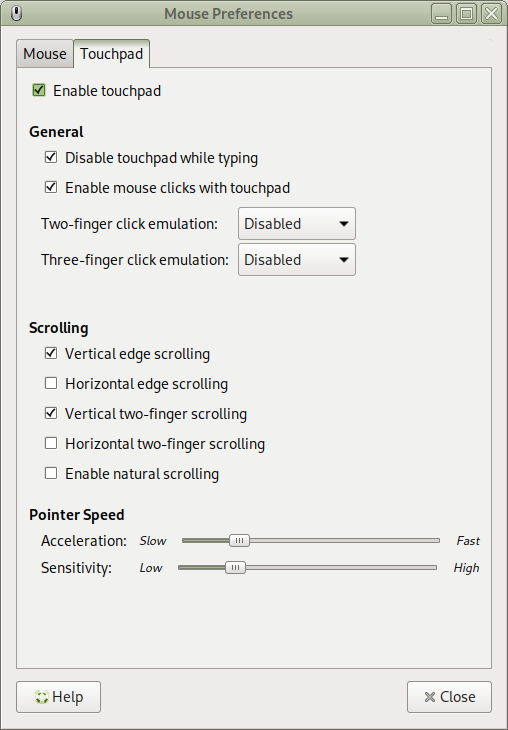
    5. The touchpad shows up as a tab in the "Mouse preferences" dialog of
    debian:
    https://www.bang.priv.no/screenshots/debian12-touchpad-screenshot-2024-07-02_20-09-20.png
    6. I am currently using a logitech MX mastere 3S bluetooth mouse (shows
    up in Xorg.0.log as well)

    Thanks!


    - Steinar

    --- SoupGate-Win32 v1.05
    * Origin: fsxNet Usenet Gateway (21:1/5)
  • From Steinar Bang@21:1/5 to All on Sat Jul 6 08:50:02 2024
    Steinar Bang <[email protected]>:

    Sometime (a day or so maybe) before <2024-06-26 Wed 19:59> the touchpad stopped working on my Acer Aspire 5 with a MATE desktop on debian 12.5.

    At the time the laptop had gone 50 days since the last reboot so I
    figured something had gone wrong during the time and a reboot would fix
    it.

    So in <2024-06-29 Sat 18:07> I did a reboot as a result of "apt
    full-upgrade" to debian 12.5 and the touchpad still wasn't working.

    I have been thinking that the cause may be
    1. A hardware failure?
    2. I accidentially pressed a keyboard combination that disables the
    touchpad?
    3. I have accidentially made some configuration change that disables
    the touchpad?

    The cause was number 2 and the key is F7 (without pressing the Fn key).

    Pressing F7 gave me the touchpad back.

    I decided to give this yet another try this morning and googled
    combinations of "acer aspire 5 fn key disable touchpad"

    I was told that Fn+F6 and Fn+F7 is supposed to toggle the touchpad on
    many Acer laptops. But pressing Fn+F6 or Fn+F7 had no more effect than anything else I had tried.

    But one thing I discovered was that many people have had the
    disappearing touchpad problem on Acer laptopns, also on Windows, and
    have tried everything around upgrading drivers and even upgrading from
    Windows 10 to Windows 11. So this is not a debian or GNU/linux specific
    issue.

    I am always reluctant to reboot but I decided I had to bite the bullet
    and boot into BIOS and see what I could find there.

    But I always, before doing anything, I do a quick google to see what I
    can find, search string "acer aspire touchpad bios", and there I found
    this thread:
    https://www.reddit.com/r/AcerOfficial/comments/ug3xks/touchpad_not_working_at_all_for_my_aspire_5_tried/

    Specifically this posting:
    https://www.reddit.com/r/AcerOfficial/comments/ug3xks/comment/l1iia93/?utm_source=share&utm_medium=web3x&utm_name=web3xcss&utm_term=1&utm_content=share_button

    So I tried F6 without Fn and the screen went black. One more press on F6
    and I had the desktop back.

    Then I tried F7 without Fn... aaaand touchpad was back.

    I fully supports the rants in the posting linked to above.

    Couldn't said it better myself.

    --- SoupGate-Win32 v1.05
    * Origin: fsxNet Usenet Gateway (21:1/5)