Hi I got a new iMac a while ago and the old one would bug me for days
or weeks when the mouse or keyboard battery was getting low but now the
new one doesn't warn me at all! At least with the keyboard I can keep
using it while its charging but the mouse stops and I have to turn it
over and plug it in and I can't use the computer while I wait for it.
I looked in settings but couldn't find any place to make a reminder did
I miss something?
Hi I got a new iMac a while ago and the old one would bug me for days or weeks when the mouse or keyboard battery was getting low but now the new one doesn't warn me at all! At least with the keyboard I can keep using it while its charging but themouse stops and I have to turn it over and plug it in and I can't use the computer while I wait for it.
I looked in settings but couldn't find any place to make a reminder did I miss something?
Am 15.11.23 um 01:04 schrieb Connor Shannon:mouse stops and I have to turn it over and plug it in and I can't use the computer while I wait for it.
Hi I got a new iMac a while ago and the old one would bug me for days or weeks when the mouse or keyboard battery was getting low but now the new one doesn't warn me at all! At least with the keyboard I can keep using it while its charging but the
I looked in settings but couldn't find any place to make a reminder did I miss something?
What kind of mouse and keyboard are you using?
On 2023-11-15 00:04:26 +0000, Connor Shannon said:
Hi I got a new iMac a while ago and the old one would bug me for days
or weeks when the mouse or keyboard battery was getting low but now
the new one doesn't warn me at all! At least with the keyboard I can
keep using it while its charging but the mouse stops and I have to
turn it over and plug it in and I can't use the computer while I wait
for it.
I looked in settings but couldn't find any place to make a reminder
did I miss something?
The joys of stupid wireless rubbish. Just get a proper wired keyboard
and wired mouse, and you won't have such issues.
Even Apple's own troubleshooting guides often suggest plugging in a
wired keyboard, but they no longer even make a proper one, let alone
ship it with any Mac. :-(
Hi I got a new iMac a while ago and the old one would bug me for days or weeks when the mouse or keyboard battery was getting low but now the new one doesn't warn me at all! At least with the keyboard I can keep using it while its charging but themouse stops and I have to turn it over and plug it in and I can't use the computer while I wait for it.
I looked in settings but couldn't find any place to make a reminder did I miss something?
On 2023-11-15 00:04:26 +0000, Connor Shannon said:
Hi I got a new iMac a while ago and the old one would bug me for days
or weeks when the mouse or keyboard battery was getting low but now the
new one doesn't warn me at all! At least with the keyboard I can keep
using it while its charging but the mouse stops and I have to turn it
over and plug it in and I can't use the computer while I wait for it.
I looked in settings but couldn't find any place to make a reminder did
I miss something?
The joys of stupid wireless rubbish. Just get a proper wired keyboard
and wired mouse, and you won't have such issues.
On 2023-11-14 19:04, Connor Shannon wrote:mouse stops and I have to turn it over and plug it in and I can't use the computer while I wait for it.
Hi I got a new iMac a while ago and the old one would bug me for days or weeks when the mouse or keyboard battery was getting low but now the new one doesn't warn me at all! At least with the keyboard I can keep using it while its charging but the
I looked in settings but couldn't find any place to make a reminder did I miss something?
When you click on the bluetooth setting does it show the battery level?
That mouse design is a gas of stupidity.
On 15.11.23 15:06, Alan Browne wrote:mouse stops and I have to turn it over and plug it in and I can't use the computer while I wait for it.
On 2023-11-14 19:04, Connor Shannon wrote:
Hi I got a new iMac a while ago and the old one would bug me for days or weeks when the mouse or keyboard battery was getting low but now the new one doesn't warn me at all! At least with the keyboard I can keep using it while its charging but the
I looked in settings but couldn't find any place to make a reminder did I miss something?
When you click on the bluetooth setting does it show the battery level?
That mouse design is a gas of stupidity.
This time ist is you. I never had an issue.
On 15.11.23 15:06, Alan Browne wrote:
On 2023-11-14 19:04, Connor Shannon wrote:
Hi I got a new iMac a while ago and the old one would bug me for days
or weeks when the mouse or keyboard battery was getting low but now the
new one doesn't warn me at all! At least with the keyboard I can keep
using it while its charging but the mouse stops and I have to turn it
over and plug it in and I can't use the computer while I wait for it.
I looked in settings but couldn't find any place to make a reminder did
I miss something?
When you click on the bluetooth setting does it show the battery level?
That mouse design is a gas of stupidity.
This time ist is you. I never had an issue.
Am 15.11.23 um 04:14 schrieb Your Name:
On 2023-11-15 00:04:26 +0000, Connor Shannon said:
Hi I got a new iMac a while ago and the old one would bug me for days
or weeks when the mouse or keyboard battery was getting low but now the
new one doesn't warn me at all! At least with the keyboard I can keep
using it while its charging but the mouse stops and I have to turn it
over and plug it in and I can't use the computer while I wait for it.
I looked in settings but couldn't find any place to make a reminder did
I miss something?
The joys of stupid wireless rubbish. Just get a proper wired keyboard
and wired mouse, and you won't have such issues.
You are the biggest and most ignorant idiot in the Usenet. Sorry.
Even Apple's own troubleshooting guides often suggest plugging in a
wired keyboard, but they no longer even make a proper one, let alone
ship it with any Mac. :-(
Unbelievable nonsense to say the least.
On 2023-11-15 11:22:08 +0000, Jörg Lorenz said:
Am 15.11.23 um 04:14 schrieb Your Name:
On 2023-11-15 00:04:26 +0000, Connor Shannon said:
Hi I got a new iMac a while ago and the old one would bug me for days
or weeks when the mouse or keyboard battery was getting low but now the >>>> new one doesn't warn me at all! At least with the keyboard I can keep
using it while its charging but the mouse stops and I have to turn it
over and plug it in and I can't use the computer while I wait for it.
I looked in settings but couldn't find any place to make a reminder did >>>> I miss something?
The joys of stupid wireless rubbish. Just get a proper wired keyboard
and wired mouse, and you won't have such issues.
You are the biggest and most ignorant idiot in the Usenet. Sorry.
Another braindead moron added to the killfile.
On 2023-11-15 11:34, Joerg Lorenz wrote:
On 15.11.23 15:06, Alan Browne wrote:
On 2023-11-14 19:04, Connor Shannon wrote:
Hi I got a new iMac a while ago and the old one would bug me for
days or weeks when the mouse or keyboard battery was getting low
but now the new one doesn't warn me at all! At least with the
keyboard I can keep using it while its charging but the mouse stops
and I have to turn it over and plug it in and I can't use the
computer while I wait for it.
I looked in settings but couldn't find any place to make a reminder
did I miss something?
When you click on the bluetooth setting does it show the battery
level?
That mouse design is a gas of stupidity.
This time ist is you. I never had an issue.
Having the charging port on the bottom is abjectly bad design.
It's definitely an example of asshole design. Whoever was in charge of
that design decided that it should actively prevent users from using the device while connected to power. Wasn't Jony Ives heading up design at
the time?
its the keyboard and mouse that came with the iMac, I think they're
called "magic".
No I'm not going back to a keyboard and mouse with cables!!
I don't understand why they didn't put the connector on the end of the
mouse away from your arm so you could still use it when it's
connected.
Yes of course I can look at the battery level in the menu I was just
hoping there was a way to set a warning b'cuz I keep forgetting to do
that. So there isn't? I guess I could make a reminder alert every
couple weeks or something...
Jolly Roger <[email protected]> wrote:
It's definitely an example of asshole design. Whoever was in charge
of that design decided that it should actively prevent users from
using the device while connected to power. Wasn't Jony Ives heading
up design at the time?
Or they took a perfectly good battery-based mouse design and
retrofitted a rechargeable battery into it, leaving everything else
pretty much unchanged.
On 2023-11-15, Alan Browne <[email protected]> wrote:
Having the charging port on the bottom is abjectly bad design.
It's definitely an example of asshole design. Whoever was in charge of
that design decided that it should actively prevent users from using the device while connected to power. Wasn't Jony Ives heading up design at
the time?
its the keyboard and mouse that came with the iMac, I think they're called "magic".
No I'm not going back to a keyboard and mouse with cables!!
I don't understand why they didn't put the connector on the end of the mouse away from your arm so you could still use it when it's connected.
Yes of course I can look at the battery level in the menu I was just hoping there was a way to set a warning b'cuz I keep forgetting to do that. So there isn't? I guess I could make a reminder alert every couple weeks or something...
Jolly Roger <[email protected]> wrote:
It's definitely an example of asshole design. Whoever was in charge of
that design decided that it should actively prevent users from using the
device while connected to power. Wasn't Jony Ives heading up design at
the time?
Or they took a perfectly good battery-based mouse design and retrofitted a rechargeable battery into it, leaving everything else pretty much
unchanged.
On 2023-11-15 16:33, Jolly Roger wrote:
On 2023-11-15, Alan Browne <[email protected]> wrote:
Having the charging port on the bottom is abjectly bad design.
It's definitely an example of asshole design. Whoever was in charge
of that design decided that it should actively prevent users from
using the device while connected to power. Wasn't Jony Ives heading
up design at the time?
Probably.
But ... not like they haven't had time to fix it - IAC I've never
liked any Apple mouse - but that's me - and generally I prefer
trackpads.
When I ordered this iMac (M3) I was delighted that I could forego the
mouse and upgrade to the trackpad for CAD$30. (And keyboard to numeric
for similar shekel shock).
I still have recurring dreams of a nice trackball I used to have...
its the keyboard and mouse that came with the iMac, I think they're
called "magic".
No I'm not going back to a keyboard and mouse with cables!!
I don't understand why they didn't put the connector on the end of the
mouse away from your arm so you could still use it when it's connected.
Yes of course I can look at the battery level in the menu I was just
hoping there was a way to set a warning b'cuz I keep forgetting to do
that. So there isn't? I guess I could make a reminder alert every
couple weeks or something...
its the keyboard and mouse that came with the iMac, I think they're
called "magic".
No I'm not going back to a keyboard and mouse with cables!!
I don't understand why they didn't put the connector on the end of the
mouse away from your arm so you could still use it when it's connected.
Yes of course I can look at the battery level in the menu I was just
hoping there was a way to set a warning b'cuz I keep forgetting to do
that. So there isn't? I guess I could make a reminder alert every
couple weeks or something...
On 2023-11-15 23:10:38 +0000, Connor Shannon said:
I don't understand why they didn't put the connector on the end of the mouse away from your arm so you could still use it when it's connected.Because then the case doesn't look as good. The port was put underneath
so that you don't see it in normal usage ...
On 2023-11-16, Alan Browne <[email protected]> wrote:
On 2023-11-15 16:33, Jolly Roger wrote:
On 2023-11-15, Alan Browne <[email protected]> wrote:
Having the charging port on the bottom is abjectly bad design.
It's definitely an example of asshole design. Whoever was in charge
of that design decided that it should actively prevent users from
using the device while connected to power. Wasn't Jony Ives heading
up design at the time?
Probably.
But ... not like they haven't had time to fix it - IAC I've never
liked any Apple mouse - but that's me - and generally I prefer
trackpads.
Personally, I like the touch surface on top of the Mighty Mouse. It
makes it a mouse and trackpad of sorts. But to each, their own. And I do
much prefer Apple's track pads over any mouse, except in some limited circumstances.
When I ordered this iMac (M3) I was delighted that I could forego the
mouse and upgrade to the trackpad for CAD$30. (And keyboard to numeric
for similar shekel shock).
That's all I ever do anymore. Worth it.
I still have recurring dreams of a nice trackball I used to have...
Now that I never really got into...
On 2023-11-15 22:31, Jolly Roger wrote:
On 2023-11-16, Alan Browne <[email protected]> wrote:
On 2023-11-15 16:33, Jolly Roger wrote:
On 2023-11-15, Alan Browne <[email protected]> wrote:
Having the charging port on the bottom is abjectly bad design.
It's definitely an example of asshole design. Whoever was in charge
of that design decided that it should actively prevent users from
using the device while connected to power. Wasn't Jony Ives heading
up design at the time?
Probably.
But ... not like they haven't had time to fix it - IAC I've never
liked any Apple mouse - but that's me - and generally I prefer
trackpads.
Personally, I like the touch surface on top of the Mighty Mouse. It
makes it a mouse and trackpad of sorts. But to each, their own. And I do much prefer Apple's track pads over any mouse, except in some limited circumstances.
When I ordered this iMac (M3) I was delighted that I could forego the
mouse and upgrade to the trackpad for CAD$30. (And keyboard to numeric
for similar shekel shock).
That's all I ever do anymore. Worth it.
I still have recurring dreams of a nice trackball I used to have...
Now that I never really got into...
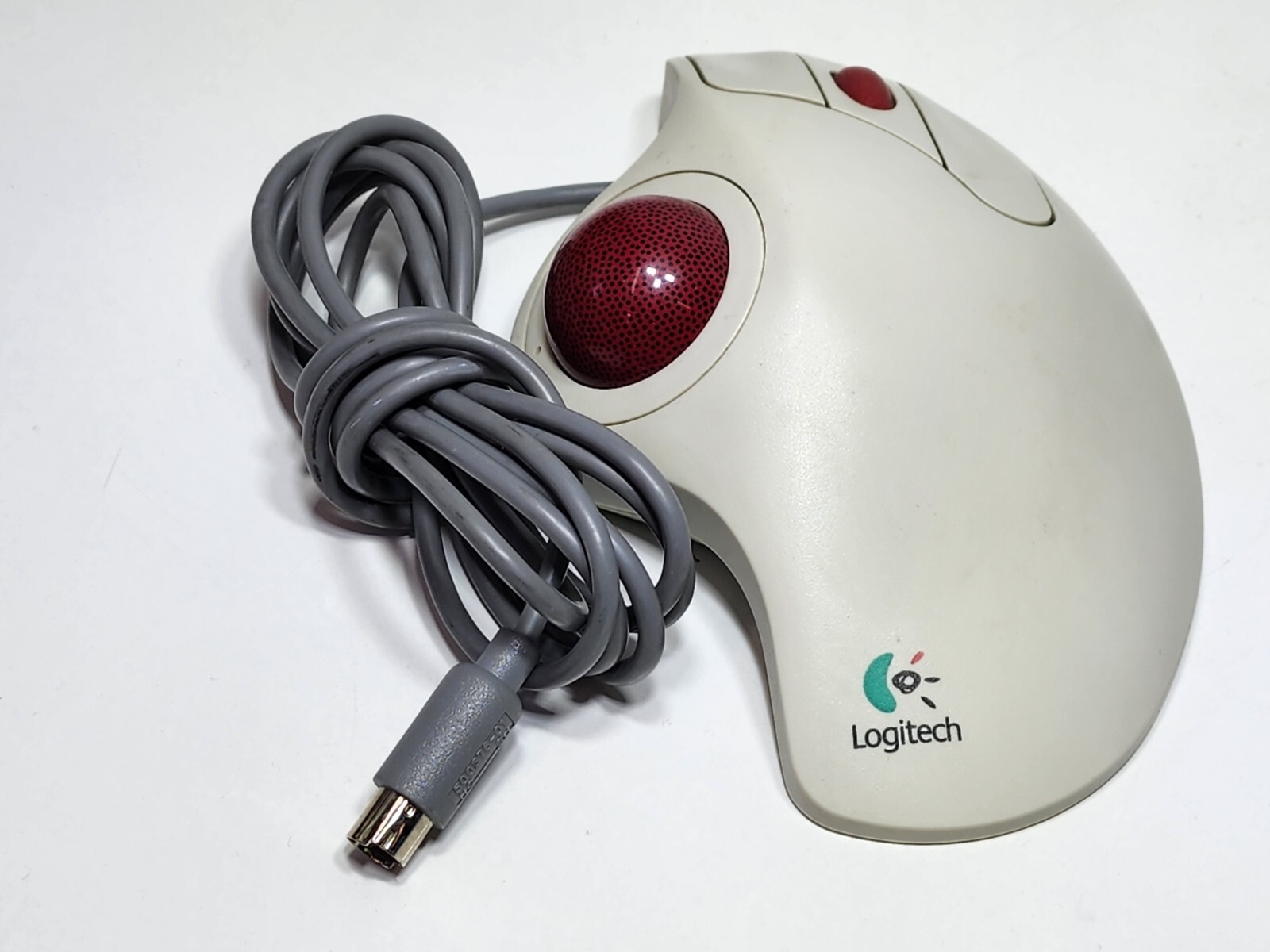
It was actually a Logitech thumb ball - so fingers drove the buttons and
the thumb drove the ball. It had a lot of inertia so felt great and
pointing was super natural. There were no trackpads (at low prices
anyway) then, and so such meant no "maneuvering space" needed to be
reserved on ones desk. Had that for years at work.
On Wednesday, November 15, 2023 at 9:43:39 PM UTC-8, Your Name wrote:
On 2023-11-15 23:10:38 +0000, Connor Shannon said:
I don't understand why they didn't put the connector on the end of the
mouse away from your arm so you could still use it when it's connected.
Because then the case doesn't look as good. The port was put
underneath> so that you don't see it in normal usage ...
Huh??? Who told you that?? I think you heard them wrong or they were
pulling your leg. If the hole was at the other end of the mouse like I
said you wouldn't "see it in normal usage" and it would be perfect for connecting the cable!
In article <eAo5N.44509$[email protected]>,
Alan Browne <[email protected]> wrote:
It was actually a Logitech thumb ball - so fingers drove the buttons and
the thumb drove the ball. It had a lot of inertia so felt great and
pointing was super natural. There were no trackpads (at low prices
anyway) then, and so such meant no "maneuvering space" needed to be
reserved on ones desk. Had that for years at work.
How much (or how less) "maneuvering space" do people need anyway, I use
one of those "ePad" mouse pads you can buy at discount stores with all
my computers that's 9 inches wide by 10 inches deep (including a wrist
rest).
On 2023-11-17, Alan Browne <[email protected]> wrote:
On 2023-11-16 14:09, super70s wrote:
In article <eAo5N.44509$[email protected]>,
Alan Browne <[email protected]> wrote:
It was actually a Logitech thumb ball - so fingers drove the buttons and >>>> the thumb drove the ball. It had a lot of inertia so felt great and
pointing was super natural. There were no trackpads (at low prices
anyway) then, and so such meant no "maneuvering space" needed to be
reserved on ones desk. Had that for years at work.
How much (or how less) "maneuvering space" do people need anyway, I use
one of those "ePad" mouse pads you can buy at discount stores with all
my computers that's 9 inches wide by 10 inches deep (including a wrist
rest).
The entire trackball widget laid under my hand.
This is exactly the one I had (see the PS/2 style connector! sheesh!):
"Logitech Trackman Marble"
https://i.ebayimg.com/images/g/KoYAAOSwCxZkEh7y/s-l1600.jpg
It all stayed in one place, the cable never moved and it was a nice
setup - comfortable and better than any mouse at the time. So is a
trackpad - even if it were wired, at least the wire would stay put.
Wireless it's even better (likewise keyboard).
I've only ever heard them called "trackballs". I've used the model in
the photo above a few times, along with a few others. I never really
liked any of them though. To each his own, and I'll stick with y Magic Trackpad. 🙂
On 2023-11-16 14:09, super70s wrote:
In article <eAo5N.44509$[email protected]>,
Alan Browne <[email protected]> wrote:
It was actually a Logitech thumb ball - so fingers drove the buttons and >>> the thumb drove the ball. It had a lot of inertia so felt great and
pointing was super natural. There were no trackpads (at low prices
anyway) then, and so such meant no "maneuvering space" needed to be
reserved on ones desk. Had that for years at work.
How much (or how less) "maneuvering space" do people need anyway, I use
one of those "ePad" mouse pads you can buy at discount stores with all
my computers that's 9 inches wide by 10 inches deep (including a wrist
rest).
The entire trackball widget laid under my hand.
This is exactly the one I had (see the PS/2 style connector! sheesh!): "Logitech Trackman Marble" https://i.ebayimg.com/images/g/KoYAAOSwCxZkEh7y/s-l1600.jpg
It all stayed in one place, the cable never moved and it was a nice
setup - comfortable and better than any mouse at the time. So is a
trackpad - even if it were wired, at least the wire would stay put.
Wireless it's even better (likewise keyboard).
| Sysop: | Keyop |
|---|---|
| Location: | Huddersfield, West Yorkshire, UK |
| Users: | 764 |
| Nodes: | 16 (2 / 14) |
| Uptime: | 12:30:44 |
| Calls: | 12,754 |
| Calls today: | 2 |
| Files: | 15,355 |
| Messages: | 6,556,611 |