XPost: misc.phone.mobile.iphone, comp.sys.mac.apps
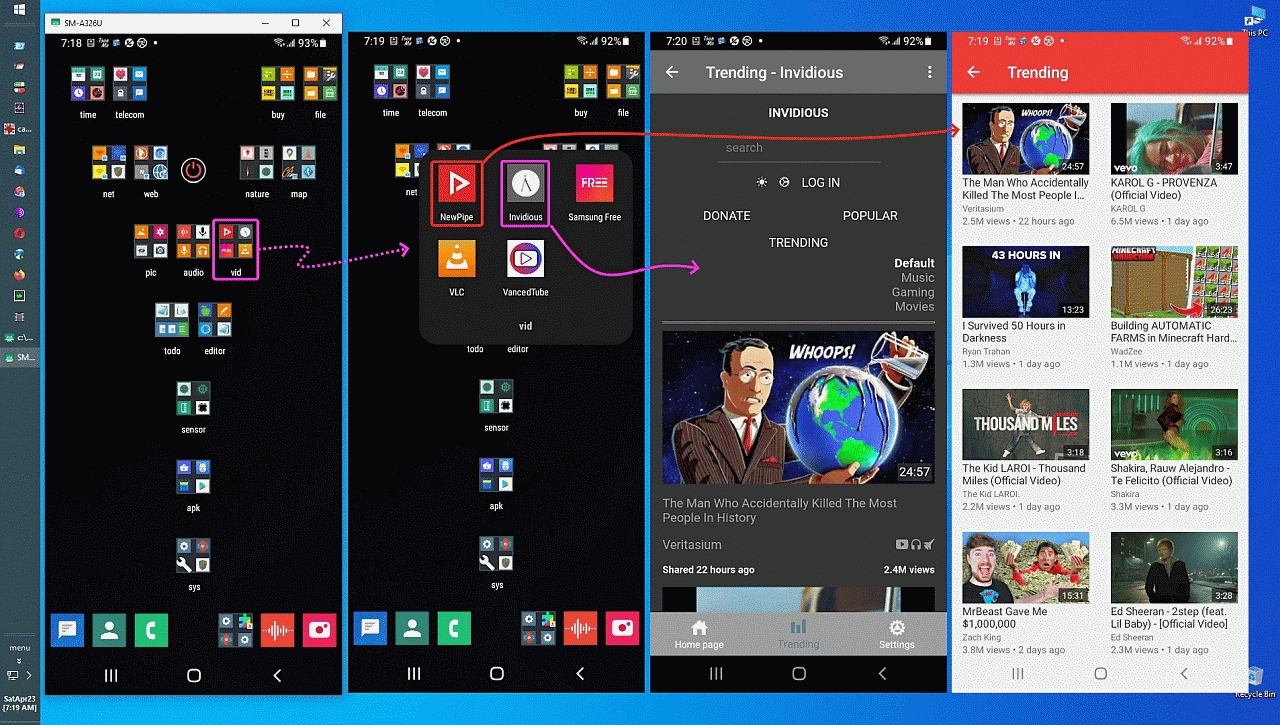
I found out today about the cross-platform "Invidious" server/app
<
https://i.postimg.cc/Jh9gqppq/invidious01.jpg>
Invidious is another FOSS free YouTube player that others may like
(it was released only recently apparently).
<
https://github.com/iv-org/invidious>
"Invidious is an alternative front-end to YouTube"
<
https://invidious.io/>
"Invidious is an open source alternative front-end to YouTube"
Try it and let us know what you think about it.
a. No tracking
b. No ads
c. No Google account required (e.g., for subscribe features)
d. Bypasses blocking
etc.
Apparently Invidious can be compiled for any common platform
(Windows, Linux, macOS, iOS, Android) where the Android app I just
tested is located on the Google Play Store repository
(which I access using Aurora because my FOSS Google Play Store
client doesn't require a Google account) <
https://auroraoss.com/>
Here is a link to the iOS app:
<
https://tildes.net/~tech/tk4/invid_ios_app_for_invidious_sideloaded_no_jailbreak_necessary>
<
https://www.reddit.com/r/jailbreak/comments/imhe16/free_release_invid_an_ios_app_for_invidious_the/>
If you have a _better_ link to the iOS app, let me know and I
will test it on my iPad if I can (but I'm not jailbroken).
Here is the link to the Android app (which easily mirrors on Windows
& Linux and Mac PCs using the GitHub Genymotion "scrcpy" interface).
*Invidious Interface* by TeamProjectBJX (this is the _first_ release!)
Free, ad free, gsf free, not rated, only 100+ installs <=== wow... low.
<
https://play.google.com/store/apps/details?id=gr.teamprojectbjx.invidclientyt>
Interestingly, NewPipe isn't on the Google Play Store (for obvious reasons)
but Invidious is (surprisingly so).... but it may disappear soon for all I know.
<
https://newpipe.net/>
For PC users, this is a web page where you can try an existing server:
<
https://redirect.invidious.io/>
However, I didn't see instructions for setting a server up on Windows.
For Linux users, you can set up your own Invidious server:
curl -sSL
https://dist.crystal-lang.org/apt/setup.sh | sudo bash
curl -sL "
https://keybase.io/crystal/pgp_keys.asc" | sudo apt-key add -
echo "deb
https://dist.crystal-lang.org/apt crystal main" | sudo tee /etc/apt/sources.list.d/crystal.list
sudo apt-get update
sudo apt install crystal libssl-dev libxml2-dev libyaml-dev libgmp-dev libreadline-dev librsvg2-dev postgresql imagemagick libsqlite3-dev
wget
https://github.com/tmiland/Invidious-Updater/raw/master/invidious_update.sh
sudo chmod +x invidious_update.sh
sudo ./invidious_update.sh
<
https://docs.invidious.io/installation/#linux>
<
https://blog.desdelinux.net/en/invidious-un-front-end-open-source-alternativo-a-youtube/>
For MacOS users, you can set up your own Invidious server:
# Install dependencies
brew update
brew install shards crystal postgres imagemagick librsvg
# Clone the repository and set up a PostgreSQL database
git clone
https://github.com/iv-org/invidious
cd invidious
brew services start postgresql
psql -c "CREATE ROLE kemal WITH PASSWORD 'kemal';" # Change 'kemal' here to a stronger password, and update `password` in config/config.yml
createdb -O kemal invidious
psql invidious kemal < config/sql/channels.sql
psql invidious kemal < config/sql/videos.sql
psql invidious kemal < config/sql/channel_videos.sql
psql invidious kemal < config/sql/users.sql
psql invidious kemal < config/sql/session_ids.sql
psql invidious kemal < config/sql/nonces.sql
psql invidious kemal < config/sql/annotations.sql
psql invidious kemal < config/sql/privacy.sql
psql invidious kemal < config/sql/playlists.sql
psql invidious kemal < config/sql/playlist_videos.sql
shards update && shards install && crystal build src/invidious.cr --release
<
https://docs.invidious.io/installation/#macos>
If you find instructions for setting up a Windows server,
please let me know and I'll try it out of it's easily done.
For now, I'm playing on Windows using my Android phone.
<
https://github.com/Genymobile/scrcpy#readme>
But if you set up a Windows server, let me know how you did it.
--
Intended as a PSA to inform people of yet another privacy method for youtube.
--- SoupGate-Win32 v1.05
* Origin: fsxNet Usenet Gateway (21:1/5)