• Compo returns... :-)

    From Jim Lesurf@21:1/5 to All on Mon Apr 29 10:00:02 2024
    Just in case anyone has missed it:

    !Composition is available again. Now on "!Store".

    Andrew Rawnsley announced this at the Wakefield Show.

    At present it is an old version which works OK for many simple tasks of composition on a modern machine. But may need an emulator of an older generation for other tasks which call scripts. However the intention is
    that this can now be tackled and new versions will have less need for emulation, etc.

    I've been re-exploring old versions and files and been surprised by finding just what it can do via its 'composcript' functions which let the user
    program it to do all sorts of tasks. From automating animations to acting
    as a dynamic 'presentation' program with on-screen action buttons, etc!

    Jim

    --
    Please use the address on the audiomisc page if you wish to email me. Electronics https://www.st-andrews.ac.uk/~www_pa/Scots_Guide/intro/electron.htm
    biog http://jcgl.orpheusweb.co.uk/history/ups_and_downs.html
    Audio Misc http://www.audiomisc.co.uk/index.html

    --- SoupGate-Win32 v1.05
    * Origin: fsxNet Usenet Gateway (21:1/5)
  • From Jim Lesurf@21:1/5 to All on Fri May 17 14:00:06 2024
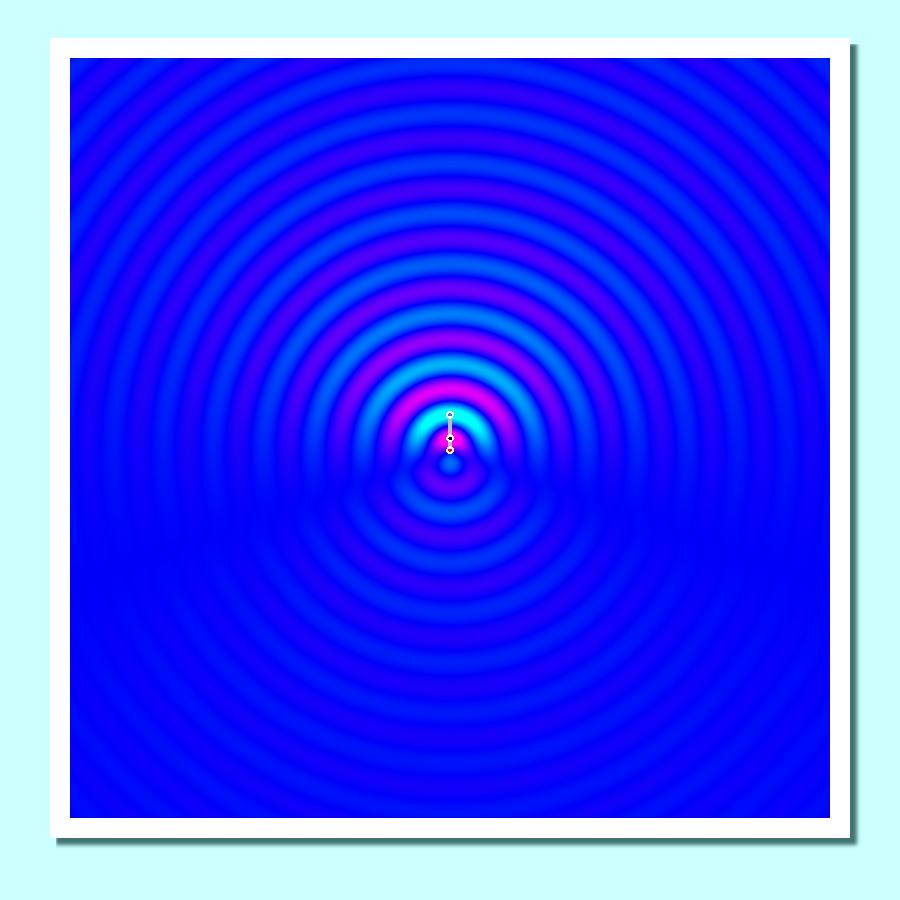
    I've been using !Compo to generate some graphics to draw out the near-field patterns of antenna arrays. This uses the ability for CompoScript to call
    and run manipulation of items on the Compo canvas. In my case the script
    calls a process I wrote in 'C' which examples how you can enable a program written in the computer language of your choice to carry out graphic
    processes.

    FWIW I did this because I was trying to explain some of the properties of antennas, In particular, that 'high gain' arrays need clear space around
    them to work as advertised. But the result is quite pretty, and potentially
    the program could be used to create an *animated* version automatically as well! Not got that far yet, but you can get some idea from this:

    https://jcgl.orpheusweb.co.uk/Compo/CompoRevived/DRDpattern.jpeg

    The accompanying words on a future webpage which uses this illusration will explain more about what it shows. Main purpose of posting about it here is
    to example the power/flexibilty Compo can provide for specialised graphics.

    FWIW my pre-existing 'Compo Clues' pages remain at

    http://jcgl.orpheusweb.co.uk/Compo/clues.html

    and I'll ad a webpage explaining the above in more detail when I can finish writing it. :-)

    Jim

    --
    Please use the address on the audiomisc page if you wish to email me. Electronics https://www.st-andrews.ac.uk/~www_pa/Scots_Guide/intro/electron.htm
    biog http://jcgl.orpheusweb.co.uk/history/ups_and_downs.html
    Audio Misc http://www.audiomisc.co.uk/index.html

    --- SoupGate-Win32 v1.05
    * Origin: fsxNet Usenet Gateway (21:1/5)
  • From Chris Newman@21:1/5 to [email protected] on Fri May 17 15:29:32 2024
    In article <[email protected]>, Jim Lesurf <[email protected]> wrote:
    I've been using !Compo to generate some graphics to draw out the
    near-field patterns of antenna arrays. This uses the ability for
    CompoScript to call and run manipulation of items on the Compo canvas.
    In my case the script calls a process I wrote in 'C' which examples how
    you can enable a program written in the computer language of your
    choice to carry out graphic processes.

    I now have a copy of !Compo but on trying to run it got an error message.

    Reporter output....


    15:25:46.69 LOAD <Compo$Resources>.32bit_code.distort_r3 ADD14
    15:25:46.69 LOAD <Compo$Resources>.res_code C5DC0
    15:25:46.69 LOAD <Compo$Resources>.res_code2 CB4E4
    15:25:46.70 ** BASICError ** ERR=20 Number too big ERL=56
    15:26:25.71

    Anybody got any idea what I am doing wrong? Couldn't find any help in the ReadMe files.

    --
    Chris

    --- SoupGate-Win32 v1.05
    * Origin: fsxNet Usenet Gateway (21:1/5)
  • From Jim Lesurf@21:1/5 to Chris Newman on Fri May 17 17:45:03 2024
    In article <[email protected]>, Chris Newman <[email protected]> wrote:

    I now have a copy of !Compo but on trying to run it got an error message.

    Reporter output....


    15:25:46.69 LOAD <Compo$Resources>.32bit_code.distort_r3 ADD14
    15:25:46.69 LOAD <Compo$Resources>.res_code C5DC0 15:25:46.69 LOAD <Compo$Resources>.res_code2 CB4E4 15:25:46.70 ** BASICError ** ERR=20
    Number too big ERL=56 15:26:25.71

    Anybody got any idea what I am doing wrong? Couldn't find any help in
    the ReadMe files.

    I can't give a specific answer from what you say above. But answering some questions may throw light on it...

    What version of !Compo are you using? I'm using 1.23c

    What are you trying to run it *on*? - machine type / OS / emulator?

    e.g. on modern hardware you may need to alter the !Run file to change one
    line to

    Set Compo$MemoryManager Dynamic

    But using Aemulor you don't need to do that. Nor with RPCemu.

    You also need the machine to have 'seen' various helper apps that it may
    call. e.g. !PCARes. It also uses !Spr2Png and !Intergif when needed. So
    may also want these !Booted in advance.

    Jim

    --
    Please use the address on the audiomisc page if you wish to email me. Electronics https://www.st-andrews.ac.uk/~www_pa/Scots_Guide/intro/electron.htm
    biog http://jcgl.orpheusweb.co.uk/history/ups_and_downs.html
    Audio Misc http://www.audiomisc.co.uk/index.html

    --- SoupGate-Win32 v1.05
    * Origin: fsxNet Usenet Gateway (21:1/5)
  • From Chris Newman@21:1/5 to [email protected] on Fri May 17 20:37:29 2024
    In article <[email protected]>, Jim Lesurf <[email protected]> wrote:
    In article <[email protected]>, Chris Newman <[email protected]> wrote:

    I now have a copy of !Compo but on trying to run it got an error
    message.

    Reporter output....


    15:25:46.69 LOAD <Compo$Resources>.32bit_code.distort_r3 ADD14
    15:25:46.69 LOAD <Compo$Resources>.res_code C5DC0 15:25:46.69 LOAD <Compo$Resources>.res_code2 CB4E4 15:25:46.70 ** BASICError ** ERR=20 Number too big ERL=56 15:26:25.71

    Anybody got any idea what I am doing wrong? Couldn't find any help in
    the ReadMe files.

    I can't give a specific answer from what you say above. But answering
    some questions may throw light on it...

    What version of !Compo are you using? I'm using 1.23c

    I've tried 1.22 & 1.23 (not 1.23c according to the !Run file). Got it
    from the !Store as zip file Compo2024. What's the relevance of the "c"?

    What are you trying to run it *on*? - machine type / OS / emulator?

    FAST Pi Compute Module 4 RISC OS 5.29

    e.g. on modern hardware you may need to alter the !Run file to change
    one line to

    Set Compo$MemoryManager Dynamic

    But using Aemulor you don't need to do that. Nor with RPCemu.

    Tried both with Aemulor - no joy.

    You also need the machine to have 'seen' various helper apps that it
    may call. e.g. !PCARes. It also uses !Spr2Png and !Intergif when
    needed. So may also want these !Booted in advance.

    Seen those.

    --
    Chris

    --- SoupGate-Win32 v1.05
    * Origin: fsxNet Usenet Gateway (21:1/5)
  • From Jean-Michel@21:1/5 to Chris Newman on Fri May 17 23:40:32 2024
    In message <[email protected]>
    Chris Newman <[email protected]> wrote:

    In article <[email protected]>, Jim Lesurf <[email protected]> wrote:
    In article <[email protected]>, Chris Newman <[email protected]> wrote:

    I now have a copy of !Compo but on trying to run it got an error
    message.

    Reporter output....


    15:25:46.69 LOAD <Compo$Resources>.32bit_code.distort_r3 ADD14
    15:25:46.69 LOAD <Compo$Resources>.res_code C5DC0 15:25:46.69 LOAD
    <Compo$Resources>.res_code2 CB4E4 15:25:46.70 ** BASICError ** ERR=20
    Number too big ERL=56 15:26:25.71

    Anybody got any idea what I am doing wrong? Couldn't find any help in
    the ReadMe files.

    I can't give a specific answer from what you say above. But answering
    some questions may throw light on it...

    What version of !Compo are you using? I'm using 1.23c

    I've tried 1.22 & 1.23 (not 1.23c according to the !Run file). Got it
    from the !Store as zip file Compo2024. What's the relevance of the "c"?

    What are you trying to run it *on*? - machine type / OS / emulator?

    FAST Pi Compute Module 4 RISC OS 5.29

    e.g. on modern hardware you may need to alter the !Run file to change
    one line to

    Set Compo$MemoryManager Dynamic

    But using Aemulor you don't need to do that. Nor with RPCemu.

    Tried both with Aemulor - no joy.

    You also need the machine to have 'seen' various helper apps that it
    may call. e.g. !PCARes. It also uses !Spr2Png and !Intergif when
    needed. So may also want these !Booted in advance.

    Seen those.

    !Compo also searches for changeFSi


    | The directories which will be searched for changefsi (same syntax as Run$Path)
    Set Compo$FSISearch <Boot$Dir>.^.Utilities.,ADFS::4.$.Utilities.,ADFS::4.$.Utils.

    In principle it is installed in $.utilities which is equivalent to <Boot$Dir>.^.Utilities.


    --
    Jean-Michel

    --- SoupGate-Win32 v1.05
    * Origin: fsxNet Usenet Gateway (21:1/5)
  • From Jim Lesurf@21:1/5 to Chris Newman on Sat May 18 09:30:03 2024
    In article <[email protected]>, Chris Newman <[email protected]> wrote:

    What version of !Compo are you using? I'm using 1.23c

    I've tried 1.22 & 1.23 (not 1.23c according to the !Run file). Got it
    from the !Store as zip file Compo2024. What's the relevance of the "c"?

    Not sure now! Bear in mind these versions were actually created about 2
    decades ago! They have only appeared now because Rob gave me copies of his files a while before !Compo ceased being available. Did that just in case
    he lost his copies ... which he now *has* lost. I found my copies on an old backup DVD and they then got released.

    What are you trying to run it *on*? - machine type / OS / emulator?

    FAST Pi Compute Module 4 RISC OS 5.29

    OK. Someone here may be able to 'spot the difference' that is causing your
    copy to fail to run. Beyond that I can suggest the ROOL Forum as others
    that have spotted other problems and their solutions. Beyond that I can
    only say ot works fine on my ArMX6 without Aemulor. As have previous
    versions. I'm also using RO 5.29.

    Jim

    --
    Please use the address on the audiomisc page if you wish to email me. Electronics https://www.st-andrews.ac.uk/~www_pa/Scots_Guide/intro/electron.htm
    biog http://jcgl.orpheusweb.co.uk/history/ups_and_downs.html
    Audio Misc http://www.audiomisc.co.uk/index.html

    --- SoupGate-Win32 v1.05
    * Origin: fsxNet Usenet Gateway (21:1/5)
  • From Jim Lesurf@21:1/5 to All on Tue May 21 14:15:02 2024
    I've just put up a new page to celebrate the reappearance of !Compo and to
    give an example of the flexibility it can offer. The page can be found via

    https://jcgl.orpheusweb.co.uk/CompoRevival/CompoRevived.html

    or from a link on

    https://jcgl.orpheusweb.co.uk/Compo/clues.html

    Hope to add more at a later time when the round tuits permit. :-)

    Been wanting to generate graphics like this for a while, so the
    reappearance was a nice nudge to actually do it.

    Jim

    --
    Please use the address on the audiomisc page if you wish to email me. Electronics https://www.st-andrews.ac.uk/~www_pa/Scots_Guide/intro/electron.htm
    biog http://jcgl.orpheusweb.co.uk/history/ups_and_downs.html
    Audio Misc http://www.audiomisc.co.uk/index.html

    --- SoupGate-Win32 v1.05
    * Origin: fsxNet Usenet Gateway (21:1/5)
  • From Jim Lesurf@21:1/5 to All on Mon May 27 10:45:03 2024
    There is now a new page with a demo of what !Compo can do via its ability
    to be controlled by programs written by the user.

    https://jcgl.orpheusweb.co.uk/CompoRevival/CompoRevived.html

    In this case I wrote a program in Acorn 'C' and had Compo call this to plot field patterns around some antennas. This kind of output can also be
    animated.

    However the main point is that users can devise their own ways to add
    graphic capabities of quite complex kinds.

    Version 1.23c now runs on my ARMX6 without needing emulation of an older system. The key to being able to do this is to alter one of the lines in
    its !Run file to:

    Set Compo$MemoryManager Dynamic

    Jim

    --
    Please use the address on the audiomisc page if you wish to email me. Electronics https://www.st-andrews.ac.uk/~www_pa/Scots_Guide/intro/electron.htm
    biog http://jcgl.orpheusweb.co.uk/history/ups_and_downs.html
    Audio Misc http://www.audiomisc.co.uk/index.html

    --- SoupGate-Win32 v1.05
    * Origin: fsxNet Usenet Gateway (21:1/5)