• Model 90 upgrade from Type 2 to Type 4

    From Ryan Alswede@21:1/5 to All on Fri Feb 24 18:07:37 2023
    Is there a BIOS update required. Link?

    Installed a Type 4 DX2 66mhz complex in place of the Type 2 DX2 50 complex and it did not like it at all.

    ON a side note going back to the Type 2 complex the SCSI device reports error and will not boot.

    --- SoupGate-Win32 v1.05
    * Origin: fsxNet Usenet Gateway (21:1/5)
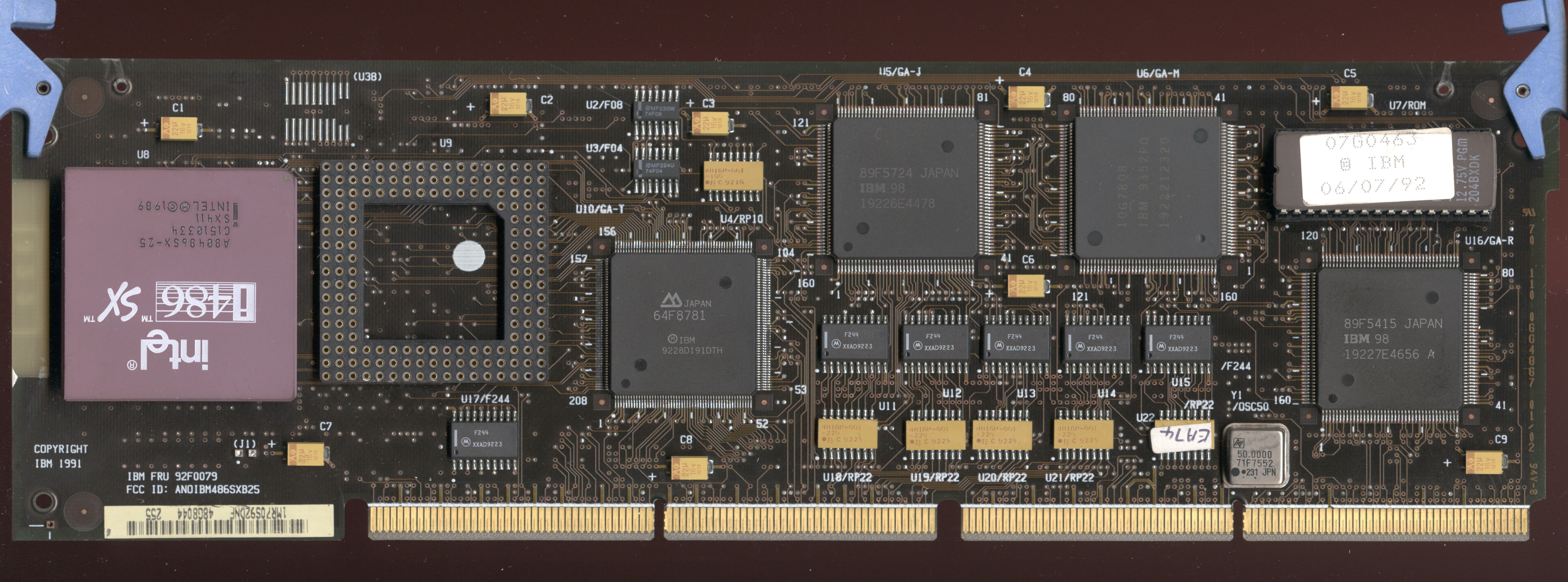
  • From Louis Ohland@21:1/5 to Ryan Alswede on Sat Feb 25 06:11:57 2023
    You must tell us the error[s] of your ways, in order to be sanctified...

    Really, you had a T2 IML system with an unknown BIOS level. At this
    point, your SCSI controller is unknown. So if my SWAGs are wrong, say
    lah vee...

    SIMMply put, you wrote the T4 N complex CMOS values into the NVRAM, then dropped the T2 back in. Drain the CMOS, use the refdisk to reconfigure
    in order to get the T2 running. Use J10 [?] to "force" the system to use
    the refdisk.

    Instead of describing the whole T2 and SCSI controller SCSI BIOS level
    thing, we'll look at getting the "N" up to cruising speed [a worthy
    endeavor].

    The N is FLASH based, so it should not have any issue with completing
    IML. What version of SurePath does the N have?

    If you have level 01, please save it! MAJ Tom hid the list of SurePath
    levels, we got 02, 03, 05, 08, 09, and 10 IIRC.

    If your N is below 05, it won't work with the latest refdisk/diags, but
    it WILL flash. I had an N at 03, flashed it to 05, no problem.

    Further fun. I >assume< your T2 was downlevel and did not have the
    enhanced BIOS. The SCSI HD was formatted with the downlevel complex
    BIOS. Now you dropped in an N with the Enhanced complex BIOS and things
    jist ain't raahht.


    What you need to do for N-ification...

    SCSI controller MUST have the 44/45 SCSI BIOS.

    N MUST be SurePath 05 or better [or you need older refdisk/diags]

    Once the N is 05 or better, we will kick the Model 90 in the head with
    steel toe boots... by moving J10, we will force it to read the refdisk.
    In case you are curious-blue, the override jumper function was patented
    and it applies to all of the complexi...

    https://www.ardent-tool.com/complex/T3.html#H097075

    "The RETAIN tip says:
    The installation instructions for the 50 MHz processor board, FRU
    P/N 92F0048, used in the 8590 and 8595 are incomplete.

    Remove the existing complex, then move the override jumper, [8590 - J10,
    8595 - J16], so that it connects the center pin and the pin on the
    opposite end of the connector. Leave the jumper in this position. [It
    does not matter if you change the complex before or after moving the
    jumper].

    Note: The system detects any change in the Override Jumper position from
    the last power on, and if it detects a change, it FORCES it to read the
    Ref Disk on the next boot -ONLY-. It is a one-shot wonder.

    The system will detect this change and read the Initial Machine Load
    (IML) image from the new reference diskette."

    Reformat SCSI HD, install convenience partition, install O/S of choice.

    Done.

    Processor Complex Installation
    https://www.ardent-tool.com/complex/Install.html

    Type 4 "N" Processor Complex
    https://www.ardent-tool.com/complex/T4_N.html

    SCSI Drives Over 1 GB
    https://www.ardent-tool.com/IBM_SCSI/SCSI_over_1GB.html

    IBM PS/2 System ROM Images - there are NO T4 flash images... https://www.ardent-tool.com/firmware/system.html

    Thank Heavens for old mirrors, 'cuz the drunken Moravians have mucked
    things up.

    BIOS Releases
    http://ohlandl.ipv7.net/complexes/Type4.html#BIOS

    Complex BIOS Levels
    http://ohlandl.ipv7.net/complexes/Type4.html#BIOS_levels

    Ryan Alswede wrote:
    Is there a BIOS update required. Link?

    Install
    d a Type 4 DX2 66mhz complex in place of the Type 2 DX2 50 complex and
    it did not like it at all.

    ON a side note going back to the Type 2 complex the SCSI device reports error and will not boot.


    --- SoupGate-Win32 v1.05
    * Origin: fsxNet Usenet Gateway (21:1/5)
  • From Louis Ohland@21:1/5 to Louis Ohland on Sat Feb 25 06:36:29 2023
    https://www.ardent-tool.com/complex/T4.html#Complex_BIOS

    Sturmbattalion Helga is coming, she's bringing Hell with her....

    Louis Ohland wrote:
    You must tell us the error[s] of your ways, in order to be sanctified...

    Really, you had a T2 IML system with an unknown BIOS level. At this
    point, your SCSI controller is unknown. So if my SWAGs are wrong, say
    lah vee...

    SIMMply put, you wrote the T4 N complex CMOS values into the NVRAM, then dropped the T2 back in. Drain the CMOS, use the refdisk to reconfigure
    in order to get the T2 running. Use J10 [?] to "force" the system to use
    the refdisk.

    Instead of describing the whole T2 and SCSI controller SCSI BIOS level
    thing, we'll look at getting the "N" up to cruising speed [a worthy endeavor].

    The N is FLASH based, so it should not have any issue with completing
    IML. What version of SurePath does the N have?

    If you have level 01, please save it! MAJ Tom hid the list of SurePath levels, we got 02, 03, 05, 08, 09, and 10 IIRC.

    If your N is below 05, it won't work with the latest refdisk/diags, but
    it WILL flash. I had an N at 03, flashed it to 05, no problem.

    Further fun. I >assume< your T2 was downlevel and did not have the
    enhanced BIOS. The SCSI HD was formatted with the downlevel complex
    BIOS. Now you dropped in an N with the Enhanced complex BIOS and things
    jist ain't raahht.


    What you need to do for N-ification...

    SCSI controller MUST have the 44/45 SCSI BIOS.

    N MUST be SurePath 05 or better [or you need older refdisk/diags]

    Once the N is 05 or better, we will kick the Model 90 in the head with
    steel toe boots... by moving J10, we will force it to read the refdisk.
    In case you are curious-blue, the override jumper function was patented
    and it applies to all of the complexi...

    https://www.ardent-tool.com/complex/T3.html#H097075

    "The RETAIN tip says:
       The installation instructions for the 50 MHz processor board, FRU
    P/N 92F0048, used in the 8590 and 8595 are incomplete.

    Remove the existing complex, then move the override jumper, [8590 - J10,
    8595 - J16], so that it connects the center pin and the pin on the
    opposite end of the connector. Leave the jumper in this position. [It
    does not matter if you change the complex before or after moving the
    jumper].

    Note: The system detects any change in the Override Jumper position from
    the last power on, and if it detects a change, it FORCES it to read the
    Ref Disk on the next boot -ONLY-. It is a one-shot wonder.

    The system will detect this change and read the Initial Machine Load
    (IML) image from the new reference diskette."

    Reformat SCSI HD, install convenience partition, install O/S of choice.

    Done.

    Processor Complex Installation https://www.ardent-tool.com/complex/Install.html

    Type 4 "N" Processor Complex
    https://www.ardent-tool.com/complex/T4_N.html

    SCSI Drives Over 1 GB
    https://www.ardent-tool.com/IBM_SCSI/SCSI_over_1GB.html

    IBM PS/2 System ROM Images - there are NO T4 flash images... https://www.ardent-tool.com/firmware/system.html

    Thank Heavens for old mirrors, 'cuz the drunken Moravians have mucked
    things up.

    BIOS Releases
    http://ohlandl.ipv7.net/complexes/Type4.html#BIOS

    Complex BIOS Levels
    http://ohlandl.ipv7.net/complexes/Type4.html#BIOS_levels

    Ryan Alswede wrote:
    Is there a BIOS update required.  Link?

    Install
    d a Type 4 DX2 66mhz complex in place of the Type 2 DX2 50 complex and
    it did not like it at all.

    ON a side note going back to the Type 2 complex the SCSI device
    reports error and will not boot.


    --- SoupGate-Win32 v1.05
    * Origin: fsxNet Usenet Gateway (21:1/5)
  • From Ryan Alswede@21:1/5 to All on Sat Feb 25 13:14:00 2023
    You must tell us the error[s] of your ways, in order to be sanctified...
    Oh wise one forgive me for it has been many, many moons since I've navigated the lands of the international business machine.

    A great battle ensued and the Type 2 complex rules again over the SCSI devices.

    If you have level 01, please save it! MAJ Tom hid the list of SurePath levels, we got 02, 03, 05, 08, 09, and 10 IIRC.
    Yes my master I will see if the level is of the first power 01.

    This weapon does not show an ibm splash screen at start up like my 9595 to see the BIOS level.

    SCSI controller MUST have the 44/45 SCSI BIOS.
    How does one see this?

    Teacher to complete my quest:
    Install the Type 4 complex
    Change the jumper J10
    Reboot Let it read from the Type 4 Reference disk
    Reboot to see the SurePath value?
    If 02 or above download and flash 10 BIOS
    Reboot and all is well?

    --- SoupGate-Win32 v1.05
    * Origin: fsxNet Usenet Gateway (21:1/5)
  • From Louis Ohland@21:1/5 to Ryan Alswede on Sat Feb 25 21:10:38 2023
    SurePath would be the BIOS level of the N complex. Normally, you would
    see a splash screen when booting. The Model 90 has the planar XGA, which
    takes a long time to complete it's POST.

    Which SCSI controller do you have? https://www.ardent-tool.com/IBM_SCSI/SCSI-A.html [ZM26, ZM27] https://www.ardent-tool.com/IBM_SCSI/SCSI-C.html [U68, U69] https://www.ardent-tool.com/IBM_SCSI/SCSI-FW.html [44/45 BIOS stock]

    The three can SPOCK should already have the SCSI BIOS P/N 92F2244 / 92F2245.

    The Fast/Wide already has the SCSI BIOS P/N 92F2244 / 92F2245.


    If you have an earlier SPOCK [one or two oscillator], it should be
    updated with the 44/45 SCSI BIOS. Do not try and update the adapter's
    firmware, leave that single EPROM alone.

    If you are interested in the T2 BIOS level, it's SIMMpler to pop the
    case open and look at the complex BIOS.

    https://www.ardent-tool.com/complex/T2_H_photo_front.jpg

    Look at U7 at the upper rear. 41G9361 is the enhanced BIOS.

    https://www.ardent-tool.com/complex/T2.html#System_FW

    https://www.ardent-tool.com/complex/T2.html#IML_Over_1GB

    Ryan, please tell us the model of the SCSI controller and the SCSI BIOS. Tribble, Spock, Corvette?

    Do you have an H complex [486SX and 487 sockets] or the L [486DX2 socket]?

    Ryan Alswede wrote:
    A great battle ensued and the Type 2 complex rules again over the SCSI devices.

    If you have level 01, please save it! MAJ Tom hid the list of SurePath
    levels, we got 02, 03, 05, 08, 09, and 10 IIRC.
    Yes my master I will see if the level is of the first power 01.

    This weapon does not show an ibm splash screen at start up like my 9595 to see the BIOS level.

    SCSI controller MUST have the 44/45 SCSI BIOS.
    How does one see this?

    --- SoupGate-Win32 v1.05
    * Origin: fsxNet Usenet Gateway (21:1/5)
  • From Ryan Alswede@21:1/5 to All on Sun Feb 26 04:59:55 2023
    takes a long time to complete it's POST.
    Even on restarts the dark square viewer counts what little RAM this relic has in the upper left corner.

    Which SCSI controller do you have?
    Spock Prime, who has lived long and prospered may bits and bytes.

    case open and look at the complex BIOS.
    41G9361 enhanced magic BIOS.

    Do you have an H complex [486SX and 487 sockets] or the L [486DX2 socket]?
    L 486DX2 weapon is present and accounted for.

    --- SoupGate-Win32 v1.05
    * Origin: fsxNet Usenet Gateway (21:1/5)
  • From Louis Ohland@21:1/5 to Ryan Alswede on Sun Feb 26 08:04:17 2023
    Spock Prime [aka three can] should have 44/45 SCSI BIOS
    L complex, 41G9361 BIOS

    Makes me wonder why N could not light up. If the L complex -AND- Spock
    have enhanced support, the N with it's enhanced BIOS should have been
    able to use the Spock Prime and attached HD "as-is"

    Dark square viewer... new one on me. You mean the mostly black screen
    with the memory displayed during POST?

    Last night, I remembered that the T2 complexi support mismatched SIMMs,
    the N complexi DOES NOT. If you wandt to try N-ifying again, czech the
    SIMMs in the risers. Try a matched pair in A1/B1 in SIMM riser J11 [next
    to complex].

    https://www.ardent-tool.com/90/Planar.html#Loading_SIMMs

    Note that the riser SIMM sockets are not intuitive, sordid like the 95
    with an "A" bank and a "B" bank. BUT the SIMM pairs do NOT cross between
    J11 and J14.

    J11 riser J14 riser

    B2 0 B4 0
    B1 4MB B3 0
    A2 0 A4 0
    A1 4MB A3 0

    Ryan Alswede wrote:
    takes a long time to complete it's POST.
    Even on restarts the dark square viewer counts what little RAM this relic has in the upper left corner.

    Which SCSI controller do you have?
    Spock Prime, who has lived long and prospered may bits and bytes.

    case open and look at the complex BIOS.
    41G9361 enhanced magic BIOS.

    Do you have an H complex [486SX and 487 sockets] or the L [486DX2 socket]?
    L 486DX2 weapon is present and accounted for.


    --- SoupGate-Win32 v1.05
    * Origin: fsxNet Usenet Gateway (21:1/5)
  • From Ryan Alswede@21:1/5 to All on Sun Feb 26 07:17:58 2023
    Makes me wonder why N could not light up.
    Jumper J10 was the an answer to the riddle.

    486DX2 Type 4 running now with 64MB of RAM!!!! After many, many reboots and choice words for errors being shown even after auto config battle success.

    You mean the mostly black screen
    Yes the Type 2 shows no logo and no SurePath value. Just a memory count or blinking cursor sometimes in the right upper corner.

    The 486DX2 66Mhz Complex shows a splash IBM logo and the SurePath BIOS value of 10 that I probably put on the complex 20 years ago.

    Now before I move the jumper back I need to update the system programs but it says it doesn't like the Type 4 reference disk or the Type 2 reference disk.

    Way to force?

    --- SoupGate-Win32 v1.05
    * Origin: fsxNet Usenet Gateway (21:1/5)
  • From Louis Ohland@21:1/5 to Ryan Alswede on Sun Feb 26 11:36:37 2023
    You don't have to move the jumper. The system detects if the jumper was
    moved from the last power-up.

    This is sordid complex.

    https://www.ardent-tool.com/config/quick_system.html#Backup_Restore

    https://www.ardent-tool.com/config/startingsystem.html#Backing-Up_and_Restoring_System_Partition

    https://www.ardent-tool.com/config/quick_system.html#Adv_Diags

    You might just LLF the HD, that way there are no old files in the
    partition. FWIW, save the grown defects list.


    Ryan Alswede wrote:
    Now before I move the jumper back I need to update the system programs but it says it doesn't like the Type 4 reference disk or the Type 2 reference disk.

    --- SoupGate-Win32 v1.05
    * Origin: fsxNet Usenet Gateway (21:1/5)