• Windows 11 for Workstations vs. Linux Mint

    From vallor@21:1/5 to All on Sat Dec 21 05:36:50 2024
    So I wanted to see what all the shouting was about. Installed
    Windows 11 for Workstations in a virt, and gave the virt access
    to /dev/sda, which is a 1TB iSCSI instance on my machine.

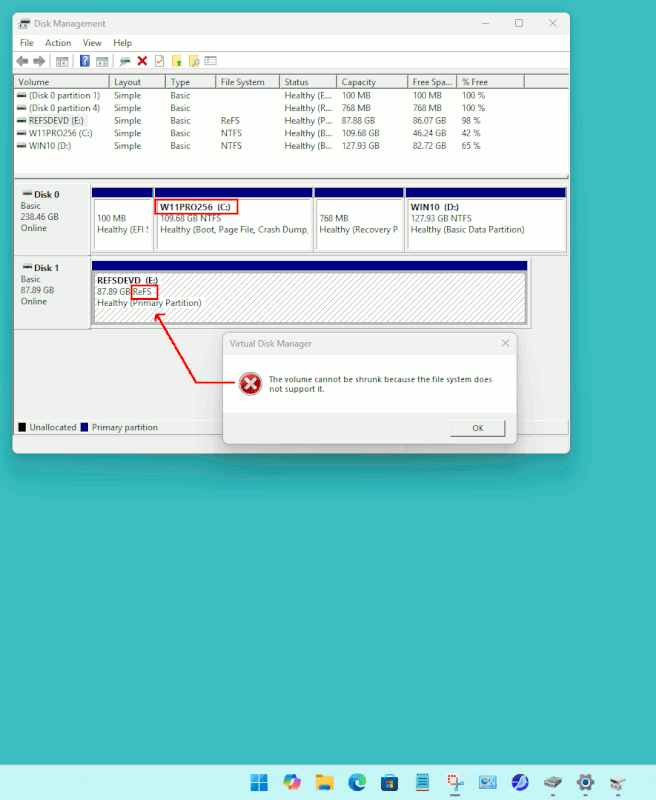
    Created a ReFS partition on it. After fiddling around with it a while,
    I tried to resize the filesystem. Disk Manager said "the volume
    cannot be shrunk because the file system does not support it".

    ext4 filesystems can be resized, and are suitable for workstation
    applications. A major reason I went with the "Workstation"
    Windows was to evaluate ReFS, and so far, I'm not impressed.

    RESIZE2FS(8) System Manager's Manual RESIZE2FS(8)

    NAME
    resize2fs - ext2/ext3/ext4 file system resizer

    SYNOPSIS
    resize2fs [ -fFpPMbs ] [ -d debug-flags ] [ -S RAID-
    stride ] [ -z undo_file ] device [ size ]

    DESCRIPTION
    The resize2fs program will resize ext2, ext3, or ext4
    file systems. It can be used to enlarge or shrink an
    unmounted file system located on device. If the file
    system is mounted, it can be used to expand the size of
    the mounted file system, assuming the kernel and the
    file system supports on-line resizing. (Modern Linux
    2.6 kernels will support on-line resize for file systems
    mounted using ext3 and ext4; ext3 file systems will re‐
    quire the use of file systems with the resize_inode fea‐
    ture enabled.)

    --
    -v System76 Thelio Mega v1.1 x86_64 NVIDIA RTX 3090 Ti
    OS: Linux 6.12.6 Release: Mint 21.3 Mem: 258G
    "I keep my .BAT files in E:\BELFRY"

    --- SoupGate-Win32 v1.05
    * Origin: fsxNet Usenet Gateway (21:1/5)
  • From Lawrence D'Oliveiro@21:1/5 to vallor on Sat Dec 21 07:07:35 2024
    On 21 Dec 2024 05:36:50 GMT, vallor wrote:

    A major reason I went with the "Workstation"
    Windows was to evaluate ReFS, and so far, I'm not impressed.

    Microsoft still have your money though, don’t they?

    --- SoupGate-Win32 v1.05
    * Origin: fsxNet Usenet Gateway (21:1/5)
  • From Chris Ahlstrom@21:1/5 to Lawrence D'Oliveiro on Sat Dec 21 07:54:00 2024
    Lawrence D'Oliveiro wrote this post while blinking in Morse code:

    On 21 Dec 2024 05:36:50 GMT, vallor wrote:

    A major reason I went with the "Workstation"
    Windows was to evaluate ReFS, and so far, I'm not impressed.

    Microsoft still have your money though, don’t they?

    The first thing I did when I booted Win 11 on the mini PC was use Disk Manager to shrink the NTFS partition. Surprisingly, no pain, no need to defragment first.

    --
    I may be getting older, but I refuse to grow up!

    --- SoupGate-Win32 v1.05
    * Origin: fsxNet Usenet Gateway (21:1/5)
  • From CrudeSausage@21:1/5 to All on Sat Dec 21 08:45:54 2024
    Le 2024-12-21 à 07:54, Chris Ahlstrom a écrit :
    Lawrence D'Oliveiro wrote this post while blinking in Morse code:

    On 21 Dec 2024 05:36:50 GMT, vallor wrote:

    A major reason I went with the "Workstation"
    Windows was to evaluate ReFS, and so far, I'm not impressed.

    Microsoft still have your money though, don’t they?

    The first thing I did when I booted Win 11 on the mini PC was use Disk Manager
    to shrink the NTFS partition. Surprisingly, no pain, no need to defragment first.

    What we've learned from you over the years is that you have a high
    threshold for pain. That's why the neighbourhood negroes nicknamed you
    Titanium Sphincter.

    --
    CrudeSausage

    --- SoupGate-Win32 v1.05
    * Origin: fsxNet Usenet Gateway (21:1/5)
  • From -hh@21:1/5 to vallor on Sat Dec 21 09:25:29 2024
    On 12/21/24 12:36 AM, vallor wrote:
    So I wanted to see what all the shouting was about. Installed
    Windows 11 for Workstations in a virt, and gave the virt access
    to /dev/sda, which is a 1TB iSCSI instance on my machine.

    Created a ReFS partition on it. After fiddling around with it a while,
    I tried to resize the filesystem. Disk Manager said "the volume
    cannot be shrunk because the file system does not support it".

    ext4 filesystems can be resized, and are suitable for workstation applications. A major reason I went with the "Workstation"
    Windows was to evaluate ReFS, and so far, I'm not impressed.

    RESIZE2FS(8) System Manager's Manual RESIZE2FS(8)

    NAME
    resize2fs - ext2/ext3/ext4 file system resizer

    SYNOPSIS
    resize2fs [ -fFpPMbs ] [ -d debug-flags ] [ -S RAID-
    stride ] [ -z undo_file ] device [ size ]

    DESCRIPTION
    The resize2fs program will resize ext2, ext3, or ext4
    file systems. It can be used to enlarge or shrink an
    unmounted file system located on device. If the file
    system is mounted, it can be used to expand the size of
    the mounted file system, assuming the kernel and the
    file system supports on-line resizing. (Modern Linux
    2.6 kernels will support on-line resize for file systems
    mounted using ext3 and ext4; ext3 file systems will re‐
    quire the use of file systems with the resize_inode fea‐
    ture enabled.)


    So where do you think the problem resides? I'd suspect the iSCSI
    instance ... did you try testing it on a more traditional disk target?

    -hh

    --- SoupGate-Win32 v1.05
    * Origin: fsxNet Usenet Gateway (21:1/5)
  • From Lawrence D'Oliveiro@21:1/5 to -hh on Sat Dec 21 21:05:57 2024
    On Sat, 21 Dec 2024 09:25:29 -0500, -hh wrote:

    So where do you think the problem resides?

    The problem resides in the fact that the resizing code has to be specific
    to the filesystem format. This code exists for common Linux filesystems
    and for NTFS, but not ReFS.

    --- SoupGate-Win32 v1.05
    * Origin: fsxNet Usenet Gateway (21:1/5)
  • From vallor@21:1/5 to All on Sat Dec 21 22:40:53 2024
    XPost: alt.comp.os.windows-11

    On Sat, 21 Dec 2024 09:25:29 -0500, -hh <[email protected]>
    wrote in <vk6j4q$2e70$[email protected]>:

    On 12/21/24 12:36 AM, vallor wrote:
    So I wanted to see what all the shouting was about. Installed Windows
    11 for Workstations in a virt, and gave the virt access to /dev/sda,
    which is a 1TB iSCSI instance on my machine.

    Created a ReFS partition on it. After fiddling around with it a while,
    I tried to resize the filesystem. Disk Manager said "the volume cannot
    be shrunk because the file system does not support it".

    ext4 filesystems can be resized, and are suitable for workstation
    applications. A major reason I went with the "Workstation"
    Windows was to evaluate ReFS, and so far, I'm not impressed.

    RESIZE2FS(8) System Manager's Manual RESIZE2FS(8)

    NAME
    resize2fs - ext2/ext3/ext4 file system resizer

    SYNOPSIS
    resize2fs [ -fFpPMbs ] [ -d debug-flags ] [ -S RAID- stride
    ] [ -z undo_file ] device [ size ]

    DESCRIPTION
    The resize2fs program will resize ext2, ext3, or ext4 file
    systems. It can be used to enlarge or shrink an unmounted
    file system located on device. If the file system is
    mounted, it can be used to expand the size of the mounted file
    system, assuming the kernel and the file system supports
    on-line resizing. (Modern Linux 2.6 kernels will support
    on-line resize for file systems mounted using ext3 and ext4;
    ext3 file systems will re‐
    quire the use of file systems with the resize_inode fea‐
    ture enabled.)


    So where do you think the problem resides? I'd suspect the iSCSI
    instance ... did you try testing it on a more traditional disk target?

    The "problem" is that ReFS doesn't support resizing. NTFS does -- but
    ReFS is their "workstation" filesystem, which you can't get unless you
    use Windows for Workstations.

    They'd be better off supporting ext4.

    --
    -v System76 Thelio Mega v1.1 x86_64 NVIDIA RTX 3090 Ti
    OS: Linux 6.12.6 Release: Mint 21.3 Mem: 258G
    "Cogito ergo spud I think therefore I yam."

    --- SoupGate-Win32 v1.05
    * Origin: fsxNet Usenet Gateway (21:1/5)
  • From vallor@21:1/5 to [email protected] on Sat Dec 21 23:27:06 2024
    On Sat, 21 Dec 2024 07:07:35 -0000 (UTC), Lawrence D'Oliveiro
    <[email protected]d> wrote in <vk5pfn$3u2dr$[email protected]>:

    On 21 Dec 2024 05:36:50 GMT, vallor wrote:

    A major reason I went with the "Workstation"
    Windows was to evaluate ReFS, and so far, I'm not impressed.

    Microsoft still have your money though, don’t they?

    In my case, yes.

    But one can install it and not activate it for evaluation -- you
    just won't be able to "personalize" it.

    --
    -v System76 Thelio Mega v1.1 x86_64 NVIDIA RTX 3090 Ti
    OS: Linux 6.12.6 Release: Mint 21.3 Mem: 258G
    "Where does the fire go when the fire goes out?"

    --- SoupGate-Win32 v1.05
    * Origin: fsxNet Usenet Gateway (21:1/5)
  • From Paul@21:1/5 to vallor on Sat Dec 21 20:56:27 2024
    XPost: alt.comp.os.windows-11

    On Sat, 12/21/2024 5:40 PM, vallor wrote:
    On Sat, 21 Dec 2024 09:25:29 -0500, -hh <[email protected]> wrote in <vk6j4q$2e70$[email protected]>:

    On 12/21/24 12:36 AM, vallor wrote:
    So I wanted to see what all the shouting was about. Installed Windows
    11 for Workstations in a virt, and gave the virt access to /dev/sda,
    which is a 1TB iSCSI instance on my machine.

    Created a ReFS partition on it. After fiddling around with it a while,
    I tried to resize the filesystem. Disk Manager said "the volume cannot
    be shrunk because the file system does not support it".

    ext4 filesystems can be resized, and are suitable for workstation
    applications. A major reason I went with the "Workstation"
    Windows was to evaluate ReFS, and so far, I'm not impressed.

    RESIZE2FS(8) System Manager's Manual RESIZE2FS(8)

    NAME
    resize2fs - ext2/ext3/ext4 file system resizer

    SYNOPSIS
    resize2fs [ -fFpPMbs ] [ -d debug-flags ] [ -S RAID- stride
    ] [ -z undo_file ] device [ size ]

    DESCRIPTION
    The resize2fs program will resize ext2, ext3, or ext4 file
    systems. It can be used to enlarge or shrink an unmounted
    file system located on device. If the file system is
    mounted, it can be used to expand the size of the mounted file
    system, assuming the kernel and the file system supports
    on-line resizing. (Modern Linux 2.6 kernels will support
    on-line resize for file systems mounted using ext3 and ext4;
    ext3 file systems will re‐
    quire the use of file systems with the resize_inode fea‐
    ture enabled.)


    So where do you think the problem resides? I'd suspect the iSCSI
    instance ... did you try testing it on a more traditional disk target?

    The "problem" is that ReFS doesn't support resizing. NTFS does -- but
    ReFS is their "workstation" filesystem, which you can't get unless you
    use Windows for Workstations.

    They'd be better off supporting ext4.


    You can actually make ReFS on *any* version of Windows 11.
    Like, even the lowly Home. You turn on Developer Mode,
    reboot, and in the Advanced Storage Settings is an option
    to create a Dev Drive. I didn't have room on the Home machine,
    and used the Win11 Pro machine across the way for a PhotoOP.

    [Picture]

    https://i.postimg.cc/zv8QJTFL/Re-FS-W11-DEV-DRIVE.gif

    what was really funny, is Macrium Reflect, pretended there was
    no file system on there at all. Leaving no doubt in your mind
    about whether it gets backed up or not. I thought of that as
    being "almost special", like riding on the short bus.

    But, a Delete Volume and it's gone again. What's not to like.

    There is a rule about Windows:

    "If it don't got tools, we don't use it"

    This includes things like .vhdx , which is perilously
    close to an orphan. One of my requirements for VM containers,
    is that they can be transmuted into some other container type.
    This is one of the reasons that Hyper-V is not installed on any
    machine here. I'm sure the software would work and would be nice,
    but the containers suck. 7ZIP tool, by Igor Pavlov, it opens
    .vhd files and allows you to burrow into the file system in there.
    It doesn't work on .vhdx , and that alone is enough to doom
    .vhdx to the dustbin. ReFS still has a similar status.
    And as long as tools do things such as "pretending there is
    no file system", I think you can see how excited I am about
    this.

    NTFS has journaling, and normally (most always), survives
    power cuts. It cleans up on reboot, and away we go. The Registry
    used to corrupt years ago. The Registry now has its own journal.
    This means, we no longer get Registry corruption. NTFS then,
    is now just about perfect, without any help at all from ReFS.
    ReFS is like a museum item, by comparison. As long as it
    is not mainstream, what good is it ??? Yeah, I know, technically
    it has amazing specs. Great.

    Paul

    --- SoupGate-Win32 v1.05
    * Origin: fsxNet Usenet Gateway (21:1/5)
  • From Lawrence D'Oliveiro@21:1/5 to Paul on Sun Dec 22 03:46:31 2024
    XPost: alt.comp.os.windows-11

    On Sat, 21 Dec 2024 20:56:27 -0500, Paul wrote:

    NTFS then, is now just about perfect ...

    Still does a poor job of handling lots of small files, though.

    --- SoupGate-Win32 v1.05
    * Origin: fsxNet Usenet Gateway (21:1/5)
  • From Paul@21:1/5 to Lawrence D'Oliveiro on Sun Dec 22 04:08:36 2024
    XPost: alt.comp.os.windows-11

    On Sat, 12/21/2024 10:46 PM, Lawrence D'Oliveiro wrote:
    On Sat, 21 Dec 2024 20:56:27 -0500, Paul wrote:

    NTFS then, is now just about perfect ...

    Still does a poor job of handling lots of small files, though.


    First and foremost, we want file systems that
    don't lose any of our goods. The file systems we
    have now, are more robust than they used to be,
    and this is a start. The file system is scanned in
    the background, details are not provided as to
    how this works, merely that latent faults are not
    an issue as they used to be.

    I don't live on a diet of synthetic tests. Synthetic
    tests are fun, but that's for characterization and
    telling people the best way to use the file systems.

    The file system is good enough for casual home user
    usage. I would not bill something like NTFS as
    a hyperscaler product.

    I can tell you from my testing, not to put four billion
    files in a single flat directory. The transfer would
    never finish. Balanced trees of files work better,
    and you might be able to handle 4x the files that way.
    I would also not attempt to put four billion files
    in a balanced tree. When the Wiki article on NTFS
    says the file system has a theoretical limit of
    four billion files, I doubt anyone has finished the
    test of that statement. It is quite common in file systems,
    to over-promise, and discover by exhaustive testing,
    the limit of the file system is not actually as stated
    on the tin. Apple for example, had two incidents, where
    they released a TN stating a capability, and then three
    months later, had to retract and rewrite a few of the
    TN details to suit.

    The OS has enough issues with things like File Explorer,
    to discourage running a giant lemonade stand off the OS.
    It's not nearly good enough for that.

    The Federated Search has a recommended max size of one
    million files. I have 1.2 million files on my collection,
    and the federated search works OK on that. The reason
    for the recommended size, is it takes a whole day to
    index a file collection that big. And it slows down
    the larger the collection. As you would expect with
    the generation of inverted indexes.

    When I do synthetic tests here, I do them on a RAM drive,
    not for speed (nothing has "speed" here), that's just to
    avoid shaking the disk drive to shit. The fastest way to
    transfer files off a Windows disk, is at cluster level
    with a backup product. I can transfer 40 million files
    from one storage device to another in ten minutes, if
    working at the cluster level. Then enjoy random accessing
    them through the file system again, once the files are
    on the new device. For performance reasons, I would never
    recommend cp -R src dest as the "right way" for every job.
    Transferring 40 million files with a cp -R, that's going
    to take more than a day to do. and that's why we experiment
    with the odd synthetic case, to see what the best method is.

    Paul

    --- SoupGate-Win32 v1.05
    * Origin: fsxNet Usenet Gateway (21:1/5)
  • From Lawrence D'Oliveiro@21:1/5 to Paul on Sun Dec 22 20:32:34 2024
    XPost: alt.comp.os.windows-11

    On Sun, 22 Dec 2024 04:08:36 -0500, Paul wrote:

    I don't live on a diet of synthetic tests.

    Neither do I. I have done real-world applications involving keeping
    hundreds of thousands of individual files in a single directory.

    The file system is good enough for casual home user
    usage.

    I’m sure it is. So was CP/M. If a toy OS is good enough for you, then
    fine. Some of us need more than that for mission-critical purposes.

    I can tell you from my testing, not to put four billion
    files in a single flat directory. The transfer would
    never finish.

    I’m sure that’s true on Windows. But on Linux, my expectation is, somebody has already tested it to make sure it works.

    Here’s a fun thing: try putting four billion files into an NTFS directory, not from Windows, but from Linux. You will likely find it works a lot
    better.

    --- SoupGate-Win32 v1.05
    * Origin: fsxNet Usenet Gateway (21:1/5)
  • From Paul@21:1/5 to Lawrence D'Oliveiro on Sun Dec 22 17:42:32 2024
    XPost: alt.comp.os.windows-11

    On Sun, 12/22/2024 3:32 PM, Lawrence D'Oliveiro wrote:


    Here’s a fun thing: try putting four billion files into an NTFS directory, not from Windows, but from Linux. You will likely find it works a lot
    better.


    Well, you and I, we know the NTFS driver on Linux is slower
    than the one on Windows. And understandably so, when
    the NTFS driver was designed by painstaking reverse
    engineering, rather than having a spec in hand to aid
    in writing the driver.

    I once carried out a test, comparing NTFS file creation
    to TMPFS file creation. At the time (a slower processor),
    NTFS could CreateFile() about 4000 files a second.
    TMPFS could create 186000 files a second.

    But what I didn't discover at the time, is that as TMPFS
    fragments, it gets slower, and it is hard to say what
    the steady state for it would be, from a performance perspective.

    *******

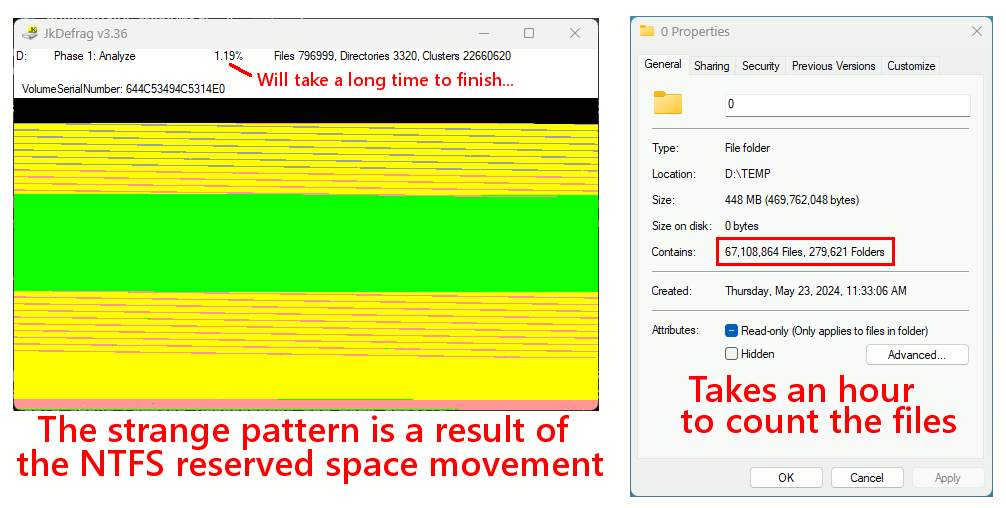
    I just spun up a backup file with 64 million files in it.
    It took maybe twelve minutes to restore.

    If I do Properties on the restored folder, it takes *one hour*
    to count the 64 million files. And this is a tree
    structure, not a single flat directory.

    [Picture]

    https://i.postimg.cc/3xWsRv4d/64-million-files-writeidx4.gif

    The file system could hold 64 times that many files,
    but my hardware setup can't go there (not enough room).
    There is a computer that could do it, but I can't
    afford that (a computer that could hold four
    billion files in RAM). That's the largest experiment I can do,
    which does not wear any hardware at all. No hard drive
    heads got slapped around 64 million times to make that.

    Paul

    --- SoupGate-Win32 v1.05
    * Origin: fsxNet Usenet Gateway (21:1/5)