• Theo:David What apps can I look for to test your Spain Google Play Stor

    From Marion@21:1/5 to All on Fri Mar 21 08:12:49 2025
    XPost: uk.telecom.mobile

    Theo:David

    What apps can I look for to test your Spain Google Play Store country
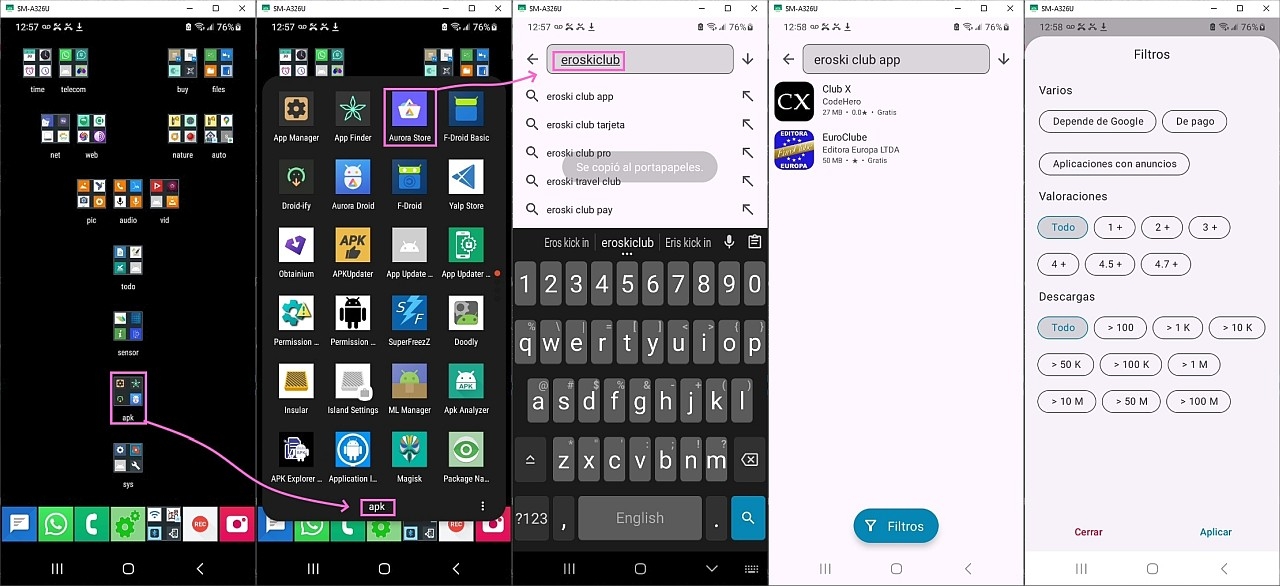
    issue? <https://i.postimg.cc/gkqCRBf1/aurora-espanol.jpg>

    On XDA Developers, the Aurora team told me that Aurora simply looks up what
    the phone "thinks" is the country.

    But I don't have a Google Account and I don't have the Google Play Store
    app on the phone, so I was wondering what Aurora Store used for the Google
    Play Store country when it looked for the apps that Theo and David Wade
    were looking for.
    <https://xdaforums.com/t/app-5-0-aurora-store-open-source-google-play-client.3739733/post-90011933>

    They told me Aurora "uses whatever is set as locale on your phone or spoof configuration if any."

    I wasn't aware there's a default locale nor how to spoof it.

    In Settings > General Management > Language", my Android 13 Galaxy phone
    listed "English (United States)".

    But Android 13, especially with Samsung's One UI, allows for per-app
    language settings; so there must be a definitive programmatic way Aurora
    uses to get the default locale.

    Resources.getSystem().getConfiguration().getLocales().get(0)

    Looking up a way for a user to figure out the default locale that Aurora is going to use, I'm not sure, but perhaps the system "language & region"
    settings are used to determine the default locale?

    This reports, for example, my system locale is "EN-US".
    adb shell getprop persist.sys.locale
    en-US

    But this didn't report anything:
    adb shell getprop persist.sys.country

    I'm trying to help David Wade and the rest of us understand how Aurora
    chooses what regional apps to make available to us.

    As a test, tried to set my locale to Spain, to see if that changes
    anything.

    First, with the EN-US locale, with all filters off, I looked in Skyica and
    in Aurora Store for David's suggested Spanish locale supermarket app.
    <https://play.google.com/store/apps/details?id=com.tempos21.eroskiclub.pro>

    Neither finds the app.
    I tried to use adb to change my locale to Spain.
    adb shell setprop persist.sys.locale es-ES
    adb shell setprop persist.sys.language es
    adb shell setprop persist.sys.country ES
    adb shell setprop ctl.restart zygote
    adb shell dmesg
    Unfortunately all fail because my bootloader version is unrootable.

    So I manually changed language/country in the Galaxy settings.

    Android13: Settings > General management > Language > Add language >
    (3dots) > All languages > Espa�ol > All regions > Espa�a

    Set Espa�ol (Espa�a) as default language?
    [Keep current] [Set as default]

    To test if the changes took:
    adb shell getprop persist.sys.locale
    es-ES

    Then I tried Aurora Store to see if that supermarket app shows up.
    Drat! <https://i.postimg.cc/gkqCRBf1/aurora-espanol.jpg>

    I was hoping that would work. But it still doesn't show up in Aurora.
    I rebooted & try again. Nope. Still no go.

    What did I do wrong?

    --- SoupGate-Win32 v1.05
    * Origin: fsxNet Usenet Gateway (21:1/5)
  • From David Wade@21:1/5 to Marion on Fri Mar 21 13:57:50 2025
    XPost: uk.telecom.mobile

    On 21/03/2025 08:12, Marion wrote:
    Theo:David
    What apps can I look for to test your Spain Google Play Store country
    issue? <https://i.postimg.cc/gkqCRBf1/aurora-espanol.jpg>

    On XDA Developers, the Aurora team told me that Aurora simply looks up what the phone "thinks" is the country.
    But I don't have a Google Account and I don't have the Google Play Store
    app on the phone, so I was wondering what Aurora Store used for the Google Play Store country when it looked for the apps that Theo and David Wade
    were looking for. <https://xdaforums.com/t/app-5-0-aurora-store-open-source-google-play-client.3739733/post-90011933>

    They told me Aurora "uses whatever is set as locale on your phone or spoof configuration if any."

    I wasn't aware there's a default locale nor how to spoof it.

    In Settings > General Management > Language", my Android 13 Galaxy phone listed "English (United States)".

    But Android 13, especially with Samsung's One UI, allows for per-app
    language settings; so there must be a definitive programmatic way Aurora
    uses to get the default locale.

    Resources.getSystem().getConfiguration().getLocales().get(0)

    Looking up a way for a user to figure out the default locale that Aurora is going to use, I'm not sure, but perhaps the system "language & region" settings are used to determine the default locale?

    This reports, for example, my system locale is "EN-US".
    adb shell getprop persist.sys.locale
        en-US

    But this didn't report anything:
    adb shell getprop persist.sys.country

    I'm trying to help David Wade and the rest of us understand how Aurora chooses what regional apps to make available to us.

    As a test, tried to set my locale to Spain, to see if that changes
    anything.

    First, with the EN-US locale, with all filters off, I looked in Skyica and
    in Aurora Store for David's suggested Spanish locale supermarket app. <https://play.google.com/store/apps/details?id=com.tempos21.eroskiclub.pro>

    Neither finds the app.
    I tried to use adb to change my locale to Spain.
    adb shell setprop persist.sys.locale es-ES
    adb shell setprop persist.sys.language es
    adb shell setprop persist.sys.country ES
    adb shell setprop ctl.restart zygote
    adb shell dmesg
    Unfortunately all fail because my bootloader version is unrootable.

    So I manually changed language/country in the Galaxy settings.

    Android13: Settings > General management > Language > Add language >
    (3dots) > All languages > Espa�ol > All regions > Espa�a

    Set Espa�ol (Espa�a) as default language?
    [Keep current] [Set as default]

    To test if the changes took:
    adb shell getprop persist.sys.locale
         es-ES

    Then I tried Aurora Store to see if that supermarket app shows up.
    Drat! <https://i.postimg.cc/gkqCRBf1/aurora-espanol.jpg>

    I was hoping that would work. But it still doesn't show up in Aurora.
    I rebooted & try again. Nope. Still no go.

    What did I do wrong?

    You didn't listen to what I told you. What you should have asked the
    Aurora team what country is set in the accounts it uses to access the store.

    My phone is set to English Language. It it is in the UK. My Locale is
    set to English. I can see the app providing I use an ID that has Spain
    as the Country. In order to set the country to Spain you need to add a
    Spanish Payment card. How this works in practice I don't know as many
    Spanish residents do not have Spanish Bank accounts, they use Wise or
    Revolut. Wise is Belgium, Revolut is I think UK.

    Dave

    --- SoupGate-Win32 v1.05
    * Origin: fsxNet Usenet Gateway (21:1/5)