• Why does open source software include a "signing key"?

    From Marion@21:1/5 to All on Wed Feb 26 21:36:35 2025
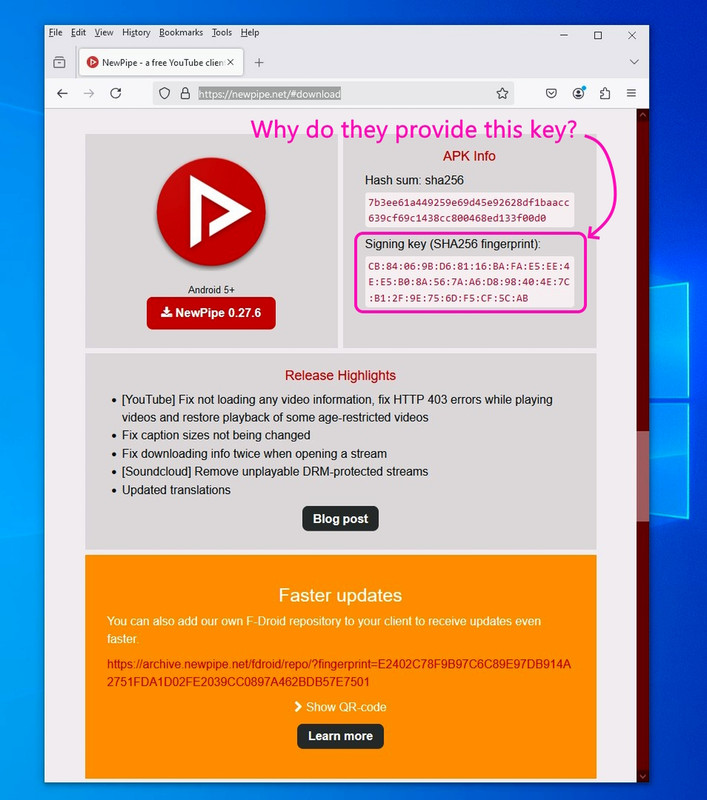
    I just downloaded the latest version of NewPipe and the download page
    provides the hash (which I understand how to use) plus a signing key.
    <https://newpipe.net/#download>

    The hash is there to verify that the file hasn't been changed, and the
    signing key is there to also verify that it came from the developers.

    So it seems that the signing key is there so we can tell if the file has
    been modified and also that it was signed by the actual real developers.
    <https://archive.newpipe.net/fdroid/repo/NewPipe_v0.27.6.apk>

    Signing key (SHA256 fingerprint):
    CB:84:06:9B:D6:81:16:BA:FA:E5:EE:4E:E5:B0:8A:56:7A:A6:D8:98:40:4E:7C:B1:2F:9E:75:6D:F5:CF:5C:AB

    But what are we "supposed" to do with the signing key to validate that?
    <https://i.postimg.cc/9Mkyf8k4/signingkey.jpg>

    Presumably we find an Android tool that can check signatures?

    --- SoupGate-Win32 v1.05
    * Origin: fsxNet Usenet Gateway (21:1/5)
  • From Marion@21:1/5 to Marion on Wed Feb 26 21:44:54 2025
    On Wed, 26 Feb 2025 21:36:35 -0000 (UTC), Marion wrote :


    But what are we "supposed" to do with the signing key to validate that?
    <https://i.postimg.cc/9Mkyf8k4/signingkey.jpg>

    Presumably we find an Android tool that can check signatures?

    Ah, I figured it out! Muntashirakon App Manager strikes again!

    1. I opened the best app manager on Android, Muntashirakon.
    2. I searched for NewPipe & clicked on the "Signatures" tab.
    3. It showed the same SHA-256 signature as on the NewPipe web page!

    SHA-256:
    cb84069bd68116bafae5ee4ee5b08a567aa6d898404e7cb12f9e756df5cf5cab

    This means two things, I think:
    a. The apk hasn't been tampered with, and,
    b. It's the same APK that the author signed.

    There's more in the Muntashirakon report, but that's the gist of it.

    --- SoupGate-Win32 v1.05
    * Origin: fsxNet Usenet Gateway (21:1/5)
  • From Marion@21:1/5 to Marion on Wed Feb 26 22:36:32 2025
    On Wed, 26 Feb 2025 21:44:54 -0000 (UTC), Marion wrote :


    There's more in the Muntashirakon report, but that's the gist of it.

    I've always said the best app manager on Android is Muntashirakon,
    but please let me know if other apps do the signature verification.

    In Muntashirakon, the following information was gleaned from that sig.

    SHA-256 Checksum:
    This exactly matches the official SHA-256 fingerprint published by the
    NewPipe developers, which confirms that the NewPipe APK I installed is authentic and hasn't been tampered with.

    Signature schemes: v1, v2, v3
    Apparently this indicates that NewPipe is signed using multiple Android signature schemes. I'm not sure why that is a good thing, but it's OK.

    Signer Certificate: Subject: CN=Christian Schabesberger,C=DE
    This shows the certificate was issued to Christian Schabesberger, located
    in Germany. This is consistent with the NewPipe project's lead developer.
    The dates of issue and expiry are also displayed.
    The serial number and other certificate data is also shown.

    Signature:
    Algorithm: SHA256withRSA
    This confirms the cryptographic algorithm used to generate the signature.

    Public Key:
    This section details the public key associated with the signature.
    This key is used to verify the signature.

    What's a bit disconcerting is Muntashirakon said the signature was...
    Verified with 77 warnings:

    But I don't see the warnings.
    Do you?

    How would I be able to see what those 77 warnings are?

    --- SoupGate-Win32 v1.05
    * Origin: fsxNet Usenet Gateway (21:1/5)
  • From Arno Welzel@21:1/5 to All on Fri Feb 28 09:01:30 2025
    Marion, 2025-02-26 22:36:

    I just downloaded the latest version of NewPipe and the download page provides the hash (which I understand how to use) plus a signing key.
    <https://newpipe.net/#download>

    The hash is there to verify that the file hasn't been changed, and the signing key is there to also verify that it came from the developers.

    So it seems that the signing key is there so we can tell if the file has
    been modified and also that it was signed by the actual real developers.
    <https://archive.newpipe.net/fdroid/repo/NewPipe_v0.27.6.apk>

    No, the idea is to verify the integrity by *Google* when uploading
    applications to Google Play.

    In the past this was only done using a private key stored in a local key
    store. However this has changed over time.

    Also see:

    <https://support.google.com/googleplay/android-developer/answer/9842756?hl=en>

    <https://ashuvssut.hashnode.dev/android-app-signing>


    --
    Arno Welzel
    https://arnowelzel.de

    --- SoupGate-Win32 v1.05
    * Origin: fsxNet Usenet Gateway (21:1/5)
  • From Marion@21:1/5 to Arno Welzel on Fri Feb 28 19:19:22 2025
    On Fri, 28 Feb 2025 09:01:30 +0100, Arno Welzel wrote :


    So it seems that the signing key is there so we can tell if the file has
    been modified and also that it was signed by the actual real developers.
    <https://archive.newpipe.net/fdroid/repo/NewPipe_v0.27.6.apk>

    No, the idea is to verify the integrity by *Google* when uploading applications to Google Play.

    In the past this was only done using a private key stored in a local key store. However this has changed over time.

    Also see:

    <https://support.google.com/googleplay/android-developer/answer/9842756?hl=en>

    <https://ashuvssut.hashnode.dev/android-app-signing>

    Thank you for trying to help us all better understand app APK signing.

    It's confusing to me, but I don't doubt the facts you kindly provided.
    a. App signing key
    b. Upload key

    From your references, there seems to be a distinction between the "app
    signing key" (managed by Google) and the "upload key" (managed by the developer) where what seems different are the roles of the app signing key
    (for device installation) & for the upload key (for Google Play uploads).

    Remember what brought this issue to the fore was NewPipe's signing key.
    <https://newpipe.net/#download>
    "Signing key (SHA256 fingerprint):
    CB:84:06:9B:D6:81:16:BA:FA:E5:EE:4E:E5:B0:8A:56:7A:A6:D8:98:40:4E:7C:B1:2F:9E:75:6D:F5:CF:5C:AB"

    NewPipe, as you're well aware, has nothing whatsoever to do with the Google Play Store repository - as it's an Apple that directly replaces YouTube.

    So it's confusing to me that you say the idea is to "verify the integrity
    by *Google*", but maybe you meant to verify the integrity by *Android*?

    Digging deeper, I found out that Android's security model inherently
    requires APKs to be signed regardless of the distribution channel.

    Apparently, even if an app isn't on Google Play, it still needs to be
    signed for an Android device to install it. Does that seem right to you?

    Note: I need to do more research as this is all confusing to me when it
    comes to how open source apps work, since I don't even have Google Play
    Store on my non-rootable Android 13 phone.

    --- SoupGate-Win32 v1.05
    * Origin: fsxNet Usenet Gateway (21:1/5)
  • From Marion@21:1/5 to R.Wieser on Fri Feb 28 19:30:34 2025
    On Fri, 28 Feb 2025 08:43:39 +0100, R.Wieser wrote :


    So it seems that the signing key is there so *we* can tell if the file has >> been modified and also that it was signed by the actual real developers.

    (emphasis mine) No.

    I'm confused by that answer, but it may be that Rudy knows more than I do.

    I don't know anything about signatures, so it "could" be that Rudy knows
    more, but, my research shows that statement above to be true, not false.

    Given I don't even have the Google Play Store app APK on my phone, and yet
    I install APKs from the Google Play repository all the time, in addition to installing apps (like <https://newpipe.net/#download>) which have nothing
    to do with the Google Play store, that answer doesn't help to explain how
    the ecosystem works with respect to signing of apps NOT on the Google Play Store ecosystem.

    Arno kindly brought up the point that there could be two related keys:
    a. App signing key
    b. Upload key

    However, if we focus on FOSS tools such as NewPipe, which is distributed outside of the Google Play Store, we can completely disregard the concept
    of the "upload key" entirely.

    Since NewPipe isn't on the Google Play Store, it doesn't utilize Google
    Play App Signing. Therefore, there's no separation of an upload key and an
    app signing key as described in Arno's suggested Google Play web cites.

    Apparently, instead, NewPipe uses a single signing key to sign its APKs.

    As far as I can tell, this key serves both the purpose of verifying the
    app's authenticity and ensuring that updates come from the same source.

    Why do you (seem to) think otherwise, Rudy?

    --- SoupGate-Win32 v1.05
    * Origin: fsxNet Usenet Gateway (21:1/5)
  • From Marion@21:1/5 to Marion on Fri Feb 28 19:46:33 2025
    On Fri, 28 Feb 2025 19:30:34 -0000 (UTC), Marion wrote :


    Apparently, instead, NewPipe uses a single signing key to sign its APKs.
    As far as I can tell, this key serves both the purpose of verifying the
    app's authenticity and ensuring that updates come from the same source.

    Oh, I think I know what Rudy was trying to say, which is the "we" should be changed to "Android", in that this signature key is for Android, not us.

    Newpipe uses a self signed certificate.
    This is why the SHA256 hash is so important.
    Android can verify self-signed certificates, as long as the signature
    matches the APK contents.

    Digging deeper into how *Android* handles NewPipe's app signature key,
    it seems the vast majority of attempts to modify an APK will invalidate the signature, which Android will notice & therefore Android won't install it.

    But apparently there is still a "we" involved (in addition to Android).

    The part about "we" is the SHA256 fingerprint is apparently an extra level
    of protection. It allows the end user to verify that the downloaded file is
    the exact same file that the developer produced. If the end user checks the SHA256, then the end user can know that the file has not been modified.

    To summarize, NewPipe provides both a signing key fingerprint (SHA256) and
    a signature (which "we" don't directly see as a separate file, but is
    embedded in the APK & which is what Android looks at to validate the APK).

    It seems, from my research, that Android uses the NewPipe developers'
    public key (which is also embedded in the app APK certificate, apparently)
    to decrypt the signature inside the APK and compare it to a newly generated hash of the APK. If the hashes match, the sig is valid.

    Thanks for keying me into these important distinctions on how Android works (where FOSS apps typically are not found on the Google Play Store repos).

    --- SoupGate-Win32 v1.05
    * Origin: fsxNet Usenet Gateway (21:1/5)
  • From R.Wieser@21:1/5 to All on Fri Feb 28 21:42:12 2025
    Marion,

    Oh, I think I know what Rudy was trying to say, which is the "we" should
    be changed to "Android", in that this signature key is for Android, not
    us.

    Bingo. Well done.

    Its not that you /can't/ use it for the purpose you describe, but that is
    not what it was created for.

    Regards,
    Rudy Wieser

    --- SoupGate-Win32 v1.05
    * Origin: fsxNet Usenet Gateway (21:1/5)
  • From Arno Welzel@21:1/5 to All on Sat Mar 1 10:00:52 2025
    Marion, 2025-02-28 20:19:

    [...]
    Digging deeper, I found out that Android's security model inherently
    requires APKs to be signed regardless of the distribution channel.

    Apparently, even if an app isn't on Google Play, it still needs to be
    signed for an Android device to install it. Does that seem right to you?

    Yes - because Android can then verify, if an update to an existing app
    is still by the same publisher and thus can avoid legit apps getting
    replaced by other apps just using the same package name.


    --
    Arno Welzel
    https://arnowelzel.de

    --- SoupGate-Win32 v1.05
    * Origin: fsxNet Usenet Gateway (21:1/5)
  • From Marion@21:1/5 to Arno Welzel on Sat Mar 1 09:54:10 2025
    On Sat, 1 Mar 2025 10:00:52 +0100, Arno Welzel wrote :


    Apparently, even if an app isn't on Google Play, it still needs to be
    signed for an Android device to install it. Does that seem right to you?

    Yes - because Android can then verify, if an update to an existing app
    is still by the same publisher and thus can avoid legit apps getting
    replaced by other apps just using the same package name.

    Thanks. It was confusing to me as I never thought about signing, where the
    only time it affected me was when I installed an APK from one repo that I
    tried to update from a different repo - but the update sometimes failed.

    I "think" those updates failed because of signing issues, which is a PITA, because when I install an app, I don't write down which repo it came from.

    Apparently for NewPipe, which isn't on the Google Play Store repository,
    the digital certificate inside of the APK contains the public key which
    Android checks against the internal signature which is also in the APK.

    For apps which are found on the Google Play Store, which I download using
    the FOSS Google Play Store app so that I don't have to create a (privacy robbing) Google Account on my phone, it seems it works differently.

    Apparently an APK from the Google Play Store repo contains:
    a. An APK Signing Block
    b. A META-INF directory

    Apparently in modern APKs, the primary signature data is within the APK
    Signing Block & the META-INF files are mainly for backward compatibility.

    It seems that the APK Signing Block contains the signature itself, plus the signing certificate(s), plus some metadata about the signing scheme.

    As far as I can tell, since this is all new to me, is when I install an
    APK, Android quickly finds the APK Signing Block and then retrieves the signature and certificate(s) from the signing block. Then Android
    calculates the cryptographic hash of the APK's contents using the public
    key from the certificate to verify the signature against the calculated
    hash. If there's a certificate chain, Android also verifies each
    certificate in the chain.

    Notice the "Upload Key" is never seen by our Android devices as only the
    Google Play servers see that particular key, so our phone doesn't see it.
    A. The developer signs the APK with their upload key.
    B. Google Play then re-signs the APK with its own app signing key.
    (This is the key that Android devices will ultimately verify.)
    C. Google Play can rotate the app signing key, further enhancing security.

    Critically, since I don't use the Google Play Store app to get APKs off the Google Play Store repository, I don't need Google Play Services in order to verify the signature, as Android does this signature verification itself.

    Thanks for explaining this process, and thanks to Rudy for clarifying too.
    I didn't know a thing about signatures until I saw it in the NewPipe page.

    --- SoupGate-Win32 v1.05
    * Origin: fsxNet Usenet Gateway (21:1/5)
  • From Marion@21:1/5 to Marion on Sat Mar 1 10:12:25 2025
    On Sat, 1 Mar 2025 09:54:10 -0000 (UTC), Marion wrote :


    Thanks for explaining this process, and thanks to Rudy for clarifying too.
    I didn't know a thing about signatures until I saw it in the NewPipe page.

    Arno brought up another good point, which is when package names conflict.

    Yes - because Android can then verify, if an update to an existing app
    is still by the same publisher and thus can avoid legit apps getting
    replaced by other apps just using the same package name.

    Looking it up, apparently when you're UPDATING a package, which I presume a conflicting package name would mimic, the Android package manager you use
    will somehow recognize that the new APK has the exact same package name as
    an already installed (older) app. [This of course happens with updates.]

    Then the package manager retrieves the stored signature information of the currently-installed old app (which was saved during initial installation).

    On the new (update) APK, the package manager extracts its signature
    information from the APK Signing Block to compare the two signatures.

    The package manager apparently also verifies the certificate chain of the
    new APK against the certificate chain of the already-installed old app.

    Despite it seeming that you can't update an app that came from one repo
    with an update that came from another repo, apparently Android itself
    doesn't care at all about the repo. It only cares about the signatures.

    My issue now, is that I use a *lot* of package managers when I install
    apps, where I wonder if they all work the same. I certainly hope so. :)

    --- SoupGate-Win32 v1.05
    * Origin: fsxNet Usenet Gateway (21:1/5)
  • From Marion@21:1/5 to Marion on Sat Mar 1 10:27:50 2025
    On Sat, 1 Mar 2025 10:12:25 -0000 (UTC), Marion wrote :


    My issue now, is that I use a *lot* of package managers when I install
    apps, where I wonder if they all work the same. I certainly hope so. :)

    I just checked that out, given there are plenty of package managers out
    there, such as these which I have installed and which I sometimes use.
    <https://f-droid.org/en/packages/io.github.muntashirakon.AppManager/>
    <https://play.google.com/store/apps/details?id=com.smartpack.packagemanager>
    <https://play.google.com/store/apps/details?id=sarangal.packagemanager>

    It turns out that Android ALWAYS does the signature checks, whether or not
    a third-party package manager is involved - so we're safe after all. :)

    --- SoupGate-Win32 v1.05
    * Origin: fsxNet Usenet Gateway (21:1/5)
  • From R.Wieser@21:1/5 to All on Sat Mar 1 11:36:01 2025
    Arno ,

    Yes - because Android can then verify, if an update to an existing
    app is still by the same publisher

    Thats starting one step to late. The first step is that, *at the moment
    of installing*, the app is verified to be the one mentioned in the signing
    key.

    As the signing key itself, upon the developers upload of the app to the
    wealled garden, is verified to be from that developer there is an unbroken chain of trust.

    But as you probably well know, that doesn't stop malicious and trojaned apps from appearing in Googles "walled garden" ...

    Regards,
    Rudy Wieser

    --- SoupGate-Win32 v1.05
    * Origin: fsxNet Usenet Gateway (21:1/5)
  • From R.Wieser@21:1/5 to All on Sat Mar 1 11:44:14 2025
    Marion,

    Android package manager you use will somehow recognize that the new APK
    has the exact same package name as an already installed (older) app.

    What do you think is the chance that the installer will ignore the provided name (which you can alter on a 'puter anyway - I always change
    undecipherable names into ones that indicate their usage and date of
    download) and just uses the "signing key" ? Looks to be much easier to me.

    It only cares about the signatures.

    Bingo.

    Regards,
    Rudy Wieser

    --- SoupGate-Win32 v1.05
    * Origin: fsxNet Usenet Gateway (21:1/5)
  • From Arno Welzel@21:1/5 to All on Sat Mar 1 14:22:52 2025
    R.Wieser, 2025-03-01 11:36:

    Arno ,

    Yes - because Android can then verify, if an update to an existing
    app is still by the same publisher

    Thats starting one step to late. The first step is that, *at the moment
    of installing*, the app is verified to be the one mentioned in the signing key.

    At the very first install at all, there is no chain of trust back to the original developer - for example when using F-Droid. Then only F-Droid
    is signing the app.


    --
    Arno Welzel
    https://arnowelzel.de

    --- SoupGate-Win32 v1.05
    * Origin: fsxNet Usenet Gateway (21:1/5)
  • From R.Wieser@21:1/5 to All on Sat Mar 1 15:40:05 2025
    Arno,

    At the very first install at all, there is no chain of trust back to the original developer

    I think there is.

    for example when using F-Droid. Then only F-Droid is signing the app.

    And they will do that for any random app ? Hey F-Droid, I got a few info-
    and other stealers here, and as you guys don't bother to check if I'm on the up-and-up I can use you guys to spread my malwarez !

    And yes, I'm joking there. I've got my own channels to do that. And yes,
    I'm joking there too. :-p

    No, if F-Droid is only using their own name on the apps than they will try
    to make *damn* sure that they are not used to spread malware. And we trust them to be good at it. And yes, even in that case I do believe that
    F-Droid knows, at least by name, the developers of the apps they offer for download - so that they, just like Google, can cut off any app-maker who is engaging in "funny stuff".

    Regards,
    Rudy Wieser

    --- SoupGate-Win32 v1.05
    * Origin: fsxNet Usenet Gateway (21:1/5)
  • From R.Wieser@21:1/5 to All on Fri Feb 28 08:43:39 2025
    Marion,

    So it seems that the signing key is there so *we* can tell if the file has been modified and also that it was signed by the actual real developers.

    (emphasis mine) No.

    Regards,
    Rudy Wieser

    --- SoupGate-Win32 v1.05
    * Origin: fsxNet Usenet Gateway (21:1/5)
  • From Arno Welzel@21:1/5 to All on Thu Mar 6 11:30:40 2025
    R.Wieser, 2025-03-01 15:40:

    Arno,

    At the very first install at all, there is no chain of trust back to the
    original developer

    I think there is.

    for example when using F-Droid. Then only F-Droid is signing the app.

    And they will do that for any random app ? Hey F-Droid, I got a few info- and other stealers here, and as you guys don't bother to check if I'm on the up-and-up I can use you guys to spread my malwarez !

    Yes - you can try that. However since all software on F-Droid *must* be
    open source, this won't work unnoticed. At least one has to suggest an application to be added to the repository of F-Droid first - and at this
    point, the app won't get accepted, if it contains suspicious code.

    Both otherwise F-Droid only takes the sources and builds the package
    themself:

    <https://f-droid.org/de/packages/de.arnowelzel.android.periodical/>

    Sources:

    <https://github.com/arnowelzel/periodical>

    You won't find any of my signatures in the package provided by F-Droid.

    No, if F-Droid is only using their own name on the apps than they will try
    to make *damn* sure that they are not used to spread malware. And we trust them to be good at it. And yes, even in that case I do believe that
    F-Droid knows, at least by name, the developers of the apps they offer for download - so that they, just like Google, can cut off any app-maker who is engaging in "funny stuff".

    Exactly - but still there is no certificate chain in F-Droid packages
    which lead to the original developer.


    --
    Arno Welzel
    https://arnowelzel.de

    --- SoupGate-Win32 v1.05
    * Origin: fsxNet Usenet Gateway (21:1/5)
  • From R.Wieser@21:1/5 to All on Thu Mar 6 12:29:05 2025
    Arno,

    At least one has to suggest an application to be added to the repository
    of F-Droid first

    Yeah, duh.

    and at this point, the app won't get accepted, if it contains suspicious code.

    IOW, F-Droid tries to, as I mentioned before, make sure that the app is on
    the up-and-up.

    this won't work unnoticed

    Really ? There have been cases where the author didn't even know that one
    of the resources he used was poisonned.

    You won't find any of my signatures in the package provided by F-Droid.

    No, but it *does* contain information identifying who made/signed it.

    https://source.android.com/docs/security/features/apksigning

    "App signing allows developers to identify the author of the app"

    At the very first install at all, there is no chain of trust back to the >>> original developer

    I think there is.
    ...
    Exactly - but still there is no certificate chain in F-Droid packages
    which lead to the original developer.

    Can you spot the difference ? IOW :-((

    Regards,
    Rudy Wieser

    --- SoupGate-Win32 v1.05
    * Origin: fsxNet Usenet Gateway (21:1/5)
  • From Arno Welzel@21:1/5 to All on Fri Mar 7 09:01:58 2025
    R.Wieser, 2025-03-06 12:29:

    Arno,

    At least one has to suggest an application to be added to the repository
    of F-Droid first

    Yeah, duh.

    and at this point, the app won't get accepted, if it contains suspicious
    code.

    IOW, F-Droid tries to, as I mentioned before, make sure that the app is on the up-and-up.

    this won't work unnoticed

    Really ? There have been cases where the author didn't even know that one of the resources he used was poisonned.

    You won't find any of my signatures in the package provided by F-Droid.

    No, but it *does* contain information identifying who made/signed it.

    Not really. The signatures can not be verified since there is no CA for it.

    https://source.android.com/docs/security/features/apksigning

    "App signing allows developers to identify the author of the app"

    Without any public key available or a CA which confirms the identity of
    a signature, this is impossible.


    --
    Arno Welzel
    https://arnowelzel.de

    --- SoupGate-Win32 v1.05
    * Origin: fsxNet Usenet Gateway (21:1/5)
  • From R.Wieser@21:1/5 to All on Fri Mar 7 09:50:34 2025
    Arno,

    Not really. The signatures can not be verified since there is no CA for
    it.

    *Again*, that is where F-Droid comes in needing to check who created that self-signed cert, effectivily making F-Droid the CA - even though they do not(?) give out certs.

    Kiddo, if F-Droid would not be able to say with a decent ammount of certanty that a certain app was made by a certain, specific person than they would
    get overrun with malversants.

    Regards,
    Rudy Wieser

    --- SoupGate-Win32 v1.05
    * Origin: fsxNet Usenet Gateway (21:1/5)
  • From Arno Welzel@21:1/5 to All on Fri Mar 7 14:37:39 2025
    R.Wieser, 2025-03-07 09:50:

    Arno,

    Not really. The signatures can not be verified since there is no CA for
    it.

    *Again*, that is where F-Droid comes in needing to check who created that self-signed cert, effectivily making F-Droid the CA - even though they do not(?) give out certs.

    But F-Droid has no proof who the person is, where they get the sources
    from. Even GitHub does not know - they just have an account connected to
    a repository but there is no *proof* who that person is who created that account in the first place.


    --
    Arno Welzel
    https://arnowelzel.de

    --- SoupGate-Win32 v1.05
    * Origin: fsxNet Usenet Gateway (21:1/5)
  • From R.Wieser@21:1/5 to All on Fri Mar 7 14:58:20 2025
    Arno,

    But F-Droid has no proof who the person is,

    And you think that Google does ? Why ?

    where they get the sources from.

    And you think that Google does ? Or even cares ?

    As I already mentioned, if I may take security firm reporting on Googles "walled garden", it has got quite a number of poisonned apps floating
    around. And than I won't even mention the ones that where good, but got
    sold lock-stock-and-barrel to nevarious players, which than created
    "updates" that are trojanned.

    So do yourself a favour, and do not think that an unbroken certificate chain meants all is on the up-and-up. It just means that nothing has changed in transport.

    I think this discussion has run its course. If you have nothing extra
    forward regarding the usage of app cerificates I think we can stop here.

    Regards,
    Rudy Wieser

    --- SoupGate-Win32 v1.05
    * Origin: fsxNet Usenet Gateway (21:1/5)