• hotspot unfriendly settings

    From bad sector@21:1/5 to All on Fri Feb 7 13:58:07 2025
    I use my phone to provide a hotspot which tends to work but often stops
    working after I've done a bit of fumigating here and there. I haven't
    yet acquired the discipline to recheck the hotspot funcionality after
    every settings change so I wonder if anyone can suggest of short list of
    those most likely to monkeywrench my efforts. As far as I'm concerned if anything has made the hotspot (or any other optional feature) unusable
    then that switch should be ghosted, something I have never seen it do.

    --- SoupGate-Win32 v1.05
    * Origin: fsxNet Usenet Gateway (21:1/5)
  • From Frank Slootweg@21:1/5 to bad sector on Fri Feb 7 19:32:32 2025
    bad sector <forgetski@_invalid.net> wrote:
    I use my phone to provide a hotspot which tends to work but often stops working after I've done a bit of fumigating here and there. I haven't
    yet acquired the discipline to recheck the hotspot funcionality after
    every settings change so I wonder if anyone can suggest of short list of those most likely to monkeywrench my efforts. As far as I'm concerned if anything has made the hotspot (or any other optional feature) unusable
    then that switch should be ghosted, something I have never seen it do.

    The one which bit me was an unexpected data limit, specifically for
    the hotspot.

    As you have a Sumsung - *always* mention your brand, model and Android version -, I probably can give you somewhat specific instructions:

    Settings -> Connections -> Mobile Hotspot and Thethering -> Mobile
    Hotspot -> Configure -> Advanced -> Set mobile data limit

    HTH.

    --- SoupGate-Win32 v1.05
    * Origin: fsxNet Usenet Gateway (21:1/5)
  • From bad sector@21:1/5 to Frank Slootweg on Fri Feb 7 15:38:59 2025
    On 2/7/25 14:32, Frank Slootweg wrote:
    bad sector <forgetski@_invalid.net> wrote:
    I use my phone to provide a hotspot which tends to work but often stops
    working after I've done a bit of fumigating here and there. I haven't
    yet acquired the discipline to recheck the hotspot funcionality after
    every settings change so I wonder if anyone can suggest of short list of
    those most likely to monkeywrench my efforts. As far as I'm concerned if
    anything has made the hotspot (or any other optional feature) unusable
    then that switch should be ghosted, something I have never seen it do.

    The one which bit me was an unexpected data limit, specifically for
    the hotspot.

    As you have a Sumsung - *always* mention your brand, model and Android version -, I probably can give you somewhat specific instructions:

    Settings -> Connections -> Mobile Hotspot and Thethering -> Mobile
    Hotspot -> Configure -> Advanced -> Set mobile data limit

    HTH.

    It's a zFlip5, One-UI-6.1.1 & Android-14 (what's the diffeence beteween
    1UI and Android?) Provider data limit is high, phone data limit and
    phone data-warning are OFF. What I meant was that after initial setup
    and launch, with no data limit reached and internet connection working
    very nicely, one or more OTHER settings eventally cause the hot-spot to
    stop connectiong to the internet. That at least is what I suspect
    because at such times a factory reset fixes the problem. If I can flag
    any such settings then I might be able to manage them.

    --- SoupGate-Win32 v1.05
    * Origin: fsxNet Usenet Gateway (21:1/5)
  • From Marion@21:1/5 to bad sector on Fri Feb 7 23:52:25 2025
    On Fri, 7 Feb 2025 15:38:59 -0500, bad sector wrote :


    What I meant was that after initial setup
    and launch, with no data limit reached and internet connection working
    very nicely, one or more OTHER settings eventally cause the hot-spot to
    stop connectiong to the internet.

    I don't use hotspotting all that much, even though T-Mobile gives me 5GB
    per month per line for free but, being kind hearted & purposefully helpful,
    I looked at my Samsung Galaxy settings to find one setting it might be...
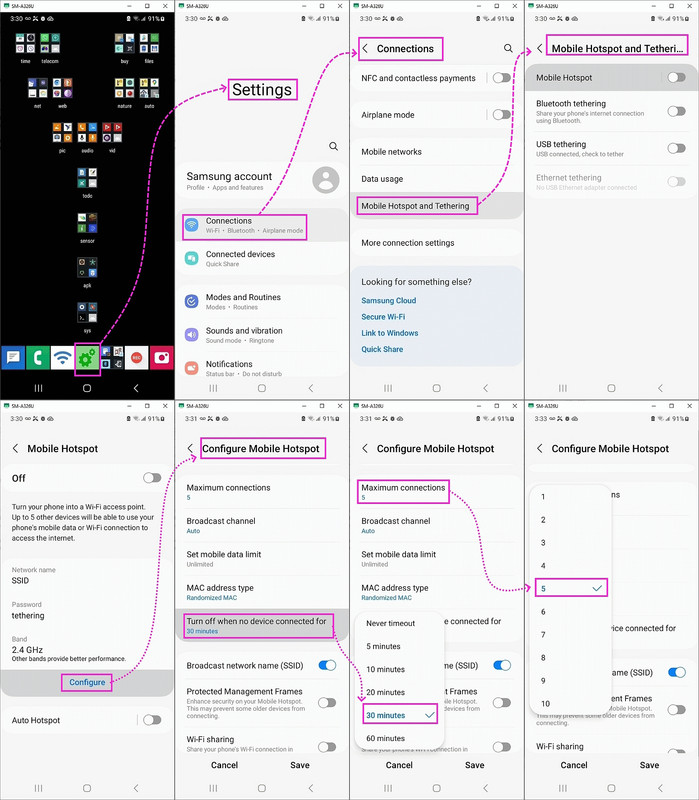
    <https://i.postimg.cc/nzyBm7jP/hotspot.jpg>

    In fact, there are two logical settings in that screenshot it might be.

    --- SoupGate-Win32 v1.05
    * Origin: fsxNet Usenet Gateway (21:1/5)
  • From Frank Slootweg@21:1/5 to bad sector on Sat Feb 8 11:10:34 2025
    bad sector <forgetski@_invalid.net> wrote:
    On 2/7/25 14:32, Frank Slootweg wrote:
    bad sector <forgetski@_invalid.net> wrote:
    I use my phone to provide a hotspot which tends to work but often stops
    working after I've done a bit of fumigating here and there. I haven't
    yet acquired the discipline to recheck the hotspot funcionality after
    every settings change so I wonder if anyone can suggest of short list of >> those most likely to monkeywrench my efforts. As far as I'm concerned if >> anything has made the hotspot (or any other optional feature) unusable
    then that switch should be ghosted, something I have never seen it do.

    The one which bit me was an unexpected data limit, specifically for
    the hotspot.

    As you have a Sumsung - *always* mention your brand, model and Android version -, I probably can give you somewhat specific instructions:

    Settings -> Connections -> Mobile Hotspot and Thethering -> Mobile Hotspot -> Configure -> Advanced -> Set mobile data limit

    HTH.

    It's a zFlip5, One-UI-6.1.1 & Android-14 (what's the diffeence beteween
    1UI and Android?) Provider data limit is high, phone data limit and
    phone data-warning are OFF. What I meant was that after initial setup
    and launch, with no data limit reached and internet connection working
    very nicely, one or more OTHER settings eventally cause the hot-spot to
    stop connectiong to the internet. That at least is what I suspect
    because at such times a factory reset fixes the problem. If I can flag
    any such settings then I might be able to manage them.

    Yes, I fully understood all that. The *point* is that there is a
    *seperate* data-limit setting, just for the hotspot feature. So it does
    not matter if your "Provider data limit is high" and "phone data limit
    and phone data-warning are OFF". If the *hotspot* data-limit setting is
    set, the hotspot will disconnect when *that* limit is reached.

    However the fact that a factory reset 'fixes' the problem indicates
    that this setting is probably not the problem, but check it anyway, so
    you can rule it out.

    BTW, One UI is Samsung's User Interface, mainly for the Home screen
    and Apps screens. It sits - sort off - on top of Android. Often a
    particular One UI version goes with a particular Android version, but it
    can't hurt to mention both. For example I have Android 13 and One UI 5.1.

    --- SoupGate-Win32 v1.05
    * Origin: fsxNet Usenet Gateway (21:1/5)
  • From Marion@21:1/5 to Frank Slootweg on Sat Feb 8 18:40:09 2025
    On 8 Feb 2025 11:10:34 GMT, Frank Slootweg wrote :


    Yes, I fully understood all that. The *point* is that there is a
    *seperate* data-limit setting, just for the hotspot feature. So it does
    not matter if your "Provider data limit is high" and "phone data limit
    and phone data-warning are OFF". If the *hotspot* data-limit setting is
    set, the hotspot will disconnect when *that* limit is reached.

    I agree with Frank and showed a screenshot of my Samsung where there were
    at least two extremely obvious ways that what the OP is seeing could occur.
    <https://i.postimg.cc/nzyBm7jP/hotspot.jpg>

    Until/unless the OP responds by checking his settings, we will only to
    continue to pedal without the gears being engaged in forward motion.

    However the fact that a factory reset 'fixes' the problem indicates
    that this setting is probably not the problem, but check it anyway, so
    you can rule it out.

    I'm mainly responding to this post because it would seem to me that the statement above I would make differently, since I would think a factory
    reset would *definitely* change the two settings that I showed above.

    If I'm right, then a factory reset would cure the problem if it resets
    those two settings to a default which doesn't limit time or connections.

    BTW, One UI is Samsung's User Interface, mainly for the Home screen
    and Apps screens. It sits - sort off - on top of Android. Often a
    particular One UI version goes with a particular Android version, but it can't hurt to mention both. For example I have Android 13 and One UI 5.1.

    My screenshots above are on One UI version 5.1, where I'm sure Frank is
    aware of this but maybe others who aren't on Samsungs might not know that
    you can change the app launcher (e.g., I use the last known good version of Nova) so I've never used the main portion of One UI customizations.

    But Samsung still sticks tons of settings into the Android settings.

    --- SoupGate-Win32 v1.05
    * Origin: fsxNet Usenet Gateway (21:1/5)
  • From bad sector@21:1/5 to Marion on Sat Feb 8 15:52:11 2025
    On 2/7/25 18:52, Marion wrote:
    On Fri, 7 Feb 2025 15:38:59 -0500, bad sector wrote :


    What I meant was that after initial setup and launch, with no data
    limit reached and internet connection working very nicely, one or more
    OTHER settings eventally cause the hot-spot to stop connectiong to the
    internet.

    I don't use hotspotting all that much, even though T-Mobile gives me 5GB
    per month per line for free but, being kind hearted & purposefully helpful,
    I looked at my Samsung Galaxy settings to find one setting it might be... <https://i.postimg.cc/nzyBm7jP/hotspot.jpg>

    In fact, there are two logical settings in that screenshot it might be.

    Thanks for the screenshots, I'm still many miles from that ability.

    Thunderbird shows only two of my postings so if there were more I cannot crosscheck. My 'provider' limit is 100gb, it's my main internet
    connection (I have another one that is extremely unreliable). Only once
    have I bustred that limit in the last three days of the month.


    On my phone the settings come up under:

    ....Settings/Connections/Data usage

    Under Data usage thee are:

    ...Data saver (OFF)
    ...Allowed networks for apps
    (incoherent, is it networks or apps allowed?)
    ...Mobile data (ON/OFF)
    (should be auto ON if hotspot is ON)
    ...Mobile data usage
    ...lists programs that have used data
    ...Billing cycle and data warning
    ...Set data warning (OFF)
    ...Set data limit (OFF)
    ...Set limit if data limit above is ON

    So in this exercise I have already seen more fuckups than I care to
    list. Point being that if the hotspot is not working for ANY reason of 'settings' then the switch should be or become ghosted. This is the crux
    of my problem. I get the thing going, then I merrily go and do some
    fumigation 'like' like deleting the entire google or samsung bubble, the hotspot switch is still on but the connection is dead. There is an alert produced by my computer OS (all of them Linux) that the connection is
    enabled but is unable to connect to the internet. This alert should
    exist ONLY if I had switched the hot-spot OFF but the cell network was
    down (something that also happens far too regularly with shithole Telus
    but that's an entirely other topic). Not being all that familiar with
    Android, when the above situation exists I have to go through all
    related settings (without really knowing them) to find out why. This
    should not be necessary, Google puke.

    --- SoupGate-Win32 v1.05
    * Origin: fsxNet Usenet Gateway (21:1/5)