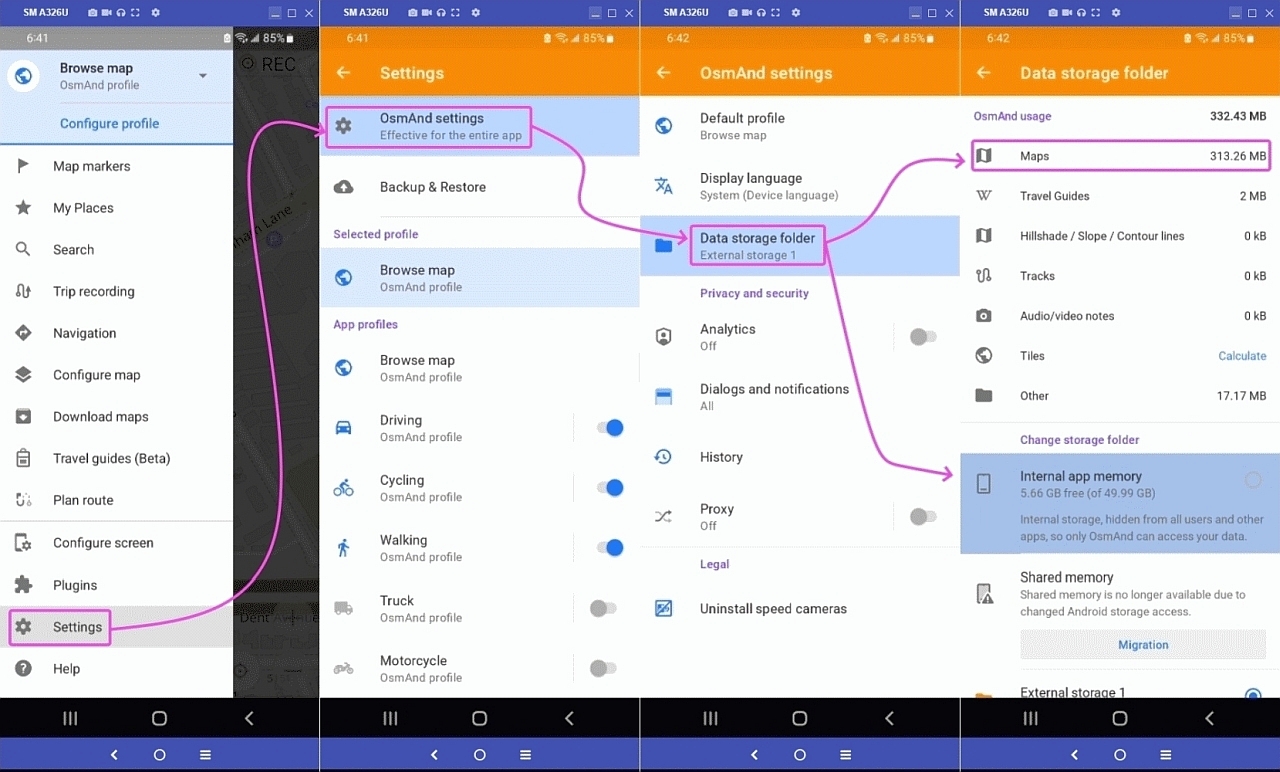
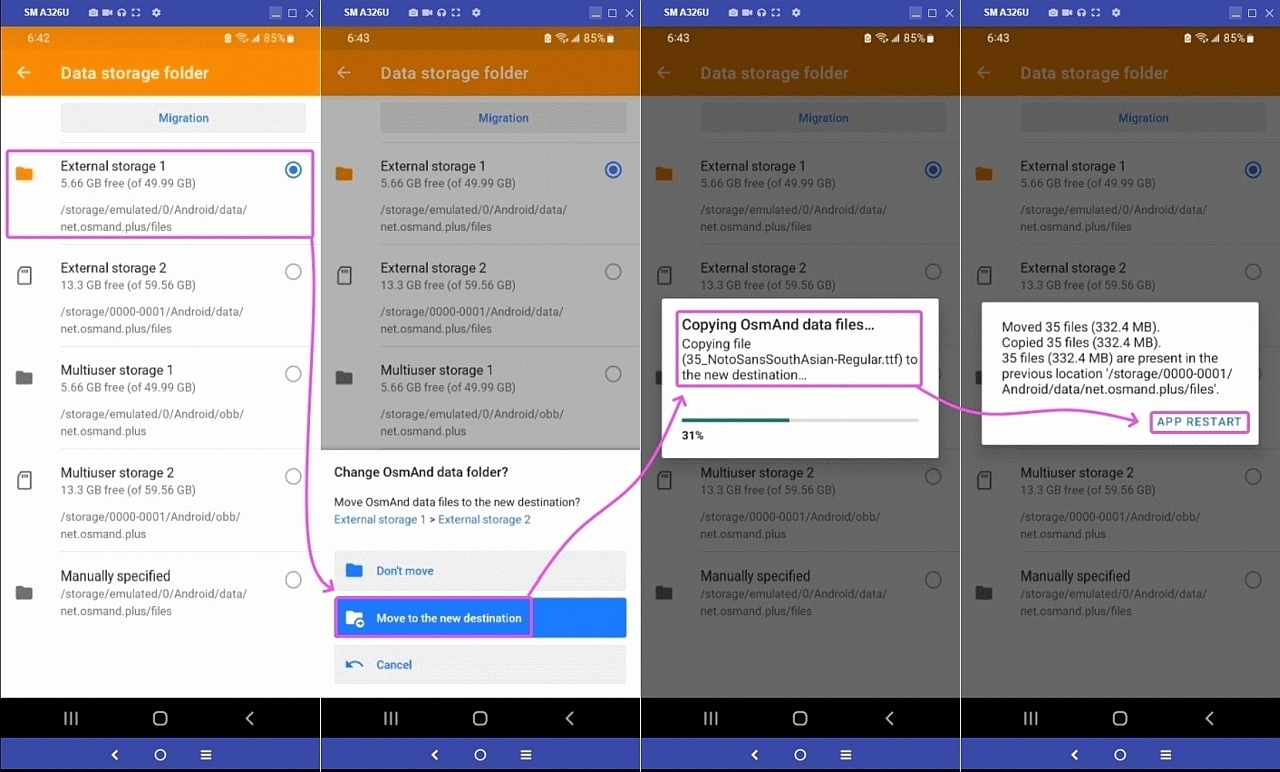
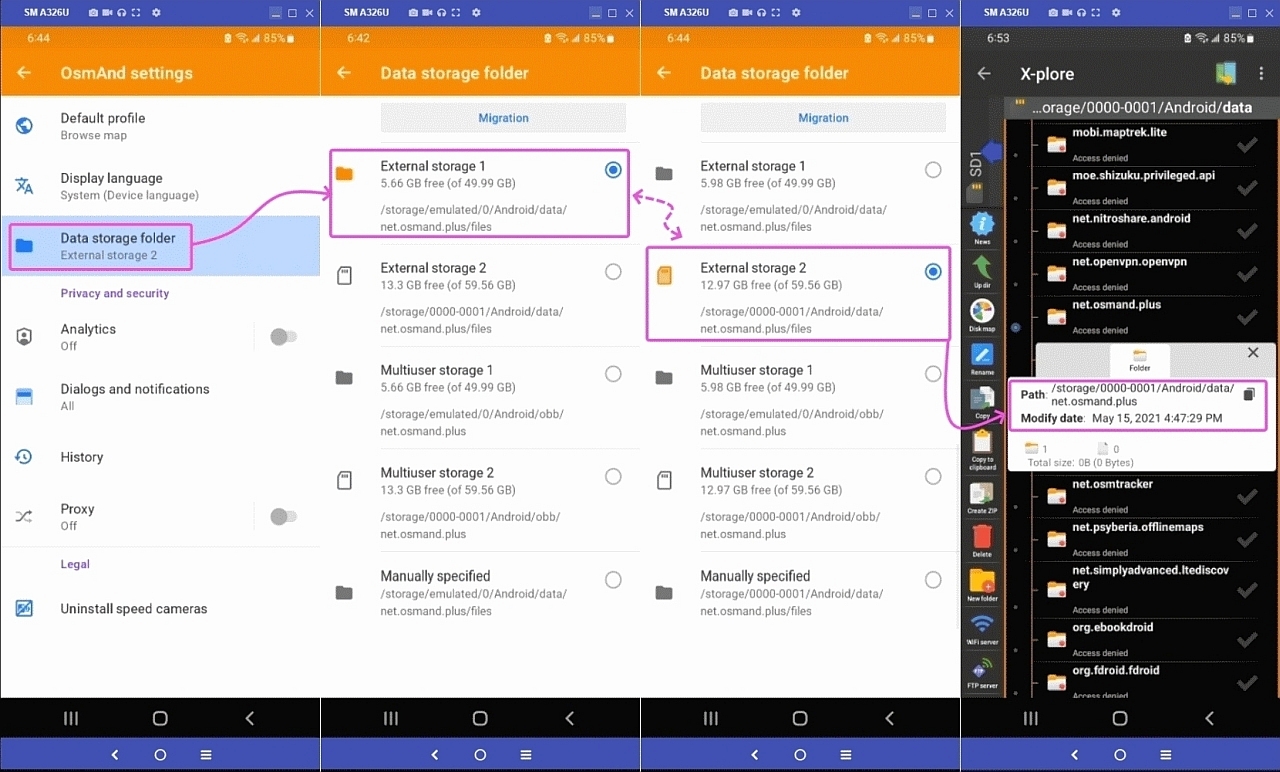
it was your choice to NOT have an sd card slot...
Q: How do you double your portable storage when you need to, Andy?
A: ?
You can't, right?
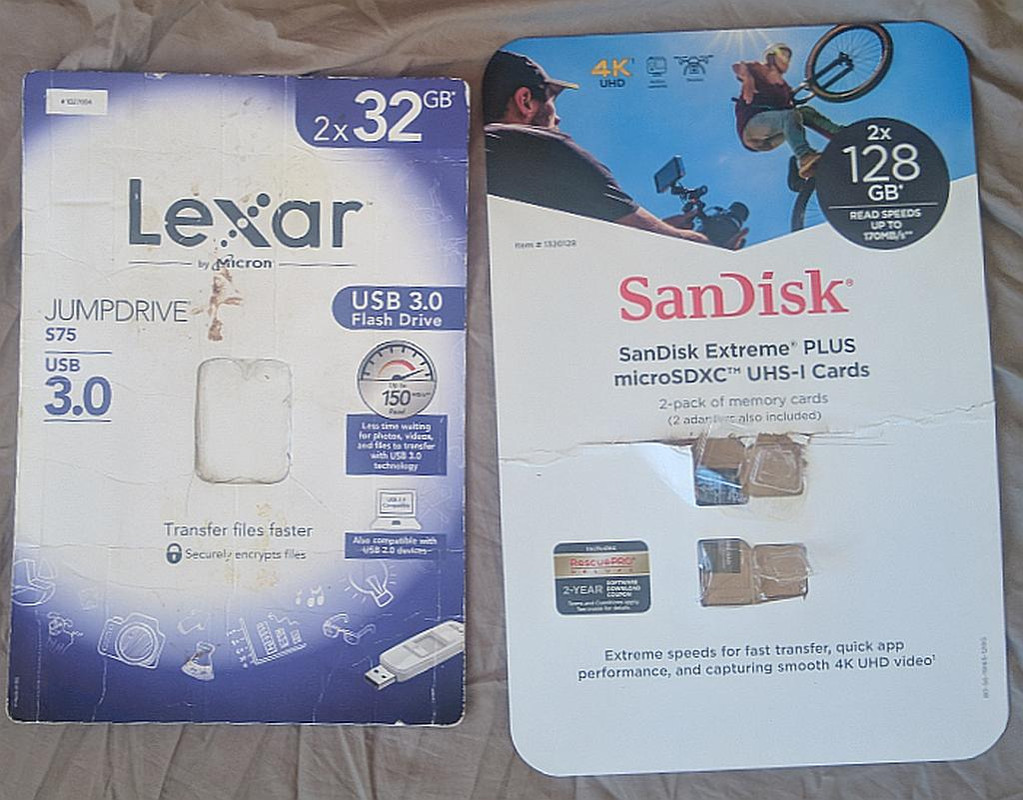
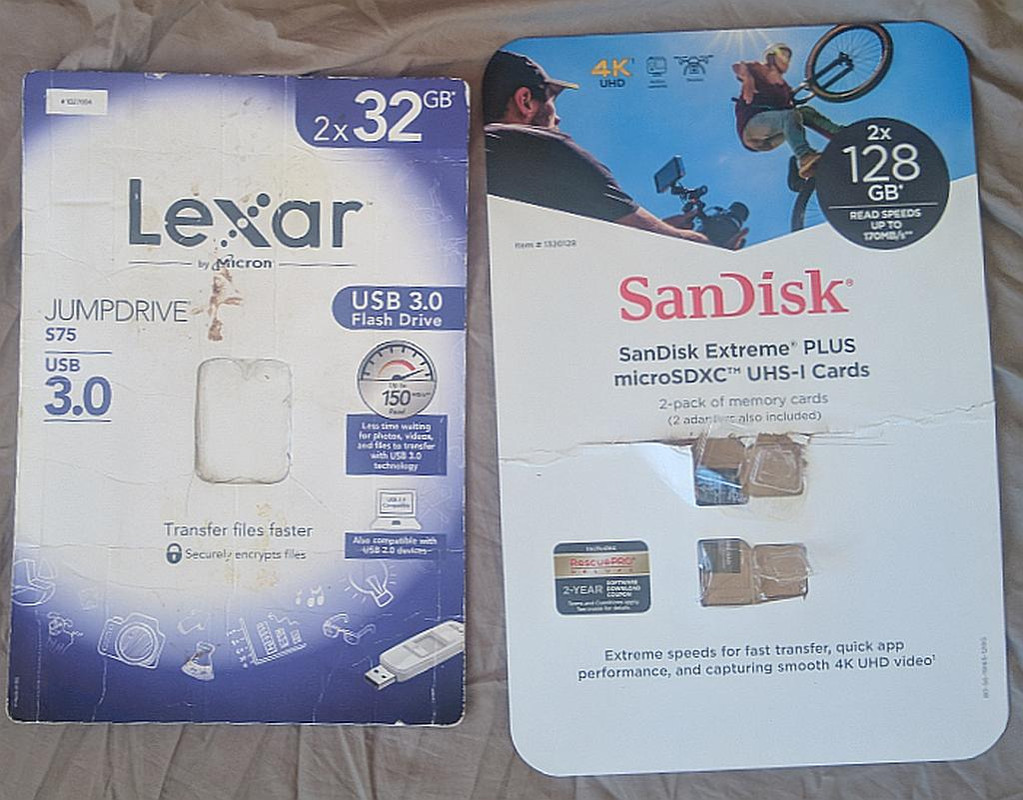
For about $10, I (we) can.
Pixel8a.
In all fairness to Andy, whom I know to be an intelligent and thoughtful person, I belatedly realize that Andy seems to think the sd card has only
one purpose - which is to extend the memory of the Android phone.
Which is a worthless concept nowadays... I agree.
I partly helped Andy be confused because I interchangably used the word "storage" and "memory" where that's what threw Andy off the main track.
Marion wrote:
In all fairness to Andy, whom I know to be an intelligent and thoughtful
person, I belatedly realize that Andy seems to think the sd card has only
one purpose - which is to extend the memory of the Android phone.
Which is a worthless concept nowadays... I agree.
I partly helped Andy be confused because I interchangably used the word
"storage" and "memory" where that's what threw Andy off the main track.
I'm aware that with removable SDcards, you have a choice to "adopt" it
as an extension of the internal storage, or keep it separate as external
(and removable) card, no doubt you do the latter.
I just find I don't use my phone as portable storage, I have USB devices
or cloud storage for that.
Q: How do you double your portable storage when you need to, Andy?
A: ?
You can't, right?
For about $10, I (we) can.
That's right, I have to rely on the general increase of on-board storage
with new models. So far, I've never outpaced the manufacturer.
With the increase in Android support life to 7 years, I did consider purchasing the 256GB model, rather than the 128GB, but the price
increase was substantial.
I'm at 34% used, despite having made zero
effort to clean anything up since the migration from Pixel3 -> Pixel5a
Pixel8a.
22GB for apps
10GB for android itself
6GB of photos
5GB of temp files
1GB of videos
the rest is in the noise.
I'm aware that with removable SDcards, you have a choice to "adopt" it
as an extension of the internal storage, or keep it separate as external
(and removable) card, no doubt you do the latter.
I just find I don't use my phone as portable storage, I have USB devices
or cloud storage for that.
The last two or three phones I bought, the memory card slot doubles use
as SIM card #2 holder, and that is way more important to me than an
extra card (1). I do not need it, and in the case I would, I would plug
an external USB stick into an appropriate extender cable. I have done
this in the past.
(1) And I did not find phones with three slots in the brands I looked at.
Frank Slootweg wrote:
My 4 1/2 year old Samsung Galaxy A51 has three slots, but I have
also not yet needed an SD-card, still nearly half of the 128GB are
free.
However newer comparable Samsung models have indeed 'only' two
slots, where second slot is SIM or SD-card.
Has the third slot been replaced with the capability of using an eSIM?
My 4 1/2 year old Samsung Galaxy A51 has three slots, but I have
also not yet needed an SD-card, still nearly half of the 128GB are
free.
However newer comparable Samsung models have indeed 'only' two
slots, where second slot is SIM or SD-card.
On Sat, 1 Feb 2025 19:17:31 +0000, Andy Burns wrote :
And what are the privacy implications of your editor using someone else's computer to store the files that rightly belong on your personal device?
I feel sorry for people who store their editing files on someone else's computer simply because I'm well aware of the privacy & cost implications.
But I certainly fully & completely understand your position that you don't need to pop out an sd card (nor can you on your phone) to double storage.
Still... most Android phones have an sd card slot for a good reason...
(as not everyone is wealthy enough to throw away their phone every few
years or to pay thousands just so they don't have to throw it away).
In summary, you don't need it because you're wealthy enough to buy a new phone every few years and/or to buy increased cloud storage forever at an immense cost over that of an sd card (with some added lost-phone benefits).
But not everyone is that wealthy...
And what are the privacy implications of your editor using someone else's
computer to store the files that rightly belong on your personal device?
I never need to do that.
If I had to, I would use a google editor on the cloud (which you hate),
or a new account at my host computer.
And that would be very strange, as I travel with my laptop.
But not everyone is that wealthy...
My phone is already 2 years old, I expect to use it for two years more,
and I don't pay cloud storage.
I have never needed or felt the inclination to edit things in my phone.
At least not heavy memory things, just notes. Editing is done in my
computer.
Frank Slootweg wrote:
My 4 1/2 year old Samsung Galaxy A51 has three slots, but I have
also not yet needed an SD-card, still nearly half of the 128GB are
free.
However newer comparable Samsung models have indeed 'only' two
slots, where second slot is SIM or SD-card.
Has the third slot been replaced with the capability of using an eSIM?
what about the cost & privacy implications of permanent cloud storage?
How much does 256GB of that cloud storage cost anyway?
On Sat, 1 Feb 2025 21:42:57 +0100, Carlos E.R. wrote :
And what are the privacy implications of your editor using someone
else's
computer to store the files that rightly belong on your personal device?
I never need to do that.
Hi Carlos,
This is a good offshoot, which, let's be clear, we've dropped the Windows & Editor folks from, so everything I say below is related mainly to Android.
It's fine that you don't need to edit your files, but I was merely
addressing Andy's cloud-storage concerns, where Andy said that he could use either USB storage or cloud storage instead of sdcards.
They're not the same thing.
In fact, they're *completely* different things.
Worse, he can only do one of those two very different things.
With sdcards, I can do both.
If I had to, I would use a google editor on the cloud (which you
hate), or a new account at my host computer.
I don't "hate" the cloud, as, let's be frank, all of us store our email on the cloud, don't we? (Even with POP it's still "on the cloud" for a while).
I just hate spending two thousand dollars to do what ten dollars will do.
And I don't like not being able to do whatever it is that I want to do.
What I was explaining to Andy is that cloud storage is completely
*different* in fundamental ways such that it's NOT interchangeable with sdcards.
In fact, I've had "that" discussion many times with the people on the Apple newsgroup who have no idea how *different* cloud storage is from sd
storage.
They're completely different. They're not interchangeable.
And that would be very strange, as I travel with my laptop.
Hmm... almost everyone travels, nowadays, with both a phone & a laptop.
Some people travel with more electronics than that (e.g., watches too).
I presume you mean you edit files using your laptop rather than using your phone - which is completely understandable. In fact, my Android is *always* mirrored on my PC screen, so, in effect, even when I'm seemingly editing files on my phone, I'm using the PC mouse, keyboard, speakers & clipboard
to "edit" files on Android. <https://i.postimg.cc/N0G1TXcZ/scrcpy01.jpg>
But those Android files that I'm editing from the PC are *stored* on the portable storage card - which is what I double/quadruple from now & then.
Andy and you can double or quadruple your cloud storage also, but at the
cost of thousands of dollars compared to my cost of around ten US bucks.
And with a risk of losing your privacy (but the advantage is you aren't likely to lose your data unless you stop paying the subscription fees).
But not everyone is that wealthy...
My phone is already 2 years old, I expect to use it for two years
more, and I don't pay cloud storage.
Good. Not everyone is wealthy enough to waste the earth's resources, and
I'm certainly not one to claim that I am wealthy enough to replace my phone every couple of years (which Apple people always seem to claim they do).
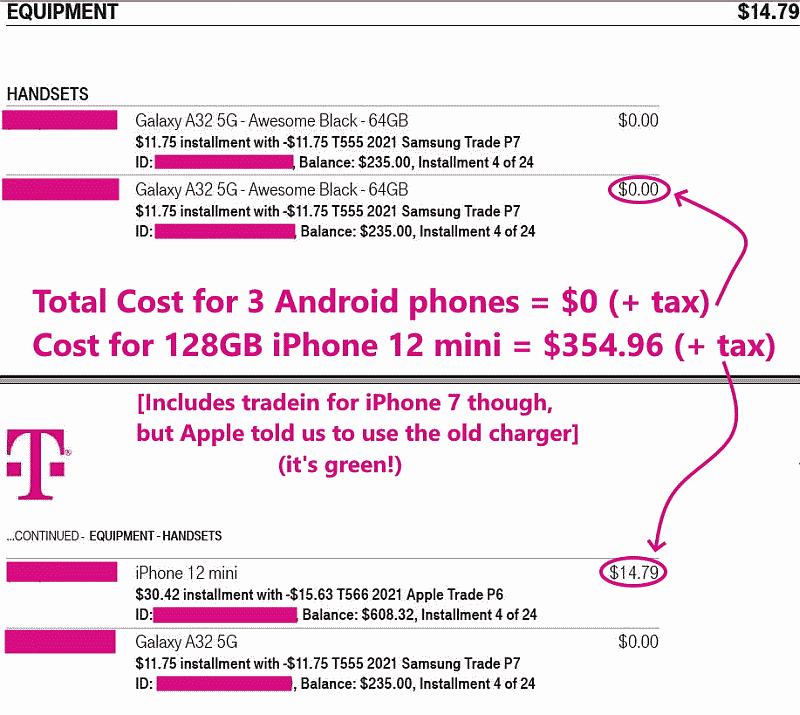
My phone, as everyone well knows, came to me in a handful, for free, by T-Mobile, way back in early 2021, and all three are still going strong. <https://i.postimg.cc/Xq5SpS4D/tmopromo02.jpg>
Let's be clear that one of the reasons they're all still going strong is
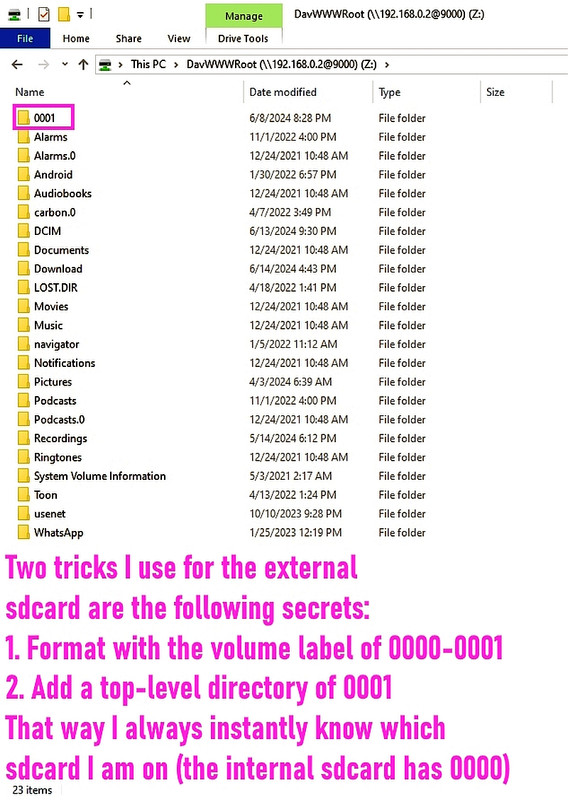
that I've been able to double & quadruple the external storage over time. <https://i.postimg.cc/j2VCtRPX/sdcard02.jpg>
This trick I'm trying to help others appreciate, is what allows me to *seamlessly* double or triple that external portable storage over time.
The word "seamless" is the important point.
It's accomplished by modifying the Volume Name (aka Volume Label).
As Android editors apparently use the Volume Name to find their files.
I have never needed or felt the inclination to edit things in my
phone. At least not heavy memory things, just notes. Editing is done
in my computer.
Hmm. How do you save a track & then edit that track when you are in the backcountry hiking & therefore you can't hope to have Internet access?
How do you add a new entry (or change an old entry) in your kdbx files?
Where do you store the (rather huge) databases that map editors save?
I don't "hate" the cloud, as, let's be frank, all of us store our email on >> the cloud, don't we? (Even with POP it's still "on the cloud" for a while).
I referred to me using the google editor with google cloud, which is
gratis unless you exceed the quota of 15 gigs.
I did this once, to use
the feature of two people simultaneously editing the same file, across
the pond.
Andy and you can double or quadruple your cloud storage also, but at the
cost of thousands of dollars compared to my cost of around ten US bucks.
I intentionally never edit a file stored in a flash card or usb dongle.
I edit the file on the computer, and when finished, copy it over, if
there is a need.
This trick I'm trying to help others appreciate, is what allows me to
*seamlessly* double or triple that external portable storage over time.
Ok, but many people do not need to do that :-)
Nor would I intentionally label several cards with the same name.
I want them different.
Hmm. How do you save a track & then edit that track when you are in the
backcountry hiking & therefore you can't hope to have Internet access?
I don't do that. Never felt that need.
How do you add a new entry (or change an old entry) in your kdbx files?
Where do you store the (rather huge) databases that map editors save?
I've never done that. Ok, you are editing maps. Finally, we know what
you are doing and things start to click in place :-)
I'd probably use a tablet in that case, perhaps with a flash card, which
in my tablet is easily accessible. Big display.
What I love about Android phones, as compared to Apple iPhones, is
Apple puts the cheapest possible battery into every iPhone,
to the point that my free ($200 MSRP) Android has a far better
battery than any iPhone ever made.
On Sun, 2 Feb 2025 14:41:48 +0100, Carlos E.R. wrote :
Nor would I intentionally label several cards with the same name. I
want them different.
I fully understand, and, in fact, for years, especially since nobody can remember the crazy default volume names anyway, what I used to do was label each card by the date that they were put in service, such as (for today): 2025-0202 (for February 25th, 2025)
But what happened was I slept on my first T-Mobile free phone, and it broke the port (somehow) so I had T-Mobile replace it - and when I popped the old card into the new phone, the old card was formatted with a name such as: 2021-0501 (for May 1st, 2021)
As a result, our beloved {OSMAnd~,OSMAnd+,OSMAnd} editor stopped finding
the gpx, kml, waypoint and map files painstakingly stored on that sdcard.
That's when I realized the "trick" would work, so when I next doubled the size of the sdcard from 32GB to 64GB, I used the trick and it worked.
What I love about Android phones, as compared to Apple iPhones, is
Apple puts the cheapest possible battery into every iPhone,
Just replaced the wife's iPhone 12 after 4+ years because the battery
was going soft. I really can't complain getting 4+ years out of a
phone. I of course could have replaced the battery for around $30 US
(Amazon) but instead got her a new iPhone 16. Happy wife, happy life.
to the point that my free ($200 MSRP) Android has a far better
battery than any iPhone ever made.
But my 5+ year old Samsung Galaxy S10+ battery is not yet showing any problems (admittedly for my light use) so (in this example of one) your
point is made. But darn, that means no new phone for me... :-(
Ok, now that I understand what type of editor you are talking about and
the scenario,
I can agree that changing the label of the card is the thing to do.
It is a particular scenario.
Then, remember that you can just edit the label to anything without formatting, in Windows. There is a "label" command in MsDOS that should
still be able to do the trick.
That said, it happens that I can not quadruple the storage in my tablet, because the maximum size it accepts is not that large.
On Sun, 2 Feb 2025 13:20:17 -0700, AJL wrote :
What I love about Android phones, as compared to Apple iPhones,
is Apple puts the cheapest possible battery into every iPhone,
Just replaced the wife's iPhone 12 after 4+ years because the
battery was going soft. I really can't complain getting 4+ years
out of a phone. I of course could have replaced the battery for
around $30 US (Amazon) but instead got her a new iPhone 16. Happy
wife, happy life.
As for the iPhone, we had an iPhone 12 mini which was recently
upgraded but the $89 cost of Apple replacing the battery wasn't
anywhere near the $30 you quoted. Did you perhaps not have Apple
replace the battery for you?
As for the iPhone, we had an iPhone 12 mini which was recently
upgraded but the $89 cost of Apple replacing the battery wasn't
anywhere near the $30 you quoted. Did you perhaps not have Apple
replace the battery for you?
I would have replaced the iPhone battery myself.
On Amazon they go for between $11 and $30 US.
And most would have been delivered on my
doorstep tomorrow morning. Amazing service. They come with tools and instructions.
It's not that hard to do. I replaced one in one of the wife's earlier iPhones. For no apparent reason the battery swelled up like a balloon
causing the case to pop open. Surprisingly the phone still worked. I
left it on a cookie sheet for calls (in case of fire) until the new
battery arrived and was installed.
I now have the wife's old iPhone 12 to play with (another toy) and may splurge and install a new battery. Probably the $11 one...
On Sun, 2 Feb 2025 17:01:45 -0700, AJL wrote :
As for the iPhone, we had an iPhone 12 mini which was recently
upgraded but the $89 cost of Apple replacing the battery wasn't
anywhere near the $30 you quoted. Did you perhaps not have Apple
replace the battery for you?
I would have replaced the iPhone battery myself. On Amazon they go
for between $11 and $30 US.
Apple historically requires you to "register" the battery,
which requires Apple-specific proprietary tools.
I don't pay a dime for all that stuff I order off of Amazon though. <https://amazon.com/vine/about>
But they do gross up my income with a 1099NEC for the imputed
charges. <https://accountinginsights.org/how-to-report-amazon-vine-1099-nec-income-on-your-taxes/>
It's not that hard to do. I replaced one in one of the wife's
earlier iPhones. For no apparent reason the battery swelled up
like a balloon causing the case to pop open. Surprisingly the
phone still worked. I left it on a cookie sheet for calls (in case
of fire) until the new battery arrived and was installed.
Hmm. Are you aware Apple settled that battery-swelling lawsuit last
week? <https://www.zdnet.com/article/the-20-million-apple-watch-settlement-could-mean-a-payout-for-you-heres-how-to-qualify/>
I would have replaced the iPhone battery myself. On Amazon they go
for between $11 and $30 US.
Apple historically requires you to "register" the battery,
IIRC there was a warning in "Settings" battery health that I had a
non-Apple battery installed. Wasn't a problem for me since I seldom
checked battery health.
which requires Apple-specific proprietary tools.
The iPhone replacement battery I bought came with non-Apple brand tools
just as the current crop of Amazon replacement batteries do according to
the listings.
I don't pay a dime for all that stuff I order off of Amazon though.
<https://amazon.com/vine/about>
You pay with your time.
But they do gross up my income with a 1099NEC for the imputed
charges.
<https://accountinginsights.org/how-to-report-amazon-vine-1099-nec-income-on-your-taxes/>
Yup. Your time is taxable when you're paid with "free" stuff for it.
It's not that hard to do. I replaced one in one of the wife's
earlier iPhones. For no apparent reason the battery swelled up
like a balloon causing the case to pop open. Surprisingly the
phone still worked. I left it on a cookie sheet for calls (in case
of fire) until the new battery arrived and was installed.
Hmm. Are you aware Apple settled that battery-swelling lawsuit last
week?
<https://www.zdnet.com/article/the-20-million-apple-watch-settlement-could-mean-a-payout-for-you-heres-how-to-qualify/>
I wasn't. But I see the recovery is $20 to $50 a phone. Hardly worth the effort even if I could remember which which earlier iPhone it was.
I recently filled out an online form for a similar Verizon lawsuit that
said I might get $100 US. I got a whopping $13. Waste of time...
Frank Slootweg wrote:"animal".
Carlos E.R. <robin_listas> wrote:
On 2025-02-03 14:09, Kenny McCormack wrote:
In article <m0br40Ff8v9U2>,
Arno Welzel <usenet> wrote:
...
I don't call an SSD a flash media.
Why not? SSD *is* flash storage. Just because there is a controller
which takes care of wear leveling, the storage technology itself is not
different to that of SD cards.
Chill out, man.
People often use terminology in idiosyncratic ways. That doesn't make them >> wrong. I understand Carlo's frame of reference, and I accept it. You
should do likewise.
Just for one example:
In some circles, unless it is a 4 footed mammal, it is not an
ambiguous terminology.
I assume Carlo's use of terminology is similar.
This minute, I do not know how to name SSDs. I'm confused.
To avoid this kind of senseless non-discussions, I tend to call things
as they are normally called, not by their technology. AFAIC, using the
term "flash card"/"flash media" is outdated and
So SSD, (Micro)SD-card, USB memory-stick (not just USB stick, as there
are other type of USB sticks), etc.. If needed, add the capacity or/and subtype (i.e. SD, SDHC, SDXC, SDUC). 'Problem' solved.
| Sysop: | Keyop |
|---|---|
| Location: | Huddersfield, West Yorkshire, UK |
| Users: | 764 |
| Nodes: | 16 (2 / 14) |
| Uptime: | 32:24:45 |
| Calls: | 12,756 |
| Calls today: | 4 |
| Files: | 15,359 |
| Messages: | 6,556,833 |