What can't you do on Android WITHOUT a Google Account set up in the OS?...
For example, YouTube app functionality can be replaced by the open-source NewPipe app, which does NOT need a Google Account set up on the phone.
What can't you do on Android WITHOUT a Google Account set up in the OS?
For example, YouTube app functionality can be replaced by the open-source NewPipe app, which does NOT need a Google Account set up on the phone.
Similarly, GMail app functionality can be replaced by the FairEmail app, which does NOT need a Google Account set up on the phone.
Andrew wrote:
What can't you do on Android WITHOUT a Google Account set up in the OS?
For example, YouTube app functionality can be replaced by the open-source NewPipe app, which does NOT need a Google Account set up on the phone.
Just using https://m.youtube.com/ would likely be good enough for most
people
To use a Fitbit, you need a Google account
Andy Burns <[email protected]> wrote:
Andrew wrote:
What can't you do on Android WITHOUT a Google Account set up in the OS?
For example, YouTube app functionality can be replaced by the open-source NewPipe app, which does NOT need a Google Account set up on the phone.
Just using https://m.youtube.com/ would likely be good enough for most people
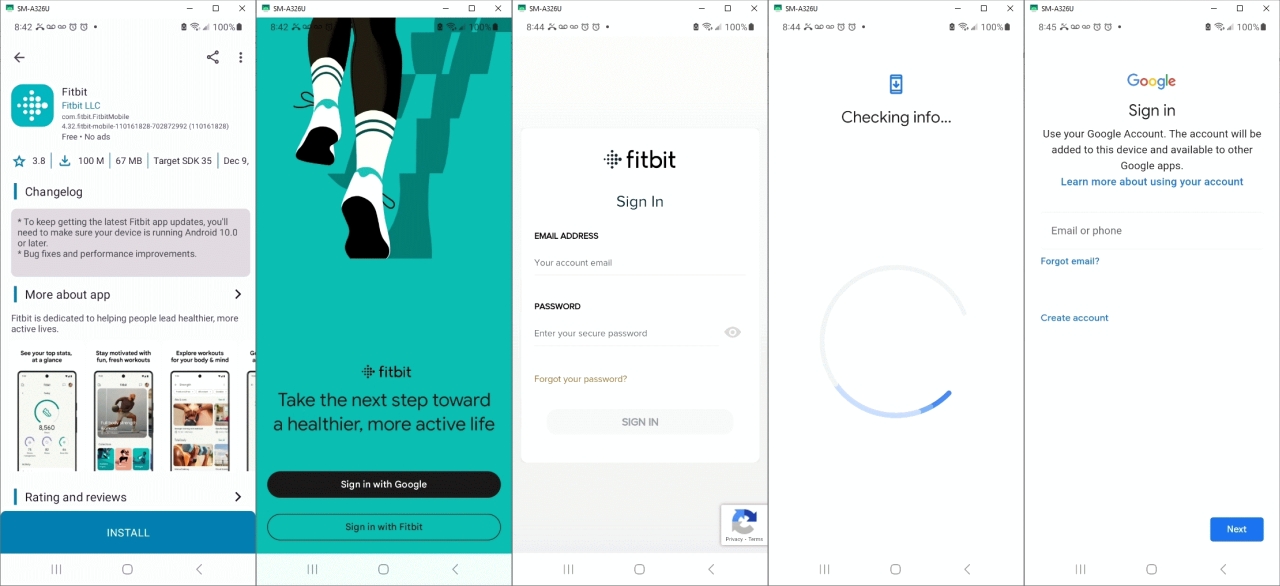
To use a Fitbit, you need a Google account (unless you have a legacy Fitbit account from years ago). To use the Fitbit app you need to sign in with the Google account, which installs the Google account centrally on the phone, which means that account infests the rest of the OS and gets used for other stuff (eg Play Services/Store).
If your phone vendor supports 'user profiles' you can make a new profile,
add the Google account there. Then it won't interfere with other profiles
and you can terminate the session by logging out after you're done.
Theo,
To use a Fitbit, you need a Google account
Which is a good reason no to use it.
I could imagine using an open-source or freeware map app in which you can locally(!) record the path you've walked (and calculate/estimate the total length of that path) ?
I could imagine using an open-source or freeware map app in which you can
locally(!) record the path you've walked (and calculate/estimate the
total length of that path) ?
Or people could go back to just taking a walk and stop trying
to document "ptogress" in all things. Tracking steps is about as
pitiful as it gets.
I have a TracFone with no Google account,[snip]
I'm amazed that these companies are allowed, legally, to exert such
control over a device I paid for.
But I think Arlen is missing the point, anyway.
Cellphone under surveillance is a lifestyle. If people use apps, gmail,
maps, Waze, dating, Fitbit, DoorDash, Uber, shopping apps....
That's all spyware. Most of it is tracking location.
Even just leaving the cellphone turned on means you're being tracked.
If you care about that then you don't live on a cellphone...
It's a choice. So many people want to know the best method for
maintaining privacy while telling 6 dozen corporations their
every move.
Andrew,
What can't you do on Android WITHOUT a Google Account set up in the OS?...
For example, YouTube app functionality can be replaced by the open-source
NewPipe app, which does NOT need a Google Account set up on the phone.
That fully depends on when you call a non-Google app a replacement for the Google one.
Example: On Windows there are several open-source replacements for Word and Excel. Some people reject them because they are not one-on-one replacements.
Also, do realize that as long as you are using Googles Android you are still part of their ecosystem (search for "google android advertising framework"). Perhaps start with replacing the OS with one which gives you the tools to tame badly-behaving apps ?
As for your question for us to deliver replacement apps for everything thats already on you phone and/or available in Googles "walled garden" : why don't you just take the name of the Google app you're interrested in, pre/append "open source" or perhaps "replacement" to it, drop it in your favorite search-engine (Google ? :-) ) and see what you get ?
Perhaps make a list of apps in order of importance to you first ?
Personally I would start with a sand-boxed non-google webbrowser with an adblocker (and plugin capabilities) and use that to access YouTube e.a.
To use a Fitbit, you need a Google account (unless you have a legacy Fitbit account from years ago). To use the Fitbit app you need to sign in with the Google account, which installs the Google account centrally on the phone, which means that account infests the rest of the OS and gets used for other stuff (eg Play Services/Store).
If your phone vendor supports 'user profiles' you can make a new profile,
add the Google account there. Then it won't interfere with other profiles
and you can terminate the session by logging out after you're done.
Theo,
To use a Fitbit, you need a Google account
Which is a good reason no to use it.
I could imagine using an open-source or freeware map app in which you can locally(!) record the path you've walked (and calculate/estimate the total length of that path) ?
Newyana2,[...]
I have a TracFone with no Google account,[snip]
I replaced android with graphene OS. The phone is switched off unless I
need it (when traveling). Its main app is OsmAND, a map program.
Theo,
To use a Fitbit, you need a Google account
Which is a good reason no to use it.
I tried LibreOffice for over a year. Too many functions missing, or
having to hunt for where they were buried, or goofy and often incomplete workarounds. LibreOffice didn't even have a handle at the corner of a
table to expand it to add a new row with the same attributes while also changing the data ranges in a linked chart. Had to go back to MS Office
for both Word and Excel.
I had not built any custom apps using VBA with any Office component, but those who do can't migrate to other office suites.
I've seen entire corporate applications built on Office and scripts
that don't look anything like the Office apps. Conversion away from
MS Office would take a lot of time and money. Similarly, if someone
built a custom program upon LibreOffice's scripting then a whole new
project would be needed to migrate to MS Office scripting.
Theo <[email protected]> wrote:
To use a Fitbit, you need a Google account (unless you have a legacy Fitbit account from years ago). To use the Fitbit app you need to sign in with the
Google account, which installs the Google account centrally on the phone, which means that account infests the rest of the OS and gets used for other stuff (eg Play Services/Store).
If your phone vendor supports 'user profiles' you can make a new profile, add the Google account there. Then it won't interfere with other profiles and you can terminate the session by logging out after you're done.
I thought all accounts were globally defined. That's why when you add a
new app with an existing account, it is found from the list in Android.
Any app having you add another account then adds it to the Accounts list
in Android. Not just Fitbit does this.
Android settings -> General -> Accounts
Theo <[email protected]> wrote:
To use a Fitbit, you need a Google account (unless you have a legacy Fitbit account from years ago). To use the Fitbit app you need to sign in with the
Google account, which installs the Google account centrally on the phone, which means that account infests the rest of the OS and gets used for other stuff (eg Play Services/Store).
Are you sure about that? Can't you just use a Google account to login
into the *app*, instead of into the *system*/OS? Many apps have such functionality, i.e. an app-specific login, so I wouldn't know why the
Fitbit app would be any different.
"R.Wieser" <[email protected]d> wrote:
Theo,
To use a Fitbit, you need a Google account
Which is a good reason no to use it.
And what would be the suggested alternative that does not require ANY
account anywhere while still just as robust, or even more robust, in features? What is better than Fitbit, but with no account? Didn't
those extra/premium services require a Fitbit account (now a Google
account)? Do the better than Fitbit alternatives also have availability
of those extra services, too?
When someone says "Fitbit", I think of the device on my wrist, not of
the app on a phone. I think "Fitbit" to the OP meant the app. I'm
still using the Fitbit device without any Fitbit app on my old phone.
The device still works by itself. I don't need "To make full use of the Fitbit products and services", because I never used those extras. And
now their app won't install on my old phone, so the Fitbit device has
nowhere to communicate, anyway.
What are those extra "Fitbit services" that I never needed nor wanted?
When I did have the app, I never had to activate the device. I just
paired the device to the app, and that was it.
VanguardLH <[email protected]> wrote:
When I did have the app, I never had to activate the device. I just
paired the device to the app, and that was it.
You can't pair to the app without a Google account. 'Sign in' is the
very first screen.
I have a TracFone with no Google account,[snip]
I replaced android with graphene OS. The phone is switched off unless I
need it (when traveling). Its main app is OsmAND, a map program.
I'm amazed that these companies are allowed, legally, to exert such
control over a device I paid for.
I hope you're not running Win10/11, which has become nothing more than a thick ethernet client and doubling as an advertising platform. :-)
What can't you do on Android WITHOUT a Google Account set up in the OS?
I had a Fitbit 2, and now a Fitbit Luxe. Doesn't upload anything to any account. I never bought any premium services. I don't need all those
extras for how I use it. The only "extra" I enabled was to pair the
Fitbit to my smart phone via Bluetooth to transfer data from device to Android app. Don't need an online account for that.
VanguardLH <[email protected]> wrote:
[...]
I had a Fitbit 2, and now a Fitbit Luxe. Doesn't upload anything to any
account. I never bought any premium services. I don't need all those
extras for how I use it. The only "extra" I enabled was to pair the
Fitbit to my smart phone via Bluetooth to transfer data from device to
Android app. Don't need an online account for that.
I don't know what a "Fitbit 2" is, probably a "Fitbit <something> 2"
where "<something>" is the relevant part.
Anyway, I always needed a Fitbit account for our Fitbits (Alta HR,
Charge 4, Charge 5 and Charge 6). Without an account, the Fitbit won't
sync, also not to the Fitbit app on the phone. And to sync, it needs an Internet connection. Stupid design, but that's the way it is.
So, on the phone, do you use the Fitbit app or another app, if so
which one?
I think my <insert_loved_one> has a Fitbit Luxe (on an iPhone). I've
to ask her what she needs to sync. I know they have a Fitbit Family
account together with her <insert_smaller_loved_one>.
[...]
I replaced android with graphene OS. The phone is switched off unlessI don't think I can do that with TacFone,
I need it (when traveling). Its main app is OsmAND, a map program.
I have Win11 installed for testing software. I haven't allowed it
online and haven't done much with it.
Moral of the story, to my mind: Win10 is mostly OK but very brittle
and very bloated.
So that seems to be further evidence that MS are punishing tweaks.
I replaced android with graphene OS. The phone is switched off unless I
need it (when traveling). Its main app is OsmAND, a map program.
...What can't you do on Android WITHOUT a Google Account set up in the OS?
Good luck igniting another flame war, Arlen :-)
You may have replaced the original Android OS in whatever Pixel you're
using with GrapheneOS, but it's still Android.
I've always understood that GrapheneOS is Android that's been "degoogled"
Newyana2,[...]
I'm amazed that these companies are allowed, legally, to exert such
control over a device I paid for.
I hope you're not running Win10/11, which has become nothing more than a thick ethernet client and doubling as an advertising platform. :-)
On 2025-01-01 19:59, Frank Slootweg wrote:
VanguardLH <[email protected]> wrote:
[...]
I had a Fitbit 2, and now a Fitbit Luxe. Doesn't upload anything to any >> account. I never bought any premium services. I don't need all those
extras for how I use it. The only "extra" I enabled was to pair the
Fitbit to my smart phone via Bluetooth to transfer data from device to
Android app. Don't need an online account for that.
I don't know what a "Fitbit 2" is, probably a "Fitbit <something> 2" where "<something>" is the relevant part.
Anyway, I always needed a Fitbit account for our Fitbits (Alta HR, Charge 4, Charge 5 and Charge 6). Without an account, the Fitbit won't sync, also not to the Fitbit app on the phone. And to sync, it needs an Internet connection. Stupid design, but that's the way it is.
So, on the phone, do you use the Fitbit app or another app, if so
which one?
Google Fit.
I think my <insert_loved_one> has a Fitbit Luxe (on an iPhone). I've
to ask her what she needs to sync. I know they have a Fitbit Family
account together with her <insert_smaller_loved_one>.
[...]
Carlos,
What can't you do on Android WITHOUT a Google Account set up in the OS? ...Good luck igniting another flame war, Arlen :-)
I think you are misjudging arlen here. Its more than likely he really wants to know what he asked for.
Carlos E.R. <[email protected]d> wrote:
On 2025-01-01 19:59, Frank Slootweg wrote:
VanguardLH <[email protected]> wrote:
[...]
I had a Fitbit 2, and now a Fitbit Luxe. Doesn't upload anything to any >>>> account. I never bought any premium services. I don't need all those >>>> extras for how I use it. The only "extra" I enabled was to pair the
Fitbit to my smart phone via Bluetooth to transfer data from device to >>>> Android app. Don't need an online account for that.
I don't know what a "Fitbit 2" is, probably a "Fitbit <something> 2" >>> where "<something>" is the relevant part.
Anyway, I always needed a Fitbit account for our Fitbits (Alta HR,
Charge 4, Charge 5 and Charge 6). Without an account, the Fitbit won't
sync, also not to the Fitbit app on the phone. And to sync, it needs an
Internet connection. Stupid design, but that's the way it is.
So, on the phone, do you use the Fitbit app or another app, if so
which one?
Google Fit.
Are you sure? The Google Fit entry on the Google Play site [1] doesn't even mention Fitbit in its list of devices and its website [2] doesn't
list any devices.
I always thought that *other* *apps* (not devices), could talk to
Google Fit and that Google Fit then showed a consolidation of all the
data.
IIRC, I used Google Fit in the past, but I can't remember with which app/service/device.
I think my <insert_loved_one> has a Fitbit Luxe (on an iPhone). I've >>> to ask her what she needs to sync. I know they have a Fitbit Family
account together with her <insert_smaller_loved_one>.
[...]
[1] <https://play.google.com/store/apps/details?id=com.google.android.apps.fitness>
[2] <https://www.google.com/fit/>
Frank Slootweg <[email protected]d> wrote:
Theo <[email protected]> wrote:
To use a Fitbit, you need a Google account (unless you have a
legacy Fitbit account from years ago). To use the Fitbit app you
need to sign in with the Google account, which installs the Google account centrally on the phone, which means that account infests
the rest of the OS and gets used for other stuff (eg Play Services/Store).
Are you sure about that? Can't you just use a Google account to login into the *app*, instead of into the *system*/OS? Many apps have such functionality, i.e. an app-specific login, so I wouldn't know why the Fitbit app would be any different.
It shows under Settings -> Accounts, and the Play Store uses it without asking. There's no way to sign out of it apart from deleting it from the phone. If I do that the Fitbit app stops working and wants a sign in again.
Theo <[email protected]> wrote:
Frank Slootweg <[email protected]d> wrote:
Theo <[email protected]> wrote:
To use a Fitbit, you need a Google account (unless you have a
legacy Fitbit account from years ago). To use the Fitbit app you
need to sign in with the Google account, which installs the Google account centrally on the phone, which means that account infests
the rest of the OS and gets used for other stuff (eg Play Services/Store).
Are you sure about that? Can't you just use a Google account to login into the *app*, instead of into the *system*/OS? Many apps have such functionality, i.e. an app-specific login, so I wouldn't know why the Fitbit app would be any different.
It shows under Settings -> Accounts, and the Play Store uses it without asking. There's no way to sign out of it apart from deleting it from the phone. If I do that the Fitbit app stops working and wants a sign in again.
So you already had a Google account on the phone and used that for the Fitbit app, so you can no longer remove the account from the phone
(Settings) and use the Fitbit app with the *same* Google account.
But the scenario I was talking about was: Phone *without* a Google
account (after all, that's the subject of this thread). User wants to
use Fitbit app. Fitbit app wants a Google account. My suggestion:
Create/have a Google account, do *not* use it for the *phone* (i.e. it's
not in Settings) and just use it to login into the *Fitbit app*. I see
no reason why that shouldn't work.
What can't you do on Android WITHOUT a Google Account set up in the OS?
To use a Fitbit, you need a Google account (unless you have a legacy Fitbit account from years ago). To use the Fitbit app you need to sign in with the Google account, which installs the Google account centrally on the phone, which means that account infests the rest of the OS and gets used for other stuff (eg Play Services/Store).
If your phone vendor supports 'user profiles' you can make a new profile,
add the Google account there. Then it won't interfere with other profiles
and you can terminate the session by logging out after you're done.
What can't you do on Android WITHOUT a Google Account set up in the OS?
Everything what does not need a Google account. That was easy.
Agreed, you're making a one-off choice there.
Think of occams razor: "Never attribute to malice that which is adequately explained by stupidity."
Android settings -> General -> Accounts
And those accounts are only accounts on your *phone* (i.e. in
Settings) if the app so chooses. For example I have apps for several
airlines and for only one of them (KLM! :-)) the account shows up under 'Accounts and backup' in Settings.
And BTW, Fitbit is *not* listed in my list of accounts (but as I said before, I still have a legacy (non-Google) Fitbit account).
No, I had no Google account anywhere on the phone. The Fitbit account
wanted me to 'Sign in with Google'. This also *signed in the whole phone with Google* (ie Play Store, everything). If I removed that account from
the phone in Settings -> Accounts, the Fitbit app wasn't signed in and
wanted to 'Sign in with Google'. Around the circle we go.
The only way to avoid this is to create a separate user profile and install the Fitbit app into it (as the only app besides the system apps). That
signs that whole profile into Google, but doesn't affect the apps installed in other profiles. When are done with the Fitbit app, stop that profile and go back to your other profile that has no Google account in it. This only works if your phone OEM has enabled user profiles.
So no, I'm not interested in finding out what I can do without a login
to google.
And damnit, does /everyone/ here know that Andrew is the next nym of Arlen ? I thought I was the only one here who knew that. :-)
I always thought that *other* *apps* (not devices), could talk to
Google Fit and that Google Fit then showed a consolidation of all the
data.
Anyway, I always needed a Fitbit account for our Fitbits (Alta HR,
Charge 4, Charge 5 and Charge 6). Without an account, the Fitbit won't
sync, also not to the Fitbit app on the phone. And to sync, it needs an Internet connection. Stupid design, but that's the way it is.
So, on the phone, do you use the Fitbit app or another app, if so
which one?
Arno Welzel wrote on Wed, 1 Jan 2025 23:19:50 +0100 :
What can't you do on Android WITHOUT a Google Account set up in the OS?
Everything what does not need a Google account. That was easy.
You have no idea how Android works if you say something that absurd.
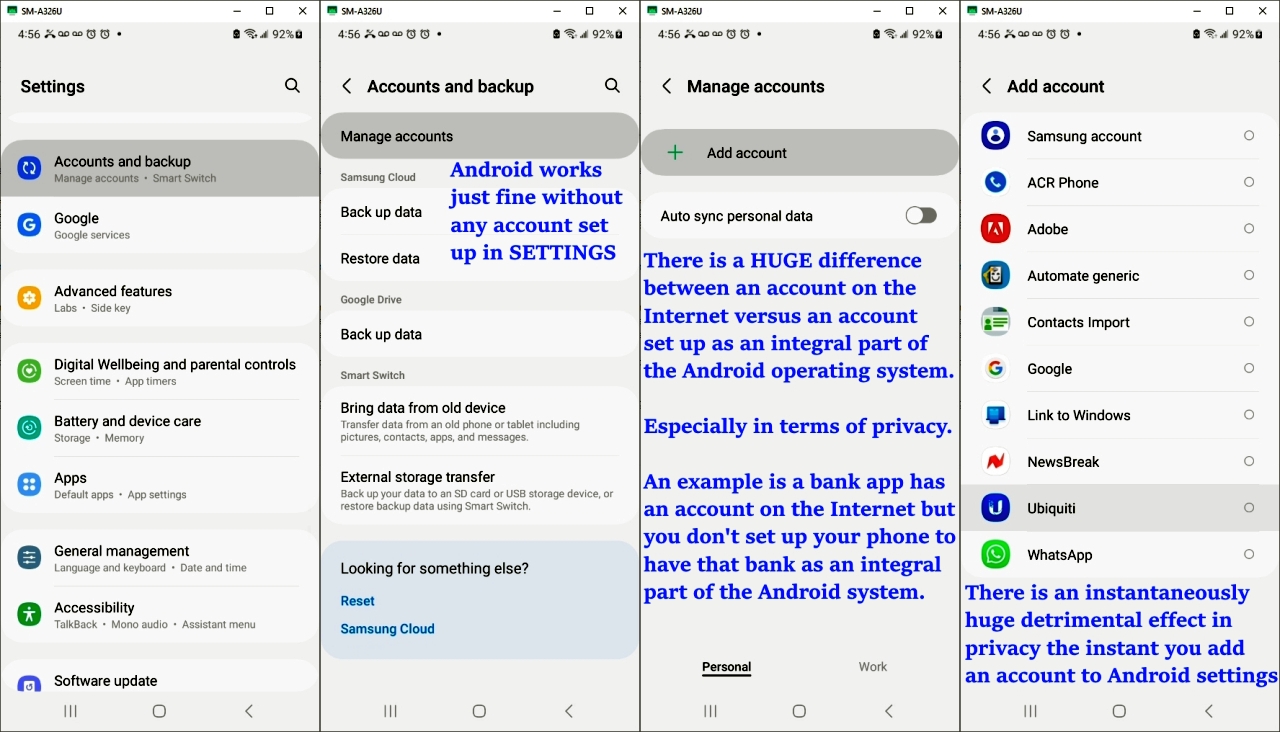
Only Theo, so far, understood that an account on the Internet is not at all the same thing as an account integrally set up deeply in Android settings.
<https://i.postimg.cc/x1NZwj5G/account02.jpg>
Nobody else who posted but Theo knows anything about Android.
Not Arno. Not Frank. Not Rudy. Not Carlos. Not Mayayana. None of you.
There's a HUUUUUUUUUUUUUUUUUUUGE difference between these two things:
a. An account on the Internet
b. An account on the phone
Only Theo understood the question. Nobody else did.
<https://i.postimg.cc/Bnyr9fP1/account01.jpg>
Jeff,
You may have replaced the original Android OS in whatever Pixel you're
using with GrapheneOS, but it's still Android.
Absolutily. Just like Googles tracking and adware-infested version of android is just android. :-)
I've always understood that GrapheneOS is Android that's been "degoogled"
What about the possibility that some nitwit has come up with that explanation, and instead GrapheneOS is a clean version of Android plus some privacy and security stuff added to it ?
Think of occams razor: "Never attribute to malice that which is
adequately explained by stupidity."
Rudy is correct that nobody but Theo understood the question asked here.
Fitbit on Android requires a Google Account (because Google acquired
Fitbit in 2021).
And damnit, does /everyone/ here know that Andrew is the next nym of
Arlen ? I thought I was the only one here who knew that. :-)
Hi Rudy,
I'm still the same purposefully helpful kind & caring poster I always was.
I post here for a decade with the *same* images, the same phone for years, the same posting style, the same quest for privacy, the same love of
Android, the same kind and helpful attitude to those who deserve it, etc.
I'm still in the Santa Cruz mountains. I still have the same phone.
I still answer people's questions using my vast knowledge, etc.
I'm the same kind-hearted humble Usenet servant I always was.
If it takes someone more than two seconds to figure out my posts, then there's something wrong - because I don't hide who I am from anyone here.
Nothing changed except the wrapping paper on the gift of the present.
If that fools anyone, then there's something very wrong with them.
Look at these screenshots I post for example. Nobody but me does that.
If it takes anyone more than a second to figure out my posts, there's something very wrong - as the only ones who exclaim "I FOUND YOU!!!!!"
are usually the trolls who only care about the wrapping paper and not the beauty of the vast knowledge inherent in the value imparted in the body.
However, Android is said to have 12 million lines of code. Is it really
known to anyone outside Google what all of them do?
Andrew,
And damnit, does /everyone/ here know that Andrew is the next nym of
Arlen ? I thought I was the only one here who knew that. :-)
Hi Rudy,
I'm still the same purposefully helpful kind & caring poster I always was.
:-D I remember you thru the years. Heck, your previous post already
paints a different picture.
You are "purposely" allright, just not "helpfull" or "caring". Instead, everyone else need to be helpfull *to you* - just like with your current question - and could not care less about offending pretty-much everyone by stating that nobody but one understood what you where "actually" out for.
Heck, I was pleasantly surprised when you, in the "Shortcut to Bluetooth Tethering?" thread, where able to comprise a tutorial (of sorts) of just 4 steps. Even though you implicitily called s|b stupid thruout that post. Yeah, you really sounded "caring" there. :-(
I post here for a decade with the *same* images, the same phone for years, >> the same posting style, the same quest for privacy, the same love of
Android, the same kind and helpful attitude to those who deserve it, etc.
Yeah, I remember your "tutorials". For the ones I've seen they are convoluted, mixing different, unrelated subjects and sometimes even stopped short of any kind of a conclusion. I also remember when you posted a list of links, and I went thru them pointing out the problems with them. You could not have cared less. The same thing happens in this thread: you
could not care less that I was trying to actually help you (without thumping my chest and letting the whole world know) to get /some/ kind of answer to your stated question.
I'm still in the Santa Cruz mountains. I still have the same phone.
I still answer people's questions using my vast knowledge, etc.
And you still change your nym once in a while, making it impossible for others to find your older contributions - and refuse to "deep link" to the relevant ones in those fora you recently linked to (same thread as above).
Frank Slootweg <[email protected]d> wrote:
I always thought that *other* *apps* (not devices), could talk to
Google Fit and that Google Fit then showed a consolidation of all the
data.
There is the Health Connect app, also from Google, which describes
itself as linking health data from multiple apps. Seems to be a health
app data aggregator, but I've never used it to be sure.
https://play.google.com/store/apps/details?id=com.google.android.apps.healthdata
"Health Connect by Android gives you a simple way to share data between
your health, fitness, and wellbeing apps without compromising on
privacy."
Of course, Andrew isn't going to believe anything regarding privacy when Google is involved.
On 2025-01-01 21:57, Frank Slootweg wrote:
Carlos E.R. <[email protected]d> wrote:
On 2025-01-01 19:59, Frank Slootweg wrote:
VanguardLH <[email protected]> wrote:
[...]
I had a Fitbit 2, and now a Fitbit Luxe. Doesn't upload anything to any >>>> account. I never bought any premium services. I don't need all those >>>> extras for how I use it. The only "extra" I enabled was to pair the >>>> Fitbit to my smart phone via Bluetooth to transfer data from device to >>>> Android app. Don't need an online account for that.
I don't know what a "Fitbit 2" is, probably a "Fitbit <something> 2" >>> where "<something>" is the relevant part.
Anyway, I always needed a Fitbit account for our Fitbits (Alta HR, >>> Charge 4, Charge 5 and Charge 6). Without an account, the Fitbit won't >>> sync, also not to the Fitbit app on the phone. And to sync, it needs an >>> Internet connection. Stupid design, but that's the way it is.
So, on the phone, do you use the Fitbit app or another app, if so
which one?
Google Fit.
Are you sure? The Google Fit entry on the Google Play site [1] doesn't even mention Fitbit in its list of devices and its website [2] doesn't
list any devices.
I always thought that *other* *apps* (not devices), could talk to
Google Fit and that Google Fit then showed a consolidation of all the
data.
I don't know for sure where it gets its data from, but it is there.
Maybe Google Fit talks with Fitbit app.
I had that app installed from before, then one day I noticed that it had
data that seemed to come from the watch. Yes, looking there is displays
my siesta data as coming from Fitbit. It also shows the map of my walk
this afternoon, with a label that says "Fitbit".
In the details, it shows the elevation graph of the walk, something that
is missing in the Fitbit app.
I remember vaguely saying yes to share data, but I don't remember which
of the two apps. Maybe both.
IIRC, I used Google Fit in the past, but I can't remember with which app/service/device.
I think my <insert_loved_one> has a Fitbit Luxe (on an iPhone). I've >>> to ask her what she needs to sync. I know they have a Fitbit Family
account together with her <insert_smaller_loved_one>.
[...]
[1] <https://play.google.com/store/apps/details?id=com.google.android.apps.fitness>
[2] <https://www.google.com/fit/>
Caring? When he doesn't like what we say, he turns to insulting us.
I don't accept said tutorials unless they are posted on a fixed web site,
not a forum with a collection of posts. Properly indexed.
In the details, it shows the elevation graph of the walk, something that
is missing in the Fitbit app.
Android is said to have 12 million lines of code. Is it really
known to anyone outside Google what all of them do?
Of course, Andrew isn't going to believe anything regarding privacy when Google is involved.
Although its ofcourse nice to have permalinks, even the ones that are ment
as such can break given enough time (nothing is forever). As such I, when its looks worthwhile or even just interresting, have the habit of copying
the offered information to my local machine.
Reset the phone, and next time when an app wants a login then refuse to prevent having the account stored on the phone. If you're just
protesting Google, don't login to any newly loaded app that wants you to specify a Google account, so it doesn't get stored on your phone. After
a reset, there are no accounts stored on the phone. It is after *you* specify a login that either the app will store it locally to itself, or
load it into Accounts in the Android OS.
VanguardLH wrote on Thu, 2 Jan 2025 02:02:53 -0600 :
Of course, Andrew isn't going to believe anything regarding privacy when
Google is involved.
Hi VanguardLH,
You're wrong. Again.
Rest assured I've read everything you've posted to this newsgroup for
years, where I'm well aware your IQ is below normal,
Carlos E.R. wrote on Wed, 1 Jan 2025 22:55:39 +0100 :
In the details, it shows the elevation graph of the walk, something
that is missing in the Fitbit app.
Luckily, we've solved the problem of replacing Google FitBit with
equivalent privacy-aware functionality in this new companion thread.
*For privacy, what is a suitable alternative to the Google FitBit app on Android?*
<https://www.novabbs.com/computers/article-flat.php? id=56645&group=comp.mobile.android#56645>
All it takes is a modicum of intelligence to replace FitBit features with privacy-aware equivalent functionality (which doesn't involve the forfeit
of privacy by setting up a Google Account integral to the Android system).
For example,
<https://play.google.com/store/apps/details? id=org.secuso.privacyfriendlyactivitytracker>
R.Wieser wrote on Thu, 2 Jan 2025 17:26:02 +0100 :
Although its ofcourse nice to have permalinks, even the ones that are
ment as such can break given enough time (nothing is forever). As
such I, when its looks worthwhile or even just interresting, have the
habit of copying the offered information to my local machine.
Hi Rudy & Carlos,
Rest assured I'm well aware your entire lives you've been told you were stupid, which has never happened to me - so we're entirely different types.
Jeff,
However, Android is said to have 12 million lines of code. Is it really
known to anyone outside Google what all of them do?
Which is exactly why a sane person would not want to go and try to de-google-ify it, and starting with a clean version would be a better idea. Yes, I applied logic there.
Also, the parent spoke of "android" after which I tried to make him aware that Googles android is something different than android. Yet, you speak
of "android" as if googles version of it is the base one. Do you have any support for that ?
And by the way, I do not even think that the people inside Google know what all of it does. :-)
I don't disagree, but that's what happens over a long development time. However, nobody else is better placed than those inside Google to know
what Android does. And that's what concerns me - who knows what
"innocent" code they've included that nobody else knows about? Have
Graphene and others /really/ looked through all the code and know what
it does?
Not reading the rest of the post.
There you are with your insults.
Well, Google didn't invent Android, but if you look at[Link #1]
Effectively, unless you're going to suggest that the 20-years old...
pre-Google Android is what Graphene and others developed their OS
from, it can /only/ have come from stripping down Google's Android.
And that's what concerns me - who knows what "innocent" code they've included that nobody else knows about?
On an unrelated point, I was surprised to see that GrapheneOS uses
automatic updates only. There's no choice - their OS is updated whether
you want it or not. That's not what I would have expected.
Jeff Layman <[email protected]d> wrote:
I don't disagree, but that's what happens over a long development time.
However, nobody else is better placed than those inside Google to know
what Android does. And that's what concerns me - who knows what
"innocent" code they've included that nobody else knows about? Have
Graphene and others /really/ looked through all the code and know what
it does?
As a software QA tester, I would visit the programmer responsible for
the part of the software they were working on to ask about testing
procedure, and about what-if scenarios. Too often they didn't know, it
was someone else's coding job, but that guy only knew that code, and not
the entire product, and often the response to many what-if scenarios is
they wouldn't happen (but I can reproduce them then so can customers).
Too often the programmers would add "innocent" code they thought was
helpful, but didn't like when I required a new check-in code branch
which exposed their little changes, and their little fixups as a result.
When they made even a little change, we in QA had to come up with
testing for it, but the devs didn't document the changes in the
Functional or Engineering Spec docs, and we'd find it by accident. We
had weekly review meetings during development, and sometimes I'd ask a question that had all the devs turning their heads, and no one offering
a response. Too many cooks making a meal.
I haven't heard that the Android OS or Graphene OS have had independent audits despite they may be free open source. FOSS doesn't guarantee
anyone outside the dev team has inspected the code.
I can only hope that Google didn't put its stuff into Androids Linux kernel
On an unrelated point, I was surprised to see that GrapheneOS uses
automatic updates only. There's no choice - their OS is updated whether
you want it or not. That's not what I would have expected.
I was thinking of turning off automatic updating*, and would also be negativily surprised not being able to find it.
* didn't yet look for it, as I consider that phone to be a tool, not a computer on which I do, to me, important stuff (read: hobby programming).
Carlos E.R. wrote on Thu, 2 Jan 2025 21:17:46 +0100 :
There you are with your insults.
How many detailed tutorials have you posted to this newsgroup Carlos?
Carlos E.R. wrote on Thu, 2 Jan 2025 21:25:24 +0100 :
Not reading the rest of the post.
The fact remains VanguardLH does NOT know the difference between a Google login on the Internet versus a Google account integral with the phone.
Who on earth, is *that* stupid, Carlos?
On 2025-01-03 05:42, Andrew wrote:
Carlos E.R. wrote on Thu, 2 Jan 2025 21:25:24 +0100 :
Not reading the rest of the post.
The fact remains VanguardLH does NOT know the difference between a Google login on the Internet versus a Google account integral with the phone.
Who on earth, is *that* stupid, Carlos?
Insulting again.
No read.
Most of the general public use a cellphone as their only "computer".
Even if they once owned a desktop or laptop, changes to the telephone
system mean that they no longer bother with a router and broadband connection.
VanguardLH wrote:
I haven't heard that the Android OS or Graphene OS have had
independent audits despite they may be free open source. FOSS
doesn't guarantee anyone outside the dev team has inspected the
code.
You might find these of interest:
<https://grapheneos.org/faq#audit> <https://discuss.privacyguides.net/t/i-dont-trust-pixel-graphene-where-are-the-authoritative-claims-of-its-credibility/17503>
<https://dl.acm.org/doi/10.1145/3448609>
Jeff Layman <[email protected]d> wrote:
Most of the general public use a cellphone as their only "computer".
Even if they once owned a desktop or laptop, changes to the telephone system mean that they no longer bother with a router and broadband connection.
Yep, us desktop PC users are feeling like an endangered species: 40%
global web traffic compared to 58% for mobile devices (78% of which is
by Android users). Considering the toy computer it is, small display,
and lack of good input devices (unless you Bluetooth a keyboard and
mouse), I dislike web surfing on a phone. Still, it beats lugging a
laptop or notebook on a vacation. A big smartphone in a belt holster
beats toting around a bag with a laptop.
There must be some age break for those that do and don't suffer
nomophobia. Some folks have withdrawl symptoms if they don't have their phone on them all the time.
The fact remains VanguardLH does NOT know the difference between a Google
login on the Internet versus a Google account integral with the phone.
Who on earth, is *that* stupid, Carlos?
Insulting again.
VanguardLH wrote on Thu, 2 Jan 2025 02:08:37 -0600 :
Reset the phone, and next time when an app wants a login then refuse to
prevent having the account stored on the phone. If you're just
protesting Google, don't login to any newly loaded app that wants you to
specify a Google account, so it doesn't get stored on your phone. After
a reset, there are no accounts stored on the phone. It is after *you*
specify a login that either the app will store it locally to itself, or
load it into Accounts in the Android OS.
There are only 3 known Google apps which infest Android with a login.
And each of those 3 Google apps has a privacy-aware replacement.
Arno Welzel wrote on Wed, 1 Jan 2025 23:19:50 +0100 :
What can't you do on Android WITHOUT a Google Account set up in the OS?
Everything what does not need a Google account. That was easy.
You have no idea how Android works if you say something that absurd.
Andrew, 2025-01-02 02:28:
Arno Welzel wrote on Wed, 1 Jan 2025 23:19:50 +0100 :
What can't you do on Android WITHOUT a Google Account set up in the OS? >>>Everything what does not need a Google account. That was easy.
You have no idea how Android works if you say something that absurd.
Why? When you don't have a Google account you can still use Android
itself. Is that not correct?
On Wed, 1 Jan 2025 02:08 -0000 (UTC), Andrew wrote:
What can't you do on Android WITHOUT a Google Account set up in the OS?
Well, without a Google account I do not have access to paid apps.
There are a few important ones I can hardly do without.
What can't you do on Android WITHOUT a Google Account set up in the OS?
On 2025-01-04 13:24, Siard wrote:
On Wed, 1 Jan 2025 02:08 -0000 (UTC), Andrew wrote:
What can't you do on Android WITHOUT a Google Account set up in the OS?
Well, without a Google account I do not have access to paid apps.
There are a few important ones I can hardly do without.
True. I use some.
Carlos E.R. <[email protected]d> wrote:
Siard wrote:
Andrew wrote:
What can't you do on Android WITHOUT a Google Account set up in the OS? >>>Well, without a Google account I do not have access to paid apps.
There are a few important ones I can hardly do without.
True. I use some.
Sigh! When will you *ever* learn, Carlos!? 'Andrew' will soon tell you
that each and every paid app can be replaced by a *better* FOSS app,
which obviously has no ads.
Didn't you pay *any* attention when he found a replacement for the
Fitbit app!? Not that that is a paid one, but you'll (not) get the idea.
[For the humour-impaired:] :-)
Frank Slootweg <[email protected]d> wrote:
Carlos E.R. <[email protected]d> wrote:
Siard wrote:
Andrew wrote:
What can't you do on Android WITHOUT a Google Account set up in the OS? >>>>Well, without a Google account I do not have access to paid apps.
There are a few important ones I can hardly do without.
True. I use some.
Sigh! When will you *ever* learn, Carlos!? 'Andrew' will soon tell you
that each and every paid app can be replaced by a *better* FOSS app,
which obviously has no ads.
Didn't you pay *any* attention when he found a replacement for the
Fitbit app!? Not that that is a paid one, but you'll (not) get the idea.
[For the humour-impaired:] :-)
Andrew/Arlen found a replacement to the Fitbit app? I thought what he "found" were suggestions by others. :-p
Just because there are free replacements that are sufficient to some
users does not mean those replacements are as full featured.
Yes, there
is OpenStreets to replace Google Maps, but I've used OSM, and then
dropped it since it gets some data from city plats for roads that don't
yet exist, and may never exist, and much of its data is crowd sourced,
so areas with few reporting OSM users are sketchy or missing. Free just means free, not necessarily equal nor better.
I'd be really interested if there were a free app that had all the
features of TalentApps' Parking that I paid $6.98 back in 2020 (after a couple years of using the free version), but got abandoned in 2021.
This is not an app to find parking. It records where you parked
(manually, or automatically where I use a Bluetooth disconnect to mark
where I stopped and parked the car), and helps you find your car (either
by a map or a compass direction) along with recording your trips, save
notes for a waypoint, take pics (handy in a parking ramp or huge parking lot), track multiple cars,
https://play.google.com/store/apps/details?id=il.talent.parking https://play.google.com/store/apps/details?id=il.talent.parking.premium
I've tried other similar "find my car" and trip tracking combo apps, but
they sucked on features, or were unreliable. I used the free ParKing
app for a couple years, and eventually decided to pay for it (along with several other apps that I had used, and kept, for several years).
So, if there are is this free (and de-Googled) pools of apps out there,
tell me where. No, I don't mean some app that does some of the
functions, but an equivalent free app that does ALL the same functions,
and maybe some more.
I've also paid for some app either to upgrade, unlock features, or to
support the author.
https://play.google.com/store/apps/details?id=il.talent.parking.premium https://play.google.com/store/apps/details?id=com.wilysis.cellinfo https://play.google.com/store/apps/details?id=org.prowl.torque
and more.
Yes, there are free versions, but sometimes I want to unlock more
features, or I've used the app for a while, and feel if I'm going to
keep it that I should reward the author. Does the F-Droid Aurora Store
let me do that? Rahul Patel would like me to donate for using Aurora,
but what about the app authors? Do the "free" app authors have to setup their own merchant accounts or sales services to get "donations"?
Yes, there is OpenStreets to replace Google Maps, but I've used OSM, and
then dropped it since it gets some data from city plats for roads that
don't yet exist, and may never exist,
...and much of its data is crowd sourced, so areas with few reporting OSM
users are sketchy or missing.
Yes, of course, OSM depends on its contributors.
Free just means free, not necessarily equal nor better.
(1) a test with the GPS of a tablet I had didn't give me much
confidence in its accuracy.
(2) I never was able to find an authorative source to what this "diff"
file should look like though.
(1) a test with the GPS of a tablet I had didn't give me much
confidence in its accuracy.
The magnometer periodically requires re-calibration (the 3-D figure
8 roll) to get compass readings correct.
Similarly, sometimes the A-GPS table needs to get re-downloaded.
There are lots of GPS apps available
For GPS traces, I'd start here:
https://wiki.openstreetmap.org/wiki/Mapping_techniques
I saw uploaded traces, and where you upload them, at:
https://www.openstreetmap.org/traces
https://www.openstreetmap.org/traces
For editing the database, I'd start here:
For help from their community, I'd try here:
https://community.openstreetmap.org/
I didn't find (but didn't look that hard) for info on the structure
of the database, or of exported data (which I suspect is XML).
Remember that I quit using OSMand, so the above is what I found
in online searches.
"R.Wieser" <[email protected]d> wrote:
(1) a test with the GPS of a tablet I had didn't give me much
confidence in its accuracy.
The magnometer periodically requires re-calibration (the 3-D figure 8
roll) to get compass readings correct.
Similarly, sometimes the A-GPS table needs to get re-downloaded. There
are lots of GPS apps available, and some have an A-GPS reset function.
For GPS re-calibration, this app lets you reset the A-GPS table, and
download new data.
https://en.wikipedia.org/wiki/Assisted_GNSS
VanguardLH wrote:Occasionally when using google maps from my phone e.g. on a train, it
The magnometer periodically requires re-calibration (the 3-D figure 8
roll) to get compass readings correct.
A magnetometer has nothing to do with GPS.
Arno Welzel wrote:
VanguardLH wrote:Occasionally when using google maps from my phone e.g. on a train, it
The magnometer periodically requires re-calibration (the 3-D figure 8
roll) to get compass readings correct.
A magnetometer has nothing to do with GPS.
will report "low accuracy" and request the figure-8 calibration, I think
it can use the magnetometer better to sense the direction of travel?
On Wed, 1 Jan 2025 02:08 -0000 (UTC), Andrew wrote:
What can't you do on Android WITHOUT a Google Account set up in the OS?
Well, without a Google account I do not have access to paid apps.
There are a few important ones I can hardly do without.
Andy Burns, 2025-01-10 18:33:
Arno Welzel wrote:
VanguardLH wrote:Occasionally when using google maps from my phone e.g. on a train, it
The magnometer periodically requires re-calibration (the 3-D figure 8
roll) to get compass readings correct.
A magnetometer has nothing to do with GPS.
will report "low accuracy" and request the figure-8 calibration, I think
it can use the magnetometer better to sense the direction of travel?
The magnetometer is mostly relevant if you do *not* move and want to
know, in which direction the device is oriented.
However when you move, your direction of travel can will be computed
based on your movement - the magnetometer is then completely irrelevant
and will *not* used for that.
Rather than nitpicking on the responses, just what is YOUR suggestion to Wieser regarding his statement of "a test with the GPS of a tablet I had didn't give me much confidence in its accuracy"? Come on, now, give
some specific suggestions, so we can nitpick on your suggestions being unfocused for a vague "test".
VanguardLH, 2025-01-11 21:01:
[...]
Rather than nitpicking on the responses, just what is YOUR suggestion to
Wieser regarding his statement of "a test with the GPS of a tablet I had
didn't give me much confidence in its accuracy"? Come on, now, give
some specific suggestions, so we can nitpick on your suggestions being
unfocused for a vague "test".
There is none. If a device is not accurate, you can't do anything about
it. A-GPS will not improve that.
Andy Burns wrote:
Occasionally when using google maps from my phone e.g. on a train, itknow, in which direction the device is oriented.
will report "low accuracy" and request the figure-8 calibration
The magnetometer is mostly relevant if you donot move and want to
However when you move, your direction of travel can will be computed
based on your movement - the magnetometer is then completely irrelevant
and willnot used for that.
Arno Welzel <[email protected]> wrote:
VanguardLH, 2025-01-11 21:01:
[...]
Rather than nitpicking on the responses, just what is YOUR suggestion to >>> Wieser regarding his statement of "a test with the GPS of a tablet I had >>> didn't give me much confidence in its accuracy"? Come on, now, give
some specific suggestions, so we can nitpick on your suggestions being
unfocused for a vague "test".
There is none. If a device is not accurate, you can't do anything about
it. A-GPS will not improve that.
*If*.
VanguardLH, 2025-01-13 00:53:
Arno Welzel <[email protected]> wrote:
VanguardLH, 2025-01-11 21:01:
[...]
Rather than nitpicking on the responses, just what is YOUR suggestion to >>>> Wieser regarding his statement of "a test with the GPS of a tablet I had >>>> didn't give me much confidence in its accuracy"? Come on, now, give
some specific suggestions, so we can nitpick on your suggestions being >>>> unfocused for a vague "test".
There is none. If a device is not accurate, you can't do anything about
it. A-GPS will not improve that.
*If*.
Yes - so what?
Arno Welzel <[email protected]> wrote:
VanguardLH, 2025-01-13 00:53:
Arno Welzel <[email protected]> wrote:
VanguardLH, 2025-01-11 21:01:
[...]
Rather than nitpicking on the responses, just what is YOUR suggestion to >>>>> Wieser regarding his statement of "a test with the GPS of a tablet I had >>>>> didn't give me much confidence in its accuracy"? Come on, now, give >>>>> some specific suggestions, so we can nitpick on your suggestions being >>>>> unfocused for a vague "test".
There is none. If a device is not accurate, you can't do anything about >>>> it. A-GPS will not improve that.
*If*.
Yes - so what?
My reply was similarly unfocused due to lack of information.
VanguardLH, 2025-01-13 22:39:
Arno Welzel <[email protected]> wrote:
VanguardLH, 2025-01-13 00:53:
Arno Welzel <[email protected]> wrote:
VanguardLH, 2025-01-11 21:01:
[...]
Rather than nitpicking on the responses, just what is YOUR suggestion to >>>>>> Wieser regarding his statement of "a test with the GPS of a tablet I had >>>>>> didn't give me much confidence in its accuracy"? Come on, now, give >>>>>> some specific suggestions, so we can nitpick on your suggestions being >>>>>> unfocused for a vague "test".
There is none. If a device is not accurate, you can't do anything about >>>>> it. A-GPS will not improve that.
*If*.
Yes - so what?
My reply was similarly unfocused due to lack of information.
My reply was not "unfocused due to lack of information".
Again: A-GPS is not improving accuracy. If GPS on a device is not
accurate, you can not improve that with software at all. There is no
"magic trick" to make the GPS reciever work more accurate and you also
can not "calibrate" GPS. A-GPS/A-GNSS only reduces the time to first
fix, since it will provide the satellite position data, so the reciever
does not have to download this data from the satellites using the slow
GPS downlink connection.
Also a magnetometer has *nothing* to do with GPS at all. It will only
report, to which direction the device is currently oriented. But this
has *nothing* to do with your current position. You may need to
calibrate a magnetometer from time to time.
I don't know if related or not, but years ago there was a system used to improve the accuracy of GPS, in places like harbours. They would put a special transmitter at a site. The exact location of the site was known,
and also what error it got from the GPS system, continuously evaluated.
A ship would use that information to correct their error from their own
GPS receiver by comparison with the error on the site nearby. The
resulting precision was maybe one meter.
Carlos E.R., 2025-01-14 13:24:
[...]
I don't know if related or not, but years ago there was a system used to
improve the accuracy of GPS, in places like harbours. They would put a
special transmitter at a site. The exact location of the site was known,
and also what error it got from the GPS system, continuously evaluated.
A ship would use that information to correct their error from their own
GPS receiver by comparison with the error on the site nearby. The
resulting precision was maybe one meter.
There is also a system called "High precision positioning" and the
accuracy is even less than a meter.
Also see here:
<https://www.u-blox.com/en/technologies/high-precision-positioning>
<https://www.ardusimple.com>
| Sysop: | Keyop |
|---|---|
| Location: | Huddersfield, West Yorkshire, UK |
| Users: | 766 |
| Nodes: | 16 (2 / 14) |
| Uptime: | 08:51:35 |
| Calls: | 12,762 |
| Calls today: | 6 |
| Files: | 15,362 |
| Messages: | 6,557,060 |