I have now spent some time searching for ways to find where MMS-messages
are stored on my OnePlus 12 mobile with Android 15. There is no end of suggestions on how to do this, but nothing I have tested works.
Referring to menus or file structure not existing on my mobile.
It can't be that difficult, can it?
Jesper wrote:
I have now spent some time searching for ways to find where MMS-messages
are stored on my OnePlus 12 mobile with Android 15.
Are they stored on the phone, or are they just URLs pointing to your >operator's MMS server?
I have now spent some time searching for ways to find where MMS-messages
are stored on my OnePlus 12 mobile with Android 15.
I have now spent some time searching for ways to find where MMS-messages
are stored on my OnePlus 12 mobile with Android 15. There is no end of suggestions on how to do this, but nothing I have tested works.
Referring to menus or file structure not existing on my mobile.
It can't be that difficult, can it?
On 13.12.2024 20:55, VanguardLH wrote:
Jesper <[email protected]> wrote:
I have now spent some time searching for ways to find where MMS-messages >>> are stored on my OnePlus 12 mobile with Android 15. There is no end of
suggestions on how to do this, but nothing I have tested works.
Referring to menus or file structure not existing on my mobile.
It can't be that difficult, can it?
https://www.google.com/search?q=android+where+mms+stored
See the AI-generated response which may be sufficient for you to realize
those are stored in a database file which means you won't be looking
inside of them using just a file manager.
https://www.magnetforensics.com/blog/android-messaging-forensics-sms-mms-and-beyond/
Apparently mmssms.db is a SQLite database file, and is unlikely to be
encrypted, so you could look into using SQL[ite] commands to interrogate
the database. There are SQLite viewer apps for Android, or you could
copy the .db file from Android phone to your PC; however, you probably
still need to know something of the records and their structure to know
on what to search. An SMS/MMS viewer app, or backup & restore app would
likely know the structure in the database file to present you the
messages stored there, but I've never used one to recommend any.
Are you only looking for where is the database file, or how to peek
inside of it?
I just wanted to get hold of a picture that was sent as MMS as a normal picture file, .jpg or whatever. I first tried a long tap on the picture
in "Messages" , which did not bring up anything. Then my wife showed me
to use a short tap on the picture, which brought up icons, one of which
gave a "Share" menu. So simple. Embarrassed :-(
I have now spent some time searching for ways to find where MMS-messages
are stored on my OnePlus 12 mobile with Android 15. There is no end of >suggestions on how to do this, but nothing I have tested works.
Referring to menus or file structure not existing on my mobile.
It can't be that difficult, can it?
Best regards
I have now spent some time searching for ways to find where MMS-messages
are stored on my OnePlus 12 mobile with Android 15. There is no end of suggestions on how to do this, but nothing I have tested works.
Referring to menus or file structure not existing on my mobile.
It can't be that difficult, can it?
Arno Welzel <[email protected]> wrote:
Jesper, 2024-12-13 15:13:It's weird isn't it! It's only on mobile phones that this strange
I have now spent some time searching for ways to find where MMS-messages >>> are stored on my OnePlus 12 mobile with Android 15. There is no end of
suggestions on how to do this, but nothing I have tested works.
Referring to menus or file structure not existing on my mobile.
It can't be that difficult, can it?
For security reasons *all* Apps store their data in their *private*
storage by default which is *not* accessible with file managers if you
don't have root access. If this would not be the case, *all* apps which
have the "read files" permission could read *all* your data, including
all your MMS, SMS, contacts and so on.
system is applied. On any computer system access is controlled for a **user** and programs run by that user can access any data that is
readable by that user. The computer model for access seems much more reasonable to me. Surely if I have (say) an address list I want to be
able to use that from other programs on my device, it's my data, why
should I be prevented from using it from another program?
Jesper, 2024-12-13 15:13:
I have now spent some time searching for ways to find where MMS-messages are stored on my OnePlus 12 mobile with Android 15. There is no end of suggestions on how to do this, but nothing I have tested works.
Referring to menus or file structure not existing on my mobile.
It can't be that difficult, can it?
For security reasons *all* Apps store their data in their *private*
storage by default which is *not* accessible with file managers if you
don't have root access. If this would not be the case, *all* apps which
have the "read files" permission could read *all* your data, including
all your MMS, SMS, contacts and so on.
Jesper, 2024-12-13 15:13:
I have now spent some time searching for ways to find where MMS-messages
are stored on my OnePlus 12 mobile with Android 15. There is no end of
suggestions on how to do this, but nothing I have tested works.
Referring to menus or file structure not existing on my mobile.
It can't be that difficult, can it?
For security reasons *all* Apps store their data in their *private*
storage by default which is *not* accessible with file managers if you
don't have root access. If this would not be the case, *all* apps which
have the "read files" permission could read *all* your data, including
all your MMS, SMS, contacts and so on.
Gaining root access usually also means you need to unlock the bootloader
of your device and install at least software like Magisk. This is often
not possible without wiping the whole device and even installing a
custom ROM.
On 14.12.24 13:08, Chris Green wrote:
Arno Welzel <[email protected]> wrote:
Jesper, 2024-12-13 15:13:It's weird isn't it! It's only on mobile phones that this strange
I have now spent some time searching for ways to find where MMS-messages >>> are stored on my OnePlus 12 mobile with Android 15. There is no end of >>> suggestions on how to do this, but nothing I have tested works.
Referring to menus or file structure not existing on my mobile.
It can't be that difficult, can it?
For security reasons *all* Apps store their data in their *private*
storage by default which is *not* accessible with file managers if you
don't have root access. If this would not be the case, *all* apps which
have the "read files" permission could read *all* your data, including
all your MMS, SMS, contacts and so on.
system is applied. On any computer system access is controlled for a **user** and programs run by that user can access any data that is
readable by that user. The computer model for access seems much more reasonable to me. Surely if I have (say) an address list I want to be
able to use that from other programs on my device, it's my data, why
should I be prevented from using it from another program?
Think about it. Even you can find that out. This system is smarter than
you think given the disaster prone Windows.
On 2024-12-14 12:11, Arno Welzel wrote:
Jesper, 2024-12-13 15:13:
I have now spent some time searching for ways to find where MMS-messages >> are stored on my OnePlus 12 mobile with Android 15. There is no end of
suggestions on how to do this, but nothing I have tested works.
Referring to menus or file structure not existing on my mobile.
It can't be that difficult, can it?
For security reasons *all* Apps store their data in their *private*
storage by default which is *not* accessible with file managers if you don't have root access. If this would not be the case, *all* apps which have the "read files" permission could read *all* your data, including
all your MMS, SMS, contacts and so on.
Gaining root access usually also means you need to unlock the bootloader
of your device and install at least software like Magisk. This is often
not possible without wiping the whole device and even installing a
custom ROM.
I am not sure this is fully true. I make backups from Linux via USB
cable, and I get the WhatsApp store, the photos, many things. There are
just a few directories from the system that are not readable.
Jörg Lorenz <[email protected]> wrote:
On 14.12.24 13:08, Chris Green wrote:Windows? What's that?
It's weird isn't it! It's only on mobile phones that this strange
system is applied. On any computer system access is controlled for a
**user** and programs run by that user can access any data that is
readable by that user. The computer model for access seems much more
reasonable to me. Surely if I have (say) an address list I want to be
able to use that from other programs on my device, it's my data, why
should I be prevented from using it from another program?
Think about it. Even you can find that out. This system is smarter than
you think given the disaster prone Windows.
On 14.12.24 15:57, Chris Green wrote:
Jörg Lorenz <[email protected]> wrote:
On 14.12.24 13:08, Chris Green wrote:Windows? What's that?
It's weird isn't it! It's only on mobile phones that this strange
system is applied. On any computer system access is controlled for a
**user** and programs run by that user can access any data that is
readable by that user. The computer model for access seems much more
reasonable to me. Surely if I have (say) an address list I want to be >>> able to use that from other programs on my device, it's my data, why
should I be prevented from using it from another program?
Think about it. Even you can find that out. This system is smarter than
you think given the disaster prone Windows.
What 70%+ on this planet are using as desktop-OS and create nothing but
huge problems!
Jörg Lorenz <[email protected]> wrote:
On 14.12.24 15:57, Chris Green wrote:Well I'm a 70+ and I'm not using it! :-)
Jörg Lorenz <[email protected]> wrote:
On 14.12.24 13:08, Chris Green wrote:Windows? What's that?
It's weird isn't it! It's only on mobile phones that this strange
system is applied. On any computer system access is controlled for a >>>>> **user** and programs run by that user can access any data that is
readable by that user. The computer model for access seems much more >>>>> reasonable to me. Surely if I have (say) an address list I want to be >>>>> able to use that from other programs on my device, it's my data, why >>>>> should I be prevented from using it from another program?
Think about it. Even you can find that out. This system is smarter than >>>> you think given the disaster prone Windows.
What 70%+ on this planet are using as desktop-OS and create nothing but
huge problems!
On 14.12.24 20:50, Chris Green wrote:
Jörg Lorenz <[email protected]> wrote:
On 14.12.24 15:57, Chris Green wrote:Well I'm a 70+ and I'm not using it! :-)
Jörg Lorenz <[email protected]> wrote:
On 14.12.24 13:08, Chris Green wrote:Windows? What's that?
It's weird isn't it! It's only on mobile phones that this strange >>>>> system is applied. On any computer system access is controlled for a >>>>> **user** and programs run by that user can access any data that is >>>>> readable by that user. The computer model for access seems much more >>>>> reasonable to me. Surely if I have (say) an address list I want to be >>>>> able to use that from other programs on my device, it's my data, why >>>>> should I be prevented from using it from another program?
Think about it. Even you can find that out. This system is smarter than >>>> you think given the disaster prone Windows.
What 70%+ on this planet are using as desktop-OS and create nothing but
huge problems!
70%+ not 70plus ... :-D
Carlos E.R. <[email protected]d> wrote:
On 2024-12-14 12:11, Arno Welzel wrote:
Jesper, 2024-12-13 15:13:
I have now spent some time searching for ways to find where MMS-messages >>>> are stored on my OnePlus 12 mobile with Android 15. There is no end of >>>> suggestions on how to do this, but nothing I have tested works.
Referring to menus or file structure not existing on my mobile.
It can't be that difficult, can it?
For security reasons *all* Apps store their data in their *private*
storage by default which is *not* accessible with file managers if you
don't have root access. If this would not be the case, *all* apps which
have the "read files" permission could read *all* your data, including
all your MMS, SMS, contacts and so on.
Gaining root access usually also means you need to unlock the bootloader >>> of your device and install at least software like Magisk. This is often
not possible without wiping the whole device and even installing a
custom ROM.
I am not sure this is fully true. I make backups from Linux via USB
cable, and I get the WhatsApp store, the photos, many things. There are
just a few directories from the system that are not readable.
Indeed. The same is the case if you connect the Android device [1] via
a USB-cable to a Windows system. All normal folders and specifically \Android\* (data, media, obb , obj) are accessible in (Windows) File Explorer. Of course this isn't a scurity/privacy issue, because you need physical access to the device and the device must be unlocked.
On 2024-12-14 12:11, Arno Welzel wrote:
Jesper, 2024-12-13 15:13:
I have now spent some time searching for ways to find where MMS-messages >>> are stored on my OnePlus 12 mobile with Android 15. There is no end of
suggestions on how to do this, but nothing I have tested works.
Referring to menus or file structure not existing on my mobile.
It can't be that difficult, can it?
For security reasons *all* Apps store their data in their *private*
storage by default which is *not* accessible with file managers if you
don't have root access. If this would not be the case, *all* apps which
have the "read files" permission could read *all* your data, including
all your MMS, SMS, contacts and so on.
Gaining root access usually also means you need to unlock the bootloader
of your device and install at least software like Magisk. This is often
not possible without wiping the whole device and even installing a
custom ROM.
I am not sure this is fully true. I make backups from Linux via USB
cable, and I get the WhatsApp store, the photos, many things. There are
just a few directories from the system that are not readable.
Carlos E.R., 2024-12-14 15:59:
On 2024-12-14 12:11, Arno Welzel wrote:
Jesper, 2024-12-13 15:13:
I have now spent some time searching for ways to find where MMS-messages >>>> are stored on my OnePlus 12 mobile with Android 15. There is no end of >>>> suggestions on how to do this, but nothing I have tested works.
Referring to menus or file structure not existing on my mobile.
It can't be that difficult, can it?
For security reasons *all* Apps store their data in their *private*
storage by default which is *not* accessible with file managers if you
don't have root access. If this would not be the case, *all* apps which
have the "read files" permission could read *all* your data, including
all your MMS, SMS, contacts and so on.
Gaining root access usually also means you need to unlock the bootloader >>> of your device and install at least software like Magisk. This is often
not possible without wiping the whole device and even installing a
custom ROM.
I am not sure this is fully true. I make backups from Linux via USB
cable, and I get the WhatsApp store, the photos, many things. There are
just a few directories from the system that are not readable.
Yes - that's a *backup*. But *backup* is not "access files with a file manager on the device" and not all apps allow to backup their data.
I am not sure this is fully true. I make backups from Linux via USB
cable, and I get the WhatsApp store, the photos, many things. There are
just a few directories from the system that are not readable.
Yes - that's a *backup*. But *backup* is not "access files with a file manager on the device" and not all apps allow to backup their data.
Frank Slootweg, 2024-12-14 16:50:
Carlos E.R. <[email protected]d> wrote:
On 2024-12-14 12:11, Arno Welzel wrote:
Jesper, 2024-12-13 15:13:
I have now spent some time searching for ways to find where MMS-messages >>>> are stored on my OnePlus 12 mobile with Android 15. There is no end of >>>> suggestions on how to do this, but nothing I have tested works.
Referring to menus or file structure not existing on my mobile.
It can't be that difficult, can it?
For security reasons *all* Apps store their data in their *private*
storage by default which is *not* accessible with file managers if you >>> don't have root access. If this would not be the case, *all* apps which >>> have the "read files" permission could read *all* your data, including >>> all your MMS, SMS, contacts and so on.
Gaining root access usually also means you need to unlock the bootloader >>> of your device and install at least software like Magisk. This is often >>> not possible without wiping the whole device and even installing a
custom ROM.
I am not sure this is fully true. I make backups from Linux via USB
cable, and I get the WhatsApp store, the photos, many things. There are
just a few directories from the system that are not readable.
Indeed. The same is the case if you connect the Android device [1] via
a USB-cable to a Windows system. All normal folders and specifically \Android\* (data, media, obb , obj) are accessible in (Windows) File Explorer. Of course this isn't a scurity/privacy issue, because you need physical access to the device and the device must be unlocked.
And "normal folders" are *not* private app storage folders. For example
you can *not* read the contact database this way.
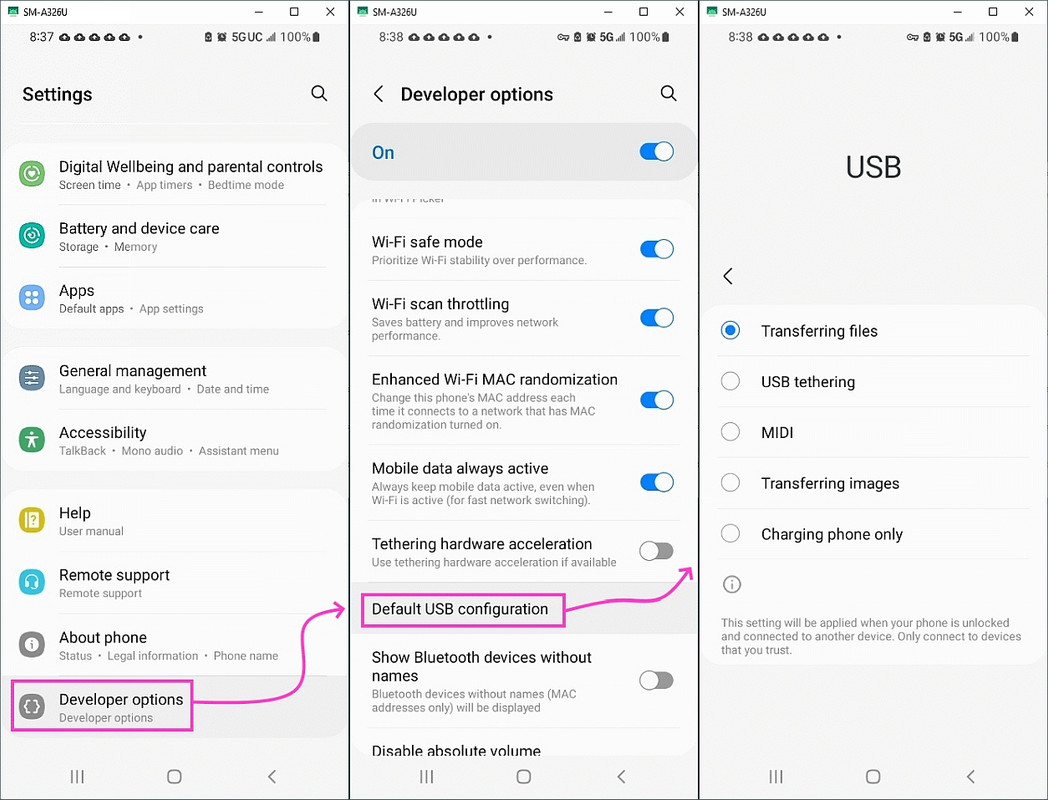
When this Android 15 smartphone is connected to my Windows11 PC via USB,
it does not show up in Windows Explorer at all. And no message on the
phone about allowing access.
Therefore I use an app, Cx File Explorer, for transfering files between
Phone and PC
Carlos E.R., 2024-12-14 15:59:
On 2024-12-14 12:11, Arno Welzel wrote:
Jesper, 2024-12-13 15:13:
I have now spent some time searching for ways to find where MMS-messages >>> are stored on my OnePlus 12 mobile with Android 15. There is no end of >>> suggestions on how to do this, but nothing I have tested works.
Referring to menus or file structure not existing on my mobile.
It can't be that difficult, can it?
For security reasons *all* Apps store their data in their *private*
storage by default which is *not* accessible with file managers if you
don't have root access. If this would not be the case, *all* apps which
have the "read files" permission could read *all* your data, including
all your MMS, SMS, contacts and so on.
Gaining root access usually also means you need to unlock the bootloader >> of your device and install at least software like Magisk. This is often
not possible without wiping the whole device and even installing a
custom ROM.
I am not sure this is fully true. I make backups from Linux via USB
cable, and I get the WhatsApp store, the photos, many things. There are just a few directories from the system that are not readable.
Yes - that's a *backup*. But *backup* is not "access files with a file manager on the device" and not all apps allow to backup their data.
When this Android 15 smartphone is connected to my Windows11 PC via USB,
it does not show up in Windows Explorer at all. And no message on the
phone about allowing access.
Therefore I use an app, Cx File Explorer,
for transfering files between Phone and PC. I have tried different
cables: one with USB-A in one end and USB-C in the other, and one with
USB-C in both ends.
My old Android 4 phone is visible in Windows Explorer on PC when
connected via USB, and files can be transferred.
When this Android 15 smartphone is connected to my Windows11 PC via USB,
it does not show up in Windows Explorer at all. And no message on the
phone about allowing access. Therefore I use an app, Cx File Explorer,
for transfering files between Phone and PC. I have tried different
cables: one with USB-A in one end and USB-C in the other, and one with
USB-C in both ends.
My old Android 4 phone is visible in Windows Explorer on PC when
connected via USB, and files can be transferred.
As Rudy mentioned, I don't think the OP (Jesper) said that the information/file(s) should be accessible by a file manager *on the
(Android) device*. That's your restriction, not his.
Most, if not all, posters here have a computer. Jesper posted with
Mozilla Thunderbird, so he has a Windows or Linux (or mac?) computer
which he can use with a USB connection to his phone.
As to "not all apps allow to backup their data.": With the USB
connection, one can backup all app-private folders and files, so one
*can* backup the data of all apps. Unless there's some other kind of restriction you're not divulging.
With respect to my Moto G5 Plus (circa 2017), when I connect it to my
Windows 10 PC, I have to go to Settings on the phone and tell it that I
want to allow file transfers (I can't remember just now what the exact wording is). Then, on the PC, I have to tell Explorer to "Refresh", and
then the phone shows up. ...
Frank Slootweg <[email protected]d> wrote:
As Rudy mentioned, I don't think the OP (Jesper) said that the information/file(s) should be accessible by a file manager *on the (Android) device*. That's your restriction, not his.
Most, if not all, posters here have a computer. Jesper posted with
Mozilla Thunderbird, so he has a Windows or Linux (or mac?) computer
which he can use with a USB connection to his phone.
As to "not all apps allow to backup their data.": With the USB
connection, one can backup all app-private folders and files, so one
*can* backup the data of all apps. Unless there's some other kind of restriction you're not divulging.
And shall we delve into encrypted files? A file may get backed up, but
that doesn't mean you can get inside it.
Also, just because you know
where is a file, and can access or copy it, doesn't mean you can
casually view it. On Android, SMS messages are stored in an SQLite
database, so you need an SQLite viewer, editor, or extractor. You need
to know which record to extract, and perhaps the structure of those
records. Repetitive inspection might lead to which record and which
field. There are SQLite apps for Android, but I haven't used any there.
All of this is now somewhat moot as of 3 days ago after Jesper noted he managed to get at the picture inside an MMS that he wanted to share.
However, that doesn't bar wandering off onto tangents discussing the
trials and tribulations of using an over-wresting OS.
VanguardLH <[email protected]> wrote:
Frank Slootweg <[email protected]d> wrote:
As Rudy mentioned, I don't think the OP (Jesper) said that the
information/file(s) should be accessible by a file manager *on the
(Android) device*. That's your restriction, not his.
Most, if not all, posters here have a computer. Jesper posted with
Mozilla Thunderbird, so he has a Windows or Linux (or mac?) computer
which he can use with a USB connection to his phone.
As to "not all apps allow to backup their data.": With the USB
connection, one can backup all app-private folders and files, so one
*can* backup the data of all apps. Unless there's some other kind of
restriction you're not divulging.
And shall we delve into encrypted files? A file may get backed up, but
that doesn't mean you can get inside it.
Yes, put this part of the thread *is* about backup, not about getting
inside the information/file(s).
Also, just because you know
where is a file, and can access or copy it, doesn't mean you can
casually view it. On Android, SMS messages are stored in an SQLite
database, so you need an SQLite viewer, editor, or extractor. You need
to know which record to extract, and perhaps the structure of those
records. Repetitive inspection might lead to which record and which
field. There are SQLite apps for Android, but I haven't used any there.
As I mentioned elsewhere [1] in the (sub-)thread, both backing up and
exporting SMS/MMS messages and contacts is *not* a problem on Android.
There are umpteen apps that do that kind of thing.
All of this is now somewhat moot as of 3 days ago after Jesper noted he
managed to get at the picture inside an MMS that he wanted to share.
However, that doesn't bar wandering off onto tangents discussing the
trials and tribulations of using an over-wresting OS.
What!? Thread drift!? On *Usenet*!? Can't be!
As your old Android 4 phone works, you can use that to compare which devices should be visible in Device Manager, i.e. connect*both* phones, unlock them and compare.
And "normal folders" are *not* private app storage folders. For example
you can *not* read the contact database this way.
True, you probably need 'adb pull' to access those. Anyway, as has
been said, things like contacts, (SMS/MMS) messages, etc. are the easy
bit, because there are lots of apps wich can can backup/export those.
The critical/difficult ones are the app-private folders and - as said - a
USB connection can access those.
I just wanted to get hold of a picture that was sent as MMS as a normal picture file, .jpg or whatever. I first tried a long tap on the picture
in "Messages" , which did not bring up anything. Then my wife showed me
to use a short tap on the picture, which brought up icons, one of which
gave a "Share" menu. So simple.
I was hoping to dig a picture in a MMS-message out
as a separate file, but quite early in this thread I learnt from wise
people, that most apps in Android store their data in a restricted
restricted area you can only see if the phone is rooted (or something
like that).
As I mentioned elsewhere [1] in the (sub-)thread, both backing up and exporting SMS/MMS messages and contacts is *not* a problem on Android.
There are umpteen apps that do that kind of thing.
On 2024-12-15 23:32, Arno Welzel wrote:[...]
Yes - that's a *backup*. But *backup* is not "access files with a file
manager on the device" and not all apps allow to backup their data.
I seem to recall that filemanagers in Android need a special permission
to be able to see "everything". Or most things, anyhow.
As to "not all apps allow to backup their data.": With the USB
connection, one can backup all app-private folders and files, so one
*can* backup the data of all apps. Unless there's some other kind of restriction you're not divulging.
Why is it that any app can access the default Android contacts sqlite database & the default Android SMS/MMS sqlite database, but I can't access it?
On 2024-12-16 16:15, Frank Slootweg wrote:
As your old Android 4 phone works, you can use that to compare which devices should be visible in Device Manager, i.e. connect*both* phones, unlock them and compare.
No, modern phones use MTP (https://en.wikipedia.org/wiki/Media_Transfer_Protocol), while old
phones actually mounted the phones similar as an USB stick.
Frank Slootweg, 2024-12-16 15:49:
[...]
As to "not all apps allow to backup their data.": With the USB connection, one can backup all app-private folders and files, so one
*can* backup the data of all apps. Unless there's some other kind of restriction you're not divulging.
At least many Banking apps usually do not allow to backup their data.
And it does not matter, if the backup is done via ADB or as part of the Google app backup.
Arno Welzel <[email protected]> wrote:
Frank Slootweg, 2024-12-16 15:49:
[...]
As to "not all apps allow to backup their data.": With the USB
connection, one can backup all app-private folders and files, so one
*can* backup the data of all apps. Unless there's some other kind of
restriction you're not divulging.
At least many Banking apps usually do not allow to backup their data.
And it does not matter, if the backup is done via ADB or as part of the
Google app backup.
And *how* can those banking apps "not allow to backup their data"!? Especially for the ADB case.
Anyway, this is all moot, because Jesper has reported that the
'problem' with the new phone was that he hadn't looked in the drag down
the notification area. Once he did, he saw the USB connection options.
Frank Slootweg, 2024-12-17 19:16:
Arno Welzel <[email protected]> wrote:
Frank Slootweg, 2024-12-16 15:49:
[...]
As to "not all apps allow to backup their data.": With the USB
connection, one can backup all app-private folders and files, so one
*can* backup the data of all apps. Unless there's some other kind of
restriction you're not divulging.
At least many Banking apps usually do not allow to backup their data.
And it does not matter, if the backup is done via ADB or as part of the
Google app backup.
And *how* can those banking apps "not allow to backup their data"!? Especially for the ADB case.
Their app manifest forbids it. This can be achieved like this:
<?xml version='1.0' encoding='utf-8'?>
<manifest xmlns:android="http://schemas.android.com/apk/res/android"
xmlns:tools="http://schemas.android.com/tools"
tools:replace="allowBackup"
android:allowBackup="false" />
The entry tools:replace="allowBackup" makes sure, that any libaries used
by the app which have their own manifest, do not allow backup accidentally.
And ADB will obey that and won't pull lany backups for those apps.
And ADB will obey that and won't pull lany backups for those apps.
Thanks for your information. It might come in handy if I ever
encounter any such apps.
FWIW, I'm not worried about my banking apps not being allowed/able to backup their data, because any relevant data can most likely be
recovered from my accounts on the banks servers. I.e. if lost, the
on-device data is recoverable.
N.B. It would be interesting to know if other computer programs - such
as Samsung's 'Smart Switch' - also honor the manifest settings, but
given my above mentioned low interest, I don't think I will try.
| Sysop: | Keyop |
|---|---|
| Location: | Huddersfield, West Yorkshire, UK |
| Users: | 764 |
| Nodes: | 16 (2 / 14) |
| Uptime: | 27:29:54 |
| Calls: | 12,756 |
| Calls today: | 4 |
| Files: | 15,359 |
| Messages: | 6,556,801 |