Andy Burns wrote on Fri, 27 Sep 2024 13:46:48 +0100 :
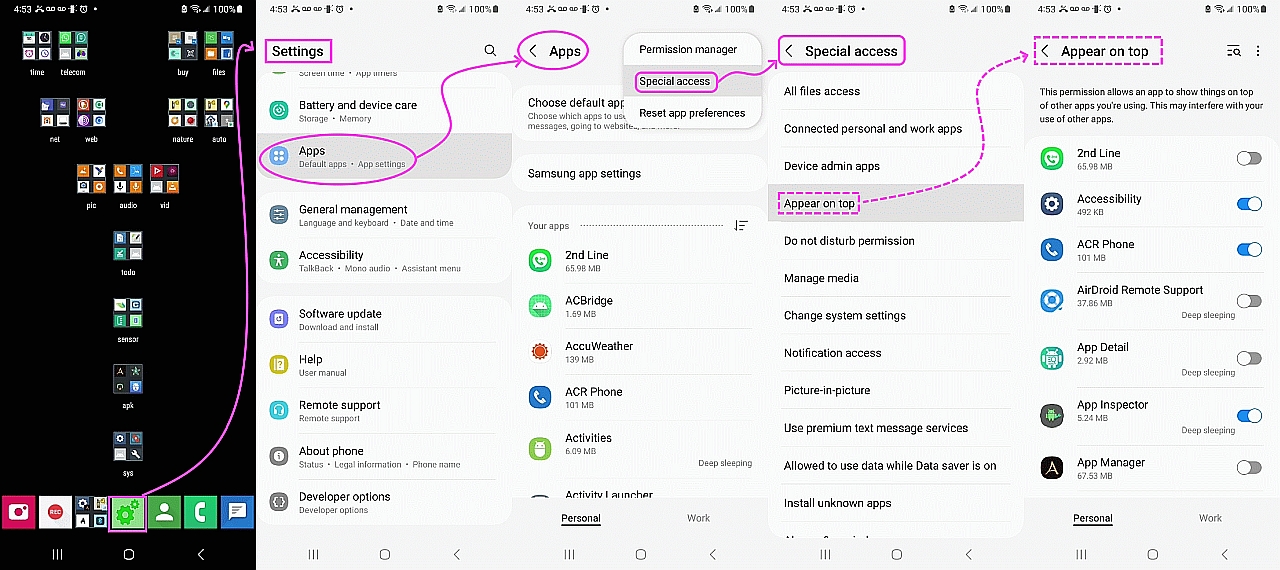
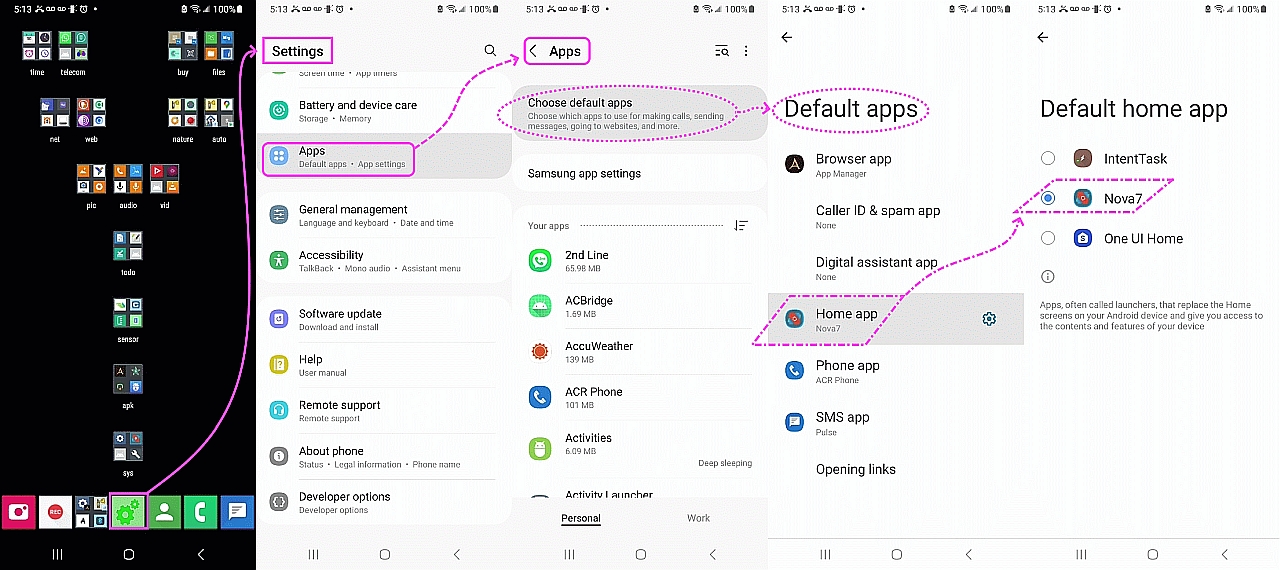
Samsung is similar [1], but does not list anything similar to "display
over other apps".
It does list "Appear on top", but many, many apps have that Special
accesss.
Only two apps have "display over other apps" on my phone ...
google and phone.
I have to agree with Frank that my Samsung, for whatever reason, has
probably more than half of my hundreds upon hundreds of apps, with
"Appear on top" turned on. (I install far more apps than most people.)
Some, like "FACM" I have to look up in Muntashirakon App Manager to figure
out what the package name is <com.samsung.android.aircommandmanager>.
Muntashirakon calls that package "Bloatware" so I googled and it's
apparently some kind of quick access Samsung-specific application.
<
https://www.samsung.com/ph/support/mobile-devices/what-is-air-command-and-how-to-use-it/>
I couldn't uninstall it with the Android GUI so I used adb to do it.
adb shell pm uninstall --user 0 com.samsung.android.aircommandmanager
I'll let you know if all hell breaks loose; but most likely it won't.
Another one was "Service Mode" <com.sec.android.app.servicemodeapp>
which Muntashirakon App Manager also claimed was "Bloatware".
Googling that, apparently it can dial out without the Phone app
and is on the list of bloatware for adb to uninstall on GitHub.
<
https://gist.github.com/gsurrel/40cc506ac7e31134a87be4ba01a71103?permalink_comment_id=3894537>
Instead of deleting one by one, I think I'll just go en-masse again
(although I tend to blow up phones doing that - but it's just a phone).
###########################
# Phone apps and services #
###########################
adb shell "cmd package install-existing com.android.stk" # SIM toolkit
adb shell "cmd package install-existing com.android.stk2" # SIM toolkit (maybe for dual-sim devices)
adb shell "cmd package install-existing com.sec.android.app.simsettingmgr" # SIM card manager, maybe required, contains configuration and settings for handling dual SIM (give a SIM an icon, a name, and so on)
adb shell "pm uninstall -k --user 0 com.samsung.android.smartcallprovider" # The 4th tab in the Phone app for 'local places'
adb shell "pm uninstall -k --user 0 com.sec.vsim.ericssonnsds.webapp" # NSDSWebApp. The Non Sim Device Solution (NSDS) is linked to VoLTE and VoWifi (Wifi Calling). NSDS allows connecting non sim devices to IMS core:
https://uk.linkedin.com/in/hemant-
kumar-dewnarain-2b779679
adb shell "pm uninstall -k --user 0 com.android.cts.ctsshim" # Part of the Android Compatibility Test Suite:
https://source.android.com/compatibility/cts/setup
adb shell "pm uninstall -k --user 0 com.android.cts.priv.ctsshim" # Part of the Android Compatibility Test Suite:
https://source.android.com/compatibility/cts/setup
adb shell "pm uninstall -k --user 0 com.samsung.crane" # Phone, with extended features: share rich data (doodles, location, text messages). Couldn't find a way to access it from an official interface
adb shell "pm uninstall -k --user 0 com.hiya.star" # Possibly linked to the Phone app "Caller ID and spam protection service" as well as the "Places" feature
adb shell "cmd package install-existing com.sec.ims" # IMS (IP Multimedia Subsystem) is linked to VoLTE, WiFi Calling and Rich Communication Services (RCS):
https://en.wikipedia.org/wiki/IP_Multimedia_Subsystem
adb shell "cmd package install-existing com.sec.imslogger" # ImsLogger (see above for IMS)
adb shell "cmd package install-existing com.sec.imsservice" # IMS Service (see above for IMS)
adb shell "cmd package install-existing com.samsung.advp.imssettings" # Seem linked to IMS
adb shell "cmd package install-existing com.sec.epdg" # ePDG (evolved packet data gateway) could be linked to WiFi Calling and possible VoLTE:
http://www.oracle.com/us/industries/communications/wifi-calling-epdg-wp-2874668.pdf
###############
# System apps #
###############
adb shell "cmd package install-existing com.samsung.accessibility" # Accessibility settings (useful for apps creating virtual buttons such as a pie-menu)
adb shell "cmd package install-existing com.samsung.android.app.soundpicker" # The ringtone picker provided by the system for any Alarm app
adb shell "cmd package install-existing com.samsung.android.allshare.service.fileshare" # Wi-Fi Direct (bluetooth-wifi sharing of files)
adb shell "cmd package install-existing com.samsung.android.allshare.service.mediashare" # Nearby service, maybe related to the previous wifi direct fileshare
# Ant+ wireless technology
adb shell "pm uninstall -k --user 0 com.dsi.ant.plugins.antplus" # ANT+ Plugins Service
adb shell "pm uninstall -k --user 0 com.dsi.ant.sample.acquirechannels" # ANT + DUT
adb shell "pm uninstall -k --user 0 com.dsi.ant.server" # ANT+ HAL service
adb shell "pm uninstall -k --user 0 com.dsi.ant.service.socket" # ANT Radio Service
################################
# Samsung specific system apps #
################################
adb shell "cmd package install-existing com.samsung.android.lool" # The Setting entry "Device Care" with battery, storage, memory, and security
adb shell "cmd package install-existing com.samsung.android.app.aodservice" # Always-on-Display, handles most of the lockscreen
adb shell "cmd package install-existing com.samsung.android.MtpApplication" # PC connection doesn't work well without this helper utility. It is responsible for the popup "Attention, the connected device is unable to access data on this device" if MTP is
unsupposted by the computer.
adb shell "cmd package install-existing com.wssyncmldm" # Software update: doesn't check OTA updates without
adb shell "cmd package install-existing com.sec.android.emergencymode.service" # EmergencyManagerService, linked to the battery's "Maximum power saving" mode
adb shell "cmd package install-existing com.sec.android.sdhms" # Samsung Device Health Manager Service, most likely linked to "battery habits" analysis
adb shell "pm uninstall -k --user 0 com.sec.android.cover.ledcover" # LED Cover Service
adb shell "pm uninstall -k --user 0 com.sec.location.nsflp2" # Samsung Location SDK
adb shell "pm uninstall -k --user 0 com.samsung.android.location" # slocation
# Maybe Knox-related
adb shell "cmd package install-existing com.samsung.ucs.agent.boot" # bootagent, probably linked to "eSE UCS Plugin" below, probably required by Knox
adb shell "cmd package install-existing com.samsung.ucs.agent.ese" # eSE UCS Plugin, eSE is for "embedded SEcurity", probably required by Knox
adb shell "cmd package install-existing com.samsung.android.smartmirroring" # Smart View, for screen mirroring and Chromecast
##################################################
# Samsung user apps, customization, and services # ##################################################
adb shell "cmd package install-existing com.samsung.android.contacts" # Samsung "Contacts" app
adb shell "cmd package install-existing com.sec.android.app.myfiles" # My Files, file browser
adb shell "cmd package install-existing com.samsung.android.video" # Video, the default video player
adb shell "pm uninstall -k --user 0 com.samsung.android.themecenter" # Samsung Themes
adb shell "pm uninstall -k --user 0 com.samsung.android.themestore" # Galaxy Themes
adb shell "pm uninstall -k --user 0 com.sec.android.app.samsungapps" # Galaxy Store
adb shell "pm uninstall -k --user 0 com.sec.android.app.sbrowser" # Samsung Galaxy Browser
adb shell "pm uninstall -k --user 0 com.samsung.android.rubin.app" # Customization Service
adb shell "pm uninstall -k --user 0 com.samsung.daydream.customization" # Some daydream VR customization capability?
adb shell "pm uninstall -k --user 0 com.sec.android.app.chromecustomizations" # Chrome browser customization
adb shell "pm uninstall -k --user 0 com.samsung.android.scloud" # Samsung Cloud adb shell "pm uninstall -k --user 0 com.samsung.android.mateagent" # Samsung Galaxy Friends
adb shell "pm uninstall -k --user 0 com.samsung.android.mobileservice" # Samsung Experience Service, handling the Samsung account and experience, required for Samsung Pay
adb shell "pm uninstall -k --user 0 com.samsung.android.weather"
adb shell "pm uninstall -k --user 0 com.sec.android.daemonapp" # Weather
# Samsing SmartSwitch
adb shell "pm uninstall -k --user 0 com.samsung.android.smartswitchassistant" # Samsung SmartSwitch
adb shell "pm uninstall -k --user 0 com.sec.android.easyMover" # Related Smart Switch
adb shell "pm uninstall -k --user 0 com.sec.android.easyMover.Agent" # Smart Switch Agent
adb shell "pm uninstall -k --user 0 com.samsung.android.shortcutbackupservice" # ShortcutBNR, linked to SmartSwitch Samsung Cloud features
# Equalizers
adb shell "pm uninstall -k --user 0 com.sec.android.app.soundalive" # SoundAlive, responsible for Dobly Atmos and other equalizer stuff (accessible from the Settings app)
adb shell "pm uninstall -k --user 0 com.sec.hearingadjust" # Adapt Sound, the sound equalizer in Accessibility services
# SmartThings
adb shell "pm uninstall -k --user 0 com.samsung.android.beaconmanager" # SmartThings. It is required to enable the "Settings -> Connections -> More connections settings -> Nearby device scanning". This *may* be required for detecting Chromecast and other
smart TVs.
adb shell "pm uninstall -k --user 0 com.samsung.android.ststub" # SmartThings adb shell "pm uninstall -k --user 0 com.samsung.android.easysetup" # SmartThings
# Samsung Health
adb shell "pm uninstall -k --user 0 com.sec.android.app.shealth" # Samsung Health
adb shell "pm uninstall -k --user 0 com.sec.android.service.health" # Health Service, from Samsung
# Widgets
adb shell "pm uninstall -k --user 0 com.sec.android.widgetapp.easymodecontactswidget" # Favorite Contacts, probably the favourite contacts when enabling the "simple use" senior mode
adb shell "pm uninstall -k --user 0 com.sec.android.widgetapp.samsungapps" # Galaxy Essentials Widget
adb shell "pm uninstall -k --user 0 com.sec.android.widgetapp.webmanual" # User manual
################################################
# Mandatory Knox apps, and other security apps # ################################################
adb shell "cmd package install-existing com.samsung.android.knox.containeragent" # Knox thing that gets re-enabled at update
adb shell "cmd package install-existing com.samsung.android.knox.containercore" # Knox thing that gets re-enabled at update
adb shell "pm uninstall -k --user 0 com.samsung.android.knox.analytics.uploader" # Knox Analytics Uploader
adb shell "pm uninstall -k --user 0 com.samsung.android.knox.containerdesktop" # KnowContainerDesktop
adb shell "pm uninstall -k --user 0 com.knox.vpn.proxyhandler" # Samsung's Work profile for Entreprise proxy
adb shell "pm uninstall -k --user 0 com.sec.enterprise.knox.attestation" # Knox-related
adb shell "pm uninstall -k --user 0 com.sec.enterprise.knox.cloudmdm.smdms" # Knox Enrollment Service
adb shell "pm uninstall -k --user 0 com.samsung.knox.securefolder" # Secure Folder
adb shell "pm uninstall -k --user 0 com.samsung.knox.securefolder.setuppage" adb shell "pm uninstall -k --user 0 com.samsung.klmsagent" # KLMS Agent, most likely linked to Knox
adb shell "pm uninstall -k --user 0 com.trustonic.teeservice" # TeeService, for Samsung Pay? Trustronic "Trusted Execution Environment":
https://www.trustonic.com/news/blog/devices-trustonic-tee/
adb shell "pm uninstall -k --user 0 com.trustonic.tuiservice" # TuiService, for Samsung Pay? Trustronic "Trusted User Interfaces":
https://www.trustonic.com/news/blog/devices-trustonic-tee/
adb shell "pm uninstall -k --user 0 com.samsung.android.spay" # Samsung Pay
adb shell "pm uninstall -k --user 0 com.samsung.android.spayfw" # Samsung PaymentFramework
adb shell "pm uninstall -k --user 0 com.samsung.android.samsungpass" # Samsung Pass
adb shell "pm uninstall -k --user 0 com.samsung.android.samsungpassautofill" # Autofill with Samsung Pass
###############################
# Samsung camera related apps #
###############################
adb shell "cmd package install-existing com.sec.android.app.camera" # Samsung Camera
adb shell "cmd package install-existing com.samsung.android.app.interactivepanoramaviewer" # Interactive panorama viewer (taken with the Samsung Camera)
adb shell "cmd package install-existing com.samsung.android.app.motionpanoramaviewer" # Motion panorama viewer (taken with the Samsung Camera)
adb shell "cmd package install-existing com.samsung.android.app.selfmotionpanoramaviewer" # Self-motion panorama viewer (taken with the Samsung Camera)
adb shell "cmd package install-existing com.samsung.app.highlightplayer" # Useful for the Video editor
adb shell "cmd package install-existing com.samsung.app.slowmotion" # Slow-motion viewer, taken with the Samsung Camera
adb shell "cmd package install-existing com.sec.android.gallery3d" # Samsung Gallery
adb shell "cmd package install-existing com.sec.android.mimage.photoretouching" # Photo editor
adb shell "cmd package install-existing com.samsung.android.provider.stickerprovider" # If disabled, the "AR Emoji" button crashed the Camera app
adb shell "cmd package install-existing com.sec.android.app.vepreload" # Video Editor
# Gallery's recognition and identification of content (same "shared user id") adb shell "cmd package install-existing com.samsung.cmh" # CMHProvider (CMHProvider.apk), required by the Gallery. Responsible of face recognition in the Gallery
adb shell "cmd package install-existing com.samsung.mlp" # mlp (MediaLearningPlatform.apk), has permissions linked to cmh, and visionintelligence
adb shell "cmd package install-existing com.samsung.storyservice" # Gallery stories (StoryService.apk), creates stories from the user photos and videos
adb shell "cmd package install-existing com.samsung.faceservice" # (FaceService.apk)
adb shell "cmd package install-existing com.samsung.ipservice" # (IPService.apk)
adb shell "pm uninstall -k --user 0 com.samsung.android.app.camera.sticker.facear.preload" # Default live sticker
adb shell "pm uninstall -k --user 0 com.samsung.android.app.camera.sticker.stamp.preload" # Stamps
################
# Samsung Edge #
################
adb shell "pm uninstall -k --user 0 com.cnn.mobile.android.phone.edgepanel" # CNN edge app
adb shell "pm uninstall -k --user 0 com.samsung.android.app.appsedge" # Apps edge
adb shell "pm uninstall -k --user 0 com.samsung.android.app.clipboardedge" # Clipboard edge
adb shell "pm uninstall -k --user 0 com.samsung.android.app.cocktailbarservice" # Edge screen
adb shell "pm uninstall -k --user 0 com.samsung.android.app.sbrowseredge" # Samsung Internet panel
adb shell "pm uninstall -k --user 0 com.samsung.android.app.taskedge" # Tasks edge
adb shell "pm uninstall -k --user 0 com.samsung.android.service.peoplestripe" # People edge
adb shell "pm uninstall -k --user 0 com.samsung.android.widgetapp.yahooedge.finance" # Finance, edge widget
adb shell "pm uninstall -k --user 0 com.samsung.android.widgetapp.yahooedge.sport" # Sport, edge widget
#################
# Samsung Bixby #
#################
adb shell "pm uninstall -k --user 0 com.samsung.android.app.spage" # Bixby Home adb shell "pm uninstall -k --user 0 com.samsung.android.app.settings.bixby" # SettingsBixby
adb shell "pm uninstall -k --user 0 com.samsung.android.bixby.agent"
adb shell "pm uninstall -k --user 0 com.samsung.android.bixby.agent.dummy"
adb shell "pm uninstall -k --user 0 com.samsung.android.bixby.es.globalaction" adb shell "pm uninstall -k --user 0 com.samsung.android.bixby.plmsync"
adb shell "pm uninstall -k --user 0 com.samsung.android.bixby.service"
adb shell "pm uninstall -k --user 0 com.samsung.android.bixby.voiceinput"
adb shell "pm uninstall -k --user 0 com.samsung.android.bixby.wakeup"
adb shell "pm uninstall -k --user 0 com.samsung.android.svoice" # SVoice
adb shell "pm uninstall -k --user 0 com.samsung.svoice.sync" # Voice Service, S Voice is the ancestor of Bixby
adb shell "pm uninstall -k --user 0 com.samsung.systemui.bixby"
adb shell "pm uninstall -k --user 0 com.samsung.systemui.bixby2"
adb shell "pm uninstall -k --user 0 com.samsung.android.visionintelligence" # Bixby Vision
adb shell "pm uninstall -k --user 0 com.samsung.visionprovider" # VisionProvider, maybe linked to Bixby?
###############
# Samsung DeX #
###############
adb shell "pm uninstall -k --user 0 com.samsung.desktopsystemui" # Samsung DeX System UI
adb shell "pm uninstall -k --user 0 com.sec.android.app.desktoplauncher" # Samsung DeX Home
adb shell "pm uninstall -k --user 0 com.sec.android.desktopcommunity" # Samsung DeX community
adb shell "pm uninstall -k --user 0 com.sec.android.desktopmode.uiservice" # Samsung DeX
#######################################
# Hidden apps (debug and diagnostics) #
#######################################
# Dialable apps
adb shell "cmd package install-existing com.sec.android.app.factorykeystring" # DeviceKeyString (dial *#0283# to open audio LoopbackTest control, dial *#2663# for TSP firmware update)
adb shell "cmd package install-existing com.sec.android.app.hwmoduletest" # HwModuleTest, a hardware test app (dial *#0*# to open). Fun low-level stuff to see in there
adb shell "cmd package install-existing com.sec.android.app.servicemodeapp" # SysDump, low-level debugging and diagnostics tools (dial *#9900# to open)
adb shell "cmd package install-existing com.sec.android.RilServiceModeApp" # Service mode RIL, for diagnostics (dial *#0011# for modem connectivity info, *#9090# for diagnostics control)
adb shell "cmd package install-existing com.sec.factory.camera" # Camera Test (dial *#34971539# to open CameraFirmware Standard)
adb shell "cmd package install-existing com.sec.usbsettings" # USBSettings, choose from ADB, MTP, RNDIS, ACM, DM (dial *#0808# to open)
adb shell "pm uninstall -k --user 0 com.sec.factory.iris.usercamera" # Camera Iris User Test, the test from the *#0*# menu
# Other apps
adb shell "pm uninstall -k --user 0 com.samsung.android.networkdiagnostic" # Network diagnostic
adb shell "pm uninstall -k --user 0 com.sec.bcservice" # Linked to some diagnostics? It mentions TcpDump
adb shell "pm uninstall -k --user 0 com.sec.android.app.bluetoothtest" # BluetoothTest, probably a priviledged diagnostics app
adb shell "pm uninstall -k --user 0 com.sec.android.diagmonagent" # DiagMonAgent, probably diagnostics data collection from Settings > Biometrics and security > Send diagnostic data
adb shell "pm uninstall -k --user 0 com.sec.factory" # DeviceTest
adb shell "pm uninstall -k --user 0 com.sec.android.app.wlantest" # WlanTest adb shell "pm uninstall -k --user 0 com.sec.epdgtestapp" # EpdgTestApp, test app for ePDG functionnality?
################
# Game-related #
################
adb shell "pm uninstall -k --user 0 com.enhance.gameservice"
adb shell "pm uninstall -k --user 0 com.samsung.android.game.gamehome"
adb shell "pm uninstall -k --user 0 com.samsung.android.game.gametools"
adb shell "pm uninstall -k --user 0 com.samsung.android.game.gos" # Samsung Game Optimizing Service
###############
# Google apps #
###############
# Visible apps
adb shell "cmd package install-existing com.google.android.apps.docs" # Google Drive
adb shell "cmd package install-existing com.google.android.apps.maps" # Google Maps
adb shell "pm uninstall -k --user 0 com.google.android.apps.photos" # Google Photos
adb shell "pm uninstall -k --user 0 com.google.android.GoogleCamera" # Google Camera
adb shell "pm uninstall -k --user 0 com.google.android.gm" # Gmail
adb shell "pm uninstall -k --user 0 com.google.android.videos" # Google Movies adb shell "pm uninstall -k --user 0 com.google.android.youtube" # Google's YouTube
adb shell "pm uninstall -k --user 0 com.google.android.music" # Google Music
# More hidden apps
adb shell "cmd package install-existing com.google.ar.core" # Google Play Services for AR (Augmented Reality)
adb shell "cmd package install-existing com.google.vr.vrcore" # Google VR (Virtual Reality) Services
adb shell "cmd package install-existing com.google.android.tts" # Text-to-speech synthesis
adb shell "pm uninstall -k --user 0 com.android.hotwordenrollment.okgoogle" # Enroll for "OK-Google"
adb shell "pm uninstall -k --user 0 com.android.hotwordenrollment.xgoogle" # Enroll for something
adb shell "pm uninstall -k --user 0 com.google.android.apps.nexuslauncher" # Removes the Google launcher
adb shell "pm uninstall -k --user 0 com.google.android.apps.restore" # Restore data from the cloud or transfer it from another device
adb shell "pm uninstall -k --user 0 com.google.android.apps.tachyon"
adb shell "pm uninstall -k --user 0 com.google.android.backuptransport"
adb shell "pm uninstall -k --user 0 com.google.android.ext.shared"
adb shell "pm uninstall -k --user 0 com.google.android.feedback" # Market feedback agent
adb shell "pm uninstall -k --user 0 com.google.android.gms.policy_sidecar_aps" adb shell "pm uninstall -k --user 0 com.google.android.googlequicksearchbox" # The super fat Google app, handling thousands of things. Required for Android Audo (even disabled is OK)
adb shell "pm uninstall -k --user 0 com.google.android.onetimeinitializer"
adb shell "pm uninstall -k --user 0 com.google.android.partnersetup"
adb shell "pm uninstall -k --user 0 com.google.android.printservice.recommendation" # Print Service Recommendation Service
adb shell "pm uninstall -k --user 0 com.google.android.setupwizard" # The initial setup wizard, that can pop later to "finish the setup" with recommended apps
adb shell "pm uninstall -k --user 0 com.google.android.syncadapters.calendar" # Google Calendar Sync
adb shell "pm uninstall -k --user 0 com.google.android.syncadapters.contacts" # Google Contacts Sync
adb shell "pm uninstall -k --user 0 com.google.android.apps.turbo" # Device Health Services
####################
# Third-party apps #
####################
#adb shell "pm uninstall -k --user 0 com.skype.raider" # Skype
adb shell "pm uninstall -k --user 0 com.linkedin.android" # LinkedIn
adb shell "pm uninstall -k --user 0 com.microsoft.office.excel" # Microsoft Excel
adb shell "pm uninstall -k --user 0 com.microsoft.office.powerpoint" # Microsoft PowerPoint
adb shell "pm uninstall -k --user 0 com.microsoft.office.word" # Microsoft Word adb shell "pm uninstall -k --user 0 com.microsoft.skydrive" # Microsoft SkyDrive
adb shell "pm uninstall -k --user 0 de.axelspringer.yana.zeropage" # upday
adb shell "pm uninstall -k --user 0 flipboard.boxer.app" # Flipboard
adb shell "pm uninstall -k --user 0 com.facebook.appmanager" # Facebook
adb shell "pm uninstall -k --user 0 com.facebook.katana" # Facebook
adb shell "pm uninstall -k --user 0 com.facebook.services" # Facebook
adb shell "pm uninstall -k --user 0 com.facebook.system" # Facebook
################
# Unclassified #
################
adb shell "cmd package install-existing com.android.apps.tag"
adb shell "cmd package install-existing com.android.emergency"
adb shell "cmd package install-existing com.android.keychain"
adb shell "cmd package install-existing com.android.nfc"
adb shell "cmd package install-existing com.android.providers.blockednumber" adb shell "cmd package install-existing com.android.providers.calendar"
adb shell "cmd package install-existing com.android.providers.settings"
adb shell "cmd package install-existing com.android.proxyhandler"
adb shell "cmd package install-existing com.android.settings.intelligence"
adb shell "cmd package install-existing com.android.wallpaperbackup"
adb shell "cmd package install-existing com.android.wallpapercropper"
adb shell "cmd package install-existing com.sec.android.wallpapercropper2" # Background image and lock-screen cropping tool
adb shell "cmd package install-existing com.android.wallpaper.livepicker"
adb shell "cmd package install-existing com.samsung.android.app.smartcapture" adb shell "cmd package install-existing com.samsung.android.authfw"
adb shell "cmd package install-existing com.samsung.android.bio.face.service" adb shell "cmd package install-existing com.samsung.android.mdm"
adb shell "cmd package install-existing com.samsung.android.messaging"
adb shell "cmd package install-existing com.samsung.android.providers.context" adb shell "cmd package install-existing com.samsung.android.server.iris"
adb shell "cmd package install-existing com.samsung.android.wallpaper.res"
adb shell "cmd package install-existing com.samsung.sec.android.application.csc"
adb shell "cmd package install-existing com.sec.android.app.clockpackage"
adb shell "cmd package install-existing com.sec.android.emergencylauncher"
adb shell "cmd package install-existing com.sec.android.ofviewer"
adb shell "cmd package install-existing com.sec.android.provider.emergencymode" adb shell "cmd package install-existing com.sec.android.providers.security"
adb shell "cmd package install-existing com.sec.modem.settings"
adb shell "pm uninstall -k --user 0 android.autoinstalls.config.samsung"
adb shell "pm uninstall -k --user 0 com.android.backupconfirm"
adb shell "pm uninstall -k --user 0 com.android.bips" # Default print service adb shell "pm uninstall -k --user 0 com.android.bluetoothmidiservice"
adb shell "pm uninstall -k --user 0 com.android.bookmarkprovider"
adb shell "pm uninstall -k --user 0 com.android.calllogbackup"
adb shell "pm uninstall -k --user 0 com.android.captiveportallogin"
adb shell "pm uninstall -k --user 0 com.android.chrome"
adb shell "pm uninstall -k --user 0 com.android.dreams.basic"
adb shell "pm uninstall -k --user 0 com.android.dreams.phototable"
adb shell "pm uninstall -k --user 0 com.android.egg"
adb shell "pm uninstall -k --user 0 com.android.htmlviewer"
# adb shell "pm uninstall -k --user 0 com.android.inputdevices" # Input devices, only contains a receiver named "Android keyboard", possibly for an external keyboard
adb shell "pm uninstall -k --user 0 com.android.managedprovisioning" # Work profile setup
adb shell "pm uninstall -k --user 0 com.android.mms.service" # MmsService, no activity but a service, with permissions related to carrier connectivity. For receiving MMS?
adb shell "pm uninstall -k --user 0 com.android.pacprocessor"
adb shell "pm uninstall -k --user 0 com.android.printspooler" # Print spooler adb shell "pm uninstall -k --user 0 com.android.providers.partnerbookmarks"
# adb shell "pm uninstall -k --user 0 com.android.sharedstoragebackup" # One service (ObbBackupService), nothing else. No internet access, and might be useful
adb shell "pm uninstall -k --user 0 com.android.statementservice" # Intent Filter Verification Service
adb shell "pm uninstall -k --user 0 com.diotek.sec.lookup.dictionary" # Dictionary
adb shell "pm uninstall -k --user 0 com.galaxyfirsatlari"
adb shell "pm uninstall -k --user 0 com.gd.mobicore.pa"
adb shell "pm uninstall -k --user 0 com.mobeam.barcodeService"
adb shell "pm uninstall -k --user 0 com.monotype.android.font.chococooky"
adb shell "pm uninstall -k --user 0 com.monotype.android.font.cooljazz"
adb shell "pm uninstall -k --user 0 com.monotype.android.font.foundation"
adb shell "pm uninstall -k --user 0 com.monotype.android.font.rosemary"
adb shell "pm uninstall -k --user 0 com.osp.app.signin" # Can cause problems when removed (
https://gist.github.com/gsurrel/40cc506ac7e31134a87be4ba01a71103#gistcomment-3867315)
adb shell "pm uninstall -k --user 0 com.policydm"
adb shell "pm uninstall -k --user 0 com.samsung.aasaservice"
adb shell "pm uninstall -k --user 0 com.samsung.accessory"
adb shell "pm uninstall -k --user 0 com.samsung.accessory.beansmgr"
adb shell "pm uninstall -k --user 0 com.samsung.accessory.safiletransfer"
adb shell "pm uninstall -k --user 0 com.samsung.android.app.accesscontrol"
adb shell "pm uninstall -k --user 0 com.samsung.android.app.advsounddetector" # Sound detectors
adb shell "pm uninstall -k --user 0 com.samsung.android.app.assistantmenu" # Assistant menu
adb shell "pm uninstall -k --user 0 com.samsung.android.app.color"
adb shell "pm uninstall -k --user 0 com.samsung.android.app.filterinstaller" adb shell "pm uninstall -k --user 0 com.samsung.android.app.galaxyfinder" # Finder, the "search in device" feature
adb shell "pm uninstall -k --user 0 com.samsung.android.app.ledcoverdream" # LEF icon editor, for LED covers
adb shell "pm uninstall -k --user 0 com.samsung.android.app.mirrorlink" # Samsung MirrorLink 1.1, to connect the phone to a car
adb shell "pm uninstall -k --user 0 com.samsung.android.app.multiwindow"
adb shell "pm uninstall -k --user 0 com.samsung.android.app.notes"
adb shell "pm uninstall -k --user 0 com.samsung.android.app.omcagent" # Configuration update, some activities are very suspicious: "Recommended apps"
adb shell "pm uninstall -k --user 0 com.samsung.android.app.panel.naver.v"
adb shell "pm uninstall -k --user 0 com.samsung.android.app.reminder" # Reminder, does regular network access
adb shell "pm uninstall -k --user 0 com.samsung.android.app.simplesharing" # Link sharing
adb shell "pm uninstall -k --user 0 com.samsung.android.app.social" # What's new
adb shell "pm uninstall -k --user 0 com.samsung.android.app.talkback" # Voice Assistant
adb shell "pm uninstall -k --user 0 com.samsung.android.app.watchmanager"
adb shell "pm uninstall -k --user 0 com.samsung.android.app.watchmanagerstub" # Wearable Manager Installer
adb shell "pm uninstall -k --user 0 com.samsung.android.app.withtv"
adb shell "pm uninstall -k --user 0 com.samsung.android.bbc.bbcagent" # BBCAgent
adb shell "pm uninstall -k --user 0 com.samsung.android.calendar" # Calendar adb shell "pm uninstall -k --user 0 com.samsung.android.clipboarduiservice" # ClipboardUIService
adb shell "pm uninstall -k --user 0 com.samsung.android.coreapps"
adb shell "pm uninstall -k --user 0 com.samsung.android.da.daagent" # Dual messenger
adb shell "pm uninstall -k --user 0 com.samsung.android.dlp.service"
adb shell "pm uninstall -k --user 0 com.samsung.android.dqagent" # DQA (Device Quality Agent), reportedely keeps tabs on Wi-Fi quality throughout the device
adb shell "pm uninstall -k --user 0 com.samsung.android.drivelink.stub" # CarmodeStub
adb shell "pm uninstall -k --user 0 com.samsung.android.email.provider"
adb shell "pm uninstall -k --user 0 com.samsung.android.emojiupdater"
adb shell "pm uninstall -k --user 0 com.samsung.android.fingerprint.service" adb shell "pm uninstall -k --user 0 com.samsung.android.fmm" # Find my mobile adb shell "pm uninstall -k --user 0 com.samsung.android.gearoplugin"
adb shell "pm uninstall -k --user 0 com.samsung.android.hmt.vrsvc" # Gear VR Service
adb shell "pm uninstall -k --user 0 com.samsung.android.keyguardwallpaperupdator" # Keyguard Wallpaper Updator, seems linked to selecting multiple lockscreen wallpapers, features removed in S8 but app stayed
adb shell "pm uninstall -k --user 0 com.samsung.android.kidsinstaller" # Kids Home Installer
adb shell "pm uninstall -k --user 0 com.samsung.android.oneconnect"
adb shell "pm uninstall -k --user 0 com.samsung.android.provider.shootingmodeprovider"
adb shell "pm uninstall -k --user 0 com.samsung.android.samsungpositioning" # Samsung Positioning
adb shell "pm uninstall -k --user 0 com.samsung.android.sdk.handwriting" # Handwriting Service
adb shell "pm uninstall -k --user 0 com.samsung.android.sdk.professionalaudio.app.audioconnectionservice"
adb shell "pm uninstall -k --user 0 com.samsung.android.sdk.professionalaudio.utility.jammonitor"
adb shell "pm uninstall -k --user 0 com.samsung.android.securitylogagent"
adb shell "pm uninstall -k --user 0 com.samsung.android.smartface" # SmartFaceService
adb shell "pm uninstall -k --user 0 com.samsung.android.smartfitting" # SmartFittingService
adb shell "pm uninstall -k --user 0 com.samsung.android.sm.devicesecurity" # This is the antivirus in Settings -> Device care -> Security
# adb shell "pm uninstall -k --user 0 com.samsung.android.sm.policy" # SCPM Client, *might* be used for power savings:
https://www.reddit.com/r/GalaxyS6/comments/4cg70v/what_is_scpm_client/d2ij0ep/ but performs network requests
[continued in next message]
--- SoupGate-Win32 v1.05
* Origin: fsxNet Usenet Gateway (21:1/5)