Pop-Up Thingie

>>> Magnum BBS <<<
  • Home
  • Forum
  • Files
  • Log in

  1. Forum
  2. Usenet
  3. COMP.MOBILE.ANDROID
  • Basic photo editor on Android (circles, arrows, captions)

    From Larry Wolff@21:1/5 to All on Sat Aug 31 21:52:11 2024
    Any suggestions for a basic free photo editor on Android that can draw
    circles around things, draw arrows to point to the things in the circles
    and you can type captions inside or below the images to describe things?

    --- SoupGate-Win32 v1.05
    * Origin: fsxNet Usenet Gateway (21:1/5)
  • From Andy Burns@21:1/5 to Larry Wolff on Sun Sep 1 07:44:55 2024
    Larry Wolff wrote:

    Any suggestions for a basic free photo editor on Android that can draw circles around things, draw arrows to point to the things in the circles
    and you can type captions inside or below the images to describe things?

    "Gemini, draw a red circle around the black cat, and add an arrow
    pointing to the small bird, then think of a funny caption"

    No, sorry no suggestions ...

    --- SoupGate-Win32 v1.05
    * Origin: fsxNet Usenet Gateway (21:1/5)
  • From Carlos E.R.@21:1/5 to Larry Wolff on Sun Sep 1 20:48:10 2024
    On 2024-09-01 03:52, Larry Wolff wrote:
    Any suggestions for a basic free photo editor on Android that can draw circles around things, draw arrows to point to the things in the circles
    and you can type captions inside or below the images to describe things?

    I used Pixlr once. It wants access to your private data.

    Then I use Gallery from simplemobiletools.com. Actually the Pro version,
    which I probably purchased. I don't know/remember how to find this out.

    <https://play.google.com/store/apps/details?id=com.simplemobiletools.gallery.pro>

    Yes, the link confirms the price as 0.79€. There is a non-pro version
    which you can try for free, but might not have an editor or not all
    features.

    Ha! I have the free version on another phone, and it asks permission to
    use my data.


    There is yet another version on F-Droid.

    --
    Cheers, Carlos.

    --- SoupGate-Win32 v1.05
    * Origin: fsxNet Usenet Gateway (21:1/5)
  • From Eli the Bearded@21:1/5 to Carlos E.R. on Sun Sep 1 20:40:23 2024
    In comp.mobile.android, Carlos E.R. <[email protected]d> wrote:
    Then I use Gallery from simplemobiletools.com. Actually the Pro version, which I probably purchased. I don't know/remember how to find this out.

    It used to be the F-Droid versions gave your the "pro" features for
    free. But Simple Mobile Tools has been sold to Zipo Apps which is
    probably not a good thing.

    Ha! I have the free version on another phone, and it asks permission to
    use my data.

    How recent?

    There is yet another version on F-Droid.

    There's a fork of the Simple Mobile Tools appsfrom Fossify now. I have
    not used them, still holding on to my old F-Droid versions. (And I'm not
    using the Gallery tool.)

    https://github.com/FossifyOrg

    https://f-droid.org/en/packages/org.fossify.gallery/

    Elijah
    ------
    uses a paid gallery app

    --- SoupGate-Win32 v1.05
    * Origin: fsxNet Usenet Gateway (21:1/5)
  • From Larry Wolff@21:1/5 to Andy Burns on Sun Sep 1 16:32:21 2024
    On 9/1/2024 2:44 AM, Andy Burns wrote:

    Any suggestions for a basic free photo editor on Android that can draw
    circles around things, draw arrows to point to the things in the circles
    and you can type captions inside or below the images to describe things?

    "Gemini, draw a red circle around the black cat, and add an arrow
    pointing to the small bird, then think of a funny caption"

    No, sorry no suggestions ...

    I haven't tried an AI approach to locating good apps, not for lack of
    wanting to test AI, but for lack of any free all verbal (both ways) AI app.

    AI not being all-verbal yet (for free anyways) I did run 'normal' searches
    for free Android image overlay sketching apps without any advertisements.

    I stopped at a dozen because there are just too many to test by one person (which is why I asked for advice from those who already annotate images). https://play.google.com/store/apps/details?id=com.drawing.pad.desk.app.coloring.book.paint.sketch
    https://play.google.com/store/apps/details?id=com.imageryedit https://play.google.com/store/apps/details?id=appinventor.ai_lehaonisko.Zhekaphoto
    https://play.google.com/store/apps/details?id=com.adsk.sketchbook https://play.google.com/store/apps/details?id=com.ng_labs.kidspaint https://play.google.com/store/apps/details?id=com.kanishka_developer.SketchPad https://play.google.com/store/apps/details?id=com.mihir.drawingapp https://play.google.com/store/apps/details?id=com.microsoft.whiteboard.publicpreview
    https://play.google.com/store/apps/details?id=com.missingames.kids.painting.lite
    https://play.google.com/store/apps/details?id=com.fsoft.FP_sDraw https://play.google.com/store/apps/details?id=com.parkelsoft.beeartistfree https://play.google.com/store/apps/details?id=com.ng_labs.magic.slate

    It will take a while to test them to ensure that they can do the three main tasks which are needed when sending an MMS image with annotations, such as
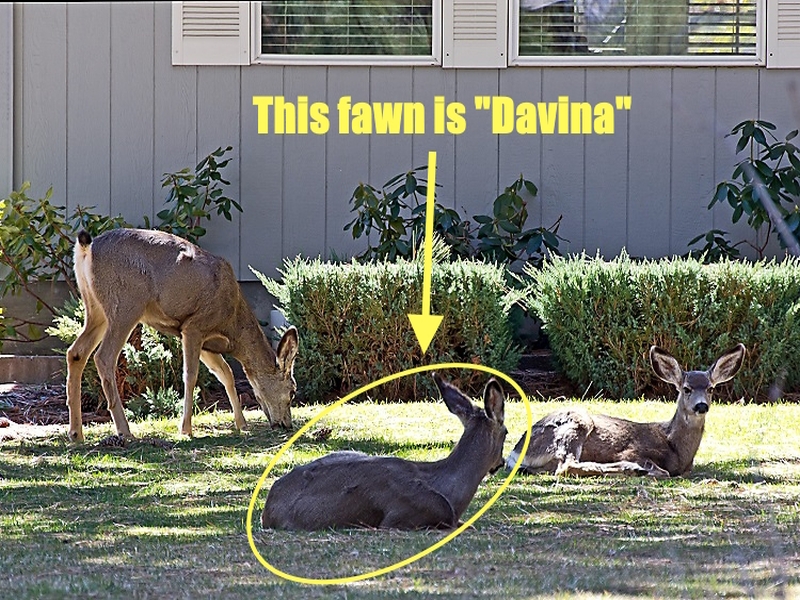
    (1) Circle the deer in the photo
    (2) Point to that circled deer in the photo
    (3) Describe something about that deer in the photo

    Here is an example photo that shows the Android capability that I seek. https://www.saferbrand.com/media/Articles/Safer-Brand/hh_us_deer_deerlounge_GJ6BcvY_.png

    Here's an example of the kind of edits I'm envisioning for Android. https://i.postimg.cc/FKMMT7Y7/deer.jpg

    Normally I need to circle something or point to it with an arrow & then I
    just need to add some descriptive text onto the image before texting it.

    If anyone already has a free app that does those simple edits, let me know (meanwhile I'll be testing the dozen apps above to find one that does).

    --- SoupGate-Win32 v1.05
    * Origin: fsxNet Usenet Gateway (21:1/5)
  • From Siard@21:1/5 to Larry Wolff on Sun Sep 1 23:24:28 2024
    On Sat, 31 Aug 2024 21:52:11 -0400, Larry Wolff wrote:
    Any suggestions for a basic free photo editor on Android that can draw circles around things, draw arrows to point to the things in the circles
    and you can type captions inside or below the images to describe things?

    If I search for 'draw shapes and lines on photos' in the Play Store, I see several apps that seem to do exactly what you're looking for, such as
    iMarkup and 'Annotium - Photo Annotation'.

    However, personally I consider a smartphone too small for such edits, so
    I prefer to use Gimp on my PC for this.

    --- SoupGate-Win32 v1.05
    * Origin: fsxNet Usenet Gateway (21:1/5)
  • From micky@21:1/5 to [email protected] on Sun Sep 1 20:16:35 2024
    In comp.mobile.android, on Sun, 1 Sep 2024 20:48:10 +0200, "Carlos E.R." <[email protected]d> wrote:

    On 2024-09-01 03:52, Larry Wolff wrote:
    Any suggestions for a basic free photo editor on Android that can draw
    circles around things, draw arrows to point to the things in the circles
    and you can type captions inside or below the images to describe things?

    I used Pixlr once. It wants access to your private data.

    Then I use Gallery from simplemobiletools.com. Actually the Pro version, >which I probably purchased. I don't know/remember how to find this out.

    <https://play.google.com/store/apps/details?id=com.simplemobiletools.gallery.pro>

    Yes, the link confirms the price as 0.79�. There is a non-pro version
    which you can try for free, but might not have an editor or not all
    features.

    Ha! I have the free version on another phone, and it asks permission to
    use my data.

    I'd like to use your data too. I'm sure you have much better data than I
    do.

    There is yet another version on F-Droid.

    --- SoupGate-Win32 v1.05
    * Origin: fsxNet Usenet Gateway (21:1/5)
  • From Larry Wolff@21:1/5 to Eli the Bearded on Mon Sep 2 00:04:29 2024
    On 9/1/2024 8:40 PM, Eli the Bearded wrote:

    Then I use Gallery from simplemobiletools.com. Actually the Pro version,
    which I probably purchased. I don't know/remember how to find this out.

    It used to be the F-Droid versions gave your the "pro" features for
    free. But Simple Mobile Tools has been sold to Zipo Apps which is
    probably not a good thing.

    Maybe you're talking about this tool for drawing on photos? https://f-droid.org/en/packages/com.simplemobiletools.draw.pro/

    You gave me a good idea to search specifically the F-Droid repository.
    With F-Droid, none of the apps will cost money or have advertisements.

    https://f-droid.org/de/packages/com.burhanrashid52.photoediting/ https://f-droid.org/de/packages/io.github.pastthepixels.freepaint/ https://f-droid.org/en/packages/org.catrobat.paintroid/ https://f-droid.org/de/packages/ru.tech.imageresizershrinker/ https://f-droid.org/ru/packages/org.secuso.privacyfriendlysketching/ https://f-droid.org/de/packages/org.tuxpaint/ https://f-droid.org/de/packages/com.tomer.draw/ https://f-droid.org/de/packages/com.benny.pxerstudio/ https://f-droid.org/de/packages/net.gsantner.markor/

    With the original dozen plus the added half dozen, with these 9 F-Droid
    photo editing apps, one of the 27 apps should be able to do three things
    on any photo, such as this sample photo I pulled off the net for testing. https://www.saferbrand.com/media/Articles/Safer-Brand/hh_us_deer_deerlounge_GJ6BcvY_.png

    The three things I want to be able to do with Android on that photo are
    (1) Circle the deer in the photo
    (2) Point to that circled deer in the photo
    (3) Annotate something about that circled deer in the photo

    Using that photo as an example, these are the type of edits that I seek. https://i.postimg.cc/FKMMT7Y7/deer.jpg

    --- SoupGate-Win32 v1.05
    * Origin: fsxNet Usenet Gateway (21:1/5)
  • From Larry Wolff@21:1/5 to Siard on Sun Sep 1 23:37:37 2024
    On 9/1/2024 5:24 PM, Siard wrote:

    If I search for 'draw shapes and lines on photos' in the Play Store, I see several apps that seem to do exactly what you're looking for, such as
    iMarkup and 'Annotium - Photo Annotation'.

    However, personally I consider a smartphone too small for such edits, so
    I prefer to use Gimp on my PC for this.

    Thank you for the suggestion of iMarkup & Annotium, which are located here: https://play.google.com/store/apps/details?id=com.winterso.markup.annotable https://play.google.com/store/apps/details?id=app.ngockhanh.annotium

    Unlike the dozen potential editors I listed earlier, both contains ads,
    so I will try them both only if none of the dozen listed earlier work out.

    Fruitfully, when I looked up "iMarkup" a few other possibilities arose: https://play.google.com/store/apps/details?id=maksim.kolosov.highlightonthephoto
    https://play.google.com/store/apps/details?id=uk.co.kewinlawsonsmith.markup https://play.google.com/store/apps/details?id=air.com.befunky.BeFunkyPhotoEditor
    https://play.google.com/store/apps/details?id=com.hde7.fotogenic https://play.google.com/store/apps/details?id=com.on1.onmobile https://play.google.com/store/apps/details?id=com.iaan.pencilcamera

    All of which showed up, I think, because of the "markup" keyword used.
    All are free. None should have any advertisements.

    Unfortunately, that makes for 18 free apps without advertisements to test
    given that these dozen were already found using "sketching" keywords. https://play.google.com/store/apps/details?id=com.drawing.pad.desk.app.coloring.book.paint.sketch
    https://play.google.com/store/apps/details?id=com.imageryedit https://play.google.com/store/apps/details?id=appinventor.ai_lehaonisko.Zhekaphoto
    https://play.google.com/store/apps/details?id=com.adsk.sketchbook https://play.google.com/store/apps/details?id=com.ng_labs.kidspaint https://play.google.com/store/apps/details?id=com.kanishka_developer.SketchPad https://play.google.com/store/apps/details?id=com.mihir.drawingapp https://play.google.com/store/apps/details?id=com.microsoft.whiteboard.publicpreview
    https://play.google.com/store/apps/details?id=com.missingames.kids.painting.lite
    https://play.google.com/store/apps/details?id=com.fsoft.FP_sDraw https://play.google.com/store/apps/details?id=com.parkelsoft.beeartistfree https://play.google.com/store/apps/details?id=com.ng_labs.magic.slate

    That there are so many free photo editing apps without advertisements is
    good, but it will be a while before I can tell if they do the three things
    (1) Circle the deer in the photo
    (2) Point to that circled deer in the photo
    (3) Describe something about that deer in the photo

    Here is an example photo I borrowed to show the type of notations I seek. https://www.saferbrand.com/media/Articles/Safer-Brand/hh_us_deer_deerlounge_GJ6BcvY_.png

    Using that photo as an example, these are the type of edits that I seek. https://i.postimg.cc/FKMMT7Y7/deer.jpg

    --- SoupGate-Win32 v1.05
    * Origin: fsxNet Usenet Gateway (21:1/5)
  • From Eric Pozharski@21:1/5 to Eli the Bearded on Mon Sep 2 07:50:14 2024
    with <eli$[email protected]> Eli the Bearded wrote:
    In comp.mobile.android, Carlos E.R. <[email protected]d> wrote:

    *SKIP* [ 4 lines 2 levels deep]
    It used to be the F-Droid versions gave your the "pro" features for
    free. But Simple Mobile Tools has been sold to Zipo Apps which is
    probably not a good thing.

    It *was* bad thing. Specifically gallery facet of simplemobiletools was immediately so fscked up by new management that gallery is 404 on fdroid
    now X( Such is life.

    *SKIP* [ 4 lines 2 levels deep]
    There's a fork of the Simple Mobile Tools appsfrom Fossify now. I have
    not used them, still holding on to my old F-Droid versions. (And I'm
    not using the Gallery tool.)

    https://github.com/FossifyOrg

    https://f-droid.org/en/packages/org.fossify.gallery/

    Thank you, kind sir! I'm not hopeful that other tools (besides gallery)
    will gain any traction, but who knows.

    --
    Torvalds' goal for Linux is very simple: World Domination
    Stallman's goal for GNU is even simpler: Freedom

    --- SoupGate-Win32 v1.05
    * Origin: fsxNet Usenet Gateway (21:1/5)
  • From Carlos E.R.@21:1/5 to Eli the Bearded on Mon Sep 2 15:24:03 2024
    On 2024-09-01 22:40, Eli the Bearded wrote:
    In comp.mobile.android, Carlos E.R. <[email protected]d> wrote:
    Then I use Gallery from simplemobiletools.com. Actually the Pro version,
    which I probably purchased. I don't know/remember how to find this out.

    It used to be the F-Droid versions gave your the "pro" features for
    free. But Simple Mobile Tools has been sold to Zipo Apps which is
    probably not a good thing.

    Ha! I have the free version on another phone, and it asks permission to
    use my data.

    How recent?

    Whatever is the current not paid version. I don't know anymore, because
    I updated yesterday to the paid version. Pay once, install in several phones/tablets under the same account


    There is yet another version on F-Droid.

    There's a fork of the Simple Mobile Tools appsfrom Fossify now. I have
    not used them, still holding on to my old F-Droid versions. (And I'm not using the Gallery tool.)

    https://github.com/FossifyOrg

    https://f-droid.org/en/packages/org.fossify.gallery/

    Elijah
    ------
    uses a paid gallery app

    --
    Cheers, Carlos.

    --- SoupGate-Win32 v1.05
    * Origin: fsxNet Usenet Gateway (21:1/5)
  • From Henry The Mole@21:1/5 to All on Mon Sep 2 15:42:48 2024
    Larry Wolff ci ha detto :
    Any suggestions for a basic free photo editor on Android that can draw circles around things, draw arrows to point to the things in the circles
    and you can type captions inside or below the images to describe things?

    https://github.com/T8RIN/ImageToolbox

    Kindly regards.

    --
    Henry The Mole.
    "I can't believe I ate the whole thing."

    --- SoupGate-Win32 v1.05
    * Origin: fsxNet Usenet Gateway (21:1/5)
  • From Larry Wolff@21:1/5 to Henry The Mole on Mon Sep 2 13:44:55 2024
    On 9/2/2024 8:42 AM, Henry The Mole wrote:

    Any suggestions for a basic free photo editor on Android that can draw
    circles around things, draw arrows to point to the things in the circles
    and you can type captions inside or below the images to describe things?

    https://github.com/T8RIN/ImageToolbox

    Thanks for suggesting Malik Mukhametzyanov's open source ImageToolbox. https://github.com/T8RIN/ImageToolbox/releases/tag/2.9.1-rc02 https://f-droid.org/packages/ru.tech.imageresizershrinker/ https://play.google.com/store/apps/details?id=ru.tech.imageresizershrinker

    Malik's ImageToolbox was updated 3 days ago to version 2.9.1-rc02, which I found out because I had installed the prior version which phones home each
    time you run it and lets you know the version that is currently available.

    It has the option to "Load Images From Net" so I gave it the deer image. https://www.saferbrand.com/media/Articles/Safer-Brand/hh_us_deer_deerlounge_GJ6BcvY_.png

    Then I hit the edit icon, and the options available were
    Single edit (change specs of single given image)
    Resize & Convert (change size or convert formats or edit EXIF data)
    Format Conversion (convert batch of images to various formats)
    Resize by weight (resize to a given size in KB)
    Crop (crop to any bounds)
    Full Filter (apply a series of filter chains)
    Draw (draw on image as in a sketchbook)
    OCR (recognize text)
    Background remover (remove the background)
    Mask Filter (apply filter chains on given masked areas)
    Image Stitching (combine multiple images)
    Image Stacking (stack images and blend)
    Image Splitting (split into rows and columns)
    Watermarking (add custom watermarks including text)
    Gradient Maker (create gradient of given output size)
    Images to PDF (convert multiple images to PDF)
    Images to GIF (convert multiple images to GIF)
    Cipher (AES crypto encrypt & decrypt)
    Image preview (preview any type of image)
    Pick color (pick color from image)
    Generate Palette (generate color palette swatch)
    Images to APNG (convert batch of images to APNG file)
    Images to JXL (convert batch of images to JXL file)
    Images to SVG (convert batch of images to SVG file)
    ZIP (create zip file from given images)
    Delete EXIF (delete exif data from images)
    Limits resize (resize given images with given aspect ratio)
    JPEG to JXL (lossless transcoding from JPEG to JXL)
    Compare (compare two given images)
    Documents Scanner (scan documents and create PDF)
    QR Code (scan QR code or create a QR code from text)

    Of those 30 choices, the three I need to do are
    (1) Circle the deer in the photo
    (2) Point to that circled deer in the photo
    (3) Describe something about that deer in the photo

    In "Single Edit", after selecting the "Pencil" icon, there is a "Draw mode"
    set of options and a "Draw path mode" set which seem to do what I need.
    Draw Modes = Pen,Text,Neon glow,Highlighter,Privacy Blur,Pixelation, etc.
    Draw Path Modes = Free drawing, line, arrow, double arrow, line arrow,
    double-line arrow, lasso, rectangle, oval, triangle, polygon, star
    and outlined {rectangle, oval, triangle, polygon & star}.

    To circle the deer in the photo, I selected the "Draw" option, & then the "Paint color" of yellow, & then the "Line width" of 20 Pt, & then the "Draw Path Mode" of a circle, and then I drew a yellow circle around the deer.

    There is no changing of options mid sequence so it took a few tries to get
    the circle to be the right width (20 points was too fat, for example).

    For whatever reasons, the setup wasn't saved so I had to do it again for
    the next task, but I'm sure there's a way to save those colors & sizes.

    To point to the deer in the photo, I selected the "Draw" option, & then
    again the "Paint color" of yellow, & then again the "Line width" of 5 Pt, & then the "Draw Path Mode" of a squiggly single-ended arrow, and then I drew
    a yellow 5-point single-ended arrow toward that circled deer.

    To add text on top of the photo, I selected the "Draw" option, & then again
    the "Paint color" of yellow, & then the "Draw Mode" of text, and then I
    typed in the desired text into the text box & left the "Font" at system and left the "Font Size" at 10 Pt. But it took quite a few attempts before I figured out that the text shows up when you swipe to the right on the
    photo!

    About the only thing I couldn't figure out was how to SAVE the presets.

    --- SoupGate-Win32 v1.05
    * Origin: fsxNet Usenet Gateway (21:1/5)
  • Who's Online

  • Recent Visitors

    • Krenn
      Sat Jun 6 11:38:56 2026
      from Sydney, Nsw via Telnet
    • Furryboy
      Sat Jun 6 10:56:29 2026
      from Romania, Galati via SSH
    • Centurion
      Fri Jun 5 22:28:01 2026
      from Berea, Ohio via Telnet
    • Ab Cadd
      Fri Jun 5 17:52:51 2026
      from Sheboygan, Wi via Telnet
    • Gwylbert
      Fri Jun 5 06:28:52 2026
      from Sydney, Nsw via Telnet
    • Centurion
      Thu Jun 4 23:42:23 2026
      from Berea, Ohio via Telnet
    • Michal Wronka
      Thu Jun 4 23:19:58 2026
      from Wroclaw, Poland via Telnet
    • Michal Wronka
      Thu Jun 4 23:17:20 2026
      from Wroclaw, Poland via SSH
  • System Info

    Sysop: Keyop
    Location: Huddersfield, West Yorkshire, UK
    Users: 715
    Nodes: 16 (2 / 14)
    Uptime: 145:49:31
    Calls: 12,089
    Calls today: 2
    Files: 15,000
    Messages: 6,517,500

© >>> Magnum BBS <<<, 2026