• Are Playstore app updates tested before release?

    From Jeff Layman@21:1/5 to All on Wed Jul 10 09:05:51 2024
    I've been playing Solitaire Klondike ad free on my Xiaomi Redmi Note 10
    for almost 3 years. It's an old app and there have been no updates until
    today, when one came through (for compatibility with Android 13 IIRC).
    I've been on 13 for some time, but thought it might be worth updating
    the app in case other changes had been made. So against my better
    judgement I installed the update.

    On running, it locked the phone up with a green screen (the app
    background colour - baize green), instead of advancing to the card
    layout. Even when working with the previous version the app hadn't, by
    design, shown the system buttons at the bottom of the screen. In the end
    I had to reboot the phone to get back control. I uninstalled and
    reinstalled the app and tried again with the same result. I did find
    that after several attempts swiping up on the green screen would show
    the system buttons for a few seconds, and I could get back to the
    phone's main screen. I've uninstalled the app.

    I can't believe that this update was properly tested before release,
    unless for some reason it's only my phone it doesn't like.

    --
    Jeff

    --- SoupGate-Win32 v1.05
    * Origin: fsxNet Usenet Gateway (21:1/5)
  • From VanguardLH@21:1/5 to Jeff Layman on Wed Jul 10 11:41:16 2024
    Jeff Layman <[email protected]d> wrote:

    I've been playing Solitaire Klondike ad free on my Xiaomi Redmi Note 10
    for almost 3 years. It's an old app and there have been no updates until today, when one came through (for compatibility with Android 13 IIRC).
    I've been on 13 for some time, but thought it might be worth updating
    the app in case other changes had been made. So against my better
    judgement I installed the update.

    On running, it locked the phone up with a green screen (the app
    background colour - baize green), instead of advancing to the card
    layout. Even when working with the previous version the app hadn't, by design, shown the system buttons at the bottom of the screen. In the end
    I had to reboot the phone to get back control. I uninstalled and
    reinstalled the app and tried again with the same result. I did find
    that after several attempts swiping up on the green screen would show
    the system buttons for a few seconds, and I could get back to the
    phone's main screen. I've uninstalled the app.

    I can't believe that this update was properly tested before release,
    unless for some reason it's only my phone it doesn't like.

    "How to publish an Android App on Google Play Store: A step-by-step
    guide" https://orangesoft.co/blog/how-to-publish-an-android-app-on-google-play-store

    Google reviews all app submissions, but I doubt a real person is
    involved in every review of every app and every version of an app. They
    likely run a battery of automated tests to check for compliance.

    https://support.google.com/googleplay/android-developer/answer/14151465?hl=en

    14 opted-in alpha testers isn't that many testers, especially consider
    the possible range of support Android versions for an app, and the
    custom version of each Android version that phone makers put on their
    devices. All phone makers' custom versions would run into hundreds if
    not thousands of testing platforms for just 1 Android version. 14, or
    several dozen, is a tiny sampling of all platforms on which the app
    might run.

    A search at the Play Store on "solitaire klondike"

    https://play.google.com/store/search?q=solitaire%20klondike&c=apps

    finds several apps with those words in the app name. You didn't give
    the URL to the app in Google's Play Store for anyone else to know which
    one you are discussing.

    When Google gets a submission from a developer to add a [new version of
    an] app to their Play Store, I doubt they run the app on every version
    of Android that the developer claims with which their app is compatible
    nor run through every phone maker's customized version of every Android
    version that has ever been available within the base range of Android
    versions the app author claims to support. I've hit many apps that
    claim they support the Android version on my phone, but they don't test
    against the custom Android version that my phone maker put on their
    phone. Google probably only tests on the latest 2 major versions of
    base Android (what you get on their Pixel phones).

    If you have a problem with an app, you might want to add a review to the
    app's Play Store page while noting which phone (brand and model) and
    which Android version you have on that phone. Sometimes there is a
    viable link to the author's support site or an e-mail where you can also
    send bug reports. Since the app just got updated, likely its author
    will be responsive to bug reports. Doesn't sound like and old app that
    has been abandoned by its author.

    You might also try a clean[er] reinstall of the app. With the app still installed, go into Android settings -> Apps, pick the Solitaire app, and
    stop it (to remove from backgrounded running), clear cache, clear data
    (you get prompted you'll lose data), uninstall, and then reinstall using
    the Play Store app which does various checks on compatibility of an app
    to ensure you get the app version that is listed as compatible with your Android version. If you're getting an app from other than Google's Play
    Store then you'll have to get the latest compatible version from
    wherever you originally got the app, or use their updater (I think
    Fdroid has its own updater app to find new app versions from their own
    app repository).

    Note that many app authors incorporate advertising libraries (SDKs) into
    their apps, like Google's advertising platform. They don't do any
    coding of the libs. They use as-is, and divulge themself of any
    responsibility regarding the advertising platform's behavior. They have
    no clue how the ad code works. They barely know how their own app's
    code is supposed to work, and nothing of how the ad SDK works. For
    example, some ads may display as fullscreened crap oblitering the nav
    buttons at the bottom, and effectively rendering your phone unusable
    until you exit the ad screen. I consider any in-app ads that go
    fullscreen to be malware apps as they interfere with the use of YOUR
    phone. Clicking on the "X" button could run a script instead of simply
    close the ad screen. Instead, and if the Back button is still
    available, that is a better choice to get rid of the ad screen than
    using "X". If ads are blocked to the app, like using an adblocker proxy
    or DNS server, the app may misbehave. The app author often does no
    testing of how they app operates when web-centric content is blocked
    from the app. And Google isn't going to curate an app ran under an
    environment that deliberately alters the behavior of the app from how it
    was delivered to Google.

    --- SoupGate-Win32 v1.05
    * Origin: fsxNet Usenet Gateway (21:1/5)
  • From Jeff Layman@21:1/5 to VanguardLH on Thu Jul 11 18:58:14 2024
    On 10/07/2024 17:41, VanguardLH wrote:
    Jeff Layman <[email protected]d> wrote:

    I've been playing Solitaire Klondike ad free on my Xiaomi Redmi Note 10
    for almost 3 years. It's an old app and there have been no updates until
    today, when one came through (for compatibility with Android 13 IIRC).
    I've been on 13 for some time, but thought it might be worth updating
    the app in case other changes had been made. So against my better
    judgement I installed the update.

    On running, it locked the phone up with a green screen (the app
    background colour - baize green), instead of advancing to the card
    layout. Even when working with the previous version the app hadn't, by
    design, shown the system buttons at the bottom of the screen. In the end
    I had to reboot the phone to get back control. I uninstalled and
    reinstalled the app and tried again with the same result. I did find
    that after several attempts swiping up on the green screen would show
    the system buttons for a few seconds, and I could get back to the
    phone's main screen. I've uninstalled the app.

    I can't believe that this update was properly tested before release,
    unless for some reason it's only my phone it doesn't like.

    "How to publish an Android App on Google Play Store: A step-by-step
    guide" https://orangesoft.co/blog/how-to-publish-an-android-app-on-google-play-store

    Google reviews all app submissions, but I doubt a real person is
    involved in every review of every app and every version of an app. They likely run a battery of automated tests to check for compliance.

    https://support.google.com/googleplay/android-developer/answer/14151465?hl=en

    Is any testing done for updates other than by the developer? That
    webpage states "If your application is successful, you can access
    Production ... and can make your app available to billions of users on
    Google Play when you think it's ready ... We recommend testing your app extensively before publishing it to production, and routinely testing
    any future updates you make."

    I interpret that as after the initial release, any update testing is up
    to the dev.

    A search at the Play Store on "solitaire klondike"

    https://play.google.com/store/search?q=solitaire%20klondike&c=apps

    finds several apps with those words in the app name. You didn't give
    the URL to the app in Google's Play Store for anyone else to know which
    one you are discussing.

    There are very few ad-free. The one I was referring to is: <https://play.google.com/store/apps/details?id=com.potatojam.classic.solitaire.klondike>

    Note the "What's New" at the bottom:
    "Fix bug with a green screen on start"!!!!!!!!!!!

    Anyway, look at the comments, click on "all reviews" and sort them by
    date (I *hate* all lists which default to a sort on "relevance".
    Relevant to who??!!). The latest ones refers to the green screen. There
    appears to be a new update to fix this, but as I've uninstalled the app
    I haven't seen it. I've now downloaded an ad-free version with 16
    different solitaire games from F-Droid.

    I might try reinstalling in a few days with the latest update, but will
    check the latest reviews first!

    --
    Jeff

    --- SoupGate-Win32 v1.05
    * Origin: fsxNet Usenet Gateway (21:1/5)
  • From Jeff Layman@21:1/5 to Jeff Layman on Thu Jul 11 21:56:37 2024
    On 11/07/2024 18:58, Jeff Layman wrote:

    I might try reinstalling in a few days with the latest update, but will
    check the latest reviews first!

    I've just tried the latest update and the app is now ok.

    --
    Jeff

    --- SoupGate-Win32 v1.05
    * Origin: fsxNet Usenet Gateway (21:1/5)
  • From Andrew@21:1/5 to Jeff Layman on Thu Jul 11 21:29:21 2024
    Jeff Layman wrote on Thu, 11 Jul 2024 18:58:14 +0100 :

    A search at the Play Store on "solitaire klondike"

    https://play.google.com/store/search?q=solitaire%20klondike&c=apps

    finds several apps with those words in the app name. You didn't give
    the URL to the app in Google's Play Store for anyone else to know which
    one you are discussing.

    There are very few ad-free. The one I was referring to is: <https://play.google.com/store/apps/details?id=com.potatojam.classic.solitaire.klondike>

    Hi Jeff,

    I never play games (so I don't know much about them) but I was surprised
    you assessed the number of ad-free solitaire games on Android as "very
    few", as I would have thought there were very many, not very few.

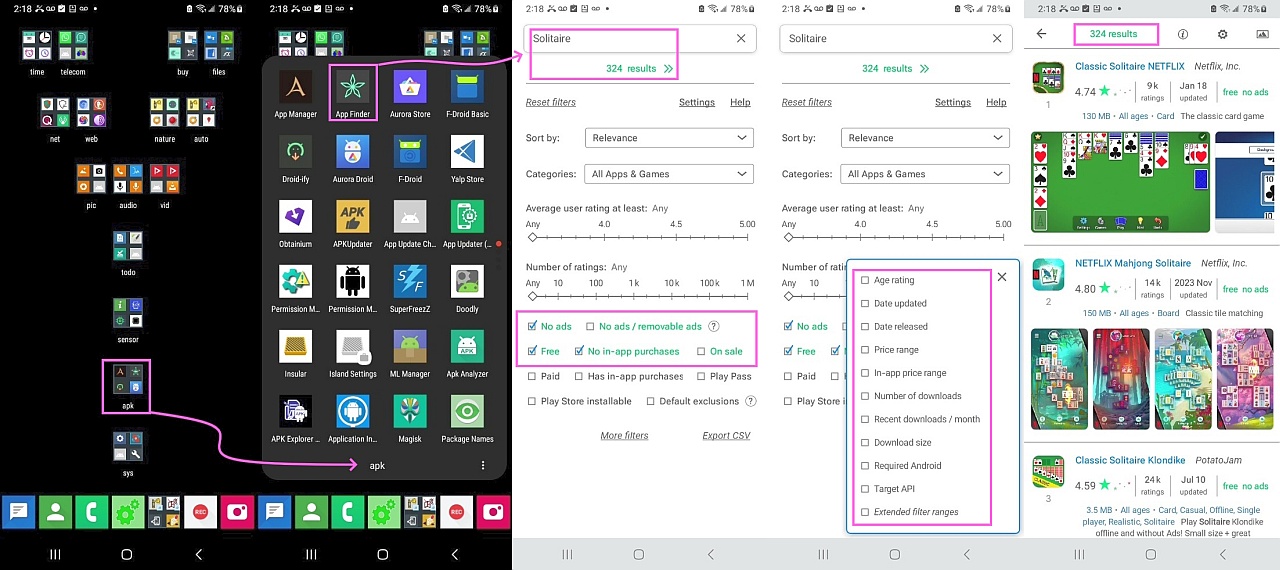
    So I ran a search and found there are at least 324 apps with that in the
    name which are also free, ad free, and in-app purchase free.

    Take a look at my results run for this post, as shown in this screenshot.
    <https://i.postimg.cc/CL0CYF32/solitaire01.jpg> 324 free/ad-free apps

    What did I do wrong (given that over 300 similar apps seems like a lot)?

    BTW, the number two app, ranked by the default sort, was the one you're
    using by "Potato Jam" so you picked a good app it seems.

    --- SoupGate-Win32 v1.05
    * Origin: fsxNet Usenet Gateway (21:1/5)
  • From Dave Royal@21:1/5 to Jeff Layman on Fri Jul 12 08:14:38 2024
    Jeff Layman <[email protected]d> Wrote in message:

    I've been playing Solitaire Klondike ad free on my Xiaomi Redmi Note 10
    for almost 3 years. It's an old app and there have been no updates until today, when one came through (for compatibility with Android 13 IIRC).
    I've been on 13 for some time, but thought it might be worth updating
    the app in case other changes had been made. So against my better
    judgement I installed the update.

    ...

    I can't believe that this update was properly tested before release,
    unless for some reason it's only my phone it doesn't like.

    It's a common problem with Google's ever-changing permission and
    manifest requirements. But it has a support email address on the
    G-play page.

    I see it's from an 'indie developer in Belarus' but with an
    address in Warwaw.
    --
    Remove numerics from my email address.

    --- SoupGate-Win32 v1.05
    * Origin: fsxNet Usenet Gateway (21:1/5)
  • From Jeff Layman@21:1/5 to Andrew on Fri Jul 12 09:50:53 2024
    On 11/07/2024 22:29, Andrew wrote:
    Jeff Layman wrote on Thu, 11 Jul 2024 18:58:14 +0100 :

    A search at the Play Store on "solitaire klondike"

    https://play.google.com/store/search?q=solitaire%20klondike&c=apps

    finds several apps with those words in the app name. You didn't give
    the URL to the app in Google's Play Store for anyone else to know which
    one you are discussing.

    There are very few ad-free. The one I was referring to is:
    <https://play.google.com/store/apps/details?id=com.potatojam.classic.solitaire.klondike>

    Hi Jeff,

    I never play games (so I don't know much about them) but I was surprised
    you assessed the number of ad-free solitaire games on Android as "very
    few", as I would have thought there were very many, not very few.

    I am not a "gamer" as such. I just like to have a few simple logic games
    to play (such as Simon Tatham's excellent collection) when waiting around.

    So I ran a search and found there are at least 324 apps with that in the
    name which are also free, ad free, and in-app purchase free.

    Take a look at my results run for this post, as shown in this screenshot.
    <https://i.postimg.cc/CL0CYF32/solitaire01.jpg> 324 free/ad-free apps

    What did I do wrong (given that over 300 similar apps seems like a lot)?

    You used App Finder, rather than just use the Play Store search, which
    is what I did on my cellphone. What is interesting about the Play Store
    search is that even if you use "solitaire klondike free no ads" or
    similar wording you get lots of results. It's only when you look at the
    one and two star reviews you find they're *not* ad free at all! For
    example, you'll find many reviews complaining that the incidence of ads
    for that app have increased with the latest update. To do that, though,
    you'll have to look at "all reviews", and change from "relevance" to
    "most recent".

    What is really strange is if you look at <https://play.google.com/store/search?q=solitaire+no+ads+free+offline&c=apps> in your PC's browser (I've no idea what a cellphone browser shows),
    you'll find only four hits. Now change the search to <https://play.google.com/store/search?q=solitaire%20klondike%20no%20ads%20free%20offline&c=apps>.
    In other words add another limitation by using "klondike" as a required
    search term. Mysteriously, you'll now find 30 hits!

    BTW, the number two app, ranked by the default sort, was the one you're
    using by "Potato Jam" so you picked a good app it seems.

    Yes, I've always appreciated its simple interface. What I don't like is
    the way that it automatically hides the android system buttons even when working correctly, and I've not found a way (other than by using the
    app's menu) to get them back.

    The F-Droid alternative I've installed has a few more solitaire games, including "Freecell" which I first played on a Windows NT4 PC around 30
    years ago!

    --
    Jeff

    --- SoupGate-Win32 v1.05
    * Origin: fsxNet Usenet Gateway (21:1/5)
  • From Arno Welzel@21:1/5 to All on Fri Jul 12 15:37:14 2024
    Jeff Layman, 2024-07-10 10:05:

    I've been playing Solitaire Klondike ad free on my Xiaomi Redmi Note 10
    for almost 3 years. It's an old app and there have been no updates until today, when one came through (for compatibility with Android 13 IIRC).
    I've been on 13 for some time, but thought it might be worth updating
    the app in case other changes had been made. So against my better
    judgement I installed the update.

    [...]

    I can't believe that this update was properly tested before release,
    unless for some reason it's only my phone it doesn't like.

    Apps can just be published without any test at all. Google only checks
    for known malicious elements with automated tests and blocks apps which
    are considedered to be harmful.

    But testing with real devices and different Android versions is still
    the responsibility of the publisher. You may just have bad luck since
    Xiaomi also implements their own UI including changing the behaviour of
    the graphics output (e.g. custom "dark mode" even for apps which do not
    support that etc.). Maybe this causes some problems with that game.

    You can report this to the publisher - maybe they will provide an update
    to fix this. However if no one ever reports issues like this, they will
    never get fixed.

    --
    Arno Welzel
    https://arnowelzel.de

    --- SoupGate-Win32 v1.05
    * Origin: fsxNet Usenet Gateway (21:1/5)
  • From Andrew@21:1/5 to Jeff Layman on Fri Jul 12 14:03:05 2024
    Jeff Layman wrote on Fri, 12 Jul 2024 09:50:53 +0100 :

    Take a look at my results run for this post, as shown in this screenshot.
    <https://i.postimg.cc/CL0CYF32/solitaire01.jpg> 324 free/ad-free apps

    What did I do wrong (given that over 300 similar apps seems like a lot)?

    You used App Finder, rather than just use the Play Store search, which
    is what I did on my cellphone.

    Hi Jeff,

    It's always good to learn from you as you've helped me in the past too.

    Yes. The Skyica App finder, which is free for me, is the best app search
    engine on the planet, bar none - it has the best filters by far of all.
    <https://play.google.com/store/apps/details?id=scadica.aq>

    I'm not sure if it's free for everyone as I use a special build.

    What is interesting about the Play Store
    search is that even if you use "solitaire klondike free no ads" or
    similar wording you get lots of results. It's only when you look at the
    one and two star reviews you find they're *not* ad free at all!

    You'd think Google would know a thing or two about search engines, right? There's a reason the Google Play Store search is almost totally useless.

    You leave a lot of money on the table when you don't know what's free,
    ad free, in-app purchase free, etc., which Skyica app finder gives you.

    For
    example, you'll find many reviews complaining that the incidence of ads
    for that app have increased with the latest update. To do that, though, you'll have to look at "all reviews", and change from "relevance" to
    "most recent".

    Yes. The sleazy companies play tricks to get those ads to your phone.
    There are lot of tricks they are using - but most ads are easily blocked.

    But I wouldn't know much about that as I never see ads on my phones.

    What is really strange is if you look at <https://play.google.com/store/search?q=solitaire+no+ads+free+offline&c=apps> in your PC's browser (I've no idea what a cellphone browser shows),
    you'll find only four hits.

    While the companies often have "mobile" sites (e.g., m.domain.name), they "should" show the same information - perhaps in an abbreviated format.

    Now change the search to <https://play.google.com/store/search?q=solitaire%20klondike%20no%20ads%20free%20offline&c=apps>.
    In other words add another limitation by using "klondike" as a required search term. Mysteriously, you'll now find 30 hits!

    Each search engine works in its own mysterious ways but if you added a
    "plus sign" to each of those terms, it should reduce spurious hits.

    FROM: solitaire klondike no ads free offline
    TO: +solitaire +klondike +"no ads" +free +offline

    But I didn't test it because I have Skyica App Finder installed.
    I just click the button for "free" and the one for "no ads".
    If desired, I click the one for "no in-app purchases" too.

    BTW, the number two app, ranked by the default sort, was the one you're
    using by "Potato Jam" so you picked a good app it seems.

    Yes, I've always appreciated its simple interface. What I don't like is
    the way that it automatically hides the android system buttons even when working correctly, and I've not found a way (other than by using the
    app's menu) to get them back.

    Oh, you hit another pet peeve of mine - when an app hides Android's
    interface. Now you're making me mad! :)

    I especially dislike when they hide the Android navigation buttons simply
    by changing the color of the bottom of the screen to white so they're
    nearly invisible even though they're there so you can't swipe around to get them back because they're already there - just hidden behind the curtains.

    The F-Droid alternative I've installed has a few more solitaire games, including "Freecell" which I first played on a Windows NT4 PC around 30
    years ago!

    Well, you have 300 free ad-free in-app-purchase free apps with Solitaire in
    the name to choose from, so you should find a couple in that list you like.

    Good luck.

    If you install the Skyica App finder, let me know if it's free for you.
    (Mine is a special build which isn't generally available to the public.)
    <https://play.google.com/store/apps/details?id=scadica.aq>

    --- SoupGate-Win32 v1.05
    * Origin: fsxNet Usenet Gateway (21:1/5)
  • From Andrew@21:1/5 to Arno Welzel on Fri Jul 12 14:09:28 2024
    Arno Welzel wrote on Fri, 12 Jul 2024 15:37:14 +0200 :

    Apps can just be published without any test at all. Google only checks
    for known malicious elements with automated tests and blocks apps which
    are considedered to be harmful.
    But testing with real devices and different Android versions is still
    the responsibility of the publisher. You may just have bad luck since
    Xiaomi also implements their own UI including changing the behaviour of
    the graphics output (e.g. custom "dark mode" even for apps which do not support that etc.). Maybe this causes some problems with that game.

    You can report this to the publisher - maybe they will provide an update
    to fix this. However if no one ever reports issues like this, they will
    never get fixed.

    Arno and Andy know a lot more than I ever will about Android, so I will
    defer to them - but there is on-device scanning also that Google does.

    As I recall, every app that is installed, no matter how it's installed and
    nor matter where it came from, is scanned by default upon installation.

    This is, of course, with the default Google Play Store client settings,
    even though the app may have nothing whatsoever to do with the Play Store.

    In addition, once a day, by default, it's my understanding that Google
    scans again every app on your device for malicious signatures.

    We could dig up more if people are interested - although we've covered this
    a few times in the past - so I'm confident those statements above are true.

    But, as Arno mentioned also - these scans are only malware signature scans.

    --- SoupGate-Win32 v1.05
    * Origin: fsxNet Usenet Gateway (21:1/5)
  • From Arno Welzel@21:1/5 to All on Fri Jul 12 15:38:20 2024
    Jeff Layman, 2024-07-11 19:58:

    On 10/07/2024 17:41, VanguardLH wrote:
    [...]
    https://support.google.com/googleplay/android-developer/answer/14151465?hl=en

    Is any testing done for updates other than by the developer? That

    No - not besides automated checking for known malware or basic stuff
    like support for the minimum required API level.

    --
    Arno Welzel
    https://arnowelzel.de

    --- SoupGate-Win32 v1.05
    * Origin: fsxNet Usenet Gateway (21:1/5)
  • From Jeff Layman@21:1/5 to Jeff Layman on Sat Jul 13 16:17:24 2024
    On 10/07/2024 09:05, Jeff Layman wrote:

    I can't believe that this update was properly tested before release,
    unless for some reason it's only my phone it doesn't like.

    Thanks for all the interesting and informative comments. I think I'll
    wait a bit longer before installing updates in future and read some very
    recent reviews before I do!

    --
    Jeff

    --- SoupGate-Win32 v1.05
    * Origin: fsxNet Usenet Gateway (21:1/5)
  • From Andrew@21:1/5 to Jeff Layman on Sat Jul 13 18:17:57 2024
    Jeff Layman wrote on Sat, 13 Jul 2024 16:17:24 +0100 :

    Thanks for all the interesting and informative comments. I think I'll
    wait a bit longer before installing updates in future and read some very recent reviews before I do!

    While the Google Play Store app can be set up to update apps automatically, and, while there are plenty of good app updaters that do a much better job
    <https://github.com/ImranR98/Obtainium>
    <https://github.com/rumboalla/apkupdater>
    <https://play.google.com/store/apps/details?id=pratham.bkm.appupdatechecker>
    <https://play.google.com/store/apps/details?id=com.inspirezone.updatesoftwarechecker>
    <https://play.google.com/store/apps/details?id=com.pnixo.softwareupdater.appcheckert>

    I prefer to update apps manually, and only when I already know there is a reason I'd want the update (e.g., the recent NewPipe update two days ago).

    Note that Google autoupdates each month every Android 10+ phone on the
    Internet forever (i.e., no EOL date set) for over two dozen core modules.

    This automatic core update for billions of Android phones, most of which
    are no longer fully supported by their OEMs, happens perfectly seamlessly.

    It's such a seamless update, the vast majority of Android owners don't even know it's happening every month that their phone core packages are updated.
    <https://www.androidheadlines.com/2022/01/google-monthly-changelog-play-system-updates.html>

    --- SoupGate-Win32 v1.05
    * Origin: fsxNet Usenet Gateway (21:1/5)
  • From Jeff Layman@21:1/5 to Andrew on Sun Jul 14 09:20:25 2024
    On 13/07/2024 19:17, Andrew wrote:
    Jeff Layman wrote on Sat, 13 Jul 2024 16:17:24 +0100 :

    Thanks for all the interesting and informative comments. I think I'll
    wait a bit longer before installing updates in future and read some very
    recent reviews before I do!

    While the Google Play Store app can be set up to update apps automatically, and, while there are plenty of good app updaters that do a much better job
    <https://github.com/ImranR98/Obtainium>
    <https://github.com/rumboalla/apkupdater>
    <https://play.google.com/store/apps/details?id=pratham.bkm.appupdatechecker>
    <https://play.google.com/store/apps/details?id=com.inspirezone.updatesoftwarechecker>
    <https://play.google.com/store/apps/details?id=com.pnixo.softwareupdater.appcheckert>

    I prefer to update apps manually, and only when I already know there is a reason I'd want the update (e.g., the recent NewPipe update two days ago).

    Note that Google autoupdates each month every Android 10+ phone on the Internet forever (i.e., no EOL date set) for over two dozen core modules.

    This automatic core update for billions of Android phones, most of which
    are no longer fully supported by their OEMs, happens perfectly seamlessly.

    It's such a seamless update, the vast majority of Android owners don't even know it's happening every month that their phone core packages are updated.
    <https://www.androidheadlines.com/2022/01/google-monthly-changelog-play-system-updates.html>

    That's an interesting page.

    Firstly, I assume the phone user "pays" for the update in terms of MB or
    GB downloaded. If the user is on a very limited contract (5GB/month or
    perhaps even less for a very low-usage contract), then the update might
    amount to a large fraction of the allowance. I wonder what happens if
    the allowance runs out halfway through an update? The user might also
    find something critical they want to use is denied (eg deactivate a
    stolen credit card via a bank app) because all the allowance has been
    used the previous day without their knowledge!

    I see that the update goes unnoticed, but the installation is only
    completed when the user reboots the device. I wonder how many actually
    do that, or is the phone effectively deactivated until the user reboots
    it? Is there some sort of message displayed to that effect? I ask
    because with my Xiaomi, automatic system updates are turned off. I get a
    notice that a system update is available (or I used to as I'm now out of
    the MIUI update period. The OS is MIUI 14.0.5 based on Android 13, and
    from what I've read MIUI is now defunct as it's been superseded by
    Xiaomi's HyperOS). From what I remember these updates could be in the
    1GB+ range.

    Does the update come through the Play Store? Although it's an update to
    the Google Play System, it doesn't state explicitly that it comes via
    the Play Store. Or does it come through the OEM?

    Like you, I have all automatic updates turned off, whether system or
    otherwise. In fact, a lot of the bloatware crap which came with the
    phone has never been updated. Other than with adb, most of the junk is uninstallable anyway, but I just ignore it.

    I see that this is where the latest update info is provided: <https://support.google.com/product-documentation/answer/14343500>

    --
    Jeff

    --- SoupGate-Win32 v1.05
    * Origin: fsxNet Usenet Gateway (21:1/5)
  • From Arno Welzel@21:1/5 to All on Sun Jul 14 15:28:51 2024
    Andrew, 2024-07-13 20:17:

    Jeff Layman wrote on Sat, 13 Jul 2024 16:17:24 +0100 :

    Thanks for all the interesting and informative comments. I think I'll
    wait a bit longer before installing updates in future and read some very
    recent reviews before I do!

    While the Google Play Store app can be set up to update apps automatically, and, while there are plenty of good app updaters that do a much better job
    <https://github.com/ImranR98/Obtainium>
    <https://github.com/rumboalla/apkupdater>
    <https://play.google.com/store/apps/details?id=pratham.bkm.appupdatechecker>
    <https://play.google.com/store/apps/details?id=com.inspirezone.updatesoftwarechecker>
    <https://play.google.com/store/apps/details?id=com.pnixo.softwareupdater.appcheckert>

    I prefer to update apps manually, and only when I already know there is a reason I'd want the update (e.g., the recent NewPipe update two days ago).

    Yes, that's why you can configure Google Play *NOT* to install updates
    without asking you.


    --
    Arno Welzel
    https://arnowelzel.de

    --- SoupGate-Win32 v1.05
    * Origin: fsxNet Usenet Gateway (21:1/5)
  • From Arno Welzel@21:1/5 to All on Sun Jul 14 15:27:28 2024
    Andrew, 2024-07-12 16:09:

    Arno Welzel wrote on Fri, 12 Jul 2024 15:37:14 +0200 :

    Apps can just be published without any test at all. Google only checks
    for known malicious elements with automated tests and blocks apps which
    are considedered to be harmful.
    But testing with real devices and different Android versions is still
    the responsibility of the publisher. You may just have bad luck since
    Xiaomi also implements their own UI including changing the behaviour of
    the graphics output (e.g. custom "dark mode" even for apps which do not
    support that etc.). Maybe this causes some problems with that game.

    You can report this to the publisher - maybe they will provide an update
    to fix this. However if no one ever reports issues like this, they will
    never get fixed.

    Arno and Andy know a lot more than I ever will about Android, so I will
    defer to them - but there is on-device scanning also that Google does.

    As I recall, every app that is installed, no matter how it's installed and nor matter where it came from, is scanned by default upon installation.

    Correct - this is the kind of virus scanner provided by Google Play
    Services. If an app is found to be a known malware, the user will be
    informed about this.

    This is, of course, with the default Google Play Store client settings,
    even though the app may have nothing whatsoever to do with the Play Store.

    In addition, once a day, by default, it's my understanding that Google
    scans again every app on your device for malicious signatures.

    Correct.

    But, as Arno mentioned also - these scans are only malware signature scans.

    Correct.

    --
    Arno Welzel
    https://arnowelzel.de

    --- SoupGate-Win32 v1.05
    * Origin: fsxNet Usenet Gateway (21:1/5)
  • From Andrew@21:1/5 to Jeff Layman on Sun Jul 14 23:27:09 2024
    Jeff Layman wrote on Sun, 14 Jul 2024 09:20:25 +0100 :

    It's such a seamless update, the vast majority of Android owners don't even >> know it's happening every month that their phone core packages are updated. >> <https://www.androidheadlines.com/2022/01/google-monthly-changelog-play-system-updates.html>

    That's an interesting page.

    Since Android 10, Google has been steadily increasing the number of
    packages which are updated monthly forever for all Android phones.

    Firstly, I assume the phone user "pays" for the update in terms of MB or
    GB downloaded. If the user is on a very limited contract (5GB/month or perhaps even less for a very low-usage contract), then the update might amount to a large fraction of the allowance. I wonder what happens if
    the allowance runs out halfway through an update? The user might also
    find something critical they want to use is denied (eg deactivate a
    stolen credit card via a bank app) because all the allowance has been
    used the previous day without their knowledge!

    Good question. I don't have a Google Play Store client app on my unrootable Android in my user partition but there might be a WiFi-only setting maybe?

    I see that the update goes unnoticed, but the installation is only
    completed when the user reboots the device. I wonder how many actually
    do that, or is the phone effectively deactivated until the user reboots
    it?

    I don't know but it's commonly accepted you should reboot every once in a while. I generally reboot about weekly but I do it only as I think of it.

    Is there some sort of message displayed to that effect? I ask
    because with my Xiaomi, automatic system updates are turned off. I get a notice that a system update is available (or I used to as I'm now out of
    the MIUI update period. The OS is MIUI 14.0.5 based on Android 13, and
    from what I've read MIUI is now defunct as it's been superseded by
    Xiaomi's HyperOS). From what I remember these updates could be in the
    1GB+ range.

    I don't think you get a message when Project Mainline (since renamed by
    Google) has updated but we discussed this in the past so I'd have to look.

    Does the update come through the Play Store? Although it's an update to
    the Google Play System, it doesn't state explicitly that it comes via
    the Play Store. Or does it come through the OEM?

    Good question. I'd ask Andy or Arno. I never thought of where the updated packages come from (as there are more than two dozen in Android 14).

    Like you, I have all automatic updates turned off, whether system or otherwise. In fact, a lot of the bloatware crap which came with the
    phone has never been updated. Other than with adb, most of the junk is uninstallable anyway, but I just ignore it.

    Yeah, I try not to update unless I know what I want updated, but the
    Project Mainline stuff updates whether or not you ask it to, I think.

    I see that this is where the latest update info is provided: <https://support.google.com/product-documentation/answer/14343500>

    I think that link answers one of your questions, which is how you know
    you've been updated. I would guess you have the version they say there.

    --- SoupGate-Win32 v1.05
    * Origin: fsxNet Usenet Gateway (21:1/5)
  • From Andrew@21:1/5 to Arno Welzel on Sun Jul 14 23:27:33 2024
    Arno Welzel wrote on Sun, 14 Jul 2024 15:28:51 +0200 :

    I prefer to update apps manually, and only when I already know there is a
    reason I'd want the update (e.g., the recent NewPipe update two days ago).

    Yes, that's why you can configure Google Play *NOT* to install updates without asking you.

    Arno is correct, where the Google Play Store isn't even a required package. Mine is uninstalled for example, even though my phone is unrootable.

    I'm not sure how (or if) the Project Mainline updates are happening for me though, since the Google Play Store is not installed in the user partition.

    --- SoupGate-Win32 v1.05
    * Origin: fsxNet Usenet Gateway (21:1/5)
  • From Jeff Layman@21:1/5 to Andrew on Mon Jul 15 08:41:14 2024
    On 15/07/2024 00:27, Andrew wrote:
    Jeff Layman wrote on Sun, 14 Jul 2024 09:20:25 +0100 :

    Does the update come through the Play Store? Although it's an update to
    the Google Play System, it doesn't state explicitly that it comes via
    the Play Store. Or does it come through the OEM?

    Good question. I'd ask Andy or Arno. I never thought of where the updated packages come from (as there are more than two dozen in Android 14).

    It took some time to find a statement, but at <https://www.esper.io/blog/building-a-google-play-system-update-changelog>
    it notes "Thanks to Project Mainline, Google is able to deliver updates
    to core Android system components through the Play Store. These updates
    — which are publicly referred to as Google Play System Updates — can fix security issues or introduce new features, and they’re routinely
    delivered to users on GMS Android devices running Android 10 and later."

    So they do come through the Play Store. But as you've removed the Play
    Store from your phone, but still get updates, that doesn't make sense.
    Or perhaps the Play Store isn't just the Play Store we think it is... ;-)

    Perhaps part of the answer is here <https://x.com/MishaalRahman/status/1706051485623103675>
    "Google System Updates are comprised of updates to the Google Play Store
    app, the Google Play Services app, the Android WebView, and Project
    Mainline modules (via Google Play System Updates).

    ...

    While you can opt out of these, you'll still get system updates from
    non-Google sources as well as app updates through Google Play*.
    Furthermore, Google says automatic updates may still happen to address
    severe security or safety issues or to comply with legal obligations."

    * But /which/ "Google Play"?! We have Google Play Store, Google Play
    Services, Google Play System, and non-Google sources. Almost looks like
    it's been designed to confuse. Surely not...

    Yeah, I try not to update unless I know what I want updated, but the
    Project Mainline stuff updates whether or not you ask it to, I think.

    See above. Perhaps security and safety issue updates can't be turned off.

    I see that this is where the latest update info is provided:
    <https://support.google.com/product-documentation/answer/14343500>

    I think that link answers one of your questions, which is how you know
    you've been updated. I would guess you have the version they say there.

    I should read my own links properly! :-)

    Yes, the versions I can find in "Settings" by digging down into the app
    menus are pretty much the latest as shown in the links. I'll try to
    avoid doing any updates in the next couple of weeks and see if the
    version change anyway. That will mean an automatic update has taken place.

    --
    Jeff

    --- SoupGate-Win32 v1.05
    * Origin: fsxNet Usenet Gateway (21:1/5)
  • From Arno Welzel@21:1/5 to All on Mon Jul 15 09:20:53 2024
    Andrew, 2024-07-15 01:27:

    Arno Welzel wrote on Sun, 14 Jul 2024 15:28:51 +0200 :

    I prefer to update apps manually, and only when I already know there is a >>> reason I'd want the update (e.g., the recent NewPipe update two days ago). >>
    Yes, that's why you can configure Google Play *NOT* to install updates
    without asking you.

    Arno is correct, where the Google Play Store isn't even a required package. Mine is uninstalled for example, even though my phone is unrootable.

    I'm not sure how (or if) the Project Mainline updates are happening for me though, since the Google Play Store is not installed in the user partition.

    I've been using a Google Pixel 6a for a while now. When I got it, it had Android 13 and at some point I could install the update to Android 14.
    But I never experienced any unattended updates without my consent. All
    system updates and also app updates in Google Play have to be confirmed
    before they get installed.

    --
    Arno Welzel
    https://arnowelzel.de

    --- SoupGate-Win32 v1.05
    * Origin: fsxNet Usenet Gateway (21:1/5)
  • From Jeff Layman@21:1/5 to Arno Welzel on Mon Jul 15 09:10:05 2024
    On 15/07/2024 08:20, Arno Welzel wrote:
    Andrew, 2024-07-15 01:27:

    Arno Welzel wrote on Sun, 14 Jul 2024 15:28:51 +0200 :

    I prefer to update apps manually, and only when I already know there is a >>>> reason I'd want the update (e.g., the recent NewPipe update two days ago). >>>
    Yes, that's why you can configure Google Play *NOT* to install updates
    without asking you.

    Arno is correct, where the Google Play Store isn't even a required package. >> Mine is uninstalled for example, even though my phone is unrootable.

    I'm not sure how (or if) the Project Mainline updates are happening for me >> though, since the Google Play Store is not installed in the user partition.

    I've been using a Google Pixel 6a for a while now. When I got it, it had Android 13 and at some point I could install the update to Android 14.
    But I never experienced any unattended updates without my consent. All
    system updates and also app updates in Google Play have to be confirmed before they get installed.

    As I posted above, I'm going to check the versions at <https://support.google.com/product-documentation/answer/14343500> but
    /not/ manually update anything over the next couple of weeks, and then
    see if my phone has the very latest versions or not. If it has, it means
    the updates have taken place automatically. I assume from your comment
    above that this doesn't happen with your Pixel 6a.

    --
    Jeff

    --- SoupGate-Win32 v1.05
    * Origin: fsxNet Usenet Gateway (21:1/5)
  • From Andrew@21:1/5 to Jeff Layman on Mon Jul 15 13:21:00 2024
    Jeff Layman wrote on Mon, 15 Jul 2024 09:10:05 +0100 :

    I've been using a Google Pixel 6a for a while now. When I got it, it had
    Android 13 and at some point I could install the update to Android 14.
    But I never experienced any unattended updates without my consent. All
    system updates and also app updates in Google Play have to be confirmed
    before they get installed.

    As I posted above, I'm going to check the versions at <https://support.google.com/product-documentation/answer/14343500> but
    /not/ manually update anything over the next couple of weeks, and then
    see if my phone has the very latest versions or not. If it has, it means
    the updates have taken place automatically. I assume from your comment
    above that this doesn't happen with your Pixel 6a.

    I think what Arno & Jeff said is good information because my point about Project Mainline updates is they're so seamless, people don't know they're happening monthly (on Pixels) or slightly less often on other OEM brands.
    <https://www.esper.io/blog/what-is-project-mainline>

    As you can see here, the updates are downloaded, but the user isn't told
    that they are waiting for a reboot - but they happen when the user reboots.
    <https://bayton.org/android/gpsu-system-update/>

    Also, while we've discussed Project Mainline a few times on this ng, most people on this ng I believe are not aware that the concept even exists that Google is updating dozens of core packages monthly for Android 10+ forever.
    <https://www.hexnode.com/blogs/android-project-mainline-everything-you-need-to-know/>

    It's been that seamless since mainline started with Android 10.

    Every subsequent version has been adding more & more mainline modules.
    <https://www.xda-developers.com/bluetooth-ultra-wideband-mainline-modules-android-13/>

    However, my phone is not set up by default in that I have the Google Play
    Store deleted from the user partition so any test by me might not reflect
    how things work for most people who leave the Android set up by defaults.

    Hence, I think it's a great idea that Jeff will be checking his update
    status, where here's a list of the core packages that are in Mainline.
    <https://source.android.com/docs/core/ota/modular-system>

    However, note that at least, you can manually update them at will.
    <https://bayton.org/android/gpsu-system-update/>
    Google Play System updates (Mainline)
    Google Play System updates (also called Mainline updates)
    are automatically downloaded but require a device reboot to be installed.
    These updates won't trigger an automatic reboot and instead they are
    installed on the next user, admin, or policy initiated reboot.
    Reboots triggered by system update policy will install the
    associated Google/OEM system update and any previously downloaded
    Google Play System updates.
    Google Play System updates can also be manually installed by navigating
    to Settings > About > Android Version > Google Play system update.

    --- SoupGate-Win32 v1.05
    * Origin: fsxNet Usenet Gateway (21:1/5)
  • From Andrew@21:1/5 to Jeff Layman on Mon Jul 15 13:36:46 2024
    Jeff Layman wrote on Mon, 15 Jul 2024 08:41:14 +0100 :

    Jeff Layman wrote on Sun, 14 Jul 2024 09:20:25 +0100 :

    Does the update come through the Play Store? Although it's an update to
    the Google Play System, it doesn't state explicitly that it comes via
    the Play Store. Or does it come through the OEM?

    Good question. I'd ask Andy or Arno. I never thought of where the updated
    packages come from (as there are more than two dozen in Android 14).

    It took some time to find a statement, but at <https://www.esper.io/blog/building-a-google-play-system-update-changelog>
    it notes "Thanks to Project Mainline, Google is able to deliver updates
    to core Android system components through the Play Store. These updates
    - which are publicly referred to as Google Play System Updates - can fix security issues or introduce new features, and they're routinely
    delivered to users on GMS Android devices running Android 10 and later."

    So they do come through the Play Store. But as you've removed the Play
    Store from your phone, but still get updates, that doesn't make sense.
    Or perhaps the Play Store isn't just the Play Store we think it is... ;-)

    While I've deleted the Google Play Store package from my user partition,
    for years I simply didn't log into the Google Play Store package (because I couldn't log into it as I have no Google Account on my phone set up).

    Even so, the Google Play Store *settings* still allowed updating of apps,
    so my point of saying this is that the thing we refer to as the "Google
    Play Store" app is a complicated beast that isn't like a normal app is.

    Perhaps part of the answer is here <https://x.com/MishaalRahman/status/1706051485623103675>
    "Google System Updates are comprised of updates to the Google Play Store
    app, the Google Play Services app, the Android WebView, and Project
    Mainline modules (via Google Play System Updates).

    Personally, I think the project mainline (since renamed by Google) packages
    are updated independent of the Google Play Store, but rest assured there
    are a LOT of update mechanisms on Android as we've covered this before.
    <https://groups.google.com/g/comp.mobile.android/search?q=mainline>

    While you can opt out of these, you'll still get system updates from non-Google sources as well as app updates through Google Play*.
    Furthermore, Google says automatic updates may still happen to address
    severe security or safety issues or to comply with legal obligations."

    Andy and I, long ago, listed all the key update mechanisms, where it's complicated since almost all of Android is updated silently, in layers. <https://groups.google.com/g/comp.mobile.android/search?q=%22google%20play%20system%20update%22>

    * But /which/ "Google Play"?! We have Google Play Store, Google Play Services, Google Play System, and non-Google sources. Almost looks like
    it's been designed to confuse. Surely not...

    Yup. Google, like many companies, let the developers name things until they become mainstream and then marketing takes over with brand name recognition where Google marketing has decided people recognize the "Google Play" TM.

    As Andy & I have discussed many times, there are many different things
    which start with the name "Google Play" on Android phones lately. <https://groups.google.com/g/comp.mobile.android/search?q=%22google%20play%20store%20update%22>

    Yeah, I try not to update unless I know what I want updated, but the
    Project Mainline stuff updates whether or not you ask it to, I think.

    See above. Perhaps security and safety issue updates can't be turned off.

    Android updates in mysterious layers - most of which are seamless to us. <https://groups.google.com/g/comp.mobile.android/search?q=%22seamless%20update%22>

    I see that this is where the latest update info is provided:
    <https://support.google.com/product-documentation/answer/14343500>

    I think that link answers one of your questions, which is how you know
    you've been updated. I would guess you have the version they say there.

    I should read my own links properly! :-)

    Yes, the versions I can find in "Settings" by digging down into the app
    menus are pretty much the latest as shown in the links. I'll try to
    avoid doing any updates in the next couple of weeks and see if the
    version change anyway. That will mean an automatic update has taken place.

    Given we know every Project Mainline package in any given Android release,
    I recommend Muntashirakon App Manager to get the version of those packages.

    --- SoupGate-Win32 v1.05
    * Origin: fsxNet Usenet Gateway (21:1/5)
  • From Ant@21:1/5 to Jeff Layman on Mon Jul 15 18:28:06 2024
    Can you downgrade?

    Jeff Layman <[email protected]d> wrote:
    I've been playing Solitaire Klondike ad free on my Xiaomi Redmi Note 10
    for almost 3 years. It's an old app and there have been no updates until today, when one came through (for compatibility with Android 13 IIRC).
    I've been on 13 for some time, but thought it might be worth updating
    the app in case other changes had been made. So against my better
    judgement I installed the update.

    On running, it locked the phone up with a green screen (the app
    background colour - baize green), instead of advancing to the card
    layout. Even when working with the previous version the app hadn't, by design, shown the system buttons at the bottom of the screen. In the end
    I had to reboot the phone to get back control. I uninstalled and
    reinstalled the app and tried again with the same result. I did find
    that after several attempts swiping up on the green screen would show
    the system buttons for a few seconds, and I could get back to the
    phone's main screen. I've uninstalled the app.

    I can't believe that this update was properly tested before release,
    unless for some reason it's only my phone it doesn't like.

    --
    "[Jesus challenged the outward show of religiosity among religious people who were ignoring their inner need to be humble and pure before God. He said:] 'Nothing outside a person can defile them by going into them. Rather, it is what comes out of a
    person that defiles them.'" --Mark 7:15. Slow Sun with 2 30 mins. naps. Same 4 2day b4 slammy Tues.?
    Note: A fixed width font (Courier, Monospace, etc.) is required to see this signature correctly.
    /\___/\ Ant(Dude) @ http://aqfl.net & http://antfarm.home.dhs.org.
    / /\ /\ \ Please nuke ANT if replying by e-mail.
    | |o o| |
    \ _ /
    ( )

    --- SoupGate-Win32 v1.05
    * Origin: fsxNet Usenet Gateway (21:1/5)
  • From Andy Burns@21:1/5 to All on Mon Jul 15 19:15:42 2024
    Jeff Layman quoted:

    "Thanks to Project Mainline, Google is able to deliver updates to core Android system components through the Play Store. These updates — which
    are publicly referred to as Google Play System Updates — can fix
    security issues or introduce new features, and they’re routinely
    delivered to users on GMS Android devices running Android 10 and later."

    I believe that is how the recent updates for Google's Find My Device
    were rolled-out?

    --- SoupGate-Win32 v1.05
    * Origin: fsxNet Usenet Gateway (21:1/5)
  • From Jeff Layman@21:1/5 to Andrew on Tue Jul 16 17:29:52 2024
    On 15/07/2024 14:21, Andrew wrote:
    Jeff Layman wrote on Mon, 15 Jul 2024 09:10:05 +0100 :

    I've been using a Google Pixel 6a for a while now. When I got it, it had >>> Android 13 and at some point I could install the update to Android 14.
    But I never experienced any unattended updates without my consent. All
    system updates and also app updates in Google Play have to be confirmed
    before they get installed.

    As I posted above, I'm going to check the versions at
    <https://support.google.com/product-documentation/answer/14343500> but
    /not/ manually update anything over the next couple of weeks, and then
    see if my phone has the very latest versions or not. If it has, it means
    the updates have taken place automatically. I assume from your comment
    above that this doesn't happen with your Pixel 6a.

    I think what Arno & Jeff said is good information because my point about Project Mainline updates is they're so seamless, people don't know they're happening monthly (on Pixels) or slightly less often on other OEM brands.
    <https://www.esper.io/blog/what-is-project-mainline>

    As you can see here, the updates are downloaded, but the user isn't told
    that they are waiting for a reboot - but they happen when the user reboots.
    <https://bayton.org/android/gpsu-system-update/>

    Also, while we've discussed Project Mainline a few times on this ng, most people on this ng I believe are not aware that the concept even exists that Google is updating dozens of core packages monthly for Android 10+ forever.
    <https://www.hexnode.com/blogs/android-project-mainline-everything-you-need-to-know/>

    It's been that seamless since mainline started with Android 10.

    Every subsequent version has been adding more & more mainline modules.
    <https://www.xda-developers.com/bluetooth-ultra-wideband-mainline-modules-android-13/>

    However, my phone is not set up by default in that I have the Google Play Store deleted from the user partition so any test by me might not reflect
    how things work for most people who leave the Android set up by defaults.

    Hence, I think it's a great idea that Jeff will be checking his update status, where here's a list of the core packages that are in Mainline.
    <https://source.android.com/docs/core/ota/modular-system>

    However, note that at least, you can manually update them at will.
    <https://bayton.org/android/gpsu-system-update/>
    Google Play System updates (Mainline)
    Google Play System updates (also called Mainline updates)
    are automatically downloaded but require a device reboot to be installed.
    These updates won't trigger an automatic reboot and instead they are
    installed on the next user, admin, or policy initiated reboot.
    Reboots triggered by system update policy will install the
    associated Google/OEM system update and any previously downloaded
    Google Play System updates.
    Google Play System updates can also be manually installed by navigating
    to Settings > About > Android Version > Google Play system update.

    I've had a look at those links and there is a lot of information there,
    and it seems that some of it changed only last April.

    I checked this morning and according to MAM (and my phone's Settings)
    the current versions are:
    Google Play Store:
    41.8.14-31

    Google Play Services:
    24.26.32

    Following the the support.google link I provided earlier, I see that the
    Play Store is now at 41.9, and the Play services is at 24.27.

    I'll report back in a couple of weeks after not downloading any updates
    or rebooting (if the updates were downloaded silently).

    --
    Jeff

    --- SoupGate-Win32 v1.05
    * Origin: fsxNet Usenet Gateway (21:1/5)