• Weather icon?

    From T@21:1/5 to All on Thu Jul 4 02:14:53 2024
    Hi All,

    Android 14

    In search, I can find "Weather". But I can not figure
    out how to get its icon on my home screen.

    Everything else in search, I just press on it and I
    get the option. But not weather.

    How do I get this icon on my home screen?

    Many thanks,
    -T

    --- SoupGate-Win32 v1.05
    * Origin: fsxNet Usenet Gateway (21:1/5)
  • From T@21:1/5 to All on Thu Jul 4 02:27:16 2024
    On 7/4/24 02:14, T wrote:
    Hi All,

    Android 14

    In search, I can find "Weather".  But I can not figure
    out how to get its icon on my home screen.

    Everything else in search, I just press on it and I
    get the option.  But not weather.

    How do I get this icon on my home screen?

    Many thanks,
    -T


    Found it. It is a widget

    --- SoupGate-Win32 v1.05
    * Origin: fsxNet Usenet Gateway (21:1/5)
  • From Andrew@21:1/5 to All on Thu Jul 4 14:45:07 2024
    T wrote on Thu, 4 Jul 2024 02:27:16 -0700 :
    How do I get this icon on my home screen?
    Found it. It is a widget

    Glad you found it. I don't like widgets (too big on my homescreen); but a
    lot of apps make themselves into widgets for people to find them easily.

    As a result of not using them, I've never really understood widgets.

    However, for all to benefit so that people teach each other here on the
    Android ng, another way to get an icon to any public "screen" inside any
    app is to simply make a one-tap shortcut to the unique name of that screen.

    In Android terms, any displayed screen inside any app is called an
    Activity. If the Activity is public, then you can make a shortcut to it.

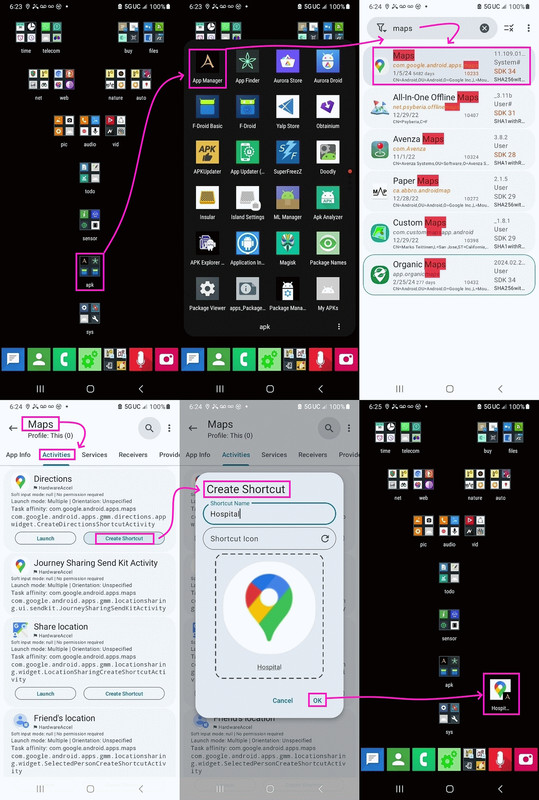
    The easiest way to make a shortcut is to use the Muntashirakon App Manager, which will show you every Activity inside any given app - and if that
    Activity is public, then you can just tap on a button inside of
    Muntashirakon App Manager to turn that one Activity deep inside any app,
    into a one-tap shortcut on your Android homescreen.

    Here's an example of me creating a map shortcut to the nearest hospital.
    <https://i.postimg.cc/GpGxqFhC/alert03.jpg>

    There's a reason I said Muntashirakon App Manager is the best out there.

    --- SoupGate-Win32 v1.05
    * Origin: fsxNet Usenet Gateway (21:1/5)
  • From T@21:1/5 to Andrew on Fri Jul 5 22:58:00 2024
    On 7/4/24 07:45, Andrew wrote:
    T wrote on Thu, 4 Jul 2024 02:27:16 -0700 :
    How do I get this icon on my home screen?
    Found it. It is a widget

    Glad you found it. I don't like widgets (too big on my homescreen); but a
    lot of apps make themselves into widgets for people to find them easily.

    As a result of not using them, I've never really understood widgets.

    However, for all to benefit so that people teach each other here on the Android ng, another way to get an icon to any public "screen" inside any
    app is to simply make a one-tap shortcut to the unique name of that screen.

    In Android terms, any displayed screen inside any app is called an
    Activity. If the Activity is public, then you can make a shortcut to it.

    The easiest way to make a shortcut is to use the Muntashirakon App Manager, which will show you every Activity inside any given app - and if that Activity is public, then you can just tap on a button inside of
    Muntashirakon App Manager to turn that one Activity deep inside any app,
    into a one-tap shortcut on your Android homescreen.

    Here's an example of me creating a map shortcut to the nearest hospital.
    <https://i.postimg.cc/GpGxqFhC/alert03.jpg>

    There's a reason I said Muntashirakon App Manager is the best out there.

    I know what you mean,. I do not care for widgets either.

    --- SoupGate-Win32 v1.05
    * Origin: fsxNet Usenet Gateway (21:1/5)
  • From micky@21:1/5 to [email protected] on Sat Jul 6 06:14:02 2024
    In comp.mobile.android, on Fri, 5 Jul 2024 22:58:00 -0700, T <[email protected]d> wrote:

    On 7/4/24 07:45, Andrew wrote:
    T wrote on Thu, 4 Jul 2024 02:27:16 -0700 :
    How do I get this icon on my home screen?
    Found it. It is a widget

    Glad you found it. I don't like widgets (too big on my homescreen); but a
    lot of apps make themselves into widgets for people to find them easily.

    As a result of not using them, I've never really understood widgets.

    However, for all to benefit so that people teach each other here on the
    Android ng, another way to get an icon to any public "screen" inside any
    app is to simply make a one-tap shortcut to the unique name of that screen. >>
    In Android terms, any displayed screen inside any app is called an
    Activity. If the Activity is public, then you can make a shortcut to it.

    The easiest way to make a shortcut is to use the Muntashirakon App Manager, >> which will show you every Activity inside any given app - and if that
    Activity is public, then you can just tap on a button inside of
    Muntashirakon App Manager to turn that one Activity deep inside any app,
    into a one-tap shortcut on your Android homescreen.

    Here's an example of me creating a map shortcut to the nearest hospital.
    <https://i.postimg.cc/GpGxqFhC/alert03.jpg>

    There's a reason I said Muntashirakon App Manager is the best out there.

    I know what you mean,. I do not care for widgets either.

    They are called "short icons" now. Or little people.

    --- SoupGate-Win32 v1.05
    * Origin: fsxNet Usenet Gateway (21:1/5)
  • From Andrew@21:1/5 to micky on Sat Jul 6 13:45:37 2024
    micky wrote on Sat, 06 Jul 2024 06:14:02 -0400 :

    Here's an example of me creating a map shortcut to the nearest hospital. >>> <https://i.postimg.cc/GpGxqFhC/alert03.jpg>

    There's a reason I said Muntashirakon App Manager is the best out there.

    I know what you mean,. I do not care for widgets either.

    They are called "short icons" now. Or little people.

    Philosophically, I'm not sure why widgets exist, but I think they exist
    because people want one-tap access to the "insides" of a given app.

    The widget gives them that one-tap access to the "inside" page of a given
    app, which is more properly termed an "Activity" in Android terminology.

    You can see every Activity in an Android app in many ways - only one of
    which is to use the Muntashirakon App Manager - but what Muntashirakon
    provides is a button called "Create Shortcut" for each public activity.

    Once you tap on that button, a shortcut is placed on the homescreen.

    Back to philosophy, it's my opinion that if people knew better how to
    create one-tap shortcuts to public Activities, widgets wouldn't be needed.

    A caveat is that I haven't tested, one to one, what a widget does that a one-tap shortcut to a public Activity doesn't do - so there may be extra special magic in a widget that I'm unaware of (as I never use widgets).

    --- SoupGate-Win32 v1.05
    * Origin: fsxNet Usenet Gateway (21:1/5)
  • From Carlos E. R.@21:1/5 to micky on Sat Jul 6 17:07:16 2024
    On 2024-07-06 12:14, micky wrote:
    In comp.mobile.android, on Fri, 5 Jul 2024 22:58:00 -0700, T <[email protected]d> wrote:

    On 7/4/24 07:45, Andrew wrote:
    T wrote on Thu, 4 Jul 2024 02:27:16 -0700 :
    How do I get this icon on my home screen?
    Found it. It is a widget

    Glad you found it. I don't like widgets (too big on my homescreen); but a >>> lot of apps make themselves into widgets for people to find them easily. >>>
    As a result of not using them, I've never really understood widgets.

    However, for all to benefit so that people teach each other here on the
    Android ng, another way to get an icon to any public "screen" inside any >>> app is to simply make a one-tap shortcut to the unique name of that screen. >>>
    In Android terms, any displayed screen inside any app is called an
    Activity. If the Activity is public, then you can make a shortcut to it. >>>
    The easiest way to make a shortcut is to use the Muntashirakon App Manager, >>> which will show you every Activity inside any given app - and if that
    Activity is public, then you can just tap on a button inside of
    Muntashirakon App Manager to turn that one Activity deep inside any app, >>> into a one-tap shortcut on your Android homescreen.

    Here's an example of me creating a map shortcut to the nearest hospital. >>> <https://i.postimg.cc/GpGxqFhC/alert03.jpg>

    There's a reason I said Muntashirakon App Manager is the best out there.

    I know what you mean,. I do not care for widgets either.

    They are called "short icons" now. Or little people.

    They are one of the best features in Androids.

    --
    Cheers,
    Carlos E.R.

    --- SoupGate-Win32 v1.05
    * Origin: fsxNet Usenet Gateway (21:1/5)
  • From David Oseas@21:1/5 to Andrew on Sat Jul 6 08:34:10 2024
    On 7/6/2024 6:45 AM, Andrew wrote:


    Philosophically, I'm not sure why widgets exist, but I think they exist because people want one-tap access to the "insides" of a given app.


    Widgets were originally designed to present an at-a-glance display of
    info, without the need to open up an app.

    Think clock, weather, music currently playing, today's agenda, network connectivity, etc. Imagine how annoying it would be to have to tap &
    open up an app every time to get that kind of info.

    Regards,

    -David

    --- SoupGate-Win32 v1.05
    * Origin: fsxNet Usenet Gateway (21:1/5)
  • From Andrew@21:1/5 to David Oseas on Sat Jul 6 19:03:52 2024
    David Oseas wrote on Sat, 6 Jul 2024 08:34:10 -0700 :

    Philosophically, I'm not sure why widgets exist, but I think they exist
    because people want one-tap access to the "insides" of a given app.

    Widgets were originally designed to present an at-a-glance display of
    info, without the need to open up an app.

    Think clock, weather, music currently playing, today's agenda, network connectivity, etc. Imagine how annoying it would be to have to tap &
    open up an app every time to get that kind of info.

    Thank you for explaining the philosophy of widgets, which I completely
    agree with, in that pre-defined widgets allow people to dive deeply into existing apps (as you described above) to access, in a single tap, an at-a-glance display.

    My only philosophical point is that I can do all that, I think, using
    one-tap shortcuts, which are as easy to create as tapping on a button.

    For example, if someone wants to dive into an app without climbing the convoluted stairs to start at the app and then click down into that app to
    find the "display" that the user desires, they have, I think, two choices:

    1. They can find if that app supplies a widget to do what they want, or,
    2. They can just find the display in the app and create a shortcut to it.

    While there are many apps which create shortcuts to "displays" deep within
    an app, the advantage of the one-tap shortcuts is that they can be created
    for every single public activity that exists on any given Android phone.

    That's likely many thousands of "display" pages are accessible to the user
    via one-tap shortcuts while probably only hundreds of displays are
    accessible via widgets.

    Still - widgets might do things that Activities don't so I took the
    opportunity to open the question just now of the Android newsgroup:
    *What does a Widget do that a one-tap shortcut to an Android Activity not do?*
    <https://www.novabbs.com/computers/article-flat.php?id=53978&group=comp.mobile.android#53978>

    --- SoupGate-Win32 v1.05
    * Origin: fsxNet Usenet Gateway (21:1/5)