• Re: Processes running

    From Andy Burns@21:1/5 to The Real Bev on Sun Jun 30 08:05:01 2024
    The Real Bev wrote:

    top is more useful.  ps on my system just shows bash and ps.

    ps has numerous flags, such as
    ps -a
    ps -efa
    ps -fax

    --- SoupGate-Win32 v1.05
    * Origin: fsxNet Usenet Gateway (21:1/5)
  • From =?UTF-8?Q?J=C3=B6rg_Lorenz?=@21:1/5 to All on Sun Jun 30 10:00:37 2024
    Am 29.06.24 um 11:47 schrieb db:
    Yesterday, after not touching my phone for many hours,
    it was warm, and down to 11% charge.
    Under Linux there is a command (ps) to tell me what
    processes are running Is there a way to find out what
    is running on my phone? Something intensive, that I
    didn't turn on myself, must be running.


    Does that help?

    https://android.stackexchange.com/questions/27832/how-can-i-monitor-and-visualize-the-current-resource-usage-cpu-memory-etc-c

    --
    "Manus manum lavat."

    --- SoupGate-Win32 v1.05
    * Origin: fsxNet Usenet Gateway (21:1/5)
  • From Andrew@21:1/5 to Andy Burns on Sun Jun 30 08:02:03 2024
    Andy Burns wrote on Sun, 30 Jun 2024 08:05:01 +0100 :

    top is more useful.� ps on my system just shows bash and ps.

    ps has numerous flags, such as
    ps -a
    ps -efa
    ps -fax

    As I recall, we covered this topic in gory detail already (assuming
    processes === services), but I don't have my phone with me at the moment so
    I can't check the phone itself - but Google has what the OP needs, I think.

    Suffice to say you have full view, AFAIK, to all running processes, and, in fact, you can set the number of background running services to anything.

    <https://www.xda-developers.com/android-developer-options/>
    "Running services: This opens a screen showing you all the applications
    and system processes running on your device, and how much memory each
    one is using."

    Note that I'm making a basic assumption that processes === services,
    although that may not be accurate (someone will correct me if I err).

    --- SoupGate-Win32 v1.05
    * Origin: fsxNet Usenet Gateway (21:1/5)
  • From Arno Welzel@21:1/5 to All on Sun Jun 30 10:12:04 2024
    db, 2024-06-29 11:47:

    Yesterday, after not touching my phone for many hours,
    it was warm, and down to 11% charge.
    Under Linux there is a command (ps) to tell me what
    processes are running Is there a way to find out what
    is running on my phone? Something intensive, that I
    didn't turn on myself, must be running.

    You can use an ADB shell and top or ps. This means you have to enable
    developer options and ADB first on your device and install the
    respective tools and drivers on the computer you use to connect to the smartphone.

    Then use "adb shell" to get a shell on the device.

    Another option may be this app:

    <https://play.google.com/store/apps/details?id=com.github.standardadb>


    --
    Arno Welzel
    https://arnowelzel.de

    --- SoupGate-Win32 v1.05
    * Origin: fsxNet Usenet Gateway (21:1/5)
  • From Andrew@21:1/5 to Arno Welzel on Sun Jun 30 08:30:24 2024
    Arno Welzel wrote on Sun, 30 Jun 2024 10:12:04 +0200 :

    You can use an ADB shell and top or ps. This means you have to enable developer options and ADB first on your device and install the
    respective tools and drivers on the computer you use to connect to the smartphone.

    Then use "adb shell" to get a shell on the device.


    To flesh out what Arno has stated, we covered in the past all the adb
    commands related to services and processes when we explored Samsung Knox.

    For example, on Windows:
    c:\> adb shell ps | findstr knox
    c:\> adb shell service list | findstr knox

    When we explored Facebook in gory detail, we covered this adb command.
    adb shell dumpsys package com.facebook.appmanager
    This lists a specific app's components, activities & services, etc.

    Another option may be this app:

    <https://play.google.com/store/apps/details?id=com.github.standardadb>

    I don't have my phone with me (it's drying out - as it got wet today).
    But if I remember, tomorrow, I'll run a Skyica search for an adfree app.

    As I recall, I have one-tap shortcuts which bring me to the processes
    running and the services and the memory, etc. - but the phone is drying out
    at the moment so I am not about to start it up to check until it dries out.

    --- SoupGate-Win32 v1.05
    * Origin: fsxNet Usenet Gateway (21:1/5)
  • From Andy Burns@21:1/5 to Andrew on Sun Jun 30 09:27:04 2024
    Andrew wrote:

    Andy Burns wrote:

    The Real Bev wrote:

    top is more useful. ps on my system just shows bash and ps.

    ps has numerous flags, such as
    ps -a
    ps -efa
    ps -fax

    As I recall, we covered this topic in gory detail already (assuming
    processes === services),

    I think Bev was talking more generally about linux, than android?

    On android isn't everything a child of zygote? Most most people won't
    have root to see them ...

    --- SoupGate-Win32 v1.05
    * Origin: fsxNet Usenet Gateway (21:1/5)
  • From Andrew@21:1/5 to Andy Burns on Sun Jun 30 16:47:14 2024
    Andy Burns wrote on Sun, 30 Jun 2024 09:27:04 +0100 :

    As I recall, we covered this topic in gory detail already (assuming
    processes === services),

    I think Bev was talking more generally about linux, than android?

    On android isn't everything a child of zygote? Most most people won't
    have root to see them ...

    Oh. My fault. Thanks for explaining. Apologies on the Linux faux pas.
    I was trying to help the OP where I presumed he was using Android.

    For real "Linux" (alongside Android), I'd use Andronix - if needed.
    <https://andronix.app/>

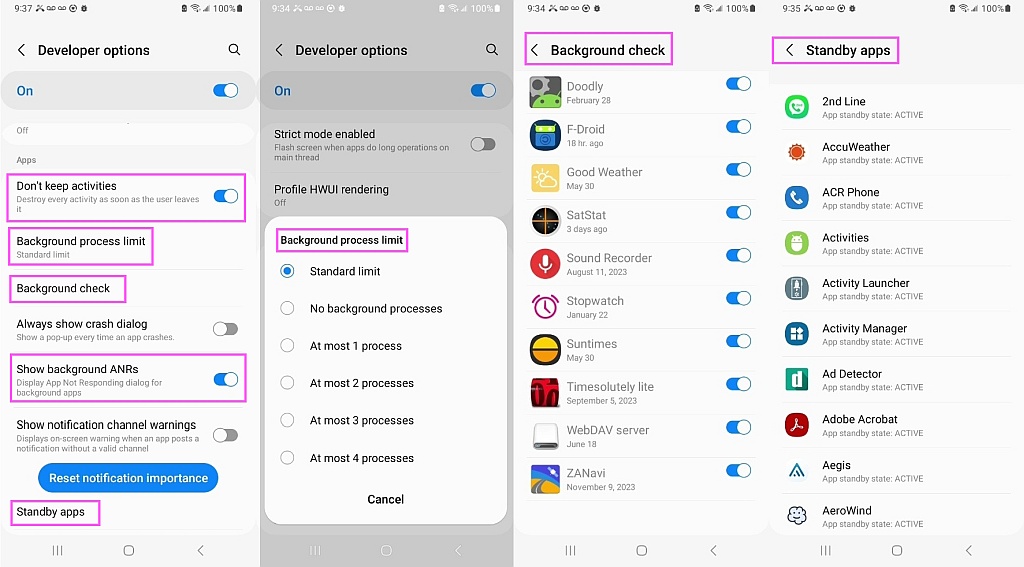
    BTW, I dried out my phone in the oven and snapped this screenshot for the
    OP which shows that Android (mine is Android 13) can show background stuff.
    <https://i.postimg.cc/CKXcBnqP/background.jpg>

    Background Process Limit (Standard limit,None,1,2,3,4)
    Background check
    Standby apps
    Show background AppNotResponding
    etc.

    What's the difference between a "Background check" app & a "Standby app"?

    --- SoupGate-Win32 v1.05
    * Origin: fsxNet Usenet Gateway (21:1/5)