• where are incoming text photographs stored?

    From micky@21:1/5 to All on Thu Jun 27 16:01:21 2024
    I received a text and I wanted to know what time I got it. But I had
    replied to it already, and the only time was the time I replied.

    (This is perhaps not the Android text app but the Xiaomi text app, and
    it doesn't put separators between either incooming or outgoing texts to
    the same person, so the only time listed is the time of the most recent
    time text in either direction.)

    But the text I want to know about included two photographs. There is
    probably a date/time associated with each photograph. I looked in
    Gallery and they were not there. Can you suggest where incoming text photographs would be found?

    --- SoupGate-Win32 v1.05
    * Origin: fsxNet Usenet Gateway (21:1/5)
  • From Jeff Layman@21:1/5 to micky on Thu Jun 27 21:48:00 2024
    On 27/06/2024 21:01, micky wrote:
    I received a text and I wanted to know what time I got it. But I had
    replied to it already, and the only time was the time I replied.

    (This is perhaps not the Android text app but the Xiaomi text app, and
    it doesn't put separators between either incooming or outgoing texts to
    the same person, so the only time listed is the time of the most recent
    time text in either direction.)

    But the text I want to know about included two photographs. There is
    probably a date/time associated with each photograph. I looked in
    Gallery and they were not there. Can you suggest where incoming text photographs would be found?

    No, but try a long press on the message and when it is highlighted touch
    the three dots at top right of the screen. That should give you a pop-up
    box. Touch "View details" and that will include the time the message was
    sent or received.

    --
    Jeff

    --- SoupGate-Win32 v1.05
    * Origin: fsxNet Usenet Gateway (21:1/5)
  • From micky@21:1/5 to [email protected] on Thu Jun 27 16:46:04 2024
    In comp.mobile.android, on Thu, 27 Jun 2024 16:01:21 -0400, micky <[email protected]> wrote:

    I received a text and I wanted to know what time I got it. But I had
    replied to it already, and the only time was the time I replied.

    (This is perhaps not the Android text app but the Xiaomi text app, and
    it doesn't put separators between either incooming or outgoing texts to
    the same person, so the only time listed is the time of the most recent
    time text in either direction.)

    But the text I want to know about included two photographs. There is
    probably a date/time associated with each photograph. I looked in
    Gallery and they were not there. Can you suggest where incoming text >photographs would be found?

    More fun to ask you guys, but I found it with google:

    Follow these steps to see all your shared media.

    Open the Messages app.
    Tap the search bar at the top. Select images or videos.
    From here, you can scroll through all the photos or videos shared
    with you or that you have shared in text messages.

    The time on the pictures was 2:58. The time I replied was 3:12. So I
    couldn't have gotten to the mobile tire guy before he fixed my car and
    left. There are few of these guys around here but this was in really
    speedy Called him at about 1PM and fixed by 3. He tells me there was a
    sharp piece of metal embedded in the tread.

    Most days I would have changed my own tire -- I did in January, in the
    rain -- but it's 93 degrees today, the spare is underneath the trunk
    flooor with lots of stuff, I'm 77, and then I'd still have to go to a
    tire store to replace the tire I drove on for a mile. But now, for
    $107, I'm done. It's mostly the 93^.

    --- SoupGate-Win32 v1.05
    * Origin: fsxNet Usenet Gateway (21:1/5)
  • From Andrew@21:1/5 to Jeff Layman on Fri Jun 28 01:15:40 2024
    Jeff Layman wrote on Thu, 27 Jun 2024 21:48:00 +0100 :

    But the text I want to know about included two photographs. There is
    probably a date/time associated with each photograph. I looked in
    Gallery and they were not there. Can you suggest where incoming text
    photographs would be found?

    No, but try a long press on the message and when it is highlighted touch
    the three dots at top right of the screen. That should give you a pop-up
    box. Touch "View details" and that will include the time the message was
    sent or received.

    For the group at large to benefit from this helpful related information...

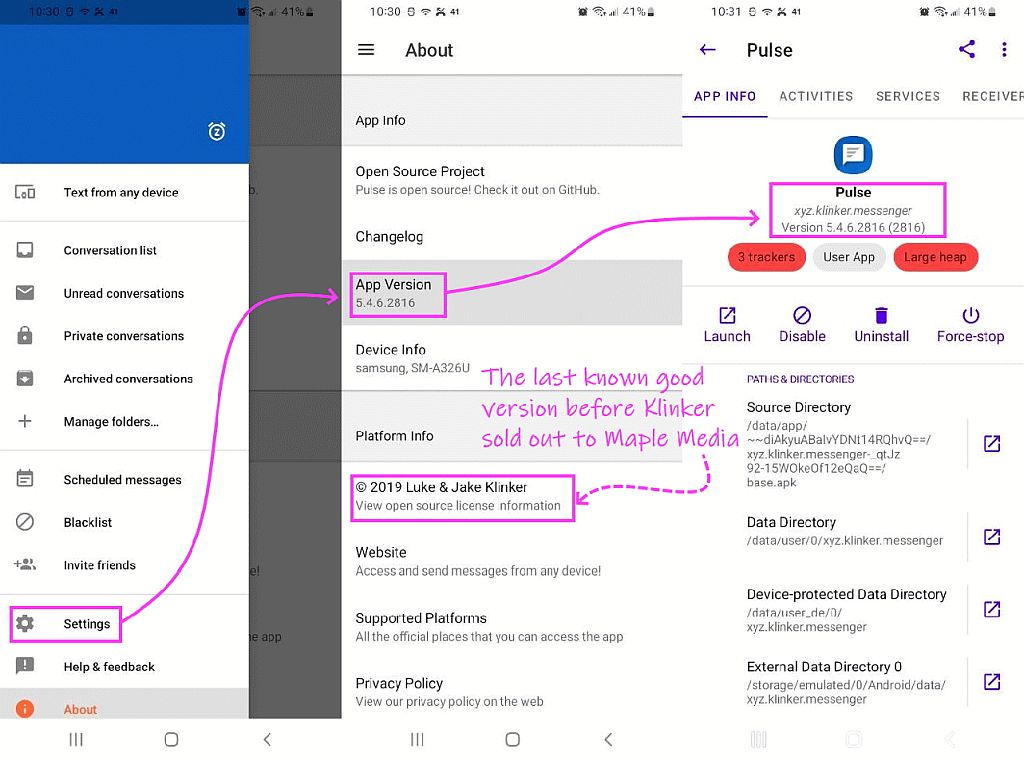
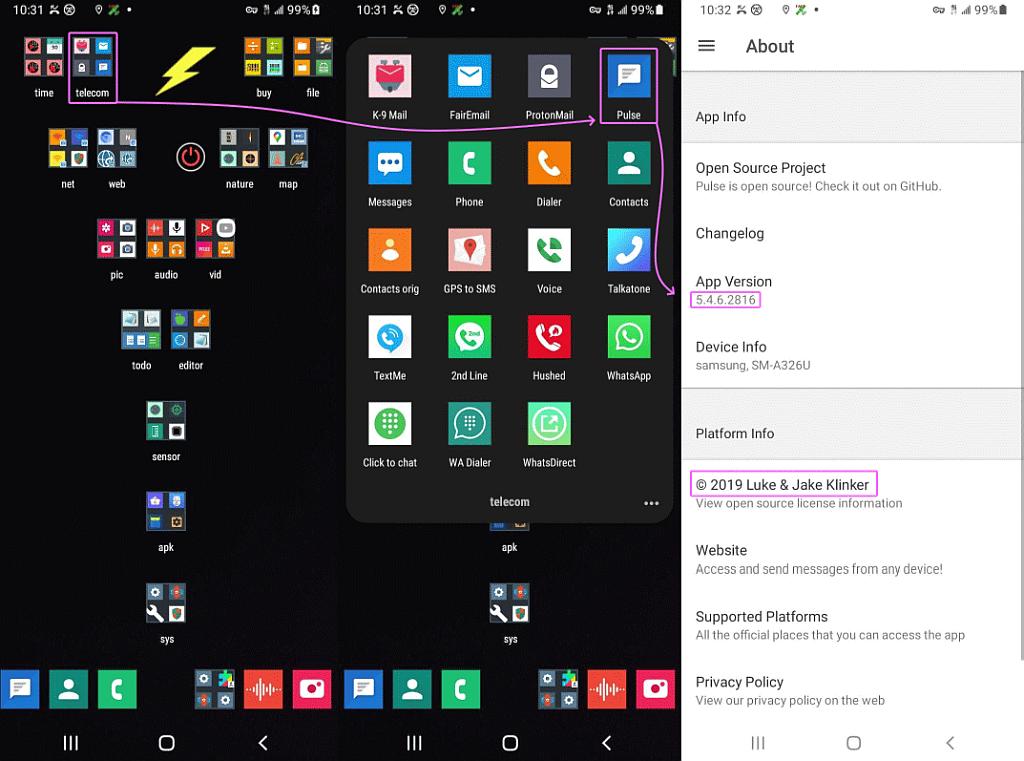
    I use the Luke & Jake Klinker open source PulseSMS messaging app, version 5.4.6.2816 (prior to purchase by Maple Media) which I had determined long
    ago was the best free adfree messenger on Android (prior to RCS of course).
    <https://home.pulsesms.app/overview/>

    MMS media is automatically saved to this location when connected to the PC:
    My PC\Galaxy A32 5G\Internal storage\Pictures\Pulse\.
    And to this location when looking for them on the Android phone itself:
    /storage/emulated/0/Pictures/Pulse/.

    With PulseSMS messenger, there's an MMS set of options which include
    <https://i.postimg.cc/1tjcm7KJ/pulsesms03.jpg> 5.4.6.2816 lastknowngood v
    <https://i.postimg.cc/nL8052Vj/pulsesms04.jpg> PulseSMS Max Image Size
    <https://i.postimg.cc/ZR4jYqdJ/pulsesms05.jpg> PulseSMS last good version

    Auto-save Media = on/off
    Automatically save any MMS media when it is received.

    Use Group MMS = on/off
    When disabled, group messages will be sent
    out as individual SMS, to each of the recipients.

    Max Image Size
    Do not set this higher than what your carrier allows.

    Convert to MMS
    Long messages will be sent as MMS instead of individual SMS.

    Delivery Reports
    Most carriers do not support this option. It is not RCS.

    User Agent = Android-Mms/2.0
    User Agent Profile Tag Name = x-wap-profile
    etc.

    I suspect each messenger app automatically stores its MMS media in their
    own separate folder; so micky's answer is dependent on the messenger app.

    --- SoupGate-Win32 v1.05
    * Origin: fsxNet Usenet Gateway (21:1/5)
  • From micky@21:1/5 to [email protected] on Fri Jun 28 10:16:17 2024
    In comp.mobile.android, on Fri, 28 Jun 2024 01:15:40 -0000 (UTC), Andrew <[email protected]> wrote:

    Jeff Layman wrote on Thu, 27 Jun 2024 21:48:00 +0100 :

    But the text I want to know about included two photographs. There is
    probably a date/time associated with each photograph. I looked in
    Gallery and they were not there. Can you suggest where incoming text
    photographs would be found?

    No, but try a long press on the message and when it is highlighted touch
    the three dots at top right of the screen. That should give you a pop-up
    box. Touch "View details" and that will include the time the message was
    sent or received.

    Thanks.

    For the group at large to benefit from this helpful related information...

    I use the Luke & Jake Klinker open source PulseSMS messaging app, version >5.4.6.2816 (prior to purchase by Maple Media) which I had determined long
    ago was the best free adfree messenger on Android (prior to RCS of course).
    <https://home.pulsesms.app/overview/>

    MMS media is automatically saved to this location when connected to the PC:
    My PC\Galaxy A32 5G\Internal storage\Pictures\Pulse\.
    And to this location when looking for them on the Android phone itself:
    /storage/emulated/0/Pictures/Pulse/.

    With PulseSMS messenger, there's an MMS set of options which include
    <https://i.postimg.cc/1tjcm7KJ/pulsesms03.jpg> 5.4.6.2816 lastknowngood v <https://i.postimg.cc/nL8052Vj/pulsesms04.jpg> PulseSMS Max Image Size <https://i.postimg.cc/ZR4jYqdJ/pulsesms05.jpg> PulseSMS last good version

    Auto-save Media = on/off
    Automatically save any MMS media when it is received.

    Use Group MMS = on/off
    When disabled, group messages will be sent
    out as individual SMS, to each of the recipients.

    Max Image Size
    Do not set this higher than what your carrier allows.

    Convert to MMS
    Long messages will be sent as MMS instead of individual SMS.

    Delivery Reports
    Most carriers do not support this option. It is not RCS.

    User Agent = Android-Mms/2.0
    User Agent Profile Tag Name = x-wap-profile
    etc.

    I suspect each messenger app automatically stores its MMS media in their
    own separate folder; so micky's answer is dependent on the messenger app.

    Thanks.

    --- SoupGate-Win32 v1.05
    * Origin: fsxNet Usenet Gateway (21:1/5)
  • From Jeff Layman@21:1/5 to Andrew on Fri Jun 28 19:19:15 2024
    On 28/06/2024 02:15, Andrew wrote:
    Jeff Layman wrote on Thu, 27 Jun 2024 21:48:00 +0100 :

    But the text I want to know about included two photographs. There is
    probably a date/time associated with each photograph. I looked in
    Gallery and they were not there. Can you suggest where incoming text
    photographs would be found?

    No, but try a long press on the message and when it is highlighted touch
    the three dots at top right of the screen. That should give you a pop-up
    box. Touch "View details" and that will include the time the message was
    sent or received.

    For the group at large to benefit from this helpful related information...

    I use the Luke & Jake Klinker open source PulseSMS messaging app, version 5.4.6.2816 (prior to purchase by Maple Media) which I had determined long
    ago was the best free adfree messenger on Android (prior to RCS of course).
    <https://home.pulsesms.app/overview/>

    MMS media is automatically saved to this location when connected to the PC:
    My PC\Galaxy A32 5G\Internal storage\Pictures\Pulse\.
    And to this location when looking for them on the Android phone itself:
    /storage/emulated/0/Pictures/Pulse/.

    With PulseSMS messenger, there's an MMS set of options which include
    <https://i.postimg.cc/1tjcm7KJ/pulsesms03.jpg> 5.4.6.2816 lastknowngood v
    <https://i.postimg.cc/nL8052Vj/pulsesms04.jpg> PulseSMS Max Image Size
    <https://i.postimg.cc/ZR4jYqdJ/pulsesms05.jpg> PulseSMS last good version

    Auto-save Media = on/off
    Automatically save any MMS media when it is received.

    Use Group MMS = on/off
    When disabled, group messages will be sent
    out as individual SMS, to each of the recipients.

    Max Image Size
    Do not set this higher than what your carrier allows.

    Convert to MMS
    Long messages will be sent as MMS instead of individual SMS.

    Delivery Reports
    Most carriers do not support this option. It is not RCS.

    User Agent = Android-Mms/2.0
    User Agent Profile Tag Name = x-wap-profile
    etc.

    I suspect each messenger app automatically stores its MMS media in their
    own separate folder; so micky's answer is dependent on the messenger app.

    Just to update...
    I used your favourite app manager to get information about where Google
    puts its messages and any "attachments". It told me the messaging app
    was com.google.android.apps.messaging, and the data directory was: /data/user/0/com.google.android.apps.messaging

    I tried accessing that with Total Commander, but it was not possible.
    Total Commander referred me to <https://www.ghisler.com/androidspecialfolders.htm>. This states:

    "Accessing the special folders Android/data and Android/obb

    Google has recently restricted access to the folders Android/data and Android/obb to the following two methods:

    The built-in "Files" app
    A connected PC or Mac (via USB)

    Access for other apps like Total Commander has been blocked. This was
    done by an update of the "Files" app via Play Store.

    On Android 13 and older, you can get back access to these folders by uninstalling all updates of the "Files" app. On Android 14, the newer, restricted version of the "Files" app is built into the operating system
    and cannot be uninstalled.

    To uninstall the updates of the "Files" app, follow these steps:

    Click OK in the Total Commander dialog which warned you about the
    blocked access to launch the "Files" app
    Open the list of all running apps (task manager, e.g. by slowly
    sweeping up from the bottom of the screen)
    Click on the icon above the "Files" app
    Choose "Info" or "App-Info" or click on the "i" icon (depends on
    Android version)
    In the app information, click on the 3 dots in the top right corner
    Click on "Uninstall updates"

    Android will automatically update the "Files" app again, but you will
    not lose access to folders after granting it once."

    I'm on Android 13 (MIUI 14.0.5), but I'm not going to do the updates
    uninstall or use the USB to PC connection. Micky can try it if he wants.

    --
    Jeff

    --- SoupGate-Win32 v1.05
    * Origin: fsxNet Usenet Gateway (21:1/5)
  • From Andrew@21:1/5 to Jeff Layman on Fri Jun 28 19:25:36 2024
    Jeff Layman wrote on Fri, 28 Jun 2024 19:19:15 +0100 :

    I used your favourite app manager to get information about where Google
    puts its messages and any "attachments". It told me the messaging app
    was com.google.android.apps.messaging, and the data directory was: /data/user/0/com.google.android.apps.messaging

    I tried accessing that with Total Commander, but it was not possible.
    Total Commander referred me to <https://www.ghisler.com/androidspecialfolders.htm>. This states:

    "Accessing the special folders Android/data and Android/obb

    Google has recently restricted access to the folders Android/data and Android/obb to the following two methods:

    The built-in "Files" app
    A connected PC or Mac (via USB)

    Access for other apps like Total Commander has been blocked. This was
    done by an update of the "Files" app via Play Store.

    On Android 13 and older, you can get back access to these folders by uninstalling all updates of the "Files" app. On Android 14, the newer, restricted version of the "Files" app is built into the operating system
    and cannot be uninstalled.

    To uninstall the updates of the "Files" app, follow these steps:

    Click OK in the Total Commander dialog which warned you about the blocked access to launch the "Files" app
    Open the list of all running apps (task manager, e.g. by slowly
    sweeping up from the bottom of the screen)
    Click on the icon above the "Files" app
    Choose "Info" or "App-Info" or click on the "i" icon (depends on
    Android version)
    In the app information, click on the 3 dots in the top right corner
    Click on "Uninstall updates"

    Android will automatically update the "Files" app again, but you will
    not lose access to folders after granting it once."

    I'm on Android 13 (MIUI 14.0.5), but I'm not going to do the updates uninstall or use the USB to PC connection. Micky can try it if he wants.

    Hi Jeff,

    We've met before and you've taught me good stuff, which I appreciate. Everything you said I (think I) fully understand, so please don't think I'm chastising you - I'm just explaining what you did was right but your
    conclusion wasn't correct - as far as I know anyway.

    Andy & Arno (among others) will know this stuff better than I do, but to
    help you understand why that data directory did not work for you, please
    look at these composite images I just made for you by way of example:
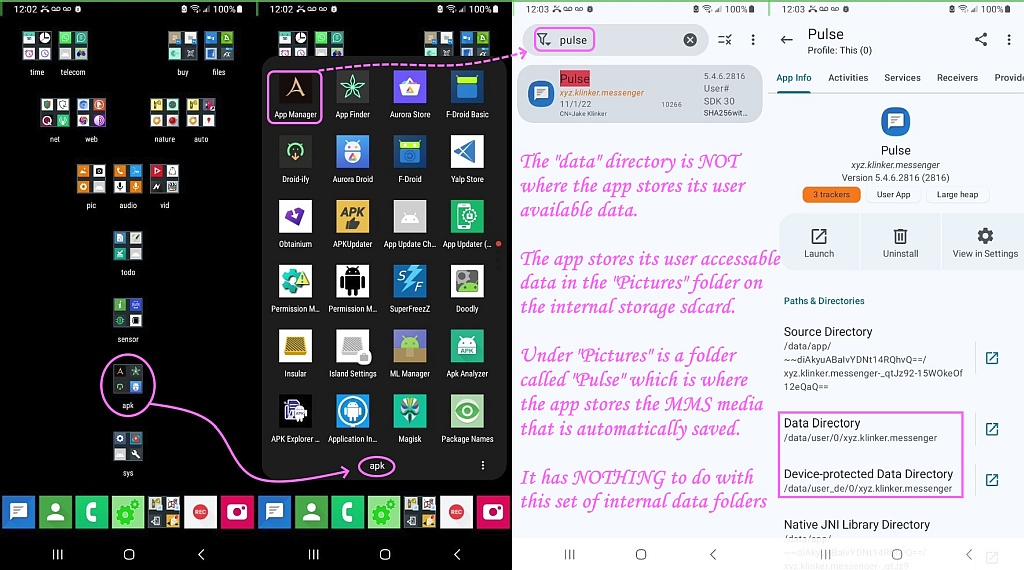
    <https://i.postimg.cc/bvWQHZLx/pulsesms06.jpg>
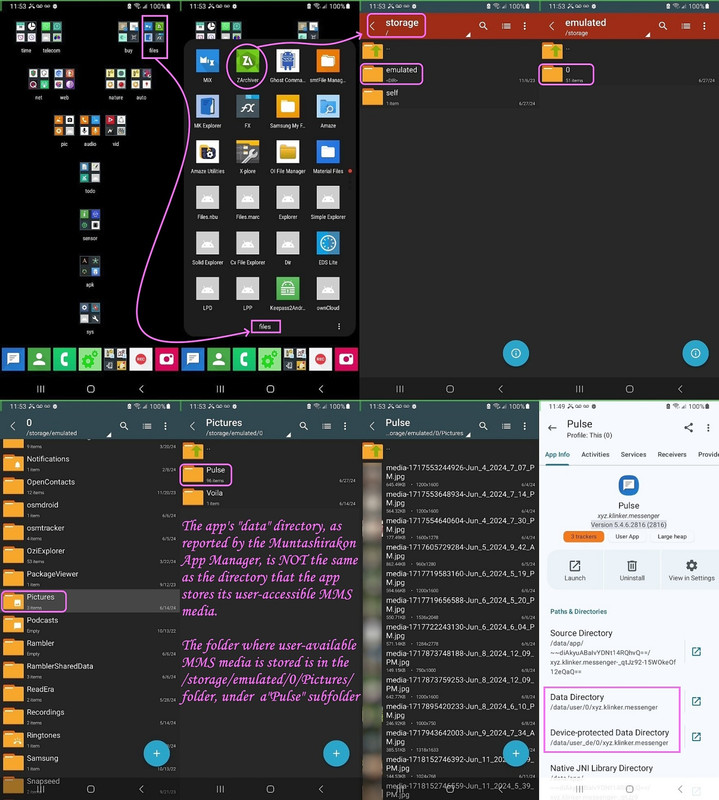
    <https://i.postimg.cc/rpQ1dhRP/pulsesms07.jpg>
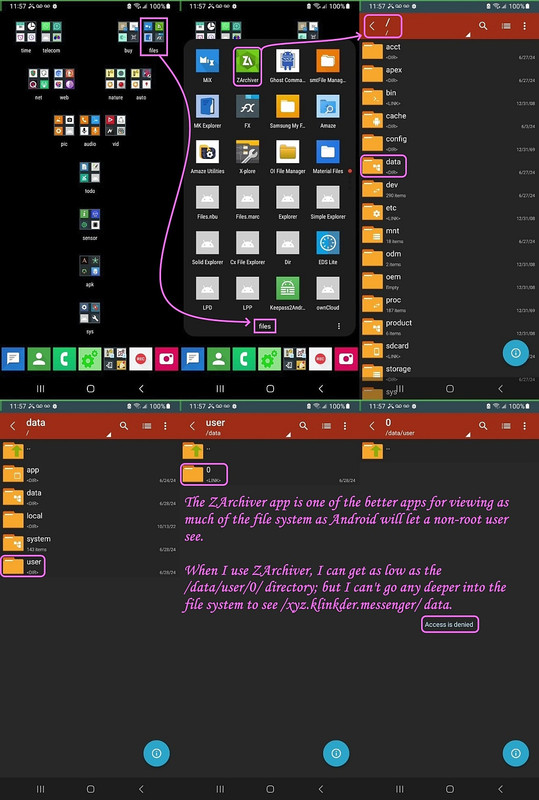
    <https://i.postimg.cc/QtDM3sML/pulsesms08.jpg>

    However, I appreciate you are smart enough to use the Muntashirakon App
    Manager to find the location that the app stores its "data". I'm not quite
    sure if that's the same thing as where the app stores its messages though.
    I think they're different.

    However, I'm not chastising you as I commend you for LOOKING where your messenger app stores "stuff". I think there may be different kinds of data.

    a. Data specific to the app (e.g., app settings data)
    b. Data that is commonly shared with others (e.g., incoming saved media)

    To test that hypothesis, I used the Muntashirakon App Manager to look at
    what it says for data for PulseSMS xyz.klinker.messenger Version 5.4.6.2816 (2816) - which is a version before Maple Media bought the open-source app.

    Muntashirakon App Manager said the PulseSMS directories are the following:
    Data Directory: /data/user/0/xyz.klinker.messenger
    Device-protected Data Directory: /data/user_de/0/xyz.klinker.messenger

    Notice that this is NOT the directory where Pulse stores its MMS media:
    /storage/emulated/0/Pictures/Pulse/.

    What this tells me is that if an app has "all files" access, it can store
    the data anywhere it wants to (that you give it permission for).

    Notice also that some file managers can't even see /data/user/0/ so that's
    why you see a plethora of the best file managers on my Android (as I've
    tested all the free file managers long ago and settled on those few).

    ZArchiver for sure can see /data/user/0 but it can't go deeper on my
    unrootable Android phone (and likely it's the same on your phone also).
    <https://play.google.com/store/apps/details?id=ru.zdevs.zarchiver>

    This alone explains all the results you found, but not your conclusions.

    Hope you take this in a good (constructive) light as I want to some trouble
    to document (which takes longer than anything else) the statements I made.

    --- SoupGate-Win32 v1.05
    * Origin: fsxNet Usenet Gateway (21:1/5)
  • From Jeff Layman@21:1/5 to Andrew on Sat Jun 29 22:01:58 2024
    On 28/06/2024 20:25, Andrew wrote:
    Jeff Layman wrote on Fri, 28 Jun 2024 19:19:15 +0100 :

    I used your favourite app manager to get information about where Google
    puts its messages and any "attachments". It told me the messaging app
    was com.google.android.apps.messaging, and the data directory was:
    /data/user/0/com.google.android.apps.messaging

    I tried accessing that with Total Commander, but it was not possible.
    Total Commander referred me to
    <https://www.ghisler.com/androidspecialfolders.htm>. This states:

    "Accessing the special folders Android/data and Android/obb

    Google has recently restricted access to the folders Android/data and
    Android/obb to the following two methods:

    The built-in "Files" app
    A connected PC or Mac (via USB)

    Access for other apps like Total Commander has been blocked. This was
    done by an update of the "Files" app via Play Store.

    On Android 13 and older, you can get back access to these folders by
    uninstalling all updates of the "Files" app. On Android 14, the newer,
    restricted version of the "Files" app is built into the operating system
    and cannot be uninstalled.

    To uninstall the updates of the "Files" app, follow these steps:

    Click OK in the Total Commander dialog which warned you about the
    blocked access to launch the "Files" app
    Open the list of all running apps (task manager, e.g. by slowly
    sweeping up from the bottom of the screen)
    Click on the icon above the "Files" app
    Choose "Info" or "App-Info" or click on the "i" icon (depends on
    Android version)
    In the app information, click on the 3 dots in the top right corner
    Click on "Uninstall updates"

    Android will automatically update the "Files" app again, but you will
    not lose access to folders after granting it once."

    I'm on Android 13 (MIUI 14.0.5), but I'm not going to do the updates
    uninstall or use the USB to PC connection. Micky can try it if he wants.

    Hi Jeff,

    We've met before and you've taught me good stuff, which I appreciate. Everything you said I (think I) fully understand, so please don't think I'm chastising you - I'm just explaining what you did was right but your conclusion wasn't correct - as far as I know anyway.

    Andy & Arno (among others) will know this stuff better than I do, but to
    help you understand why that data directory did not work for you, please
    look at these composite images I just made for you by way of example:
    <https://i.postimg.cc/bvWQHZLx/pulsesms06.jpg>
    <https://i.postimg.cc/rpQ1dhRP/pulsesms07.jpg>
    <https://i.postimg.cc/QtDM3sML/pulsesms08.jpg>

    However, I appreciate you are smart enough to use the Muntashirakon App Manager to find the location that the app stores its "data". I'm not quite sure if that's the same thing as where the app stores its messages though.
    I think they're different.

    However, I'm not chastising you as I commend you for LOOKING where your messenger app stores "stuff". I think there may be different kinds of data.

    a. Data specific to the app (e.g., app settings data)
    b. Data that is commonly shared with others (e.g., incoming saved media)

    To test that hypothesis, I used the Muntashirakon App Manager to look at
    what it says for data for PulseSMS xyz.klinker.messenger Version 5.4.6.2816 (2816) - which is a version before Maple Media bought the open-source app.

    Muntashirakon App Manager said the PulseSMS directories are the following:
    Data Directory: /data/user/0/xyz.klinker.messenger
    Device-protected Data Directory: /data/user_de/0/xyz.klinker.messenger

    Notice that this is NOT the directory where Pulse stores its MMS media:
    /storage/emulated/0/Pictures/Pulse/.

    What this tells me is that if an app has "all files" access, it can store
    the data anywhere it wants to (that you give it permission for).

    Notice also that some file managers can't even see /data/user/0/ so that's why you see a plethora of the best file managers on my Android (as I've tested all the free file managers long ago and settled on those few).

    ZArchiver for sure can see /data/user/0 but it can't go deeper on my unrootable Android phone (and likely it's the same on your phone also).
    <https://play.google.com/store/apps/details?id=ru.zdevs.zarchiver>

    This alone explains all the results you found, but not your conclusions.

    Hope you take this in a good (constructive) light as I want to some trouble to document (which takes longer than anything else) the statements I made.

    No problem! You've gone into quite some detail and the screenshots make
    it clear what you've done. I should say, though, that I thought I hadn't
    come to any conclusion - I'd simply reported what Muntashirakon App
    Manager (I'll now refer to this as MAM) and Total Commander had found.

    I've tried to do a bit more investigating, and despite perhaps not
    knowing exactly what's going on (no surprise there - android can be
    pretty opaque at times) I've a few comments.

    Firstly, there might be some differences in using PulseSMS and using the built-in Google message app, simply because the first is a downloaded
    app and the second is a system app. The directories used and access
    limitations seem to be the same, though (see next paragraph). There
    might also be differences in how "stock" android and the Xiaomi version
    behave. The "Files" app mentioned in the Ghisler Total Commander webpage
    is the Google one, but MAM informs me that "Files" on my phone is a
    Xiaomi app. However, when Total Commander tells me it can't access the /data/user/0/ directory, it offers access via the Files app. If I allow
    that, the Files app (I assume the Xiaomi one) says there is nothing in
    that directory! I guess this accords with your comment about PulseSMS
    using /storage/emulated/0/Pictures/Pulse/. Unfortunately, if I look at /storage/emulated/0/Pictures/Messages/ it is empty, and I know that at
    least one picture sent with a message some time ago should be there if
    that's where Messages stores its "attached" pictures. I still haven't
    found where that picture is stored.

    I must say that I get very confused about message apps storage. MAM
    informs me there are two apps with "message" in the name. The first is
    simply called "Messages" (com.google.android.apps.messaging). The Data Directory and Device-protected Data Directory are as you found above - /data/user/0/ and /data/user-de/0/. The second is Phone and Messaging
    Storage (com.android.providers.telephony). This uses the same Data
    Directory and Device-protected Data Directory as mentioned above.
    According to MAM, Data usage for both of these apps is 0B! Yet I have
    quite a few messages stored, one with a picture. So why is the data
    usage 0B? It's even more confusing because "Settings" | Message App info
    tells me that Storage is 0B, but data usage for the Message app is
    27.7MB! For the Phone and Messaging Storage app both Storage and Data
    usage are 0B.

    Both "Messages" and "Phone and Messaging Storage" have a permission set
    for "SMS", so are both used when SMS are sent/received?

    Just one final point. MAM finds no app with "sms" in the name, but
    searching for "mms" it finds MmsService (com.android.mms.service). This
    app also shows as having 0B for Storage and Data usage, and the only
    permission allowed is SMS. I thought that an attached picture would use
    MMS. Is that not correct?

    Hope this reply makes some sense... :-)

    --
    Jeff

    --- SoupGate-Win32 v1.05
    * Origin: fsxNet Usenet Gateway (21:1/5)
  • From Andrew@21:1/5 to Jeff Layman on Sat Jun 29 22:42:32 2024
    Jeff Layman wrote on Sat, 29 Jun 2024 22:01:58 +0100 :

    Firstly, there might be some differences in using PulseSMS and using the built-in Google message app, simply because the first is a downloaded
    app and the second is a system app. The directories used and access limitations seem to be the same, though (see next paragraph). There
    might also be differences in how "stock" android and the Xiaomi version behave.

    Hi Jeff,
    Always a pleasure conversing with you as we each add value to the other,
    and others can benefit from what we ascertain from learned from each other.

    I think the fundamental apps (e.g., messaging & contact & phone & keyboard)
    all use the same "database" no matter what app we use to access that db.

    An example is that the Android "contacts" are stored in a specific sqlite contacts database, such that every contacts app accesses the same files.

    Same with messaging apps (as far as I'm aware, anyway).

    Remember, I tested every free Android messaging app long ago, and they each only worked if I set them as the default - and then they took a few minutes
    to absorb the database - because there is only one real messaging database.

    My point is the actual contacts are stored in Android in the same place no matter which contacts app you use - but - some contacts apps (such as the
    ones that I use) do *extra* stuff with that database (which is the data
    that is part of the contacts app which is in the protected file system).

    Same I think with messaging apps.

    You can have only one default messaging app at a time - but you can change
    them - and they will read (after a few minutes of activity) the same
    messages.

    Then, on top of that, you can "add stuff", where, for example, in PulseSMS,
    I can give a chat or contact a particular color or I can give them a
    particular name (which is independent of the contact name for example).

    That "extra" information is what I think is stored in the data directory of
    the app that you and I know where it is but we are not rooted so we can't
    see it due to the permissions problems of not having root access to it.

    Here's an example which seems to back up my assumption above:
    1. I load a new messaging app - which sees all my messages
    2. I switch to PulseSMS - which also sees all my messages
    3. But then I "add stuff" to those messages (like names & colors)
    4. When I switch back to the original messaging app - all the stuff
    I added in PulseSMS is now gone.

    This tells me three things:
    a. The messages are stored somewhere centrally in Android
    b. Every messaging app can access those messages
    c. But if you add "stuff" with the messaging app, that stuff is
    stored locally to the messaging app (likely in protected storage)

    I could be wrong though... but I'm an extremely empirical person, so much
    of what I know is from experience because I'm not afraid to test things.

    The "Files" app mentioned in the Ghisler Total Commander webpage
    is the Google one, but MAM informs me that "Files" on my phone is a
    Xiaomi app.

    Bear in mind the name that shows up on the icon is not unique.
    The package name is unique though. As is the package & version number.

    For example, in MAM, I typed "File" & up came more than a half dozen apps:
    File Manager <pl.mkexplorer.kormateusz>
    File Manager <com.simplemobiletools.filemanager.pro>
    Files <com.google.android.documentsui>
    Files <org.aospstudio.files>
    Material Files <me.zhanghai.android.files>
    My Files <com.sec.android.app.myfiles>
    OI File Manager <org.openintents.filemanager>

    And that doesn't even count half of my file managers, the rest of which
    don't have the word "file" in the app name or in the package name.

    However, when Total Commander tells me it can't access the
    /data/user/0/ directory, it offers access via the Files app. If I allow
    that, the Files app (I assume the Xiaomi one) says there is nothing in
    that directory!

    Yes. +1. Exactly. It's not that there is nothing in /data/user/0,
    but that we don't have root access to that protected directory.

    I want to be very clear that there are two kinds of "file managers" out
    there, since I tested every free one that was suggested on this newsgroup.

    One kind, like Total Commander & like ZArchiver & MixPlorer, will actually
    let you see into the /data/user/0 directory; but most of the file managers won't even let you see into the /data directory.

    How deeply a file manager can go depends both on the file manager, and, eventually, on whether or not you have root access (which we don't).

    I guess this accords with your comment about PulseSMS
    using /storage/emulated/0/Pictures/Pulse/.

    Yes. The funny thing about some apps is they sometimes tell you WHERE they store stuff that you can access, and they sometimes do not tell you.

    For PulseSMS, they don't tell you WHERE they store the MMS media.
    They only give you the option to "automatically" store the MMS media.

    You can always longpress on any MMS media in PulseSMS and it will ask you
    if you want to share or save or delete that MMS media; but it doesn't say *where* it puts that MMS media when you save it.

    You just have to look around for where it saves it.

    Other apps will ask you where you want to store the media, where some apps, like many camera apps, only give you the choice of internal or external
    memory.

    Other apps give you the choice of the exact folder on the internal or
    external memory.

    Only some apps tell you WHERE they put the stuff you can access.
    Most do not.

    You have to look around. :(

    Unfortunately, if I look at
    /storage/emulated/0/Pictures/Messages/ it is empty, and I know that at
    least one picture sent with a message some time ago should be there if
    that's where Messages stores its "attached" pictures. I still haven't
    found where that picture is stored.

    Hmmm... you have the *folder*, right? So that's a good hint.
    I wonder what happens if you longpress on an image that came in through
    MMS, and let the messaging app save that image manually.

    Does it go there then?

    For example, I use a lot of the cartoonify apps, which all seem to store
    their results in the /storage/emulated/0/Pictures/<nameofcartoonapp> dir.

    But they don't store anything in that directory until I tell them to save. Check out if Messages is doing that for you.

    I must say that I get very confused about message apps storage. MAM
    informs me there are two apps with "message" in the name.

    +1. It's confusing. Which is why the "name" isn't what is unique.
    Only the package name is unique.

    For example, I also have multiple apps with "messages" in the name.
    Messages <com.samsung.android.messaging>
    Messages <com.messages.chat>

    You need the full unique package name to distinguish between them.
    The fact that you need the full package name is where MAM comes into play.
    Most app managers truncate the name but MAM always give you the full name.

    The first is
    simply called "Messages" (com.google.android.apps.messaging). The Data Directory and Device-protected Data Directory are as you found above - /data/user/0/ and /data/user-de/0/. The second is Phone and Messaging
    Storage (com.android.providers.telephony). This uses the same Data
    Directory and Device-protected Data Directory as mentioned above.
    According to MAM, Data usage for both of these apps is 0B! Yet I have
    quite a few messages stored, one with a picture. So why is the data
    usage 0B? It's even more confusing because "Settings" | Message App info tells me that Storage is 0B, but data usage for the Message app is
    27.7MB! For the Phone and Messaging Storage app both Storage and Data
    usage are 0B.

    Hmmm... I do not know about this.... let me look at mine in MAM...

    1. When I look in MAM at PulseSMS <xyz.klinker.messenger>
    2. Under MAM "Storage & Cache" for <xyz.klinker.messenger> is
    a. App 35.80MB
    b. Data 1.81GB
    c. Cache 4.10kB
    d. Total 1.84GB
    3. If I then click in MAM "View in Settings" for <xyz.klinker.messenger>
    it brings me to the Android settings for that specific app. saying:
    Storage 1.84GB used in internal storage
    a. App 35.80MB
    b. Data 1.81GB
    c. Cache 4.10kB
    d. Total 1.84GB

    Which, at the bottom, allows me to "Clear Data" or "Clear Cache" if I want.
    I am afraid to hit those two buttons, but at least my numbers jibe well.

    Both "Messages" and "Phone and Messaging Storage" have a permission set
    for "SMS", so are both used when SMS are sent/received?

    When I tested all the free adfree Android messaging apps, I came to the empirical conclusion only one default messenger is allowed to be active.

    But I will leave the answer to how "Messages" differs from "Phone and
    Messaging Storage" to someone who knows more about this stuff than I do.

    Just one final point. MAM finds no app with "sms" in the name, but
    searching for "mms" it finds MmsService (com.android.mms.service).

    When I search in MAM for "sms" I get the following, which are different:
    Dsms <com.samsung.android.dsms>
    GPS to SMS <ru.perm.trubnikov.gps2sms>
    Sec Media Storage <com.samsung.android.providers.media>
    SMS Import / Export <com.github.tmo1.sms_ie>
    SMS Messenger <com.simplemobiletools.smsmessenger>
    SOS Alert <com.main.contacts.smsmanager>

    For a search in MAM for "mms", I only get this one package:
    MmsService <com.android.mms.service>

    But, of course, this is dependent mostly on what you've installed prior.

    This
    app also shows as having 0B for Storage and Data usage, and the only permission allowed is SMS.

    My MmsService <com.android.mms.service> package shows in MAM the following:
    Source Directory /system/priv-app/MmsService
    Data Directory /data/user/0/com.android.mms.service
    Device-protected Data Directory /data/user_de/0/com.android.mms.service
    Storage and Cache
    App 229kB
    Data 18.43kB
    Cache 14.34kB
    Total 262kB

    I thought that an attached picture would use
    MMS. Is that not correct?

    Well, what you're running into here is part of the complexity of any
    operating system, where there are user-facing apps (such as a web browser,
    or a contact manager or a sms/mms messenger, etc.) and all the underlying services that are involved in the entire process.

    To oversimplify what I said above, there are two kinds of packages:
    a. Those packages which are apps you (or your carrier) installed, and,
    b. Those packages which are necessary (or not) for Android to work.

    Most of the bloat, by the way, are packages which are NOT necessary for
    Android to work (such as, oh, Android System, despite the ominous name!).
    Android System <com.google.android.adservices.api>

    Another package that is not necessary even though it sounds important is
    Device Health Services <com.google.android.apps.turbo>

    How do I know this? I've long ago disabled scores & my phone is fine.
    Private Compute Services <com.google.android.as.oss>

    Hope this reply makes some sense... :-)

    Almost everything you saw is what I've seen in the past, so most of it made sense, although some of it I don't understand.

    That's where the others who know more than we do can help us out.
    Most of what I know is purely empirical; I test things out.

    I'm glad you're testing things out also as most people don't bother.

    --- SoupGate-Win32 v1.05
    * Origin: fsxNet Usenet Gateway (21:1/5)
  • From Jeff Layman@21:1/5 to Andrew on Sun Jun 30 21:44:44 2024
    On 29/06/2024 23:42, Andrew wrote:

    Hi Jeff,
    Always a pleasure conversing with you as we each add value to the other,
    and others can benefit from what we ascertain from learned from each other.

    (snip informative details)

    Almost everything you saw is what I've seen in the past, so most of it made sense, although some of it I don't understand.

    That's where the others who know more than we do can help us out.
    Most of what I know is purely empirical; I test things out.

    I'm glad you're testing things out also as most people don't bother.

    Thanks for all the effort you've put into this. I'm a lot clearer on
    this aspect of Android now. Well, as much as unrooted phones allow! I
    was hoping that someone with a rooted phone could give more info about
    the "data" held by messages, as both of us are handicapped by having
    unrootable phones.

    I wonder how long it will be before the next Android puzzle turns up. :-)

    --
    Jeff

    --- SoupGate-Win32 v1.05
    * Origin: fsxNet Usenet Gateway (21:1/5)
  • From Andrew@21:1/5 to Jeff Layman on Mon Jul 1 00:24:04 2024
    Jeff Layman wrote on Sun, 30 Jun 2024 21:44:44 +0100 :

    I'm glad you're testing things out also as most people don't bother.

    Thanks for all the effort you've put into this. I'm a lot clearer on
    this aspect of Android now. Well, as much as unrooted phones allow! I
    was hoping that someone with a rooted phone could give more info about
    the "data" held by messages, as both of us are handicapped by having unrootable phones.

    In summary, I think the following appear to be empirically supported:

    1. Any app, even a messaging app, can store anything it wants to store
    anywhere you have access on your file system, if you give it the
    permission to store files on your file system (which you normally do).

    2. For my PulseSMS messaging app, there's a setting to automatically
    save MMS media, and I can also longpress on MMS media to manually
    save it - and the app itself doesn't say where it puts that media.

    3. However, by using a file manager (usually I manage Android from
    the Win10 file explorer), I can see that it stores that media in
    /storage/emulated/0/Pictures/Pulse/.
    Which, when connected to Windows 10, shows up as this location
    My PC\Galaxy A32 5G\Internal storage\Pictures\Pulse\.

    4. Completely outside of that media file storage, every app has its
    own protected data directory, which MAM shows for PulseSMS is
    Source Directory
    /data/app/~~diAkyuABaIvYDNt14RQhvQ==/xyz.klinker.messenger-_qtJz92-15WOkeOf12eQaQ==
    Data Directory
    /data/user/0/xyz.klinker.messenger
    Device-protected Data Directory
    /data/user_de/0/xyz.klinker.messenger
    But all of those are in protected areas as my Galaxy is unrootable.

    5. I do not know what is in those directories; but I assume, based on
    empirical tests, that "some" of the app-specific data (such as the
    coloring assigned to chats) is stored in those sandboxed areas.

    I have no idea where the default SMS messages are stored on Android.
    But a search shows that it's likely in a single sqlite database per phone.\

    I wonder how long it will be before the next Android puzzle turns up. :-)

    Every day I learn something new about Android, but mostly because I
    experiment a lot with it - as most of my knowledge is purely empirical.

    For example, I wasn't expecting to accidentally find out that there is only
    one "real" contacts database - but - the mere fact of the results when I
    tested all the free adfree contacts apps indicated there is only one fundamental contacts sqlite database on Android for each.

    Every contact app accesses the same default contacts sqlite database.
    <https://www.quora.com/What-is-the-storage-location-of-contacts-saved-in-Android-phones>

    Every messaging app appears to do the same for default sms/mms messages.
    <https://www.samsung-messages-backup.com/resources/where-are-texts-stored-on-android.html>

    For example, in Android 7+, SMS messages are stored, by default, in:
    [/data/user_de/0/com.android/providers.telephony/databases/mmssms.db]

    --- SoupGate-Win32 v1.05
    * Origin: fsxNet Usenet Gateway (21:1/5)