My wife bought a new Android tablet. She is really pissed
at all the bloatware that came with it.
I have googled it and there are a lot of debloaters for Android.
My wife bought a new Android tablet. She is really pissed
at all the bloatware that came with it.
I have googled it and there are a lot of debloaters for Android.
Rather than debloating just your tablet you can also debloat all devices
in your home by setting up AdGuard on a Raspberry Pi. You will never see commercials again. AdGuard is also available as an Android app, so you
may also try that, but I don't know how good it is since I use the RPi
method for the whole local network.
Joerg Walther wrote on Sun, 09 Jun 2024 11:03:06 +0200 :
My wife bought a new Android tablet. She is really pissed
at all the bloatware that came with it.
I have googled it and there are a lot of debloaters for Android.
Rather than debloating just your tablet you can also debloat all devices
in your home by setting up AdGuard on a Raspberry Pi. You will never see
commercials again. AdGuard is also available as an Android app, so you
may also try that, but I don't know how good it is since I use the RPi
method for the whole local network.
This question is one of the most often asked Android questions, where the answer is so simple, people don't want to believe how simple it really is.
Probably 1 out of 1,000 people know what I'm saying below... but everyone
who knows anything about Android knows it, so take it simply as advice.
While there are many apps which do debloating, the fact is that you can uninstall any app from the user partition so you don't need an app.
Since uninstalling any app (even system apps and pre-installed apps) is trivial on any Android phone (rooting isn't needed), the problem isn't uninstalling the app - but in choosing which packages to uninstall.
A quick google search for your device should help in that regard.
For example:
<https://duckduckgo.com/?hps=1&q=how+to+debloat+android+phone>
First hit:
<https://xdaforums.com/t/how-to-debloat-adb-the-ultimate-adb-debloating-thread-for-the-s20-u-series.4089089/>
For a specific device, such as for my Samsung Galaxy phone:
<https://droidwin.com/debloat-remove-bloatware-from-samsung-devices-via-adb/>
Note that you can debloat with adb using local adb without needing a PC:
<https://www.xda-developers.com/debloat-your-phone-run-adb-shell-commands-no-root-no-pc/>
For those who want "an app to do that", there are many; here's just one.
<https://xdaforums.com/t/v3-90-debloater-lets-remove-all-that-carrier-bloat-root-not-required.2998294/>
Hope this helps as I know Android debloating and therefore I spent the
energy and effort to help the OP get a correct answer to his question
(even though this question has been asked & answered many times already).
Joerg Walther wrote on Sun, 09 Jun 2024 11:03:06 +0200 :
My wife bought a new Android tablet. She is really pissed
at all the bloatware that came with it.
I have googled it and there are a lot of debloaters for Android.
Rather than debloating just your tablet you can also debloat all devices
in your home by setting up AdGuard on a Raspberry Pi. You will never see
commercials again. AdGuard is also available as an Android app, so you
may also try that, but I don't know how good it is since I use the RPi
method for the whole local network.
This question is one of the most often asked Android questions, where the answer is so simple, people don't want to believe how simple it really is.
Probably 1 out of 1,000 people know what I'm saying below... but everyone
who knows anything about Android knows it, so take it simply as advice.
While there are many apps which do debloating, the fact is that you can uninstall any app from the user partition so you don't need an app.
Since uninstalling any app (even system apps and pre-installed apps) is trivial on any Android phone (rooting isn't needed), the problem isn't uninstalling the app - but in choosing which packages to uninstall.
A quick google search for your device should help in that regard.
For example:
<https://duckduckgo.com/?hps=1&q=how+to+debloat+android+phone>
First hit:
<https://xdaforums.com/t/how-to-debloat-adb-the-ultimate-adb-debloating-thread-for-the-s20-u-series.4089089/>
For a specific device, such as for my Samsung Galaxy phone:
<https://droidwin.com/debloat-remove-bloatware-from-samsung-devices-via-adb/>
Note that you can debloat with adb using local adb without needing a PC:
<https://www.xda-developers.com/debloat-your-phone-run-adb-shell-commands-no-root-no-pc/>
For those who want "an app to do that", there are many; here's just one.
<https://xdaforums.com/t/v3-90-debloater-lets-remove-all-that-carrier-bloat-root-not-required.2998294/>
Hope this helps as I know Android debloating and therefore I spent the
energy and effort to help the OP get a correct answer to his question
(even though this question has been asked & answered many times already).
Hi All,
My wife bought a new Android tablet. She is really pissed
at all the bloatware that came with it.
I have googled it and there are a lot of debloaters for Android.
I can not tell them apart. Would you guys please recommend
a good one that you have/are using and like?
Many thanks,
-T
Have you ever tried anything mentioned here? Looks like it could be
useful and goes into quite some detail for each make of phone: <https://technastic.com/?s=bloatware>
Have you ever tried anything mentioned here? Looks like it could be
useful and goes into quite some detail for each make of phone: <https://technastic.com/?s=bloatware>
Hi All,
My wife bought a new Android tablet. She is really pissed
at all the bloatware that came with it.
Jeff Layman wrote on Mon, 10 Jun 2024 09:04:50 +0100 :
Have you ever tried anything mentioned here? Looks like it could be
useful and goes into quite some detail for each make of phone:
<https://technastic.com/?s=bloatware>
I debloat my Android phones within a week of obtaining them and then,
almost weekly if not more often, I slowly debloat what I missed at first.
Mostly I use adb to uninstall everything that I don't want but I admit I mostly tell that on a case-by-case basis looking at the package name.
Sometimes I look up what the package does; most of the time I don't bother.
It's not difficult to debloat; there's no risk at all since every package
you remove can easily be re-installed if it causes problems by being gone.
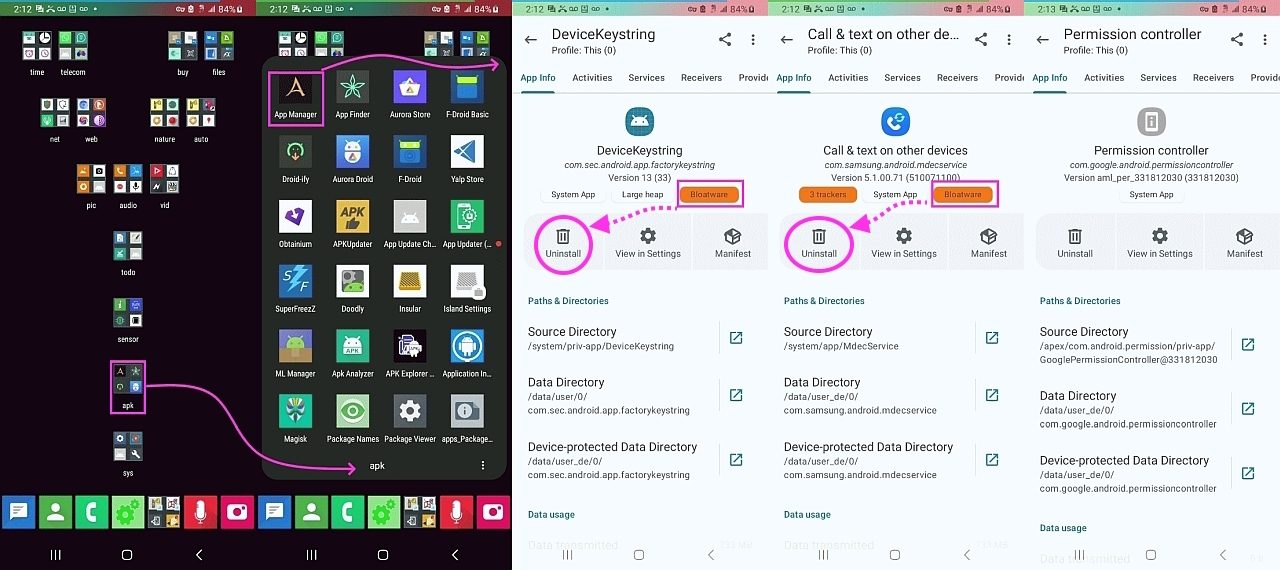
Sometimes I miss bloatware though, especially hidden bloat, but luckily my Muntashirakon App Manager tells me with a tag for apps that are bloatware.
Then just disable it. Go to the list of all apps in the setings, open
the app details of the unwanted bloat apps and disable it. Usually there
not that many bloat apps to be disabled - usually just apps trying to
sell you subscriptions and paid services.
T, 2024-06-09 09:39:
Hi All,
My wife bought a new Android tablet. She is really pissed
at all the bloatware that came with it.
Then just disable it. Go to the list of all apps in the setings, open
the app details of the unwanted bloat apps and disable it. Usually there
not that many bloat apps to be disabled - usually just apps trying to
sell you subscriptions and paid services.
I would be nice a tool that checks the list of apps installed, gives a description for each one (on single tap), then offers to delete or
inhibit it.
Possibly produce a filtered list of candidates with some criteria. Like
not showing system apps known to be needed.
And write the deleted list to a file, so that the operation can be
repeated automatically on request. With some phones I noticed that some periodical system update restored tools I did not want.
Carlos E.R. wrote on Fri, 14 Jun 2024 22:48:40 +0200 :
I would be nice a tool that checks the list of apps installed, gives a
description for each one (on single tap), then offers to delete or
inhibit it.
There's a reason I've said the Muntashirak App Manager is the best.
I think Muntashirakon App Manager debloater does everything you ask for.
<https://i.postimg.cc/XqH5rsSX/bloat01.jpg>
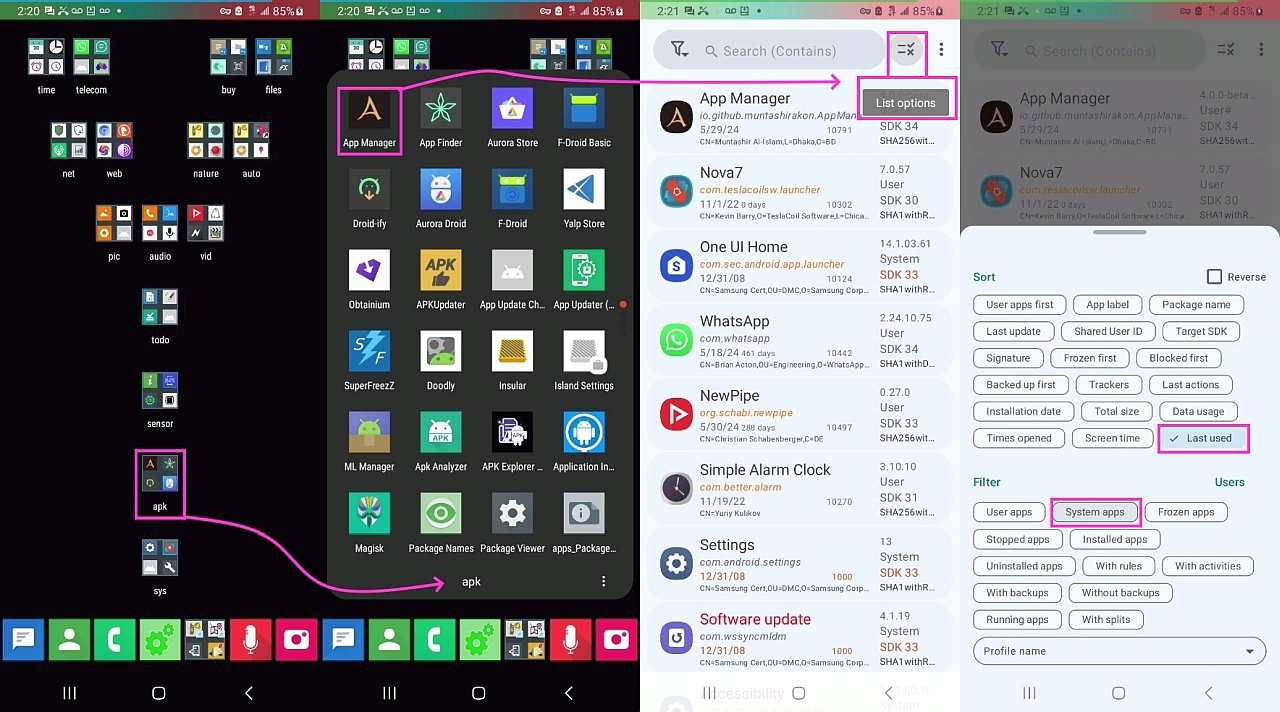
Possibly produce a filtered list of candidates with some criteria. Like
not showing system apps known to be needed.
The Muntashirakon App Manager has filters galore, system apps included.
<https://i.postimg.cc/nzzj6NPr/bloat02.jpg>
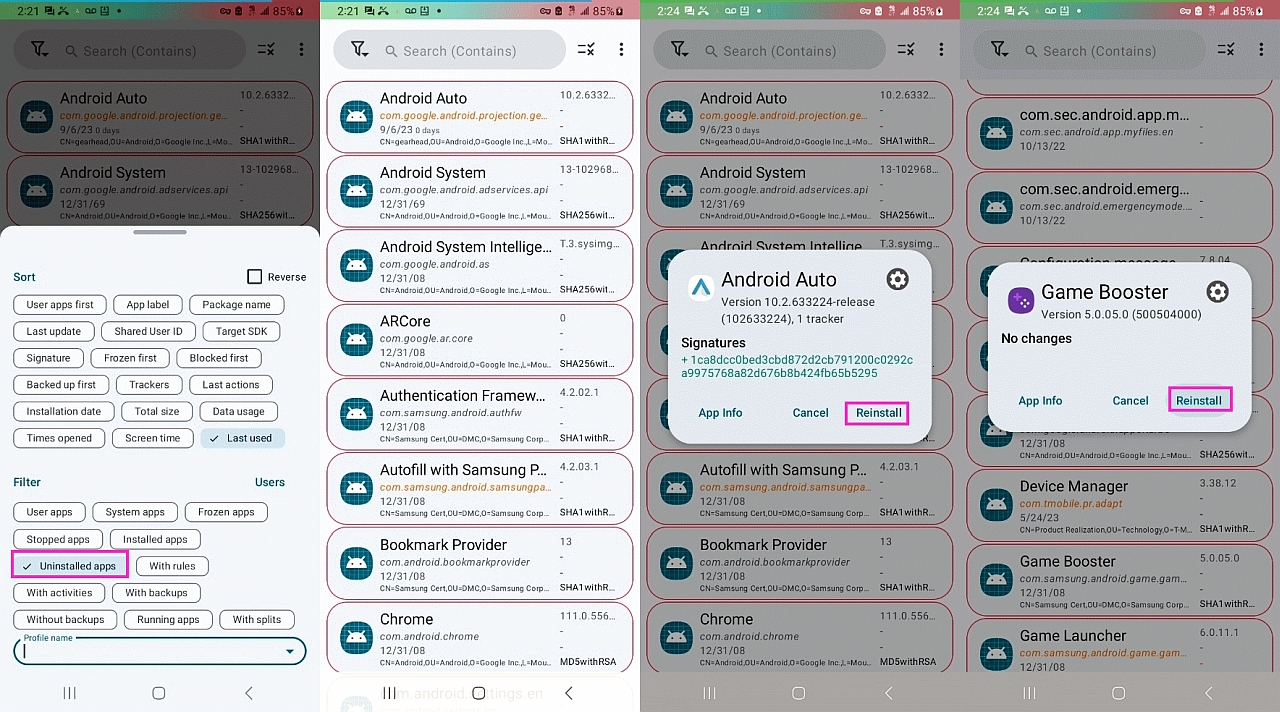
And write the deleted list to a file, so that the operation can be
repeated automatically on request. With some phones I noticed that some
periodical system update restored tools I did not want.
The Muntashirakon App Manager shows you all the apps you uninstalled.
<https://i.postimg.cc/85VX4BKZ/bloat03.jpg>
And, as shown above, it gives you the option to re-install if you like.
Is this it?
https://muntashirakon.github.io/AppManager/en/
Muntashirakon App Manager
Arno Welzel wrote on Tue, 11 Jun 2024 17:37:33 +0200 :
Then just disable it. Go to the list of all apps in the setings, open
the app details of the unwanted bloat apps and disable it. Usually there
not that many bloat apps to be disabled - usually just apps trying to
sell you subscriptions and paid services.
While disabling works without adb, with adb you can uninstall anything.
T wrote on Fri, 14 Jun 2024 18:52:24 -0700 :
Is this it?
https://muntashirakon.github.io/AppManager/en/
That's the documentation for the app so you're almost there.
The app APK is on F-Droid and GitHub.
| Sysop: | Keyop |
|---|---|
| Location: | Huddersfield, West Yorkshire, UK |
| Users: | 764 |
| Nodes: | 16 (2 / 14) |
| Uptime: | 21:05:24 |
| Calls: | 12,755 |
| Calls today: | 3 |
| Files: | 15,357 |
| Messages: | 6,556,707 |