• Muntashirakon App Manager is, IMHO, by far, the best app manager on And

    From Andrew@21:1/5 to All on Thu May 30 06:06:16 2024
    https://github.com/MuntashirAkon/AppManager https://f-droid.org/packages/io.github.muntashirakon.AppManager/

    Latest stable release:
    <https://github.com/MuntashirAkon/AppManager/releases>
    <https://github.com/MuntashirAkon/AppManager/releases/download/v3.1.6/AppManager_v3.1.6.apk>

    You know that I know tools well, and I state that this is the best
    app manager by far, simply because of all the great things it does.
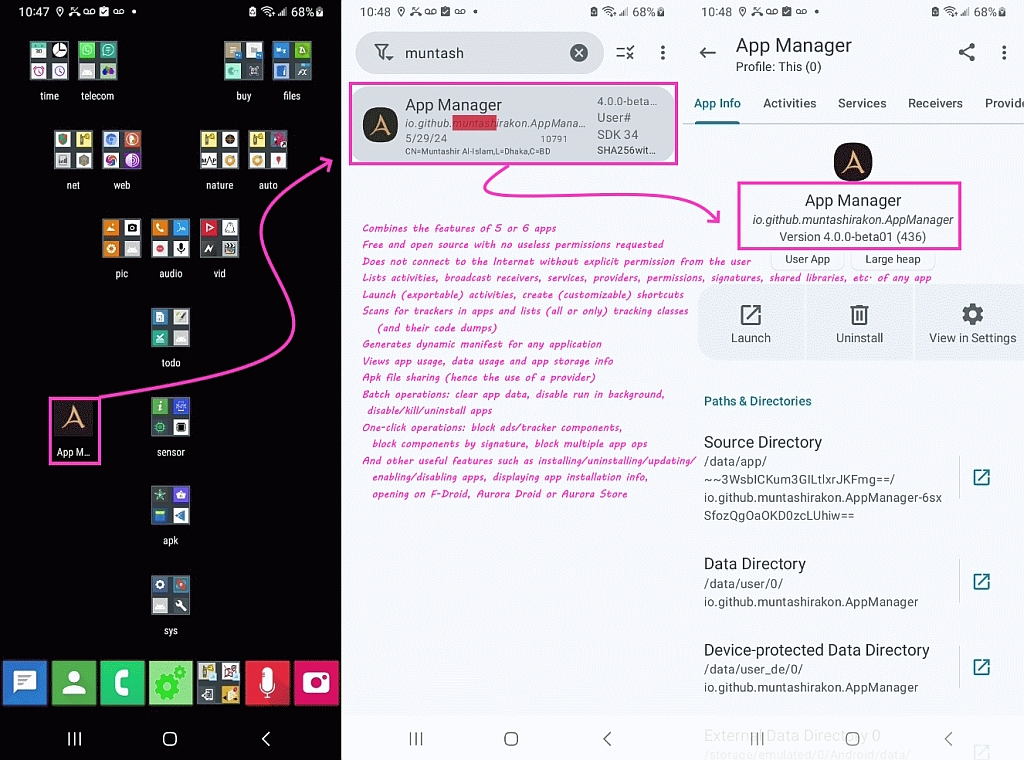
    <https://i.postimg.cc/dVfd1NP3/appmanager.jpg>

    One of the finest things it does, by the way, is create desktop
    shortcuts to any public activity - which can be done with other
    tools to be sure - but Muntashirakon makes it super easy to do.

    Also it intercepts intents, and that is fantastic when you're trying to
    figure out what any given icon or activity is really doing on Android.

    In addition, it gives you tons of information about each app.
    And it misses none (where many app managers missed packages in my tests).

    Here's more of what it does for non-rooted Android phones.

    Combines the features of 5 or 6 apps that any tech-savvy person needs.
    Free and open source with no useless permissions requested
    Does not connect to the Internet without explicit permission from the user
    Lists activities, broadcast receivers, services, providers, permissions, signatures, shared libraries, etc. of any app
    Launch (exportable) activities, create (customizable) shortcuts
    Scans for trackers in apps and lists (all or only) tracking classes (and
    their code dump)
    Generates dynamic manifest for any application
    Views app usage, data usage and app storage info
    Apk file sharing (hence the use of a provider)
    Batch operations: clear app data, disable run in background, disable/kill/uninstall apps
    One-click operations: block ads/tracker components, block components by signature, block multiple app ops
    And other useful features such as installing/uninstalling/updating/enabling/disabling apps, displaying app installation info, opening on F-Droid, Aurora Droid or Aurora Store.

    --- SoupGate-Win32 v1.05
    * Origin: fsxNet Usenet Gateway (21:1/5)
  • From Jeff Layman@21:1/5 to Andrew on Sun Jun 2 11:36:23 2024
    On 30/05/2024 07:06, Andrew wrote:
    https://github.com/MuntashirAkon/AppManager https://f-droid.org/packages/io.github.muntashirakon.AppManager/

    Latest stable release:
    <https://github.com/MuntashirAkon/AppManager/releases>
    <https://github.com/MuntashirAkon/AppManager/releases/download/v3.1.6/AppManager_v3.1.6.apk>

    You know that I know tools well, and I state that this is the best
    app manager by far, simply because of all the great things it does.
    <https://i.postimg.cc/dVfd1NP3/appmanager.jpg>

    (snip - see OP for info)

    As "Andrew" has pointed out, this is a very powerful app manager. I've
    barely investigated its possibilities, but it's almost certain that you
    will need to use its User Manual at some stage. As this is so extensive
    (77 pages and 25K+ words!), it's probably best to read it offline, or at
    least on a bigger screen. However, it appears as part of the app, so the
    only way I could "download" it was to select all, copy, paste into
    Collabora Office, and save it as an odt file. It works, but the
    conversion loses links and there appear to be some formatting marks
    included. It's a shame that the manual isn't available as a pdf or some
    other file readable outside App Manager.

    --
    Jeff

    --- SoupGate-Win32 v1.05
    * Origin: fsxNet Usenet Gateway (21:1/5)
  • From Andrew@21:1/5 to Jeff Layman on Sun Jun 2 17:37:41 2024
    Jeff Layman wrote on Sun, 2 Jun 2024 11:36:23 +0100 :

    As "Andrew" has pointed out, this is a very powerful app manager.

    Thanks for checking it out. I wanted also to see what Andy Burns thought of
    it, as I can't find a better app manager even as there must be scores of
    app managers out there - I've tried dozens and this is, by far, the best.

    I've
    barely investigated its possibilities, but it's almost certain that you
    will need to use its User Manual at some stage.

    The most important feature, by the way, is it doesn't *miss* packages.
    App managers are like clocks; no two seem to report the same packages.
    But this one reports everything (as far as I'm aware) after testing it.

    Another critical feature is the display, copy & paste for the (sometimes
    long) package name, where, surprisingly, other app managers screw up on something that simple - yet so important.

    But most importantly, once you've started exploring a package, it provides
    tons of useful information about that package - and it allows interaction
    with that package - such as creating one-tap shortcuts to its activities.

    <https://xdaforums.com/t/tutorial-illustrated-mostly-privacy-based-one-tap-shortcuts-so-that-you-can-access-in-a-single-tap-any-buried-android-setting-or-app-activity.4625951/>

    As this is so extensive
    (77 pages and 25K+ words!), it's probably best to read it offline, or at least on a bigger screen.

    Funny you mention the manual as, well, um, I never read the instructions
    until I have to (which is rare that I have to). It's much like when a new
    lawn mower is shipped to you where you have to assemble it - I usually find
    the picture on the box more informative than the manuals they put inside.

    However, it appears as part of the app, so the
    only way I could "download" it was to select all, copy, paste into
    Collabora Office, and save it as an odt file.

    If you think the internal manual for the Muntashirakon App Manager is extensive, wait until you see the help files for the Skyica App Finder! <https://play.google.com/store/apps/details?id=scadica.aq>
    (Which, by the way, is the best free ad free app finder in the world.)

    It works, but the
    conversion loses links and there appear to be some formatting marks
    included. It's a shame that the manual isn't available as a pdf or some
    other file readable outside App Manager.

    I would think the manual would be online, so let me check for you.
    <https://github.com/MuntashirAkon/AppManager>

    First place I'd look is in "Docs" on that web page.
    <https://muntashirakon.github.io/AppManager>

    Which contains what appears to be the User Manual you speak of, in HTML.
    App Manager, User Manual, v3.1.2, 19 September 2023
    <https://muntashirakon.github.io/AppManager/en/>

    --- SoupGate-Win32 v1.05
    * Origin: fsxNet Usenet Gateway (21:1/5)
  • From Andy Burns@21:1/5 to Andrew on Sun Jun 2 21:55:34 2024
    Andrew wrote:

    Jeff Layman wrote:

    As "Andrew" has pointed out, this is a very powerful app manager.

    Thanks for checking it out. I wanted also to see what Andy Burns thought of it, as I can't find a better app manager even as there must be scores of
    app managers out there - I've tried dozens and this is, by far, the best.

    It sounds interesting. I've tried the three latest 'release' versions
    without any joy, I'll see if the issue affects the 'beta' version.

    --- SoupGate-Win32 v1.05
    * Origin: fsxNet Usenet Gateway (21:1/5)
  • From Andy Burns@21:1/5 to Andy Burns on Sun Jun 2 23:53:07 2024
    Andy Burns wrote:

    I've tried the three latest 'release' versions
    without any joy, I'll see if the issue affects the 'beta' version.

    4.0beta1 same as the 3.1.x versions, stuck [flickering like crazy] at
    the disclaimer screen, the "exit", "never show" and "agree" controls do nothing, I have to force-close it, or wait about 2 minutes when it
    crashes itself ...

    --- SoupGate-Win32 v1.05
    * Origin: fsxNet Usenet Gateway (21:1/5)
  • From Andrew@21:1/5 to Andy Burns on Mon Jun 3 08:04:52 2024
    Andy Burns wrote on Sun, 2 Jun 2024 23:53:07 +0100 :

    I've tried the three latest 'release' versions
    without any joy, I'll see if the issue affects the 'beta' version.

    4.0beta1 same as the 3.1.x versions, stuck [flickering like crazy] at
    the disclaimer screen, the "exit", "never show" and "agree" controls do nothing, I have to force-close it, or wait about 2 minutes when it
    crashes itself ...

    I'm truly sorry to hear that, as you, of all people, could appreciate the
    power that this program provides to the users, for free & sans ads.

    On telegram, Muntashir Akon frequently releases a debug version, the
    current version (as of June 2nd) I will install to test it for you.

    Name: AppManager_v4.0.0-beta01-DEBUG#2706.apk
    Size: 27884019 bytes (26 MiB)
    SHA256: AEFAC82A44F2F7865FD3D9DD0E1ADF968F43920604C92C8D2E0897541B0B1ED3

    If I can figure out how to get the debug log to work, I will let you know.

    Then you can run it and send the debug log to am4android [at] riseup [dot]
    net which may help Muntashir Akon work on the fix before he heads off for
    his PhD in Computer Science at the University of California, Riverside this September (as he's planning a mid-June release date).

    --- SoupGate-Win32 v1.05
    * Origin: fsxNet Usenet Gateway (21:1/5)
  • From Andrew@21:1/5 to Andrew on Mon Jun 3 08:25:22 2024
    Andrew wrote on Mon, 3 Jun 2024 08:04:52 -0000 (UTC) :

    If I can figure out how to get the debug log to work, I will let you know.

    OK. That version hangs on me.

    What happens is the debug version just loops forever at the start, never finding any packages. Meanwhile the older version works fine concurrently.

    works:
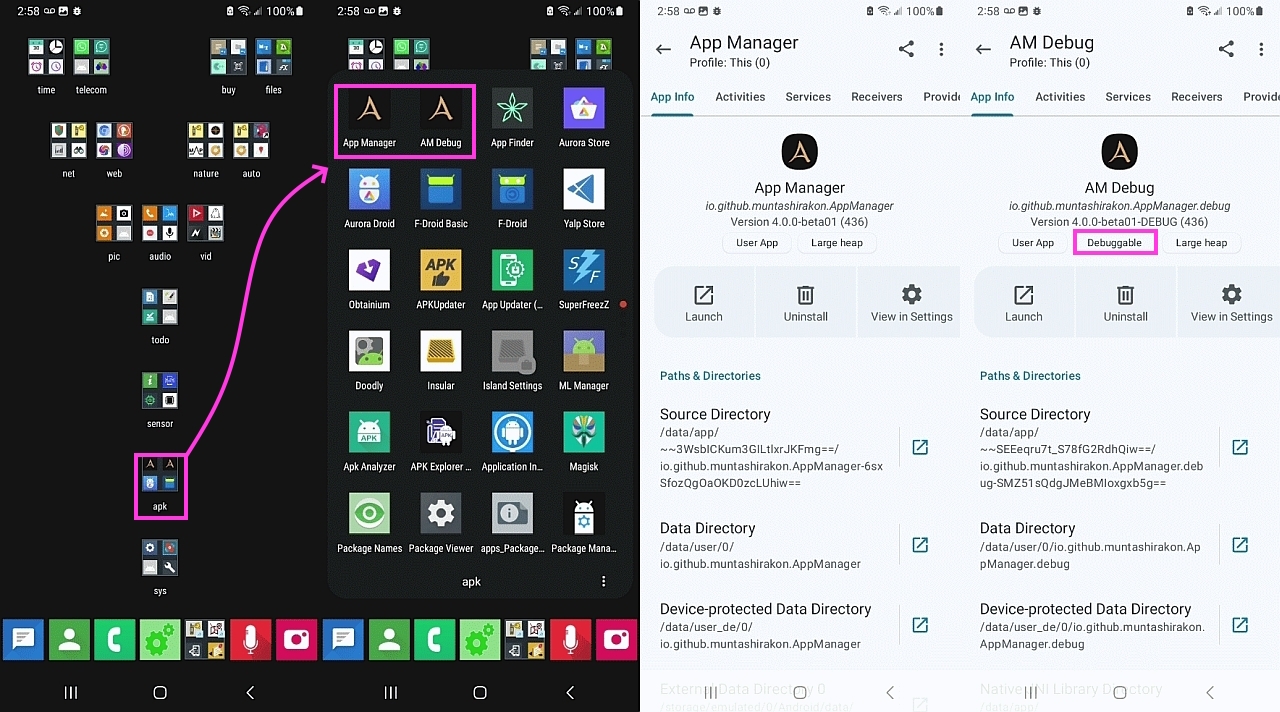
    App Manager io.github.muntashirakon.AppManager Version 4.0.0-beta01 (436) fails:
    AM Debug io.github.muntashirakon.AppManager.debug Version 4.0.0-beta01-DEBUG (436)

    The "AM Debug" shows up as "Debuggable" in the "App Manager" output.
    But I don't know how to initiate a debug log output to email to him.

    Does anyone know how to get a Debug log out of a "Debuggable" package?

    --- SoupGate-Win32 v1.05
    * Origin: fsxNet Usenet Gateway (21:1/5)
  • From Andy Burns@21:1/5 to Andrew on Mon Jun 3 09:55:54 2024
    Andrew wrote:

    Does anyone know how to get a Debug log out of a "Debuggable" package?

    LogCat?

    --- SoupGate-Win32 v1.05
    * Origin: fsxNet Usenet Gateway (21:1/5)
  • From Andy Burns@21:1/5 to Andrew on Mon Jun 3 10:58:12 2024
    Andrew wrote:

    Andy Burns wrote:

    LogCat?

    Hmmm... never used it... Don't even know what it is...

    If you've installed SDK utilites such adb.exe, you already have logcat
    not sure if it can work over wifi, I only used it over USB, and not for
    several years ...

    <https://developer.android.com/tools/logcat>

    --- SoupGate-Win32 v1.05
    * Origin: fsxNet Usenet Gateway (21:1/5)
  • From Andrew@21:1/5 to Andy Burns on Mon Jun 3 09:51:49 2024
    Andy Burns wrote on Mon, 3 Jun 2024 09:55:54 +0100 :

    Does anyone know how to get a Debug log out of a "Debuggable" package?

    LogCat?

    Hmmm... never used it... Don't even know what it is...
    <https://www.google.com/search?q=how+to+use+Android+logcat+debugger>

    *View logs with Logcat*
    <https://developer.android.com/studio/debug/logcat>
    "When an app throws an exception, Logcat shows a message followed by
    the associated stack trace containing links to the line of code."

    But that link was for developers.
    I need something for users.

    <https://developer.android.com/studio/debug>
    "Before you can begin debugging, do the following:
    1. Enable debugging on your device.
    If you're using the emulator, debugging is enabled by default.
    But for a connected device, you need to enable debugging in the
    device developer options.
    2. Run a debuggable build variant.
    Use a build variant that includes debuggable true
    (isDebuggable = true in Kotlin scripts) in the build configuration."
    3. If your app is already running on your device, you can start
    debugging without restarting your app as follows:
    Click Attach debugger to Android process .
    In the Choose Process dialog, select the process you want to attach
    the debugger to.

    That should fit what I'm doing, right?
    Let me try it out.

    BTW, I saw your post about the battery status going south all of a sudden,
    and I looked at your image you kindly uploaded - so let's see what others
    say as my experience is the battery lasts forever on my older device.

    --- SoupGate-Win32 v1.05
    * Origin: fsxNet Usenet Gateway (21:1/5)
  • From Andrew@21:1/5 to Andy Burns on Mon Jun 3 10:25:14 2024
    Andy Burns wrote on Mon, 3 Jun 2024 10:58:12 +0100 :

    Andy Burns wrote:

    LogCat?

    Hmmm... never used it... Don't even know what it is...

    If you've installed SDK utilites such adb.exe, you already have logcat
    not sure if it can work over wifi, I only used it over USB, and not for several years ...

    <https://developer.android.com/tools/logcat>

    I understand what you're saying as I've written tutorials on using Android Studio; but normally I just use the adb standalone utility every day.

    I also wrote tutorials on emulation, where the debugger is automatic apparently, but I'm trying to do this using the phone without emulation.

    Here is where I'm stuck, but it doesn't use "logcat" yet.

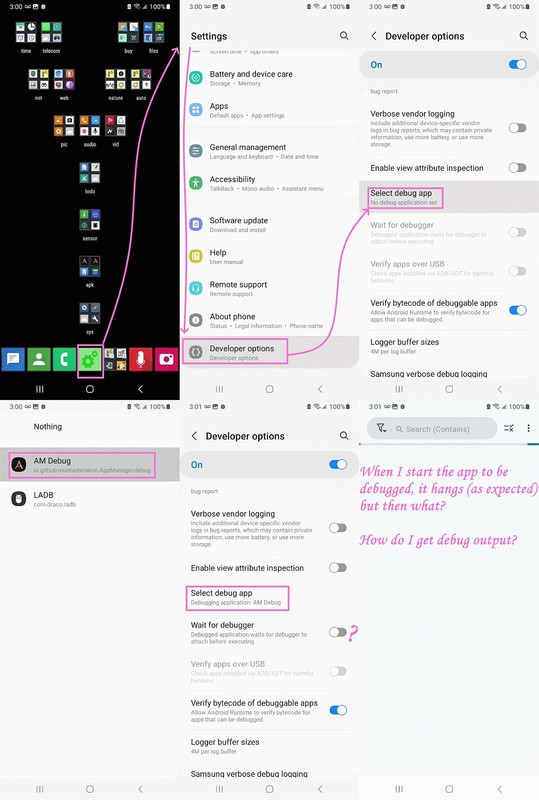
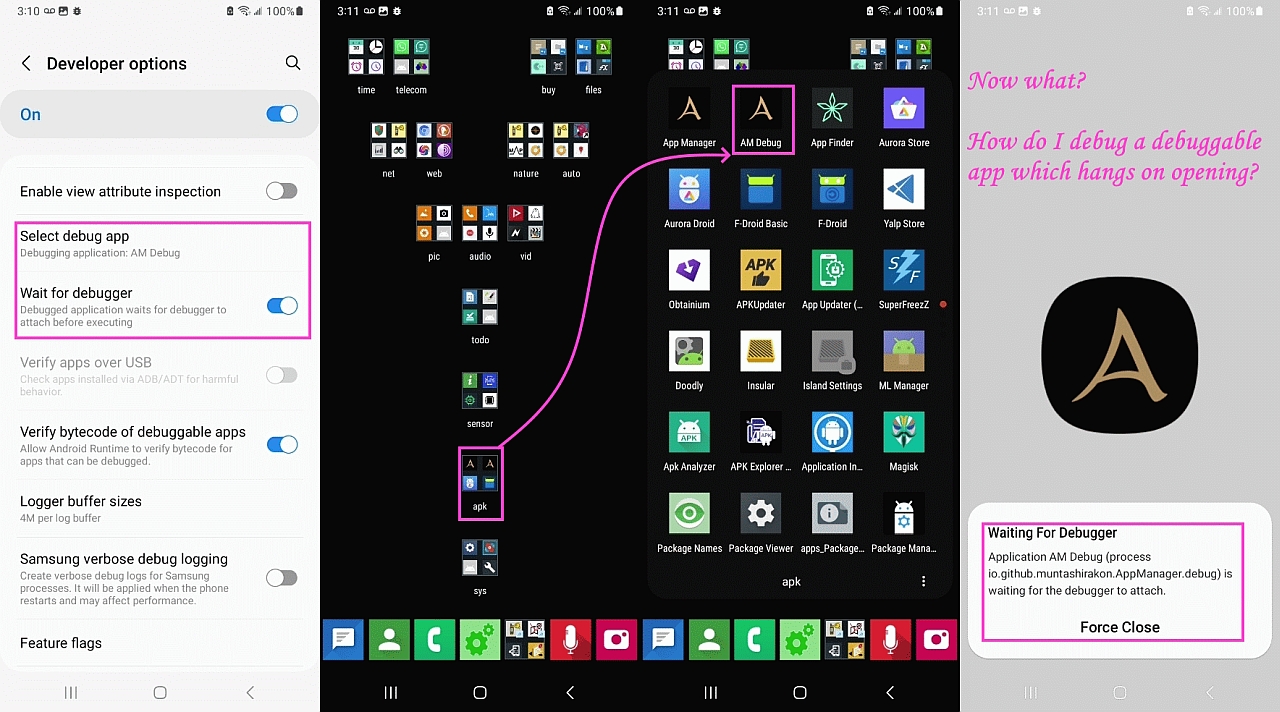
    1. Install a debuggable version of an app.
    2. Set the Developer Options debugger to that app.
    3. ??? Turn on Developer Options Wait for Debugger ???
    4. Start the debuggable app.

    Now what?

    <https://i.postimg.cc/g2ypvqHJ/debug01.jpg>
    <https://i.postimg.cc/HkNDgZzV/debug02.jpg>
    <https://i.postimg.cc/NFtvnK4D/debug03.jpg>

    --- SoupGate-Win32 v1.05
    * Origin: fsxNet Usenet Gateway (21:1/5)
  • From Andrew@21:1/5 to Andrew on Tue Jun 4 05:29:19 2024
    Andrew wrote on Mon, 3 Jun 2024 10:25:14 -0000 (UTC) :

    Now what?

    I've asked the question over here, but so far, no joy.
    <https://xdaforums.com/t/how-do-i-debug-a-debuggable-app-on-a-physical-phone-over-usb-with-windows-developer-options-debugging-is-turned-on-but-what-do-i-do-next.4674852/>

    As an aside, when all the morons like Alan, Jeorg, Frank and Carlos
    gleefully claim they've "figured me out", I realize how dumb they truly are since they are gleefully exclaiming they figured out what was never hidden.

    How hard would it be to figure me out when I post my URLs to the XDA
    Developer sites which contain screenshots of my unique homescreen????

    It amazes me that people are _that_ stupid and yet, they think they're so
    smart by claiming they figured out "by the way I write".

    They think they're geniuses.

    --- SoupGate-Win32 v1.05
    * Origin: fsxNet Usenet Gateway (21:1/5)