I'm surprised I haven't seen anything about this here. I've been
googling (!) for a way to opt out of using my bandwidth and my
battery to be part of this network.
Everything I could find told me to make settings changes in the Find
My Device app, but I don't have that app. Does that mean I'm not part
of the network, or do I need to install an app I don't want just to
opt out of a network I don't want?
On Wed, 29 May 2024 07:54:12 -0700, Stan Brown
<[email protected]> wrote:
I'm surprised I haven't seen anything about this here. I've been
googling (!) for a way to opt out of using my bandwidth and my
battery to be part of this network.
In a system like this, the number of participating devices is
critically important, so I doubt you will be allowed to turn it off.
On 2024-05-29 18:23, Robert Roland wrote:
On Wed, 29 May 2024 07:54:12 -0700, Stan Brown
<[email protected]> wrote:
I'm surprised I haven't seen anything about this here. I've been
googling (!) for a way to opt out of using my bandwidth and my
battery to be part of this network.
In a system like this, the number of participating devices is
critically important, so I doubt you will be allowed to turn it off.
Right.
Stan Brown wrote:
I'm surprised I haven't seen anything about this here. I've been
googling (!) for a way to opt out of using my bandwidth and my
battery to be part of this network.
Is it actually live yet?
I'm surprised I haven't seen anything about this here. I've been
googling (!) for a way to opt out of using my bandwidth and my
battery to be part of this network.
On Wed, 29 May 2024 07:54:12 -0700, Stan Brown
<[email protected]> wrote:
I'm surprised I haven't seen anything about this here. I've been
googling (!) for a way to opt out of using my bandwidth and my
battery to be part of this network.
In a system like this, the number of participating devices is
critically important, so I doubt you will be allowed to turn it off.
In a system like this, the number of participating devices is
critically important, so I doubt you will be allowed to turn it off.
Am 29.05.24 um 17:02 schrieb Andy Burns:
Stan Brown wrote:
I'm surprised I haven't seen anything about this here. I've been
googling (!) for a way to opt out of using my bandwidth and my
battery to be part of this network.
Is it actually live yet?
At least since 2020.
If you speak a little bit of German than you can see how easy it is to
turn it on and to turn it off again:
https://www.heise.de/tipps-tricks/Google-Find-my-Device-so-funktioniert-s-6202798.html
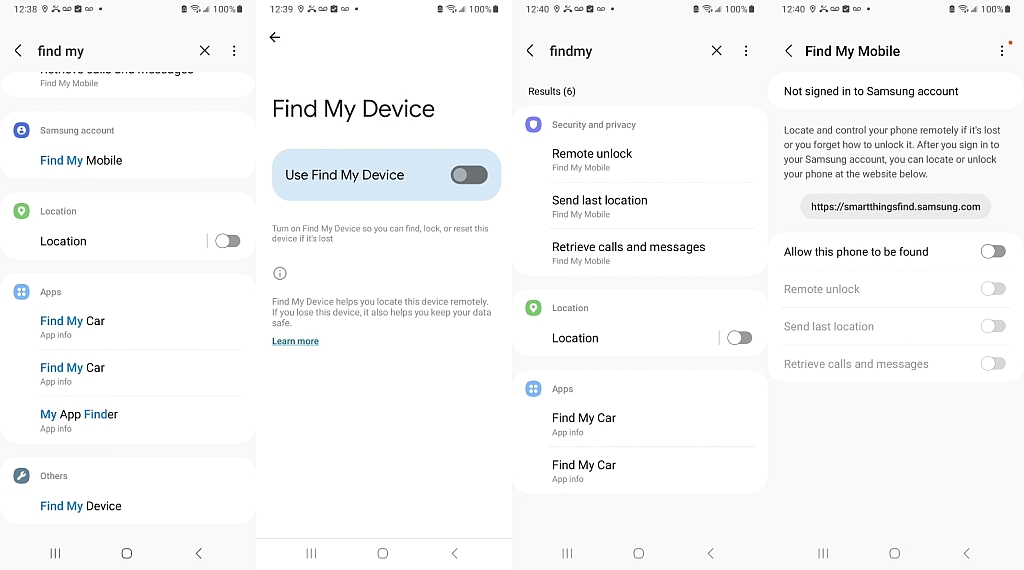
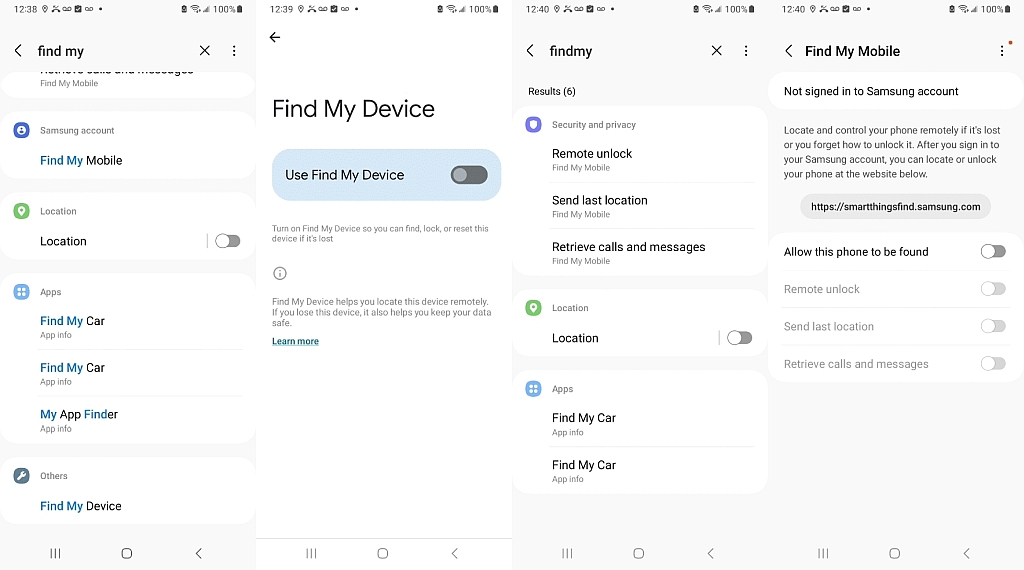
or open settings. Go to search function and enter "find my" and enter.
There you are! Deactivate it!
I'm surprised I haven't seen anything about this here. I've been
googling (!) for a way to opt out of using my bandwidth and my
battery to be part of this network.
Everything I could find told me to make settings changes in the Find
My Device app, but I don't have that app. Does that mean I'm not part
of the network, or do I need to install an app I don't want just to
opt out of a network I don't want?
I'm surprised I haven't seen anything about this here. I've been
googling (!) for a way to opt out of using my bandwidth and my
battery to be part of this network.
Everything I could find told me to make settings changes in the Find
My Device app, but I don't have that app. Does that mean I'm not part
of the network, or do I need to install an app I don't want just to
opt out of a network I don't want?
I got an e-mail (today) from Google, saying the 'feature' will be
turned on in three days and with instructions how to opt out of the
network:
<https://www.google.com/android/find/settings/fmdn>
Robert Roland wrote:
In a system like this, the number of participating devices is
critically important, so I doubt you will be allowed to turn it off.
According to 9to5google, it has three states
Without network:
With network in high-traffic areas only:
With the network in all areas:
<https://9to5google.com/2024/04/03/android-find-my-device-network-live-early/>
under
Settings > Security & privacy > Device finders > Find My Device
I don't see those choices, but i can do a manual scan for trackers near me,
Hence, since I'm not sure I understand your question, may I ask you...
*Isn't the way to opt out simply to not opt in?*
Jörg Lorenz wrote:
schrieb Andy Burns:
Is it actually live yet?
At least since 2020.
That's old news, but there's a new finder, only been around (even in
beta) a month or so ...
<https://9to5google.com/guides/find-my-device>
Samsung: Find my mobile
Android: Find my device
Neither one of which works on my device.
<https://i.postimg.cc/25C1Jppb/findmy.jpg>
Hence, since I'm not sure I understand your question, may I ask you...
*Isn't the way to opt out simply to not opt in?*
Hence, since I'm not sure I understand your question, may I ask you...
*Isn't the way to opt out simply to not opt in?*
Stan doesn't want to use-up his battery/bandwidth, listening out for
other people's lost devices. Seems like he will be able to opt out.
I'm curious what version people are on who got the email from Google.
I didn't get the email, most likely because the new feature isn't
enabled in the UK yet, but I do have Play Services 24.20.13, which is
higher than the beta.
Seeking to answer Stan's question, the first issue is it apparently uses bluetooth, so, I would think (hope?) that the bluetooth radio can simply be turned off.
Yet, maybe not, as the "default" will be for this feature to be turned on, so, maybe (I don't know yet), the bluetooth radio will be on, but hidden?
I'm curious what version people are on who got the email from Google.
"What to do if you get an unknown tracker alert.
If you turn off Bluetooth or Location Services or turn on aeroplane
mode your phone won't prevent the owner of the tracker or device
from finding the location of the tracker."
Yikes!
That implies that the Bluetooth radio is lying when it says it's off.
Does it not?
That was my first answer here, but maybe not ...
<http://andyburns.uk/misc/findmy-helppage.png>
Does anyone have Android 15 who can confirm that Bluetooth is pause only?
No, my Pixel5a is too old to get the beta of 15 (not that I'm tempted to
run betas on my main phone). I'm still deciding whether to buy a
Pixel8, an 8a or hold on a few months for a 9Pro.
Does anyone have Android 15 who can confirm that Bluetooth is pause only?
"thanks to specialized Pixel hardware, Pixel 8 and 8 Pro owners
will also be able to find their devices if they're powered off
or the battery is dead"
That means, I guess, what we discussed in the past, is that a phone which
is simply indicating that it's off, isn't necessarily off after all.
Robert Roland wrote:[end of article missing?]
In a system like this, the number of participating devices is
critically important, so I doubt you will be allowed to turn it off.
According to 9to5google, it has three states
Without network:
With network in high-traffic areas only:
With the network in all areas:
<https://9to5google.com/2024/04/03/android-find-my-device-network-live-early/>
under
Settings > Security & privacy > Device finders > Find My Device
I don't see those choices, but i can do a manual scan for trackers near me,
Stan Brown <[email protected]> wrote:
I'm surprised I haven't seen anything about this here. I've been
googling (!) for a way to opt out of using my bandwidth and my
battery to be part of this network.
Everything I could find told me to make settings changes in the Find
My Device app, but I don't have that app. Does that mean I'm not part
of the network, or do I need to install an app I don't want just to
opt out of a network I don't want?
I got an e-mail (today) from Google, saying the 'feature' will be
turned on in three days and with instructions how to opt out of the
network:
<https://www.google.com/android/find/settings/fmdn>
On Wed, 29 May 2024 18:00:19 +0100, Andy Burns wrote:
Robert Roland wrote:
In a system like this, the number of participating devices is
critically important, so I doubt you will be allowed to turn it off.
According to 9to5google, it has three states
Without network:
With network in high-traffic areas only:
With the network in all areas:
<https://9to5google.com/2024/04/03/android-find-my-device-network-live-early/>
under
Settings > Security & privacy > Device finders > Find My Device
I don't see those choices, but i can do a manual scan for trackers near me,[end of article missing?]
On my Samsung A54, Android 14, OneUI 6.1, I have
Settings Security and privacy Lost device protection: Allow this
phone to be found in case it gets lost
Tapping that leads to a complaint "not signed in to Samsung
account," which is true. I wouldn't create a Microsoft account; why
would I create a Samsung one?
But I wonder: is Samsung maybe hiding Google's Find to push people
toward Samsung's? Samsung updates have been coming about once a week
lately, and who knows what's in them?
BTW, Frank Slootweg posted the answer that fits my phone exactly: https://www.google.com/android/find/settings/fmdn
Andrew wrote:
"thanks to specialized Pixel hardware, Pixel 8 and 8 Pro owners
will also be able to find their devices if they're powered off
or the battery is dead"
That means, I guess, what we discussed in the past, is that a phone which is simply indicating that it's off, isn't necessarily off after all.
I think the CPU, wifi and 4G/5G radios will be off, but the last thing
the CPU will do is pre-compute the "I'm lost" beacon packets and put the bluetooth radio into a special mode where it repeatedly transmits them
(maybe at decreasing frequency?)
Tapping that leads to a complaint "not signed in to Samsung
account," which is true. I wouldn't create a Microsoft account; why
would I create a Samsung one?
You get that error, because you're in the *Samsung* 'Find My Mobile' settings.
How does Bluetooth help?
I'm much more likely to lose my phone in the
middle of an empty field than somewhere at home in range of other
Bluetooth devices.
I got an e-mail (today) from Google, saying the 'feature' will be
turned on in three days and with instructions how to opt out of the
network:
<https://www.google.com/android/find/settings/fmdn>
In a system like this, the number of participating devices is
critically important, so I doubt you will be allowed to turn it off.
I'm not so much concerned about privacy--that ship has sailed with Google--but about battery use from being constantly on line. I have
Power Saver selected, but still I'm lucky to go 48 hours without
recharging.
Same here. I got the e-mail on May 22, but so far no notification and no option to opt out (because it isn't active yet?).
That's been the only available functionality for the past few years, and
I've found it helpful once or twice, it can't actually do any "finding",
it can tell you where the device is (or last was before battery gave up).
On your Android device, open the Find My Device app.
On Thu, 30 May 2024 20:20:14 +0100, Andy Burns wrote:
That's been the only available functionality for the past few years, and I've found it helpful once or twice, it can't actually do any "finding",
it can tell you where the device is (or last was before battery gave up).
I'm not sure if we're talking about the same thing here. I don't have
the app on my phone, because I can already use 'Find my phone/device'
through a browser. I simply activated it in my settings.
s|b wrote:
J�rg Lorenz wrote:
open the Find My Device app.
There's no such app on my Pixel 6. Apparently, I can install it, but the
function is already active (in my settings) and I don't see the point.
What am I going to do with the app? Find my own device?
That's been the only available functionality for the past few years, and
I've found it helpful once or twice, it can't actually do any "finding",
it can tell you where the device is (or last was before battery gave up).
How precise is it. will it help me if it's somewhere in my house but I
don't know where?
In comp.mobile.android, on Thu, 30 May 2024 20:20:14 +0100, Andy Burns <[email protected]> wrote:
s|b wrote:
J�rg Lorenz wrote:
open the Find My Device app.
There's no such app on my Pixel 6. Apparently, I can install it, but the >> function is already active (in my settings) and I don't see the point.
What am I going to do with the app? Find my own device?
That's been the only available functionality for the past few years, and >I've found it helpful once or twice, it can't actually do any "finding",
it can tell you where the device is (or last was before battery gave up).
How precise is it. will it help me if it's somewhere in my house but I
don't know where?
micky <[email protected]> wrote:
In comp.mobile.android, on Thu, 30 May 2024 20:20:14 +0100, Andy Burns
<[email protected]> wrote:
s|b wrote:How precise is it. will it help me if it's somewhere in my house but I
J�rg Lorenz wrote:
open the Find My Device app.
There's no such app on my Pixel 6. Apparently, I can install it, but the >> >> function is already active (in my settings) and I don't see the point.
What am I going to do with the app? Find my own device?
That's been the only available functionality for the past few years, and
I've found it helpful once or twice, it can't actually do any "finding",
it can tell you where the device is (or last was before battery gave up). >> >
don't know where?
If it's in your house, as AJL said, just call it from another phone.
If you don't have another phone, just use
'Find your phone'
<https://myaccount.google.com/find-your-phone>
on any device.
That will already play a notification sound (twice), but if you miss
that, just click on 'Play sound' and it will sound your ringtone on your >'lost' device ('device, not 'phone', because it also works for tablets).
micky wrote:
How precise is it. will it help me if it's somewhere in my house but I
don't know where?
It will be as accurate as whatever geolocation type you allow, for GPS
it'll probably tell which quarter of your house it's in, for wifi it
might nly distinguish between your house and your neighbour's, for cell
site it might only know which road it's on.
I don't have
the app on my phone, because I can already use 'Find my phone/device'
through a browser. I simply activated it in my settings.
Stan Brown <[email protected]> wrote:
I'm surprised I haven't seen anything about this here. I've been
googling (!) for a way to opt out of using my bandwidth and my
battery to be part of this network.
Everything I could find told me to make settings changes in the Find
My Device app, but I don't have that app. Does that mean I'm not part
of the network, or do I need to install an app I don't want just to
opt out of a network I don't want?
I got an e-mail (today) from Google, saying the 'feature' will be
turned on in three days and with instructions how to opt out of the
network:
<https://www.google.com/android/find/settings/fmdn>
It's an alternative for the web-browser. In order to find a device,
you need 1) *another* device and 2) an 'app' on that device. The 'app'
is either a general purpose web-browser or the dedicated 'Find My
Device' app.
| Sysop: | Keyop |
|---|---|
| Location: | Huddersfield, West Yorkshire, UK |
| Users: | 764 |
| Nodes: | 16 (2 / 14) |
| Uptime: | 26:08:39 |
| Calls: | 12,756 |
| Calls today: | 4 |
| Files: | 15,359 |
| Messages: | 6,556,783 |