• Re: ebook-reader permissions - no explanation given

    From Carlos E.R.@21:1/5 to R.Wieser on Mon May 27 21:59:48 2024
    On 2024-05-27 21:19, R.Wieser wrote:
    Hello all,

    I was looking for a simple(!) ebook reader, and found the below :

    https://f-droid.org/en/packages/com.github.axet.bookreader/

    Ofcourse, I checked its permissions - which I now have questions about :

    "read the contents of your shared storage
    Allows the app to read the contents of your shared storage."

    Allright, otherwise it can't read any EPUB files.

    "modify or delete the contents of your shared storage
    Allows the app to write the contents of your shared storage."

    No idea why it would need to do that(1).

    Guessing, to write notes per book.

    ...

    Ask them.

    --
    Cheers, Carlos.

    --- SoupGate-Win32 v1.05
    * Origin: fsxNet Usenet Gateway (21:1/5)
  • From R.Wieser@21:1/5 to All on Mon May 27 21:19:04 2024
    Hello all,

    I was looking for a simple(!) ebook reader, and found the below :

    https://f-droid.org/en/packages/com.github.axet.bookreader/

    Ofcourse, I checked its permissions - which I now have questions about :

    "read the contents of your shared storage
    Allows the app to read the contents of your shared storage."

    Allright, otherwise it can't read any EPUB files.

    "modify or delete the contents of your shared storage
    Allows the app to write the contents of your shared storage."

    No idea why it would need to do that(1).

    "read phone status and identity
    Allows the app to access the phone features of the device. This permission allows the app to determine the phone number and device IDs, whether a call
    is active, and the remote number connected by a call."

    I can make a couple of guesses to why it would need this, but that doesn't
    help me in the slightest. Does any one have a (non-guessed) idea to why I should allow this ?

    (1) Assuming that this is needed to store some configuration (last opened
    EPUB, position therein), isn't there some per-app protected storage
    available ?
    I'm not really happy with the idea that that app would be able to muck
    around with files that are his.

    Remark: My smartphone runs "Graphene OS", which gives a nice indication
    about how I appreciate apps which regard my whole smartphone as their playground.

    I did find some other ebook readers, but as those wanted a*lot* of
    permissions (including network, so the app builder could gather "statistical data" - his words, not mine) I discarded them on sight.

    Regards,
    Rudy Wieser

    --- SoupGate-Win32 v1.05
    * Origin: fsxNet Usenet Gateway (21:1/5)
  • From Theo@21:1/5 to R.Wieser on Mon May 27 22:26:42 2024
    R.Wieser <[email protected]d> wrote:
    Hello all,

    I was looking for a simple(!) ebook reader, and found the below :

    https://f-droid.org/en/packages/com.github.axet.bookreader/

    Ofcourse, I checked its permissions - which I now have questions about :

    "read the contents of your shared storage
    Allows the app to read the contents of your shared storage."

    Allright, otherwise it can't read any EPUB files.

    "modify or delete the contents of your shared storage
    Allows the app to write the contents of your shared storage."

    No idea why it would need to do that(1).

    "read phone status and identity
    Allows the app to access the phone features of the device. This permission allows the app to determine the phone number and device IDs, whether a call is active, and the remote number connected by a call."

    I can make a couple of guesses to why it would need this, but that doesn't help me in the slightest. Does any one have a (non-guessed) idea to why I should allow this ?

    This is the manifest file: https://gitlab.com/axet/android-book-reader/-/blob/master/app/src/main/AndroidManifest.xml?ref_type=heads

    which has the read storage permission, but not write or the phone status permission. Maybe the latter comes from some library it uses?

    It appears to be to support API level 9 (Android 2.3.0) while targeting level 30
    (Android 11) - maybe there's something about that which drags in additional permissions (eg maybe separate read and write didn't exist on 2.3?).

    Theo

    --- SoupGate-Win32 v1.05
    * Origin: fsxNet Usenet Gateway (21:1/5)
  • From Andy Burns@21:1/5 to R.Wieser on Mon May 27 22:28:24 2024
    R.Wieser wrote:

    "modify or delete the contents of your shared storage
    Allows the app to write the contents of your shared storage."

    No idea why it would need to do that(1).

    Annotate, or remove books?

    --- SoupGate-Win32 v1.05
    * Origin: fsxNet Usenet Gateway (21:1/5)
  • From VanguardLH@21:1/5 to R.Wieser on Mon May 27 19:34:02 2024
    "R.Wieser" <[email protected]d> wrote:

    Hello all,

    I was looking for a simple(!) ebook reader, and found the below :

    https://f-droid.org/en/packages/com.github.axet.bookreader/

    Ofcourse, I checked its permissions - which I now have questions about :

    "read the contents of your shared storage
    Allows the app to read the contents of your shared storage."

    Allright, otherwise it can't read any EPUB files.

    "modify or delete the contents of your shared storage
    Allows the app to write the contents of your shared storage."

    Didn't see Book Reader listed in their apps page at:

    https://f-droid.org/en/packages/

    The page you gave just lists versions. Did not see any documentation on
    the app. Might it allow you to annotate or modify e-books which would
    require the write permission? As noted at:

    https://raider.pressbooks.pub/otnmodify/chapter/format-guide-epub-mobi/

    An EPUF file is a ZIP file with nested folders with XHTML text, images,
    CSS, fonts, and metadata files. Even if Book Reader doesn't let you
    modify or change the text, replace images, replace fonts, etc, maybe it
    still lets you edit the metadata of the .epub file. It notes that
    Calibre, the e-book reader I remember using, can "Edit book".

    Without any documentation on that app, no one can determine just
    features it has other than perhaps another user of the same app. You
    could deny the access to see if the app still functions well enough.

    "read phone status and identity
    Allows the app to access the phone features of the device. This permission allows the app to determine the phone number and device IDs, whether a call is active, and the remote number connected by a call."

    I can make a couple of guesses to why it would need this, but that doesn't help me in the slightest. Does any one have a (non-guessed) idea to why I should allow this ?

    Looks like something you have to ask the app author. They don't provide documentation, so every permission they want is a guess by the user. Or
    get someone to look at the code in the APK to see why it wants those permissions.

    The web site has no information to identify the app author. Unless the
    APK has doc files inside with contact info on the author, and assuming
    the author is responsive or those contacts are still valid, I don't see
    how you'll find the app author to get a hell of a lot more info on his
    app.

    If I started hunting around for an e-book reader to use with Android,
    I'd probably start with Calibre. Besides any help they have at their
    web site, there are probably a hell of a lot more Calibre users around
    to ask for help than those using the app you mentioned. Alas, there is
    no native Android app for Calibre. You have to use ADB and a USB cable
    to read an e-book on your desktop, so it's a kludge to use Calibre with Android.

    I've heard of ReadEra, FBreader and Librera, but never used them. I've
    only need to read e-books on my desktop. Reading on a smartphone screen
    for something as large as a "book" would overly strain my old eye, and
    have be constantly zooming in and out. Smartphone display really don't substitute for desktop monitors.

    I did find some other ebook readers, but as those wanted a*lot* of permissions (including network, so the app builder could gather
    "statistical data" - his words, not mine) I discarded them on sight.

    Some e-book readers let you specify a URL from where to get the EPUB, or
    other format, e-book file, so I can see those requiring network access.
    For example, my public library has e-books that I can read locally, but
    they are retrieved from their server which also manages how long I can check-out the e-book from them (they have to share a limited number of
    licenses amongst all their patrons).

    --- SoupGate-Win32 v1.05
    * Origin: fsxNet Usenet Gateway (21:1/5)
  • From R.Wieser@21:1/5 to All on Tue May 28 09:36:40 2024
    Theo,

    This is the manifest file: [snip]

    which has the read storage permission, but not write or the phone
    status permission. Maybe the latter comes from some library it uses?

    I was trying to figure out the legit reasons for the permissions. They
    could really be needed.

    But yes, thats something thats also something to consider. Third parties
    which embed stuff neither the app-maker nor the user have asked for.

    By the way: that ebook reader program you referred to which only asks for
    read permissions - Is there an APK available of it ? Maybe it already does what I need from it.

    Regards,
    Rudy Wieser

    --- SoupGate-Win32 v1.05
    * Origin: fsxNet Usenet Gateway (21:1/5)
  • From R.Wieser@21:1/5 to All on Tue May 28 10:00:51 2024
    Andy,

    "modify or delete the contents of your shared storage
    Allows the app to write the contents of your shared storage."

    No idea why it would need to do that(1).

    Annotate, or remove books?

    I did not consider the former (which is possible, but not expected of a
    simple reader), but was thinking of the latter too.

    But in that case, why would it need access to the *whole* shared storage,
    and not an app-specific data subfolder ?

    ... I just realized I should also take a peek at what the Graphene OS
    considers to be "shared storage", and how it (possibly) can help curb over-zealous (or just not quite trusted) apps.

    Regards,
    Rudy Wieser

    --- SoupGate-Win32 v1.05
    * Origin: fsxNet Usenet Gateway (21:1/5)
  • From R.Wieser@21:1/5 to All on Tue May 28 09:23:28 2024
    Carlos,

    "modify or delete the contents of your shared storage
    Allows the app to write the contents of your shared storage."

    No idea why it would need to do that(1).

    Guessing, to write notes per book.

    I guess thats possible. Not something I would expect from a simple ebook reader though.

    Ask them.

    Good one. Alas, their forum is driven by JS (discourse), and as that is something I've got disabled ...

    Regards,
    Rudy Wieser

    --- SoupGate-Win32 v1.05
    * Origin: fsxNet Usenet Gateway (21:1/5)
  • From R.Wieser@21:1/5 to All on Tue May 28 10:21:05 2024
    Andrew,

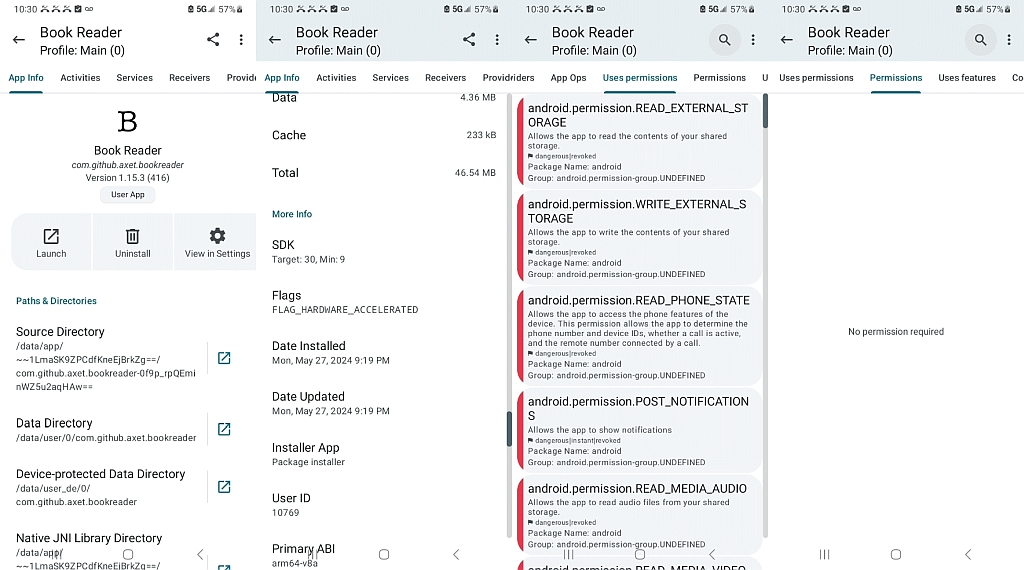
    The permissions that it obtains automatically appear to be these;
    however mine are always automatically revoked, so they're all in red.

    Interresting. Though I have a problem with grasping how "READ_EXTERNAL_STORAGE" doesn't superceede the "READ_MEDIA_*" permissions.

    I can understand those READ_MEDIA_* permissions though. EPUB books are just HTML files zipped up.

    Thanks for the testing. It looks like the app does have all its (major) permissions listed.

    Question : what do you have running (OS, apps) that all those permissions
    are automatically revoked ?

    Regards,
    Rudy Wieser

    --- SoupGate-Win32 v1.05
    * Origin: fsxNet Usenet Gateway (21:1/5)
  • From Andrew@21:1/5 to R.Wieser on Tue May 28 09:08:49 2024
    R.Wieser wrote on Tue, 28 May 2024 10:21:05 +0200 :

    Interresting. Though I have a problem with grasping how "READ_EXTERNAL_STORAGE" doesn't superceede the "READ_MEDIA_*" permissions.

    I admit I'm confused about the permissions myself for that app.
    <https://f-droid.org/en/packages/com.github.axet.bookreader/>

    Hence I suggest you test yours using the Muntashirakon App Manager.
    <https://f-droid.org/en/packages/io.github.muntashirakon.AppManager/>

    See if your permissions for that app look like mine (Galaxy, Android 13).
    <https://i.postimg.cc/nrRnT8wh/permission.jpg>

    I can understand those READ_MEDIA_* permissions though. EPUB books are just HTML files zipped up.

    I'm not sure how the app is working with all those permissions revoked.
    Also I'm not sure why the app doesn't even *ask* me for any permissions.

    Thanks for the testing. It looks like the app does have all its (major) permissions listed.

    My suggestion is you install Muntashirakon App Manager and let us know if you're seeing the same thing I'm seeing, which is that it has no
    permissions and yet, the app still has no problem reading PDFs & EPUBs.

    Question : what do you have running (OS, apps) that all those permissions
    are automatically revoked ?

    My Galaxy Android 13 isn't rooted so it's the normal Android operating
    system, so I'm not really sure why all those permissions are revoked.

    When you run the Muntashirakon App Manager on that Book Reader app,
    do you see the same (red) "dangerous permissions" blocked that I did?

    --- SoupGate-Win32 v1.05
    * Origin: fsxNet Usenet Gateway (21:1/5)
  • From Theo@21:1/5 to R.Wieser on Tue May 28 11:34:15 2024
    R.Wieser <[email protected]d> wrote:
    Theo,

    This is the manifest file: [snip]

    which has the read storage permission, but not write or the phone
    status permission. Maybe the latter comes from some library it uses?

    I was trying to figure out the legit reasons for the permissions. They
    could really be needed.

    But yes, thats something thats also something to consider. Third parties which embed stuff neither the app-maker nor the user have asked for.

    By the way: that ebook reader program you referred to which only asks for read permissions - Is there an APK available of it ? Maybe it already does what I need from it.

    That is the app you downloaded. If you go to F-droid and download the
    sources tarball for this app you'll find they match the ones I linked to (it was easier to link to upstream sources on Gitlab than a tarball)

    Theo

    --- SoupGate-Win32 v1.05
    * Origin: fsxNet Usenet Gateway (21:1/5)
  • From R.Wieser@21:1/5 to All on Tue May 28 12:24:05 2024
    Andrew,

    I can understand those READ_MEDIA_* permissions though. EPUB books are
    just HTML files zipped up.

    I'm not sure how the app is working with all those permissions revoked.

    Just think of those MEDIA thingies as resources loaded by a webpage. Block them, and only the text will be there. Which, for the ebooks I'm reading,
    isn't a problem.

    Also I'm not sure why the app doesn't even *ask* me for any permissions.

    It probably tries to, but its request gets blocked (your app manager?)
    before it reaches the OS (which would than show the permissions dialogs).

    My suggestion is you install Muntashirakon App Manager

    I'm first going to see if the Graphene OS already has that covered. I just found something about "storage scopes".

    Still no idea why it needs that "read phone status and identity" permission though. Lets hope it will work with it blocked.

    Ah... I just realized it /could/ be to freeze sounds and/or movies inside
    an ebook when a call comes in. Though in that case that permission is *way*
    to broad.

    Regards,
    Rudy Wieser

    --- SoupGate-Win32 v1.05
    * Origin: fsxNet Usenet Gateway (21:1/5)
  • From Carlos E.R.@21:1/5 to R.Wieser on Tue May 28 13:14:47 2024
    On 2024-05-28 09:23, R.Wieser wrote:
    Carlos,

    "modify or delete the contents of your shared storage
    Allows the app to write the contents of your shared storage."

    No idea why it would need to do that(1).

    Guessing, to write notes per book.

    I guess thats possible. Not something I would expect from a simple ebook reader though.

    My hardware ebook reader does it.


    Ask them.

    Good one. Alas, their forum is driven by JS (discourse), and as that is something I've got disabled ...

    No comment.

    --
    Cheers, Carlos.

    --- SoupGate-Win32 v1.05
    * Origin: fsxNet Usenet Gateway (21:1/5)
  • From Andrew@21:1/5 to R.Wieser on Tue May 28 11:37:05 2024
    R.Wieser wrote on Tue, 28 May 2024 12:24:05 +0200 :

    I'm not sure how the app is working with all those permissions revoked.

    Just think of those MEDIA thingies as resources loaded by a webpage. Block them, and only the text will be there. Which, for the ebooks I'm reading, isn't a problem.

    I'm not sure what was happening, but it may be important to note that I downloaded the epub files from Windows and merely copied them to the
    sdcard, where, without asking for permissions, the epub reader found them.

    Also I'm not sure why the app doesn't even *ask* me for any permissions.

    It probably tries to, but its request gets blocked (your app manager?)
    before it reaches the OS (which would than show the permissions dialogs).

    I don't know. There was no request for permissions, and yet, the epub
    reader found the EPUB & PDF files on a folder on my external sdcard.

    My suggestion is you install Muntashirakon App Manager

    I'm first going to see if the Graphene OS already has that covered. I just found something about "storage scopes".

    Still no idea why it needs that "read phone status and identity" permission though. Lets hope it will work with it blocked.

    Ah... I just realized it /could/ be to freeze sounds and/or movies inside
    an ebook when a call comes in. Though in that case that permission is *way* to broad.

    It was odd that no permissions were ever requested, but that's why I would
    like others to test it out as maybe it's just the way my Android is set up.

    --- SoupGate-Win32 v1.05
    * Origin: fsxNet Usenet Gateway (21:1/5)
  • From Carlos E.R.@21:1/5 to Andrew on Tue May 28 14:54:04 2024
    On 2024-05-28 13:37, Andrew wrote:
    R.Wieser wrote on Tue, 28 May 2024 12:24:05 +0200 :

    I'm not sure how the app is working with all those permissions revoked.

    Just think of those MEDIA thingies as resources loaded by a webpage. Block >> them, and only the text will be there. Which, for the ebooks I'm reading,
    isn't a problem.

    I'm not sure what was happening, but it may be important to note that I downloaded the epub files from Windows and merely copied them to the
    sdcard, where, without asking for permissions, the epub reader found them.

    Also I'm not sure why the app doesn't even *ask* me for any permissions.

    It probably tries to, but its request gets blocked (your app manager?)
    before it reaches the OS (which would than show the permissions dialogs).

    I don't know. There was no request for permissions, and yet, the epub
    reader found the EPUB & PDF files on a folder on my external sdcard.

    My suggestion is you install Muntashirakon App Manager

    I'm first going to see if the Graphene OS already has that covered. I just >> found something about "storage scopes".

    Still no idea why it needs that "read phone status and identity" permission >> though. Lets hope it will work with it blocked.

    Ah... I just realized it /could/ be to freeze sounds and/or movies inside >> an ebook when a call comes in. Though in that case that permission is *way* >> to broad.

    It was odd that no permissions were ever requested, but that's why I would like others to test it out as maybe it's just the way my Android is set up.


    Did you try to make annotations?

    If it has dictionary, did you use it?

    --
    Cheers, Carlos.

    --- SoupGate-Win32 v1.05
    * Origin: fsxNet Usenet Gateway (21:1/5)
  • From R.Wieser@21:1/5 to All on Tue May 28 14:21:28 2024
    Andrew,

    I'm not sure what was happening, but it may be important to note that I downloaded the epub files from Windows and merely copied them to the
    sdcard,

    Pretty-much the same here, though I copied them to internal memory - though into a folder I created for it.

    where, without asking for permissions, the epub reader found them.

    In my case I have to select "open file" from the hamburger menu and find the file itself. There does not seem to be a way to point it to a specific
    folder (or if there is I've not found it yet).

    It was odd that no permissions were ever requested, but that's why I would like others to test it out as maybe it's just the way my Android is set
    up.

    I did not see any permission dialog either, but the images and sounds where automatically disabled. Sensors where enabled though. In the end I
    disabled everything (just to see what would happen).

    The most strange (to me) thing is that no *file* permissions where asked,
    and although I enabled something called a "storage scope" for the app and pointed it to a specific folder and files in it, the reader has zero
    problems with opening text and html files from other folders. Quite unexpected.

    Regards,
    Rudy Wieser

    --- SoupGate-Win32 v1.05
    * Origin: fsxNet Usenet Gateway (21:1/5)
  • From R.Wieser@21:1/5 to All on Tue May 28 16:23:08 2024
    Carlos,.

    Did you try to make annotations?

    If it has dictionary, did you use it?

    Why are you thinking that the app offers either ?

    Regards,
    Rudy Wieser

    --- SoupGate-Win32 v1.05
    * Origin: fsxNet Usenet Gateway (21:1/5)
  • From R.Wieser@21:1/5 to All on Tue May 28 17:31:25 2024
    Did you try to make annotations?

    If it has dictionary, did you use it?

    Why are you thinking that the app offers either ?

    I just checked, but can't find any indication of a possibility to either.

    It gives me the feeling that the requested alter-and-delete permission is bogus, something that is there because it cannot be seperated from the read permission.

    Regards,
    Rudy Wieser

    --- SoupGate-Win32 v1.05
    * Origin: fsxNet Usenet Gateway (21:1/5)
  • From Andy Burns@21:1/5 to R.Wieser on Tue May 28 17:37:34 2024
    R.Wieser wrote:

    It gives me the feeling that the requested alter-and-delete permission is bogus, something that is there because it cannot be seperated from the read permission.

    If I remember correctly, there is/was an oddity about permissions and
    their their grouping, if an app asks you to grant one permission from a particular group, it can later "grant itself" additional permissions
    from that same group, without you having to agree ...

    --- SoupGate-Win32 v1.05
    * Origin: fsxNet Usenet Gateway (21:1/5)
  • From Andrew@21:1/5 to R.Wieser on Tue May 28 17:35:41 2024
    R.Wieser wrote on Tue, 28 May 2024 16:23:08 +0200 :

    Did you try to make annotations?
    If it has dictionary, did you use it?

    Why are you thinking that the app offers either ?

    The one thing I'd like in an ebook reader is for it to speak the words.
    That would entail some kind of Text-to-Speech (TTS) engine I would think.

    When I looked at the com.github.axet.bookreader Book Reader, I was
    pleasantly surprised there are a ton of seemingly hidden menu features!

    One of them is TTS!

    a. Open the book to any given page in Book Reader.
    b. The hamburger menu changes to the following
    Bookmarks, Font, TTS, Open File, Settings, About
    c. Tap on "TTS" and a four-part menu shows up.
    leftarrow, rightarrow, playarrow & X

    The left/right arrows seem to jump to the next word.
    The TTS play is weird. It will play an entire selected set.
    Otherwise, it plays phrases as it creates its own subsequent selected sets.

    The point being there are more (hidden) features when you look deeper.

    --- SoupGate-Win32 v1.05
    * Origin: fsxNet Usenet Gateway (21:1/5)
  • From Andrew@21:1/5 to Andy Burns on Tue May 28 17:52:17 2024
    Andy Burns wrote on Tue, 28 May 2024 17:37:34 +0100 :

    If I remember correctly, there is/was an oddity about permissions and
    their their grouping, if an app asks you to grant one permission from a particular group, it can later "grant itself" additional permissions
    from that same group, without you having to agree...

    Personally, I admit I never understood how Android does permissions.

    To see how other similar apps handled permissions, I arbitrarily installed
    *Cool Reader* by Vadim Lopatin with In-app purchases
    free,adfree,gsf_req,rated 3.9 star, 265K reviews, 10M+ Downloads
    <https://play.google.com/store/apps/details?id=org.coolreader>

    Unlike com.github.axet.bookreader Book Reader, Cool Reader asked for permissions as it required them (i.e., when I opened an epub using it).

    In the Muntashirakon "Uses Permissions" tab, it looks very different. <https://github.com/MuntashirAkon/AppManager>

    Cool Reader:
    android.permission.BLUETOOTH
    android.permission.BLUETOOTH_ADVERTISE
    android.permission.BLUETOOTH_CONNECT
    android.permission.BLUETOOTH_SCAN
    android.permission.FOREGROUND_SERVICE
    android.permission.INTERNET
    android.permission.POST_NOTIFICATIONS
    android.permission.READ_EXTERNAL_STORAGE
    android.permission.READ_MEDIA_AUDIO
    android.permission.READ_MEDIA_IMAGES
    android.permission.READ_MEDIA_VIDEO
    android.permission.READ_PHONE_STATE
    android.permission.WAKE_LOCK
    android.permission.WRITE_EXTERNAL_STORAGE
    com.android.vending.BILLING

    Yet, in the Muntashirakon "Permissions" tab, there's only one item.
    com.google.android.gms.auth.api.signin.permission.REVOCATION_NOTIFICATION

    Note that I have com.android.vending.BILLING disabled, so my phone
    is incapable of processing billing (which turns out to be a nice way
    to legitimately get payware apps for free, I found out accidentally).

    --- SoupGate-Win32 v1.05
    * Origin: fsxNet Usenet Gateway (21:1/5)
  • From Andrew@21:1/5 to Carlos E.R. on Tue May 28 18:30:31 2024
    Carlos E.R. wrote on Tue, 28 May 2024 14:54:04 +0200 :

    Did you try to make annotations?

    If it has dictionary, did you use it?

    Andrew wrote on Tue, 28 May 2024 07:37:24 -0000 (UTC) :

    b. The app didn't see the MOBI file (which I found surprising).
    Notably, the AZW3 (Amazon) format was not read in by that reader.

    Given the MOBI & AZW3 files weren't read by the com.github.axet.bookreader
    Book Reader, I found a few perhaps more comprehensive free ebook readers.
    <https://play.google.com/store/apps/details?id=org.readera>
    <https://play.google.com/store/apps/details?id=com.kevinzuccaro.epubreader>
    <https://play.google.com/store/apps/details?id=com.gzhi.neoreader.r2.main.free>
    [Note that I don't suggest payware apps or apps with ads in general.]

    Those handle the MOBI & AZW3 files that the com.github.axet.bookreader Book Reader didn't seem to read, so they may be more generally useful to others.

    When I searched for books inside that KevinZuccaro app, it asked to be
    allowed to access photos, videos, music and audio in one fell swoop.

    Notably, NeoReader didn't ask for permissions before opening an epub.
    Neither did ReadERA, but only when I used its file picker to open one book.

    When I used ReadERA to speak the book, then it asked for more permissions.
    The ReadERA seemed to have the most comprehensive settings for permissions,
    as it even had a special "Configure Permissions" button to search for docs.

    Essentially ReadERA didn't need "All Files Access" but it allowed you to
    set "All Files Access" when you ask ReadERA to scan for all epub files.

    Notably, ReadERA also has a dictionary menu (which I think Carlos asked
    about), where it can use an "external dictionary" or a default dictionary.

    Back to permissions, in Muntashirakon, the permissions were each completely different sets for each of those three apps I just installed & tested.

    In short, I'm more confused than anyone else, probably, as to how
    permissions work in Android, as it's hard to make sense out of the results.

    --- SoupGate-Win32 v1.05
    * Origin: fsxNet Usenet Gateway (21:1/5)
  • From Andy Burns@21:1/5 to Andrew on Tue May 28 19:25:13 2024
    Andrew wrote:

    Personally, I admit I never understood how Android does permissions.

    To see how other similar apps handled permissions, I arbitrarily installed
    Cool Reader
    Unlike com.github.axet.bookreader Book Reader, Cool Reader asked for permissions as it required them (i.e., when I opened an epub using it).

    In the Muntashirakon "Uses Permissions" tab, it looks very different.

    The "old" way was that the manifest file listed perms required, and you
    agreed to them at install-time, except there were some perms that apps
    got "for free", i think the android version that an app is targetted to
    can change the perms it needs/gets, there's a lot of history ...

    Then runtime perms came along, which offer you the grant/grant-while-running-this-app/deny options, I prefer those.

    I think the "new" way means (for example if an e-reader app did need to
    write annotations back to file) that it would only need to request write permission if a user actually used the annotation feature ...

    --- SoupGate-Win32 v1.05
    * Origin: fsxNet Usenet Gateway (21:1/5)
  • From Andrew@21:1/5 to Andy Burns on Tue May 28 18:47:47 2024
    Andy Burns wrote on Tue, 28 May 2024 19:25:13 +0100 :

    The "old" way was that the manifest file listed perms required, and you agreed to them at install-time, except there were some perms that apps
    got "for free", i think the android version that an app is targetted to
    can change the perms it needs/gets, there's a lot of history ...

    I just looked in Muntashirakon (which is the best App Manager by far),
    and it has a "Manifest" button, which provides that data (see below).

    Then runtime perms came along, which offer you the grant/grant-while-running-this-app/deny options, I prefer those.

    See below where the ReadERA app seems to do that just-in-time permissions.

    I think the "new" way means (for example if an e-reader app did need to
    write annotations back to file) that it would only need to request write permission if a user actually used the annotation feature ...

    Thanks for helping out as I never understood Android permissions, and, as
    you noted, not only do they change over time, but Android permissions may
    also have nested complexities which can depend on how apps are written.

    In testing a few ebook readers just now, I noticed one app that seemingly
    did permissions in a more sophisticated way as you noted above was ReadERA.

    I've only tested these apps for a minute or two each, but I like that one
    out of the few that I searched for with the Skyica App Finder app today.
    <https://play.google.com/store/apps/details?id=org.readera>
    <https://f-droid.org/en/packages/com.github.axet.bookreader/>
    <https://play.google.com/store/apps/details?id=org.coolreader>
    <https://play.google.com/store/apps/details?id=com.kevinzuccaro.epubreader>
    <https://play.google.com/store/apps/details?id=com.gzhi.neoreader.r2.main.free>

    For example, ReadERA has the following Muntashirakon Manifest related tags.
    <permission
    android:name="org.readera.permission.TierSync"
    android:protectionLevel="0x00000002">
    </permission>
    <uses-feature
    android:glEsVersion="0x00010001"
    android:required="true">
    </uses-feature>
    <uses-permission
    android:name="android.permission.WAKE_LOCK">
    </uses-permission>
    <uses-permission
    android:name="android.permission.ACCESS_NETWORK_STATE">
    </uses-permission>
    <uses-permission
    android:name="android.permission.INTERNET">
    </uses-permission>
    <uses-permission
    android:name="android.permission.READ_EXTERNAL_STORAGE">
    </uses-permission>
    <uses-permission
    android:name="android.permission.WRITE_EXTERNAL_STORAGE">
    </uses-permission>
    <uses-permission
    android:name="android.permission.MANAGE_EXTERNAL_STORAGE">
    </uses-permission>
    <uses-permission
    android:name="android.permission.FOREGROUND_SERVICE">
    </uses-permission>
    <uses-permission
    android:name="android.permission.POST_NOTIFICATIONS">
    </uses-permission>
    <uses-permission
    android:name="android.permission.RECEIVE_BOOT_COMPLETED">
    </uses-permission>
    <uses-permission
    android:name="com.google.android.finsky.permission.BIND_GET_INSTALL_REFERRER_SERVICE">
    </uses-permission>

    But it's easier to use the Muntashirakon tabs than to eye-grep parse the manifest file, at least for me it is.

    Thanks for letting me know though, that the Manifest is the cat's meow
    on finding which permissions an app might ask to set while in use.

    --- SoupGate-Win32 v1.05
    * Origin: fsxNet Usenet Gateway (21:1/5)
  • From R.Wieser@21:1/5 to All on Tue May 28 20:26:19 2024
    Andrew,

    In the com.github.axet.bookreader Book Reader, I long pressed on a word inside an EPUB/PDF to find you can do a bunch of "edits" to the selection

    I thought I also tried that, but maybe not long enough. Yep, I get the
    same.

    Though points a thru e seem to have to do with the clipboard, not the editing/writing of a file.

    f. The hamburger menu allows you to change the fonts in the book
    where you can also set the font size based on a slider setting.

    Notably, I didn't find a "save" button in the Book Reader.
    But when I exited the Book Reader & came back, the larger fonts were
    saved.

    I regarded that (font size) as configuration, and assumed they do not fall under file permissions, but are managed, seperatily, by the OS.

    Regards,
    Rudy Wieser

    --- SoupGate-Win32 v1.05
    * Origin: fsxNet Usenet Gateway (21:1/5)
  • From R.Wieser@21:1/5 to All on Tue May 28 20:42:19 2024
    Andrew,

    The Book Reader includes its own "file manager", I think.
    Once a book was found, it shows up in the white space of the Book Reader. From then on, it can be clicked without using the Book Reader file picker.

    Yep. Though I would have liked to be able to select a folder or a bunch of files, and not having to go thru them one-by-one. After file #10 it gets tedious. :-)

    The EPUB/PDF books that I had tested didn't have sounds, but certainly
    those books contained images, which showed up in the Book Reader just
    fine.

    Same here, and that surprised me. I thought I had just disabled all of
    that. IOW, something still escapes me there.

    If you have a pointer to a link where I can download an EPUB/PDF with
    sounds, I can test that out for you. But you need to provide the link.

    I don't have any such EPUB book here. Sorry.

    Regards,
    Rudy Wieser

    --- SoupGate-Win32 v1.05
    * Origin: fsxNet Usenet Gateway (21:1/5)
  • From R.Wieser@21:1/5 to All on Tue May 28 20:32:09 2024
    Andrew,

    One of them is TTS!

    I saw that one too, but as my focus was elsewhere I did not try it. Now I have, and although an attempt is being made it comes back with a failure to find a/the TTF.

    The point being there are more (hidden) features when you look deeper.

    :-) I've been going thru a lot of config stuff the past two days, just to
    try to understand what is doing what.

    Regards,
    Rudy Wieser

    --- SoupGate-Win32 v1.05
    * Origin: fsxNet Usenet Gateway (21:1/5)
  • From Andy Burns@21:1/5 to Andrew on Tue May 28 20:07:38 2024
    Andrew wrote:

    I just looked in Muntashirakon

    I just installed it from github, it says "initialising" displays a large disclaimer screen, with a flickering list of apps behind it, it doesn't
    respond to "exit", "I agree" or "don't show this again" ...

    --- SoupGate-Win32 v1.05
    * Origin: fsxNet Usenet Gateway (21:1/5)
  • From Andrew@21:1/5 to Andrew on Tue May 28 20:14:51 2024
    Andrew wrote on Tue, 28 May 2024 20:04:07 -0000 (UTC) :

    Note: It can intercept intents, which is super useful when you're trying to figure out what any given icon shortcut is "really" doing when you tap it.

    It's also the best (as in easiest) way, by far, to find all the public activities within any given app & then setting a homescreen shortcut to it.

    That alone is worth the price of admission, as there are many apps which
    can create shortcuts to public activities - but none this easy to use.

    I apologize for not letting you know I'm not using the latest version, and
    I agree the latest version is screwed up (which is rare, but it happens).

    Do you know how we can tell the developer? Let me look for an email.
    <https://github.com/MuntashirAkon>
    <https://muntashirakon.github.io/>
    <https://muntashirakon.github.io/blog/>
    <https://muntashirakon.github.io/blog/2022/12/30/android-apps-that-i-frequently-use/>

    Ah, I found it (muntashirakon at riseup dot net)
    <https://drive.google.com/file/d/104SHOVeQA--x15izlkU3LCOiUSoc9VQc/view>

    I'll send him an email to let him know about this thread.
    <https://www.novabbs.com/computers/article-flat.php?id=51972&group=comp.mobile.android#51972>

    And about our posts which showed he accidentally messed up the app.
    <https://www.novabbs.com/computers/article-flat.php?id=52013&group=comp.mobile.android#52013>

    --- SoupGate-Win32 v1.05
    * Origin: fsxNet Usenet Gateway (21:1/5)
  • From Andrew@21:1/5 to Andy Burns on Tue May 28 20:04:07 2024
    Andy Burns wrote on Tue, 28 May 2024 20:07:38 +0100 :

    I just looked in Muntashirakon

    I just installed it from github, it says "initialising" displays a large disclaimer screen, with a flickering list of apps behind it, it doesn't respond to "exit", "I agree" or "don't show this again" ...

    Oh, I see. I understand. While you can trust me that it's the best, every
    once in a while he comes up with a version that doesn't respond. That's happened twice as I recall, in the past five or so years. So it's rare.

    I'm currently using this version, but I just deleted it to test for you.
    3.1.3 (426)

    Yup. You're right. When I tested the latest version (4.1.6), it hangs.
    But this latest version (4.1.6) is only the second time I've seen that.

    I always thought it was just me as I interact with my Android over the PC,
    but I know exactly what you're saying about it not responding to anything.

    Let me find a link to a slightly older version that I know you can use...
    <https://muntashirakon.github.io/AppManager/en/>
    <https://github.com/MuntashirAkon/AppManager/releases>
    <https://f-droid.org/en/packages/io.github.muntashirakon.AppManager/>

    I see they have a 3.1.5 (stable) version, so let me try that.
    io.github.muntashirakon.AppManager Version 3.1.6 (429)
    Name: AppManager_v3.1.6.apk
    Size: 18143386 bytes (17 MiB)
    SHA256: 060023CF508E1DF73DE2305A31465D4DFD0E802581B9B0BACD2FDD3B427A81D5

    I noticed they pop up a "funding campaign" which I've never seen before,
    even as I've been using this Muntashirakon app for many (many) years.

    But you can just click it away and it doesn't seem to come up twice.
    OK. I'm testing Version 3.1.6 (429) and it's working.

    Depending on what you want an app manager to do, I doubt anyone will ever
    find a better one, as it does a LOT more than you might at first think.

    I don't have a GitHub account so I don't know how to let the developer know
    he screwed up on the latest version - but version 3.1.6 works fine for me.

    Note: It can intercept intents, which is super useful when you're trying to figure out what any given icon shortcut is "really" doing when you tap it.

    --- SoupGate-Win32 v1.05
    * Origin: fsxNet Usenet Gateway (21:1/5)
  • From R.Wieser@21:1/5 to All on Wed May 29 08:48:15 2024
    Andrew,

    I'm not sure how the app is working with all those permissions revoked.
    Also I'm not sure why the app doesn't even *ask* me for any permissions.

    I think I'm starting to understand that behaviour. While googeling my ass
    off in regard to how all of this works I ran across a forum post which mentioned that the file-browser (used by the ebook app) is running with its
    own permissions. At that time I could not understand it, 'cause why would I want to be able to select a file which the app which requested the file
    could not read it ? Sounds stupid, right ?

    But later on I came across another tidbit of information, which said that a file selected thru the filebrowser for an app is automatically cleared for usage by that app - regardless of what permissions the app itself has.

    Which does match the experience I had when selecting text and html files
    that where not within the "storage scope" I set for the epub reader app.
    It also explains your experience of not getting permission related
    questions - as the file you selected was already cleared for usage (by the
    file picker).

    Boy, I really could have used some noobs information explaining that ...

    Regards,
    Rudy Wieser

    --- SoupGate-Win32 v1.05
    * Origin: fsxNet Usenet Gateway (21:1/5)
  • From Andy Burns@21:1/5 to Andrew on Wed May 29 07:54:25 2024
    Andrew wrote:

    I see they have a 3.1.5 (stable) version, so let me try that.

    Unfortunately 3.1.5 and 3.1.4 behave the same ...

    --- SoupGate-Win32 v1.05
    * Origin: fsxNet Usenet Gateway (21:1/5)
  • From Andrew@21:1/5 to Andy Burns on Thu May 30 05:54:32 2024
    Andy Burns wrote on Wed, 29 May 2024 07:54:25 +0100 :

    I see they have a 3.1.5 (stable) version, so let me try that.

    Unfortunately 3.1.5 and 3.1.4 behave the same ...

    Drat. I think he knows this though as he's changed, apparently, the latest version from (4.1.6) back to (3.1.6) so that's the version I'm using now.
    <https://github.com/MuntashirAkon/AppManager/releases>
    <https://github.com/MuntashirAkon/AppManager/releases/download/v3.1.6/AppManager_v3.1.6.apk>

    That (4.1.6) version hung for me (as it did for you); but the version I'm currently using is working fine for my Android 13 unrooted Galaxy.
    io.github.muntashirakon.AppManager Version 3.1.6 (429)

    I sent an email to the developer and checked today and he did not respond,
    but I noticed today he explicitly has asked people to not send mail there.
    muntashirakon [at] riseup [dot] net

    Here's is his message, dated today:
    "From now on, if you want to contact me via email, please send
    it to am4android [at] riseup [dot] net. This shall be enforced
    with the release of the next stable release, which means that
    any attempt to contact me via any other email addresses will
    be ignored and may be reported as spam. Also, due to a high volume
    of emails of late, I may not be able to reply to all of them,
    especially the ones that does not contain any helpful info
    such as crash reports or the steps to reproduce the issue.

    If you're blocked on GitHub for your misconduct, chances are
    your messages will be filtered in my email client as well.

    This is a part of the ongoing measure to ensure the safety
    and longevity of my projects by blocking anybody who tries
    to harm the projects by any means. It should also be noted
    that only official sources should be used to download the
    applications. Third-party sources may provide modified
    version of the applications which may contain malware."

    I'll send him an email but I'm not sure how to create the
    crash log. Do you have any advice for me to create a debug log?

    But maybe I don't need to create a crash log... I just tested again.

    Since the 4.1.6 version disappeared, I will test right now using:
    <https://github.com/MuntashirAkon/AppManager/releases/tag/v4.0.0-beta01>

    Here's my test:
    1. Uninstall the existing 3.1.6 Muntashirakon App Manager
    2. Download & install the v4.0.0-beta01 beta version above
    Name: AppManager_v4.0.0-beta01.apk
    Size: 25052916 bytes (23 MiB)
    SHA256: 25FCB3ACFF8213AE102533DC08DBDB80FFCAB686C5C74F14F0629F71DD7A5CBF
    3. Ah. Hooray. It's working again. (I see he changed his app icon too.)

    Can you please test either of the two versions which work for me?
    <https://github.com/MuntashirAkon/AppManager/releases/download/v3.1.6/AppManager_v3.1.6.apk>
    <https://github.com/MuntashirAkon/AppManager/releases/download/v4.0.0-beta01/AppManager_v4.0.0-beta01.apk>

    You know that I know tools well, and I state that this is the best
    app manager by far, simply because of all the great things it does.

    One of the finest things it does, by the way, is create desktop
    shortcuts to any public activity - which can be done with other
    tools to be sure - but Muntashirakon makes it super easy to do.

    Also it intercepts intents, and that is fantastic when you're trying to
    figure out what any given icon or activity is really doing on Android.

    In addition, it gives you tons of information about each app.
    And it misses none (where many app managers missed packages in my tests).

    --- SoupGate-Win32 v1.05
    * Origin: fsxNet Usenet Gateway (21:1/5)