Just done a brand new install of ubuntu, and copied back my documents
etc, but now sudo returns command not found!
How come this has happened
Just done a brand new install of ubuntu, and copied back my documents
etc, but now sudo returns command not found!
How come this has happened
Rob H wrote:
Just done a brand new install of ubuntu, and copied back my documents
etc, but now sudo returns command not found!
How come this has happened
Maybe you should reboot before researching and such as installing sudo.
It is supposed to be there.
In the meantime, see if it is there:
type -a sudo
On 5/1/22 12:43, Rob H wrote:
Just done a brand new install of ubuntu, and copied back my documents
etc, but now sudo returns command not found!
How come this has happened
What iso file did you install from?
I did reboot , and I googled the problem but nothing worked:
I tried: su
then when asked for password, su
rob@rob-Z97:/$ su
Password:
su: Authentication failure
Also:
rob@rob-Z97:/$ -a sudo
bash: -a: command not found
On 01/05/2022 21:49, Mike Easter wrote:
Rob H wrote:
Just done a brand new install of ubuntu, and copied back my documents
etc, but now sudo returns command not found!
How come this has happened
Maybe you should reboot before researching and such as installing sudo.
It is supposed to be there.
In the meantime, see if it is there:
type -a sudo
I did reboot , and I googled the problem but nothing worked:
I tried: su
then when asked for password, su
rob@rob-Z97:/$ su
Password:
su: Authentication failure
Also:
rob@rob-Z97:/$ -a sudo
bash: -a: command not found
On 01/05/2022 21:49, Mike Easter wrote:
Rob H wrote:
Just done a brand new install of ubuntu, and copied back my documents
etc, but now sudo returns command not found!
How come this has happened
Maybe you should reboot before researching and such as installing
sudo. It is supposed to be there.
In the meantime, see if it is there:
type -a sudo
I did reboot , and I googled the problem but nothing worked:
I tried: su
then when asked for password, su
rob@rob-Z97:/$ su
Password:
su: Authentication failure
Also:
rob@rob-Z97:/$ -a sudo
bash: -a: command not found
On 01/05/2022 21:08, Bobbie Sellers wrote:
On 5/1/22 12:43, Rob H wrote:
Just done a brand new install of ubuntu, and copied back my documents
etc, but now sudo returns command not found!
How come this has happened
What iso file did you install from?
The iso file was the latest version
Just done a brand new install of ubuntu, and copied back my documents
etc, but now sudo returns command not found!
How come this has happened
Am Sonntag, 01. Mai 2022, um 20:43:33 Uhr schrieb Rob H:
Just done a brand new install of ubuntu, and copied back my documents
etc, but now sudo returns command not found!
How come this has happened
Can you log in as root?
Then install sudo wit apt.
Add your normal user to the sudo group.
On Sun, 1 May 2022 23:01:58 +0100, Rob H wrote:
On 01/05/2022 21:49, Mike Easter wrote:
Rob H wrote:
Just done a brand new install of ubuntu, and copied back my documents
etc, but now sudo returns command not found!
How come this has happened
Maybe you should reboot before researching and such as installing sudo.
It is supposed to be there.
In the meantime, see if it is there:
type -a sudo
I did reboot , and I googled the problem but nothing worked:
I tried: su
then when asked for password, su
rob@rob-Z97:/$ su
Password:
su: Authentication failure
Also:
rob@rob-Z97:/$ -a sudo
bash: -a: command not found
Looks ok to me. You on the other hand need to paste the next line in a termainal.
type -a sudo
swqs
Rob H wrote:
On 01/05/2022 21:49, Mike Easter wrote:
Rob H wrote:
Just done a brand new install of ubuntu, and copied back my documents
etc, but now sudo returns command not found!
How come this has happened
Maybe you should reboot before researching and such as installing
sudo. It is supposed to be there.
In the meantime, see if it is there:
type -a sudo
I did reboot , and I googled the problem but nothing worked:
I tried: su
then when asked for password, su
rob@rob-Z97:/$ su
Password:
su: Authentication failure
Also:
rob@rob-Z97:/$ -a sudo
bash: -a: command not found
You said "copied back my documents"... Okay post results of:
echo $PATH
Maybe when you copied your documents you disable your user default path
for your account.
Am Sonntag, 01. Mai 2022, um 20:43:33 Uhr schrieb Rob H:
Just done a brand new install of ubuntu, and copied back my documents
etc, but now sudo returns command not found!
How come this has happened
Can you log in as root?
Then install sudo wit apt.
Add your normal user to the sudo group.
On 5/2/2022 1:58 AM, Marco Moock wrote:
Am Sonntag, 01. Mai 2022, um 20:43:33 Uhr schrieb Rob H:
Just done a brand new install of ubuntu, and copied back my documents
etc, but now sudo returns command not found!
How come this has happened
Can you log in as root?
Then install sudo wit apt.
Add your normal user to the sudo group.
But how or why would that happen ?
This is likely a new install, where the /home was
copied from elsewhere after the install finished.
Step one: Install Ubuntu (on SSD)
Step two: Copy old /home/robh (on RAID1 pair) to new /home/robh (on SSD)
We don't know if the new install is "robh" as
well as the old home being "/home/robh" and the
/etc/passwd matching and so on. The /etc/sudoers
doesn't seem to have the account-specific details
you might find on a Unix workstation (as done by an IT guy).
Defaults secure_path="/usr/local/sbin:/usr/local/bin:/usr/sbin:/usr/bin:/sbin:/bin:/snap/bin"
# User privilege specification
root ALL=(ALL:ALL) ALL
# Members of the admin group may gain root privileges
%admin ALL=(ALL) ALL
# Allow members of group sudo to execute any command
%sudo ALL=(ALL:ALL) ALL
Johnathan suggested
echo $PATH
and a person could also try
which sudo
to see if it is in the path (or some path variable)
or not.
On more modern setups, I can no longer tell
via looking at dot files, where the hell the $PATH
comes from :-) All the details don't seem to be
spelled out in the user /home/username/.xxx area. They must
be coming from /etc or something.
Paul
That was your mistake read the review on the
Distrowatch weekly newsletter at the following URL <https://distrowatch.com/weekly.php?issue=20220502#ubuntu> Phah! Nothing
like this could ever happen in real life.
Just done a brand new install of ubuntu, and copied back my documents
etc, but now sudo returns command not found!
How come this has happened
Rob H <[email protected]> writes:
Just done a brand new install of ubuntu, and copied back my documents
etc, but now sudo returns command not found!
How come this has happened
Maybe try running /usr/bin/sudo directly in case the problem is with
your path setting.
Just done a brand new install of ubuntu, and copied back my documents
etc, but now sudo returns command not found!
How come this has happened
Also:
rob@rob-Z97:/$ -a sudo
bash: -a: command not found
rob@rob-Z97:~$ -a sudo
bash: -a: command not found
rob@rob-Z97:~$ swqs
bash: swqs: command not found
rob@rob-Z97:~$
Maybe try running /usr/bin/sudo directly in case the problem is with
your path setting.
rob@rob-Z97:~$ usr/bin/sudo
bash: usr/bin/sudo: No such file or directory
rob@rob-Z97:~$ which sudo
/usr/bin/sudo
rob@rob-Z97:~/Downloads/arduino-1.8.19$ sudo ./install.sh
sudo: ./install.sh: command not found
rob@rob-Z97:~/Downloads/arduino-1.8.19$ ls
arduino examples lib tools
arduino-builder hardware libraries tools-builder arduino-linux-setup.sh install.sh revisions.txt uninstall.sh
rob@rob-Z97:~/Downloads/arduino-1.8.19$ sudo ./install.sh
[sudo] password for rob:
sudo: ./install.sh: command not found
rob@rob-Z97:~/Downloads/arduino-1.8.19$
Rob H <[email protected]> writes:
Just done a brand new install of ubuntu, and copied back my documents
etc, but now sudo returns command not found!
How come this has happened
Also:
rob@rob-Z97:/$ -a sudo
bash: -a: command not found
That just tells you that there is no command called -a, which is not surprising.
rob@rob-Z97:~$ -a sudo
bash: -a: command not found
rob@rob-Z97:~$ swqs
bash: swqs: command not found
rob@rob-Z97:~$
That just tells you that there is no command called -a or swqs, also not surprising.
Maybe try running /usr/bin/sudo directly in case the problem is with
your path setting.
rob@rob-Z97:~$ usr/bin/sudo
bash: usr/bin/sudo: No such file or directory
You were asked to type /usr/bin/sudo but you typed usr/bin/sudo.
rob@rob-Z97:~$ which sudo
/usr/bin/sudo
sudo is installed.
rob@rob-Z97:~/Downloads/arduino-1.8.19$ sudo ./install.sh
sudo: ./install.sh: command not found
sudo is behaving as expected. The issue is that there is nothing called install.sh in your current directory.
Rob, next time start by showing what you typed and what happened.
Bit Twister wrote:You aren't getting your commands or syntax right.
Rob H wrote:
Mike Easter wrote:
Rob H wrote:Also:
Just done a brand new install of ubuntu, and copied back my documents >>>>> etc, but now sudo returns command not found!In the meantime, see if it is there:
type -a sudo
rob@rob-Z97:/$ -a sudo
bash: -a: command not found
Looks ok to me. You on the other hand need to paste the next line in a
termainal.
type -a sudo
rob@rob-Z97:~$ -a sudo
bash: -a: command not found
rob@rob-Z97:~$ which sudo
/usr/bin/sudo
rob@rob-Z97:~$ usr/bin/sudo
bash: usr/bin/sudo: No such file or directory
rob@rob-Z97:~$ usr/bin/sudo
bash: usr/bin/sudo: No such file or directory
That time you got the syntax wrong;
you need a slash before the 'usr/bin/sudo' as in
/usr/bin/sudo
Rob H <[email protected]> writes:
rob@rob-Z97:~/Downloads/arduino-1.8.19$ ls
arduino examples lib tools
arduino-builder hardware libraries tools-builder
arduino-linux-setup.sh install.sh revisions.txt uninstall.sh
rob@rob-Z97:~/Downloads/arduino-1.8.19$ sudo ./install.sh
[sudo] password for rob:
sudo: ./install.sh: command not found
rob@rob-Z97:~/Downloads/arduino-1.8.19$
What does
ls -l install.sh
show?
(sudo lies about errors, so now we have to find out what is really wrong
with install.sh.)
Rob H wrote:
Bit Twister wrote:You aren't getting your commands or syntax right.
Rob H wrote:
Mike Easter wrote:
Rob H wrote:Also:
Just done a brand new install of ubuntu, and copied back my documents >>>>>> etc, but now sudo returns command not found!In the meantime, see if it is there:
type -a sudo
rob@rob-Z97:/$ -a sudo
bash: -a: command not found
The command is 'type -a sudo' (no quotes) not '-a sudo'
Looks ok to me. You on the other hand need to paste the next line in
a termainal.
type -a sudo
rob@rob-Z97:~$ -a sudo
bash: -a: command not found
You did it again for BT; not '-a sudo'; include 'type'; 'type -a sudo'
to show the presence of sudo in the usual /usr/bin.
<later you said>
rob@rob-Z97:~$ which sudo
/usr/bin/sudo
There it is. That 'which sudo' serves the 'type -a sudo' suggestion too.
<later you said>
rob@rob-Z97:~$ usr/bin/sudo
bash: usr/bin/sudo: No such file or directory
That time you got the syntax wrong; you need a slash before the 'usr/bin/sudo' as in
/usr/bin/sudo
On 02/05/2022 10:26, Richard Kettlewell wrote:
Rob H <[email protected]> writes:
rob@rob-Z97:~/Downloads/arduino-1.8.19$ lsWhat does
arduino examples lib tools
arduino-builder hardware libraries tools-builder
arduino-linux-setup.sh install.sh revisions.txt uninstall.sh
rob@rob-Z97:~/Downloads/arduino-1.8.19$ sudo ./install.sh
[sudo] password for rob:
sudo: ./install.sh: command not found
rob@rob-Z97:~/Downloads/arduino-1.8.19$
ls -l install.sh
show?
(sudo lies about errors, so now we have to find out what is really
wrong with install.sh.)
rob@rob-Z97:~/Downloads/arduino-1.8.19$ ls -l install.sh
-rw-r--r-- 1 rob rob 11070 Dec 20 16:12 install.sh
On 02/05/2022 12:25, Richard Kettlewell wrote:
Rob H <[email protected]> writes:
On 02/05/2022 10:26, Richard Kettlewell wrote:
Rob H <[email protected]> writes:
rob@rob-Z97:~/Downloads/arduino-1.8.19$ lsWhat does
arduino examples lib tools
arduino-builder hardware libraries tools-builder
arduino-linux-setup.sh install.sh revisions.txt uninstall.sh
rob@rob-Z97:~/Downloads/arduino-1.8.19$ sudo ./install.sh
[sudo] password for rob:
sudo: ./install.sh: command not found
rob@rob-Z97:~/Downloads/arduino-1.8.19$
ls -l install.sh
show?
(sudo lies about errors, so now we have to find out what is really
wrong with install.sh.)
rob@rob-Z97:~/Downloads/arduino-1.8.19$ ls -l install.sh
-rw-r--r-- 1 rob rob 11070 Dec 20 16:12 install.sh
It’s not executable, so sudo won’t execute it.
Did you try running it without sudo?
http://docs.arduino.cc/software/ide-v1/tutorials/Linux doesn’t seem to
think you need it.
Without sudo:
rob@rob-Z97:~/Downloads/arduino-1.8.19$ ./install.sh
bash: ./install.sh: Permission denied
Rob H <[email protected]> writes:
On 02/05/2022 10:26, Richard Kettlewell wrote:
Rob H <[email protected]> writes:
rob@rob-Z97:~/Downloads/arduino-1.8.19$ lsWhat does
arduino examples lib tools
arduino-builder hardware libraries tools-builder
arduino-linux-setup.sh install.sh revisions.txt uninstall.sh
rob@rob-Z97:~/Downloads/arduino-1.8.19$ sudo ./install.sh
[sudo] password for rob:
sudo: ./install.sh: command not found
rob@rob-Z97:~/Downloads/arduino-1.8.19$
ls -l install.sh
show?
(sudo lies about errors, so now we have to find out what is really
wrong with install.sh.)
rob@rob-Z97:~/Downloads/arduino-1.8.19$ ls -l install.sh
-rw-r--r-- 1 rob rob 11070 Dec 20 16:12 install.sh
It’s not executable, so sudo won’t execute it.
Did you try running it without sudo? http://docs.arduino.cc/software/ide-v1/tutorials/Linux doesn’t seem to think you need it.
On 02/05/2022 12:25, Richard Kettlewell wrote:
Rob H <[email protected]> writes:Without sudo:
On 02/05/2022 10:26, Richard Kettlewell wrote:
Rob H <[email protected]> writes:
rob@rob-Z97:~/Downloads/arduino-1.8.19$ lsWhat does
arduino examples lib tools
arduino-builder hardware libraries tools-builder
arduino-linux-setup.sh install.sh revisions.txt uninstall.sh
rob@rob-Z97:~/Downloads/arduino-1.8.19$ sudo ./install.sh
[sudo] password for rob:
sudo: ./install.sh: command not found
rob@rob-Z97:~/Downloads/arduino-1.8.19$
ls -l install.sh
show?
(sudo lies about errors, so now we have to find out what is really
wrong with install.sh.)
rob@rob-Z97:~/Downloads/arduino-1.8.19$ ls -l install.sh
-rw-r--r-- 1 rob rob 11070 Dec 20 16:12 install.sh
It’s not executable, so sudo won’t execute it.
Did you try running it without sudo?
http://docs.arduino.cc/software/ide-v1/tutorials/Linux doesn’t seem to
think you need it.
rob@rob-Z97:~/Downloads/arduino-1.8.19$ ./install.sh
bash: ./install.sh: Permission denied
Am Montag, 02. Mai 2022, um 09:07:03 Uhr schrieb Rob H:
rob@rob-Z97:~/Downloads/arduino-1.8.19$ sudo ./install.sh
sudo: ./install.sh: command not found
Is that script executable (x-Bit)?
Check that with ls -la ./install.sh
If not, use chmod to make it executable.
You can also use sudo bash ./install.sh, here your script doesn't need
the x bit.
rob@rob-Z97:~/Downloads/arduino-1.8.19$ sudo ./install.sh
sudo: ./install.sh: command not found
Maybe now I am going to have to use sudo bash from now on.
Am Montag, 02. Mai 2022, um 15:41:29 Uhr schrieb Rob H:
Maybe now I am going to have to use sudo bash from now on.
Or you need to make your script executable by running chmod a+x file.sh.
On 5/2/2022 8:19 AM, Rob H wrote:
On 02/05/2022 12:25, Richard Kettlewell wrote:
Rob H <[email protected]> writes:Without sudo:
On 02/05/2022 10:26, Richard Kettlewell wrote:
Rob H <[email protected]> writes:
rob@rob-Z97:~/Downloads/arduino-1.8.19$ lsWhat does
arduino examples lib tools
arduino-builder hardware libraries tools-builder
arduino-linux-setup.sh install.sh revisions.txt uninstall.sh >>>>>>
rob@rob-Z97:~/Downloads/arduino-1.8.19$ sudo ./install.sh
[sudo] password for rob:
sudo: ./install.sh: command not found
rob@rob-Z97:~/Downloads/arduino-1.8.19$
ls -l install.sh
show?
(sudo lies about errors, so now we have to find out what is really
wrong with install.sh.)
rob@rob-Z97:~/Downloads/arduino-1.8.19$ ls -l install.sh
-rw-r--r-- 1 rob rob 11070 Dec 20 16:12 install.sh
It’s not executable, so sudo won’t execute it.
Did you try running it without sudo?
http://docs.arduino.cc/software/ide-v1/tutorials/Linux doesn’t seem to >>> think you need it.
rob@rob-Z97:~/Downloads/arduino-1.8.19$ ./install.sh
bash: ./install.sh: Permission denied
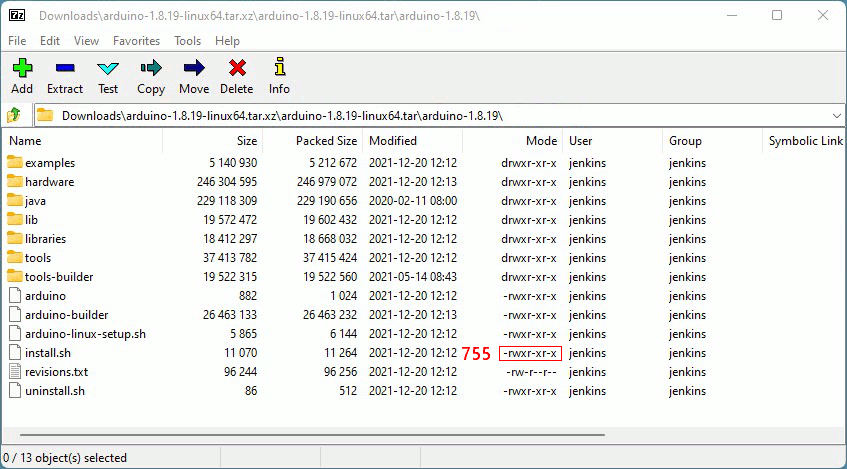
You can see the permissions, as packed inside the tar file,
are 755 for install.sh .
[Picture]
https://i.postimg.cc/pX2bMVs1/permissions-arduino.gif
Check your umask value, and see if it is interfering.
Mine is 0022 (the lead zero presumably is for SUID or something). Traditionally it would have printed out 022, and not interfered
with a 755 incoming.
$ umask
0022 # 755 packed ==> 755 unpacked, should have worked
It's like a .profile or similar, is not working. Like, maybe, when
you copied home, some dot files got missed ? Anyway, check umask.
This stuff happens all the time, when unpacking kits like this.
It doesn't even require shenanigans to break it :-)
Paul
Am Montag, 02. Mai 2022, um 16:34:17 Uhr schrieb Rob H:
It is installed now:
The problem is not about sudo being installed or not, it is about if a
.sh file is marked as executable or not.
Ok , but what about when I have to use sudo for other commands , like
sudo mkdir etc
I am Administrator in users and groups with a password which works
everytime. So if I am an administrator, why am I getting this error.
On 02/05/2022 16:35, Marco Moock wrote:
Am Montag, 02. Mai 2022, um 16:34:17 Uhr schrieb Rob H:Ok , but what about when I have to use sudo for other commands , like
It is installed now:
The problem is not about sudo being installed or not, it is about if a
.sh file is marked as executable or not.
sudo mkdir etc
I am Administrator in users and groups with a password which works
everytime. So if I am an administrator, why am I getting this error.
On 02/05/2022 15:18, Paul wrote:
On 5/2/2022 8:19 AM, Rob H wrote:
On 02/05/2022 12:25, Richard Kettlewell wrote:
Rob H <[email protected]> writes:Without sudo:
On 02/05/2022 10:26, Richard Kettlewell wrote:
Rob H <[email protected]> writes:
rob@rob-Z97:~/Downloads/arduino-1.8.19$ lsWhat does
arduino examples lib tools
arduino-builder hardware libraries tools-builder >>>>>>> arduino-linux-setup.sh install.sh revisions.txt uninstall.sh
rob@rob-Z97:~/Downloads/arduino-1.8.19$ sudo ./install.sh
[sudo] password for rob:
sudo: ./install.sh: command not found
rob@rob-Z97:~/Downloads/arduino-1.8.19$
ls -l install.sh
show?
(sudo lies about errors, so now we have to find out what is really >>>>>> wrong with install.sh.)
rob@rob-Z97:~/Downloads/arduino-1.8.19$ ls -l install.sh
-rw-r--r-- 1 rob rob 11070 Dec 20 16:12 install.sh
It’s not executable, so sudo won’t execute it.
Did you try running it without sudo?
http://docs.arduino.cc/software/ide-v1/tutorials/Linux doesn’t seem to >>>> think you need it.
rob@rob-Z97:~/Downloads/arduino-1.8.19$ ./install.sh
bash: ./install.sh: Permission denied
You can see the permissions, as packed inside the tar file,
are 755 for install.sh .
[Picture]
https://i.postimg.cc/pX2bMVs1/permissions-arduino.gif
Check your umask value, and see if it is interfering.
Mine is 0022 (the lead zero presumably is for SUID or something).
Traditionally it would have printed out 022, and not interfered
with a 755 incoming.
$ umask
0022 # 755 packed ==> 755 unpacked, should have worked
It's like a .profile or similar, is not working. Like, maybe, when
you copied home, some dot files got missed ? Anyway, check umask.
This stuff happens all the time, when unpacking kits like this.
It doesn't even require shenanigans to break it :-)
Paul
I installed the file with:
rob@rob-Z97:~/Downloads/arduino-1.8.19$ sudo bash ./install.sh
[sudo] password for rob:
Adding desktop shortcut, menu item and file associations for Arduino IDE...
done!
Running umask gives:
rob@rob-Z97:~$ umask
0002
So what does 0002 mean
thanks
It is installed now:
Am Montag, 02. Mai 2022, um 16:44:05 Uhr schrieb Rob H:
Ok , but what about when I have to use sudo for other commands , like
sudo mkdir etc
I am Administrator in users and groups with a password which works
everytime. So if I am an administrator, why am I getting this error.
You problem isn't related to sudo here.
If you run shell scripts, you have 2 options:
You can either rund them directly, by ./script.sh, but here it is
necessary that the executable bit for the user running is set (be ware
of the context, owner, group others).
The other option is to use the bash command and use the path to the
script as option:
bash ./script.sh
This doesn't require that the x bits are set. It requires that you can
read the file (r bit).
Mike Easter wrote:
rob@rob-Z97:~$ usr/bin/sudo
bash: usr/bin/sudo: No such file or directory
That time you got the syntax wrong;
nitpick: the syntax is correct, there's just no file with that
relative path in the current working directory.
you need a slash before the 'usr/bin/sudo' as in
/usr/bin/sudo
Or a
cd /
before issuing that command with the given relative path.
Ok thanks, yes I found that running the bash command installed the
script.
Also I found that by entering su, then my password, sudo
works like it normally used to.
Janis Papanagnou wrote:
Mike Easter wrote:So you wouldn't call the 'missing' leading slash a syntax error, given
rob@rob-Z97:~$ usr/bin/sudo
bash: usr/bin/sudo: No such file or directory
That time you got the syntax wrong;
nitpick: the syntax is correct, there's just no file with that
relative path in the current working directory.
you need a slash before the 'usr/bin/sudo' as in
/usr/bin/sudo
Or a
cd /
before issuing that command with the given relative path.
the relative path?
user:-$
Maybe I don't have the full or correct understanding of the term syntax
in the context of the command line. I think of it as being the rules
for formulating the instruction.
Isn't the path instruction part of the syntax?
| Sysop: | Keyop |
|---|---|
| Location: | Huddersfield, West Yorkshire, UK |
| Users: | 765 |
| Nodes: | 16 (2 / 14) |
| Uptime: | 00:15:21 |
| Calls: | 12,760 |
| Calls today: | 4 |
| Files: | 15,360 |
| Messages: | 6,556,980 |