On 1/31/2022 11:35 AM, pinnerite wrote:
On Mon, 31 Jan 2022 15:11:48 +0000
pinnerite <[email protected]> wrote:
On Sun, 30 Jan 2022 15:14:59 +0000
Adrian Caspersz <[email protected]d> wrote:
On 29/01/2022 22:15, pinnerite wrote:
On Sat, 29 Jan 2022 18:38:32 +0000
Adrian Caspersz <[email protected]d> wrote:
On 29/01/2022 17:20, pinnerite wrote:
I had a Windows XP virtual machine (vmdx) running under VMware.
I converted it to a VDI with:
$ VBoxManage clonehd --format VDI "Windows XP Professional.vmdk" /home/<me>/"VirtualBox VMs"/Win_XP_prof/Win_XP_Prof.vdi
Now when I try to open the VDI from VirtualBox, I get "Error opening operating system".
Anybody know of a fix?
Disk geometry?
How does one translate that into a strategy?
Hmmm...
Do you have the vmdk descriptor file? It's a text file that shows the
original geometry of the virtualised hard drive.
The (rather wordy!) article mentions then using a tool (vbox-img) to
edit the VDI file with those particulars. The author has gone to length
telling about how he came to his conclusions. All you are interested in
is the command vbox-img and what parameter you use.
Don't forget backup before this step!
--
Adrian C
The vmdk file at 40Gb plus in size is the virtual machine file.
I was able to open it (once) in the text editor and bits are in text fomat. >>
What it showed was cylinders "0", heads "16" and sectors "63".
"0" cylinders is clearly wrong.
So I went to the article:
1) heads x sector x 512 = 8225280
2) ls -l "Windows XP Professional.vmdk"
-rwxr-xr-x 1 alan alan 41232367616 Jan 31 01:34 'Windows XP Professional.vmdk'
gave the file length.
3) 41232367616 / 8225280 = 5012.883162154
5012.883162154 is cylinder value. The article says "round off" but means round down so
the correct cylinder value is 5012.
If I am correct so far that is.
Now my concern is, should I try to "repair" the vmdk or convert to a vdi and then do it?
Well, I had made a copy of the vdmk and proceeded.
$ VBoxManage clonehd --format VDI "Windows XP Professional.vmdk" /home/<me>/"VirtualBox VMs"/WinXP_Prof/WinXP_Prof.vdi
followed by:
$ vbox-img geometry --filename WinXP_Prof.vdi --format VDI --cylinders 5012 --heads 255 --sectors 63
Result? No change.
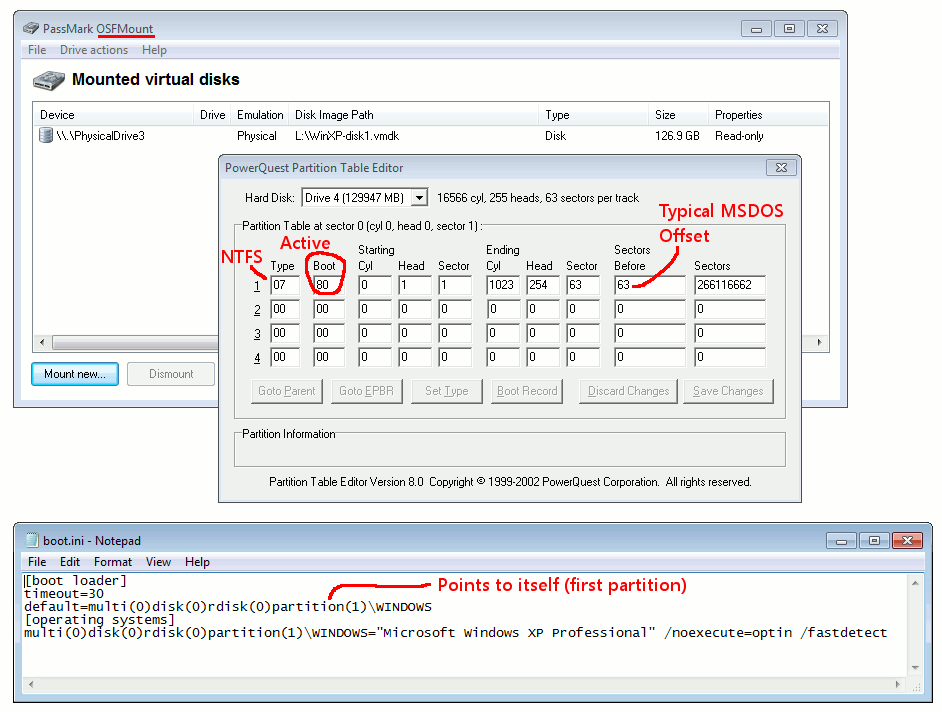
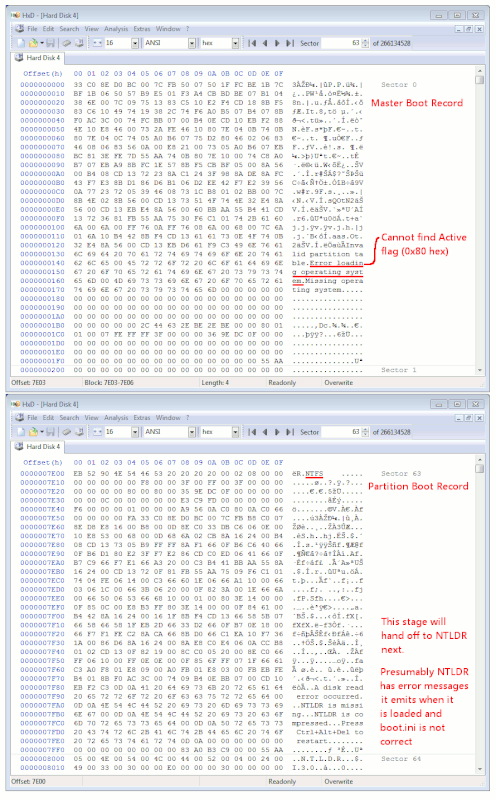
On my WinXP VHDK, I provided a picture. The install in this one,
is in the first partition. If the image frame does not render,
right-click and select "Reload" to load the image portion.
https://i.postimg.cc/wjgDKBVT/MBR-PBR-error-messages.gif
This page shows the partition table offset in an MBR.
https://wiki.osdev.org/Partition_Table
Partition 1 0x01BE (446) <=== mine is the first partition
Partition 2 0x01CE (462)
Partition 3 0x01DE (478)
Partition 4 0x01EE (494)
At my 0x1BE (in the PostImg), you can see the number "0x80" there.
Element (offset) Size Description
0 byte Boot indicator bit flag: 0 = no, 0x80 = bootable (or "active") <=== my 0x80 at 0x1BE means "Active"
Using a hex editor, with the container mounted in a VM,
check that you have at least one partition which
is active.
If you want to be crude and tool-free about it,
you can edit the MBR with your hex editor and
try changing it. But that's what I would use PTEDIT32.exe
for or try with fdisk, not wanting to be doing byte edits
like that. But when I've had to do them, I have done them
with a hex editor. It's not that scary.
The OS you've selected, has few enough options, that fixing
this should be (relatively) easy, compared to some of the
more complicated messes you could get into.
You can mount multiple virtual disks inside a VM, so you
can use one (rescue) OS to work on the second (buggered) drive.
When you unpack a freeVM here, for a VirtualBox series the
file extension should be .ova which is a virtualization appliance.
When you open that in VirtualBox, it unpacks to a new vm. Then,
you go into the settings of the new VM, and add your damaged disk
as the second disk, then use whatever tools you feel like on it.
https://web.archive.org/web/20140622005513/https://www.modern.ie/en-us/virtualization-tools#downloads
These self-extracting winrar, usually the EXE part (the SFX engine) is a
10MB file, the other files are 1,048,576,000 bytes each, the very last
part file is the fractional one which is less than 1,048,576,000 bytes.
https://web.archive.org/web/20140503002932/https://az412801.vo.msecnd.net/vhd/VMBuild_20131127/VirtualBox/IE8_WinXP/Windows/IE8.WinXP.For.WindowsVirtualBox.part001.exe
https://web.archive.org/web/20140503002935/https://az412801.vo.msecnd.net/vhd/VMBuild_20131127/VirtualBox/IE8_WinXP/Windows/IE8.WinXP.For.WindowsVirtualBox.part002.rar
https://web.archive.org/web/20140622005513/https://az412801.vo.msecnd.net/vhd/VMBuild_20131127/VirtualBox/IE8_WinXP/Windows/IE8.WinXP.For.WindowsVirtualBox.part003.rar
MD5 Checksums (as shown on the web page) are
a8fa12af06c8cb9efe8096a7e513eba7
12e17181a5dd29d56f8d9e90a3a0d7b6
def485fb7cf8e303245e443430d1c2cb
The grace period is 30 days, there should be two re-arms
to give a total of 90 days usage.
Paul
--- SoupGate-Win32 v1.05
* Origin: fsxNet Usenet Gateway (21:1/5)