• new ubuntu/thunderbird setup has problem using previous settings

    From bilsch01@21:1/5 to All on Tue Jan 11 21:23:24 2022
    I installed ubuntu 20.04.3 to replace a slightly older ubuntu.
    Thunderbird 78.14.0 was installed along with the new Ubuntu.

    1. I clicked the TB icon and it asked the basic questions: username,
    email address & password. So I entered those.
    2. Then it says: "thunderbird failed to find the settings for your email account"
    3. and it shows the following chart of settings:

    protocol: IMAP/SMTP
    server: .comcast.net/.comcast.net (note: these are not server names)
    port: Auto/Auto
    SSL: Autodetect/Autodetect
    authentication: Autodetect/Autodetect
    user name: myemailaddress/myemailaddress

    4. I checked my other PC that has slightly older Ubuntu and TB versions,
    and I used those settings in the new setup, as follows:

    incoming server protocol: IMAP
    incoming server: imap.comcast.net
    port: 993
    connection security: SSL/TLS
    authentication: normal password
    user name: myemailaddress

    outgoing server protocol: SMTP
    outgoing server: smtp.comcast.net
    port: 465
    connection security: SSL/TLS
    authentication: normal password
    user name: myemailaddress


    5. Now I tried to get my email and it says:

    "failed to connect to server .comcast.net"

    which leads me to believe it is using the string ".comcast.net" for the
    server name.

    QUESTION#1: I am really sure the settings listed in item 4 above are
    correct. I can't figure what can be the problem. Has anyone had a
    similar problem?

    QUESTION#2: I think I had this problem on a previous Ubuntu/TB rebuild
    and maybe I solved it by installing

    libnss-resolve

    but when I try I get the error message:
    Temporary failure resolving 'us.archive.ubuntu.com'.

    How can I install libnss-resolve?

    TIA Bill S.

    --- SoupGate-Win32 v1.05
    * Origin: fsxNet Usenet Gateway (21:1/5)
  • From Henry Crun@21:1/5 to All on Wed Jan 12 10:56:38 2022
    On 12/01/2022 7:23, bilsch01 wrote:
    I installed  ubuntu 20.04.3 to replace a slightly older ubuntu. Thunderbird 78.14.0 was installed along with the new
    Ubuntu.

    1. I clicked the TB icon and it asked the basic questions: username, email address & password. So I entered those.
    2. Then it says: "thunderbird failed to find the settings for your email account"
    3. and it shows the following chart of settings:

    protocol: IMAP/SMTP
    server: .comcast.net/.comcast.net (note: these are not server names)
    port: Auto/Auto
    SSL: Autodetect/Autodetect
    authentication: Autodetect/Autodetect
    user name: myemailaddress/myemailaddress

    4. I checked my other PC that has slightly older Ubuntu and TB versions, and I used those settings in the new setup, as
    follows:

    incoming server protocol: IMAP
    incoming server: imap.comcast.net
    port: 993
    connection security: SSL/TLS
    authentication: normal password
    user name: myemailaddress

    outgoing server protocol: SMTP
    outgoing server: smtp.comcast.net
    port: 465
    connection security: SSL/TLS
    authentication: normal password
    user name: myemailaddress


    5. Now I tried to get my email and it says:

    "failed to connect to server  .comcast.net"

    which leads me to believe it is using the string ".comcast.net" for the server name.

    QUESTION#1: I am really sure the settings listed in item 4 above are correct. I can't figure what can be the problem.
    Has anyone had a similar problem?

    QUESTION#2: I think I had this problem on a previous Ubuntu/TB rebuild and maybe I solved it by installing

    libnss-resolve

    but when I try I get the error message:
    Temporary failure resolving 'us.archive.ubuntu.com'.

    How can I install libnss-resolve?

    TIA   Bill S.


    On Ub 20.04, from Synaptic:

    nss-resolve is a plugin for the GNU Name Service Switch (NSS) functionality
    of the GNU C Library (glibc) providing DNS and LLMNR resolution to programs via the systemd-resolved daemon (provided in the systemd package).

    Installing this package automatically adds resolve to /etc/nsswitch.conf.

    found in "universe" repository (check your repositories)
    Dunno about the TB address problem

    --
    Mike R.
    Home: http://alpha.mike-r.com/
    QOTD: http://alpha.mike-r.com/qotd.php
    No Micro$oft products were used in the URLs above, or in preparing this message.
    Recommended reading: http://www.catb.org/~esr/faqs/smart-questions.html#before
    and: http://alpha.mike-r.com/jargon/T/top-post.html
    Missile address: N31.7624/E34.9691

    --- SoupGate-Win32 v1.05
    * Origin: fsxNet Usenet Gateway (21:1/5)
  • From bilsch01@21:1/5 to All on Wed Jan 12 13:47:03 2022
    The problems were with the bundled Thunderbird and Firefox. I
    downloaded a different .iso file, did the install and everything works excellently.

    Here's the link to the good iso file: https://mirror.lstn.net/ubuntu-releases/20.04.3/ubuntu-20.04.3-desktop-amd64.iso

    Bill S.

    --- SoupGate-Win32 v1.05
    * Origin: fsxNet Usenet Gateway (21:1/5)
  • From Mike Easter@21:1/5 to All on Wed Jan 12 14:18:22 2022
    bilsch01 wrote:
    I downloaded a different .iso file, did the install and everything works excellently.

    Whenever I dl an .iso, I always check the hash and if at all possible, authenticate the .sig.

    The idea of the hash being in case some bit gets lost. Sometimes I
    think the authentication step is either a form of 'overkill'
    security-wise or 'pretentious' (pretend-y-ous) considering that we
    don't actually follow a proper prescribed web of trust acquiring keys.

    --
    Mike Easter

    --- SoupGate-Win32 v1.05
    * Origin: fsxNet Usenet Gateway (21:1/5)
  • From Paul@21:1/5 to Mike Easter on Thu Jan 13 01:12:05 2022
    On 1/12/2022 5:18 PM, Mike Easter wrote:
    bilsch01 wrote:
    I downloaded a different .iso file, did the install and everything works excellently.

    Whenever I dl an .iso, I always check the hash and if at all possible, authenticate the .sig.

    The idea of the hash being in case some bit gets lost.  Sometimes I think the authentication step is either a form of 'overkill' security-wise or 'pretentious' (pretend-y-ous)  considering that we don't actually follow a proper prescribed web of
    trust acquiring keys.


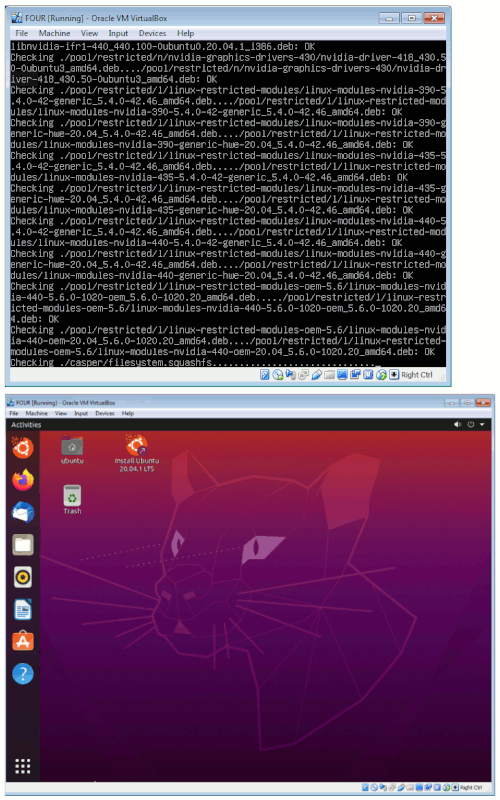
    At least some of the Ubuntu DVDs I have here, when you boot
    them, they verify the DVD contents. You might notice a 3 minute
    boot time on some of them. It would not be quite as bad, if using
    a really fast USB stick to hold the media.

    [Picture] Ubuntu doing a verify when the DVD boots

    https://i.postimg.cc/5t52qCM2/boot-time-livedvd-verification.gif

    Previous Ubuntu Live materials did not do that, and you had to
    do the traditional md5sum or sha1sum or whatever, to check media
    against web site.

    Paul

    --- SoupGate-Win32 v1.05
    * Origin: fsxNet Usenet Gateway (21:1/5)
  • From Mike Easter@21:1/5 to Paul on Thu Jan 13 05:49:28 2022
    Paul wrote:
    Mike Easter wrote:
    bilsch01 wrote:
    I downloaded a different .iso file, did the install and everything
    works excellently.

    Whenever I dl an .iso, I always check the hash and if at all possible,
    authenticate the .sig.

    The idea of the hash being in case some bit gets lost.  Sometimes I
    think the authentication step is either a form of 'overkill'
    security-wise or 'pretentious' (pretend-y-ous)  considering that we
    don't actually follow a proper prescribed web of trust acquiring keys.


    At least some of the Ubuntu DVDs I have here, when you boot
    them, they verify the DVD contents. You might notice a 3 minute
    boot time on some of them. It would not be quite as bad, if using
    a really fast USB stick to hold the media.

    The last time I did a media check option at the time of boot took 'forever'.

    But then, I'm typically using a yesteryear resource machine w/ usb2; but
    my point is that whatever that media check is about is very slow
    compared to a hash checker, which of course is reading off the hdd not
    the usb.


    --
    Mike Easter

    --- SoupGate-Win32 v1.05
    * Origin: fsxNet Usenet Gateway (21:1/5)
  • From Dan Purgert@21:1/5 to Mike Easter on Thu Jan 13 16:03:49 2022
    -----BEGIN PGP SIGNED MESSAGE-----
    Hash: SHA512

    Mike Easter wrote:
    [...]
    But then, I'm typically using a yesteryear resource machine w/ usb2; but
    my point is that whatever that media check is about is very slow
    compared to a hash checker, which of course is reading off the hdd not
    the usb.

    Checking the hash of the ISO file is fine, but doesn't verify that the
    burn was actually "good". It's perfectly plausible to burn a coaster[1]
    from an otherwise good ISO file.

    [1]Granted, USB sticks don't make very good coasters, unlike failed
    burns to optical media.


    -----BEGIN PGP SIGNATURE-----

    iQIzBAEBCgAdFiEE3asj+xn6fYUcweBnbWVw5UznKGAFAmHgTYkACgkQbWVw5Uzn KGAZAg/9FAUHq1EoaUgamdglKN/4JOWIeHc9McJJOR4pLc+o5anjFvP3LIDghteF Yto/N2IvOj3Es+YudZMq5I/BE3I+iQHOqpLOCjIRwBtfchBJ80+JZIV1Lqa+euC3 n6w64/b1dHdFuwpEXXdt9Ch7uZ0kR2mdhy+N6iTVlFBdojjoiwN/fvqljD4DNOny AUJXePqc9d40tKl+MzTGeIIxfJHp3uRCPjfXmNnzdD/x5Od2AhJel+RzsFwbae8N um+TVZP0g0DaEomYr3KCUjdLcSPVUIJArSAaj4MGjl8hlXFE2it5TNY0dzkSnhAT kZZHpzruJpoqF3yhYCjs3sPLmXcl4ysnab5P6YIDj0tstFIegqhUvsMwv3fpQRvD WoctNDBXTehNjUlaqp3SiYlcOQVm/vT9WVKpwPdA3BSjhXKTst8JnWBkIOl4/4y8 kqyG9JljXvRXmtbCTebL4r4tvGPP7PtHQLUlFzCOuth64FofAu/ac3tFmOYyWWHb HpnK9FdSB7hPgKkYnqQyyIfBARiH+d1H12dKjRL0K8qlH2rNL/IJHSxjmvVgyVWv vKsA1XtZ/mPjq++iSSK9fZ2Y93J7+j62v8KsEu4Rfy2CZfk6UuZeI2cUXkFwem4r JvHrcGuvxaX8PCQ6Nkl5Olkn2xbLMUwKGEYW0loHjg5zRtq84fs=
    =b9Mh
    -----END PGP SIGNATURE-----

    --
    |_|O|_| Github: https://github.com/dpurgert
    |_|_|O| PGP: DDAB 23FB 19FA 7D85 1CC1 E067 6D65 70E5 4CE7 2860
    |O|O|O|

    --- SoupGate-Win32 v1.05
    * Origin: fsxNet Usenet Gateway (21:1/5)
  • From Mike Easter@21:1/5 to Dan Purgert on Thu Jan 13 09:01:13 2022
    Dan Purgert wrote:
    Mike Easter wrote:
    [...]
    But then, I'm typically using a yesteryear resource machine w/ usb2; but
    my point is that whatever that media check is about is very slow
    compared to a hash checker, which of course is reading off the hdd not
    the usb.

    Checking the hash of the ISO file is fine, but doesn't verify that the
    burn was actually "good". It's perfectly plausible to burn a coaster[1]
    from an otherwise good ISO file.

    [1]Granted, USB sticks don't make very good coasters, unlike failed
    burns to optical media.

    Some USB writers, like many optical writers, can do a verify after the
    write.

    My experience has been that nothing has been as slow as my observation
    of 'media check' of a USB from a boot option.

    Where 'nothing' refers to:
    - hashcheck .iso
    - optical write verify media
    - usb write verify media

    ... in my limited experience; I haven't done it in a long time. Maybe something has improved since then.

    --
    Mike Easter

    --- SoupGate-Win32 v1.05
    * Origin: fsxNet Usenet Gateway (21:1/5)
  • From Dan Purgert@21:1/5 to Mike Easter on Fri Jan 14 11:31:20 2022
    -----BEGIN PGP SIGNED MESSAGE-----
    Hash: SHA512

    Mike Easter wrote:
    Dan Purgert wrote:
    Mike Easter wrote:
    [...]
    But then, I'm typically using a yesteryear resource machine w/ usb2; but >>> my point is that whatever that media check is about is very slow
    compared to a hash checker, which of course is reading off the hdd not
    the usb.

    Checking the hash of the ISO file is fine, but doesn't verify that the
    burn was actually "good". It's perfectly plausible to burn a coaster[1]
    from an otherwise good ISO file.

    [1]Granted, USB sticks don't make very good coasters, unlike failed
    burns to optical media.

    Some USB writers, like many optical writers, can do a verify after the
    write.

    Yep, and I've still had coasters after that. :(

    Turned out it was bad RAM in the burning machine that my "normal" usage
    didn't really touch at the time.


    -----BEGIN PGP SIGNATURE-----

    iQIzBAEBCgAdFiEE3asj+xn6fYUcweBnbWVw5UznKGAFAmHhXysACgkQbWVw5Uzn KGAb4w/9G4f9wymoQsOuOfVQ0VVBIXRE9u/+neGDdrxML5bYPUOHy9dhDtfYv0FD 4cAF4XOP897bY1ZePluK22CFzEGN8quWSeSc8yhgiqTZa7lROyU+R7h6QR6Yw+sZ xamMAN1wW6Xfcp6onP05EOyUYgjktK35xAsxvxvDNtjolR9ocSLjFq6F8eUtUASh UEDXpfDeDHW4r5u7VpVhxJnwRrxjVtzgdeBMa5yP2u7gODnQsu1uVRT6ana9FcJb KoNT6KNM62yBB+gjxdYUqcKaFzDxvHkh88S6KabDfJLyutz/3pNU46HugXgYN/Ys dMiBKTzhlIftl8k2bCFjU86RkoVdW4nwGFtoLUCG465ZGsxIed2bihKo1CAkHkl/ kJ2F7stLjq2UJcg4dP7IpQUVtGlDlWN8jg6W7vdUdp9Tq1wrLSyGahfiPYmakuz5 Ku34Yf/uu7uxchlSP5d4wj7j7f55+euWqdtubkwAo1ehCox5q/iLlEimzc5myUOL GceInaBF6OBL01zWKAtJS874bNF3hqz7V6VTZmxGn7372hZ4l+JL6KqZrUXUCkVM MOsnYS9dFogkX0SsoxBBzCa7pSaRD/nCmn4zzzPH1Bvl3xItzIrxMnXqb4kQ9gkA CbgmF+LfbMSY4Vs6zcNlmmtjv1JjYoq5Qrpj+HkSUgnZ08qzbls=
    =7LyY
    -----END PGP SIGNATURE-----

    --
    |_|O|_| Github: https://github.com/dpurgert
    |_|_|O| PGP: DDAB 23FB 19FA 7D85 1CC1 E067 6D65 70E5 4CE7 2860
    |O|O|O|

    --- SoupGate-Win32 v1.05
    * Origin: fsxNet Usenet Gateway (21:1/5)