Dieter Britz wrote:
On Fri, 16 Jul 2021 17:04:27 +0300, Anssi Saari wrote:
Dieter Britz <[email protected]> writes:
I am trying to modify the file /etc/ImageMagick-6/policy.xml using
emacs, but emacs tells me that the buffer (which must mean the file) is
read-only. An ls shows this:
-rwxr-xr-x 1 root root 3419 Nov 11 2019 /etc/ImageMagick-6/policy.xml
Run sudoedit /etc/ImageMagick-6/policy.xml
It's the system provided way to safely edit system files without a need
to run a massive editor as root.
Great, that worked. It didn't solve the problem, which I have
not described. I am trying to join eps files, and got advice to
use. e.g.,
~/square/ststplots> montage -mode concatenate -tile 2x1 1.eps 2.eps
output 3.eps
This elicits the response, after doing the edit (i.e. changing "none"
to "read|write" in the coder part of the file for EPS)
montage-im6.q16: not authorized `1.eps' @ error/constitute.c/ReadImage/
412.
montage-im6.q16: not authorized `2.eps' @ error/constitute.c/ReadImage/
412.
montage-im6.q16: unable to open image `output': No such file or directory
@ error/blob.c/OpenBlob/2701.
montage-im6.q16: unable to open image `output': No such file or directory
@ error/blob.c/OpenBlob/2701.
montage-im6.q16: no decode delegate for this image format `' @ error/ constitute.c/ReadImage/504.
montage-im6.q16: missing an image filename `3.eps' @ error/montage.c/ MontageImageCommand/1795.
What do I do next?
Typically, what happens on image tools like this,
is they don't have a Postscript or PDF decoding item
set up in the users system.
On some, you might be asked to set up GhostScript,
as an example of the task.
Once a parser is present for PostScript, for the EPS, then
you review the error messages seen again, and work on the
next problem.
This is definitely not the right article, it's just to
illustrate that imagemagick does not have its own EPS parser,
so needs something set up for it. Maybe just a plain "gs"
invocation works on Linux, say.
https://stackoverflow.com/questions/3243361/how-to-install-test-convert-resize-pdf-using-imagemagick-ghostscript-window
You might be able to check the release version, to see
what it is configured for.
https://gist.github.com/leomelzer/3949356
convert -list configure | grep DELEGATES
=> DELEGATES bzlib djvu freetype gs jpeg jng jp2 lcms png tiff x11 xml zlib
The "gs" means it was at least built with GhostScript (.ps, .pdf, .eps)
type of support.
Running that command now, on Ubuntu 2004 returns
=> DELEGATES ... ps
instead of "gs".
You can get a whiff of "we're worried about the security stance
of PostScript parsers (overwrite file system) and PDF parsers
(javascript capability etc)" from here.
https://forums.linuxmint.com/viewtopic.php?f=47&t=292783
Or here.
https://wiki.archlinux.org/title/ImageMagick
https://bugs.archlinux.org/task/59778
https://bugs.archlinux.org/task/62171
"Compiling ImageMagick with "--without-gslib" would mean
that instead of using ghostscript libraries it will invoke
"gs" executable to access ghostscript. This will allow to
block ghostscript access in default config in easier way like:
<policy domain="delegate" rights="none" pattern="gs" />
instead of current rule:
<policy domain="coder" rights="none" pattern="{PS,PS2,PS3,EPS,PDF,XPS}" />
which has the downside of blocking PDF manipulation even when
specific file doesn't contain any postscript content.
That will make default rules less invasive for users while
keeping same amount of security (blocking ghostscript).
*******
The above dribble included, to give some idea how I got here...
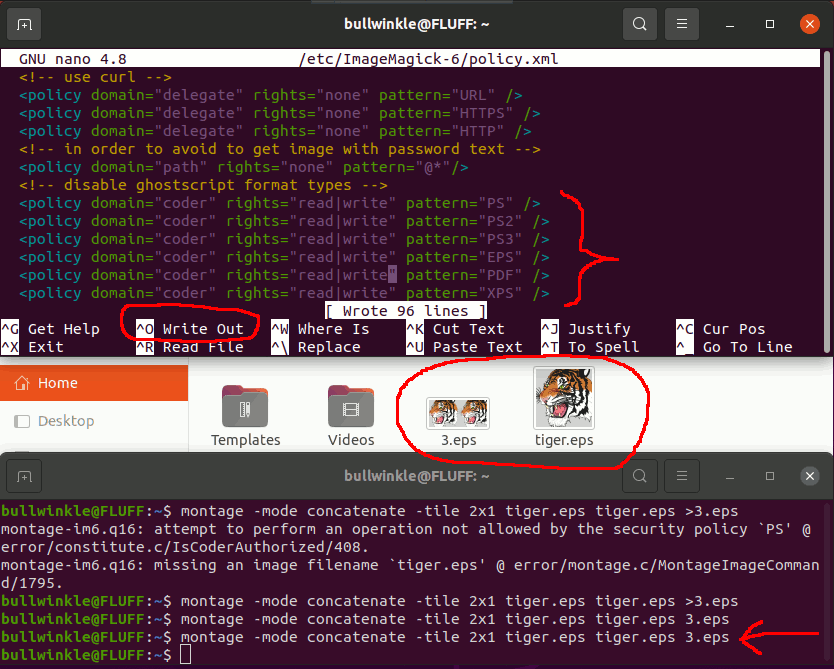
Based on that hint, change the six lines at the end of /etc/ImageMagick-6/policy.xml :
<!-- disable ghostscript format types -->
<policy domain="coder" rights="read|write" pattern="PS" />
<policy domain="coder" rights="read|write" pattern="PS2" />
<policy domain="coder" rights="read|write" pattern="PS3" />
<policy domain="coder" rights="read|write" pattern="EPS" />
<policy domain="coder" rights="read|write" pattern="PDF" />
<policy domain="coder" rights="read|write" pattern="XPS" />
And then it works.
https://i.postimg.cc/NFKYxW7c/montage-eps.gif
Paul
--- SoupGate-Win32 v1.05
* Origin: fsxNet Usenet Gateway (21:1/5)