On 11/2/2021 4:02 AM, Mountain Magpie wrote:
Ran a virus etc. scan on Ubuntu 21.10 with Clam, and these were the
results:-
Known viruses: 8573202
Engine version: 0.103.3
Scanned directories: 6598
Scanned files: 87229
Infected files: 1
Is there an easy way to find the suspected infected file, without
trawling through the long printout in the terminal, at all?
In advance, thanks, as usual.
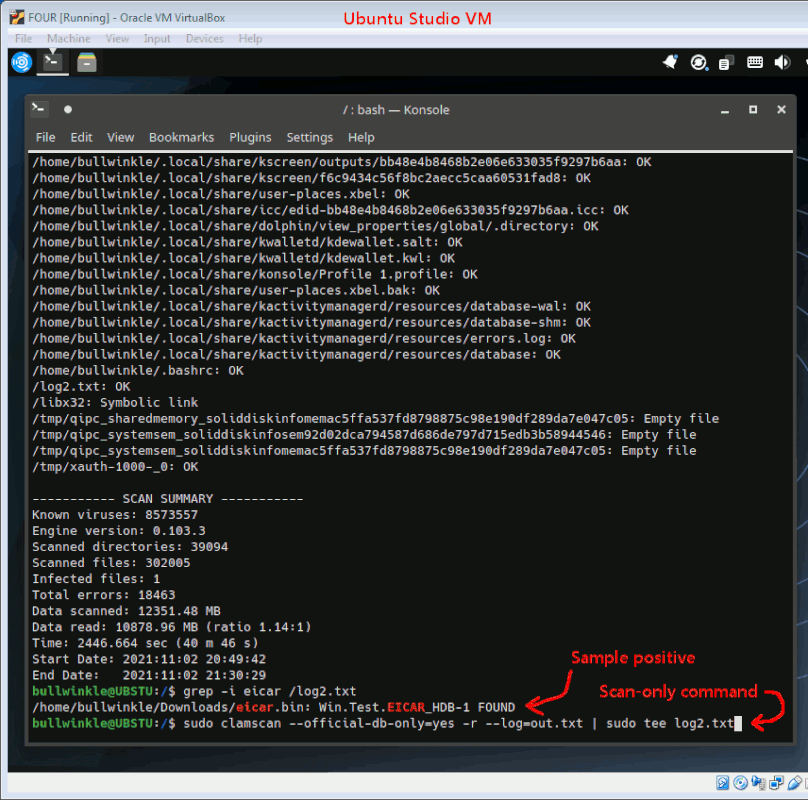
The STDOUT output of "clamscan" contains the information.
The --log file output itself only contains exception conditions
for the scanner, like trying to scan a symbolic link.
This means, if you run "clamscan" from the command line, you need
to redirect all the terminal output into your own logfile.
In the example here, I did "cd /" and then the clamscan placed
the two log files (useless and useful versions) at the top of
the tree being scanned.
The command line scanner does not "act" on the files, unless
you use one of the other directives. Without a large set of
command line switches, it just scans.
EICAR sample virus was used to trip detection, resulting in a "found" file.
https://en.wikipedia.org/wiki/EICAR_test_file
Here is my sample photo.
[Picture]
https://i.postimg.cc/YSkb2Qfx/clamscan.gif
Command used:
cd /
sudo clamscan --official-db-only=yes -r --log=out.txt | sudo tee log2.txt
Paul
--- SoupGate-Win32 v1.05
* Origin: fsxNet Usenet Gateway (21:1/5)