• Ubuntu 24.04 LTS on Xorg

    From rsutton@21:1/5 to All on Tue Jun 11 11:18:04 2024
    Has anyone found a way to successfully log in to Ubuntu 24.04 with the
    'Ubuntu on Xorg' ?

    When I attempt to log in, I select the Gear icon in the lower right hand
    corner of the screen and select 'Ubuntu on Xorg', then add my password.
    Fails every time! Do the developers expect everyone to just sit on
    their hands until they get around to it. At this point, I can't even
    consider using/recommending 24.04! Maybe I should move to a distro that
    cares about their users. I'm getting really sick of having code stuffed
    down my throat.

    I have tried numerous things and nothing works! I can't help but
    believe that Canonical has purposely done this to try to force everyone
    to Wayland. The problem is that I NEED to run a vnc/rdp to my remote
    systems and all the vnc/rdp programs that I have found require Xorg.

    I sure am hoping that someone of you have found a workaround. (sorry for
    the rant!)

    Richard

    --- SoupGate-Win32 v1.05
    * Origin: fsxNet Usenet Gateway (21:1/5)
  • From Mike Easter@21:1/5 to rsutton on Tue Jun 11 09:11:26 2024
    rsutton wrote:
    Has anyone found a way to successfully log in to Ubuntu 24.04 with the 'Ubuntu on Xorg' ?

    I'm reading:

    /etc/gdm3/custom.conf

    has ability to WaylandEnable=false or WaylandEnable=true

    ... but that was for 22.04.

    --
    Mike Easter

    --- SoupGate-Win32 v1.05
    * Origin: fsxNet Usenet Gateway (21:1/5)
  • From Mike Easter@21:1/5 to Mike Easter on Tue Jun 11 09:22:06 2024
    Mike Easter wrote:
    rsutton wrote:
    Has anyone found a way to successfully log in to Ubuntu 24.04 with the
    'Ubuntu on Xorg' ?

    I'm reading:

     /etc/gdm3/custom.conf

    has ability to WaylandEnable=false or WaylandEnable=true

    ... but that was for 22.04.

    Oops. I'm now reading that that article pertains to several Ub v/s incl
    24.04.

    https://linuxconfig.org/how-to-enable-disable-wayland-on-ubuntu-22-04-desktop
    System Ubuntu 18.04, 20.04, 22.04, 24.04 Desktop

    18 April 2024 by Korbin Brown


    --
    Mike Easter

    --- SoupGate-Win32 v1.05
    * Origin: fsxNet Usenet Gateway (21:1/5)
  • From Mike Easter@21:1/5 to Mike Easter on Tue Jun 11 09:50:34 2024
    Mike Easter wrote:
    WaylandEnable=false or WaylandEnable=true

    I was wondering if one could do that w/ a boot parameter booting a live session, so I dl/ed & hashchecked the 24.04 .iso. I was chagrined to
    note what a fatty the .iso was at 6.1 gig, which not only takes up room
    on a stick, but lengthens the time to dl even a torrent or hashcheck.
    Very annoying. If they are going to make a fat version .iso, they
    should also make a leaner desktop one like some other distro/s provide a 'minimal'. What happened to the days of 3G .iso distro/s?

    That whole business took so much time I was able to find a place that
    discussed boot parameters in great detail and there wasn't anything in
    there that said anything about controlling Wayland w/ a boot parameter.

    --
    Mike Easter

    --- SoupGate-Win32 v1.05
    * Origin: fsxNet Usenet Gateway (21:1/5)
  • From Mike Easter@21:1/5 to Mike Easter on Tue Jun 11 10:42:33 2024
    Mike Easter wrote:
    I dl/ed & hashchecked the 24.04 .iso.

    I booted a live 24.04 off Ventoy stick. On my system, it came up in XWayland/X11 instead of wayland:

    $ inxi -G
    Graphics:
    Device-1: AMD RS880 [Radeon HD 4200] driver: radeon v: kernel
    Display: x11 server: X.Org v: 21.1.11 with: Xwayland v: 23.2.6 driver: X:
    loaded: radeon unloaded: fbdev,modesetting,vesa dri: r600 gpu: radeon
    resolution: 1366x768~60Hz
    API: EGL v: 1.5 drivers: kms_swrast,r600,swrast
    platforms: gbm,x11,surfaceless,device
    API: OpenGL v: 4.5 compat-v: 3.3 vendor: mesa v: 24.0.5-1ubuntu1
    renderer: AMD RS880 (DRM 2.50.0 / 6.8.0-31-generic LLVM 17.0.6)

    ... and the aforementioned custom.conf in etc/gdm3 default says WaylandEnable=false

    --
    Mike Easter

    --- SoupGate-Win32 v1.05
    * Origin: fsxNet Usenet Gateway (21:1/5)
  • From rsutton@21:1/5 to Mike Easter on Tue Jun 11 17:41:32 2024
    On 6/11/2024 1:42 PM, Mike Easter wrote:
    Mike Easter wrote:
    I dl/ed & hashchecked the 24.04 .iso.

    I booted a live 24.04 off Ventoy stick.  On my system, it came up in XWayland/X11 instead of wayland:

    $ inxi -G
    Graphics:
      Device-1: AMD RS880 [Radeon HD 4200] driver: radeon v: kernel
      Display: x11 server: X.Org v: 21.1.11 with: Xwayland v: 23.2.6
    driver: X:
        loaded: radeon unloaded: fbdev,modesetting,vesa dri: r600 gpu: radeon
        resolution: 1366x768~60Hz
      API: EGL v: 1.5 drivers: kms_swrast,r600,swrast
        platforms: gbm,x11,surfaceless,device
      API: OpenGL v: 4.5 compat-v: 3.3 vendor: mesa v: 24.0.5-1ubuntu1
        renderer: AMD RS880 (DRM 2.50.0 / 6.8.0-31-generic LLVM 17.0.6)

    ... and the aforementioned custom.conf in etc/gdm3 default says WaylandEnable=false

    Mike,
    I had already tried that gdm3 custom.conf setting as my first attempt.
    I have used it as part of installing x11vnc in the past. I just can't
    believe that they released a new iso so obviously flawed. Oh well,
    maybe someone will fix it in a year or two. I'm really getting pissed
    at the ubuntu devs. Anyway, thanks Mike, for taking time to try to
    rustle up something for me.

    Richard

    --- SoupGate-Win32 v1.05
    * Origin: fsxNet Usenet Gateway (21:1/5)
  • From stepore@21:1/5 to rsutton on Tue Jun 11 18:44:45 2024
    On 6/11/24 08:18, rsutton wrote:
    Has anyone found a way to successfully log in to Ubuntu 24.04 with the 'Ubuntu on Xorg' ?

    Not yet. Always wait until the 04.1 release comes out. Always!

    <snip> The problem is that I NEED to run a vnc/rdp to my remote
    systems and all the vnc/rdp programs that I have found require Xorg.

    I'm still on 22.04 but I do use wayland on a laptop with intel graphics
    and I have no issues with vnc/rdp clients I use. VNC clients don't work
    on 24.04?

    env |grep -i xdg_session
    XDG_SESSION_DESKTOP=ubuntu
    XDG_SESSION_TYPE=wayland

    --- SoupGate-Win32 v1.05
    * Origin: fsxNet Usenet Gateway (21:1/5)
  • From Paul@21:1/5 to rsutton on Wed Jun 12 01:11:18 2024
    On 6/11/2024 5:41 PM, rsutton wrote:
    On 6/11/2024 1:42 PM, Mike Easter wrote:
    Mike Easter wrote:
    I dl/ed & hashchecked the 24.04 .iso.

    I booted a live 24.04 off Ventoy stick.  On my system, it came up in XWayland/X11 instead of wayland:

    $ inxi -G
    Graphics:
       Device-1: AMD RS880 [Radeon HD 4200] driver: radeon v: kernel
       Display: x11 server: X.Org v: 21.1.11 with: Xwayland v: 23.2.6 driver: X:
         loaded: radeon unloaded: fbdev,modesetting,vesa dri: r600 gpu: radeon
         resolution: 1366x768~60Hz
       API: EGL v: 1.5 drivers: kms_swrast,r600,swrast
         platforms: gbm,x11,surfaceless,device
       API: OpenGL v: 4.5 compat-v: 3.3 vendor: mesa v: 24.0.5-1ubuntu1
         renderer: AMD RS880 (DRM 2.50.0 / 6.8.0-31-generic LLVM 17.0.6)

    ... and the aforementioned custom.conf in etc/gdm3 default says WaylandEnable=false

    Mike,
    I had already tried that gdm3 custom.conf setting as my first attempt. I have used it as part of installing x11vnc in the past.  I just can't believe that they released a new iso so obviously flawed.  Oh well, maybe someone will fix it in a year or
    two.  I'm really getting pissed at the ubuntu devs.  Anyway, thanks Mike, for taking time to try to rustle up something for me.

    Richard


    I think I saw somewhere, that the custom.conf setting "affects the login box".

    I got a variety of symptoms.

    First attempt at an upgrade, "blew up". It was trying to remove the
    Thunderbird .deb and replace it with Thunderbird Snap instead. And
    it seemed to stall. I wasn't waiting a week for the stupid thing to
    finish.

    After a lot of repair attempts, I just restored from backup and
    started back at 23.10 again.

    I removed Thunderbird manually, so it would not get caught the same
    way a second time.

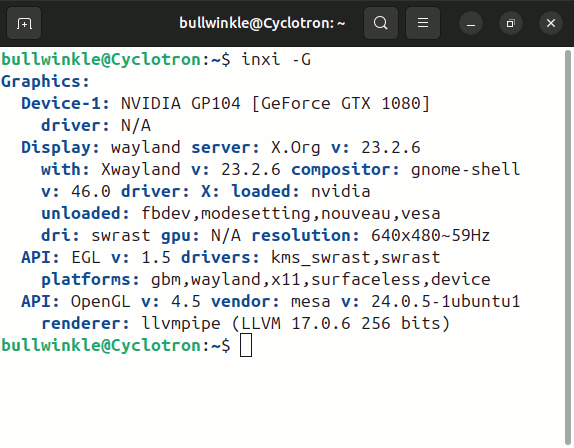
    I was greeted by 640x480 graphics. I haven't seen "tiny screen disease" in yonks.

    [Picture]

    https://i.postimg.cc/tJW848X7/Ubuntu2404-first-window.gif

    You can't use Additional Drivers because the button at the bottom
    can't be seen. You can tab and use your imagination as to where
    the selector is going. Maybe I did that.

    One thread I could find, recommended switching to Nouveau, then doing this.

    sudo apt remove nvidia-* # clean up Ubu 24.04 probs
    sudo apt autoremove \___ Optional?
    sudo apt autoclean /

    After that, use Additional Drivers and switch from Nouveau back to NVidia.

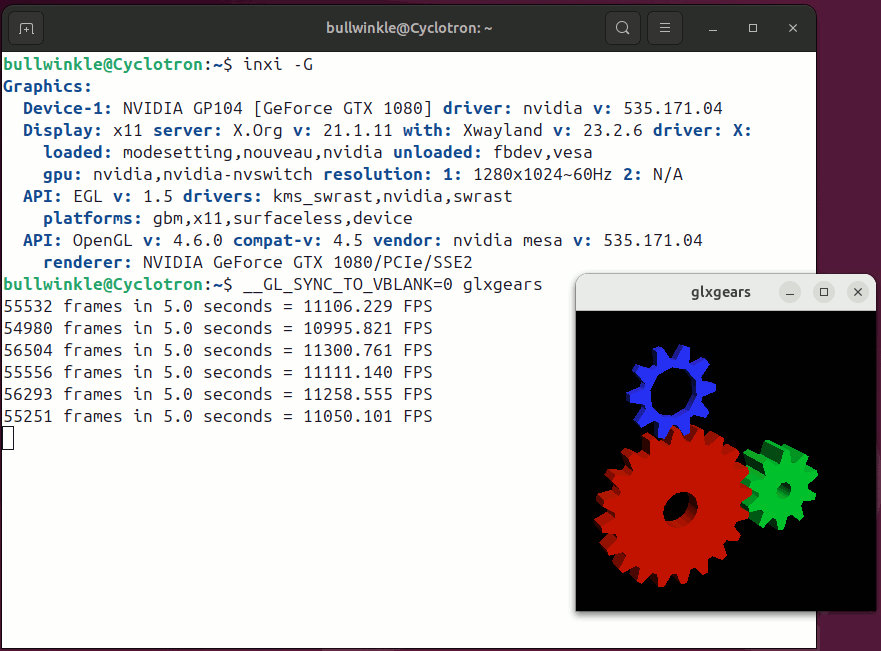
    But the result still doesn't show a driver I like.

    [Picture]

    https://i.postimg.cc/L6qnNTx5/Ubuntu-2404-inxi-NVidia-GLXGears.gif

    The video card gets 20,000 under native X11, and 11,000 is about
    right when Wayland is in control.

    Whatever that process was supposed to be, it still "smells like Beta".
    I think the Beta ISO worked better.

    Paul

    --- SoupGate-Win32 v1.05
    * Origin: fsxNet Usenet Gateway (21:1/5)
  • From Joerg Walther@21:1/5 to rsutton on Wed Jun 12 17:24:37 2024
    rsutton wrote:

    The problem is that I NEED to run a vnc/rdp to my remote
    systems and all the vnc/rdp programs that I have found require Xorg.

    Remmina works perfectly fine with Wayland on Ubuntu 22.04 and supports
    VNC/RDP.

    -jw-
    --
    And now for something completely different...

    --- SoupGate-Win32 v1.05
    * Origin: fsxNet Usenet Gateway (21:1/5)
  • From Gordon@21:1/5 to rsutton on Thu Jun 13 02:32:06 2024
    On 2024-06-11, rsutton <[email protected]> wrote:
    Has anyone found a way to successfully log in to Ubuntu 24.04 with the 'Ubuntu on Xorg' ?

    When I attempt to log in, I select the Gear icon in the lower right hand corner of the screen and select 'Ubuntu on Xorg', then add my password.
    Fails every time! Do the developers expect everyone to just sit on
    their hands until they get around to it. At this point, I can't even consider using/recommending 24.04! Maybe I should move to a distro that cares about their users. I'm getting really sick of having code stuffed
    down my throat.

    Ubuntu is Free so in efect you are getting an OS for nothing. The developers have no moral, or legal obligation to fix it.

    If you do not like Unbuntu then trying another distro may be a solution.

    I have tried numerous things and nothing works! I can't help but
    believe that Canonical has purposely done this to try to force everyone
    to Wayland. The problem is that I NEED to run a vnc/rdp to my remote
    systems and all the vnc/rdp programs that I have found require Xorg.

    I sure am hoping that someone of you have found a workaround. (sorry for
    the rant!)

    Richard

    --- SoupGate-Win32 v1.05
    * Origin: fsxNet Usenet Gateway (21:1/5)
  • From rsutton@21:1/5 to Joerg Walther on Thu Jun 13 09:21:00 2024
    On 6/12/2024 11:24 AM, Joerg Walther wrote:
    rsutton wrote:

    The problem is that I NEED to run a vnc/rdp to my remote
    systems and all the vnc/rdp programs that I have found require Xorg.

    Remmina works perfectly fine with Wayland on Ubuntu 22.04 and supports VNC/RDP.

    -jw-
    Joerg,
    Thanks for that info, but I need a client that runs on windows. Many
    remote devices all using windows.
    Richard

    --- SoupGate-Win32 v1.05
    * Origin: fsxNet Usenet Gateway (21:1/5)
  • From rsutton@21:1/5 to Gordon on Thu Jun 13 09:28:38 2024
    On 6/12/2024 10:32 PM, Gordon wrote:
    On 2024-06-11, rsutton <[email protected]> wrote:
    Has anyone found a way to successfully log in to Ubuntu 24.04 with the
    'Ubuntu on Xorg' ?

    When I attempt to log in, I select the Gear icon in the lower right hand
    corner of the screen and select 'Ubuntu on Xorg', then add my password.
    Fails every time! Do the developers expect everyone to just sit on
    their hands until they get around to it. At this point, I can't even
    consider using/recommending 24.04! Maybe I should move to a distro that
    cares about their users. I'm getting really sick of having code stuffed
    down my throat.

    Ubuntu is Free so in efect you are getting an OS for nothing. The developers have no moral, or legal obligation to fix it.

    If you do not like Unbuntu then trying another distro may be a solution.

    I have tried numerous things and nothing works! I can't help but
    believe that Canonical has purposely done this to try to force everyone
    to Wayland. The problem is that I NEED to run a vnc/rdp to my remote
    systems and all the vnc/rdp programs that I have found require Xorg.

    I sure am hoping that someone of you have found a workaround. (sorry for
    the rant!)

    Richard
    Gordon,
    You know, I also getting pretty sick of people on the forums say
    essentially "what do expect for free", or "if you don't like it, go
    somewhere else". I'm looking for a work-around, not a complete shift to something else. The linux community is always looking for the Year of
    The Linux Desktop. You can see that the devs have their agenda and it's
    not their user base. I don't hear/see demands for "more systemd!" or
    "more Wayland" or "more feature drop".

    --- SoupGate-Win32 v1.05
    * Origin: fsxNet Usenet Gateway (21:1/5)
  • From Paul@21:1/5 to rsutton on Thu Jun 13 18:24:20 2024
    On 6/13/2024 9:28 AM, rsutton wrote:
    On 6/12/2024 10:32 PM, Gordon wrote:
    On 2024-06-11, rsutton <[email protected]> wrote:
    Has anyone found a way to successfully log in to Ubuntu 24.04 with the
    'Ubuntu on Xorg' ?

    When I attempt to log in, I select the Gear icon in the lower right hand >>> corner of the screen and select 'Ubuntu on Xorg', then add my password.
    Fails every time!  Do the developers expect everyone to just sit on
    their hands until they get around to it.  At this point, I can't even
    consider using/recommending 24.04!  Maybe I should move to a distro that >>> cares about their users.  I'm getting really sick of having code stuffed >>> down my throat.

    Ubuntu is Free so in efect you are getting an OS for nothing. The developers >> have no moral, or legal obligation to fix it.

    If you do not like Unbuntu then trying another distro may be a solution.

    I have tried numerous things and nothing works!  I can't help but
    believe that Canonical has purposely done this to try to force everyone
    to Wayland.  The problem is that I NEED to run a vnc/rdp to my remote
    systems and all the vnc/rdp programs that I have found require Xorg.

    I sure am hoping that someone of you have found a workaround. (sorry for >>> the rant!)

    Richard
    Gordon,
    You know, I also getting pretty sick of people on the forums say essentially "what do expect for free", or "if you don't like it, go somewhere else".  I'm looking for a work-around, not a complete shift to something else.  The linux community is
    always looking for the Year of The Linux Desktop.  You can see that the devs have their agenda and it's not their user base.  I don't hear/see demands for "more systemd!" or "more Wayland" or "more feature drop".


    AlternativeTo listed this one.

    https://mremoteng.org/

    # mRemoteNG is a fork of mRemote: remote connections manager for Windows.

    https://github.com/mRemoteNG/mRemoteNG/releases/download/2023.03.03-v1.77.3-nb/mRemoteNG-Installer-1.77.3.nb-1784.msi # Windows, install
    https://github.com/mRemoteNG/mRemoteNG/releases/download/2022.06.13-v1.77.3-nb/Portable.-.1.77.3.NB.rar # Windows, Portable

    Supported protocols:

    RDP (Remote Desktop Protocol)
    VNC (Virtual Network Computing)
    SSH (Secure Shell)
    Telnet (TELecommunication NETwork)
    HTTP/HTTPS (Hypertext Transfer Protocol)
    rlogin (Remote Login)
    Raw Socket Connections
    Powershell remoting

    You could also try running Remmina under WSL/WSLg. Which might give you a rootless window to use. I don't know how hard it is to do something like
    that. WSLg is a rather tortured stack to begin with, as it seems to
    use Terminal Services as one layer in the stack. I think a GLXGears test
    a couple years ago, was about 350FPS or so. Which means the stack is
    software emulation all the way and no hardware acceleration to speak of.

    Win10 WSL, use XMing for an XServer does work
    Win11 WSL, WSLg (no longer need XMing there).

    I run Linux Firefox on Windows using WSL2. As an example of a
    relatively frequent application usage. I use a different version
    of Firefox on the Windows side.

    Paul

    --- SoupGate-Win32 v1.05
    * Origin: fsxNet Usenet Gateway (21:1/5)
  • From rsutton@21:1/5 to Paul on Fri Jun 14 10:07:35 2024
    On 6/13/2024 6:24 PM, Paul wrote:
    On 6/13/2024 9:28 AM, rsutton wrote:
    On 6/12/2024 10:32 PM, Gordon wrote:
    On 2024-06-11, rsutton <[email protected]> wrote:
    Has anyone found a way to successfully log in to Ubuntu 24.04 with the >>>> 'Ubuntu on Xorg' ?

    When I attempt to log in, I select the Gear icon in the lower right hand >>>> corner of the screen and select 'Ubuntu on Xorg', then add my password. >>>> Fails every time!  Do the developers expect everyone to just sit on
    their hands until they get around to it.  At this point, I can't even >>>> consider using/recommending 24.04!  Maybe I should move to a distro that >>>> cares about their users.  I'm getting really sick of having code stuffed >>>> down my throat.

    Ubuntu is Free so in efect you are getting an OS for nothing. The developers
    have no moral, or legal obligation to fix it.

    If you do not like Unbuntu then trying another distro may be a solution. >>>>
    I have tried numerous things and nothing works!  I can't help but
    believe that Canonical has purposely done this to try to force everyone >>>> to Wayland.  The problem is that I NEED to run a vnc/rdp to my remote >>>> systems and all the vnc/rdp programs that I have found require Xorg.

    I sure am hoping that someone of you have found a workaround. (sorry for >>>> the rant!)

    Richard
    Gordon,
    You know, I also getting pretty sick of people on the forums say essentially "what do expect for free", or "if you don't like it, go somewhere else".  I'm looking for a work-around, not a complete shift to something else.  The linux community is
    always looking for the Year of The Linux Desktop.  You can see that the devs have their agenda and it's not their user base.  I don't hear/see demands for "more systemd!" or "more Wayland" or "more feature drop".


    AlternativeTo listed this one.

    https://mremoteng.org/

    # mRemoteNG is a fork of mRemote: remote connections manager for Windows.

    https://github.com/mRemoteNG/mRemoteNG/releases/download/2023.03.03-v1.77.3-nb/mRemoteNG-Installer-1.77.3.nb-1784.msi # Windows, install
    https://github.com/mRemoteNG/mRemoteNG/releases/download/2022.06.13-v1.77.3-nb/Portable.-.1.77.3.NB.rar # Windows, Portable

    Supported protocols:

    RDP (Remote Desktop Protocol)
    VNC (Virtual Network Computing)
    SSH (Secure Shell)
    Telnet (TELecommunication NETwork)
    HTTP/HTTPS (Hypertext Transfer Protocol)
    rlogin (Remote Login)
    Raw Socket Connections
    Powershell remoting

    You could also try running Remmina under WSL/WSLg. Which might give you a rootless window to use. I don't know how hard it is to do something like that. WSLg is a rather tortured stack to begin with, as it seems to
    use Terminal Services as one layer in the stack. I think a GLXGears test
    a couple years ago, was about 350FPS or so. Which means the stack is
    software emulation all the way and no hardware acceleration to speak of.

    Win10 WSL, use XMing for an XServer does work
    Win11 WSL, WSLg (no longer need XMing there).

    I run Linux Firefox on Windows using WSL2. As an example of a
    relatively frequent application usage. I use a different version
    of Firefox on the Windows side.

    Paul
    Thanks, Paul. I'll look into those and see if they work for me.

    Richard

    --- SoupGate-Win32 v1.05
    * Origin: fsxNet Usenet Gateway (21:1/5)