On 9/13/2022 9:36 PM, wAYNE wrote:
So today, I decided on another adventure this time freshly installing the latest 22.04 on my desktop. You may recall last week that I simply did an upgrade initially from 18.04, but I thought I'd go ahead and try a fresh install. All proceeded
fairly smoothly and then I found that some of my apps wouldn't work. One even had a message saying that it wasn't compatible with Wayland and to switch to X11 instead; another astronomical app wouldn't display correctly as I couldn't see my cursor.
After browsing the net, a suggestion I came across was to simply alter the config file to force reboot into X11. I was originally going to try it at log in, but I didn't see any option for selecting anything present. Anyway, so now I'm on X11 and the
two apps that weren't working now are. However, what's the difference between X11 and Wayland as I don't see anything visually?
Wayland is a replacement for X11, and has an X11 compatibility
mode to smooth the transition.
But it's a bit more complicated than that.
https://en.wikipedia.org/wiki/Wayland_(display_server_protocol)
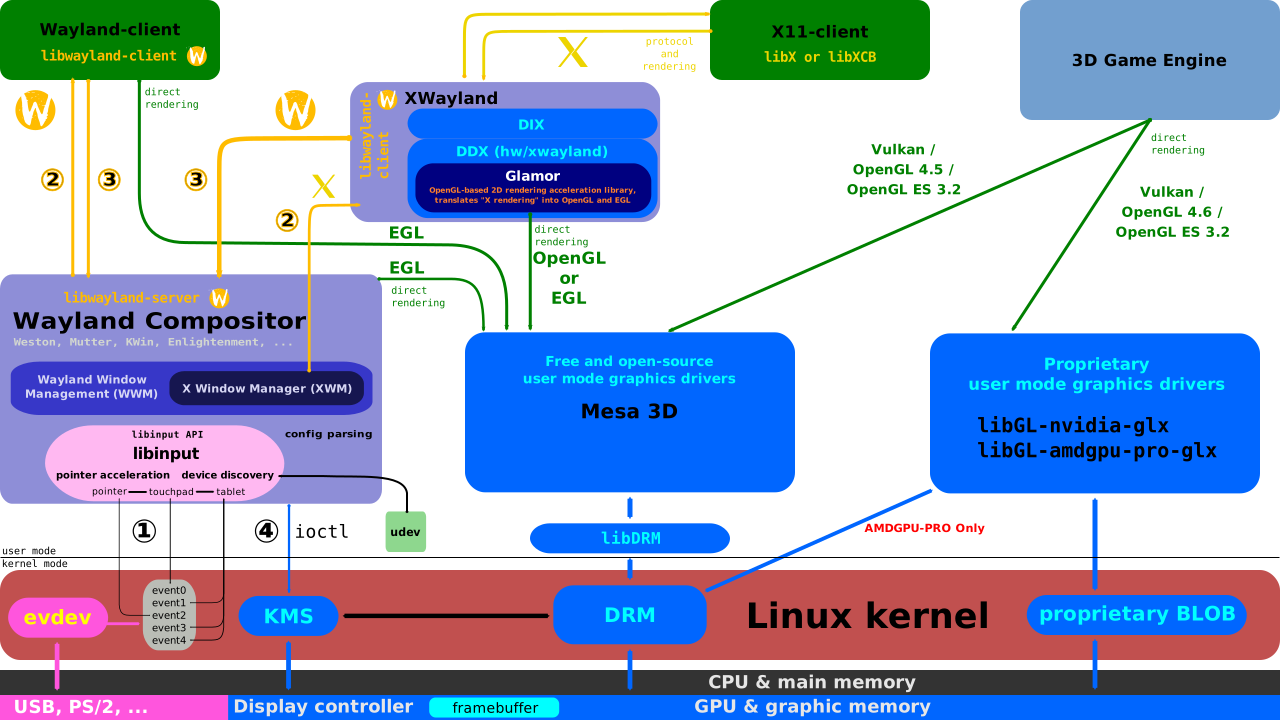
Compare this diagram (which does not admit that X11 exists)...
https://upload.wikimedia.org/wikipedia/commons/a/a7/Wayland_display_server_protocol.svg
with this diagram (which shows how some X11 can run).
https://upload.wikimedia.org/wikipedia/commons/2/2d/The_Linux_Graphics_Stack_and_glamor.svg
(
https://www.wikiwand.com/en/Wayland_%28display_server_protocol%29 )
Some day, they will remove XWayland and cut off X11 compatibility. Like a PulseAudio
removing the Alsa-compatibility plugin and causing TVTime to break (my TV set). So some day, XClock and XEyes won't run.
Paul
--- SoupGate-Win32 v1.05
* Origin: fsxNet Usenet Gateway (21:1/5)