On 9/4/2022 11:30 AM, wAYNE wrote:
On 9/4/22 01:05, Paul wrote:
On 9/3/2022 4:23 PM, wAYNE wrote:
Ok, so after all of the issues I'm encountering while trying to go from 18 to 22, I am now considering a fresh install. I haven't done this for probably a decade so out of practice and would appreciate some advice. The way my system is set up is
shown here:
https://i.imgur.com/9YDBekI.jpg
The NTFS is Win 10. I don't want to touch this at all! How can I do the following:
*Install v22 without hurting Win
*Keep the dual boot selection menu intact at startup (I think this is a GRUB menu)
*get a list of programs I already have so it would make reinstallation easier
Does /home contain my desktop and all current program configurations? Seems like I should just copy that somewhere else until install is completed. Can I replace the new home with mine?
I pretty much already know how to back up all Firefox bookmarks and its configuration along with my Thunderbird email config and messages.
Anything else I should be aware of would be appreciated.
Thanks in advance!!
I think you should remove the Google Earth and the Google Repository
related stuff, and try again on your upgrade install. After the
upgrade is finished, you can use...
*******
YES! What commands would I need to completely uninstall? I haven't even used it for years, nor do I need it. I've been suspecting that it has been causing problems. I never had it installed on the desktop and of course the upgrade went smoothly
aside from expanding hard drive space.
Anything else, any other commands, would be welcome as well and then I'll try again one last time.
The amount of minutiae involved in clean install and
getting everything working again, that's going to be
a killer in terms of time. Removing the blocker-cruft
from the 2004 will be easier.
Something I have? If so, commands to uninstall welcome!
Thanks again!
https://askubuntu.com/questions/309902/how-do-i-uninstall-google-earth
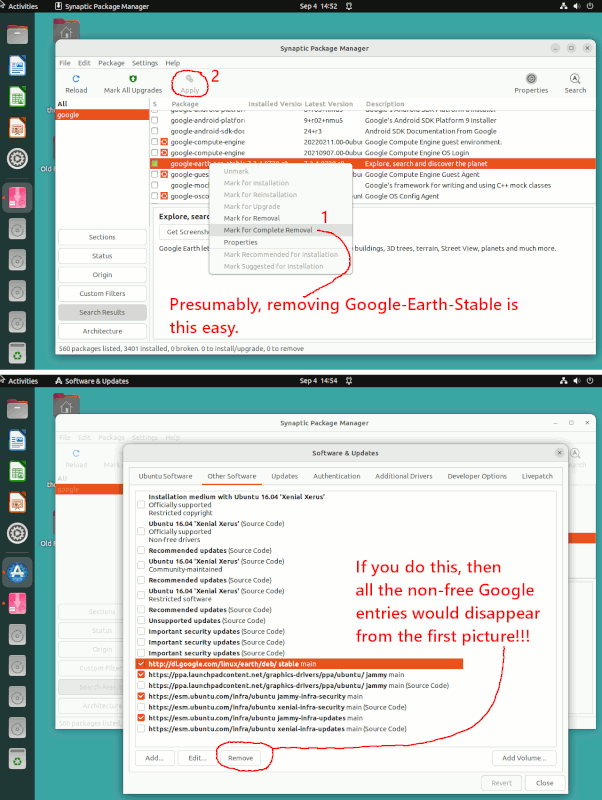
sudo apt purge google-earth-stable # you can do "sudo synaptic" and search on google for evidence
# Synaptic is just as easy to use for this.
# Is there such a thing as a google maps package ???
"Open the synaptic package manager and search for the google maps package."
The Google Repository has multiple things in it. dl.google.com seems to be gone,
so it's a good question as to whether they have an intention to manage things that way now or not.
Things in the Repository might include google-earth-stable and google-chrome-stable.
Google-chrome-stable would be Chromium with Google datamining. You could also install Chromium to get a Chrome browser. These are examples of things that might be in a Repository. In this example, there's a remove command at the bottom,
as a demonstration of doing it from command line.
https://ubuntuhandbook.org/index.php/2020/04/google-chrome-ubuntu-20-04-official-repository/
Fortunately, I have a reference to the Google Repository in my 2004 install.
I would remove the package(s) hosted by the Repository. It's up to you whether you remove the Repository link as shown in the second link, since doing that will remove the branded Google items in the top picture. It's not that those Google items in the top would work -- we don't know that as the key is
screwed up and the dl.google.com does not seem to exist.
[Picture]
https://i.postimg.cc/nVsqMXd4/google-earth-stable.gif
In 2004, Canonical made a "roll-your-own" entry for a Google item,
and in 2204, even that is gone.
But the other download spot, has:
google-earth-pro-stable_current_amd64.deb
and you can always
sudo gdebi google-earth-pro-stable_current_amd64.deb
But only if you wanted a Google Earth, and you say you're not interested.
After google-earth-stable is removed, go back to the steps you were
following for the Upgrade.
Paul
--- SoupGate-Win32 v1.05
* Origin: fsxNet Usenet Gateway (21:1/5)