On 8/16/2022 7:41 PM, Al Stuill wrote:
After a recent update, my VLC media player appimage no longer works on Ubuntu and I get the following message: Failed to register Appimage in AppImageLauncherFS: could not open map file. I believe this occurred after a general Ubuntu update and not
VLC specific. I am on Ubuntu 18.04 and the VLC appimage is 3.0.11.1. I've also tried installing a non-appimage of VLC. Videos play, but many are choppy (like I've lost all the codecs) and I have no control over audio, video or any other effects
built into VLC. Any ideas how to get back my good playing appimage version welcome and thanks in advance.
Videolan tends to work at the source level. And the
wealth of packaging you see (Flatpaks, AppImages, Snaps,
Debs...), is coming from outside contributors. This means,
if you were to contact Videolan, they would throw their
hands in the air and they would say "we only write
the source, and we care not about your packaging issue".
You can see here, that AppImage fails the most basic
requirements of a format. It's a kind of trap, a tar-pit
for unsuspecting mammals to fall into.
https://askubuntu.com/questions/1231597/how-can-i-examine-the-files-inside-an-appimage
One of the principles to be followed when helping people,
is "not to be leading them outside the tree, unless
there is absolutely no other choice". This means the
.deb version (with the ability to pull in dependencies
automatically), is preferred over other mechanisms.
If you went with a Snap for example, a Snap is only
as good as the person preparing it, and could have
just as many issues as an AppImage. When someone presented
a Snap puzzle here a while back, I discovered there
wasn't a blasted thing I could do, to help them!
Completely handcuffed. I had become "little better than
an Apple user" :-)
*******
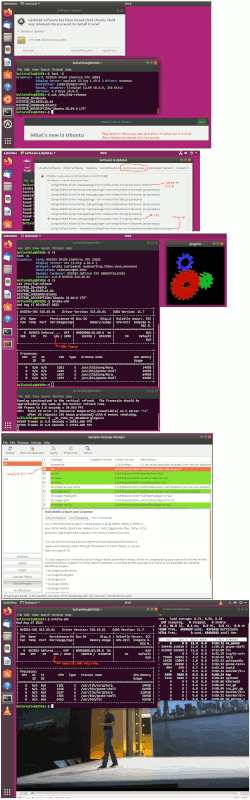
My summary for what follows, is I installed 18.04.6 and it
would only accept "Wayland on Nouveau" for the first start
cycle. On the second boot, the screen remained black, which is
"normal" for Nouveau on a GTX1080. I used Additional Drivers
to install NVidia 470. That failed. I installed NVidia 515,
and that worked and was accepted. No driver had the word
"Recommended" next to it.
I installed VLC using Synaptic, measured video card power with
nvidia-smi, and the movie I played, used 34W of additional GPU electricity
to decode the test MP4 I used. The CPU used 10% of one core or so.
GLXGears worked reasonably well. The GLXGears image was a bit wrong.
The framerate was slightly slow. But not to such an extent that
I would fret about it and start with this sort of thing.
sudo add-apt-repository ppa:graphics-drivers/ppa
Here's a picture of my adventure. Looks like my movie is not
all that skippy/jumpy so it's a pass at the moment.
[Picture]
https://i.postimg.cc/2SttqNHN/vlc-1804.gif
Your adventure will only be as good as your video card. Support
for old video cards isn't exactly wonderful. If there was a decoder
that worked in there, there is no guarantee any software will use it.
And really, the video card is the whole machine now. It determines
how pokey an old machine is, as a duff video card forces the CPU to
do all the rendering work, and on some occasions here, I've had
persistent 100% CPU on one core for that. If a person owned a
P4 with one core, that processor would then be "overwhelmed" and
incapable of playing a video by itself. Not all distros have
become that bad, but I have seen a case where the CPU usage was just
nuts, to run a basic screen (with no GLXGears either, just idle desktop
a few terminals, maybe a Firefox).
sudo apt install inxi
inxi -G # will give some hints of how crusty things are
inxi -F # more complete summary, edit before posting
Paul
--- SoupGate-Win32 v1.05
* Origin: fsxNet Usenet Gateway (21:1/5)