• What is slowing down my WIndows PC & what can I do to kill it now

    From Marion@21:1/5 to All on Mon Sep 1 15:56:55 2025
    XPost: alt.comp.os.windows-11, alt.msdos.batch

    @echo off
    setlocal
    REM 20250901 cpu.bat rev 1.5 - what's slowing things down & how to kill it

    :: ---- Config ----
    set "EDITOR_PATH=C:\app\editor\txt\vim\vim82\gvim.exe"

    :: ---- Elevation check ----
    net session >nul 2>&1
    if %errorlevel% neq 0 (
    echo Requesting administrator privileges...
    powershell -NoProfile -Command "Start-Process -FilePath '%~f0' -Verb RunAs"
    exit /b
    )

    :: ---- Timestamp and log file ----
    for /f %%I in ('powershell -NoProfile -Command "(Get-Date).ToString('yyyy-MM-dd_HHmmss')"') do set "TS=%%I"
    set "LOGFILE=%TEMP%\cpu_diag_%TS%.log"

    :: ---- Header ----
    "%LOGFILE%" echo === Diagnostic Run: %DATE% %TIME% on %COMPUTERNAME% ===
    "%LOGFILE%" echo.

    :: ---- CPU usage (filtered) ----
    "%LOGFILE%" echo === CPU Usage (WMIC snapshot) ===
    wmic path Win32_PerfFormattedData_PerfProc_Process get Name,PercentProcessorTime /format:csv | more >> "%LOGFILE%"

    :: ---- Memory usage (raw) ----
    "%LOGFILE%" echo.
    "%LOGFILE%" echo === Memory Usage (WMIC snapshot) ===
    wmic process get Name,ProcessId,WorkingSetSize /format:csv | more >> "%LOGFILE%"

    :: ---- Unresponsive apps ----
    "%LOGFILE%" echo.
    "%LOGFILE%" echo === Unresponsive Apps ===
    tasklist /v | findstr /i "Not Responding" >> "%LOGFILE%"

    :: ---- Top CPU consumers (excluding Idle/System/_Total) ----
    "%LOGFILE%" echo.
    "%LOGFILE%" echo === Top 10 CPU Consumers (excluding Idle/System/_Total) ===
    powershell -NoProfile -Command ^
    "Get-Process | Where-Object { $_.Name -notin @('Idle','System','_Total') } | Sort-Object CPU -Descending | Select-Object -First 10 Name,Id,@{N='CPU';E={[math]::Round($_.CPU,2)}} | Format-Table -AutoSize | Out-String -Width 500" ^
    >> "%LOGFILE%"

    :: ---- Top Memory consumers ----
    "%LOGFILE%" echo.
    "%LOGFILE%" echo === Top 10 Memory Consumers ===
    powershell -NoProfile -Command ^
    "Get-Process | Sort-Object WorkingSet -Descending | Select-Object -First 10 Name,Id,@{N='Memory(MB)';E={[int]($_.WorkingSet/1MB)}} | Format-Table -AutoSize | Out-String -Width 500" ^
    >> "%LOGFILE%"

    :: ---- Resource hogs (CPU > 10 or Memory > 500MB) ----
    "%LOGFILE%" echo.
    "%LOGFILE%" echo === Potential Resource Hogs (CPU > 10 or Memory > 500MB) ===
    powershell -NoProfile -Command ^
    "$procs = Get-Process | Where-Object { $_.CPU -gt 10 -or $_.WorkingSet -gt 500MB }; $procs | Select-Object Name,Id,@{N='CPU';E={[math]::Round($_.CPU,2)}},@{N='Memory(MB)';E={[int]($_.WorkingSet/1MB)}} | Format-Table -AutoSize | Out-String -Width 500" ^
    >> "%LOGFILE%"

    :: ---- Suggested kill commands ----
    "%LOGFILE%" echo.
    "%LOGFILE%" echo === Suggested Manual Kill Commands ===
    powershell -NoProfile -Command ^
    "$procs = Get-Process | Where-Object { $_.CPU -gt 10 -or $_.WorkingSet -gt 500MB }; $procs | ForEach-Object { \"taskkill /PID $_.Id /F :: $_.Name (CPU=$($_.CPU), Mem=$([int]($_.WorkingSet/1MB))MB)\" }" ^
    >> "%LOGFILE%"

    :: ---- Open log in editor or fallback to console ----
    if exist "%EDITOR_PATH%" (
    start "" "%EDITOR_PATH%" "%LOGFILE%"
    ) else (
    echo Editor not found at %EDITOR_PATH%. Viewing in console...
    type "%LOGFILE%" | more
    )

    endlocal

    --- SoupGate-Win32 v1.05
    * Origin: fsxNet Usenet Gateway (21:1/5)
  • From Marion@21:1/5 to Alan K. on Mon Sep 1 17:13:01 2025
    XPost: alt.comp.os.windows-11, alt.msdos.batch

    On Mon, 1 Sep 2025 12:53:26 -0400, Alan K. wrote :


    I don't know enough. Is this a batch file or powershell?
    I find some of it interesting. Can't test till I boot up Windows.

    Thanks for asking. I was a bit brief. I apologize. I was in a rush.

    It's a batch file. And powershell. It's designed to help you kill what's hurting you. It's like taking two aspirins and calling back in the morning.

    This morning my Windows 10 computer was suddenly slower than a lame dog.

    Nothing was working.
    I couldn't get the process-explorer three-fingered salute to come up.

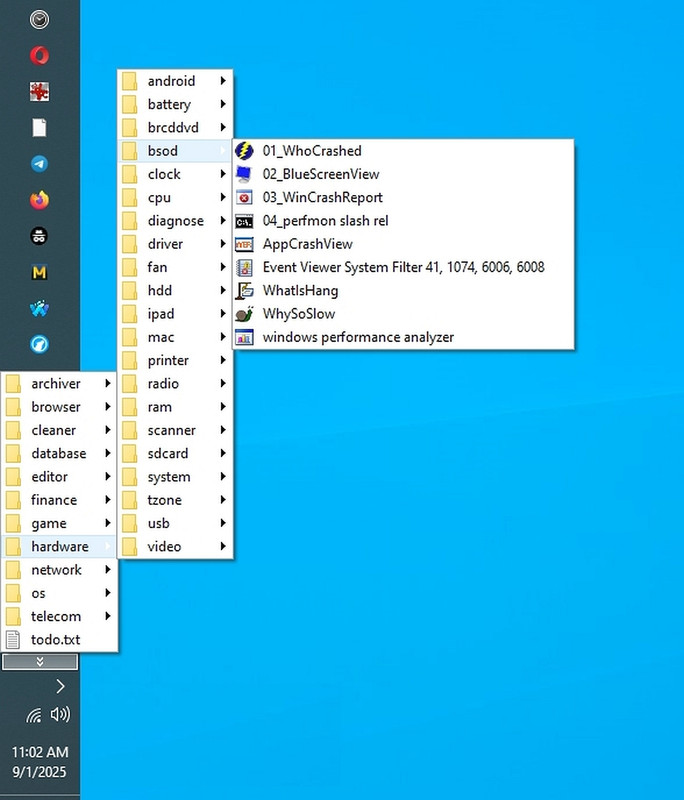
    I couldn't even get "whatishang" or "whocrashed" or anything to come up.
    <https://i.postimg.cc/PxyN9RtS/hardwaremenu.jpg>

    So I force rebooted the damn PC & hacked out that script for next time.
    Then I figured others could use (and improve) the script, so I posted it.

    I keep a runbox pinned to my taskbar so I can run it from there.
    But anyone can run it from anywhere, as long as it's in your path.

    a. You can run it from the runbox (Win+R)
    b. You can run it from the command line
    c. You can run it from the Windows File Explorer GUI

    It will ask you for an elevated prompt.
    It will switch over to powershell when it needs to.
    You can set your editor to anything (e.g., to Notepad++).

    In summary, I hacked it out expressly to debug why the PC is slow.
    And then to kill whatever it is that was mostly slowing down the PC.

    I posted it only so that others would benefit from the work that I did.
    And maybe they improve it so everyone benefits from every action we take.

    --- SoupGate-Win32 v1.05
    * Origin: fsxNet Usenet Gateway (21:1/5)
  • From Alan K.@21:1/5 to Marion on Mon Sep 1 12:53:26 2025
    XPost: alt.comp.os.windows-11, alt.msdos.batch

    On 9/1/25 11:56 AM, Marion wrote:
    @echo off
    setlocal
    REM 20250901 cpu.bat rev 1.5 - what's slowing things down & how to kill it

    :: ---- Config ----
    set "EDITOR_PATH=C:\app\editor\txt\vim\vim82\gvim.exe"

    :: ---- Elevation check ----
    net session >nul 2>&1
    if %errorlevel% neq 0 (
    echo Requesting administrator privileges...
    powershell -NoProfile -Command "Start-Process -FilePath '%~f0' -Verb RunAs"
    exit /b
    )

    :: ---- Timestamp and log file ----
    for /f %%I in ('powershell -NoProfile -Command "(Get-Date).ToString('yyyy-MM-dd_HHmmss')"') do set "TS=%%I"
    set "LOGFILE=%TEMP%\cpu_diag_%TS%.log"

    :: ---- Header ----
    >> "%LOGFILE%" echo === Diagnostic Run: %DATE% %TIME% on %COMPUTERNAME% ===
    >> "%LOGFILE%" echo.

    :: ---- CPU usage (filtered) ----
    >> "%LOGFILE%" echo === CPU Usage (WMIC snapshot) ===
    wmic path Win32_PerfFormattedData_PerfProc_Process get Name,PercentProcessorTime /format:csv | more >> "%LOGFILE%"

    :: ---- Memory usage (raw) ----
    >> "%LOGFILE%" echo.
    >> "%LOGFILE%" echo === Memory Usage (WMIC snapshot) ===
    wmic process get Name,ProcessId,WorkingSetSize /format:csv | more >> "%LOGFILE%"

    :: ---- Unresponsive apps ----
    >> "%LOGFILE%" echo.
    >> "%LOGFILE%" echo === Unresponsive Apps ===
    tasklist /v | findstr /i "Not Responding" >> "%LOGFILE%"

    :: ---- Top CPU consumers (excluding Idle/System/_Total) ----
    >> "%LOGFILE%" echo.
    >> "%LOGFILE%" echo === Top 10 CPU Consumers (excluding Idle/System/_Total) ===
    powershell -NoProfile -Command ^
    "Get-Process | Where-Object { $_.Name -notin @('Idle','System','_Total') } | Sort-Object CPU -Descending | Select-Object -First 10 Name,Id,@{N='CPU';E={[math]::Round($_.CPU,2)}} | Format-Table -AutoSize | Out-String -Width 500" ^
    >> "%LOGFILE%"

    :: ---- Top Memory consumers ----
    >> "%LOGFILE%" echo.
    >> "%LOGFILE%" echo === Top 10 Memory Consumers ===
    powershell -NoProfile -Command ^
    "Get-Process | Sort-Object WorkingSet -Descending | Select-Object -First 10 Name,Id,@{N='Memory(MB)';E={[int]($_.WorkingSet/1MB)}} | Format-Table -AutoSize | Out-String -Width 500" ^
    >> "%LOGFILE%"

    :: ---- Resource hogs (CPU > 10 or Memory > 500MB) ----
    >> "%LOGFILE%" echo.
    >> "%LOGFILE%" echo === Potential Resource Hogs (CPU > 10 or Memory > 500MB) ===
    powershell -NoProfile -Command ^
    "$procs = Get-Process | Where-Object { $_.CPU -gt 10 -or $_.WorkingSet -gt 500MB }; $procs | Select-Object Name,Id,@{N='CPU';E={[math]::Round($_.CPU,2)}},@{N='Memory(MB)';E={[int]($_.WorkingSet/1MB)}} | Format-Table -AutoSize | Out-String -Width
    500" ^
    >> "%LOGFILE%"

    :: ---- Suggested kill commands ----
    >> "%LOGFILE%" echo.
    >> "%LOGFILE%" echo === Suggested Manual Kill Commands ===
    powershell -NoProfile -Command ^
    "$procs = Get-Process | Where-Object { $_.CPU -gt 10 -or $_.WorkingSet -gt 500MB }; $procs | ForEach-Object { \"taskkill /PID $_.Id /F :: $_.Name (CPU=$($_.CPU), Mem=$([int]($_.WorkingSet/1MB))MB)\" }" ^
    >> "%LOGFILE%"

    :: ---- Open log in editor or fallback to console ----
    if exist "%EDITOR_PATH%" (
    start "" "%EDITOR_PATH%" "%LOGFILE%"
    ) else (
    echo Editor not found at %EDITOR_PATH%. Viewing in console...
    type "%LOGFILE%" | more
    )

    endlocal


    I don't know enough. Is this a batch file or powershell?
    I find some of it interesting. Can't test till I boot up Windows.

    --
    Linux Mint 22.1, Thunderbird 128.14.0esr, Mozilla Firefox 142.0
    Alan K.

    --- SoupGate-Win32 v1.05
    * Origin: fsxNet Usenet Gateway (21:1/5)
  • From R.Wieser@21:1/5 to All on Mon Sep 1 20:09:56 2025
    XPost: alt.comp.os.windows-11, alt.msdos.batch

    Arlen,

    This morning my Windows 10 computer was suddenly slower than
    a lame dog.

    Nothing was working. I couldn't get the process-explorer
    three-fingered salute to come up.
    ...
    I couldn't even get "whatishang" or "whocrashed" or anything
    to come up.
    ...
    So I ... hacked out that script for next time.

    If the three-finger salute isn't coming up and neither do those programs
    than you can bet your life on it that script won't run either.

    So I force rebooted the damn PC & hacked out that script
    for next time.

    And that shows you that it won't be easy to find out which program/process causes the slow-down: You either can't run anything (including your batch script), or you can but than the processes causing the slow-down are not running (duh) and you therefore can't find them.

    Yup, a classic catch-22 :-)

    Regards,
    Rudy Wieser

    --- SoupGate-Win32 v1.05
    * Origin: fsxNet Usenet Gateway (21:1/5)
  • From Paul@21:1/5 to R.Wieser on Mon Sep 1 22:30:24 2025
    XPost: alt.comp.os.windows-11, alt.msdos.batch

    On Mon, 9/1/2025 2:09 PM, R.Wieser wrote:
    Arlen,

    This morning my Windows 10 computer was suddenly slower than
    a lame dog.

    Nothing was working. I couldn't get the process-explorer
    three-fingered salute to come up.
    ...
    I couldn't even get "whatishang" or "whocrashed" or anything
    to come up.
    ...
    So I ... hacked out that script for next time.

    If the three-finger salute isn't coming up and neither do those programs
    than you can bet your life on it that script won't run either.

    So I force rebooted the damn PC & hacked out that script
    for next time.

    And that shows you that it won't be easy to find out which program/process causes the slow-down: You either can't run anything (including your batch script), or you can but than the processes causing the slow-down are not running (duh) and you therefore can't find them.

    Yup, a classic catch-22 :-)

    Regards,
    Rudy Wieser

    I'm not convinced you can necessarily measure everything on this OS.
    It makes significant usage of virtualization. Yes, we get some cyclic
    counts for things that use virtualization, but on occasion they
    "don't look reasonable or meaningful". The Memory Compressor is not
    reported in Task Manager, yet it is visible in Process Explorer.
    That's how I measure that one, if I need to know.

    I don't think this is necessarily a job for scripts. Maybe back in
    the WinXP era, when things were still sane and rational, a script would
    have been perfect for summarizing a situation. Today, we have the
    Intel performance counters as an absolute -- if you can figure out
    what to do with them in a given situation. They measure "something" at
    the hardware level. But if a containerized NVidia video driver
    starts doing "GeForce Experience Things", how would you know ? It's
    in another Ring. Similarly, the RealTek NIC driver, the file names
    and release notes kinda hint that Microsoft made them containerize as
    well. These might be officially part of the kernel, and reported
    as a component of System.

    When VirtualBox is "stuck" during the boot process, what is that ?
    At one time, it really was "stuck". Well, I figured out what was
    happening there, and if you set your VM to 6144MB of RAM (6GB),
    as the OS boots, it is doing a malloc that runs at 300MB/sec (implies
    a malloc running a 4KB page-at-a-time). And while that malloc is
    slowly running, the screen animation stops until it is complete.
    What broke there ? Is the malloc running through layers of virtualization ?
    Who really knows ?

    I've looked at Task Manager before, something is going on, and the CPU numbers all read zero. If I use Process Explorer, the extended precision readout
    there shows the activity level is not 0, it's finite and makes sense.
    But just adding two more zeros on the end of the Task Manager readout,
    may still not provide a satisfying answer. There are still going to be
    things where you can't be sure.

    What I use these days, for "honest weights and measures", is the power
    meter connected to the cord of this PC. When it measures 33 watts, nobody
    is fooling around in that box. If it reads 57 watts and Task Manager
    reads "0" for everything, then we know someone has their finger
    on the scale. You can hide from me in software, you can't hide from
    my power meter.

    Paul

    --- SoupGate-Win32 v1.05
    * Origin: fsxNet Usenet Gateway (21:1/5)
  • From John B. Smith@21:1/5 to Paul on Tue Sep 2 15:55:39 2025
    XPost: alt.comp.os.windows-11, alt.msdos.batch

    On Mon, 1 Sep 2025 22:30:24 -0400, Paul <[email protected]d> wrote:

    On Mon, 9/1/2025 2:09 PM, R.Wieser wrote:
    Arlen,

    This morning my Windows 10 computer was suddenly slower than
    a lame dog.

    Nothing was working. I couldn't get the process-explorer
    three-fingered salute to come up.
    ...
    I couldn't even get "whatishang" or "whocrashed" or anything
    to come up.
    ...
    So I ... hacked out that script for next time.

    If the three-finger salute isn't coming up and neither do those programs
    than you can bet your life on it that script won't run either.

    So I force rebooted the damn PC & hacked out that script
    for next time.

    And that shows you that it won't be easy to find out which program/process >> causes the slow-down: You either can't run anything (including your batch
    script), or you can but than the processes causing the slow-down are not
    running (duh) and you therefore can't find them.

    Yup, a classic catch-22 :-)

    Regards,
    Rudy Wieser

    I'm not convinced you can necessarily measure everything on this OS.
    It makes significant usage of virtualization. Yes, we get some cyclic
    counts for things that use virtualization, but on occasion they
    "don't look reasonable or meaningful". The Memory Compressor is not
    reported in Task Manager, yet it is visible in Process Explorer.
    That's how I measure that one, if I need to know.

    I don't think this is necessarily a job for scripts. Maybe back in
    the WinXP era, when things were still sane and rational, a script would
    have been perfect for summarizing a situation. Today, we have the
    Intel performance counters as an absolute -- if you can figure out
    what to do with them in a given situation. They measure "something" at
    the hardware level. But if a containerized NVidia video driver
    starts doing "GeForce Experience Things", how would you know ? It's
    in another Ring. Similarly, the RealTek NIC driver, the file names
    and release notes kinda hint that Microsoft made them containerize as
    well. These might be officially part of the kernel, and reported
    as a component of System.

    When VirtualBox is "stuck" during the boot process, what is that ?
    At one time, it really was "stuck". Well, I figured out what was
    happening there, and if you set your VM to 6144MB of RAM (6GB),
    as the OS boots, it is doing a malloc that runs at 300MB/sec (implies
    a malloc running a 4KB page-at-a-time). And while that malloc is
    slowly running, the screen animation stops until it is complete.
    What broke there ? Is the malloc running through layers of virtualization ? >Who really knows ?

    I've looked at Task Manager before, something is going on, and the CPU numbers >all read zero. If I use Process Explorer, the extended precision readout >there shows the activity level is not 0, it's finite and makes sense.
    But just adding two more zeros on the end of the Task Manager readout,
    may still not provide a satisfying answer. There are still going to be
    things where you can't be sure.

    What I use these days, for "honest weights and measures", is the power
    meter connected to the cord of this PC. When it measures 33 watts, nobody
    is fooling around in that box. If it reads 57 watts and Task Manager
    reads "0" for everything, then we know someone has their finger
    on the scale. You can hide from me in software, you can't hide from
    my power meter.

    Paul

    I hope I'm not highjacking the thread if I start asking about wattage measurements? I'll start another thread if that's needed. I'd never
    checked wattage on my i6 chip Asus Z790 motherboard before so this
    thread got me started.

    I have 53 background processes running in my Win11 Taskmanager. I
    don't know how to safely turn off the ones running to make
    measurements. Just idling along the KWMeter is reading watts from 53.3
    to 136. CoreTemp reading watts from 7.9 to 19.8

    On the boot I see 119 to 214 watts.

    Machine shut down, reads 1.3 to 1.4 watts.

    Can you tell me a safe way to stop those processes in Taskmaster that
    aren't needed without crashing the machine?

    --- SoupGate-Win32 v1.05
    * Origin: fsxNet Usenet Gateway (21:1/5)
  • From Paul@21:1/5 to John B. Smith on Tue Sep 2 19:16:04 2025
    XPost: alt.comp.os.windows-11, alt.msdos.batch

    On Tue, 9/2/2025 3:55 PM, John B. Smith wrote:


    I hope I'm not highjacking the thread if I start asking about wattage measurements? I'll start another thread if that's needed. I'd never
    checked wattage on my i6 chip Asus Z790 motherboard before so this
    thread got me started.

    I have 53 background processes running in my Win11 Taskmanager. I
    don't know how to safely turn off the ones running to make
    measurements. Just idling along the KWMeter is reading watts from 53.3
    to 136. CoreTemp reading watts from 7.9 to 19.8

    On the boot I see 119 to 214 watts.

    Machine shut down, reads 1.3 to 1.4 watts.

    Can you tell me a safe way to stop those processes in Taskmaster that
    aren't needed without crashing the machine?


    The SVCHOST, most of them use *zero* cycles. They're not
    scheduled to run and they don't run. They are "on-demand"
    services.

    Running Sysinternals Process Explorer as administrator, there is
    an interface that gives a cycle count per process. That's how you
    can check at that level.

    A few are hopefuls. WUAUSERV for Windows Update, it would run
    several times a day, and it can run for a bit, preparing
    WinSxS for maintenance. That's a fairly expensive one, in
    terms of KwH.

    The SysMain has likely been renamed a number of times. It
    positions materials on a HDD for faster loading (.pf prefetch files).
    On an SSD, this is likely a waste of a service. During a Windows
    update, I run services.msc and I shut that one down. I
    also try to kill SearchIndexer (a separate process, not
    a SVCHOST), but that one is the undead and it keeps starting
    itself.

    But for the most part, the consumption in the OS is going to
    consist of other maintenance things. These would be forked,
    run for a while, and close on their own. These like to start
    when you're trying to benchmark and stuff.

    When you ask for a compute job to be done, the job has
    "a fixed number of watt-hours" in a sense. Stretching the
    job out, doesn't make a lot of sense, so for the
    following, it's better to "rush the job, then turn
    the PC OFF". But if the machine must run all day, you
    can try and crank it down a bit. It depends on how
    "overpowered" the resources are, how much room there is
    to do this.

    Some motherboards have an "eco mode". My 5950X, that mode
    is simple -- turn one of the two silicon die off. My other
    processors have a single-die, and an "eco mode" consists of
    running reduced frequency (and reduced VCore voltage) on the processor.

    CPUs have closed loop controls, like the video cards got. If
    you set the BIOS CPU power limiter to "100W", then it starts to
    throttle when the power gets that high, and that is an
    automatic way of capping top power. The Intel one goes to 4095
    watts, which means "unlimited" in a sense. That might help
    if your cooler isn't very good.

    You can turn the core count down in the BIOS, on some boards.
    Some CPUs may not have such controls. A Phenom II from AMD,
    the six die were in two groups, and you could shut one group
    off (even though they shared a common die).

    One very expensive processor ($1000), if you shut it down to 1 core
    in the BIOS, right after you save settings... the CPU is
    destroyed. That's an example of a CPU where you *never* drop
    to 1 core (setting not blocked in BIOS!). 2 cores would be OK
    (of six perhaps). These probably aren't power modulated, just
    a clock thing (reducing clock to a processor, reduces consumption
    to DC leakage). When the BIOS detects one of your attempts to
    save power, it still tries to arrange things so the die is as
    "power balanced" as possible. The ECL designer in my group at
    work used to do that for the chips he worked on, power-balance
    the corners so the die heats evenly and doesn't crack at
    extremely high temps (ECL loves heat).

    But messing with things at that level, ECO modes, power capping,
    that makes more of an impact than doing a lot of tweaking
    at individual process levels, especially when a lot of the
    SVCHOST are drawing zero cycles anyway.

    Microsoft has done a lot already, to optimize things. They have
    had studies running on machines, to find things they can turn down.

    On some motherboards, it is the *chipset* which is a pig. The
    CPU gets blamed, but the Idle CPU actually draws less than a
    Northbridge with 42 PCIe lanes on it. While you can turn
    chipset voltage down, on those pig chips, fiddle too much
    and you get memory errors, so it's not really worth
    chasing that. As it is, the pig chip across the way has
    a boost of a tenth of a volt to keep it "honest". My X48,
    that was a badly binned chip, and that needed a boost its
    whole life and it probably should never have been put in
    the "good" bin at Intel. That chipset is dead now. The X79
    is still going strong (and drinking the power like crazy).

    Buying a modern computer can save power, but the payback
    period would be longer than you will be alive. Like using
    my 33W computer, instead of the 100W idle computer, that
    saves money. Pennies a day. It's because of this, the 33W
    computer tends to run all day, the higher end machines
    stay OFF. But if I wanted to compress a 3TB Macrium MRIMG,
    I wouldn't do that on this machine (would take too long).

    On the 5950X, railing one core uses half the CPU power
    and ramping up all the cores and threads, doubles that...

    200W ____
    ___/
    ___/
    100W ___/
    /
    /
    33W /
    0 1 N

    That is why saving power is so hard, as vampire tasks
    that use a fraction of a core, they tend to climb the
    steep part of the curve near the "one core railed" end.
    An ECO setting with an artificially capped Fmax, will
    likely scale the whole graph. At least some of the load
    at the low end, is ATX supply inefficiency, chipset
    static power (power that does not change with usage),
    you charging your iPhone and so on.

    100W ____
    ___/
    ___/
    50W ___/
    /
    /
    33W /
    0 1 N

    Paul

    --- SoupGate-Win32 v1.05
    * Origin: fsxNet Usenet Gateway (21:1/5)
  • From J. P. Gilliver@21:1/5 to Paul on Wed Sep 3 01:25:09 2025
    XPost: alt.comp.os.windows-11, alt.msdos.batch

    On 2025/9/3 0:16:4, Paul wrote:
    On Tue, 9/2/2025 3:55 PM, John B. Smith wrote:

    []

    Can you tell me a safe way to stop those processes in Taskmaster that
    aren't needed without crashing the machine?

    Ah, a plaintive question which has been around for a Very Long Time, and
    to which no _simple_ answer has ever been given!

    []


    Microsoft has done a lot already, to optimize things. They have
    had studies running on machines, to find things they can turn down.

    Because of who is saying it I have to believe that, but for anyone who
    has been using the various Windows versions for a lot of years, it's
    very _hard_ to believe: the number of background tasks which anyone with
    less than Paul's (or possibly VanguardLH's, or one other) level of
    knowledge just has to, for practical purposes, _accept_ running, has
    risen significantly with each version, from about 9x on. (I'm not sure
    if 3.1 had any.)
    []

    What's snipped in my two []s in this post is _very_ knowledgeable. But
    beyond my capability to understand now. This is no criticism, just an acceptance that _my_ processing power is declining!
    --
    J. P. Gilliver. UMRA: 1960/<1985 MB++G()AL-IS-Ch++(p)Ar@T+H+Sh0!:`)DNAf

    --- SoupGate-Win32 v1.05
    * Origin: fsxNet Usenet Gateway (21:1/5)