• Copilot and other AI

    From John C.@21:1/5 to All on Thu Jul 17 03:21:05 2025
    Like a lot of other people, I view AI as a step in the direction of John
    von Neumann's "singularity":

    https://en.wikipedia.org/wiki/John_von_Neumann

    Perhaps the singularity already exists and is just pretending not to
    whenever and of the "different" AIs are used.

    Regardless, I use Copilot in W10 often via typing. On my smart phone, I
    have both it and Gemini installed phone and talk to them often. IMO,
    Copilot seems to be more like discussing something with a human being,
    but both work well.

    At this point though, I believe that Copilot is the best thing to ever
    come out of Microsoft.

    If you use an AI, which on do you like the best?

    --
    John C. I filter crossposts, various trolls & dizum.com. Doing this
    makes this newsgroup easier to read & more on-topic. Take back the tech companies from India & industry from China.

    "I, for one, welcome our new digital overlords." Robert Alan Brown, on
    Facebook

    --- SoupGate-Win32 v1.05
    * Origin: fsxNet Usenet Gateway (21:1/5)
  • From John C.@21:1/5 to All on Thu Jul 17 03:23:28 2025
    I wrote:
    Like a lot of other people, I view AI as a step in the direction of John
    von Neumann's "singularity":

    https://en.wikipedia.org/wiki/John_von_Neumann

    Perhaps the singularity already exists and is just pretending not to
    whenever any of the "different" AIs are used.

    Regardless, I use Copilot in W10 often via typing. On my smart phone, I
    have both it and Gemini installed phone and talk to them often. IMO,
    Copilot seems to be more like discussing something with a human being,
    but both work well.

    At this point though, I believe that Copilot is the best thing to ever
    come out of Microsoft.

    If you use an AI, which one do you like the best?

    Spelling corrected above. Sorry about that. Should have had an AI
    proofread it before posting.

    --
    John C. I filter crossposts, various trolls & dizum.com. Doing this
    makes this newsgroup easier to read & more on-topic. Take back the tech companies from India & industry from China.

    --- SoupGate-Win32 v1.05
    * Origin: fsxNet Usenet Gateway (21:1/5)
  • From Marion@21:1/5 to John C. on Thu Jul 17 17:22:44 2025
    On Thu, 17 Jul 2025 03:21:05 -0700, John C. wrote :


    At this point though, I believe that Copilot is the best thing to ever
    come out of Microsoft.

    If you use an AI, which on do you like the best?

    I have replaced my "search" queries with AI queries on Windows, where I
    have a browser-link-url icon in my taskbar for Gemini & CoPilot & ChatGPT.

    Almost every batch file I ever wrote I have given to AI to fix and they
    always find a fix for me - but it takes on average five to ten tries.

    Q: Which AI will "I" use?
    A: Only free AI, with no registration or login required.

    Q: Which AI requires a registration?
    A: Grok does. CoPilot, Gemini & ChatGPT currently do not require an acct.

    Q: Which AI "remembers stuff" from previous connections?
    A: In my experience, Gemini & ChatGPT forget; CoPilot remembers stuff!

    Q: Which AI requires money?
    A: I think Gemini is moving toward paying for coding, is it not?

    Q: Which AI can accept speech & output speech without registration?
    A: I think Gemini on mobile devices is the only one that does it.
    (Although 1-800-ChatGPT will also; but for 20 minutes per month only.)

    Q: Which AI does Windows batch coding the best?
    A: Tough question. Gemini hangs up a *lot* so it sucks for coding that way.
    CoPilot works very well for Windows batch coding. It's super helpful.
    I haven't tried ChatGPT for Windows batch coding 'cuz CoPilot is good.

    Q: Which AI accepts the flaws in human ad hoc conversational speech?
    A: They all seem to understand me better than my wife and kids do. :)

    Q: Which AI makes mistakes?
    A: All of them but that doesn't mean that they're wrong all the time.

    Q: Which AI do I use the most lately?
    A: I was using Gemini but it's getting to the point it wants a sign in.
    So it nags right in the middle of an hours-long chat sequence.
    Gemini hangs when you ask it questions for hours on end also.
    CoPilot has patience. Since CoPilot works, I haven't tested ChatGPT.

    Q: Which AI outputs pure ASCII-text copy/paste batch scripts if you ask?
    A: All try to make it pretty at first but all will output pure text.

    Q: Which AI remembers the thread of the conversation?
    A: They all remember & they all forget - after an hour - they get confused.

    Q: Which AI, if you ask the same question, will "learn" the next days?
    A: They all seem to learn the truth (e.g., the truth about Apple);
    but - and this is critical - they spew Apple marketing like there
    is no tomorrow. It takes months (elapsed time) to "train" them to
    tell the truth based on URLs you have to feed them every time.

    They're getting better on the Apple question.
    But they're all pretty good on writing batch scripts.

    Since Grok is out of the question due to registration requirements, and
    since when I tested the remaining three months ago I settled on Gemini, I
    was using Gemini exclusively until Gemini became a bitch about signing in,
    so I moved to CoPilot and have been happy enough on CoPilot so far to not
    need ChatGPT, where I ask questions of AI almost once every five or ten
    minutes on the computer since there is always something I need to know.

    --- SoupGate-Win32 v1.05
    * Origin: fsxNet Usenet Gateway (21:1/5)
  • From Marion@21:1/5 to John C. on Thu Jul 17 17:48:39 2025
    On Thu, 17 Jul 2025 03:23:28 -0700, John C. wrote :


    If you use an AI, which one do you like the best?

    Spelling corrected above. Sorry about that. Should have had an AI
    proofread it before posting.

    One other thing to add to my post about the various brands' AI pros and
    cons, is I change my system date randomly and I change my VPN server
    randomly, where it seems to upset Google (i.e., Gemini) the most.

    CoPilot handles the random timezone and VPN switches with aplomb.

    Since Gemini can't handle it well (it asks for a sign-in and it freezes the session where the worst part is you cannot copy the last batch script it
    wrote for you when it does that)...

    Since Google's Gemini doesn't like privacy (for some strange reason), I've started to move toward CoPilot and will use that unless it pisses me off.

    Then it's off to ChatGPT (which previously came in third when I initially tested all the free no-registration Windows-based AI's months ago).

    PS: CoPilot seems to be the best at debugging Windows issues though.

    --- SoupGate-Win32 v1.05
    * Origin: fsxNet Usenet Gateway (21:1/5)
  • From Marion@21:1/5 to Marion on Thu Jul 17 19:05:09 2025
    On Thu, 17 Jul 2025 17:48:39 -0000 (UTC), Marion wrote :


    PS: CoPilot seems to be the best at debugging Windows issues though.

    Keeping to using AI on Windows efficiently a thousand times a day, it's interesting that with a dual-monitor setup, if you move the Gemini window
    over to the second monitor and you click again on the taskbar Gemini
    shortcut, it opens a second (new) session, so you can have two sessions at once.

    However... for CoPilot...

    That doesn't work. For the CoPilot shortcut in the taskbar, it doesn't
    matter if you move it over to the second monitor; you can't click on the taskbar-pinned CoPilot shortcut to generate a second concurrent session.

    Anyone know how to get around that Windows CoPilot shortcut limitation?

    --- SoupGate-Win32 v1.05
    * Origin: fsxNet Usenet Gateway (21:1/5)
  • From Char Jackson@21:1/5 to All on Thu Jul 17 20:10:25 2025
    On Thu, 17 Jul 2025 19:05:09 -0000 (UTC), Marion <[email protected]>
    wrote:

    On Thu, 17 Jul 2025 17:48:39 -0000 (UTC), Marion wrote :


    PS: CoPilot seems to be the best at debugging Windows issues though.

    Keeping to using AI on Windows efficiently a thousand times a day, it's >interesting that with a dual-monitor setup, if you move the Gemini window >over to the second monitor and you click again on the taskbar Gemini >shortcut, it opens a second (new) session, so you can have two sessions at >once.

    However... for CoPilot...

    That doesn't work. For the CoPilot shortcut in the taskbar, it doesn't
    matter if you move it over to the second monitor; you can't click on the >taskbar-pinned CoPilot shortcut to generate a second concurrent session.

    Anyone know how to get around that Windows CoPilot shortcut limitation?

    Have you tried the standard method of opening a second instance, where
    you right click on the taskbar icon and then left click on the
    application name that pops up? Some apps don't allow a second running
    instance, but if they do, that's how you/I normally do it.

    --- SoupGate-Win32 v1.05
    * Origin: fsxNet Usenet Gateway (21:1/5)
  • From Marion@21:1/5 to Char Jackson on Fri Jul 18 03:05:49 2025
    On Thu, 17 Jul 2025 20:10:25 -0500, Char Jackson wrote :


    On Thu, 17 Jul 2025 19:05:09 -0000 (UTC), Marion <[email protected]>
    wrote:

    On Thu, 17 Jul 2025 17:48:39 -0000 (UTC), Marion wrote :


    PS: CoPilot seems to be the best at debugging Windows issues though.

    Keeping to using AI on Windows efficiently a thousand times a day, it's >>interesting that with a dual-monitor setup, if you move the Gemini window >>over to the second monitor and you click again on the taskbar Gemini >>shortcut, it opens a second (new) session, so you can have two sessions at >>once.

    However... for CoPilot...

    That doesn't work. For the CoPilot shortcut in the taskbar, it doesn't >>matter if you move it over to the second monitor; you can't click on the >>taskbar-pinned CoPilot shortcut to generate a second concurrent session.

    Anyone know how to get around that Windows CoPilot shortcut limitation?

    Have you tried the standard method of opening a second instance, where
    you right click on the taskbar icon and then left click on the
    application name that pops up? Some apps don't allow a second running instance, but if they do, that's how you/I normally do it.

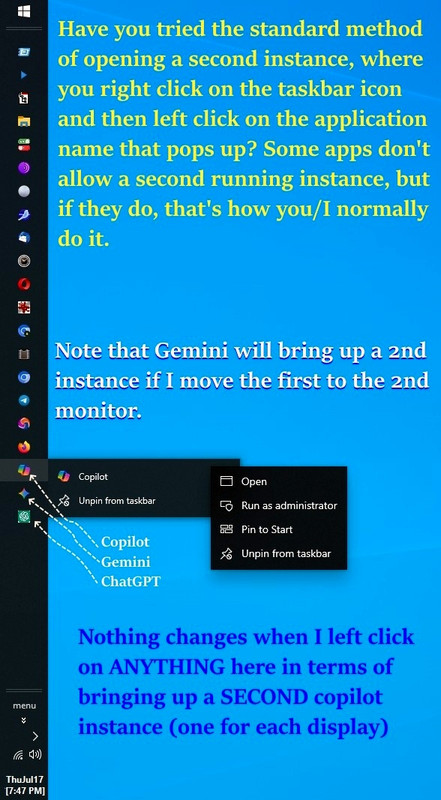
    Thanks for that suggestion, where I tried it but it didn't work.
    <https://i.postimg.cc/XJL1MNXD/taskbar-shortcut-ai.jpg>

    So I removed the section for making two windows in Windows for AI. Sigh.
    *Tutorial: Create Shortcuts to Gemini / ChatGPT / Copilot in MS Windows*
    <https://al.howardknight.net/?STYPE=msgid&MSGI=%3C105cc6v%24132f%241%40nnrp.usenet.blueworldhosting.com%3E>

    There are problems with Firefox versus Chrome in writing that tutorial,
    but both work (yet Chromium browsers work better'n Mozilla browsers do).

    It's OK if I never solve why Copilot won't open up two sessions though.
    One is enough for most people. I don't want to hijack the OP's thread.

    --- SoupGate-Win32 v1.05
    * Origin: fsxNet Usenet Gateway (21:1/5)
  • From Paul@21:1/5 to Char Jackson on Fri Jul 18 00:33:41 2025
    On Thu, 7/17/2025 9:10 PM, Char Jackson wrote:
    On Thu, 17 Jul 2025 19:05:09 -0000 (UTC), Marion <[email protected]>
    wrote:

    On Thu, 17 Jul 2025 17:48:39 -0000 (UTC), Marion wrote :


    PS: CoPilot seems to be the best at debugging Windows issues though.

    Keeping to using AI on Windows efficiently a thousand times a day, it's
    interesting that with a dual-monitor setup, if you move the Gemini window
    over to the second monitor and you click again on the taskbar Gemini
    shortcut, it opens a second (new) session, so you can have two sessions at >> once.

    However... for CoPilot...

    That doesn't work. For the CoPilot shortcut in the taskbar, it doesn't
    matter if you move it over to the second monitor; you can't click on the
    taskbar-pinned CoPilot shortcut to generate a second concurrent session.

    Anyone know how to get around that Windows CoPilot shortcut limitation?

    Have you tried the standard method of opening a second instance, where
    you right click on the taskbar icon and then left click on the
    application name that pops up? Some apps don't allow a second running instance, but if they do, that's how you/I normally do it.


    Put your copies of CoPilot in their own virtual machine(s) ?

    Paul

    --- SoupGate-Win32 v1.05
    * Origin: fsxNet Usenet Gateway (21:1/5)
  • From s|b@21:1/5 to John C. on Fri Jul 18 19:59:22 2025
    On Thu, 17 Jul 2025 03:21:05 -0700, John C. wrote:

    Like a lot of other people, I view AI as a step in the direction of John
    von Neumann's "singularity":

    Been watching 'Terminator' again, haven't you?

    --
    s|b

    --- SoupGate-Win32 v1.05
    * Origin: fsxNet Usenet Gateway (21:1/5)
  • From s|b@21:1/5 to Marion on Fri Jul 18 20:09:43 2025
    On Thu, 17 Jul 2025 17:22:44 -0000 (UTC), Marion wrote:

    Q: Which AI requires a registration?
    A: Grok does. CoPilot, Gemini & ChatGPT currently do not require an acct.

    Can't you ask it like two or three questions (a day?) before it starts
    nagging about registration?

    --
    s|b

    --- SoupGate-Win32 v1.05
    * Origin: fsxNet Usenet Gateway (21:1/5)
  • From Marion@21:1/5 to All on Sat Jul 19 02:56:10 2025
    On Fri, 18 Jul 2025 20:09:43 +0200, s|b wrote :


    Q: Which AI requires a registration?
    A: Grok does. CoPilot, Gemini & ChatGPT currently do not require an acct.

    Can't you ask it like two or three questions (a day?) before it starts nagging about registration?

    You bring up an excellent point, where CoPilot nags the least, and ChatGPG starts off with a nag, with Gemini in the middle where it locks up in an
    hour. I keep an icon fro all three in my taskbar and I keep a couple of
    windows open for ChatGPT & Gemini (but I can't double up CoPilot. Sigh.).
    <https://i.postimg.cc/XJL1MNXD/taskbar-shortcut-ai.jpg>

    I probably spend a few hours a day (I'm not counting, so I am not sure) but every single time I write an Amazon Vine Review, I have to ask AI for help understanding the product. And so far I've written almost a thousand
    reviews this year alone, so I have to learn about a thousand products.
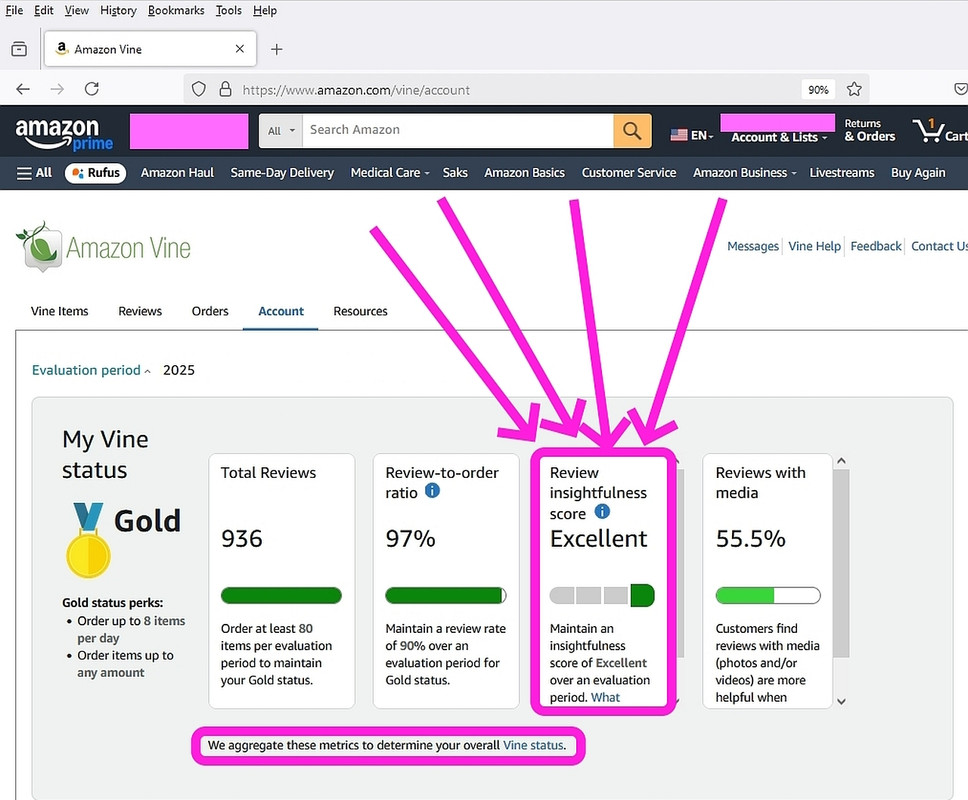
    <https://i.postimg.cc/k5FYJQc7/amazon-score.jpg>

    Amazon gives me up to 8 products a day of any price, so if each product averages, oh, say a hundred bucks, they're giving me for free 800 dollars
    of product a day (which would be about $300K per year of product exposure).
    <https://amazon.com/vine/about>

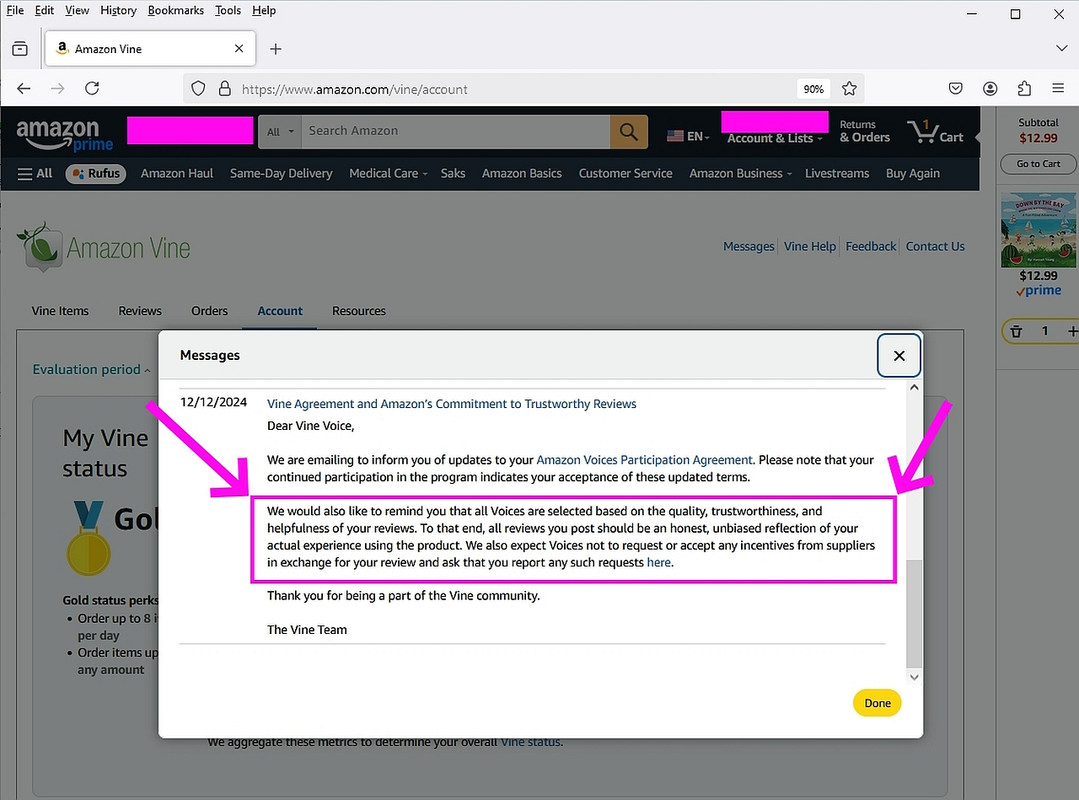
    Amazon rates me every day on how "insightful" I am, where I use AI all the
    time to learn about all the buzzwords in those products that I must review.
    <https://i.postimg.cc/3x3nL4h6/amazon-trust.jpg>

    I'd guess, in a day, I ask a few hundred questions, maybe a thousand turns, which is what they call each interaction - where what AI is really good for
    is telling you about stuff that you could look up - but AI does it for you.

    I also use AI for writing my batch scripts, where I've found it takes at
    least a dozen turns before you get a script that you like - but what's
    super interesting having learned programming since the days of Fortran IV
    and COBOL and PL/1 and IBM 1130 Assembly Language, etc., is that AI makes
    the exact same mistakes we all made when we were learning a programming language.

    The huge DIFFERENCDE is that AI recovers super fast from each error.
    Thousands of times faster than we would recover from the same error.

    I almost never run a Google search anymore due to AI taking it over for me.

    --- SoupGate-Win32 v1.05
    * Origin: fsxNet Usenet Gateway (21:1/5)
  • From s|b@21:1/5 to Marion on Sat Jul 19 16:37:52 2025
    On Sat, 19 Jul 2025 02:56:10 -0000 (UTC), Marion wrote:

    I almost never run a Google search anymore due to AI taking it over for me.

    That's a lot of wasted energy and water.

    --
    s|b

    --- SoupGate-Win32 v1.05
    * Origin: fsxNet Usenet Gateway (21:1/5)