• system freezes requiring reboot when trying to transfer a large archive

    From Juan Bertinand@21:1/5 to All on Sun Jul 13 17:30:42 2025
    The following problem is happening in Ubuntu, but I use Win as well as I
    know others also do, so may have some thoughts. Thanks in advance.

    "I run a dual boot Ubuntu 22.04/ Win 10 system, selectable at boot up in
    Grub. However, recently I am experiencing a mystery problem. I
    recently downloaded a 25 GB archive of a former forum I belonged to. The
    first thing needing done is unzipping the archive after download, but
    that's not the problem. While I can download the archive onto one of my external 500 MB USB hard drives, and unzip it, if I then try and
    transfer this to one of my 4 TB "master" hard drives, my entire system
    will freeze at some point requiring reboot.

    Other than the hard drives within my system, all of my external USB hard
    drives are NOT SSD (HDDs), and are 2.5" size. I seem to be able to
    transfer the 25 GB archive from one of the smaller USB drives to another
    (1TB or less in size), but the trouble starts when trying to use the
    larger 4 TB masters.

    The freezing happened three times and I had to use Win 10 to repair the
    drives (easier for me to just boot into Win and do the repairs). For
    now, I'm going to store the three archive back up copies on my smaller 1
    TB or less USB drives, but still wondering why my system is freezing
    while using the 4 TB drives and this large archive. In all other
    respects, the 4 TB drives have given no problems over the years. None
    of the drive need external power and are USB 2/3.

    Thank you."

    --- SoupGate-Win32 v1.05
    * Origin: fsxNet Usenet Gateway (21:1/5)
  • From Robert Calaghan@21:1/5 to Juan Bertinand on Sun Jul 13 22:52:57 2025
    On 13/07/2025 22:30, Juan Bertinand wrote:
    While I can download the archive onto one of my external 500 MB USB hard drives, and unzip it, if I then try and transfer this to one of my 4 TB "master" hard drives, my entire system will freeze at some point
    requiring reboot.


    1) Why not transfer/copy the entire zip file on to your 4TB HDD before unzipping it?

    2) Assuming there is some logistic problem that we are not aware of of
    not copying the zip file on to the HDD, Windows 10 and windows 11 have
    robocopy that runs in command prompt and it shows you the progress on
    the screen when it is doing the copying process.

    3) Please post back if you want to know the actual command to use
    robocopy or you could research it yourself.

    4) I am assuming that the 4TB HDD is not defective as sometimes
    defective disks can freeze the system when trying to access the
    defective sectors. Scanning the drive can take hours (if not days) so I
    am not going to suggest this to you. Windows File Explorer or Linux Files is not suitable for this as both are very slow. Command line is the only option.

    Hope this helps you.

    --- SoupGate-Win32 v1.05
    * Origin: fsxNet Usenet Gateway (21:1/5)
  • From Paul@21:1/5 to Juan Bertinand on Sun Jul 13 18:41:58 2025
    On Sun, 7/13/2025 5:30 PM, Juan Bertinand wrote:
    The following problem is happening in Ubuntu, but I use Win as well as I know others also do, so may have some thoughts.  Thanks in advance.

    "I run a dual boot Ubuntu 22.04/ Win 10 system, selectable at boot up in Grub.  However, recently I am experiencing a mystery problem.  I recently downloaded a 25 GB archive of a former forum I belonged to. The first thing needing done is unzipping
    the archive after download, but that's not the problem.  While I can download the archive onto one of my external 500 MB USB hard drives, and unzip it, if I then try and transfer this to one of my 4 TB "master" hard drives, my entire system will freeze
    at some point requiring reboot.

    Other than the hard drives within my system, all of my external USB hard drives are NOT SSD (HDDs), and are 2.5" size.  I seem to be able to transfer the 25 GB archive from one of the smaller USB drives to another (1TB or less in size), but the
    trouble starts when trying to use the larger 4 TB masters.

    The freezing happened three times and I had to use Win 10 to repair the drives (easier for me to just boot into Win and do the repairs).  For now, I'm going to store the three archive back up copies on my smaller 1 TB or less USB drives, but still
    wondering why my system is freezing while using the 4 TB drives and this large archive.  In all other respects, the 4 TB drives have given no problems over the years.  None of the drive need external power and are USB 2/3.

    Thank you."

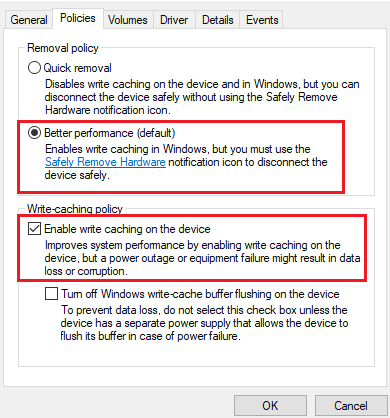
    You can set a device in Windows, for "Quick Removal", to reduce the
    amount of System Write Caching behavior.

    How to enable write caching in Windows:

    Connect your external storage device to the computer
    Select Device Manager [right-click Start, look for Device Manager]
    Expand Disk Drives.
    Right-click the drive on which you want to turn disk write caching on or off, and then click Properties.
    Click the Policies tab.
    ...

    https://www.seagate.com/content/dam/seagate/migrated-assets/www-content/support-content/knowledge-base/images/Write%20caching.png

    Not all the OSes have exactly the same dialog picture.

    *******

    Computers have a limited amount of +5VSB.
    On desktops, this is 3 amperes, according to the Power Supply label.

    Try to limit the number of bus powered USB devices,
    if you own a large number of them, and you have a
    lot of spindles idling.

    Try your transfer experiment with just the suspect drive
    connected to a USB3 connector.

    Most likely, this is just a caching/RAM issue, and the adjustment
    in Ubuntu for dirty_bytes will be enough.

    Paul

    --- SoupGate-Win32 v1.05
    * Origin: fsxNet Usenet Gateway (21:1/5)
  • From Shinji Ikari@21:1/5 to Juan Bertinand on Mon Jul 14 02:45:21 2025
    Hello

    Juan Bertinand <[email protected]> schrieb

    The
    first thing needing done is unzipping the archive after download, but
    that's not the problem. While I can download the archive onto one of my >external 500 MB USB hard drives, and unzip it, if I then try and
    transfer this to one of my 4 TB "master" hard drives, my entire system
    will freeze at some point requiring reboot.

    Just a dumb question: ist the target drive FAT(32) formatted and is
    one of the files bigger than 4GB?

    --- SoupGate-Win32 v1.05
    * Origin: fsxNet Usenet Gateway (21:1/5)
  • From Java Jive@21:1/5 to Shinji Ikari on Mon Jul 14 12:31:01 2025
    On 2025-07-14 01:45, Shinji Ikari wrote:
    Hello

    Juan Bertinand <[email protected]> schrieb

    The
    first thing needing done is unzipping the archive after download, but
    that's not the problem. While I can download the archive onto one of my
    external 500 MB USB hard drives, and unzip it, if I then try and
    transfer this to one of my 4 TB "master" hard drives, my entire system
    will freeze at some point requiring reboot.

    Just a dumb question: ist the target drive FAT(32) formatted and is
    one of the files bigger than 4GB?

    This might be worth investigating, though the largest size of
    disk/partition that FAT32 can handle is 2TB (IIRC it's actually 2TB-1),
    so if he's using FAT32 the 4TB external disk would have to have at least
    2 partitions, which the OP doesn't mention as being the case.

    Also, returning to the OP's original post, it's worth being aware that, historically at least and I've not heard of it ever being fixed, Ubuntu
    and many similar variants of Linux seem to have a resources leak problem
    when using the GUI to copy large amounts of files - the process starts
    off fine, but gradually gets s-l-o-w-e-r and s--l--o--w--e--r until
    eventually it no longer makes any perceptible progress. The answer is
    to use either the 'cp' or 'rsync' commands in a shell.

    --

    Fake news kills!

    I may be contacted via the contact address given on my website:
    www.macfh.co.uk

    --- SoupGate-Win32 v1.05
    * Origin: fsxNet Usenet Gateway (21:1/5)