• One of win11's faults was in win10 Pro!!

    From micky@21:1/5 to All on Wed Jun 4 16:49:39 2025
    XPost: alt.comp.os.windows-11

    One of my complaints about win11 was that, when clicking on the day/time
    in the systray, the enlarged version only showed the month with boxes
    for each day, but not the time. It turns out that win10Pro has the same failing. I'm pretty sure (Yes?????)that when I got it, it showed the
    time, in enlarged numbers, above the current month 30-box display, so
    they must have taken that feature away during an update. I wouldn't
    have noticed because I spend more time on the laptop now which has Home.
    (In win11 I corrected it with one of 5 tweakers.)

    Why does MS take away good things they have already written.

    --- SoupGate-Win32 v1.05
    * Origin: fsxNet Usenet Gateway (21:1/5)
  • From Hank Rogers@21:1/5 to micky on Wed Jun 4 16:56:05 2025
    XPost: alt.comp.os.windows-11

    micky wrote on 6/4/2025 3:49 PM:
    One of my complaints about win11 was that, when clicking on the day/time
    in the systray, the enlarged version only showed the month with boxes
    for each day, but not the time. It turns out that win10Pro has the same failing. I'm pretty sure (Yes?????)that when I got it, it showed the
    time, in enlarged numbers, above the current month 30-box display, so
    they must have taken that feature away during an update. I wouldn't
    have noticed because I spend more time on the laptop now which has Home.
    (In win11 I corrected it with one of 5 tweakers.)

    Why does MS take away good things they have already written.


    It's just what MS does. Try something like StartAllBack. It also fixes
    a lot of other things. There are several other programs that improve
    the shabby win 11 start menu, taskbar, explorer, etc.

    Good luck.

    --- SoupGate-Win32 v1.05
    * Origin: fsxNet Usenet Gateway (21:1/5)
  • From Operation Sindoor@21:1/5 to micky on Wed Jun 4 23:06:12 2025
    XPost: alt.comp.os.windows-11

    On 04/06/2025 21:49, micky wrote:
    One of my complaints about win11 was that, when clicking on the day/time
    in the systray, the enlarged version only showed the month with boxes
    for each day, but not the time. It turns out that win10Pro has the same failing. I'm pretty sure (Yes?????)that when I got it, it showed the
    time, in enlarged numbers, above the current month 30-box display, so
    they must have taken that feature away during an update. I wouldn't
    have noticed because I spend more time on the laptop now which has Home.
    (In win11 I corrected it with one of 5 tweakers.)

    Why does MS take away good things they have already written.

    Instead of just clicking, why don't you not

    right-Click >> Adjust Date & Time

    It should show you date & time in enlarged letters. It does on my Win11 Pro.

    Jai Hind

    --- SoupGate-Win32 v1.05
    * Origin: fsxNet Usenet Gateway (21:1/5)
  • From Paul@21:1/5 to micky on Wed Jun 4 18:58:22 2025
    XPost: alt.comp.os.windows-11

    On Wed, 6/4/2025 4:49 PM, micky wrote:
    One of my complaints about win11 was that, when clicking on the day/time
    in the systray, the enlarged version only showed the month with boxes
    for each day, but not the time. It turns out that win10Pro has the same failing. I'm pretty sure (Yes?????)that when I got it, it showed the
    time, in enlarged numbers, above the current month 30-box display, so
    they must have taken that feature away during an update. I wouldn't
    have noticed because I spend more time on the laptop now which has Home.
    (In win11 I corrected it with one of 5 tweakers.)

    Why does MS take away good things they have already written.


    Maybe it was one of your add-ons ?

    Paul

    --- SoupGate-Win32 v1.05
    * Origin: fsxNet Usenet Gateway (21:1/5)
  • From micky@21:1/5 to [email protected] on Wed Jun 4 20:49:18 2025
    XPost: alt.comp.os.windows-11

    In alt.comp.os.windows-11, on Wed, 4 Jun 2025 18:58:22 -0400, Paul <[email protected]d> wrote:

    On Wed, 6/4/2025 4:49 PM, micky wrote:
    One of my complaints about win11 was that, when clicking on the day/time
    in the systray, the enlarged version only showed the month with boxes
    for each day, but not the time. It turns out that win10Pro has the same
    failing. I'm pretty sure (Yes?????)that when I got it, it showed the
    time, in enlarged numbers, above the current month 30-box display, so
    they must have taken that feature away during an update. I wouldn't
    have noticed because I spend more time on the laptop now which has Home.
    (In win11 I corrected it with one of 5 tweakers.)

    Why does MS take away good things they have already written.


    Maybe it was one of your add-ons ?

    The only add-on to win10 is the same in Pro and Home, Open Shell, and it doesn't mess up Home. Plus I installed Open Shell right after I got Pro
    and I'm pretty sure I the displayed time then.

    Do the people here show the time in large number atop the month when
    they click on the time/date in the systray in win10 Pro?

    Paul

    --- SoupGate-Win32 v1.05
    * Origin: fsxNet Usenet Gateway (21:1/5)
  • From Char Jackson@21:1/5 to All on Wed Jun 4 20:52:56 2025
    XPost: alt.comp.os.windows-11

    On Wed, 04 Jun 2025 20:49:18 -0400, micky <[email protected]>
    wrote:

    Do the people here show the time in large number atop the month when
    they click on the time/date in the systray in win10 Pro?

    Yes.

    This system is bone stock, with no tweaker programs of any kind. If
    there's an update that changes the clock behavior, I haven't seen it,
    and I'm up to date on updates.

    --- SoupGate-Win32 v1.05
    * Origin: fsxNet Usenet Gateway (21:1/5)
  • From Paul@21:1/5 to Char Jackson on Wed Jun 4 22:38:03 2025
    XPost: alt.comp.os.windows-11

    On Wed, 6/4/2025 9:52 PM, Char Jackson wrote:
    On Wed, 04 Jun 2025 20:49:18 -0400, micky <[email protected]>
    wrote:

    Do the people here show the time in large number atop the month when
    they click on the time/date in the systray in win10 Pro?

    Yes.

    This system is bone stock, with no tweaker programs of any kind. If
    there's an update that changes the clock behavior, I haven't seen it,
    and I'm up to date on updates.


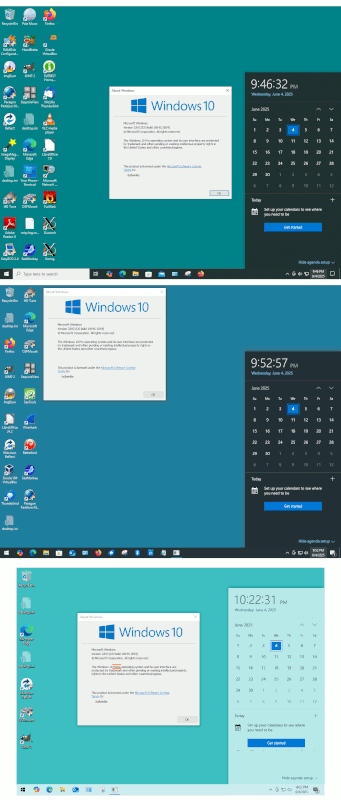
    Here is a sampler of three OS installs.

    All have big numbers at the top.

    The top two are Win10 Pro, the bottom one is a Win10Home.

    [Picture]

    https://i.postimg.cc/43ww8gNW/bignumbers-wheel-of-fortune.gif

    Strangely, they're all 19045.5854 . What are the odds they
    all ate the same Alpo/Kibble ?

    Paul

    --- SoupGate-Win32 v1.05
    * Origin: fsxNet Usenet Gateway (21:1/5)
  • From micky@21:1/5 to Sindoor on Wed Jun 4 22:57:05 2025
    XPost: alt.comp.os.windows-11

    In alt.comp.os.windows-11, on Wed, 4 Jun 2025 23:06:12 +0000, Operation
    Sindoor <[email protected]d> wrote:

    On 04/06/2025 21:49, micky wrote:
    One of my complaints about win11 was that, when clicking on the day/time
    in the systray, the enlarged version only showed the month with boxes
    for each day, but not the time. It turns out that win10Pro has the same
    failing. I'm pretty sure (Yes?????)that when I got it, it showed the
    time, in enlarged numbers, above the current month 30-box display, so
    they must have taken that feature away during an update. I wouldn't
    have noticed because I spend more time on the laptop now which has Home.
    (In win11 I corrected it with one of 5 tweakers.)

    Why does MS take away good things they have already written.

    Instead of just clicking, why don't you not

    right-Click >> Adjust Date & Time

    Well that's 3 steps instead of one, the two you list plus you have to
    position the cursor on a long list of choices. Also it opens Settings
    and then you have to close Settings OR put it back to the screen it was
    on and go back to the window you were on. .

    It should show you date & time in enlarged letters.

    In my Win10 Pro, the text is quite small.

    It does on my Win11 Pro.

    In my Win11 Pro, it is indeed large enough but I find it easier, just
    one step, the way it still is in Win10 Home, and I made it the same with
    one the tweaks, probbly Explrer Patch.

    Jai Hind

    --- SoupGate-Win32 v1.05
    * Origin: fsxNet Usenet Gateway (21:1/5)
  • From micky@21:1/5 to Jackson on Wed Jun 4 23:09:21 2025
    XPost: alt.comp.os.windows-11

    In alt.comp.os.windows-10, on Wed, 04 Jun 2025 20:52:56 -0500, Char
    Jackson <[email protected]d> wrote:

    On Wed, 04 Jun 2025 20:49:18 -0400, micky <[email protected]>
    wrote:

    Do the people here show the time in large number atop the month when
    they click on the time/date in the systray in win10 Pro?

    Yes.

    This system is bone stock, with no tweaker programs of any kind. If
    there's an update that changes the clock behavior, I haven't seen it,
    and I'm up to date on updates.

    Interesting. Unlike the win10 tweaks, the win11 tweaks didn't start
    until this February. I'm pretty sure the time was missing before any
    tweaks were installed, other than Open Shell, but it wouldn't be
    productive to reverse things one step at a time to get back to those benchmarks.

    --- SoupGate-Win32 v1.05
    * Origin: fsxNet Usenet Gateway (21:1/5)
  • From micky@21:1/5 to [email protected] on Wed Jun 4 23:06:47 2025
    XPost: alt.comp.os.windows-11

    In alt.comp.os.windows-10, on Wed, 04 Jun 2025 20:49:18 -0400, micky <[email protected]> wrote:

    In alt.comp.os.windows-11, on Wed, 4 Jun 2025 18:58:22 -0400, Paul ><[email protected]d> wrote:

    On Wed, 6/4/2025 4:49 PM, micky wrote:
    One of my complaints about win11 was that, when clicking on the day/time >>> in the systray, the enlarged version only showed the month with boxes
    for each day, but not the time. It turns out that win10Pro has the same >>> failing. I'm pretty sure (Yes?????)that when I got it, it showed the
    time, in enlarged numbers, above the current month 30-box display, so
    they must have taken that feature away during an update. I wouldn't
    have noticed because I spend more time on the laptop now which has Home. >>> (In win11 I corrected it with one of 5 tweakers.)

    Why does MS take away good things they have already written.


    Maybe it was one of your add-ons ?

    The only add-on to win10 is the same in Pro and Home, Open Shell, and it >doesn't mess up Home.

    I made a mistake here. I've also made one or two changes 7+tweaker and Aerotweaker, but the same on both win10 boxes and certainly never
    intentionally got rid of the Time. And none of them mentioned time.
    Still it was so long ago that I can't prove this, and it would be a
    wastedof time to go through all the options those tweakers have just to
    see if any would get rid of the time. So I will let my comments stand,
    but admit they are unproven.

    Plus I installed Open Shell right after I got Pro
    and I'm pretty sure I the displayed time then.

    Do the people here show the time in large number atop the month when
    they click on the time/date in the systray in win10 Pro?

    Paul

    --- SoupGate-Win32 v1.05
    * Origin: fsxNet Usenet Gateway (21:1/5)