On Mon, 7/28/2025 4:16 AM, scbs29 wrote:
Thankyou for all of the advice.
Just one more question (I think) before deciding whether or not to take the plunge.
My system disk is partitioned as System Reserved just under 500Mb and C: which fills the rest of the 500 Gb SSD.
The partition setup for Windows 11 is of course different to that for 10.
If I change from 10 to 11 through the Microsoft Update service, will the update automatically create the
new partition setup for me, or do I have to do that manually before the update?
TIA
On Tue, 15 Apr 2025 12:10:27 +0100, scbs29 <[email protected]> wrote:
Hello all
At present I use Windows 10 Pro, but am beginning to consider changing to Windows 11 Pro.
I do not like the idea of having to log in with a Microsoft account though. If I did decide
to change to Windows 11 is it possible to install to replace my Windows 10 OS with a
local account and not affect my installed software. Some of the software I use is
no longer available and I do not wish to lose them.
I have looked on the internet and there seem to be differing opinions as to what I want
to do.
Has anyone any experience of what I wish to do ?
Is there a Windows 11 newsgroup ? I am having difficulty in finding one.
alt.comp.os.windows-11 # Refresh newsgroups and see if it exists on Easynews.
Let's start with a picture.
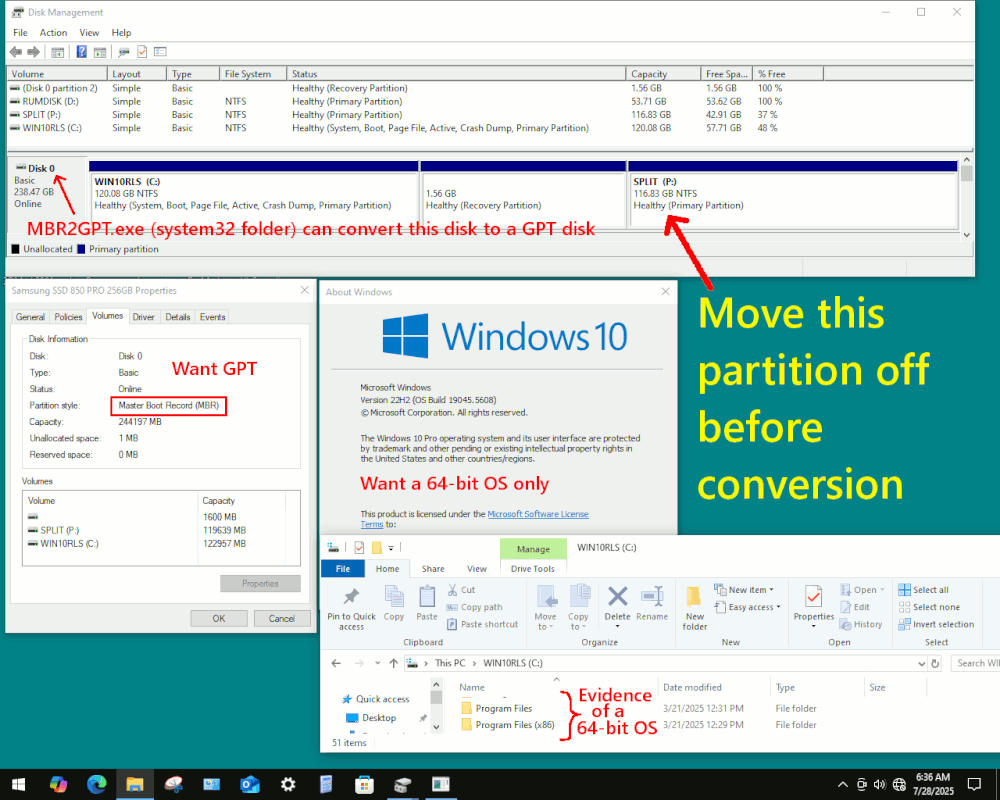
This is a rough approximation of what I think your disk looks like.
[Picture]
https://i.postimg.cc/dtJYk2nq/Win10-RLS-256-GBSamsung-MBR-Boot.gif
Even if your install environment is non-compliant at the hardware level,
I think UEFI Non-Secure Boot is a W11 minimum, and on a GPT disk.
(You could do that with Rufus.ie USB preparation utility.)
Windows 10 allowed Legacy Boot as an option, on an MBR disk. I have fun remembering exactly which disk has a setup like this on it. I do not
create these setups systematically (like a scientist), each install is
"just an accident".
I have grabbed this SSD from my collection, as an example of a 64-bit
OS that boots in Legacy Mode, on an MBR disk.
The "MGR2GPT.exe" utility, we're not exactly sure who or how Microsoft
got this utility written, but it violates one of the "first laws" of
partition management. Anyone who writes partition management software knows, "each operation must be a primitive" and "ask the user before each primitive operation".
This is to prevent damage, to goods for which a backup might not exist.
The MBR2GPT utility on the other hand, does more partition operations than
is normal for Partition Management software.
One of the things it is going to do, is validate the incoming partition setup, to "see if this is a partition setup I recognize and support". That is why,
in my artwork above, I have indicated my DATA partition on the end, should be moved off to another storage device before conversion. That partition would likely give a problem during "validate".
And then, having said such a thing, that the utility would not tolerate a D: (DATA)
partition, you would also have to remember that windows installers do not tolerate "moved" Program File folders, "moved" profile folders and other customizations. There are likely a large number of customizations that
are not going to endear you to this process. Like, what would a
Win10-to-Win11 Upgrade-inplace-install do, if it found Explorer-Patcher present ???
*******
First you need to do a backup of the storage device. It might take
multiple tries, for you to get all your details aligned with whatever requirements apply to your install. The way you are approaching this installation, suggests you'll be using Rufus or something, and your
machine is hardware-wise, just as non-compliant as the machine I took
that picture on (fourth generation 4930K olde machine). I do have
Win11 installed on that machine by the way, as a Rufus-inspired install.
https://www.thewindowsclub.com/mbr2gpt-tool-windows-10
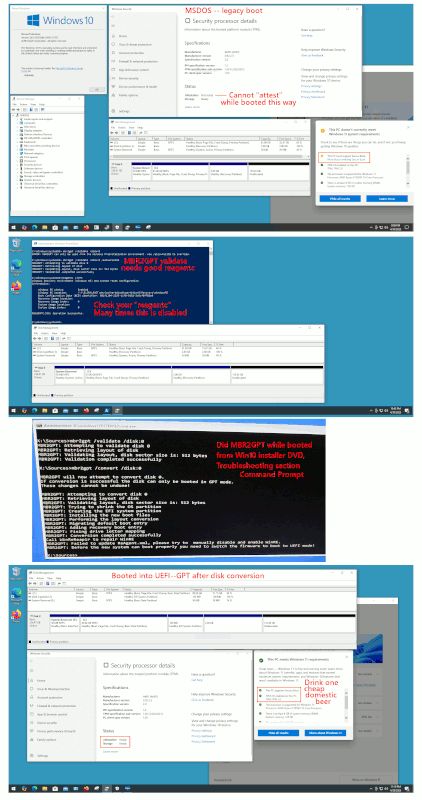
On a different machine, I did one of the disk conversions. (I only found
this just now, looking in my Sent folder.)
[Picture] Download original file (using the Download button) for highest resolution
https://i.postimg.cc/d12yNSg7/preparing-disk-for-W11-adventures.gif
It almost looks like my ReagentC (WinRE.wim emergency boot) was living in C: instead of the 2GB partition. Notice that Partition 3 was the ReagentC initially,
and now Partition 3 is the EFI System Partition, which would invalidate the ReagentC reference to "Partition 3". The ReagentC likely should have said "Partition 4" before I started, and then maybe the reagentc repair step
the utility was doing, it might have worked then. ReagentC can be
repaired with PushButtonReset method (PBR), which is the same method
a Windows OS installer disc uses (even if, many times, the stupid
installer doesn't manage to do this correctly!).
I don't want to scare you off the procedure, and this ReagentC issue can be repaired separately, after you check (some day) as Administrator,
that ReagentC is enabled (and presumably valid).
reagentc /info # Check it is enabled when all is said and done later.
The "preparing-disk-for-W11-adventures.gif" is closer to what I would
expect for a fully ready for conversion disk. But it looks like
in the example, my ReagentC is enabled and valid before the conversion
started, but likely is broken (and repairable) after the conversion is done.
The "validate" step is checking for ReagentC being enabled, before the
MBR2GPT conversion, and it is doing this because the utility has a
ReagentC repair step it wants to do. And it can do that, IF the
ReagentC is in decent shape. It looks like my conversion happened,
but I didn't set my ReagentC up "perfectly right" and that is why the
utility grumbled a bit while running. Maybe if it said Partition 4 before
the process began, it might have worked.
So even before you get to the step of installing Windows 11, you will be
GPT Non-Secure Booting UEFI Windows 10 x64 before you do the next step,
which is the In-Place Upgrade Install. After MBR2GPT runs, the storage
device should be bootable, and everything should look as before. The
Disk Management partition lineup, I'm not completely happy with how
MBR2GPT does it, but it would be a "metric bitch" to fix :-) It
would take some drag and drop restoration, boot repair, reagentc repair,
and so on. It's like re-paving the road.
But you also have to remember, that not many softwares offer
this service, so getting this far is some kind of miracle.
You have to be appreciative of that utility, even if the
utility does not seem to be all that adventurous. The output
of such a complex mess could easily be broken, which is why
there is a "validate" as guard rails. Like, if your Windows 10 boots
after that conversion is done... it's some kind of miracle :-)
Paul
--- SoupGate-Win32 v1.05
* Origin: fsxNet Usenet Gateway (21:1/5)