On Apr 10, 2025 at 5:52:33 AM EDT, "Marion" <[email protected]> wrote:
On Thu, 10 Apr 2025 03:24:59 +0000, Tyrone wrote :
Once connected, you can copy files in both directions. It is NOT difficult to
copy files from Windows (or Unix or Linux) to iOS (Unix).
You were paid by Apple to defend Apple to the death, for years, nospam.
You're brazenly fabricating imaginary iOS functionality that doesn't exist.
Wow, you really are in meltdown mode now. You just can't accept facts, can you?
The fact you can't supply a screenshot of it working says more than you do. >> Hell, you can't even *find* a screenshot on the entire Internet showing it.
The fact that YOU refuse to even try it just proves you are a useless troll.
SMB networking is real. iOS/iPadOS/MacOS/Windows/Linux have this functionality. Because SMB is a networking standard. The Files app uses SMB networking.
But hey, keep on living in denial.
On Thu, 10 Apr 2025 03:24:59 +0000, Tyrone wrote :
Once connected, you can copy files in both directions. It is NOT difficult to
copy files from Windows (or Unix or Linux) to iOS (Unix).
You were paid by Apple to defend Apple to the death, for years, nospam. You're brazenly fabricating imaginary iOS functionality that doesn't exist.
The fact you can't supply a screenshot of it working says more than you do. Hell, you can't even *find* a screenshot on the entire Internet showing it.
On 2025-04-10 17:34, Tyrone wrote:
On Apr 10, 2025 at 5:52:33 AM EDT, "Marion" <[email protected]> wrote:
On Thu, 10 Apr 2025 03:24:59 +0000, Tyrone wrote :Wow, you really are in meltdown mode now. You just can't accept facts, can >> you?
Once connected, you can copy files in both directions. It is NOT difficult to
copy files from Windows (or Unix or Linux) to iOS (Unix).
You were paid by Apple to defend Apple to the death, for years, nospam.
You're brazenly fabricating imaginary iOS functionality that doesn't exist. >>
The fact you can't supply a screenshot of it working says more than you do. >>> Hell, you can't even *find* a screenshot on the entire Internet showing it. >>The fact that YOU refuse to even try it just proves you are a useless troll. >>
SMB networking is real. iOS/iPadOS/MacOS/Windows/Linux have this
functionality. Because SMB is a networking standard. The Files app uses SMB >> networking.
But hey, keep on living in denial.
It's really quite sad for him, isn't it?
That his whole existence appears to revolve around pretending that Apple products can't do things that they quite clearly can do.
Tyrone wrote:
On Apr 10, 2025 at 8:37:15 PM EDT, "Alan" <[email protected]> wrote:
On 2025-04-10 17:34, Tyrone wrote:
On Apr 10, 2025 at 5:52:33 AM EDT, "Marion" <[email protected]>
wrote:
On Thu, 10 Apr 2025 03:24:59 +0000, Tyrone wrote :
Once connected, you can copy files in both directions. It is
NOT difficult to copy files from Windows (or Unix or Linux)
to iOS (Unix).
You were paid by Apple to defend Apple to the death, for
years, nospam. You're brazenly fabricating imaginary iOS
functionality that doesn't exist.
Wow, you really are in meltdown mode now. You just can't accept
facts, can you?
The fact you can't supply a screenshot of it working says more
than you do. Hell, you can't even find a screenshot on the
entire Internet showing it.
The fact that YOU refuse to even try it just proves you are a
useless troll.
SMB networking is real. iOS/iPadOS/MacOS/Windows/Linux have this
functionality. Because SMB is a networking standard. The Files
app uses SMB networking.
But hey, keep on living in denial.
It's really quite sad for him, isn't it?
That his whole existence appears to revolve around pretending that
Apple products can't do things that they quite clearly can do.
It's only because he is a child. If Mr. "I only deal in facts" was an
actual adult (that he always claims to be) he would admit he is wrong
and drop this whole ridiculous topic. Then slink away for a few
months.
But nope. He is doubling down with even more absurd claims. We are
"brazenly fabricating imaginary iOS functionality that doesn't
exist".
What a twerp.
And I guarantee he will claim your screenshots are "faked" and/or
"don't prove anything". Yet - according to him - we are the "trolls"
here.
Hey Arlen, here is some documentation on the "Imaginary iOS
Functionality".
https://www.reddit.com/r/ios/comments/d82piq/pro_tip_sharing_between_pc_and_ios_using_smb_and/?rdt=53352
I think the point he's making is you cannot initiate the file transfers
from the PC side, it can only be done from the iOS side.
Tyrone wrote:
On Apr 10, 2025 at 8:37:15 PM EDT, "Alan" <[email protected]> wrote:
On 2025-04-10 17:34, Tyrone wrote:
On Apr 10, 2025 at 5:52:33 AM EDT, "Marion" <[email protected]>
wrote:
On Thu, 10 Apr 2025 03:24:59 +0000, Tyrone wrote :
Once connected, you can copy files in both directions. It is
NOT difficult to copy files from Windows (or Unix or Linux)
to iOS (Unix).
You were paid by Apple to defend Apple to the death, for
years, nospam. You're brazenly fabricating imaginary iOS
functionality that doesn't exist.
Wow, you really are in meltdown mode now. You just can't accept
facts, can you?
The fact you can't supply a screenshot of it working says more
than you do. Hell, you can't even find a screenshot on the
entire Internet showing it.
The fact that YOU refuse to even try it just proves you are a
useless troll.
SMB networking is real. iOS/iPadOS/MacOS/Windows/Linux have this
functionality. Because SMB is a networking standard. The Files
app uses SMB networking.
But hey, keep on living in denial.
It's really quite sad for him, isn't it?
That his whole existence appears to revolve around pretending that
Apple products can't do things that they quite clearly can do.
It's only because he is a child. If Mr. "I only deal in facts" was an
actual adult (that he always claims to be) he would admit he is wrong
and drop this whole ridiculous topic. Then slink away for a few
months.
But nope. He is doubling down with even more absurd claims. We are
"brazenly fabricating imaginary iOS functionality that doesn't
exist".
What a twerp.
And I guarantee he will claim your screenshots are "faked" and/or
"don't prove anything". Yet - according to him - we are the "trolls"
here.
Hey Arlen, here is some documentation on the "Imaginary iOS
Functionality".
https://www.reddit.com/r/ios/comments/d82piq/pro_tip_sharing_between_pc_and_ios_using_smb_and/?rdt=53352
I think the point he's making is you cannot initiate the file transfers
from the PC side, it can only be done from the iOS side.
But there is proof at the link I posted above.
On Apr 10, 2025 at 9:29:44 PM EDT, ""badgolferman""
<[email protected]> wrote:
Tyrone wrote:
On Apr 10, 2025 at 8:37:15 PM EDT, "Alan" <[email protected]> wrote:
On 2025-04-10 17:34, Tyrone wrote:
On Apr 10, 2025 at 5:52:33 AM EDT, "Marion" <[email protected]>
wrote:
On Thu, 10 Apr 2025 03:24:59 +0000, Tyrone wrote :
Once connected, you can copy files in both directions. It is
NOT difficult to copy files from Windows (or Unix or Linux)
to iOS (Unix).
You were paid by Apple to defend Apple to the death, for
years, nospam. You're brazenly fabricating imaginary iOS
functionality that doesn't exist.
Wow, you really are in meltdown mode now. You just can't accept
facts, can you?
The fact you can't supply a screenshot of it working says more
than you do. Hell, you can't even find a screenshot on the
entire Internet showing it.
The fact that YOU refuse to even try it just proves you are a
useless troll.
SMB networking is real. iOS/iPadOS/MacOS/Windows/Linux have this
functionality. Because SMB is a networking standard. The Files
app uses SMB networking.
But hey, keep on living in denial.
It's really quite sad for him, isn't it?
That his whole existence appears to revolve around pretending that
Apple products can't do things that they quite clearly can do.
It's only because he is a child. If Mr. "I only deal in facts" was an
actual adult (that he always claims to be) he would admit he is wrong
and drop this whole ridiculous topic. Then slink away for a few
months.
But nope. He is doubling down with even more absurd claims. We are
"brazenly fabricating imaginary iOS functionality that doesn't
exist".
What a twerp.
And I guarantee he will claim your screenshots are "faked" and/or
"don't prove anything". Yet - according to him - we are the "trolls"
here.
Hey Arlen, here is some documentation on the "Imaginary iOS
Functionality".
https://www.reddit.com/r/ios/comments/d82piq/pro_tip_sharing_between_pc_and_ios_using_smb_and/?rdt=53352
I think the point he's making is you cannot initiate the file transfers
from the PC side, it can only be done from the iOS side.
No, that's just his latest fallback position. Originally it was "It's impossible to get a photo from Windows to iOS without using internet servers".
And what difference does that make anyway? File transfers between Windows and Unix is EASY. BTW, iOS is Unix. Using standard, included functionality on both
sides. Nothing else needs to be installed on either side.
NOW he is claiming that "We are brazenly fabricating imaginary iOS functionality that doesn't exist".
But there is proof at the link I posted above. WITH screen shots.
Arlen has been caught - once again - lying. He claims to have SO MANY iOS devices, yet he knows nothing about iOS. The fact that he refuses to acknowledge these SMB networking facts says all you need to know about him.
So stop defending him.
On Fri, 11 Apr 2025 03:35:28 +0000, Tyrone wrote :
But there is proof at the link I posted above.
Someone already posted *many* iOS 17 & 18 support links showing it doesn't work
On Fri, 11 Apr 2025 03:35:28 +0000, Tyrone wrote :
But there is proof at the link I posted above.
Someone already posted *many* iOS 17 & 18 support links showing it doesn't work, and the best you can come up with is a link from many years ago?
Your claim that iOS hasn't changed in half a dozen years is absurd.
Show a link of it working the way *everyone* wants it to work, which, let's be clear, is how the LocalSend solution Paul suggested works, and, which, let's be doubly clear, is how it works with Android already w/o LocalSend.
The fact remains is we have a solution for billions of people already.
*Tutorial: How to send files between Windows & iOS over the LAN using LocalSend*
<https://www.novabbs.com/computers/article-flat.php?id=86116&group=alt.comp.os.windows-10#86116>
That's all that really matters unless you can *improve* upon that solution.
On Apr 10, 2025 at 9:29:44 PM EDT, ""badgolferman""[...]
Hey Arlen, here is some documentation on the "Imaginary iOS
Functionality".
https://www.reddit.com/r/ios/comments/d82piq/pro_tip_sharing_between_pc_and_ios_using_smb_and/?rdt=53352
I think the point he's making is you cannot initiate the file transfers from the PC side, it can only be done from the iOS side.
No, that's just his latest fallback position. Originally it was "It's impossible to get a photo from Windows to iOS without using internet servers".
And what difference does that make anyway? File transfers between Windows and Unix is EASY. BTW, iOS is Unix. Using standard, included functionality on both
sides. Nothing else needs to be installed on either side.
People have been doing what you claim is "impossible" for ages on iOS,
On 11 Apr 2025 15:59:32 GMT, Jolly Roger wrote :
People have been doing what you claim is "impossible" for ages on iOS,
Show us how you sat at your PC and initiated the file transfer from the PC
to iOS, since we all do that all day, every day, with Android & Windows.
That's how it's done natively for every operating system except for iOS.
1. Sit at Windows
2. Plug the phone into the USB port
3. Using the Windows file explorer, slide files onto the Android device.
Most people here aren't aware that you Apple trolls are wholly unprepossessing deceitful duplicities sadistic liars, Jolly Roger.
So show us how you did what everyone already does, but with iOS.
We'll wait for all your childish excuses explaining WHY you lied to us.
Alan <[email protected]> wrote:
On 2025-04-11 12:08, Marion wrote:
On 11 Apr 2025 15:59:32 GMT, Jolly Roger wrote :
People have been doing what you claim is "impossible" for ages on iOS,
Show us how you sat at your PC and initiated the file transfer from the PC
to iOS, since we all do that all day, every day, with Android & Windows.
That's how it's done natively for every operating system except for iOS. 1. Sit at Windows
2. Plug the phone into the USB port
3. Using the Windows file explorer, slide files onto the Android device.
Most people here aren't aware that you Apple trolls are wholly unprepossessing deceitful duplicities sadistic liars, Jolly Roger.
So show us how you did what everyone already does, but with iOS.
We'll wait for all your childish excuses explaining WHY you lied to us.
Why does it suddenly matter where you initiate the transfer?
When I'm working with my clients remotely via one of the remote desktop solutions, it can be important that I can initiate the transfer of a
file from my machine...
...but that's because the other machine isn't where I am.
When you're transferring things to and from your phone, it's sitting
right beside you.
Using a keyboard and mouse on a large screen is much easier.
On Apr 11, 2025, badgolferman wrote
(in article <vtbuts$127e0$[email protected]>):
Alan <[email protected]> wrote:
On 2025-04-11 12:08, Marion wrote:
On 11 Apr 2025 15:59:32 GMT, Jolly Roger wrote :Why does it suddenly matter where you initiate the transfer?
People have been doing what you claim is "impossible" for ages on iOS, >>>>Show us how you sat at your PC and initiated the file transfer from the PC >>>> to iOS, since we all do that all day, every day, with Android & Windows. >>>>
That's how it's done natively for every operating system except for iOS. >>>> 1. Sit at Windows
2. Plug the phone into the USB port
3. Using the Windows file explorer, slide files onto the Android device. >>>>
Most people here aren't aware that you Apple trolls are wholly
unprepossessing deceitful duplicities sadistic liars, Jolly Roger.
So show us how you did what everyone already does, but with iOS.
We'll wait for all your childish excuses explaining WHY you lied to us. >>>
When I'm working with my clients remotely via one of the remote desktop
solutions, it can be important that I can initiate the transfer of a
file from my machine...
...but that's because the other machine isn't where I am.
When you're transferring things to and from your phone, it's sitting
right beside you.
Using a keyboard and mouse on a large screen is much easier.
Why not use those on an IOS device?
Bill W wrote:
Using a keyboard and mouse on a large screen is much easier.
Why not use those on an IOS device?
Why would I go buy those for an iPhone?
I'm not the one complaining about the inability to write from Windows
to iPhone. The method I have now is good enough for me, but I don't
dismiss other people who prefer initiating the transfer from the PC
side. I would prefer it too but am willing to put up with the current shortcoming and that's why I won't use the Phone Link or Local Send
methods.
Alan <[email protected]> wrote:
On 2025-04-11 12:08, Marion wrote:
On 11 Apr 2025 15:59:32 GMT, Jolly Roger wrote :
People have been doing what you claim is "impossible" for ages on iOS,
Show us how you sat at your PC and initiated the file transfer from the PC >>> to iOS, since we all do that all day, every day, with Android & Windows. >>>
That's how it's done natively for every operating system except for iOS. >>> 1. Sit at Windows
2. Plug the phone into the USB port
3. Using the Windows file explorer, slide files onto the Android device. >>>
Most people here aren't aware that you Apple trolls are wholly
unprepossessing deceitful duplicities sadistic liars, Jolly Roger.
So show us how you did what everyone already does, but with iOS.
We'll wait for all your childish excuses explaining WHY you lied to us.
Why does it suddenly matter where you initiate the transfer?
When I'm working with my clients remotely via one of the remote desktop
solutions, it can be important that I can initiate the transfer of a
file from my machine...
...but that's because the other machine isn't where I am.
When you're transferring things to and from your phone, it's sitting
right beside you.
Using a keyboard and mouse on a large screen is much easier.
Alan <[email protected]> wrote:
On 2025-04-11 15:06, badgolferman wrote:
Bill W wrote:
Using a keyboard and mouse on a large screen is much easier.
Why not use those on an IOS device?
Why would I go buy those for an iPhone?
I'm not the one complaining about the inability to write from Windows
to iPhone. The method I have now is good enough for me, but I don't
dismiss other people who prefer initiating the transfer from the PC
side. I would prefer it too but am willing to put up with the current
shortcoming and that's why I won't use the Phone Link or Local Send
methods.
You also haven't once refuted Marion/Arlen's bullshit about no one being
able to provide screenshots of it working.
I’m not here to fight your battles, 51.
On 2025-04-11 13:43, badgolferman wrote:
Alan <[email protected]> wrote:
On 2025-04-11 12:08, Marion wrote:
On 11 Apr 2025 15:59:32 GMT, Jolly Roger wrote :Why does it suddenly matter where you initiate the transfer?
People have been doing what you claim is "impossible" for ages on iOS, >>>>Show us how you sat at your PC and initiated the file transfer from
the PC
to iOS, since we all do that all day, every day, with Android &
Windows.
That's how it's done natively for every operating system except for
iOS.
1. Sit at Windows
2. Plug the phone into the USB port
3. Using the Windows file explorer, slide files onto the Android
device.
Most people here aren't aware that you Apple trolls are wholly
unprepossessing deceitful duplicities sadistic liars, Jolly Roger.
So show us how you did what everyone already does, but with iOS.
We'll wait for all your childish excuses explaining WHY you lied to us. >>>
When I'm working with my clients remotely via one of the remote desktop
solutions, it can be important that I can initiate the transfer of a
file from my machine...
...but that's because the other machine isn't where I am.
When you're transferring things to and from your phone, it's sitting
right beside you.
Using a keyboard and mouse on a large screen is much easier.
Look at you!
Good little, toadie!
On 2025-04-11 15:06, badgolferman wrote:
Bill W wrote:
Using a keyboard and mouse on a large screen is much easier.
Why not use those on an IOS device?
Why would I go buy those for an iPhone?
I'm not the one complaining about the inability to write from Windows
to iPhone.� The method I have now is good enough for me, but I don't
dismiss other people who prefer initiating the transfer from the PC
side.� I would prefer it too but am willing to put up with the current
shortcoming and that's why I won't use the Phone Link or Local Send
methods.
You also haven't once refuted Marion/Arlen's bullshit about no one being
able to provide screenshots of it working.
Alan wrote:
On 2025-04-11 13:43, badgolferman wrote:
Alan <[email protected]> wrote:
On 2025-04-11 12:08, Marion wrote:
On 11 Apr 2025 15:59:32 GMT, Jolly Roger wrote :
People have been doing what you claim is "impossible" for ages on
iOS,
Show us how you sat at your PC and initiated the file transfer from
the PC
to iOS, since we all do that all day, every day, with Android &
Windows.
That's how it's done natively for every operating system except for
iOS.
1. Sit at Windows
2. Plug the phone into the USB port
3. Using the Windows file explorer, slide files onto the Android
device.
Most people here aren't aware that you Apple trolls are wholly
unprepossessing deceitful duplicities sadistic liars, Jolly Roger.
So show us how you did what everyone already does, but with iOS.
We'll wait for all your childish excuses explaining WHY you lied to
us.
Why does it suddenly matter where you initiate the transfer?
When I'm working with my clients remotely via one of the remote desktop >>>> solutions, it can be important that I can initiate the transfer of a
file from my machine...
...but that's because the other machine isn't where I am.
When you're transferring things to and from your phone, it's sitting
right beside you.
Using a keyboard and mouse on a large screen is much easier.
Look at you!
Good little, toadie!
Did your monthly check from cupertino come yet?
You also haven't once refuted Marion/Arlen's bullshit about no one being
able to provide screenshots of it working.
I'm not here to fight your battles, 51.
Using <news:vtc6lg$12eof$[email protected]>, badgolferman wrote:
You also haven't once refuted Marion/Arlen's bullshit about no one
being able to provide screenshots of it working.
I'm not here to fight your battles, 51.
He didn't do what he said he did.
His screenshot used the cloud for the copy. Says so right in the
screenshots (he forgot to edit that out).
Alan <[email protected]> wrote:
On 2025-04-11 18:07, david wrote:
Using <news:vtc6lg$12eof$[email protected]>, badgolferman wrote:
You also haven't once refuted Marion/Arlen's bullshit about no one
being able to provide screenshots of it working.
I'm not here to fight your battles, 51.
He didn't do what he said he did.
His screenshot used the cloud for the copy. Says so right in the
screenshots (he forgot to edit that out).
No. ONE of the files I used was on iCloud drive...
...but it was present ON THE DEVICE.
The other was from my Photos app, and was also ON THE DEVICE.
https://images.app.goo.gl/cyGTocf8QFraCvWP6
Using <news:vtc6lg$12eof$[email protected]>, badgolferman wrote:
You also haven't once refuted Marion/Arlen's bullshit about no one
being able to provide screenshots of it working.
I'm not here to fight your battles, 51.
He didn't do what he said he did.
His screenshot used the cloud for the copy. Says so right in the
screenshots (he forgot to edit that out).
Alan <[email protected]> wrote:
On 2025-04-11 15:06, badgolferman wrote:
Bill W wrote:
Using a keyboard and mouse on a large screen is much easier.
Why not use those on an IOS device?
Why would I go buy those for an iPhone?
I'm not the one complaining about the inability to write from Windows
to iPhone. The method I have now is good enough for me, but I don't
dismiss other people who prefer initiating the transfer from the PC
side. I would prefer it too but am willing to put up with the current
shortcoming and that's why I won't use the Phone Link or Local Send
methods.
You also haven't once refuted Marion/Arlen's bullshit about no one being
able to provide screenshots of it working.
I’m not here to fight your battles, 51.
On 11 Apr 2025 15:59:32 GMT, Jolly Roger wrote :
People have been doing what you claim is "impossible" for ages on
iOS,
Show us how you sat at your PC and initiated the file transfer from
the PC to iOS, since we all do that all day, every day, with Android & Windows.
That's how it's done natively for every operating system except for iOS.
1. Sit at Windows
2. Plug the phone into the USB port
3. Using the Windows file explorer, slide files onto the Android device.
Most people here aren't aware that you Apple trolls
Using <news:vtc6lg$12eof$[email protected]>, badgolferman wrote:
You also haven't once refuted Marion/Arlen's bullshit about no one being >>> able to provide screenshots of it working.
I'm not here to fight your battles, 51.
He didn't do what he said he did.
His screenshot used the cloud for the copy.
Says so right in the screenshots (he forgot to edit that out).
On 2025-04-12 05:05, badgolferman wrote:
Alan <[email protected]> wrote:
On 2025-04-11 18:07, david wrote:
Using <news:vtc6lg$12eof$[email protected]>, badgolferman wrote:
You also haven't once refuted Marion/Arlen's bullshit about no one >>>>>> being able to provide screenshots of it working.
I'm not here to fight your battles, 51.
He didn't do what he said he did.
His screenshot used the cloud for the copy. Says so right in the
screenshots (he forgot to edit that out).
No. ONE of the files I used was on iCloud drive...
...but it was present ON THE DEVICE.
The other was from my Photos app, and was also ON THE DEVICE.
https://images.app.goo.gl/cyGTocf8QFraCvWP6
Really?
How would that be?
Jolly Roger <[email protected]> wrote:
On 2025-04-11, badgolferman <[email protected]> wrote:
Alan <[email protected]> wrote:
On 2025-04-11 15:06, badgolferman wrote:
Bill W wrote:
Using a keyboard and mouse on a large screen is much easier.
Why not use those on an IOS device?
Why would I go buy those for an iPhone?
I'm not the one complaining about the inability to write from Windows >>>>> to iPhone. The method I have now is good enough for me, but I don't >>>>> dismiss other people who prefer initiating the transfer from the PC
side. I would prefer it too but am willing to put up with the current >>>>> shortcoming and that's why I won't use the Phone Link or Local Send
methods.
You also haven't once refuted Marion/Arlen's bullshit about no one being >>>> able to provide screenshots of it working.
I’m not here to fight your battles, 51.
Nah, you're just here to suck Arlen's peepee.
Nope, not me.
Jolly Roger wrote:
Actions speak louder than words, little boy. And you always side with
Arlen - religiously (you even forgave him for impersonating you lol).
I will agree with anyone who speaks the truth or makes a rational
statement, even you on occasion. But I learned my lesson the last time
I agreed with you when I realized you were lying.
Actions speak louder than words, little boy. And you always side with
Arlen - religiously (you even forgave him for impersonating you lol).
I will agree with anyone who speaks the truth or makes a rational
statement, even you on occasion. But I learned my lesson the last time
I agreed with you when I realized you were lying.
On Tue, 15 Apr 2025 17:26:01 -0000 (UTC), badgolferman wrote :
Actions speak louder than words, little boy. And you always side with
Arlen - religiously (you even forgave him for impersonating you lol).
I will agree with anyone who speaks the truth or makes a rational
statement, even you on occasion. But I learned my lesson the last time
I agreed with you when I realized you were lying.
Hi badgolferman,
Logic. And sense. Equals reason.
Like you, and like any logically sensible adult, I will agree with anyone
who makes a claim that is logically and sensibly sound, and you know that.
I will even openly & willingly apologize publicly if I say something that turns out to be incorrect - and you know that also.
These Apple trolls? Hmmm.... they never do either.what.
Their only goal is to defend Apple's honor... to the death. No matter
With respect to the technical problem of copying files off of iOS to any other platform without using the cloud, the Apple trolls claim thatiTunes
can do it and that SMB can do it.
And yet, Apple publicly disavows any support whatsoever of Linux.
And Android.
So how do these Apple trolls copy files from iOS to Android?
(HINT: They don't. They lied.)
When the Apple trolls claim to copy from iOS to Android using theFiles SMB
capability, they're lying because it's not possible (to my knowledge).
Jolly Roger wrote:
Actions speak louder than words, little boy. And you always side with
Arlen - religiously (you even forgave him for impersonating you lol).
I will agree with anyone who speaks the truth or makes a rational
statement, even you on occasion. But I learned my lesson the last time
I agreed with you when I realized you were lying.
Marion wrote:
When the Apple trolls claim to copy from iOS to Android using the
Files SMB capability, they're lying because it's not possible (to my
knowledge).
I don't know anything about Android, but using the iOS Files app I have successfully copied files to Windows and retrieved files from Windows.
I have not been able to initiate the process from the Windows side
though, and we all know why since that's been discussed ad infinitum.
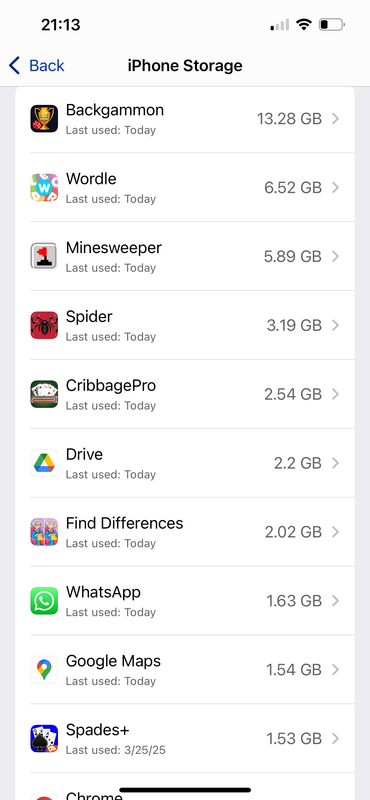
Speaking of file systems, one of the things that bothers me about my
iPhone is the inability to enter the file system and clean out cache
files. Some of the games on my phone are taking up to 13 GB of space
when the app itself is only 250 MB in size. All that extra space being
used is supposedly advertisements which have been downloaded that I
must work through between games. I've tried to ask the support groups
of these apps how to delete all that space and the only suggestion was
to delete the app and reinstall it.
Alan <[email protected]> wrote:
On 2025-04-15 17:56, badgolferman wrote:
Marion wrote:What game is using 13GB of space?
When the Apple trolls claim to copy from iOS to Android using the
Files SMB capability, they're lying because it's not possible (to my
knowledge).
I don't know anything about Android, but using the iOS Files app I have
successfully copied files to Windows and retrieved files from Windows.
I have not been able to initiate the process from the Windows side
though, and we all know why since that's been discussed ad infinitum.
Speaking of file systems, one of the things that bothers me about my
iPhone is the inability to enter the file system and clean out cache
files. Some of the games on my phone are taking up to 13 GB of space
when the app itself is only 250 MB in size. All that extra space being
used is supposedly advertisements which have been downloaded that I
must work through between games. I've tried to ask the support groups
of these apps how to delete all that space and the only suggestion was
to delete the app and reinstall it.
What have you tried to get rid of what you speculate is only cached data?
https://ibb.co/V5B5yLc
All the free games which are supported by advertisements take up GBs of space. The apps themselves are reasonably sized, but their downloaded advertisements are massive.like this
I wrote to the Backgammon support page and asked them why is it
and how can I clean it out. They told me to clear cache and reboot. Well, I can only clear Safari or browser cache to my knowledge so I tried that andYou could try offloading the game and then reloading it. That appeared
it did nothing. I wrote back and they said that’s just the way it is and the only other option is to delete the app and reinstall it.
The apps themselves are reasonably sized, but their downloaded
advertisements are massive.
it should be easy for you to point out the lie I supposedly told.
On 2025-04-16 18:23, badgolferman wrote:
Alan <[email protected]> wrote:
On 2025-04-15 17:56, badgolferman wrote:
Marion wrote:What game is using 13GB of space?
When the Apple trolls claim to copy from iOS to Android using the
Files SMB capability, they're lying because it's not possible (to my >>>>> knowledge).
I don't know anything about Android, but using the iOS Files app I have >>>> successfully copied files to Windows and retrieved files from Windows. >>>> I have not been able to initiate the process from the Windows side
though, and we all know why since that's been discussed ad infinitum.
Speaking of file systems, one of the things that bothers me about my
iPhone is the inability to enter the file system and clean out cache
files. Some of the games on my phone are taking up to 13 GB of space >>>> when the app itself is only 250 MB in size. All that extra space being >>>> used is supposedly advertisements which have been downloaded that I
must work through between games. I've tried to ask the support groups >>>> of these apps how to delete all that space and the only suggestion was >>>> to delete the app and reinstall it.
What have you tried to get rid of what you speculate is only cached
data?
https://ibb.co/V5B5yLc
Sorry, but your link doesn't load.
like this
All the free games which are supported by advertisements take up GBs of
space. The apps themselves are reasonably sized, but their downloaded
advertisements are massive.
I wrote to the Backgammon support page and asked them why is it
and how can I clean it out. They told me to clear cache and reboot.You could try offloading the game and then reloading it. That appeared
Well, I
can only clear Safari or browser cache to my knowledge so I tried that
and
it did nothing. I wrote back and they said that’s just the way it is and >> the only other option is to delete the app and reinstall it.
to reduced the space used for at least one app of mine.
On 17/04/2025 02:50, Alan wrote:
On 2025-04-16 18:23, badgolferman wrote:
Alan <[email protected]> wrote:
On 2025-04-15 17:56, badgolferman wrote:
Marion wrote:What game is using 13GB of space?
When the Apple trolls claim to copy from iOS to Android using the
Files SMB capability, they're lying because it's not possible (to my >>>>>> knowledge).
I don't know anything about Android, but using the iOS Files app I have >>>>> successfully copied files to Windows and retrieved files from Windows. >>>>> I have not been able to initiate the process from the Windows side
though, and we all know why since that's been discussed ad infinitum. >>>>>
Speaking of file systems, one of the things that bothers me about my >>>>> iPhone is the inability to enter the file system and clean out cache >>>>> files. Some of the games on my phone are taking up to 13 GB of space >>>>> when the app itself is only 250 MB in size. All that extra space being >>>>> used is supposedly advertisements which have been downloaded that I
must work through between games. I've tried to ask the support groups >>>>> of these apps how to delete all that space and the only suggestion was >>>>> to delete the app and reinstall it.
What have you tried to get rid of what you speculate is only cached data? >>>>
https://ibb.co/V5B5yLc
Sorry, but your link doesn't load.
You could try offloading the game and then reloading it. That appeared to reduced the space used for at least one app of mine.
All the free games which are supported by advertisements take up GBs of
space. The apps themselves are reasonably sized, but their downloaded
advertisements are massive.
I wrote to the Backgammon support page and asked them why is it like thisand how can I clean it out. They told me to clear cache and reboot. Well, I >>> can only clear Safari or browser cache to my knowledge so I tried that and >>> it did nothing. I wrote back and they said that’s just the way it is and >>> the only other option is to delete the app and reinstall it.
The link works fine here.
On 2025-04-15, badgolferman <[email protected]> wrote:
Jolly Roger wrote:
Actions speak louder than words, little boy. And you always side with >>>Arlen - religiously (you even forgave him for impersonating you lol).
I will agree with anyone who speaks the truth or makes a rational
statement, even you on occasion. But I learned my lesson the last time
I agreed with you when I realized you were lying.
Sure, pumpkin. In that case it should be easy for you to point out the
lie I supposedly told. I'll wait patiently for you to back up your words
like an adult. Otherwise, your childishness will be on full display.
On 17/04/2025 02:50, Alan wrote:
On 2025-04-16 18:23, badgolferman wrote:
Alan <[email protected]> wrote:
On 2025-04-15 17:56, badgolferman wrote:
Marion wrote:What game is using 13GB of space?
When the Apple trolls claim to copy from iOS to Android using the
Files SMB capability, they're lying because it's not possible (to my >>>>>> knowledge).
I don't know anything about Android, but using the iOS Files app I
have
successfully copied files to Windows and retrieved files from Windows. >>>>> I have not been able to initiate the process from the Windows side
though, and we all know why since that's been discussed ad infinitum. >>>>>
Speaking of file systems, one of the things that bothers me about my >>>>> iPhone is the inability to enter the file system and clean out cache >>>>> files. Some of the games on my phone are taking up to 13 GB of space >>>>> when the app itself is only 250 MB in size. All that extra space
being
used is supposedly advertisements which have been downloaded that I
must work through between games. I've tried to ask the support groups >>>>> of these apps how to delete all that space and the only suggestion was >>>>> to delete the app and reinstall it.
What have you tried to get rid of what you speculate is only cached
data?
https://ibb.co/V5B5yLc
Sorry, but your link doesn't load.
like this
All the free games which are supported by advertisements take up GBs of
space. The apps themselves are reasonably sized, but their downloaded
advertisements are massive.
I wrote to the Backgammon support page and asked them why is it
and how can I clean it out. They told me to clear cache and reboot.You could try offloading the game and then reloading it. That appeared
Well, I
can only clear Safari or browser cache to my knowledge so I tried
that and
it did nothing. I wrote back and they said that’s just the way it is and >>> the only other option is to delete the app and reinstall it.
to reduced the space used for at least one app of mine.
The link works fine here.
Marion wrote:
Looking up how to set a system-wide privatedns on iOS, apparently iOS
16 introduced a system-wide setting for DNS over HTTPS (DoH).
iOS16+:Settings > VPN & DNS > DNS Servers > DNS over HTTPS
Enter any desired free adblocking private dns server URL, e.g.,
https://adblock.dns.mullvad.net/dns-query
Tap "Save" in the top right corner.
Your iOS device should now be using Mullvad's ad-blocking
DNS server for all network connections (both Wi-Fi & cellular).
I have iOS 18.4 and the only VPN menu I see is VPN & Device Management.
There doesn't seem to be a DNS menu in the VPN settings page.
On 2025-04-17 05:15, badgolferman wrote:
Marion wrote:
Looking up how to set a system-wide privatedns on iOS, apparently iOS
16 introduced a system-wide setting for DNS over HTTPS (DoH).
iOS16+:Settings > VPN & DNS > DNS Servers > DNS over HTTPS
Enter any desired free adblocking private dns server URL, e.g.,
https://adblock.dns.mullvad.net/dns-query
Tap "Save" in the top right corner.
Your iOS device should now be using Mullvad's ad-blocking
DNS server for all network connections (both Wi-Fi & cellular).
I have iOS 18.4 and the only VPN menu I see is VPN & Device Management.
There doesn't seem to be a DNS menu in the VPN settings page.
Do you even TRY to educate yourself on a subject at ALL before weighing in?
There are more than a dozen VPN apps in the iOS App Store.
On 2025-04-16, Jolly Roger <[email protected]> wrote:
On 2025-04-15, badgolferman <[email protected]> wrote:
Jolly Roger wrote:
Actions speak louder than words, little boy. And you always side with
Arlen - religiously (you even forgave him for impersonating you lol).
I will agree with anyone who speaks the truth or makes a rational
statement, even you on occasion. But I learned my lesson the last time
I agreed with you when I realized you were lying.
Sure, pumpkin. In that case it should be easy for you to point out the
lie I supposedly told. I'll wait patiently for you to back up your words
like an adult. Otherwise, your childishness will be on full display.
...still no response. You're the liar here.
I have iOS 18.4 and the only VPN menu I see is VPN & Device Management.
There doesn't seem to be a DNS menu in the VPN settings page.
Do you even TRY to educate yourself on a subject at ALL before weighing in? >>
There are more than a dozen VPN apps in the iOS App Store.
On 2025-04-16, Jolly Roger <[email protected]> wrote:
On 2025-04-15, badgolferman <[email protected]> wrote:
Jolly Roger wrote:
Actions speak louder than words, little boy. And you always side with
Arlen - religiously (you even forgave him for impersonating you lol).
I will agree with anyone who speaks the truth or makes a rational
statement, even you on occasion. But I learned my lesson the last time
I agreed with you when I realized you were lying.
Sure, pumpkin. In that case it should be easy for you to point out the
lie I supposedly told. I'll wait patiently for you to back up your words
like an adult. Otherwise, your childishness will be on full display.
...still no response. You're the liar here.
Jolly Roger wrote:
On 2025-04-16, Jolly Roger <[email protected]> wrote:
On 2025-04-15, badgolferman <[email protected]> wrote:
Jolly Roger wrote:
Actions speak louder than words, little boy. And you always side with >>>>> Arlen - religiously (you even forgave him for impersonating you lol). >>>>I will agree with anyone who speaks the truth or makes a rational
statement, even you on occasion. But I learned my lesson the last time >>>> I agreed with you when I realized you were lying.
Sure, pumpkin. In that case it should be easy for you to point out the
lie I supposedly told. I'll wait patiently for you to back up your words >>> like an adult. Otherwise, your childishness will be on full display.
...still no response. You're the liar here.
Go get him, Tiger.
On 17/04/2025 19:56, Jolly Roger wrote:
On 2025-04-16, Jolly Roger <[email protected]> wrote:
On 2025-04-15, badgolferman <[email protected]> wrote:
Jolly Roger wrote:
Actions speak louder than words, little boy. And you always side with >>>>> Arlen - religiously (you even forgave him for impersonating you lol). >>>>I will agree with anyone who speaks the truth or makes a rational
statement, even you on occasion. But I learned my lesson the last time >>>> I agreed with you when I realized you were lying.
Sure, pumpkin. In that case it should be easy for you to point out the
lie I supposedly told. I'll wait patiently for you to back up your words >>> like an adult. Otherwise, your childishness will be on full display.
...still no response. You're the liar here.
Out of 20+ posts in this thread by Jolly Roger most are filled with
vitriol & profanities.
| Sysop: | Keyop |
|---|---|
| Location: | Huddersfield, West Yorkshire, UK |
| Users: | 741 |
| Nodes: | 16 (2 / 14) |
| Uptime: | 48:41:56 |
| Calls: | 12,444 |
| Calls today: | 4 |
| Files: | 15,192 |
| Messages: | 6,537,121 |