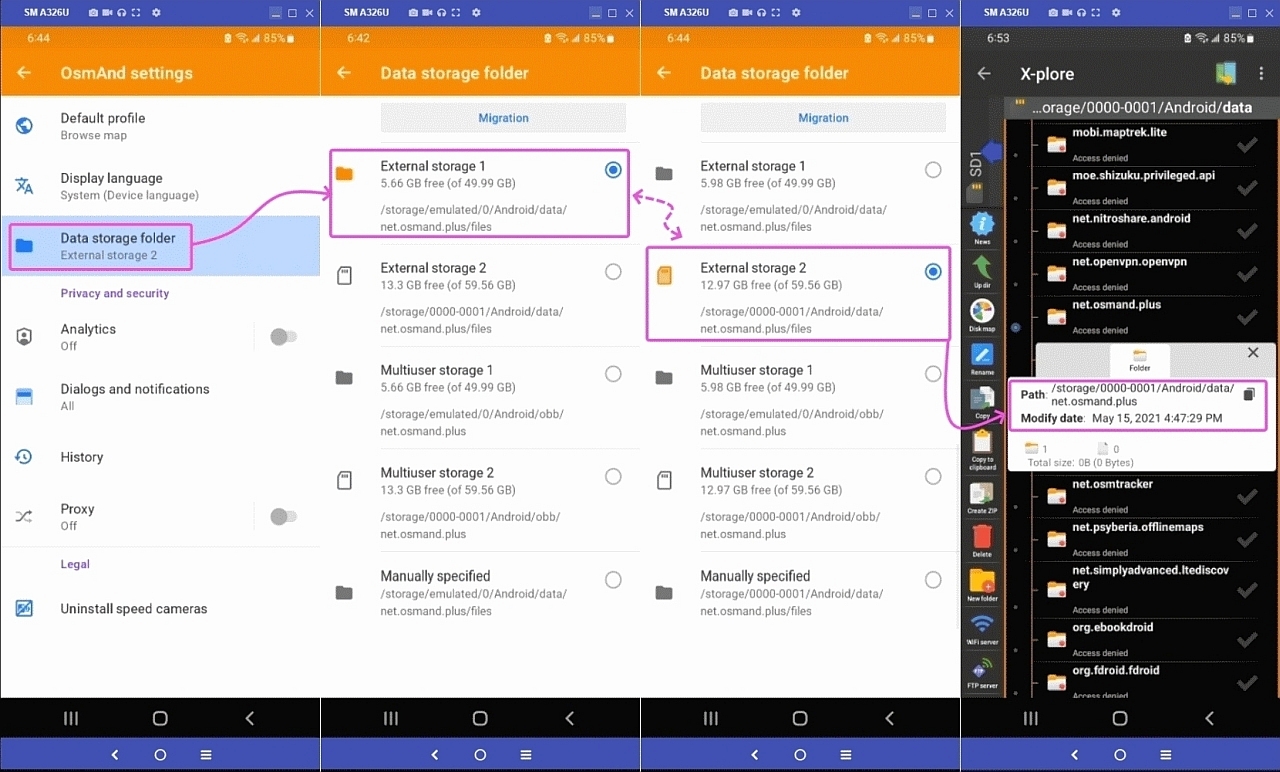
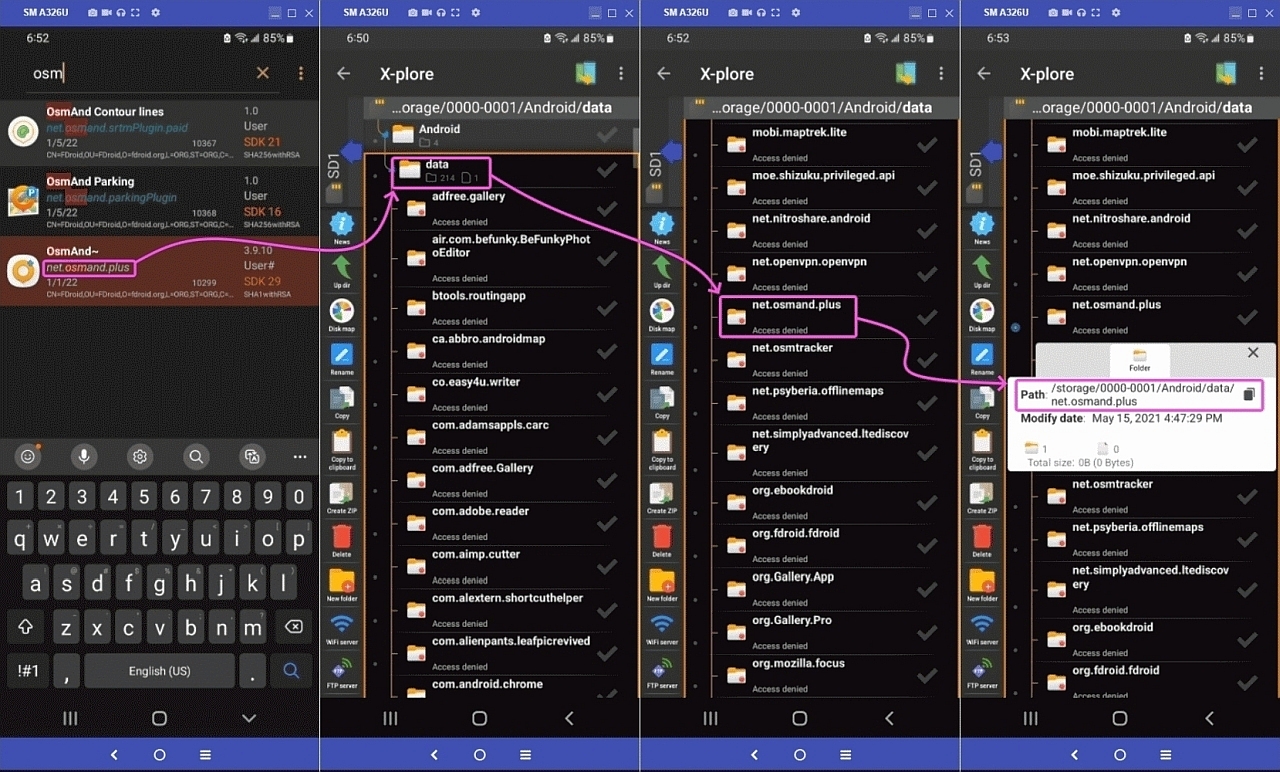
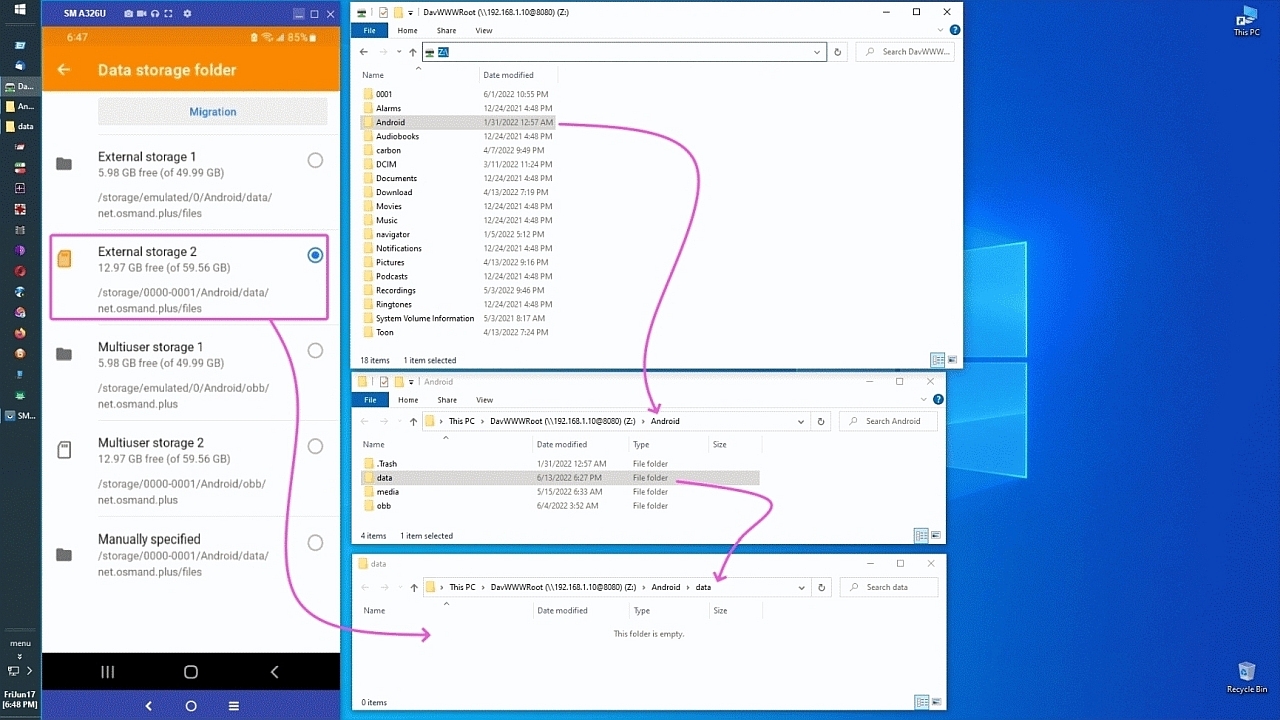
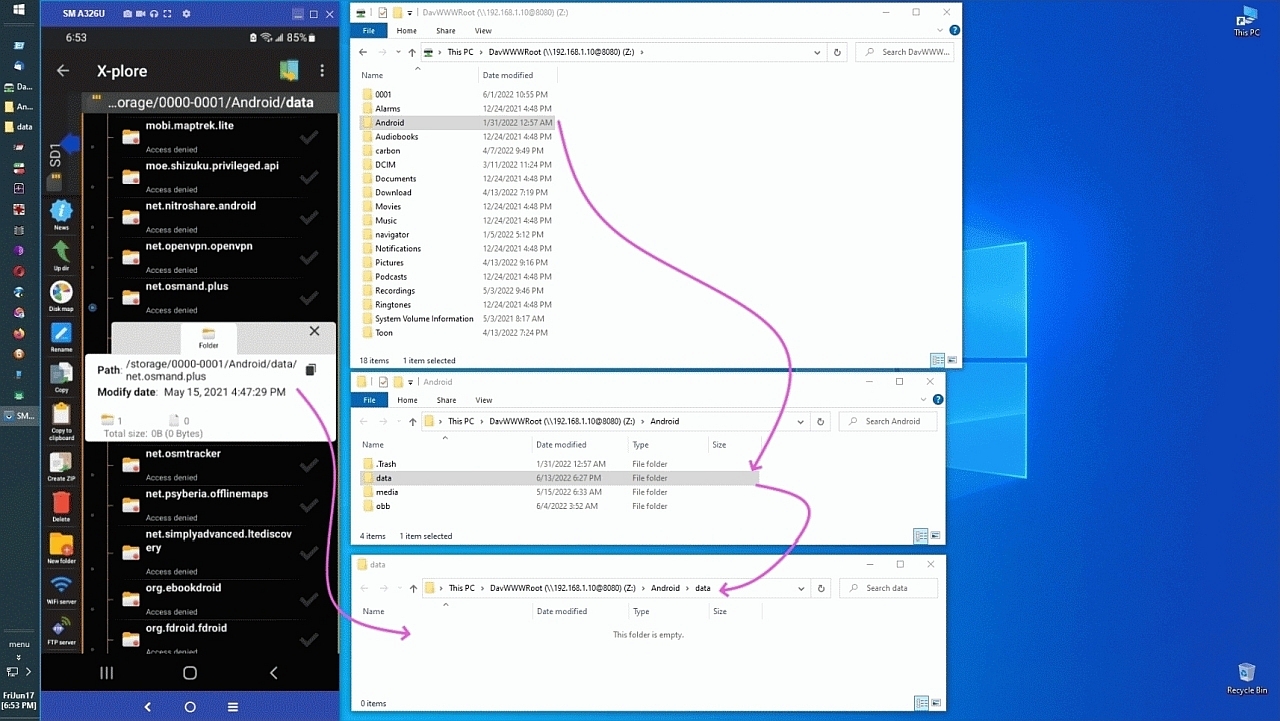
• Clever helpful suggestion for portable memory using Windows & Android e

    From Marion@21:1/5 to All on Fri Jan 31 17:48:35 2025
    XPost: comp.mobile.android, comp.editors

    Below is both a clever suggestion - and - a quizzical question.

    Here's the problem set (which I experienced myself, recently):
    A. You're a typical Android/Windows/editor owner with a 64GB sdcard
    B. Most of your editing data is kept on that 64GB portable memory card
    C. But then you need to double your memory (to 128GB, which costs ~$10)

    What happens?
    Well, for most people, they lose many editing associations to the files.

    Why?
    Because for many editors, they don't "search" for file associations.
    Coupled with the filespec having changed between the 64GB & 128GB sd cards.

    Huh?
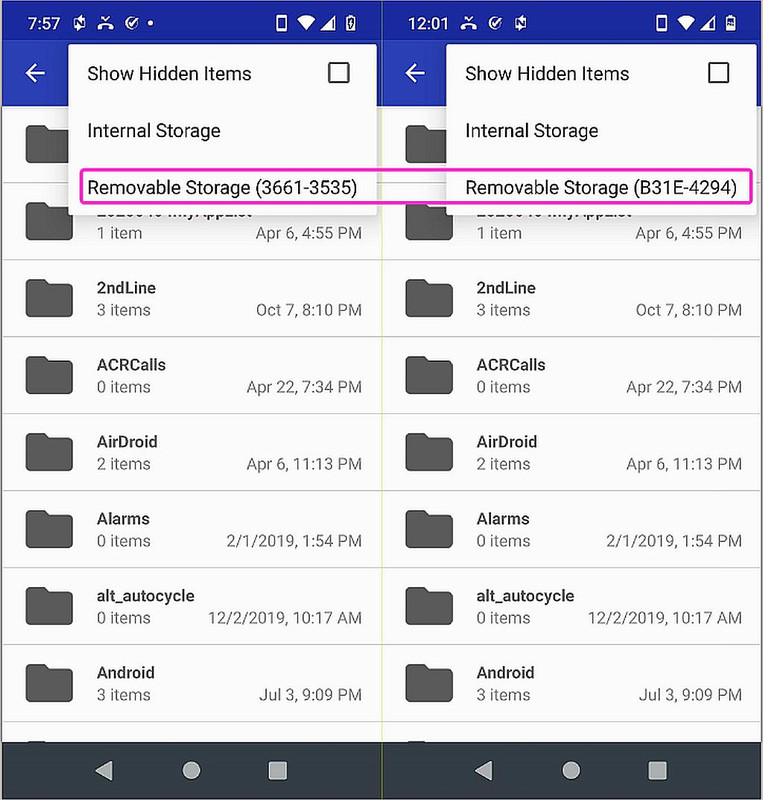
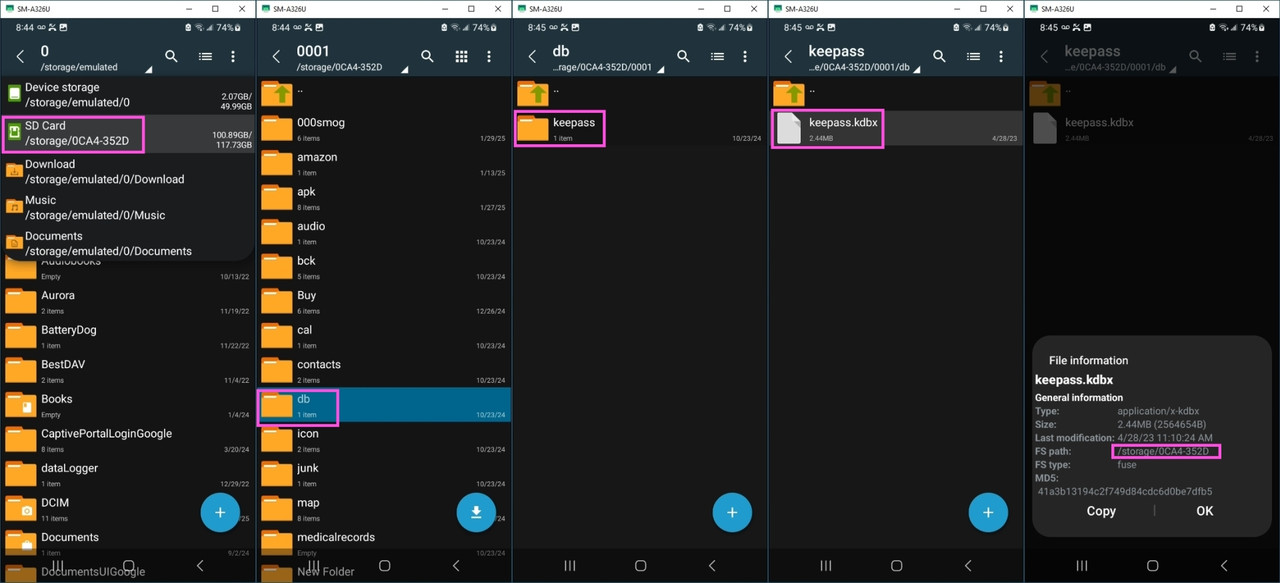
    You need to know that every sdcard comes with a "volume name".
    An example volume name could be, for example, "A1B1-C1D1" (or whatever).
    Another example volume name could be, for example, "A2B2-C2D2".

    The point is that every sdcard comes with an (almost) unique volume name.
    So?

    Well, the old card filespec to your data is now *different* than the new!
    OLD: /storage/A1B1-C1D1/{editors}/{files}
    NEW: /storage/A2B2-C2D2/{editors}/{files}

    OK. That sucks. So now you have to manually re-establish the filespec.
    For every modern editor. For every file that the editor associates with.

    Why did you insert "modern" editor in that sentence?
    Are you being sneaky?

    Well, a good editor will save its own files wherever you want them to be.
    Some editors are good (such as map editing programs, for example).

    Those good (aka modern) editors will access your files on the sdcard.
    Just like cameras do (but cameras have another trick up their sleeve).
    Cameras will *find* all their "media" files, so they don't have this issue.

    But many editors do have this issue - particularly map editors.
    And GPX editors. And PDF editors. And text editors. (and so on)

    So what's the trivially simple (yet devilishly clever) solution then?
    Heh heh heh... it's so simple - it should be outlawed as too simple.

    Simply format your new sdcard to the same volume name as the old sdcard.
    Yup. It's that simple.

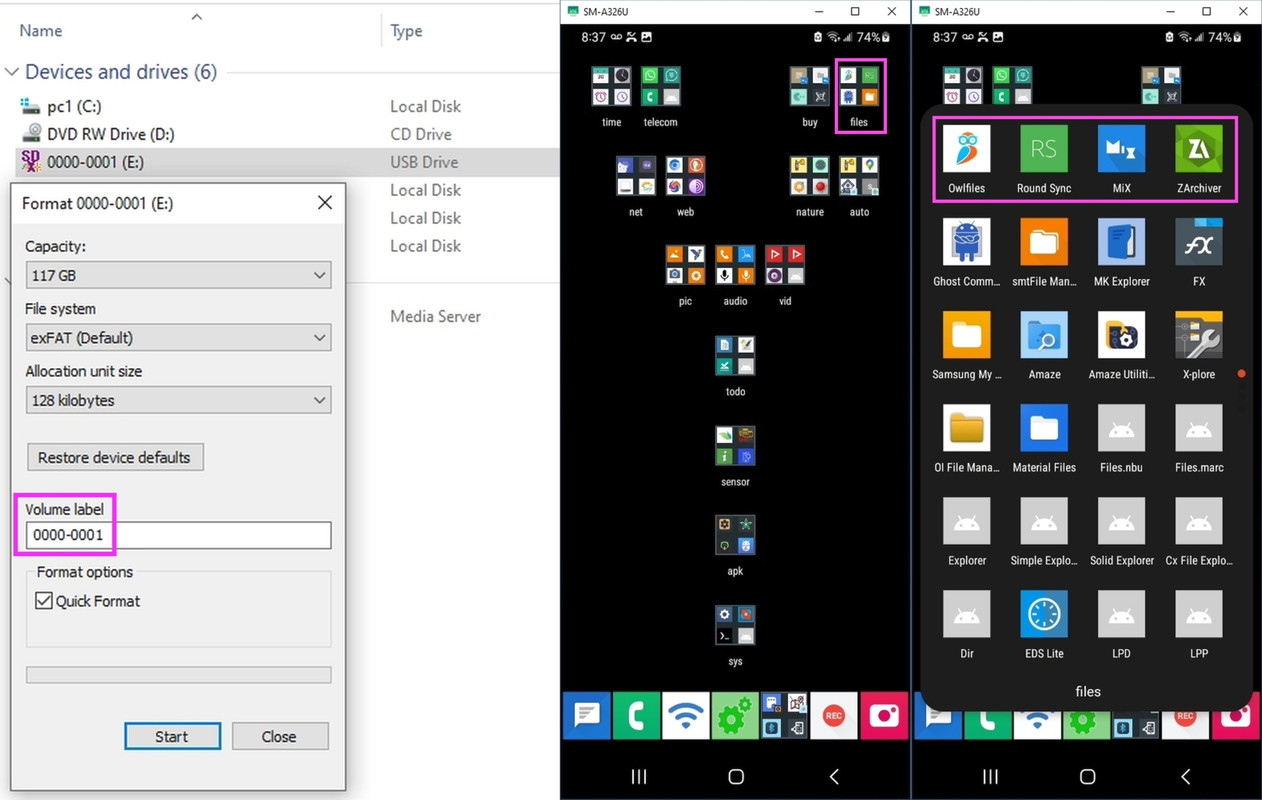
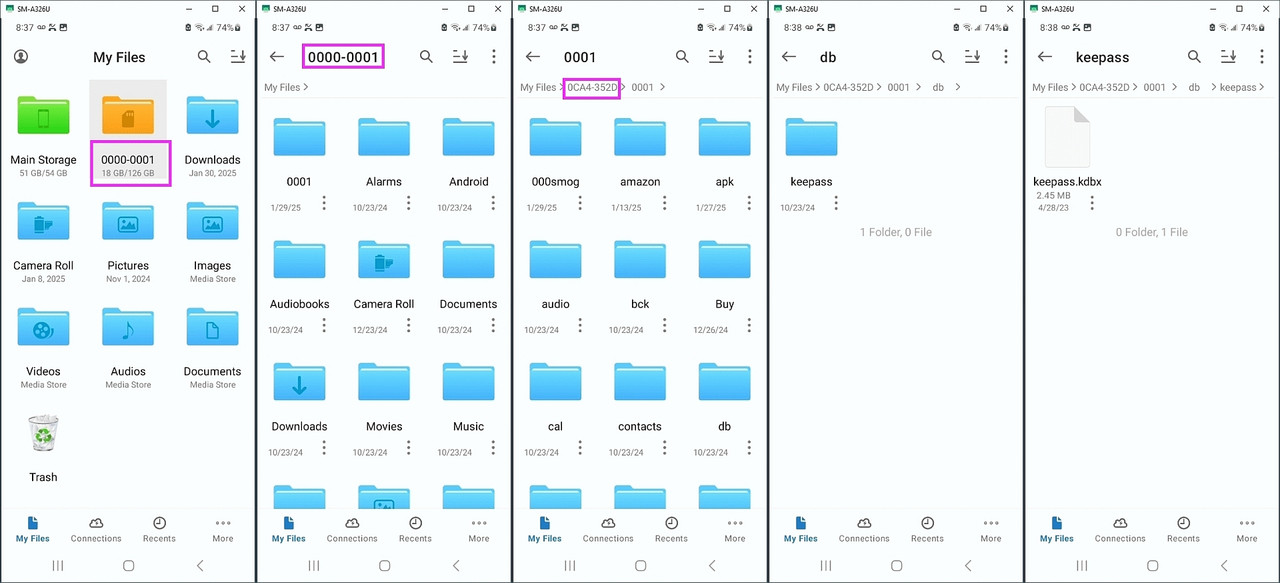
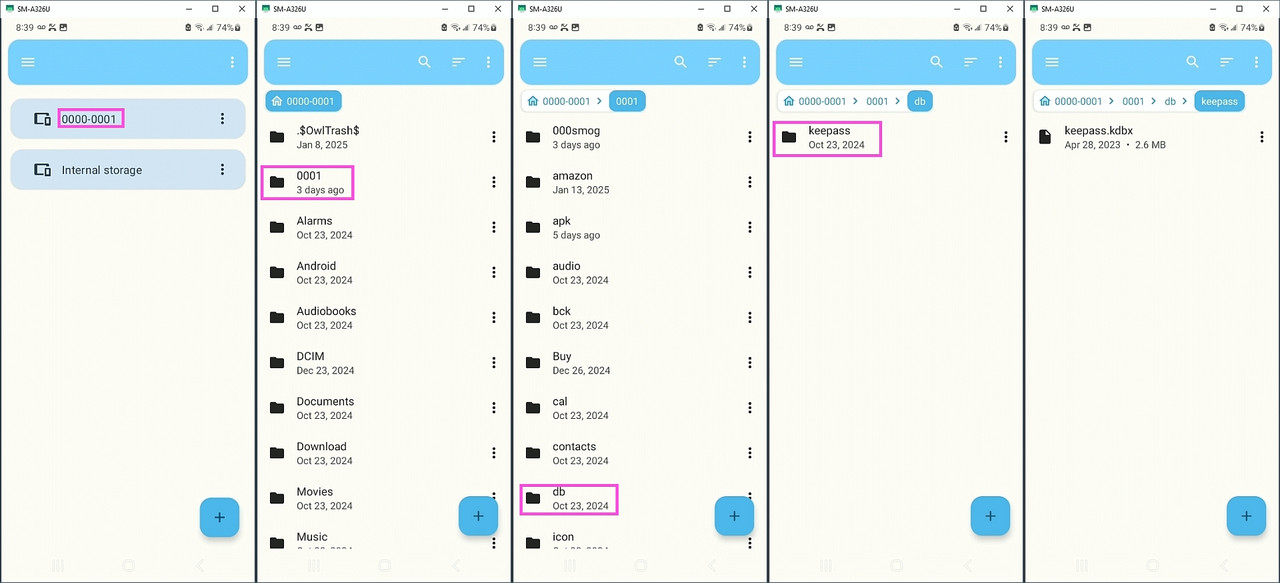
    STEP 1: Determine the old 64GB sd card volume name (e.g., 0000-0001).
    STEP 2: On Windows, quick format the new 128GB sd card to the same name.
    STEP 3: On Windows, copy all the old data to the new 128GB sd card.

    That's it!
    You pop in the new sdcard and everything works exactly as it should.
    Ask me how I know that this concept of "portable memory" just works.

    Now... for my quizzical question, where the problem set is similar:
    A. You're a typical HP Stream owner with a permanent 32GB C: drive
    B. So you've added a 64GB portable memory card as the D: drive
    C. But then you need to double the D: drive (to 128GB, which costs ~$10)

    Does the same trick of formatting the volume name work in that scenario?

    --- SoupGate-Win32 v1.05
    * Origin: fsxNet Usenet Gateway (21:1/5)
  • From Andy Burns@21:1/5 to Marion on Fri Jan 31 19:09:50 2025
    XPost: comp.mobile.android, comp.editors

    Marion wrote:

    A. You're a typical HP Stream owner with a permanent 32GB C: drive
    B. So you've added a 64GB portable memory card as the D: drive
    C. But then you need to double the D: drive (to 128GB, which costs ~$10)

    Does the same trick of formatting the volume name work in that scenario?

    I would expect that as long as the laptop sees the new SD card as D:\
    drive, nothing will really care ...

    --- SoupGate-Win32 v1.05
    * Origin: fsxNet Usenet Gateway (21:1/5)
  • From Kenny McCormack@21:1/5 to [email protected] on Fri Jan 31 19:26:54 2025
    XPost: comp.mobile.android, comp.editors

    In article <[email protected]>,
    Andy Burns <[email protected]> wrote:
    Marion wrote:

    A. You're a typical HP Stream owner with a permanent 32GB C: drive
    B. So you've added a 64GB portable memory card as the D: drive
    C. But then you need to double the D: drive (to 128GB, which costs ~$10)

    Does the same trick of formatting the volume name work in that scenario?

    I would expect that as long as the laptop sees the new SD card as D:\
    drive, nothing will really care ...

    Arlen is very good at dreaming up non-problems, and then dreaming up "solutions" to those non-problems.

    --
    On the subject of racism being depicted in the media, the far right and the far left have
    met up in agreement (sort of like how plus infinity meets up with minus infinity).
    The far left doesn't want it, because they are afraid it will make people racist.
    The far right doesn't want it, because they are afraid it will make people feel bad about being racist.

    --- SoupGate-Win32 v1.05
    * Origin: fsxNet Usenet Gateway (21:1/5)
  • From Marion@21:1/5 to Kenny McCormack on Fri Jan 31 21:18:49 2025
    XPost: comp.mobile.android, comp.editors

    On Fri, 31 Jan 2025 19:26:54 -0000 (UTC), Kenny McCormack wrote :


    very good at dreaming up non-problems

    The main point of this thread was to purposefully helpfully inform people
    of the rather useful approach of formatting the volume label of sd cards.

    I have tested two scenarios, both of which work perfectly when you change
    out the sd card - but only if you've matched their respective volume labels
    1. When you move from phone a to phone b where b is a clone of a, and,
    2. When you double (or triple, or whatever) the size of the memory card.

    Having said that the most important point in this thread is that...

    I realize Kenny McCormack is a common troll, but the point that shouldn't
    be lost when these trolls try to waste our time is that formatting the new
    sd card with the same name as the old sd card is a rather useful approach.

    For media, in general, it doesn't matter if you copied your old DCIM folder from your 64GB sd card to your new sd card, but for most modern editors
    (which can store files on the external portable memory card), it does
    matter.

    A classic example these ignorant trolls like Kenny McCormack don't
    understand is the case of OSM map editors, which can store their *huge* map (and other associated KML, GPX, etc.) databases on the external sd card.

    When you double the size of your portable memory, the existing installed editors such as OSMAnd~ don't even realize the card was swapped out on it.

    Likewise for most modern editors. They still find their external files, but only if you've thought ahead by matching the entire filespec exactly.

    Interestingly, what does seem to work even without matching the volume
    label, is "media files" tend to be found even when the volume label changes (which I suspect is due to a file-type tag that the operating system adds).

    Does anyone have more detail on how that file-type tag works in the
    specific case of switching from one filespec to another in the volume label when a typical user (who doesn't know the trick) inserts a new sd card?

    --- SoupGate-Win32 v1.05
    * Origin: fsxNet Usenet Gateway (21:1/5)
  • From Carlos E.R.@21:1/5 to Marion on Fri Jan 31 23:19:14 2025
    XPost: comp.mobile.android, comp.editors

    On 2025-01-31 22:18, Marion wrote:
    On Fri, 31 Jan 2025 19:26:54 -0000 (UTC), Kenny McCormack wrote :


    very good at dreaming up non-problems

    The main point of this thread was to purposefully helpfully inform people
    of the rather useful approach of formatting the volume label of sd cards.

    It would be clever if you used the label command instead of format :-p


    I have tested two scenarios, both of which work perfectly when you change
    out the sd card - but only if you've matched their respective volume labels 1. When you move from phone a to phone b where b is a clone of a, and,
    2. When you double (or triple, or whatever) the size of the memory card.

    Having said that the most important point in this thread is that...
    I realize Kenny McCormack is a common troll, but the point that shouldn't
    be lost when these trolls try to waste our time is that formatting the new
    sd card with the same name as the old sd card is a rather useful approach.

    I disagree. It is useful for your scenario, it is not for my scenarios.


    For media, in general, it doesn't matter if you copied your old DCIM folder from your 64GB sd card to your new sd card, but for most modern editors (which can store files on the external portable memory card), it does
    matter.

    A classic example these ignorant trolls like Kenny McCormack don't
    understand is the case of OSM map editors, which can store their *huge* map (and other associated KML, GPX, etc.) databases on the external sd card.

    When you double the size of your portable memory, the existing installed editors such as OSMAnd~ don't even realize the card was swapped out on it.

    Likewise for most modern editors. They still find their external files, but only if you've thought ahead by matching the entire filespec exactly.

    Not so. You can use relative paths.


    Interestingly, what does seem to work even without matching the volume
    label, is "media files" tend to be found even when the volume label changes (which I suspect is due to a file-type tag that the operating system adds).

    Does anyone have more detail on how that file-type tag works in the
    specific case of switching from one filespec to another in the volume label when a typical user (who doesn't know the trick) inserts a new sd card?


    --
    Cheers, Carlos.

    --- SoupGate-Win32 v1.05
    * Origin: fsxNet Usenet Gateway (21:1/5)
  • From Kenny McCormack@21:1/5 to Carlos E.R. on Fri Jan 31 22:24:43 2025
    XPost: comp.mobile.android, comp.editors

    In article <[email protected]r>,
    Carlos E.R. <[email protected]d> wrote:
    On 2025-01-31 22:18, Marion wrote:
    On Fri, 31 Jan 2025 19:26:54 -0000 (UTC), Kenny McCormack wrote :


    very good at dreaming up non-problems

    The main point of this thread was to purposefully helpfully inform people
    of the rather useful approach of formatting the volume label of sd cards.

    It would be clever if you used the label command instead of format :-p

    That was my immediate thought as well.

    --
    John Steinbeck: "Socialism never took root in America because the poor
    see themselves not as an exploited proletariat but as temporarily
    embarrassed millionaires."

    --- SoupGate-Win32 v1.05
    * Origin: fsxNet Usenet Gateway (21:1/5)
  • From Kenny McCormack@21:1/5 to [email protected] on Fri Jan 31 22:38:53 2025
    XPost: comp.mobile.android, comp.editors

    In article <[email protected]>,
    Andy Burns <[email protected]> wrote:
    Carlos E.R. wrote:

    It would be clever if you used the label command instead of format

    Are we discussing the label, or the volume ID?

    I assume the former, because I don't think the DOS/Windows "format" command allows you to set the UUID or PARTUUID. Arlen's ideas are based on using DOS/Windows "format" to make the change.

    --
    People often ask what is the difference between liberals and conservatives.
    It is this. Libs see the government helping them and are OK with the government also helping other people. Cons see the government screwing them and are OK with that as long as the government is also screwing other people.

    --- SoupGate-Win32 v1.05
    * Origin: fsxNet Usenet Gateway (21:1/5)
  • From Carlos E.R.@21:1/5 to Andy Burns on Fri Jan 31 23:39:47 2025
    XPost: comp.mobile.android, comp.editors

    On 2025-01-31 23:25, Andy Burns wrote:
    Carlos E.R. wrote:

    It would be clever if you used the label command instead of format 😛

    Are we discussing the label, or the volume ID?

    He said label :-)

    --
    Cheers, Carlos.

    --- SoupGate-Win32 v1.05
    * Origin: fsxNet Usenet Gateway (21:1/5)
  • From Kenny McCormack@21:1/5 to Carlos E.R. on Fri Jan 31 22:48:45 2025
    XPost: comp.mobile.android, comp.editors

    In article <[email protected]r>,
    Carlos E.R. <[email protected]d> wrote:
    On 2025-01-31 23:25, Andy Burns wrote:
    Carlos E.R. wrote:

    It would be clever if you used the label command instead of format

    Are we discussing the label, or the volume ID?

    He said label :-)

    When it says Libby's Libby's Libby's on the label label label...

    --
    Just like Donald Trump today, Jesus Christ had a Messiah complex.

    And, in fact, the similarities between the two figures are quite striking.
    For example, both have a ragtag band of followers, whose faith cannot be shaken.

    --- SoupGate-Win32 v1.05
    * Origin: fsxNet Usenet Gateway (21:1/5)
  • From Andy Burns@21:1/5 to Carlos E.R. on Fri Jan 31 22:25:50 2025
    XPost: comp.mobile.android, comp.editors

    Carlos E.R. wrote:

    It would be clever if you used the label command instead of format 😛

    Are we discussing the label, or the volume ID?

    --- SoupGate-Win32 v1.05
    * Origin: fsxNet Usenet Gateway (21:1/5)
  • From Quincy the fifth@21:1/5 to Kenny McCormack on Sat Feb 1 00:22:33 2025
    XPost: comp.mobile.android, comp.editors

    On Fri, 31 Jan 2025 22:48:45 -0000 (UTC), Kenny McCormack wrote:


    When it says Libby's Libby's Libby's on the label label label...

    This fucking troll McCormack has already infested all the political
    newsgroups and now he's infecting this group with his troll rot.

    From: Kenny McCormack <[email protected]>
    Newsgroups: alt.global-warming,alt.home.lawn.garden,alt.home.repair,sac.politics,talk.politics.guns
    Subject: Besides being completely wrong on the facts, your logic sucks, too Date: Mon, 21 Oct 2024 13:31:24 -0000 (UTC)
    Organization: The official candy of the new Millennium
    Message-ID: <vf5l3c$3g545$[email protected]>

    In article <[email protected]>,
    Jamaal Bowman <[email protected]> wrote:
    ...
    The dictator Democrats keeping chanting "democracy" yet the hypocrite
    overlords never allow We the People to decide for ourselves.

    It is the Trumprepublicans who are the authoritarians, not the Democrats. Just look at Project 2025. Or any rational analysis of the American political parties and their stances.

    But that aside, it is pretty clear that people like you simply should not
    be allowed to make your own choices. You are a hazard to yourself and others. You probably voted for the Orange Monster (and probably more than once). That in and of itself shows you're not competent to be in the
    voting booth. I'm serious about this; you are clearly voting against your own interests.

    Die fucking troll, Die.

    --- SoupGate-Win32 v1.05
    * Origin: fsxNet Usenet Gateway (21:1/5)
  • From Marion@21:1/5 to Carlos E.R. on Sat Feb 1 06:03:49 2025
    XPost: comp.mobile.android, comp.editors

    On Fri, 31 Jan 2025 23:39:47 +0100, Carlos E.R. wrote :


    Are we discussing the label, or the volume ID?

    He said label :-)

    Hi Carlos,

    I love your suggestion because it allows us to always add more value.
    As the entire point of being on Usenet is to learn & disseminate value.

    SD card terminology confuses people because there are at least 3 terms:
    1. Volume ID (CID)
    2. Volume Serial Number
    3. Volume Name (aka Volume Label)

    Some can be changed by the user and some can't be changed by the user.
    But what matters is only what the software sees on the Android phone.

    Particularly the filespec when you double the external memory size.
    But I do agree with you that the terms can be confusing to some people.

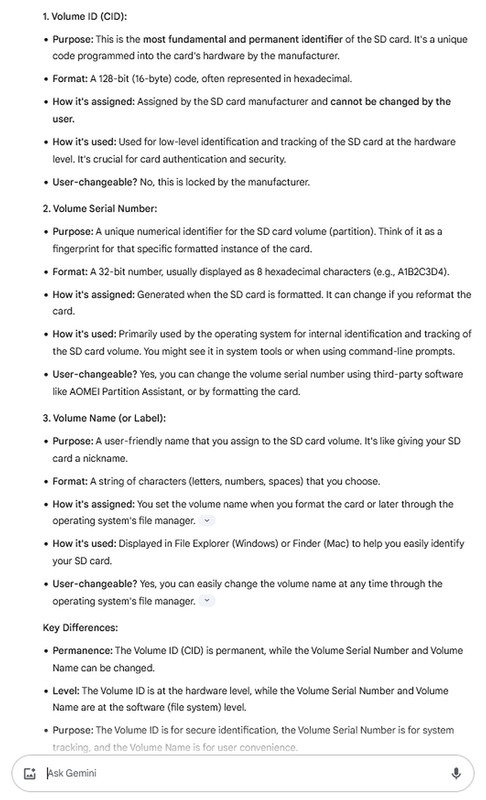
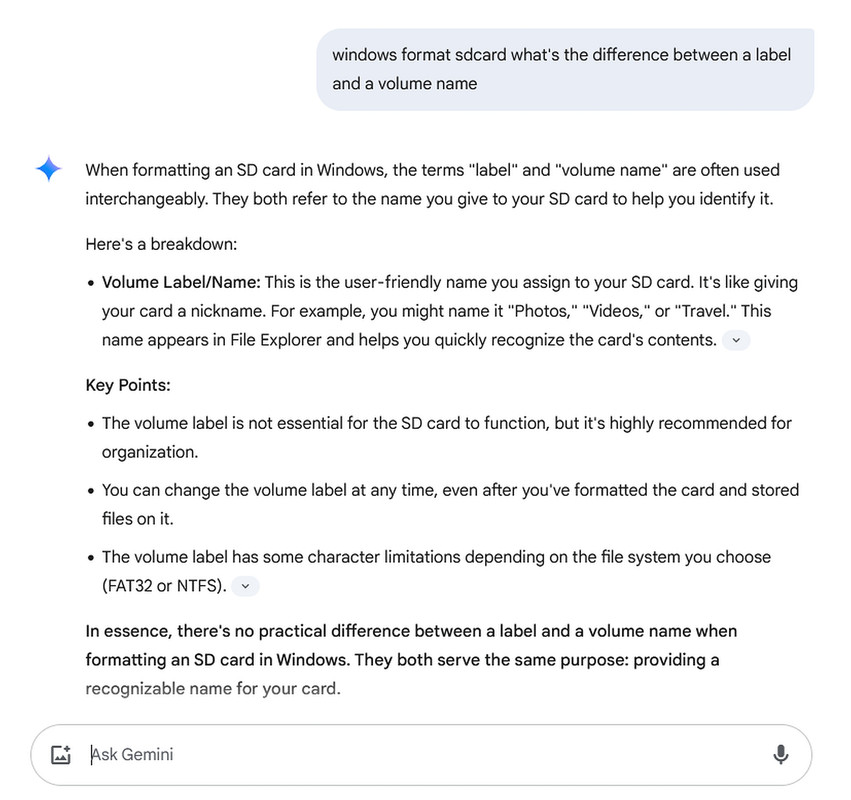
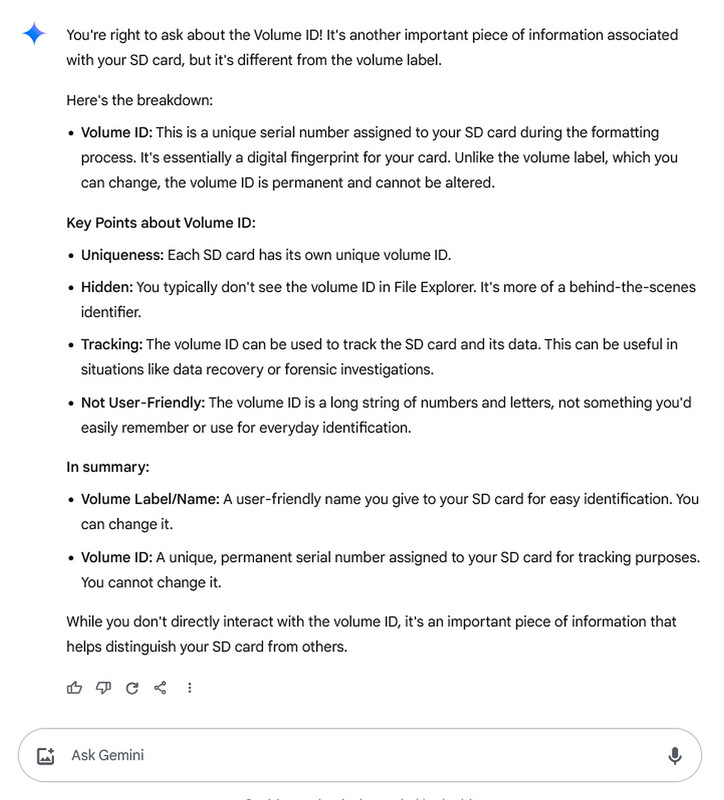
    Here's an old output from Gemini which helped explain the differences:
    <https://i.postimg.cc/8cYnsxDm/sdcard17.jpg>

    1. Volume ID (CID):

    Purpose: This is the most fundamental and permanent identifier of the
    SD card. It's a unique code programmed into the card's hardware by the manufacturer.
    Format: A 128-bit (16-byte) code, often represented in hexadecimal.
    How it's assigned: Assigned by the SD card manufacturer and cannot be changed by the user.
    How it's used: Used for low-level identification and tracking of the SD card at the hardware level. It's crucial for card authentication and
    security.
    User-changeable? No, this is locked by the manufacturer.

    2. Volume Serial Number:

    Purpose: A unique numerical identifier for the SD card volume
    (partition). Think of it as a fingerprint for that specific formatted
    instance of the card.
    Format: A 32-bit number, usually displayed as 8 hexadecimal characters (e.g., A1B2C3D4).
    How it's assigned: Generated when the SD card is formatted. It can
    change if you reformat the card.
    How it's used: Primarily used by the operating system for internal identification and tracking of the SD card volume. You might see it in
    system tools or when using command-line prompts.
    User-changeable? Yes, you can change the volume serial number using third-party software like AOMEI Partition Assistant, or by formatting the
    card.

    3. Volume Name (or Label):

    Purpose: A user-friendly name that you assign to the SD card volume.
    It's like giving your SD card a nickname.
    Format: A string of characters (letters, numbers, spaces) that you
    choose.
    How it's assigned: You set the volume name when you format the card or later through the operating system's file manager.

    How it's used: Displayed in File Explorer (Windows) or Finder (Mac) to help
    you easily identify your SD card.
    User-changeable? Yes, you can easily change the volume name at any time
    through the operating system's file manager.

    Key Differences:

    Permanence: The Volume ID (CID) is permanent, while the Volume Serial Number and Volume Name can be changed.
    Level: The Volume ID is at the hardware level, while the Volume Serial Number and Volume Name are at the software (file system) level.
    Purpose: The Volume ID is for secure identification, the Volume Serial Number is for system tracking, and the Volume Name is for user convenience.

    Analogy:

    Imagine a library:

    The Volume ID (CID) is like the library's unique registration number
    for the book. It's permanent and unchangeable.
    The Volume Serial Number is like the barcode on a specific copy of the book. It's unique to that copy and might change if the copy is replaced.
    The Volume Name (Label) is like the title of the book. It's
    user-friendly and helps you find the book you're looking for.

    --- SoupGate-Win32 v1.05
    * Origin: fsxNet Usenet Gateway (21:1/5)
  • From Marion@21:1/5 to Andy Burns on Sat Feb 1 05:40:13 2025
    XPost: comp.mobile.android, comp.editors

    On Fri, 31 Jan 2025 22:25:50 +0000, Andy Burns wrote :


    It would be clever if you used the label command instead of format ������

    Are we discussing the label, or the volume ID?

    Hi Andy,

    The terminology should be obvious from the context of the original post, although I can't say what Carlos was talking about - but take a look here
    <https://i.postimg.cc/SKXTMVfx/sdcard04.jpg>

    The problem we're solving here is most people don't know the clever trick.
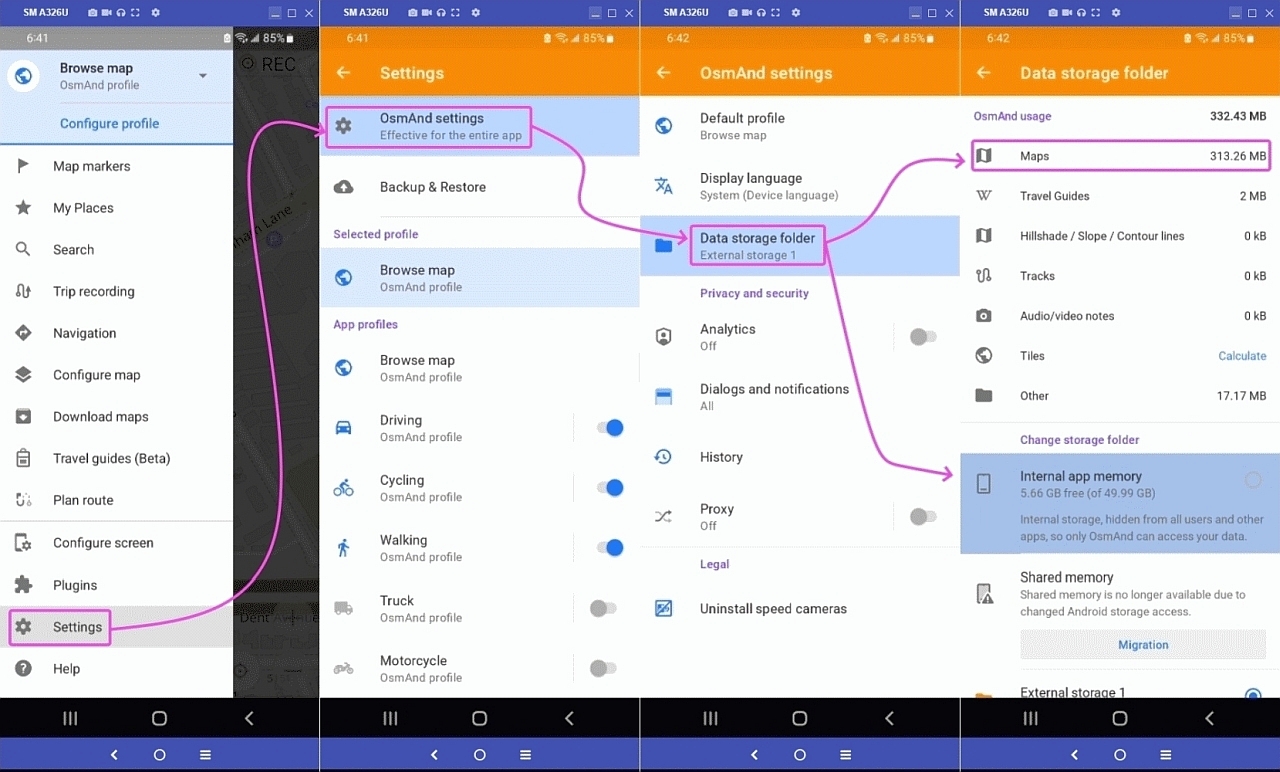
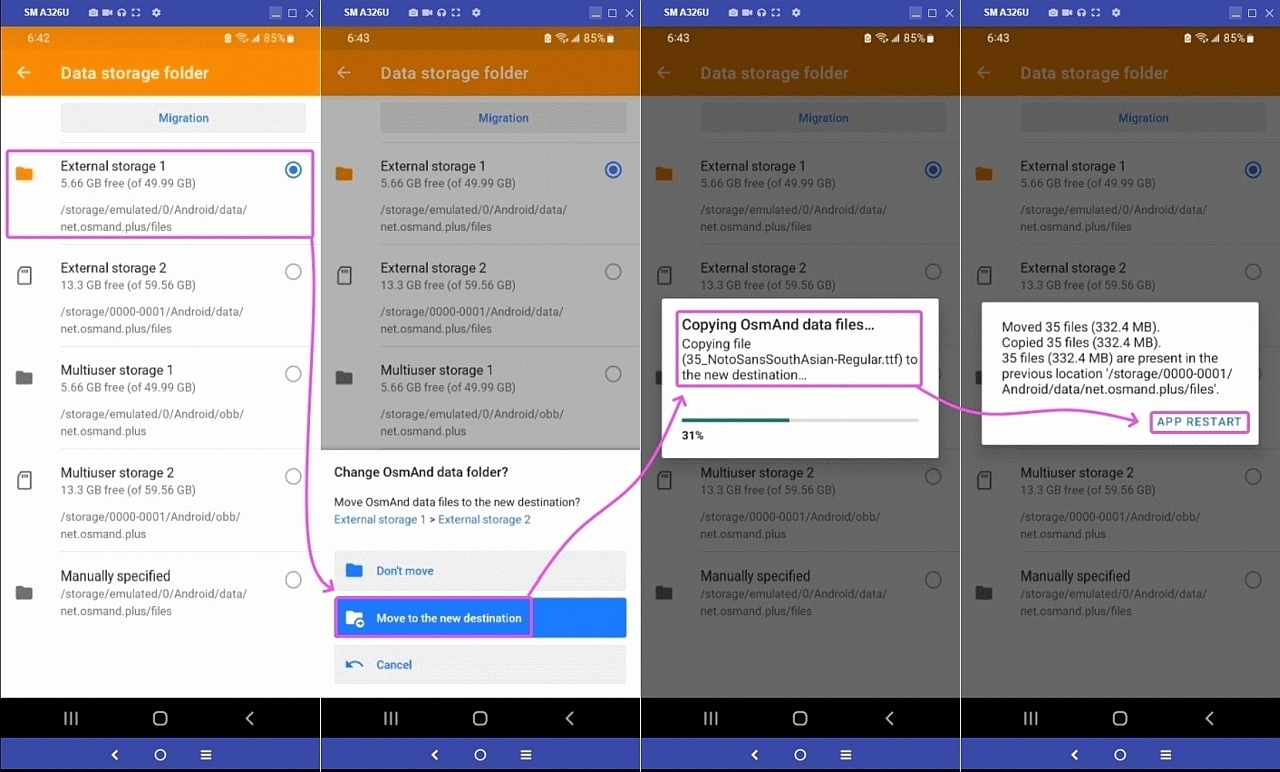
    So they end up, at best, doing wasteful labor intensive work such as this:
    <https://i.postimg.cc/nr8KNVby/sdcard06.jpg>
    <https://i.postimg.cc/mrzHRxwB/sdcard07.jpg>
    <https://i.postimg.cc/vZ1RtXhc/sdcard08.jpg>

    If only they knew the clever trick suggested in this thread.
    Then they wouldn't have to do *anything* at all - as then it just works!
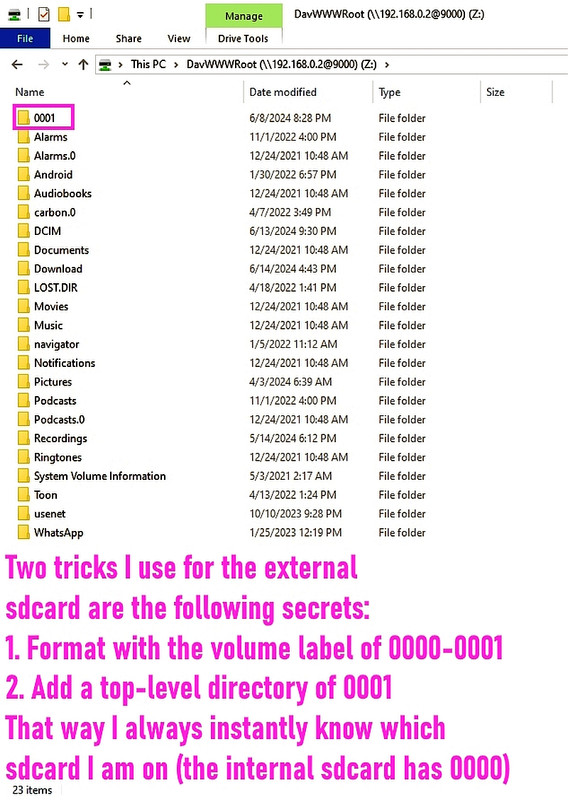
    <https://i.postimg.cc/QN6nY1H5/sdcard09.jpg>
    <https://i.postimg.cc/dtVcLJTR/sdcard10.jpg>
    <https://i.postimg.cc/zD9P15FX/sdcard11.jpg>

    Even better, the entire sd card is auto-mounted as a Windows drive!
    <https://i.postimg.cc/ZK4pNMTx/sdcard12.jpg>

    That way your Windows scripts work perfectly on your Android phone. Particularly the quick daily backup of all the robocopy delta files.

    As for precise terminology, take a look at these previous answers:
    <https://i.postimg.cc/900ZKSGZ/sdcard14.jpg>
    <https://i.postimg.cc/sD84dVHX/sdcard15.jpg>

    I hope that answers your question from the OP's standpoint.

    The main goal was to help people efficiently double their memory,
    without having to go through any process whatsoever of porting.

    It's so simple, and yet so useful, it should be illegal. :)

    --- SoupGate-Win32 v1.05
    * Origin: fsxNet Usenet Gateway (21:1/5)
  • From Andy Burns@21:1/5 to Marion on Sat Feb 1 10:15:04 2025
    XPost: comp.mobile.android, comp.editors

    Marion wrote:

    SD card terminology confuses people because there are at least 3 terms:
    1. Volume ID (CID)
    2. Volume Serial Number
    3. Volume Name (aka Volume Label)

    Some can be changed by the user and some can't be changed by the user.
    But what matters is only what the software sees on the Android phone.

    Take into account, my first Android device (Nexus1) had a microSD slot,
    which it certainly needed due to only having 512MB of onboard flash and
    512MB of RAM, so plenty of swapfile and moving parts of the system to SD
    ... but no phone I've owned since then has had a card slot.

    --- SoupGate-Win32 v1.05
    * Origin: fsxNet Usenet Gateway (21:1/5)
  • From Carlos E.R.@21:1/5 to Marion on Sat Feb 1 14:55:50 2025
    XPost: comp.mobile.android, comp.editors

    On 2025-02-01 07:03, Marion wrote:
    On Fri, 31 Jan 2025 23:39:47 +0100, Carlos E.R. wrote :


    Are we discussing the label, or the volume ID?

    He said label :-)

    Hi Carlos,

    I love your suggestion because it allows us to always add more value.
    As the entire point of being on Usenet is to learn & disseminate value.

    SD card terminology confuses people because there are at least 3 terms:
    1. Volume ID (CID)
    2. Volume Serial Number
    3. Volume Name (aka Volume Label)

    You can change them in Linux.

    Going from memory, one of them you change in the partitioner (fdisk).
    This one was crucial with Windows 7 because M$ would use it to detect
    machine change or pirated copy.

    All these changes can be done without formatting and losing the content.

    --
    Cheers, Carlos.

    --- SoupGate-Win32 v1.05
    * Origin: fsxNet Usenet Gateway (21:1/5)
  • From Janis Papanagnou@21:1/5 to Marion on Sat Feb 1 16:34:03 2025
    XPost: comp.mobile.android, comp.editors

    On 31.01.2025 18:48, Marion wrote:
    Below is both a clever suggestion - and - a quizzical question.

    Here's the problem set (which I experienced myself, recently):
    A. You're a typical Android/Windows/editor owner with a 64GB sdcard
    B. Most of your editing data is kept on that 64GB portable memory card
    C. But then you need to double your memory (to 128GB, which costs ~$10)

    What happens?
    Well, for most people, they lose many editing associations to the files.

    Why?
    Because for many editors, they don't "search" for file associations.
    Coupled with the filespec having changed between the 64GB & 128GB sd cards.

    Huh?
    You need to know that every sdcard comes with a "volume name".
    An example volume name could be, for example, "A1B1-C1D1" (or whatever). Another example volume name could be, for example, "A2B2-C2D2".

    The point is that every sdcard comes with an (almost) unique volume name.
    So?

    Well, the old card filespec to your data is now *different* than the new! OLD: /storage/A1B1-C1D1/{editors}/{files}
    NEW: /storage/A2B2-C2D2/{editors}/{files}

    OK. That sucks. [...]

    (I probably shouldn't engage in this thread - and not only because it
    got aggressive recently - because it seems (partly?) a Windows issue,
    given the mention of 'C:', 'D:' and such crap later in this thread;
    but I'm curious...)

    First, the above mentioned IDs have a purpose, I think; to uniquely
    *identify* a hardware device.[*] (Please correct me if I'm wrong.) -
    So it therefore sounds strange to change that ID in the first place.
    And therefore it wouldn't appear to me to re-label that device and
    even less to reformat the device just to change its "label".[**]

    What I typically see as "solution" - but which is rather more of a
    "concept" - is to use generic path components where you want them;
    on Unix-like systems you'd create for example a symbolic link like
    /storage/generic -> /storage/A2B2-C2D2
    and generally access the files only through the generic link
    /storage/generic/{editors}/{files}
    If you want to replace the storage device just re-link the generic
    link to the new device (and without any necessity to change device
    identity).

    (I'm not sure this is "clever" or "helpful" (as your suggestion is,
    according to your subject), but it appears much more sensible to me.
    Isn't that possible on Windows and Android to preserve portability?)

    Janis

    [*] I, and the OS, should actually have an interest to know whether
    there's another (or new) device in the system.

    [**] A quick browse of the Net shows that you could [on Windows] also
    just simply change that label by context menu 'properties'.

    --- SoupGate-Win32 v1.05
    * Origin: fsxNet Usenet Gateway (21:1/5)
  • From Kenny McCormack@21:1/5 to [email protected] on Sat Feb 1 16:29:18 2025
    XPost: comp.mobile.android, comp.editors

    In article <vnletd$5l96$[email protected]>,
    Janis Papanagnou <[email protected]> wrote:
    ...
    (I probably shouldn't engage in this thread - and not only because it
    got aggressive recently - because it seems (partly?) a Windows issue,
    given the mention of 'C:', 'D:' and such crap later in this thread;
    but I'm curious...)

    Calling drive letters "crap" isn't "aggressive" ?

    Anyway, given that this is a cross-posted thread, it would be useful to
    know from which group you are reading/responding. I often give this info myself when responding to cross-posts.

    My guess it that, like me, you are reading in comp.editors. The point of
    this observation is that this thread (whatever it does eventually turn out
    to really be about) is really more of an Android/Windows thing, and is only tangentially related to editors. If you're coming from a primarily Unix
    (aka, Linux) background, a lot of it will look weird. I don't understand
    it myself, but I am inferring (just from reading this thread) that there
    are weirdnesses in both Android and Windows that give rise to the issues
    that Arlen is trying to address.

    Neither you nor I are familiar with these weirdnesses and problems, because
    we both come primarily from Unix/Linux backgrounds - where such things
    simply don't exist.

    --
    "They say if you play a Microsoft CD backwards, you hear satanic messages.
    Thats nothing, cause if you play it forwards, it installs Windows."

    --- SoupGate-Win32 v1.05
    * Origin: fsxNet Usenet Gateway (21:1/5)
  • From Marion@21:1/5 to Janis Papanagnou on Sat Feb 1 18:10:21 2025
    XPost: comp.mobile.android, comp.editors

    On Sat, 1 Feb 2025 16:34:03 +0100, Janis Papanagnou wrote :


    (I probably shouldn't engage in this thread - and not only because it
    got aggressive recently

    Kenny McCormack is the obvious off-topic troll whom you can thank for that.

    When you throw out Kenny McCormack's trolling, you can then notice this
    thread is about elegant planning, years ahead, for Windows playing a key
    role in migrating Android editors from one device (or card) to another.

    - because it seems (partly?) a Windows issue,
    given the mention of 'C:', 'D:'

    The idea is brilliant - as it involves migrating Android file editors years ahead of time using the key features that Windows possess.

    and such crap later in this thread;
    but I'm curious...)

    Other than Kenny McCormack's purposefully unhelpful common trolling, there
    is no 'crap' here.

    In fact, there are 3 exquisitely related issues, which most people (likely) don't realize (perhaps) because most people haven't (apparently) ever even
    once in their lives bothered to plan years ahead for platform migration, particularly how Windows plays a role in migrating Android editors.

    First, the above mentioned IDs have a purpose, I think; to uniquely *identify* a hardware device.[*] (Please correct me if I'm wrong.) -

    In another post in this thread, outside of Kenny McCormack's childish
    trolling that is, we covered in gory detail the 3 sd card identifiers,
    their (stated) purpose & on which platforms you can change them.
    1. Volume ID (CID)
    2. Volume Serial Number
    3. Volume Name (aka Volume Label)

    Bear in mind the enticing goal isn't to just change them, which I'm sure everyone except that common troll understood, but to ensure a clean
    migration years in the future for the files that Android editors edit.

    So it therefore sounds strange to change that ID in the first place.
    And therefore it wouldn't appear to me to re-label that device and
    even less to reformat the device just to change its "label".[**]

    In stark contrast to Kenny McCormack's purposefully disruptive repetitive attempts at common trolling, it's refreshing you are intelligently
    inquiring as to WHY (almost) everyone who owns Android with an sdcard (&
    who owns Windows plus a few Android editors) would greatly benefit from changing the Volume Name (also well known completely interchangeably as the Volume Label).

    What I typically see as "solution" - but which is rather more of a
    "concept" - is to use generic path components where you want them;
    on Unix-like systems you'd create for example a symbolic link like
    /storage/generic -> /storage/A2B2-C2D2
    and generally access the files only through the generic link
    /storage/generic/{editors}/{files}
    If you want to replace the storage device just re-link the generic
    link to the new device (and without any necessity to change device
    identity).

    This was brought up prior, I think by Carlos if I remember correctly, where
    I restrained myself from incredulously asking HOW he proposed to do that symlinking on Android such that the all-important Android file editors
    would still recognize a path that has completely changed out from under
    them.

    To be clear, I'm absolutely and emphatically NOT saying it can't be done;
    nor am I even intimating that it's not a great idea - I'm only asking, eyes wide open with intrigue, HOW you (and Carlos) would accomplish that.

    To put that in layman's terms:
    Q: How do you make a symlink on Android such that swapping out a 64GB
    sd card with a 128GB sdcard won't affect where that Android editor
    "thinks" it stored its files (when the sdcard Volume Name/Label is
    suddenly completely different)?
    A: ?

    If you can propose HOW I can test that out, I'd be glad to test it.
    a. Linux isn't the question (ln -s [target] [symlink])
    b. Neither is Windows (mklink [[/D] | [/H] | [/J]] <Link> <Target>)
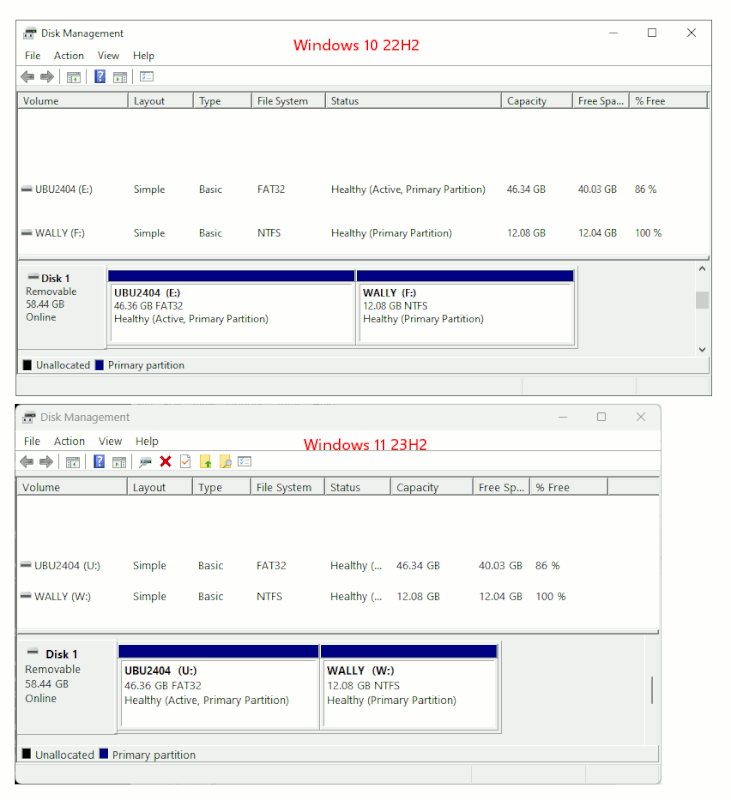
    c. The problem is non-root Android symlinks are problematic, are they not?

    (I'm not sure this is "clever" or "helpful" (as your suggestion is,
    according to your subject), but it appears much more sensible to me.
    Isn't that possible on Windows and Android to preserve portability?)

    I like the idea of a non-root Android symlink, and, rest assured, that's actually the very first idea that popped into my head (as it did for yours
    and for Carlos' apparently).

    So we all leaning toward what may be a rather profound global solution.
    But the problem with creating symlinks on non-rooted Android is well known.

    Android apps can usually create symlinks within their own data directories,
    so if you know of such Android file editors, please let us all know.

    But symlinking inside of every Android file editor isn't really elegant.
    For a more global elegant solution, certainly we could strive to use "the
    ln -s command in the adb shell, but that's fraught with difficulties due to Android file system restrictions, especially in areas like /system or /data which have strict permissions preventing symlinks in protected areas.

    [*] I, and the OS, should actually have an interest to know whether
    there's another (or new) device in the system.

    Ah. You bring up an excellent (and rather astute) intelligent point as to
    WHY the sd card happens to have three different identifiers, by default!

    Bearing in mind that there are 3 identifiers of merit in this discussion
    1. Volume ID (CID) is assigned by the OEM & is not changeable by the user
    2. Volume Serial Number is uniquely created during the formatting process
    3. Volume Name (aka Volume Label) is *intended* to be changed by the user

    Certainly, it's well known that the Serial Number is the primary identifier that the operating system is "expected" to know about & take into account.

    And just as certainly, the whole point of the Volume Name (aka Volume
    Label) is to perform the elegant task that was initially suggested in this thread.

    Note you can change the Volume Serial Number, but I'm not aware of an
    Android editor that makes use of that Volume Serial Number, so why do it?

    [**] A quick browse of the Net shows that you could [on Windows] also
    just simply change that label by context menu 'properties'.

    Let's be abundantly clear that we're not changing things simply for the
    sake of changing them - but we're planning ahead - years ahead in fact -
    for a migration so that Android editors can find their files which are
    stored on sd cards when (years from now) you double your sd card size.

    In summary, the only "thing" we want to change, is the thing that matters.
    a. Not the Volume ID (aka CID), which is used at the hardware level
    b. Not the Serial Number, which is sort of a "partition" identifier
    c. But the Volume Name, which is used at the file-explorer & editor level

    Having stated the elegance of changing the only thing that matters to the Android editors (which need to find files on the sd card), I agree if you
    can figure out how to symlink on non-root Android, you'd have all my
    respect (as that's an elegant task that I haven't yet been able to do!).

    --- SoupGate-Win32 v1.05
    * Origin: fsxNet Usenet Gateway (21:1/5)
  • From Marion@21:1/5 to Marion on Sat Feb 1 18:51:49 2025
    XPost: comp.mobile.android, comp.editors

    On Sat, 1 Feb 2025 18:45:25 -0000 (UTC), Marion wrote :


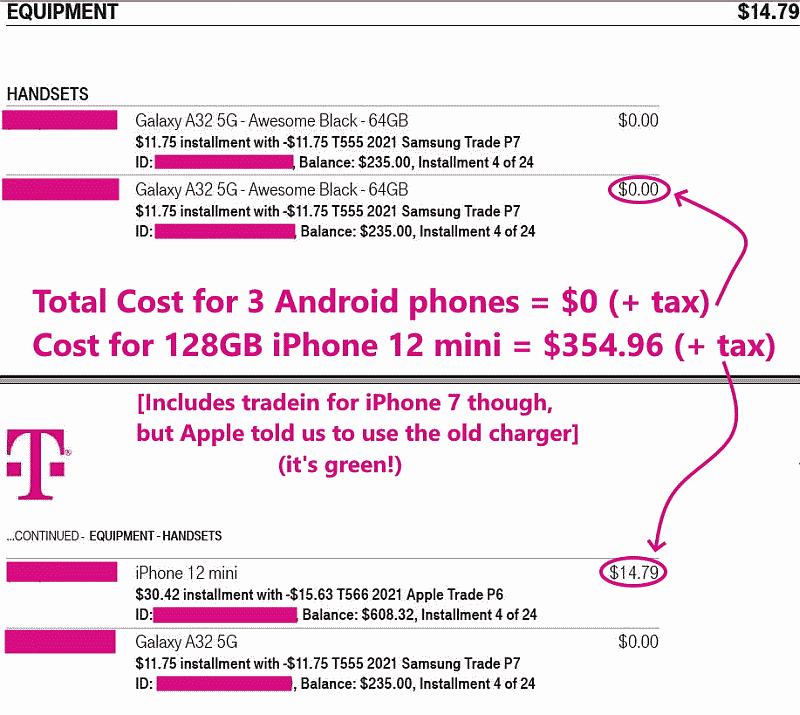
    <https://i.postimg.cc/Xq5SpS4D/tmopromo02.jpg>

    So, for about $30, I can double the memory of every Android in the house!
    You can't do *any* of that, right?

    In all fairness to Andy, whom I know to be an intelligent and thoughtful person, I belatedly realize that Andy seems to think the sd card has only
    one purpose - which is to *extend* the memory of the Android phone.

    Which is a worthless concept nowadays... I agree.

    I partly helped Andy be confused because I interchangably used the word "storage" and "memory" where that's what threw Andy off the main track.

    Suffice to say that nobody (well, almost nobody) needs to "extend" the
    memory of their Android phone nowadays ... even I don't need to do that and
    all my phones are always free (just like all my Amazon purchases are free).
    <https://amazon.com/vine/about>

    What I'm talking about here, is NOT extending the memory but DOUBLING the storage (tripling the storage, quadrupling the storage, whatever).

    As sdcards get cheaper, I pop a new triple-sized sdcard into my phone, and Voila! Instantly all my editors have TRIPLE the storage to store files in!

    That's what I mean by "portable storage".

    Given that important clarification that it's not "memory" I'm doubling, but portable storage that I'm doubling, I can ask again Andy this question:

    Q: How do *you* double your portable storage when you need to, Andy?
    A: ?

    You can't, right?

    --- SoupGate-Win32 v1.05
    * Origin: fsxNet Usenet Gateway (21:1/5)
  • From Marion@21:1/5 to Andy Burns on Sat Feb 1 18:45:25 2025
    XPost: comp.mobile.android, comp.editors

    On Sat, 1 Feb 2025 10:15:04 +0000, Andy Burns wrote :


    Take into account, my first Android device (Nexus1) had a microSD slot,
    which it certainly needed due to only having 512MB of onboard flash and
    512MB of RAM, so plenty of swapfile and moving parts of the system to SD
    ... but no phone I've owned since then has had a card slot.

    Hi Andy,

    You bring up a good point that people have to live with their decisions.
    With that in mind... as you're quite well aware...

    We've had the lack of sd discussion so many times on both the Android & on (paradoxically) the Apple newsgroups, that I'm sure you realize the last
    time we checked, the vast majority of Android phones have an sd card slot.

    With that observation that, last I had checked most Androids still have an
    sd slot in mind...

    And... without rehashing the glaringly obvious fact that it was your choice
    to NOT have an sd card slot...

    Q: How do *you* double your portable storage when you need to, Andy?
    A: ?

    You can't, right?
    For about $10, I (we) can.

    Seamlessly. As long as I (rather elegantly) plan years ahead, that is.
    <https://i.postimg.cc/bNGTzR6q/sdcard1.jpg>

    I can triple & quadruple that portable storage, any time I feel like it.
    You can't. Right? <https://i.postimg.cc/j2VCtRPX/sdcard02.jpg>

    For as many phones as I want to do it for, right?

    (Note: I have 3 free Samsung Galaxy A32-5Gs in my household right now.) <https://i.postimg.cc/Xq5SpS4D/tmopromo02.jpg>

    So, for about $30, I can double the memory of every Android in the house!
    You can't do *any* of that, right?

    Personally, unless I was made out of pure money, I wouldn't touch an
    Android phone that didn't have both the sd card slot & the aux jack.

    Please see the sig for the caveats.
    --
    Note: We all know that Apple & Google want to push people toward storing
    their editing files being stored on 'someone else's computer', but this is
    not "portable storage" in the sense that I'm using the term.

    The way I'm using "Portable Storage" is in the examples I already provided, where I've replaced (twice now!) the same model phone with a free
    replacement under warranty where the sd card was swapped out and the
    editors on Android didn't even realize they were on a different phone.

    In addition, as Andy is also well aware, I even tested *doubling* the
    storage size on the third phone, and the Android editors didn't even
    flinch.

    That's the huge significance of "portable" in the term "portable storage".

    --- SoupGate-Win32 v1.05
    * Origin: fsxNet Usenet Gateway (21:1/5)
  • From Carlos E.R.@21:1/5 to Janis Papanagnou on Sat Feb 1 20:59:25 2025
    XPost: comp.mobile.android, comp.editors

    On 2025-02-01 16:34, Janis Papanagnou wrote:
    [*] I, and the OS, should actually have an interest to know whether
    there's another (or new) device in the system.

    Indeed.

    Long ago, I swapped a floppy but the software (DOS+TP) thought it was
    still the same floppy, and wrote the FAT and directory to the second
    floppy of the first floppy, resulting in corruption of the computer work
    I had to present my teachers. I couldn't blame the cat, but...

    --
    Cheers, Carlos.

    --- SoupGate-Win32 v1.05
    * Origin: fsxNet Usenet Gateway (21:1/5)
  • From Marion@21:1/5 to Carlos E.R. on Sat Feb 1 19:16:19 2025
    XPost: comp.mobile.android, comp.editors

    On Sat, 1 Feb 2025 14:55:50 +0100, Carlos E.R. wrote :


    SD card terminology confuses people because there are at least 3 terms:
    1. Volume ID (CID)
    2. Volume Serial Number
    3. Volume Name (aka Volume Label)

    You can change them in Linux.

    Going from memory, one of them you change in the partitioner (fdisk).
    This one was crucial with Windows 7 because M$ would use it to detect
    machine change or pirated copy.

    All these changes can be done without formatting and losing the content.

    Hi Carlos,

    You bring up a good point that I did a bad job of explaining the problem
    set (& hence, in your appreciation of the sheer elegance of the solution).

    Mea culpa.
    I apologize.

    It's (almost certainly) my fault that you & Andy (& perhaps many others)
    are (apparently) confused about sd card use & terminology; specifically,
    the reason why one would benefit by changing the Volume Name (aka Label).

    For sdcards, portable memory is not the same thing as portable storage.

    Hence, from this moment, I'll STOP using the word "memory" in terms of sd
    card terminology as I will use the more apt term of "storage" for sd cards.

    That is, portable memory is not at all the same thing as portable storage.
    And it's MY FAULT for muddying up the waters on that distinction.

    Hopefully my prior response to Andy will clear up that I am only discussing here how to *seamlessly* double (or triple or quadruple or whatever) your Android portable mem... ah, er, um "storage" (for only about ten bucks).

    Note: I get all my sd cards for free off of Amazon Vine; but most people
    have to pay for their stuff on Amazon, so I'm assuming it costs them $10.

    Please be acutely aware of the fact that the elegance isn't in doubling or tripling your storage. The elegance is in the word "*seamless*".

    The editor has no clue that you just swapped out the sd card to a new one!
    But, of course, the editor has to prior be aware of storage on the sd card.

    That is, all your modern editors (which is why I stressed the word "modern"
    in the original post) "should" be able to find their files on your portable memory sd card where, if you use this insightful trick, they won't even
    know that you just doubled the sd storage space that the editors have
    access to.

    I feel sorry for people who don't have Android phones with sd card slots. Because if they want to double their portable storage, they can't.

    It's impossible (without adding hardware that sticks out of the phone).

    Hence, I already explained to Andy (where lurkers can benefit) that there
    is no way (that I know of) for *him* to double his portable memory (for ten bucks anyway). But most Android phones still have sd card slots (AFAIK).

    Now that we have the concept of "portable storage" clarified, let's look at what people are confused about in the three typical sd card identifiers.

    Why would we want to control the value of *any* of these?
    1. Volume ID (CID)
    2. Volume Serial Number
    3. Volume Name (aka Volume Label)

    Ignoring that the Volume ID is not changeable by the user, and hence has no value to us in controlling how Android editors find their sd card files...

    To your point of being easily able to change the other two using Windows
    (or Linux), why would you want to change the Volume Serial Number?

    Is there some value that you see in doing that which I don't yet comprehend which makes doing so of value in terms of controlling Android file editors?

    Remember, the whole point is that a simple elegant trick on Windows (or
    Linux) done years ahead of time, makes it seamless to double (or triple)
    the sd portable storage that is available to your modern Android editors.

    If a symlink will work on non-root Android, then that's the Holy Grail.
    CHANGE FROM: /storage/sdcard1/ABCD-ABCD/{my editor's folders & files)

    CHANGE TO: /storage/sdcard1/symlink/{my editor's folders & files)
    or perhaps...
    CHANGE TO: /storage/symlink/{my editor's folders & files)

    I have never been able to accomplish that illustrious glorious task.
    Can you?
    How?

    --- SoupGate-Win32 v1.05
    * Origin: fsxNet Usenet Gateway (21:1/5)
  • From Carlos E.R.@21:1/5 to Marion on Sat Feb 1 20:54:19 2025
    XPost: comp.mobile.android, comp.editors

    On 2025-02-01 20:16, Marion wrote:
    On Sat, 1 Feb 2025 14:55:50 +0100, Carlos E.R. wrote :


    SD card terminology confuses people because there are at least 3 terms:
    1. Volume ID (CID)
    2. Volume Serial Number
    3. Volume Name (aka Volume Label)

    You can change them in Linux.

    Going from memory, one of them you change in the partitioner (fdisk).
    This one was crucial with Windows 7 because M$ would use it to detect
    machine change or pirated copy.

    All these changes can be done without formatting and losing the content.

    Hi Carlos,

    You bring up a good point that I did a bad job of explaining the problem
    set (& hence, in your appreciation of the sheer elegance of the solution).

    Mea culpa.
    I apologize.

    It's (almost certainly) my fault that you & Andy (& perhaps many others)
    are (apparently) confused about sd card use & terminology; specifically,
    the reason why one would benefit by changing the Volume Name (aka Label).

    For sdcards, portable memory is not the same thing as portable storage.

    Hence, from this moment, I'll STOP using the word "memory" in terms of sd card terminology as I will use the more apt term of "storage" for sd cards.

    That is, portable memory is not at all the same thing as portable storage. And it's MY FAULT for muddying up the waters on that distinction.

    Hopefully my prior response to Andy will clear up that I am only discussing here how to *seamlessly* double (or triple or quadruple or whatever) your Android portable mem... ah, er, um "storage" (for only about ten bucks).

    Note: I get all my sd cards for free off of Amazon Vine; but most people
    have to pay for their stuff on Amazon, so I'm assuming it costs them $10.

    Please be acutely aware of the fact that the elegance isn't in doubling or tripling your storage. The elegance is in the word "*seamless*".

    The editor has no clue that you just swapped out the sd card to a new one! But, of course, the editor has to prior be aware of storage on the sd card.

    I don't use editors on phone nor tablet.

    And, my editor by default inserts photos inside the document file. I can
    link to external photos, but then, as I use Linux, I would use relative
    paths or symlinks.

    Also I *never* edit a file residing in flash storage. I edit in main
    storage in the computer, then copy the result over to flash media if needed.


    That is, all your modern editors (which is why I stressed the word "modern" in the original post) "should" be able to find their files on your portable memory sd card where, if you use this insightful trick, they won't even
    know that you just doubled the sd storage space that the editors have
    access to.

    I feel sorry for people who don't have Android phones with sd card slots. Because if they want to double their portable storage, they can't.

    I haven't had that need in over a decade.


    It's impossible (without adding hardware that sticks out of the phone).

    Hence, I already explained to Andy (where lurkers can benefit) that there
    is no way (that I know of) for *him* to double his portable memory (for ten bucks anyway). But most Android phones still have sd card slots (AFAIK).

    Now that we have the concept of "portable storage" clarified, let's look at what people are confused about in the three typical sd card identifiers.

    Why would we want to control the value of *any* of these?
    1. Volume ID (CID)
    2. Volume Serial Number
    3. Volume Name (aka Volume Label)

    Ignoring that the Volume ID is not changeable by the user, and hence has no value to us in controlling how Android editors find their sd card files...
    To your point of being easily able to change the other two using Windows
    (or Linux), why would you want to change the Volume Serial Number?
    Is there some value that you see in doing that which I don't yet comprehend which makes doing so of value in terms of controlling Android file editors?

    Fooling Windows into thinking you have not changed computer. Windows
    used that value for finding pirated copies.

    Also you need to write those values when cloning hard disks (or flash
    media).

    Storage cards are formatted the same as a hard disk. They contain
    partition tables, and all the identifiers of a hard disk and the
    partitions inside. And all the tools Windows or Linux have available for
    hard disks will work on them.


    Remember, the whole point is that a simple elegant trick on Windows (or Linux) done years ahead of time, makes it seamless to double (or triple)
    the sd portable storage that is available to your modern Android editors.

    If a symlink will work on non-root Android, then that's the Holy Grail. CHANGE FROM: /storage/sdcard1/ABCD-ABCD/{my editor's folders & files)

    CHANGE TO: /storage/sdcard1/symlink/{my editor's folders & files)
    or perhaps... CHANGE TO: /storage/symlink/{my editor's folders & files)

    I have never been able to accomplish that illustrious glorious task.
    Can you?
    How?


    --
    Cheers, Carlos.

    --- SoupGate-Win32 v1.05
    * Origin: fsxNet Usenet Gateway (21:1/5)
  • From Lawrence D'Oliveiro@21:1/5 to Carlos E.R. on Sun Feb 2 03:21:06 2025
    XPost: comp.mobile.android, comp.editors

    On Sat, 1 Feb 2025 14:55:50 +0100, Carlos E.R. wrote:

    1. Volume ID (CID)
    2. Volume Serial Number
    3. Volume Name (aka Volume Label)

    You can change them in Linux.

    Not the first one, though, if that’s wired into the hardware.

    --- SoupGate-Win32 v1.05
    * Origin: fsxNet Usenet Gateway (21:1/5)
  • From Lawrence D'Oliveiro@21:1/5 to Marion on Sun Feb 2 03:20:23 2025
    XPost: comp.mobile.android, comp.editors

    On Sat, 1 Feb 2025 06:03:49 -0000 (UTC), Marion wrote:

    2. Volume Serial Number:

    Format: A 32-bit number, usually displayed as 8 hexadecimal
    characters
    (e.g., A1B2C3D4).
    How it's assigned: Generated when the SD card is formatted. It can
    change if you reformat the card.

    This is a function of the filesystem format. For example, Linux
    filesystems commonly use full-length UUIDs for this purpose.

    --- SoupGate-Win32 v1.05
    * Origin: fsxNet Usenet Gateway (21:1/5)
  • From Marion@21:1/5 to Carlos E.R. on Sun Feb 2 04:16:33 2025
    XPost: comp.mobile.android, comp.editors

    On Sat, 1 Feb 2025 20:54:19 +0100, Carlos E.R. wrote :


    The editor has no clue that you just swapped out the sd card to a new one! >> But, of course, the editor has to prior be aware of storage on the sd card.

    I don't use editors on phone nor tablet.

    Hi Carlos,

    If you don't ever use editors on a mobile device, then that's unusual.
    Most people experience using editors on a mobile device, even if you don't.

    But I find it hard to believe you don't use editors on a mobile device.

    You don't use offline maps for example? Really? Seriously?
    How do you navigate using your phone when there is no Internet signal?

    Offline map editors are just one type of editor on an Android phone.
    I, for one, do a lot of editing on an Android phone.

    Another editor is Keepass2Android. There are plenty of Android editors.
    Most (if not almost all) my private data is stored on the sd card.

    And, my editor by default inserts photos inside the document file.

    Photo editors are a different breed of app when it comes to "finding" their files. I'm not sure *how* media is handled differently than, oh, say, text files such as GPX files or PDF files or whatever - but there is some
    "magic" on a phone that seems to find all media, no matter where it is.

    So media (such as images & video) I think is a special case in this regard.

    That is, even if you changed the volume name (aka volume label) of your sd card, the image & video editors still seem to *find* the sd card files.

    If those on this newsgroup can edify us as to why that magic only works for media files, and not for, oh, say, text files (such as GPX files), please elucidate why other formats (such as PDF, gpx, kml, etc.) aren't easily
    found.

    I can
    link to external photos, but then, as I use Linux, I would use relative
    paths or symlinks.

    I love your suggestion of symlinks, but as I painstakingly explained,
    nobody yet has proposed a way to do it that I know of, for Android.

    If you can get symlinks to work on the sdcard for Android, you'd be a far
    more intelligent man than I am, so I'll patiently await how you do it.

    Also I *never* edit a file residing in flash storage. I edit in main
    storage in the computer, then copy the result over to flash media if needed.

    Hmm... how do you edit GPX or KML files?

    Do you copy them from the sd storage to main storage just to edit them?
    Why?

    I feel sorry for people who don't have Android phones with sd card slots.
    Because if they want to double their portable storage, they can't.

    I haven't had that need in over a decade.

    Hmm. If you have never done it, and if all your suggestions can't possibly work, why are you making those suggestions which have no hope of working?

    Ignoring that the Volume ID is not changeable by the user, and hence has no >> value to us in controlling how Android editors find their sd card files... >> To your point of being easily able to change the other two using Windows
    (or Linux), why would you want to change the Volume Serial Number?
    Is there some value that you see in doing that which I don't yet comprehend >> which makes doing so of value in terms of controlling Android file editors?

    Fooling Windows into thinking you have not changed computer. Windows
    used that value for finding pirated copies.

    Hmm... you seem to be completely unaware of what the problem set is.
    The problem set is fooling Android. Specifically editors. By using Windows.

    Also you need to write those values when cloning hard disks (or flash
    media).

    Huh? Nobody is suggesting cloning. This solution only requires copying.

    Cloning, e.g., using dd, is a completely different issue altogether:
    sudo dd if=/dev/source_disk of=/dev/destination_disk bs=4M status=progress

    Storage cards are formatted the same as a hard disk. They contain
    partition tables, and all the identifiers of a hard disk and the
    partitions inside. And all the tools Windows or Linux have available for
    hard disks will work on them.

    Again, I love your suggestion of symlinks, which is the first thing anyone would think of, but if you can get symlinks to work on non-rooted Android
    for the sdcard, then you're a far more intelligent man than I am.

    Please let us know how you accomplished tasks which you keep suggesting.

    --- SoupGate-Win32 v1.05
    * Origin: fsxNet Usenet Gateway (21:1/5)
  • From Lawrence D'Oliveiro@21:1/5 to Marion on Sun Feb 2 06:05:26 2025
    XPost: comp.mobile.android, comp.editors

    On Sun, 2 Feb 2025 05:40:17 -0000 (UTC), Marion wrote:

    ... free cartoonify editors, in particular, seem to
    be vastly more powerful on phones than they are on any desktop I've ever used.

    Anything as powerful as this <https://www.youtube.com/watch?v=hzqD4xcbEuE>?

    --- SoupGate-Win32 v1.05
    * Origin: fsxNet Usenet Gateway (21:1/5)
  • From Marion@21:1/5 to Marion on Sun Feb 2 05:40:17 2025
    XPost: comp.mobile.android, comp.editors

    On Sun, 2 Feb 2025 04:16:33 -0000 (UTC), Marion wrote :


    So media (such as images & video) I think is a special case in this regard.

    To further add value...

    Given editing of multimedia files is a special case... and since this is
    all about editors finding their files when the storage is doubled, we
    should note that editing on phones is often far better than on desktops.

    Why, I don't know - but free cartoonify editors, in particular, seem to be vastly more powerful on phones than they are on any desktop I've ever used.

    Given media editors are sometimes far more advanced on mobile devices, it behooves all of us to better understand *how* phones tread multimedia files *differently* than all other file types (as far as I'm aware anyway).

    That is, even if I doubled my portable storage without bothering to match
    the old sdcard volume name (aka volume label), the editing apps *still*
    seem to find the special class of files known as multimedia files.

    That's great but why does Android treat only multimedia that way?
    Why not scan for all file types?

    Why does Android have a special system to scan *only* for multimedia files, such that doubling your sdcard portable memory causes no ill effects.

    Editors can still *find* your multimedia files even after doubling storage!

    I'm well aware of the trick to have the operating system *not* find them:
    /storage/0000-0001/0001/.nomedia
    But why does Android treat *only* media differently (using the media
    Scanner Service)? What about other files that we often edit?
    <com.android.providers.media>

    For example, if we double the portable storage, the media scanner system service is automatically triggered to scan the new portable storage for
    media files (images, audio, and video). When it finds a new "media" file (e.g., a .jpg, .png, .mp3, or .mp4, etc.), the media scanner extracts its concomitant metadata (like artist, album, title, date, resolution, etc.)
    and adds this information to the Android MediaStore SQLite database.
    /data/data/com.android.providers.media/databases/
    Specifically, in a table containing a separate section each for
    MediaStore.Images
    MediaStore.Video
    MediaStore.Audio

    In summary, we probably need to clarify that there are two kinds of
    editors, only one of which is severely impacted when we double storage.
    a. Editors have no problem finding impacted media files
    b. But editors can't find all other impacted file types

    Unless you know the trick. :)

    --- SoupGate-Win32 v1.05
    * Origin: fsxNet Usenet Gateway (21:1/5)
  • From Carlos E.R.@21:1/5 to Lawrence D'Oliveiro on Sun Feb 2 14:43:10 2025
    XPost: comp.mobile.android, comp.editors

    On 2025-02-02 04:21, Lawrence D'Oliveiro wrote:
    On Sat, 1 Feb 2025 20:54:19 +0100, Carlos E.R. wrote:

    Also I *never* edit a file residing in flash storage.

    Does your system not have an SSD?

    Mmm. Certainly, but it is another kind, designed for intensive use.

    --
    Cheers, Carlos.

    --- SoupGate-Win32 v1.05
    * Origin: fsxNet Usenet Gateway (21:1/5)
  • From Carlos E.R.@21:1/5 to Lawrence D'Oliveiro on Sun Feb 2 15:07:17 2025
    XPost: comp.mobile.android, comp.editors

    On 2025-02-02 04:21, Lawrence D'Oliveiro wrote:
    On Sat, 1 Feb 2025 14:55:50 +0100, Carlos E.R. wrote:

    1. Volume ID (CID)
    2. Volume Serial Number
    3. Volume Name (aka Volume Label)

    You can change them in Linux.

    Not the first one, though, if that’s wired into the hardware.

    I would need to know the name in Linux parlance to be sure. I have not
    noticed an identifier tied to the hardware, except model and serial
    number in hard disks. I'm unsure flash sticks have this.

    --
    Cheers, Carlos.

    --- SoupGate-Win32 v1.05
    * Origin: fsxNet Usenet Gateway (21:1/5)
  • From Carlos E.R.@21:1/5 to Marion on Sun Feb 2 15:07:34 2025
    XPost: comp.mobile.android, comp.editors

    On 2025-02-02 05:16, Marion wrote:
    On Sat, 1 Feb 2025 20:54:19 +0100, Carlos E.R. wrote :


    The editor has no clue that you just swapped out the sd card to a new
    one!
    But, of course, the editor has to prior be aware of storage on the sd
    card.

    I don't use editors on phone nor tablet.

    Hi Carlos,

    If you don't ever use editors on a mobile device, then that's unusual.
    Most people experience using editors on a mobile device, even if you don't.

    But I find it hard to believe you don't use editors on a mobile device.

    You don't use offline maps for example? Really? Seriously?
    How do you navigate using your phone when there is no Internet signal?

    Till today I had no idea you were talking of map editors. I was thinking
    text editors.

    No, I do not use map editors on my phone, either. I use map apps that
    view the map, not edit them.


    Offline map editors are just one type of editor on an Android phone.
    I, for one, do a lot of editing on an Android phone.

    Another editor is Keepass2Android. There are plenty of Android editors.
    Most (if not almost all) my private data is stored on the sd card.

    I don't "edit" my password file on the phone.


    And, my editor by default inserts photos inside the document file.

    Photo editors are a different breed of app when it comes to "finding" their files. I'm not sure *how* media is handled differently than, oh, say, text files such as GPX files or PDF files or whatever - but there is some
    "magic" on a phone that seems to find all media, no matter where it is.

    So media (such as images & video) I think is a special case in this regard.

    That is, even if you changed the volume name (aka volume label) of your sd card, the image & video editors still seem to *find* the sd card files.

    If those on this newsgroup can edify us as to why that magic only works for media files, and not for, oh, say, text files (such as GPX files), please elucidate why other formats (such as PDF, gpx, kml, etc.) aren't easily found.

    Because "editor" to me is a text editor, and I was thinking of the one I
    use, Libre Office Writer. Ok, a word processor. If I have to edit pure
    plain text files they are just a few kilobytes in size.


    I can link to external photos, but then, as I use Linux, I would use
    relative paths or symlinks.

    I love your suggestion of symlinks, but as I painstakingly explained,
    nobody yet has proposed a way to do it that I know of, for Android.


    Your question is posted to the editors group, and to the windows group,
    so I don't have to limit my thinking to Android.


    If you can get symlinks to work on the sdcard for Android, you'd be a far more intelligent man than I am, so I'll patiently await how you do it.

    Also I *never* edit a file residing in flash storage. I edit in main
    storage in the computer, then copy the result over to flash media if
    needed.

    Hmm... how do you edit GPX or KML files?

    I don't.

    I thought you were talking of text files.

    Do you copy them from the sd storage to main storage just to edit them?
    Why?

    Because the wear in flash cards is limited, and using an editor in such
    media stresses them.


    I feel sorry for people who don't have Android phones with sd card
    slots.
    Because if they want to double their portable storage, they can't.

    I haven't had that need in over a decade.

    Hmm. If you have never done it, and if all your suggestions can't possibly work, why are you making those suggestions which have no hope of working?


    Arlen, you have changed the goalposts. You never said you were not
    talking of text editors till today.


    Ignoring that the Volume ID is not changeable by the user, and hence
    has no
    value to us in controlling how Android editors find their sd card
    files...
    To your point of being easily able to change the other two using Windows >>> (or Linux), why would you want to change the Volume Serial Number?
    Is there some value that you see in doing that which I don't yet
    comprehend
    which makes doing so of value in terms of controlling Android file
    editors?

    Fooling Windows into thinking you have not changed computer. Windows
    used that value for finding pirated copies.

    Hmm... you seem to be completely unaware of what the problem set is.
    The problem set is fooling Android. Specifically editors. By using Windows.

    I'm sure that Windows has tools to change those values without
    formatting the media, you just have to find them. I am a Linux guy, so I
    know how to do that in Linux.

    Also you need to write those values when cloning hard disks (or flash
    media).

    Huh? Nobody is suggesting cloning. This solution only requires copying.

    No, Arlen, I'm just giving an example of why the need to edit that
    value. One that I have needed to do in the past. I'm not suggesting you
    clone anything.


    Cloning, e.g., using dd, is a completely different issue altogether:
    sudo dd if=/dev/source_disk of=/dev/destination_disk bs=4M status=progress

    Storage cards are formatted the same as a hard disk. They contain
    partition tables, and all the identifiers of a hard disk and the
    partitions inside. And all the tools Windows or Linux have available
    for hard disks will work on them.

    Again, I love your suggestion of symlinks, which is the first thing anyone would think of, but if you can get symlinks to work on non-rooted Android
    for the sdcard, then you're a far more intelligent man than I am.

    Please let us know how you accomplished tasks which you keep suggesting.

    You posted in three groups, the answers do not have to be limited to one operating system. I said I never "edit" on Android. Meaning Libre Office Writer, or Microsoft Word. You did not say till today that you were
    editing maps in the woods without internet. And no, I never felt the
    need to edit maps on the phone. I just view them with an app, typically OSMand+.

    --
    Cheers, Carlos.

    --- SoupGate-Win32 v1.05
    * Origin: fsxNet Usenet Gateway (21:1/5)
  • From Janis Papanagnou@21:1/5 to Kenny McCormack on Sun Feb 2 15:24:49 2025
    XPost: comp.mobile.android, comp.editors

    On 01.02.2025 17:29, Kenny McCormack wrote:
    In article <vnletd$5l96$[email protected]>,
    Janis Papanagnou <[email protected]> wrote:
    ...
    (I probably shouldn't engage in this thread - and not only because it
    got aggressive recently - because it seems (partly?) a Windows issue,
    given the mention of 'C:', 'D:' and such crap later in this thread;
    but I'm curious...)

    Calling drive letters "crap" isn't "aggressive" ?

    I wouldn't think so, but maybe we have a different view on that. What I
    meant and was addressing was the _ad hominem_ aggressivity. (It wouldn't
    have occurred to me that calling a technical mis-design "crap" would be considered aggressive.) I think that personal "Die fucking troll, Die."
    [from "Quincy the fifth"] is something vastly different than "Feature
    C: D: is crap."


    Anyway, given that this is a cross-posted thread, it would be useful to
    know from which group you are reading/responding. I often give this info myself when responding to cross-posts.

    My guess it that, like me, you are reading in comp.editors. The point of this observation is that this thread (whatever it does eventually turn out
    to really be about) is really more of an Android/Windows thing, and is only tangentially related to editors. If you're coming from a primarily Unix (aka, Linux) background, a lot of it will look weird. I don't understand
    it myself, but I am inferring (just from reading this thread) that there
    are weirdnesses in both Android and Windows that give rise to the issues
    that Arlen is trying to address.

    Neither you nor I are familiar with these weirdnesses and problems, because we both come primarily from Unix/Linux backgrounds - where such things
    simply don't exist.

    Well, I worked in the past also in DOS and Windows environments. And I
    seem to recall that there were some sorts/variant of "links" available
    (but I might be misremembering). And Android is a Linux (Unix) based OS
    so I'd expect that such primitive and basic mechanisms are nor removed
    from this OS. But I don't know; so if it's not applicable readers may
    just dismiss my hint.

    Janis

    --- SoupGate-Win32 v1.05
    * Origin: fsxNet Usenet Gateway (21:1/5)
  • From Janis Papanagnou@21:1/5 to Marion on Sun Feb 2 15:44:38 2025
    XPost: comp.mobile.android, comp.editors

    On 01.02.2025 19:10, Marion wrote:
    [...]
    [symbolic links]

    This was brought up prior, I think by Carlos if I remember correctly,

    (I may have missed that. - Sorry, Carlos!)

    where
    I restrained myself from incredulously asking HOW he proposed to do that symlinking on Android such that the all-important Android file editors
    would still recognize a path that has completely changed out from under
    them.

    You again stirred my curiosity - since I don't know about the Android
    and its file-editors peculiarities... - How does Android recognize the
    path with the (arbitrary) "A1B1-C1D1" and "A2B2-C2D2" path components
    but not a generic (a fixed) one?


    To be clear, I'm absolutely and emphatically NOT saying it can't be
    done; nor am I even intimating that it's not a great idea - I'm only
    asking, eyes
    wide open with intrigue, HOW you (and Carlos) would accomplish that.

    I'm lacking Android competences so I cannot provide more than a hint.
    Sorry. (If it doesn't work for reasons beyond my expertise please just
    ignore my post.) I would have thought there's (as so often) some menu
    entry or (either system- or editor-specific) properties file to change
    or define that.

    Janis

    [...]

    --- SoupGate-Win32 v1.05
    * Origin: fsxNet Usenet Gateway (21:1/5)
  • From Kenny McCormack@21:1/5 to [email protected] on Sun Feb 2 14:53:52 2025
    XPost: comp.mobile.android, comp.editors

    In article <vnnv7i$nmrk$[email protected]>,
    Janis Papanagnou <[email protected]> wrote:
    ...
    Calling drive letters "crap" isn't "aggressive" ?

    I wouldn't think so, but maybe we have a different view on that. What I
    meant and was addressing was the _ad hominem_ aggressivity. (It wouldn't
    have occurred to me that calling a technical mis-design "crap" would be >considered aggressive.)

    Maybe it is a language barrier (*), but, yes, there is a strong feeling nowadays that criticizing a technology *is* criticizing the people who use
    that technology (and like it). And they get defensive about it. When you criticize, say, DOS/Windows drive letters, all those people who like that
    sort of thing get all fee-fee-hurt and react accordingly. Thus, on some forums, you are not allowed to criticize any technology.

    (*) English not being your first language (not that there is anything wrong with that...)

    I think that personal "Die fucking troll, Die."
    [from "Quincy the fifth"] is something vastly different than "Feature
    C: D: is crap."

    Oh, that. That's just the ravings of a lunatic. No one pays it any
    attention whatsoever.

    I thought you were referring to my first post on this thread, commenting on
    the ravings of our resident lunatic (Arlen). That could be seen as "aggressive". That post is what set our resident lunatic on fire in the
    first place (Don't know if you've noticed, but Q5 has been posting that
    crap all over Usenet, not just here).

    Well, I worked in the past also in DOS and Windows environments.

    I would imagine so. But Android is actually more different from Linux
    than Windows is from Unix/Linux.

    And I seem to recall that there were some sorts/variant of "links"
    available (but I might be misremembering).

    Yeah, true, but not particular relevant to this discussion.

    Note that symlinks do work under Android (I do it all the time), but Arlen
    is too busy discovering his navel to realize that.

    And Android is a Linux (Unix) based OS
    so I'd expect that such primitive and basic mechanisms are nor removed
    from this OS. But I don't know; so if it's not applicable readers may
    just dismiss my hint.

    Yes, Android is Linux based, but it is enough different that I consider it
    a separate animal. Essentially, everything that isn't absolutely necessary
    is disabled, so it is very hard to work in. It is kind of like Linux with
    both hands tied behind your back. You have to hit the keyboard (i.e.,
    screen) with your nose.

    --
    The randomly chosen signature file that would have appeared here is more than 4 lines long. As such, it violates one or more Usenet RFCs. In order to remain in compliance with said RFCs, the actual sig can be found at the following URL:
    http://user.xmission.com/~gazelle/Sigs/RepInsults

    --- SoupGate-Win32 v1.05
    * Origin: fsxNet Usenet Gateway (21:1/5)
  • From Carlos E.R.@21:1/5 to Janis Papanagnou on Sun Feb 2 15:50:17 2025
    XPost: comp.mobile.android, comp.editors

    On 2025-02-02 15:24, Janis Papanagnou wrote:
    On 01.02.2025 17:29, Kenny McCormack wrote:
    In article <vnletd$5l96$[email protected]>,
    Janis Papanagnou <[email protected]> wrote:
    ...
    (I probably shouldn't engage in this thread - and not only because it
    got aggressive recently - because it seems (partly?) a Windows issue,
    given the mention of 'C:', 'D:' and such crap later in this thread;
    but I'm curious...)

    Calling drive letters "crap" isn't "aggressive" ?

    I wouldn't think so, but maybe we have a different view on that. What I
    meant and was addressing was the _ad hominem_ aggressivity. (It wouldn't
    have occurred to me that calling a technical mis-design "crap" would be considered aggressive.)

    Some people do. I was called to attention and maybe banned from a Linux
    forum for such an opinion. I assume because developers and packagers are
    part of the community, and calling a software crap is insulting the
    developer who might be reading and is working gratis.


    I think that personal "Die fucking troll, Die."
    [from "Quincy the fifth"] is something vastly different than "Feature
    C: D: is crap."


    Anyway, given that this is a cross-posted thread, it would be useful to
    know from which group you are reading/responding. I often give this info
    myself when responding to cross-posts.

    My guess it that, like me, you are reading in comp.editors. The point of
    this observation is that this thread (whatever it does eventually turn out >> to really be about) is really more of an Android/Windows thing, and is only >> tangentially related to editors. If you're coming from a primarily Unix
    (aka, Linux) background, a lot of it will look weird. I don't understand
    it myself, but I am inferring (just from reading this thread) that there
    are weirdnesses in both Android and Windows that give rise to the issues
    that Arlen is trying to address.

    Neither you nor I are familiar with these weirdnesses and problems, because >> we both come primarily from Unix/Linux backgrounds - where such things
    simply don't exist.

    Well, I worked in the past also in DOS and Windows environments. And I
    seem to recall that there were some sorts/variant of "links" available
    (but I might be misremembering). And Android is a Linux (Unix) based OS
    so I'd expect that such primitive and basic mechanisms are nor removed
    from this OS. But I don't know; so if it's not applicable readers may
    just dismiss my hint.

    Android is *nix based, yes, but uses an MsDOS filesystem (FAT).

    --
    Cheers, Carlos.

    --- SoupGate-Win32 v1.05
    * Origin: fsxNet Usenet Gateway (21:1/5)
  • From Janis Papanagnou@21:1/5 to Carlos E.R. on Sun Feb 2 16:04:30 2025
    XPost: comp.mobile.android, comp.editors

    On 02.02.2025 15:50, Carlos E.R. wrote:
    On 2025-02-02 15:24, Janis Papanagnou wrote:
    On 01.02.2025 17:29, Kenny McCormack wrote:
    In article <vnletd$5l96$[email protected]>,
    Janis Papanagnou <[email protected]> wrote:
    ...
    (I probably shouldn't engage in this thread - and not only because it
    got aggressive recently - because it seems (partly?) a Windows issue,
    given the mention of 'C:', 'D:' and such crap later in this thread;
    but I'm curious...)

    Calling drive letters "crap" isn't "aggressive" ?

    I wouldn't think so, but maybe we have a different view on that. What I
    meant and was addressing was the _ad hominem_ aggressivity. (It wouldn't
    have occurred to me that calling a technical mis-design "crap" would be
    considered aggressive.)

    That is understandable. - Though the guy who invented the "device
    letters" concept (40+ years ago!) probably doesn't mind (anymore)
    even if he'd take that (unjustified) as _personal_ offense, which
    it obviously isn't.


    Some people do. I was called to attention and maybe banned from a Linux
    forum for such an opinion. I assume because developers and packagers are
    part of the community, and calling a software crap is insulting the
    developer who might be reading and is working gratis.

    Valuing a complete software package is again another thing. (Yet,
    still not a personal thing.)

    [...]

    Android is *nix based, yes, but uses an MsDOS filesystem (FAT).

    Yes, I know. For some reasons inferiors concepts are invented and
    they also don't die once they've got widely spread.

    Janis

    --- SoupGate-Win32 v1.05
    * Origin: fsxNet Usenet Gateway (21:1/5)
  • From Janis Papanagnou@21:1/5 to All on Sun Feb 2 16:26:40 2025
    XPost: comp.mobile.android, comp.editors

    (Sorry, I misplaced my answer to the quote wrongly above the text
    in my previous post. - Hope the intention was clear anyway.)

    --- SoupGate-Win32 v1.05
    * Origin: fsxNet Usenet Gateway (21:1/5)
  • From Frank Slootweg@21:1/5 to Janis Papanagnou on Sun Feb 2 16:29:56 2025
    XPost: comp.mobile.android, comp.editors

    Janis Papanagnou <[email protected]> wrote:
    On 02.02.2025 15:50, Carlos E.R. wrote:
    [...]

    Android is *nix based, yes, but uses an MsDOS filesystem (FAT).

    Yes, I know. For some reasons inferiors concepts are invented and
    they also don't die once they've got widely spread.

    To be clear, Android's native filesystem is not FAT (but ext4), but if
    you use a (Micro)SD-card in an Android device (which is partly the
    subject of this ... ahem ... 'thread'), then the filesystem on that card
    is FAT (assuming it's not used as an extension of Internal Storage
    ('disk' space)).

    --- SoupGate-Win32 v1.05
    * Origin: fsxNet Usenet Gateway (21:1/5)
  • From Kenny McCormack@21:1/5 to [email protected] on Sun Feb 2 16:37:41 2025
    XPost: comp.mobile.android, comp.editors

    In article <[email protected]>,
    Frank Slootweg <[email protected]d> wrote:
    Janis Papanagnou <[email protected]> wrote:
    On 02.02.2025 15:50, Carlos E.R. wrote:
    [...]

    Android is *nix based, yes, but uses an MsDOS filesystem (FAT).

    Yes, I know. For some reasons inferiors concepts are invented and
    they also don't die once they've got widely spread.

    To be clear, Android's native filesystem is not FAT (but ext4), but if
    you use a (Micro)SD-card in an Android device (which is partly the
    subject of this ... ahem ... 'thread'), then the filesystem on that card
    is FAT (assuming it's not used as an extension of Internal Storage
    ('disk' space)).

    Yes, all true. Interestingly, at least the one time I tested this, when I formatted an SD card to ext4, then inserted it into a phone, it did not recognize it. Odd, because obviously, it *can* recognized ext4
    filesystems. But it only seems to be able to do FAT on the SD card.

    --
    "Only a genius could lose a billion dollars running a casino."
    "You know what they say: the house always loses."
    "When life gives you lemons, don't pay taxes."
    "Grab 'em by the p***y!"

    --- SoupGate-Win32 v1.05
    * Origin: fsxNet Usenet Gateway (21:1/5)
  • From Marion@21:1/5 to Lawrence D'Oliveiro on Sun Feb 2 21:34:45 2025
    XPost: comp.mobile.android, comp.editors

    On Sun, 2 Feb 2025 06:05:26 -0000 (UTC), Lawrence D'Oliveiro wrote :


    ... free cartoonify editors, in particular, seem to
    be vastly more powerful on phones than they are on any desktop I've ever
    used.

    Anything as powerful as this <https://www.youtube.com/watch?v=hzqD4xcbEuE>?

    Given this is an editing group, that heartfelt value added is useful. Especially as I always click on any link people kindly go to the trouble of supplying (so that I learn better what it is they are trying to teach me).

    Thank you for being purposefully value added helpful, as face "cartoonify" capabilities, in my humble opinion, based on my experience, suck on Windows versus Android. Notice I added "face" as that's how I use them (e.g., to
    take someone's image and cartoonify it for them for humor or so that they
    can use it as a privacy-aware avatar with their social media monikers).

    Interesting that you mentioned the blender app as I have strived to install (and at least briefly test) every single free "editing" app ever posted to
    the Windows-10 newsgroup over the years; so certainly I already had Blender installed - but - it's in my 3D folder. See my ad hoc %EDITOR% screenshot.
    <https://i.postimg.cc/pdC7R5Jw/blender01.jpg>

    From the time stamps, it looks like I first installed Blender on my desktop
    PC in October of 2018, and I last updated Blender in July of 2022.

    As I recall, Blender was extremely powerful; but I was looking at it for 3D
    CAD purposes (I think so that I could calculate oddly-shaped pool volumes).

    As a Windows-editor-related aside, I've tested all the free suggested cartoonify apps on Windows, as shown by this ad hoc %EDITOR% screenshot.
    <https://i.postimg.cc/NFgH18Gp/photo-editor01.jpg>

    Most of those %EDITORS% are to edit a screenshot (i.e., arrows, boxes &
    text); but some are for depth-of-field overlays or oil paintings or to
    remove blemishes, or some other rather specialized non-AI activity.

    A good AI activity of free cartoonifying, I haven't yet found on Windows. Looking at the link on Android mirrored over onto Windows, I see this:
    <https://i.postimg.cc/9Qvg3j53/blender-grease01.jpg>
    <https://i.postimg.cc/tJmRpzHM/blender-grease02.jpg>
    <https://i.postimg.cc/Zq52ZzVV/blender-grease03.jpg>
    <https://i.postimg.cc/Kz8yjgQS/blender-grease04.jpg>
    <https://i.postimg.cc/9FpKRfRc/blender-grease05.jpg>
    <https://i.postimg.cc/ydb2Npkc/blender-grease06.jpg>

    OMG! That's beautiful. Very awe-inspiringly beautiful. But, perhaps a lot
    of knowledge is required, whereas with the phone-based AI, no knowledge is necessary (but, of course, you only get the AI-generated choices also).

    By way of stark contrast, the results from Android AI-based cartoonify
    programs are (essentially) almost uncontrollable - but they too are nice.

    To always add value, my favorite Android cartoonify editors, are these:
    *PhotoRoom Studio Photo Editor* by Artizans of Photo Video BG Editor App
    Free, with ads, rated 4.7, 10M+ installs, requires GSF
    <https://play.google.com/store/apps/details?id=com.photoroom.app>
    [PhotoRoom can be screenshotted.]
    [PhotoRoom is ok with adb shell screencap -p /sdcard/Download/screenshot.png]
    [PhotoRoom is good for transparizing the background away magic wand style.]
    [PhotoRoom saves the results with a watermark easily cropped.]

    *Photo Lab* Picture Editor & Art, by Linerock Investments LTD
    Free, with ads, rated 4.6, 100M+ installs, requires GSF
    <https://play.google.com/store/apps/details?id=vsin.t16_funny_photo>

    *ToonMe* cartoons from photos, by Linerock Investments LTD
    Free, with ads, rated 4.4, 50M+ installs, requires GSF
    <https://play.google.com/store/apps/details?id=com.vicman.toonmeapp>

    *Voila* AI Artist Cartoon Photo by Wemagine.AI
    free, +ads (really obnoxious), requires gsf, rated 4.6, 10M+ installs
    <https://play.google.com/store/apps/details?id=com.wemagineai.voila>

    In their own way, the cartoonify AI on Android is good - but it pales in comparison to that inspiring video of what the Blender grease pencil does.
    <https://www.youtube.com/watch?v=hzqD4xcbEuE>

    Thanks for helping the Windows & %EDITORS% people by suggesting Blender!

    I'm going to have to find a tutorial that shows the *easiest* way to
    cartoonify something very simple - such as a closeup face portrait.
    --
    Every post should add value for the vast majority of people reading it.

    --- SoupGate-Win32 v1.05
    * Origin: fsxNet Usenet Gateway (21:1/5)
  • From Marion@21:1/5 to Carlos E.R. on Sun Feb 2 22:54:37 2025
    XPost: comp.mobile.android, comp.editors

    Woo hoo! The solution has been greatly improved!

    It's important to note that Carlos kindly further improved this clever
    trick, turning what was merely ingenious into brilliant in simplicity.

    See below for details - where Carlos' solution supersedes that of mine!

    Many thanks to Carlos (and others) for adding value in this thread!

    On Sun, 2 Feb 2025 23:20:45 +0100, Carlos E.R. wrote :

    -----< cut here for post that went only to the Android ng >-----
    On Sun, 2 Feb 2025 23:20:45 +0100, Carlos E.R. wrote :
    Ok, now that I understand what type of editor you are talking about and
    the scenario,

    Well, that's only one type of editor, but it's an editor that most of us
    can agree that if we had an sdcard, that we'd want to store the (admittedly huge) map data on that sdcard, which then needs to be edited at times.

    I can agree that changing the label of the card is the thing to do.

    I think most people perhaps don't understand the genius of my advice
    because they, themselves, never bothered to try to overcome problems.

    So they've never experienced a seamless non-cloud phone-to-phone upgrade.
    I have.

    It is a particular scenario.

    I agree that about many Android phones sold today don't have a portable
    storage slot (or it does double duty for the SIM card perhaps); but last we checked, most Androids still came with the portable storage sdcard slot.

    Given that is coupled with the fact that {OSMAnd~/OSMAnd+/OSMAnd} is a
    common offline map application, people have to store its data somewhere.

    It either takes up a lot of space on the sdcard0 internal memory.
    Or not.

    For those with sdcards & OSMAnd, it's easier just to match the volume name. But, you can manually change the directories out from under this editor.

    But not from all editors - which is the point of bringing up editors.
    BTW, I learned this the hard way, as you can see from the images below:

    <https://i.postimg.cc/nr8KNVby/sdcard06.jpg> OsmAnd~ Data storage folder
    <https://i.postimg.cc/mrzHRxwB/sdcard07.jpg> OsmAnd~ Move to ext sdcard
    <https://i.postimg.cc/vZ1RtXhc/sdcard08.jpg> OsmAnd~ Moved to ext storage

    Then, remember that you can just edit the label to anything without formatting, in Windows. There is a "label" command in MsDOS that should still be able to do the trick.

    I used to write, decades ago, tutorials on MSDOS DEBUG programming, in the Peter Norton days, but it has been a long time since I messed with that.

    However, to your value-added point, yes, you can change the sdcard volume
    name (aka volume label) using the DOS "label" command & the File Explorer.

    Here's how to change the volume name through the command prompt:
    1. Win+R > cmd
    2. Label P: 2025-0202 (e.g., to label it as February 2nd, 2025)
    3. Press "Enter"

    You can also change the volume name through File Explorer:
    1. Open File Explorer:
    2. Right-click on your SD card:
    3. Select "Properties":
    4. In the "General" tab, change the text in the "Volume Label" field:
    5. Click "OK"

    Both methods work without affecting the data on your SD card.
    This is actually a *much better* idea than the one I had espoused!

    Since this offshoot is only on the Android newsgroup, I'm gonna forward it
    to the rest of the groups so that others can benefit from this useful improvement - which - I must admit - is sheer genius due to the fact that a (quick) format isn't needed (and hence, existing data isn't in jeopardy).

    Note: You generally do NOT have existing data on a new sdcard though. :)

    That said, it happens that I can not quadruple the storage in my tablet, because the maximum size it accepts is not that large.

    Well, OK. I get that. For me, 128GB on my free Samsung works fine.
    I just looked up how much it can take, and mine appears to be 1TB.

    Lucky me. :) (I suspect by the time 1TB sdcards get to be about ten bucks,
    I'll pine for a new phone (even as I'm happy with my free Galaxy A32-5G).

    It's the iPhones that I have which always die (as AJL & I discussed earlier
    in this thread) where my free ($200 MSRP) phone has a better battery than
    Apple has ever put in any iPhone ever sold - where those iPhone batteries
    are so bad, the EU will forbid Apple from selling their iPhone later this
    year. Apple, being scared of the EU, finally upgraded the iPhone 15 to
    *barely* meet the minimum charge-cycle lifetime expectations - which means
    no iPhone older than that can be sold in the EU later this year.

    Meanwhile, almost every Android phone not only easily met the battery charge-cycle lifetime requirements, but most *doubled* the minimum spec.
    --
    Fancy that: Apple puts the cheapest components they can into the iPhone.

    --- SoupGate-Win32 v1.05
    * Origin: fsxNet Usenet Gateway (21:1/5)
  • From Lawrence D'Oliveiro@21:1/5 to Marion on Mon Feb 3 00:01:09 2025
    XPost: comp.mobile.android, comp.editors

    On Sun, 2 Feb 2025 21:34:45 -0000 (UTC), Marion wrote:

    As I recall, Blender was extremely powerful; but I was looking at it for
    3D CAD purposes ...

    It covers a lot of DCC application areas, as should be evident by now.

    --- SoupGate-Win32 v1.05
    * Origin: fsxNet Usenet Gateway (21:1/5)
  • From Lawrence D'Oliveiro@21:1/5 to Carlos E.R. on Mon Feb 3 00:01:33 2025
    XPost: comp.mobile.android, comp.editors

    On Sun, 2 Feb 2025 14:43:10 +0100, Carlos E.R. wrote:

    On 2025-02-02 04:21, Lawrence D'Oliveiro wrote:

    On Sat, 1 Feb 2025 20:54:19 +0100, Carlos E.R. wrote:

    Also I *never* edit a file residing in flash storage.

    Does your system not have an SSD?

    Mmm. Certainly, but it is another kind, designed for intensive use.

    You didn’t say which kind.

    --- SoupGate-Win32 v1.05
    * Origin: fsxNet Usenet Gateway (21:1/5)
  • From Marion@21:1/5 to Carlos E.R. on Sun Feb 2 23:42:10 2025
    XPost: comp.mobile.android, comp.editors

    On Sun, 2 Feb 2025 15:07:34 +0100, Carlos E.R. wrote :


    You don't use offline maps for example? Really? Seriously?
    How do you navigate using your phone when there is no Internet signal?

    Till today I had no idea you were talking of map editors. I was thinking
    text editors.

    I apologize for not providing examples of which editors store their data on
    the sdcard, where I openly admit I may have accidentally not provided
    enough data for others to understand the complexity of the problem set.

    My goal, always, is to *seamlessly* port from any one phone to any other
    phone, where by "seamless", I mean that I've (brilliantly) planned years
    ahead (just as I do on Windows) for the certainty of porting all my data.

    It has been widely stated that there are only three certainties in life:
    a. Porting your data
    b. The battery will eventually meet its charge-cycle-limit death, and,
    c. Taxes (even on my free phone, I had to pay 10% California sales tax)

    Unfortunately, my iPhone dies sooner than my Android due to the excessively cheap batteries Apple puts into them; but at least the EU is forcing Apple
    to no longer sell any iPhone that doesn't meet the bare-minimum battery charge-cycle lifetime specs - which Apple barely meets with the iPhone 15.

    No, I do not use map editors on my phone, either.

    Well, I hike a lot in the Santa Cruz Mountains, where I proved, long ago
    how atrociously inaccurate the Open Street Maps are (which is too bad, as I *love* the concept of open source topographic maps); so I have to do a
    *lot* of map editing.

    Lately, even though I've written many a tutorial on how to edit map data, I generally use the free 1:24K geopdf USGS maps (which I understand are not useful to people outside of the country). I've also shown people how to navigate in every state & federal park in the USA with iOS & Android apps.

    In addition, I have written many a tutorial on how to take any map PDF and
    then georeference it such that it displays where you are on both iOS &
    Android devices when you're nowhere near the Internet.

    I've shown people how to draw a route and then how to follow that route,
    where there are no street signs in the middle of the mountains out here
    such that people are lost for days (due to the steep topography I guess).
    <https://duckduckgo.com/?q=hiker+lost+in+santa+cruz+mountains>

    It turns out that there is a *lot* of map editing to do when you're
    actually using dead reckoning to get from point A to point B in mountains.

    But it wasn't only map editors that I was thinking about.
    It was all editors on Android that don't actually edit multimedia files.

    Multimedia, as we covered separately, finds itself. :)

    I use map apps that view the map, not edit them.

    Well, that's understandable, but even if you never *edit* the maps, you
    still have to store offline maps *somewhere*, where, they're never small.

    I pity people who don't have access to portable storage, and no, the cloud
    is not the same thing (which those clueless Apple trolls can't fathom).

    Another editor is Keepass2Android. There are plenty of Android editors.
    Most (if not almost all) my private data is stored on the sd card.

    I don't "edit" my password file on the phone.

    Well, to be perfectly open, as always, I "usually" do the same as I strive
    to only edit the passwords kdbx file on Windows, and then I only read it on Android - but sometimes - rarely - but sometimes - I need to edit it too.

    To continue to add value, I've found the most compatible Windows free
    password editor to be KeepassXC (cross compatible with Mac, Win & Linux).
    <https://keepassxc.org/>

    I've tested *all* of them though, every single one that was ever suggested
    on both the Android & Windows newsgroups, where on Android, I found that Keepass2Android appears to be the most cross compatible with KeepassXC:
    <https://play.google.com/store/apps/details?id=keepass2android.keepass2android>

    And, my editor by default inserts photos inside the document file.

    Photo editors are a different breed of app when it comes to "finding" their >> files. I'm not sure *how* media is handled differently than, oh, say, text >> files such as GPX files or PDF files or whatever - but there is some
    "magic" on a phone that seems to find all media, no matter where it is.

    So media (such as images & video) I think is a special case in this regard. >>
    That is, even if you changed the volume name (aka volume label) of your sd >> card, the image & video editors still seem to *find* the sd card files.

    If those on this newsgroup can edify us as to why that magic only works for >> media files, and not for, oh, say, text files (such as GPX files), please
    elucidate why other formats (such as PDF, gpx, kml, etc.) aren't easily
    found.

    Because "editor" to me is a text editor, and I was thinking of the one I
    use, Libre Office Writer. Ok, a word processor. If I have to edit pure
    plain text files they are just a few kilobytes in size.

    Yeah. I agree. %EDITOR% means a *lot* of editors, as you can see from my screenshots earlier today - where I must have hundreds of editors installed (every single one of those editors I have tested, at least briefly, myself)
    <https://i.postimg.cc/NFgH18Gp/photo-editor01.jpg>

    Note in that screenshot alone, you see editors of all these types:
    \software\editor\3d
    \software\editor\android
    \software\editor\assembler
    \software\editor\audio
    \software\editor\calendar
    \software\editor\checksum
    \software\editor\codec
    \software\editor\convert
    \software\editor\download
    \software\editor\epub
    \software\editor\exif
    \software\editor\hex
    \software\editor\icon
    \software\editor\lang
    \software\editor\ocr
    \software\editor\passwd
    \software\editor\pic
    \software\editor\pspdf
    \software\editor\readthis.txt
    \software\editor\screenrec
    \software\editor\snapshot
    \software\editor\suite
    \software\editor\tts
    \software\editor\txt
    \software\editor\vid
    \software\editor\watermark
    \software\editor\xml

    In any one of those top-level editing categories, are more editors, e.g.,
    just for Android editors alone, that are on Windows, I have tested these:
    \software\editor\android\adb
    \software\editor\android\apk
    \software\editor\android\app
    \software\editor\android\as
    \software\editor\android\cast
    \software\editor\android\cpu
    \software\editor\android\emu
    \software\editor\android\filesharing
    \software\editor\android\gra
    \software\editor\android\how
    \software\editor\android\ide
    \software\editor\android\jre
    \software\editor\android\mtp
    \software\editor\android\sdk
    \software\editor\android\sql
    \software\editor\android\usb
    \software\editor\android\vid

    Arbitrarily, just the EXIF editors I've tested, are listed below:
    \software\editor\exif\analogexif
    \software\editor\exif\exifcleaner
    \software\editor\exif\exifdatechangerlite
    \software\editor\exif\exifer
    \software\editor\exif\exifmanager
    \software\editor\exif\exifpilot
    \software\editor\exif\exiftool
    \software\editor\exif\exiftoolgui
    \software\editor\exif\exiftran
    \software\editor\exif\exiv2
    \software\editor\exif\jpeg_templates
    \software\editor\exif\jpegclub
    \software\editor\exif\metadata++
    \software\editor\exif\readthis.txt
    \software\editor\exif\sample
    \software\editor\exif\vidcoder
    \software\editor\exif\xnview

    I'm sure most people don't test as many editors as I test, don't you think?

    For example, these are the free icon editors I test as I often make my
    Android icons on Windows because it's easier to edit them on Windows.
    \software\editor\icon\foldermarker
    \software\editor\icon\greenfish
    \software\editor\icon\icofx
    \software\editor\icon\iconexplorer
    \software\editor\icon\jsware_iconextr
    \software\editor\icon\quickany2ico
    \software\editor\icon\readthis.txt
    \software\editor\icon\resourcehacker

    Note that people who don't do anything won't know that when you make
    shortcuts in Android to settings five levels deep, you need to give those shortcuts an icon - which is where those free icon editors shine.

    While most people might not edit EXIF or icons or APKs, most people find a
    need to edit PostScript/PDF files, right? For that, I use these editors:
    \software\editor\pspdf\acrobat
    \software\editor\pspdf\calibre
    \software\editor\pspdf\cutepdf
    \software\editor\pspdf\fileoptimizer
    \software\editor\pspdf\foxit
    \software\editor\pspdf\ghoststuff
    \software\editor\pspdf\msoffice2007saveaspdf_microsoft
    \software\editor\pspdf\mupdf
    \software\editor\pspdf\ocr
    \software\editor\pspdf\pdf_text_to_audio
    \software\editor\pspdf\pdf2office
    \software\editor\pspdf\pdfcreator
    \software\editor\pspdf\pdfsam
    \software\editor\pspdf\pdfshaper
    \software\editor\pspdf\pdftk
    \software\editor\pspdf\pdfxchange
    \software\editor\pspdf\pdf-xchange_viewer
    \software\editor\pspdf\pdfxv
    \software\editor\pspdf\posterazor
    \software\editor\pspdf\psutils
    \software\editor\pspdf\sumatra
    \software\editor\pspdf\wkhtmltox
    \software\editor\pspdf\wps_pdf2word
    \software\editor\pspdf\xpdf

    As you can see, I have tested so many %EDITORS% that I can't even count
    them. For example, look at all the free screen recorders I've tested:
    \software\editor\screenrec\1-cutescreenrec
    \software\editor\screenrec\2-obsstudio
    \software\editor\screenrec\apowerrec
    \software\editor\screenrec\aviscreenclassic
    \software\editor\screenrec\bsr
    \software\editor\screenrec\camstudio
    \software\editor\screenrec\captura
    \software\editor\screenrec\chrispc
    \software\editor\screenrec\debut
    \software\editor\screenrec\dvdvideosoft
    \software\editor\screenrec\em
    \software\editor\screenrec\ezvid
    \software\editor\screenrec\fdr
    \software\editor\screenrec\flashback
    \software\editor\screenrec\freecam
    \software\editor\screenrec\gamedvr
    \software\editor\screenrec\gilisoft
    \software\editor\screenrec\goplay
    \software\editor\screenrec\hypercam
    \software\editor\screenrec\icecream
    \software\editor\screenrec\ispring
    \software\editor\screenrec\jing
    \software\editor\screenrec\screencastomatic
    \software\editor\screenrec\sharex
    \software\editor\screenrec\streamobs
    \software\editor\screenrec\tinytake
    \software\editor\screenrec\uscreencapture
    \software\editor\screenrec\vclip
    \software\editor\screenrec\wink
    \software\editor\screenrec\wisdom

    I could go on (and on) as the major task of any platform, is, I would
    wager, $EDITING! - which is why the comp.editors folks were included.

    When you port Android, using Windows tools, you want all of the Android
    editors to find their files, when those files are stored on the sd card.

    I can link to external photos, but then, as I use Linux, I would use
    relative paths or symlinks.

    I love your suggestion of symlinks, but as I painstakingly explained,
    nobody yet has proposed a way to do it that I know of, for Android.


    Your question is posted to the editors group, and to the windows group,
    so I don't have to limit my thinking to Android.

    Fair enough. I agree. I apologize. I certainly don't limit myself (e.g.,
    you see me comment on how Apple always tries to fuck the customer and their customer actually thinks it's a good thing when Apple doesn't even give
    them the choice of an sd card slot). So I apologize for saying what I did.

    You are welcome to carry the conversation in any way you feel is
    appropriate to the topic and to the newsgroups that are in on the convo.


    If you can get symlinks to work on the sdcard for Android, you'd be a far
    more intelligent man than I am, so I'll patiently await how you do it.

    Also I *never* edit a file residing in flash storage. I edit in main
    storage in the computer, then copy the result over to flash media if
    needed.

    Hmm... how do you edit GPX or KML files?

    I don't.

    I thought you were talking of text files.

    See above. I have, oh, I can't even count how many... let's just say
    "hundreds" of editors - and that's only Windows that I listed above.

    I've also tested every free editor ever suggested on the Android ng.

    And on the iPhone newsgroup too - although - in a way - Apple makes that
    easy because almost nothing useful on the iOS platform is actually free.

    Funny point about Apple: The Apple mothership tracks you *more* than even Google does, where, for example, your AppleID is inserted into every IPA
    you install on an iOS device! So you're *purchasing" even a *free* IPA!

    That way Apple can track everything you do with that IPA.
    Google can't do that with APKs. Windows can't do it with EXE's.

    Only Apple does that sinister tracking of everything you edit with.
    Sigh. (What bothers me isn't Apple but people *believing* their lies!)

    Do you copy them from the sd storage to main storage just to edit them?
    Why?

    Because the wear in flash cards is limited, and using an editor in such
    media stresses them.

    Hmm... I get what you are saying, but I've never worried about the wear of sdcards. I'm sure it happens. But how much does it happen? I don't know.
    <https://duckduckgo.com/?q=how+long+do+sdcards+really+last>

    Anything I don't know, I look up, so here's what I found just now.
    Factors influencing SD card wear:
    a. Frequency of writes
    b. Amount of data written
    c. Quality of the card
    d. Wear leveling
    e. Environmental factors (e.g., temperature & physical damage)

    That having been said, this guesstimates about a 10-year life for sdcards:
    <https://www.howtogeek.com/887545/how-long-do-sd-cards-last/>

    Interestingly, one recommendation that article above makes is:
    f. Avoid filling it to capacity

    Interesting value added, is it not?

    Thanks for bringing up the type of editors being important, as I learned a
    lot simply by responding to your valid concerns. Much appreciated!

    --- SoupGate-Win32 v1.05
    * Origin: fsxNet Usenet Gateway (21:1/5)
  • From Carlos E.R.@21:1/5 to Lawrence D'Oliveiro on Mon Feb 3 01:59:39 2025
    XPost: comp.mobile.android, comp.editors

    On 2025-02-03 01:01, Lawrence D'Oliveiro wrote:
    On Sun, 2 Feb 2025 14:43:10 +0100, Carlos E.R. wrote:

    On 2025-02-02 04:21, Lawrence D'Oliveiro wrote:

    On Sat, 1 Feb 2025 20:54:19 +0100, Carlos E.R. wrote:

    Also I *never* edit a file residing in flash storage.

    Does your system not have an SSD?

    Mmm. Certainly, but it is another kind, designed for intensive use.

    You didn’t say which kind.

    I don't call an SSD a flash media.

    --
    Cheers, Carlos.

    --- SoupGate-Win32 v1.05
    * Origin: fsxNet Usenet Gateway (21:1/5)
  • From Carlos E.R.@21:1/5 to Marion on Mon Feb 3 02:21:36 2025
    XPost: comp.mobile.android, comp.editors

    On 2025-02-03 00:42, Marion wrote:
    On Sun, 2 Feb 2025 15:07:34 +0100, Carlos E.R. wrote :

    ...

    I use map apps that view the map, not edit them.

    Well, that's understandable, but even if you never *edit* the maps, you
    still have to store offline maps *somewhere*, where, they're never small.

    I don't need to store the entire map of the USA, or the entire Europe
    either. Just Spain, Ontario, and Quebec, to be precise. Actually, I accidentally downloaded to my phone a lot of podcasts and they use more gigabytes than my maps.


    ...

    Do you copy them from the sd storage to main storage just to edit them?
    Why?

    Because the wear in flash cards is limited, and using an editor in
    such media stresses them.

    Hmm... I get what you are saying, but I've never worried about the wear of sdcards. I'm sure it happens. But how much does it happen?  I don't know. <https://duckduckgo.com/?q=how+long+do+sdcards+really+last>

    Anything I don't know, I look up, so here's what I found just now.
     Factors influencing SD card wear:
     a. Frequency of writes
     b. Amount of data written  c. Quality of the card
     d. Wear leveling
     e. Environmental factors (e.g., temperature & physical damage)

    Flash media, ie, usb sticks or storage cards, do not have wear
    levelling. Ok, maybe some units out there do, but mere mortals don't
    have them. SSDs do.

    I have seen USB sticks die "soon" because they were used frequently for
    office use, I mean, normal word or excel files that were edited directly
    in there. I don't know how many writes you can do, but it is limited and
    it is reachable.

    I also have seem storage cards used on tiny computer (think a Pi) die.
    Also heard of some Tesla car failing because the internal computer
    storage died of so much use, simply because of frequent log writing.

    It does happen.

    The internal media of phones is much more resilient than the plugable
    cards, by the way. Unless you happen to have crap phones and excellent
    cards.


    That having been said, this guesstimates about a 10-year life for sdcards: <https://www.howtogeek.com/887545/how-long-do-sd-cards-last/>

    Interestingly, one recommendation that article above makes is:
     f. Avoid filling it to capacity

    That's well known, but it is only true if the media has wear levelling.


    Interesting value added, is it not?

    Thanks for bringing up the type of editors being important, as I learned a lot simply by responding to your valid concerns. Much appreciated!


    Welcome.

    --
    Cheers, Carlos.

    --- SoupGate-Win32 v1.05
    * Origin: fsxNet Usenet Gateway (21:1/5)
  • From Lawrence D'Oliveiro@21:1/5 to Carlos E.R. on Mon Feb 3 03:05:58 2025
    XPost: comp.mobile.android, comp.editors

    On Mon, 3 Feb 2025 02:21:36 +0100, Carlos E.R. wrote:

    Flash media, ie, usb sticks or storage cards, do not have wear
    levelling. Ok, maybe some units out there do, but mere mortals don't
    have them. SSDs do.

    I’m sure all flash-based media has to have some degree of wear-levelling. Though some may have more of it than others.

    Linux has filesystems that are designed to operate natively on media that
    needs wear-levelling (e.g. jffs2, nilfs2), that include provision for that automatically in their normal operation.

    --- SoupGate-Win32 v1.05
    * Origin: fsxNet Usenet Gateway (21:1/5)
  • From Lawrence D'Oliveiro@21:1/5 to Carlos E.R. on Mon Feb 3 03:01:22 2025
    XPost: comp.mobile.android, comp.editors

    On Sun, 2 Feb 2025 15:07:34 +0100, Carlos E.R. wrote:

    Because "editor" to me is a text editor ...

    Emacs is an editor, and not just a text editor. I have successfully used
    it to edit non-text files.

    --- SoupGate-Win32 v1.05
    * Origin: fsxNet Usenet Gateway (21:1/5)
  • From Lawrence D'Oliveiro@21:1/5 to Carlos E.R. on Mon Feb 3 03:06:25 2025
    XPost: comp.mobile.android, comp.editors

    On Mon, 3 Feb 2025 01:59:39 +0100, Carlos E.R. wrote:

    On 2025-02-03 01:01, Lawrence D'Oliveiro wrote:

    On Sun, 2 Feb 2025 14:43:10 +0100, Carlos E.R. wrote:

    On 2025-02-02 04:21, Lawrence D'Oliveiro wrote:

    On Sat, 1 Feb 2025 20:54:19 +0100, Carlos E.R. wrote:

    Also I *never* edit a file residing in flash storage.

    Does your system not have an SSD?

    Mmm. Certainly, but it is another kind, designed for intensive use.

    You didn’t say which kind.

    I don't call an SSD a flash media.

    What would you call it, then?

    --- SoupGate-Win32 v1.05
    * Origin: fsxNet Usenet Gateway (21:1/5)
  • From Jeff Layman@21:1/5 to Kenny McCormack on Mon Feb 3 09:14:03 2025
    XPost: comp.mobile.android, comp.editors

    On 02/02/2025 16:37, Kenny McCormack wrote:
    In article <[email protected]>,
    Frank Slootweg <[email protected]d> wrote:
    Janis Papanagnou <[email protected]> wrote:
    On 02.02.2025 15:50, Carlos E.R. wrote:
    [...]

    Android is *nix based, yes, but uses an MsDOS filesystem (FAT).

    Yes, I know. For some reasons inferiors concepts are invented and
    they also don't die once they've got widely spread.

    To be clear, Android's native filesystem is not FAT (but ext4), but if
    you use a (Micro)SD-card in an Android device (which is partly the
    subject of this ... ahem ... 'thread'), then the filesystem on that card
    is FAT (assuming it's not used as an extension of Internal Storage
    ('disk' space)).

    Yes, all true. Interestingly, at least the one time I tested this, when I formatted an SD card to ext4, then inserted it into a phone, it did not recognize it. Odd, because obviously, it *can* recognized ext4
    filesystems. But it only seems to be able to do FAT on the SD card.

    Interesting. I didn't know about the FAT/ext4 file system issue.

    Seems the latest high-capacity cards (SDXC, SDUC) use exFAT (<https://en.wikipedia.org/wiki/SD_card>). Actually, SDXC cards have
    been around for quite a time; those should be recognisable in a phone.
    What make/age of phone was yours?

    --
    Jeff

    --- SoupGate-Win32 v1.05
    * Origin: fsxNet Usenet Gateway (21:1/5)
  • From Marion@21:1/5 to Lawrence D'Oliveiro on Mon Feb 3 09:42:27 2025
    XPost: comp.mobile.android, comp.editors

    On Mon, 3 Feb 2025 00:01:09 -0000 (UTC), Lawrence D'Oliveiro wrote :


    As I recall, Blender was extremely powerful; but I was looking at it for
    3D CAD purposes ...

    It covers a lot of DCC application areas, as should be evident by now.

    Since this is an Editor group, discussing Android on Windows... I am going
    to try to illustrate below what is trivial on Android is difficult on
    Windows.

    If anyone can make that statement false, I'd be *happy* to hear how!

    Windows Blender is, in a word, powerful.
    But it's damn hard to use.

    Meanwhile, the Android apps I had suggested are, um, er, shall we say
    almost foolproof? All you do is pick a photo & you cartoonify it.

    Takes mere seconds.
    And no skills whatsoever.

    Sure, not much control.
    But what is trivial on Android, is damn near impossible to do on Windows.

    At least as far as anyone on these newsgroups has shown in this thread.
    And, trust me, I've tested *every* cartoonify program suggested here.

    Especially on Android, where I've tested (virtually) them all.

    Since I've tested, oh, I don't know, maybe two dozen of them, I'm aware
    that there are actually few offerings - it is just one company seeding the
    apps with the same AI but with slightly different branding, so there are
    really fewer than a half dozen to choose from to cartoonify faces.

    You don't get a whole lotta choices on results either, but you get enough
    that you don't really need too many as they do a pretty good job I think.

    At least for a funny joke... or for a social media avatar (or xface?).

    Let me make an example for you. I need someone's face? Googling...

    OK. Let's take the first image of Demi Moore in this article today:
    <https://www.thecut.com/article/review-the-substance-movie-gets-aging-wrong.html>

    Here is that face photo of Demi Moore as our starting point image:
    <https://pyxis.nymag.com/v1/imgs/d2e/a37/d87bed8d2c9aefe83c99c4e094d5649622-the-substance.rhorizontal.w700.jpg>
    Actually, to fool (some) watermark algorithms, I'll stretch it:
    <stretched>

    Note that I can't use the external sdcard for this task because the Android cartoonify apps use the phones's sdcard0 storage - which is mounted onto Windows as the Q: drive (as the P: drive is the sdcard1 portable storage).

    With that in mind, I'm going to run the entire conversion on the Q: drive
    from Windows, but the Android CPU will be the underlying AI cartoonify
    engine so I'll be connecting all three newsgroups in this editing task.

    a. A cartoonify editor (to convert the image to a cartoonified avatar)
    b. Windows (to do all the snapshots & watermark removal tasks)
    c. Android (to run the AI cartoonify engine on the MediaTek CPU)

    In order of my personal cartoonify app preferences...

    0. Original <https://i.postimg.cc/HLMKjCRH/original.jpg>
    (Stretched) <https://i.postimg.cc/63X9pcHj/original01.jpg>

    1. Voila (/sdcard0/Pictures/Voila/.)
    <https://i.postimg.cc/P5DsvZvB/viola01.jpg>

    2. ToonMe (/sdcard0/Pictures/ToonMe/.)
    <https://i.postimg.cc/VLbHKwst/toonme01.jpg>

    3. PhotoLab
    <https://i.postimg.cc/vT52H7Nz/photolab01.jpg>

    4. ToonArt (/sdcard0/Pictures/.)
    <https://i.postimg.cc/qvWKjfRN/toonart01.jpg>

    5. CartoonPhoto (/sdcard0/Pictures/Cartoon_Photo/.)
    <https://i.postimg.cc/Dy8mDCRL/cartoonphoto01.jpg>

    6. Comica (/sdcard0/Pictures/comica/.)
    <https://i.postimg.cc/d1sV9n87/comica01.jpg>

    7. PhotoRoom (/sdcard0/Pictures/PhotoRoom/.)
    <https://i.postimg.cc/cCKZDz6J/photoroom01.jpg>

    My main point is that this kind of ease of use doesn't exist on Windows. Unfortunately. At least as far as anyone on these newsgroups knows.

    Note for the above I used Windows tricks, Android tricks, and (free)
    Android cartoonify editors (albeit I have to block their ads with DNS
    blocking tricks) where I had to use a few screenshotting tricks too.

    Nonetheless, it was so easy to cartoonify the original image, that anyone
    can do it - which is why I stated that I've never seen something that good
    on WIndows - although you did find something far more powerful.

    But the point here is what is trivial on Android, is extremely difficult to
    do on Windows - which is why I had said the statement that I did.
    --
    The whole point of Usenet is to find people who know more than you do
    so that you learn from them; otherwise, you teach everyone else what you
    know so that someday, they will be able to teach you something also.

    --- SoupGate-Win32 v1.05
    * Origin: fsxNet Usenet Gateway (21:1/5)
  • From Marion@21:1/5 to Carlos E.R. on Mon Feb 3 09:59:48 2025
    XPost: comp.mobile.android, comp.editors

    On Mon, 3 Feb 2025 02:21:36 +0100, Carlos E.R. wrote :


    I use map apps that view the map, not edit them.

    Well, that's understandable, but even if you never *edit* the maps, you
    still have to store offline maps *somewhere*, where, they're never small.

    I don't need to store the entire map of the USA, or the entire Europe
    either. Just Spain, Ontario, and Quebec, to be precise. Actually, I accidentally downloaded to my phone a lot of podcasts and they use more gigabytes than my maps.

    Funny thing about living in California. As you're well aware, I've tested
    every free map app that exists on Android, and most of them have a "state" download, where if you download California, it's huge compared to, oh, say, Rhode Island.

    Some map apps give you sections of states - but most are organized by
    states. Luckily the USGS georeferenced PDF maps are by quadrangles.

    And the parks maps are by the park names, so that works out well.

    To continue to add value, anyone on either iOS or Android can load any georeferenced PDF into either of these free programs to navigate with:

    *Avenza Maps* Offline Mapping by Avenza Systems Inc., In-app purchases
    Free, ad free, 4.6 star, 72.6K reviews, 1M+ Downloads
    <https://www.avenza.com/avenza-maps/>
    <https://play.google.com/store/apps/details?id=com.Avenza>
    <https://apps.apple.com/app/apple-store/id388424049>

    *Paper Maps* by Abbro Inc, In-app purchases
    Free, ad free, 5K+ Downloads
    <https://www.paper-maps.com/>
    <https://play.google.com/store/apps/details?id=ca.abbro.androidmap>
    <https://apps.apple.com/app/nextmap/id1147385120>

    Of course, you may need to *save* tracks also, especially if you want to
    get to where you were before and then branch off in another direction.

    Three privacy aware offline GPS track loggers without GSF that save tracks
    to SD subfolders (without needing Wi-Fi Precise Location turned on).

    1. GPS Logger by BasicAirData (free, no ads)
    No Google GSF dependency
    Precise location not required!
    No maps (good!) as it has no Internet capability
    Can set output folder to an sd card subfolder

    https://play.google.com/store/apps/details?id=eu.basicairdata.graziano.gpslogger

    2. GPSLogger II - AIO by Mathias Marquardt (free, no ads)
    No Google GSF dependency
    Precise location not required!
    Has maps so be careful when exporting to the Internet
    https://play.google.com/store/apps/details?id=com.emacberry.gpslogger

    3. OSM Tracker for Android
    No Google GSF dependency
    Can set output folder to an sd card subfolder
    Can display OSM map under track but needs Internet connection to do
    that.
    https://wiki.openstreetmap.org/wiki/OSMTracker_(Android)
    https://github.com/labexp/osmtracker-android
    https://f-droid.org/en/packages/net.osmtracker/

    I'm not sure about this fourth app because it asks for Wi-Fi Precise
    Location even though it isn't built with Google's GSF gms API's;
    but it seems to work without that being granted to it.

    4. OpenTracks
    No Google GSF dependency
    It asks for Precise location but it seems to work without it being
    granted.
    Can set output folder to an sd card subfolder
    https://f-droid.org/en/packages/de.dennisguse.opentracks/
    Warning: Has a payware googleplaystore version

    https://play.google.com/store/apps/details?id=de.dennisguse.opentracks.playstore

    These failed because they required the GSF gsm spyware to be running.

    a. LD-Log Lite - GPS Logger by A. Wedemeyer (free, no ads)
    No Google GSF dependency
    Yet Wi-Fi precise location is required!
    Can set output folder to an sd card subfolder though
    Can import offline maps too so it's too bad it requires precise location
    https://play.google.com/store/apps/details?id=com.aw.ldlogFree

    b. Geo Tracker GPS tracker by Ilya Bogdanovich
    Requires GSF

    https://play.google.com/store/apps/details?id=com.ilyabogdanovich.geotracker

    c. GPS Tracker by GPS-server.net
    No Google GSF dependency
    But it uploads tracking data to an Internet server
    https://play.google.com/store/apps/details?id=net.gpsserver.gpsstracker

    d. Ultra GPS Logger Lite by FlashLight
    Requires GSF

    https://play.google.com/store/apps/details?id=com.flashlight.lite.gps.logger

    e. GPS Logger by Joakim Ewenson
    Requires GSF
    https://play.google.com/store/apps/details?id=se.ewenson.gps_logger

    f. eTrack GPS by Eagle Co
    Requires GSF
    https://play.google.com/store/apps/details?id=vip.etrack.gps

    g. Trailblazer by Andrew and Derek
    Requires GSF

    https://play.google.com/store/apps/details?id=com.andrewandderek.trailblazer

    h. GPS Waypoints by Bluecover Technologies
    Requires GSF
    https://play.google.com/store/apps/details?id=pt.bluecover.gpsegnos

    And lots others that I tested, all of which required Wi-Fi Precise
    Location tacking in order to work even though there's absolutely no
    need for Wi-Fi scanning in a backcountry offline GPS track-saving app.

    Why should an offline backcountry track saver require Wi-Fi to run?

    --- SoupGate-Win32 v1.05
    * Origin: fsxNet Usenet Gateway (21:1/5)
  • From Arno Welzel@21:1/5 to All on Mon Feb 3 13:28:49 2025
    XPost: comp.mobile.android, comp.editors

    Carlos E.R., 2025-02-03 01:59:

    On 2025-02-03 01:01, Lawrence D'Oliveiro wrote:
    On Sun, 2 Feb 2025 14:43:10 +0100, Carlos E.R. wrote:

    On 2025-02-02 04:21, Lawrence D'Oliveiro wrote:

    On Sat, 1 Feb 2025 20:54:19 +0100, Carlos E.R. wrote:

    Also I *never* edit a file residing in flash storage.

    Does your system not have an SSD?

    Mmm. Certainly, but it is another kind, designed for intensive use.

    You didn’t say which kind.

    I don't call an SSD a flash media.

    Why not? SSD *is* flash storage. Just because there is a controller
    which takes care of wear leveling, the storage technology itself is not different to that of SD cards.


    --
    Arno Welzel
    https://arnowelzel.de

    --- SoupGate-Win32 v1.05
    * Origin: fsxNet Usenet Gateway (21:1/5)
  • From Marion@21:1/5 to Janis Papanagnou on Mon Feb 3 10:40:25 2025
    XPost: comp.mobile.android, comp.editors

    On Sun, 2 Feb 2025 15:44:38 +0100, Janis Papanagnou wrote :


    You again stirred my curiosity - since I don't know about the Android
    and its file-editors peculiarities... - How does Android recognize the
    path with the (arbitrary) "A1B1-C1D1" and "A2B2-C2D2" path components
    but not a generic (a fixed) one?

    Well, I wish I understood why *some* Android file managers show those
    cryptic identifiers, and yet other Android file managers show '0000-0001'.

    There must be someone out there who understands why, but it's not me (yet).

    Take a look at these screenshots I made for you to illustrate the question.

    0. We're starting with an sdcard which was formatted to 0000-0001
    Then we test only the 1st 4 file managers in my homescreen "file' folder
    <https://i.postimg.cc/HszHTvkZ/label.jpg>

    2. Notice the first file manager (OwlFiles) shows both the cryptic label
    and the user-defined label (for reasons completely unknown to me).
    <https://i.postimg.cc/PqGS9TnB/owlfiles.jpg>

    3. The second file manager (Round Sync) is completely fooled by the label!
    <https://i.postimg.cc/C1rkysfz/roundsync.jpg>

    4. The third file manager (Mix Explorer) is almost completely fooled.
    <https://i.postimg.cc/26yLxLXm/mixexplorer.jpg>

    5. The fourth file manager (ZArchiver) isn't fooled in the least.
    <https://i.postimg.cc/0yvf0ZGs/zarchiver.jpg>

    I wish I understood those results.
    But I don't.

    Does anyone?

    Why do some file managers show 0000-0001, while others show both, and yet, still others only show the cryptic volume label & not the 0000-0001?

    I openly admit that I'm befuddled by those results.
    Does someone know more about this than I do?

    If so, please explain why we're seeing what we're seeing above.
    That would add value for sure.

    TIA

    --- SoupGate-Win32 v1.05
    * Origin: fsxNet Usenet Gateway (21:1/5)
  • From Carlos E.R.@21:1/5 to Marion on Mon Feb 3 15:14:13 2025
    XPost: comp.mobile.android, comp.editors

    On 2025-02-03 11:40, Marion wrote:
    On Sun, 2 Feb 2025 15:44:38 +0100, Janis Papanagnou wrote :


    You again stirred my curiosity - since I don't know about the Android
    and its file-editors peculiarities... - How does Android recognize the
    path with the (arbitrary) "A1B1-C1D1" and "A2B2-C2D2" path components
    but not a generic (a fixed) one?

    Well, I wish I understood why *some* Android file managers show those
    cryptic identifiers, and yet other Android file managers show '0000-0001'.

    There must be someone out there who understands why, but it's not me (yet).

    Take a look at these screenshots I made for you to illustrate the question.

    0. We're starting with an sdcard which was formatted to 0000-0001
      Then we test only the 1st 4 file managers in my homescreen "file' folder
      <https://i.postimg.cc/HszHTvkZ/label.jpg>

    2. Notice the first file manager (OwlFiles) shows both the cryptic label
      and the user-defined label (for reasons completely unknown to me).
      <https://i.postimg.cc/PqGS9TnB/owlfiles.jpg>

    3. The second file manager (Round Sync) is completely fooled by the label!
      <https://i.postimg.cc/C1rkysfz/roundsync.jpg>

    4. The third file manager (Mix Explorer) is almost completely fooled.
      <https://i.postimg.cc/26yLxLXm/mixexplorer.jpg>

    5. The fourth file manager (ZArchiver) isn't fooled in the least.
      <https://i.postimg.cc/0yvf0ZGs/zarchiver.jpg>

    I wish I understood those results.
    But I don't.

    Does anyone?

    Why do some file managers show 0000-0001, while others show both, and yet, still others only show the cryptic volume label & not the 0000-0001?

    I openly admit that I'm befuddled by those results.
    Does someone know more about this than I do?

    If so, please explain why we're seeing what we're seeing above.
    That would add value for sure.

    I suspect some are using the UUID. But I don't understand how different
    file managers can show different results, it should be the operating
    system who names things in an unique way. Maybe there are two different
    trees and they can choose.

    Maybe the file manager is mounting the card? Why? It should be already
    mounted by Android.

    It is a non issue for me, as I can no longer use cards on my phones.
    Maybe on the next tablets.


    Huh, the filemanager I use is Ghost Commander. Sorry, I can't find the
    official name. Setup/Aplications does not list it, Play Store does not
    list it, but I have just run it. Unless it has been renamed to Total
    Commander.

    Google finds a site:

    https://sites.google.com/site/ghostcommander1/About

    but I don't know if this site is faked.

    Weird.


    --
    Cheers, Carlos.

    --- SoupGate-Win32 v1.05
    * Origin: fsxNet Usenet Gateway (21:1/5)
  • From Carlos E.R.@21:1/5 to Frank Slootweg on Mon Feb 3 15:16:42 2025
    XPost: comp.mobile.android, comp.editors

    On 2025-02-02 17:29, Frank Slootweg wrote:
    Janis Papanagnou <[email protected]> wrote:
    On 02.02.2025 15:50, Carlos E.R. wrote:
    [...]

    Android is *nix based, yes, but uses an MsDOS filesystem (FAT).

    Yes, I know. For some reasons inferiors concepts are invented and
    they also don't die once they've got widely spread.

    To be clear, Android's native filesystem is not FAT (but ext4), but if
    you use a (Micro)SD-card in an Android device (which is partly the
    subject of this ... ahem ... 'thread'), then the filesystem on that card
    is FAT (assuming it's not used as an extension of Internal Storage
    ('disk' space)).

    Are you sure it is ext4?

    On old phones, when connected to computer, the internal storage was
    taken over directly by the computer, and it did appear to be FAT.

    --
    Cheers, Carlos.

    --- SoupGate-Win32 v1.05
    * Origin: fsxNet Usenet Gateway (21:1/5)
  • From candycanearter07@21:1/5 to Janis Papanagnou on Mon Feb 3 19:00:02 2025
    XPost: comp.mobile.android, comp.editors

    Janis Papanagnou <[email protected]> wrote at 15:04 this Sunday (GMT):
    On 02.02.2025 15:50, Carlos E.R. wrote:
    [snip]
    Android is *nix based, yes, but uses an MsDOS filesystem (FAT).

    Yes, I know. For some reasons inferiors concepts are invented and
    they also don't die once they've got widely spread.

    Janis


    It's hard to stop momentum, sometimes. Windows refusing to switch to a different FS for external medium also doesn't help.
    --
    user <candycane> is generated from /dev/urandom

    --- SoupGate-Win32 v1.05
    * Origin: fsxNet Usenet Gateway (21:1/5)
  • From Marion@21:1/5 to Lawrence D'Oliveiro on Mon Feb 3 19:12:01 2025
    XPost: comp.mobile.android, comp.editors

    On Mon, 3 Feb 2025 03:01:22 -0000 (UTC), Lawrence D'Oliveiro wrote :


    Because "editor" to me is a text editor ...

    Emacs is an editor, and not just a text editor. I have successfully used
    it to edit non-text files.

    Decades ago I wrote a tutorial for how to use MSDOS DEBUG to edit files.

    Funny story... while I have tons of editors for all sorts of file types,
    the only two editors I habitually use on Windows are gVim & Notepad++.

    The use of gVim is obvious for anyone else who came up through the ranks *before* Emacs was a thing; but the use of Notepad++ is less obvious
    perhaps. Once is a great while, I use a hex editor or qedit on text files.

    What I love about Notepad++ is its shortcuts.xml substitution capability is fantastic, such that in a keystroke sequence, you can wipe out all the
    special "curly" characters to replace them with standard characters.

    For me, this is important as I do a lot of cutting and pasting, and yet I
    want all the characters to be consistent. Plus, I don't own a newsreader.

    My "newsreader" is simply a set of telnet-based scripts long ago ported
    from Centos and then to Ubuntu and then to Windows over the many years.

    For example, I don't see headers (so they're meaningless to me), as all I
    see is the body of the message (with an attribution line at the top).

    So I don't even know who I am, nor whom I'm responding to unless I
    purposefully keep track - as what matters to me is only what someone says.

    I do a lot of pastes from research, which I do to purposefully help others.
    a. I run the research & copy pertinent details
    b. (if necessary) I paste research into Notepad++ to clean it up
    c. Then I paste it into the gVim session & send the article via telnet

    Special characters show up funnily in the vi editor so Notepad++ replaces
    them in a quick keystroke sequence for pasting back into the gVim session.

    The fact I type better than most secretaries do helps along with the fact
    that gVim is the most efficient hands-on editor that I know of for Windows.

    --- SoupGate-Win32 v1.05
    * Origin: fsxNet Usenet Gateway (21:1/5)
  • From Lawrence D'Oliveiro@21:1/5 to Carlos E.R. on Mon Feb 3 21:56:26 2025
    XPost: comp.mobile.android, comp.editors

    On Sun, 2 Feb 2025 15:50:17 +0100, Carlos E.R. wrote:

    Android is *nix based, yes, but uses an MsDOS filesystem (FAT).

    Not for its internal storage. It would only use that for media that would
    be exchanged with other computers.

    For internal storage, it can use any of the available Linux-supported filesystems.

    --- SoupGate-Win32 v1.05
    * Origin: fsxNet Usenet Gateway (21:1/5)
  • From Lawrence D'Oliveiro@21:1/5 to All on Mon Feb 3 21:57:17 2025
    XPost: comp.mobile.android, comp.editors

    I’m sure you can format an SD card or USB stick with a Linux-native filesystem like ext4, stick it into your Android device, and have it recognized.

    --- SoupGate-Win32 v1.05
    * Origin: fsxNet Usenet Gateway (21:1/5)
  • From Lawrence D'Oliveiro@21:1/5 to Carlos E.R. on Mon Feb 3 21:59:56 2025
    XPost: comp.mobile.android, comp.editors

    On Mon, 3 Feb 2025 15:16:42 +0100, Carlos E.R. wrote:

    On old phones, when connected to computer, the internal storage was
    taken over directly by the computer, and it did appear to be FAT.

    You’re thinking MTP. My old phone supports that as well. It’s a file-level protocol, so it doesn’t expose the internal storage at the sector level.

    My even older phone let the microSD card be accessed by an external
    computer directly at the sector level. That was in FAT format, but it was separate from the phone’s internal storage.

    No Android phone is going to expose its OS installation area for any
    external access at the sector level.

    --- SoupGate-Win32 v1.05
    * Origin: fsxNet Usenet Gateway (21:1/5)
  • From Lawrence D'Oliveiro@21:1/5 to All on Mon Feb 3 22:01:21 2025
    XPost: comp.mobile.android, comp.editors

    On Mon, 3 Feb 2025 19:00:02 -0000 (UTC), candycanearter07 wrote:

    It's hard to stop momentum, sometimes. Windows refusing to switch to a different FS for external medium also doesn't help.

    The problems are all with the inflexibility of Windows itself. Instead of having a pluggable VFS layer that is agnostic to different filesystem
    formats, Linux-style, too many of its filesystem features are specifically
    tied to one filesystem format, namely NTFS.

    --- SoupGate-Win32 v1.05
    * Origin: fsxNet Usenet Gateway (21:1/5)
  • From Lawrence D'Oliveiro@21:1/5 to Paul on Tue Feb 4 01:15:15 2025
    XPost: comp.mobile.android, comp.editors

    On Mon, 3 Feb 2025 19:58:39 -0500, Paul wrote:

    Hardware devices do not need to have a partition table.

    This may be an OS-dependent thing. On Unix and Linux systems, I have had
    no problem formatting an entire block device as a single volume with no partition table. Windows is a bit more picky.

    --- SoupGate-Win32 v1.05
    * Origin: fsxNet Usenet Gateway (21:1/5)
  • From Paul@21:1/5 to All on Mon Feb 3 19:58:39 2025
    XPost: comp.mobile.android, comp.editors

    On Mon, 2/3/2025 2:00 PM, candycanearter07 wrote:
    Janis Papanagnou <[email protected]> wrote at 15:04 this Sunday (GMT):
    On 02.02.2025 15:50, Carlos E.R. wrote:
    [snip]
    Android is *nix based, yes, but uses an MsDOS filesystem (FAT).

    Yes, I know. For some reasons inferiors concepts are invented and
    they also don't die once they've got widely spread.

    Janis


    It's hard to stop momentum, sometimes. Windows refusing to switch to a different FS for external medium also doesn't help.


    On hardware, partition tables exist, to give a "hint" what
    subset of file systems might be involved. The 0x07 for
    example, might be NTFS/HPFS/ExFAT. You then have to look
    at the first sector in the partition, to determine what it is exactly.
    There weren't enough codes to go around, which is why the codes today,
    lack the precision they once had.

    On GPT, a partition type could be declared as a Basic Data Type,
    then you again have to check the header sector for the details.
    On Windows, you see the BLKID and the GUID. On Linux, the
    gdisk utility hides the GUID (ugly) string and shows you some
    fake (pseudo) codes, such as 0x0700 for a Basic Data Partition.
    But once you get into the GPT partition table with your hex editor,
    you'll see that the two entries do not involve "0x0700".

    Hardware devices do not need to have a partition table.
    You can lay a file system into a hardware device without one.
    Then the OS has to try all of its filesystem types, for a match
    on the header sector.

    SD cards have certain expectations of filesystems, based on what
    wears the SD the least. That's how FAT32 or ExFAT get on the card.
    Journaled filesystems are a non-preferred choice. Neither NTFS nor EXT4
    are preferred for an SD.

    I don't know what the OS policy is, when the OS discovers a filesystem
    outside [FAT32, ExFAT]. FAT32 is needed because the devices could be
    larger ones. Maybe at some point in the past, an SD had a
    small enough capacity that FAT12 or FAT16 would work.

    You can use the "disktype" utility on Linux, to indicate what is
    on a hardware device. I use the Cygwin version of that utility on
    Windows for that purpose.

    sudo disktype /dev/sda
    disktype.exe /dev/sda # because it's Cygwin, it uses a non-Windows namespace

    I would take the SD out of my camera right now and run it, but
    it's just going to be a raw FAT32. My camera isn't new enough
    to know what ExFAT is.

    And you don't even *format* an SD on your desktop OS. If you're
    using it in a camera, it is the responsibility of a camera menu
    item to "format" inserted media. This ensures first and foremost,
    that the media works in the camera. The computer end has a lot
    more flexibility regarding access. But based on what cameras do
    to SD, there isn't going to be a problem mounting an SD that
    was formatted by the camera.

    The behavior could also change, depending on the device used.
    Maybe when a camera with an SD is plugged in, a different handler
    (PTP/MPT) handles the camera end, than when a USB stick with SD hole
    in it, presents an SD. These are experiments you can run,
    as an experienced forensic expert :-)

    Someone with a wider collection of hardware, can run these
    experiments for me. I don't have any MTP devices, I also
    don't have any smartphone to play with.

    Paul

    --- SoupGate-Win32 v1.05
    * Origin: fsxNet Usenet Gateway (21:1/5)
  • From Paul@21:1/5 to Lawrence D'Oliveiro on Tue Feb 4 00:24:32 2025
    XPost: comp.mobile.android, comp.editors

    On Mon, 2/3/2025 8:15 PM, Lawrence D'Oliveiro wrote:
    On Mon, 3 Feb 2025 19:58:39 -0500, Paul wrote:

    Hardware devices do not need to have a partition table.

    This may be an OS-dependent thing. On Unix and Linux systems, I have had
    no problem formatting an entire block device as a single volume with no partition table. Windows is a bit more picky.


    Windows is a bit picky about the USB Mass Storage fixed or removable bit (RMB). That's part of it.

    Most USB sticks claim they are removable, except a few which
    report they are fixed disk. When you use a USB enclosure with
    a SATA drive inside it, that reports as a fixed disk as well.

    If an MBR has four partitions on it (as in MSDOS partitioning),
    then the Windows mounter will mount all four partitions (as long
    as they are Windows types, or, an IFS is installed in the OS
    to extend the capability). It's not clear, if a partition becomes un-selectable, whether a "letter" can be assigned to a partition.
    In some cases, even a RAW partition can have a letter assigned, but
    if you do that and then access the letter in Windows, it will
    immediately request that you format the partition.

    When the stick is removable, it might only support "the first partition
    it finds". For example, some hybrid boot USB keys, the mounter
    finds a 2MB partition with something no one cares about in it,
    and mounts that. Leaving a much larger partition unmounted and
    unobservable (from Disk Management at least).

    I saw an announcement in some tech news, that the removable (RMB declaration) stick behavior would change, but I don't think I have noted that while
    using the sticks. I don't generally put four partitions on a USB stick,
    neither do I install OSes that might be doing a high number of writes
    to the media -- I've had several TLC USB keys fail, and don't want any
    more to fail.

    https://www.elevenforum.com/t/windows-11-only-allowing-access-to-first-partition-on-usb-sticks.18333/

    "Windows 10 has allowed access to all partitions on USB sticks
    since the Creators Update but Windows 11 seems to have gone back
    to only allowing access to the first partition. Only first
    partition show up in File Explorer and no way of mounting the
    other partitions using Disk Management as all the options are
    greyed out when right clicking them."

    It's very much an experimenters paradise.

    *******

    The test USB stick in the case, did the same thing under Win10 and Win11.
    The two primary partitions mounted.

    S:\disktype>disktype /dev/sdb

    --- /dev/sdb
    Block device, size 58.44 GiB (62746787840 bytes)
    DOS/MBR partition map
    Partition 1: 46.36 GiB (49774854144 bytes, 97216512 sectors from 2048, bootable)
    Type 0x0C (Win95 FAT32 (LBA))
    Windows 95/98/ME boot loader
    FAT32 file system (hints score 5 of 5)
    Volume size 46.34 GiB (49759518720 bytes, 1518540 clusters of 32 KiB) Partition 2: 12.08 GiB (12969836544 bytes, 25331712 sectors from 97218560)
    Type 0x07 (HPFS/NTFS)
    NTFS file system
    Volume size 12.08 GiB (12969836032 bytes, 25331711 sectors)

    [Picture]

    https://i.postimg.cc/qM68Wb6w/ubu-stick-experiment.gif

    Paul

    --- SoupGate-Win32 v1.05
    * Origin: fsxNet Usenet Gateway (21:1/5)
  • From Marion@21:1/5 to Carlos E.R. on Tue Feb 4 10:01:03 2025
    XPost: comp.mobile.android, comp.editors

    On Mon, 3 Feb 2025 15:14:13 +0100, Carlos E.R. wrote :


    Huh, the filemanager I use is Ghost Commander. Sorry, I can't find the official name. Setup/Aplications does not list it, Play Store does not
    list it, but I have just run it. Unless it has been renamed to Total Commander.

    Google finds a site:

    https://sites.google.com/site/ghostcommander1/About

    but I don't know if this site is faked.

    Hi Carlos,

    As you're aware, I've tested all the free Android file managers, such that
    I have both Total Commander & Ghost Commander installed. As I recall, Christian Ghisler wrote the former while the latter is open source stuff.

    Since I scrape the Google Play Store repository anonymously (without
    logging in) I can see that Total Commander still exists in the repo.
    <https://play.google.com/store/apps/details?id=com.ghisler.android.TotalCommander>

    However, I do see that the Google Play version of Ghost Commander is gone.
    <https://play.google.com/store/apps/details?id=com.ghostsq.commander>

    But you can see from my screenshots I have Ghost Commander installed.
    It sees *both* the Volume Name Windows formatted, plus the cryptic name.
    <https://i.postimg.cc/v8z1hhKn/ghostcommander.jpg>

    BTW, my version of Ghost Commander is v1.62.3 and when I click on the Help
    from inside of that app, it takes me to that URL so it's legitimate.
    <https://sites.google.com/site/ghostcommander1/>

    That same help inside the app says the source code is located here:
    <https://sourceforge.net/projects/ghostcommander/>

    At that sourceforge site is a green "DOWNLOAD" button which goes to
    <https://sourceforge.net/projects/ghostcommander/files/latest/download>

    That seemed to work when I tested it just now from Windows:
    <https://phoenixnap.dl.sourceforge.net/project/ghostcommander/Betas/Ghost%20Commander%201.64.1b2.apk>
    Name: Ghost Commander 1.64.1b2.apk
    Size: 5005025 bytes (4887 KiB)
    SHA256: B574F966938A74B9EBF9210E803DBF0856087C65DEF5E63543A120BC3A28B7B5

    What I do NOT understand is why I see *both* the 0000-0001 that Windows formatted and a crytic AAAA-BBBB style identifier (which I can presume was
    the original label name).

    How can there be two volume labels to the same sdcard in Android?
    <https://i.postimg.cc/v8z1hhKn/ghostcommander.jpg>

    --- SoupGate-Win32 v1.05
    * Origin: fsxNet Usenet Gateway (21:1/5)
  • From Frank Slootweg@21:1/5 to All on Tue Feb 4 10:23:26 2025
    XPost: comp.mobile.android, comp.editors

    On 2025-02-02 17:29, Frank Slootweg wrote:
    Janis Papanagnou <[email protected]> wrote:
    On 02.02.2025 15:50, Carlos E.R. wrote:
    [...]

    Android is *nix based, yes, but uses an MsDOS filesystem (FAT).

    Yes, I know. For some reasons inferiors concepts are invented and
    they also don't die once they've got widely spread.

    To be clear, Android's native filesystem is not FAT (but ext4), but if you use a (Micro)SD-card in an Android device (which is partly the
    subject of this ... ahem ... 'thread'), then the filesystem on that card
    is FAT (assuming it's not used as an extension of Internal Storage
    ('disk' space)).

    Are you sure it is ext4?

    Not really sure, but that's the most common answer when you do a
    Google search. I found it strange that the Wikipedia page on Android
    doesn't seem to mention its native filesystem. I've seen an official
    reference about which filesystems it supports [1], but not which one it
    uses.

    So if someone has an official reference as to which filesystem
    Android uses, i.e. its native filesystem, that would be nice.

    On old phones, when connected to computer, the internal storage was
    taken over directly by the computer, and it did appear to be FAT.

    I think that was a virtual filesystem layer, i.e. presenting the
    native filesystem as an FAT filesystem, so that could be accessed by the outside world, because the outside world, especially Windows, could not generally handle anything other than FAT.

    [1] <https://source.android.com/docs/core/architecture/android-kernel-file-system-support>

    --- SoupGate-Win32 v1.05
    * Origin: fsxNet Usenet Gateway (21:1/5)
  • From Carlos E.R.@21:1/5 to Marion on Tue Feb 4 13:22:53 2025
    XPost: comp.mobile.android, comp.editors

    On 2025-02-04 11:01, Marion wrote:
    On Mon, 3 Feb 2025 15:14:13 +0100, Carlos E.R. wrote :


    Huh, the filemanager I use is Ghost Commander. Sorry, I can't find the
    official name. Setup/Aplications does not list it, Play Store does not
    list it, but I have just run it. Unless it has been renamed to Total
    Commander.

    Google finds a site:

    https://sites.google.com/site/ghostcommander1/About

    but I don't know if this site is faked.

    Hi Carlos,

    As you're aware, I've tested all the free Android file managers, such that I  have both Total Commander & Ghost Commander installed. As I recall, Christian Ghisler wrote the former while the latter is open source stuff.

    Since I scrape the Google Play Store repository anonymously (without
    logging in) I can see that Total Commander still exists in the repo. <https://play.google.com/store/apps/details? id=com.ghisler.android.TotalCommander>

    However, I do see that the Google Play version of Ghost Commander is gone. <https://play.google.com/store/apps/details?id=com.ghostsq.commander>

    But you can see from my screenshots I have Ghost Commander installed.
    It sees *both* the Volume Name Windows formatted, plus the cryptic name. <https://i.postimg.cc/v8z1hhKn/ghostcommander.jpg>

    BTW, my version of Ghost Commander is v1.62.3 and when I click on the Help from inside of that app, it takes me to that URL so it's legitimate. <https://sites.google.com/site/ghostcommander1/>

    I wondered, because it is full of things about the war in Ukraine.
    Photos of the app are gone.


    That same help inside the app says the source code is located here: <https://sourceforge.net/projects/ghostcommander/>

    At that sourceforge site is a green "DOWNLOAD" button which goes to <https://sourceforge.net/projects/ghostcommander/files/latest/download>

    That seemed to work when I tested it just now from Windows: <https://phoenixnap.dl.sourceforge.net/project/ghostcommander/Betas/ Ghost%20Commander%201.64.1b2.apk>
    Name: Ghost Commander 1.64.1b2.apk
    Size: 5005025 bytes (4887 KiB)
    SHA256: B574F966938A74B9EBF9210E803DBF0856087C65DEF5E63543A120BC3A28B7B5

    What I do NOT understand is why I see *both* the 0000-0001 that Windows formatted and a crytic AAAA-BBBB style identifier (which I can presume was the original label name).

    No, that's probably the UUID.


    How can there be two volume labels to the same sdcard in Android? <https://i.postimg.cc/v8z1hhKn/ghostcommander.jpg>


    --
    Cheers, Carlos.

    --- SoupGate-Win32 v1.05
    * Origin: fsxNet Usenet Gateway (21:1/5)
  • From Marion@21:1/5 to Carlos E.R. on Tue Feb 4 19:51:41 2025
    XPost: comp.mobile.android, comp.editors

    On Tue, 4 Feb 2025 13:22:53 +0100, Carlos E.R. wrote :


    BTW, my version of Ghost Commander is v1.62.3 and when I click on the Help >> from inside of that app, it takes me to that URL so it's legitimate.
    <https://sites.google.com/site/ghostcommander1/>

    I wondered, because it is full of things about the war in Ukraine.
    Photos of the app are gone.

    Hi Carlos,

    Yes, I agree. It's funny looking. Both the URL & that political web page.

    But you don't even need that page since the Sourceforge link has the APK.
    <https://sourceforge.net/projects/ghostcommander/files/latest/download>

    What I do NOT understand is why I see *both* the 0000-0001 that Windows
    formatted and a crytic AAAA-BBBB style identifier (which I can presume was >> the original label name).

    No, that's probably the UUID.

    Well, I have no idea what it is, but looking up the format of a UUID, apparently the Universally Unique Identifier is a 128-bit number.

    UUIDs are typically displayed as a 36-character string, divided into five sections separated by hyphens, e.g., f43ca10b-68dc-4372-d567-0b02f2a3d48f

    Maybe it's a shortened UUID, but it looks suspiciously like a default
    volume name (aka volume label); but I didn't write down the original name.

    The question would be how to list out the UUID on Android or Windows?

    How can there be two volume labels to the same sdcard in Android?
    <https://i.postimg.cc/v8z1hhKn/ghostcommander.jpg>

    Googling, it seems sdcards don't have UUIDs anyway as they have the Card Identification (CID) register (which we've discussed prior in this thread).

    That CID register is a 128-bit code includes the card serial number, manufacturer ID, and manufacturing date (plus a checksum).

    CID Structure (128 bits total)
    Manufacturer ID (MID): 8 bits - (e.g., SanDisk, Kingston)
    OEM/Application ID (OID): 16 bits - OEM or application
    Product Name (PNM): 5-character ASCII string for the product name
    Product Revision (PRV): 8 bits for the product revision number
    Product Serial Number (PSN): 32 bits - A unique serial number
    Manufacturing Date (MDT): 12 bits - year & month of manufacture
    CRC7 checksum: 7 bits - Used for error detection

    Here is an example CID in hex that I found by searching for data.
    03 53 44 53 55 30 34 47 10 0B 75 BC D0 23 8A

    Here is what that manually translates into:
    Manufacturer: SanDisk (MID: 0x03)
    OEM/Application ID: SD (OID: 0x5344)
    Product Name: SU04G (PNM: 0x5355303447)
    Product Revision: 1.0 (PRV: 0x10)
    Serial Number: 12345678 (PSN: 0x0B75BCD0)
    Manufacturing Date: August 2023 (MDT: 0x238)
    CRC7 Checksum: 10 in decimal (CRC: 0X67)

    I think the number shown by Android is sufficiently different so as not to likely be the CID, but more likely to be the original Volume Label instead.

    The problem is two fold, of course, in UNDERSTANDING what is going on.
    a. Why didn't Windows sufficiently wipe out the old volume name?
    b. Why do some Android apps display one, or the other, or both names?

    Luckily, the $EDITORS on Android don't seem to have a problem using the Windows-assigned volume name (aka volume label); but it's an enigma.

    The enigma to resolve is nobody (yet) seems to know how Windows works in
    terms of changing the volume name (aka volume label), least of all me; likewise, with Android that nobody (yet) knows why this is happening, least
    of all me. I hate when I don't understand something. That irks me a lot.

    But it's likely there isn't an expert on this newsgroup who knows why.

    I'll ask on the forums why Android file managers display two volume names.
    <https://i.postimg.cc/v8z1hhKn/ghostcommander.jpg>

    Thanks for your help (and for the help of others who valiantly tried).

    --- SoupGate-Win32 v1.05
    * Origin: fsxNet Usenet Gateway (21:1/5)
  • From Lawrence D'Oliveiro@21:1/5 to Paul on Tue Feb 4 21:40:41 2025
    XPost: comp.mobile.android, comp.editors

    On Tue, 4 Feb 2025 00:24:32 -0500, Paul wrote:

    If an MBR has four partitions on it (as in MSDOS partitioning),
    then the Windows mounter will mount all four partitions (as long as they
    are Windows types, or, an IFS is installed in the OS to extend the capability). It's not clear, if a partition becomes un-selectable,
    whether a "letter" can be assigned to a partition.
    In some cases, even a RAW partition can have a letter assigned, but if
    you do that and then access the letter in Windows, it will immediately request that you format the partition.

    There seems to be no clear distinction in Windows between the block device/partition and the filesystem volume.

    In Linux, devices and partitions have device names, but accessing the
    mounted volume is done via the mount point, which is the directory where
    the volume is mounted.

    The important point being the two names need have nothing to do with each other. And the device name remains valid for access whether the volume is mounted or not.

    --- SoupGate-Win32 v1.05
    * Origin: fsxNet Usenet Gateway (21:1/5)
  • From Kenny McCormack@21:1/5 to [email protected] on Tue Feb 4 22:11:21 2025
    XPost: comp.mobile.android, comp.editors

    In article <vnu1go$219s9$[email protected]>,
    Lawrence D'Oliveiro <[email protected]d> wrote:
    On Tue, 4 Feb 2025 00:24:32 -0500, Paul wrote:

    If an MBR has four partitions on it (as in MSDOS partitioning),
    then the Windows mounter will mount all four partitions (as long as they
    are Windows types, or, an IFS is installed in the OS to extend the
    capability). It's not clear, if a partition becomes un-selectable,
    whether a "letter" can be assigned to a partition.
    In some cases, even a RAW partition can have a letter assigned, but if
    you do that and then access the letter in Windows, it will immediately
    request that you format the partition.

    There seems to be no clear distinction in Windows between the block >device/partition and the filesystem volume.

    Actually, underneath the hood, Windows does have the same sort of setup as Linux does. It is all just carefully hidden away from the user, under the guise of everything being a drive letter.

    But (in current - i.e., 21st century) versions of Windows, drive letters
    are pretty much a fabrication.

    --
    The randomly chosen signature file that would have appeared here is more than 4 lines long. As such, it violates one or more Usenet RFCs. In order to remain in compliance with said RFCs, the actual sig can be found at the following URL:
    http://user.xmission.com/~gazelle/Sigs/Pedantic

    --- SoupGate-Win32 v1.05
    * Origin: fsxNet Usenet Gateway (21:1/5)
  • From Carlos E.R.@21:1/5 to Marion on Tue Feb 4 23:12:40 2025
    XPost: comp.mobile.android, comp.editors

    On 2025-02-04 20:51, Marion wrote:
    On Tue, 4 Feb 2025 13:22:53 +0100, Carlos E.R. wrote :


    BTW, my version of Ghost Commander is v1.62.3 and when I click on the
    Help
    from inside of that app, it takes me to that URL so it's legitimate.
    <https://sites.google.com/site/ghostcommander1/>

    I wondered, because it is full of things about the war in Ukraine.
    Photos of the app are gone.

    Hi Carlos,

    Yes, I agree. It's funny looking. Both the URL & that political web page.

    But you don't even need that page since the Sourceforge link has the APK. <https://sourceforge.net/projects/ghostcommander/files/latest/download>

    What I do NOT understand is why I see *both* the 0000-0001 that Windows
    formatted and a crytic AAAA-BBBB style identifier (which I can
    presume was
    the original label name).

    No, that's probably the UUID.

    Well, I have no idea what it is, but looking up the format of a UUID, apparently the Universally Unique Identifier is a 128-bit number.

    «A UUID (Universally Unique Identifier) is a 128-bit number for a file system that is unique on both the local system and across other systems. It is randomly generated with system hardware information and time stamps as part of its seed.»

    <https://documentation.suse.com/sles/15-SP6/html/SLES-all/cha-uuid.html>

    BUT, Windows often creates them much smaller


    UUIDs are typically displayed as a 36-character string, divided into five sections separated by hyphens, e.g., f43ca10b-68dc-4372-d567-0b02f2a3d48f

    Maybe it's a shortened UUID, but it looks suspiciously like a default
    volume name (aka volume label); but I didn't write down the original name.

    Yes.


    The question would be how to list out the UUID on Android or Windows?

    Dunno, but "good" partition software should display it.


    How can there be two volume labels to the same sdcard in Android?
    <https://i.postimg.cc/v8z1hhKn/ghostcommander.jpg>

    Googling, it seems sdcards don't have UUIDs anyway as they have the Card Identification (CID) register (which we've discussed prior in this thread).

    They do have uuid, it is part of the filesystem definition.

    I have just inserted an USB stick with mp3 files, and I get this info:

    Telcontar:~ # l /dev/disk/by-label/ | grep sde
    lrwxrwxrwx 1 root root 10 Feb 4 21:09 CORSA_3 -> ../../sde1
    Telcontar:~ # l /dev/disk/by-uuid/ | grep sde
    lrwxrwxrwx 1 root root 10 Feb 4 21:09 0012-D687 -> ../../sde1
    Telcontar:~ #


    That uuid probably comes from the manufacturer, mine would be much longer.

    I can try a photo card later, I have to go out now.

    [...]

    Let's look at another stick with 3 partitions:

    Telcontar:~ # l /dev/disk/by-label/ | grep sde
    lrwxrwxrwx 1 root root 10 Feb 4 22:32 BOOT -> ../../sde2
    lrwxrwxrwx 1 root root 10 Feb 4 22:32 cow -> ../../sde3
    lrwxrwxrwx 1 root root 10 Feb 4 22:32 openSUSE_Leap_15.5_Rescue_CD -> ../../sde1
    Telcontar:~ #


    Telcontar:~ # l /dev/disk/by-uuid/ | grep sde
    lrwxrwxrwx 1 root root 10 Feb 4 22:32 16b287b0-7acb-4de1-8c5c-31e9c00e34dd -> ../../sde3
    lrwxrwxrwx 1 root root 10 Feb 4 22:32 2023-05-13-10-55-37-00 -> ../../sde1 lrwxrwxrwx 1 root root 10 Feb 4 22:32 AD92-FD47 -> ../../sde2
    Telcontar:~ #


    An storage card from my camera (formatted by the camera itself):

    Telcontar:~ # l /dev/disk/by-label/ | grep sdf
    lrwxrwxrwx 1 root root 10 Feb 4 22:34 LUMIX -> ../../sdf1
    Telcontar:~ # l /dev/disk/by-uuid/ | grep sdf
    lrwxrwxrwx 1 root root 10 Feb 4 22:34 ED50-11FC -> ../../sdf1
    Telcontar:~ #


    Now look at the information given by lsblk, which is very exhaustive (long lines, wrap disabled):

    Telcontar:~ # lsblk --output NAME,KNAME,RA,RM,RO,PARTFLAGS,SIZE,TYPE,FSTYPE,LABEL,PARTLABEL,PTTYPE,MOUNTPOINT,UUID,PARTUUID,WWN,VENDOR,MODEL,SERIAL,REV,ZONED,ALIGNMENT /dev/sdf
    NAME KNAME RA RM RO PARTFLAGS SIZE TYPE FSTYPE LABEL PARTLABEL PTTYPE MOUNTPOINT UUID PARTUUID WWN VENDOR MODEL SERIAL REV ZONED ALIGNMENT
    sdf sdf 512 1 0 59.5G disk dos Generic STORAGE DEVICE 000000082 TS26 none 0
    └─sdf1 sdf1 512 1 0 59.5G part exfat LUMIX dos ED50-11FC none 0
    Telcontar:~ #


    This is the list of available fields:

    Available output columns:
    NAME device name
    KNAME internal kernel device name
    PATH path to the device node
    MAJ:MIN major:minor device number
    FSAVAIL filesystem size available
    FSSIZE filesystem size
    FSTYPE filesystem type
    FSUSED filesystem size used
    FSUSE% filesystem use percentage
    FSROOTS mounted filesystem roots
    FSVER filesystem version
    MOUNTPOINT where the device is mounted
    MOUNTPOINTS all locations where device is mounted
    LABEL filesystem LABEL
    UUID filesystem UUID
    PTUUID partition table identifier (usually UUID)
    PTTYPE partition table type
    PARTTYPE partition type code or UUID
    PARTTYPENAME partition type name
    PARTLABEL partition LABEL
    PARTUUID partition UUID
    PARTFLAGS partition flags
    RA read-ahead of the device
    RO read-only device
    RM removable device
    HOTPLUG removable or hotplug device (usb, pcmcia, ...)
    MODEL device identifier
    SERIAL disk serial number
    SIZE size of the device
    STATE state of the device
    OWNER user name
    GROUP group name
    MODE device node permissions
    ALIGNMENT alignment offset
    MIN-IO minimum I/O size
    OPT-IO optimal I/O size
    PHY-SEC physical sector size
    LOG-SEC logical sector size
    ROTA rotational device
    SCHED I/O scheduler name
    RQ-SIZE request queue size
    TYPE device type
    DISC-ALN discard alignment offset
    DISC-GRAN discard granularity
    DISC-MAX discard max bytes
    DISC-ZERO discard zeroes data
    WSAME write same max bytes
    WWN unique storage identifier
    RAND adds randomness
    PKNAME internal parent kernel device name
    HCTL Host:Channel:Target:Lun for SCSI
    TRAN device transport type
    SUBSYSTEMS de-duplicated chain of subsystems
    REV device revision
    VENDOR device vendor
    ZONED zone model
    DAX dax-capable device

    For more details see lsblk(8).


    Or, we can look at the fdisk output:

    Telcontar:~ # fdisk -l /dev/sdf
    Disk /dev/sdf: 59.48 GiB, 63864569856 bytes, 124735488 sectors
    Disk model: STORAGE DEVICE
    Units: sectors of 1 * 512 = 512 bytes
    Sector size (logical/physical): 512 bytes / 512 bytes
    I/O size (minimum/optimal): 512 bytes / 512 bytes
    Disklabel type: dos
    Disk identifier: 0x00000000 <========

    Device Boot Start End Sectors Size Id Type
    /dev/sdf1 32768 124735487 124702720 59.5G 7 HPFS/NTFS/exFAT
    Telcontar:~ #


    Those are all the identifiers I know about. I can not obtain the "smart" information, if it exists, because "/dev/sdf: Unknown USB bridge [0x8564:0x4000 (0x026)]"


    That CID register is a 128-bit code includes the card serial number, manufacturer ID, and manufacturing date (plus a checksum).

    I don't know about that, but you can see in the output from lsblk a vendor, model, serial, and revision (it is in fact a Sandisk card, but the card reader could be interfering.


    CID Structure (128 bits total)
    Manufacturer ID (MID): 8 bits - (e.g., SanDisk, Kingston)
    OEM/Application ID (OID): 16 bits - OEM or application
    Product Name (PNM): 5-character ASCII string for the product name
    Product Revision (PRV): 8 bits for the product revision number
    Product Serial Number (PSN): 32 bits - A unique serial number
    Manufacturing Date (MDT): 12 bits - year & month of manufacture
    CRC7 checksum: 7 bits - Used for error detection

    Here is an example CID in hex that I found by searching for data.
    03 53 44 53 55 30 34 47 10 0B 75 BC D0 23 8A

    Here is what that manually translates into:
    Manufacturer: SanDisk (MID: 0x03)
    OEM/Application ID: SD (OID: 0x5344)
    Product Name: SU04G (PNM: 0x5355303447)
    Product Revision: 1.0 (PRV: 0x10)
    Serial Number: 12345678 (PSN: 0x0B75BCD0)
    Manufacturing Date: August 2023 (MDT: 0x238)
    CRC7 Checksum:  10 in decimal (CRC: 0X67)

    I think the number shown by Android is sufficiently different so as not to likely be the CID, but more likely to be the original Volume Label instead.

    No, they show the uuid.


    The problem is two fold, of course, in UNDERSTANDING what is going on.
    a. Why didn't Windows sufficiently wipe out the old volume name?
    b. Why do some Android apps display one, or the other, or both names?

    Each time you format, a new uuid is generated. For some reason, Windows creates a short one, and it is possibly the same as the label.

    Google says:

    Windows device: Open an administrator command prompt. Enter the following command: wmic path win32_computersystemproduct get UUID. The UUID for the device will now be displayed.Aug 29, 2024

    How to find a device UUID - Splashtop Business - Support
    Splashtop
    https://support-splashtopbusiness.splashtop.com › articles


    I suspect this is not it. That is "computer uuid".

    Maybe here: <https://stackoverflow.com/questions/70770357/how-can-i-get-the-guid-of-my-disc-partitions>

    There is a sample code using Delphi, and some possibilities using the Power Shell.


    Luckily, the $EDITORS on Android don't seem to have a problem using the Windows-assigned volume name (aka volume label); but it's an enigma.

    The enigma to resolve is nobody (yet) seems to know how Windows works in terms of changing the volume name (aka volume label), least of all me; likewise, with Android that nobody (yet) knows why this is happening, least of all me. I hate when I don't understand something. That irks me a lot.

    The "label" command should be able to change the volume label.


    But it's likely there isn't an expert on this newsgroup who knows why.

    I'll ask on the forums why Android file managers display two volume names. <https://i.postimg.cc/v8z1hhKn/ghostcommander.jpg>


    Apparently, some filemanagers "mount" using the label and others do using the uuid (and that would be the reason for having short uuids in Windows). Why they need to mount I don't understand, it should be the OS task.

    Another possibility would be that Android mounts using both the label and the uuid, and the filemanager choose which to use.

    Thanks for your help (and for the help of others who valiantly tried).

    Welcome.

    --
    Cheers, Carlos.

    --- SoupGate-Win32 v1.05
    * Origin: fsxNet Usenet Gateway (21:1/5)
  • From Marion@21:1/5 to Carlos E.R. on Tue Feb 4 22:48:57 2025
    XPost: comp.mobile.android, comp.editors

    On Mon, 3 Feb 2025 15:16:42 +0100, Carlos E.R. wrote :


    Android is *nix based, yes, but uses an MsDOS filesystem (FAT).

    Yes, I know. For some reasons inferiors concepts are invented and
    they also don't die once they've got widely spread.

    To be clear, Android's native filesystem is not FAT (but ext4), but if
    you use a (Micro)SD-card in an Android device (which is partly the
    subject of this ... ahem ... 'thread'), then the filesystem on that card
    is FAT (assuming it's not used as an extension of Internal Storage
    ('disk' space)).

    Are you sure it is ext4?

    On old phones, when connected to computer, the internal storage was
    taken over directly by the computer, and it did appear to be FAT.

    I just looked it up, and I'm more confused after doing so than before.
    <https://developer.android.com/training/data-storage>

    The section on Data and file storage doesn't explicitly state "the" native Android file system, it implies that ext4 and f2fs are core to the system
    due to their use in internal storage and system partitions.

    That sounded good until I found descriptions of the kernel code, which ultimately dictates file system support but it requires technical expertise
    to make sense of - which I don't have.
    <https://www.google.com/search?q=https://source.android.com/docs/core/architecture/filesystems>

    It seems maybe perhaps Android uses different file systems for different purposes (i.e., perhaps for system, data, cache, or external storage)???

    I'm more confused now than before I looked it up, so if anyone can make
    sense of those two references, please let the rest of us in on the secret.

    --- SoupGate-Win32 v1.05
    * Origin: fsxNet Usenet Gateway (21:1/5)
  • From Janis Papanagnou@21:1/5 to All on Wed Feb 5 02:24:01 2025
    XPost: comp.mobile.android, comp.editors

    On 03.02.2025 20:00, candycanearter07 wrote:
    Janis Papanagnou <[email protected]> wrote at 15:04 this Sunday (GMT):
    On 02.02.2025 15:50, Carlos E.R. wrote:
    [snip]
    Android is *nix based, yes, but uses an MsDOS filesystem (FAT).

    Yes, I know. For some reasons inferiors concepts are invented and
    they also don't die once they've got widely spread.

    It's hard to stop momentum, sometimes. Windows refusing to switch to a different FS for external medium also doesn't help.

    Given MS's FAT history I recall that I had been impressed about
    MS's NTFS concept back these days. (It won't compare with ZFS or
    other things we got, but for Windows standards it was very good.
    I think they had borrowed concepts of NTFS from other vendors.)
    WRT external media, that you focus on, there's yet more issues
    than the file system; when I wanted some external file storage
    system I recall I had bad experiences with the primitive (slow)
    protocols regularly used between the device and the computer
    (of course speaking about consumer-grade system configurations,
    not professional ones).

    Janis

    --- SoupGate-Win32 v1.05
    * Origin: fsxNet Usenet Gateway (21:1/5)
  • From Paul@21:1/5 to Janis Papanagnou on Tue Feb 4 22:06:42 2025
    XPost: comp.mobile.android, comp.editors

    On Tue, 2/4/2025 8:24 PM, Janis Papanagnou wrote:
    On 03.02.2025 20:00, candycanearter07 wrote:
    Janis Papanagnou <[email protected]> wrote at 15:04 this Sunday (GMT):
    On 02.02.2025 15:50, Carlos E.R. wrote:
    [snip]
    Android is *nix based, yes, but uses an MsDOS filesystem (FAT).

    Yes, I know. For some reasons inferiors concepts are invented and
    they also don't die once they've got widely spread.

    It's hard to stop momentum, sometimes. Windows refusing to switch to a
    different FS for external medium also doesn't help.

    Given MS's FAT history I recall that I had been impressed about
    MS's NTFS concept back these days. (It won't compare with ZFS or
    other things we got, but for Windows standards it was very good.
    I think they had borrowed concepts of NTFS from other vendors.)
    WRT external media, that you focus on, there's yet more issues
    than the file system; when I wanted some external file storage
    system I recall I had bad experiences with the primitive (slow)
    protocols regularly used between the device and the computer
    (of course speaking about consumer-grade system configurations,
    not professional ones).

    Janis


    If you're referring to protocols such as MTP (Media Transfer Protocol),
    that's an architectural disaster. Yes, it's slow. Nobody should be
    hobbling electronics with crap like that! This should have been
    "killed with fire" long ago.

    Other things work reasonably well. I don't know what the
    current worlds record is for USB4 Mass Storage, but it should
    be pretty good.

    This is a test of a USB4 enclosure with a PCIe Rev3 x4 flash device bolted inside.

    https://www.tomshardware.com/news/zikedrive-usb4-ssd-benchmarked

    "When we tested an Orico M2V01-C4 USB 4 enclosure with a WD Black SN850X PCIe 4.0 SSD
    inside, we got sequential read rates of 3154 MB/s and writes of 2835 MB/s
    on CrystalDiskMark." ... ASMedia ASM2464PD

    I don't know anything about USB4, and as it turns out, how these
    particular things work is a LOT more complicated than you would think.

    Performance analysis is fraught with the details.

    One controller does PCIe tunneling, another controller is some sort of "more native" kind
    which allows even higher rates (can get more than 4GB/sec).

    https://superuser.com/questions/1764813/what-is-the-usb-4-0-theoretical-maximum-data-bandwidth-rate

    Glib comments about the PHY, hardly matter at all, when the
    controller type clamps down on the rate (tunneling versus native).
    If someone tells you their USB4 is 80GB/sec, just snicker at them,
    because they will hardly ever be able to prove that. But at least
    the latest technology is slightly faster than USB3.2 2x2 2GB/sec.

    If you transfer nothing but small files (like one million 4KB files)
    over that USB4, you'll be lucky to get 40MB/sec. Some things, never change.
    The sparkling rates, are only for HDTune or gnome-disks benchmark cases.

    And when USB3.2 2x2 was all the rage ("SS20"), all three of my motherboards here, the USB-C connector is "SS10" only (1GB/sec or so).

    Paul

    --- SoupGate-Win32 v1.05
    * Origin: fsxNet Usenet Gateway (21:1/5)
  • From Lawrence D'Oliveiro@21:1/5 to Janis Papanagnou on Wed Feb 5 04:43:12 2025
    XPost: comp.mobile.android, comp.editors

    On Wed, 5 Feb 2025 02:24:01 +0100, Janis Papanagnou wrote:

    Given MS's FAT history I recall that I had been impressed about MS's
    NTFS concept back these days.

    It’s bad at dealing with lots of small files. Also it’s too monolithically integrated into the Windows kernel. Windows lacks a Linux-style generic
    VFS layer that can support a mix of different filesystems; everything is
    too heavily centred around the specific capabilities of NTFS.

    --- SoupGate-Win32 v1.05
    * Origin: fsxNet Usenet Gateway (21:1/5)
  • From Lawrence D'Oliveiro@21:1/5 to Paul on Wed Feb 5 04:41:43 2025
    XPost: comp.mobile.android, comp.editors

    On Tue, 4 Feb 2025 22:06:42 -0500, Paul wrote:

    If you're referring to protocols such as MTP (Media Transfer Protocol), that's an architectural disaster. Yes, it's slow. Nobody should be
    hobbling electronics with crap like that! This should have been "killed
    with fire" long ago.

    What else is there?

    --- SoupGate-Win32 v1.05
    * Origin: fsxNet Usenet Gateway (21:1/5)
  • From Paul@21:1/5 to Lawrence D'Oliveiro on Wed Feb 5 02:10:53 2025
    XPost: comp.mobile.android, comp.editors

    On Tue, 2/4/2025 11:43 PM, Lawrence D'Oliveiro wrote:
    On Wed, 5 Feb 2025 02:24:01 +0100, Janis Papanagnou wrote:

    Given MS's FAT history I recall that I had been impressed about MS's
    NTFS concept back these days.

    It’s bad at dealing with lots of small files. Also it’s too monolithically
    integrated into the Windows kernel. Windows lacks a Linux-style generic
    VFS layer that can support a mix of different filesystems; everything is
    too heavily centred around the specific capabilities of NTFS.


    The equivalent of Linux FUSE, is Windows IFS.

    One of the first popular instances, was EXT2IFS which I had installed on WinXP.

    IFS stands for Installable File System. Today, brave people "do it with Dokan". The problem being, there is usually a version dependency.

    Windows has *lots* of features. Remember: 7000 developers work there.
    It takes fifty sheets of typing paper, to explain the permissions system.

    If you want impressive, look at WSL/WSL2/WSLg . From when the first GUI showed up (it was a bit glitchy) until it was running like today, took... one week. This means they've hired some good people there. The graphics stack
    is as tall as a mountain (it uses Terminal Services and "it doesn't even flash").

    Paul

    --- SoupGate-Win32 v1.05
    * Origin: fsxNet Usenet Gateway (21:1/5)
  • From Arno Welzel@21:1/5 to All on Wed Feb 5 10:30:23 2025
    XPost: comp.mobile.android, comp.editors

    Lawrence D'Oliveiro, 2025-02-03 04:01:

    On Sun, 2 Feb 2025 15:07:34 +0100, Carlos E.R. wrote:

    Because "editor" to me is a text editor ...

    Emacs is an editor, and not just a text editor. I have successfully used
    it to edit non-text files.

    To be more precise: it is a text editor which can be extended to
    interpret the syntax of text stored in a file - like Markdown. But you
    can not edit videos or bitmap graphics with it, since it is still a
    *text* based editor.


    --
    Arno Welzel
    https://arnowelzel.de

    --- SoupGate-Win32 v1.05
    * Origin: fsxNet Usenet Gateway (21:1/5)
  • From Carlos E.R.@21:1/5 to Arno Welzel on Wed Feb 5 11:31:59 2025
    XPost: comp.mobile.android, comp.editors

    On 2025-02-05 10:30, Arno Welzel wrote:
    Lawrence D'Oliveiro, 2025-02-03 04:01:

    On Sun, 2 Feb 2025 15:07:34 +0100, Carlos E.R. wrote:

    Because "editor" to me is a text editor ...

    Emacs is an editor, and not just a text editor. I have successfully used
    it to edit non-text files.

    To be more precise: it is a text editor which can be extended to
    interpret the syntax of text stored in a file - like Markdown. But you
    can not edit videos or bitmap graphics with it, since it is still a
    *text* based editor.


    <https://sachachua.com/blog/2025/01/editing-videos-with-emacs-and-subed-record-el/>

    Editing videos with Emacs and subed-record.el
    Jan 1, 2025| emacs, subed, video


    <https://www.reddit.com/r/emacs/comments/2iqqaj/gneve_gnu_emacs_video_editor/>

    GNEVE - GNU Emacs Video Editor


    <https://www.youtube.com/watch?v=0vumR5Hcz7s>

    GNEVE - GNU Emacs Video Editor mode demo


    <https://lists.gnu.org/archive/html/emacs-devel/2022-01/msg01728.html>

    GNU Emacs: A multimedia editor


    GitHub
    https://github.com › emacsattic › gneve
    emacsattic/gneve: GNU Emacs video editor mode for ...
    GNU Emacs video editor mode for editing video Edit Decision List or EDL
    - emacsattic/gneve.


    --
    Cheers, Carlos.

    --- SoupGate-Win32 v1.05
    * Origin: fsxNet Usenet Gateway (21:1/5)
  • From Arno Welzel@21:1/5 to All on Wed Feb 5 14:27:05 2025
    XPost: comp.mobile.android, comp.editors

    Carlos E.R., 2025-02-05 11:31:

    On 2025-02-05 10:30, Arno Welzel wrote:
    Lawrence D'Oliveiro, 2025-02-03 04:01:

    On Sun, 2 Feb 2025 15:07:34 +0100, Carlos E.R. wrote:

    Because "editor" to me is a text editor ...

    Emacs is an editor, and not just a text editor. I have successfully used >>> it to edit non-text files.

    To be more precise: it is a text editor which can be extended to
    interpret the syntax of text stored in a file - like Markdown. But you
    can not edit videos or bitmap graphics with it, since it is still a
    *text* based editor.


    <https://sachachua.com/blog/2025/01/editing-videos-with-emacs-and-subed-record-el/>

    Editing videos with Emacs and subed-record.el
    Jan 1, 2025| emacs, subed, video


    <https://www.reddit.com/r/emacs/comments/2iqqaj/gneve_gnu_emacs_video_editor/>

    GNEVE - GNU Emacs Video Editor

    It may be called this, but Emacs is not used to *edit* the video itself
    but only to control other programs.

    <https://www.youtube.com/watch?v=0vumR5Hcz7s>

    GNEVE - GNU Emacs Video Editor mode demo

    As you can see - you still input *text* in Emacs and this will trigger
    *other* programs to do things.


    --
    Arno Welzel
    https://arnowelzel.de

    --- SoupGate-Win32 v1.05
    * Origin: fsxNet Usenet Gateway (21:1/5)
  • From Carlos E.R.@21:1/5 to Arno Welzel on Wed Feb 5 14:35:47 2025
    XPost: comp.mobile.android, comp.editors

    On 2025-02-05 14:27, Arno Welzel wrote:
    Carlos E.R., 2025-02-05 11:31:

    On 2025-02-05 10:30, Arno Welzel wrote:
    Lawrence D'Oliveiro, 2025-02-03 04:01:

    On Sun, 2 Feb 2025 15:07:34 +0100, Carlos E.R. wrote:

    Because "editor" to me is a text editor ...

    Emacs is an editor, and not just a text editor. I have successfully used >>>> it to edit non-text files.

    To be more precise: it is a text editor which can be extended to
    interpret the syntax of text stored in a file - like Markdown. But you
    can not edit videos or bitmap graphics with it, since it is still a
    *text* based editor.


    <https://sachachua.com/blog/2025/01/editing-videos-with-emacs-and-subed-record-el/>

    Editing videos with Emacs and subed-record.el
    Jan 1, 2025| emacs, subed, video


    <https://www.reddit.com/r/emacs/comments/2iqqaj/gneve_gnu_emacs_video_editor/>

    GNEVE - GNU Emacs Video Editor

    It may be called this, but Emacs is not used to *edit* the video itself
    but only to control other programs.

    <https://www.youtube.com/watch?v=0vumR5Hcz7s>

    GNEVE - GNU Emacs Video Editor mode demo

    As you can see - you still input *text* in Emacs and this will trigger *other* programs to do things.

    <https://www.gnu.org/software/emacs/manual/html_node/emacs/Editing-Binary-Files.html>

    44 Editing Binary Files 

    There is a special major mode for editing binary files: Hexl mode. To
    use it, use M-x hexl-find-file instead of C-x C-f to visit the file.
    This command converts the file’s contents to hexadecimal and lets you
    edit the translation. When you save the file, it is converted
    automatically back to binary.

    You can also use M-x hexl-mode to translate an existing buffer into hex.
    This is useful if you visit a file normally and then discover it is a
    binary file.

    Inserting text always overwrites in Hexl mode. This is to reduce the
    risk of accidentally spoiling the alignment of data in the file.
    Ordinary text characters insert themselves (i.e., overwrite with
    themselves). There are commands for insertion of special characters by
    their code. Most cursor motion keys, as well as C-x C-s, are bound in
    Hexl mode to commands that produce the same effect. Here is a list of
    other important commands special to Hexl mode:

    C-M-d

    Insert a byte with a code typed in decimal.
    C-M-o

    Insert a byte with a code typed in octal.
    C-M-x

    Insert a byte with a code typed in hex.
    C-M-a

    Move to the beginning of a 512-byte page.
    C-M-e

    Move to the end of a 512-byte page.
    C-x [

    Move to the beginning of a 1k-byte page.
    C-x ]

    Move to the end of a 1k-byte page.
    M-g

    Move to an address specified in hex.
    M-j

    Move to an address specified in decimal.
    C-c C-c

    Leave Hexl mode, going back to the major mode this buffer had
    before you invoked hexl-mode.

    Other Hexl commands let you insert strings (sequences) of binary bytes,
    move by shorts or ints, etc.; type C-h a hexl- TAB for details.

    Hexl mode can also be used for editing text files. This could come in
    handy if the text file includes unusual characters or uses unusual
    encoding (see Coding Systems). For this purpose, Hexl commands that
    insert bytes can also insert ASCII and non-ASCII characters, including multibyte characters. To edit a text file with Hexl, visit the file as
    usual, and then type M-x hexl-mode RET to switch to Hexl mode. You can
    now insert text characters by typing them. However, inserting multibyte characters requires special care, to avoid the danger of creating
    invalid multibyte sequences: you should start typing such characters
    when point is on the first byte of a multibyte sequence in the file.
    --
    Cheers, Carlos.

    --- SoupGate-Win32 v1.05
    * Origin: fsxNet Usenet Gateway (21:1/5)
  • From Janis Papanagnou@21:1/5 to Paul on Wed Feb 5 17:40:37 2025
    XPost: comp.mobile.android, comp.editors

    On 05.02.2025 08:10, Paul wrote:
    IFS stands for Installable File System. [...]

    Windows has *lots* of features. Remember: 7000 developers work there.
    It takes fifty sheets of typing paper, to explain the permissions system.

    So you want to say that it was a mis-design?

    Janis

    --- SoupGate-Win32 v1.05
    * Origin: fsxNet Usenet Gateway (21:1/5)
  • From Janis Papanagnou@21:1/5 to Lawrence D'Oliveiro on Wed Feb 5 17:38:23 2025
    XPost: comp.mobile.android, comp.editors

    On 05.02.2025 05:43, Lawrence D'Oliveiro wrote:
    On Wed, 5 Feb 2025 02:24:01 +0100, Janis Papanagnou wrote:

    Given MS's FAT history I recall that I had been impressed about MS's
    NTFS concept back these days.

    It’s bad at dealing with lots of small files.

    Maybe. I compared it just in the context of what was there before
    in these more primitive OSes. And it *had* handling of small files
    as feature at least, as opposed to these previous primitive file
    systems we spoke about.

    Also it’s too monolithically integrated into the Windows kernel.

    I seem to recall to have read about it in an article before it got
    released or integrated in Windows...

    Windows lacks a Linux-style generic
    VFS layer that can support a mix of different filesystems;

    ...and when Linux was just starting to evolve.

    everything is
    too heavily centred around the specific capabilities of NTFS.

    Can't tell. Windows and NTFS were never of practical concern to me.

    (In my own primary system I use more than one file system type and
    these are contemporary ones.)

    Janis

    --- SoupGate-Win32 v1.05
    * Origin: fsxNet Usenet Gateway (21:1/5)
  • From Janis Papanagnou@21:1/5 to Arno Welzel on Wed Feb 5 18:12:17 2025
    XPost: comp.mobile.android, comp.editors

    On 05.02.2025 14:27, Arno Welzel wrote:
    Carlos E.R., 2025-02-05 11:31:
    On 2025-02-05 10:30, Arno Welzel wrote:
    Lawrence D'Oliveiro, 2025-02-03 04:01:
    On Sun, 2 Feb 2025 15:07:34 +0100, Carlos E.R. wrote:

    Because "editor" to me is a text editor ...

    Emacs is an editor, and not just a text editor. I have successfully used >>>> it to edit non-text files.

    To be more precise: it is a text editor which can be extended to
    interpret the syntax of text stored in a file - like Markdown. But you
    can not edit videos or bitmap graphics with it, since it is still a
    *text* based editor.

    <[...]>
    Editing videos with Emacs and subed-record.el
    Jan 1, 2025| emacs, subed, video

    <[...]>
    GNEVE - GNU Emacs Video Editor

    It may be called this, but Emacs is not used to *edit* the video itself
    but only to control other programs.

    <https://www.youtube.com/watch?v=0vumR5Hcz7s>

    GNEVE - GNU Emacs Video Editor mode demo

    As you can see - you still input *text* in Emacs and this will trigger *other* programs to do things.

    I think it is indeed important to differentiate the level of editing.

    Is it done in the application domain, a data type specific editor,
    or a general [text] editor (that might also have extensions or be
    extensible to handle "binary" data). The call of external programs
    is indeed more of an IDE type of feature than to be called being an
    editor for that type of application data. To me it makes no sense
    to use some (bulky) editor as an IDE to invoke, say, any media file
    editor; I'd just call that editor on the file(s) to be processed.

    If doing specialized tasks on one (or only few) application domain
    levels special purpose programs and editors may be the best way to
    process them; usually you have application domain specific features
    available. If you're doing general text processing where the "data
    types" vary (XML, SQL, GDMO, TeX, CSV, C, etc.) but are nonetheless
    _just text_ then a powerful text editor has a huge advantages.

    It makes no sense to incorporate all data type specific features
    in powerful general purpose editors inherently; you should not pay
    for that.

    Janis

    --- SoupGate-Win32 v1.05
    * Origin: fsxNet Usenet Gateway (21:1/5)
  • From candycanearter07@21:1/5 to Janis Papanagnou on Wed Feb 5 18:50:02 2025
    XPost: comp.mobile.android, comp.editors

    Janis Papanagnou <[email protected]> wrote at 16:40 this Wednesday (GMT):
    On 05.02.2025 08:10, Paul wrote:
    IFS stands for Installable File System. [...]

    Windows has *lots* of features. Remember: 7000 developers work there.
    It takes fifty sheets of typing paper, to explain the permissions system.

    So you want to say that it was a mis-design?

    Janis


    Maybe. That seems like way too much over designing for something most
    people won't bother with.
    --
    user <candycane> is generated from /dev/urandom

    --- SoupGate-Win32 v1.05
    * Origin: fsxNet Usenet Gateway (21:1/5)
  • From candycanearter07@21:1/5 to Lawrence D'Oliveiro on Wed Feb 5 18:50:03 2025
    XPost: comp.mobile.android, comp.editors

    Lawrence D'Oliveiro <[email protected]d> wrote at 22:01 this Monday (GMT):
    On Mon, 3 Feb 2025 19:00:02 -0000 (UTC), candycanearter07 wrote:

    It's hard to stop momentum, sometimes. Windows refusing to switch to a
    different FS for external medium also doesn't help.

    The problems are all with the inflexibility of Windows itself. Instead of having a pluggable VFS layer that is agnostic to different filesystem formats, Linux-style, too many of its filesystem features are specifically tied to one filesystem format, namely NTFS.


    Yeah, and then making the OS reliant on those systems.
    --
    user <candycane> is generated from /dev/urandom

    --- SoupGate-Win32 v1.05
    * Origin: fsxNet Usenet Gateway (21:1/5)
  • From Paul@21:1/5 to All on Wed Feb 5 14:26:23 2025
    XPost: comp.mobile.android, comp.editors

    On Wed, 2/5/2025 1:50 PM, candycanearter07 wrote:
    Lawrence D'Oliveiro <[email protected]d> wrote at 22:01 this Monday (GMT):
    On Mon, 3 Feb 2025 19:00:02 -0000 (UTC), candycanearter07 wrote:

    It's hard to stop momentum, sometimes. Windows refusing to switch to a
    different FS for external medium also doesn't help.

    The problems are all with the inflexibility of Windows itself. Instead of
    having a pluggable VFS layer that is agnostic to different filesystem
    formats, Linux-style, too many of its filesystem features are specifically >> tied to one filesystem format, namely NTFS.


    Yeah, and then making the OS reliant on those systems.


    There have been cases made by Microsoft, where in the documentation
    it would claim a certain thing would only work on NTFS. And then
    an external dev would turn around and make it work on FAT32.

    Not every one of those declarations is for real.

    As for "every feature", the audience here are mostly
    desktop users and not server users. The server side
    has a few features we don't see here. I'm not in a position
    to give an authoritative overview of every filesystem nook
    and cranny.

    The OS has Windows Overlay File system, and that's a technique
    for saving space on a tablet (and its tiny eMMC storage).

    Paul


    Paul

    --- SoupGate-Win32 v1.05
    * Origin: fsxNet Usenet Gateway (21:1/5)
  • From Lawrence D'Oliveiro@21:1/5 to Arno Welzel on Wed Feb 5 23:14:19 2025
    XPost: comp.mobile.android, comp.editors

    On Wed, 5 Feb 2025 10:30:23 +0100, Arno Welzel wrote:

    Lawrence D'Oliveiro, 2025-02-03 04:01:

    On Sun, 2 Feb 2025 15:07:34 +0100, Carlos E.R. wrote:

    Because "editor" to me is a text editor ...

    Emacs is an editor, and not just a text editor. I have successfully
    used it to edit non-text files.

    To be more precise: it is a text editor which can be extended to
    interpret the syntax of text stored in a file - like Markdown. But you
    can not edit videos or bitmap graphics with it, since it is still a
    *text* based editor.

    It can edit files containing arbitrary binary data.

    --- SoupGate-Win32 v1.05
    * Origin: fsxNet Usenet Gateway (21:1/5)
  • From Lawrence D'Oliveiro@21:1/5 to Janis Papanagnou on Thu Feb 6 00:06:17 2025
    XPost: comp.mobile.android, comp.editors

    On Wed, 5 Feb 2025 17:38:23 +0100, Janis Papanagnou wrote:

    On 05.02.2025 05:43, Lawrence D'Oliveiro wrote:

    On Wed, 5 Feb 2025 02:24:01 +0100, Janis Papanagnou wrote:

    Given MS's FAT history I recall that I had been impressed about MS's
    NTFS concept back these days.

    It’s bad at dealing with lots of small files.

    Maybe. I compared it just in the context of what was there before in
    these more primitive OSes.

    That was back in the 1990s.

    --- SoupGate-Win32 v1.05
    * Origin: fsxNet Usenet Gateway (21:1/5)
  • From Lawrence D'Oliveiro@21:1/5 to Paul on Thu Feb 6 00:11:31 2025
    XPost: comp.mobile.android, comp.editors

    On Wed, 5 Feb 2025 02:10:53 -0500, Paul wrote:

    The equivalent of Linux FUSE, is Windows IFS.

    One of the first popular instances, was EXT2IFS which I had installed on WinXP.

    Do you have ext3 or ext4 support?

    No? This IFS thing doesn’t seem to be used much.

    If you want impressive, look at WSL/WSL2/WSLg . From when the first GUI showed up (it was a bit glitchy) until it was running like today,
    took... one week. This means they've hired some good people there.

    Except for the parts that don’t work.

    <https://github.com/libffi/libffi/issues/552#issuecomment-1186123837>

    --- SoupGate-Win32 v1.05
    * Origin: fsxNet Usenet Gateway (21:1/5)
  • From Lawrence D'Oliveiro@21:1/5 to Paul on Thu Feb 6 00:16:04 2025
    XPost: comp.mobile.android, comp.editors

    On Wed, 5 Feb 2025 14:26:23 -0500, Paul wrote:

    There have been cases made by Microsoft, where in the documentation it
    would claim a certain thing would only work on NTFS. And then an
    external dev would turn around and make it work on FAT32.

    Here’s one big one: every time I point out the old “Microsoft thinks 26 drive letters ought to be enough for anybody” limitation, someone tries to claim that Windows lets you use mount points instead of drive letters, *nix-style. But then it turns out that mount points are an NTFS-specific feature, that don’t work with other filesystems.

    As for "every feature", the audience here are mostly desktop users and
    not server users. The server side has a few features we don't see here.

    Then there are those of us that are workstation users.

    Remember workstations? Think of them as “desktops” with “server” features
    integrated. The “desktop”/“server” separation was created as a marketing
    stratagem by companies like Microsoft, deliberately crippling the
    “desktop” capabilities so they could squeeze extra revenue out of
    customers wanting “server” features. Such a distinction didn’t exist in the Unix world before Microsoft came along.

    And it doesn’t exist in the Linux world today.

    --- SoupGate-Win32 v1.05
    * Origin: fsxNet Usenet Gateway (21:1/5)
  • From Paul@21:1/5 to Lawrence D'Oliveiro on Wed Feb 5 20:59:05 2025
    XPost: comp.mobile.android, comp.editors

    On Wed, 2/5/2025 7:11 PM, Lawrence D'Oliveiro wrote:
    On Wed, 5 Feb 2025 02:10:53 -0500, Paul wrote:

    The equivalent of Linux FUSE, is Windows IFS.

    One of the first popular instances, was EXT2IFS which I had installed on
    WinXP.

    Do you have ext3 or ext4 support?

    No? This IFS thing doesn’t seem to be used much.

    The person who wrote that (EXT2IFS), didn't seem interested in maintaining it forever.
    It seemed more of a demo of IFS.

    I don't know if source was released or not.

    But you can see similar problems with Dokan. Someone will crank
    out an item, his two friends use it, and nobody else wants to
    test it. There are momentum problems of one sort or another,
    with the concept. Maybe it has something to do with the
    skill level of the customers (the audience is not
    100% dev-class users). I don't know what the attack surface
    is like on items like that.

    I think there is at least one commercial offering, but
    I don't know if the developer is rich yet :-) People do
    fiddle with adding stuff to Windows, but they lack the
    marketing muscle to make a real dent.

    https://www.mtpdrive.com/purchase.html

    And that's not in the Microsoft Store.

    These offerings have likely been around for a while.

    https://www.paragon-software.com/home/linuxfs-windows/

    *******

    wmic diskdrive list brief

    To mount a partition:

    wsl --mount [DiskPath] --partition [PartitionNumber]

    And apparently, that gives access to an EXT4 via Windows Subsystem for Linux.

    No, I'm not interested in testing that :-) If I were to
    entertain such a thing, it would have to be integrated at
    desktop level, not in some maze of twisty virtualized passages.
    Via $$WSL, you could make that appear on your Windows Desktop.

    The thing is, why go for these novelty items, when I can reach
    across the room and have whatever I want ? Toys are just a
    LAN address away.

    *******

    # Example of WSL command line options:

    wsl --help
    Copyright (c) Microsoft Corporation. All rights reserved.
    For privacy information about this product please visit https://aka.ms/privacy.

    Usage: wsl.exe [Argument] [Options...] [CommandLine]

    Arguments for running Linux binaries:

    If no command line is provided, wsl.exe launches the default shell.

    --exec, -e <CommandLine>
    Execute the specified command without using the default Linux shell.

    --shell-type <standard|login|none>
    Execute the specified command with the provided shell type.

    --
    Pass the remaining command line as-is.

    Options:
    --cd <Directory>
    Sets the specified directory as the current working directory.
    If ~ is used the Linux user's home path will be used. If the path begins
    with a / character, it will be interpreted as an absolute Linux path.
    Otherwise, the value must be an absolute Windows path.

    --distribution, -d <DistroName>
    Run the specified distribution.

    --distribution-id <DistroGuid>
    Run the specified distribution ID.

    --user, -u <UserName>
    Run as the specified user.

    --system
    Launches a shell for the system distribution.

    Arguments for managing Windows Subsystem for Linux:

    --help
    Display usage information.

    --debug-shell
    Open a WSL2 debug shell for diagnostics purposes.

    --install [Distro] [Options...]
    Install a Windows Subsystem for Linux distribution.
    For a list of valid distributions, use 'wsl.exe --list --online'.

    Options:
    --enable-wsl1
    Enable WSL1 support.

    --from-file <Path>
    Install a distribution from a local file.

    --legacy
    Use the legacy distribution manifest.

    --location <Location>
    Set the install path for the distribution.

    --name <Name>
    Set the name of the distribution.

    --no-distribution
    Only install the required optional components, does not install a distribution.

    --no-launch, -n
    Do not launch the distribution after install.

    --version <Version>
    Specifies the version to use for the new distribution.

    --web-download
    Download the distribution from the internet instead of the Microsoft Store.

    --manage <Distro> <Options...>
    Changes distro specific options.

    Options:
    --move <Location>
    Move the distribution to a new location.

    --set-sparse, -s <true|false>
    Set the vhdx of distro to be sparse, allowing disk space to be automatically reclaimed.

    --set-default-user <Username>
    Set the default user of the distribution.

    --mount <Disk> <===
    Attaches and mounts a physical or virtual disk in all WSL 2 distributions.

    Options:
    --vhd
    Specifies that <Disk> refers to a virtual hard disk.

    --bare
    Attach the disk to WSL2, but don't mount it.

    --name <Name>
    Mount the disk using a custom name for the mountpoint.

    --type <Type>
    Filesystem to use when mounting a disk, if not specified defaults to ext4.

    --options <Options>
    Additional mount options.

    --partition <Index> <===
    Index of the partition to mount, if not specified defaults to the whole disk.

    --set-default-version <Version>
    Changes the default install version for new distributions.

    --shutdown
    Immediately terminates all running distributions and the WSL 2
    lightweight utility virtual machine.

    --status
    Show the status of Windows Subsystem for Linux.

    --unmount [Disk]
    Unmounts and detaches a disk from all WSL2 distributions.
    Unmounts and detaches all disks if called without argument.

    --uninstall
    Uninstalls the Windows Subsystem for Linux package from this machine.

    --update
    Update the Windows Subsystem for Linux package.

    Options:
    --pre-release
    Download a pre-release version if available.

    --version, -v
    Display version information.

    Arguments for managing distributions in Windows Subsystem for Linux:

    --export <Distro> <FileName> [Options]
    Exports the distribution to a tar file.
    The filename can be - for stdout.

    Options:
    --format <Format>
    Specifies the export format. Supported values: tar, tar.gz, vhd.

    --import <Distro> <InstallLocation> <FileName> [Options]
    Imports the specified tar file as a new distribution.
    The filename can be - for stdin.

    Options:
    --version <Version>
    Specifies the version to use for the new distribution.

    --vhd
    Specifies that the provided file is a .vhdx file, not a tar file.
    This operation makes a copy of the .vhdx file at the specified install location.

    --import-in-place <Distro> <FileName>
    Imports the specified .vhdx file as a new distribution.
    This virtual hard disk must be formatted with the ext4 filesystem type.

    --list, -l [Options]
    Lists distributions.

    Options:
    --all
    List all distributions, including distributions that are
    currently being installed or uninstalled.

    --running
    List only distributions that are currently running.

    --quiet, -q
    Only show distribution names.

    --verbose, -v
    Show detailed information about all distributions.

    --online, -o
    Displays a list of available distributions for install with 'wsl.exe --install'.

    --set-default, -s <Distro>
    Sets the distribution as the default.

    --set-version <Distro> <Version>
    Changes the version of the specified distribution.

    --terminate, -t <Distro>
    Terminates the specified distribution.

    --unregister <Distro>
    Unregisters the distribution and deletes the root filesystem.

    And this is an example of a wmic output for a disk.

    wmic diskdrive list brief

    Caption DeviceID Model Partitions Size
    Samsung SSD 870 EVO 4TB \\.\PHYSICALDRIVE0 Samsung SSD 870 EVO 4TB 6 4000784417280

    wsl --mount \\.\PHYSICALDRIVE0 --partition 4

    Then later in your session. Or even in your session in another
    Terminal window.

    cd /mnt/wsl/... <=== discretionary mount space, populated by the previous command
    cd /mnt/c \
    cd /mnt/d \__ Mounted "windows letters" for your session, which is how
    cd /mnt/e / sessions have been offered from the beginning. /mnt/c/users/paul/Downloads
    cd /home/paul # Inside the VHDX file, under the slash file system

    df # Should be able to see all that is on offer.

    ( More at https://learn.microsoft.com/en-us/windows/wsl/wsl2-mount-disk )

    Paul

    --- SoupGate-Win32 v1.05
    * Origin: fsxNet Usenet Gateway (21:1/5)
  • From Lawrence D'Oliveiro@21:1/5 to Paul on Thu Feb 6 03:04:18 2025
    XPost: comp.mobile.android, comp.editors

    On Wed, 5 Feb 2025 20:59:05 -0500, Paul wrote:

    On Wed, 2/5/2025 7:11 PM, Lawrence D'Oliveiro wrote:

    No? This IFS thing doesn’t seem to be used much.

    The person who wrote that (EXT2IFS), didn't seem interested in
    maintaining it forever.
    It seemed more of a demo of IFS.

    Was there anything that made serious use of it?

    I don't know if source was released or not.

    If it was, someone else could have maintained it. Open Source survives,
    not on user popularity, but on contributions from an active community.

    --- SoupGate-Win32 v1.05
    * Origin: fsxNet Usenet Gateway (21:1/5)
  • From Paul@21:1/5 to Lawrence D'Oliveiro on Wed Feb 5 22:48:55 2025
    XPost: comp.mobile.android, comp.editors

    On Wed, 2/5/2025 10:04 PM, Lawrence D'Oliveiro wrote:
    On Wed, 5 Feb 2025 20:59:05 -0500, Paul wrote:

    On Wed, 2/5/2025 7:11 PM, Lawrence D'Oliveiro wrote:

    No? This IFS thing doesn’t seem to be used much.

    The person who wrote that (EXT2IFS), didn't seem interested in
    maintaining it forever.
    It seemed more of a demo of IFS.

    Was there anything that made serious use of it?

    I don't know if source was released or not.

    If it was, someone else could have maintained it. Open Source survives,
    not on user popularity, but on contributions from an active community.


    I'm editing a text file from an EXT4 partition, using
    nothing but Microsoft-provided tools. Right now!

    wmic diskdrive list brief
    Caption DeviceID Model Partitions Size
    Samsung SSD 870 EVO 4TB \\.\PHYSICALDRIVE0 Samsung SSD 870 EVO 4TB 6 4000784417280
    WDC WD5003ABYZ-011FA0 \\.\PHYSICALDRIVE1 WDC WD5003ABYZ-011FA0 6 500105249280 <=== Disk drive
    from Test Machine
    wsl --mount \\.\PHYSICALDRIVE1 --partition 7
    The disk was successfully mounted as '/mnt/wsl/PHYSICALDRIVE1p7'
    To unmount and detach, run 'wsl.exe --unmount \\.\PHYSICALDRIVE1'

    bash
    df # Boring bits removed (Ubuntu-specific SNAP mounts and so on)

    Filesystem 1K-blocks Used Available Use% Mounted on

    none 32897176 4 32897172 1% /mnt/wsl
    /dev/sdc7 40973776 7759136 31101104 20% /mnt/wsl/PHYSICALDRIVE1p7 /dev/sdd 1055762868 5272140 996787256 1% / # slash in VHDX file
    none 32897176 100 32897076 1% /mnt/wslg
    C:\ 124493820 84403884 40089936 68% /mnt/c
    H:\ 135264344 58723016 76541328 44% /mnt/h
    S:\ 715167740 675510336 39657404 95% /mnt/s

    \\wsl$ in File Explorer, brings up a file share from the running bash.
    Bash can also be running, without a shell instance, and serve the files
    from a faceless session, until shutdown command issued.

    \\wsl$ exposes:

    \\wsl.localhost\Ubuntu-20.04\mnt\wsl\PHYSICALDRIVE1p7\home\bullwinkle
    I-AM-LM221CIN.txt 83 bytes

    Here is the accompanying picture.

    [Picture]

    https://i.postimg.cc/gjdTrsLx/Mount-EXT4-via-WSL-and-fileshare.gif

    Paul

    --- SoupGate-Win32 v1.05
    * Origin: fsxNet Usenet Gateway (21:1/5)
  • From Arno Welzel@21:1/5 to All on Thu Feb 6 20:22:32 2025
    XPost: comp.mobile.android, comp.editors

    Lawrence D'Oliveiro, 2025-02-06 00:14:

    On Wed, 5 Feb 2025 10:30:23 +0100, Arno Welzel wrote:

    Lawrence D'Oliveiro, 2025-02-03 04:01:

    On Sun, 2 Feb 2025 15:07:34 +0100, Carlos E.R. wrote:

    Because "editor" to me is a text editor ...

    Emacs is an editor, and not just a text editor. I have successfully
    used it to edit non-text files.

    To be more precise: it is a text editor which can be extended to
    interpret the syntax of text stored in a file - like Markdown. But you
    can not edit videos or bitmap graphics with it, since it is still a
    *text* based editor.

    It can edit files containing arbitrary binary data.

    It can use extensions which convert binary data to text, then edit the
    text and when saving the text it will be converted back to binary data.


    --
    Arno Welzel
    https://arnowelzel.de

    --- SoupGate-Win32 v1.05
    * Origin: fsxNet Usenet Gateway (21:1/5)
  • From Arno Welzel@21:1/5 to All on Thu Feb 6 20:21:14 2025
    XPost: comp.mobile.android, comp.editors

    Carlos E.R., 2025-02-05 14:35:

    [...]
    <https://www.gnu.org/software/emacs/manual/html_node/emacs/Editing-Binary-Files.html>

    44 Editing Binary Files 

    There is a special major mode for editing binary files: Hexl mode. To
    use it, use M-x hexl-find-file instead of C-x C-f to visit the file.
    This command converts the file’s contents to hexadecimal and lets you
    edit the translation. When you save the file, it is converted
    automatically back to binary.

    As I said - you still edit *text*. There is just an automatic conversion
    from binary to *text* and then back to binary. But the editor itself
    still works on *text*.


    --
    Arno Welzel
    https://arnowelzel.de

    --- SoupGate-Win32 v1.05
    * Origin: fsxNet Usenet Gateway (21:1/5)
  • From candycanearter07@21:1/5 to Lawrence D'Oliveiro on Thu Feb 6 20:50:35 2025
    XPost: comp.mobile.android, comp.editors

    Lawrence D'Oliveiro <[email protected]d> wrote at 00:16 this Thursday (GMT):
    On Wed, 5 Feb 2025 14:26:23 -0500, Paul wrote:

    There have been cases made by Microsoft, where in the documentation it
    would claim a certain thing would only work on NTFS. And then an
    external dev would turn around and make it work on FAT32.

    Here’s one big one: every time I point out the old “Microsoft thinks 26 drive letters ought to be enough for anybody” limitation, someone tries to claim that Windows lets you use mount points instead of drive letters, *nix-style. But then it turns out that mount points are an NTFS-specific feature, that don’t work with other filesystems.


    I remember them being not worth the effort to do, since you had to do it
    every time you plugged in the drive. Then again, I haven't used Windows
    in a while, so I might be misremembering.
    --
    user <candycane> is generated from /dev/urandom

    --- SoupGate-Win32 v1.05
    * Origin: fsxNet Usenet Gateway (21:1/5)
  • From Lawrence D'Oliveiro@21:1/5 to Marion on Thu Feb 6 20:54:03 2025
    XPost: comp.mobile.android, comp.editors

    On Mon, 3 Feb 2025 09:42:27 -0000 (UTC), Marion wrote:

    Meanwhile, the Android apps I had suggested are, um, er, shall we say
    almost foolproof? All you do is pick a photo & you cartoonify it.

    Takes mere seconds.
    And no skills whatsoever.

    Give your users one button to push, they will all push that button. And
    all produce the same result.

    At some point the novelty wears off. Until the product vendor comes up
    with a new button for you to push.

    And maybe they start charging for some of those buttons, for the users who
    want an effect that isn’t quite the same as those available on the
    freeware version.

    And now they have a revenue stream. And the users have gained no skills whatsoever, beyond the ability to push the offered buttons.

    --- SoupGate-Win32 v1.05
    * Origin: fsxNet Usenet Gateway (21:1/5)
  • From Lawrence D'Oliveiro@21:1/5 to Arno Welzel on Thu Feb 6 20:57:58 2025
    XPost: comp.mobile.android, comp.editors

    On Thu, 6 Feb 2025 20:22:32 +0100, Arno Welzel wrote:

    Lawrence D'Oliveiro, 2025-02-06 00:14:

    [Emacs] can edit files containing arbitrary binary data.

    It can use extensions which convert binary data to text ...

    Without the help of such extensions.

    --- SoupGate-Win32 v1.05
    * Origin: fsxNet Usenet Gateway (21:1/5)
  • From Lawrence D'Oliveiro@21:1/5 to Paul on Thu Feb 6 21:00:47 2025
    XPost: comp.mobile.android, comp.editors

    On Wed, 5 Feb 2025 22:48:55 -0500, Paul wrote:

    I'm editing a text file from an EXT4 partition, using nothing but Microsoft-provided tools.

    And a whole Linux kernel. And you did mention bash, which is part of the
    GNU app suite, is it not? So it seems like your Windows userland has no
    direct access to that Linux kernel.

    --- SoupGate-Win32 v1.05
    * Origin: fsxNet Usenet Gateway (21:1/5)
  • From Paul@21:1/5 to Lawrence D'Oliveiro on Thu Feb 6 16:20:21 2025
    XPost: comp.mobile.android, comp.editors

    On Thu, 2/6/2025 4:00 PM, Lawrence D'Oliveiro wrote:
    On Wed, 5 Feb 2025 22:48:55 -0500, Paul wrote:

    I'm editing a text file from an EXT4 partition, using nothing but
    Microsoft-provided tools.

    And a whole Linux kernel. And you did mention bash, which is part of the
    GNU app suite, is it not? So it seems like your Windows userland has no direct access to that Linux kernel.


    But I nevertheless, have access to EXT4, using
    nothing but Microsoft-provided software. Right now!

    Paul

    --- SoupGate-Win32 v1.05
    * Origin: fsxNet Usenet Gateway (21:1/5)
  • From Carlos E.R.@21:1/5 to Lawrence D'Oliveiro on Thu Feb 6 23:58:04 2025
    XPost: comp.mobile.android, comp.editors

    On 2025-02-06 21:57, Lawrence D'Oliveiro wrote:
    On Thu, 6 Feb 2025 20:21:14 +0100, Arno Welzel wrote:

    As I said - you still edit *text*. There is just an automatic conversion
    from binary to *text* and then back to binary. But the editor itself
    still works on *text*.

    That's twisting words.


    I have done direct editing of binary data in Emacs.

    And I have done so in MsDOS times with primitive text editors, just
    because that was what I had. To change some string.

    --
    Cheers, Carlos.

    --- SoupGate-Win32 v1.05
    * Origin: fsxNet Usenet Gateway (21:1/5)
  • From Lawrence D'Oliveiro@21:1/5 to Paul on Thu Feb 6 22:42:02 2025
    XPost: comp.mobile.android, comp.editors

    On Thu, 6 Feb 2025 16:20:21 -0500, Paul wrote:

    On Thu, 2/6/2025 4:00 PM, Lawrence D'Oliveiro wrote:

    On Wed, 5 Feb 2025 22:48:55 -0500, Paul wrote:

    I'm editing a text file from an EXT4 partition, using nothing but
    Microsoft-provided tools.

    And a whole Linux kernel. And you did mention bash, which is part of
    the GNU app suite, is it not? So it seems like your Windows userland
    has no direct access to that Linux kernel.

    But I nevertheless, have access to EXT4, using nothing but
    Microsoft-provided software.

    You mean you consider that Linux kernel and GNU app suite to be “Microsoft-provided”? Even though Microsoft had little or nothing to do with the development of that software?

    --- SoupGate-Win32 v1.05
    * Origin: fsxNet Usenet Gateway (21:1/5)
  • From Lawrence D'Oliveiro@21:1/5 to Carlos E.R. on Fri Feb 7 05:57:56 2025
    XPost: comp.mobile.android, comp.editors

    On Thu, 6 Feb 2025 23:58:04 +0100, Carlos E.R. wrote:

    On 2025-02-06 21:57, Lawrence D'Oliveiro wrote:

    I have done direct editing of binary data in Emacs.

    And I have done so in MsDOS times with primitive text editors, just
    because that was what I had. To change some string.

    Did they preserve null characters in the file?

    --- SoupGate-Win32 v1.05
    * Origin: fsxNet Usenet Gateway (21:1/5)
  • From Paul@21:1/5 to Lawrence D'Oliveiro on Fri Feb 7 00:44:06 2025
    XPost: comp.mobile.android, comp.editors

    On Thu, 2/6/2025 5:42 PM, Lawrence D'Oliveiro wrote:
    On Thu, 6 Feb 2025 16:20:21 -0500, Paul wrote:

    On Thu, 2/6/2025 4:00 PM, Lawrence D'Oliveiro wrote:

    On Wed, 5 Feb 2025 22:48:55 -0500, Paul wrote:

    I'm editing a text file from an EXT4 partition, using nothing but
    Microsoft-provided tools.

    And a whole Linux kernel. And you did mention bash, which is part of
    the GNU app suite, is it not? So it seems like your Windows userland
    has no direct access to that Linux kernel.

    But I nevertheless, have access to EXT4, using nothing but
    Microsoft-provided software.

    You mean you consider that Linux kernel and GNU app suite to be “Microsoft-provided”? Even though Microsoft had little or nothing to do with the development of that software?


    $ sudo disktype /dev/sda

    --- /dev/sda
    Block device, size 388.4 MiB (407298048 bytes)
    Ext4 file system
    UUID nil
    Volume size 388.4 MiB (407298048 bytes, 99438 blocks of 4 KiB)

    $ sudo disktype /dev/sdb

    --- /dev/sdb
    Block device, size 16.00 GiB (17179873280 bytes)
    Linux swap, version 2, subversion 1, 4 KiB pages, little-endian
    Swap size 16.00 GiB (17179865088 bytes, 4194303 pages of 4 KiB)

    $ sudo disktype /dev/sdc

    --- /dev/sdc
    Block device, size 1 TiB (1099511627776 bytes)
    Ext4 file system
    UUID F722DDB4-B8E6-4D0A-A5BE-4EC49B24314C (DCE, v4)
    Last mounted at "/distro"
    Volume size 1 TiB (1099511627776 bytes, 268435456 blocks of 4 KiB)

    It's a containerized environment, which lacks substantial details.
    Most of what you see in /dev is fake. And the above declarations,
    have nothing to do with my three NTFS partitions seen in Bash shell.

    C:\134 /mnt/c 9p rw,dirsync,noatime,aname=drvfs;path=C:\;uid=1000;gid=1000;symlinkroot=/mnt/,mmap,access=client,msize=65536,trans=fd,rfd=6,wfd=6 0 0
    H:\134 /mnt/h 9p
  • From Lawrence D'Oliveiro@21:1/5 to Paul on Fri Feb 7 06:00:51 2025
    XPost: comp.mobile.android, comp.editors

    On Fri, 7 Feb 2025 00:44:06 -0500, Paul wrote:

    On Thu, 2/6/2025 5:42 PM, Lawrence D'Oliveiro wrote:

    You mean you consider that Linux kernel and GNU app suite to be
    “Microsoft-provided”? Even though Microsoft had little or nothing to
    do with the development of that software?

    It's a containerized environment, which lacks substantial details.

    Is that a yes or a no?

    Remember, containers are a Linux thing. Windows doesn’t do containers. Not very well anyway, since the abandonment of Docker for Windows.

    No, it's not out-of-the-box Linux.

    I never said it was.

    --- SoupGate-Win32 v1.05
    * Origin: fsxNet Usenet Gateway (21:1/5)
  • From Carlos E.R.@21:1/5 to Lawrence D'Oliveiro on Fri Feb 7 10:30:12 2025
    XPost: comp.mobile.android, comp.editors

    On 2025-02-07 06:57, Lawrence D'Oliveiro wrote:
    On Thu, 6 Feb 2025 23:58:04 +0100, Carlos E.R. wrote:

    On 2025-02-06 21:57, Lawrence D'Oliveiro wrote:

    I have done direct editing of binary data in Emacs.

    And I have done so in MsDOS times with primitive text editors, just
    because that was what I had. To change some string.

    Did they preserve null characters in the file?

    Interesting question. Depends on what editor, that character would end
    the string. Dunno, that was long ago, but considering I got away with
    "editing" some files, it must have worked.

    One of the editors I may have used was "ted.com" from PC Magazine.

    --
    Cheers, Carlos.

    --- SoupGate-Win32 v1.05
    * Origin: fsxNet Usenet Gateway (21:1/5)
  • From Arno Welzel@21:1/5 to All on Fri Feb 7 21:50:41 2025
    XPost: comp.mobile.android, comp.editors

    Lawrence D'Oliveiro, 2025-02-06 21:57:

    On Thu, 6 Feb 2025 20:22:32 +0100, Arno Welzel wrote:

    Lawrence D'Oliveiro, 2025-02-06 00:14:

    [Emacs] can edit files containing arbitrary binary data.

    It can use extensions which convert binary data to text ...

    Without the help of such extensions.

    Yes, you can just open a file and edit it. If you are lucky, then the
    file will not get corrupted by this. This is possible with *every*
    program which does not expect a specific format in the file.


    --
    Arno Welzel
    https://arnowelzel.de

    --- SoupGate-Win32 v1.05
    * Origin: fsxNet Usenet Gateway (21:1/5)
  • From Lawrence D'Oliveiro@21:1/5 to Arno Welzel on Sat Feb 8 03:27:38 2025
    XPost: comp.mobile.android, comp.editors

    On Fri, 7 Feb 2025 21:50:41 +0100, Arno Welzel wrote:

    Lawrence D'Oliveiro, 2025-02-06 21:57:

    On Thu, 6 Feb 2025 20:22:32 +0100, Arno Welzel wrote:

    Lawrence D'Oliveiro, 2025-02-06 00:14:

    [Emacs] can edit files containing arbitrary binary data.

    It can use extensions which convert binary data to text ...

    Without the help of such extensions.

    Yes, you can just open a file and edit it. If you are lucky, then the
    file will not get corrupted by this.

    Or if the editor is smart and doesn’t assign special meanings to
    particular byte values, like interpreting certain bytes as denoting “newline” or “string terminator”.

    --- SoupGate-Win32 v1.05
    * Origin: fsxNet Usenet Gateway (21:1/5)
  • From Marion@21:1/5 to Lawrence D'Oliveiro on Sat Feb 8 04:22:29 2025
    XPost: comp.mobile.android, comp.editors

    On Thu, 6 Feb 2025 20:54:03 -0000 (UTC), Lawrence D'Oliveiro wrote :


    Takes mere seconds.
    And no skills whatsoever.

    Give your users one button to push, they will all push that button. And
    all produce the same result.

    That's exactly what I want. Only you get the choice of a few buttons.

    At some point the novelty wears off.

    It does the job. In seconds. For example, let's say this was me.
    <https://i.postimg.cc/HLMKjCRH/original.jpg>

    With a button press on Android, this could be my look-alike avatar.
    <https://i.postimg.cc/QMdy1sp7/avatar.jpg>

    People would still recognize that avatar as me. For one button press.
    That efficiently preserves (most of) my face privacy while still being me.

    Until the product vendor comes up with a new button for you to push.

    AI will only get better.

    But what I pine for is the ease of cartoonify editors on Windows to exist.

    And maybe they start charging for some of those buttons, for the users who want an effect that isn't quite the same as those available on the
    freeware version.

    They already do that on the Android platform but I shun all payware as unbecoming of privacy (as I do adware, but cartoonifiers are adware).

    And now they have a revenue stream. And the users have gained no skills whatsoever, beyond the ability to push the offered buttons.

    Understood about the revenue stream, and the lack of skills of the user enabling that revenue stream, but I've only paid for two pieces of software (well, maybe three) in my life - so I'm not likely to be their whale.

    In summary, while this offshoot is about finding on Windows the power of Android editors, overall Windows software pales in comparison to what
    Android software does in terms of one-click cartoonify editing features.

    Where Windows excels over Android is in complicated cartooners, like
    Blender - which is your point - I understand - but it's not what I asked.

    --- SoupGate-Win32 v1.05
    * Origin: fsxNet Usenet Gateway (21:1/5)
  • From Carlos E.R.@21:1/5 to Marion on Tue Feb 25 23:16:54 2025
    XPost: comp.mobile.android, comp.editors

    On 2025-02-04 23:48, Marion wrote:
    On Mon, 3 Feb 2025 15:16:42 +0100, Carlos E.R. wrote :


    Android is *nix based, yes, but uses an MsDOS filesystem (FAT).

    Yes, I know. For some reasons inferiors concepts are invented and
    they also don't die once they've got widely spread.

       To be clear, Android's native filesystem is not FAT (but ext4),
    but if
    you use a (Micro)SD-card in an Android device (which is partly the
    subject of this ... ahem ... 'thread'), then the filesystem on that card >>> is FAT (assuming it's not used as an extension of Internal Storage
    ('disk' space)).

    Are you sure it is ext4?

    On old phones, when connected to computer, the internal storage was
    taken over directly by the computer, and it did appear to be FAT.

    I just looked it up, and I'm more confused after doing so than before. <https://developer.android.com/training/data-storage>

    This link describes features the filesystem must have, but they don't
    say which filesystem they use. Thus it can be "something else".


    The section on Data and file storage doesn't explicitly state "the" native Android file system, it implies that ext4 and f2fs are core to the system
    due to their use in internal storage and system partitions.

    That sounded good until I found descriptions of the kernel code, which ultimately dictates file system support but it requires technical expertise to make sense of - which I don't have. <https://www.google.com/search? q=https://source.android.com/docs/core/architecture/filesystems>

    It seems maybe perhaps Android uses different file systems for different purposes (i.e., perhaps for system, data, cache, or external storage)???

    I'm more confused now than before I looked it up, so if anyone can make
    sense of those two references, please let the rest of us in on the secret.


    <https://source.android.com/docs/core/architecture/android-kernel-file-system-support>

    says they support these:


    exfat (supported in kernel 5.10 and later)
    ext4
    f2fs
    fuse
    incfs
    Vfat
    EROFS


    I'm guessing the choice is up to the manufacturer.


    --
    Cheers, Carlos.

    --- SoupGate-Win32 v1.05
    * Origin: fsxNet Usenet Gateway (21:1/5)
  • From Daniel70@21:1/5 to Marion on Sun Apr 27 00:07:58 2025
    XPost: comp.mobile.android, comp.editors

    On 2/02/2025 5:51 am, Marion wrote:

    <Snip>

    What I'm talking about here, is NOT extending the memory but DOUBLING the storage (tripling the storage, quadrupling the storage, whatever).

    As sdcards get cheaper, I pop a new triple-sized sdcard into my phone, and Voila! Instantly all my editors have TRIPLE the storage to store files in!

    That's what I mean by "portable storage".

    Presumably, this "portable storage" is being used by your phone (photos,
    SMS. whatever). When you "pop a new triple-sized sdcard into your
    phone", how do you get whatever information (photos, SMS. whatever) that
    were on the old "portable storage" onto the new "portable storage"??
    --
    Daniel70

    --- SoupGate-Win32 v1.05
    * Origin: fsxNet Usenet Gateway (21:1/5)
  • From Marion@21:1/5 to All on Sat Apr 26 21:37:30 2025
    XPost: comp.mobile.android, comp.editors, misc.phone.mobile.iphone

    On Sun, 27 Apr 2025 00:07:58 +1000, Daniel70 wrote :


    What I'm talking about here, is NOT extending the memory but DOUBLING the
    storage (tripling the storage, quadrupling the storage, whatever).

    As sdcards get cheaper, I pop a new triple-sized sdcard into my phone, and >> Voila! Instantly all my editors have TRIPLE the storage to store files in! >>
    That's what I mean by "portable storage".

    Presumably, this "portable storage" is being used by your phone (photos,
    SMS. whatever). When you "pop a new triple-sized sdcard into your
    phone", how do you get whatever information (photos, SMS. whatever) that
    were on the old "portable storage" onto the new "portable storage"??

    Hi Daniel,

    That's an insightful question, where it's my estimate that something like
    one in a thousand people understand enough of portable storage in this
    context to make it so convenient that it's actually seamless to do.

    Most people have no idea that it's *impossible* to replicate what an sdcard does when it comes to the inherent beauty of "portable storage" swaps.

    The key is a bit of magic that only 0.1% (1/1000) of people understand.
    a. You match the volume name.
    b. That way, the phone doesn't even know it's a different sd card!
    c. Then you copy everything over

    It's that easy!

    If you think ahead, you won't have to match a crazy volume name.
    1. The day you get any sdcard, you format it to a given volume name.
    2. I use "0000-0001" (but you can use any name you want to use for it).
    3. That way, *all* your phone sdcards are completely portable among phones.

    I have multiple phones in my family, all of which have their sdcard
    formatted to the same volume name so all the sdcards are swappable.

    Let's say, for example, all your OSMAnd map data is on the sdcard.
    That will be on /sd1/0000-0001/{wherever OSMAnd puts data} right?

    Let's say all your camera data is also on the external sdcard.
    That will likely be in /sd1/0000-0001/DCIM right?

    Let's say you have personal data that apps interact with on the sdcard.
    You always put personal data in a separate-from-Android folder, right?
    So that personal data will be in /sd1/0000-0001/0001/{your data} right?

    Note: You can pick any unused name for your top-level personal data folder.
    I pick /sd0/0000 for the internal sdcard, and 0001 for the external.
    that way, when I'm looking at the card from the PC, I instantly know which
    is which as the hierarchy looks similar between sd0 and sd1 file systems.

    If you haven't thought ahead though, you can still swap cards.
    A. Your 64GB sdcard is full, so you buy a 256GB sdcard to replace it.
    B. You determine the 64GB sdcard volume label is ABCD-1234 (for example).
    C. You format the 256GB sdcard to the *same volume label* (this is key!).
    D. Then you plug in the phone over USB to the PC which exposes the sdcard.
    E. You connect the brand new 256GB sdcard to the PC (usually via a slot).
    F. You COPY the 64GB sdcard contents over to the 128GB sdcard
    G. You turn off the phone & swap the two cards & reboot

    The phone doesn't even realize you've quadrupled your portable storage!

    Note that you'd think there must be protected files on the sdcard, right?
    In my experience, there is not (e.g., OSMAnd has no problem with the swap).

    However, if you were worried about "protected data" on the external sdcard, popping it out of the phone would solve that problem instantly, right?

    But in my experience, none of the data on the external sdcard has been protected (or if it was protected, I saw no hiccups in the swap).

    In summary, those poor people on iPhones who have crappy substandard
    hardware, and even those suckers on Android with substandard hardware, have
    to pay more than a phone costs (over time) just for the privilege of being
    able to store 64GB to 256GB (or any amount) of storage on the cloud.

    Since I'm a kind-hearted purposefully helpful person, let me know if you
    have any questions, as I've done this portable storage swap many times.
    --
    Note in the beginning I didn't know enough to format to the same volume
    name, and I also didn't know enough to put all my user data in one place.

    --- SoupGate-Win32 v1.05
    * Origin: fsxNet Usenet Gateway (21:1/5)
  • From Daniel70@21:1/5 to Marion on Sun Apr 27 20:23:42 2025
    XPost: comp.mobile.android, comp.editors, misc.phone.mobile.iphone

    On 27/04/2025 7:37 am, Marion wrote:
    On Sun, 27 Apr 2025 00:07:58 +1000, Daniel70 wrote :

    What I'm talking about here, is NOT extending the memory but DOUBLING the >>> storage (tripling the storage, quadrupling the storage, whatever).

    As sdcards get cheaper, I pop a new triple-sized sdcard into my phone, and >>> Voila! Instantly all my editors have TRIPLE the storage to store files in! >>>
    That's what I mean by "portable storage".

    Presumably, this "portable storage" is being used by your phone (photos,
    SMS. whatever). When you "pop a new triple-sized sdcard into your
    phone", how do you get whatever information (photos, SMS. whatever) that
    were on the old "portable storage" onto the new "portable storage"??

    Hi Daniel,

    That's an insightful question, where it's my estimate that something like
    one in a thousand people understand enough of portable storage in this context to make it so convenient that it's actually seamless to do.

    Thank you for your detailed response.

    My query stemmed from my 'belief' that you were working with just the
    phone and the old and new SD Cards. Only one SD plugged in at a time so
    how did you get data from one to the other ..... unless you removed the
    "Phone System" SD (losing the phone function, maybe), plugged in the
    "new" SD then did the tranfer from "old" SD content to "new" SD then reorganised things so you could plug in the "Phone System" SD again.
    --
    Daniel70

    --- SoupGate-Win32 v1.05
    * Origin: fsxNet Usenet Gateway (21:1/5)
  • From Marion@21:1/5 to All on Sun Apr 27 14:15:34 2025
    XPost: comp.mobile.android, comp.editors, misc.phone.mobile.iphone

    On Sun, 27 Apr 2025 20:23:42 +1000, Daniel70 wrote :


    That's an insightful question, where it's my estimate that something like
    one in a thousand people understand enough of portable storage in this
    context to make it so convenient that it's actually seamless to do.

    Thank you for your detailed response.

    My query stemmed from my 'belief' that you were working with just the
    phone and the old and new SD Cards. Only one SD plugged in at a time so
    how did you get data from one to the other ..... unless you removed the "Phone System" SD (losing the phone function, maybe), plugged in the
    "new" SD then did the tranfer from "old" SD content to "new" SD then reorganised things so you could plug in the "Phone System" SD again.

    You don't have a PC?

    Where do you live?
    On Mount Everest?

    If you're in the middle of nowhere, then you use the clusterfuck method.
    You know the clusterfuck method. It's what Apple sells all day every day.

    Everest is at ~30K feet & the lowest comms satellites are ~350 miles.
    A round trip is about 700 miles but you have to add the server connection.
    So let's just count it at 4 hops of ~350 miles which is ~1500 miles.

    Instead of going a few inches back and forth in two hops to your PC,
    what you seem to be proposing is about 1500 miles to do the same thing?

    I get it that all Apple owners think nothing of that clusterfuck.
    But it's one of the reasons Apple users are so paranoid about encryption.

    But, you're the one asking the questions, so here's your rightful answer.

    I get it that your situation is you sit on top of Mount Everest, which is
    as far as you can get from your home PC, so you have only the Internet.

    Step one of the Apple clusterfuck is you purchase 64GB of cloud storage.
    Don't forget that step because it's part of why Apple is so profitable.

    Then, since you have no access to anything but the Internet (which is how
    the Apple clusterfuck method works, as you must be aware of by now), you
    upload to the satellite your 64GB of data from the top of Mount Everest.

    Luckily, that's the SHORTEST distance that the Apple clusterfuck works at.
    But that's only one hop of 350 miles because the satellite has to log into
    the Cupertino matrix to store your 64GB of data on that sd card, right?

    So your precious private data just went 700 miles to be on the cloud.

    Then you shut the phone; swap out the sd cards; and boot the phone back.
    And then you download back the 64 GB of data stored on the Apple cloud.

    That's another two hops, so add another 700 miles for your private data.
    (And a bunch of Internet hosts in between, some of whom are nefarious).

    Voila!

    After pushing your data 700 miles and pulling it back another 700 miles,
    you have successfully completed an Apple clusterfuck round trip for data.

    Instead of copying your private data directly the few inches from your PC. Congratulations.

    --- SoupGate-Win32 v1.05
    * Origin: fsxNet Usenet Gateway (21:1/5)